Home Blog Page 389

ORICO 2-Bay DAS Storage Box Review: Big Capacity, No Hassle

Orico has sent us DAS series drive enclosure for review. This is a 2-bay enclosure having a model number ORICO-9728C3. This is their Data Storage, Data Safe (DAS) series product. It allows the users to use 2x 3.5” or 2x 2.5” or a combination of both on SATA interface. This is internal interface of the product. The interface at the user’s end if USB 3.2 Type-C operating at 5Gbps.

Why Trust Tech4Gamers
  • Nauman Siddique is the most senior hardware tester at Tech4Gamers. He brings an ocean of knowledge to the table, including unmatched expertise in PC cases.
  • 20+ SSDs tested and reviewed by our team of hardware experts (Tech4Gamers Team).
  • 80+ hours spent testing different SSDs for our reviews.
  • Objective testing criteria (See how we test).

At Tech4Gamers, ensuring you get reliable information is our priority. That’s why every hardware round-up undergoes a meticulous review process by our team of experts and editors. Each review is carefully examined against our strict editorial guidelines, guaranteeing you trustworthy insights you can depend on.


Key Takeaways

  • The ORICO 2BIG DAS enclosure supports both 2.5” and 3.5” drives with up to 44TB of total capacity, provides independent drive access, and features an active cooling system for reliable performance.
  • You should buy the ORICO 2BIG DAS enclosure if you have a couple of drives and want to use them as local backup without spending a ton.
  • You should skip the ORICO 2BIG DAS enclosure if you’re after exceptional performance or need RAID support.

The salient specifications include:

Model ORICO-9728C3
Series DAS
Material ABS
Dimension 94×146.5x213mm (LxWxH)
Supported Capacity 44TB [Total]
User Interface USB 3.2 Type-C
Transfer Rate 5 Gbps
Power 12V 4A
[toc]

How Is The ORICO 2BIG DAS Different?

ORICO-9728C3 is a dual bay drive enclosure that supports a whopping 44TB total storage capacity (22TB per bay) and uses USB Type-C interface with 5Gbps transfer speed. It is a convenient way to service your spare drives and use them as a local backup/database. However, it has no RAID support.

Packaging And Unboxing
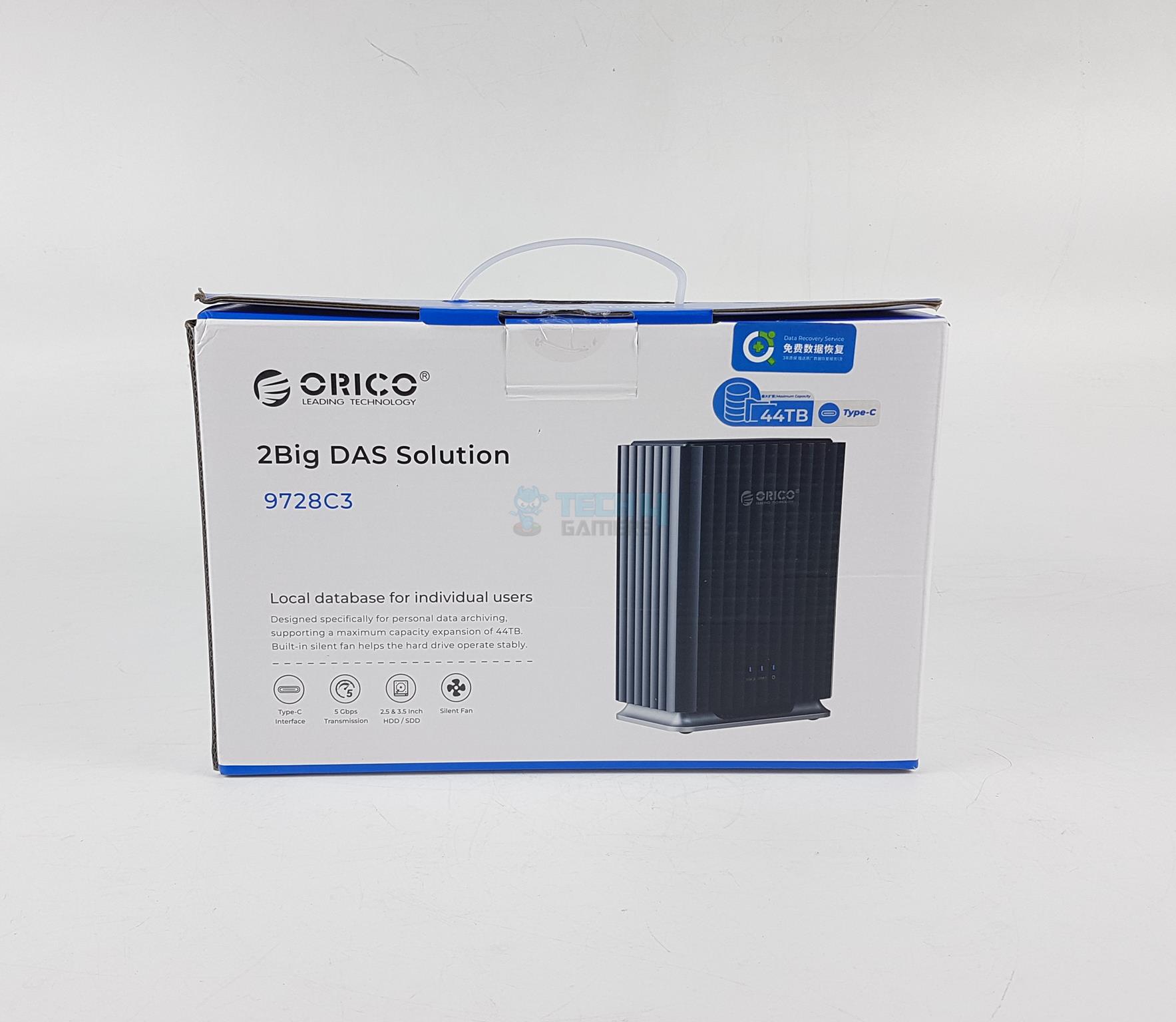
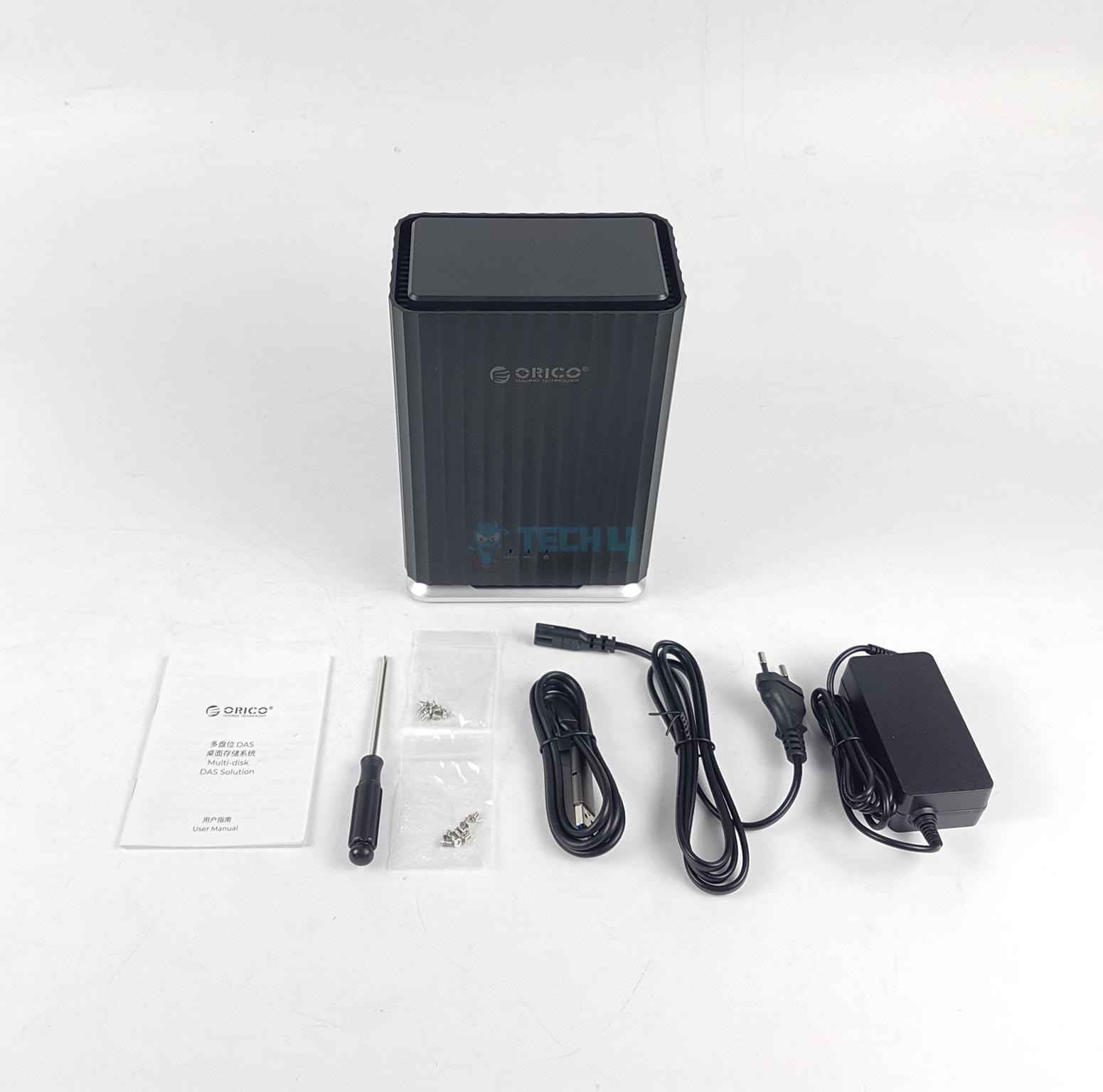
The enclosure is shipped inside a paperboard packing material. The box has blue and white color theme. It is mentioned that this 2BIG DAS enclosure is suitable to create local database. The following are provided in the box:

  • 1x 2-Bay Enclosure
  • 1x User Guide
  • 1x Screw Driver
  • 8x Philips Screws for 3.5” Drives
  • 8x Philips Screws for 2.5” Drives
  • USB Cable
  • Power Cable
  • Power Adapter

A Look At The Enclosure

Main Design
Main Design (Image By Tech4Gamers)

The enclosure itself is made of AB plastic material. There is no aluminum construction. I think the enclosures with more capacity are made of aluminum material. There is a stripe design on the main frame which looks quite appealing.

The base is silver. However, it is also plastic and has 4x rubber feet. The enclosure has a dimension of 94×146.5x213mm (LxWxH). There is a 60mm silent fan at the base for effective ventilation. There is no RAID support on this product.
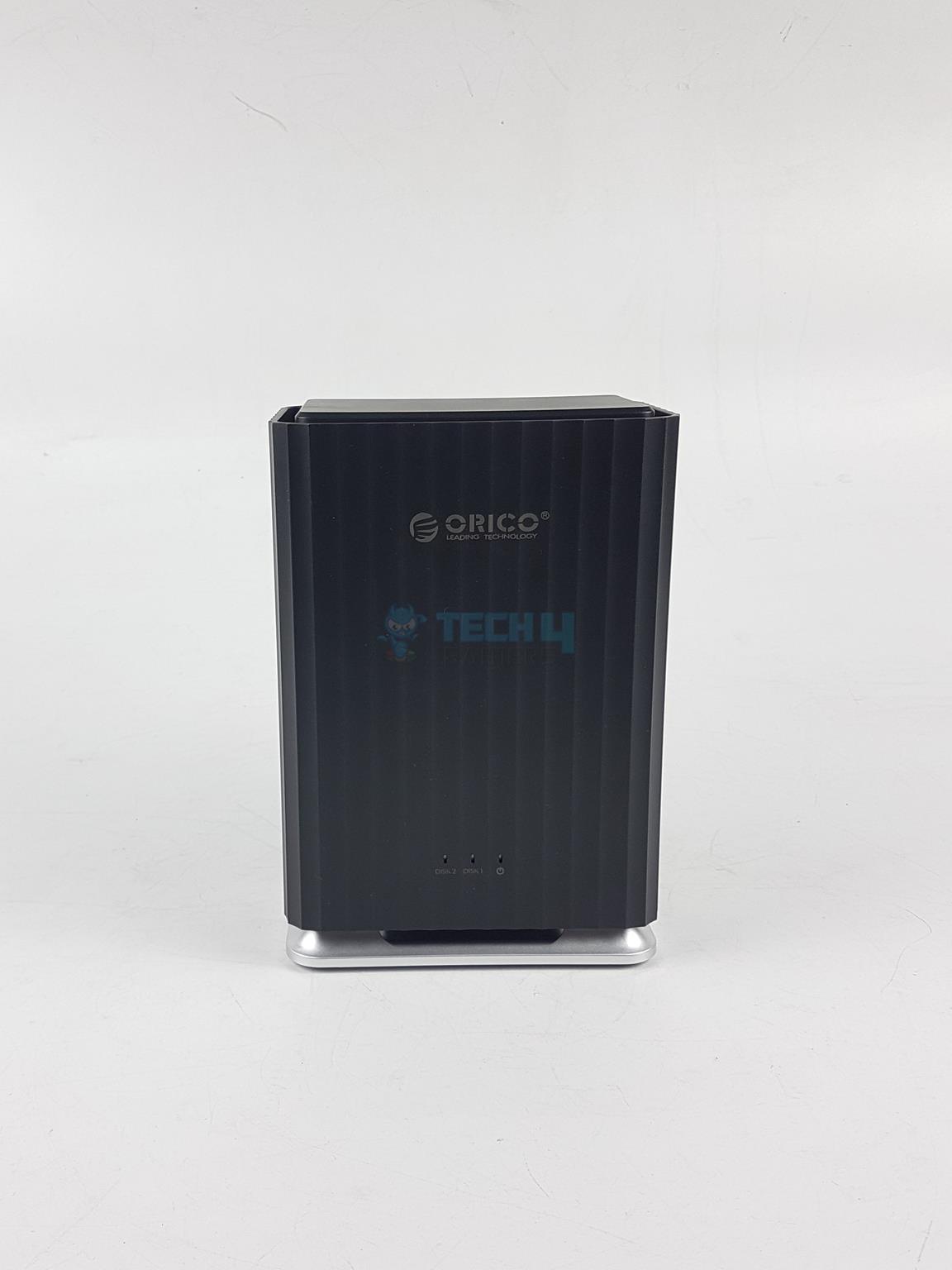
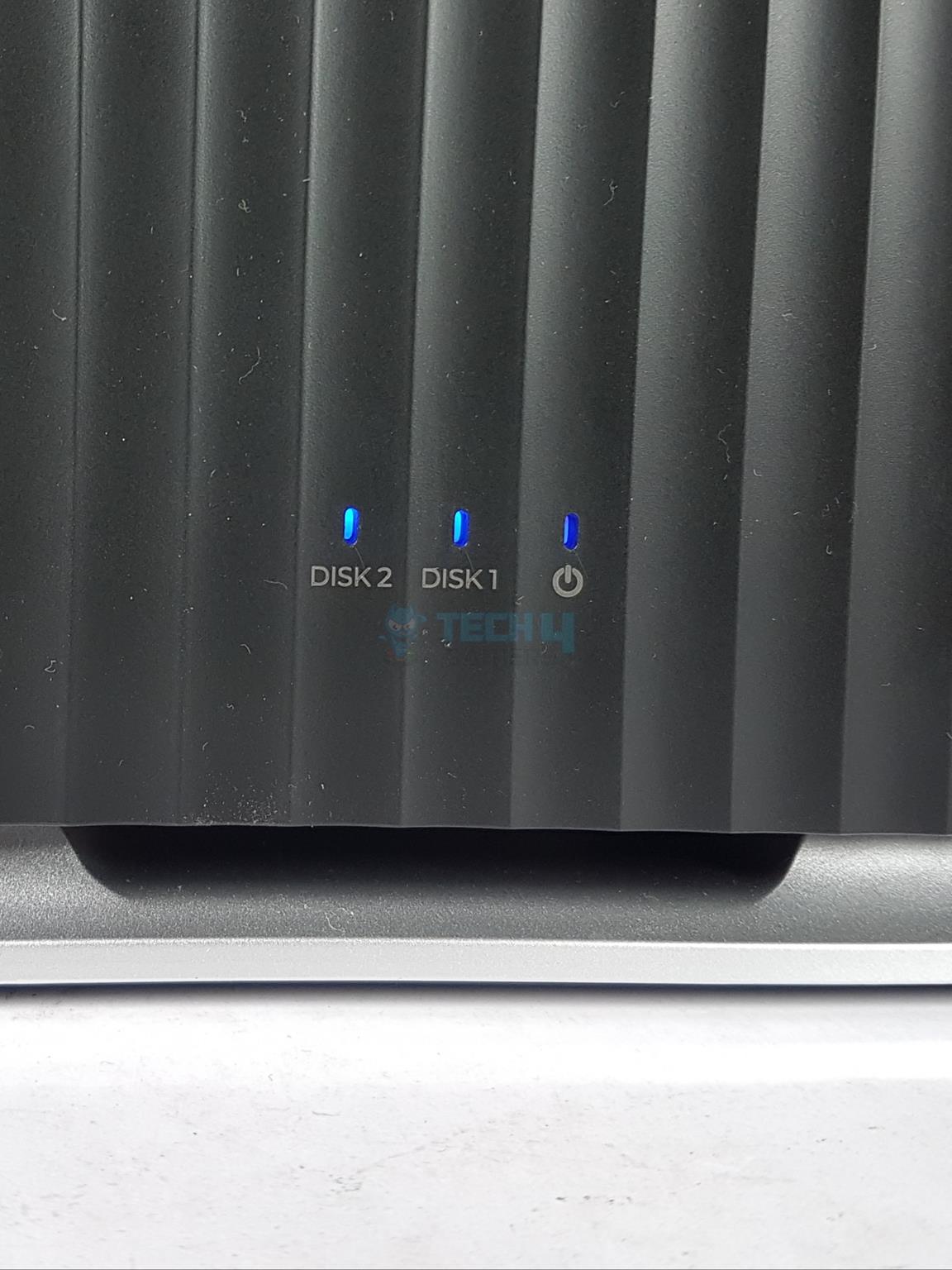
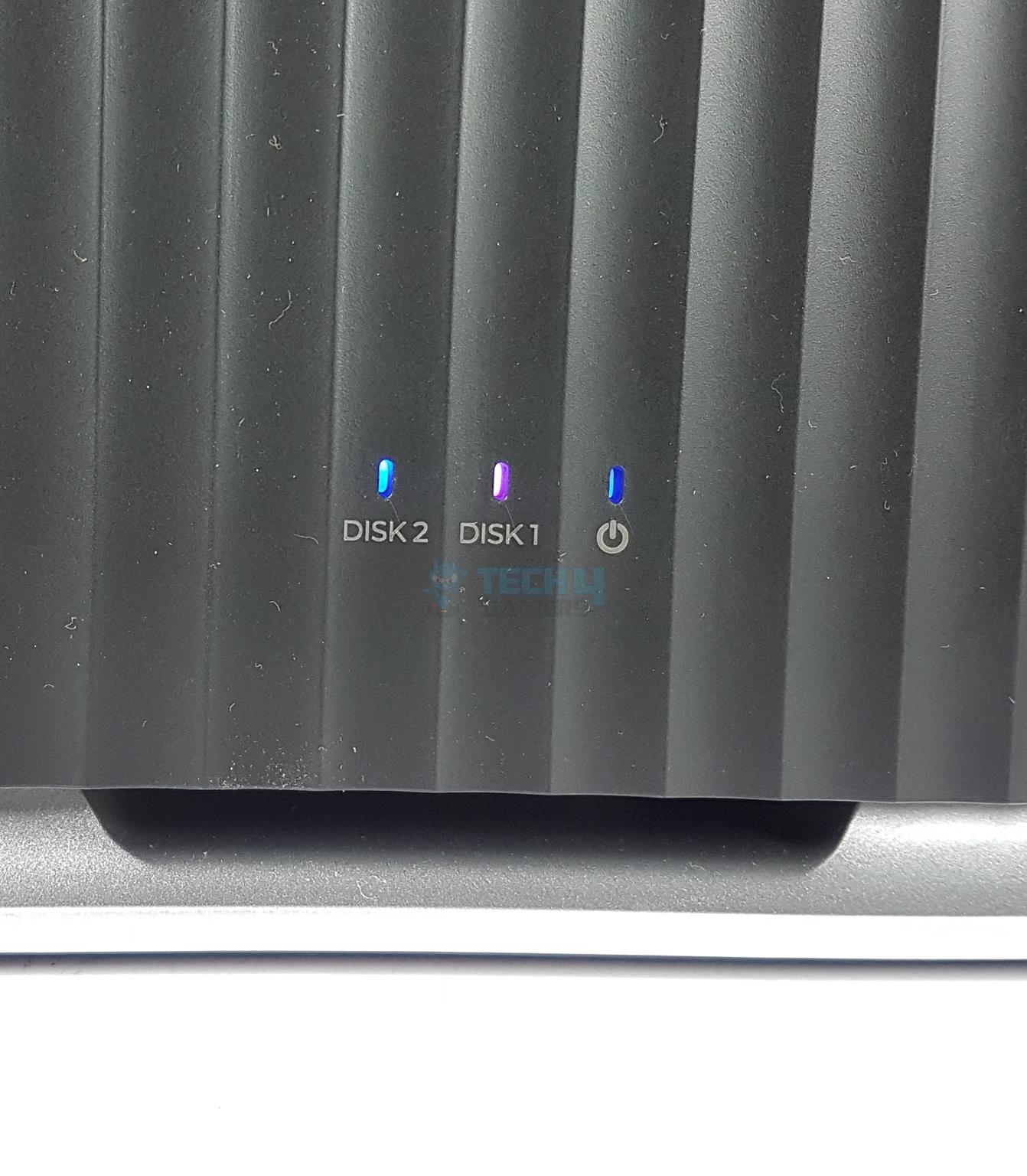
Looking at the front side (the side facing the user), you can an ORICO branding on the top. There are LED indicators at the base. They show the status of Disk 1 and Disk 2 separately which is a wise design. There is also a power LED indicator. The blue color means that the station is powered and disks are ready.

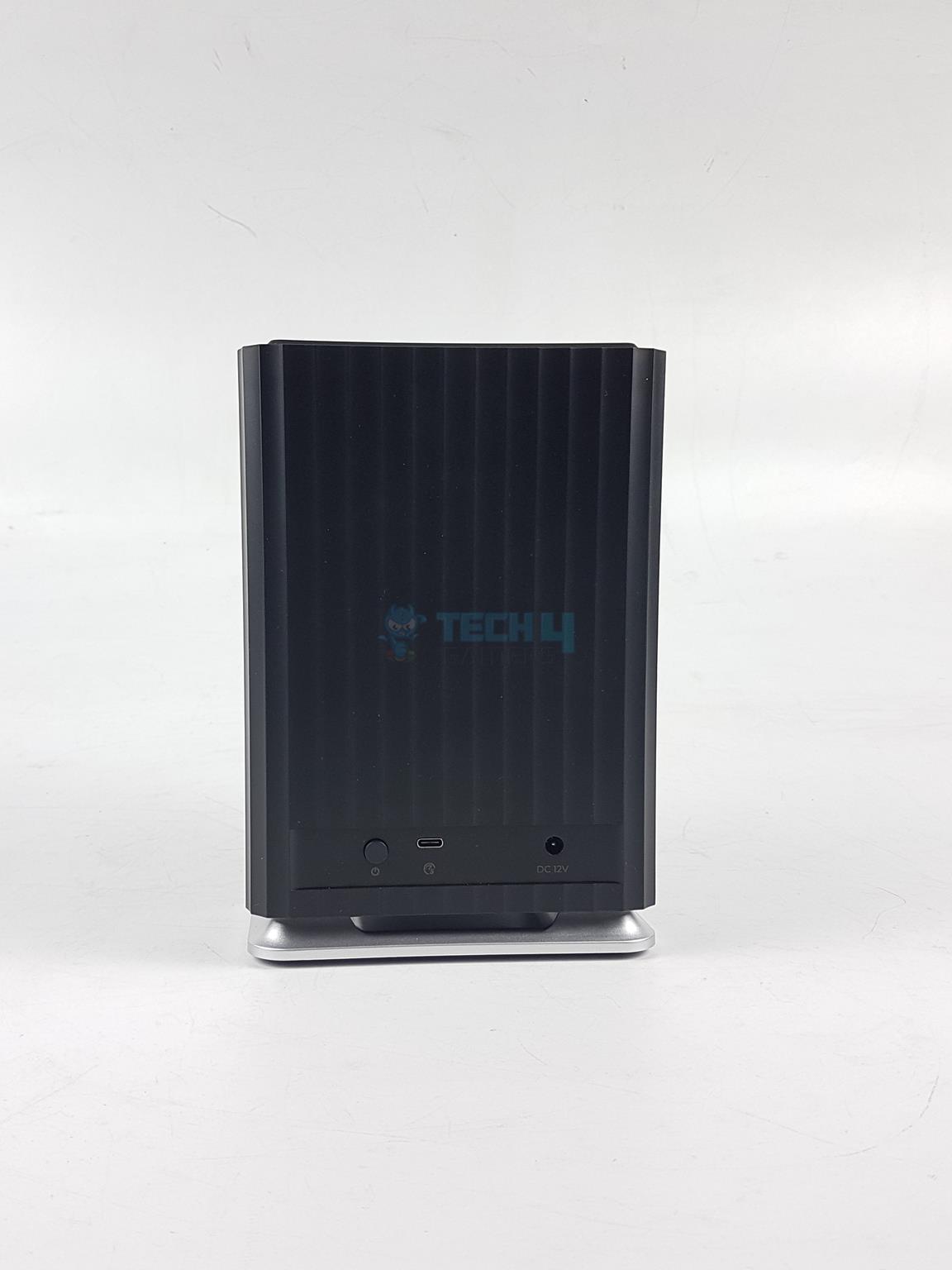
The backside of the station is same as on the front. There are two ports and a power button on the base.
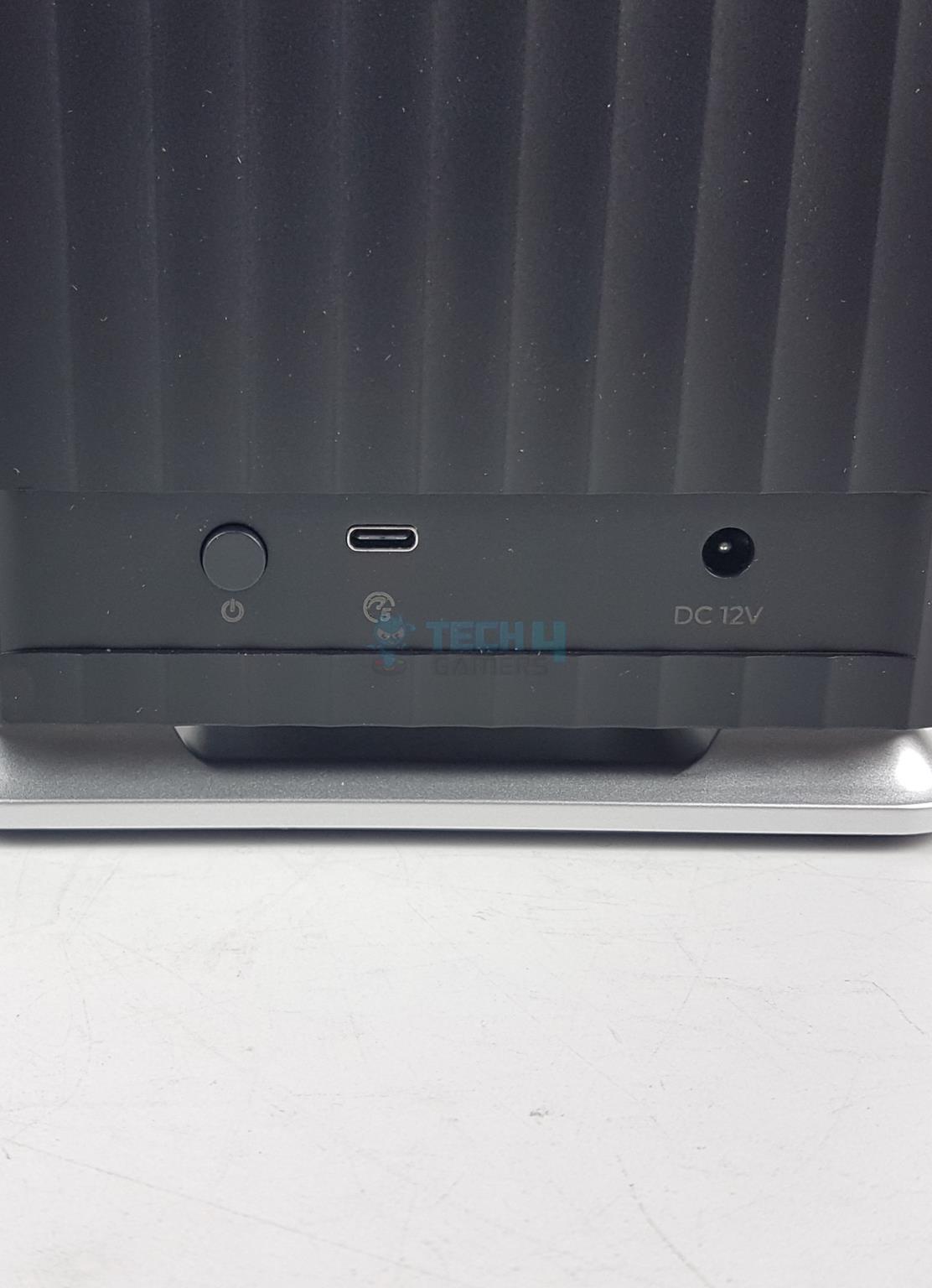
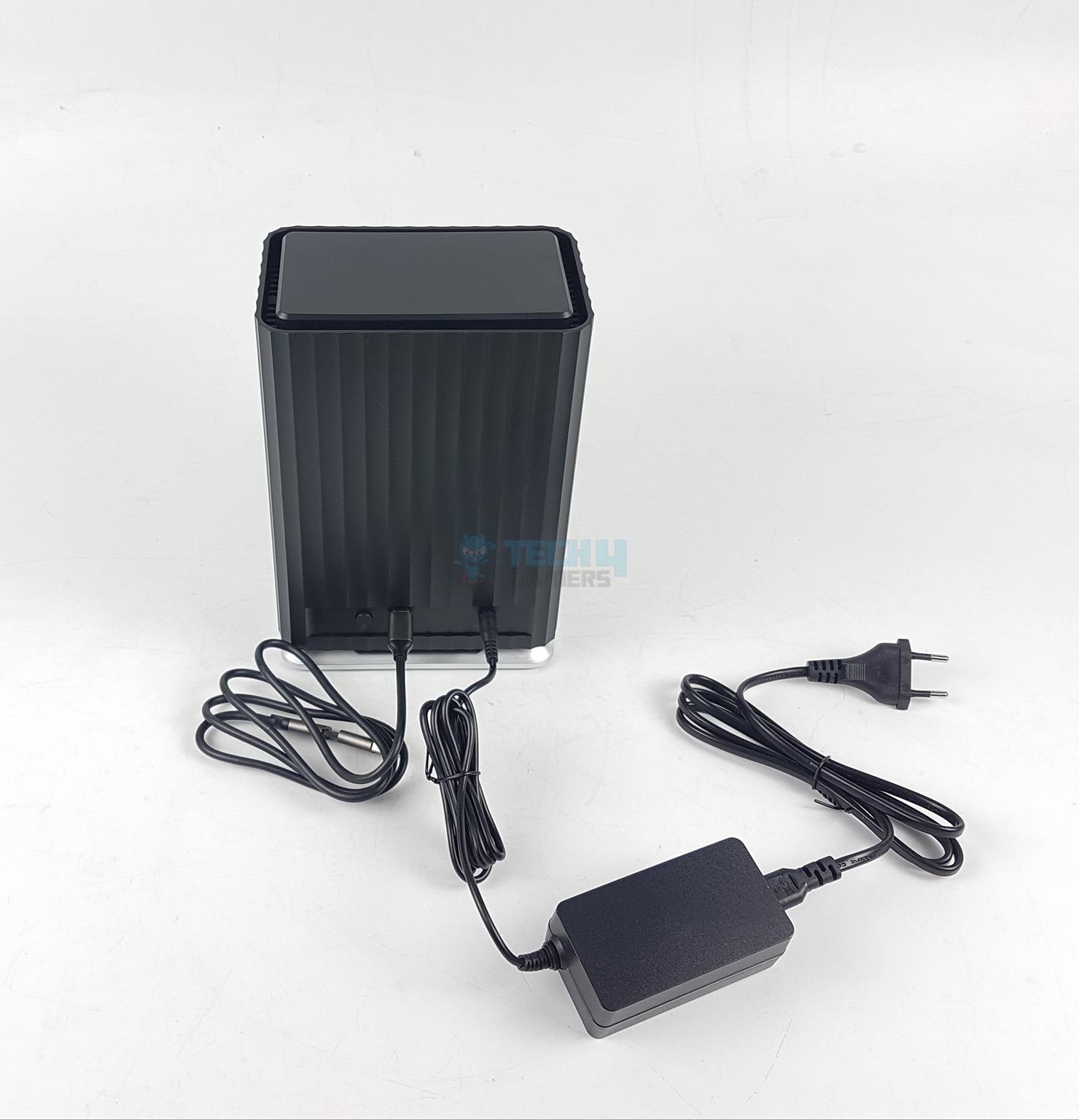
We have a power jack or port on the right most side. This is where the power cable is connected. There is a USB Type-C port in the center. Then there is a power button. Pressing it will switch the enclosure on or off.

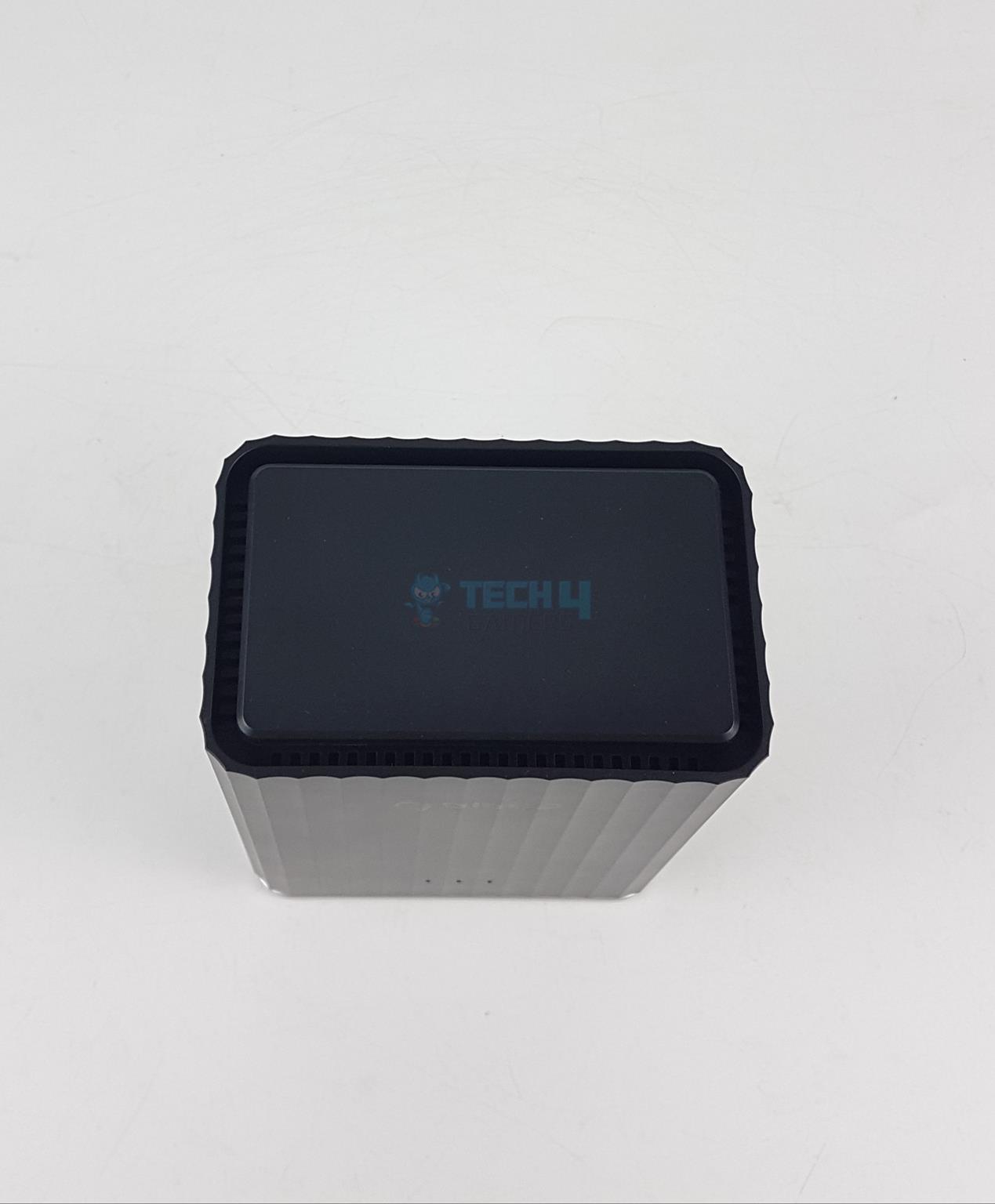
Looking at the top, there is a plastic cover that has magnetic attachment with the main frame. Pressing it once will release it. It does not come off completely which is a good thinking from the manufacturer.
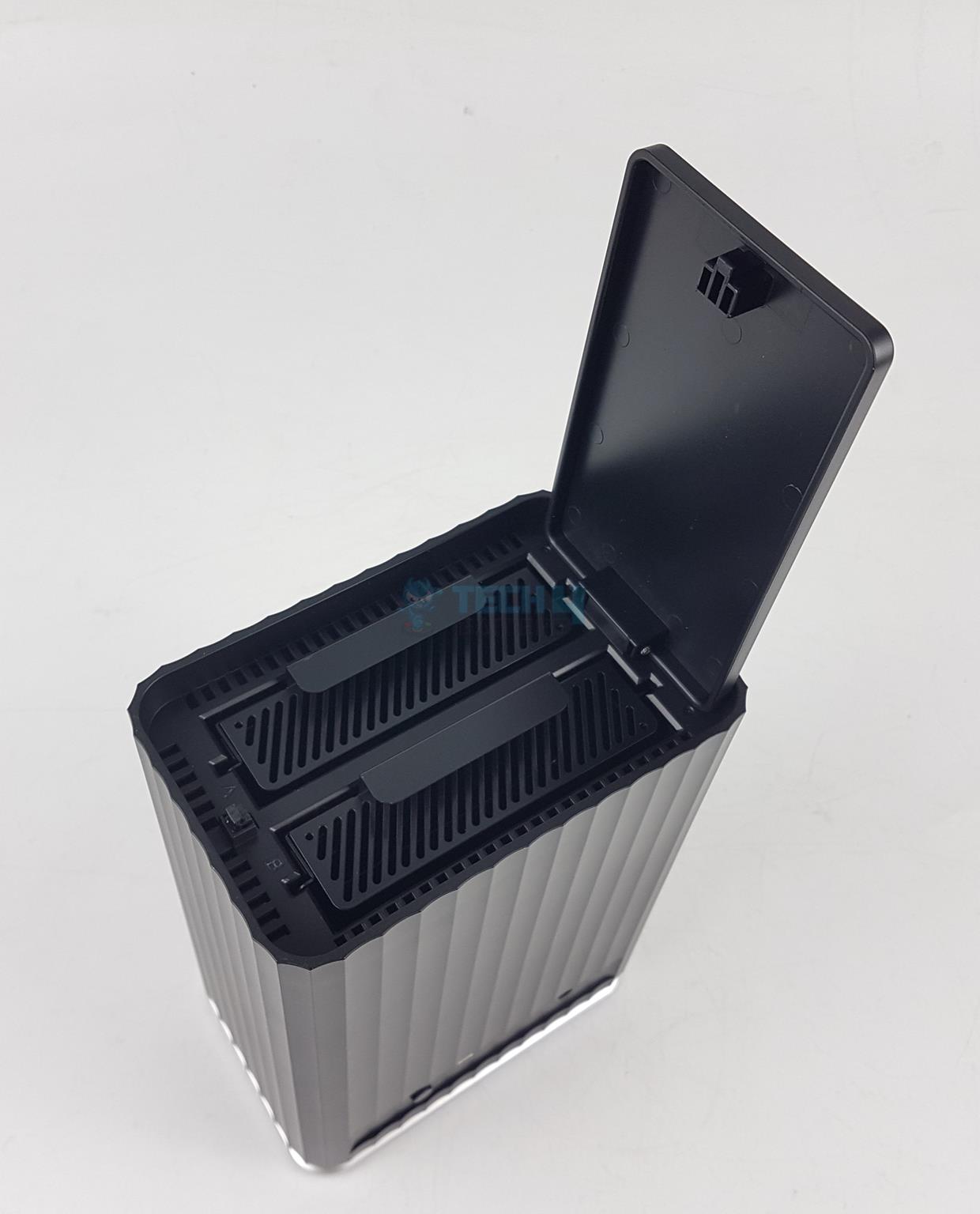
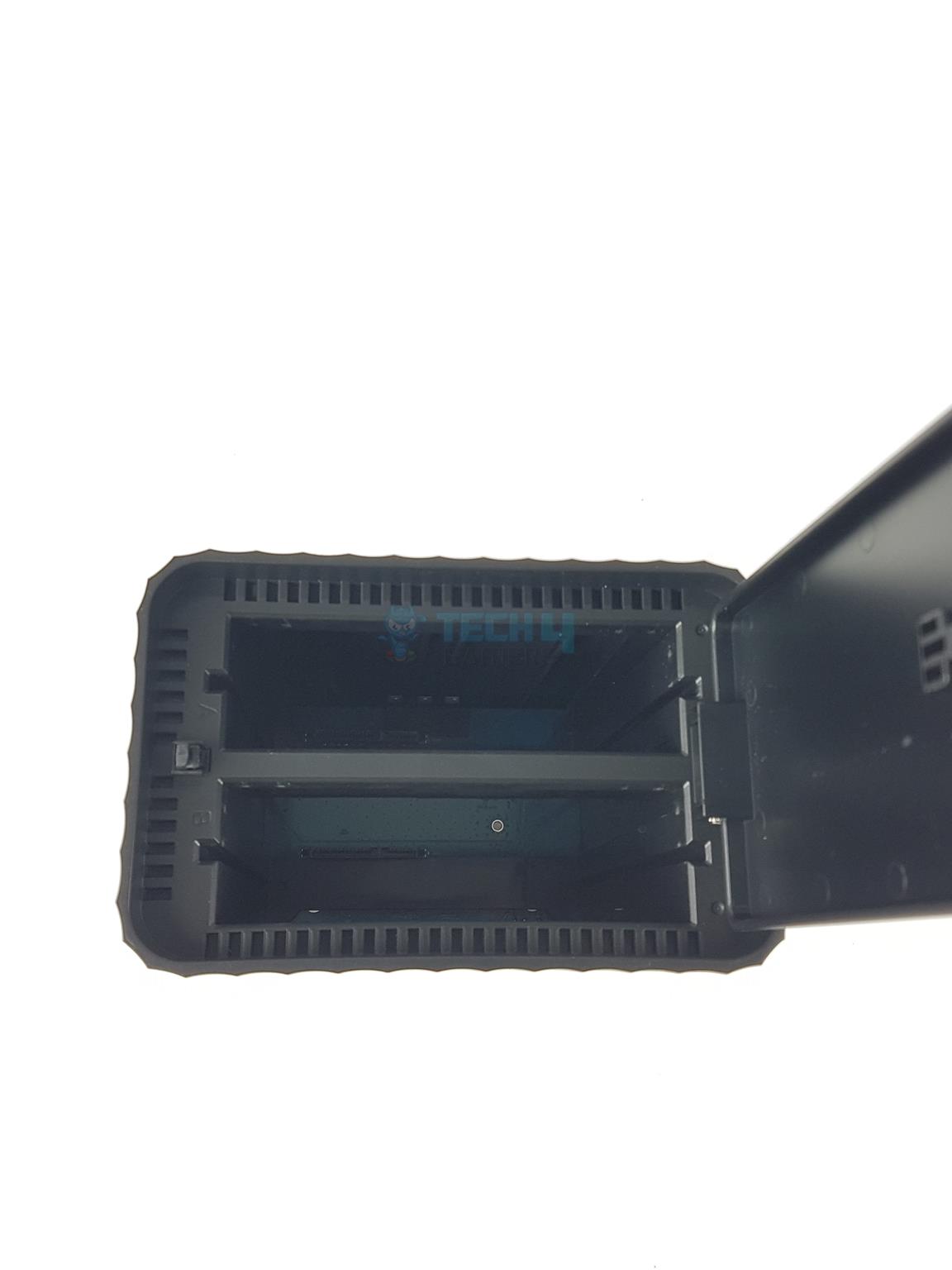
You can see two drive caddies in the picture. I have opened the lid. The caddies can simply be pop out and slide back in. You can see the space in both bays after removing the cadies.
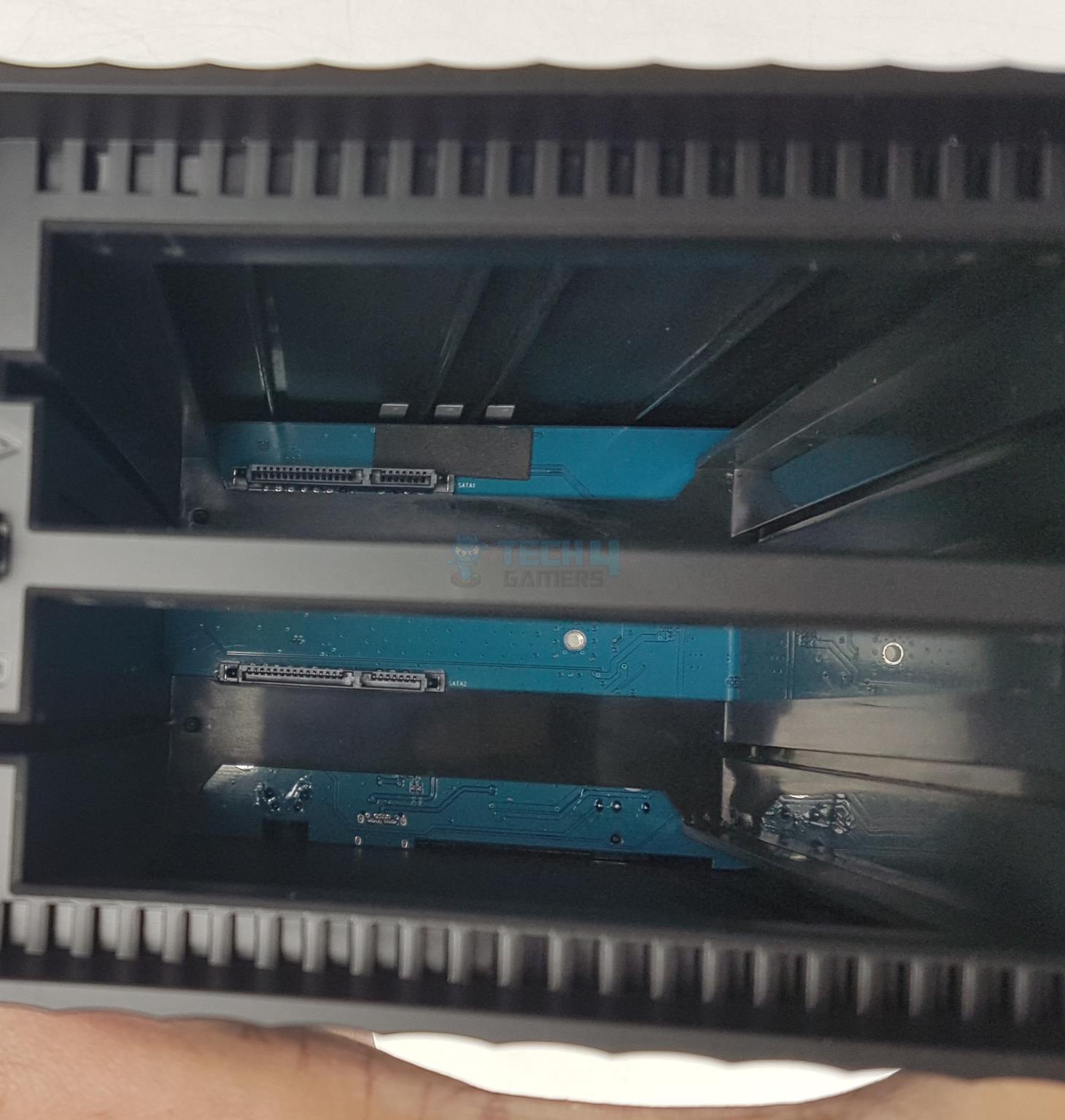
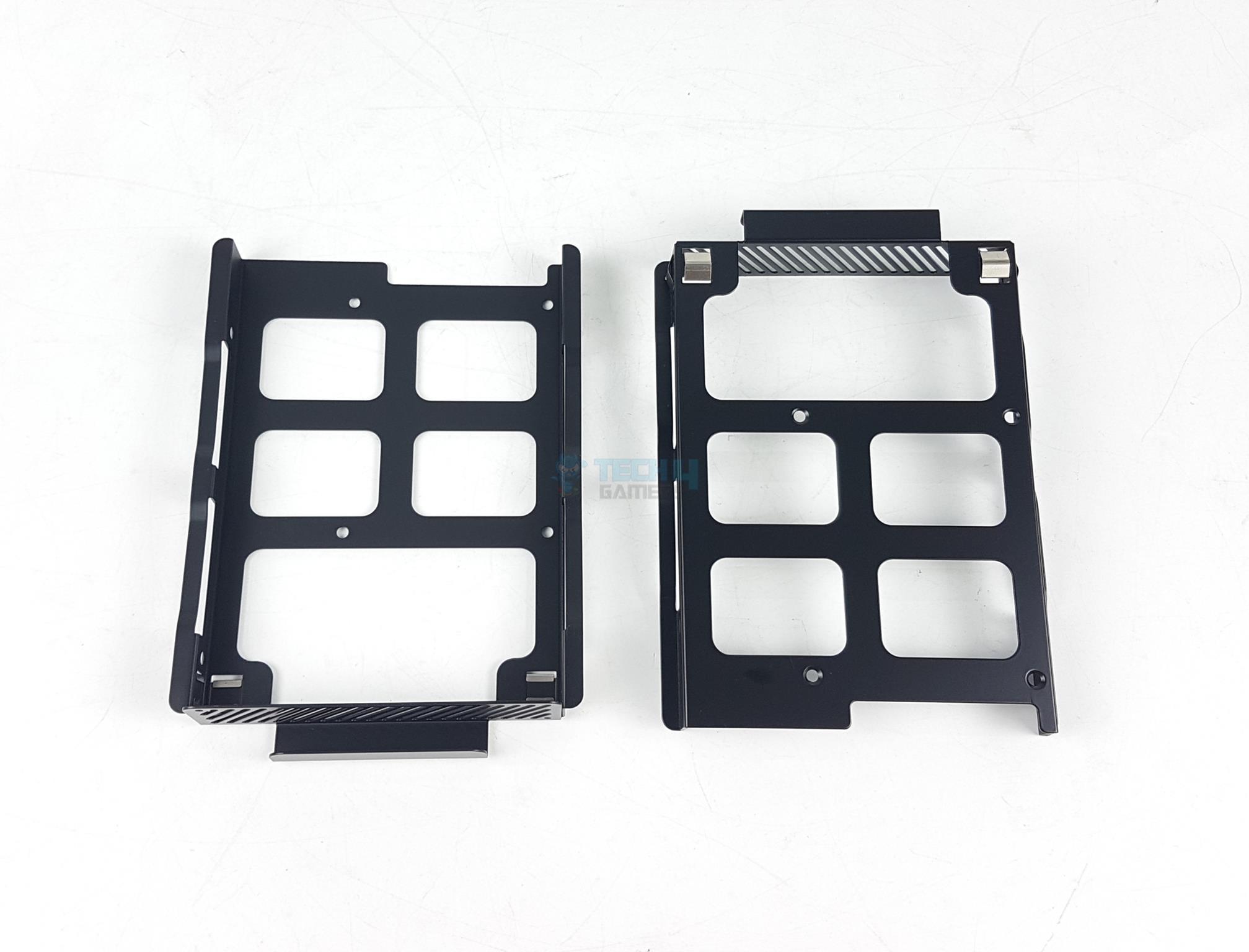
Here is a close up view of the base of both bays. You can see two SATA ports (data and power) on the blue PCB. You will need to ensure that drives are installed correctly on the cadies to align the SATA ports of the drives with the ones in the enclosure. There are two plastic made standard drive cadies.
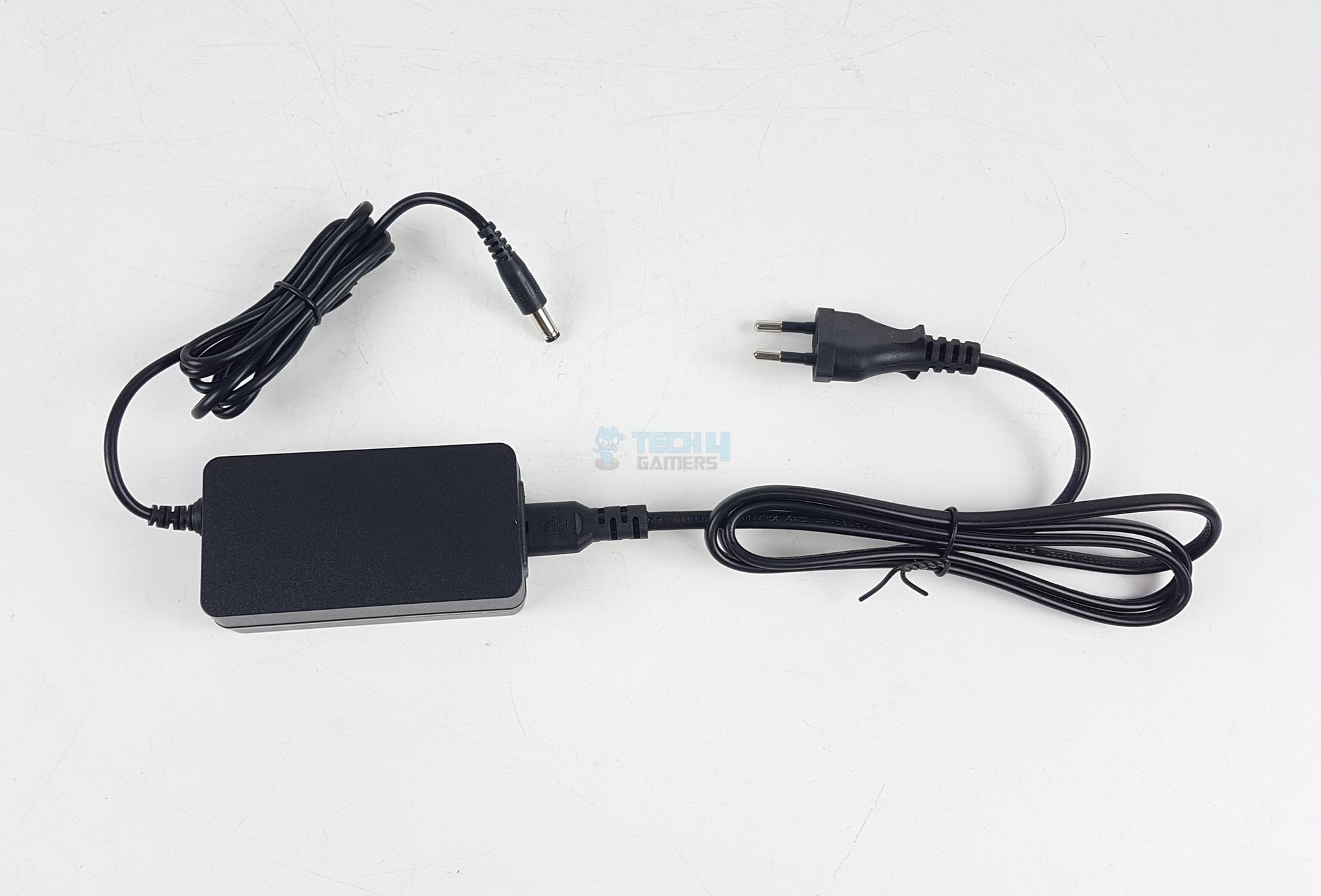
ORICO has provided a power cable and power adapter in the accessory box. You need both to power the station. It is rated for 12V 4A.

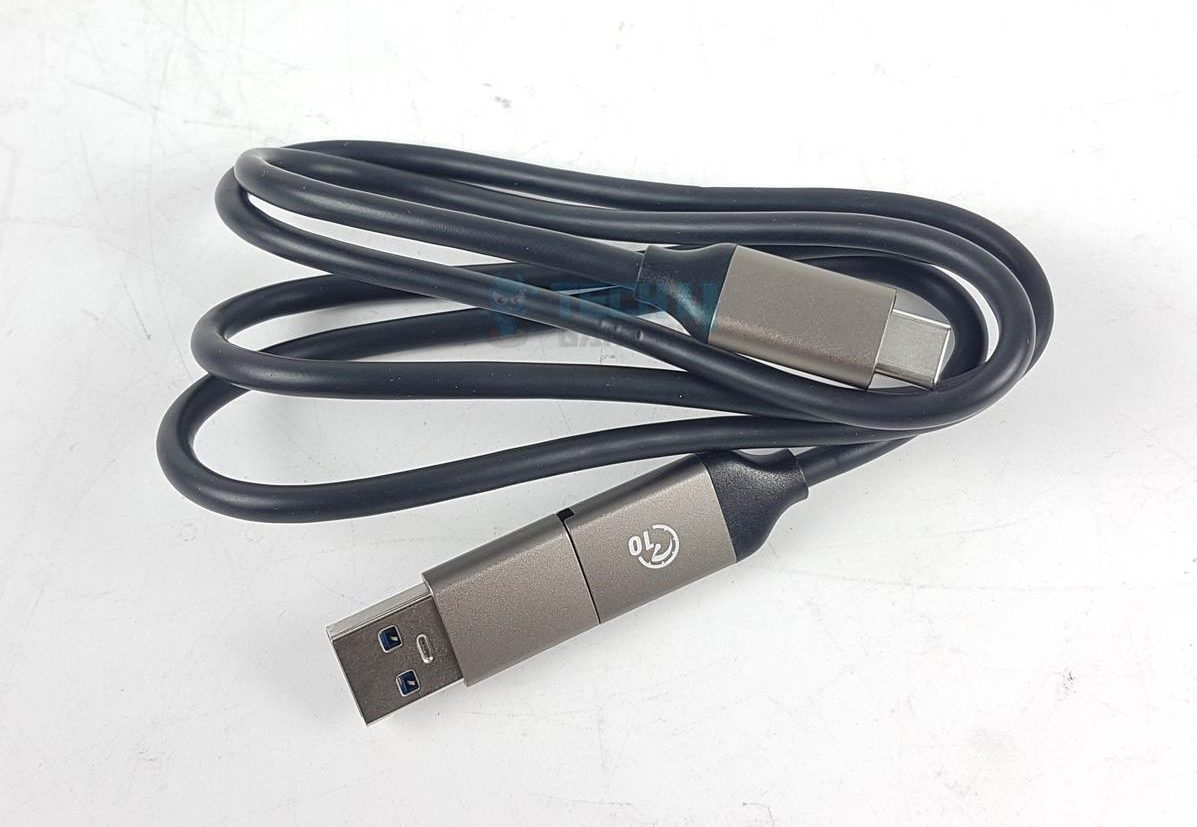
There is a single USB cable provided with the enclosure. I am surprised, the label 10 on the bulk head of the cable indicates that this cable is rated for 10Gbps transfer rates. However, the enclosure is limited to 5Gbps speed.

Dual-connector cable
Dual-connector cable (Image By Tech4Gamers)

ORICO has wisely used dual-connector on a single cable design and provided user with USB Type-C and USB Type-A connectors for ease of connection as per the available port on your PC/Laptop. Speaking of that, this enclosure is compatible with Laptop, Phone, Tablet PC, PC, and Projector Router. The supported OS include Windows Chrome OS Android Mac OS.

Setting Up The Enclosure

2x 3.5” Seagate Ironwolf 2TB drives
2x 3.5” Seagate Ironwolf 2TB drives (Image By Tech4Gamers)

You can install a SATA interfaced 3.5” or 2.5” drives on the cadies. You can see, I have installed two 3.5” Seagate Ironwolf 2TB drives.
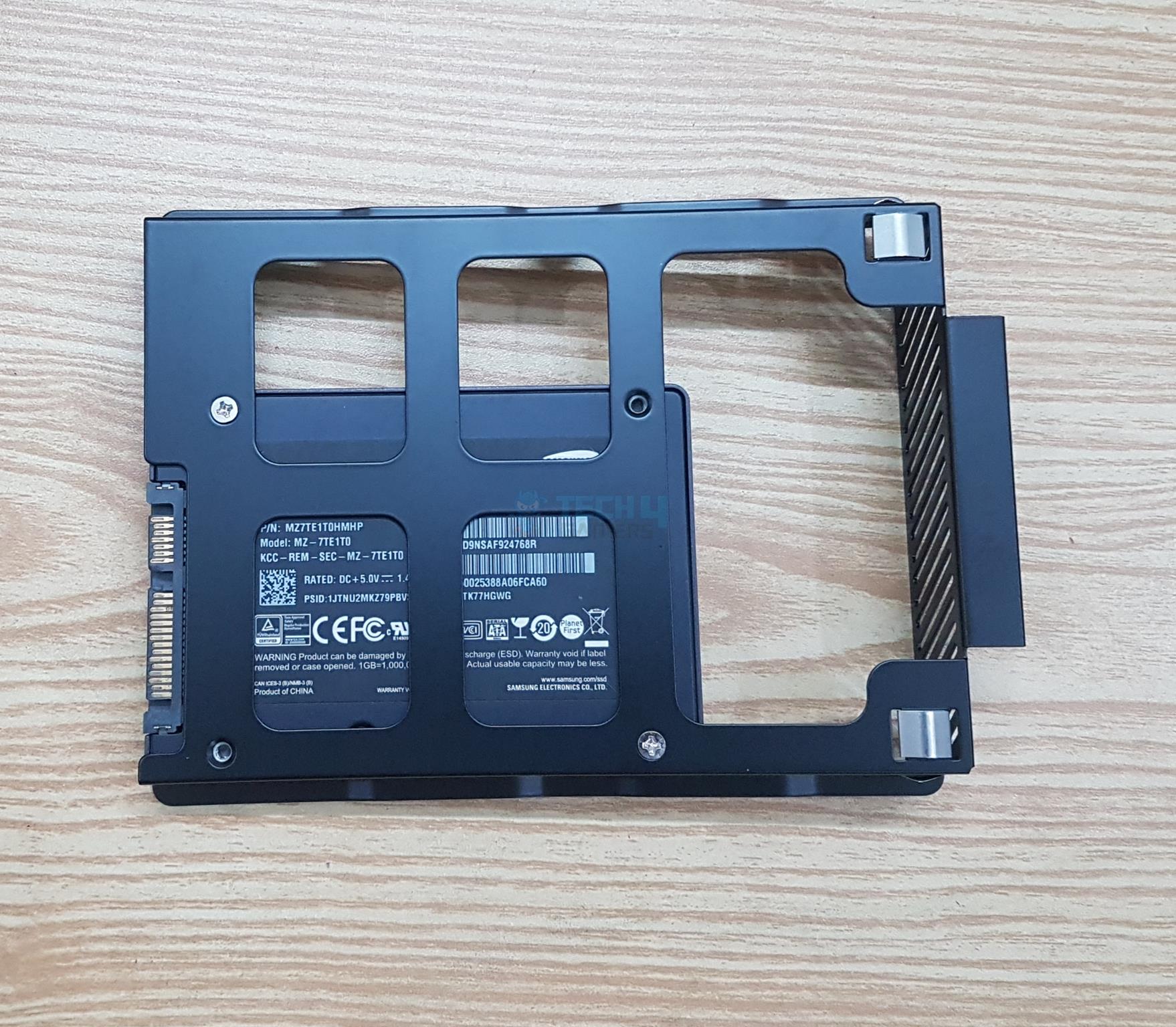
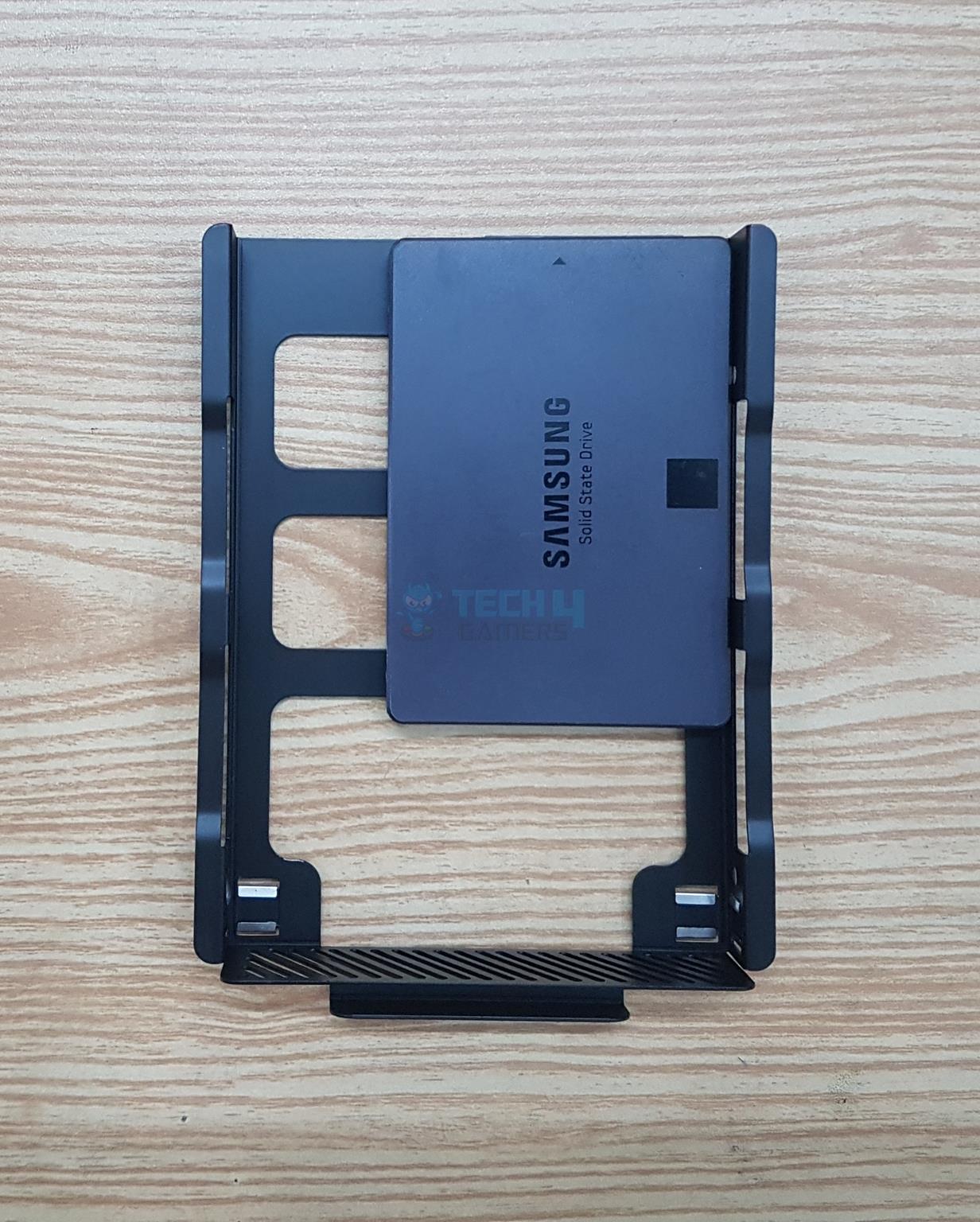
I have also tested the enclosure using a SATA SSD. It is Samsung 840 EVO 1TB 2.5” SATA SSD.
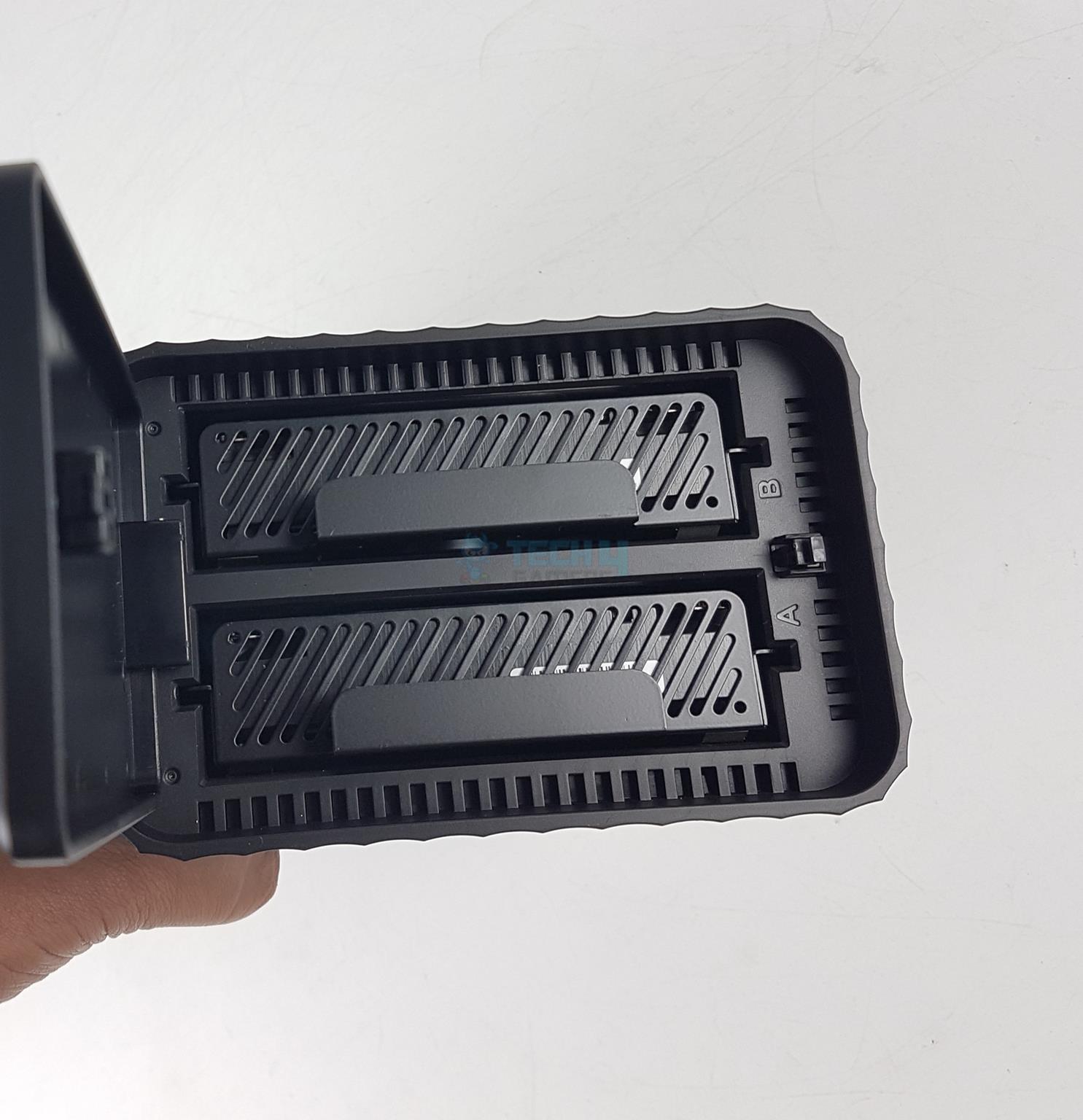
The drives are installed on the cadies and cadies are slided in the enclosure. You will hear a click confirming that drives have made contact with the SATA ports on the PCB. Both bays are labeled A and B which correspond to Disk 1 and Disk 2.

Connect the power cable to the enclosure along with the USB cable. Next, you need to connect the power plug to the socket and USB cable to your host device and you are good to go.

Test Setup

Final Installation
Final Installation (Image By Tech4Gamers)

The following configuration is used to test the performance of the enclosure:

The drive is connected to the USB 3.2 Gen2x2 Type-C port on the motherboard’s rear IO panel. This would remove any bottleneck. Microsoft Windows 11 23H2 is used for the testing.
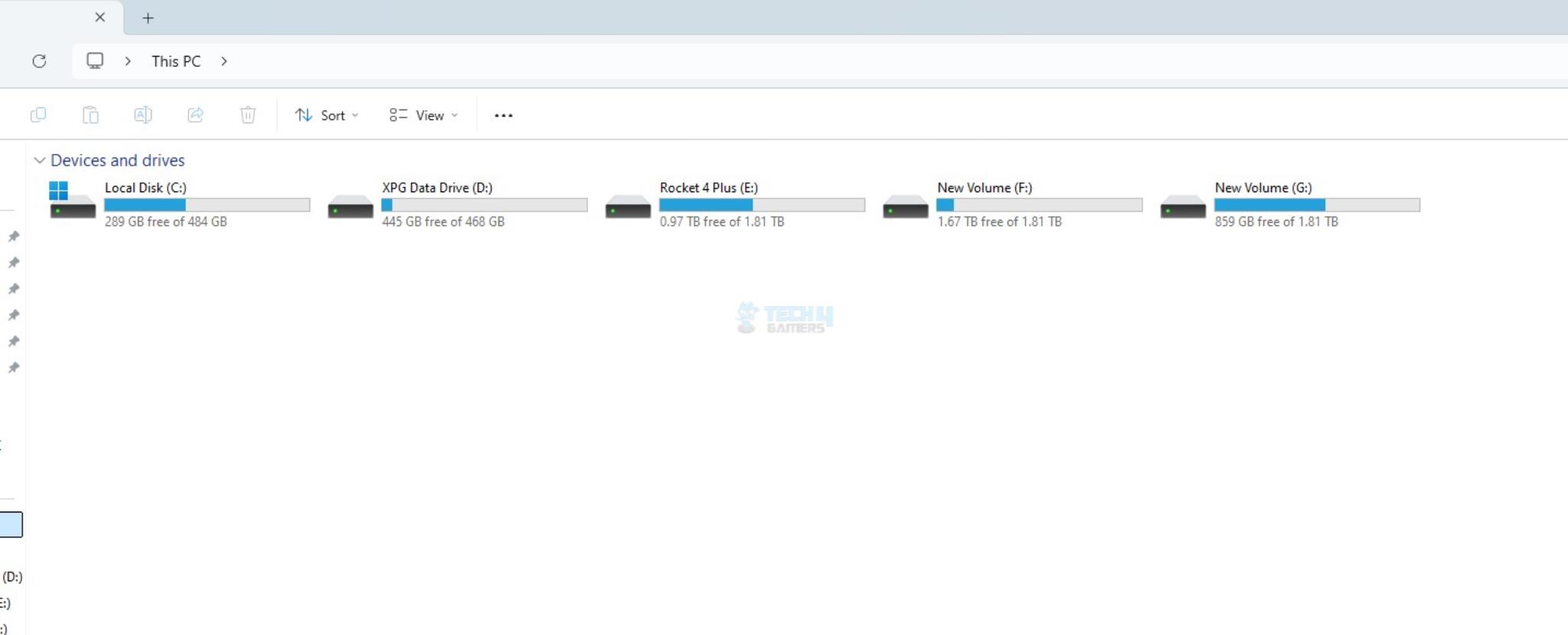
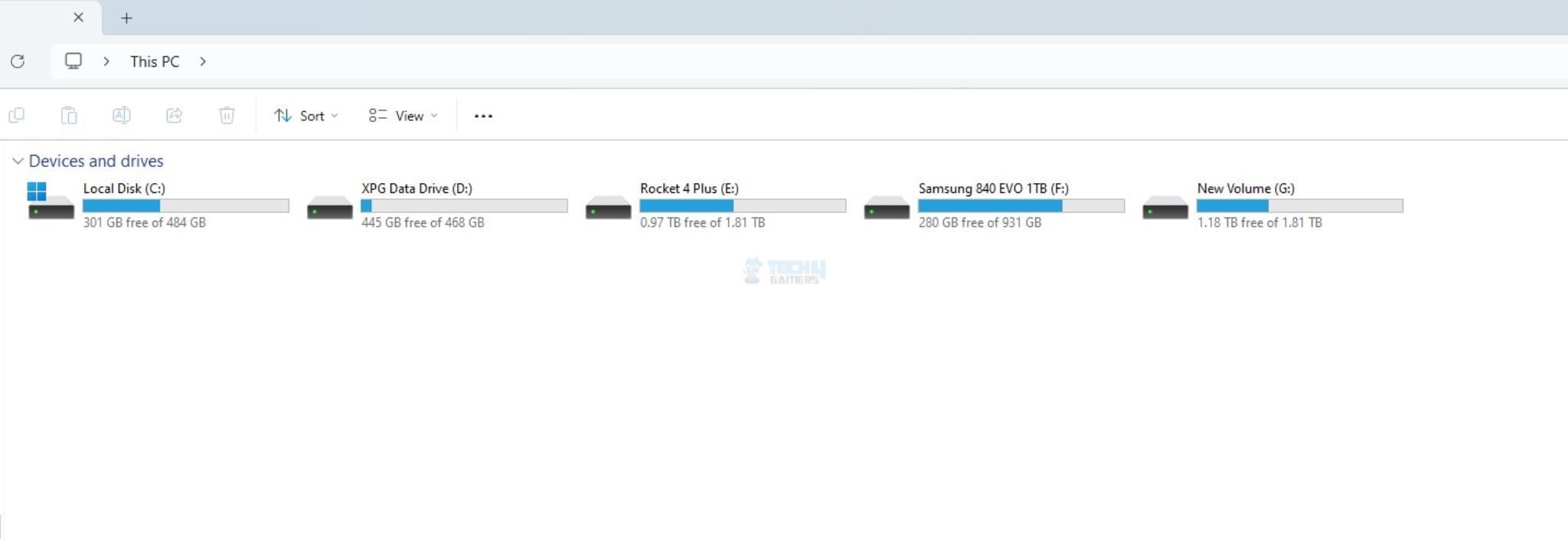


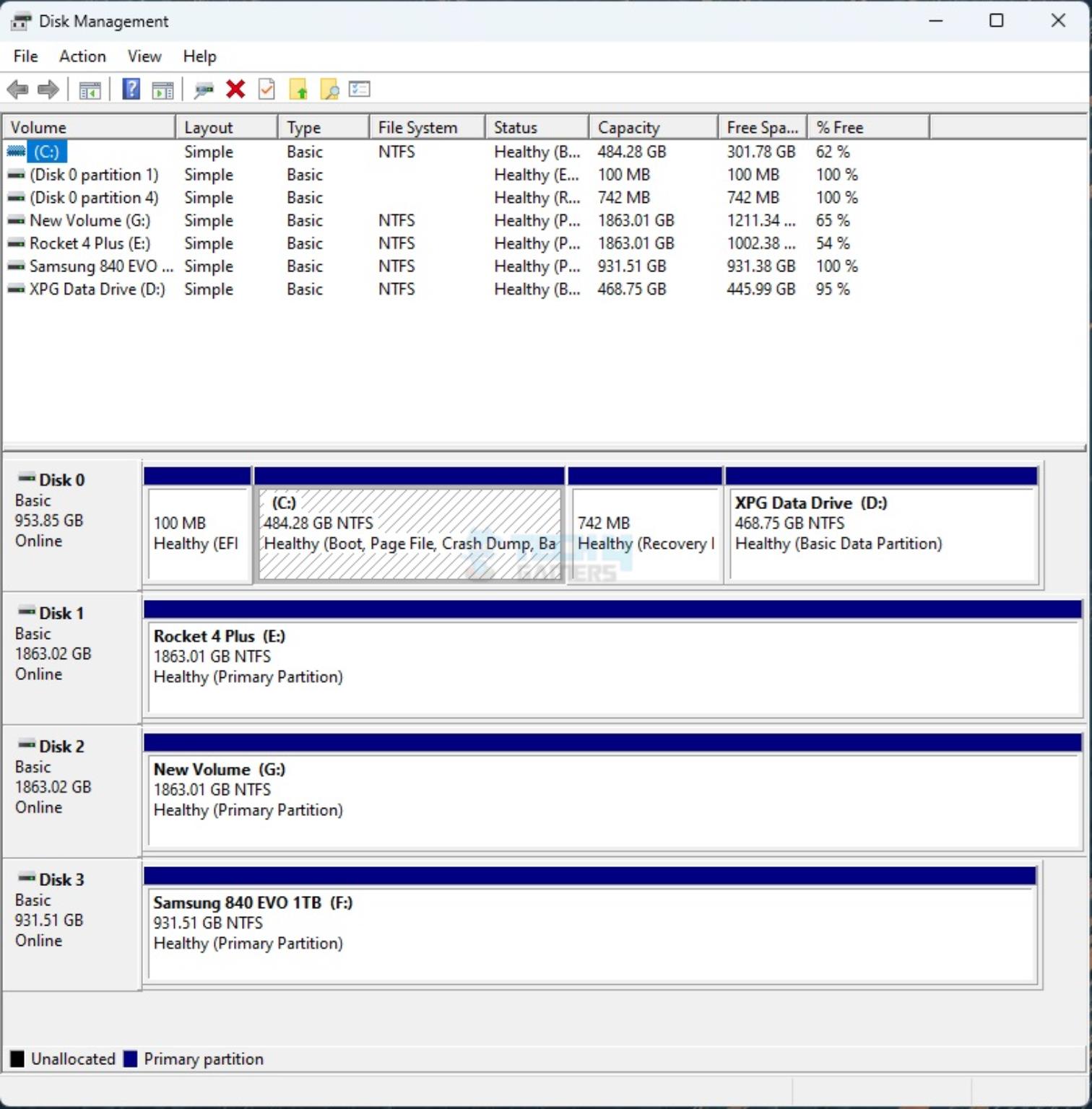
Now let’s go over disk management.
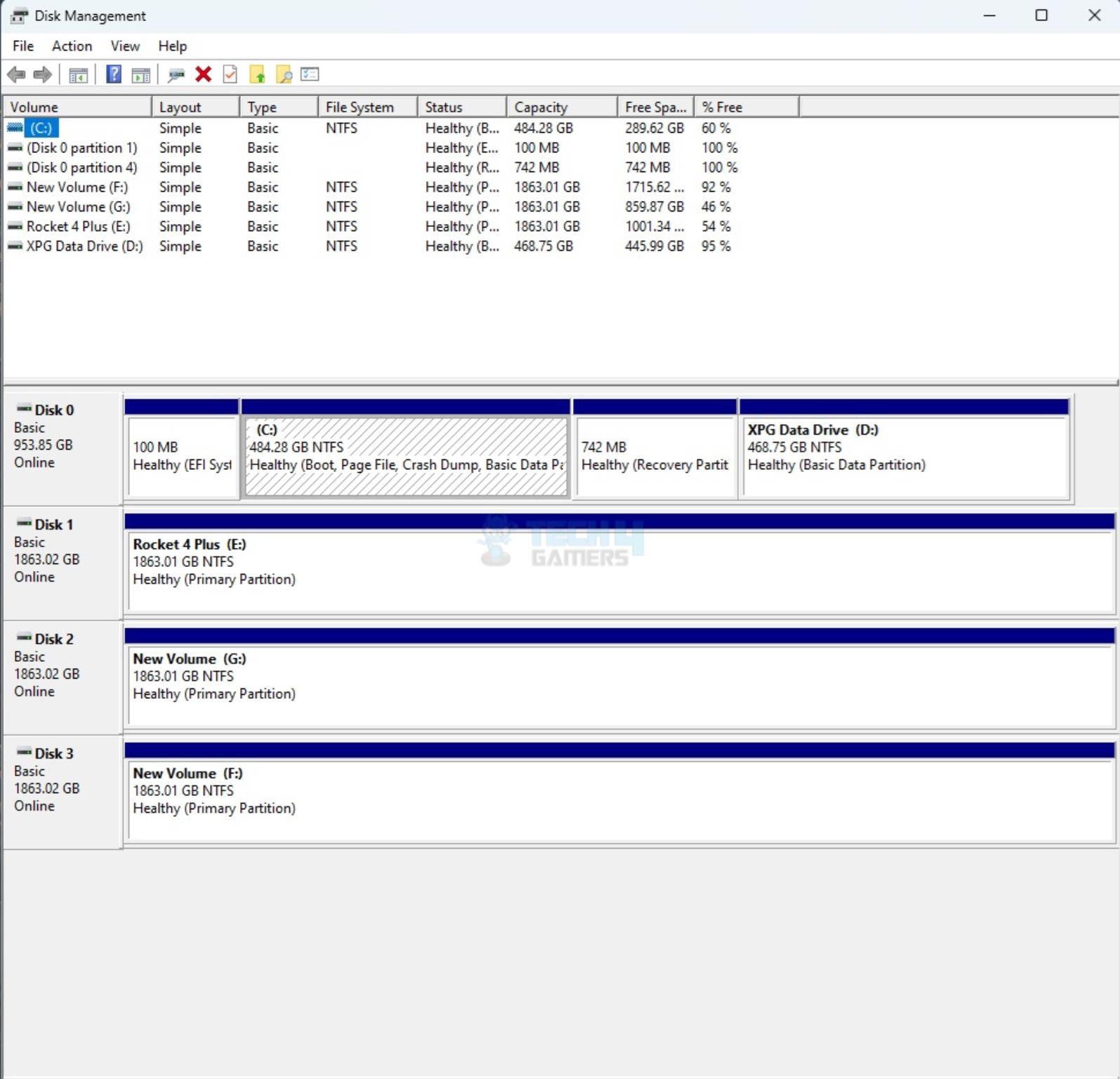


In case you are going to use new drives, you may need to initialize them first. You need to go to Disk Management Console for that. Both drives will appear separately.
Test Results

Let’s start with CrystalDiskMark.

CrystalDiskMark Results
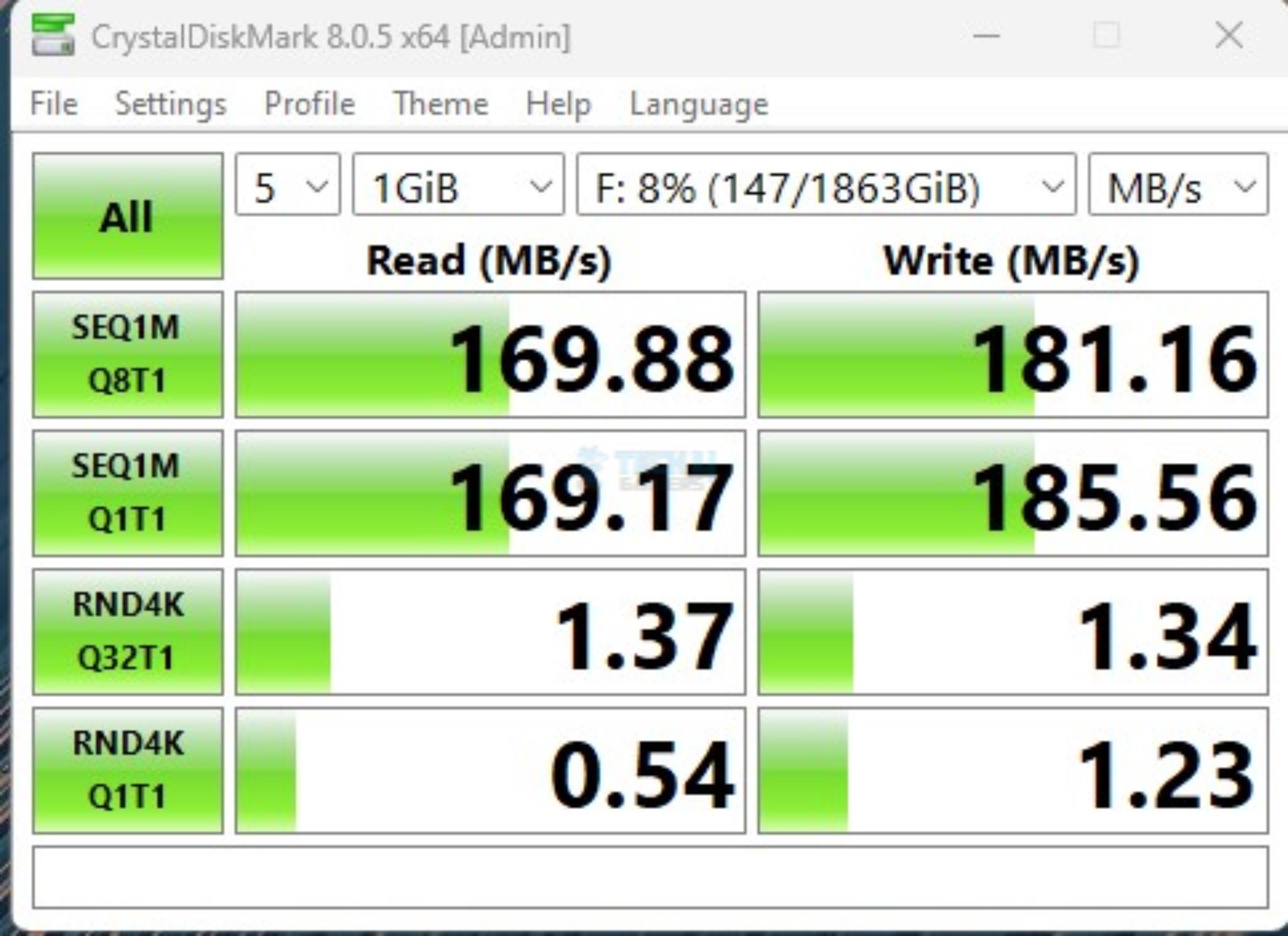
I ran the CDM on one of the 3.5” HDD. These drives are spinning at 5900 RPM and have a dedicated cache. The 169.88 MB/s sequential read and 181.16 sequential write are somewhat slow but not that glaring.

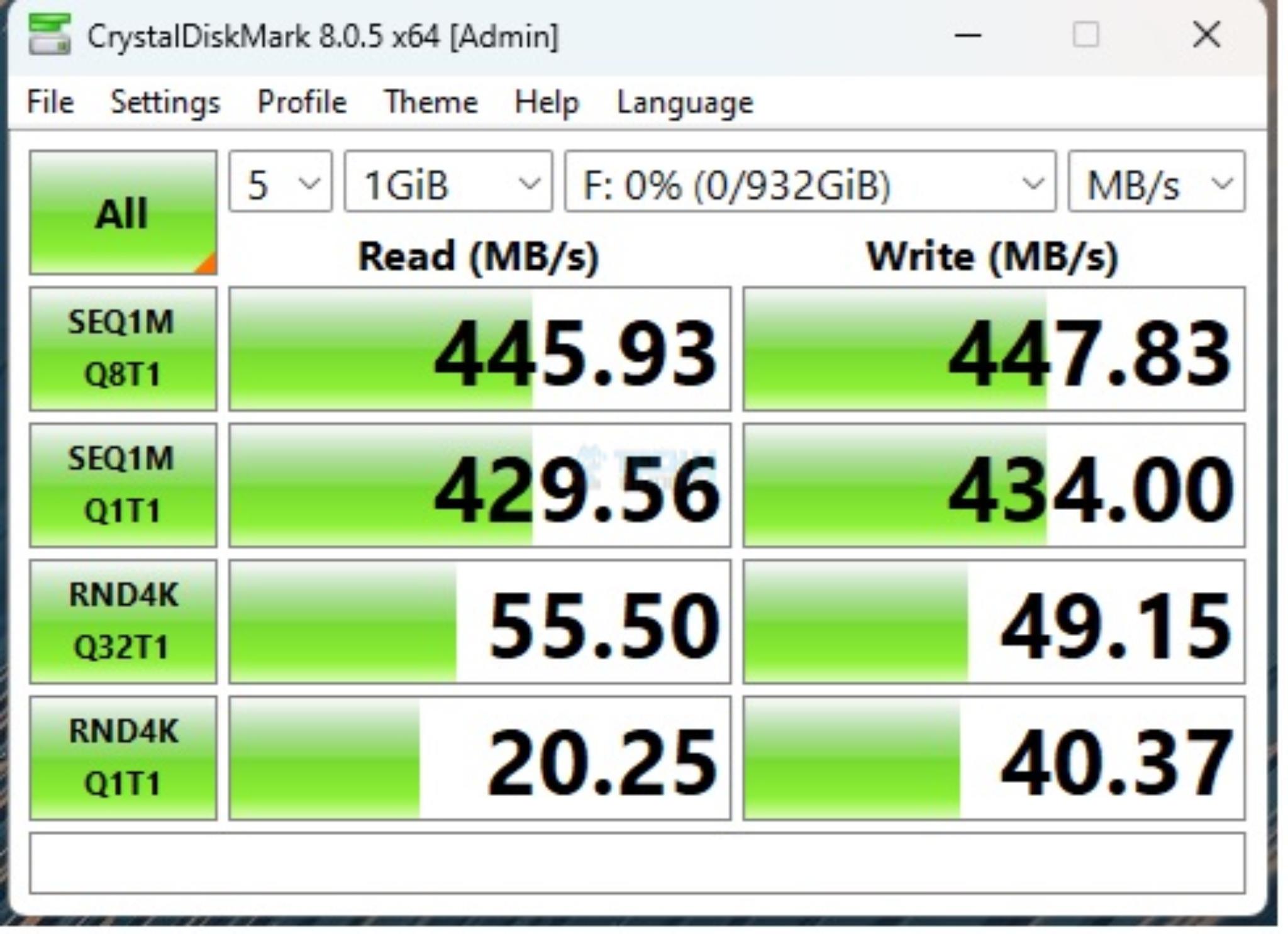
Next, I ran the CDM on Samsung 840 EVO 1TB SATA SSD. The results are good with 445.93 MB/s sequential read and 447.83 sequential write. Remember that the enclosure is operating at 5Gbps cap. This is the max bandwidth available for both drives.

Simultaneous CrystalDiskmark
Simultaneous CrystalDiskmark (Image By Tech4Gamers)

Next, I ran CDM simultaneously on both drives as I wanted to see the behavior. The 3.5” drives were almost at the same speed as originally tested whereas the speeds decline on the 2.5” SATA SSD.

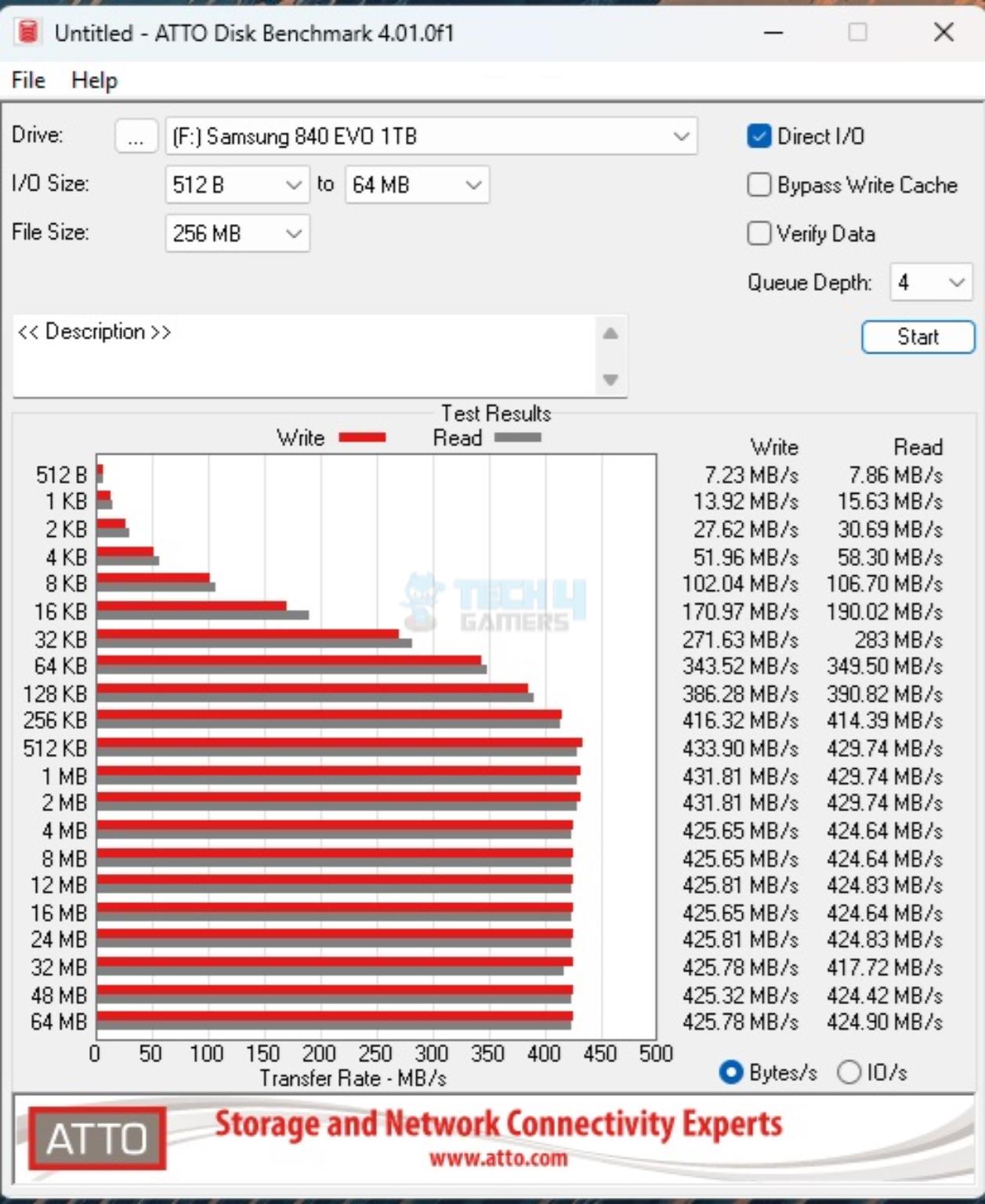
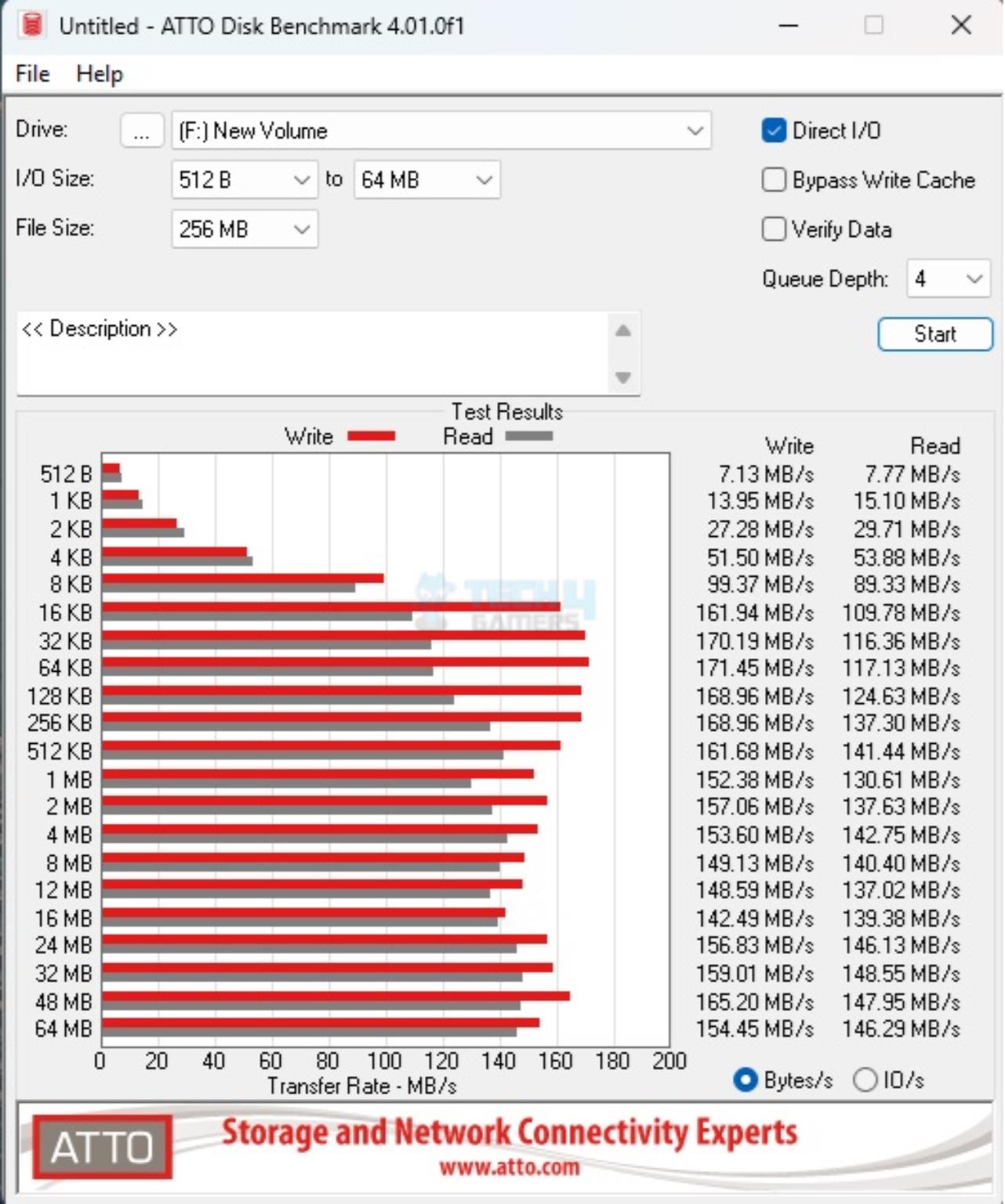
ATTO Disk Benchmark
Real World Testing

Now, it is time for a real world scenario. I transferred the transferred 30GB data from Gen4 NVMe SSD to the 3.5″ drive in the enclosure. It took 35 minutes approximately with an average speed of 14 MB/s. When a 165GB folder was copied from Gen4 NVMe SSD to the 2.5” Samsung EVO 840 1TB SATA SSD, it took approximately 6 hours to complete this transfer at the average speed of 15 MB/s.

Should You Buy It?

Buy It If

✅You want to create a local backup: The ORICO 2BIG DAS is a viable solution to create local backup of your important data.

✅You have spare drives and you want to service them: If you happen to have a few spare drives, you can put them to a good use using this enclosure.

✅You are after a cost-effective way to increase storage capacity: The ORICO 2-bay hard drive enclosure is a cost-effective solution that allows the user to expand their internal storage with external one.

Don’t Buy It If

❌You are looking for high-speed external enclosure: This enclosure operates at 5Gbps. If this is not what you need, then skip it. However, 5 Gbps sounds good enough for SATA drives.

❌You need an enclosure with RAID support: This enclosure does not allow you to create RAID. This is not your cup of tea if you are looking for a RAID based expandable storage setup.

Final Words

Last time we tested RICO O7000 2TB DRAM-Less NVMe SSD and found it to be a good performer. This time around we have tested ORICO 2-bay disk drive enclosure in DAS category (2BIG DAS). This product is available in multiple configurations starting from 2 bay to going high like 5-bay etc.

The ORICO-9728C3 is a dual bay enclosure that can house up to 2x 2.5” and 3.5” HDD or 2.5” drives and a combination of both. The main frame is made of ABS material. The overall look and feel of this product is premium until you touch it to find out it is not aluminum.

The drive bays are simple and standard but they are not tool-less. You need screws to install drives on these cadies. ORICO has provided everything a user would need to set it up. ORICO has mentioned that this enclosure has a silent 60mm fan at the base for cooling. However, I did not observe any airflow from the base and the box is dead silent. Either there is no fan or indeed fan is running at slow RPM.

This product supports a maximum of 44TB with 22TB per bay. This is impressive. The power rating is 12V4A. You need a dedicated power cable and adapter for that which is provided. The main interface available for the user is USB 3.2 Gen1 Type-C. The bundled cable as 10 label on it indicating that it is rated for 10Gbps. However, the enclosure itself is limited to 5Gbps only.

This enclosure does not support RAID. However, you can always use a software based RAID setup. Since 5Gbps is shared between both drives, the overall transfer speeds would reduce if both drives are put in use simultaneously. This would largely impact the 2.5” SATA SSDs not the HDDs. Disk activity indicator LEDs are on the front of the enclosure.

Our testing has shown satisfactory performance of this enclosure using 2.5” SATA SSD and 3.5” HDDs. Not only that but I also removed one drive when the other was under operations. It promptly halted the transfer operation and asked the user to continue or skip. This is because momentarily the both disks are disconnected and re-initialized. However, this is quick and done in like mili-seconds and you can resume the activity on the disk. This is primarily due to a single shared output 5Gbps interface.


Corsair Introduces Huge Variety of New Hardware At CES 2025

[Press Release] Corsair has brought a variety of PC hardware to CES this year, showcasing a new LCD Touchscreen, various new power supplies, and custom DRAM.

Xeneon Edge 14.5″ LCD

Corsair Xeneon Edge 14.5
The Xeneon Edge 14.5″ Touchscreen Is A Great Companion For Your PC Setup

With a screen boasting vibrant colors and a 2560×720 resolution, the Xeneon Edge can add a new flair to any PC setup. It comes in handy for monitoring system metrics, chat channels, gaming statistics, and more.

The Xeneon Edge can also be used in both vertical and horizontal orientations and supports multiple mounting options. Ultimately, it offers a versatile experience that will enhance your productivity once it arrives in Q2 2025.

RMe Series Power Supplies (2025)

Corsair RMe Series Power Supplies 2025
The RMe PSUs Are Very Reliable

Corsair’s new RMe series options are ready to handle demanding graphics cards from the GeForce RTX 50 lineup. The RMe series is also ATX 3.1 and PCIe 5.1 compliant and comes in variants that offer up to 1000W capacities.

Moreover, all power supplies in this lineup provide stable performance using 105°C-rated capacitors and run exceptionally quietly. This makes them perfect for PC builds using the upcoming GeForce RTX 50 graphics cards.

5000T Series Mid Tower Case

Corsair 5000T Series Mid-Tower
The 5000T Series Is Famous For Its Clean Aesthetic

The 5000T series has been upgraded with an all-new look. It now offers the iCUE Link 5000T LX RGB and the standard 5000T, with the former coming with Aurora RGB Lighting, LX120 RGB fans, and iCUE Link support.

On the other hand, the 5000T is suited to custom builders. Both options are also available in black and white colors, offering additional features like vertical graphics card mounting. Both the 5000T LX RGB and 5000T are now available from Corsair.

HXi Series Power Supplies (2025)

Corsair HXi Series Power Supply
Corsair HXi PSUs Are Tailor-Made For High-End Systems

The HXi series, including the 1200W HX1200i and 1500W HX1500i, will receive a revamp in Q2 2025 for dual 12V-2×6 connectors, offering multi-GPU setups for the new GeForce RTX 50 series.

These new power supplies are incredibly efficient and sport ATX 3.1 and PCIe 5.1 compliance, in addition to Japanese capacitors, for the best possible performance. As per Corsair, the new additions of the HXi series will be part of the RTX 50-supported power supplies.

EX400U USB 4 External SSD

EX400U USB 4 External SSD
EX400U Is Compact And Ideal For On-The-Go Use

Corsair’s EX400U offers impeccable transfer speeds of up to 4000MB/s sequential reads and 3600MB/s sequential writes. This external SSD also supports USB Type-C and Thunderbolt 4, making it a great option for editing high-resolution videos and transferring large files.

Furthermore, the EX400U is MagSafe compatible and will come in capacities as high as 4TB once it arrives on January 23.

Custom Lab DRAM

Corsair Custom DRAM
The Custom DRAM Will Reach Speeds Like 6,400 MT/s

Corsair continues to expand Custom Lab, adding personalized DRAM to the collection. A total of 8 striking designs are now available across Vengeance RGB DDR5 modules.

Users can customize their memory capacity, speed, latency, and aesthetic design, giving Custom Lab unparalleled flexibility in this area. More designs will also be available after the Vengeance RGB DDR5 modules join Custom Lab in Q1 2025.

Dominator Titanium Wave

Corsair Dominator Titanium Wave
The Dominator Titanium Wave Is Already Quite Elegant

The Dominator Titanium Wave accessory kit offers a sleek upgrade for Dominator Titanium DDR5 memory. With distinct RGB top bars and a bold look, this accessory kit instantly enhances the look of the Dominator Titanium memory.

This accessory concludes Corsair’s list of CES 2025 announcements, but you can visit this link for even more details of the event.

Vengeance Gaming PCs To Receive GeForce RTX 50 Series Graphics Card Upgrade

[Press Release] Corsair is joining the excitement of the Nvidia RTX 5000 announcement. The company has confirmed that its lineup of Vengeance gaming PCs will now ship with these graphics cards, providing cutting-edge performance and gaming experiences.

With the Blackwell gaming lineup, Nvidia has debuted several exciting features, including DLSS 4 and Nvidia Studio. These new graphic cards will be paired with the Intel Core Ultra and AMD Ryzen 9000 processors.

Corsair Vengeance PCs
The Vengeance Series Will Come In Different Form Factors

All of this requires more power, and Corsair has ensured the Vengeance PCs are equipped to handle these new requirements. Corsair’s very own PSUs are also perfect for those looking to upgrade to an RTX 5000 GPU.

Moreover, Vengeance PCs feature high-performance cases, promising optimal airflow and performance. Cable management is no problem either, and Corsair’s AirGuide technology pushes airflow further, making these pre-built PCs excellent all-rounders.

In addition to these features, the PCs come with a massive two-year warranty. You can already find the Vengeance PCs on sale right now, but newer and updated models with the GeForce RTX 50 graphics cards will be available next month.

RX 7700 XT Vs RTX 2060 Super: Gaming Benchmarks 2025

AMD Radeon RX 7700 XT

Rated: 7.5/10

Nvidia GeForce RTX 2060 Super

Rated: 7/10


Pros & Cons

ProcessorProsCons
Nvidia RTX 2060 Super✅ Adequate performance for moderate 1080p gaming
✅ Extremely low price tag
❌High power consumption
❌Not enough performance to play games at anything over 1080p
AMD RX 7700 XT✅Much higher performance than the RTX 2060 Super
✅Better power efficiency
✅Larger VRAM buffer
❌Three times the price of a used RTX 2060 Super

Key Takeaways
  • In our gaming tests, the RX 7700 XT had an overall average framerate around 65% greater than the RTX 2060 Super. The AMD card won by a huge margin, but the RTX 2060 Super put up more of a fight than we thought.
  • The RX 7700 XT drew around 14% more power than the RTX 2060 Super in our gaming tests, which is more than acceptable considering its improvements in performance.
  • The price of an RX 7700 XT at MSRP is around three times the price of an RTX 2060 Super on the used market.
  • The decision between these two graphics cards solely relies on your budget, as both cards perform adequately for their costs.

Why Trust Tech4Gamers
  • Uzair is our comparison expert who has been benchmarking graphics cards, and processors.
  • 100+ components tested and reviewed by our team of hardware experts (Tech4Gamers Team).
  • 100+ hours spent testing different components for our comparisons.
  • Objective testing criteria (See how we compare PC hardware).

At Tech4Gamers, ensuring you get reliable information is our priority. That’s why every hardware round-up undergoes a meticulous review process by our team of experts and editors. Each review is carefully examined against our strict editorial guidelines, guaranteeing you trustworthy insights you can depend on.

Comparison Table

SpecificationsNvidia RTX 2060 SuperRadeon RX 7700 XT
ArchitectureTuringRDNA 3.0
CUDA Cores21763456
Tensor Cores272NA
RT Cores3454
TMUs136216
ROPs6496
Memory TypeGDDR6GDDR6
Memory Speed432.0 GB/s448.0 GB/s
MSRP$399$449
Best Variants-Best RX 7700 XT Graphics Cards

Architectural Differences

  1. Process Node: The RTX 2060 Super uses a relatively old 12nm manufacturing process, while the RX 7700 XT makes use of a much more recent and more power-efficient 5nm processing node.
  2. Clock Speed: The newer graphics card also brings substantial improvements in terms of clock speeds, with a base clock of 1700MHz instead of the 1470MHz of the RTX 2060, while the base clock is around 2544MHz instead of 1650MHz.
  3. TDPBecause the RTX 2060 Super is a base tier product, it has a lower TDP of around 175 watts instead of the 245-watt TDP of the RX 7700 XT.
  4. Memory: The RTX 2060 Super has an 8GB VRAM buffer over a 256-bit buffer, whereas the RX 7700 XT has a larger yet slower 12GB VRAM buffer over a 192-bit bus.
  5. Other Features: The RX 7700 XT has more RT cores and overall cores than the RTX 2060, which, in conjunction with its other advantages, promises better base and RT performance. Other features like AI upscaling and such are equally matched on both graphics cards because of AMD’s open-source graphics solutions.

The cards of years past have been falling out of fashion for a while now with how quickly new games are demanding better hardware. Cards like the RTX 2060 Super seem to be at the end of their life cycle. In this comparison, we will test the performance of the RTX 2060 Super with the RX 7700 XT as a reference point to see if this card can still do some gaming almost 5 years after its release date.


Gaming Benchmarks – 1440p

Now that we have laid out some key elements of both graphics cards, this section of our comparison will look at the performance of the RX 7700 XT vs RTX 2060 Super in modern titles. To test these cards, we used a specially designed testbench, the specs of which are given below:

Test Bench

A Plague Tale Requiem

A Plague Tale Requiem
A Plague Tale Requiem @1440 (Image By Tech4Gamers)
  • The performance of these graphics cards differed drastically when we tested them out in this game with the Ultra Quality preset. The RX 7700 XT had an average framerate of 76 FPS, while the RTX 2060 had an average framerate of only 43 FPS. This made the newer card 76% faster than its competitor.
  • The 2060 Super also got massacred in terms of 1% lows, with the card giving minimums of around 38 FPS, while the 7700 XT had lows of around 49 FPS.

Cyberpunk 2077

Cyberpunk 2077
Cyberpunk 2077 @1440 (Image By Tech4Gamers)
  • The RX 7700 XT leapfrogged 93% ahead of the Nvidia card in our test of Cyberpunk 2077 with the high-quality preset. The newer card sustained an average framerate of 83 FPS, while the RTX card was almost half as slow, with an average framerate of only 43 FPS.
  • The 1% lows were over twice as high on the newer GPU at around 71 FPS instead of the 35 FPS of the RTX 2060 Super.

Hogwarts Legacy

Hogwarts Legacy
Hogwarts Legacy @1440 (Image By Tech4Gamers)
  • Both graphics cards struggled substantially when we ran Hogwarts on them. The RX 7700 XT had an average framerate of 67 FPS, 56% higher than the 43 FPS average of the RTX 2060 Super.
  • As for the 1% lows, the 2060 Super went all the way down to 36 FPS in graphically demanding scenarios, while the RX 7700 XT went down to around 48 FPS.

Marvel’s Spiderman Remastered

Marvel's Spiderman Remastered
Marvel’s Spiderman Remastered @1440 (Image By Tech4Gamers)
  • The RTX 2060 Super ran Spiderman Remastered at a very enjoyable framerate throughout our testing, with an average framerate of around 85 FPS. The RX 7700 XT had a 51% higher framerate at around 128 FPS on average, which set a new standard for the smoothness of this game.
  • The RTX 2060 Super maintained the minimum framerates pretty well with 1% lows of around 74 FPS, still substantially lower than the 118 FPS of the RX 7700 XT.

The Last Of Us Part 1

The Last Of Us
The Last Of Us @1440 (Image By Tech4Gamers)
  • The contentment we felt during the last game was quickly shot down by the performance of the RTX 2060 Super in The Last Of Us Part 1 with the Ultra Quality preset applied. It had an average framerate of only 30 FPS, while the RX 7700 XT had a framerate of over double that at around 66 FPS.
  • The minimum framerates were also vastly different between the two graphics cards. The small VRAM buffer of the RTX 2060 Super netted it 1% lows of only 22 FPS on this game, while the RX 7700 XT faired much better with lows of around 57 FPS.

Fortnite

Fortnite
Fortnite @1440 (Image By Tech4Gamers)
  • Finally, Fortnite ran okay on both of our graphics cards with the Epic quality preset with TAA enabled. The RTX 2060 Super had an average framerate of 64 FPS, while the RX 7700 XT had an average of around 87 FPS, which is 35% smoother than the RTX 2060 Super.
  • As for the 1% lows, both cards did almost equivalently, with the RTX 2060 Super getting lows of around 56 FPS, while the RX 7700 XT had lows closer to 57 FPS.

Overall Gaming Performance

Average FPS
Average FPS @1440 (Image By Tech4Gamers)

Average Framerate

The performance of the RTX 2060 Super was better than expected. It had an average framerate of 51 FPS in our gaming tests at 1440p with maxed settings, while the RX 7700 XT was around 64.6% smoother with an overall average framerate of 84 FPS. It would be untrue to say that the RTX 2060 Super performed well, but for a 5-year-old card playing games at a high-ish resolution, it definitely punched above its weight.

1% Lows

Though the 1% lows were not great on the RTX 2060 Super, they were mostly playable in our testing. The overall average performance of this card hit around 44 FPS, while the RX 7700 XT was 58.6% higher, with 1% lows averaging around 70 FPS.

The very noticeable lead in the performance of the RX 7700 XT, accompanied by its more modern amenities like better ray tracing support, gives it the easy win in this category. Still, the RTX 2060 put up more of a fight than we expected.

Winner: AMD's Radeon RX 7700 XT

Editor`s Note
Image

If you wish to get more performance out of these graphics cards, you can use upscaling to get up to a 35% boost in performance, or you can use AMD’s Fluid Motion Frames technology to double your framerate. Bear in mind that these options work best only when you have a smooth-ish framerate to begin with, and they should not be relied on too heavily.

– Uzair Qureshi


Power Consumption

GameRTX 2060 Super (W)RX 7700 XT (W)
A Plague Tale: Requiem301355
Cyberpunk 2077307360
Hogwarts Legacy315335
Spider-Man Remastered297372
The Last Of Us Part 1326338
Fortnite308364
Average Power Consumption309354
Winner: Nvidia's GeForce RTX 2060 Super

If there’s one thing we cannot appreciate the RTX 2060 Super on, it is its power consumption. On average, the total system power consumption was around 14% higher on the RX 7700 XT, despite the card performing over 60% better in our performance testing. Though the RTX 2060 Super loses in power efficiency, it definitely wins in terms of having a lower power draw, which might be advantageous for some use scenarios and can save you money in the long run.


Price And Value

GPUMSRPCurrent Price
AMD Radeon RX 7700 XT💲449💲439
Nvidia GeForce RTX 2060 Super💲399💲149
Difference13%294%

We were once again shocked at how little you can find the RTX 2060 Super for. While a new card wasn’t discovered for sale on popular e-commerce websites, you can readily locate the RTX 2060 Super for approximately $149 on the used market on sites such as eBay and Facebook Marketplace, and you may even find lower prices through some bargaining efforts.

To put this into perspective, you could get 3 RTX 2060 Supers for the price of one RX 7700 XT at MSRP. Suffice it to say that for people looking for a cheap card, the RTX 2060 is going to be a breath of fresh air in a market of overpriced hardware.


What We Recommend

RTX 2060 Super: As evident from the above sections, we were dumbfounded at how much of a graphics card you could get for $149 when we were examining the RTX 2060. Despite the hardships it had at launch, because of its ambitious promises, it has become quite a good ultra-budget GPU. If you lower your resolution to 1080p and set a few settings down from the maximum while also using some AI upscaling, it would not be hard to forget that you are playing on a five-year-old card.

RX 7700 XT: Despite costing three times as much as the RTX 2060, the RX 7700 XT has some very appealing upsides that most consumers would prefer. For one, it is much newer, which means that it has many more years in its life cycle before it gets phased out, unlike the RTX 2060, which can become obsolete in the next year or two. The extra VRAM, better ray-tracing, and overall better performance make this card better for people looking for less value and more performance.

In summary, the decision between the RTX 2060 Super and RX 7700 XT hinges largely on budget considerations. The RTX 2060 Super has evolved into a reliable ultra-budget GPU over time, while the RX 7700 XT showcases the principle of diminishing returns in terms of performance versus cost.


Frequently Asked Questions

What processors would the RTX 2060 Super pair well with?

An i7 8700K would give you plenty of performance so as not to bottleneck the RTX 2060 Super if you want to get a processor from the same time as this card.


More From RTX 2060 Super

More From RX 7700 XT

Tencent Joins Companies Blacklisted By US Over Security Concerns

Story Highlight
  • The US government blacklisted major Chinese companies like Tencent and CATL for allegedly aiding the Chinese Military.
  • Tencent’s spokesperson has denied such activities and stated that they are not a military company or supplier.
  • The blacklist has caused massive damage to Tencent, causing their shares to drop by almost 10% in Hong Kong.

The US Department of Defense creates an annual list of Chinese companies that pose a threat to US security under section 1260H. In an updated list posted on 7th January 2025, Chinese gaming giant Tencent was added to the list, alleging it was a potential threat to the US.

CATL, one of the biggest battery manufacturers, was also added to the list. According to the US, both these companies were allegedly aiding the Chinese military. The list doesn’t mean an outright ban, but it has caused massive damage to the holding company.

Why it matters: Tencent is one of the biggest names in the gaming industry and owns shares in over 600 companies, including notable names like Ubisoft, Riot Games, FromSoft, Techland, and more.

league of legends
League Of Legends Is One Of Many Multiplayer Titles Under Tencent

In a statement to BBC from Tencent’s spokesperson, the following was said:

We are not a military company or supplier. Unlike sanctions or export controls, this listing has no impact on our business.

The spokesperson also said that they’ll work with the US Department of Defense to clear out the misunderstanding. A spokesperson from CATL had a similar statement, saying that the company’s inclusion in the list was clearly a mistake.

Nevertheless, this addition has already caused some serious damage to Tencent as their shares have now plummeted by 8% in Hong Kong after this blacklist. That said, this inclusion will potentially cause the US national treasury to sanction these names.

Chinese phone company Xiaomi was previously also blacklisted but was removed later on after the company sued the US government. The hearing judge in the case called the US decision to blacklist Xiaomi deeply flawed.

Tencent could potentially sue the US government in order to lift its blacklist since it will affect the gaming industry heavily.

With WeChat’s ban on transactions, free-to-play games like PUBG, Path of Exile, and other titles could potentially follow the same suit, which would heavily affect the company since microtransactions are what help fund these games.

The share plummet could also affect Tencent’s rumoured plans to buy Ubisoft, which the French publisher previously confirmed true. What do you think about this? Let us know your thoughts about this in the comments or on Tech4Gamers’s Official Forum.

Path Of Exile 2: Avail Early Access Or Wait For Game Launch?

 
Story Highlights
  • Path of Exile 2 entered a paid early access period on December 6th, though the game is incomplete.
  • The overall gameplay was filled with complex bosses, powerful enemies, skill loots, and varying locations.
  • The final version will be free and will have lots of content addition in terms of bosses, acts, skills, and more.

Game developers launch early access with one sole purpose: to gain feedback from the gaming community about the game’s shortcomings and faults and how it could be improved overall. The same is the case for Path of Exile 2. In return, you get to experience the game before most people.


Path Of Exile 2 – Early Access

Path of Exile, an action RPG, is set to get a second part after the success of the first edition, which was released over a decade ago. The first part garnered a staggering rating of 9/10 on Steam, with overall reviews of “Very Positive.” Therefore, high expectations are attached to Path of Exile 2 even before its official release.

The early access period allows fans to play and experience the game before its official public release. The game entered the phase on December 6th, 2024, and was rolled out on various gaming platforms, such as PS5, Steam, Xbox X/S, and Epic Games. 

Wraeclast
Wraeclast (Image By Path Of Exile 2)

Path Of Exile 2 is set in Wraeclast, a forsaken land ruled by haunting beasts and widespread corruption. What do you have to do? Defeat the ruling beasts, navigate through the horrors that have taken over the land, and conquer the endgame. 


My Experience

Even in the early access, the game is packed with adrenaline-inducing action and powerful characters that are enough to satiate a gamer’s hunger. I got over 100 hours of gameplay at a nominal price, which isn’t a bad deal.

Visually, the game is a treat. I moved through various locations, like jungles, graveyards, caverns, and beaches. Fighting enemies and battling almost 50 bosses across the 3 acts, it was not easy to get to the endgame.

Fighting Enemies
Fighting Enemies (Image By Tech4Gamers)

Currently, the game contains 6 character classes, but the official game will have more of these. Path of Exile 2 works on a Skill Gem System, meaning I could customize my build using Skill and Support Gems to meet the demands of the particular level.

It was intriguing that unlike the first part, where skills had to be earned, the second part presents skills in the form of loot throughout the game. The game wasn’t over once I completed the 3 acts. The mighty endgame awaited me with an extensive Atlas map and a hardcore final boss.

Delirium In Path of Exile 2
Delirium In Path of Exile 2 (Image By Path Of Exile 2)

Should You Get Early Access?

One important thing to keep in mind before purchasing any game during the early access period is that it is still under development. Some aspects might glitch or seem incomplete.

Moreover, some details could be different in the main release than the early phase version. Hence, the perfect game is only available after the release.

In the case of Path of Exile 2, the official release will include double the acts, bosses, locations, and endgame content as per the developers. The most significant factor is that the final game will be free to play, unlike the paid early access. 

Characters And Gameplay
Characters And Gameplay (Image By Tech4Gamers)

So, what makes early access interesting? If you purchase any pack in the early access, you get in-game points and access to exclusive items. Spend these in the Store on cosmetics and other items to improve your character.

Spending on a game that would otherwise be free on release does not seem like a good idea, so I would say wait until the game is out. I believe that the final release will be more rewarding, and the experience will be much richer than this limited version.

However, if you are out of games and looking for a great action RPG, you should definitely go for Path of Exile 2 early access. It is worth the money.


Fans Are Tired of 100 Hour Long Games, Says Former Starfield Dev

Story Highlight
  • The former Starfield lead quest director has discussed his thoughts on long games in the industry.
  • He states that audiences are no longer as interested in playing bigger and bigger games.
  • The developer states that short games are currently going through a resurgence for this reason.

The gaming industry faces many problems today. Whether it be rising budgets or layoffs across various studios, the industry is not without its problems. However, one problem is often ignored compared to the rest.

As gaming has become more popular, studios have shifted their focus to producing longer and longer games. It seems this will not work for too long, with a prominent developer suggesting fans are growing tired of long games.

Why it matters: The average AAA release is much longer than it used to be. This is also why budgets are bigger than ever.

In a recent interview, former Bethesda developer Will Shen noted that audiences are quickly becoming tired of bigger and bigger games. He also acknowledged that his past titles, including Skyrim and Fallout 4, played a role in popularizing the trend of bigger and bigger games.

As per Will Shen, audiences are less interested in spending 30 to 100 hours on a game today. He believes this is the reason more compact experiences are seeing a resurgence today.

A large section of the audience is becoming fatigued at investing 30-plus hours into a game.

-Will Shen

Red Dead Redemption 2
Red Dead Redemption 2 Is One of The Longest Games Released In Recent Years

The Starfield lead quest designer believes this is one reason why games like Mouthwashing have been received so well recently.

In the past, an executive like Shawn Layden has made similar points. Insiders also believe the industry will eventually focus more on shorter experiences. Highlighting this point further, a compact tile like Astro Bot recently won Game of The Year.

Still, there is certainly a market for longer games. This is why many are so excited about GTA 6 and various future RPGs that offer similarly lengthy experiences. What are your thoughts on the developer’s statement?

Do you agree? Let us know in the comments, or share more of your thoughts on the Tech4Gamers Forums.

Core i7-14700K Vs Ryzen 9 7900X3D: Gaming Test 2025

Intel Core i7-14700K

Rated: 9/10

Ryzen 9 7900X3D

Rated: 9.5/10


Pros & Cons

CPUsProsCons
Core i7-14700K✅ Powerful Multitasking.
✅ Integrated Graphics Bonus.
❌ Requires Efficient cooling.
❌ High power consumption.
Ryzen 9 7900X3D✅ Strong core performance.
✅ Energy efficiency.
❌ Higher Price Tag.
❌ Memory compatibility constraints.
Key Takeaways
  • The Ryzen 9 7900X3D leads in gaming with a 6.15% higher average frame rate. However, the Core i7-14700K outperforms the Ryzen by 11% due to its strong single and multi-core capabilities.
  • Our observation shows that the Ryzen 9 7900X3D uses 13% less power and is 4.45% more thermally efficient than the i7-14700K
  • With the Core i7-14700K being about 42% less expensive than the Ryzen 9 7900X3D, it stands out as a more budget-friendly option that still offers strong performance.
  • We recommend the Ryzen 9 7900X3D for gaming performance and power efficiency. For those looking for strong productivity, the Core i7-14700K is the better choice.
Why Trust Tech4Gamers
  • Shehryar is our comparison expert who has been comparing graphics cards, and processors.
  • 500+ components tested and compared by our team of comparison experts (Tech4Gamers Team).
  • 1000+ hours spent testing different components for our comparisons.
  • Objective testing criteria (See how we compare PC hardware).

At Tech4Gamers, ensuring you get reliable information is our priority. That’s why every comparison undergoes a meticulous review process by our team of experts and editors. Each comparison is carefully examined against our strict editorial guidelines, guaranteeing you trustworthy insights you can depend on.


Comparison Table

SpecificationsCore i7-14700KRyzen 9 7900X3D
PCIeGen 5, 16 Lanes (CPU only). Secondary Lane Gen 4, 4 LanesGen 5, 24 Lanes (CPU only)
ChipsetsIntel 600 Series, Intel 700 seriesX670E, X670, B650E, B650, A620
Integrated GraphicsUHD Graphics 770Radeon Graphics
Current Price$579$609
Launch DateOct 17th, 2023Jan 4th, 2023
Best CPU CoolersBest CPU Coolers for Core i7-14700KBest CPU Coolers for Ryzen 9 7900X3D
Best MotherboardsBest Motherboards for Core i7-14700KBest Motherboards for Ryzen 9 7900X3D
Best MemoryBest RAM for Core i7-14700KBest RAM for Ryzen 9 7900X3D
Best Graphic CardsBest GPU For Core i7-14700KBest GPU For Ryzen 9 7900X3D

Architectural Differences

  1. Process Node: The Ryzen 9 processor employs 5nm processing nodes, while the Core i7 uses a 10nm manufacturing technology that has been active for some time.
  2. Clock Speed The Ryzen 9 has a basic frequency range of 4.4GHz to 5.6GHz, whereas the i7 14700K has a range from 3.4GHz to 5.6GHz.
  3. Cores & Threads: The i7 14700K has a total of 28 threads and 20 cores which includes 8 performance cores and 12 efficiency cores. The Ryzen 9 on the other hand, only has 12 cores and 24 threads.
  4. TDP: The Ryzen 9 comes with a TDP of 120W, whereas the Core i7 14700K has a maximum TDP of 125W.
  5. Memory Type: The Core i7 supports DDR4 with speeds up to 3200 MT/s and DDR5 with speeds up to 5600 MT/s. However, the Ryzen 9 employs only DDR5 with speeds up to 5200 MT/s.

When it comes to CPUs, the flagship variants get the most amount of attention from all around the world. Today, we will examine two of AMD’s and Intel’s latest flagship variants,  the Core i7-14700K vs Ryzen 9 7900X3D, and see if they live up to the expectations set by enthusiasts.


Gaming Benchmark – 1080p

Now that the technical details are out of the way, we’ll move on to the testing part, where these two processors will compete in several games played at 1080p.

Testing Rig

Cyberpunk 2077

Cyberpunk 2077 Gaming Performance at 1080p
Cyberpunk 2077 @1080p (Image By Tech4Gamers)
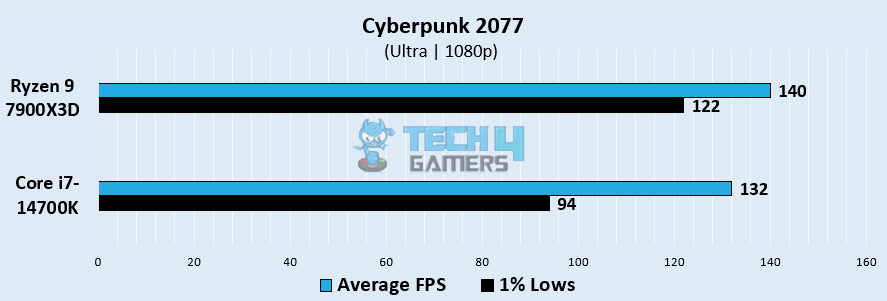
  • Here, the Ryzen 9 7900X3D outperformed its rival with an impressive 140 FPS. Conversely, the i7 14700K registered 132 FPS, approximately 5.8% less than its predecessor.
  • We saw that the Ryzen obtained an average 1% low of about 122 FPS, offering a more fluid gaming experience over the i7 14700K, which reached about 94 FPS.

Hitman 3

Hitman 3 Gaming Performance at 1080p
Hitman 3 @1080p (Image By Tech4Gamers)
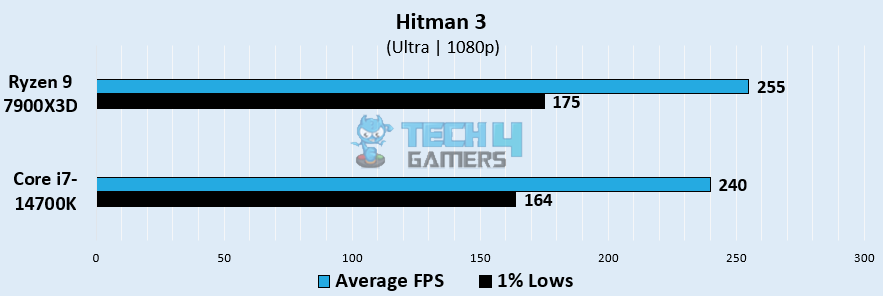
  • The Ryzen outperformed the Core i7 14700K with an astounding 255 FPS. The Core i7 14700K, on the other hand, trailed the Ryzen 9 7900X3D by almost 6% while achieving an impressive 240 FPS.
  • We noticed that the 1% lows on the Core i7 14700K reached about 164 FPS whereas the Ryzen 9 7900X3D displayed its remarkable 1% lows, averaging 175 FPS.

Horizon Zero Dawn

Horizon Zero Dawn Gaming Performance at 1080p
Horizon Zero Dawn @1080p (Image By Tech4Gamers)
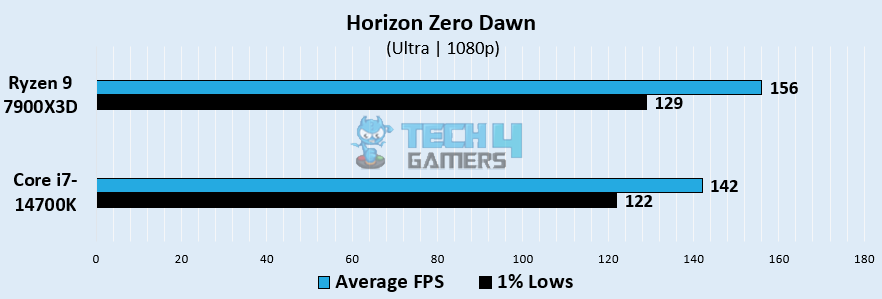
  • On Horizon Zero Dawn, the Ryzen 9 7900X3D performed relatively well, averaging 156 FPS. By comparison, the i7-14700K showed somewhat lower performance at 142 FPS, varying from its counterpart by about 9.3%. 
  • In terms of 1% lows, the Ryzen 9 7900X3D averaged 129 FPS, whereas the i7 14700K showed lower results, with 1% lows falling to about 122 FPS.

Forza Horizon 5

Forza Horizon Gaming Performance at 1080p
Forza Horizon @1080p (Image By Tech4Gamers)
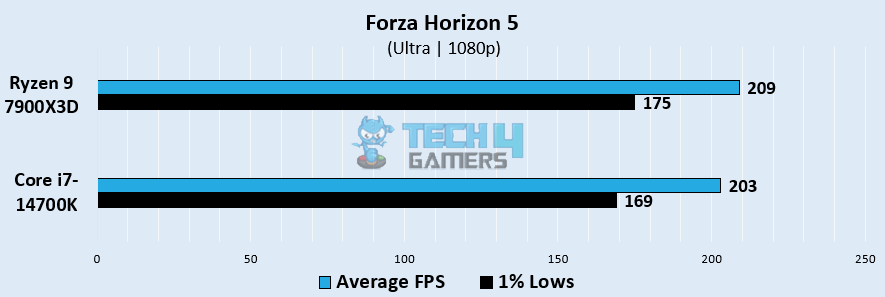
  • The Ryzen 9 7900X3D outperformed the Core i7 14700K with an average of 209 FPS. Conversely, the Core i7-14700K lagged behind the Ryzen 9 7900X3D by over 2.9%, with 203 FPS.
  • The real difference was evident in the 1% lows when the Core i7 14700K dropped to 169 FPS. Conversely, the Ryzen 9 7900X3D performed admirably, with 175 FPS.

God Of War

God Of War Gaming Performance at 1080p
God Of War @1080p (Image By Tech4Gamers)
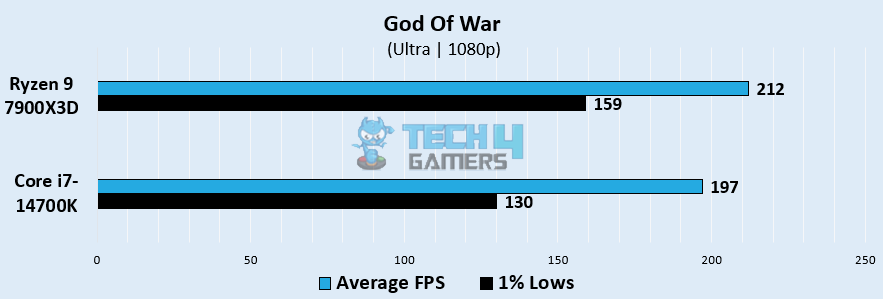
  • We observed that the Ryzen 9 7900X3D demonstrated an incredible 212 FPS. The i7 14700K, in contrast, managed a decent 197 FPS but fell short of its competitor by about 7.3%.
  • Ryzen’s reliable performance kept 1% lows at an impressive 159 FPS. On the other hand, 1% lows on the i7 14700K showed stronger stutters, reaching about 130 FPS.

Productivity Benchmarks

We introduced new productivity tests to our benchmark suite, using the same setup used for the gaming benchmarks for consistent comparison.

Cinebench R24

Cinebench R24
Cinebench R24 (Image By Tech4Gamers)
  • The Core i7-14700K scored 2190 points in the single-threaded Cinebench benchmark, approximately 7.6% higher than the 2035 points achieved by the Ryzen 9 7900X3D.
  • In the multi-core test, the i7-14700K reached 36,040 points, which was about 33% higher than the 27,080 points that the Ryzen chip has secured.

Geekbench 6

Geekbench 6
Geekbench 6 (Image By Tech4Gamers)
  • For the single-core Geekbench 6 benchmark, the Core i7-14700K scored 2990 points, showing a 4.9% lead over the 2850 points of the Ryzen 9 7900X3D.
  • However, in the multi-core test, the i7-14700K reached 19,550 points, which was 9.5% higher than the 17,850 points achieved by the Ryzen chip.

AIDA64 AES

AIDA64 AES
AIDA64 AES (Image By Tech4Gamers)
  • Our testing shows that the Core i7-14700K reached 139 GB/s in the AIDA64 AES benchmark, while the Ryzen 9 7900X3D managed 112 GB/s. The i7-14700K delivered approximately 24.1% higher AES encryption performance.

Overall Gaming Performance

Processor Average FPS1% Lows Productivity (Rating)
Ryzen 9 7900X3D📈194.4📉152✏️8.5/10
Core Core i7-14700K📈182.8📉135.8✏️9.3/10
Winner: Ryzen 9 7900X3D

Average Framerate

Throughout the five games, the Ryzen 9 averaged 194.4 FPS, showing off its superiority over the i7 14700K, which came in slightly behind with an average of 182.8 FPS. This corresponds to a noticeable variation of around 6.15%. Both CPUs provided a very good gaming experience; however, the Ryzen 9 routinely beat the i7 14700K by a significant margin.

Average 1% lows

In terms of the 1% lows, we observed that the Ryzen 9 showed superior results, circling about 152 FPS, while the i7 14700K reached a low of about 135.8 FPS. This displays a notable 11.2% difference in 1% lows between the two CPUs.

Productivity

Regarding productivity, we saw that the Core i7-14700K did better in the Cinebench R24 tests, Geekbench 6, and AIDA64 encryption test. We measured an average advantage of over 11% for Core i7-14700K over the Ryzen 9 7900X3D.


Temperatures

Now that we’ve seen the gaming performance of these two CPUs let’s take a look at the temperatures they’ve reached while playing those games.

GameCore i7-14700K (°C)Ryzen 9 7900X3D (°C)
Cyberpunk 20777267
Hitman 36362
Horizon Zero Dawn6257
Forza Horizon 56160
God Of War6462
Average Temperature Statistics64.461.6
Winner: AMD's Ryzen 9 7900X3D

According to our calculations, the Ryzen 9 7900X3D and the Core i7-14700K have distinct tales to relate. The i7-14700K operates at a temperature of 64.4°C, whereas the Ryzen reaches a lower temperature of 61.6°C. The Ryzen 9 emerges as the cooler winner with an approximate difference of 4.45%.


Power Consumption

After temperatures, power consumption is yet another crucial factor to consider before opting for either of these processors. Let’s take a look at how much power these two CPUs have consumed across five games. 

GameCore i7-14700K (W)Ryzen 9 7900X3D (W)
Cyberpunk 20779693
Hitman 3101100
Horizon Zero Dawn10083
Forza Horizon 511587
God Of War9783
Average Power Draw101.889.2
Winner: AMD's Ryzen 9 7900X3D

We observed that the Intel i7-14700K consumed more power, averaging around 101.8W. On the other hand, the Ryzen proved to be a power-efficient option, consuming only 89.2W on average. The difference corresponds to a significant 13% difference in performance between the two CPUs.


Pricing And Value

CPUsMSRPCurrent Price
Core i7-14700K💲409💲579
Ryzen 9 7900X3D💲599💲609
Price Difference37%5%

The MSRP of both CPUs equates to a 37% difference; however, the current price has been increased in a way where this gap has closed to only a 5% difference. Additionally, the i7-14700K’s price has increased by 34.4% and the Ryzen 9 7900X3D’s price has increased by only 1.65%.


Editor`s Note
Image

Despite, Ryzen’s higher gaming performance, the Core i7 14700K is a better option because of its lower price and higher core count (20), thread count (28), multi-dynamic DDR4 and DDR5 memory, dual PCie, and presence of hybrid cores – all of which allow for gaming as well as multitasking and video editing.

– Shehryar Khan


Ryzen 9 7900X3D Vs Core i7-14700K: Which One Do We Recommend?

Ryzen 9 7900X3D: For those who value gaming capabilities, practicality, and a processor that will last into the future, we highly recommend the Ryzen 9 7900X3D. It’s a great option for consumers looking for an all-around performer because of its greater performance, lower power consumption, and lower temperatures.

Core i7-14700K: For those who’re looking to get the best of both worlds, which is gaming and productivity tasks, we recommend going for the Core i7-14700K. It offers relatively close performance on average in gaming and has better productivity performance due to its higher cores and threads all while being relatively cheaper.

Whichever decision you go for, make sure that it the processor you chose goes well with your other PC components. The decision should also align with your personal preference and budget. This is so that you’re satisfied with your purchase.


Frequently Asked Questions

Are the integrated graphics a feature of both processors?

Indeed, both CPUs include integrated graphics, Radeon Graphics for the Ryzen 9 7900X3D, and UHD Graphics 770 for the i7-14700K.

Which CPU offers more options for customization?

Since AMD has dedicated numerous generations to the AM5 platform, the Ryzen 9 7900X3D provides a more comprehensive upgrade path.

Is overclocking possible with these CPUs?

Both the Ryzen 9 and the Core i7 allow for overclocking, so users can maximize performance.

Which processor is better for upcoming gaming titles and software?

The Ryzen 9 7900X3D is better for future gaming thanks to its superior gaming performance, power efficiency, and thermal management.

Which processor is more suitable for high-end content creation, like 4K video editing or 3D rendering?

The Core i7-14700K excels in 4K video editing and demanding content creation tasks due to its higher multi-core performance and thread count.


More From Core i7-14700K

More From Ryzen 9 7900X3D

RTX 50 Series Offers Limited Performance Gains Over RTX 40 Series Without DLSS 4.0 & MFG

Story Highlight
  • The RTX 5090 shows a good performance boost over the 4090, but the jump is not as huge as it was from RTX 4090 to 3090.
  • In A Plague Tale: Requiem (using DLSS 3) RTX 5090 is around 43% faster than 4090, but 4090 was 72% faster than 3090.
  • To put this into perspective, Far Cry 6 runs 47% faster on RTX 4090 than 3090.

Nvidia has had a huge presence at this year’s CES event, overtaking many of its counterparts with its GPU reveals. The tech giant revealed the new DLSS 4 upscaler—to contend against AMD’s FSR 4.0—and AI Foundation Models.

However, its biggest showing was arguably the GeForce RTX 50 Series GPUs with the Blackwell architecture, promising huge advancements in AI-powered rendering, real-time ray tracing, NVIDIA Reflex 2 with Frame Warp, and much more.

While Nvidia’s flagship RTX 5090 has prominent performance gains over the 4090, the difference is not as massive as we saw in comparisons between the RTX 4090 and 3090

Why it matters: The GeForce RTX 5090 shows smaller performance gains without DLSS 4 compared to the 4090’s improvements over the 3090. This suggests that rasterization performance boosts may continue to decrease with each new generation as Green Camp will continue to improve its AI models to showcase big numbers in FPS.

GeForce RTX 50 vs RTX 40 series performance gap
GeForce RTX 50 Series Performance Increase vs. GeForce RTX 40 Series Performance Based on Official Presentation

The graph compiled by us based on the presentation from Nvidia shows that A Plague Tale: Requiem is nearly up to 44% faster in RTX 5090 compared to 4090—provided both GPUs are using DLSS 3 only. On the flip side, the RTX 4090 was up to 72% faster than the RTX 3090 under similar conditions.

On the other side, concerning Nvidia’s claim of RTX 5070 beating RTX 4090, it seems almost impossible—without using the new Multi Frame Gen (MFG) — if you analyze the chart.

And it’s worth noting that frame generation doesn’t technically boost FPS performance either; it’s a frame smoothening technology, after all. So, the generational leap doesn’t feel as massive as one might’ve expected considering these pointers. We doubt it will even beat GeForce RTX 4080 in the same scenarios as above. 

A similar pattern can also be seen when Far Cry 6 is tested. It performs up to 27% faster on the RTX 5090 vs. the RTX 4090 without DLSS 4 being used. The performance racks up to 47% on the RTX 4090 when pitted against the RTX 3090.

Using the RTX 5080, the performance gains for Ubisoft’s AAA entry reach up to 33%. The 5070 Ti—along with the base variant—also hovers around the same 30%+ range.

DLSS 4
Using RTX 5090’s exclusive DLSS Multi Frame Generation gives a huge boost over the 4090 in-game performance.

All in all, take tests shown during the CES official presentation with a grain of salt, as the GeForce RTX 5090 does get a huge boost in performance when DLSS 4 and the new Multi Frame Generation are used.

Do you think Nvidia’s new flagship RTX 5090 is still worth it against the RTX 4090 despite the smaller generation leap in performance leaps and increased price? Let us know your thoughts in the comments below, or join the discussion on the official Tech4Gamers forum.

MSI Reveals Flagship Products at CES 2025: MAG CORELIQUID A15, MEG Ai1600T, and More

[Press Release] At CES 2025, MSI will unveil a range of flagship products, including liquid coolers, power supplies, and concept cases, pushing DIY assembly to new heights. The MAG CORELIQUID A15 Series offers efficient cooling and easy installation.

The MEG Ai1600T PCIE5 and MPG A1250GS PCIE5 power supplies deliver reliable performance with dual 12V-2×6 connectors and triple certifications. The MEG MAESTRO 900L PZ concept case, inspired by stage displays, features dual-system support and modular design. 

MAG CORELIQUID A15 Series

MSI MAG CORELIQUID A15
MSI MAG CORELIQUID A15 AIO Cooler

The MAG CORELIQUID A15 Series makes liquid cooling easy with its UNI Bracket, EZ Connect, and hidden cables, ideal for DIY builders. A Screwless Copper Base and CycloBlade 9 fan ensure top-notch cooling with low noise, perfect for performance needs.

An Adjustable Offset Kit and metal backplate provide precise and stable cooling for Intel Core Ultra processors. ARGB GEN2 LEDs let users personalize lighting effects through MSI Center, adding style to any setup.

To learn more about the cooler, check the official product page.

MEG Ai1600T PCIE5 & MPG A1250GS PCIE5 Power Supplies

MSI MEG ai1600t and MPG a1250gs
MSI MEG Ai1600t & MPG A1250GS

MSI launches the MEG Ai1600T PCIE5 and MPG A1250GS PCIE5 power supplies, both ATX 3.1 and PCIe 5.1 compliant, with dual 12V-2×6 connectors for dual GPU support.

MEG Ai1600T PCIE5: 80 PLUS Titanium certified, it handles up to 235% load with a quiet, compact design and zero-fan mode.

MPG A1250GS PCIE5: Delivers 1250W with dual 12V-2×6 connectors, 100% Japanese capacitors, and a modular cable design for better airflow and cable management.

Learn more about MSI’s new power supplies by following this link.

MEG MAESTRO 900L PZ Concept Case

MSI MEG MAESTRO 900L PZ CES 2025
MSI MEG MAESTRO 900L PZ

The MEG MAESTRO 900L PZ combines style and functionality, supporting dual ATX and mini-ITX systems. With space for 16 fans or dual 420mm radiators, it ensures great cooling.

The modular tray rotates 90 degrees for flexible layouts. Offering customization and a modern design, the case sets a new standard in case flexibility and aesthetics.

Gaming To Get Plagued By Ads At Game And Platform Level In 2025, Analyst Predicts

Story Highlight
  • A prominent analyst predicts gaming will get plagued by ads at the game and platform levels this year.
  • We might see in-game billboards, Xbox and PlayStation menus, and PC apps filled with automated and targeted ads.
  • The slew of mobile developers entering the PC and console market might also carry over their ad strategies.

Mobile gaming has gone on to become the largest segment within the whole industry, generating billions in revenue to cover a huge portion of the entire market. However, most of these accolades have only been possible due to controversial monetization and highly criticized ad strategies used by mobile game developers. 

Now, an analyst predicts this advertisement threat is about to penetrate the PC and console market on a large scale.

Why it matters: The gaming industry has grown steadily for a long time, but it has started to stagnate. This dilemma might cause game makers to slowly force ads into games and platforms starting this year.

Some titles are already featuring in-game ads in billboards to target gamers.
Some games already feature in-game ads on billboards to allegedly increase immersion.

Speaking to Gamesindustry, analyst Rhys Elliott from Midia Research predicts that gaming market stagnation could compel game makers to force ads to drive growth. These ads could infest platforms—like the Xbox and PlayStation menus—with in-game billboards showcasing targeted ads.

Mobile developers entering the PC and console market might also bring their ad strategies to keep up with the expected revenue streams. So, both PCs and consoles could embrace real-life ads on a large scale in their ecosystems.

Advertising will become more prominent at platform level and at game level… The games market and advertisers alike need new revenue streams.

-Rhys Elliot, Analyst

This is not the first time such a grim prediction has been made; some analysts in the past have also suggested a future filled with ads for apps like Xbox Game Pass

PlayStation Xbox PC
Our consoles and PC gaming platforms could be bombarded with automated ads.

All in all, it is worth taking the analyst’s warning with a grain of salt. Even if all the pointers suggest the inclusion of ads, these are still projections that might not come true—for a while at least.

Do you think the in-game ads will increase immersion, or will they just be a forced marketing tactic that kills immersion instead? Let us know your thoughts in the comments below, or join the discussion on the official Tech4Gamers forum.

COLORFUL and iGame Unveil GeForce RTX 50 Series Graphics Cards

[Press Release] COLORFUL Technology Company Limited has revealed its new NVIDIA GeForce RTX™ 50 Series graphics cards. Built on NVIDIA’s Blackwell architecture, these GPUs bring an entirely new level of gaming and creative performance.

With enhanced AI, NVIDIA DLSS 4, and NVIDIA NIM microservices, the RTX™ 50 Series offers faster speeds and powerful AI features for both developers and enthusiasts.

The series includes updated Vulcan, Neptune, Advanced, and Ultra W models, each with improved looks and better cooling systems to meet the needs of gamers and content creators.

iGame Vulcan Series

COLORFUL iGame RTX 5080 Vulcan

The iGame Vulcan Series offers quality performance, durability, and customization. Its strong metal design provides excellent stability, while the 5th generation iGame Smart LCD screen lets you personalize visuals with both horizontal and vertical mounting options.

Improved cooling and customizable ARGB lighting, controlled through the iGame Center app, adds to its appeal. The series includes the RTX™ 5080, RTX™ 5070 Ti, and RTX™ 5070 models.

iGame Neptune Series

COLORFUL iGame RTX 5080 Neptune
COLORFUL iGame RTX 5080 Neptune Variant

The iGame Neptune Series is designed for liquid cooling fans, featuring a slim, compact 2-slot design with a 360mm radiator for excellent cooling. Its sleek look and built-in ARGB lighting offer both efficiency and style, making it a great cooling solution for the RTX™ 5080.

The Neptune’s radiator fans feature daisy-chain PWM connectivity with internal cabling, providing a clutter-free setup.

iGame Advanced Series

COLORFUL iGame RTX 5080 Advanced
COLORFUL iGame RTX 5080 Advanced Variant

The iGame Advanced Series features a unique design with its Infinite Mobius Strip and Gravity Rim, representing innovation and timelessness. The translucent matte finish shows off the internal structure, and customizable ARGB lighting adds a personal touch.

With the RTX™ 5080, RTX™ 5070 Ti, and RTX™ 5070 models, this series combines striking design with efficient triple-fan cooling for better performance.

iGame Ultra W Series

COLORFUL iGame RTX 5070 Ti Ultra W
COLORFUL iGame RTX 5070 Ti Ultra W Variant

The Ultra W series combines Hip-Hop and Pop Art styles for a unique look. Its smart cooling system uses one clockwise fan and two counter-clockwise fans to reduce noise and improve heat management. The hollowed back panel helps airflow for better performance.

For smaller systems, the iGame GeForce RTX™ 5070 Ultra OC and COLORFUL GeForce RTX™ 5070 NB EX-V are designed to fit compact spaces while delivering high performance.

For more details on COLORFUL’s new NVIDIA GeForce RTX™ 50 Series graphics cards, visit COLORFUL’s official website.