At Tech4Gamers, I mainly cover new gaming news, leaks, and rumours. Aside from that, I love to write features about my favourite games while inserting my opinion about their different aspects.
Story Highlight
Ubisoft has revealed more information about Assassin’s Creed Shadows gameplay, mainly highlighting the importance of parkour.
Parkour has been a staple of the series, and it seems to have evolved a lot in the upcoming title.
Naoe is the true parkour master, so she may already be the preferred character for many.
Due to that, Yasuke became a national issue in Japan, and the controversy continued for a long time. Recently, the criticism has been reduced, mainly because the game was delayed. Now that it is nearing its release window, new gameplay footage has been revealed, showcasing significant improvement.
Why it matters: While Assassin’s Creed Shadows was criticized for Yasuke, its gameplay wasn’t that appealing either. However, delaying the title has given Ubisoft enough time to improve it a lot.
The developer has released a thorough overview of the in-game parkour and it isn’t going to be something simple. There seems to be skill involved when parkouring, which sounds appealing.
In our game, holding down the parkour up button like it’s a gas pedal is not the optimal way to do parkour. Discerning which button does what is necessary to maximize a great parkour flow and keep your momentum.
-Simon
Parkour has been the series’ staple for a long time, and it seems like Ubisoft is evolving it with the upcoming entry. Dodge has also been merged with parkour, which helps unlock a plethora of different moves.
There will be fall damage in-game, but players will now be able to minimize it by using a mechanic called “Recovery Roll.” Upon jumping from high places players will be able to trigger the Igan Recovery Roll by simply pressing the parkour button before the impact.
Naoe Is Likely To Be The Fan’s Favourite Choice In the Upcoming Assassin’s Creed Due To Her Parkour Abilities
Thanks to the addition of a dodge mechanic in parkour, players can dodge near the ledge and transition into parkour down traversal. This would allow players to keep a low profile and stay stealthy.
There are just so many more mechanics that you would be able to use, such as the grappling hook, which, as per Simon, “any proper Shinobi game needs.”The grappling hook is like a natural extension of Naoe’s parkour flow.
Also, there are some advanced parkour moves such as Stance Dodges, Wall Run Eject, Parkour Down: Backward Dodge, Parkour Down: High Structure Safety, and Unclimbable Surfaces.
All of these special moves seem pretty interesting. Given how much criticism Assassin’s Creed Shadows has received, this new detailed reveal from Ubisoft paints a positive picture of its gameplay.
What do you think of parkour in AC Shadows? Which part of it did you like the most? Share your thoughts with us in the comments section below or join the discussion on the official Teh4Gamers forums.
Currently serving as a News Reporter at Tech4Gamers, I have the privilege of combining my love for gaming with the art of storytelling. My role involves crafting engaging narratives that keep our audience abreast of the latest developments in the gaming world.
Story Highlight
Microsoft VP revealed that they’re working towards bringing an Xbox-like experience for handheld consoles starting this year, bringing the best of both worlds.
This Xbox integration in handheld devices aims to deliver a more console-like experience for handhelds.
This application also teases how the next Xbox handheld, expected for 2026, may feel like.
With Microsoft officially confirming that Xbox’s debut console will be launched alongside the next generation of its console, they’ve already started to tease details on their handheld.
As reported by The Verge, who attended the CES roundtable dubbed “The Future of Gaming Handhelds,” Microsoft VP Jason Ronald said that major changes should be expected within the handheld console realms starting this year.
Why it matters: Gaming on handheld devices running Windows has not always met expectations. But with upcoming changes, games on these devices will run smoother, providing a better and more enjoyable experience.
According to Jason, Microsoft is working on bringing the Xbox console experience to Windows rather than the other way around.
“I would say it’s bringing the best of Xbox and Windows together, because we have spent the last 20 years building a world-class operating system, but it’s really locked to the console”
Steam Deck’s use of its own dedicated SteamOS is also one of the biggest reasons why the handheld has been so successful in its own marketplace compared to its more powerful competitors.
Valve previously also announced support for SteamOS on Asus Rog Ally, so it’ll be interesting to see how SteamOS fares against Microsoft’s planned integration of the Xbox platform on Windows handheld.
The result would still be a Windows operating system running below an Xbox-like home, similar to Steam’s big picture mode on the Steam app. Nonetheless, it is unclear whether this Xbox integration will be limited to handheld consoles or will also be included with normal desktops, which would be a nice move.
Will handheld consoles see improvements this year?
This also gives us an idea of the handheld Xbox console, which is expected to be released in 2026. Microsoft is expected to share more details later this year, which could mean that they will also have more details about their Xbox handheld.
What do you think about Microsoft’s initiative to make the handheld console space better? Do you think that this will benefit the handheld console competition? Let us know in the comments down below, or join the discussion on the Tech4Gamers forums.
I’ve previously worked for eXputer as a Senior News Writer for several years. Now with Tech4Gamers, I love to devoutly keep up with the latest gaming and entertainment industries. I have a Bachelor’s Degree in Computer Science and years of experience reporting on games and breaking exclusive stories. Besides my passion for gaming journalism, I love spending my leisure time farming away in Stardew Valley. VGC, IGN, GameSpot, Game Rant, TheGamer, GamingBolt, The Verge, NME, Metro, Dot Esports, GameByte, Kotaku Australia, PC Gamer, and more have cited my articles.
Story Highlight
Radeon RX 9070 benchmarks reveal similar performance to Nvidia’s RTX 4080 Super.
Call of Duty: Black Ops 6 was used during testing, and an AMD Ryzen 9 9950X3D processor powered the rig.
The GPU boasts 16 GB of VRAM, but specifics about the exact frequencies and graphics cores are yet to be revealed.
New benchmarks suggest that AMD’s upcoming Radeon RX 9070 GPU features performance close to Nvidia’s RTX 4080 Super.
Why it matters: The first Radeon RX 9070 benchmarks have shown quite a positive result, which is comparable to the RTX 4080 Super. The GPU is expected to be priced around the $500 mark for mid-range 1440p gaming.
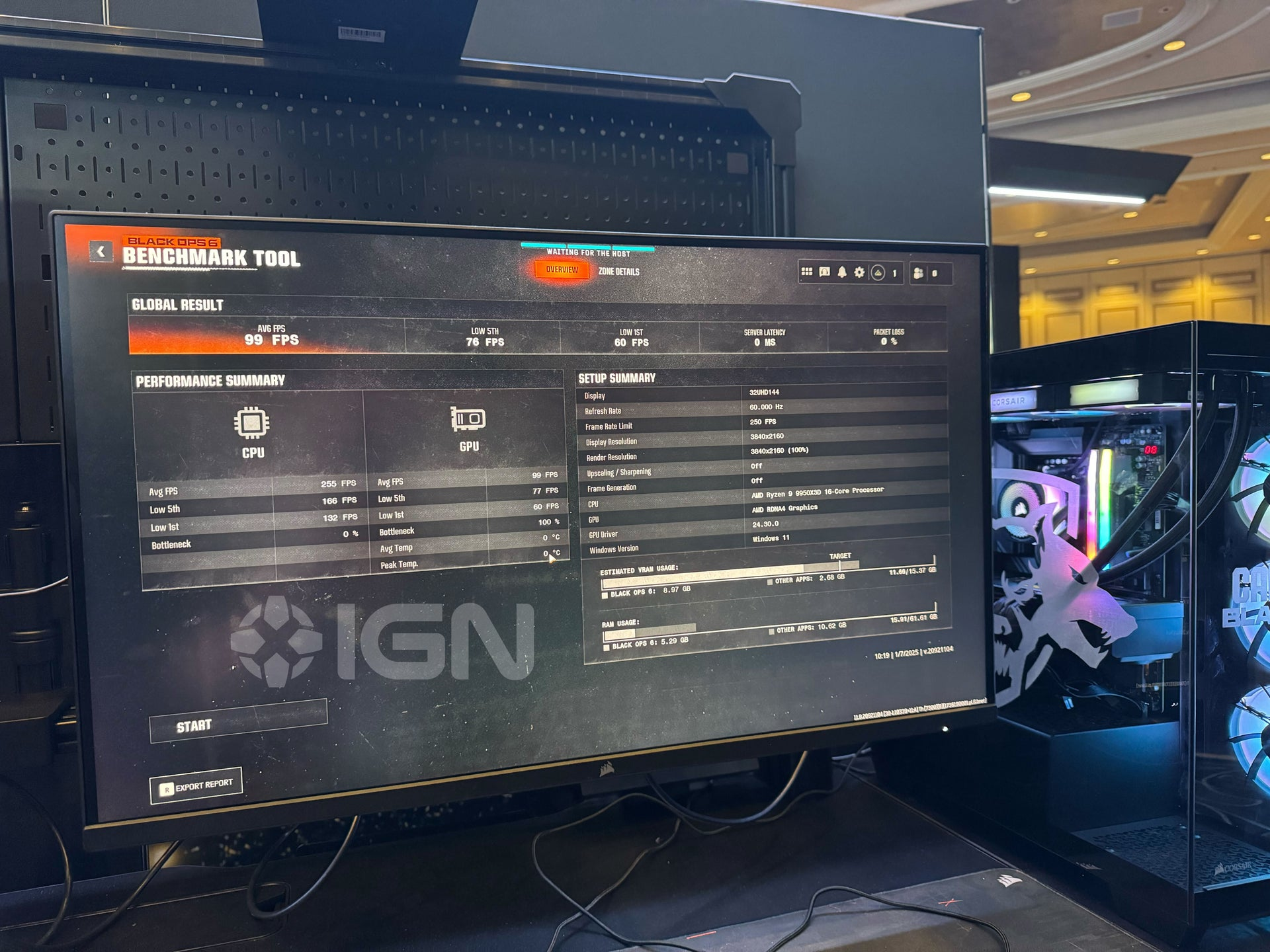
AMD Radeon RX 9070 Call of Duty: Black Ops 6 benchmarks.
IGN extensively benchmarked the Radeon RX 9070 GPU in a rig powered by AMD’s upcoming AMD Ryzen 9 9950X3D processor. The testing in Call of Duty: Black Ops 6 concluded with an average FPS of 99 at 4K resolution without any upscaling and frame generation. Almost 9 GB of VRAM was used by the game out of the available 16 GB.
On the flip side, the Nvidia 4080 Super can get an average FPS of 129 when DLSS is turned on at the ‘Quality’ setting. Given that the upscaler adds a 30% performance boost, the results end up on par with the RX 9070 GPU. However, we still don’t know the exact graphics cores and the card’s clock speed.
Also, bear in mind that the RTX 4080 Super can cost you a staggering $999 figure, while the RX 9070 is rumored to cost around $500. The GPU lineup is expected to hit the market in Q1 2025.
The RX 9070 series GPUs are built using the cutting-edge RDNA 4 architecture, promising huge advancements in ray tracing capabilities and AI computing. That’s not all; the performance in games is expected to be further boosted by AMD’s new AI-based FSR 4.0 upscaler.
The Ryzen 9 9950X3D CPU boasts an impressive 16 Zen 5 CPU cores.
All in all, it is worth taking these benchmarks with a grain of salt, as some other factors—like what game is tested and what processor is used—might also influence the results.
Do you think the RX 9070 benchmarks above prove that the upcoming AMD GPU is truly going to match everyone’s expectations? Let us know your thoughts in the comments below, or join the discussion on the official Tech4Gamers forum.
As Tech4Gamers’ Founder and Editor-in-Chief, I bring over 13 years of PC Hardware Reviewing and 8+ years of IT Project Management experience. Certified in Google IT Support , my focus is on providing honest product reviews and analysis and fostering a strong gaming community with 130k+ members in PPG.
Story Highlight
Intel’s new BIOS update promises significant performance gains and is highly ambitious.
Such a drastic improvement would typically require significant architectural changes or major hardware upgrades.
While the BIOS update offers a glimmer of hope for Intel to address the disappointing launch of its Core Ultra CPUs, it’s crucial to approach these claims with caution.
With the Intel Core 13th generation, we received the first CPUs with Raptor Lake architecture and with the Core 14th generation, Intel repeated the same architecture for launching Raptor Lake, although this time in its “Refresh” version it was slightly improved compared to the previous ones.
All this felt like a generation of processors that did not contribute anything new and in theory was going to improve with the next Core Ultra 200S. However, as we saw, the launch of the new processors was a disaster, with gaming performance far below expectations.
Intel’s New BIOS For January Promises Big Numbers
Last month to address the disastrous launch, we reported that Intel was developing a microcode patch called 0x114 and Intel CSME Firmware Kit 19.0.0.1854v2.2 (or newer) that would target Z890 motherboards to improve gaming performance.
Various updates have been released and now Intel has given a preview of the new Bios patch that is coming in January 2025, which will greatly improve performance in games and programs.
The above graph from Intel represents the improvement that the patch will offer and as you can see, it seems too good to be true. We can understand that a 7% improvement in Assassin’s Creed: Mirage is already quite optimistic with an update, but next to it we have something much more beastly, with a +26% performance in Cyberpunk 2077.
Intel ran tests on four popular games, although it did not disclose details of the configuration or graphics settings. Here are the results:
Cyberpunk 2077: Up to 26% performance increase,
Assassin’s Creed Mirage: up to 7% increase,
DOTA 2: up to 21% increase,
Far Cry 6: Up to 16% increase.
While that 26% maximum improvement in games is already impressive, in programs we find it even harder to believe that it will offer so much, since in Cinebench 2024 Single Thread it will supposedly improve by an impressive 52%.
This implies that if the Core Ultra 9 285K offers about 145 points on a single core, with this patch it would reach 220 points something that makes no sense, since this score is what we would expect to get from a CPU in about 5 years, not now with the intergenerational improvements that there are.
Even more impressive if possible is the 97% increase in the 3DMark Time Spy score practically doubling the results before launch. Finally, there is a 30% reduction in latency in AIDA64 Memory, something that also catches our attention.
What’s your take on this new Microcode in the form of BIOS from Intel? Will Intel be finally able to be on track? Share your thoughts in the comment section below.
At Tech4Gamers, I began as a comparison writer, analyzing GPU and CPU performance. Now, I focus on writing reviews and contributing to the best-ofs section, sharing personal insights after hands-on testing.
Shehryar Khan
Senior Editor and Content Writer:
Lead the comparison and blog writing teams at Tech4Gamers.
Oversee teams with a keen eye for detail and precision.
Ensure hands-on writing, with benchmarks and testing as guiding principles.
Guarantee the delivery of the best possible results in concise yet impactful tech tales.
AMD Radeon RX 7700 XT
Rated: 7/10
Nvidia GeForce RTX 3060 Ti
Rated: 6/10
Pros And Cons
Graphics Card
Pros
Cons
AMD Radeon RX 7700 XT
✅ Significantly higher performance
✅ Better power efficiency
❌Narrower bus width
❌Higher price tag
Nvidia GeForce RTX 3060 Ti
✅Slightly lower price
✅Slightly lower power consumption
❌Lacluster performance
❌Small VRAM buffer
Key Takeaways
On average, in our gaming tests, the performance of the RX 7700 XT was over 22% higher than the RTX 3060 Ti, putting both cards in different tiers of performance.
The power consumption of the RX 7700 XT was only around 7% higher than the RTX 3060 Ti in our testing, which is an acceptable amount considering its performance improvements.
The price of the RTX 3060 Ti is still near MSRP despite the age of this card.
The high price tag of the RTX 3060 Ti, accompanied by its lackluster performance in modern titles, makes it hard to recommend it to most people looking for a budget graphics card.
Why Trust Tech4Gamers
Shehryar is our comparison expert who has been benchmarking graphics cards, and processors.
100+ components tested and reviewed by our team of hardware experts (Tech4Gamers Team).
100+ hours spent testing different components for our comparisons.
At Tech4Gamers, ensuring you get reliable information is our priority. That’s why every hardware round-up undergoes a meticulous review process by our team of experts and editors. Each review is carefully examined against our strict editorial guidelines, guaranteeing you trustworthy insights you can depend on.
Clock Speed: The RX 7700 XT has a base clock of 1700MHz, much higher than the 1410MHz base clock of the RTX 3060 Ti. The difference between the boost frequencies of these cards is even larger, with the RTX 3060 Ti sitting at around 1665MHz, while the RX 7700 XT has a boost clock of 2544MHz.
VRAM: The AMD card has 12GB of video memory over a 192-bit bus, while the RTX 3060 Ti has 8 GB of memory over a 256-bit bus.
Process Node: The RX 7000 series of GPUs utilize an advanced 5nm manufacturing process, while the RTX 3060 Ti uses an advanced yet a bit older 8nm processing node.
TDP: The RX 7700 XT has a higher 245-watt TDP than the 200-watt TDP of the RTX 3060 Ti.
Other Differences: Both graphics cards match each other for the most useful features they have. Both have support for hardware-accelerated Ray Tracing, AI upscaling, and frame generation using AMD’s open-source software.
With the prices of graphics cards reaching the sky in recent years, a lot of gamers are yearning for good entry-level GPUs. The RX 7700 XT vs RTX 3060 Ti comparison will evaluate two contenders to determine the best price-to-performance card.
Gaming Benchmarks – 1440p
Now that we have an idea of the architectural differences of the RX 7700 XT vs RTX 3060 Ti, we will now compare the performance of these two GPUs in modern games. All the subsequent tests have been done on a testbench with handpicked components, the specifications of which are listed below:
Our testing was kicked off with a 28% win for the RX 7700 XT in Baldur’s Gate, with an average framerate of 112 FPS against the RTX 3060 Ti’s average framerate of 96 FPS. Bear in mind all settings were set to max except for Ray Tracing, which we decided to turn off.
The 1% lows of the RX 7700 XT approached 72 FPS, while the Nvidia card managed a much smoother minimum framerate of 82 FPS.
Avatar: Frontiers Of Pandora
Avatar: Frontiers Of Pandora @1440p (Image By Tech4Gamers)
Both GPUs did not give an enjoyable framerate in Avatar: Frontiers of Pandora, with the Nvidia card averaging around 34 FPS. The RX 7700 XT had an average framerate of around 39 FPS. AMD had an unceremonious 15% lead over its Nvidia counterpart in this game.
The 1% lows were even worse on both cards, with the 3060 Ti hovering around 21 FPS, while the RX 7700 XT had lows of around 28 FPS.
Escape From Tarkov
Escape From Tarkov @1440p (Image By Tech4Gamers)
With the Ultra preset, this realistic game had an average framerate of around 82 FPS on the RX 7700 XT, which was around 17% higher than the 70 FPS average of the RTX 3060 Ti.
The 1% lows fell to around 68 FPS on the RX 7700 XT, while the RTX 3060 Ti fell below sixty frames with minimums of around 47 FPS.
Counter-Strike 2
Counter-Strike 2 @1440p (Image By Tech4Gamers)
At the Very High preset, the RTX 3060 Ti took its first win in CS 2, with an average framerate of 187 FPS, around 5% higher than the RX 7700 XT’s 178 FPS average.
The RX 7700 XT made up for its average by delivering superior 1% lows at around 150 FPS, significantly higher than the 122 FPS that the RTX 3060 Ti mustered as its minimum.
Cyberpunk 2077
Cyberpunk 2077 @1440p (Image By Tech4Gamers)
With no RT or upscaling, the RX 7700 XT ran Cyberpunk 2077 much better with an average framerate of 72 FPS, beating out the 52 FPS average of the RTX 3060 Ti by around 38%, a massive difference.
The 1% lows of the RTX 3060 Ti hovered around 38 FPS, while the RX 7700 XT managed a minimum framerate of around 56 FPS in graphically demanding moments in our gameplay.
Starfield
Starfield @1440p (Image By Tech4Gamers)
With DRS turned off on the Ultra preset, the RX 7700 XT managed an average framerate of 58 FPS in Starfield, while the RTX 3060 Ti had an average of around 44 FPS. The latter was around 32% slower in this game on average.
The 1% lows of the RX 7700 XT were around 49 FPS in this game, while the RTX 3060 Ti struggled to maintain lows of around 33 FPS.
Diablo 4
Diablo 4 @1440p (Image By Tech4Gamers)
The Ultra preset in this game netted the RX 7700 XT an average framerate of 130 FPS, 18% higher than the 110 FPS average of the RTX 3060 Ti.
As for the 1% lows, the RTX 3060 Ti fell down to 62 FPS, while the RX 7700 maintained a comfortable lead at around 73 FPS.
Star Wars: Jedi Survivor
Star Wars Jedi Survivor @1440p (Image By Tech4Gamers)
With all the settings cranked up except for RT, the RX 7700 XT had an average framerate of 59 FPS in Star Wars: Jedi Survivor, while the RTX 3060 Ti had an average of around 45 FPS. The RX 7700 XT was around 31% faster in this game.
The 1% lows danced around 31 FPS on the RTX 3060 Ti, while the RX 7700 XT had lows of around 47 FPS in graphically demanding scenes.
The Last Of Us Part 1
The Last Of Us @1440p (Image By Tech4Gamers)
The Ultra preset was pretty hard to run on both graphics cards with a smooth framerate, with the RX 7700 XT getting an average framerate of 62 FPS, while the RTX 3060 Ti had an average framerate of around 40 FPS. The advantage of the AMD card swelled up to 55% in this game.
The 1% lows of the RTX 3060 Ti were around 30 FPS in The Last Of Us, while the RX 7700 XT had more enjoyable minimums of 45 FPS. Both cards were no less stuttery in this game.
Resident Evil 4
Resident Evil 4 @1440p (Image By Tech4Gamers)
The raster performance with maxed-out settings was around 110 FPS on average with the RX 7700 XT, while the RTX 3060 Ti had an average of around 73 FPS, 50% lower than that of the AMD card.
The RTX 3060 Ti managed 1% lows of around 53 FPS in this game, while the RX 7700 XT flew closer to 84 FPS as its minimum.
Hogwarts Legacy
Hogwarts Legacy @1440p (Image By Tech4Gamers)
The average framerate of the RX 7700 XT was around 71 FPS in Hogwarts Legacy with the Ultra preset and RT turned off, while the RTX 3060 Ti was around 34% slower with an average framerate of 53 FPS.
Both graphics cards had pretty weak 1% lows in this game, with the RTX 3060 Ti evening out around 26 FPS, while the RX 7700 XT had lows of around 36 FPS.
Overall Gaming Performance
Average FPS @1440p (Image By Tech4Gamers)
Average Framerate
There was a massive difference between the performance of these two cards in almost every game, with the RX 7700 XT ultimately being around 22.5% in the lead. It had an overall average framerate of around 89 FPS, while the RTX 3060 Ti had an average framerate of around 73 FPS. The loss for the Nvidia card was much larger than we expected going into this comparison, and such a large difference certainly puts these two cards in different performance tiers.
1% Lows
The 1% lows of the RX 7700 XT were around 64 FPS on average, showing that it is a card adequate for 1440p gaming in most games with high settings. The RTX 3060 Ti missed the mark a little bit with lows around 51 FPS, which put it around 27% behind its competition.
Overall, the performance of the RTX 3060 Ti and the RX 7700 XT definitely differs a lot, with the AMD card being a clear win.
Winner: AMD's Radeon RX 7700 XT
Power Consumption
Game
RTX 3060 Ti (W)
RX 7700 XT (W)
Baldur's Gate 3
230
248
Avatar: Frontiers Of Pandora
231
274
Escape From Tarkov
210
233
CS 2
200
193
Cyberpunk 2077
228
232
Starfield
203
208
Diablo 4
209
243
Star Wars: Jedi Survivor
229
225
The Last Of Us Part 1
181
208
Resident Evil 4
225
251
Hogwarts Legacy
215
213
Average Power Consumption
215
230
Winner: Nvidia's RTX 3060 Ti
The power consumption of the RX 7700 XT was around 7% higher than the RTX 3060 Ti on average, which is an acceptable increment considering the difference in performance. For most people, this little difference will not impact their gaming experience or day-to-day useability significantly.
Price And Value
Processor
MSRP
Current Price
RTX 3060 Ti
💲399
💲393
RX 7700 XT
💲449
💲439
Difference
13%
12%
Because of the recent demand of GPUs for AI servers, Nvidia cards have become particularly expensive. The cheapest we could find the RTX 3060 Ti on the used market was around $393, only slightly cheaper than its launch MSRP. This means that the RX 7700 XT is only 12% more expensive than the RTX card, which is a fair markup considering its increment in performance.
What We Recommend
RTX 3060 Ti: For most people, the current price of the RTX 3060 Ti does not justify its mediocre performance. Most modern titles have become too demanding to run at 1440p with high settings on this card, resorting to this GPU to be labelled as a good 1080p card if we ignore the price for a second. Nevertheless, taking into account the larger GPU market, we cannot recommend this card to most consumers.
RX 7700 XT: Despite its problems, the RX 7700 XT holds up pretty firmly against the RTX 3060 Ti in our comparison. It offers significantly superior performance at a comparable price, giving consumers a good option as an entry-level graphics card. Still, the price of this GPU is kind of steep for its tier.
The price-to-performance ratio of the GPU still seems to be off, but if you are choosing between the RTX 3060 Ti and RX 7700 XT, we would strongly recommend siding with the new AMD GPU instead of the barely discounting, sub-par performing Nvidia option.
FAQs
What processor would pair well with these cards?
Any recent i5 or Ryzen 5 processor should give you enough performance that CPU limiting should not be a factor with these graphics cards.
Is the hardware-accelerated ray tracing better on the RTX 3060 Ti?
No, both the RX 7700 XT and the RTX 3060 Ti perform about equivalently regarding hardware-accelerated ray tracing.
Can I use AI frame generation with these cards?
Yes, AMD’s Fluid Motion Frames Software allows any graphics card to utilize AI frame generation technology.
At Tech4Gamers, I mainly cover new gaming news, leaks, and rumours. Aside from that, I love to write features about my favourite games while inserting my opinion about their different aspects.
Story Highlight
Concord fans have been bashing Marvel Rivals online due to its success.
They claim Concord to be more fun than Rivals and wonder why the latter lives when the former dies.
The subreddit is full of Concord fans, and some of their claims seem outrageous.
That said, it still seems to have a fandom that isn’t happy with Marvel Rivals’ success.
Why it matters: Concord fans are calling out Marvel Rivals, claiming it to be not fun. They think that the former had better gameplay, which a massive fandom seems to disagree with. There is a reason why one of the two games is highly successful.
The Argument Starts With A User Asking About Concord Fans’ Impressions of Rivals
Mike_nova on Reddit posted a thread asking about Concord fans’ impressions of Marvel Rivals. To this, the top comment bashes the game, implying it doesn’t deserve the hype at all.
It plays nothing like Concord. I personally don’t like the movement or shooting at all and don’t get all the hype and praise its getting. If you want similar gameplay to Concord Destiny 2 is your best bet but the PvP in that game is basically unplayable unfortunately but the PvE is still good.
-Reddit User
Some Marvel Rivals fans have replied and asked users whether they have actually played the game as it has attracted a massive fandom, and they find it appealing. More Concord fans are complaining in the comments, asking why it had to die while the Rivals get to live.
The user even claims Marvel Rivals to be not as fun as Concord by a long shot and adds that they hate this timeline.
Concord Player Rants About How Concord Should Have Lived Instead of Rivals
The Dead Game’s Fandom Doesn’t Think Marvel Rivals Is On Its Level
The Much Loved FPS Is Being Called Out By A Certain Fandom
Users complaining about how Concord should have lived have been trolled in the comments. However, it shows they aren’t happy with the recent Marvel FPS hero shooter.
Marvel Rivals masterfully gets what Concord couldn’t manage to, which is exactly why it launched to nearly 500K concurrent players on Steam. Even Overwatch hit its all-time low following the game’s release, meaning the developer did something right to engage the fandom.
What do you think about the Concord fandom’s hate comment on the recent hit in the FPS hero shooter genre? Have you played either of the games? Share your thoughts with us in the comments section below or join the discussion at the official Tech4Gamers forums.
At Tech4Gamers, I mainly cover new gaming news, leaks, and rumours. Aside from that, I love to write features about my favourite games while inserting my opinion about their different aspects.
Story Highlight
It was announced in December that Sony was buying 10.11% of Kadokawa for $331.2 million.
The gaming giant has now officially completed the payment and is the biggest shareholder of FromSoftware’s parent company.
This might give FromSoftware the rights to Bloodborne for a 60FPS patch or maybe even a PC Port.
There were several rumors going on about Sony acquiring Kadokawa the previous year. For various reasons, many fans were concerned about FromSoftware falling into Sony’s leadership.
While the gaming giant hasn’t acquired the company, it has acquired a lot of shares. In December 2024, Sony decided to buy a 10% stake in FromSoftware’s parent company for $331.2 million.
As of 7th January, the payment has been completed, and Sony has now become the company’s largest shareholder.
Why it matters: Fans are concerned that Sony, the major shareholder of Kadokawa, might put some restrictions on how FromSoftware operates. Such a massive change in the company is likely to bring some changes.
Kadokawa Has Issued A New Statement Revealing That Sony Has Officially Become Its Biggest Shareholder
The company has just recently issued an official statement revealing that the payment was completed today and that Sony is its largest major shareholder now, with 10.11% of shares.
KADOKAWA CORPORATION hereby announces that payment was completed today with respect to the issuance of new shares to Sony Group Corporation by way of a third-party allotment, regarding which the Board of Directors of the Company made a resolution at a meeting held on December 19, 2024, and in conjunction with the Third-Party Allotment, the Company’s major shareholders and largest major shareholder has been changed.
-Kadokawa
As per the official statement, 12,054,100 shares of common stock will be issued as new shares. These are the shares that Sony now holds, making it the biggest shareholder in the company.
FromSoftware Fans Are Concerned Over The Recent Acquisition
Fans have been concerned, but this could be a good thing as FromSoftware can finally get the rights to Bloodborne and develop the much-requested PC port or add 60FPS to the game.
Either way, there is no need for concern, at least for now. What do you think about the gaming giant becoming a major shareholder in one of the major entertainment companies? Are you concerned? Share your thoughts with us in the comments section below or join the official discussion at the official Tech4Gamers forums.
At Tech4Gamers, I contribute as a Senior News Reporter, combining my skills and gaming enthusiasm to keep our audience updated on the latest developments.
Story Highlight
Rocksteady has seen another round of layoffs following Suicide Squad’s disappointment.
Teams in the QA, programming, and art departments have been impacted.
This report comes just ahead of Suicide Squad’s final month of support.
Suicide Squad’s failure from last year is well documented across the industry by now. After leading to major losses for Warner Bros, the game was confirmed to be heading toward the end of its lifespan, leading to layoffs at Rocksteady.
Unfortunately, the studio has been hit with another round of layoffs. Just as support is set to end this month, reports point to several staff members losing their jobs.
Why it matters: Layoffs are never a good sign, and with Rocksteady’s shaky track record over the last year, these reports have caused major concerns.
Superman Was Featured As The Main Antagonist of Suicide Squad
The latest update on the situation comes from Eurogamer, which reports that half a dozen staff have lost their jobs. These layoffs cover various parts of Rocksteady, including QA, programming, and art.
Perhaps the most interesting part about the layoffs is that Rocksteady appears to be working on its next game already. One would expect the team to retain talent for this project, but the reports suggest otherwise.
It’s not clear how many employees have been laid off, but the reports do not bode well for the future of the studio, especially since there has been chatter about Warner Bros potentially shutting the team down altogether.
A New Batman Game Could Be The Next Move For The Team
Given Rocksteady’s history with the Batman Arkham series, it would only be fair to give the team another chance. Perhaps the studio can attempt another Batman game or tackle the much-requested AAA Superman gaming adaptation.
What are your thoughts on the layoffs? Do you think Rocksteady will come out of this situation a stronger team? Let us know in the comments below, and discuss more details on the Tech4Gamers Forums.
At Tech4Gamers, I take on the role of Hardware Reviewer with pride. My responsibilities involve a thorough examination of essential hardware components like motherboards, graphics cards, processors, PC cases, and CPU coolers, among others, focusing on their complexities and functionalities.
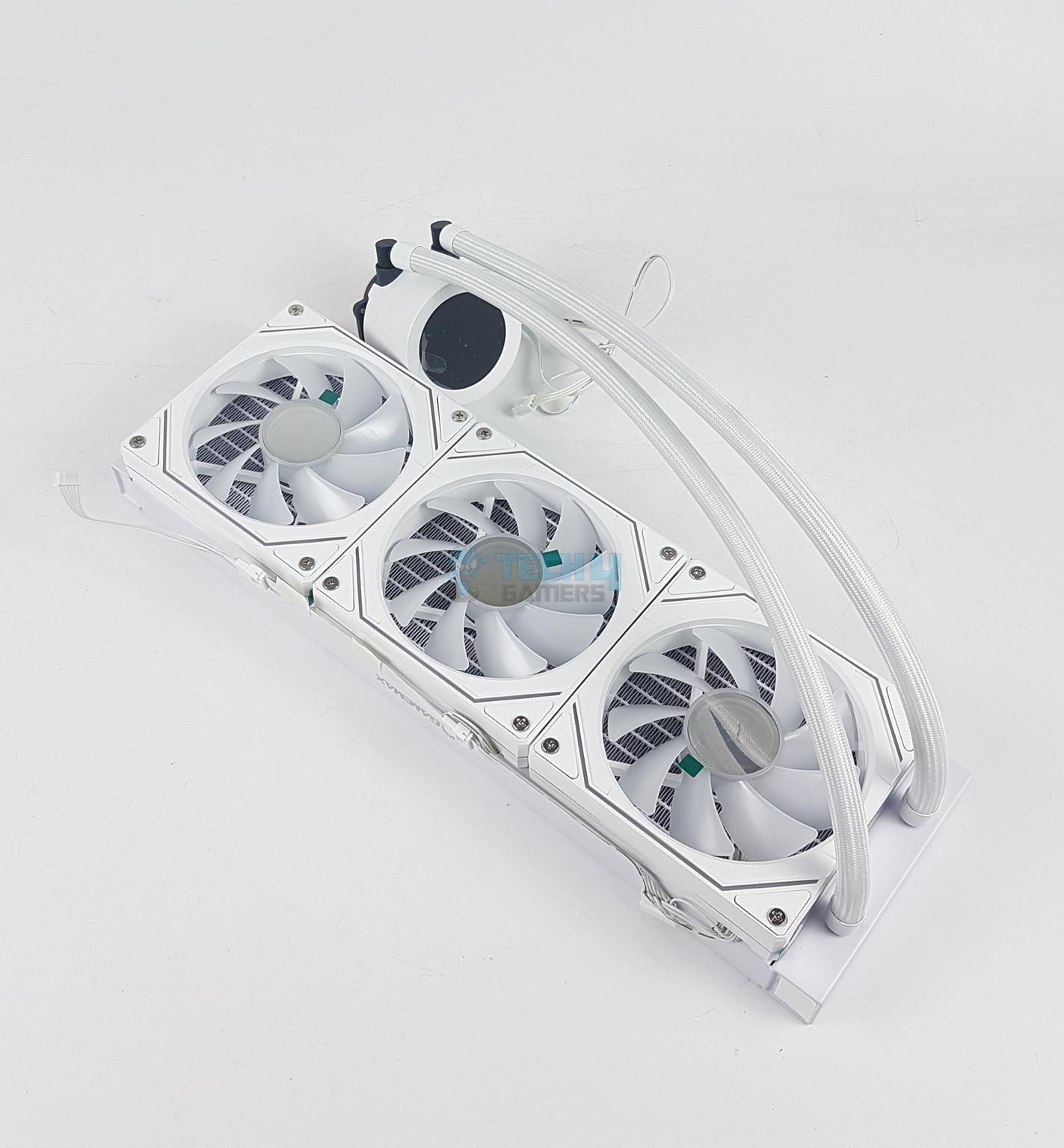
I am taking a look at a new cooler from Gamemax named Iceburg 360 Digital. This cooler is available in white and black. It uses high-performance pump to enhance heat dissipation and improve efficiency. I am taking a look at the white version. The fans on this cooler have infinity mirror design on 3 sides of the frame which look appealing in person though they remind us of Lian Li. This cooler is compatible with Intel LGA 775/115x/1200/1700/1851 and AMD AM2/AM2+/AM3/AM3+/FM1/FM2/FM2+/AM4/AM5 sockets.
Why Trust Tech4Gamers
Nauman Siddique is our hardware expert who has been testing graphics cards, motherboards, processors, and AIOs for more than a decade.
80+ coolers tested and reviewed by our team of hardware experts (Tech4Gamers Team).
900+ hours spent testing different CPU coolers for our reviews.
At Tech4Gamers, ensuring you get reliable information is our priority. That’s why every hardware round-up undergoes a meticulous review process by our team of experts and editors. Each review is carefully examined against our strict editorial guidelines, guaranteeing you trustworthy insights you can depend on.
Key Takeaways
The Gamemax Iceburg 360 Digital is a visually stunning liquid cooler with a digital display, offering adequate performance and compatibility with Intel LGA1700/1851 and AMD AM5 sockets
You should buy the Gamemax Iceburg 360 Digital if you want a solid all-rounder 360mm AIO that delivers both good performance and beautiful looks.
You should not buy the Gamemax Iceburg 360 Digital if your motherboard lacks a USB 2.0 header, as the cooler needs it for its digital display to function.
Some of the salient specifications include:
Radiator Size
385x120x52mm
Radiator Material
Aluminum
Pump Speed
2400 ± 10% RPM
Pump Power
4.20W (Max)
Fan Dimension
120x120x25mm
Fan Speed
800 – 1800 (± 10%) RPM
Fan Noise
36.9 dBA Max
Fan Air Flow
58.8 ±10% CFM
Fan Air Pressure
1.82 ±10% mmH₂O
Fans Life
30,000 hours
[toc]
What Makes The GameMax Iceburg 360 Digital Different?
The Iceburg 360 Digital white not only looks that good but also performs quite well in its space. The augmentation of digital display is excellent and Gamemax has done it in quite effective manner. This cooler is sitting in a price bracket where the competition is tough. Having these augmentations provide better overall value.
Packing And Unboxing
Packaging and Unboxing (Image By Tech4Gamers)
The cooler is shipped inside a cardboard packing box having a black and green theme. This theme gives it an impression of Nvidia’s graphics card packing box. There is an inner container in which the contents are tucked nicely and securely in each compartment. The following are provided:
1x 360mm Liquid Cooler
3x 120mm Fans pre-installed
1x Intel Back plate
2x Intel Mounting Brackets
2x AMD Mounting Brackets
4x Screws for Mounting Brackets
4x AMD Spring-loaded Screws
4x Intel LGA20xx Spring-Loaded Screws
4x Intel Other Sockets Spring-Loaded Screws
12x Radiator Screws
1x User Manual
1x Syringe of Thermal Paste
Closer Look
It is time to take a closer look at the components starting with the radiator itself.
Radiator
Radiator
Radiator Side
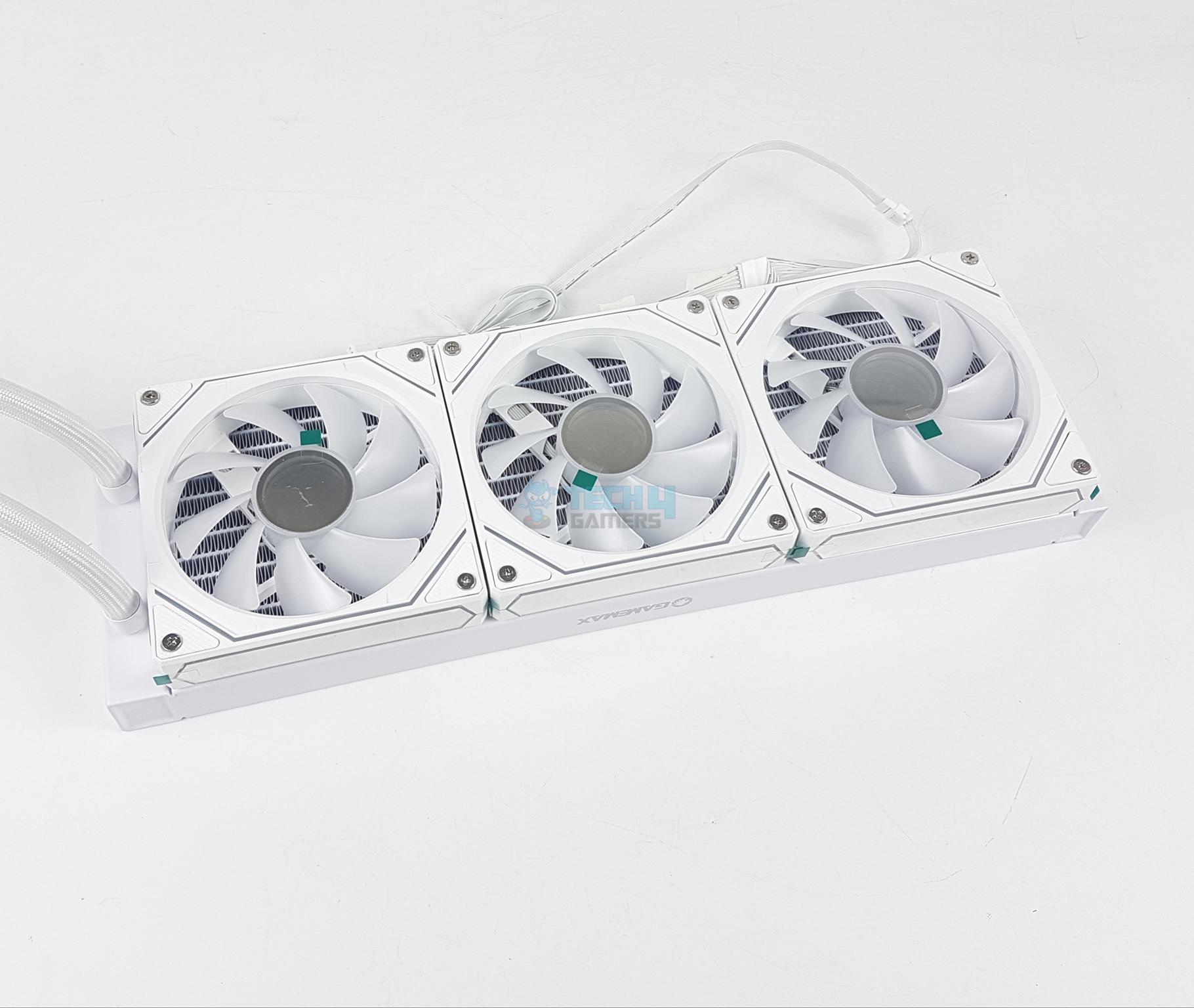
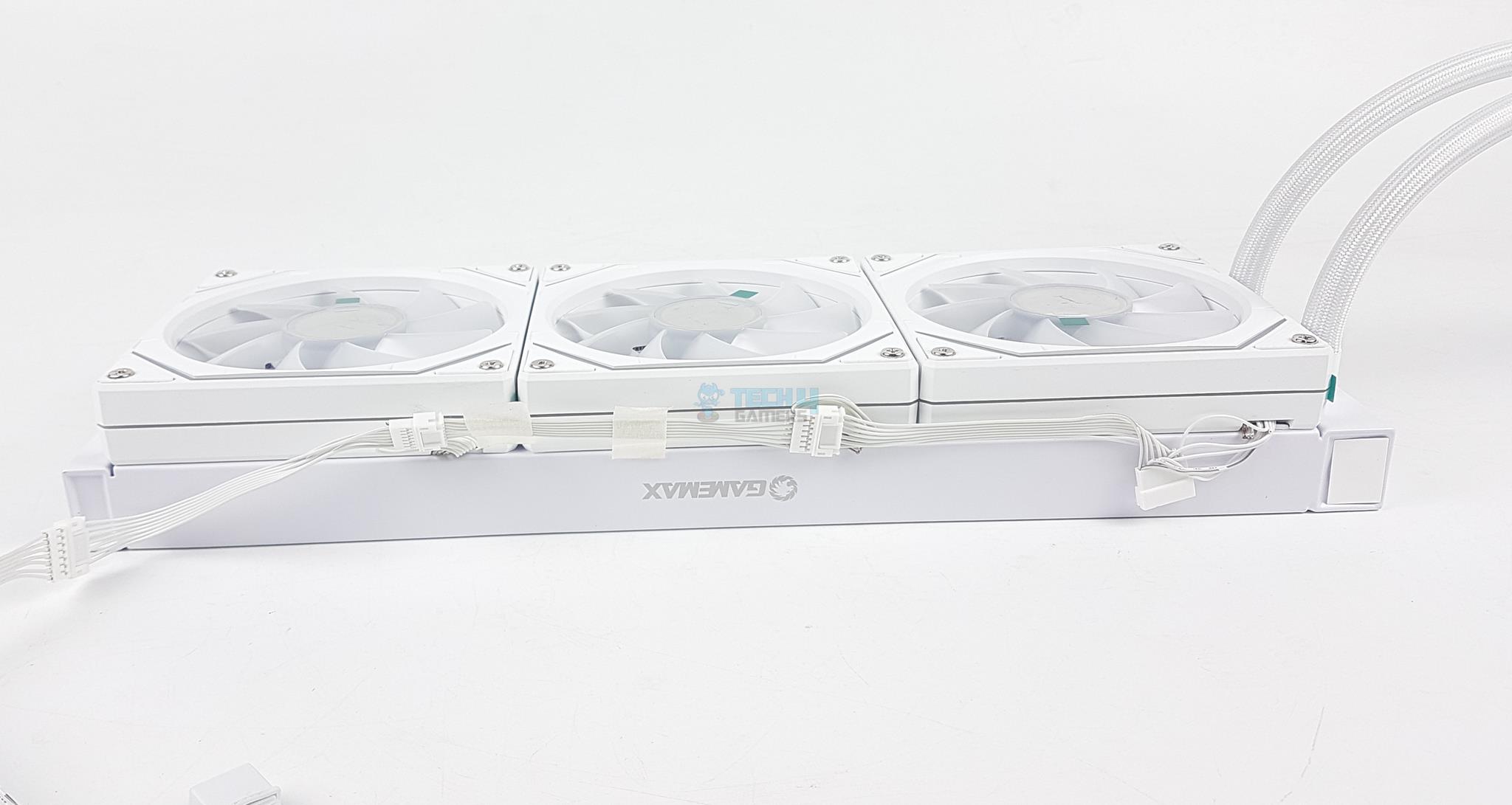
The fans come pre-installed over the radiator. This trend is picking up quite good and it is a wise move in my opinion.
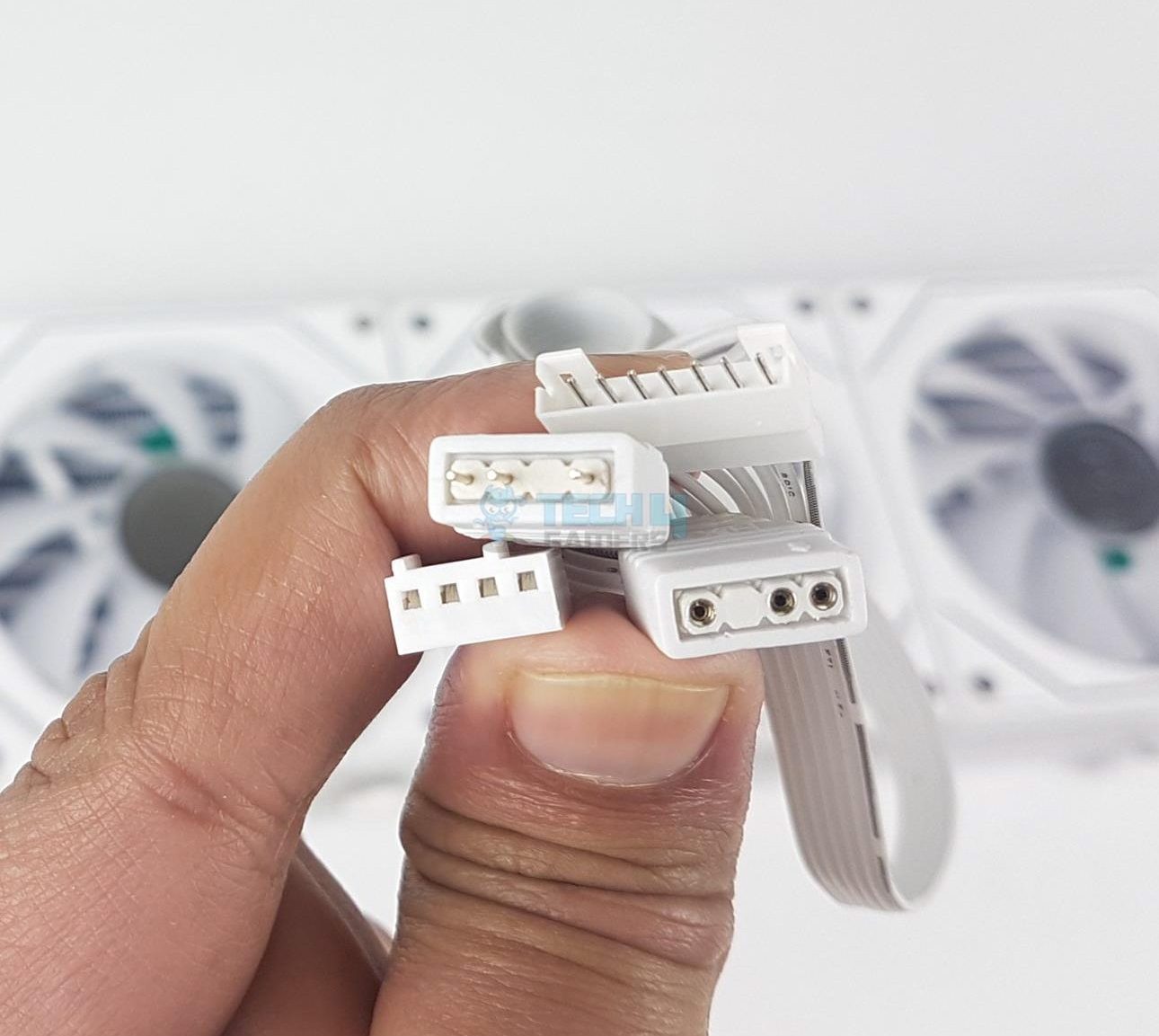
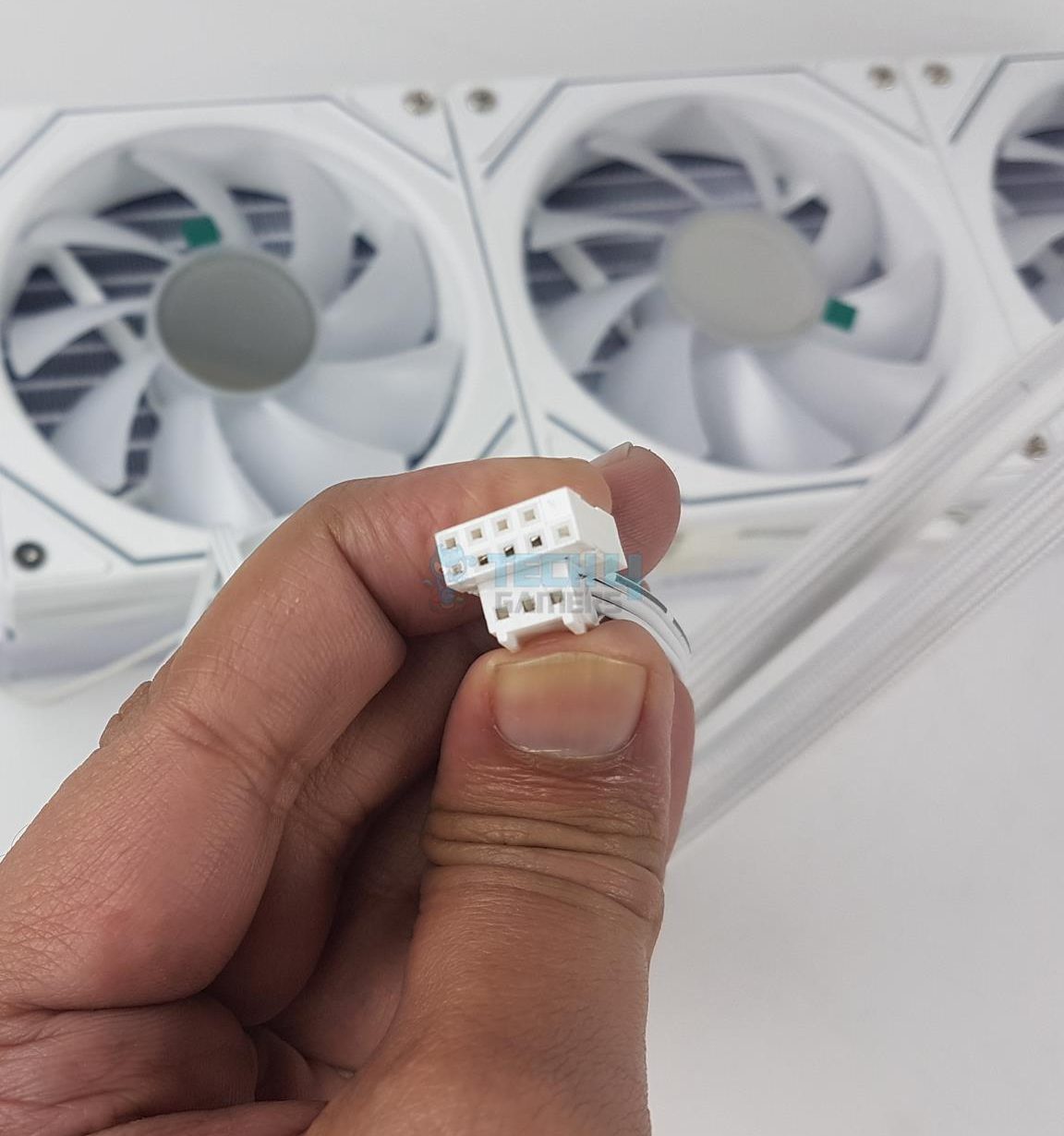
Each fan has a cut-to-size power cable using proprietary connector. This allows easy daisy-chaining and cable management. There is a single extension cable that provides standard connectors.
Fans Extension Cable
Radiator Fins
Gamemax uses 7-pin proprietary connector on the fans. The extension cable has standard 4-pin PWM connector and A-RGB connectors.
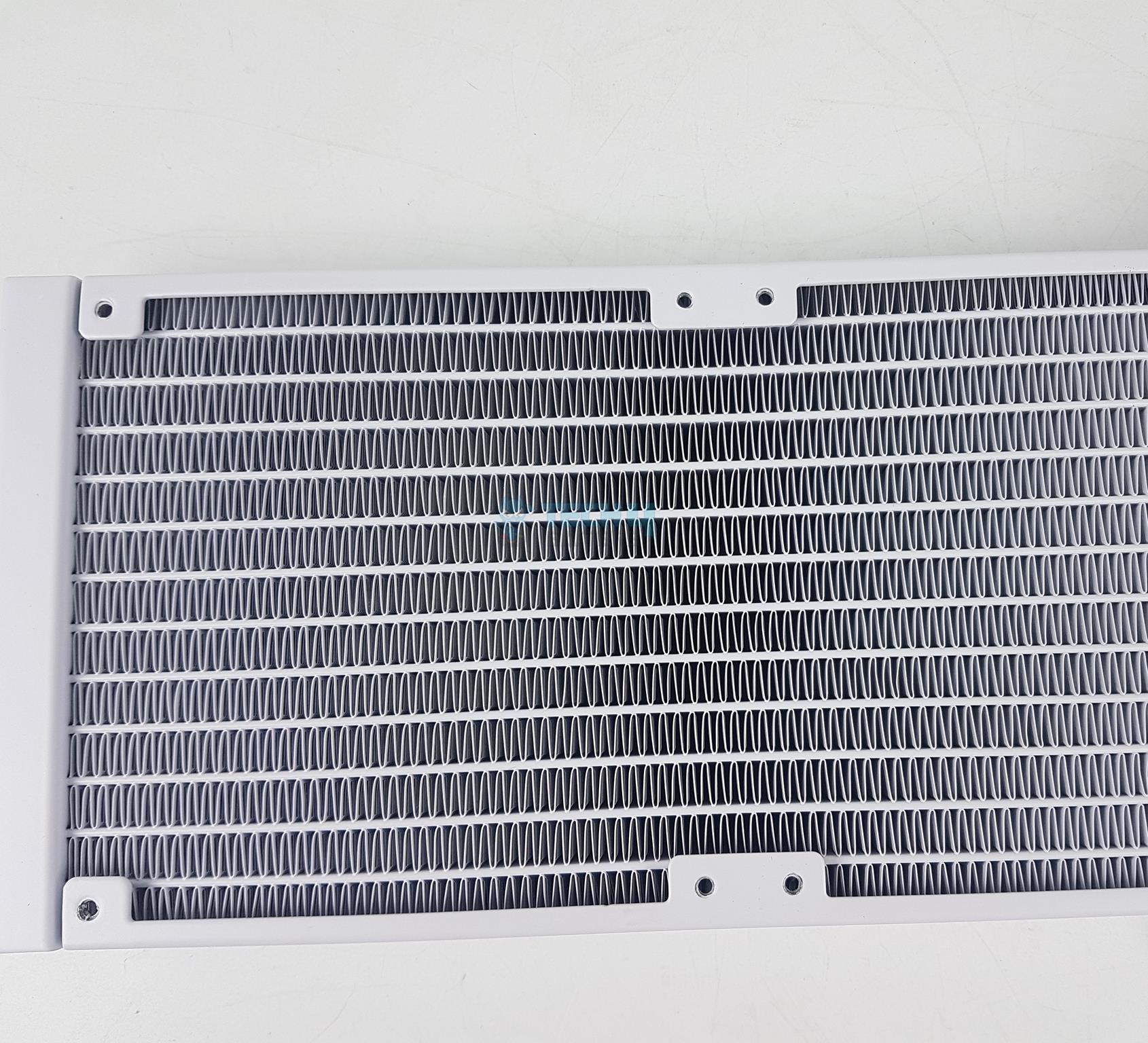
The radiator is made of aluminum material. The complete assembly is in white. The radiator measures 385x120x52mm which is almost a standard size in this product category. 52mm is including the fans. It has 20 FPI count and there are 12x channels for the coolant flow. There is a standard 105mm gap between any two opposite end mounting holes.
Complete Look
Top Design
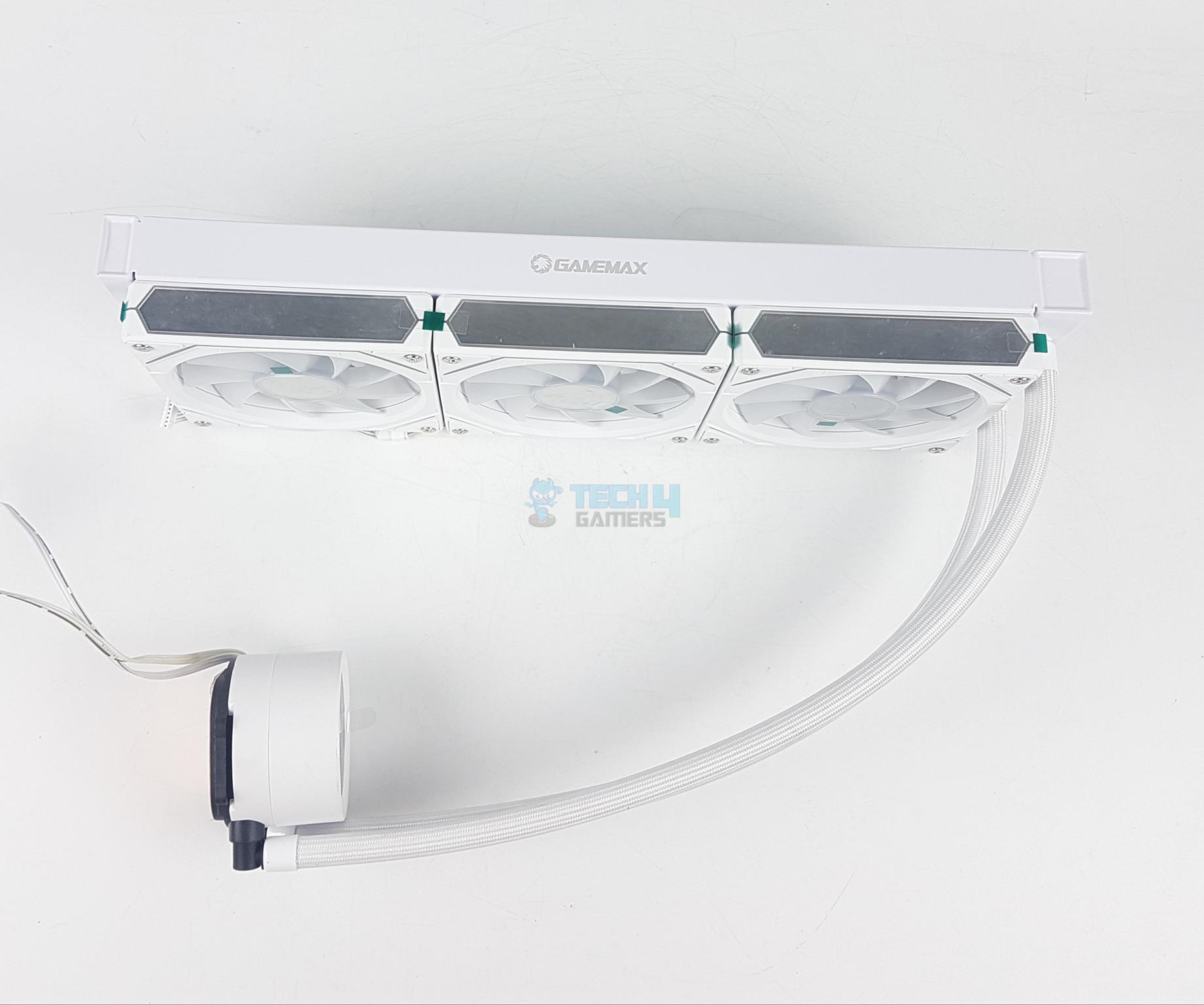
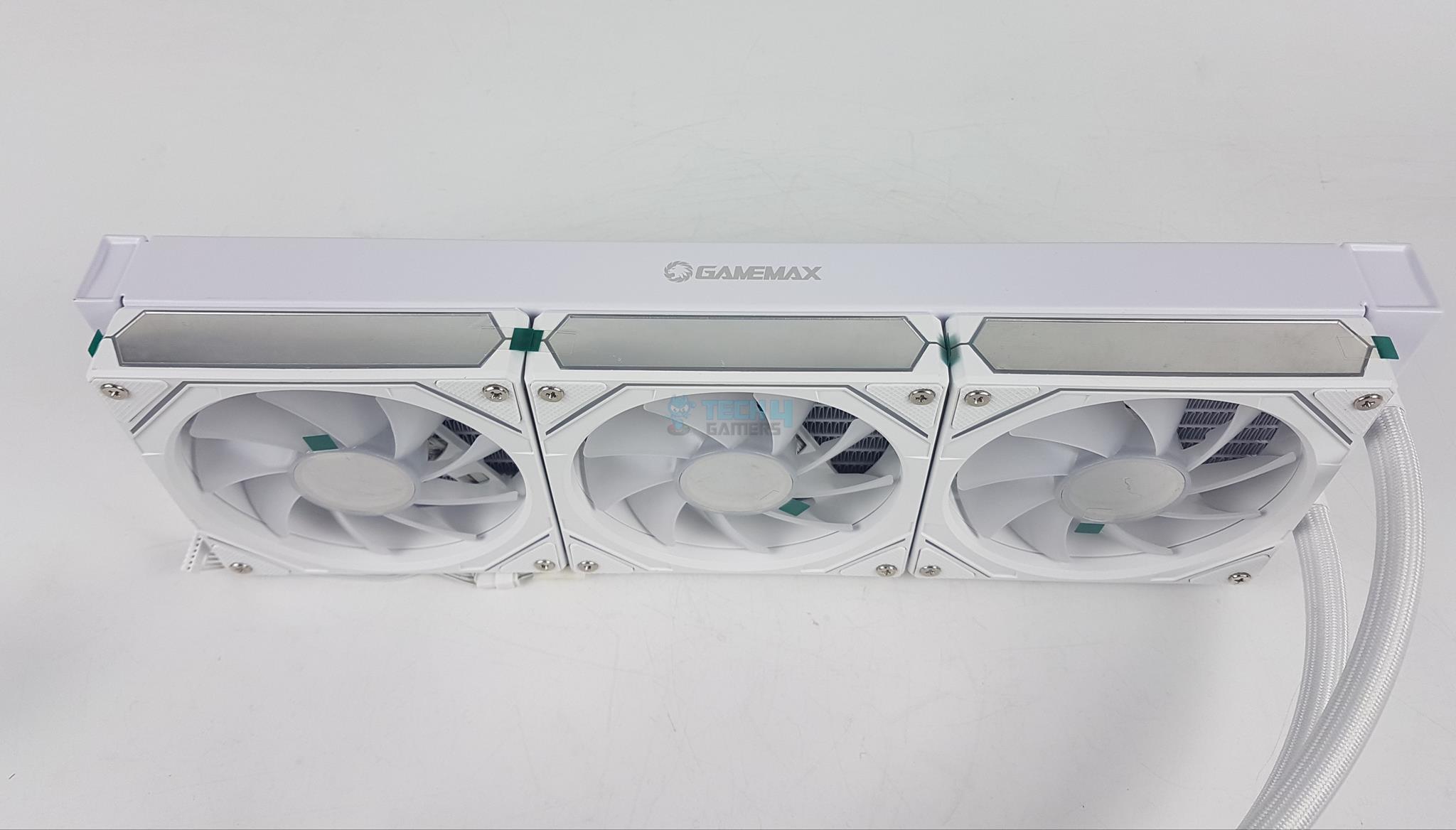
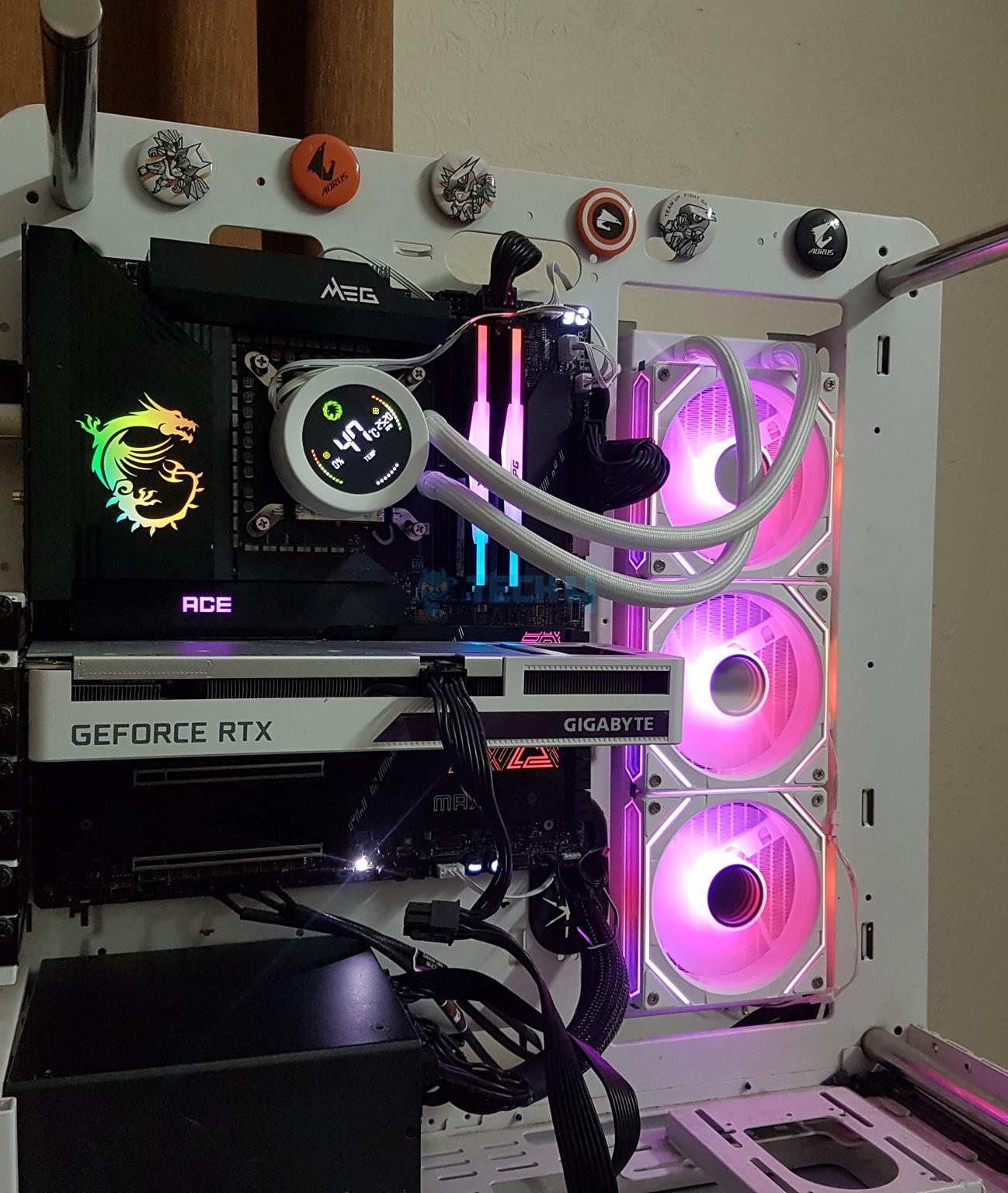
You can see barb fittings with clamps on the tube connections. There is a Gamemax branding on the side frame of the main housing. The fans present a pleasant profile on the side with infinity mirror plates. The rubber tubes have mesh sleeve over them and they run to 400mm in length.
Pump Housing
Pump (Image By Tech4Gamers)
The pump housing has a dimension of 66x45mm round. It is made of ABS material. The top of this block has an integrated display screen with basic display. This unit reports:
The above picture shows what the digital display on the block looks like. Although it is basic, Gamemax has done a good presentation.
CPU Block
Connector
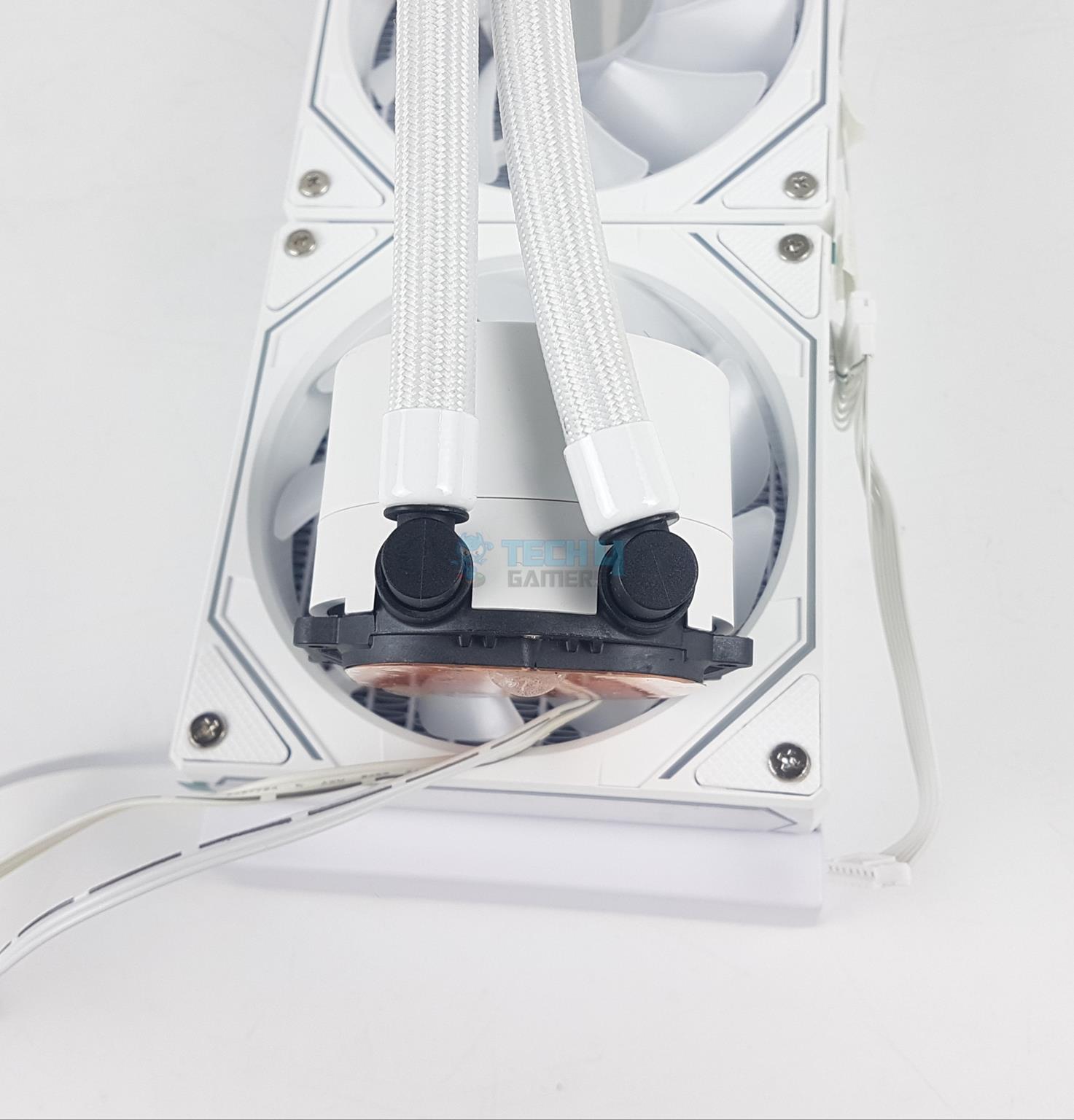
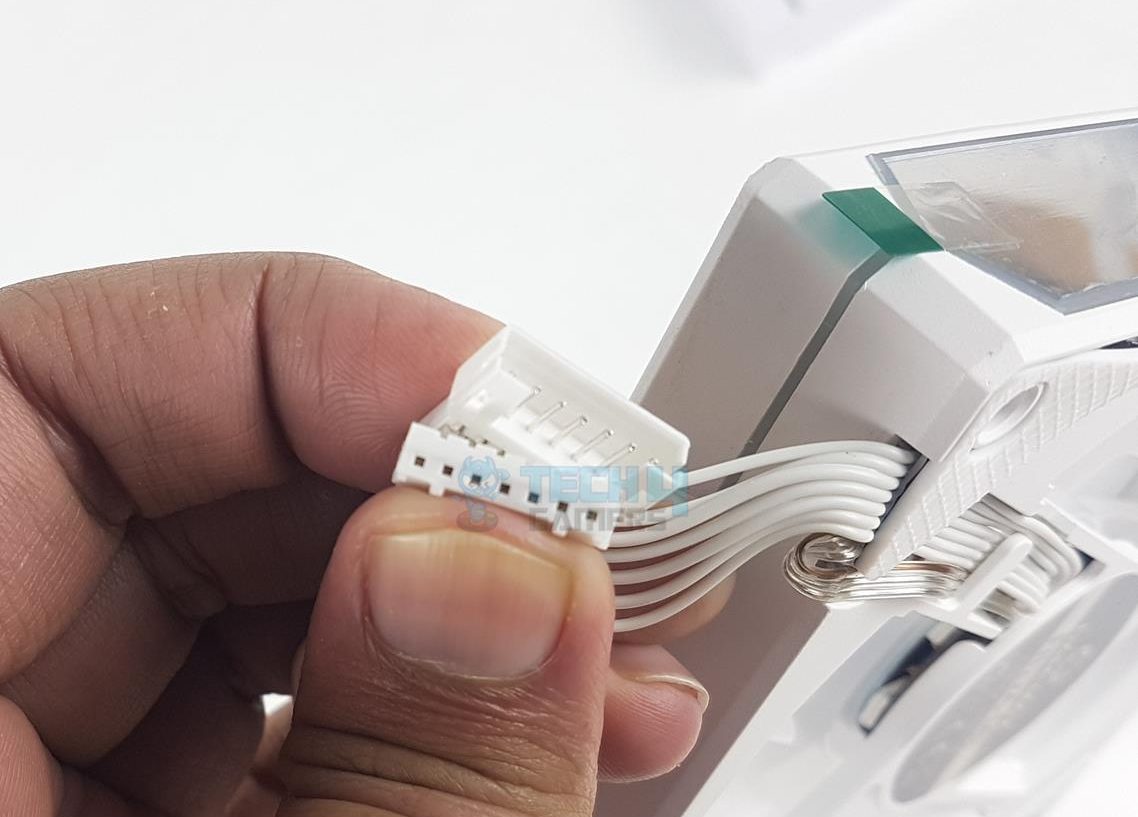
Looking at the backside of the block, there are two 90ᵒ connections between tube and fittings. You can slide the tubes as required. Two flat cables are coming out of the housing.
One cable has a 3-pin connector to power the pump. The pump uses ceramic bearings and has a speed of 2400 ±10% RPM. It consumes 4.20W at 12VDC and 0.25A max. The noise level is rated at 26.9 dB(A). The life expectancy is 40,000 hours. If unit runs continuously day and night, this would translate into 4.56 years.
The second cable has a 9-pin USB 2.0 header which is needed for the software control.
Copper Base (Image By Tech4Gamers)
The unit has a copper base. It has a protective cover which needs to be peeled off before installation. The base is large enough to cover the IHS of latest CPUs.
Fans
Fans
Fan Top
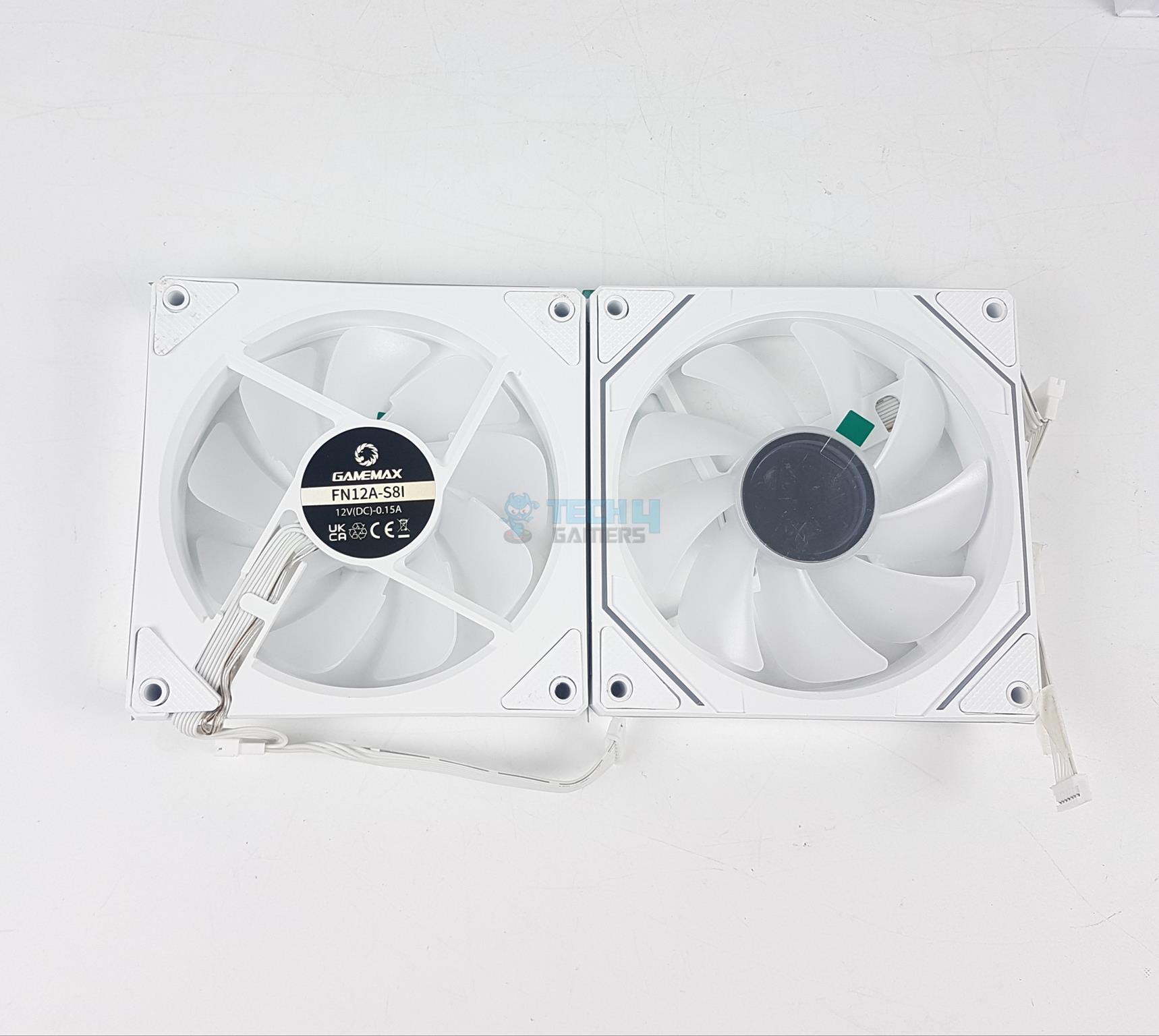
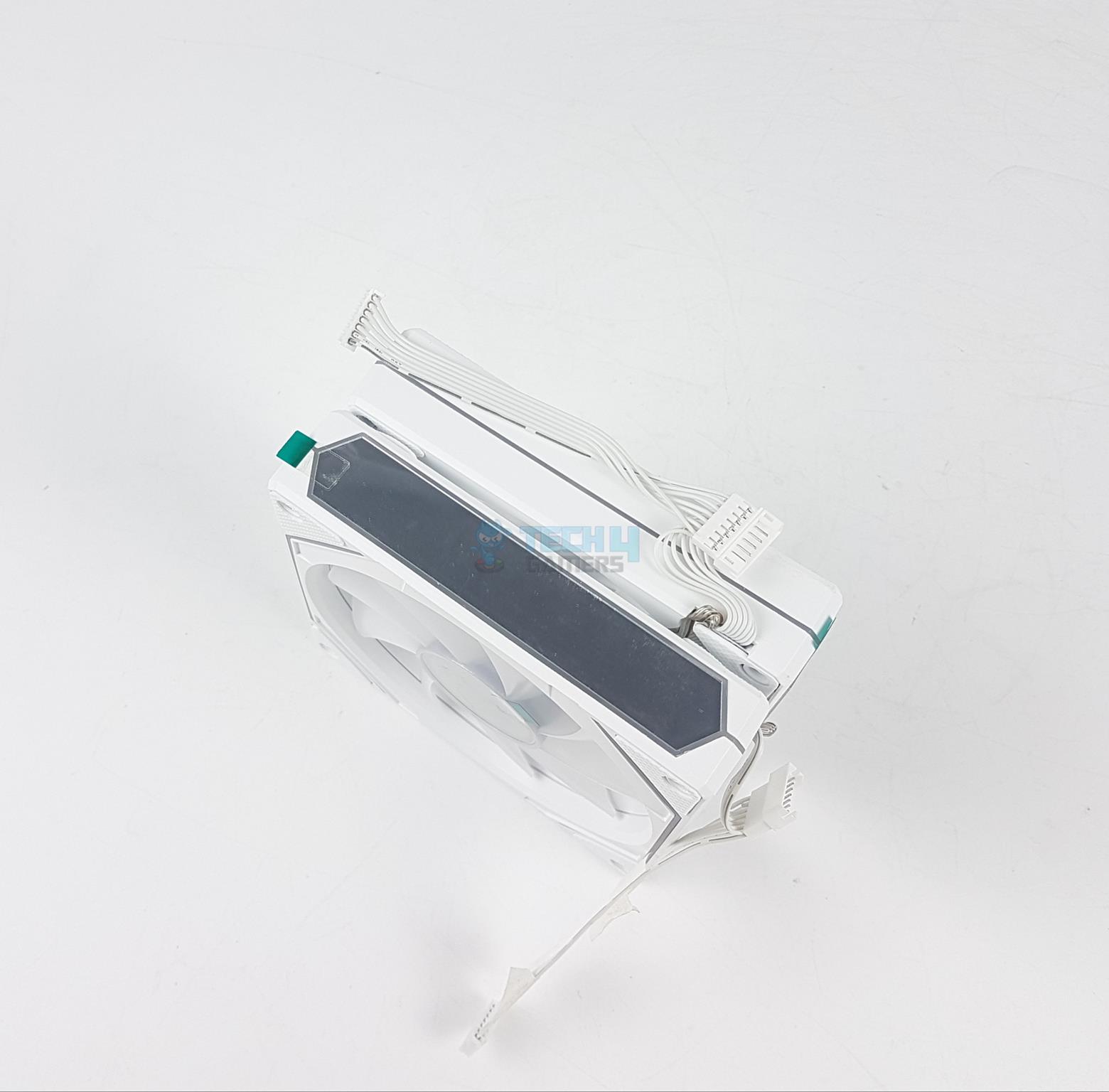
The cooler comes with three pre-installed 120mm white A-RGB fans. Each fan has 9x frosted blades. The center has infinity mirror design. The A-RGB LEDs seem to be housed in the center as well. There are anti-vibration pads on the corners to reduce noise from vibration.
There is a four arms assembly on the back with each arm having a slope design to direct the airflow. One arm has a wider body to catch the wires from center hub going towards the frame. The mode of these fans is FN12A-S8I. Each fan is rated at 12VDC with 0.15A.
The three sides of the fan have infinity mirror design whereas the side from where the cable is coming out has a simple layout.
Infinity Mirrror Side
7-pin Proprietary Connectors
The above picture presents the infinity mirror side of three fans on the radiator.
These fans use 7-pin proprietary connectors. Although it will work within the Gamemax ecosystem but having non-standard connections would mean, you can’t use the unit if any of the fan develops a fault.
These fans are rated for up to 1800 ±10% RPM generating airflow of 58.8 ±10% CFM at a static pressure rating of 1.82 ±10% mmH₂O. These are average figures. Their life expectancy is 30,000 hours. This equates to 3.42 years if unit is used continuously day and night.
Installation
The cooler is tested on Intel LGA1700 socket. Here are the steps:
Place the backplate over the backside of the motherboard and paste it.
Install mounting brackets on the block using screws.
Apply thermal paste on CPU.
Peel off the protective cover from the base of the block.
Place the block over the CPU by aligning the holes on the arms of mounting brackets with the holes in the backplate.
Secure the block using the LGA1700 spring-loaded screws.
Install radiator.
Connect cables and you are good to go.
Clearance
This unit has an overall dimension of 385x120x52mm with installed fans. Make sure your PC Case has a support for 360mm size cooler.
Software
Software
1 of 3
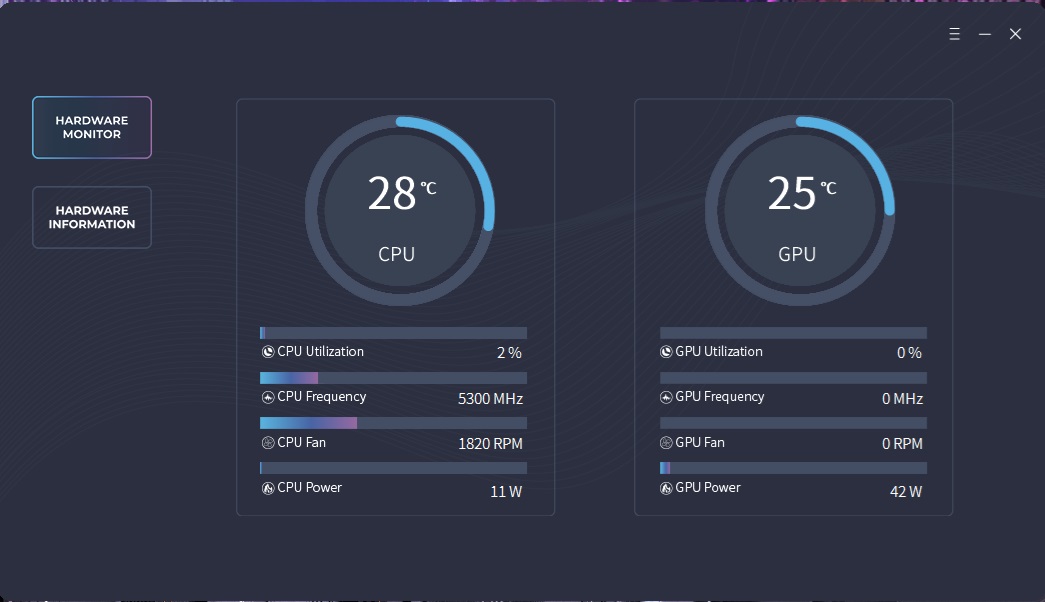
The software has a simple interface that shows the Hardware stats on front page.
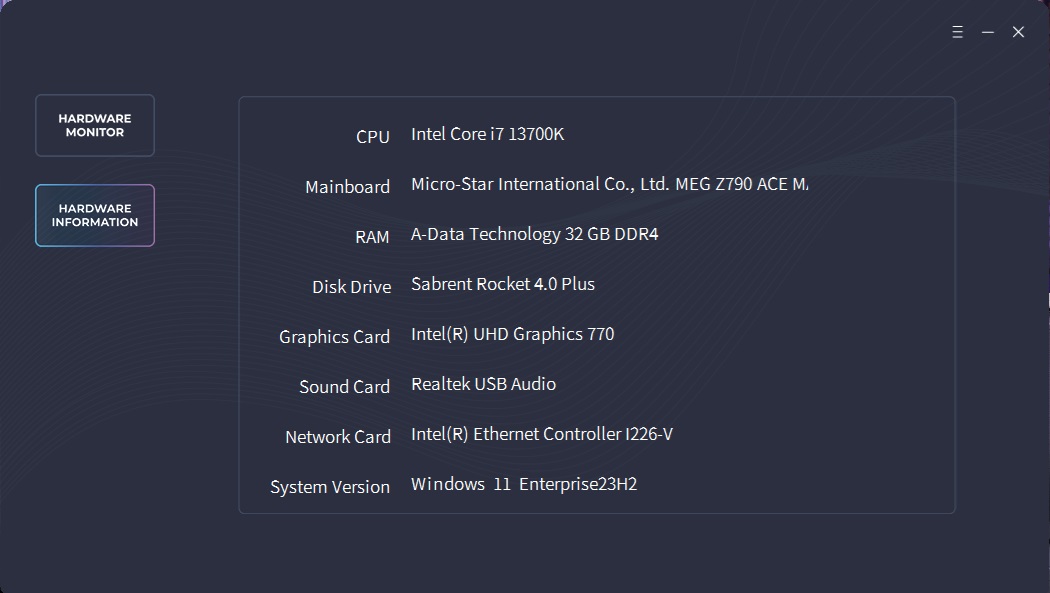
The Hardware Information page lists the system specs.
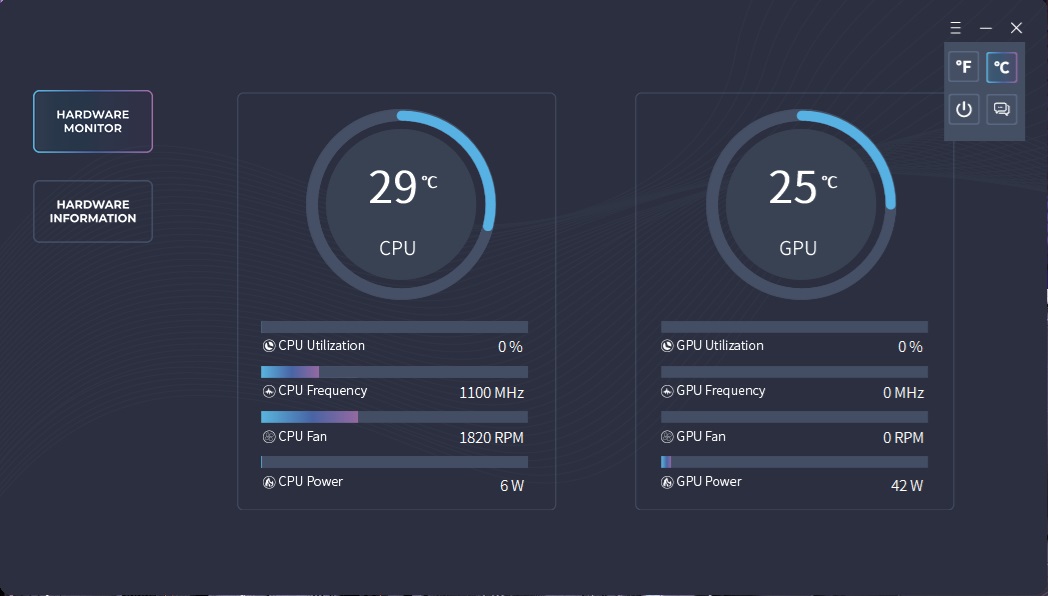
The three lines button on the top right allows you to turn the display on and off. It also allows to change the unit of temperature and change overlay. The polling rate is quite slow as it takes some time to reflect the changes on the screen and to display the correct temperature value.
A-RGB Lighting
A-RGB Lighting
1 of 5
RGB Lighting
RGB Lighting
RGB Lighting
RGB Lighting
RGB Lighting
This cooler uses standard A-RGB connectors making it compatible with RGB sync technology of motherboard manufacturers. The cooler is tested on MSI Z790 ACE MAX and it was responding well to the changes in MSY Mystic Light sync app.
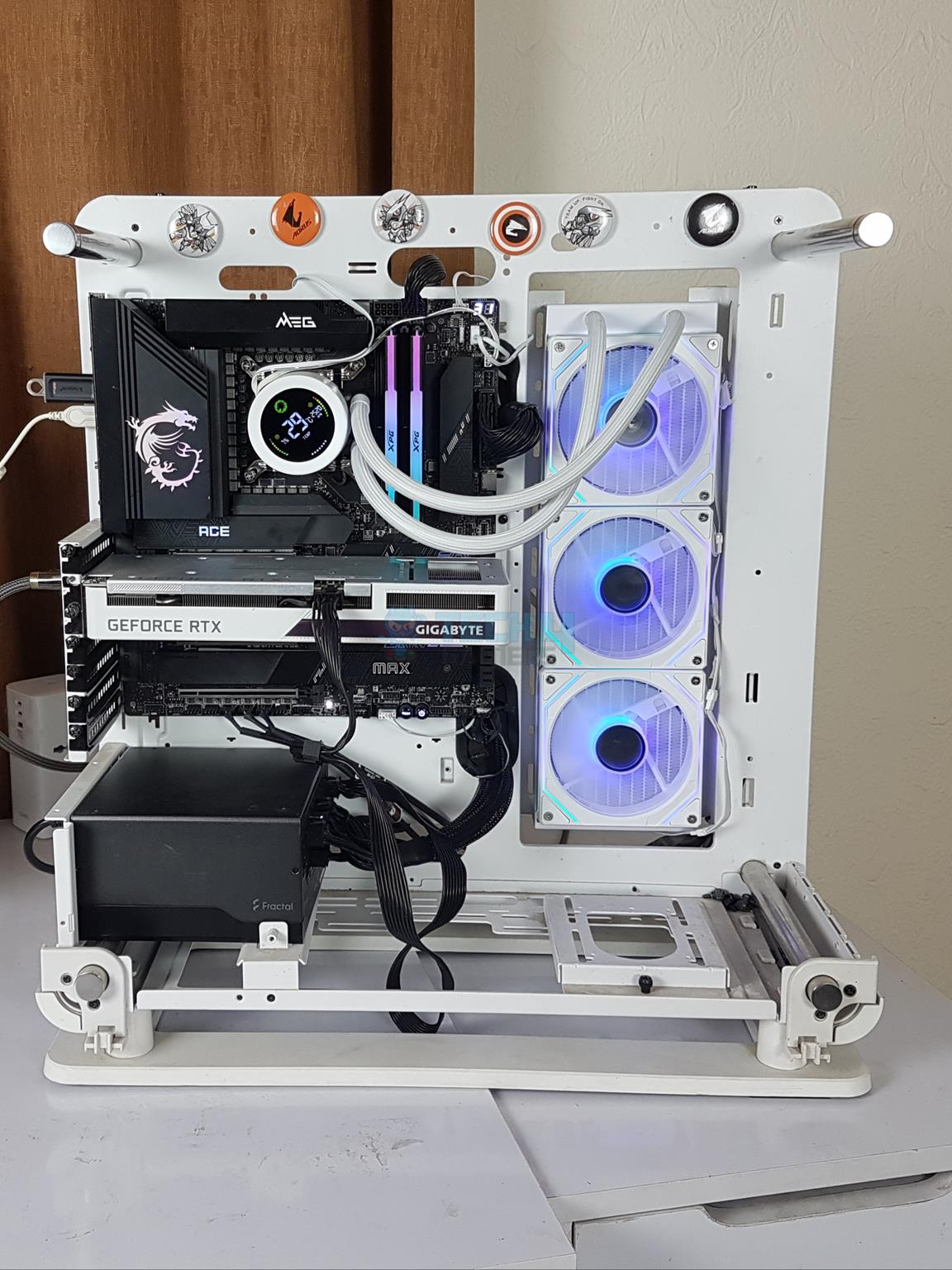
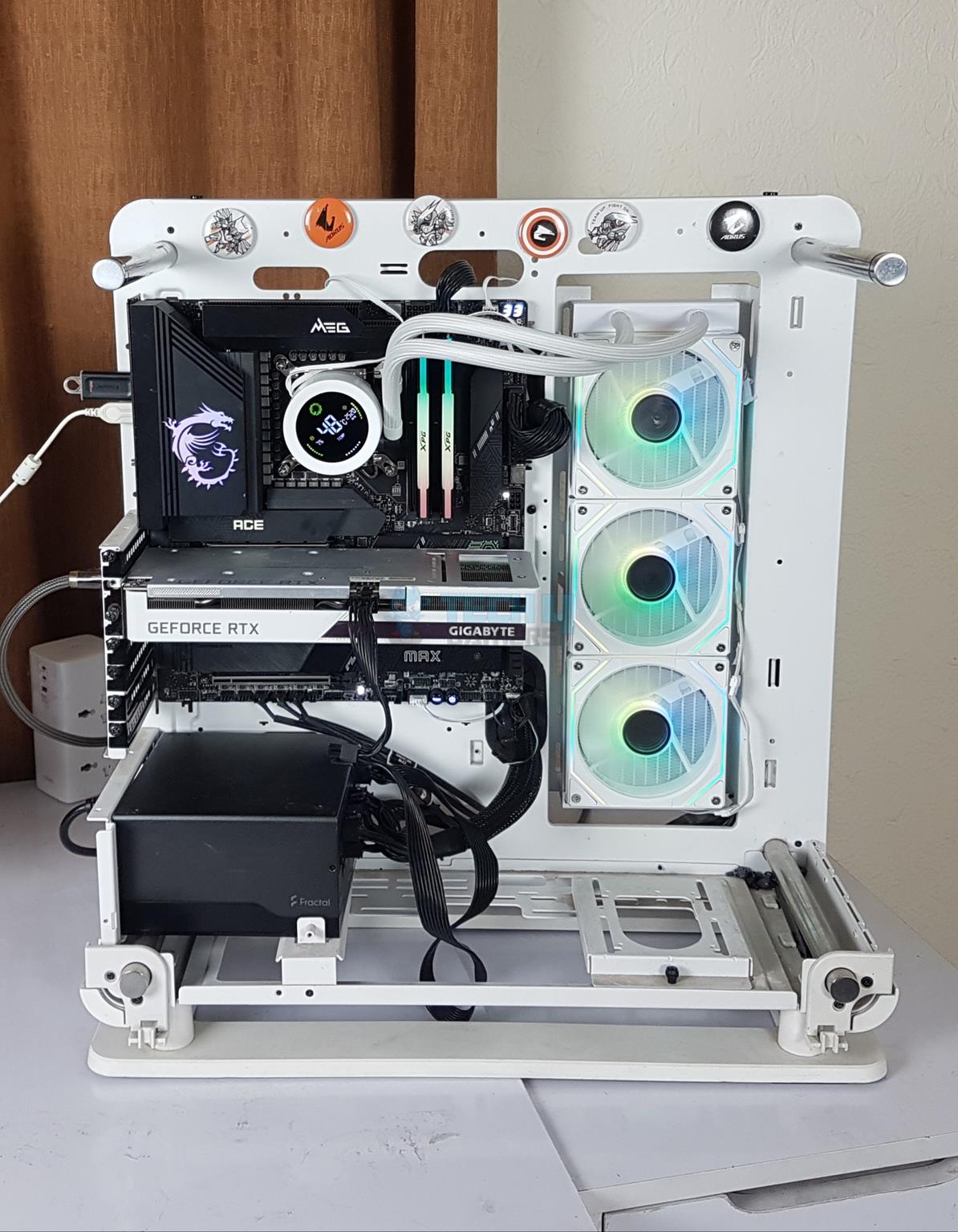
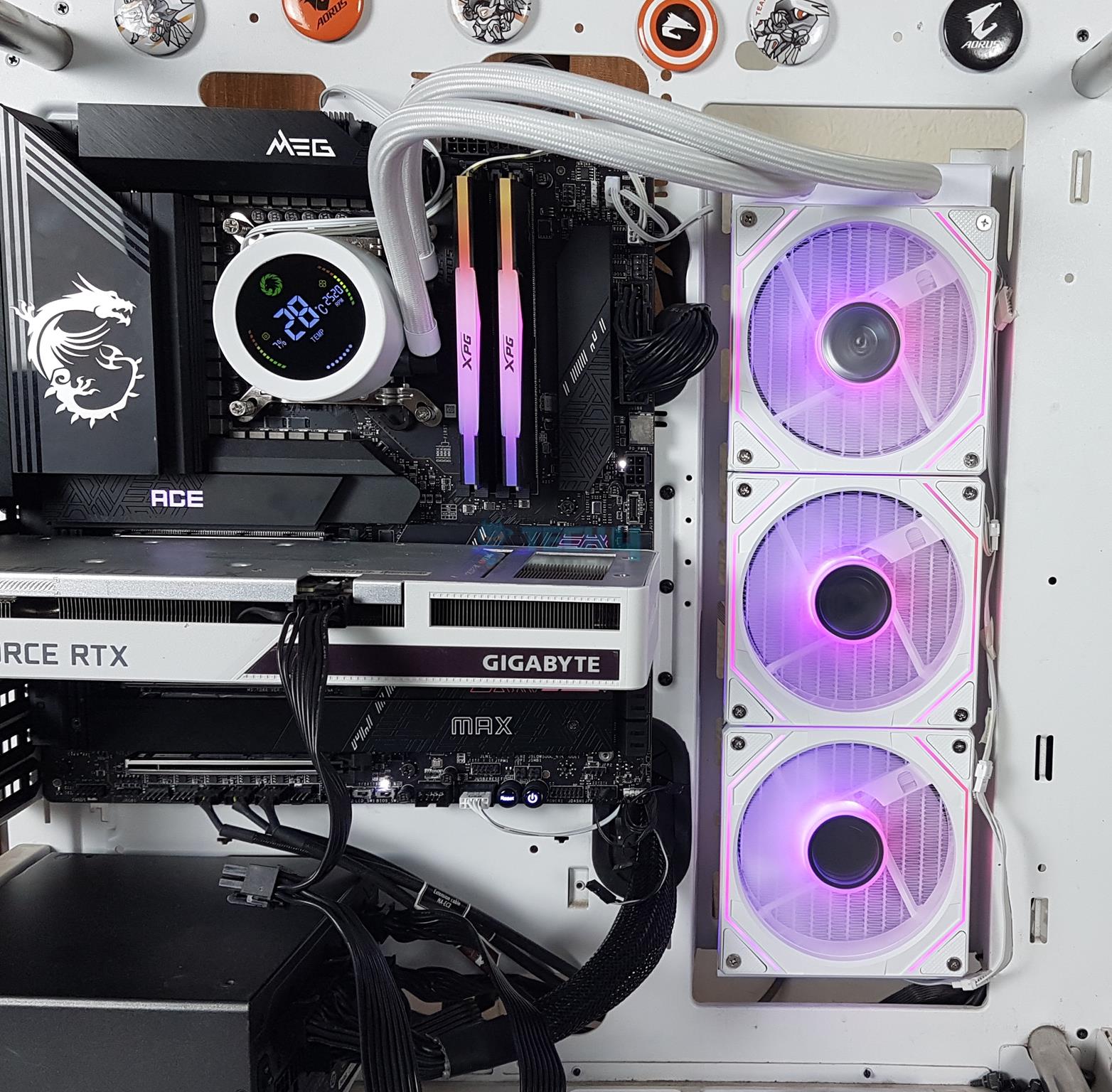
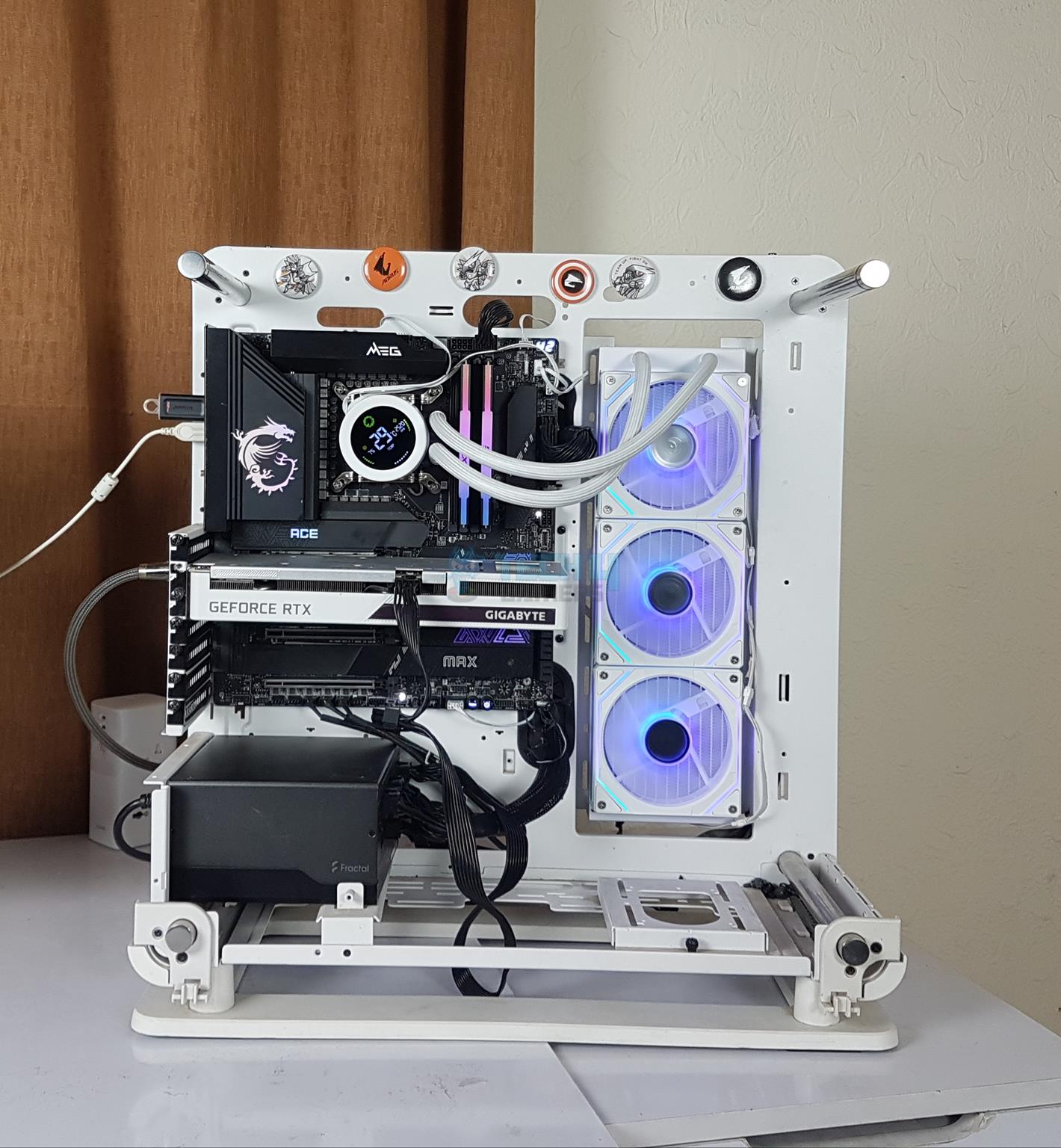
Thermaltake Core P6 TG Snow Edition in an open frame layout
Here is the settings table for testing:
Clock (MHz)
Auto
Voltage (V)
Auto
Power Profile
Intel Default
Thermal Paste
Noctua NT-H1
Thermal Paste Application
Center Line
Test Run Time
30 minutes
Idling Time
10 minutes
All Fans Speed
100% PWM Duty Cycle
Pump Speed
Stress Software
CINEBENCH R23.2
Monitoring Software
HWINFO64
Result
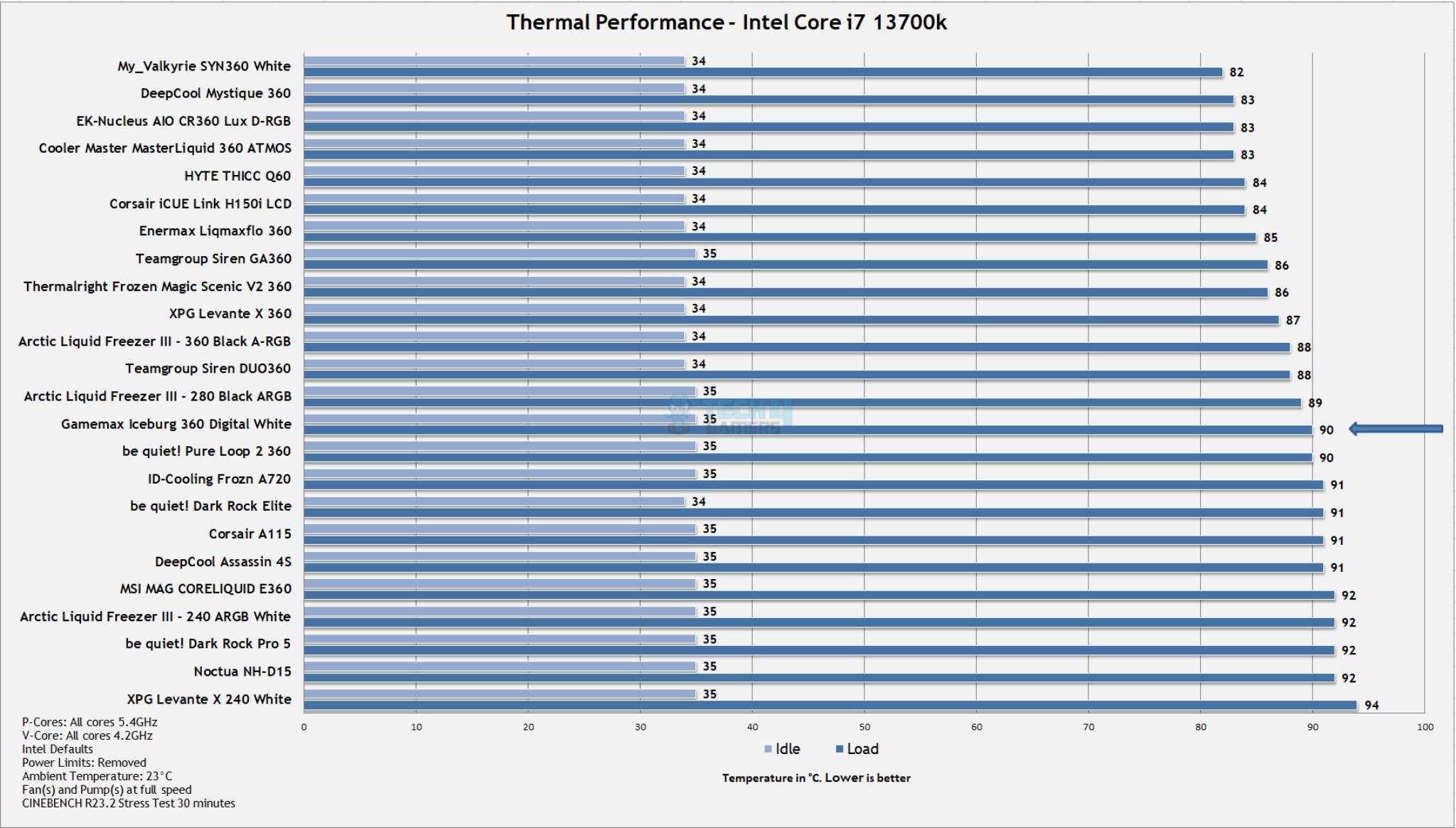
Thermal Performance (Image By Tech4Gamers)
The Gamemax Iceburg 360 Digital White has a decent performance over our thirsty Intel Core i7 13700k. The fans are not that loud at full speed.
Should You Buy It?
Buy It If
✅You are looking for a balanced liquid cooler: Gamemax Iceburg 360 Digital White not only looks brilliant but it has a decent performance on latest platforms.
✅You want infinity mirror all around: The fans feature infinity mirror design on three sides and the center presenting a cool outlook with vibrant colors.
✅You like a digital display: This cooler has a display LCD on the block that reports the temperature of the CPU along with its load and fan speed.
Don’t Buy It If
❌You don’t have a spare USB 2.0 header: This cooler needs one USB 2.0 header on your motherboard. If you don’t have any spare, then sip this cooler or use it without digital display.
Conclusion
Gamemax Iceburg 360 Digital White uses sixth generation of pump (Not sure about OEM) for better heat dissipation. This cooler is available in white and black. The salient feature is digital display. Though it is still basic like displaying CPU load, temperature and the fan speed but Gamemax has designed it to look even better.
This cooler is compatible with Intel LGA 775/115x/1200/1700/1851 and AMD AM2/AM2+/AM3/AM3+/FM1/FM2/FM2+/AM4/AM5 sockets. The unit has a dimension of 385x120x52mm with fans. The radiator is made of aluminum material and has 20 FPI with1 2 channels.
Three 120x25mm fans come pre-installed. They have infinity mirror design on three sides and on the center. They are rated for 1800±10% RPM speed with airflow rating of 58.8±10% CFM. The air pressure rating is 1.82±10% mmH₂O. The maximum noise level is 36.9 dB(A). These fans use proprietary connections. The fans are daisy-chained using small length cables. There is a single extension adapter cable with standard connectors on one end. These fans have a yellow white color tone which does not sync with the white color tone on the radiator.
You would need software from Gamemax website for digital display customization. I have experienced slow polling rate and a tilted display. The block is installed as per the installation video and yet the display is tilted. Similarly, you are locked in terms of orientation. The tube side of the block needs to be at 3ᵒo clock to provide upright display. You can’t rotate the lid. Software does not allow any more customization except changing the temperature unit and tuning on and off the overlay and display.
If there is anything that I would want to change in this cooler, it is the mounting hardware. Gamemax needs to simplify the mounting. I personally don’t like to paste anything on the motherboard. The requirement of pasting the backplate needs to be re-evaluated. I have tested this cooler on Intel LGA1700 socket. It requires 11 items to install the block over CPU in 4 steps. This cooler has a nice performance on our 13700k.
At Tech4Gamers, I contribute as a Senior News Reporter, combining my skills and gaming enthusiasm to keep our audience updated on the latest developments.
Story Highlight
An analyst has stated that Xbox Game Pass can hurt game sales by up to 80%.
He pointed to releases like Starfield, Hellblade 2, and Indiana Jones as examples of this trend.
The analyst does not see subscriptions as the future of gaming.
Xbox Game Pass has proven to be quite beneficial for Microsoft, providing a new strategy for the gaming giant’s survival in this industry. However, it also comes with various problems of its own.
According to a renowned analyst, the service can notably impact sales. In fact, titles that launch day one on the service suffer about 80% sales losses on the Xbox platform.
Why it matters: Microsoft has put all its eggs in one basket, so the gaming giant has no option but to commit to this service and day-one content delivery.
Microsoft Has Gone All In On The Subscription Model
Responding to a recent question about the service, Chris Dring noted that day-one Game Pass titles lose up to 80% of their potential sales on Xbox.
He pointed to examples like Hellblade 2, Indiana Jones, and Starfield, which quickly dropped off the best-selling charts after their release. Hellblade 2, in particular, ended up disappointing across all platforms.
Chris Dring noted that Xbox Game Pass could benefit multi-platform releases, which most of Microsoft’s first-party titles will be moving forward. However, he continued to emphasize that there is definitely money lost when AAA releases are made available through the service.
I believe it can lead to lost revenue. Games can expect to lose around 80% of premium sales on Xbox.
-Chris Dring
The analyst also believes that Xbox Game Pass may not be all too big in the future. He pointed to the popularity of free-to-play releases as one reason why this may be the case.
Indiana Jones And The Great Circle Received Plenty of Praise Despite Lukewarm Player Counts
Fortunately, for Xbox Game Pass, all hope has not been lost yet. A recent launch like Black Ops 6 has been encouraging for the service, and Indiana Jones, despite its disappointing performance, has seemingly impressed Disney enough to warrant a sequel.
Therefore, it will be interesting to see how the subscription shapes up in the future. What do you think about the potential hit to sales for titles released on the service? Let us know in the comments, and share more of your thoughts on the Tech4Gamers Forums.
At Tech4Gamers, I contribute as a Senior News Reporter, combining my skills and gaming enthusiasm to keep our audience updated on the latest developments.
[Press Release] With the upcoming release of the GeForce RTX 50 series, Alphacool has revamped its Core GPU water cooler.
Pure Brass Fittings For The Core Series Ensure High Quality And Safety
Alphacool now boasts significantly improved cooling, making this water cooler adequate for the GeForce RTX 5080 and 5090. Despite these improvements, the design has only seen slight adjustments.
Instead, the company has tested different distances between the cooler and components for optimized results. The water flow was also simulated with software during testing for the best results possible.
This experimentation has led to solid results from Alphacool Core coolers. Moreover, for optimal performance, a backplate is included out of the box, in addition to high-quality thermal paste and pre-cut thermal pads.
As per Alphacool, the coolers will support different GeForce RTX 5090 and 5080 models from Palit, Gainward, Inno3D, Asus, and MSI. To learn more about these specific models, find all the details on the company’s official website.
At Tech4Gamers.com, I cover the latest news and rumours in the gaming industry, from new game releases to hidden gems and video game leaks. Furthermore, I occasionally write tech articles about video game consoles, providing insights into the hardware and software that powers our gaming experiences.
Story Highlight
Even with strong specs, RTX 5090 requires DLSS for 60 FPS at 4K while using Path Tracing.
DLSS 4 Multi Frame Generation significantly boosts performance, enabling very high frame rates and reduced ghosting.
However, for many, the resulting gameplay experience is more important than the method used to achieve it.
Nvidia’s new top-of-the-line graphics card, the GeForce RTX 5090, has been announced with impressive specs and a hefty price tag of $1,999. However, running demanding games like Alan Wake 2 or Black Myth: Wukong at 60FPS in native 4K resolution with full path tracing is still difficult without utilizing DLSS.
Why it matters: This shows how modern games are becoming more and more reliant on upscaling technologies like Frame Generation. This also gives users an idea of what to expect from the RTX 5090 in terms of rasterization performance.
5090 fails to achieve 60 FPS in titles like Alan Wake 2 and Cyberpunk 2077 at 4K native with full tracing. | Source: Nvidia
The RTX 5090 comes with 32GB of GDDR7 memory and powerful processing cores, making it a strong choice for gaming at 4K. However, Alan Wake 2, known for its demanding graphics and ray tracing, struggles to hit 60 FPS at 4K without DLSS.
As games become more demanding, even the best hardware may need AI-driven solutions to provide the best performance.
To tackle these issues, Nvidia has launched DLSS 4 with Multi Frame Generation. This feature adds up to three extra frames for every regular frame, greatly improving performance. With the RTX 5090, DLSS 4 allows 4K gaming at 240 FPS with full ray tracing in supported games.
It’s important to note the challenges here. The performance issues occur when playing at 4K resolution with a high 240 Hz refresh rate, along with full path tracing. These settings are extremely demanding and serve more as a benchmark for the future than the typical setup for most gamers today.
Modern games require powerful hardware and upscaling tech like DLSS 4 for high frame rates at 4K native.
These cards are built to showcase Nvidia’s latest technologies, like the new Multi Frame Generation, to make high-end gaming possible.
If DLSS 4 can provide a smooth and visually improved experience, the method of achieving the performance, whether naturally or through AI improvements, becomes less important for most people.
Are you one of those people who think video game image quality looks better when utilizing DLSS? Let us know in the comments, or join the conversation on the Tech4Gamers forum.