Home Blog Page 392

G.Skill Trident Z5 Royal Neo DDR5-8000 CL38 EXPO Kit Review

G.Skill recently launched a new set of DDR5 memory for AMD CPUs as part of their Trident Z5 Royal Neo lineup. This is, of course, G. Skill’s top-of-the-line offering, promising a luxurious design and top performance. We’ve also looked at the Trident Z5 Royal Neo DDR5-6000 CL28 variant in the recent past, and if that’s anything to go by, this one will be special, too. This kit clocks in at 8000 MT/s with AMD EXPO, the fastest in the lineup so far! Let’s dive in and take a look. 

Why Trust Tech4Gamers
  • Ali Touseef is our hardware reviewer who regularly tests and reviews different components, including coolers, RAM, motherboards, and processors.
  • 70+ RAM tested and reviewed by our team of hardware experts (Tech4Gamers Team).
  • 200+ hours spent testing different RAM kits for our reviews.
  • Objective testing criteria (See how we test RAM).

At Tech4Gamers, ensuring you get reliable information is our priority. That’s why every hardware round-up undergoes a meticulous review process by our team of experts and editors. Each review is carefully examined against our strict editorial guidelines, guaranteeing you trustworthy insights you can depend on.


Key Takeaways

  • The G.Skill Trident Z5 Royal Neo DDR5-8000 CL38 is a high-performance memory kit with an attractive design and a fairly steep $179 price tag. 
  • You should get the kit if you want no compromise on performance and/or are a fan of the luxurious design approach. 
  • Don’t buy the kit if your budget is limited and/or you have an Intel CPU (no XMP support). 

Here are the specifications:

Serial No. F5-8000J3848H16GX2-TR5NG
Tested Speed 8000 MT/s
Tested Latency CL38
RGB Yes
Color Gold, Silver
Memory Voltage 1.45V
Rated Speed (JEDEC) 4800 MT/s
XMP No
EXPO Yes
ECC No
Warranty Limited Lifetime
MSRP $179
[toc]

With its EXPO profile, the memory has an impressive true latency of 9.5ns. This non-ECC kit is offered in two configurations, 2×16 (32 GB) and 2×24 (48 GB), and two themes: Gold and Silver. 

PRO TIP: Check the Qualified Vendors List (QVL) on G.Skill’s website to ensure compatibility with your motherboard.

What Makes This Kit Different? 

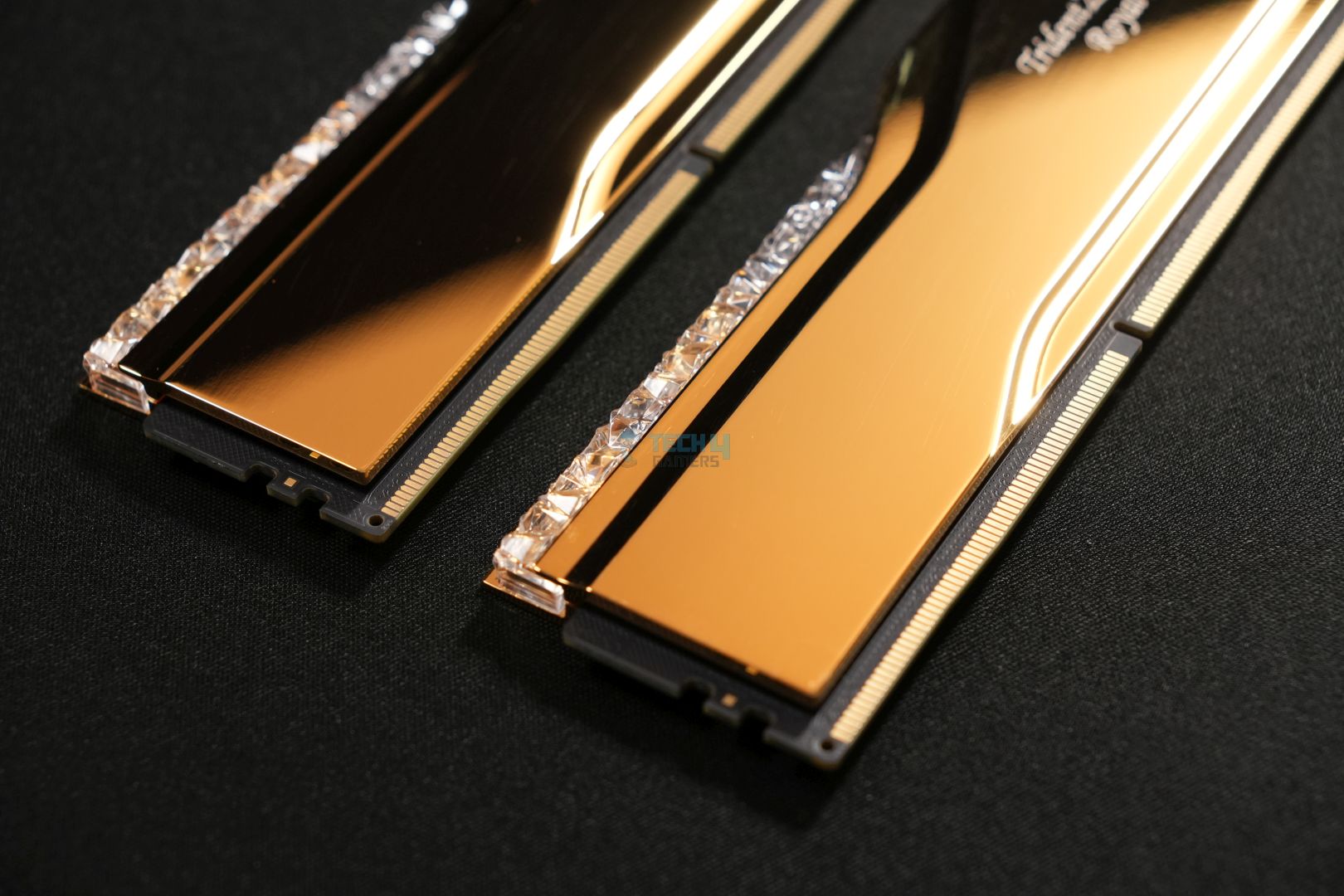
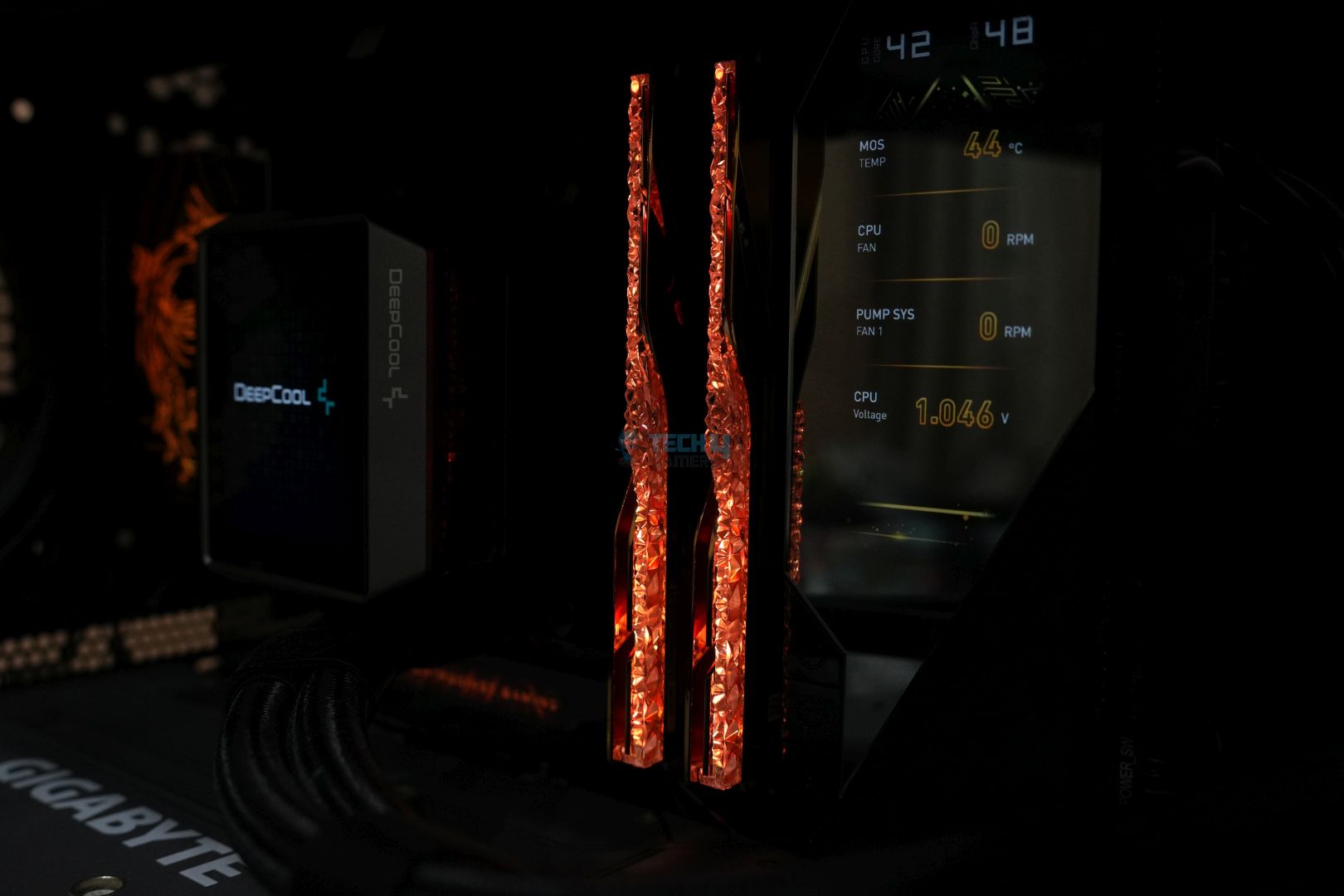
The G. Skill Trident Z5 Royal stands out in both design and performance. It has a fancy design with silver/gold mirrored finish on the heatsinks which looks special when it reflects the other components inside the PC case. Moreover, the crystalline light bar, with it’s diamond-like design, lights up to complete the look. We don’t think there’s any other kit that can really stand out inside a PC case quite like this one. 

You’d also expect a kit that looks like this to back itself in performance, and it certainly does! We clocked it to 6400 MT/s at CL28 and saw outstanding numbers in all the benchmarks, with this Z5 Royal Neo variant beating all other kits without a sweat.

Packaging and Unboxing
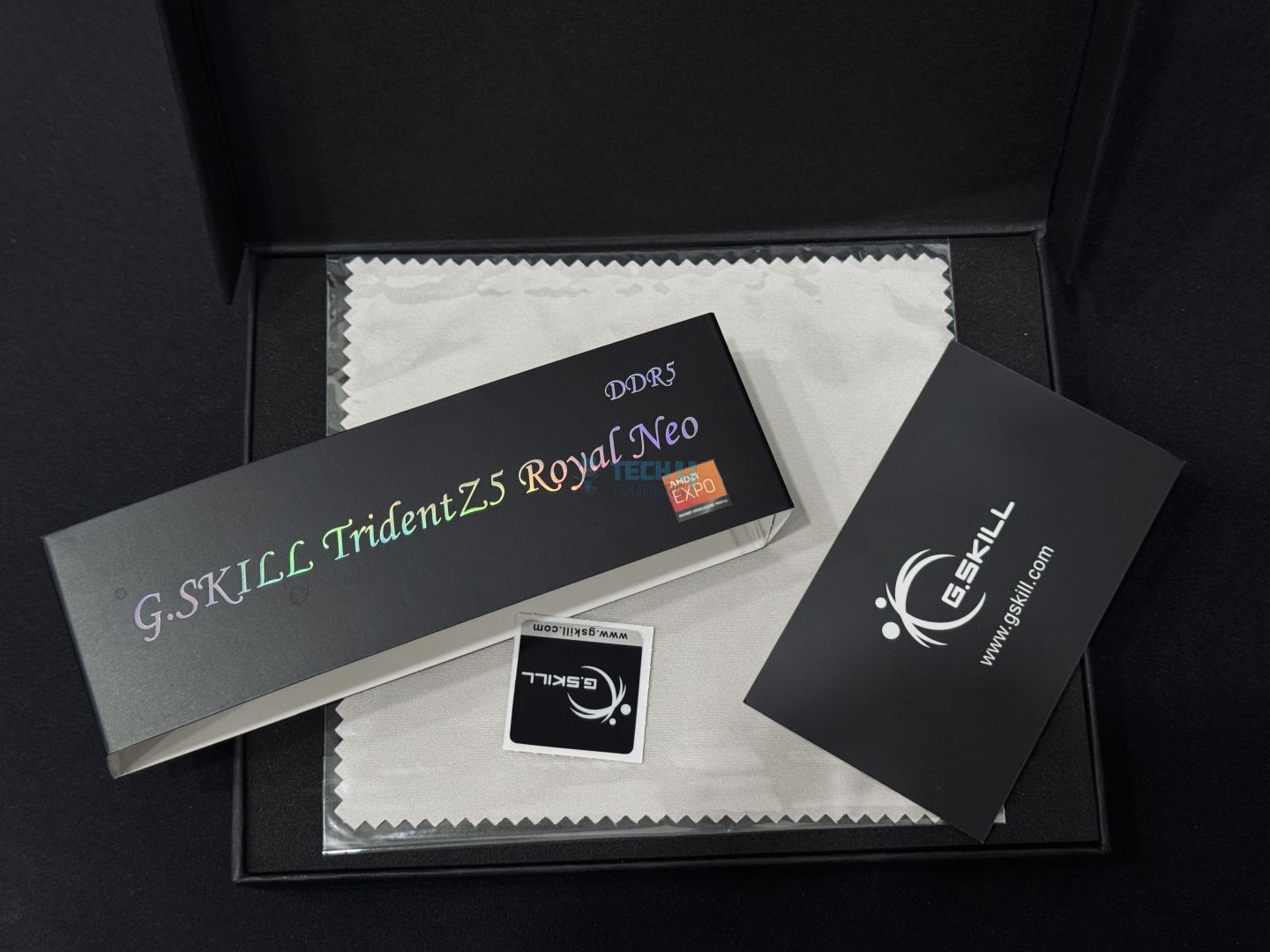
G.Skill Trident Z5 Royal Neo DDR5-8000 CL38 EXPO Kit Box
G.Skill Trident Z5 Royal Neo DDR5-8000 CL38 EXPO Kit Box (Image By Tech4Gamers)

This Trident Z5 Royal Neo kit comes in essentially the same packaging that we saw in previous kits of the lineup, like the DDR5-6000 CL28 variant. 

The kit arrives in a black box resembling a jewelry box to remind you that this memory comes from their premium lineup. Looking at the backside, we see some compliance symbols, and there’s a sticker with memory info and QR codes on it. 

Inside, the memory is surrounded by protective foam. There’s a G.Skill sticker and a card with important notes regarding the memory’s usage. 

Design
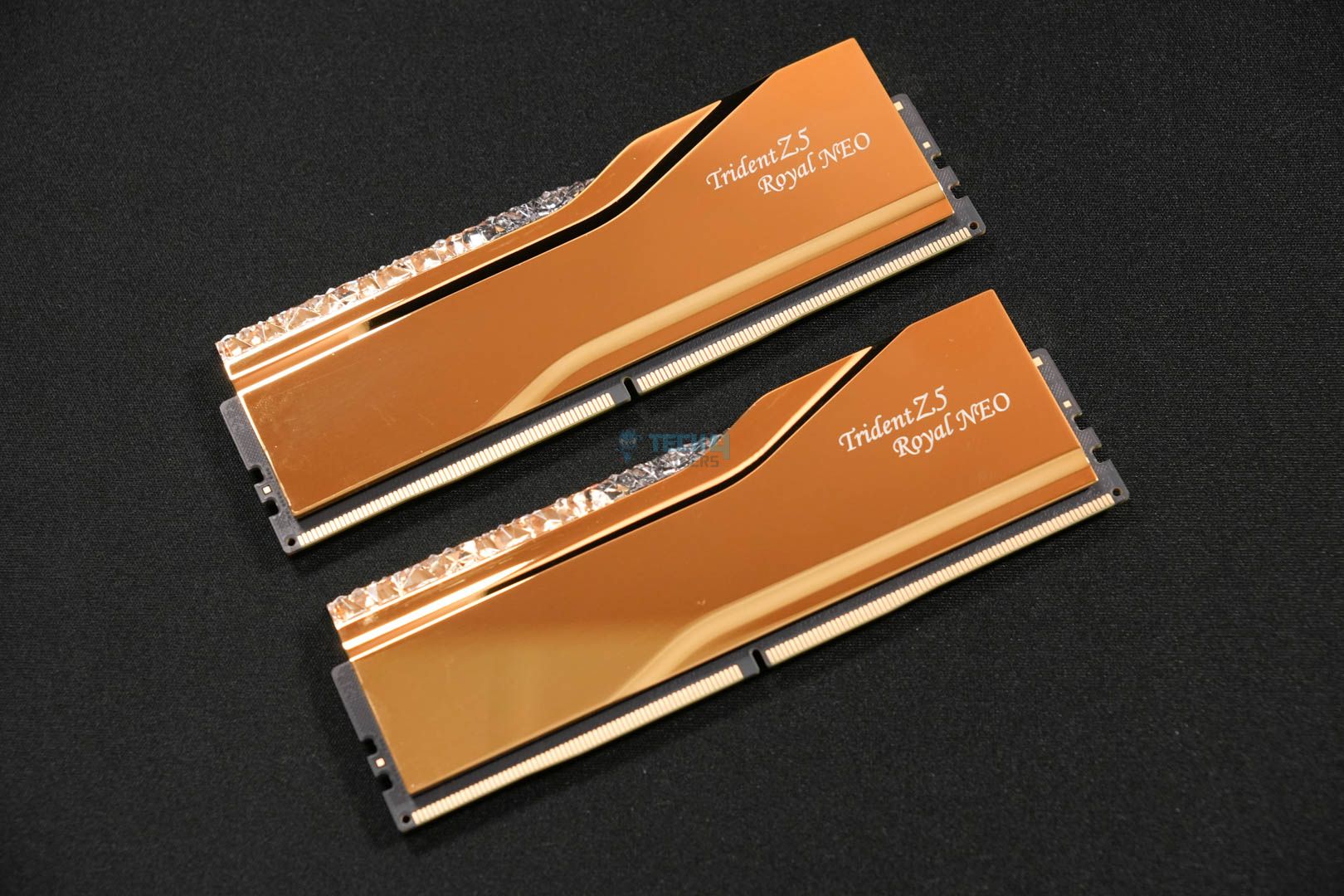
This EXPO-enabled G.Skill Trident Z5 Royal Neo kit uses the same design as previous models. It features a Gold, mirrored finish on the aluminum heatsinks through electroplating. The aluminum heat-spreaders are “CNC-cut to precision,” according to G.Skill. You have the “Trident Z5 Royal” text on the right-hand side. The RAM stands at 44mm tall, like all other Royal Neo DDR5 models. 

WARNING: Ensure compatibility with your CPU cooler, as the height of this kit can create problems for some dual-tower air coolers.

The memory’s second major design aspect is, of course, the iconic crystalline light bar resembling small diamonds to complete the royal look. RGB on this light bar can be controlled through G.Skill’s lighting control software or through ASUS’ Aura Sync, Gigabyte’s RGB Fusion, MSI’s Mystic Lighting, or ASRock’s Polychrome Sync software. 

G. Skill Trident Z5 Royal Neo DDR5-8000 CL38 sticker
Sticker (Image by Tech4Gamers)

At the back, we get a sticker with the serial number and other information about the RAM. Inside the kit is a 10-layer PCB on which the memory ICs lie. 

Test Bench 
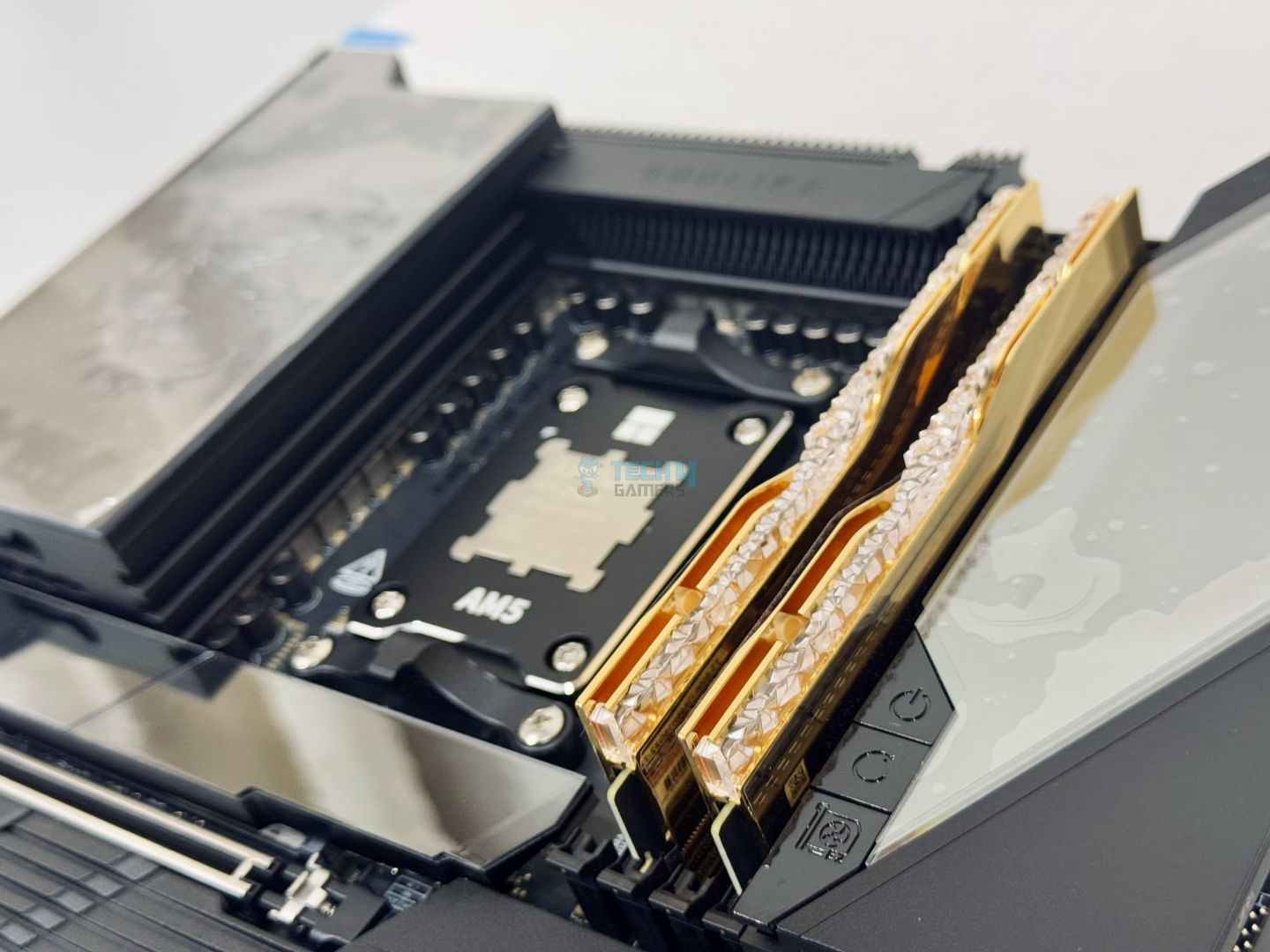
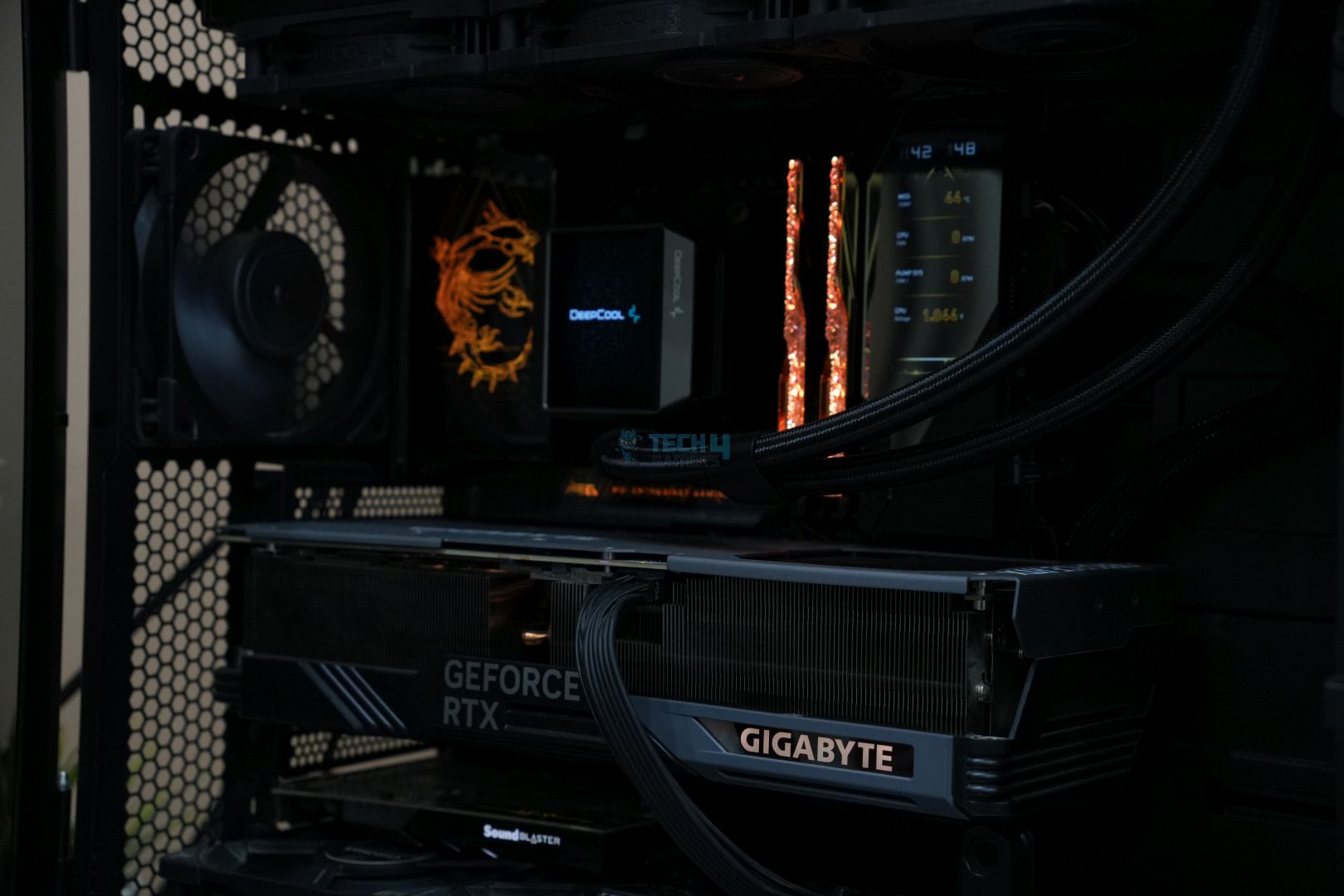
Above are some pictures from our test bench. The RGB on the kit looks absolutely stunning. This is our updated test bench; we’ve switched over to the Ryzen 7 9800X3D with MSI’s MEG X870E GODLIKE motherboard:

We tested the memory in three different configurations: 
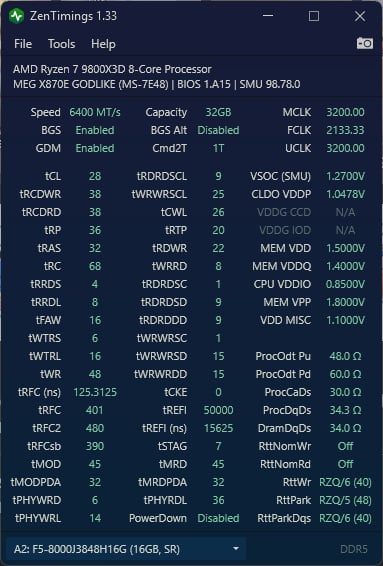
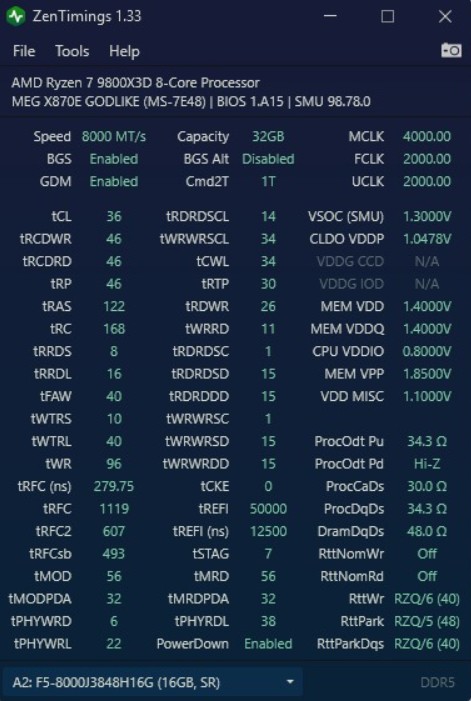
  • DDR5-8000 CL38 (Default EXPO Profile) – Latency: 9.5ns
  • DDR5-8000 CL36 (Tuned EXPO Profile) – Latency: 9ns
  • DDR5-6400 CL28 (Tuned EXPO Profile) – Latency: 8.75ns 

Since the memory controller of AMD’s Ryzen 7000 and 9000 CPUs cannot sync with the memory beyond 3200 MHz (6400 MT/s for the memory), we decided to reduce the speed to 6400 MT/s and tested to see how much the CAS latency could be tightened. We got 6400 MT/s at CL28, which gives us a latency of 8.75ns, much lower than the stock EXPO profile. We also tested and tightened the DDR5-8000 setting to CL36 to see the performance difference. Let’s dive into the results! 

Test Results

We’re comparing the kit, tested in three different configurations, to the following other DDR5 kits: 

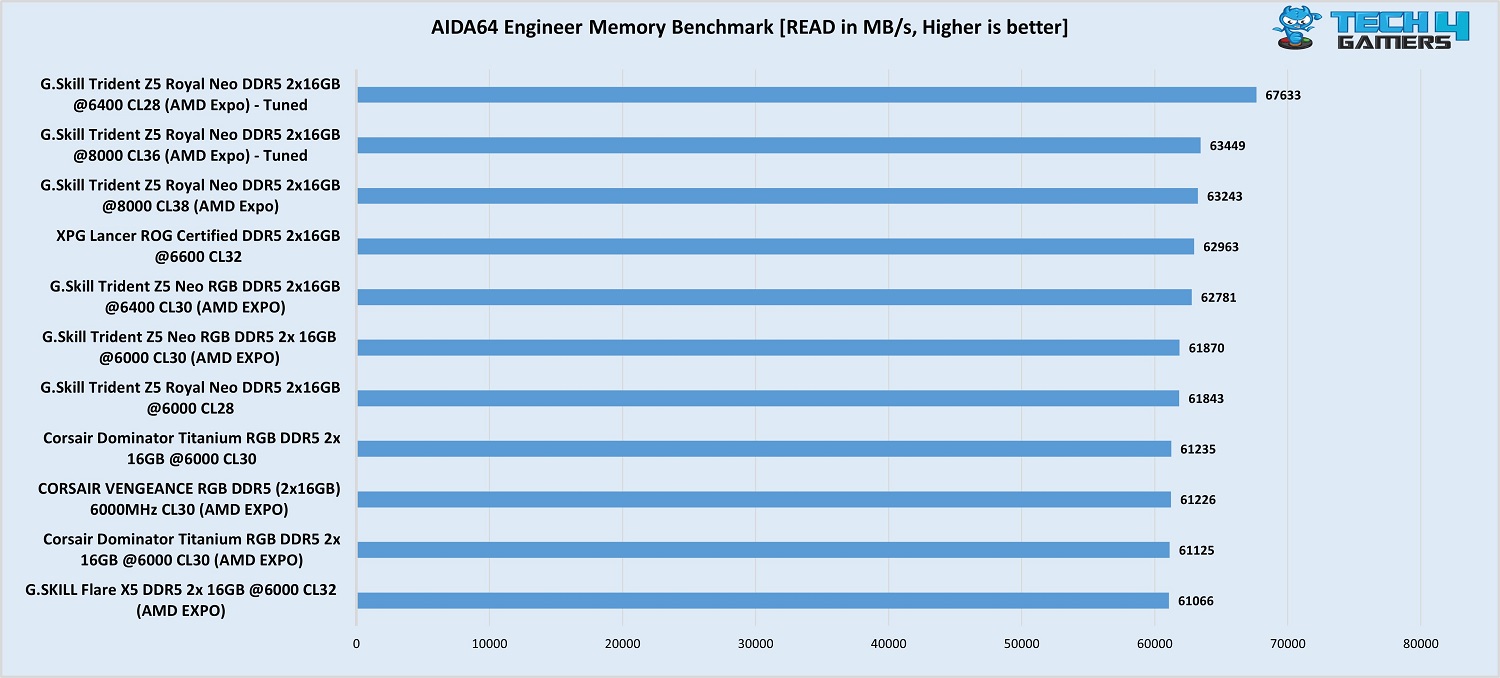
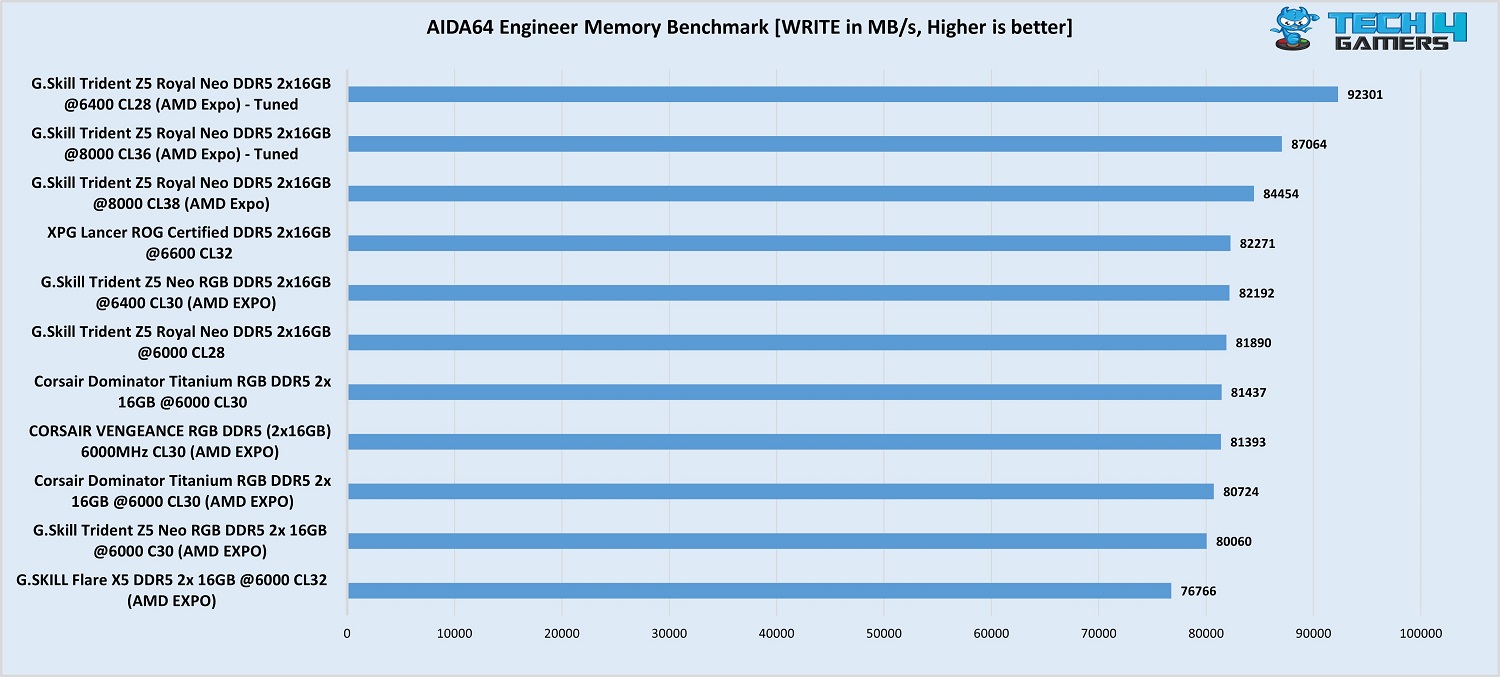
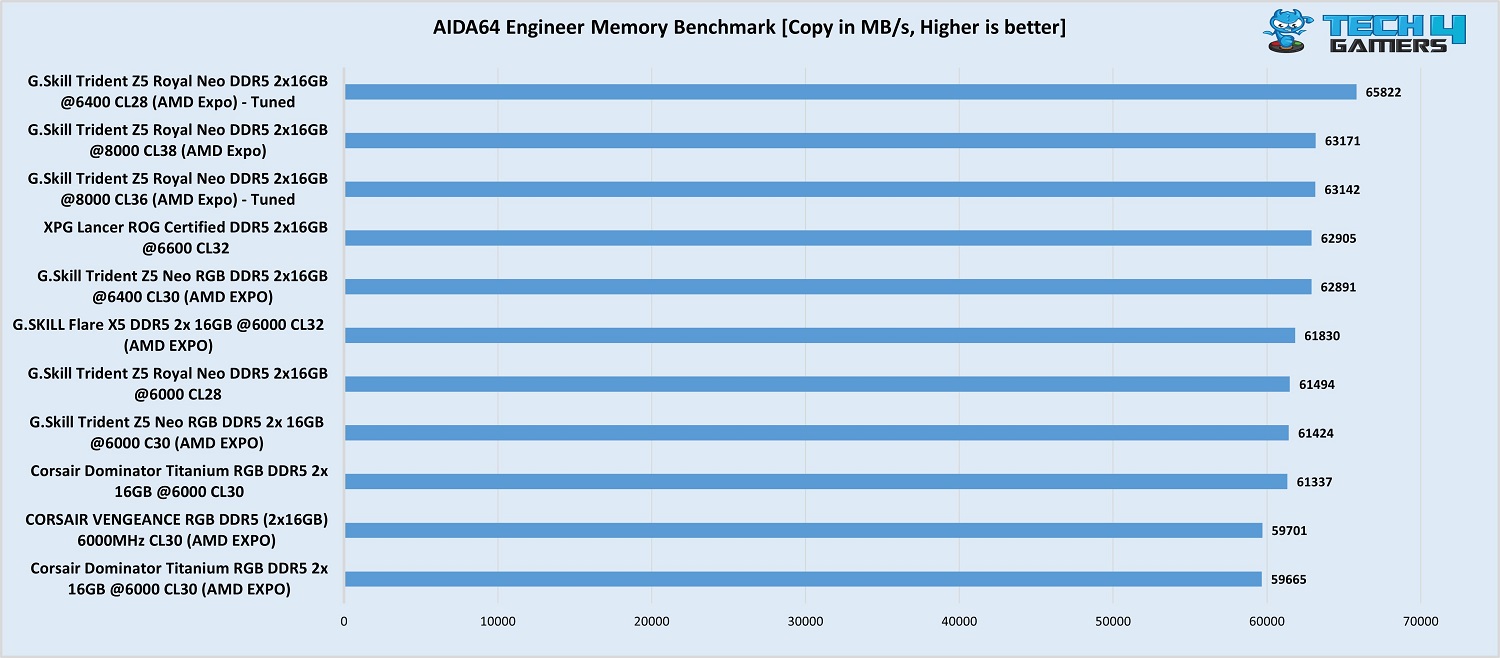
The benchmarks show that the kit, running at 6400 MT/s and CL28, easily outperforms the other configurations and kits in our list. At 8000 MT/s and CL36, the kit stood second in read and write benchmarks and fell just behind in the copy benchmark. This is ignorable, of course, and performing the test again would likely show a win for the CL36 kit. 

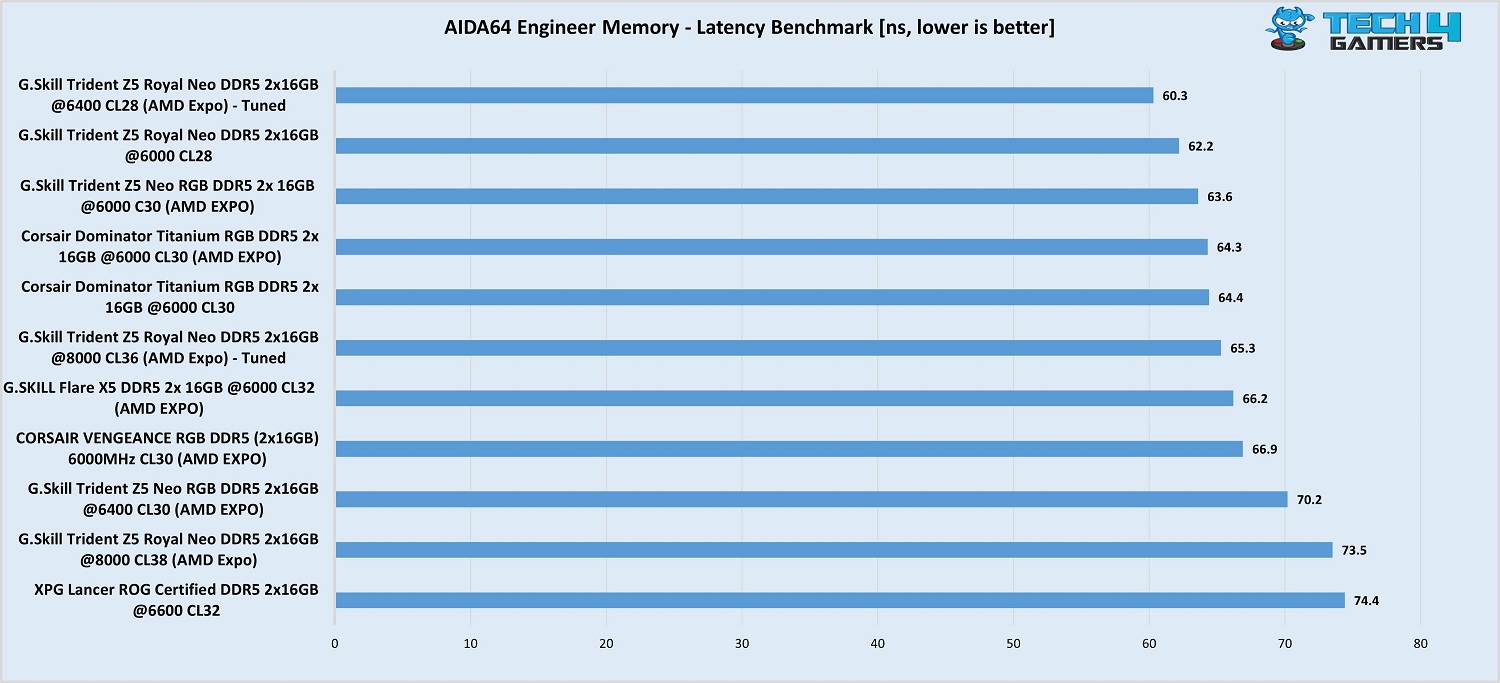
The latency benchmark tells a different story, though, and this, of course, is primarily because the memory operates in a 2:1 configuration at 8000 MT/s. So, the configurations with 8000 MT/s (CL36 and CL38) fell behind DDR5-6000 CL30 ones despite the latter having higher real-world latency because the memory controller isn’t able to catch up which introduces “secondary” latency, so to speak.

The major takeaway is still the kit’s performance in the 6400-CL28 configuration, as it shows a significant lead over all other kits and configurations. 

G. Skill Trident Z5 Royal Neo DDR5-8000 CL38 Cinebench R23
Cinebench R23 MT (Image by Tech4Gamers)

In the multi-threaded Cinebench R23 run, there’s a minor difference between all the kits, with the DDR5-6400 CL28 configuration narrowly coming out on top again. 

Should You Buy It?

Let’s break it down. 

Buy It If:

✅You need the BEST kit for your AMD Ryzen CPU: This G.Skill Trident Z5 Royal Neo can clock 6400 MT/s at a CAS latency of 28 for an ultra-low 8.75ns true latency. If you want top performance, there’s no better kit.

✅You prefer a premium aesthetic: The kit has a luxury-focused design, mirrored silver/gold heat spreaders, and a crystalline light bar resembling diamonds. 

Don’t Buy It If: 

❌Your budget is limited: With a price tag of $179, this G.Skill Trident Z5 Royal Neo kit is one of the more costly kits, and plenty of cheaper options are available.

My Thoughts

The G.Skill Trident Z5 Royal Neo DDR5-8000 CL38 is a high-end kit designed for AMD’s Ryzen 7000 and Ryzen 9000 series CPUs. It has the same “luxurious” design as the other Royal Neo kits, with a mirrored finish on the heatsinks in gold or silver and a fancy crystalline light bar for RGB. It looks brilliant, and if you want a kit that really enhances your PC’s look, this is it. 

Our tests with the kit showed it is a top performer compared to the other DDR5 kits in our list. There’s no surprise there since it is a much faster kit than the others, but there is the fact that it runs at 2:1 with the memory controller. The real magic is seen when we ran the kit at 6400 MT/s with a CAS latency of just 28. With a real-world latency of just 8.75ns, the kit was the fastest across all of the AIDA64 Engineer benchmarks by a mile. 

Since we know that the Ryzen 7000/9000 memory controller can only keep up with the RAM at 3200 MHz at best, it’s better to run the RAM at 6400 MT/s to get that sweet 1:1 ratio. The speed will be lower, but so will the latency, and the performance boost is incredible. For anyone looking for a wicked-fast kit with a stand-out design, the Trident Z5 Royal Neo DDR5-8000 CL38 stands tall (literally and figuratively). 


Nintendo Will Continue With Its Exclusive Strategy Unlike PS & Xbox, Reveals Insider

Story Highlight
  • Recently, a renowned insider predicted that Xbox would adopt a full multiplatform strategy, with PlayStation likely following suit. 
  • However, Nintendo won’t be following the same strategy, as it will still focus on releasing exclusives. 
  • Nintendo has developed a massive fandom, so it may be able to survive longer without adopting the multiplatform strategy, but it might eventually have to. 

Xbox has completely changed its strategy and is focusing more on its subscription service. While the gaming giant still has plans for next-gen consoles, it, as of now, isn’t focusing on exclusives as much as its competitors.

Recently, an insider predicted that Xbox could fully go multiplatform this year, with PlayStation following in its footsteps. He thinks that exclusive math doesn’t make sense anymore for giant corporations, with Nintendo being an exception

The insider believes Nintendo will still go strong on exclusive releases despite its competition embracing a multi-platform strategy.  

Why it matters: Releasing exclusives is important to maintain a fanbase but also brings out a lot of toxicity in the community. 

Xbox and PlayStation Multiplatform 2025
Jason Schreier Predicts That Xbox and PlayStation Will Adopt Multiplatform Strategy While Nintendo Will Focus On Exclusives

Jason Schreier has recently revealed his predictions of what will go down in 2025. He thinks that Xbox and PlayStation will focus less on exclusives while Nintendo won’t follow the same suit, but it might not last longer with this strategy.

 This year, I think we’ll see Xbox go completely multi-platform and PlayStation get closer and closer. The only exception may be Nintendo – and we’ll just have to see how much longer that lasts. 

-Jason Schreier

Xbox and PlayStation shifting to a multiplatform strategy would make sense as game development costs continue to increase along with the time it takes to develop one. According to a report, PlayStation already has several projects costing more than $400, even after Concord’s failure

Nintendo Switch 2
Nintendo May Up Its Game By Releasing Switch 2 In 2025

However, Nintendo may not have reached such figures yet. Its recent hit, The Legend of Zelda: Tears of the Kingdom, is expected to have cost around $100 million, whereas it has sold over 21 million copies worldwide

It is fair to say that Nintendo has basically a cult following at this point and can survive longer with the exclusive games approach. However, its games budget is likely to increase, which may force it to adopt the same strategy as PlayStation and Xbox

That being said, Jason Scheier has just predicted what will go down in the gaming industry in 2025 based on his experiences as an insider. So, fans shouldn’t take this report literally, as none of this is backed by insider information. 

What do you think about the insider’s predictions for 2025? Do you believe any of his predictions will come true? Share your thoughts with us in the comments section below or join the discussion at the official Tech4Gamers forums.

GTA 6 To Be Delayed To 2026, Senior Journalist Sounds the Alarm

Story Highlight
  • Senior journalist claims GTA 6 will likely be delayed to 2026. 
  • The game is a huge project, and Rockstar doesn’t want to pressure its developers. 
  • Notable announcements this year could be the Silksong release and the Half-Life 3 announcement.

2025 is supposed to be a year with huge releases, marking one of the most important years in gaming this decade. However, it seems that the biggest and most anticipated game of the year, GTA 6, is set to slip to 2026 from the previous 2025 release window

According to Senior journalist Jason Schreier, what most gamers feared is set to become true, and GTA 6 is now expected to be delayed until next year. 

Why it matters: The delay to 2026 has been a part of rumors for a few months now. The word from the insider cements the rumors. 

GTA 6
GTA 6 might be delayed from the previous 2025 window to 2026

Writing at Bloomberg, Schreier went into detail about what to expect from the industry in 2025. He said that Grand Theft Auto is a huge and ambitious game, and to make it great, Rockstar doesn’t want to push its developers too much; therefore, a delay is expected. 

The next Grand Theft Auto is a huge and ambitious game, I expect that it will slip to 2026.

– Jason Schreier

GTA 6 Ray Tracing
The PC release might not happen before 2027

If this is true, the PC version of the game might not launch before 2027, which is going to be a major disappointment for many people. However, it would be better if Rockstar took its sweet time because nobody wants a Cyberpunk 2077 situation with GTA 6. 

Schreier also revealed there will be 2 major announcements this year: Silksong’s release and Half-Life 3 announcement. While the fans would be disappointed to hear a potential GTA 6 delay, it is better to wait for an official word. 

What are your thoughts on GTA 6 getting delayed in 2026? Let us know your opinions in the comments or join the discussion at the official Tech4Gamers Forum

RTX 4070 Ti Super Vs RTX 4080: Gaming Results 2025

Nvidia GeForce RTX 4070 Ti Super

Rated: 8/10

Nvidia GeForce RTX 4080 Super

Rated: 7.5/10


Pros & Cons

Graphics CardProsCons
RTX 4070 Ti Super✅ Better power efficiency
✅Lower price
❌Lower performance
RTX 4080✅ Better overall performance
✅Better ray tracing performance
❌High price

Key Takeaways
  • Our performance testing showed the RTX 4080 to be around 14.5% more powerful than the RTX 4070 Ti Super, putting these two cards in distinct price brackets.
  • The power readings from our tests showed the RTX 4080 to consume around 8% more power than the RTX 4070 Ti Super, which, accompanied by its boost in performance, makes it more power efficient than its rival.
  • In early February 2024, the RTX 4070 Ti Super had a price tag about 23% lower than the cheapest RTX 4080 we could find on PCPartPicker
  • The RTX 4070 Ti Super sits on the edge of 1440p and 4k optimized performance, being a little too powerful for 1440p and a little less powerful for 4k gaming. This makes your gaming decision boil down to what resolution you are targeting.

Why Trust Tech4Gamers
  • Uzair is our comparison expert who has been comparing graphics cards, and processors.
  • 500+ components tested and compared by our team of comparison experts (Tech4Gamers Team).
  • 1000+ hours spent testing different components for our comparisons.
  • Objective testing criteria (See how we compare PC hardware).

At Tech4Gamers, ensuring you get reliable information is our priority. That’s why every comparison undergoes a meticulous review process by our team of experts and editors. Each comparison is carefully examined against our strict editorial guidelines, guaranteeing you trustworthy insights you can depend on.

Comparison Table

FeatureGeForce RTX 4080GeForce RTX 4070 Ti Super
ArchitectureAda LovelaceAda Lovelace
Design ChipAD103AD103
Product FamilyNvidia GeForce RTX 40 seriesNvidia GeForce RTX 40 series
Steam Processors/Cuda Cores97288448
Compute Units/Tensor Cores304264
Ray Accelerators7666
ROPs11296
Memory Bandwidth716.8 GB/s672.3 GB/s
Best VariantsBest RTX 4080 Graphics CardsBest RTX 4070 Ti Super Graphics Cards

Architectural Differences

  1. Clock Speed: The RTX 4070 Ti Super has a base clock of 2340MHz, noticeably higher than the RTX 4080’s base clock of 2205MHz. The new card takes the cake in terms of boost clock, too, with a clock speed of 2610MHz against the RTX 4080’s 2505MHz.
  2. Cuda CoresThough both graphics cards use the AD103 chip, the much more cut-down version of the RTX 4070 Ti Super has 15% fewer Cuda Cores than the RTX 4080, which should translate into gaming performance linearly.
  3. RT & Tensor CoresThe RTX 4080 brings a boost in RT and tensor cores along with its boost of Cuda cores, making the performance of this card that much more promising. It has 15% more RT cores and 15% more tensor cores.
  4. TDP: The RTX 4080 has a higher 320-watt TDP, while the RTX 4070 Ti Super is rated for a TDP of 285 watts.

By using the same GPU die for their RTX 4070 Ti Super as the RTX 4080, Nvidia might be eating into the user demographic of the latter card, giving users a more budget option to enjoy 4k gaming. Does this theory actually hold water? Keep scrolling through the RTX 4070 Ti Super vs RTX 4080 comparison to find out!


Gaming Benchmarks – 4K

Having analyzed the architecture of both cards, this section of the RTX 4070 Ti Super vs RTX 4080 comparison delves into their performance in modern games. We’ll assess how they fare against each other on a standardized test bench, with detailed specifications listed below.

Test Bench

Cyberpunk 2077

Cyberpunk 2077
Cyberpunk 2077 @4K (Image By Tech4Gamers)
  • In Cyberpunk 2077, RTX 4080 scored 55 FPS, outpacing RTX 4070 Ti Super at 49 FPS by 12%.
  • The 1% lows were around 18% apart on these two cards, with the RTX 4080 getting a minimum framerate of around 46 FPS, while the RTX 4070 Ti Super had lows of 39 FPS.

Red Dead Redemption 2

Red Dead Redemption 2
Red Dead Redemption 2 @4K (Image By Tech4Gamers)
  • Framerates were excellent on both cards in our test of RDR2, with the RTX 4080 getting an average framerate of 104 FPS while the RTX 4070 Ti Super had an average framerate of 90 FPS15% lower than the higher tier card.
  • As for the 1% lows, the RTX 4080 managed to get a framerate of around 84 FPS, whereas the RTX 4070 Ti Super dropped quite a bit below this with lows of around 74 FPS.

Starfield

Starfield
Starfield @4K (Image By Tech4Gamers)
  • At the Ultra settings, Starfield showed a 12% advantage for the RTX 4080, with the card getting an average framerate of 57 FPS, significantly higher than the RTX 4070 Ti Super’s average framerate of 51 FPS
  • The difference between the two cards approached 9% in this game, with the RTX 4080 shooting down to 48 FPS in intense scenes, while the RTX 4070 Ti Super had lows closer to 44 FPS.

Hogwarts Legacy

Hogwarts Legacy
Hogwarts Legacy @4K (Image By Tech4Gamers)
  • Turning on RT again on the Ultra settings blended a 14% gap in the performance of these cards, with the RTX 4080 hovering around an average framerate of 40 FPS, while the RTX 4070 Ti Super had an average of around 35 FPS.
  • There was a massive 30% gap in the 1% lows of these two cards, with the RTX 4080 going down to 30 FPS in graphically intense scenarios, while the RTX 4070 Ti Super had lows closer to 23 FPS.

Avatar Frontiers Of Pandora

Avatar Frontiers Of Pandora
Avatar Frontiers Of Pandora @4K (Image By Tech4Gamers)
  • With RT on by default at the Ultra settings, the RTX 4080 exhibited an average framerate of 75 FPS in this game, outpacing the RTX 4070 Ti Super by 17%, as the latter achieved an average framerate of 64 FPS.
  • The 1% lows of the RTX 4080 hit around 52 FPS in this game, whereas the RTX 4070 Ti Super had lows closer to 46 FPS, marking a 13% difference between the two cards.

Alan Wake 2

Alan Wake 2
Alan Wake 2 @4K (Image By Tech4Gamers)
  • With RT and quality DLSS on Ultra settings in Alan Wake 2, the RTX 4080 outperformed the RTX 4070 Ti Super with an average framerate of 47 FPS, showing a 17.5% advantage over the 4070 Ti Super’s 40 FPS.
  • The 1% lows of the RTX 4080 were also much smoother at around 41 FPS instead of the chopper 33 FPS that the RTX 4070 Ti enabled.

The Last Of Us Part 1

 The Last Of Us
The Last Of Us @4K (Image By Tech4Gamers)
  • With maximum settings, the RTX 4080 averaged 71 FPS in The Last Of Us Part 1, outperforming the RTX 4070 Ti Super, which managed a playable average of 63 FPS. This indicates a 12.7% performance difference between the two cards.
  • The 1% lows were relatively close in our testing, with the RTX 4080 getting minimums of around 59 FPS, while the RTX 4070 Ti Super was 7.3% behind with lows of about 55 FPS.

Editor`s Note
Image

The performance difference between these two cards is also representative of their performance synthetic benchmarks. We found the 3DMark Time Spy ran 13% better on the RTX 4080, solidifying it as the better graphics card.

– Uzair Qureshi


Overall Gaming Performance

FeaturedRTX 4070 Ti SuperRTX 4080
Average FPS56 📈64 📈
%1 lows45 📉51 📉
Winner: Nvidia's RTX 4080

The RTX 4070 Ti Super and RTX 4080 exhibit a 14.5% performance difference in terms of average framerates. The 4070 Ti Super may struggle with some 4k games, necessitating adjustments to settings or increased upscaling for optimal performance. In 1% lows, the RTX 4080 outperformed its rival, earning its win in this section of our analysis.


Power Consumption

GameRTX 4070 Ti Super (W)RTX 4080 (W)
Cyberpunk 2077286299
Red Dead Redemption 2272289
Starfield281306
Hogwarts Legacy284303
Avatar Frontiers Of Pandora283308
Alan Wake 2282302
The Last Of Us Part 1249287
Average Power Consumption277299
Winner: Nvidia's GeForce RTX 4070 Ti Super

The RTX 4080 had an 8% higher power consumption than the RTX 4070 Ti Super. Altogether, this is a difference not worth batting an eye, and it should not factor into your buying decision. The slight difference is not something that would make an impact on daily driving this card.


Price And Availability

Graphics CardLaunch MSRPCurrent Price
RTX 4070 Ti Super💲799💲799
RTX 4080💲1199💲999
Difference50%25%

For most people, the price of both of these cards is very excessive. Though the RTX 4070 Ti Super is substantially cheaper than the RTX 4080, it is nowhere near a bargain in itself. Both cards are nearly impossible to find below the current MSRP as of late February 2024.


Our Conclusion

RTX 4070 Ti Super: The RTX 4070 Ti, originally planned as an RTX 4080 with reduced VRAM, falls short of the RTX 4080’s performance, especially at higher resolutions. Tailored for optimal 1440p performance, it serves a distinct audience. Testing has highlighted limitations in higher resolutions. 

RTX 4080: For 4K gaming, the RTX 4080 excels with ample VRAM for longevity. While the price is steep if top-tier performance is paramount and budget permits, the RTX 4080 is a worthwhile investment

To conclude, the difference between choosing the RTX 4070 Ti Super vs RTX 4080 boils down to the resolution you want to game at and your budget. The RTX 4070 Ti Super does give you a bit more performance for your dollar, but at the high end, diminishing costs are a given.


Frequently Asked Questions

Do the RTX 4070 Ti Super and RTX 4080 both use the same GPU die?

Yes, the RTX 4070 Ti Super uses the same AD103 GPU die as the RTX 4080. albeit a more cut-down version.

Do the RTX 4070 Ti Super and RTX 4080 both use the same power connector?

The RTX 4070 Ti Super and RTX 4080 use a single 16-pin power connector.

What power supplies should I use with both cards?

Nvidia recommends using a 700-watt power supply with the RTX 4080, whereas a 600-watt PSU is recommended to be used with the RTX 4070 Ti Super.


More From RTX 4080

The Elder Scrolls 5: Skyrim Breaks Past 2 Billion Mod Downloads

Story Highlight
  • The Elder Scrolls 5: Skyrim was released over a decade ago.
  • The title has now surpassed 2 billion mod downloads.
  • The special edition of the title has over 6 billion mod downloads, making a total of 8 billion for the title. 

Elder Scrolls 5: Skyrim has recently celebrated its 13th anniversary, but the title is still going strong, even after many years of release, thanks to the modding community.

It has now been noted that Elder Scrolls 5: Skyrim has over 2 billion mod downloads even after a decade since its release, and it is still going strong.

Why it matters: While the modders initially started fixing the game’s bugs, it grew massively over the years.

Elder Scrolls 5: Skyrim
Elder Scrolls 5: Skyrim Has Whopping 2 Billion Mod Downloads – Source: Nexus Mods

According to NexusMod, one of the biggest sites for game mods reflects that Elder Scrolls 5: Skyrim has surpassed the 2 billion mod downloads mark. 

The title currently sits on the second-ranked list, and what is more surprising is that the top spot is also taken by the game’s Special Edition, which was released five years after the original release and had many fixes and graphic updates over the base game.

The special edition has over 6.2 billion downloads on the site, and if you combine both the numbers, The Elder Scrolls 5: Skyrim has over 8 billion mod downloads in over a decade, which is almost equal to the number of humans on Earth.

The Elder Scrolls 5: Skyrim
The Elder Scrolls 5: Skyrim Is Already Over A Decade Old

While most of the players and modders have already moved to the special edition of the game as it offers a better experience than the base title, it is surprising to see The Elder Scrolls 5: Skyrim still going strong.

It was recently reported that the game has sold over 60 million units, becoming the 7th most-selling title ever. 2025 is another exciting year for the franchise, as we might get to hear more about The Elder Scrolls 6.

Nonetheless, what has been your favorite moment in the title? Comment down or be a part of Tech4Gamers Official Forums

The Witcher 4 Director: ‘Every Single NPC’ Will Look Like They’re Experiencing ‘Their Own Story’

Story Highlight
  • The Witcher 4 director, Sebastian Kalemba, says the game’s NPCs will be very immersive.
  • Each NPC will tell their own stories and play unique roles, almost as if they are alive.
  • The way NPCs look, act, and portray emotions—CDPR is improving everything to be as realistic as possible.

The Witcher 4’s highly anticipated reveal arguably stole the spotlight during The Game Awards 2024. While some were taken aback by the trailer’s beautiful cinematics and visuals, others criticized CD Projekt Red for changing the game’s protagonist to Ciri—something the studio expected. Regardless, CDPR’s stock saw a massive 71% increase last year following the announcement.

Now, the game’s director, Sebastian Kalemba, has revealed more info about The Witcher 4 NPCs. He says that every single character will tell their own stories and fill their unique roles to create a level of realism never seen in CDPR games before.

Why it matters: The interview with The Witcher 4 director suggests that every NPC will feel extremely realistic during our playthroughs, with each expressing their stories and personalities fluidly.

During an interview with Gamertag Radio (from 5:26), the game director clarified that developers are pushing the quality of The Witcher 4 NPCs to make them look, behave, express, and convey emotions realistically.

‘We have this rule to make every single [The Witcher 4] NPC looking like they’re living, with their own story’

CD Projekt Red is trying to create an ‘even more immersive [NPC] experience’ than we are used to seeing.

We saw something similar with the villagers of Stormford in the official reveal, where they force a little girl to pray in the woods until Ciri saves her from a monster.

It is worth taking these remarks with a pinch of salt, as some users argue the devs might just be creating marketing hype with these tidbits.

The Witcher 4
The Witcher 4 game director previously also teased that Geralt might be playable in the game.

Regardless, The Witcher 4 is likely years away since it barely entered production a few months ago. CDPR also wants the RPG to avoid the Cyberpunk 2077 launch disaster, so it is potentially skipping on Xbox Series S.

Will the Witcher 4 NPCs see significant improvements to what we saw in the last entry, or will the difference be minuscule? Let us know your thoughts in the comments below, or join the discussion on the official Tech4Gamers forum.

Is It Worth Buying An Expensive Mouse?

Story Highlight
  • Flagship mice have highly adjustable sensitivity levels along with durable build quality and low latency/high-performance sensors to match.
  • Cheaper mice might be better suited to the more casual gamer who isn’t particularly concerned about the slightest change in reaction time.
  • If you’re finicky about your warranties and longevity concerns, you’d be well-advised to stick to renowned brands that are usually superiorly priced.
 

I’ve always held a soft spot in my heart for ultrafast gaming mice with a few subtle strips here and there of RGB lighting flowing through. Don’t get me wrong. I absolutely loathe the gaming mice that look like they’ve come out of a Star Wars movie with RGB bleeding through every single atom.

For example, I’ve always had my eyes on the Glorious Model O Wireless (Matte Black) and its gorgeous honeycomb design. But of course, there’s always a bigger fish. When it comes to gaming mice, you can expect to spend upwards of $150-200 to land yourself a flagship spec mouse.

That being said, do you really need one of these exorbitantly priced gaming mice to yield a competitive edge in games?

What I mean to say is, what’s wrong with your good old $25-50 mouse that’s got RGB, adjustable levels of DPI (Dots Per Inch), i.e., sensitivity, and customizable software configurations? 

What else could you possibly want? 

Software And Cheap Mice Are Antonymous

For starters, flagship mice like the Razer Viper V3 Pro or even the Glorious Model O Wireless enable you to create custom macro keys for lightning-fast reflexes during competitive gameplay.

Granted, a lot of cheaper mice will also allow you to create customized macros, but software integration is key, and that’s really where Tier A companies like Razer, Glorious, and Logitech excel.

Some of the best software utilities for mice include Razer Synapse, Logitech G Hub, and Glorious Core, to name a few.

As far as brands are concerned, there are a variety of top-tier brands in addition to the ones mentioned above, such as HyperX, Roccat, and SteelSeries amongst others.

Why am I emphasizing this much upon software? 

Razer Synapse Customize Tab
Razer Synapse Customization Tab. (Image By Tech4Gamers)

Well, on top of your macro customization, these software utilities are what you’re going to use for controlling your mouse’s RGB lighting, DPI sensitivity, and polling rate, for example.

Therefore, it’s crucial to ensure your prospective mouse has a decent software suite that can support your gaming needs.

What About Connectivity And Latency?

In 2025, you’ve got the luxury of choosing between wired and wireless mice, but even the wireless mice vary from each other. When it comes to wireless mice, you’ve usually got two choices; Bluetooth or a wireless dongle. 

Top-notch gaming mice will typically be packed with the latest connectivity standards like Bluetooth 5.0 and above while the wireless dongle is almost always 2.4 GHz.

However, high-performance mice are generally only usable with their proprietary dongles, which then pose a longevity threat in case that dongle goes kaput. Trust me, I’m speaking from experience.  

The general rule of thumb is to expect extremely low latencies from premium-priced mice whereas cheaper mice might prove to be hit or miss, especially when you’re considering an economical wireless mouse.

Battery Lives And Cables

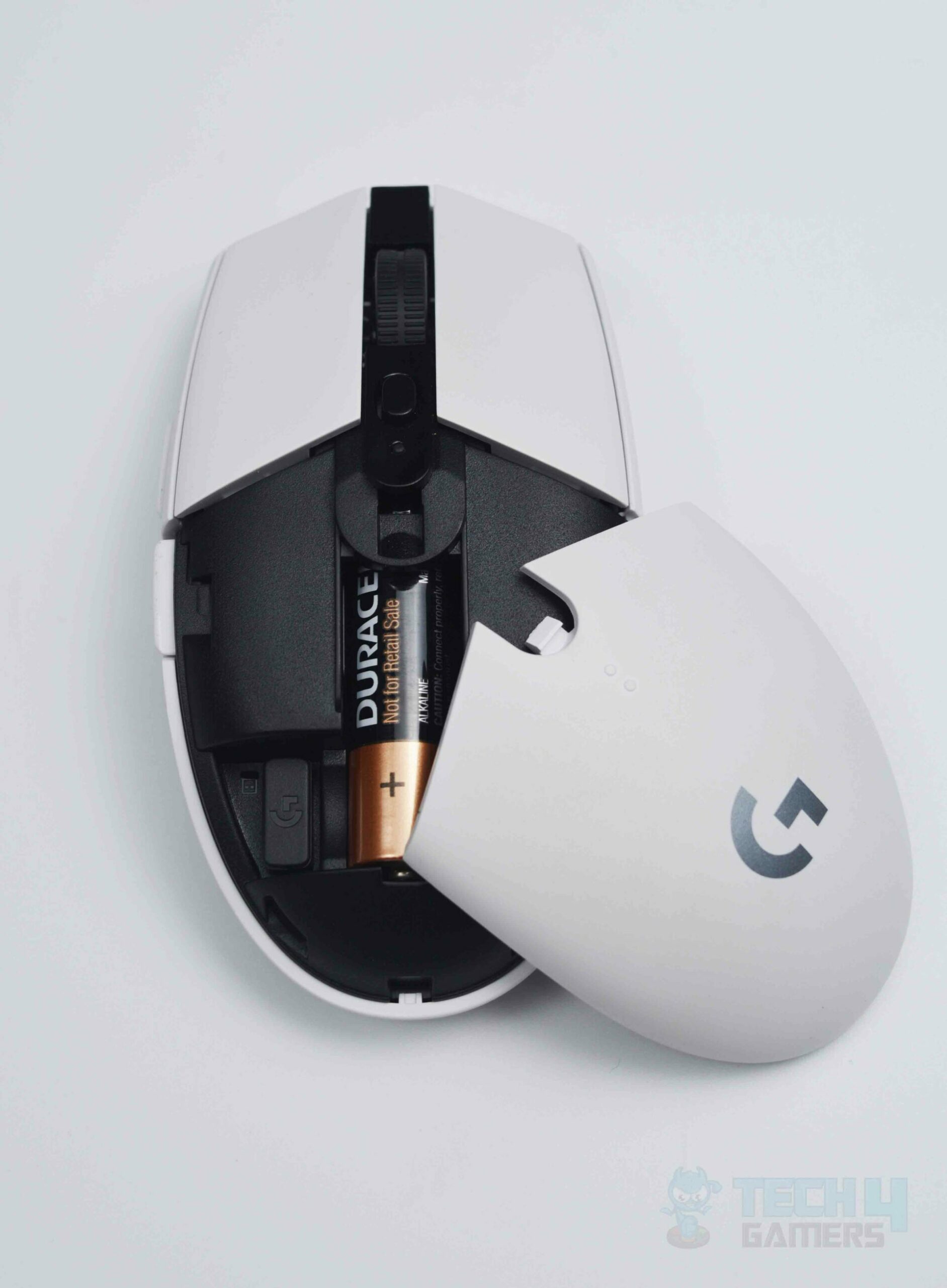
Even though this only applies to wireless mice, it’s still essential to tell you that affordable mice will usually disappoint you with underwhelming battery lives or might even rely on AA/AAA batteries, which might prove to be catastrophic in a tense gaming situation.

On the contrary, flagship mice will generally have industry-leading battery runtimes and come with ultrafast rechargeable (unremovable) batteries out of the box.

Logitech G305 connectivity
Logitech G305 (Image By Tech4Gamers)

Furthermore, underpriced mice will typically cheap out on the cables and chargers which will pose durability concerns in the long run. 

However, costly mice will usually ensure the highest level of quality when it comes to connectors, such as nylon-braided cables in luxe packaging. 

Let’s Not Forget About Warranties And Brand Reputations

It goes without saying that warranties don’t matter much if you have a knack for not upholding your promises and chickening out on warranty claims. 

There’s no doubt about the fact that you should think twice before selecting a Chinese mouse or a gaming mouse from a lesser-known brand since you’ll be throwing your money down the drain in the event of a warranty claim.

Pricing: Should You Cheap Out Or Splurge?

To be honest, the answer to this question will be subjective. Do you find yourself caught up in intensely competitive gameplay scenarios where every millisecond of reaction time and latency is life and death? 

If so, you’ll get your ROI (Return On Investment) assuming you treat yourself to the most deluxe gaming mice.

But if you’re like me, and you only game casually on the weekends with your friends, otherwise tending to productivity-based workflows, you’ll find yourself perfectly happy with a mouse under $50.

Why Didn’t Apple Release A Mac Mini With The M3 SoCs?

Story Highlight
  • The Mac Mini M1/M2 were instant hits, replacing the outgoing Intel-based Mac Minis with up to triple the power and much lower prices.
  • Apple Silicon meant that the Mac Minis were so successful, they were starting to hurt the sales of the MacBooks with M1/M2/M3.
  • As such, Apple refrained from refreshing the Mac Mini with M3 in order to drive up demand for the MacBook Air/Pro.
 

Ever since the Cupertino-based brand transitioned to Apple Silicon, the Mac Mini has amassed tremendous popularity. However, the Mac Mini would never be chosen by professionals or enthusiasts, simply because it lacked the prowess of heavy-duty CPUs and GPUs, failing to keep up with workstations.

Nevertheless, all of that changed with the release of the Mac Mini M1.

Mac Mini M1: Don’t Be Fooled By The ‘Mini’

This is where Apple really hit it out of the ballpark.

Along with its siblings, i.e., the M1 MacBook Air and MacBook Pro, Apple rejuvenated the Mac Mini by transitioning from the Intel CPUs/iGPUs to the all-in-one Apple-designed M1 SoC (System on a Chip).

Moving on, thanks to the M1’s super low power draw of 20W, the miniature aluminium chassis actually serves as a very efficient means of heat dissipation. 

When you take into consideration the fact that the Mac Mini M1 also features an active cooling system akin to the M1 MacBook Pro, you start to appreciate this palm-sized computer’s value proposition.

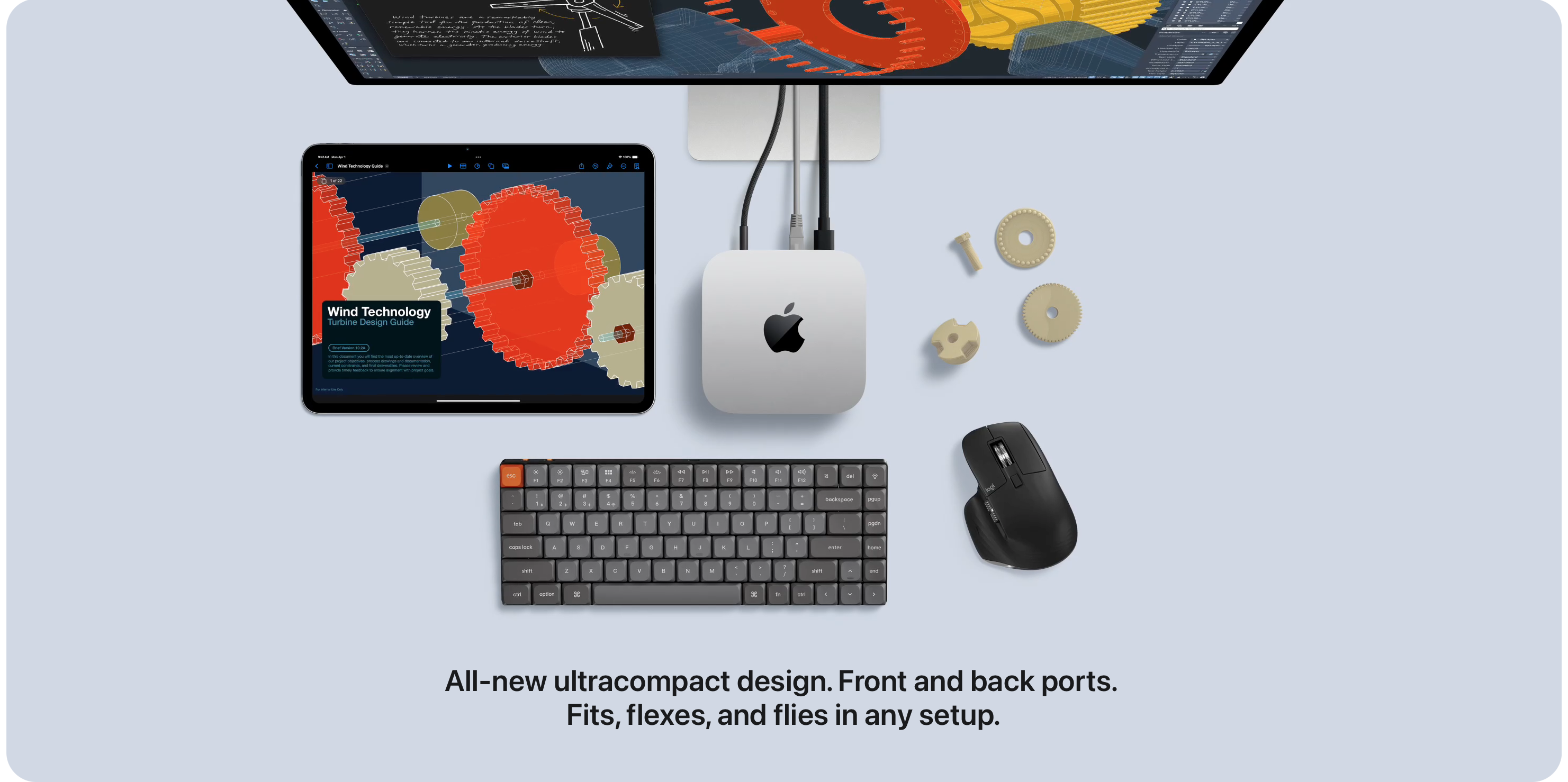
The Mac Mini M4 features a drastic design change.
The Mac Mini M4 showcases a drastic design change.

Speaking of value, the Mac Mini M1 retailed for $700 at the time of launch, although you can find it for almost half that price in terms of used units now. 

That $700 got you a baseline configuration, i.e., 8 GB RAM coupled with a 256 GB SSD.

Of course, the Mac Mini M1 received an overwhelming reception thanks to its stellar performance at such a reasonable price point. 

To this day, it is primarily responsible for capturing a sizeable market share when it comes to switching PC (Windows/ChromeOS/Linux/Ubuntu) users to macOS.

Mac Mini M2: One Step Further 

The Mac Mini M2 showed the world that it’s not impossible to improvise an already near-perfect product.

For starters, Apple added customisable configurations meaning that people could now spec their Mac Mini with an M2 Pro complemented by up to 32 GB of RAM and a 2 TB SSD in the same miniature form factor.

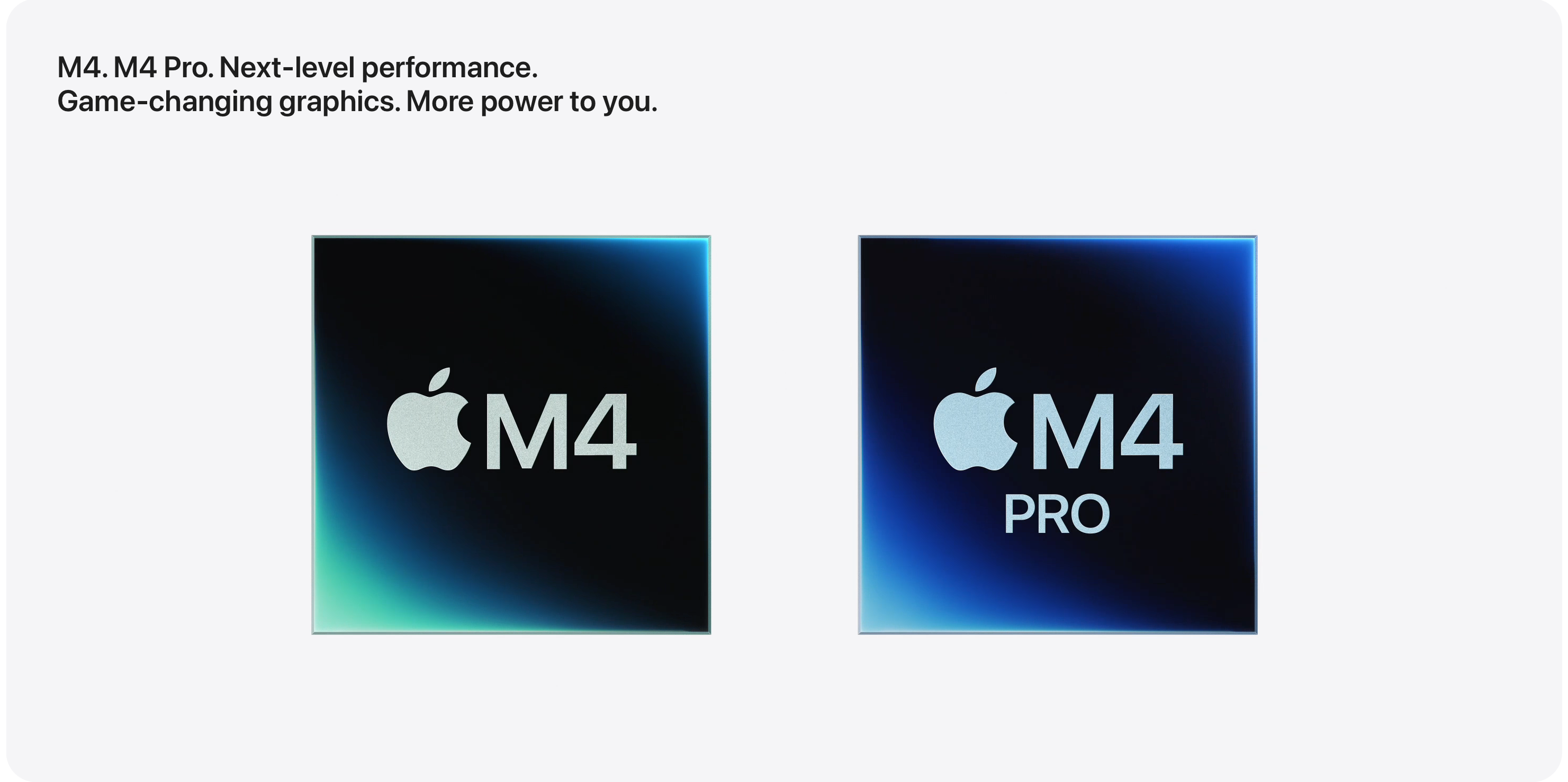
You can outfit the 2024 Mac Mini with a M4 Pro for serious performance.

You know what would be even better? A lower price. So that’s exactly what Apple gave you. Not only did the baseline Mac Mini get refreshed with the vanilla M2, it also became the subject of a $100 price drop. 

That meant you could now get a brand new Mac Mini with the updated M2 chip for just $600. Insane.

Mac Mini With Apple Silicon: The Side Effects

I’m sure you’re wondering why I’m rambling on about the Intel Macs as well as the M1 and M2 Mac Minis when I’m supposed to be talking about the nonexistent M3 Mac Mini.

The Mac Mini M2 flaunted a slew of seriously powerful configurations meaning that the Mac Mini would now find itself in the vying hands of professionals and enthusiasts. But on top of that, Apple would outdo itself once again and reduce the price to $600.

Even better, if you were a student, you could use Apple’s educational discount pricing to grab the baseline Mac Mini M2 for just $500. While the Mac Mini had never been more popular, it was now starting to cannibalize the sales of the equally impressive MacBook Air which started at $1,200 for the M2 variant.

Don’t get me wrong. For $1,200, the MacBook Air was still a no-brainer for anyone who wanted an ultraportable yet powerful all-rounder laptop. 

But you could get the same specs minus the screen, keyboard, mouse, and battery for just $600. This meant Apple would have a hard time selling the MacBook Air and even the MacBook Pro. 

M3’s Absence: Do You Get It Now?

As I’m sure you’ve already understood, Apple needed an excuse to keep selling the MacBooks for double the price. This is exactly why the Mac Mini never received the M3 refresh even though the MacBooks did because Apple was afraid the MacBooks would see a drop in demand.

However, Apple’s plan might’ve backfired because when the Mac Mini did get refreshed with the M4 SoC, it also received an upgrade to 16 GB RAM for the baseline config. That was previously a $200 upgrade.

That’s not all. Apple also saw the fact that the Mac Mini had its most major design refresh in the last decade. That’s right, the Mac Mini M4 is now a square measuring 5”x5” and only 2” tall. 

As such, don’t be surprised if the Mac Mini isn’t updated for another year or even two. Why? For the exact same reason you never saw a Mac Mini M3.

For $600, people will happily buy the Mac Mini M4 till at least 2026.

Post 2019 Macs: Why You Should Hunt Them Down

Story Highlight
  • The 2019 MacBook Pro 16” is a great option for those who still want the best Intel Mac ever made in a portable form factor.
  • The 2020 MacBook Air/MacBook Pro M1 along with the M1 and M4 Mac Mini are the unrivalled choices for Apple Silicon on a budget.
  • The M1 Pro/M1 Max MBPs are better suited to enthusiasts and professionals while keeping their wallets in check.
 

Apple Silicon is all the rage nowadays and to be honest, why shouldn’t it be? After all, Apple Silicon is primarily responsible for more than doubling the Cupertino-based tech giant’s share prices.

That being said, here’s why I think you should ignore all the Macs released prior to 2020, with the exception of one notable variant.

What Was Wrong With The Intel Macs?

I’ve gone into alarming detail regarding this in a completely separate article. 

However, to sum it up, all the Macs, but especially MacBook Pros released between 2016-2018 suffered from a collection of horrendous design flaws, such as the notorious Butterfly keyboard, the removal of USB Type-A ports as well as SD Card slots and HDMI connectors as well as reduced performance concerns due to thermal throttling and an overpricing phenomena, to name a few of the major oversights.

In short, this was the peak of Apple’s Jony Ive era where form was seemingly prioritised over function. 

Nevertheless, there was one release that propelled Apple right back to the top of its game and landed the brand in the good books of professionals and enthusiasts all over the world.

Redemption: MacBook Pro – 16” – 2019

The 16” MacBook Pro released on 15th November 2019 aimed to fix almost every major flaw that plagued the outgoing models. 

To begin with, the 16” MacBook Pro brought back the good old scissor-style Magic Keyboard and upped the resolution thanks to the larger screen size.

These new MacBook Pros also showcased the Radeon 5000 Series GPUs from AMD, starting with the Radeon 5300M with 4 GB of VRAM, going all the way up to the Radeon 5600M with 8 GB of HBM2 (High Bandwidth Memory) VRAM.

But most importantly, the 16” MacBook Pro arrived in a thicker form factor with a 99.8 Whr battery (the maximum limit allowed by the TSA is 100 Whr), which meant that these new laptops would alleviate the thermal throttling concerns that cannibalized the sales of the 2016-2018 MacBook Pros. 

2020: The Advent Of Apple Silicon

For starters, the M1 SoC will go down in history as one of the most legendary Apple-manufactured chips. 

Apple began its official transition from Intel-baed Macs to Apple Silicon with the help of the refreshed MacBook Air that debuted in 2020 with the M1 chip and a base configuration of 256 GB SSD/8 GB RAM.

Apple Silicon vs Intel - Gaming. (Image Credits - MacRumors)
Apple Silicon: The dawn of a new era. (Image Credits – MacRumors)

The 13” MacBook Pro also became the subject of this M1 refresh with the only difference between the MBP and the MBA being that the former had a physical cooling fan to help prevent thermal throttling for users who wished to partake in demanding workflows.

Both the MBP and the MBA turned out to be blockbuster hits, and to this day, you’ll find huge demand for these laptops, which means they’ve held their resale values relatively well.

2021: Apple Silicon Means Business

Apple Silicon really took off with the launch of the M1 Pro and the M1 Max MacBook Pros.

These chips were geared towards the most demanding professionals of the industry and no expense was spared. 120 Hz ‘ProMotion’ displays, ultrafast SSDs and RAM, monstrous GPUs, a much thicker form factor for the best battery lives ever in a Mac, the list keeps going on and on. 

Unsurprisingly, these MacBook Pros were also favorably received and were subsequently refreshed in the following years with the M2, M3, and now the recently announced M4 SoCs. 

2022: Final Boss Battle

Apple wholly obliterated its underwhelming competition with the highly anticipated launch of the Mac Studio and the Mac Pro, which introduced the M1 ‘Ultra’ and M2 ‘Ultra’ chips with up to 72-chip GPUs, complemented by up to an 8 TB SSD and 192 GB of unified RAM. 

Even I couldn’t possibly justify buying either of these two computers, but then again, they’re aimed at industrial professionals, people who are at the top 1% of their game, i.e., people who rely on these machines for their livelihoods and of those around them. 

Trust me, you’ve never seen anything like these Macs, which is maybe why Apple has struggled to come up with an M3 ‘Ultra’ SoC at the time of writing. 

Nonetheless, I can safely say you’ll be very pleased no matter what Mac you choose, assuming it was released in 2019 and afterward. Checkmate, Windows PCs.

Assassin’s Creed Shadows Will Shape Up Ubisoft’s Future, Says Renowned Insider

Story Highlight
  • Assassin’s Creed Shadows is finally coming next month.
  • A reliable insider in the industry has predicted that the launch of Assassin’s Creed Shadows will be vital to Ubisoft’s future.
  • He believes that Ubisoft would see drastic reorganization changes if the game flops.

Recent releases from Ubisoft, like Skull and Bones, Star Wars Outlaws, and XDefiant, have failed to reach a large audience and have been commercial failures. 

The upcoming release from the publisher, Assassin’s Creed Shadows, has already met with great criticism and may suffer similar consequences to the previous releases from the publishers.

However, one renowned insider has predicted that the launch of AC Shadows will shape the future of Ubisoft in the industry.

Why it matters: Ubisoft is already going into crisis as the company value has gone down by 45%, making it a historic one-year low. 

Assassin's Creed Shadows
Assassin’s Creed Shadows Is Finally Coming Later This Year

Just recently, Jason Schreier, who has been a well-known insider in the industry, has made his predictions for the year. He believes that the success of Assassin’s Creed Shadows is vital for the future of Ubisoft. 

The release of Assassin’s Creed Shadows could tell us a lot. If it’s a hit, Ubisoft will have more time as the Guillemot family sorts out the company’s future.

-Jason Schreier 

He further stated that if the game flops, we will see a drastic reorganization happen at the company very quickly, whether it’s a buyout or a sale. 

Assassin's Creed Shadows
Assassin’s Creed Shadows Has Been In Development For Around A Decade

Jason also talked about the companies who are in buyout talks with Ubisoft; he believes that Tencent Holdings Ltd, which already owns a stake in the company, is an obvious choice for the task.

However, he also named Saudi Arabia’s Savvy Games Group, which has recently stated that they are looking to make big purchases this year. Still, it should also be noted that these are just Jason’s predictions and not any sort of report or leak.

Nonetheless, it remains to be seen how Assassin’s Creed Shadows will perform at launch. The title has been developed for around a decade and is finally coming out next month on 14th February

What do you think about this? Are you excited about the title launch? Please let us know your thoughts in the comments or be a part of Tech4Gamers Official Forums

Gaming On A Budget? Here’s What You Can Do With $1,000 In 2025

Story Highlight
  • Building a powerful 2K gaming PC with a $1,000 is pretty easy without needing to make major sacrifices.
  • The Ryzen 7 5800X3D, 7800X3D, and 9800X3D as well as the Core i5-13400F are great contenders for the best budget gaming CPUs.
  • With respect to GPUs, carefully consider your preference between the Arc B580, RTX 4060, and Radeon RX 7600.
 

We’re at the end of 2024 and this year has proven to be a blockbuster success as far as PC Gaming is concerned. So while we’re at it, how about I discuss what kind of rig you could set up for yourself with a cool $1,000 bucks in hand? Spoiler alert – I have quite a few bang-for-the-buck options for you. 

$1,000 in 2024: Let’s Look At CPUs And Motherboards

For starters, let’s talk about the Ryzen 7 7800X3D. It has continued to maintain its status as an evergreen AMD CPU that’s specially tuned to output the highest FPS count in even the most demanding of gaming titles.

Even though the Ryzen 7 7800X3D has been superseded by the Zen 5 ‘Granite Ridge’ Ryzen 7 9800X3D, the 7800X3D still manages to offer insane value for money. 

Ryzen 7 7800X3D Close Up
AMD Ryzen 7 7800X3D.

So what’s the alternative? Well, in my honest opinion, if you want the absolute best CPU for gaming that money can buy, you’d be better off with the Ryzen 7 9800X3D for that little extra oomph of power. 

That said, the Ryzen 7 9800X3D starts at $480, but scalping trends combined with this processor’s hyped-up demand pushed that price bracket to well past $550 to $600. Pricing has normalized since then, but don’t expect to see any steep discounts below MSRP values.

Speaking of ‘X3D’ CPUs, why not talk about the processor that started it all? Yes, I’m talking about the Ryzen 7 5800X3D which debuted AMD’s revolutionary 3D V-Cache layering technology.

If you’re into moderate 1440p gaming and want to splurge on your GPU, the Ryzen 7 5800X3D would spell out a wise choice as it should be found for below $300. However, availability of brand new units will vary by region, so expect to hunt used CPUs in the whereabouts of $200 to $250.

But what if you’re looking for the absolute best budget gaming CPU there is? In that case, you’ll be hard pressed to find a better offering than the Intel Core i5-13400F. Why, you ask? It’s globally available for just a shade over $150, approximately speaking. This could free up a lot of dough to allocate towards your GPU and RAM. Something to think about, eh?

$1,000 in 2024: GPUs – What Are Your Options?

Let’s talk about the previous generation Nvidia GeForce RTX 3000 Series first. 

You can find brand new units of the RTX 3060 for under $300, the RTX 3070 for under $400, and the RTX 3080 for well under $500. 

But if you really want the best budget GPUs, I’d recommend the RX B580 from Intel, which can be had for a rough $250.

Feel free to expect to easily run the latest titles at medium to high settings in 1440p and maybe even 4K with the GPUs mentioned above, although you might have to turn down your settings a notch for 4K gaming.

$1,000 in 2024: RAM, SSDs, and HDDs

Since you’re on a budget, I’ll recommend 32GB of DDR5 RAM as being more than enough for your gaming needs.

You can easily find one of the best high-performance 32GB (dual channel) RAM kits with top-notch frequencies, low CAS Latencies, and tight memory timings for under $100.

CORSAIR DOMINATOR TITANIUM RGB DDR5 RAM 32GB (2x16GB) DDR5 6000MHz CL30 AMD EXPO - RGB Effects
Corsair Dominator Titanium RGB DDR5 RAM, 6000MHz with RGB Lighting.

Keep in mind that AMD’s AM4 CPUs are only compatible with DDR4 RAM while alternating motherboard variants of the Intel CPUs (excluding 15th Generation processors) are compatible with DDR4 and DDR5 memory.

As far as storage is concerned, you’ll be able to snag a decently fast 1 TB M.2 PCIe Gen 4 SSD for $50 to $75, so I wouldn’t really recommend an HDD when SSDs are getting this cheap.

$1,000 in 2024: PC Cases, PSUs, and CPU Coolers

Regardless of the color palette you have in mind, you’ll be able to find a decent PC Case for under $50. 

With respect to PSUs, you should never cheap out because an unsafe PSU could spell out a hazardous disaster regarding the electrical safety of your PC components, such as your CPU, GPU, and SSD/RAM.

Nevertheless, you needn’t worry. Satisfactory PSUs from the likes of Seasonic, DeepCool, and EVGA, to name a few, may be found for under $100.

Last but not least, CPU Coolers are of paramount importance if you want to sustain peak gaming performance. Now while I certainly love the idea of an AIO, it just isn’t practical for a budget build. Then again, you’ll find it quite easy to find a respectable CPU Air Cooler for roughly $50. That said, make sure you choose a CPU Cooler that’s adequate to handle the TDP (Thermal Design Process) of your CPU.

And there you have it. Even though a $1,000 may not seem like a lot of money, it’s more than enough to play around with, regardless of whether you want to game in 1080p, 2K, or even 4K. Cheers!

Why You Shouldn’t Compare Core Ultra 9 285K To Ryzen 7 9800X3D

Story Highlight
  • You shouldn’t be comparing the Core Ultra 9 285K to the Ryzen 7 9800X3D to begin with as both CPUs have different target audiences and MSRPs.
  • Unfortunately, scalping trends pushed the 9800X3D’s price to rival that of Intel’s offering and even surpass it in some cases, thus prompting this hotly debated comparison.
  • The Ryzen 7 9800X3D trumps the Core Ultra 9 285K by an average differential of 40% in gaming performance, losing by the same percentage in productivity-based workflows.
 

With the Ryzen 7 7800X3D successfully proving itself to be one of the best gaming CPUs of all time, it would only make sense that the Ryzen 7 9800X3D would have intense buyer appeal at the time of its launch.

Since then, the Ryzen 7 9800X3D has been the victim of immense scalping, as in, artificially manipulating supply chains to make it seem as if the demand for the most popular gaming processor has drastically pumped.

Courtesy of such ludicrous pricing trends, the Ryzen 7 9800X3D is now the subject of relentless comparisons against the very best that Intel has to offer, i.e., the Core Ultra 9 285K despite it having a 23% higher MSRP than AMD’s latest 3D V-Cache CPU.

On that note, I feel compelled to inform you that while the purpose of the Intel Core Ultra 9 285 was not solely intended for gaming, it does still compare very favourably to the Ryzen 7 9800X3D. 

If anything, the Ryzen 7 9800X3D gets blown out of the water by the sheer raw grunt of the Core Ultra 9 285K when it comes to workflows based on productivity, but I’ll get to that in a bit.

Gaming: Ryzen 7 9800X3D or Core Ultra 9 285K?

Since the Core Ultra 9 285K represents the very best of Intel’s 15th Generation ‘Arrow Lake,’ you would assume it crushes the Ryzen 7 9800X3D when it comes to gaming, especially considering the fact that the latter is superiorly priced by a factor of 23%. 

Alas, you would be very wrong. 

Cyberpunk 2077
Ryzen 7 9800X3D vs Core Ultra 9 285K – Gaming. (Image by Tech4Gamers)

Thanks to AMD working its proprietary magic with 3D V-Cache, the Ryzen 7 9800X3D bore an average advantage of at least 40% as compared to the Intel Core Ultra 9 285K in a variety of different gaming titles.

The difference between the two CPUs really came into light when you took the 1% Low FPS into account, i.e., the Ryzen 7 9800X3D offered much smoother gameplay all while minimizing its power draw by 25% in contrast to the Core Ultra 9 285K. Absolutely monumental.

Productivity: This Looks Bad For The Ryzen 7 9800X3D

For the Intel enthusiasts out there, you needn’t worry. It’s not all doom and gloom yet for the Core Ultra 9 285K.

That’s because Intel’s flagship CPU mercilessly overpowers and dominates the Ryzen 7 9800X3D when it comes to pursuing productivity workflows. 

Adobe Photoshop 2025
Core Ultra 9 285K vs Ryzen 7 9800X3D – Productivity. (Image by Tech4Gamers)

If anything, the Intel Core Ultra 9 285K crushes the AMD Ryzen 7 9800X3D in applications and workloads based on productivity by the same factor (if not more) it lost to the AMD CPU when being tested for gaming performance.

Feel free to head over here and check out our detailed presentation and analysis of the showdown between these two powerhouse processors as far as productive workflows are concerned.

Which Is Better: It’s Not A Fair Comparison

The Ryzen 7 9800X3D starts out as an 8-core/16-thread CPU whereas the Core Ultra 9 285K boasts a beastly 24-core/24-thread setup which is meant to intimidate the likes of AMD’s flagship processor, i.e., the Ryzen 9 9950X. 

Moving on, the Ryzen 7 9800X3D, thanks to its 96 MB of L3 Cache (as opposed to 36 MB for the Core Ultra 9 285K) as part of AMD’s revolutionary 3D V-Cache is able to outperform the best of the best silicon that Intel has to offer, at least as far as gaming is concerned.

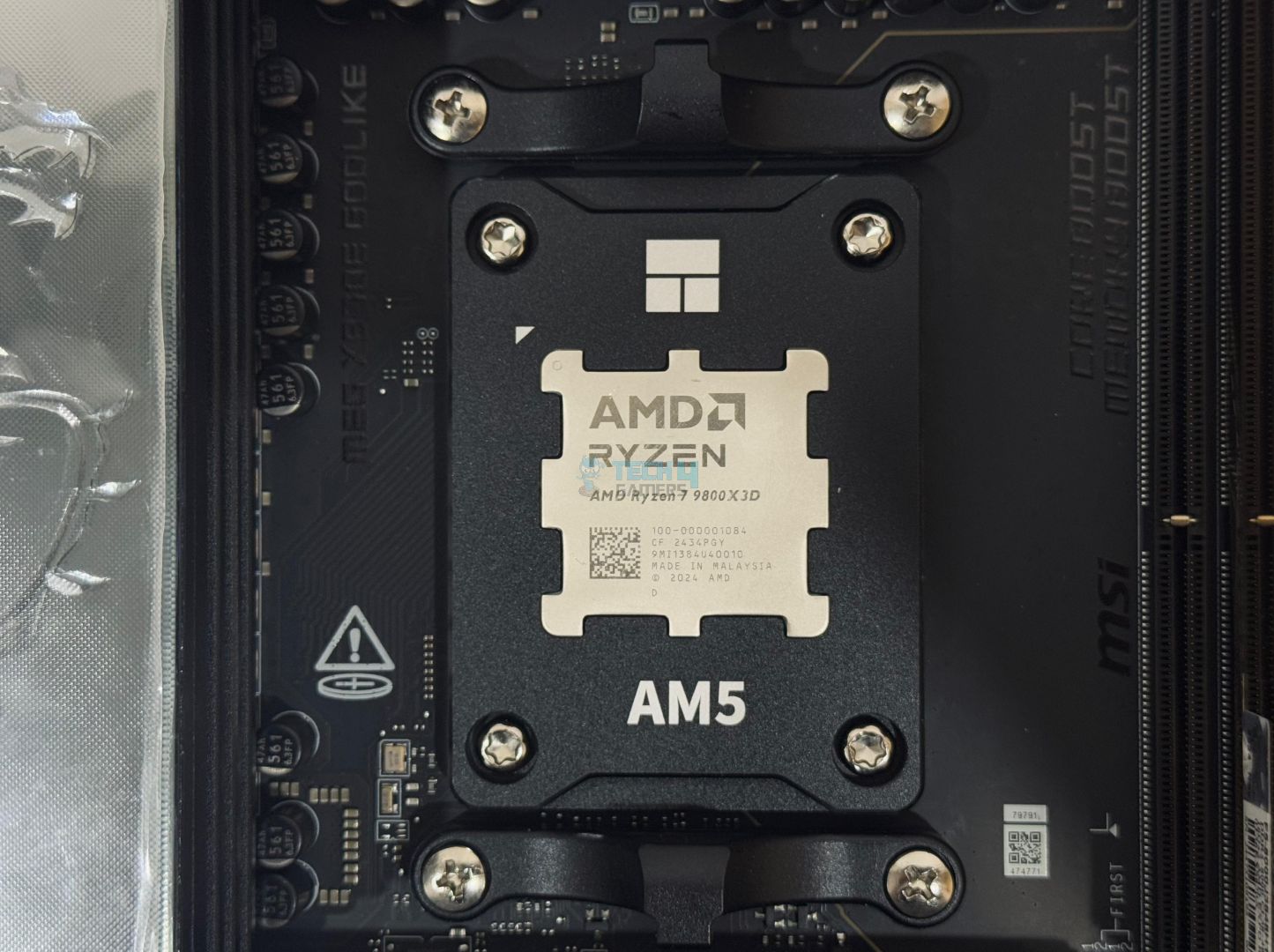
Ryzen 7 9800X3D Installed
Ryzen 7 9800X3D Installed (Image By Tech4Gamers)

But what’s interesting is that the Ryzen 7 9800X3D does it all while sipping up to 30% less power than Intel’s high-maintenance CPU. 

In fact, even when both CPUs are fully stressed, the Ryzen 7 9800X3D will consume up to 120W in comparison to 125W for the Core Ultra 9 285K. 

It’s a measly difference, but when the former processor is offering up to twice the FPS in the latest titles, it’s a remarkable achievement.

Pricing: Which One Comes Out On Top?

Adding insult to injury, the Ryzen 7 9800X3D is priced at $480 unlike the Core Ultra 9 285K which starts out at $590. Now here’s where things get slightly more complicated.

Courtesy of hyped-up demand and anticipation, the prices for both these processors vary greatly to the extent that I initially saw the Ryzen 7 9800X3D climb upwards of $600. 

However, it doesn’t help that even if you were able to find both CPUs at MSRP, I’d still recommend the Ryzen 7 9800X3D unless you’re a serious professional who needs to crunch some numbers and throw a few productivity-based applications at your PC.