I’ve previously worked for eXputer as a Senior News Writer for several years. Now with Tech4Gamers, I love to devoutly keep up with the latest gaming and entertainment industries. I have a Bachelor’s Degree in Computer Science and years of experience reporting on games and breaking exclusive stories. Besides my passion for gaming journalism, I love spending my leisure time farming away in Stardew Valley. VGC, IGN, GameSpot, Game Rant, TheGamer, GamingBolt, The Verge, NME, Metro, Dot Esports, GameByte, Kotaku Australia, PC Gamer, and more have cited my articles.
Story Highlights
Monster Hunter Wilds adds features like Seikret mounts and dynamic environments to enhance gameplay.
Dual environmental states and weather events impact gameplay and narrative, introducing strategic depth.
A persistent world and advanced monster interactions make Wilds a major step in environmental storytelling.
Every Monster Hunter game introduces new features but remains true to the core elements that define the series, such as hunting monsters and cooperative gameplay.
With Monster Hunter Wilds, Capcom is taking this experience to the next level by introducing new features, such as Seikret mount, named NPCs, and dynamic environmental mechanics that make the world more alive than ever. These innovations could play a crucial role in shaping the game’s narrative.
Monster Hunter Wilds is coming to PS5, Xbox Series X|S, and PC, but it will not be released on the Nintendo Switch; however, it might be available on Nintendo’s next console.
A Living World
Capcom has highlighted the theme of “A Living World” as central to Monster Hunter Wilds. This concept is more than a mere backdrop; it’s a fully integrated element that influences everything from monster behavior to the storyline.
The game features dense, three-dimensional environments, like the Windward Plains, with extreme weather conditions transforming the landscape. These changing environments affect gameplay, with monsters and ecosystems adapting to new conditions.
Monsters in the game behave independently, interacting with each other in ways that make the ecosystem feel more alive. Newly introduced creatures like Doshaguma (Fanged Beast), Chatacabra (Amphibian), Ceratonoth (Herbivore), and Dalthydon (Herbivore) each exhibit distinct behaviors and traits.
Doshaguma – Image Credit By (PlayStation Blog)
Furthermore, the game brings back 14 iconic weapon types, with new actions and abilities for each, enhancing the traditional Monster Hunter gameplay.
The game also introduces new systems like Focus Mode, which gives hunters better control over aiming, guarding, and targeting monsters’ weak points. The new Hook Slinger adds more abilities, allowing hunters to perform actions and collect items from a distance, even while riding their Seikret.
Environmental States
One of the most intriguing aspects of Monster Hunter Wilds is its dual environmental state. The first state is a harsh survival environment where monsters compete aggressively for scarce resources. The second state is vibrant and abundant, offering a lively and diverse ecosystem.
In the harsher state, monsters become more aggressive as they compete for scarce resources. However, the vibrant state presents a world teeming with life, offering a more diverse and potentially less hostile environment.
In addition to environmental states, Monster Hunter Wilds introduces specific weather events, such as sandstorms and thunderstorms, which profoundly impact gameplay and narrative.
For example, a sandstorm might reduce visibility, drive herbivores to flee, and empower certain monsters. These events could trigger key plot points, like the emergence of a powerful monster or a shift in the ecosystem, forcing players to adapt in real time.
Furthermore, the game features more environmental traps, like vines and rockslides, which players can trigger remotely with a hook slinger. This adds strategic depth and aids in overcoming challenges.
Persistent World And Monster Interactions
Monster Hunter Wilds features a persistent world where player actions have lasting effects. Overhunting a species can create ecological imbalances. This imbalance may cause other species to overpopulate or migrate, altering future challenges for players.
Capcom has also emphasized the complexity of monster interactions in Monster Hunter Wilds. Enhanced AI allows for more intricate behavior patterns, such as smaller predators targeting weakened monsters or large groups of monsters migrating together.
These innovations suggest that Monster Hunter Wilds will be more than just the next entry in a beloved series; it will be a bold step forward in environmental storytelling, where the world itself is as much a character as the monsters and hunters that inhabit it.
At Tech4Gamers, I take on the role of Hardware Reviewer with pride. My responsibilities involve a thorough examination of essential hardware components like motherboards, graphics cards, processors, PC cases, and CPU coolers, among others, focusing on their complexities and functionalities.
Hayyan Serwer
As the CPU Cooler and RAM Expert, I test the latest hardware to provide tips for smart purchases. I cover everything from busting myths about CPU coolers to looking into the newest RAM designs, examining various parts of PC hardware.
Finally, the wait is over as Noctua releases next-generation flagship air coolers named NH-D15 G2. I have been waiting to test these beasts for a while now. It has been over 10 years since the supremacy of the original NH-D15, but the competition finally caught up and offers cost-effective, high-performance air coolers that compete head-to-head against the NH-D15, and many actually show superior performance.
The call for new cooler was in the air and Noctua has been busy doing R&D. They not only wanted to revamp the heatsink design but also needed new fans to provide better cooling performance. Noctua has released three variants; NH-D15 G2, NH-D15 LBC, and NH-D15 HBC. More on this comes later in this article.
These coolers are compatible with Intel LGA 115x / 1200 / 1700 / 1851 and AMD AM4 / AM5 sockets. These retail at around USD 149.62.
Why Trust Tech4Gamers
Hayyan Serwer is our CPU Cooler expert who has been testing different AIOs and air coolers for years.
80+ coolers tested and reviewed by our team of hardware experts (Tech4Gamers Team).
900+ hours spent testing different coolers for our reviews.
At Tech4Gamers, ensuring you get reliable information is our priority. That’s why every hardware round-up undergoes a meticulous review process by our team of experts and editors. Each review is carefully examined against our strict editorial guidelines, guaranteeing you trustworthy insights you can depend on.
Key Takeaways
The new NH-D15 G2 from Noctua comes in three variants, delivering excellent cooling performance and the same low noise levels as the original, while being compatible with Intel LGA1700 and AMD AM5 sockets.
You should buy the Noctua NH-D15 G2 if you want top-tier performance out of an air cooler with the best possible noise levels.
You should not buy the Noctua NH-D15 G2 if you’re on a tight budget or if you’re on the LGA20xx socket.
Here are the key specs:
Dimension
168x152x150mm (HxDxW)
Weight
1525 gm
Material
Copper Base and Pipes, Aluminum fins with soldered assembly
The NH-D15 G2 and LBC versions pack a superior performance punch making a strong come back of Noctua as we have a new king of the coolers in the arena. Noctua has revamped the heatsink adding two more heatpipes and 23 more fins while reducing the depth. The salient feature of these coolers is new NF-A14x25r PWM fans that are based on NF-A14 and NF-A12x25 PWM fans. You can get this high performance at a steep price of USD 150.
Packing And Unboxing
Noctua has kept the same packing box as we have seen on the original NH-D15, but the color scheme is different.
Unboxing And Package Contents (Image By Tech4Gamers)
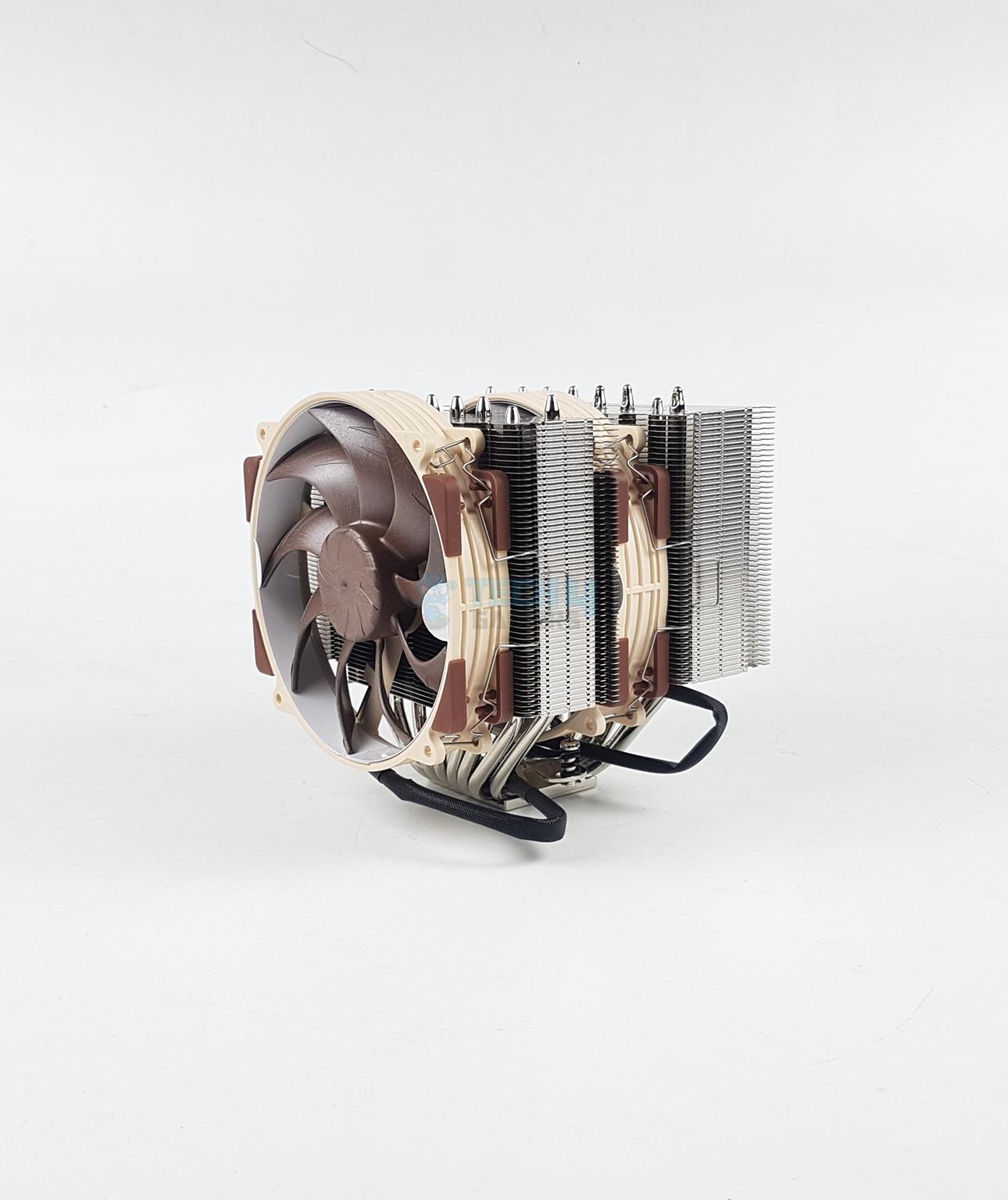
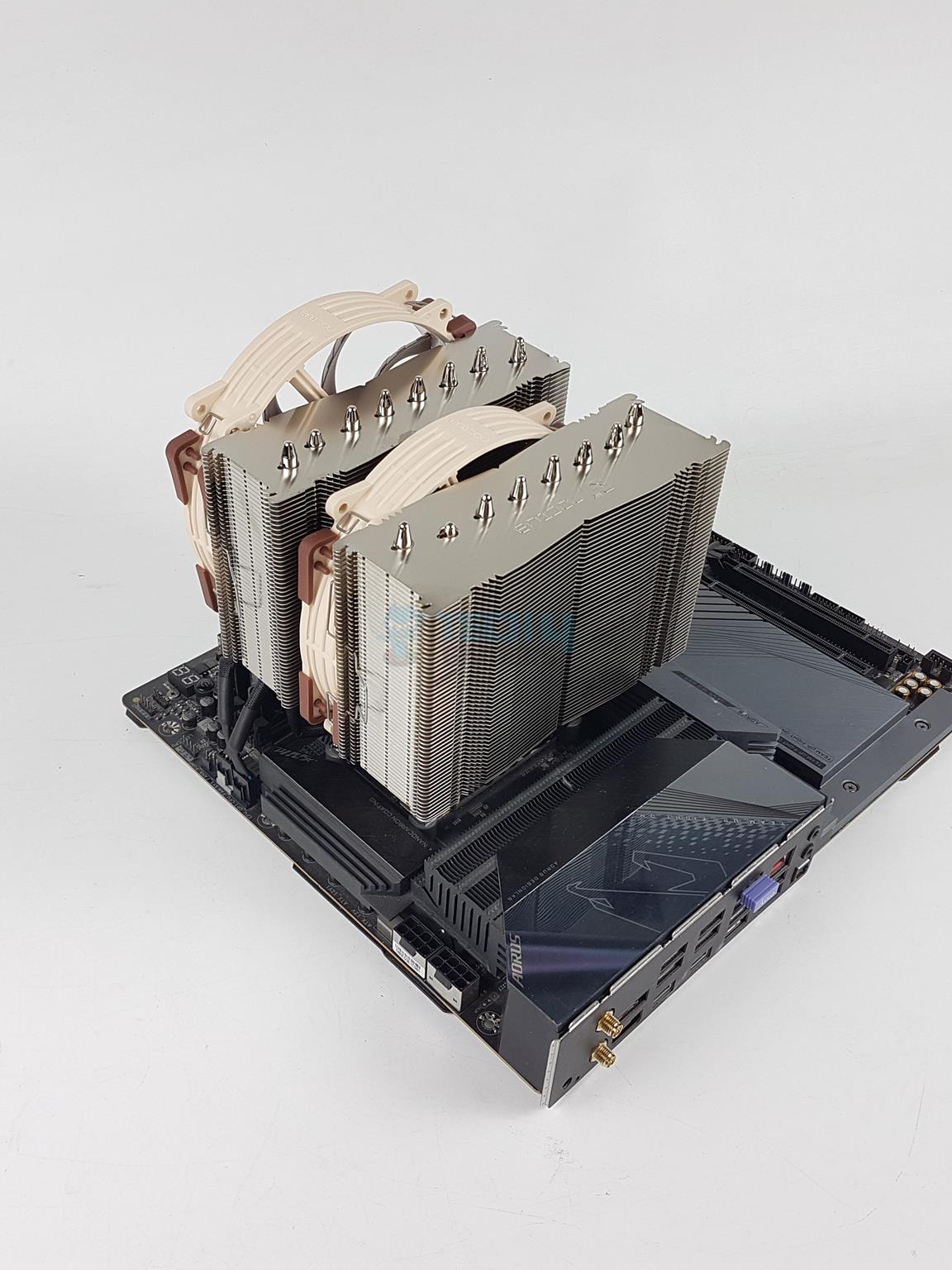
The new flagship cooler has a dimension of 168x150x127mm (HxWxD) without fans. This dimension becomes 168x150x152 (HxWxD) with the fans. This cooler weighs 1525 grams. I did not see the Intel LGA20xx standoff screws implying this cooler is not compatible with that socket out of the box.
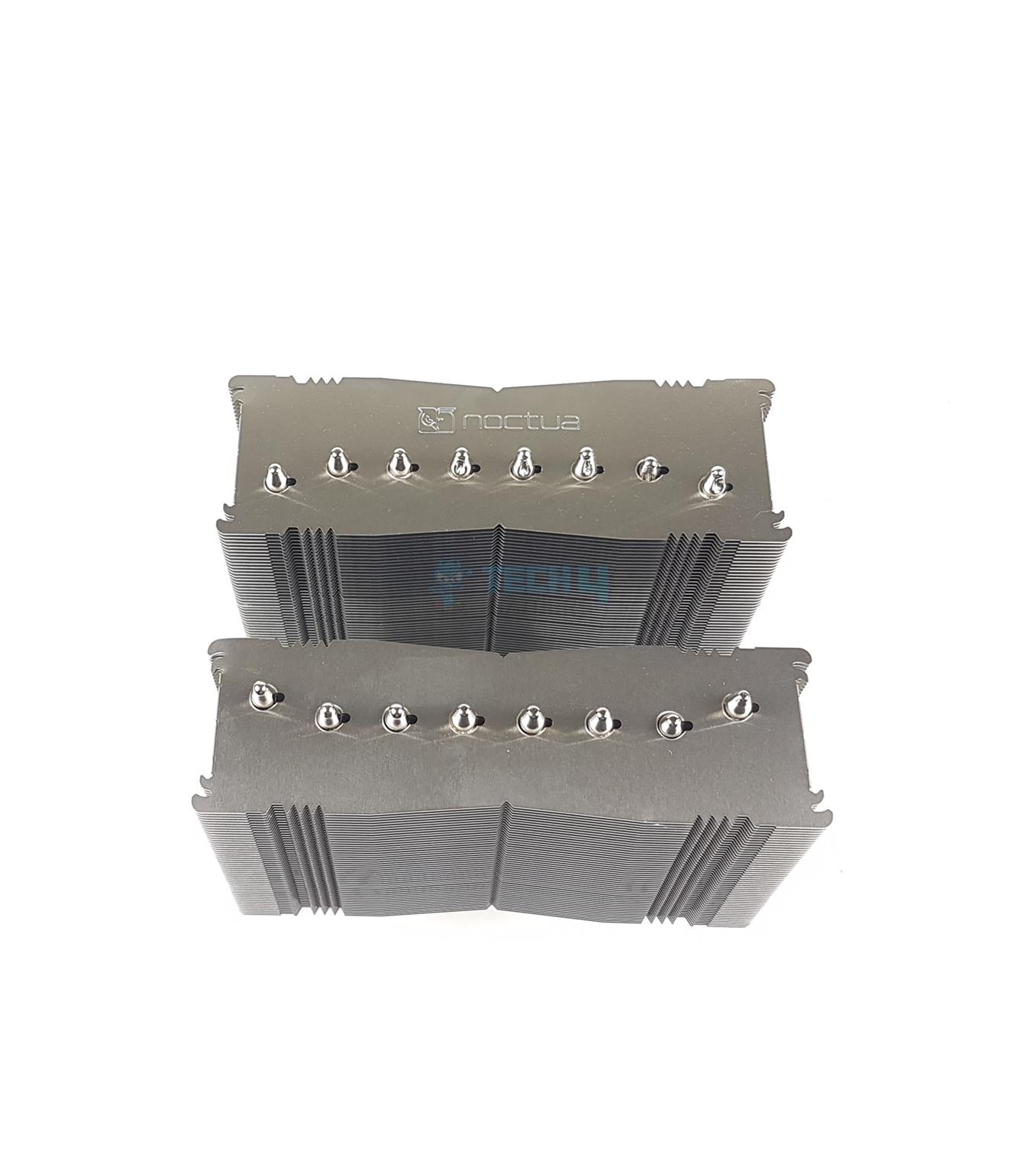
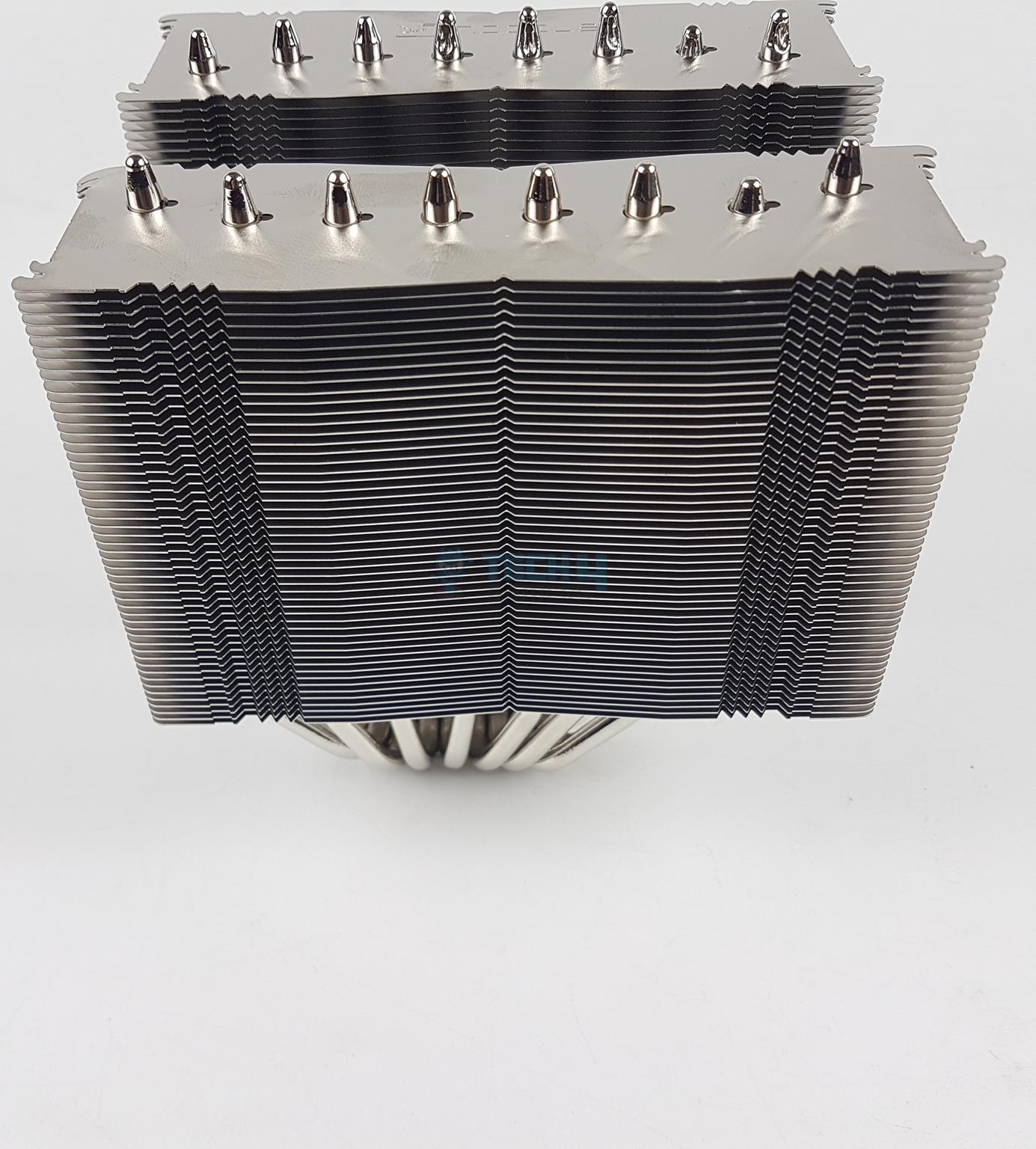
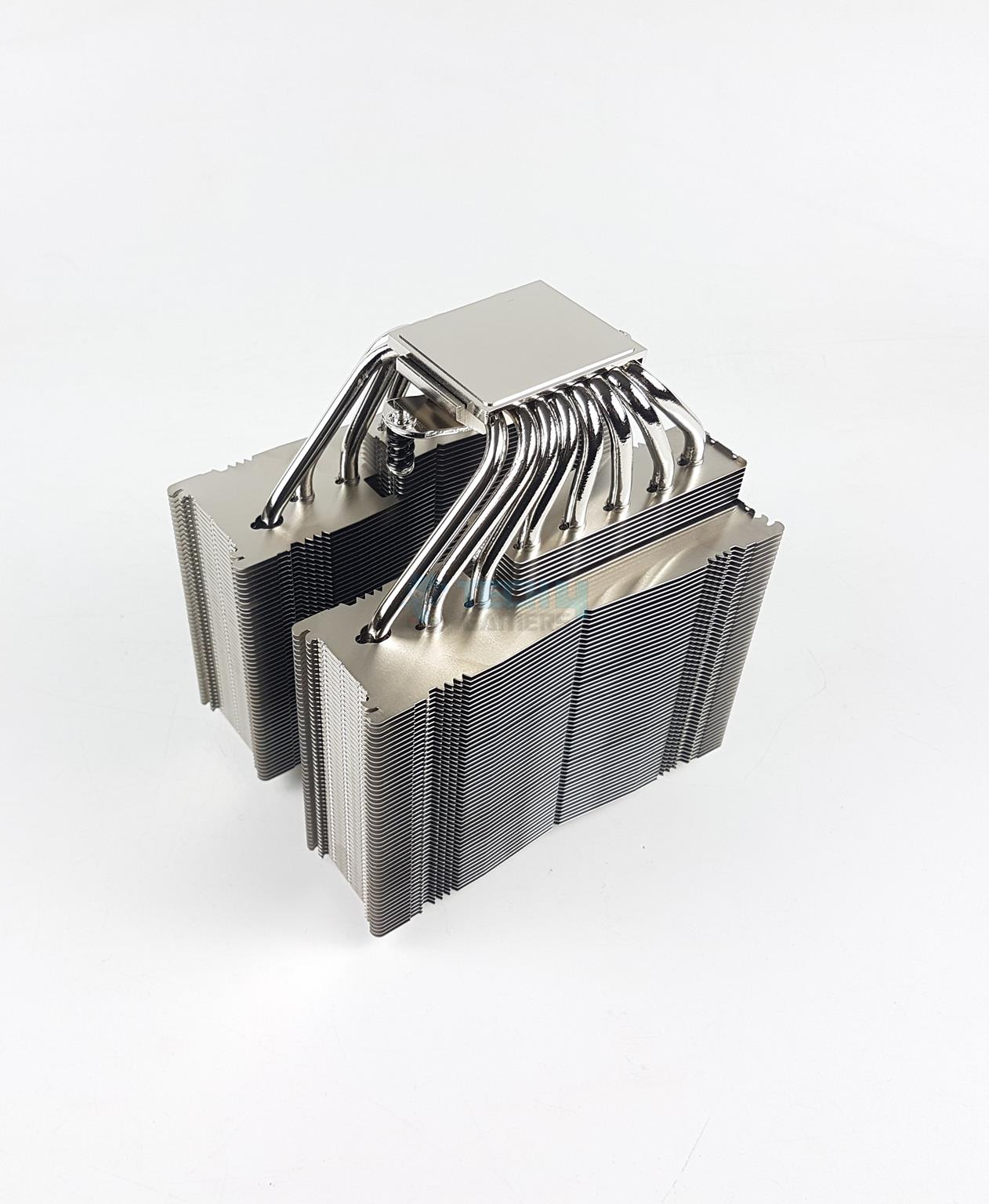
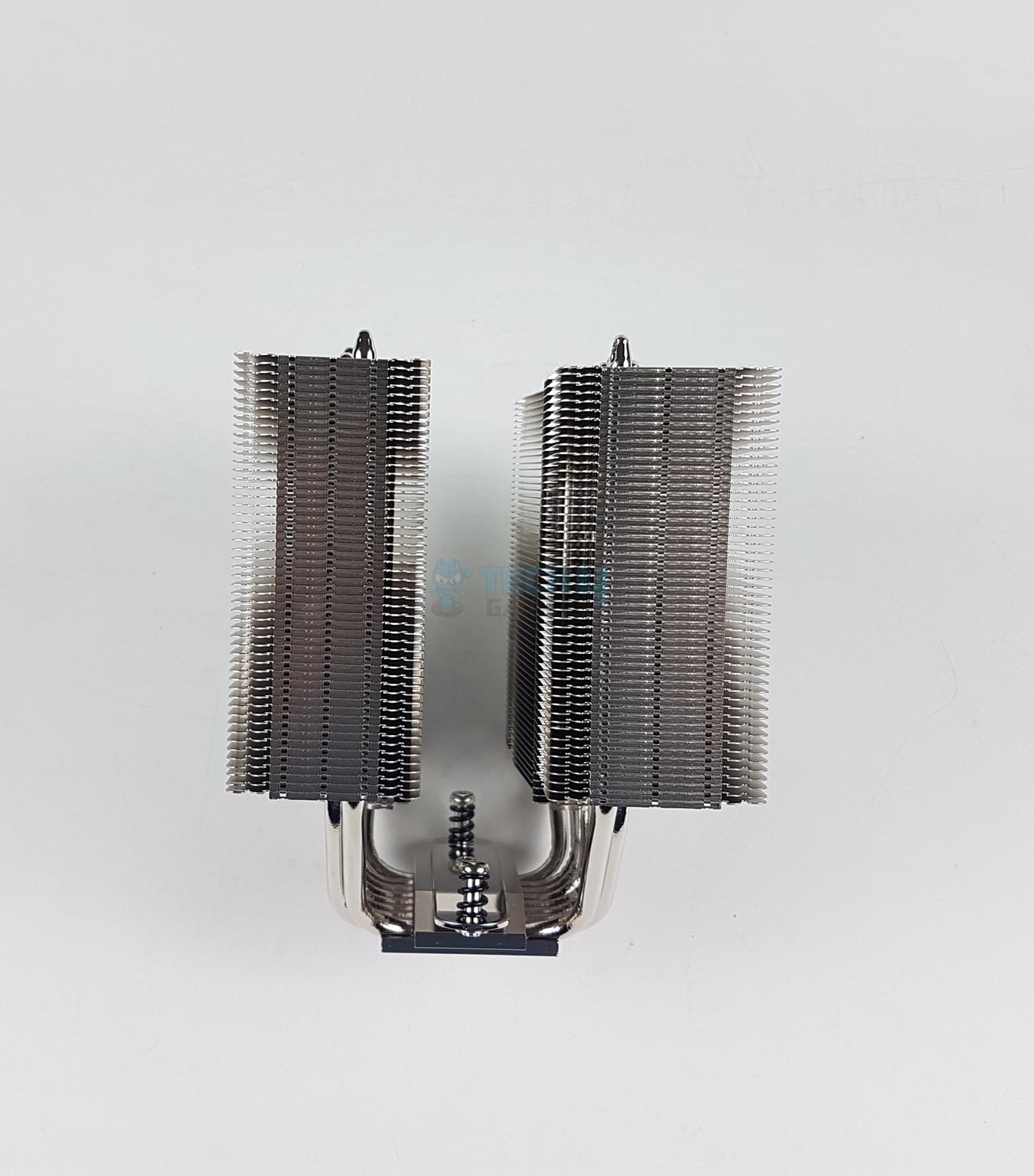
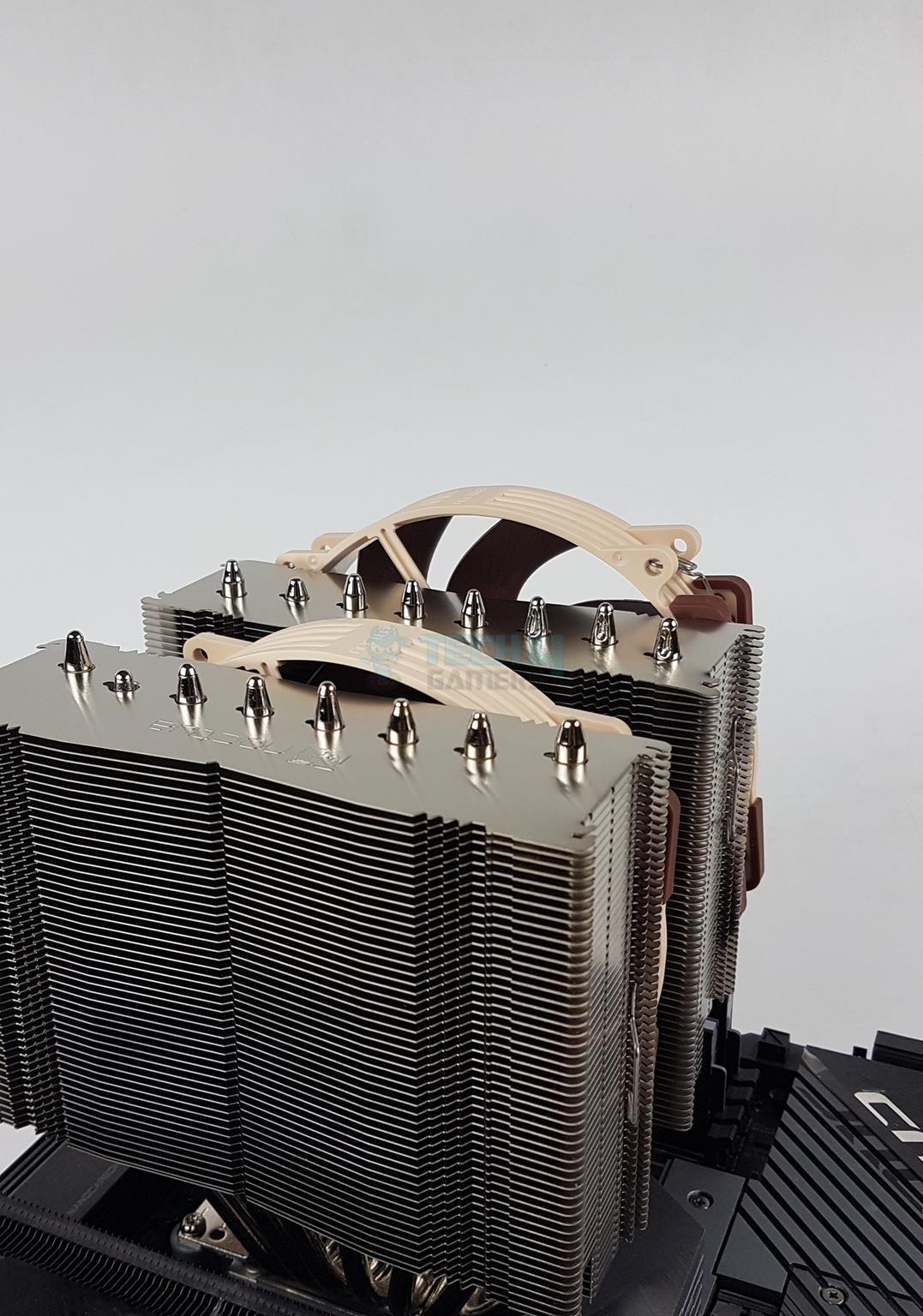
Noctua has kept the same industrial design as on the original NH-D15. You can see the terminating tips of the heat pipes on the top. There is a Noctua branding on the second tower. The front tower has 5mm less depth compared to the rear tower. Noctua has mentioned that this is done to balance the load between both fans.
Front View
Fins Layout
The front and rear towers are identical in layout and design except the dimension. Noctua has retained the basic footprint of the original NH-D15 in this layout of G2. The main section of the fins is in straight line with an inset in the middle. The triangle shaped fins are in two columns.
There are 51+8 fins on this heatsink by my count. The fin stack is in stepped layout with 51 fins in the main tower and 8 fins in the stepped or reduced size portion.
Noctua has increased the size of the surface area by 20% by reducing the gap between the fins from 1.9mm to 1.6mm and adding 23 more fins. This means we have a highly dense fin stack for which we need high-performance fans.
Noctua has also reduced the depth of the heatsink/cooler at the same time. How is this possible? The new NF-A14x25r PWM fans are the main reason. These pack high airflow and high air pressure while remaining at the same sound level and also coming in at a reduced size compared to the NF-A15 fans.
Offset
Side View
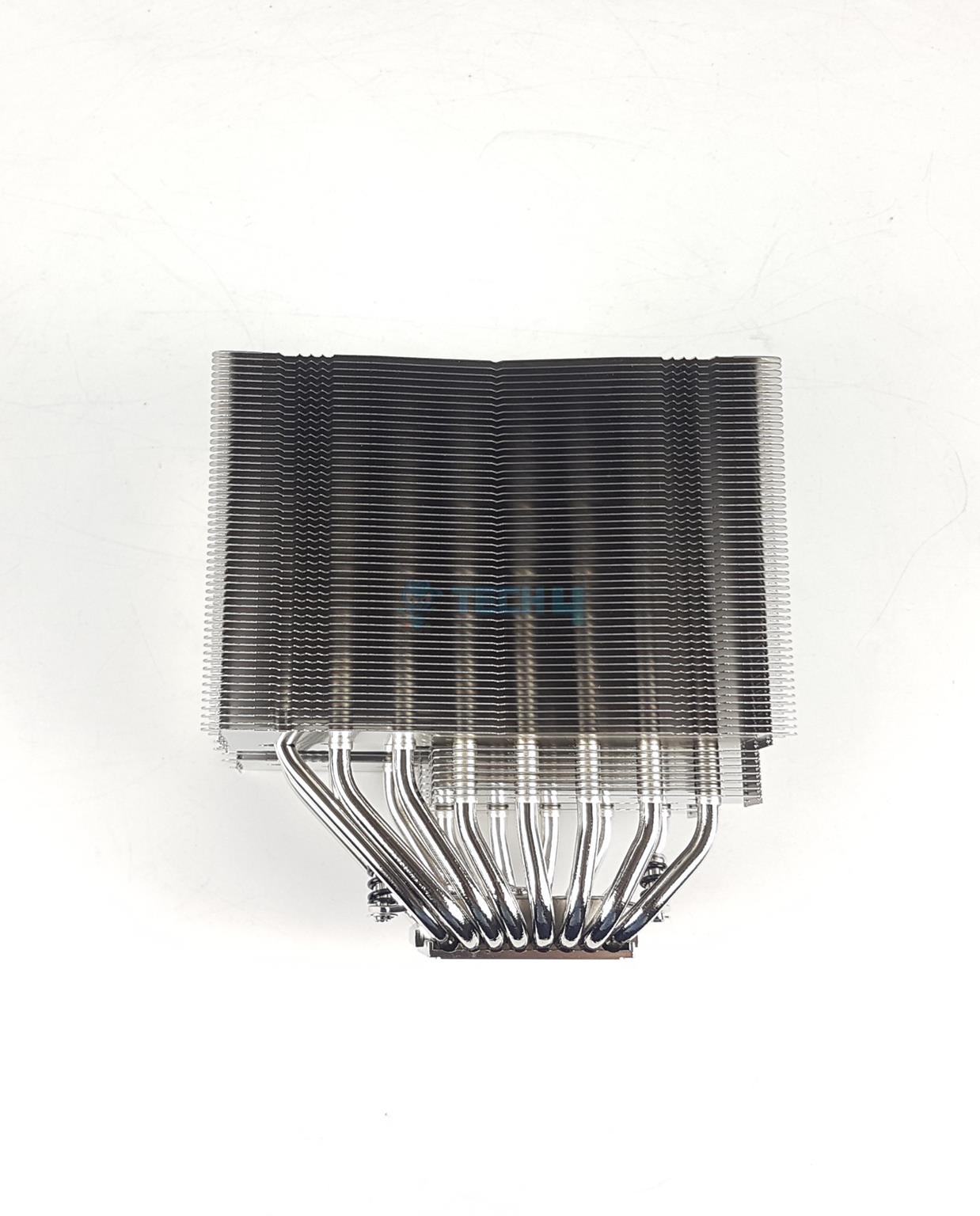
The NH-D15 G2 is an offset design meaning the concentration of heat pipes and stepped fins are on one side of the heatsink compared to the opposite end. This gives the utmost clearance for the PCIe slot on the motherboards and also brings clearance for the motherboard’s rear and top area.
This means, there may not be NH-D15S G2 since Noctua has already got it covered in the G2.
The left and right sides of the heatsink are identical in layout and design. You can see that the fins are joined on these ends. I did not see any bend or broken fin unlike the ID-Cooling Frozn A720 cooler.
The insets have the same design as on the original NH-D15, and they catch the hands of the fan clips during the installation of the fan.
Noctua has retained the standard fan mounting design unlike the competition like Corsair A115 and be quiet! Dark Rock Elite.
Mounting Plate (Image By Tech4Gamers)
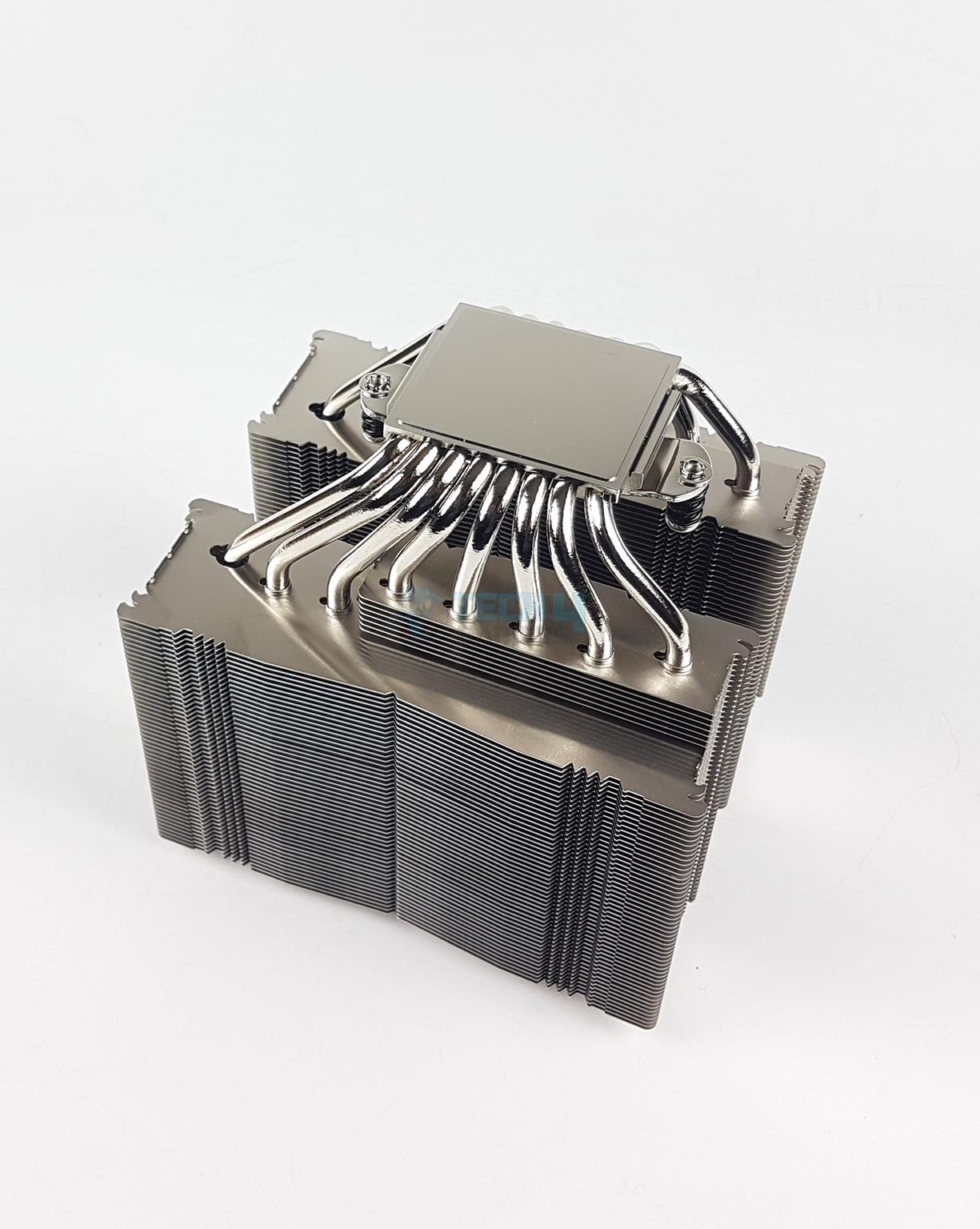
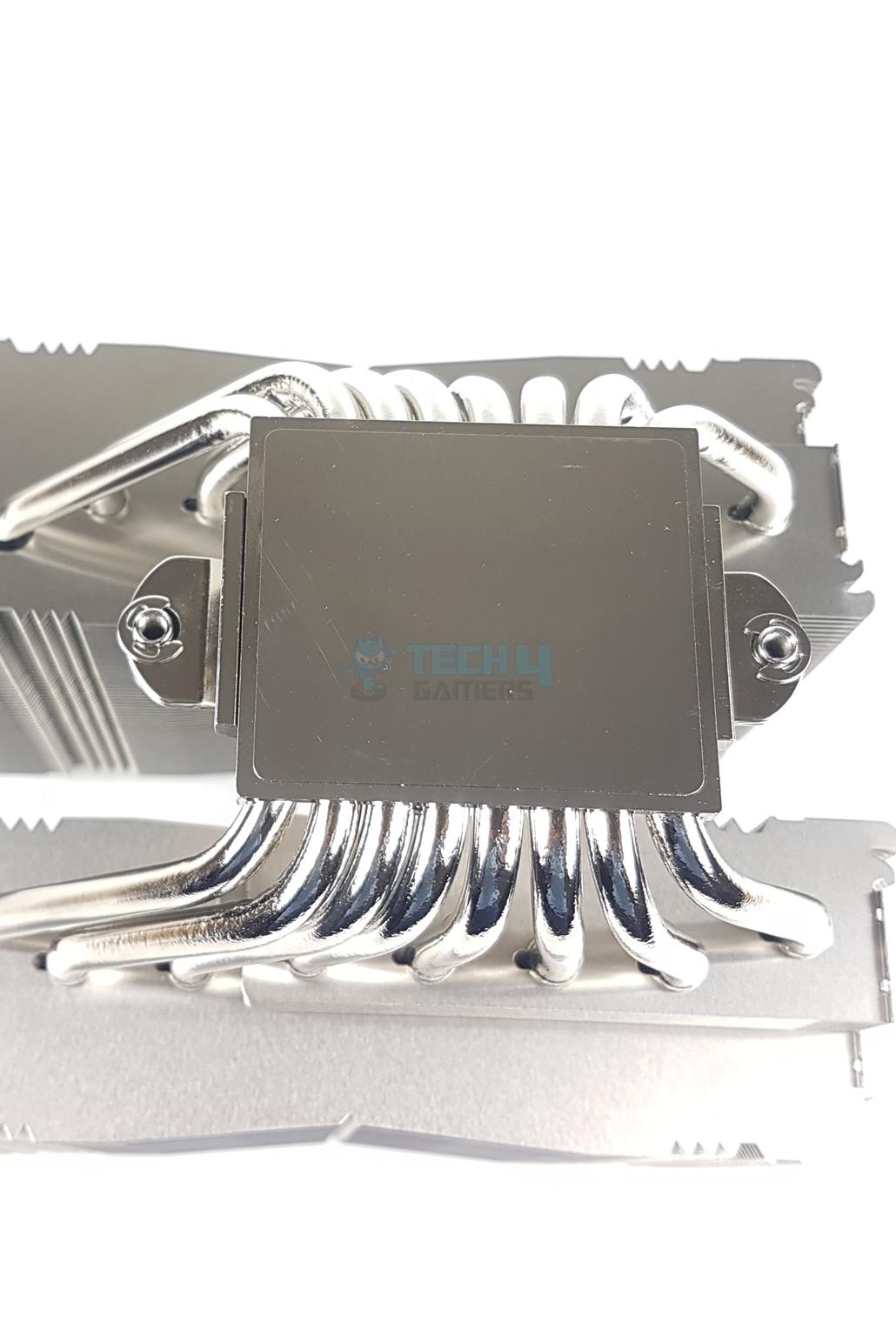
The NM-SFB4 mounting plate comes pre-installed over the base of the cooler. It has two spring-loaded screws. This is the same as on the original NH-D15. The LBC and HBC versions have model names engraved over the base.
Heat Pipes
Base
The NH-D15 G2/LBC has 8x nickel plated copper heat pipes whereas the original NH-D15 has 6 heat pipes. Noctua means business and they are serious about it by leaving no corner uncovered. The complete assembly is soldered (fins and heat pipes). This provides a better durability.
The three variants are derived from the NH-D15 G2’s base. The copper base is nickel-plated and measures approximately 44x50mm. It is chrome-finished.
The nickel-plated copper base on the NH-D15 G2 has a medium convexity, whereas the LBC variant has low convexity, and the HBC variant has high convexity. The G2 regular version is suitable for any platform and requirement.
The LBC version suits flat CPUs like AMD AM5 and Intel LGA 20xx. The HBC is suitable for Intel LGA 1700 CPUs which have become deshaped due to ILM pressure. Noctua has also provided washers to provide the same effect as the off-market contact frames for the LGA1700.
NF-A14x25r PWM Fans
NF-A14x25r PWM are the new fans from Noctua, which are a culmination of NF-A14 and NF-A12x25 PWM fans. They are now available in square frame design without the ‘r’ in the model.
Fans (Image By Tech4Gamers)
These are the salient highlights of the fans:
Sterrox® LCP
Progressive-Bend impeller with winglets,
Flow Acceleration Channels
Centrifugal Turbulator hub. 0.7mm tip clearance
Ultra low-loss etaPERF™ motor
Smooth Commutation Drive 2
SupraTorque™ feature
SS02 bearings
AAO frame
Flow acceleration channels
Stepped Inlet design
Inner Surface Microstructures
Integrated anti-vibration pads
Metal Bearing Shell
Advanced protection features
Fan Frame
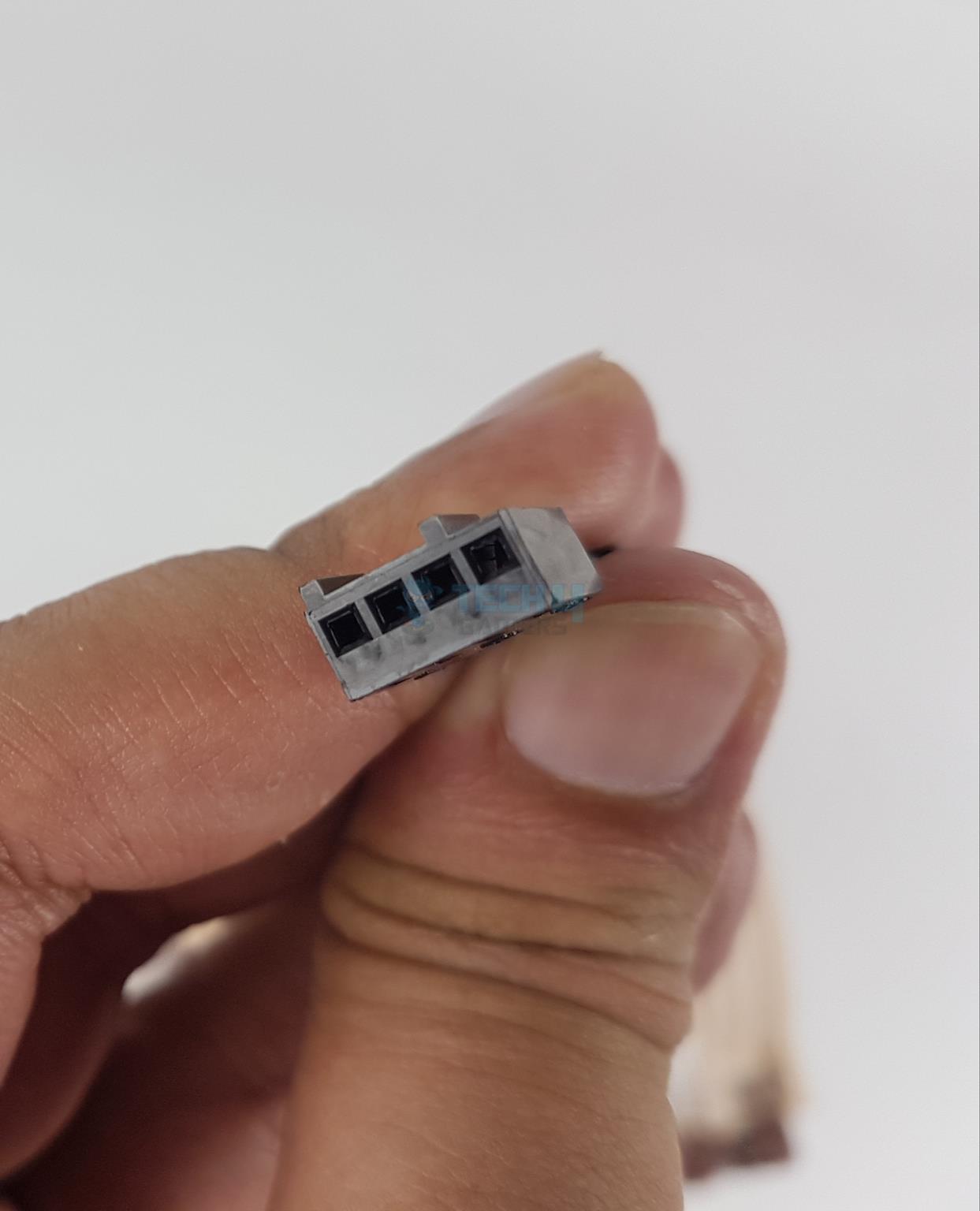
4-Pin PWM
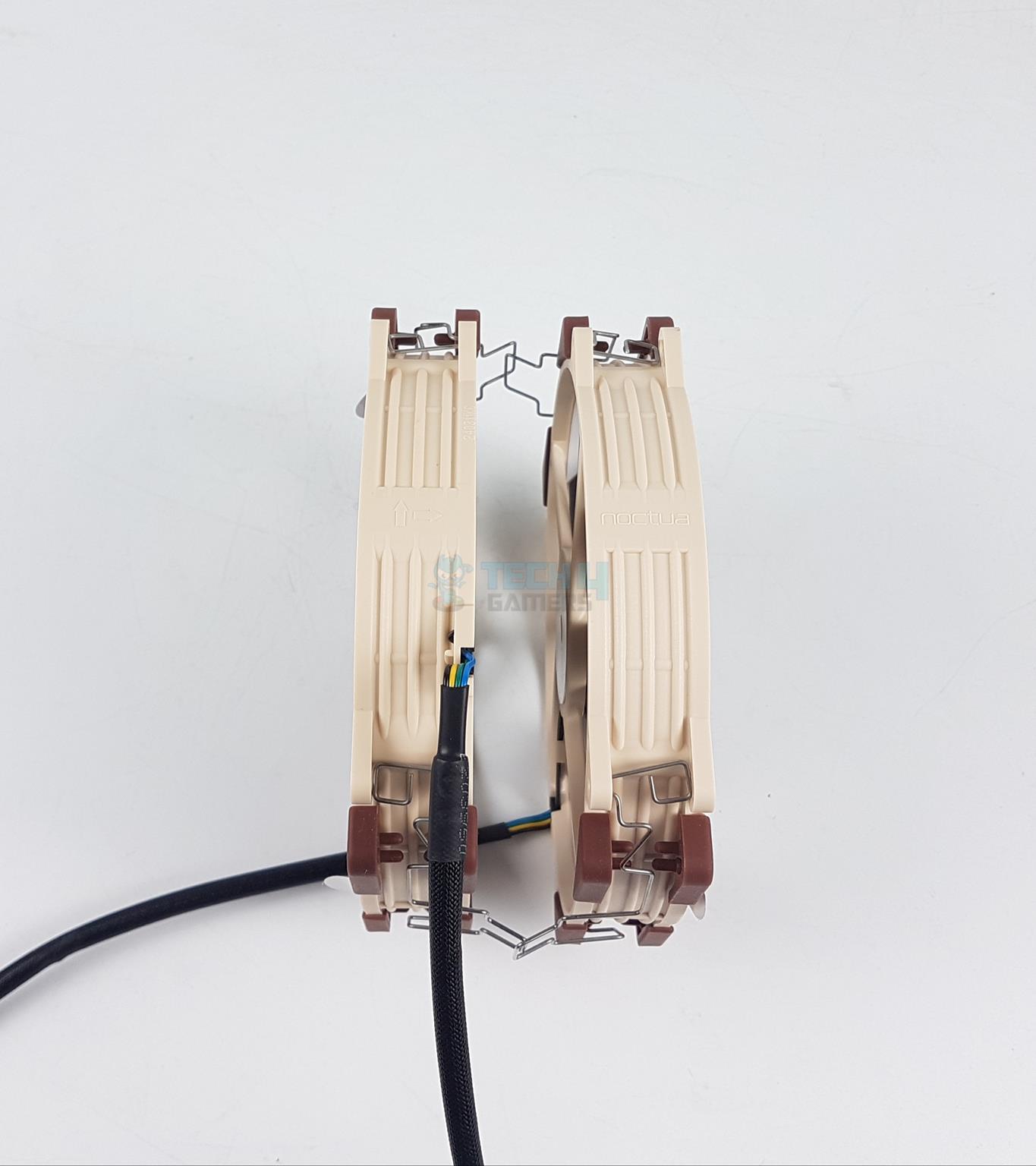
One side of the frame has arrow markers that show the airflow direction and the blades’ spin direction. The other side of the frame has Noctua branding.
A 4-pin PWM connector powers the fan. These fans feature 0 RPM speed under certain loads provided your motherboard or controller supports this feature. These fans can spin up to 1500 RPM with an offset of ±25 between both fans to reduce the humming.
These fans use Noctua SSO2 bearings and have MTTF of >150,000 hours which is the same as on the original NF-A14 and NF-A15 fans.
Installation
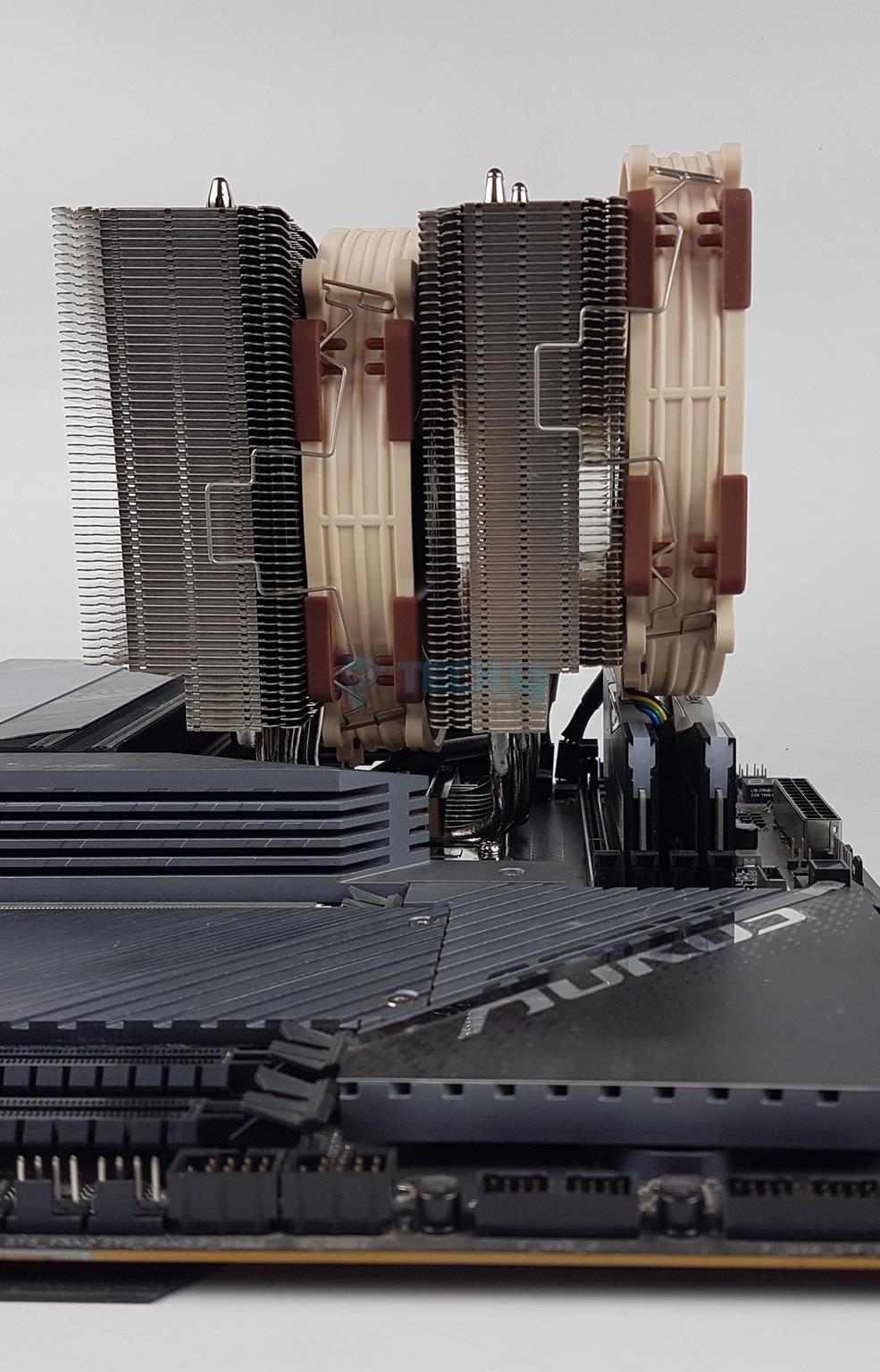
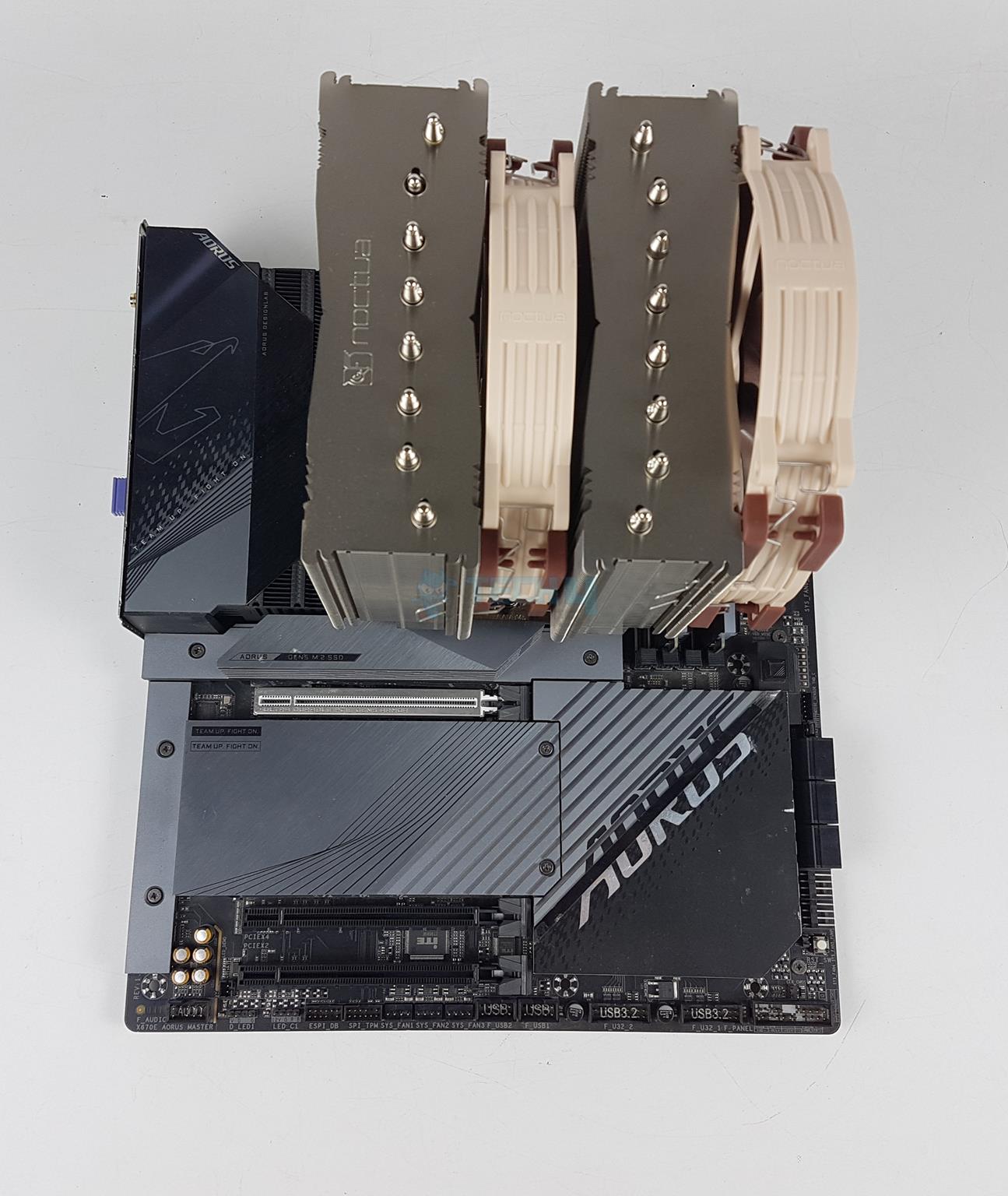
I have tested the NH-D15 G2 and NH-D15 G2 LBC coolers on the GIGABYTE X670E AORUS MASTER motherboard using AMD Ryzen 9 7950X. Here are the installation steps:
Place the cooler over the CPU and secure it using spring-loaded screws
Install both fans and connect cables. You are done.
Clearance
Cooler Clearance
1 of 4
Clearance Motherboard
Clearance RAM
Clearance RAM
Clearance PCIe Slot
The NH-D15 G2/LBC has a 59mm clearance for the RAM from the heatsink. This clearance is 32mm with the front fan fully seated. The height of the front fan is adjustable though it would increase the overall height of the cooler.
There is no clearance issue for the PCIe slot or the motherboard’s rear and top areas. This cooler’s stock height is 168mm, the same as on the original NH-D15. However, you would need a PC Case with a minimum clearance of 170 mm for the air coolers.
Testing
The following test configuration is used for NH-D15 G2 and LBC:
The Noctua NH-D15 G2 and LBC versions show superior cooling performance compared to the original NH-D15 and a few other high-end flagship air coolers. The same sound level on new coolers is equally impressive.
Should You Buy It?
Buy It If
✅You are looking for a premium air cooler: The Noctua NH-D15 G2 and LBC variants have proven their metal in our testing. Noctua is back in the game with a strong performance.
✅You like SecuFirm2+ mounting: These coolers use the Noctua Secu-Firm2+ multi-socket mounting kit, which is Torx-based and comes with a comprehensive package including a cleaning wipe, AMD guard, and a screwdriver.
✅You are after the best noise-to-performance ratio: If you have an OCD for sound output like myself, then these coolers will not disappoint you.
Don’t Buy It If
❌You are on a budget: These coolers come with a steep price of USD 150, which might not be your cup of tea.
❌You are on Intel LGA20xx Socket: This cooler does not support the Intel LGA20xx socket out of the box.
Verdict
I have tested Noctua NH-D15 G2 and NH-D15 G2 LBC (Low Base Convexity) versions in this review. These are Noctua’s next-generation flagship coolers taking over the legacy of NH-D15. The new coolers are available in three variants including the HBC. The new coolers are compatible with Intel LGA115x/1200/1700 and AMD AM4/AM5 sockets.
Noctua has kept the basic design of the original NH-D15 while improvising the heatsink and new fans. The dimension of the cooler is 168x150x152mm (HxWxD).The fin stack provides 20% more surface area which is made possible by reducing the gap between fins from 1.9mm to 1.6mm and adding 23 more fins to the stack. The fins are in a step layout.
The heatsink has an offset design to favor the maximum PCIe clearance while providing the maximum clearance from the top of the motherboard at the same time. This was made possible using NH-D15S which means there may not be any need for S model down the road in new coolers.
Noctua has increased the heat pipes from 6 to 8, which is impressive. At the same time, they have managed to reduce the depth of the cooler compared to the original NH-D15. The front tower is 5mm less thicker than the rear tower. The complete assembly is soldered with nickel plated copper heat pipes and 44x50mm base.
The three variants originate from the base. These are:
NH-D15 G2 has medium base convexity
NH-D15 G2 LBC has low base convexity
NH-D15 G2 HBC has high base convexity
If you are confused about these, just grab the NH-D15 G2, and you will be fine all along.
Noctua uses a SecuFirm2+ Torx-based multi-socket mounting kit with all variants. These are the first Noctua coolers to come with NT-H2, a better thermal paste than the NMT-H1.
The installation is the same as that of the other Noctua coolers. 10 items are required on the AMD platform to install the mounting hardware over the socket, and 19 items on the Intel platform.
Noctua has provided new NF-A14x25r PWM fans with these coolers. These fans are based on the NF-A14 and NF-A12x25 PWM fans. They are rated for a speed of 1500 RPM ±10%. The airflow rating is 155.6 m³/h at 12VDC, and the noise level is 24.8 dBA at 12VDC. These use SSO2 bearings and are rated for >150,000 hours MTTF.
The blades follow progressive bend technology with a winglet design. The tip clearance is 0.7mm. The fans are made of Sterrox LCP, which is the same as on NF-A12x25 PWM fans. These fans operate at an offset speed of ±25 RPM to reduce the humming across the heatsink.
These coolers are listed at USD 149.62 (Standard and LBC versions) and come with a 6-year warranty. Our testing shows that they deliver superior cooling performance with silent operations, but this is coming at a steep price that is not competitive.
At Tech4Gamers, I mainly cover new gaming news, leaks, and rumours. Aside from that, I love to write features about my favourite games while inserting my opinion about their different aspects.
Story Highlight
Ubisoft is in a very poor condition right now due to many failed releases lately.
However, despite losing value and being criticized so much, the company seems to be still pushing DE&I.
The insider has revealed that there is complete chaos going on inside the company but the focus on DE&I is still strong.
The company is not in very good condition right now, but according to an insider, it is hiring a wave of DE&I Employees despite that. The CEO did say that they don’t aim to push any agenda so fans might not take it lightly.
Why it matters: Fans don’t welcome forced inclusion and diversity, and the publishers don’t seem to understand that. Giving diversity hires more privileges is likely to make things worse.
Ubisoft is Reportedly Pushing DE&I Even After Losing A Lot of Value
Recently, an insider, Endymiontv, has been revealing a lot of stuff regarding Ubisoft’s current situation. He has recently revealed on YouTube that internal chaos is going on in Ubisoft, and things don’t seem to be getting any better.
That is mainly because the company is pushing DE&I way too much, and it is affecting the other employees. The insider revealed that he received some internal documents, and a very angry employee reached out to him to explain the company’s situation.
Ubisoft has been reeling in problems (DE&I) for years this time. They are only working working at Ubisoft in order to play their bills and will leave the moment they can.
-Endymiontv
If true, this seems like a real issue for the publisher as just hiring them so they could pay their bills is uncalled for. The insider further reveals that the company is hiring diversity hires for roles as big as project managers.
If the diverse hires are professionals and meet the job specifications, then there shouldn’t be any issues. However, according to the insider, those diversity hires can barely speak English or French.
There Also Seems To Be A Group That Aims To Bring Black Culture In The Company
He also wonders why Ubisoft would hire project managers who can’t even communicate with the team in the native language, which sounds like a real concern. Ubisoft also seems to be enforcing black voices within its program.
The group is known as B.E.A.U, as per the internal documents. Its mission is to foster community, improve cultural awareness and competency, and champion the advancement of black people at Ubisoft. B.E.A.U want to do this to make the workplace more diverse and inclusive.
At Tech4gamers, I cover all sorts of gaming news. Whether it’s a leak of any upcoming game or an update, an announcement, or a rumour, I like to write about it all. Over the weekend, I sit and write features where I talk about games that I miss or want to see return.
Story Highlight
A recent study reveals that most games prefer single-player games over multiplayer ones.
It has been reported that 53% of all gamers enjoy single-player titles more.
While younger players are more interested in competitive gaming, the 25- to 55-year-old age bracket enjoys story games.
While there’s no doubt that live service titles have done really well over the recent years and bring most of the AAA games market revenues from in-game purchases, the genre has been declining recently.
Many recent failures, like Suicide Squad: Kill The Justice League, Skull & Bones, and the recently released Concord, have seen disastrous launches. Following that, a recent study revealed that most gamers still prefer single-player games over multiplayer.
Why it matters: The live service genre is undeniably one of the best, but only if the developers stop being greedy and develop games like Helldivers 2 for the fun of the players.
Single Player Games Are Still More Popular (Source: MIDiA)
Just recently, MIDia released a new study revealing that 53% of gamers still prefer single-player titles over multiplayer ones.
While the percentage mentioned above is average among all age groups, it has been noted that gamers in the 16 to 24 age bracket still prefer competitive PvP games like Fortnite or Call of Duty. On the other hand gamers in the 25 to 55-year-old age bracket prefer single-player titles.
It makes sense that older gamers prefer single-player games, as life commitments make it hard for most of them to enjoy the online competitive world of gaming.
Elden Ring DLC Was Released Earlier This Year
Nowadays it doesn’t really matter to publishers what gamers want, as they would develop titles that would generate the most money for them. However, recent failures like Concord prove that success in the genre is never granted.
On the other hand, titles like Stellar Blade and Black Myth: Wukong have done incredibly well and are among the biggest releases of the year, suggesting what gamers really want to play.
Nonetheless, a recent report has also suggested that almost half of the PlayStation live service projects have already been canceled or failed, which is a big sign for other publishers to learn from Sony’s mistake before diving fully into the genre.
At Tech4Gamers, I contribute as a Senior News Reporter, combining my skills and gaming enthusiasm to keep our audience updated on the latest developments.
Story Highlight
Saber Interactive offered a back-to-basics experience with Space Marine 2.
The team argues that many AAA studios try to cram too much into their games and miss out on simple and fun experiences.
It also states that great games always perform well.
Following last month’s incredible release, Saber Interactive is set to move forward with the Space Marine franchise in bigger ways than ever imagined. With a sequel and DLC already confirmed, the sky is the limit for the team now.
The developer has previously discussed the exact elements that led to this success and made it clear that a focus on old-school and fun gameplay was crucial to the Space Marine 2 experience.
When asked why many modern AAA productions fail to capture this fun, the studio stated that they fall into the trap of over-scoping.
Why it matters: The AAA industry has been accused of losing sight of its original goals since many modern titles fail to capture the fun of gaming in favor of chasing industry trends, monetization, and more.
Speaking to IGN, the Saber Interactive CCO discussed Epic Games’ recent statement on increasing budgets and modern AAA failures.
It’s no secret that various big releases this year, including Suicide Squad, Concord, and Star Wars Outlaws, have failed to live up to expectations. However, according to Saber Interactive’s Tim Willits, the long development cycles of modern titles aren’t necessarily the culprit.
He argues that many projects suffer from a lack of focus today. This essentially boils down to developers stuffing their games with as much content of varying types to appeal to the broadest group of players possible.
Tim Willits argues that this approach leads to games that don’t excel in any particular areas.
They(developers) look at other games that just came out and say, ‘oh we got to do that, let’s add this.’ They lose focus on the core.
Space Marine 2 Is A Blast From The Past | Image via Tech4Gamers
Space Marine 2 took the opposite approach and ended up becoming a fan favorite in no time. While this meant that some found the gameplay a bit too simplistic, those who enjoyed it immediately fell in love with the whole experience.
Tim Willits also noted that releases being held back by old trends can still perform well if they meet a certain quality bar. He argues that great gaming experiences will always do well.
All in all, the CCO made many interesting points. The discussion also gave fans additional insight into the team’s design philosophy, which was critical to the success of Space Marine 2.
At Tech4Gamers.com, I cover the latest news and rumours in the gaming industry, from new game releases to hidden gems and video game leaks. Furthermore, I occasionally write tech articles about video game consoles, providing insights into the hardware and software that powers our gaming experiences.
Story Highlight
According to Chinese Board Channels, NVIDIA is ending production of the RTX 4080 SUPER by November 2024.
RTX 4090, which ended production last month, and RTX 4080 SUPER are becoming increasingly scarce.
The company is reportedly preparing to launch the RTX 5090 and RTX 5080 simultaneously in 2025.
NVIDIA is reportedly stopping the production of two of its flagship graphics cards, the RTX 4080 SUPER and the RTX 4090, by November 2024. This move is likely to make way for the new Blackwell architecture.
This news comes as the upcoming release of the RTX 5090 and RTX 5080, which are expected to launch around the same time.
Why it matters: By stopping production of the RTX 4080 SUPER and RTX 4090, NVIDIA is clearing the way for the RTX 5090 and 5080.
Trusted sources from Chinese Board forums report that the RTX 4080 SUPER, launched earlier in 2024, is likely to become hard to find. Production is expected to stop by the end of October, with shipments to partners finishing in November.
Unlike the RTX 4090, the 4080 SUPER hasn’t had a big price increase yet, but that could change as it becomes less available. Likewise, the supply of RTX 4090 chips, which reportedly stopped production in September, will soon decrease as manufacturers wrap up their last batches.
Retailers in major markets like the US and Europe are noticing that stock for the RTX 4090 is running low, causing prices to go up. In the US, prices have increased by about 10%, while European prices have risen even more.
ASUS TUF Gaming RTX 4080 Super
These production cuts are making room for NVIDIA’s next generation of GeForce GPUs, the RTX 5090 and RTX 5080, built on the much-anticipated Blackwell architecture. Industry insiders say the company plans to release both GPUs together by 2025.
Early leaks indicate that the announcement and first look at these GPUs might take place at the same event, probably around CES 2025. However, they could be released in stages. This has become common for NVIDIA, as seen in past launches.
This decision comes as NVIDIA has little to no competition from other GPU manufacturers. AMD’s RDNA 4 architecture isn’t expected to arrive until 2025, and while Intel’s Battlemage GPUs still don’t have a release date, they are likely aimed at more affordable markets. This means NVIDIA will largely dominate the high-end GPU segment for now.
At T4G, my task is to cover the latest news around the gaming globe ASAP and with the utmost precision. I adore all the games and respect all the devs behind the amazing games that we get all year. So, whether it’s a PC or a Console game, I got it all covered.
Story Highlight
Silent Hill 2 Remake has received excellent reviews, suggesting a great comeback.
The early trailers for the game attracted a lot of criticism for looking unpolished and incomplete.
It currently has an 87 score on Metacritic with over 47 reviews.
The Silent Hill 2 Remake was announced in October with an excellent trailer. However, the subsequent trailers garnered a lot of criticism for looking unpolished and bleak. Bloober Team has eliminated all these things as the final game has received great reviews.
Why it matters: After the underwhelming gameplay trailer, the Bloober Team president said it doesn’t represent the game. It seems he was right about it, as the overall reviews for the Silent Hill 2 remake are highly positive, with an 87 score on Metacritic.
Silent Hill 2 Remake has scored a Metacritic score of 87
The recent gameplay and environment trailers did promise a lot of potential and improvements over the initial ones. The potential has now been delivered with the finished version. Some notable scores include:
Eurogamer 5/5
IGN 8/10
VGC 4/5
Silent Hill 2 Remake builds on a great base created by the original game. The game is mostly a one-on-one copy of the original much like what Resident Evil 2 remake was. However, it does add some additional content, making it longer than the original.
The visuals have received a major overhaul. With the original, you feel an utter sense of helplessness, that had been multiplied by the higher graphical fidelity of the remake. The fog, buildings, and the environment in general are all terrifyingly beautiful.
Silent Hill 2 is a very faithful remake of the original
Combat has been somewhat improved as well. The only gripe with the gameplay is that it can sometimes feel a bit repetitive.
However, the game does provide multiple endings, which adds to its replayability value. The soundscore is simply brilliant, adding to the atmosphere and looking as creepy and disturbing as ever.
The voice acting for James is highly appreciated, but with others like Maria, it can be a bit unnatural and feel outdated. Nonetheless, the Bloober Team has done an excellent job.
At Tech4Gamers, I mainly cover new gaming news, leaks, and rumours. Aside from that, I love to write features about my favourite games while inserting my opinion about their different aspects.
Story Highlight
Heihachi Mishima has finally been released in Tekken 8.
While he has been welcomed by the fandom, his stage costing an additional $4.99 has angered many of them.
Due to that, they have negatively reviewed the DLC pack as well as the base game, claiming Bandai Namco’s greed knows no limit.
Tekken 8 has been facing some criticism ever since it was released. Some of the main reasons involved microtransactions and pluggers. However, now another reason has surfaced online angering fans even more.
Heihachi Mishima has been released in the game, and while many have welcomed his appearance, they don’t appreciate his stage, costing them additional money. Due to that, fans have negatively reviewed the game, making it fall to mixed reviews on Steam.
Why it matters: The character stage should be available to the players if they spend money on the character, or at least it should be part of the Year Pass.
Genmaji Temple, Heihachi’s stage, costs players an additional $4.99, which made many fans furious. Currently, there are over 300 reviews for the stage, and only 11% of them are positive, meaning 89% of the reviews are negative.
It makes me sad to have to leave a negative review on such a fun game, but Bandai Namco just keeps on trying to squeeze more and more money out of the playerbase, and it’s infuriating
So, the majority of fans don’t like the fact that they have to pay an additional $5 for Heihachi Mishima’s stage when some of them are even paying $39.99 for the game’s year pass.
The Executive Producer of Bandai Namco, Katsuhiro Harada, discussed this issue on Twitter, apologizing to the fans and trying to justify this stage, costing fans additional money.
The Base Game Has Also Fallen To Mixed Reviews Due To The Genmaji Temple Criticism
Fans are still furious over this as they think Bandai Namco is trying to squeeze money out of them one way or another. This stage should have been free for those who actually purchased Heihachi Mishima DLC or at least for those who bought the ultimate edition edition.
Take my damn clown money and choke on it. Never buying any bs editions of anything ever again.
Fans are complaining that even after buying the ultimate edition, they have to pay more money for it even though they were promised $1 content in-game. Even though Harada took notice of the situation, nothing has been done yet, and fans are still left with nothing but disappointment.
At Tech4Gamers, I take on the role of Hardware Reviewer with pride. My responsibilities involve a thorough examination of essential hardware components like motherboards, graphics cards, processors, PC cases, and CPU coolers, among others, focusing on their complexities and functionalities.
Dr. Usman Saleem
At Tech4Gamers, I’m the PC Hardware Specialist, primarily contributing to the “Best-Ofs” section. I provide thoughtful buying advice based on thorough testing and personal expertise. I also review hardware products and games to keep things fresh.
After testing the MSI MPG X870E Carbon WiFi, it’s time for us to take a look at the ASRock X870E Taichi Lite. Don’t let the name fool you; it retains all the key features of the flagship board, just with a different aesthetic. This is the first time we’re getting a Taichi Lite variant for the high-end chipset, with the previous generation having only a B650E Taichi Lite model. Let’s dive into the review.
Why Trust Tech4Gamers
Usman Saleem is our hardware tester who loves to put all the latest GPUs, CPUs, RAM, and motherboards for a spin.
40+ motherboards tested and reviewed by our team of hardware experts (Tech4Gamers Team).
800+ hours spent testing different motherboards for our reviews.
At Tech4Gamers, ensuring you get reliable information is our priority. That’s why every hardware round-up undergoes a meticulous review process by our team of experts and editors. Each review is carefully examined against our strict editorial guidelines, guaranteeing you trustworthy insights you can depend on.
Key Takeaways
The ASRock X870E Taichi Lite, priced at $399, fits into the intermediately-priced X870E boards category. It’s an E-ATX board with a top-notch VRM setup, a pleasing design, enough I/O for most, and some useful features.
Get the Taichi Lite if you want enthusiastoverclocking for a lower price, don’t need RGB, or you need the latest I/O (USB4, WiFi 7, and improved DDR5 support).
Don’t buy the X870E Taichi Lite if your case can’t accommodate E-ATX boards. Also, you can save money by getting an X670E board if you don’t need the latest I/O or the premium VRMs.
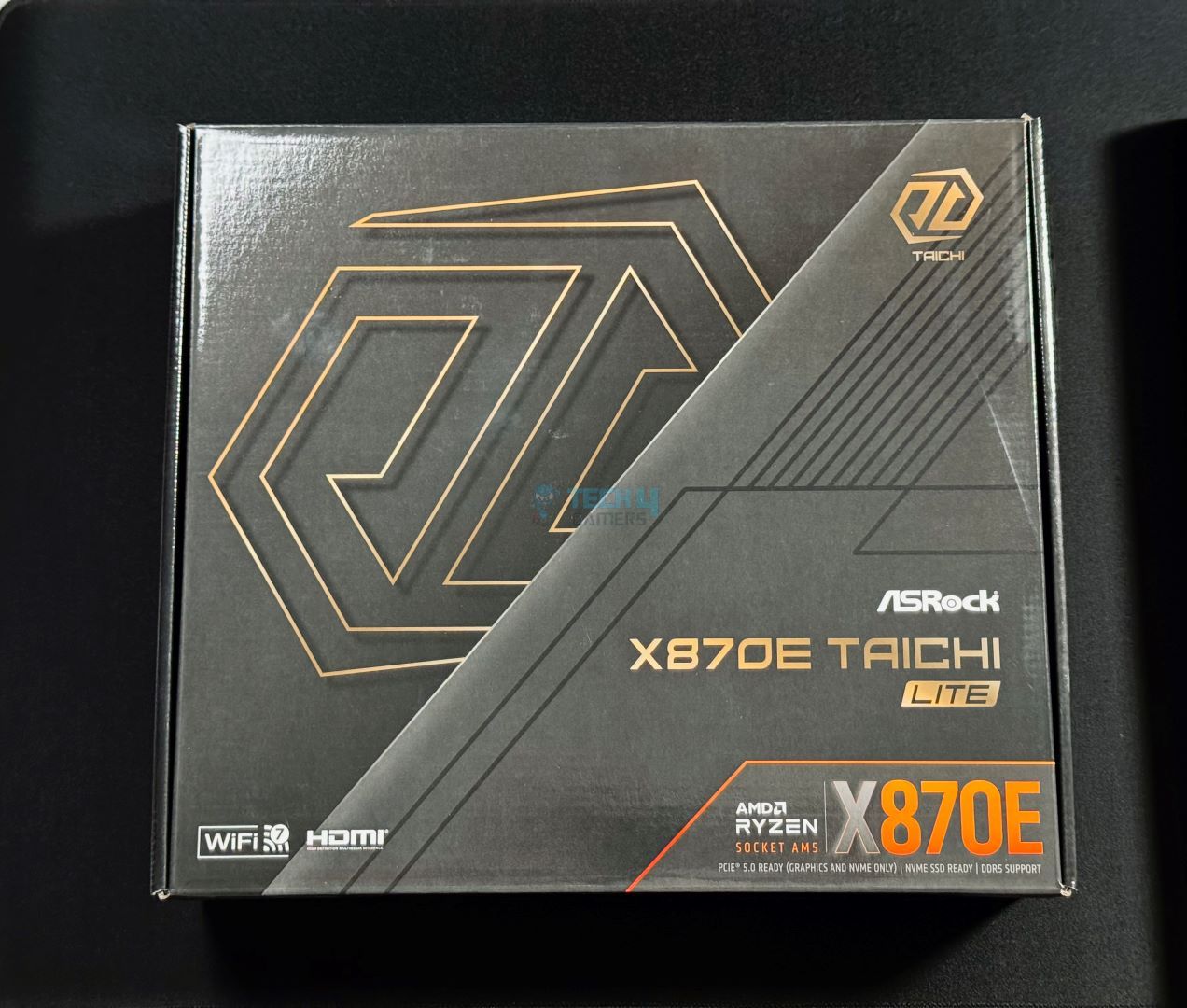
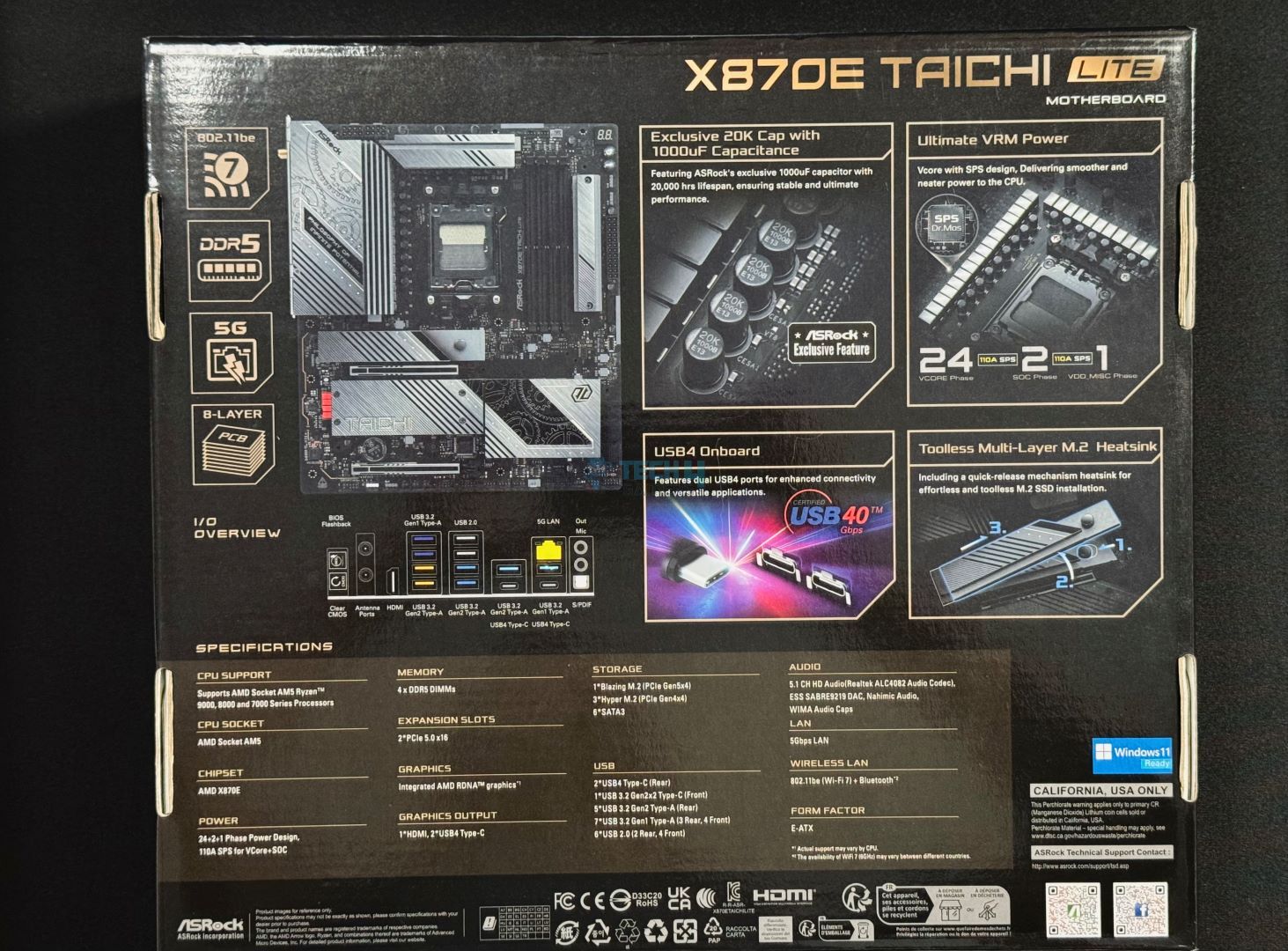
The motherboard comes in a standard cardboard box.
Box Front
Box Back
There are little to no details about the board up front, while the back of the board has the specifications, certification marks and compliance symbols.
ASRock X870E Taichi Lite box contents (Image By Tech4Gamers)
Inside the box, you get:
4 x SATA Data Cables
1 x ASRock WiFi 2.4/5/6 GHz Antenna
1 x ARGB Splitter Cable
3 x Thermistor Cables
Design
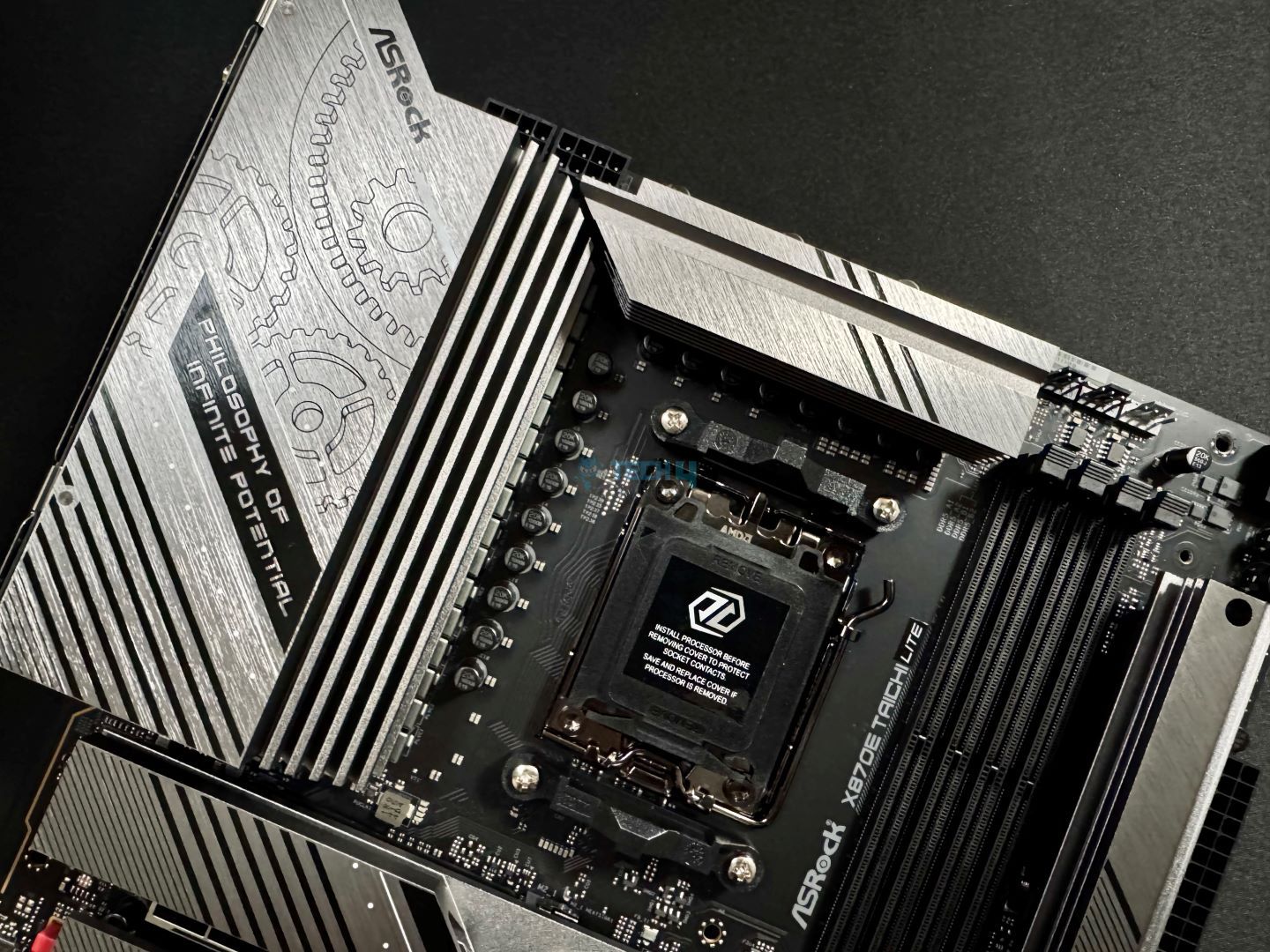
If you’re not into RGB, you won’t miss anything with the Taichi Lite (except for some other minor features) compared to the Taichi. It presents a mostly comparable aesthetic (without RGB, of course) with a black and silver design. The PCB is mostly black, while the heatsinks are primarily silver.
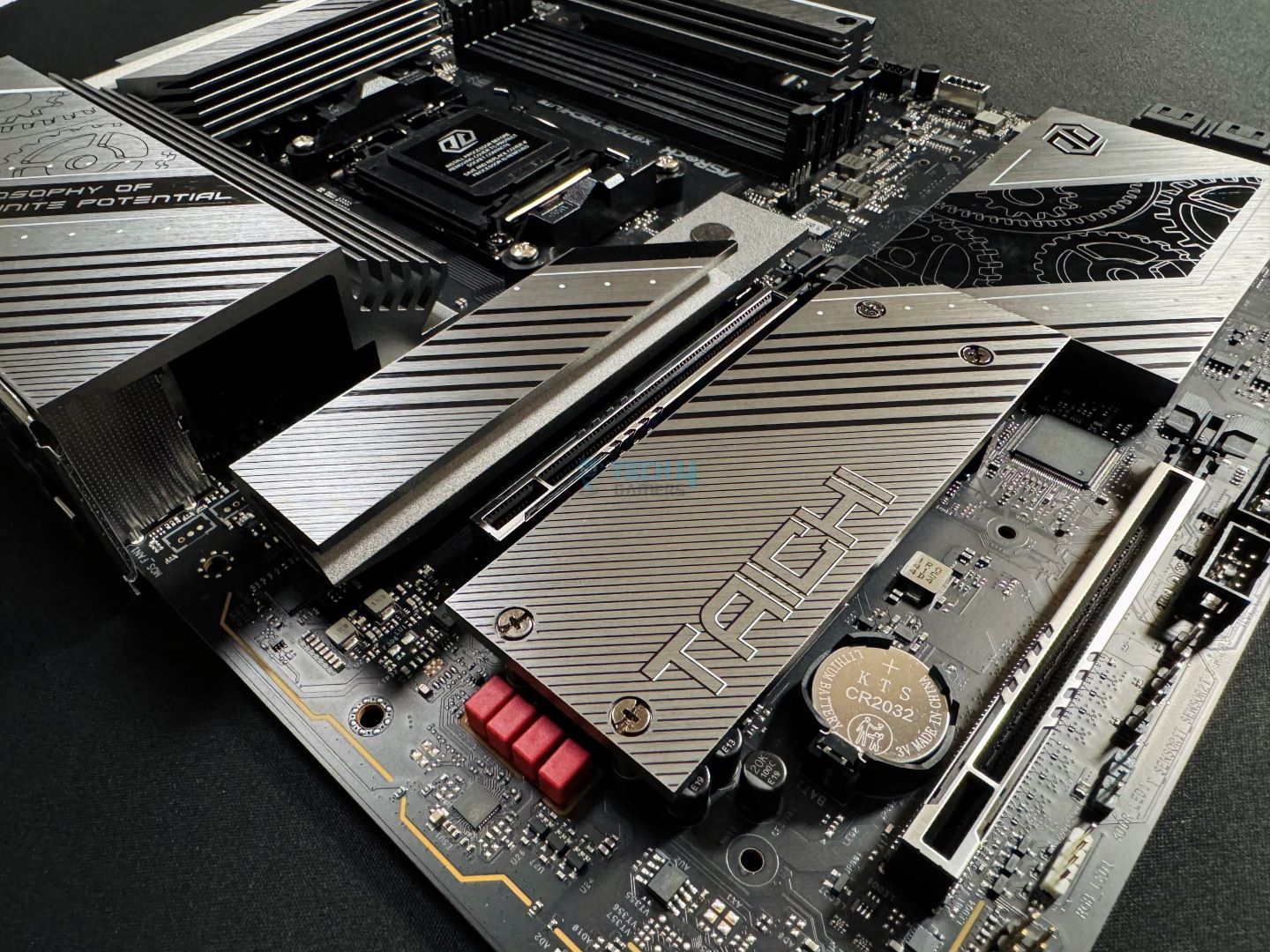
ASRock has played around a bit, and so the motherboard features different design elements. The I/O and PCH heatsinks feature the signature cog prints, brushed texture is being used, and multiple stripes are running across the different heatsinks. I know looks are subjective, but for me, the design absolutely nails the spot, one of my personal favorites!
A look at the board in all its glory (Image by Tech4Gamers)
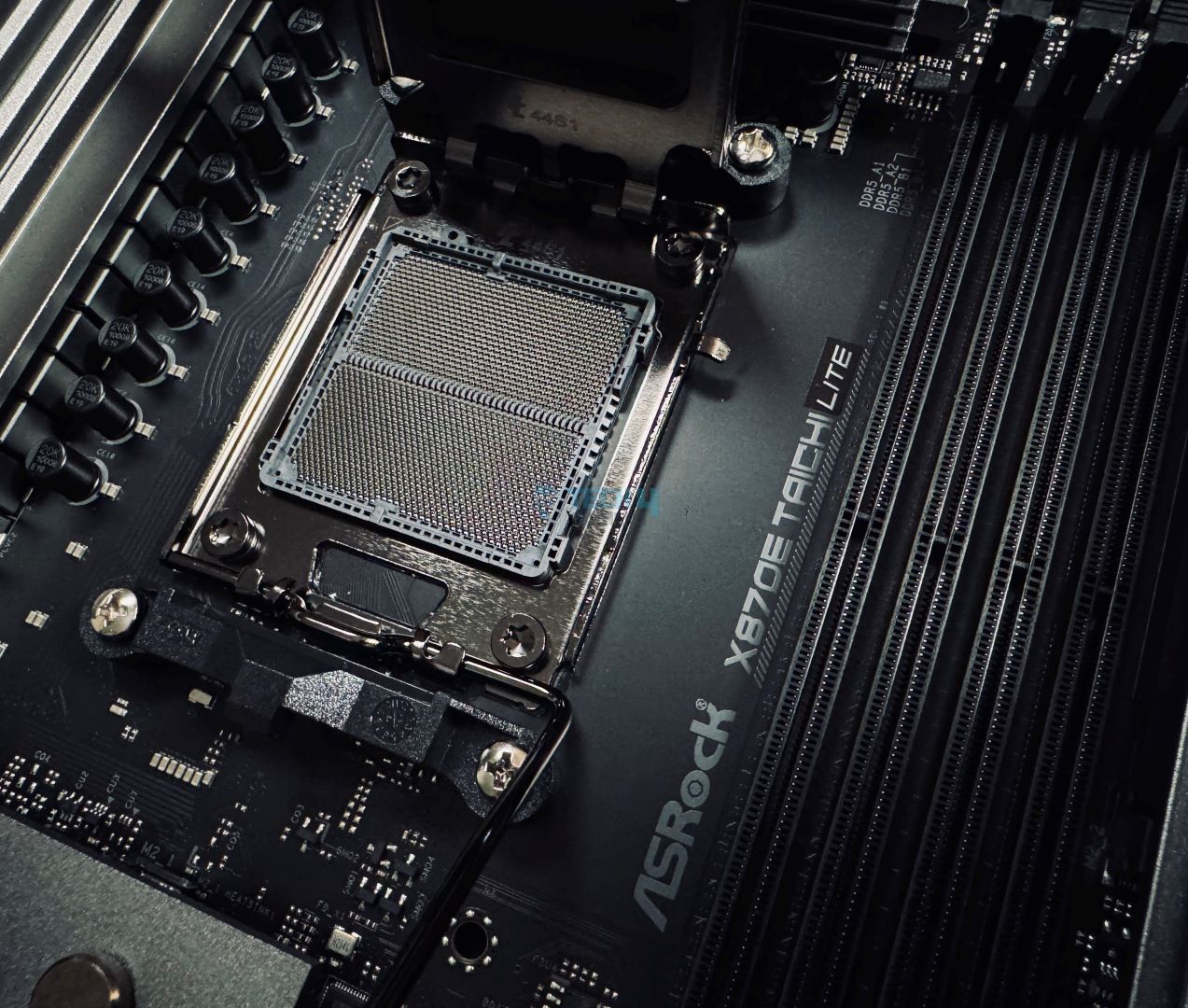
The X870E chipset features two Promontory 21 chips connected by a PCIe Gen 4 x4 bus. These chips power features like most of the USB and SATA ports, 3x of the M.2 slots, audio, and WiFi.
Meanwhile, the socket gives us the DIMM slots, the PCIe 5.0 connections, USB4 (and 2x of the rear 10Gbps ports), the only Gen 5 M.2 port, and the HDMI port. Also coming from the CPU are the NCT6796D-S and NCT6686D chips, super I/O controllers used to monitor voltages, temperatures, fan speeds, and more.
The motherboard is built on an 8-layered PCB with 2oz copper and uses “server-grade” material.
Power Delivery To Socket
CPU Socket (Image credit: Tech4Gamers)
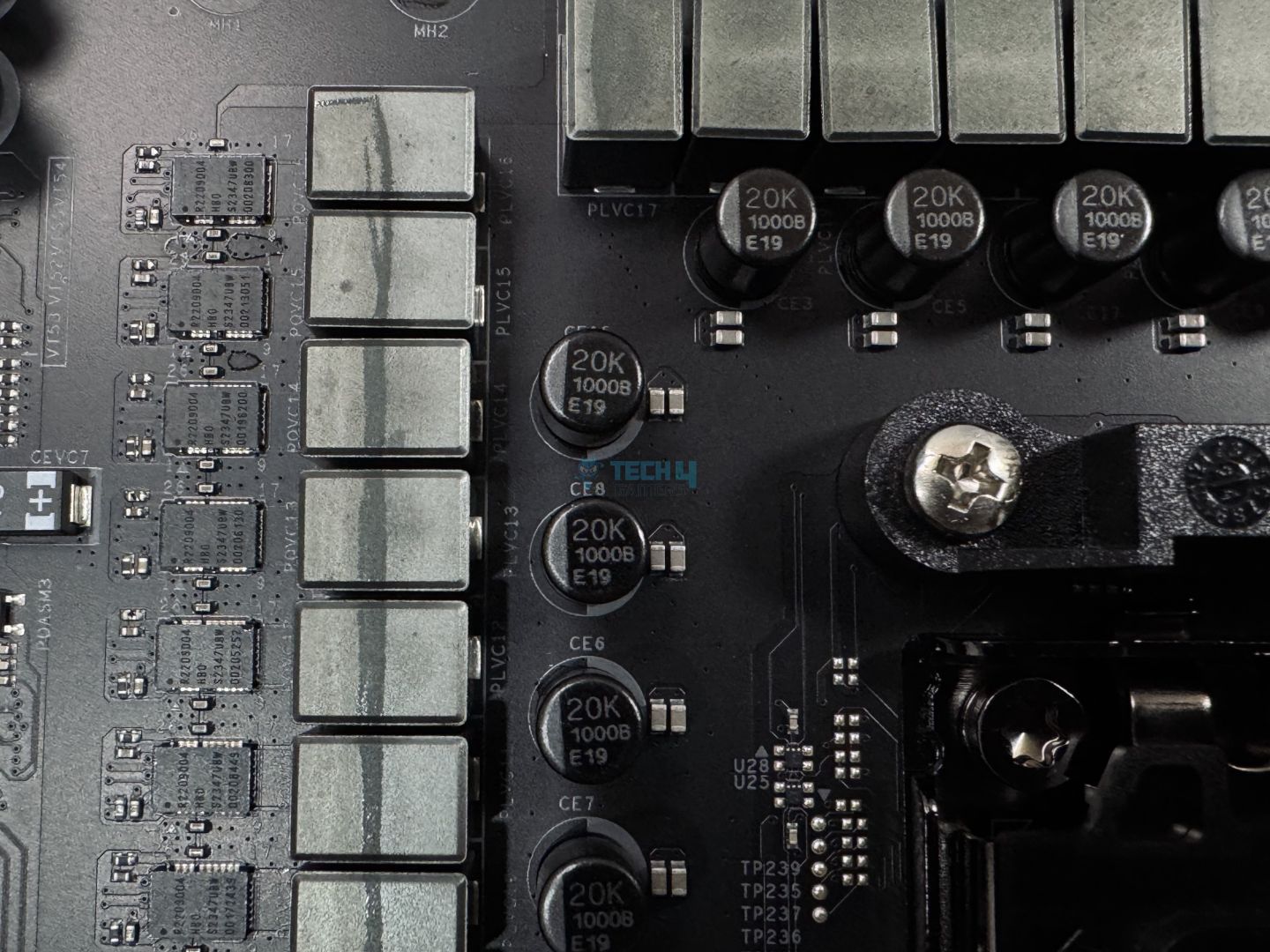
A closer look at the VRMs. (Image By Tech4Gamers)
The ASRock X870E Taichi Lite features a 24+2+1 (VCore+GT+Aux) power design with 110A phases for both the CPU and memory. That totals 2550A available to the CPU and 2770A overall.
ASRock is using R2209004 HBD S2347UBU SPS stages and upgraded capacitors, which provide 1000µF and a 20K-hour lifespan (which is labeled on them). Renesas’ RAA 229628 provides the PWM control for these stages.
EPS connector (Image by Tech4Gamers)
Power from the PSU comes through the dual 8-pin connectors. ASRock is using “Hi-Density Power Connectors,” which it claims can withstand more current than traditional 8-pin connectors. This is an incredibly powerful setup, and it’s impressive that ASRock managed to retain it in the Lite model. Among X870E motherboards, only the MEG X870E GODLIKE has a similar setup so far, a board that will probably cost at least twice as much!
VRM heatsink
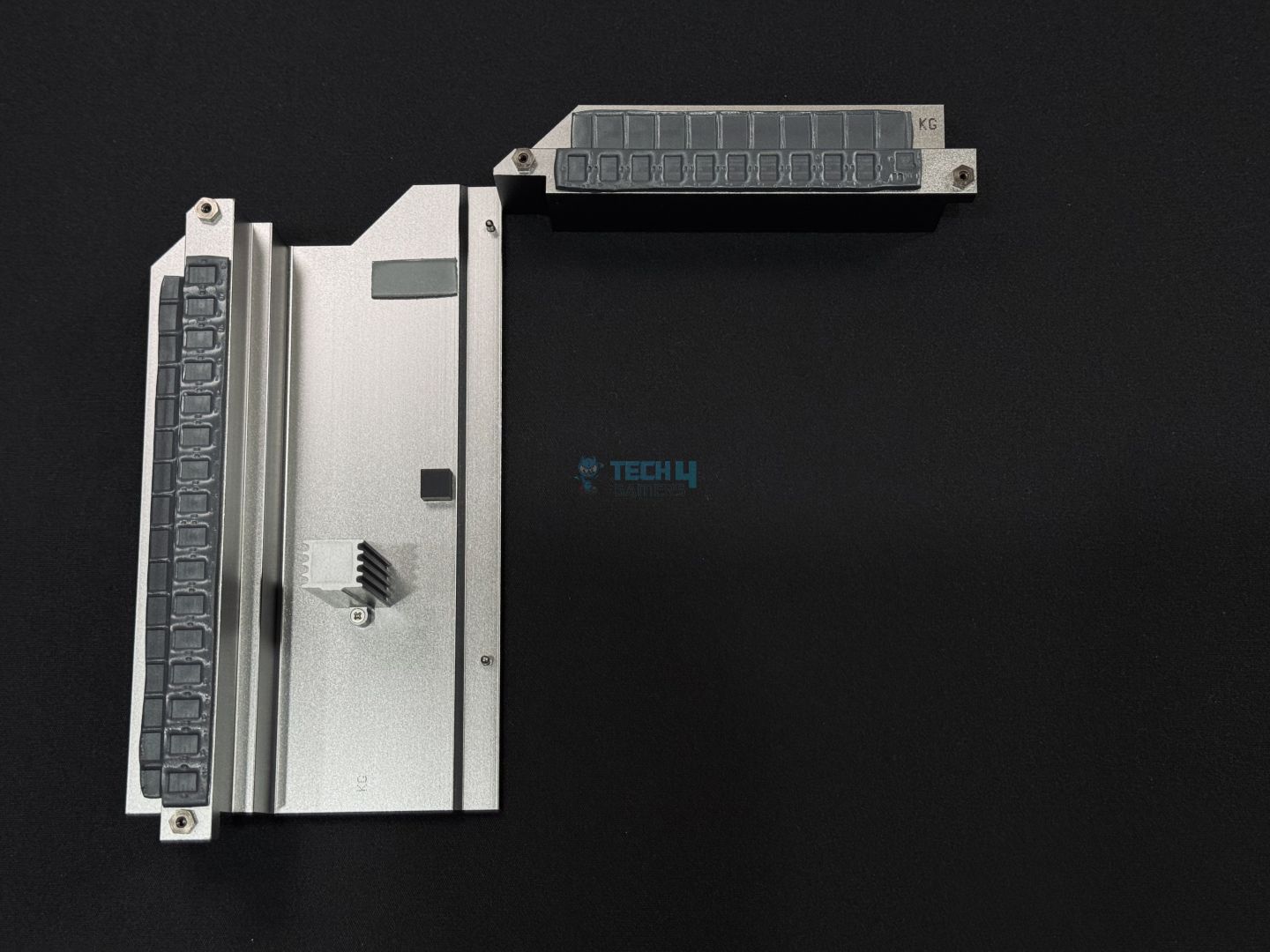
VRM heatsink removed
Cooling this setup is an extended “XXL” aluminum heatsink with a stacked fin design. Underneath the heatsink, we have 9W/mK thermal pads that align over the stages and the inductors (shown in the 2nd image). Despite the beefy power design, no heat pipe or fan is being used here, but I think the design should suffice.
DIMM Slots
DIMM slots (Image by Tech4Gamers)
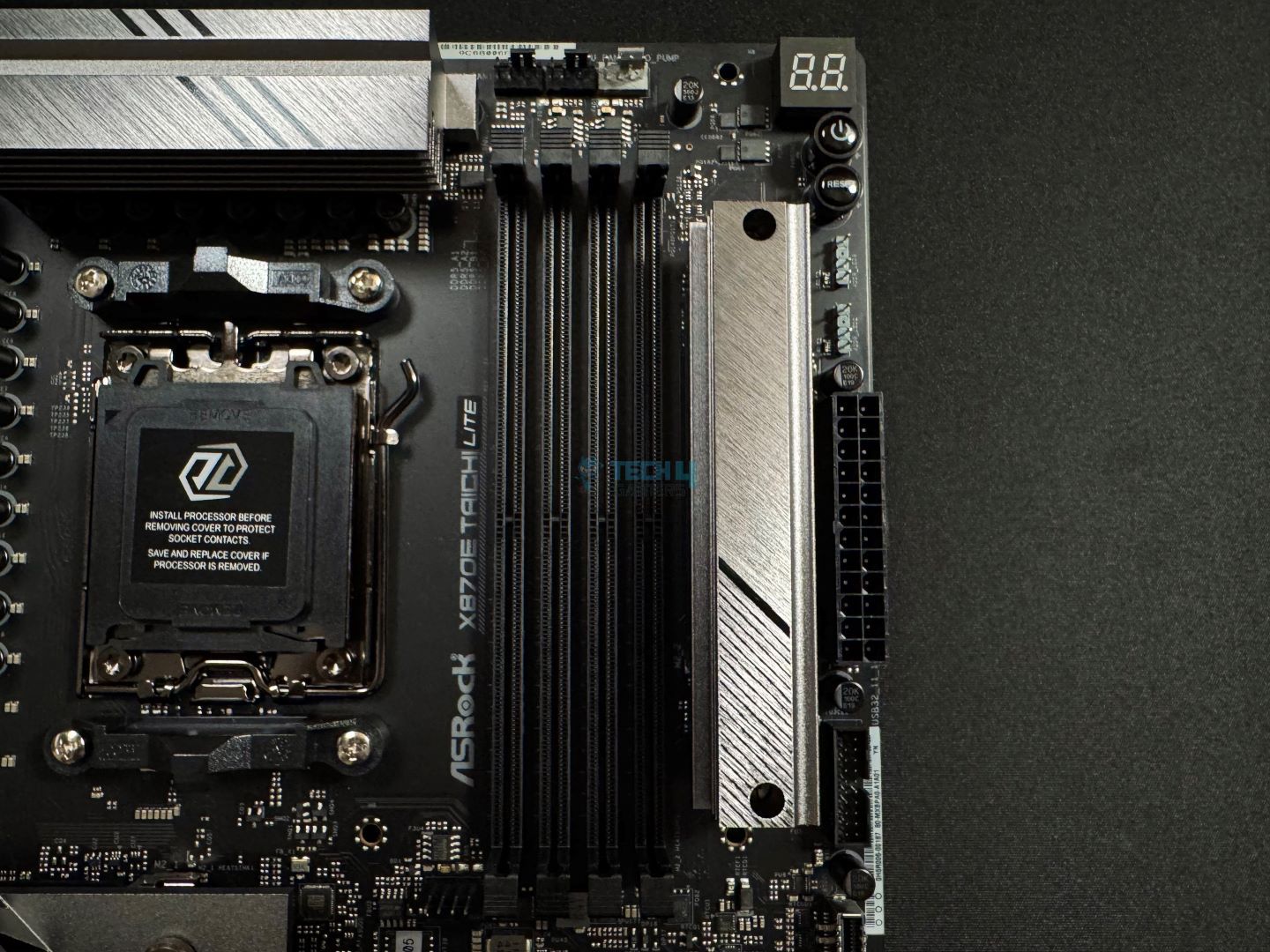
Beside the upper Gen 4 M.2 slot lie the 4x DIMM slots powered by the CPU. The support is rated at DDR5-8200+ (OC) and you can install up to 256GB of memory on here. It supports error correction (ECC) memory as well as both XMP and EXPO profiles.
Memory (UCLK) and controller (MCLK) ratio possibilities with Ryzen 9000 (Image Credits: TechPowerUp)
Editor`s Note
It’s important to note that excessive speeds like DDR5-8200 may not be the best pairing for the Ryzen 9000 chips. AMD’s tuning to the memory controller on these new CPUs means it’s possible (in best-case scenarios) to run the memory at DDR5-6400 at a 1:1 ratio between the memory and its controller. This is the best configuration at the moment, with minimal latency.
Though speeds like DDR5-8200 will perform more or less around the DDR5-6400 mark, the extra cost doesn’t make it worthwhile.
– Dr. Usman Saleem
Storage
SATA connectors (Image by Tech4Gamers)
On the storage front, we get six 6Gbps SATA ports coming from the two silicon.
Note: I’ll refer to the primary M.2 slot (the Gen 5 one) as M2_1 and the Gen 4 slot beside the DIMM slots as M2_2.
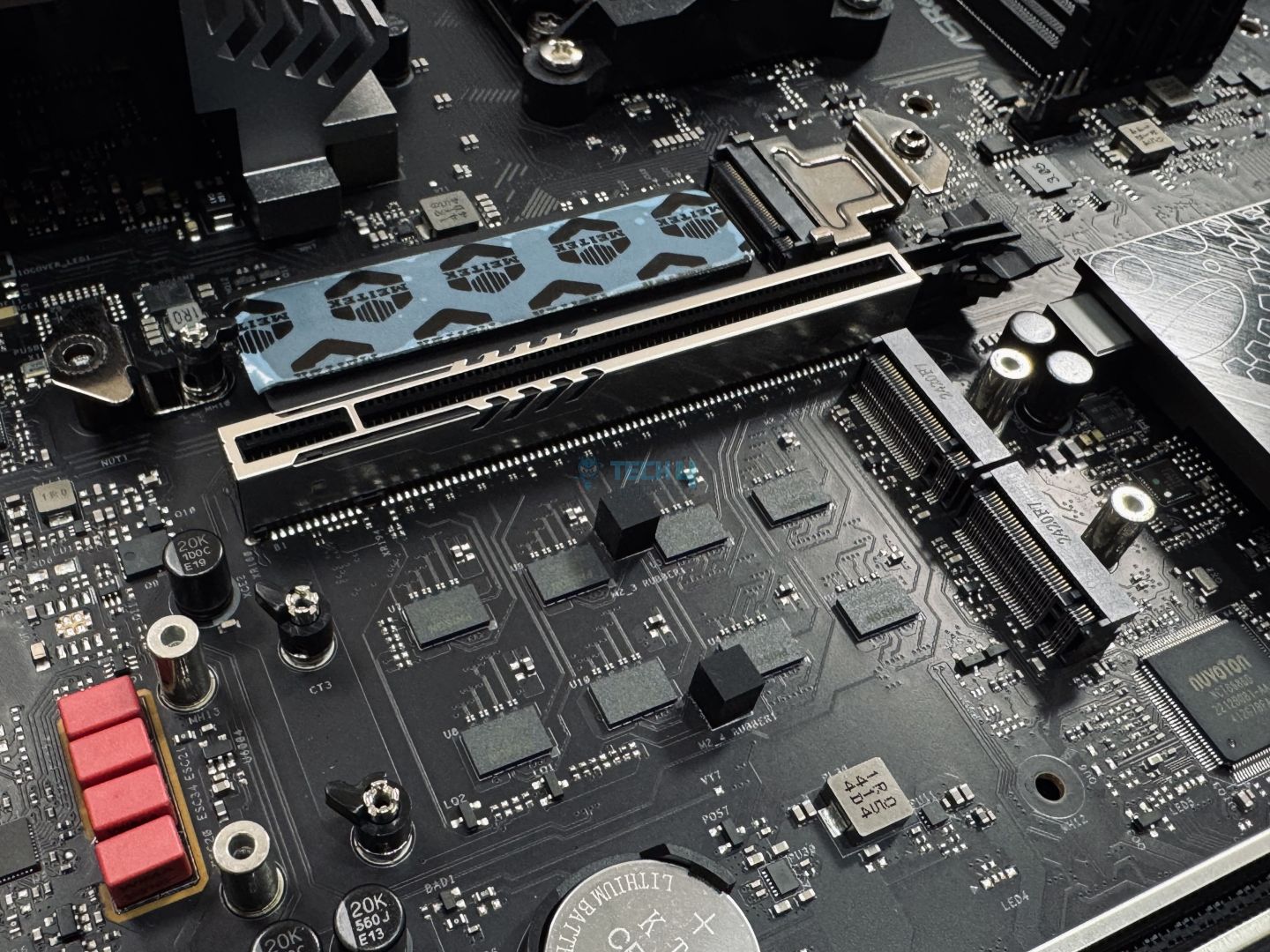
There are also 4x M.2 slots, one running on PCIe gen 5 (primary)–coming from the socket. All the slots support type 2280 drives. The remaining three M.2 are Gen 4 and come from the chipset. As expected, there is a separate M.2 heatsink for the M2_1 slot and then a wider one for the lower Gen 4 slot. The M2_1 heatsink is taller as it also has a stacked fin design to deal with the greater heat output of Gen 5 drives.
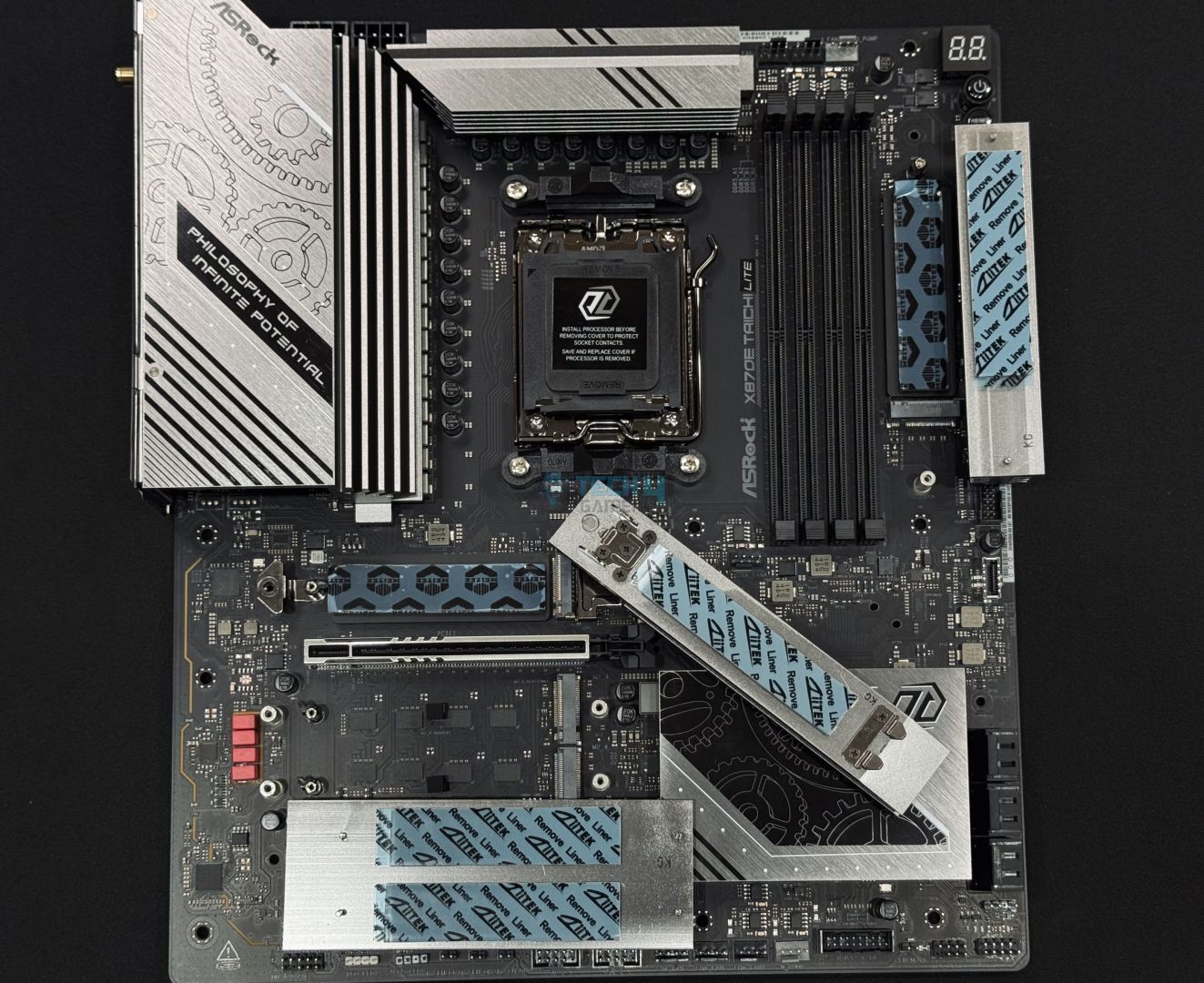
ASRock X870E Taichi LiteM.2 thermal pads. (Image By Tech4Gamers)
Exposed M.2. slots
The thermal pads on the motherboard’s M.2 slots after the heatsinks are removed are shown above. The M2_1 heatsink features a tool-less mechanism similar to the one we saw in MSI’s MPG X870E Carbon WiFi, which is good to see. Meanwhile, the Gen 4 slots will require a screwdriver for removal and installation.
Another thing to note is that M2_1 and M2_2 feature thermal pads and heatsinks at the base, while the bottom ones using the enlarged heatsink do not. The anti-drop screws used in the enhanced M.2 heatsink should ensure you don’t lose them while putting together your build.
PCIe Connectivity
PCIe slots (Image by Tech4Gamers)
The ASRock X870E Taichi Lite features dual PCIe 5.0 slots (one functions as the primary, and the other as a PCIe x8 should you want to share bandwidth between the two). Both the slots use surface mount technology (SMT), so you don’t have to worry while installing those bulkier graphics cards. Both slots are also steel-reinforced for more strength.
Unfortunately, one of the features missing from the Lite is the PCIe EZ release for the GPU.
USB Connectivity
The board provides a total of 21 USB ports:
2x USB4 Type-C (Rear)
5x USB 3.2 Gen2 Type-A (Rear)
1x USB 3.2 Gen2x2 Type-C (Front)
7x USB 3.2 Gen1 Type-A (3 Rear, 4 Front)
6x USB 2.0 (2 Rear, 4 Front)
USB connectors (Image by Tech4Gamers)
The CPU powers the 2x USB4 ports (from the ASM4242 controller) and 2x of the 10Gbps Type-A ports in the rear. All the other ports come from the chipset. Pictured above are one of the USB 3.2 Gen 1 connectors (top)(powers 2x 5Gbps ports) and the USB 3.2 20Gbps header (powers one 20Gbps port).
All the USB ports have ESD (electrostatic discharge) protection.
Network & Connectivity
The Taichi Lite supports WiFi 7 and Bluetooth 5.4. Backward compatibility also enables support for older standards (5GHz, 2.4GHz). For 6 GHz WiFi, it supports a 160MHz channel bandwidth. The antenna enables support for 2T/2R (2 transfer/2 receive) for multiple data streams and a more reliable connection. MU-MIMO technology is also supported.
For wired connectivity, the motherboard features a 5G LAN port powered by Realtek’s RTL8216 controller. ASRock is using a patented design for this port, enabling lower noise and more stable speeds. It also supports Bluetooth 5.4. Both WiFi 7 and Bluetooth 5.4 require Windows 11 build version 24H2.
Audio Solution
Realtek ALC4082 audio controller (Image by Tech4Gamers)
The Taichi Lite uses Realtek’s ALC4082 audio codec, which is similar to ALC4080 but offers some additional features like Content Protection. For DAC, the board uses ESS SABRE9219 with a 130dB signal-to-noise ratio, which should translate to minimal noise during playback.
Direct-drive technology enables the use of high-end headphones without the need for an external amplifier. The board features separate PCB layers for left and right audio channels and uses high-end WIMA audio capacitors for the rear outputs. Nahimic audio drivers are also supported.
ASRock X870E Taichi Lite top-right corner (Image By Tech4Gamers)
Up top, you can see CPU_FAN1, CPU_FAN2, and the AIO_PUMP connectors. Like the RGB LED header, CPU_FAN2, AIO_PUMP, W_PUMP (a connector for those more power-hungry pumps), and all the case fan headers provide up to 36W each. CPU_FAN1 can only power fans up to 12 watts. There’s much room for premium CPU cooling solutions should you want to install one.
From the corner and down, we see the Dr. Debug LED panel and reset and power buttons with LED.
ASRock’s Hi-Density dual EPS connectors and 24-pin ATX connectors can withstand more current than traditional connectors. This, coupled with the incredible VRM setup, should help us further with overclocking.
Rear I/O
Rear I/O (Image by Tech4Gamers)
For rear I/O, we have:
2 x Antenna Ports
1 x HDMI Port
1 x Optical SPDIF Out Port
2 x USB4 Type-C Ports (40 Gb/s)
5 x USB 3.2 Gen2 Type-A Ports (10 Gb/s)
3 x USB 3.2 Gen1 Type-A Ports
2 x USB 2.0 Ports
1 x RJ-45 LAN Port
1 x Clear CMOS Button
1 x BIOS Flashback Button
1 x Line Out Jack (Gold Audio Jack)
1 x Microphone Input Jack (Gold Audio Jack)
The yellow Type-A ports are “lightning gaming ports” for your keyboard and mouse. According to ASRock, two different controllers (USB and PCIe) are being used here, so the bus won’t be crowded, and latency will be minimal.
The dark blue ports above it support “Ultra USB power,” which features a dedicated IC to convert 12V power to 5V, protecting it from noise interruption from other 5V devices on the board.
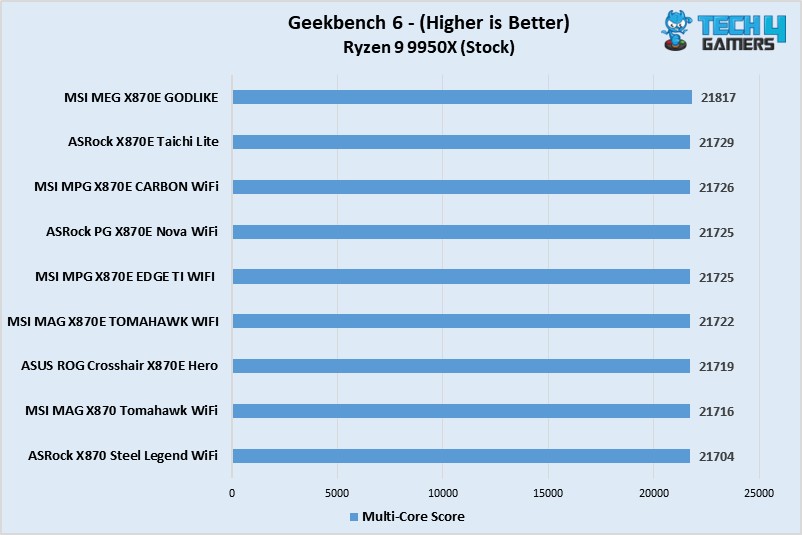
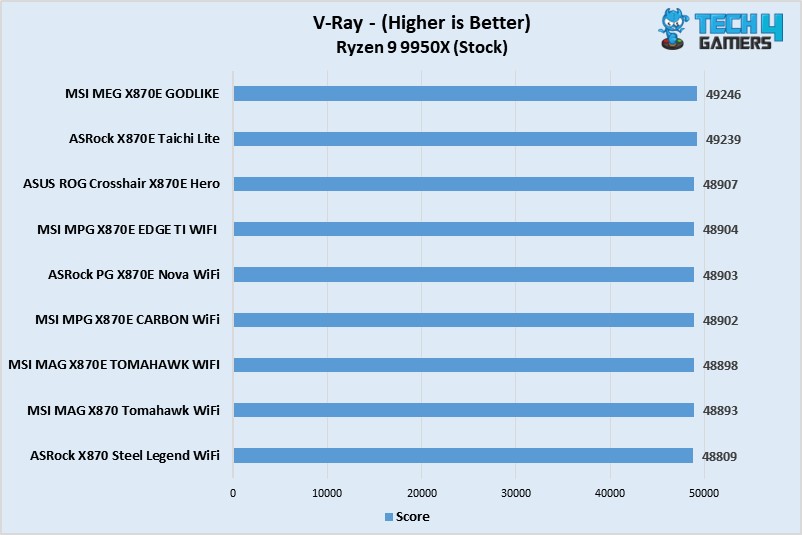
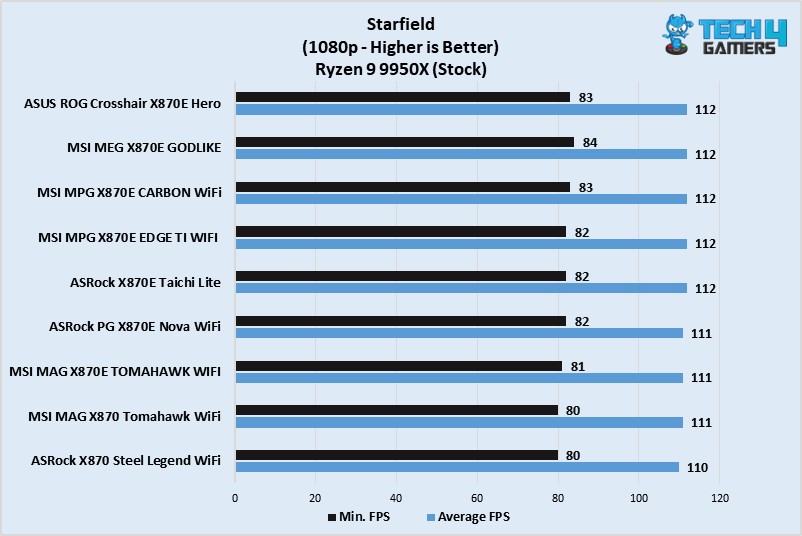
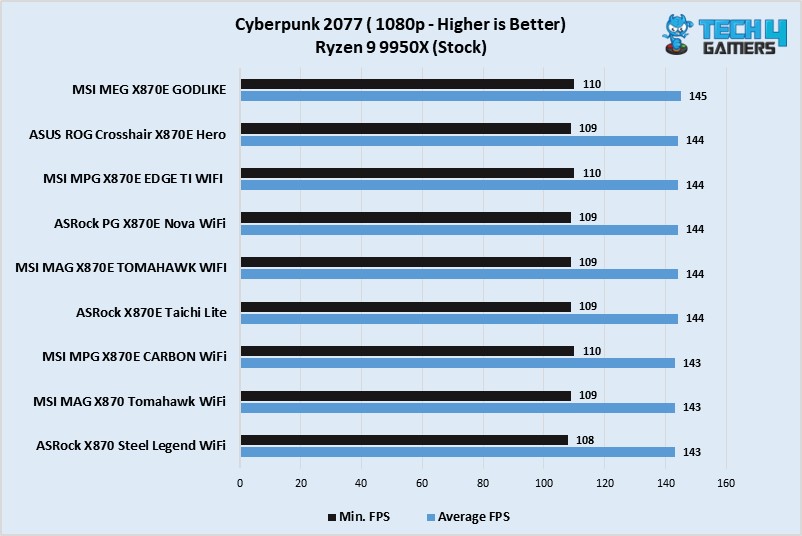
All in all, the gaming performance of Taichi Lite is solid.
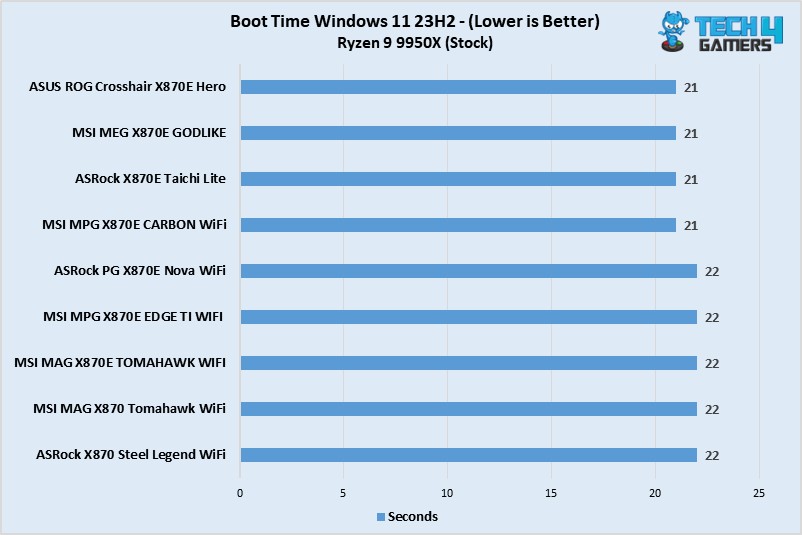
Windows 11 Boot Time
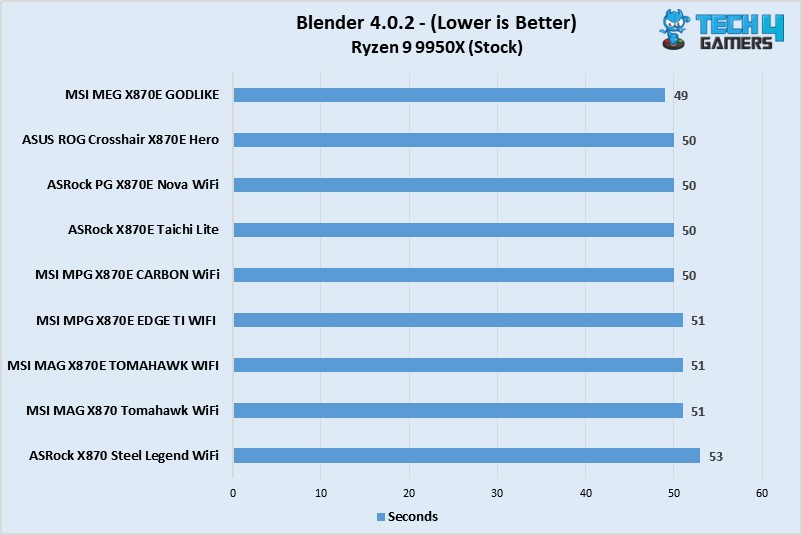
The Taichi Lite’s boot time was one of the quickest.
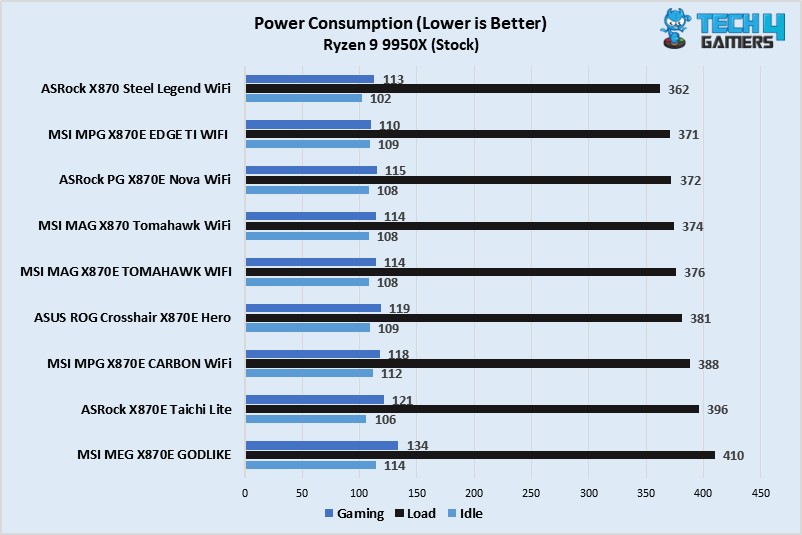
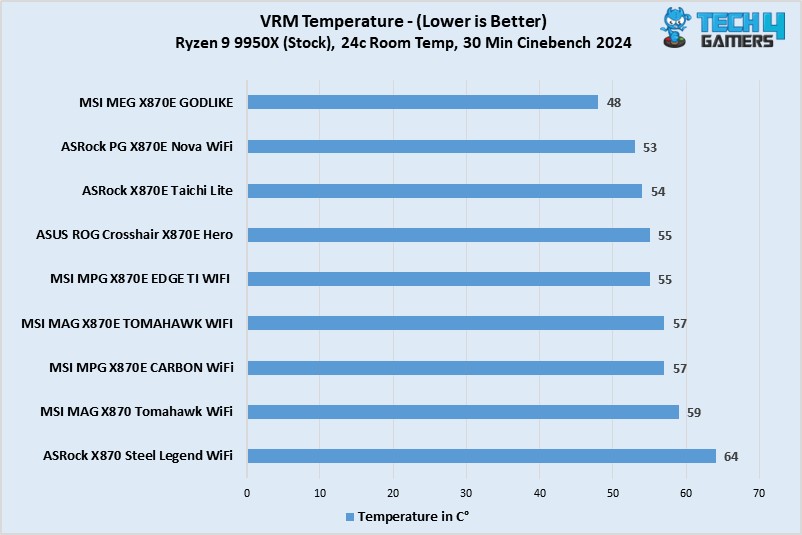
Power Consumption and VRM Temperatures
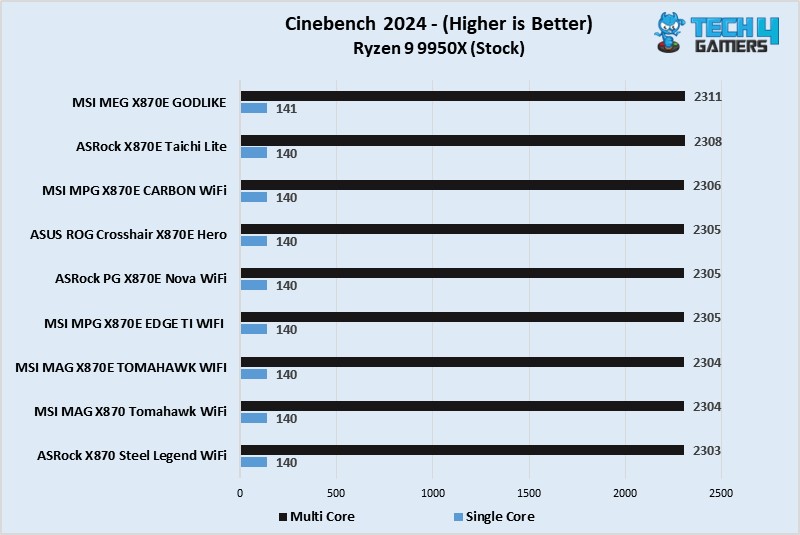
Our Taichi Lite setup consumed some of the most power across all the workloads, maxing at 396 watts under the Cinebench 2024 multi-core load.
A thoroughly impressive VRM performance from Taichi Lite’s heatsink! Despite being the better VRM setup by a mile and higher power consumption, the motherboard stayed well under 60°C.
Should You Buy It?
Worth it?
Buy It If:
✅You want extreme overclocking for (relatively) cheap: This is one of the more affordable X870E motherboards out there so far. Its VRM setup competes with enthusiast options like the MSI X870E GODLIKE. The VRM cooling setup is equally impressive, as confirmed in our testing.
✅The latest I/O is a priority: With WiFi 7 and USB4 and improved memory support over the last generation, the motherboard offers the current greatest I/O connectivity.
✅You want a streamlined look: If you prefer sleek RGB-free designs, this motherboard offers a great look to match your setup.
✅You need plenty of USB ports: With 21 USB ports (including 2x 40Gbps, 1x 20Gbps, and 5x 10Gbps), there’s plenty of room for all your USB devices.
Don’t Buy It If:
❌X670E boards look more attractive: In all honesty, a previous-gen board will suit you best if you don’t need the handy I/O or extreme overclocking capabilities. Despite their great price tag, X670E boards can be far cheaper.
❌Your chassis is incompatible: The X870E is an E-ATX board and may not fit into your case. Make sure to check compatibility before purchasing.
My Final Thoughts
The ASRock X870E Taichi Lite comes out as a very attractive E-ATX board from AMD’s flagship chipset. Among its top features is its top-notch VRM setup, which features a 24+2+1 phase design with 110A stages. This is a setup capable–even overkill–for even the most powerful Ryzen CPUs. Rest assured, you can be sure that you’ll be able to push your CPU as far as you could possibly need, and VRM temperatures shouldn’t be a concern either, thanks to its excellent design.
The motherboard offers a distinctive design with multiple elements mixed together and features a black and silver theme. There’s no RGB, but the board can accommodate any RGB peripherals you may want to install, with 3x addressable headers and one standard header.
We have room for up to 256GB of DDR5 memory (max. 8200+ MT/s with OC). There’s also enough connectivity for just about any casual user. The board features dual PCIe 5.0 slots (x16/x8 and x0/x8) that are steel-reinforced and are mounted by SMT (surface-mount technology). Hence, the ports are very durable and should have no problems handling heavy GPUs.
The board offers four M.2 slots (including one PCIe 5.0 x4, the remaining being Gen 4 x4). If you have any SATA 6Gbps devices, the board can cover as many as six. The PCIe slots are cooled well by the dedicated heatsinks, and the primary (Gen 5) heatsink features a screwless removal mechanism.
There are 21 USB ports in total (including 2x USB4, of course), although six of these are USB 2.0 standard. Two ports support “Ultra USB Power” (a more stable 5V supply), and two are Lightning Gaming ports (minimal latency for your keyboard and mice). We get a WiFi 7 module, Bluetooth 5.4, and a 5G LAN port for networking. The audio setup features Realtek’s ALC4082 and a minimal-noise DAC.
Other nice-to-haves of the board are the three included thermistor cables, the debug LED panel, anti-drop M.2 heatsink screws, and Nahimic audio drivers. The motherboard costs $399, an intermediate price for an X870E motherboard.
As Tech4Gamers’ Founder and Editor-in-Chief, I bring over 13 years of PC Hardware Reviewing and 8+ years of IT Project Management experience. Certified in Google IT Support , my focus is on providing honest product reviews and analysis and fostering a strong gaming community with 130k+ members in PPG.
Huzaifa Haroon
Being a keyboard enthusiast, I specialize in reviewing, modding, and critiquing them for the people. If you’re a Razer fanboy, my only goal is to convert you to the dark side 😈.
Custom keyboards have completely shaken up the peripherals market in the past few years. While prebuilts from companies like Aula, Akko, and Epomaker are great, barebones kits still hold a special place in the market. They’re often reserved for the more seasoned enthusiast and made by brands with ample experience.
And what we have today is no different. Weikav has been in the game for quite some time now. We previously looked at the Lucky65 which was a really impressive outing from the company. This time, it’s a more unusual yet ever-so-interesting board that steps up to the podium—Record Alice V2.
Why Trust Tech4Gamers
Huzaifa Haroon is our keyboard expert with years of experience in building and testing custom keyboards.
130+ peripherals tested and reviewed by our team of hardware experts (Tech4Gamers Team).
500+ hours spent testing different peripherals for our reviews.
At Tech4Gamers, ensuring you get reliable information is our priority. That’s why every hardware round-up undergoes a meticulous review process by our team of experts and editors. Each review is carefully examined against our strict editorial guidelines, guaranteeing you trustworthy insights you can depend on.
Key Takeaways
Record Alice V2 is a great ergonomic keyboard that prioritizes a clacky sound signature with a premium build.
Buy the Record Alice V2 if you want a high-quality keyboard with a unique mounting method.
Avoid the Record Alice V2 if you prefer a standard layout and don’t want to adjust your muscle memory.
[toc]
What Exactly Is An Alice Keyboard?
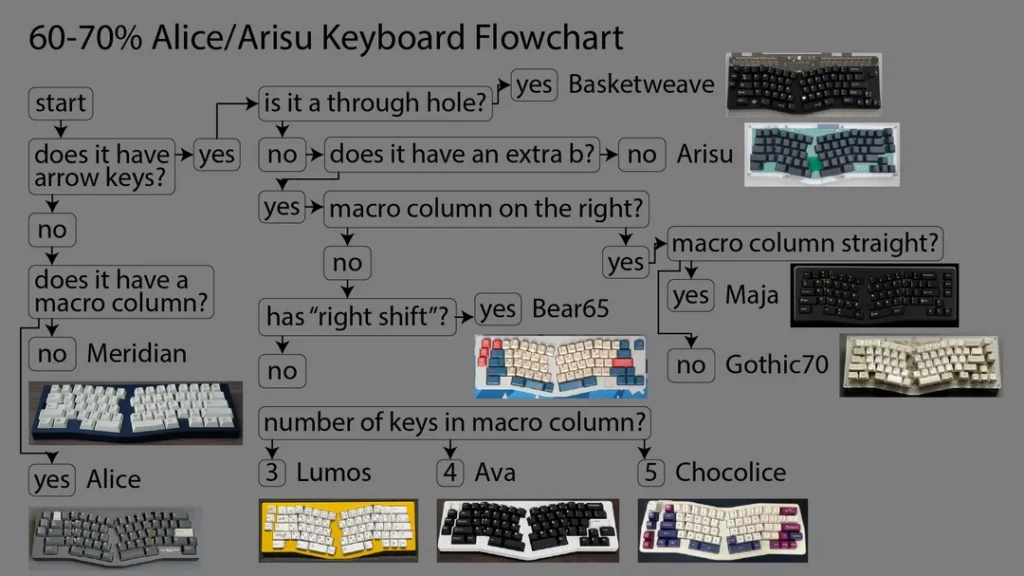
Alice-style keyboards feature an ergonomic layout where the keys are split into two sections and tilted inwards to better align with the natural curvature of your hands. This style originated in 2018 with the infamous TGR Alice and, since then, has slipped into the mainstream.
There are some variations, such as models that feature arrow keys and navigation clusters, but these days, Alice has become more of a catch-all term. For instance, an Alice-style keyboard with arrow keys is technically an “Arisu” keyboard (the Japanese word for Alice), but the community often uses these interchangeably now.
Similar to many other budget boards, the Record Alice has an unremarkable box with tabs on either side keeping it secure. There’s some rather abstract branding all over the packaging. Inside you’ll find the board wrapped in plastic with a separate dust cover on top. And all the accessories are nicely placed in a box shoved in the corner.
Record Alice comes in a simple box (Image by T4G)
Package Contents
1x Record Alice V2
1x Manual
1x Keycap/Switch Puller
1x Screwdriver
6x Extra Screws
1x 2.4Ghz USB receiver
Box Contents (Image By T4G)
Design & Build
Despite being just as affordable, Record Alice is different from your usual budget custom such that it’s rocking an alice layout that’s supposed to help you type better. The slanted keys follow the natural arch of your hands, allowing for a more ergonomic experience. Instead of adjusting your hands to fit the keyboard, the keyboard adapts to you.
Record Alice from the front (Image by T4G)
While that does make for a potentially healthier keyboard, and one that certainly catches the eye, it also means the keyboard takes some time getting used to. It’s been more than a month and I’m still learning. I was never the best typist, but I could average 100WPM with perfect accuracy before, now my best is down to 70.
Before I talk about anything else, let’s address the keyboard-sized elephant in the room: Record Alice is a clone of the OwlabSpring. The design is almost a 1:1 copy down to the RGB strip in the bottom corner. When you connect it via Bluetooth it shows up as “Spring” and the same goes for when it’s paired with VIA.
Record Alice comes with plate-mount stabs already installed
Later when we open up the keyboard, you’ll see how the mounting method is also duplicated to perfection but what Weikav couldn’t get right were the force break gaskets. The divots for the foams are all there in the top case, just like in the original Spring, but they forgot to actually include anything there.
Weikav forgot to do the force break mod for me, so I had to do it myself (Image by T4G)
If we put the obvious IP theft aside, the board is built well. It’s pretty much exactly like the Lucky65 where the anodization is nice and smooth, a bit gritty in appearance, but with no imperfections. It’s a heavy keyboard coming in at a kilogram unbuilt, with a very simple box-on-wedge side profile that some might call boring.
Even a simple side profile can look clean (Image by T4G)
It has chamfered edges across the entire perimeter and a front height of 20mm and an 8-degree typing angle. I can easily use this board without a wrist rest. The build and design, overall, are identical to the Record Alice V1 but obviously not as polished as the Owlab Spring it’s trying to imitate.
Record Alice has a gorgeous back weight (Image by T4G)
Layout & Features
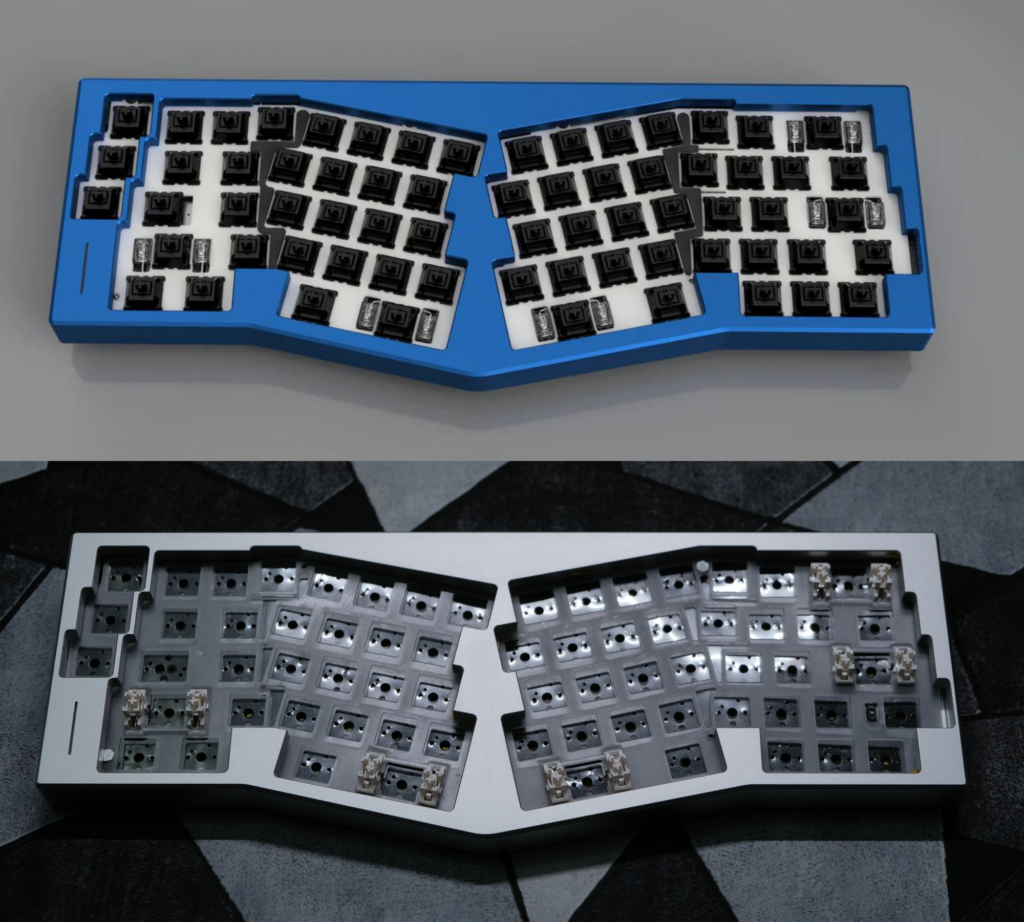
Stripping away the ergonomic design, the Record Alice is a 65% custom keyboard with south-facing hotswap sockets, manufactured by JWICK. It features standard factory lubed plate-mount stabilizers with support for screw-in stabs should you choose to add them. Record Alice is also VIAcompatible (but not QMK).
The PCB here is 1.2mm and it features a lot of flex cuts, just like the inlcuded polycarbonate plate. The keyboard also has per-key RGB but the lack of dedicated software makes it impossible to control that; you have to rely on the built-in effects. While the PCB is one singular piece, the plate is split into two for either side.
The PCB looks very similar to the one in Owlab Spring (Image by T4G)
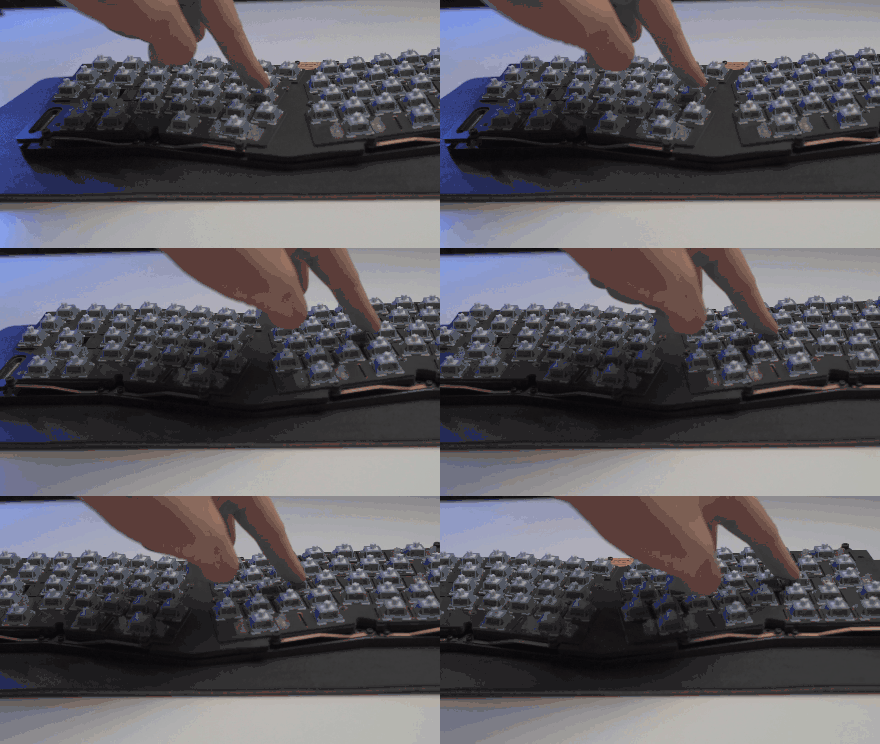
The highlight of this keyboard is its unique mounting style in which leafsprings are used instead of traditional foam or rubber gaskets. The PCB-plate assembly rests on top of these leaf springs which provide a bouncy typing feel and evenly distribute pressure around the board to create a clean sound signature.
Leaf springs in the Owlab Spring, same as the Record Alice
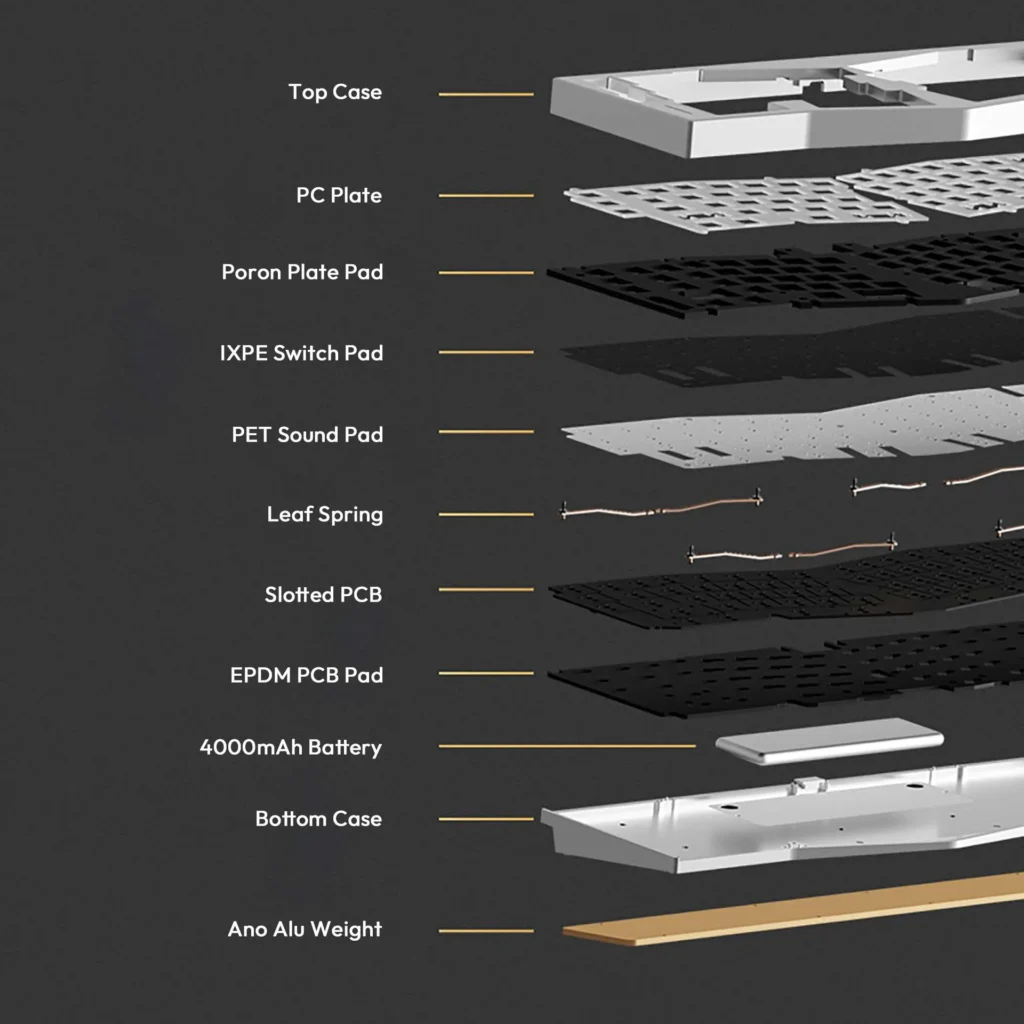
Speaking of the sound, there’s plenty of foam here as well to help with that. All the standard stuff like the IXPE sheet, case foam, plate foam and PET sheet are present. In my testing I found that the board was actually a bit too quiet for my liking without the foams and that it works best if you leave everything in and only add on top. More on this later.
Record Alice exploded view | Weikav
The Innards
There are only eight hex screws at the back securing the top and bottom cases, and a screwdriver is conveniently included in the box. These screws are hidden under the rubber feet which are easy to take off but very annoying to put back on without any warping. Once the board is open, you’ll see the leaf springs poking out the side right away.
I like the fact that all the screws are the same key and size so you don’t need to worry about mixing them back up. There’s a daughterboard inside connecting the battery and the USB port to the PCB with ribbon cables. You have to be careful as the main ribbon is very short so you can easily rip it off while lifting the top.
The components that make up the Record Alice (Image by T4G)
Connectivity & Performance
Record Alice has a USB-C port for connectivity and charging its 4000mAh battery. As expected, the wired performance is flawless, but in my testing with the RGB off, the keyboard easily lasts up to 2 weeks and about 2 days with RGB on. This is in line with Weikav’s own claims.
Centered USB port on the Record Alice (Image by T4G)
As for connectivity, Record Alice V2 is a wireless keyboard that comes with a 2.4Ghz USB receiver and Bluetooth support. I’m very happy to report that using the provided dongle, it’s perfectly adequate for even competitive gaming due to its 10ms average latency. Wired is even better at 8ms, and Bluetooth is not far off at 16ms.
I experienced no disconnection issues or any kind of lag using the keyboard about 4 feet away from my computer. Bluetooth range is much stronger and, connected to my phone, the board worked even in the next room with no misinputs. All this makes for a great overall experience with any device using any connection mode.
Typing Experience
Thanks to the leaf spring mounting, the polycarbonate plate and slim PCB, the Record Alice feels soft to type on, but not the point of being wobbly. The left Shift key is also in somewhat of an awkward spot with the arrow key right next to it. I often find myself accidentally hitting that instead of capitalizing a letter.
Now, let’s finally move on to some actual builds and their sound tests.
First Build (Stock)
Let’s start with a pretty common, run of the mill deep and thocky build. I will be using Gateron Lunar Probe linear switches paired with MT3 Susuwatari keycaps. These are tall but thick doubleshot keycaps and the switches are factory lubed to perfection. This config should produce a low-pitched, almost muted sound.
As you can hear above, the sound is nice and full of thock. The keyboard does sound a bit thin in its stock configuration and there’s some metallic resonance as well (especially around the center). Lastly, the stabs are not the best. They exhibit rattle across the board and seem a generation behind Weikav’s newer offerings—Lucky65 and Sugar65.
Second Build (Modded)
Let’s fix the issues from our stock build. I opened up the keyboard and immediately did the force break mod to kill the resonance. Then we throw some polyfill in and tape mod the PCB, ensuring to cover all the flex cuts so the sound doesn’t leak out. I removed all foams except the IXPE and PET sheets, and relubed the stabs with some Krytox205G0.
For the switches, I put in the HMX Xinhai linears. Since we’re using a dupe keyboard, I thought why not go all in and use clone keycaps as well? So, I’m topping this off with a high-quality doubleshot set of GMK ModernDolch clones made from ABS.
This is the config that made me endure the unfamiliarity of a new layout, just because it sounded so clean. The alphas are sharp, bright and thrive without any foam. The stabilizers also come to life and compliment the rest of the keys. There’s no hollowness thanks to the polyfil and no thin-ness thanks to the tape mod.
Getting this kind of a sound from a budget custom is impressive, but at this price point, it’s downright incredible. And the funniest part? The Owlab Spring did not sound this clean, especially in its stock config. Somehow the Chinese factories have whipped up a better sounding clone than the original.
QC Issues
Before buying the Record Alice I’d already seen a lot of people online complaining about bad units but by that point my curiosity had gotten the best of my skepticism. Sure, enough when I got mine, I thought I received a miracle unit but quickly discovered one issue: the left Control key simply didn’t work.
I tried to jump the hotswap socket with tweezers just to confirm that it was indeed broken out of the box. This was not a deal breaker for me as I’m used to a Mac layout as well, so I just remapped the Alt key to be my Control key. I use my MX Master mouse’s thumb button for Alt-tabbing so that was another issue already solved.
Regardless, it’s important to point out that QCissues like these are more prevalent than usual in the Record Alice boards. Reddit is filled with complaints like these, and my friend even bricked his unit with a firmware update (though the AliExpress seller refunded him). Record Alice V2 was supposed to fix a lot of this QC drama but seems like at least part of it is still there.
Software Experience
Record Alice has no dedicated software because it relies on VIA. This is great because VIA support is one of the easiest corners to cut and often an obvious complaint for budget customs. Unfortunately, the VIA support is somewhat shoddy here.
Weikav has a JSONfile on their site you can easily upload to get started with VIA, where this board shows up as a Spring. At first glance, everything seems normal, you have the layout showing correctly with all the layers present but as soon as you try to customize anything, you start to see the shortcomings.
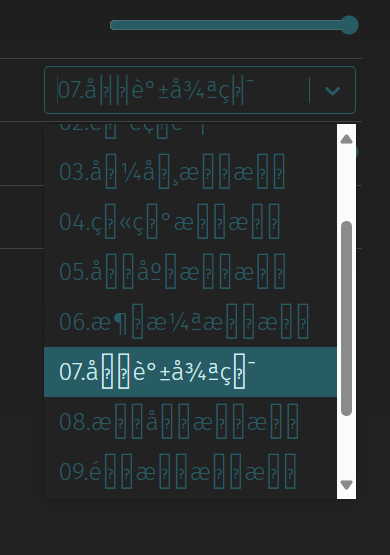
Most of the custom Fn key shortcuts in this board have incomplete names that read like product SKUs, so unless you have a manual by your side, it makes no sense. The RGB effects in the Lighting tab legit has hieroglyphics instead of clear labels like “Rainbow” or “Pulse”.
These are supposed to be RGB effects
The brightness for both the RGB strip and the per-key lighting is also tied together for some reason, so you can’t independently adjust one without affecting the other. Moreover, no per-key control; you’re stuck with the effects you’re given.
That being said, setting up different layers with custom key binds and other functions like macros work perfectly fine. I was easily able to swap my Alt key for a Control key, set up volume controls on the nav keys, and configure an OBS Replay button on the second layer. So, overall, the software experience is a net positive.
Should You Buy It?
Buy It If:
✅ You want an ergonomic keyboard that can potentially make you type better—faster and healthier over time.
✅ You like a clacky sound that works without foams and stands out in the sea of foam-reliant deep sounding keyboards.
✅ You’re an enthusiast who values extras like support for PCB-mounted stabilizers and VIA, along with a unique mounting method.
Don’t Buy It If:
❌ You want a thocky keyboard that’s low-pitched and creamy out of the box no matter what switch and keycap config you go with.
❌ You don’t want to learn an alice-style layout that might take a few days to adapt at best, and a few weeks at worst.
❌ You’re stingy about clones and would rather prefer to buy the original than support any copyright infringement.
Record Alice V2 in all its glory
My Thoughts
While the budget keyboards of today tend to always favor the thocky sound, I’m glad that a board like the Record Alice exists to satisfy the clack enthusiast as well. This kind of clean sound is often associated with more boutique customs that are costlier, so an affordable offering in this category naturally stands out.
That alone makes this a worthwhile purchase, but the excellent build quality, performance, and the leaf-spring mounting method pushes it over the edge into a genuinely great keyboard territory that has virtually no flaws. The VIA support mixed with screw-in stabs allows for enough modding potential that won’t hold any snob back.
At Tech4Gamers, I contribute as a Senior News Reporter, combining my skills and gaming enthusiasm to keep our audience updated on the latest developments.
[Press Release] Corsair’s latest keyboards introduce a compact tenkeyless form factor to the popular K70 Core lineup. As such, the K70 Core TKL and K70 Core TKL Wireless offer the same attributes fans have come to love but in a revamped form factor.
Corsair Appeals To A Wide Audience With This Keyboard
Thanks to Corsair’s pre-lubricated MLX Red v2 switches, typing is made smooth and satisfying. Meanwhile, a premium sound-dampening foam ensures acoustics are refined and free of unwanted pings.
The K70 Core TKL Wireless is backed by Slipstream Wireless technology, which offers speeds on par with a wired connection. Elsewhere, a battery of up to 890 hours ensures long-term gaming sessions are never stopped by a dead battery.
The battery life shines further when gaming over Bluetooth, allowing customers to enjoy up to 2,400 hours of uninterrupted gaming. Corsair also confirms that this keyboard can make use of FlashTap, which gives competitive gamers an edge in key maneuvers like rapid strafing.
Extra features like a distraction-free Game Mode and a rotary dial for media control add further utility to the new K70 Core offerings. At the same time, a detachable USB-C cable makes it convenient to carry the keyboard around.
Both additions to Corsair’s popular lineup are now available to purchase, and you can learn more through the links provided above.
At Tech4Gamers, I contribute as a Senior News Reporter, combining my skills and gaming enthusiasm to keep our audience updated on the latest developments.
Story Highlight
Starfield’s first major expansion has received a slew of negative reviews on Steam.
Players have complained about a generic story, a high price tag, and more.
Bethesda is still supporting the game and has already promised a second premium expansion.
Starfield’s first major expansion arrived one year after its release. This massive RPG promised the world for fans of Bethesda’s past work and formula, but it was a mixed bag.
Several months later, Bethesda added many requested features and showed a willingness to support the game. This meant that expectations were high for the expansion, but Shattered Space currently sits at “Mostly Negative” reviews on Steam.
Why it matters: Starfield required eight years of development and is considered one of Bethesda’s most ambitious RPGs to date. As such, the current reception is quite shocking.
The DLC Already Has Around 1,000 Negative Reviews
Starfield currently sits at ‘Mixed’ reviews on Steam, which has been the case for many months. However, more than 60% of the expansion’s reviews are negative, giving it an even lower rating than the base game’s.
Looking at the reviews, players have complained about the story’s mediocrity, the lack of meaningful gameplay updates, and the price of the DLC. One particular review compared Shattered Space to Phantom Liberty, an expansion that wowed critics and fans alike.
Since Bethesda has priced the new content at $30, fans are unhappy with what is offered here.
Shattered Space had a disappointingly low amount of effort being put into it, even for Starfield.
-Really Big Frog
Really Big Frog Explained His Gripes With The DLC In Detail | Image via Steam
Following this release, the RPG has seen a notable resurgence.
Player counts have doubled compared to last week, but the reviews certainly leave a lot to be desired. Going by the reception, it may be a matter of days before players begin to move away from Bethesda’s sci-fi universe yet again.
Still, the developer has already confirmed a new expansion, and the team is supporting the RPG with quality-of-life updates. Between ongoing support for its latest release and development of The Elder Scrolls 6, the team has its hands full.
Ultimately, the studio hopes to see Starfield thriving before The Elder Scrolls 6 arrives, even if the current reception is far from ideal.