Home Blog Page 574

Stickers Out, E-Ink In: Asus Has Taken Laptop Customization To The Next Level

Story Highlight
  • The e-ink display offers fully-fledged customization to its users.
  • The e-ink display doesn’t tax the laptop’s battery and even displays the artwork without it.
  • It would be cool to see more and more laptop manufacturers adapt to this concept. 

Customizing the tech stuff you own is fun and a way to make them look distinguishable. I do it whenever I change my gaming laptop or mobile phone, as it’s easy to do so on them. Until now, we could only customize laptops using stickers or custom skins, whereas phones also offer a case option besides the custom skin. 

Sure, the stickers and skins are a great way to add some character to your laptop, but they’re not as reliable. They get worn out over time, and dealing with the leftover adhesive is a hassle. This is where a new idea for customization is needed, and Asus has introduced a concept called Project Dali at Computex 2024 for what could be the next step in laptop customization.

Asus’s Project Dali

From what we have seen so far at Computex 2024, Asus seems to be taking laptop customization to the next level. Asus told us that their Project Dali concept is going to allow users to customize their laptops with just a few clicks on their trackpads and be done with it in a few seconds. 

Project Dali Concept
Project Dali Concept (Image Credit: Good E-Reader.com)

Your laptop’s lid will be the one to display the change, as there’s an e-ink display installed, and it is responsible for showing off whatever artwork you decide to place there.

The Whole Process

The Project Dali concept is currently being tested on the Asus Zephyrus G14 laptops, which have a 12″ e-ink display on their back instead of a flat and boring lid. This 12″ display features a six-color combination and Spectra 6 display technology to process and showcase the custom designs and pictures to the user. It takes about 20 seconds for the image of your choice to be completed, and the resulting image is vibrant and of high quality.

You can control and set the images through Asus’s proprietary application made for this. Which has several stock images stored; however, you can even use AI-generated images or ones from your gallery too. Not only this, as per Asus, the e-ink display doesn’t draw a considerable amount of power, and even if the laptop’s battery dies, the image would still be visible.

The Repercussions

Since the laptop is going to have an e-ink display on its lid, it does raise concerns about the fragility of the overall laptop. We can’t say for sure right now as it’s still in the concept phase, but if it’s going to be a real thing, Asus has to come up with a protective layer for the display. So, it doesn’t break or lose pixels so often. Because, at the end of the day, it’s still a display slapped to the laptop’s back.

The Concept Is Impressive

Even with all the repercussions in mind, the idea is still very cool and shouldn’t be limited to just gaming laptops. It would be more interesting to see this concept on creator laptops like Asus’ ProArt series, so the creators can take advantage of the additional display on their laptops. Unfortunately, we do not have a release window yet for this concept to become a reality.

And we can only hope that it doesn’t get scrapped and forgotten forever, as it could prove to be a useful feature. Moreover, laptops with multiple displays already exist, so I don’t see any excuse why this one can’t make it into the real world.

Different USB Standards: What Do They All Mean?

Story Highlight
  • The evolution of USB standards has significantly improved speed, efficiency, and functionality, from USB 1.0 to USB4.
  • Favored for its versatility, USB-C offers a reversible design and supports various technologies.
  • Supporting ultra-fast data transfers up to 40 Gbps, USB4 also enables high-resolution displays and ensures backward compatibility.

A USB (Universal Serial Bus) standard refers to a set of specifications created to establish consistent communication protocols and physical connectors for peripheral devices and computers. Over the years, USB standards have evolved, improving speed, efficiency, and functionality.

It’s worth mentioning that these standards are defined by the USB Implementers Forum (USBIF), an organization that oversees the development and promotion of USB technology. I will take you through all the different USB standards and their meanings.

Connector Types

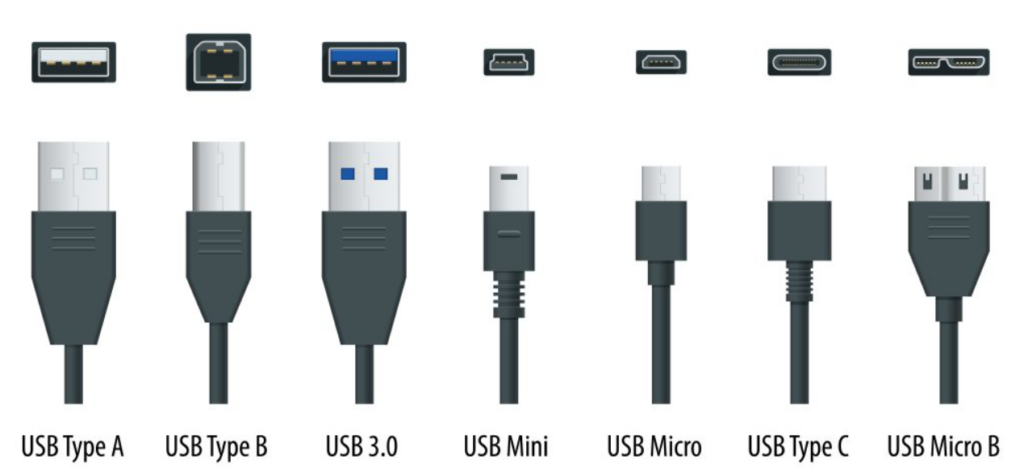
USB Connector Types
USB Connector Types (Image via Dynamic Technical Solutions)

USB-A

From my observations, USB-A is the most used USB connector type. It’s that rectangular connector we see at the end of almost every USB cable these days. It fits in one way and is mainly found in host devices like televisions, laptops, computers, and media players.

USB-B

USB-B is an older type of USB connector with a square shape. You don’t see them much anymore, but it’s usually connected to printers or similar devices.

Mini-USB

As the name suggests, Mini-USB is a smaller port type that is suitable for mobile devices like cameras and MP3 players. However, it’s rarely used these days and has been replaced by micro-USBs.

Micro-USB

Micro-USBs are popular nowadays and mostly found in Android phones, Bluetooth headsets, smartwatches, and similar devices. They’ve largely replaced mini-USBs and come in micro-USB A and B types.

USB-C

USB-C, or USB Type-C, is my favorite because it aligns well with modern USB standards. It has a reversible design, which eliminates the frustration of incorrectly plugging in the connector. USB-C supports various USB standards, from USB 2.0 to USB4, and facilitates other technologies like Thunderbolt 3 and 4, DisplayPort, and Power Delivery (PD).

In addition to the types of USB connectors I talked about, each USB cable and port has a speed standard, which I will explain in detail below.

USB Type Name Bandwidth Speed
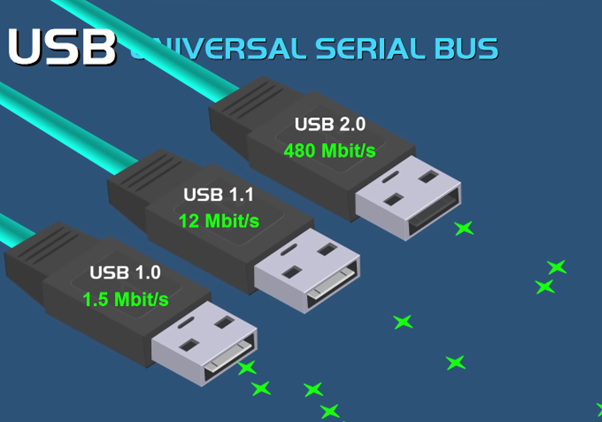
USB 1.0 Full Speed USB 12 Mbps 1.5 MB/s
USB 1.1 Full Speed USB 12 Mbps 1.5 MB/s
USB 2.0 Hi-Speed USB 480 Mbps 60 MB/s
USB 3.0 SuperSpeed USB 5 Gbps 625 MB/s
USB 3.1 Gen 1 SuperSpeed USB 5 Gbps 625 MB/s
USB 3.1 Gen 2 SuperSpeed+ USB 10 Gbps 1.25 GB/s
USB 3.2 Gen 1×1 SuperSpeed USB 5 Gbps 625 MB/s
USB 3.2 Gen 1×2 SuperSpeed USB 10 Gbps 1.25 GB/s
USB 3.2 Gen 2×1 SuperSpeed+ USB 10 Gbps 1.25 GB/s
USB 3.2 Gen 2×2 SuperSpeed+ USB 20 Gbps 2.5 GB/s
USB4 USB4 40 Gbps 5 GB/s
USB4 Version 2.0 USB4 Version 2.0 80 Gbps 10 GB/s
USB Type-C USB Type-C Up to 40 Gbps Up to 5 GB/s (depending on version)
USB Power Delivery USB Power Delivery

USB 1.0 and 1.1: The Beginnings

The USB standard was introduced in 1996 with USB 1.0. Its goal was to simplify connections between computers and peripheral devices by replacing many connectors with a single interface. USB 1.0 supported data transfer rates of 1.5 Mbps (Low Speed) and 12 Mbps (Full Speed), which were adequate for keyboards, mice, and printers at the time.

 In 1998, USB 1.1 was released to address bugs and improve compatibility, but it maintained the same speed ratings. It could only use USB A and B-type connectors similar to USB 1.0.

USB 2.0: A Leap Forward

When USB 2.0 came out in 2000, it felt like a huge leap forward. This version could transfer data at 480 Mbps, making it fast enough for external hard drives and flash drives. Its backward compatibility with older USB ports made the transition easy and encouraged widespread adoption.

USB Speed Evolution
USB Speed Evolution (Image by Tech4gamers)

USB 3.0 and 3.1: SuperSpeed and Beyond

Introduced in 2008, USB 3.0 had data transfer speeds of 5 Gbps, which was perfect for handling HD video, large backups, and quick data access. Plus, it made charging devices faster and more efficient.

Then in 2013, USB 3.1 came along and doubled the speed to 10 Gbps. The fact that it was still backward compatible with USB 3.0 and 2.0 versions made upgrading hardware a seamless experience. It could support all types of USB connectors, which was a great convenience.

USB 3.2: Consolidation and Speed

In 2017, when USB 3.2 was introduced, I was grateful for the attempt to streamline the USB 3. x environment. USB 3.2 consolidated previous versions (USB 3.0 and 3.1) under the new branding and introduced clear naming conventions: USB 3.2 Gen 1 (5 Gbps), USB 3.2 Gen 2 (10 Gbps), and USB 3.2 Gen 2×2 (20 Gbps).

The standout feature for me was the 2×2 configuration, which used two lanes of 10 Gbps each to achieve a total of 20 Gbps. This standard, primarily used in USB-C connectors, allowed for simultaneous charging, data transfer, and video streaming, something I found incredibly useful.

The Next Generation

Based on the Thunderbolt 3 specification, USB4 supports data transfer rates of up to 40 Gbps, enabling ultra-fast data transfers, high-resolution displays, and more robust power delivery.

Designed to be highly versatile, the standard supports multiple data and display protocols simultaneously. Additionally, it retains backward compatibility with USB 3.x and USB 2.0, ensuring broad device compatibility. It also enables content to be displayed at 8K 60 fps resolution and even at 16K 60 fps.

Nintendo Switch 2 Would Be Better With 720p Screen, Analysts Conclude

Story Highlight
  • The Nintendo Switch 2 is expected to be coming next year.
  • With rumors hinting at a 1080p display for this console, analysts believe that a 720p screen would be more suitable.
  • Tech experts state that a 1080p display could lead to issues with backward compatibility and performance hurdles.

While nothing has been officially revealed about the Nintendo Switch 2, rumors have already leaked many features about this console.

Expected to be finally announced around March 2025, Nintendo is said to be preparing another hybrid console. However, the gaming giant is rumored to be utilizing a 1080p display this time.

According to analysts, this may not be the best decision for Nintendo.

Why it matters: The latest handhelds in the market typically rely on 1080p screens. However, Valve’s Steam Deck also features a resolution closer to 720p, making it a viable option today.

During the recent Digital Foundry direct weekly, the tech experts were asked to share their thoughts on Nintendo’s decision to potentially use a 1080p display for the upcoming handheld.

Digital Foundry believes this may go against Nintendo, causing more problems later on that can be easily avoided. The experts argue that backward compatibility would become challenging since most Nintendo Switch games run at 720p in handheld mode.

To deal with this problem, Nintendo would either have to rely on docked versions of the games for backward compatibility or patch each title separately since 720p output on a 1080p display would not look the best.

I’m worried about it. I’m not sure that that’s necessarily the smartest play, to be honest.

-Digital Foundry

The team also argues that it may be better to stick with 720p for performance headroom in future games.

A lower resolution could add extra longevity to the console, allowing it to punch above its weight in newer releases. When combined with DLSS upscaling, the results would be even more favorable in terms of performance.

Nintendo Switch 2 vs Steam Deck
The Nintendo Switch 2 Has Not Been Announced Yet

While there are obvious benefits to a 1080p screen, handhelds like the Steam Deck stick with the lower resolution for a reason. Digital Foundry believes the lower resolution looks good enough on a smaller screen, making it a wiser option in theory.

Nonetheless, Nintendo has yet to confirm the actual resolution for the Switch 2’s display.

If history is anything to go by. the gaming giant will pick the most cost-efficient option. It has also been claimed that the console will be less powerful than the Steam Deck, but it will be a major upgrade over its predecessor.

Everything You Need To Know About The Ryzen 9000 Series

Story Highlight
  • AMD gave us our first look at the Ryzen 9000 Series CPUs and Zen 5 microarchitecture at the COMPUTEX Keynote held on 5th June 2024.
  • Base Clocks have been reduced, with Turbo Clocks remaining the same for the most part, which has led to a significant reduction in the CPUs’ TDPs.
  • Two new motherboards, the X870 & X870E, have also been uncloaked as part of AMD’s 800-Series Chipsets.

While it may still feel like AMD just released the Ryzen 7000 Series Processors based on the brand new AM5 CPU Socket and the Zen 4 platform, the truth is, it’s been more than nine months.

What does that mean for you and me? Well, if you weren’t content with the performance of the Ryzen 7000 ‘Raphael’ CPUs, you’re in luck.

AMD has finally taken off the covers with regards to its Ryzen 9000 Series Processors based on the redesigned Zen 5 microarchitecture, but of course, the same AM5 socket thanks to AMD’s commitment to upholding their sockets’ longevity. 

We’re looking at noticeable improvements with regard to real-world performance and lowered power consumption/higher efficiency alongside a pair of new chipsets to begin with.

AMD Ryzen 9000 Series: Zen 5

Let’s discuss Zen 5.

As we correctly predicted, Zen 5 noticeably outperforms Zen 4 in terms of IPC performance. (Image Credits - AMD)
Zen 5 vs Zen 4 IPC performance (Image Credits – AMD)

For starters, AMD is touting an apparent increase of 16% when it comes to IPCs (Instructions Per Clock) for the Ryzen 9000 ‘Granite Ridge’ processors, which aligns with the rumours we’d talked about.

As far as other relevant architectural changes are concerned, Zen 5 claims to introduce an improved branch predictor, which should improve the accuracy and efficiency of the instruction cycles while reducing collective latency, theoretically speaking. Zen 5 is also said to offer higher throughput and a deeper window across its design for enhanced parallelism.

Moving on, AMD has doubled the L2 to L1 memory bandwidth and expanded their SIMD (Single Instruction Multiple Data) to a full 512-bit wide (from the preceding 256-bit SIMD) one for AVX-512 workloads.

Also, Zen 5 is being fabricated on a 4nm node from TSMC, a modest shrink from the 5nm TSMC nodes used for Zen 4, which should help achieve the acclaimed power efficiency figures.

Long story short, the introduction of Zen 5 should translate to noticeably improved performance for productivity workflows, especially those that utilize the AVX-512 instruction set.

Initial SKUs

Following their historical tradition, AMD has chosen to release four CPUs from the Ryzen 9000 Series for now, all of which are the ‘X’ SKUs, meaning that these four processors will come with unlocked multipliers for overclocking.

First off, the Ryzen 5 9600X starts as the cheapest Zen 5 option, followed by the Ryzen 7 9700X as the mid-tier CPU, and championed by the Ryzen 9 9900X and Ryzen 9 9950X as the flagship processors.

Processor Cores Threads Max Boost Cache TDP
AMD Ryzen 9 9950X 16 32 5.7GHz 80MB 170W
AMD Ryzen 9 9900X 12 24 5.6GHz 76MB 120W
AMD Ryzen 7 9700X 8 16 5.5GHz 40MB 65W
AMD Ryzen 5 9600X 6 12 5.4GHz 38MB 65W

Moreover, we’re seeing reduced Base Frequencies for all four SKUs by a difference of about 200 MHz to 800 MHz, whereas Turbo Frequencies remain unchanged or slightly increased by 100 MHz at most.

However, the headlining feature for Zen 5 and Ryzen 9000 CPUs isn’t the clock speeds; it’s the power consumption figures.

TDPs for the Ryzen 5 9600X and Ryzen 7 9700X are down to just 65W from 105W, while the Ryzen 9 9900X and Ryzen 9 9950X see a reduction of 50W, i.e., a TDP of 120W, down from the 170W figure seen in their Zen 4/Ryzen 7000 counterparts.

New Chipsets

Needless to say, the Ryzen 9000 Series CPUs will be backwards compatible with AMD’s 600-Series Motherboards, but nevertheless, AMD has come up with two brand new 800-Series Chipsets, i.e., the X870 & X870E.

Firstly, a few of the hallmark features include USB 4.0 as standard on both motherboards along with PCIe 5.0 as well. 

Hallmark features of the all new 800-Series Chipsets from AMD. (Image Credits - AMD)
800-Series Chipsets (Image Credits – AMD)

Secondly, the X870E motherboard will also have WiFi 7 integrated into the chipset instead of WiFi 6E with the 600-Series chipsets.

Latest AM5 Chipsets X870E X870
CPU PCIe (PCIe) 5.0 5.0
CPU PCIe (M.2 Slots) At Least 1 PCIe 5.0 Slot At Least 1 PCIe 5.0 Slot
Total CPU PCIe Lanes 24 24
Chipset PCIe Lanes (Max) 4.0: 12, 3.0: 8 4.0: 8, 3.0: 4
USB4 Mandatory (Discrete, Consumes 4 Chipset PCIe 4.0 Lanes) Mandatory (Discrete, Consumes 4 Chipset PCIe 4.0 Lanes)
SATA Ports (Max) 8 4
DDR5 Support Quad Channel (128-bit bus) Quad Channel (128-bit bus)
Wi-Fi Wi-Fi 7 (Discrete) Wi-Fi 7 (Discrete)
CPU Overclocking Support Yes Yes
Memory Overclocking Support Yes Yes
# of Chips 2 1
Silicon ASMedia Promontory 21 ASMedia Promontory 21
Available July 2024 July 2024

Also, users can expect to see higher AMD EXPO/Overclocking Support on these two chipsets, i.e., base speeds for DDR5 RAM should see a slight boost to 5600 MHz, up from 5200 MHz with Zen 4/Ryzen 7000 Series. It should be noted that AMD will not be releasing the 800-series motherboards alongside the new CPUs; the boards will launch a month later.

What About Gaming?

AMD itself confirmed that as far as gaming performance is concerned, the initial ‘X’ SKUs of the Ryzen 9000 Series will be unable to outperform the ‘X3D’ SKUs from the Ryzen 7000 lineup that are based on AMD’s revolutionary 3D V-Cache architecture.

Gaming enthusiasts will have to wait until the last quarter of the year, at the very least, for the Zen 5 ‘X3D’ Processors that will most probably cement the newest Ryzen CPUs as the Best Gaming Processors.

Until then, if you’re more of a productive user, the Ryzen 9000 Series, complete with its Zen 5 microarchitecture and revamped 800-Series chipsets, seems to pose a compelling bargain, especially for people who are looking to upgrade from their older Ryzen 3000 ‘Matisse’ or Ryzen 5000 ‘Vermeer’ systems.

So When Are We Getting It? And How Much?

Prospective buyers can expect to see the embargo lifted on the 31st of July, so the Ryzen 9000 Series CPUs should start flooding the market within the first two weeks of August 2024.

As far as MSRPs are concerned, if we look at AMD’s historical pricing conventions, the Ryzen 5 9600X will be available for somewhere around $280-320, ranging up to $580-620 for the best-in-class Ryzen 9 9950X.

Nonetheless, there’s only a month and then some to go until the actual release of the Ryzen 9000 Series. Till then, we suggest you get ready to make a dent in your wallet.

Why Full-Tower Cases Aren’t As Popular As Mid-Tower Cases

Story Highlight
  • Full-tower cases provide extra space that is unneeded for most gamers. The chassis is also not viable for people who don’t have luxurious desks.
  • E-ATX cases are bigger and significantly more expensive than many ATX cases.
  • Thanks to the greater space, it’s easier to assemble PCs in full-tower cases than in mid-tower cases, which can get mashed up.
  • E-ATX cases can be overbearing for many desks, while ATX cases provide a subtle and minimalistic look.

Over time, I have noticed a shift in the PC building community towards mid-tower PC cases. As someone who has used full-tower and mid-tower cases in many builds, I understand the pros and cons of both options. However, the trend is changing, and my latest build surprised me when I gravitated entirely to a mid-tower chassis. So, here’s why full-tower cases aren’t as popular as mid-tower cases.

Size And Space Considerations

When thinking about full-tower (E-ATX) cases, the first thing that comes to mind is their size. These cases are undeniably larger than the ordinary chassis; unlike in the past, we don’t need 18 hard drive bays. Sure, on the one hand, the extra space is great for high-end gaming rigs and custom water loops. However, for most of us, the additional size is impractical.

To explain, people like myself don’t have the leisure of a spacious gaming room or a big desk where we can comfortably fit an E-ATX chassis. This is where mid-tower cases come in handy. Mid-tower PC cases provide a perfect balance of enough space within the chassis while being more compact and manageable.

JayzTwoCents explains which case size is perfect for different use cases, showcasing the potential of mid-tower cases.

Bigger Cases Are More Expensive

Another major reason full-tower cases aren’t as popular as mid-tower cases is the cost implications of the former. The higher cost is usually relative to the materials and features E-ATX cases offer. However, average users don’t always require features such as additional connectivity or hot-swappable drive bays.

Take the Corsair 1000D Obisidian, for example. It towers at a luxurious ~$525 while offering a titanium body, built-in smart lighting, and a triple chamber design.

On the other hand, mid-tower cases are relatively affordable. They provide all the essential features to build a powerful gaming rig without the extra eye candy that triples the price. The Cooler Master MasterCase H500 A-RGB, costing around ~$139, provides everything a gamer like myself could ask for. So, for many, especially those on a budget, a mid-tower case is the perfect option to house their components without going out of budget.

E-ATX Cases Are Easier To Assemble In

Lian Li Dynamic O11 White (Image By Tech4Gamers)

When building and maintaining a PC, I always consider the chassis’ ease of assembly. Because full-tower cases are spacious, they are much easier to build in rather than mid-tower cases. The greater space is the main reason why I have preferred E-ATX cases for a long time.

Full-tower cases are prone to look empty if you’re not planning a custom water loop. That’s why a mid-tower chassis is perfect for most gaming rigs. You might have trouble with the cable management and be required to stuff in the components, but there won’t be any issues with airflow or PC temperatures.

Aesthetics And Trends

Although not the most important factor when choosing a PC case, I consider the aesthetics the chassis provides. I don’t only look at the PC’s appearance in the chassis but also whether the chassis complements the room’s overall aesthetic. Due to their larger size, full-tower PC cases tend to dominate the desk space.

On the other hand, mid-tower cases offer more subtle and versatile aesthetics that blend within most desk designs. Whether you’re looking for a minimalistic design or want to build an exotic PC, an ATX case can provide the aesthetics you want.

The Perfect Fit For Most Users

In conclusion, finding the perfect PC case for your use case scenario can be tricky. However, you should keep in mind that full-tower cases aren’t as popular as mid-tower cases, and if possible, you should stick with the latter to save costs and space.

Whether upgrading or building your first PC, a mid-tower case can likely meet all your needs and requirements without a full-tower chassis. Even so, with the advancement of hardware, I can’t wait to see how more compact PCs can become without compromising airflow and temperatures.

My Favorite Tips To Improve My Multi-Monitor Setup

Story Highlight
  • A multi-monitor setup is a great way to maximize productivity if your work could use the extra screens.
  • Customizing the wallpapers for different monitors helps make the setup distinctive and truly yours.
  • Third-party applications allow you to optimize your multi-monitor setup even further.

I have found myself in situations where a single monitor doesn’t feel like enough, and I could really use an extra one. And I’m pretty sure most of you have experienced the same situation as well and have done something about it too. Either by getting an ultra-wide monitor or an extra-standard monitor. Needless to say, just getting an additional monitor isn’t enough; you have to completely optimize it

Adjusting The Display Settings 

One of the most basic and important settings one should adjust for all the monitors attached is the display settings, which set the resolution, orientation, and refresh rate. Your monitors might not have the same native resolution, refresh rate, or the way you have hooked them together. So, you have to adjust everything individually to benefit from the multi-monitor setup at its optimum level.

To adjust all of these on your Windows 10-based PC, open “Display settings” by right-clicking on the desktop and selecting the aforementioned setting option. 

Orientation

Firstly, we need to ensure that our monitors are connected perfectly and aren’t mismatched in their placement. For instance, if you move the cursor to the left to make it show on the screen of that monitor on the right, there’s an issue that needs to be fixed immediately. Inside the “Display settings,” you can see two rectangles marked 1 and 2. You can select either of them and move around to adjust their placement according to the monitors. Once done, hit the apply button, and the changes will be applied instantly. 

Orientation (Image credit: Tech4Gamers)

Furthermore, do not forget to adjust the brightness of both monitors and match their brightness level either from the display settings or through the monitor’s settings, which are accessible via the monitor’s physical buttons. 

Resolution, Scale, and Refresh Rate

On the same page, select each monitor and scroll down a little to see the resolution and scaling options. Adjust the resolution of each monitor to whatever number it supports. If the monitor’s native resolution is 1440p, select 1440p from the settings.

Now, the scaling option is quite subjective and depends on the user as to how big or small he wants icons and other content to look on screen; usually, 100–125% scaling is set by default for most monitors. 

Resolution and Scaling (Image credit: Tech4Gamers)

Last but not least, if you’re rocking a high refresh rate multi-monitor setup, then it is possible that they are stuck on 60 Hz. So, head over to “Advanced display” settings from the same page and select each monitor from the drop-down menu up top. After doing so, change the refresh rate of each monitor to its maximum supported one.

Refresh Rate (Image credit: Tech4Gamers)

Custom Wallpapers 

Custom wallpapers add character and visual appeal to your setup, which otherwise isn’t there, and the desktop looks boring. Moving straight to the point, setting up different wallpapers for each monitor is quite effortless and takes a minute or two at most. 

To start the process, right-click on the Windows 10 desktop and hit the “Personalization” option. Now, you can see different images under the “Choose your picture” tag. Right-click on any of the images you like, and you’ll see options to either set the image for monitor 1 or 2. Set them according to your preference, and if you want to set an image of your own, click on the “browse” option to do so.

Setting Wallpaper (Image credit: Tech4Gamers)

In case you want to spread out the same wallpaper across both screens, click on “Choose a fit” and select “Span.”

Span (Image credit: Tech4Gamers)

Handy Shortcuts

Shortcuts come in handy to do stuff instantly, especially when you have a setup with multiple monitors. One of the most useful shorts on Windows that I use are these:

  1. Press Shift + Windows + Right/Left to move the window in use to the left or right of the second monitor. 
  2. Press Windows + Right/Left to move the currently active window to the left or right of the same monitor.
  3. Press Windows + Down/Up to maximize or minimize the active window.
  4. Press Windows + Home if you wish to minimize inactive windows across all monitors.

Third-Party Applications

Windows, by default, does not provide a lot of freedom for customizing and optimizing your multi-monitor setup. So using third-party applications in such circumstances makes a lot of sense. You can use DisplayFusion to optimize your multi-monitor setup, as it features many customizing options. It lets you fiddle with settings related to the taskbar, lock screen, Windows snapping, numerous shortcuts, monitor fading, and much more. 

These Settings Are Basic Yet Effective 

Most of the settings you need to optimize your multi-monitor setup and benefit from it to the fullest are already on Windows. Besides that, they impact the user experience considerably and do not require plenty of time to set up, which is why I always optimize my multi-monitor setup before starting anything. 

PC Gamers Spent Whopping $19 Billion On Games They Never Played

Story Highlight
  • A new report says that there are games worth $19 billion that are never launched by Steam users.
  • This likely happens when people buy games together due to the excitement of new releases.
  • Steam’s massive sales likely end up contributing to this trend too.

As the gaming industry continues to grow, more and more titles are coming out every year. At some point, it gets too much to keep up with, leading to plenty of unplayed games in existing libraries.

The dreaded backlog is something everyone is familiar with. However, Steam users, in particular, know that they have plenty of unplayed games. In fact, a report estimates that about $19 billion worth of games have never been launched on the platform.

Why it matters: PC gaming is a rapidly growing part of the industry, and these backlogs contribute to significant revenue each year.

Steam Library
Most People Have Hundreds of Titles In Their Steam Libraries

With so many games coming out, people may not necessarily have time to play through them. However, with each new release comes a wave of excitement and promise that can sometimes be too hard to ignore.

This leads to purchases that people may never play. We can take the example of the Elden Ring DLC. Shadow of the Erdtree had so much hype behind it that it led to many new players trying their hand at a FromSoftware title.

However, they quickly found out how difficult the developer’s games can be. According to PCGamesN, Steam users have games worth about $1.9 billion in their libraries that have never been launched once.

Taking into account the fact that many users have private profiles, this amount ends up being closer to $19 billion. Keep in mind that Steam has over 34 million users around the globe.

One reason for so many unplayed games may be the amount of content present in new games. With each release being longer and longer, PC users may find it daunting to commit to a several-hour-long journey.

Perhaps this is why so many libraries have titles that are never launched.

Elden Ring
Elden Ring Is The Latest Game To Capture Everyone’s Attention With Its DLC

Moreover, people are mostly busy with live service games. Therefore, the vast majority of people stick to their favorites, even if they continue to buy more and more titles each year.

Very few things in life are certain, but the Steam backlog growing further is almost certainly guaranteed. Many players try to clear their backlogs, swearing to change things at the beginning of a new year.

However, Steam always has new discounts and promotions, leading to a bigger backlog with each passing year.

Campaign Expected For Next Battlefield Despite BF 2042 Skipping This Mode

Story Highlights
  • A casting call hints at a campaign for the next Battlefield game that is currently in development.
  • The listing refers to the codename Project Timeless Fields while hiring a female special operator.
  • EA has not officially confirmed whether the next Battlefield will have a campaign.

While the next Battlefield game is reportedly quite far away at this point, EA has moved on from Battlefield 2042. The publisher is now focused on the next entry, and a new leak has surfaced, hinting at an important detail.

Battlefield 2042 didn’t have a campaign, but this mode is expected to return again after a casting call was spotted online.

Why it matters: Earlier Battlefield games focused on multiplayer gameplay and the campaign. However, DICE decided to skip this element in 2021 completely, upsetting fans of the IP.

battlefield 2042
Battlefield 2042 Did Not Have A Campaign Mode

According to a recent Reddit post, EA is casting for a game titled ‘Project Timeless Fields,’ and the description fits Battlefield. It is described as an action/adventure/military-themed game with a storyline. This seems like a strong hint that a campaign could be in the works.

The casting is looking for a female actor who can play a Slavic woman with two different ethnic backgrounds in Croatia. She is named Rozonda and will be a female special forces operator and a great tactician.

This casting call may be for a specialist operator since this was a major focus for Battlefield 2042. However, given the backlash EA received for skipping the campaign, the gaming giant is unlikely to repeat this mistake.

Battlefield 2042 Update
The Next Battlefield Will Focus On Destruction

The game is also said to be taking a safer approach after the disastrous launch of Battlefield 2042. Therefore, the return of campaign mode seems like a very safe bet.

Still, it may be best to watch for official word from EA. The studio has not officially confirmed anything on the campaign yet, but fans can expect details to start pouring in by next year.

Stellar Blade Sold 1 Million Units In 2 Months; PC Port Being Planned

Story Highlight
  • Stellar Blade has sold 1 million units.
  • Shift Up has confirmed plans for a PC port.
  • Following this success, fans can expect a sequel to the game.

Stellar Blade launched in late April to surprising critical acclaim. Developer Shift Up has gone quiet since then, but the team has finally shared an exciting update.

According to the studio, this release has finally reached a major sales milestone after becoming one of PlayStation’s biggest games in May. The studio has also offered an exciting teaser for PC gamers.

Why it matters: PlayStation is already a major player in the PC market. Since it brings nearly every first-party title to this market, it makes sense to do the same for third-party exclusives.

Shift UP recently revealed new details at its IPO conference. The company has shared that Stellar Blade is estimated to have sold 1 million units.

Needless to say, this is a huge deal for a developer that just dipped its toes in the AAA market. Since the game was first released in late April, this milestone has been reached in just under two months.

CFO Jaewoo Ahn also teased a PC port. He believes the PC market presents another opportunity to grow the IP, so the studio is interested in porting the title to this platform.

While no other details were shared, this is not the first time Shift Up has teased a PC port. CEO Kim Hyun Tae also stated that more information won’t be available for some time.

Stellar Blade
Stellar Blade Offers Stylish Combat And Fast-Paced Gameplay

This is mainly due to the contractual relationship between the studio and PlayStation. However, like Final Fantasy 16, the game will probably end up on PC sooner or later.

Stellar Blade may no longer be the talk of the town, but the title was quite famous leading up to its release.

Apart from various controversies, it was praised for being polished and offering surprisingly fun gameplay elements. Following this release, Shift Up intends to explore the AAA market further.

Fans can also expect a sequel for Stellar Blade since this launch has been such a success.

Steam Deck Discount Knocks Price To New Low For Two Models

Story Highlight
  • Valve is offering a 15% discount on the 64GB and 512GB LCD versions of the Steam Deck until July 11th.
  • The original model is quite comparable to the recent OLED refresh, making it an exciting purchase for the price.
  • While compatibility and optimization vary, the Steam Deck supports many games.

Value is currently offering a fantastic deal on the Steam Deck as it begins its Steam Summer Sale. Even though the OLED Steam Deck is undoubtedly the greatest portable console available, the original model, which does not feature an OLED screen, is still a fantastic handheld.

For a limited time, Valve is offering a discount on two models of the original Steam Deck.

Why it matters: With handheld gaming being bigger than ever, no console can match the capabilities of the Steam Deck due to the software support from Valve.

The Steam Deck Gets Even Better With A Massive Discount | Image via Valve

Interested users can get a 15% discount on the 64GB and 512GB models, which sets you back $296 for the 64GB version and $381 for the 512GB variant.

This sale will end on July 11th. It is also important to note that this is the cheapest this handheld has ever been. At under $300, it even ends up cheaper than the highly successful Nintendo Switch.

Though the handheld only has a maximum refresh rate of 60Hz, the original variant shares a resolution and performance similar to that of the OLED model. It can comfortably run most Steam games, except the most graphically demanding ones.

The original model is quite capable and can even run certain large-scale open-world titles, such as Elden Ring and its recently released Shadow of the Erdtree DLC.

However, you need to rely on a microSD card to extend the storage in the 64GB model. While downloading smaller indie games, that base storage may be plenty, but for larger AAA tiles, the Steam Deck will quickly run out of memory without a microSD card.

While the Valve hardware is great, it’s not perfect. Many games can be played on it, but several others are incompatible or too demanding. Nevertheless, it offers the best value out of all the recently released handhelds.

Palworld Would Not Work On Nintendo Switch, Says Studio Head

Story Highlights
  • Porting Palworld to the Nintendo Switch would be difficult because of technical issues, says Pocketpair CEO.
  • He hasn’t completely ruled out the port, but the minimum PC requirements exceed the Nintendo Switch hardware’s capabilities.
  • Reports also hint at a Palworld PlayStation port.

Palworld took the world by storm when it launched. It broke multiple records, garnering over 2 million concurrent players at one time amid huge success. However, the game is still limited to a few platforms, as it is only available on Xbox and PC.

While there are reports that a PlayStation port might be coming soon, Pocketpair’s CEO has stated that a Nintendo Switch version would be difficult to develop.

Why it matters: Based on the game’s style and design, Palworld would be a perfect fit for the handheld console. However, the Nintendo Switch has always been difficult to work with.

Palworld
Fans Should Not Expect Palworld On The Nintendo Switch

While he hasn’t entirely ruled out the possibility of the port, Takuro Mizobe, Pocketpair’s CEO, has stated that the PC requirements for Palworld exceed the hardware specifications of the Nintendo Switch.

It’s hard to port to Switch just for technical reasons.

-Takuro Mizobe

This would make it challenging to attempt a Nintendo Switch version. However, the potential arrival of a new Nintendo console next year could make things interesting since this would make the port much easier.

Various other games, like the recently released Hogwarts Legacy, have already found a home on Nintendo’s handheld console. Therefore, there is a huge market for third-party releases on this platform.

Still, Palworld will likely be limited to more capable consoles and PCs for now.

Palworld
Palworld’s CEO Wants The Game On Other Platforms

Luckily, Nintendo fans have a lot to look forward to in the future. The recent Direct was a huge success with several previews and announcements. In addition, Nintendo should have more to share as the next console’s release date draws nearer.

As for Palworld, the game is still consistently seeing a lot of updates with more planned for the future. Therefore, the game could be even more fleshed out by the time it gets a Nintendo Switch release.

PlayStation Reportedly Forced To Make PS VR2 By Sony

Story Highlight
  • PlayStation released PS VR2 in early 2023, and it failed to meet expectations. 
  • Following the failure, production has been halted.
  • A reliable source revealed that Sony pressured PlayStation to make this headset.

It is now well-known in the industry that PlayStation failed miserably with its PS VR2 project. The giant stopped the production midway, as the headset didn’t meet expectations at all. After that, it was announced that the headset would require another $59.99 adapter on PC.

PlayStation has seemingly moved on from VR, but a new report provides more clarity on the situation. It seems the failure can be boiled down to Sony pressurizing PlayStation to develop the headset when it didn’t want to.

Why it matters: The original PS VR sold 5 million units, so the market was quite big. However, Sony failed to develop a product that was good enough for the public, and the reason for that is out now.

During the latest Game Mess Mornings episode, Jeff Grubb talked about the report regarding Sony abandoning the PS VR2. Discussing this rumor led Tom Caswell, the producer of Gamespot, to reveal some interesting information.

He revealed that PlayStation was pressured by its parent company to make this headset.

PlayStation was pressured by Sony to make another VR Headset to satisfy Sony’s other hardware things.

-Tom Caswell

Tom Caswell elaborated that PlayStation’s heart wasn’t into making this headset, which is why it has proven to be a disaster. According to Tom, such results were inevitable.

PlayStation still came up with an impressive piece of technology. However, the gaming giant did not have enough software to back up the hardware, which may have been a consequence of Sony forcing the project onto PlayStation.

PlayStation VR2
A PS VR2 Comeback Seems Impossible Now

With very few PS VR2 games in development, the future of this headset will almost certainly lie in the hands of PC gamers. Perhaps this audience will appreciate it more than Sony’s core gaming fanbase.

Still, the PS VR2 lacks several notable features on the PC platform, making it less impressive than on the PS5. Going by the report, fans should not expect Sony to continue with another VR headset.