I’ve previously worked for eXputer as a Senior News Writer for several years. Now with Tech4Gamers, I love to devoutly keep up with the latest gaming and entertainment industries. I have a Bachelor’s Degree in Computer Science and years of experience reporting on games and breaking exclusive stories. Besides my passion for gaming journalism, I love spending my leisure time farming away in Stardew Valley. VGC, IGN, GameSpot, Game Rant, TheGamer, GamingBolt, The Verge, NME, Metro, Dot Esports, GameByte, Kotaku Australia, PC Gamer, and more have cited my articles.
Story Highlight
Given the fans’ demands, former Anthem lead producer Ben Irving would love to revive the game one day.
Many gamers argue that the IP held a lot of potential, and there are still many elements in the title that remain unmatched.
BioWare could possibly pick up the franchise again in the future after seeing the response of Anthem fans.
Anthem, developed by BioWare in 2019, is arguably one of the gaming industry’s biggest woes so far. The highly promising franchisewas a dud after release and soon fell deep into oblivion. However, it still garnered a noticeable fan base that would have loved to see the game receive more support and love from the studio. Now, even a former Anthem lead developer wants to revive the game.
Former Anthem lead producer Ben Irving recently expressed interest in rebooting the game one day. Now working at Crystal Dynamics, he was taken aback by the massively positive reception his opinion received.
Why it matters: Many fans think that Anthem would have succeeded if it had received more support and content after launch, as the franchise had a lot of potential.
The former Anthem lead dev would love to revive the game to satisfy the demands of gamers.
While replying to a fan post on Twitter praising Anthem, Ben Irving clarified that he’d love to revive the game one day. He added that he no longer works for EA or BioWare, so his involvement would likely be out of the question. However, he was still amazed by how everyone responded to his wishes.
It’s amazing how many people are still so enthusiastic about Anthem so many years later. Anthem still has all the potential in the world.
Given the enthusiasm of the fans, perhaps Ben Irving’s interest could entice BioWare to focus on the franchise once again.
Despite Anthem’s disappointing launch, the flight and gunplay mechanics still stand out to this day.
Given the disastrous state of Anthem after its release, some gamers also argue that it should be buried gracefully. But what are your thoughts regarding a possible revival of the game one day? Do let us know your opinions in the comments below, or join the discussion on the official Tech4Gamers forum.
I’ve previously worked for eXputer as a Senior News Writer for several years. Now with Tech4Gamers, I love to devoutly keep up with the latest gaming and entertainment industries. I have a Bachelor’s Degree in Computer Science and years of experience reporting on games and breaking exclusive stories. Besides my passion for gaming journalism, I love spending my leisure time farming away in Stardew Valley. VGC, IGN, GameSpot, Game Rant, TheGamer, GamingBolt, The Verge, NME, Metro, Dot Esports, GameByte, Kotaku Australia, PC Gamer, and more have cited my articles.
Story Highlight
Halo 5 was originally supposed to have a PC port, but it was scrapped due to technical issues.
According to a former dev, a true PC port is far-fetched for the FPS title.
The game is one of the only true Xbox exclusives.
Halo has become synonymous with the Xbox brand, turning out to be its biggest exclusive franchise. However, one thing we know about first-party Xbox titles is that they never truly stay exclusive to the consoles.
Xbox exclusives are almost always ported to PC, and with the recent change of strategy, even rival consoles like PS5 and Nintendo Switch are getting first-party Xbox titles.
However, one game has stayed exclusive to Xbox:Halo 5. According to a dev at Halo Studios, this wasn’t the original plan.
Why it matters: Almost no games stay exclusive to Xbox consoles, but the failure of this PC port means Halo 5 will stay exclusive only to Xbox One for the time being.
Halo 5: Guardians Is Still Only Available On Xbox One
According to Tyler Owens, a build engineer at Halo Studios, a PC port of Halo 5 was being considered but ultimately scrapped due to technical issues.
The developer revealed this information on X while celebrating the game’s 9th anniversary, saying that a true PC port of the FPS title may never happen.
Owens didn’t claim to know any inside details as to why this PC port for Halo 5 was scrapped but did reply to a fan that a frame rateissue could be a probable cause.
The game originally came out on the Xbox One on October 27, 2015, and was a critical and commercial success. Even though the main story divided fans, the title received positive reviews from critics and fans alike while making $400 million in its opening weekend and selling 5 million copies in a year.
With Microsoft planning to remake the original Halo and new plans also in the pipeline to bring the franchise to other consoles, Halo 5 might not be the only true Xbox exclusive for long.
Would you have enjoyed Halo 5 on PC? Let us know in the comments below or join the discussion on Tech4Gamers Forum.
I’ve previously worked for eXputer as a Senior News Writer for several years. Now with Tech4Gamers, I love to devoutly keep up with the latest gaming and entertainment industries. I have a Bachelor’s Degree in Computer Science and years of experience reporting on games and breaking exclusive stories. Besides my passion for gaming journalism, I love spending my leisure time farming away in Stardew Valley. VGC, IGN, GameSpot, Game Rant, TheGamer, GamingBolt, The Verge, NME, Metro, Dot Esports, GameByte, Kotaku Australia, PC Gamer, and more have cited my articles.
Story Highlight
Cronos: The New Dawn is seemingly inspired by franchises like Alan Wake, Resident Evil, and Dead Space.
The game will also have its own identity and unique elements to stand out among the fierce competition.
It is slated to come out next year for PC, Xbox Series X|S, and PlayStation 5.
Cronos director and producer Jacek Zieba has said that the game is picking up cues from Dead Space, Alan Wake, and Resident Evil to whip up something that can shake the survival horror industry.
Why it matters: Cronos: The New Dawn taking cues from Dead Space, Alan Wake, and Resident Evil franchises suggests that Bloober Team is going all out to create the best horror experience.
Cronos: The New Dawn is a third-person survival horror that will keep you on your toes.
Speaking in an interview with IGN, Jacek Zieba said that Cronos: The New Dawn will still have its own identity but will combine the best of Dead Space and other franchises.
For instance, the protagonist of Dead Space and the gameplay of Alan Wake will serve as nice cues for the pulse-pounding third-person experience. Therefore, it will be more gameplay-centric but also feature a compelling narrative.
Just like Dead Space has the cut off the limbs mechanic. […] Also like Alan Wake with the flashlight. Besides those, Resident Evil was a big inspiration for us.
– Jack Zieba, Director
The studio loved developing the Silent Hill 2 remake but wanted to do something of its own. Bloober Team plans to combine its vision of the ideal survival horror and its expertise to create something that stands out.
It is worth noting that Cronos: The New Dawn is nowhere near release, as it is yet to be announced. However, we can expect it to arrive next year on PC, PlayStation 5, and Xbox Series X|S.
What are your thoughts regarding the new survival horror franchise? Let us know your opinions in the comments, or join the discussion on the official Tech4Gamers forum.
I’ve previously worked for eXputer as a Senior News Writer for several years. Now with Tech4Gamers, I love to devoutly keep up with the latest gaming and entertainment industries. I have a Bachelor’s Degree in Computer Science and years of experience reporting on games and breaking exclusive stories. Besides my passion for gaming journalism, I love spending my leisure time farming away in Stardew Valley. VGC, IGN, GameSpot, Game Rant, TheGamer, GamingBolt, The Verge, NME, Metro, Dot Esports, GameByte, Kotaku Australia, PC Gamer, and more have cited my articles.
Story Highlight
Square Enix says its latest two Final Fantasy titles didn’t meet sales expectations.
FF7 Rebirth was a sequel to an even bigger trilogy released on a limited platform, so its sale potential was already limited.
Square Enix knows of the circumstances yet expects its games to sell extraordinarily somehow, as it always has.
I see myself lamenting from time to time that gaming, which was all about creativity, pushing the boundaries of possibilities, and engaging its player base, is primarily about profit these days. Companies have such absurdly high sales expectations that nothing less than tens of millions in sales is acceptable.
Hi-Fi Rush was certainly a victim of this, and it won’t be long before there are more. One good example of a company with impossible-level expectations is Square Enix. On multiple occasions, it has claimed this point, with the latest being Final Fantasy 16 and Rebirth, knowing full well the circumstances of their release.
Why it matters: FF7 Rebirth was a sequel and a PS5 exclusive, while FF 16 was a radical shift in the series’ formula; the weaker sales make sense. Square Enix has unrealistic forecasts.
Rebirth Was Handicapped From The Moment Of Its Birth
Before I begin, let me clarify that I admit Final Fantasy 7 Rebirth’s sales are underwhelming compared to its predecessors. Still, if you look at the situation logically, there are some pretty solid reasons for it.
Rebirth had limiting circumstances (Image by Square Enix)
Rebirth is the second part of a remake trilogy. You need to have complete knowledge of the first game for it, and you had to have liked the first one to consider getting this. No matter how much of a better game it is, if you didn’t like Remake, the chances of you getting Rebirth are low.
Next up is how, even with this game, the saga isn’t completed. Means you’ll be getting Rebirth knowing you can’t see the ending for at least 3-4 years. People would rather wait for the full experience than get it at the half point.
What Did Square Enix Expect After PS5 Exclusivity?
This means Final Fantasy 7 Rebirth’s sales potential was always going to be restricted. A sequel in a three-part saga can realistically never go as high as the first one—that’s common knowledge. But that’s not all. Probably the biggest reason for Rebirth’s weak sales is the PS5 exclusivity.
This applies to Final Fantasy 16 as well. FF7 Remake was released on the PS4, which has more than double the player base of the PS5, and the peak COVID period is assisting it. Rebirth and FF 16 were exclusive to a platform with little incentive to purchase since over half of its life went by with cross-gen titles.
Rebirth’s sales were always going to be lower than FF7 Remake (Image by PlayStation)
Plus, Final Fantasy 16 tried to do something entirely different to appeal to a new audience. A radical change like this needs some time and exposure to get used to, and expecting FF 16 to suddenly gather the fanbase turn-based games have in over three decades is downright impossible. I’d like to think it did pretty well.
Square Enix Always Had Unrealistic Expectations
Do you see the problem? All of the points I mentioned above were something Square Enix willingly decided. The second part in a long saga, platform restrictions and expecting something completely new to suddenly outperform everything, is simply not happening.
Yet despite knowing all this, Square Enix makes some unrealistically high sales forecasts. Moreover, this isn’t the first time Square Enix has set impossibly high expectations.
The name Square Enix has practically become synonymous with “expectations not met” among gamers. This is a company that thought the reboot Tomb Raider would sell tens of millions (and when it didn’t, sold it) and that Octopath Traveller 2 was less successful than expected (Square Enix’s non-existent marketing is to blame).
Square Enix even considered Tomb Raider underwhelming (Image by Steam)
Enormous Development Budgets Are Killing Games
Square Enix saying “below expectations” is nothing new, but the aftermath scares me. When Tomb Raider and Deus Ex didn’t perform as per the publisher’s “expectations,” they were sold away, and what awaited Deus Ex was abandonment, which still breaks my heart.
It’s doubtful Square Enix will ever give up Final Fantasy, but what if something else takes the blunt? Honestly, none of this would have been a problem had gaming budgets not spiraled way out of control. These unrealistic expectations have only one reason, games cost so much to make that the sales forecasts are equally high.
I’m sure even Final Fantasy 7 Rebirth cost Square Enix a fortune. This pursuit of photorealistic visuals and the resulting expansion of development costs is bound to become unprofitable soon, which haunts me.
I’ve previously worked for eXputer as a Senior News Writer for several years. Now with Tech4Gamers, I love to devoutly keep up with the latest gaming and entertainment industries. I have a Bachelor’s Degree in Computer Science and years of experience reporting on games and breaking exclusive stories. Besides my passion for gaming journalism, I love spending my leisure time farming away in Stardew Valley. VGC, IGN, GameSpot, Game Rant, TheGamer, GamingBolt, The Verge, NME, Metro, Dot Esports, GameByte, Kotaku Australia, PC Gamer, and more have cited my articles.
Story Highlight
Squadron 42, Star Citizen’s single-player campaign, has a release window of 2026.
12 years of mismanagement, ever-growing scope, microtransactions, and lack of a release have left a bad aftertaste,
The game is still far from completion and filled with bugs; it has lost all the hype it once had.
What’s a game stuck so deep in development hell that you’re convinced it’s never coming out? Beyond Good and Evil 2? Star Citizen? Honestly, the trend of revealing projects way too early just to create false hype for something that can never be presented on time is killing the concept of excitement of gaming.
Nothing good ever comes of it. The momentary eagerness is eventually replaced with even greater despair and the inevitable disappointment because the expectations you’ve established over the years can never come true. An extremely delayed project is 9/10 times a disaster waiting to happen, and I fear Star Citizen will be the same.
Why it matters: Even after 12 years and $700 million, Star Citizen isn’t complete, and even Squadron 42 seems a mess. Even if it manages the 2026 release, the hype is gone.
Squadron 42 Finally Has A Possible Release Date
Remember that space game announced 12 years ago, one that has raised an impossible $700 Million yet refuses to release? Well, it seems fans finally might get to see it come out now, albeit partially. Star Citizen has a single-player campaign titled Squadron 42 that might be released (not that) soon.
In a recent presentation, Cloud Imperium Games head Chris Roberts discussed Star Citizen’s single-player campaign, Squadron 42.
Its launch was told to be sometime in 2026, and a prologue trailer was shown. It introduced the campaign’s lineup of Hollywood stars, including Mark Hamil, Gary Oldman, Henry Cavill, Gillian Anderson, and more.
A victim of impossible ambitions (Image by IMDB)
What baffles me is that even after 12 years, there’s no concrete release date. “Sometime in 2026” is highly vague, and there’s no confirmation yet if this will suffer any more delays. But I’ll be honest with you: My excitement for the game is long gone; I no longer care.
12 Years And Broken Dreams
I vividly remember the day I came across Star Citizen. A vast space to explore in what seemed like a dream come true for a sci-fi fan, I was practically blown away. This was something way beyond the scope of the gaming I had known so far. I didn’t think a game like this was even possible.
Will Star Citizen itself ever be released? (Image by IMDB)
Looking back now, I should’ve listened to the younger me. Had I said, “It’s not probable” back then and moved on, I would’ve spared ‘me of today’ years of agony and disappointment. I was once the greatest fan of Star Citizen and, by extension, Squadron 42, but I’ve witnessed its follies firsthand over the last 12 years.
It all started as a humble crowdfunded project, but it grew a little too big for its own good. People were so excited about the prospect that they eagerly invested in it, and CIG saw the ludicrous opportunity.
Every year, Star Citizen surpassed its funding milestones by a mile, and instead of a release date, it got an even bigger and more “ambitious” scope.
Monetization, my greatest foe (Image by CIG)
As if the perpetual agony wasn’t enough, Star Citizen started demanding an absurd amount for in-game purchases, too. A game that owes its entire existence to crowdfunding but is still in an Alpha state with no release date in sight feels it has somehow earned the right to issue a ridiculous $48,000 pack of ships.
All Excitement Is Long Gone
If you ask me, its crowdfunding was so successful that the company behind it didn’t want to stop at just a “standard game.” It kept raising the bar with promises of greatness, only to never decide on a specific stopping point. Because of this, the game is still a broken mess, nowhere near the finish line.
Star Citizen’s massive scope aside, Squadron 42 was supposed to be a limited single-player campaign. Yet it remains as unfinished and broken as the main game. Something that crashes twice in a trailer is the epitome of a bad product. It’s practically screaming, “I’m an unfinished mess.” I’ll be surprised if it even makes the 2026 release.
Star Citizen and Squadron 42 were destined to be victims of too grand ambitions. Now, in the eyes of fans, they are a blatant and elaborate scam with countless glitches and immersion-breaking bugs that preyed upon people’s feelings.
Instead of expanding the game’s scope to impossible heights, CIG should’ve set a proper goal and worked towards polishing it to perfection. Alas, with how mismanaged Star Citizen’s 12 unfortunate years were, Squadron 42 has lost all the excitement and anticipation people once held for it. What a shame.
I’ve previously worked for eXputer as a Senior News Writer for several years. Now with Tech4Gamers, I love to devoutly keep up with the latest gaming and entertainment industries. I have a Bachelor’s Degree in Computer Science and years of experience reporting on games and breaking exclusive stories. Besides my passion for gaming journalism, I love spending my leisure time farming away in Stardew Valley. VGC, IGN, GameSpot, Game Rant, TheGamer, GamingBolt, The Verge, NME, Metro, Dot Esports, GameByte, Kotaku Australia, PC Gamer, and more have cited my articles.
Story Highlight
Bloober Team has thrown everyone’s doubts out the window with Silent Hill 2.
Its next game, Cronos: The New Dawn, has the attention of all gamers now.
The more gameplay-focused title which falls in the developer’s expertise is a great way to spice things up.
The rise and fall of a particular niche in any domain is a constant in evolution. Video gaming is no exception. Certain genres that were once the talk of town inevitably go dormant and rise again when popular demand is established. A good example of this is the survival horror genre.
I don’t think I need to tell you just how exciting the classic Resident Evil, Silent Hill, Fatal Frame, and Siren were back in the day. It’s a shame these sorts of games had to go away, but now they’re back again, and I couldn’t be happier. Bloober Team’s Silent Hill 2 is the most recent title to establish survival horror’s supremacy.
Why it matters: Nobody trusted Bloober Team with Silent Hill 2, but the developer proved just how great it can be. And its next game is shaping up to be just as ambitious.
Bloober Team Proved The World Wrong
Back when the Silent Hill 2 remake was announced, and Bloober Team was said to be in charge, everyone held doubts. There wasn’t a single soul on the planet who thought this was a good idea. The original Silent Hill 2 is undoubtedly one of the most impressive and legendary survival horror games. Was Bloober Team the right pick?
Silent Hill 2 OG, a milestone in survival horror (Image by IMDB)
Considering some of the developer’s past works like The Medium, every gamer gave Bloober Team the stink eye. On top of that, the first gameplay-centered trailer of the Silent Hill 2 made things a whole lot worse. “It’s a game all about atmosphere and methodic design, not the gameplay.” This complaint was heard all over the world.
I admit I was also a flag-bearer of this notion, and now, I’m among those signing the Bloober Team apology form. The developer’s efforts are genuinely commendable. Instead of being discouraged by widespread opposition, it rose to the challenge and made the Silent Hill 2 remake as glorious and authentic as possible. Truly a majestic feat.
Who could’ve thought Bloober Team would pull it off? (Image by Steam)
All Eyes On Cronos: The New Dawn Now
Everyone who doubted and badmouthed Bloober Team is now singing its praises, myself included. That’s how much the developer touched our hearts with the remake.
A growing demand is for more Silent Hill remakes by Bloober Team, and while I don’t have any qualms with this, I feel like a different project to mix things up is the way to go. Bloober Team seems to agree with me, too, as its next game is a new IP titled Cronos: The New Dawn.
Cronos: The New Dawn was revealed quite recently. It is a similar horror game; however, it looks to be a lot more gameplay-focused, something like Dead Space or Resident Evil. The little glimpses of shooting, the movement fluidity, the animations, possible close combat, and action-focused game design all feel pretty promising.
I’ve high hopes for Cronos: The New Dawn now (Image by Steam)
A game with a solid horror backbone but with a lot more active gameplay involved and an action focus might be the perfect direction for Bloober Team.
A Change Of Pace Is The Right Move
Why is it the perfect direction? That’s because Bloober Team has ample experience with gameplay-focused games, and it was one aspect that was quite well done in its past works, too. The reason those games were mediocre lay essentially in design flaws, lack of environments, and thematic issues. Gameplay was rarely the culprit.
And now, with Silent Hill 2, we know the Bloober Team can design a great horror game. If it mixes its past expertise with the current one, I believe the developer can create something truly magical. We need solid horror titles these days, especially ones with pronounced gameplay, in addition to scaring the hell out of us.
Bloober Team can always go back to Silent Hill now that it has good relations with Konami. Still, original projects in between will keep the developer versatile and expand its horizons. Plus, it’ll keep its audience on edge, not knowing what to expect.
Bloober Team now has the attention of the entire world and a lot more redemption to do. The Silent Hill 2 remake was but the first step. Even greater renown awaits; the gameplay-centered horror game Cronos: The New Dawn is the perfect way to keep up the winning streak.
As Tech4Gamers’ Founder and Editor-in-Chief, I bring over 13 years of PC Hardware Reviewing and 8+ years of IT Project Management experience. Certified in Google IT Support , my focus is on providing honest product reviews and analysis and fostering a strong gaming community with 130k+ members in PPG.
Dr. Usman Saleem
At Tech4Gamers, I’m the PC Hardware Specialist, primarily contributing to the “Best-Ofs” section. I provide thoughtful buying advice based on thorough testing and personal expertise. I also review hardware products and games to keep things fresh.
After reviewing the ASRock X870 Steel Legend WiFi two weeks ago, we’re examining the MSI MAG X870 Tomahawk WiFi, our second X870 board. This is another intermediately-priced board ($299), and if the reputation of MSI’s Tomahawk lineup is anything to go by, it should offer what most users look for in a board. Will that be the case, though? Let’s find out.
At Tech4Gamers, ensuring you get reliable information is our priority. That’s why every hardware round-up undergoes a meticulous review process by our team of experts and editors. Each review is carefully examined against our strict editorial guidelines, guaranteeing you trustworthy insights you can depend on.
Key Takeaways
The MSI MAG X870 Tomahawk is a mid-range X870 board offering a good-looking design, decent VRMs, a wealth of convenient “EZ DIY mechanisms,” and up-to-date I/O capabilities.
If you’re looking for plenty of USB ports, a balanced set of I/O, and a board filled with easy-to-work-with mechanisms, this one is it.
If you don’t like the lack of RGB, shared bandwidth complications, or its somewhat high price tag, try other options.
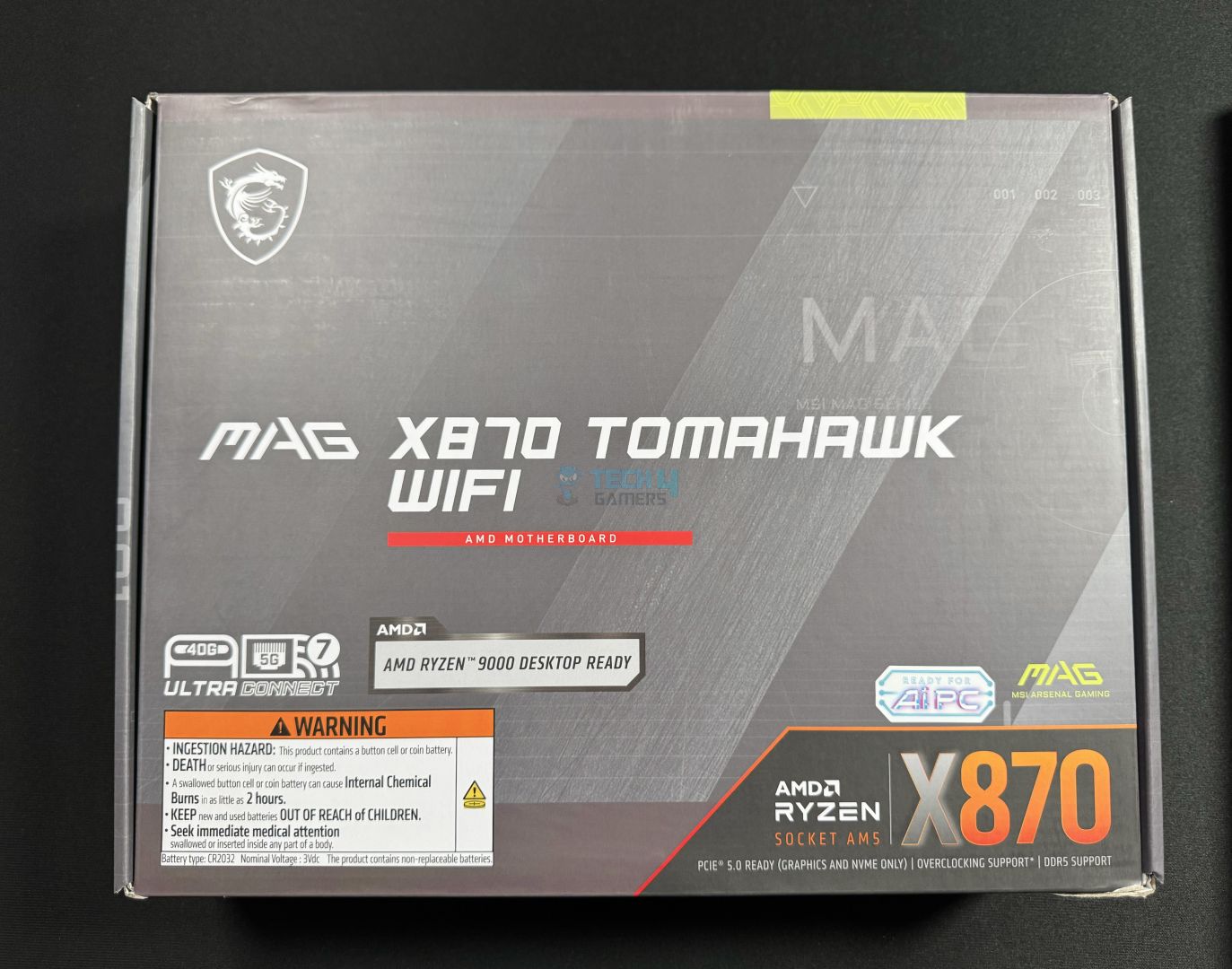
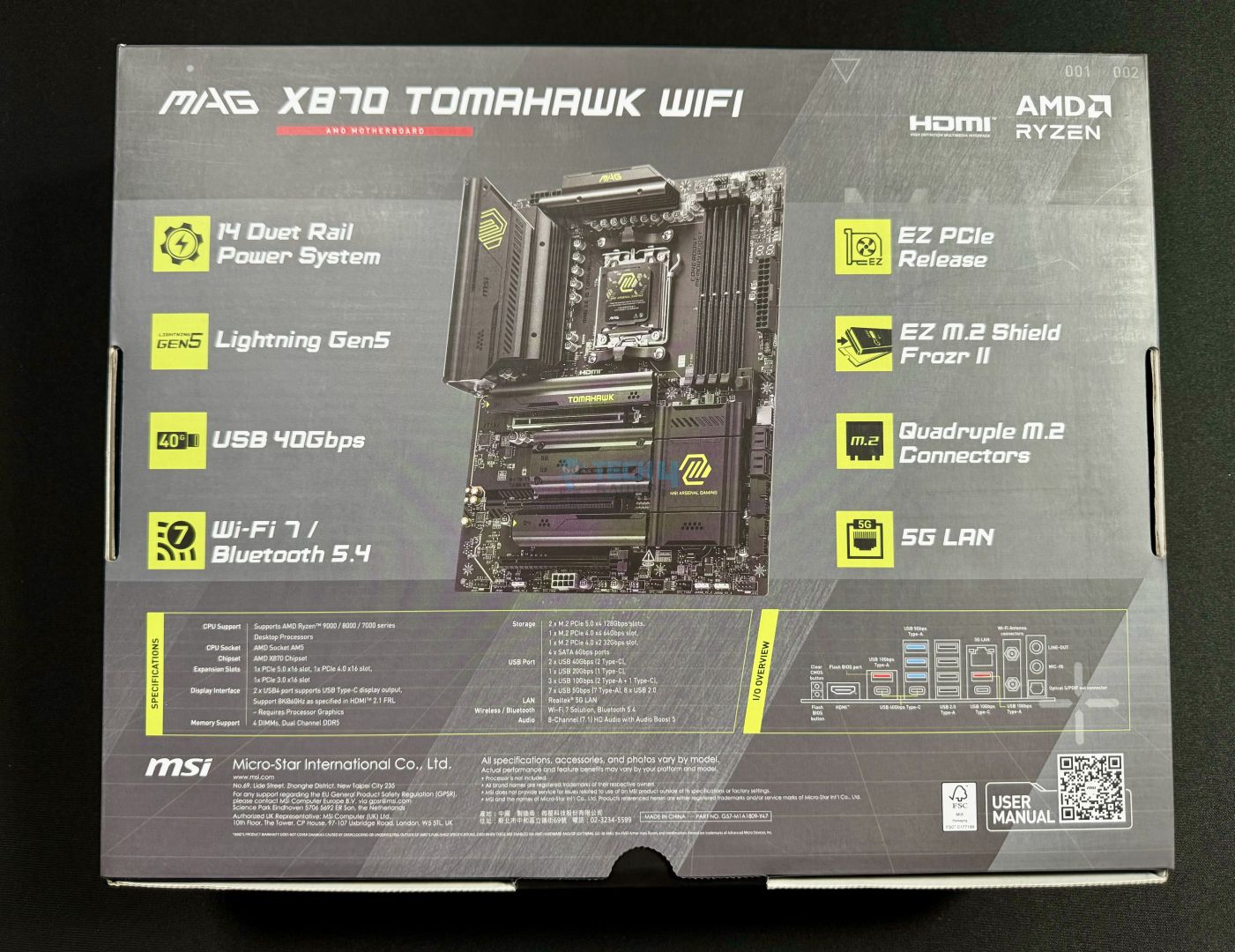
The motherboard comes packed in a mostly grey cardboard box. This packaging is similar to the one we saw on the MSI MPG X870E Carbon WiFi.
Box front
Box rear
Again, up front, USB4, WiFi 7, and Ryzen 9000 series support is highlighted, and there’s a warning against ingestion of the motherboard battery. On the rear, we have the key features/specs highlighted, along with the detailed specs and a labeled rear I/O picture. A QR code can be scanned to open the motherboard’s manual.
Box contents (Image by Tech4Gamers)
Inside the box, we get:
Quick installation guide
EU Regulatory notice
Shout-out Flyer
Cable Sticker
2x SATA Cables
EZ M.2 Clip II
EZ M.2 Clip II Remover
M.2 Plate Screw
USB Drive (containing software/utilities)
EZ Wi-Fi Antenna
1-to-3 EZ Conn-Cable (V2)
EZ Front Panel Cable
We get the 1-to-3 EZ conn cable V2 that we saw in the MSI MPG X870 Carbon WiFi. This is an 11-pin connector that combines a system fan, 12V ARGB headers, and a front USB 2.0 header. It connects to the JAF_2 connector on the motherboard and makes cable management a little easier. The EZ front panel cable allows us to plug all those pesky little connectors outside the case.
The board features some more convenient “EZ-DIY” mechanisms, as MSI is focusing on convenience with these X870(E) chipset boards. We’ll look at all the features now.
Design
Aerial view of the board (Image by Tech4Gamers)
The MAG X870 Tomahawk WiFi shows an all-black PCB with 8 layers using 2oz thickened copper. This PCB, in particular, is server-grade IT-170. The motherboard features Transient Voltage Suppressors (TVS) to protect your components against voltage spikes, and overcurrent protection (OCP).
The heatsinks are matte black but have yellow-green logos to add a touch of distinction. A stripe of the same color runs across the lower-left corner of the board. There is no room for RGB here, but as usual, there are enough RGB connectors to power your RGB fans or strips.
Block diagram
As a reminder, the X870 chipset consists of a single Promontory 21 chip, so I/O is limited compared to X870E. The CPU gives rise to DDR5 memory support, PCIe 5.0 x16 for the GPU, the PCIe Gen 5 x4 M.2 slot, and USB4 ports (ASMedia ASM4242 controller). It also supports 4x rear USB 2.0 Type-A ports, along with two USB 10Gbps ports (Type-C and Type-A). Lastly, it supports the HDMI 2.1 display standard, capable of up to 8K60Hz.
The chipset provides the WiFi 7, LAN, SATA ports, and audio. It also includes some more USB ports, including a 20Gbps Type-C up front, a PCIe Gen 4 M.2 slot, and the secondary expansion slots.
Power Delivery Solution
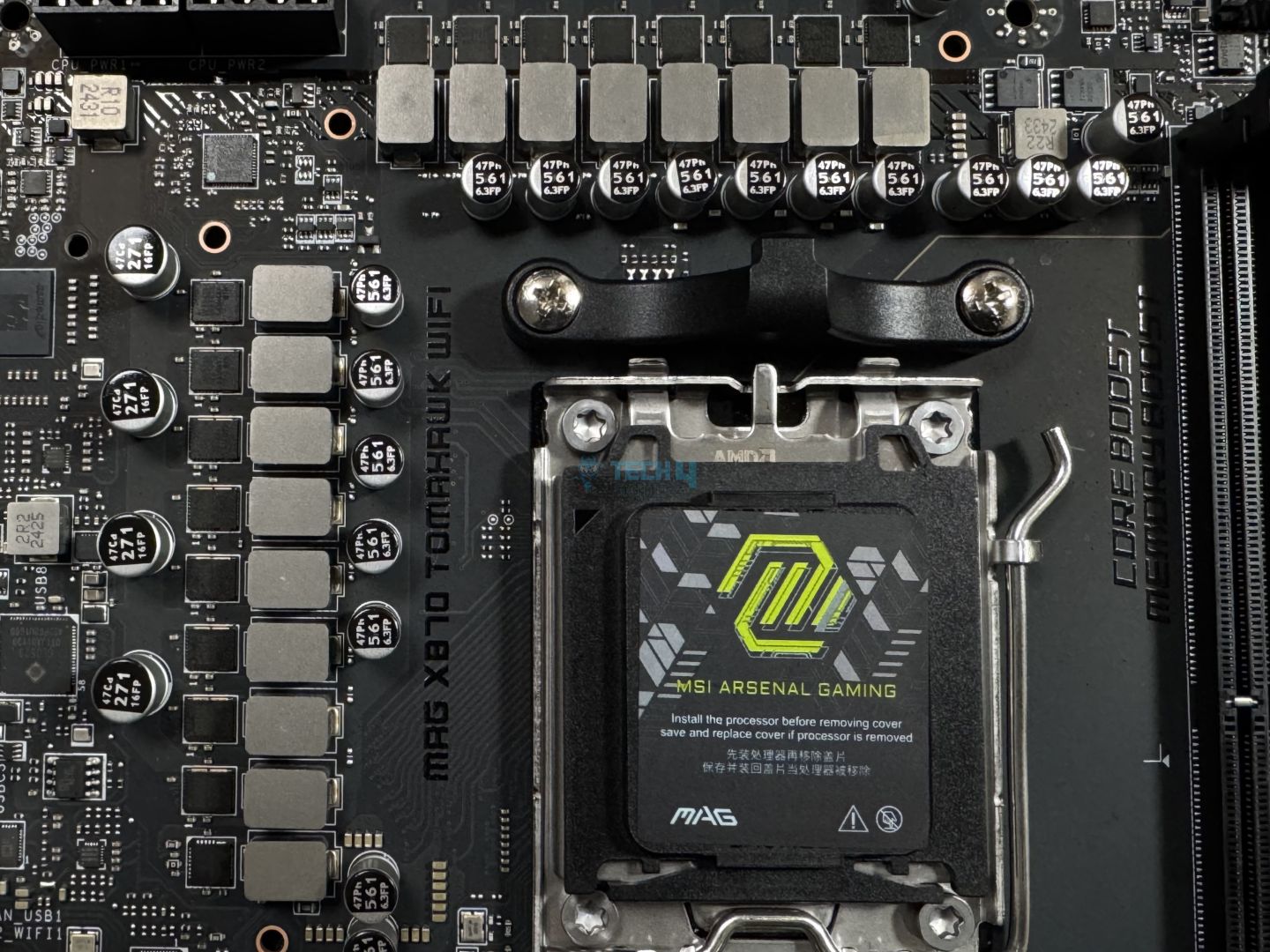
The AM5 socket (Image by Tech4Gamers)
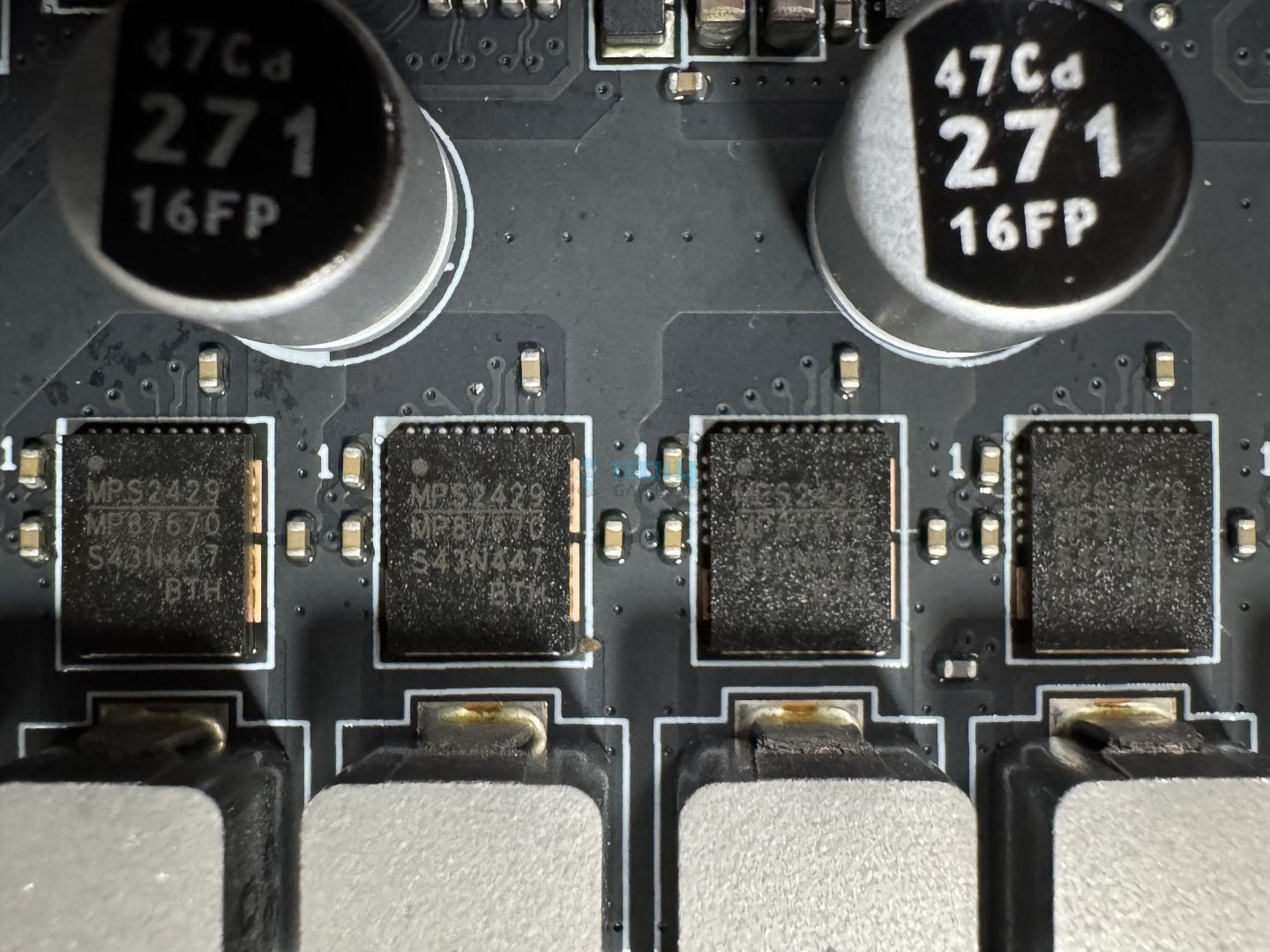
The MAG X870 Tomahawk WiFi boasts a 14+2+1 (VCore+SoC+Misc) power phase design. This includes 80A (MPS 2429 / MP87670) Smart Power Stages for the VCore. The controller appears to be MPS2402. We have 2x and 1x direct stages for SOC and Misc, respectively, and these are also 80A. The capacitors being used for the VRMs store up to 560µF and are rated for up to 6.3V.
MSI MAG X870 Tomahawk WiFi VRMs (Image By Tech4Gamers)
Close-up of the power design
In total, 960A is available for the CPU, enough for any Ryzen 9000 CPU you may want to throw at it. This is virtually the same setup as the MAG X670E Tomahawk WiFi. MSI’s “Core Boost” design for the power phases enables the best power delivery to the CPU, especially in overclocking scenarios.
Around the VRMs, we can see 4x copper rings to suppress the electromagnetic interference created by them. This happens during the switching of high-side and low-side MOSFETs inside the SPS, and the copper rings have grounding properties to reduce interference.
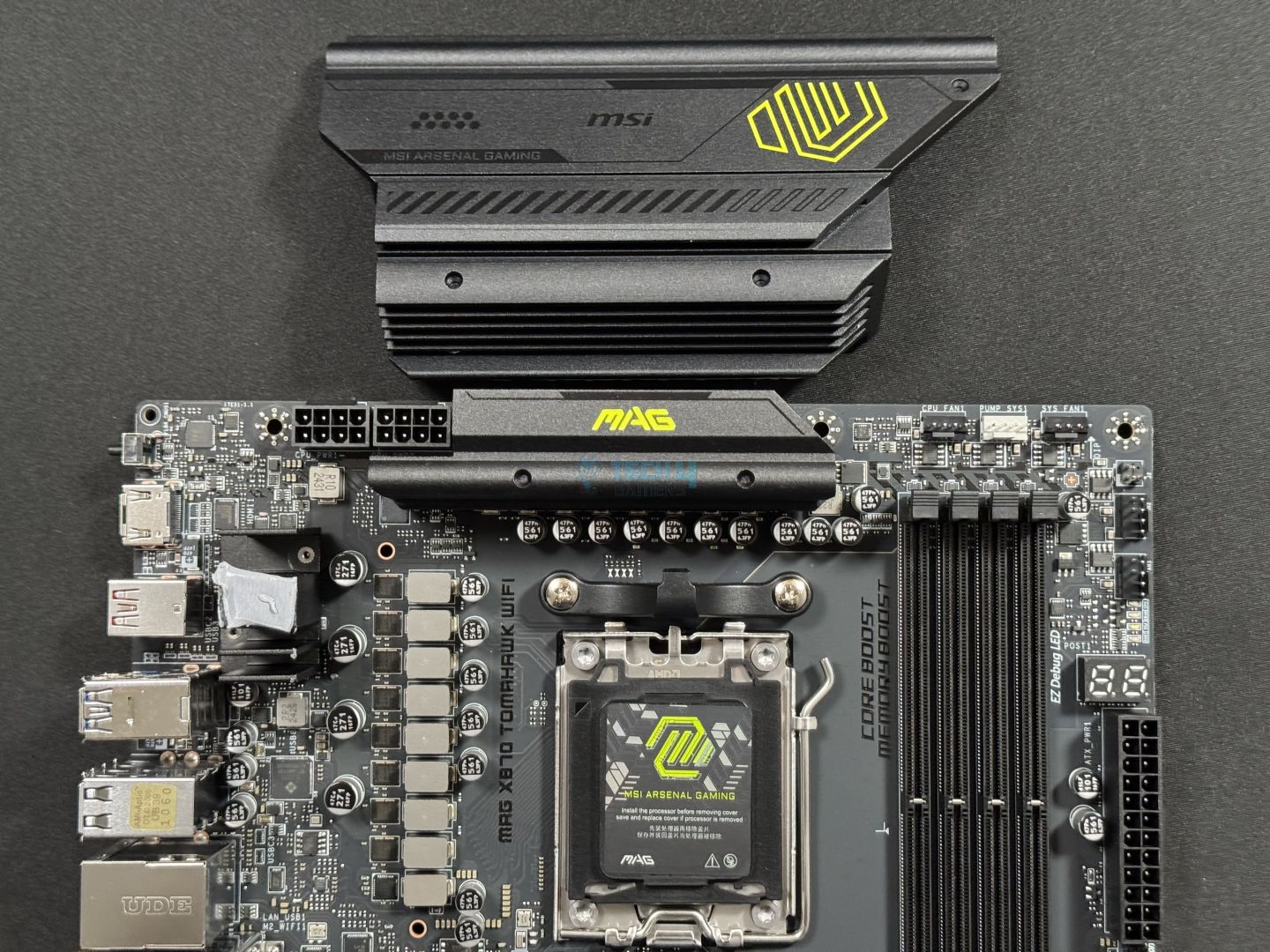
The power is supplied to the CPU through the dual 8-pin EPS connectors. Thankfully, the placement of the connectors was just right so that I could connect them without getting my fingers in an uncomfortable position.
VRM heatsinks – Stacked-fin design
Backside of heatsinks
The power phases are cooled by an extended heatsink with a stacked fin design., with 6x fins on the primary heatsink and 4x on the upper one. There is no heat pipe connecting the two heatsinks. We get thermal pads for the MOSFETs (7W/mK) and the chokes (presumably 5W/mK).
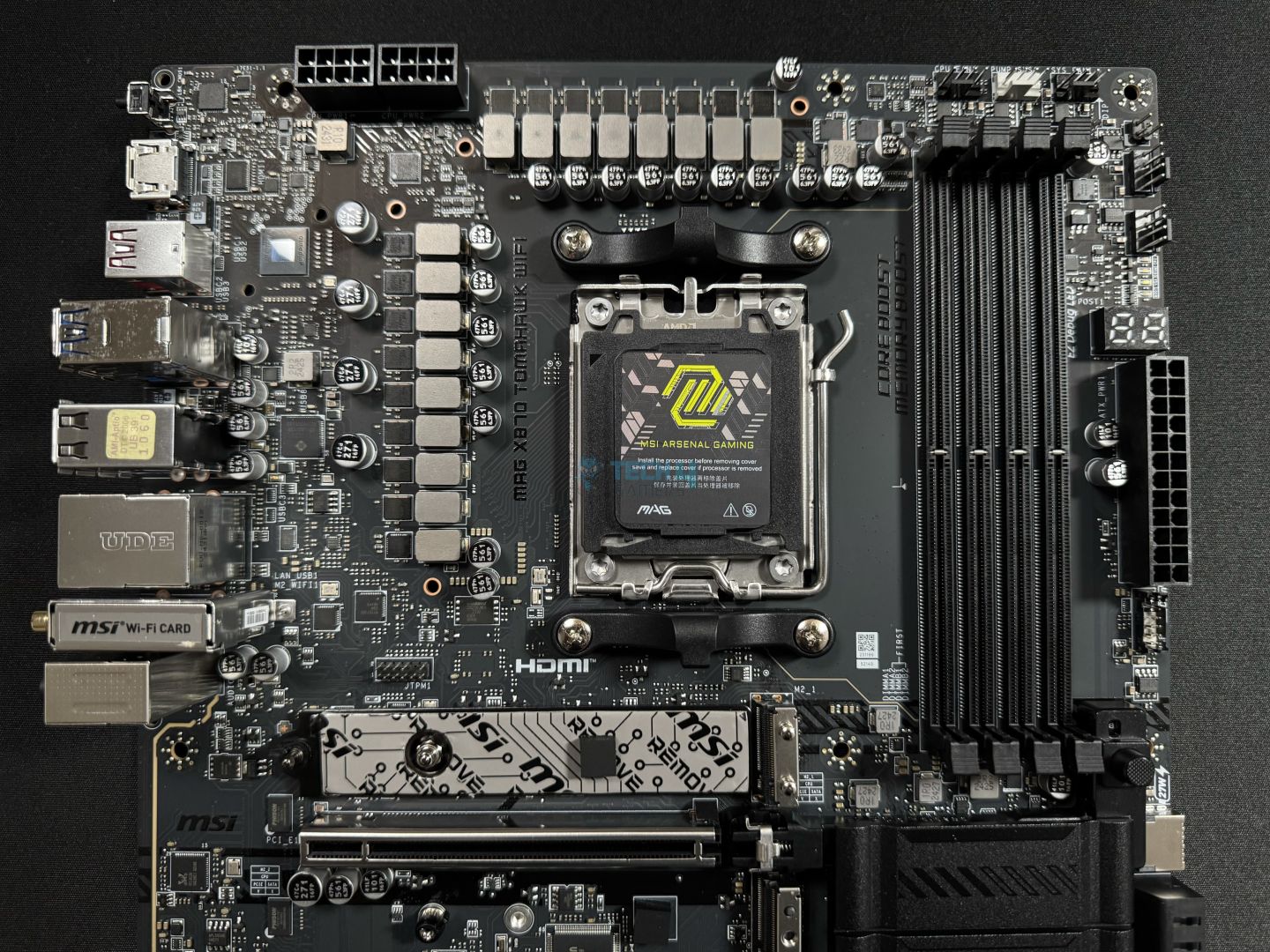
Upper side of the board (Image by Tech4Gamers)
Aesthetically, the heatsinks don’t really stand out, but they do the job. The primary heatsink has a few patterns on it, and of course, the “MAG” print is bright yellow-green. We also get this branding in letters on the secondary heatsink.
DIMM Slots
DIMM slots (Image by Tech4Gamers)
For memory, there are 4x DIMM slots capable of supporting up to 256GB. The DIMM slots are surface-mounted (SMT) for ideal durability and signal strength. As for speeds, the board supports an impressive DDR5-8400+ (OC) at 1 DIMM per channel with single-rank memory.
This is only the second motherboard we’re testing that supports this standard, but unfortunately, it only has the clock driver disabled. The included clock driver is what distinguishes CUDIMM from other standards, as it regenerates the clock signal for better signal integrity. Without it, the CUDIMM support virtually runs as a UDIMM.
Maximum memory speed support at different configurations is:
1DPC 1R = 8400+ MT/s
1DPC 2R = 6400+ MT/s
2DPC 1R = 6400+ MT/s
2DPC 2R = 4800+ MT/s
While this is one of the few X870 motherboards so far pushing past DDR5-8000 support, there is little advantage in running such speeds due to CPU limitations:
Ryzen 9000 memory to controller clock ratios at different speeds (Image Credits: TechPowerUp)
In a best-case scenario, the Ryzen 9000 memory controller can sync with the memory at a maximum frequency of 3200 MHz (6400 MT/s). Beyond that, the controller switches to half (1:2) the frequency of the memory, introducing significant latency. So, running high-speed memory, such as DDR5-8000 or faster modules, won’t benefit you performance-wise. Not to mention, such modules are significantly costlier than DDR5-6000 or DDR5-6400 kits.
Storage
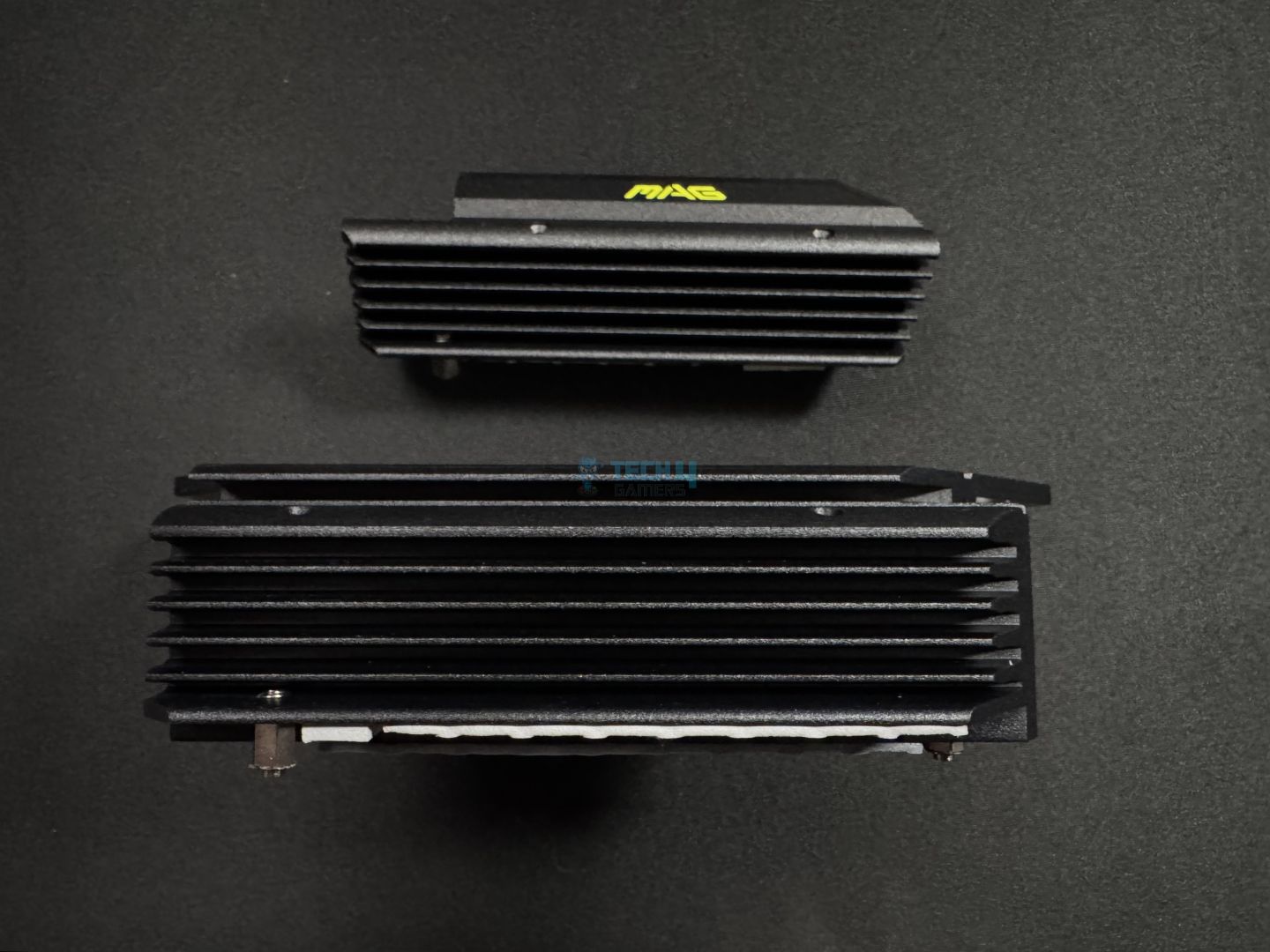
M.2 heatsinks (Image by Tech4Gamers)
The motherboard has room for up to 4x M.2 drives, equal parts PCIe Gen 5 and Gen 4. M.2_2, M.2_3, and M.2_4 supports 2280/2260 devices, while the primary slot supports either 22110/2280 drives. These devices can run RAID 0, 5, or 10.
The M2_2 slot shares PCIe 5.0 x4 bandwidth with the rear USB Type-C 40Gbps ports, so if both are occupied, they’ll operate at x2. You can run either at full speed if you don’t need the other. The sharing of bandwidth between the PCI_E3 slot and M2_3 slots creates more mess —the former will run at x2 when the former is occupied.
These shared bandwidth scenarios shouldn’t bother most users, as most users won’t be running 2x Gen 5 drives. Similarly, most users only need one PCIe slot, and that’s for the GPU. However, it can create unnecessary confusion for inexperienced PC builders.
For your SATA drives, the motherboard has room for up to 4x SATA 6Gbps drives coming from the ASMedia ASM1064 controller. Thankfully, these will operate as expected even if you occupy the PCIe Gen 3 x1 slot!
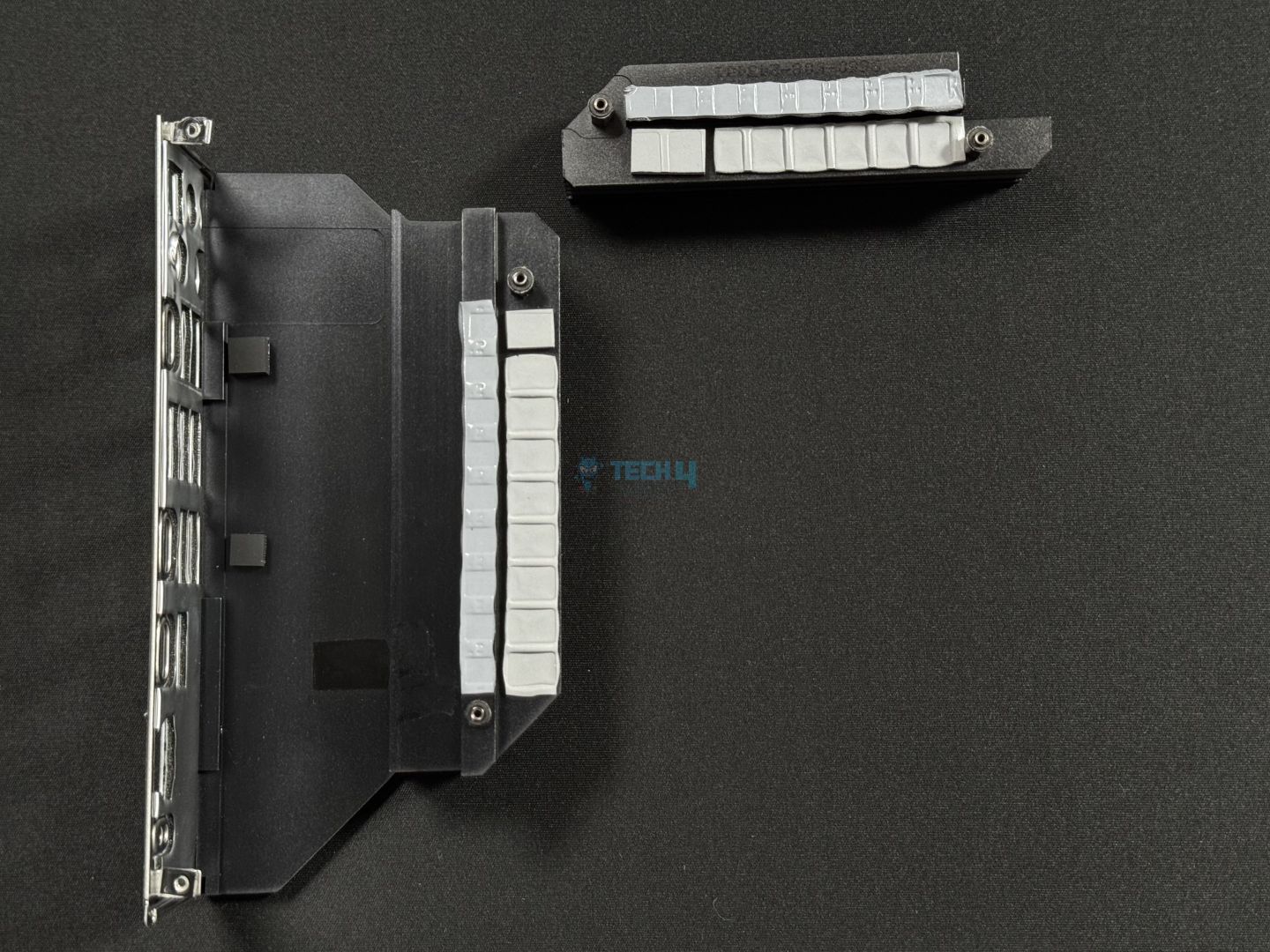
SSD heatsinks removed (Image by Tech4Gamers)
Interestingly, only the M.2_1 (Gen 5) slot features double-sided thermal pads. Also, the primary heatsink has two layers and is taller than the remaining two. The other Gen 5 slot, which shares its heatsink with one of the Gen 4 slots, does not feature thermal pads at the base.
WARNING: Remove stickers from the thermal pads on the M.2 slots you’re planning to use.
Again, we have to sing praise to MSI for the EZ-DIY mechanism for handling the heatsinks and installing the drives. The primary and the bottom-most heatsink, the EZ M.2 Shield Frozr II, features a screwless mechanism, requiring a gentle horizontal push for removal. Meanwhile, the central heatsink (cooling M.2_2, M.2_3) uses screws.
Moving on, all the M.2 slots use M.2 EZ clips, but slots 2, 3, and 4, have an older latch mechanism. The primary slot uses M.2 Clip II, which does not involve latches, making things even easier. However, even with the other slots, it shouldn’t take more than a few seconds to install your drive(s).
You can also use the included M.2 Clip II remover to remove and install the clip to another slot.
PCIe Slots
A look at the M.2 slots/PCIe slots (Image by Tech4Gamers)
There are four expansion slots on the board, and while all of them have 16 lanes, only the primary slot utilizes all these lanes. We have a PCIe Gen 5 x16 slot, plus PCIe 4.0 x4 and PCIe 3.0 x1 slots.
EZ PCIe release button (Image by Tech4Gamers)
The Gen 5 slot features an EZ PCIe release button, an incredibly convenient mechanism that requires only a gentle press to release your GPU. After seating a new GPU in the slot, you just have to press the same button to lock it in place. The padlock signs on the board will tell you whether the lock is in place or not.
This slot is also surface-mounted and uses MSI’s Steel Armor technology, which, according to MSI, improves weight endurance by 21%.
USB Connectivity
The motherboard has a total of 21 USB ports, including:
4x USB 2.0 (Rear)
4x USB 2.0 (Front)
3x USB 5Gbps Type A (Rear)
4x USB 5Gbps Type A (Front)
2x USB 10Gbps Type A (Rear)
1x USB 10Gbps Type C (Rear)
1x USB 20Gbps Type C (Front)
2x USB 40Gbps Type C (Rear)
Note again that the USB4 slots will operate at half the speeds if the M.2_2 slot is occupied. Among the controllers providing these USB slots are GL3523 (which provides both the rear and front USB 5Gbps ports) and GL850 (which powers the USB 2.0 ports on the rear).
We’ll look at the rear USB ports in a bit.
Network and Connectivity
Realtek RTL8126 controller (Image by Tech4Gamers)
The board features WiFi 7, 5G LAN (Realtek 8126-CG), and Bluetooth 5.4 to keep you connected. MSI’s AI LAN Manager is a handy utility that I enjoyed using. It allows you to prioritize latency-sensitive applications (like multiplayer games) to ensure the lowest latency experience. You can customize traffic priority and bandwidth for each application.
WiFi 7 and Bluetooth 5.4 require Windows 11 Build 24H2.
Audio Solution
Realtek ALC4080 codec (Image by Tech4Gamers)
The motherboard uses Realtek’s ALC4080 codec, a solution we’ve seen in many mid-range boards. This is part of MSI’s “Audio Boost 5” setup, which also includes “high-quality” capacitors, a dedicated headphones amplifier, and de-pop protection. The left and right audio channels are isolated for a clean signal.
MSI’s Isolated Analogy Structure “separates the external audio metal framework from the internal to ensure ‘crisp audio quality.'”
Internal Connectors And Components
Connectors, top-right (Image by Tech4Gamers)
Here are all the connectors found on the board:
1x Power Connector(ATX_PWR)
2x Power Connector(CPU_PWR)
1x Power Connector(PCIE_PWR 8pin)
1x CPU Fan
1x Combo Fan (Pump_Sys Fan)
6x System Fan
1x EZ Conn-header (JAF_2)
2x Front Panel (JFP)
1x Chassis Intrusion (JCI)
1x Front Audio (JAUD)
3x Addressable V2 RGB LED connector (JARGB_V2)
1x RGB LED connector (JRGB)
1x TPM pin header(Support TPM 2.0)
4x USB 2.0 ports
4x USB 5Gbps Type A ports
1x USB 20Gbps Type C ports
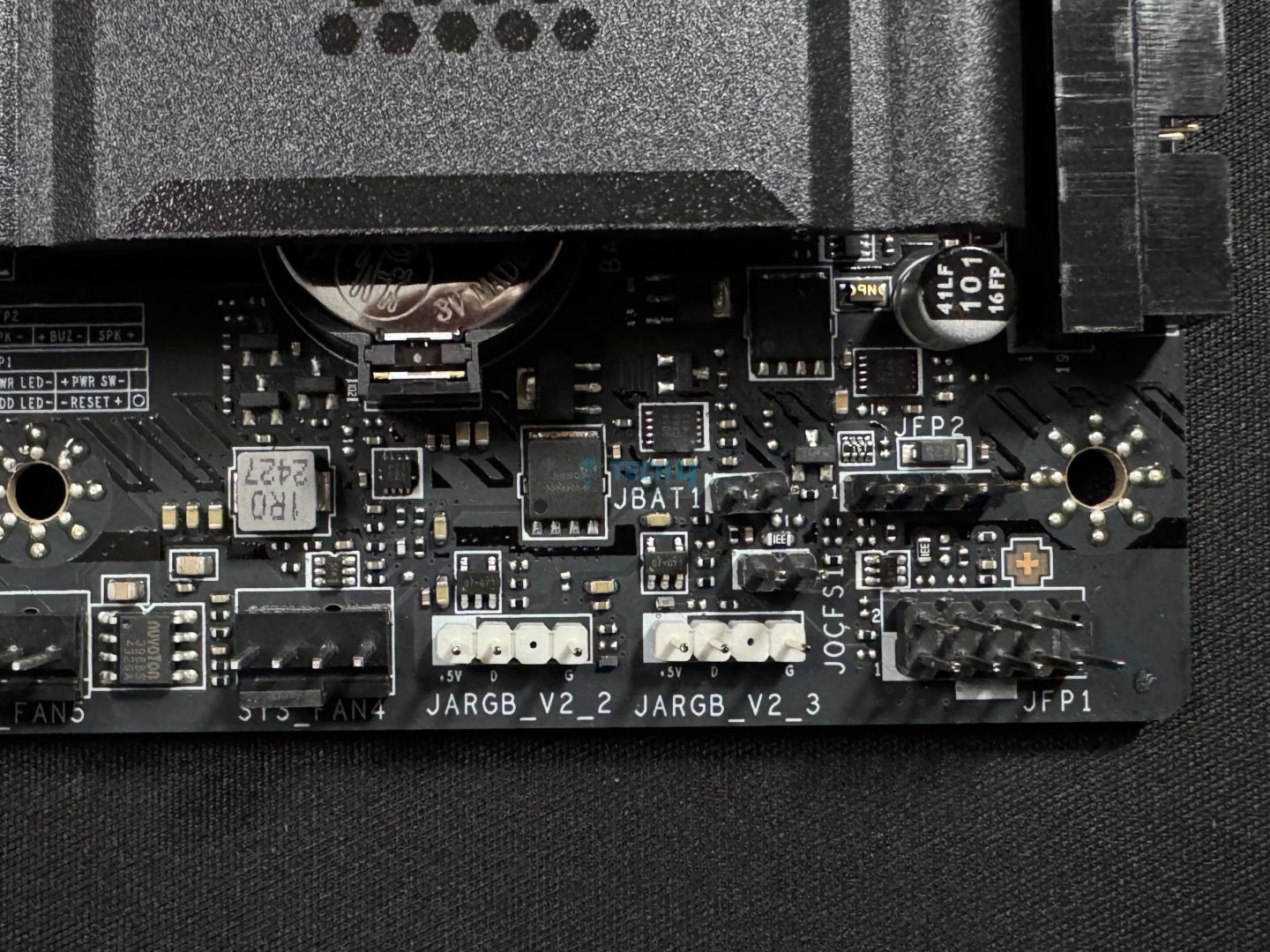
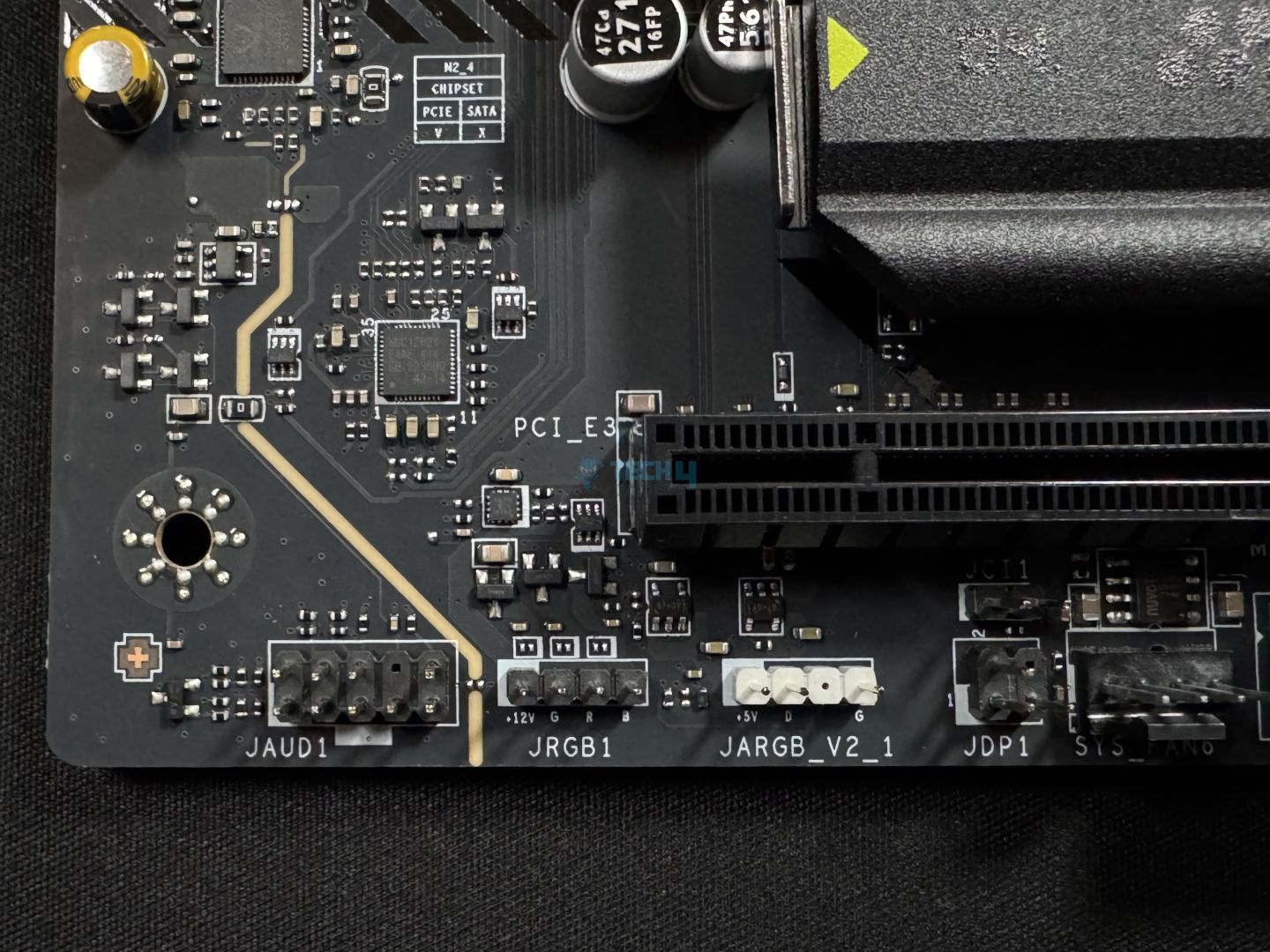
Fan/RGB connectors – Bottom right
Bottom left connectors
The first thing to note is the extra 8-pin PCIe power connector. MSI unofficially confirmed that this is intended to give power-hungry “next-gen” cards with enough juice, adding up to 2.5x to the 75W output of PCIe slots. According to the latest CEM specification (5.1), this should be able to increase the PCIe slot’s 75W output, but only for limited periods–this is a so-called power excursion. It should also allow you to power a second GPU.
This connector also increases the output available to the fan connectors (11A/132W) and RGB (3A/36W).
The front USB 20Gbps Type-C port supports 27W charging for your devices. You can also monitor the output power, voltage, and current in real time.
Super I/O chip (Image by Tech4Gamers)
The Nuvoton NCT6687D-R controller is used as a Super I/O chip on this board. It provides fan, voltage, and temperature monitoring.
Debug LED panel (Image by Tech4Gamers)
Here, we can see the EZ debug LED panel and the four LEDs above it for troubleshooting booting issues. The 24-pin ATX power connector lies below it. By the way, the 24-pin ATX connector, CPU EPS connectors, and this 8-pin PCIe connector all use solid pins. MSI claims that this allows a more stable power supply and that these connectors are more durable.
Rear I/O
Here’s what we get on the rear I/O panel:
Rear I/O (Image by Tech4Gamers)
Clear CMOS Button
USB 40Gbps Type-C
USB 10Gbps Type-C
2x USB 10Gbps Type-A
USB 5Gbps Type-A
USB 2.0
5G LAN
Wi-Fi / Bluetooth
Audio connectors
Flash BIOS Button
HDMI 2.1 port
The I/O shield has a stainless steel frame and comes pre-installed. It was nice to see a clear CMOS button and the BIOS flashback button. Another thing we liked is that the USB ports are labelled with their speeds rather than the name (such as USB 3.2 Gen 2), so there’ll be no confusion in that department.
The shield is dark grey, and we see the MAG branding again. We already spoke on the I/O panel cover, so now, let’s look at the board with the cover removed.
VRM heatsink atop the motherboard
Naked motherboard
We can spot the USB4 controller (ASM4242), and there’s no dedicated heatsink for it. This means that MSI has left that task to the VRM heatsinks.
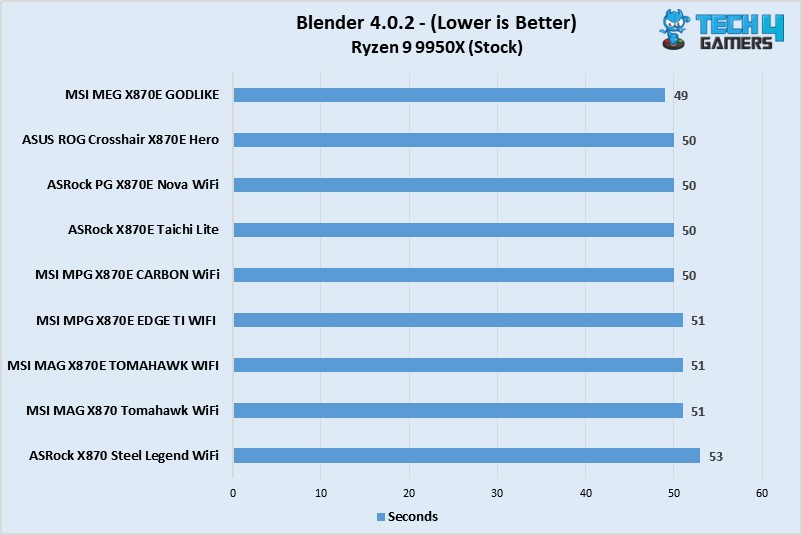
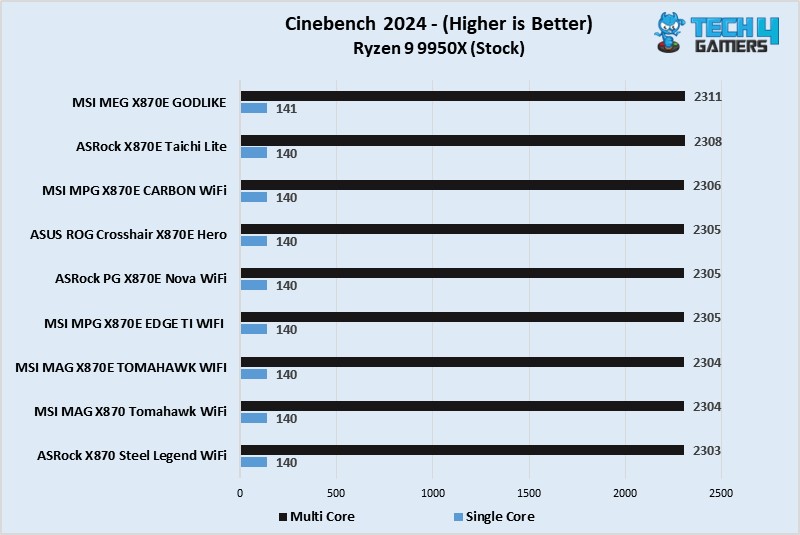
Test Bench
The board looks excellent on paper, so let’s put it to the test now.
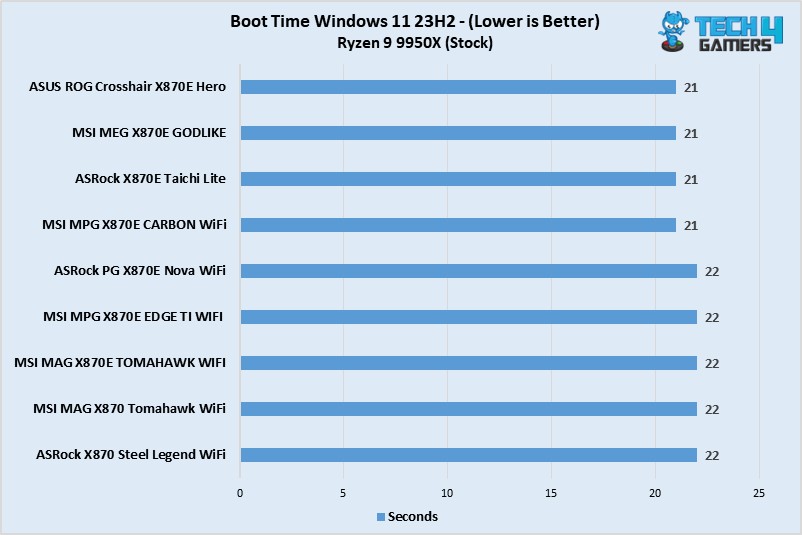
Both the Tomahawk boards showed boot times of 22 seconds.
Power Consumption and Thermals
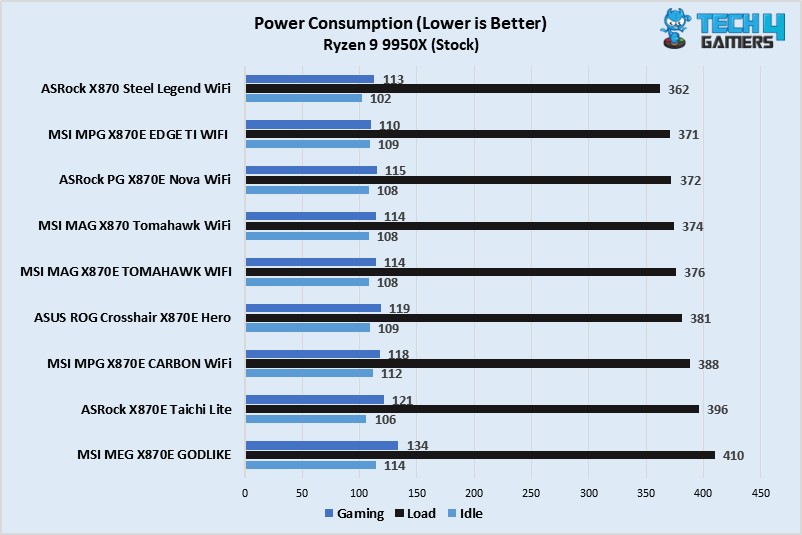
Power Consumption (Image By Tech4Gamers)
The MSI MAG X870 Tomahawk CPU/motherboard combo drew medium power, with 374W at full load, 114W during gaming, and 108W at idle.
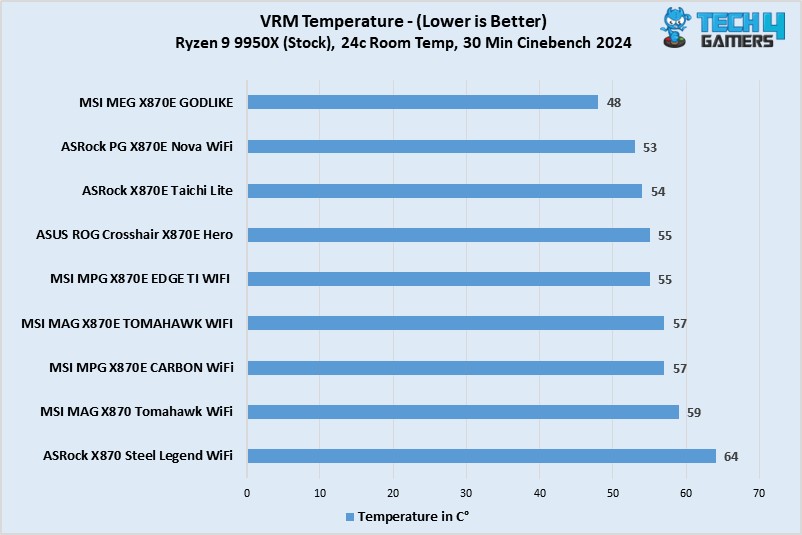
VRM Temp (Image By Tech4Gamers)
Great numbers produced by the board! It beats the X870 Steel Legend WiFi, which has a similar setup by 5°C.
Should You Buy It?
We’ve reviewed and tested the board. Let’s break down whether or not this board will be the right fit for your build.
Buy It If:
✅You have excessive USB connectivity needs: With up to 21 USB ports, the MSI MAG X870 Tomahawk WiFi should have all your USB-related needs covered.
✅Convenience is important: The motherboard is a breeze to work with, thanks to countless “EZ-DIY” mechanisms, such as EZ PCIe release, EZ M.2 Shield Frozr II, EZ M.2 Clip (II), EZ Conn-Design, and more.
Don’t Buy It If:
❌You don’t need the latest I/O: If you don’t need WiFi 7 and USB4, go for a B650E board and save up to $100 or more.
❌You need built-in RGB: There’s no on-board RGB on the MAG X870 Tomahawk WiFi.
My Thoughts
The MSI MAG X870 Tomahawk WiFi is a $299 motherboard, which places it in the upper segment of X870 chipset boards. It offers good performance, a handy set of features, and the compulsory USB4 and Gen 5 connectivity of the chipset.
Its performance is up to the mark, with a VRM setup (14+2+1 80A phases) capable of handling any Ryzen 9000 CPU, even with mild overclocking. VRM cooling was satisfactory in our testing, too, keeping the setup under 60C.
In the aesthetics department, the motherboard has a plain, RGB-free design. It is a mostly black design but with yellow-green accents on the heatsinks to highlight the MAG Tomahawk branding. You’ll have to rely on external devices/fans for RGB, and there’s plenty of room for that.
The board offers DDR5 support up to DDR5-8400+ (OC), with room for up to 256GB across the four channels. The memory support is great, but you don’t need all that expensive memory as DDR5-6400 is the sweet spot for Ryzen 9000. CUDIMM support is a highlight, but it’s only supported with clock driver bypass, essentially making it a standard UDIMM.
You get 4x SATA ports and an equal amount of M.2 ports for storage (2x Gen 5, 2x Gen 4). EZ M.2 Shield Frozr II facilitates an incredibly convenient removal mechanism for the top and bottom heatsinks. While the latch mechanism of the remaining ports is not troublesome to work with, the primary slot’s EZ Clip II mechanism is even better. The Gen 5 M2_2 slot shares bandwidth with the USB4 ports, which may limit your connectivity.
For expansion, there are 3x PCIe x16 slots (Gen 5 x16, Gen 3 x1, Gen x4–top to bottom). The primary Gen 5 slot is MSI Steel Armor II, which is enforced for enhanced durability and features an EZ PCIe release mechanism. Another bandwidth-sharing complication arises here, as PCI_E3 and M2_3 share bandwidth. You can either share bandwidth between them or only run one at full speed.
There are 21 USB ports on offer, including 2x 40Gbps ports (but again, these share bandwidth with M2_2). The USB 10Gbps up front enables 27W power delivery, and the labeling of the USB port speeds on the rear was nice to see. The board features 5G LAN, WiFi 7, and Bluetooth 5.4 for wireless connectivity. Its audio solution is the mid-range ALC4080.
Overall, the board’s wealth of convenient features makes life easy. This is something anyone, from PC-building newbies to novices, should appreciate. It performs well in all departments, but our complaints involve the somewhat bland aesthetics, I/O bandwidth-sharing complications, and its $299 price tag.
The board is backed by a 3-year warranty. We thank MSI for sending us this model for review!
At Tech4Gamers, I contribute as a Senior News Reporter, combining my skills and gaming enthusiasm to keep our audience updated on the latest developments.
Story Highlight
Elden Ring could be one of the first third-party ports released for the Nintendo Switch 2.
Reports suggest this port is being handled by the team behind Dark Souls Remastered.
An official look at the new hardware could also be coming next week.
The Nintendo Switch 2 has been an open secret for more than a year at this point, but Nintendo has yet to break its silence.
As we head toward the end of 2024, the rumor mill around this next-gen hybrid console is still moving along swiftly, revealing one potential launch title for the system. According to two major insiders, an Elden Ring port is currently being worked on.
Why it matters: Both Elden Ring and its DLC are among the industry’s highest-rated releases. As such, they would be incredible additions to the hardware’s year-one lineup.
Nash Weedle Shares New Details On The Nintendo Switch 2 | Image via Twitter
According to popular leaker Nash Weedle, Elden Ring Definitive Edition will be available on the Nintendo Switch 2 next year. Virtuos is said to be working on the project after previously porting Dark Souls to the platform.
As per recent rumors, the hardware will launch in the first half of 2025. Therefore, Elden Ring may not be immediately available for fans next year, but it could be among the list of the first few major third-party releases.
The fact that Nash Weedle used the term “Definitive Edition” also implies that Shadow of the Erdtree, Elden Ring’s excruciatingly challenging DLC, will be ported alongside the base game.
Moreover, Necro Felipe, another insider, suggested that he had heard similar reports a while back.
Nintendo’s Next Console Could Be Revealed Any Day Now | Image via Tech4Gamers
For the unaware, Elden Ring is already playable on a plethora of handhelds, with the Steam Deck offering the best on-the-go experience. While the Nintendo Switch 2 is expected to be less capable than the Steam Deck, a dedicated port for this system should compensate for the difference in raw hardware capabilities.
The Nintendo Switch 2 is expected to be officially unveiled before the end of 2024. New rumors suggest that a reveal is coming as early as next week, potentially setting the stage for announcements of third-party ports like Elden Ring in the coming months.
What are your thoughts on these reports? Would you buy the game on this system? Let us know in the comments, and join the discussion on the Tech4Gamers Forums.
Currently serving as a News Reporter at Tech4Gamers, I have the privilege of combining my love for gaming with the art of storytelling. My role involves crafting engaging narratives that keep our audience abreast of the latest developments in the gaming world.
Story Highlight
Regional locking in the video game world restricted content to specific regions, limiting availability across different areas.
Initially designed to control distribution, regional locks were influenced by factors such as television standards and economic conditions.
While digital media helped lessen the issue, some regional restrictions still persist, particularly with DLC and games tied to PSN requirements, frustrating modern gamers.
Regional locking was a huge factor in the video game world in the past, specifically in the era of CDs and DVDs. Regional locking restricts content to a specific region, so it can’t be used outside of that vicinity.
It was more or less a way for publishers to control their content distribution worldwide, whether it was video games or consoles. In a way, it was also gatekeeping good content from spreading, but the actual intention was way deeper than that.
Regional locking was an issue that we were far beyond despite its prevalence in some form, but unfortunately, that issue is coming back to haunt us.
Why It Matters: In an era where almost everything is digital and equally available worldwide, regional locking shouldn’t exist. It is publishers’ self-sabotaging and only promotes piracy and unethical workarounds.
A Brief History
Nintendo’s NES was regionally locked through both physical and software means
To put things easier, everything wasn’t universal in the early digital days. In the 1990s, there were different television standards, such as NTSC, PAL, and SECAM, each having its own attributes and not being compatible.
Hence, every console had to be specifically manufactured according to those standards so that it would run in that region. Each disc was also encoded differently to match the specific frequency rate of that Television within that region.
This was also to comply with each region’s laws and regulations. It is also important to consider that video games weren’t released simultaneously in all regions in the earlier days.
Another major factor was the pricing of different video games. Due to economic conditions in some regions, the price of a video game may be lower than in a region with better economic conditions. Publishers didn’t want buyers to get games cheaper since that would hurt their sales, so they had to region-lock those games.
Aside from software-based regional locking, some consoles had physical locks on them, preventing even a different region’s disc or cartridge. Cartridges were differently shaped in terms of pins for different regions or had different sizing depending on each console.
Shift To Digital Media Was The Decline Of Regional Locking
Steam Digital Library
The shift to digital media began with the Xbox 360 and PlayStation 3. The PlayStation 3 was mostly regionally free, with the exception of movies and backwards-compatible discs. The Xbox 360, on the other hand, was still regionally locked.
Thankfully, this issue completely vanished in the later console generations. However, regional locking still exists to some extent. DLCs are still regional locked to date, meaning you can’t buy a North American DLC on a Japanese video game copy.
This is due to different pricing, licensing, and cultural sensitivity, among other factors.
This Issue Is Coming To Haunt Us Again
PlayStation PC Ports Can’t Be Played In Non-PSN Supported Countries
Being a Sony first-party games fan and a PC gamer is a real struggle these days. You’ve probably heard of the mandatory PSN requirements for running their games on PC before. It’s an annoying requirement, but indirectly, region-locks games in certain regions.
This is largely due to the fact that PSN isn’t supported in many countries. This mandatory requirement means games like Marvel’s Spider-Man 2 can’t be played in regions without PSN support.
Other than that, games such as Dragon Ball: Sparking Zero are still completely unavailable in certain regions due to certain laws. That’s a legitimate case, and there are certain workarounds, but eventually, it means a loss of sales and is only hurtful for consumers.
Even the Xbox Game Pass has many games and content locked to a specific region.
I understand Dragon Ball: Sparking Zero’s case, but the mandatory PSN requirement is absurd, and Sony should remove it. It only hurts the game’s sales and reputation, which causes games like Helldivers 2 to lose player count significantly. Ultimately, this forces gamers to resort to piracy.
Lead the comparison and blog writing teams at Tech4Gamers.
Oversee teams with a keen eye for detail and precision.
Ensure hands-on writing, with benchmarks and testing as guiding principles.
Guarantee the delivery of the best possible results in concise yet impactful tech tales.
Pros And Cons
Chipset
Pros
Cons
X670 Chipset
✅ More PCIe lanes
✅ More USB Ports
❌ No USB4 support
❌ Requires BIOS update for Ryzen 9000
X870 Chipset
✅ USB4 support
✅ Better power monitoring
❌ Fewer USB ports
❌Fewer SATA and PCIe lanes
X870 Chipset
Rated: 7.1/10
X670 Chipset
Rated:8.2/10
Key Takeaways
The X670 has more PCIe lanes, USB ports, and SATA ports than the X870, making it more versatile for users needing more device connections.
The X870 supports USB4, offering better power monitoring, but it has fewer overall USB ports than the X670.
Both chipsets support overclocking and offer similar NVMe performance, with no significant advantage in this area for either chipset.
X670 is the better option overall, providing more connectivity and flexibility, while the X870’s benefits, such as USB4, don’t outweigh its limitations.
Some may worry that the Ryzen 9000 series didn’t launch with a supporting chipset, but now we have the X870, X870E, B850, and B840, which were made to work with the processors mentioned above. Let’s compare the high-end X870 to the X670 to see how far these new chipsets have come.
All of the new chipsets and the ones from last gen are compatible with AMD’s AM5 platform. This includes the Ryzen 9000 and 7000 series, which also includes the X3D flavors of these processors.
Ryzen 7 7800X3D (Image By Tech4Gamers)
It is important to note that the newer chipsets require no fiddling to get them working with either of the AM5 processors, but the older X670 boards need a firmware update to get everything up and running.
Configuration
The AMD chipsets comprise some chips that allow connectivity with the rest of your system. The X670 uses a chip called Promontory 21, with four lanes of PCIe Gen 4 connected to the processor and four additional lanes daisy-chained to another Promontory 21 chip, with the rest being used for connectivity.
However, the newer X870 uses only one of these Promontory 21 chips, which significantly decreases the number of ports. This can be a very big downgrade for people who need a lot of devices connected to their PC, even if that means slower speeds.
Overclocking
Virtually all of the AM5 chipsets have support for overclocking, except for the A-line and the ones that come directly from a prebuilt manufacturer (and the B840, which is a topic for another day).
ASRock X870 Steel Legend (Image By Tech4Gamers)
This means that you can theoretically overclock your CPU just as well on an X670 as you can with an X870. Memory overclocking is even more ubiquitous across AMD’s lineup, blurring the line between the usefulness of the X670 and the X870.
Connectivity
The following section will focus on the connectivity of these chipsets, including peripherals and PCIe accessories.
NVMe
Both chipsets have the same number of possible NVMe connections and lanes, with either one x16 or two x8 connections. Both chipsets use PCIe 5.0 under the hood for their NVMe connections.
Netac NV7000 2TB NVMe SSD (Image By Tech4Gamers)
USB
The X870 lacks USB connectivity because of the aforementioned lack of the additional PROM21 chip. It has support for up to one USB 5Gbps port, six USB 10Gbps ports, and only one USB 20Gbps port.
The use of the dual PROM21 chips on the X670 makes it support double the number of USB ports as its competition for this comparison. This includes up to two USB 5Gbps ports, 12 USB 10Gbps ports, and again two USB 20Gbps ports.
It is important to note that the USB ports on the X870 chipset boards will all be USB4 ports (which essentially translates to better power monitoring), while the X670 chipset does not come standard with USB4.
PCIe
PCIe Standards (Image By Premio Inc)
The newer X870 chipset has up to 36 total PCIe lanes configured, 24 of which are reserved for PCIe 5.0. The X670, however, has 44 PCIe lanes, only eight of which are configured as PCIe 5.0 lanes.
The higher number of lanes for the older chipset might be more handy, as very few devices can effectively use PCIe 5.0. This point is driven home by the fact that currently, no consumer graphics cards on the market require PCIe 5.0.
SATA
Though it is an older standard, many workflows need a high number of SATA ports to have usable backup storage drives with SATA SSDs or even very high-capacity mechanical hard drives.
SATA Connectors (Image By Tech4Gamers)
The newer chipset takes a loss in this regard as well, with up to four SATA ports, whereas the older X670 chipset has up to eight SATA ports.
Do note that these SATA ports could also be interchanged with PCIe 3.0 connections, so make sure which one your motherboard is configured with before investing.
Editor`s Note
After a certain point, motherboards start getting more expensive than the processors they were built for. CPUs are less prone to failure, which leads to there being a larger number of CPUs than motherboards for a given platform over time.
– Shehryar Khan
Price And Availability
CPU
Launch MSRP
Cheapest Price
X870 Chipset Motherboards
💲199 - 699
💲189
X670 Chipset Motherboards
💲199 - 699
💲184
Price Difference
0.00%
2.70%
Motherboards using these chipsets were debuted for about the same price range when both chipsets were launched, and you can find them for around the same price. Both the cheapest X670 and the cheapest X870 motherboards were sourced online on the new market.
You can get a better deal on the older X670 chipset motherboards if you decide to buy new.
Verdict
X870 Chipset: From a simple spec comparison of the X870 with its rival for this comparison, we can see that it is mostly inferior to its last-gen counterpart. For most people, the advantages of USB4 do not outweigh the drawbacks of having half the number of ports.
X670 Chipset: Using two PROM21 chips on this chipset is a considerable advantage over the X870, but you might have to face slight inconveniences with this chipset. You won’t get USB4, and you must update the BIOS to use the newer Ryzen 9000 processors.
Overall, we think the debate between the X870 and the X670 is mostly one-sided, with the X670 coming out as the clear winner.
FAQs
Are the Ryzen 9000 series processors compatible with the X670 motherboards?
Yes, the Ryzne 9000 series processors are compatible with the X670 motherboards, but they require a BIOS update to function.
What does USB4 improve on?
USB4 improves power delivery and reading, which most consumers rarely take advantage of.
What is the PROM21 chip?
Chipsets can contain more than one chip for connectivity purposes. PROM21 is the chip AMD uses with its Zen5 architecture for its X6xx and X8xx motherboards.
I intitally started by writing CPU comparisons and since then have written articles of all kinds, from Wikis and How-Tos to dedicated CPU reviews. Currently, I test and review CPUs, motherboards, and sometimes, RAM.
Pros And Cons
CPU
Pros
Cons
AMD X870 Chipset
✅ Affordable option
✅ PCIe 5.0 support
❌ Fewer ports
❌ Limited SATA
AMD X870E Chipset
✅ Superior connectivity
✅ More USB ports
❌ Higher price
X870 Chipset
Rated: 7.1/10
X870E Chipset
Rated:7.6/10
Key Takeaways
Thanks to its dual PROM21 chips, the X870E offers superior connectivity, with more PCIe lanes, USB ports, and SATA ports than the X870.
Both chipsets support overclocking and have the same PCIe 5.0 lanes for NVMe, with minimal differences in overclocking capabilities.
The X870E has better USB connectivity, including more ports and faster speeds, while the X870 provides fewer overall USB options.
The X870 is more budget-friendly, while the X870E is ideal for high-end users needing maximum connectivity and performance.
Two high-end AMD chipset models, the X870 and X870E, have been released in the past few weeks. Consumers might find it hard to pinpoint the differences between these two chipsets, especially because they share a name. Fret not, as the X870 vs X870E comparison will answer all your questions!
The X870 and X870E processors are from the same family tree, and they support the same processors. The list of processors supported includes the Ryzen 7000 series, the Ryzen 9000 series, and the few Ryzen 8000 series chips released between the two.
AMD Ryzen 9 9900X (Image By Tech4Gamers)
These chips are compatible with all variants of this family, including the ones with X at the end of the model number, the X3D chips, and the G variants for the Ryzen 8000 series. All AM5 chips work on these chipsets.
Configuration
Despite the similar naming of the two chipsets, the X870 and the X870E have quite a few differences.
Before discussing chipset configurations, it’s important to note that AMD’s Promontory 21 chips manage motherboard connectivity, linking the CPU to components like PCIe, USB, and SATA. These chips are often daisy-chained to expand connectivity, using some PCIe lanes from one chip to enable more connections.
MSI MAG X870E Carbon (Image By Tech4Gamers)
The X870 comes with one of these PROM21 chips, whereas the X870E has two connected, as mentioned above. This greatly increases the X870E’s connectivity while keeping the minor improvements that the X870 had over the last generation.
Overclocking
As with most of AMD’s lineup (except for the very low-end ones), these chipsets come standard with overclocking. This is especially great because of the overclocking support for AMD’s CPUs as well, meaning that almost all of the chipsets can take full advantage of almost all of the CPUs.
You can overclock a CPU just as well on an X870 as on an X670. Memory overclocking is also standard on almost all of these boards, making it hard to distinguish between the X870 and the X870E.
Connectivity
In the following few sections, we will talk about the connectivity of the X870 vs X870E to see which chipset is best for your needs.
Graphics
The X870 and the X870E support one sixteen-lane PCIe 5.0 connection. Manufacturers will also have the option to fit their motherboards with two eight-lane connections, which might be better for most work cases.
The PCIe 5.0 connection might help with things like capture cards, but currently, no consumer GPUs can take advantage of this technology.
NVMe And GPP
Both chipsets present one four-lane PCIe 5.0 connection for the NVMe devices you might want to attach to your system.
ASRock X870 Steel Legend WiFi M.2 slots (Image By Tech4Gamers)
PCIe GPP lanes are versatile chipset-managed for connecting peripherals like storage and expansion cards. Both chipsets offer four lanes of PCIe GPP.
PCIe
The X870E has 44 PCIe lanes, 24 of which are PCIe 5.0. As mentioned before, many products can’t use the ultra-fast speeds of PCIe 5.0 connections. Most of the things you hook up to these PCIe lanes will use the PCIe 4.0 or even earlier standards.
The X870 has the same number of 24 PCIe 5.0 lanes, whereas the total number of lanes is reduced to only 36 connections. This decrease isn’t too drastic and should meet most consumers’ need for PCIe connections.
USB
The biggest improvement between these chipsets and their predecessors is the addition of USB4 as a standard implementation, which was optional in the chipsets preceding this generation.
The X870E has two USB 5Gbps ports, twelve USB 10Gbps ports, and two USB 20Gbps ports. Please remember that these numbers are the maximum a manufacturer might configure their boards with, and you might find X870E boards with fewer USB ports.
ASRock X870 Steel Legend WiFi rear I/O. (Image By Tech4Gamers)
The X870, however, has only one USB 5Gbps port, one USB 20Gbps port, and six USB 10Gbps ports. This is because this chipset has a single PROM21 chip, whereas the X870E has two, as mentioned above.
SATA
SATA devices have been phased out in favor of newer NVMe devices, but they are still an important connection for workflows requiring more storage. This connector can be used for bulk storage by incorporating SATA SSDs, or many mechanical hard drives into your system.
The X870E chipset has eight SATA ports, whereas the X870 has only four. These ports can be exchanged for PCIe 3.0 connections.
Price And Availability
CPU
Launch MSRP
Cheapest Price
X870
💲199 - 599
💲189
X870E
💲299 - 699
💲319
Price Difference
16-50%
68%
Our research shows that the cheapest X870 we could find is very expensive compared with the cheapest X870E available. The X870E has a myriad of advantages over the X870, but it does come with a heftier price that some people might find hard to swallow.
Our Recommendation
X870 Chipset: Though not impressive, the X870 gets the job done at a relatively affordable price. Yes, it does not push the envelope forward, but it gives you most of what you need without draining your bank account.
X870E Chipset: The X870E chipset is the way to go for the power user. Its connectivity options are excellent, though not much better than the last generation. If you wish to get one of the latest AMD chipset motherboards for your high-end PC, the X870E is your best option.
After having discussed all the features of these motherboard chipsets, it is safe to say that the X870 is better suited for a more budget-focused build, whereas the X870E is for people who want to go all out.
FAQs
What is the first thing to look for in a motherboard?
After you ensure everything is compatible, the first thing to look for is the connectivity.
What does USB4 improve on?
USB4 improves power delivery and reading, which most consumers rarely take advantage of.
Do the X870 and the X870E support the same processors?
Yes, the X870 and the X870E support the same lineup of AMD AM5 processors.
At Tech4Gamers, I proudly wear the title of Comparisons Specialist. Focused on CPUs and GPUs, I bring forth a wealth of hands-on experience and a keen eye for detail to provide our audience with the latest insights and analyses.
Pros And Cons
CPU
Pros
Cons
AMD X670E Chipset
✅ Lower price
✅ Equal performance in overclocking
❌ Lacks guaranteed USB4 support
❌ No major improvements over X870E
AMD X870E Chipset
✅ USB4 standard on all boards
✅ Slightly better overclocking potential
❌ Significantly higher price
❌ Minor improvements
X870E Chipset
Rated: 6.3/10
X670E Chipset
Rated: 8.2/10
Key Takeaways
Both the X870E and X670E chipsets offer compatibility with all AM5 CPUs, including Ryzen 7000, 8000, and 9000 series processors.
Connectivity and configuration are nearly identical between the two chipsets, both featuring 44 PCIe lanes, USB4 support on the X870E, and up to eight SATA ports.
Overclocking support is equally available on both chipsets for CPUs and memory, though the X870E may slightly improve RAM overclocking.
Despite minor improvements, the X870E’s higher price doesn’t justify its advantages over the X670E, making the older chipset a more cost-effective choice.
A few years’ worth of hardware updates can only get you so much improvement, but the pace at which companies roll out new hardware seems to outpace this. In today’s comparison, we will see if the X870E can beat the X670E in any meaningful way with its potentially higher pricing.
The X870E and the X670E support the same CPU platform. These chipsets are compatible with all AM5 CPUs, including the Ryzen 7000, 9000, and a few 8000 series chips released in the past few years.
AMD Ryzen 9 9900X (Image By Tech4Gamers)
This compatibility extends to all members of these families, including the X processors, the X3Ds, and the G version chips scattered throughout the lineup. AMD does a great job with the incompatibility of their desktop chips.
Configuration
The X870E and X670E are configured in the same way, using two PROM21 chips daisy-chained together to provide the maximum number of IO and PCIe lanes. AMD dropped the ball with their X870 chipset, but these shortcomings do not translate to the X870E chipset.
MSI MPG X670E Carbon Wifi (Image By Tech4Gamers)
For the uninitiated, AMD’s Promontory 21 chips handle motherboard connectivity, bridging the CPU with components such as PCIe, USB, and SATA. These chips are frequently daisy-chained to extend connectivity, utilizing some PCIe lanes from one chip to enable additional connections.
Overclocking
AMD’s processors are all generally overclockable out of the gate, and it’s great that most of their chipsets (including the X870E and the X670E) have full support for overclocking these processors.
Do note that overclocking some variants, such as the X3D chips, has caused issues for consumers over the years, so overclock at your own risk.
Overclocking is mostly handled in software, so both chipsets and motherboards with either the X870E or the X670E can overclock your CPU equally.
The two chipsets also support memory overclocking equally well, but the X870E might allow you to overclock RAM slightly higher because it supports higher clock speed memory.
Connectivity
Now that we have gone over all the nuances of these chips, the following few sections will deal with the connectivity of these chipsets.
Graphics
The slots for the graphics cards are treated differently from the regular PCIe connections because they have to be configured in a certain way to allow GPUs to communicate with the processors for the incredibly high-speed tasks they are meant for.
The 4090 Still Uses PCIe 4.0 (Image By Tech4Gamers)
The X870E has room for one 16-lane PCIe 5.0 connection for graphics, or two 8-lane connections. The X670E has the same specs of either supporting one 16-lane connection or two 8-lane connections.
The configuration you get depends on your motherboard OEM, so be advised before sealing in your purchasing decision.
NVMe And GPP
The X870E and the X670E both support one four-lane PCIe 5.0 connection and four lanes of PCIe GPP. GPP is a versatile connection standard for peripherals like storage devices and expansion cards.
PCIe
The X870E and the X670E both match each other’s capabilities by offering the same configuration of PCIe connections.
Netac NV7000 2TB NVMe SSD (Image By Tech4Gamers)
Both chipsets offer 44 lanes of connection, 24 of which are reserved for PCIe 5.0. These higher-speed PCIe 5.0 lanes are great for overhead, but most devices on the market do not make use of this extra bandwidth, except for some storage with varying degrees of success.
USB
The similarities continue with the USB ports on these chipsets. Both platforms are identical in this field as well, except for one minor difference that we will get into shortly.
The X670E and the X870E have up to 2 USB 5Gbps ports, up to 12 USB 10Gbps ports, and up to 2 USB 20Gbps ports. The exact number and configuration of ports will depend on the exact board you buy, but both chipsets have the potential of being exactly the same.
The small difference we mentioned above is related to the type of USB used with these boards. X870E has USB4 across all of the boards that use this chipset, whereas this addition is completely optional with the X670E. It is up to you to decide the usefulness of this feature.
SATA
For most people, the number of SATA ports might be the most important metric for a chipset after the number of USB connections, and the X870E and X670E are completely tied in this regard as well.
SATA Connectors (Image By Tech4Gamers)
Both these chipsets have support for eight SATA ports. These ports or a number of these ports can be switched out with PCIe 3.0 ports, which can be used for bulk storage or devices that don’t require a lot of bandwidth.
Price And Availability
Chipset
Launch MSRP
Cheapest Price
X670
💲299 - 699
💲239
X870E
💲299 - 699
💲319
Price Difference
0%
33%
Our research showed that you can get the X670E for significantly cheaper than the X870E if you decide to buy a new motherboard. Additionally, the age of the X670E allows you to be able to buy these motherboards for a heavily discounted price.
The price of the cheapest X870E we could find was around a third higher than the cheapest X670E we saw. Bear in mind these prices are subject to change over time, so do your due diligence before cashing in on a motherboard.
Our Thoughts
X870E Chipset: Though there are minor improvements with this chipset, none of them are good enough to justify the price hike of these boards over the X670E. As a matter of fact, the differences don’t even justify the release of this platform.
X670E Chipset: This chipset was tested for a few years before the eventual debut of the X870E. It has almost the same set of advantages that come with buying a motherboard with the newer chipset, whilst also being significantly cheaper.
In our minds, the X670E is the obvious winner when it comes to comparing these two chipsets. However, some people might find the X870E to be slightly convenient enough to purchase a motherboard with that chipset.
FAQs
What is the first thing to look for in a motherboard?
After you ensure everything is compatible, the first thing to look for is the connectivity.
What does USB4 improve on?
USB4 improves power delivery and reading, which most consumers rarely take advantage of.
Do the X670E and the X870E support the same processors?
Yes, though the X670E needs a BIOS update to allow the newer processors to work on it.