As Tech4Gamers’ Founder and Editor-in-Chief, I bring over 13 years of PC Hardware Reviewing and 8+ years of IT Project Management experience. Certified in Google IT Support , my focus is on providing honest product reviews and analysis and fostering a strong gaming community with 130k+ members in PPG.
Story Highlight
Nintendo Switch 2 leaks reveal 12GB LPDDR5X RAM, NVIDIA Tegra T239 SoC with Ampere architecture.
The SoC utilizes 1536 CUDA Cores based on Ampere architecture which was initially launched by Nvidia in 2021.
Expected to be announced soon, with a potential launch date set for March 28, 2025.
We continue with the leaks about the Nintendo Switch 2, this time partially the motherboard. Thanks to this, now we know the amount of RAM to be used in the next-gen console from Nintendo coupled with NVIDIA SoC to breathe life into their new portable console.
It was on the Reddit forums, where a user named MHN1994 published a couple of images of the console’s motherboard. On the front, we can see everything with complete clarity.
While on the back user showed the critical points, including the SoC manufactured by NVIDIA that will give life to this console. So let’s see what information we can confirm based on these new images.
A Closer Look At Nintendo Switch 2 Motherboard
Nintendo Switch 2 Motherboard
As leaks had already anticipated, the Nintendo Switch 2 uses several SK Hynix H58GEA6AK8B memory chips to add no less than 12 GB of LPDDR5X RAM. Thanks to knowing what memory it uses, it will operate at a frequency of 7,500 MT/s (LPDDR5X-7500).
This memory, and the SoC, are surrounded by “thermal shields” that will help dissipate heat more evenly throughout the rest of the console’s chassis. Thus hoping for a reduction in temperatures.
Since we mentioned the SoC, it is expected to be the NVIDIA Tegra T239 based on the Arm architecture. The most important thing is the integrated graphics, with 1,536 CUDA Cores under the Ampere architecture which is not a modern architecture.
The first Ampere GPU launched on the market was the GeForce RTX 3060 12 GB in 2021. So yes, the Nintendo Switch 2 will arrive in 2025 with a 2021 graphics architecture. We assume with some improvements along the way at least use the most advanced versions of NVIDIA DLSS technology.
As we’ve already mentioned, this is not surprising. Rumors have suggested that Nintendo was simply looking to cut costs. It has even been suggested that the SoC will be manufactured by none other than Samsung Foundry.
Nintendo is therefore using not only an already old architecture but also a less advanced manufacturing process in its quest to reduce costs as much as possible.
The rest of The Details From the Motherboard
Nintendo Switch 2 – Nvidia Tegra T239 SoC
The images of the Nintendo Switch 2 motherboard also reveal that we will have a USB-C port, a slot to insert the console’s physical game cartridges, and a magnetic connector.
This motherboard also looks noticeably different from the one we saw a few months ago where the design of this console was partially leaked while still in its prototype phase. Now the PCB or motherboard is more compact, and we can also see how all the electronic components have been added.
The information known so far is completed with 256 GB of UFS 3.1 storage and an 8-inch screen. The last known detail is that Switch 2 Dock is limited to 4k resolution at 30FPS.
According to rumors, the console could even be announced within a week. Its official launch is set for March 28th, 2025. What are your thoughts on the Nintendo Switch 2 leaked details so far? Would you be interested in buying one? Share your thoughts in the comment section below.
I’ve previously worked for eXputer as a Senior News Writer for several years. Now with Tech4Gamers, I love to devoutly keep up with the latest gaming and entertainment industries. I have a Bachelor’s Degree in Computer Science and years of experience reporting on games and breaking exclusive stories. Besides my passion for gaming journalism, I love spending my leisure time farming away in Stardew Valley. VGC, IGN, GameSpot, Game Rant, TheGamer, GamingBolt, The Verge, NME, Metro, Dot Esports, GameByte, Kotaku Australia, PC Gamer, and more have cited my articles.
Story Highlight
CDPR has been accused of using a bot farm to defend The Witcher 4 amid the Ciri controversy.
The assumed bots apparently use the same talking points in any argument against the game.
Some people feel convinced because of the allegedly scripted responses, but take the claims with a grain of salt.
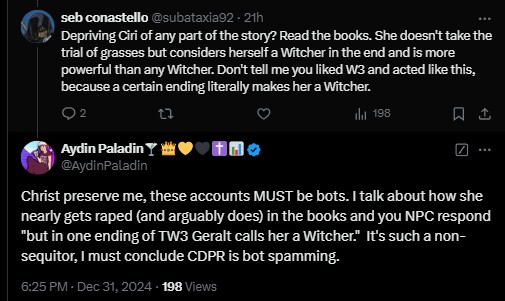
Now, CDPR has been accused of using a bot farm to defend the game from online critics. These accounts have been blamed for using the same talking points in any argument, making it appear scripted.
Why it matters: CDPR being accused of hiring bots to defend The Witcher 4 could further damage the game’s reputation amid other ongoing controversies.
1 of 3
Aydin claims CDPR is using a bot farm that spams the same talking points against any Witcher 4 arguments.
The accused Twitter account was arguing about completely different points, making the comment seem scripted.
Some other users also argued that the accused user is a bot.
Twitter user @AydinPaladin argues that CDPR has hired bots to tackle common arguments against The Witcher 4. The controversy started when another account, @subtaxia92, began debating with Aydin over something that had not been brought up before.
The accused account begins talking about Ciri being a witcher in the books, which is not true as per many other users. The excessive defense against Ciri did not go unnoticed by other users.
The Witcher 4 follows a different path from the books, so she will become a mutated witcher. However, it’s unclear how she’ll fit into the dark and gritty war-torn world.
All in all, it is best to take these claims with a grain of salt. CDPR hiring bots to defend their AAA sequel is farfetched, but the way the account responds has certainly convinced many.
Do you think Ciri being The Witcher 4’s protagonist will draw fans of the series away from the game, or is this controversy temporary? Let us know your thoughts in the comments below, or join the discussion on the official Tech4Gamers forum.
At Tech4Gamers, I’m the PC Hardware Specialist, primarily contributing to the “Best-Ofs” section. I provide thoughtful buying advice based on thorough testing and personal expertise. I also review hardware products and games to keep things fresh.
We’ve reviewed a wealth of MSI motherboards in the past couple of months, and it’s now time to take a look at the best X870E motherboard out there at the moment: the MSI MEG X870E GODLIKE. This is, of course, out of MSI’s enthusiast gaming lineup and sits at the very top of the throne among their diverse lineup (MAG, MPG, and MEG).
In any case, I’m sure the name’s enough to tell you that this motherboard packs the best performance and features, so let’s uncover everything.
Why Trust Tech4Gamers
Usman Saleem is our hardware tester who loves to put all the latest GPUs, CPUs, RAM, and motherboards for a spin.
40+ motherboards tested and reviewed by our team of hardware experts (Tech4Gamers Team).
800+ hours spent testing different motherboards for our reviews.
At Tech4Gamers, ensuring you get reliable information is our priority. That’s why every hardware round-up undergoes a meticulous review process by our team of experts and editors. Each review is carefully examined against our strict editorial guidelines, guaranteeing you trustworthy insights you can depend on.
Key Takeaways
The MSI MEG X870E GODLIKE is the most expensive X870E motherboard in the market, providing high-end performance, great aesthetics, and a great set of features.
Get the board if you want the best performance and features, and budget is not an issue.
Don’t buy the board if your budget is limited or you don’t need the excess premium features on offer.
Surprisingly, the board is still cheaper than the MEG X670E GODLIKE, which was priced at $1299 at launch. The predecessor offered a similar setup and included an M.2 card and an LCD dashboard but not the control hub.
[toc]
Packaging and Unboxing
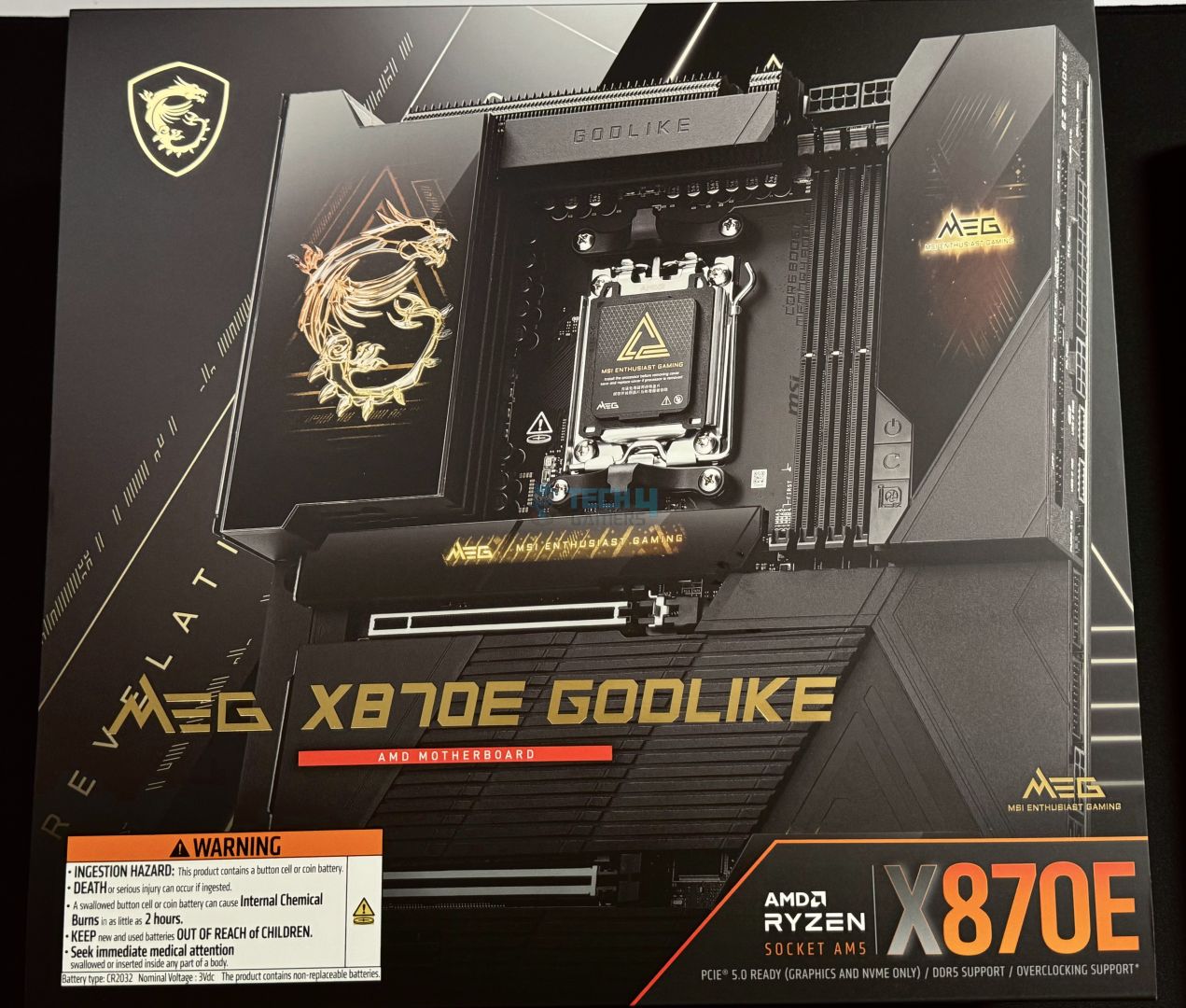
Box Front
Box Design
The motherboard comes inside a cardboard box and is embellished in mostly black with hints of golden. On the front, we have the usual hazard warnings toward the lower left side. On the back, we have the key features and specifications.
Unboxing
The Motherboard
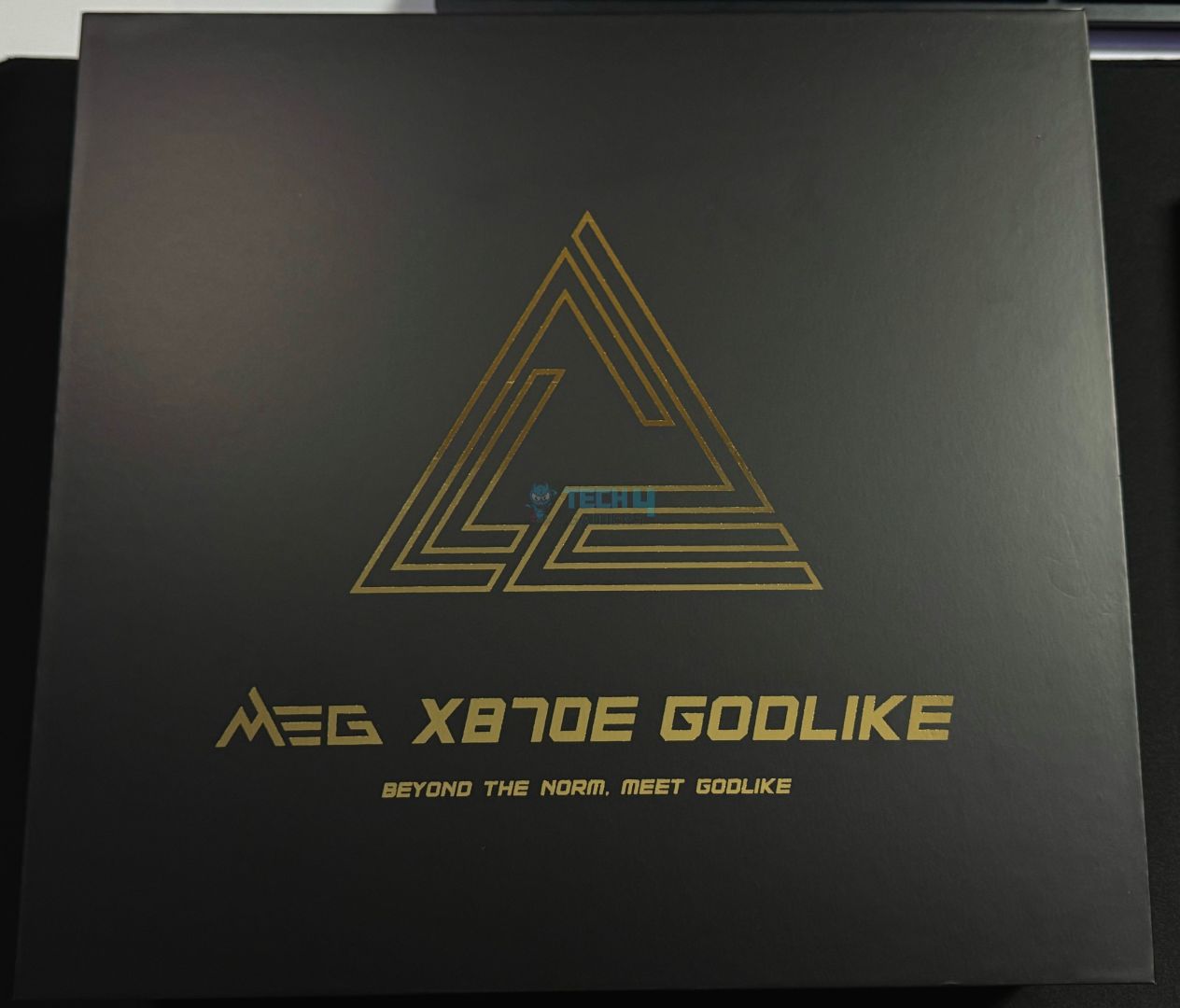
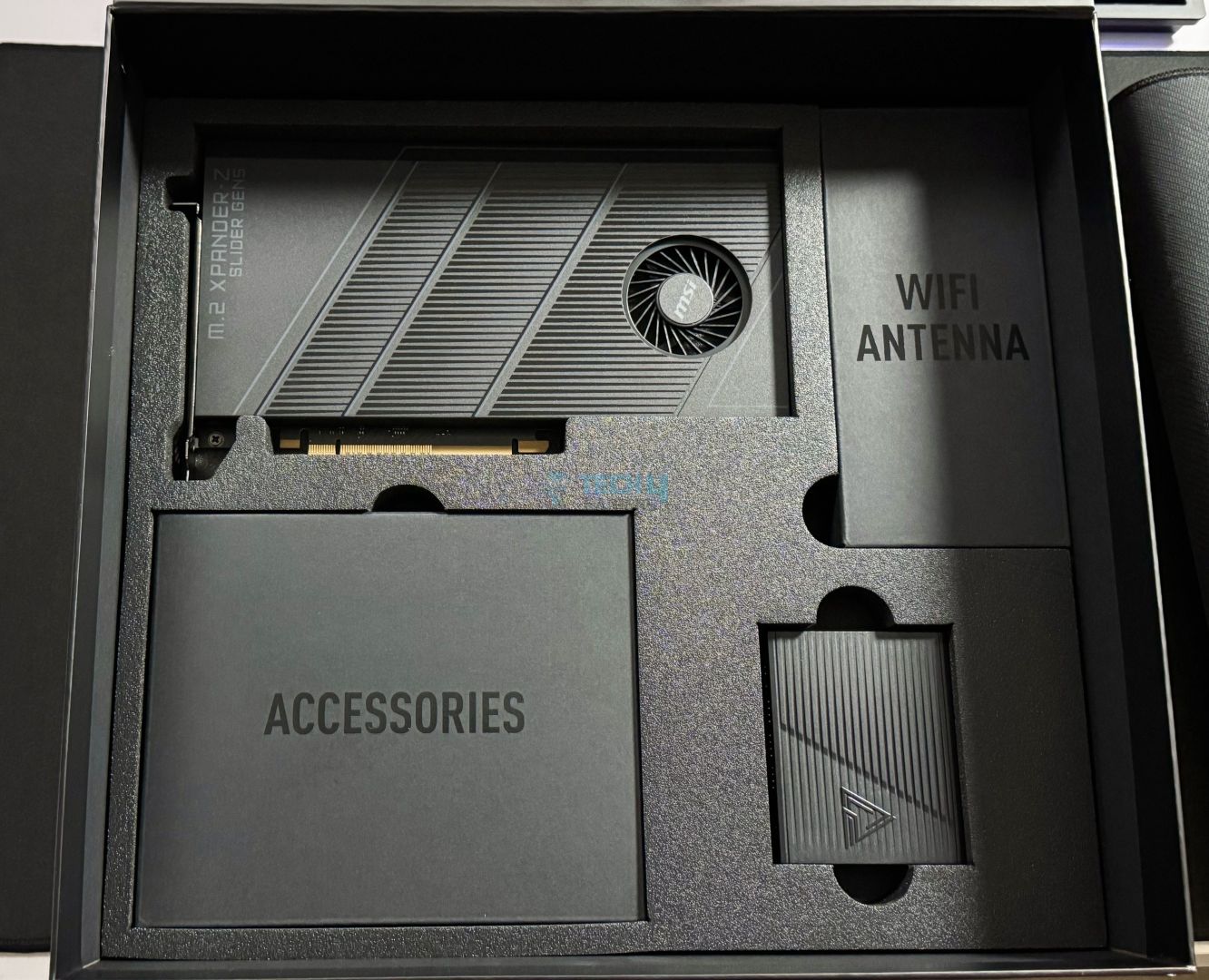
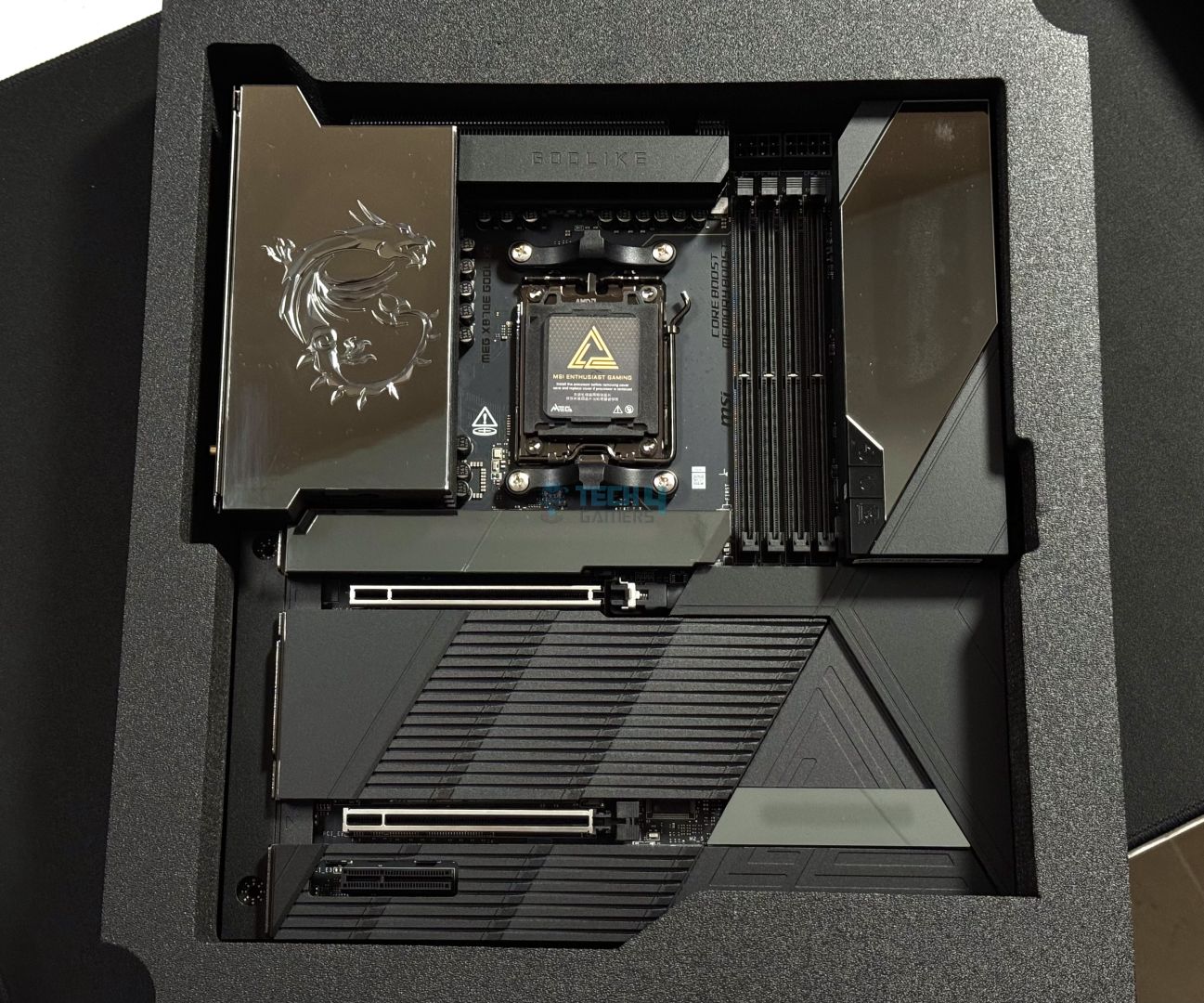
Opening up, we are greeted by another box with very fancy packaging, and it looks like the type of box you would get when buying expensive jewelry. Inside it lies the motherboard. The accessories and devices are very neatly placed as well; quite a nice unboxing experience!
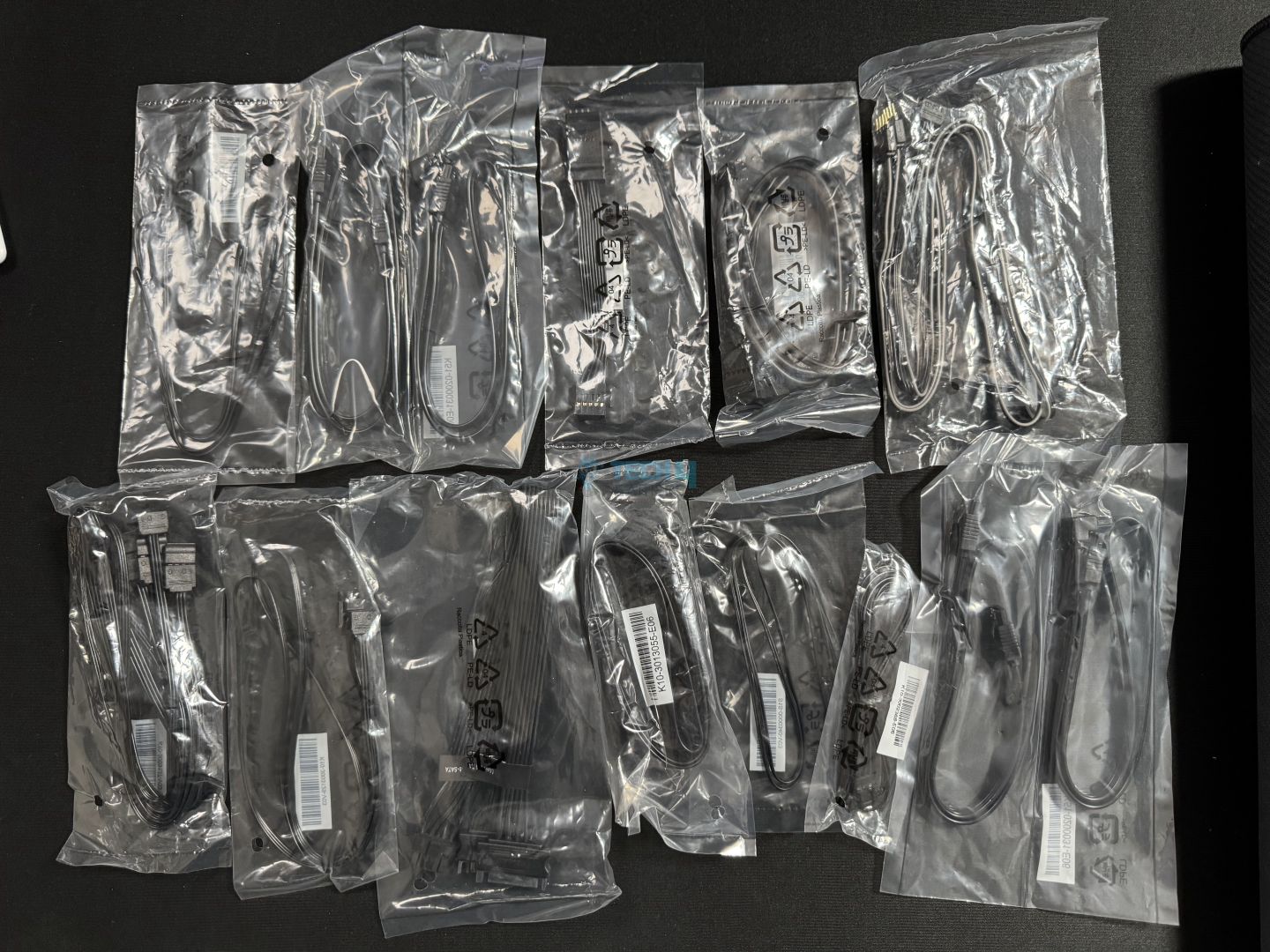
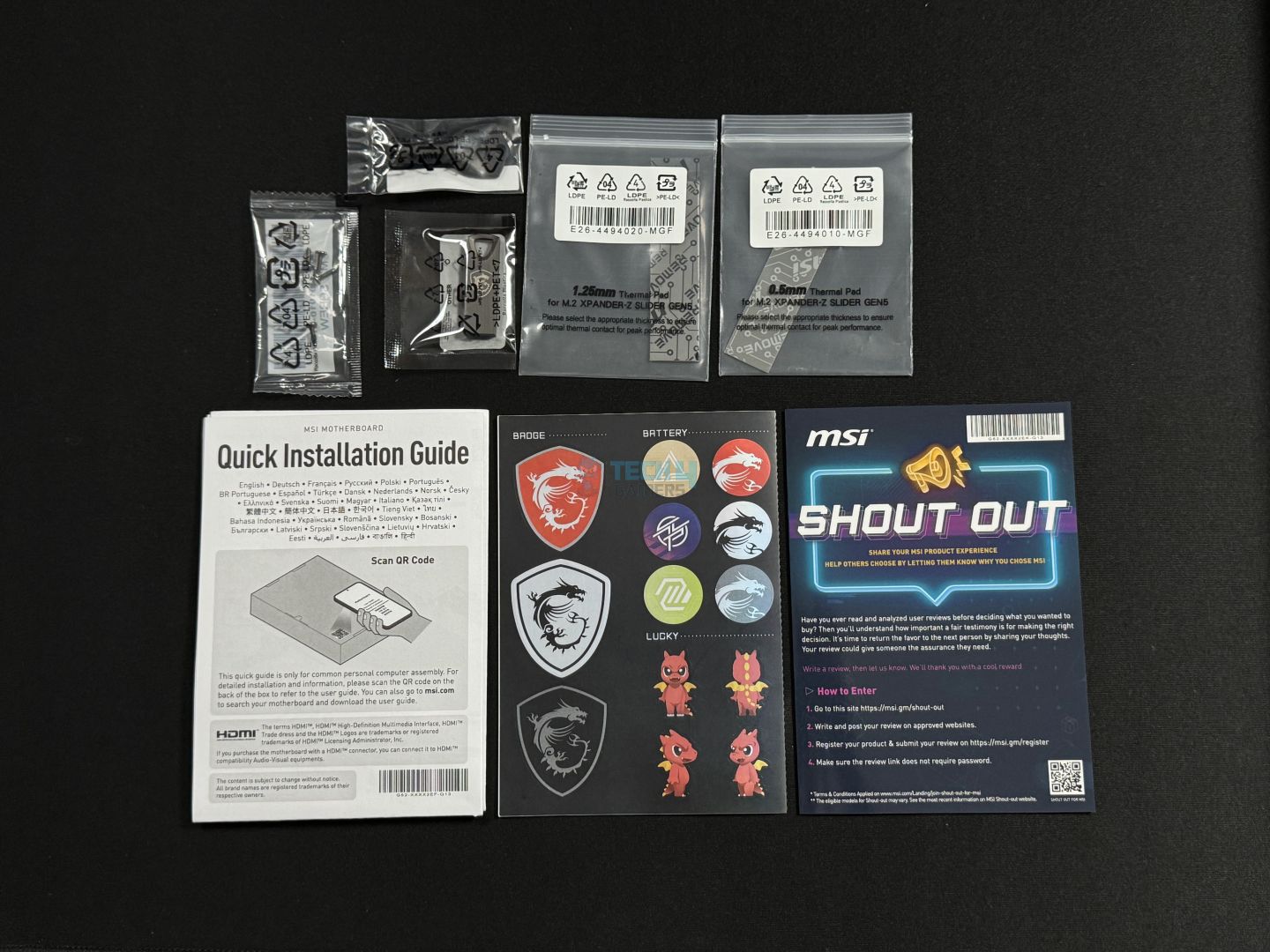
Here’s what we have inside the box:
1 to 3 ARGB Gen 2 Extension Cable
1 to 2 RGB Extension Cable
ARGB Extension Cable
1 to 3 EZ Conn-Cable (V2)
EZ Link Cable
EZ Control Hub SATA Power Cable
M.2 Xpander Card FAN Control Cable
EZ Front Panel Cable
4 x SATA Cables
2 x Thermistor Cables
M.2 Xpander Card Thermal Pads
EZ M.2 Clips II Remover
EZ Control Hub Screw Sets
Cable Sticker
Shout Out Flyer
Quick Installation Guide
European Union Regulatory Notice
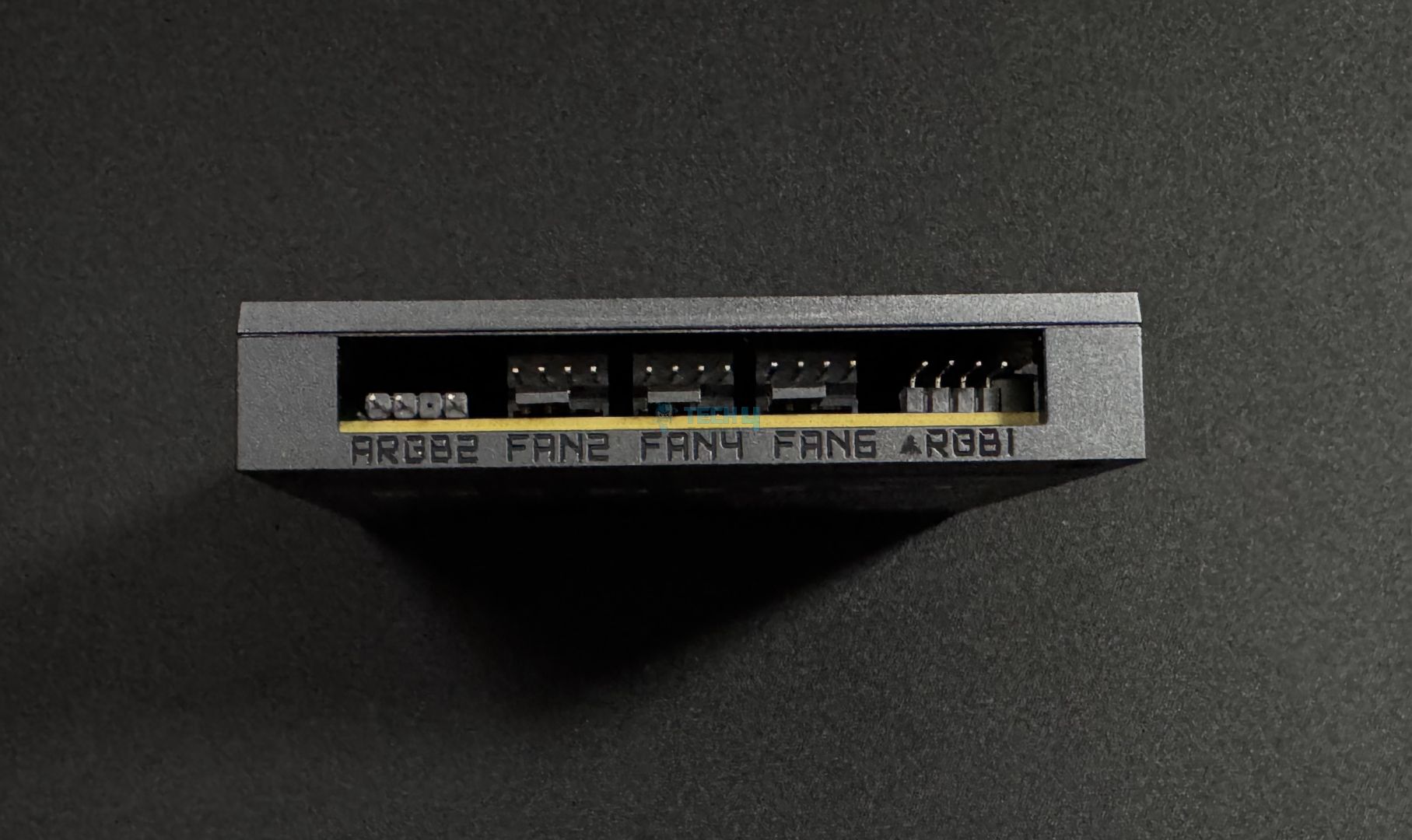
So, this is quite a big package, and we can see why the box is so bulky after unboxing everything. We get an M.2 expansion card and an “EZ Control HUB.” The controller is powered by the PSU’s SATA connector and has room for up to 7 fans, plus two A-RGB, one RGB, and one water flow connector. You also get multiple RGB extension cables, some “EZ” cables to help with cable management, 2x thermistor cables, and 4x SATA cables.
Design
The board in all its glory (Image by Tech4Gamers)
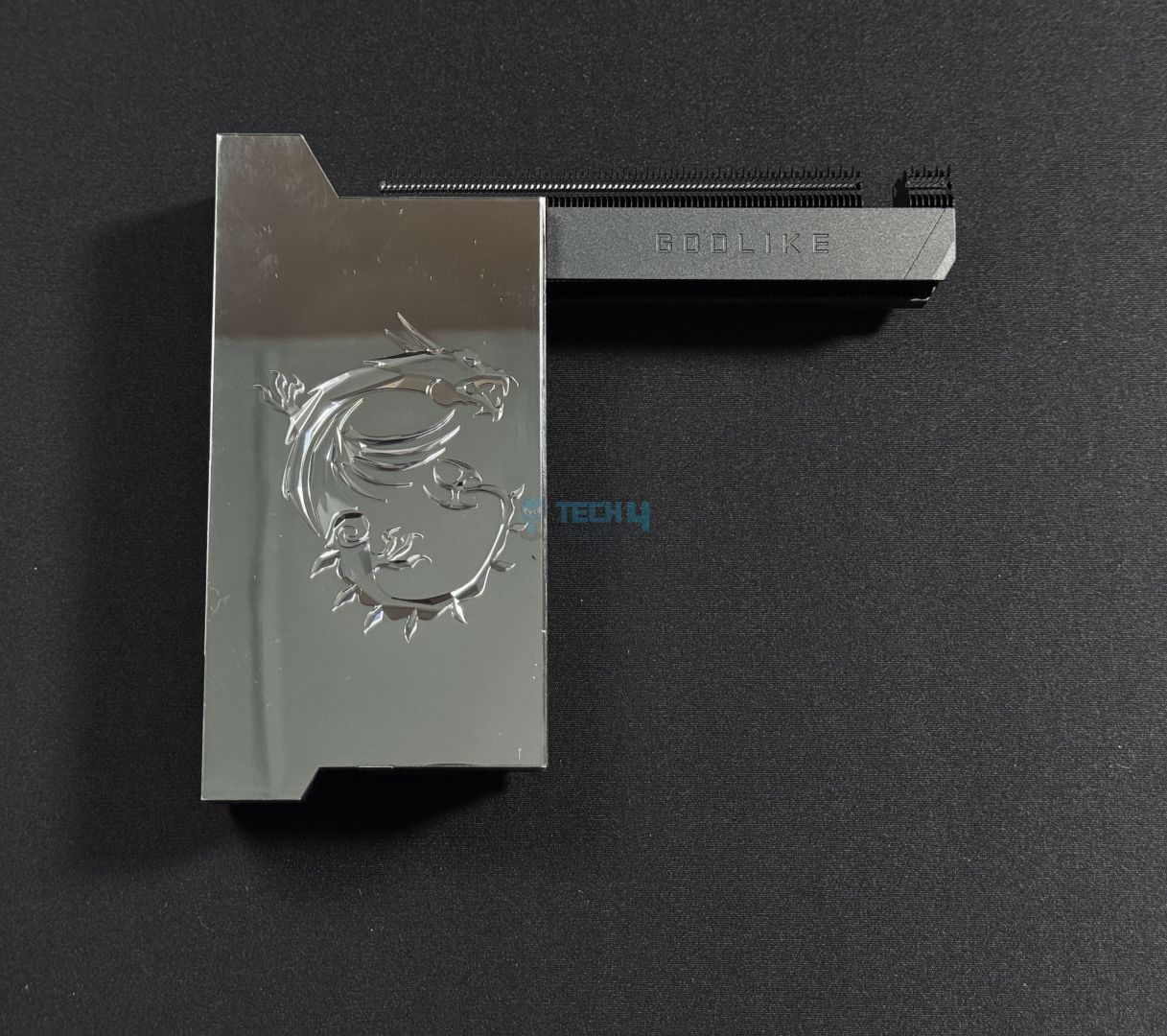
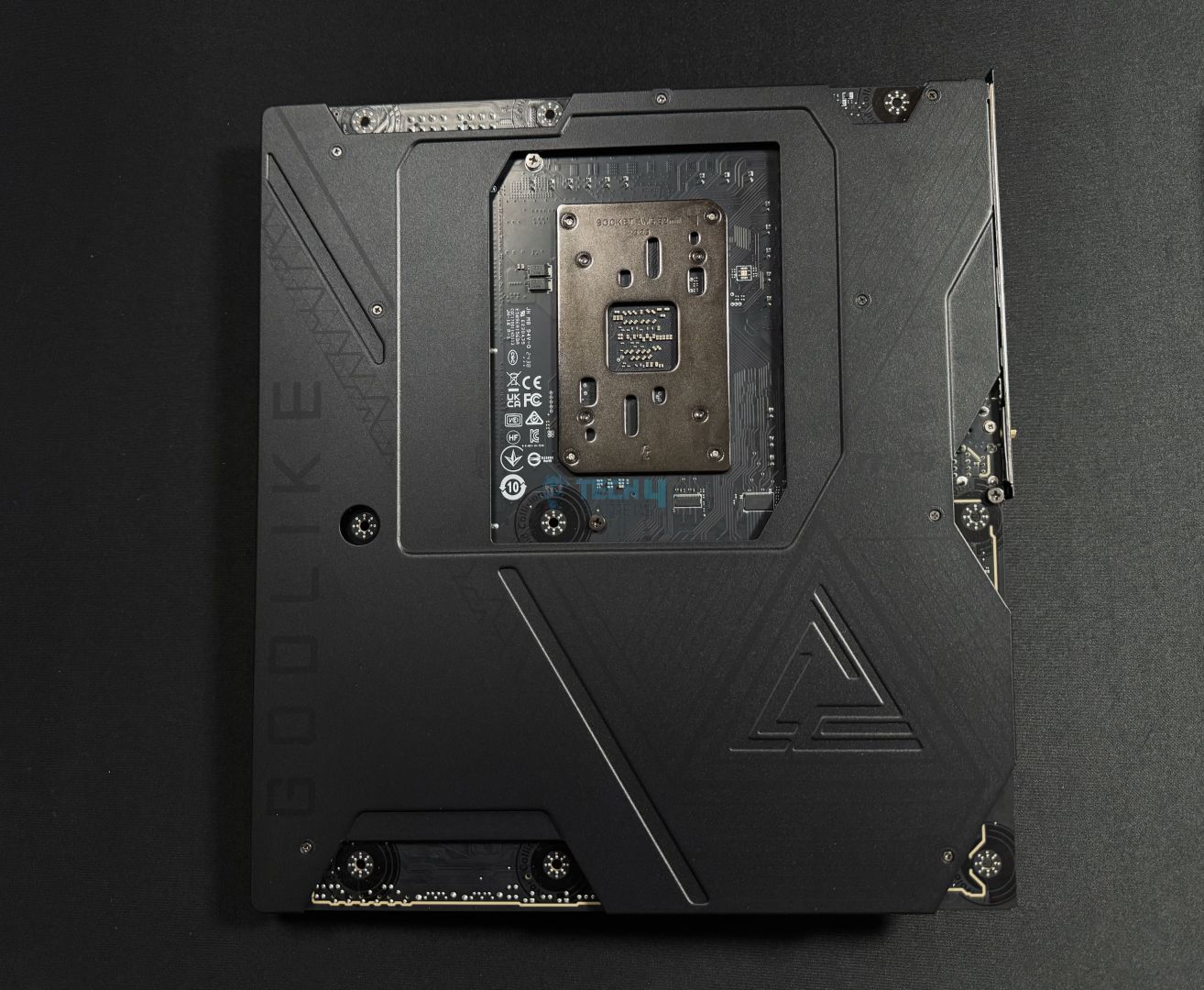
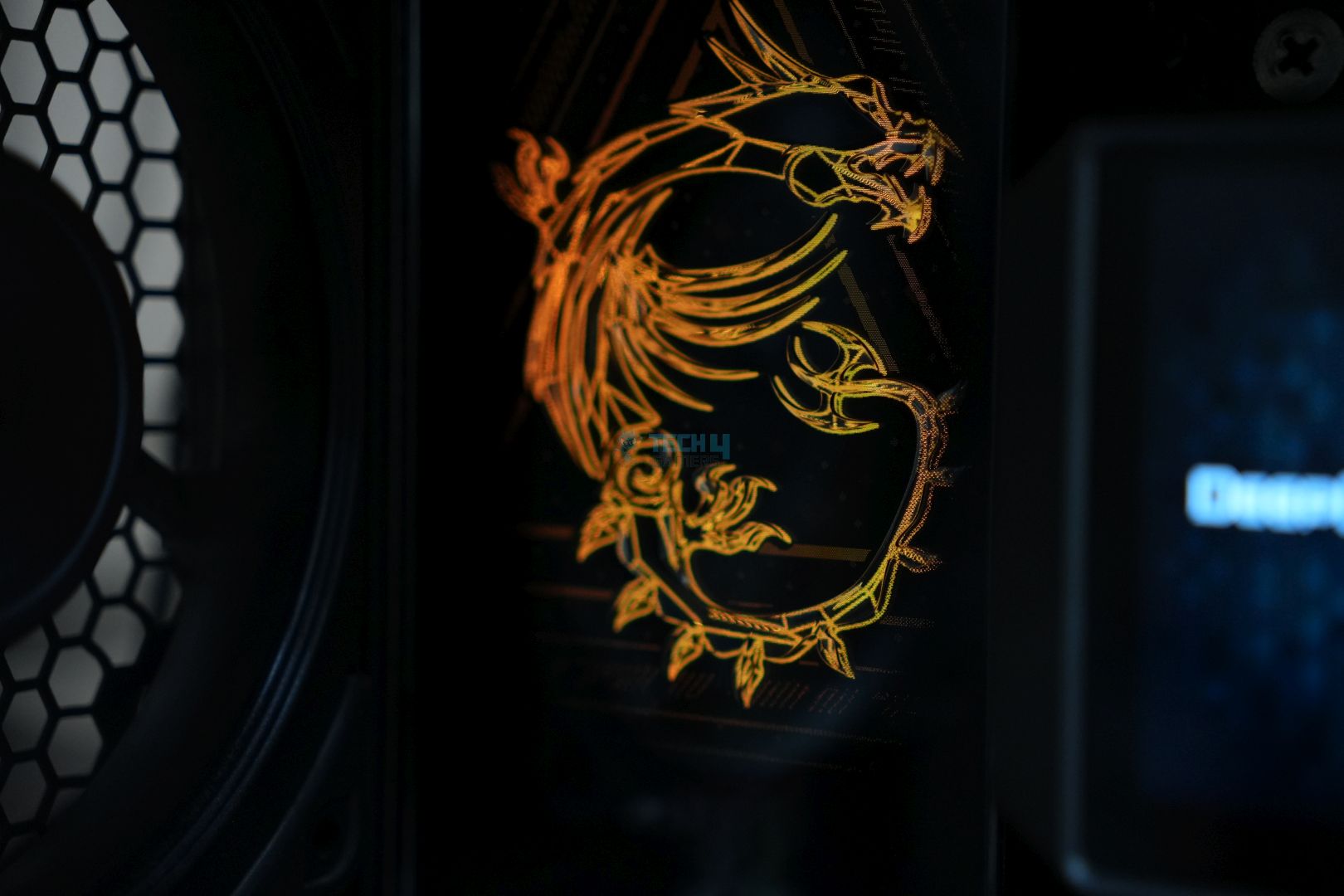
The MSI MEG X870E GODLIKE is almost entirely covered in heatsinks, with only the CPU socket, DIMM slots, EPS connectors, and PCIe slots being exposed. It’s a premium look, especially with the shiny, reflective heatsinks and the LCD display; you probably won’t need a mirror after buying this board! The MSI logo is engraved on the rear I/O cover instead of being printed and the detailing makes it look surreal.
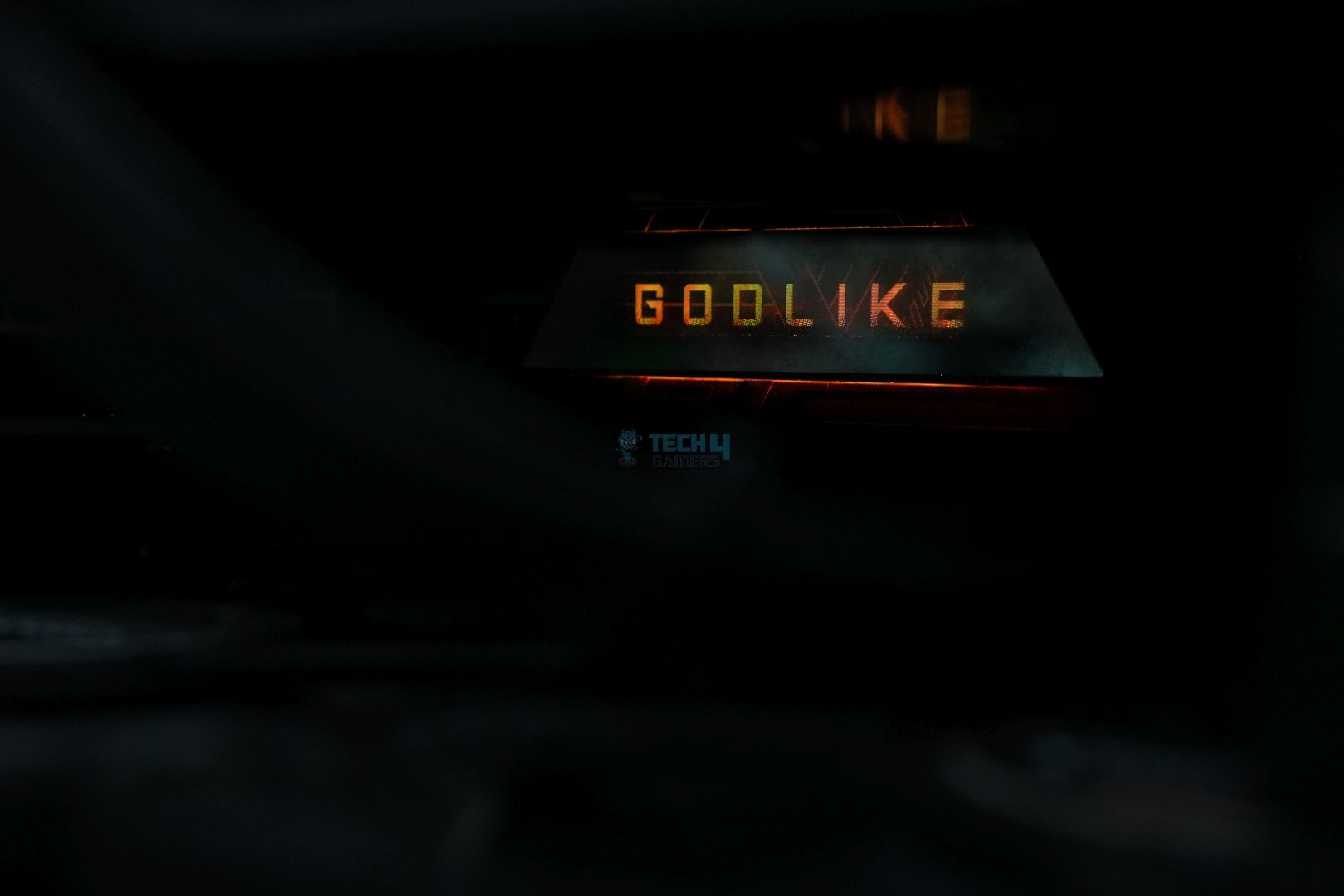
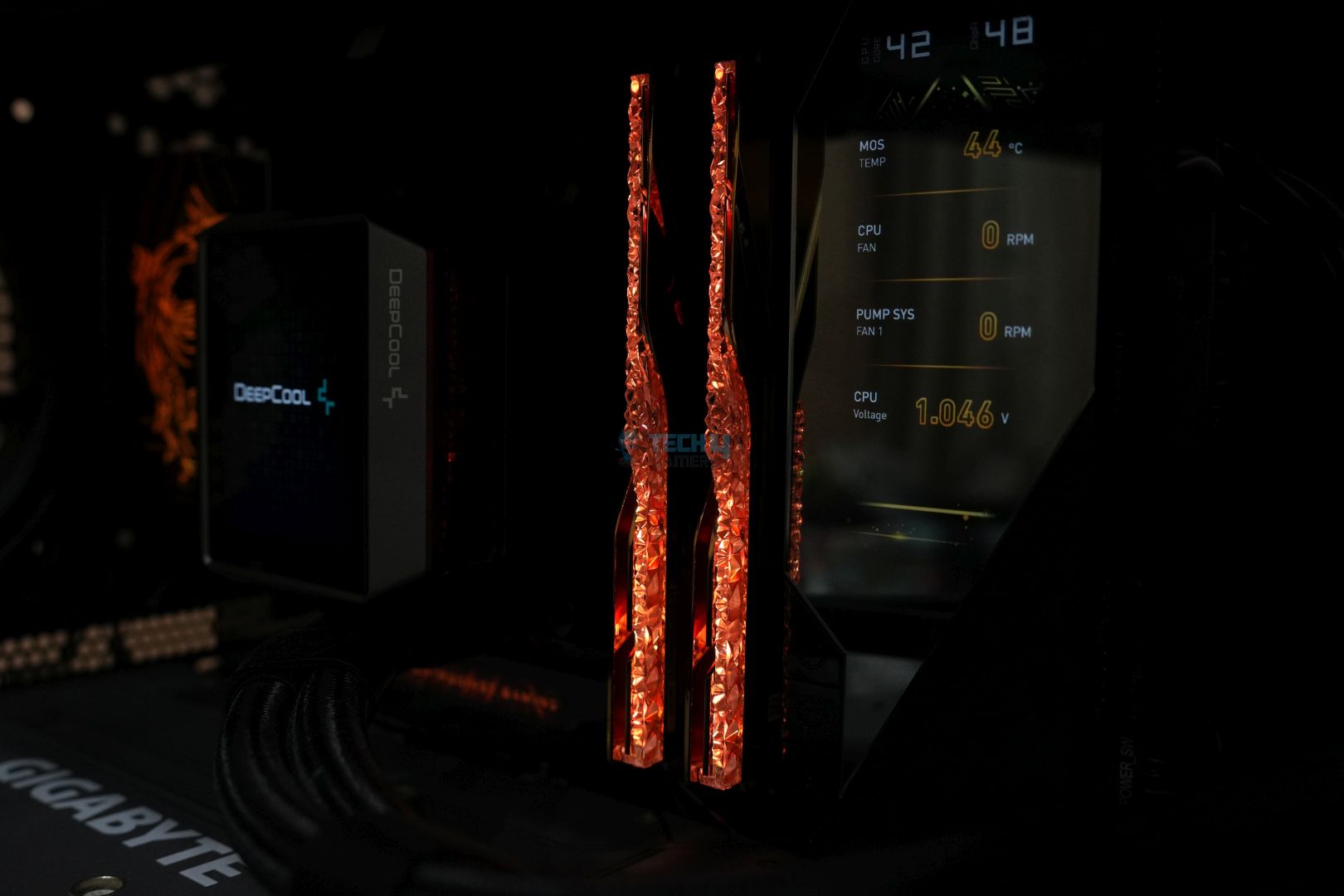
RGB is stacked here, with 3x RGB zones (rear I/O cover, Gen 5 M.2 heatsink, GODLIKE text on the lower right), plus the “Dynamic Dashboard” provides an LCD display. Everything lit up in golden when I first booted with the motherboard, and it’s a beautiful look.
The motherboard is as quality as it gets, with a 10-layered server-grade PCB with 2oz copper.
Motherboard block diagram
The CPU socket powers DDR5 memory, PCIe Gen 5 slots, Gen 5 M.2, USB 40Gbps, 3x 10Gbps ports in the rear, and the Super I/O controller. Meanwhile, the two Promontory 21 chips provide the remaining USB, PCIe, and M.2 connections. They also power SATA 6G, 10G and 5G LAN, WiFi 7, and audio on the board.
Let’s dive into the different components of the board.
Power Delivery System
VRM Structure
Close Up Of VRMs
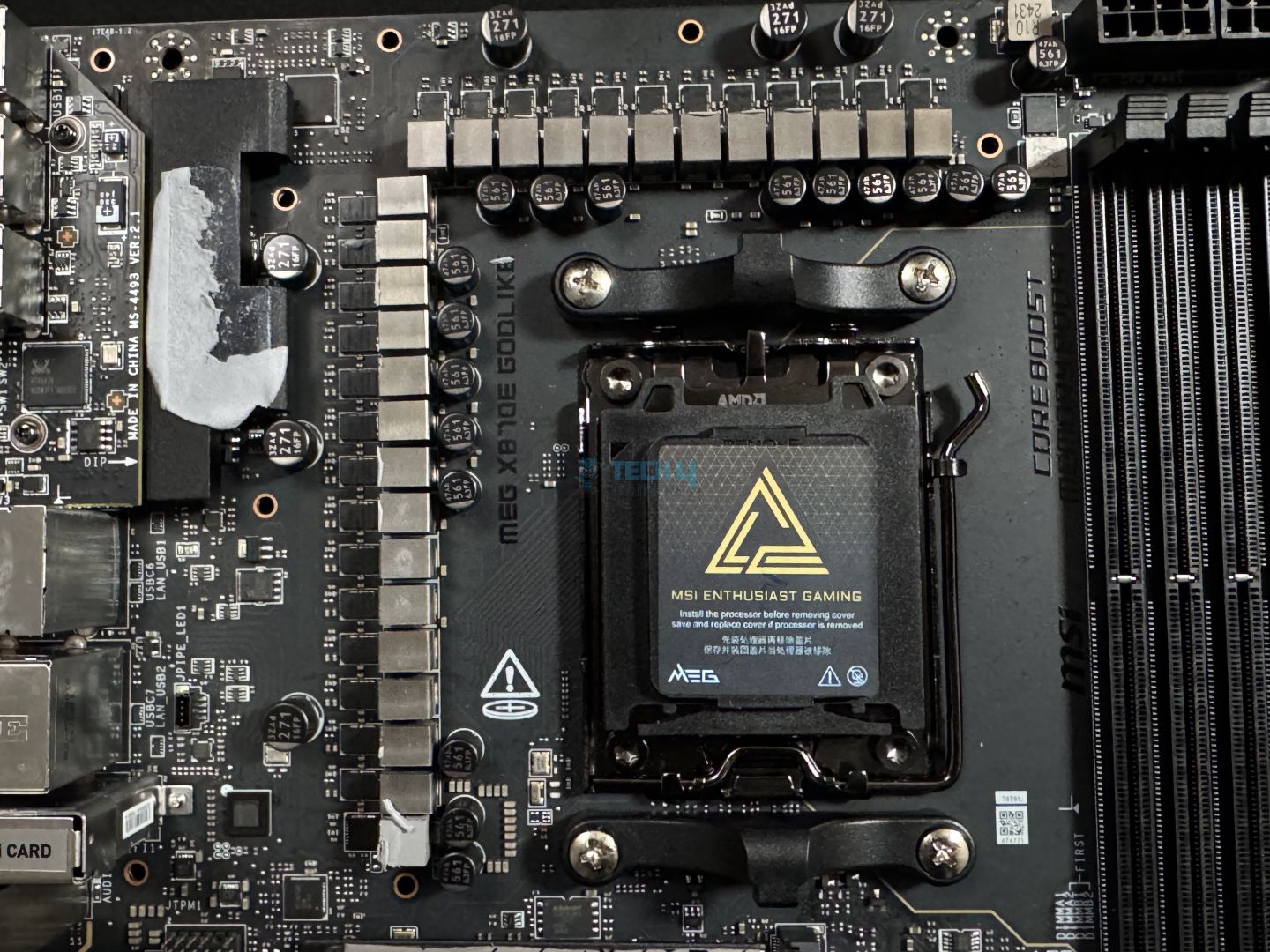
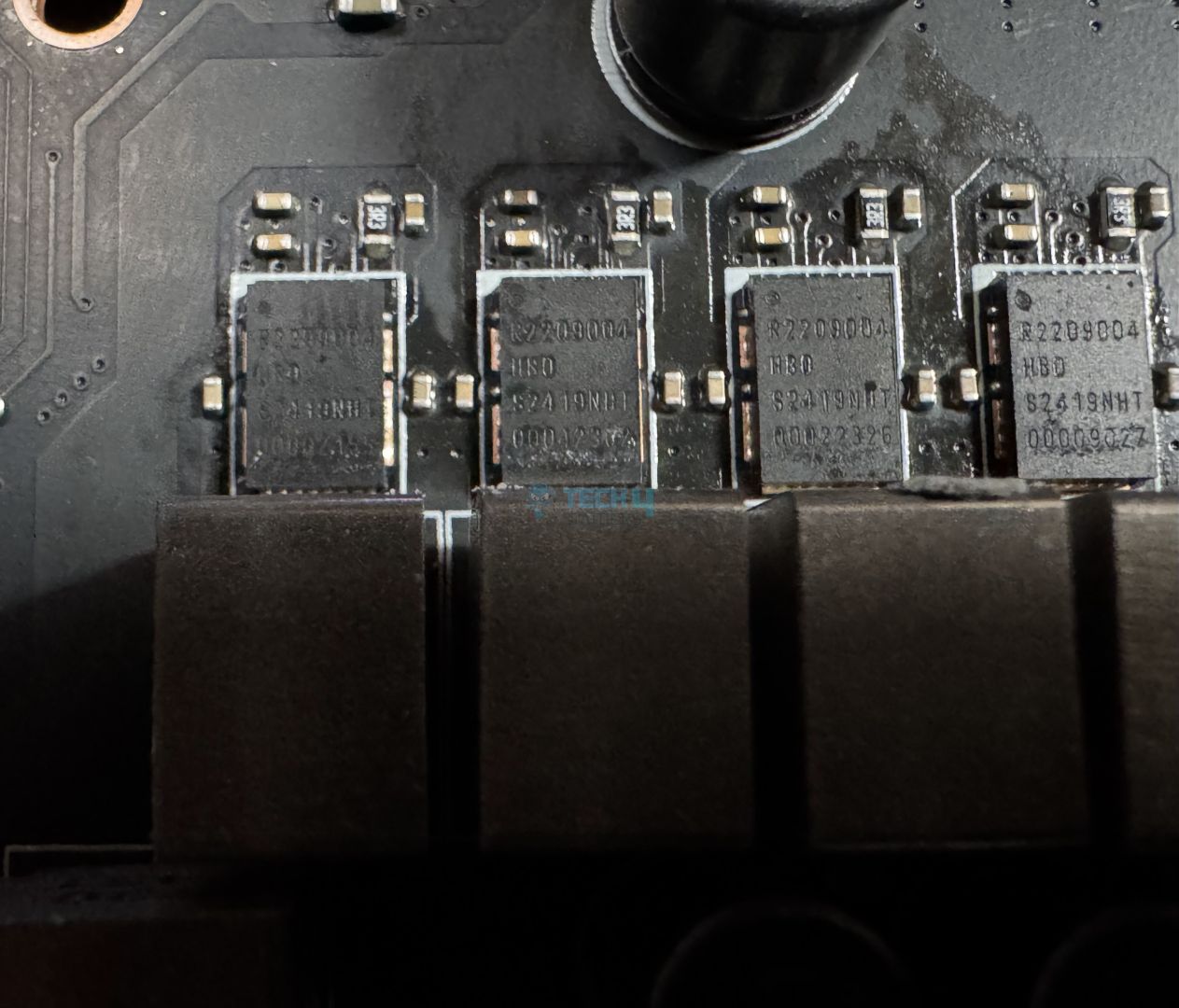
The MEG X870E GODLIKE uses a hefty 24+2+1 (VCC+SoC+Misc) duet-rail power system with 24x 110A SPS for the CPU. A close-up of the MOSFETs reveals that these are the Renesas R2209004 variant, the same one we saw in the X870E Carbon WiFi. The total power to the CPU is up to 2,640A (the same as we saw in the X870E Taichi Lite), which is the joint highest we’ve seen so far. Compared to the previous generation’s X670E GODLIKE, this is 120A higher.
MSI’s “Core Boost” feature (we’re not sure what this does) and OC engine (which includes a dedicated BCLK generator) promise “perfect” conditions for overclocking.
EPS connectors (Image by Tech4Gamers)
The initial power is provided by solid dual 8-pin connectors, which provide stability and low impedance for an overall solid connection.
VRM Heatsink Top Design
VRM Heatsink Thermal Pads
Cooling the VRMs is an extended heatsink underneath, which we have dual heat pipes and 9 W/mK thermal pads. The larger side of the heatsink features a stacked fin design (with 5x fins), and the smaller side has wavy fins. It’s a hefty cooling design for a hefty setup.
DIMM Slots
Upper side (Image by Tech4Gamers)
The motherboard has 4x surface-mounted DIMM slots and has room for up to 256 GB of DDR5 memory. The memory support promised by MSI is up to 9000 MT/s with OC. Here are the official maximum memory speeds possible with different configurations:
1DPC 1R = 8400 MT/s
1DPC 2R = 6400 MT/s
2DPC 1R = 6400 MT/s
2DPC 2R = 4800 MT/s
Memory (UCLK) and controller (MCLK) ratio possibilities with Ryzen 9000 (Image Credits: TechPowerUp)
Editor`s Note
The memory controller on the Ryzen 7000 and Ryzen 9000 can, at best, function at 1:1 with the memory at 3200 MHz (6400 MT/s for the memory). To really get notably good results beyond that mark, you’ll need to push beyond the 8000 MT/s mark, which is good because the motherboard promises speeds of up to 9000 MT/s!
– Dr. Usman Saleem
MSI’s Memory Boost feature supposedly allows the motherboard to reach higher memory speeds than competitors, and the BIOS also includes multiple overclocking features, including a “High-Efficiency Mode.”
The board also supports CUDIMMs, the latest innovation in the DIMM standard. These modules include a clock driver capable of regenerating the clock signal driving the memory, for which they would otherwise rely on the CPU. This essentially means better stability and the possibility of reaching higher memory speeds. However, since the motherboard only supports CUDIMMs with clock drivers disabled, they will function as UDIMMS, making this addition not-so-exciting.
PCIe Slots
Lower half (Image by Tech4Gamers)
The board features 3x PCIe slots, two of which are Gen 5. You can either occupy the first slot with a full 16 lanes or share x8 bandwidth between the two slots. The third slot is a Gen x4, but it will run at x2 if you occupy M2_4.
Both the Gen 5 PCIe slots are surface-mounted (SMT) and reinforced with MSI’s Steel Armor II to handle the weight of heavy cards. We used the RTX 4090; however, it’s still recommended that we use an anti-sag bracket as we did. There is only room for one of the slots (the primary one) to feature the EZ PCIe release mechanism. Like in the other motherboards we saw, you can release your card with just a button, and the padlock icon indicates whether the lock is in place.
Storage
Moving to the storage front, the GODLIKE has 5x M.2 slots (one Gen 5, the remaining Gen 4) with two more Gen 5 slots added by the included card. It also has 4x 6G SATA ports. As mentioned earlier, The card will be installed into the secondary Gen 5 PCIe slot. All the drives support RAID 0, RAID 1, and RAID 10 configurations. Here are the different sizes supported by the various slots:
M2_1, M2_2, M2_4, M2_5 = 2280/2260
M2_3 = 22110/2280
M.2 card: 2280
M.2 heatsinks removed (Image by Tech4Gamers)
Cooling the M.2 drives are three heatsinks, with the first Gen 5 slot being cooled by a separate, thick heatsink. M2_2, M2_3, and M2_4 (M2_2 being Gen 5) are cooled by the same heatsink, and then the third one is cooled by another heatsink that stretches to both ends of the board. The second and third heatsinks are not as thin but provide more surface area.
All the heatsinks can be removed by toolless mechanisms (EZ M.2 Shield Frozr II), but the primary heatsink adds even more convenience and a magnetic design. Pull the heatsink away to remove it, and line it up in position to reinstall it.
Underneath the heatsinks are double-sided thermal pads for all the drives. You also get EZ M.2 Clip II removal mechanisms for all the slots, but you may need to reposition the clips based on where you’re installing which drive. Use the provided EZ M.2 Clip II remover for that. The installation mechanism is very simple, requiring you to pull the clip away from the drive, place the drive, and then release the clip.
WARNING: Remove thermal pad stickers before installation.
Unfortunately, adding a second Gen 5 M.2 slot requires additional bandwidth, so this bandwidth is shared with the rear 40 Gbps USB ports. You can use one or both at half the bandwidth (M.2 at Gen 5 x2 and USB at 20 Gbps). Of course, this isn’t a big problem since you get two additional Gen 5 slots through the card.
USB Connectivity
You get a whopping 25 USB ports on this board:
4x USB 2.0 (Front)
4x USB 5Gbps Type A (Front)
8x USB 10Gbps Type A (Rear)
6x USB 10Gbps Type C (5x Rear, 1x Front)
1x USB 20Gbps Type C (Front)
2x USB 40Gbps Type C (Rear)
Realtek USB controller (Image by Tech4Gamers)
You get 2x USB 40Gbps ports (powered by the ASM4242 controller), as we saw in the X870E Carbon WiFi, but the number of 10Gbps Type-C ports is increased from two to six. 40Gbps USB enables display support for 4K at 120 Hz.
Other USB controllers include Realtek’s RTS5420 (4x of the rear USB 10Gbps ports) and ASMedia’s ASM1078 (3x front USB 5 Gbps ports).
Network and Connectivity
MSI WiFi card (Image by Tech4Gamers)
Wired connectivity on the MSI MEG X870E GODLIKE is provided by 10G (Marvell AQtion AQC113CS) and 5G (Realtek RTL8126) LAN provisions. For wired connectivity, you get WiFi 7 and Bluetooth 5.4.
WiFi 7 requires Windows 11 SV3, and Bluetooth 5.4 also requires Windows 11.
Audio Connectivity
The board’s audio comes from Realtek’s ALC4082 solution and the ESS9219Q Combo DAC/HPA. This chip is similar to the ALC4080 we’ve seen in many mid-range/high-end boards which itself is similar to the ALC1220. The isolated audio design ensures no interference between left and right audio channels.
Internal Connectors and Components
Here’s the list of connectors inside the board:
1x Power Connector(ATX_PWR)
2x Power Connector(CPU_PWR)
1x Power Connector(PCIE_PWR 8pin)
1x Front Type-C Quick Charge Connector(PD_PWR1)
1x CPU Fan
2x Combo Fan (Pump_Sys Fan)
1x EZ Conn-header (JAF_2)
2x Front Panel (JFP)
1x Chassis Intrusion (JCI)
1x Front Audio (JAUD)
2x Thermal Sensor connectors(T_SEN)
1x Tuning Controller connector(JDASH)
1x Addressable V2 RGB LED connector (JARGB_V2)
LED Switch (LED_SW1) – Switches onboard RGB on/off
V-check point
4x USB 2.0 ports
4x USB 5Gbps Type A ports
1x USB 10Gbps Type C ports
1x USB 20Gbps Type C ports
USB Connectors
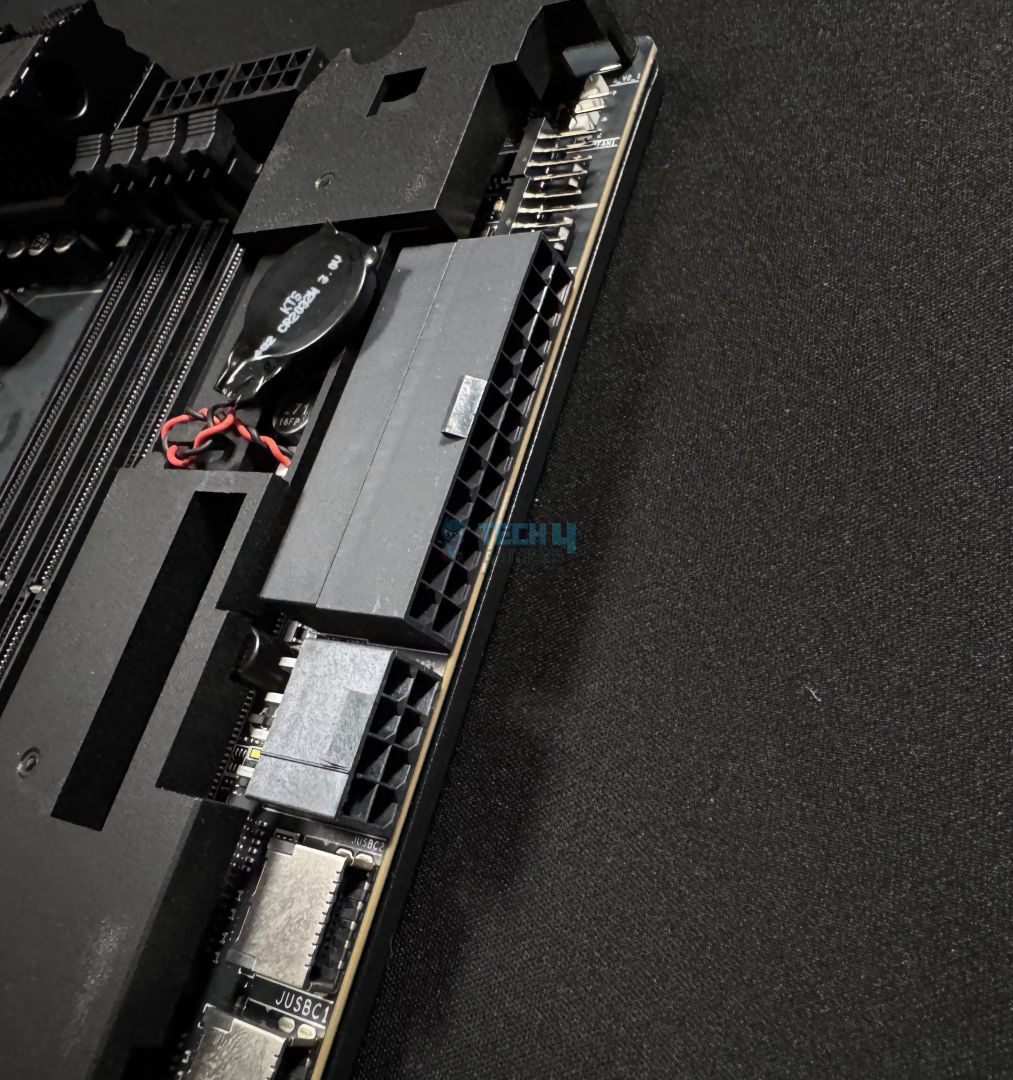
24-Pin ATX Connector
The connectors toward the upper-right-hand side are to be connected horizontally while the rest are in the usual vertical position.
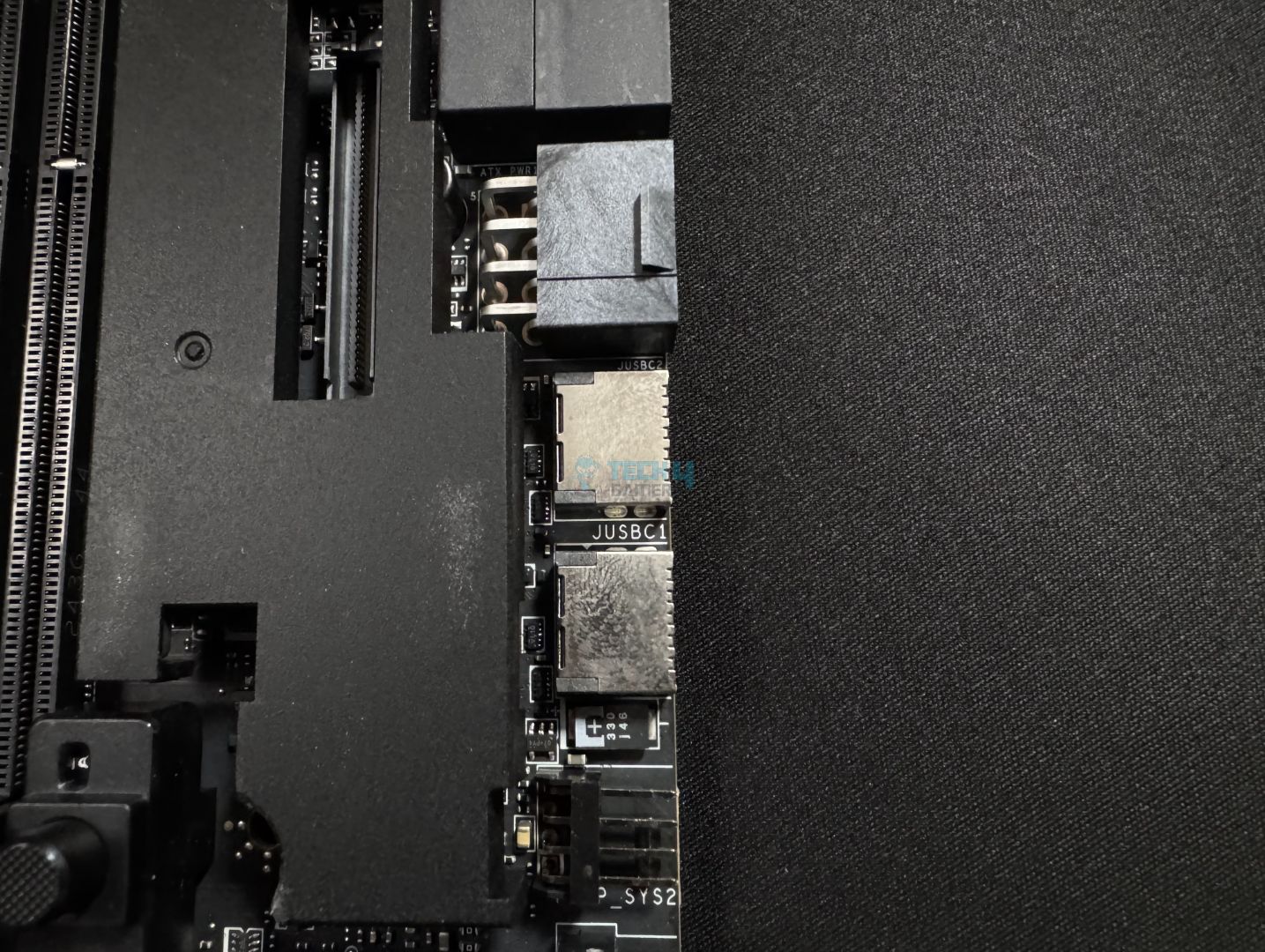
You get 2x thermistor connectors for the provided thermistor cables. What’s notable is the addition of a V-check point connector (used to monitor voltage) and a Tuning Controller connector (used to connect the Tuning Controller). It’s disappointing that MSI doesn’t include the device in this package costing $1099 when we’ve seen it in previous, cheaper motherboards such as the MSI MEG Z690 Unify-X. Nonetheless, the device helps in overclocking by providing options like setting BCLK, clearing CMOS or booting in safe mode.
Moving on, you get the EZ-Conn controller header (2), which combines a system fan, 12V ARGB headers, and a front USB 2.0 header in an 11-pin package, which is especially helpful for supporting MSI liquid coolers. There’s also the connector 60W charging through the front USB Type-C 20Gbps port, requiring you to connect the additional 8-pin power connector. You can monitor this port’s power, amps, and voltage through the MSI Center.
An example of how the extra connector could benefit a power-hungry system (Image Credits: MSI)
The additional power connector adds 252W to the total board supply for 420W, leaving 132W for the fans and 36W for RGB. It also adds 2.5x power excursion through the Gen 5 PCIe slots, allowing 165W of peak power. This is an instantaneous (and not a constant) power supply–PCIe slots will still be limited to 75W of constant power.
Serial flash memory (Image by Tech4Gamers)
The board uses Winbond’s 25Q256JW serial memory chip.
Heatsinks Removed and Backside
Naked motherboard (Image by Tech4Gamers)
Above, you can see the board with all the heatsinks and the Dynamic Dashboard III removed.
Backplate
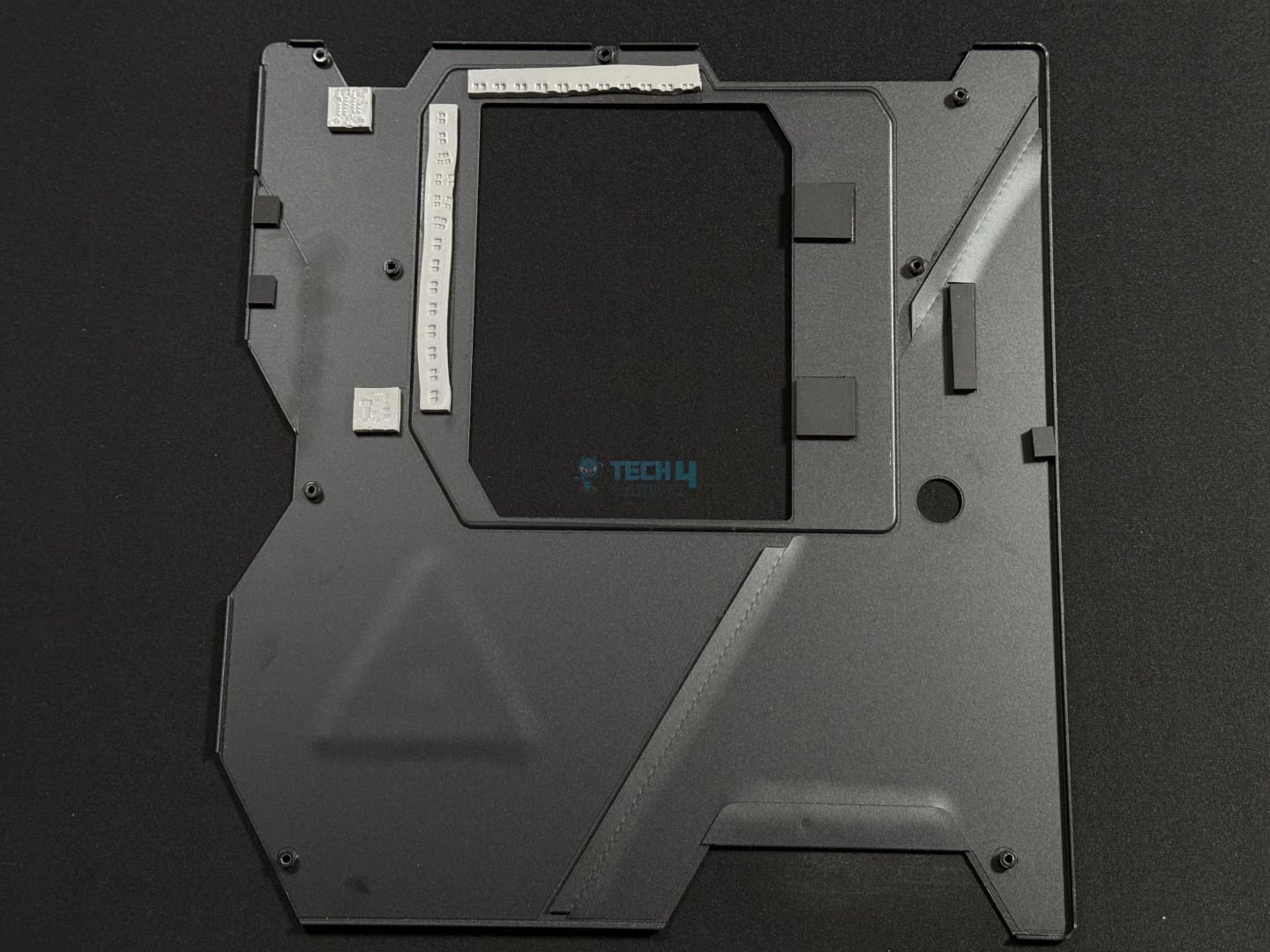
Backplate Removed
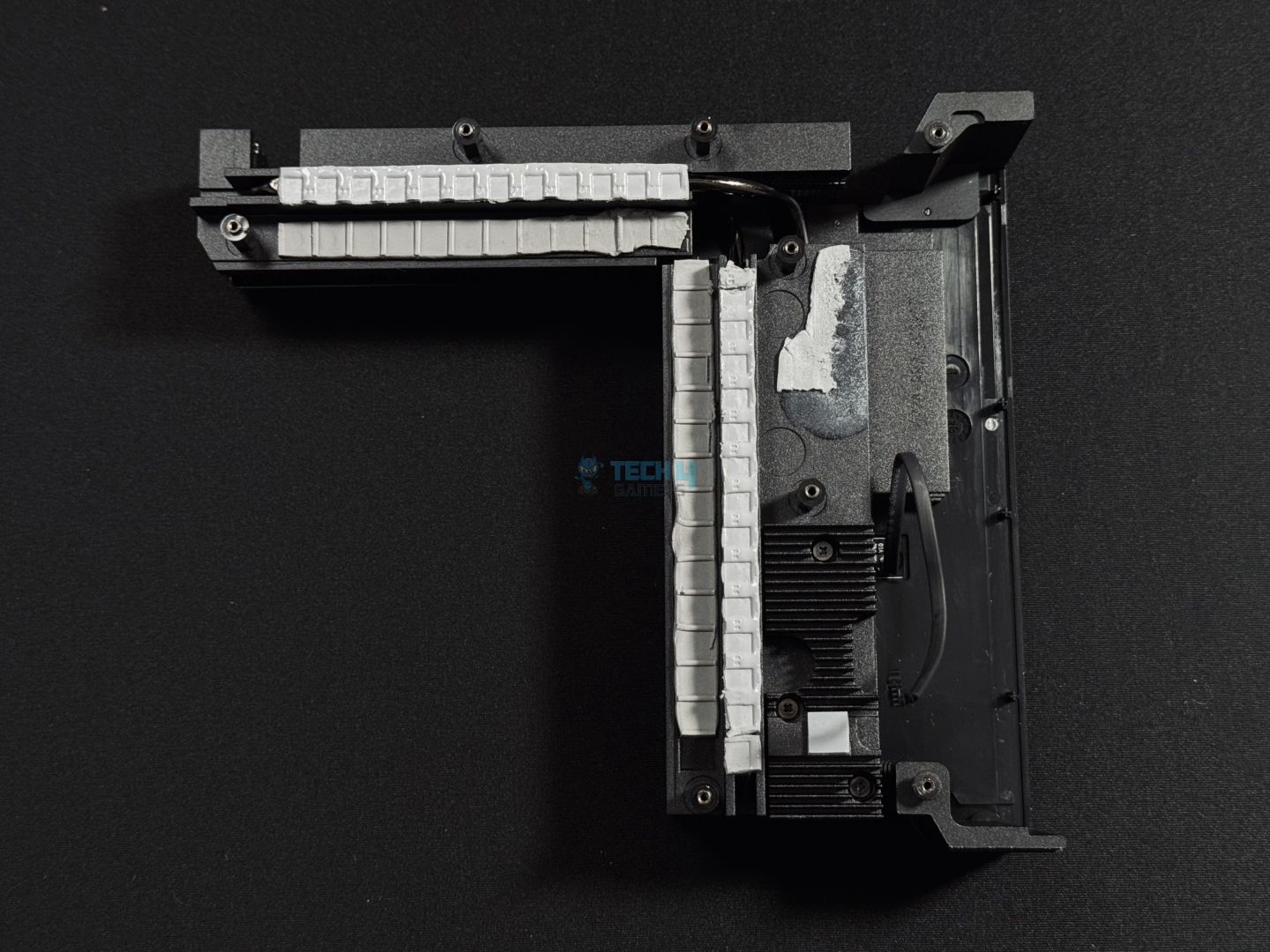
The MEG X870E GODLIKE has a metallic backplate on the backside which gives further support to the board. Removing the backplate exposes thermal pads for the VRMs and additional pads that line up around the VRM driver and WiFi 7 controller areas.
Rear I/O Panel
The rear I/O panel includes:
Rear I/O panel (Image by Tech4Gamers)
USB 10Gbps (Type-A)
Flash BIOS Button
Clear CMOS Button
Smart Button
10G LAN
5G LAN
Wi-Fi / Bluetooth
HD Audio Connectors
USB 40Gbps (Type-C)
USB 10Gbps (Type-C)
USB 10Gbps (Type-A)
Optical S/PDIF-Out
Like in previous motherboards, I have to appreciate the labeling of USB speeds on the rear instead of the USB standard name. You also get BIOS flash, clear CMOS, and the Smart Button. The Smart Button can be programmed to trigger safe boot, reboot, maximum fan speeds, or turning RGB on your board on/off.
The stainless steel I/O shield comes pre-installed on the board.
Dynamic Dashboard III and EZ Control Hub
OLED Screen
EZ Bridge
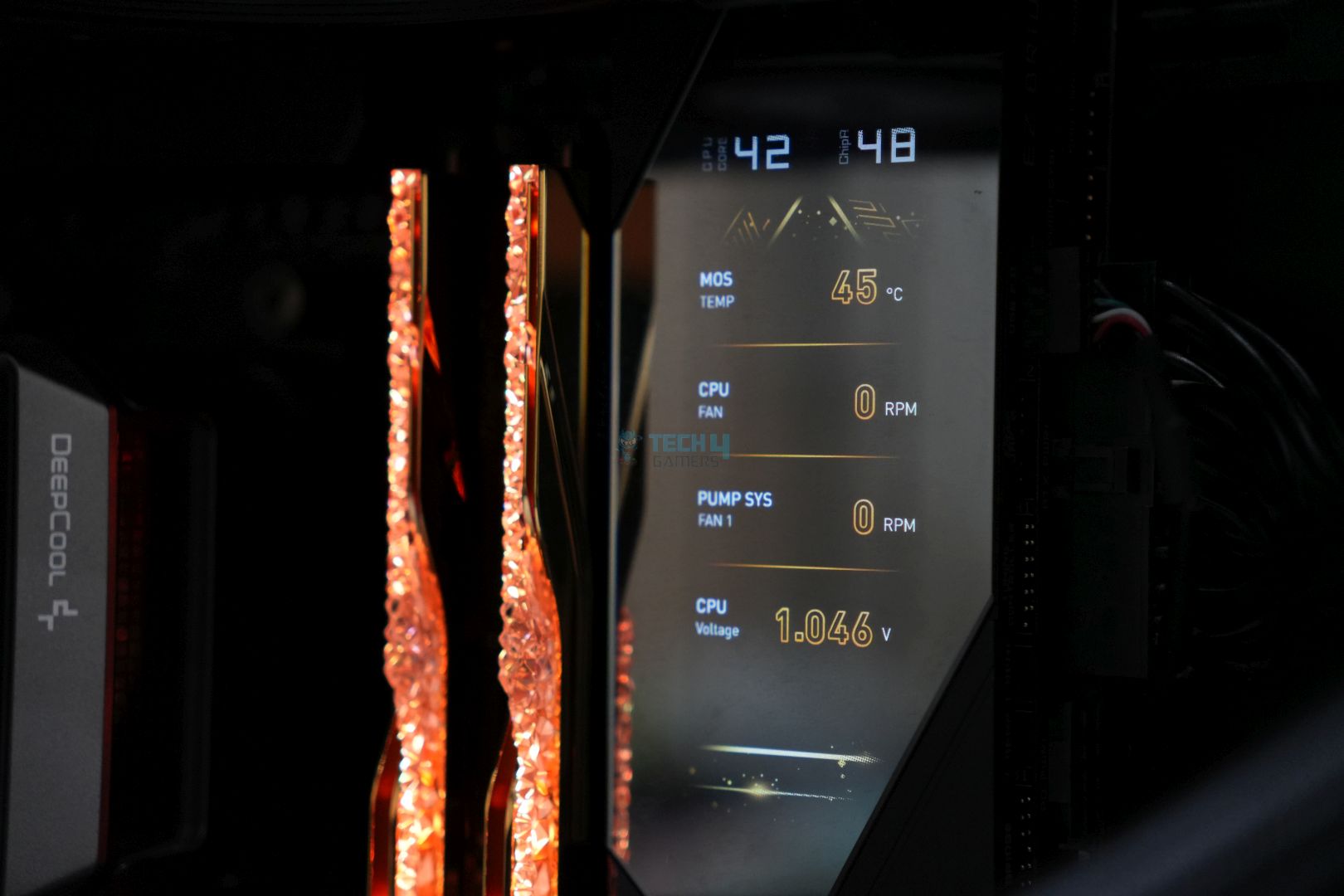
The board includes a 3.99-inch LCD in the upper right-hand corner, and on the panel, you also get dedicated shut-down, restart, and EZ PCIe release buttons. This LCD screen is probably the one component you won’t find in mid-range or cheaper boards. The dashboard can be used as a clock, for monitoring purposes, debugging booting issues, and even as a music player!
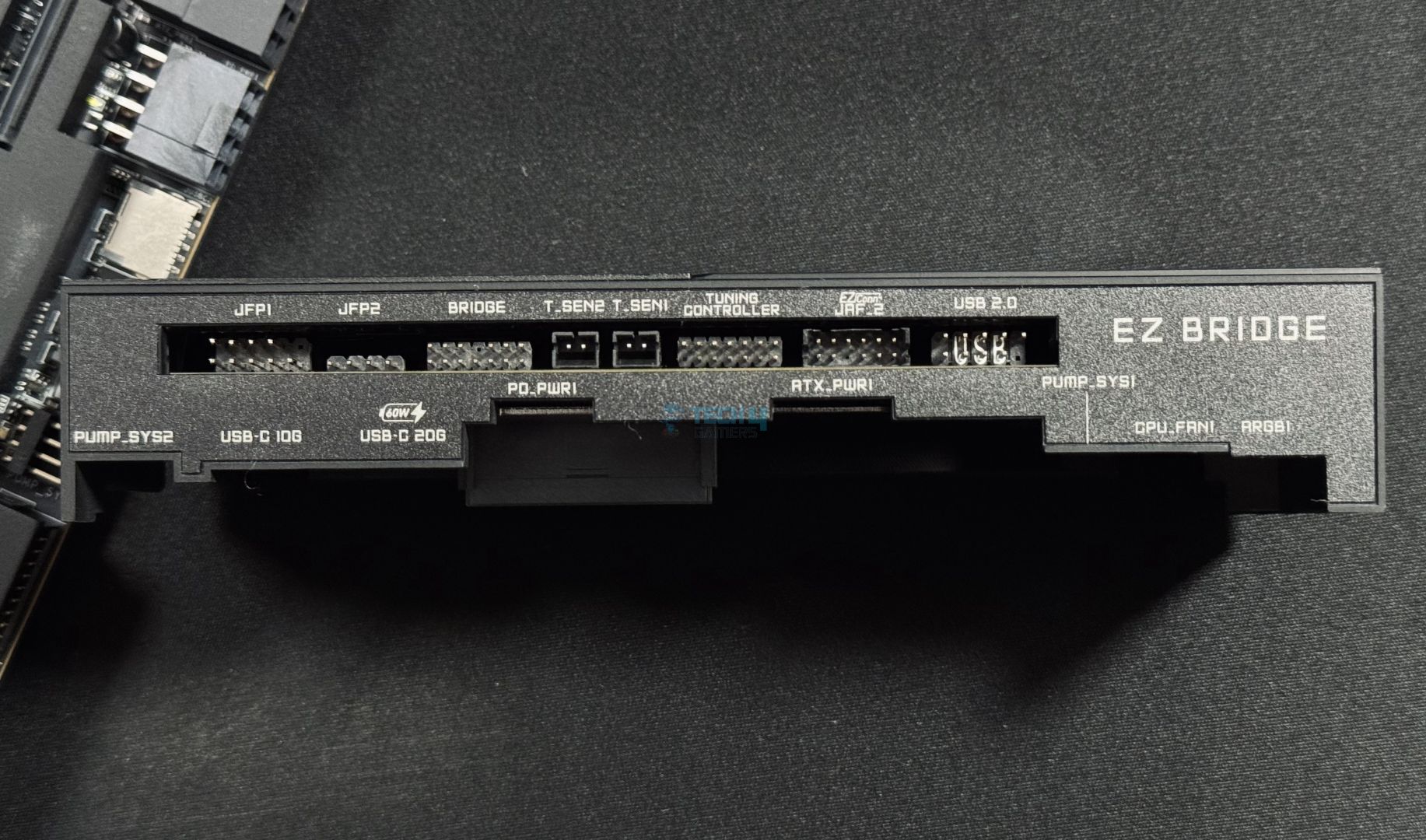
You get a magnetic design here so the dashboard can be removed and reinstalled easily. On the side, you can see various connectors (such as USB 2.0 and Tuning Controller connector) to simplify cable management, as your case will probably have routing holes right beside this area of the board.
EZ Control Hub
EZ Control Hub Ports
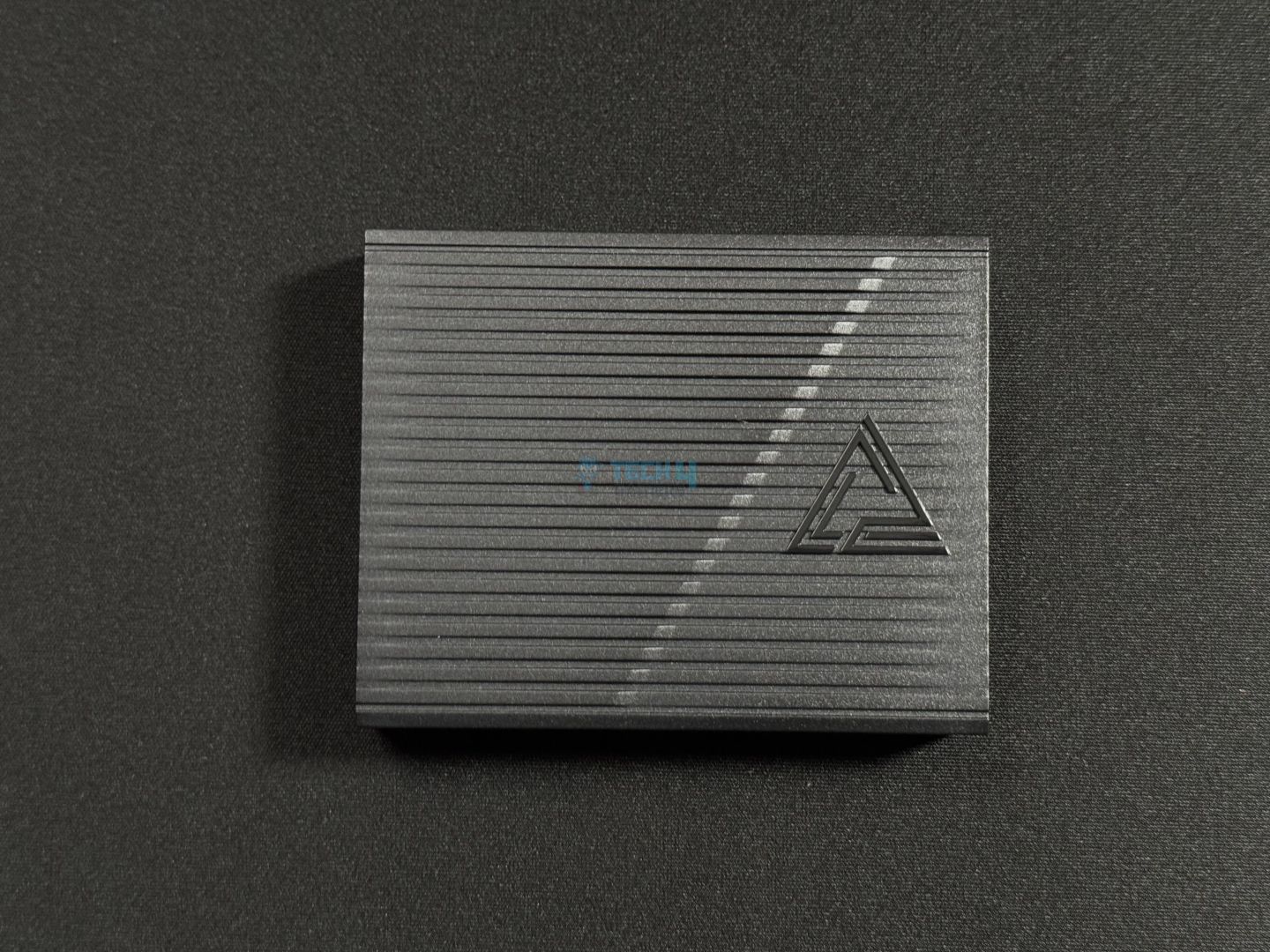
The EZ Bridge connector connects to the EZ Control Hub, providing 7x fan headers, 2x A-RGB headers, and one RGB and WaterFlow header each. This dedication from MSI means cable management will be as easy as possible, even if you don’t put in a lot of effort.
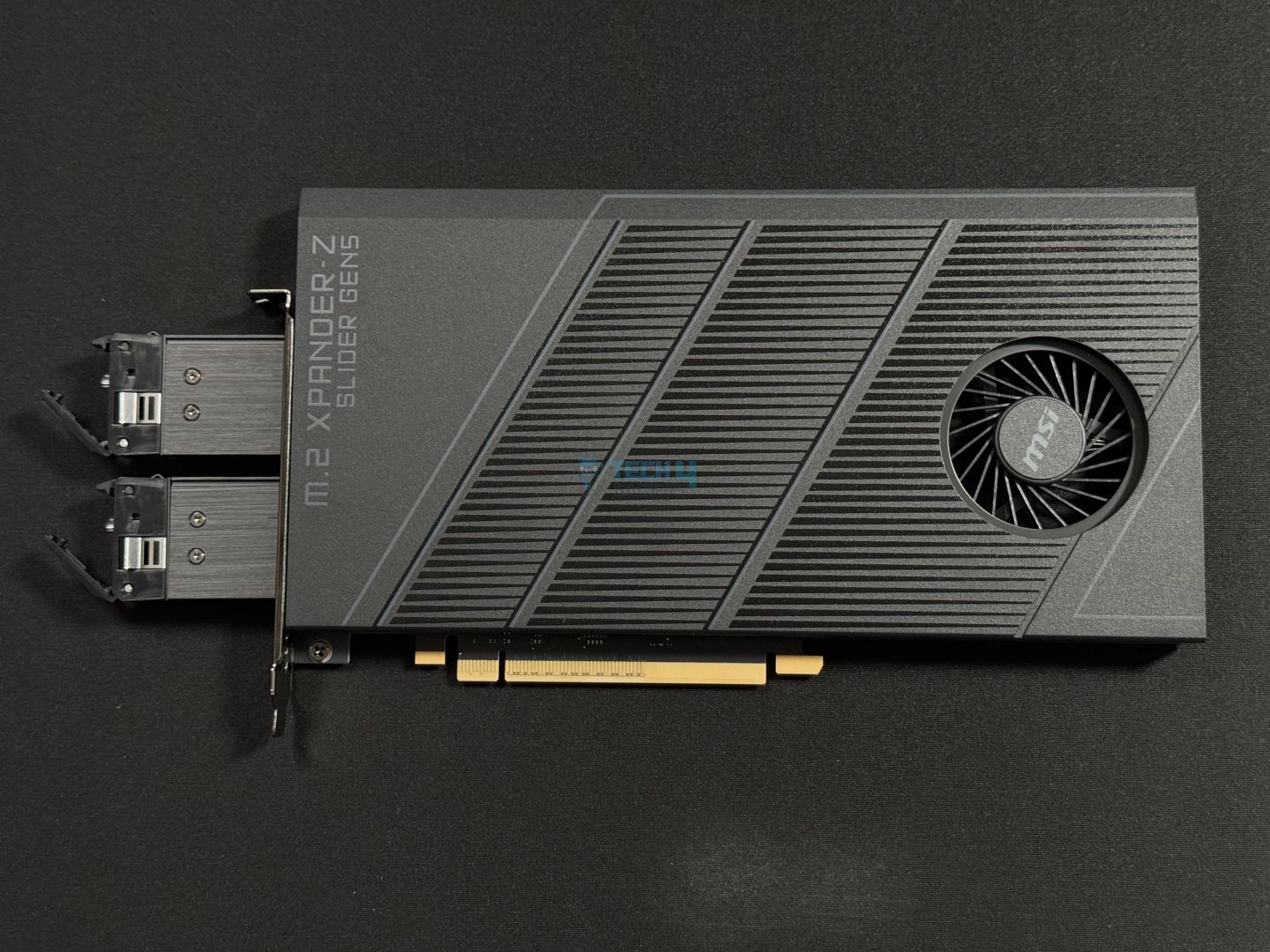
M.2 XPANDER-Z SLIDER Gen 5 Expansion Card
Gen5 M.2 Expansion Card
M.2 Slots Installed
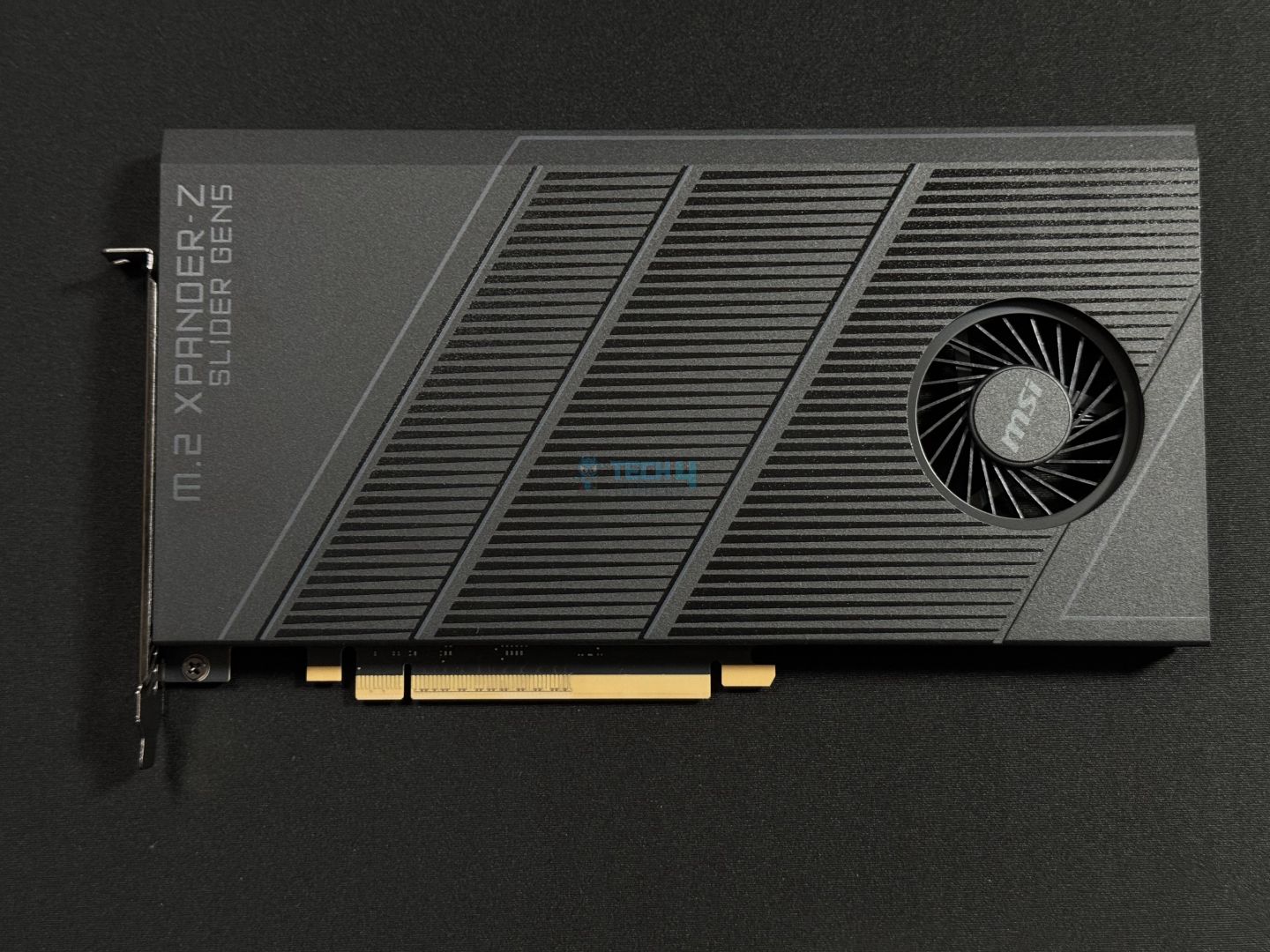
The M.2 XPANDER-Z Slider Gen 5 card adds dual Gen 5 M.2 slots to the setup, bringing up the total M.2 slot count to seven. This is intended to be installed into the PCI_E2 (Gen 5 x8) slot, in which case the PCI_E1 Gen 5 slot will run in x8 mode.
Looking at the card, it shows solid build quality and uses a 70-mm double ball bearing fan to cool the drives. The heatsinks here are also double-sided. Installing a drive involves pulling out the slot(s), removing the heatsink, installing the drive, and then placing the heatsink back. After this, the slot is put back into the card. MSI provides a handy tutorial for this.
The card has two LEDs: one for when the SSD is detected and one for when data is being transferred.
Test Setup
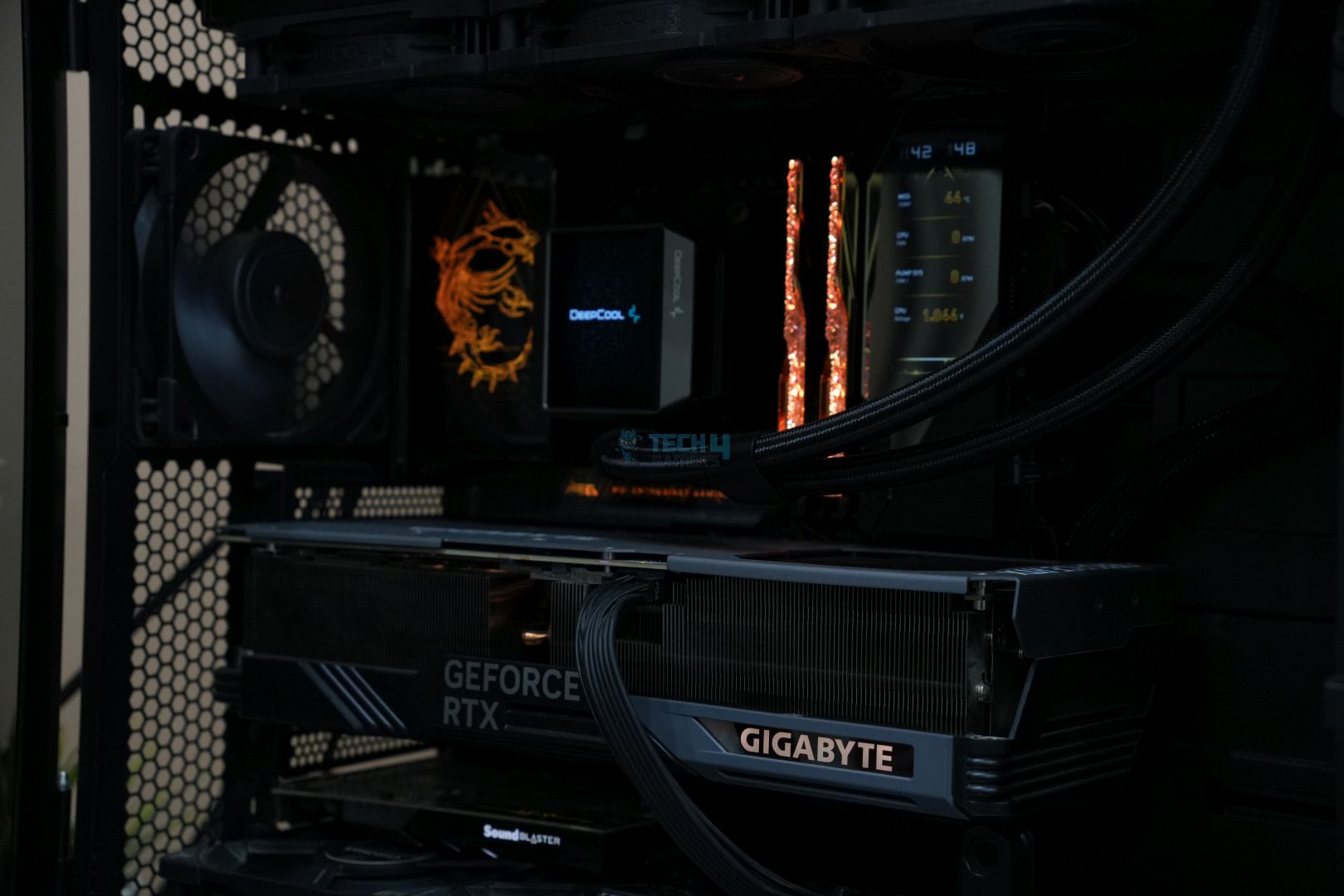
Check out the delicious test bench with everything assembled, along with some extra RGB showcase pictures.
Test setup and RGB showcase
1 of 4
Build Pic
IO Cover Design
GODLIKE RGB
Close Up
Here’s what our test bench looks like for the CPU:
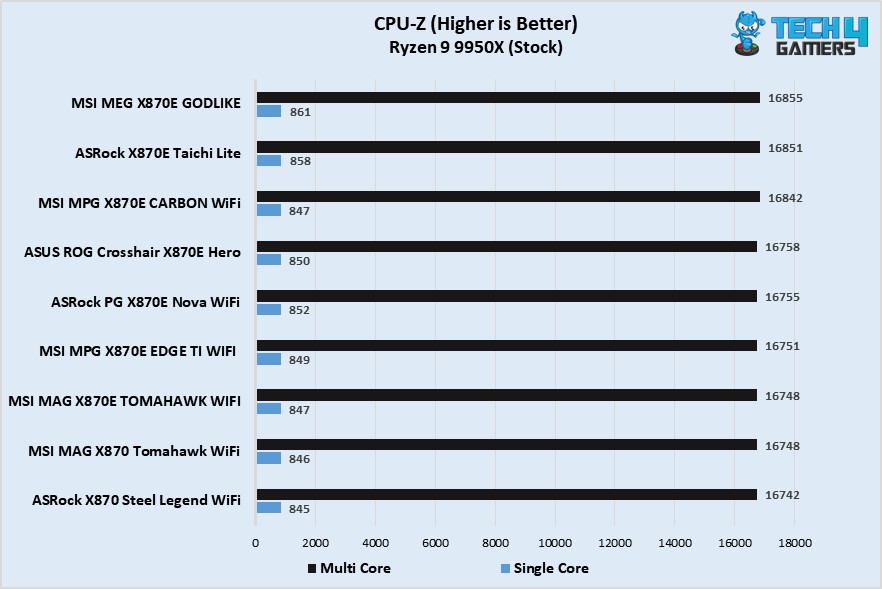
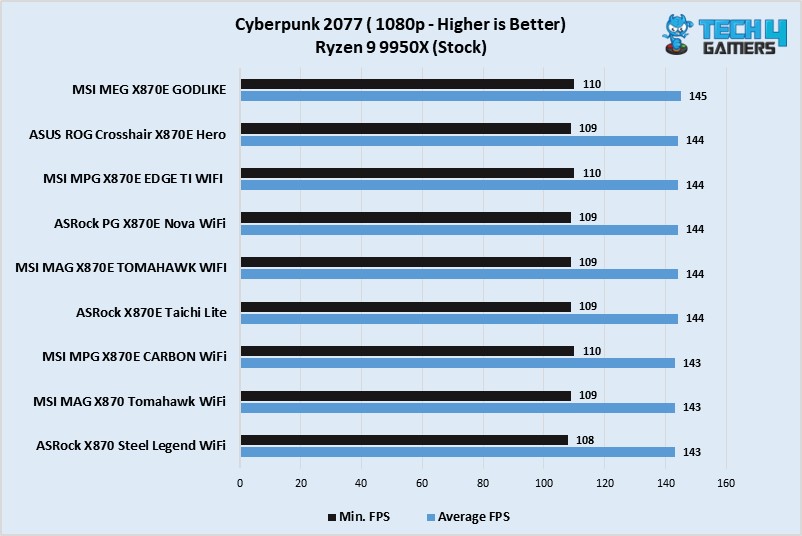
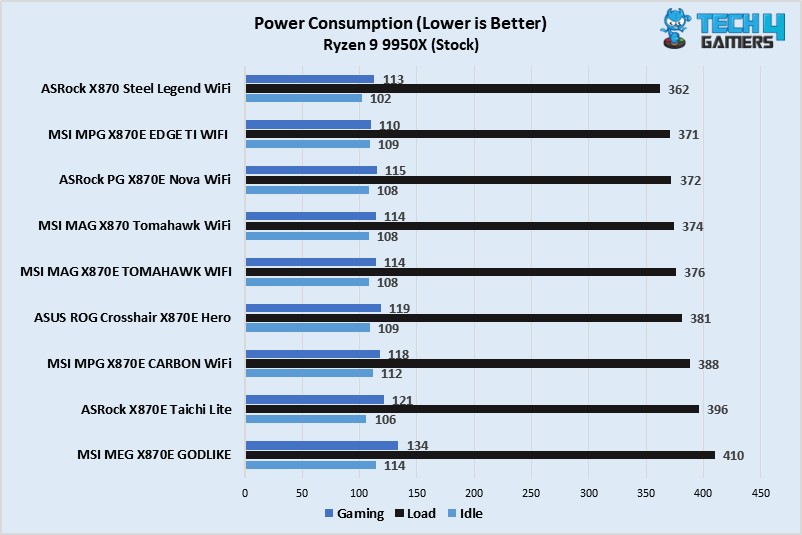
Power consumption from the $1099 board was the highest, as expected. The CPU/motherboard power consumption maxed at 410W during the Cinbench 2024 multi-core test. In gaming, the power consumption stood at 134W on average, while the idle power consumption was 114 watts. Across all loads, the board showed the highest numbers.
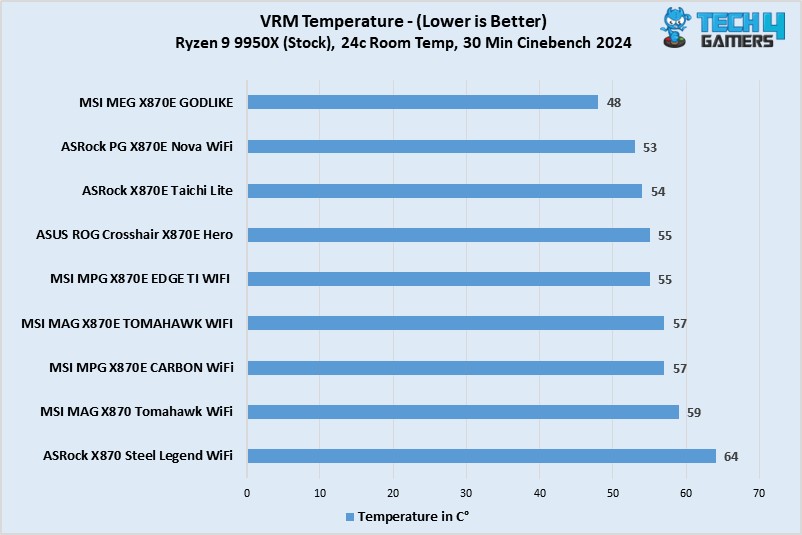
The VRM temperatures are super-impressive! During a 30-minute Cinebench 2024 test, the maximum temperature stood at just 48°C, much cooler than all other boards on our list.
Boot Times
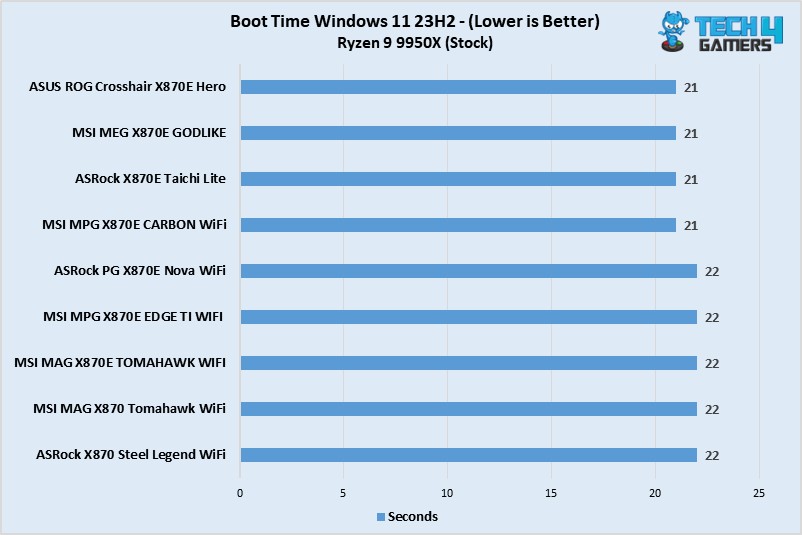
Our system boot time was 21 seconds with the board.
Should You Buy It?
It’s amazing, but is it really worth it?
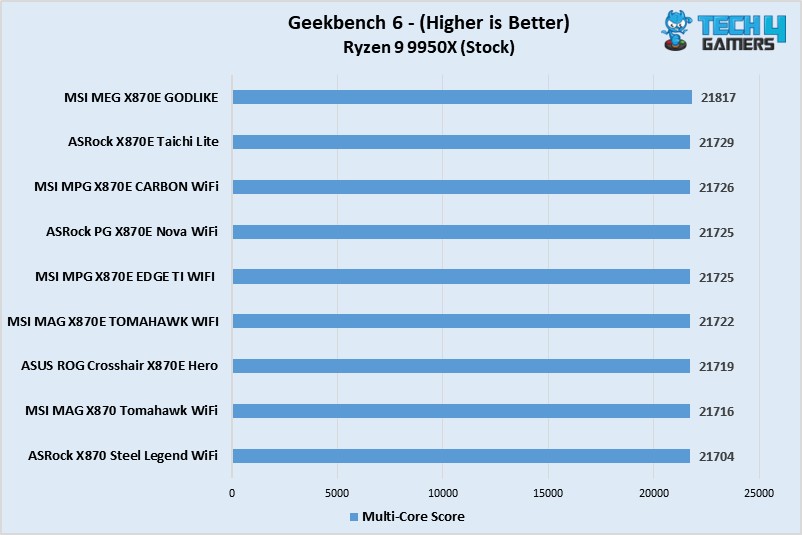
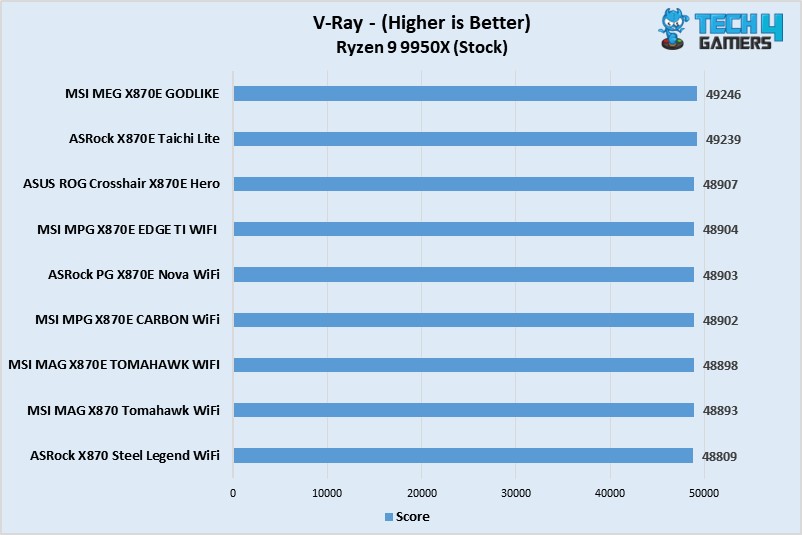
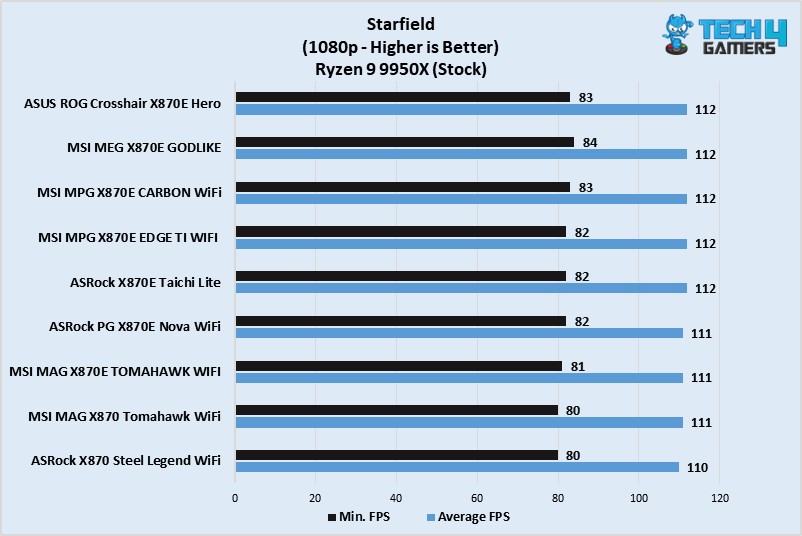
✅You want the absolute best performance: For top-of-the-line, compromise-free performance, the MEG X870E GODLIKE stands on top with class-leading performance. Its VRMs are about the best we’ve seen, and the VRM cooling is amazing.
✅You appreciate the premium design: With an all-black design, shiny heatsinks with RGB, and the Dynamic Dashboard III, the board’s design screams premium.
✅You prioritize convenience: With countless EZ-DIY mechanisms, including the EZ Bridge, to simplify cable management, the board can save you much time and effort compared to other boards. The board also offers handy “EZ” software features like one-click overclocking.
✅High memory speeds are important: With memory overclocking speeds of up to 9000 MT/s being promised, you can push your memory to the limits on the board.
✅You need excessive USB and storage provisions: With 25x USB ports and room for up to 7x M.2 drives, the board should cover even the most excessive needs.
Don’t Buy It If
❌You don’t have a ton of cash to spend: With enthusiast performance and features comes a price tag of over one grand USD.
My Thoughts
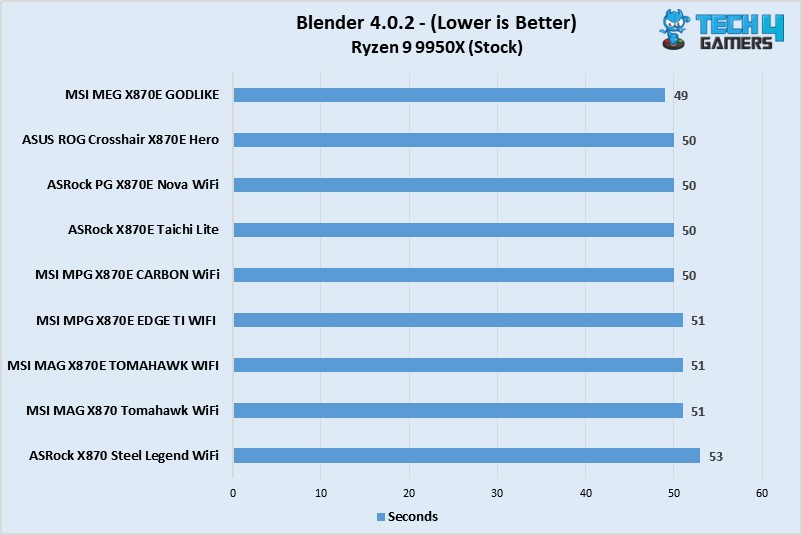
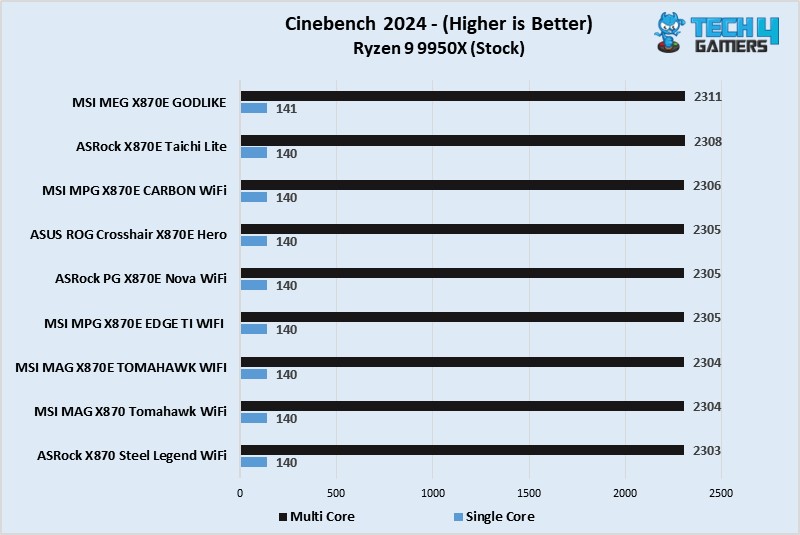
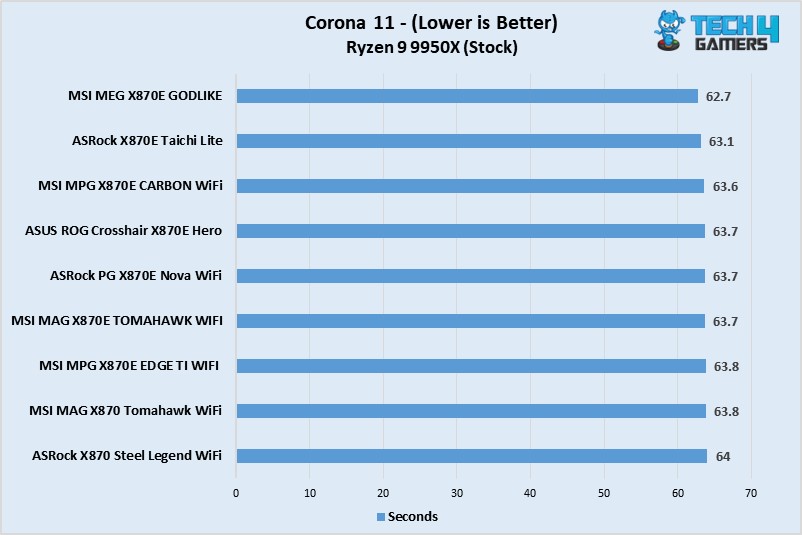
The MSI MEG X870E GODLIKE is the most expensive consumer gaming motherboard we’ve tested so far. Starting with the VRMs, it packs some serious firepower with a 24+2+1 DRPS design and 110A SPS for the VCore. This means you can push your CPU to its best potential without worrying about the power supply falling behind. We also tested the VRM temperatures, and the excellent Frozr heatsinks kept the setup under 50°C across a 30-minute Cinebench 2024 run at stock CPU settings. The board also has room for DDR5 speeds of up to 9000 MT/s through overclocking.
While I prefer more minimalist designs, the MEG X870E GODLIKE’s design premium aesthetics are undeniable. The highlights include the etched MSI dragon logo, which looks gorgeous when lit up, and the dynamic dashboard III, which can be used for various purposes, including hardware monitoring. There are three RGB zones, and all of them and any other RGB devices you install can be synced through the EZ Control Hub.
The EZ Control Hub also allows better cable management, with connections for multiple fans and RGB all in one place and a magnetic design to allow easy attachment at the back of your chassis.
We get 3x PCIe slots, including dual PCIe 5.0 (the bandwidth can be shared, or a full 16 lanes can be given to the primary slot). You can split the bandwidth if you plan to use the M.2 expansion card; otherwise, there’s no need. Speaking of M.2, the board has 5x M.2 slots–including 2x PCIe 5.0 (and two more added) by the expansion card. EZ mechanisms for the heatsinks and drives add a ton of convenience, and double-sided thermal pads provide adequate cooling for all of them.
There are 25 USB ports, including two USB4s. They share bandwidth with the M2_2 slot, but even in this case, you’ll have 3x Gen 5 M.2 slots if you use the expansion card. You can get 60W charging through the 20G Type-C port through the internal USB connector, but you’ll need sufficient wattage from your PSU for this. For connectivity, 10G and 5G LAN, plus WiFi 7 and Bluetooth 5.4, will keep you covered as these are the latest offerings at the moment.
For audio, the combination of Realtek’s ALC4082 and ESS9219Q Combo DAC/HPA provides an experience as good as any for a consumer motherboard.
There’s no doubt that the performance, features, and onboard cooling of the board are really as good as they get, but we still can’t say the price justifies it. Even if you remove the cost of the extra goodies (the Gen 5 card, Dynamic Dashboard III, and EZ Control Hub), which we approximate would be around $250-$300 in total, the board costs $800.
When you compare this to a board like the X870E Taichi Lite that costs $349 and equally capable VRMs, you’ll further realize that the price is just too high. But that’s what you’ll have to pay if you want the absolute best X870E board that money can buy.
At Tech4Gamers, I mainly cover new gaming news, leaks, and rumours. Aside from that, I love to write features about my favourite games while inserting my opinion about their different aspects.
Story Highlight
Half-Life 2 was released over 2 decades ago, so fans have been waiting for a new entry since then.
Valve has been sleeping on this franchise, but now, as per recent findings, it seems to be working on Half-Life 3.
The voice actor of G-Man, a mysterious man who appears in every Half-Life title, has teased some more news regarding the franchise in 2025.
Half-Life, being one of the most iconic franchises, has been neglected for more entries by Valve. The fandom doesn’t understand why the gaming giant hasn’t developed a sequel to Half-Life 2 in over 2 decades.
The latest game recently received a huge update, bringing back all the players and a massive new fandom. Thanks to that, the game reached a new all-time high player count. Following that, fans have been patiently awaiting some information regarding Half-Life 3 as some reports indicated an imminent announcement soon.
The voice actor of G-Man, Mike Shapiro, has now teased Half-Life news in 2025 in his latest tweets backing up the past reports.
Why it matters: Fans have been waiting for over 2 decades for a sequel to one of the most iconic titles, so they are pretty excited to hear more about the franchise.
More Half-Life News Has Been Teased For 2025 By The Voice of G-Man | Source: Twitter
Mike Shapiro has recently posted on Twitter about the new year and teased more Half-Life news in 2025, which has exploded the fandom’s excitement.
May the next quarter century deliver as many unexpected surprises, hmm? As did the millenniums first.
-Mike Shapiro
If he had posted this with no context, fans might not have linked it to the Half-Life franchise. However, Shapiro specifically used Valve, Half-Life, and G-Man tags, which makes the whole post suspicious.
So, the unexpected surprises could be linked to the franchise, and we might get more Half-Life news this year. Fans should, of course, keep their expectations in check, but recently, Valve began early close beta playtesting for Half-Life 3, so having a little hope won’t hurt.
Recent Reports Have Fans Convinced That Half-Life 3 Is No Longer A Dream
Fans are also convinced that they will definitely hear more about the game, with one saying, “Maybe life isn’t bad after all.”
Next year, if HL3(X) and GTA6 come out, It will be the battle of the ages for 2025 Game of the Year. Something no one would want to miss, not one bit.
Fans claim that these hashtags are intentional and that this is how it always starts: first, a post, then a whole announcement follows. Hopefully, they are right.
What do you think about the Twitter post from the voice actor of G-Man? Do you think the post means anything? Share your thoughts with us in the comments section below or join the discussion at the official Tech4Gamers forums.
I’ve previously worked for eXputer as a Senior News Writer for several years. Now with Tech4Gamers, I love to devoutly keep up with the latest gaming and entertainment industries. I have a Bachelor’s Degree in Computer Science and years of experience reporting on games and breaking exclusive stories. Besides my passion for gaming journalism, I love spending my leisure time farming away in Stardew Valley. VGC, IGN, GameSpot, Game Rant, TheGamer, GamingBolt, The Verge, NME, Metro, Dot Esports, GameByte, Kotaku Australia, PC Gamer, and more have cited my articles.
Story Highlight
Helldivers 2 studio director Johan Pilestedt says that DEI detracts from the game experience if it doesn’t add anything new.
The unnecessary forcing of DEI in titles affects how it performs and takes away from other enjoyable elements.
Johan believes games should be more about pursuing amazing moments, like in the old days.
Sony’s live-service portfolio was quite a hit-and-miss last year. Concord became one of the biggest flops of the gaming scene, and many blamed the unnecessary DEI for its failure. However, Arrowhead’s Helldivers 2 proved to be the opposite of the former. It went on to win many accolades across the industry and has been praised for avoiding the controversial DEI elements.
Now, studio director Johan Pilestedt has explained his stance on DEI, claiming that it detracts from the game experience if it doesn’t add anything unique.
Why it matters: The words of the Arrowhead studio director have become quite controversial. Many players have shown support for his stance, while others argued over why he even addressed the issue.
Arrowhead Studios director Johan Pilestedt believes unnecessary DEI harms a gaming experience.
In a Twitter post discussing Arrowhead’s next game, the studio director answered a user who requested not to bring DEI to his games. He clarified that games should be about the pursuit of amazing moments, like how it used to be in the past.
Johan further claims that he dislikes labels entirely. However, if he were to define DEI in Helldivers 2, it would be mankind’s extreme xenophobia against the invading aliens.
The director admits to not caring about the whole dilemma, noting developers should develop ‘great games’instead of making contemporary political statements.
The reaction of the community has been quite split to Johan’s response. Many came forward to support his opinion, while others left some pretty toxic remarks. All in all, it is best to take his words with a grain of salt.
Do you think the remarks of the Arrowhead director perfectly capture the impact that DEI can have in modern games? Let us know your thoughts in the comments below, or join the discussion on the official Tech4Gamers forum.
As a News Reporter at Tech4Gamers, I bring the latest findings from the tech industry to our readers. Specializing in processors, graphics cards, and more, I strive to deliver detailed insights that keep our audience well-informed and engaged. Periodically, I also delve into the vibrant world of gaming to share captivating stories.
Story Highlight
The NVIDIA GeForce RTX 5080, based on the Blackwell GPU architecture, will officially launch on January 21.
The card will feature 10,752 CUDA cores and 16 GB of memory, similar to the RTX 4080.
GeForce RTX 5080 is expected to face competition from its rival AMD on launch.
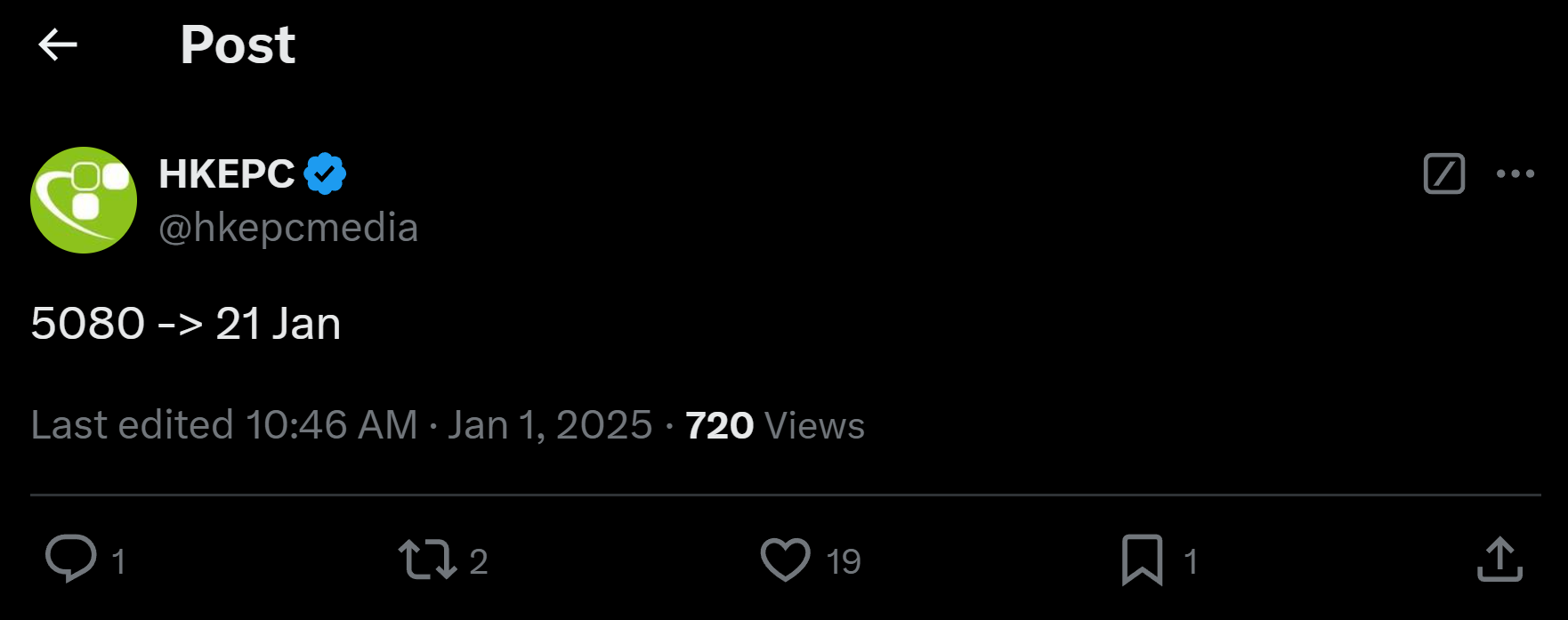
According to Hong Kong media outlet HKEPC, the GeForce RTX 5080 will go on sale on January 21. This makes it the first official release date for NVIDIA’s Blackwell GPU. That said, the GeForce RTX 5090 and 5070 Ti are now anticipated to arrive later, probably in February.
Why it matters: With the introduction of GDDR7 memory and notable performance improvements, the GeForce RTX 5080 is expected to replace the GeForce RTX 4090 with a sub $1000 price point.
The GeForce RTX 5080 is based on the GB203-400 GPU and will come with 10,752 CUDA cores. Sadly, its memory capacity, which is 16 GB, is identical to that of its predecessor, the RTX 4080/4080 SUPER.
NVIDIA is, however, improving the memory specs to GDDR7 technology, which is marketed as the fastest in the RTX 50 series. Other variants in the series are anticipated to have a slower 28 Gbps of RAM, compared to 32 Gbps on the GeForce RTX 5080.
The card is expected to be released on Tuesday, January 21, less than a week after the Intel Arc B570’s release on January 16. Furthermore, AMD is also rumored to release its Radeon RX 9070 XT and RX 9070 cards later this month.
The GeForce RTX 5080 is shaping up to be a good card for 2025. That said the latest 80 series offering from Nvidia might get some criticism for just 16GB of memory. However, for the right price, Nvidia might be able to get away with it.
I’ve previously worked for eXputer as a Senior News Writer for several years. Now with Tech4Gamers, I love to devoutly keep up with the latest gaming and entertainment industries. I have a Bachelor’s Degree in Computer Science and years of experience reporting on games and breaking exclusive stories. Besides my passion for gaming journalism, I love spending my leisure time farming away in Stardew Valley. VGC, IGN, GameSpot, Game Rant, TheGamer, GamingBolt, The Verge, NME, Metro, Dot Esports, GameByte, Kotaku Australia, PC Gamer, and more have cited my articles.
Story Highlight
Nintendo Switch 2 will use Nvidia DLSS-like AI upscaling tech, as confirmed by a new patent published by the company.
The upscaler will increase the internal resolution of games to output at a higher resolution to save storage space.
The games might only need low-end hardware to run effectively because of using the upscaler.
The Nintendo Switch has secured a lasting legacy in the gaming industry’s Hall of Fame for consoles, but it’s about time a successor is finally released. A slew of rumors and design leaks suggest that it is just a better iteration dubbed Switch 2, priced at $499 apiece.
However, everyone has been curious about how it will handle AAA games requiring a lot of storage and hardware, but now we may finally have an answer.
Nintendo has published a new patent that suggests Switch 2 will use an Nvidia DLSS-like AI upscaler for its games. It will output the low internal resolution of games in real-time.
Why it matters: Nintendo using an Nvidia DLSS-like AI upscaler for Switch 2 finally explains how it plans to effectively manage the storage and hardware restraints of the handheld.
The figure shows an image with low resolution being converted into higher resolution using the upscaler.
The patent dubbed ‘SYSTEM AND METHODS FOR MACHINE LEARNED IMAGE CONVERSION’ published at the United States Patent and Trademark Office (USPTO) suggests that Nintendo will use the upscaler to improve the output resolution from 540p to 1080p or 1080p to 4K for the player.
The document further reveals that Nintendo plans to fit modern AAA titles on Switch cartridges by lowering their resolutions, thus reducing their storage in the process. These 1080p quality entries can then be upscaled to 4K on the handheld.
A computer system is provided for converting images from a first resolution into a second resolution through use of a trained neural network.
Do you think the Nintendo Switch 2 will be able to run games at much higher resolutions by using Nvidia DLSS-like AI tech? Let us know your thoughts in the comments below, or join the discussion on the official Tech4Gamers forum.
At Tech4Gamers, I proudly wear the title of Comparisons Specialist. Focused on CPUs and GPUs, I bring forth a wealth of hands-on experience and a keen eye for detail to provide our audience with the latest insights and analyses.
Nvidia GeForce RTX 4070
Rated: 8/10
Nvidia GeForce RTX 4060 Ti
Rated: 9/10
Pros And Cons
Featured
Pros
Cons
RTX 4070
✅ Better performance.
✅ Runs Cooler.
❌Expensive
RTX 4060 Ti
✅ Budget Friendly.
✅ Takes less power.
❌Runs hotter.
Key Takeaways
During my testing, the RTX 4070 ended up performing 30% better than the RTX 4060 Ti on 1440p resolution.
Better thermals were observed throughout the benchmark on the RTX 4070.
At launch price, the RTX 4070 is approximately 40% more expensive than the RTX 4060 Ti.
On the basis of the cost-to-performance ratio, my recommendation would be towards the RTX 4060 Ti.
Why Trust Tech4Gamers
Uzair is our comparison expert who has been benchmarking graphics cards, and processors.
100+ components tested and reviewed by our team of hardware experts (Tech4Gamers Team).
100+ hours spent testing different components for our comparisons.
At Tech4Gamers, ensuring you get reliable information is our priority. That’s why every hardware round-up undergoes a meticulous review process by our team of experts and editors. Each review is carefully examined against our strict editorial guidelines, guaranteeing you trustworthy insights you can depend on.
Architecture: The Nvidia Geforce RTX 4070 and 4060 Ti are two mid-tier GPUs from Nvidia’s most recent 40X0 line of GPUs based on their latest and greatest Ada Lovelace architecture.
Cores: The RTX 4070 features 30% more Cuda cores at 5888, compared to the 4352 on the 4060 Ti. Both GPUs have dedicated Ray Tracing and tensor cores. However, the 4070 also receives a 30% bump in this area as well.
VRAM: The RTX 4060 features a 40% smaller VRAM at 8 GB compared to the 12 GB from the 4070. Both VRAMs are GDDR6X. However, the VRAM on 4060 Ti comes with a 128-bit memory bus, which is astonishing in this day and age. The memory bus on the VRAM of 4070 is still decent at around 192-bit.
TDP: TDP is an area where the 4060 Ti shines. It features a 20% smaller TDP. Maintaining its power-efficient stance, the 4060 Ti comes with a 160-watt TDP. In comparison to that, the bigger RTX 4070 features a 200-watt TDP.
Nvidia just extended their densely popular Ada Lovelace lineup with a new inclusion of the RTX 4060 Ti in it. But how does it differ in performance compared to the previously released RTX 4070? Keep reading to find out as we get both these GPUs to lock horns against each other in a series of gaming benchmarks.
Gaming Tests
Architectural differences may have put the RTX 4070 ahead of the RTX 4060 Ti, but by what margin? That is what we are about to find out in this gaming benchmark by comparing both of these GPUs side-by-side.
As per my testing, I witnessed the RTX 4070 showcasing a 22% performance boost in Cyberpunk 2077. On average, it delivered an impressive 86 fps, while the 4060 Ti lagged considerably behind, managing an average of just 69 fps.
The gap in 1% lows was slightly smaller but still significant, with a 19% advantage in favor of the RTX 4070. Remarkably, the 1% lows of the 4070 were around 69 fps, whereas the 4060 Ti struggled with 57 fps.
Once again, the RTX 4070 exhibited its dominance over the 4060 Ti, outperforming it by a staggering 32.32%. It was consistently averaging around 115 fps. On the contrary, the 4060 Ti struggled to reach 83 fps at its peak.
The 1% lows echoed the same story of the 4070, surpassing the 4060 Ti by a remarkable 35%. It consistently maintained an average of 99 fps for 1% lows, leaving the 4060 Ti far behind, with a maximum of 69 fps.
The bashing continues for the 4060 Ti as this time, the 4070 was ahead with a margin of 34%. It provided a total of 131 fps on average in this demanding title, and a whopping 38 frames behind was the 4060 Ti, maxing out at 93 fps.
1% lows also painted a similar picture, as the 4070’s 1% lows were roughly 35% ahead this time, yielding an average of 103 1% low fps. The 4060 Ti, on the contrary, could not go beyond 72 fps.
The RTX 4070 showcases its prowess by delivering a 32% improvement in average fps. This time, it effortlessly maintained a comfortable 105 fps, leaving the 4060 Ti trailing behind in the double digits at approximately 76 fps.
The 1% lows were equally unrelenting on the 4060 Ti, with the 4070’s 1% lows even surpassing the average frame rate of the 4060 Ti. On average, it provided 77 fps for 1% lows, while the 4060 Ti lagged significantly with just 54 fps.
This time, the 4070 surged ahead with a notable 25% lead in terms of average fps, averaging a commendable 77 fps. In stark contrast, the 4060 Ti found itself trailing by 17 frames, hovering right around the 60 fps mark.
The 1% lows followed a similar trend, with the 4070 maintaining a significant 28% advantage. It consistently produced 61 fps for 1% lows, while the 4060 Ti struggled with 46 1% low fps.
Red Dead Redemption 2
Red Dead Redemption 2 1080p benchmark – Image Credits (Tech4Gamers)
In Red Dead Redemption, a clear preference emerged for the 4070 over the 4060 Ti, as it delivered 30% more fps. On average, the 4070 impressively maintained 101 fps, while the 4060 Ti struggled to keep up, averaging just 75 fps.
Although the difference in 1% lows was narrower, with the 4060 Ti closing the gap to 23%, the 4070 still maintained a lead. It provided 75 fps for 1% lows, while the 4060 Ti lagged behind with an average of 59 fps for 1% lows.
God Of War 2018
God of War 1080p benchmark – Image Credits (Tech4Gamers)
In my last benchmark for today, the RTX 4070 continued to maintain its lead by an impressive 32.4% in God of War 2018. On average, the 4070 delivered a robust 104 fps, while the 4060 Ti lagged significantly, averaging just 75 fps.
The performance gap in 1% lows mirrored the average fps, with the 4070 maintaining a significant 30% lead. It consistently provided 82 fps for 1% lows, leaving the 4060 Ti struggling at a maximum of 61 fps.
Overall Gaming Performance
Featured
RTX 4070
RTX 4060 Ti
Average FPS
102.71 📈
75.85 📈
1% lows
80.85 📉
59.71 📉
Winner: Nvidia's RTX 4070
The Nvidia Geforce RTX 4070 ended up performing approximately 30%better than the Geforce RTX 4060 Ti on average. The difference in the mean of 1% lows of both GPUs was exactly the same at around 30% in favor of the RTX 4070.
Editor`s Note
The RTX 40X0 series, in general, has been heavily criticized due to its underwhelming raw performance for the price they are being sold. However, out of the two, the RTX 4060 Ti does seem to offer a bit more value for its price.
– Uzair Qureshi
Thermal Efficiency
Game
RTX 4060 ti (°C)
RTX 4070 (°C)
Cyberpunk 2077
66🌡️
55🌡️
Forza Horizon 5
61🌡️
53🌡️
Resident Evil 4 Remake
65🌡️
59🌡️
Call Of Duty Warzone 2.0
64🌡️
54🌡️
The Witcher 3 (Next Gen Patch)
64🌡️
55🌡️
Red Dead Redemption 2
65🌡️
56🌡️
Average Temperature
64.16🌡️
55.33🌡️
Winner: RTX 4070
Throughout the entire benchmarking process, I observed that the Geforce RTX 4060 Ti consistently exhibited higher operating temperatures compared to the Geforce RTX 4070. On average, the RTX 4060 Ti ran approximately 14.31% hotter than its counterpart, the RTX 4070.
Pricing And Availability
GPU
MSRP
Current Price
RTX 4070
💲399
💲399
RTX 4060 Ti
💲599
💲599
Price Difference
40%
40%
At launch price, the RTX 4070 is a whopping 40% more expensive than the RTX 4060 Ti at the launch price. To make matters worse, since both of these GPUs have been released recently, chances are you will not find either of them cheaper than what they launched for.
RTX 4060 Ti vs RTX 4070: Which One Would I Recommend?
RTX 4060 Ti: At launch price, the RTX 4060 Ti is my recommendation out of the two since it provides a bit more value for the price it’s being sold at. It is roughly 40% cheaper than the RTX 4070, and on average, it performs 30% worse in games. Not to mention, it can get by on a much smaller PSU as it consumes 27% less power. Lastly, it comes with all the necessary features that 4070 comes with, like Ray Tracing, DLSS 3.0, and Frame Generation.
RTX 4070: However, all this does not make 4070 a bad deal either. If you can manage to spend a couple of hundred extra bucks, I would definitely recommend you consider the RTX 4070. It is a sweet upgrade. You instantly get a whopping 30% increase in gaming performance, superior specs, and much better thermals than the 4060 Ti.
The GeForce RTX 4070 and Geforce RTX 4060 Ti are two of the most popular mid-ranger GPUs released by Nvidia last year. In my opinion, both of these are solid choices for 1440p gaming. However, my recommendation will depend greatly on your budget.
At Tech4Gamers, I proudly wear the title of Comparisons Specialist. Focused on CPUs and GPUs, I bring forth a wealth of hands-on experience and a keen eye for detail to provide our audience with the latest insights and analyses.
Intel ARC B580
Rated: 8.2/10
AMD Radeon RX 6700 XT
Rated: 8.4/10
Pros And Cons
GPU
Pros
Cons
Intel ARC B580
✅ Great Value for money
✅ Ray Tracing and AI capabilities
❌ Driver issues
❌ Low transistor density
AMD Radeon RX 6700 XT
✅ Great gaming performance
✅ Better productivity performance
❌ Low performance per watt
❌ Not good at ray-tracing
Key Takeaways
The Radeon RX 6700 XT exceeds the Arc B580 by 13.8% in our gaming tests and offers about a 13.6% advantage in productivity.
Concerning GPU efficiency in our gaming sessions, the Arc B580 consumes 79.2% less power and maintains a temperature about 4.2% lower than the RX 6700 XT.
As of February 2025, the RX 6700 XT is priced at around $499. Meanwhile, the Arc B580 is available for $249.
We recommend the Arc B580 for its great efficiency, outstanding value, and affordability. In contrast, the RX 6700 XT can offer a bit better gaming experience.
Architecture: While the RX 6700 XT has AMD’s old RDNA 2.0 architecture, the ARC B580 features Intel’s advanced and efficient Xe2architecture.
GPU Chip: The ARC B580 is developed using an Intel BMG-G21 chip fabricated on a 5nm node at TSMC. In contrast, the RX 6700 XT features AMD’s Navi 22 chip on a 7nm process node.
Clock Speed: AMD RX 6700 XT has a base clock of 2321 MHz. Regarding the turbo clock, ARC B580’s 2670 MHz defeats the RX 6700 XT’s 2581 MHz by 3.4%.
VRAM: The ARC B580 and the RX 6700 XT have the same 192-bit 12GB GDDR6 memory. However, the ARC B580 has an 18.8% higher memory bandwidth of 456.0 GB/s.
Advanced Technologies: The Arc B580 features Intel Xe Super Sampling (XeSS), while the RX 6700 XT includes AMD FidelityFX Super Resolution (FSR). These technologies enhance ray tracing.
Intel’s ARC B580 and AMD’s RX 6700 XT fight in a decisive conflict, as they are armed with the same 192-bit 12GB GDDR6 memory. Can the RX 6700 XT beat the ARC B580 due to its higher TDP? To find out the better option, let’s now assess the ARC B580 vs RX 6700 XT in multiple fields.
Gaming Benchmarks
The specifications of these two graphics cards reveal no clear superiority of one over the other. We evaluated the actual performance of the ARC B580 and RX 6700 XT by playing eight graphically intensive games at 1080p resolution.
Test Bench
The gaming system we used for this comparison featured the following specifications.
Alan Wake 2 Benchmarks at 1080p – Image Credits (Tech4Gamers)
Starting our assessment with Alan Wake 2, we saw that the RX 6700 XT (44 FPS) leads in performance by 15.8% against the Arc B580 (38 FPS).
For low 1% performance, the RX 6700 XT maintains an advantage, reaching 33 FPS, which is 10% more than the Arc B580’s 30 FPS.
Black Myth Wukong
Black Myth Wukong Benchmarks at 1080p – Image Credits (Tech4Gamers)
In Black Myth Wukong, the RX 6700 XT maintained an 18% higher average frame rate of 59 FPS, while the Arc B580 turned only 50 FPS on average.
During the low 1% performance time, the RX 6700 XT achieves 47 FPS, holding a 27% advantage over the Arc B580’s 37 FPS.
Cyberpunk 2077
Cyberpunk 2077 Benchmarks at 1080p – Image Credits (Tech4Gamers)
During our gameplay of Cyberpunk 2077, the Arc B580 holds a 6.3% advantage, averaging 79 FPS, while the RX 6700 XT follows with 74 FPS.
Nonetheless, the RX 6700 XT pulls ahead in the low 1% performance, reaching 61 FPS, which is 10.9% more than the Arc B580’s 55 FPS.
Forza Horizon 5
Forza Horizon 5 Benchmarks at 1080p – Image Credits (Tech4Gamers)
The ARC B580 delivered an average of 92 FPS in Forza Horizon 5, which is about 10.67% lower than the RX 6700 XT’s 103 FPS.
For the low 1% performance, the ARC B580 achieved 76 FPS, while the RX 6700 XT reached 90 FPS, giving the RX 6700 XT a lead of approximately 18.42%.
Ghost of Tsushima
Ghost of Tsushima Benchmarks at 1080p – Image Credits (Tech4Gamers)
During our Ghost of Tsushima session, the Intel ARC B580 achieved an average of 70 FPS, which is 19.54% lower than the RX 6700 XT’s 87 FPS.
Regarding the low 1% performance, we saw that the ARC B580 (52 FPS) trailed behind the RX 6700 XT (77 FPS) by approximately 32.47%.
God of War: Ragnarök
God of War: Ragnarök Benchmarks at 1080p – Image Credits (Tech4Gamers)
In God of War: Ragnarok, the RX 6700 XT achieved an average of 81 FPS, outperforming the Intel Arc B580’s 68 FPS by approximately 19.1%.
In the low 1% performance scenario, the RX 6700 XT delivered 70 FPS, maintaining a notable 29.6% lead over the Arc B580’s 54 FPS.
Horizon Forbidden West
Horizon Forbidden West Benchmarks at 1080p – Image Credits (Tech4Gamers)
During Horizon Forbidden West, the RX 6700 XT yielded 79 FPS on average, about 9.27% finer than the Arc B580’s performance of 72 FPS.
We observed that the RX 6700 XT scores 68 FPS at its worst 1% performance in this gameplay, 19.30% more than the ARC B580’s 57 FPS.
Senua’s Saga – Hellblade II
Senua’s Saga – Hellblade II Benchmarks at 1080p – Image Credits (Tech4Gamers)
While playing Senua’s Saga – Hellblade II, the RX 6700 XT delivered a smooth 52 FPS on average, beating the Arc B580’s 40 FPS by an impressive 30.0%.
The RX 6700 XT delivers a low 1% frame rate of 44 FPS in this gameplay. It surpassed the ARC B580’s 33 FPS by an exceptional 33.3%.
Productivity Benchmarks
As we evaluated the gaming performance of the ARC B580 vs RX 6700 XT, the RX 6700 XT emerged as the clear victor. We now turn our attention to their productivity capabilities. This assessment will reveal which GPU better serves the needs of productivity-focused users.
In our Geekbench 6 OpenCL compute benchmark, the RX 6700 XT scored 99,809 points, beating the ARC B580, which scored 97,939 points, roughly by 1.9%.
The RX 6700 XT scored 114,096 points in Vulkan compute benchmarks, exceeding the ARC B580’s score of 99,266 by 14.9%.
Blender Open Data
Blender Open Data Productivity Benchmarks – Image Credits (Tech4Gamers)
The performance test of Blender Open Data benchmarks presents contradictory results. Here, the Arc B580 outshines the RX 6700T by 18.6%, indicating its superior performance.
During our test, the ARC B580 conducted 1,802 samples per minute, whereas the RX 6700 XT lagged with 1,519 samples per minute.
During our Passmark performance test, the RX 6700 XT again takes an impressive lead of around 27.0% over the ARC B580.
When subjected to stress, the ARC B580 scored an impressive 15,612 points, while the RX 6700 XT scored a massive 19,842 points.
Overall Performance
Stats
Intel Arc B580
Radeon RX 6700 XT
Average FPS
📈63.6
📈72.4
Low 1% FPS
📉49.2
📉61.2
Productivity
✏️6.6
✏️7.5
Winner: AMD Radeon RX 6700 XT
Average Frame Rate
Our gaming benchmarks of the ARC B580 vs RX 6700 XT revealed a clear victory. The RX 6700 XT unveiled its superior gaming powers averaging 72.4 FPS overall, while the ARC B580 managed an overall 63.6 FPS. Thus, the RX 6700 XT is roughly 13.8% better than the ARC B580 for 1080p gaming.
Low 1% Frame Rate
Analyzing the lowest 1% performance across the tested games, we calculated that the RX 6700 XT provided 61.2 FPS, while the ARC B580 managed 49.2 FPS. Based on these stats, the RX 6700 XT is roughly 24.4% better than the Arc B580 at the low 1% performance.
Productivity
In our productivity benchmarks, the Arc B580 demonstrated admirable performance. However, when we do a broader analysis, the RX 6700 XT surpasses it by about 13.6% in efficiency, underscoring its superior capability in handling intensive workloads.
Power Efficiency
Game
Intel ARC B580 (W)
Radeon RX 6700 XT (W)
Alan Wake 2
115
193
Black Myth Wukong
106
189
Cyberpunk 2077
107
188
Forza Horizon 5
99
176
Ghost of Tsushima
100
186
God of War: Ragnarök
103
184
Horizon Forbidden West
102
190
Senua's Saga - Hellblade II
98
182
Average Gaming Power Draw
103.8 ⚡
186.0 ⚡
Winner: Intel ARC B580
With its power-efficient design, the Arc B580 transcends the RX 6700 XT in energy efficiency. It operates at 79.2% lower power on average during our gaming sessions. Additionally, the Arc B580 delivers 0.61 FPS per watt, 56.4% higher than the RX 6700 XT’s 0.39 FPS per watt.
Thermal Efficiency
Game
Intel ARC B580 (°C)
Radeon RX 6700 XT (°C)
Alan Wake 2
59
58
Black Myth Wukong
58
60
Cyberpunk 2077
58
59
Forza Horizon 5
56
61
Ghost of Tsushima
58
59
God of War: Ragnarök
56
60
Horizon Forbidden West
58
62
Senua's Saga - Hellblade II
57
60
Average Gaming Temperature
57.5 🌡️
59.9 🌡️
Winner: Intel ARC B580
During our gaming benchmarks, the ARC B580 offered exceptional thermal efficiency, sustaining an average temperature of 57.5°C. In contrast, the RX 6700 XT ran a bit warmer at an average of 59.9°C, registering a 4.17% higher thermal output.
Price And Value
GPU
Intel Arc B580
Radeon RX 6700 XT
Price Difference
Launch Price
💲249
💲479
92.0%
Current Price
💲249
💲499
100.0%
The Intel ARC B580 delivers prime value. It merges superior performance per watt and per dollar while holding its launch $249 price tag. Meanwhile, the RX 6700 XT is currently twice as expensive as the ARC B580. Concerning availability, you can easily get these GPUs from the online market.
What We Recommend?
Intel ARC B580: This cost-effective graphics card delivers remarkable operating efficiency and robust performance, making it an excellent choice for smooth 1080p gaming and simple productivity tasks. However, this GPU is not capable of handling intensive workloads.
Radeon RX 6700 XT: The RX 6700 XT produces more performance and is better suited for intensive gaming and productivity. However, its current price does not align with its performance. Newer and superior graphics cards are available at this price.
We strongly endorse the Intel ARC B580 as an exceptional choice for those in search of an efficient and budget-friendly GPU. However, if the RX 6700 XT becomes available at a lower price, it would be the superior option for gaming performance.
Frequently Asked Questions
What’s the PCIe interface of the ARC B580 Vs RX 6700 XT?
The Arc B580 uses a PCIe 4.0 x8 interface, while the RX 6750 XT connects via PCIe 4.0 x16 to the main system.
Does the Intel ARC B580 support VR?
No, the ARC B580 currently lacks VR driver support.
Does the RX 6700 XT support VR?
Yes, the RX 6700 XT supports VR and provides a good virtual reality gaming experience.
What is XeSS and how does it benefit me?
XeSS is Intel’s AI upscaling technology. It renders games at lower resolutions and intelligently upscales them for better performance and visuals.
Where can I buy the ARC B580?
The ARC B580 is available from major retailers like Amazon, Newegg, and Best Buy. You can also check it out on Intel’s official site.
Currently serving as a News Reporter at Tech4Gamers, I have the privilege of combining my love for gaming with the art of storytelling. My role involves crafting engaging narratives that keep our audience abreast of the latest developments in the gaming world.
Story Highlight
The Assassin’s Creed franchise has taken fans throughout different iconic periods throughout history.
The franchise should step foot in the Wild West era, a setting long demanded by fans, which would be an interesting take.
While such a setting would be challenging, Ubisoft always finds ways to overcome hurdles that would make the game fit into the Assassin’s Creed narrative.
The Assassin’s Creed franchise has taken fans all over the world through different points in history. It has taken some creative liberty towards historical events, merging the Assassin’s Vs Templar narrative between them.
Whether it’s Ancient Egypt, Greece, America during the Revolution, or even England during the Second Industrial Revolution, fans have had a taste of almost every setting throughout history.
With the upcoming Assassin’s Creed Shadows finally taking place during Feudal Japan, a long-awaited setting, fans wonder what would be next for the franchise. Fans have demanded a Wild West setting for quite a while now despite being skeptical of how it would work.
Why It Matters: The Wild West is an iconic period in history, and many video games and movies are based on it. Given how Assassin’s Creed creatively moulds iconic time periods, it would be interesting to see how the franchise handles such a setting.
The Wild West Setting Is Perfect For An Assassin’s Creed Narrative
The Kenway Arc In Assassin’s Creed Was One Of The Best-Crafted storylines
While the media has exaggerated the Wild West setting substantially, making it seem like a harsh era to live in with terror from outlaws, the reality is quite different. Most cowboys were just ranch owners working for a minimum wage, and sheriffs actually had towns under strict control.
Despite this, the media has glorified people like Billy The Kid, making them seem quite dangerous despite their pitiful story of having resorted to crime. How does this work for Assassin’s Creed, though? Well, the talented writers at Ubisoft can rewrite these iconic characters however they want.
Jesse James, the outlaw infamous for being a Robin Hood-esque figure, could be a candidate for the game’s protagonist. Basing a lead character on a real-life figure isn’t out of the question now since Assassin’s Creed Shadows has already done it.
Otherwise, the main character can be a Native American, which would fit the theme quite well. The character could utilize certain weapons, such as the bow, tomahawk, and hidden pistol, for face-offs, perfectly fitting the theme of a conventional Assassin’s Creed game.
In a way, they could relate the character to Connor Kenway since the American Revolution and the Wild West eras were quite close to each other.
How Would It Work Though?
Red Dead Redemption 2 Perfectly Encapsulates The Wild West Setting
While such a setting sounds quite easy on paper, nailing it would be harder. Firstly, Assassin’s Creed is mostly based upon close combat using melee weapons rather than being a strict third-person shooter like Red Dead Redemption 2.
The Wild West era is famous for gunslingers, and choosing the setting would make Assassin’s Creed a third-person shooter. That would be completely false, though. Assassin’s Creed Syndicate was set in 1868, quite close to the Wild West era, with weapons like pistols and rifles prevalent in the game. Yet the Frye siblings mainly relied on close-range weapons, with occasional pistol handling.
The second main aspect is creating an open world worth traversing with larger parkour-friendly cities. Wild West era certainly doesn’t have any big cities that would be fit, but then again, using creative liberty, Ubisoft could create such a city that is parkour-friendly.
Even Saint-Denis from Red Dead Redemption 2 was entirely fictional and based upon New Orleans.
A Wild West era is certainly not out of the question, and Ubisoft is bound to visit it sooner or later. However, with the bar Red Dead Redemption 2 has set, it would be difficult for Ubisoft to recreate the same success.
I’m certainly excited to see their take on the time period, and if one thing is for sure, Ubisoft doesn’t miss the writing department.
Currently serving as a News Reporter at Tech4Gamers, I have the privilege of combining my love for gaming with the art of storytelling. My role involves crafting engaging narratives that keep our audience abreast of the latest developments in the gaming world.
Story Highlight
Batman Arkham Shadow captures the essence of the original series despite being VR-only.
Developer Camouflaj does a great job delivering a good Batman story, surpassing its predecessors.
The future of the Arkham series finally looks optimistic, and I hope that future games are just as good as Arkham Shadow, if not better.
The turmoil Rocksteady had with the Arkham franchise within the past few years had me scared for the series. With the release of Suicide Squad: Kill The Justice League, I thought that we finally bid farewell to the Dark Knight.
I was wrong to ponder, though. Shortly after, Batman Arkham Shadow was teased, a prequel to the Arkham trilogy. I had my doubts about the game, especially considering it was a Meta Quest 3-only VR title.
With the launch of the game, my opinions have vastly changed. If anything, I’m actually optimistic about the future of the Arkham series. Batman Arkham Shadow is hands down one of the best VR games, and I suggest everyone give it a go.
Why It Matters: Things haven’t gone well for the Arkham franchise since 2015’s Batman Arkham Knight. The first mainline game in the franchise, a VR title, was a letdown for many people, but regardless, it’s a solid game.
Camouflaj Perfectly Captured The Feel Of Earlier Arkham Games
Arkham Shadow Has Quite Decent Combat For a VR Title
Compared to 2016’s Batman Arkham VR, a short VR experience developed by Rocksteady themselves, Arkham Shadow is a full-fledged VR game with almost 10 hours of main story content.
Maybe one of the reasons why the project is so great is that Rocksteady didn’t take the lead on it; instead, it was developed by Camouflaj, the same studio behind Iron Man VR. Anyhow, Arkham Shadow is on the list of my favorite VR games, right next to Half-Life: Alyx.
Being a VR-only title doesn’t hold back Arkham Shadow from being a full-fledged Arkham experience. It may also be the closest experience I’ll ever have to being Batman myself.
Everything that made the original Arkham games special is still prevalent in Arkham Shadow, and it feels closer to the original Arkham Asylum. Despite being a VR title, the game’s map is semi-linear with tons of side content, such as puzzles hiding behind Rat King Idols, similar to Riddler trophies.
Combat is the game’s standout feature and the most distinct of any VR game. You have to follow certain prompts on the screen, highlighting enemies coming from different directions and pointing out their weak spots. Once you get ahold of the combat, it feels very nice, and beating the thugs has never felt so much better.
I was also hesitant about how the stealth would translate to a VR game, but developer Camouflaj nails this aspect quite well, too. You can jump on different gargoyles, utilize Bats’ wide array of gadgets, and take down enemies in whatever way you want, giving you the same freedom as the Arkham trilogy.
Arkham Shadow Does Justice To Undermined Arkham Villains
Batman Arkham Shadow Features An All-New Batman Villain
The blueprint for the gameplay was already there, and all developer Camouflaj had to do was translate that into a VR Game. The most difficult aspect was nailing an actual great Batman story that would be on par with the trilogy, and that’s something quite hard to achieve.
Still, Camouflaj exceeded my expectations and delivered an all-original Batman story that even topped its predecessors. Without giving too much away, Arkham Shadow is a more grounded story focusing on the Dark Knight’s detective skills, similar to the Matt Reeves movie.
The story takes inspiration from The Batman Animated Series, one of my favorite non-comic Batman renditions. The Rat King is none other than Harvey Dent before he actually became Two-Face.
Being self-conflicted, even Harvey didn’t know what he was doing until he truly came to terms with his new alter-ego and fully adopted the Two-Face persona. Developer Camouflaj understands Harvey’s character better than anyone else and actually gives him the focus and highlight he deserves rather than being the typical thug that Rocksteady portrayed him as.
I’m excited about future Arkham games, as Warner Bros. hasn’t called quits on the series yet. Roger Craig Smith is a worthy successor to Kevin Conroy as Batman, and I’m excited about the energy he will bring to future Batman games.
At Tech4Gamers.com, I cover the latest news and rumours in the gaming industry, from new game releases to hidden gems and video game leaks. Furthermore, I occasionally write tech articles about video game consoles, providing insights into the hardware and software that powers our gaming experiences.
Story Highlight
Game Science’s debut AAA title, Black Myth: Wukong wins Steam’s Game of the Year award for 2024.
Player reception on Steam has been overwhelmingly positive, with a 96% positive rating from 800,000 reviews.
Game Science is reportedly already working on multiple DLCs for the game.
Black Myth: Wukong has won Steam’s Game of the Year for 2024. The game has been a massive success for Game Science and it’s impressive considering it was the studio’s first ever AAA title.
After it failed to snag the GOTY at The Game Awards, Black Myth: Wukong finally gets the award it deserves. The game beat the likes of Stalker 2, Helldivers 2, Balatro, and Space Marine 2 to claim the award.
Why it matters: Black Myth: Wukong winning Steam’s Game of the Year should inspire Chinese developers to create more outstanding games.
Wukong’s redemption arc is complete as it grabs Steam’s Game of the Year award.
The game’s success is clear from its strong sales numbers. In its first month, Black Myth: Wukong sold over 20 million copies, earning more than $1 billion in revenue on Steam alone.
This makes it one of the fastest-selling games ever, beating out titles like Elden Ring and Cyberpunk 2077 in initial sales. Moreover, the game has over 800K reviews on Steam with 96% of them being overwhelmingly positive.
However, despite its commercial success and positive user reviews, Black Myth: Wukong was unexpectedly overlooked at The Game Awards 2024. It’s important to note that The Game Awards give most of the voting power to critics, with 90% of the votes coming from “game journalists” and just 10% from the public.
In contrast, the Steam Awards are decided solely by player votes, showing what the gaming community truly enjoys without any industry bias. Black Myth: Wukong being named Steam’s Game of the Year shows how much players connect with the game and shows the difference between critics’ opinions and what players actually appreciate.
The game received mixed reviews from critics. IGN gave it an 8 out of 10, appreciating its combat and boss design but pointing out technical issues. On the other hand, ScreenRant gave it 6/10, mainly because it lacked “inclusivity and diversity.”
Steam players deliver justice for Black Myth: Wukong.
Regardless, Black Myth: Wukong broke records on different gaming platforms. In August 2024, it became the most downloaded PlayStation 5 game in North America, Europe, and Japan. On Steam, it hit over 2.4 million players at once shortly after launch, breaking records for single-player games on the platform.
Looking ahead, Game Science has expressed intentions to expand the Black Myth universe. The studio’s official FAQ page already confirmed Black Myth: Wukong will get multiple DLCs down the line.
Do you think Black Myth: Wukong deserved the Steam GOTY award or someone else should’ve won? Drop your thoughts in the comments, or join the discussion on the Tech4Gamers forum.