I’ve previously worked for eXputer as a Senior News Writer for several years. Now with Tech4Gamers, I love to devoutly keep up with the latest gaming and entertainment industries. I have a Bachelor’s Degree in Computer Science and years of experience reporting on games and breaking exclusive stories. Besides my passion for gaming journalism, I love spending my leisure time farming away in Stardew Valley. VGC, IGN, GameSpot, Game Rant, TheGamer, GamingBolt, The Verge, NME, Metro, Dot Esports, GameByte, Kotaku Australia, PC Gamer, and more have cited my articles.
Story Highlight
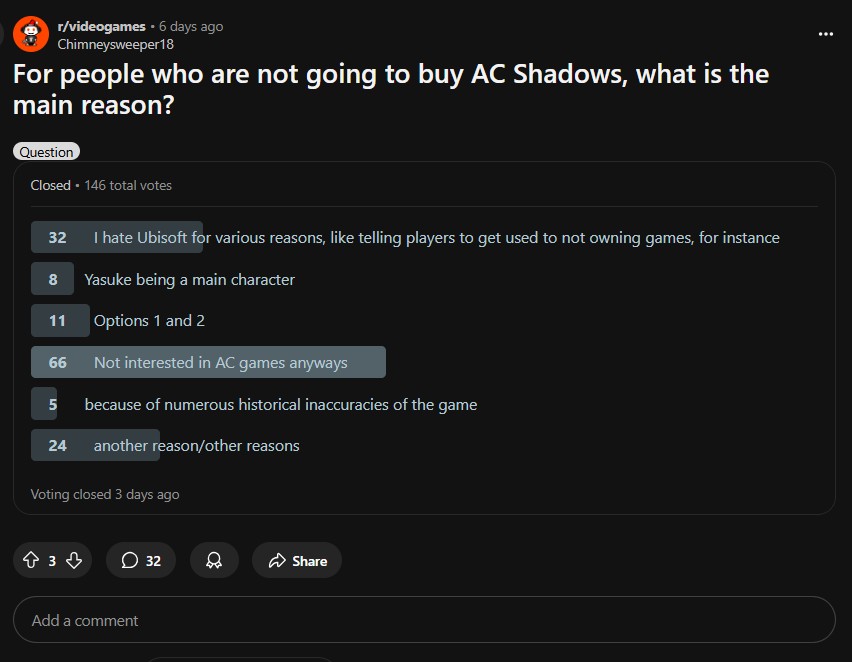
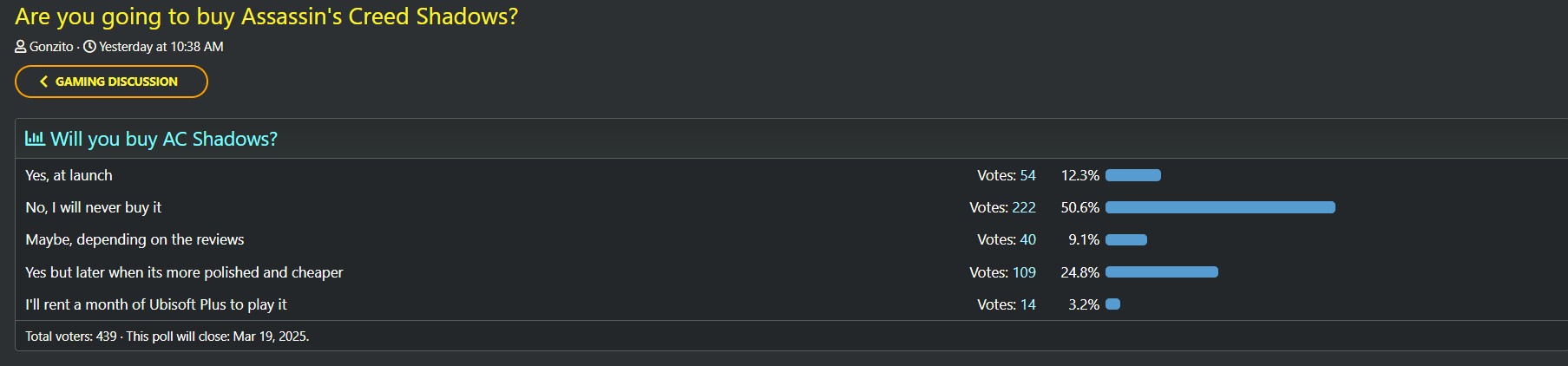
Several recent polls conducted on various forums suggest that many gamers are unwilling to buy Assassin’s Creed Shadows.
Most gamers who refused to buy the game showed dislike for Ubisoft or the Assassin’s Creed franchise in general.
Others are simply not interested in pre-ordering or buying until the game goes on a huge sale a few months after the launch.
A lot of gamers are hesitant about Assassin’s Creed Shadows because of controversies in historical accuracies and gameplay choices. However, a motley of polls on forums and social media posts suggests that many are unwilling to give the game a try, even for free.
We’ve found a number of these polls unveiling that many gamers are refusing to buy the game. Many are rejecting the RPG because of past Ubisoft fumbles, while others have lost hope in the AC franchise.
Why it matters: Many gamers on social media plan to skip *AC Shadows*, citing gameplay or other concerns, while those interested remain cautiously optimistic.
Not looking good for Ubisoft.
1 of 4
A majority of gamers do not recommend buying Assassin's Creed Shadows.
Most gamers skipping out on AC Shadows dislike Ubisoft or the franchise.
It's a similar story on Twitter, with many gamers refusing to give AC Shadows a chance.
We’ve analyzed polls from mid-last year to the ones posted recently, and the fan reception for Assassin’s Creed Shadows does not appear to have changed. Those who want to try the game will only get it through sales or after the entry gets more polished after launch.
Many gamers are advising against pre-ordering, suggesting waiting for reviews first. Despite Ubisoft’s delays, the situation still looks tough for Assassin’s Creed Shadows.
For those not in the know, Assassin’s Creed Shadows had many physical copies leaked recently, and the player impressions were mostly positive. Therefore, it’s too early to tell what the game’s post-launch reception will turn out to be.
Do you think Assassin’s Creed Shadows will surpass expectations and sell in the millions despite these votes, or is Ubisoft in trouble? Let us know your thoughts in the comments below, or join the discussion on the Tech4Gamers forum.
As a Hardware Expert at Tech4Gamers, I bring my decade-long expertise in electronics design, embedded solutions, and prototyping. My knack for exposing misconceptions in the tech world finds a perfect outlet here.
Gamers have been eagerly anticipating the launch of AMD’s new RDNA4 GPUs ever since Nvidia’s been struggling to keep itself afloat amidst the trilogy of catastrophic issues haunting the RTX 50 Series launch, which includes, but isn’t limited to the BSODs, melting power connectors, and missing ROPs.
But enough of Nvidia for now. Thankfully, the AMD Radeon RX 9070 and RX 9070 XT officially launched worldwide on 6th March 2025, and I’m delighted to inform you that you can actually find both GPUs in stock at prices similar to the MSRP, which is more than can be said for Nvidia’s RTX 50 GPUs, which are becoming increasingly difficult to source, even at 2-3x the MSRPs thanks to stock shortages.
Why Trust Tech4Gamers
Arsalan Shakil is our power supplies expert who loves to put the latest PSUs through their paces and even take them apart.
20+ PSUs tested and reviewed by our team of hardware experts (Tech4Gamers Team).
180+ hours spent testing different power supplies for our reviews.
At Tech4Gamers, ensuring you get reliable information is our priority. That’s why every hardware round-up undergoes a meticulous review process by our team of experts and editors. Each review is carefully examined against our strict editorial guidelines, guaranteeing you trustworthy insights you can depend on.
The RX 9070 and RX 9070 XT sport TDPs of 220W and 304W respectively, which seem very tame next to Nvidia’s monstrous Blackwell GPUs’ power requirements. Plus, in our RX 9070 review, we saw that the card not only performs exceptionally well, but its power consumption is also rather decent, as it was taking around 250W on average during heavy load. On that note, we have worked night and day and spent several weeks testing and reviewing a variety of PSUs to round up the five best power supplies for these GPUs.
Here’s an overview of our selections along with a brief breakdown of each of their specs.
CPU
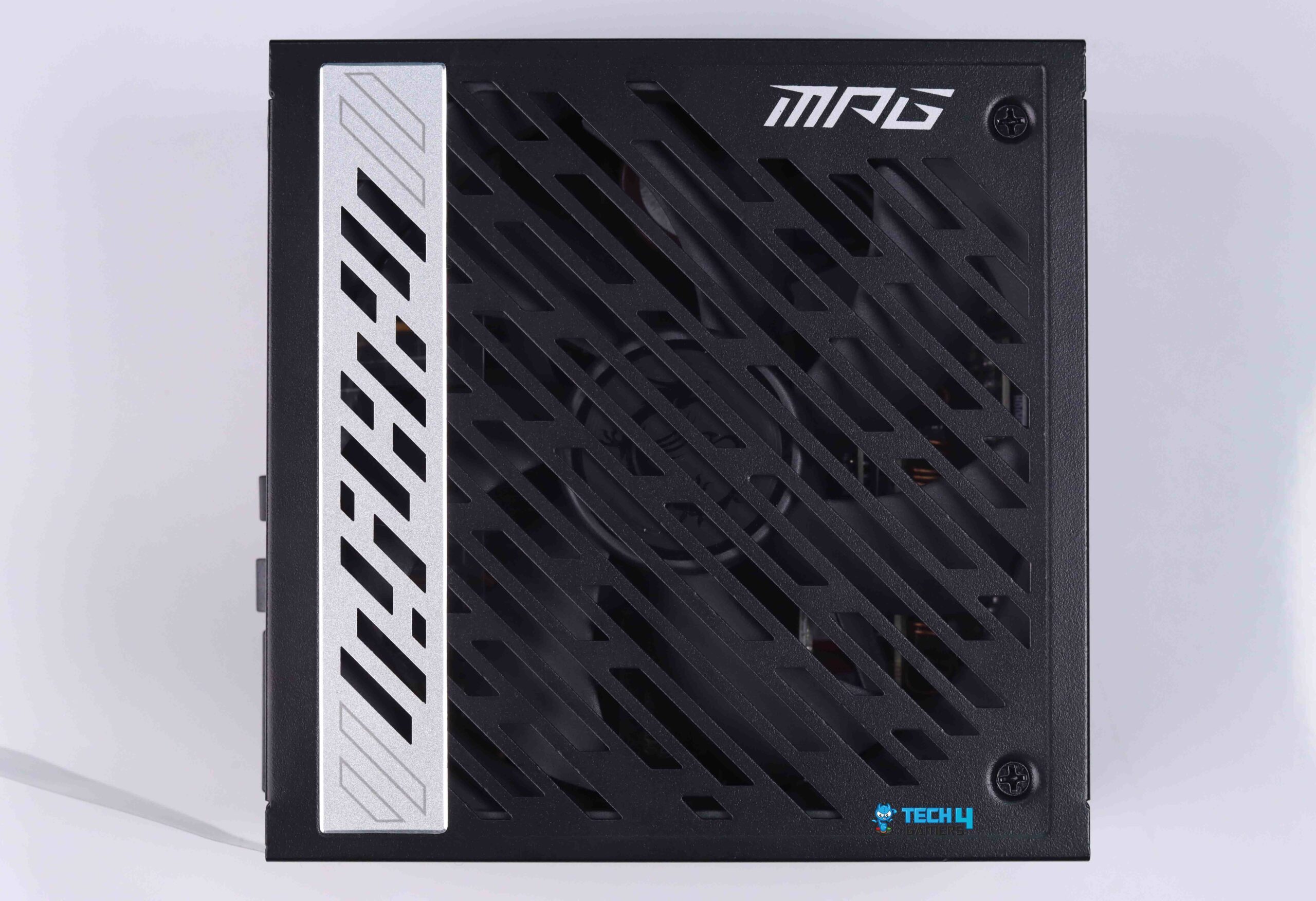
MSI MPG A850G 850W
Silverstone Hela 850R Platinum
XPG CyberCore II 1000W
CORSAIR SF1000L SFX
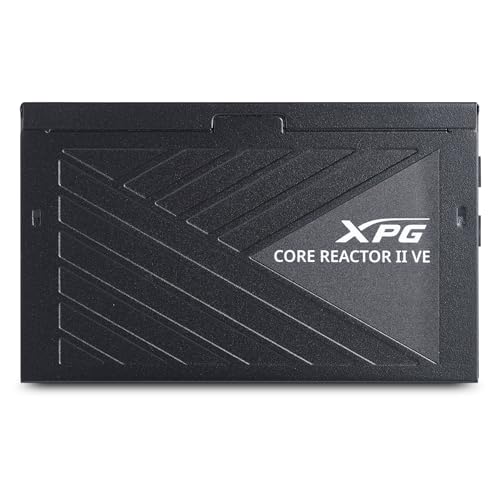
XPG Core Reactor II VE 850W Gold
Looks
Award
Best Overall PSU for RX 9070 and RX 9070 XT
Best High-End PSU for RX 9070 and RX 9070 XT
Best 1000W PSU for RX 9070 and RX 9070 XT
Best SFX PSU for RX 9070 and RX 9070 XT
Best Value PSU for RX 9070 and RX 9070 XT
What We Liked
All-rounded performance with decent OC'ing potential
Great power and thermal efficiency, ample overhead for OC'ing
Semi-digital design with cleverly tuned Nidec-powered cooling system
Outstanding performance in a tiny package
Tightest voltage regulation, best budget offering
What We Disliked
Noisy at full load
Slightly expensive
No hybrid fan mode
Noisy at full power
No zero RPM mode, voltage ripple could be improved
Before you proceed further, I’d strongly advise you to give our PSU Watts Calculator a trial run. It’s an in-house tool that’s been designed specifically to help you choose the most suitable PSU for yourself as per your gaming PC and its specific components.
[toc]
The Best PSUs For RX 9070 And RX 9070 XT
Here are my nominations for the top 5 PSUs for the RX 9070 and RX 9070 XT.
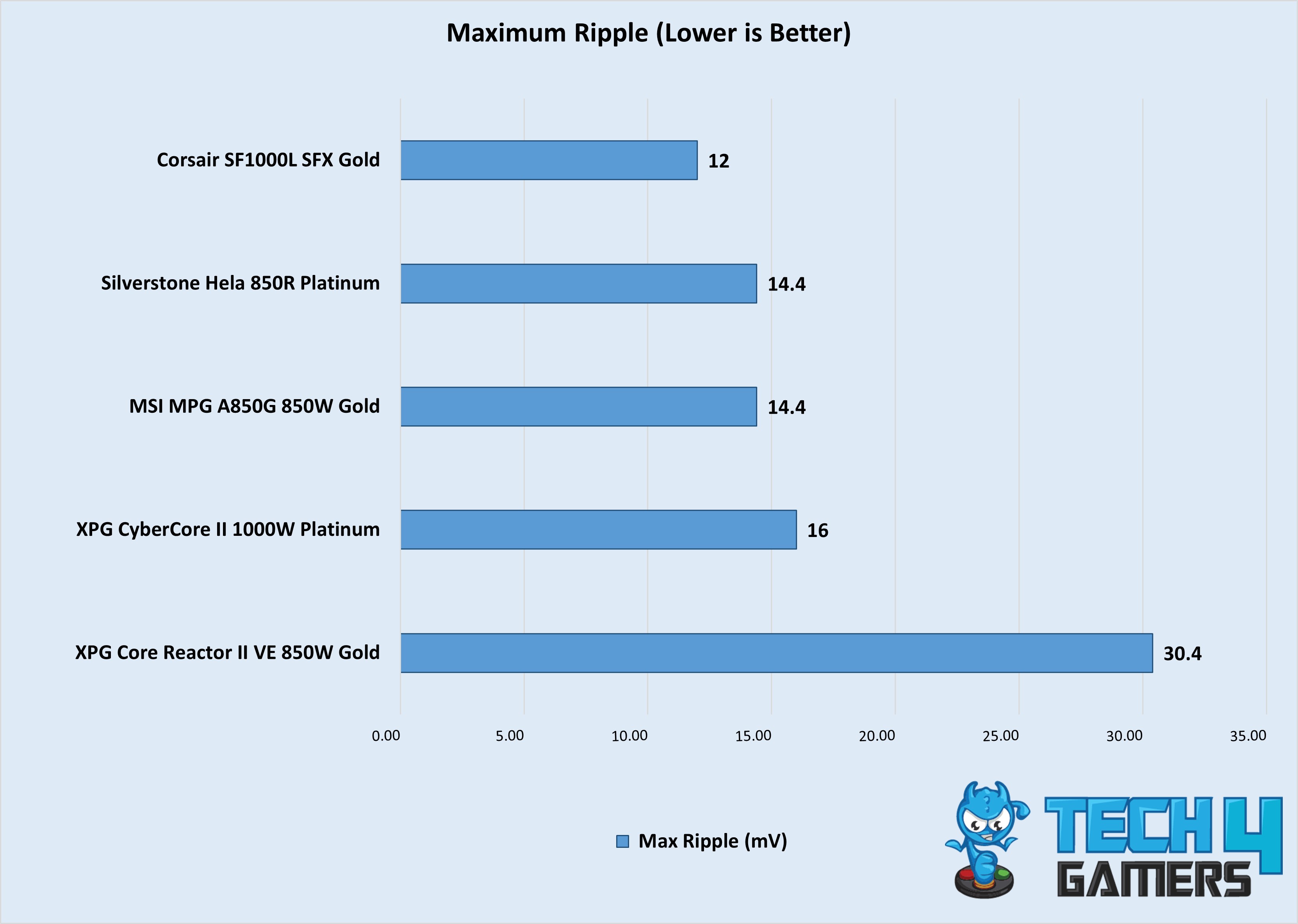
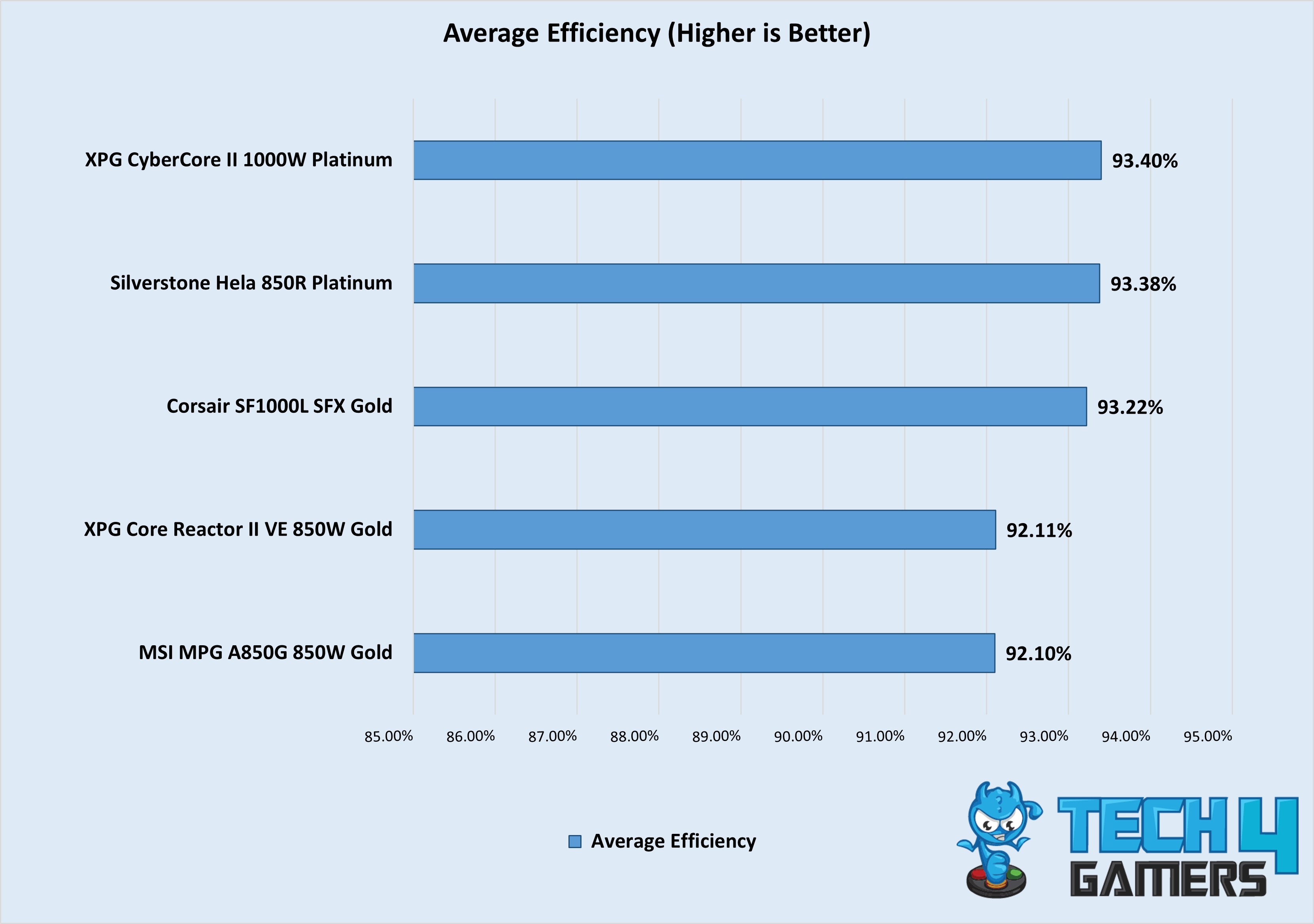
MSI was one of the first manufacturers to comply with Intel’s new ATX 3.0 standards. Team Dragon, like many others, went with CWT for the PCB that’s integrated into the MPG A850G. For starters, I tore down the PSU to be greeted by an 850W platform that meets and exceeds the 80 Plus Gold efficiency standards. According to my testing, the MPG returned an average efficiency of 92.10%, which lands this unit at the door of the Platinum standard. But that’s not the only benchmark the A850G impressed me with. I’m pleased to inform my readers that the MPG shone through with a maximum ripple of 14.4mV, which is a commendable result that strongly influenced my attempts to overclock the RX 9070 XT with complete confidence.
Furthermore, when things got toasty, the A850G wasn’t afraid to ramp up the 135mm Hong Hua fan which boasts a top speed of 2300 RPM. Of course, MSI armed this PSU with a hybrid fan mode, which helped keep my surroundings peacefully quiet when I wasn’t pushing my PC to the limit by running the latest titles in 4K at 144+ FPS. Not only that, I noticed consistent usage of top-notch Japanese capacitors throughout the entirety of the MPG’s innards, which surely motivated MSI to offer a 10-year warranty for this unit.
After testing the MAG, here’s what I had to say:
The MSI MPG A850G PCIE5 PSU is a compelling option that balances performance, reliability, and aesthetics. While the $199 price tag may seem somewhat steep compared to similar PSUs, the MSI MPG A850G PCIE5 justifies its cost with a 10-year warranty, high-quality Japanese capacitors, along with other features, makes it a worthwhile investment for users looking for a high-quality, future-proof PSU for their gaming PCs.
✅Buy It If
You want overclocking potential: With just 14.4mV of voltage ripple at full load, the MPG A850G has expansive headroom for OC’ing your RX 9070 and RX 9070 XT.
You want a hassle-free experience: All the PSU’s cables are flat, which makes wire management a breeze. The A850G also has 12VHPWR adapter cables and support for the legacy connector, which will come in handy since the Radeon GPUs take 2x 8-pin power connectors.
You want peace of mind: The MSI MPG sports flagship Nippon Chemicon capacitorsare imported from Japan along with a 10-year warranty period.
❌Don't Buy It If
You want the quietest PSU: While the MPG A850G does have a hybrid fan mode where it’ll only activate the 135mm spinner once you cross 40% load, it does get slightly noisy at full load.
You want the cheapest PSU: I won’t say it’s overpriced, but the MSI MPG does command a premium price for its equally premium user-experience and competitive performance.
What Makes It The Best Overall PSU For RX 9070 and RX 9070 XT?
The MSI MPG A850G is a powerhouse with an 850W capacity, Active PFC, and half-bridge LLC topology, ready to handle even the most demanding setups. It supports a 200% power excursion (up to 1700W for 100μs) and maintains a max voltage ripple of 14.4mV, making it perfect for overclocking. The 135mm Fluid Dynamic Bearing fan from Hong Hua, spinning up to 2300 RPM, kept temps at just 43.1°C during my testing. Its efficiency also impressed, landing in Platinum territory. For all of these reasons and more, it is truly the best overall PSU for the latest RX 9070 series GPUs.
Performance: 9.25/10
Value: 8.75/10
Overclocking: 9/10
Design: 9/10
Silverstone Hela 850R Platinum
Best High-End PSU for RX 9070 and RX 9070 XT
Silverstone Hela 850R Platinum Pictures From Our Review
1 of 3
Silverstone Hela 850R Platinum
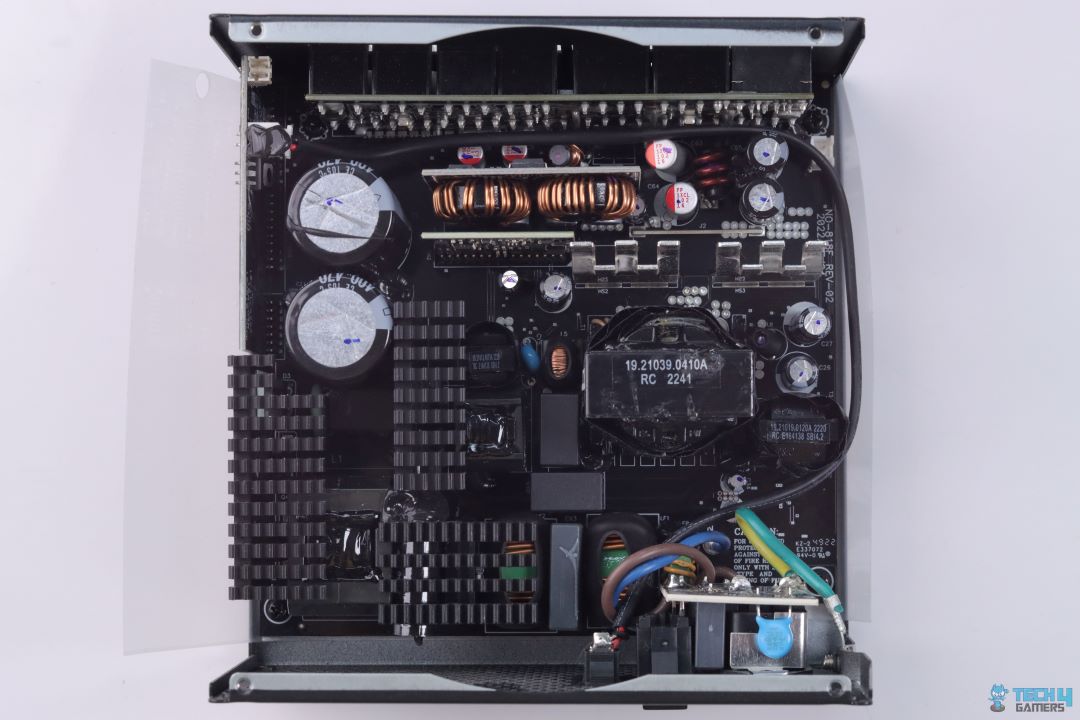
Internal Layout
PSU Modular Connectors
Form Factor: ATX | Generation: ATX 3.1 | Wattage: 850W | Efficiency Rating: 80 PLUS Platinum | Modularity: Fully Modular | PCIe Cable: 12V-2×6 | Fan Size: 135mm | Fan Bearing: Fluid Dynamic
Silverstone’s name is synonymous with one of the oldest and most reputed manufacturers that’s part of the PCMR. Today, I’ll be recommending one of their newer PSUs, the Hela 850R that’s been revamped with a platform sourced from High Power, which is a pleasant change from the usual CWT PCBs I’m used to seeing. To begin with, I cracked open the Hela to reveal a conventional design that uses an Active PFC along with full-bridge and LLC topology, which surprisingly proved enough to catapult the 850R to an average efficiency output of 93.38% in my testing, which not only meets but exceeds its Platinum certification.
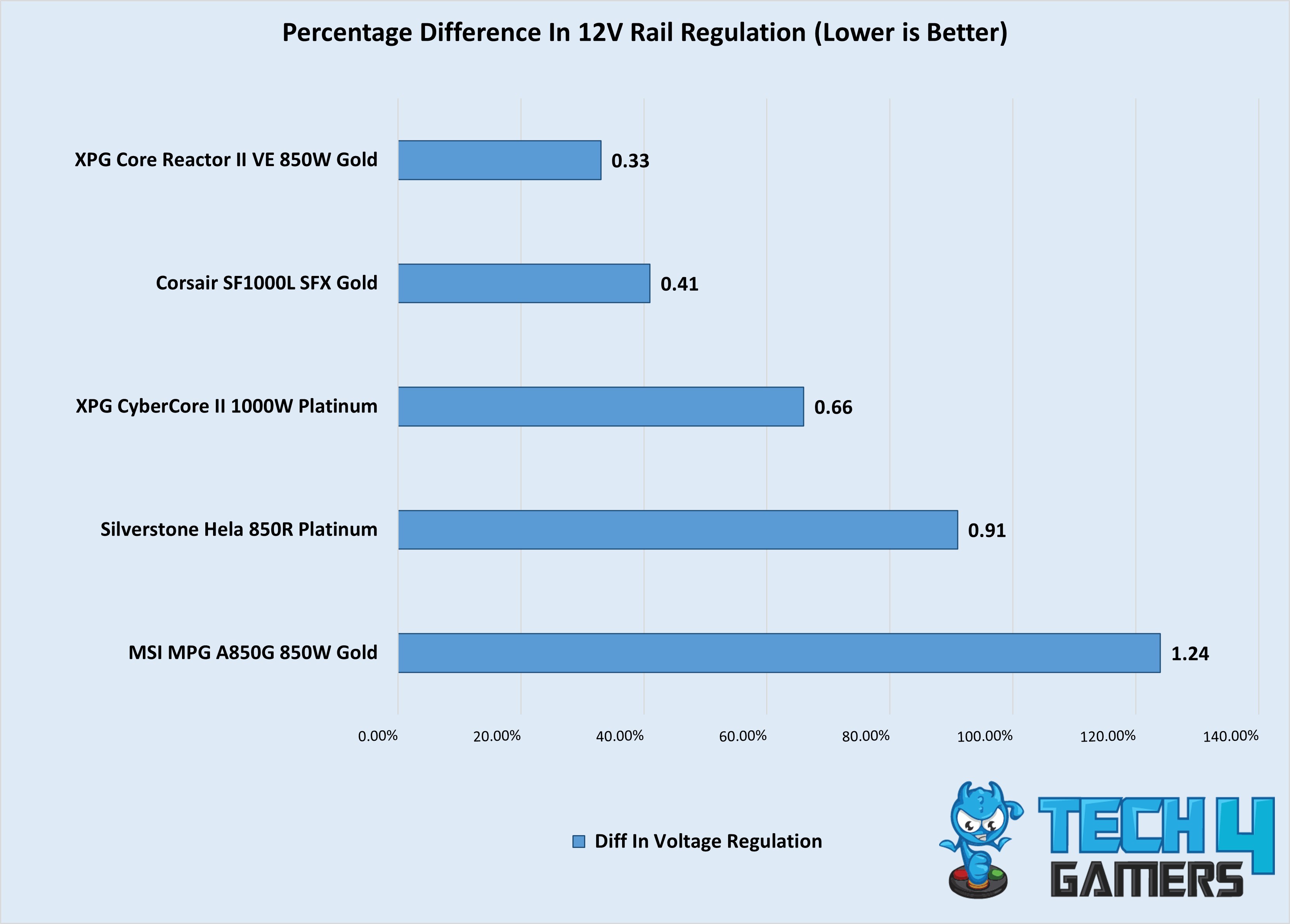
What about voltage ripple and regulation? Silverstone puts up some astonishing numbers, i.e., 14.4mV of max ripple and 0.91% of the regulatory difference, which means you’ll have an easy and stable experience when the time comes for you to overclock your Radeon GPU with this PSU. Moreover, the Hela 850R uses a 135mm Fluid Dynamic Bearing fan that also integrates a hybrid fan mode akin to its competitors. Additionally, the fan boasts an MTTF rating of 100,000 hours, which will certainly come in handy since my testing showed that the 850R remained exceptionally cool throughout my in-house review as the highest temperature I measured was 40.8C, which is even 2.3C lower than the MSI MAG A850G’s best figure.
After reviewing and assessing this tried-and-tested PSU from Silverstone, here’s what I had to say about the Hela 850R:
In our tests, the PSU delivered impressive results, showcasing excellent voltage regulation, high efficiency (up to 94.23%), and exceptional voltage ripple performance. The PSU’s robust build includes top-quality Japanese capacitors and efficient cooling, meaning quiet operation even under load.
✅Buy It If
You want top-tier performance: The Silverstone Hela 850R boasts a Platinum efficiency rating paired with some of the best voltage ripple & regulation numbers I’ve seen which easily makes this PSU a no-brainer for hardcore overclockers.
You prioritize thermal efficiency: Armed with a hybrid fan mode, the Hela 850R will spin the fan when you exceed 370W of load which helps it to remain impressively cool, preventing thermal throttling.
You’re brand-conscious: Silverstone represents one of the oldest manufacturers in the market, and the company’s renowned worldwide for producing banger after banger, if I do say so myself. After all, the brand boasts more than 2 decades of experience.
❌Don't Buy It If
You’re on a budget: The $200 price tag might be hard to swallow for some, but hey, if you want the best high-end PSU, you’ve got to pay for it.
You’re looking for the longest after-sales support: While Silverstone’s 5-year warranty isn’t something to be dismissed, its rivals, some of which are comparatively cheaper, are offering 7-12 years of warranties,
What Makes It The Best High-End PSU For RX 9070 and RX 9070 XT?
Silverstone’s Hela 850R Platinum is another winner, delivering top-tier voltage ripple, tight regulation, and exceptional efficiency. What surprised me was how Silverstone achieved this without relying on the usual CWT platform, instead using LLC topology typically found in Gold-rated PSUs. This unconventional approach didn’t compromise performance, proving that innovation doesn’t always mean reinventing the wheel.
Performance: 9.25/10
Value: 8.5/10
Overclocking: 9.25/10
Design: 8.75/10
XPG CyberCore II 1000W
Best 1000W PSU for RX 9070 and RX 9070 XT
XPG CyberCore II 1000W Pictures From Our Review
1 of 3
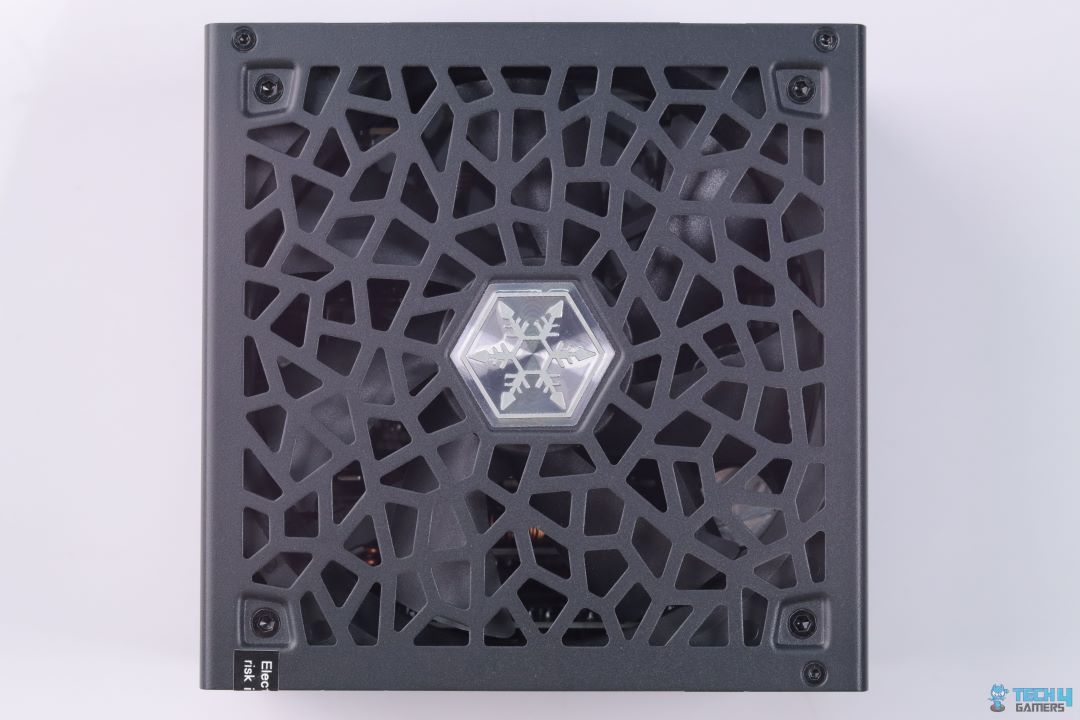
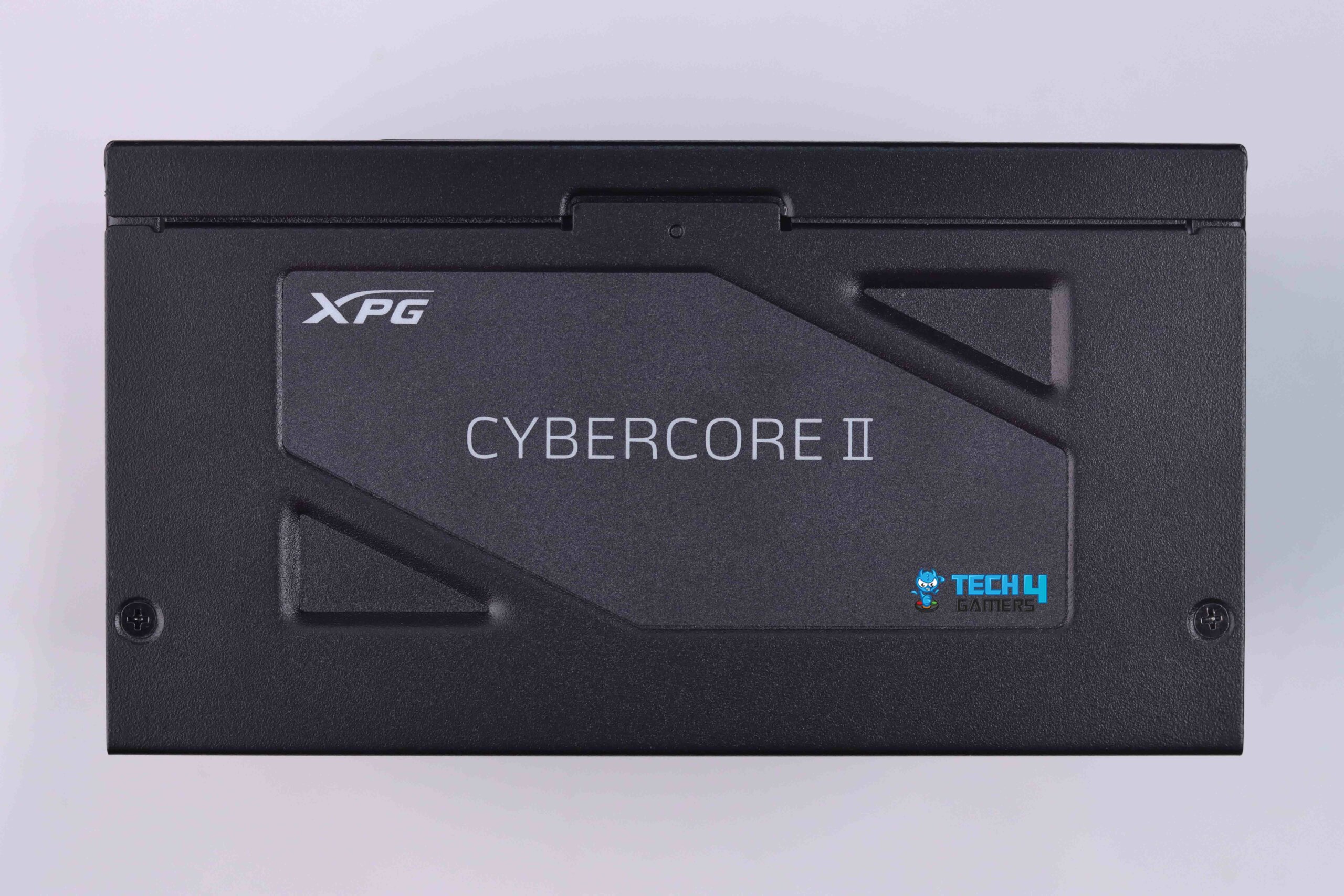
XPG CYBERCORE II 1000W - TOP PSU (Image By Tech4Gamers)
SIDE PSU (Image By Tech4Gamers)
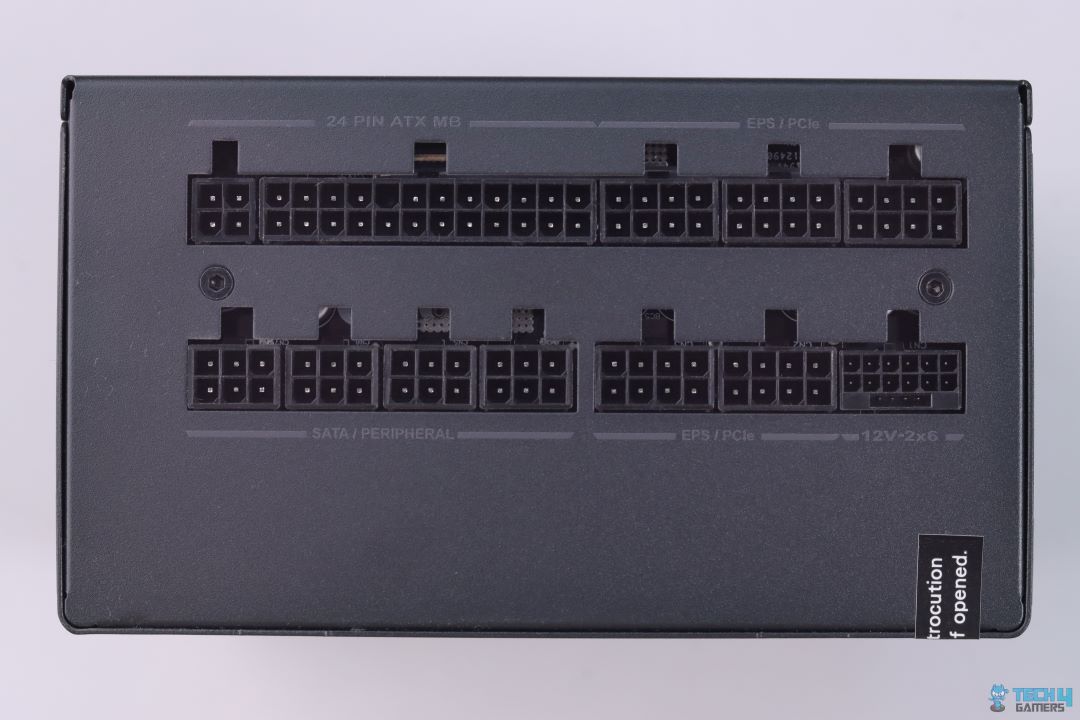
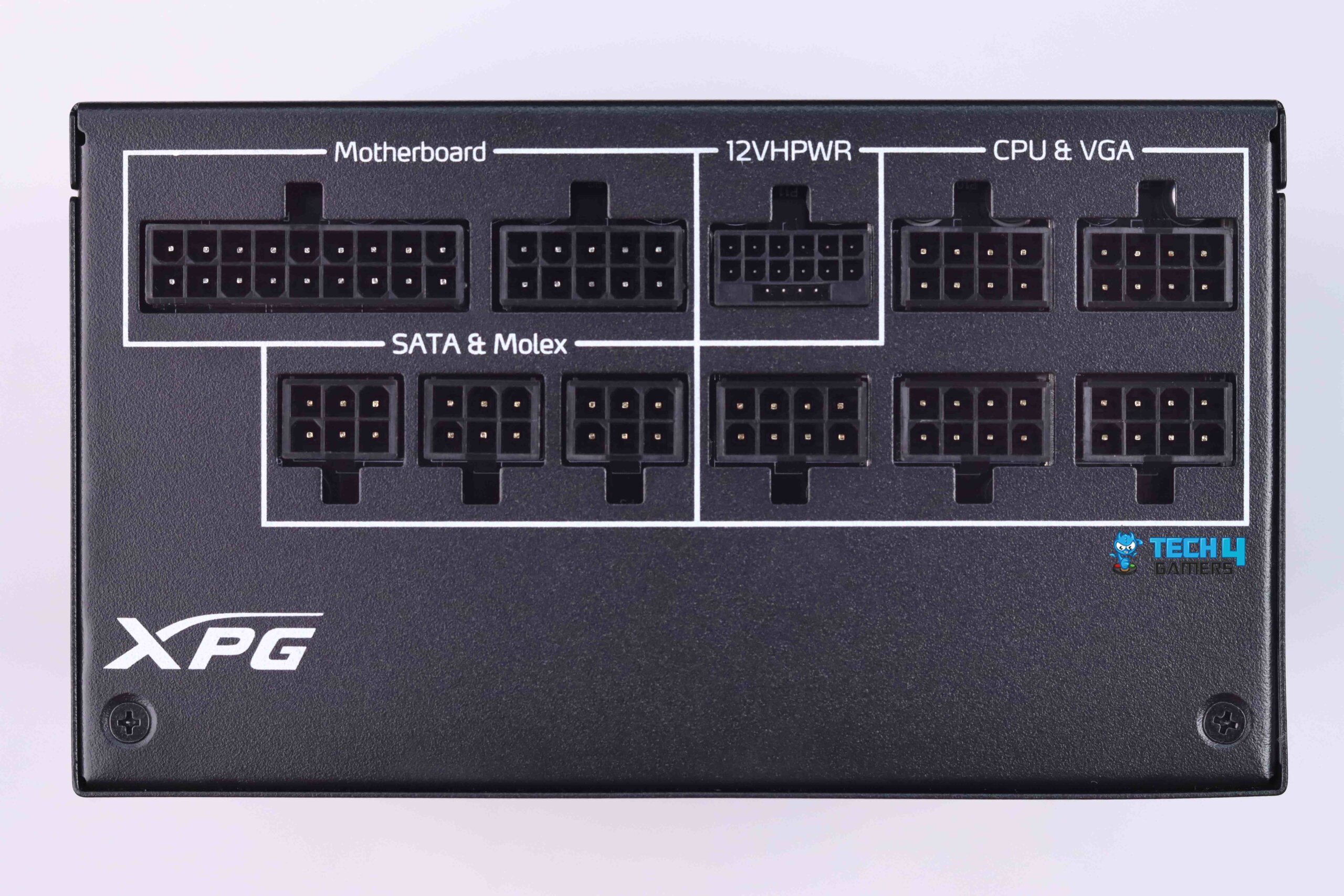
CONNECTORS SIDE (Image By Tech4Gamers)
Form Factor: ATX | Generation: ATX 3.0 | Wattage: 1000W | Efficiency Rating: 80 PLUS Platinum | Modularity: Fully Modular | PCIe Cable: 12VHPWR | Fan Size: 120mm | Fan Bearing: Dual Ball
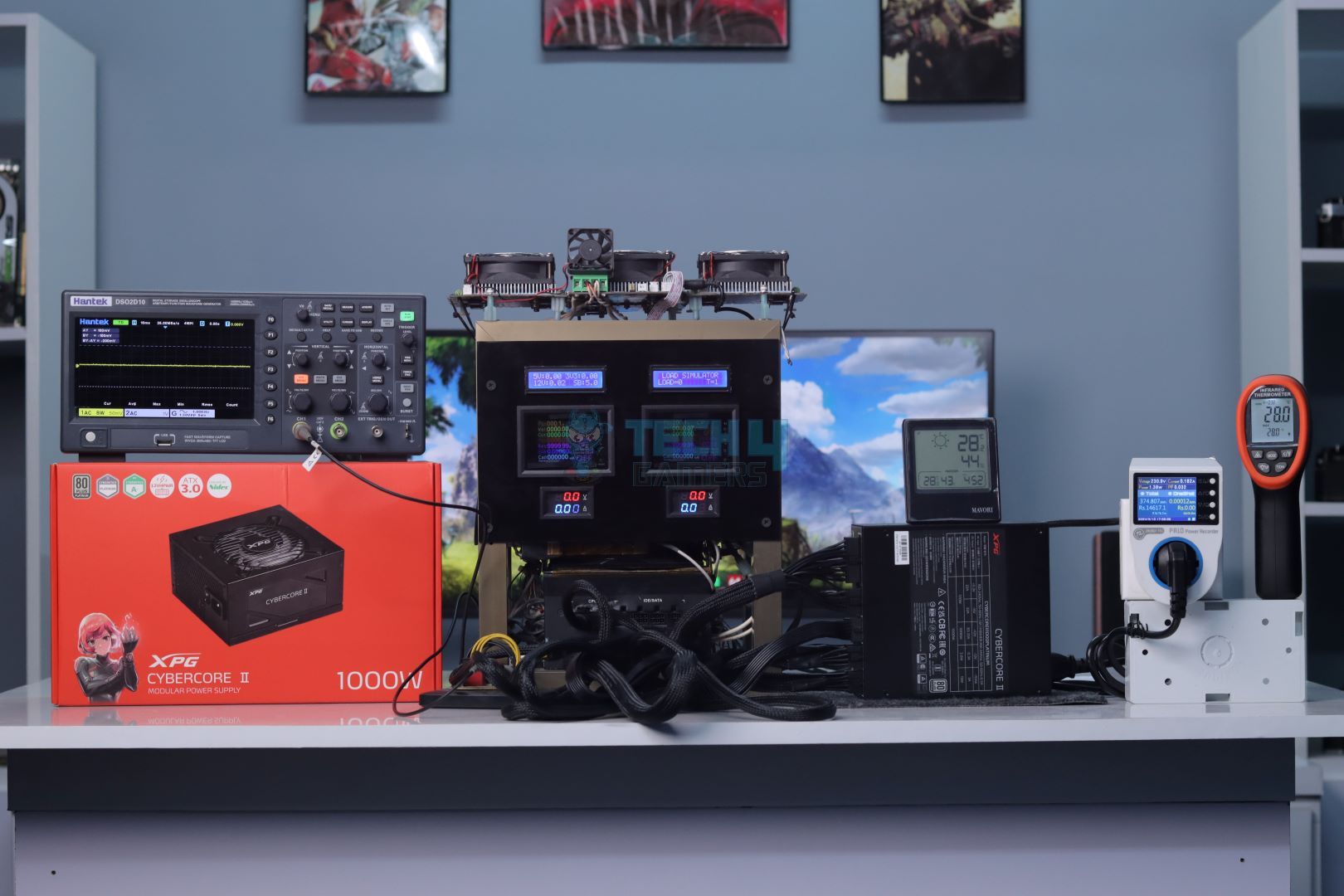
I recently tested the XPG CyberCore II 1000W, which was refreshed to meet Intel’s ATX 3.0 certification. One of its standout upgrades is the Nidec VENTO PRO 120mm PWM fan, capable of hitting 2150 RPM. Thanks to its dual ball bearing design, it’s rated for 60,000 hours at 60℃, ensuring long-term durability. XPG also optimized the fan curve, earning it a Cybenetics A- acoustic certification, and I found it impressively quiet under load.
Performance-wise, the CyberCore II uses a hybrid architecture based on CWT’s updated CTT platform, designed for ATX 3.0 compliance. During testing, I observed excellent voltage regulation and efficiency, thanks to its blend of analog and digital components. This hybrid approach not only boosts performance but also keeps costs down. Overall, it strikes a great balance between highperformance and affordability, making it a standout choice in its class.
After giving the CyberCore unit a run for its money, our experienced reviewer, Abdul Hannan, shared his opinion on the XPG PSU:
XPG CyberCore II 1000W is a reliable choice for modern PC builders and gamers like myself. Its efficiency and adherence to Intel’s ATX 3.0 design guide ensure compatibility with the latest hardware while delivering stable power output, which is crucial for smooth performance during intense gaming sessions or demanding workloads.
✅Buy It If
You value quiet operation: XPG’s redesigned cooling system, paired with a 120mm Nidec fan, ensures the CyberCore II stays cool, quiet, and highly performant.
You want reliability: The XPG CyberCore II features a hybrid CTT platform that enhances performance and durability, backed by a 10-year warranty for peace of mind.
You prioritize efficiency: With an 80 PLUS Platinum rating, this PSU not only meets but exceeds efficiency standards, as confirmed by our in-house testing.
❌Don't Buy It If
You’re new to cable management: The CyberCore II’s long, hard-sleeved cables can be a bit challenging to route neatly, especially for beginners.
You want a hybrid fan mode: Even though the CyberCore II stays impressively quiet, there’s no zero RPM fan mode, which means the fan will be spinning 24/7, even if it isn’t audibly apparent.
What Makes It the Best 1000W PSU For RX 9070 and RX 9070 XT?
The XPG CyberCore II 1000W is a standout, especially after its upgrade to ATX 3.0. During my tests, the 120mm Nidec fan was impressed with its durability (thanks to dual ball bearings) and quiet operation. The semi-digital design enhanced voltage regulation and efficiency, ensuring smooth performance. Backed by a 10-year warranty, it’s a reliable, high-performance PSU that’s worth the $200+ price tag for those who value quality, and that’s why I am recommending it as the best 1000W PSU for the RX 9070/RX 9070 XT.
Performance: 8.75/10
Value: 8.5/10
Overclocking: 8.25/10
Design: 8.75/10
CORSAIR SF1000L SFX
Best SFX PSU for RX 9070 and RX 9070 XT
Corsair SF1000L SFX Gold Pictures From Our Review
1 of 3
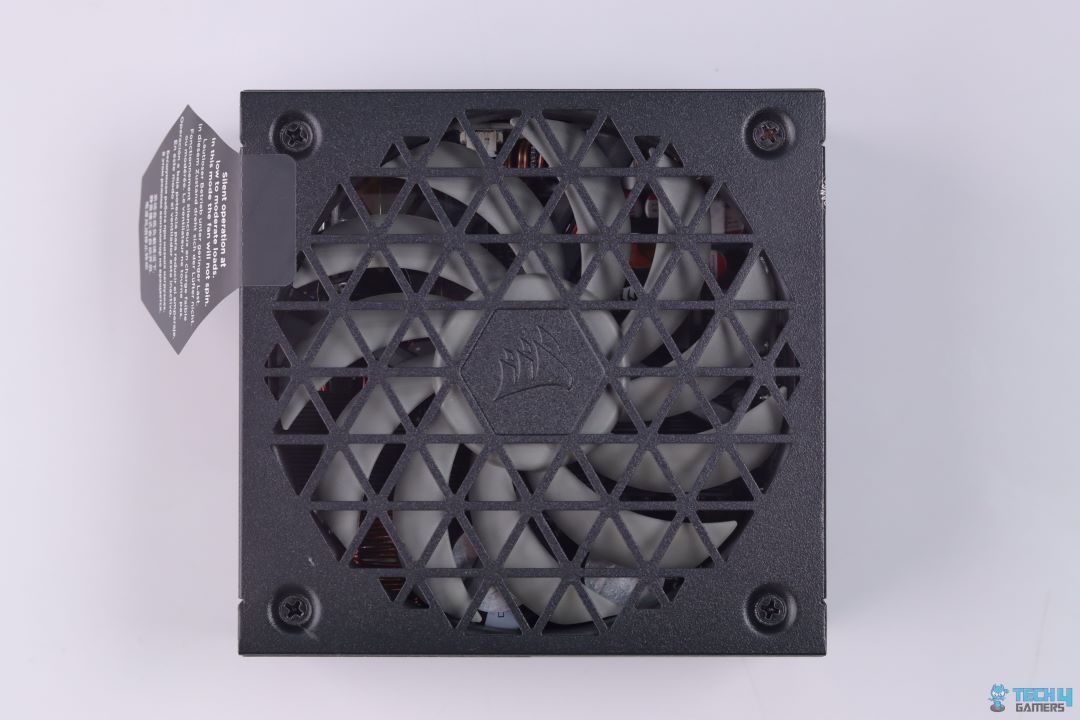
Front Top. (Image By Tech4Gamers)
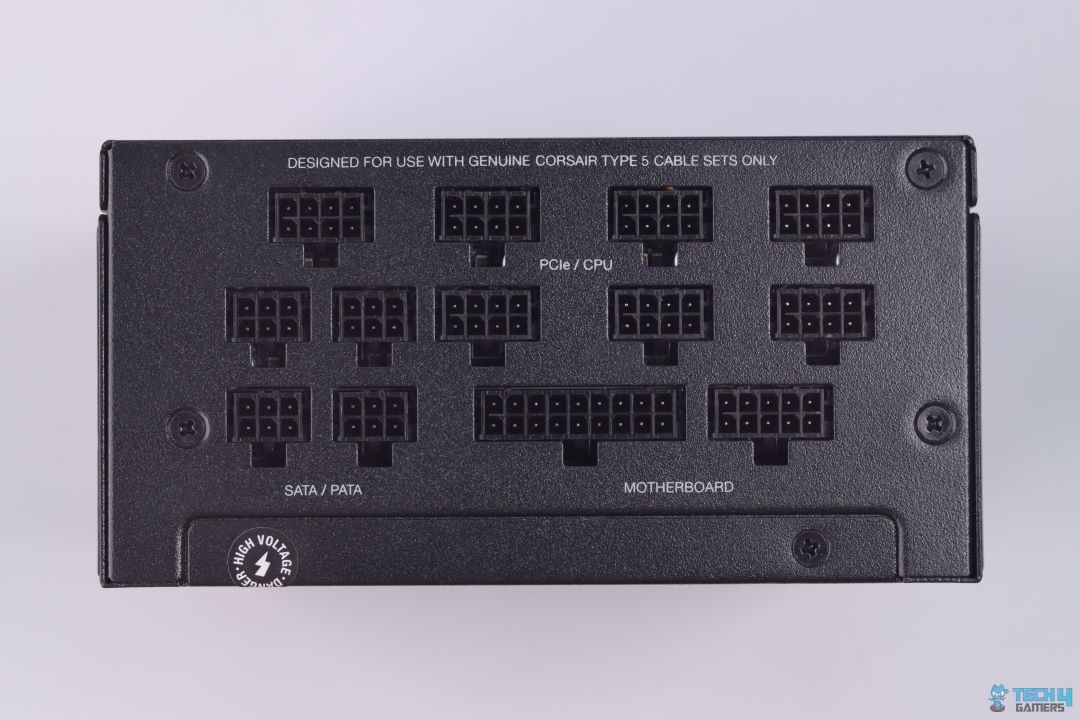
Connector Side (Image By Tech4Gamers)
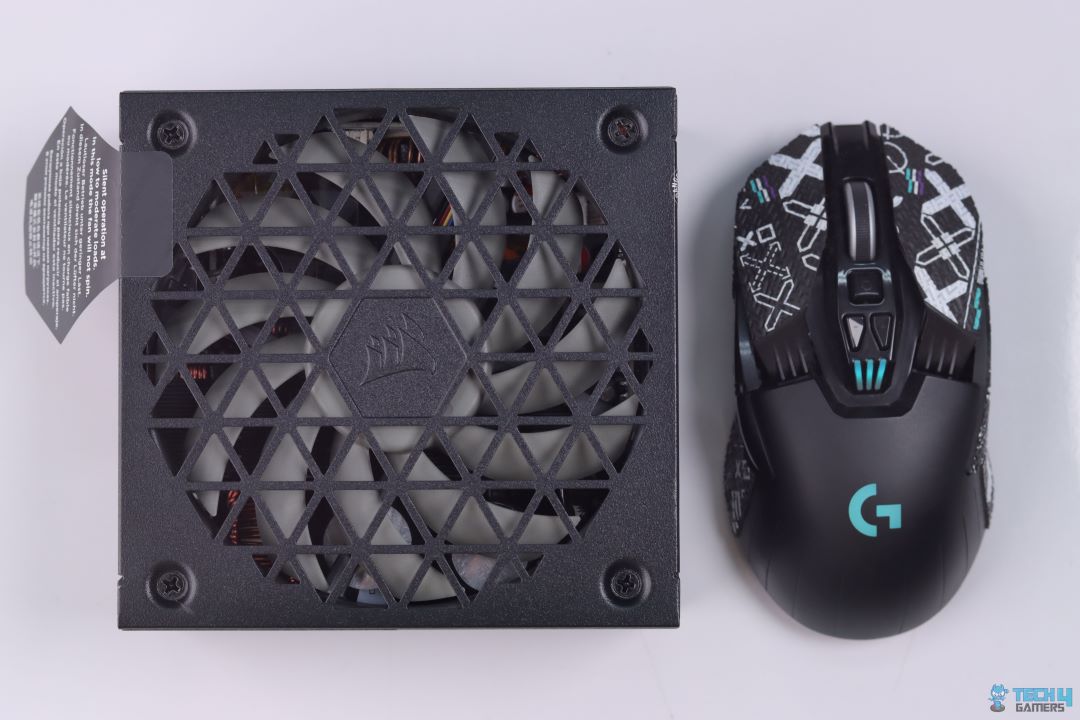
Corsair SF1000L Front comparision with G903
Form Factor: ATX | Generation: ATX 3.1 | Wattage: 1000W | Efficiency Rating: 80 PLUS Gold | Modularity: Fully Modular | PCIe Cable: 12V-2×6 | Fan Size: 120mm | Fan Bearing: Rifle
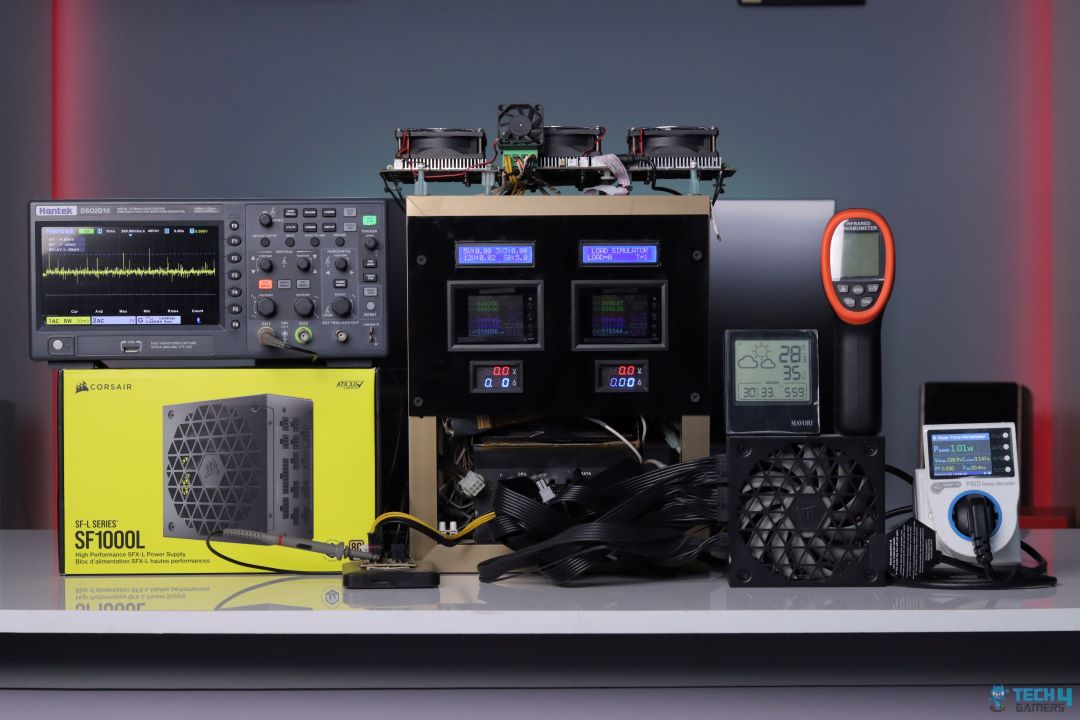
Corsair has never failed to impress me when it comes to their PSUs. I’m happy to report that that streak continues with the SF1000L SFX. Upon my teardown, I was greeted by a platform originally pioneered by the Great Wall. Moving on, Corsair has finessed this platform to the extent that it beat quite a few full-sized ATX PSUs. The SF1000L utilizes a combination of flagship Japanese capacitors packed within a neatly designed layout that prioritizes airflow.
The Corsair SF1000L features a 120mm rifle-bearing fan that handles heat dissipation well, though I noticed it gets noticeably loud when the load exceeds 50%—a common trade-off for SFX PSUs. Despite this, Corsair has optimized this unit for serious overclocking, delivering tight voltage regulation and an impressive 12.0mV ripple at 100% load during my testing. It also outperformed its 80 PLUS Gold rating, hitting an average efficiency of 92.33%, which edges into Platinum territory.
After thoroughly inspecting and testing the CORSAIR SF1000L SFX, here’s how we described it:
The Corsair SF1000L PSU is an SFL power supply that exceeds expectations with its performance and efficiency. Slightly larger than SFX PSUs, it offers better results under max load due to improved heat dissipation.
✅Buy It If
You want a compact powerhouse: The SF1000L’s SFX form factor delivers full-sized performance in a smaller package, perfect for tight builds without cutting corners.
You care about efficiency: Though rated Gold, it performs at Platinum levels, offering better energy savings and cooler operation than expected.
You value top-tier components: Regardless of its size, it’s built with premium Japanese capacitors, ensuring reliability and stability even under heavy loads or overclocking. Corsair’s engineering shines here.
❌Don't Buy It If
You need a silent environment: Heat tends to build up faster in SFX PSUs, which is why the 120mm fan needs to work overtime, resulting in annoying noise output.
You’re frugal: While the SF1000L SFX surely gives even full-sized ATX PSUs a run for their money, Corsair does charge you a premium for it, but that’s common with all SFX-sized components.
What Makes It The Best SFX PSU For RX 9070 and RX 9070 XT?
Corsair’s SF1000L takes Great Wall’s ATX 3.1 platform and elevates it with refined voltage regulation, improved ripple performance, and stellar efficiency. Paired with Japanese capacitors and robust build quality, it’s a compact powerhouse. The 1000W capacity easily supports—and even overclocks—your RX 9070 or RX 9070 XT. While the fan can get noisy under heavy loads, its heat dissipation is flawless, making it a reliable choice for compact, high-performance builds.
Performance: 9/10
Value: 8.5/10
Overclocking: 9.25/10
Design: 9/10
XPG Core Reactor II VE 850W Gold
Best Value PSU for RX 9070 and RX 9070 XT
XPG Core Reactor II VE Gold Pictures From Our Review
1 of 3
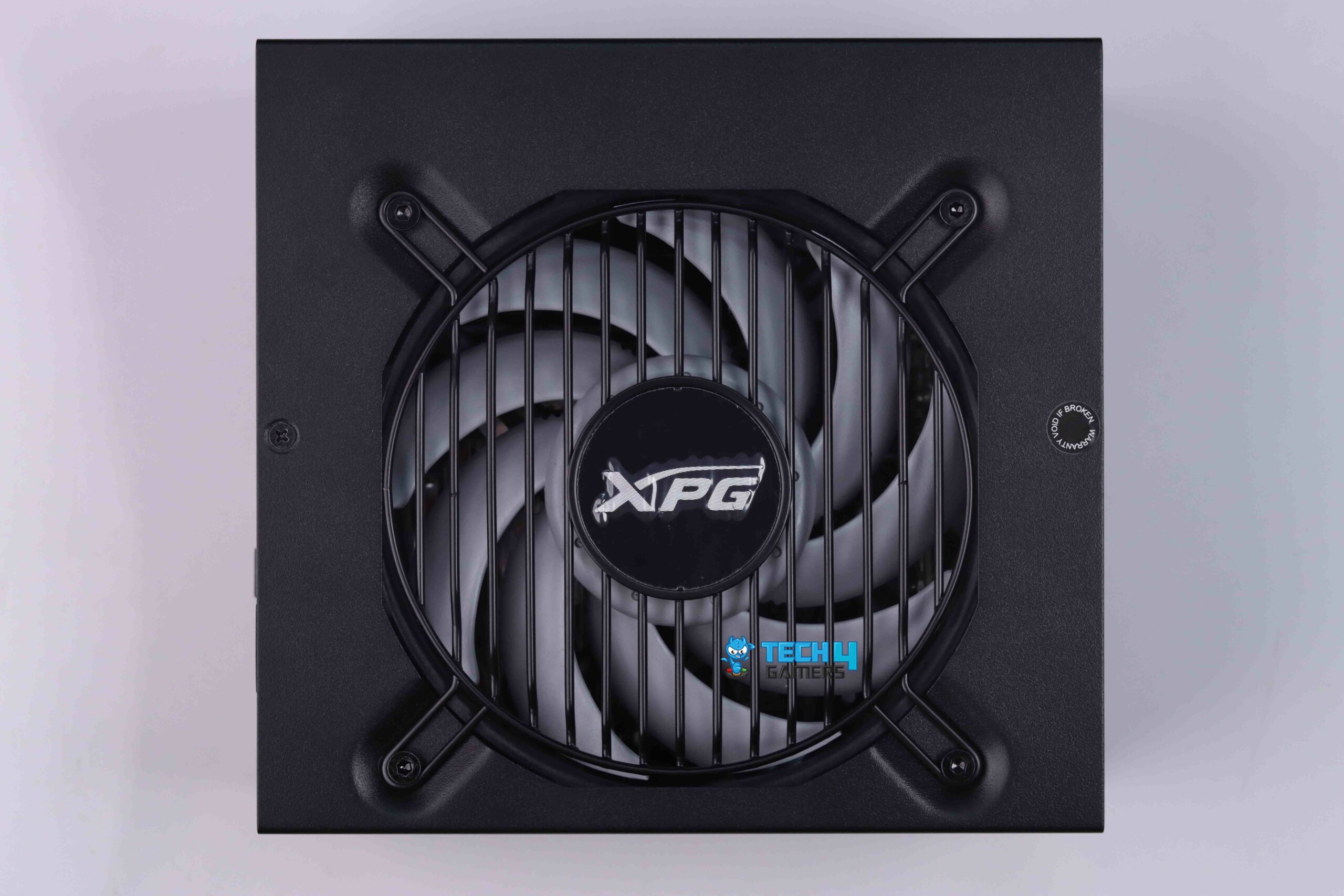
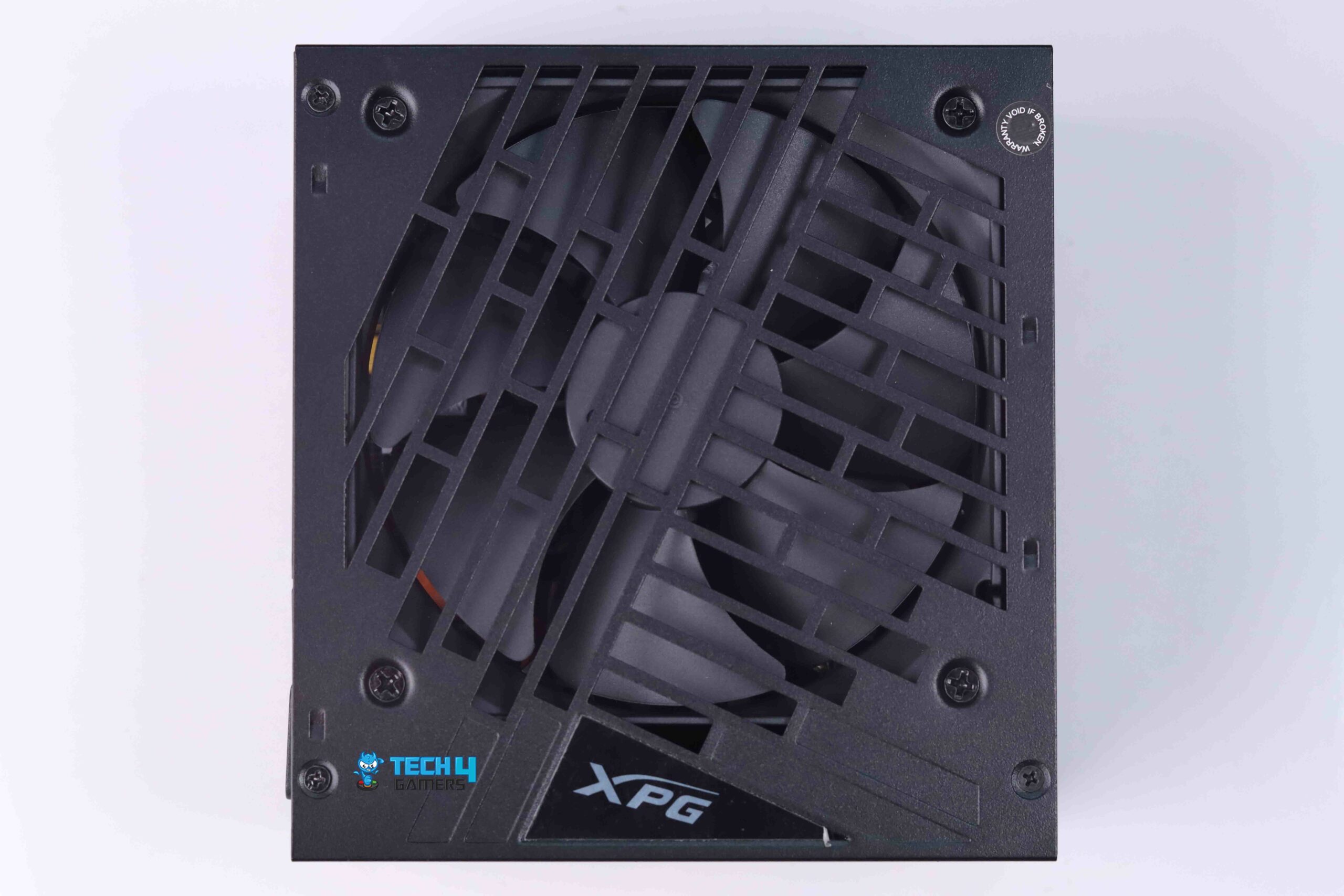
XPG Core Reactor II VE 850W (Image By Tech4Gamers)
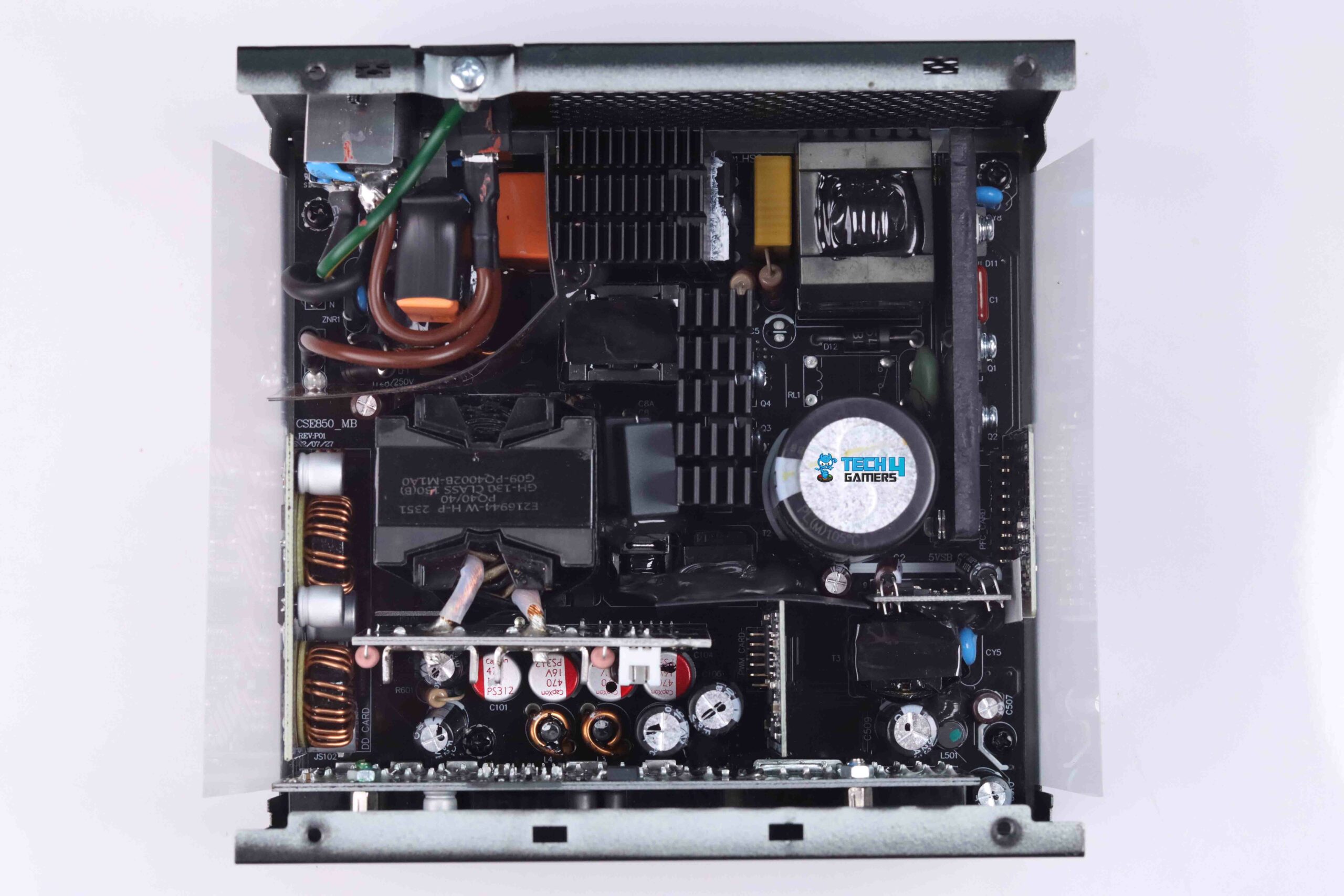
CWT Platform (Image By Tech4Gamers)
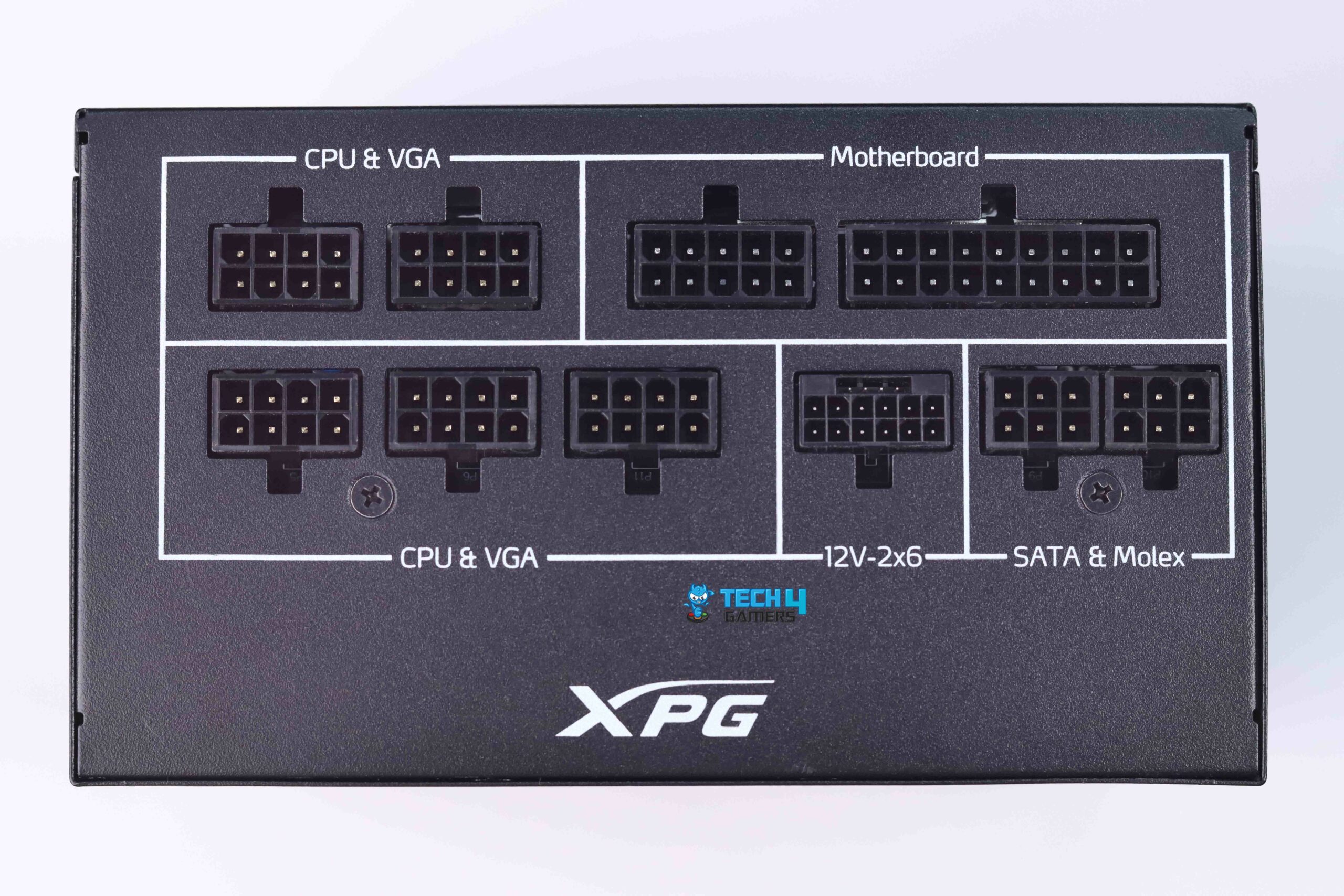
Modular Bay
Form Factor: ATX | Generation: ATX 3.1 | Wattage: 850W | Efficiency Rating: 80 PLUS Gold | Modularity: Fully Modular | PCIe Cable: 12V-2×6 | Fan Size: 120mm | Fan Bearing: Fluid Dynamic
The Core Reactor II VE 850W was the first PSU from XPG to comply with Intel’s ATX 3.1 standard. Therefore, I took the unit for a test drive and opened up the hood to be greeted by a CWT platform that uses half-bridge LLC topology for primary inversion just like every other value-oriented PSU. Despite the absence of crucial power-saving hardware like the NTC’s bypass relay, the Core Reactor II performed with aplomb by returning an average efficiency of 92.11%. Not only that, the Core Reactor II surprisingly outputs the tightest voltage regulation of any PSU that I’ve tested yet at a differential of just 0.33%.
For cooling, XPG has integrated a 120mm Fluid Dynamic Bearing fan from Hong Hua which will spin up to 2400 RPM when you need it. Hong Hua rates the MTTF at 100,000 hours, which, combined with the 7-year warranty, went a long way to reassure me while I continued to torture the Reactor II with my rigorous hardware assessment. Furthermore, a positive side-effect of no hybrid fan mod means the Core Reactor II performed very respectably with regards to heat dissipation as the hottest temperature I measured was 40.2C.
After thoroughly inspecting and testing the XPG Core Reactor, here’s what I had to say about it:
The XPG Core Reactor II VE 850W delivers future-proof compatibility with ATX 3.1 compliance, exceeding 80Plus Gold efficiency for top-notch energy savings. The voltage ripple at the 12V rail was also decent, which seems fine given the value-orientated approach of the PSU. In short, XPG has really prioritized affordability and overall performance for casual and serious PC builders alike.
✅Buy It If
You’re on a tight budget: At just $10-20 northwards of $100, the VE in the PSU’s name refers to ‘Value Edition,’ and at that price tag, it’s definitely the most value-oriented PSU in my roundup.
You want the most stable performance: The Core Reactor II VE performed better than any other PSU in my voltage regulation testing, outgunning PSUs that cost up to twice as more.
You want a small PSU: While this isn’t as small as an SFX unit, the XPG VE 850W is admirably tiny, which makes it compatible with a large variety of PC cases. This mini-design also explains the omission of a larger 135mm fan.
❌Don't Buy It If
You’re an overclocking enthusiast: The Core Reactor II VE had the worst voltage ripple suppression at 30.4mV, which is adequate considering it’s a budget PSU, but OC’ers should stay away from this unit.
You prefer whisper-quiet operation: The Reactor’s fan runs non-stop, which helps with cooling as shown during my assessment, but results in noticeable noise, making it less ideal for those who value silence.
You want top-tier components: XPG used reasonable Taiwanese capacitors to keep the Reactor II VE’s price down, which are second to none but Japanese-manufactured capacitors. However, XPG did compensate with a 7-year warranty.
What Makes It The Best Value PSU For RX 9070 and RX 9070 XT?
XPG’s Core Reactor II VE is a budget-friendly gem, updated to ATX 3.1 standards. It boasts tight voltage regulation, Gold-rated efficiency, and a 235% power excursion (up to 1997W for 100μs). While it lacks a hybrid fan mode, the Hong Hua fan keeps temps at a cool 40.2°C, even running 24/7. With a 7-year warranty, it’s a fantastic option for those seeking performance without breaking the bank.
Performance: 8.75/10
Value: 9.5/10
Overclocking: 8.25/10
Design: 8.5/10
Our Test Results For These PSUs
To evaluate all of these power supplies, we tested their voltage regulation, average efficiency, and maximum ripple. Here are the test results:
Benchmarks Of Our Recommended PSUs
1 of 3
Voltage Ripple
Average Efficiency
Voltage Regulation
How We Tested The Best PSUs For RX 9070 And RX 9070 XT
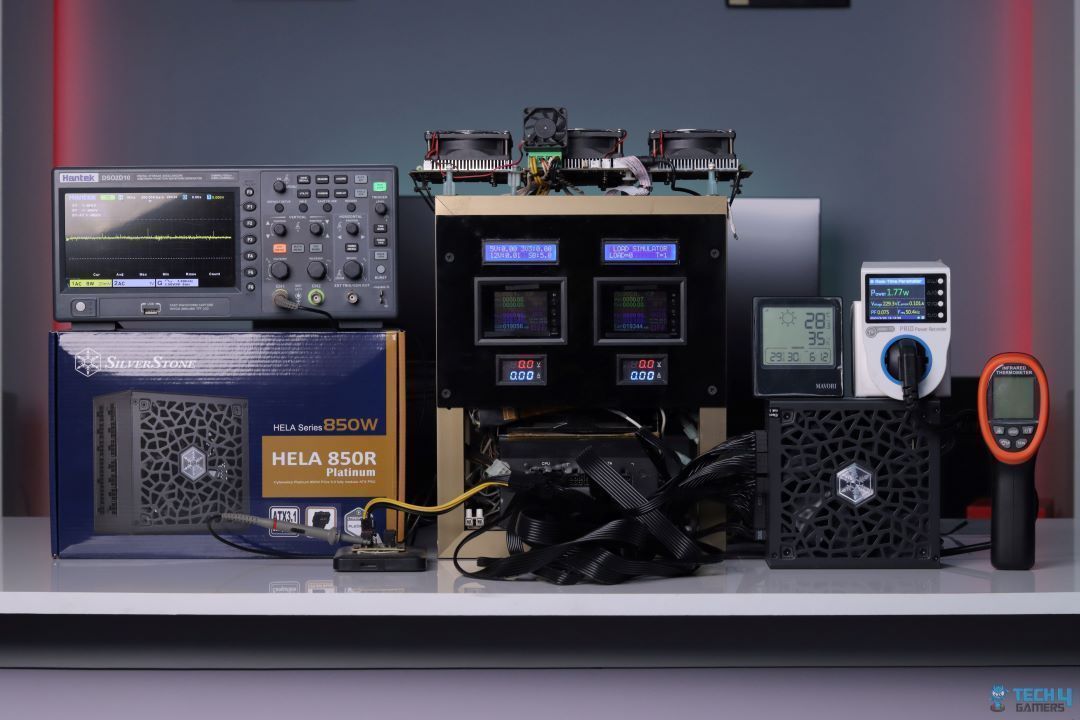
Testing These PSUs
1 of 3
SilverStone Hela 850R Platinum - Testing
Corsair SF1000L Testing (Image By Tech4Gaemrs)
XPG CyberCore II 1000W Testing (Image By Tech4Gamers)
To bring you the top five PSUs, my team and I spent countless hours testing, analyzing, and comparing models to find the best options for your needs. We focused on key factors to ensure our recommendations meet the highest standards:
Performance: Our priority was real-world performance. With the RX 9070 and RX 9070 XT requiring 220W and 304W respectively, we prioritized PSUs with excellent voltage regulation, ripple performance, and efficiency for stability and optimal power delivery.
Efficiency: With rising electricity costs, we emphasized high-efficiency models to reduce energy consumption and lower bills, even for 850W+ units.
Durability: We disassembled each PSU to inspect build quality and components, ensuring long-term reliability. All recommended units come with a 5-year warranty or longer for added confidence.
Value Orientation: Everyone has a different budget and I respect that. For this exact reason, I also took each PSU’s MSRP into account as well as their real-time pricing at the time of this article’s publication, which considerably influenced my rankings.
These criteria ensure you get a PSU that’s powerful, efficient, built to last, and still affordable.
FAQs
What PSUs are recommended for the Radeon RX 9070 and RX 9070 XT?
AMD recommends 650W and 750W power supplies for the two GPUs respectively, but I’d recommend getting a 850W PSU and 1000W PSU for the RX 9070 and RX 9070 XT assuming you’re going to OC them to the limit.
What type of power connector does the RX 9070 and RX 9070 XT use?
Unlike the Nvidia RTX 40 and RTX 50 Series GPUs, the Radeon RX 9000 Series will be exclusively using the tried and tested 2x 8-pin connectors, which will slightly complicate cable management, but does have better reliability.
Which parameters of a PSU should I prioritize for overclocking my RX 9070 and RX 9070 XT?
For OC’ing purposes, you’d be best served by a high-performance 850W or 1000W PSU that excels in suppressing voltage ripple while maintaining tight voltage regulation. For reference, PSUs like the Silverstone Hela 850R Platinum and Corsair SF1000L SFX would suit your needs perfectly.
I’ve previously worked for eXputer as a Senior News Writer for several years. Now with Tech4Gamers, I love to devoutly keep up with the latest gaming and entertainment industries. I have a Bachelor’s Degree in Computer Science and years of experience reporting on games and breaking exclusive stories. Besides my passion for gaming journalism, I love spending my leisure time farming away in Stardew Valley. VGC, IGN, GameSpot, Game Rant, TheGamer, GamingBolt, The Verge, NME, Metro, Dot Esports, GameByte, Kotaku Australia, PC Gamer, and more have cited my articles.
Story Highlight
You can beat Doom The Dark Ages without any weapons, according to the director.
Only experienced players can achieve this, however, and it isn’t recommended by Hugo Martin.
The FPS title is set to launch in May 2025.
One of the most anticipated titles of this year, Doom The Dark Ages is set to offer a new spin on the long-running franchise with bigger levels and a more story-focused approach. But, to the delight of fans, it will keep its action-based combat that heavily leans on killing demons.
However, what if you could complete the upcoming titles without ever using a weapon? It would beat the point of Doom, but according to the director, it is possible in The Dark Ages.
Why it matters: Niche challenges like this are necessary for building fanbases and keeping interest alive in single-player titles.
Doom the Dark Ages is beatable with just a shield.
While talking to PC Gamer, director Hugo Martin said that you can beat Doom the Dark Ages with only melee weapons and no guns. However, it will be hard to do as only experienced gamers can achieve this feat, according to Martin.
The director said it’s unlikely but not impossible, referencing players beating 2016’s Doom with a pistol. However, he warned that this playstyle in Doom The Dark Ages would feel awkward and less enjoyable.
I’m sure people will figure out how to do it with the shield and the melee, because they’re pretty powerful.
Newly released info did reveal that the sequel is going to have an expanded range of weapons, including a wheel of weapons just for melee combat. Add the new and much bigger level design to this, and Doom The Dark Ages easily stands out as the most exciting entry in the series.
The game will have an expanded weapon wheel.
The game is already topping charts across all platforms and the sales will only increase as its May release date comes closer. Doom The Dark Ages has a lot of hype to live up to and only time will tell if it succeeds in doing so.
Will you try the melee combat challenge in the FPS title or play it the old-fashioned way? Tell us in the comments below or head to the Tech4Gamers forum for discussion.
At T4G, my task is to cover the latest news around the gaming globe ASAP and with the utmost precision. I adore all the games and respect all the devs behind the amazing games that we get all year. So, whether it’s a PC or a Console game, I got it all covered.
Story Highlight
EA Motive will present the Iron Man game at the GDC happening on March 17.
EA will showcase its texture development journey over the years with various titles.
The company has been very quiet about the game ever since the reveal in 2022.
EA Motive announced the Iron Man game back in 2022. However, since then, the studio has been quiet and hasn’t officially revealed anything else. Fans were even worried it might be canceled based on the silence, but there seems to be good news.
The Gamer Developers Conference (GDC) is all set to kick off on March 17, and EA has revealed it will be showcasing its journey developing textures for various games including Dead Space and Iron Man.
Why it matters: The Iron Man game has been generally kept in the dark, all the additional information that we’ve got so far is through different leaks and job listings.
EA Motive Iron Man game could get a first look at GDC
EA’s Lead Technical Artist, Martin Palko will be holding a session at GDC 2025 explaining how the company has revolutionized in-game textures over the years. Most importantly Motive will showcase its journey with the Iron Man game.
EA Motive and SEED have decided to tackle this problem head-on and will present their learnings developing “Texture Sets” for Dead Space, Iron Man, and more.
It is an open-world single-player game based on Unreal Engine 5
While this doesn’t guarantee that we will get a trailer or a release date, it certainly means that the game is well and alive and we will see it in some form at the event. There might even be a playable demo for the game.
From what information we have so far, it will be a single-player, open-world title with RPG elements, based on Unreal Engine 5. EA already had a solid flight foundation with Anthem, so, it’ll be really interesting to see what Iron Man brings to the table.
What are your thoughts on EA Motive’s Iron Man game? Are you looking forward to it? Let us know your opinions in the comments or join the discussion at the official Tech4Gamers Forum.
As Tech4Gamers’ Founder and Editor-in-Chief, I bring over 13 years of PC Hardware Reviewing and 8+ years of IT Project Management experience. Certified in Google IT Support , my focus is on providing honest product reviews and analysis and fostering a strong gaming community with 130k+ members in PPG.
Usman Sheikh
As a Senior Hardware Reviewer at Tech4Gamers with over a decade of hands-on experience, I dive deep into benchmarking GPUs, CPU coolers, and motherboards, pushing hardware to its limits. Passionate about overclocking and fine-tuning performance.
AMD has launched the Radeon RX 9070 and RX 9070 XT cards on their RDNA 4 architecture. Unlike the previous two generations, AMD is not looking to compete with Nvidia’s higher-end (RTX 5080 and beyond) GPU segment. Yet, they have marketed “4K performance at 1440P price,” among other things. We’ve received the Steel Legend OC variant of the RX 9070 from AMD, and having tested various Steel Legend products in the near past, we’re excited to take a look at this one!
Why Trust Tech4Gamers
Usman Sheikh is one of our most senior and experienced hardware reviewers. He loves spending hours (sometimes days) in his lab testing and comparing different GPUs, CPUs, motherboards, and more.
65+ graphics cards tested and reviewed by our team of hardware experts (Tech4Gamers Team).
1100+ hours spent testing different GPUs for our reviews.
At Tech4Gamers, ensuring you get reliable information is our priority. That’s why every hardware round-up undergoes a meticulous review process by our team of experts and editors. Each review is carefully examined against our strict editorial guidelines, guaranteeing you trustworthy insights you can depend on.
Like the motherboards, the Steel Legend cards from ASRock are more budget-oriented and feature unique aesthetics under a white theme. They also feature modestly increased boost clock speeds over the reference cards. ASRock has previously released Steel Legend variants for Intel’s Battlemage and AMD’s RX 7000 cards.
Since the RX 9070 competes with NVIDIA’s RTX 5070, I will be comparing the RX 9070 with it throughout this review. Since I have also tested and reviewed the RTX 5070, you can also check it out to learn more about my thoughts on Team Green’s mid-range offering.
Key Takeaways
The RX 9070 is faster than the RTX 5070 in regular gaming at all resolutions and beats it in most ray-traced games. It has great overclocking potential, boosting performance by up to 10% in Cyberpunk 2077. Plus, thanks to its 16GB of VRAM, it also delivers a smoother gaming experience, especially in the lowest frame rates, making it a better choice than the competition
As such, you should buy the ASRock RX 9070 Steel Legend if want excellent rasterization performance at both 1440p and 4K, and you are not very nit-picky about having the best RT performance.
The only reason to skip this card is if its costing you over $600, because then you should consider the RX 9070 XT instead.
Here are the specifications, compared with some competing GPUs.
With a $550 price tag, the GPU is comparable to Nvidia’s recently released GeForce RTX 5070. Previous-generation GPUs that can expect competition include the RTX 4070 (including Super and Ti models). AMD also marketed up to 42% faster gaming performance (raster and ray tracing combined) than the 7900 GRE at 4K ultra.
Notably, AMD is also using an updated naming convention to represent which Nvidia card their models compete with. So, while we couldn’t expect the RX 7800 to compete with the RTX 4080, we can expect the RX 9070 to compete with the RTX 5070. We’ll compare their performances to really see.
Let’s first look at the new architecture.
Architecture
RDNA 4 and RX 9070 XT chip
1 of 2
RDNA 4 key points
RX 9070 XT die
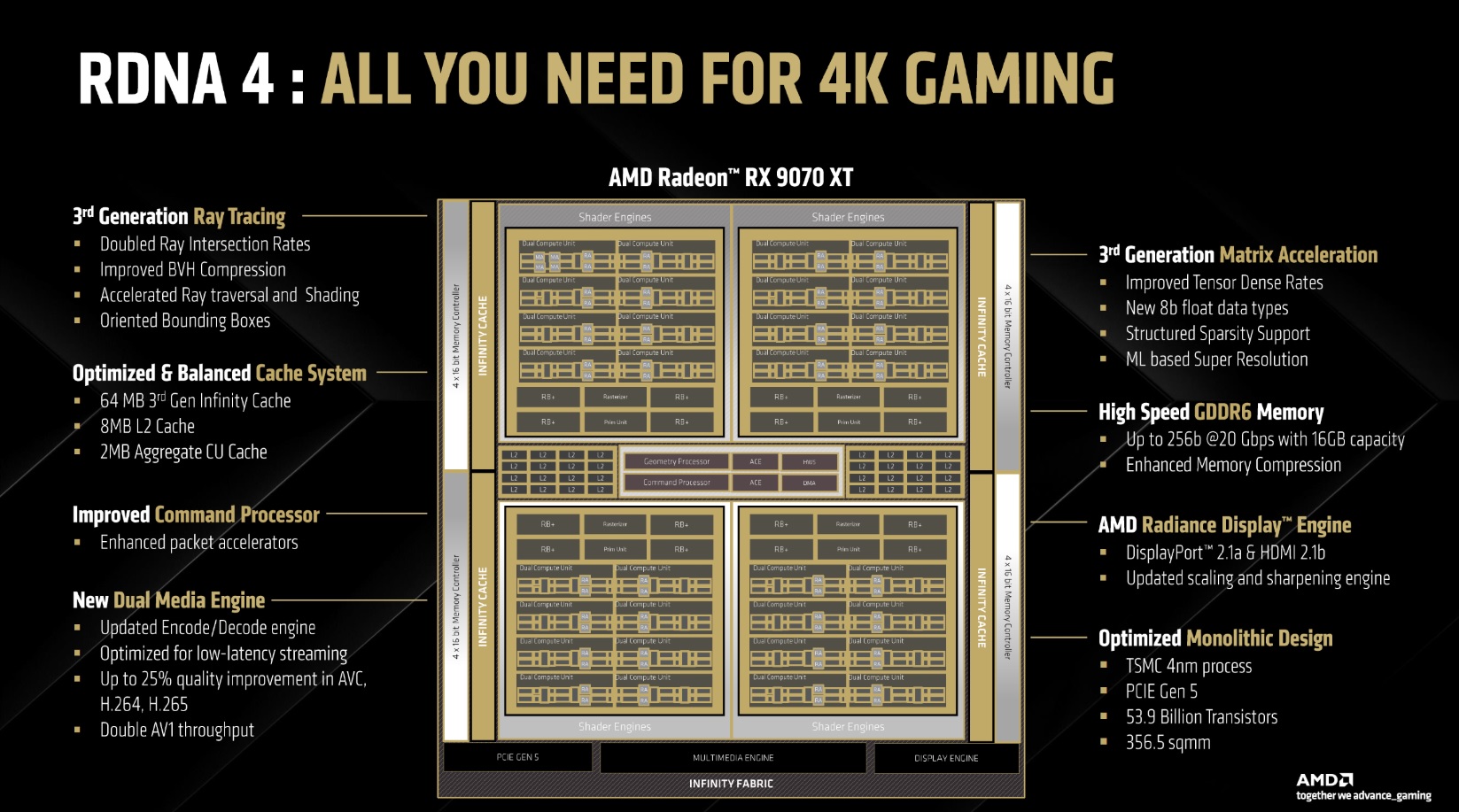
AMD marketed some big performance gains, and it’s all thanks to the RDNA 4 architecture. The RX 9070, like the XT card, uses the Navi 48 GPU with a diameter of 357 mm², packing 53.9b transistors inside. It uses an optimized 5nm process called N4C, similar to Nvidia’s 4N. The transistor count is much greater thanks to this new node, with only about 2.8b fewer transistors despite a much smaller die.
Following Nvidia, AMD has also added a PCIe 5.0 interface to the cards. The memory used is still GDDR6, probably to keep the prices competitive. The memory clock on the card is set to 1330 MHz for an effective memory clock of 20.1 Gbps. This gives us a 644.6 GB/s bandwidth, which can’t compete with Nvidia’s GDDR7 cards, but the large L3 cache chunk should somewhat make up for it.
Improvements
AMD RDNA 4 architectural improvements
1 of 6
Compute Engine
AI accelerators
Ray tracing
Dynamic shaders
Media engine
Display engine
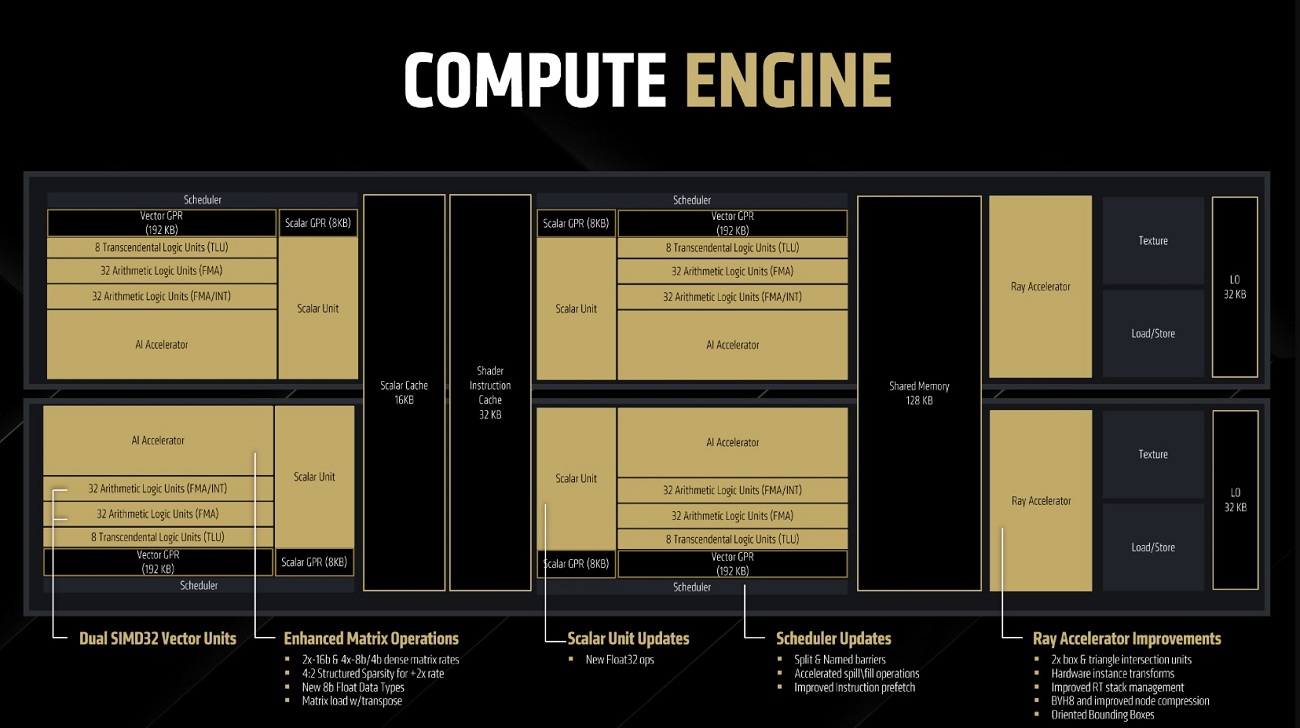
Vector Units: The new CU consists of Dual SIMD32 vector units, one set capable of FMA/INT and the other capable of FMA only.
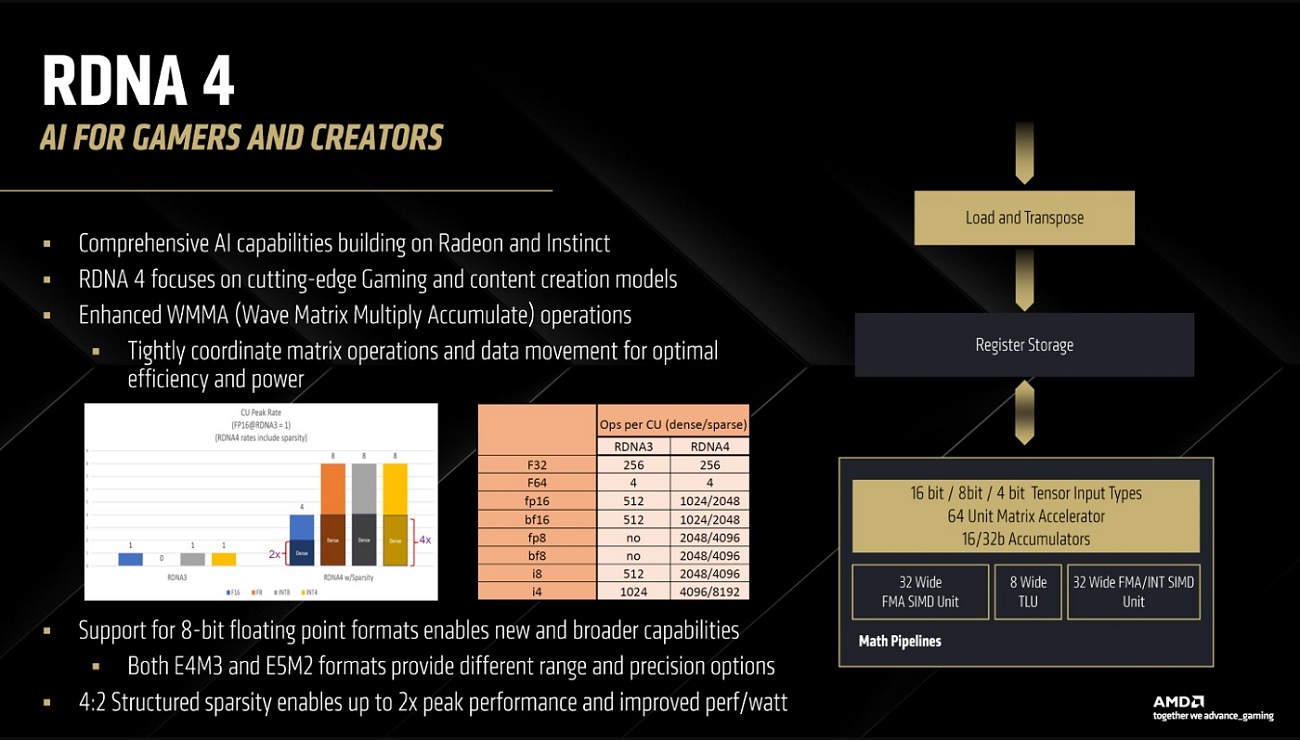
AI Accelerators: AMD’s AI cores are capable of faster matrix operations with 2x 16-bit or 4x 8-bit/4-bit matrix rates. Support for the 8-bit floating point format types is a new introduction. Moreover, the 4:2 Structured Sparsity enables up to twice the speed/performance and lower power consumption. Wave Multiply Matrix Accumulate (WMMA) operations are optimized for better performance.
Scalar Unit: The new scalar unit supports the new Float32 ops.
Scheduler: The Scheduler responsible for handling the different workloads features Split and Named barriers and shows faster split/fill operations. Prefetching has also been tweaked.
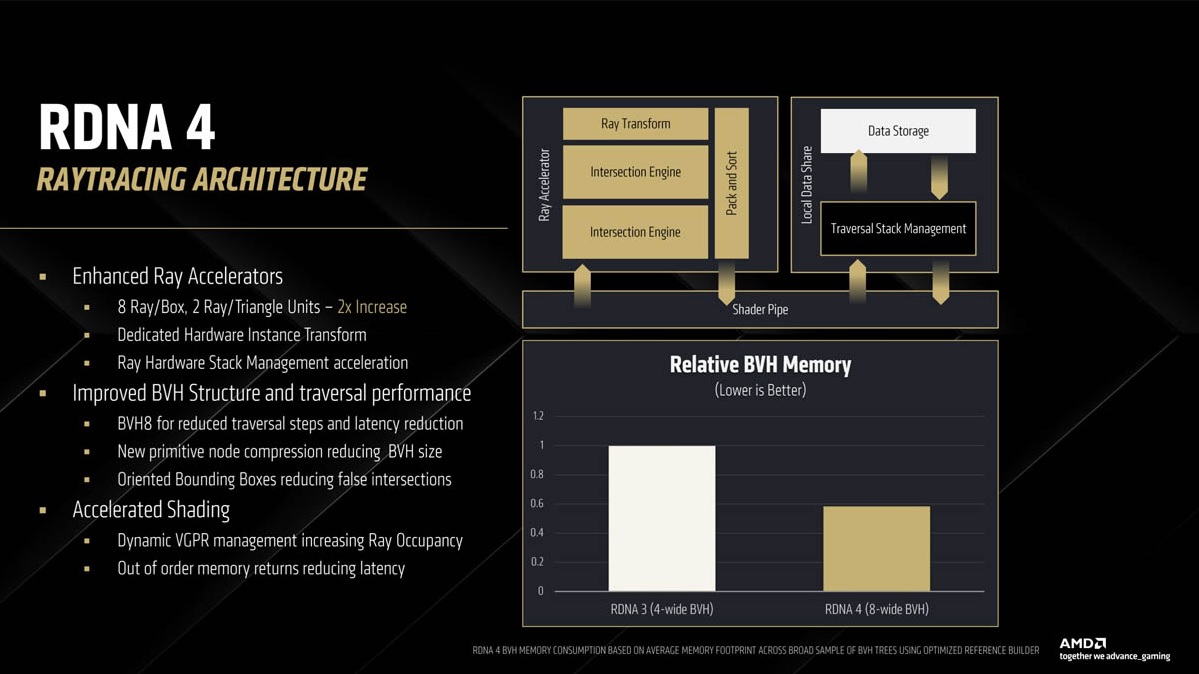
Ray Tracing Core: Improvements to the Ray Accelerator include twice as many box and triangle intersection units, better stack management, and improved node-compression to reduce BVH size. The 8-wide BVH lowers memory utilization. Lastly, shader performance has been improved thanks to additional out-of-order queues for memory, leading to out-of-order requests from different shaders to be delivered.
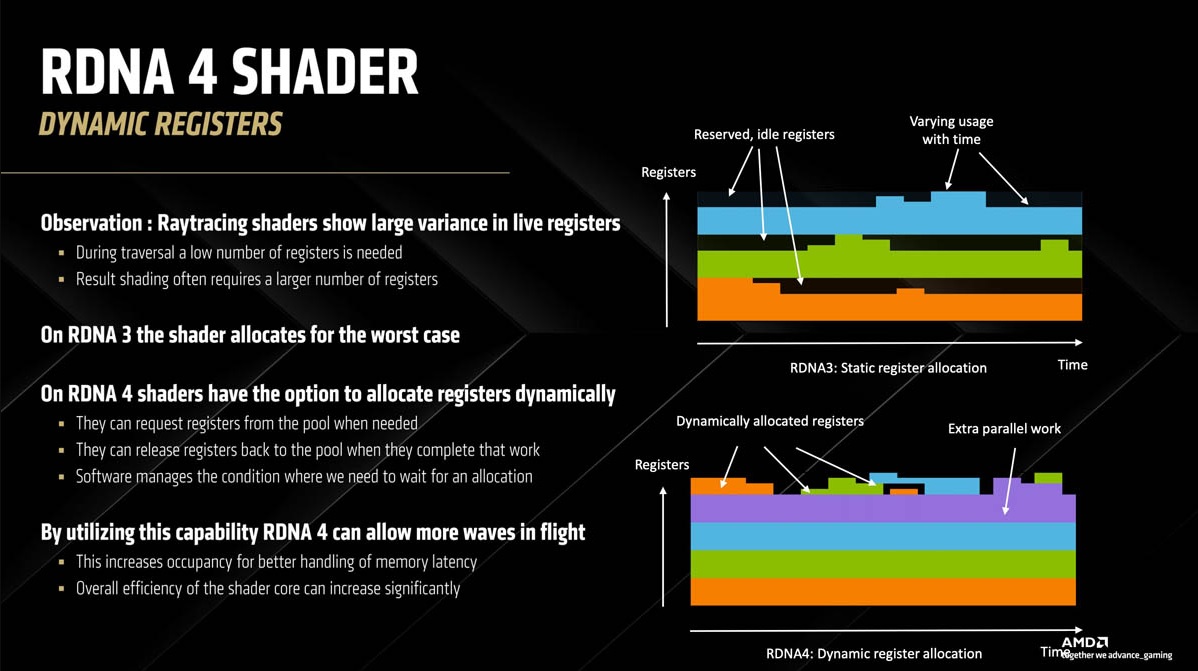
Dynamic Registers: AMD has introduced Dynamic Registers, allowing the GPU shaders to allocate them based on load. This reduces the load on the shaders and leads to better handling of memory latency.
Media: The GPU’s encoding units show improved performance, with a 25% and 11% improvement in H.264 low latency and HEVC encode quality. AV1 encoding efficiency is improved thanks to B-frames, which use data from preceding and following frames to build the current frame. The context switch overhead and memory write accesses have been reduced for overall improved performance.
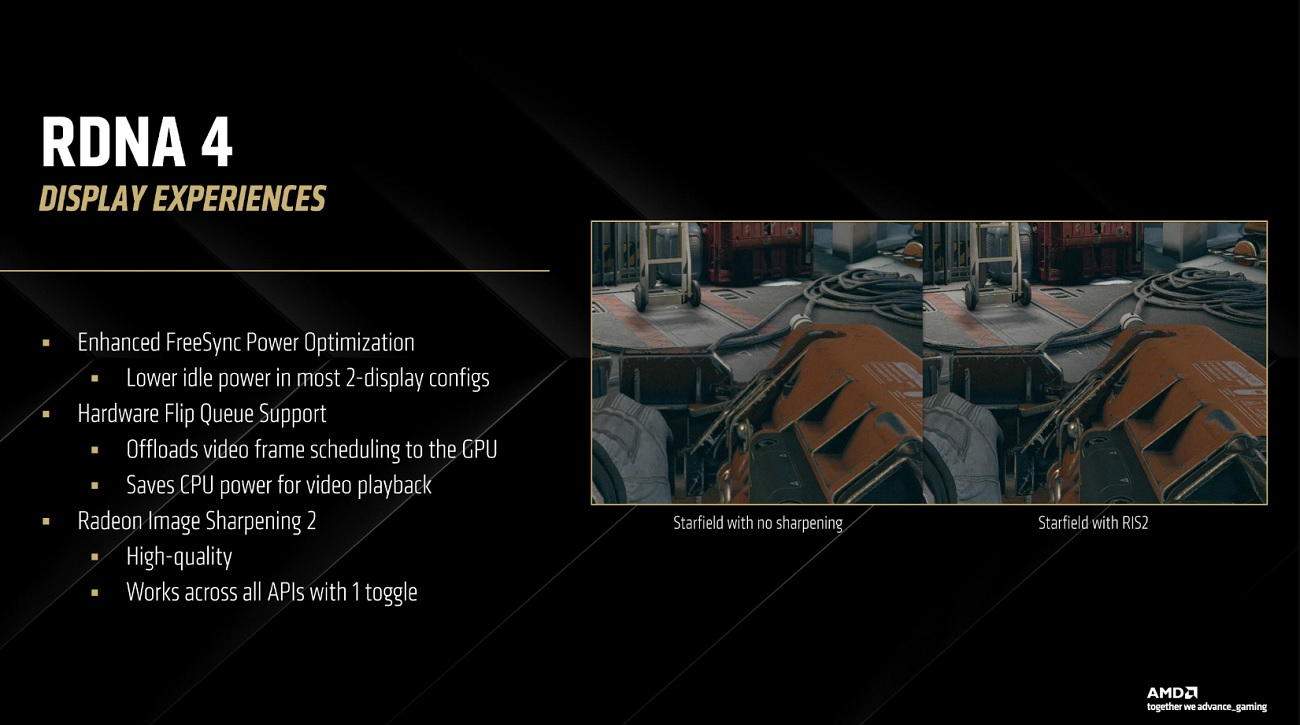
Display: AMD also introduced hardware flip-metering support, like the RTX 5000 cards, for improved frame pacing. This will also reduce CPU power consumption during video playback. Not only that, idle power consumption for dual-monitor configurations has been reduced. Lastly, the Display Engine tweaks have also enabled Radeon Image Sharpening 2 for better sharpening.
FSR 4
AMD FSR 4
AMD introduced FSR 4 with RX 9000, and the major change here is an AI-based upscaling technique for improved image quality. This involves custom machine-learning models for different games that use details from these models to upscale low-resolution video game renders. AMD displayed some comparison images in its presentation, with FSR 4 on Performance Mode showing strikingly similar results to native 4K rendering.
Combined with Anti-Lag, FSR 4 can provide higher frame rates and quality with low latency. AMD also mentioned that FSR 4 is ready for Neural Rendering. We briefly discussed how neural rendering works in our recent RTX 5000 reviews. In short, this is a deep learning technique that uses neural networks to apply different rendering techniques. It has the potential to improve image quality drastically.
Fluid Motion Frames, Anti-Lag 2, and AMD Adrenalin
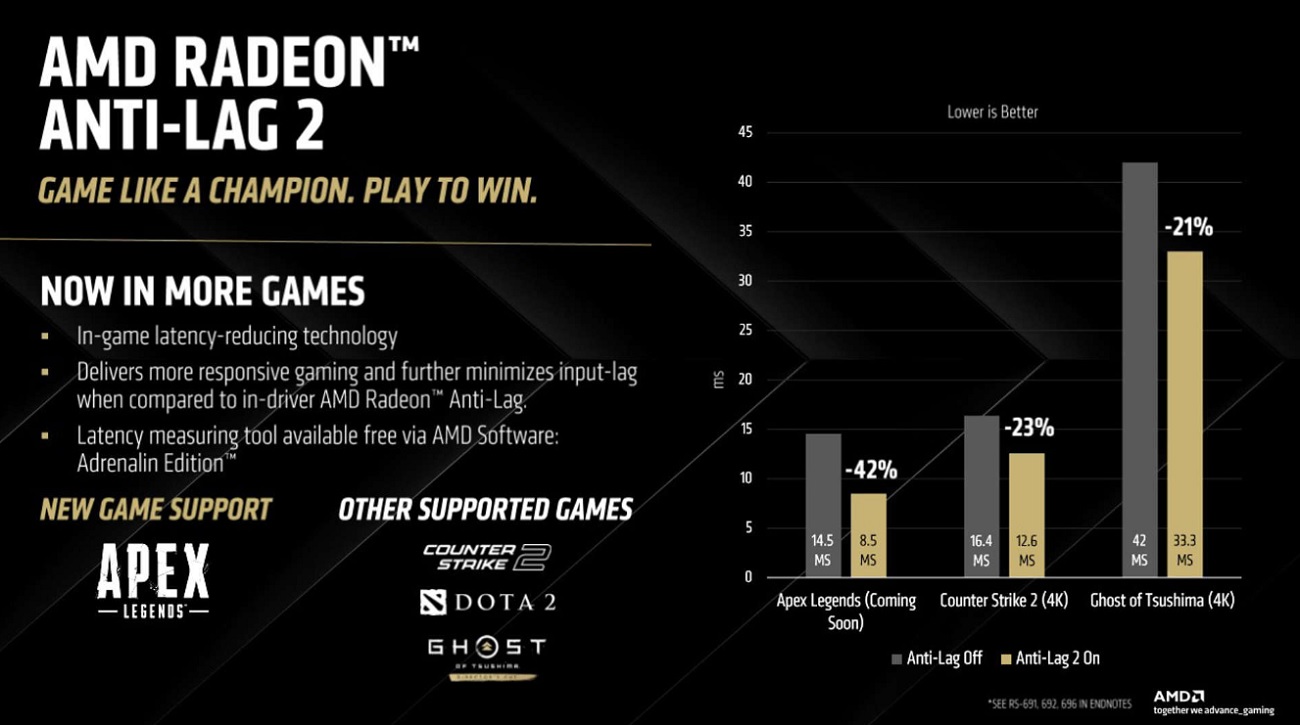
Anti-Lag 2
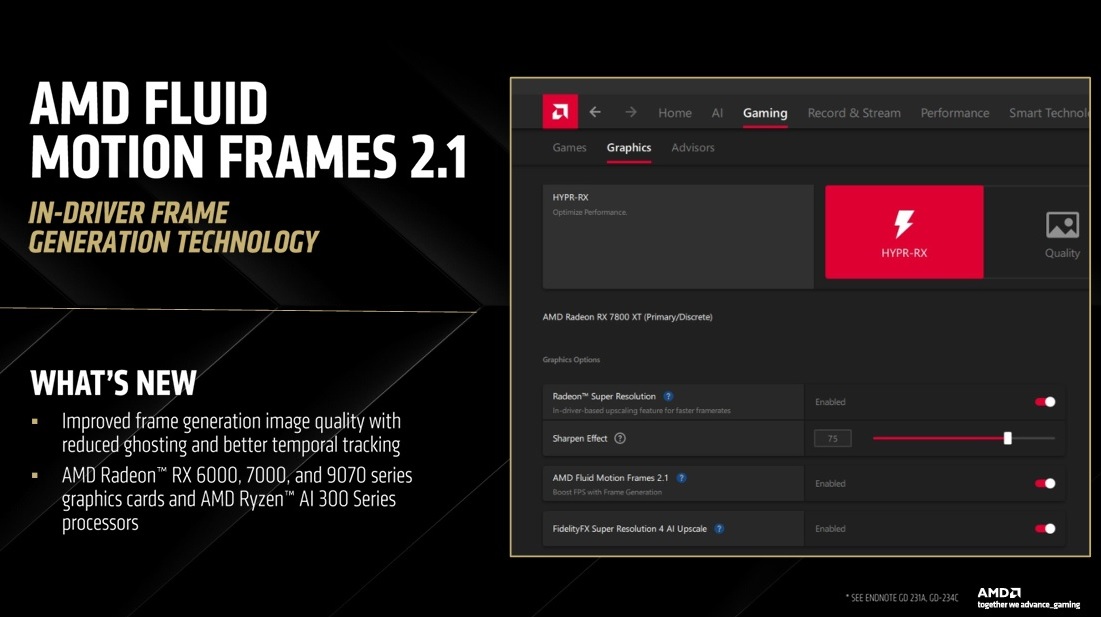
Fluid Motion Frames 2.1
AMD also updated Fluid Motion Frames to its latest iteration: FMF 2.1. This is AMD’s frame-generation technology (similar to Nvidia’s Frame-Generation), which shows improved image quality and temporal tracking with less ghosting.
Anti-Lag 2 was released earlier, but AMD marketed better game support. The latest upcoming one is Apex Legends. In this title, AMD’s figures promise 42% lower latency than applications without Anti-Lag.
The latest edition of AMD’s Adrenalin Software, 25.3.1, is out, adding new features. These include AMD Image Inspector for auto-reporting bugs, artifacts, or other game issues. An AI chatbot called AMD Chat helps you navigate the software. AMD’s AI Apps Manager and Install Manager are some other software components that AMD has advertised.
Packaging
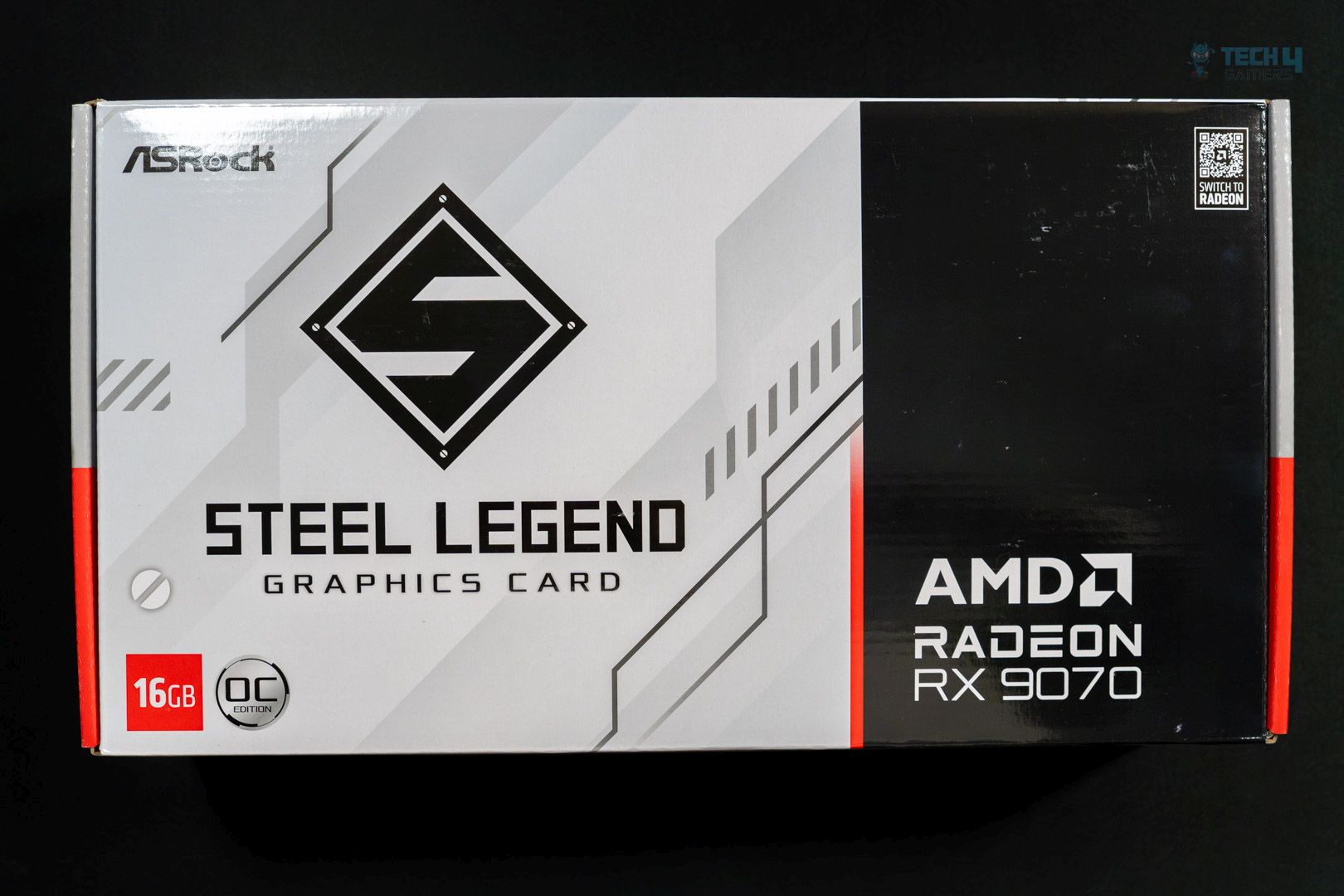
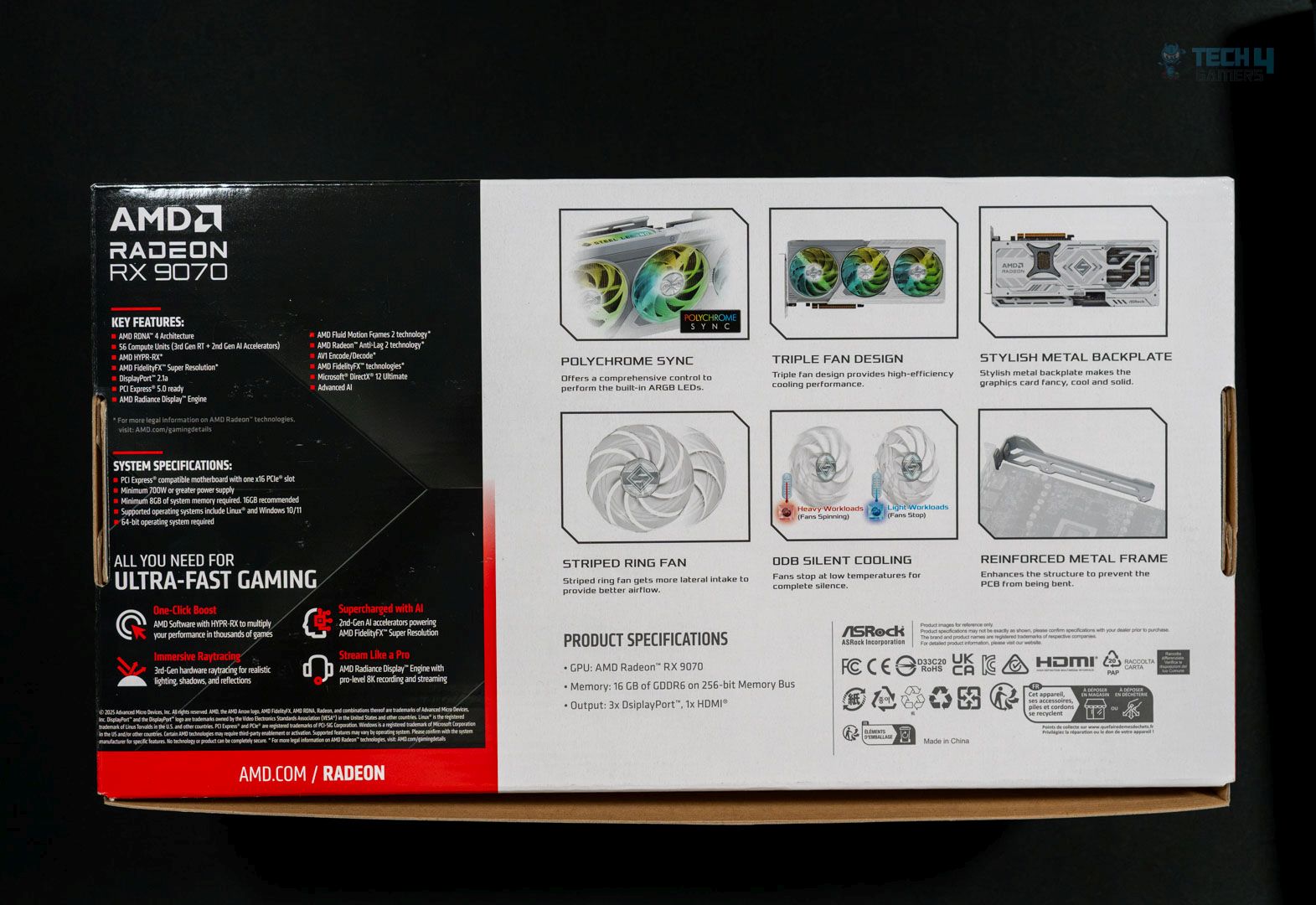
The card is shipped inside a greyish and blacked-themed cardboard box. It looks classy.
Front
Rear
The front does not have much more than the card’s name and the VRAM amount. On the back, we get key features and requirements for the card. We also have compliance symbols and certification marks.
Design
Design
Fan close-up
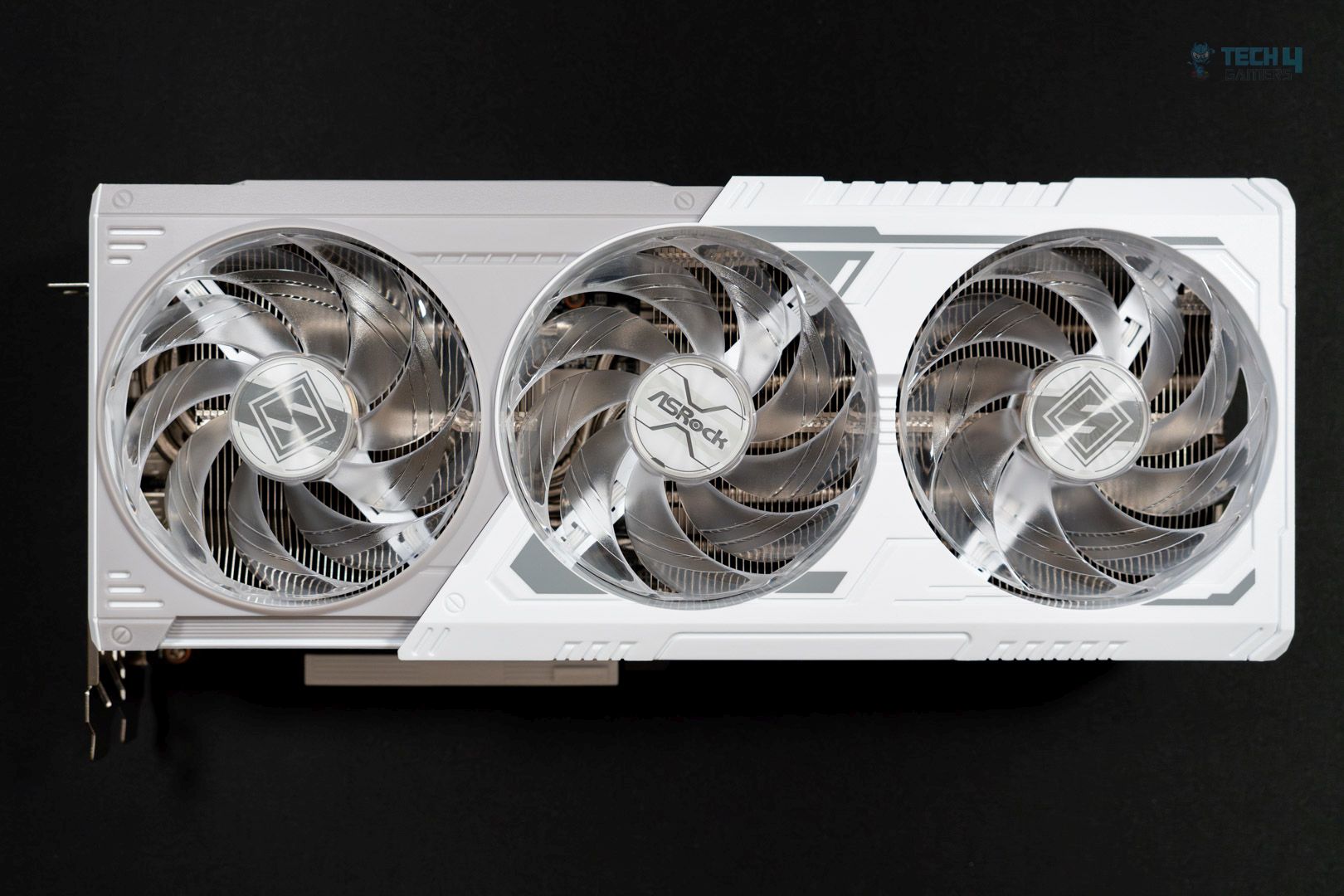
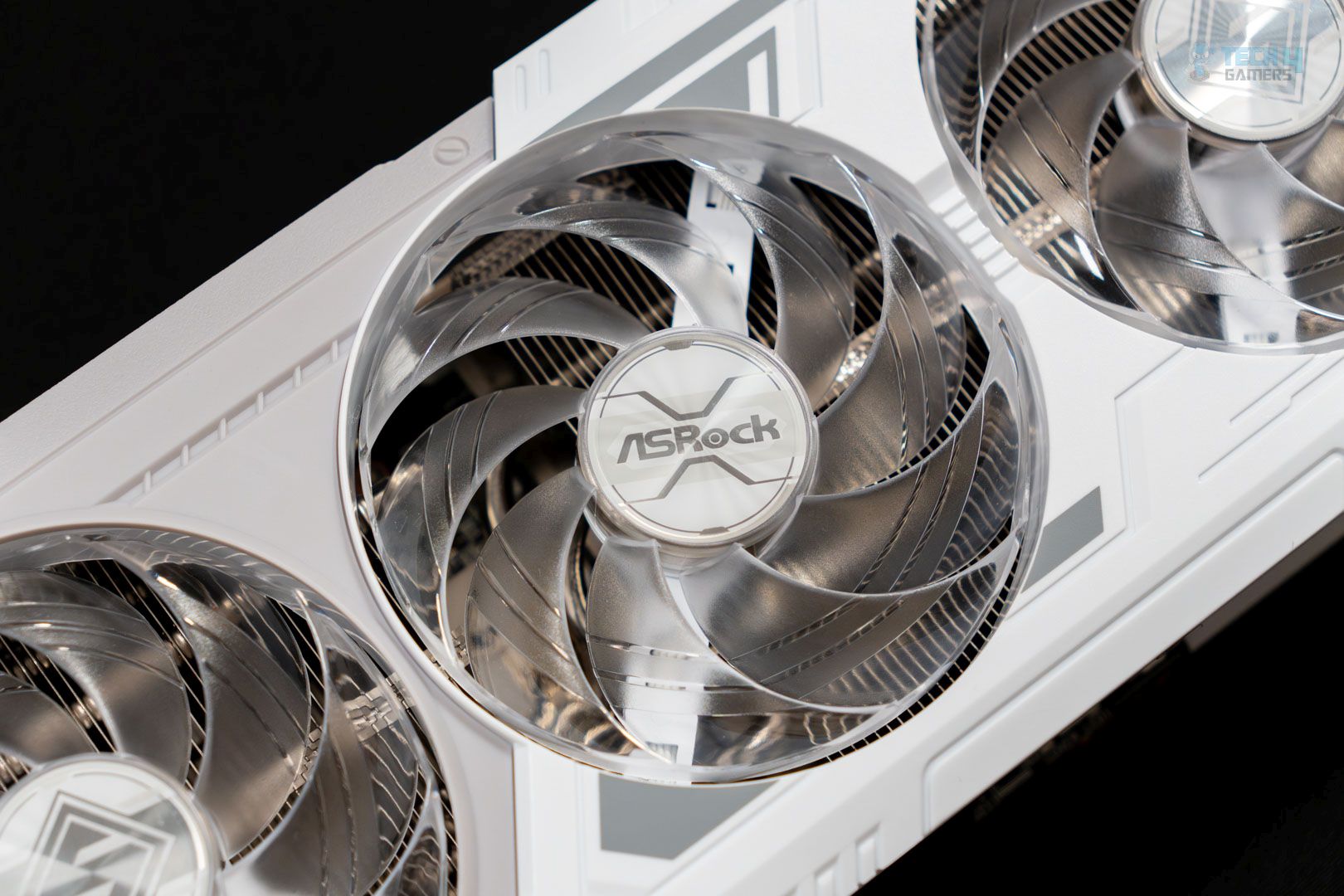
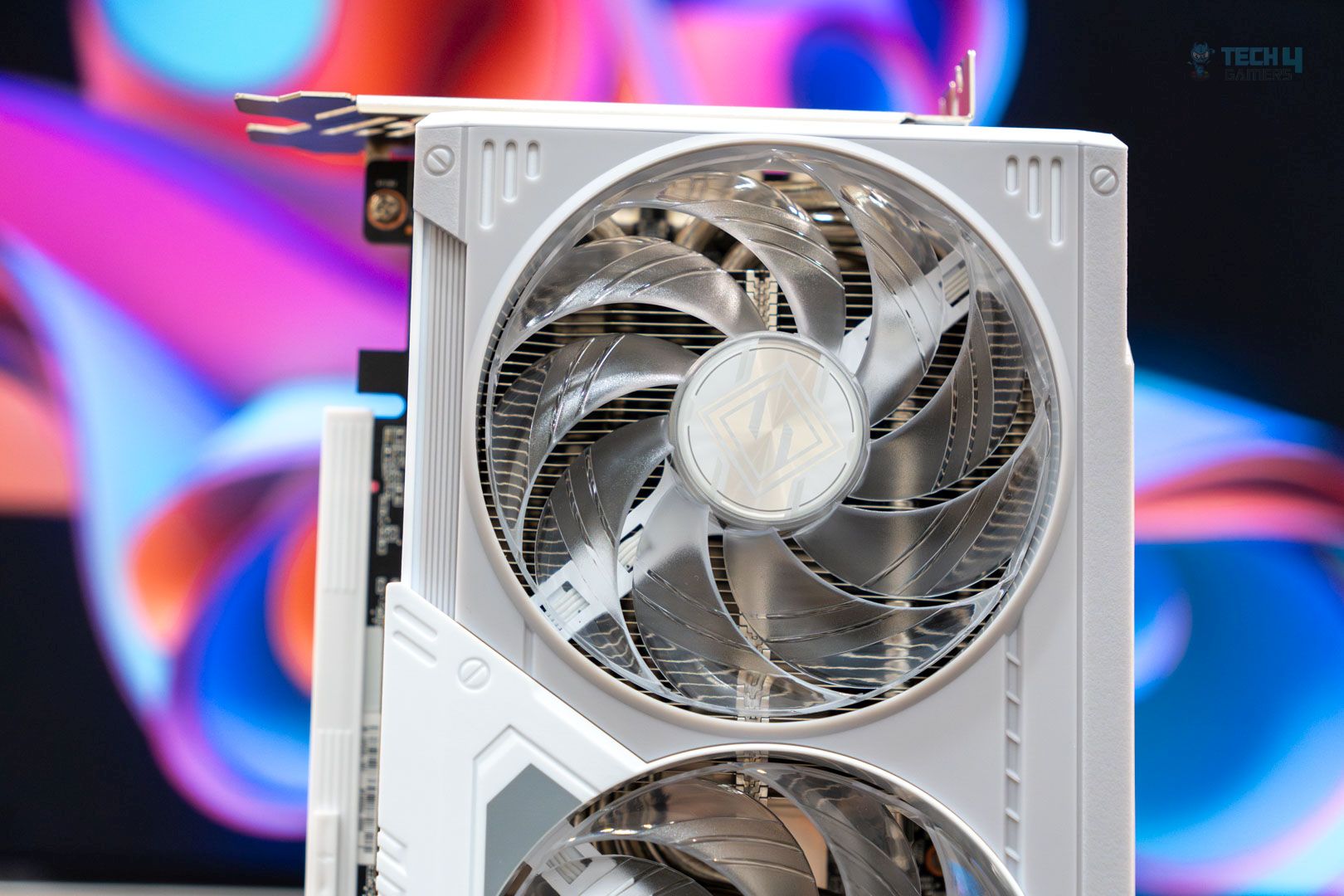
The ASRock Steel features the familiar white theme of Steel Legend products. The front features a fairly minimalistic plastic shroud, mixing grey and white and featuring some printed patterns. This is a triple-fan design, and the fans feature ARGB that can be synced with ASRock motherboards through the Polychrome Sync software.
The left and right-end fans feature the Steel Legend logo on the fan hub and the ASRock branding on the middle fan. These are ASRock’s highly-curved Striped Ring fans designed for greater lateral intake and better overall airflow. The fans have temperature-dependent auto-control and won’t spin at low temperatures.
Backplate
Cutouts
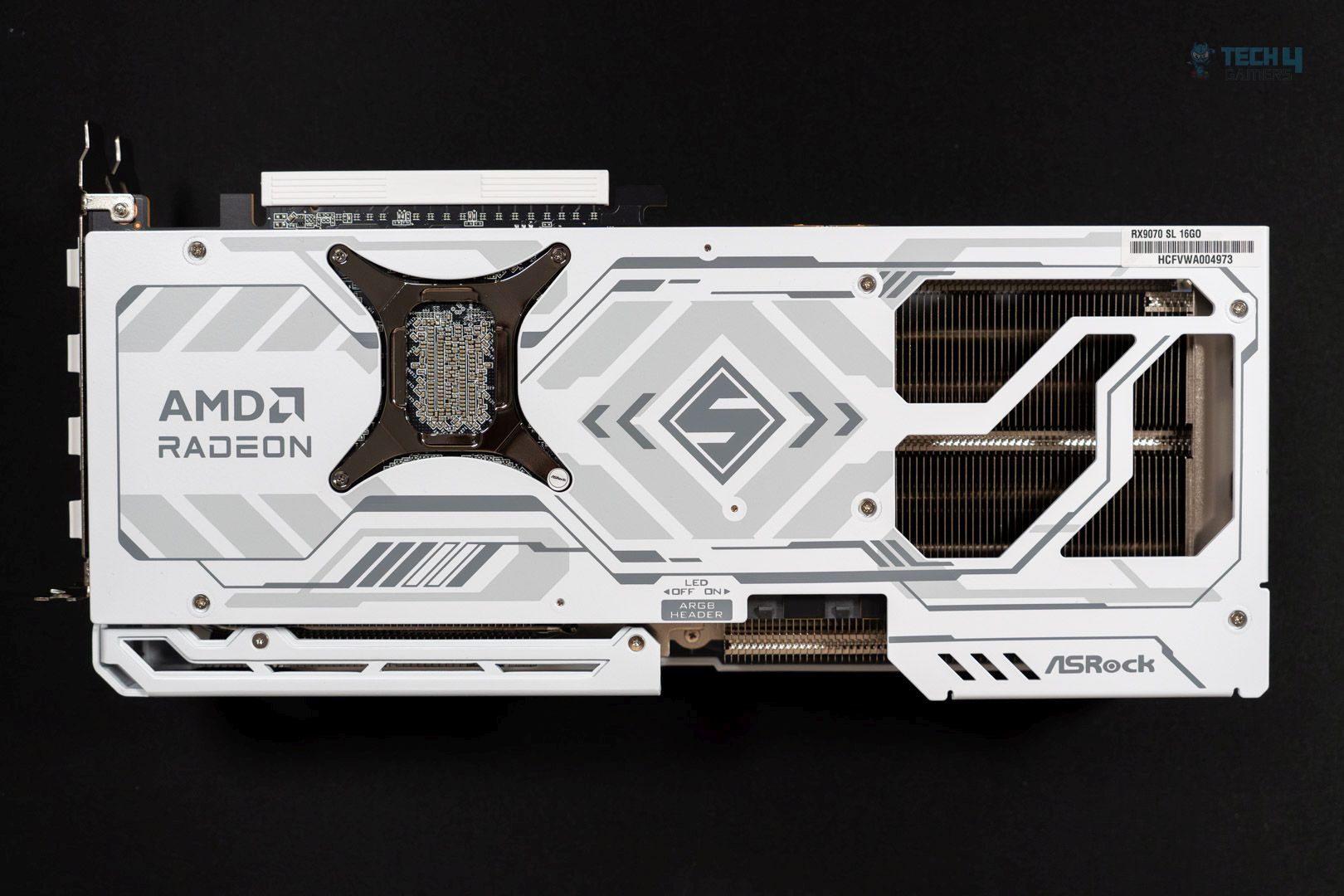
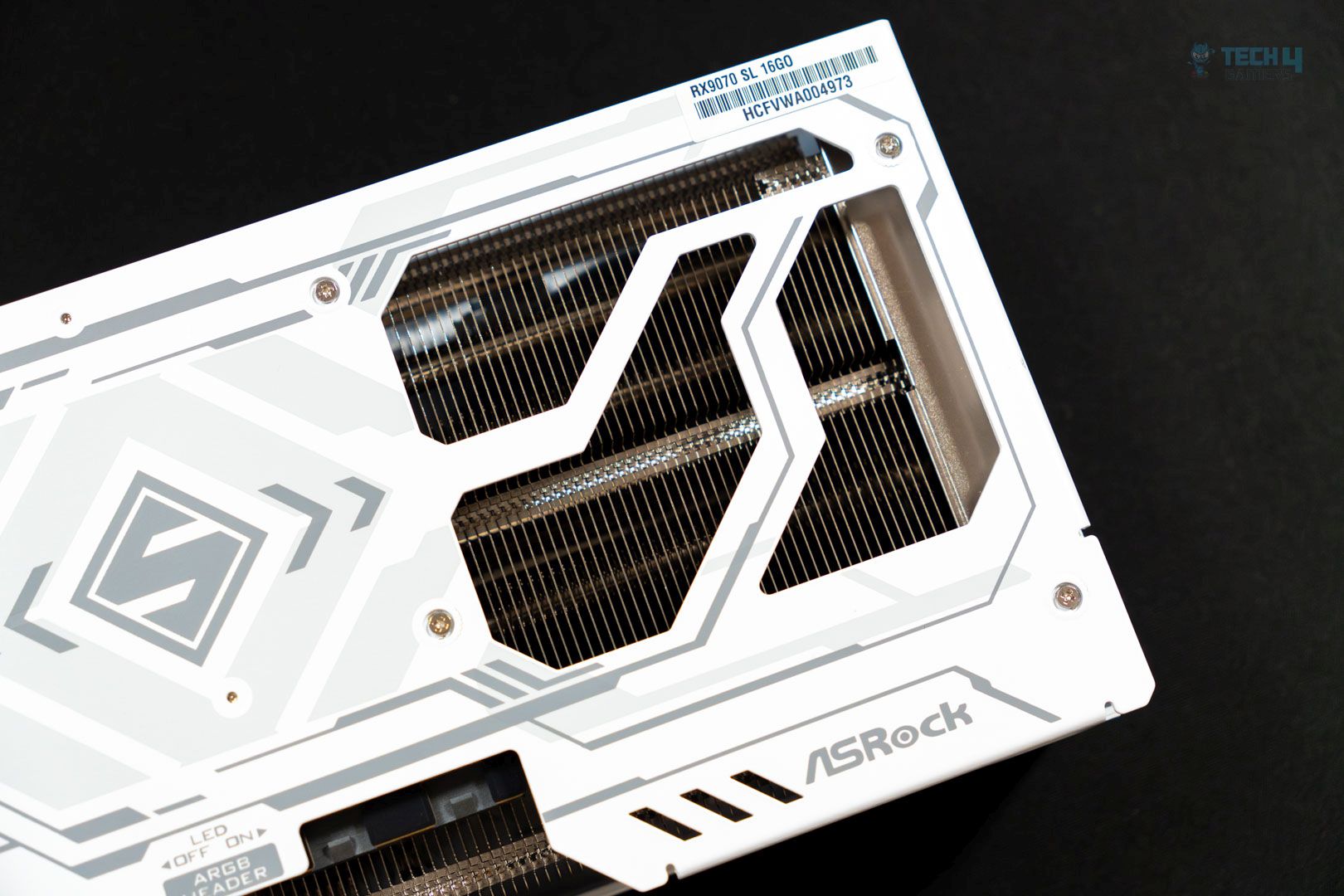
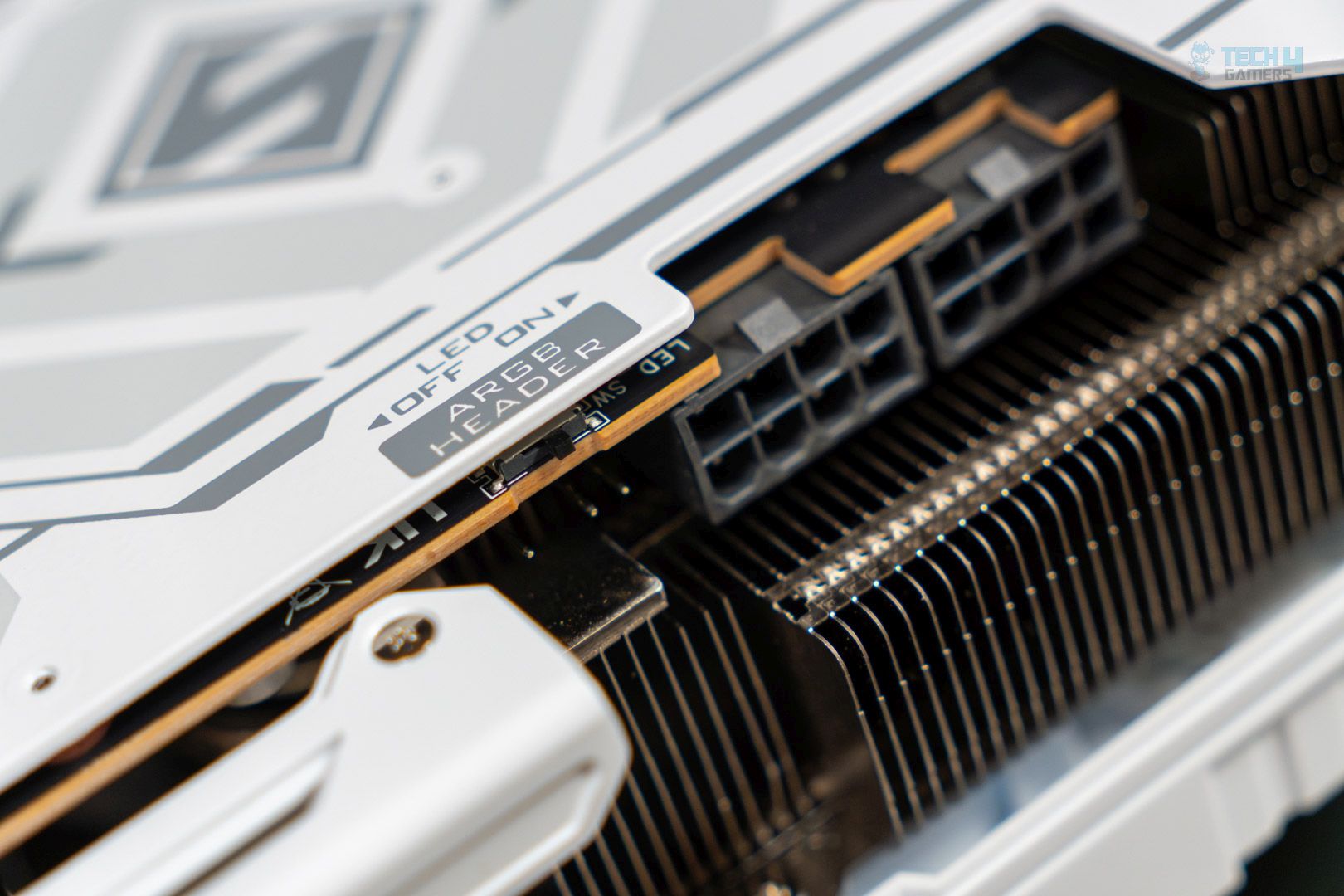
The backside shows a metallic backplate with the Steel Legend logo in the center and some symmetrical shapes printed around it. Again, it’s a very nice and simplistic look. We have the GPU support bracket on the left side (when viewed from the above angle) and three cutouts on the right for heat dissipation. For the same purpose, we see more space left open for heat dissipation on the upper side. Here, we also spot the ARGB Header text and directions for switching on/off the onboard LED. We’ll look at it shortly.
Topside
RGB zone
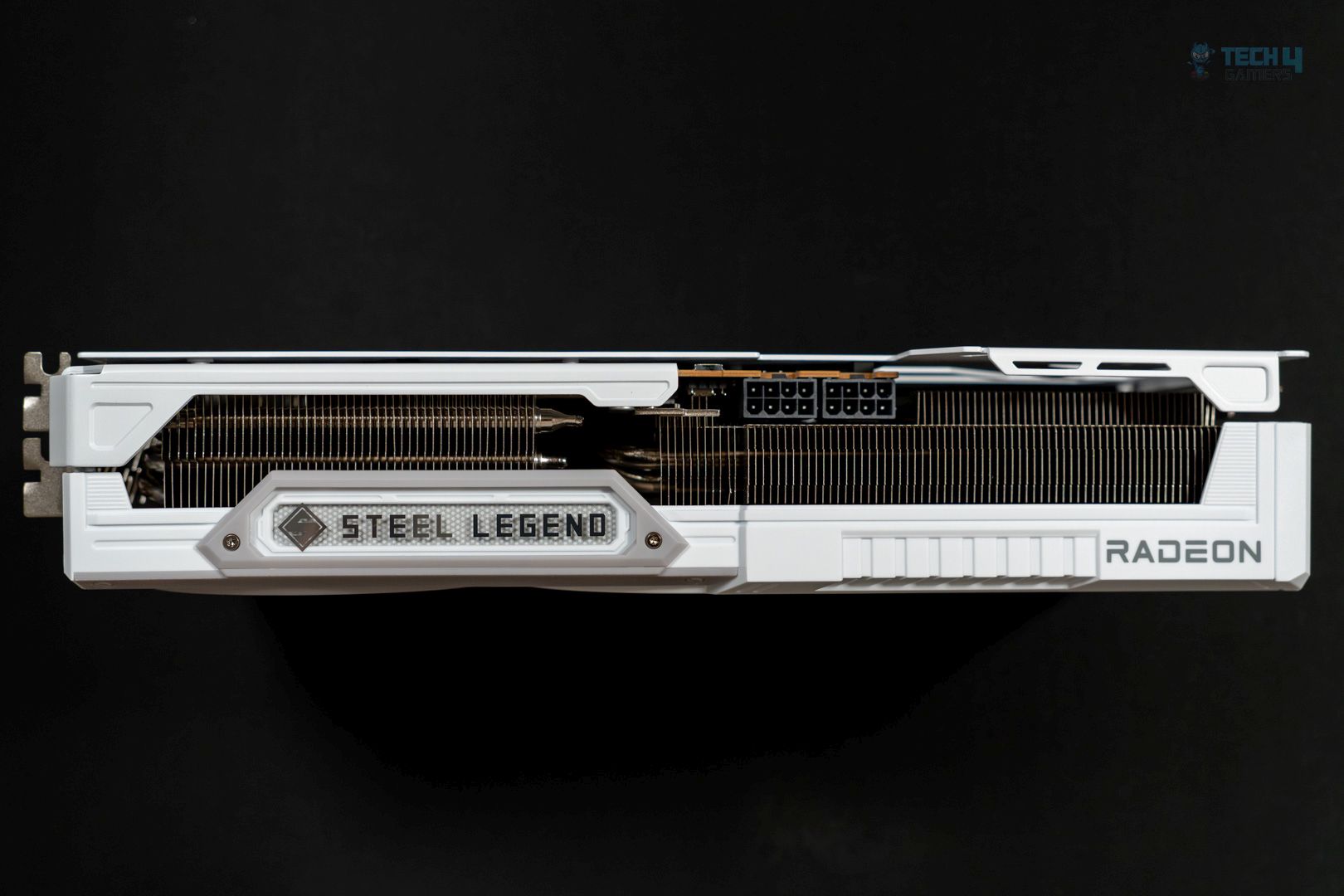
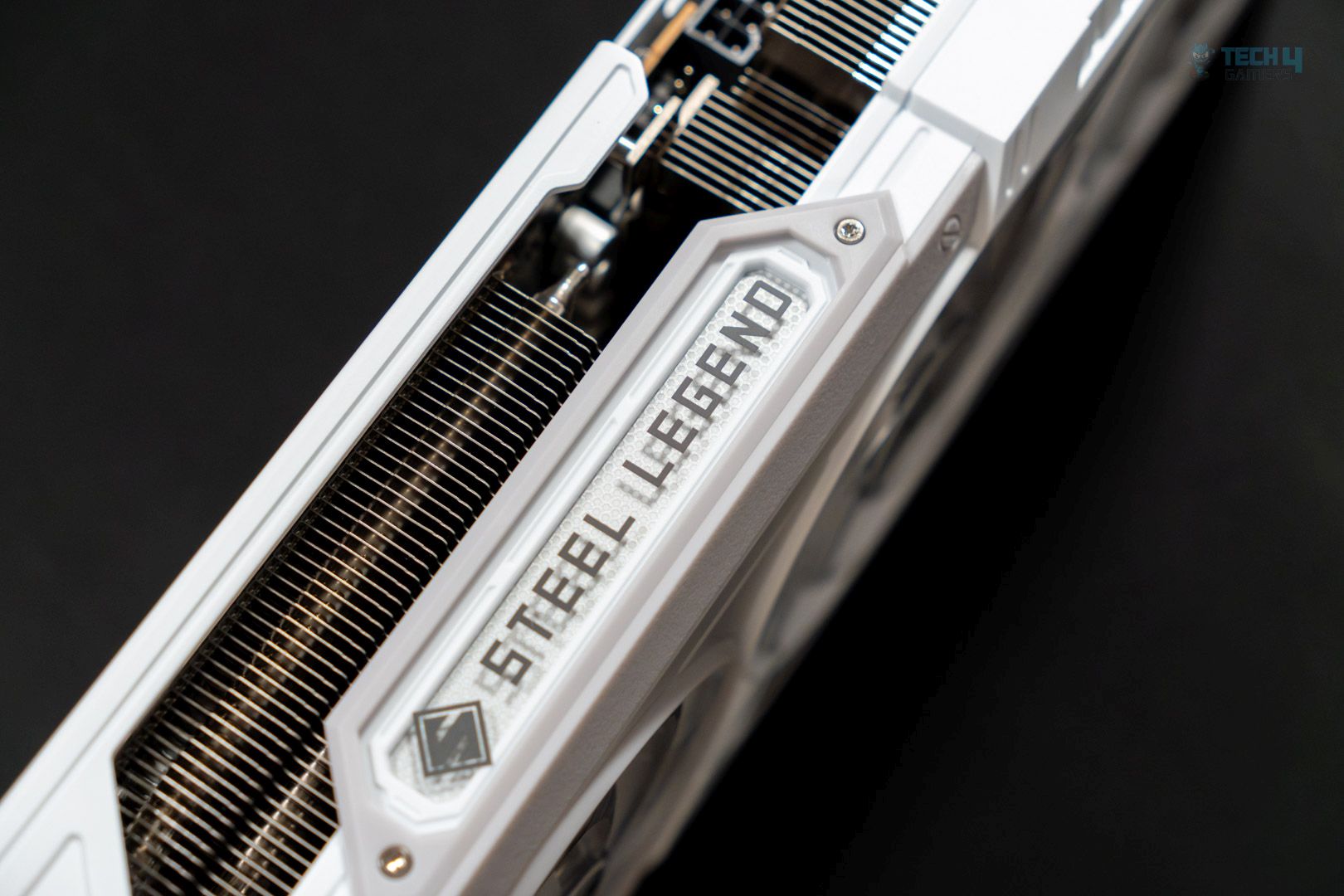
On the top, we first notice an RGB zone on the lower left-hand side. It glows from underneath, while the Steel Legend text and logos themselves do not.
ARGB header
Power connectors
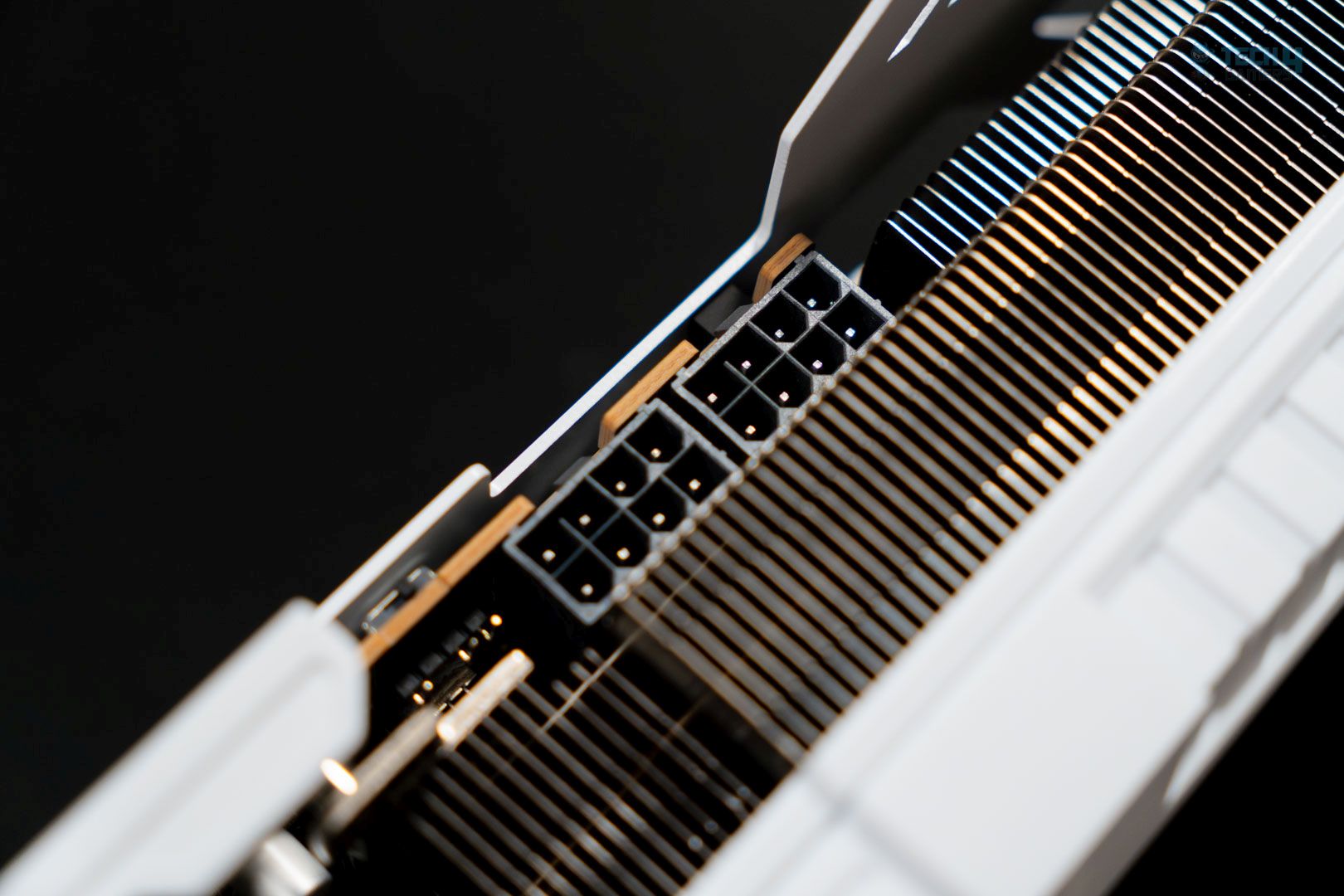
Moving toward the right, we have the LED switch on the upper side. Under it, we see the 3-pin ARGB header to sync the RGB with your supporting ASRock motherboard if you have one. Toward the center, we spot the dual 8-pin PCIe connectors. Each outputs 150W, while the card is rated at just 220W.
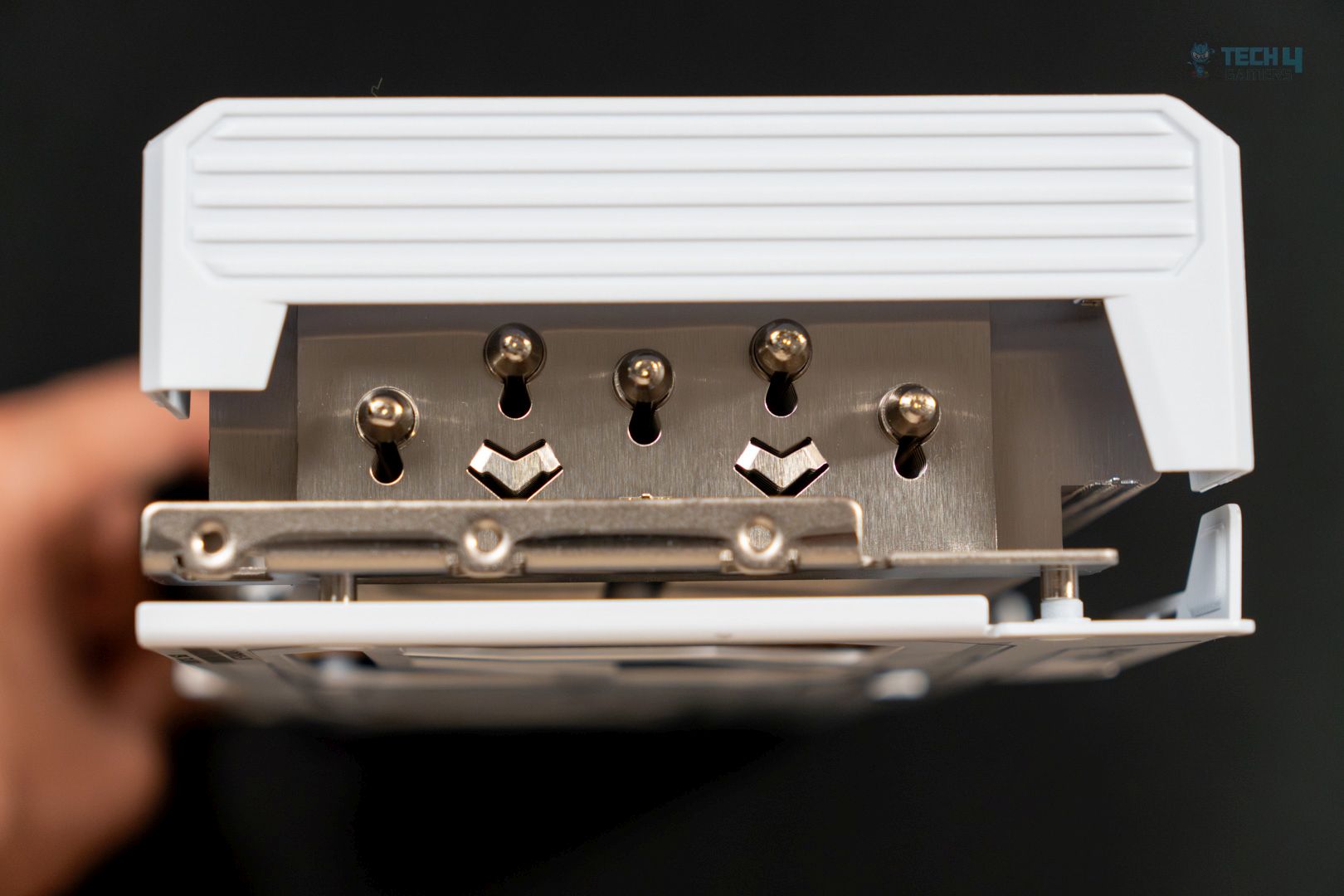
We can also see the GPU heatsink here. The GPU’s cooling design uses a nickel-plated copper base, the heat of which is carried by the five heat pipes to the copper heatsink. The three fans then dissipate this heat.
Right side
Display connectors (Left side)
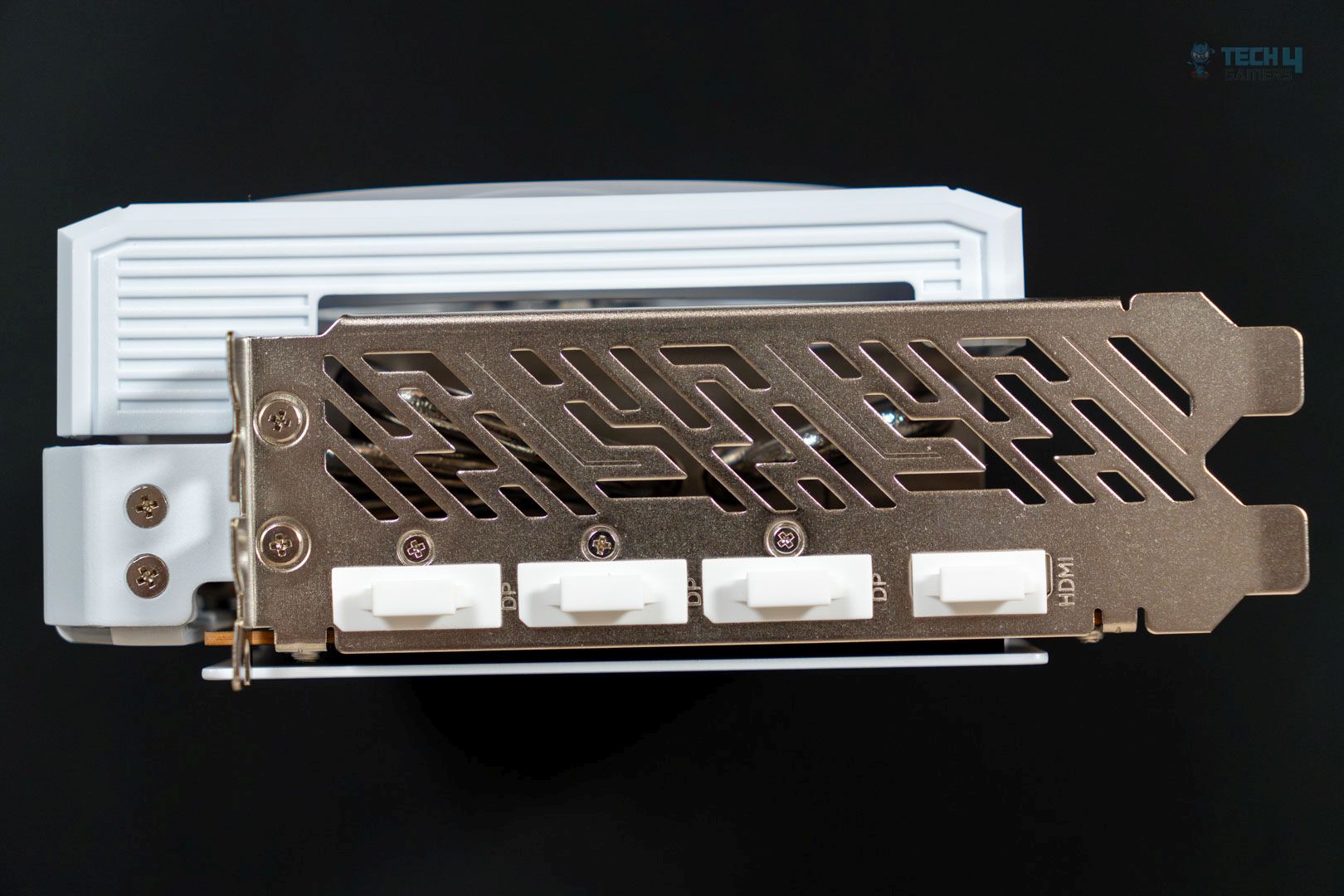
On the right side of the GPU, we can see the five heat pipes and V-shaped air vents contributing to better heat dissipation. With most graphics cards, this region is completely covered by the GPU shroud, but that’s not the case here. On the left side are the four output ports: 3x DisplayPort 2.1a and one HDMI 2.1b. This is a triple-slot design over the dual-slot design of the Reference Edition.
WindowsVersion: Windows 11 24H2 (OS Build 26100.3194)
Storage: WD SN 770 1TB, Samsung 970 EVO 500GB for OS
Benchmarks: CapframeX v1.7.4, Nvidia Frame View v1.6.10, HWINFO Pro v8.22
Testing Methodology
Testing Specifications and Setup:
All games and GPUs were tested using the specifications, drivers, and software listed above.
All GPUs were tested using the same game version.
Gaming performance was first evaluated at the native resolution without utilizing upscalers or frame-generation technologies.
Upscaling and Anti-Aliasing:
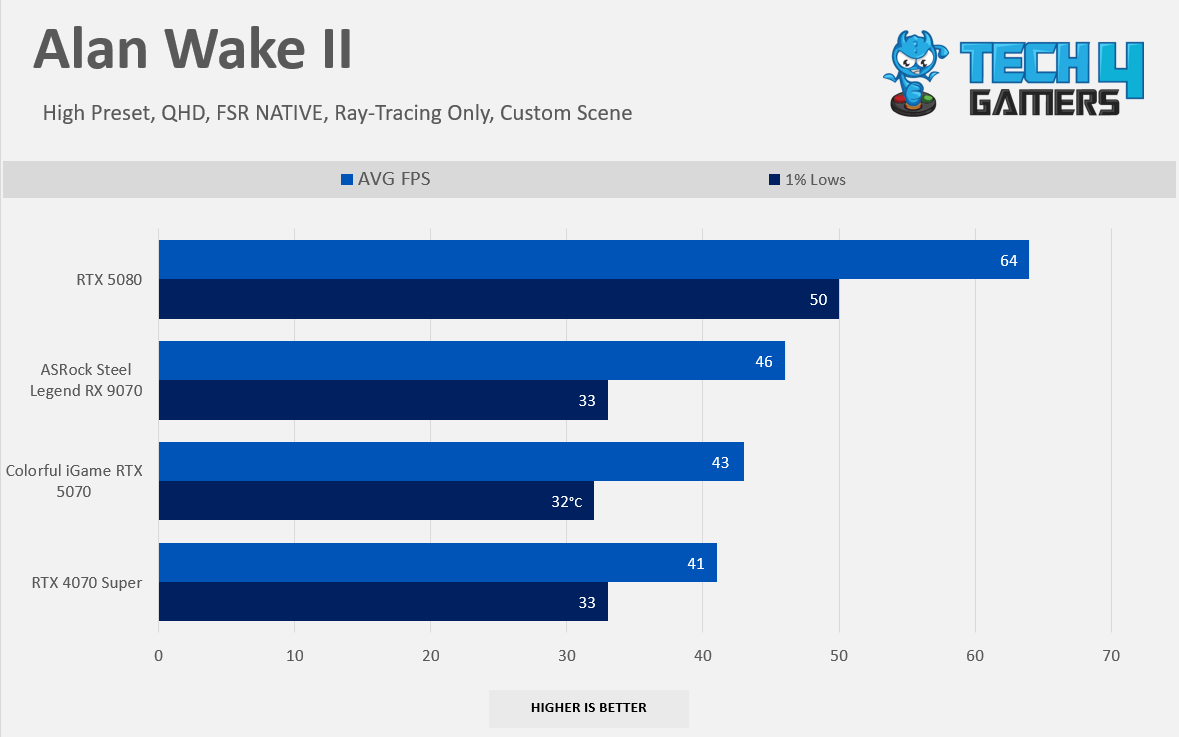
For games that lack TAA (Temporal Anti-Aliasing) or any game engine resolution upscalers (such as TAA or TSR), FSR Native was used. This is because FSR is universally available and compatible with all GPUs. An example of such a game is Alan Wake II.
Settings Configuration:
No control panel settings were used. All configurations were applied directly within the game settings.
Performance and Measurement Tools:
CapframeX was used to capture performance metrics.
Nvidia Frame View was utilized for latency measurement in Frame-Generation + DLSS tests for RTX GeForce Graphics Series
HWINFO Pro was employed to measure effective clocks, average power consumption, and maximum power consumption.
NvAPP: We have completely disabled the NVIDIA shadow-play for the RTX GeForce Graphics Series.
Benchmarking Methods:
Some games were tested using their built-in benchmarks, while others were tested with custom game settings.
GPU Configuration:
No GPUs were tuned, overclocked, or had their power limits increased during testing.
Screen Resolutions Tested:
FHD (Full HD): 1920×1080
QHD (Quad HD): 2560x1440p
UHD (Ultra HD): 3840x2160p
Rasterization Performance
Gaming 1080p Benchmarks (Native)
Raster 1080p Performance
1 of 8
6 Games Average FPS 1080p
Assassin's Creed Mirage 1080p
Alan Wake II 1080p
Black Myth Wukong: 1080p
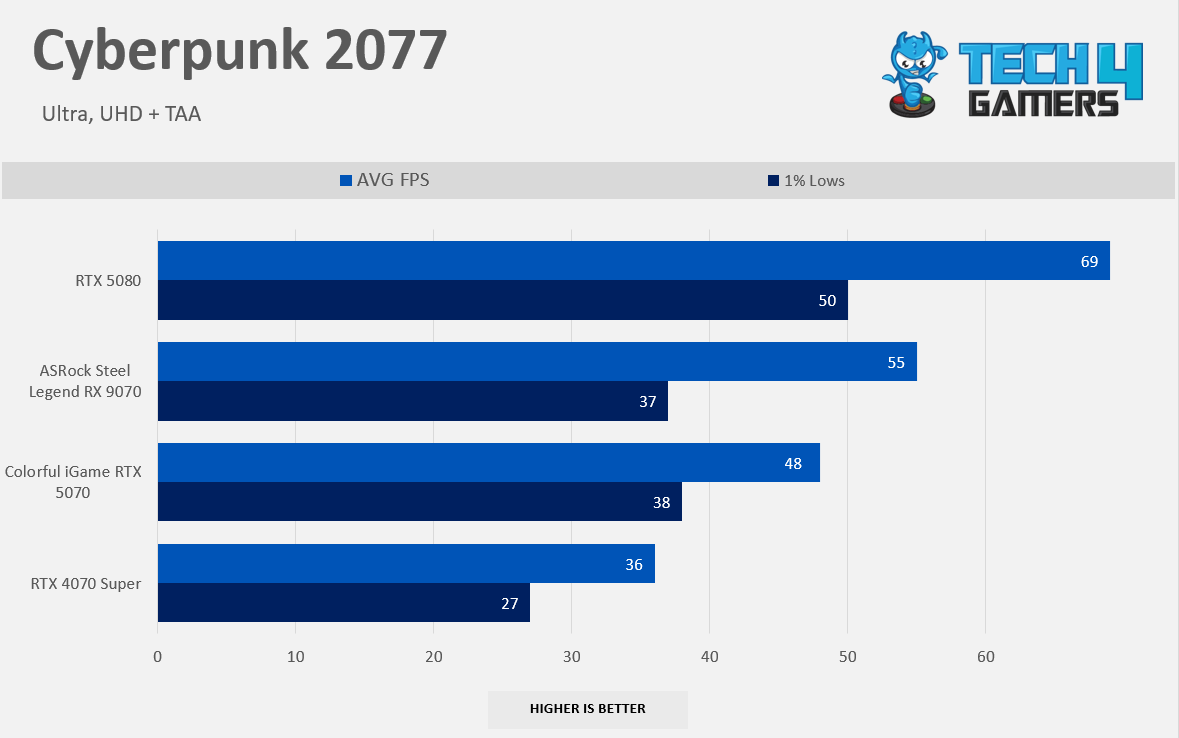
Cyberpunk 2077 1080p
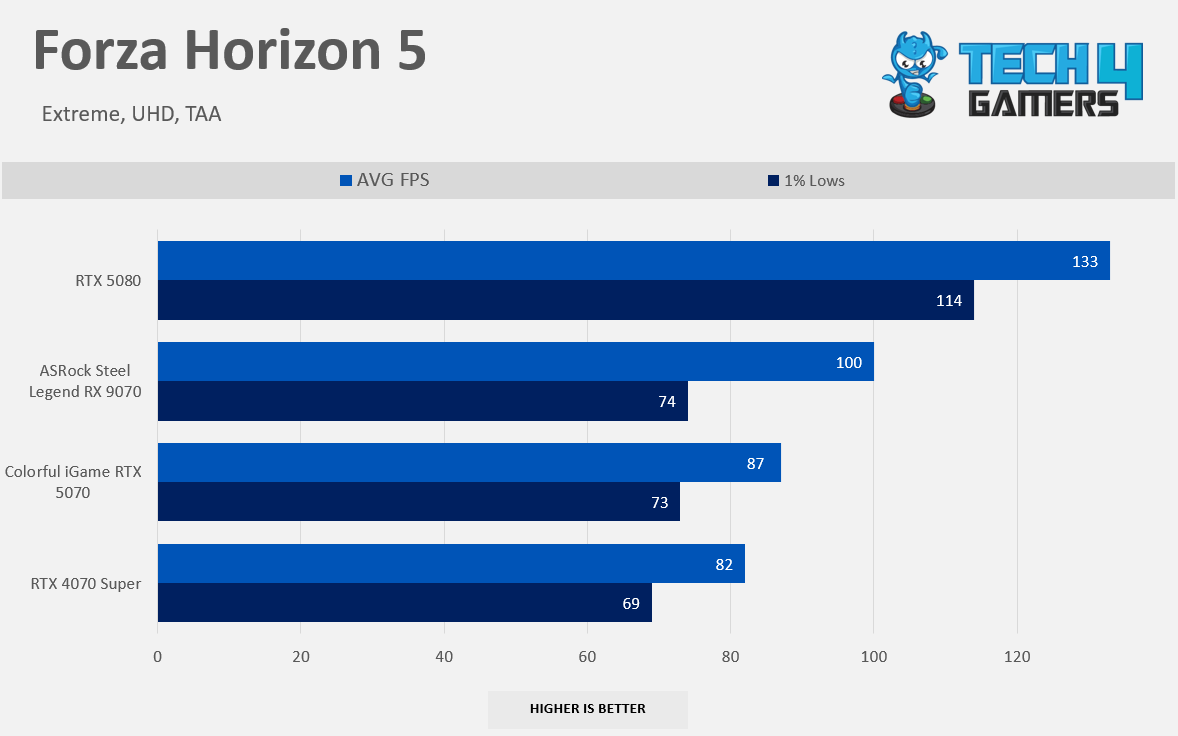
Forza Horizon 5 1080p
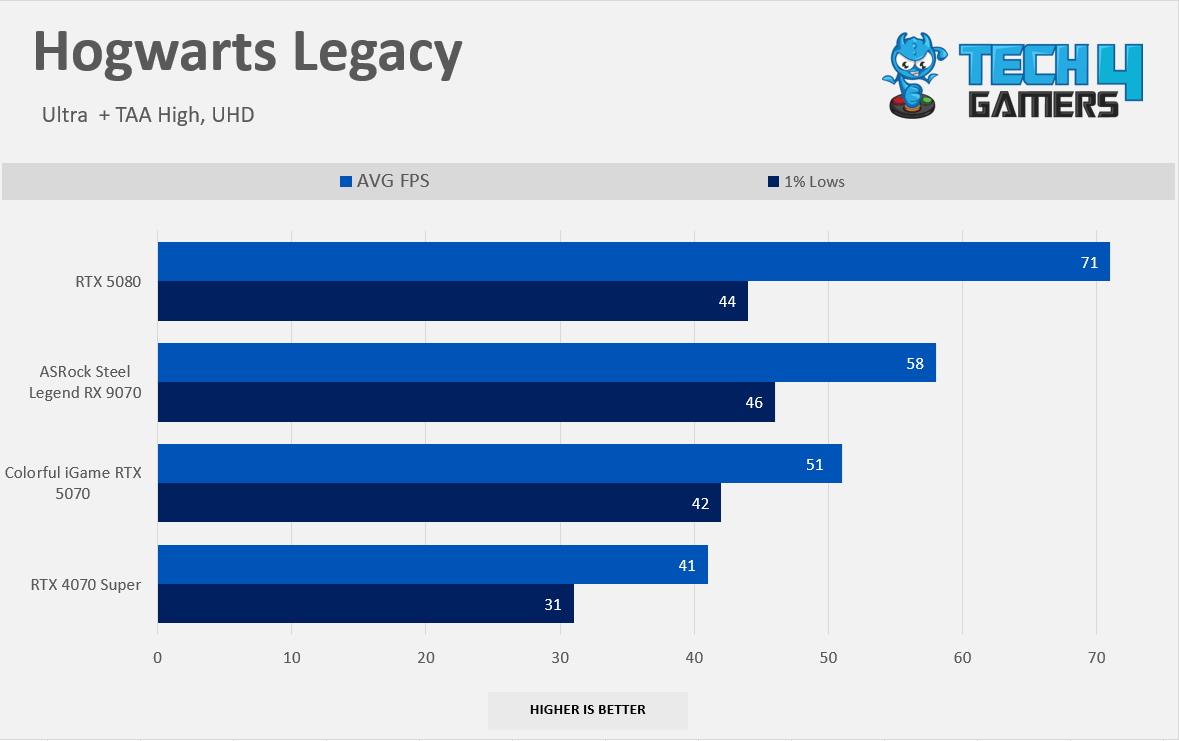
Hogwarts Legacy 1080p
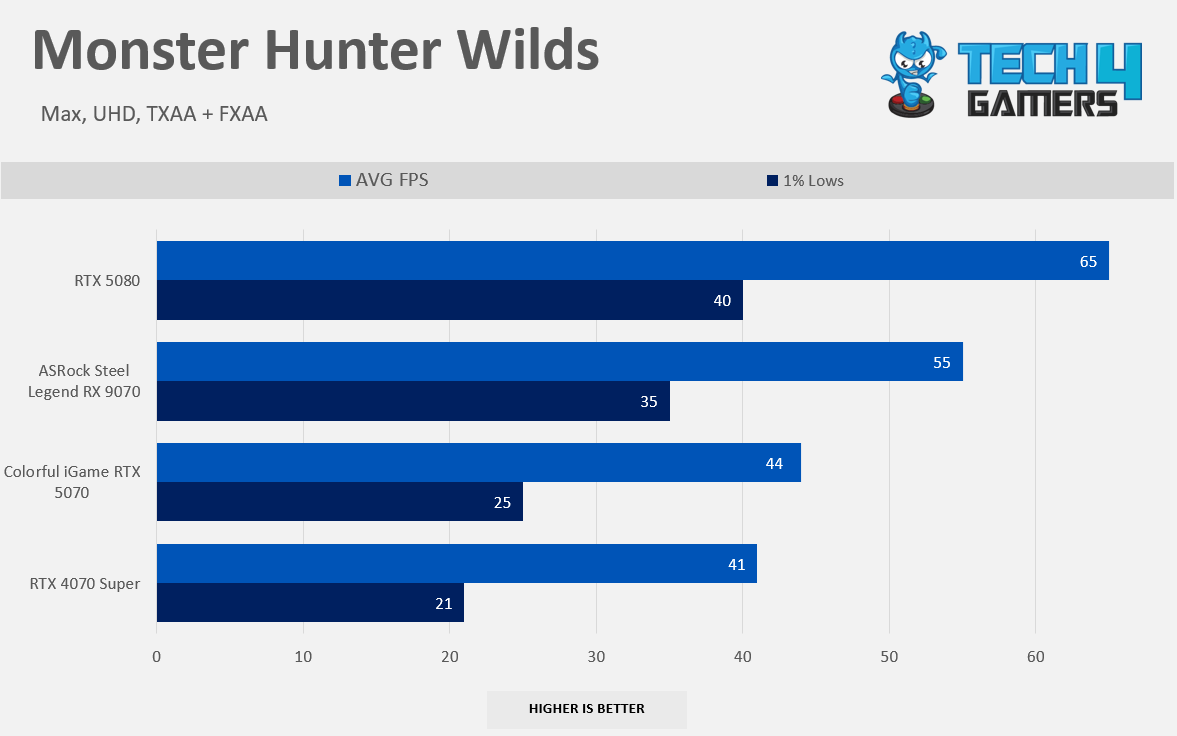
Monster Hunter Wilds 1080p
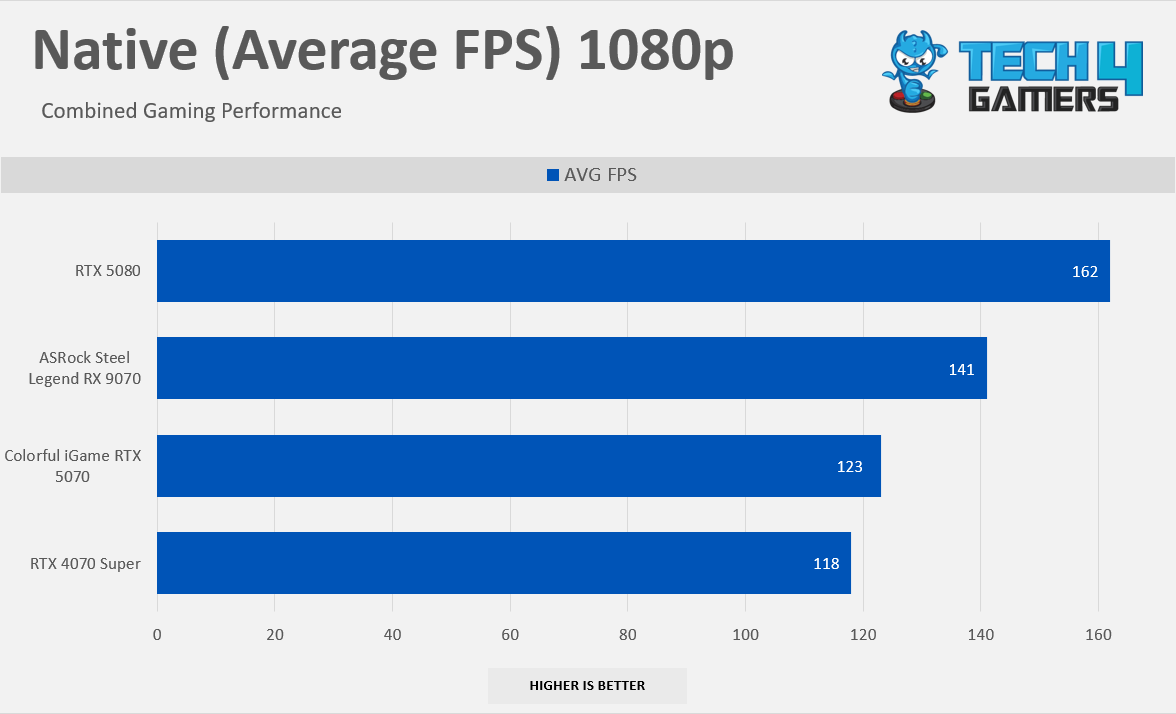
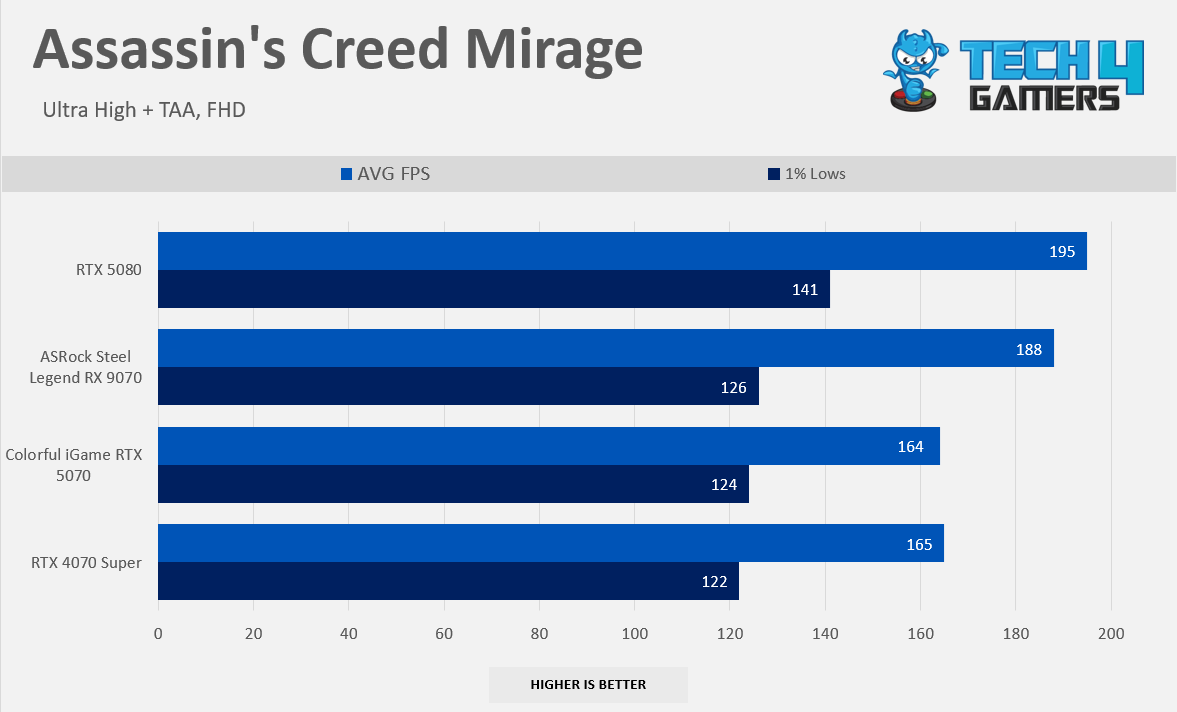
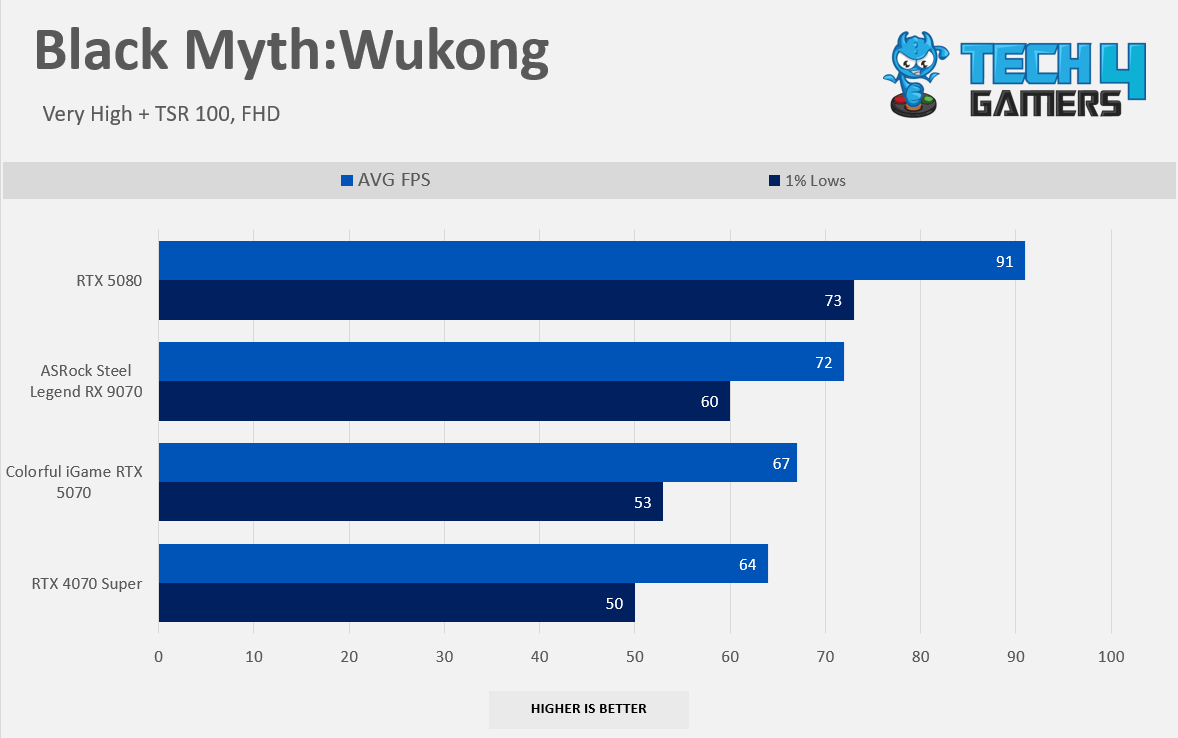
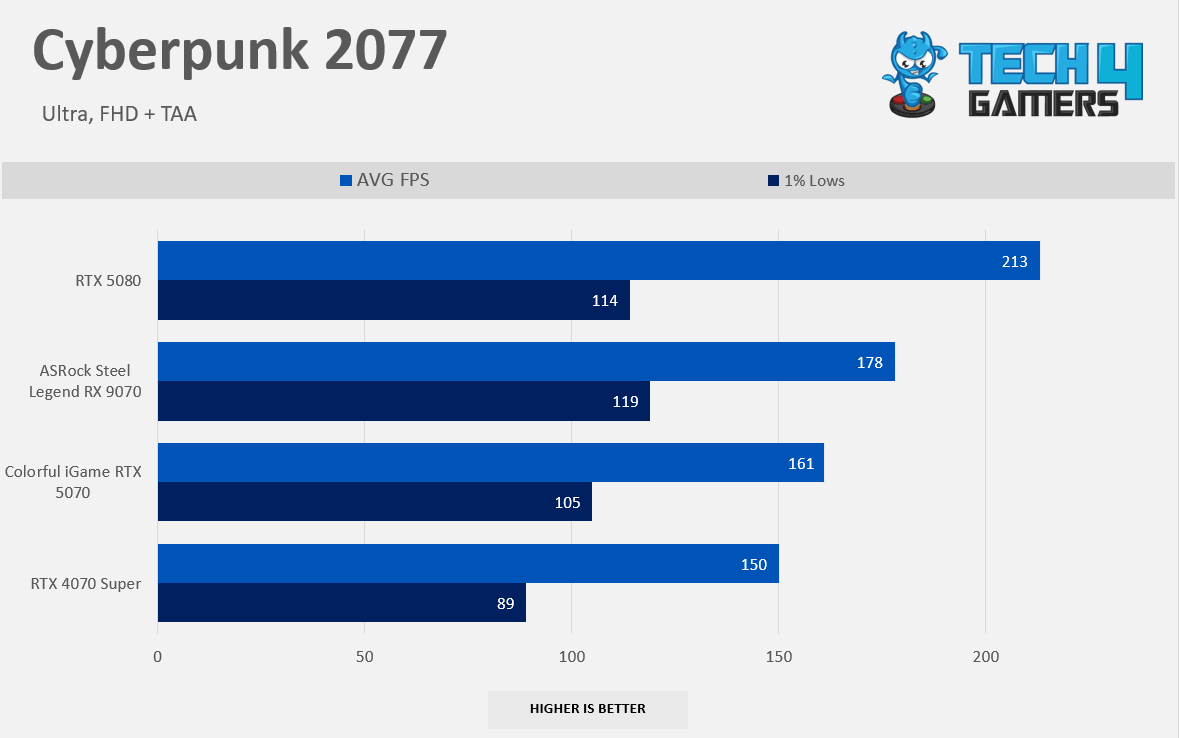
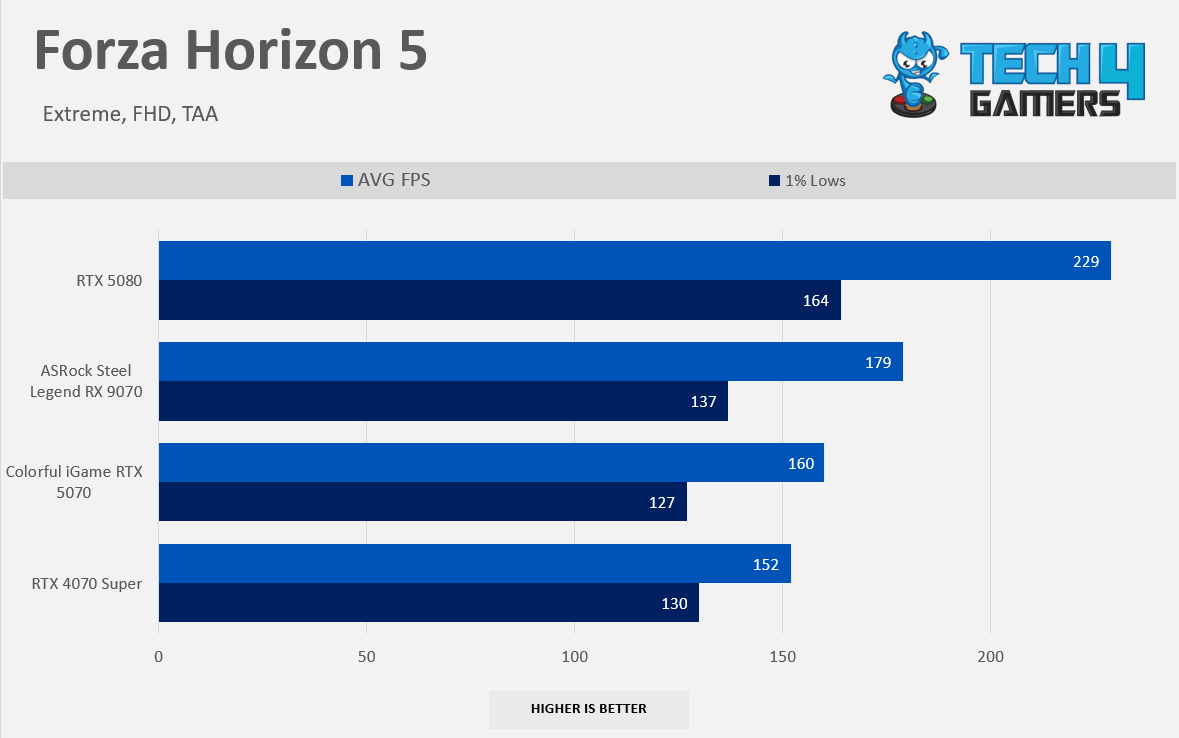
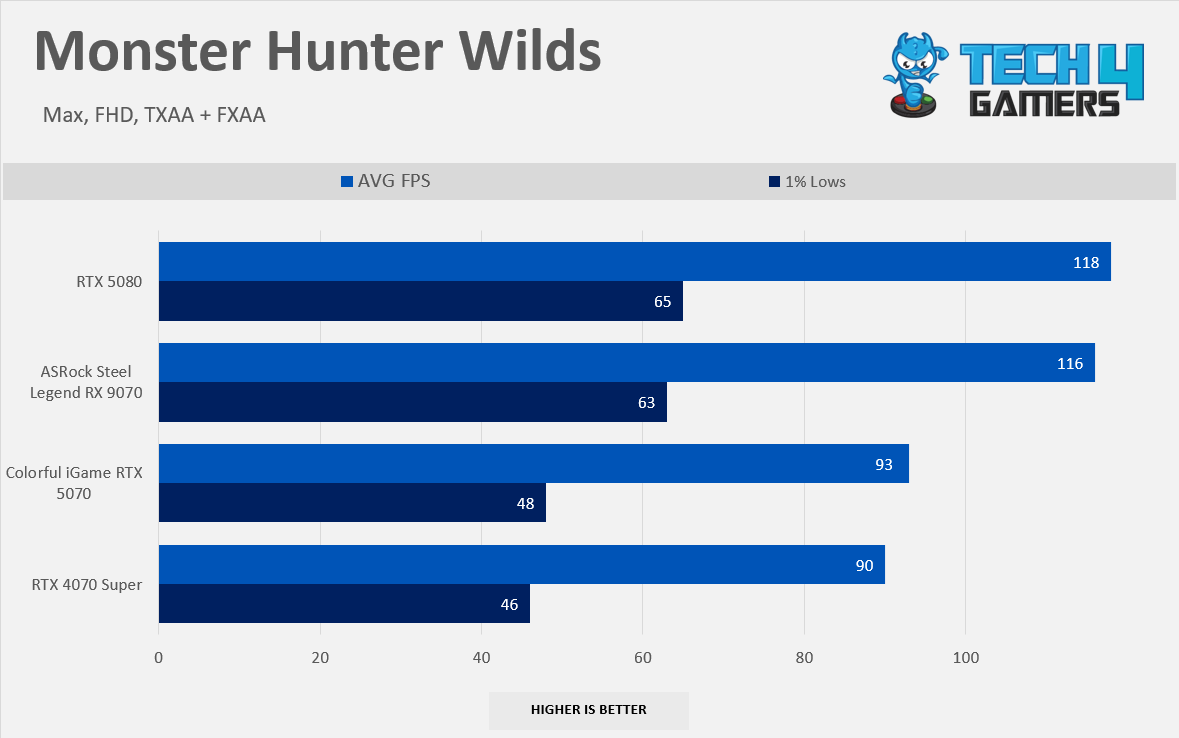
At our raster 1080p native performance numbers, Radeon RX 9070 is leading the newly released NVIDIA’s GeForce RTX 5070 by 14% on Average, and almost the 20% lead over NVIDIA’s GeForce RTX 4070 Super, NVIDIA GPU’s nearly caught up to Radeon RX 9070 in Black Myth Wukong but surprisingly the RDNA 4 GPU is beating the GeForce RTX 5070 by 7% on Average at 1080p. However, if you’re still at the 1080p High-Refresh Rate display, such as 144Hz, RX 9070 can efficiently run without sweat at the maximum hertz in the maxed-out settings. It can deliver smooth gaming performance without lowering the game settings.
Gaming 1440p Benchmarks (Native)
Raster 1440p Performance
1 of 8
7 Games Average FPS 1440p
Alan Wake II 1440p
Assassin's Creed Mirage 1440p
Black Myth Wukong 1440p
Cyberpunk 2077 1440p
Forza Horizon 5 1440p
Hogwarts Legacy 1440p
Monster Hunter Wilds 1440p
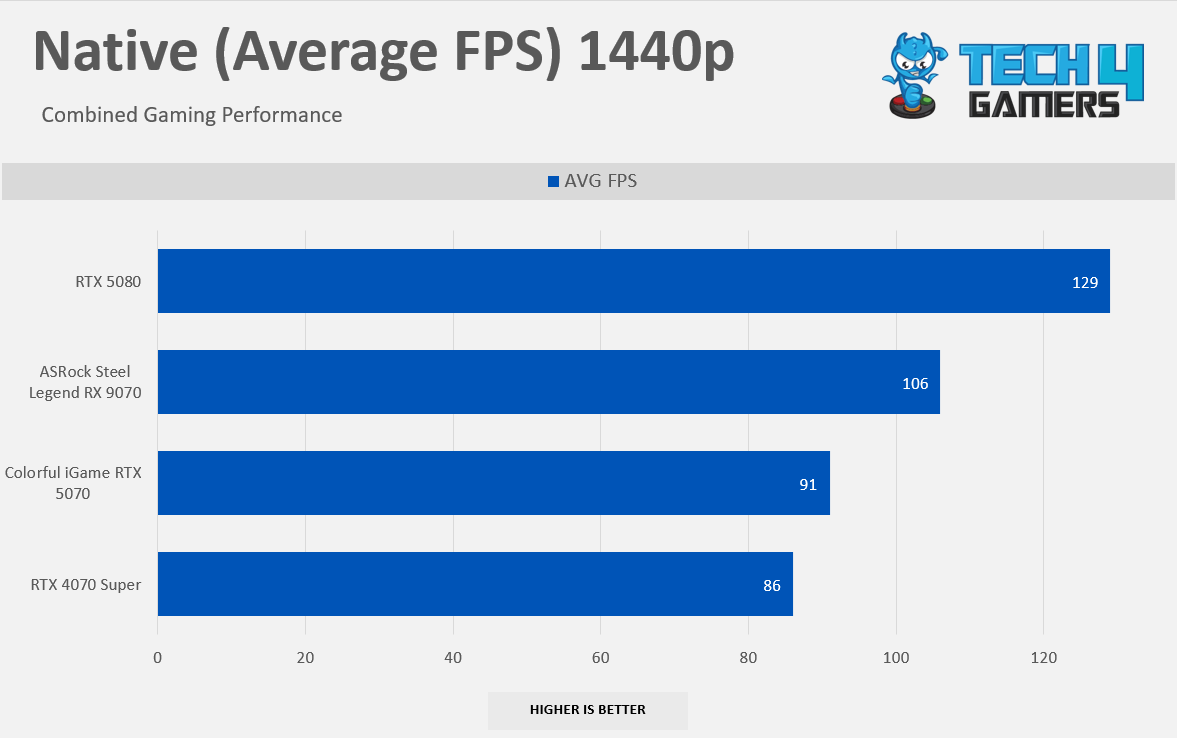
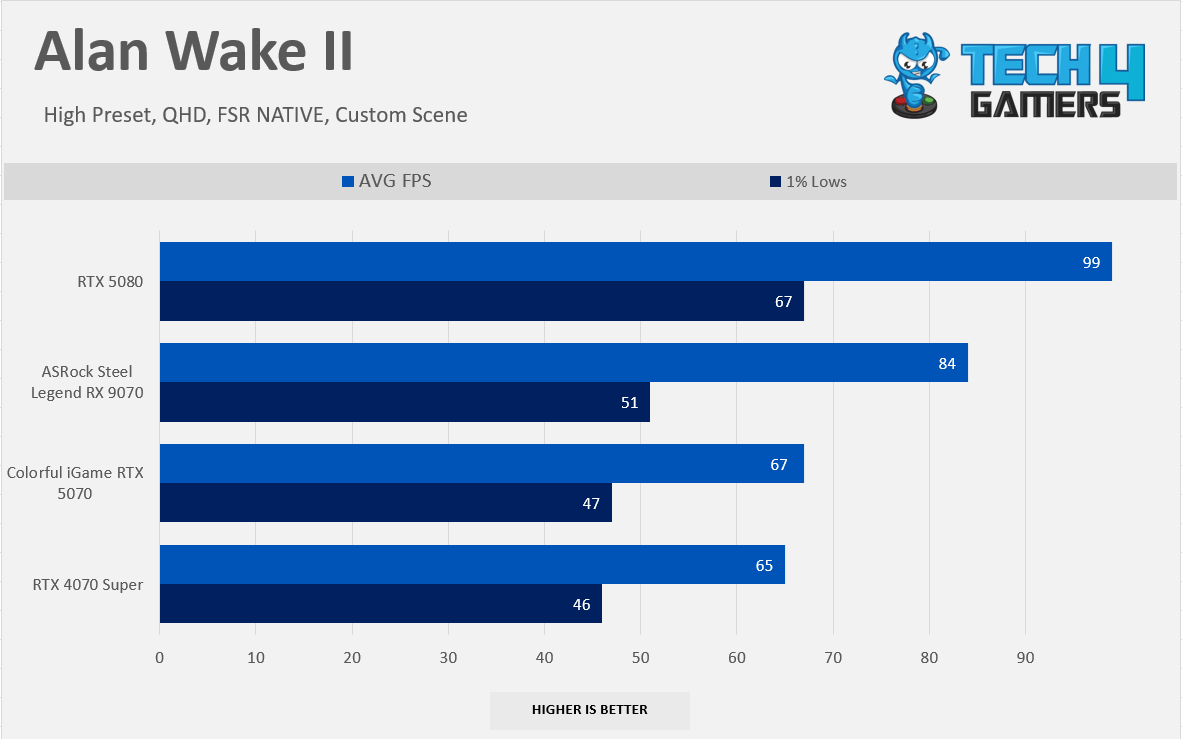
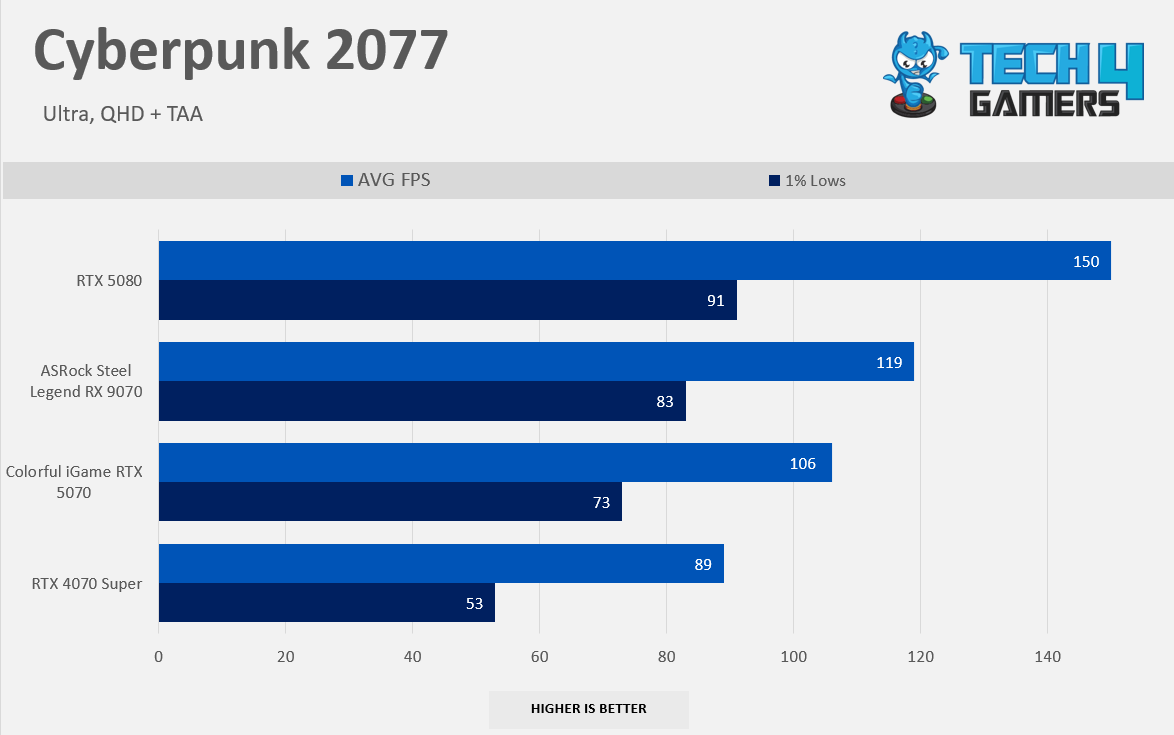
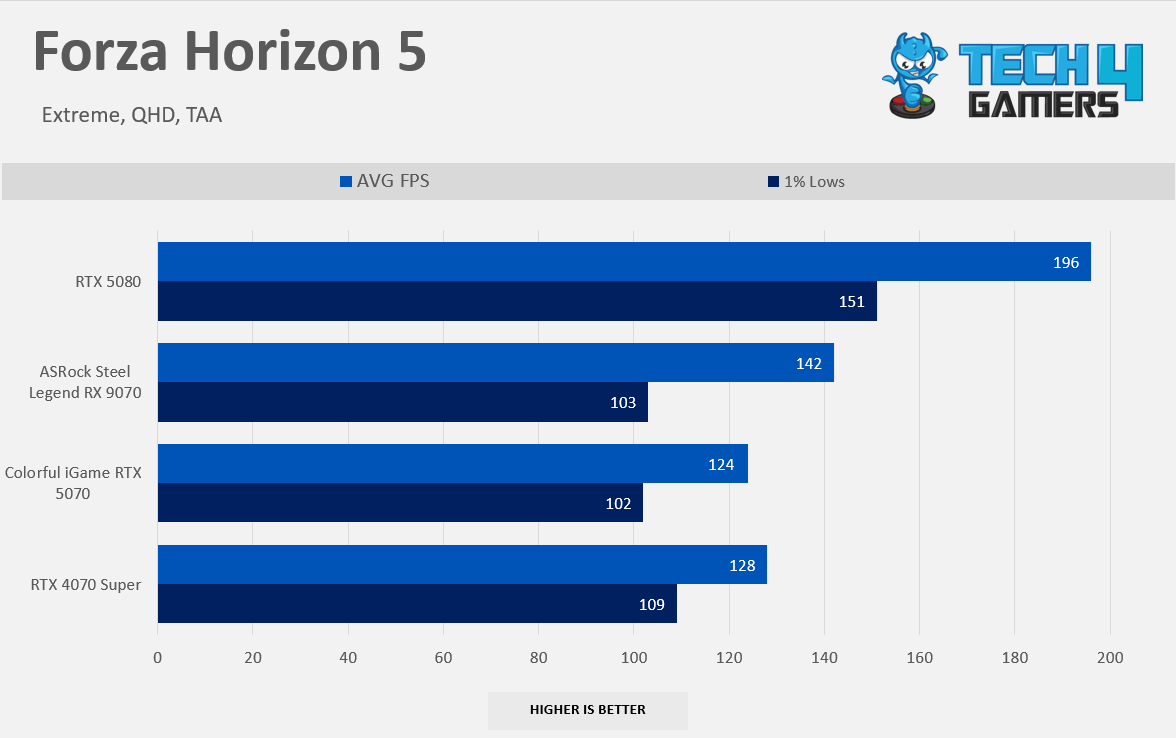
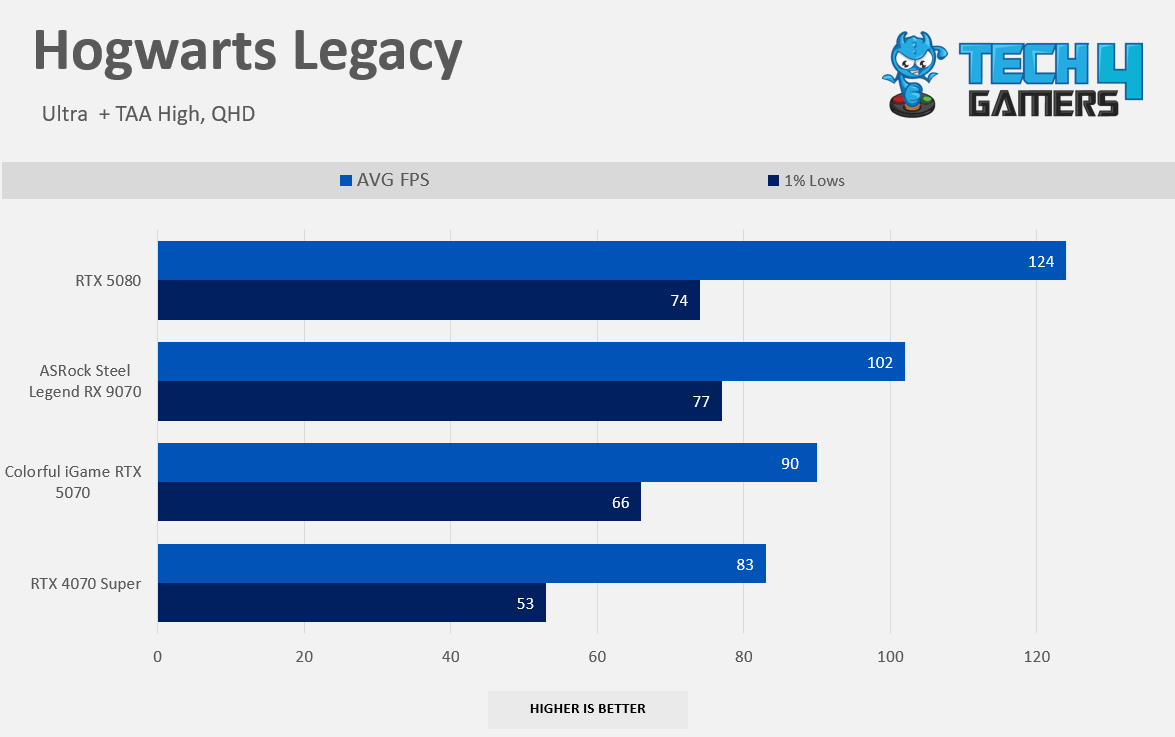
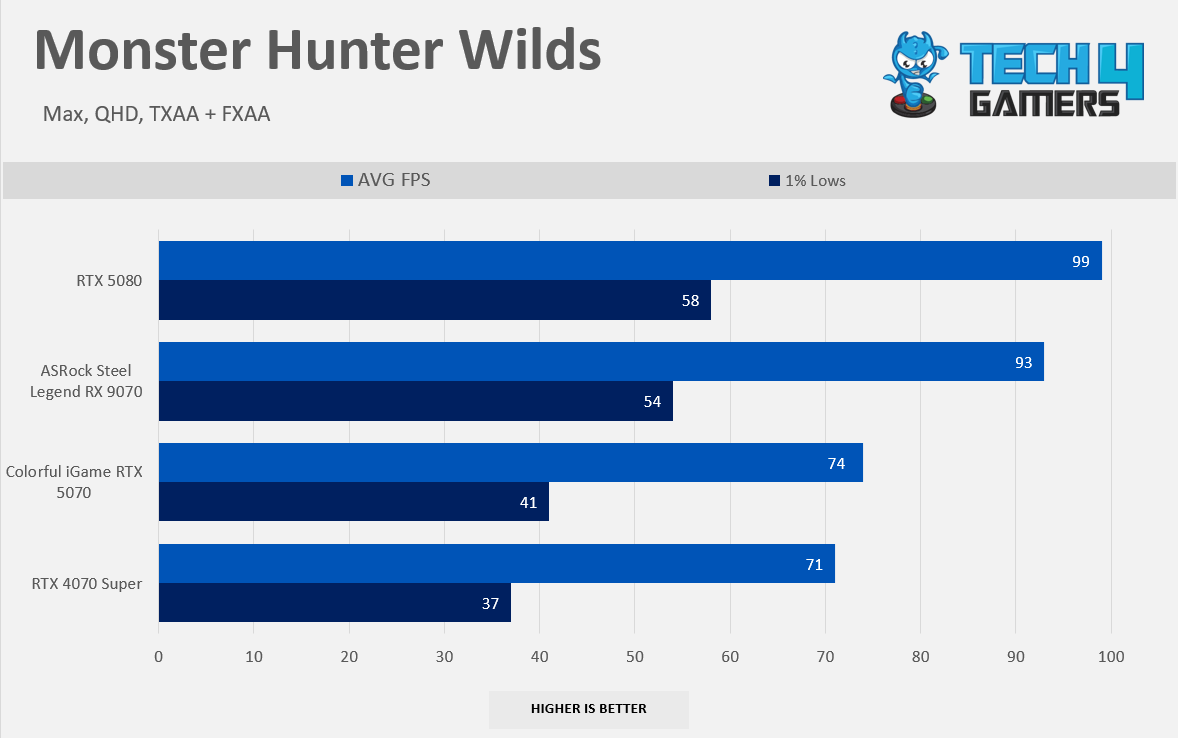
At our raster 1440p performance, RX 9070 is 16% Faster than NVIDIA’s GeForce RTX 5070 across seven titles that we have tested at 1440p, and 23% faster than NVIDIA’s GeForce RTX 4070 Super, RX 9070 averages around 106 FPS in all the titles at the QHD 1440p resolution on the Ultra Settings. In Alan Wake II, RX 9070 posts the strong 31% lead; this title works best on the RDNA architecture; in Monster Hunter world, the lead was around 25%; in Cyberpunk, the AMD GPU was 12% faster; overall, AMD enjoys the great victory at 1440p resolution on ultra-settings.
Gaming 2160p Benchmarks (Native)
Raster 2160p Performance
1 of 8
7 Games Average FPS in 2160p
Assassin's Creed Mirage 2160p
Alan Wake II 2160p
Black Myth Wukong 2160p
Cyberpunk 2077 2160p
Forza Horizon 5 2160p
Hogwarts Legacy 2160p
Monster Hunter Wilds 2160p
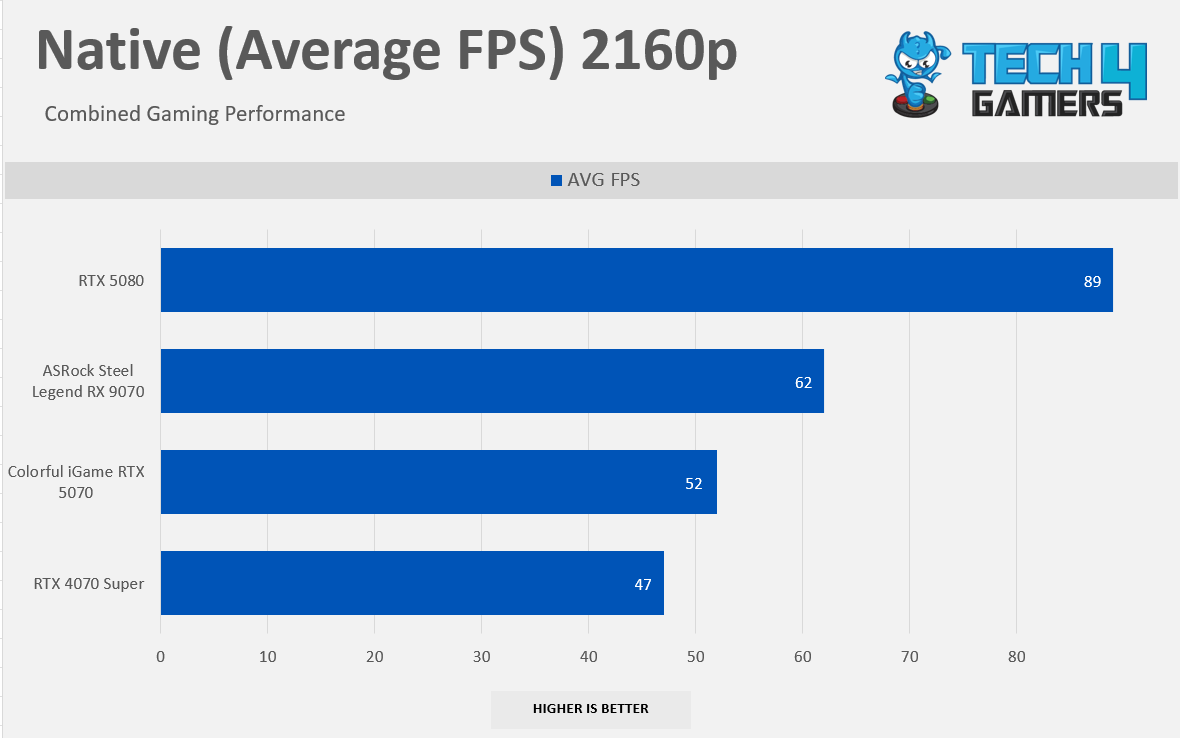
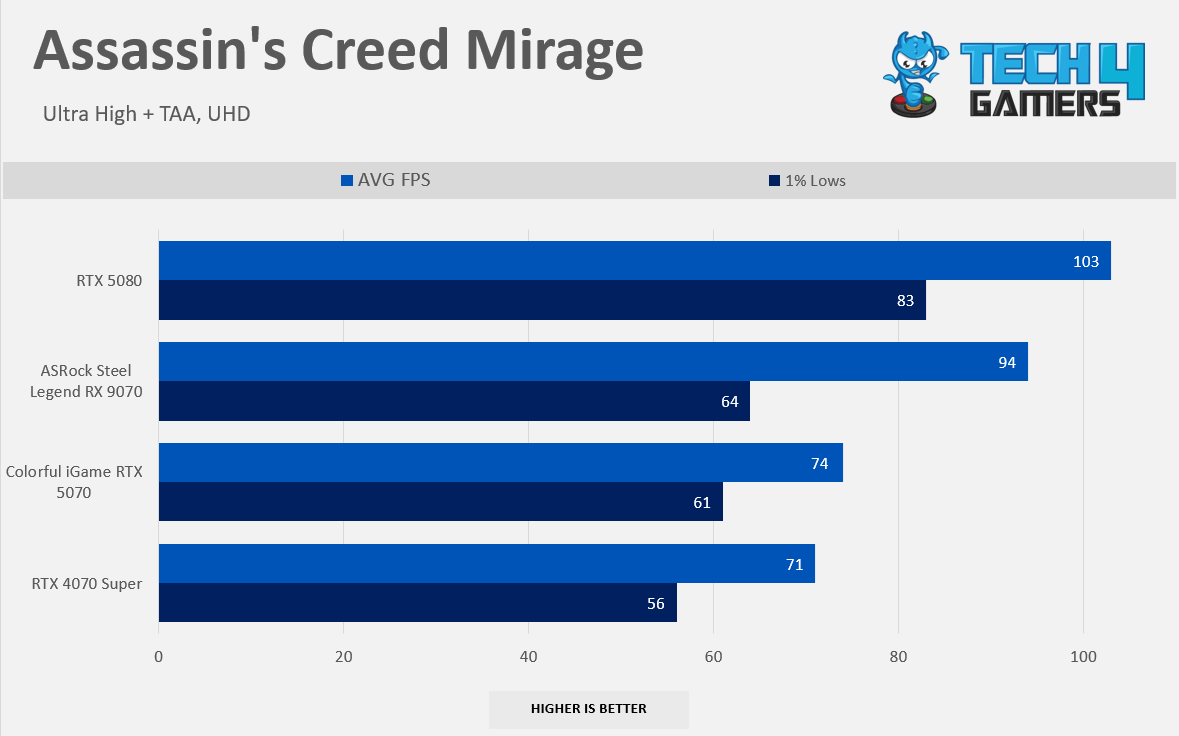
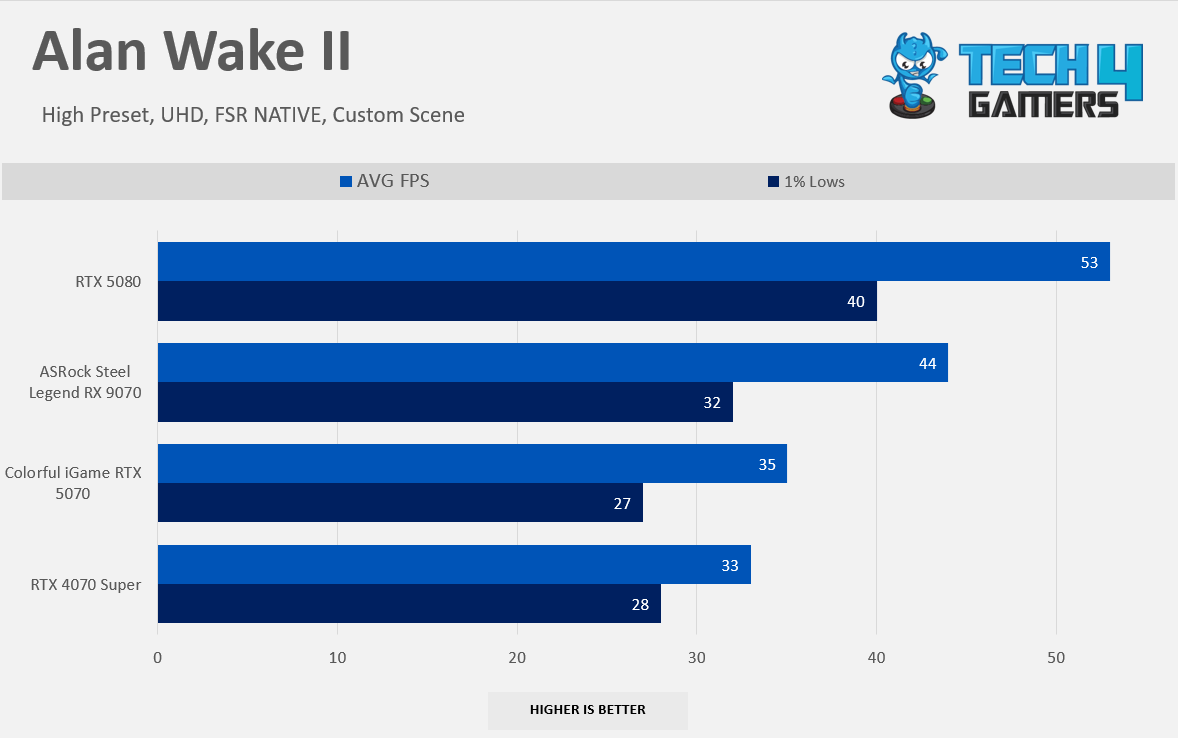
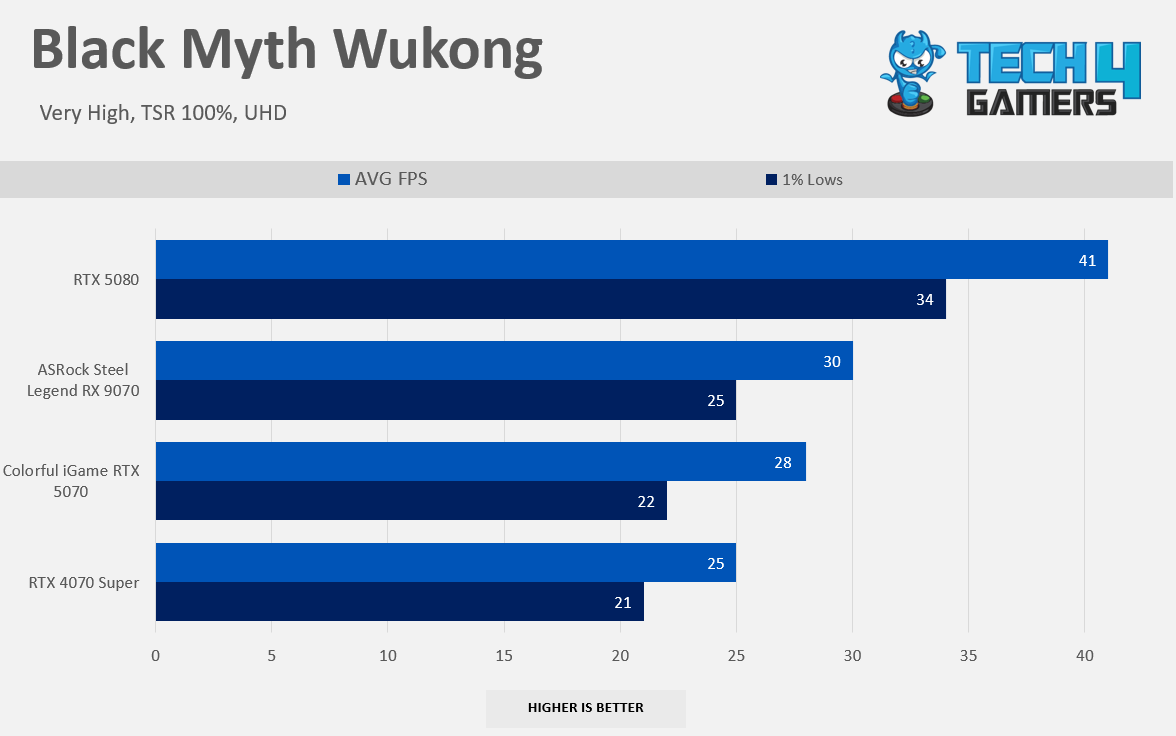
At our raster 2160p Performance, RX 9070 is whoopingly 19% Faster here. The gap keeps increasing as we increase the resolution; the extra video memory on the RX 9070 is pumping the numbers up; in Alan Wake II, RX 9070 enjoys a solid lead of 26% over NVIDIA’s GeForce RTX 5070; the closest gap was in Black Myth Wukong where RX 9070 is still leading, but by the tiny margin 7%, which is still a victory for the Radeon Camp, However, Monster Hunter Wilds shows the double-digit performance gains over NVIDIA at whooping 25% performance gain, RX 9070 can comfortably run the game at 2160p Ultra Settings on Raster.
Ray Tracing Performance
Gaming 1080p Benchmarks (RT)
Ray-Tracing 1080p
1 of 7
6 Games Average RT 1080p
Alan Wake II RT 1080p
Black Myth Wukong RT 1080p
Cyberpunk 2077 RT 1080p
Forza Horizon 5 RT 1080p
Monster Hunter Wilds RT 1080p
Starwars Outlaw RT 1080p
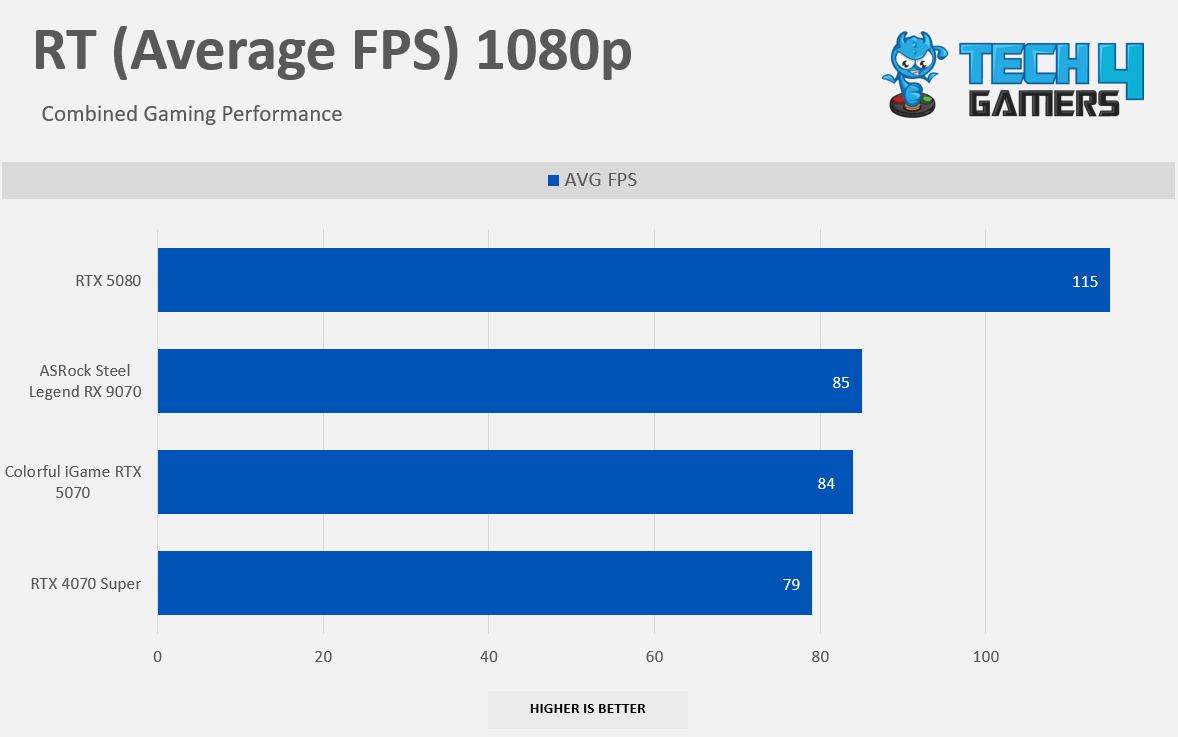
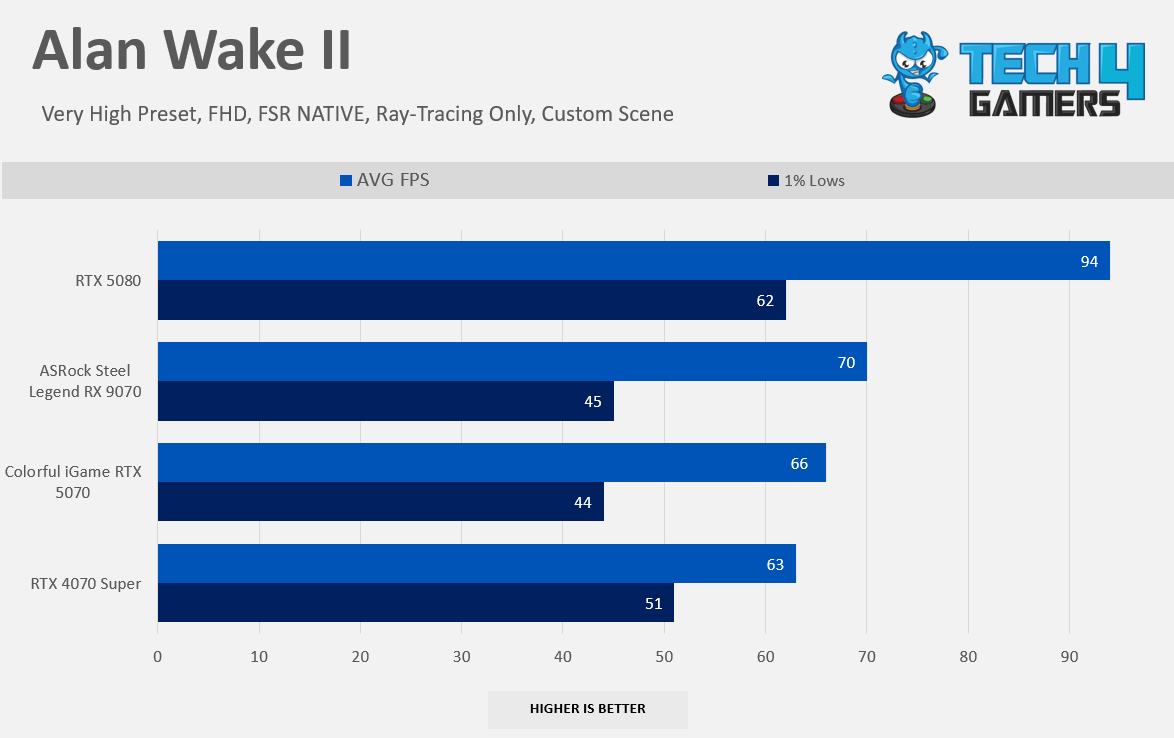
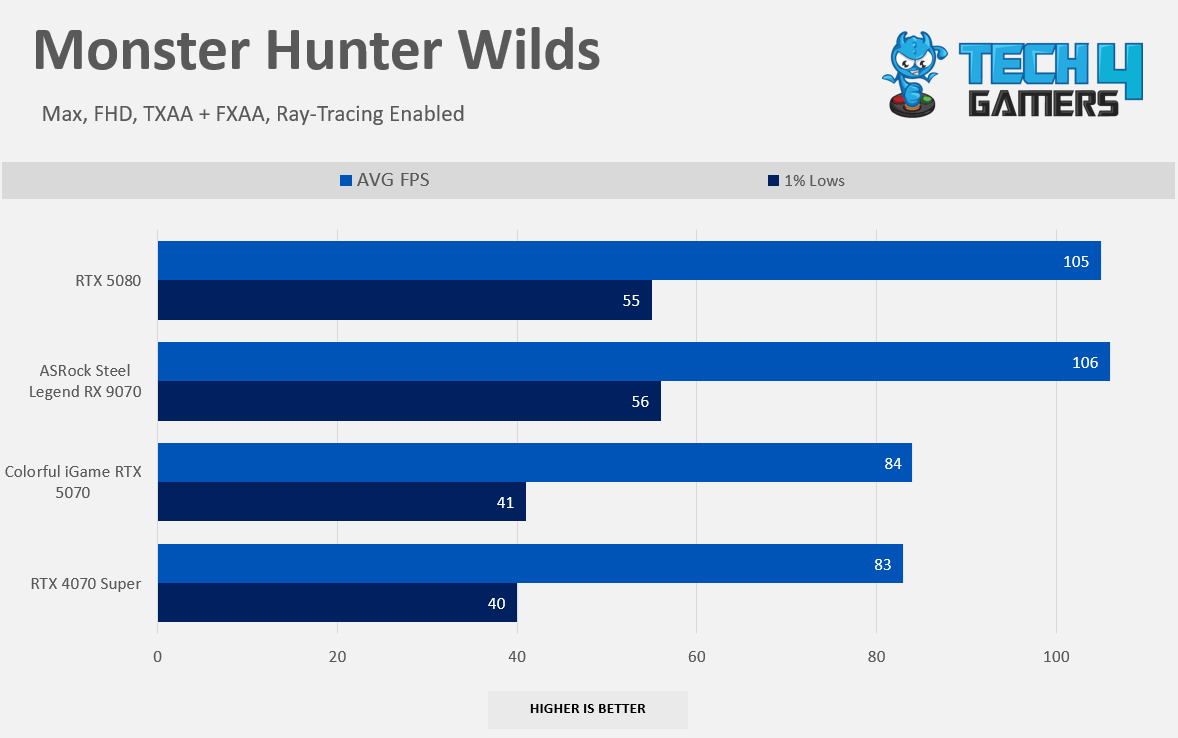
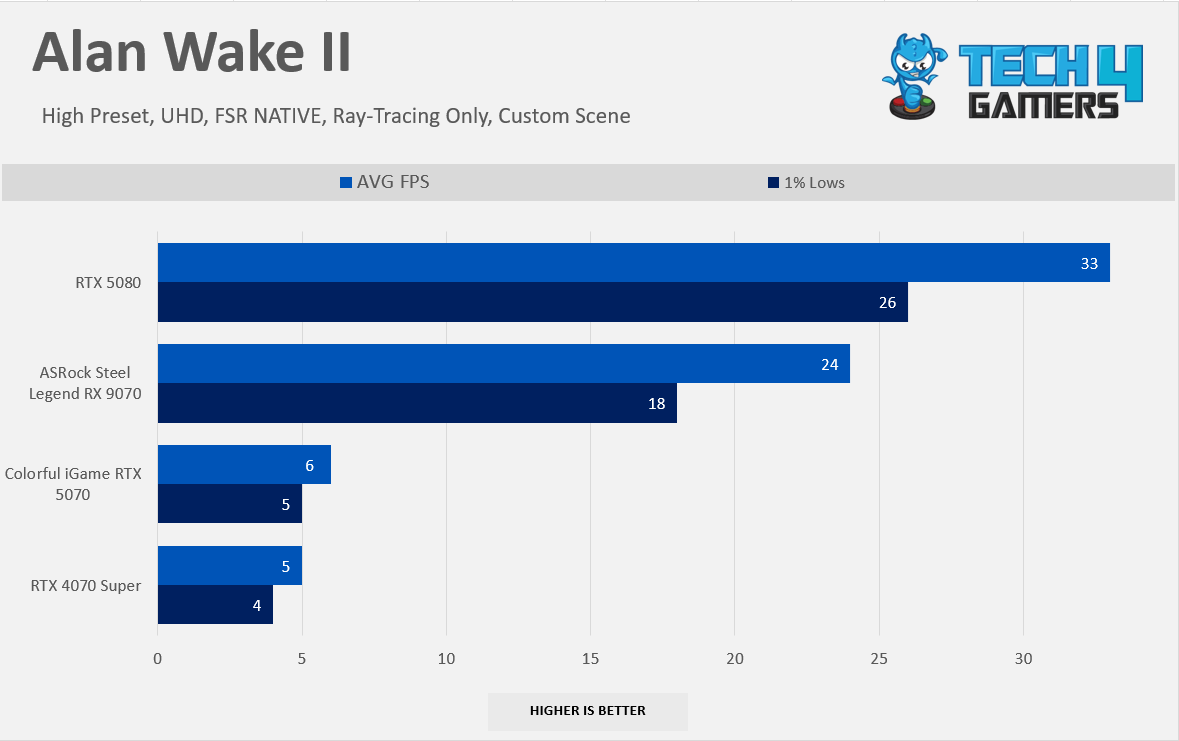
Now, here comes the RTX; AMD wins in our ray-tracing but by a slim margin; in our raster benchmarks at 1080p, AMD was beating NVIDIA by 14%; however, in RTX, things are getting interesting; RX 9070 is only 1.19% Faster than NVIDIA’s GeForce RTX 5070, In Alan Wake II, we did not enable the path-tracing direct lightning, we have only enabled the RT lightning and RT denoiser, and RT transparency, RX 9070 is beating the NVIDIA’s GeForce RTX 5070 by just only 6%.
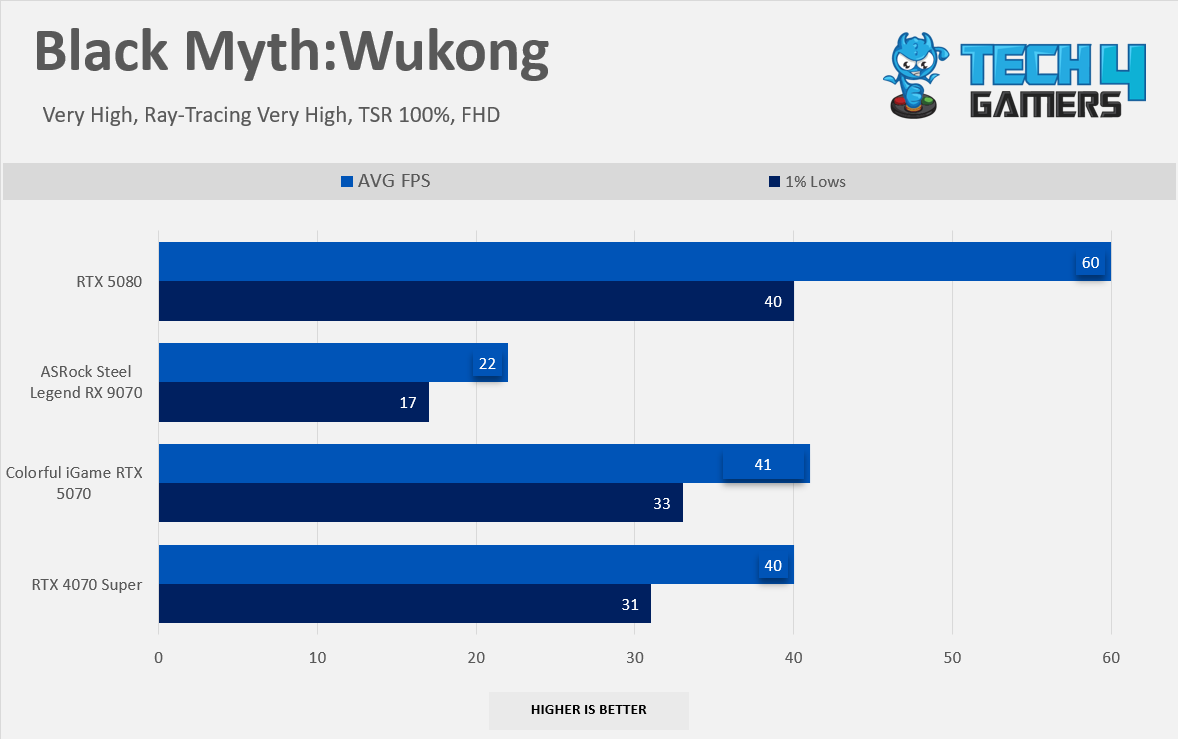
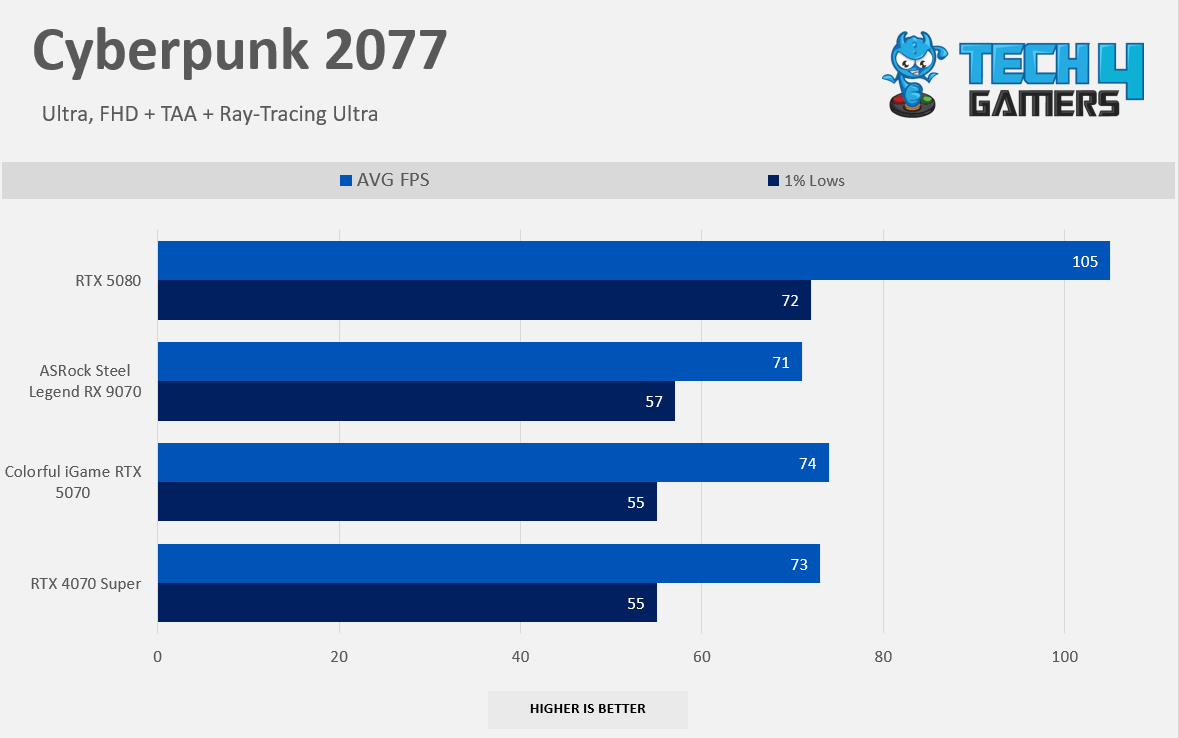
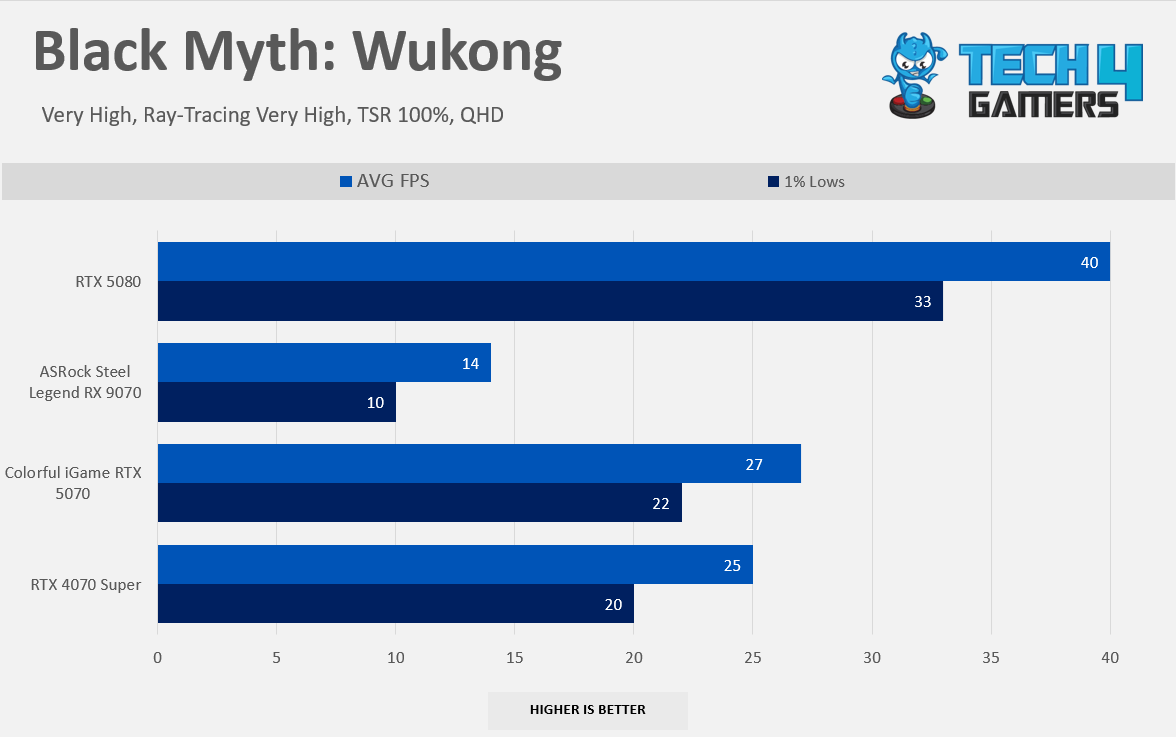
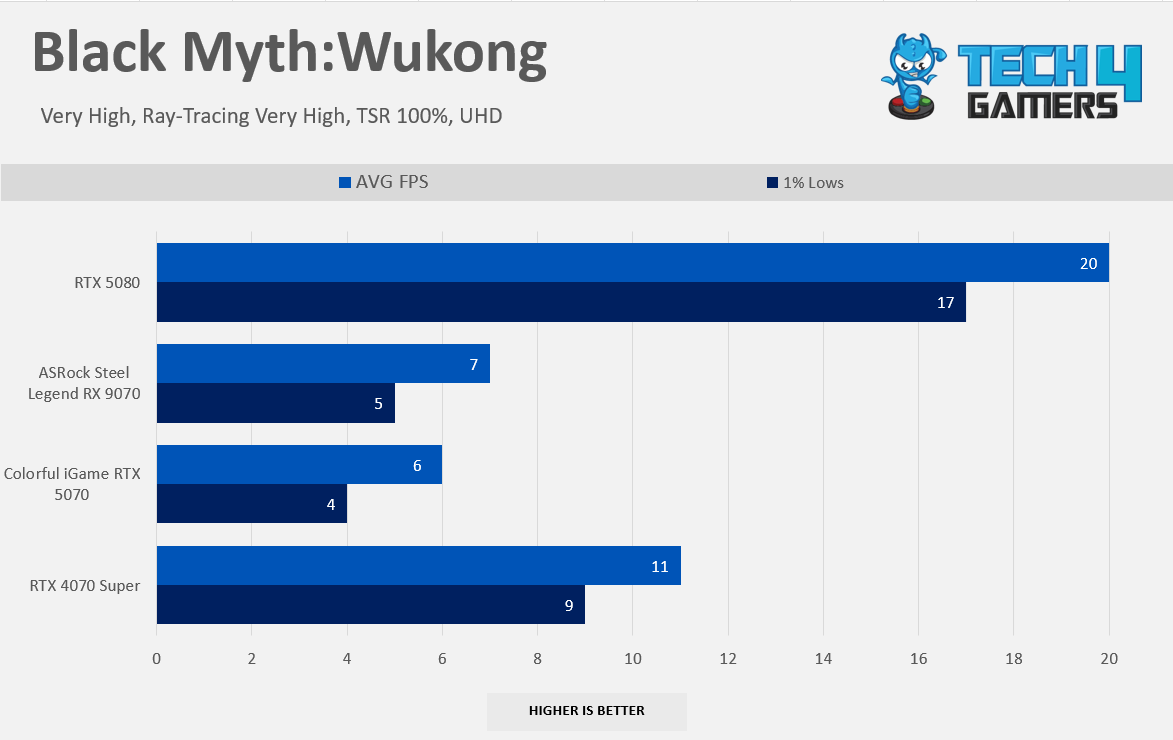
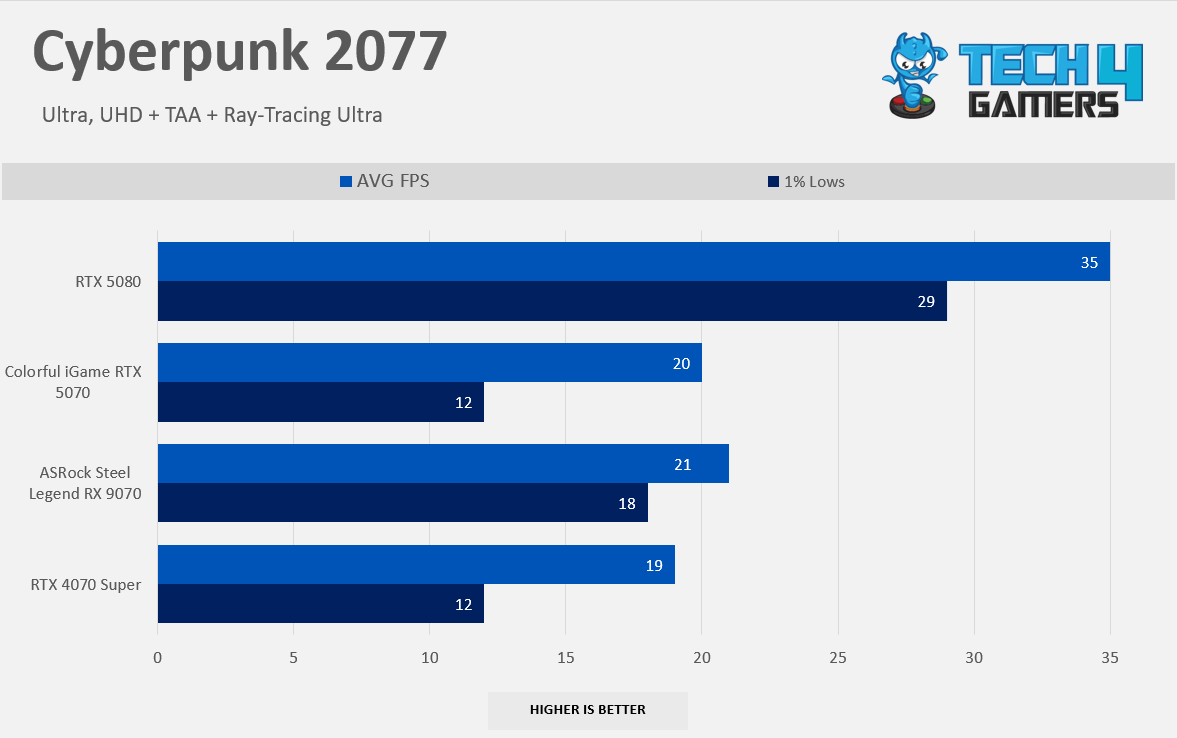
You might not see the double-digit gain here (except for Monster Hunter Wilds) as we have seen on the raster, but overall, it is the victory for AMD’s camp. However, The Black Myth Wukong is completely broken on the AMD hardware, and NVIDIA’s GeForce RTX 5070 enjoys the massive victory here by the 86% lead. However, this is the only game where AMD is struggling; in Cyberpunk 2077, NVIDIA’s GeForce outperforms the RX 9070 by just 4%.
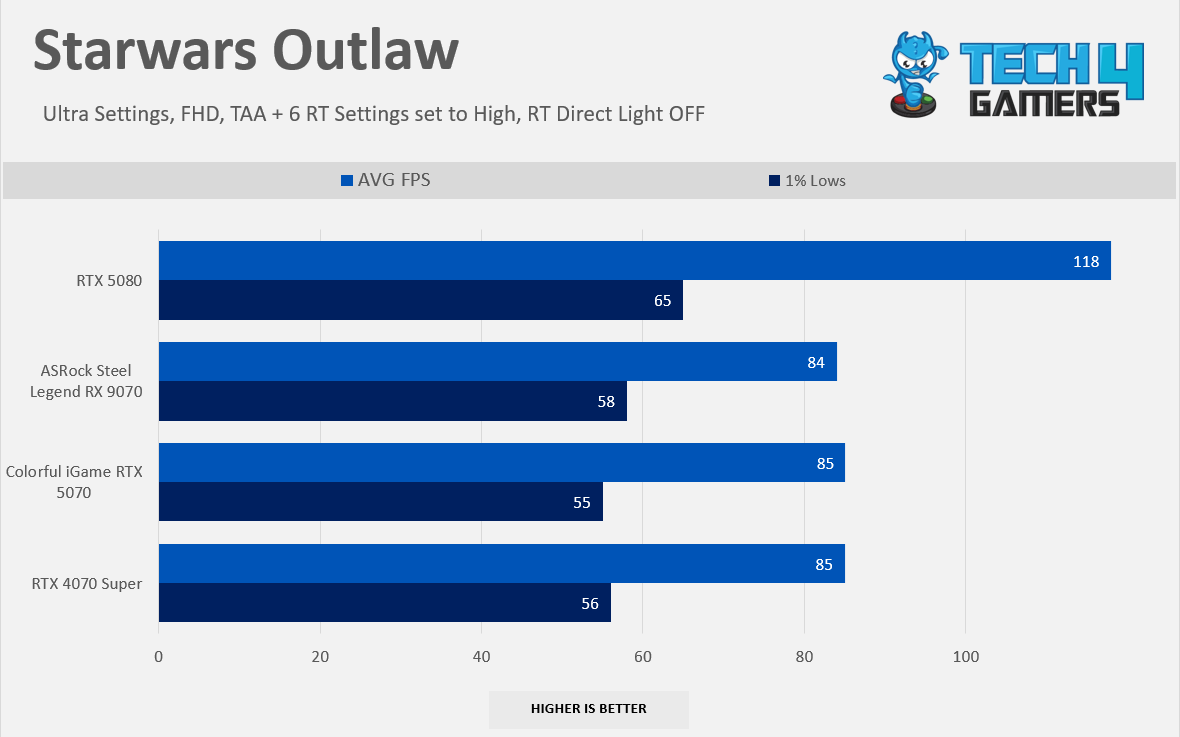
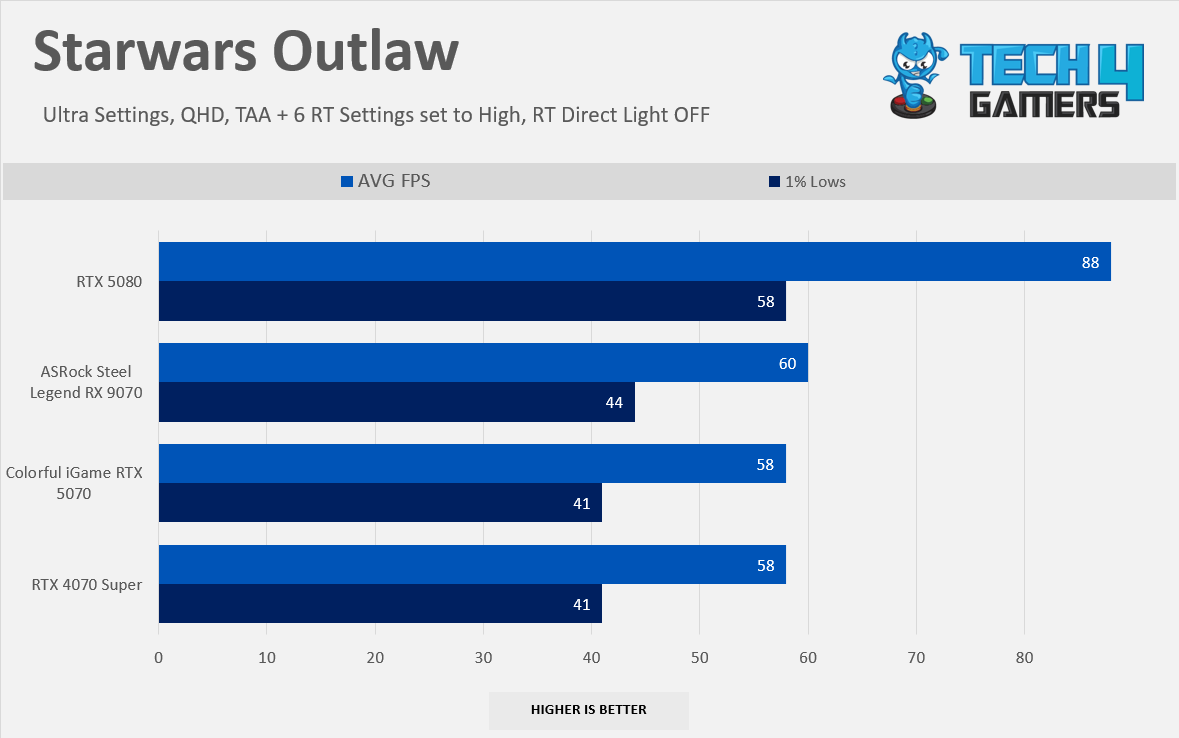
However, AMD can still provide a smooth gaming experience at 1080p. In Starwars Outlaw, we have enabled the 6 RT settings in the advanced settings; we are not using RTX Direct Lightning in the comparison. However, NVIDIA’s GeForce RTX 5070 was still 1 FPS faster than RX 9070, but the 1% lows on the AMD camp are 3 FPS better; RX 9070 can deliver the smooth ray-tracing gaming experience at 1080p (Except for the Black Myth Wukong).
Gaming 1440p Benchmarks (RT)
Ray-Tracing 1440p
1 of 7
6 Games Average RT 1440p
Alan Wake II RT 1440p
Black Myth Wukong RT 1440p
Cyberpunk 2077 RT 1440p
Forza Horizon 5 RT 1440p
Monster Hunter Wilds RT 1440p
Starwars Outlaw RT 1440p
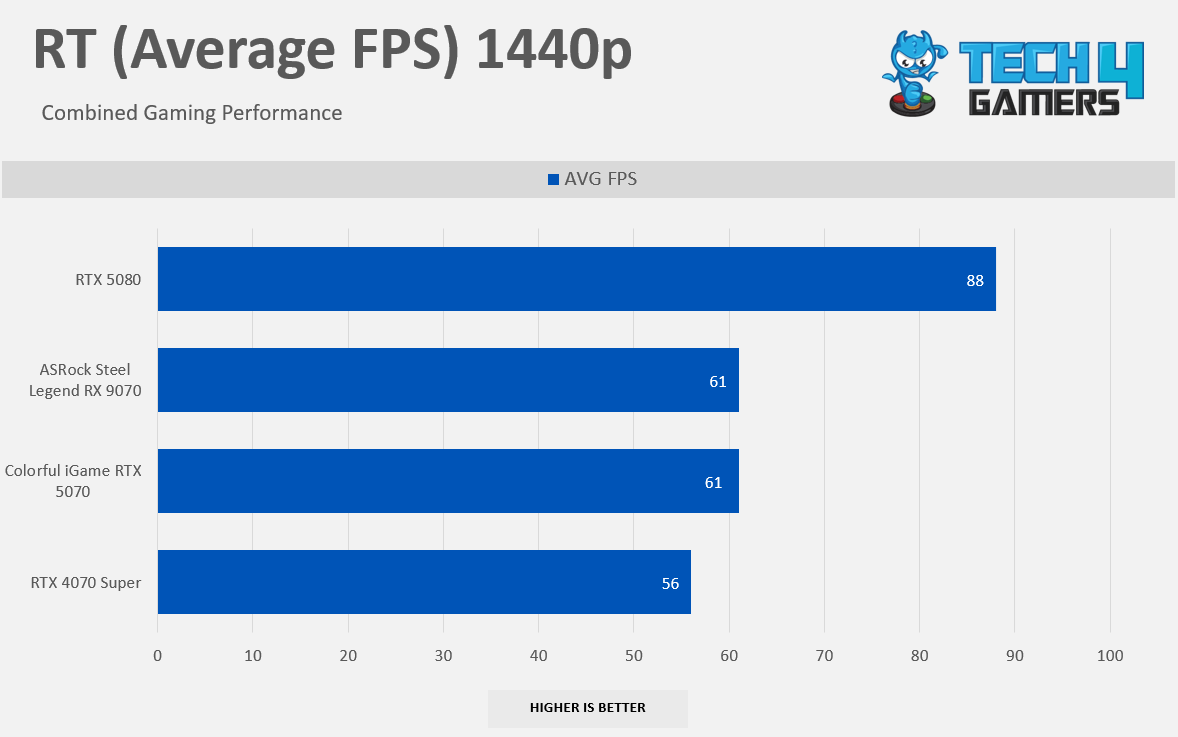
At 1440p Ray-Tracing Benchmarks, in overall games, RX 9070 posts the identical results as NVIDIA’s GeForce RTX 5070, averaging 61 FPS; however, RTX 4070 Super faces the defeat here by 9%, Black Myth Wukong still suffers on the RX 9070 at 1440p Ray-Tracing, A small victory in the Starwars Outlaw by just 2 FPS vs. the GeForce RTX 5070, The Extra Video-Memory on the Radeon GPU is doing some magic here. However, there is nothing to discuss as the performance differences are almost identical to the 1080p results. The 4K RT graphs would be fascinating to look at.
Gaming 2160p Benchmarks (RT)
Ray-Tracing 2160p
1 of 7
6 Games Average RT 2160p
Alan Wake II RT 2160p
Black Myth Wukong RT 2160p
Cyberpunk 2077 RT 2160p
Forza Horizon 5 RT 2160p
Monster Hunter Wilds RT 2160p
Starwars Outlaw RT 2160p
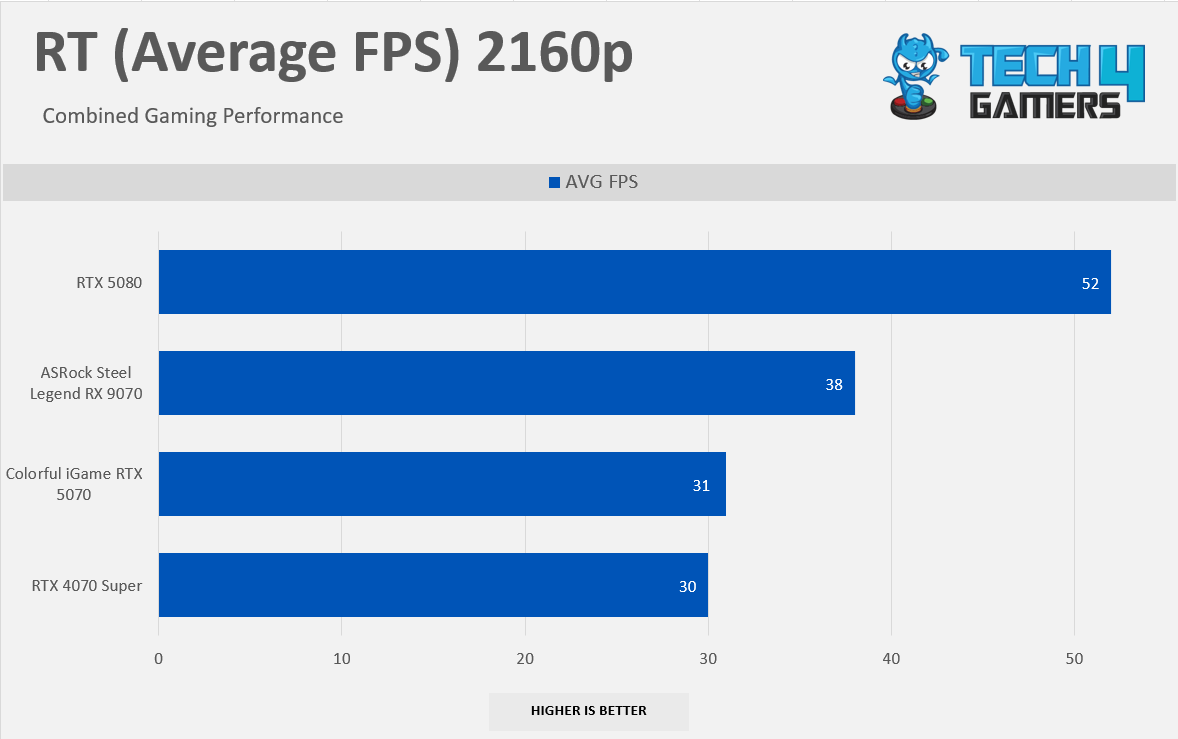
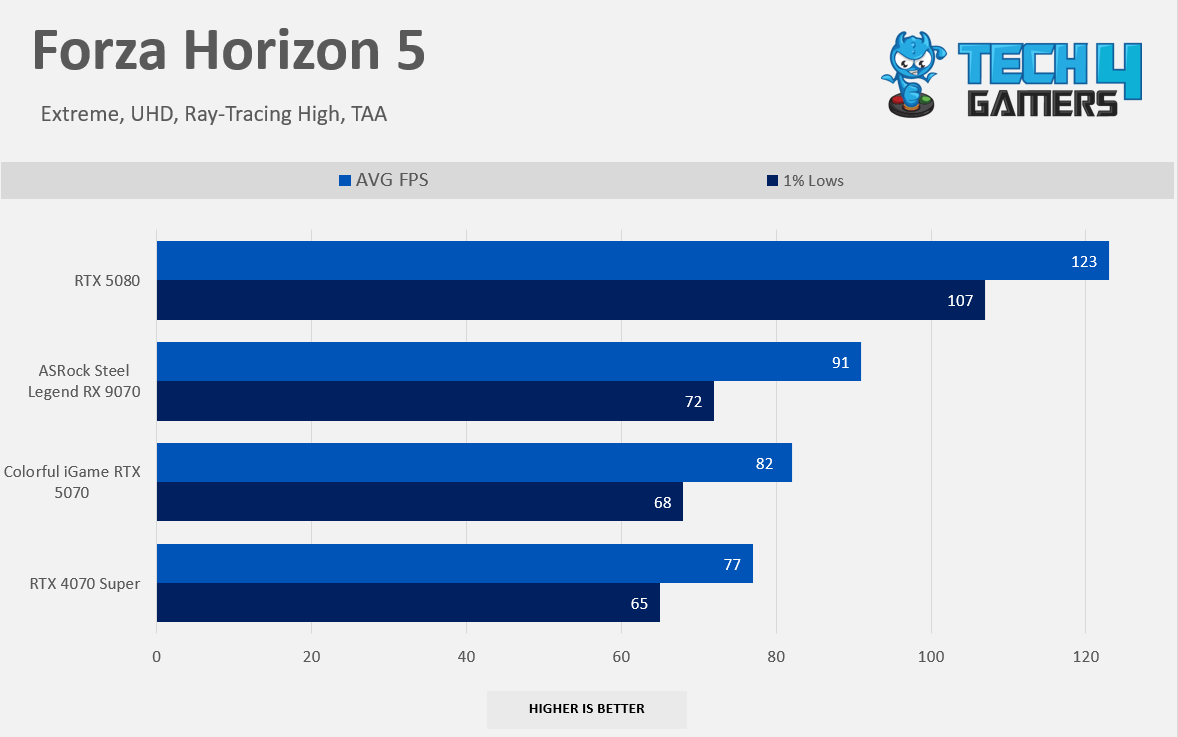
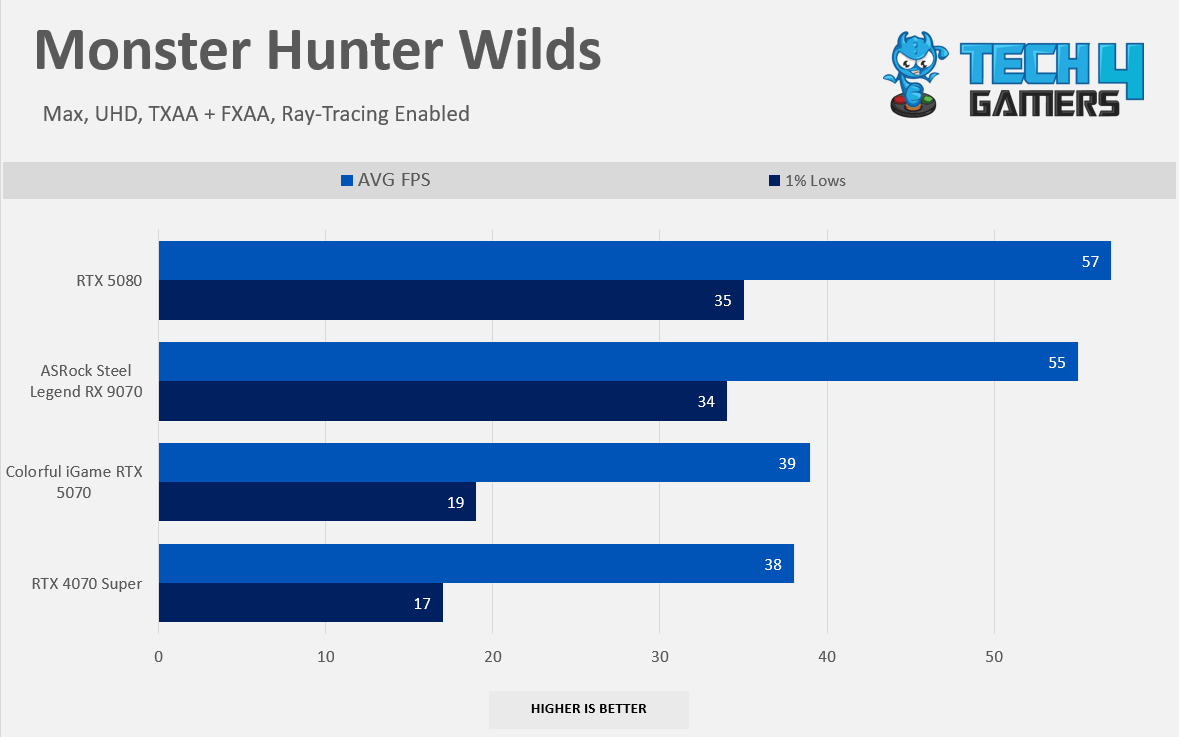
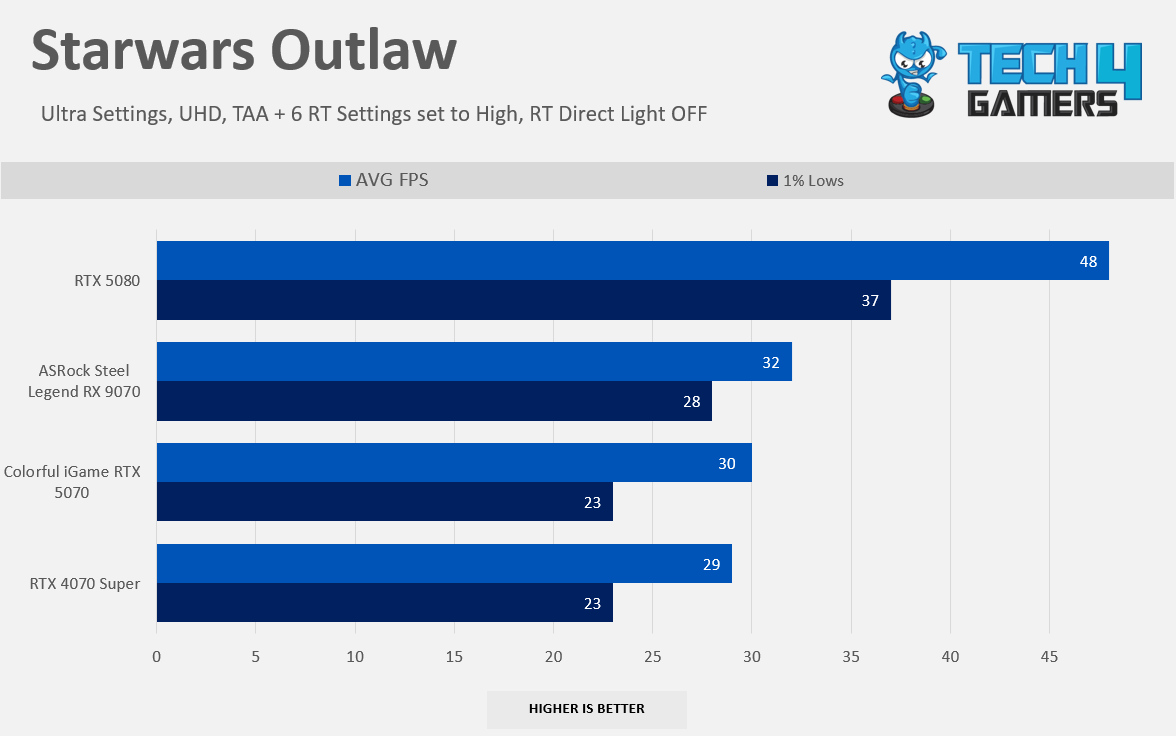
AMD RX 9070 is enjoying a massive victory at 4K Ray-Tracing Benchmarks by 22% over NVIDIA’s GeForce RTX 5070; an extra 4GB of video memory is helping the Radeon Camp here; the 2160p + RT is extremely video memory intensive, which is the reason why RTX 4070 Super and RTX 5070 GPU’s are chocking due to less video memory.
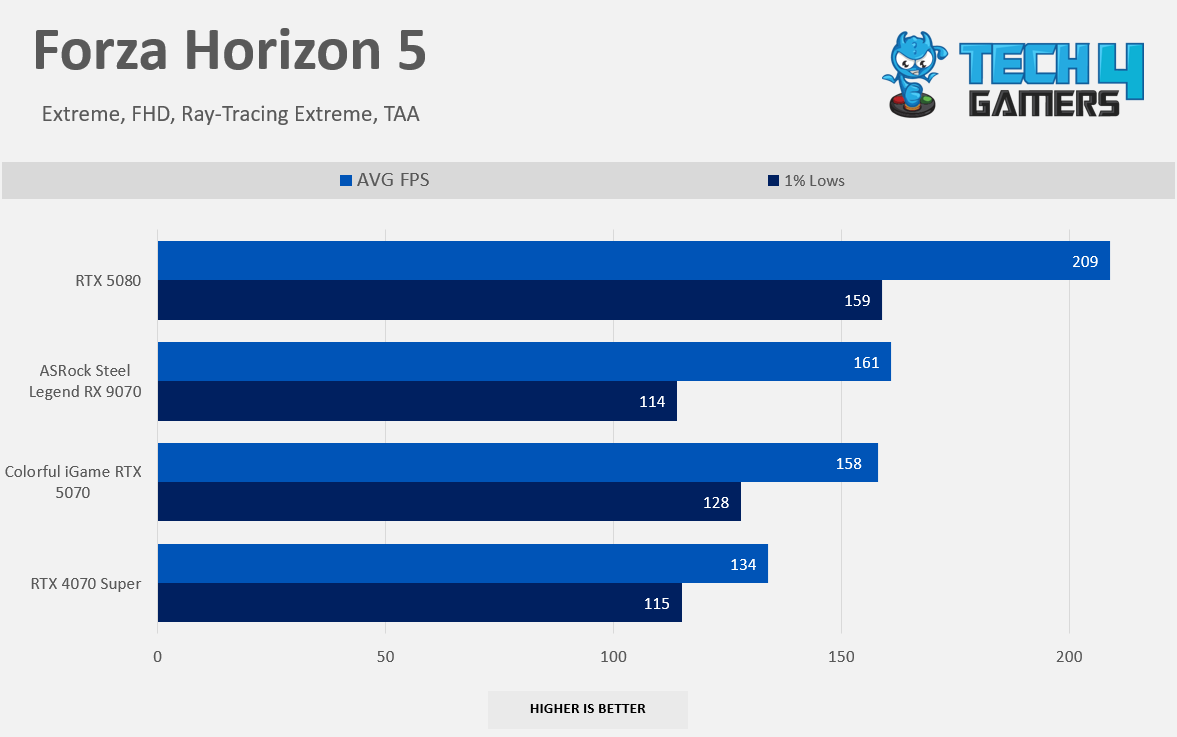
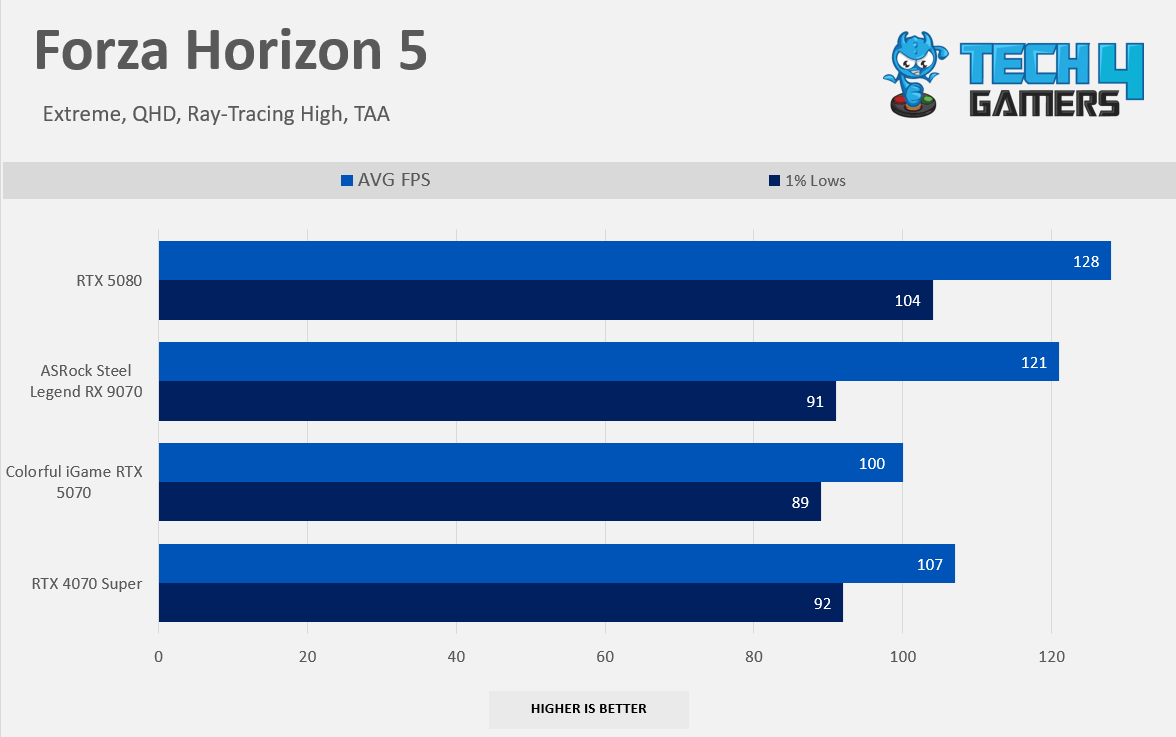
However, 4K Ray-Tracing is still not ideal even on the RX 9070 without the upscaling; we don’t recommend our users buy this card if they intend to use it in ray-tracing on 4K resolution without the FSR. In Alan Wake II with RT, RX 9070 is 300% Faster. In Forza Horizon 5, RX 9070 unlocks 10% more performance.
Of course, you wouldn’t expect much from the mid-range graphics card to perform optimally at the 4K, especially when the ray-tracing is enabled, but it’s fascinating to see AMD has come far, Thanks to improved RT accelerators; while it’s not entirely beating the NVIDIA here but it’s still giving some exciting results for the AMD camp.
Synthetic Test Results
Synthetic Benchmarks
1 of 3
3D Mark Port Royal
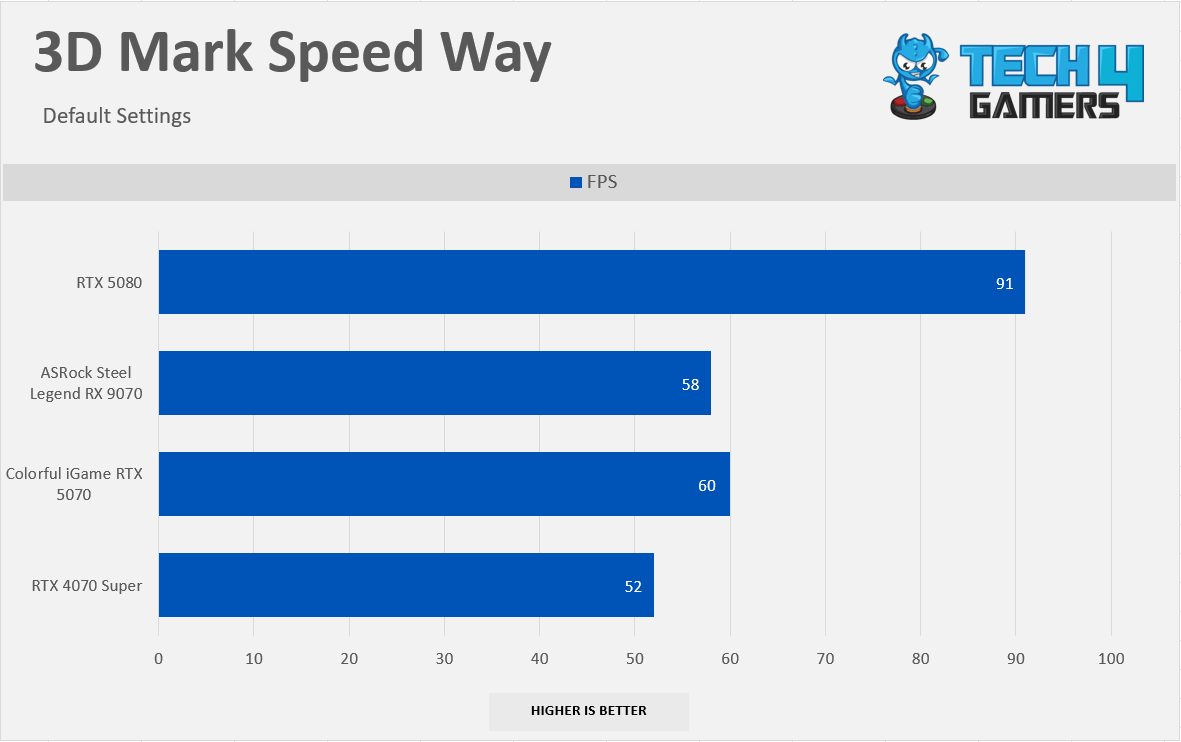
3D Mark Speed Way
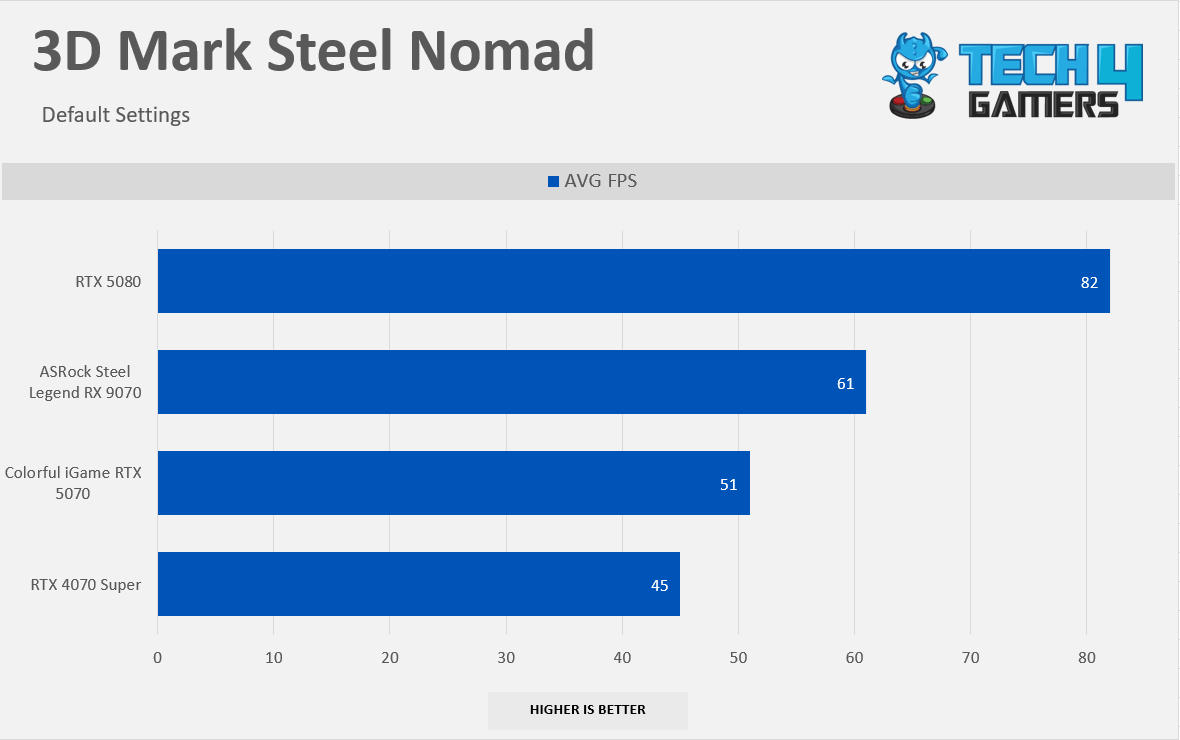
3D Mark Steel Nomad
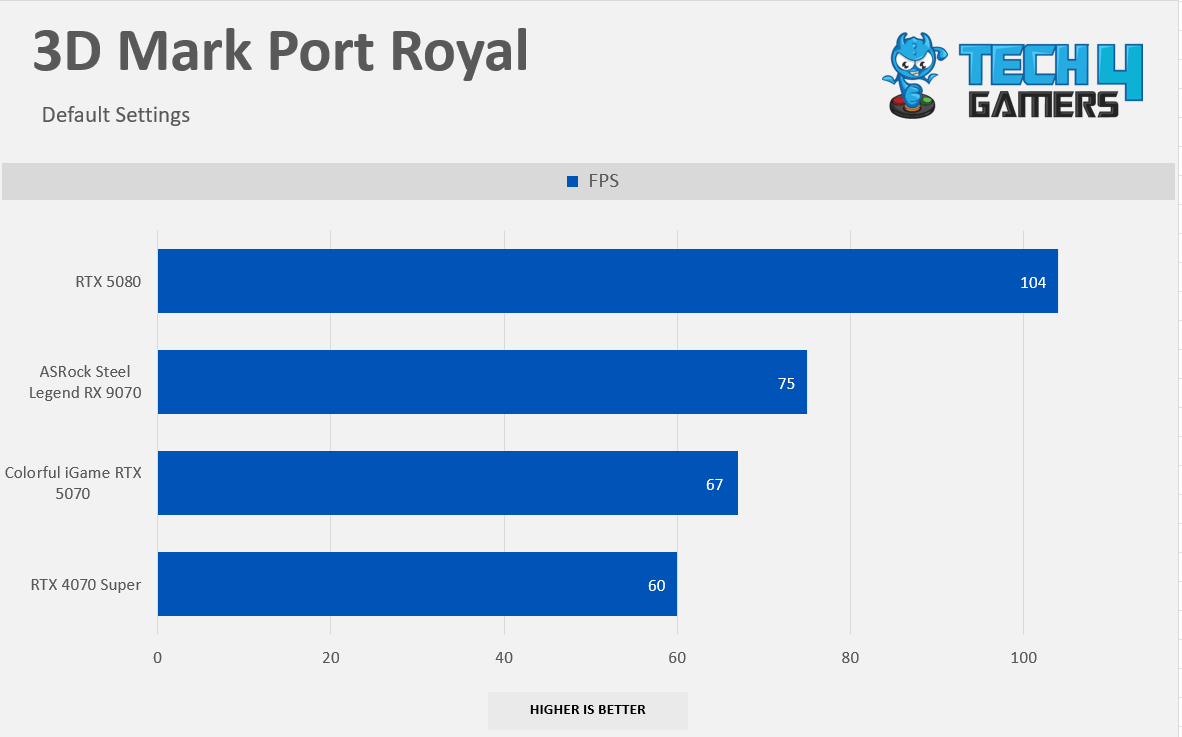
3D Mark: Port Royal: 3DMark Port Royal is the world’s first real-time ray tracing benchmark for gamers. It shows you how well your PC handles ray-tracing effects in real time. Use Port Royal to benchmark graphics cards that support Microsoft DirectX Raytracing. (Source 3D Mark)
RX 9070 is 10% Faster than NVIDIA’s GeForce 5070, 20% Faster than RTX 4070 Super in 3D Mark: Port Royal
3D Mark: Speed Way: 3DMark Speed Way’s engine is assembled to demonstrate what the latest DirectX API brings to ray traced gaming, using DirectX Raytracing tier 1.1 for real-time global illumination and real-time raytraced reflections, coupled with new performance optimizations like Mesh Shaders. Source (3D Mark)
RX 9070 is 3% slower than NVIDIA’s GeForce 5070, and 10% Faster than RTX 4070 Super in 3D Mark: Speed Way.
3D Mark: Steel Nomad: 3DMark Steel Nomad is a cross-platform, non-raytraced benchmark for high-end gaming PCs and Macs. It uses the DirectX 12 API on Windows. (Source 3D Mark)
RX 9070 is 16% Faster than NVIDIA’s GeForce 5070, 26% Faster than RTX 4070 Super in 3D Mark: Steel Nomad
AMD FidelityFX Super Resolution 4 (FSR 4)
AMD’s new iteration of FSR, AMD FidelityFX™ Super Resolution 4, is based on a Machine Learning Algorithm that aims to deliver better image quality, temporal stability and less ghosting, unlike the previous version of FSR that utilized the combination of super-resolution temporal upscaling technology and relied on analytical and algorithmic methods. AMD FSR 4 now leverages AI (Artificial Intelligence) Technology for the upscaling. However, AMD FSR 4 can only be enabled in the game that supports FSR 3.1, which you must allow from the driver settings. Right now, there is no way you can select the FSR 4 natively in the game.
Enabling FSR (Image By Tech4Gamers)
We tested the FSR 4 Performance on Horizon Forbidden West; however, enabling the FSR 4 was tricky. AMD has sent us the press drivers, which were quite buggy while applying the FSR 4 in the drivers setting. However, we then installed the launch day driver and our problem was resolved: to use the FSR 4 you need to ensure you have FSR 4-supported titles. It would have been nice if the FSR 4 had been inside the game settings menu, not the driver settings.
How to Enable FSR 4?
To Enable the FSR, Open AMD Software: Adrenalin Edition.
Click on the ”Gaming Tab” and move to the ”Graphics” TAB.
Enable the 3rd Option ”AMD FidelityFX Super Resolution”
Run the game and enable the FSR 3. X in the game (Make sure the game is FSR 4 supported)
Press ALT + R during the gameplay and check the FSR4 status indicator.
FSR 4 Status Indicator
FSR 4 Benchmarks
FSR 4 Benchmarks
1 of 2
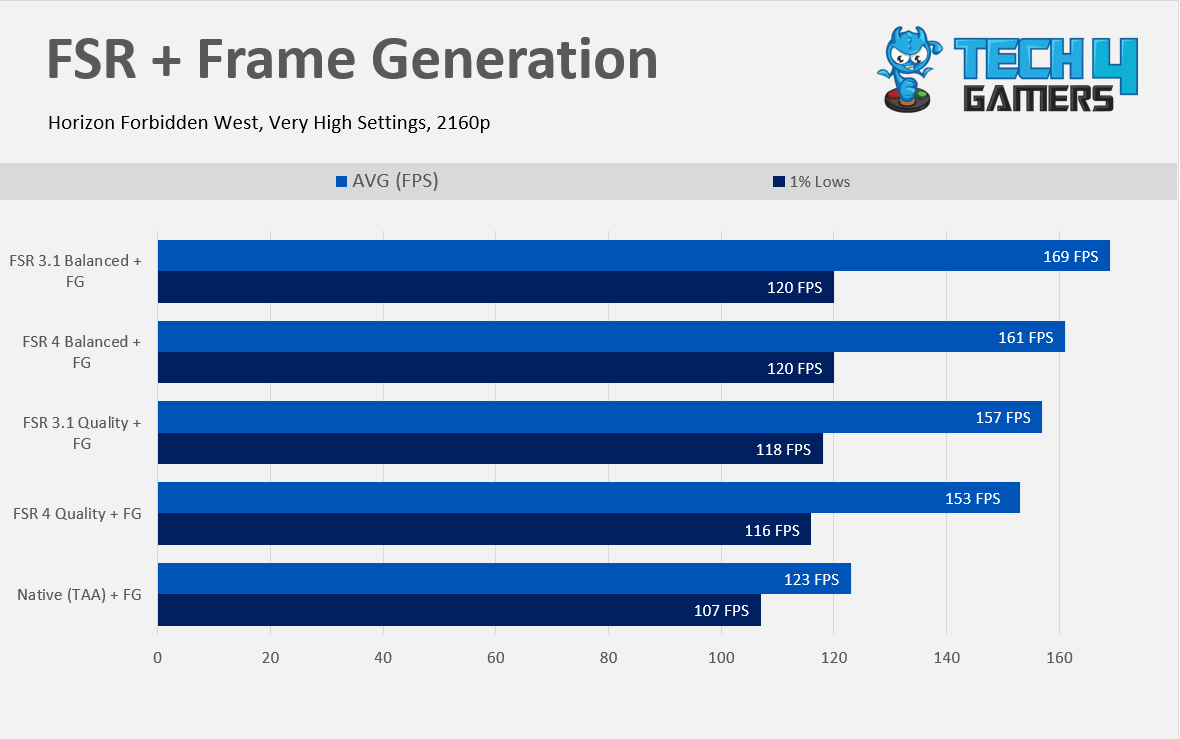
FSR + Frame Gen
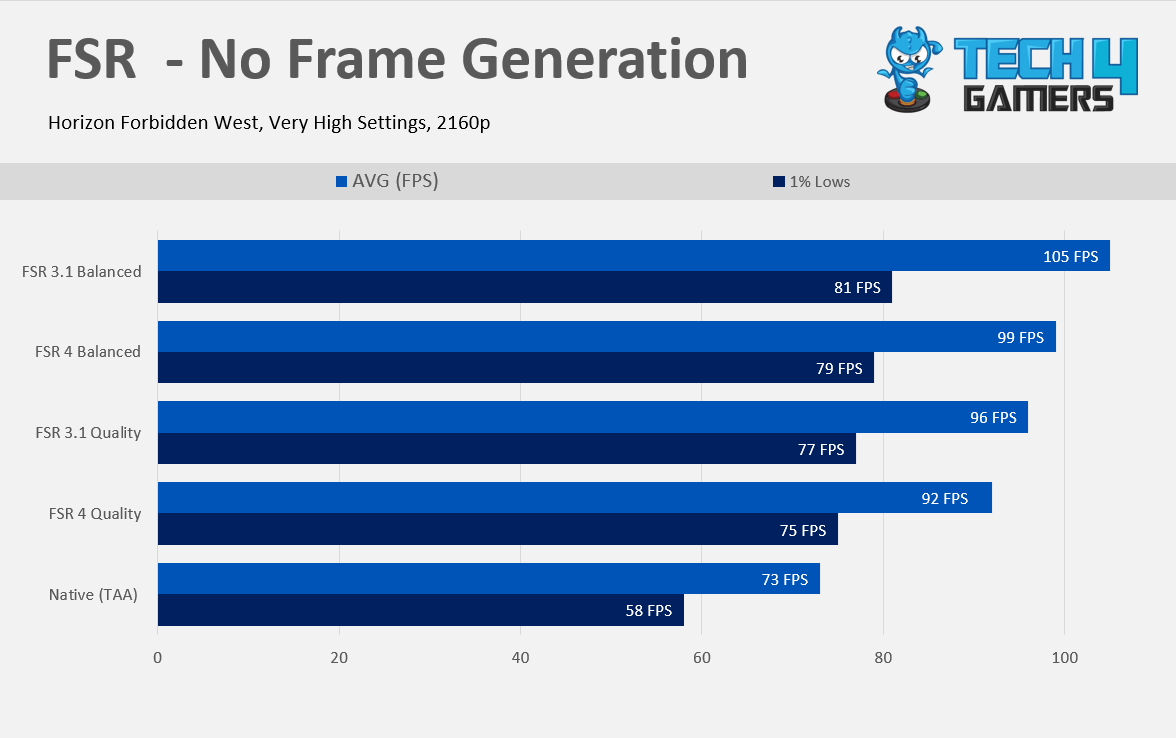
FSR No-Frame Gen
As our performance numbers demonstrate, FSR 4 is slightly heavier than FSR 3. Here, we bring you two tests, one with the frame-generation enabled and one without, while using the FSR 4 Upscaller in both. We have gained 22% more performance with FSR 4 quality vs TAA.
However, we see almost a 4 FPS reduction while comparing it against FSR 3.1, which is roughly 4% but at better image stability and less ghosting; likewise, with FSR Balance, we have gained around 27% more performance jump vs TAA but 5% less performance vs FSR 3.1 Balance. FSR 4 algorithm utilizes the AI accelerators on RDNA 4, which could be why we see a little performance drop compared to the previous version of FSR.
Overclocking Results
Overclocking an ASRock 9070 wasn’t difficult, but it was worthwhile; we have gained another 10% more performance in Cyberpunk 2077 by blending the memory and core overclock. If you are familiar with overclocking on AMD cards, you would know it’s slightly
different than NVIDIA; on AMD, you have to set the target frequency offset in the AMD Adrenaline Drivers, and you need to lower the GPU voltage, however increasing the power limit is necessary, which, in our case, on ASRock RX 9070 Steel Legend, you can unlock the 10% more power.
How Did We Overclock An RX 9070?
Open the AMD Adrenaline Software
At the selection menu on the top, select the Performance tab, and then click on Tuning.
At the tuning control, Set it to ‘Custom’
Toggle the GPU Tuning Option and Set it to on
In Maximum Frequency Offset (MHz), Set your desired frequency; in our case, we did +400MHz
Below the Maximum Frequency Offset (MHz) Slider, You will find the Voltage Offset Option.
You need to adjust the voltage offset to see the gains. In our case, we set the offset to -100mV
After you have tuned your GPU cores, now head to the VRAM tuning option below the Voltage Offset Slider
Set your desired memory clock. In our case, we have overclocked our memory from 2518Mhz to 2750MHz
Finally, ensure you have unlocked the power limit; you can max out the slider.
AMD Software OC Settings (Image By Tech4Gamer)RX 9070 OC GPU Z (Image By Tech4Gamer)
Max Frequency Core Clock Offset (Mhz): +400MHz
Max Frequency Memory Clock (MHz): 2750MHz
Voltage Offset (mV): -100mV
Power Limit: +10% Power
Overclocking Performance Benchmarks
Overclock Results – CP 2077 (Image By Tech4Gamers)
The performance gains are really massive here, almost double digits. We have gained another 10% more free performance in Cyberpunk 2077. AMD offers good overclocking headroom for the extra performance in RX 9070. However, the results may vary on your RX 9070 as the silicons are not binned equally. You may have less overclocking headroom or more.
Power Consumption & Clock Speed
Power & Frequency; Clocks in 3D Mark: Speed Way (Image By Tech4Gamers)
Our sample ASRock Steel Legend RX 9070 has the effective core clock speed of 2,519MHz in 3D Mark: Speed Way, roughly 5% more factory overclock and averaging 244W at the total board power as reported by the HWINFO; we did not have the external tools to test the power consumption. RX 9070 is drawing an extra 20 watts to match the RTX 5070.
Power Clocks Gaming Cyberpunk 2077 (Image By Tech4Gamers)
In the Gaming Test, we have Cyberpunk 2077 power and clocks testing numbers. The ASRock Steel Legend RX 9070 has an effective core clock speed of 2,463MHz while consuming an average of 243W. In this test, the RX 9070 was matching the RTX 5070 in performance.
Temperatures & Fan Speed
Speed Way Temperatures (Image By Tech4Gamers)
ASRock Steel Legend RX 9070 does exceptionally well in temperature and sound. The GPU core stayed at 57c. However, the HOTSPOT temperatures are 79c here, which is well within the AMD safe range while consuming 243W on average in this specific test. We left the fans at auto and only spun at 1356, which is not really audible if you’re sitting 1 foot next to the system. We’re impressed with the cooling performance of this GPU.
Gaming Temperatures Cyberpunk 2077 (Image By Tech4Gamers)
In the gaming test session, we peaked at 55c on the core temp while hitting 90c on the HOTSPOT, the fans are doing more leg work here at 1465RPM than our synthetic test, but it was still quieter, Thanks to ASRock’s highly-curved Striped Ring fans.
Should You Buy It?
Buy It If
✅You want great raster performance: At both 1440p and even 4K, the RX 9070 showed impressive performance, especially considering its price.
✅You are fine with decent RT performance: While not the best, the RX 9070 still handles ray tracing fairly well, so if having the absolute best ray tracing is not your biggest concern, this card is good enough.
✅You want to future-proof your build: In comparison with the RTX 5070, the 16GB VRAM in the RX 9070 means this GPU will last you for more years down the road than its NVIDIA counterpart.
Don’t Buy It If
❌You’re spending over $600: I don’t recommend buying the RX 9070 if it costs more than $600, as at that point, the RX 9070 XT is the way to go.
Conclusion
The launch of the RX 9070/XT was much anticipated, as AMD has managed to achieve what NVIDIA failed to do in the mid-range gaming segment: providing better value for gamers. The RX 9070 is an excellent GPU that outperforms RTX 5070 in raster, and gaming across all resolutions. Historically, AMD struggled with ray tracing performance, but the new RDNA 4 architecture has changed that. The RX 9070 delivers impressive ray tracing capabilities at all three resolutions.
With 16GB of video memory, the RX 9070 excels in games that require more memory at higher resolutions, such as 4K UHD, outperforming the competition when additional video memory is crucial. If you look at the 4K RT charts, AMD has smoked NVIDIA’s GeForce RTX 5070, and AMD has clearly put in the effort to excel in all aspects of this GPU.
Upcoming games will run better on the RX 9070 compared to the RTX 5070 due to its extra video memory. Overclocking worked well on this GPU; I don’t know why AMD left a couple more FPS on the table. ASRock Steel Legend can unlock 10% more power, which could help in the power-limited scenario. The Cooling performance on ASRock Steel Legend 9070 is outstanding, only peaking at 55c, and the noise is hardly audible.
However, the pricing of the RX 9070 is somewhat confusing. AMD has set an MSRP of $550 for RX 9070, It would have been ideal for it to be $120-$150 cheaper than the XT variant to position it as the optimal choice for gamers. For $50 extra, you can upgrade to the RX 9070 XT, which offers superior computing performance. If you can find the 9070 XT by spending the extra $50 despite its weaker cooler, it’s definitely a worthwhile investment.
In today’s market, securing a card at the Manufacturer’s Suggested Retail Price (MSRP) feels nothing short of miraculous. If you manage to find it for $550, consider it a win. Our tests have shown that the RX 9070 outperforms the RTX 5070 while consuming slightly more power. Unless you’re upgrading from the RX 7900XT or 7800XT, there’s really no reason not to purchase this card.
✅ Higher VRAM than most cards
✅ Better power efficiency
❌ Lags in AI-driven tasks
Key Takeaways
The RX 9070 XT is 8.5% better than the RX 7900 XT at 1440 gaming. In terms of productivity, the RX 9070 XT showcased only a 1.5% edge over the RX 7900 XT, especially in AI-related tasks.
Despite having similar TDP ratings, the RX 7900 XT has around 9.2% better power efficiency than the RX 9070 XT in both gaming and ray tracing.
The RX 9070 XT is currently (early March 2025) around $474 cheaper than the RX 7900 XT. Since the RX 9070 XT has a higher gaming performance, its price is expected to rise beyond that of the RX 7900 XT.
We recommend you get the RX 9070 XT only if its price doesn’t rise too much compared to the RX 7900 XT. If its price exceeds its value, stick to the RX 7900 XT since it currently offers a better price-to-performance ratio.
Process Nodes: Both of these graphic cards share the same process node size of 5nm.
Clock Speeds: The RX 9070 XT has a clock frequency of 1660 MHz, compared to the RX 7900 XT’s 1387 MHz. Its boost frequency is 2970 MHz, which is higher than the RX 7900 XT’s 2394 MHz.
VRAM: Despite being the older card, the RX 7900 XT has 20GB of GDDR6 memory and a 320-bit bus width. In contrast, the RX 9070 XT has a VRAM of 16GBGDDR6 and a 256-bit bus width.
TDP: Both of these cards share a similar TDP rating, where the RX 9070 XT has a 304W of TDP compared to the RX 7900 XT’s 300W of TDP.
Supported Technologies: The RDNA 4.0-based RX 9070 XT uses the FSR 4, which improves image quality and reduces artifacts. This is far better than the older FSR 3, which the RDNA 3.0-based RX 7900 XT uses.
The recently released RX 9070 XT has been well-received by the community, especially because it is said to have great performance at a decent price. So, in this RX 9070 XT Vs RX 7900 XT article, we’ll compare it with one of AMD’s finest cards, the RX 7900 XT, to see whether it’s worth the upgrade.
Gaming Benchmarks – 1440p
It is crucial to know the real performance of GPUs because the specifications on paper don’t provide the entire picture. So, here are the gaming benchmarks at 1440p in some of the most popular games.
In the first game, the RX 9070 XT displayed a 5.8% lead over the RX 7900 XT, as both GPUs performed with an average of 88 FPS and 83 FPS, respectively.
As for the 1% lows, the RX 9070 XT averaged 62 FPS and was precisely 5% better than the RX 7900 XT, which obtained an average of 59 FPS, falling just below the 60 FPS mark.
S.T.A.L.K.E.R. 2: Heart of Chornobyl
S.T.A.L.K.E.R. 2 Heart Of Chornobyl @1440p (Image By Tech4Gamers)
Although with a smaller margin, the RX 7900 XT was still the better performer, averaging 59 FPS compared to the RX 9070 XT’s average of 58 FPS, resulting in a 1.7% margin.
The 1% lows were also higher on the RX 7900 XT, which acquired an average of 48 FPS. In contrast, the RX 9070 XT was just 2.1% behind, with 47 FPS.
God Of War Ragnarok
God Of War Ragnarok @1440p (Image By Tech4Gamers)
With an average of 163 FPS, we saw that the RX 9070 XT showcased a 12.4% lead over the RX 7900 XT, which obtained an average of 144 FPS.
As for the 1% lows, the RX 9070 XT displayed the highest margin of 15.1% over the RX 7900 XT as both GPUs obtained an average of 150 FPS and 129 FPS, respectively.
Warhammer 40K: Space Marine 2
Warhammer 40K Space Marine 2 @1440p (Image By Tech4Gamers)
On Space Marine 2, the RX 9070 XT achieved an average of 98 FPS, being 6.3% better compared to the RX 7900 XT, which averaged 92 FPS.
The 1% lows also favored the RX 9070 XT because it averaged 86 FPS. On the other hand, the RX 7900 XT produced 81 FPS, 6% behind its rival in this game.
A Plague Tale Requiem
A Plague Tale Requiem @1440p (Image By Tech4Gamers)
While the RX 7900 XT performed with an average of 98 FPS, the RX 9070 XT was 14.2% ahead with its average of 113 FPS in A Plague Tale Requiem.
Regarding the 1% lows, the RX 9070 XT was still in the lead, this time with an 11.9% difference as it averaged 89 FPS compared to the RX 7900 XT’s average of 79 FPS.
Cyberpunk 2077 Phantom Liberty
Cyberpunk 2077 Phantom Liberty @1440p (Image By Tech4Gamers)
Here, we observed that the RX 9070 XT displayed a 10.1% edge because it achieved 125 FPS on average. On the contrary, the RX 7900 XT produced an average of 113 FPS in this game.
With an 11.5% margin, the RX 9070 XT was in the lead, as it averaged 110 FPS over the RX 7900 XT’s average of 98 FPS, which wasn’t quite bad either.
Star Wars Outlaws
Star Wars Outlaws @1440p (Image By Tech4Gamers)
With a 12.4% lead, we noticed the RX 9070 XT hit an exact average of 60 FPS in this demanding game. The RX 7900 XT couldn’t touch the 60 FPS mark and operated with an average of 53 FPS instead.
The 1% lows weren’t the smoothest for both games. Still, the RX 9070 XT was 14.7% better with its average of 51 FPS. Simultaneously, the RX 7900 XT produced an average of 44 FPS.
Starfield
Starfield @1440p (Image By Tech4Gamers)
Although minimal, the RX 9070 XT still displayed better results, this time with 1.3%, because it obtained an average of 79 FPS compared to the RX 7900 XT’s average of 78 FPS.
For the 1% lows, the RX 9070 XT showed 2.9% better frames at minimum compared to the RX 7900 XT, as both GPUs acquired an average of 69 FPS and 67 FPS, respectively.
Productivity Benchmarks
After reviewing the gaming benchmarks, let’s examine the productivity benchmarks of these GPUs so you can clearly understand both aspects of these cards.
Adobe Premiere Pro
Adobe Premiere Pro Score (Image By Tech4Gamers)
With a score of 12,234 points, the RX 9070 XT was only 0.6% better than the RX 7900 XT, which obtained 12,166 points on Adobe Premiere Pro. We’ll consider it negligible since it is too small to be important.
DaVinci Resolve
DaVinci Resolve Score (Image By Tech4Gamers)
On DaVinci Resolve, the RX 7900 XT scored 9,932 points, took the lead, and showcased a margin of 6.3%. In contrast, the RX 9070 XT was behind with its score of 9,323 points.
Stable Diffusion (AI Image Generation)
Stable Diffusion AI Image Generation (Image By Tech4Gamers)
In Stable Diffusion, which is an AI-intensive task, the RX 9070 XT proved to be the winner, as it was 40.9% better than the RX 7900 XT. Both GPUs obtained a score of 2,646 and 1,747 points, respectively.
Overall Gaming Performance
Graphic Cards
RX 9070
RX 7900 XT
Average FPS
📈92.8
📈98.4
1% Lows
📉73.3
📉77.8
Productivity (Rating)
✏️6.9/10
✏️7/10
Winner: RX 7900 XT
Average Framerate
According to our calculations, the RX 9070 XT performed 8.5% better than the RX 7900 XT in eight games at 1440p. This difference isn’t much, and the RX 7900 XT performed similarly to the RX 9070 XT in four of the eight games, with only a difference of a few frames.
1% Lows
Yet again, the RX 9070 XT was the better performer in terms of the average 1% lows for eight games. In particular, it was 9.3% better than the RX 7900 XT in this area; the differences in minimum FPS were close to each other in four of the eight games.
Productivity
In terms of productivity, the RX 9070 XT performed better than the RX 7900 XT. However, the difference was only 1.5% because the RX 7900 XT was almost ahead of its rival in video editing. The only notable difference was in the AI-driven task, where the RX 9070 XT had a lead due to its presence of AI accelerators.
Power Consumption
Power Consumption
RX 9070
RX 7900 XT
Idle
9⚡
11⚡
Gaming
242⚡
320⚡
Ray Tracing
242⚡
321⚡
Maximum
241⚡
320⚡
Winner: RX 9070
Despite having almost identical TDP ratings, the older RX 7900 XT had an edge over the RX 9070 XT in terms of power consumption. Specifically, the RX 7900 XT was around 9.2% more power-efficient than the RX 9070 XT in both gaming and ray tracing.
Price And Availability
GPU
RX 9070 XT
RX 7900 XT
Price Difference
Launch MSRP
💲599
💲899
40.1%
Current Price
💲749
💲1223
48.1%
Since its release, the RX 7900 XT’s price has only increased gradually and to reasonable points compared to other GPUs. Still, its price is 48.1% higher than the RX 9070 XT’s current price. However, the RX 9070 XT’s price is expected to increase with time. Also, unlike AMD’s other GPUs, the RX 7900 XT has low availability.
Final Verdict—What We Recommend?
RX 7900 XT: This card has shown great performance, but most importantly, it offers a better dollar-to-performance ratio, especially when compared to its direct equivalent, RTX 4070 Ti. Since it’s already been a long time since its release, its price will not change much, and we can expect it to be around this range.
RX 9070 XT: This is an excellent release by AMD, offering higher performance, especially under AI workloads. Given its performance, it does come with a lower price tag, but its price has just started to rise, and it may very well hike to a point where it won’t be as justifiable as it is now.
We recommend you buy the RX 9070 XT if its price tag stays at this level or doesn’t rise far above that of the RX 7900 XT. Only then would it be a justifiable purchase. If the price hikes are unreasonable, we suggest you get the RX 7900 XT, which has a much more stable price and still offers high performance.
FAQs
Which GPU is the best for future proofing?
While RX 7900 XT is a great card, the RX 9070 XT offers higher performance, is based on the RDNA 4.0 architecture, supports PCIe gen 5, and improves AI tasks, all of which will last for years.
Which of these cards excel under AI workloads?
Undoubtedly, the RX 9070 XT offers better performance regarding AI workloads, all thanks to its AI accelerators, which the RX 7900 XT lacks.
Which GPU is better in ray tracing?
Although the RX 7900 XT has higher RT cores, the RX 9070 XT offers better ray tracing performance because it features improved RT accelerators and RDNA 4 optimizations.
Is the RX 7900 XT better than its equivalent, the RTX 4070 Ti?
Yes, the RX 7900 XT is better than its equivalent, the RTX 4070 Ti, and offers slightly higher performance at a relatively lower price.
How is the RX 9070 XT more power-efficient despite performing better?
The RX 9070 XT is based on the RDNA 4.0 architecture, which uses a higher transistor density and has lower power leakage, resulting in better power efficiency.
Lead the comparison and blog writing teams at Tech4Gamers.
Oversee teams with a keen eye for detail and precision.
Ensure hands-on writing, with benchmarks and testing as guiding principles.
Guarantee the delivery of the best possible results in concise yet impactful tech tales.
AMD Radeon RX 9070
Rated: 8.8/10
AMD Radeon RX 9070 XT
Rated: 9/10
Pros And Cons
GPU
Pros
Cons
RX 9070
✅ More power-efficient
✅ Lower cost compared to RX 9070 XT
❌ Lower shading units & TMUs
❌ Weaker ray tracing performance
RX 9070 XT
✅ Higher shading units & TMUs
✅ Better ray tracing & tensor core performance
❌ Higher power consumption
❌ More expensive
Key Takeaways
At 4K resolution, RX 9070 XT was around 13.4% better than RX 9070 in gaming benchmarks across 8 titles and 3% better in synthetic benchmarks.
In our tests, the RX 9070 XT’s power usage was around a whopping 36% higher than that of the RX 9070 throughout the whole test.
At the current price, the standard RX 9070 is around 27% cheaper than its XT variant as of early March 2025.
The RX 9070 XT delivers better performance at a higher price, but the extra cost feels justified given its overall edge over the RX 9070 therefore making it our recommended pick.
Process Nodes: Both the RX 9070 and RX 9070 XT utilize TSMC’s 5nm process technology, ensuring improved efficiency and performance.
Clock Speeds: The RX 9070 features a base clock of 1,330MHz and boosts up to 2,520MHz, while the RX 9070 XT comes with a higher base clock of 1,660MHz and can boost up to 2,970MHz.
VRAM: Both GPUs are equipped with 16GB GDDR6 memory on a 256-bit bus, giving a balance between high memory and bandwidth.
TDP: The RX 9070 has a TDP of 220W, whereas the RX 9070 XT demands more power at 304W, making cooling and PSU considerations crucial.
Supported Technologies: Both GPUs support AMD’s FSR 4 frame generation as well as AMD’s AFMF 2.1, enabling frame generation in any game, enhancing smoothness and responsiveness.
With NVIDIA’s Blackwell series falling short for many, AMD’s latest releases might be exactly what gamers have been waiting for. Now that the RX 9070 and RX 9070 XT are here, the real question is—how much of a performance gap actually exists between the two? Let’s dive into this head-to-head comparison to find out.
Gaming Benchmarks – 4K
Now that we’ve covered the core specs, it’s time to get to the good stuff; real-world gaming performance. To see how these cards really stack up, we tested them in eight different games at 4K, pushing them to their limits. Using the same high-end test bench, let’s see how the RX 9070 and RX 9070 XT handle the pressure.
The RX 9070 XT averaged 30 FPS, a 15.4% boost over the RX 9070’s 26 FPS, making it the stronger performer in this visually stunning title.
For 1% lows, the RX 9070 XT hit 24 FPS, a 14.3% improvement over the RX 9070’s 21 FPS, ensuring smoother gameplay in demanding scenes.
Red Dead Redemption 2
Red Dead Redemption 2 (Image by Tech4Gamers)
With an average of 92 FPS, the RX 9070 XT outperformed the RX 9070’s 84 FPS by 9.5%, showing its strength in open-world performance.
The 1% lows saw the RX 9070 XT reach 79 FPS, a 16.2% lead over the RX 9070’s 68 FPS, reducing stutters in intensive areas.
Cyberpunk 2077
Cyberpunk 2077 (Image by Tech4Gamers)
In Cyberpunk 2077, the RX 9070 XT pulled ahead with an average of 61 FPS, 17.3% faster than the RX 9070’s 52 FPS, making it the better choice for this demanding title.
For 1% lows, the RX 9070 XT held 50 FPS, a 16.3% headway over the RX 9070’s 43 FPS, offering better stability during fast-paced gameplay.
Starfield
Starfield (Image by Tech4Gamers)
The RX 9070 XT’s 71 FPS average put it 16.4% ahead of the RX 9070’s 61 FPS, making it the superior option for this expansive sci-fi title.
In 1% lows, the RX 9070 XT hit 55 FPS, a 10.0% increase over the RX 9070’s 50 FPS, ensuring a more consistent experience in heavy scenes.
F1 24
F1 24 (Image by Tech4Gamers)
Averaging 123 FPS, the RX 9070 XT showed an 11.8% advantage over the RX 9070’s 110 FPS, making it ideal for high-speed racing action.
The 1% lows followed suit, with the RX 9070 XT reaching 108 FPS, a 14.9% gain over the RX 9070’s 94 FPS, delivering smoother frame pacing.
Alan Wake II
Alan Wake II (Image by Tech4Gamers)
The RX 9070 XT delivered 55 FPS on average, a 22.2% improvement over the RX 9070’s 45 FPS, solidifying its edge in this graphically demanding game.
For 1% lows, the RX 9070 XT reached 49 FPS, a 25.6% lead over the RX 9070’s 39 FPS, ensuring smoother performance during intense moments.
Dying Light 2
Dying Light 2 (Image by Tech4Gamers)
The RX 9070 XT averaged 63 FPS, pulling 10.5% ahead of the RX 9070’s 57 FPS, making it the better choice for this action-packed survival game.
In 1% lows, the RX 9070 XT managed 56 FPS, a 14.3% improvement over the RX 9070’s 49 FPS, minimizing stutters in chaotic encounters.
Returnal
Returnal (Image by Tech4Gamers)
With an average of 81 FPS, the RX 9070 XT outperformed the RX 9070’s 72 FPS by 12.5%, making it the superior choice for this fast-paced roguelike.
The 1% lows saw the RX 9070 XT reach 59 FPS, a 13.5% increase over the RX 9070’s 52 FPS, ensuring a more stable experience during intense battles.
Productivity Benchmarks
Now that we’ve seen how the RX 9070 and RX 9070 XT handle gaming, let’s dive into productivity benchmarks. Using the same test bench, we’ll see how these GPUs perform in demanding workloads, giving you a clearer picture of their overall computing power
Premiere Pro (PugetBench)
Adobe Premiere Pro (Image by Tech4Gamers)
There was virtually no difference between the two cards in Premiere Pro performance. The RX 9070 XT had a slight edge, scoring 12,236 points compared to the RX 9070’s 12,228 points—an insignificant 0.1% difference.
UL Procyon AI
UL Procyon AI (Image by Tech4Gamers)
In AI-based image generation, the RX 9070 XT pulled ahead with a 19.6% higher score, managing 2,640 points compared to the RX 9070’s 2,210 points.
The gap in AI text generation was smaller, but the RX 9070 XT still came out on top, scoring 2,075 points—a 3.2% improvement over the RX 9070’s 2,010 points.
Blender (Barbershop)
Blender (Image by Tech4Gamers)
Both GPUs were relatively close in rendering performance, but the RX 9070 was slightly slower. It took 100 seconds to complete the barbershop scene, 5.0% longer than the RX 9070 XT’s 95 seconds.
Overall Performance
GPU
RX 9070
RX 9070 XT
Average FPS
📈 63.5
📈 72
1% Lows
📉 52
📉 60
Productivity (Rating)
✏️ 8.7/10
✏️ 9/10
Winner: RX 9070 XT
Average Framerate
In our testing, the RX 9070 XT delivered an approximate 13.4% performance uplift over the RX 9070 in average FPS, with the most significant gap observed in Alan Wake 2, where the RX 9070 XT outpaced its counterpart by 22%. Across the board, the XT variant proved to be the stronger performer.
1% Lows
The RX 9070 XT maintained its lead in 1% low FPS, showing an overall 15.4% advantage over the RX 9070. Once again, Alan Wake 2 exhibited the largest margin, with the RX 9070 XT delivering 25% smoother lows, reducing stutters, and maintaining a more stable experience.
Productivity
Unlike gaming, productivity benchmarks showed a much smaller difference. The RX 9070 XT was 3% faster on average across our tested workloads. While the gap wasn’t as significant as in gaming, every productivity test still leaned in favor of the XT variant, making it the more well-rounded choice for both gaming and work.
Power Consumption
Power Consumption
RX 9070
RX 9070 XT
Idle
9⚡
10⚡
Gaming
242⚡
351⚡
Ray Tracing
242⚡
351⚡
Maximum
241⚡
346⚡
Winner: RX 9070 XT
This makes it clear that the RX 9070 XT draws, on average, a hefty 36% more power than the RX 9070 across idle, gaming, and peak performance scenarios combined.
Price
GPU
RX 9070
RX 9070 XT
Price Difference
Launch MSRP
💲549
💲599
9.11%
Current Price
💲589
💲749
27.16%
Even just after release, both the RX 9070 and RX 9070 XT are already selling above their launch prices. While the XT variant was originally just 9% more expensive, the current market has widened that gap to 27%, making it a pricier option for those looking to upgrade.
Final Verdict—What We Recommend?
RX 9070: AMD has knocked it out of the park with the RX 9070, delivering one of the most power-efficient cards in its class while going head-to-head with NVIDIA and coming out on top. With a solid mix of performance and a competitive price, it’s shaping up to be one of the best-value GPUs in this segment.
RX 9070 XT: The real highlight of AMD’s latest launch is the RX 9070 XT, which pushes this lineup to its full potential. With more RT cores, additional shading units, and a significant boost in raw performance, it delivers top-tier power without veering into an unreasonable price bracket.
While both cards fall a bit short in productivity benchmarks, the RX 9070 XT outshines its non-XT counterpart when you put them side by side. With its superior raw performance, the RX 9070 XT justifies its higher price tag, making it the go-to choice for anyone looking for the best value in this lineup.
FAQs
Which GPU is more future-proof?
The RX 9070 XT is the better long-term investment, as its higher core count and better performance ensure smoother gameplay in future titles.
Does FSR performance vary between these two cards?
Both GPUs support FSR, but the RX 9070 XT benefits more from it due to its higher raw performance, allowing for smoother upscaling in demanding games.
Which GPU would be a better long-term investment?
The RX 9070 XT’s higher performance ensures better longevity, making it the better long-term choice if budget isn’t a concern.
Which graphics card is better for competitive gaming?
The RX 9070 XT has an edge in competitive gaming due to its higher FPS and frame stability, but the RX 9070 still offers strong performance for high-refresh-rate monitors.
Which GPU is better for ray tracing?
Both GPUs support ray tracing, but the RX 9070 XT handles RT effects better due to its increased RT cores and shading units.
At Tech4Gamers, I contribute as a Senior News Reporter, combining my skills and gaming enthusiasm to keep our audience updated on the latest developments.
Story Highlight
Death Stranding 2: On The Beach arrives on June 26.
Pre-orders of the title will be available from March 17, and those who buy particular editions will gain 48 hours of early access.
Hideo Kojima revealed several new details about the game in nearly 10 minutes of new gameplay.
Death Stranding 2: On The Beach was first announced over two years ago, and the game’s marketing has been quite sporadic since then. Following much speculation about new footage last year, Hideo Kojima left fans disappointed and wanting more.
Fortunately, just three months into 2025, the legendary developer has spilled the beans on his latest AAA epic. Death Stranding 2: On The Beach has received new gameplay footage and a final release date. The title officially arrives on June 26.
Why it matters: The original Death Stranding sold millions of units across PlayStation and PC. Its sequel is shaping up to be bigger and better in every way, setting the stage for even bigger success.
Death Stranding 2: On The Beach’s latest footage is nearly 10 minutes long, giving fans enough content to stay satisfied till the June 26 release.
The latest trailer confirms that fans can pre-order the game starting March 17. Hideo Kojima has also shown off the Collector’s Edtion, which consists of various extras for die-hard fans of the IP.
Those who purchase the Digital Deluxe or Collector’s Edition will be granted two days of early access, unlocking the game on June 24th. In addition to the early access, these editions provide various in-game items.
Also, the Collector’s Edition comes with a personal letter from Hideo Kojima and a 15″ Magellan Man statue.
The Collector’s Edition Will Not Come With A Disc
These goodies aside, Death Stranding 2: On The Beach looks exceptional in the latest trailer. The visuals and high-octane narrative are on full display in the newest footage, creating excitement among everyone following this IP over the last few years.
At Tech4Gamers, I proudly wear the title of Comparisons Specialist. Focused on CPUs and GPUs, I bring forth a wealth of hands-on experience and a keen eye for detail to provide our audience with the latest insights and analyses.
GeForce RTX 5070
Rated: 6/10
GeForce RTX 4070 Ti
Rated: 5.2/10
Pros And Cons
GPU
Pros
Cons
RTX 5070
✅ Uses a 4nm manufacturing process
✅ Supports Nvidia DLSS 4 technology
❌ Worse in terms of performance
RTX 4070 Ti
✅ Has 25% more shading units
✅ Better in terms of performance
❌ Much more expensive
Key Takeaways
We noticed that the RTX 4070 Ti performed around 18% better than the RTX 5070 in our gaming tests, while the productivity tests came out to a draw.
The RTX 4070 Ti took about 24% more power on average in our gaming tests, with the maximum spikes reaching a difference of around 12%.
Because of the price hikes, the RTX 4070 Ti is about 40% more expensive than the RTX 5070 as of early March 2025.
The RTX 5070 Ti is the better buy for now, but if the RTX 4070 Ti is cheaper, go for it instead.
Comparison Table
Feature
RTX 5070
RTX 4070 Ti
Architecture
Blackwell 2.0
Ada Lovelace
GPU Codename
GB205-300
AD104
Shading Units
6144
7680
Texture Mapping Units (TMUs)
192
240
Render Output Units (ROPs)
80
80
Compute Units (Pipelines)
48
60
Tensor Cores
192
240
Ray-tracing Cores
48
60
Transistor Count
31.1 billion
35 billion
GPU Review
-
-
Architectural Differences
Process Nodes: The RTX 5070 uses a slightly more modern 4nm process node, whereas the RTX 4070 Ti uses a 5nm manufacturing node.
Clock Speeds: The RTX 5070 has a base clock of 2325MHz, which is slightly higher than the 4070 Ti’s 2310MHz base clock. The newer card’s boost clock is 2512MHz, slightly lower than the 4070 Ti’s 2610MHz.
VRAM: Both cards support 12GB of video memory, though the RTX 4070 uses GDDR6X memory, while the RTX 5070 uses GDDR7 memory, both with a 192-bit bus.
TDP: The RTX 5070’s rated TDP is 250 watts, a bit lower than the 285-watt TDP of the RTX 4070 Ti. Both come recommended with a 600-watt power supply.
Supported Technologies: The Blackwell card supports DLSS 4 Frame Generation, PCIe Gen 5, and Nvidia Reflex. The RTX 4070 Ti has DLSS 3 and PCIe Gen 4 but lacks some AI-based features found in the newer cards.
When a new graphics card is released, we expect it to perform as well, if not better, than a card a tier above it from the previous generation. Given the weak performance uplifts of the Blackwell generation, the RTX 5070 vs RTX 4070 Ti comparison will see how the former compares to last series of cards!
Gaming Benchmarks – 4K
We’ll start by seeing how these cards perform regarding gaming tests at 4K. We used a stable test bench to check out the gaming performance, the specs of which you can take a look at below:
The RTX 5070 had a framerate of 44 FPS, which was about 5% slower than the 46 FPS of the RTX 4070 Ti, a very disappointing start to our tests.
The minimum framerates were about 31 FPS on the RTX 4070 Ti, which was still higher than the 30 FPS we saw with the RTX 5070. This resulted in a 3% difference.
Stalker 2
Stalker 2 @4K (Image By Tech4Gamers)
We recorded the RTX 4070 Ti at 37 FPS in Stalker 2, giving it a massive 12.12% advantage over the allegedly improved RTX 5070, which landed at only 33 FPS.
When looking at the lowest moments, the RTX 4070 Ti maintained 29 FPS, while the RTX 5070 dropped to 27 FPS, making for a 7.41% difference in the toughest sections.
Space Marine 2
Space Marine 2 @4K (Image By Tech4Gamers)
War Hammer 40K: Space Marine 2 ran much better on the RTX 4070 Ti with an average framerate of 54 FPS, a 54% advantage over the 35 FPS that the RTX 5070 averaged.
The 1% lows followed a similar pattern, with the RTX 4070 Ti holding 45 FPS, while the RTX 5070 fell to 29 FPS, making for a 55.17% difference in stability.
Cyberpunk 2077
Cyberpunk 2077 @4K (Image By Tech4Gamers)
The difference died down in Cyberpunk, with the RTX 4070 Ti hovering around 54 FPS, which was about 6% faster than the 51 FPS that the RTX 5070 produced.
The lows told a similar story, with the RTX 4070 Ti holding 46 FPS, while the RTX 5070 dropped slightly to 43 FPS, making for a 6.98% difference.
Call of Duty: Black Ops 6
Call Of Duty: Black Ops 6 @4K (Image By Tech4Gamers)
The RTX 4070 Ti reached 53 FPS on average in Black Ops 6, a 23.26% advantage over the RTX 5070, which settled at 43 FPS. Once again, this difference was unsettling, seeing that the newer card performed worse.
The 1% lows reinforced this trend, with the RTX 4070 Ti at 33 FPS, while the RTX 5070 dipped to 28 FPS, resulting in a 17.86% gap in the most demanding moments.
Alan Wake 2 (RT)
Alan Wake 2 (RT) @4K (Image By Tech4Gamers)
With high ray tracing settings in Alan Wake 2, the RTX 4070 Ti averaged 25 FPS, running 13.64% faster than the RTX 5070 at 22 FPS. The game remained very demanding on both GPUs.
Regarding 1% lows, the RTX 4070 Ti dropped to 20 FPS, while the RTX 5070 hit 17 FPS, making for a 17.65% difference in the most graphically intense moments.
Cyberpunk 2077 (RT)
Cyberpunk 2077 (RT) @4K (Image By Tech4Gamers)
With ultra RT enabled, our tests showed the RTX 4070 Ti averaging 38 FPS, a 22.58% advantage over the RTX 5070, which ran at 31 FPS. The RTX 5070 could not hold its own in ray tracing either.
The lows followed the same trend, with the RTX 4070 Ti holding 30 FPS, while the RTX 5070 dropped to 25 FPS, showing a 20% gap in performance stability.
Black Myth: Wukong (RT)
Black Myth Wukong (RT) @4K (Image By Tech4Gamers)
We found the RTX 4070 Ti averaging 27 FPS, coming in 8% ahead of the RTX 5070, which ran at 25 FPS. Black Myth: Wukong was tough on both cards.
The 1% lows had the RTX 4070 Ti at 21 FPS, while the RTX 5070 dipped slightly lower at 19 FPS, making for a 10.53% difference in the most challenging sections.
Productivity Benchmarks
Now that we have been thoroughly let down in the gaming tests let us see if the RTX 5070 takes back any ground in the productivity section of our benchmark suite. We used the same test bench for this section as we did for the gaming tests, so take a look if need to see what we were working with.
UL Procyon
UL PROCYON (Image By Tech4Gamers)
The RTX 4070 Ti continues its dunking on the RTX 5070 in our AI test, albeit with only a very slight 1.91% edge. In our test, the RTX 4070 Ti scored 2829 points, while the RTX 5070 got 2776 points.
Blender
Blender (Image By Tech4Gamers)
The Ada Lovelace card also took the lead in traditional rendering, with the Barbershop scene rendering about 5% faster than the RTX 5070. the 4070 Ti 57 seconds, while the RTX 5070 had a render time of about 60 seconds.
Davinci Resolve
Davinci Resolve (Image By Tech4Gamers)
Finally, the RTX 5070 won the last benchmark we ran, with the Pudget Systems benchmark scoring 4% higher in Davinci Resolve with the 5070. The RTX 4070 Ti scored 9403 points, whereas the RTX 5070 scored 9815 points.
Overall Performance
GPU
RTX 4070 Ti
RTX 5070
Average FPS
📈41.75
📈35.5
1% Lows
📉31.87
📉27.25
Productivity (Rating)
✏️8.3/10
✏️8.5/10
Winner: RTX 4070 Ti
Average Framerate
Both cards did not perform well at 4K, but the RTX 5070 trailed behind quite a bit. On average, we saw about 18% more performance with the older card, with the RTX 5070 averaging only 35.5 FPS on average in our testing. The RTX 5070 can handle 4K at lower settings, but the RTX 4070 Ti remains superior.
1% Lows
We saw about a 17% disparity between the overall minimum framerate we saw with these cards in the games we tested. Both cards had noticeable dips in the games we tested, further proving why they aren’t fit for 4K gaming.
Productivity
The productivity performance as about a draw on these graphics cards. The RTX 4070 Ti performed slightly better in our text generation and Blender text, whereas the RTX 5070 took a slight edge regarding Davinci Resolve. Both cards go back and forth on which one performs better.
Power Consumption
Power Consumption
RTX 4070 Ti
RTX 5070
Idle
16⚡
12⚡
Gaming
284⚡
229⚡
Ray Tracing
276⚡
254⚡
Maximum
334⚡
299⚡
Winner: RTX 5070
The improvements in power efficiency with the RTX 5070, along with a slightly lower TDP accrued to it performing better when it came to power consumption against the RTX 4070 Ti. It took about 24% less power on average in our gaming tests, with the maximum surges being about 12% lower.
Price And Value
GPU
RTX 4070 Ti
RTX 5070
Price Difference
Launch MSRP
💲799
💲549
45.54%
Current Price
💲1438
💲1029
39.75%
Both cards have been scalped to oblivion. The RTX 4070 Ti is being sold for 80% more than its MSRP, whereas the RTX 5070 has gotten a 90% price hike. This might change in the future, but at the time of writing this article, the RTX 4070 Ti is about 40% more expensive than the RTX 5070.
What We Recommend
RTX 4070 Ti: Though this card performs better than the RTX 5070, the price takes away all its advantages. In a perfect world, the 4070 Ti could have been found for a discount because of its age, bringing it closer to the price of the 5070, and it would’ve been a better deal.
RTX 5070: The RTX 5070 is a very disappointing card for a myriad of reasons, but the scalping really eliminates any reason to buy it. Still, it does have a much lower price tag than the RTX 4070 Ti, though it does perform significantly worse. This card is not adept for 4K, however.
It’s hard to recommend either card in this situation because of their bad pricing, but the RTX 5070 seems like the better buy with the current economy. The RTX 4070 Ti is definitely the better card, and if you can find it cheaper or for an equivalent price, definitely go for the older card.
FAQs
Does the RTX 4070 Ti and the RTX 5070 have the same power connector?
Yes, the RTX 4070 Ti and the RTX 5070 have the same single 16-pin power connector.
What is the bus interface of the RTX 5070 and the RTX 4070 Ti?
The RTX 5070 has a 16-lane PCIe 5.0 connection, whereas the RTX 4070 Ti has a 16-lane PCIe 4.0 connector.
How much newer is the RTX 5070 compared to the RTX 4070 Ti?
The RTX 5070 was released about 2 years and 2 months after the RTX 4070 Ti.
What is the DP port spec of these cards?
The RTX 5070 has three DP 2.1b ports, whereas the RTX 4070 Ti has three DP 1.4a ports.
Does the RTX 4070 Ti support neural rendering?
Unfortunately, neural rendering has been advertised as an exclusive feature of the Blackwell generation, so it will not be coming to the RTX 4070 Ti.
At Tech4Gamers, he is recognized for his insightful features and opinion pieces, where he blends his passion for gaming with a keen understanding of technological trends. His work, marked by depth and accessibility, makes him a respected voice in the tech and gaming community.
Story Highlights
This game was ahead of its time as it gave a true open-world experience, had an immersive storyline, and had voice-acting like many GTA games.
You play as a gangster turned cop who’s given choices to be a good cop or a bad cop. Your choices impact the game’s incredible ending.
It could be GTA’s rival, but sadly, it neither had a sequel nor a remaster or remake. Fans still hope to play it with newer graphics on newer platforms.
2005 was surely one of the best years for gamers because it had given birth to one of the most iconic PS2 games. These games include Shadow Of The Colossus, God Of War, and Need For Speed: Most Wanted.
The PS2’s incredible lineup of games was a major reason why it became the best console of its era. True Crime: New York was one of the underrated games released this year, which was forgotten with the passage of time.
True Open-World With Attention To Detail
True Crime: New York isn’t your average gangster shooter, but it provides a whole open-world experience. You can drive cars, enter locations, and engage in random police and criminal activities.
Its open-world experience was reminiscent of the 23-year-old GTA 3, especially because they’re both set in New York. Not as much as Rockstar, but the developers behind this game also paid great attention to detail.
For instance, in windy weather, items fly around. Times Square’s screens are riddled with information on stocks and adverts. The roads had puddles, and pedestrians flooded places, which made the game feel lively.
Good Cop Or Corrupt Cop?
The story delves into the life of Marcus Reed, who was once part of the criminal world. Terry Higgins, a veteran NYPD officer, helped Marcus leave his crime-riddled past for a better life by becoming a detective for the NYPD.
But Higgins mysteriously gets murdered, and Marcus decides to seek his revenge by hunting down the killers. Unlike the GTA series, this game had a twist. See, this game didn’t just stick to the gangster’s point-of-view approach.
Instead, you’re a cop who is constantly bombarded with choices to either be a good cop and arrest the criminals or become a bad cop who takes money under the table or trades drugs as a side.
Other choices include arresting criminals instead of killing them, returning stolen weapons or drugs instead of selling them, avoiding excessive property damage instead of extorting businesses, and minimizing civilian causality.
This choice-based approach provides a moral dilemma, a twist that wasn’t common in games of that time. Moreover, it is still a fascinating concept, especially when it’s integrated into an open-world game.
Plot Twists In Both Endings
The choices you make impact the ending you get and both ending has extremely enticing plot twists. As the story reaches its climax, you face shocking revelations about the people you once trusted.
You realize how deeply corruption was rooted in the police sector, especially at the higher ranks. Based on your cop score, you’re given endings that either involve you choosing to uphold justice or realizing that your dark past never left you.
If you were a good cop all along, Marcus stands up against the forces that manipulated him and proves that integrity comes with a price. The game ends with a positive and uplifting voice-over from someone endearing to Marcus.
However, if you embrace corruption and have a bad cop score, the game ends with disappointment, and our protagonist’s fate ends with a guilt-ridden voice-over. What’s interesting about the endings is that it isn’t about winning or losing.
It’s about the small actions that compound and either make Marcus change his dark life for good or blur the lines between right and wrong, causing him to break his promise to become a changed person.
Could Be The Ultimate GTA-Killer?
Although both games explore different themes, True Crime: New York could still be GTA’s ultimate rival. Yes, the gameplay wasn’t as refined, but the cut scenes, soundtrack, voice-acting, and overall storyline are extremely immersive
At a point, you start to think it is a Rockstar-developed game. Even shooting mechanics resemble that of Max Payne. Sadly, this game didn’t get a remaster or remake, and all hope was lost when Activision abandoned its trademark.
Fans Want A Remaster / Remake (Image By Tech4Gamers)
Still, it would’ve been very interesting to see it with enhanced graphics and for newer platforms since many people are unaware of this underrated game. Fans have echoed their outcry regarding remastering or remaking this game.
God Of War, which was released the same year as this game is getting a remaster and it could’ve been the case for this game as well had the developers continued to pursue the True Crime series.
As Tech4Gamers’ Wiki Editor, I dissect gaming products, offering detailed perspectives on a variety of PCMR hardware ranging from the Best Motherboards and CPUs to the Best GPUs, RAM, and PSUs.
Story Highlight
Nvidia’s RTX 50 Series GPUs have been plagued by a myriad of catastrophic issues for which the manufacturer can only blame itself.
Mishaps with the launches of previous generation lineups like the RTX 30 and RTX 40 Series can be excused as there was a global supply chain fallout due to COVID’s aftermath.
Gaming GPUs only account for less than 10% of Nvidia’s annual revenue, which proves that Team Green is now driven by bulk orders from AI-driven firms like OpenAI and DeepSeek.
Let’s face it: Nvidia isn’t the same company it used to be.
Once a champion of gamers, pushing the boundaries of graphics and performance, it now feels like we’ve been pushed to the back of the line.
The reason? AI. Nvidia’s focus has shifted dramatically toward supplying industrial GPUs for AI servers and data centers, leaving gamers to deal with overpriced, understocked, and often problematic GPUs.
As someone who’s been following Nvidia for years, I can’t help but feel abandoned—and the RTX 50 Series launch is the final nail in the coffin.
Nvidia’s AI Obsession: Gamers Take A Backseat
Nvidia’s financial success is undeniable.Their stock prices are soaring, thanks to massive deals with companies like OpenAI and DeepSeek, who are snapping up their data center GPUs for AI workloads.
In fact, Nvidia’s AI division now generates mountains of cash, dwarfing their gaming revenue.
Nvidia’s Revenue History. (Image Credits – Tom’s Hardware)
While this is great for shareholders, it’s terrible for gamers. The RTX 50 Series launch has been a disaster, and it’s clear that Nvidia’s priorities lie elsewhere.
Instead of ensuring a smooth rollout for gamers, they’re busy fulfilling orders for AI servers.The result? Low stock, scalped prices, and a growing sense that Nvidia sees us as an afterthought.
Despite multiple driver updates like the preceding 572.16, 572.42, and 572.47, these issues have sharply reduced investors’ (gamers’) confidence in the new Blackwell GPUs, leaving gamers with long-term durability and reliability concerns.
And let’s talk about availability. The RTX 5090 in particular is being scalped at 2-3x the MSRP, making it nearly impossible for the average gamer to afford.Even the RTX 5080 isn’t being spared, let alone the recently launched RTX 5070 Ti, which seems like a mythical GPU at this point.
Even if you’re willing to pay the inflated prices, good luck finding one in stock. Nvidia’s supply chain seems to prioritize AI customers, leaving gamers to fight over scraps.
Why Can’t Nvidia Get It Right?
Some might argue that Nvidia’s struggles with the RTX 30 and RTX 40 Series were understandable. The COVID-19 pandemic and global silicon shortage created unprecedented challenges.
But what’s their excuse now? The silicon supply chain has stabilized, and Nvidia’s stock prices are higher than ever. They have the resources to do better—they just choose not to.
Of course, Nvidia needs some marketing headlines to stay in us gamers’ good books, so they thought they could fool us by bringing back the Verified Priority Access program where they’ll attempt to combat scalping and hoarding by reserving Founder Editions of the RTX 5080 and 5090.
However, this program just doesn’t have the scope to cater to even a quarter of the collective demand for these GPUs, let alone completely resolve the shortage issue.
The truth is, Nvidia doesn’t need gamers as much as it used to. Its AI business is booming, and gaming GPUs are no longer its bread and butter. This shift in focus is evident in their marketing, which has become increasingly vague and disconnected from the gaming community.
It’s as if they’re going through the motions, knowing we have no real alternative.
What Does This Mean For Gamers?
For gamers, the message is clear: Nvidia’s priorities have changed.
While they’ll still release flashy new GPUs with impressive specs, the days of Nvidia being a gamer-first company are over.
The RTX 50 Series is a perfect example of this shift. Instead of delivering a polished, accessible product, they’ve given us a buggy, overpriced mess. So, what can we do? For starters, we can vote with our wallets.
AMD’s RX 9070 Series offers better value and availability, and Intel’s Arc GPUs are becoming more competitive. Heck, it’s still difficult to find the Intel Arc B580 in stock at MSRP these days.
Say hello to the new RDNA4 GPUs from AMD. (Image Credits – Tech4Gamers)
While neither of these lineups can fully match Nvidia’s performance, they’re at least trying to cater to gamers. And with Trump’s tariffs’ ripple effect kicking in soon, the real-world pricing situation’s only going to worsen for the RTX 50 Series.
I’ve been the Journalist & Editorial Writer at Tech4Gamers since July 2022. I spearhead our hardware coverage, including overclocking GPUs, benchmarking CPUs, reviewing peripherals, and fine-tuning custom PC builds for every budget. Daily, I report on breaking gaming news, from major launches and studio updates to the latest industry trends, ensuring our community stays informed. Beyond news briefs, I write in-depth feature articles on gaming culture and emerging technologies. And by collaborating closely with the editorial team on content planning, SEO strategy, and our publishing calendar, I help us consistently hit our traffic and engagement targets.
AMD has clearly announced that only UEFI will be supported by its future RDNA 4 graphics cards. For best compatibility, they would need a complete UEFI system. Therefore, users must switch to UEFI as AMD no longer supports outdated BIOS and Compatibility Support Module standards. Even though AMD has not ensured that RDNA 4 GPUs will stop working with legacy firmware, this does not suggest it will work perfectly.
After reading this, some of you might be thinking of reconsidering your decision to buy a GPU from the RX 9000 series if you are still using outdated hardware that does not support full UEFI mode. Although the industry moved to UEFI a while back, some systems continue to use legacy modes like CSM, which are unsuitable for the newer GPUs from AMD. Still, you should not worry too much about it, as there is a middle way. Keep reading to find out more about it!
What is UEFI (vs. Legacy BIOS)?
AMI BIOS/UEFI Interface – Image Credit (Tech4Gamers)
As you may know, the BIOS is the motherboard firmware required for your system to power up and work. BIOS has been used generically to refer to several kinds of motherboard firmware, notably UEFI. The Basic Input/Output System, or BIOS, contains important instructions that enable your system to boot its operating system from storage, arrange the hardware, and execute the Power-On-Self-Test.
As time went on, UEFI—which provides a Graphical User Interface, Secure Boot, and support for storage devices bigger than 2.2TB—took over the mantle of BIOS. Notably, UEFI keeps the essential elements of BIOS while adding a few newer improvements. As said before, this is only the latest interpretation and has been present for quite a while.
UEFI’s Compatibility Support Module feature enables it to imitate a BIOS environment to ensure compatibility with older devices. Notably, only the partitioning of your disk is usually the limiting issue here, if it uses the MBR scheme, you must change it to GPT, which is required for UEFI. Simply put, your system must operate in full UEFI mode rather than legacy compatibility mode.
Generally speaking, some people use it to run AMD graphics cards on older hardware. However, this mode only substitutes for non-UEFI motherboards. Fortunately, UEFI functionality is provided in the latest CPUs and motherboards.
Why AMD is Making This Shift?
AMD has clearly mentioned that they have discontinued support for previous Compatibility Support Module/Legacy Modes, and their RDNA 4 GPUs will only work with UEFI systems. Therefore, if you intend to purchase an RX 9000 series GPU sooner or later, you should ensure your system runs UEFI. This does not imply that older systems cannot boot RDNA 4 and later GPUs.
They warned us that your GPU may not receive essential features like Smart Access Memory. Therefore, they cannot guarantee an ideal experience. Furthermore, you may encounter additional compatibility issues and unexpected BSODs. I think purchasing a high-end GPU is a waste of money if you don’t use it to its full capacity.
AMD highlights the potential UEFI’s upsides as compared to old legacy firmware in their dedicated article, which includes the following:
Greatly improved security
Fully specified interfaces that ensure interoperability and testability
Dependable firmware updates from the internet with minimal user interaction
Support for hard drives larger than 2.2TB
Support for many new types of PC hardware, including NVMe SSD boot support
Don’t worry if you’re still confused; I got you. The newly released RDNA 4 graphics card will work with any current PC, as most support UEFI. However, you may be required to enable UEFI mode, and AMD offers an in-depth guide showing you how to do it in the above-referenced article. Regardless, UEFI should already be enabled if your computer has a Windows 11 operating system.
Generally speaking, people with a PC that is so outdated that the motherboard does not support full UEFI mode are unlikely to get their hands on the latest graphics card from AMD. Most users don’t need to worry about this, yet AMD advises caution since it could happen in rare circumstances.
They only need to ensure that their motherboard firmware is in full UEFI mode, which would probably be the case, rather than legacy compatibility mode. An RX 9000 series GPU may, in fact, work with the above-mentioned legacy mode, but as it is still officially unsupported, you should prepare yourself for a generally bad experience, several bugs, and the absence of several essential features, including Smart Access Memory.
Bottom Line
Compared with legacy BIOS systems, this approach attempts to take full advantage of the features presented by the advanced UEFI, providing better performance, more security, and a far more streamlined user experience. It mandates UEFI Mode to push users to upgrade their computers’ specifications according to current needs. Users must ensure that their operating systems and hardware have been set up for UEFI Mode as they prepare themselves for the next generation of AMD GPUs.