Home Blog Page 371

RTX 5090 Vs RTX 4090: We Tested Both In 2025

GeForce RTX 5090

Rated: 9.3/10

GeForce RTX 4090

Rated: 9.1/10


Pros And Cons

GPUProsCons
RTX 5090✅ Equipped with PCIe 5.0
✅ Amazing DLSS 4 Performance
❌ Extremely High Priced
RTX 4090✅ Exceptional Cooling
✅ Offers Great 4K Ray Tracing
❌ Still Relatively Expensive

Key Takeaways

  • Starting off with the gaming performance, the RTX 5090 enjoyed a comfortable lead of 9% over its predecessor the RTX 4090 but in many cases, the difference was quite close.
  • In terms of temperature management, the RTX 4090 takes the cake by running 6.7% cooler than the RTX 5090 which could be due to its bigger heatsink providing an efficient cooling system.
  • Pricing of these cards is a tricky subject, as RTX 5090 is still not readily available but based on MSRP it is 22.2% cheaper than the RTX 4090 but keep in mind that this is only true for the founders edition.
  • Finally, it is worth it if you can get the RTX 5090 at the MSRP or cheaper than the RTX 4090. Otherwise, if you currently are using the RTX 4090 I would suggest waiting a little.

Why Trust Tech4Gamers
  • Shehryar is our comparison expert who has been comparing graphics cards, and processors.
  • 500+ components tested and compared by our team of comparison experts (Tech4Gamers Team).
  • 1000+ hours spent testing different components for our comparisons.
  • Objective testing criteria (See how we compare PC hardware).

At Tech4Gamers, ensuring you get reliable information is our priority. That’s why every comparison undergoes a meticulous review process by our team of experts and editors. Each comparison is carefully examined against our strict editorial guidelines, guaranteeing you trustworthy insights you can depend on.

Comparison Table

FeatureGeForce RTX 5090GeForce RTX 4090
ArchitectureBlackwellAda Lovelace
Process NodeTSMC 5nm
TSMC 5nm
GPU Die GB202AD102
GPU Shaders 2176016384
Tensor Cores 680512
RT Cores 170128
VRAM (GB) 32 GB GDDR724 GB GDDR6X
VRAM Bus Width512 bit384 bit
Best VariantsBest RTX 4090 Graphics Cards
GPU ReviewGeForce RTX 4090 Review

Architectural Differences

  1. Clock Speed: Going over clock speeds. the RTX 4090 has a slightly higher boost clock at 2.5 GHz compared to the RTX 5090’s 2.41 GHz, though the difference is unlikely to be noticeable in most applications.
  2. VRAM: But in terms of memory the RTX 5090 packs 32GB of faster GDDR7 memory, a significant upgrade from the RTX 4090’s 24GB of GDDR6X, making it better suited for memory-intensive tasks.
  3. Process Node: Although both cards are built on TSMC’s advanced 5nm process, the RTX 5090 utilizes the slightly refined 4NP node for improved efficiency and performance.
  4. TDP: The RTX 5090 has a higher power requirement at 575W, compared to the RTX 4090’s 450W, which means you’ll need a beefier PSU for the newer card.
  5. Supported Technologies: The RTX 5090 introduces DLSS 4 with Multi-Frame Generation, offering better AI-driven performance, while the RTX 4090 also supports DLSS 4.

Since the release of the newest RTX 5090, the internet has been taken by a storm with people wondering if the new card can finally dethrone the RTX 4090 from its throne. Well in this article I will be exactly working on coming up with an answer by testing these GPUs across several tests.


Gaming Benchmarks – 2160p

The best place to test any GPU is by running it at what truly gauges its limits. So we will start by putting both of these cards against each other in seven different games. Moreover, although the RTX 5090 has been judged for its AI frame generation, we have tried to keep things even in our benchmarking.

Test Bench

Fortnite

Fortnite
Fortnite 2160p Gaming Benchmarks – Image Credits (Tech4Gamers)
  • The RTX 5090 delivers an average of 320 FPS, a solid 20.3% improvement over the RTX 4090’s 261 FPS. The difference is noticeable, especially in high-motion scenes.
  • For the 1% lows, the RTX 5090 scores 152 FPS compared to 122 FPS on the 4090, which is about 21.9% better. It smooths out dips significantly in busy fights.

Apex Legends

Apex Legends
Apex Legends 2160p Gaming Benchmarks – Image Credits (Tech4Gamers)
  • The difference in average FPS is minimal in Apex Legends, with the RTX 5090 at 299  FPS and the 4090 at 297 FPS leading to a less than 1% improvement.
  • However, the 1% lows are a different story. The RTX 5090 delivers 141 FPS versus 96 FPS on the RTX 4090, a massive 37.9% improvement. 

Call Of Duty Warzone

Call Of Duty Warzone
Call Of Duty Warzone 2160p Gaming Benchmarks – Image Credits (Tech4Gamers)
  • The RTX 5090 crushes it here with an average FPS of 216 FPS, about 21.5% higher than the RTX 4090’s 174 FPS. The gameplay feels ultra-smooth, even in high-action scenes.
  • When it comes to 1% lows, the RTX 5090 scores 146 FPS, a 17.1% improvement over the RTX 4090’s 123 FPS which makes shooting enemies feel way smoother. 

Smite 2

Smite 2
Smite 2 2160p Gaming Benchmarks – Image Credits (Tech4Gamers)
  • In Smite 2, the RTX 5090 reaches 262 FPS, a 13% jump over the RTX 4090’s 230 FPS. It’s a decent uplift, especially for a competitive MOBA.
  • The 1% lows show less improvement, with the RTX 5090 at 96 FPS versus 93 FPS on the RTX 4090 a minor 3.2% increase. Frame drops aren’t too noticeable on either card.

Counter-Strike 2

Counter-Strike 2
Counter-Strike 2 2160p Gaming Benchmarks – Image Credits (Tech4Gamers)
  • The RTX 5090 averages 343 FPS, which is about 10.2% slower than the RTX 4090’s 380 FPS. Oddly enough, the older card performs better here, possibly due to optimization.
  • However, for the 1% lows, the RTX 5090 takes the lead with 149 FPS, a 34.4% increase over the RTX 4090’s 111 FPS. It shines when preventing frame dips in intense gunfights.

Ghost Of Tsushima

Ghost Of Tsushima
Ghost Of Tsushima 2160p Gaming Benchmarks – Image Credits (Tech4Gamers)
  • With 173 FPS on the RTX 5090, it’s a 15.6% jump over the RTX 4090’s 148 FPS. That bump makes the game feel even more cinematic during exploration and combat.
  • The 1% lows see a 9.3% improvement, with the RTX 5090 managing 135 FPS compared to 123 on the RTX 4090. It’s not huge, but enough to smooth out demanding scenes.

Returnal (Ray Tracing)

Returnal (Ray Tracing)
Returnal (Ray Tracing) 2160p Gaming Benchmarks – Image Credits (Tech4Gamers)
  • Returnal with ray tracing enabled gets a huge boost on the RTX 5090, with 192 FPS compared to the RTX 4090’s 159 FPS, a solid 18.8% improvement.
  • For the 1% lows, the RTX 5090 hits 109 FPS, a 19% bump over the RTX 4090’s 90 FPS. It handles the ray-traced effects much better during fast-paced combat.

Productivity Benchmarks

As not everyone uses GPUs for gaming, I have taken some additional steps and ran these cards across some software to test out their productivity. Here are the compiled results that I have achieved from the tests.

Unreal Engine 5.5

Unreal Engine 5.5
Unreal Engine 5.5 Productivity Benchmarks – Image Credits (Tech4Gamers)
  • The RTX 5090 scores 135 FPS, offering a 16.9% improvement over the RTX 4090’s 114 FPS. For heavy-duty ray tracing workloads, this bump makes a difference in rendering performance.
  • On rasterized workloads, the RTX 5090 achieves 155 FPS, about 14.5% better than the RTX 4090’s 134 FPS. It handles complex scenes more efficiently.

DaVinci Resolve Studio

DaVinci Resolve Studio
DaVinci Resolve Studio Productivity Benchmarks – Image Credits (Tech4Gamers)
  • The RTX 5090 pushes ahead with a score of 13,369, a 15.4% improvement over the RTX 4090’s 11,461. Video editing and color grading feel significantly faster, especially with heavy effects.

Blender

Blender
Blender Productivity Benchmarks – Image Credits (Tech4Gamers)
  • The RTX 5090 absolutely dominates here, scoring 15,216 compared to the RTX 4090’s 11,306 a massive 29.5% uplift. Rendering times in Blender drop noticeably, making it a game-changer for 3D artists.

Overall Performance

Graphic CardsRTX 5090RTX 4090
Average FPS📈257.8📈235.5
1% Lows📉132.5📉122.5
Productivity (Rating)✏️9/10✏️8/10
Winner: GeForce RTX 5090

Average Framerate

The RTX 5090 just like its predecessors hasn’t let us down as it comfortably created a 9% lead over the RTX 4090 in all games aside from Counter-Strike 2, where the RTX 4090 was seen providing 10.2% more average FPS than its counterpart.

1% Lows

Similar to the average FPS, we saw the RTX 5090 again in a 7.8% lead over the RTX 4090, although the difference might seem minimal but while playing shooting games this can actually make a lot of difference when it comes to frame dips and stuttering.

Productivity

While testing the productivity of these cards, I wasn’t shocked to see the RTX 5090 winning again. It easily beat the RTX 4090 in all of the benchmarks which proves that this card can offer multi-dimensional performance for the user’s requirements.

Thermal Efficiency

GameRTX 5090 (°C)RTX 4090 (°C)
Fortnite5753
Apex Legends6058
Call Of Duty Warzone6758
Smite 25953
Counter Strike 25664
Ghost Of Tsushima6353
Returnal (Ray Tracing)6459
Average Thermal Statistics60.8🌡️56.8🌡️
Winner: GeForce RTX 4090

Contrary to all the other tests that were done, the RTX 4090 still reigns supreme when it comes to thermal management. Even while closely trailing behind the RTX 5090 was still running 6.7% hotter in temperature on average.

Price 

GPURTX 5090RTX 4090Price Difference
Launch MSRP💲1999💲159922.2%
Current Price💲1999💲252923.4%

Pricing of both these cards needs a little attention, as the RTX 4090 has been in the market for a while now while the other has just recently been released. So when comparing the MSRP of RTX 5090 with the current price of RTX 4090 we see the former selling for a 23.4% cheaper price tag which can change at any time.

What We Recommend

GeForce RTX 5090: Being the flagship model of the RTX 5000 series comes with lots of expectations and while this card doesn’t satisfy everyone its performance can’t be denied as it was able to showcase it in all of my tests but the real question is after the MSRP goes away will it still be able to justify the price tag?

GeForce RTX 4090: Just like before, the RTX 4090 is a mighty card and is capable of holding its own by providing credible results. The GPU still offers incredible performance while keeping itself thermally efficient which always makes it a comfortable pick for many users.

In the end, the decision for going with either of these cards depends on the users but as I said, the question remains whether the RTX 5090 will be able to justify its future pricing once other variants come out or if there is a scalping situation which could potentially harm its demand for the end users.

FAQs
What’s the design difference between the RTX 5090 and RTX 4090?

The RTX 5090 has a compact two-slot design, while the RTX 4090 uses a larger three-slot layout.

What are the display output differences between the RTX 5090 and RTX 4090?

The RTX 5090 includes three DisplayPort 2.1b ports and one HDMI 2.1b port, whereas the RTX 4090 offers DisplayPort 1.4a and HDMI 2.1 ports. 

How does the memory bandwidth of the RTX 5090 compare to the RTX 4090?

The RTX 5090 offers a memory bandwidth of 1,792 GB/s, significantly higher than the RTX 4090’s 1,008 GB/s.

How does frame generation differ between the RTX 5090 and RTX 4090?

The RTX 5090 uses DLSS 4 for multi-frame generation, while the RTX 4090 also supports DLSS 4 but with single-frame generation.

How do the RTX 5090 and RTX 4090 perform at 8K resolution? 

The RTX 5090 outperforms the RTX 4090 in 8K gaming, achieving smoother gameplay with DLSS 4 and Multi-Frame Generation, while the RTX 4090 relies on single-frame generation to maintain playable frame rates.

Wuchang: Fallen Feathers To Offer 60 Hours of Ninja Gaiden & Dark Souls-Inspired Gameplay

Story Highlight
  • Wuchang: Fallen Feathers will offer about 60 hours of gameplay across five connected levels.
  • Inspired by games like Ninja Gaiden and Dark Souls, it’s expected to be another big release from a Chinese studio.
  • The team is already working on a sequel that will change the level design by getting rid of standard checkpoints.

Wuchang: Fallen Feathers is quickly becoming a must-play game for gamers who enjoy soulslike battles, detailed level design, and deep stories. Recent interviews highlight a 60-hour adventure, drawing inspiration from popular games like Ninja Gaiden, Monster Hunter, and Dark Souls.

Why it matters: Wuchang: Fallen Feathers’ early previews are extremely positive and the game is shaping up to be another successful title for a Chinese studio.

Wuchang Fallen Feathers Previews
The character design has seen major improvements since the game’s initial reveal in 2021.

In Wuchang Fallen Feathers, players can expect approximately 60 hours of gameplay, with five main levels each taking up to 10 hours to complete. The environments are interconnected and encourage exploration and discovery.

The game will let players pick their own path and face bosses in any order they choose. Their decisions and who they make alliances with will shape the story, leading to various possible endings.

Wuchang: Fallen Feathers’ combat takes inspiration from games like Ninja Gaiden and Dark Souls. The combat system focuses on well-timed moves, where dodging and parrying create “fallen feathers.” These can be used to gain new skills, rewarding players for improving their techniques, and trying different playstyles.

Moreover, Wuchang: Fallen Feathers has been in development since 2019, and the team at Leenzee Games is already working on a sequel. The sequel will change the level design by removing the usual “bonfire” checkpoints found in Soulslike games and adding new features to improve player experience.

Wuchang: Fallen Feathers Outfits
The protagonist’s design is inspired by Eve from Stellar Blade.

All in all, Chinese studios are poised to make a name for themselves in the gaming industry, especially after Black Myth: Wukong’s success. Phantom Blade Zero recently revealed another gameplay trailer, which blew everyone’s mind.

As such, Wuchang: Fallen Feathers and Phantom Blade Zero are set to find the same success as Black Myth: Wukong. The game is poised to launch in 2025 on PC, Xbox Series X|S, and PlayStation 5. It’ll also come to Xbox Game Pass day one.

What are your thoughts on Wuchang: Fallen Feathers’ combat and visuals? Let us know in the comments, or join the discussion on the Tech4Gamers forum.

Red Dead Redemption 2 Sees Huge Resurgence With 85K Players; Hits New All-Time Record

Story Highlight
  • Red Dead Redemption 2 is going through a massive comeback this weekend, becoming the second best-selling entry on Steam.
  • The game has also skyrocketed in terms of player count and hit its best all-time peak with a staggering 85k count.
  • The main culprit behind all these milestones is the new limited-time $15 sale; it is 75% off at the moment.

Red Dead Redemption 2 is one of the most successful and beloved games to release in the industry. It has been dubbed the best sequel in a major gaming poll and won multiple awards over the years. 

Despite all these milestones, no one expected it to keep winning more accolades all these years later. But that is exactly what has happened yet again. Red Dead Redemption 2 is currently the second best-selling game on Steam at the moment, surpassed only by Counter-Strike 2.

Why it matters: This milestone has shown that the entry is one of those ageless experiences we see from time to time in the gaming industry.

Red Dead Redemption 2
Red Dead Redemption 2 hit its best all-time high peak player count record this weekend after going on sale.

That’s not all; the game has also hit its stride and climbed over 85k daily active players on Steam in the last 24 hours. This is the highest all-time high peak player count Red Dead Redemption 2 has hit ever since releasing for PC, with the second-best player count being 75k, which was back in 2023.

So, why is the open-world behemoth gaining all this traction again seven years after release? The game is currently 75% off, going for one of the cheapest deals yet; you can grab it for only $15 on Steam until 6th February.

Players are also hoping that Rockstar Games will launch the rumored next-gen version of this particular title, given that Red Dead Redemption Remaster has recently come out. 

Red Dead Redemption 2
Red Dead Redemption 2 is currently the second best-selling game on Steam because of the new sale.

Elsewhere, fans are highly excited about what the developers bring next. Red Dead Redemption 2 has been so successful that many elements from it will appear in GTA 6, such as horse riding in rural areas, extreme weather, and even better NPC interactions. 

Do you think Red Dead Redemption 2 will continue to be the darling entry for PC gamers for many more years to come? Let us know your thoughts in the comments below, or join the discussion on the official Tech4Gamers forum.

Epic Games CEO Confirms Alan Wake 2 Never Coming To Steam

Story Highlight
  • Alan Wake 2 wasn’t launched on the platform preferred by the fandom on PC.
  • So fans have been wondering whether it will ever come to Steam. 
  • Tim Sweeney recently confirmed that the game is never coming to Steam, so if anyone wants to play it on PC, they would have to play it via Epic Games.

Steam is the go-to platform on PC. The majority of players prefer this launcher because of its being user-friendly and, of course, many other reasons. Meanwhile, Epic Games, which usually gives out free games, can’t compete with it.

Given the fandom’s preference, publishers should release their games on Steam. However, one of 2023’s best games, Alan Wake 2, wasn’t released on the platform, and it missed a lot of sales

It wasn’t even profitable after being launched for over a year, which may have been prevented if Alan Wake 2 was launched on Steam. Now, the Epic Games CEO has confirmed that the game won’t be coming to the desired platform.  

Why it matters: Steam is the dominating platform on PC, so fans prefer to buy their games here. Many fans have even requested Remedy to release Alan Wake 2 on Steam, but Epic Games funded the title, so it is understandable why it couldn’t.

Alan Wake 2 On Steam
Epic Games CEO Has Confirmed That Remedy Entertainment’s Most Recent Launch Won’t Be Coming To Steam | Source: Twitter

Pirat_Nation on Twitter shared a screenshot of an Email to Twin Sweeney asking whether the game will be launched on Steam. He straight up said no, so there is no hope for the game to be released on the fan-favorite platform

I am very interested in buying Alan Wake 2. But I am not a fan of the Epic Games store, so I’d rather wait for it to launch on Steam. Will this happen within the next year or two?

To this, Tim Sweeney, the CEO of Epic Games, simply replied by saying, “It’s not coming to Steam.” Epic has heavily funded the game, so it makes sense why the company wouldn’t want to release it on a rival platform.

However, many users have had a terrible experience with Epic Games, as the storefront can be quite troublesome at times.

One user even shared their experience that they gave it a try a year ago with one purchase. “They charged me a payment processing fee on top that made those coupons they gave out almost worthless.” 

What do you think about Alan Wake 2 never being released on Steam? Do you think a game not being released on Steam when coming to PC hurt sales? Share your thoughts with us in the comments section below or join the official Tech4Gamers forums for discussion.

Xbox Boss Refuses To Confirm Permanent Starfield Exclusivity Amid Increasing Third-Party Focus

Story Highlight
  • The Xbox CEO confirmed that Starfield won’t remain an Xbox exclusive.
  • Xbox doesn’t want to gatekeep its games off other platforms.
  • Taking a publisher route seems to be the only future for Xbox with this approach.

It’s safe to assume that Bethesda’s new IP in almost two decades failed to make a huge impact, as Starfield was considered a letdown by many gamers. One reason why is because of the title’s exclusivity tied to Xbox.

However, the RPG may lose its exclusivity status soon. During a recent interview, Phil Spencer refused to comment on the game’s status as an exclusive.

Why it matters: Starfield was one of the most awaited titles before launch, and restricting the game to just one platform partially contributed to its failure. With a third party focus and releasing on other platforms, Starfield may sell more and finally be considered a minor success in Bethesda’s books.

starfield ps5
Starfield Won’t Remain A Xbox Exclusive || Source: X

Phil Spencer was recently asked to confirm whether Starfield would remain an Xbox exclusive for the foreseeable future. This question was asked in the context of Indiana Jones, which was already announced with a timed exclusivity window.

Phil Spencer outright refused to confirm said exclusivity and explained that Xbox is no longer interested in preventing third-party releases.

No. To keep games off other platforms, that’s not a path for us. It doesn’t work for us.

-Phil Spencer

Previously, Phil Spencer reiterated that Xbox plans to keep its hardware focus despite the multiplatform strategy. Moreover, the CEO said that the company doesn’t want to gatekeep games off other platforms.

As to when Starfield will potentially head towards PS5, the game still has more content planned for the future. In a year two roadmap, it was revealed that the RPG would get yet another DLC expansion, and that would be the perfect time for a PS5 release, as past reports suggested.

Starfield Rev 8
Getting Starfield Back On Its Feet Was Just A Matter Of Adding Vehicles

With games like Indiana Jones heading toward PS5, it would obviously make sense for titles like Starfield to follow suit. Game Pass just doesn’t make enough to generate profits and recoup for development.

Xbox Series S|X console sales are also down. Therefore, it only makes sense for Microsoft to take the publisher route in order to pay off billions worth of acquisitions. What do you think about Starfield heading towards PS5 in the future? Let us know in the comments below or join the discussion at the official Tech4gamers Forums.

The Witcher 3 Actor Says Its Storytelling Mostly Remains Unmatched To This Day

Story Highlight
  • The Witcher 3 is about to celebrate its 10th anniversary this year.
  • Geralt’s voice actor has praised the game for its storytelling in a recent interview.
  • He says it was a milestone in game development for its visuals, story, and characters.

The Witcher 3 is undoubtedly the gold standard for RPGs and a benchmark everyone looks up to. It has some of the most iconic gaming characters, a very immersive world, impressive visuals for its time, and, most importantly, great storytelling.

As the game nears its 10th anniversary, Geralt’s voice actor has reflected on how CDPR’s third entry in the franchise stood out for its time and continues to do so.

Why it matters: The Witcher 3 is considered one of the best games ever developed. It resonated well with the fans and even won the Game of The Year award in 2015.

Geralt Killing Monsters
Geralt’s voice actor says the storytelling in The Witcher 3 is unmatched

In an interview with GamesRadar, voice actor Doug Cockle praised the title for being a milestone in game development. The quality it featured in 2015 was unparalleled, and it has aged well even 10 years later.

I think there are very few games that have come out since that have approached that level of immersive storytelling that (The Witcher 3) achieved in 2015 when it first came out

– Doug Cockle

While there were a couple of The Witcher games before Wild Hunt, they weren’t as popular. The Witcher 3 was the title that brought the books and the franchise to a wider audience and opened up a huge new fantasy world for many people.

Ciri as a Witcher seems odd (Image by PlayStation)
Ciri will be the new protagonist in The Witcher 4

Since then, the title has received a next-gen upgrade that gave it a massive graphical overhaul. Moreover, The Witcher 4 has also been announced with Ciri as the protagonist and Geralt returning, although not as the main character.

What are your thoughts on voice actor praising the game for its storytelling? What’s your favorite quest in the game? Let us know in the comments or join the discussion at the official Tech4Gamers Forum.

Doom Creator Praises Game Pass; Says It’s Really Great

Story Highlight
  • John Romero has praised Game Pass and compared it to Netflix.
  • The Doom designer appreciates the fact that this subscription brings more exposure to games and eliminates the barrier of entry.
  • id Software’s Doom: The Dark Ages is set to be one of the many titles launching day one on the service this year.

Game Pass continues to be a divisive topic in the gaming industry. While many have found it unneeded in the industry and believe it harms sales, others find its value undeniable and have praised the service.

One veteran developer from id Software falls in the latter camp. As per his latest statement, Game Pass is great for multiple reasons.

Why it matters: Xbox’s entire future hinges on the success of this subscription and its ability to attract millions of users on a consistent basis.

John Romero, the original designer of Doom and co-founder of id Software, was recently asked to share his thoughts on Xbox’s subscription service. 

The developer was quick to say that he loves the service since it essentially serves as “Netflix for games.” He also noted that the great thing about the subscription is that it allows gamers to try various titles before committing to a purchase.

It’s great because it’s try before you buy. It’s a really great way to just try stuff.

-John Romero

The developer explained that the barrier to a game, in many cases, is knowing about its existence. Game Pass solves this issue since it highlights all types of releases upfront to its millions of customers.

Elsehwere, he highlighted how the service doesn’t really harm publishers and developers when users choose to uninstall a game since they would have done so at some point anyway.

Doom-The-Dark-Ages
Doom: The Dark Ages Has Looked Incredible Since Its Debut Last Year

John Romero’s praise for the subscription is a big deal, considering his wealth of knowledge and expertise when it comes to the gaming industry. id Software’s very own Doom: The Dark Ages is also set to launch day one on the service, setting it up for never-before-seen success.

What are your thoughts on John Romero’s statement? Are you a fan of the subscription model? Let us know in the comments, and follow this link to the Tech4Gamers Forums to keep the discussion going.

Naughty Dog Should Stop These Controversies And Just Revive Jak and Daxter

Story Highlight
  • Naughty Dog’s next game is Intergalactic, a controversial mess through and through.
  • Once responsible for legendary titles, Naughty Dog’s adoption of questionable choices is apparent now.
  • Instead of games with agendas, the developer has plenty of gems like Jak and Daxter to work on.

Lately, I feel like you can’t even go a day without a new controversy popping up in the video gaming industry. Live services, predatory microtransactions, forced agendas, DEI issues; the list just keeps on expanding. Where have the good old days of entertaining games gone?

If all these efforts towards controversial choices were redirected towards quality design and creative thinking, the gaming medium would have endless potential, like the good old days. Just look at Naughty Dog for example. It went from creating the unrivaled Jak and Daxter and the original Uncharted games to the mess that is Intergalactic.

Why it matters: Naughty Dog’s recent choices have been consistently criticized, and for the very right reasons, which is why it needs to go back to games purely for entertainment.

The Intergalactic Fiasco

I quote Naughty Dog particularly because of its upcoming game, Intergalactic: The Heretic Prophet. By now, you must know what I wish to discuss, as you’ve probably witnessed this potential abomination firsthand. I don’t even know what Naughty Dog is trying to do here.

From the moment the trailer started and honestly a very poor choice for a protagonist’s design appeared on screen, I knew this was going to be a disaster. I became more and more convinced as the trailer moved on.

How did this even get greenlit? (Image by PlayStation)

I don’t know what this ridiculous obsession with designing females with an obviously tempered design is. No, this is not some “your standard of beauty is unrealistic.” Anyone can see this is purposefully done to push an agenda. No offense but why design something so unappealing to the general masses?

As if the blatantly uglified design wasn’t a tragedy enough, the protagonist’s behavior, dialogues, and character writing are so horrible and cringe-inducing that the first impression goes straight down the drain. Games ought to quickly captivate the player, not turn them off from the very first look.

Intergalactic is Sh*t and they know it.
byu/MickaelN64 inTheLastOfUs2

The Current Naughty Dog: Controversy Incarnate

PlayStation’s legendary first-party developer is responsible for some of its strongest IPs. Crash, Jak and Daxter, Uncharted, and The Last of Us speak for themselves. However, this was the old Naughty Dog, pushing Sony’s console to new heights. The present Naughty Dog is a little too obsessed with controversial, needlessly forced agendas.

The good old days of Naughty Dog (Image by Tech4Gamers)
The good old days of Naughty Dog. (Image by Tech4Gamers)

The Last of Us 2 is a superb game, but you’ll agree some of the representation choices and story direction were made to push a ridiculous concept. The whole situation around Abby including the design and certain scenarios makes no sense in the grand scheme of things.

The original Last of Us is a masterpiece, and while the sequel took things to the next level with its core gameplay design, the DEI infestation and needlessly forced representation sour the experience; a sign of Naughty Dong turning to the dark side. From statements defending this move to the subsequent projects and finally Intergalactic, it has happened.

Get Woke, Go Broke!
by inTheLastOfUs2

Don’t get me wrong, I have absolutely nothing against female protagonists or diversity representation in games, but only when it makes sense and is executed well. Purposefully uglified designs and forced agendas are just plain wrong.

Drop Controversy, Give Jak and Daxter A Chance

What puzzles me is the reason to rely on these controversies and absurd decisions. Naughty Dog’s games do not need “bad publicity is still publicity” to be popular and sell like hotcakes. These franchises are beloved enough already, and as I’ve said, the developer still makes great games if you ignore the agenda.

How long will it take til everyone else realizes naughty dog just isn't the same after part 2?
byu/PapaVitoOfficial inTheLastOfUs2

Instead of pursuing concepts and topics the public very obviously hates, why not give something everyone loves universally a second chance? Among the franchises PlayStation has cruelly abandoned, Jak and Daxter sits at the top of the “most wanted revivals” list. Naughty Dog has a revolutionary platformer it can work on.

Revive this masterpiece of a platformer instead (Image by PlayStation)
Naughty Dog needs to revive this masterpiece of a platformer instead. (Image by PlayStation)

Just like Ratchet and Clank, Naughty Dog has its own dynamic duo platforming around an extremely creative and entertaining world, their quirky banter keeping things lively. Jak and Daxter is among the original and most influential 3D platformers, combining a heartwarming storyline with a sublime level design and mechanics.

I still haven’t forgiven the abandonment of Crash, but Jak and Daxter has been in that jail for a lot longer now. Why does Naughty Dog even need a new IP filled with controversies when it has a beloved icon just waiting to be revived? A dedicated fan-following, creative gameplay, and insane demand, Jak and Daxter has Intergalactic beat in every way.

Leon Is 100% Returning As Resident Evil 9 Lead, Says Insider

Story Highlight
  • Capcom is reportedly bringing back Leon Kennedy as the protagonist in Resident Evil 9.
  • A new report suggests Jill Valentine won’t be part of the game.
  • Official details about this title should be available from Capcom in the coming months.

Capcom has officially confirmed the existence of Resident Evil 9, and work on the project is currently ongoing. While not much has been revealed officially, past rumors have pointed to the return of fan-favorite characters like Leon Kennedy and Jill Valentine.

Amid the excitement, a trusted insider has joined the rumor mill again, bringing his own information to the table. He suggests that Leon Kennedy is 100% returning as the next game’s lead.

Why it matters: Very few Resident Evil characters are as popular as Leon Kennedy. As such, fans will be glad to see him returning to the series after his recent portrayal in the latest remake.

View post on imgur.com

This information comes from Dusk Golem, an insider known for his reliable horror game leaks. As per his latest scoop, most of the past leaks were inaccurate.

Unfortunately, he also states that Jill Valentine will not accompany Leon as the next game’s lead. In fact, Jill’s role is said to be limited to a small reference at best, with Leon being the center of attention.

Elsewhere, the insider states that most of the recent information regarding Resident Evil 9 is false. The title has certainly seen its fair share of rumors already, so Dusk Golem has warned fans to look out for fake information floating amid such rumors.

Resident Evil 4 leon kennedy
Leon Kennedy Recently Appeared In Resident Evil 4 Remake

Because Capcom is being so secretive about the title, it’s clear that Resident Evil 9 is set to be the studio’s most ambitious game. The team is reportedly aiming for a 90/100 Metacritic score and is experimenting with an open-world setting.

More official information about the title should also be made available later this year, with Resident Evil 9 expected to launch during Fiscal Year 2026.

What are your thoughts on Leon Kennedy’s returning role as Resident Evil’s lead? Are you excited? Let’s discuss this in the comments below and on the Tech4Gamers Forums.

MSI MPG X870E Edge Ti WiFi Review: A Great All-Rounder With A Beautiful Design

We’re not done with the mid-range budget motherboards of the X870E chipset. This time around, it is the white beast MSI MPG X870E Edge Ti Wi-Fi. Coming in at $329.99 USD, the motherboard boasts a lot of cool features. Also, since it’s from MSI’s MPG lineup, everything is balanced out. Whether it’s performance, aesthetics, or features, let’s get right into it and see how it stacks up. 

I also reviewed the MSI MPG Z890 Edge Ti WiFi a few months ago, so if you’re on the Intel platform, I suggest you check it out.

Why Trust Tech4Gamers
  • Usman Saleem is our hardware tester who loves to put all the latest GPUs, CPUs, RAM, and motherboards for a spin.
  • 40+ motherboards tested and reviewed by our team of hardware experts (Tech4Gamers Team).
  • 800+ hours spent testing different motherboards for our reviews.
  • Objective testing criteria (See how we test motherboards).

At Tech4Gamers, ensuring you get reliable information is our priority. That’s why every hardware round-up undergoes a meticulous review process by our team of experts and editors. Each review is carefully examined against our strict editorial guidelines, guaranteeing you trustworthy insights you can depend on.


Key Takeaways 

  • The MSI MPG X870E Edge Ti WiFi is an all-rounder motherboard that blends the mix of performance and aesthetics very professionally and becomes a hard-to-skip option when you’re looking at it.
  • Get the motherboard if you’re one of those who use a lot of USB-powered external devices because the motherboard offers 21 USB ports with 27W PD on the front Type-C as well.
  • Skip the board if you’re just thinking of pairing it with a budget processor, as it will be too much for the budget CPU.

Here’s a brief look at the motherboard’s specifications:

CPU Support Up to Ryzen 9000 Series
Memory Support Up to DDR5 8400+ MT/s (OC)
PCIe Slots 1x PCIe 5.0 x16, 1x PCIe 3.0 x1, 1x PCIe 4.0 x4
M.2 Slots 2x PCIe 5.0 x4, 2x PCIe 4.0 x4
SATA Ports 4x 6Gb/s
Audio Realtek® ALC4080 Codec
Network & Connectivity 1x Realtek 8126 5G LAN, WiFi 7, Bluetooth 5.4
USB Ports 21 Ports, including 2x USB4 (Rear)
Size 243.84 mm x 304.8 mm, ATX
MSRP $329.99 USD
[toc]

Packaging & Unboxing

MSI MPG X870E Edge Ti WiFi – Box Front (Image credit: Tech4Gamers)

Starting with the front side of the box, we get to see the motherboard itself in a slightly tilted position. Secondly, the bottom area has the chipset’s name written, as well as MSI’s “Ready for AI PC” branding alongside the hazard warning for the bundled CMOS battery. Aside from these, the box also flaunts some features like the ultra-fast 40G USB4, 5G LAN, and Wi-Fi 7.

Here is what’s included in the box:

  • 1x 1 to 3 EZ Conn-Cable (V2) 
  • 1x EZ Wi-Fi Antenna 
  • 1x USB Drive 
  • 1x Cable Stickers Page
  • 2x SATA Cables 
  • 1x EZ Front Panel Cable
  • 1x EZ M.2 Clip II Remover 
  • 1x M.2 Plate Screw
  • A Quick Installation Guide 
  • An EU Regulatory Notice
  • A Shout-Out Flyer

The motherboard is bundled with a good amount of content straight out of the box. We get things like 1 to 3 EZ Conn-Cable (V2), which comes in handy to further optimize the cable management by combining the system fan, front USB header, and 12V ARGB header into one. Other than this, you get the standard MSI EZ front panel cable, the EZ M.2 clip II remover, the M.2 plate screw, and an EZ Wi-Fi antenna.

Similarly, a flash drive for BIOS flashing is also included, and two SATA cables are also in the box to attach SATA drives. Last but not least, you get a shout-out flyer, some paperwork, and a cable sticker page to color down your cables for easy management. 

Design

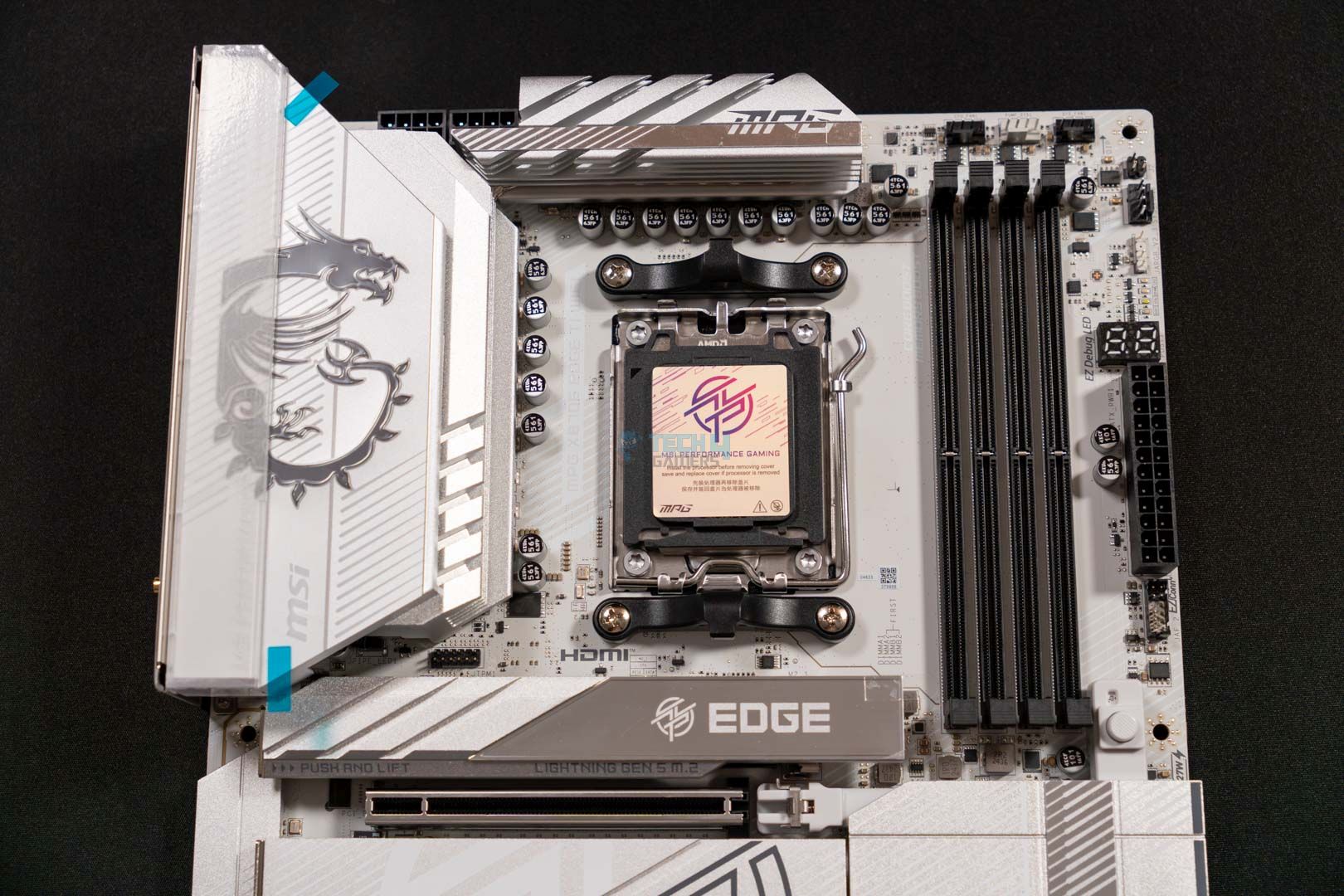
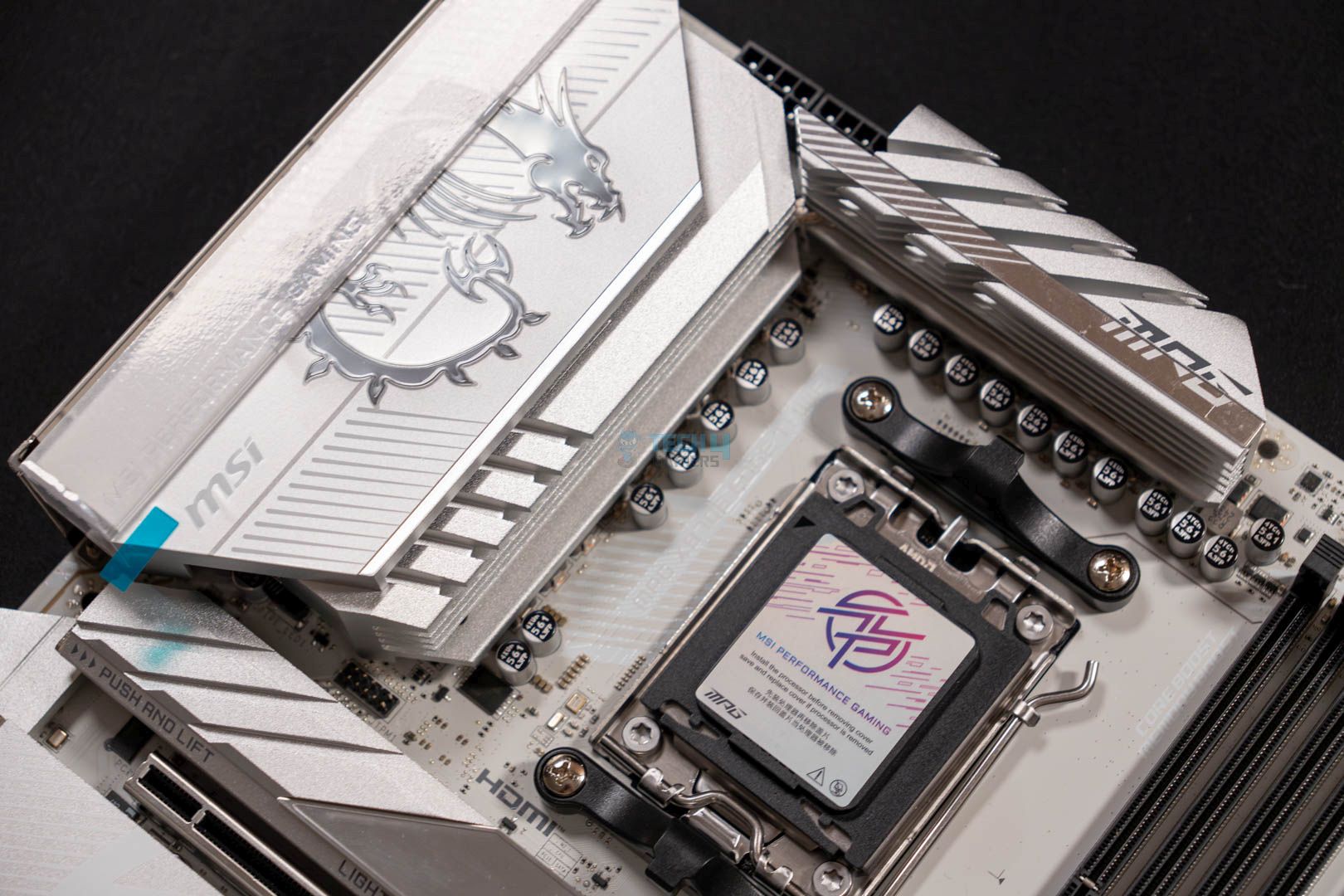
Front View of Motherboard (Image credit: Tech4Gamers)

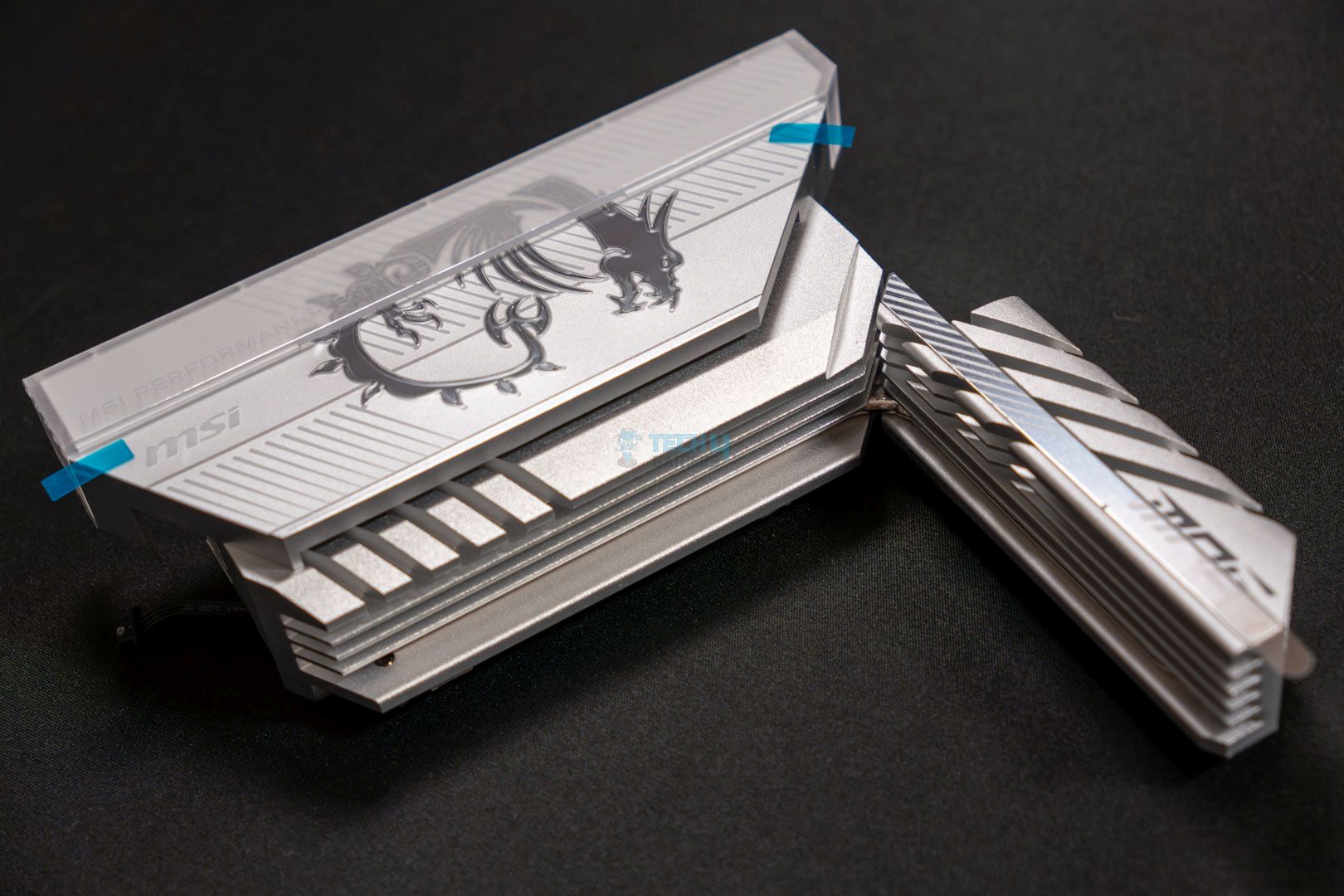
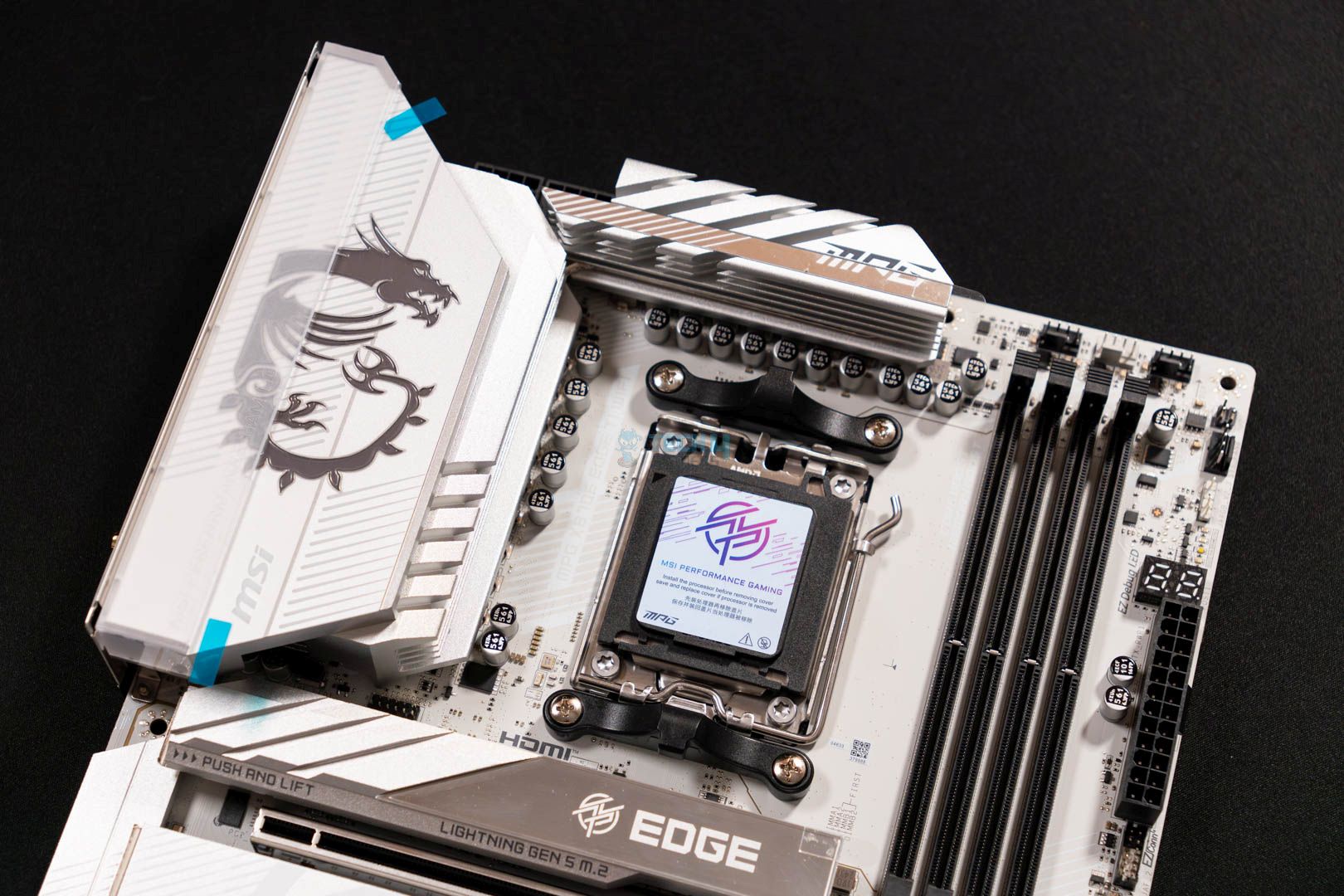
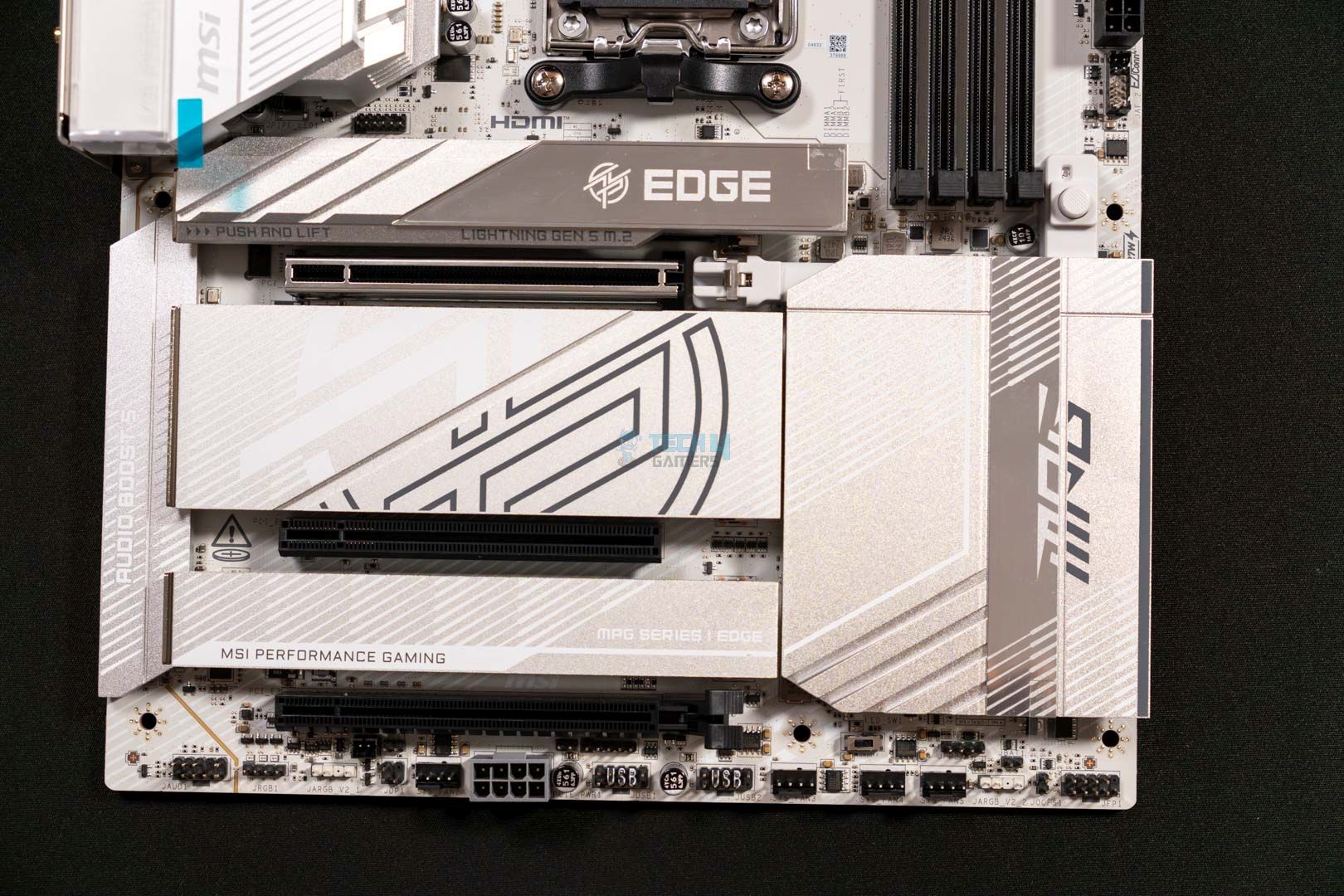
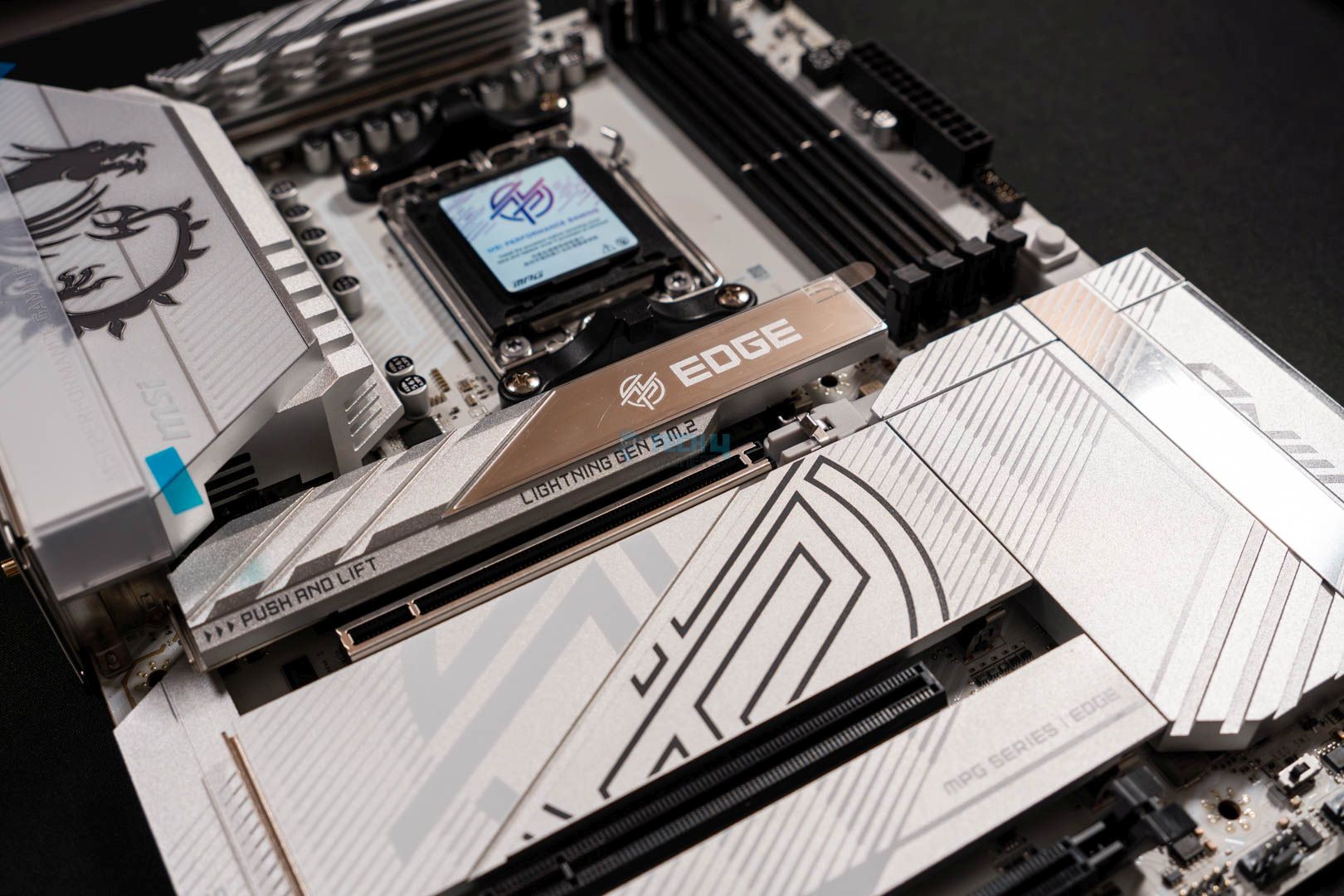
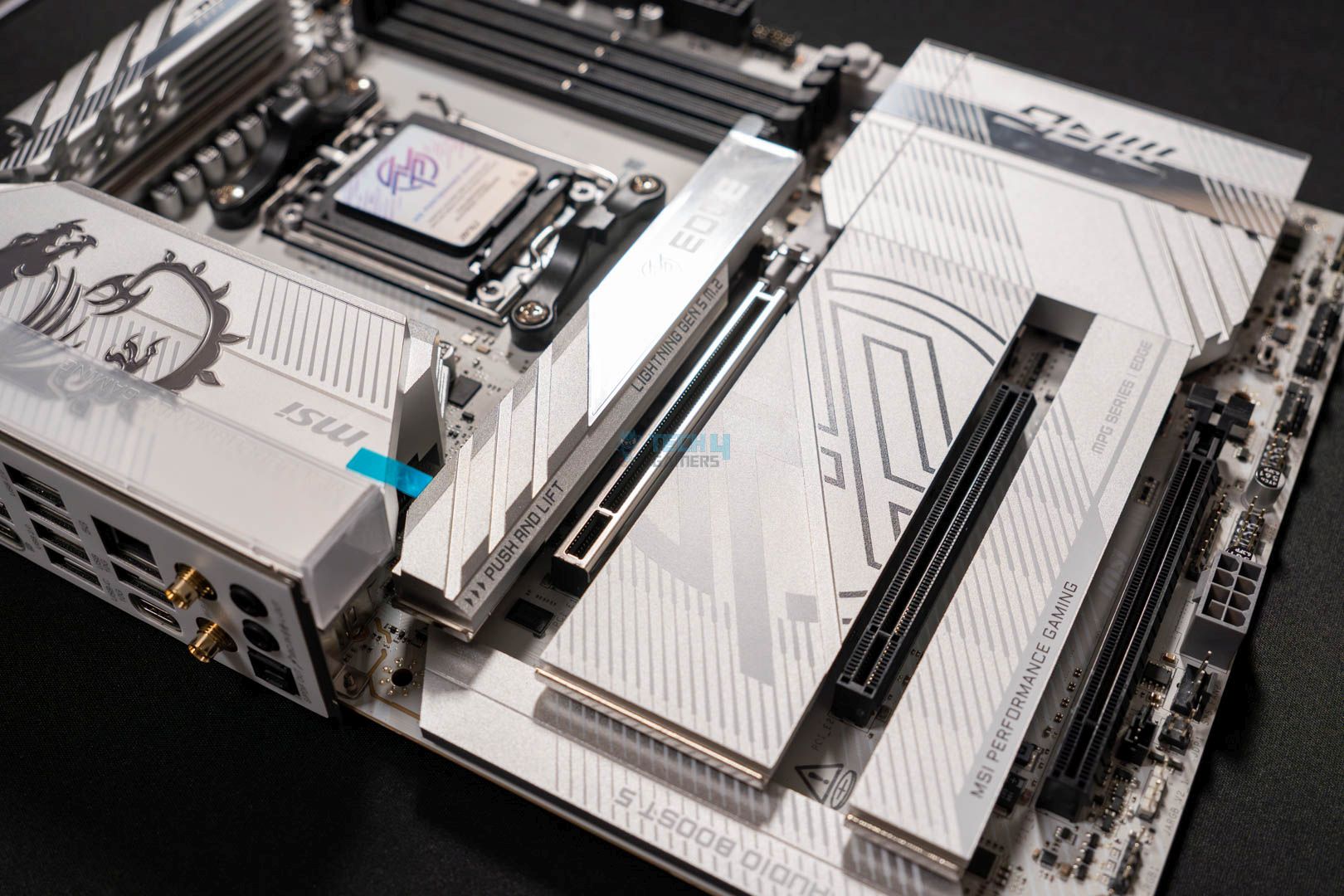
Switching to the front look of the board, we see an aesthetically pleasing board with an all-white color scheme—further enhancing its visuals. The motherboard features two gigantic heatsinks with a brushed finish that complements the board and provides excellent cooling for power delivery. Furthermore, the board also has heatsink plates for both chipsets A & B, as well as all the M.2 slots. Lastly, to take its looks to a whole other level, the MSI’s dragon on the VRM heatsink is ARGB-enabled. 

Moving over to its sturdiness, the board doesn’t disappoint as it features an 8-layer PCB design with NPG-170D server-grade material coupled with 2 oz thick copper. Additionally, like most other MSI boards, this one also comes with TVS protection to deal with sudden voltage spikes. 

Block Diagram

Unlike the X870 boards, this X870E features not one but two Promontory 21 chips to offer a far richer selection of I/O to choose from. As per the diagram, the CPU handles the primary PCIe 5.0 x16 slot as well as both Gen5 x4 slots. Similarly, HDMI 2.1, high-speed DDR5 memory, USB4 (via a separate ASM4242 host controller), and USB 3.2 Gen2 also fall under the CPU’s domain. 

As for the chipsets, they handle the rest of the high-speed USB 3.2 Gen2 and Gen2x2 ports, SATA and M.2 Gen4 slots, Wi-Fi 7, 5G LAN, HD Audio, PCIe 3.0 x1, and PCIe 4.0 x4 expansion slots. 

CPU Socket And Power Delivery

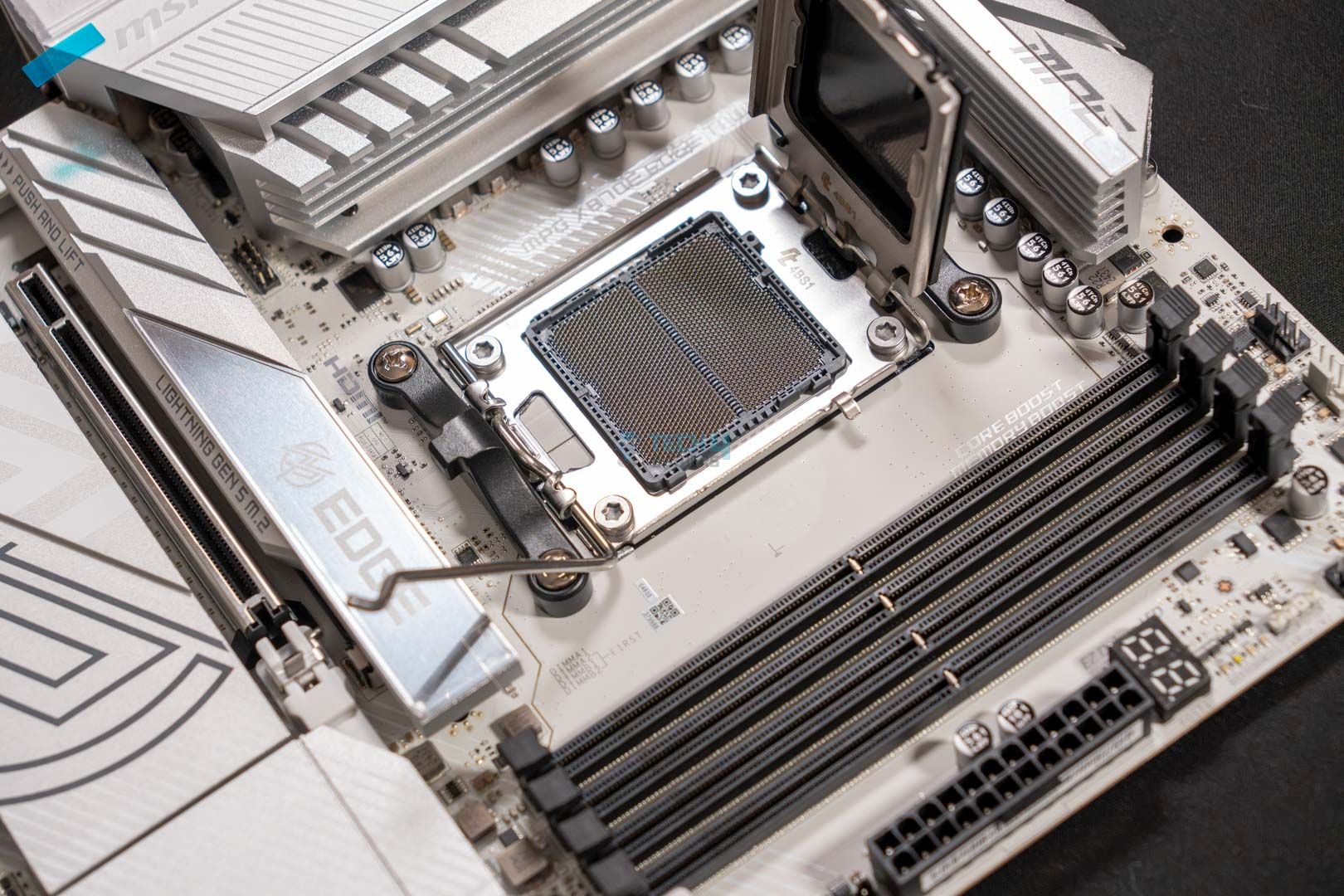
Like all other AM5 motherboards, this one is also equipped with the same LGA1718 socket to house the new AMD 7000 and onward series processors. The socket is easily visible in the pictures above this paragraph.

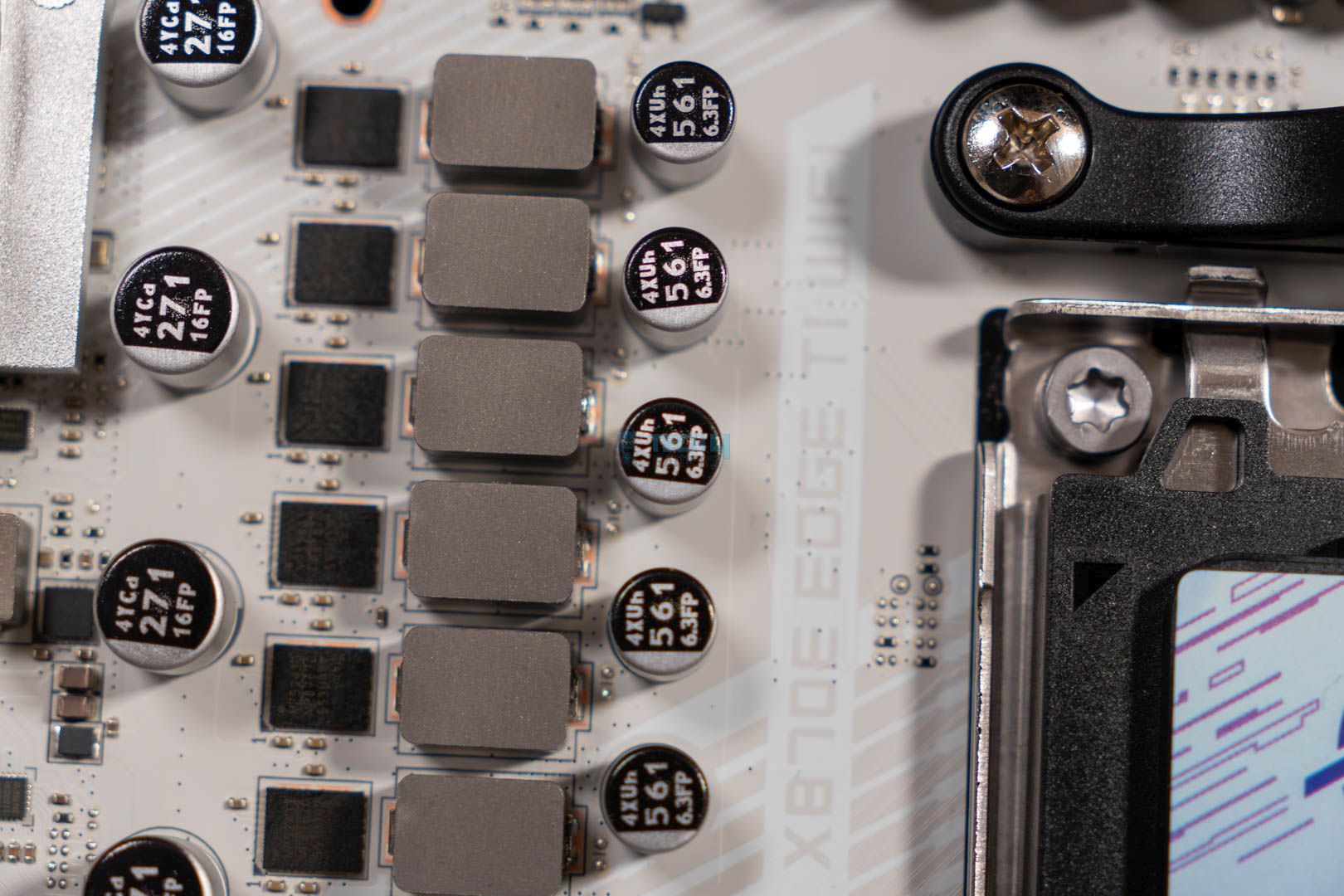
The MSI MPG X870E Edge Ti WiFi is equipped with a 14+2+1 duet rail power delivery system. Where the 14 phases are for the VCore (with 80A SPS), 2 for SOC, and 1 for MISC. It suffices to say that this combination is more than adequate to conveniently handle any latest Ryzen 9000 series processor. Another thing to consider is that it also allows for a decent amount of overclocking

VRM Driver (Image credit: Tech4Gamers)

Zooming in a little more into the VRM section reveals that the motherboard is using an MP87670 VRM driver – the same as the one available in the MSI MAG X870 Tomahawk WiFi.

We can also notice that the motherboard boasts two 8-pin EPS power connectors to provide power to the CPU. However, it’s not mandatory to plug in both connectors if you’re planning to use a lower-end CPU, as they don’t require much power to begin with. 

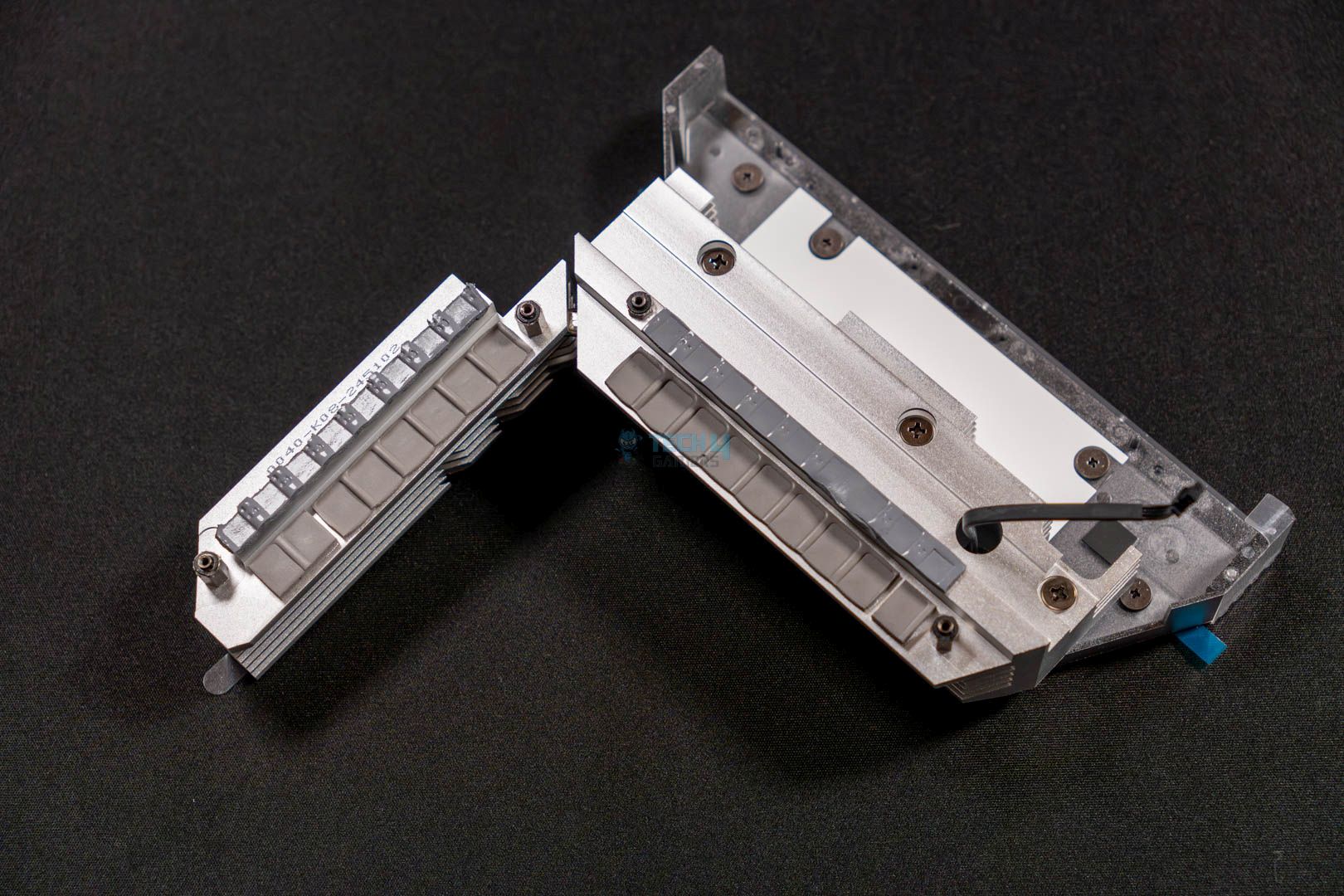
To keep the power delivery system up and running within acceptable temperature limits. The motherboard makes good use of the two enormous heatsinks with the standard fin stack design. Both of the heatsinks are connected via a single copper heat pipe, and on their bottom they have 7W/mK thermal pads to help with the heat dissipation. You can also notice a wire coming out of the primary heatsink, which is for the ARGB lighting of the MSI dragon on the front.

DIMM Slots

DIMM Slots (Image credit: Tech4Gamers)

Up next is the memory section, where the motherboard again doesn’t disappoint. The motherboard comes with four DIMM slots that can house up to 256 GB of DDR5 memory. Not only this, but the speeds here are quite impressive too, as it supports 8400+ MT/s (OC) with no issues whatsoever.

Similarly, it also possesses the latest memory standards, such as CUDIMM and AMD POR Speed. Where the AMD POR helps with specifying the optimal speed for the CPU and the CUDIMM eliminates the present jitters and noise via the incorporated clock driver and saves the CPU from one extra load to bear. 

Here are the supported speeds via the available X.M.P and EXPO profiles:

  • 1DPC 1R = 8400+ MT/s
  • 1DPC 2R = 6400+ MT/s
  • 2DPC 1R = 6400+ MT/s
  • 2DPC 2R = 4800+ MT/s

Storage 

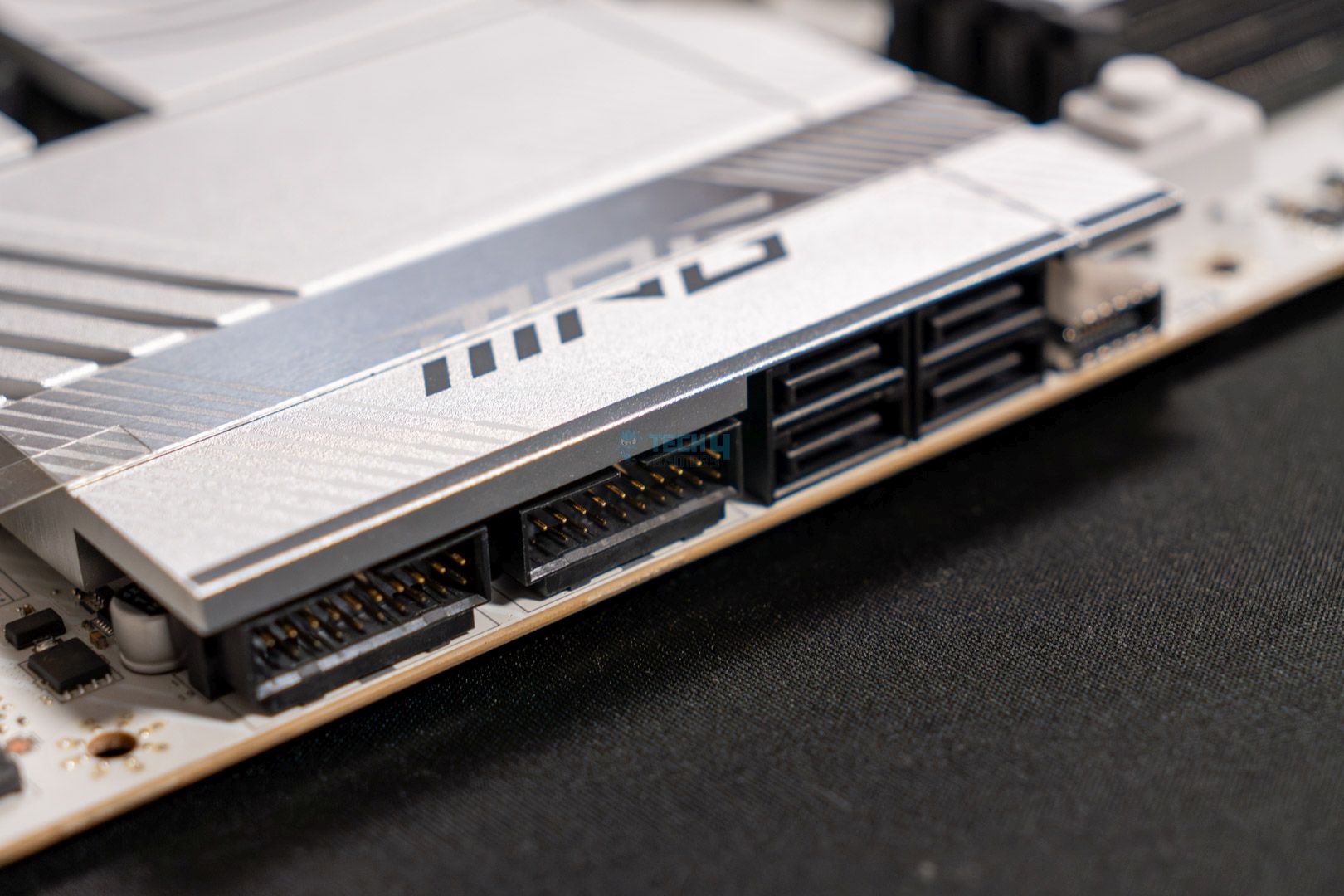
Here comes the time for storage options; this motherboard is nothing short of those. Particularly because the board offers four M.2 expansion slots and four SATA 6G ports. Two of the M.2 slots are PCIe Gen5, and the other two are PCIe Gen4. As for the size compatibility, the M.2_1 slot supports 22110/2280 devices. Whereas the M.2_2, M.2_3, and M.2_4 slots can accommodate 2280/2260 cut SSDs Lastly, if you’re using a Ryzen 8000 series processor, then the M.2_1 will be restricted to PCIe Gen4 speeds, and the M.2_2 slot won’t be usable at all.

Now, let’s discuss some cooling situations for the NVMe drives. Both the PCIe Gen5 slots and the PCIe Gen4 slots have MSI’s M.2 Shield Frozer in place with an EZ push-and-lift mechanism. So, the NVMe drives don’t start throttling due to high temps and can swap easily. 

PCIe Slots

Besides the M.2 slots, the board also boasts a total of three PCIe x16 slots. While they do look like all of them are PCIe x16 slots, only the primary slot offers a full 16-lane design for the discrete graphics card and runs at PCIe Gen5 speeds. Nevertheless, the other two slots aren’t useless, as one of them is PCIe 3.0 x1 and the other one is PCIe 4.0 x4. Both of these slots can be used for aftermarket components, such as an M.2 expansion card.

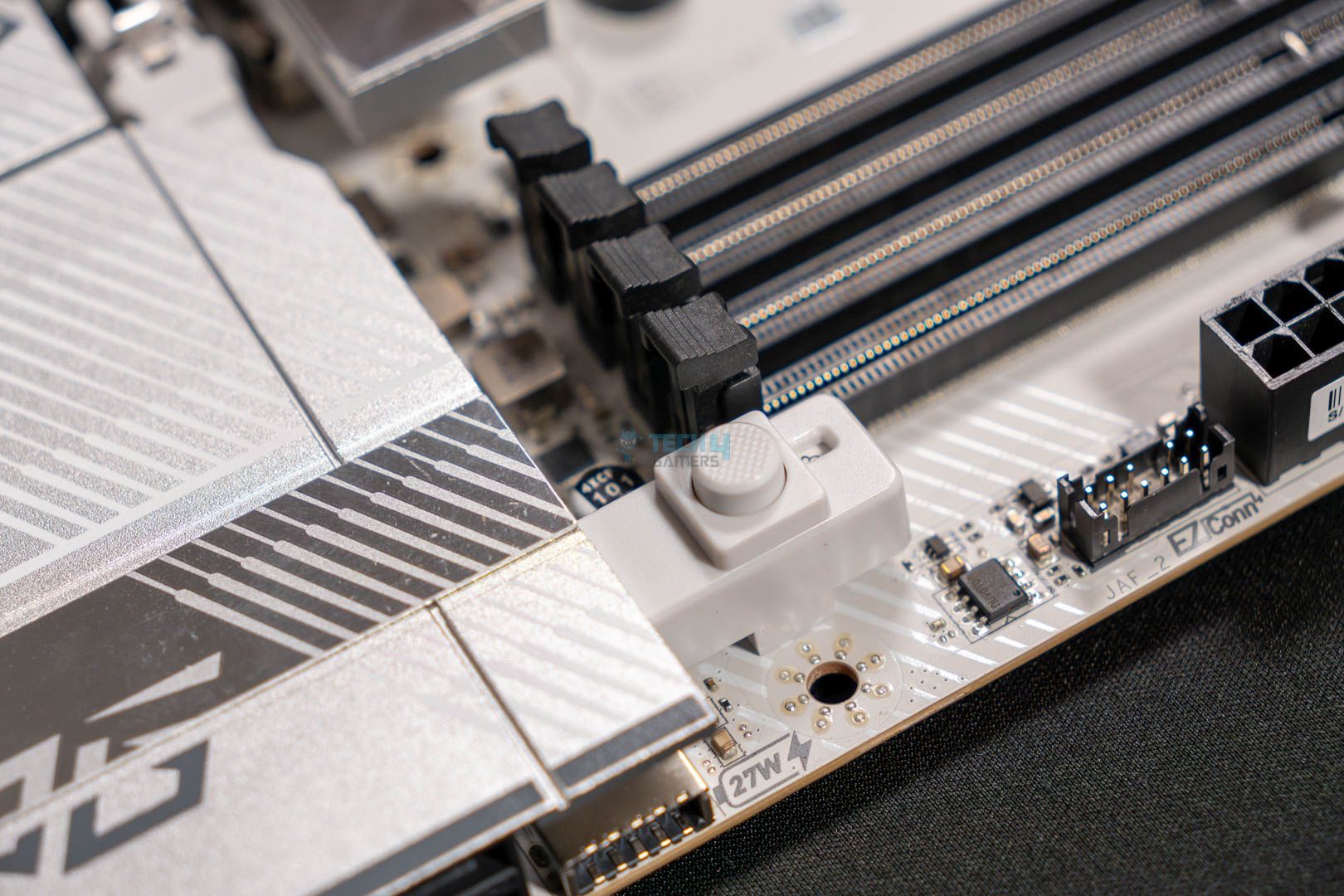
Moreover, the primary PCIe 5.0 slot is also equipped with MSI Steel Armour II and an EZ-release mechanism to increase its endurance by up to 21% while also making the graphics card swap incredibly convenient. With this mechanism in place, all you have to do is press the button, which can be seen in the picture attached above, and the graphics card won’t be locked any longer.

PCIe Supplemental Power (Image credit: Tech4Gamers)

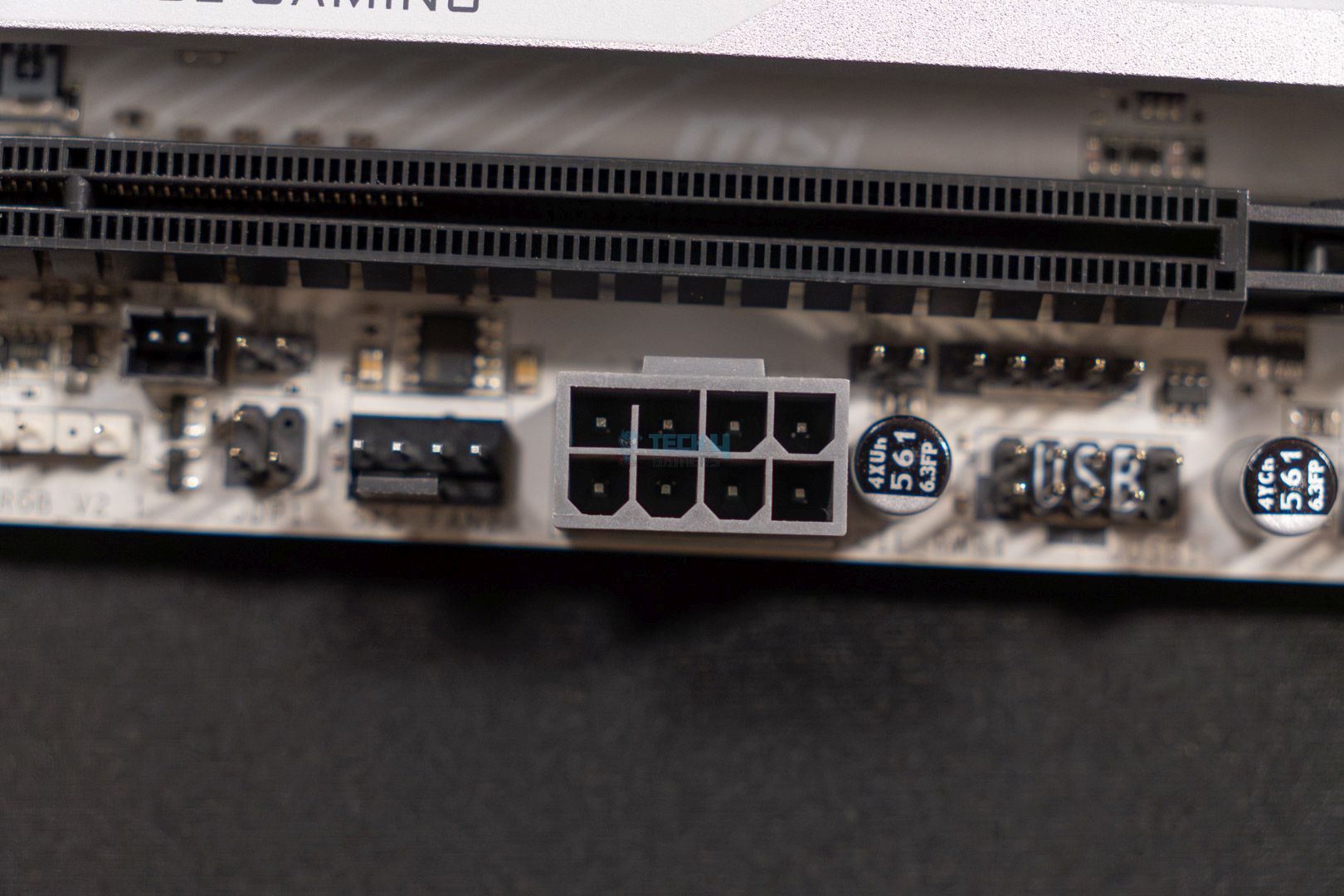
At the bottom, you can also notice another EPS power connector, which might be a shocker for you. However, it is there for a reason; it’s called the MSI’s PCIe Supplemental Power connector, and it’s there to supply extra power directly through the motherboard, so you don’t have to mess with the power supply.

USB Connectivity

The MSI MPG X870E Edge Ti Wi-Fi features 21 USB ports that include the following:

  • 4x USB 2.0 (Rear)
  • 4x USB 2.0 (Front)
  • 1x USB 20Gb/s Type C (Front)
  • 2x USB 40Gb/s Type C (Rear)
  • 4x USB 5Gb/s Type A (Front)
  • 5x USB 10Gb/s Type A (Rear)
  • 1x USB 10Gb/s Type C (Rear)

The USB ports offering is decent, and if we pay attention to the rear I/O. We can also see that there are two USB4 Type-C ports that can also be used as a display out since both of them support the DisplayPort 1.4 standard with HBR3.

These ports can output a maximum resolution of 4K at 60Hz, which is less than the HDMI port’s 8K at 60Hz but still good enough. Aside from the rear I/O, the front USB Type-C port supports 27W PD charging, which comes in handy for charging supported devices from the same source. 

Networking And Connectivity

WiFi Card (Image credit: Tech4Gamers)

When considering the wireless capabilities of the motherboard, it does not disappoint because the board has Wi-Fi 7 and Bluetooth 5.4. So, you won’t be having trouble fully utilizing your fast internet connection. If you’re more of a wired connection guy, the board is fine on that side as well. It is equipped with a 5G LAN (Realtek 8126) to allow a faster and more responsive wired connection.

Audio Solution

Similar to other MSI midrange offerings, this board is also equipped with the Realtek ALC4080 audio codec to handle the audio in and out. Moreover, the codec is coupled with high-quality audio capacitors, de-pop protection, and a dedicated headphone amplifier. This falls under the Audio Boost 5 setup, which ensures high-quality audio delivery on both sides. The codec also supports S/PDIF output and also has a dedicated port on the rear I/O.

Internal Connectors And Components

These are the included connectors that can be found on the motherboard:

  • 1x Power Connector (ATX_PWR)
  • 2x Power Connector (CPU_PWR)
  • 1x Power Connector (PCIE_PWR 8pin)
  • 1x CPU Fan
  • 1x Combo Fan (Pump_Sys Fan)
  • 6x System Fan
  • 1x EZ Conn-header (JAF_2)
  • 2x Front Panel (JFP)
  • 1x Chassis Intrusion (JCI)
  • 1x Front Audio (JAUD)
  • 3x Addressable V2 RGB LED connector (JARGB_V2)
  • 1x RGB LED connector(JRGB)
  • 1x TPM pin header(Support TPM 2.0)
  • 4x USB 2.0 ports
  • 4x USB 5Gbps Type A ports
  • 1x USB 20Gbps Type C ports

Most of these are the standard internal connectors that can’t be skipped aside from the extra PCIe power connector. This one, as stated above, works as a supplemental power connector to provide extra power to the graphics card.

Super I/O Controller (Image credit: Tech4Gamers)

Other than those I/O connectors, the motherboard utilizes a Nuvoton NCT6687D-R I/O controller that serves to provide real-time monitoring for things like component temperatures, fan speeds, and voltages.

Debug LED panel (Image credit: Tech4Gamers)

To make troubleshooting a lot easier, the board has EZ Debug LEDs as well as EZ Digi-Debug LEDs.

Rear I/O

Rear I/O (Image credit: Tech4Gamers)
  • 1x Clear CMOS Button
  • 3x USB 10Gbps Type-A
  • 4x USB 2.0
  • 1x 5G LAN
  • 2x Wi-Fi / Bluetooth Antenna Out
  • 2x Audio Connectors
  • 1x Flash BIOS Button
  • 1x HDMI 2.1 port
  • 2x USB 40Gbps Type-C
  • 1x USB 10Gbps Type-C
  • 1x Optical S/PDIF Out

One thing that we like is when the USB ports are labeled alongside their supported speeds to avoid confusion. This motherboard has done the same thing and has all the USB ports labeled with their rated speeds. Furthermore, the inclusion of a dedicated BIOS flash button and CMOS clear button is a nice touch, too. Not only this, but the I/O shield is also pre-installed and is white to match the motherboard’s aesthetics.

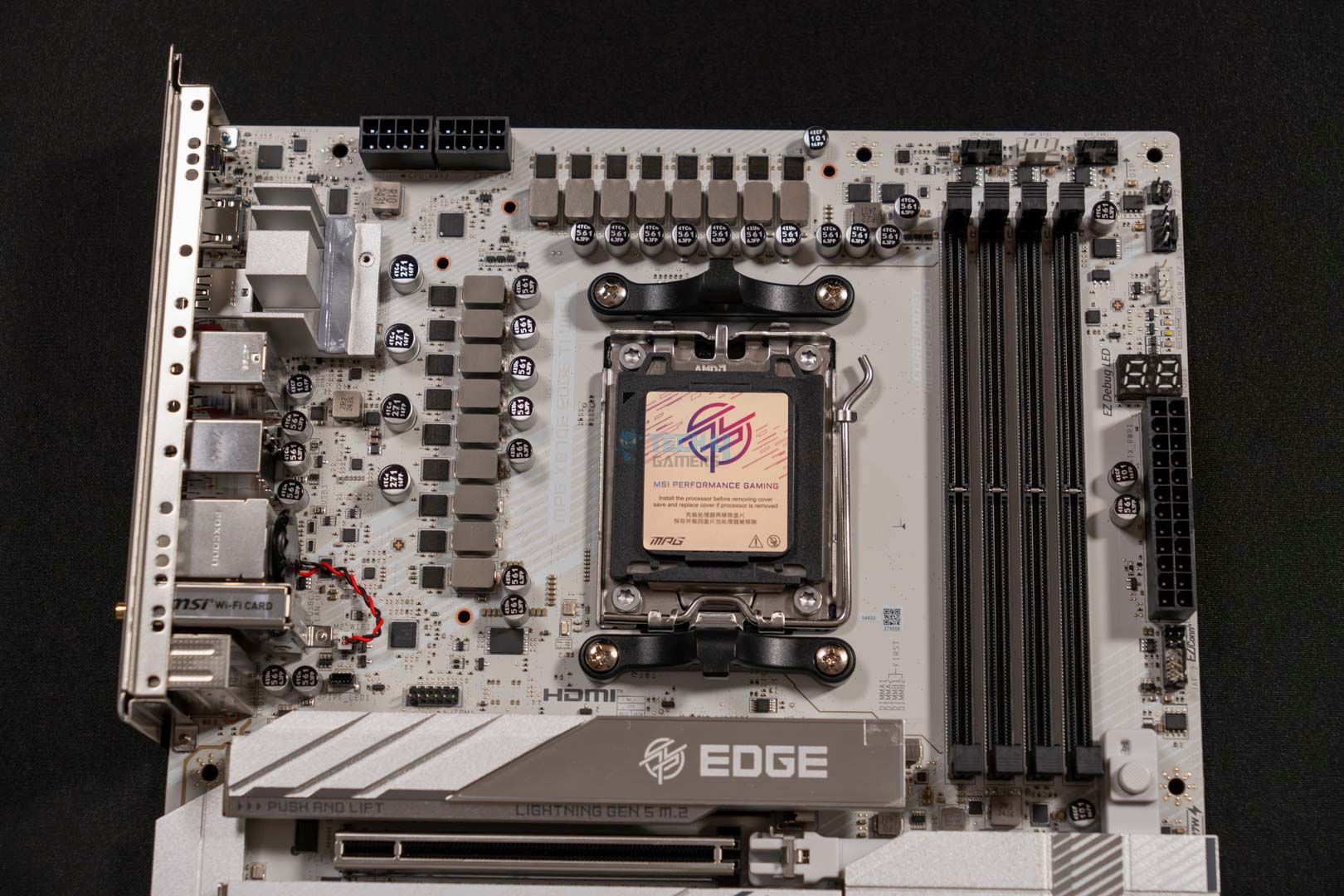
Motherboard Naked Look (Image credit: Tech4Gamers)

Here’s a closer look at the motherboard for you, with all its heatsinks removed.

Test Setup

This is the set of components that we’re going to pair the motherboard with:

Here is our test bench and configuration:

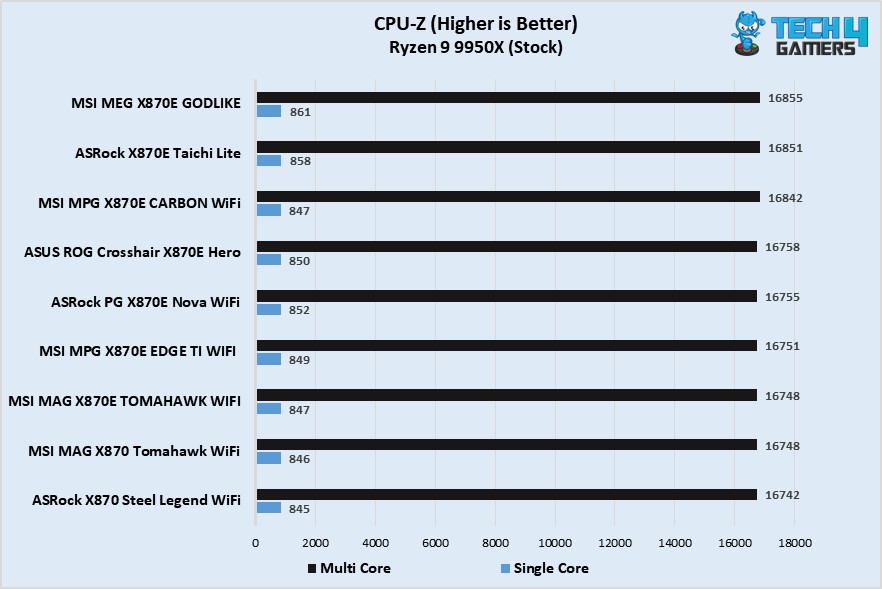
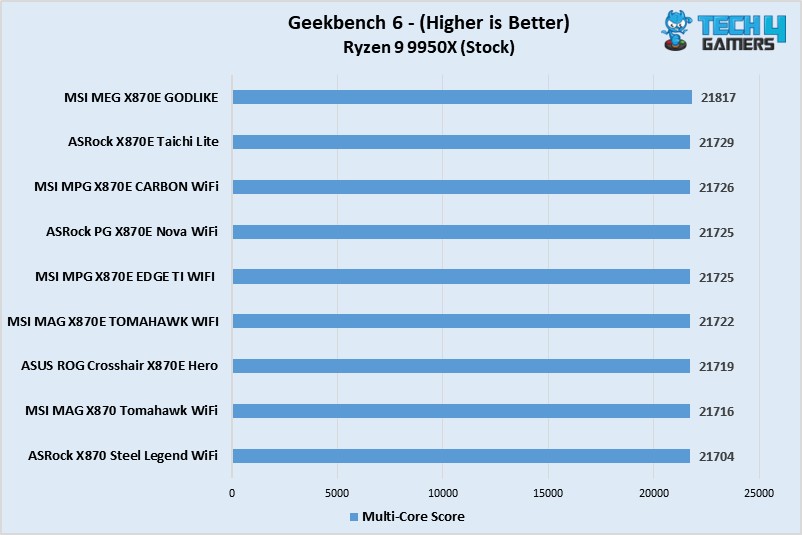
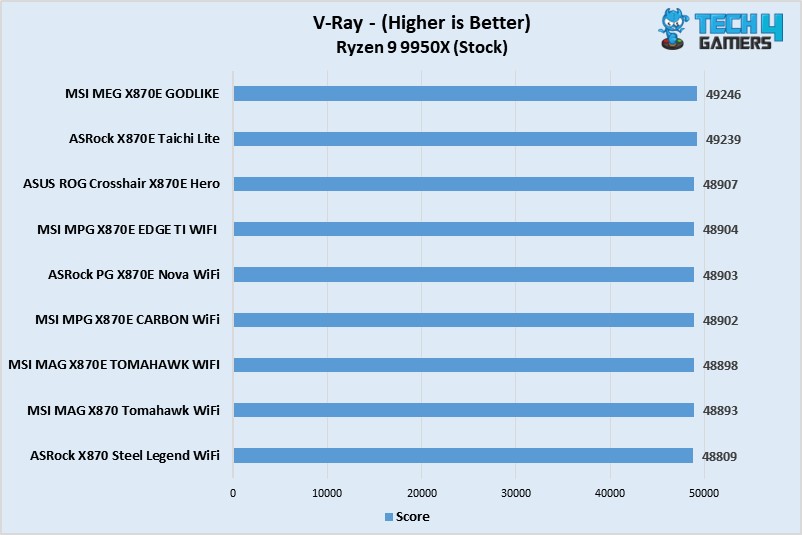
Synthetic Benchmarks

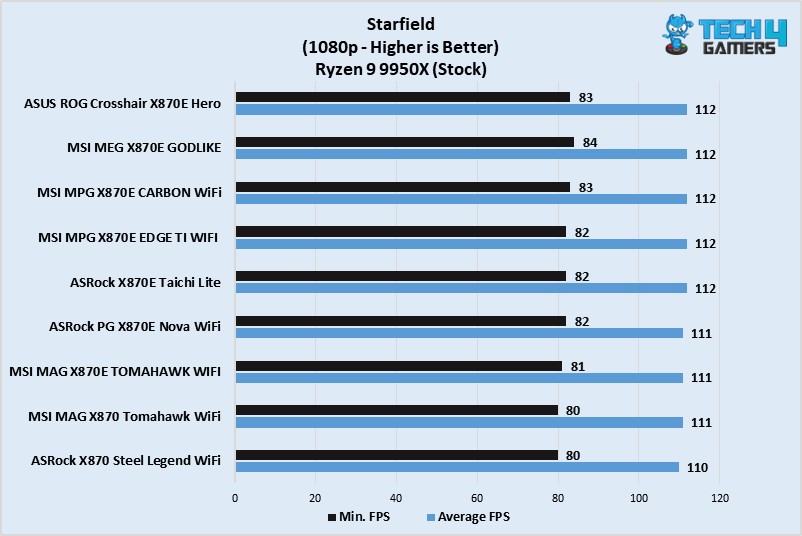
Gaming Benchmarks

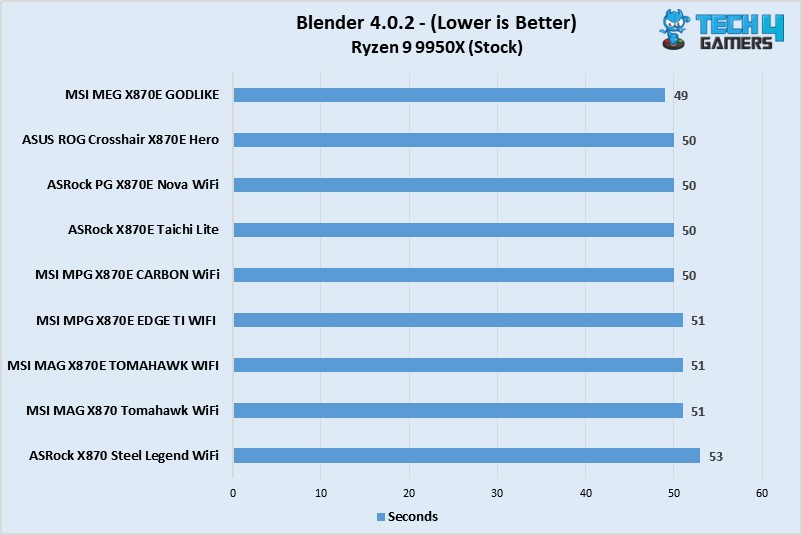
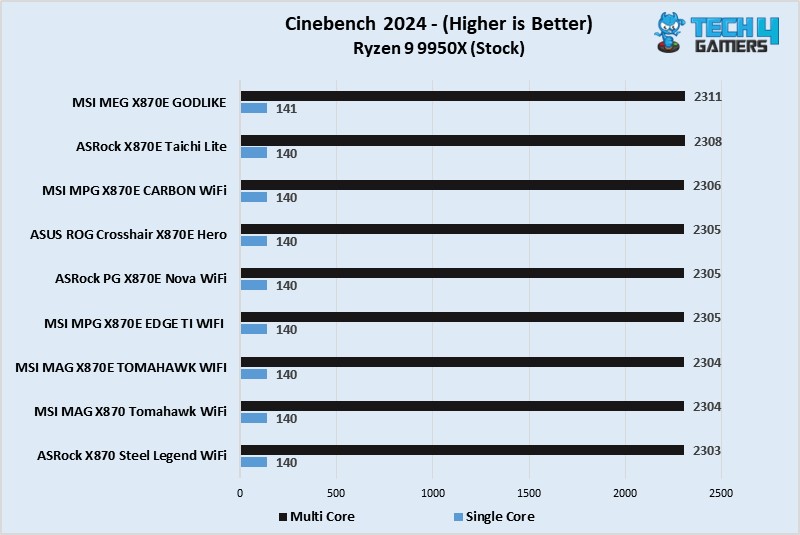
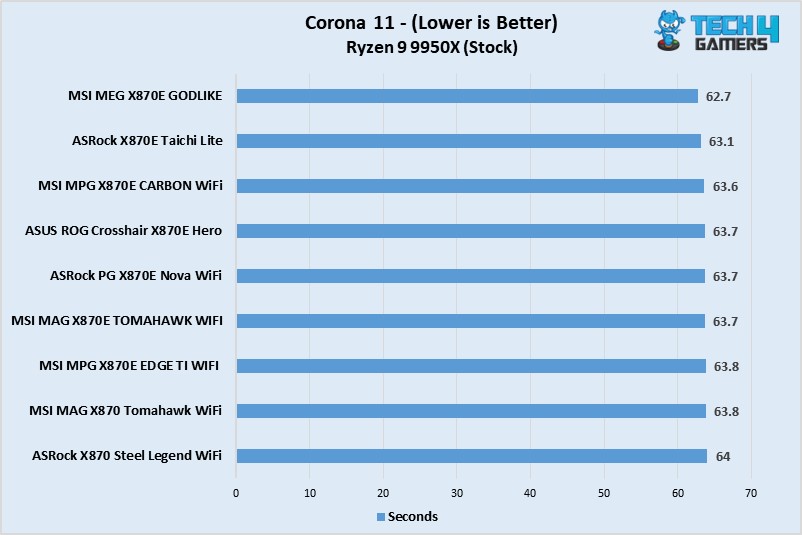
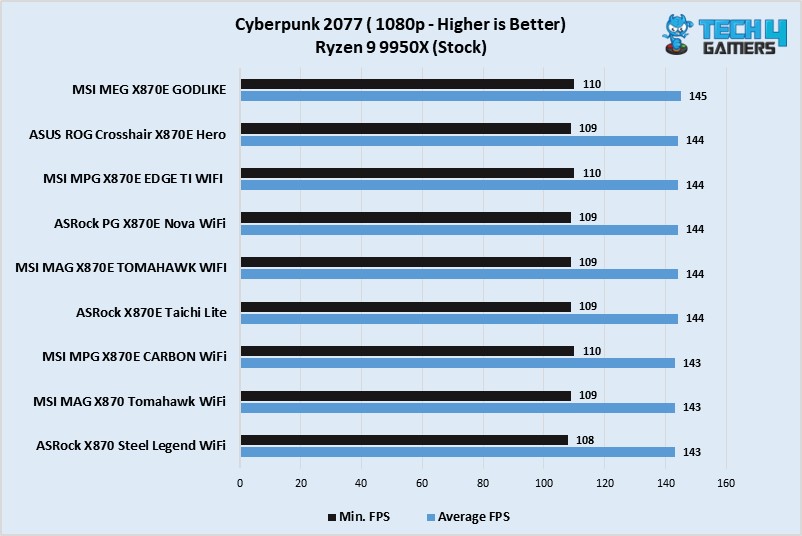
The MSI MPG X870E Edge Ti WiFi offers impressive performance figures during gaming, especially against behemoths like the X870E GODLIKE.

Power Consumption, Boot Times, And VRM Temperatures

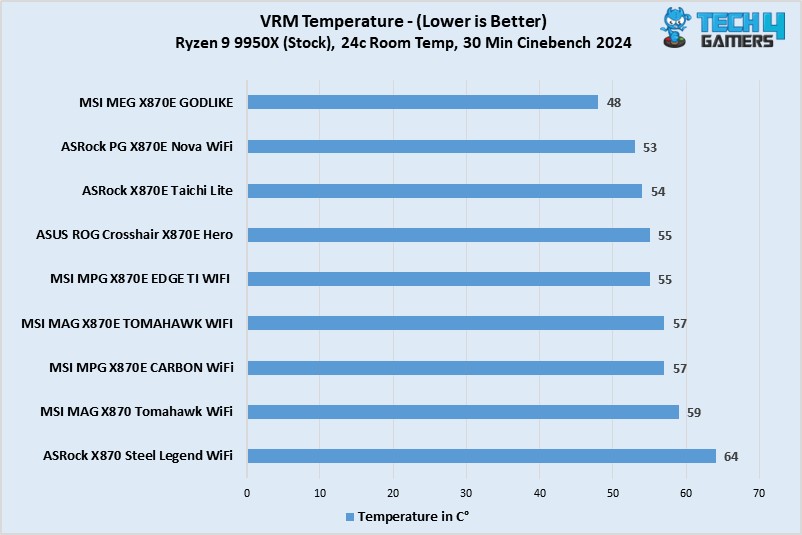
VRM Temp - X870 Benchmarks March 2025

The VRM temperatures on this motherboard are praiseworthy as they never cross the 55°C mark during the 30-minute Cinebench 2024 test.

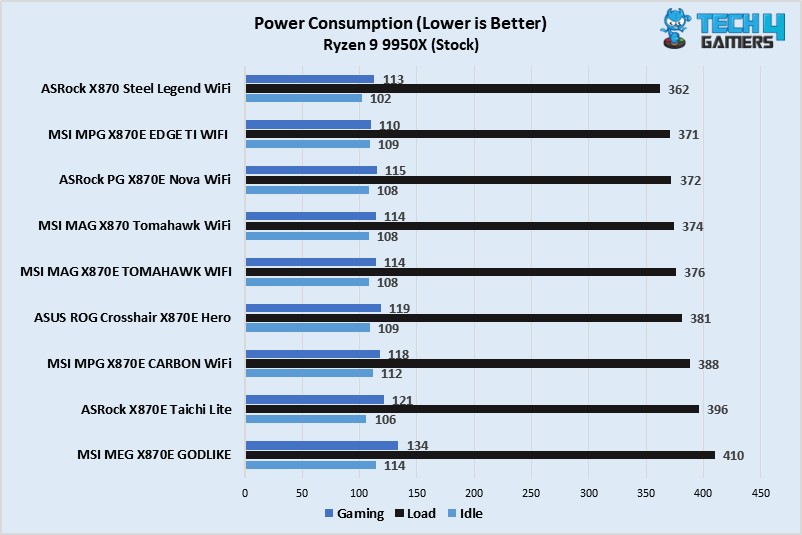
Power Consumption - X870 Benchmarks March 2025

The power consumption side is also nothing to worry about as it takes less power than most of the competing motherboards across all three situations – gaming, idle, and full load.

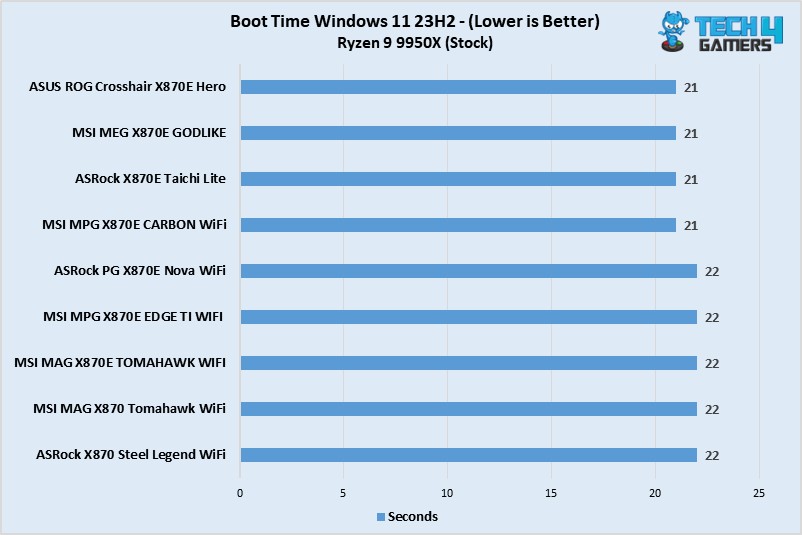
Boot Time - X870 Benchmarks March 2025

The boot times aren’t terrible either, and they are only 1 second longer than the Carbon WiFi, Taichi Lite, and GODLIKE. So, we’re good here as well.

Should You Buy It?

Buy It If:

✅You want a good value motherboard: If you’re in search of a good value mid-ranger, then the X870E Edge Ti WiFi is a great option as it features both performance and looks.

✅You want to build a white-theme PC: This particular motherboard also makes sense when you’re planning to build an all-white PC and want to match every component. 

Don’t Buy It If: 

❌You won’t use a high-end CPU: If you’re planning to use a budget processor like the Ryzen 5 9600X, then you better pick one with the B850 or B650 chipset because this one is overkill for such processors.

My Thoughts

Now is the time to wrap up everything and give my final words on pretty much everything the motherboard offers. Well, so, the motherboard looks brilliant and performs excellent when it comes to that side. Not to mention the VRM cooling is quite robust and manages to keep them very cool under intense situations, which specifically impressed me the most. 

For a motherboard that costs $329.99, I would say it’s a pretty good deal, especially when we factor in the motherboard’s white aesthetics, which are further complimented by the ARBG-lit MSI dragon on the I/O cover. All in all, I would definitely recommend this motherboard from MSI, as it’s got everything a mid-range motherboard should have. 


Tecware Spectre 75 Review: A Monumental Upgrade

Tecware sent us a couple of keyboards to review last year (Phantom+ and Phantom+ Elite), and unfortunately, we didn’t like them. After writing what were honestly two pretty scathing reviews, we sent the company some heartfelt feedback on how to improve, and they responded accordingly with an offer to try their new release: the Spectre 75.

There’s actually a bigger 96-key model as well but we have the smaller unit in for review today. A 75% keyboard engineered to stand among the best in today’s hyper-competitive custom keyboard market. The company claims they’ve fixed all the shortcomings seen in their previous models so let’s take a look at how it fares against the rest.

Why Trust Tech4Gamers
  • Huzaifa Haroon is our keyboard expert with years of experience in building and testing custom keyboards.
  • 130+ peripherals tested and reviewed by our team of hardware experts (Tech4Gamers Team).
  • 500+ hours spent testing different peripherals for our reviews.
  • Objective testing criteria (See how we test peripherals).

At Tech4Gamers, ensuring you get reliable information is our priority. That’s why every hardware round-up undergoes a meticulous review process by our team of experts and editors. Each review is carefully examined against our strict editorial guidelines, guaranteeing you trustworthy insights you can depend on.


Key Takeaways

  • The Spectre 75 is the best budget keyboard you can buy today. It has a great sound, perfect stabs, an amazing screen and impressive build quality to back all that up.
  • Buy the Spectre 75 if you like screens on your keyboard, as you’re not going to get any better than this, at least in the same price bracket.
  • Avoid the Spectre 75 if you’re looking for the most performance per dollar,r as some other options offer the same quality for far less, cutting down on the extras. 

Specifications Spectre 75 Spectre 96
Dimensions L330 x W145 x H38mm
(H44mm w/ Feet step 1)
(H51mm w/ Feet step 2)
L382 x W145 x H38mm
(H44mm w/ Feet step 1)
(H51mm w/ Feet step 2)
Weight 0.85kg 0.98kg
Layout 81-Key 75% Layout 96-Key 96% Layout
Legend Standard US QWERTY Standard US QWERTY
Switch Lifespan 50 million keystrokes 50 million keystrokes
Cable Length 1.8m Detachable USB-C Braided Cable 1.8m Detachable USB-C Braided Cable
Material PC Plate + Plastic Case PC Plate + Plastic Case
Switch Type Brown/Red Pre-lubed Switches Brown/Red Pre-lubed Switches
Keycaps Double-shot, Non-Shinethrough, PBT Keycaps Double-shot, Non-Shinethrough, PBT Keycaps
LEDs South-facing SMD LEDs South-facing SMD LEDs
[toc]

What Makes The Tecware Spectre 75 Different?

The Spectre 75 is a great all-rounder in terms of build quality, sound, design, and performance, but a lot of boards are like that. Where it separates itself from the crowd is in its perfect execution of all the basics but also the best implementation of gimmicks like a screen. In fact, it transforms the screen from an unnecessary extra to something truly unique. 

Unboxing Experience

The Tecware Spectre 75 comes in a nice cardboard box with the board’s picture up front along with its name. It tells you some of the features and there’s a sticker in the top corner indicating what switch is inside. There is a single tab in the center to get inside. 

v
Tecware Spectre 75 box (Image by T4G)

Once opened, you’ll be treated to the board wrapped in plastic topped off with a dust cover. You’ll find a manual below that and some accessories toward the top. There’s also a message from Tecware’s CEO written on the inside of the box which, spoiler alert, did indeed turn out to be true.

The CEO's message for the Spectre 75
The CEO’s message for the Spectre 75 (Image by T4G)

Here’s everything you get in the box:

  • 1x Spectre 75
  • 1x Keycap/Switch Puller
  • 4x Extra Switches
  • 1x USB-C Cable
  • 1x Spacebar foam
  • 1x Screen protector
  • 1x Manual
Everything you get with the Tecware Spectre 75
Everything you get with the Tecware Spectre 75 (Image by T4G)

Design & Build 

Tecware has gone for a minimal design with the Spectre 75, ditching their old looks in favor of a clean aesthetic. From the front, the board has slim bezels with rounded corners that perfectly encapsulate all the keys within. There is no wasted space, even with a whole screen and knob in the corner. There’re no indicator LEDs or text anywhere else for a distraction-free design.

Tecware Spectre 75 from the front (Image by T4G)

Toward the back, we see a few angular lines going across the entire perimeter of the board. These are engraved and have a glossy finish, so they reflect light. There are rubber feet on all the corners with two flip-out feet for height adjustment. Without them the Spectre 75 has a very steep 2-degree typing angle, so you really need the feet to elevate it.

Tecware Spectre 75 from the back (Image by T4G)

All this makes for a pretty boring side profile. It looks clean like the rest of the board, but nothing stands out and ends up as a pretty typical box-on-wedge. Oh, and there’s a dedicated magnetic slot to hold the USB receiver in place right next to one of the feet. This is now quite common among budget prebuilts but still always a nice addition.

Tecware Spectre 75 side profile
Tecware Spectre 75 side profile (Image by T4G)

The Spectre 75 is made out of plastic, but it doesn’t feel cheap at all. It’s built well with a matte finish all around that only adds to the sleek, understated design. There is minimal flex in the chassis and no creaking whatsoever. The board weighs right under a kilogram, so it feels premium to hold. This is one of the best plastic builds I’ve seen in the budget segment.

Layout & Features

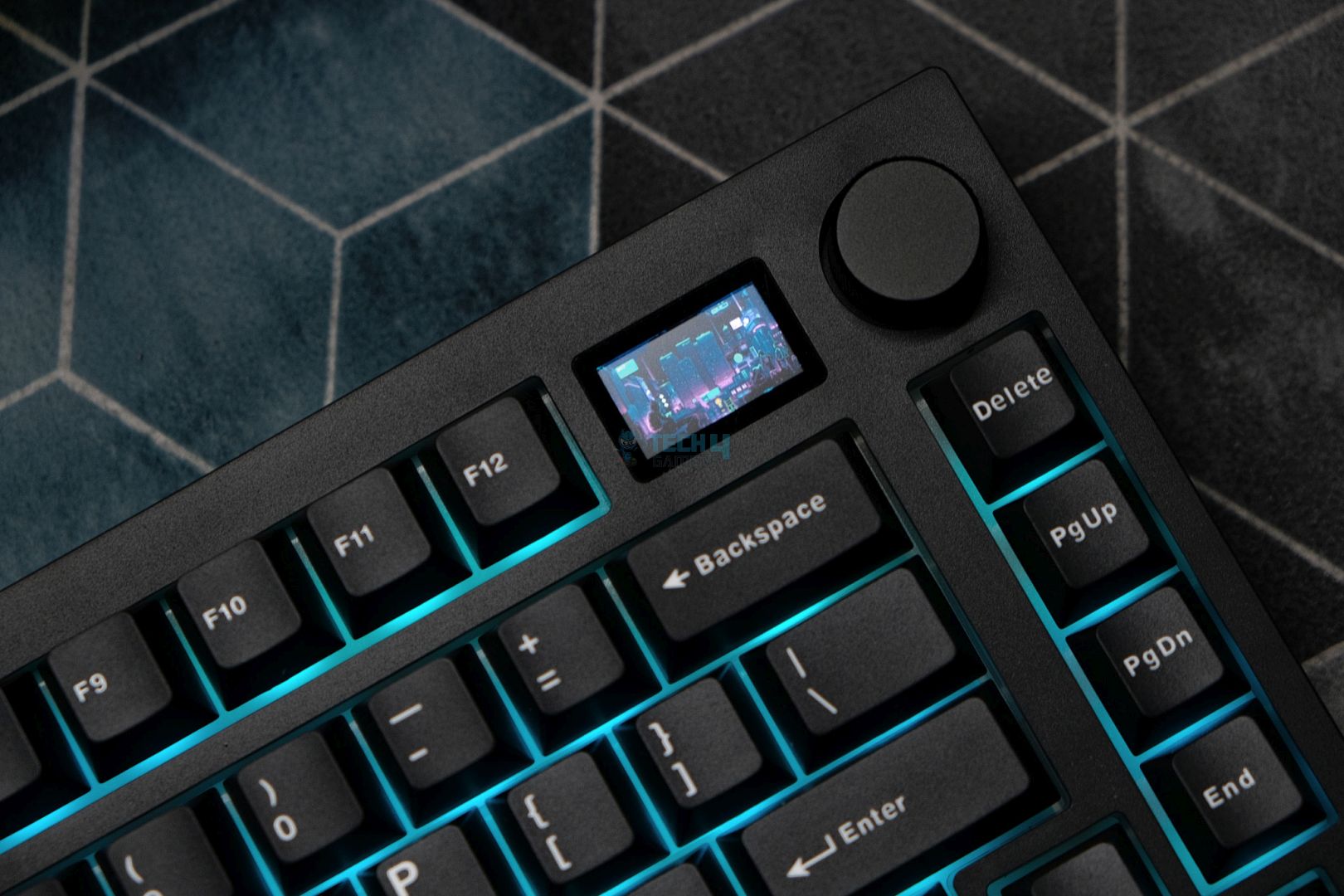
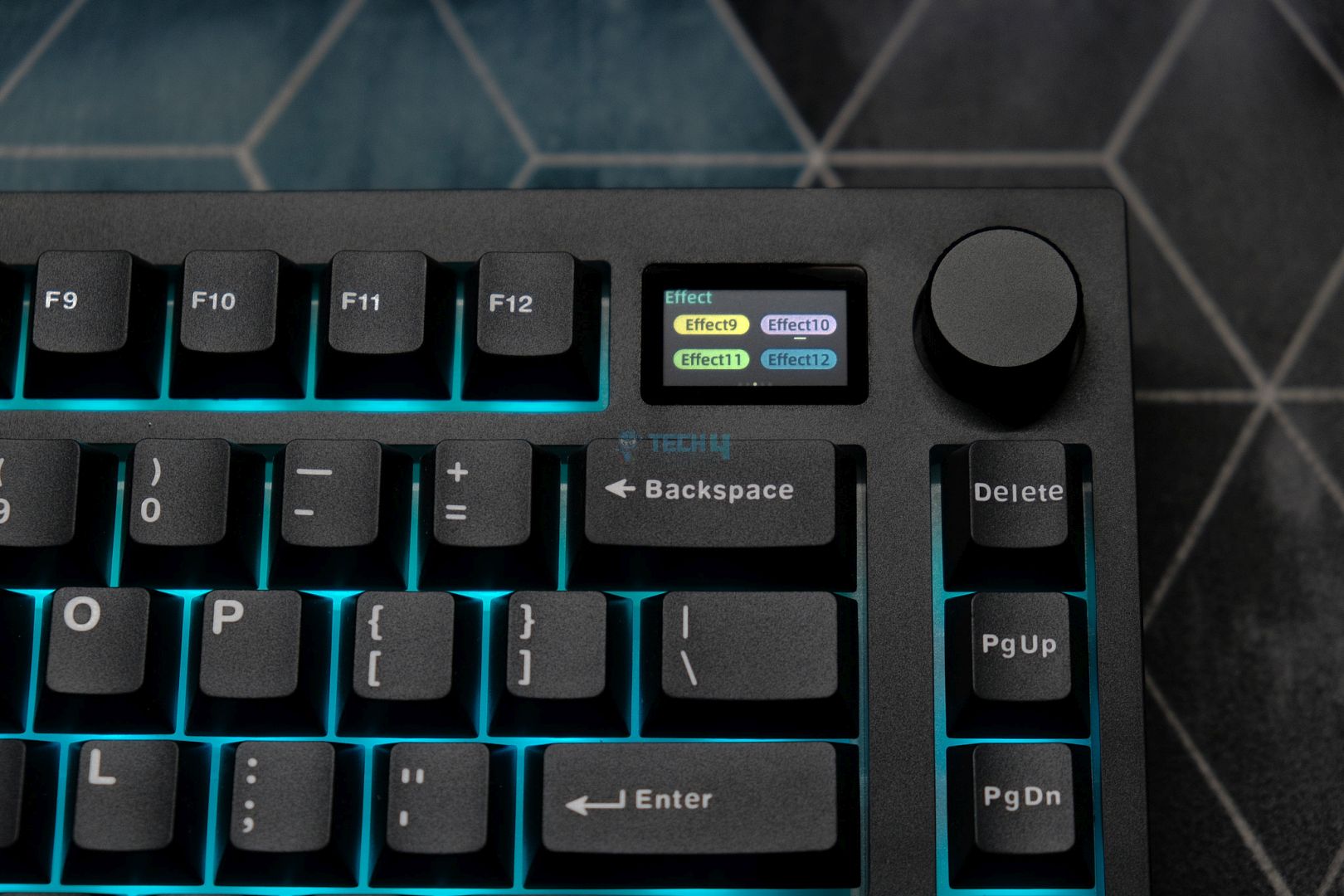
As the name suggests, the Spectre 75 is a 75% keyboard with an exploded layout, meaning the arrow and nav cluster are separated from the main keys. It adds a volume knob up top with a 1.14″ screen next to it in place of an F13 key. Despite these inclusions, the rest of the layout remains standard which is something I didn’t think I’d ever need to appreciate. (uhm, RT80, uhm)


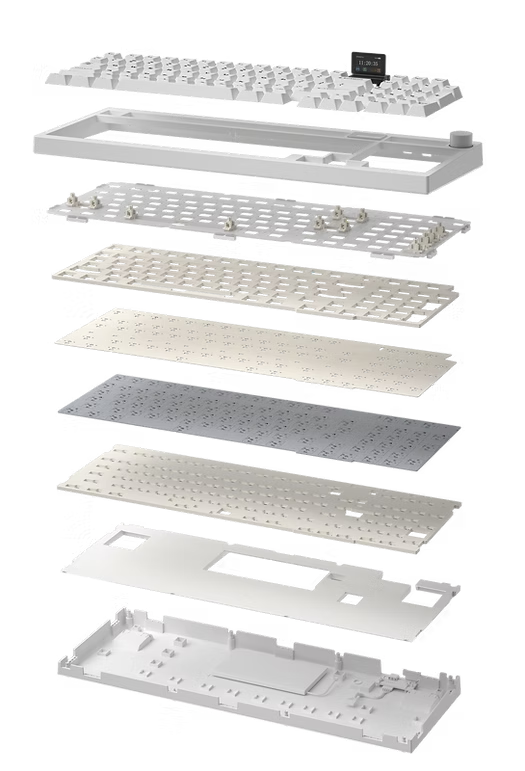
The board is fully wireless with both Bluetooth and 2.4Ghz radio support. Tecware has gone for a gasket-mount implementation this time around with silicone beans on the plate. There’s plenty of sound dampening layers inside. You get your standard affair of PE foam, PET sheets, plate foam and case foam inside to create a better-sounding board. 

All the layers that make up the Spectre boards
All the layers that make up the Spectre boards | Tecware

The PCB is only 1.2mm thick with no flex cuts but the polycarbonate plate does have a lot of flex cuts. This is a double-edged sword as the flex cuts allow for a softer typing experience, but they also allow the sound to “leak” through which means less depth in the acoustics. That’s why a lot of people tape mod their keyboards to increase its volume. 

Tecware Spectre 75 flex cuts
Tecware Spectre 75 flex cuts (Image by T4G)

The Screen

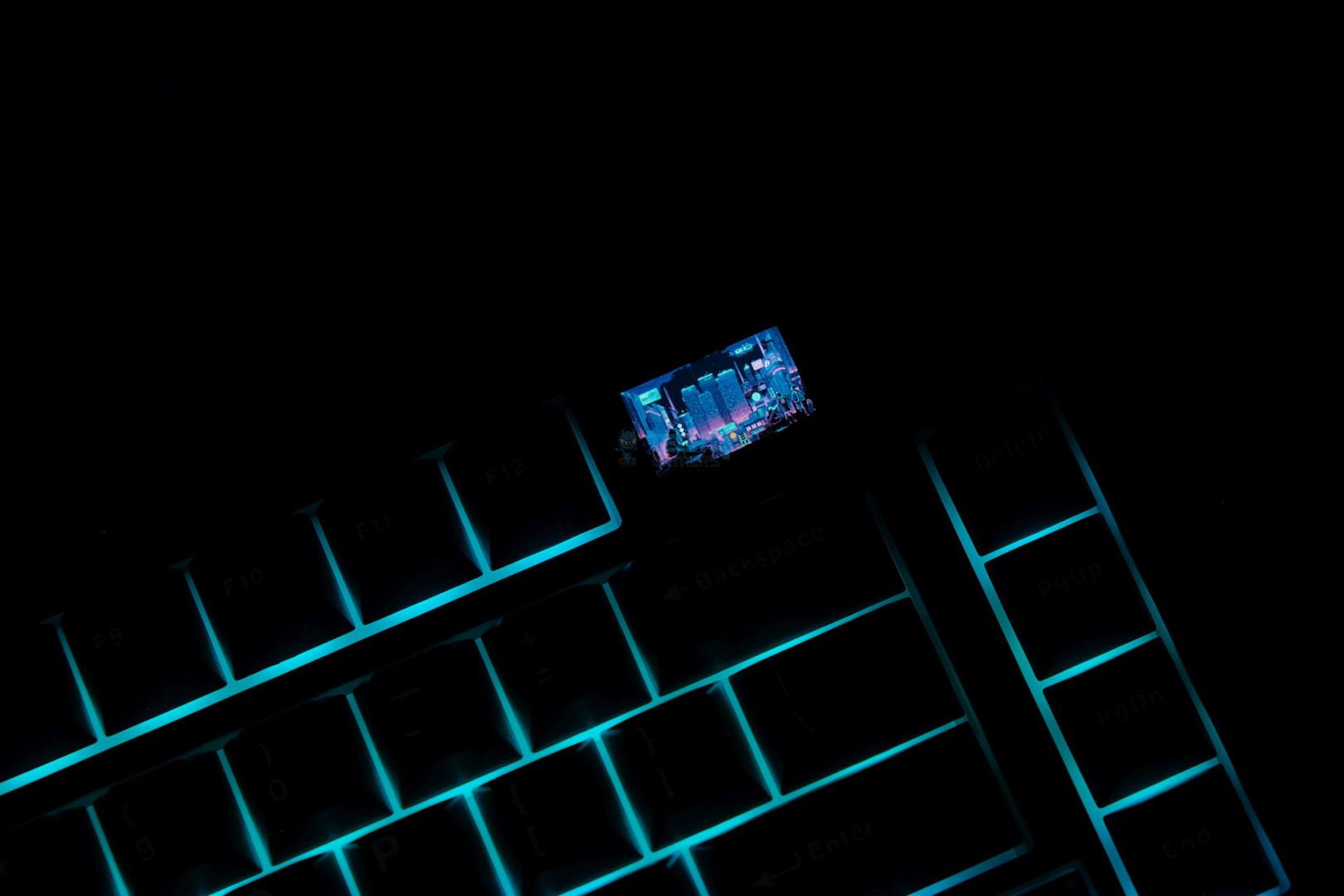
I’ve seen plenty of screens on keyboards during my time in this hobby and most of them are the same. The one on the Tecware Spectre 75 is arguably the best one I’ve seen so far. It’s incredibly sharp and bright for its size. The resolution is not super high and, yes, you can see the pixels if you zoom in but it’s still a joy to look at.

The Tecware Spectre 75 has one sharp screen
The Tecware Spectre 75 has one sharp screen (Image by T4G)

By default, it has a nice monochrome animation of cherry blossom leaves falling under moonlight. This is a surprisingly modest choice but one that goes so well with the blacked-out look of the board. The screen also has a boot-up animation with the Tecware logo, but it goes back to whatever page you had last configured. 

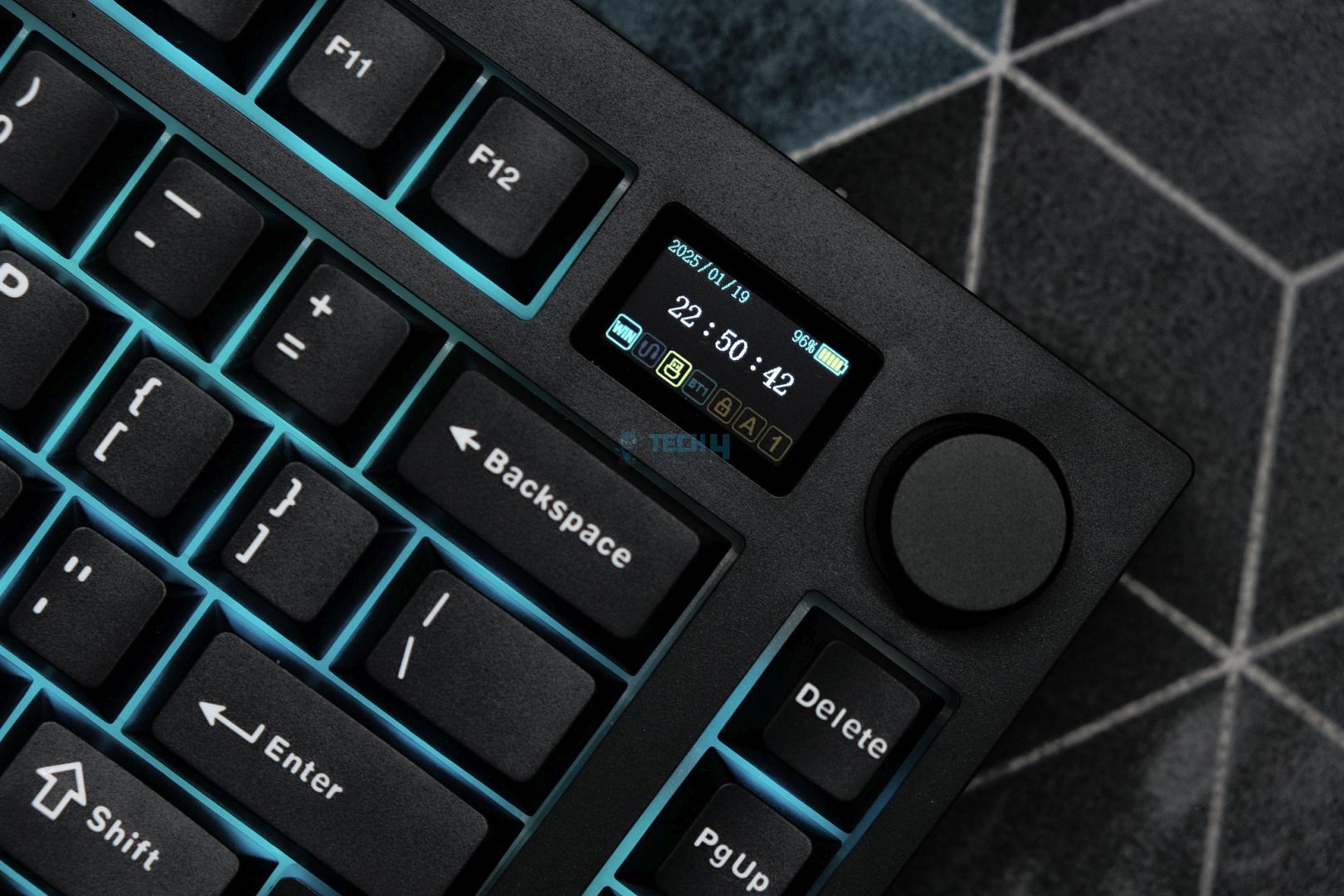
As you can see in the video above, there are essentially 4 layers to the screen. There’s the custom picture or animation you can upload, the homepage with the date and time along with other info like connection mode. The font here is ugly and you can’t switch to a 12-hour clock. Then there’s multiple pages for controls like RGB, volume, language etc. 

Lastly, there’s a final layer showing live readouts of your CPU and GPU usage. This is real-time and updates every second; it also looks very clean and modern. The software must be running in the background for this to work. When you switch from another layer to this, it’ll always take a second or two to start working again.

Real-time hardware info on the Tecware Spectre 75
Real-time hardware info on the Tecware Spectre 75 (Image by T4G)

You can toggle between these layers with the use of the volume knob or click it in while pressing the Fn key to return to the default volume control. The knob itself is nice and smooth with a satisfying ratcheting mechanism. This entire package is the complete opposite of the Aula F75 Max whose screen was way too dim along with a loose knob.

The Fundamentals

I was quite disappointed with the inner components of Tecware boards previously, but the company has seriously stepped up their game.

Keycaps

The Spectre 75 has high-quality doubleshot keycaps made out of PBT. These are not shinethrough like their predecessors but what you give up in RGB you gain in everything else. Firstly, the legends are as sharp as ever. Everything is even and the modifier keys are centered perfectly. The font is sober and not aggressively cheap like it was before. 

Tecware Spectre 75 keycaps
Tecware Spectre 75 keycaps (Image by T4G)

Turning these caps around, you’ll see a fine doubleshot mold with no markings left from the factory. They’re plenty thick, too, and have a nice matte texture with almost no grittiness. There is no stem wobble. Tecware also provides a piece of spacebar foam in the box that you can stick to the back of the spacebar yourself to add some depth to the sound.

Tecware Spectre 75 up close
Tecware Spectre 75 up close (Image by T4G)

Switches

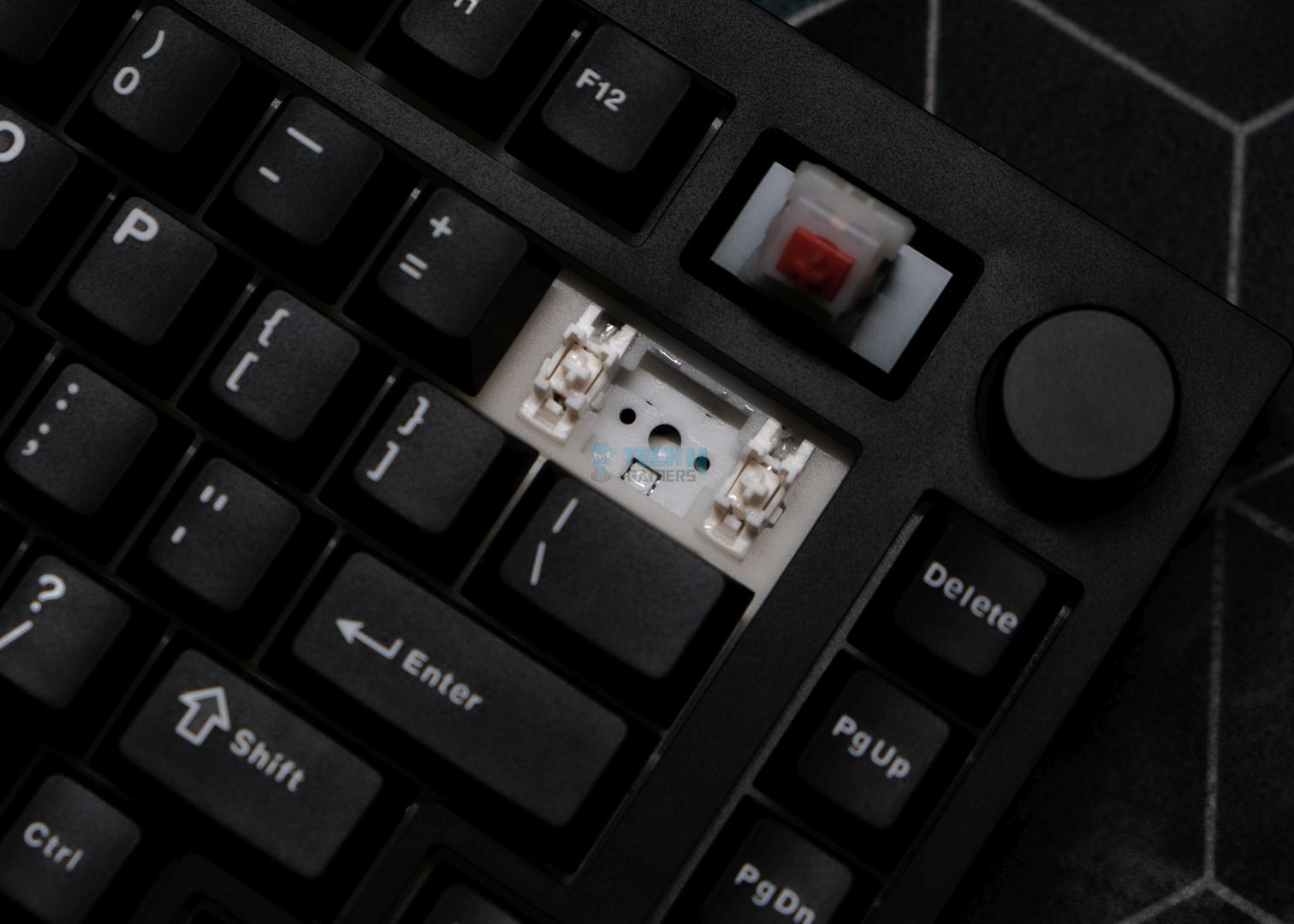
Tecware is using their proprietary Candy Red linear switches in the Spectre 75, but you can also get Cocoa Browns which are tactile. These are pretty run-of-the-mill 45g switches that come pre-lubed from the factory. The lube job is consistent, and these switches have minimal stem wobble. 

The Candy Red linear switches inside the Tecware Spectre 75
The Candy Red linear switches inside the Tecware Spectre 75 (Image by T4G)

Taking a closer look at these, they have a Kailh-style housing with a total travel distance of 3.5mm. The spring is slightly oiled with plenty of lube on the housing. All this ends up creating a nice, deep sound that’s not too thocky with enough volume. The sound isn’t particularly characteristic but it’s just as satisfying as these switches are smooth. 

Stabilizers

Tecware is using standard plate-mount stabilizers in the Spectre 75, and they’re upgraded to “V2” according to the company. These stabs come factory lubed and have great stock performance. They’re practically perfect out of the box with no ticking or rattling exhibited in any modifier. All 4 keys feel and sound consistent and the spacebar is especially flawless.

Connectivity & Performance

The Spectre 75 is a wireless keyboard, so it comes with a 4000mAh battery inside. With the screen on and playing a GIF, along with per-key RGB, you’ll get about a day’s worth of endurance. The board takes some time to charge back up, but without the RGB and screen on, it can last up to 400 hours on a single charge. 

The performance is great, too. I faced no connection issues playing wirelessly using the 2.4 GHz dongle, even for competitive games. You can always plug in for the most hectic sessions, but even without that, the Spectre 75 is a reliable keyboard. It’s easy to switch between modes because the button is located right next to the USB port up top.

Typing Experience

Tecware has done a great job with the overall typing experience of the Spectre 75. The sound and feel are on par with any other budget prebuilt. It sounds ever so slightly creamy with impactful thuds on each keypress. It’s a joy to hit the spacebar each time, especially after it’s foamed up with the provided sticker. 

But that’s the thing: the acoustics aren’t just your typical foam-reliant signature, but they have a higher pitch to them, which makes it a bit more interesting. The typing feel is firm as the gaskets aren’t really soft, and even if you try hard to apply pressure, there’s barely any give in the PCB-plate assembly. I’d say if the switches had more travel, then this’d be the best budget typing experience I’ve ever had.

The Software 

The Spectre 75 comes with its own custom software that you can download from their website. The software is identical to the one seen on the Aula F75 Max and even the Galaxy70 (minus the custom theme). Hence, it works wirelessly as well but you can only configure the screen if you’re plugged in.

The software tells you your exact battery percentage in the top corner

Before you get the software up and running, there’s also a dedicated firmware upgrade tool you need to download. It’s listed right next to the software, and they tell you to use it, so it’s hard to miss. Once that updates your keyboard then you can use the screen to its fullest potential. 

Everything is laid out nicely in the form of tabs on the right. You have all the expected options, like custom keymapping, macros, RGB controls, and even a separate section for per-key lighting if you’re into that. There’s a settings tab at the end where you can change the automatic sleep time and key response time

The settings page doesn't have a firmware upgrade option
The settings page doesn’t have a firmware upgrade option
[editors_note] We saw the option to adjust the key response time in the Galaxy70 review as well, and it works similarly here. It lets you adjust the delay before a keypress is registered, with Level 1 offering the fastest response but a higher risk of chatter and Level 5 adding delay to stabilize input and prevent unintended multiple presses.[/editors_note]

The interesting bit is the screen tab. Here, you can add whatever GIF or image you want to upload to the keyboard. Everything, including the default animation, is saved and kept in one place so you can come back to reupload it without having to dig through files again. I had this crash on me twice while trying heavier GIFs, but it was smooth otherwise.

The default cherry blossom animation is saved

For some reason, the software throws up an error message each time saying only 45 frames are allowed per animation, but you can just ignore that and continue to upload the GIF anyway. It takes roughly 1.2 seconds per frame to upload, and the only bad part is that you can’t crop or resize them in the software; what you have is what you get.

The screen tab throwing up error messages for no reason

You can control each frame individually in an animation, so, for example, if you’re trying to add or remove certain frames or even draw on top of them, you have that option. You can also add text in any color and preview your animation before it gets sent to the board. It’s a comprehensive experience overall, just held back by the lack of a resize option.

Should You Buy It?

Buy It If:

✅You’re looking for the best budget keyboard as the Spectre 75 does everything right and adds a few novelties on top without making them feel gimmicky.

✅You want a screen on your keyboard. The screen on the Spectre 75 is not only the best-looking, but it’s actually functional too.

✅You appreciate sleek designs because Tecware has flawlessly mixed a clean aesthetic with solid build quality without any corner cutting.

Don’t Buy It If:

❌ You want the very best value. The Spectre 75, as good as it is, is on the higher side for a budget keyboard, and there are cheaper options available.

❌ You want QMK/VIA and cannot adjust to proprietary tools. Tecware’s software for the Spectre is robust,t but it can be improved.

The Tecware Spectre 75 in all its glory
The Tecware Spectre 75 in all its glory (Image by T4G)

My Thoughts

After an underwhelming showing last time, Tecware has truly bounced back to impress me in the best ways possible. I never imagined the company that made some of the worst budget keyboards I’ve tried would turn around to make the best budget keyboard I’ve ever used. This was a tremendous effort and deserves recognition.

Therefore, I can wholeheartedly recommend the Tecware Spectre 75. It’s got everything you need in a budget keyboard, like solid sound and typing feel. It doesn’t compromise on build quality or design to favor its highlight feature, which is the screen. Instead, the screen on its own is fantastic and only adds to the overall appeal of the board. The Spectre 75 is a no-brainer.


Fans Unwilling To Pay Over $70 For GTA 6 Even If It’s The Perfect Sequel of Their Dreams

Story Highlight
  • Given how invested Rockstar is in its upcoming game, fans have been wondering about the game’s price tag. 
  • Developers want Rockstar to increase the price as it would give them an opportunity to do the same. 
  • However, fans are unwilling to pay over $70 even if the upcoming GTA is the perfect sequel ever. 

GTA 6 has been in development for at least a decade, and Rockstar has heavily invested its resources as well as time. Given how massive the game’s scale will be, fans have different thoughts about what the game’s price will be. 

Veteran journalists think that Rockstar will be forced to price it over $70 as that will benefit it the most. Other than that, the developers are also hoping for the gaming giant to increase the price so they could follow suit. 

However, this would affect the fandom as they aren’t willing to spend anything over $70, even if the upcoming GTA is the perfect sequel of their dreams. 

Why it matters: GTA 6’s hype and anticipation are unreal but believable. However, despite that, fans aren’t willing to spend more, which shows even the $70 price is absurd. 

GTA 6 Price Tag
Majority of The Fandom Is Unwilling To Pay Over $70 Even For A Perfect Game | Source: Twitter

Jez Corden, one of the biggest insiders, recently generated a poll on X, formerly known as Twitter. He asked fans if they are prepared to pay over $70 for GTA 6 if it is the perfect sequel of their dreams

Over 60% of the fandom chose I’d pay $70 max, which makes sense given it is already too much to pay for a video game. 16% have voted to pay $80, 2.7% voted to pay $90, and 20.8% are even willing to pay $100 for the game

While some fans are willing to pay more if there are no microtransactions, no loot boxes, and they get a completely perfect game, others are even unwilling to pay $70 for the game as they would rather wait for a sale. 

I don’t plan on getting it at launch; I’ll wait till it’s on sale between $20-$30. Even if that means waiting a couple of years. My interest is low in this game.

-Twitter User

Even if Rockstar increases the price tag, the game is guaranteed to sell millions of copies on launch. However, while the gaming giant will benefit from a lot of profits it will set a poor precedent for the future

Many developers will follow this trend and try to justify the $80-$100 price tag for their games. This would even up the price of deluxe editions. As of now, Rockstar has not commented on this matter, so it is better to wait for the developer to confirm the price rather than jumping to conclusions. 

What do you think about this matter? Would you be willing to spend over $70 for the upcoming GTA? Share your thoughts with us in the comments section below or join the discussion at the official Tech4Gamers forums