At Tech4gamers, I cover all sorts of gaming news. Whether it’s a leak of any upcoming game or an update, an announcement, or a rumour, I like to write about it all. Over the weekend, I sit and write features where I talk about games that I miss or want to see return.
Story Highlight
Because of Rockstar’s silence, it is believed that GTA 6 may be delayed to 2026.
A Rockstar developer suggests that the title is likely to be playable all the way through already.
Based on this information, the team is in the polishing phase and might meet its 2025 release target.
GTA 6 has been one of the year’s most anticipated releases, but recent reports have suggested that the title could be delayed to 2026. Following such reports, many fans have been worried about the release of GTA 6.
However, one former Rockstar developer has stated that GTA 6 is likely playable already.
Why it matters: Take-Two has recently claimed that the GTA 6 release will be extraordinary and worth the wait. Therefore, Rockstar appears to be spending extra time polishing the game.
During a recent interview with Kiwi Talkz, Mike York, a former Rockstar developer who worked as an animator on GTA 5 and Red Dead Redemption 2, discussed rumors surfacing on the internet.
The exact video has since been unlisted, but Mike believes GTA 6 is already playable and assumes many developers will be testing the game.
I would assume that the game’s probably playable now, and a bunch of people are testing the whole thing all the way through.
-Mike York
He believes that Rockstar has yet to iron out the game’s bugs yet. Therefore, it seems safe to believe that the team is entirely dedicated to squashing the bugs in GTA 6.
The upcoming Grand Theft Auto title might be the industry’s savior
Mike’s statement also provides hope that GTA 6 will be completed in time to arrive in 2025. Because Rockstar still has up to 10 months to fix bugs, there is hope left that the release will not be delayed.
Anyhow, fans are still waiting on official news from the studio. While many hoped to see another trailer before the end of last year, it is hard to say when we will hear more information about GTA 6.
Do you think the title will be delayed to 2026? Let us know your thoughts in the comments, and join the Tech4Gamers Forums for more discussions.
I intitally started by writing CPU comparisons and since then have written articles of all kinds, from Wikis and How-Tos to dedicated CPU reviews. Currently, I test and review CPUs, motherboards, and sometimes, RAM.
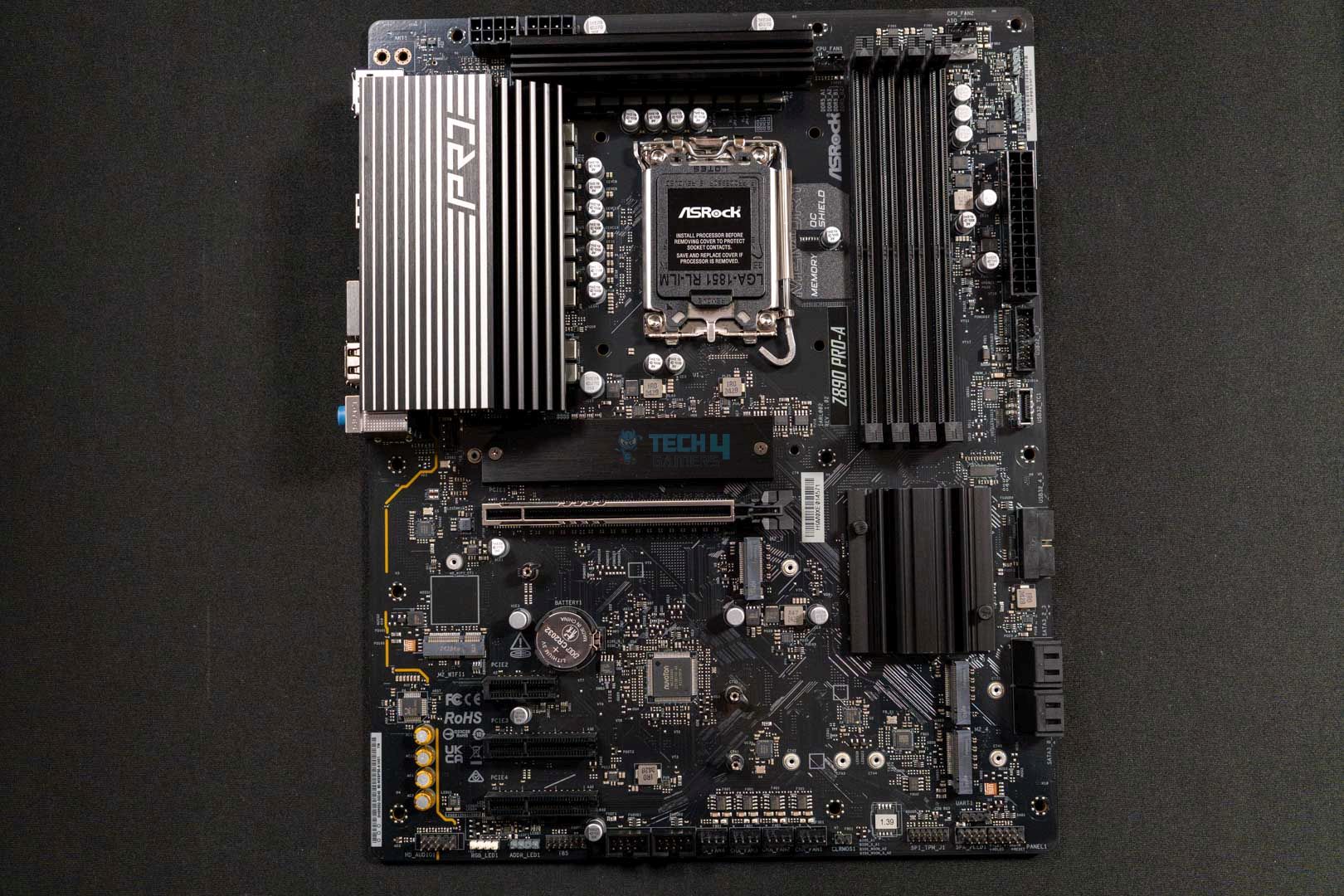
We’ve reviewed a handful of ASRock motherboards in the past few weeks, and for the moment, we’re wrapping up with the ASRock Z890 Pro-A WiFi. This is an entry-level, affordable board ATX Z890 motherboard out there, at $189. For such a low price tag (for a Z890 motherboard), what can you really expect from this board? Only one way to find out.
Why Trust Tech4Gamers
Ali Touseef is our hardware reviewer who tests and reviews different components, including coolers, RAM, motherboards, and processors.
40+ motherboards tested and reviewed by our team of hardware experts (Tech4Gamers Team).
800+ hours spent testing different motherboards for our reviews.
At Tech4Gamers, ensuring you get reliable information is our priority. That’s why every hardware round-up undergoes a meticulous review process by our team of experts and editors. Each review is carefully examined against our strict editorial guidelines, guaranteeing you trustworthy insights you can depend on.
Key Takeaways
The ASRock Z890 Pro-A WiFi is an entry-level ATX motherboard offering solid performance, fast DDR5 memory support, and a decent feature set—including Thunderbolt 4—at an affordable price.
You should buy the ASRock Z890 Pro-A WiFi if you’re on a tight budget and want a Z890 motherboard.
You should not buy the ASRock Z890 Pro-A WiFi if you want the most performance or features, as it is a rather stripped-down option because of its low price.
This is a very bare-bones motherboard as you can see from the specifications. This is also the first “Pro-A” motherboard for the ZX90 chipset series; previously, we saw this lineup as part of the B760 chipset.
[toc]
Packaging And Unboxing
ASRock Z890 Pro A — Box Front (Image credit: Tech4Gamers)
The motherboard comes in predominantly white-themed cardboard packaging, which is interesting because the motherboard itself is entirely black.
We get some key features on the front and a picture of the motherboard. On the back, some more features are highlighted along with the detailed specifications.
ASRock Z890 Pro A — Accessories, Guide, IO Shield (Image credit: Tech4Gamers)
Here’s what we get inside the box:
Quick installation guide
Regulatory notices
I/O shield
2x SATA DATA cables
1x screw for M.2 slot
Nothing special here, although it has been a good while since we last saw a motherboard not come with a pre-installed I/O shield. Don’t make the rookie mistake of putting the whole build together without putting it on first!
Design
ASRock Z890 Pro A – Main Design (Image credit: Tech4Gamers)
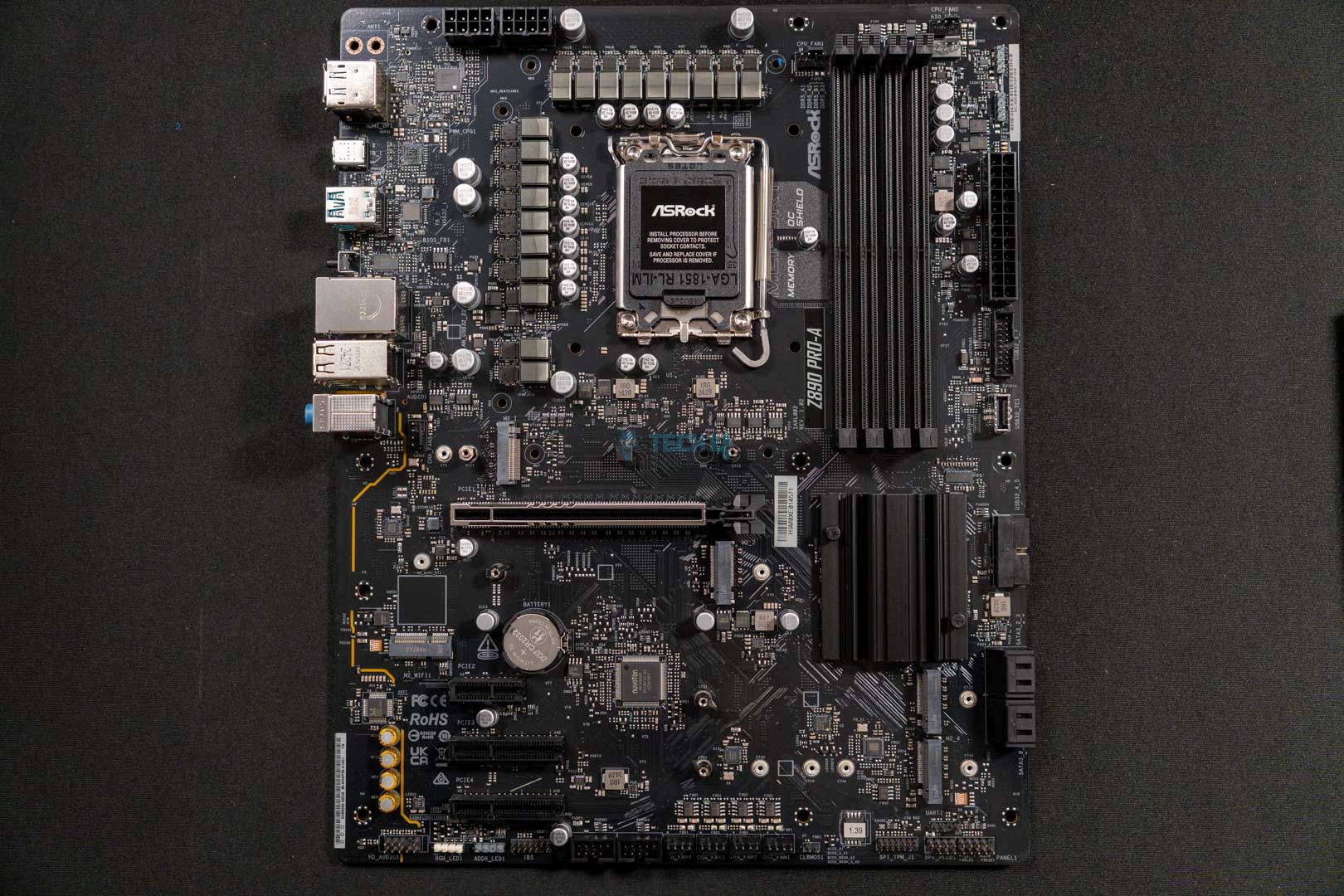
The motherboard has an all-black PCB and heatsinks. It’s not loaded with heatsinks, one of the telltale signs of a budget motherboard. There’s no RGB on board, but you can connect your own. It’s a very basic design, rightfully so considering the price, and is ideal if you’re looking to build an all-black PC, it will do just fine.
It uses a 6-layer PCB with 2oz copper layers in between.
Block Diagram
Looking at the block diagram, the CPU socket powers DDR5 memory, PCIe Gen 5 expansion and storage (along with a Gen 4 M.2 slot), Thunderbolt 4, and the 20Gbps port, too. The CPU connects to the chipset through a DMI Gen 4 x8 link, and the chipset powers the remaining USB ports, storage, and PCIe provisions. It also powers LAN, WiFi (not included) audio, and the super I/O controller.
CPU Socket And Power Delivery System
Top Design
CPU Socket
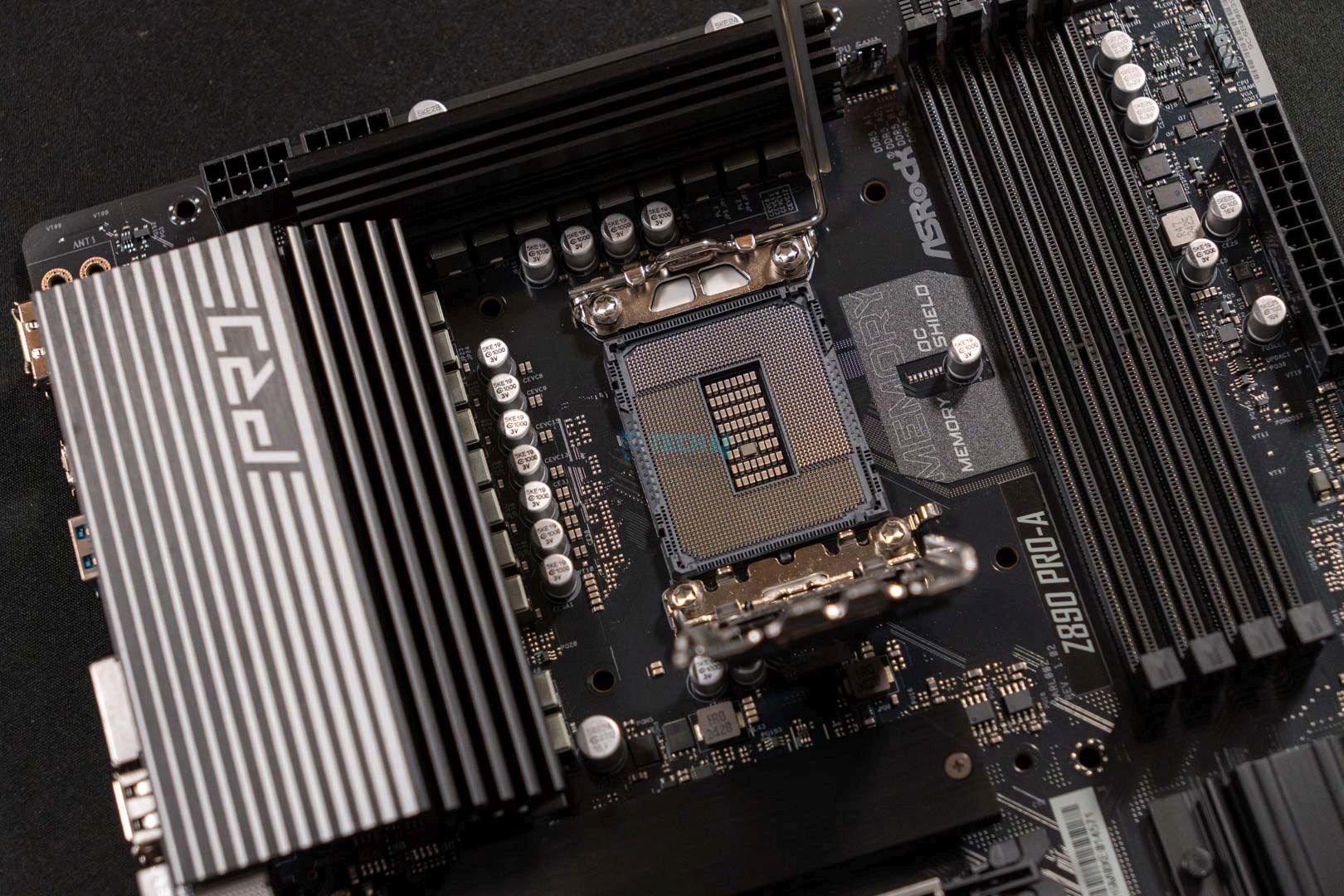
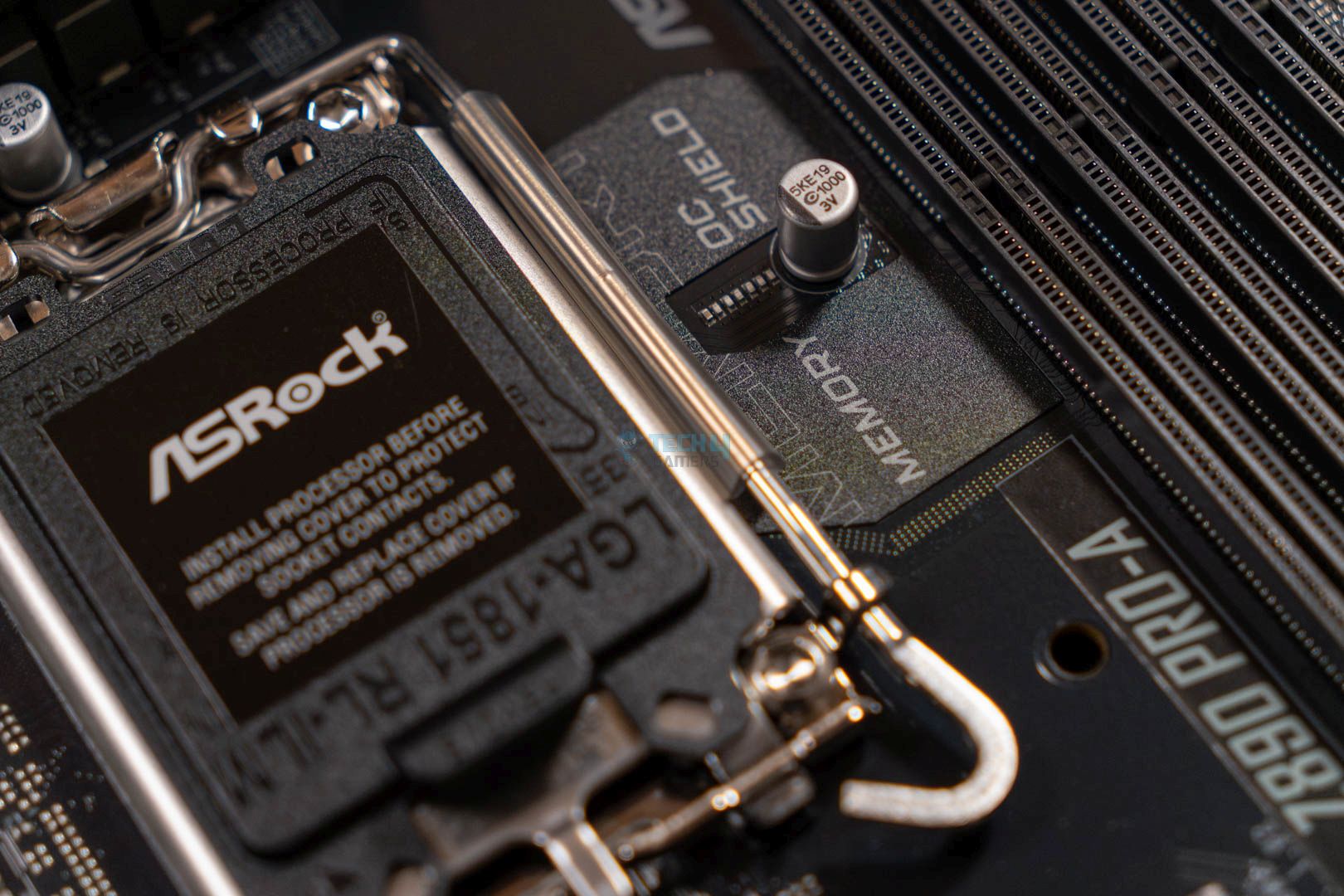
The ASRock Z890 Pro-A Wi-Fi uses the new LGA 1851 socket and supports the latest 15th-generation Arrow Lake CPUs. Previous-gen CPUs are not supported. This is the RL-ILM (reduced load Integrated Loading Mechanism) designed to reduce and distribute more evenly, the pressure on the CPU. Using the new mechanism is optional for motherboard vendors, so it’s good to see it being used here.
VRM Structure
Closer Look At VRMs
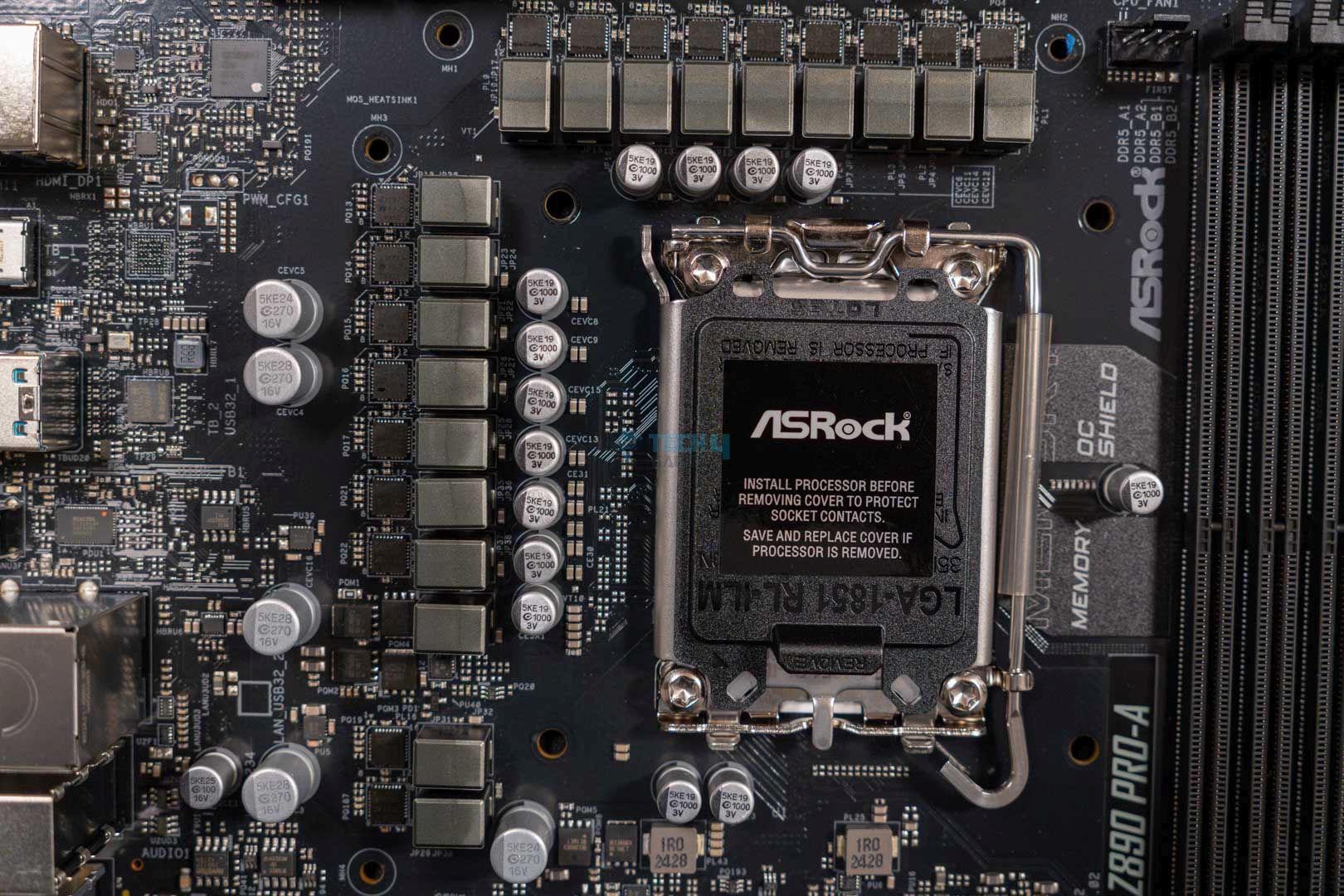
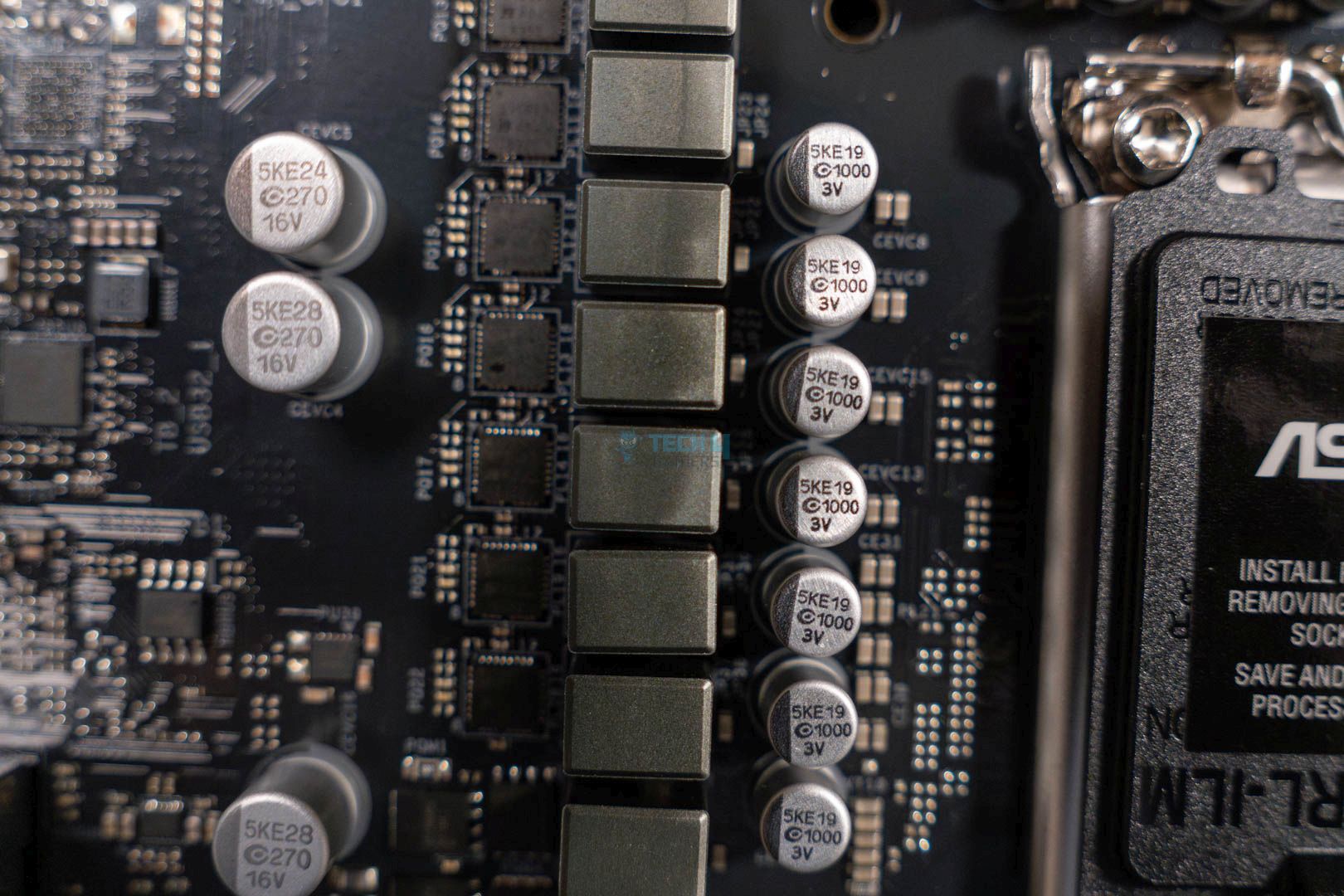
We get a 16+1+1+1 power phase design (including 16x for the VCore and one each for VCCGT and VCCSA). The VCore power phases are SPS (along with VCCGT) and provide 60A each making for a total of 960A, plenty for even the Core Ultra 9 285K, but overclocking potential will be limited, of course.
ASRock Z890 Pro A — CPU Connector (Image credit: Tech4Gamers)
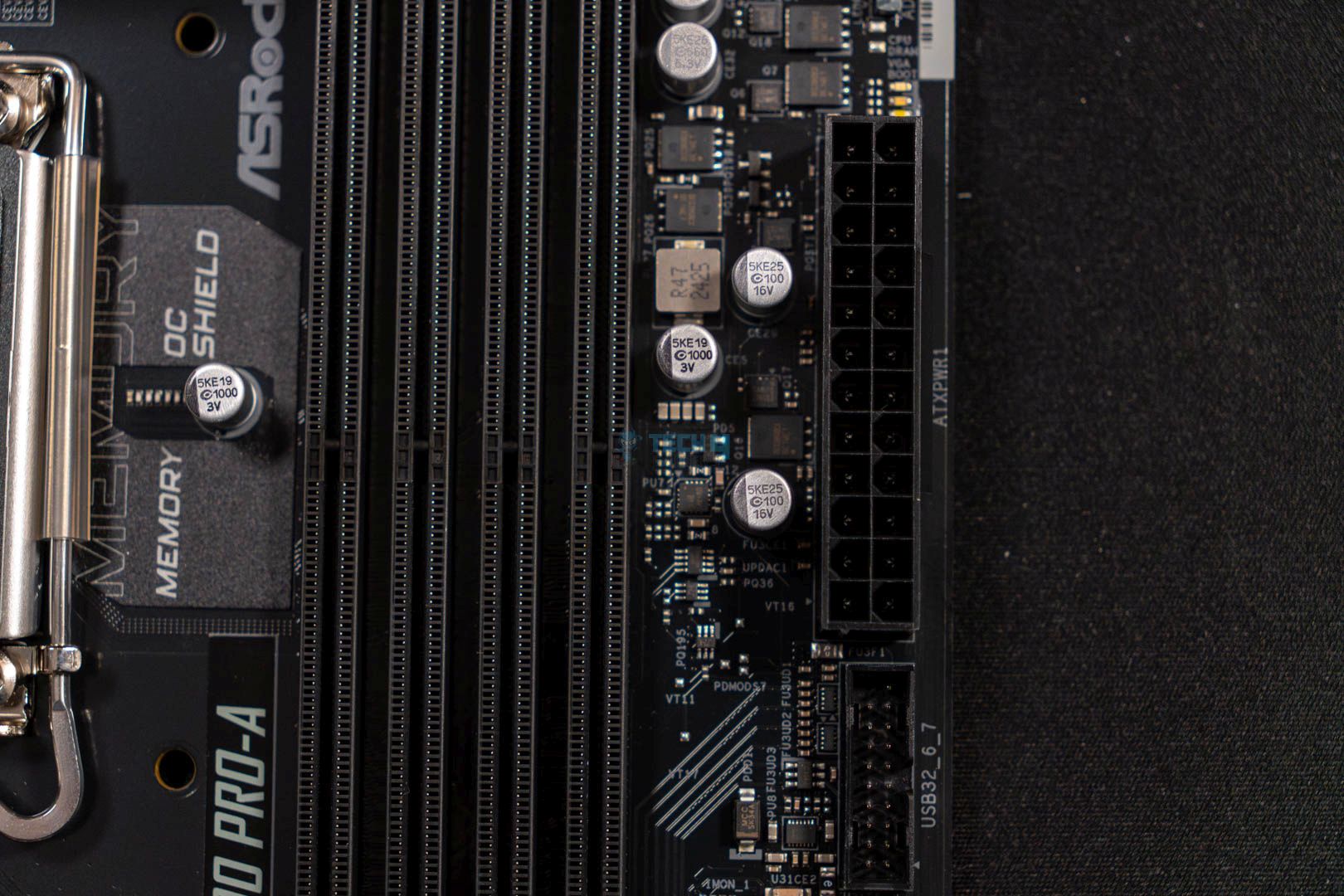
To feed power into the VRMs for regulation and other stuff, the motherboard features ASRock’s two high-density EPS power connectors in the top left corner of the motherboard. Both of these connectors can provide enough juice to easily run flagship processors such as the Core Ultra 9 285K.
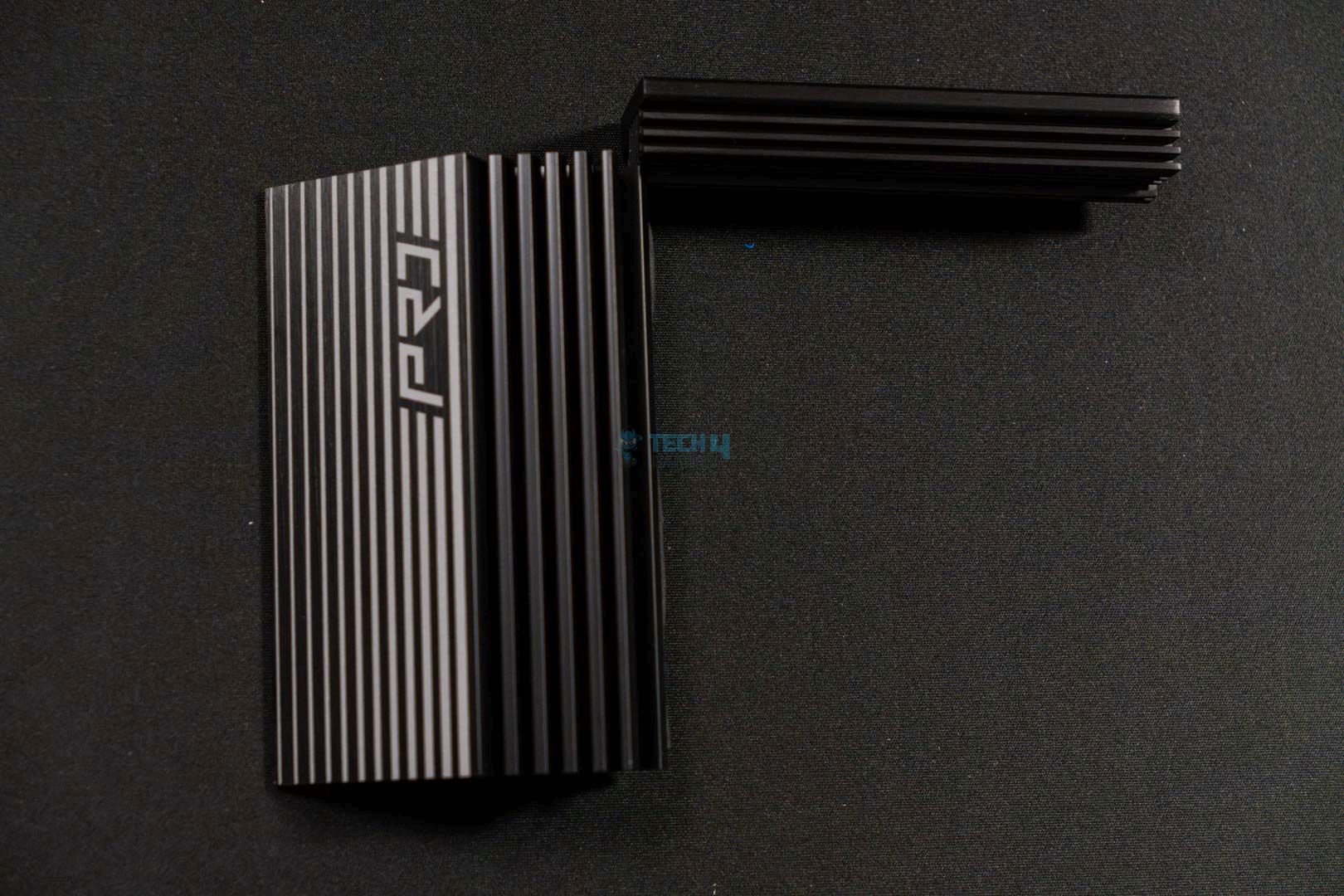
VRM Heatsink Stacked Design
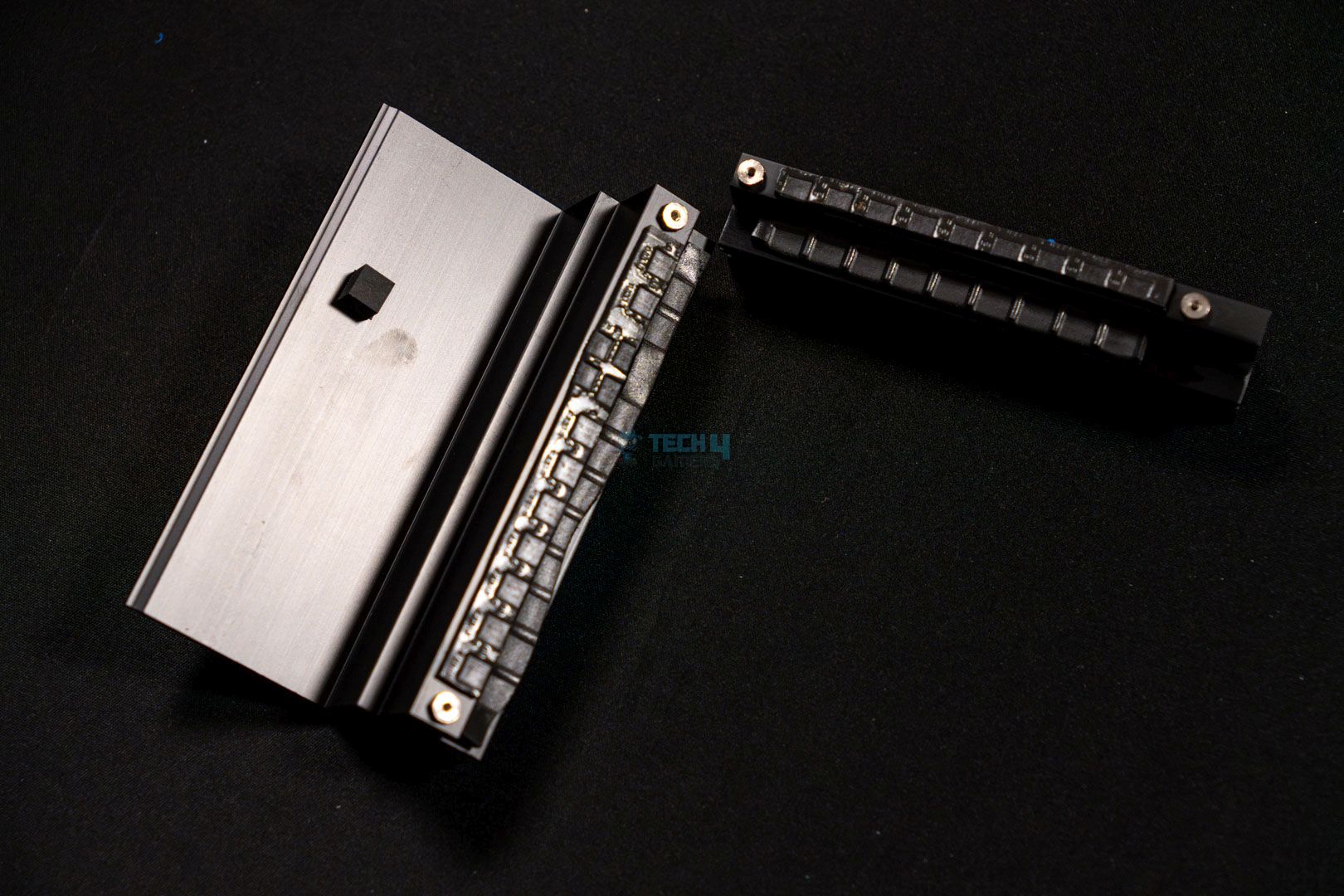
VRM Heatsink Thermal Pads
This ASRock Z890 Pro A has two fairly large VRM heatsinks with thermal padding underneath that works together to take care of the piping hot VRMs and stops them from reaching unfavorable temperature numbers.
Rear IO Cover (Image credit: Tech4Gamers)
DIMM Slots
DIMM Slot (Image By Tech4Gamers)
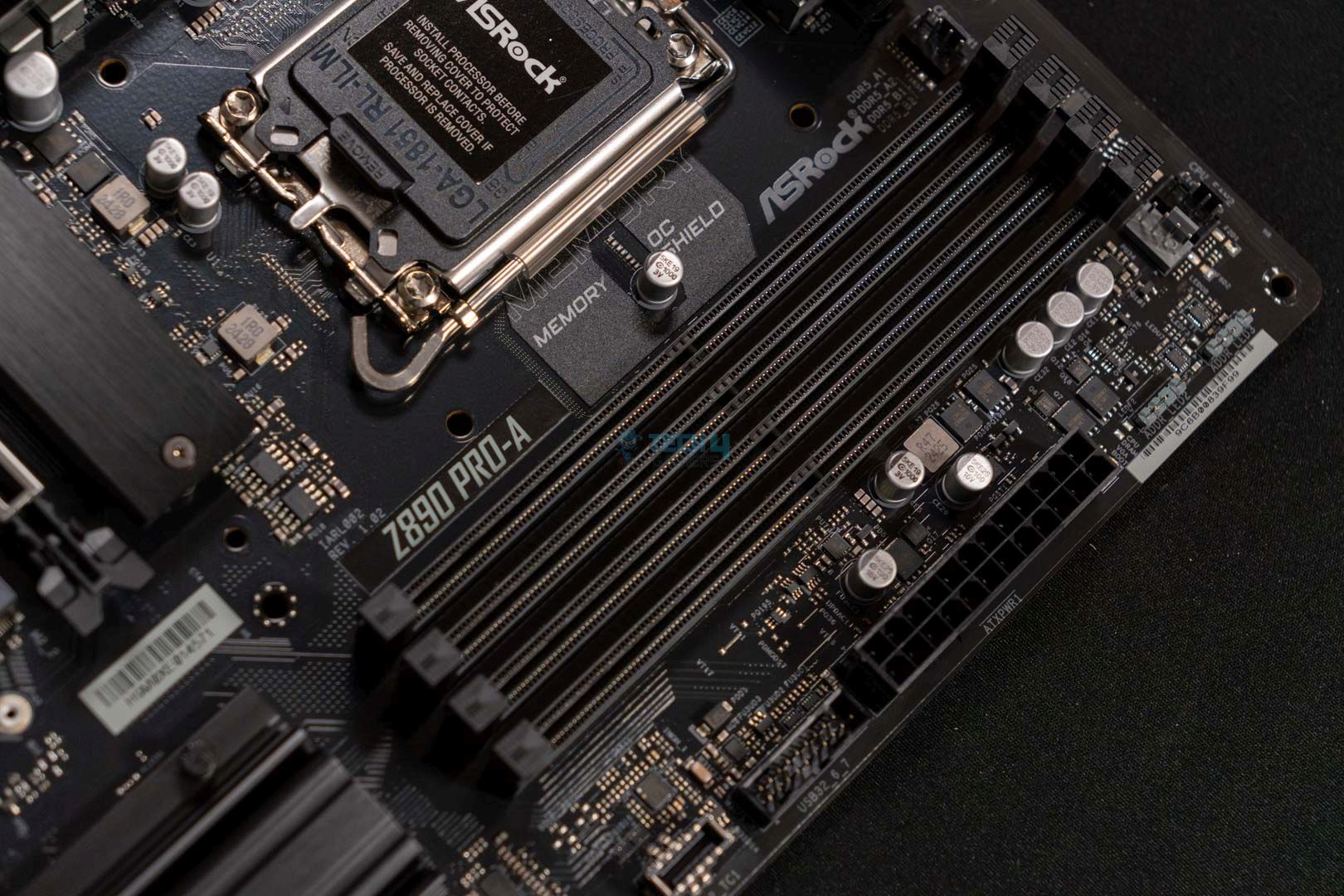
The ASRock Z890 Pro A features four DIMM slots in a 2 DIMM per channel configuration. The motherboard supports DDR5 memory with a maximum capacity of 256 GB. Moreover, like many other Z890 motherboards such as the MSI MEG Z890 Unify-X, this one also supports the latest DIMM standard, which is called CUDIMM.
Simply put, it saves the CPU from handling the task of clock cycle reintegration and does it itself using the available clock driver. This method ensures superior signal quality and memory frequency. As we’re discussing memory and its frequency, let’s talk about its maximum speed support as well. This motherboard has support for faster memories with speed reaching, 9066+ MT/s (OC).
By default, the DRAM will operate at 4400 MT/s or 5600 MT/s, though, it can be set to the supported 9066 MT/s via the incorporated Intel X.M.P profiles. These are the supported configurations by X.M.P profiles:
1DPC 1R = 9066+ MT/s (OC)
1DPC 2R = 6800+ MT/s (OC)
2DPC 1R = 6533+ MT/s (OC)
2DPC 2R = 5600+ MT/s (OC)
Storage Options
M.2 SSD Slot
SATA Connector
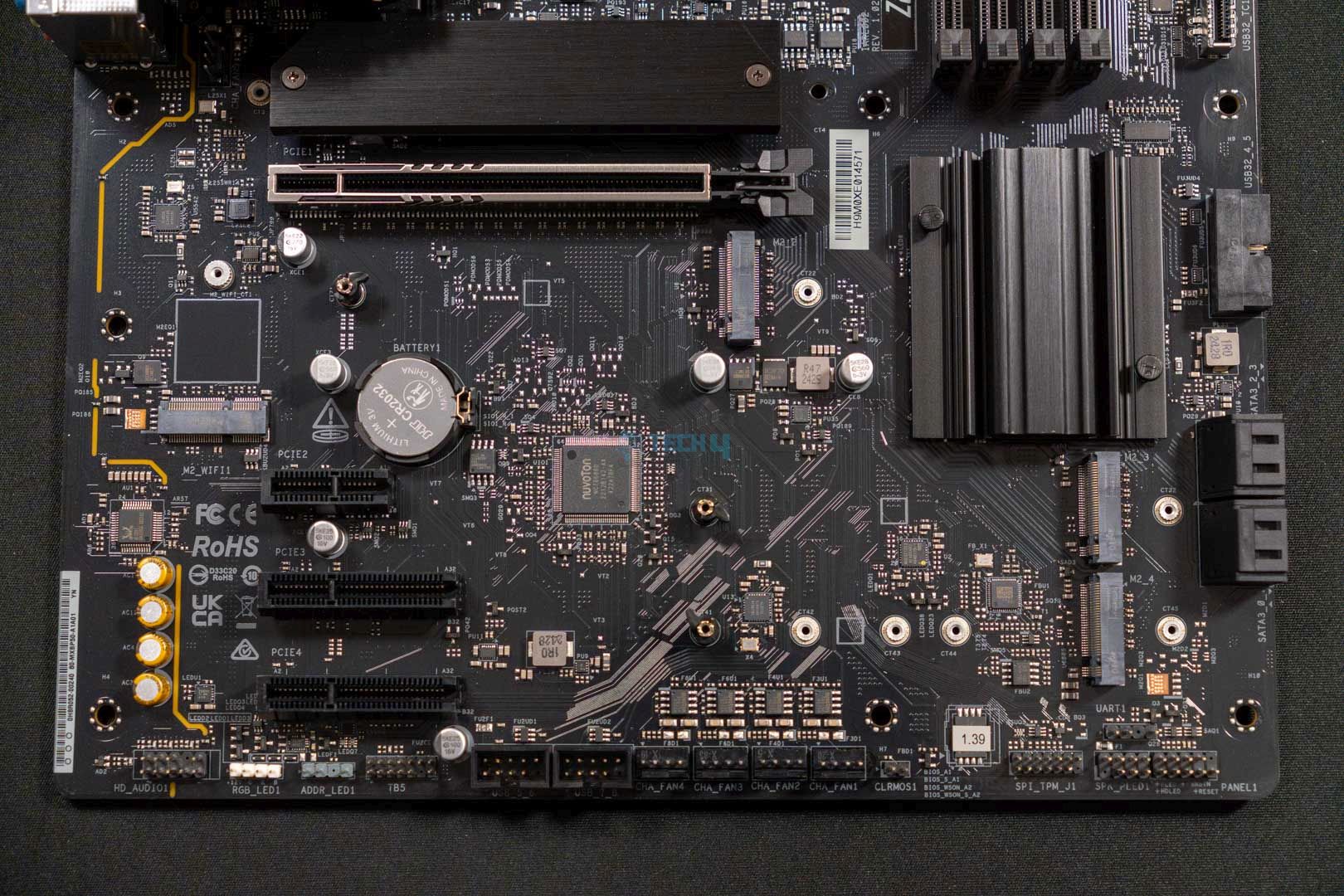
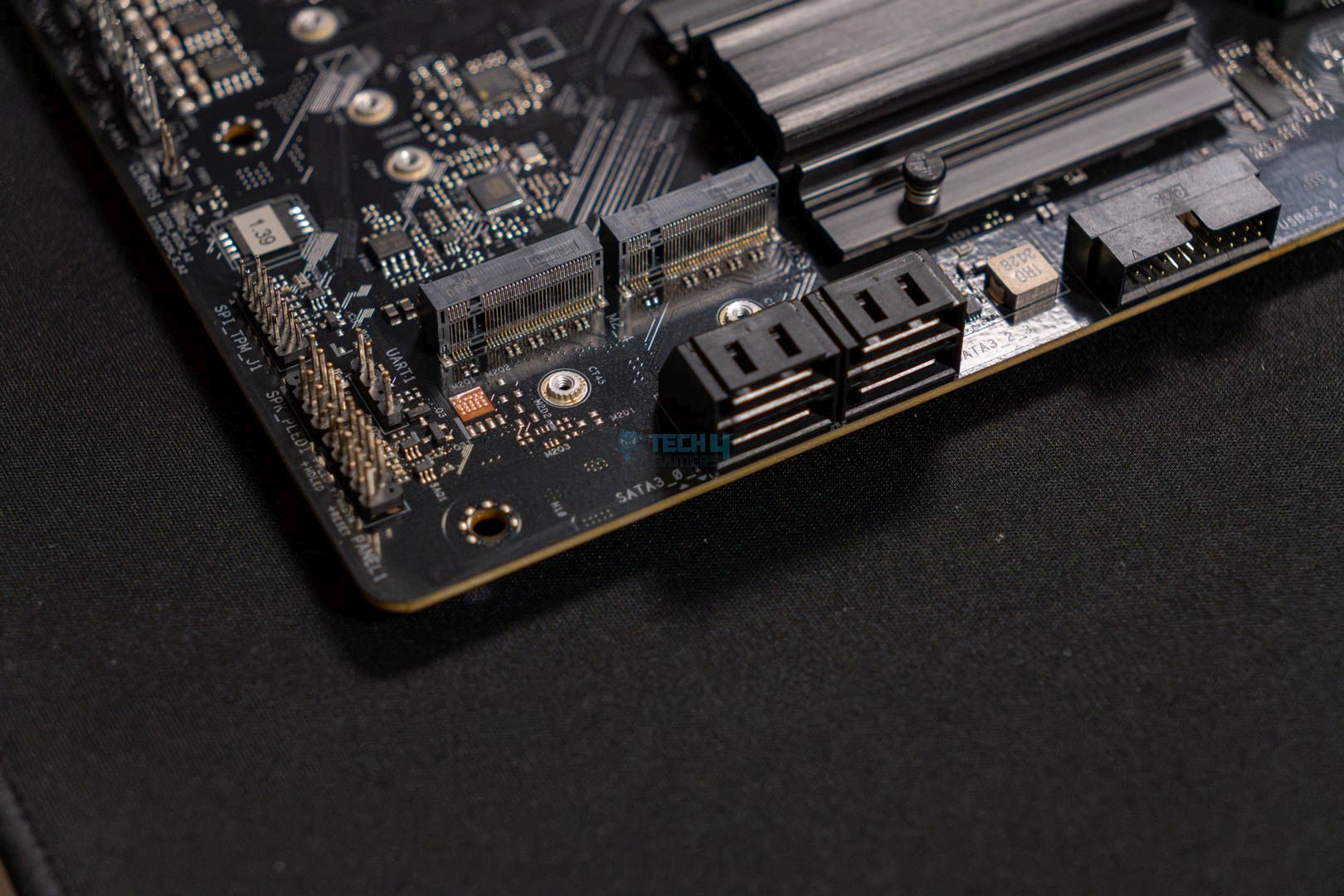
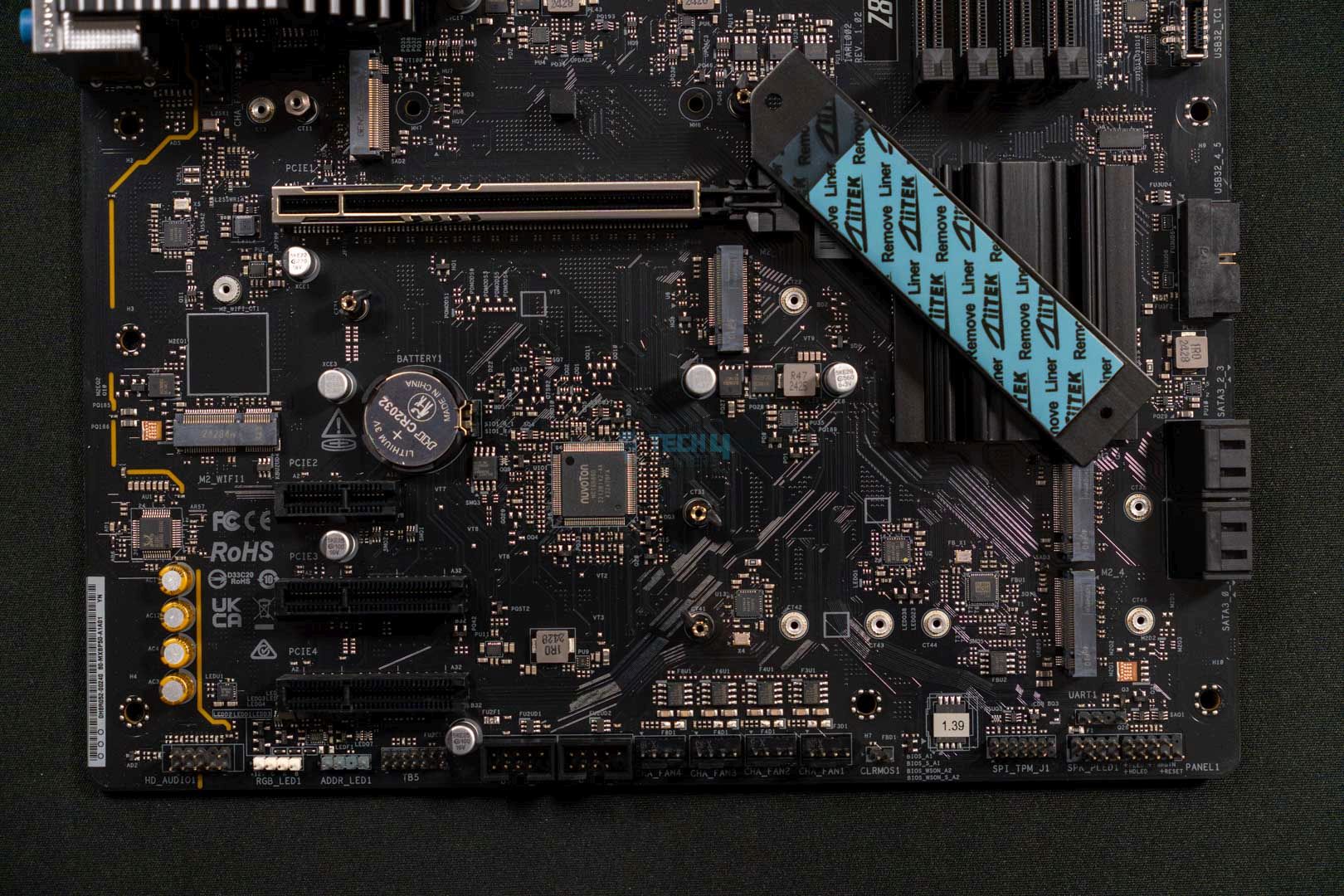
The storage situation is also not bad on this motherboard as it offers four M.2 slots as well as four SATA3 6.0 Gb/s ports. The primary slot, which is right under the CPU socket, is a PCIe Gen5 slot that supports type 2280 NVMe drives only. Additionally, this is the only M.2 slot that comes with a heatsink cover, which makes sense as it’s an entry-level Z890 board.
As for the rest of the storage options, all other three M.2 slots are PCIe Gen4. Whereas the M.2_2 and M.2_3 support the same type of 2280 drives only as the primary M.2 slot. As for the M.2_4, it also supports 2230, 2260, and 2242 besides the 2280 cut.
ASRock Z890 Pro A — SSD Heatsink Thermal Pads (Image credit: Tech4Gamers)
As far as the RAID support goes, the motherboard’s supported RAID modes for SATA & NVMe storage drives are RAID 0, RAID 1, RAID 5, and RAID 10.
PCIe Slots
ASRock Z890 Pro A — PCIe Slot (Image credit: Tech4Gamers)
The motherboard also has a fair selection of PCIe slots, the primary slot is the PCIe Gen5 x16 slot which also features the ASRock reinforced steel shielding that ensures better signal stability and better installation for heavier graphics cards. Other than this, the motherboard boasts two PCIe Gen4 x4 slots and one PCIe Gen4 x1 slot. Also, the primary slot is the only slot that features a latch system, and the rest three are completely free.
USB Connectivity
The ASRock Z890 Pro-A features a total of 18 USB ports:
1 x Thunderbolt 4 Type-C (Rear)
1 x USB 3.2 Gen2x2 Type-C (Rear)
1 x USB 3.2 Gen2x2 Type-C (Front)
1 x USB 3.2 Gen2 Type-A (Rear)
6 x USB 3.2 Gen1 (2 Rear, 4 Front)
8 x USB 2.0 (4 Rear, 4 Front)
The USB offering on this entry-level motherboard is very impressive, as it features a good number of USB ports. Also, it’s great to see that the motherboard retains at least one Thunderbolt 4 Type-C port, along with the other USB 3.2 Gen1/2 ports. Besides that, the PD 3.0 charging is supported and the motherboard can output a power of 15W via its PD-supported Type-C port.
Network And Connectivity
ASRock Z890 Pro A — M.2 Wi-Fi (Image credit: Tech4Gamers)
Since it’s an entry-level board, the motherboard does not offer any wireless network functionality. However, it does come with a PCIe type 2230 M.2 socket where you can install a Wi-Fi module yourself. Nonetheless, the wired network functionality is still present as the motherboard comes with a Dragon RTL8125BG module that offers speeds up to 2.5G. It also supports the Dragon 2.5G LAN software which offers a lot of different functions such as network stats, bandwidth control adjustments, and preloaded settings for various use cases.
Audio Solution
The ASRock Z890 Pro-A comes with a Realtek ALC897 audio codec, which isn’t a very high-quality one. As we’re talking about entry-level stuff here, this codec is fine for everyday casual use because it at least supports 7.1 CH HD audio.
Internal Connectors And Components
Fan Header
Motherboard Connector
This is what you get in terms of internal connectivity:
1x SPI TPM Header
1x Power LED and Speaker Header
1x RGB LED Header
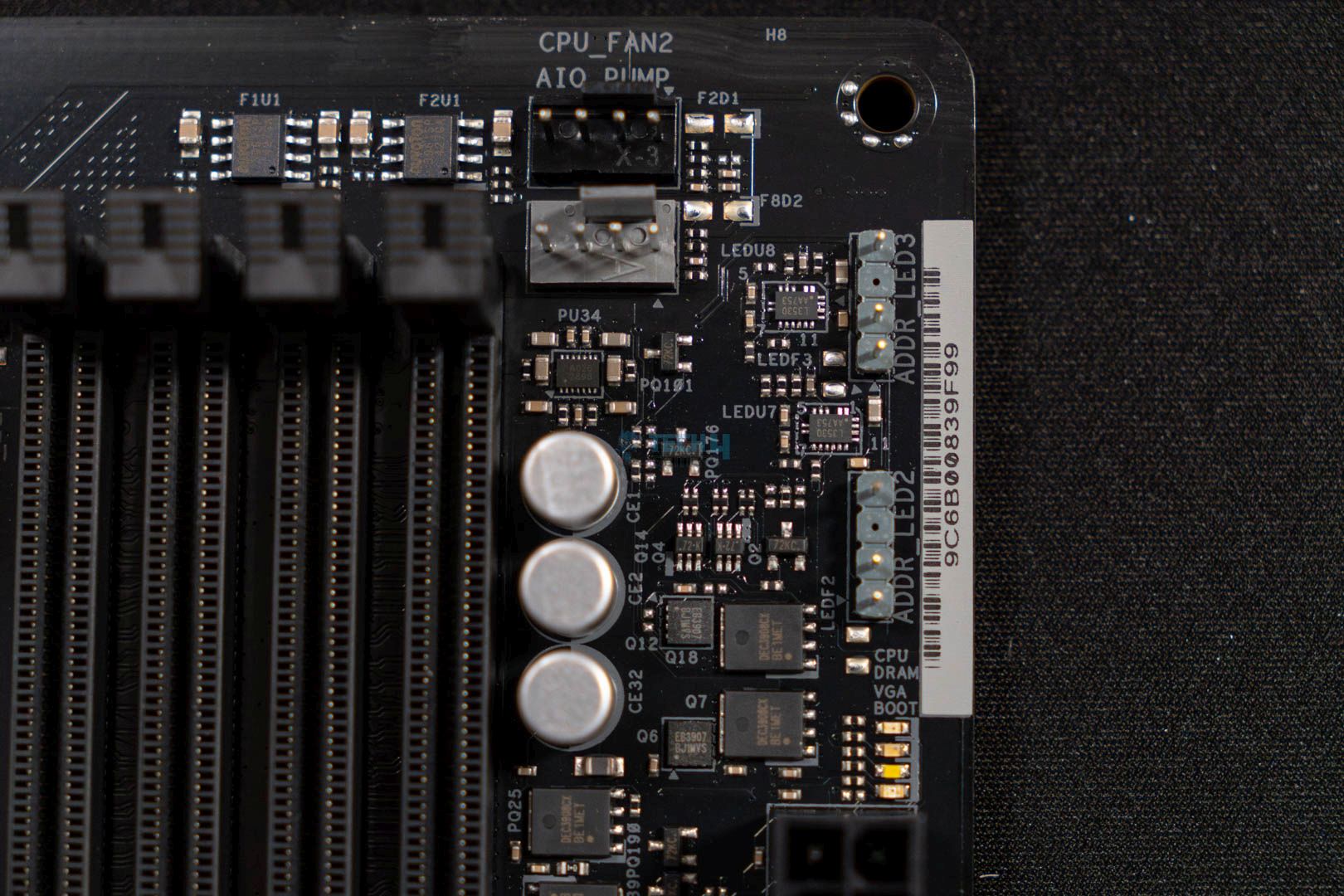
3x Addressable LED Headers
2x CPU Fan Connectors (4-pin) (Smart Fan Speed Control)
5x Chassis Fan Connectors (4-pin) (Smart Fan Speed Control)
1x AIO Pump Fan Connector (4-pin) (Smart Fan Speed Control)
1x 24-pin ATX Power Connector
2x 8-pin 12V Power Connectors (Hi-Density Power Connector)
1x Front Panel Audio Connector
2x USB 2.0 Headers (Support 4 USB 2.0 ports)
2x USB 3.2 Gen1 Headers (Support 4 USB 3.2 Gen1 ports)
1x Front Panel Type C USB 3.2 Gen2x2 Header (20 Gb/s)
The ASRock Z890 Pro-A doesn’t back out on the essential connectors and comes integrated with pretty much all of them. Connectors like the ARGB headers, front USB & audio, and several chassis fan & pump fan connectors are all present on this motherboard.
ASRock Z890 Pro A — Super Controller (Image credit: Tech4Gamers)
Furthermore, the motherboard uses the Nuvoton NCT6686D I/O controller to make sure that everything related to the motherboard I/O and its monitoring is under control.
Rear I/O
2x Antenna Mounting Points
1x HDMI Port
1x DisplayPort 1.4
1x Thunderbolt 4 Type-C Port
1x USB 3.2 Gen2x2 Type-C Port (20 Gb/s)
1x USB 3.2 Gen2 Type-A Port (10 Gb/s)
2x USB 3.2 Gen1 Ports
4x USB 2.0 Ports
1x RJ-45 LAN Port
1x BIOS Flashback Button
HD Audio Jacks: Line in / Front Speaker / Microphone
Firstly, the motherboard does not feature an integrated I/O shield, which is something new as it hasn’t happened for a while. Secondly, the port selection is fine, as here we get 1x Thunderbolt 4 Type-C port, 1x USB 3.2 Gen2x2 port, 2x USB 3.2 Gen1 ports, 2x antenna mounting points, BIOS flashback button, audio jacks and more.
ASRock Z890 Pro A – Naked Motherboard (Image credit: Tech4Gamers)
Here you can take a look at the motherboard with all of its heatsinks removed.
Test Setup
These are the components that we used to test the motherboard:
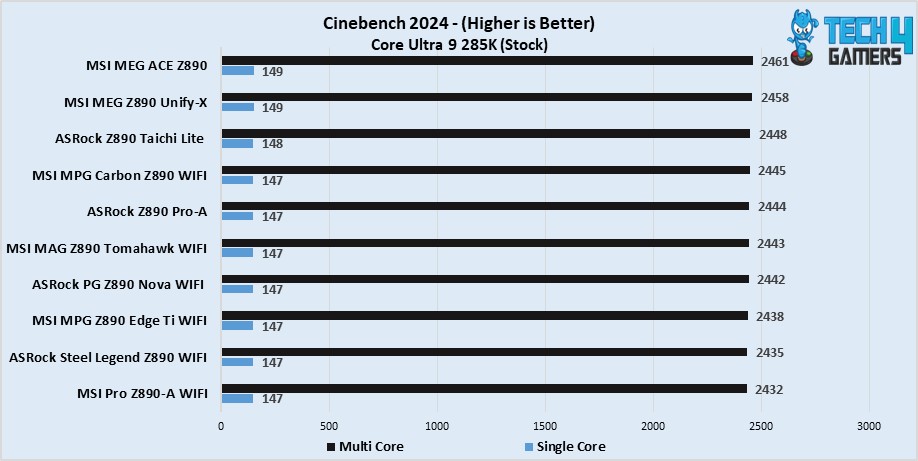
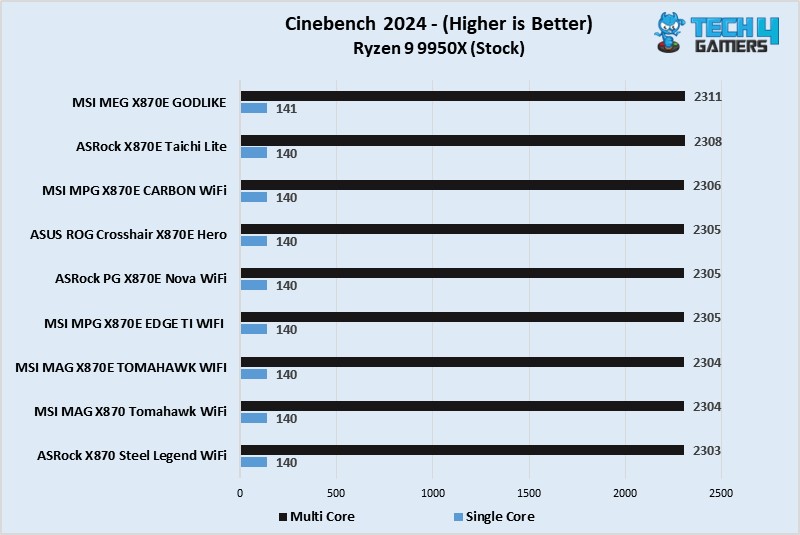
The ASRock Z890 Pro-A starts great in our testing as it scored 147 points for single core and 2444 points for multi-core in the Cinebench 2024 benchmark.
CPU-Z
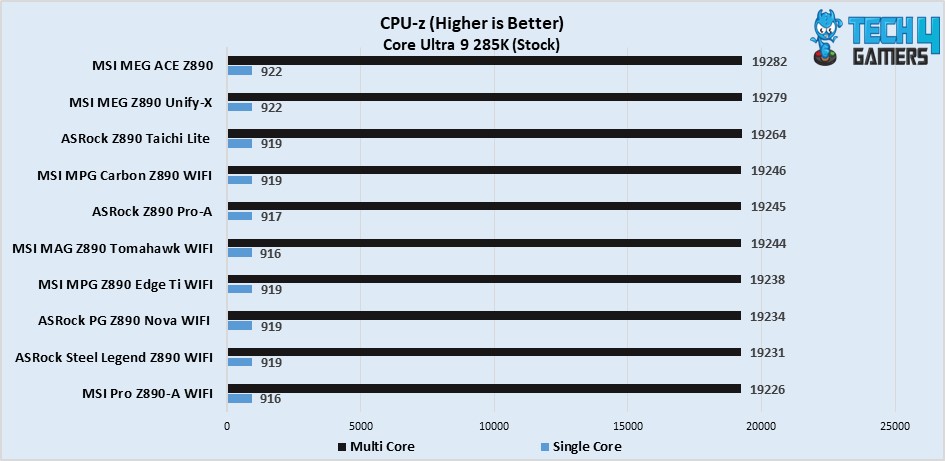
The motherboard does the same in the CPU-Z benchmark. It managed to beat the likes of MSI MAG Z890 Tomahawk WiFi by a negligible margin. The scores it achieved are 917 for single core and 19245 for multi-core.
Blender 4.0.2
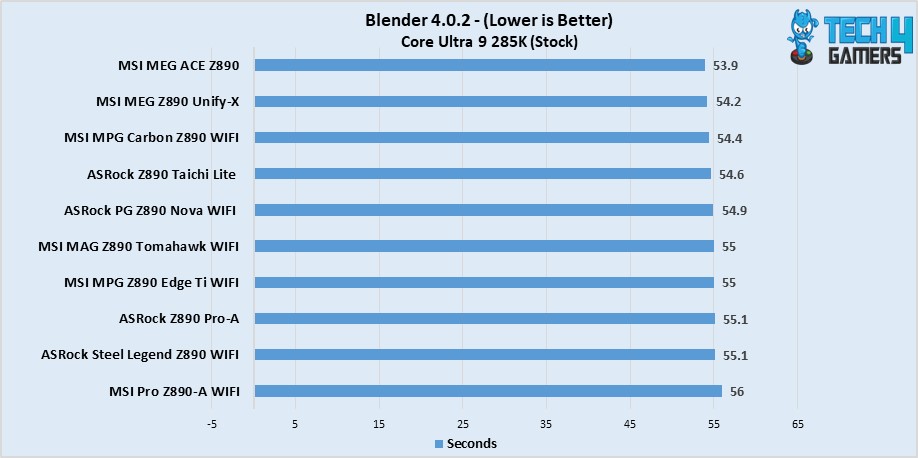
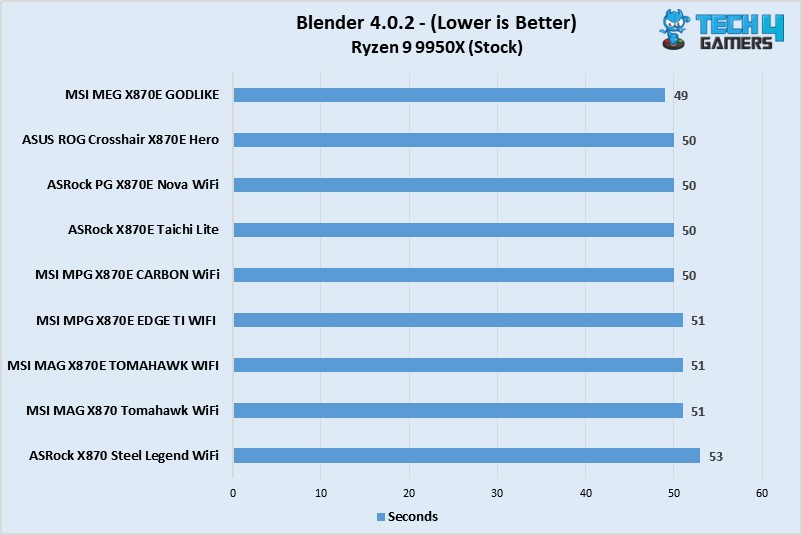
The ASRock Z890 Pro-A also fairs well during the Blender 4.0.2 rendering run by completely the render in 55.1 seconds, which isn’t too far behind the other more expensive motherboards.
V-Ray
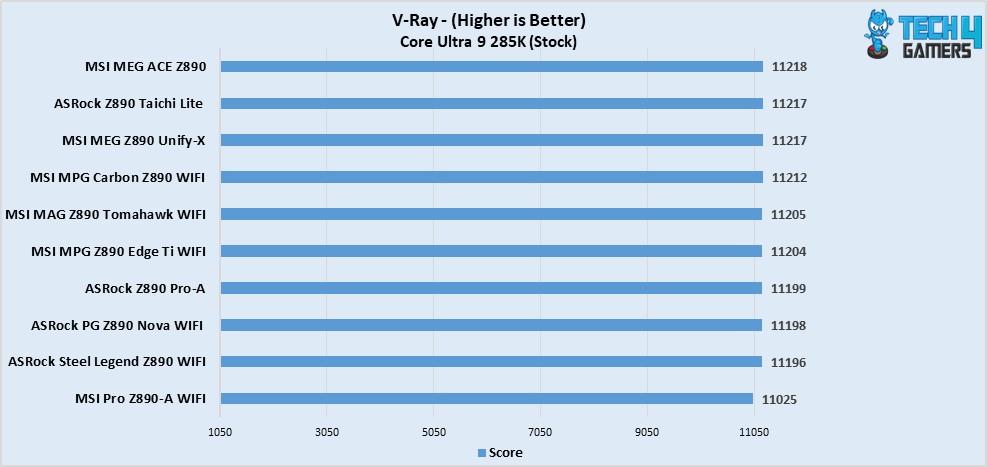
The situation doesn’t change much even in the V-Ray benchmark, the ASRock Z890 Pro-A performed quite close to the MSI MAG Z890 Tomahawk WiFi while also beating a few motherboards with its 11199 points.
Geekbench 6
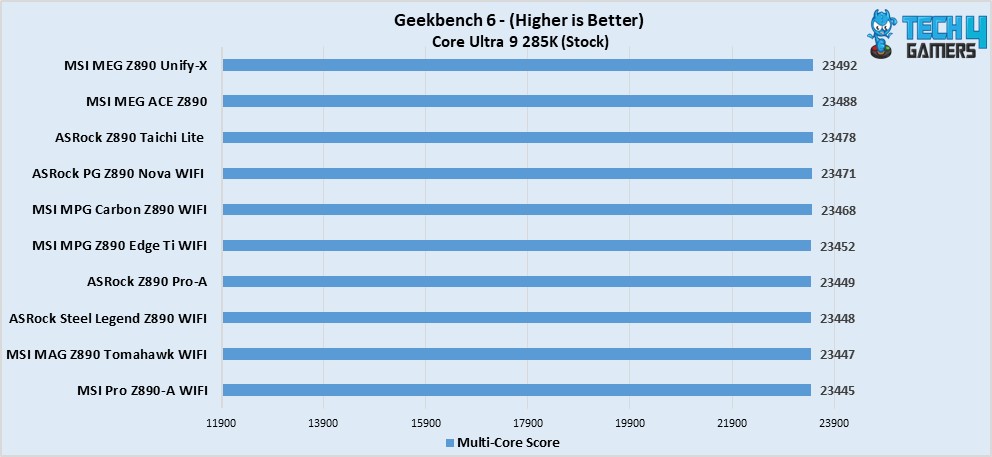
In our final benchmark of Geekbench 6, we were thoroughly impressed with the motherboard’s synthetic benchmarking results as it perform more than fine here as well with 23449 points.
Gaming Benchmarks
Cyberpunk 2077
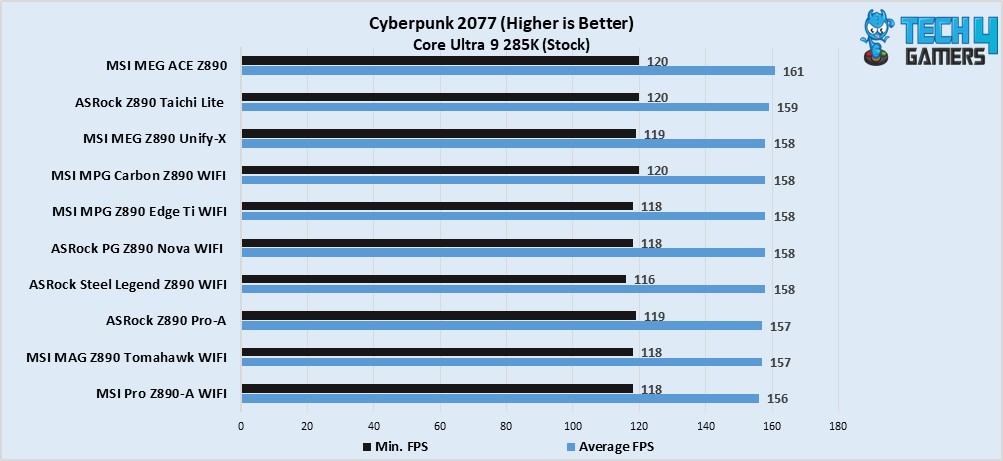
The gaming situation isn’t too different either as pretty much all of the motherboards are somewhat identical to each other no matter the price range. For more clarity, the ASRock Z890 Pro-A maintain 119 FPS as its minimum and 157 FPS as its average.
Starfield
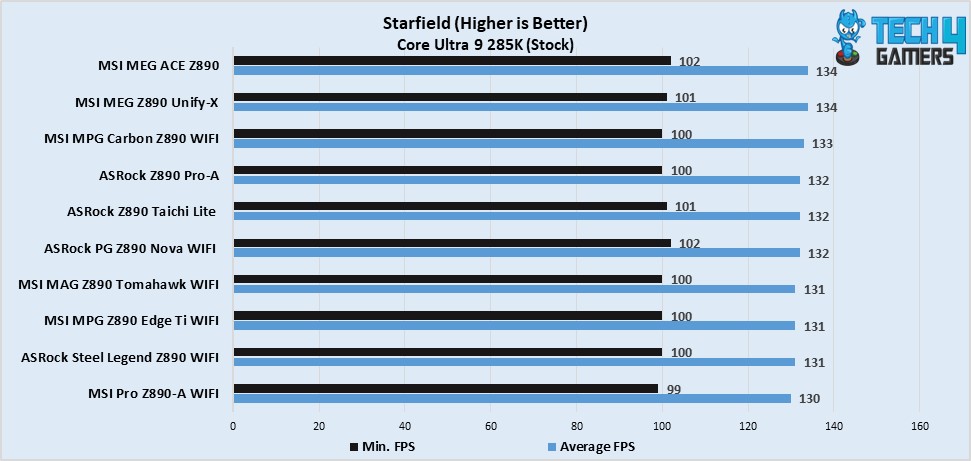
Same here again, the ASRock Z890 Pro-A offered good performance with 100 minimum FPS and 132 average FPS.
Power Consumption And VRM Temperatures
VRM Temp
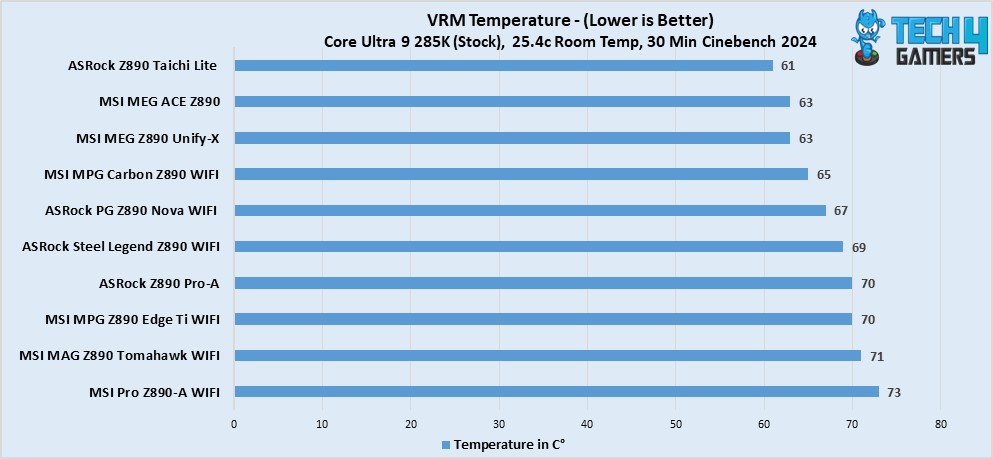
Since it’s an entry-level board, the slight increase in VRM temperatures was expected, though, they’re terrible and are totally serviceable for daily use even with a far more expensive CPU.
Power Consumption
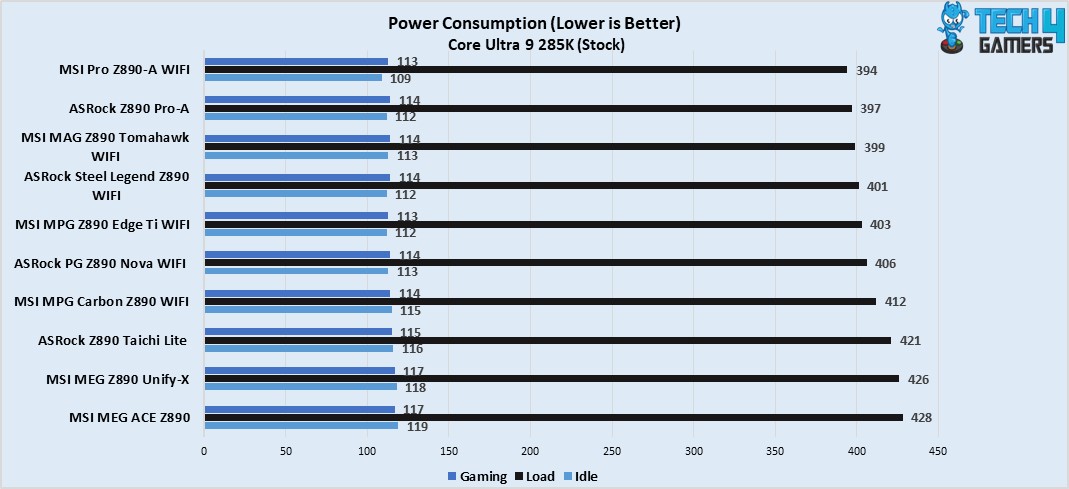
In terms of power consumption, the motherboard eats 114W during gaming sessions, 112 when in idle mode, and 397 under full load.
Should You Buy It?
Buy It If:
✅You want a flagship chipset on a budget: If you’re looking to get a motherboard with a flagship chipset but don’t want to pay a flagship-level price, then this is as close as you can get with a strict budget.
✅You want fast RAM support: The ASRock Z890 Pro-A supports 9066+ MT/s memory speed by default so if you’re looking to pair faster memory with your CPU on a strict budget, this board could be for you then.
Don’t Buy It If:
❌You want wireless network connectivity: The motherboard lacks a WiFi module which restricts your way of using the internet to the ethernet port only.
My Thoughts
Closing up everything, there’s a lot to say about the ASRock Z890 Pro-A motherboard. However, I would go the short way to help you understand everything. The motherboard comes at a very competitive price range which I personally liked, and the great performance figures because of the solid power delivery system are like icing on the cake. The overall functionality is great as well, with only lagging behind in a few aspects such as the wireless networking, better cooling solution, and overall aesthetics of the board itself. Though, it is expected when you’re buying a flagship chipset on such a tight budget.
As Tech4Gamers’ Founder and Editor-in-Chief, I bring over 13 years of PC Hardware Reviewing and 8+ years of IT Project Management experience. Certified in Google IT Support , my focus is on providing honest product reviews and analysis and fostering a strong gaming community with 130k+ members in PPG.
Story Highlight
NVIDIA Reflex 2 launches exclusively on RTX 50 GPUs, featuring Frame Warp technology for significantly reduced latency (up to 75% in some tests).
This initial exclusivity likely allows NVIDIA to optimize Reflex 2 alongside DLSS 4’s Machine Frame Generation, which also impacts latency.
Support for older RTX cards is planned, but no release date has been given. Initially, only The Finals and Valorant will support Reflex 2.
NVIDIA has revealed that its new Reflex 2 low-latency technology will only work with GeForce RTX 50 “Blackwell” GPUs at launch, with support for older GeForce RTX graphics cards planned for later, suggesting the company is only focused on fine-tuning things for the RTX 50 series graphics cards.
It only works on the GeForce RTX 50 during its debut makes a lot of sense because these graphics cards have access to the Machine Frame Generation under NVIDIA DLSS 4 upscaling technology. That now generates more frames through AI to increase performance.
Although of course, this increases latencies even more, so it makes sense that they have focused on preparing everything for the launch of these GPUs. These are the only ones that will experience this increase in latencies compared to the rest of the models from previous generations.
No Date On NVIDIA Reflex 2 For ‘Non-RTX 50’ GPUs
Official NVIDIA documents have already indicated that Reflex 2, together with its new Frame Warp technology, manages to reduce game latency by up to 75%. This measurement is based on a performance test carried out on the competitive shooter THE FINALS.
With an AMD Ryzen 9 9950X and an NVIDIA GeForce RTX 5070, at 4K resolution, without Reflex 2 with Frame Warp technology, the player experiences a latency of 56 ms. With NVIDIA Reflex 1, this is reduced to 27 ms while with Reflex 2 latency is reduced to just 14 ms in The Finals game. Which thus gives a 75% improvement of Reflex 2 between not using the technology.
NVIDIA’s FAQ states that Reflex Frame Warp technology requires several minimum requirements to be used. The first is an NVIDIA GeForce RTX 5.0 GPU, whether desktop or laptop. This must be accompanied by GeForce 570 or higher graphics drivers.
Thus, we will have to wait for future software updates to implement compatibility of this technology with older graphics cards. Although, unfortunately, there is still no roadmap that offers an approximate date of when these GPUs will be supported. For now, the only two games that will support this technology are THE FINALS and VALORANT.
How Frame Warp Works
NVIDIA Reflex 2 is based on Reflex 1 but with Frame Warp technology. According to NVIDIA, Reflex 2 is the culmination of four years of research in the world of eSports. Of course, low latency is essential in these competitions, especially when we talk about shooters, where professionals want to play with extremely high response times along with low latency.
In this new version, the GPU renders a frame, but now the CPU is added to it by calculating the camera position in the next frame based on the last mouse or controller input. Frame Warp samples the new camera position from the CPU and warps the frame just rendered by the GPU to this new camera position.
The warping is done as late as possible, just before the rendered frame is sent to the screen, ensuring that the last mouse input is reflected on the screen without introducing much latency.
What’s your take on Nvidia to limit Reflex 2 to GeForce RTX 50 series graphics cards at launch? Share your thoughts in the comment section below.
As Tech4Gamers’ Founder and Editor-in-Chief, I bring over 13 years of PC Hardware Reviewing and 8+ years of IT Project Management experience. Certified in Google IT Support , my focus is on providing honest product reviews and analysis and fostering a strong gaming community with 130k+ members in PPG.
Story Highlight
The RTX 5060 Ti will have two VRAM variants (8GB and 16GB), with the 8GB version potentially bottlenecking performance in VRAM-intensive games, even at 1080p.
The RTX 5060 will only have an 8GB VRAM option.
All three cards are expected to use 28 Gbps memory chips with a 128-bit interface, significantly increasing bandwidth compared to predecessors.
The latest leaks indicate that the NVIDIA GeForce RTX 5060 Ti and RTX 5060 GPUs are scheduled to launch next month. This information comes from a leaked slide from Taiwanese assembler Chaintech, a company that previously manufactured its own custom graphics cards, but has now outsourced this work to the well-known Chinese assembler Colorful.
This slide confirms information we already knew. Like the GeForce RTX 5090 and RTX 5080 launching in January. The GeForce RTX 5070 Ti and RTX 5070 are stated to be arriving in March. Rounding off March with the low-end graphics cards, the GeForce RTX 5060 Ti and RTX 5060.
Keep in mind that NVIDIA has never confirmed dates for the RTX 5070, let alone the RTX 5060. But there had also been reports that the RTX 5070 was arriving this month. The leaked slide is tied to Chaintech’s earnings outlook for 2025, so it makes sense that the information is real. Since it was intended to be shown to investors only.
What We Know About GeForce RTX 5060 Ti And 5060
Chaintech Presentation Revealed RTX 5060 and RTX 5060 Ti Release Plans
Recently, we learned something quite relevant, and that is that the GeForce RTX 5060 Ti will launch in two variants. If there are no surprises in between, the only difference would be in the VRAM capacity. Having a model with 16 GB of memory next to a cheaper one with 8 GB both using the same GPU Core, the same number of cores and frequencies. So if there is a difference in performance, it will be linked to games where 8GB of VRAM is a problem.
VRAM Usage In Indiana Jones and the Great Circle
Without going any further, one of the surprises of the year, Indiana Jones and the Great Circle, is an example of this. This game is sponsored by NVIDIA and makes use of Ray Tracing. Along with its high visual quality, the lack of VRAM is already a problem. And at 2K resolution, Intel Arc A770 with 16 GB of VRAM (33 FPS) is faster than an NVIDIA GeForce RTX 3080 with 10 GB of VRAM (24 FPS).
At 1080p the impact is less noticeable, but the Intel GPU still wins despite having a less powerful graphics chip (41.8 vs 35.9 FPS). Thus showing that VRAM causes a bottleneck, and confirming that from 2025, a GPU with at least 12 GB of VRAM is recommended if you want to enjoy Ray Tracing (or rather, the highest visual quality of a game).
For its part, the GeForce RTX 5060 will only be available in the 8 GB VRAM variant. These three graphics cards would use the same 28 Gbps chips with a 128-bit interface, which will result in a bandwidth of 448 GB/s .
For context, that’s a 55% increase in bandwidth compared to the RTX 4060 Ti. And even a 64% increase compared to the RTX 4060. Well, this model came with 17 Gbps memory compared to the 18 Gbps of RTX 5060 Ti.
What’s your thought on Nvidia launching 8GB variants in 2025? What are your expectations on the pricing of these models? Share your thoughts in the comment section below.
I’ve previously worked for eXputer as a Senior News Writer for several years. Now with Tech4Gamers, I love to devoutly keep up with the latest gaming and entertainment industries. I have a Bachelor’s Degree in Computer Science and years of experience reporting on games and breaking exclusive stories. Besides my passion for gaming journalism, I love spending my leisure time farming away in Stardew Valley. VGC, IGN, GameSpot, Game Rant, TheGamer, GamingBolt, The Verge, NME, Metro, Dot Esports, GameByte, Kotaku Australia, PC Gamer, and more have cited my articles.
Story Highlight
A new string of reports suggests that EA is sending out Battlefield 6 playtest invites to select players.
Multiple sources have clarified the playtests are starting very soon.
Notable insider Tom Henderson also claims that EA has been having smaller private playtests weekly since last summer.
It’s no surprise that EA is pouring out a lot of its resources to develop Battlefield 6, with multiple studios working on it together to avoid another disappointment. Last year, the company expressed interest in holding private playtests in early 2025 to polish the first-person shooter.
Now, it appears that EA has already begun sending out Battlefield 6 playtest invites to a select few players, with the criteria for getting an invite being unknown at the moment. These playtests are said to be starting soon.
Why it matters: EA is finally seemingly ready to begin closed Battlefield 6 playtests on a larger scale to ensure that the next entry lives up to the expectations of the wider audience after the last disastrous flop, Battlefield 2042.
According to a report by MP1st, EA is currently making these selected individuals sign NDAs to protect Battlefield 6 from potential leaks. YouTuber DANNYonPC clarified that a content creator even posted about the playtest before the tweet was taken down.
Not much is known about these playtests, but accredited insider Tom Henderson mentions that EA has been holding smaller private Battlefield 6 tests since last summer; the conglomerate is now ready to expand to a larger scale with select players.
Anyhow, this should mean that more information and an official reveal are around the corner. Fans should expect official details in just a few more months.
On one hand, EA is extremely confident about the next Battlefield, claiming its demand is still strong and that it can outsell Call of Duty. The rumors paint a different picture, however, as 98% of developers involved have never allegedly worked on the series’ past games.
Do you think Battlefield 6 will turn out to be a much better entry in the franchise compared to the past two releases? Let us know your thoughts in the comments below, or join the discussion on the official Tech4Gamers forum.
At Tech4Gamers, I contribute as a Senior News Reporter, combining my skills and gaming enthusiasm to keep our audience updated on the latest developments.
Story Highlight
Following Dragon Age: The Veilguard’s failure, BioWare’s RPG franchise has been put on ice and is unlikely to return anytime soon.
Fans are upset over the sudden death of the series despite the promised revival from last year.
Many believe there is a lesson to be learnt here, warning the industry about the horrors of live-service trend chasing.
Dragon Age: The Veilguard has been through an unfortunate series of events over the last few months. Despite showing promise early on, the RPG failed to meet expectations, ultimately leading to BioWare being reduced to less than 100 developers.
While developers from the studio have insisted the franchise is still alive, fans are all but convinced this is not the case. In fact, it seems more than likely that Dragon Age won’t be coming back anytime soon.
Why it matters: This franchise was among BioWare’s most successful IPs, propelling the studio to the top of the RPG genre of gaming.
Fans Are Not Happy With How Things Have Turned Out | Image via X
With support for Dragon Age: The Veilguard wrapped up and BioWare moving on, fans have thanked the studio for its work.
Many have also acknowledged that the series is now on ice, leaving little room for another entry in the near future. It is important to note that the series’ latest installment arrived after a decade-long gap.
Extremely sad that Dragon Age is on ice.
-Kale Elizabeth
Because AAA development timelines have grown significantly in the modern era, a new title would require another decade, even if Dragon Age: The Veilguard was a major success.
With this not being the case, EA is unlikely to greenlight another entry for the franchise after BioWare wraps up work on the next Mass Effect. Effectively, this means that Dragon Age will not be a part of the larger gaming industry over the next 10 to 15 years.
While the situation is far from bright, some fans are trying to look on the brighter side. Over on Reddit, one user stated that Dragon Age’s death should be a lesson for the entire industry, highlighting why forced live-service elements are always a bad idea.
At Tech4Gamers, I mainly cover new gaming news, leaks, and rumours. Aside from that, I love to write features about my favourite games while inserting my opinion about their different aspects.
Story Highlight
Microsoft hasn’t announced a release date for Perfect Dark, but it is rumored to be released in 2026.
The game was announced to be released on Xbox, but it seems like its PS5 and Switch 2 ports are already in development.
This decision from the gaming giant isn’t surprising as it is hands-deep in the multiplatform strategy.
Recent Job Posting For The Perfect Dark Reveals That The Game Is Being Developed For The PlayStation 5 and Nintendo Switch 2 | Source: LinkedIn
As per a job posting from The Initiative studio, it is clear that the Perfect Dark is being developed for the PS5 and the possibility for the Nintendo Switch 2.
The job posting requires a Principal Graphics Engineer to join the team to work on Perfect Dark, who can ensure the game is supported on multiple platforms.
Optimize and ensure scalability of rendering features to support multiple platforms and quality configurations.
-Job Posting
Another Job Posting Revealed That Perfect Dark Won’t Skip 60FPS On Xbox
The game’s release date is yet to be confirmed, so the gaming giant may have decided to release it on the rival consoles on day one. Given Xbox’s recent approach to its game, it isn’t surprising to see this decision.
While the job posting doesn’t directly quote PS5 and Nintendo Switch 2, it says multiple platforms. Given that Switch 2 is slated to be released later this year, it is a smart move to develop a port for that.
Perfect Dark’s 25th anniversary is approaching, so Xbox may have planned to announce its release date and PS5 port in the future. A report previously suggested that the game will be released in 2026.
What do you think about the Perfect Dark Reboot being developed for PS5 and Witch 2? Are you excited for this game? Share your thoughts with us in the comment section below or join the discussion at the official Tech4Gamers forums.
I’ve previously worked for eXputer as a Senior News Writer for several years. Now with Tech4Gamers, I love to devoutly keep up with the latest gaming and entertainment industries. I have a Bachelor’s Degree in Computer Science and years of experience reporting on games and breaking exclusive stories. Besides my passion for gaming journalism, I love spending my leisure time farming away in Stardew Valley. VGC, IGN, GameSpot, Game Rant, TheGamer, GamingBolt, The Verge, NME, Metro, Dot Esports, GameByte, Kotaku Australia, PC Gamer, and more have cited my articles.
Story Highlight
The former PlayStation third-party relations VP believes no one is a victim in Xbox’s new multiplatform era.
He has even applauded the industry giant for taking the step and adapting to the changing console market.
The executive does not understand brand loyalty and believes that everyone benefits from abandoning exclusivity.
Now, the former PlayStation third-party relations vice president, Adam Boyes, has appreciated the giant for adopting the controversial approach to secure its future. The executive also clarifies that everyone gains from this strategy.
Why it matters: Xbox’s controversial multiplatform strategy being supported by even the former PlayStation executive shows that more and more people across the industry have started to see its benefits.
In an interview with Gamertag Radio, Adam Boyes claims that no one really is a victim in Xbox’s multiplatform era, repeatedly asking the same question only to see brand loyalty affecting people’s perception. He’s also been very impressed with the results of the strategy.
I applaud them for being agile enough in a changing and transitioning market to expand.
He mentions that Xbox is no longer ‘just a disc provider and disc distributor‘ but an ‘entertainment provider’ that spans beyond the physicality of its consoles, unlike the old days.
I ask a lot of people, ‘who’s the victim?’ And there aren’t any.
All the praise aside, Adam Boyes also believes that traditionalists don’t want the new strategy to happen, and Xbox will need to find a way to secure the value proposition of its future consoles. His remarks have been met with varying opinions.
Do you think the points raised by Adam Boyes justify Xbox ditching exclusives in favor of sales and player growth? Let us know your thoughts in the comments below, or join the discussion on the official Tech4Gamers forum.
At Tech4Gamers, I contribute as a Senior News Reporter, combining my skills and gaming enthusiasm to keep our audience updated on the latest developments.
Story Highlight
Edward Snowden is not fond of Nvidia’s current pricing strategy.
He believes the RTX 50 series is VRAM-starved altogether.
The former NSA contractor states that the RTX 5070 and RTX 5080 should come with 16GB and 24GB of memory, respectively.
Consumers and reviewers have been quick to voice their opinions on the series, criticizing Nvidia for its pricing and poor value proposition this generation. Even Edward Snowden has joined the fray, dubbing the RTX 50 lineup “F-tier value for S-tier prices.”
Why it matters: While receiving criticism has become all too common for Nvidia, Edward Snowden’s opinion holds more weight than the opinion of the average tech enthusiast or reviewer.
Edward Snowden Talks About Nvidia RTX 50 GPUs | Image via X
For context, Edward Snowden was a former NSA intelligence contractor best known for making public the existence of global surveillance programs. This story was also covered in Snowden, a movie from 2016 that documented his career.
Edward Snowden believes Nvidia is too focused on pleasing its shareholders with profits and numbers for the next quarter. He points to the VRAM-starved nature of Blackwell GPUs, which has been a problem of the brand since 2020’s Ampere architecture.
As per the former NSA contractor, the following would be appropriate VRAM amounts for the current lineup:
RTX 5070 – 16GB at minimum
RTX 5080 – 24GB & 32GB variants
RTX 5090 – 32GB & 48GB variants or more
The only Blackwell graphics card that currently satisfies these requirements is the RTX 5090. Nvidia was kind enough to treat its customers to more VRAM with the flagship offering, bumping the 90-tier to 32GB of VRAM instead of 24GB.
Unfortunately, this came with a major price hike, raising the price of the RTX 5090 to $2000.
Releasing a $1000+ GPU in 2025 with a crippling 16GB is a monopolistic crime against the consumer.
-Edward Snowden
Consumers Are Struggling To Find Anything Positive About The RTX 50 Lineup
The former NSA contractor’s statement holds a lot of legitimacy since 16GB of memory is quickly filled up in modern titles at 4K resolution. Nvidia’s RTX 5070 will also age poorly because it comes with 12GB of VRAM, which is ideal for only 1080p gaming.
The gaming giant is expected to offer more memory with future GPUs and the rumored Super refresh for the RTX 50 lineup.
With 3GB GDDR7 chips also rumored to be on the horizon, mid-range and lower-end GPUs could benefit from custom configurations that eliminate the VRAM problem once and for all. However, Nvidia’s current offerings will remain poor in terms of value till then.
What are your thoughts on these statements? Let us know in the comments and on the Tech4Gamers Forums.
Being a keyboard enthusiast, I specialize in reviewing, modding, and critiquing them for the people. If you’re a Razer fanboy, my only goal is to convert you to the dark side 😈.
After the incredibly successful F-series of keyboards, Aula is back with a new lineup, now designated by the letter “M.” Today, we have the Aula M75 in for review—a budget aluminum prebuilt that stands on the shoulders of the iconic Aula F75. It aims to replicate the simple yet polished formula of its plastic predecessor, now in a metal body.
This keyboard competes with the likes of the Epomaker P75, Galaxy70 and Rainy75 but isn’t quite as exciting as the Bridge75 or Chilkey’s ND75. It comes in at the $100 price point with $10 more for the blue-themed unit sent to us. This is quite an elusive board as well as there’s not much coverage for it online so let’s fix that.
Why Trust Tech4Gamers
Huzaifa Haroon is our keyboard expert with years of experience in building and testing custom keyboards.
130+ peripherals tested and reviewed by our team of hardware experts (Tech4Gamers Team).
500+ hours spent testing different peripherals for our reviews.
At Tech4Gamers, ensuring you get reliable information is our priority. That’s why every hardware round-up undergoes a meticulous review process by our team of experts and editors. Each review is carefully examined against our strict editorial guidelines, guaranteeing you trustworthy insights you can depend on.
Key Takeaways
The Aula M75 is one of the best aluminum prebuilts out right now with excellent fundamentals and no compromises.
You should buy the Aula M75 if you’re looking for a solid keyboard that offers a great typing experience with the build quality to back it up.
You should not buy the Aula M75 if you’re after some flair as it’s a pretty simple board with no novelties or extras. Consider the Chilkey ND75 instead.
Product Name
AULA M75
Layout
75% non-exploded
Shell material
National standard 6063CNC
Colour
Ink jade black
Ink jade black
Lake light white
Light Mist Blue
Surface technology
180 grit sandblasting anodizing
180 grit sandblasting anodizing
180 grit sandblasting electrophoresis
180 grit sandblasting electrophoresis
Keyboard weight/packaging weight
Approx 1.665kg/approx 1.715kg
Approx 1.735kg/approx 1.785kg
Axial body
Ice vein axis
Crescent axis
Flame Purple Axis V2
Battery capacity
4000mAh
8000mAh
Positioning plate
Slotted PC positioning board
Slotted FR4
Counterweight
Metal anodized counterweight block
Connection method
Tri-mode connection (Type-C wired 2.4G/Bluetooth)
Structure
Silicone bean gasket mount (plate)
Sound package
Plate foam + IXPE sheet + PET sheet + PCB foam + PET sheet (again)
PCB
1.2mm flex-cut (south-facing RGB)
Backlight
Approximately 16 million RGB colors (RGB front light strip)
Keycap tech
Doubleshot PBT
System support
WINDOWS/MACOS/Linux
[toc]
What Makes It Different
The shining highlight of the M75 is its excellent build quality which sets it apart from the rest of Aula’s lineup. Unfortunately, though, it’s far from the only aluminum 75% out there and with boards like the Galaxy70 and Epomaker P75 available around the same price, it doesn’t really offer anything different to stand out. It’s a good keyboard but not an extraordinary one.
Unboxing Experience
The Aula M75 comes in rather fancy packaging. This starts from the box itself that lifts up from the top like an Apple box. It’s extremely minimal in design with just the board’s name on the front. Once the top is off, you’re greeted to the board sealed inside a plastic bag, topped with a dust cover. There’s plenty of foam around to protect it as well.
Aula M75 box (Image by T4G)
The accessories are nicely laid out in their own box underneath the board, fitted snugly around a second layer of foam. The manual and instructions card can also be found here. Aula hasn’t been generous with the extras, though, as you get a pretty standard affair of accessories and none of them are particularly high-quality either.
Aula M75 box opened (Image by T4G)
Here’s everything you get:
1x Aula M75
1x USB-C Cable
1x Keycap/Switch Puller
2x Extra Switches
1x Manual
1x Instructions Card
1x Dust Cover
Everything you get with the Aula M75 (Image by T4G)
Design & Build
The Aula M75 is a premium keyboard. This is reflected right away in its build quality. It’s made entirely out of CNC’d aluminum, so it weighs 1.8 kilograms, almost double that of the plastic Aula F75. It’s cold to the touch and even comes with plastic protectors applied all around the back and sides.
From the front, the board looks quite similar to previous Aula offerings with minor differences. There are thin, even bezels running across the perimeter with a Cherry lip which means a chamfered bottom that allows your palms to rest more comfortably. There is no knob or screen, but we do see an LED bar in the corner next to the Esc key.
Aula M75 from the front (Image by T4G)
For as simple as the front is, the back of the M75 has a lot more flair. Right away you see a two-tone design with the top half being silver and the bottom half matching the color of the rest of the board. There is no weight or engraving but strangely a normal plastic sticker in the corner that looked out of place.
Aula M75 from the back (Image by T4G)
The split design makes for an interesting side profile. Make no mistake, it’s technically still just a box-on-wedge but the silver part of the back extends to the sides and sort of tapers into the bottom. This combines to give you a somewhat aggressive look.
Aula M75 side profile (Image by T4G)
Another interesting thing to note is the surface treatment of the board. It doesn’t exactly feel like a matte finish and that’s because the board is powder-coated, at least partially. The silver bottom is anodized while the rest isn’t. This means the silver has a gritty texture similar to most aluminum boards, but the blue parts have an almost oil-paint like feel and appearance.
Layout & Features
As the name suggests, the Aula M75 is a 75% keyboard with a non-exploded layout similar to the Aula F75. There’s no space in between the arrow keys and nav cluster separating them from the alphas and mods. This gives the board a very traditional and understated look in stark contrast to the flashier options like the Epomaker RT80.
For some reason, the marketing material says it’s a leaf-spring mounted board which just isn’t true. It’s gasket-mounted with silicone pieces attached to the plate like the majority of prebuilts these days. It has a pretty standard internal structure as well with lots of foam for sound dampening like the plate foam, IXPE sheet, PET sheet, and bottom PCB foam.
The board is fully hot-swap with south-facing sockets on the PCB. Speaking of which, the PCB itself is 1.2mm thin and has flex cuts, just like the FR4 plate (some units have a PC plate). It has per-keyRGB and no support for additional layouts or even screw-in stabs. Lastly, the M75 is wireless with support for both a 2.4 GHz USB dongle and Bluetooth.
Aula M75 flex cuts (Image by T4G)
I tried to take a look inside, but the screws were hard to get to. After undoing 4 of them, the final one got stripped and no matter what I did, it just wouldn’t budge so there’s no way to look at the internal structure. It’s clear this board isn’t meant to be modded.
Aula M75 stripped screw (Image by T4G)
The Fundamentals
Keycaps
Aula has kitted the M75 with doubleshot PBT keycaps in the Cherry profile. They are the same keycaps you can also get on the F75, which means you’re getting the good stuff. These are high-quality keycaps with sharp legends and bright, vibrant colors. The font is mature and suits the simple design of the board well. Even the modifier keys are perfectly centered.
Aula M75 keycaps (Image by T4G)
There are no molding marks on the keycaps and they’re pretty thick overall. The doubleshot mold is among the best in the budget market. Therefore, there is no stem wobble either. These keycaps are not shinethrough so you can’t really take advantage of the board’s lighting, but you can always substitute them for aftermarket side-lit keycaps.
Keycaps Front & Back
1 of 2
Keycaps front
Keycaps back
Switches
Aula offers a bunch of different switch choices with the M75, but they vary based on where you’re getting the board from and in what color. Our unit has the TTC Flaming Purple switches, but you can also get Leobog Ice Vein, TTC New Moon and TTC Crescent switches as well. All of these including our Flaming Purples are factory-lubed linears.
Flaming Purples (Image By Tech4Gamers)
The Flaming Purples have an actuation force of 42g with 3.6mm of travel. The top housing is polycarbonate, the bottom is PA (nylon) and the stem is made from POM. If that all sounds confusing to you, just know that this switch is great. It has amazingly-low stem wobble, a very consistent lube job and no annoying spring crunch whatsoever. It also has LED diffusers built into the housing, so the RGB looks even better.
Stabilizers
The M75 is using standard plate-mounted stabilizers that come pre-lubed from the factory. Like the F75 and virtually every other prebuilt that comes out nowadays, these stabs are great. They exhibit no ticking or rattling across the board. The sound is deep and satisfying with a solid impact.
Aula M75 stabilizers (Image by T4G)
Upon close inspection, I saw the stabs were in fact a tad bit overlubed but that doesn’t affect performance. Funnily enough, while taking out the Backspace stabilizer, a small dollap lube actually got stuck on the slash keycap below it.
Aula M75 stabilizer up close (Image by T4G)
Connectivity & Performance
As mentioned earlier, the Aula M75 is a fully wireless keyboard with Bluetooth 5.0 and 2.4 GHz radio support. The top side of the case has a spot to hold the wireless dongle in place magnetically, right next to the USB port and connection mode switcher.
There’s a gigantic 8000mAh battery inside to power the board which allows it to get genuinely industry-leading endurance. Some units get a 4000mAh cell instead, once again owing to the confusing availability of this board.
Aula M75 USB port and connection switcher (Image by T4G)
The board lasts 3 days with RGB on and more than a week with it off. The performance was also on par with most other boards, but I won’t recommend wireless play for competitive games. On a couple of occasions, I experienced some lag in typing but it got fixed on its own after some time. There were no disconnection issues otherwise.
Typing Experience
The Aula M75 provides an excellent typing experience. Despite being gasket-mounted, it’s very stiff, likely the firmest aluminum prebuilt I’ve ever typed on. For me, this was a plus as I prefer a clacky sound signature which can only be achieved with harder plates and less foam. But the M75 still has all that foam inside so it has a satisfyingthock.
The sound is deep and full, there is no metallic resonance or pinging, and certainly no hollowness (once again owing to the foams). Every key press has a loud impact, so this isn’t exactly a “muted” board like typical thocky boards are. It’s got more volume than the Aula F75/F87 Pro.
The stabs are perfect so overall I had a pleasant time typing on the M75. The spacebar, though, left a little to be desired as it sounds higher-pitched than the rest of the stabs and alphas. That would be fine if the board itself was clackier but here it stands out as the odd one out. It’s still consistently and perfectly stable, however so not a big deal at all.
The Software
Unlike the Aula F75 Max which used a different type of software, the M75 sticks to the classic Aula app that works with the F75, F87 Pro and F65. It’s a simple-looking interface that’s a little low-res for 2025 standards but it gets the job done. All the features are laid out in tabs on the left and every feature you’d expect is here.
Aula M75 software homepage (Image by T4G)
You get custom keymapping, RGB controls, macros, music effects and a settings page. Changing the RGB effect is slow. You have to hit the Save button each time and it takes a second or two (sometimes more) to actually apply the effect.
The music effects react to whatever system audio is playing on your computer and they work well. The effects themselves change instantly but if you turn off this option to go back to regular RGB effects, that’s where it’s really slow. While I was recording the software demo, it felt like the app had crashed but it just lagged out for a few seconds apparently.
Aula M75 music effects page (Image by T4G)
Lastly, the settings page has a lot of options to customize your experience with the M75. You can change the default sleep time, add or remove debounce delay, upgrade firmware and even set the software to auto-run on startup each time. You can change the language from English to Chinese too. Overall, the software isn’t half bad, but it needs a lot more polish.
Should You Buy It?
Buy It If:
✅ You’re looking for great aluminum keyboard that sounds just as good as it looks and feels in your hand.
✅ You value battery life. The Aula M75 is a workhorse with insane endurance thanks to the 8000mAh cell inside.
✅ You have a peculiar affiliation for a Cherry lip as the M75 is one of the very few mainstream prebuilts with one.
Don’t Buy It If:
❌ You need QMK/VIA support and aren’t willing to deal with less polished software.
❌ You want the very best value in keyboards. There are cheaper aluminum prebuilts out there and plastic offers even more value for your dollar.
❌ You’re one for the gimmicks. The M75 doesn’t even have a knob, let alone something like a screen so it might be boring for some.
The screws holding the Aula M75 together (Image by T4G)
My Thoughts
The Aula M75 is a good keyboard with no inherent flaws but that’s not enough to stand out in today’s crowded marketplace. Despite its good sound and build quality, the design is too simple and there are no extras that help sell it against more established options from Epomaker. But that’s not an entirely bad thing.
If you want something classic that doesn’t even have a volume knob and the Rainy75 isn’t available, the Aula M75 quickly steps up to become a top contender. It’s got all the essentials you need without being overpriced. My personal recommendation in this category would still be the Epomaker P75 but the Aula M75 is no slouch either.
At Tech4Gamers, I take on the role of Hardware Reviewer with pride. My responsibilities involve a thorough examination of essential hardware components like motherboards, graphics cards, processors, PC cases, and CPU coolers, among others, focusing on their complexities and functionalities.
Some time ago, we reviewed the ASRock X870 Steel Legend WiFi, and today, we’ll be going hands-on with the ASRock Phantom Gaming X870E Nova WiFi. The X870E is AMD’s latest flagship chipset, packing the most USB options, fastest storage support, and exceptional VRM structures. If you are going with an Intel build, we have also tested and reviewed the ASRock Phantom Gaming Z890 Nova WiFi, which is the flagship for the Intel platform.
Why Trust Tech4Gamers
Nauman Siddique is the most senior hardware tester at Tech4Gamers. He brings an ocean of knowledge to the table, including unmatched expertise in motherboards.
40+ motherboards tested and reviewed by our team of hardware experts (Tech4Gamers Team).
800+ hours spent testing different motherboards for our reviews.
At Tech4Gamers, ensuring you get reliable information is our priority. That’s why every hardware round-up undergoes a meticulous review process by our team of experts and editors. Each review is carefully examined against our strict editorial guidelines, guaranteeing you trustworthy insights you can depend on.
Key Takeaways
The ASRock Phantom Gaming X870E Nova WiFi is a mid-range motherboard priced at $349. It provides decent value and performance and incorporates a decent set of features, such as USB4, XXL heatsinks, WiFi 7, and more.
You should buy the ASRock Phantom Gaming X870E Nova WiFi if you plan to pair it with a flagship (9950X/9800X3D) processor and want exceptional performance and features.
You should not buy the ASRock Phantom Gaming X870E Nova WiFi if you are on a budget, as B850 motherboards are here and they are more affordable.
Here’s a quick rundown of the motherboard’s on-paper specifications:
The motherboard comes in a box clad in blue with some stylish designs on the left side.
Box front. (Image By Tech4Gamers)
As usual, the front of the box has the board’s name with a few tags on it. We also see a picture of the motherboard that resides within. Nothing else is going on. Let’s see what we have inside the box:
Accessories. (Image By Tech4Gamers)
4x SATA data cables
1x ASRock WiFi 2.4/5/6GHz antenna
1x A-RGB splitter cable
3x Thermistor cables
1x Regulatory notice
1x Manual
There’s nothing extraordinary inside the box. The three thermistor cables can come in handy to monitor the temperatures of your components. Here’s a picture of the antenna we took out of the box:
Antenna. (Image By Tech4Gamers)
The antenna’s beautiful black design features stylish curves to improve its appeal. It supports up to WiFi 7.
Design
ASRock X870E Nova WiFi out of the box. (Image By Tech4Gamers)
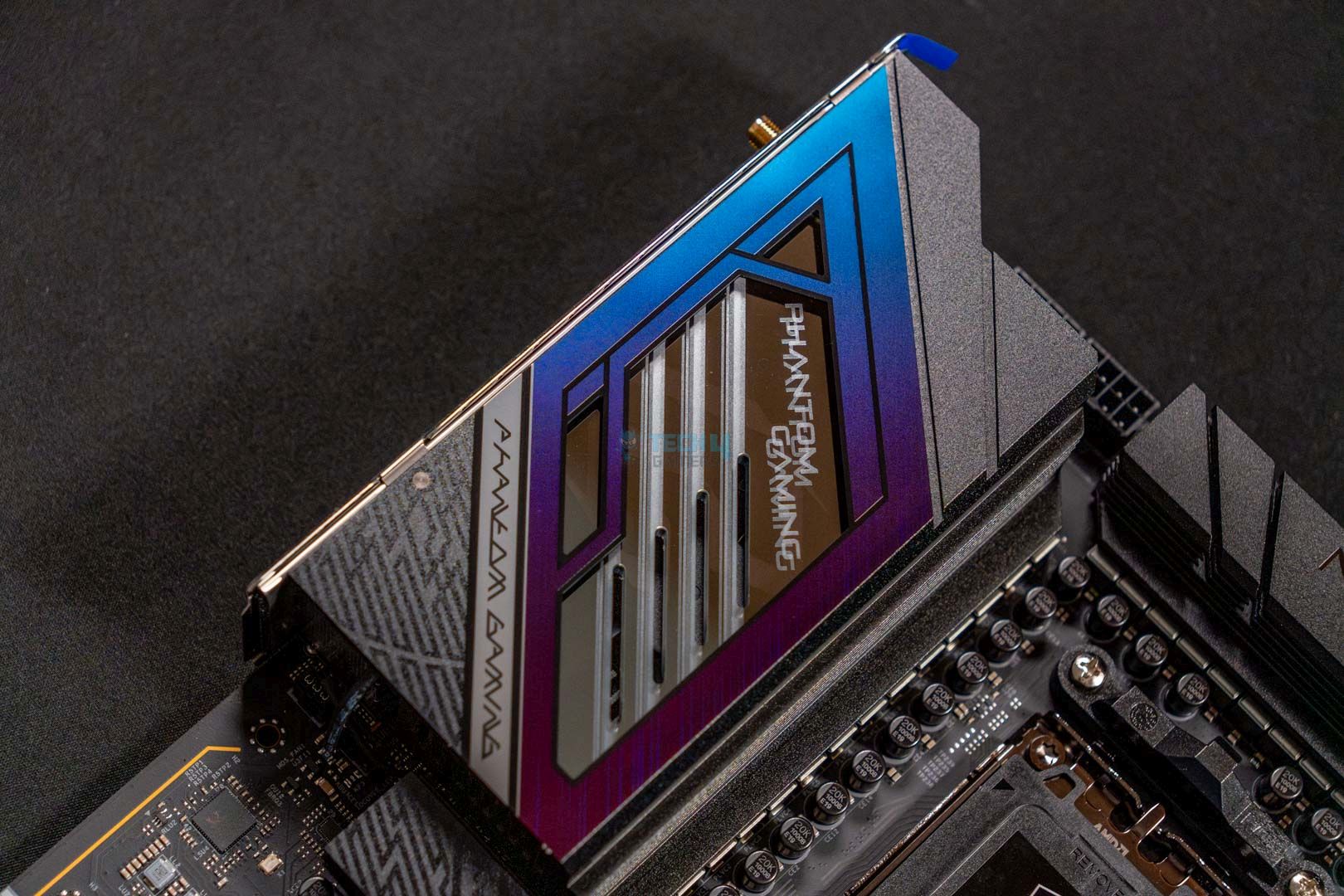
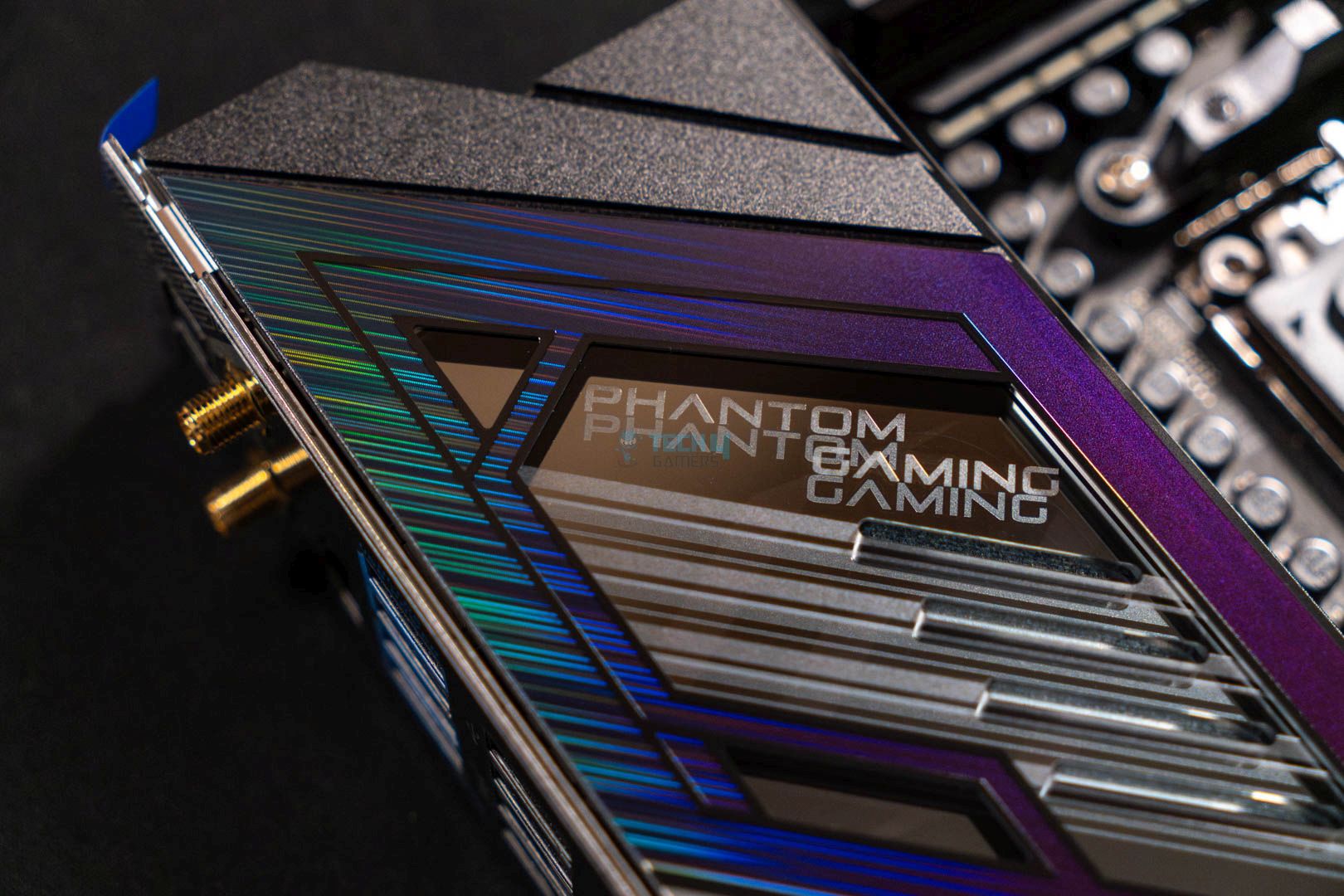
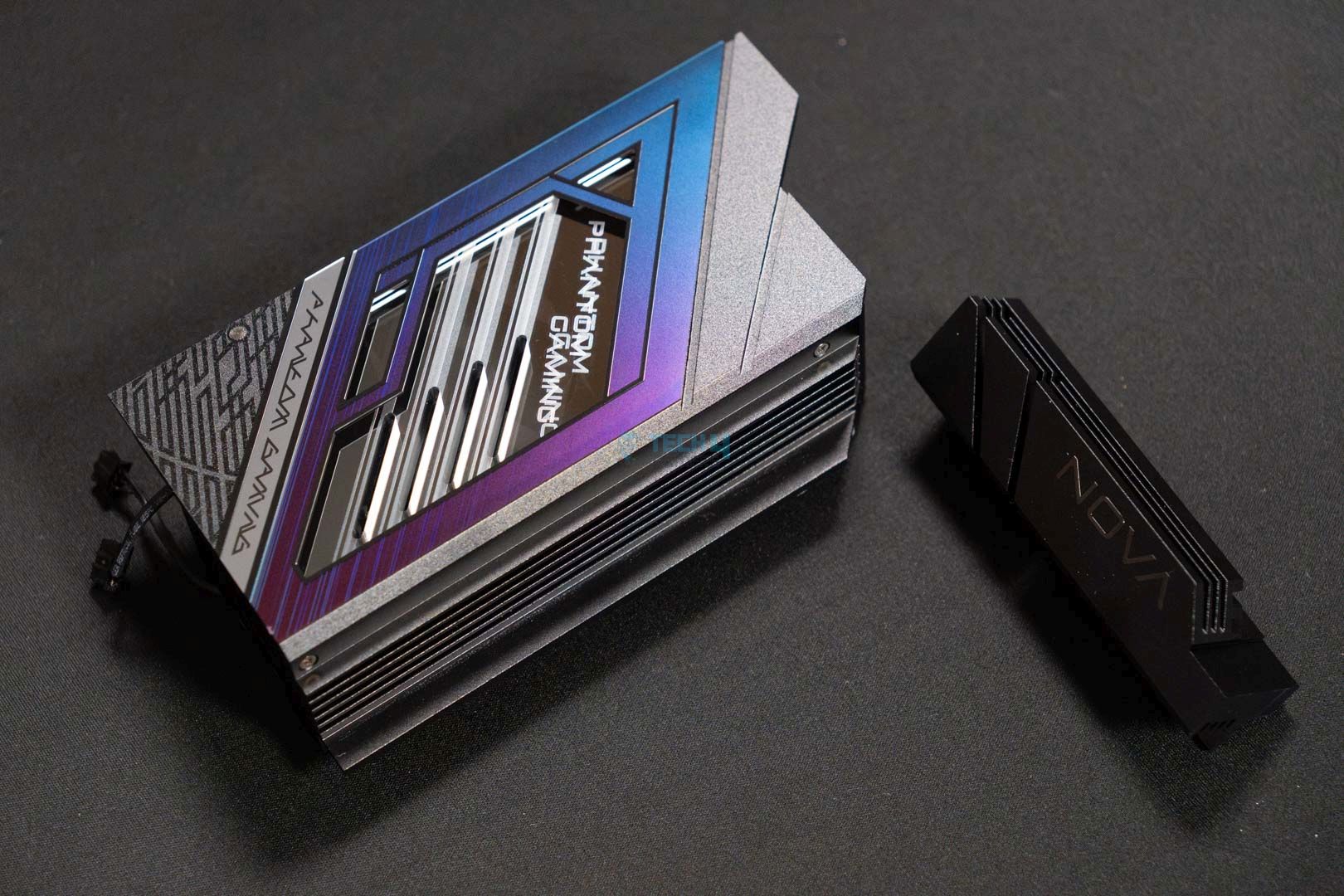
With a clear focus on gamers and enthusiasts, we see a design with decent colors and many heatsinks covering the motherboard. The bottom M.2 heatsinks and the rear IO light up with a beautiful RGB that complements the blue design we’ve seen with ASRock’s new motherboards. Overall, we like the design, which perfectly combines minimalism and style.
A closer look at the rear I/O heatsink
1 of 3
Rear IO Cover Design
Rear IO Cover Close Up
Backplate
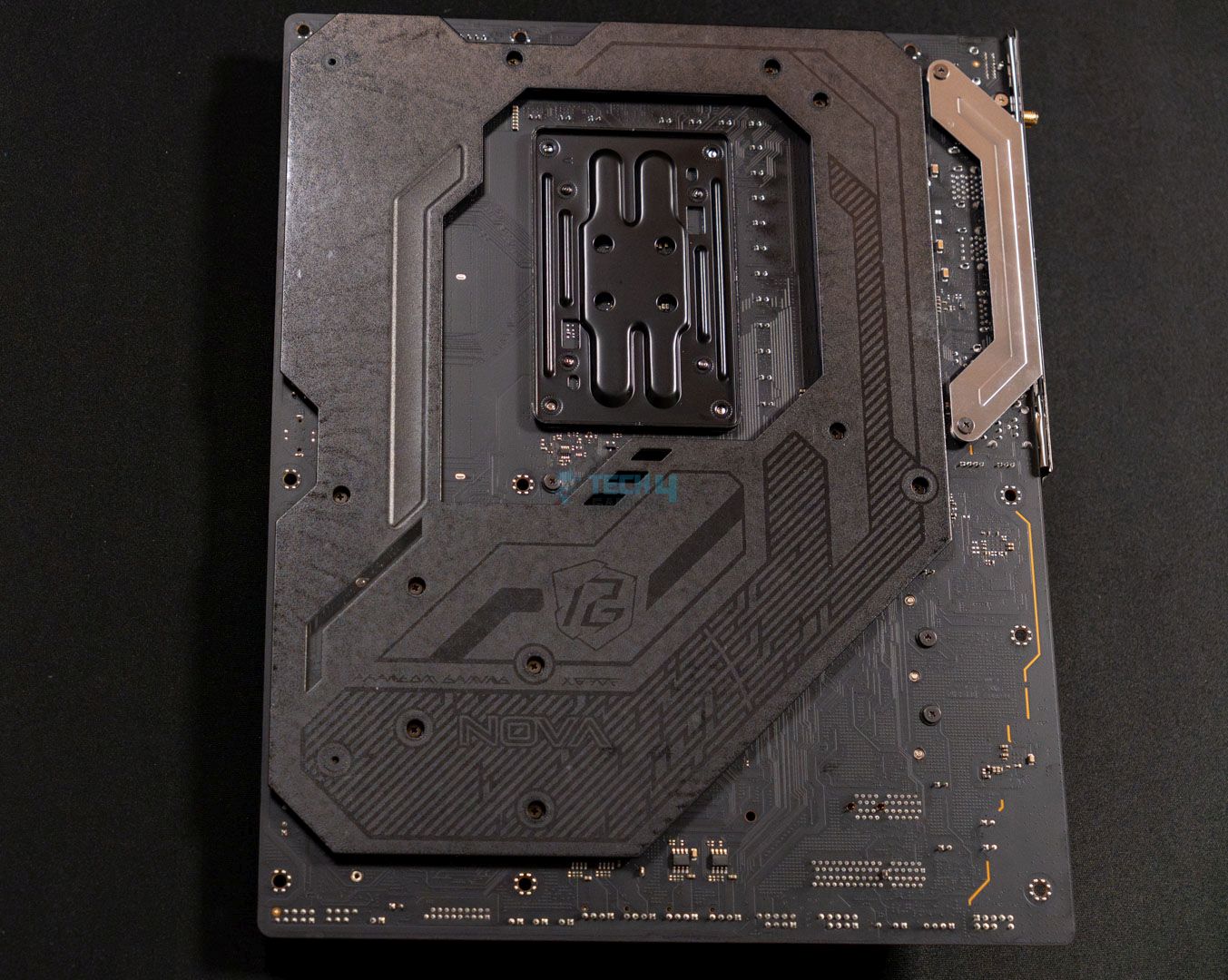
The motherboard is built on an 8-layer 2oz copper PCB, which should keep temperatures low and power flow stable. The higher-quality PCB is great for overclockers, so you should rejoice if you wish to use this board that way.
Block diagram. (Image Credits: ASRock)
The above block diagram simplifies which components are powered by the chipset and the CPU. The CPU powers the DIMM slots, PCIe Gen 5 x16 slot, the M2_1 Gen 5×4 slot, and both USB4 ports, along with the super I/O controller. On the other hand, the chipset powers the rest of the USB ports, the remaining M.2 slots, the WiFi key, the audio codec, and the PCIe2 slots.
Power Delivery System
CPU Socket (Image credit: Tech4Gamers)
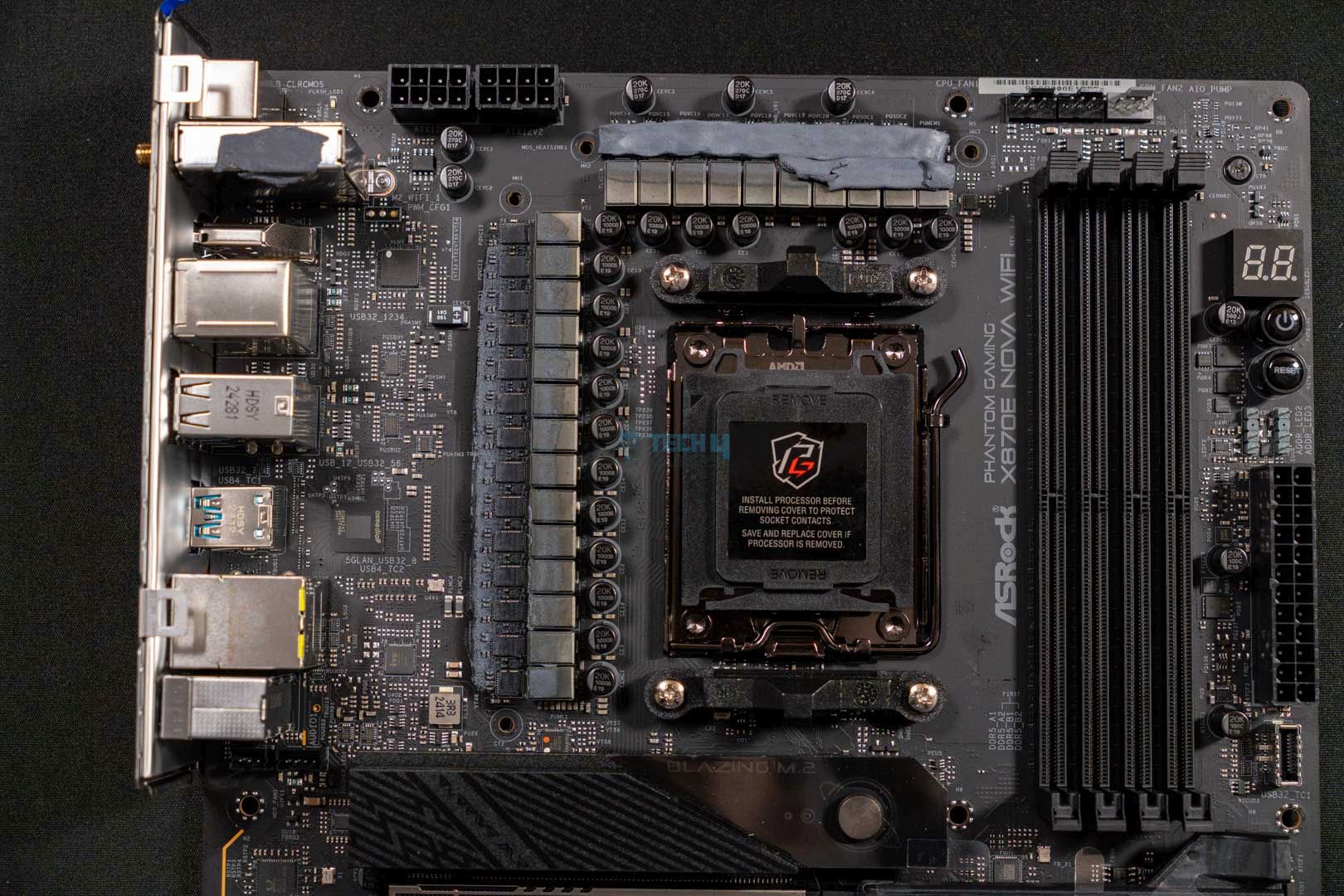
VRM Heatsinks Removed
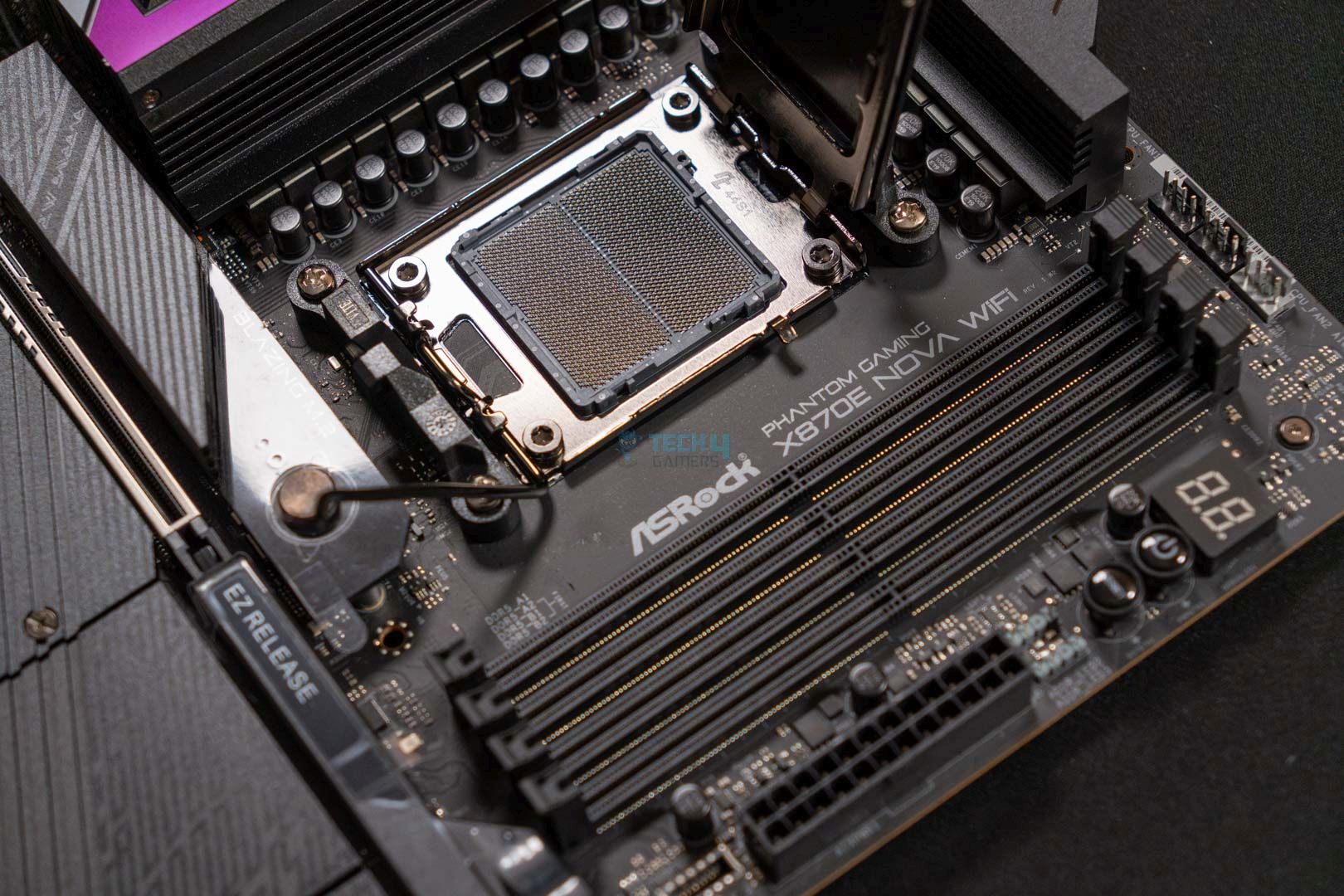
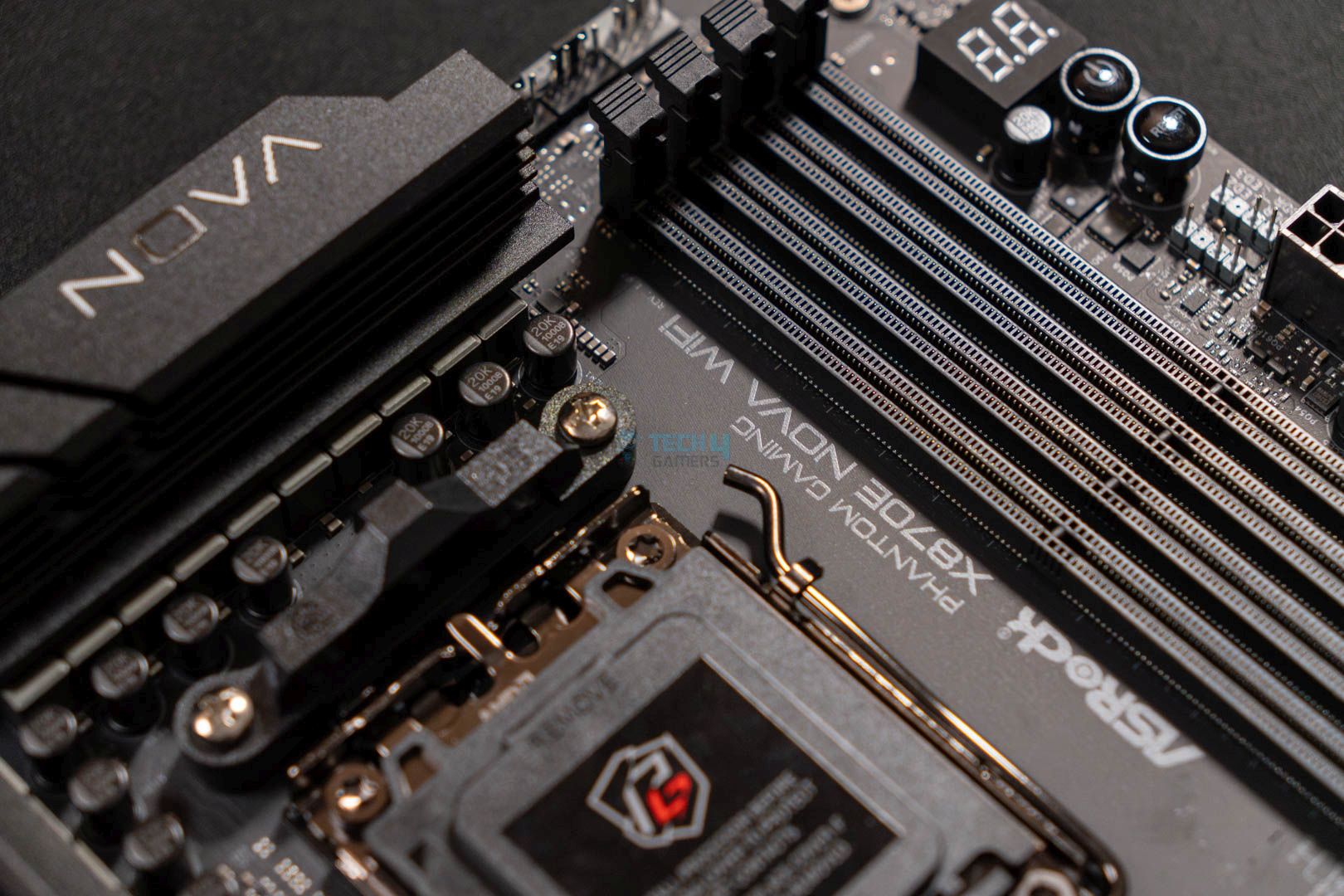
Upon opening the CPU socket, we see the LGA1718 AM5 socket that powers AMD’s Ryzen 7000, 8000, and 9000 series CPUs. Upon removing the VRM heatsink, we are exposed to a 20+2+1-phase VRM design (VCore+SoC+Misc) with 110A Dr.MOS stages for VCore and SoC.
With a cumulative total of 2,200A, this setup is enough to overclock any AMD CPU without many issues. We’ll see the VRM thermals later, but the excessive thermal pads now make us believe the temperatures shouldn’t be an issue.
Taking a closer look at the VRMs and capacitors. (Image By Tech4Gamers)
Upon closer inspection, ASRock is utilizing the high-quality exclusive 20K black capacitors with 1000uF of capacitance and a lifespan of up to 20,000 hours. With the higher capacitance, we should see a lower ripple, more stable output current, and better system stability.
CPU connectors. (Image By Tech4Gamers)
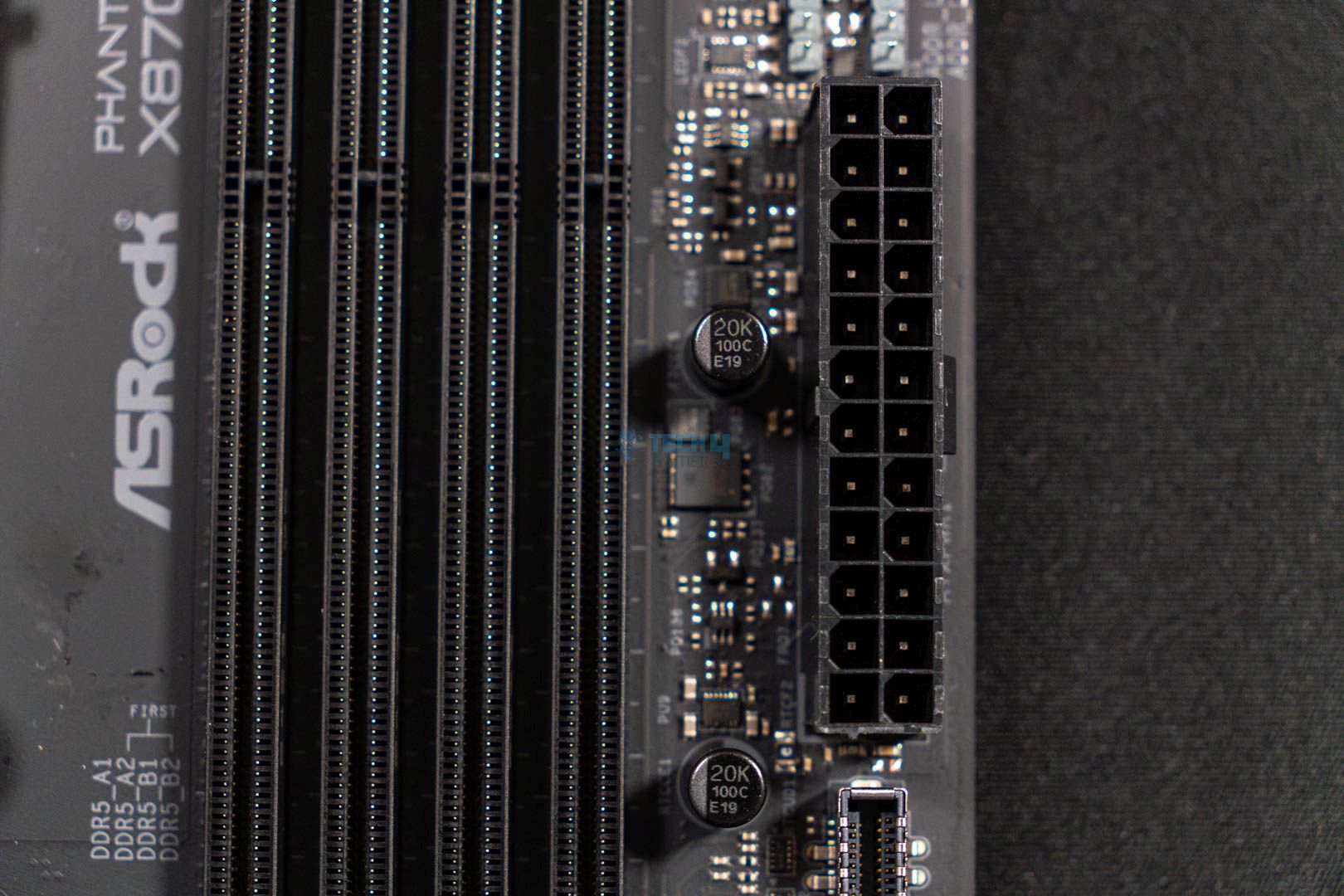
We see standard 2×8-EPS connectors, which feature ASRock’s Hi-Density Power feature, designed to withstand higher current loads. This feature allows us to see better system stability during overclocking and avoid unwanted crashes.
VRM Heatsink Stacked Design
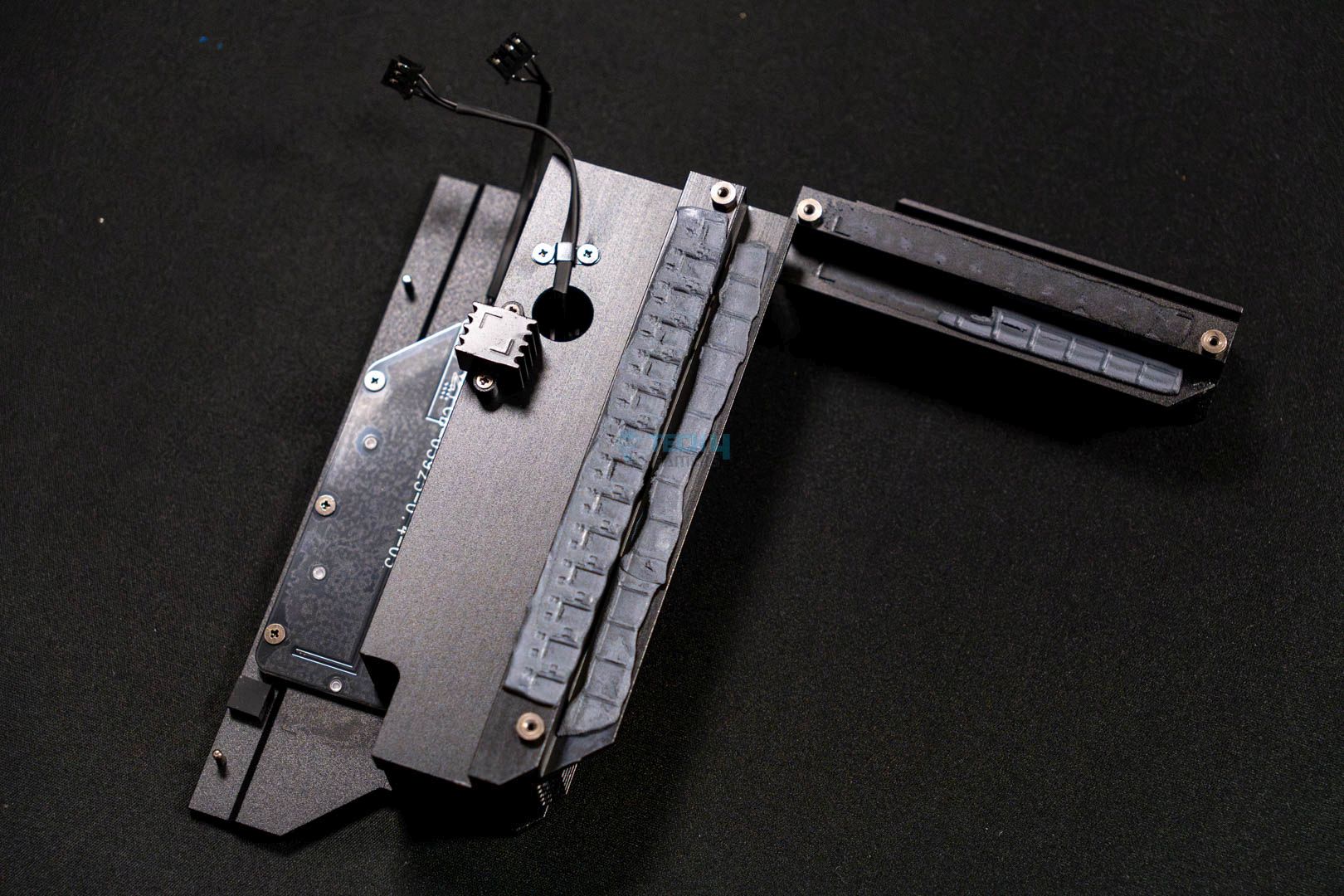
VRM Heatsink Thermal Pads
The aluminum heatsinks use a stacked fin design, and we see plenty of thermal pads underneath the heatsink to provide adequate cooling for all the VRMs. We see a beautiful design on the rear I/O heatsink with the branding, while the smaller heatsink doesn’t have much going on, with a fully-black design. We do, however, see a RGB connector on the bigger heatsink.
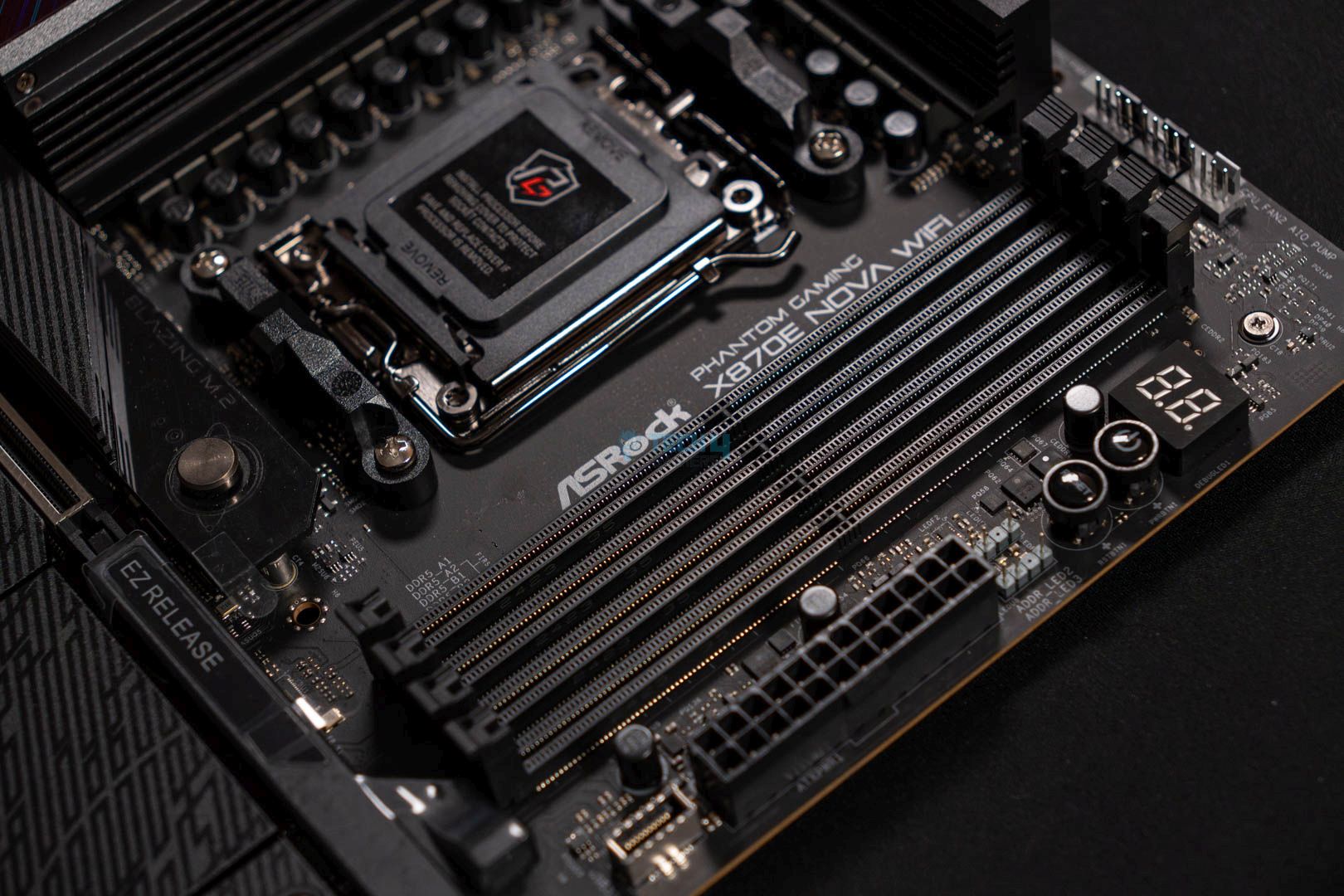
DIMM Slots
DIMM Slot
DIMM Slot Closer
The motherboard provides 4x DIMM slots for up to 256GB of RAM, which can run at a maximum frequency of 8,200MHz. ASRock has allowed support for Intel XMP and AMD EXPO-enabled RAM kits, making transitioning from one brand to another easier.
PCIe Slots
PCIe Slot
EZ Release PCIe
The ASRock Phantom Gaming X870E Nova WiFi motherboard houses three PCIe slots. The PCIe1 slot is a Gen 5.0 x16 slot primarily for the graphics card. The PCIe2 slot is a Gen 3.0 x1 slot for an expansion card. I would have loved to see PCIe Gen 4.0 utilized for this slot. The PCIe3 slot is a Gen 3.0 x16 slot, which will be disabled if the M2_5 SSD slot is occupied.
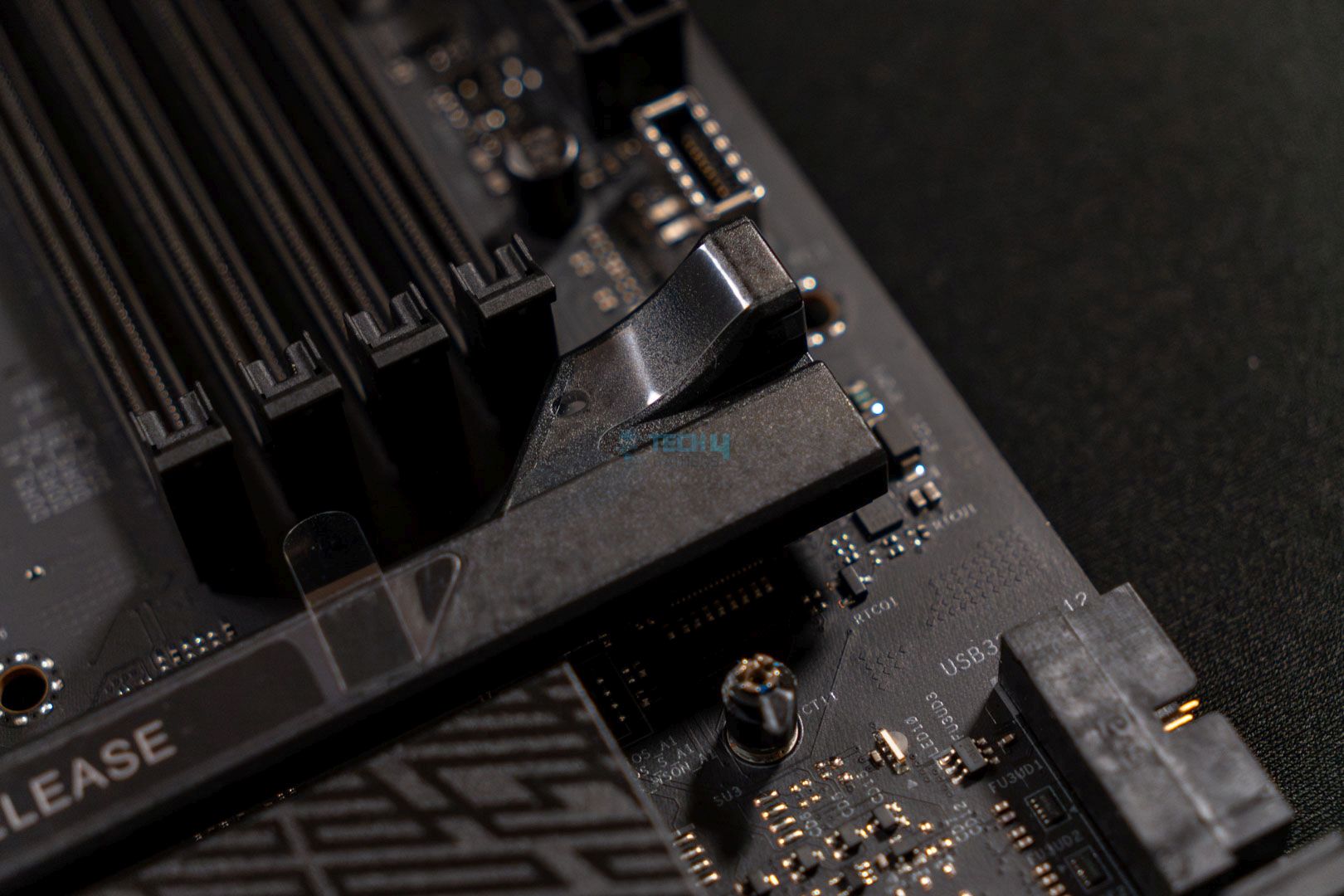
The PCIe1 slot has a GPU EZ latch, which makes it easier to install and remove the graphics card. To install the GPU, you pull the EZ release lever and house the GPU into the slot.
Storage
M.2 SSD heatsinks. (Image By Tech4Gamers)
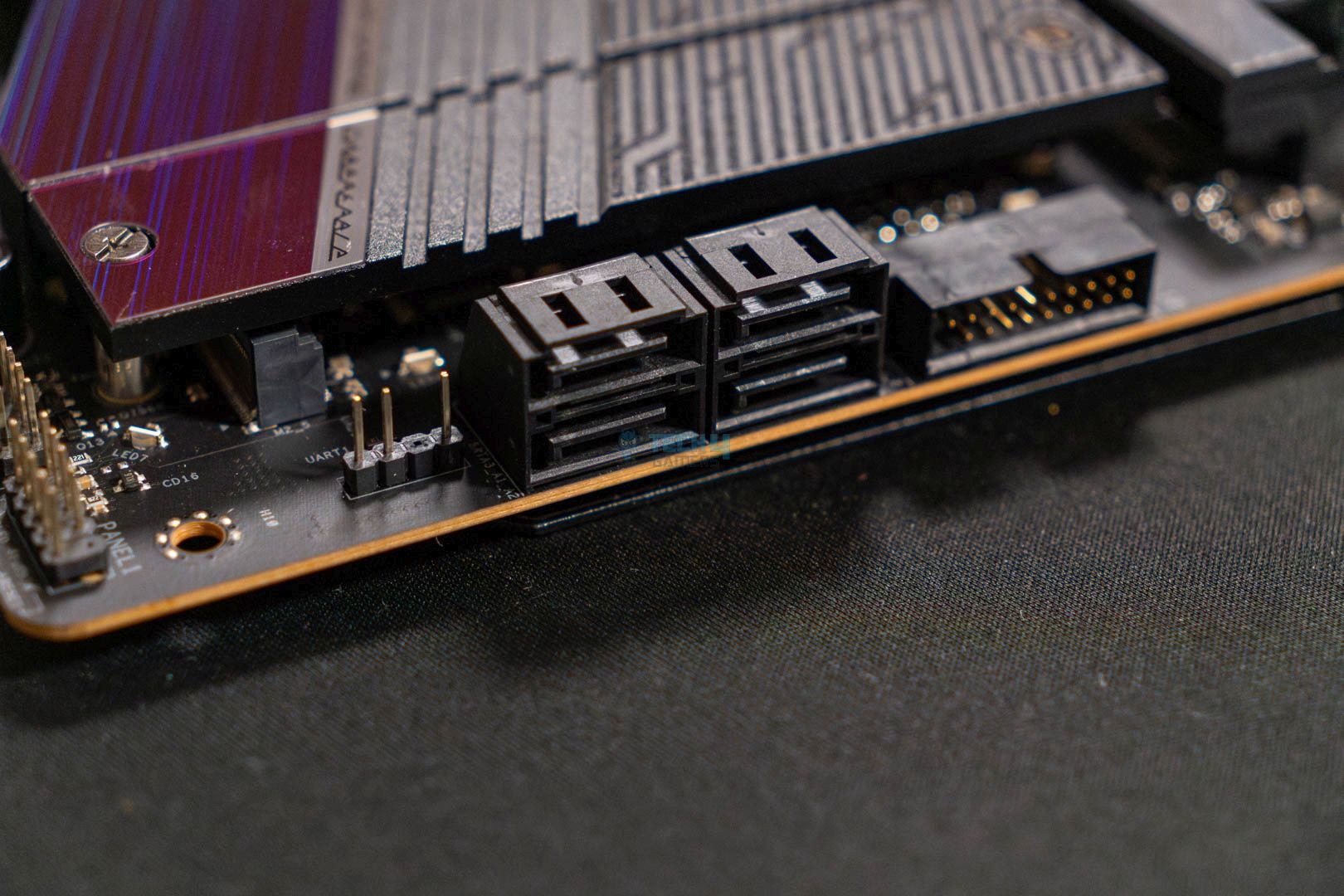
The motherboard comes equipped with a whopping five M.2 slots. The M2_1 is a PCIe Gen5x4 slot, so it should ideally be your primary storage slot. The M2_2, M2_3, and M2_4 slots are PCIe Gen4x4, while the M2_5 slot is a PCIe Gen3x2 slot. As we mentioned above, if the M2_5 slot is occupied, the PCIe3 slot will be disabled, so don’t use this slot unless necessary.
All the M.2 slots support RAID 0, RAID 1, and RAID 10. However, the 4x HDDs only support RAID 0 and RAID 1.
Chipsets heatsink. (Image By Tech4Gamers)
Thankfully, all the M.2 slots are covered with heatsinks. The M2_1 features a toolless design with a quick-release mechanism. We would have loved to see an anti-drop screw design on the other heatsinks, especially considering ASRock’s higher-end B850 offerings provide that feature.
Here’s what’s present underneath the heatsinks:
Exposing the M.2 heatsinks. (Image By Tech4Gamers)
The M2_1 slot has dual-sided thermal pads, which is a good sign for the storage’s temperatures. The other four slots don’t provide any double-sided thermal pads, but this shouldn’t be much of an issue. The motherboard’s overall value could have been increased if it provided dual-sided thermal pads on all five M.2 slots.
We see some fantastic USB connectivity here. Since it is supposed to be standard for all X870 chipset motherboards, it’s not surprising to see two USB4 ports on this board. However, it is interesting to see only a USB 3.2 Gen2x2 Type-C port at the front. Perhaps a second port on the back would have been better. Besides that, there aren’t any issues with the connectivity, and we prefer the diversity of the ports provided.
Network & Connectivity
Realtek LAN chip. (Image By Tech4Gamers)
The motherboard has the standard network connectivity options found in most X870 motherboards. It has a Realtek 5G LAN network that supports Multi-Link Operation (MLO). This feature enables simultaneous use of multiple bands and channels, boosting internet speed and reducing latency. Additionally, it supports WiFi 7 and Bluetooth 5.4 for wireless networking.
Audio Solution
Audio chip. (Image By Tech4Gamers)
The ASRock Phantom Gaming X870E Nova WiFi motherboard features the newer Realtek ALC4082 audio codec. In addition to the better audio chip, ASRock has provided us with Steelseries’ Nahimic Audio software. The software can improve noise suppression, reduce echo, stabilize voice, and enhance gaming audio.
The isolated audio codec has individual PCB layers for the right and left audio channels, improving the overall audio quality and removing lousy audio. It would have been nice if ASRock had provided its Direct Drive Technology, as it did for the B850 Phantom Gaming Riptide WiFi motherboard.
Editor`s Note
Nahimic’s Sound Tracker is a good resource for all gamers. It’s a visual indicator that points out the directions from which sounds come. So, utilizing such technology in games makes it possible to figure out where an enemy has shot from, for example.
– Nauman Siddique
Internal Connectors And Components
Here’s a quick rundown of all the connectors on the motherboard:
3x thermistor cable headers
1x power LED and speaker header
1x RGB LED header
3x addressable LED headers
2x CPU fan connector (4-pin) (Smart Fan Speed Control)
3x chassis fan connectors (4-pin) (Smart Fan Speed Control)
1x AIO pump fan connector (4-pin) (Smart Fan Speed Control)
1x water pump fan connector (4-pin) (Smart Fan Speed Control)
1x 24-pin ATX power connector (Hi-Density Power Connector)
2x 8-pin 12V power connectors (Hi-Density Power Connector)
1x front panel audio connector (15u Gold Audio Connector)
2x USB 2.0 headers (support 4 USB 2.0 ports)
2x USB 3.2 Gen1 headers (support 4 USB 3.2 Gen1 ports)
1x front panel Type-C USB 3.2 Gen2x2 headers (20Gb/s)
1x Dr. Debug with LED
1x power button with LED
1x reset button with LED
Motherboard Connector
SATA Connector
In addition to the 2×8-EPS connectors I mentioned above, the 24-pin ATX connector utilizes ASRock’s Hi-Power Density feature. Thus, this motherboard offers better system stability, especially when overclocking your CPU.
Super I/O controller. (Image By Tech4Gamers)
The ASRock Phantom Gaming X870E Nova WiFi motherboard has two super I/O controllers. The lower-end NCT5585D handles fan control and additional system monitoring, while the higher-end NCT6796D handles temperature and voltage monitoring, fan control, and legacy I/O functions.
ASRock has implemented the Dr. Debug Post Status Checker on this motherboard. You’ll see an error code on the analytical panel if the PC has any issues. This can help you identify what is going wrong. You can match the error code’s meaning to the motherboard’s manual.
Heatsinks Removed
ASRock Phantom Gaming X870E Nova WiFi with all heatsinks removed. (Image By Tech4Gamers)
This is what the motherboard looks like with all its heatsinks removed.
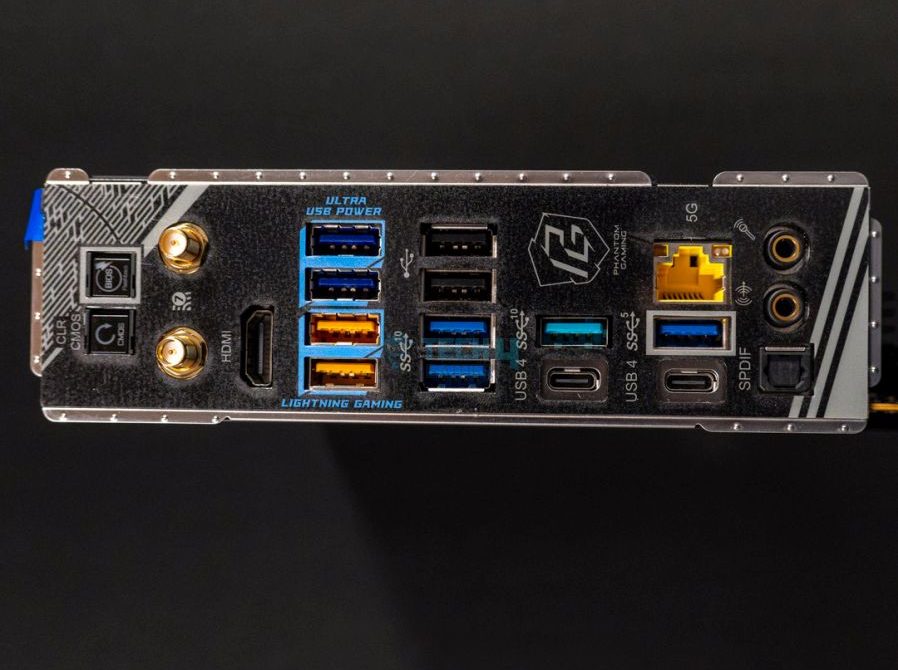
Rear I/O Shield Panel
Here’s a list of all the rear I/O shield panel connections on the motherboard:
Rear IO (Image By Tech4Gamers)
2x antenna ports
1x HDMI port
1x optical SPDIF outport
2x USB4 type-C ports (40Gb/s)
5x USB 3.2 Gen2 Type-A ports (10Gb/s)
3x USB 3.2 Gen1 Type-A ports
2x USB 2.0 ports
1x RJ-45 LAN port
1x clear CMOS button
1x BIOS flashback button
1x line out jack (gold audio jack)
1x microphone input jack (gold audio jack)
There are a lot of goodies on the rear I/O panel. For example, it includes 2x USB4 ports, a clear CMOS, and a flashback button. All the ports are labeled for ease of use, so you won’t have to worry about finding the correct USB port.
To use the BIOS flashback feature, you need the latest BIOS on a USB flash drive. Install it in the BIOS USB port on the rear I/O shield and press the flashback button for about three seconds. Wait for the blinking LED to stop, and your flashback will be completed. If the LED turns solid green, it indicates a problem with the flashback. Re-insert the USB and try again.
PRO TIP: To use the BIOS flashback feature, you don’t need to install a CPU. Simply prepare the USB flash drive and follow the steps to complete the flashback.
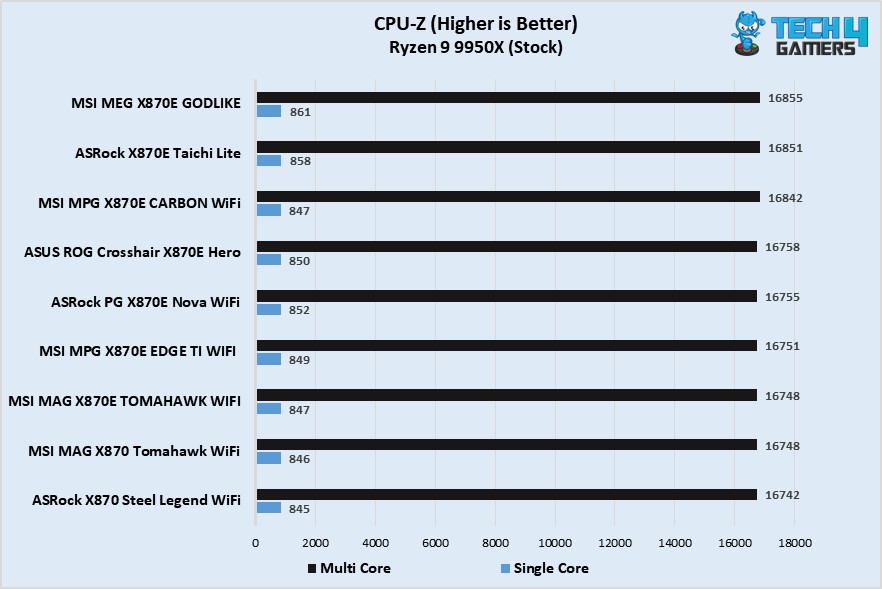
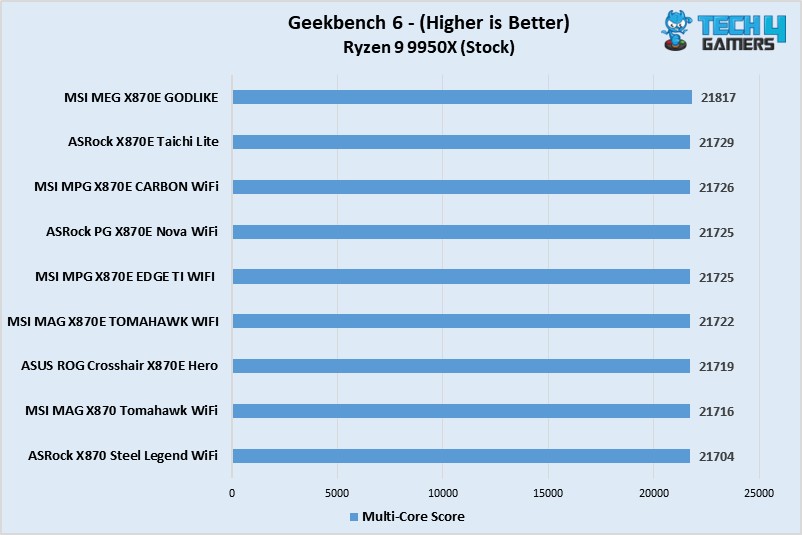
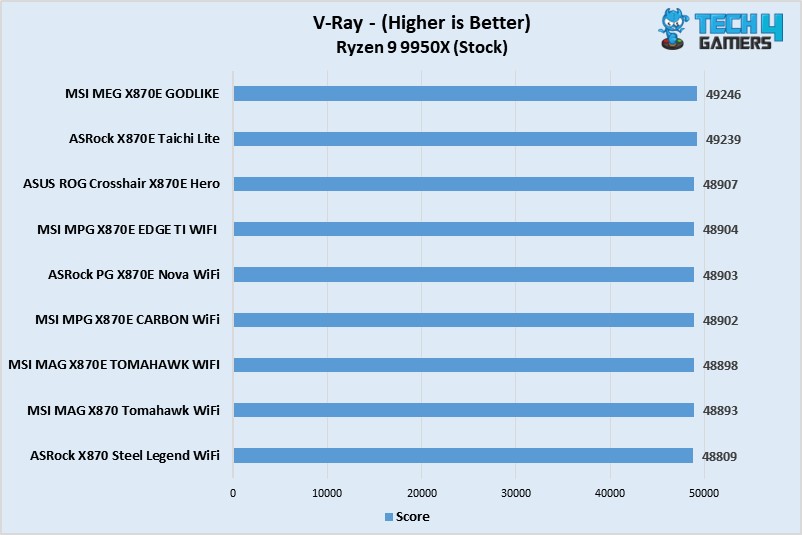
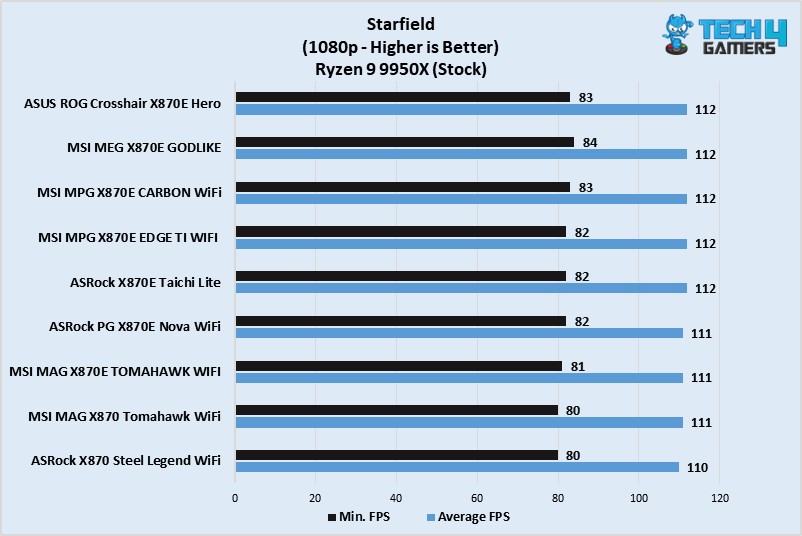
Overall, the motherboard is in the middle of the spectrum, providing performance similar to its competitors.
Power Consumption And VRM Temperatures
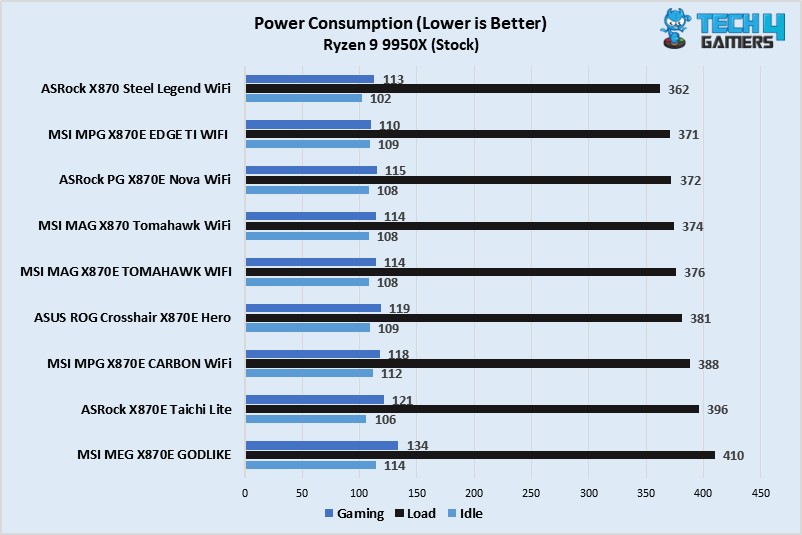
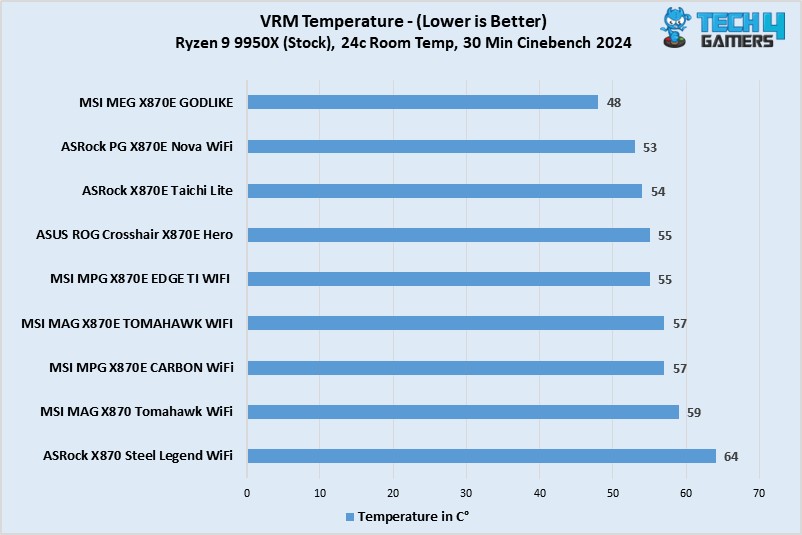
Here’s an overview of the total power consumption and VRM temperatures of the motherboard after stress testing it in Cinebench 2024:
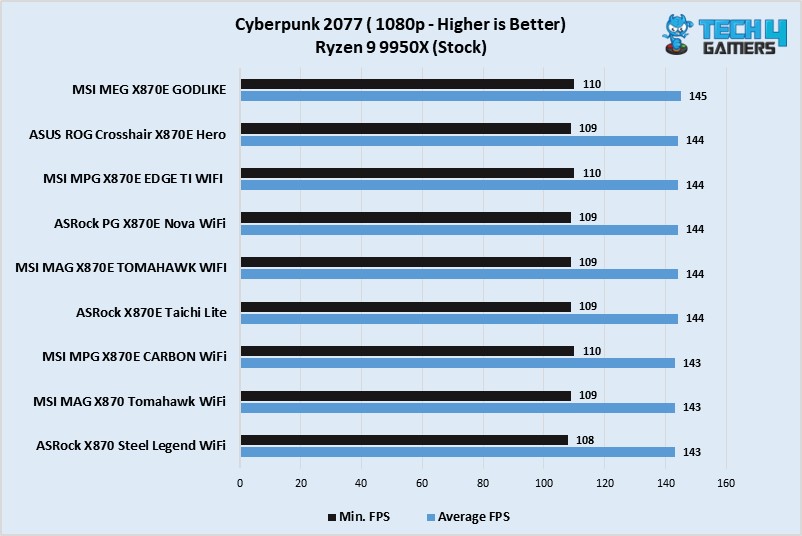
The motherboard is efficient while gaming but can use up to 372W under 100% load. The 108W idle consumption is good to see.
The motherboard’s VRM temperatures are extremely low, up to only 53°C, in a stressful environment. The XXL VRM heatsink seems to be working correctly.
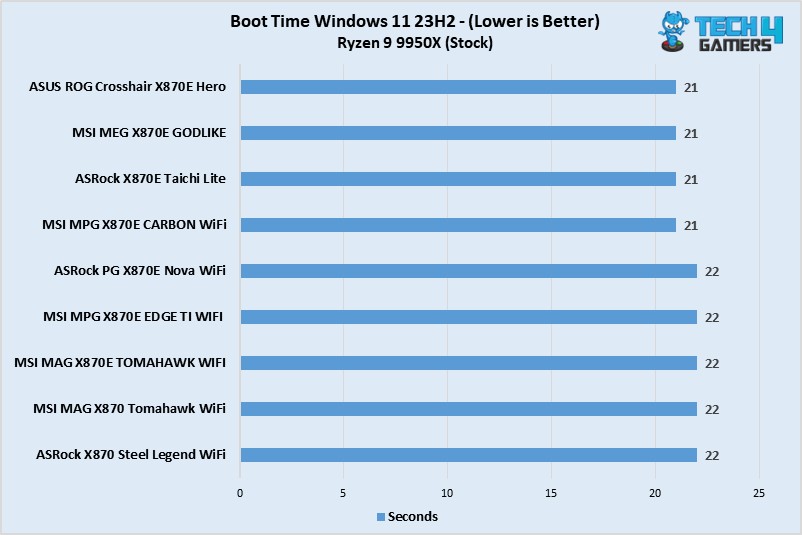
Boot Times
The boot times are pretty linear. We have no problems with a 22-second bootup, the same as most of its competition.
Should You Buy It?
Now, then, should you invest in this motherboard or look elsewhere? Here are our two cents:
Buy It If
✅ You want to use the plethora of M.2 slots: I recommend purchasing this motherboard if you plan to use the five M.2 slots. However, beware of the M2_5 slot, as it’s only a PCIe Gen3x2 slot.
✅ You need lower-temperature VRMs for overclocking: If you’re a budding overclocker who wants to try overclocking, I recommend purchasing this motherboard. The VRMs are stable and don’t get hot, and the power consumption is respectable, giving you more room to experiment.
✅ You want a high-performance motherboard with a good design. If you’re looking for an X870 motherboard that performs well and looks beautiful, I recommend the ASRock Phantom Gaming X870E Nova WiFi. It looks good and can keep up with its competitors in all tests.
Don’t Buy It If
❌ You want to utilize all the M.2 and PCIe slots: I don’t recommend buying this motherboard if you want to utilize all the M.2 and PCIe slots because when you occupy the M2_5 slot, the PCIe3 slot will get disabled.
❌ You require a motherboard with more DIY-friendly features: Unfortunately, this motherboard only comes with a single M.2 toolless design and a GPU EZ latch for DIY-friendly features. The other heatsinks have standard installation and removal methods with no anti-screw features. If you require more DIY-friendly features, you may have to look elsewhere.
My Thoughts
The ASRock Phantom Gaming X870E Nova WiFi motherboard provides a decent mix of value, performance, and aesthetics, with an MSRP of $349 USD. Starting with its VRMs, we see a 20+2+1-phase VRM design (VCore+SoC+Misc) with 110A Dr.MOS stages for SoC. Similarly, the motherboard houses high-quality exclusive 20K black capacitors with 1000uF capacitance and a lifespan of up to 20,000 hours. Furthermore, during our tests, the VRM’s temperatures didn’t exceed 53°C, enabling the doors to decent overclocking.
We see three PCIe slots on the motherboard, with the PCIe1 being a Gen 5 x16 slot for the graphics card. There’s a GPU EZ latch on this slot for easier GPU installation and removal. The PCIe2 slot is a Gen 3 x1 slot, while the PCIe3 slot is a Gen 3 x16 slot. We would have loved to see the other two slots being Gen 4 for better performance. Also, if the M2_5 slot is occupied, the PCIe3 slot will be disabled, so keep an eye out if you wish to utilize all the slots.
The motherboard houses a whopping five M.2 slots in addition to the PCIe slots. The primary M2_1 slot is PCIe Gen5x4, and it has a toolless design with a quick-release mechanism for easier installation and removal. The M2_2, M2_3, and M2_4 slots are PCIe Gen4x4 slots, while the M2_5 slot is a PCIe Gen3x2 slot. For additional storage, you also get four SATA ports.
The motherboard also features impressive USB connectors, providing up to 21 connectors, including 2x USB4 ports at the rear and a single USB 3.2 Gen2x2 Type-C port at the front. Similarly, we don’t have any issues with the networking, with ASRock providing a 5G LAN network accompanied by WiFi 7 and Bluetooth 5.4 wireless technologies.
The motherboard features a gamer-centric design with blue imbued all over and beautiful RGB lighting skewed underneath the larger M.2 heatsinks. We’re pretty happy with the design, as it matches the pricing and the audience the product is targeting.
All in all, for a $349 package, this motherboard is a solid deal, providing incredible value and performance with little left to remain dissatisfied. You should consider purchasing this motherboard if you plan to overclock any of the latest high-end Ryzen 7000 or Ryzen 9000 series CPUs.
Currently serving as a News Reporter at Tech4Gamers, I have the privilege of combining my love for gaming with the art of storytelling. My role involves crafting engaging narratives that keep our audience abreast of the latest developments in the gaming world.
Story Highlight
It’s been three years since Sony acquired Bungie for $3.6 billion.
A new poll reveals that fans are displeased with the result of Sony’s buyout.
With the current performance, the developer will be completely absorbed by SIE, potentially ending the history of the veteran studio.
Since the beginning of this generation, the console wars have been further fueled by PlayStation and Xbox’s acquisition of major gaming companies.
However, not all buyouts have proven fruitful. One notable example is Sony’s buyout of Bungie. It’s been three years since Bungie became part of Sony, and so far, fans aren’t pleased with the outcome.
Why it matters: Bungie was one of the most notable developers in the gaming industry, having developed multiple Halo titles and Destiny.
Three Years Since Sony’s Takeover Of Bungie, Fans Have Been Displeased With The Performance | Poll Conducted On X
When asked to rate Sony’s Bungie buyout on a scale of A-D, almost 70% of the votes were for D and below. This poll also saw more than 60,000 votes from various people on the X platform.
To make matters worse, Bungie has been slowly absorbed into other Sony studios while other developers were laid off. At this point, Bungie isn’t even half the company it used to be.
Fans even believe that Sony overpaid for the Bungie acquisition. Ever since it took over ownership, Destiny 2, the only notable title under Bungie, has been performing quite poorly.
This buyout was a part of PlayStation’s heavy focus on live-service games. Unfortunately, the focus has ruined what could have been a great start to the current console generation.
Destiny 2’s Concurrent Players Have Dropped Significantly Over The Past Few Years
Despite that, Sony continues to overlook the veteran industry developer. The team is now working on Marathon, a reboot of a classic IP, but fans remain skeptical. If Marathon performs terribly, Bungie may be completely dissolved in the future.
Sony is also expected to translate the developer’s IPs into live-action movies at some point in the future to recoup its investment and losses. A new Destiny game could potentially save the studio, but the future certainly looks challenging for now.
What are your thoughts on the studio’s performance under Sony so far? Let us know in the comments below or head towards the official Tech4Gamers Forum.