Currently serving as a News Reporter at Tech4Gamers, I have the privilege of combining my love for gaming with the art of storytelling. My role involves crafting engaging narratives that keep our audience abreast of the latest developments in the gaming world.
Story Highlight
Mafia: The Old Country developers have teased something big for the coming weeks.
With GDC 2025 happening soon, gameplay footage could be revealed at the event.
Following such big words and a launch alongside GTA 6, the creators are confident with Mafia: The Old Country.
With 2K Games finally reviving the Mafia series through definitive editions of the first three games following Mafia 3’s subpar launch, they’ve now decided to wipe the slate clean before proceeding to future entries.
Mafia: The Old Country will be the fourth entry in the franchise and by far different from its predecessors. Being a reboot, 2K Games has changed much with the game, and the developers have now teased something big regarding a future announcement.
Why It Matters: Due to a positive reception for the first game’s remake, Mafia: The Old Country has big shoes to fill. This announcement suggests that the developers are quite confident in their work.
2k Games Teasing An Announcement For Mafia: The Old Country || Source: X
The announcement came from a social media post by 2Kczech, who said to keep tuned for a potential future announcement. If anything, we can expect a gameplay reveal sometime soon, especially as the game draws closer to its launch.
With GDC 2025 just around the corner, Hangar 13 could also have something in store for the fans at this event. Perhaps the team will highlight a bit of what makes the new Mafia’s open world different and interesting compared to the series’ past titles.
Judging by the wording, the team must be confident in this release since Mafia: The Old Country is expected to launch around the same time frame as GTA 6, arguably the biggest title in gaming history.
Mafia: The Old Country Faces Tough Competition From GTA 6
Set during the early 1900s, Mafia: The Old Country will explore the origin of the Salieri crime family. Moreover, the title is based on a rural setting, which is completely different from its predecessors.
Developer Hangar 13 has also ditched its in-house Fusion Engine for the game in favor of Unreal Engine 5. Additionally, the game will offer a much more linear experience rather than an open-world setting.
At Tech4Gamers, I contribute as a Senior News Reporter, combining my skills and gaming enthusiasm to keep our audience updated on the latest developments.
Story Highlight
The Ryzen 9 9950X3D has been praised for its performance in gaming and productivity tasks.
The new CPU is significantly faster than the Intel Core Ultra 9 285K and offers impressive efficiency.
It also runs cooler than anticipated, making it the ultimate CPU for the best of both worlds.
AMD’s Zen 5 lineup was initially considered quite disappointing, but things changed for the better once the Ryzen 7 9800X3D was released. The gaming giant has now returned with even more 3D V-Cache chips, namely the Ryzen 9 9900X3D and 9950X3D.
According to initial reviews, the latter is an incredible addition to the Zen 5 lineup, positing the Ryzen 9 9950X3D as the new king of CPUs.
Why it matters: The Ryzen 9 9950X3D marks a notable improvement over its predecessor, which often fell short of expectations in gaming results despite its undeniable strengths in productivity workloads.
As per Hardware Unboxed’s review, the Ryzen 9 9950X3D’s gaming performance is basically on par with that of the Ryzen 7 9800X3D, with the former leading by just 1FPS at 1080p. However, compared to the Intel Core Ultra 9 285K, the chip is a whopping 31% faster.
The Ryzen 9 9950X3D excels at productivity tasks, comfortably pulling ahead of both chips in results involving 7-Zip compression and Blender. Here, the chip was around 4-10% faster than the Core Ultra 9 285K and completely demolished the Ryzen 7 9800X3D.
At the same time, AMD’s Zen 5 CPU is more power efficient than the Core Ultra 9 285K, drawing 203W of power across multi-threaded workloads in various games. According to Techpowerup, temperatures are also manageable, with the chip staying below 80° C with a Noctua NH-D15 cooler when running Blender.
AMD Ryzen 9 9950X3D Gaming Benchmarks via Hardware Unboxed
The gaming temperatures are even lower, and the Ryzen 9 9950X3D stayed at around 68° C when running Cyberpunk 2077.
Unfortunately, the Ryzen 9 9950X3D costs an arm and a leg, making it inaccessible to most PC gamers.
The chip is incredible for those who can afford the ultra-high-end offerings from AMD, but the Ryzen 7 9800X3D remains an equally enticing option for consumers on a more modest budget.
As a Hardware Expert at Tech4Gamers, I blend my Computer Science expertise with a love for technology. Through comprehensive reviews and comparisons, I guide our audience in making informed tech decisions.
Dr. Usman Saleem
At Tech4Gamers, I’m the PC Hardware Specialist, primarily contributing to the “Best-Ofs” section. I provide thoughtful buying advice based on thorough testing and personal expertise. I also review hardware products and games to keep things fresh.
The demand for the newly launched AMD RX 9070 series graphics cards is so crazy that it’s going out of stock moments after it’s made available to purchase. This speaks volumes of the great value-for-money factor that this card aims to deliver. These cards have created the RX 580-like situation, as that card was such a great success back when it was released. In our RX 9070 review, we saw the card deliver excellent gaming performance at both ray tracing and rasterization, it even handles 4K without breaking a sweat.
Why Trust Tech4Gamers
Usman Saleem is our hardware tester who loves to put all the latest GPUs, CPUs, RAM, and motherboards for a spin.
50+ CPUs tested and reviewed by our team of hardware experts (Tech4Gamers Team).
800+ hours spent testing different processors for our reviews.
At Tech4Gamers, ensuring you get reliable information is our priority. That’s why every hardware round-up undergoes a meticulous review process by our team of experts and editors. Each review is carefully examined against our strict editorial guidelines, guaranteeing you trustworthy insights you can depend on.
Nevertheless, the main point is that the value proposition of these cards is great, and it is important to pair them with CPUs that are capable of just as much. Now is the time and place where our team enters the scene to guide our readers regarding the best choices in CPUs for cards like these. We put each CPU to test its efficiency, thermal performance, gaming performance, and lastly, its productivity performance. Only the most capable options are included in this list.
Here you can look at the highlights of all the chosen CPUs for the RX 9070 and RX 9070 XT:
CPU
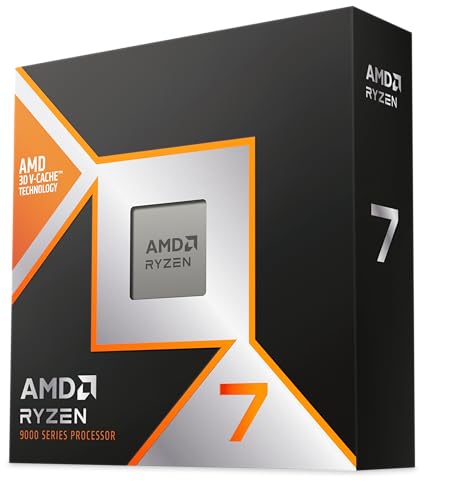
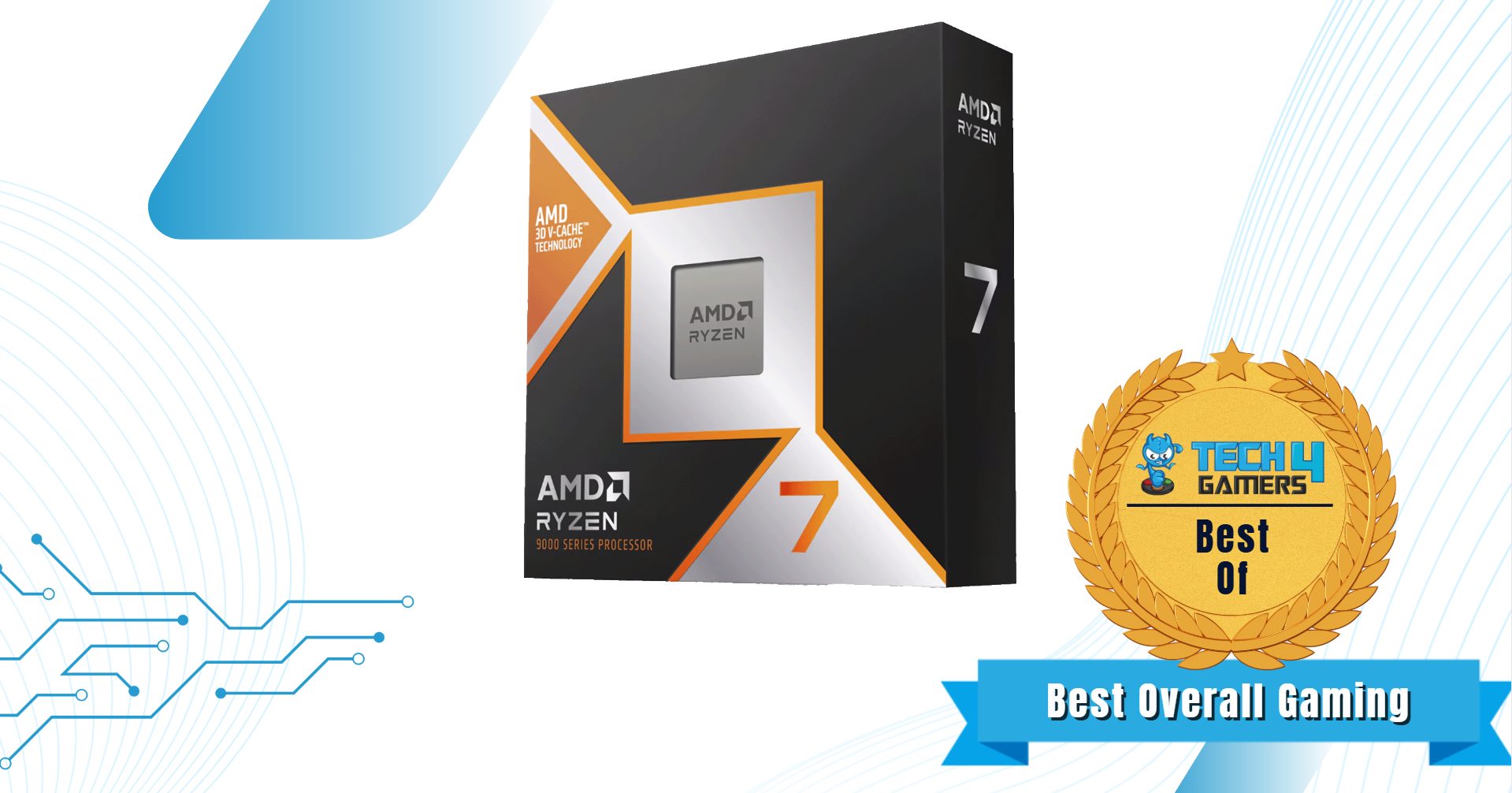
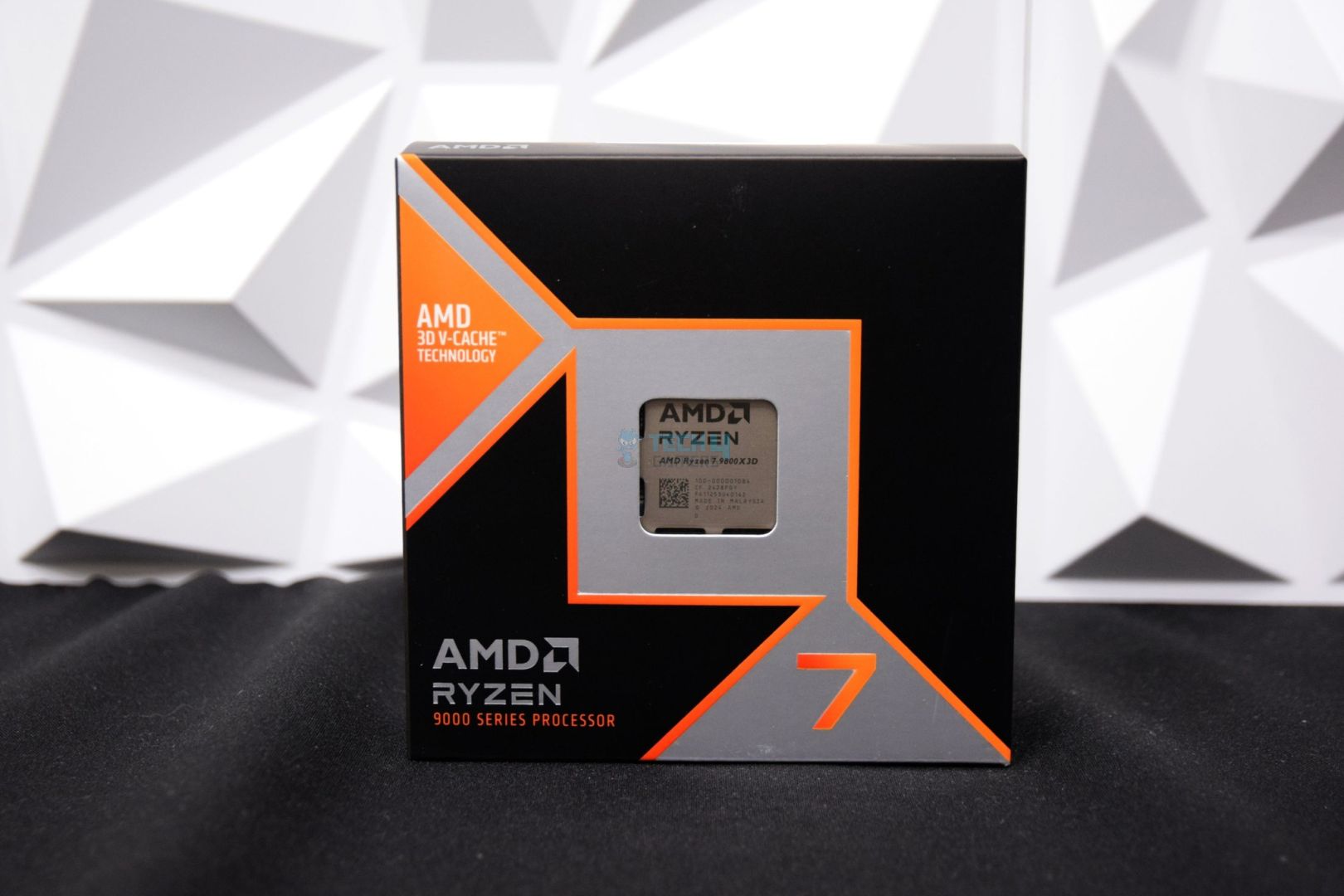
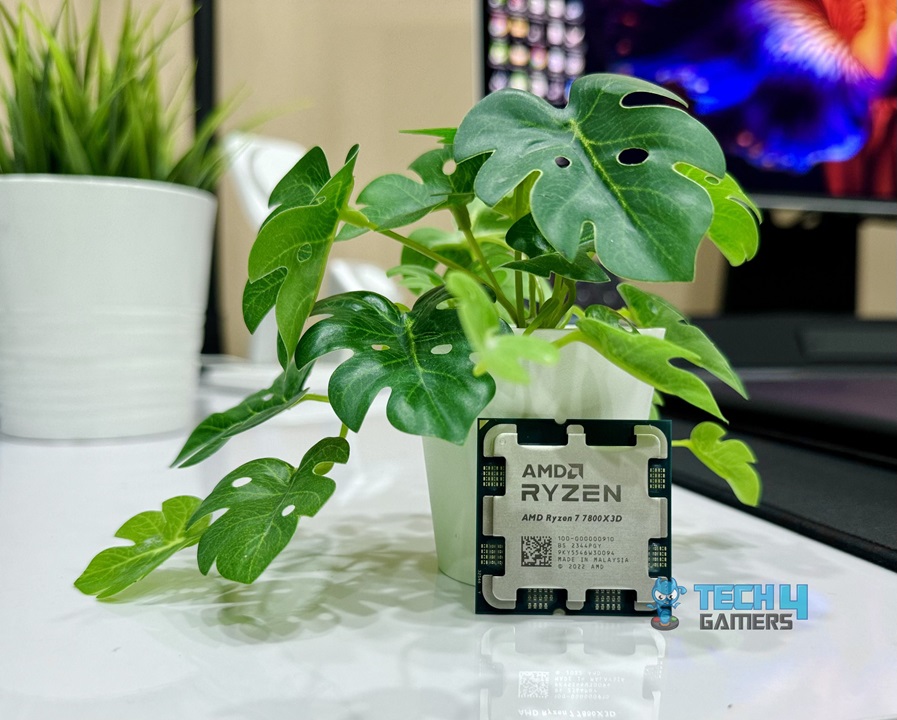
AMD Ryzen 7 9800X3D
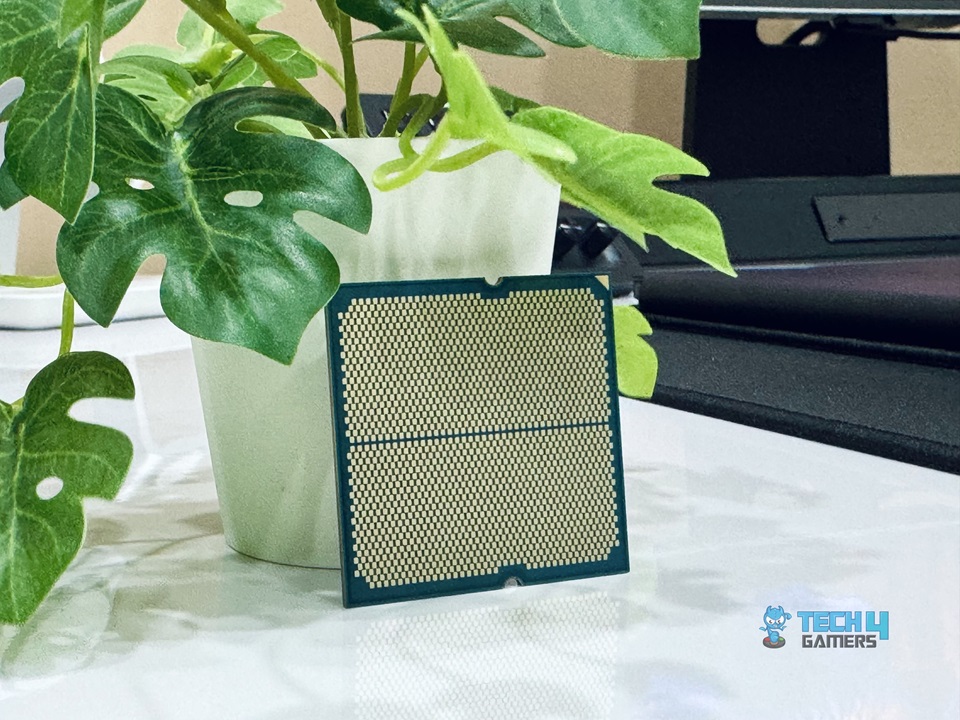
AMD Ryzen 7 7800X3D
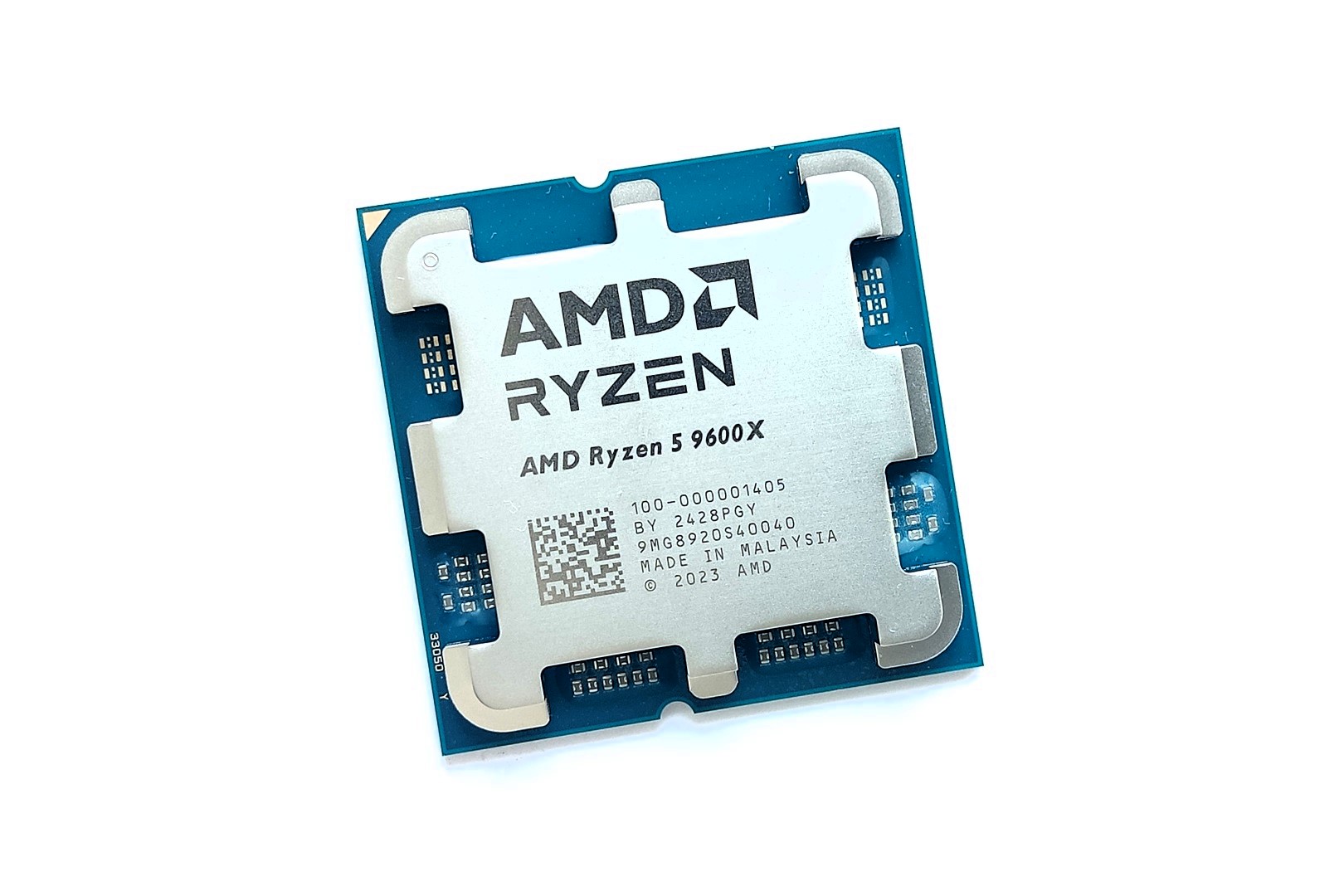
Ryzen 5 9600X
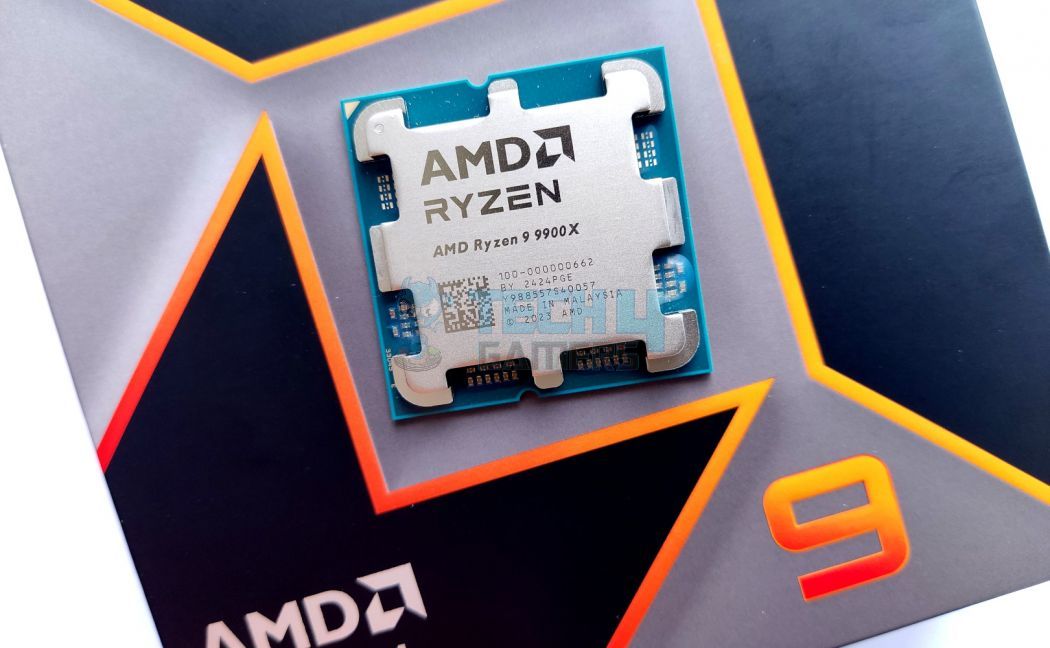
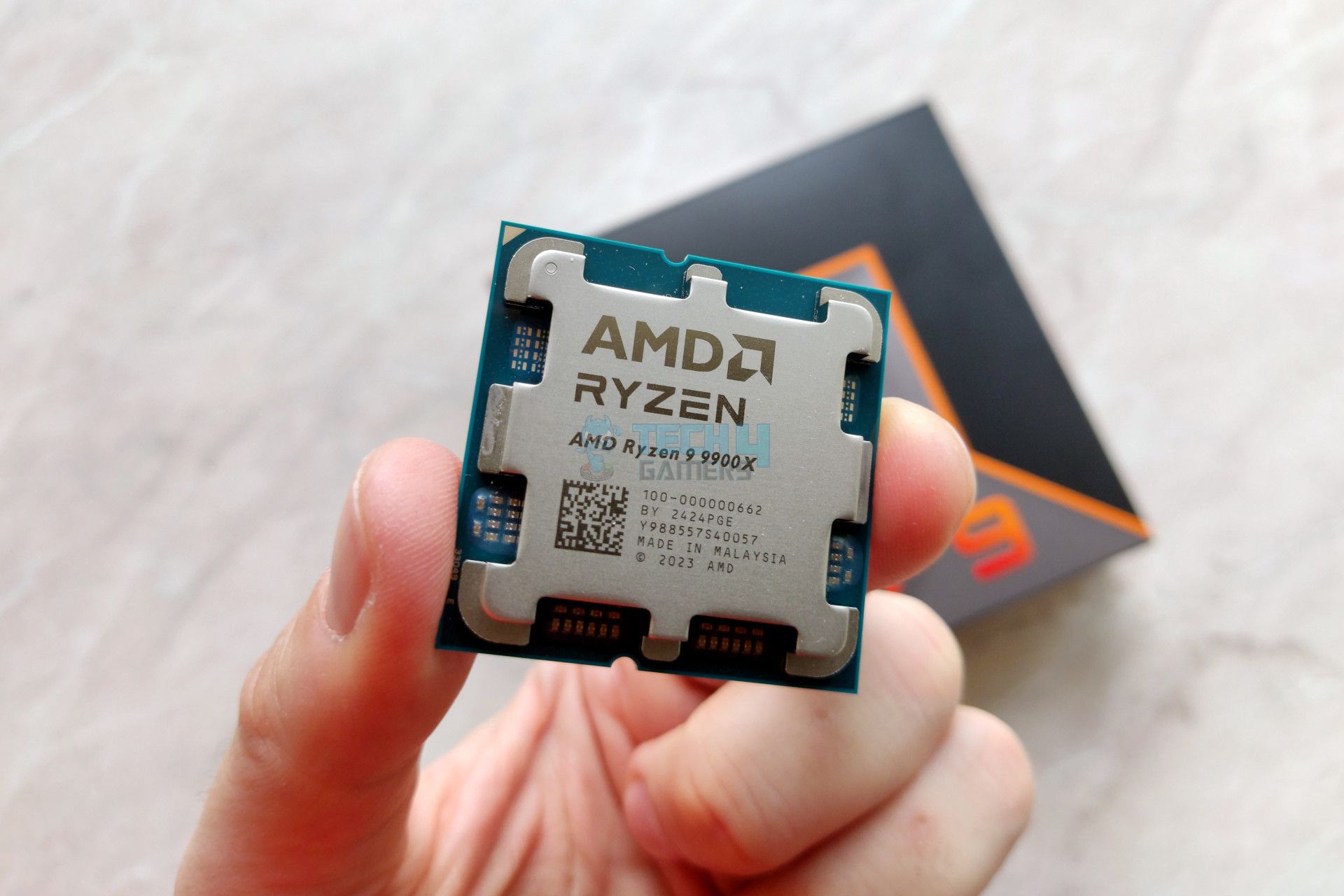
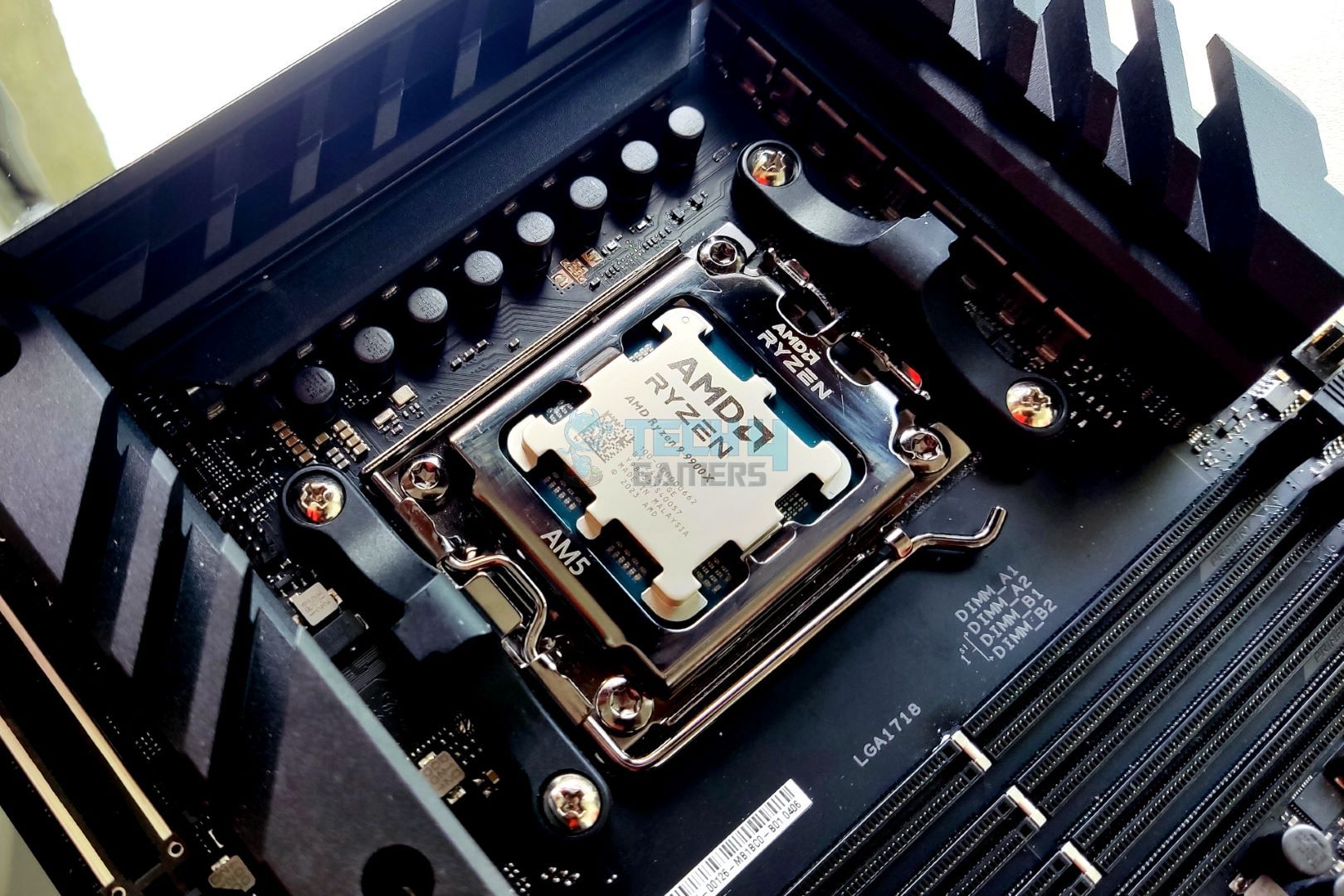
Ryzen 9 9900X
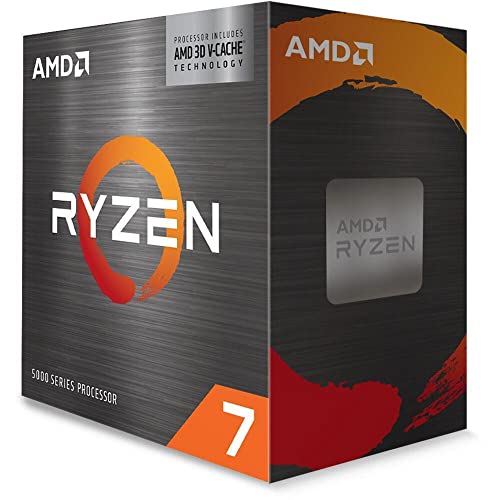
Ryzen 7 5800X3D
Looks
Award
Best Overall Gaming CPU for RX 9070 & RX 9070 XT
Best Gaming CPU for RX 9070 & RX 9070 XT
Best Budget CPU for RX 9070 & RX 9070 XT
Best Productivity CPU for RX 9070 & RX 9070 XT
Best Value CPU for RX 9070 & RX 9070 XT
What We Liked
Top-tier Gaming Performance, Supports Overclocking, Full AVX-512 Support
Insane Gaming Performance, High Power Efficiency, Future proof platform
Budget-friendly, Greater Efficiency, Overclocking support, Future Proofing, AVX-512 Support
Highly efficient, incredible multicore and single-core performance, AVX 512 support
The 3D V-cache tech is helpful, good thermals, great value, extremly good gaming performance
What We Disliked
Performance in Productivity Applications isn't Great, Performance difference is minimal at higher resolution
Overclocking isn't possible, Productivity performance also suffers comparitively
Average performance gains over predecessor, No Cooler
Gaming performance isn't as impressive as its productivity performance
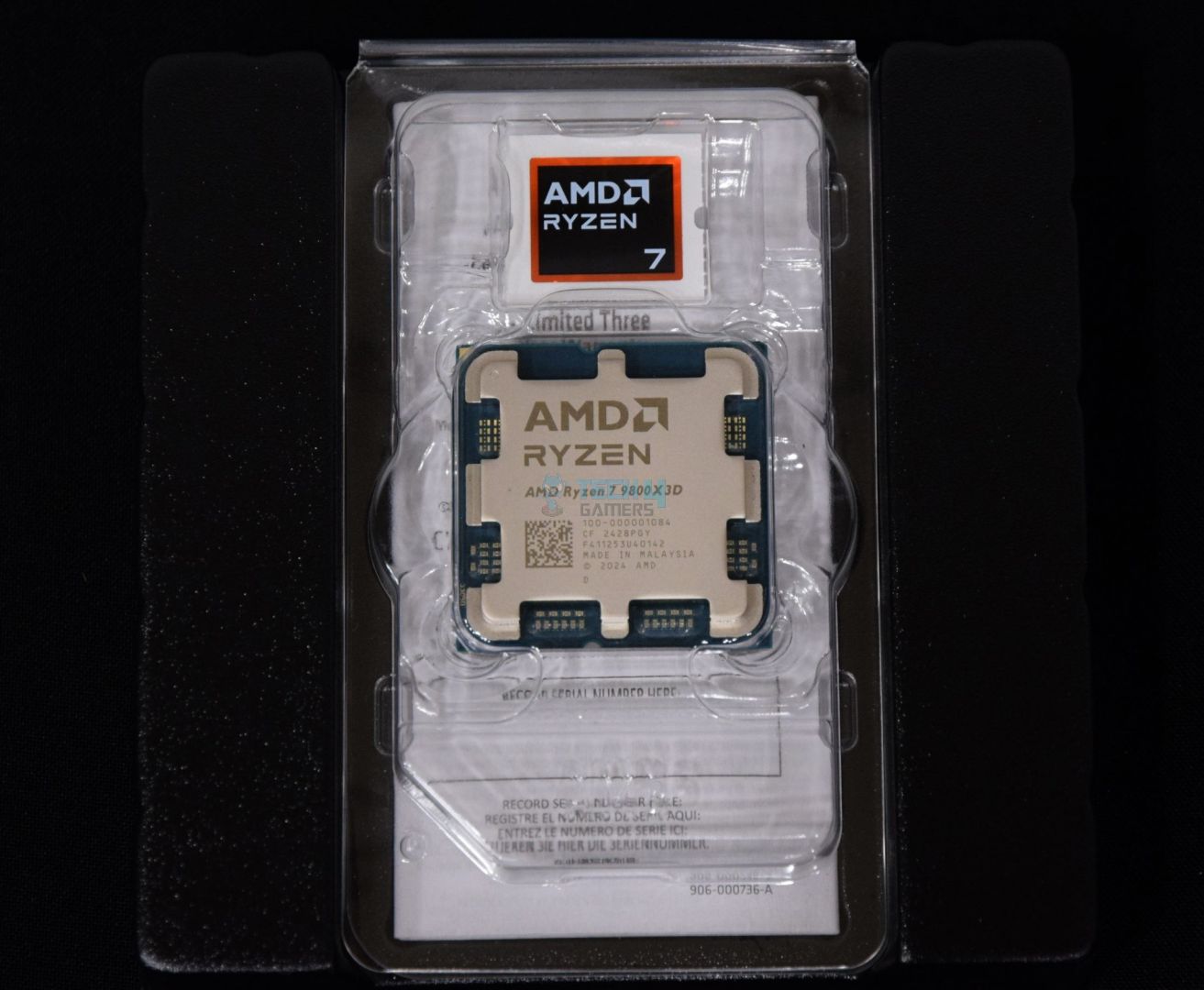
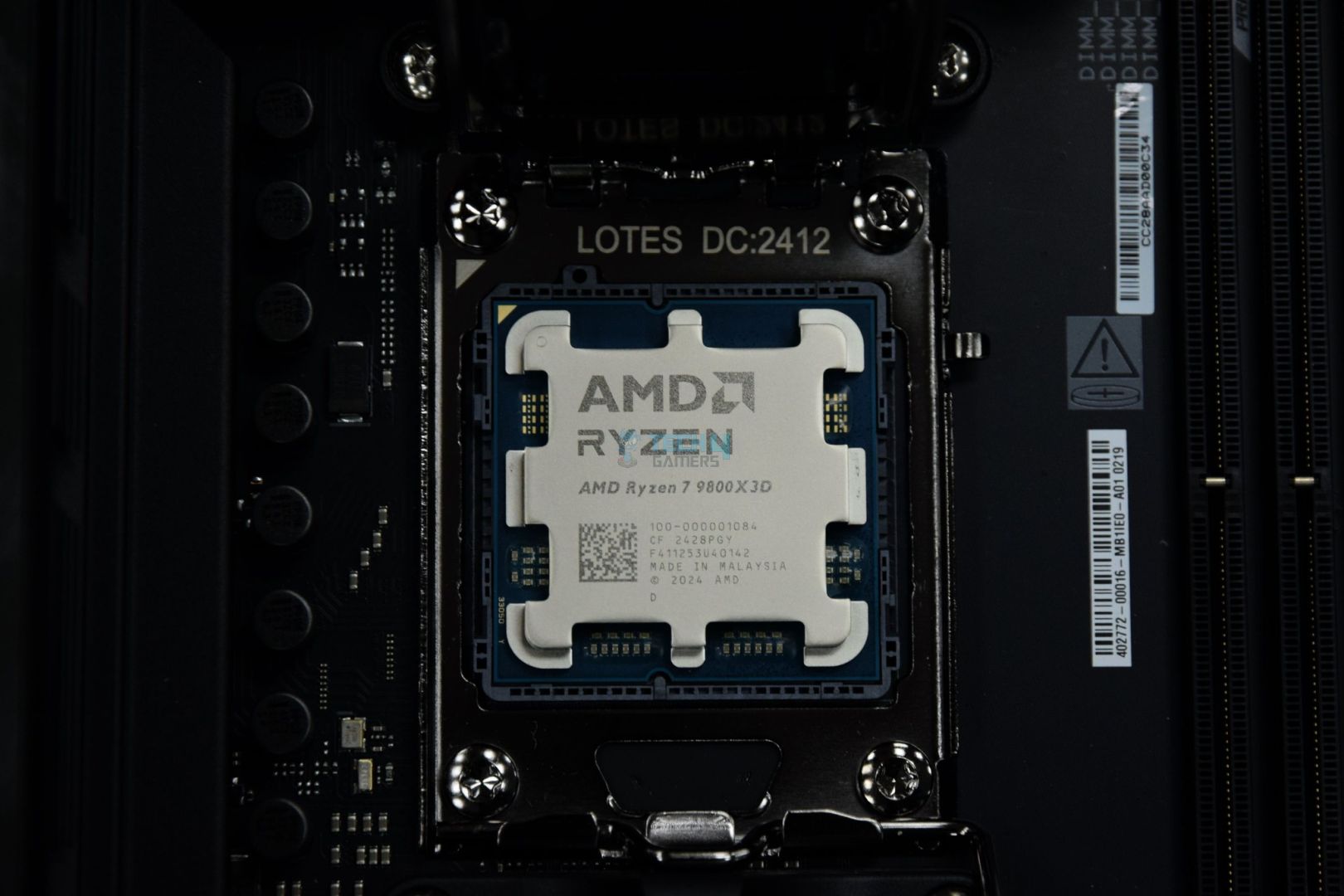
The Ryzen 7 9800X3D improves much further on the baseline of the previous AM5 3D V-cache processor, the Ryzen 7 7800X3D. This time around, the most highlighting feature that I found pleasant is the inclusion of overclocking support. Yes, you heard that right—3D V-cache processors are finally overclockable. However, you don’t necessarily need to enable it right off the bat, as the base performance is quite strong. Even with the same 8C/16T combination, as seen in our benchmarking across multiple titles. The slightly higher boost clock (now 5.2 GHz) and newer architecture help greatly in creating that gap.
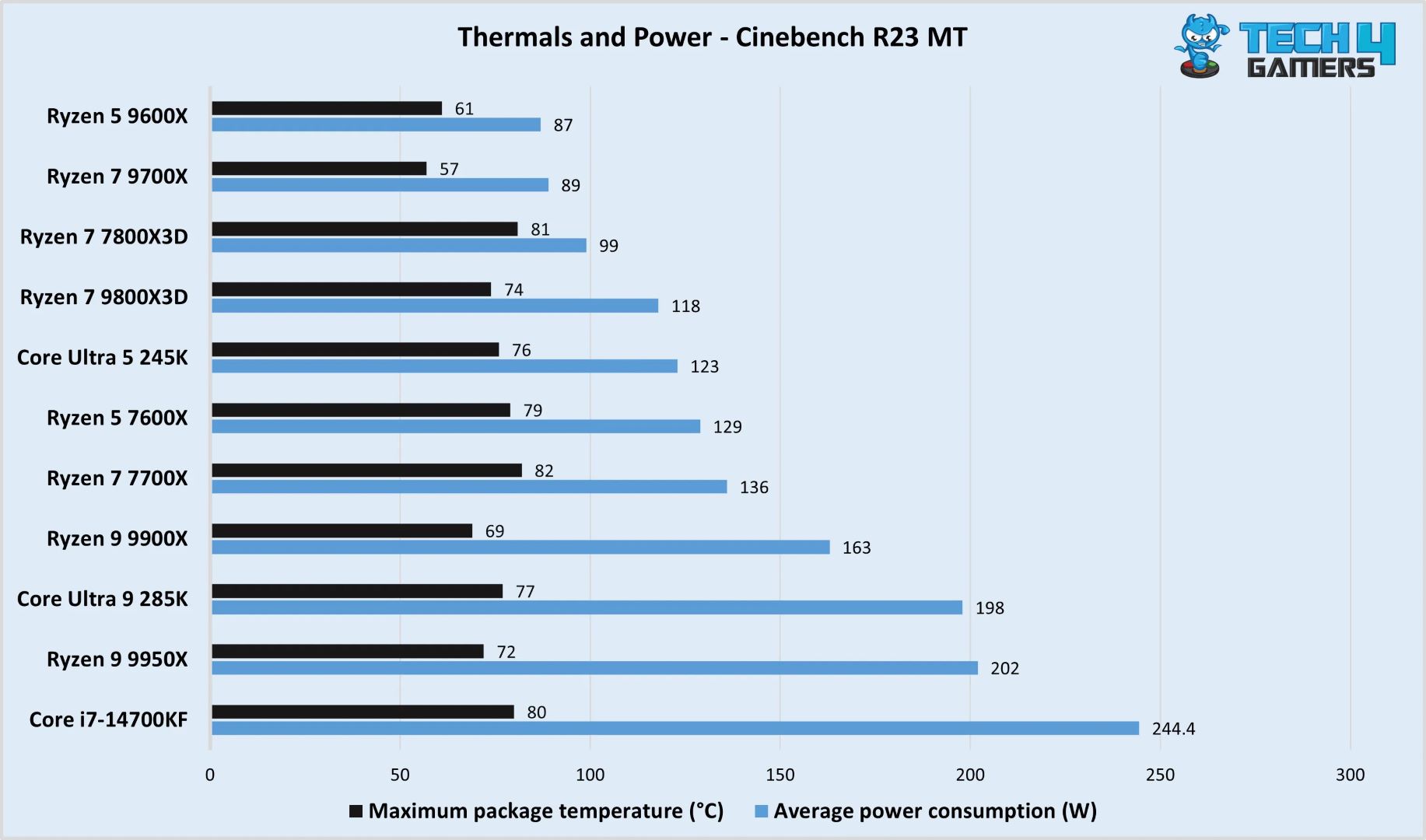
Similarly, this is one of AMD’s most efficient CPUs as well if we take the per-watt performance into account. The processor kept itself cool while consuming around 118W in our 30-minute run of the Cinebench R23 test. Apart from being the best gaming processor that is currently available, the 9800X3D has also improved its productivity performance a lot, which is the one key area its predecessor, the 7800X3D lacked in.
This is how I summed up the CPU after reviewing it:
The Ryzen 7 9800X3D is the new gaming champ, outclassing AMD’s own Ryzen 7 7800X3D CPU in our gaming charts. With its improved 3D V-cache design, combined with the Zen 5 architecture, the CPU improves gaming and productivity performance while becoming more efficient than its predecessor. At the same time, overclocking support is enabled so you can push the CPU even further! All that makes it an excellent choice for gaming or a mix of gaming and productivity.
✅Buy It If
You want the best the combo can offer: The Ryzen 7 9800X3D fits well in an instance where you need all the power a CPU can offer in gaming when paired with an RX 9070 or RX 9070 XT.
You want an equally efficient CPU: The Ryzen 7 9800X3D is also great in terms of efficiency and lower thermals, much like the RX 9070 series GPUs. So, if you’re all in for that, then it’s a decent match.
❌Don't Buy It If
You play at 4K: There is no denying that the Ryzen 9800X3D nails gaming performance, but at high resolutions like 4K, the performance depends significantly more on the GPU, and at that resolution, the CPU simply doesn’t matter.
What Makes It The Best Overall CPU for RX 9070 & 9070 XT?
The Ryzen 7 9800X3D offers the best performance in its class when the topic is gaming. On top of that, it even delivers impressive numbers in productivity benchmarks. Combine all of this with its PBO support, and it is hard to beat the Ryzen 9800X3D when it comes to being the best overall CPU for RX 9070 & RX 9070 XT.
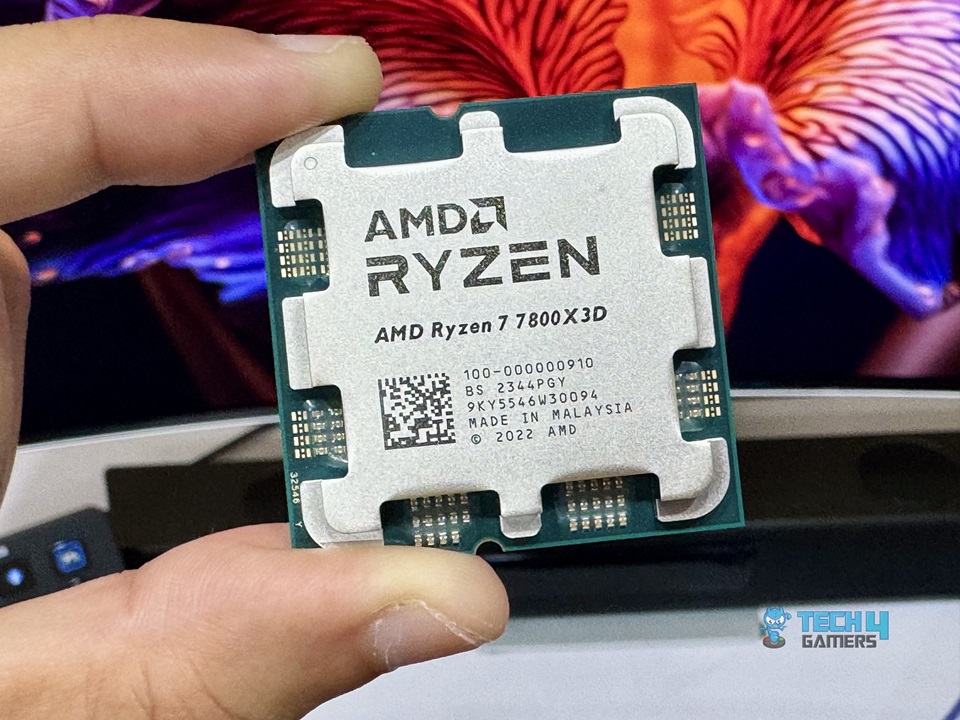
Next up is the Ryzen 7 7800X3D, which, in my opinion, is the best gaming CPU for RX 9070 series GPUs. The reason is its terrific gaming performance. In our testing, it trails the 9800X3D and maintains the 2nd position in the chart. The included 3D V-cache helps it deliver such stellar performance, otherwise, it was just another 7700X with slightly better performance. Now, those aside, it’s similar to the 7700X as it has the same 8C/16T design running at different clock speeds, which is 5.0 GHz for the boost clock on this one.
Furthermore, the processor also shines bright when it’s about being light on power consumption. It was consuming 99W during the Cinebench R23 render test, and that’s quite impressive. Although the productivity performance itself is somewhat weaker than its competition and even its non-X3D variant: 7700X. This is one of the reasons why I’m recommending it solely for gaming, as it excels on that side.
This is how we concluded the Ryzen 7 7800X3D after its review:
The Ryzen 7 7800X3D is the best gaming processor of this generation, which not only delivers top-notch gaming performance but performs decently in rendering and productive workloads as well. Meanwhile, it’s also one of the most efficient processors out there with a TDP of less than 150W in boost mode.
PRO TIP: You can opt for a B650motherboard with the Ryzen 7 7800X3D, if you want to maximize value.
✅Buy It If
You only want to game: If all you want to do is game and would prefer a CPU that gives its everything to deliver the best possible performance for not so much, then the Ryzen 7 7800X3D is the one to go with.
❌Don't Buy It If
You’re an overclocking enthusiast: The Ryzen 7 7800X3D doesn’t feature overclocking support due to its 3D V-cache technology, so if overclocking is one of your priorities, you should look for something else.
What Makes It The Best Gaming CPU for RX 9070 & RX 9070 XT?
The Ryzen 7 7800X3D is built to compete with CPUs double its MSRP, and not only does it compete, but it takes a clear lead over them, falling only behind its newer generation counterpart. Simply put, its higher efficiency and stellar gaming performance enable it to be called the best gaming CPU for RX 9070 & RX 9070 XT.
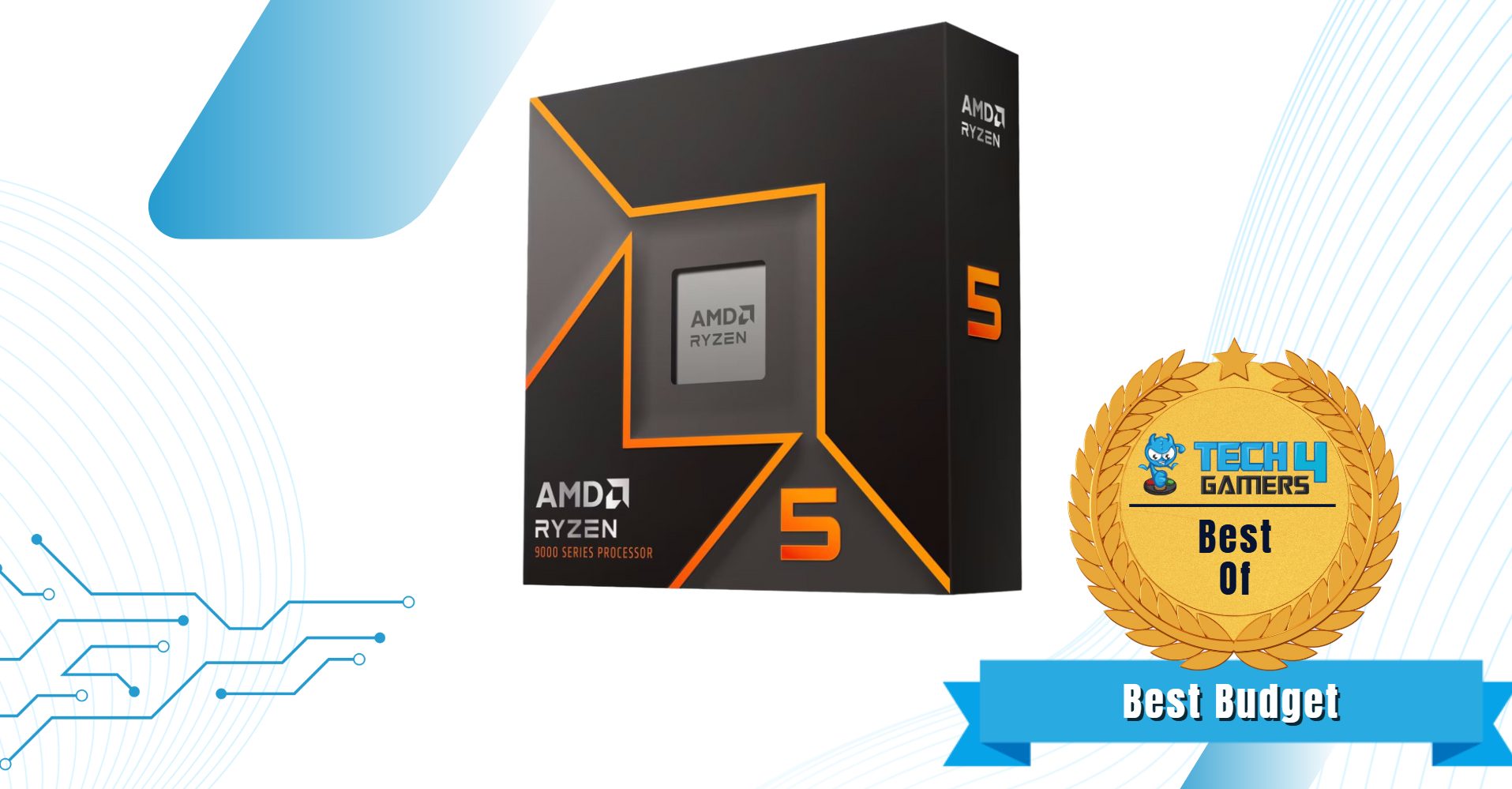
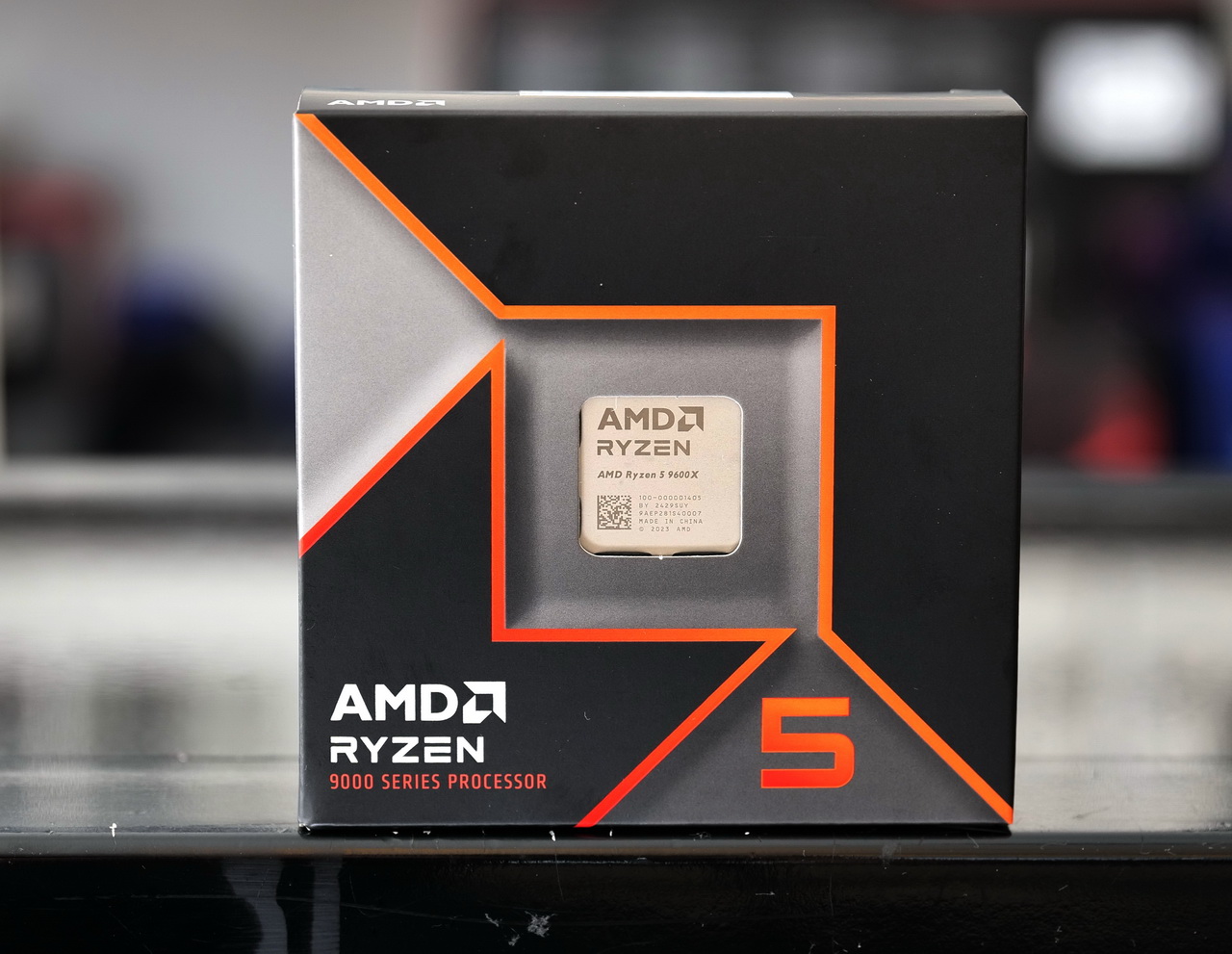
Now, when it comes to something lighter on the wallet with no major compromises, the Ryzen 5 9600X is the absolute best, according to our thorough testing of the CPU. The CPU sports enough horsepower to deliver excellent performance when paired with an RX 9070 series GPU. Not only that, it also stays highly power-efficient as it only has a TDP rating of 65W. Our testing confirmed the aforementioned claims, and it also revealed that its 6C/12T design stops it from beating its counterparts in multicore workloads.
Since it’s a budget processor and will likely start to feel unpowered much sooner, it needs a solution. Which is the included overclocking support. You can squeeze more out of the processor by overclocking the processor via the AMD Curve Shaper. This allows the CPU to be fine-tuned for better stability and performance. Lastly, what makes this CPU more exciting is its price. That makes it a great pick when you’re on a budget.
Here’s how we summed up the Ryzen 5 9600X:
The Ryzen 5 9600X is ideal for you if you’re seeking AVX-512 support, the best single-core performance, and excellent power and thermal efficiency.
✅Buy It If
You have a strict budget: The Ryzen 5 9600X currently costs $230 at major retailers like Newegg and Amazon, so if you want a decent CPU on a budget, this one makes sense.
You could use strong single-core performance: The Ryzen 5 9600X packs a solid punch in the single-core performance side of things, so if the work you do could benefit from it, then sure, get it.
❌Don't Buy It If
You’re expecting a stock cooler: While it does come with a 65W TDP rating, it still doesn’t come with a bundled CPU cooler, so if you’re expecting one like the AM4 CPUs, then better look for something else.
What Makes It The Best Budget CPU for RX 9070 & RX 9070 XT?
The AMD Ryzen 5 9600X is one of the best budget CPUs right now. Simply because there’s nothing fancy, it’s pure performance and efficiency while sticking strictly to the limited budget. Such characteristics are the reason why it’s being termed the best budget CPU for RX 9070 & RX 9070 XT.
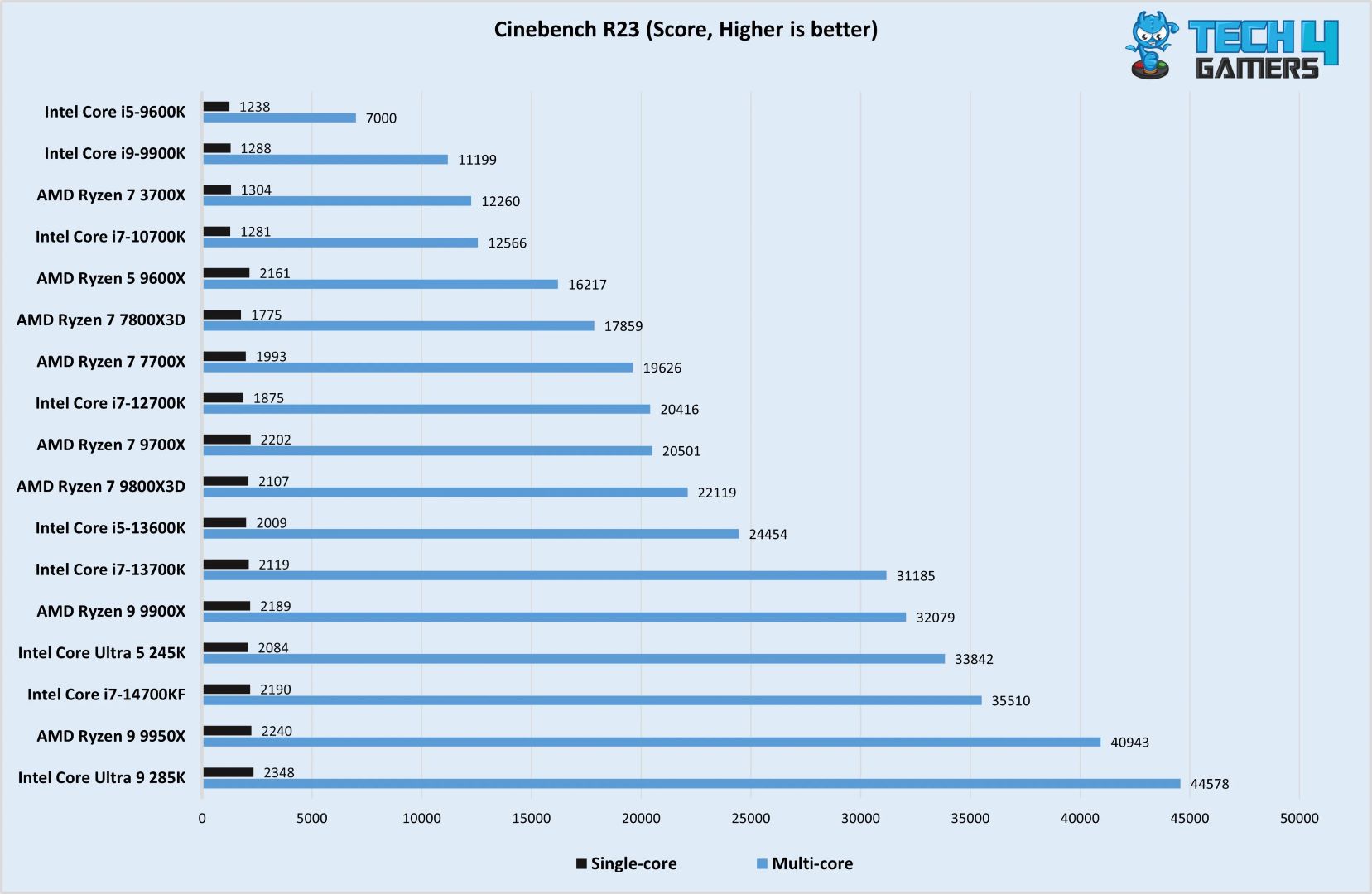
Best isn’t all about gaming, so let’s talk about the productivity side for a bit. If you need a strong CPU that shows great results in single/multicore workloads like productivity applications, the Ryzen 9 9900X seems like a great fit. This is because the processor features 12 cores and 24 threads that make it a literal tank to compete against the likes of 13900K & 13700K. In our review, not only did it beat the aforementioned processors in synthetic benchmarking, but it also consumed far less power.
The processor, with its currently discounted price of under $400, matches quite nicely with the RX 9070 and RX 9070 XT. Moreover, with the support for higher speed memory coupled with those excellent performing cards, the whole combo will be a productivity beast in its segment. However, the insignificant gain in gaming performance over its predecessor is a bit of a letdown, albeit high enough to provide a smooth gaming experience.
Here’s what we said about the Ryzen 9 9900X in the end:
The Ryzen 9 9900X is AMD’s new flagship 12-core gaming chip but with lower base frequencies and a 120-watt rating. It impressed us in most benchmarks outside of gaming, and in gaming, the chip couldn’t even outperform the Ryzen 7 9700X. Its $449 price tag makes it compete with the 7800X3D and 13900K, but the former is a far better gaming CPU, while the latter is much better for both multi-threaded workloads AND gaming.
✅Buy It If
You want top-tier productivity performance: The Ryzen 9 9900X is equipped with 12 cores and 24 threads, which is one of the reasons why its performance is terrific in those applications.
Your workload could benefit from AVX-512: The processor comes with native support for the AVX-512 instruction set. So if your workload, like video encoding, could benefit from it, you can opt for this processor.
❌Don't Buy It If
You are upgrading from Ryzen 7900X (or 7950X): While the gaming performance isn’t terrible and is rather quite good, it’s still only marginally better than its predecessor. Look for some other CPU if you want the best possible gaming performance.
What Makes It The Best Productivity CPU for RX 9070 & RX 9070 XT?
The Ryzen 9 9900X offers an exceptionally good performance in pretty much every single-core and multicore-dependent application benchmark we tested. Besides that, the incredible efficiency also helps lower the overall cost. As such, it is hard to beat the 9900X when it comes to being the best productivity CPU for the RX 9070 GPUs.
The Ryzen 7 5800X3D is still one of the most liked AM4 CPUs simply because it offers so much value. Firstly, the processor comes with a 3D V-cache technology that was introduced with this processor. This enables the processor to perform exceptionally better than any flagship processor in gaming titles, thanks to the enormous 96 MB of L3 cache. However, the core count remains the same as the other Ryzen 7 series processors, which is 8C/16T.
What’s more, this processor brings efficiency to the table. The consumer way less than the average 13700K or Ryzen 9 series processor, but absolutely destroys them in actual gaming. Not only that, it even competes with the likes of the Ryzen 9 7900X, as seen in our testing results. Also, don’t forget that it’s an AM4 CPU that supports DDR4 memory, so the overall value that it’s going to provide will be much higher than any current CPU. With that in mind, pairing it with the likes of RX 9070 or RX 9070 XT still makes a deadly combo.
✅Buy It If
You don’t care about future proofing: If you’re not bothered by the restricted upgrade path this processor brings. As you plan on using it for a few years, you can definitely go with this CPU without much thought.
❌Don't Buy It If
Overclocking & 3D V-cache is crucial for you: While the processor is quite powerful with its default speeds. But if you still want to have overclocking support for some reason on top of 3D V-cache, then you better go with something like the Ryzen 7 9800X3D.
What Makes It The Best Value CPU For RX 9070 & RX 9070 XT?
The AMD Ryzen 7 5800X3D CPU is the Value king because of the low maintenance as it doesn’t require a hefty cooling solution or too much power. Moreover, the performance results that it exhibits are extraordinary too. Which easily makes it the best value CPU for RX 9070 & RX 9070 XT.
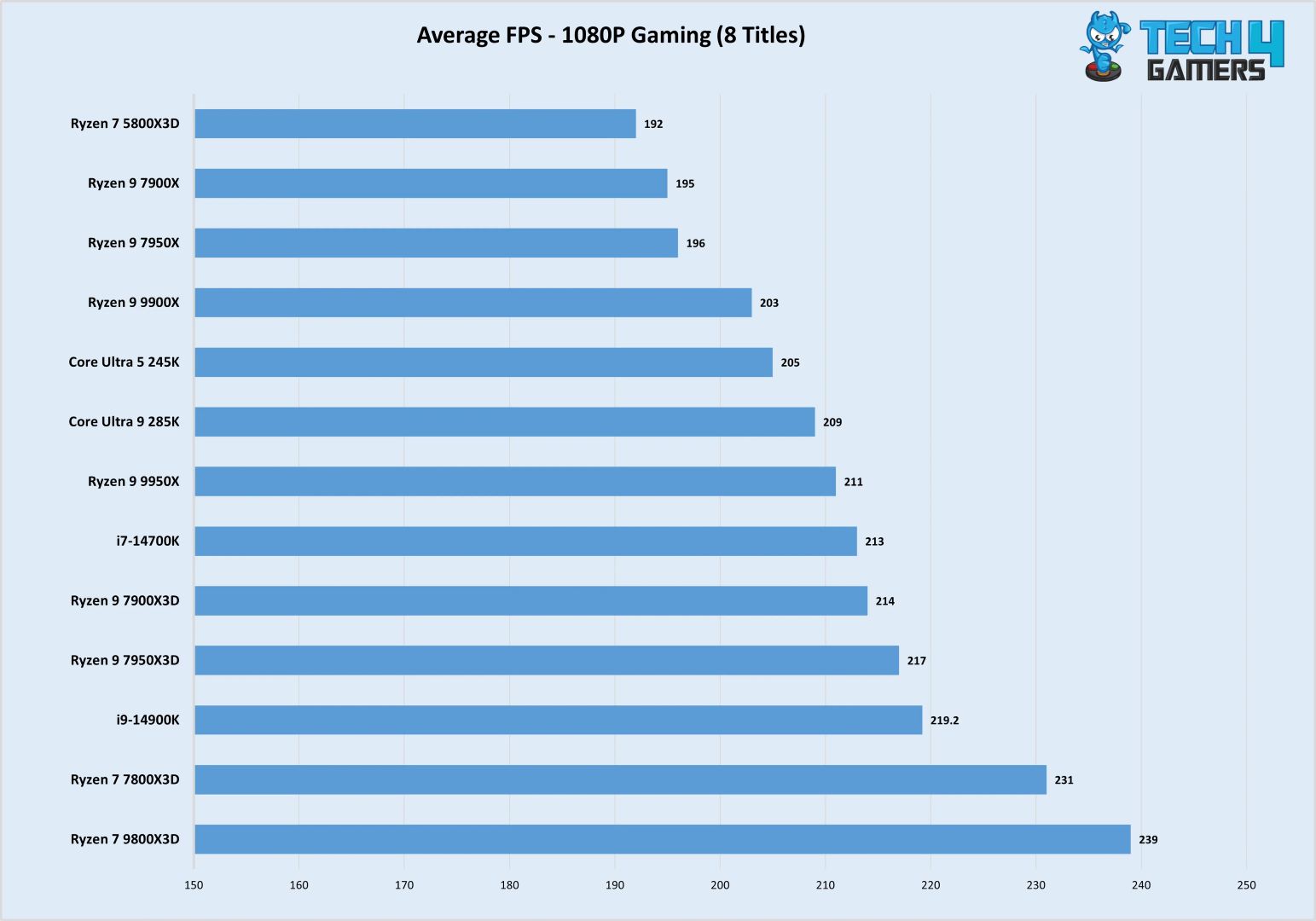
We believe in the thorough testing of each component that we put up for recommendation for our readers. The hardware enthusiasts at Tech4Gamers spend hours testing each component across multiple benchmarks to compile a trustable result. Which we can use to suggest the right component for the right situation. As it were the CPUs this time around, here are the test results that we put them into first before picking some of them for recommendations.
Benchmarks of the Best CPU for RTX 4090
1 of 4
Avg 1080p Gaming Benchmarks
Cinebench R23
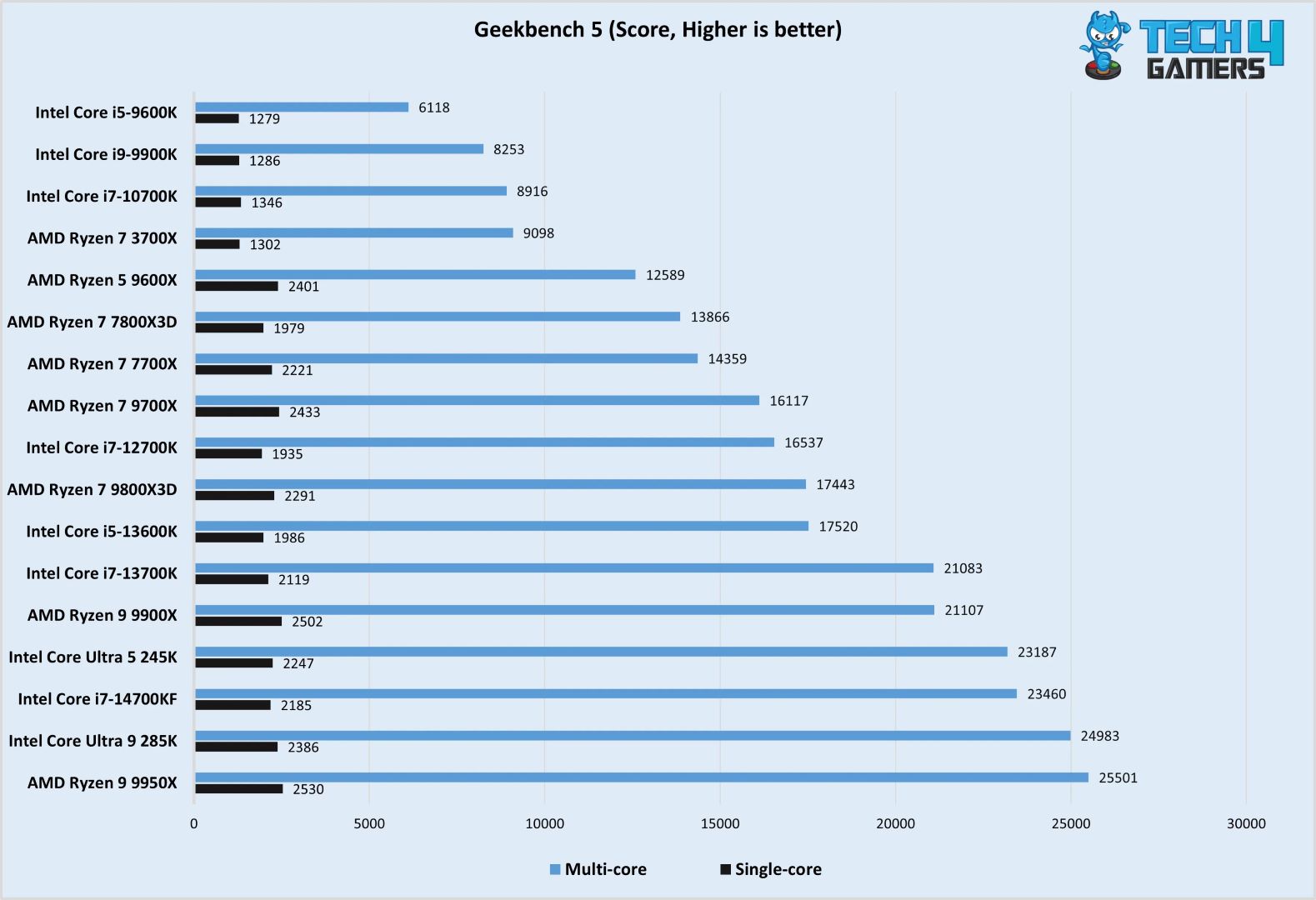
Geekbench 5
Thermal and Power Consumption
Important CPU Key Terms
These are some of the crucial key terms that you must have an understanding of to make a better purchase decision.
Cores: A CPU consists of many cores, though it is a processing unit of the CPU that fetches and executes various functions at once.
Threads: It’s a virtual unit within a core for the execution of functions. Usually, a core consists of more than one thread to do multitasking more efficiently.
Cache: Unlike RAM, which is a separate component, this cache memory is divided into L1, L2, and L3 parts and is present right inside the CPU. Not to mention that this cache memory is even faster than your traditional RAM.
ClockSpeed: In layman’s terms, the speed at which a processor processes instructions is called its clock speed. It’s usually measured in GHz and ranges from base clock to boost clock.
TDP: It is the estimation of total heat that the CPU will likely generate, and it is measured in watts.
IPC: It is the number of instructions that the CPU handles/solves in each clock cycle.
Overclocking: Overclocking means running a component well above its rated base speed to gain additional performance.
How We Picked The Best CPU For RX 9070 & RX 9070 XT
Reviewing The AMD Radeon RX 9070 (Image By Tech4Gamers)
Gaming Performance: The RX 9070 series GPUs are selling like hotcakes right now because of their excellent performance and affordable prices. They deserve an equally great processor to be paired with. We at T4G tested several current and slightly older generation old processors to find the best from each category to pair with either of the GPUs without the fear of any kind of bottleneck.
Platform: We also kept the platform in mind and included mostly those options that are future-proof and provide a decent upgrade path so you don’t have to worry about swapping everything every year or so for shift to a newer CPU. However, we still bundled one older platform for great value purposes as it can survive for a few more years easily.
Value For Money: Just like the kind of value the RX 9070 series GPUs are offering, we need CPUs that can match the value factor as well. Hence, included some budget and value-oriented CPUs so you can get the most out of your build without spending a fortune.
FAQs
Can the AMD RX 9070 play 4K games?
Yes, we ran several gaming benchmarks at 4K across different titles with the AMD Radeon RX 9070, and the GPU performed impressively well, especially with FSR enabled.
Which one is better, RX 9070 or RX 9070 XT?
Both are great graphics cards that are giving a hard time to their counterparts. However, the RX 9070 XT costs only $50 more than the non-XT variant and offers much better performance future-proofing, so if possible, opt for the XT variant.
I’ve previously worked for eXputer as a Senior News Writer for several years. Now with Tech4Gamers, I love to devoutly keep up with the latest gaming and entertainment industries. I have a Bachelor’s Degree in Computer Science and years of experience reporting on games and breaking exclusive stories. Besides my passion for gaming journalism, I love spending my leisure time farming away in Stardew Valley. VGC, IGN, GameSpot, Game Rant, TheGamer, GamingBolt, The Verge, NME, Metro, Dot Esports, GameByte, Kotaku Australia, PC Gamer, and more have cited my articles.
Story Highlight
Monster Hunter Wilds enjoyed a highly successful launch in the US, ranking first in weekly dollar sales across PC and other platforms.
The entry performed the best on PC despite massive performance issues in the port, confirming the series’ increasing popularity on PC.
After its hyped release, the game has also held up quite well in Japan, driving PS5 rental sales to extreme margins.
Instead, the opposite has happened. New US sales data suggests that Monster Hunter Wilds ranked first in weekly dollar sales across all devices, with PC being the leading platform.
Why it matters: Monster Hunter Wilds is making more weekly dollar sales on PCs than consoles despite performance issues, which suggests it’s no longer a PlayStation-associated franchise like it was in the past.
Analyst Mat Piscatella says Monster Hunter Wilds Sold The Most On PC In Weekly Sales.
Popular industry analyst Mat Piscatella mentions on Bluesky that Monster Hunter Wilds’ launch week dollar sales were the largest in the US region for a game since Call of Duty: Black Ops 6 came out last October.
And for those not in the know, Monster Hunter Wilds also sold over 8 million copies worldwide during its first three days after launch, becoming the fastest-selling Capcom title in history.
It appears to have performed the best on PC in the US despite Steam reviews and player experiences painting a different picture. The game looks PS3-level with mid-range GPUs and runs quite poorly on PC.
On the other hand, the game’s producer already said the developers polished the game as much as possible, so Capcom might be unable to fix these PC woes in future updates.
Do you think Monster Hunter Wilds selling the most on PC compared to consoles suggests the tides are shifting for the MH franchise? Let us know your thoughts in the comments below, or join the discussion on the Tech4Gamers forum.
As Tech4Gamers’ Wiki Editor, I dissect gaming products, offering detailed perspectives on a variety of PCMR hardware ranging from the Best Motherboards and CPUs to the Best GPUs, RAM, and PSUs.
Story Highlight
Valve has repeatedly clarified that they won’t release a successor unless there’s a real-world generational leap in these APUs without sacrificing battery life.
The OG Steam Deck witnessed a single mid-cycle refresh that saw Valve bestow the handheld with an OLED screen and a few QoL improvements.
The Aerith Plus APU may be destined for third-party handhelds based on Valve’s SteamOS or perhaps a potential revival of the Steam Machine.
Ever since its launch in 2022, Valve’s Steam Deck has amassed a vast following due to the handheld being a blockbuster hit.
Its specs may seem outdated by today’s standards, but 3 years ago, a 7” 1280×800 IPS touchscreen with a 60 Hz refresh rate, 16 GB of LPDDR5 RAM,the 7nm Aerith APU, and a 40 Wh battery proved more than enough to take my breath away.
If anything, the Steam Deck inspired the creation of its competitors, i.e., Windows-based gaming handhelds like the ASUS ROG Ally and the Lenovo Legion Go.
However, fast forward to Q1 2025, those Windows-based handhelds are catching up and the Steam Deck is starting to resemble the ideology of the Hudson Hornet.
Naturally, all of us have been awaiting a new, improved version of the Steam Deck 2 and while we did get a noticeably enhanced mid-cycle refresh, it really isn’t the ‘generational leap’ in power that we’ve all been anticipating.
The Aerith Plus APU: What’s The Story?
For starters, the gaming community has been buzzing with excitement ever since an Aerith Plus APU was spotted in a shipping manifest.
After all, the original Aerith APU powers the current Steam Deck, and an upgraded version could mean significant performance improvements—faster frame rates, better efficiency, and enhanced graphics.
Naturally, many assumed this was the heart of a next-gen Steam Deck.
But before the hype could fully take off, Pierre-Loup Griffais, a key member of the Steam Deck team, shut down the rumors with a blunt two-word post on Bluesky: “Not happening.”
Steam Deck 2: Don’t Count On It
This isn’t the first time Griffais has dashed hopes of a Steam Deck 2.Earlier, rumors swirled about the AMD Ryzen Z2 APU being the heart of a next-gen Steam Deck, especially since the Ryzen Z1 powers competitors like the ASUS ROG Ally and Lenovo Legion Go.
It seems Valve is committed to sticking with the current hardware for the foreseeable future. The problem is, that the Steam Deck is starting to show its age.
While it was revolutionary when it launched, competitors are now pulling ahead. Take the Lenovo Legion Go S, for example. It boasts a Ryzen Z2 GO APU, an 8-inch touchscreen with a 120Hz refresh rate, up to 32GB of RAM, an improved 12-core RDNA2 GPU, and a 55.5Wh battery.
Compared to the Steam Deck’s aging specs, the Legion Go S feels like a generational leap.
Valve’s Market Penetration Strategy
Valve had to do something to retain the Steam Deck’s relevance in the handheld market.
On that note, in November 2023, the Deck became the subject of a mid-cycle refresh where its screen was upgraded to a 7.4” 90 Hz OLED screen.
The Steam Deck OLED boasts improved repairability thanks to full support for user-friendly teardowns. (Image Credits – Steam)
Valve was able to install a 22% bigger 50 Wh battery thanks to the thinner display which increased the Deck’s runtime from a range of 2-8 hours to 3-11 hours.
Under the hood, AMD managed to shrink its 7nm Aerith APU into a new 6nm ‘Sephiroth’ SoC with Valve prioritizing power efficiency over performance gains.
The Steam Deck OLED also incorporated a thicker heatsink, larger fan, an increment to 6400 MHz RAM, faster charging speeds, and introduced WiFi 6E along with a dedicated antenna for Bluetooth 5.3.
Therefore, the Deck was able to run cooler and faster for extended periods of time, even though Valve didn’t tune the new silicon for performance.
Nevertheless, for gamers who want the latest and greatest, even the Steam Deck OLED is beginning to feel like a relic of the past.
What’s Next For Valve?
If the Aerith Plus APU isn’t for a Steam Deck 2, what’s Valve planning?
One possibility is that they’re focusing on expanding the SteamOS ecosystem. By making SteamOS available to third-party manufacturers, Valve could create a diverse range of handhelds and consoles, all running the same software.
This would allow them to compete with Windows-based devices like the ROG Ally X and Legion Go S without having to develop new hardware themselves.
Another possibility is the revival of the Steam Machine. Valve’s first attempt at a console-like PC was a flop, but the success of the Steam Deck might give them the confidence to try again.
Steam Deck 2: Patience Is A Virtue
While the idea of a new Deck is exciting, it’s clear that Valve isn’t in a rush to make it happen.
The Aerith Plus APU might not be for a new Steam Deck, but it could still play a role in expanding Valve’s ecosystem, whether through third-party handhelds or a revived Steam Machine.
Here’s what the pricing for the current Deck lineup looks like. (Image Credits – Steam)
In the meantime, the Steam Deck OLED remains a solid choice for portable gaming, even if it’s no longer the most powerful option on the market. So, if you’re holding out for a Steam Deck 2, you might be waiting a while.
But who knows? Valve has a history of surprising us, and when they do finally announce a successor, it’ll likely be worth the wait.
I’ve been the Journalist & Editorial Writer at Tech4Gamers since July 2022. I spearhead our hardware coverage, including overclocking GPUs, benchmarking CPUs, reviewing peripherals, and fine-tuning custom PC builds for every budget. Daily, I report on breaking gaming news, from major launches and studio updates to the latest industry trends, ensuring our community stays informed. Beyond news briefs, I write in-depth feature articles on gaming culture and emerging technologies. And by collaborating closely with the editorial team on content planning, SEO strategy, and our publishing calendar, I help us consistently hit our traffic and engagement targets.
As you may already know, AMD officially launched the Radeon RX 9070 and 9070 XT last week. Moreover, recent leaks surfacing on the internet have provided details regarding the soon-to-be RX 9060 XT. If you’ve been watching the GPU scene for quite some time now, you’ve probably noticed that budget options usually have much higher demand than the rest. Therefore, they represent a massive chunk of the market share.
Nowadays, games are massive, and many modern titles push well beyond the 8GB VRAM limits. Fortunately for us, it has been confirmed through EEC listings that the RX 9060 XT will come in two variants: 8GB and 16GB configurations. It will also have a memory speed of 20Gbps and a 128-bit memory bus, two DisplayPort 2.1 ports, and an HDMI port. The card also has a single 8-pin power connector and a minimum 500W PSU requirement.
It’s setting the stage to potentially challenge or even be the final nail in the coffin for the RTX 50-series offerings in the budget segment. Moreover, if priced appropriately, it can be a really attractive value offer for PC gamers. When the release dates of the new GPUs are just around the corner, the RX 9060 XT might be the underdog that shakes things up a bit. Keep reading to find out why.
How Can 16GB VRAM Make a Difference?
Starting from a technical standpoint, one of its headlining features is that RX 9060 XT has 16GB of VRAM. Most modern AAA titles tend to surpass the limits of 8GB VRAM, indicating that an 8GB card would work decently now, but in a handful of years, or worse yet, today’s most demanding scenarios would cause trouble.I’ve noticed that the extra headroom makes a difference during the higher-resolution renders and textures.
Referring to previous benchmarks of different GPUs, it appears apparent that cards with more VRAM outperform cards with lower VRAM in terms of handling intense workloads. Overall, it can make a great difference when you’re playing the latest AAA titles.
How Does the RX 9060 XT Compare Against Its Competitors?
The 9070 And 9070 XT Offer 16GB of Memory
As things stand now, AMD appears to dominate the GPU market’s middle segment, Intel continues to dominate the low-end market, and Nvidia is still the clear leader in the high-end. However, AMD is trying to compete with Intel and might dethrone it with more reasonably priced GPU offerings since additional RX 9000-series cards are still coming.
After all, AMD mentioned last year that the company would focus more on midrange and affordable GPUs and would not be that interested in aiming for the premium market. In comparison, Nvidia’s new GPUs are announced to keep things tight with just 8GB of VRAM, which pretty much sticks with what we’ve seen in previous generations.
While the RTX 5060 even gets a few hundred extra CUDA cores over its older version, it still clings to that 8GB VRAM. Similarly, the RTX 5050 is even more of a carryover from the past, resembling the RTX 3050 in almost every way, including its 8GB of GDDR6 memory. On the other hand, the RX 9060 XT’s 16GB VRAM really gives it a leg up over Nvidia’s upcoming budget options, which seem stuck in an 8GB world, which could make it a very attractive proposition for gamers on a budget.
What Pricing Can We Expect for the RX 9060 XT?
Now, for the RX 9060 XT, based on past leaks and our current understanding of the RX 9070 cards, we can draw some logical conclusions about it even though we know practically nothing about it except a few things. To begin with, the leaks that surfaced back in December about the 9070 and 9070 XT turned out to be largely true, accurately predicting AMD’s latest FSR 4 upscaling technology, its name change, and an upgrade to RDNA 4.
Moreover, the price claims for both new GPUs were made in those leaks, which was also true. The same leaker revealed that the upcoming GPUs, most likely the RX 9060 XT, will cost around $349. At $349, the card would be $200 less expensive than the RX 9070 series, which seems like a very big price difference. That said, I take these leaks with a grain of salt. Early leaks often capture an optimistic approach that doesn’t always translate into the final retail price. Therefore, I think a price closer to $399 feels a bit more fair and reasonable.
Final Thoughts
AMD is making huge efforts to lead the way in the budget GPU market. While Intel’s latest budget GPUs offer decent performance, I don’t expect them to outperform AMD’s upcoming releases. Team Red has long been a strong player in the low to mid-range market and aims to regain its position after minor missteps in the last generation. With these new cards around the card and considering Nvidia’s focus on AI and high-end GPUs, the gaming industry has never had a better moment.
At Tech4Gamers, I contribute as a Senior News Reporter, combining my skills and gaming enthusiasm to keep our audience updated on the latest developments.
Story Highlight
World of Warcraft’s Mythic Plus dungeons can present a tough challenge for new players.
Seeking help clearing these dungeons can be incredibly useful when trying to attain high-level rewards efficiently.
Finding the right help is also quite easy, so players should always be willing to look out for World of Warcraft veterans.
The World of Warcraft franchise can be equal parts intriguing and challenging for new players. Where the world is full of wonders and excitement, it presents its fair share of challenges and hardships.
This is where following a guide or an experienced player can be helpful. Utilizing the right strategies can help you make gold quickly, improve your initial experience, and a lot more.
One crucial aspect of World of Warcraft, the Mythic Plus dungeons, is also made significantly better through the assistance of services like Mythic Plus Boost, which connect you to experienced and professional players.
Why it matters: Experienced players typically have the knowledge needed to efficiently clear dungeons in order to secure the best rewards.
Why You Should Consider Help
One key reason to seek assistance is to gain immediate access to the many awards offered by Mythic Plusdungeons. These dungeons pack powerful weapons and armor, eliminating the need for countless hours of grinding.
Mythic Plus dungeons also offer a completely different rating system, and increasing this rating only improves the World of Warcraft experience. Moreover, these dungeons offer exclusive achievements and mounts, which are incredibly difficult to earn.
By accepting help, players gain access to these rewards without all the frustration that would typically be associated with such unlocks. Also, working with players that have experience can simultaneously improve your rate of success in other parts of World of Warcraft’s gameplay.
Getting The Right Help
Understanding The Core Gameplay of World of Warcraft is Crucial To Success In Mythic Plus Dungeons
Using a service like Mythic Plus Boost is quite simple and starts with picking the right package. This choice is based on the number of dungeons and difficulty level needed to be completed.
Players can also select specific rewards to aim for and benefit from flexible scheduling for maximum convenience. Afterward, the situation becomes even easier, with skilled players taking over and leading the experience.
Of course, players can always choose to go through World of Warcraft’s Mythic Plus dungeons on their own. Seeking help ultimately boils down to personal choice, giving those with limited time the ability to work through the best rewards and in-game achievements in an efficient manner.
I’ve previously worked for eXputer as a Senior News Writer for several years. Now with Tech4Gamers, I love to devoutly keep up with the latest gaming and entertainment industries. I have a Bachelor’s Degree in Computer Science and years of experience reporting on games and breaking exclusive stories. Besides my passion for gaming journalism, I love spending my leisure time farming away in Stardew Valley. VGC, IGN, GameSpot, Game Rant, TheGamer, GamingBolt, The Verge, NME, Metro, Dot Esports, GameByte, Kotaku Australia, PC Gamer, and more have cited my articles.
Story Highlight
Silent Hill 2 remake developer Bloober Team has reached a deal to work on a new game for Netflix.
The entry is dubbed Project N, but no details about its genre or gameplay have been revealed.
Bloober Team is also developing Cronos: The New Dawn and multiple other projects after the Silent Hill 2 remake.
The Silent Hill 2 remake was not just a big deal for the gaming scene. The developers at Bloober Team were finally pushed to prove themselves after past mediocre releases. The entry was a raging success and a faithful adaptation of the original SH2.
The emerging giant has partnered with Netflix to work on yet another new entry, codenamed Project N. This partnership comes after the studio made a deal with Konami to work on a new game after Silent Hill 2.
Why it matters: Bloober Team’s multiple partnerships suggest the studio is expanding and gaining resources to develop more games simultaneously. The team is also working on independent titles.
Netflix and the Bloober Team have agreed to work on a new game, Project N.
Netflix’s partnership with Bloober Team has been officially recognized for Project N, which suggests it will be an exclusive Netflix launch. The media giant will be the sole publisher and owner of the rights to the game.
No details regarding Project N have been revealed, however, so we are left to guess the rest. It is expected to be another horror entry since that is what the Silent Hill 2 remake developers excel at.
Additionally, Netflix’s foray into the game publishing scene is not new. It has been securing and publishing a variety of smaller entries in the past. This might turn out to be one of the first big Netflix releases in the future.
Do you think Project N for Netflix will also end up being another horror title by Bloober Team, or is the studio exploring another genre? Let us know your thoughts in the comments below, or join the discussion on the Tech4Gamers forum.
Currently serving as a News Reporter at Tech4Gamers, I have the privilege of combining my love for gaming with the art of storytelling. My role involves crafting engaging narratives that keep our audience abreast of the latest developments in the gaming world.
Story Highlight
New concept art for the canceled Arkham Knight sequel emerges.
The first look for Damian Wayne appears to be a gritty and menacing young Batman.
The game would’ve also featured Huntress, Bruce, and Selina’s daughter.
The Arkham series could’ve been so much more, according to leaks, which suggest a canceled Arkham Knight sequel focusing on Damian Wayne’s Batman. While the title was ultimately canceled in favor of Gotham Knights, it’s only now that the game’s details have emerged.
New concept art for the game has now emerged, giving us our best look at Damian Wayne and a much older Bruce Wayne, along with Huntress, another formidable member of the Bat family.
Why it matters: A game focusing on the next generation of Batman would have been the perfect send-off for Bruce Wayne’s Dark Knight.
Concept Art For Canceled Arkham Knight Sequel || Source: ArtStation
Rodrigue Prailer, senior character artist, shared some artwork for the canceled project in 2015, which implies that he was referring to the canceled Arkham Knight sequel. The artist’s LinkedIn work history also suggests that he worked for Warner Bros. Montreal during that period.
His visualization of Damian Wayne is that of a moody young adult, much grittier than his predecessor, but he looks menacing. On the other hand, the billionaire Bruce Wayne appears much older with crutches on his broken leg.
The shared design of Killer Croc suggests that the sewer monster was still alive after many years.
Potential New Batman Game In Development Under James Gunn
However, the biggest surprise was a design for Huntress, an important Bat-family member and a daughter of Bruce Wayne and Selina Kyle.
Recently, another artist also shared a few renders for the Batcycle, which would’ve been the permanent vehicle for the Batmobile in the sequel.
What are your thoughts on the concept art for the canceled Arkham Knight sequel? Let us know in the comments below, or head towards the Tech4Gamers forum.
As a Senior Hardware Reviewer at Tech4Gamers with over a decade of hands-on experience, I dive deep into benchmarking GPUs, CPU coolers, and motherboards, pushing hardware to its limits. Passionate about overclocking and fine-tuning performance.
Nvidia has just released the third card in its latest RTX Blackwell lineup. This is the RTX 5070, which is aimed at 1440P gaming (but with 4K a ready possibility), just like the RTX 5070 Ti. It does, however, use a less powerful GB205 chip with fairly toned-down specifications. It’s aimed at competing with AMD’s RX 9070 (XT), the older 7900 XTX, and Nvidia’s RTX 4070 Super and RTX 3090 cards.
With this, Colorful has launched the latest editions of its custom cards, with a total of four variants. The iGame Ultra W OC models, including the RTX 5080, 5070 Ti, and 5070, feature a unique white and pink theme—a design I have a lot to say about!
Why Trust Tech4Gamers
Usman Sheikh is one of our most senior and experienced hardware reviewers. He loves spending hours (sometimes days) in his lab testing and comparing different GPUs, CPUs, motherboards, and more.
65+ graphics cards tested and reviewed by our team of hardware experts (Tech4Gamers Team).
1100+ hours spent testing different GPUs for our reviews.
At Tech4Gamers, ensuring you get reliable information is our priority. That’s why every hardware round-up undergoes a meticulous review process by our team of experts and editors. Each review is carefully examined against our strict editorial guidelines, guaranteeing you trustworthy insights you can depend on.
I will be comparing the RTX 5070 with AMD’s RX 9070 throughout this review, as the two are very similarly priced, competing graphics cards. I have also tested and reviewed the RX 9070, make sure to check that out as well.
Key Takeaways
The Colorful iGame RTX 5070 Ultra is a stylish mid-range GPU with solid performance at 1440p, but it’s limited memory and minor generational improvements make it a tough sell against AMD’s competition.
You should buy the RTX 5070 if you are not interested in rasterization performance and want to play 1440p with MFG and DLSS.
Similarly, you should skip the RTX 5070 if you want great raster performance, you play at high resolutions, or if you’re paying over $550 for the card.
The RTX 5070 has a couple of more Stream Multiprocessors (SMs) than its predecessor and, so, two more RT cores. This results in a slightly higher TMU, ROP, and Tensor Core Count. These core components are still dialed down in number compared to the RTX 4070 Super and Ti models, though. The Founder’s Edition GPU is priced at $550, the same as AMD’s Radeon RX 9070.
We also see more shared L2 cache and a TDP 50W higher than the predecessor; the latter part doesn’t excite us.
The RTX 5000 cards are based on the new RTX 5000 Blackwell architecture, or Blackwell 2.0. The RTX 5070 uses the GB205 chip over the previous generation’s AD104 (there’s no GB204). Like the RTX 5080, the chip has a reduced number of transistors due to its smaller size and persistence with the same 4N node. However, this one is a significant decrease, down to 31.1b from 35.8b of the AD104.
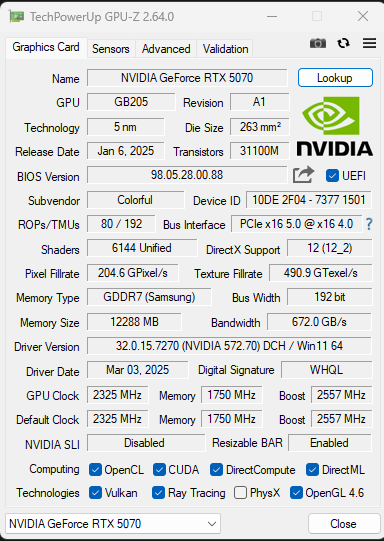
We get a PCIe 5.0 x16 host interface within and an upgrade to GDDR7 memory from the previous generation’s GDDR6X. This doubles bandwidth and halves the power consumption of GDDR6. The memory is clocked at a much faster 1750 MHz (vs. 1313 MHz), leading to an effective memory clock of 28 Gbps. With this, the bandwidth comes out to 672 GB/s with its 192-bit memory bus.
Improvements
Nvidia Blackwell architecture
1 of 4
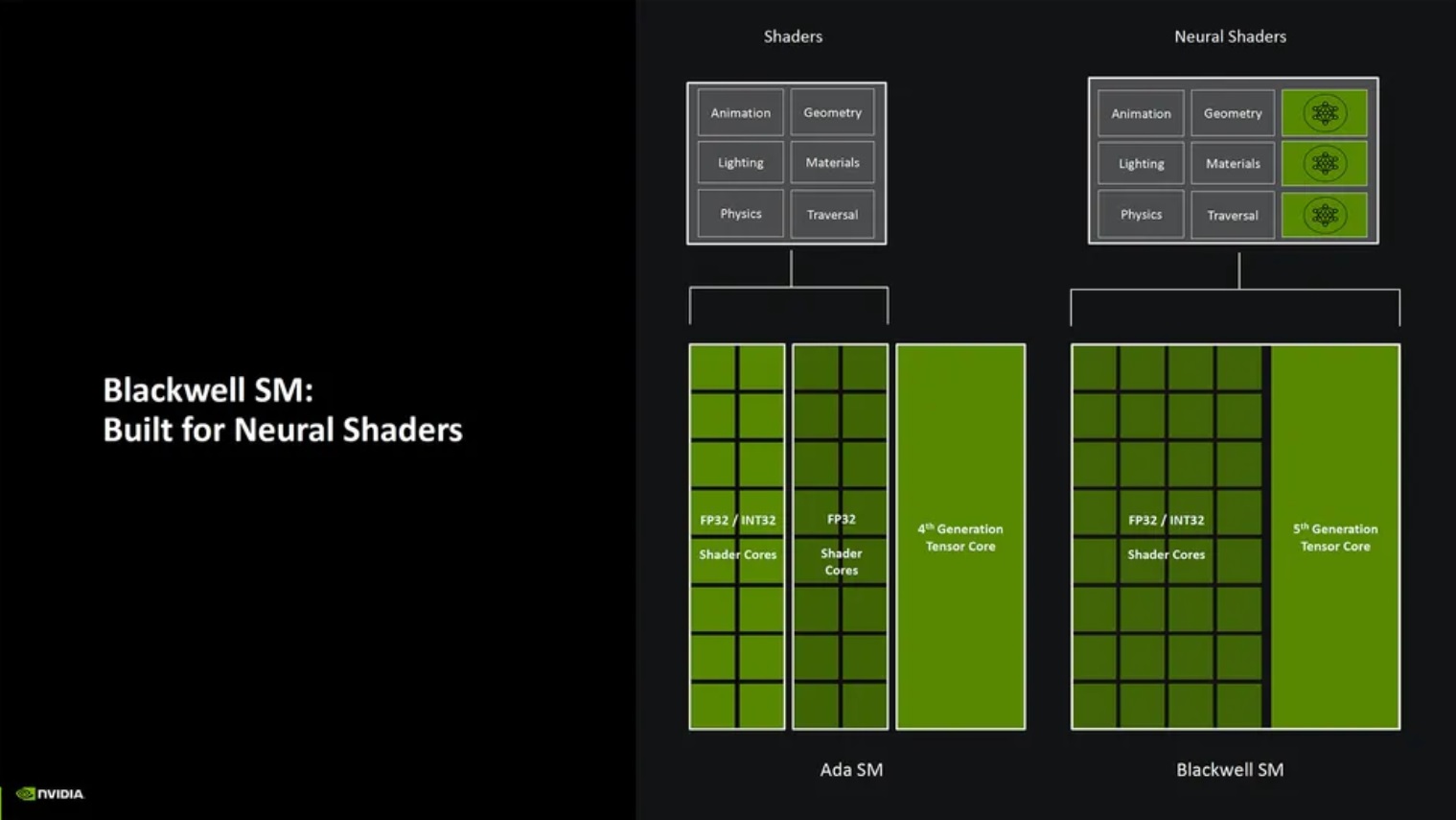
Neural shaders (Image Credits: Nvidia)
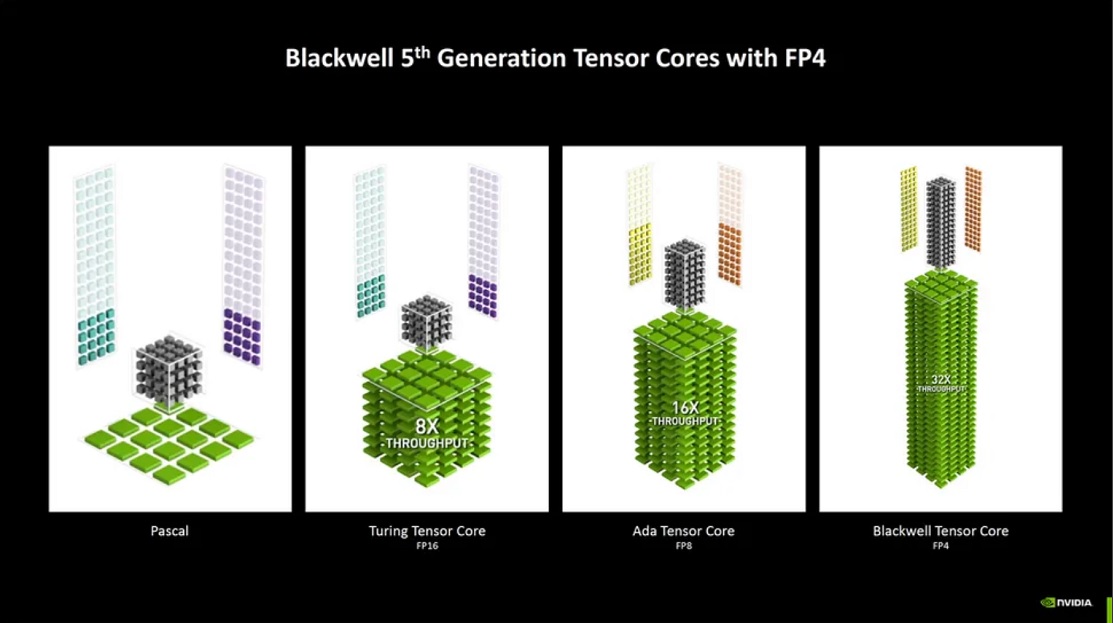
5th gen Tensor Cores (Image Credits: Nvidia)
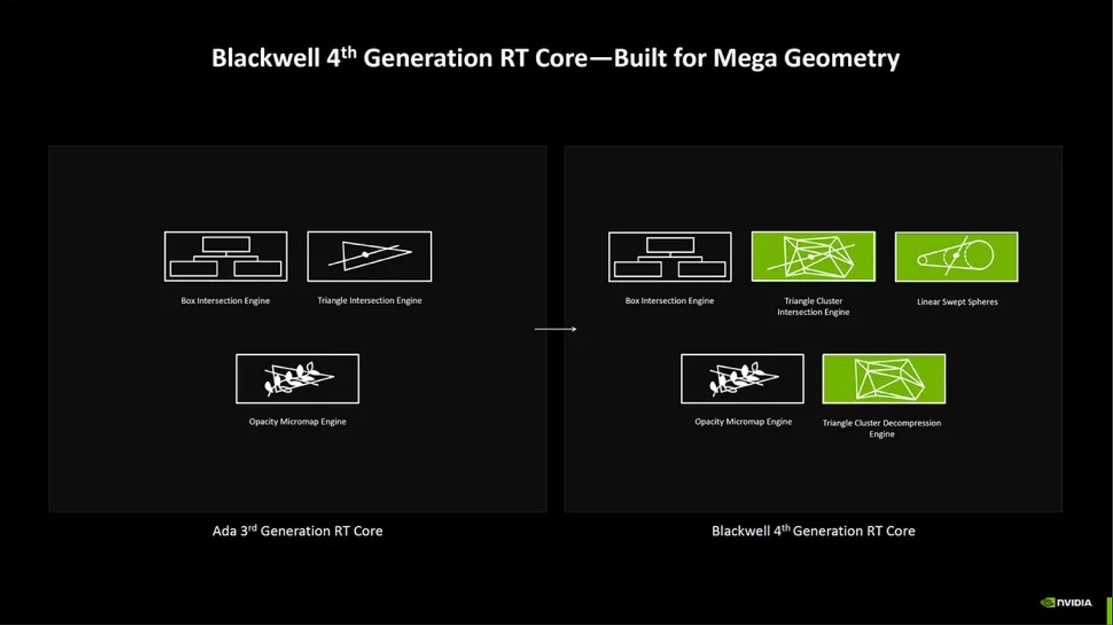
4th gen RT cores (Image Credits: Nvidia)
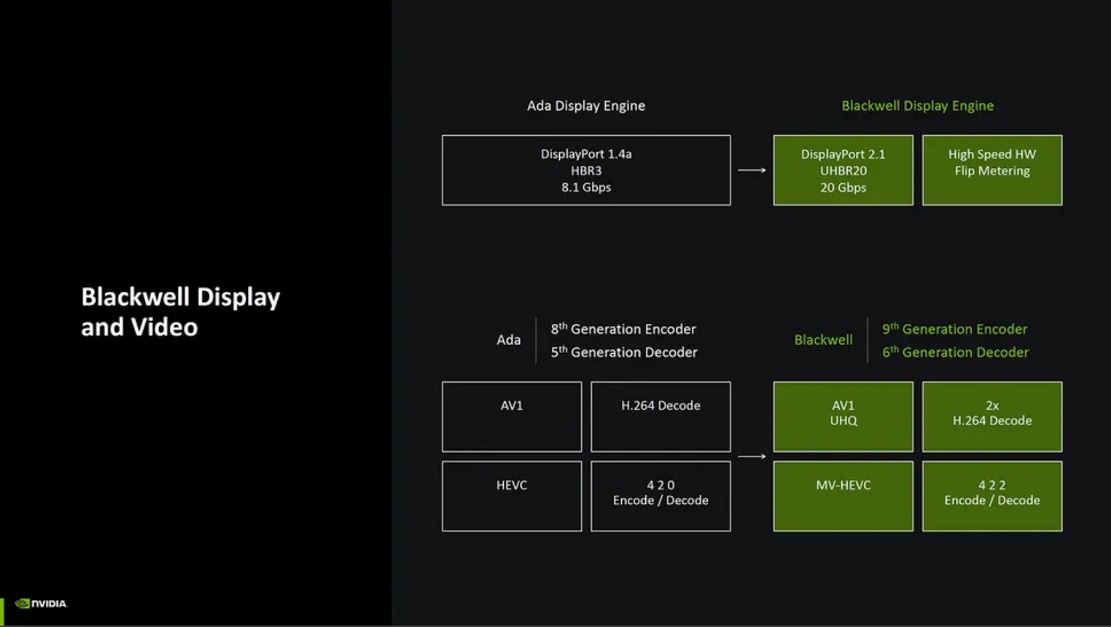
Video and display engine (Image Credits: Nvidia)
Stream Multiprocessors: The new Blackwell SMs contain FP32/INT32 capability on all shaders, unlike Ada, where half were capable of FP32 and the other half of both FP32 and INT32. With that, INT32 throughput is theoretically doubled. The Tensor Cores will be accessible through the shaders, so-called neural shaders.
Tensor Cores: The new 5th generation Tensor Cores support INT4 and FP4. These are lower-precision formats that enable higher throughput with lower memory utilization but at the loss of some precision.
Ray Tracing Cores: Nvidia’s 4th generation RT cores add new components, namely, the Triangle Cluster Intersection and Triangle Cluster Decompression engines, which will enable effective ray tracing for Mega Geometry. The ray tracing cores have double the ray triangle intersect speed compared to the previous generation.
Display and Video Engines: With an updated Display Engine, the new cards support DisplayPort 2.1, the next-gen display output supporting speeds of up to 80 Gbps. Furthermore, high-speed hardware flip metering speeds up frame pacing. This feature is particularly helpful for Multi Frame Generation. The latest video engine supports AV1 UHQ and twice the speed of H.264 decode. Furthermore, it supports the MV-HEVC format and 4.2.2 Encode/Decode.
AI-management Processor: The new AI-management processor will efficiently dedicate resources to the GPU’s Tensor cores for improved performance, especially in DLSS applications.
Neural Rendering
Neural Shaders (Image Credits: Nvidia)
Neural rendering is a process that uses the new Neural shaders for different components of graphics rendering. This process will encompass Neural Textures, Neural Materials, Neural Volumes, Neural Radiation Fields, and Neural Radiation Cache. Leveraging this process, materials and textures can be compressed neurally, reducing their memory usage and computational cost.
Nvidia worked with Microsoft to develop an API for DirectX (Cooperative Vectors API), that will allow developers to integrate neural techniques in their game design. This will allow better game optimization and performance.
DLSS 4 And Reflex
DLSS 4 features (Image Credits: Nvidia)
With RTX 5000, Nvidia also introduced DLSS 4. In fact, Nvidia’s marketing of RTX 5070 performance (beating the RTX 4090) was using Multi Frame Generation, a DLSS 4 feature. Speaking of which, this is a technique that can AI-generate three frames for every traditionally rendered frame. With DLSS Super Resolution set to Performance and Multi Frame Gen at 4X, 15 of 16 pixels are generated by AI, boosting performance enormously. The enhanced flip metering that we just discussed will help smoothen this process.
DLSS 4 also introduces a Transformer Model, replacing the previously used convolutional neural networks. This model is used for DLSS-powered Super Resolution, ray reconstruction, and anti-aliasing processes. The result is vastly improved image quality and even potentially more framerate through Super Resolution! What’s better is that this model is not dependent on a specific hardware component and will be supported by all RTX GPUs.
Reflex 2 (Image Credits: Nvidia)
Lastly, we have Nvidia Reflex 2, which uses Frame Warping to show you the frame on your screen quicker. This works by warping the frame that is to be generated according to the direction in which you move your mouse. You can see the output of your movement up to 75% quicker through this process. All RTX GPUs also support Reflex 2.
Packaging and Unboxing
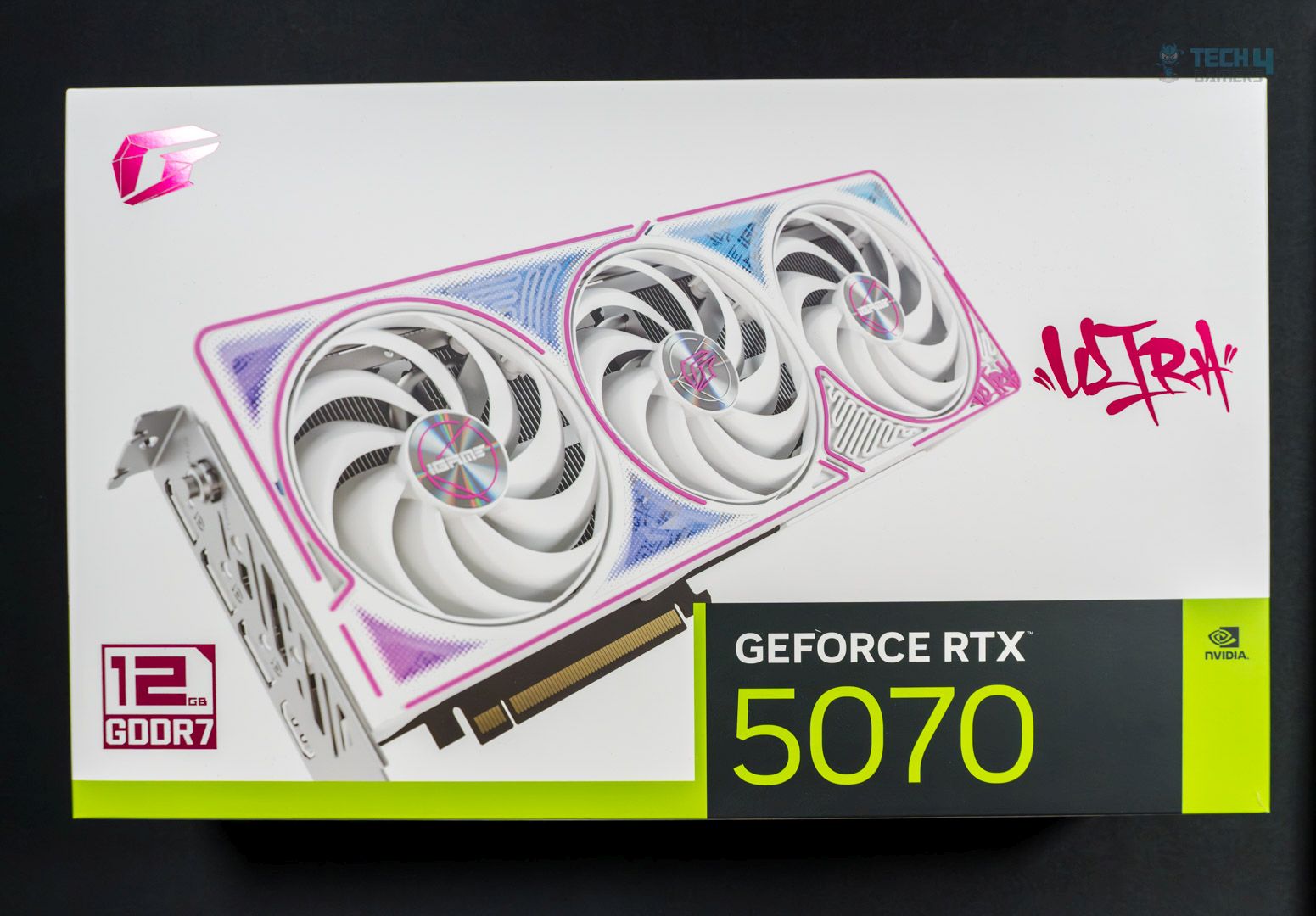
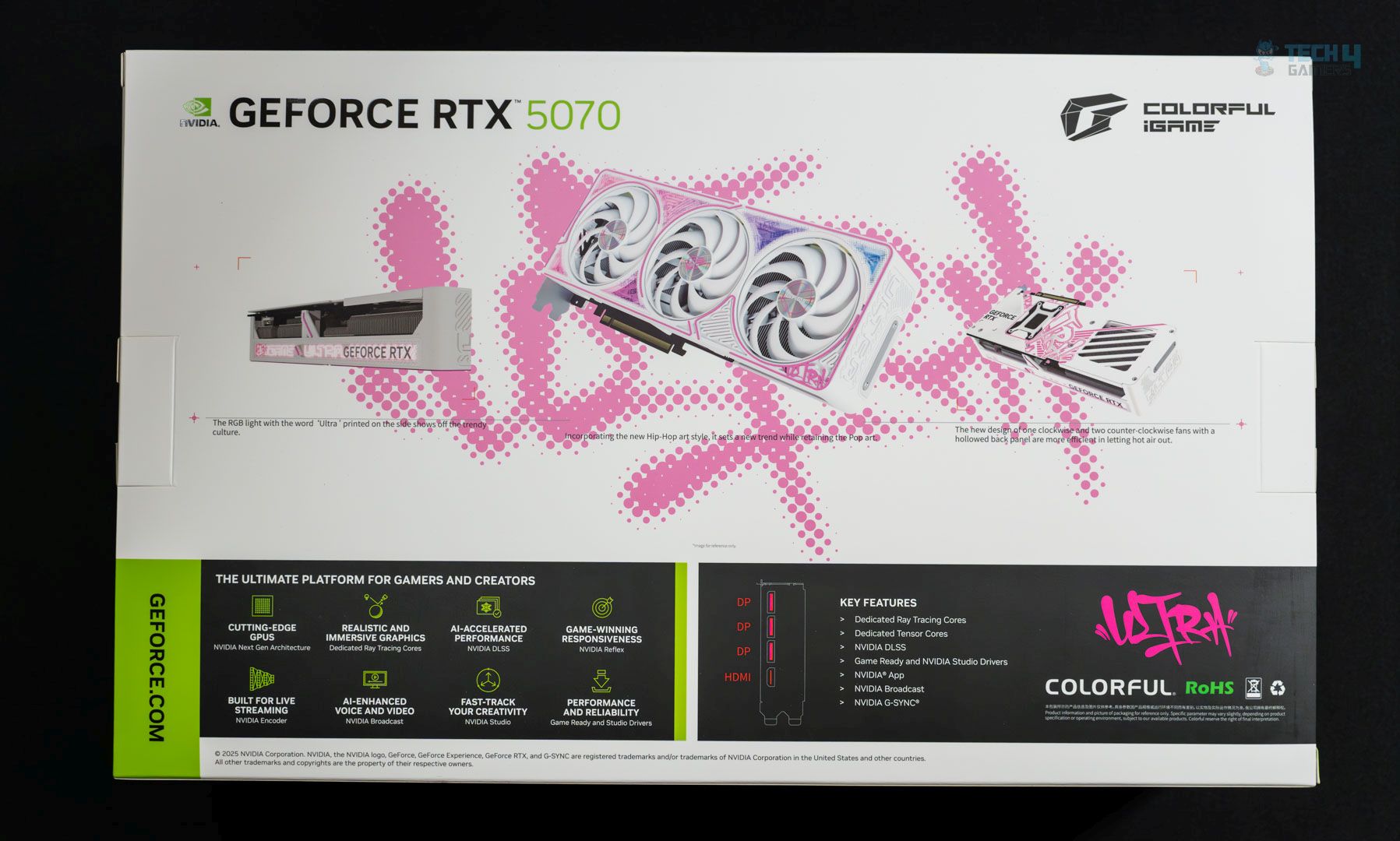
The GPU is shipped inside a cardboard box with a white theme containing pink elements.
Front
Rear
The front side has the GPU name and the main VRAM specs. On the backside, we get some notes about the design, some platform features from Nvidia, and a diagram of the display ports on the card.
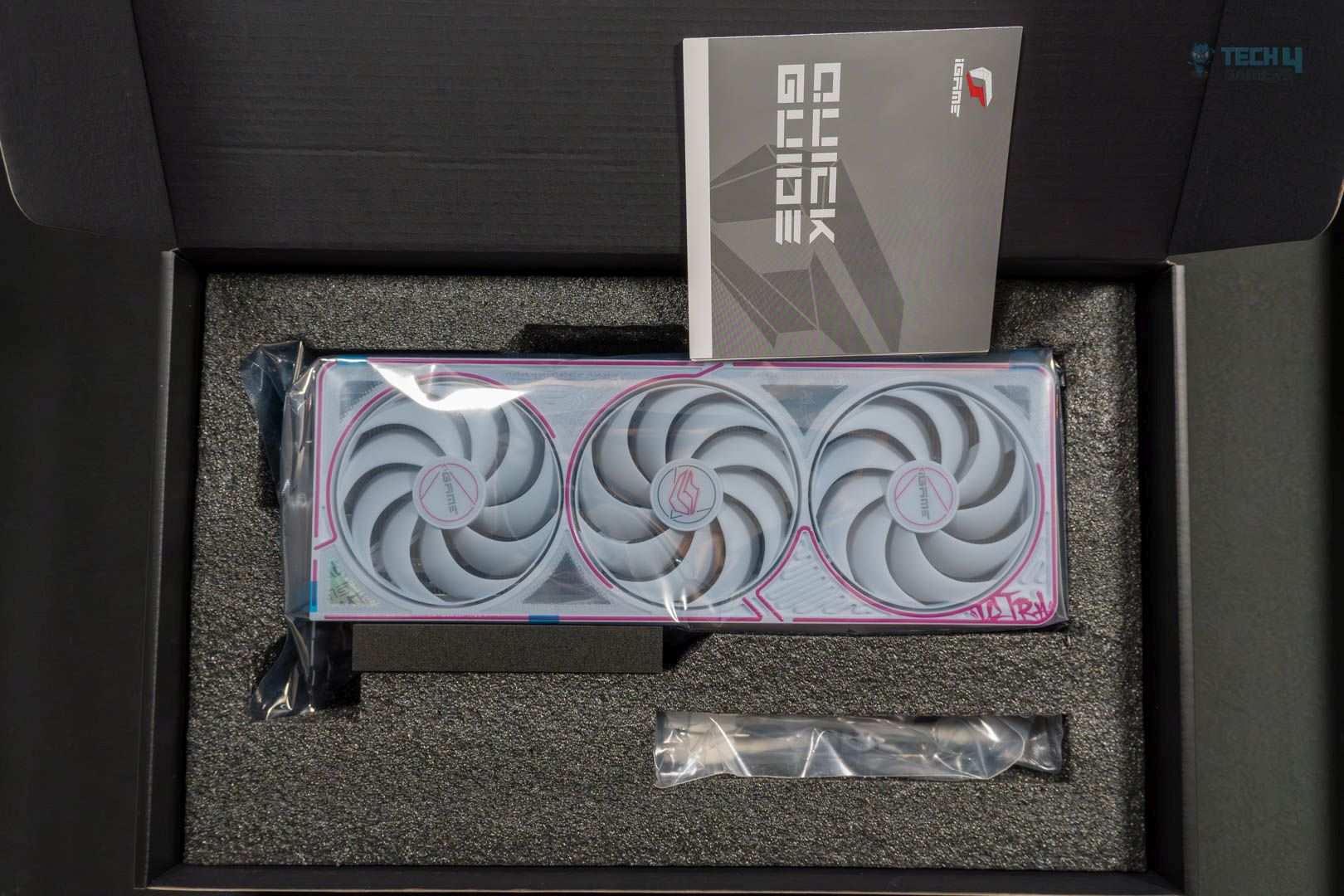
Contents
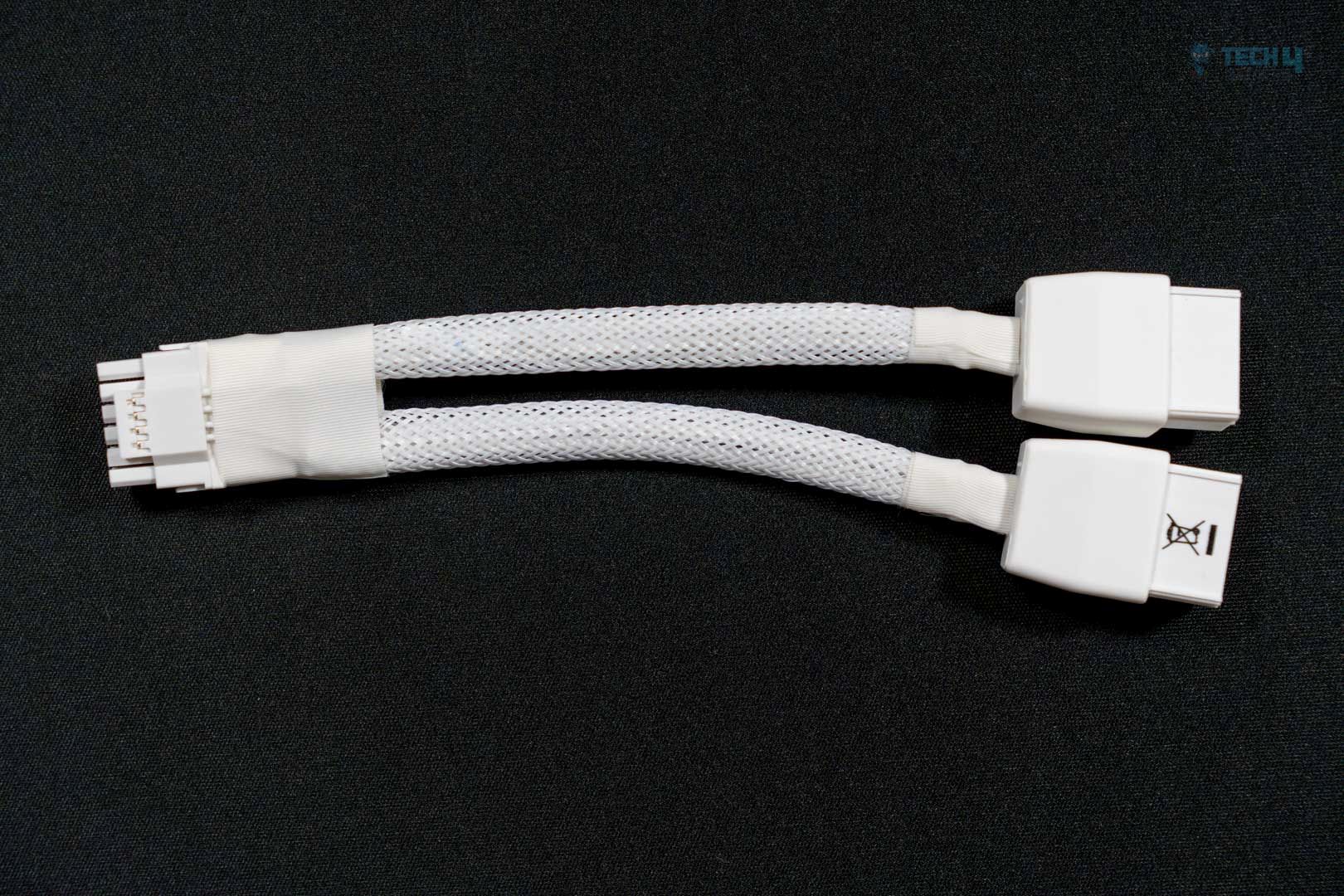
PCIe adapter
Inside, the card is wrapped in foam packaging and further protected by an antistatic bag. There’s not much else inside: just a quick guide and a 16-pin to 2x 8-pin PCIe adapter. This will be helpful if your power supply doesn’t have the 16-pin connector but does have two 8-pin ones.
Design
Design
Close-up
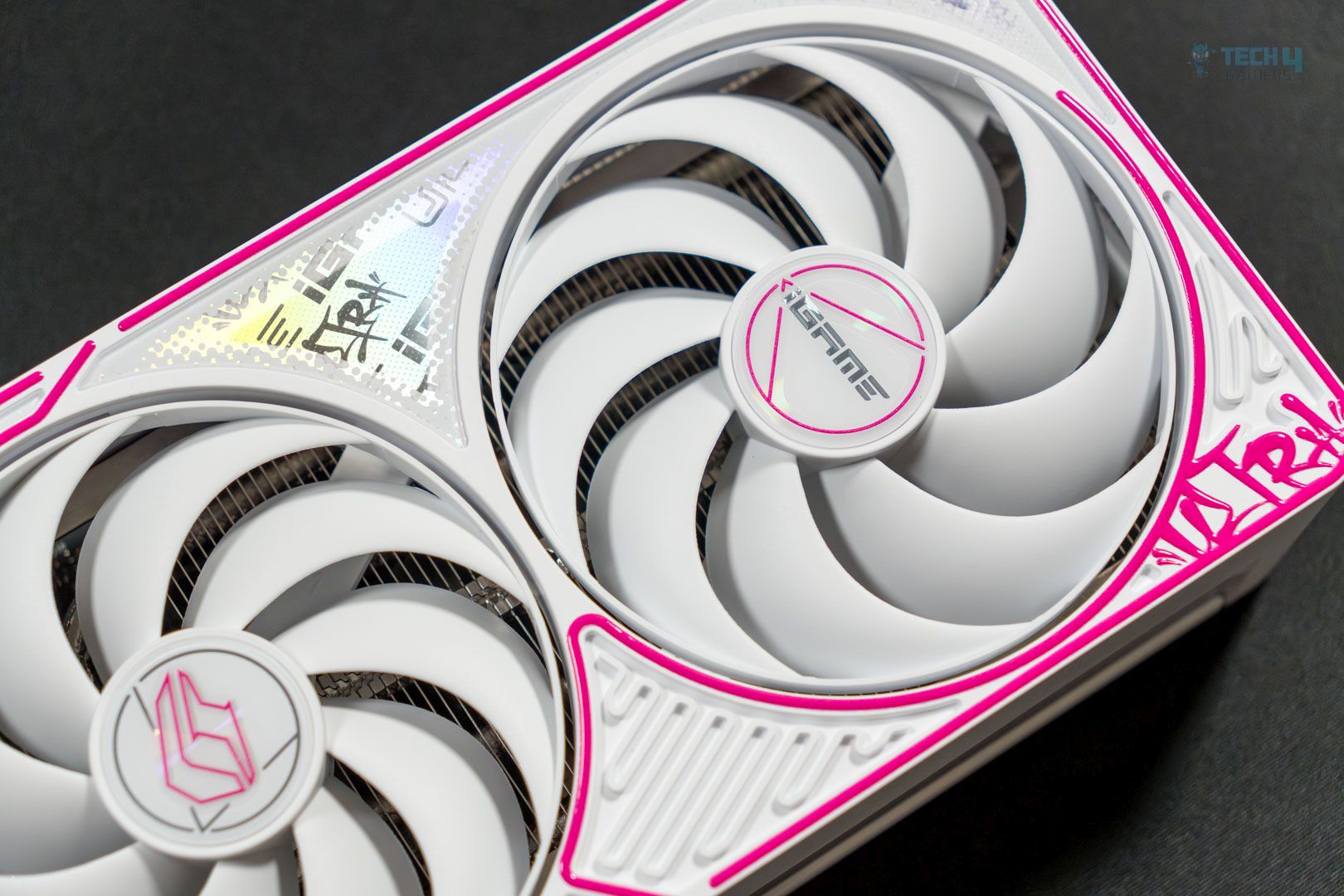
The front side reveals a white shroud with a pink outline around the frame and the fans. A close-up reveals different patterns and curved lines in between the pink outlines. We have the “Ultra” text on the bottom right with a graffiti-like font. The fans feature curved blades, a dual ball bearing design, and a smart auto-stop feature. The left and right fan frames feature the same text. Meanwhile, the central fan has the Colorful iGame logo.
This is a dual-directional design, with the left and right fans spinning anti-clockwise while the central fan spins clockwise. Thanks to this design, turbulence and noise are reduced, and airflow is improved
Backplate
Cutout
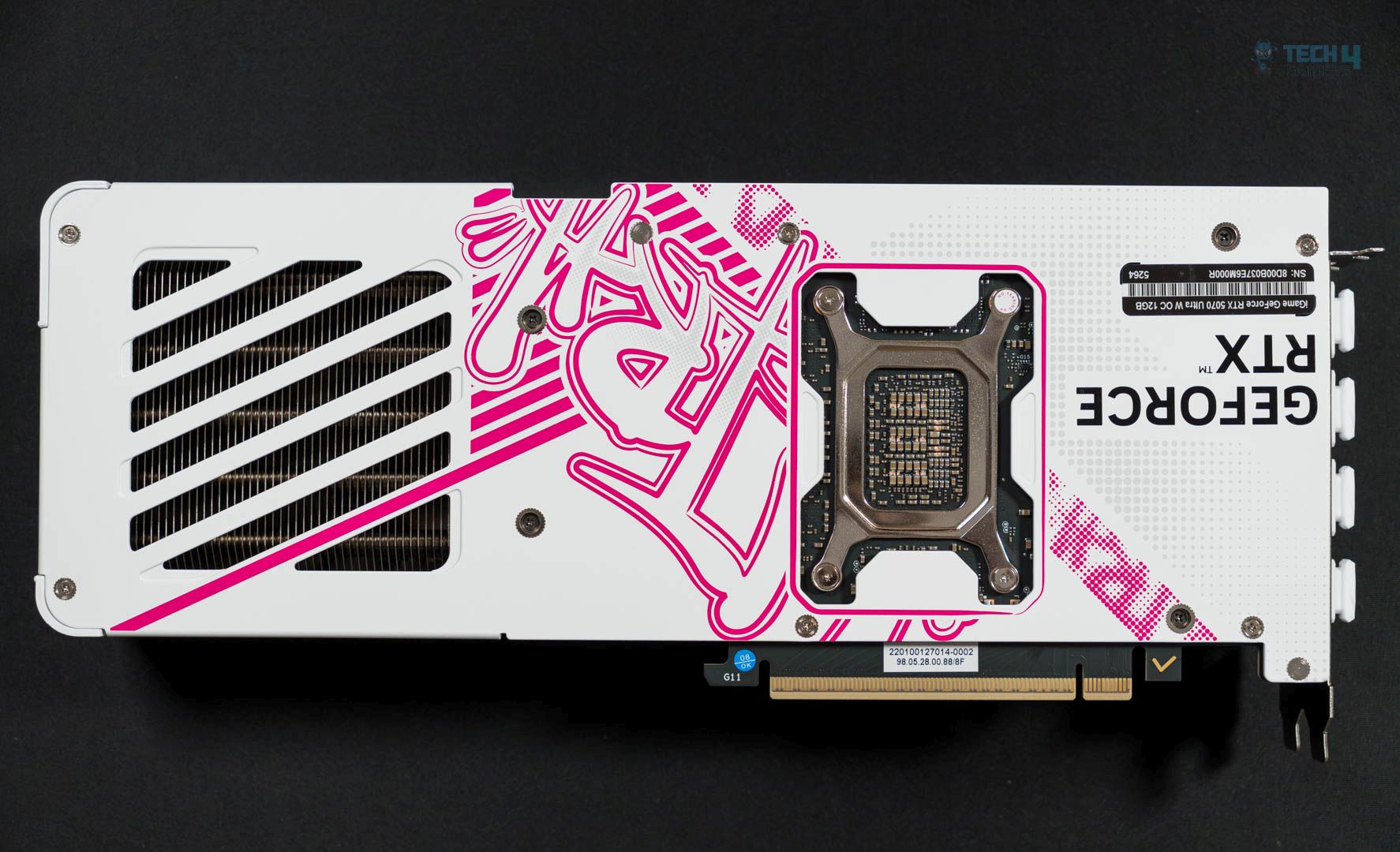
Moving to the backside, we have a similar-looking metallic backplate. The “Ultra” logo, in the same graffiti style, is visible but partially blocked off by the GPU’s support bracket, a lovely look. On the left side, a cutout exposes the heatsink for better heat dissipation. A sticker on the top right reveals the GPU’s serial number.
Topside
Power connector
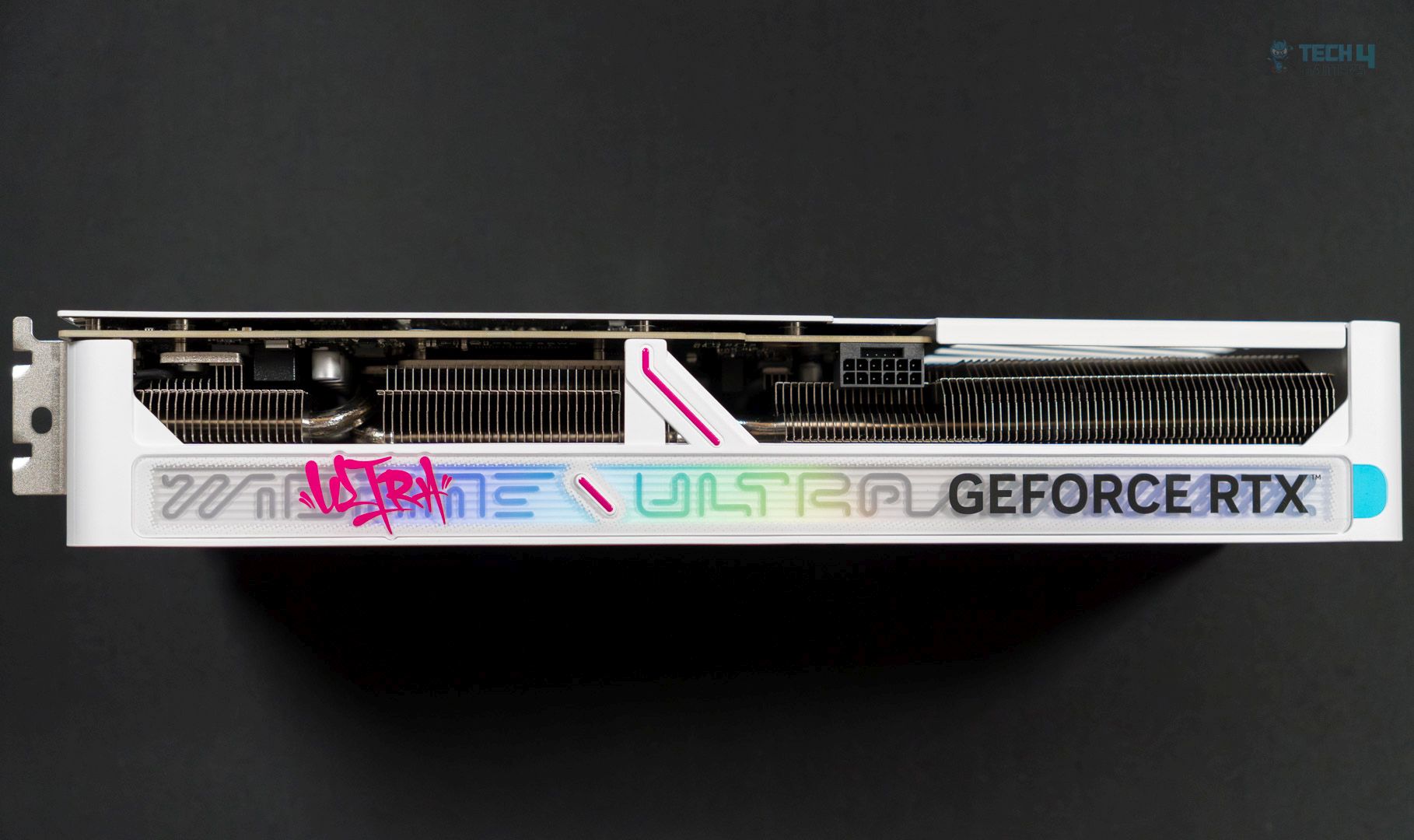
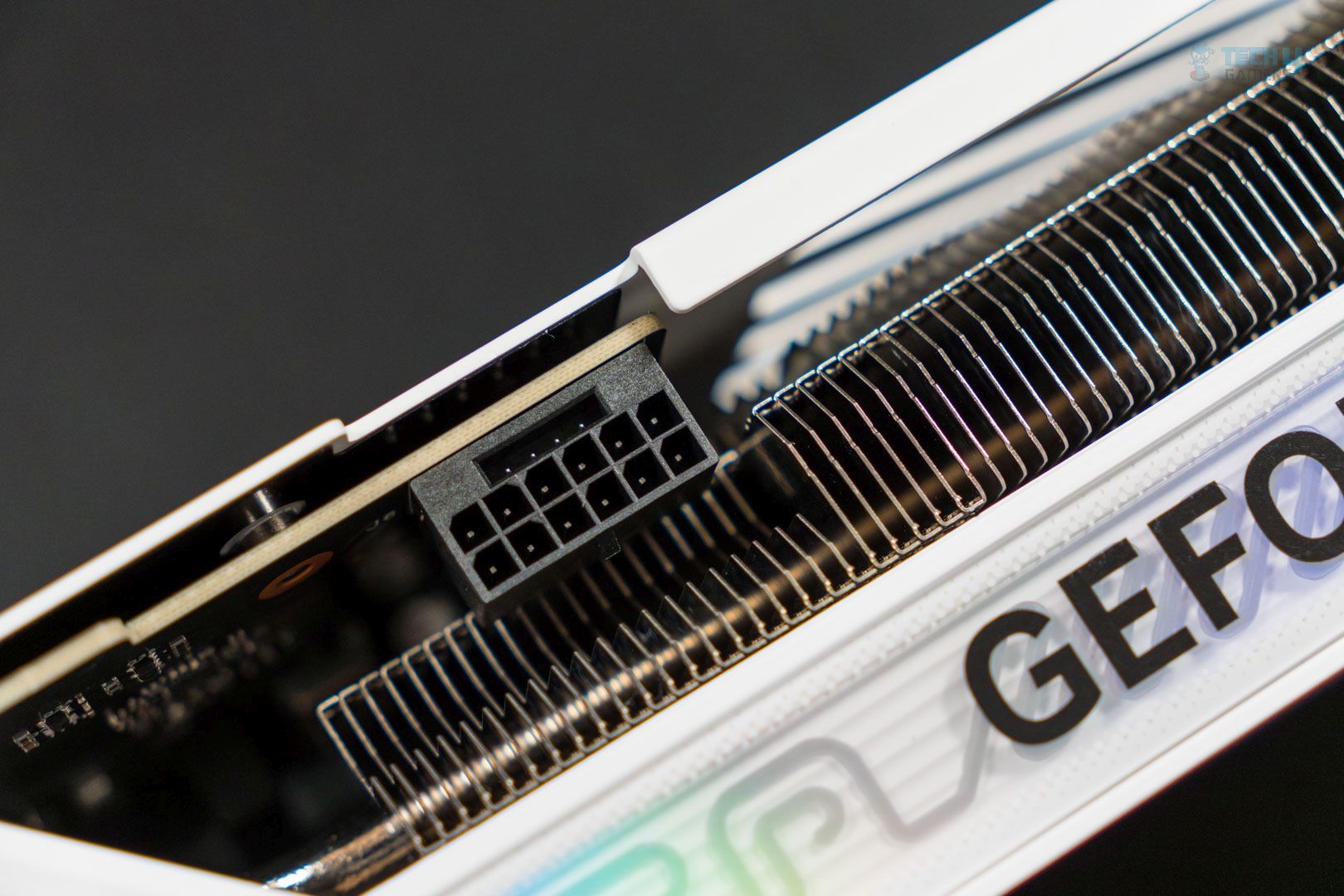
Moving toward the top, we have the Ultra branding again, along with the iGame Ultra branding, which is RGB backlit. The lighting can be controlled by the iGame Center software and synced with your other components or peripherals. Toward the right side is the 16-pin (12V-2×6) power connector. The connector provides up to 600W, while the card is rated at 250W.
Here, we can also see the heatsink with its densely packed fins. The cooling design consists of this heatsink and seven heat pipes running across the length of the GPU.
Right side
Left side
On the right side, we have more Ultra branding (and curved lines!), including an embossing on the lower side. The GPU has four display ports: three DisplayPort 2.1b and one HDMI 2.1b. This is a dual-slot design.
WindowsVersion: Windows 11 24H2 (OS Build 26100.3194)
Storage: WD SN 770 1TB, Samsung 970 EVO 500GB for OS
Benchmarks: CapframeX v1.7.4, Nvidia Frame View v1.6.10, HWINFO Pro v8.22
Methodology
Testing Setup and Specifications
We tested all games and GPUs using the same settings, drivers, and software mentioned above. Every GPU ran the same version of each game, and we measured gaming performance at the game’s native resolution—without using any upscaling or frame-generation tools.
Upscaling and Anti-Aliasing
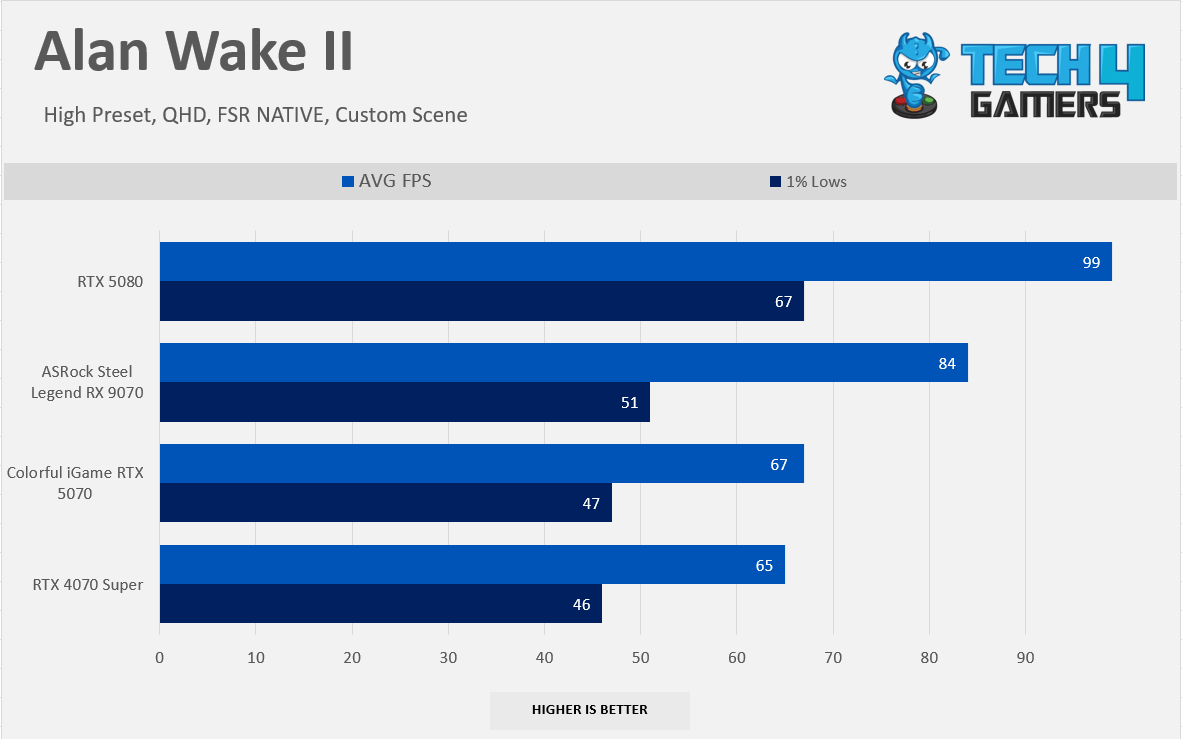
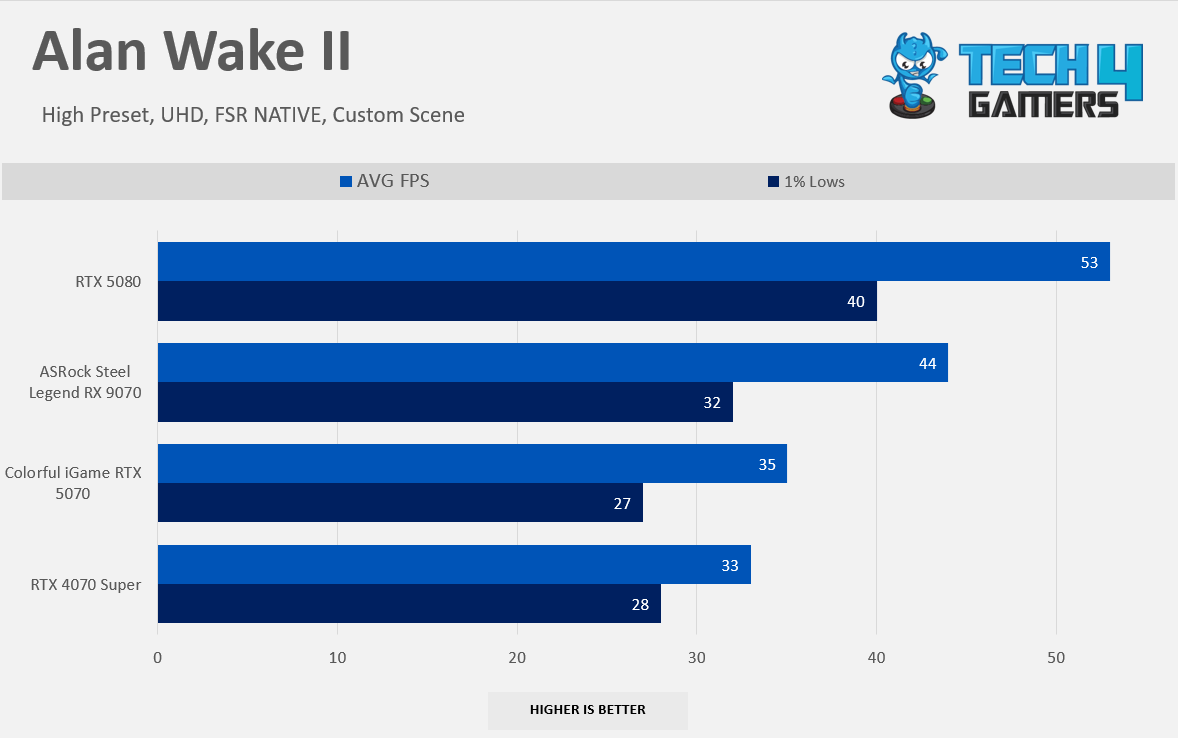
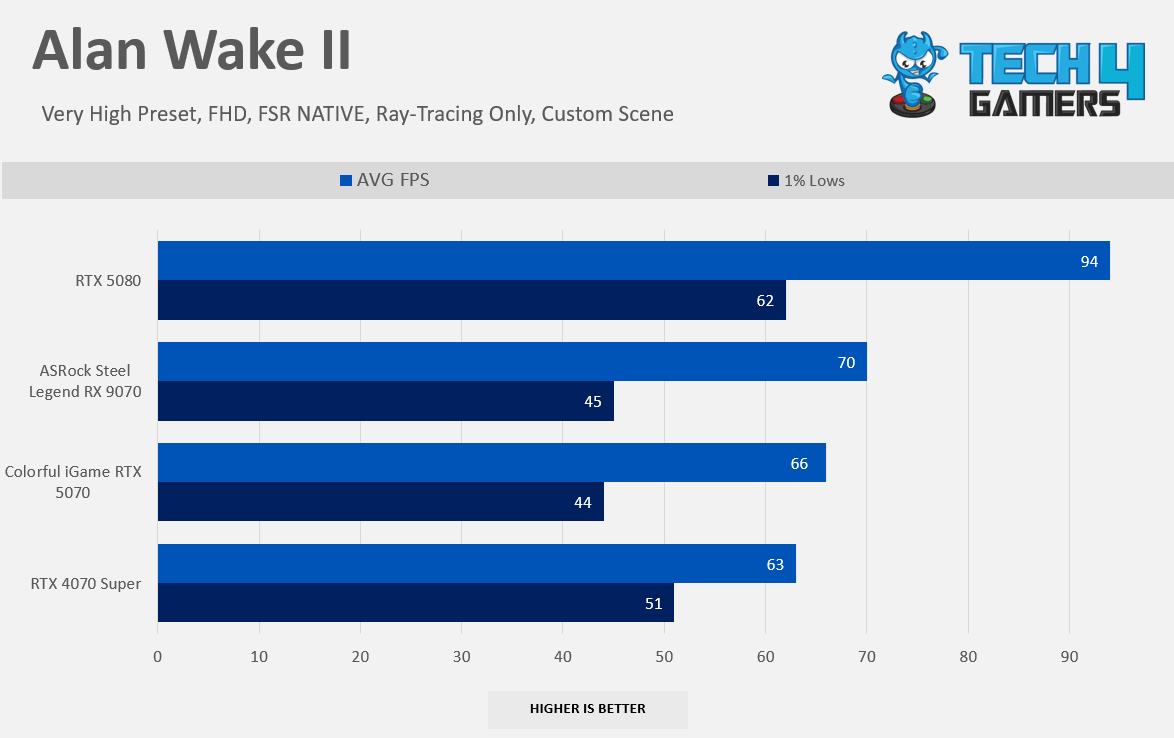
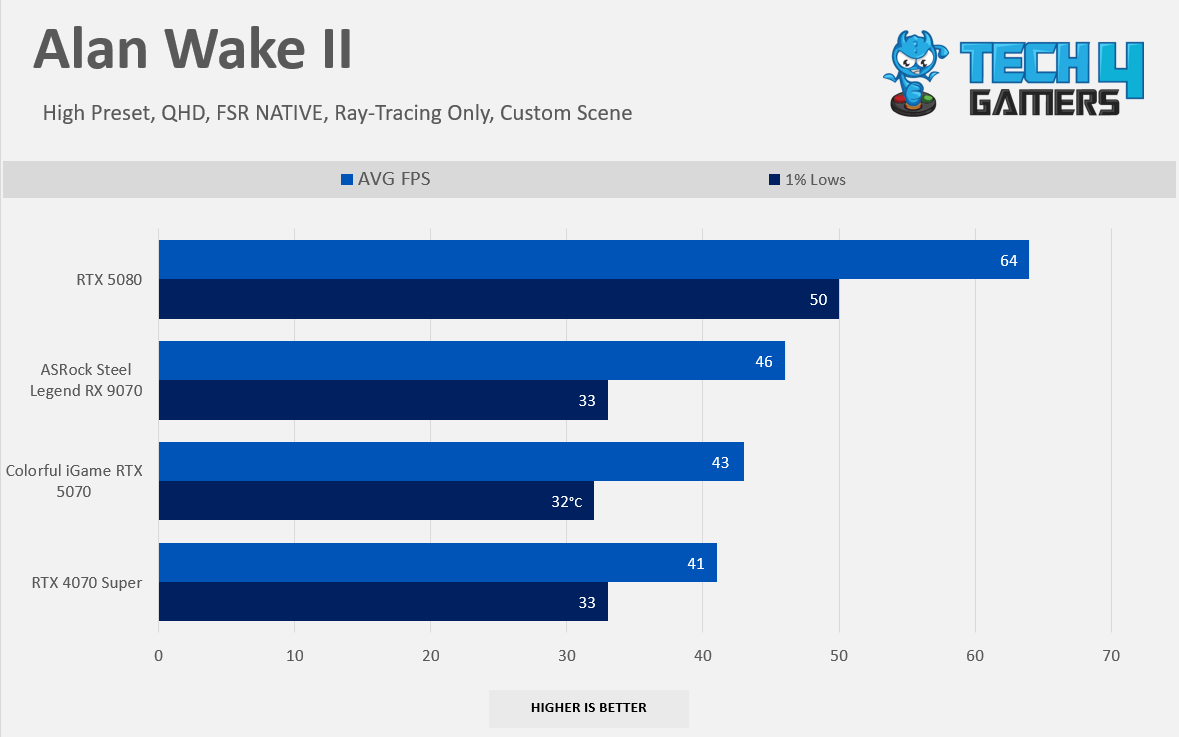
For games that don’t have their own upscaling or Temporal Anti-Aliasing (TAA), we used FSR Native because it works with every GPU. For example, this was the case with Alan Wake II.
Settings
We didn’t change any settings in the control panel; all adjustments were made directly within the game.
Performance and Measurement Tools
CapframeX recorded performance metrics.
Nvidia Frame View measured latency during Frame-Generation and DLSS tests on RTX GeForce graphics cards.
HWINFO Pro tracked clock speeds and measured both average and maximum power consumption.
NvAPP: NVIDIA shadow-play was completely disabled on RTX GeForce cards.
Benchmarking Methods
Some games used their built-in benchmarks, while others were tested with custom settings.
GPU Configuration
None of the GPUs were modified, overclocked, or had their power limits increased during the tests.
Screen Resolutions Tested
FHD (1920×1080)
QHD (2560×1440)
UHD (3840×2160)
DLSS and Frame-Generation Benchmarks
For DLSS tests, we used the transformer model, and if the game supported it, frame-generation (including modes at 2x, 3x, and 4x) was also used.
Rasterization Performance
Gaming 1080p Benchmarks (Native)
Raster 1080p Performance
1 of 8
6 Games Average FPS 1080p
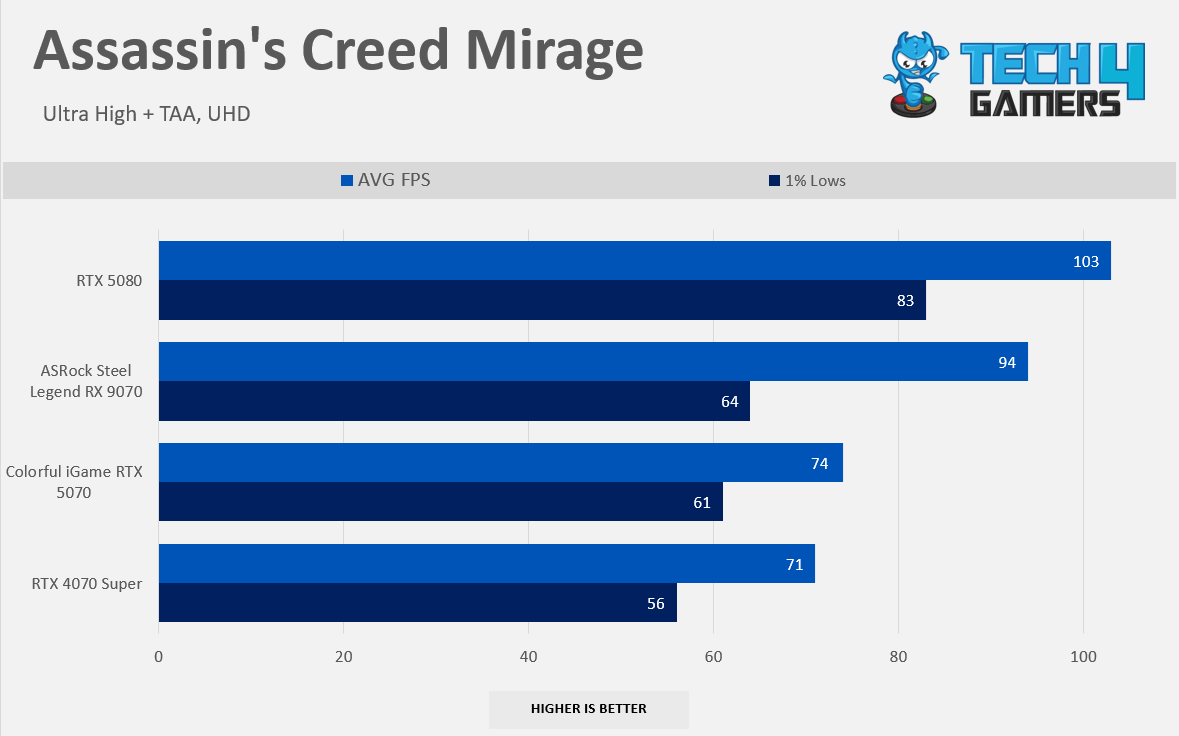
Assassin's Creed Mirage 1080p
Alan Wake II 1080p
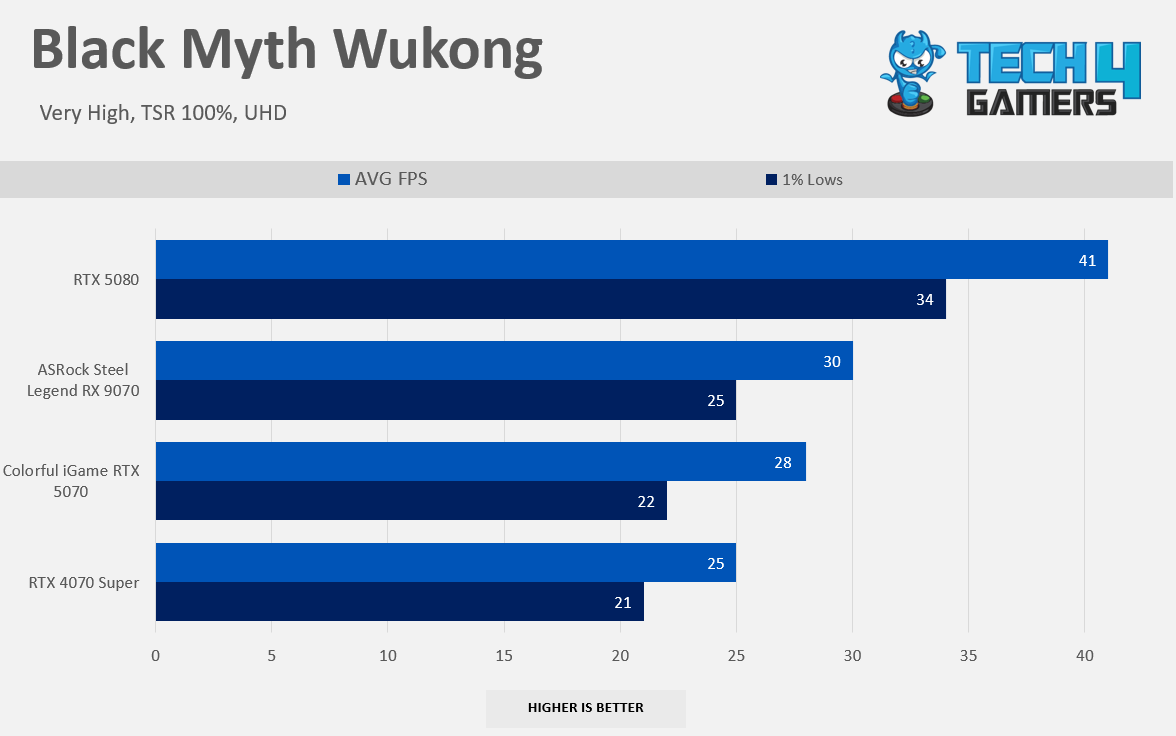
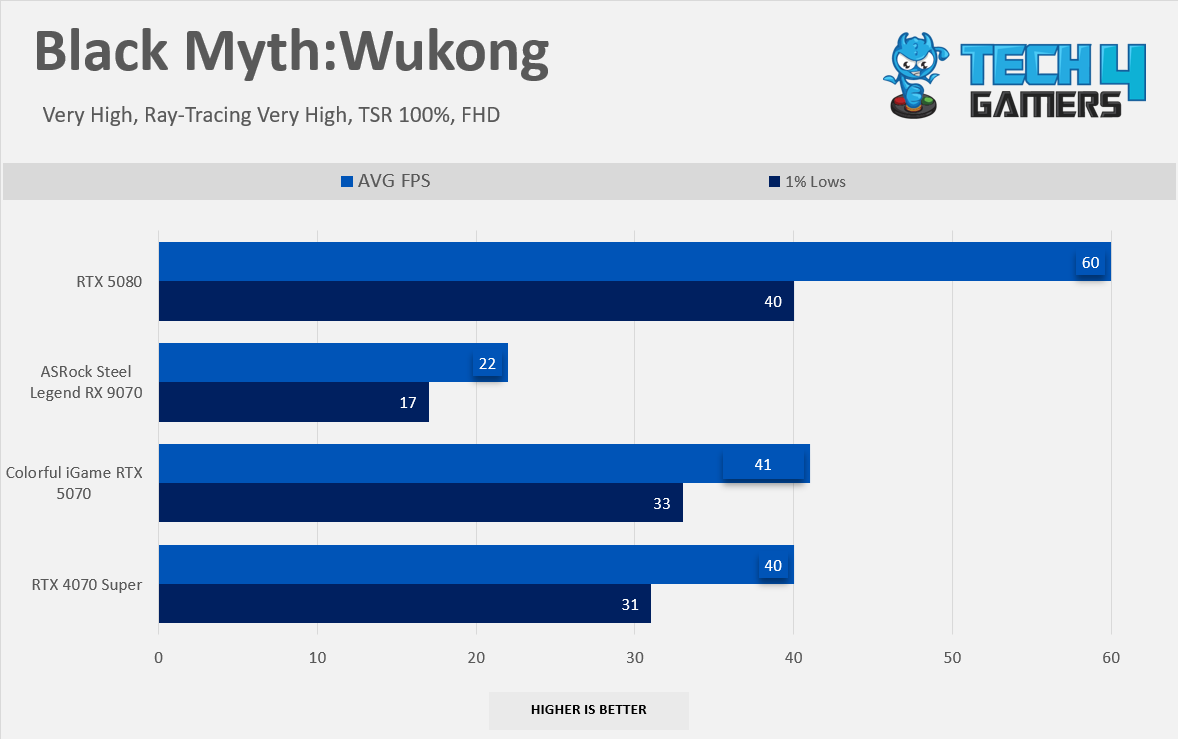
Black Myth Wukong: 1080p
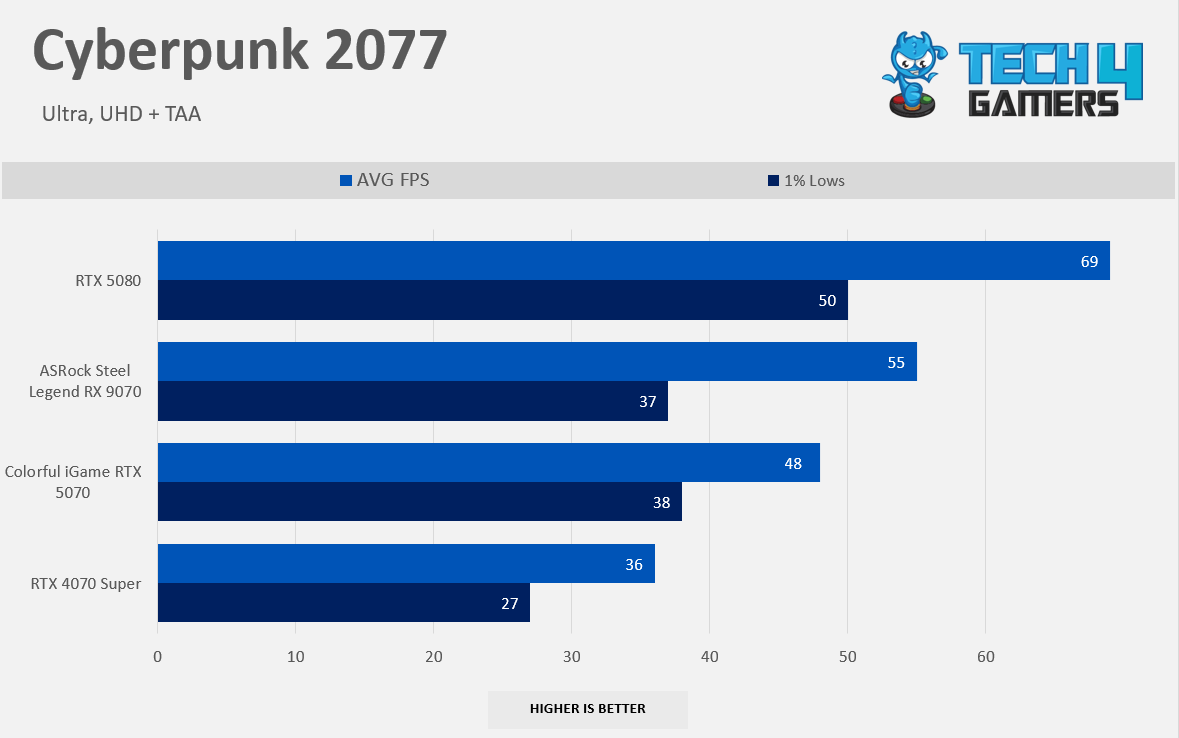
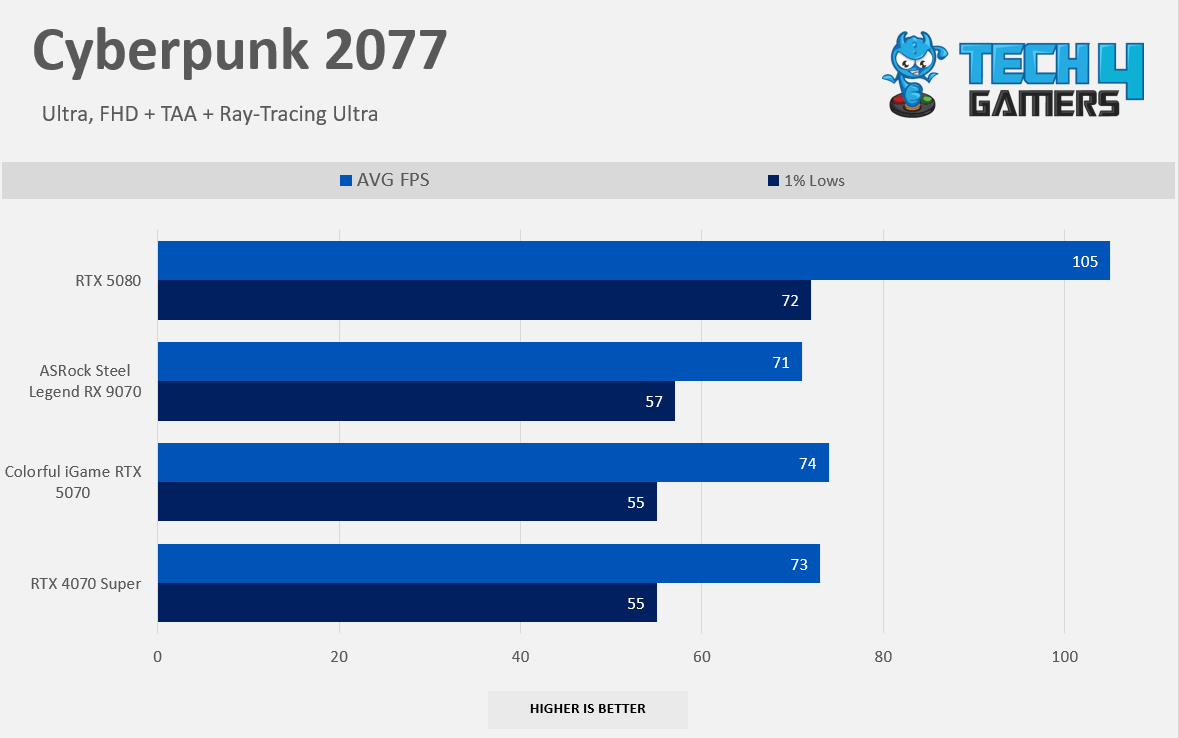
Cyberpunk 2077 1080p
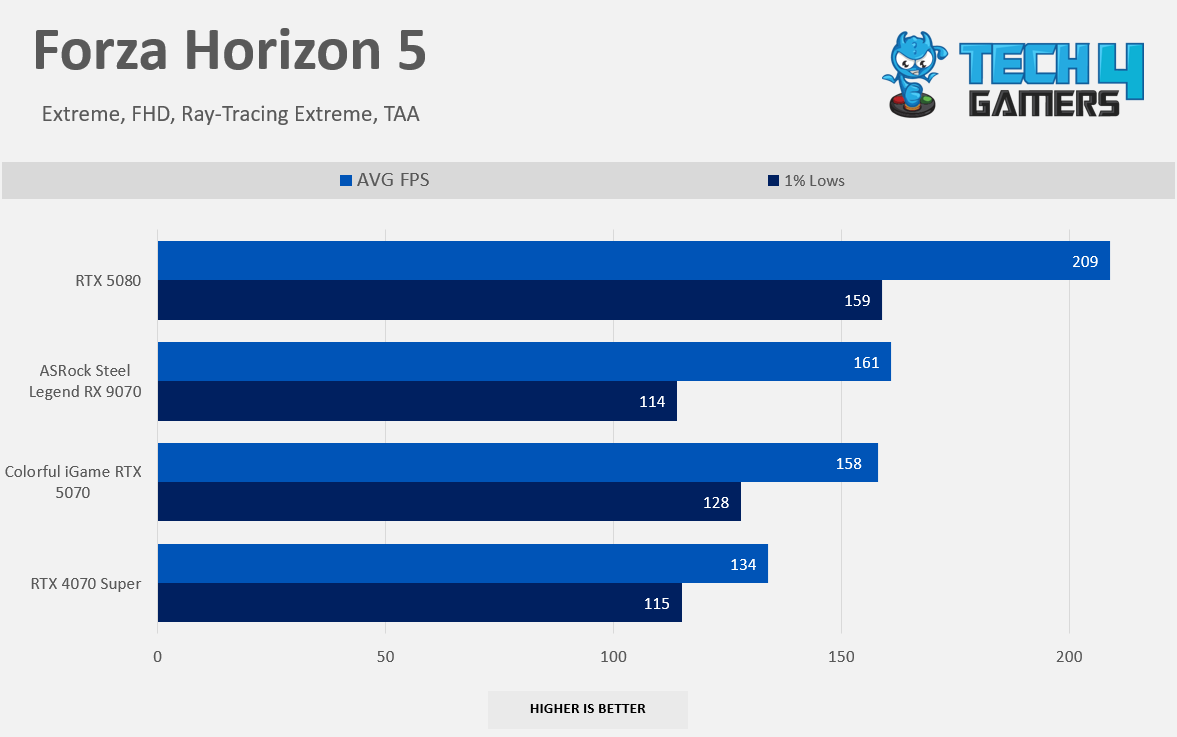
Forza Horizon 5 1080p
Hogwarts Legacy 1080p
Monster Hunter Wilds 1080p
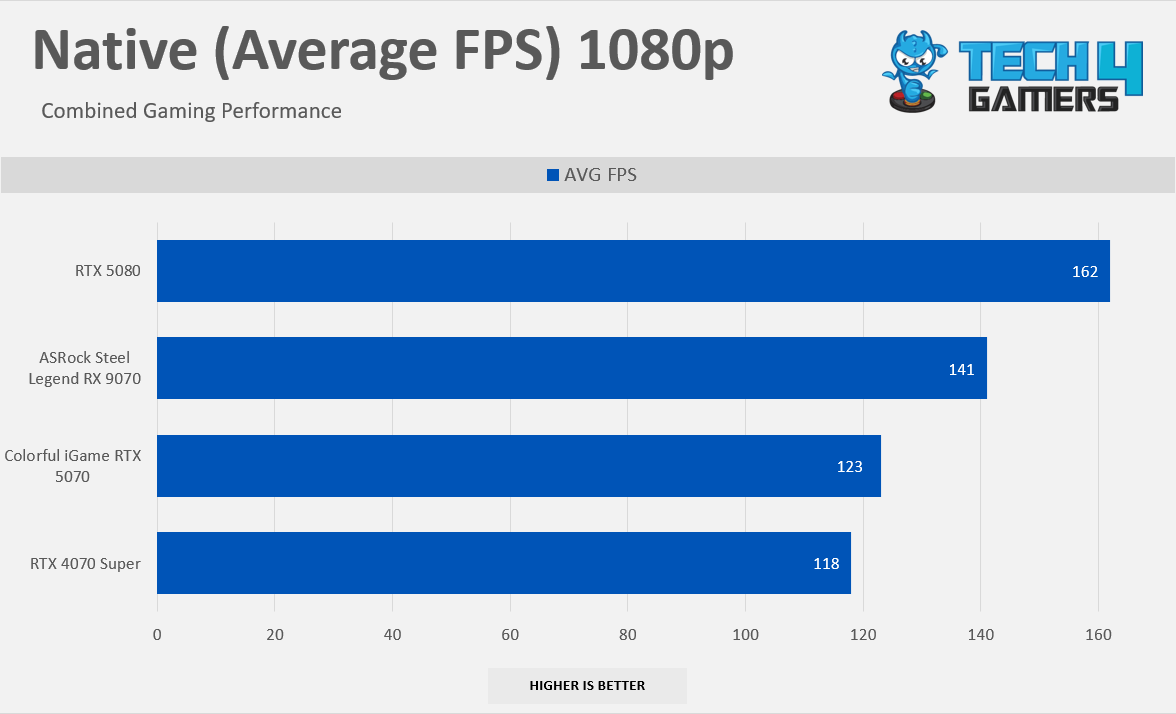
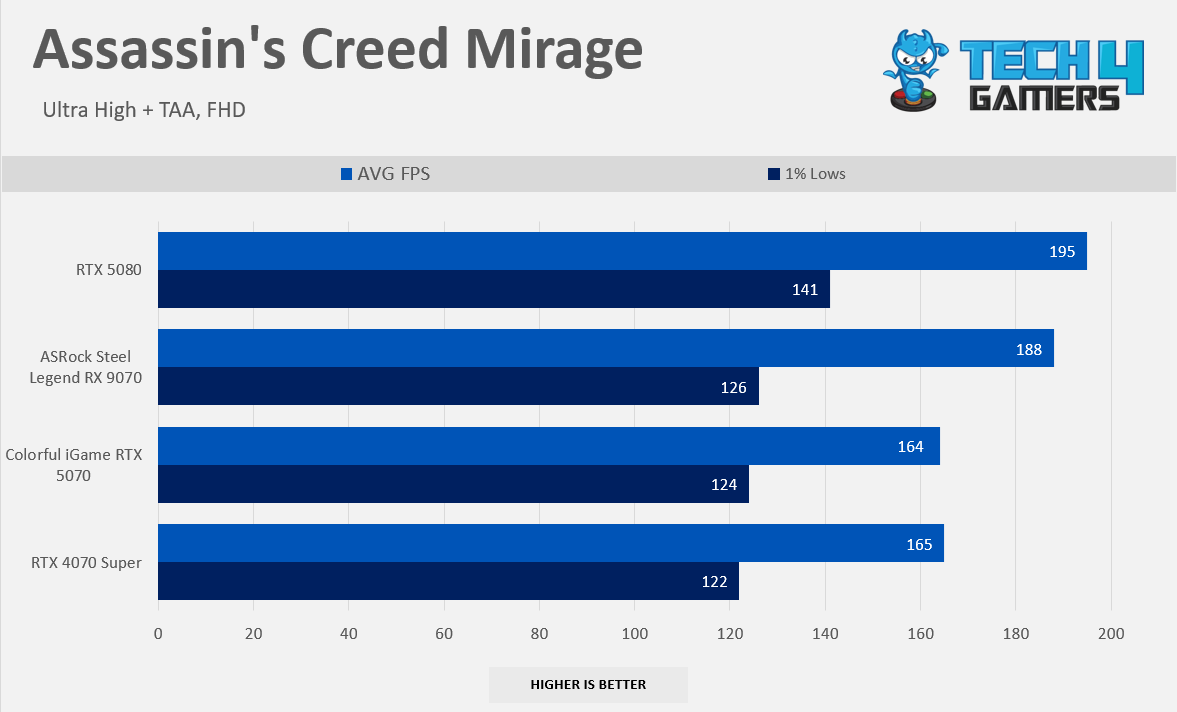
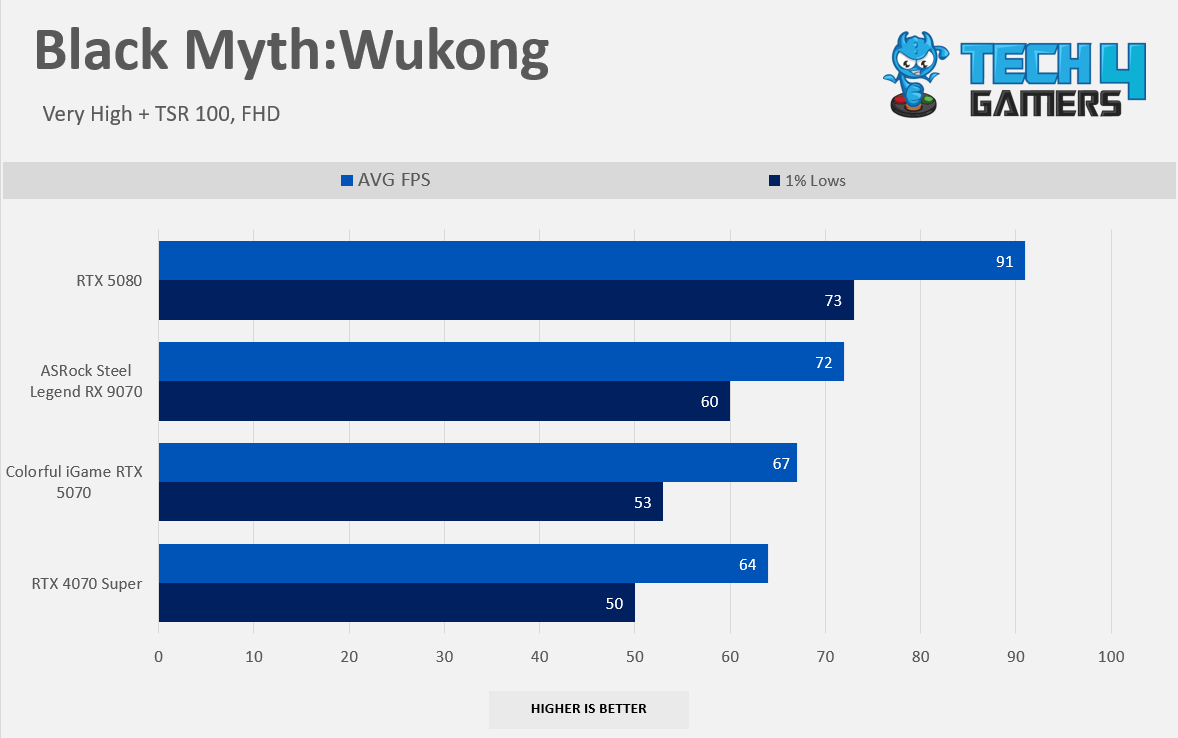
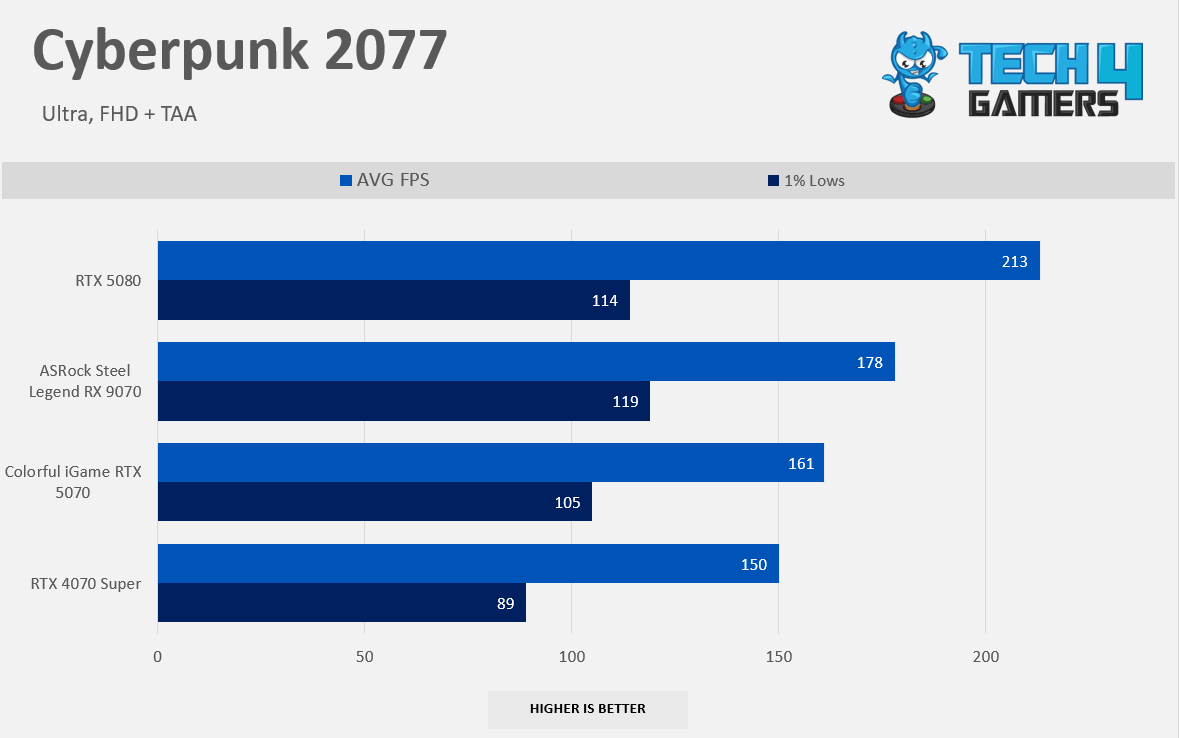
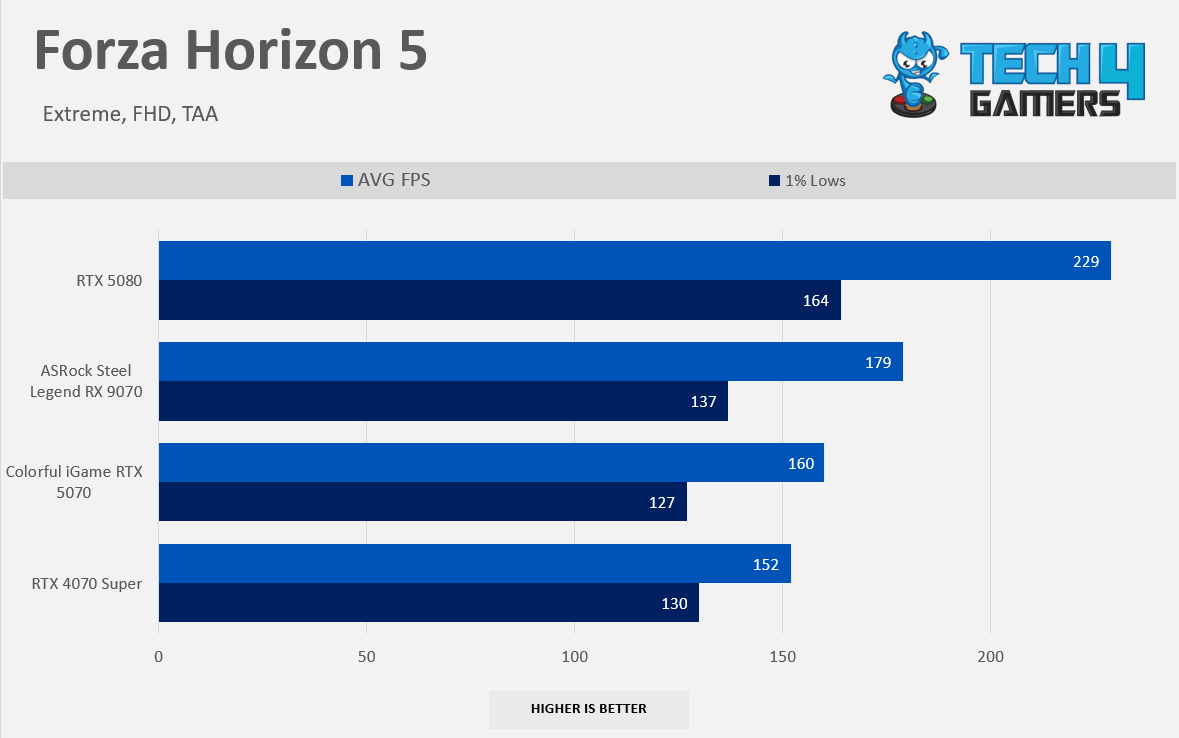
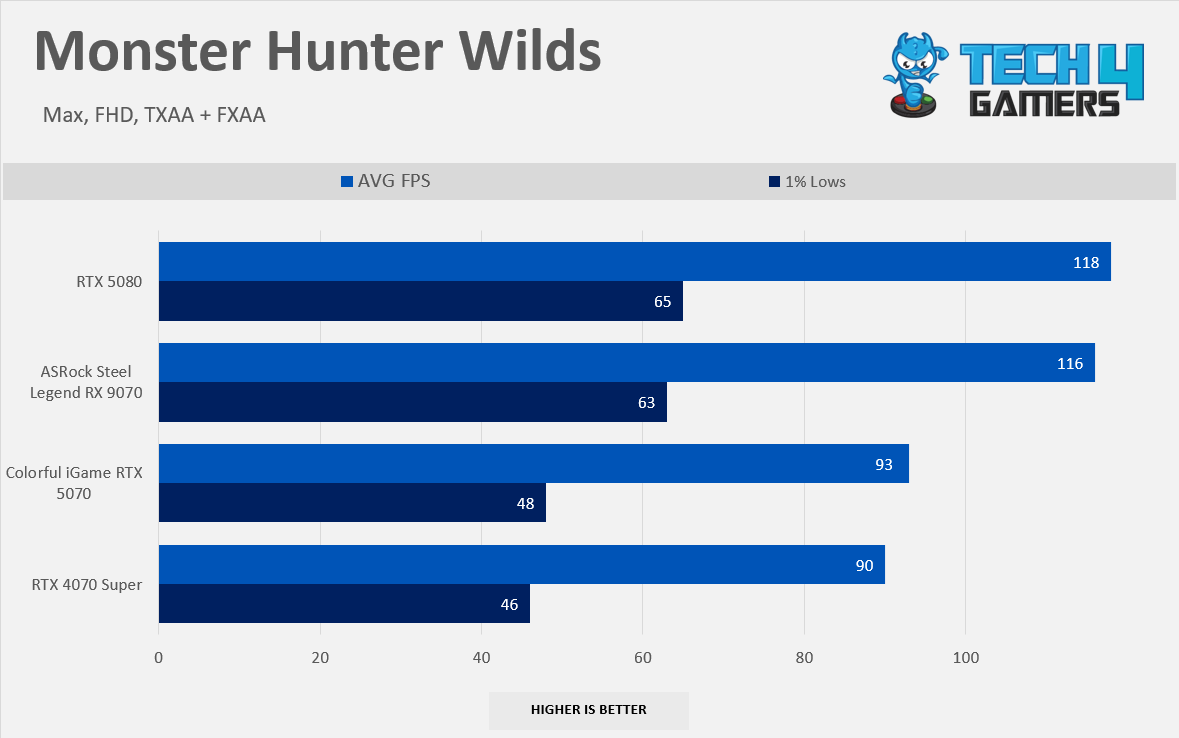
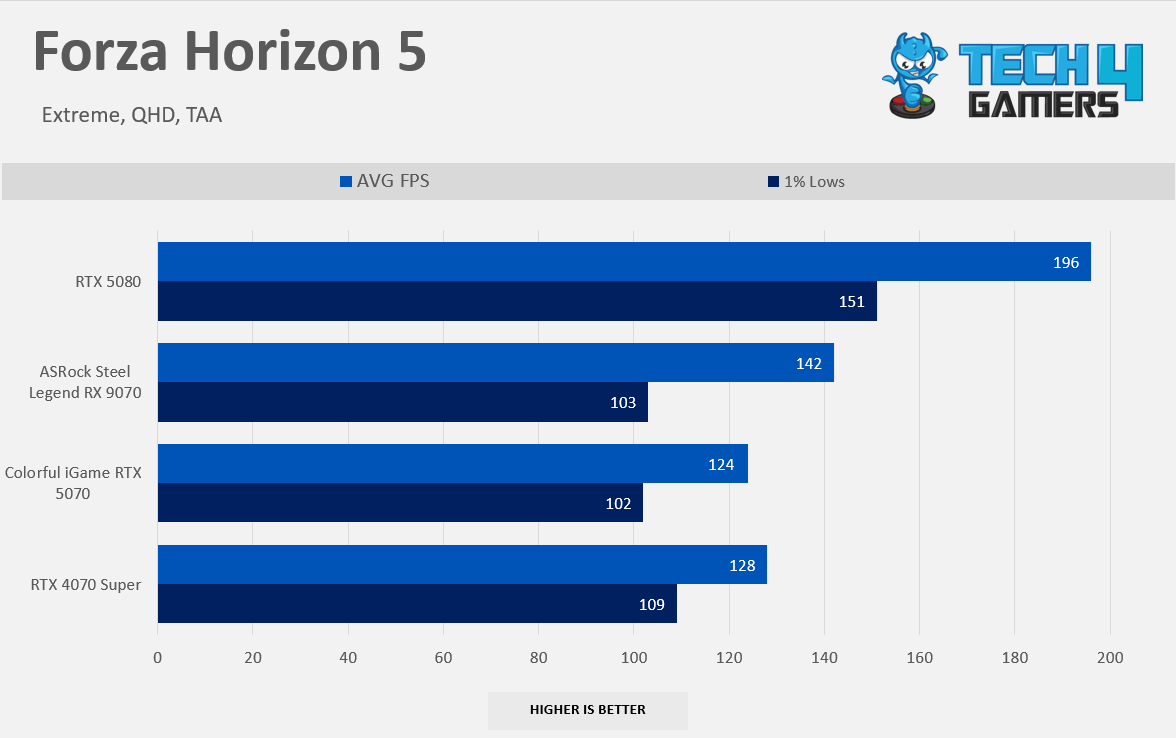
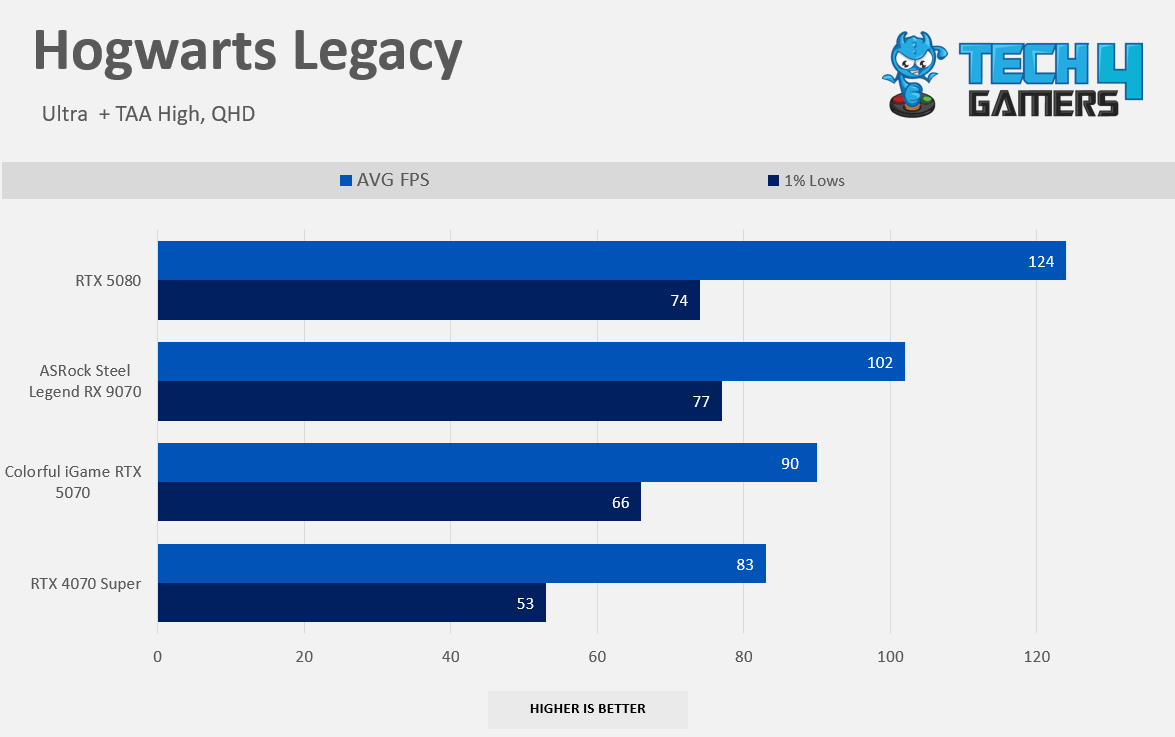
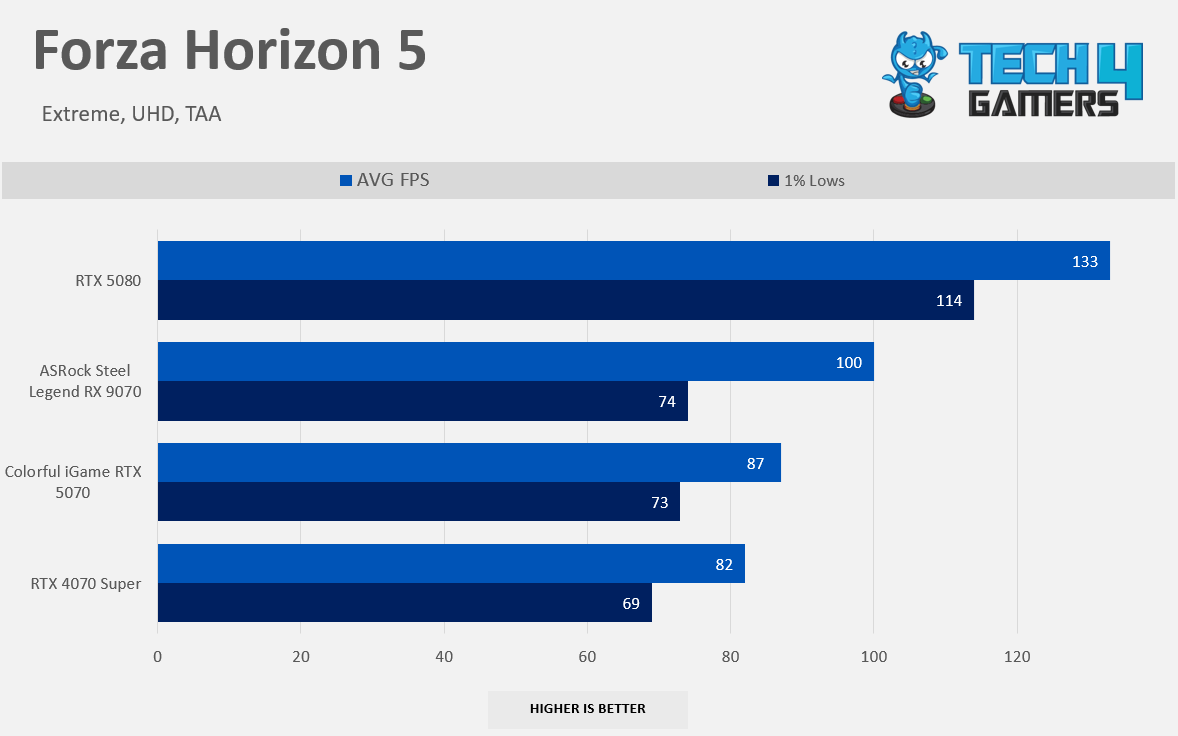
At the native 1080p raster performance, the RTX 5070 offers only 4% more performance than the RTX 4070 Super. These cards are very neck-to-neck in gaming performance at this resolution, which is quite disappointing. In Cyberpunk 2077, the lead is now 7%. In Forza Horizon 5, RX 5070 is 5% faster. In Hogwarts Legacy, the lead is 6%. However, there are no double-digit gains in the 1080p resolution whatsoever.
Gaming 1440p Benchmarks (Native)
Raster 1440p Performance
1 of 8
7 Games Average FPS 1440p
Alan Wake II 1440p
Assassin's Creed Mirage 1440p
Black Myth Wukong 1440p
Cyberpunk 2077 1440p
Forza Horizon 5 1440p
Hogwarts Legacy 1440p
Monster Hunter Wilds 1440p
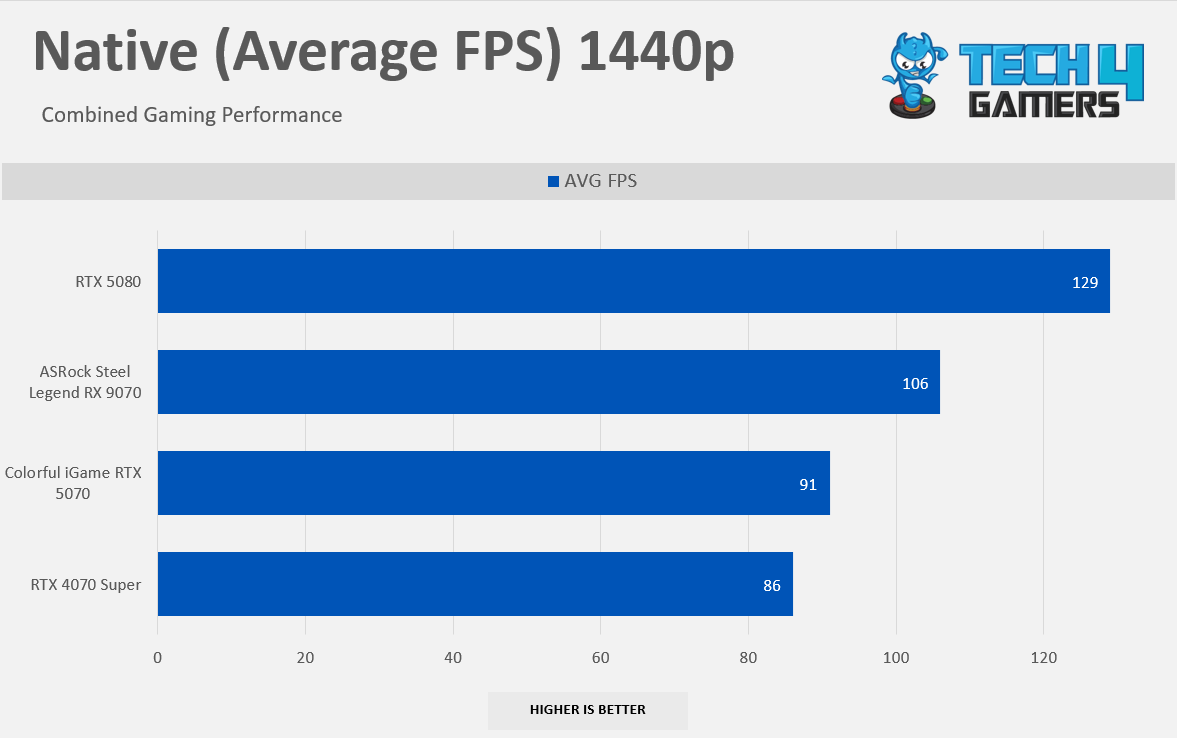
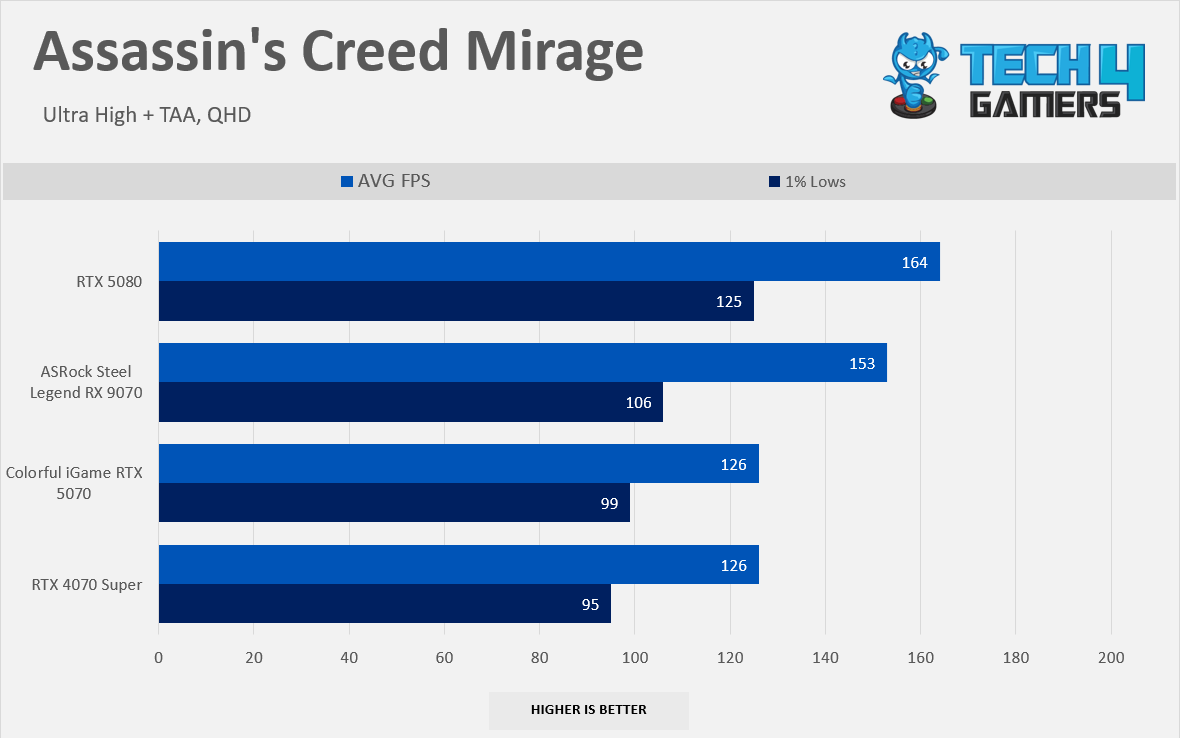
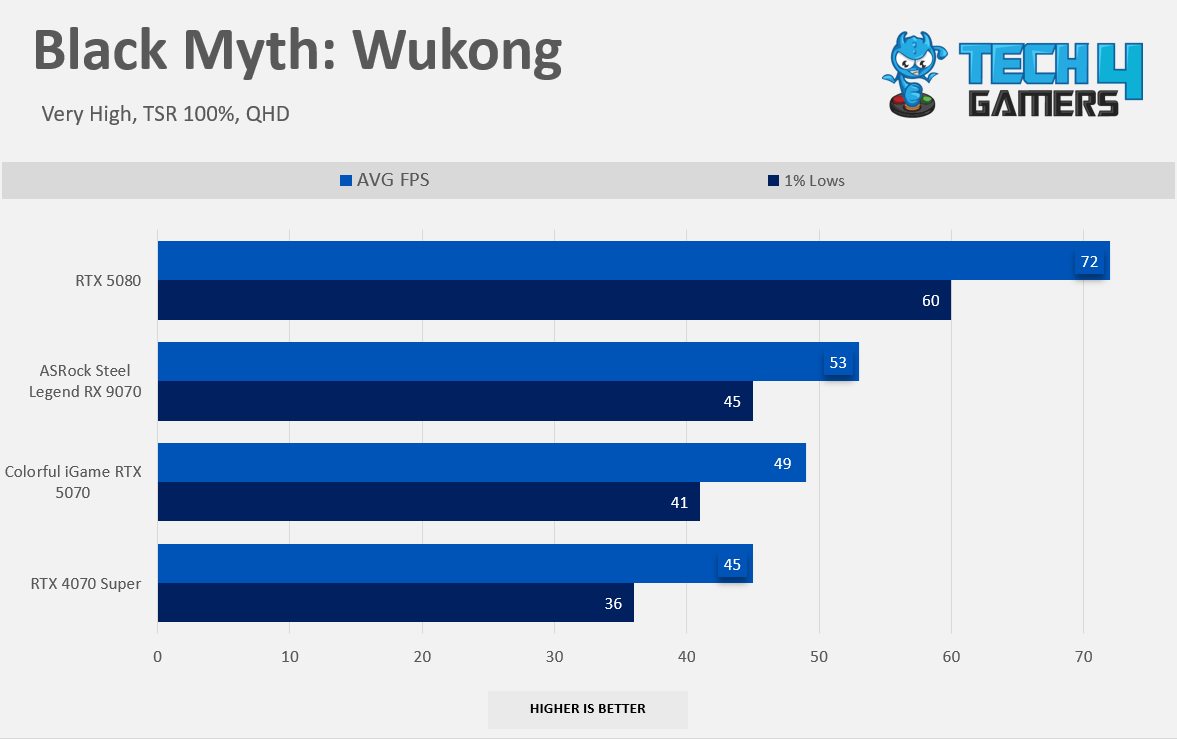
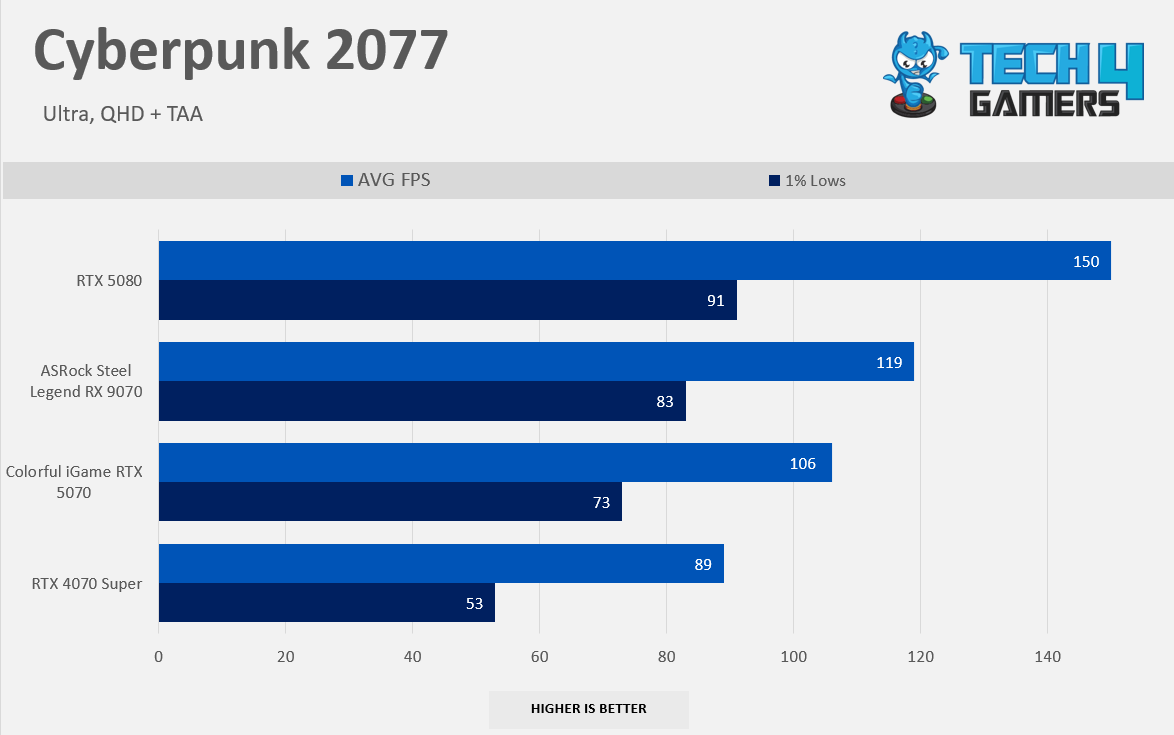
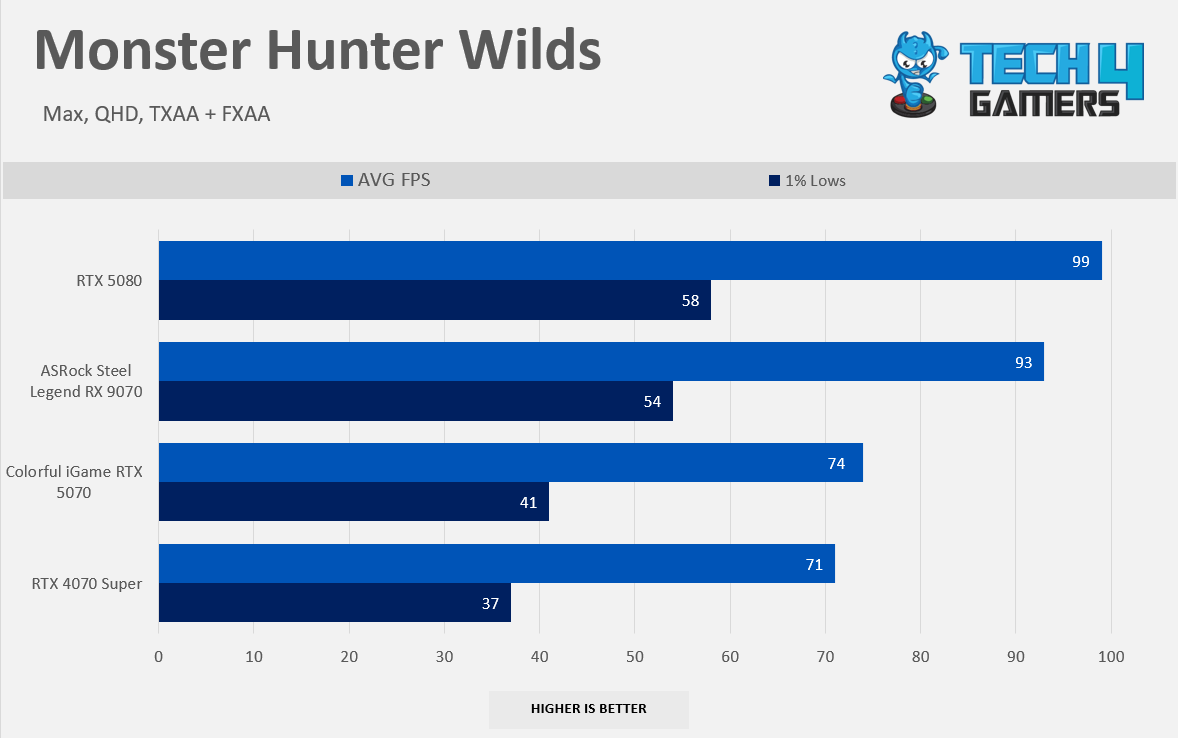
At the native 1440p raster performance, it’s a similar story as 1080p; the RTX 5070 is only 6% faster than the RTX 4070 Super. It is again very disappointing to see the RTX 5070 face defeat in one of the titles, Forza Horizon 5, where the RTX 4070 Super outpaced the RTX 5070 by 3%. However, Cyberpunk 2077 shows promising gains on RTX 5070, almost 19% faster than RTX 4070 Super.
Gaming 2160p Benchmarks (Native)
Raster 2160p Performance
1 of 8
7 Games Average FPS in 2160p
Assassin's Creed Mirage 2160p
Alan Wake II 2160p
Black Myth Wukong 2160p
Cyberpunk 2077 2160p
Forza Horizon 5 2160p
Hogwarts Legacy 2160p
Monster Hunter Wilds 2160p
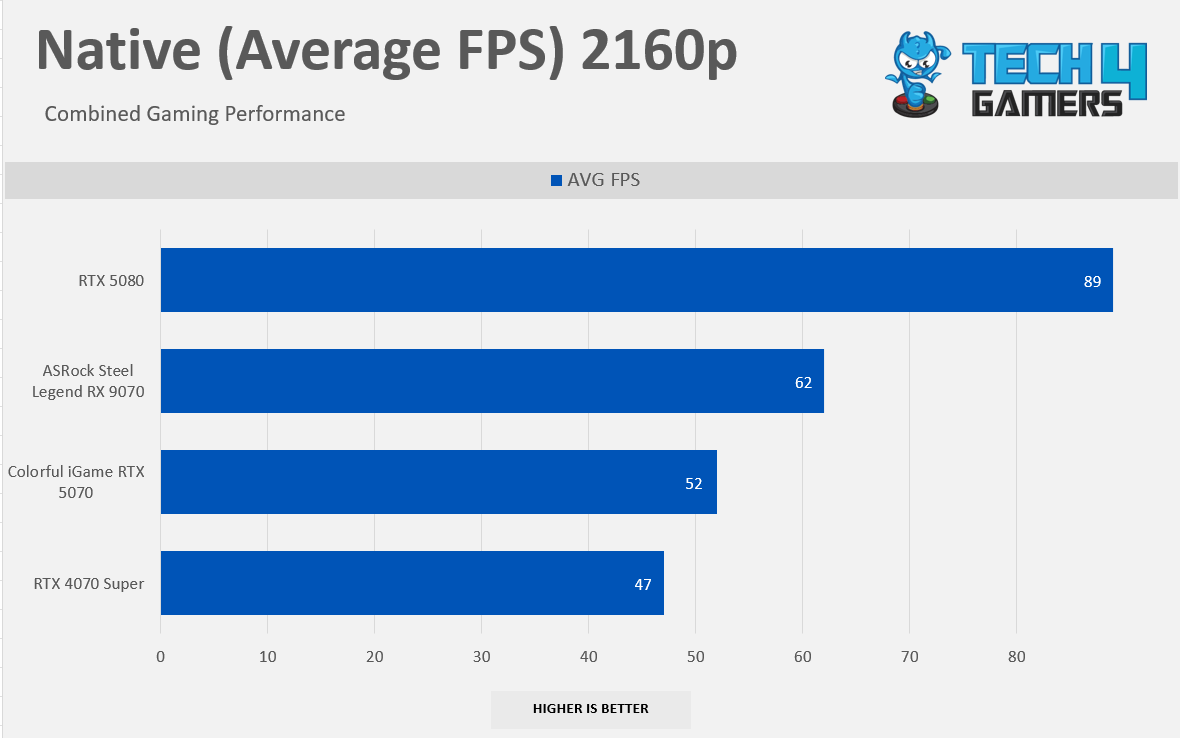
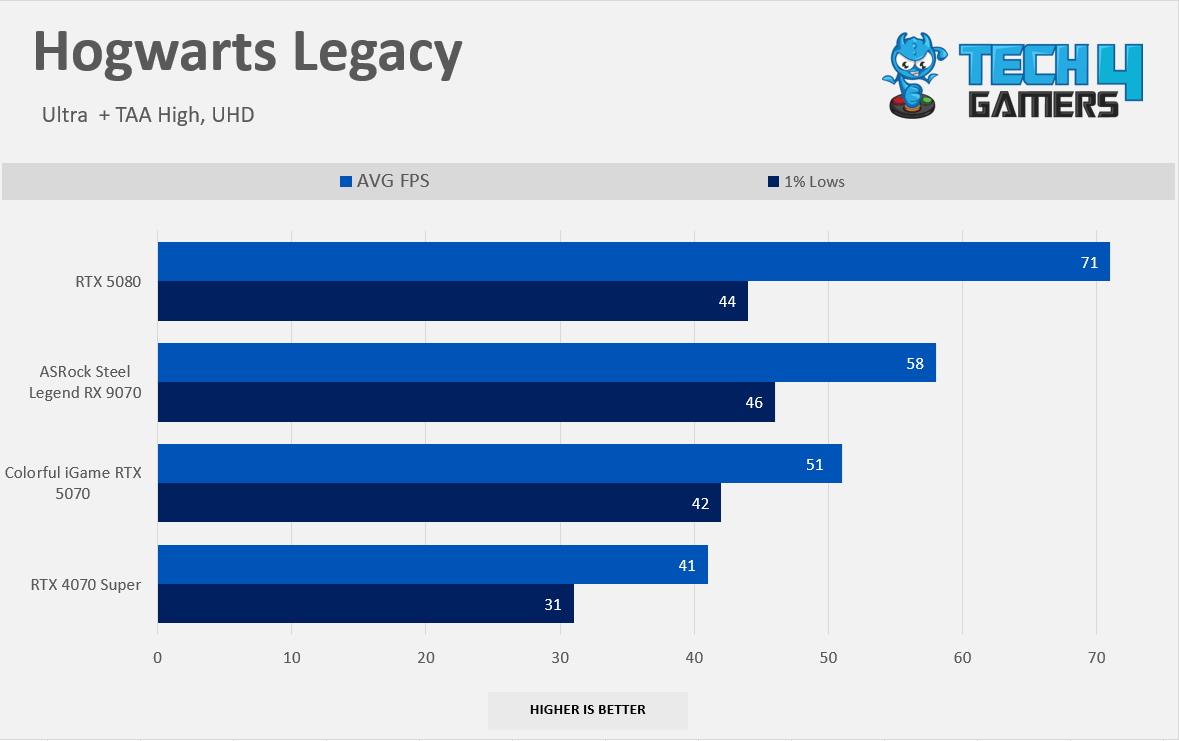
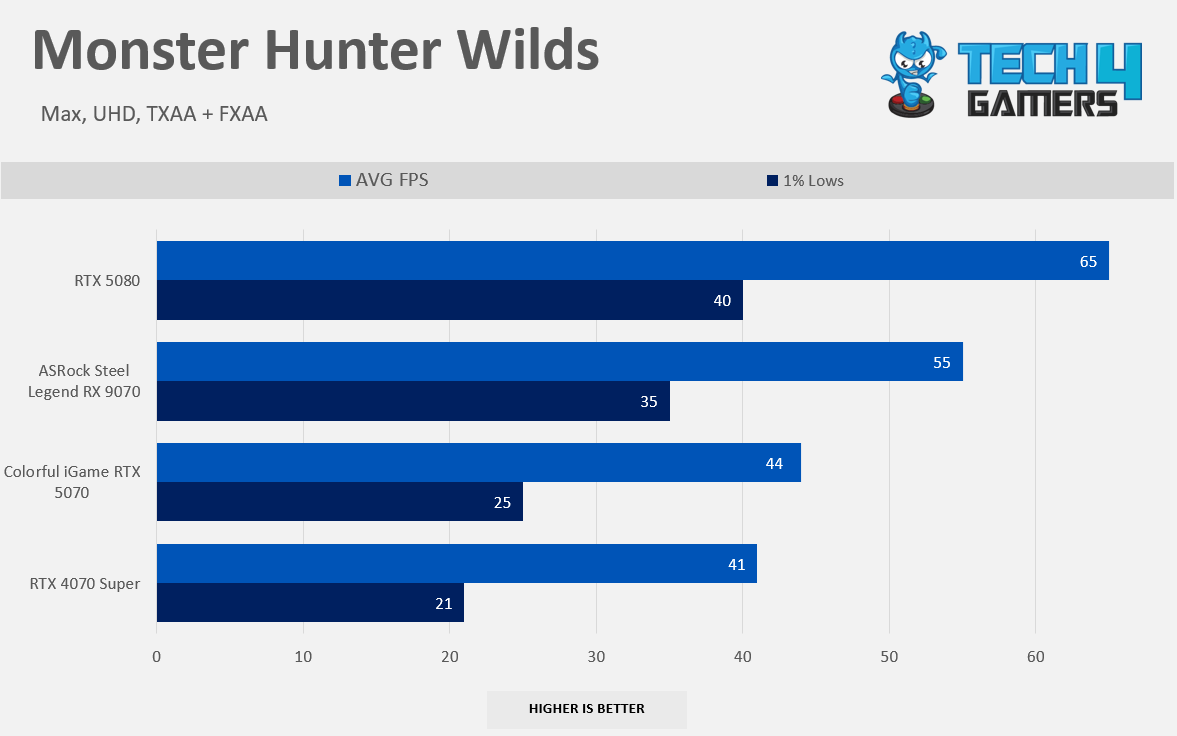
At the native 2160p raster performance, RTX 5070 fails to hit the golden 60 FPS mark on average in a combined seven-game result. However, we are seeing double-digit gains at 4K resolution with RTX 5070, 33% faster in Cyberpunk 2077 and 24% faster in Hogwarts Legacy, which is impressive. If we look at the big picture, RTX 5070 is now leading by 10% as compared to RTX 4070 Super.
Ray Tracing Performance
Gaming 1080p Benchmarks (RT)
Ray-Tracing 1080p
1 of 7
6 Games Average RT 1080p
Alan Wake II RT 1080p
Black Myth Wukong RT 1080p
Cyberpunk 2077 RT 1080p
Forza Horizon 5 RT 1080p
Monster Hunter Wilds RT 1080p
Starwars Outlaw RT 1080p
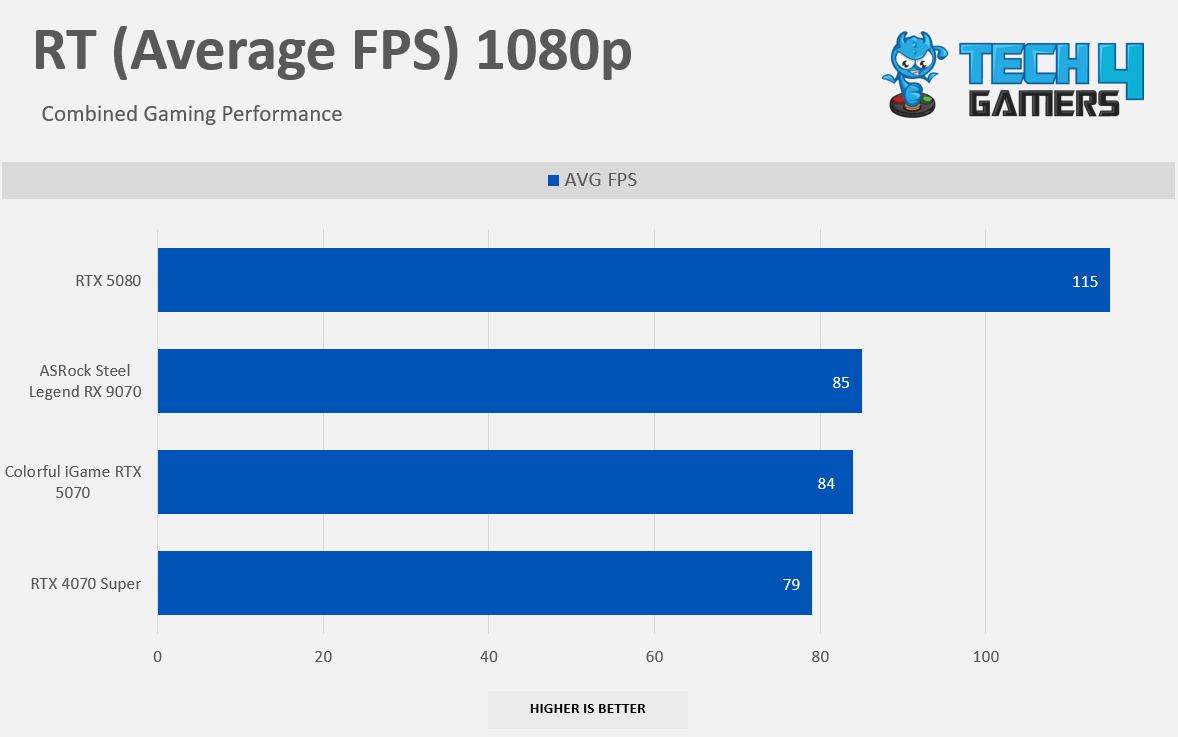
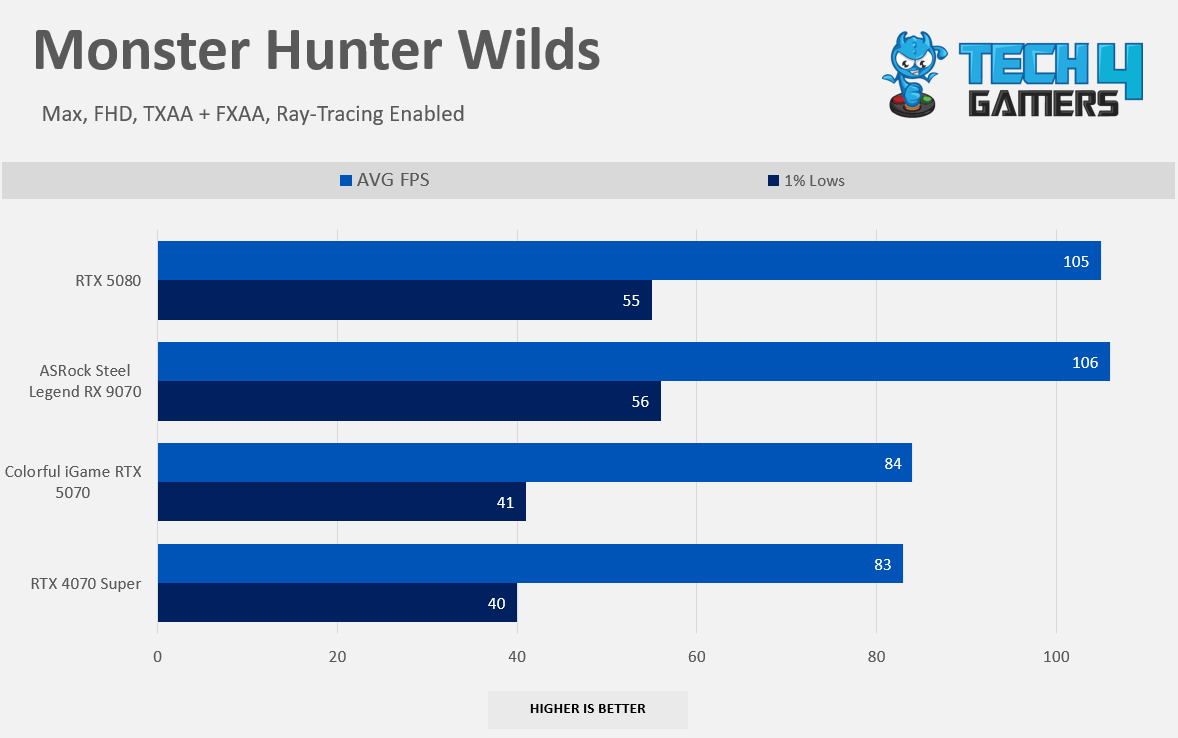
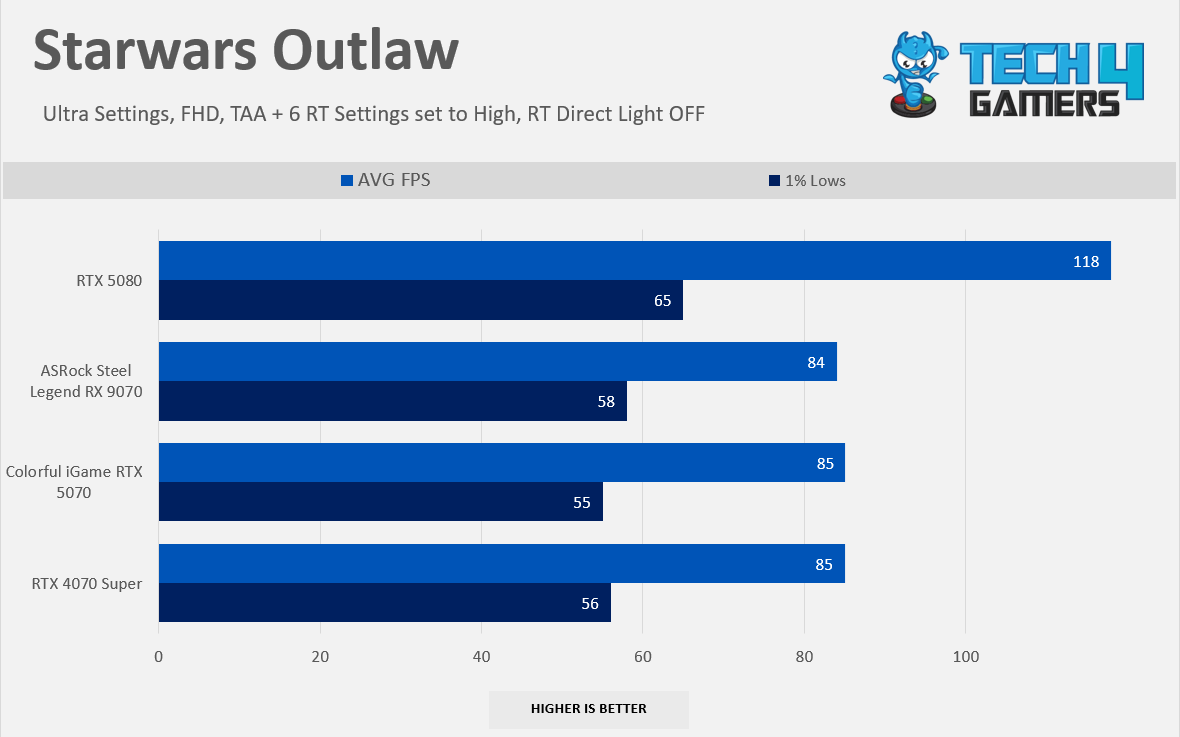
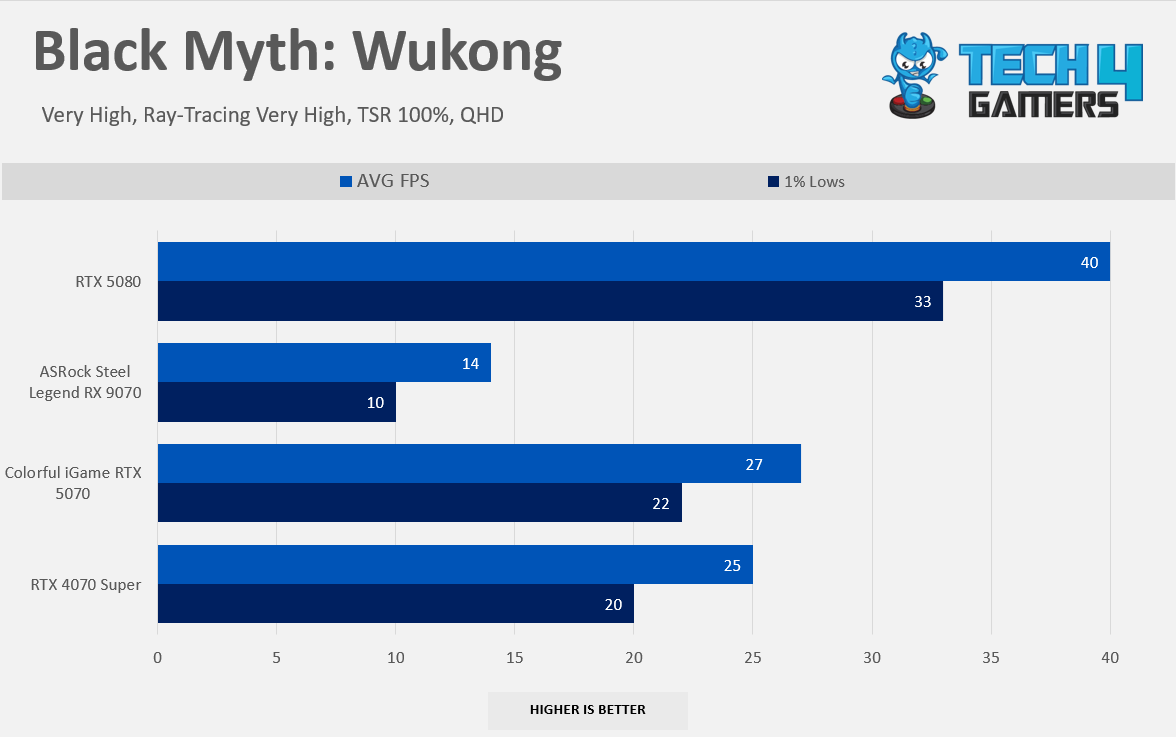
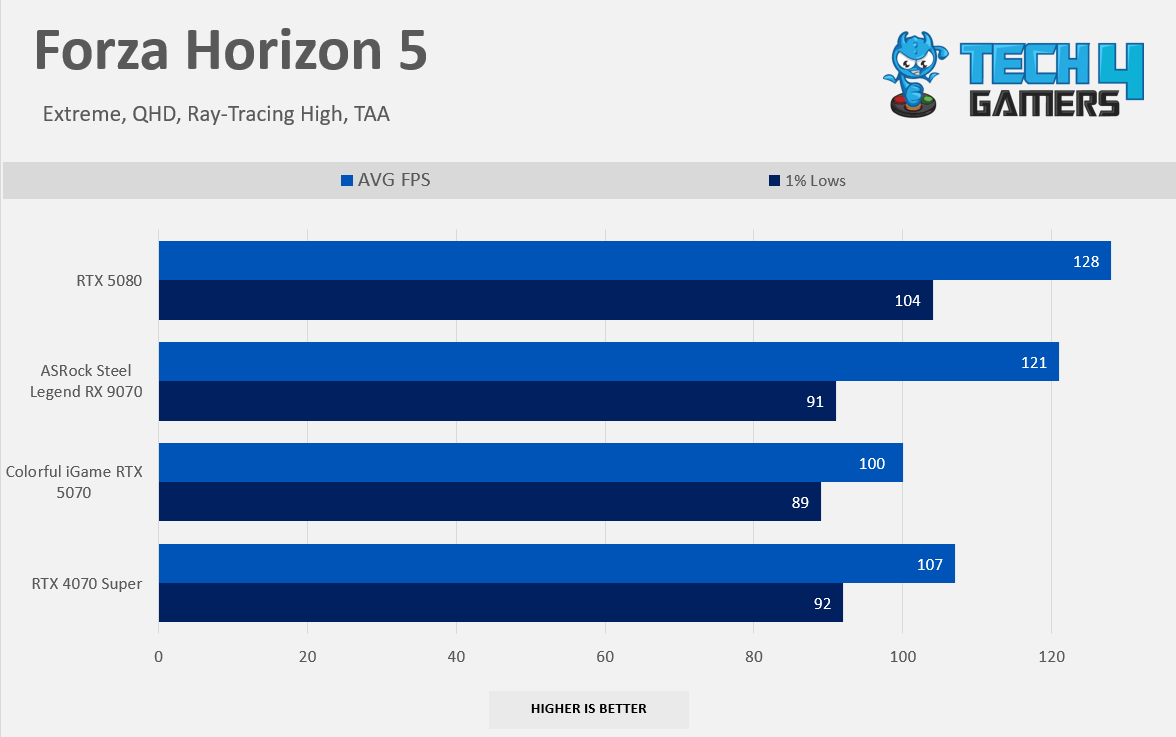
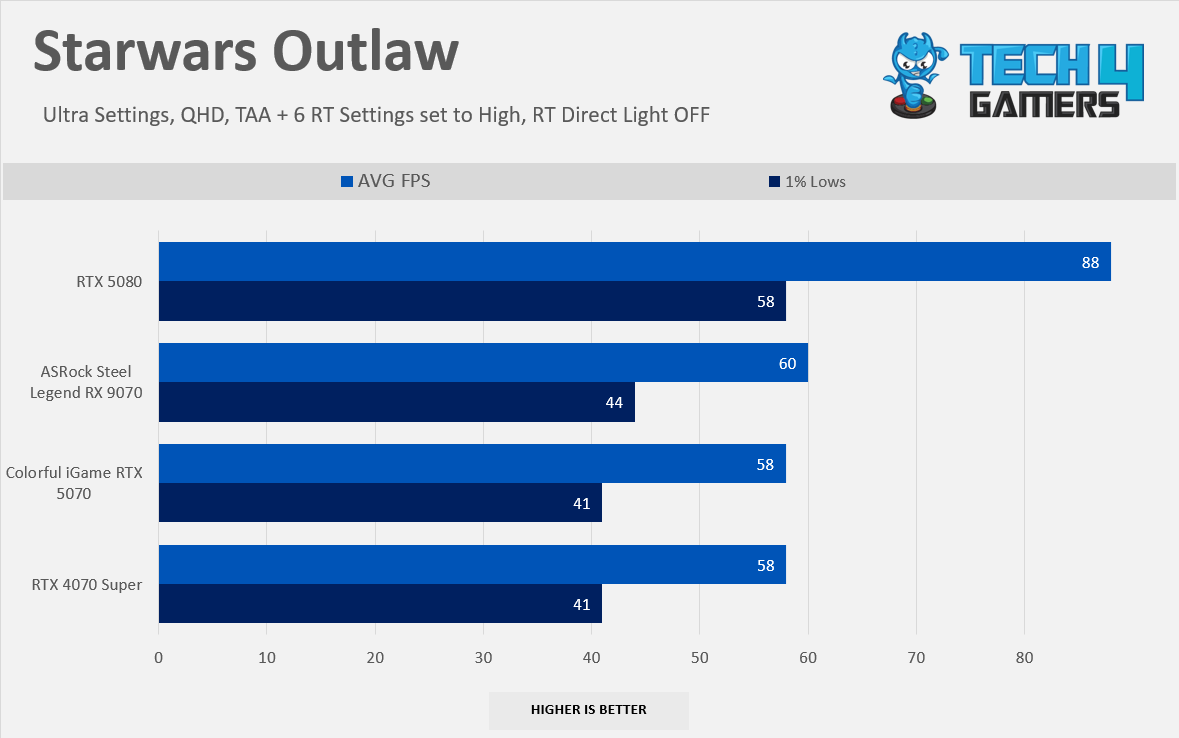
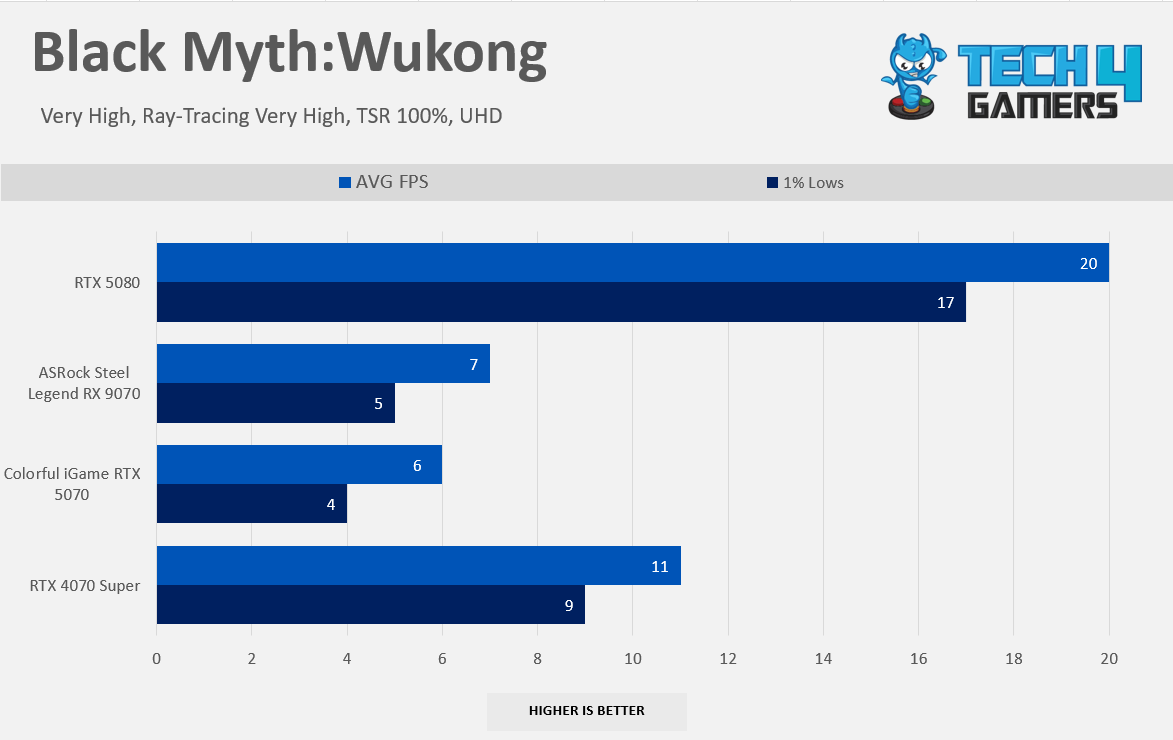
Here comes the ray-tracing where GeForce GPUs truly shine; the 5070 was much slower than RX 9070 in raster, but RTX 5070 closed the ray-tracing gap. The difference is negligible; however, in some titles, such as Black Myth Wukong, RX 5070 outshines the RX 9070 by 80%, which is a massive victory. This is the only title where AMD couldn’t catch up with NVIDIA. However, RX 5070 provides 18% more performance than RTX 4070 Super in Forza Horizon 5. Overall, the RTX 4070 Super performs nearly as well as the RTX 5070.
Gaming 1440p Benchmarks (RT)
Ray-Tracing 1440p
1 of 7
6 Games Average RT 1440p
Alan Wake II RT 1440p
Black Myth Wukong RT 1440p
Cyberpunk 2077 RT 1440p
Forza Horizon 5 RT 1440p
Monster Hunter Wilds RT 1440p
Starwars Outlaw RT 1440p
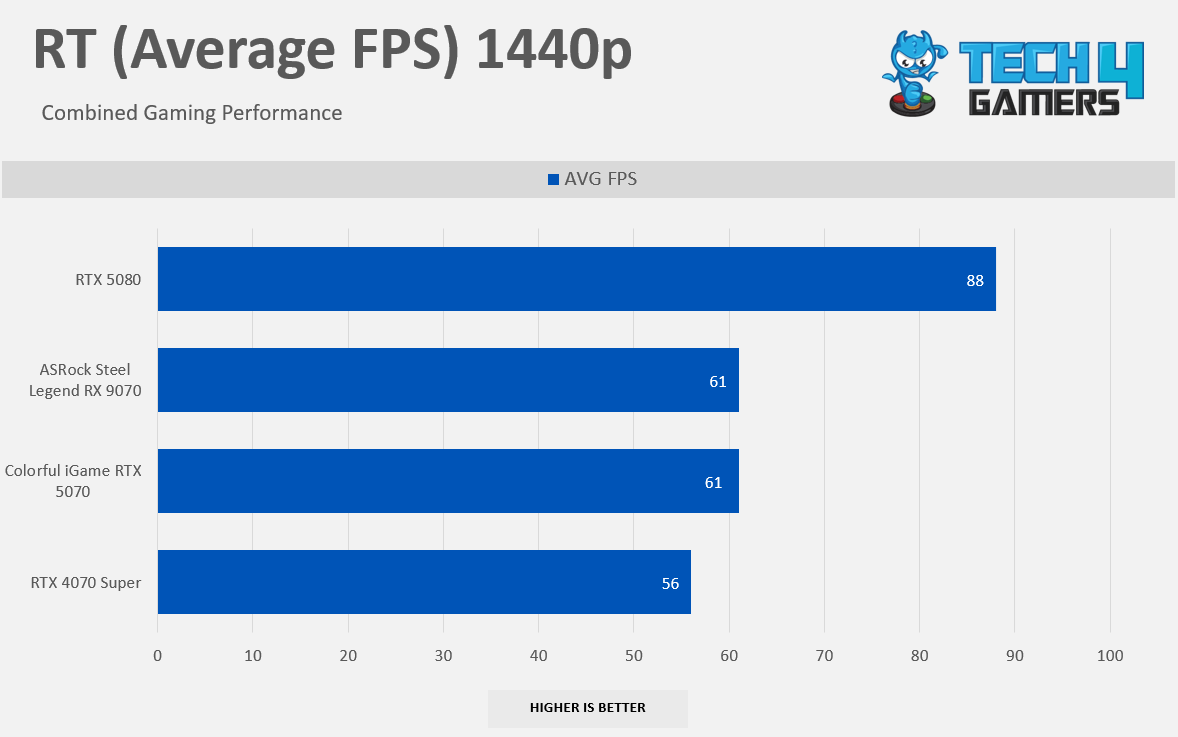
At 1440p Ray-Tracing, the RTX 5070 is 9% faster than the RTX 4070 Super. Another big victory over AMD was in Black Myth Wukong; overall, the results were still very disappointing. RTX 5070 could have done better in the RT. It feels almost like copying and pasting an RTX 4070 Super but overclocked.
Gaming 2160p Benchmarks (RT)
Ray-Tracing 2160p
1 of 7
6 Games Average RT 2160p
Alan Wake II RT 2160p
Black Myth Wukong RT 2160p
Cyberpunk 2077 RT 2160p
Forza Horizon 5 RT 2160p
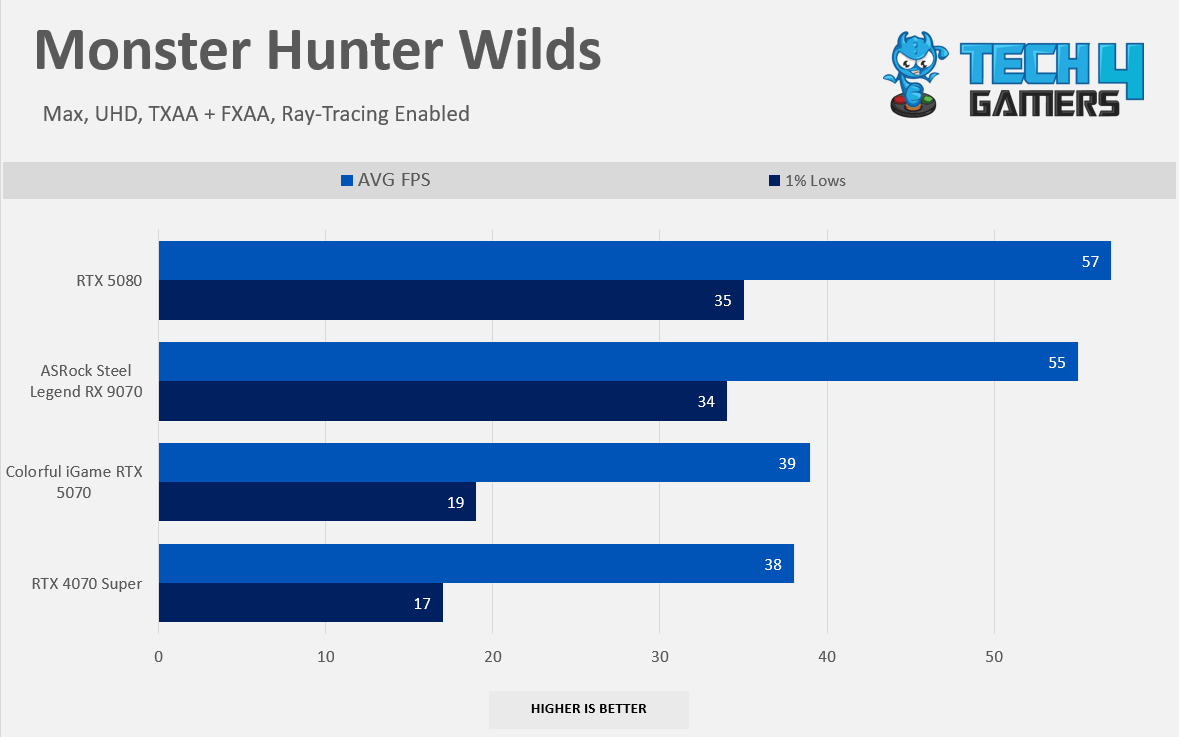
Monster Hunter Wilds RT 2160p
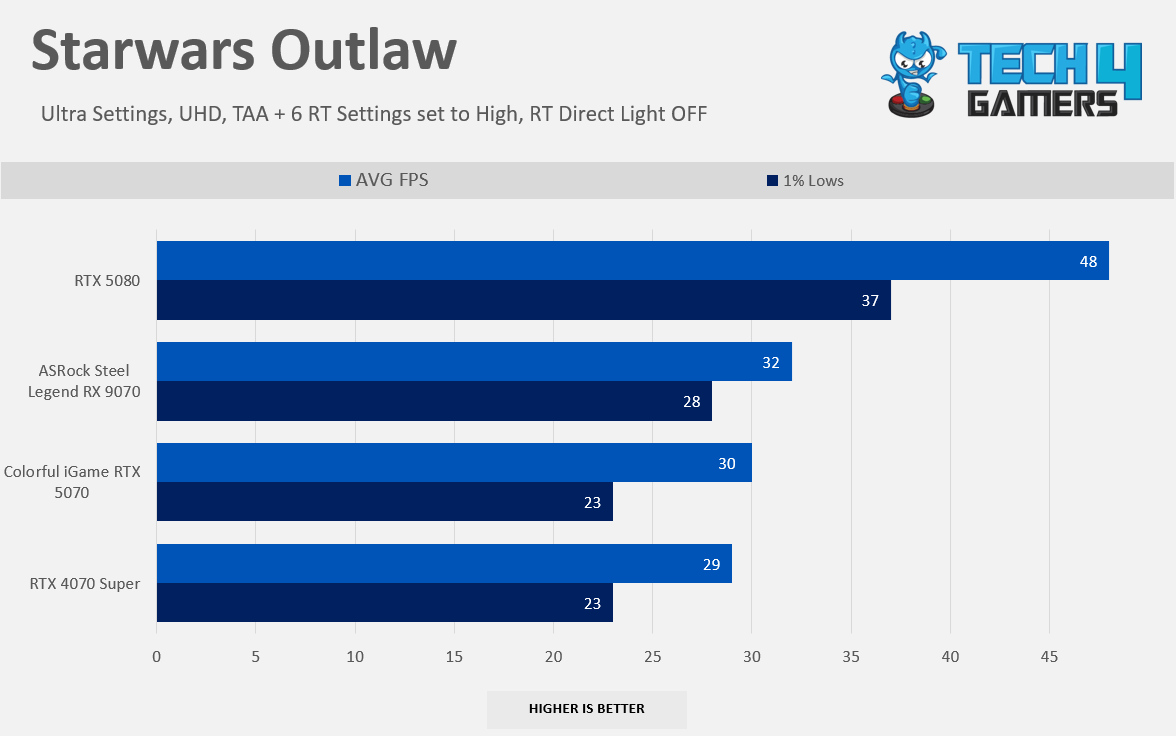
Starwars Outlaw RT 2160p
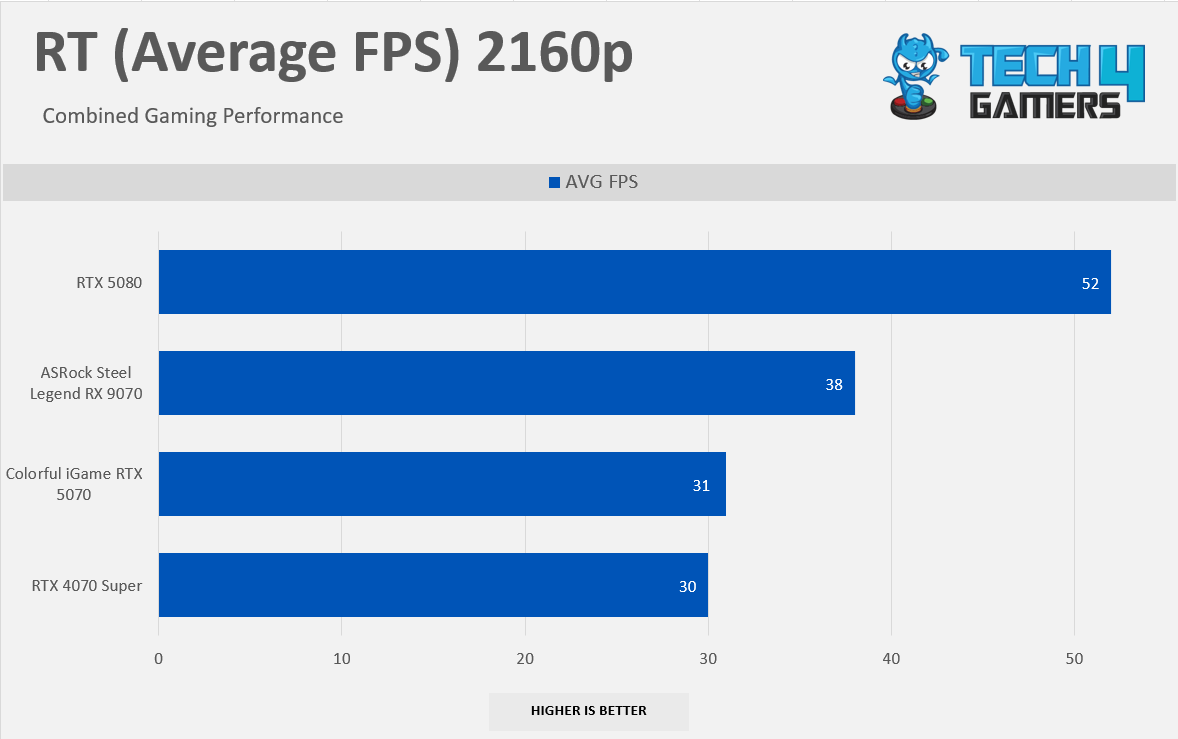
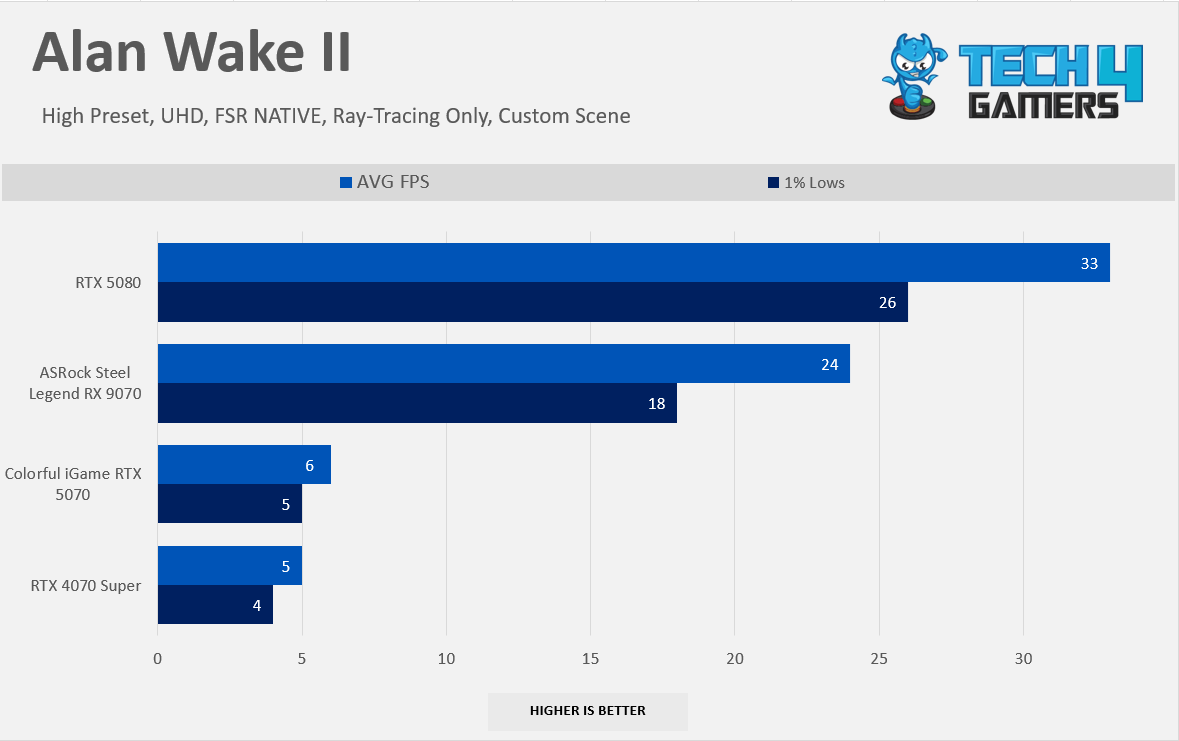
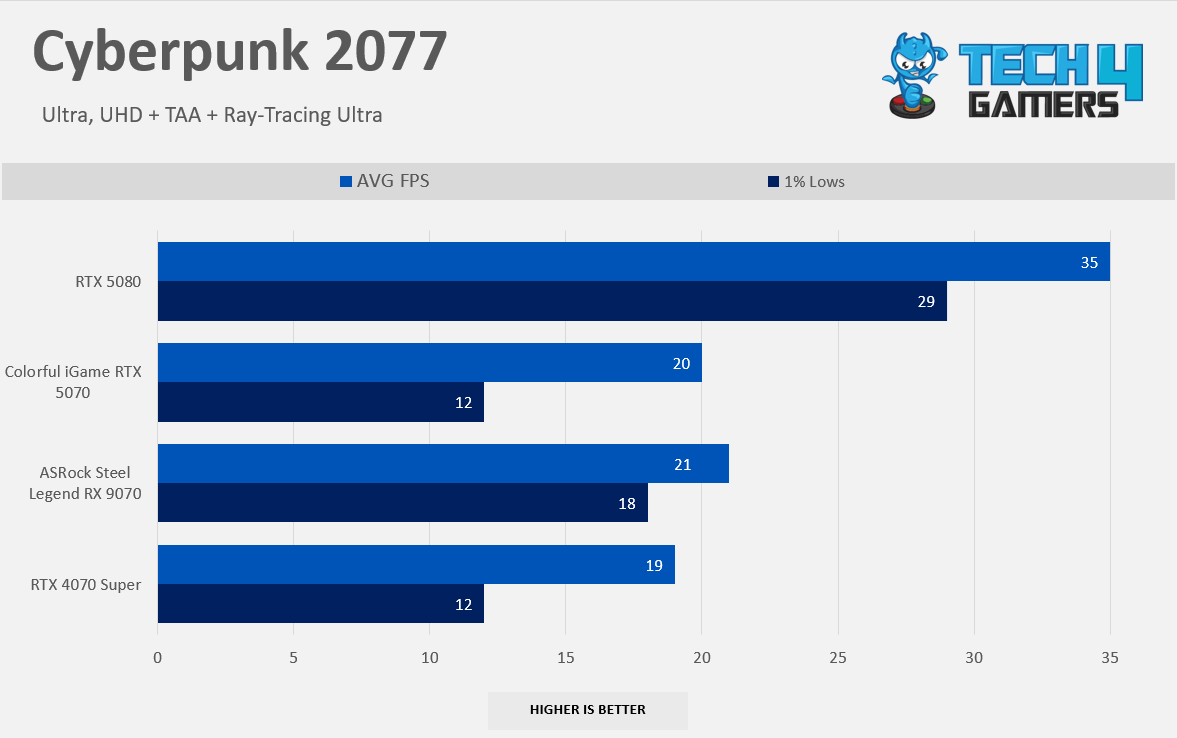
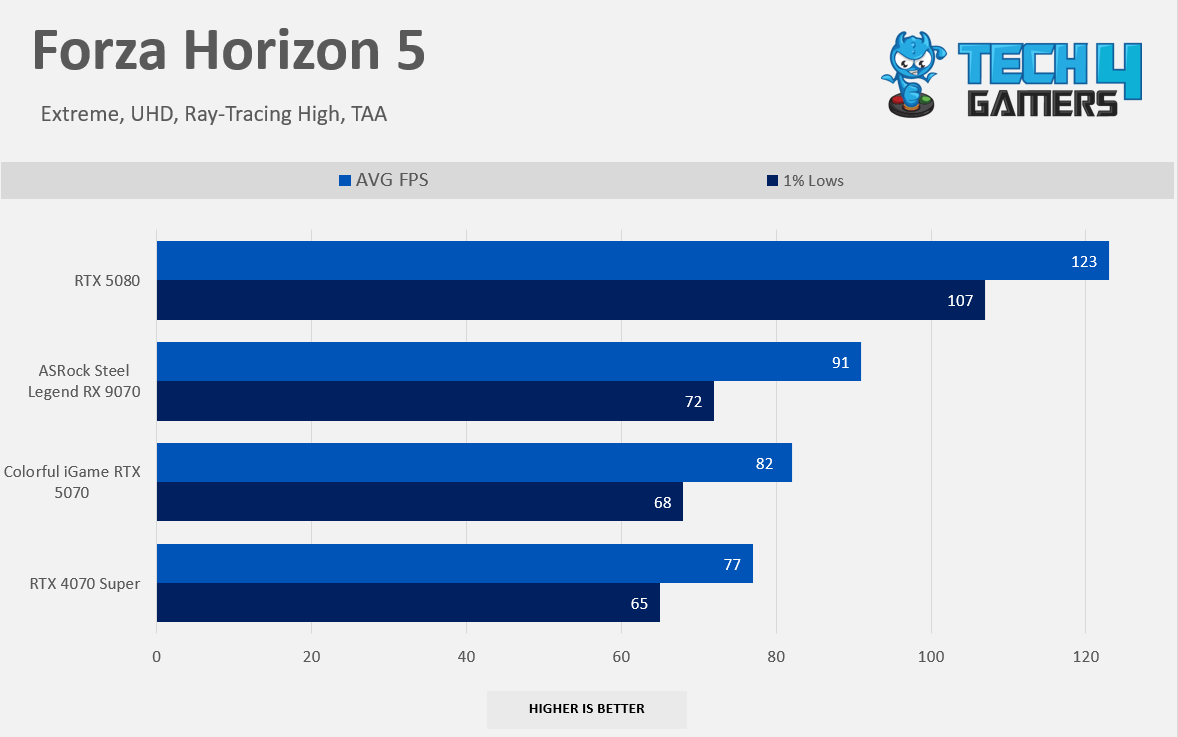
Here, we are looking at ray-tracing 2160p benchmarks; the RTX 5070 suffered due to the video memory. The 12GB is not sufficient for the RT 2160p. However, AMD has outclassed the RTX 5070 in every title except for Cyberpunk 2077, and Alan Wake II, with RTX, runs at 5 FPS; even Black Myth Wukong couldn’t save NVIDIA here; it seems like NVIDIA has hit themselves in the foot by not giving enough video ram capacity. If you want to experience 4K Ultra + RTX, we will not recommend RTX 5070. You should be looking at something higher in class; RTX 5080 would be at least required here for the smooth gaming experience
Synthetic Test Results
Synthetic Benchmarks
1 of 3
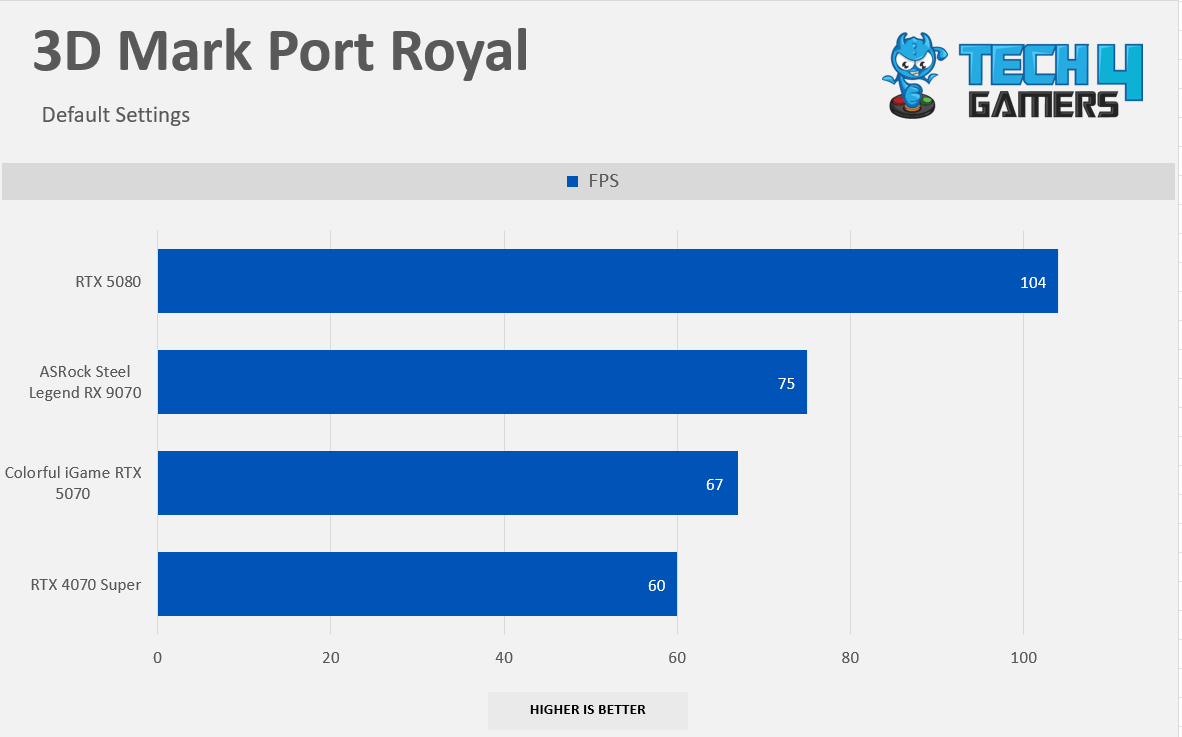
3D Mark Port Royal
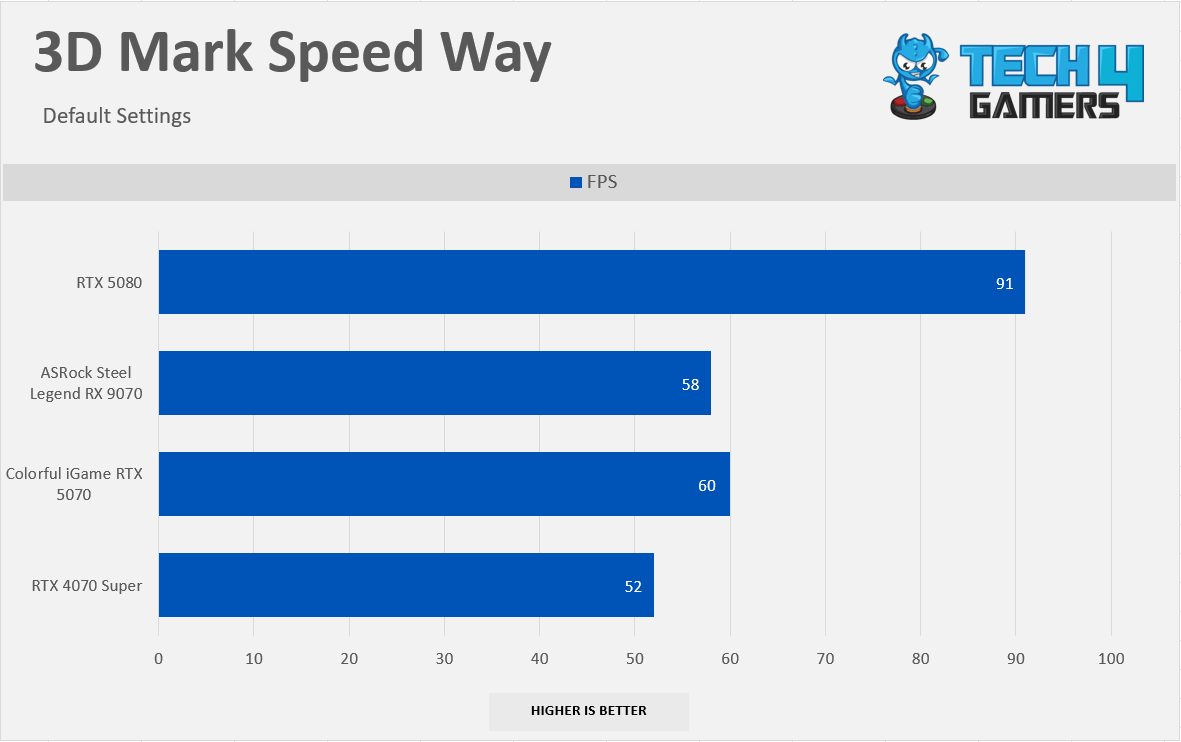
3D Mark Speed Way
3D Mark Steel Nomad
Synthetic Benchmarks
1 of 3
3D Mark Port Royal
3D Mark Speed Way
3D Mark Steel Nomad
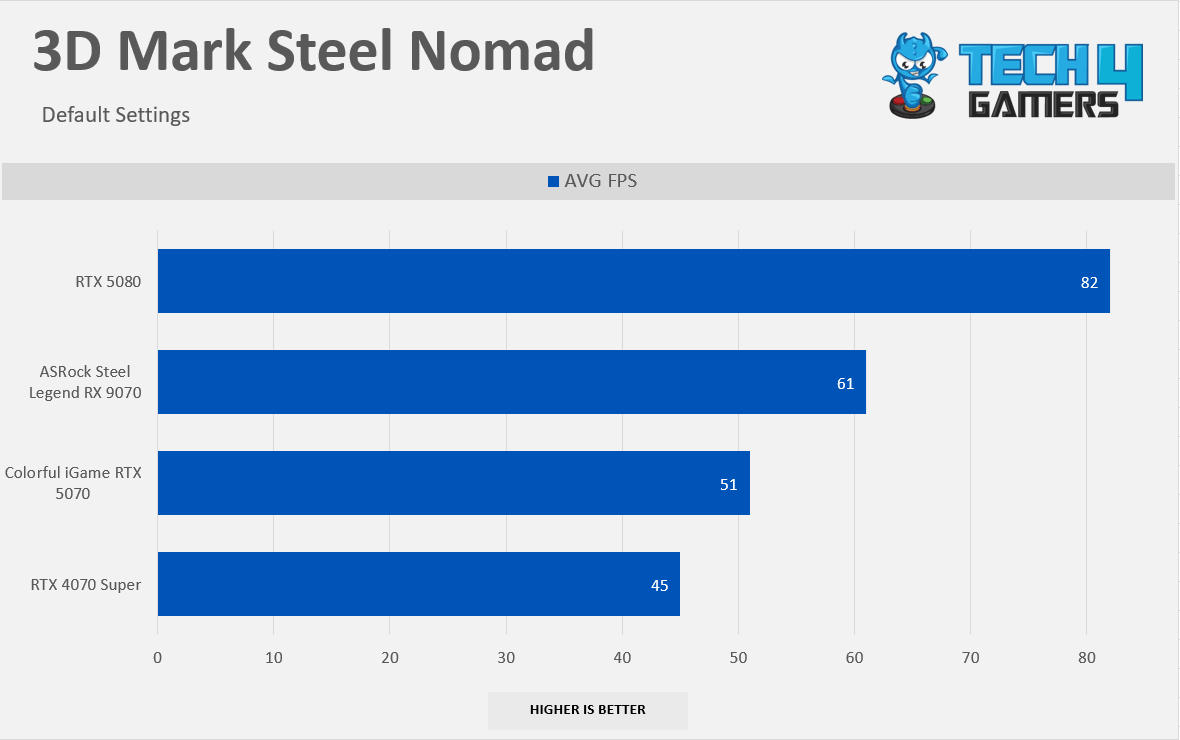
In 3DMark Port Royal, the GeForce RTX 5070 is 11.6% faster than the RTX 4070 Super. In 3DMark Speed Way, it delivers a 15.6% performance boost, and in 3DMark Steel Nomad, it runs 13.3% faster than the RTX 4070 Super.
DLSS 4 & Multi-Frame Generation
We’re utilizing the DLSS Transformer Model in our tests and compared it with NVIDIA’s Native DLAA, and here are some latency numbers as well; we’ll discuss the sweet spot you should be aiming at for the optimal gaming experience. To test the DLSS, we have chosen the Cyberpunk 2077 RT 1440p for our benchmarks. For your clarity: Here are the internal render resolutions DLSS uses to create 1080p, 1440p, and 4K results:
DLSS Mode
Render Scale
Internal Resolution at 4K
Internal Resolution at 1440p
Internal Resolution at 1080p
Quality
66.7%
2560 x 1440
1707 x 960
1280 x 720
Balanced
58.0%
2227 x 1253
1485 x 835
1114 x 626
Performance
50.0%
1920 x 1080
1280 x 720
960 x 540
Ultra Performance
33.3%
1280 x 720
853 x 480
640 x 360
DLSS 4 ”Quality” + MFG Benchmarks
DLSS Quality + Frame Generation (Image By Tech4Gamers)
We’re using the DLSS Quality (Transformer) Model on 1440p, which means the internal render resolution on the 1440p with the ‘Quality’ preset is 66.7% and the game is being rendered at the 1707 x 960. The DLSS Quality mode is 73% faster than the Native DLAA mode. However, when we enable the frame-generation FG 2x, that’s almost 188% more performance than the DLAA, which is 2.88x faster which is incredible with the frame-generation lag of only 8ms, for some individuals it might not be very noticeable.
Here’s a structured table based on the relevant data on DLSS Quality + FG on 1440p
DLSS Quality + Frame-Generation
Avg FPS
1% Lows
Frame Gen Lag (ms)
DLSS Quality + FG 4x
227 FPS (5.04x)
171 FPS
40 ms
DLSS Quality + FG 3x
181 FPS (4.02x)
142 FPS
38 ms
DLSS Quality + FG 2x
130 FPS (2.89x)
107 FPS
36 ms
DLSS Quality
78 FPS (1.73x)
58 FPS
28 ms
DLAA
45 FPS (1.00x)
37 FPS
42 ms
DLSS 4 ”Balanced” + MFG Benchmarks
In the DLSS balanced mode, we are seeing 92% performance uplift over the DLAA model, The game now has the internal resolution of 835p, with the 2x FG mode, we are seeing 3x more performance gains, 4.4x on FG 3x, and 5.6x on FG 4x.
DLSS Balanced + FG (Image By Tech4Gamers)
Here’s a structured table based on the relevant data on DLSS Balanced + FG on 1440p
DLSS Balanced + Frame-Generation
Avg FPS
1% Lows
Frame Gen Lag (ms)
DLSS Balanced + FG 4x
252 FPS (5.60x)
175 FPS
37 ms
DLSS Balanced + FG 3x
204 FPS (4.53x)
151 FPS
35 ms
DLSS Balanced + FG 2x
147 FPS (3.27x)
110 FPS
33 ms
DLSS Balanced
92 FPS (2.04x)
70 FPS
25 ms
DLAA
45 FPS (1.00x)
37 FPS
42 ms
DLSS 4 ”Performance” + MFG Benchmarks
In the DLSS Performance Mode, we are seeing 143% performance uplift over the DLAA model, The game now has the internal resolution of 720p, with the 2x FG mode, we are seeing 3.7x more performance gains, 5.1x on FG 3x, and 6.3x on FG 4x.
DLSS Performance + FG (Image By Tech4Gamers)
Here’s a structured table based on the relevant data on DLSS Performance + FG on 1440p
DLSS Performance + Frame-Generation
Avg FPS
1% Lows
Frame Gen Lag (ms)
DLSS Performance + FG 4x
283 FPS (6.29x)
188 FPS
33 ms
DLSS Performance + FG 3x
230 FPS (5.11x)
163 FPS
31 ms
DLSS Performance + FG 2x
168 FPS (3.73x)
120 FPS
30 ms
DLSS Performance
109 FPS (2.42x)
80 FPS
22 ms
DLAA
45 FPS (1.00x)
37 FPS
42 ms
The Quality Mode seems like a good sweet spot to play the games at 1440p; there are a few instances where we couldn’t see the difference vs the native resolution. However, the extra performance is worth it. We suggest that our users use the NVIDIA app and the latest preset in the game settings in the DLSS super-resolution.
However, applying the multi-frame generation is just like the cherry on top. If you’re using the 144hz Monitor, we highly recommend using the FG 2x mode, as our tests demonstrated that the average FPS is up to 130 FPS with the DLSS Quality. However, the latency penalty is roughly 8ms.
To use the frame generation as intended, you need to make sure your base FPS is in the 50 to 60 FPS range, which, in our case, we have achieved 78 FPS on average with the quality mode. If your base FPS is too low, such as below 40 FPS, you might run into extreme system lag where the game would not feel very responsive, and you might see artifacts as there aren’t enough frames for the frame generation to work with.
Overclocking Results & Dual BIOS Results
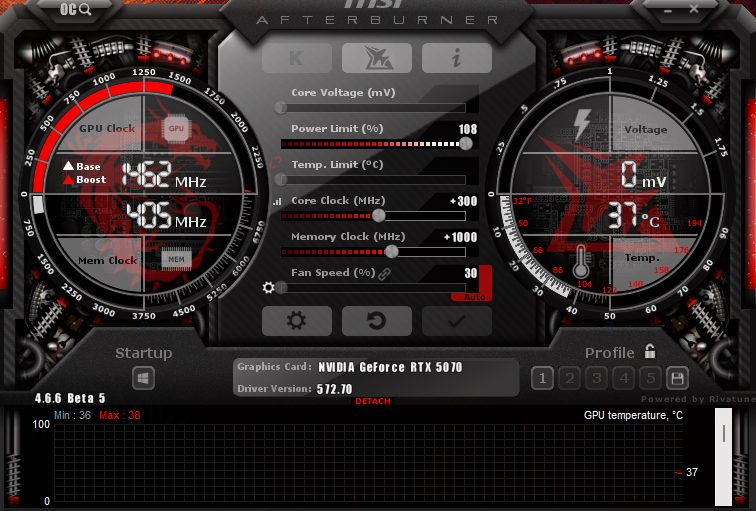
Overclocking a Colorful iGame RTX 5070 Ultra wasn’t tricky, but it was worthwhile; we gained another 10% more performance in Cyberpunk 2077 by blending the memory and core overclocks. We’re using our good old trusty MSI After-Burner to overclock the GPU. Overclocking NVIDIA cards has always been relatively easy compared to AMD GPUs. Remember that we are using the ‘Turbo’ BIOS on this GPU to overclock the card, which can be enabled by pressing the GPU and then tweaking the core and memory clocks.
How Did We Overclock An RX 5070?
Opened the MSI After-Burner
Unlock the Power-Limit, Increase it to the maximum (108%)
Head to the Core Clock (MHz). Increase the core clock frequency by (+300MHz)
Head to the Memory Clock (MHz). Increase the memory clock frequency by (+1000MHz)
OC Settings
1 of 2
MSI Afterburner OC Settings
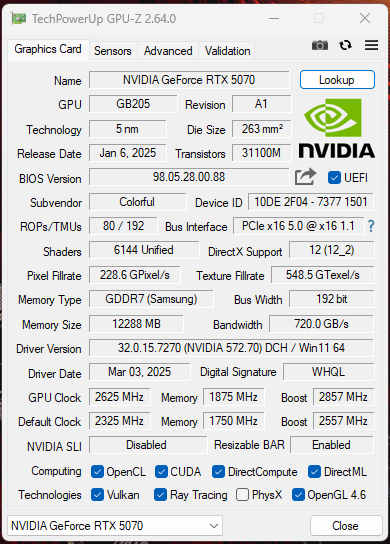
GPU Z OC Clocks
Overclocking Performance Benchmarks
Overclocking Benchmarks: Cyberpunk 2077 (Image By Tech4Gamers)
The performance gains are really massive here, almost double digits. We have gained another 10% more free performance in Cyberpunk 2077. NVIDIA offers good overclocking headroom for the extra performance in RTX 5070. However, the results may vary on your RTX 5070 as the silicons are not binned equally. You may have less overclocking headroom or more.
BIOS Comparison
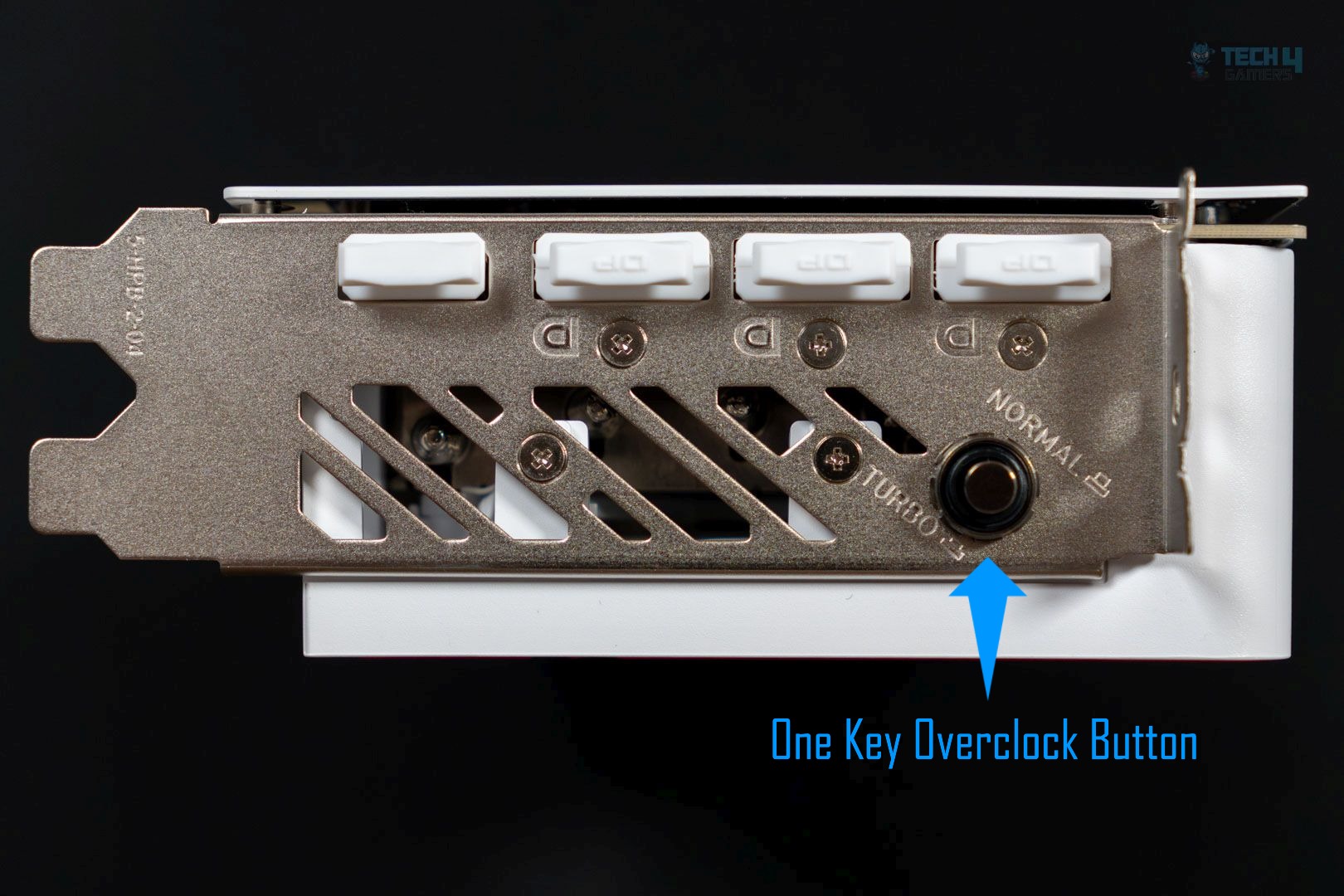
One Key Overclock Button (Image By Tech4Gamers)
Performance BIOS
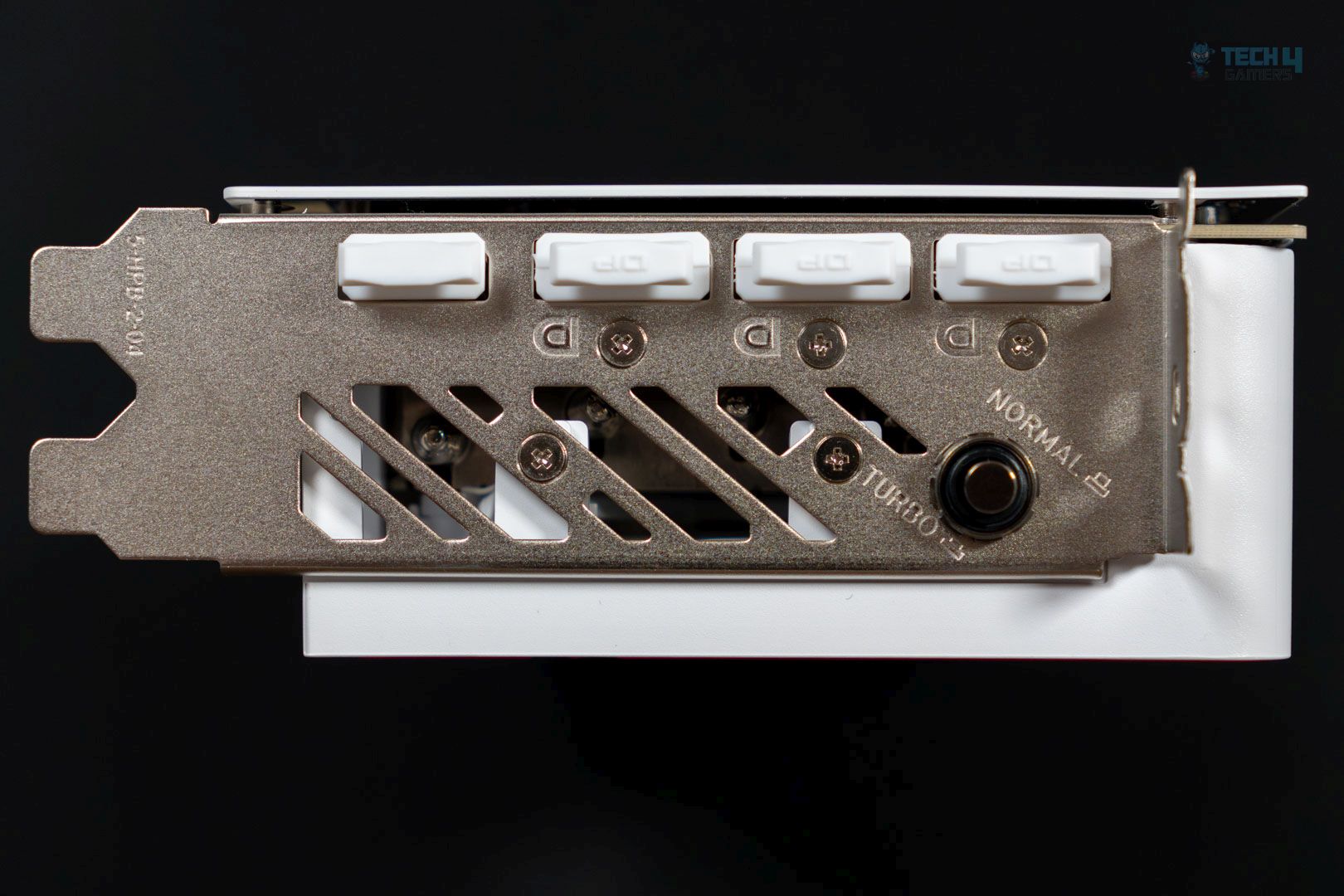
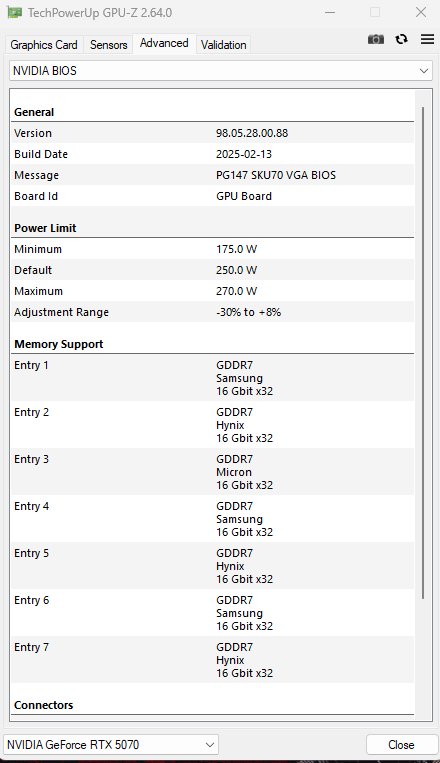
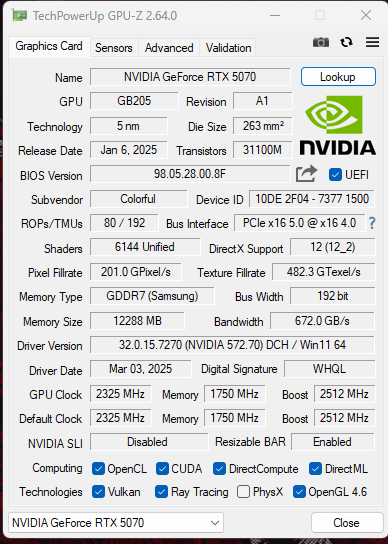
The Colorful iGame RTX 5070 has the ‘One Key Overclock’ Button on the GPU I/O shield, which provides an extra 45MHz over the boost clock of 2512MHz. It’s basically a BIOS switch. However, the performance BIOS has a 4% extra power limit totaling 108%, as compared to the base BIOS, which has a total power limit of 104%.
OC BIOS Clocks
OC BIOS Version
Normal BIOS
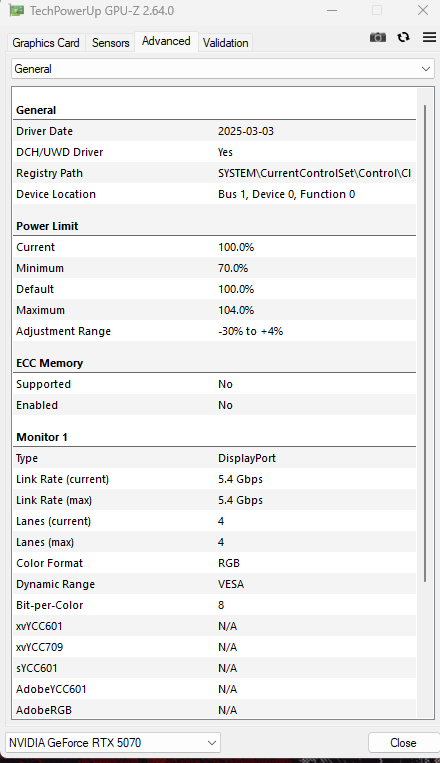
The Normal BIOS comes with a power limit adjustment range of -30% to +4%; in our tests, while enabling the power BIOS, we noticed the card clocking -50MHz, lower the performance mode, and fans spinning at slightly less RPM.
Default BIOS Clocks
Default BIOS Version
Power Consumption & Clock Speed
Power & Frequency; Clocks in 3D Mark: Speed Way (Image By Tech4Gamers)
Our sample Colorful iGame RTX 5070 Ultra has effective core clock speeds of 2,811MHz (Q) and 2,854MHz (P) in 3D Mark: Speed Way, roughly 10% more factory overclock (Q) and 12% more over the base clock of 2,511MHz, and averaging 223W (Q) and 231W (P) in power, as reported by HWINFO.
Power Clocks Gaming Cyberpunk 2077 (Image By Tech4Gamers)
We have Cyberpunk 2077 power and clock testing numbers in the Gaming Test. The Colorful iGame RTX 5070 Ultra has an effective core clock speed of 2,787MHz (Q) and 2830MHz (P) while consuming an average of 208W (Q) and 207W (P). The performance BIOS maintains a +40-50 higher clock at a similar power, which is fantastic.
Temperatures & Fan Speed
Speed Way Temperatures (Image By Tech4Gamers)
The Colorful iGame RTX 5070 Ultra does exceptionally well in temperature but is loud at the fans. The GPU core stayed at 65c in both BIOS. However, the fans are taking extra force in the Performance BIOS, which is set to auto in both.
Gaming Temperatures Cyberpunk 2077 (Image By Tech4Gamers)
In the gaming test session, we peaked at 64c on the core temp on both performance and quiet BIOS. We’re impressed by the cooling here.
Should You Buy It?
Buy It If
✅You want to make the use of latest DLSS Transformer + MFG: The multi-frame generation does well on the RTX 5070 at 1440p; the 3x mode with the quality can match the high refresh rate on your monitor. The DLSS transformer model is much easier to apply as compared to FSR4
✅You want higher efficiency: While the RTX 5070 might not be a really good performer compared to the RX 9070, it draws less power in gaming and is even lower when DLSS technologies are enabled.
Don’t Buy It If
❌ You want the higher raster performance: The RTX 5070 struggles in raster benchmarks as compared to the competitor RX 9070 16GB.
❌You intend to play at higher resolutions with RT: RX 5070 offers 12GB of video memory as compared to the competitor RX 9070 16GB.
❌ You’re spending over $550: I don’t recommend buying the RTX 5070 if it costs more than $550.
Conclusion
The launch of the RTX 5070 is questionable as it doesn’t provide much comfort for RTX 4070/Super users and lacks significant generational improvement. However, it may be a decent upgrade for RTX 3070 users. NVIDIA is placing its bet on AI features, such as DLSS and Frame Generation, in the RTX 50 series.
Unfortunately, the raw performance of the RTX 5070 is disappointing; in our tests, it closely matches that of the RTX 4070 Super. NVIDIA has made bold marketing claims about delivering RTX 4090 performance at a price of $579. In reality, they enabled multi-frame generation (4x frame generation) compared to the RTX 4090’s 2x frame generation, emphasizing AI to interpolate artificial frames to compete with the previous flagship GPU, the RTX 4090.
Another major drawback of the RTX 5070 is its 12GB of video memory. It would have been preferable if they offered at least 16GB, especially since their competitor, AMD’s RX 9070, provides 16GB at a similar MSRP.
Today’s games are increasingly memory-intensive; the card performs well at 1440p and 1080p resolutions. However, achieving 4K with ray tracing may not be feasible in most games. Availability of the RTX 5070 may also be an issue. If anyone is looking to upgrade from their old GPUs, they are not missing out much. RTX 4070 Super at the discounted price would still be a better choice, or if anyone can find the RTX 5070 at the MSRP and wants to unlock further AI capabilities such as multi-frame-generation, this card will be a great purchase for them Its overclocking potential is impressive; we achieved an additional 10% performance just by adjusting the slider.
I’ve previously worked for eXputer as a Senior News Writer for several years. Now with Tech4Gamers, I love to devoutly keep up with the latest gaming and entertainment industries. I have a Bachelor’s Degree in Computer Science and years of experience reporting on games and breaking exclusive stories. Besides my passion for gaming journalism, I love spending my leisure time farming away in Stardew Valley. VGC, IGN, GameSpot, Game Rant, TheGamer, GamingBolt, The Verge, NME, Metro, Dot Esports, GameByte, Kotaku Australia, PC Gamer, and more have cited my articles.
Story Highlight
Naughty Dog boss Neil Druckmann says the studio is developing Intergalactic: The Heretic Prophet to make up for TLOU 2 mistakes.
He jokingly says that the story in Intergalactic is based on faith and religion, something gamers won’t care about as much.
The entry has also been in development for 5 years and will continue to evolve until launch, which is a long time away.
The Last of Us creator and Naughty Dog boss Neil Druckmann claims developers are making Intergalactic: The Heretic Prophet to compensate for The Last of Us 2 fumbles. He thinks the game’s story is something gamers won’t care about as much.
Why it matters: Neil Druckmann thinks that the Intergalactic: The Heretic Prophet story’s different approach will not earn them as much criticism from fans as in The Last of Us 2.
While speaking to Sony’s YouTube channel, Neil Druckmann joked that after the backlash against The Last of Us 2, the studio chose a faith and religion theme for its next game, hoping it would be less controversial.
We made a game with The Last Of Us 2. we made certain creative decisions that got us a lot of hate. A lot of people love it, but a lot of people hate the game.
Neil also points out that Intergalactic started development 5 years ago and will continue to evolve until launch. Fans suspect a late 2025 release, but nothing has been officially confirmed yet.
I still don’t know exactly what this thing is going to look like at the end. I have a theory, I have an idea, but it’s still evolving and changing as we’re making it.
Intergalactic: The Heretic Prophet is set 2,000 years in the future, with the timeline diverging from ours in the late 1980s. It introduces a new religion on planet Sempiria that went silent 600 years ago.
The bounty-hunter protagonist crashes on the planet while chasing a target and must uncover what went wrong. Intergalactic will focus on loneliness and discovery to make players feel lost and abandoned.
Do you think Intergalactic: The Heretic Prophet will be able to take off despite already being quite controversial? Let us know your thoughts in the comments below, or join the discussion on the Tech4Gamers forum.
At Tech4gamers, I cover all sorts of gaming news. Whether it’s a leak of any upcoming game or an update, an announcement, or a rumour, I like to write about it all. Over the weekend, I sit and write features where I talk about games that I miss or want to see return.
Story Highlight
Dragon Age: The Veilguard was released six months ago.
The game was recently launched on PS5 Plus as a 2025 March lineup but failed to gather a massive audience.
Old titles like Teenage Mutant Ninja Turtles and The Cowabunga Collection had more players than The Veilguard.
Dragon Age: The Veilguard was released very disappointingly last year. While fans had massive expectations before the release, a significant poll found that the title was the most disappointing release of 2024.
Even though the developers had massive expectations, a recent report suggested that the developers were hoping the game would sell over 10 million copies in 3 months but sold over just a million copies in around two months.
The game was recently released on Plus Plus, and it appears that Teenage Mutant Ninja Turtles The Cowabunga Collection had more players than the recently launched Dragon Age: The Veilguard.
Why it matters: It’s sad that a two-year-old title had more players count than a recently launched title.
Dragon Age: The Veilguard PS Plus March 2025 lineup.
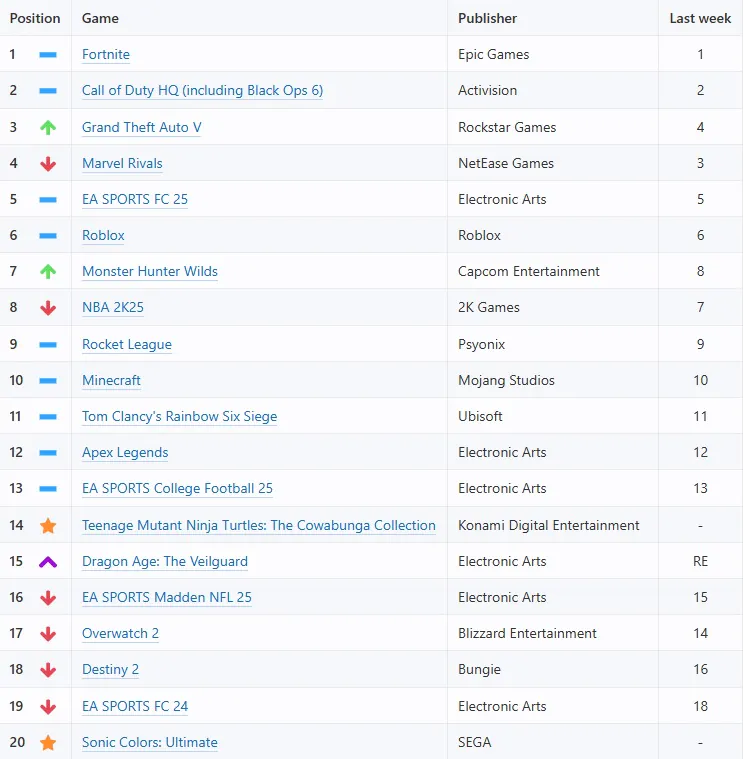
This news comes from True Trophies, which gathered data from 3.4 million active PSN accounts. The data revealed the most popular PS5 and PS4 games for the first week of March.
Since Dragon Age: The Veilguard was released only six months ago, many expected it would easily reach the top of the list. However, the game had already failed to sell many copies. Therefore, many players may play the game through PS Plus.
Surprisingly, the data shows Dragon Age: The Veilguard secures the 15th spot on the list, while the three-year-old Teenage Mutant Ninja Turtles The Cowabunga Collection secures the 14th.
The Veilguard was shrouded in controversy even before it’s release.
Not too long ago, EA claimed that Dragon Age: The Veilguard failed because it wasn’t a live service title, making it even more unclear what the developers’ future plans are for the gaming industry.
Nonetheless, The Veilguard didn’t perform well on PS5 Plus, but did you expect it? Let us know your thoughts in the comments or join the Tech4Gamers forum.