Home Blog Page 321

ASUS ROG Crosshair X870E Hero Review: Best X870E Motherboard For Overclocking?

Having recently reviewed a fair share of X870E boards (including the flagship MEG X870E GODLIKE), we’re looking at the ASUS ROG Crosshair X870E Crosshair. The ROG (Republic of Gamers) is ASUS’ flagship series, which includes the Crosshair motherboards for AMD and Maximus for Intel. These boards are designed for heavy overclocking and offer flagship I/O features but at a premium cost. 

The ROG series also includes the ROG Strix Gaming boards, which are priced for the more affordable market. Earlier, these boards were named based on the chipset generation (like Maximus XIII for the Z590 chipset), but now they mention the chipset name. With the trivia out of the way, let’s dive in and see what this board holds!

Why Trust Tech4Gamers
  • Ali Touseef is our hardware reviewer who tests and reviews different components, including coolers, RAM, motherboards, and processors.
  • 40+ motherboards tested and reviewed by our team of hardware experts (Tech4Gamers Team).
  • 800+ hours spent testing different motherboards for our reviews.
  • Objective testing criteria (See how we test motherboards).

At Tech4Gamers, ensuring you get reliable information is our priority. That’s why every hardware round-up undergoes a meticulous review process by our team of experts and editors. Each review is carefully examined against our strict editorial guidelines, guaranteeing you trustworthy insights you can depend on.


Key Takeaways

  • The ASUS ROG Crosshair X870E Hero is a high-end X870E motherboard offering an excellent design, solid performance, and plenty of M.2 storage room. 
  • You should buy the board if you want to overclock and/or have plenty of NVMe storage to install.
  • Don’t get this motherboard if your budget is limited and/or you expect 10G LAN to be part of the package. 

Here are the key specifications:

Model ASUS ROG Crosshair X870E Hero
CPU Support AMD Ryzen 7000, Ryzen 8000, Ryzen 9000
Memory Support DDR5, up to:

  • 8200+ MT/s (Ryzen 9000)
  • 8600+ MT/s (Ryzen 8000)
  • 8000+ MT/s (Ryzen 7000)
PCIe Slots 2x PCIe 5.0 x16
M.2 Slots 3x PCIe 5.0 x4, 2x PCIe 4.0 x4
SATA Ports 4x 6 GB/s
Audio Realtek ALC4082 Audio Codec + ESS ES9219 Quad DAC
Network & Connectivity 1x Realtek 5G, 1x Intel 2.5G
USB Ports 20 Ports, including 2x 40Gbps Type-C (Rear)
Size 305 mm x 244 mm, ATX 
MSRP $699
[toc]

In case you didn’t know, the only difference between the X870E and X670E chipsets is that USB4 is mandatory for X870E boards. Given that the X670E Crosshair is a flagship board, it also had USB4 ports (optional for X670E boards). That said, the only upgrade here is the inclusion of a 5G port (it’s hard to believe the X670E model only had 2.5G LAN, considering it’s a flagship!) and WiFi 7/BT 5.4. 

The motherboard can be considered a downgrade in other areas: it has three fewer USB ports and two fewer SATA 6G Ports. At least there’s no bump in MSRP (the board costs $700, the same as its predecessor). 

Design 

ASUS ROG Crosshair X870E Hero - Design
The board, fresh out of the box (Image by Tech4Gamers)

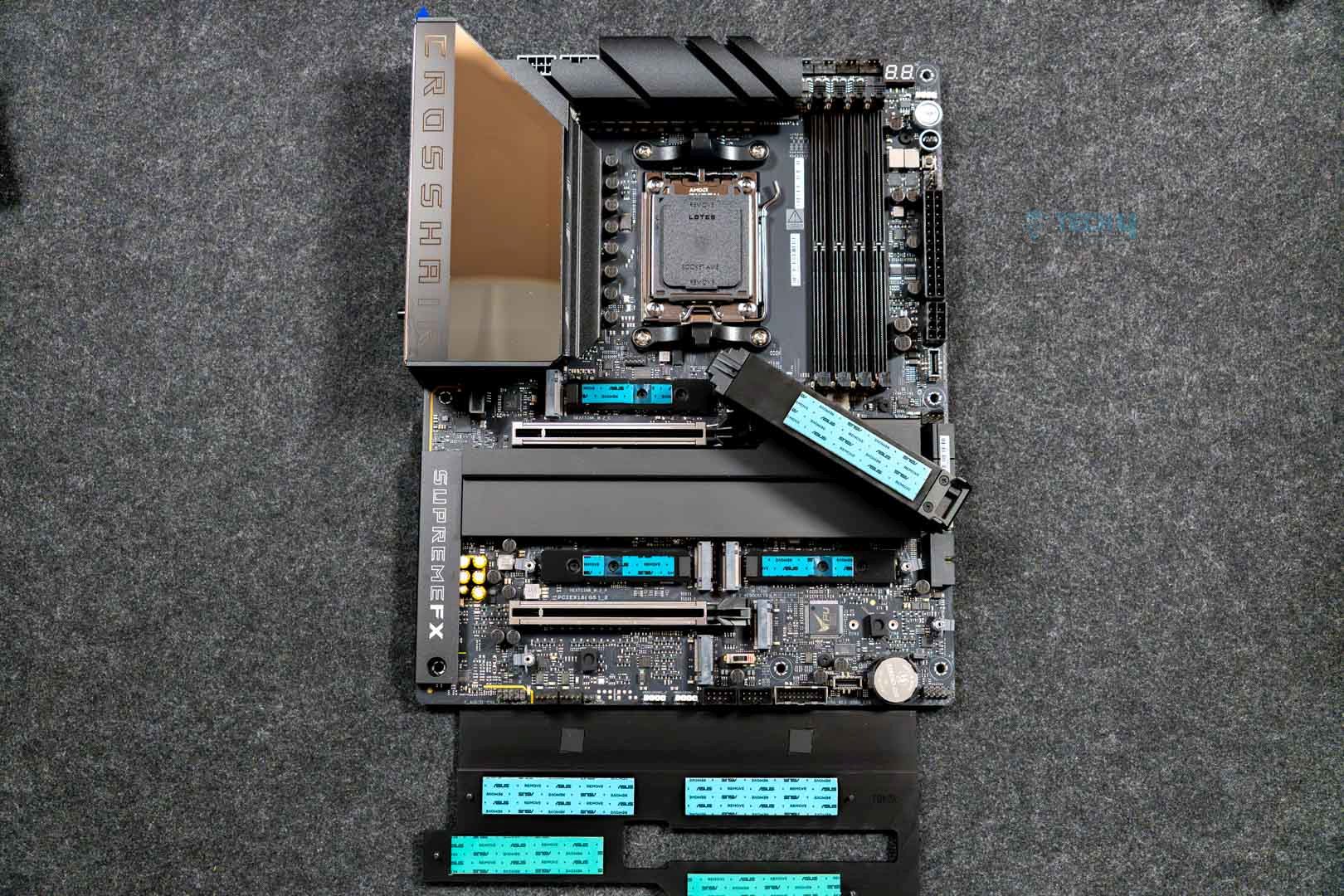
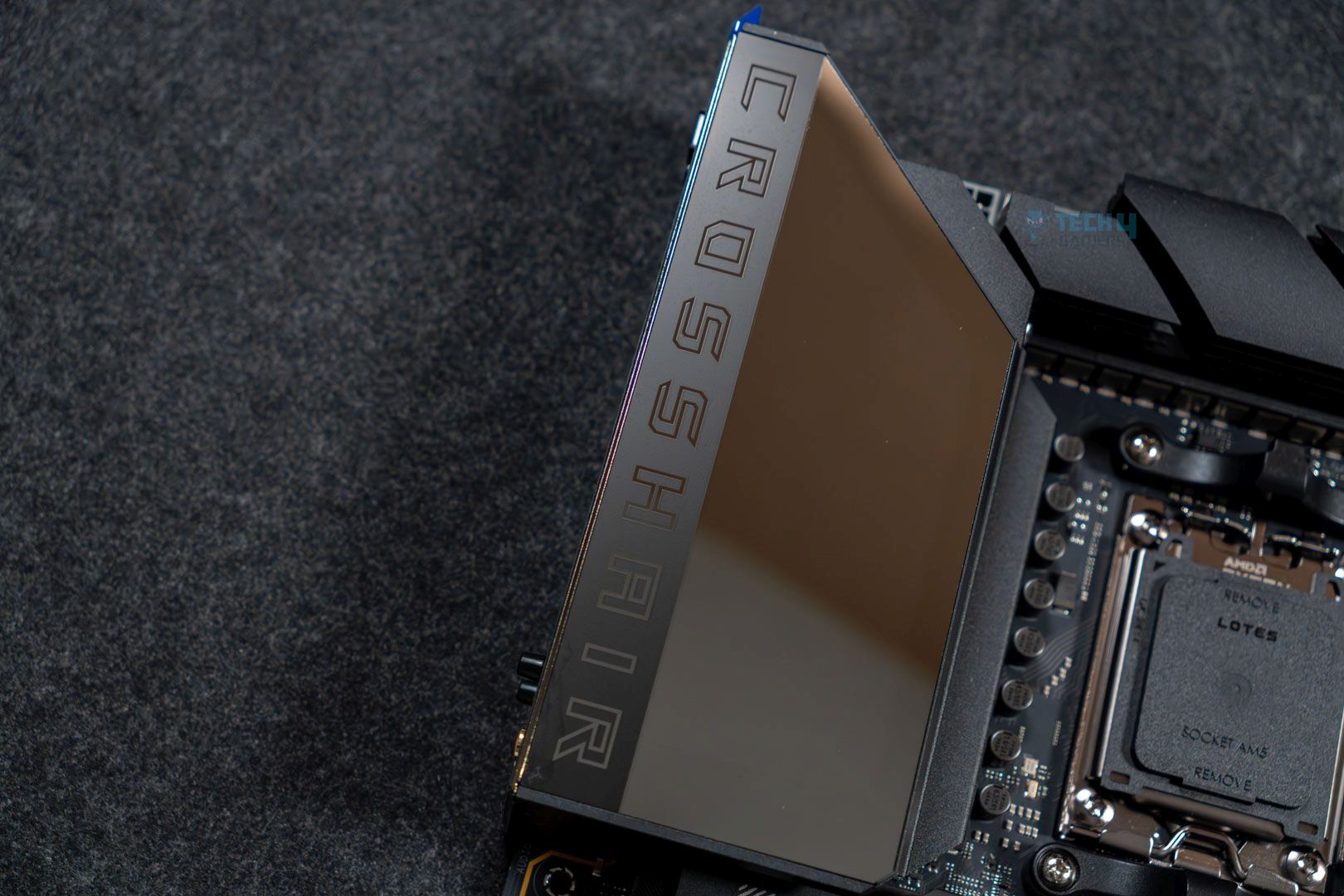
The ASUS ROG Crosshair X870E Hero greets us with a shiny all-black design well-covered with heatsinks and covers. The Polymo Lighting II array grabs our attention first with its shiny display. This display lights up, and the RGB can be controlled through the ASUS Aura Sync software. Surprisingly, this is the only RGB zone on the board, but it more than suffices with the amount of illumination you’re getting. 

The X870E chipset powers the Gen 4 M.2 ports, SATA ports, most of the USB ports, audio, LAN, and WiFi. Meanwhile, the Ryzen 9000 CPU is responsible for DDR5 memory, Gen 5 PCIe slots, NVMe provisions, and USB4. It also powers the board’s SIO controller. 

CPU Socket and Power Delivery System

ASUS ROG Crosshair X870E Hero - CPU socket
LGA 1718 socket (Image by Tech4Gamers)

The motherboard uses the AM5 (LGA 1718) socket, the same as the X670E motherboards. It offers out-of-the-box support for Ryzen 7000, 8000, and 9000 series CPUs. 

On the VRM end, the motherboard has a 22-phase, 18+2+2 (VCore + SoC + MISC) system, including 18x 110A stages for the CPU VCore in a teamed configuration, totaling 1980A. A teamed configuration means that every two stages receive the same signal from the PWM controller. The system is more efficient than doublers but not as efficient as pure power stages. The motherboard includes a dedicated BCLK generator, but there’s not much use for the X3D CPUs of this generation, which have an unlocked multiplier. 
ASUS ROG Crosshair X870E Hero I/O Top View (Image credit: Tech4Gamers)

This is not the heftiest setup (we saw better VRMs on the GODLIKE and Taichi Lite boards), but it still offers plenty for overclocking any supporting Ryzen CPU. The VRMs use Vishay’s SiC850A power stages, and the controller is the DIGI+ ASP2205. 

ASUS ROG Crosshair X870E Hero - EPS connectors

The CPU’s initial power is fed through two 8-pin EPS connectors, each capable of providing up to 150W. This is more than enough for any supporting Ryzen CPU, as even the most demanding 9950X3D is rated at 170W. 

The cooling setup consists of an L-shaped heatsink joined by a heat pipe. Underneath are thermal pads for the MOSFETs and chokes. 

DIMM Slots 
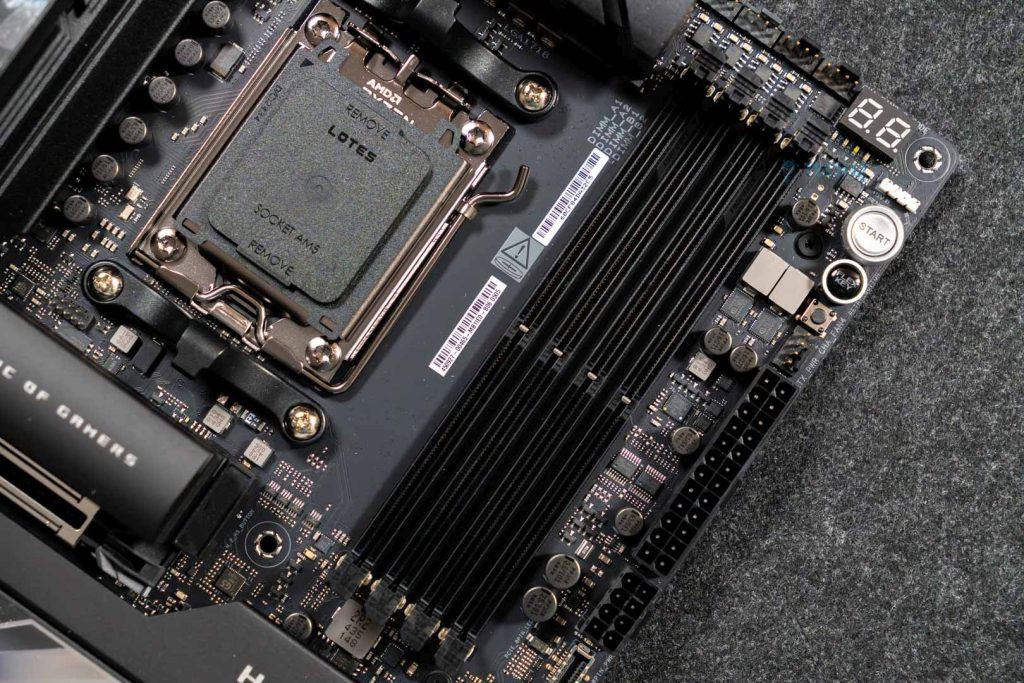
ASUS ROG Crosshair X870E Hero - DIMM slots
Memory slots (Image by Tech4Gamers)

The motherboard has four DIMM slots that support up to 256 GB of DDR5 memory. When paired with Ryzen 7000 or 9000 CPUs, the maximum memory speed supported is 8000 or 8200 MT/s (OC).

Editor`s Note
Image

As always, it’s worth letting you know that AMD’s recommended speed for memory paired with the Ryzen 7000/9000 CPUs is 6000/6400 MT/s. Beyond this, the CPU’s memory controller can’t sync with the memory and operates at half the frequency. The latency this introduces can only be countered by pushing speeds well beyond 8000 MT/s. 

– Ali

These slots are using ASUS’ latest technology: NitroDRAM. This technology optimizes the DIMM slots for improved signal retention by optimizing the layout of the pins inside the slots. ASUS claims that this leaves room for up to 400 MT/s faster speeds. It also promises that the new DIMM slots can better withstand the wear and tear of installing and removing memory sticks. The slot retention force has been improved by 57%. 

The board also supports ASUS Enhanced Memory Profiles (AEMP), customized memory profiles that can be helpful if your memory kits do not support AMD EXPO. 

PCIe Slots

ASUS ROG Crosshair X870E Hero - PCIe slot
Topmost PCIe slot (Image by Tech4Gamers)

The motherboard uses two reinforced PCIe 5.0 x16 slots. However, since the CPU only provides 16 Gen 5 lanes for PCIe slots, the two slots’ shared bandwidth will function at x8/x8 when both are occupied. This is still plenty of bandwidth, as no consumer gaming card needs more bandwidth than the 32 GB/s provided by a 16-lane PCIe 4.0 slot.

The M2_3 slot adds further complications: if you use this slot, then PCIe x16 will only run in x8 mode, and PCIe x16_2 will function at x4 speeds. If both M2_2 and M2_3 are occupied, PCIe x16_2 will be disabled completely. 

Releasing your cards from these slots involves the Q-Release Slim mechanism. There are no buttons or mechanisms involved; all you need to do is pull your card from the end where the connectors are present. Ideally, you should hold on to the motherboard with your other hand. The mechanism might take some getting used to, but it works wonders. Just make sure you seat your GPU properly in place, and removal won’t be a problem.

Storage Options
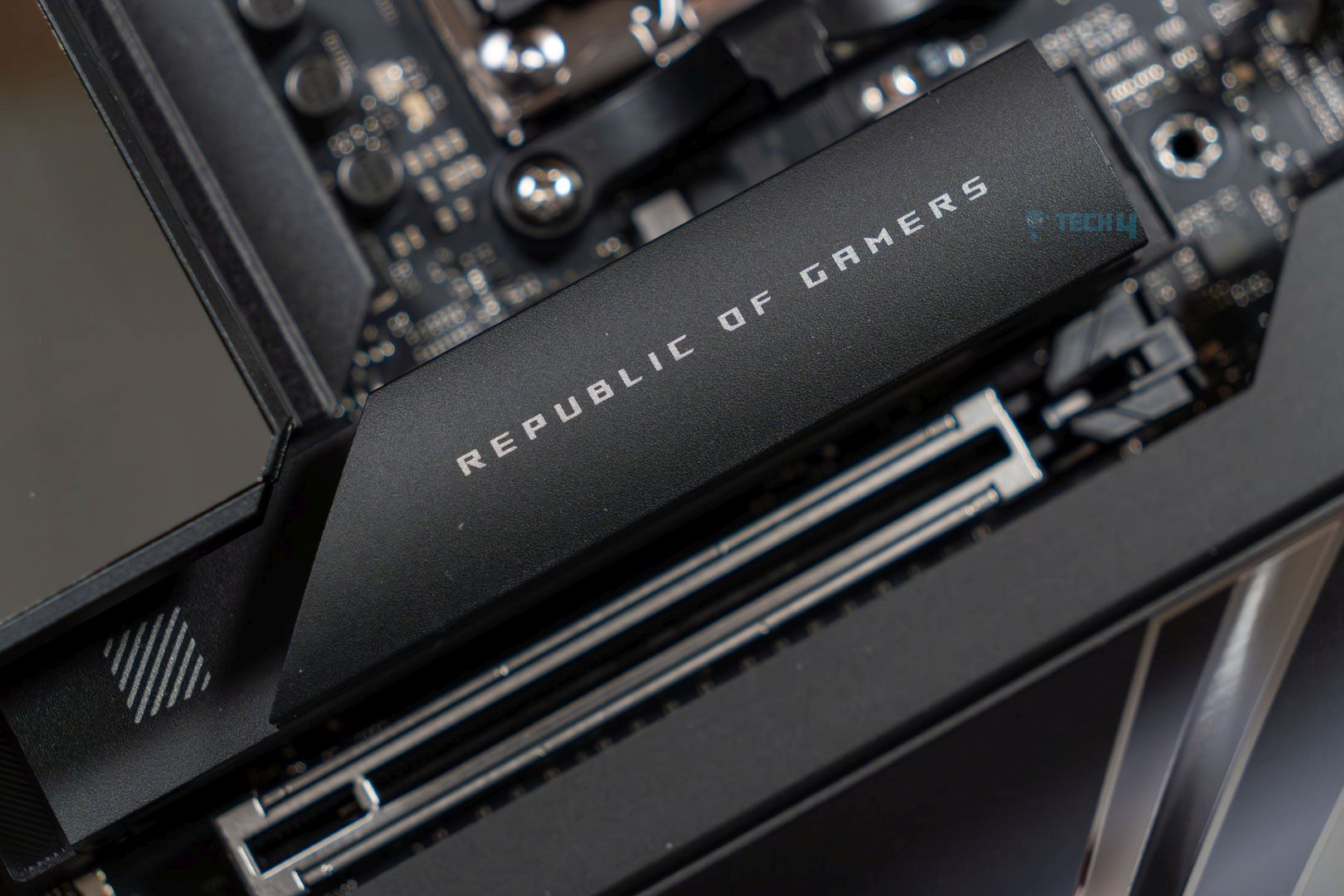
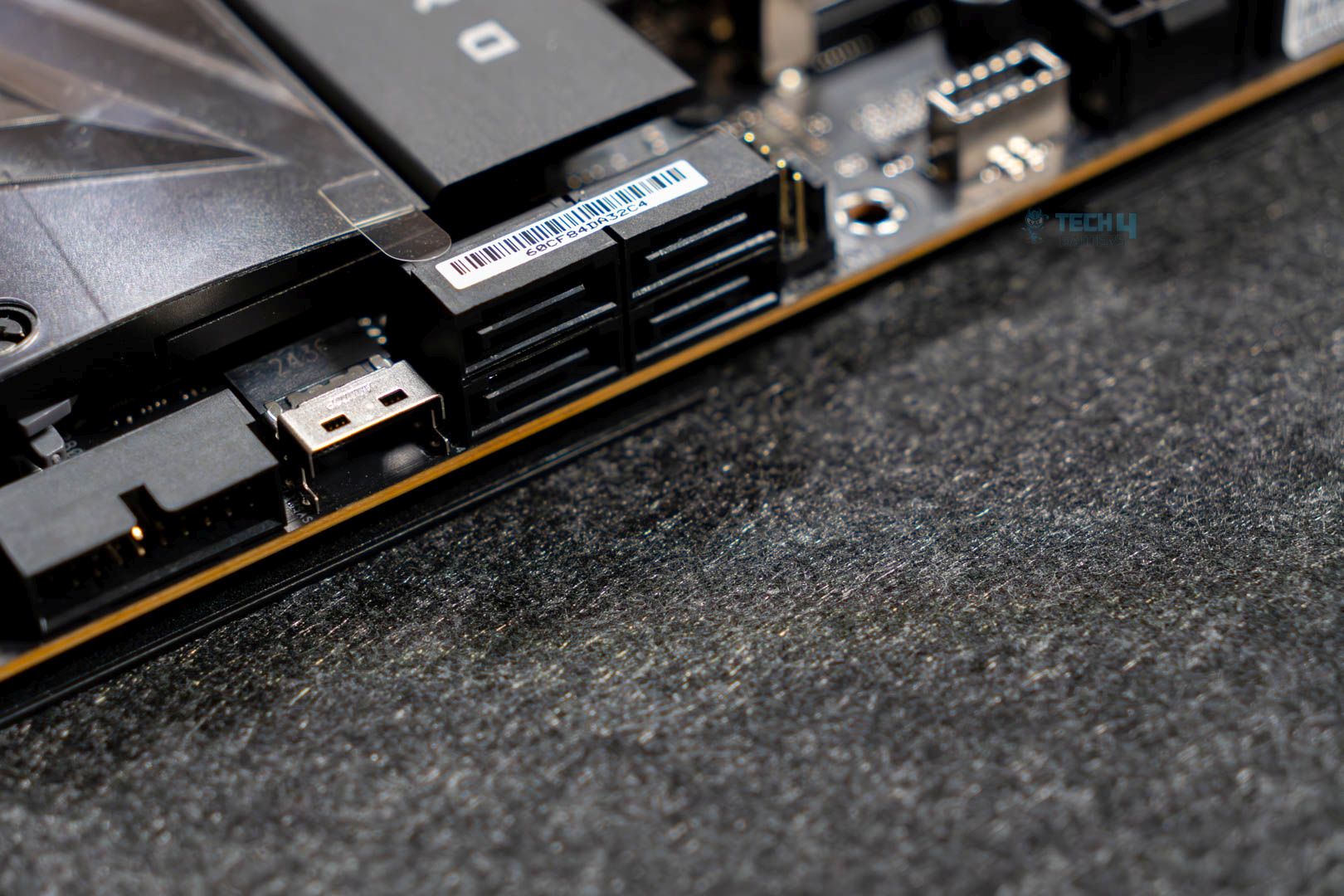
The motherboard houses 4x SATA ports and 5x M.2 slots, including three Gen 5 ones. I’ve already mentioned the complications that arise from using dual GPUs/multiple M.2 slots, so keep those in mind. The remaining M.2 slots are PCIe Gen 4 coming from the CPU, and thankfully, there are no complexities here! NVMe drives support RAID 0/1/5/10 configurations when paired with Ryzen 9000 CPUs.

Here are the types of SSDs supported by each slot: 

  • M2_1, M2_2, M2_3, M2_4 = 2242/2260/2280
  • M2_5 = 2280
 

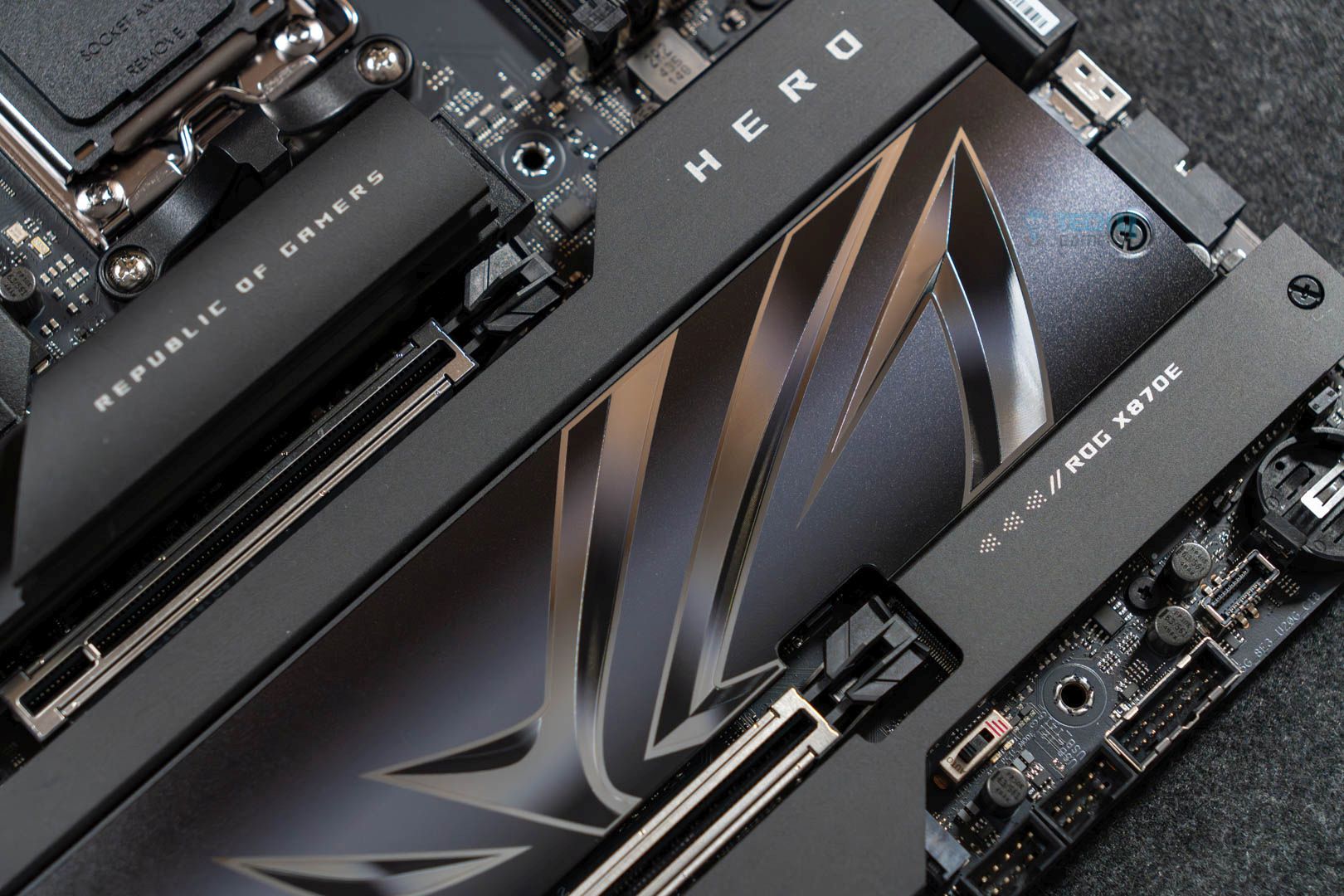
Two heatsinks cool the five M.2 slots. The primary Gen 5 slot is cooled by a standalone heatsink, while the remaining four slots share a heatsink (although it looks more like these are two separate heatsinks). Removing the primary heatsink is a breeze with the M.2 Q-Release mechanism, requiring the push of a button. To install your drive(s) in any of the remaining slots, you’ll need a screwdriver to remove the heatsinks. 

Now, the Q-release mechanism is reserved for the top-most M.2 slot for 2280 drives. You are limited to the default latch mechanism for the remaining slots, and the M.2 Q-Slide tool (three of which are included in the package) can be used to install 2242/2260 size NVMes. We have thermal pads on both the heatsinks and the base for the Gen 5 slots. This is not true for the Gen 4 slots, where only the heatsinks have attached thermal pads. 

USB Connectivity 

ASUS ROG Crosshair X870E Hero - USB connectors
USB connectors (Image by Tech4Gamers)

Here’s what the board offers in the USB department: 

  • 2x USB4 Type-C, Rear
  • 8x USB 10Gbps, Rear (6x Type-A, 2x Type-C)
  • 2x USB 20Gbps, Front (1x supports for 60W PD/QC4+, 1x supports Type-C)
  • 4x USB 5Gbps Type-A, Front 
  • 4x USB 2.0 Type-A, Front

This is a good number of USB ports, which, of course, includes the USB4 from the CPU and maxes out the chipset’s two USB 20 Gbps support. The ASMedia ASM4242 controller powers USB4. One of the 20 Gbps ports supports 60W charging and Quick Charge 4+ applications through an additional 8-pin power connector on the board.

Network and Connectivity

The ASUS ROG Crosshair X870E Hero offers 5G and 2.5G LAN, with no room for 10G LAN. This is a disappointment for us, as we think they could’ve escaped some of the hassle and gone with a singular 10G port, but oh well. ASUS LANGuard protects both ports against power surges. 

For wireless connectivity, we have WiFi 7 and Bluetooth 5.4. WiFi 7 enables the 6GHz frequency band, which features 320 MHz channels, enabling better transmission speeds than ever. 4K QAM and Multi-Link Operation add to the benefits of WiFi 7. Both WiFi 7 and Bluetooth 5.4 require Windows 11 24H2 or later. 

The included WiFi Q-Antenna includes dual transceivers, which, according to ASUS, improve signal reception by 6% for the 6 GHz band and by 18% for the 5 GHz/2.4 GHz bands. 

ASUS’ Armoury Crate software offers various network-related features. These include traffic monitoring and channel switching, “direction finder” for your WiFi antenna, and automatic bandwidth allocation for a better connection while gaming.

Audio Solution

ASUS ROG Crosshair X870E Hero - SupremeFX audio
SupremeFX audio branding (Image by Tech4Gamers)

Realtek’s ALC4082 audio controller and the ESS ES9219 Quad DAC power the board’s audio. The ALC4082 is similar to the ALC4080; they only differ in the interface: The ALC4080 uses a USB interface, while the ALC4082 uses an HD audio interface. This setup is part of ASUS’ SupremeFX audio solution branding.

It supports 32-bit/384 kHz playback from the front panel jacks and S/PDIF through the rear. ASUS claims a 110 dB signal-to-noise ratio through the line-in jack. 

Internal Connectors and Components

Following is the list of controllers on the board: 

ASUS ROG Crosshair X870E Hero - 24-pin ATX connector
24-pin ATX connector and PCIe connector (Image by Tech4Gamers)
  • 1x 4-pin CPU Fan header
  • 1x 4-pin CPU OPT Fan header
  • 1x 4-pin AIO Pump header
  • 4x 4-pin Chassis Fan headers
  • 1x W_PUMP+ header
  • 1x 24-pin Main Power connector
  • 2x 8-pin +12V CPU Power connector
  • 1x 8-pin PCIe Power connector
  • 5x M.2 slots (Key M)
  • 1x SlimSAS connector
  • 4x SATA 6Gb/s ports
  • 2x USB 20Gbps connectors (Type-C)
  • 2x USB 5Gbps headers (4x USB 5Gbps ports)
  • 2x USB 2.0 headers (4x USB 2.0 ports)
  • 3x Addressable Gen2 headers
  • 1x Alteration PCIe mode switch
  • 1x FlexKey button
  • 1x Front Panel Audio header 
  • 1x ReTry button
  • 1x Start button
  • 1x 10⁻¹ pin System Panel header
  • 1x Thermal Sensor header
  • 1x LN2 Mode jumper

In case some of these connectors are confusing you:

  • SlimSAS connector: An addition typically found in workstation motherboards, this PCIe Gen 4 x4 connector allows you to add additional NVMe storage through an adapter. 
  • Alteration PCIe mode switch: Allows you to toggle the signal on your PCIe slots between Gen 4 and Gen 3. 
  • FlexKey: Like MSI’s “Smart Button,” the FlexKey can be programmed to perform different functions. Its default function is Restart, but you can change it to activate Safe Boot or turn the RGB on your board on/off.
  • ReTry button: Forces a hard reboot. Useful when overclocking fails.
  • LN2 Mode jumper: For extreme overclocking (e.g., using Liquid Nitrogen), allows normal functioning and system booting at extremely low CPU temperatures.

All the fan headers, plus the AIO_Pump connectors, support a 12W (12W at 1A) output. The W_Pump connector supports a maximum 36W output (12V at 3A). The 8-pin PCIe connector enables 60W charging through the front Type-C port. 

ASUS ROG Crosshair X870E Hero - debug code LED panel
Top-right corner (Image by Tech4Gamers)

We also have the debug LEDs and the debug code LED panel located at the top-right corner of the board. These will help you identify issues with POSTing (Power On Self Testing). Additionally, the Start button lets you boot up your system if you haven’t connected it to your chassis yet. 

Rear I/O Connectivity

The rear I/O panel has the following: 

ASUS ROG Crosshair X870E Hero - rear I/O panel
Rear I/O (Image by Tech4Gamers)
  • 2x USB4 (40Gbps) ports
  • 8x USB 10Gbps ports (6x Type-A, 2x USB Type-C)
  • 1x HDMI port
  • 1x Wi-Fi module
  • 1x 2.5Gb Ethernet port
  • 1x 5Gb Ethernet port
  • 2x audio jacks
  • 1x Optical S/PDIF out port
  • 1x BIOS FlashBack button
  • 1x Clear CMOS button

The I/O shield comes preinstalled on the board. We have Clear CMOS (reset BIOS settings) and BIOS flash buttons. The USB ports are labelled according to their speeds, which we saw in this generation’s MSI motherboards, and are happy to see here too. 

Test Setup

Let’s put this board to the test. Here is our test configuration: 

For comparison, we have the following other X870E motherboards: 

Synthetic Benchmarks

Here are the synthetic benchmarks to start. 
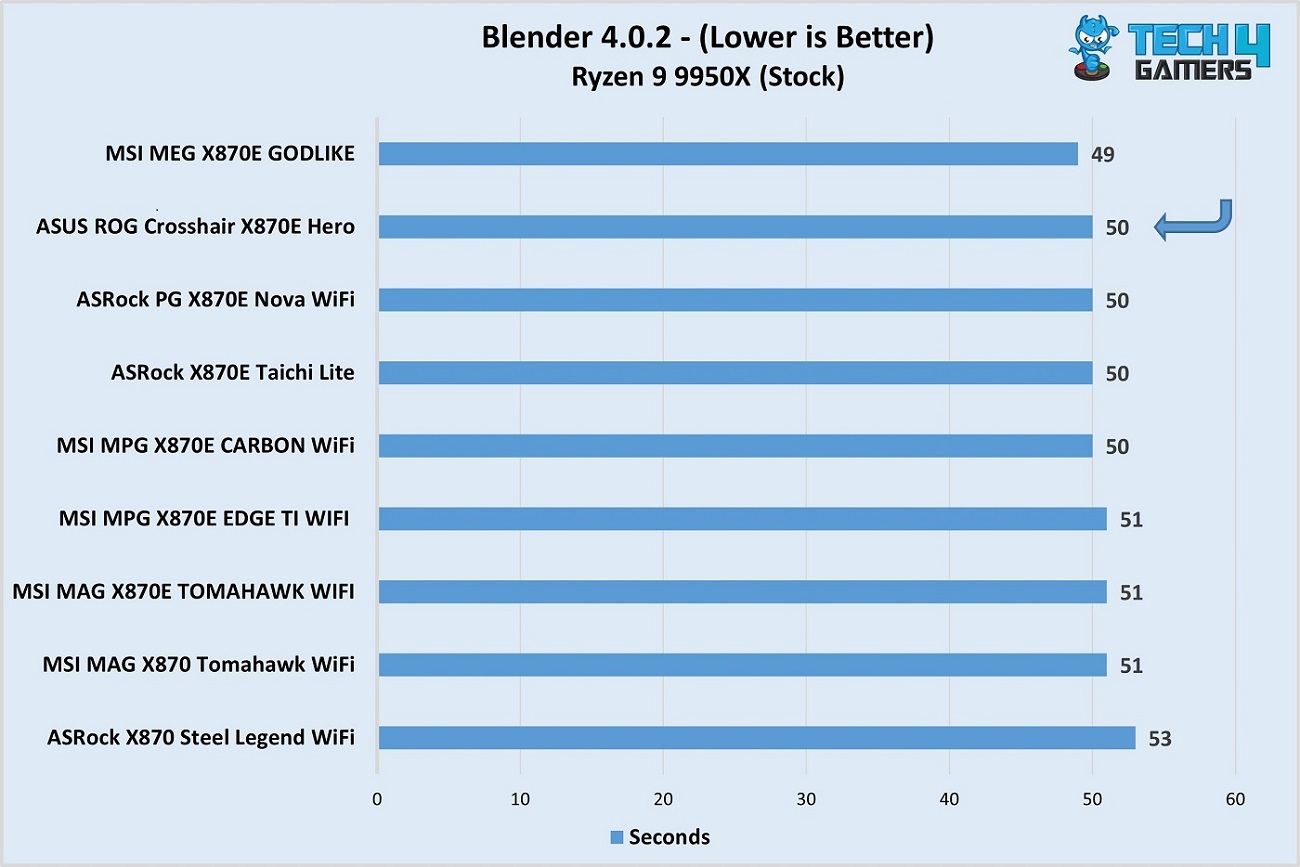
ASUS ROG Crosshair X870E Hero vs competitors - Blender benchmark
Blender 4.0.2 render (Image by Tech4Gamers)

In the Blender render test, the ASUS ROG Crosshair X870E Hero managed a 50-second completion time. It tied with three other boards and was only beaten by the MEG X870E GODLIKE. 
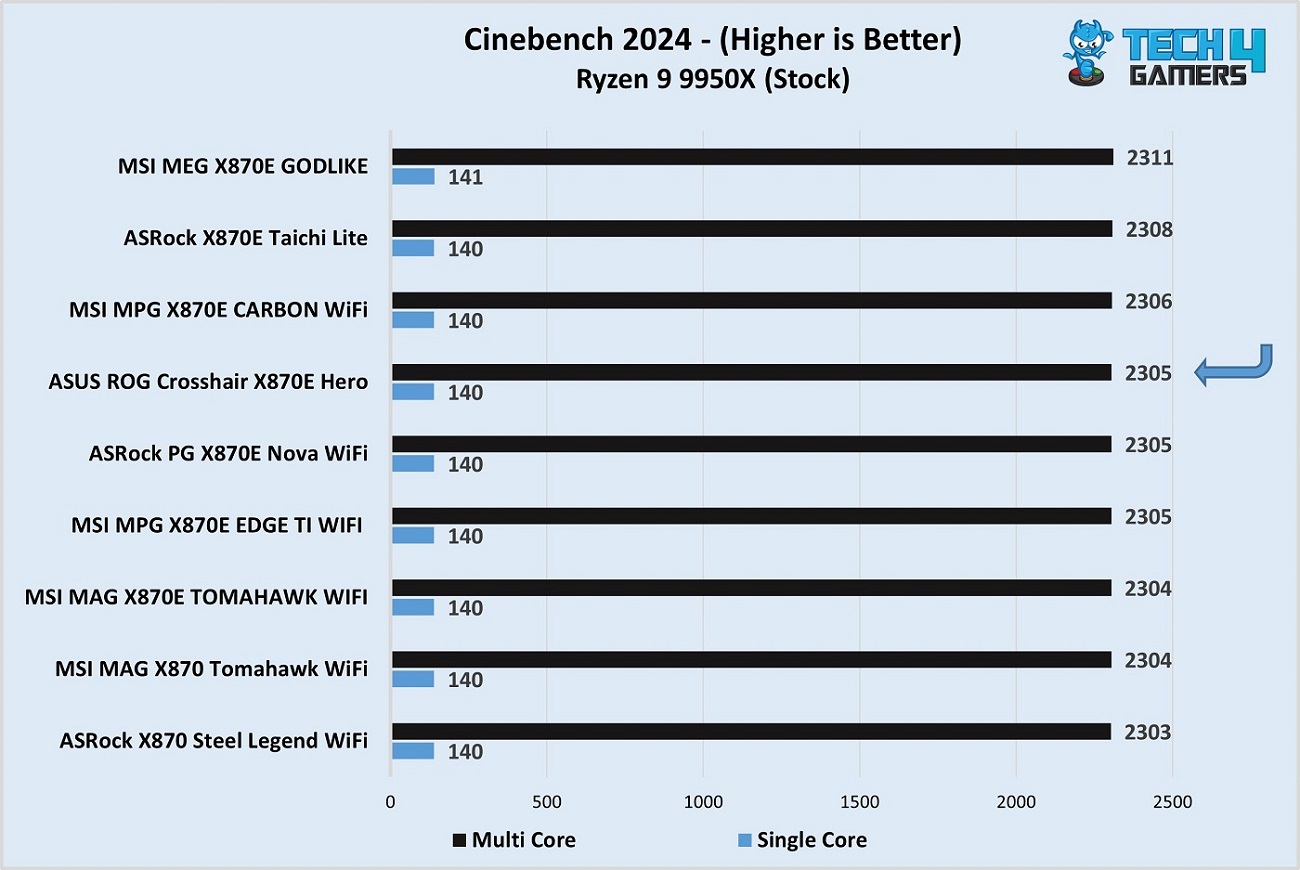
ASUS ROG Crosshair X870E Hero vs competitors - Cinebench 2024
Cinebench 2024 (Image by Tech4Gamers)

The board’s performance is as expected in Cyberpunk 2077. 
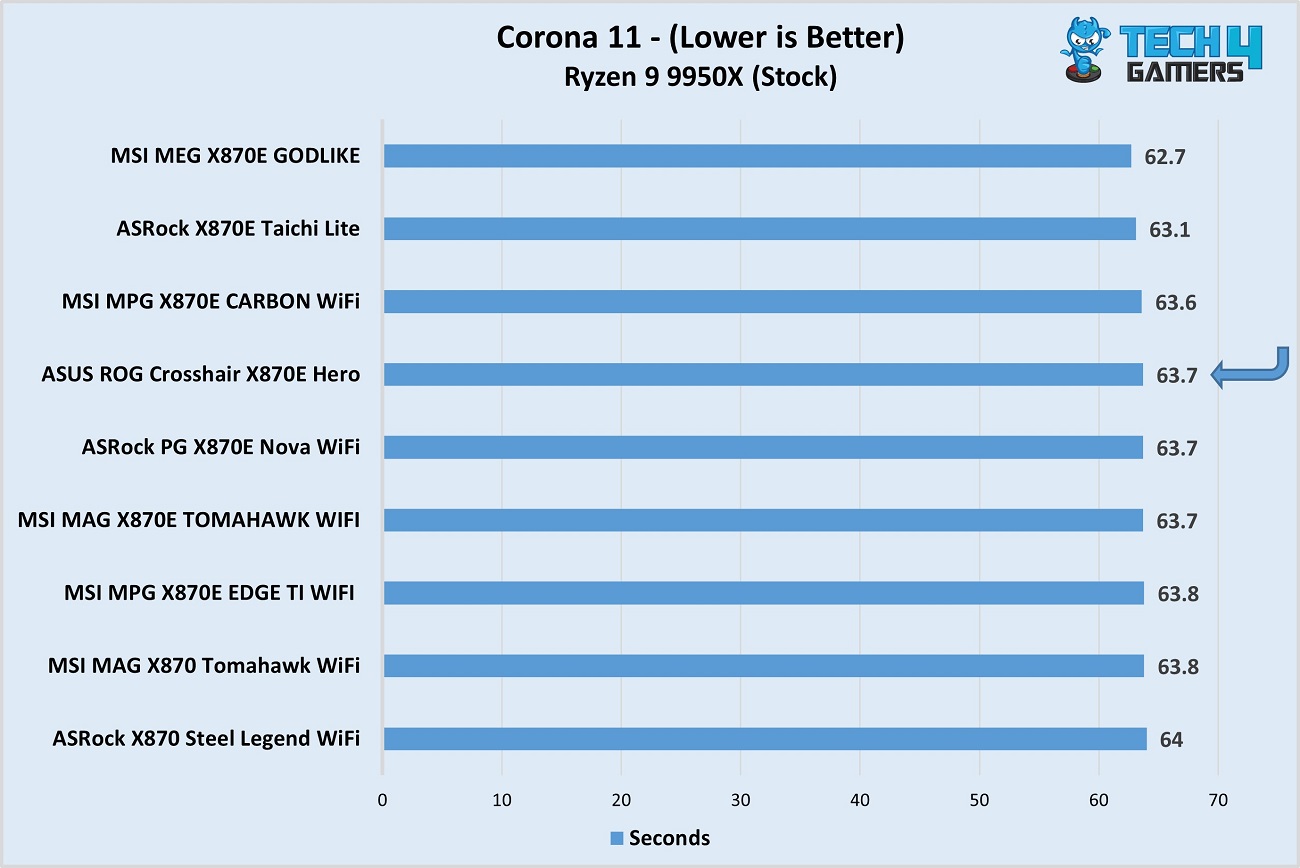
ASUS ROG Crosshair X870E Hero vs competitors - Corona 11
Corona 11 (Image by Tech4Gamers)

In the Corona 11 test, the board showed a 63.7-second render time. Three X870E competitors beat it. 
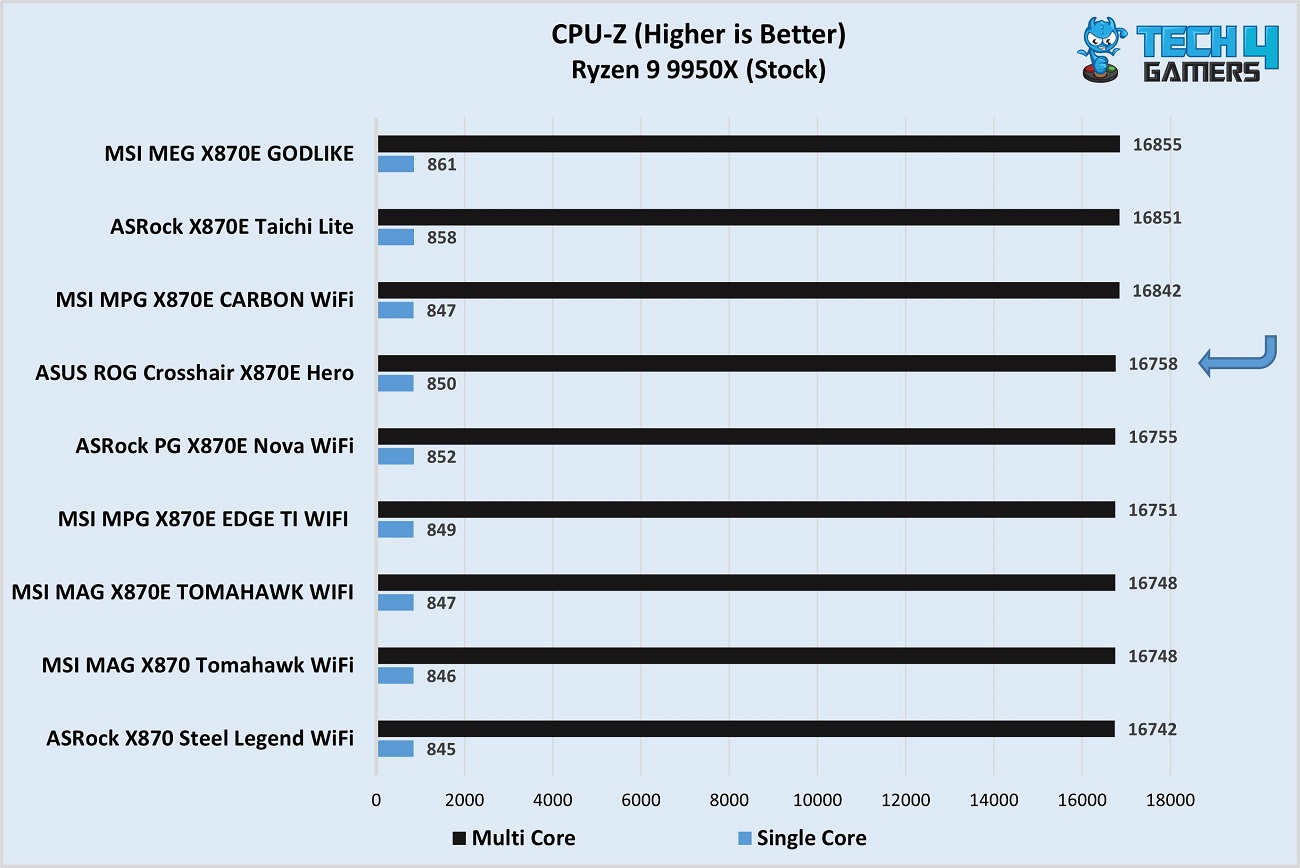
ASUS ROG Crosshair X870E Hero vs competitors - CPU-Z
CPU-Z (Image by Tech4Gamers)

Our CPU-Z multi-core and single-core tests recorded par scores for the motherboard. 
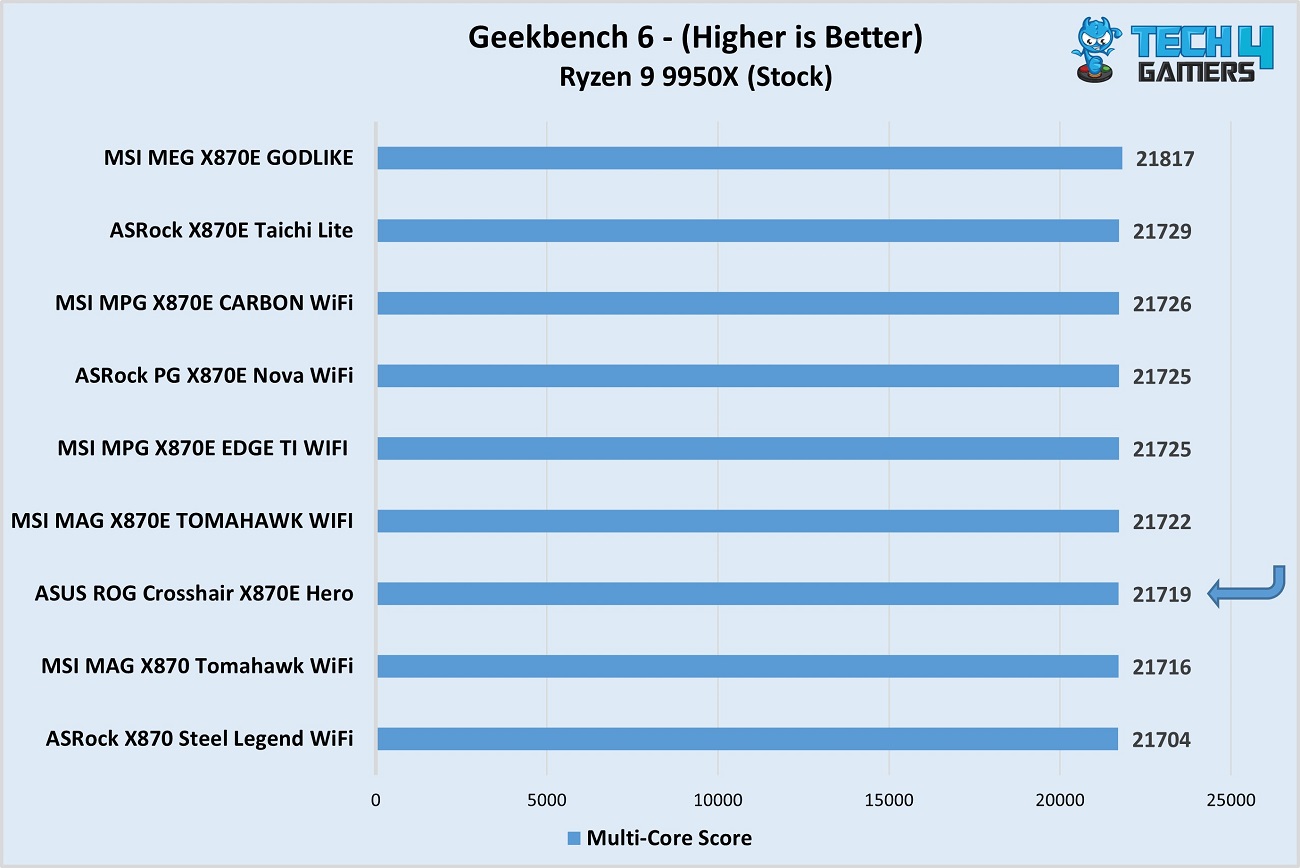
ASUS ROG Crosshair X870E Hero vs competitors - Geekbench 6
Geekbench 6 (Image by Tech4Gamers)

In the Geekbench 6 multi-core test, the motherboard scored 21719 points. 
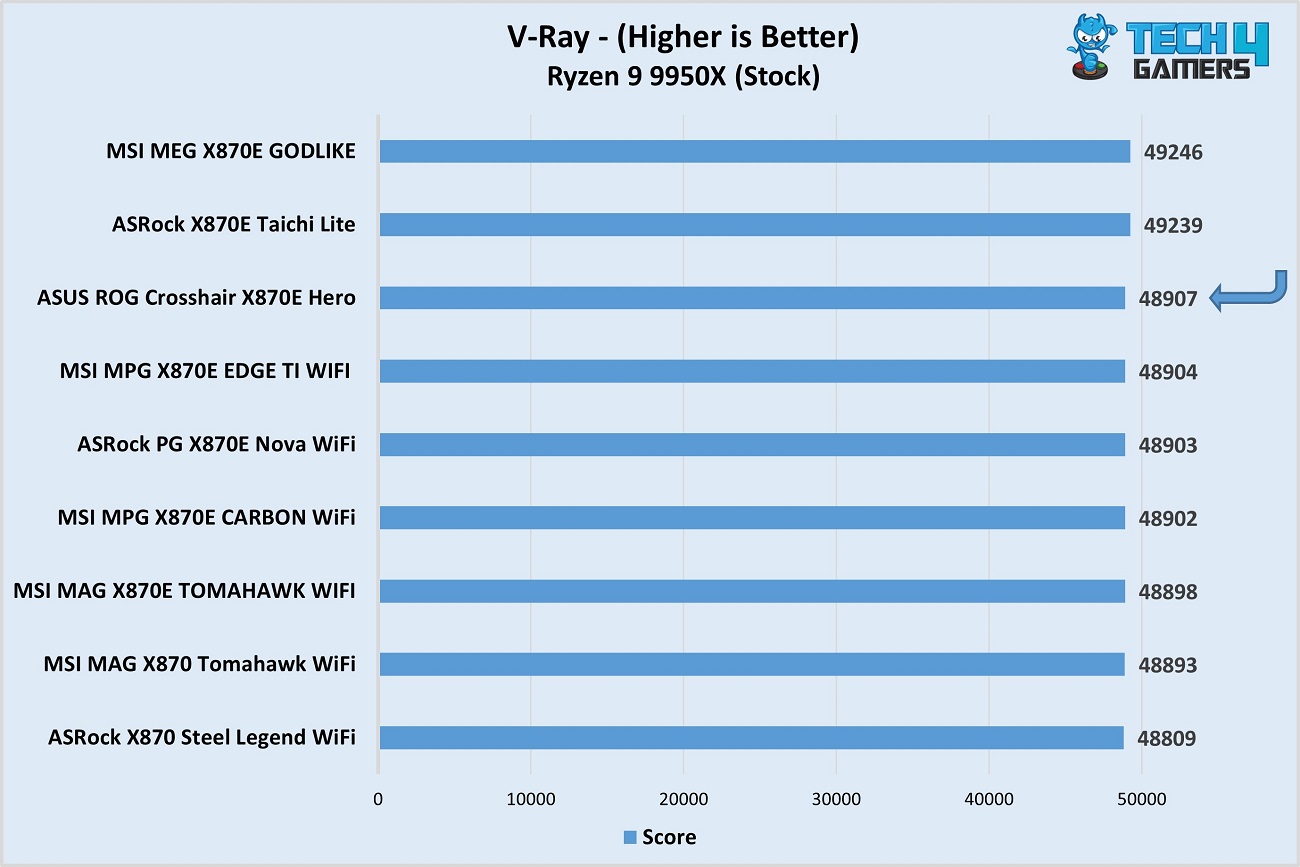
ASUS ROG Crosshair X870E Hero vs competitors - V-ray
V-Ray (Image by Tech4Gamers)

Finally, the ROG Crosshair X870E Hero scored 48907 points in the V-Ray benchmark with our test configuration.

All the benchmarks showed par performance with the motherboard. 

Gaming Benchmarks

A look at Cyberpunk 2077 and Starfield results: 
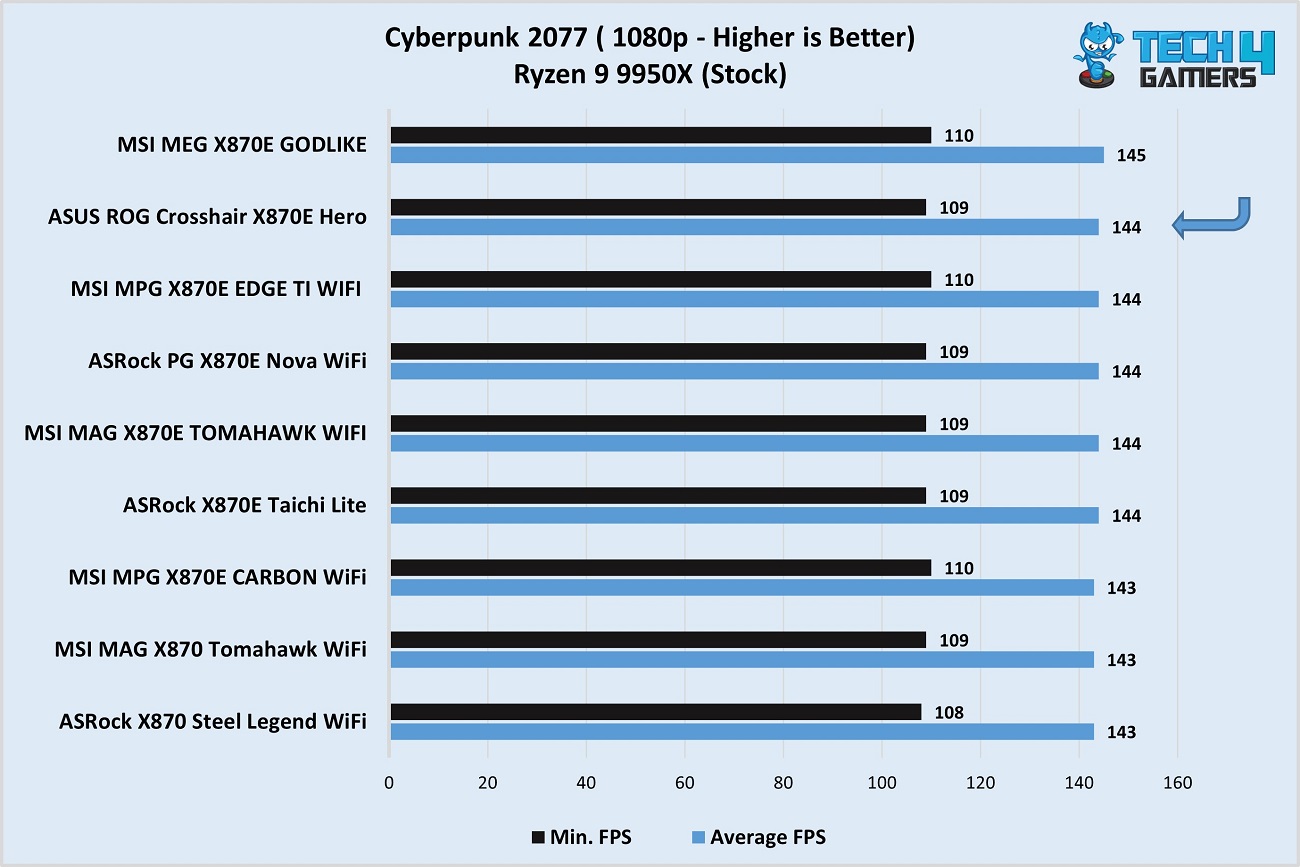
ASUS ROG Crosshair X870E Hero vs competitors - Cyberpunk 2077
Cyberpunk 2077 (Image by Tech4Gamers)

The motherboard did well, with 144 FPS on average and a minimum of 109, in Cyberpunk 2077.
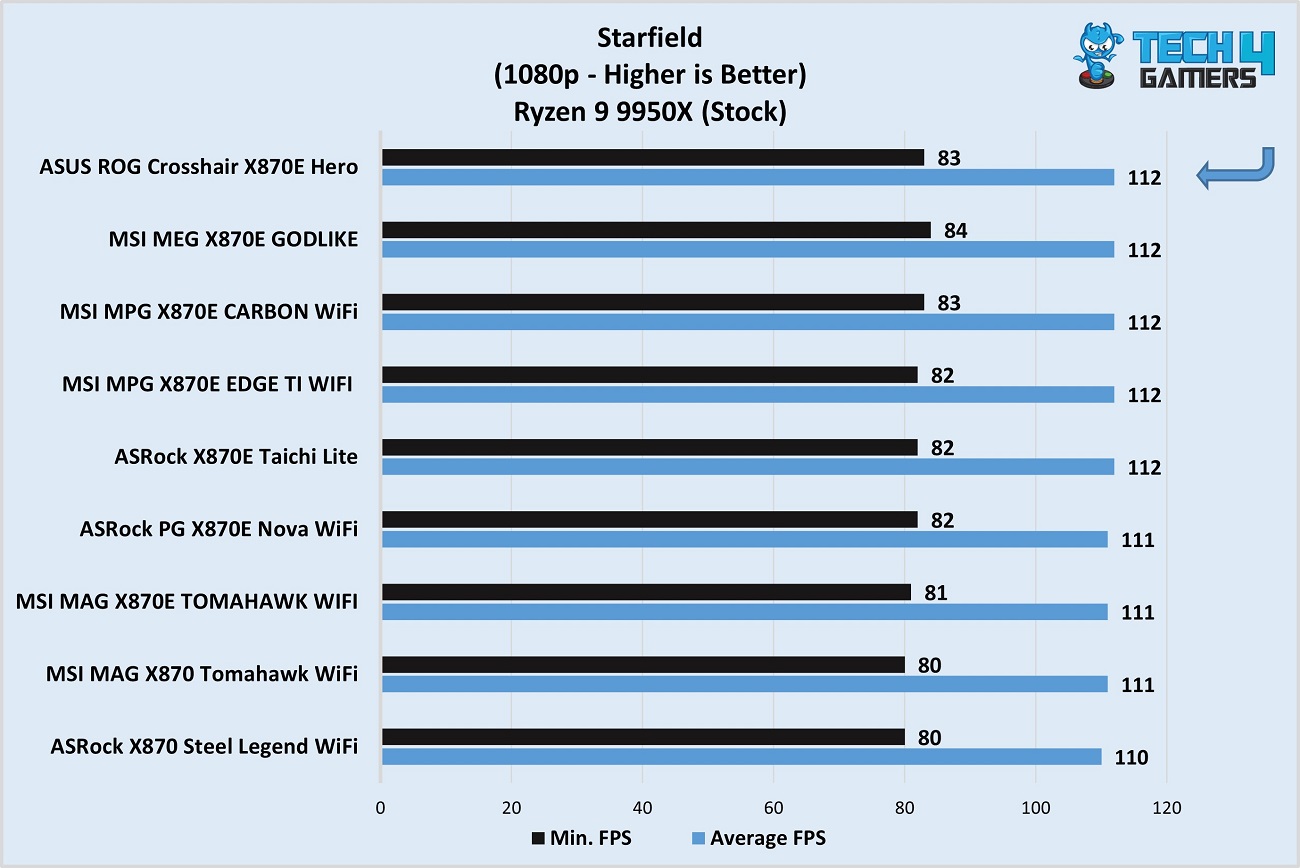
ASUS ROG Crosshair X870E Hero vs competitors - Starfield
Starfield (Image by Tech4Gamers)

In Starfield, the board’s performance is normal. 

Power Consumption and VRM Temperatures

Let’s examine the CPU/motherboard power consumption numbers. For the “Load” test, we used the Cinebench 2024 multi-core benchmark, which was run for 30 minutes. 
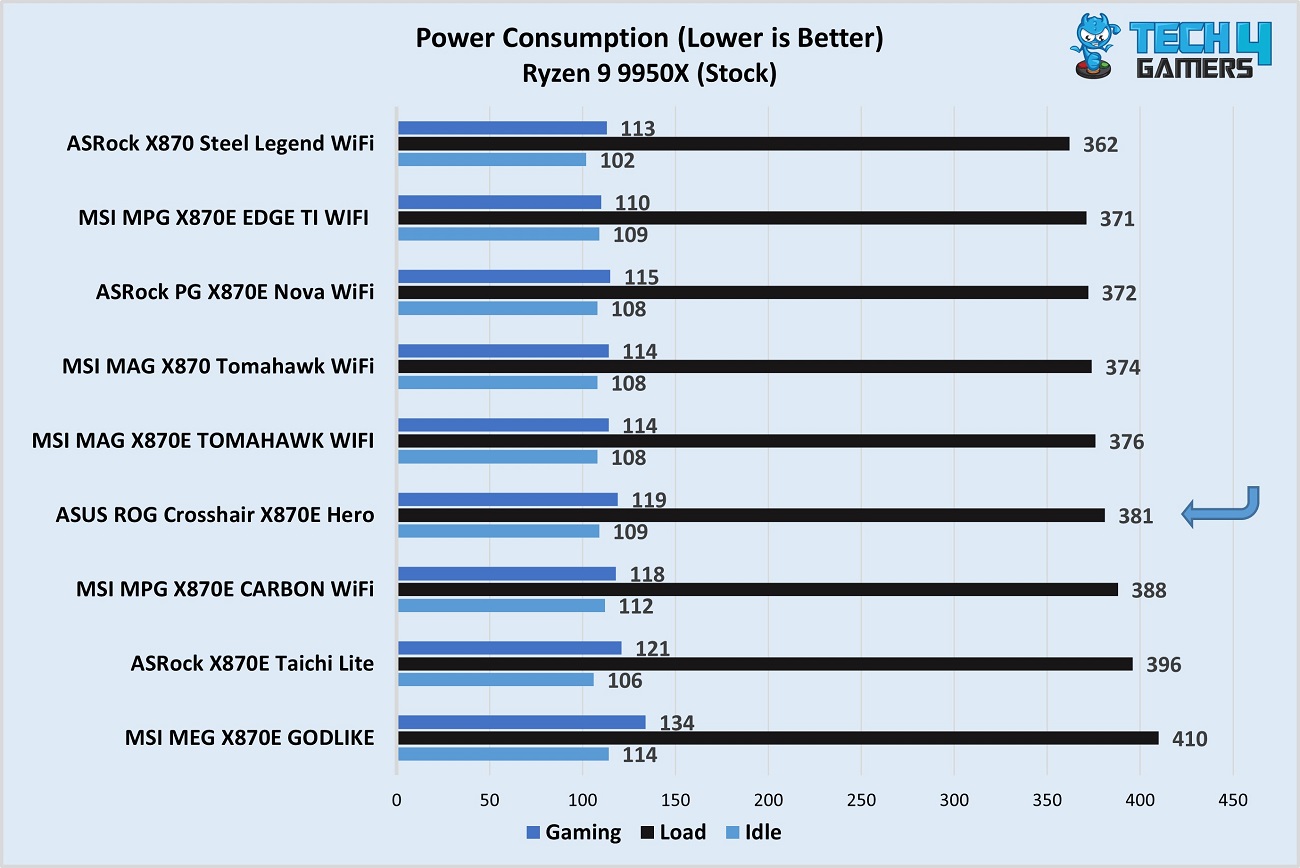
ASUS ROG Crosshair X870E Hero vs competitors - Power draw
CPU/motherboard power consumption (Image by Tech4Gamers)

The motherboard’s power consumption is on the higher side, with 381 watts consumed under load. While gaming, we recorded an average of 119 watts with the board, while the idle consumption was 109 watts. 
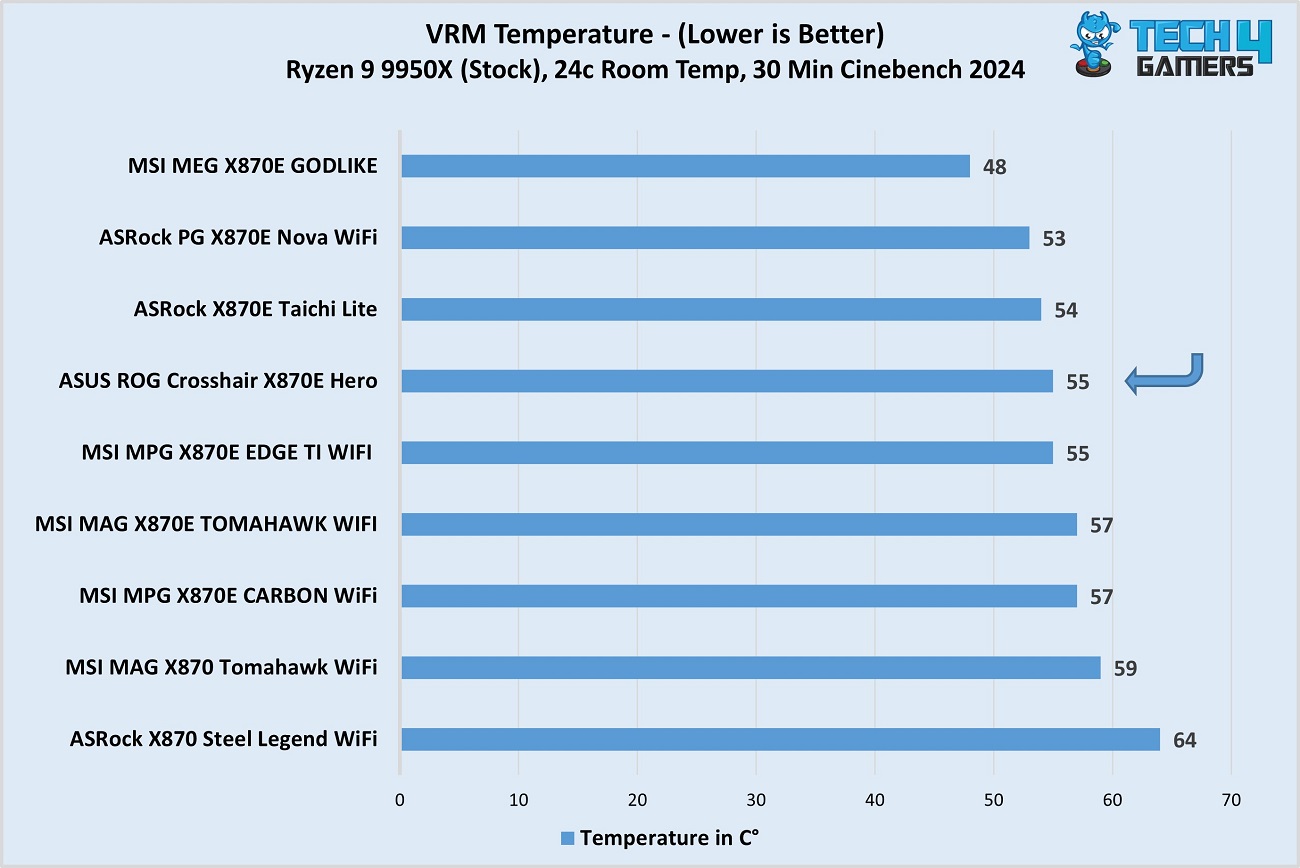
ASUS ROG Crosshair X870E Hero vs competitors - VRM temperatures
VRM temperatures (Image by Tech4Gamers)

The VRM cooling does a fairly good job: we noted a maximum temperature of just 55°C across the VRMs while running the Cinebench 2024 multi-core test. 
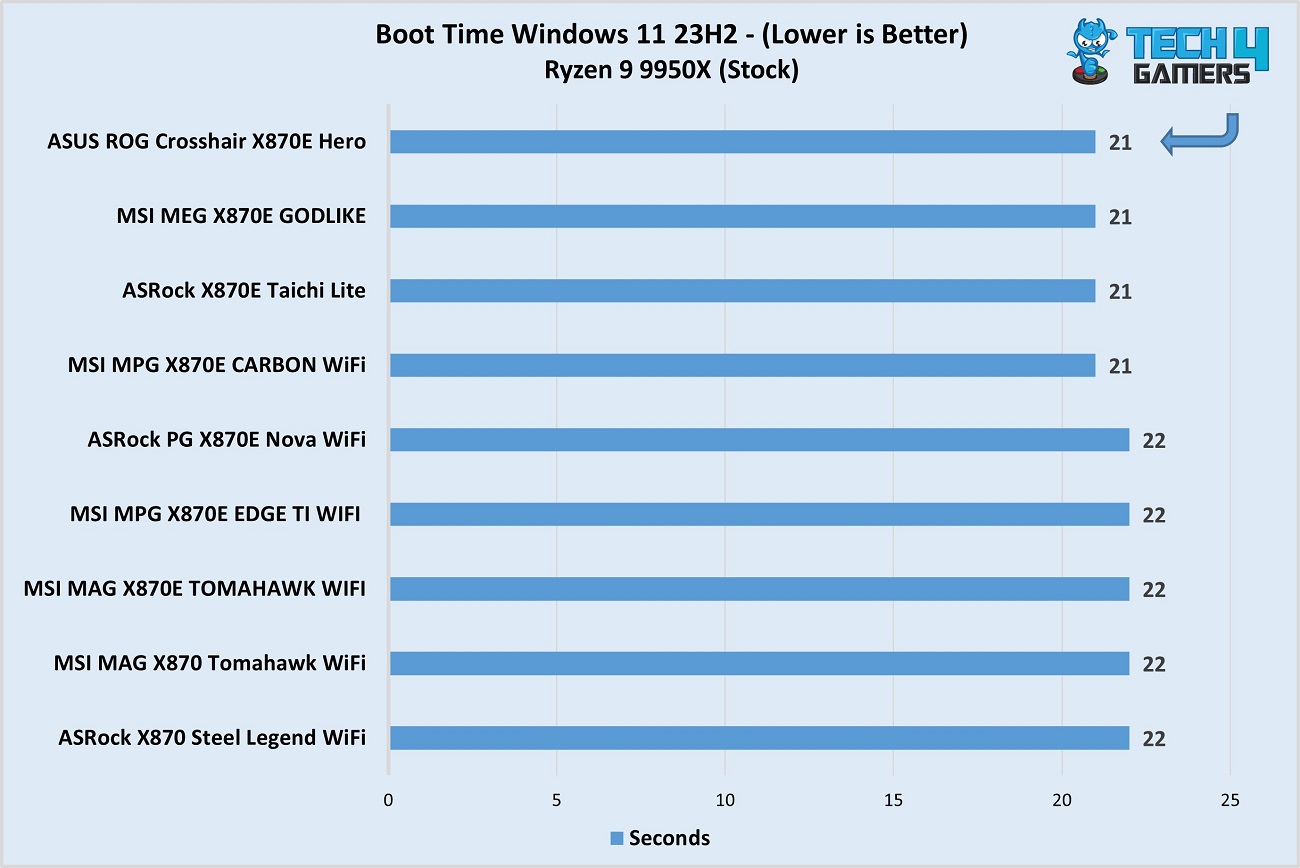
ASUS ROG Crosshair X870E Hero vs competitors - Boot time
Boot times (Image by Tech4Gamers)

Finally, the board’s boot time is a normal 21 seconds, the same as the MEG X870E GODLIKE, X870E Taichi Lite, and MPG X870E Carbon WiFi boards. 

Should You Buy It? 

What’s the verdict? 

Buy It If: 

✅You want to overclock: The board’s excellent VRM setup and superb onboard cooling are perfect for CPU overclocking applications. It also offers plenty of software and miscellaneous (e.g., the LN2 mode jumper) for this purpose. 

✅You’re looking for premium aesthetics: The board’s flashy aesthetics are highlighted by its large Polymo Lighting II array and the large ASUS ROG logo on one of the M.2 heatsinks.

✅You want to install plenty of M.2 storage: The board offers five M.2 slots, including three Gen 5 ones. With the SlimSAS connector, you can further that count!

✅You want 60W charging support: If 60W charging support is a particular requirement of yours, the board will fulfil that requirement. 

Don’t Buy It If:

❌Budget is limited: The motherboard costs a whopping $700, and there are virtually endless cheaper X870E options out there. 

❌You need 10G LAN: Despite its premium price tag, there’s no room for 10G LAN here. 

My Thoughts

The ASUS ROG Crosshair X870E Hero is one of the costliest X870E motherboards you can buy. For that, it offers a high-end 18+2+2 VRM setup, including 18x 110A teamed power stages for the CPU VCore. These provide enough juice to overclock any Ryzen CPU to a fair extent! Our VRM cooling test saw the VRMs max out at 55°C, so it certainly won’t be a limiting factor in your overclocking ventures. Onboard and software features (including AI overclocking) help further. 

The board has a refined all-black design with all the RGB concentrated in a single zone: the Polymo Lighting II array on the rear I/O panel. This can be controlled through the ASUS Aura Sync software to show different lighting effects.

Moving to memory support, the board supports up to 192 GB of DDR5 memory. The maximum memory speed supported for Ryzen 9000 is 8200 MT/s. The DIMM slots use the NitroPath DRAM technology, which improves signal strength for memory and reduces the wear and tear involved in installing/removing RAM.  

For your graphics card(s), the board has two PCIe 5.0 x16 slots that operate in x8/x8 when both are occupied. They also share bandwidth with the second and third Gen 5 M.2 slots, so keep the configuration you intend to use (and whether or not the board supports it) in mind. Speaking of M.2 slots, there are five on this board, with the bottom two being Gen 4. Installing the drives is a breeze, no matter the slot; the primary slot has the easiest mechanism, though. 

The board has room for up to 20 USB ports, including dual USB4 and 20Gbps ports. One of the 20Gbps ports also supports 60W power delivery. WiFi 7 and Bluetooth 5.4 highlight the wireless connectivity end. There’s no 10G LAN, which is a surprise at this price point. The board’s audio setup includes the ALC4082 audio codec and the ESS ES9219 Quad DAC. 

Overall, the board offers impressive performance and plenty of features, but it costs a towering $700. ASUS offers a 3-year warranty. 


Silent Hill f To Skip Firearms; Will Feature Melee Weapons Only

Story Highlight
  • Silent Hill f ESRB rating suggests a departure from firearms, unlike previous entries. 
  • Older games in the franchise offered a mix of long-range and hand-to-hand combat. 
  • You’ll take on enemy creatures using axes, crowbars, knives, and more. 

Silent Hill f is the latest entry in Konami’s critically acclaimed franchise. While it is a Silent Hill game in every sense of the word, it is quite different from the previous entries. Especially now, that it omits a major combat element that previous titles had. 

The game’s rating suggests that it will completely skip firearms, and will have an enhanced focus on melee weapons, which is very different from the older Silent Hill games. 

Why it matters: The focus on melee weapons suggests that Silent Hill f will be more focused on close-range combat, marking a shift from the franchise’s usual combat model. 

Silent Hill f ESRB Rating suggests departure from firearms

The game was recently rated by ESRB with a 17+ Mature rating. However, the more notable point is that it doesn’t mention firearms at all. It states that you’ll battle enemy creatures with axes, crowbars, knives, and more. 

Players use axes, crowbars, knives, and spears to defend against and kill enemy creatures in melee-style combat.

silent hill f
Silent Hill f Marks New Beginnings For The Franchise

Usually, if guns are involved, it is mentioned in the rating, but this suggests a total omission of firearms. This is also in line with the Japanese setting, where firearms aren’t as widely available to the public. 

Nonetheless, this means the combat will be more hand-to-hand focused, so it will be a lot more gruesome and intense. Silent Hill f currently doesn’t have a release window, but its already up for pre-orders, so it can’t be too far. 

What are your thoughts on Silent Hill f skipping firearms for melee weapons only? Let us know your opinions in the comments or join the discussion at the official Tech4Gamers Forum. 

Assassin’s Creed Shadows Performing Moderately Would Put Studio In Trouble, Says Ubisoft Developer

Story Highlight
  • Ubisoft is betting on Assassin’s Creed Shadows to improve its financial situation.
  • Developers from the company state that the situation will go from bad to worse if the game performs moderately.
  • They hope to see this title finding similar success to Assassin’s Creed Odyssey.

Assassin’s Creed Shadows has found itself at the center of Ubisoft’s crumbling financial stability, with the studio now looking at the game to bounce back. Recent reports have revealed that Ubisoft has already considered options, such as a potential merger and selling off IPs.

The latest reports now reveal that developers are already aware of the dire consequences that would follow should Assassin’s Creed Shadows fail to perform exceptionally well.

Why it matters: The latest offering from the series is showing encouraging pre-order figures so far, but Ubisoft’s own statements reveal that this may not be enough to save the company.

Assassin's Creed Shadows
The Upcoming Game Is Said To Be The Series’ Most Ambitious Project | Image via Tech4Gamers

According to BFMTV’s latest report, every developer at Ubisoft is currently feeling the pressure, hoping that Assassin’s Creed Shadows can give the studio more of a fighting chance in the future.

The team understands that a middling commercial debut is simply not enough at this point, so Assassin’s Creed Shadows must perform exceptionally well to avert the oncoming crisis.

If the game does averagely, we’re in a really bad way. If Shadows sells well, we can breathe a little.

-Ubisoft Developer

As the report puts it, the team would be happy to see the game performing on par with Assassin’s Creed Odyssey, the series’ second best-selling entry. While current pre-order figures show this is achievable, the developers are well aware that the game needs to perform well in the long term.

Assassin's Creed Odyssey
The Developers Would Be Content With Assassin’s Creed Odyssey-Like Performance

It’s not common for the studio’s titles to experience an encouraging launch. However, these games typically lack the staying power that other IPs boast, and Ubisoft hopes to change this with the Japanese Assassin’s Creed entry.

What are your thoughts on the expectations surrounding Ubisoft’s latest AAA blockbuster? Do you think the studio will continue to thrive following this release? Let’s discuss this in the comments and on the Tech4Gamers Forums.

Split Fiction Studio Has Already Started Working On Its Next Game

Story Highlight
  • Split Fiction director says that the studio has already started work on the next game. 
  • He went through the process of game development and how they curate the ideas. 
  • He says that the studio is fully focused and excited to work on the next title. 

Split Fiction is our first real Game of the Year contender for 2025. The game has been a massive hit, hitting near-perfect review scores and a huge number of concurrent players, but ahead of the success, the studio already has its eyes on its next game. 

Hazelight Studio has revealed that it has already started working on its next game after Split Fiction and is super focused on it. 

Why it matters: Based on how successful Split Fiction has been and the quality of the studio’s previous games, we can anticipate that their next title will be something to look forward to as well. 

Josef Fares, Split Fiction’s director recently talked to Skill Up and revealed some details about their next game. The studio has already started working on its next project, and they have a 130-page list of the game’s elements. 

Everybody is so happy (with Split Fiction), but I’m fully focused and excited on the next thing that we already have started

– Josef Fares

The list includes what the story will be and some of the gameplay elements. From there, they will test different ideas and play around with characters and ideas to make something audiences will love and will make its way to the final version. 

Split Fiction
Hazelight has already begun work on its next title

Furthermore, Fares also revealed that Hazelight will never do a live service game for obvious reasons and that the team loves to try new things, so they put complete passion into it whether it’s a single-player or a co-op game. 

Split Fiction has of course gone on to sell over 2 million copies since launch already. It is also the first EA game in over 10 years to get a 90+ score on Metacritic. All this makes us even more excited for the next project. 

What are your thoughts on Split Fiction Studio already working on the next game? Let us know your opinions in the comments or join the discussion at the official Tech4Gamers Forum

RX 9070 XT Vs RTX 5070 Ti: Our Pick

 AMD RX 9070 XT 

Rated: 8.8/10

NVIDIA RTX 5070 Ti

Rated: 9/10


Pros And Cons

GPUProsCons
RX 9070 XT✅ More ROPs
✅ Better Price
❌ Higher power consumption
❌ Weaker ray tracing performance
RTX 5070 Ti✅ Better efficiency
✅ Uses GDDR7 memory
❌ More expensive


Key Takeaways

  • In our tests, NVIDIA’s RTX 5070 Ti came out 3.7% faster in gaming at 4K while 27.5% better at managing productivity tasks.
  • In energy consumption, RTX 5070 Ti saves around 14% more energy on average than AMD’s RX 9070 XT.
  • Due to availability problems, the RTX 5070 Ti stands at an 88% higher price than the current value of the RX 9070 XT.
  • If you are looking for a decent gaming performance for your buck, the RX 9070 Ti is the obvious option but if efficiency and productivity are worth this extra money, the RTX 5070 Ti is your pick.


Comparison Table

FeaturesRX 9070 XTRTX 5070 Ti
ArchitectureRDNA 4Blackwell 2.0
GPU CodenameNavi 48GB203-300
Slot WidthDual-slotDual-slot
Release DateMarch 6, 2025February 20, 2025
Power Connectors2x 8-pin1x 16-pin
Shading Units40968960
TMUs256280
ROPs12896
Tensor Cores128280
RT Cores6470
Suggested PSU700W600W
Best CPUBest CPUs For RX 9070 XT
Best PSUBest PSU For RX 9070 XT
GPU ReviewRX 9070 XT

Architectural Difference

  1. Process Nodes Both the RX 9070 XT and RTX 5070 Ti are built on TSMC’s 5nm process node, ensuring cutting-edge efficiency and performance.
  2. Clock Speeds The RX 9070 XT features a base clock of 1660 MHz and can boost up to 2970 MHz, offering a significantly higher boost clock. In contrast, the RTX 5070 Ti starts at 2295 MHz and reaches a boost clock of 2452 MHz.
  3. VRAM Both GPUs come with 16GB of VRAM and share a 256-bit memory bus, but the RX 9070 XT utilizes GDDR6 memory, whereas the RTX 5070 Ti is equipped with the faster GDDR7.
  4. TDP: The RX 9070 XT has a TDP of 304W, slightly higher than the 300W rating of the RTX 5070 Ti meaning both GPUs require a robust power supply setup for optimal performance.
  5. Supported Technologies:  The RTX 5070 Ti comes packed with DLSS 4, Nvidia Reflex 2.0, and AI-driven optimizations, while the RX 9070 XT introduces FSR 4 and AFMF 2.1, enabling frame generation across all games for smoother and more responsive gameplay.

AMD’s latest RX 9070 series is stepping into the spotlight as a direct response to Nvidia’s Blackwell lineup. But does this mean AMD is finally ready to go head-to-head—or even surpass—Team Green’s latest offerings? Let’s find out as we compare the RX 9070 XT against the RTX 5070 Ti to see who comes out on top.


Gaming Benchmarks – 4K

Built with gamers in mind, these GPUs need to prove themselves in real-world gaming scenarios. To see how they perform, we tested the RX 9070 XT and RTX 5070 Ti head-to-head in multiple games at 4K max settings, using the same high-end test bench for a fair comparison.

Test Bench

Black Myth: Wukong

Black Myth Wukong (Image by Tech4Gamers)
  • Averaging 26 FPS, the RTX 5070 Ti delivered a massive 84.6% boost over the RX 9070 XT’s 48 FPS, making it the clear winner for this demanding title.
  • For 1% lows, the RTX 5070 Ti hit 37 FPS, a 76.2% jump over the RX 9070 XT’s 21 FPS, ensuring smoother gameplay during intense moments.

Red Dead Redemption 2

Red Dead Redemption 2 (Image by Tech4Gamers)
  • The RTX 5070 Ti’s 97 FPS average gave it a 7.8% lead over the RX 9070 XT’s 90 FPS, showing strong performance in open-world gameplay.
  • For 1% lows, the RTX 5070 Ti reached 84 FPS, outperforming the RX 9070 XT’s 76 FPS by 10.5%, resulting in fewer stutters.

Cyberpunk 2077

Cyberpunk 2077 (Image by Tech4Gamers)
  • In Cyberpunk 2077, the RX 9070 XT maintained an average of 62 FPS, just 3.3% higher than the RTX 5070 Ti’s 60 FPS, showing near-identical performance.
  • The 1% lows saw the RX 9070 XT drop to 51 FPS, an 8.5% improvement compared to the RTX 5070 Ti’s 47 FPS, though gameplay remained smooth.

Silent Hill 2Silent Hill 2 (Image by Tech4Gamers)

  • Averaging 64 FPS, the RTX 5070 Ti outperformed the RX 9070 XT’s 61 FPS by 4.9%, providing a slightly better experience.
  • In 1% lows, the RTX 5070 Ti hit 52 FPS, an 8.3% improvement over the RX 9070 XT’s 48 FPS, reducing frame dips.

F1 24

F1 24 (Image by Tech4Gamers)
  • The RTX 5070 Ti averaged 132 FPS10.9% faster than the RX 9070 XT’s 119 FPS, making it an excellent choice for high-refresh-rate gaming.
  • For 1% lows, the RTX 5070 Ti reached 115 FPS6.5% ahead of the RX 9070 XT’s 108 FPS, ensuring a fluid racing experience.

Alan Wake II

Alan Wake II (Image by Tech4Gamers)
  • With an average of 52 FPS, the RTX 5070 Ti trailed slightly behind the RX 9070 XT’s 54 FPS by 3.8%, performing nearly identically.
  • The 1% lows saw the RTX 5070 Ti at 44 FPS, just 4.5% lower than the RX 9070 XT’s 46 FPS, keeping performance steady.

Ghost of Tsushima

Ghost of Tsushima (Image by Tech4Gamers)
  • The RX 9070 XT took the lead in Ghost of Tsushima, averaging 73 FPS12.3% higher than the RTX 5070 Ti’s 65 FPS.
  • 1% lows showed a similar pattern, with the RX 9070 XT at 61 FPS10.9% better than the RTX 5070 Ti’s 55 FPS, ensuring fewer drops.

Returnal

Returnal (Image by Tech4Gamers)
  • The RTX 5070 Ti pushed 84 FPS on average, 7.7% ahead of the RX 9070 XT’s 78 FPS, showcasing stronger performance.
  • In 1% lows, the RTX 5070 Ti reached 63 FPS5.0% higher than the RX 9070 XT’s 60 FPS, providing a more stable experience.

Productivity Benchmarks

Adobe Premiere Pro

Adobe Premiere Pro (Image by Tech4Gamers)
  • In Adobe Premiere Pro, the RTX 5070 Ti maintained a strong 11.0% lead over the RX 9070 XT, scoring 13,580 points in PugetBench compared to the RX 9070 XT’s 12,230 points, ensuring smoother video editing workflows.

UL Procyon

UL Procyon (Image by Tech4Gamers)
  • The RTX 5070 Ti delivered a significant 47.4% advantage in AI-powered image generation, scoring 3,890 points, far ahead of the RX 9070 XT’s 2,640 points, making it the superior choice for AI-driven workloads.
  • When it came to AI-based text generation, the RTX 5070 Ti outshined the RX 9070 XT with a massive 89.0% lead, scoring 4,310 points compared to the RX 9070 XT’s 2,280 points, making complex language models run significantly faster.

Blender (Barbershop Render)

Blender (Image by Tech4Gamers)
  • In Blender’s Barbershop benchmark, the RTX 5070 Ti completed the render in just 49 seconds, a 51.0% faster time than the RX 9070 XT’s 100 seconds, highlighting its efficiency in 3D rendering tasks.

Overall Gaming Performance

GPURX 9070 XTRTX 5070 Ti
Average FPS📈 70.4📈 75.25
1% Lows📉 58.9📉 62.1
Productivity Rating✏️ 7/10✏️ 9/10
Winner: RTX 5070 Ti

Average Framerate

The RTX 5070 Ti averaged 75.25 FPS, edging out the RX 9070 XT by 3.7%, though the gap varied depending on the game. Black Myth: Wukong was the standout, with the RTX 5070 Ti delivering a massive 84.6% boost, showing that while the overall difference is small, some titles see huge gains.

1% Lows

Minimum framerates followed a similar pattern, with the RTX 5070 Ti averaging 62.125 FPS, a 5.5% improvement over the RX 9070 XT’s 58.875 FPS. Black Myth: Wukong once again stood out, with the RTX 5070 Ti outperforming by 76.2%, showcasing NVIDIA’s strength in specific scenarios.

Productivity

When it comes to productivity, the RTX 5070 Ti was 27.5% faster, solidifying NVIDIA’s lead in rendering, AI tasks, and video editing. This makes it the better pick for users who need a GPU that excels in both gaming and productivity.


Power Consumption

Power ConsumptionRX 9070 XTRTX 5070 Ti
Idle10⚡18⚡
Gaming351⚡274⚡
Ray Tracing351⚡307⚡
Maximum346⚡310⚡
Winner: RTX 5070 Ti

The RTX 5070 Ti proves to be the more power-efficient option, consuming around 14% less energy than the RX 9070 XT on average. Thanks to its slightly lower TDP, NVIDIA takes the lead in power efficiency without sacrificing performance.

Pricing And Availability

GPURX 9070 XTRTX 5070 TiPrice Difference
Launch MSRP💲599💲74925.04%
Current Price💲737💲138988.42%

With limited availability driving prices up, the RTX 5070 Ti is now 88% more expensive than the RX 9070 XT, widening the 20% launch gap into a massive difference that makes NVIDIA look far less competitive against AMD’s RX 9070 XT.


Final Verdict—What We Recommend?

RX 9070 XT: AMD’s latest graphics solution, the RX 9070 XT, gives Team Red another powerhouse GPU that shines in high-end gaming with solid next-gen support. What’s more, it delivers this performance without breaking the bank, making it a strong contender for gamers.

RTX 5070 Ti: As part of NVIDIA’s latest lineup, the RTX 5070 Ti delivers a solid performance edge, excelling in 4K gaming, heavy productivity workloads, and raw power. While it’s a powerhouse in every way, its higher price makes it a tougher sell for those looking for better value.

The 5070 Ti takes the lead in both performance and efficiency though, if you’re after the best performance per dollar, the RX 9070 XT takes the crown. However, if productivity and efficiency are deal-breakers and you’re okay with spending more, the RTX 5070 Ti is the better choice for you.


FAQs

Which GPU is better for ray tracing?

The RTX 5070 Ti leads in ray tracing due to NVIDIA’s superior RT cores and DLSS support, though AMD has made improvements.

Which card has better drivers and stability?

NVIDIA typically provides more stable drivers and better long-term software support, but AMD has improved significantly in recent years.

Which one is better for content creation?

The RTX 5070 Ti is better for video editing, 3D rendering, and workloads that benefit from CUDA acceleration, while the RX 9070 XT is strong in raw compute performance but lacks NVIDIA’s ecosystem advantages.

Is the RTX 5070 Ti’s DLSS 4 or the RX 9070 XT’s FSR 4 better?

DLSS 4 on the 5070 Ti is better due to dedicated AI hardware, delivering smoother performance and sharper image quality than FSR 4’s software-based upscaling.

Which GPU is more future-proof?

The RTX 5070 Ti is likely the better long-term investment due to its higher raw performance, ensuring smoother gameplay in future titles. 

Returnal Dev’s Next Game Saros Was In Development For 3 Years; Budget Similar To Alan Wake 2

Story Highlight
  • The team behind Returnal announced Saros earlier this year.
  • This game has been in the works for three years and is currently in production.
  • A new report outlines that it has a budget similar to that of Alan Wake 2.

PlayStation’s initial wave of first-party PS5 games included titles like Demon’s Souls Remake and Godfall. These games were then followed up by the likes of Returnal in 2021, a title that quickly made Housemarque a fan-favorite.

Returnal was later ported to PC, and soon enough, it was confirmed that Housemarque had begun recruiting for a new project. The team officially announced this game last month, and a new report outlines a few key details regarding the ongoing project.

Why it matters:  Returnal remains a fan-favorite for PS5 gamers, making the team’s follow-up exciting since many believe Retrunal is still the PS5’s best first-party offering.

According to a new report via the Housemarque CEO, Saros began development in full force as early as 2022. The project is currently in production, with PlayStation confirming a 2026 launch target.

Moreover, the report goes over Housemarque’s financial situation following the PlayStation acquisition. The team has largely benefited from the deal, securing a much bigger investment for Saros.

No exact budget has been revealed for the project, but the report estimates the game’s scope to be in line with Alan Wake 2, a title that had a very modest budget of $70 million.

This budget is significantly higher than Returnal’s, which falls somewhere between AA and AAA productions. Moreover, the game’s development timeline suggests a full gameplay reveal is likely later this year.

Saros From Housemarque
Saros Attempts To Tell A Haunting Story On A Lost Off-World Colony

Housemarque has yet to share too many details about Saros, but the game is said to differ from Returnal in one key area. Despite the common theme of a changing world upon each death, progression will carry over after each death in Housemarque’s upcoming title.

What are your thoughts on the team’s next game? Let us know in the comments, and visit the Tech4Gamers Forums to continue the discussion.

AC Shadows: Ubisoft Readies Anti-Harassment Plans With Lawyers To Protect Devs After Launch

Story Highlight
  • Assassin’s Creed Shadows is finally coming out in three days.
  • It appears that Ubisoft is planning to protect the developers from online harassment.
  • The team has implemented a plan to work with the Canadian Communications Security Establishment against online harassment.

Assassin’s Creed Shadows is just around the corner, as the title is finally coming out on March 20 after multiple delays.

While the developers have high hopes for the record results, and the title is currently the second best-selling on Amazon Japan, Ubisoft is also preparing to deal with the negativity.

It has been reported that Ubisoft plans to protect developers from online harassment. The team is already working with lawyers to monitor networks and act accordingly.

Why it matters: This was a must-take step for Ubisoft, as fans have already criticized the game, and it is likely to receive even more hate during the launch period.

Assassin's Creed Shadows
Assassin’s Creed Shadows Is Finally Coming Out On March 20.

A recent report from Tech & Co suggests that Ubisoft plans to protect developers from harassment during the launch period of Assassin’s Creed Shadows.

The plan will offer psychological and legal support to the developers while collaborating with the Canadian Communications Security Establishment (CSE) to fight against harassment.

It’s an initiative from Canada. There’s a team that monitors networks and acts quickly in the event of a targeted attack.

He further stated that this is more serious than anything Ubisoft has done in the past to address harassment.

Unlike what we’ve had before, this is serious.

Assassin's Creed Shadows
Assassin’s Creed Shadows Will Be A Make Or Break Game For Ubisoft.

The CSE will look closely at the tweets posted by users online, on Reddit, and even on YouTube videos and will respond quickly. Ubisoft has previously removed videos from YouTubers against the title, so it’s likely to happen again during the launch week.

Are you excited to play Assassin’s Creed Shadows? Do you think the title will be a huge success for Ubisoft? Let us know your thoughts in the comments or join the Tech4Gamers forums.

Amazon Has Ordered 2 Seasons For The Live-Action God Of War Series; Script Being Written By Star Trek Veteran

Story Highlight
  • Star Trek veteran Ronald D. Moore is in the writer’s room working on the God of War TV Show.
  • Amazon has ordered 2 seasons for the show.
  • Ronald tried to play the God of War games but couldn’t because he was not acquainted with modern games.

It’s been quite a few years since the first reports surrounding the live-action God of War project appeared. However, it quickly faded into obscurity while other PlayStation IPs were on a roll in the cinema business.

Despite a rocky start, God of War’s TV show adaptation is still in the works after Amazon decided to restart the project’s development last year. Star Trek veteran Ronald D. Moore is now onboard as the showrunner and has just revealed that Amazon ordered two seasons for the adaptation.

Why It Matters: For such a staple franchise in gaming to receive a film adaptation, fans were nervous and patiently awaited what the project might look like. However, this update from the show’s writer will please fans.

In a podcast, Ronald revealed that he is currently in the writer’s room working on the project. However, the veteran producer stated that he’s not a gamer and has never done anything like this.

Moreover, Ronald also said he tried to play the game but couldn’t since he’s not a gamer per se and mostly grew up around Arcade games. According to the showrunner, he couldn’t grasp the modern-day controller. 

The adaptation should succeed as long as the showrunner understands the character’s tone and the themes of the source material.

Ronald D. Moore has quite the career (Image by Tech4Gamers)
Ronald D. Moore’s Portfolio Makes Him More Than Qualified For God Of War’s Live-Action Project

Ronald already has decades of experience in the writing department, having worked on hit franchises such as Star Trek and Outlander. Fans can rest assured as the TV show rests in the right hands.

The God of War TV show will reportedly be based on Norse mythology until Ronald’s involvement changes the whole direction, which seems improbable.

What are your expectations for the God of War TV show? Comment below on who you’d like to see cast as Kratos, or let us know on the Tech4Gamers forum.

RX 9070 Vs RTX 5070 Ti: Our Verdict

AMD Radeon RX 9070

Rated: 8.8/10

Nvidia GeForce RTX 5070 Ti

Rated: 8.7/10


Pros And Cons

GPUProsCons
RX 9070✅ Better value for money
✅ FSR 4 is slightly more refined than DLSS 4
❌ Lower Shading units & RT Cores
RTX 5070 Ti✅ Higher gaming & productivity performance
✅ Higher base clock speed
❌ Higher power consumption

Key Takeaways

  • In terms of overall gaming performance, the RTX 5070 Ti was 6.3% better than the RX 9070. Regarding productivity, the RTX 5070 Ti showed an 18.6% increase in performance.  
  • Despite the relatively lower performance, the RX 9070 consumed 14.2% less power than the RTX 5070 Ti, even though both cards are designed to have great efficiency. 
  • As for the price, the RX 9070 is currently $230 cheaper than the RTX 5070 Ti (As of mid-March 2025). Since these are newly released cards, the price of both cards might increase further. 
  • We recommend the RX 9070 as it offers a higher price-to-performance ratio than the RTX 5070 Ti. If their prices increase, the RX 9070’s price will likely stay lower than its rival. If it doesn’t, you can get the latter. 

Comparison Table

FeaturesRX 9070RTX 5070 Ti
Slot WidthDual-slotDual-slot
Release DateMar 6th, 2025Feb 20th, 2025
Power Connectors2x 8-pin1x 16-pin
Shader Cores (CUDA)35848960 (CUDA)
TMUs224280
ROPs12896
Tensor Cores112 (AI Accelerators)280
RT Cores5670
Suggested PSU550W700W
Best CPUBest CPUs For RX 9070-
Best PSUBest PSU For RX 9070-
GPU ReviewRX 9070 Review-

Architectural Differences

  1. Architecture: The RX 9070 is based on the RDNA 4.0 architecture, whereas the RTX 5070 Ti comes with a Blackwell 2.0 architecture.
  2. Process Nodes: Both of these new cards from AMD and Nvidia come with the same process node of TSMC using the 5nm size.  
  3. Clock Speeds: The RTX 5070 Ti has a significantly higher base clock speed of 2295 MHz than the RX 9070’s 1330 MHz. However, the RX 9070 has a higher boost clock speed of 2520 MHz, whereas the RTX 5070 Ti consists of 2452 MHz.  
  4. VRAM: Both of these cards come with a 16GB of memory, where the RTX 5070 Ti uses a GDDR7 compared to the RX 9070’s GDDR6. These cards also share the same bus width of 256-bit.
  5. TDP: With a TDP of 220W, the RX 9070 poses as a more power-efficient model (more of it is in the power consumption section), whereas the RTX 5070 Ti has a TDP of 300W
  6. Supported Technologies: Both of these cards come with the latest AI upscaling. However, the RX 9070 comes with the more advanced FSR 4, which reduces the lines and has quite a few improvements over the RTX 5070 Ti’s DLSS 4. 

AMD’s recent releases have taken the gaming industry by storm. On the other hand, Nvidia has received tons of criticism for their RTX 5000-series cards. Today, we’ll be comparing the RX 9070 vs RTX 5070 Ti to see whether Team Green sustains its legacy or if Team Red takes over with the 9070. 


Gaming Benchmarks – 1440p

Now that you have a particular assumption about these cards from viewing their specifications, it would be unfair if we didn’t show you their real-life performance. So, here are the gaming benchmarks of these cards at 1440p, using the same test bench and highest settings, without ray tracing. 

Recommended Test Bench

Marvel Rivals

Marvel Rivals
Marvel Rivals @1440p (Image By Tech4Gamers)
  • We saw that the RTX 5070 Ti excelled with 95 FPS compared to the RX 9070’s 77 FPS on average. This results in a 20.9% performance difference. 
  • As for their 1% lows, the RTX 5070 Ti outperformed the RX 9070 with a 17.9% margin as both cards averaged 61 FPS and 51 FPS, respectively. 

S.T.A.L.K.E.R. 2: Heart of Chornobyl

S.T.A.L.K.E.R. 2 Heart Of Chornobyl
S.T.A.L.K.E.R. 2 Heart Of Chornobyl @1440p (Image By Tech4Gamers)
  • With a difference of 15.1%, the RTX 5070 Ti produces an average of 64 FPS, whereas the RX 9070 obtained an average of 55 FPS in Stalker 2. 
  • The 1% lows were also in favor of the RTX 5070 Ti, which averaged 52 FPS. In contrast, the RX 9070 managed to average 45 FPS, resulting in a 14.4% margin. 

Warhammer 40K: Space Marine 2

Warhammer 40K Space Marine 2
Warhammer 40K Space Marine 2 @1440p (Image By Tech4Gamers)
  • In Space Marine 2, the RX 9070 was the succeeding card, as it outshined the RTX 5070 Ti by a 10.2% margin. Here, both cards averaged 93 FPS and 84 FPS, respectively.  
  • As for the 1% lows, the RX 9070 averaged 81 FPS and was exactly 9% ahead of the RTX 5070 Ti, which obtained an average of 74 FPS in this game. 

Cyberpunk 2077 Phantom Liberty

Cyberpunk 2077 Phantom Liberty
Cyberpunk 2077 Phantom Liberty @1440p (Image By Tech4Gamers)
  • With a 9.3% margin, the crown went back to the RTX 5070 Ti, which performed with an average of 124 FPS compared to the RX 9070’s 113 FPS. 
  • The 1% low difference was the least, where the RTX 5070 Ti averaged 109 FPS, and the RX 9070 was only 6.6% behind with its average of 102 FPS

Call of Duty Black Ops 6

Call Of Duty: Black Ops 6
Call Of Duty: Black Ops 6 @1440p (Image By Tech4Gamers)
  • On Black Ops 6, RX 9070 regained the leading spot with a 10.7% edge as it averaged 108 FPS. On the contrary, the RTX 5070 Ti pushed below the 100 FPS mark with its average of 97 FPS.
  • We saw an 8.1% boost was obtained by the RX 9070 as it averaged 77 FPS compared to the RTX 5070 Ti’s 71 FPS

Dragon Age: The Veilguard

Dragon Age The Veilguard
Dragon Age The Veilguard @1440p (Image By Tech4Gamers)
  • Here, we observed that the RTX 5070 Ti was victorious by an 11.9% difference over the RX 9070 as both cards achieved an average of 89 FPS and 79 FPS, respectively.
  • With an 8.5% edge, the RTX 5070 Ti was leading with its 74 FPS compared to the RX 9070’s 68 FPS in this game. 

Hogwarts Legacy

Hogwarts Legacy
Hogwarts Legacy @1440p (Image By Tech4Gamers)
  • With only a 1.6% margin, the RX 9070 again regained the victory since it averaged 127 FPS compared to the RTX 5070 Ti’s 125 FPS
  • In terms of the 1% lows, the RTX 5070 Ti had a 13.5% edge as its frames dipped 69 FPS, whereas the RX 9070 was in the lead where its frames reached 79 FPS.

The Last of Us Part I

The Last of Us Part I
The Last of Us Part I @1440p (Image By Tech4Gamers)
  • In this last game, we noticed that the RTX 5070 Ti showcased the highest margin of 21.8% compared to the RX 9070. Here, both cards obtained 112 FPS and 90 FPS. 
  • The minimums were 15.6% higher on the RTX 5070 Ti, which averaged 97 FPS, compared to the RX 9070’s 83 FPS. 

Productivity Benchmarks

Now that we’ve covered the gaming benchmarks of these cards, let’s see how they perform in terms of productivity. We’ve decided to use three of the most used productivity software, including one AI task to see their AI performance as well. 

Adobe Premiere Pro

Adobe Premiere Pro Score
Adobe Premiere Pro Score (Image By Tech4Gamers)
  • After editing on the Adobe Premiere Pro, the RTX 5070 Ti displayed a 10.5% lead over the RX 9070 as both cards scored 13,583 and 12,226 points, respectively. 

DaVinci Resolve

DaVinci Resolve Score
DaVinci Resolve Score (Image By Tech4Gamers)
  • With 11,014 points, the RTX 5070 Ti showcased an 18.1% edge over the RX 9070, which obtained 9,189 points on DaVinci Resolve.

Stable Diffusion (AI Image Generation)

Stable Diffusion AI Image Generation
Stable Diffusion AI Image Generation (Image By Tech4Gamers)
  • After generating AI images, the RTX 5070 Ti obtained 3,890 points compared to the RX 9070’s 2,216 points, equating to a staggering 54.8% margin. 

Overall Gaming Performance

Graphic CardsRX 9070RTX 5070 Ti
Average FPS📈92.8📈98.8
1% Lows📉73.3📉75.9
Productivity (Rating)✏️5.8/10✏️7/10
Winner: RTX 5070 Ti

Average Framerate

Judging from eight games, there appears to be a clear winner. On average, we saw that the RTX 5070 Ti had a 6.3% edge over the RX 9070. The RTX 5070 Ti performed relatively better in five games, whereas the RX 9070 pushed past its rival’s performance in three of the other games. 

1% Lows

There was less difference in the 1% lows, but the RTX 5070 Ti still maintained its lead. It had a 3.5% boost over the RX 9070. However, the performance wasn’t the highest for the RTX 5070 Ti only. Like the average frame rates, the RX 9070 showed higher performance in three games, while the RTX 5070 Ti was better in the rest. 

Productivity

As for the productivity, the RTX 5070 Ti completely owned the entire section. We saw that the RTX 5070 Ti outperformed the RX 9070 by an 18.6% margin in terms of productivity. Although it had an edge in video editing, especially on DaVinci Resolve, it had shown the highest margins under AI workload. 

Power Consumption

Power ConsumptionRX 9070RTX 5070 Ti
Idle9⚡17⚡
Gaming242⚡279⚡
Ray Tracing242⚡298⚡
Maximum241⚡297⚡
Winner: RX 9070

In terms of having better power efficiency, the RX 9070 takes the crown. In gaming, it had been 14.2% more power-efficient than the RTX 5070 Ti. However, we’ve seen that this difference was higher when we compared the RX 9070 with other cards. Here, the margin is low as the RTX 5070 Ti also has incredible efficiency.    


Price And Availability

GPURX 9070RTX 5070 TiPrice Difference
Launch MSRP💲599💲74922.3%
Current Price💲637💲86730.6%

On average, the RX 9070 is currently around 30.6% cheaper than the RTX 5070 Ti. However, we’ve calculated this average from many variants, and some of these models fall on the higher side. Still, the variants of the RTX 5070 Ti are extremely overpriced when compared to that of the RX 9070.   


Final Verdict—What We Recommend?

RTX 5070 Ti: While it is a great 1440p card, this isn’t as good of a release. Nvidia is known to release cards that offer significant improvements over their previous cards, but this wasn’t the case for the RTX 5070 Ti. Yes, there are substantial improvements in its AI features, but the rest isn’t as significant. 

RX 9070: This is a great release by AMD, and they’ve delivered on their low price and high performance promise. Apart from ray tracing, it does pack a lot of rasterized performance, and its price is pretty reasonable for now. However, we can’t say what its price will be in the future; for now, it is a valuable card. 

We recommend you get the RX 9070 because its highest-priced variant currently costs less than the RTX 5070 Ti’s cheapest variant. Even if the prices of both cards increase, the RX 9070’s price will likely stay lower than the RTX 5070 Ti as it is now because they have different MSRPs. If it doesn’t, you can get the RTX 5070 Ti.


FAQs

Which GPU is more future-proof?

While both cards are impeccable for future proofing, the RTX 5070 Ti is a bit better because of its higher AI, ray tracing, and productivity performance.

Which GPU has better upscaling technology?

Although RTX 5070 Ti’s DLSS 4 is great and has high support, the RX 9070’s FSR 4 refines the image quality even more than DLSS 4, providing sharper images instead of blurry ones.

Which GPU has better ray tracing performance?

Without a doubt, the RTX 5070 Ti excels in ray tracing performance compared to the RX 9070 since Nvidia’s cards have dedicated RT cores and perform better in general.

Which card is better in terms of memory bandwidth?

The RTX 5070 Ti has a higher data transfer rate of 896.0 GB/s compared to the RX 9070’s 644.6 GB/s, which improves signaling and reduces frame-time inconsistencies.

Which power connectors should be used for these GPUs?

The RX 9070 has support for two 8-pin power connectors, whereas the RTX 5070 Ti uses a single 16-pin power connector.


Forest Reigns Gets Deep-Dive Gameplay Trailer; Player Choice Shapes Post-Apocalyptic Paris

Story Highlight
  • Forest Reigns puts players in a ruined Paris overtaken by nature.
  • The developers, known for the Stalker series, emphasize player choice and a reactive, living environment.
  • Exploring the environment and finding hidden items is crucial for unlocking new areas and options.
  • The game’s world reacts to player actions, with the forest itself becoming an ally or enemy.

Forest Reigns is a first-person shooter game for PC, with plans to release on consoles later. Set in a ruined, post-apocalyptic Paris, the game shows a world where nature has taken over.

Developed by VG Entertainment Studio – the team behind the original Stalker game – it focuses on player decisions and a dynamic environment where the growing forest feels alive.

The recent gameplay reveal, showcased by IGN, highlights a mission with two distinct paths, emphasizing player freedom.

Why it matters: The Forest Reigns deep-dive gameplay trailer offers more details about the game’s world that reacts to the player’s actions.

Players can side with the Citizens, a cooperative group, or the MQA, a mercenary faction. This choice drastically alters the mission’s approach.

One option is a direct assault with upgraded weapons and a citizen squad, while stealth tactics, utilizing suppressors and scopes, offer a quieter alternative.

Forest Reigns goes beyond fighting as it encourages players to explore. Finding hidden items, such as a gas mask for dangerous areas, unlocks new paths. The game world responds to players’ actions, featuring breakable surroundings and special plants that affect how the game is played.

If players harm the forest, it will fight back. However, if you handle things carefully, you can turn the forest against your enemies instead.

Forest Reigns Former Stalker Developers
The developers behind Stalker are developing Forest Reigns: Shadow of Chernobyl, and you can certainly see the similarities.

Weapon customization allows for various playstyles, and the consequences of player choices shape the non-linear narrative. Forest Reigns aims to deliver a post-apocalyptic experience where every decision matters.

The developers aim to bring something cool and fresh to the genre with a solid single-player FPS featuring a twisted story, exploration, survival, and role-playing elements. No release date has been announced, but you can already wishlist the game on Steam.

What do you think of Forest Reigns’ new gameplay showcase? Would you like to play a title from veteran developers behind the original Stalker game? Let us know in the comments, or join the discussion on the Tech4Gamers forum.

RX 9070 Vs RTX 4070 Ti Super: Our Analysis

GeForce RTX 4070 Ti Super

Rated: 7.7/10

Radeon RX 9070

Rated: 8/10

Pros And Cons

GPUProsCons
RX 9070✅ Cosiderably cheaper
✅ Improved RT performance
❌ Worse in terms of performance
RTX 4070 Ti Super✅ Has 2.1x more shading units
✅ Better in terms of performance
❌ Higher price tag


Key Takeaways

  • According to our testing, the RTX 4070 Ti Super leads the RX 9070 by 19% in average framerate, and excels in ray tracing and productivity, while rasterized performance is mixed.
  • The RTX 4070 Ti Super consumed 20.6% more power than the RX 9070 on average in our testing, the spikes in power consumption being 17.6% apart.
  • The RX 9070 is nearly twice its MSRP but remains cheaper than the RTX 4070 Ti Super, which has a 61% price hike as of March 2025.
  • The RX 9070 offers better value, while the RTX 4070 Ti Super isn’t worth it unless you really need the extra power.


Comparison Table

FeatureRX 9070RTX 4070 Ti Super
ArchitectureRDNA 4.0Ada Lovelace
GPU CodenameNavi 48 XLAD103
Shading Units40968448
Texture Mapping Units (TMUs)256264
Render Output Units (ROPs)9696
Compute Units (Pipelines)6466
Tensor Cores-264
Ray-tracing Cores6466
Ray TracingYesYes
DLSSNoDLSS 3
DisplayPort2.11.4a
Best CPUBest CPUs For RX 9070Best CPUs For RTX 4070 Ti Super
Best PSUBest PSUs For RX 9070-
GPU ReviewRX 9070 Review-

Architectural Differences

  1. Process Nodes: Both the RX 9070 and the RTX 4070 Ti Super use 5nm manufacturing nodes manufactured by TSMC.
  2. Clock Speeds: The base clock of the Nvidia card is around 2340MHz, which is much higher than the 1330MHz base clock of the RX 9070. The boost clock of the former is 2610MHz, while the latter clocks to around 2520MHz.
  3. VRAMBoth cards support 16GB of video memory, though the RTX 4070 Ti Super uses GDDR6X memory instead of the standard GDDR6. Both have a bus width of 256 bits.
  4. TDP: The TDP of the RX 9070 is around 220 watts while the RTX 4070 Ti Super is rated for a TDP of 285 watts.
  5. Supported Technologies: Ray-tracing and the quality of upscaling are better on the RTX 4070 Ti Super, but both cards are more or less matched in terms of feature set.

We’ve tested the RX 9700 XT against the RTX 4070 Ti, and it was a huge win for the AMD card, at least when it came to the rasterization performance. What happens if we tip the scales in favor of Nvidia a bit? Keep reading the RX 9070 Vs RTX 4070 Ti Super comparison to find out!


Gaming Benchmarks – 4K

The following section will analyze how these cards perform when it comes to 4K gaming in a variety of games and scenarios, ranging from rasterization to RT. We used a measured test bench to check these cards out, the specs of which you can take a look at below:

Test Bench

Marvel Rivals

 Marvel Rivals
Marvel Rivals @4K (Image By Tech4Gamers)
  • The RTX 4070 Ti Super had the upper hand in Marvel Rivals with Lumen on, averaging 48 FPS, which was 17.07% higher than the RX 9070’s 41 FPS.
  • 1% lows showed a smaller gap, with the RX 9070 dropping to 30 FPS in our time with this game, while the RTX 4070 Ti Super managed 32 FPS, a 6.67% difference.

Stalker 2

Stalker 2
Stalker 2 @4K (Image By Tech4Gamers)
  • The RTX 4070 Ti Super kept up its lead in our test of Stalker 2, hitting 39 FPS, compared to the RX 9070’s 32 FPS, which comes out to a difference of about 29%.
  • The minimums followed suit, though to a lesser extent. The RTX 4070 Ti had a framerate of 30 FPS, while the RX 9070 hovered closer to a minimum framerate of 26 FPS.

Cyberpunk 2077

Cyberpunk 2077
Cyberpunk 2077 @4K (Image By Tech4Gamers)
  • AMD’s RX 9070 pulled slightly ahead for the first time in our testing with Cyberpunk 2077, averaging 61 FPS, which was 7.02% better than the RTX 4070 Ti Super’s 57 FPS.
  • 1% lows were about 49 FPS on the RTX 4070 Ti Super, which was about 6% lower than the 52 FPS that the RX 9070 got as its minimum.

Space Marine 2

Space marine 2
Space marine 2 @4K (Image By Tech4Gamers)
  • Our two cards got closer in terms of averages in War Hammar 40K: Space Marine 2, with the RTX 4070 Ti Super averaging 59 FPS, just 7.27% ahead of the RX 9070’s 55 FPS.
  • The lows showed the same pattern, with the RTX 4070 Ti Super maintaining 49 FPS, while the RX 9070 sat at 46 FPS, a 6.52% difference.

Call of Duty: Black Ops 6

Call Of Duty Black Ops 6
Call Of Duty: Black Ops 6 @4K (Image By Tech4Gamers)
  • The RX 9070 got a framerate of 62 FPS in this test, which was its second win over the RTX 4070 Ti Super’s 57 FPS by around 9%.
  • The minimum framerates stayed true to the lead of the RX 9070, with a framerate of 41 FPS on team red. The RTX 4070 Ti Super was about 11.81% behind, getting a framerate of 37 FPS.

Alan Wake 2 (RT)

Alan Wake
Alan Wake 2 (RT) @4K (Image By Tech4Gamers)
  • As we expected, the RTX 4070 Ti Super took the lead in RT, with the card getting a framerate of 28 FPS on average in Alan Wake. This was 155% higher than the 11 FPS of RX 9070.
  • The lows showed an even more significant difference, with the RTX 4070 Ti Super at 22 FPS, while the RX 9070 managed just 8 FPS, marking a 175% performance gap.

Cyberpunk 2077 (RT)

Cyberpunk 2077 (RT)
Cyberpunk 2077 (RT) @4K (Image By Tech4Gamers)
  • The RTX 4070 Ti Super took the lead here in our test of Cyberpunk 2077, hitting 41 FPS, which was 32.26% ahead of the RX 9070’s 31 FPS.
  • To no one’s surprise, the lows were also better on the RTX 4070 Ti Super, with 32 FPS, compared to the RX 9070’s 26 FPS, leading to a difference of 23.08%.

Black Myth: Wukong (RT)

Black Myth Wukong
Black Myth: Wukong (RT) @4K (Image By Tech4Gamers)
  • The RTX 4070 Ti Super significantly outperformed the RX 9070 in Black Myth Wukong with RT, achieving 29 FPS, a staggering 262% higher than the RX 9070’s 8 FPS.
  • The 1% lows reflected an even more drastic difference, with the RX 9070 falling to 5 FPS, while the RTX 4070 Ti Super stayed at 22 FPS, marking a 340% disparity.

 Productivity Benchmarks

Now that we have gone over how these cards perform in gaming scenarios, the next thing we’ll look at in this RX 9070 Vs RTX 4070 Ti Super comparison is how they perform in terms of productivity tests. We used the same test bench as a the one mentioned above for these tests.

UL Procyon

UL PROCYON
UL PROCYON (Image By Tech4Gamers)
  • Testing Llama 2 text generation in UL Procyon resulting in Nvidia wiping the floor with AMD. The RX 9070 had a performance of 2132 points, which was about 64% lower than the 2132 points of the RTX 4070 Ti Super.

Blender

Blender
Blender (Image By Tech4Gamers)
  • Nvidia’s lead continued when it came to Blender. The RTX 4070 Ti Super finished the Barbershop scene using Optix rendering in only 50 seconds, while the RX 9070 took 100% longer, finishing the render in 100 seconds.

Premiere Pro

Premiere Pro
Premiere Pro (Image By Tech4Gamers)
  • These cards were matched well in Premiere Pro section of the Pudget Systems test bench, with the RTX 4070 Ti Super getting a score of 12927 points, while the RX 9070 was 5.75% behind at around 12226 points.

Overall Performance

GPURX 9070RTX 4070 Ti Super
Average FPS📈37.62📈44.75
1% Lows📉29.25📉34.12
Productivity (Rating)✏️6.8/10✏️8/10
Winner: RTX 4070 Ti Super

Average Framerate

The RTX 4070 Ti Super won in terms of average framerate, getting a 19% lead over the RX 9070. In rasterized games, it went back and forth. The RTX card would get a big win sometimes, but the RX 9070 countered it with a few smaller wins. Ray tracing, however, is very significantly better on the RTX 4070 Ti Super.

1% Lows

We saw the same trend in the 1% lows as the averages. Both cards went back and forth when it came to the rasterized games, whereas the RTX 4070 Ti Super was miles better in terms of ray tracing. This led to the Nvidia card winning by about 16.67% on average in this section.

Productivity 

Nvidia took the cake in the productivity section as well, with a huge lead when it came to the AI test, as well as 3D rendering. Video editing seemed very similar on these cards, but the RTX 4070 Ti Super had a 5.75% lead in that as well. AMD lags behind in all the productivity tests we performed.


Power Consumption

Power ConsumptionRTX 4070 Ti SuperRX 9070
Idle13⚡16⚡
Gaming292⚡242⚡
Ray Tracing283⚡242⚡
Maximum347⚡295⚡
Winner: RX 9070

In our gaming tests, the RTX 4070 Ti Super took more power than the RX 9070, which is rare to see. The Nvidia card led by about 20.6%The occasional spikes in power consumption were also higher on the GeForce card by about 17.6% against AMD’s efforts.


Price And Value

GPURX 9070RTX 4070 Ti SuperPrice Difference
Launch MSRP💲549💲79945.54%
Current Price💲853💲137160.73%

The price of the RX 9070 is currently almost twice as much as its MSRP, but it still is much cheaper than the RTX 4070 Ti Super. Though the current situation of the market means that neither card is a good deal, the 61% price hike on the RTX 4070 Ti Super against the RX 9070 makes the latter seem like one.


What We Recommend

RX 9070: We live in times of mediocre releases and absurd price hikes, but the RX 9070 aims to rectify this. It performs very well for its MSRP. AMD has made significant improvements when it comes to RT, but it still falls behind Nvidia and the same could be said for its productivity performance.

RTX 4070 Ti Super: If this card had been discounted because of its age instead of scalped to oblivion, the RTX 4070 Ti Super might’ve competed well with the RX 9070. However, with the current state of the market, we can’t recommend this card unless you absolutely need its extra performance.

For most users, the RX 9070 is the better choice, offering strong performance at a much lower price. The RTX 4070 Ti Super isn’t worth it at current prices unless you specifically need its extra power.


FAQs

Can I use a 500-watt power supply with the RX 9070?

Getting a 500-watt PSU to use with the RX 9070 wouldn’t be a good idea as it comes in lower than the suggested size of 550 watts.

Will my DP 2.1 connector work with the RX 9070 and RTX 4070 Ti Super?

Yes, it will work with both cards, though the RX 9070 will be able to take full advantage of it because it supports that connector. 

Can I use a 16-pin power connector with the RX 9070 and RTX 4070 Ti Super?

The RTX 4070 Ti supper can be used with a single 16-pin power connector, though the RX 9070 needs dual 8-pin connectors.

Will my PCIe 4.0 motherboard support the RX 9070?

Yes, PCIe is fully backward compatible, so a PCIe 4.0 motherboard will support a PCIe 5.0 card.

How much older is the RTX 4070 Ti Super than the RX 9070?

The RTX 4070 Ti Super is a year and two months older than the RX 9070, though the original 4070 Ti is over two years older.

RX 9070 Vs RTX 4070 Ti – Detailed Analytics

AMD Radeon RX 9070

Rated: 8.2/10

Nvidia GeForce RTX 4070 Ti

Rated: 8.4/10


Pros And Cons

GPUProsCons
Radeon RX 9070✅ 16GB VRAM performs well
✅ Improved upscaling with FSR 4.0
❌ Consumes more power than TDP
❌ Ray tracing still lags Nvidia
RTX 4070 Ti✅ Dual BIOS
✅ Support AV1 hardware encode & decode
❌ Only 12GB memory on 128-bit bus
❌ No DisplayPort 2.0 support

Key Takeaways

  • Our tests show that the RTX 4070 Ti provides roughly 11.1% higher performance than the RX 9070 in 1440p games. It also performs 12.0% better in productivity software.
  • The GPU operating efficiency analysis reveals that the RTX 4070 Ti consumes 17.4% more power than the RX 9070, which offers a 12.5% superior thermal efficiency.
  • As of March 2025, most of the sellers are charging a minimum of $630 for the RX 9070 and $1180 for the RTX 4070 Ti.
  • We recommend our readers to go for the RX 9070 for its beautiful fusion of value and performance, offering superb efficiency without compromise.


Comparison Table

FeatureAMD Radeon RX 9070Nvidia GeForce RTX 4070 Ti
Shading Units3584 AMD Stream Processors7680 NVIDIA CUDA 8.9 Cores
Ray Tracing Cores5660
ROPs12880
Base Clock2070 MHz2310 MHz
Boost ClockUp to 2520 MHzUp to 2610 MHz
Memory BandwidthUp to 640.0 GB/sUp to 504.2 GB/s
Suggested PSU650 watts700 watts
Slot WidthDual-slotDual-slot
Release Date06 Mar, 202503 Jan, 2023
Best Variants-BEST RTX 4070 Ti GPUs
Best CPUBest CPUs For RX 9070Best CPU For RTX 4070 Ti
Best PSUBest PSUs For RX 9070-
GPU ReviewRadeon RX 9070 Review-

Architectural Difference

  • Architecture: The Radeon RX 9070 provides AMD’s most advanced RDNA 4.0 design, while the RTX 4070 Ti boasts Nvidia’s renowned Ada Lovelace architecture, known for its exceptional performance.
  • GPU Chip: Nvidia’s RTX 4070 Ti harnesses the AD104 chip, offering 121.8M transistors per mm². In contrast, the RX 9070 features AMD’s Navi 48 XT chip, offering 151.0M transistors per mm². These GPUs use a 5nm process.
  • Clock Speed: The RTX 4070 Ti features higher clocks. It has an 11.6% greater base clock for basic processing operations and a 3.6% higher turbo clock than the RX 9070 for maximum performance.
  • VRAM: Nvidia provided a 192-bit 12GB GDDR6X memory with the RTX 4070 Ti. In contrast, the RX 9070 features a superior 256-bit 16GB GDDR6 VRAM, which delivers 27% higher memory bandwidth.
  • TDPThe RTX 4070 Ti and the RX 9070 have respective thermal design power of 285W and 220W. We hope their power draw will remain below their TDPs and will check it later in the GPU operating efficiency part.
  • Advanced Technologies: The RX 9070 is equipped with AMD’s most advanced FSR 4.0 upscaling technology, which provides a better gaming experience. Contrarily, the RTX 4070 Ti relies on Nvidia’s DLSS 3.0.

The RX 9070 and RTX 4070 Ti are formidable rivals. The RX 9070, a fresh mid-tier contender from AMD, offers modern technology, while the slightly aged RTX 4070 Ti retains its edge as a stronger mid-tier Nvidia GPU. In RX 9070 vs RTX 4070 Ti, we’ll assess these GPUs for gaming, productivity, and efficiency.


Gaming Benchmarks

These graphics cards feature the same level of specifications, with no GPU having a significant edge over the other. Now, we will thoroughly evaluate the gaming prowess of the RX 9070 vs RTX 4070 Ti at 1440p resolution, both with and without the immersive effects of ray tracing.

Test Bench

The gaming system that we used for these benchmarks has the following specifications:

Dragon Age: The Veilguard

Gaming Benchmarks
Dragon Age: The Veilguard Benchmarks at 1440p – Image Credits (Tech4Gamers)
  • In Dragon Age: The Veilguard, the RTX 4070 Ti asserts dominance with a 10% lead over the RX 9070. Delivering a remarkable 88 FPS, it outpaces its rival, which lingers at an average of 80 FPS.
  • Regarding the GPU performance in the worst 1% of this gameplay, the RTX 4070 Ti managed 74 FPS, while the RX 9070 delivered 68 FPS.

Marvel Rivals

Gaming Benchmarks
Marvel Rivals Benchmarks at 1440p – Image Credits (Tech4Gamers)
  • During our Marvel Rivals gameplay, the RTX 4070 Ti and the RX 9070 provide exactly the performance. They achieve the same average frame rate of 78 FPS.
  • The RTX 4070 Ti achieved a frame rate of 52 FPS in the lowest 1% performance scenario, while the RX 9070 managed 51 FPS.

S.T.A.L.K.E.R. 2: Heart of Chornobyl

Gaming Benchmarks
S.T.A.L.K.E.R. 2: Heart of Chornobyl Benchmarks at 1440p – Image Credits (Tech4Gamers)
  • The RTX 4070 Ti flexes its superiority in S.T.A.L.K.E.R. 2: Heart of Chornobyl by delivering an average frame rate of 58 FPS, 5.4% better than the RX 9070’s average of 55 FPS.
  • With 49 FPS in the bottom 1% performance metric, the RTX 4070 Ti outpaced the RX 9070, which delivered 45 FPS, marking an 8.9% performance lead.

The Last of Us Part I

Gaming Benchmarks
The Last of Us Part I Benchmarks at 1440p – Image Credits (Tech4Gamers)
  • While playing The Last of Us Part I, the RTX 4070 Ti surpasses the RX 9070 by 5.3%. It delivers a smooth 100 FPS, while its rival served an average frame rate of 95 FPS.
  • In the low 1% performance scenario, the RTX 4070 Ti maintained 86 FPS, while the RX 9070 struggled at 83 FPS, making the RTX 4070 Ti 3.6% faster.

Warhammer 40,000: Space Marine 2

Gaming Benchmarks
Warhammer 40,000: Space Marine 2 Benchmarks at 1440p – Image Credits (Tech4Gamers)
  • In Warhammer 40,000: Space Marine 2, the RTX 4070 Ti proves its superiority by exceeding the RX 9070 by 4.3%. The RTX 4070 Ti attained a fluid 98 FPS average as opposed to its rival’s 94 FPS.
  • The RTX 4070 Ti retained a frame rate of 86 FPS in the lowest 1% performance scenario, while the RX 9070 fell short at 82 FPS, resulting in a 4.9% performance increase.

Black Myth: Wukong

Gaming Benchmarks
Black Myth: Wukong Benchmarks at 1440p – Image Credits (Tech4Gamers)
  • With ray tracing enabled in Black Myth: Wukong, the RTX 4070 Ti achieved an impressive 52 FPS on average, outperforming the RX 9070’s 25 FPS by more than 100%.
  • At the lowest 1% frame rate, the RTX 4070 Ti reached 42 FPS, whereas the RX 9070 lagged at 20 FPS, giving the RTX 4070 Ti a 110.0% advantage.

Cyberpunk 2077

Gaming Benchmarks
Cyberpunk 2077 Benchmarks at 1440p – Image Credits (Tech4Gamers)
  • The RTX 4070 Ti offered much better performance in Cyberpunk 2077 with ray tracing on, reaching 72 FPS on average, 24.1% ahead of the RX 9070’s 58 FPS.
  • At the lowest 1% performance level, the RTX 4070 Ti managed a brilliant 60 FPS and exceeded the RX 9070’s 47 FPS, demonstrating a 27.7% performance gain.

Metro Exodus

Gaming Benchmarks
Metro Exodus Benchmarks at 1440p – Image Credits (Tech4Gamers)
  • In Metro Exodus with ray tracing enabled, the RTX 4070 Ti averaged 108 FPS, significantly outperforming the RX 9070, which managed only 102 FPS, by about 5.9%.
  • With 93 FPS at the worst 1% performance, the RTX 4070 Ti defeated the RX 9070, which managed 86 FPS, reflecting an 8.1% performance gap.

Productivity Benchmarks

We now present productivity benchmarks for the RX 9070 vs RTX 4070 Ti. Evaluating their efficiency in editing applications and AI tasks is crucial to determining the superior and more dependable option for productivity.

Adobe Premiere Pro

Productivity Benchmarks
Adobe Premiere Pro Benchmarks – Image Credits (Tech4Gamers)
  • Our Adobe Premiere Pro test indicates that the RTX 4070 Ti outperforms the RX 9070 by about 9.0% in video editing tasks. The RX 9070 scored 12230, whereas the RTX 4070 Ti reached 13325 points.

PassMark

Productivity Benchmarks
PassMark Benchmarks – Image Credits (Tech4Gamers)
  • The RTX 4070 Ti scores an impressive 31670 points in the PassMark test, eclipsing the RX 9070’s score of 25468 by 24.3%. This lead highlights its superior computing power and potential.

UL Procyon AI Workloads

Productivity Benchmarks
UL Procyon AI Image Generation Benchmarks – Image Credits (Tech4Gamers)
  • According to our UL Procyon AI Workload test, the RTX 4070 Ti beats the RX 9070 by 48.0% in AI image generation. The RTX 4070 Ti achieved an impressive score of 3285, whereas the RX 9070 managed only 2220.

Overall Performance

StatsRadeon RX 9070GeForce RTX 4070 Ti
Average FPS📈 73.4📈 81.8
1% Lows📉 60.2📉 67.8
Productivity (Rating)✏️ 6.6/10✏️ 7.4/10
Winner: GeForce RTX 4070 Ti

Average Frame Rate

In our rigorous gaming benchmarks, the RTX 4070 Ti reigned supreme across all ray-traced titles, showcasing its cutting-edge prowess. Meanwhile, the RX 9070 proved to be a tough contender in some games. On average, the RTX 4070 Ti outpaced the RX 9070 by approximately 11.1% at 1440p.

Low 1% Frame Rate

In the bottom 1% of benchmarked games, the RTX 4070 Ti presented an impressive 12.6% boost in frame rates over the RX 9070. The RTX 4070 Ti provided 67.8 FPS at its low 1%, while the RX 9070 provided an average frame of 60.2 FPS under the same conditions.

Productivity Performance

The RTX 4070 Ti excels in the productivity competition of the RX 9070 vs RTX 4070 Ti, topping its competitor with ease. It surpasses the RX 9070 by an impressive 12%, affirming its dominance as a high-performance powerhouse for demanding workloads (especially related to AI).


Power Efficiency

GPU Power DrawRadeon RX 9070 (W)GeForce RTX 4070 Ti (W)
Idle12 ⚡15 ⚡
Gaming242 ⚡284 ⚡
Ray Tracing243 ⚡280 ⚡
Maximum249 ⚡294 ⚡
Winner: Radeon RX 9070

There is a 65-watt difference in the TDPs of these GPUs, and the RTX 4070 Ti draws relatively more power. One important point is that the RX 9070 consumed ~10% more than its rated power. Our power usage analysis shows that the RX 9070 demonstrates a 17.4% higher energy efficiency.


Thermal Efficiency

GPU TemperatureRadeon RX 9070 (°C)GeForce RTX 4070 Ti (°C)
Idle35 🌡️37 🌡️
Gaming56 🌡️63 🌡️
Winner: Radeon RX 9070

In our GPU temperature tests, the RTX 4070 Ti and RX 9070 sustain idle temperatures of 37°C and 35°C, respectively. During our gaming benchmarks, the RX 9070 affirms about 12.5% better thermal efficiency. The RX 9070 operated at 56°C while gaming, whereas its competitor reached 63°C.


Price And Value

GPU PriceRadeon RX 9070GeForce RTX 4070 TiPrice Difference
Launch MSRP💲549💲79945.4%
Current Price💲629💲117987.4%

The newly released RX 9070 faces availability issues, leading to inflated prices by sellers. Conversely, the aging RTX 4070 Ti has not experienced a price drop. Instead, its cost has surged beyond its MSRP. Considering the current prices, the RX 9070 offers more value in terms of performance per dollar.


What We Recommend?

Radeon RX 9070: The RX 9070 boasts advanced features at a competitive price, subject to availability. It excels in 1080p and 1440p gaming performance. It introduces AMD’s top RDNA 4.0 architecture and offers great upscaling with the latest FSR 4.0. Additionally, it offers a greater 256-bit 16GB VRAM.

GeForce RTX 4070 Ti: The RTX 4070 Ti outperforms the RX 9070 in gaming and productivity. However, its current price negates these advantages. Its 12GB VRAM falls short of the demands of a true high-end GPU.

We recommend the RX 9070 for its exceptional balance of value and performance. However, if you seek better performance, the RTX 4070 Ti is a good choice, but you can explore the latest high-performance GPUs to find the perfect match for your needs.


Frequently Asked Questions

Does the RX 9070 feature GDDR7 VRAM?

No, the RX 9070 comes equipped with GDDR6 VRAM. As a newly launched GPU, many anticipated it would feature GDDR7, like Nvidia’s latest RTX 5070 series.

Which card performs better in ray tracing?

Nvidia’s graphics cards excel in ray tracing, delivering unparalleled visual fidelity. However, the RX 9070 tries well to challenge Nvidia’s dominance in some ray-traced titles.

Does the RX 9070 perform better than the RTX 4070 Ti in video editing?

The RTX 4070 Ti outperforms the RX 9070 in video editing with faster rendering and efficiency, but the RX 9070 also performs well.

What power connector do the RTX 4070 Ti and the RX 9070 require?

The RTX 4070 Ti requires a 12VHPWR (16-pin), while the RX 9070 uses 2x 8-pin PCIe power connectors.

Does the RX 9070 support Multi-frame generation?

No, the RX 9070 does not support Multi-Frame generation. This advanced feature is only available in Nvidia’s latest RTX 5000 series.