I’ve previously worked for eXputer as a Senior News Writer for several years. Now with Tech4Gamers, I love to devoutly keep up with the latest gaming and entertainment industries. I have a Bachelor’s Degree in Computer Science and years of experience reporting on games and breaking exclusive stories. Besides my passion for gaming journalism, I love spending my leisure time farming away in Stardew Valley. VGC, IGN, GameSpot, Game Rant, TheGamer, GamingBolt, The Verge, NME, Metro, Dot Esports, GameByte, Kotaku Australia, PC Gamer, and more have cited my articles.
Story Highlight
MSI’s newly revealed ‘X3D Gaming Mode’ boosts gaming performance noticeably on single and dual-CCD Ryzen CPUs.
MSI’s new BIOS offers some extra performance improvements for X3D CPUs, although the effects may vary from game to game.
This is similar to Gigabyte’s X3D Turbo mode, which enhances the performance of Ryzen 9000 CPUs.
MSI recently revealed its new ‘X3D Gaming Mode,’ which can be turned on from the BIOS. The new setting is supported for single and dual-CCD AMD Ryzen 3D V-Cache CPUs, offering faster gaming performance across the board. So, CPUs like the Ryzen 9 9950X3D and Ryzen 7 9800X3D see massive improvements with this feature.
The Gaming Mode is designed to use the 3D V-Cache tech offered in these CPUs. It can significantly increase the amount of cache available, which is used to boost gaming performance.
Why it matters: The introduction of MSI’s X3D Gaming Mode enhances the already-great gaming experience on some Ryzen 9000 Series by a noticeable margin. However, some games may benefit more than others.
The X3D Gaming Mode will boost your gaming experience.
As confirmed by MSI, the X3D Gaming Mode can boost your gaming experience by fully utilizing Ryzen 9000 CPUs. It uses the same principles as other vendors, letting you disable the other CCD or SMT to help in games.
The update introduces new feature ‘X3D Gaming Mode’, which can increase Ryzen 9000 series (including Ryzen 7 9800X3D) performance for some games.
The new mode makes gaming much smoother for users. However, it’s worth noting that each title will be affected differently. Some might see noticeable gains, while others only enjoy FPS boosts in the low single digits. On a side note, you can also disable other CCD and SMT to see more performance improvements.
AMD Ryzen 7 9800X3D will likely run games even better with this new X3D Gaming Mode.
The X3D Gaming Mode works flawlessly on MSI’s new series of high-end motherboards under the X870E and X870 brands. They are designed to support and offer advanced gaming features for the latest AMD Ryzen processors.
As Tech4Gamers’ Founder and Editor-in-Chief, I bring over 13 years of PC Hardware Reviewing and 8+ years of IT Project Management experience. Certified in Google IT Support , my focus is on providing honest product reviews and analysis and fostering a strong gaming community with 130k+ members in PPG.
Story Highlight
Aside from the Zen 5 architecture boost, the Ryzen 7 9800X3D has the 2nd generation of X3D architecture where the 3D V-stacked cache is below the CCD, improving thermals exponentially.
Because of the 4nm process node, the power consumption is more efficient, leading to lower thermals even with higher wattage.
The Ryzen 7 9800X3D is above the 7800X3D in all aspects: thermals, power efficiency, productivity performance, and gaming, making it an impressive processor overall.
To cool the 9800X3D, you don’t need a high-end 360mm AIO cooler; an SFF chassis with a mid-range air cooler will also work.
The Ryzen 7 9800X3D CPU finally launched yesterday, and it’s already making headlines. After stealing the title of the best gaming CPU in the world from its predecessor, the 7800X3D, this beast is even better than AMD told us. With eight cores, 16 threads, a decent 5.2GHz boost clock, and a 96MB L3 cache, the 9800X3D is over 25% faster in single-core and multicore tasks. Moreover, it’s more power efficient, too. Don’t believe me? Here’s why the Ryzen 7 9800X3D chips are running much cooler than the 7800X3D and what that entails.
The New Architecture Is More Efficient
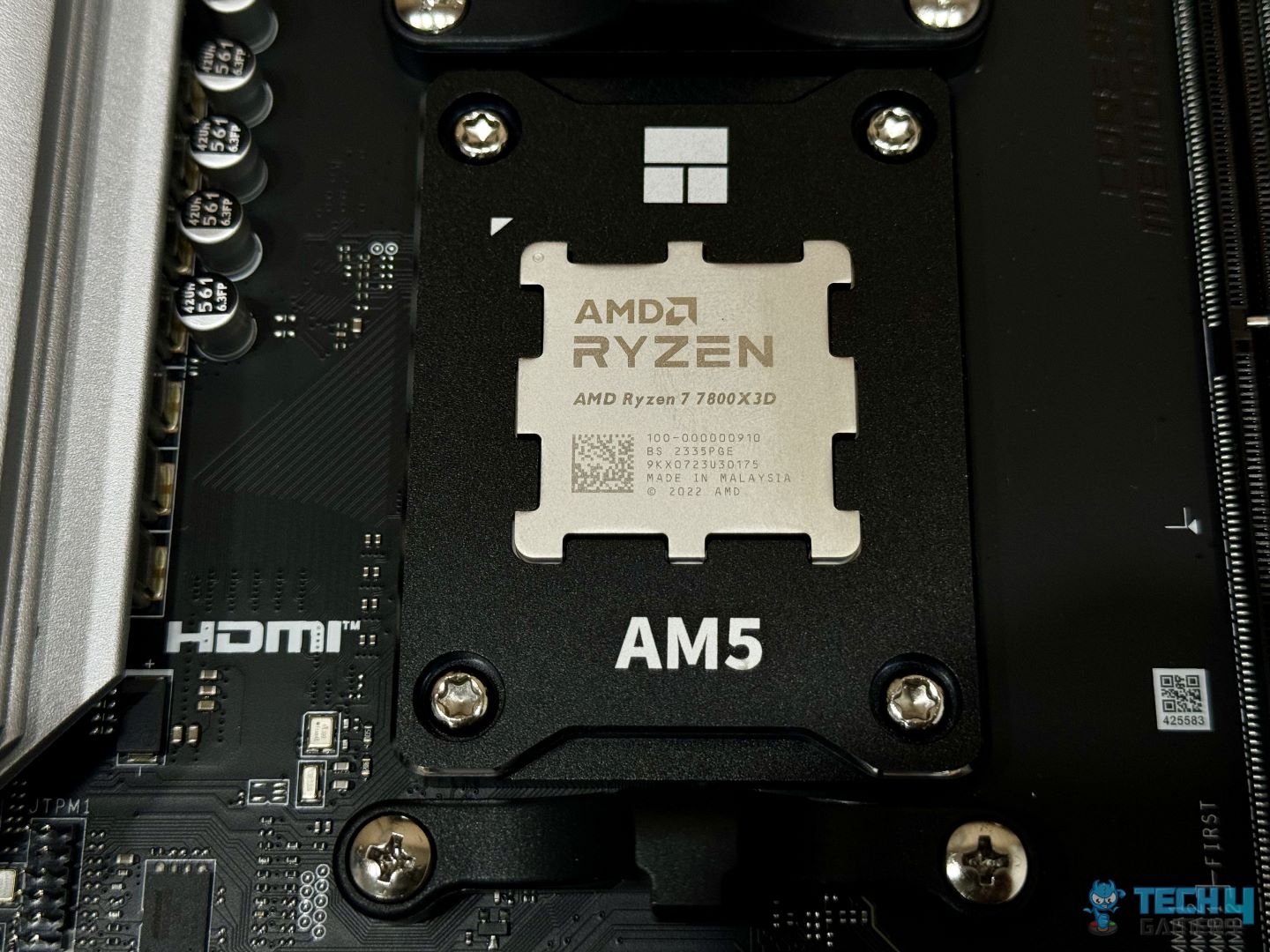
AMD Ryzen 7 7800X3D Installed (Image By Tech4Gamers)
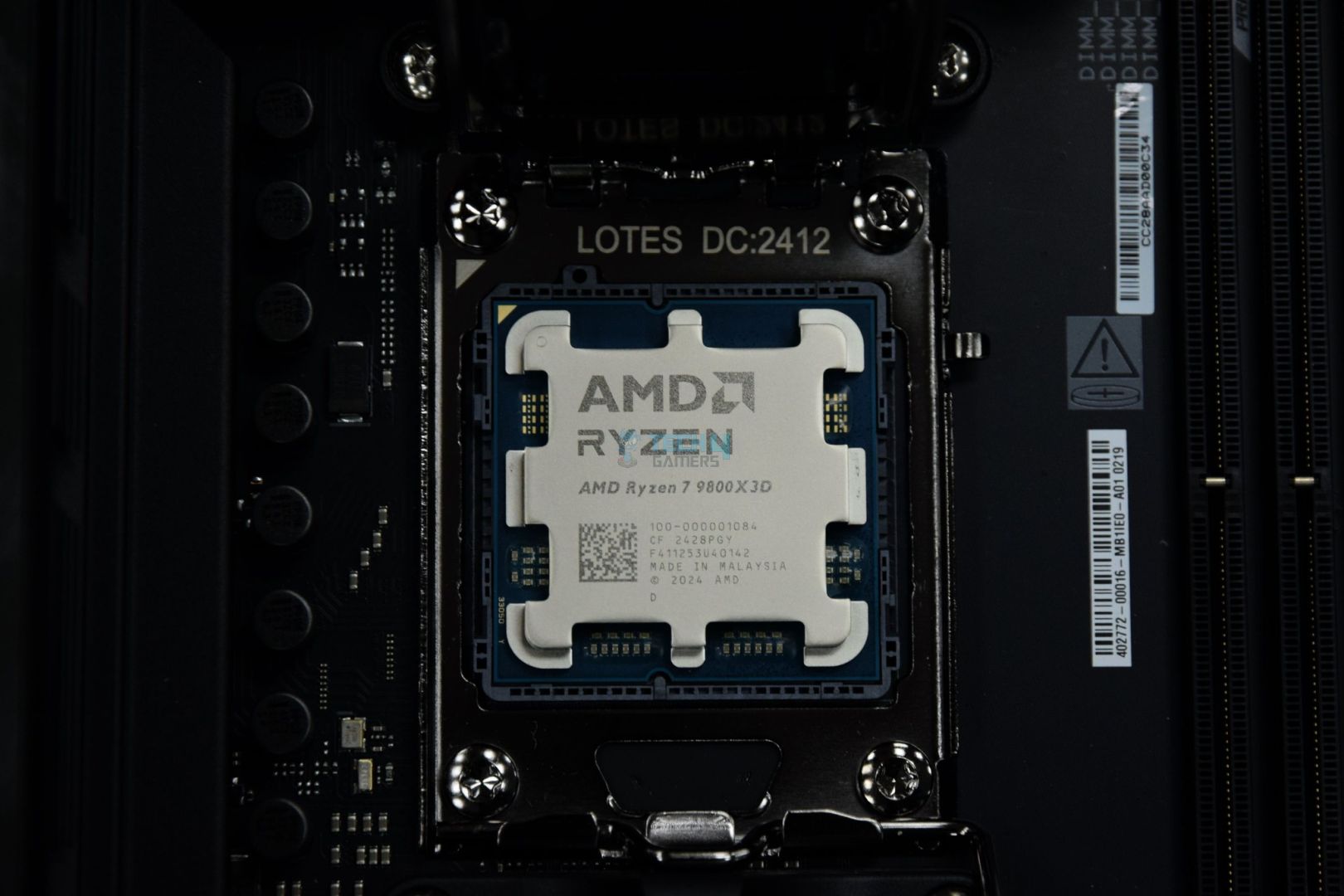
AMD Ryzen 7 9800X3D Installed (Image By Tech4Gamers)
The most significant difference is the new architecture implemented in the Ryzen 7 9800X3D processor. I’m not only talking about the Zen 5 architecture here. Thanks to the 4nm process node, the Ryzen 9000 series CPUs are much more power efficient and run colder than their predecessors.
Added to that is the new 2nd generation of X3D architecture. AMD changed the location of the vertically stacked cache from above the Core Complex Die (CCD) to below it, right next to the cores. How does that help temperatures, you may ask? In simple words, before, the L3 cache acted as a heat insulator, but now, as it’s below the CCD, the heat doesn’t have to travel through the X3D’s cache. Thus, the issue has been resolved.
This is why the previous X3D CPUs couldn’t be overclocked: AMD couldn’t find a way to push the boost clocks. No more thermal issues mean overclocking is back. But that’s not all; like the rest of the 9000 series CPUs, the Ryzen 7 9800X3D is more power efficient than its predecessor.
Efficient Power Consumption Means Lower Thermals
Another vital factor for the lower temperatures is that the Ryzen 7 9800X3D is more power efficient than you’d think. While it consumes more power in some tasks, it is much more efficient than before. The main reason is the improvement in IPC performance in Zen 5 CPUs.
In practice, the 9800X3D uses around 120W, as advertised, but the 7800X3D doesn’t even come close to its 120W TDP. Even so, the former has much lower temperatures thanks to the 3D stacked cache being below the CCD this time, as I explained earlier. There’s a slight gaming performance gap, but I’m more stoked about the lower thermals, power consumption, and significantly higher productivity performance.
Performance, Power, And Thermal Benchmarks
Now, to get to the main comparison, because I know you can be skeptical about mere words, here are some benchmarks from our dedicated reviews of both CPUs. You can feast on the numbers, but don’t worry, I’ll explain in detail what’s happening in all the benchmarks. Let’s start with the gaming performance benchmarks.
1080P gaming chart comparing the Ryzen 7 9800X3D with its competition. (Image by Tech4Gamers)
According to eight games we tested at 1080p with all these CPUs, the Ryzen 7 9800X3D emerged victorious, defeating even the Ryzen 7 7800X3D. The differential isn’t too high, but AMD has sealed its spot as having the world’s fastest gaming CPU. As can be seen, the Core Ultra 9 285K is nowhere near the 7900X3D; leave the 9800X3D. Now, we move to the thermals and power consumption charts.
Comparing the temperatures and power consumption between the Ryzen 7 9800X3D and its competition. (Image By Tech4Gamers)
According to our testing, the 9800X3D consumes nearly as much power as advertised, at 118W, while its counterpart is lower at 99W. The amusing thing? The former’s thermals average 74°C, almost 7°C lower than the 7800X3D. Of course, we are using a 360mm AIO, the DeepCool Mystique 360, for our testing, but you can use an air cooler and still be fine with this CPU.
Productivity performance benchmark comparison. (Image By Tech4Gamers)
Lastly, the productivity performance. Unlike the 7800X3D, which can be considered a “one trick pony” and lacks decent productivity benchmarks, the 9800X3D exceeds all expectations, beating the 9700X, living right below the 13600K. It’s not just multi-core, either; the CPU also has a strong single-core performance.
Are The Gains Worth It?
Isn’t it peculiar that the Ryzen 7 9800X3D consumes more power, has lower thermals, and performs better than the Ryzen 7 7800X3D? This is how far CPUs have come, and I’m honestly proud to have been a part of it. That’s also why the Ryzen 7 9800X3D chips are running much cooler than the 7800X3D. The gaming benchmarks aren’t too hot, but if you want high-end productivity performance, as well, then the 9800X3D is very juicy.
The best part? You don’t need an expensive AIO cooler to keep the thermals low. Use a mid-range air cooler if you want; the thermals won’t shoot up like other high-end CPUs (cough, Intel, cough). AMD has truly gone above and beyond with the Ryzen 7 9800X3D with its efficiency and architecture, and I can’t wait to see what else the company has to offer in the future.
Lead the comparison and blog writing teams at Tech4Gamers.
Oversee teams with a keen eye for detail and precision.
Ensure hands-on writing, with benchmarks and testing as guiding principles.
Guarantee the delivery of the best possible results in concise yet impactful tech tales.
AMD Ryzen 7 9800X3D
Rated: 9.3/10
Intel Core i9-14900K
Rated: 9/10
Pros And Cons
CPU
Pros
Cons
AMD Ryzen 7 9800X3D
✅ Offers 96MB of L3 Cache
✅ Improved thermal performance
❌ High power consumption
Core i9-14900K
✅ Enhanced single and multi-core performance
✅ Up to 6 GHz clock speed
❌ Struggles with thermal efficiency
Key Takeaways
I saw a clear edge of 27.5% in favor of the 9800X3D in gaming, but when it came to productivity the i9-14900K was in a class of its own, beating the former in every benchmark.
In thermal efficiency, the 9800X3D took the edge again, and I found it 26.4% more thermally efficient when compared to the i9-14900K.
Moving on to prices, the 14900K is currently being sold at a cheaper price than its counterpart, giving the users an 8.9% price difference.
Overall, the 9800X3D is a force to reckon with as it provides a massive gaming advantage, but users looking for productivity should opt for the 14900K from Intel.
Why Trust Tech4Gamers
Shehryar is our comparison expert who has been comparing graphics cards, and processors.
500+ components tested and compared by our team of comparison experts (Tech4Gamers Team).
1000+ hours spent testing different components for our comparisons.
At Tech4Gamers, ensuring you get reliable information is our priority. That’s why every comparison undergoes a meticulous review process by our team of experts and editors. Each comparison is carefully examined against our strict editorial guidelines, guaranteeing you trustworthy insights you can depend on.
Core Count: The 9800X3D from Ryzen comes with 8 cores and 16 threads which provide decent performance in productivity, but the 14900K takes off the charts with its 24 cores and 32 threads.
Clock Speed: When it comes to clock speeds, the 9800X3D takes the lead with a base clock of 4.7GHz compared to 3.2GHz. On the other hand, the 14900K provides a better boost clock of up to 6GHz in comparison to 5.2GHz.
Cache: Once again, the Ryzen 9800X3D takes the lead by offering 96MB of shared L3 Cache as compared to its counterpart which is equipped with 36MB of shared L3 cache.
Process Node: Going over the process nodes, the 9800X3D is equipped with a 4nm node while the 14900K hosts a 10nm process node.
TDP: Although both chips offer a similar TDP rating, the 14900K takes a slight lead with 125W while the 9800X3D comes with a rating of 120W.
After the recent launch of the X3D chips from AMD, many users have started to speculate how well it performs against the big names of Intel’s last generation. This article will focus on that aspect and I will be testing the Ryzen 7 9800X3D vs i9-14900K in both gaming and productivity benchmarking.
Gaming Benchmarks – 1080p
Now to get things started, let’s start with the gaming benchmarking, to draw a fair conclusion I have pitted the processors against each other in several games to ensure precision and accuracy. Here is the testing rig that will be used for these benchmarks.
Player Unknown Battleground 1080p Gaming Benchmarks – Image Credits (Tech4Gamers)
Starting with PUBG, the Ryzen 7 9800X3D impressed me with an average of 500 FPS, outshining the Core i9-14900K, which averaged 339 FPS. That’s about a 38% difference in favor of Ryzen, making the gameplay feel a lot smoother.
The Ryzen handled the 1% lows better too, staying at 366 FPS compared to Core i9’s 241 FPS. This 41% gap meant fewer frame drops, which made a noticeable difference in those intense firefights.
League of Legends
League of Legends 1080p Gaming Benchmarks – Image Credits (Tech4Gamers)
While testing League of Legends, I saw Ryzen pulling off a strong 396 FPS, whereas the Core i9 lagged behind slightly at 321 FPS. The 20.9% difference was noticeable, especially in high-action moments.
In terms of 1% lows, Ryzen held steady at 285 FPS, compared to Core i9’s 229 FPS. This 21.7% difference meant Ryzen felt more consistent during team fights, where every frame counts.
Overwatch 2 was interesting because both CPUs performed closely. Ryzen averaged 539 FPS, with Core i9 close behind at 519 FPS, just about a 3.7% lead for Ryzen.
When it came to 1% lows, though, Ryzen still felt smoother, managing 488 FPS while Core i9 hit 436 FPS. The extra 11.2% lead in lows made the gameplay feel just a bit more stable during hectic battles.
Lost Ark
Lost Ark 1080p Gaming Benchmarks – Image Credits (Tech4Gamers)
In Lost Ark, Ryzen took a strong lead, averaging 405 FPS, while the Core i9 only managed 274 FPS. The 38.5% difference really showed up in crowded areas, making Ryzen feel significantly smoother.
For 1% lows, Ryzen held its ground at 220 FPS compared to Core i9’s 165 FPS, giving me around 28.5% more stability during busy scenes with lots of enemies on screen.
Dota 2 ran beautifully on Ryzen, hitting an average of 404 FPS, much higher than Core i9’s 234 FPS. The 53.2% difference was evident, especially during big team fights where I noticed Ryzen handling the action more fluidly.
Moreover, for the 1% lows, Ryzen stayed at 162 FPS, while Core i9 dropped to 120 FPS. This 29.7% gap in lows made Ryzen feel more reliable in high-pressure situations, keeping the frame drops to a minimum.
While testing Cyberpunk 2077, Ryzen reached 227 FPS on average, which was a decent step up from the Core i9’s 167 FPS. This 30.4% difference added a noticeable improvement to the overall experience.
In terms of 1% lows, Ryzen performed well at 185 FPS, while Core i9 fell to 147 FPS. That extra 22.8% on Ryzen helped it feel more stable in busy city scenes and high-action moments.
Black Myth: Wukong
Black Myth: Wukong 1080p Gaming Benchmarks – Image Credits (Tech4Gamers)
Black Myth: Wukong was really close between the two processors. Ryzen averaged 84 FPS, just a slight edge over Core i9’s 83 FPS, which made them feel almost identical in terms of performance.
However, for 1% lows, Ryzen had a small advantage with 78 FPS compared to Core i9’s 71 FPS. This 9.3% difference wasn’t huge, but it did add a little extra smoothness when things got intense.
Productivity Benchmarks
Since the gaming benchmarks have been covered and we can pretty much see a clear winner, let’s switch the stage and check how well they perform when it comes to productivity benchmarking.
When I was testing single-core performance in Cinebench R24, the Core i9-14900K had a slight edge, scoring 140 compared to Ryzen’s 133. The 5.1% difference gives a minor lead in single-core tasks, but it’s not a massive gap.
During multi-core tests, the Core i9-14900K took a substantial lead with a score of 2179, while Ryzen 7 9800X3D scored 1318. This 49.2% difference highlights the Core i9’s advantage in heavy workloads.
In Geekbench 6’s single-core test, both CPUs performed almost identically, with Ryzen scoring at 3307 and Core i9 at 3291 only a tiny 0.4% difference. In practical terms, this means they’re almost indistinguishable in single-core tasks.
For multi-core performance, the Core i9-14900K took a noticeable lead, scoring 23053 compared to Ryzen’s 18223. That 23.4% difference makes Core i9 the stronger choice for multi-threaded tasks.
While testing FP32 performance, the Core i9’s integrated GPU performed much better, scoring 846 versus Ryzen’s 565. This 39.8% difference means that the Core i9’s iGPU could be handy for applications using iGPU performance.
The Ryzen 7 9800X3D performs exceptionally well when it comes to gaming performance and takes a major lead of 27.5% over the Core i9-14900K which makes it really tempting for any users looking to upgrade and improve their gaming experience.
1% Lows
After getting a detailed analysis of the 1% lows of both processors, it can be safely said that the Ryzen 7 9800X3D provides a more stable gaming experience as there is a major 23.4% difference when compared to the Core i9-14900K.
Productivity
On the contrary to the gaming performance, the Core i9-14900K finally takes the lead when compared against the Ryzen 7 9800X3D in the productivity benchmarks which comes as no surprise as the chip hosts more cores and threads.
Thermal Efficiency
Game
Core i9-14900K (°C)
Ryzen 9 9800X3D (°C)
Player Unknown Battleground
71
56
League of Legends
66
48
Overwatch 2
71
53
Lost Ark
78
53
Dota 2
66
51
Cyberpunk 2077 (Next Gen)
67
57
Black Myth : Wukong
56
46
Average Thermal Statistics
67.8🌡️
52🌡️
Winner: AMD Ryzen 9 9800X3D
Due to the utilization of the new chipset technology, the Ryzen 7 9800X3D can provide great results while generating as little heat as possible. During our testing, this fact checked out as the chip was 26.4% more thermally efficient compared to Core i9-14900K.
Price
CPU
Core i9-14900K
Ryzen 7 9800X3D
Price Difference
Launch MSRP
💲589
💲479
20.5%
Current Price
💲438
💲479
8.9%
Although the Core i9-14900K was more expensive at its launch, it is currently being sold at a cheaper price when compared to the new 9800X3D chip. Furthermore, since the latter is still new, users might face shortage issues when trying to acquire it.
What I Recommend
Core i9-14900K: Although the Core i9 struggles in gaming performance, it makes up for it when it comes to productivity tasks. Moreover, since the chip is equipped with 24 cores and 32 threads, it is bound to save you a lot of time if you are using it in content creation.
AMD Ryzen 7 9800X3D: Being the cream of the 9000 lineup, the X3D chips never fail to deliver, similar to how they have performed before the 9800X3D also offers remarkable gaming performance while also offering decent efficiency in productivity tasks.
To sum it all up, both the processors have their ups and downs, while the Core i9 is unparalleled when it comes to content creation, the 9800X3D doesn’t fall far behind while offering a major boost in gaming performance so the decision to get either of these chips rests on your priorities.
FAQs
Is the 14900K good for content creation?
The Core i9-14900K performs better in tasks like video editing and rendering due to its superior multi-core performance.
What motherboard and RAM are compatible with Ryzen 7 9800X3D and Core i9-14900K?
The Ryzen 7 9800X3D supports AM5 with DDR5 and PCIe 5.0. The Core i9-14900K works with LGA 1700 and supports both DDR4 and DDR5.
Are there good upgrade paths for Ryzen 7 9800X3D and Core i9-14900K?
The Ryzen 7 9800X3D on AM5 has a future-proof upgrade path. The Core i9-14900K on LGA 1700 may have limited future upgrade options.
Which processor has better overclocking potential?
The Core i9-14900K generally has better overclocking headroom than the Ryzen 7 9800X3D, allowing enthusiasts to push its performance further with adequate cooling.
Which processor has better integrated graphics?
The Core i9-14900K has a more powerful integrated GPU compared to the Ryzen 7 9800X3D, making it a better choice for users without a dedicated GPU.
At T4G, my task is to cover the latest news around the gaming globe ASAP and with the utmost precision. I adore all the games and respect all the devs behind the amazing games that we get all year. So, whether it’s a PC or a Console game, I got it all covered.
Story Highlight
Marvel’s Spider-Man 2 was labeled as a ‘PS5 Pro Enhanced’ game which promises 4K at 60 FPS.
Testing shows the game drops to 42 FPS and fails to maintain the promised 60 FPS in Fidelity Pro mode.
The performance is notably better and more stable with the Performance Pro mode.
Sony’s mid-gen refresh, the PS5 Pro, is finally out, and most opinions on the console are mixed. While it does offer substantially better image quality in certain games, it fails to deliver the performance to match the visuals.
Similarly, Marvel’s Spider-Man 2, a ‘PS5 Pro Enhanced’ title, fails to maintain the promised 60 FPS in fidelity pro mode when the 120Hz option is enabled. This trend has been similar for most newer releases.
Why it matters: The PS5 Pro costs a whopping $700, but testing has proved that while there is a performance and quality difference between the base and Pro models, it isn’t significant enough to warrant an upgrade.
The PS5 Pro enhanced label promises a 4K 60FPS experience in Fidelity mode, but the frames consistently drop to around 40 FPS at dynamic 2160p using PSSR. However, there is a noticeable difference in shadows and reflections due to the enhanced ray tracing on the PS5 Pro.
The results are better when in Performance Pro mode which runs at dynamic 1440p with PSSR. The Pro console can go above 60 FPS with unlocked frames and generally offers a much smoother experience than the PS5’s performance mode. With VRR, the results become quite comparable.
However, the visuals are a mixed bag. The PS5 Pro switches Insomniac’s IGTI temporal engine with PSSR upscaling. While this results in overall improved visuals, the sharpness is notably better with the former.
Marvel’s Spider-Man 2 fails to deliver promised performance on PS5 Pro
This again raises the question of whether the PS5 Pro is worth it for the inflated price. The latest benchmarks revealed the console losing out to RX 6800, a 4-year-old GPU. But in other games like Monster Hunter, TLOU, and more, it shows impressive improvements.
What are your thoughts on PS5 Pro struggling to maintain 60 FPS in fidelity mode on PS5 Pro? Let us know in the comments or join the discussion at the official Tech4Gamers Forum.
At Tech4Gamers, I mainly cover new gaming news, leaks, and rumours. Aside from that, I love to write features about my favourite games while inserting my opinion about their different aspects.
Story Highlight
PlayStation 5 Pro was highly criticized because of its hefty price tag, hinting toward poor sales.
However, the president of Sony has revealed that it didn’t impact the sales.
PS5 Pro pre-orders were stronger than PS4 Pro in the same period.
However, as time passed and more videos explaining the benefits of the pro version were released, many fans changed their perspective. While there are still many who think this mid-gen refresh isn’t worth buying, others hold it in high regard.
Sony President Hiroki Totoki reveals that PS5 Pro pre-orders were stronger than PS4 Pro pre-orders during the same period.
Why it matters: Given that fans were making a big deal out of the $700 price tag (which is way higher in some regions), the pre-orders are quite impressive.
PlayStation 5 Pro Struggles To Maintain 60FPS In CPU Intensive Games Like Baldur’s Gate 3
Hiroki Totoki, Sony’s CFO, COO, and President, recently revealed during a live stream right after the financial earnings call that the PlayStation 5 Pro pre-orders were quite strong.
I’m under the impression that the product is performing slightly stronger than the pre-orders of the PS4 Pro during the same period.
-Hiroki Totoki
He explains that the pro variant is a high-end product targeted at core customers, so there are no expectations for it to achieve massive sales. Given that it is a mid-gen refresh, expecting high sales wouldn’t make sense at all.
That said, it is surprising that the console achieved more pre-orders than the PS4 Pro in the same period. Totoki acknowledged that the price tag received some hate, but it didn’t negatively affect sales.
Even after the release, it seems that sales are going pretty strong, as it is the best-selling console on Amazon and Gamestop.
What do you think of PS5 Pro beating the pre-orders of PS4 Pro in a similar time period? Do you think the pro variant is worth the extra bucks? Let us know your thoughts in the comments section below, or join the discussion at the official Tech4Gamers forums.
At Tech4Gamers, I mainly cover new gaming news, leaks, and rumours. Aside from that, I love to write features about my favourite games while inserting my opinion about their different aspects.
Story Highlight
The Witcher 4 is among the most hyped upcoming games, but CDPR has yet to reveal more information about the title.
GOG, one of the most trusted platforms, has placeholder 2025 as its release window.
It seems like CDPR is gearing up to reveal some information about the game or even a trailer.
The Witcher is a genre-defining series in the gaming industry, so the hype for its upcoming entry is extremely high. CDPR previously revealed that full production will start in 2024 with 400 devs, so it seems like the game is being treated with high priority.
Some other projects are also in development, such as The Witcher multiplayer title and the sequel to Cyberpunk 2077. However, there is no information regarding the release window of any project.
Surprisingly, GOG, one of the best platforms to buy video games, has seemingly confirmed that The Witcher 4 will have a 2025 release window.
Why it matters: The upcoming entry in the Witcher series is going to be a massive one as CDPR wants to gain back the fandom’s trust with Witcher 4 and the Cyberpunk 2077 sequel.
The Witcher 4 Release Window Seems To Be Revealed Via GOG
As you can see in the image above it has a placeholder of 31st December 2025 release date. While many fans find it hard to believe that CDPR will release the game too quickly, some are concerned that they might see a similar situation to Cyberunk 2077.
Nah, take more time, CDPR, we don’t want no CP77 situation again.
-Reddit User
Some other fans are claiming that their guess for the release window is 2026 or 2027 which seems pretty fair. The developer previously revealed that The Witcher 4 will enter full production in 2024, so it is pretty hard to believe that it will be released next year.
While we might not get the game next year, given its demand, we are likely to get a trailer very soon. We don’t know much about the game other than that it is being developed via UE5, and Geralt is coming back. So, CD Projekt Red seems to be gearing up to reveal more information.
What do you think of the release date mentioned by GOG? Do you think the game will be released on 31 December 2025? Let us know your thoughts in the comments section below, or join the discussion at the official Tech4Gamers forums.
At T4G, my task is to cover the latest news around the gaming globe ASAP and with the utmost precision. I adore all the games and respect all the devs behind the amazing games that we get all year. So, whether it’s a PC or a Console game, I got it all covered.
Story Highlight
AMD now holds almost 30% of the desktop CPU market share.
This marks a 10% increase compared to last year and 5.7% from last quarter.
Intel still holds a 70% share, but the crown is slowly slipping away.
Intel has ruled the CPU market for a very long time. Once the default choice for most people, it is now losing itself against competition from AMD. In the desktop x86 CPU Market, AMD claims almost 30% of the market share.
Why it matters: Intel’s latest Raptor Lake CPUs have consistently been under fire for instability and crashing issues. This led to many fans jumping shipping platforms and heading over to AMD.
AMD now holds almost 30% of the desktop CPU market share
In Q3 of 2024, AMD saw a growth of 5.7% in the CPU market compared to the last quarter. During this period, it released its much-anticipated Ryzen 9000 series. It also marks a massive 10% improvement compared to last year.
This led AMD to claim 28.7% of the overall desktop CPU market share. It also showed decent figures in the laptop and server markets, although the increase was more substantial in the desktop space.
AMD is gradually gaining the upper hand on Intel
There is no denying that Intel still owns over 70% of the market share, but things were a lot different a few years back. Intel dominated every chart, and there was no competition. Quarter by quarter, that crown is now slipping.
Intel needs to consider its situation in the market if it wants to sustain its crown. The 13th and 14th-generation and core ultra processors aren’t bad performers, but when they constantly crash on you, it’s better to skip them altogether, and Intel seriously needs to sort this out.
For context, AMD dominates the top sellers on Amazon. In terms of the console market, everything from the PS5 and Xbox Series to handhelds like ROG Ally and others utilizes AMD processors.
What are your thoughts on AMD’s CPU market growth? Let us know in the comments or join the discussion at the official Tech4Gamers Forum.
At Tech4Gamers, I contribute as a Senior News Reporter, combining my skills and gaming enthusiasm to keep our audience updated on the latest developments.
Story Highlight
Nvidia has announced a 100-hour monthly limit on the paid GeForce Now plans.
Fans have not taken kindly to this announcement and are rushing to cancel their subscriptions.
Many believe the company will introduce a more expensive plan without any such limit.
Nvidia is among the major companies playing a huge role in the cloud gaming industry. Thanks to its powerful hardware, GeForce Now, which offers access to over 2000 games, including those from Bethesda, is the go-to for many gamers.
However, the subscription has recently gone through a few controversial changes. Following Nvidia’s latest playtime limit, fans have begun to rally against the service.
Why it matters: Since the subscription is still growing, this announcement could prove to be a major misstep that halts its future growth.
Fans Are Cancelling GeForce Now Subscriptions | Image via Reddit
Nvidia’s recent social media posts are filled with replies from angry customers. While some have called for boycotts, others have already decided to move on. Many also expect Nvidia to eventually introduce a new tier with unlimited playtime.
They believe that this is just the beginning and that voting with wallets is the best choice for now.
I will be cancelling my membership next year.
-Letshitamillion
Players have also expressed concerns about the playtime wasted dealing with server disconnections and network errors. Overall, the reactions have been anything but positive.
For those unaware, the service now has a 100-hour monthly limit for the Performance and Ultimate tiers, which cost $9.99 and $19.99, respectively. No such limit exists for the free tier, but fans have spoken out against the changes.
According to Nvidia, this limit was implemented after studying player metrics. The company claims that only 6% of its subscribers spend more than 100 hours a month on streaming.
To accommodate this small percentage of existing subscribers, the company is also offering unlimited playtime until 2026.
The Ultimate Plan Offers Streaming Through RTX 4080 PCs | Image via Nvidia
It remains to be seen if Nvidia will make any additional changes to the service after the current outrage. Companies have been known to reverse such decisions after public outbursts, so something similar is not completely impossible in this instance.
Currently, GeForce Now does not have many alternatives, with options limited to the likes of Xbox Cloud Gaming, a service boasting more than 10 million users. What are your thoughts on this situation? Let’s discuss it in the comments and on the official Tech4Gamers Forums.
I’ve previously worked for eXputer as a Senior News Writer for several years. Now with Tech4Gamers, I love to devoutly keep up with the latest gaming and entertainment industries. I have a Bachelor’s Degree in Computer Science and years of experience reporting on games and breaking exclusive stories. Besides my passion for gaming journalism, I love spending my leisure time farming away in Stardew Valley. VGC, IGN, GameSpot, Game Rant, TheGamer, GamingBolt, The Verge, NME, Metro, Dot Esports, GameByte, Kotaku Australia, PC Gamer, and more have cited my articles.
Story Highlight
WB Games and Rocksteady are apparently developing a remake of Batman: Arkham Asylum.
This rumor comes from YouTuber Vara Dark, who previously broke the news of Rocksteady layoffs.
Shpeshal_Nick also hinted recently that a new Batman title is in development
Warner Bros. Games hasn’t had an easy time with DC titles in recent years, with its major AAA releases like Suicide Squad: Kill the Justice League and Gotham Knights not doing particularly well sales-wise.
With Rocksteady’s return to the Batman Arkham universe also not working out, the status of the DC IPs has been up in the air at WB. But rumors suggest that the studio might be remaking one of its most popular titles, Batman: Arkham Asylum, in a bid to return to its glory days.
Why it matters: Remaking Batman: Arkham Asylum is a desperate attempt to return to success for a sinking studio like Rocksteady.
Batman: Arkham Asylum is set to get a remake.
This rumor originates from YouTuber Vara Dark, who posted on X about her sources saying that a remake of the 2009 adventure title has been greenlit internally and is in the works. According to the YouTuber, this source was right about the company laying off employees recently; hence, this rumor has some backing.
In addition, she also stated that Warner Bros. is planning this reunion with the game’s original cast. Back in September, popular insider Shpeshal_Nick also shared on X that Rocksteady is internally working on a new Batman game.
Many people consider Black Arkham Asylum one of the greatest titles ever made, with its sequel, Arkham City, garnering even more praise.
So, remaking the adventure game does feel like nostalgia baiting, but with the company losing more than half of its staff in the recent layoffs and releasing a financial and critical failure like Suicide Squad, maybe some cheap nostalgia baiting is required to secure its future.
Do you think people will buy a Batman Arkham Asylum remake? Leave your thoughts in the comment below or head to the Tech4Gamers forum to join the discussion.
Lead the comparison and blog writing teams at Tech4Gamers.
Oversee teams with a keen eye for detail and precision.
Ensure hands-on writing, with benchmarks and testing as guiding principles.
Guarantee the delivery of the best possible results in concise yet impactful tech tales.
AMD Ryzen 7 9800X3D
Rated: 9.3/10
AMD Ryzen 7 7800X3D
Rated: 9/10
Pros And Cons
CPU
Pros
Cons
AMD Ryzen 7 9800X3D
✅ Comes with 96MB of L3 Cache
✅ Equipped with 8 Cores
❌ Increased Power Consumption
AMD Ryzen 7 7800X3D
✅ Improved Power Efficiency
✅ Compatible with DDR5 Memory
❌ Low Thermal Efficiency
Key Takeaways
The Ryzen 9800X3D provides a small 8.5% boost in gaming but offers a more significant offering when it comes to productive tasks compared to the 7800X3D.
Moving over to power efficiency, the 7800X3D takes the cake here by consuming 22.7% less power compared to the 9800X3D.
Pricing is a serious concern between the two processors as of Nov 2024, seeing how the 9800X3D is currently short in the market and being sold at more than 30-40% higher price than MSRP.
Finally, according to my results, I would recommend the 9800X3D to anyone looking for a major upgrade from an old gen, as it provides great value at its price tag.
Why Trust Tech4Gamers
Shehryar is our comparison expert who has been comparing graphics cards, and processors.
500+ components tested and compared by our team of comparison experts (Tech4Gamers Team).
1000+ hours spent testing different components for our comparisons.
At Tech4Gamers, ensuring you get reliable information is our priority. That’s why every comparison undergoes a meticulous review process by our team of experts and editors. Each comparison is carefully examined against our strict editorial guidelines, guaranteeing you trustworthy insights you can depend on.
Core Count: Although from different generations, both processors come equipped with 8 cores, and the threads follow the same pattern having 16 each.
Clock Speed: Regarding clock speeds, the 7800X3D comes with a 4.20 GHz base clock and a 4.7 GHz up to boost clock speed. On the other hand, the 9800X3D improves this by offering a 4.2GHz base clock and a 5.2GHz up-to-boost clock.
Cache: Similar to clock speeds, both the processors utilize a shared 96 MB of L3 Cache and 1 MB of L2 Cache per core respectively. But the 9800X3D takes a slight edge in L1 cache, using 80 KB per core instead of 64 KB.
Process Node: The 7800X3D utilized a 5nm process node, which has been further optimized in the 9800X3D with a 4nm process node enhancing efficiency.
TDP: Both the chips come with the same TDP rating of 120 W, which on chart shows their identical power consumption levels but this will be further tested in gaming scenarios.
The recent launch of the Ryzen 9000 series from AMD has received its fair share of criticism as the overall series has been considered a flop. But the company has finally decided to release its infamous X3D lineup to improve its image. In this article, we will be testing the Ryzen 7 9800X3D vs Ryzen 7 7800X3D.
Gaming Benchmarks – 1080p
To get the most accurate and precise results, we will be testing both of these processors in a series of gaming benchmarks. So if your main purpose of getting these processors is to game, these tests will help you solidify your decision on which one to get for your system. Furthermore, the following testing rig has been used for these benchmarks.
Starting the first game, the Ryzen 7 9800X3D gave me about 158 FPS, while the Ryzen 7 7800X3D averaged around 143 FPS. That’s a noticeable 9.9% advantage, making gameplay feel just a bit smoother on the 9800X3D.
For those tough moments, the Ryzen 7 9800X3D held up with 120 FPS in the 1% lows, while the 7800X3D dipped down to 108FPS around a 10.5% difference. It’s a small boost but does make things feel more stable.
Microsoft Flight Simulator
Microsoft Flight Simulator 1080p Gaming Benchmarks – Image Credits (Tech4Gamers)
In Flight Simulator, the 9800X3D came out ahead with 145 FPS compared to 127 FPS on the 7800X3D. That’s a 13.2% difference, which is quite nice for smoother visuals in such a demanding game.
Moreover, in 1% lows, the 9800X3D stayed strong with 111 FPS, whereas the 7800X3D was around 71 FPS, a more significant 43.9% difference that helps keep the game stable in intensive scenes.
Playing Hogwarts Legacy, I got about 103 FPS on the 9800X3D and 86 FPS on the 7800X3D. That’s around a 17.9% difference, which helps the game look smoother on the higher-end processor.
The 9800X3D managed 56 FPS in the 1% lows compared to 47 FPS on the 7800X3D, giving it a slight but noticeable edge of 17.4% in handling dips.
Forza Horizon 5
Forza Horizon 5 1080p Gaming Benchmarks – Image Credits (Tech4Gamers)
In Forza Horizon 5, the Ryzen 7 9800X3D averaged around 271 FPS, just slightly higher than the 7800X3D’s 263 FPS. The difference is only 2.9%, so both give a pretty smooth experience.
When it came to 1% lows, the 9800X3D scored 202 FPS, while the 7800X3D had 173 FPS a difference of 15.4% that you might feel in high-speed scenes.
Ghost of Tsushima
Ghost of Tsushima 1080p Gaming Benchmarks – Image Credits (Tech4Gamers)
Running Ghost of Tsushima, the 9800X3D pulled off 219 FPS compared to the 7800X3D’s 197 FPS, a 10.5% difference. That makes for a subtly smoother experience on the 9800X3D.
With 1% lows following a similar picture, the 9800X3D was at 192 FPS, while the 7800X3D was closer to 164 FPS, giving the newer processor a 15.7% boost for consistency.
In Starfield, I saw 133 FPS on the 7800X3D, but the 9800X3D pushed ahead with 153 FPS creating a 13.9% difference, enough to make the gameplay slightly more fluid.
For the 1% lows, the 9800X3D achieved 126 FPS compared to 102 FPS on the 7800X3D. This 21% gap is quite noticeable, especially in Starfield’s denser areas.
God of War Ragnarok
God of War Ragnarok 1080p Gaming Benchmarks – Image Credits (Tech4Gamers)
Playing God of War, both processors performed closely, with the 9800X3D at 346 FPS and the 7800X3D at 338 FPS only a small 2.3% difference, so either one handles this game beautifully.
In 1% lows, the 9800X3D showed 227 FPS, while the 7800X3D dropped a bit more to 213 FPS. The difference is small just amounting to 6.3%, but it’s there if you’re really looking.
The Witcher 3
The Witcher 3 1080p Gaming Benchmarks – Image Credits (Tech4Gamers)
In The Witcher 3, I got around 116 FPS on the 9800X3D, while the 7800X3D hit 100 FPS, a 14.8% advantage on the newer chip that smooths out Geralt’s adventures.
Checking the 1% lows, the 9800X3D maintained 102 FPS, while the 7800X3D dropped to 70 FPS. That’s a significant 32.3% difference, making the 9800X3D feel a lot more stable in heavy scenes.
Productivity Benchmarks
Since the gaming benchmarks are out of the way, let’s test these processors based on their productivity scores so that users can get additional insights into their performance.
Running Cinebench R24, I noticed a nice bump in both single-core and multi-core scores with the Ryzen 7 9800X3D. In single-core, it hit 133 compared to the 7800X3D’s 115, which made everything feel just a bit snappier.
But the real difference showed up in multi-core tasks, where the 9800X3D scored 1354 over the 7800X3D’s 1108. That extra power in multi-core really stands out in heavy workloads, making multitasking and rendering noticeably faster.
In Photoshop, the 9800X3D scored 12073, outperforming the 7800X3D, which scored 10363. This 1710-point boost means smoother performance in Photoshop, especially with complex layers and filters.
Testing Blender, the 9800X3D rendered at 333.2, significantly faster than the 7800X3D’s 265.9. That’s about a 67.3-point advantage, which really cuts down render times in 3D work.
During my testing, the results came up with an 8.5% average gaming performance difference between the processors which doesn’t seem something really worth upgrading over. In some games, there was barely a difference of 2.9% strengthening my claim even further.
1% Lows
While checking the 1% lows I noticed a bigger percentage, with the two processors showing a difference of 17.6%, which does showcase the capability of the 9800X3D as a more stable option.
Productivity
When it came to productivity both processors performed exceptionally, with the 9800X3D having a slight edge in Cinebench 24, and a major one of 22.4% in Blender showcasing its productivity capabilities.
Power
Game
Ryzen 7 7800X3D
Ryzen 7 9800X3D
Cyberpunk 2077
68
87
Microsoft Flight Simulator
52
68
Hogwarts Legacy
56
71
Forza Horizon 5
60
78
Ghost of Tsushima
55
69
Starfield
74
94
God of War Ragnarok
70
85
The Witcher 3
60
70
Average Power Draw
61.8⚡
77.7⚡
Winner: Ryzen 7 7800X3D
As I was testing these processors, one of the things that came to light was the higher power consumption on the 9800X3D, which is quite surprising seeing how it is thermally more efficient than the 7800X3D which utilizes 22.7% less power.
Price
CPU
Ryzen 7 7800X3D
Ryzen 7 9800X3D
Price Difference
Launch MSRP
💲449
💲479
6.4%
Current Price
💲474
💲479
1%
Although both processors came with a close retail price, due to the shortage of the new generation chips the prices have skyrocketed and some scalpers are selling it with as much as 30-40% price hike, which makes the situation worse if the available units get sold out.
What We Recommend
AMD Ryzen 7 7800X3D: According to my testing results and research, the 7800X3D is still an exceptional option for anyone looking for a significant performance bump while not breaking the bank.
AMD Ryzen 7 9800X3D: On the flip side, the 9800X3D does pack a punch when it comes to gaming, productivity, thermal efficiency, and overclocking due to the recent change in its chipset, but because of its shortage, the prices have hiked significantly which is a major concern.
In my opinion, anyone currently using the 7800X3D processor for anything higher than 1080p doesn’t need to switch as the difference in performance is not worth it considering the price difference. But if you are coming from an old-gen processor, then I would recommend the 9800X3D.
FAQs
Does the Ryzen 7 9800X3D support overclocking?
Yes, the Ryzen 7 9800X3D supports overclocking, allowing users to push the processor’s limits for even higher performance, though cooling requirements should be considered.
What socket does the Ryzen 7 9800X3D use?
The Ryzen 7 9800X3D uses the AM5 socket, is compatible with AMD’s latest motherboards and supports advanced features like PCIe 5.0 and DDR5 memory.
How does the Ryzen 7 7800X3D handle creative tasks?
The Ryzen 7 7800X3D performs well in creative applications, managing tasks like video editing and rendering efficiently, making it a solid choice for creative professionals.
Is the Ryzen 7 9800X3D energy-efficient?
The Ryzen 7 9800X3D is designed with energy efficiency in mind, balancing high performance with optimized power consumption, especially in lower-power workloads.
Does the Ryzen 7 7800X3D support DDR5 memory?
Yes, the Ryzen 7 7800X3D supports DDR5 memory, allowing for faster data transfer speeds and improved overall system performance with compatible RAM.
As Tech4Gamers’ Founder and Editor-in-Chief, I bring over 13 years of PC Hardware Reviewing and 8+ years of IT Project Management experience. Certified in Google IT Support , my focus is on providing honest product reviews and analysis and fostering a strong gaming community with 130k+ members in PPG.
Huzaifa Haroon
Being a keyboard enthusiast, I specialize in reviewing, modding, and critiquing them for the people. If you’re a Razer fanboy, my only goal is to convert you to the dark side 😈.
A couple of weeks ago, we reviewed the Lucky65 and awarded it an Editor’s Choice award because it was the best budget 65% aluminum keyboard we could find. It nailed all the fundamentals without any corner-cutting to reach that price.
Fast forward to October and Weikav is back with its successor: Lucky65 V2. Equipped with a bunch of quality-of-life improvements and some new colors while maintaining the same price, can the board that was already the best get even better?
Why Trust Tech4Gamers
Huzaifa Haroon is our keyboard expert with years of experience in building and testing custom keyboards.
130+ peripherals tested and reviewed by our team of hardware experts (Tech4Gamers Team).
500+ hours spent testing different peripherals for our reviews.
At Tech4Gamers, ensuring you get reliable information is our priority. That’s why every hardware round-up undergoes a meticulous review process by our team of experts and editors. Each review is carefully examined against our strict editorial guidelines, guaranteeing you trustworthy insights you can depend on.
Key Takeaways
Lucky65 V2 is a worthy upgrade from V1 refining a board that was already great with features that make it even easier to use and work with.
Buy the Lucky65 V2 if you want a solid, no-frills aluminum keyboard with no compromises that don’t break the bank.
Avoid the Lucky65 V2 if you’re looking for a wireless keyboard for competitive gaming or if you need a volume knob/screen.
1.2mm thickness with flex cuts; supports split spacebar and split shift layouts
Connectivity
Tri-mode: Bluetooth 5.0, 2.4GHz wireless, and USB-C wired connections
Battery Capacity
3750mAh
RGB Lighting
South-facing per-key RGB backlighting
Typing Angle
7 degrees
Front Height
20.5mm
Weight
Approximately 1.2 kg (unbuilt)
Software Support
Compatible with QMK and VIA for key mapping and lighting customization
[toc]
How Is The Lucky65 V2 Different?
The one thing that sets this board apart from others is its ball-catch assembly. No one else is offering such convenience for this low of a price, even its closest competitor is around $30 more expensive. But the best part is that you don’t have to do all this, it’s a great board out of the box that leaves room for enthusiasts to tinker only if they choose to.
With the ball-catch system, taking apart your board becomes effortless. You can try out various different configs, mess around with foams and mod the thing to your heart’s content without having to waste time unscrewing and screwing everything back.
Lucky65 V2 Custom Keyboard (Image By Tech4Gamers)
Unboxing Experience
Lucky65 V2 comes in packaging identical to the first one. A simple green box with some clover leaves all around and tabs at the bottom to get inside. Once opened, you’re greeted to the instructions card/manual, underneath which lies the keyboard wrapped in plastic topped with a dust cover.
The accessories are to the side, but this time we don’t get a USB receiver, only the keycap/switch puller and a generic USB-C cable. Like before, no screwdriver is present in the box, but you actually don’t need it this time.
Lucky65 V2 has the exact same box as the V1 (Image By Tech4Gamers)
Here’s everything you get in the box:
1x Lucky65 V2
1x Instructions Card
1x Dust Cover
1x Keycap/Switch Puller
1x USB-C Cable
Package Contents (Image By Tech4Gamers)
Design & Build
At first glance, there’s almost no difference between the Lucky65 V2 and V1, they have the exact same build quality with the smooth anodization and hefty weight. The colorways are a bit different this time but if you choose, for instance, red, even that looks identical to the previous iteration.
Design (Image By Tech4Gamers)
The side profile, the USB port placement, even the bezels are the same otherwise. That is to say, an overall clean, minimal look with no distractions accompanying a simple design. The build quality is up there with the very best in the budget category, with no grittiness or chalkiness, and a solid anno job with perfect curves and chamfering on the inner edges.
Back Design (Image By Tech4Gamers)
It’s not until you turn the board around that you start to see the difference. The weight on the back is now textured like “ice crystals” and comes in silver instead of gold. The leaf clover has been moved from the bottom corner to the middle on a magneticbadge. It acts as the centerpiece of the entire keyboard, hiding the 2.4GHz dongle underneath.
USB (Image By Tech4Gamers)
Likewise, the board has a 7-degree typing angle and 20mm front height that’s comfortable to type on without a wrist rest. It weighs 1.3 kg unbuilt, and that extends to almost 2 kg fully built. Again, it’s similar to the V1, so if it ain’t broken, don’t fix it.
Layout & Features
The Lucky65 V2 shares most of the same features as its predecessor — it’s a 65% mechanical keyboard that comes barebones (no keycaps or switches supplied). It has a 5-pin fully hotswap PCB with south-facing RGB that’s not controllable per-key. This is due to the fact that this board relies on VIA and doesn’t have any dedicated software.
Weikav has kept the same tri-mode support here, so the board is wireless with Bluetooth and 2.4GHz functionality, and wired over USB-C. The 1.2mm PCB looks the same with a lot of flex cuts, but the plate has been updated to FR4 material (still with flex cuts). There is also only ANSI support this time around, but the PCB supports screw-in stabs.
Gasket (Image By Tech4Gamers)
Lucky65 V2 is still gasket-mounted using little silicone gasket beans on the PCB and features five layers of foam: plate foam, IXPE sheet, PET sheet, PCB foam, and an ESD insulation sheet to protect the PCB from shorting if it ever accidentally comes in contact with the bottom case.
Assembly (Image By Tech4Gamers)
The real improvements come in the form of a new structure joining the top and bottom case. Lucky65 V2 features a catch-ball assembly, meaning the case is completely screwless and all you have to do to open it, is pull it toward you. To close it back, simply apply pressure and the little catch-balls will, um, catch the balls and lock the cases in place.
Magnetic Badge (Image By Tech4Gamers)
We saw this first on the TKD Cycle7 last year where they called it “EZ-Assemble”, and this idea has since really taken off. It makes the board much easier to take apart for modding and save time for enthusiasts who like to tinker often. This is the highlight of the Lucky65 V2, more on this later.
Lastly, as I already mentioned in the design section the board has a new magnetic badge at the back that now houses the wireless receiver. The magnets are strong and satisfying, and you can’t accidentally put the badge upside down. A dedicated place to store the 2.4GHz receiver is always appreciated as I’ve already misplaced my Lucky65 V1’s dongle.
Performance & Battery Life
There’s nothing new to say here. The Lucky65 V2 lines up completely with the results of the V1. Performance is solid in wireless modes, but the latency is not low enough for competitive gaming, for that plugging in still recommended. There are no connection issues or random signal drops or anything like that, however.
Top Design (Image By Tech4Gamers)
Battery life is great, it will last you up to a week without RGB and about 2 days with RGB given you have the default auto-sleep settings enabled. The same 3750mAh cell used in the V1 is being used here, and with nothing extra added on top to consume said battery, it was obvious we’d see more of the same.
Typing Experience
I’ll be doing two builds with the Lucky65 V2 to show how much you can customize this board. After all, it is literally screaming to be modded with those catch-balls, but not everyone cares about that, so let’s start off simple.
1. Stock Build
For the first build, I’ll be leaving the board as is and popping in Gateron Lunar Probes, one of the best linears on the market right now if you’re after that deep, marbly sound signature. I’ll top off the board with some XDA Honeymilk Keycaps and yes, I know they don’t exactly go with the purple case, but we’re focused on sound here.
There’s not a significant difference between the overall sound and feel of Lucky65 V2 with V1. This is expected as, apart from the FR4 plate, everything else is the same. We get the same deep, creamy sound with no hollowness or metallic resonance. The stabilizers are perfect out of the box, factory-lubed, and tuned well without any effort.
The board feels a bit stiffer as the FR4 plate doesn’t have the same softness as the polycarbonate and lacks flex cuts. That also helps make the sound fuller, though, as nothing escapes from those flex cuts in the stock config. I experienced a slightly louder sound as the only notable difference here.
The New Ball-Catch Structure
To understand how this new assembly works a bit more, let’s look at the individual parts that make up it. The bottom case has 4 catch-balls that slide into corresponding studs on the top case. These studs are angular, such that they need to push through the balls along their curve and eventually lock in place.
Ball-Catch Structure (Image By Tech4Gamers)
The entire assembly feels robust and satisfying, especially when it clicks back in place. Imagine a spring-loaded pen that you push on top and then release, it feels similar to that. Part of me wishes, though, that they added magnetic connectors for the daughterboard as well to achieve a truly seamless experience.
2. Modded Build
Now let’s move on to a clacky build and for this I’ll be whipping out my GMK Metropolis set paired with the SWK Neon linear switch. Before putting everything together, I’ll pop off the case and remove all foams to see how this board really sounds. I will leave in the PET sheet and also do a single layer tape mod to cover up the flex cuts.
The FR4 plate helps accentuate the higher-end frequencies, making this a great clacky config that doesn’t sound thin foamless. I ended up removing the gasket beans around the spacebar, which added some metalic resonance, so I performed a force break mod, which fixed it. I tried adding polyfill as well, but it was better without it.
The stabs are once again perfect. Moreover, it’s worth noting that putting GMK keycaps also makes a difference here, but it wouldn’t make sense to pair them with a budget board economically, especially for newcomers to the hobby.
Software Experience
The Lucky65 V2 is QMK/VIA compatible, but it’s one of those less official ones that don’t show up on VIA’s website. You need a JSON file to get started that was hard to find, none of the AliExpress listings have it, not even Velocifire, so I had to dig it up on Reddit. Once loaded, though, my experience was pleasant.
First of all, the RGB is properly supported inside VIA, and unlike the Record Alice, it has the correct names at this time. All the modes show up, the color wheel and brightness settings work flawlessly, and the overall implementation feels a touch above the rest.
Everything else you’ve come to expect from VIA, like a clean interface, macros, custom keymapping, and layers, is there and functions as expected. I will say that the VIA illustration shows a knob on the board which means that this exact same PCB might be repurposed for rebranded versions of this board from Womier and the like.
Should You Buy It?
Buy It If:
✅ You want a great custom keyboard that nails all the fundamentals and goes the extra mile with some features.
✅ You’re an enthusiast who likes to tinker with their boards. Trying different configs is effortless with the new ball-catch assembly.
✅ You need VIA/QMK and cannot adjust to any other software that’s not as clean or easy to use.
Don’t Buy It If:
❌ You want the novelty of things like a knob or a screen as the Lucky65 V2 keeps it simple.
❌ You’re a competitive gamer who relies on wireless keyboards; the latency here is higher than recommended.
❌ You want magnetic connectors as well, like the ones present in ND75 or the Neo boards for an entirely seamless experience.
My Thoughts
The Lucky65 V2 does, in fact, succeed in making the best even better. With a new ball-catch assembly, an upgraded weight with the functional magnetic badge and QMK/VIA support, all while hitting that same affordable price point, Weikav has hit yet another home run.
As long as you’re not looking for any gimmicks like a screen or a knob, the Lucky65 V2 has everything. There are no compromises to the build quality, the sound is still great, and those stabs are still perfect out of the box. The fundamentals were already nailed in this board’s first iteration, now it’s just flexing at this point.
As Tech4Gamers’ Founder and Editor-in-Chief, I bring over 13 years of PC Hardware Reviewing and 8+ years of IT Project Management experience. Certified in Google IT Support , my focus is on providing honest product reviews and analysis and fostering a strong gaming community with 130k+ members in PPG.
X3D turbo is a new mode that is announced by Gigabyte today. This is a new BIOS-specific method that is available with a new setting that AMD will bring to all Ryzen within AM5. According to the information, the turbo mode increases the performance of the Ryzen Chips almost by 35%.
The X3D turbo mode is not going to be exclusive to one brand. AMD will bring this technology to the market. Every manufacturer will implement this to their motherboard BIOS/UEFI. This way everyone can take advantage of the 35% uplift in performance.
Why it matters: The latest Zen 5-based AMD Ryzen 9000X3D CPUs, which have not yet been released, will benefit from this performance gain, while it is not exclusive to them.
The function of this new turbo mode is to boost the weakest aspect of all X3Ds like frequency and latency with memory.
The Zen 4-based Ryzen 7000X3D CPUs and Ryzen 9000 non-X3D chips will also be compatible with the feature. However, some claim that SMT is disabled. Other than that the memory bandwidth is increased due to an optimization with the IMC and certain timings.
There are other users which claim that they had an frequency increase. This tells us that the Ryzen processor without 3D V-Cache obtains some of the advantages but not all.
In this tweet we can see that the performance is increased by 5% in some games, which is nice as no consumption seem to be affected.
If our understanding of how this X3D Turbo Mode operates is correct, it will be equally straightforward and, ideally, equally successful, especially if it is free. The BIOS patch AGESA version 1.2.0.2 for the X3D turbo mode is expected to release before the launch of Ryzen 9000x3D series.