I’ve previously worked for eXputer as a Senior News Writer for several years. Now with Tech4Gamers, I love to devoutly keep up with the latest gaming and entertainment industries. I have a Bachelor’s Degree in Computer Science and years of experience reporting on games and breaking exclusive stories. Besides my passion for gaming journalism, I love spending my leisure time farming away in Stardew Valley. VGC, IGN, GameSpot, Game Rant, TheGamer, GamingBolt, The Verge, NME, Metro, Dot Esports, GameByte, Kotaku Australia, PC Gamer, and more have cited my articles.
Story Highlight
Kingdom Come Deliverance 2 devs are excited to compete with the massive release of Assassin’s Creed Shadows.
The devs have reiterated that KCD2 will not feature Denuvo and will live up to the hype as a hardcore old-school RPG.
The Kingdom Come Deliverance sequel will launch on February 11, 2024, with the AC Shadows coming out three days later.
Assassin’s Creed Shadows has been in murky waters ever since it was revealed—for one reason or another. On the flip side, Kingdom Come Deliverance has been on everyone’s radar since the first game attracted millions of eyes. Now, both entries are about to contend against each other, as they are launching in the same release window.
Warhorse Studios’ Daniel Vavra has expressed his anticipation for the upcoming launch of Kingdom Come Deliverance 2, clarifying that having it release near AC Shadows does make him nervous. However, he’s equally excited to see the RPG stand against the industry giant.
Why it matters: Fans have praised Warhorse Studios for not being afraid of Assassin’s Creed Shadows and going all out with their Kingdom Come Deliverance sequel.
Kingdom Come Deliverance 2 devs are excited to duke it out with Assassin’s Creed Shadows.
Taking to Twitter, Daniel claimed that it would be interesting to observe a small company made up of passionate devs pitting their ‘hardcore old school RPG‘ against a ‘corporate product for modern audiences.’
Daniel also noted that he is a big fan of the AC series, as he even taught his daughter about ancient Egypt using Assassin’s Creed Origins. However, the series lost him at the fictional depiction of a ‘nonsensical Valhalla’ in the following sequel.
Kingdom Come Deliverance 2 is set to launch on 11 February 2024 for PC and major consoles. AC Shadows will follow suit three days later, with its launch also planned for the aforementioned platforms.
What are your thoughts about Warhorse Studios going toe to toe against the Assassin’s Creed franchise? Let us know your thoughts in the comments below, or join the discussion on the official Tech4Gamers forum.
At Tech4Gamers, I contribute as a Senior News Reporter, combining my skills and gaming enthusiasm to keep our audience updated on the latest developments.
Story Highlight
Clair Obscur: Expedition 33 combines turn-based and real-time combat.
It offers a parrying mechanic directly inspired by Sekiro’s fantastic gameplay.
The Creative Director believes this addition will appeal to people not fond of the typical RPG combat.
Clair Obscur: Expedition 33 debuted a stunning trailer not too long ago, and the RPG has shown plenty of promise, highlighting incredible visuals and spectacular combat.
The latter, in particular, has received plenty of attention. Clair Obscur: Expedition 33 brings the typical turn-based flavor of combat fans have to love, but Sandfall Interactive has added a parrying mechanic to keep players on their toes.
As the Creative Director describes, this system was added due to Sekiro’s influence.
Speaking to GamesRadar, Creative Director Guillaume Broche discussed his recent experience with the challenging world of Sekiro.
While working on Clair Obscur: Expedition 33, the Director was playing Sekiro and immediately fell in love with the parrying mechanic. He then implemented something similar in his RPG while adhering to turn-based combat.
The Creative Director explained that this system would make the combat more engaging for those not fans of typical RPG brawls. In particular, he saw an opportunity for this implementation due to the lack of parrying in modern RPGs.
If nobody is going to do it, I will do it.
Guillaume Broche
Combat In The Upcoming RPG Can Be Quite Intense
Ultimately, this led to a system where players can parry in real time and use free aiming. Combining these mechanics with the existing turn-based battles added an extra flair to the experience, which has already caught everyone’s eye in the promotional material.
Lead the comparison and blog writing teams at Tech4Gamers.
Oversee teams with a keen eye for detail and precision.
Ensure hands-on writing, with benchmarks and testing as guiding principles.
Guarantee the delivery of the best possible results in concise yet impactful tech tales.
AMD Ryzen 7 9800X3D
Rated: 9/10
AMD Ryzen 9 7950X3D
Rated: 9.3/10
Pros And Cons
CPU
Pros
Cons
AMD Ryzen 7 9800X3D
✅ Provides 96MB of L3 Cache
✅ Absolute option for overclocking
❌ Less efficient in productivity tasks
AMD Ryzen 9 7950X3D
✅ Equipped with 128MB L3 Cache
✅ Power Efficient
❌ Inferior thermal efficiency
Key Takeaways
As per my tests, the 9800X3D comfortably beats the 7950X3D in gaming benchmarks with a margin of 12.7%, but due to its higher core and thread count the latter takes the victory in productivity.
While testing thermal efficiency, I found the 7950X3D to be more thermally efficient as on average it ran at 8.8% lower temperature than the 9800X3D.
Moving on to pricing, the 7950X3D comes with a costly price tag, being 2.1% more expensive when compared to the 9800X3D.
Overall, for anyone wanting gaming performance, I would recommend the 9800X3D but if you are looking for productivity the 7950X3D is easily the better choice between the two.
Why Trust Tech4Gamers
Shehryar is our comparison expert who has been comparing graphics cards, and processors.
500+ components tested and compared by our team of comparison experts (Tech4Gamers Team).
1000+ hours spent testing different components for our comparisons.
At Tech4Gamers, ensuring you get reliable information is our priority. That’s why every comparison undergoes a meticulous review process by our team of experts and editors. Each comparison is carefully examined against our strict editorial guidelines, guaranteeing you trustworthy insights you can depend on.
Core Count: Starting off, the 7950X3D takes a comfortable lead by offering users 16 cores and 32 threads as compared to the 8 cores and 16 threads equipped on the 9800X3D.
Clock Speed: While going over the clock speeds the 9800X3D offers a better base clock speed of 4.7GHz as compared to 4.2GHz. But the 7950X3D makes a comeback with a 5.7GHz boost clock speed when compared to the 5.2GHz offered by the latter.
Cache: As for cache, the 9800X3D is equipped with 96MB of shared L3 cache, which easily gets outclassed by the 128MB available on the 7950X3D chip.
Process Node: Moving on to the process node, the 9800X3D offers the more efficient 4nm process size while the 7950X3D comes with a slightly bigger 5nm process size.
TDP: Although the processors differ in other categories, they both host a similar 120 TDP rating but due to the difference in technology one could be more power efficient than the other.
With the recent release of the X3D chips of the 9000 series by AMD, the market has been buzzing with the news of how well they are performing. But the real question is, can the 9800X3D beat the flagship model from the last gen? Let’s find out in our Ryzen 7 9800X3D Vs Ryzen 9 7950X3D comparison.
Gaming Benchmarks – 1080p
To kick things off, let’s start with the gaming benchmarks to test these chips at their limits we will be putting them through a number of games at 4K resolution to see how well they perform against each other on the same testing bench mentioned below.
In Star Wars, the Ryzen 7 9800X3D averages 234 FPS, just slightly higher than the Ryzen 9 7950X3D’s 204 FPS. It’s a 13.6 % major edge, which adds a bit of extra fluidity to the gameplay.
The 1% lows show a noticeable gap as well, with the 9800X3D hitting 206 FPS compared to the 7950X3D’s 184 FPS. This 11.2% advantage helps keep the action feeling steady, even during intense battles.
The Last of Us Part 1
The Last of Us Part 1 1080p Gaming Benchmarks – Image Credits (Tech4Gamers)
TLOU 1 runs smoother on the 9800X3D, reaching an average of 208 FPS versus 196 FPS on the 7950X3D. This 5.9% difference is small but impacts the overall experience.
The 1% lows highlight the difference even more, with 155 FPS on the 9800X3D and just 129 FPS on the 7950X3D. That’s a substantial 18.3% difference, which helps avoid those annoying frame drops in crowded city scenes.
In Cyberpunk, the 9800X3D averages 219 FPS, offering a nice 16.8% bump over the 7950X3D’s 185 FPS. This extra boost makes a noticeable difference in open-world exploration.
The 9800X3D handles lows better here as well, with 148 FPS compared to the 7950X3D’s 136 FPS. That 8.4% lead smooths out the action and reduces stutter during intense fights.
Hogwarts Legacy runs at 170 FPS on the 9800X3D, while the 7950X3D manages 150 FPS. The 12.5% difference isn’t huge but provides a slightly better experience, especially in detailed town environments.
The 9800X3D’s 1% lows come in at 148 FPS versus the 7950X3D’s 136 FPS. This 8.4% lead helps the 9800X3D feel more responsive, reducing stutters during action-packed moments.
With Assetto Corsa, the 9800X3D delivers 269 FPS on average, while the 7950X3D trails slightly at 185 FPS. This extra 16.8% power makes the races look smoother and more immersive.
The difference in 1% lows is quite noticeable, with the 9800X3D at 223 FPS and the 7950X3D at just 185 FPS. That 18.6% advantage ensures fewer frame drops, keeping gameplay smooth in complex scenes.
Remnant II
Remnant II 1080p Gaming Benchmarks – Image Credits (Tech4Gamers)
Remnant II shows a significant improvement on the 9800X3D, with an impressive 158 FPS compared to 137 FPS on the 7950X3D. That’s a huge 14.2% difference, making the game look stunningly smooth.
The 9800X3D also performs better in 1% lows, hitting 122 FPS compared to 119 FPS on the 7950X3D. This 2.4% difference helps keep things consistent, even during intense action sequences.
Productivity Benchmarks
Now that we have covered the gaming benchmarks, let’s switch the landscape a little and see how well these chips perform when it comes to synthetic environments:
In single-core performance in Cinebench 24, the Ryzen 7 9800X3D scores 133, slightly ahead of the Ryzen 9 7950X3D’s 122. That 8.6% difference adds a slight edge in single-threaded tasks.
The Ryzen 9 7950X3D takes the lead here, scoring 2108 versus the 9800X3D’s 1318. This 46.1% difference shows a clear advantage in multi-core tasks.
In Geekbench’s single-core test, the 9800X3D scores 3307, which is about 12.8% higher than the 7950X3D’s 2908. This gives the 9800X3D a slight edge in single-threaded performance.
The 7950X3D scores 19481 in multi-core performance, surpassing the 9800X3D’s 18223 by about 6.6%. It’s not a huge gap, but it does show the 7950X3D’s multi-threading advantage.
For tasks that rely on the iGPU’s FP32 capabilities, like basic graphic rendering or computation, there’s no advantage between these processors; they deliver the same level of performance.
Both processors were seen to show remarkable gaming performance but the 9800X3D took a clear lead of 12.7% over the 7950X3D. During my testing, Moreover, during my testing, I never saw the latter taking any lead over the 9800X3D which proves its dominance in this sector.
1% Lows
The 1% lows also pained a similar picture with the 9800X3D maintaining on average a comfortable 22.9% lead over the 7950X3D. With the gap even increasing to 12.5% lead in games like Red Dead Redemption 2.
Productivity
On the other hand, the productivity charts mostly painted a different picture with the 7950X3D utilizing its higher core and thread count to maintain its lead over the 9800X3D since it was ahead in most of the tests.
Thermal Efficiency
Feature
Ryzen 9 7950X3D (°C)
Ryzen 7 9800X3D (°C)
Average Thermal Statistics
71.8🌡️
78.5🌡️
Winner: AMD Ryzen 9 7950X3D
While testing the thermal efficiency during gaming, I found the 7950X3D to run a little cooler compared to the 9800X3D. It kept a small lead of 8.8% on average across the games that were benchmarked.
Price
CPU
Ryzen 9 7950X3D
Ryzen 7 9800X3D
Price Difference
Launch MSRP
💲699
💲479
37.3%
Current Price
💲597
💲479
21.9%
On the pricing front, the 9800X3D takes the cake, as it offers a 21.9% lower price compared to the 7950X3D. But since it is still new to the market, it may start to face shortage issues which can hike the prices in no time.
What We Recommend
AMD Ryzen 9 7950X3D: If you are in the market looking for a CPU that helps you in your productivity tasks then the 7950X3D is a good choice. But the users need to decide whether the price point is worth getting it for at the moment when there are better options available.
AMD Ryzen 7 9800X3D: The 9800X3D is an absolute beast when it comes to gaming performance, the chip offers a massive advantage in games at a decent price tag which makes it tempting for a lot of gamers who are in the market looking for a good CPU.
Overall, both the chips have their good and bad while one offers great productivity it comes at a higher price tag. Meanwhile the other performs well in gaming, but it slightly falls behind in productivity. So the final decision rests on the needs of the end user.
FAQs
Do both Ryzen 7 9800X3D and Ryzen 9 7950X3D support overclocking?
Yes, both support overclocking, but the 9800X3D’s 3D V-Cache may limit frequency scaling.
Which memory type is recommended for Ryzen 7 9800X3D and Ryzen 9 7950X3D?
Both perform best with DDR5 memory, especially high-speed, low-latency kits.
Are Ryzen 7 9800X3D and Ryzen 9 7950X3D suitable for future-proof builds?
Yes, both are powerful enough to handle future games and applications for a good few years.
Do these processors have integrated graphics?
Yes both CPUs offer integrated graphics for users in case they want to run the system without a dedicated GPU.
What’s the main advantage of 3D V-Cache on Ryzen 7 9800X3D?
The 3D V-Cache boosts gaming performance, especially in CPU-bound games.
At Tech4Gamers, I mainly cover new gaming news, leaks, and rumours. Aside from that, I love to write features about my favourite games while inserting my opinion about their different aspects.
Story Highlight
Microsoft has discounted the price of the Xbox Series X by $50, meaning it is available for $449.
The price cut has only been done for the 1TB Disc Drive variant and is likely limited to the US.
The gaming giant was already reported to take $100-$200 losses on the current-gen series.
Xbox Series X was the most powerful console in the world just before the PS5 Pro was launched. Even though the console has better hardware than the PS5, it had trouble with sales as Microsoft launched two variants.
While the gaming giant is now focusing on the multi-platform strategy, it doesn’t seem to totally remove its focus from the console market. Just a few days after the launch of PS5 Pro, Microsoft slashed the price of 1TB of Xbox Series X by $50.
Why it matters: It was previously reported that Microsoft takes a loss of $100-$200 on all of the Series X|S sales. So, this price cut would hurt it even more.
1TB Xbox Series X With Disk Drive Is Now Available For $449.99.
As you can see in the image, Microsoft has officially discounted the console’s price by $50. This is surprising, given the giant has already been taking a hit on sales. However, the PS5 Pro was just recently released, so it makes sense why Microsoft chose this price cut.
Many users have criticised the 2TB Series X for being $600, while the PS5 Pro was bashed for its $700 price tag. Now, the gaming giant might be trying to use the backlash in its favour by offering a discount and attracting more customers.
Also, fans should note that the price cut was only for the 1TB Disc Drive variant. So far, Microsoft has not reduced the price of all-digital and 2TB Disc Drive variants. Also, the discount might only be available in the US as fans from other regions have reported that there is no price cut for them.
While it is going to be hard to sell a lot more of the Xbox Series consoles, the tech giant is planning something extraordinary. In 2026, Xbox is planning to release its next-gen console, while Sony is expected to release it from 2028 to 20230.
What do you think about Microsoft’s $50 price cut on Series X? Do you think it was a smart move to do so right after the PS5 Pro was released? Let us know your thoughts in the comments section below or join the discussion at the official Tech4Gamers forums.
At Tech4Gamers, I proudly wear the title of Comparisons Specialist. Focused on CPUs and GPUs, I bring forth a wealth of hands-on experience and a keen eye for detail to provide our audience with the latest insights and analyses.
AMD Ryzen 7 9800X3D
Rated: 9.5/10
Intel Core Ultra 9 285K
Rated: 8.1/10
Pros And Cons
CPU
Pros
Cons
Core Ultra 9 285K
✅ More powerful Intel Arc Xe2 Integrated graphics
✅ Has 16 more physical cores
❌ Higher price
❌ Worse in terms of performance
Ryzen 9 9950X
✅ Has 61440 KB larger L3 cache size
✅ Better in terms of performance
❌ Higher temperatures
Key Takeaways
The Ryzen outperforms the Intel in gaming by about 40%, while the Core Ultra excels in synthetic benchmarks, showing better multi-core performance.
Both processors exhibit similar thermal performance, but the Ryzen 7 9800X3D consumes 53% less power, showcasing superior efficiency.
The Ryzen 7 9800X3D offers a more attractive price point than the Intel Core Ultra 9 285K, which has a 20% lower price tag.
For a high-end gaming experience, the AMD Ryzen 7 9800X3D is the clear choice.
Why Trust Tech4Gamers
Uzair is our comparison expert who has been comparing graphics cards, and processors.
500+ components tested and compared by our team of comparison experts (Tech4Gamers Team).
1000+ hours spent testing different components for our comparisons.
At Tech4Gamers, ensuring you get reliable information is our priority. That’s why every comparison undergoes a meticulous review process by our team of experts and editors. Each comparison is carefully examined against our strict editorial guidelines, guaranteeing you trustworthy insights you can depend on.
Core Count: The Core Ultra 9 285K has 24 cores and 24 threads (8 performance and 16 efficiency), which is higher than the 9800X3D’s 8 cores and 16 threads.
Clock Speed: The Core Ultra 9 285K base frequency is 3.7GHz, and it goes up to a 5.5GHz boost, which is higher than the 5.2GHz boost of the 9800X3D. The base clock of AMD’s chip is 4.7GHz.
Cache: The L3 cache of the Core Ultra 9 285K is 36 megabytes, whereas the Ryzen 7 9800X3D has a headlining 96 megabytes of L3 cache.
Process Node: Intel’s chip has a 3nm manufacturing node, whereas the Ryzen 7 9800X3D uses a 4nm processing node.
TDP: Both processors have a similar power intake, with the 285K having a TDP of 125 watts, whereas the Ryzen 7 9800X3D has a TDP of 120 watts.
With all of the mediocre tech releases these days, AMD’s X3D chips are a breath of fresh air with their constant innovations. Let us compare the Ryzen 7 9800X3D Vs Core Ultra 9 285K to see if Intel’s shiny new processor can compete against AMD’s latest and greatest.
Gaming Benchmarks – 1080p
Now that we’ve gone through the specifications of these chips, let’s take a look at the gaming benchmarks for these processors. Both of them were tested at 1080p with the test bench that is mentioned below:
Star Wars Jedi: Survivor @1080p (Image By Tech4Gamers)
Kicking these tests off, we see a huge difference between these chips in Star Wars Jedi: Survivor. The 9800X3D has an average of 234 FPS, whereas the 285K was 51% behind with an average of 155 FPS.
The 1% lows of the Ryzen 7 9800X3D hit 206 FPS, whereas the Core Ultra 9 was once again 52% with a framerate of 135 FPS, which gave a significantly downgraded experience against the competition.
The Last Of Us Part 1
The Last Of Us @1080p (Image By Tech4Gamers)
The difference got down to only 6% in this game, with an average of 208 FPS with the Ryzen 7 9800X3D, whereas the Intel chip went a bit further down to 196 FPS.
The difference in the lows was around 7%, with the Ryzen 7 9800X3D hanging out around 155 FPS, while Core Ultra was a few steps down with a framerate of 145 FPS.
Cyberpunk 2077
Cyberpunk 2077 @1080p (Image By Tech4Gamers)
Testing Cyberpunk 2077 revealed a huge difference in the performance of these processors. The Ryzen was 66% ahead with a framerate of 219 FPS, while the Core Ultra had a framerate of 132 FPS.
The Ryzen 7 9800X3D had a minimum framerate of 148 FPS in our testing, which was an impressive 48% ahead of the 100 FPS of the Core Ultra 9.
Assetto Corsa Competizione
Assetto Corsa Competizione @1080p (Image By Tech4Gamers)
In this test, the Ryzen 7 9800X3D had an average framerate of 269 FPS, an order of magnitude above the 154 FPS of the 285K. The difference in this test was around 75%.
The 1% lows showed a difference of around 65%, with the Ryzen 7 9800X3D having a framerate of 223 FPS, while the Core Ultra 9 285K hung around 135 FPS.
Remnant 2
Remnant 2 @1080p (Image By Tech4Gamers)
Remnant 2 saw a 31% improvement in our testing of Remnant 2, with the Ryzen 7 getting a framerate of 158 FPS, whereas the Core Ultra 9 had a framerate of 120 FPS on average.
The difference dropped to 14% when we examined the 1% lows, with the Ryzen 7 9800X3D hovering around 122 FPS, whereas the 285K plateaued around 107 FPS.
Homeworld 3
Homeworld 3 @1080p (Image By Tech4Gamers)
Homeworld 3 has the most noticeable jump in all our testing, going from the 285K to the 9800X3D. The AMD chip had an average of 135 FPS, while the 9800X3D had a 60% lower framerate at 86 FPS.
The 1% lows only 29 FPS on the Intel chip, whereas the 9800X3D was twice as fast, delivering a minimum of 63 FPS in this regard.
Starfield
Starfield @1080p (Image By Tech4Gamers)
The difference became more modest when we tested Starfield, with the Ryzen 7 9800X3D getting an average of 140 FPS, which was around 10% higher than the 127 FPS of the Core Ultra 9.
The 1% lows differed by around 12.7%, with the Ryzen 7 9800X3D going down to around 115 FPS, while the Core Ultra hung around 102 FPS.
Watch Dogs: Legion
Watch Dogs: Legion @1080p (Image By Tech4Gamers)
Finally, the last game of our testing gave another huge difference between the two chips, with the 9800X3D hovering around 217 FPS on average, while the Core Ultra 9 was 35% lower with a framerate of 160 FPS.
The lows saw a 38% difference in performance, with the 9800X3D hovering around 160 FPS while the Core Ultra stuck closer to 116 FPS.
Productivity Benchmarks
Many people use their computers primarily for work, so at Tech4Gamers, we’ve also included productivity benchmarks for all our products, using the same test bench as for gaming benchmarks.
7-Zip
7-Zip (Image By Tech4Gamers)
The 7-Zip compression test showed that the limitation of the X3D chips is their productivity performance. The Ryzen was 47% slower, scoring 138 points, while the Core Ultra had 203 points.
The same trend was followed with the decompression scores, with the Core Ultra 9 hovering around 212 points, 46% higher than the Ryzen processor’s 145 points.
Cinebench R24
Cinebench R24 (Image By Tech4Gamers)
Cinebench showed more of the same, with the Ryzen 7 9800X3D hovering around a 1348-point multi-core score, demolished by Intel’s 82% higher 2523-point scoring.
The difference between the single-core scores was much more modest, with an 11% difference. The Core Ultra got 150 points, while the Ryzen was closer to 135 points.
Adobe Photoshop
Adobe Photoshop 2025 (Image By Tech4Gamers)
Surprisingly, the Pudget systems Photoshop test ran better on the Ryzen, indicating that some productivity tasks perform better because of the X3D’s chips boosting graphics performance.
The Ryzen had a score of 12549 points, which was around 21% greater than the 10329 points of the Intel processor.
The X3D chip crushed it when it came to the average framerates. We recorded an advantage of around 40% when switching to the Ryzen from the Intel processor, which is a huge difference considering that mostly everything else stayed the same in the setup.
1% Lows
The excellent performance of the Ryzen 7 9800X3D continued to the 1% lows, with an average difference of around 37%. This made the dips in performance much less noticeable, which is yet another blow to the Core Ultra’s performance.
Productivity
In our productivity tests, the Intel processor’s benchmark performance was much higher than that of the Ryzen. However, in something like Photoshop, which relies heavily on graphics, the X3D chip performed better than Intel.
Power
Game
Ryzen 7 9800X3D
Core Ultra 9 285K
Star Wars Jedi: Survivor
92
143
The Last Of Us Part 1
95
145
Cyberpunk 2077
93
145
Assetto Corsa Competizione
89
135
Remnant 2
90
139
Homeworld 3
89
141
Starfield
91
137
Watch Dogs: Legion
93
140
Average Power Draw
91.5⚡
140.62⚡
Winner: Ryzen 7 9800X3D
Even with Intel trying to bring down the power consumption of their chips, AMD still stands supreme. It had a power consumption around 53% lower than the Core Ultra 9 285K, and AMD’s X3D chips still are untouched when it comes to performance-per-watt.
Temp
Game
Ryzen 7 9800X3D
Core Ultra 9 285K
Star Wars Jedi: Survivor
62
65
The Last Of Us Part 1
62
62
Cyberpunk 2077
60
63
Assetto Corsa Competizione
67
64
Remnant 2
70
59
Homeworld 3
62
65
Starfield
64
64
Watch Dogs: Legion
61
61
Average Power Draw
63.5🌡️
62.87🌡️
Winner: Core Ultra 9 285K
We saw barely any difference between the Ryzen 7 9800X3D and the Core Ultra 285K. This year, AMD made some changes to the chip assembly by keeping the CCD at the bottom of the die, which allowed for great cooling performance.
Price And Availability
CPU
Ryzen 7 9800X3D
Core Ultra 9 285K
Price Difference
Launch MSRP
💲479
💲589
19%
Current Price
💲469
💲589
20%
After all the advantages we have discussed with the Ryzen 7 9800X3D thus far, the final cherry on top is its price. It is in no way cheap, but it beats Intel by a significant margin, making the buying decision much easier for the consumer.
What We Recommend
AMD Ryzen 7 9800X3D: If you want to buy a high-end processor for gaming, you will not find a better option than the Ryzen 7 9800X3D. It is excellent in all regards, though, according to the synthetic benchmarks, it is somewhat lacking in raw compute performance.
Core Ultra 9 285K: Though we commend Intel for the steps it’s taken to improve its product, it still lacks performance, power consumption, and affordability. If your concern is only gaming, then getting the Core Ultra 9 285K does not make much sense.
After thoroughly exploring each processor, we think it is obvious that we recommend the Ryzen 7 9800X3D for everyone except those who require a lot of multi-core performance.
FAQs
Will the platform for the Ryzen 7 9800X3D have a good upgrade path?
The AM5 platform is projected to have excellent support for future processors, keeping in mind AMD’s track history.
Is the Ryzen 7 9800X3D an unlocked processor?
Yes, you can overclock the Ryzen 7 9800X3D to your heart’s content.
Do the Core Ultra 9 285K and Ryzen 7 9800X3D come with included coolers?
No, neither the Core Ultra 9 285K nor the Ryzen 7 9800X3D come with an included CPU fan.
Will my RAM speed affect the performance of the Ryzen 7 9800X3D?
If you have decent DDR5 RAM, you should not worry about how it affects your processor, as the impact is often very little.
Does the Core Ultra 9 285K have hyperthreading?
No, Intel has abandoned hyperthreading with the new Core Ultra processors.
At Tech4Gamers, I’m the PC Hardware Specialist, primarily contributing to the “Best-Ofs” section. I provide thoughtful buying advice based on thorough testing and personal expertise. I also review hardware products and games to keep things fresh.
Mussab Ali
At Tech4Gamers I test and write about different hardware configurations to show other PC users what they can expect from their build. My end goal is to educate the masses to make the right decision when they are looking for new PC parts to buy
After testing G. Skill’s Trident Z5 Neo RGB kit a few weeks ago, we’re expanding our DDR5 review arsenal with the XPG Lancer ROG DDR5-6600 CL32 kit. This is an XMP kit designed in collaboration with ASUS ROG to enable improved performance in ROG Intel Z890 motherboards. Without further ado, let’s dive in.
Why Trust Tech4Gamers
Mussab Ali is our PC expert who has a decade-long experience in building, testing, and troubleshooting PCs.
70+ RAM tested and reviewed by our team of hardware experts (Tech4Gamers Team).
200+ hours spent testing different RAM kits for our reviews.
At Tech4Gamers, ensuring you get reliable information is our priority. That’s why every hardware round-up undergoes a meticulous review process by our team of experts and editors. Each review is carefully examined against our strict editorial guidelines, guaranteeing you trustworthy insights you can depend on.
Key Takeaways
The XPG Lancer ROG DDR5-6600 CL32 is an impressively fast DDR5 kit with a real-world latency of 9.69ns. It features a shiny black heatsink and a flamboyant RGB diffuser, providing plenty of illumination.
Get this kit if you need a high-performance DDR5 kit, like RGB in your memory, and/or run an ASUS ROG Z890 board (XPG promises speeds of up to 7400 MT/s on these boards).
Don’t buy this memory if you’re running an AMD build (as you’ll face higher latencies due to the memory controller’s limitations for speeds DDR5-6600 or faster).
The memory has an XMP speed of 6600 MT/s at a tested CAS latency of 32 nanoseconds. Its true latency is 9.69ns. This is an ECC (error-correcting code) memory, meaning it can correct bad data (if present) in real-time while reading back from stored data.
This kit is also offered in 7200 MT/s CL34 configuration in 2x24GB size.
Packaging
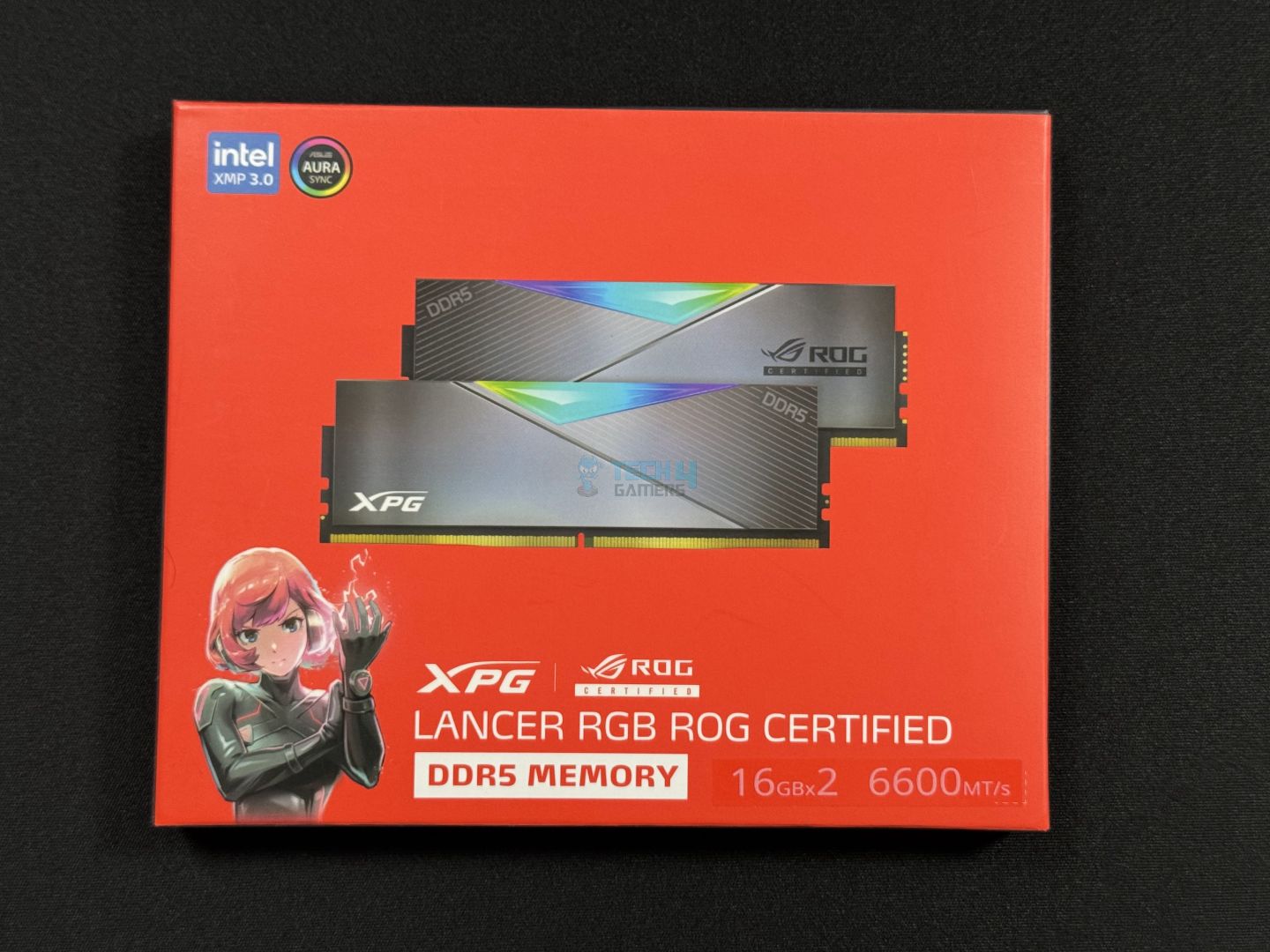
The kit is packed inside a red cardboard box, essentially the same packaging XPG has been using for all its Lancer DDR5 RGB kits.
Front
Rear
On the front, we have the RAM pictured in the centre. The memory capacity and speed, XMP 3.0, and ASUS Aura Sync support are highlighted. On the back, we have a cutout showing the two modules and a sticker with the RAM product code and bar codes. We also have a QR code for product details and various compliance symbols.
Design
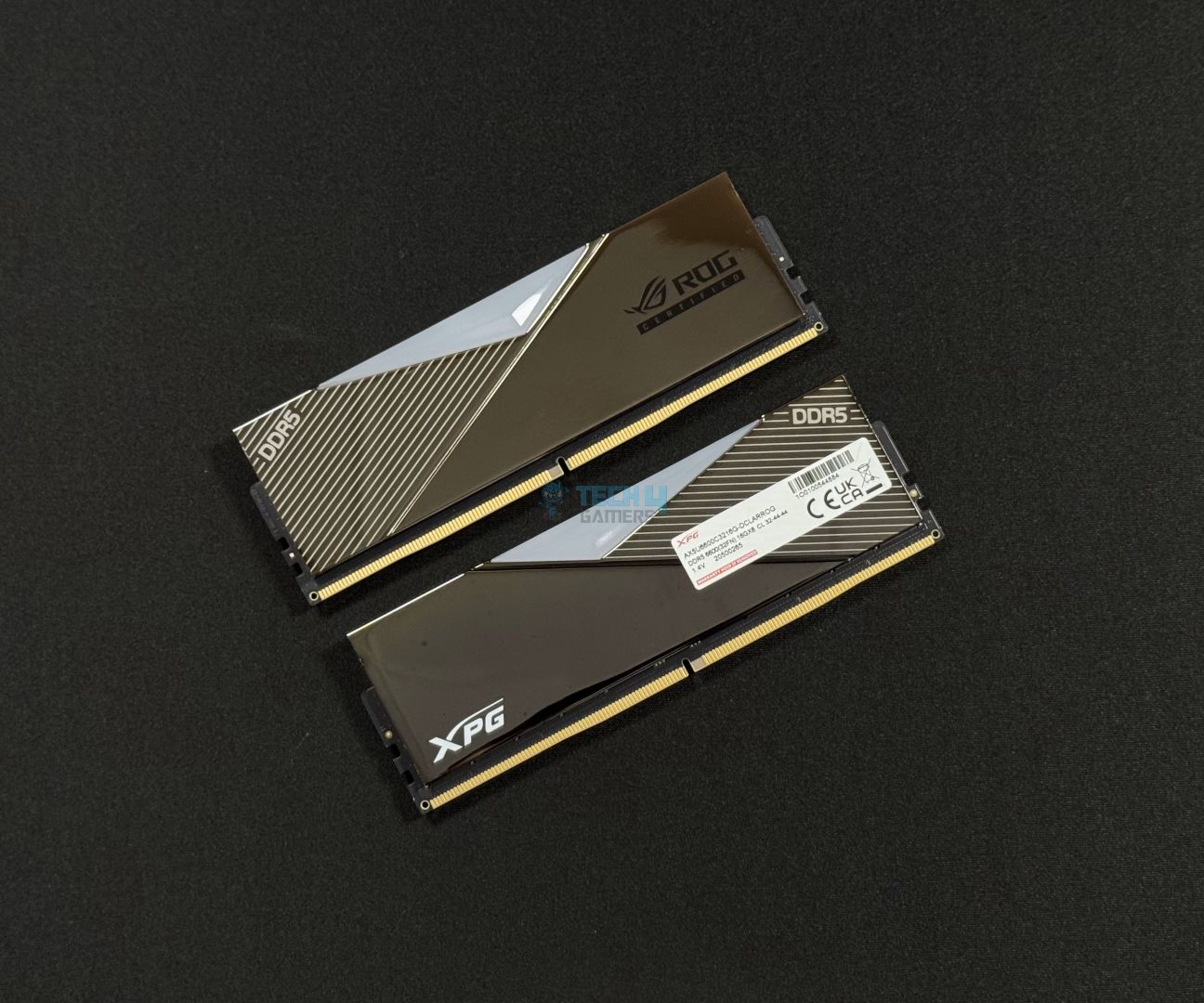
The kit in all its glory
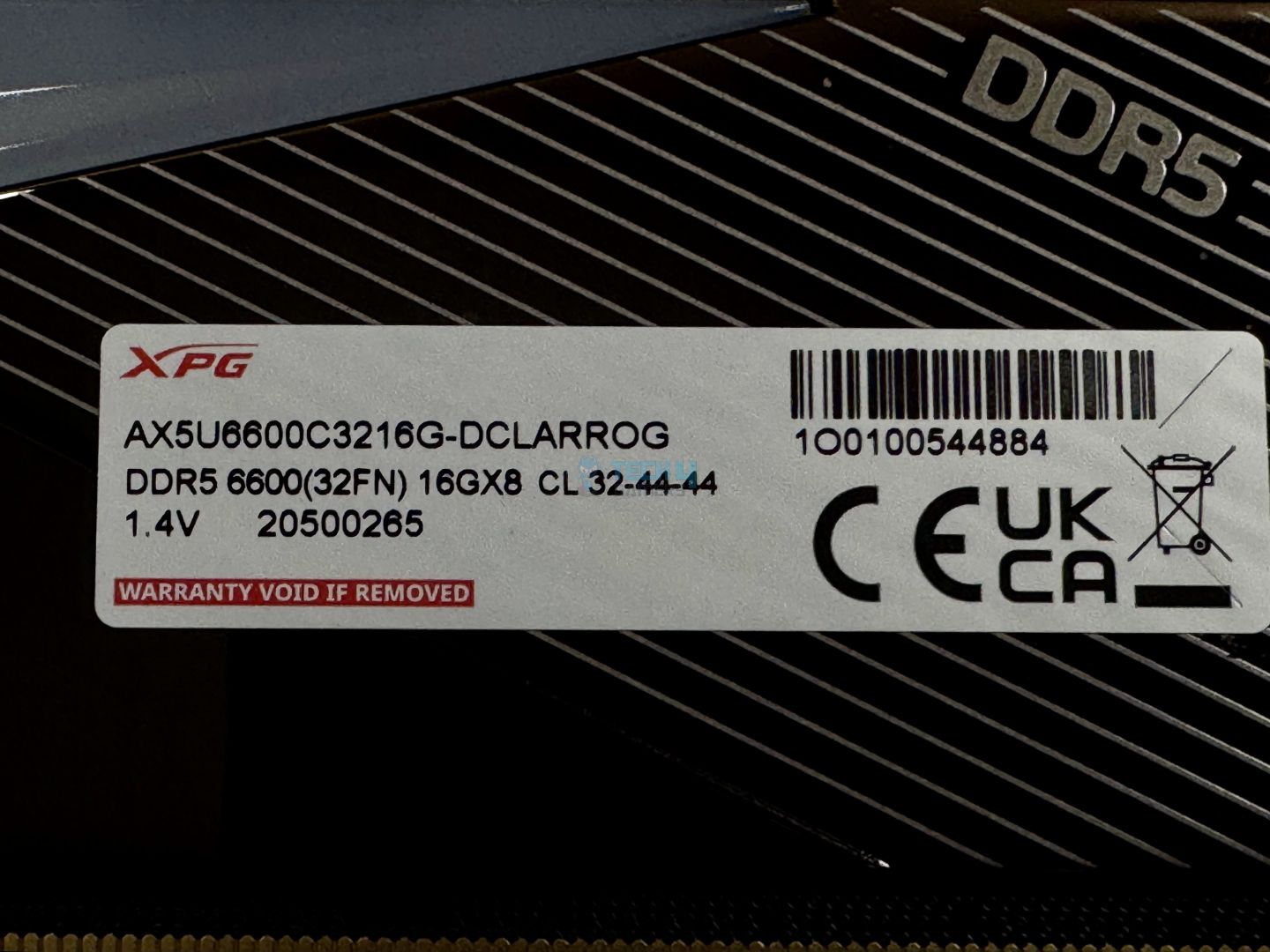
Sticker
The kit has a similar layout to the regular XPG Lancer DDR5 but with a beautiful, crystal-clear mirrored finish. In comparison, the regular Lancer features a plain finish with a brushed aluminium texture on the rightmost section. The front has “ROG Certified” printed in the striped section, while the back has the XPG logo on the bottom right. On both sides, “DDR5” is printed on the striped section
The sticker on the back has the key specifications, a bar code, and certification marks. Removing this sticker voids the limited lifetime warranty offered with the kit.
Top of the module (Image by Tech4Gamers)
Looking at the top, we get a triangular cutout for the RGB diffuser. The top has the XPG logo, this time accompanied by the “ROG Certified” logo. You can control this RGB through AURA Sync or your motherboard manufacturer’s dedicated software. We’ll look at the RGB in a bit.
The module’s dimensions and weight are the same as those of other Lancer kits (133.35 x 43.56 x 8mm, 72.4g), with a height of 43.56mm.
WARNING: If you have an air cooler, ensure compatibility with the RAM, as this module’s height can cause compatibility issues with some coolers.
RGB
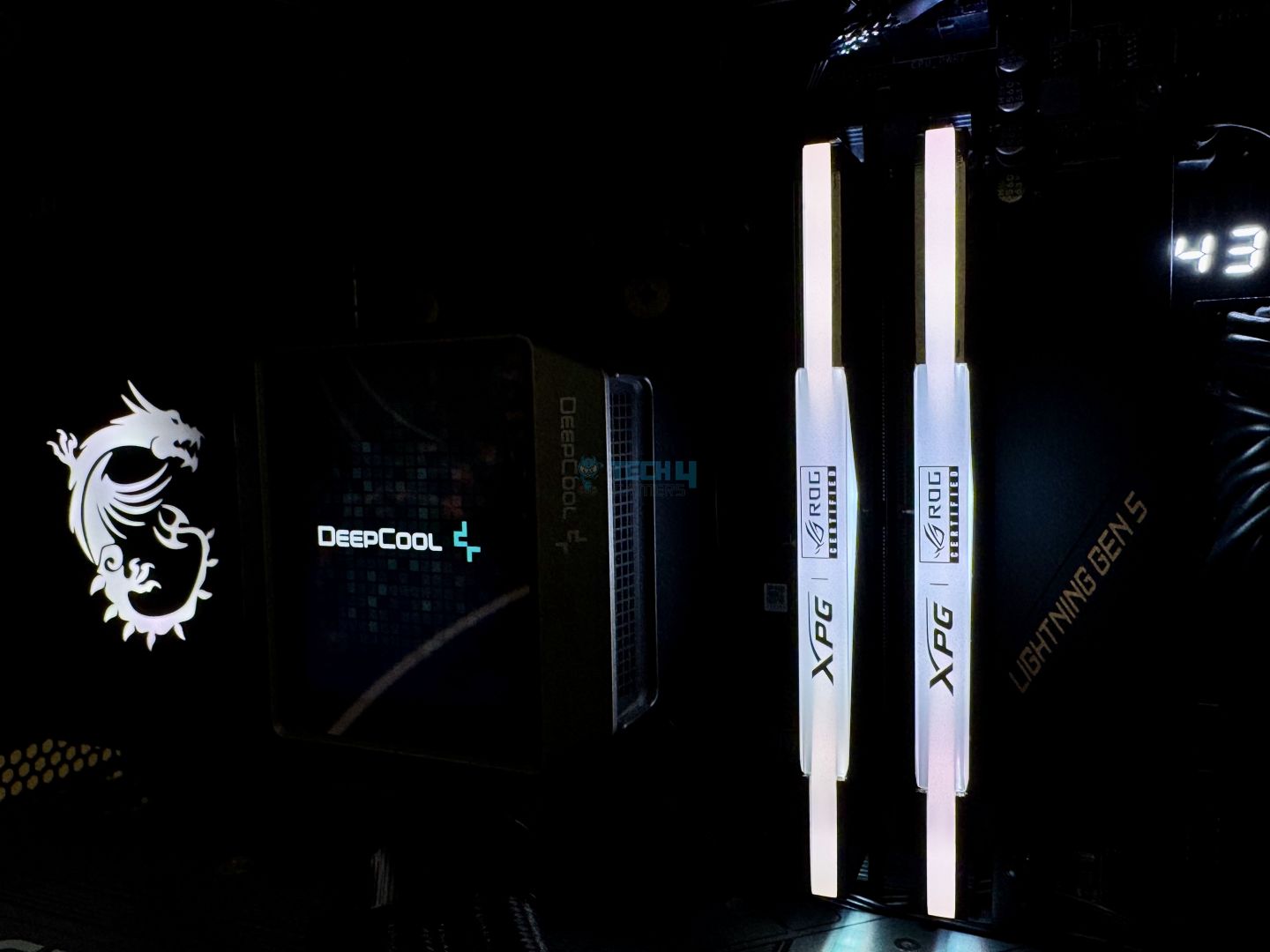
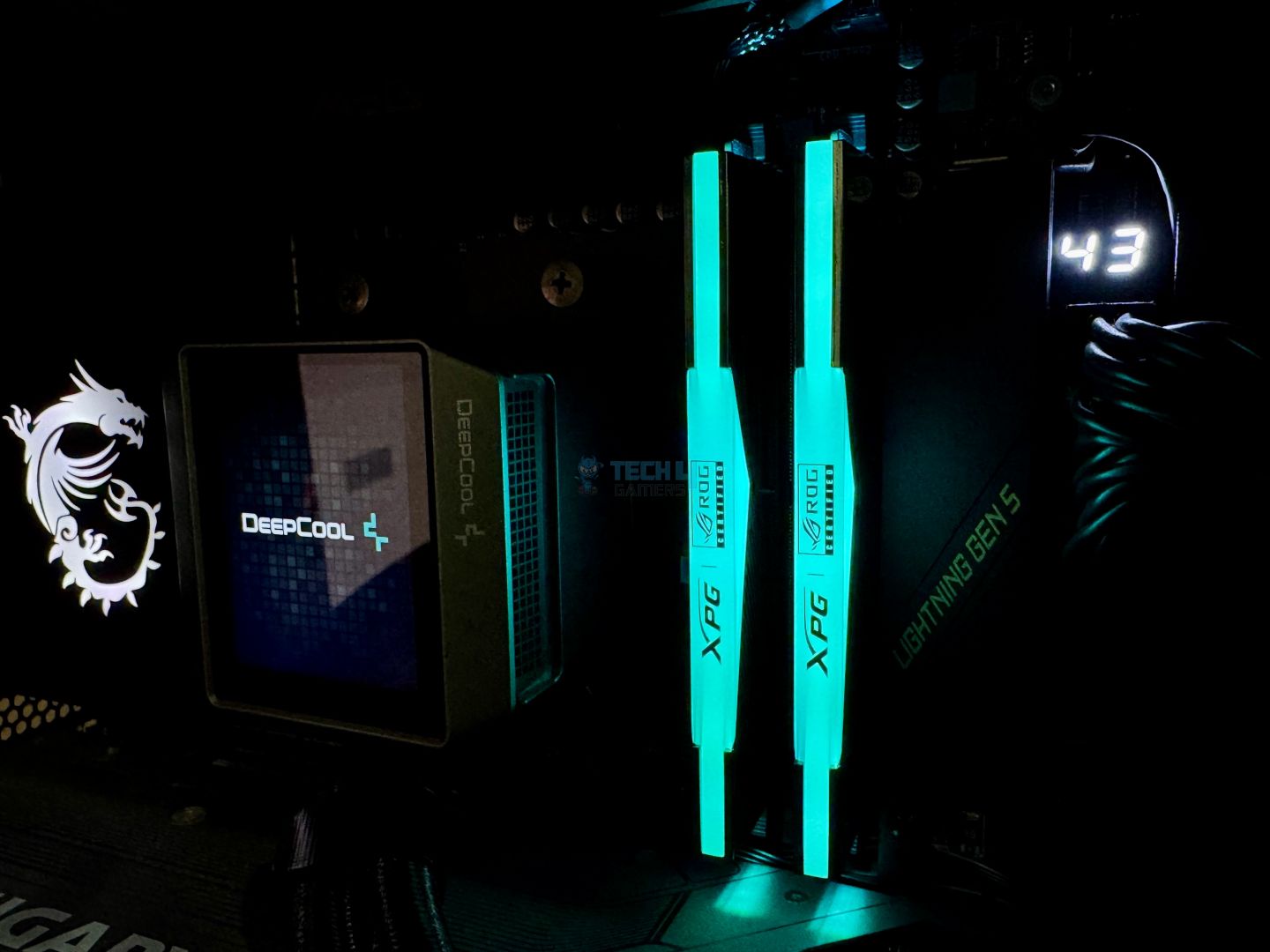
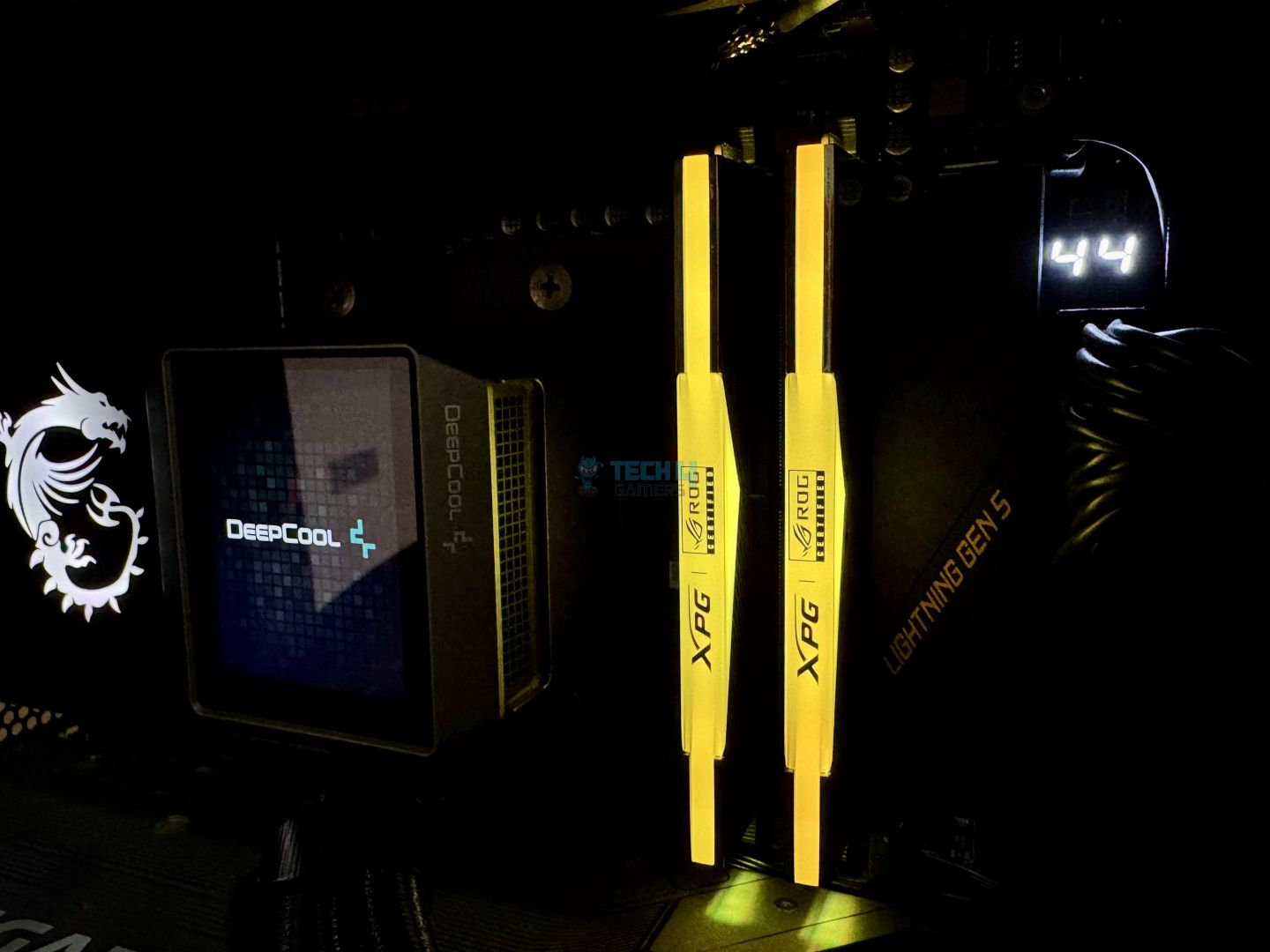
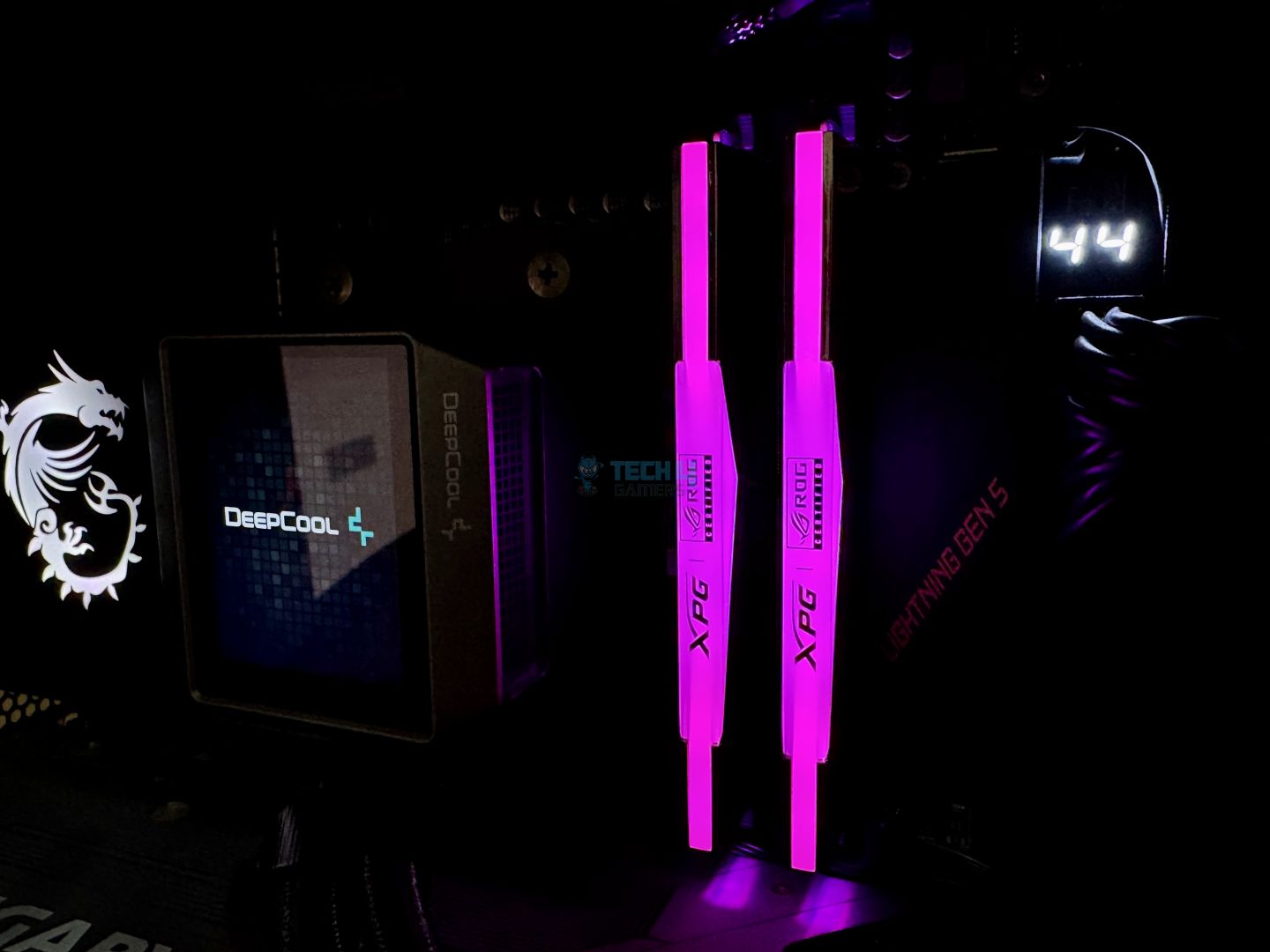
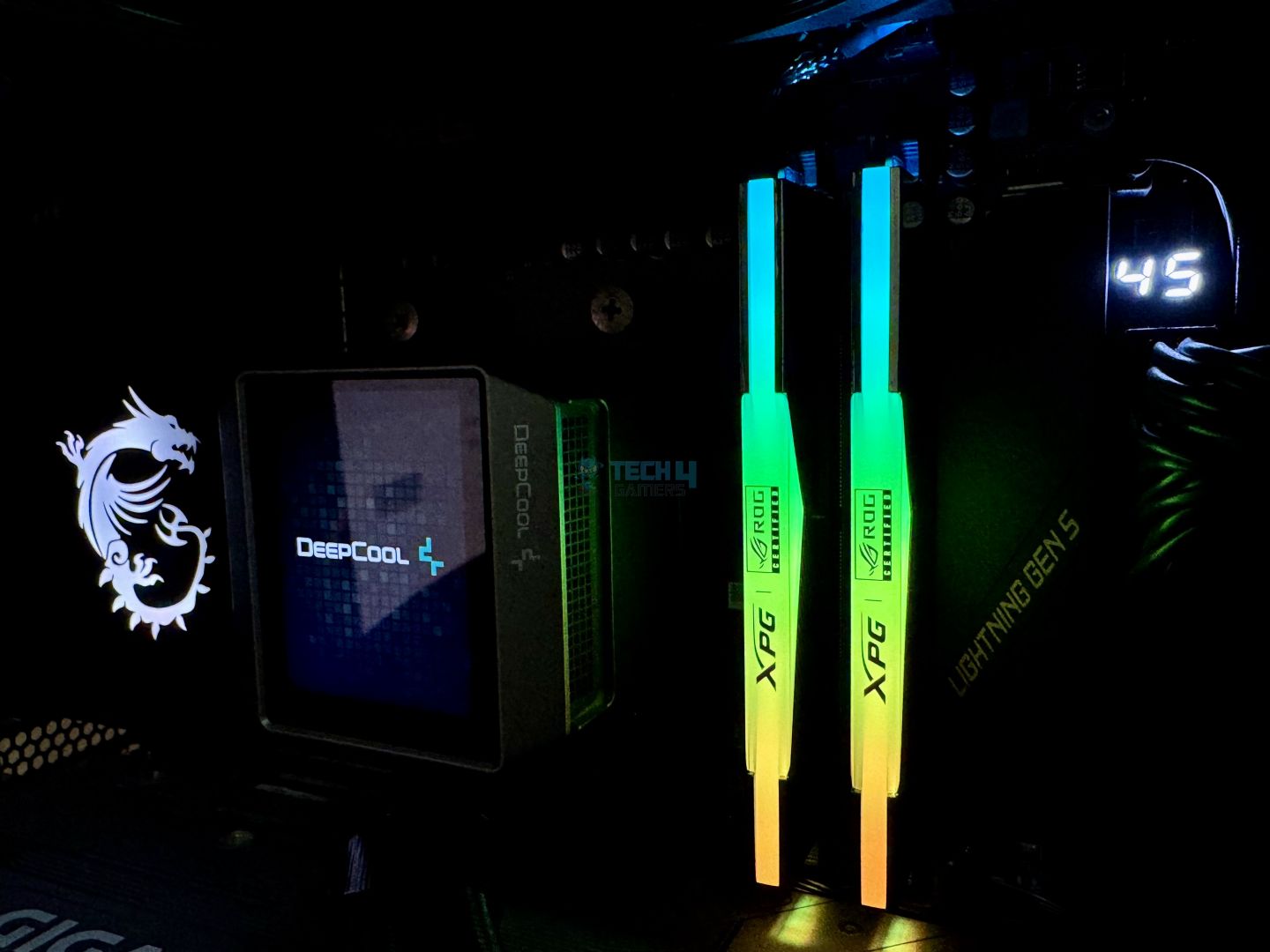
Here’s the RGB overview of the kit. It is very nicely and evenly diffused. ASUS’ Aura Sync allows you to use 8x different lighting modes. We used MSI’s Mystic Light sync software on our system, and things went smoothly.
RGB Overview
1 of 7
XPG Lancer ROG 6600MHz installed. (Image By Tech4Gamers)
We have chosen the EXPO profile for the kit so that it operates at advertised speeds. We left all other settings on default.
ZenTimings (Image by Tech4Gamers)
The Ryzen 7000 memory controller runs at a 1:2 ratio with the memory at 6600 MT/s, as the Zen Timings menu shows. This will induce higher latency than normal—let’s get to that in our benchmarks.
Test Results
Let’s get into the results. We have compared this memory kit to the following others:
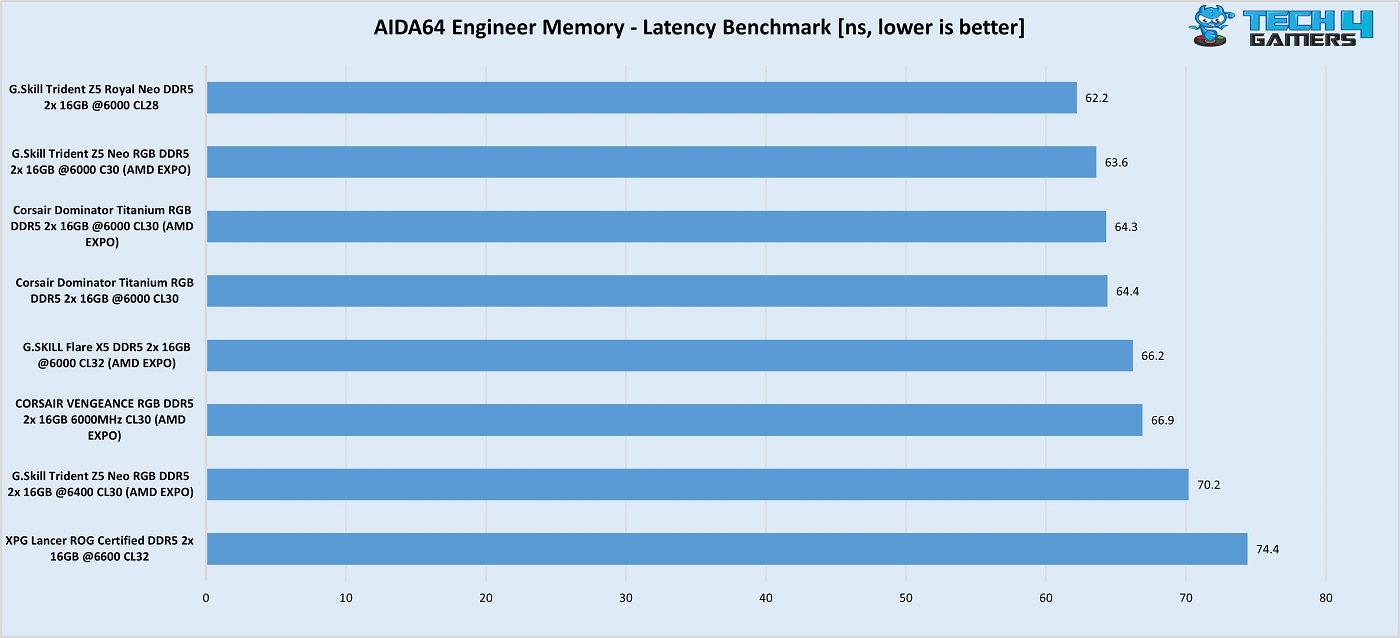
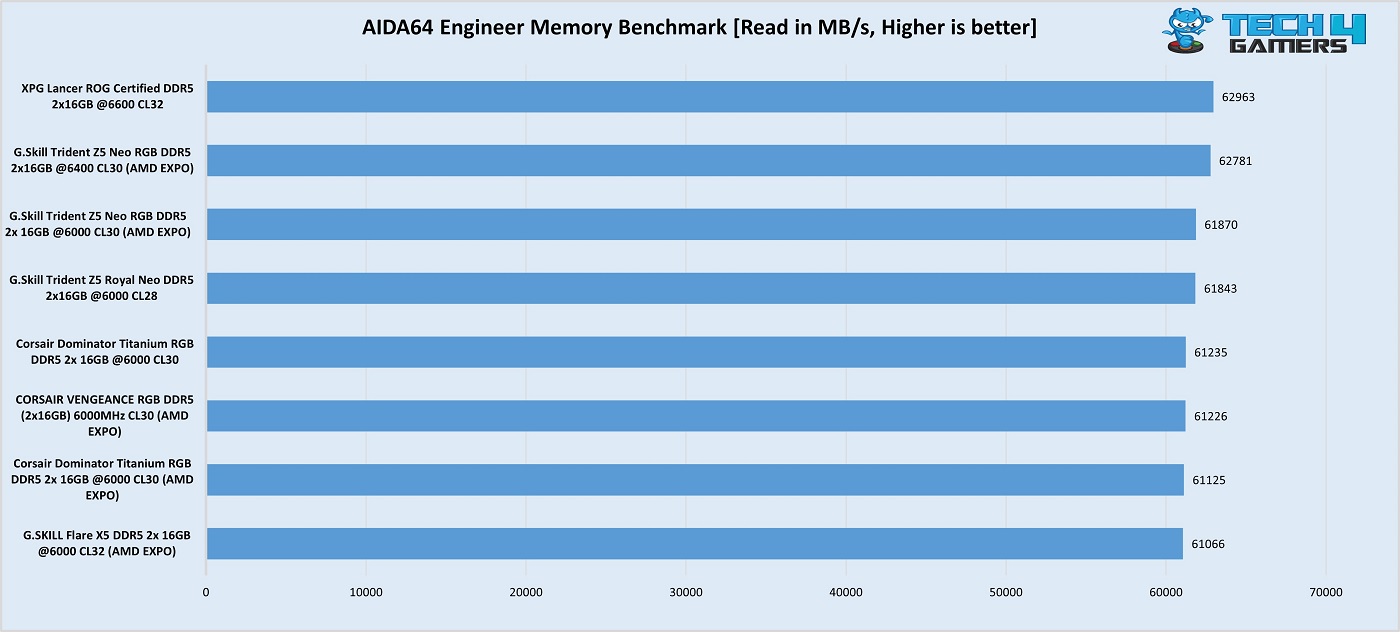
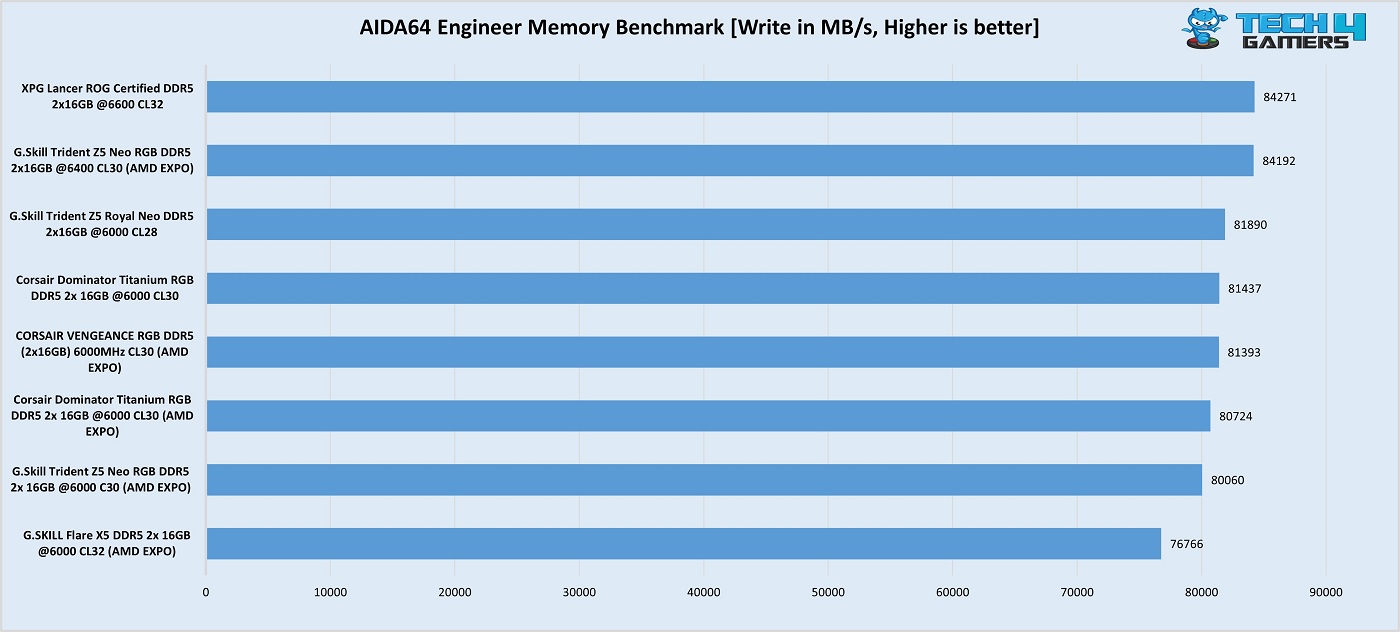
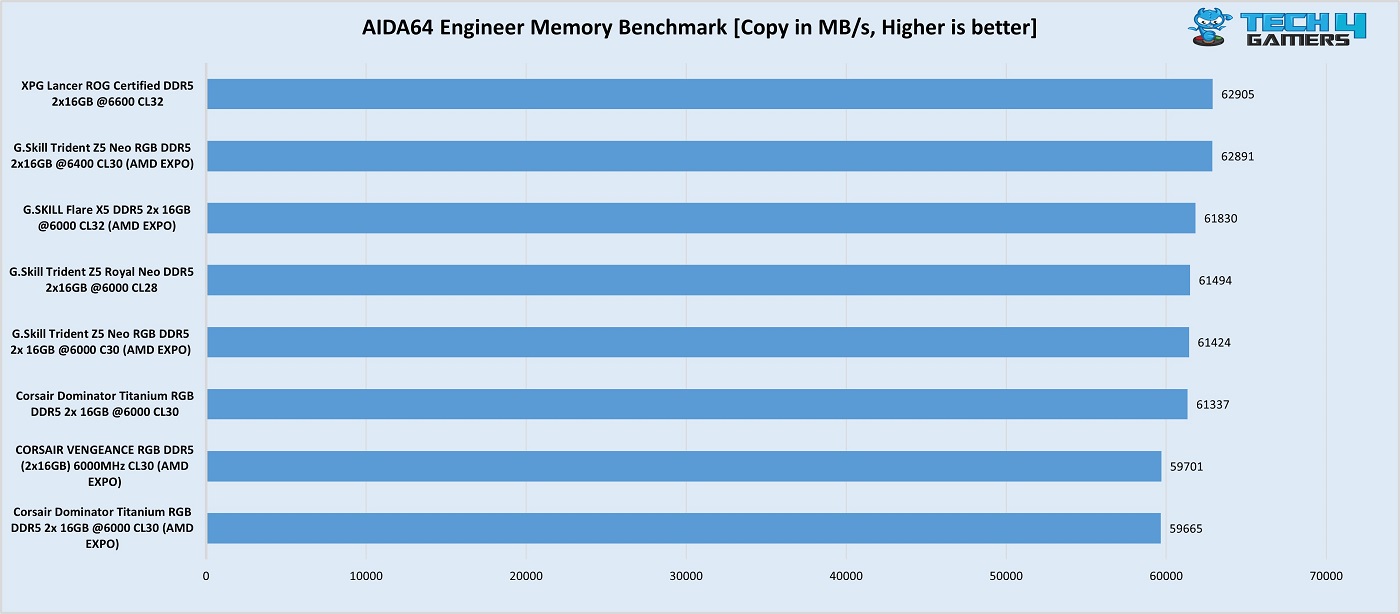
Our build with this kit showed chart-topping performance among the other DDR5 kits in AIDA64 read, write, and copy tests. Of course, the other kits are slightly slower DDR5-6000 (and DDR5-6400) kits, but this shows us that the kit is performing as it should.
However, the latency performance was relatively sub-optimal, at 74.4 ns. This is because the memory controller, which transfers data between the RAM and CPU cores, runs half as fast as the RAM. Thus, the RAM sends data faster to the controller than it can transfer to the cores, introducing a bottleneck.
It’s better to run the kit at DDR5-6400 or 6000 MT/s so no extra latency is introduced. You will probably achieve the best performance at these speeds.
Cinebench R23.200 (Image by Tech4Gamers)
In the Cinebench R23 multi-core test, the CPU scored 18489 points paired with the XPG Lancer ROG-certified kit. However, all the kits are within a very close margin of each other.
Overall, the kit’s performance is excellent. It could do even better if latency wasn’t an issue. Of course, this won’t be a problem if the kit is run at 6000 (or possibly 6400 MT/s).
Should You Buy It?
Well… should you?
Buy It If:
✅You prefer sleek designs and good-looking RGB:The kit has a beautiful black mirror finish and a well-lit RGB bar up top, which makes for a pleasing design.
✅You’re running an ASUS ROG motherboard: The kit promises memory speeds of up to 7400 MT/s through a dedicated “ROG Certified” memory profile for users with ASUS ROG motherboards.
✅You want an ECC kit: This kit comes with built-in Error Code Correction.
Don’t Buy It If:
❌(For AMD users) You want the lowest latency: If you want the lowest latency, you’ll be better off with a DDR5-6000 (or DDR5-6400 if you’re lucky), which can run at 1:1 with the memory controller on Ryzen 7000/9000 CPUs. This can also save you $50 or more!
My Thoughts
The XPG Lancer ROG DDR5-6600 CL32 is a fantastic kit for those looking for fast memory that overclocks well, especially on ASUS ROG motherboards. XPG promises speeds of up to 7400 MT/s on ROG Z890 motherboards. It is particularly suitable for Intel builds over AMD ones, as even the latest AMD CPUs won’t be able to utilise this speed to the best potential. With a real-world latency of 9.69ns, its performance in our tests was satisfactory, toppling over DDR5-6000 and DDR5-6400 kits.
The kit has a unique “Black Mirror” theme, where the heatsinks feature a reflective black coating. It doesn’t differ much from the regular XPG Lancer DDR5 designs that we’ve seen, but this shiny new look does enough to add a touch of class. Its RGB diffuser offers very brightly lit LEDs that diffuse evenly across, making for a nice look. The RGB can be controlled through all the different motherboard manufacturer software.
In terms of height, the kit stands at 43.56mm–which makes it fairly tall and renders it incompatible with some dual-tower air coolers (ensure compatibility before purchase). XPG offers two variants of this kit: a 32 GB (2×16) DDR5-6600 CL32 model (reviewed today) and a 48 GB (2×24) DDR5-7200 CL34 offering. The 32 GB offering is priced at $159, which is not the friendliest tag, but it is alright considering its polished design. XPG offers a limited lifetime warranty for the kit.
At Tech4Gamers, I mainly cover new gaming news, leaks, and rumours. Aside from that, I love to write features about my favourite games while inserting my opinion about their different aspects.
Story Highlight
Death Stranding, released five years ago, has better draw distance on a four-year-old console than on the PS5 Pro.
A recent analysis has revealed that the Xbox Series X has draw distance in some instances.
Other than that, there doesn’t seem to be much difference in shadows, water, and textures.
Before the PS5 Pro was released, Xbox Series X was the most powerful console in the world. In many instances, it had better performance than the PS5, and of course, the opposite was the case, too, as a lot depends on the optimisation.
That said, one wouldn’t expect the Series X to do anything better than the PS5 Pro, as it was released 4 years ago. However, according to a recent analysis, the former has better draw distance than the latter in Death Stranding, which came as a surprise.
Why it matters: The PS5 Pro was highly criticised due to its price tag, so now that it does not have a better draw distance than the Xbox Series X in Death Stranding, it will surely raise some eyebrows.
In the video, at 2:15, you can clearly see that the Xbox Series X has a better draw distance than the PS5 Pro. Now, it is understandable to have some issues as the game isn’t PS5 Pro enhanced, but given the hardware upgrade, the difference is a little disappointing.
What is more surprising is that the draw distance is better on the Xbox Series S, which is running the game at 900P. On the other hand, all three other consoles run it at 1800P in performance mode.
Draw Distance On PS5 Pro Is Even Lower Than Series S
Other Than Draw Distance, There Doesn’t Seem To Be Any Other Major Difference
Other than the draw distance, there doesn’t seem to be any massive difference. Shadows, water, and textures look pretty similar on the Series X, PS5, and PS5 Pro. There is a minor difference in the performance as the Pro variant runs Death Stranding almost all the time at 60FPS.
While there are sometimes minor dips on the rest of the consoles, we might still see a lot more improvements once the game is patched for the console.
What do you think of the Xbox Series S rendering better draw distance than the Pro console in Death Stranding? Are you team Xbox or team PlayStation? Let us know your thoughts in the comments section below or join the discussion at the official Tech4Gamers forums.
Being a keyboard enthusiast, I specialize in reviewing, modding, and critiquing them for the people. If you’re a Razer fanboy, my only goal is to convert you to the dark side 😈.
Keychron has been a household name in the keyboard world since the launch of the original K1 in 2017, which ushered in a new era of high-quality third-party peripherals that didn’t break the bank. Over the years, they’ve carved a nice little pie for themselves in the mainstream market, offering a wide range of options for professionals and enthusiasts alike.
So, gaming audiences may already be familiar with Keychron’s offerings, but the brand is now stepping into truly new territory: hall-effect. Once a niche technology, hall-effect keyboards have skyrocketed in popularity with boards like the Wooting 60HE. Now, with the release of the 80HE and a surge of budget-friendly analog options, does the Keychron K2 HE have what it takes to stand out?
Why Trust Tech4Gamers
Huzaifa Haroon is our keyboard expert with years of experience in building and testing custom keyboards.
130+ peripherals tested and reviewed by our team of hardware experts (Tech4Gamers Team).
500+ hours spent testing different peripherals for our reviews.
At Tech4Gamers, ensuring you get reliable information is our priority. That’s why every hardware round-up undergoes a meticulous review process by our team of experts and editors. Each review is carefully examined against our strict editorial guidelines, guaranteeing you trustworthy insights you can depend on.
Key Takeaways
The Keychron K2 HE is a great alternative to the Wooting 80HE if you’re after a more premium typing experience that’s well-balanced.
Buy the Keychron K2 HE if you want a great keyboard first and a solid gaming tool second.
Avoid the Keychron K2 HE if you’re an enthusiast looking for a more specific sound or additives like a knob or a screen.
Specification
Standard Version
Special Edition
Length
316.4 mm
320.5 mm
Width
126.7 mm
126.7 mm
Front Height
30.2 mm (incl. keycap)
30.1 mm (incl. keycap)
Back Height
40.7 mm (incl. keycap)
40.7 mm (incl. keycap)
Weight
Approx. 980 g
Approx. 965 g
Keycaps
Cherry Profile Double-shot keycaps, shine-through
OSA Double-shot keycaps, not shine-through
Frame Material
Aluminum
Aluminum + wood
Stabilizer
Screw-in PCB stabilizer
Switch
Gateron double-rail magnetic switch
MCU
ARM Cortex-M4 32-bit STM32F402RC (256KB Flash)
Angle
5° / 9.34° / 12.43°
Backlight
North-facing RGB LED
Plate Material
Aluminum
Sensitivity
0.1 mm
Rapid Trigger
Yes
Adjustable Actuation Points
0.2 – 3.8 mm
Dynamic Keystrokes
4-in-1 action keys
Cable
Type-A to Type-C cable
Connectivity
2.4 GHz / Bluetooth / Type-C wired
Bluetooth Version
5.2
Bluetooth Device Name
Keychron K2 HE
Battery
4000 mAh Rechargeable li-polymer battery
Wireless Working Time (Backlit off)
Up to 110 hours (Lab test results may vary based on actual use)
N-Key Rollover (NKRO)
Yes for both wireless and wired modes
Hot-swappable Support
Yes, compatible with Gateron double-rail magnetic switch only
Polling Rate
1000 Hz (Wired and 2.4 GHz) / 90Hz (Bluetooth)
Operating Environment
-10 to 50℃
[toc]
What Makes the Keychron K2 HE Different
Unlike many other hall-effect boards, including the most spec’d out one that we recently reviewed: the Wooting 80HE, Keychron K2 HE is actually wireless. It does everything that the Wooting can, except for maybe the 8000Hz polling rate but who can notice that anyway? What you certainly can and will notice is the convenience of no wires.
I’ll be honest if there wasn’t wireless functionality in this board and Keychron still chose to put the USB port on the side, I’d be genuinely frustrated but till then I’m more than satisfied with the competitive performance of this keyboard at its price point. It’s cheaper than the Wooting yet better built, better looking and once again, actually wireless.
Unboxing Experience
The Keychron K2 HE comes in a sleek black box with the keyboard pictured up front. There’s text all around to let you know what you’re buying but it doesn’t look tacky–it has a glossy rainbow shine effect. At the back you see a bunch of specs for the board with the same keyboard graphic. The Keychron logo is also present on either side of the box.
The box is sleek and straightforward (Image by T4G)
Once you slide out the paper sleeve with all this info, you’re greeted to the actual box containing everything underneath with the Keychron logo. This time you lift up the top in a rather Apple manner to reveal the contents inside.
Everything is laid out nicely inside (Image by T4G)
First you get a piece of foam, there’s actually a lot of foam all around to protect the keyboard from shipping damage which is nice. Then there’s quick start guide, under which our K2 HE lies wrapped in plastic. No dust cover included. On the top there’s a small box with all the accessories inside. A manual is also present at the very bottom.
Here’s everything you’ll get:
1x Keychron K2 HE
1x Quick Start Guide
1x Manual
1x Angled USB-C Cable
1x Keycap/Switch Puller
1x 2.4GHz USB Receiver
1x Extension for the USB Receiver
1x Screwdriver
1x Allen Key
7x Extra Keycaps
You get a lot of extras with the Keychron K2 HE (Image by T4G)
Build & Design
Right off the bat, I like how this thing looks. It has a very subdued, sort of professional design with wooden accents on the side. Now keep in mind that we have the “specialedition” on our hands today which is $10 more expensive, the regular model comes with different keycaps and no accents (though you can buy those separately as well).
It’s a beautiful-looking board up front (Image by T4G)
The keyboard is largely plastic, but the frame is made out of aluminum. It feels heavy and cold to the touch. The anodization job is similar to what you’d find on Keychron Q-series boards, which is to say very clean with a slightly gritty texture. It’s better than the Lucky65 (V2) and Record Alice but not as good as QK or Cycle boards.
The aluminum frame sits on top of the plastic inner body (Image by T4G)
Moreover, the wooden accent pieces on either side are screwed on using two hex screws and they have a nice, smooth texture. They don’t illicit a scent which is a missed opportunity, but they add a gorgeous contrast to the board that looks even better if you get the white colorway.
The wooden accent comes off easily, but I there’s no reason to take it off (Image by T4G)
The USB port is for some reason located on the left side of the keyboard, and I don’t mean the left corner, literally on the side next to the connection mode and platform buttons. This means that you’re realistically locked out of using any existing cable on your desk (especially it’s one of those coiled aviator ones) and I find that a strange choice.
The buttons on the side make sense but not the USB port (Image by T4G)
On the back there are a couple of rubber feet and two flip-out feet with two stages of elevation. By default, the typing angle is 4-degrees, but it can be increased to 8 and 12-degrees, respectively. There are no exposed screws on this board which means it’s not meant to be opened up. The front height is 20mm, which is quite comfortable.
A simple back with the Keychron logo and info in the middle (Image by T4G)
Layout & Features

The Keychron H2 HE, as the name suggests, is a hall-effect keyboard, meaning it uses magneticswitches instead of traditional mechanical ones. These are beneficial for gaming and can give you edge if you’re underperforming because of your current hardware. They feature dynamic actuation points which opens up a myriad of new possibilities.
The layout here is 75% with a compact nav cluster and arrow keys. Everything is very close together and looks somewhat squished but in daily usage that’s not a problem. The inclusion of both Mac and Windows functions on the keycaps is a great add-on, with extras in the box should you need them.
All the editions available for the Keychron K2 HE | Keychron
Keychron has also made the K2 HE wireless with support for both 2.4GHz radio and Bluetooth connections, with the former being at 1000Hz. This makes it one of the very few wireless hall-effect keyboards in the market but even then, you can only use its software when plugged in. I do appreciate the inclusion of an extension for the USB dongle, though.
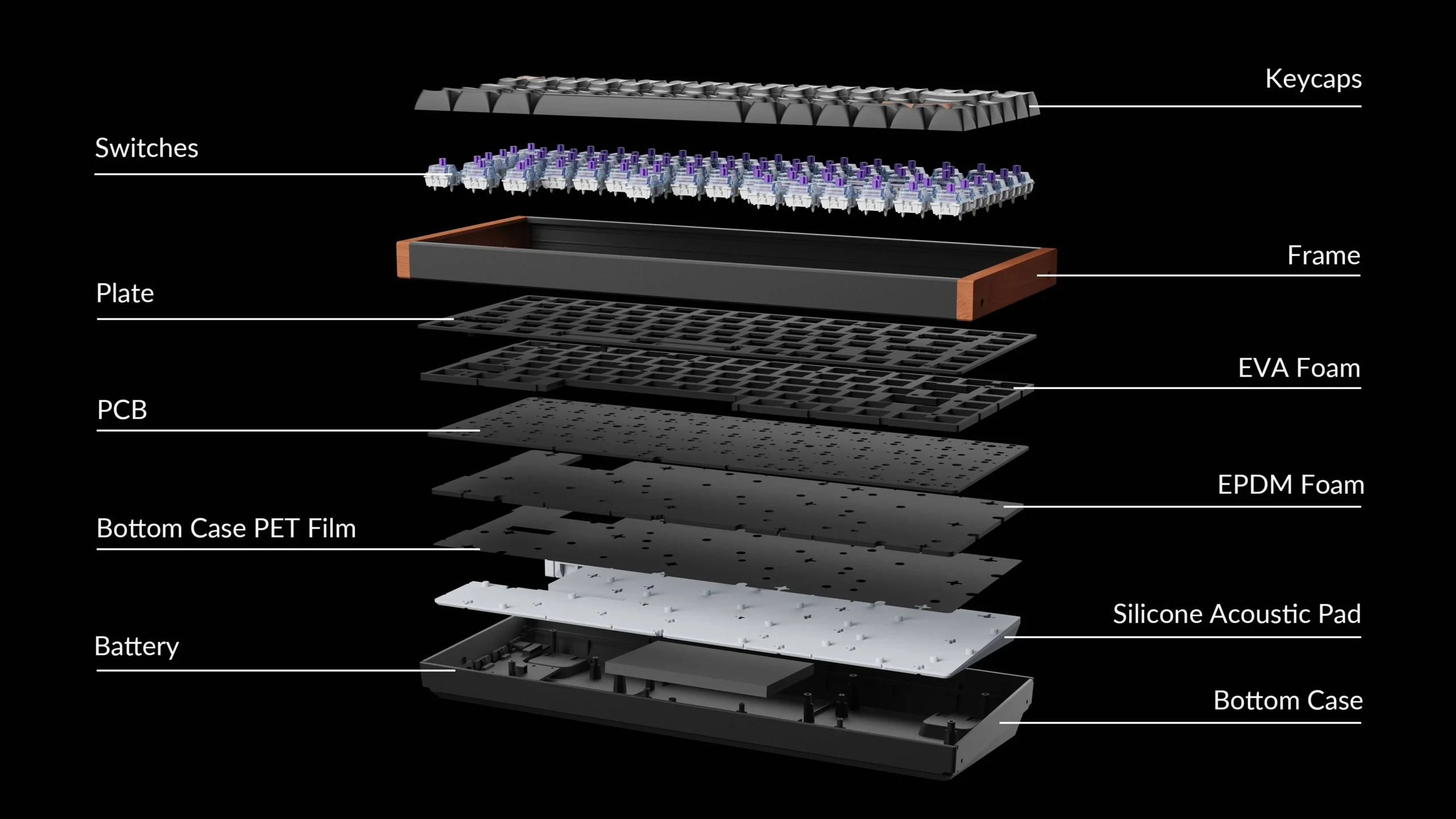
On the inside, the board is using a top mount with a standard 1.6mm thick non-flex cut PCB and a non-flex cut aluminum plate. There’s also 4 layers of foam including the plate foam, an EPDM sheet, PET sheet, and some silicone at the bottom but no PE foam. Neither the PCB nor the plate has any other layout options, but you can still buy an ISO variant.
The layers that make up the Keychron K2 HE | Keychron
The board is fully hotswap thanks to its 5-pin sockets with per-key RGB but for some reason it only supports the switches it comes in the box with. Keychron outlines this on their product page that other switches like the ever-popular Gateron Jades are not compatible with this keyboard which really makes me scratch my head.
Editor`s Note
We reached out to Keychron regarding this conundrum, and they confirmed that while other magnetic switches aren’t compatible as of now, they are actively working on adding support so look out for a future update.
– Huzaifa Haroon
Regardless, the main attraction here is all the amazing gaming features which we’ll go over in the next section. Mainstays like rapidtrigger, SOCDclearing and advanced macros are all here with a software that’s rather mature. Even the RGB on this board is a touch above the rest with very clean transitions between the effect speeds and brightness levels.
The Fundamentals
Let’s take a look at how the core components of the Keychron K2 HE perform in the real world, compared to other traditional mechanical keyboards.
Switches
Keychron K2 HE comes with Gateron Nebula linear switches. They obviously have a dynamic actuation point that allows them to be actuated anywhere between 0.1mm and 4.0mm with a force of 40g. They’re factory lubed and come with a LED diffuser inserted in the top. That, mixed with the frosted top housing, makes this a very RGB-friendly switch.
The Gateron Nebula switch doesn’t have a traditional closed-off bottom similar to Wooting’s Lekker switches (Image by T4G)
I found the Nebulas to be thocky and mostly silent. The weight wasn’t light but not too heavy either. Due to their lack of a traditional bottom out they feel “dampened” just like the Lekker V2 switches in the Wooting 80HE. The typing feel is not my favorite but it’s inoffensive and somewhat alleviated with the stiff plate and PCB.
Keycaps
Keychron is using their proprietary OSAprofile doubleshotPBT keycaps here. While they look most like XDA, this profile is actually sculpted and has a subtle curve throughout the rows, like Cherry or MT3. They’re a nice mix between the two in terms of height but they’re not as thick as either.
Keychron OSA keycaps up close and compared to GMK (Image by T4G)
The legends are thin but sharp and the colorway is a standard White-on-Black (WOB) so they stand out boldly. The Escape and Enter keycaps are accented in brown which looks rather nice and matches the wooden accents on the side. Texture-wise these look almost as gritty and GMK keycaps but they feel a lot smoother to the touch.
By default, the K2 HE comes equipped with the Mac keycaps but there are extras in the box for a Windows layout. There are Mac functions printed on the function row and connection mode icons on the start of the number row which might make the board look a little cluttered for some, but I think they’re done tastefully.
Lastly, there’s a dedicated RGB key on the top corner with a custom lightbulb keycap. Next to that there’s a dedicated screenshot button as well which is very convenient. Overall, these are high quality keycaps that don’t need to be changed.
Stabilizers
The K2 HE comes with screw-in stabilizers that are factory lubed and there’s no support for plate-mount stabs. Keychron describes these as their upgraded in-house stabilizers with reinforced sidewalls around the stem. According to them this ensures a tighter fit between the stabilizer and keycap which is just marketing nonsense.
The stock screw-in stabilizers are great (Image by T4G)
But credit where credit is due the stabilizers themselves are great, especially for a “gaming keyboard”. They have no pinging but there’s a very tiny rattle on the left side of the spacebar if I hit in a certain way. The rest of the stabs are rock solid.
Gaming Performance
Keychron has baked in a lot of gaming features and while I’m not the most affluent gamer myself, I can still see the care and effort put into these. First of all, the dynamic actuation point of the Nebula switches can be adjusted from 0.1mm to 4.0mm in the software on any key. This gives you the quickest responsetimes in games where it matters.
The adjustable actuation point ensures you have the best response time | Keychron

Keychron goes a step above Wooting and gives you an “advanced” option for RapidTrigger where the actuation and release are separated from each other, and you can customize each individually. So, for instance, if you want the key to register instantly but de-register a bit later you can set the actuation points to 0.1mm and 0.4mm, respectively.
Rapid Trigger allows for seamless counter-strafing in games like Valorant | Keychron

We also see SOCD clearing in the form of Last Key Prioritization (LKP) and SnapClick, which are identical to Razer and Wooting’s implementation. When enabled, if you press two keys to counter-strafe, LKP ensures the key you press last is the one that’s registering while canceling out the other. In Snap Click, thanks to the dynamic actuation point of these switches, the key pressed more is the one registered.
Snap Click makes sure the key pressed more is the only registering | Keychron
Lastly, there are some other features like an AnalogMode which mimics controller input to give you a dynamic control scheme for games like Forza where how much you accelerate (or brake) is crucial. There’s also Dynamic Keystrokes where one key can be bound to multiple actions depending on how much it’s pressed, creating a pseudo macro key.
Analog mode emulates a controller’s triggers | Keychron
↪ Wireless Performance & Battery
The Keychron K2 HE does all that and be good at it while being a solid keyboard too. Not to mention it has profiles you can quickly switch back and forth between if you want to work and play simultaneously. It cannot be emphasized enough that despite being cheaper and better built than the poster boy hall-effect keyboards, the Keychron does all this wirelessly.
The wireless latency came out to an average of 5.6ms in the 2.4GHz wireless mode which is incredible, and 5.9ms in the wired mode (within margin of error). Keychron has kitted the board with a 4000mAh battery that they don’t claim any numbers on. In my testing, it lasted about 2 days with the RGB on and without RGB it’s been almost a week since my last charge, but the board is still going.
Typing Experience
The Keychron K2 HE is top mounted so there’s no flex or bounce as even the plate is made out of aluminum which is stiff. This results in a very firm-feeling board with a thocky sound signature. The Gateron Nebula switches are low-pitched, deep and somewhat muted. On top of that, OSA profile keycaps help accentuate the low-end frequencies even more.
The stabilizers are very good, they’re not perfect but I’d say they’re on the level of the Wooting 80HE while falling just a tad bit behind the likes of Lucky65. Still, it’s not something you’d need to open up and tinker with. Overall, the board has a comfortable and pleasant typing experience suited for both gaming and productivity tasks.
The Software
Like Wooting, Keychron has a web-based software for its K2 HE and it’s quite similar. It’s certainly not as polished or intuitive as Wootility but it’s not far off. The design, in particular, is what feels the closest but navigating around the software is not as fluid or responsive. Buttons and toggles take a moment to register/show up on screen and I even got a confirmation box in Chinese at one point that I assume wasn’t translated to English in time.
Features-wise the software is jam packed with everything you need. I’ve already mention the adjustable actuation distance, Rapid Trigger and SOCD clearing features which are all present here on the homepage called “HEMode.” There’s a live illustration of the keyboard up top showing all the applied settings to each switch clearly.
On the next tab we have the key mapping, powered by QMK, that works in 4 layers. The first two layers (0 and 1) are set for Mac and the next two (2 and 3) are set for Windows. So, if you want to customize anything in these layers, make sure to be mindful of this configuration and not think that you have all four layers to play with on one platform.
There’s also a solid macro section and a firmware update section — my unit actually needed an update to get the SOCD features. The RGB implementation is quite weak, however, as you can’t even control it per-key and there’s certainly no fancy layer animations like Wooting. Still, fundamentally it looks good and there’s 23 modes to play around with.
Should You Buy It?
Buy It If:
✅ You want one of the best gaming keyboards that doesn’t compromise on what makes a keyboard great foundationally.
✅ You care about design and build quality as the K2 HE is a sleek-looking gaming keyboard that’s built like a tank.
✅ You want all the advantage you can get with features like advanced Rapid Trigger and SOCD clearing.
Don’t Buy It If:
❌ You have a custom coiled cable on your desk as the side-mounted USB port will be inconvenient for the cable to reach without awkward bends or stretches.
❌ You want per-key RGB that is controllable in the software. The K2 HE only allows you to switch between 23 modes that are already baked in.
❌ You’re an enthusiast looking for a hall-effect keyboard that can be customized as the K2 HE doesn’t support any other magnetic switch as of now.
The Keychron K2 HE in all its glory (Image by T4G)
My Thoughts
If you’re looking for an upgrade to your gaming arsenal, the Keychron K2 HE is a solid contender. It has all the right building blocks of a great keyboard adorned with a hall-effect cherry on top that makes it perfect for competitive gaming. Even if you’re a casual gamer but a productivity beast this board has you covered on all fronts.
With smooth switches, high quality keycaps, robust build quality and a minimal design, the K2 HE will look good on any desk. I don’t think it has software as good as Wooting and it’s certainly not a board for us snobby enthusiasts. But it has so many other things going for it, mainly the supreme build that makes the 80HE downright cheap in comparison, that I can’t sign off without anything but a recommendation.
At Tech4Gamers, I mainly cover new gaming news, leaks, and rumours. Aside from that, I love to write features about my favourite games while inserting my opinion about their different aspects.
Story Highlight
Black Myth: Wukong has yet to receive a patch for the PS5 Pro.
However, analysis for the game is already out, and it struggles to maintain 60FPS in performance mode.
Experts previously revealed that the pro could make a tremendous difference, but the game drops to as low as 32 FPS.
Black Myth: Wukong, the biggest hit of 2024, had some performance issues due to it being on Unreal Engine 5. While the performance issues didn’t bother much on mid-high-end PCs, they were notable on the consoles in some areas.
However, except for the minor stutters and FPS drops, the game didn’t have many problems. Fans were expecting the PS5 Pro to fix these problems, but the console failed to maintain 60FPS in performance mode, and the stutters are still there.
Why it matters: The PS5 Pro has a hefty price tag, so its inability to run games at 60FPS is quite concerning for fans who are looking for reasons to buy it.
It should be noted that the game doesn’t have a PS5 Pro patch yet, but it is still disappointing that a console that was compared with the likes of 7800XT before launch can’t even maintain 60FPS in a lot of games.
According to the analysis, Black Myth: Wukong drops to as low as 32FPS on the PS5 Pro performance mode. The pro variant is getting a lot of heat due to such performance issues, as many games that are enhanced for the console are also struggling to maintain 60FPS.
Black Myth: Wukong’s Success Has Done Wonders For The Chinese Developers
Fans should also note that Black Myth: Wukong on the pro console doesn’t have any graphical upgrades, and it is still struggling to maintain 60FPS. Even Digital Foundry was expecting the pro variant to deliver a tremendous difference.
While there is no news regarding the PS5 Pro patch for Black Myth: Wukong, it might get one soon enough, which could improve the performance issues and, of course, provide visual upgrades, too.
What do you think of the console having performance issues running Black Myth: Wukong? Do you think it is worth buying? Let us know your thoughts in the comments section or join the discussion at the official Tech4Gamers forums.
As a News Reporter at Tech4Gamers, I bring the latest findings from the tech industry to our readers. Specializing in processors, graphics cards, and more, I strive to deliver detailed insights that keep our audience well-informed and engaged. Periodically, I also delve into the vibrant world of gaming to share captivating stories.
Story Highlight
Following the release of the Ryzen 7 9800X3D, AMD has significantly reduced the prices of its Ryzen 9000 processors, with ongoing discounts from retailers like Microcenter.
With these discounts, the Ryzen 9000 family offers better value than its initial launch prices.
AMD is using these price cuts to improve the perception of its non-X3D chips.
Following the release of the Ryzen 7 9800X3D, AMD’s Ryzen 9000 CPUs have not only seen official price reductions but also ongoing retailer discounts. Because of these discounts, the Ryzen 9000 family is now far better than its initial launch.
Why it matters: These price cuts make the Ryzen 9000 series a more attractive option for consumers, offering high performance at lower costs.
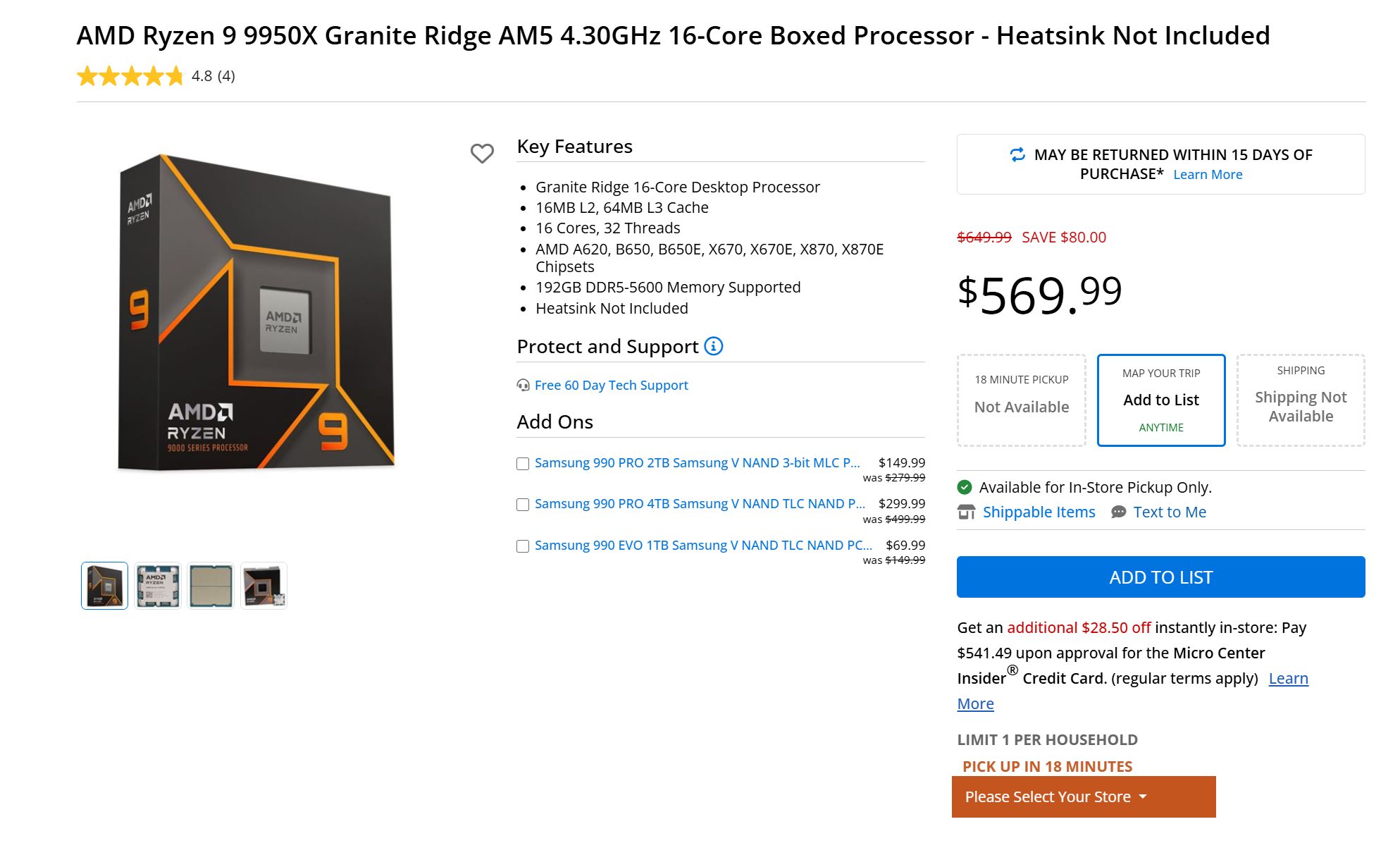
Microcenter, a well-known US shop, has recently lowered the costs of all four Ryzen 9000 processors. At the top of the list is the Ryzen 9 9950X 16-core processor, now selling for $569.99, a $80 US discount from its original MSRP of $650.
1 of 4
Image Via: Microcenter
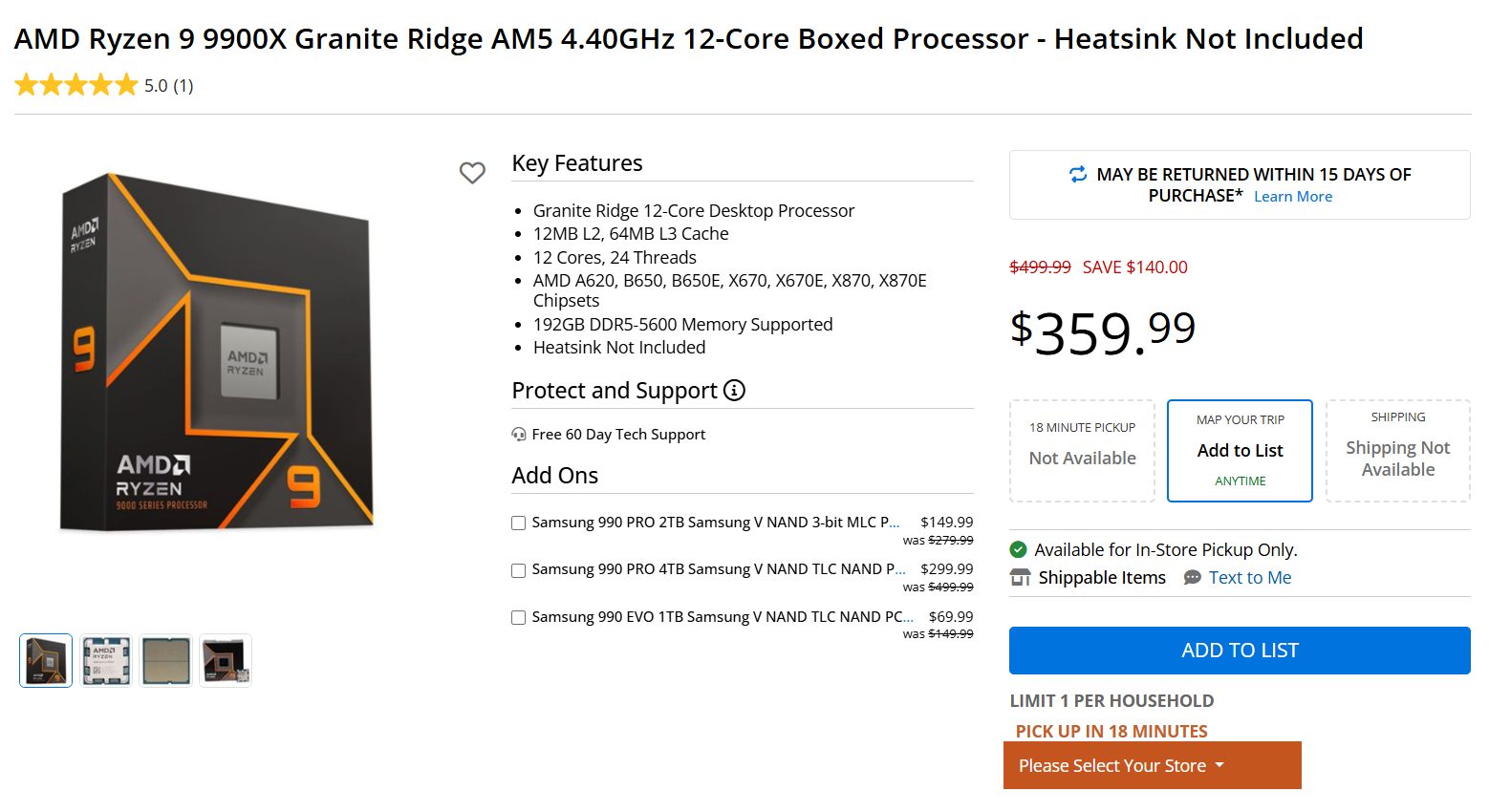
The Ryzen 9 9900X, on the other hand, is currently selling for $359.99. This is a significant reduction in price from the $499 initial MSRP. At this price, the chip is more in line with the Core Ultra 5 245K and provides solid gaming /multithreaded performance.
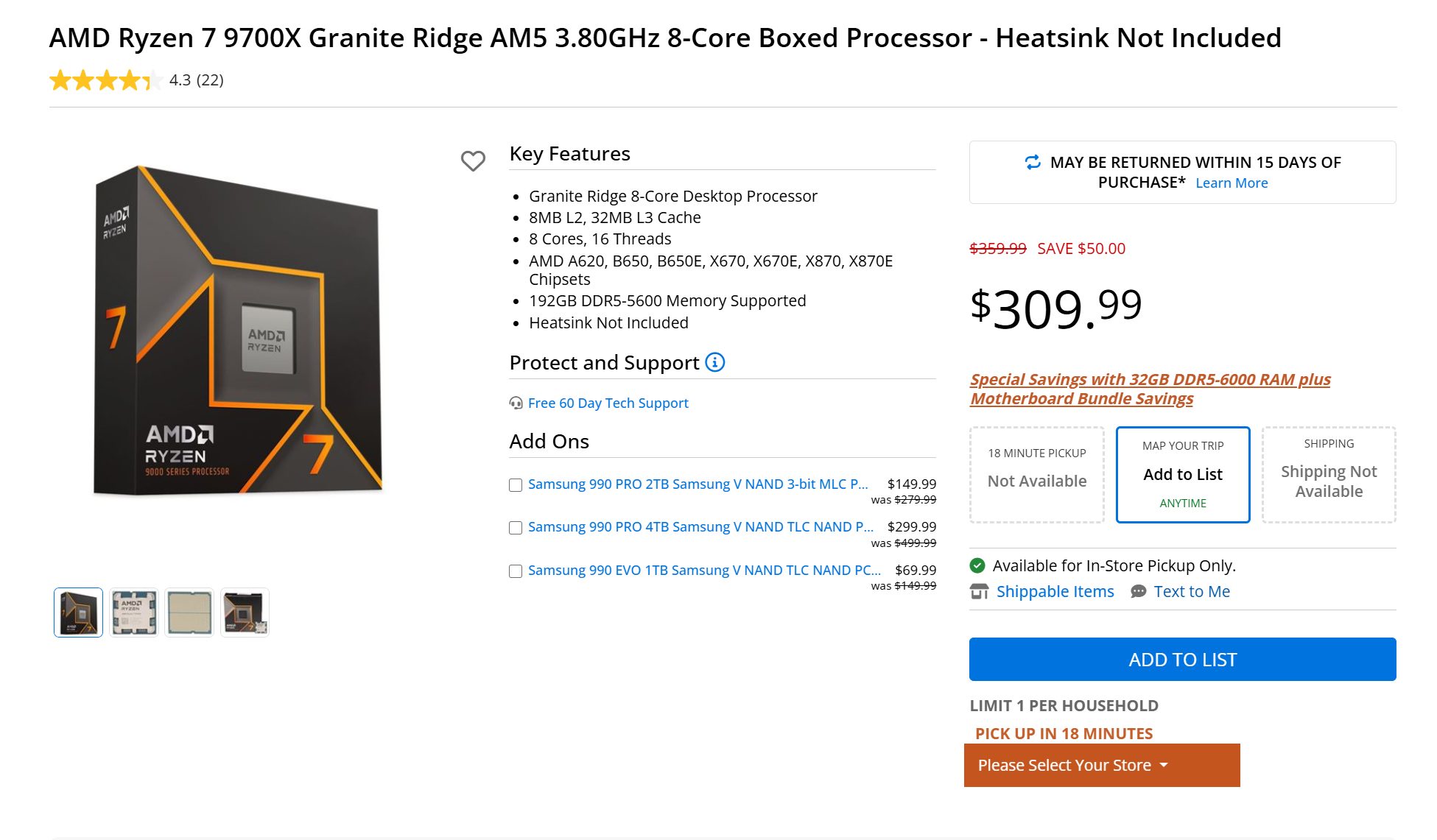
The AMD Ryzen 7 9700X is the next option on the list, listed at $309.99, representing a $50 discount over the original $359.99 MSRP. While the 9700X easily outperforms the Core Ultra 5 245K in gaming performance, the latter does appear to be the superior choice for multithreaded applications.
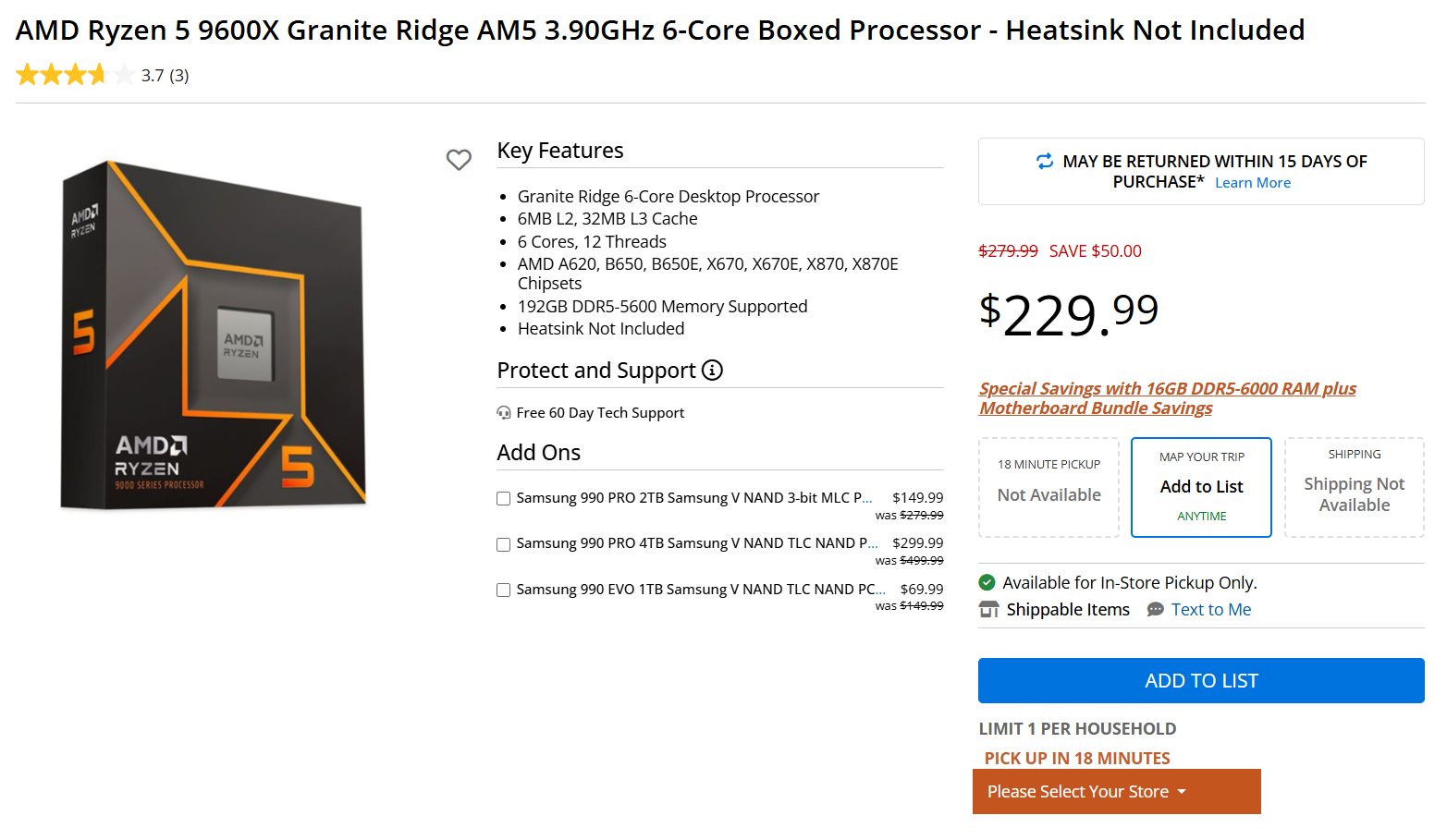
Last but not least, the AMD Ryzen 5 9600X, originally listed for $279.99, is now available for $229.99 US. With these retailer-specific discounts, AMD seems to be trying to change consumer perceptions of its non-X3D chips.
These discounts make the Ryzen 9000 series a competitive choice for the AM5 platform, which is now expected to support AMD’s upcoming Zen 6 lineup, codenamed Medussa.
At T4G, my task is to cover the latest news around the gaming globe ASAP and with the utmost precision. I adore all the games and respect all the devs behind the amazing games that we get all year. So, whether it’s a PC or a Console game, I got it all covered.
Story Highlight
Stalker 2 has managed to break into Steam’s top 10 best-selling games.
It is showing solid results on Steam despite releasing day 1 on Game Pass.
Data revealed that Stalker 2 is one of the most anticipated games for late 2024.
Stalker 2 has had one of the toughest development cycles for any game. With the ongoing circumstances in Ukraine, it has faced all sorts of issues. But it has finally gone gold and entered Steam’s top sellers despite a Game Pass release.
Why it matters: A previous poll showed that Stalker 2 is one of the most anticipated games for 2024. It also became the most wishlisted Steam game in April and is still in the top 5 spots.
Stalker 2 is already among the top sellers on Steam
Stalker 2 sits 6th on Steam’s top sellers (excluding Steam Deck). The position will undoubtedly improve even more as the launch draws nearer. Its latest previews were also remarkably positive, putting it in a solid position for Game of The Year accolade.
While the numbers already point towards a Steam hit, data shows it’s also much awaited for the Game Pass. GSC Game World would be proud of the direction the game is heading towards even 10 days before the launch.
Also, the game’s main story would be 40 hours long, with total completion taking 100 hours. There was a concern about the game’s performance on Xbox Series S, as it was said to run at 25FPS, but the developer has already addressed it.
Stalker 2, releasing on November 20, 2024, will be available on Xbox Series X|S, PC. There isn’t a word on the PlayStation port as of yet, but we wouldn’t be surprised if it’s planned for later as part of Microsoft’s multiplatform strategy.
What are your thoughts on Stalker 2 already entering Steam’s top sellers despite being on Game Pass? Do you think it will be a hit? Let us know your thoughts in the comments or join the discussion at the official Tech4Gamers Forum.
At Tech4Gamers, I contribute as a Senior News Reporter, combining my skills and gaming enthusiasm to keep our audience updated on the latest developments.
Story Highlight
Hogwarts Legacy offers enhanced ray tracing for the PS5 Pro compared to the standard PS5.
Despite the specific optimizations, the game runs worse on the new console in the Fidelity RT mode.
The frame rate can differ by as much as 18FPS in intense cases.
PlayStation’s ambitious new console, the PS5 Pro, is now available globally. Initial results have certainly been impressive from a commercial and technical point of view, but the console seems to be failing to uphold its 4K 60FPS promise.
Following somewhat disappointing results in Baldur’s Gate 3 and Spider-Man 2, Hogwarts Legacy has shown up as yet another test of the console’s capabilities. According to benchmarks, the game runs worse on the PS5 Pro than on the base console when ray tracing is enabled.
Why it matters: Combining the benefits of Quality and Fidelity mode was the main selling point of PlayStation’s latest console. Recent results highlight that this target may have been a bit too ambitious.
Direct comparisons between Hogwarts Legacy on the PS5 and PS5 Pro highlight a number of graphical enhancements.
For instance, the Fidelity RT mode runs at a higher resolution that typically falls around 1800p on the upgraded console compared to the 1400p of the base hardware. Moreover, the former relies on PSSR, while the latter makes use of FSR for upscaling.
This mode also brings improvements to ray-traced shadows and reflections, but these enhancements are not without their downsides. The direct comparison highlights frame rates can vary wildly between the two consoles.
Both the PS5 Pro and PS5 trade blows when rendering interiors in Fidelity RT mode, but the latter quickly takes the lead in the more open parts of Hogwarts Legacy. At its worst, the PS5 Pro can fall behind by nearly 20FPS.
This is because the PS5 does a better job staying above 40FPS in most situations.
Hogwarts Legacy Sold Millions of Copies Last Year
For context, Hogwarts Legacy has been upgraded to include ray-tracing in parts previously limited to SSR (Screen Space Reflections). This explains the performance gap, but PlayStation’s promise of an uncompromised experience still ends up unfulfilled in this particular scenario.
Ultimately, this comparison shows that ray tracing is still too intensive for more mainstream hardware.
What are your thoughts on Hogwarts Legacy’s performance on the PS5 Pro? Are you happy with the upgrades? Share your thoughts in the comments, and join the discussion on the official Tech4Gamers Forums.