Home Blog Page 438

Core Ultra 9 285K vs Ryzen 9 9950X: We’re Dissapointed

Intel Core Ultra 9 285K

Rated: 7.2/10

AMD Ryzen 9 9950X

Rated: 8.4/10


Pros And Cons

CPUProsCons
Core Ultra 9 285K✅ Has 8 more physical cores
✅ More modern manufacturing process
❌ Much more expensive
❌ Higher power consumption
Ryzen 9 9950X✅ Has double the L3 cache size
✅ 4% higher Turbo Boost frequency
❌ Higher TDP

Key Takeaways

  • Gaming tests showed a 4.54% advantage for the 9950X, with wider game-to-game variations. AMD averaged 22% higher in productivity, but Intel led in Cinebench R24.
  • The Core Ultra’s power consumption was around 15% higher, which contradicted Intel’s industry-leading claims.
  • There is little difference in price between these chips as of early November 2024. This might be subject to change in the future.
  • Ultimately, we think the AMD Ryzen 9 9950X is the safer bet if you are deciding to buy a processor at the time this article is written.

Comparison Table

FeatureCore 9 Ultra 285KRyzen 9 9950X
Instruction Setx86-64x86-64
CodenameArrow LakeZen 5 (Granite Ridge)
Model number285K-
Integrated GPUArc Xe2 (Arrow Lake-S)Radeon Graphics
GPU Boost Clock2000 MHz2200 MHz
Shading Units512-
Best Motherboards-BEST Motherboards For Ryzen 9 9950X
Best CPU Coolers-Best CPU Coolers For Ryzen 9 9950X
Processor ReviewCore Ultra 9 285K ReviewRyzen 9 9950X Review

Architectural Differences

  1. Core CountThe Core Ultra 9 285K has 8 P-Cores and 16 E-Cores, while the Ryzen 9 9950X has only 16 P-Cores. Hyperthreading is gone with the new Intel processors, so the Core Ultra has 24 threads, while the Ryzen has 32 threads.
  2. Clock SpeedIntel’s new high-end processor has a base clock of 3.2GHz on its E-Cores and a boost of 5.5GHz on its P-Cores. The AMD processor, however, ranges from 4.3GHz at base to a higher 5.7GHz boost.
  3. CacheThe Ultra 9’s L3 cache is 36 megabytes instead of 64 megabytes, half the size of the Ryzen’s. However, the Intel processor’s L2 and L1 caches are significantly larger.
  4. Process NodeZen 5 processors use a 4nm processing node from TSMC, which is slightly less advanced than the 3nm processing nodes used on the new Intel chips.
  5. TDPIntel’s processor has a PL1 TDP of 125 watts, which is significantly lower than the 170 watts that the Ryzen sucks.

Intel has revamped its desktop processors with a rebrand focused on power efficiency over performance, which also comes with a branding change. Today, we’ll compare the new Core Ultra 285K vs Ryzen 9 9950X to see how Intel’s improvements stack up against the rest of the market!


Gaming Benchmarks – 1080p

We are glad to announce that we have started incorporating productivity benchmarks into our regular suite of games to give you the most information possible regarding a processor. All this testing has been done on a controlled test bench, the specs of which are displayed below.

Test Bench

Star Wars Jedi: Survivor

Star Wars Jedi Survivor
Star Wars Jedi Survivor @1080p (Image By Tech4Gamers)
  • Our comparison started with this game, which had the 285K on the backfoot with an average framerate of 157 FPS, which was around 1.3% higher than the 159 FPS we saw from the Ryzen.
  • The lows had a more notable difference, with the Ryzen dipping to around 138 FPS in the hard-to-render scenes, while the Core Ultra 9 had lows of 131 FPS5.3% lower than its competition.

The Last Of Us Part 1

The Last Of Us
The Last Of Us (Image By Tech4Gamers)
  • Our testing of the PC port of The Last Of Us ran with an average of 194 FPS on the Intel chip, around 5.4% higher than the 184 FPS of the Ryzen 9 9950X.
  • While testing the lows in this game, we saw the 9950X dipping as low as 119 FPS, while the Core Ultra 9 285K had lows of 138 FPS, causing a delta of around 16%.

Cyberpunk 2077

Cyberpunk 2077
Cyberpunk 2077 (Image By Tech4Gamers)
  • Our test of Cyberpunk 2077 yielded the opposite results of our last test. The Ryzen 9 9950X had an average framerate of 160 FPS, which was 21% higher than the 132 FPS of the Core Ultra processor.
  • The Ryzen was 19% ahead when it came to the lows, with the 9950X having a minimum framerate of 119 FPS, whereas the Core Ultra processor had a framerate of 100 FPS.

Assetto Corsa Competizione

 Assetto Corsa Competizione
Assetto Corsa Competizione (Image By Tech4Gamers)
  • This popular racing sim also ran better on the Ryzen with an average framerate of 172 FPS, which was 8.8% higher than the 158 FPS of the Core Ultra 9 285K.
  • The lows had the same story, with the Ryzen 9 9950X getting a framerate of 146 FPS as its minimum, while we saw a minimum of 137 FPS with the Core Ultra 9.

Remnant 2

Remnant 2
Remnant 2 (Image By Tech4Gamers)
  • The Ryzen got another win with our test of Remnant 2, getting an average framerate of 123 FPS against the 120 FPS of the Core Ultra 9, leading to a 2.5% difference between the two.
  • The Ryzen lost by 9.2% when it came to the 1% lows; however, it got a minimum of around 98 FPS compared to the 107 FPS that came from Intel’s chip.

Homeworld 3

Homeworld 3
Homeworld 3 (Image By Tech4Gamers)
  • AMD also performed well in our test of this game, with an average framerate of 93 FPS31% higher than the Core Ultra 9’s 71 FPS.
  • The difference was compounded in the lows, with the 9950X getting a framerate of 44 FPS while the 285K was about half the framerate, at around 23 FPS.

Starfield

Starfield
Starfield (Image By Tech4Gamers)
  • The Ryzen finally broke under the pressure, with the Core Ultra 9 being around 15% faster in our test of Starfield, with an average framerate of 129 FPS against AMD’s 112 FPS.
  • We saw an 18% difference in Starfield in favour of the Core Ultra. The chip got a minimum framerate of 103 FPS, while the Ryzen held on to around 87 FPS.

Watch Dogs: Legion

Watch Dogs Legion
Watch Dogs Legion (Image By Tech4Gamers)
  • Finally, Watch Dogs: Legion ran better on the AMD processor with an average of 170 FPS against Intel’s 161 FPS, marking a difference of around 5.6%.
  • The Ryzen processor also provided a Higher minimum framerate, around 121 FPS, which was 3.5% higher than the 117 FPS that the Core Ultra 9 285K supplied.

Productivity Benchmarks

Now comes the new addition to our benchmark suite. The following benchmarks were performed using the same setup used in the gaming benchmarks.

Cinebench R24

Cinebench R24
Cinebench R24 (Image By Tech4Gamers)
  • The Core Ultra 9 285K had a score of 150 points in the single-threaded Cinebench benchmark, which was around 6.3% higher than the 141 points that the 9950X secured.
  • In the multi-core test, the 285K had a score of 2522 points which was 7.5% higher than the 2342 points that the AMD chip secured, marking the Intel chip better in both categories.

Adobe Photoshop 2025

Adobe Photoshop 2025
Adobe Photoshop 2025 (Image By Tech4Gamers)
  • In terms of real-world performance, the Pudget Systems benchmark on Photoshop ran much better on the Ryzen chip than on the Intel one.
  • The 9950X had 11,915 points, whereas the Core Ultra 9 285K had 9,021 points, a difference of around 32% in favour of the Ryzen processor.

7-Zip

7-Zip
7-Zip (Image By Tech4Gamers)
  • Finally, compressing a 32-megabyte dictionary on 7-Zip gave the Ryzen 9 9950X 191 points, whereas the Core Ultra 9 scored 195 points, giving the chip a 2% advantage.
  • Decompression was a completely different story. The Core Ultra 9 285K scored 209 points in our testing, whereas the Ryzen was hovering around 274 points, accounting for a 31% difference in performance.

Overall Performance

Featured
Ryzen 9 9950X
Core Ultra 9 285K
Average FPS
📈143.28
📈140.25
1% lows
📉109
📉107
Productivity Score
✏️9.5/10
✏️7.8/10
Winner
AMD Ryzen 9 9950X
-
Featured
Ryzen 9 9950X
Average FPS
📈143.28
1% lows
📉109
Productivity Score
✏️9.5/10
Winner
AMD Ryzen 9 9950X
Buy Now
Featured
Core Ultra 9 285K
Average FPS
📈140.25
1% lows
📉107
Productivity Score
✏️7.8/10
Winner
-
Buy Now

Average Framerate

Our testing only found an average difference of 4.54% in games, leaning in favour of the Ryzen. However, there were huge differences when zooming in, like the 21% that the Ryzen gained in Cyberpunk 2077.

1% Lows

Our study of the 1% lows showed an even smaller difference of only 1.9% because the Core Ultra 9 was surprisingly ahead in a few games over the Ryzen. Its biggest victory here was in Starfield, with a win of around 18.4%, while AMD’s biggest win was in Homeworld 3, with almost double the performance.

Productivity

Regarding productivity, we saw that the Core Ultra did better in the Cinebench R24 tests but not very well in the real-world applications of Cinebench and 7-Zip. We measured an average advantage of over 22% for the Ryzen processor.

Power

GameRyzen 9 9950XCore Ultra 9 285K
Star Wars Jedi: Survivor120143
The Last Of Us145145
Cyberpunk 2077112145
Assetto Corsa Competizione119135
Remnant 2118139
Homeworld 3121141
Starfield129137
Watch Dogs: Legion115140
Average Power Draw122.37⚡140.62⚡
Winner: Ryzen 9 9950X

According to Intel, this chip’s debut feature was its low power consumption, but AMD surpassed them even here. The Core Ultra took around 15% more power than its AMD counterpart, which is a complete arrow in the foot, knowing that it also had worse performance.


Price 

CPULaunch MSRPCheapest Price
Core 9 Ultra 285K💲589💲589
Ryzen 9 9950X💲649💲584
Price Difference9.69%0.85%

With the current AMD Ryzen 9 9950X prices, there is virtually no difference between what it wants from consumers versus the Core Ultra 9 285K. These prices are subject to change, but we expect both processors to be discounted at a similar rate.


What We Recommend

Intel Core Ultra 9 285K: Based on our tests thus far, it’s difficult to find a solid reason to prefer this over the Ryzen. It has worse gaming performance, worse power consumption, and worse productivity. 

AMD Ryzen 9 9950X: Though not an excellent chip in its own right, the AMD Ryzen won all our tests almost without fail. The only downside we saw with this chip was the lower 1% lows in some games and the lower benchmark performance in Cinebench.

After testing these chips thoroughly, it is obvious who the winner is in this comparison. However, Intel’s higher Cinebench score may mean it has more raw performance and is held back by optimization, but we will have to wait and see.


FAQs
Will Arrow Lake use the same LGA 1700 platform as previous chips?

No, the Arrow Lake processors support the new LGA 1851 socket, which has its own lineup of motherboard chipsets.

Can I replace my Ryzen 9 7950X with the 9950X?

Yes, the 9950X is a drop-in upgrade for any AM5 PC, which means it is compatible with the Ryzen 7000 series of processors. 

Do I need to upgrade from my Core i9 14900K to the Core Ultra 285K?

No, very little positive difference will come from this change.

Should I buy the Ryzen 9 9950X, or should I wait for the 9950X3D?

For gaming, the X3D series delivers great performance. For productivity, go with the 9950X. 

Does the Core Ultra 9 285K have an ARM architecture?

No, the Core Ultra 9 285K has a bog standard x86 architecture. 

Star Wars Outlaws: Discovering The Gritty Side Of Canto Bight

Story Highlights
  • Star Wars Outlaws explores the galaxy’s underworld with Kay Vess, a scoundrel.
  • The game highlights Cantonica’s harsh slums, showing a gritty side rather than the glamorous casinos.
  • The game offers a unique perspective, focusing on survival and life on the galaxy’s fringes rather than classic battles.

I was eager for a fresh galaxy-spanning adventure when Star Wars Outlaws was announced, drawn in by Ubisoft’s promise of a sprawling, open-world experience. The stunning visuals and immersive environments captivate me, making the game a visual feast.

With advanced technology driving its impressive graphics, the game beautifully showcases iconic planets. These diverse environments come to life through different graphical modes while thrilling space heists and exploration of the seedier side of the Star Wars universe keep the excitement high.

Discovering Canto Bight's
Each Planet Offers Various Locales And Cities – Image Credit (Tech4Gamers)

Among the many space things players could explore, one stood out for its stark contrast to the glamorous image it had in the movies: Canto Bight, the infamous casino city on the planet Cantonica.

A Tale Of Two Cities: The Glitter And The Grime

Canto Bight first dazzled Star Wars fans in The Last Jedi with its glitzy casinos. If you loved the flashy casinos in The Last Jedi, you’re in for a surprise with Star Wars Outlaws. Instead of showing off the glitz and glam of Canto Bight, the game takes you to the rougher, less glamorous part of Cantonica.

In Outlaws, you begin in the slums of Canto Bight, a secret highlighted by players in the Star Wars universe, as noted on the CNET. Forget the shiny casinos and rich gamblers; you’ll see narrow, foggy alleys and run-down buildings here. This part of Cantonica is about survival and getting by in tough conditions.

Starting in the slums gives you a fresh look at Cantonica. The slums are a big part of Kay Vess’s story. Her mother raised her in these rough streets and developed a versatile skillset such as hacking. Kay’s journey through the slums is personal and highlights the tough life for those not living in luxury.

The decision to begin the game in the slums was bold. It sets the tone for the game, emphasizing that Star Wars Outlaws is not about heroes or the Force. Instead, it focuses on the everyday struggles of those living in the galaxy’s shadows.

Exploring The Gritty Side

Despite the richness of the setting, some players have expressed disappointment in how little time they spend on Cantonica. One user pointed out that while Cantonica is the first planet players explore, it’s primarily limited to the story’s opening sections and a few key missions.

After the initial heist and subsequent escape, Kay is forced to flee the planet, and players cannot return to Cantonica outside of these scripted moments. For a game about exploration, this feels like a lost chance to explore Cantonica more.

Discovering Canto Bight's
Star Wars Outlaws Focuses On Kay Vess – Image Credit (Tech4Gamers)

Conversely, Star Wars Outlaws explores the galaxy’s underworld from the typical Jedi-centric narrative. Instead of epic battles between Light and Dark sides, the game follows Kay Vess, a scoundrel and thief reminiscent of Han Solo.

This shift offers a fresh perspective, diving into the criminal underworld and showcasing planets like Cantonica in ways previous media haven’t. Focusing on life’s gritty reality outside Canto Bight’s luxury, Outlaws enriches the Star Wars universe with new, grounded stories.

A World Worth Exploring

Star Wars Outlaws may not be the game I expected, and it left me with mixed thoughts, as it raises concerns about its originality and reliance on familiar mechanics. However, it no doubt offers a unique perspective on the universe.

The game moves beyond the classic good-versus-evil theme by highlighting Cantonica’s grittier side and Kay Vess’s struggles. For those tired of the same old Jedi stories, this gritty take on Canto Bight presents a journey worth taking.

Star Wars Outlaws
The Open World Is Your Playground – Image Credit (Tech4Gamers)

Whether you’re pulling off heists or just trying to make ends meet, the game captures the essence of what it means to live on the galaxy’s fringes, which is a story worth telling.

Dragon Age: The Veilguard Nominated For Ultimate GOTY At Golden Joystick Awards

Story Highlight
  • Dragon Age: The Veilguard, one of the most controversial games this year, was just recently released. 
  • The game has been nominated for the Ultimate GOTY at the Golden Joystick Awards. 
  • Other notable nominees are FF7 Rebirth, Black Myth: Wukong, Silent Hill 2 Remake, and Astro bot.

This year has been insane for gaming. A lot of controversies were started due to games like Concord, Assassin’s Creed Shadows, and Dragon Age: The Veilguard. The latter one was just recently released, and it has had a positive reception from critics and fans. 

While it recently got review-bombed on Metacritic by users, the Steam reviews are quite positive. Still, many OG fans of the series have shown their concerns over the ‘woke content‘ and some other elements of the game. 

Despite facing a lot of controversy and hate, Dragon Age: The Veilguard has been nominated for the Ultimate Game of the Year Award

Why it matters: It might be surprising to see the latest instalment in the Dragon Age series being nominated for such an award, but it might also happen at The Game Awards. 

Dragon Age: The Veilguard GOTY
Dragon Age: The Veilguard Has Been Nominated As Ultimate Game of the Year At the Golden Joystick Awards 2024

As you can see in the image above, the controversial title is among the nominees. Many great titles, such as Black Myth: Wukong, Final Fantasy 7 Rebirth, Silent Hill 2 Remake, and Metaphor: ReFantazio, are also nominated in the same category. 

So, the completion is going to be fierce. Given how big of a franchise Dragon Age is and its influence in the gaming industry, this nomination doesn’t come as a surprise. However, the game is under a lot of heat, and a former Sweet Baby employee had to reveal that the company didn’t work on this title

Some fans might not like this nomination, but others who have enjoyed it must be delighted. Nonetheless, we hope the most deserving among all the nominees takes home this most prestigious award at the Golden Joystick Awards. 

What do you think about Dragon Age: The Veilguard being nominated for the GOTY Award? Do you think it deserves to be called an Ultimate GOTY contender? Let us know what you think in the comments section below or join the discussion at the official Tech4Gamers forums.  

Sega Says Multiplatform Release Key To Success For AAA Games

Story Highlight
  • Sega has found incredible success with Like A Dragon and Persona in recent years.
  • It credits day-one multiplatform releases for this success.
  • Sega is currently supporting all consoles and PCs and doing its best to bring games to as many fans as possible.

A focus on multiplatform releases and third-party platforms has been gaining popularity across the industry recently. With Xbox confirming a commitment to this approach and PlayStation consistently releasing ports on PC, exclusivity is quickly becoming a relic of the past.

Many major publishers and developers have also advocated for multiplatform releases. Among them, Sega is the latest to reaffirm how effective this approach can be, stating that one major reason for its recent success is the reliance on day-one multiplatform releases.

Why it matters: Other publishers like Square Enix recently committed to a similar approach, highlighting the importance of supporting all platforms from the beginning in today’s gaming landscape.

Yakuza Dev RGG Summit
Like A Dragon Keeps Growing With Each New Release

According to the publisher’s latest Annual Integrated Report for 2024, the Persona and Like A Dragon franchises are doing better than ever. The former has sold north of 23.5 million units, while the latter has achieved more than 27 million sales.

On the other hand, the latest Sonic titles have found plenty of success, with the recently released Sonic X Shadow Generations selling a million units on day one. Sega attributes the success of such titles to multiple factors, but the report states that the multiplatform focus is one of the biggest reasons.

By nurturing and expanding these abundant IPs and deploying them in multiple fields, we are achieving stable profits.

-Sega

Compared to other publishers, Sega currently supports all platforms. The publisher has also tried to bring its games to the Nintendo Switch when possible, expanding its user base across every console and PC.

Reports have suggested that the same approach will carry over to Persona 6.

PS5 Xbox Series S|X
Both PS5 and Xbox Series Consoles Are Important For AAA Releases Today

On the other hand, publishers like Square Enix have suffered due to multiple exclusivity deals. The likes of Final Fantasy 16 and Final Fantasy 7 Rebirth have been unable to impress with their sales on PS5.

Both publishers stand in stark contrast to each other, signifying Sega’s successful strategy. What are your thoughts on Sega’s statement? Do you agree or disagree? Let’s discuss this in the comments and the official Tech4Gamers Forums.

Black Myth: Wukong Nominated For Ultimate GOTY At Golden Joystick Awards

Story Highlight
  • Black Myth: Wukong is undeniably the biggest launch of 2024. 
  • The game garnered a massive fandom, broke many records on Steam, and has over 95% positive rating on Steam. 
  • Due to that, this Chinese action RPG has been nominated in the Ultimate GOTY category at the Golden Joystick Awards. 

Black Myth: Wukong, the biggest hit of 2024, won the hearts of many. While its success was totally unexpected for many gamers, it definitely served as a catalyst for much more to come from the Chinese developers. 

This game shattered records on Steam like it was nothing, and now it is the most-played single-player game on the platform. However, despite performing so well and garnering overwhelmingly positive reviews from the fandom, the game was not nominated for the PC or console GOTY at the Golden Joystick Awards 2024.

This caused a massive uproar among the fandom, but they don’t have to worry anymore. The title has been nominated for the Ultimate GOTY award.

Why it matters: Black Myth: Wukong not being nominated for PC or Console Game of The Year was concerning. However, the fans would be delighted to know that this Chinese RPG has been nominated for an even better award. 

Black Myth Wukong Ultimate GOTY
Black Myth: Wukong Has Been Nominated For The Ultimate Game of The Year Award

GamesRadar+ is hosting the Golden Joystick Awards 2024, and just now, it has revealed the contenders for Ultimate Game of the Year.

Satisfactory, Final Fantasy 7 Rebirth, Dragon Age: The Veilguard, COD: Black Ops 6, Metaphor: ReFantazio, Balatro, Silent Hill 2 remake, Black Myth: Wukong, Helldivers 2, Astro Bot, Animal Well, and Tekken 8 are nominated for the award. 

This is because a lot of notable releases this year have been nominated, which would make the competition fierce. Final Fantasy 7 Rebirrth, Black Myth: Wukong, Astro Bot, and the Silent Hill 2 remake seem to be the leading ones here, as all of them received a pretty positive reception from the fandom

Black Myth: Wukong Spider Sister
The Game is Still Averaging Nearly 100k Players on Steam Even After Being Launched Almost 3 Months Ago

We hope that the best release among the nominees will take away this award, as it could also give us a glimpse of what could happen at The Game Awards 2024.  

What do you think of the nominations for Ultimate Game of The Year? Which game do you think will win the award? Let us know your thoughts in the comments section below or join the discussion at the official Tech4Gamers forum

Remedy Says Max Payne Remakes Progressing Well In Production

Story Highlight
  • The Max Payne remakes entered production in August, and development is moving along smoothly.
  • Remedy states that it expects new production milestones soon.
  • The company has also included the series in its long-term business plans.

The Max Payne remakes finally entered production a few months ago. This upcoming release, set to bundle the first two games in a collection, promises to bring the franchise back to its past glory with a fresh coat of paint.

Following production, the studio has also shared a new update on the two games. As per Remedy’s latest earnings report, Max Payne’s revival is moving along smoothly.

Why it matters: The franchise is closely tied to the studio’s legacy as a game developer and has always been a fan favorite. As such, fans are incredibly excited to see this series returning in the coming years.

Max Payne Remake
Remedy Has Provided Updates On Upcoming Projects via The Latest Earnings Report

Regarding Max Payne, the company confirmed that work is progressing steadily and that important milestones are expected soon.

While this is a small detail in the grand scheme of things, it serves as the first piece of information on the projects since production began in August. Moreover, the team confirms that Max Payne is currently part of its long-term business prospects.

Therefore, the remakes will likely bring the series closer to Remedy’s Connected Universe. Perhaps the team will even create more original entries if the opportunity arises in the future.

James McCaffery Alex Casey Max Payne
Alan Wake 2 Set High Expectations For The Studio’s Future Releases

In the same report, the studio confirmed that Control 2 is set to begin production soon. Additionally, Alan Wake 2 is on track to earn a profit one year after its release.

Based on the current progress, Max Payne should be a more significant part of Remedy’s earnings report next year. Remedy may even tease the game through an official trailer very soon, giving fans of the IP plenty of reason to be excited.

Are you looking forward to the remakes? Let us know in the comments, and join the discussion on the official Tech4Gamers Forums.

Arkane Founder: Microsoft’s Studio Closure Hurts the Immersive Sim Genre

Story Highlight
  • Arkane Studios founder Raphael Colantonio criticized Microsoft’s decision to close Arkane Austin.
  • He also highlighted the difficulty of marketing immersive sims, using Prey as an example.
  • Colantonio noted that Microsoft’s focus on popular genres clashes with the slower nature of immersive sims.

In a recent interview, Arkane Studios founder Raphael Colantonio expressed disapproval of Microsoft’s decision to shut down Arkane Austin. Colantonio, who left Arkane in 2017, called the closure a “stupid” decision, pointing out that the unique team at Arkane Austin would be hard to replace.

Colantonio also discussed the challenge of marketing immersive sims, using Prey as an example of how difficult it is to convey the genre’s appeal.

Why it matters: Immersive sims, known for their strong stories and player choices, have a hard time in the mainstream because they need a lot of investment but don’t attract a wide audience.

Dishonored 3
Dishonored remains a top stealth game even after all these years.

While talking to PC Gamer, Colantonio explained how hard it is to market the immersive sim genre:

Prey was marketed as an immersive sim. Because of that, a lot of marketing points were spent trying to explain what an immersive sim is.

Unlike genres like RPGs, which everyone understands, immersive sims need some explanation, which can confuse mainstream audiences.

He noted that while a small group of fans might be excited by the term, most players don’t really know what it means and often think of it as just another type of game.

Bethesda Softworks Arkane Studios Redfall
Redfall’s struggles were possibly the main reason why Microsoft shut down Arkane Austin.

As Colantonio pointed out,

If you don’t reach the market, it doesn’t matter how good your game is.

The Arkane founder suggested that this gap between niche appeal and wider understanding is a big reason why immersive sims have had trouble attracting a larger audience.

Moreover, Colantonio recognized that Microsoft often focuses on making money from popular genres, which clashes with the slower, more detailed design of immersive sims.

Anyhow, Arkane’s founder is already working on a new project that combines elements from Fallout: New Vegas, Dishonored, and Prey, aiming to carry on Arkane’s legacy in the genre.

What do you make of Arkane’s founder’s comments about Microsoft? Let us know in the comments, or join the conversation on Tech4Gamers Forum.

Indiana Jones Will Feature Cinematics About A Length of Whole Movie

Story Highlight
  • The highly anticipated Indiana Jones is coming this December.
  • New details have been revealed for the game, as it will feature cinematics about the length of a whole movie.
  • Like Indiana Jones, Senua’s Saga Hellblade 2 also had lengthy cutscenes, considering its short 10 hours of playtime. 

MachineGames is gearing up for its next highly anticipated title, Indiana Jones and The Great Circle, which is set to release on December 9. Debuting in Xbox Showcase, the game caught the audience’s attention with stunning graphics and engaging gameplay.

However, to meet the Indiana Jones movie essence, the game is planned to have 3 hours of cinematics showcasing the movie spirit of the game.

Why it matters: Cinematics add depth to the game’s storyline, so if the gameplay is good, such long cinematics will be of great worth.

Indiana Jones and the Great Circle

The details of Indiana Jones’ cinematics surfaced online via an interview with Todd Howard, who said that the game will feature cinematics equivalent to a movie, which is really surprising since many titles have a shorter duration of cinematics.

Furthermore, the director compared the cinematic feel of the Indiana Jones movie with the Fallout series, saying that the spirit is more important than the 1:1 accuracy. In both cases, he believes that players have to ignore the original presentation and focus on the world and characters.

 “I think in both cases, you have to ignore the original presentation and think about the world and characters,” Todd Howard

Indiana Jones is not the first attempt at Xbox elongating cinematics. Senua’s Saga Hellblade 2 also featured many cutscenes and was quite lengthy compared to the 10 hours of playtime. 

Nevertheless, the cinematics are not conclusive of the game’s worthiness, as many players don’t care about cinematics. The main thing is the gameplay, so it is worth watching to see what MachineGames has done in this area.

Indiana Jones and The Great Circle

While nothing can be concluded that early, the previews of the game are mostly positive. Also, Indiana Jones was recently announced for PS5, which will ultimately increase the audience.

Are you excited about the game? Let us know in the comments, or join our T4G forum.

PS5 Pro Showcases Impressive Gameplay For Monster Hunter Wilds, TLOU2, RDR2, Spider-Man 2 & More 

Story Highlight
  • Sony’s decision to launch the PS5 Pro has been debated since its announcement.
  • Recent gameplay footage of several popular titles running on the PS5 Pro showcases an impressive milestone for the new mid-gen console.
  • The PS5 Pro is becoming more and more convincing as the launch date for the console drives closer.

The PS5 Pro is just a few days away from launch, and it has sparked considerable debate among gamers regarding whether Sony’s move was necessary. Some argue that the resources used for its development could have been better spent enhancing the base PS5 experience.

However, the true impact of the PS5 Pro will be revealed in the coming months as players get a chance to experience its capabilities firsthand. In the meantime, anticipation has been fueled by early glimpses of its performance.

Thanks to Gabriel Master on YouTube, we’ve already seen gameplay footage of several popular PS5 Pro titles.

Why it matters: For the PS5 Pro to achieve success, it must deliver a significant upgrade over the base PS5. This enhancement is crucial to persuade consumers that the Pro model is worth the investment.

The showcased titles include Monster Hunter Wilds, The Last of Us Part II Remastered, Red Dead Redemption 2, Spider-Man 2, Demon’s Souls, Dragon’s Dogma 2, and Dragon Age: The Veilguard, all running impressively on the PS5 Pro.

Notably, some of these games lack official patches optimized for the PS5 Pro, and the quality of the gameplay is somewhat affected by YouTube.

Gabriel Master highlights Demon’s Souls and TLOU Part II Remastered running smoothly at 4K/60FPS. Monster Hunter Wilds is shown in both Fidelity and Performance modes, while Dragon’s Dogma 2 and Spider-Man 2 boast 4K/60FPS with Ray Tracing enabled.

Red Dead Redemption 2 appears to utilize the new “Game Boost” feature, which enhances image quality, although details about this feature remain scarce.

PS5 Pro
Over 80 Titles Have Been Enhanced For The PS5 Pro

As the PS5 Pro’s launch approaches, these impressive gameplay demonstrations, the console’s enhanced specifications, and its 8K screenshot capability are making a strong case for its appeal over the base PS5.

However, Sony’s CEO has urged fans to manage their expectations, clarifying that the PS5 Pro is not a “next-gen console” but an upgrade to the existing PS5.

Speaking of the PS5 Pro, what do you think about the mid-gen console so far? Let us know in the comments section or join the discussion on Tech4Gamers’ official forums.

Red Switches Are Amazing But I Don’t Recommend Them For Fast Typists

Story Highlight
  • Red switches feel better while gaming. Smaller sentences are fine, but you feel the difference between red and blue switches when typing longer forms of text.
  • Due to the lower actuation force of red switches, fast typists are prone to making more errors and double-tapping the same key, decreasing accuracy and overall typing speed.
  • The creamier sound of red switches can be too dimmed, making typists think they didn’t press a certain key even though they had already pressed it.

I recently bought a new mechanical keyboard with red switches, hoping to try something different from always using blue switches. There are almost no issues with the keyboard. The sound is amazingly creamy, it’s a joy to type, and my stamina has also improved. However, while red switches are amazing, I don’t recommend them for fast typists. Not to brag, but I average over 130 words per minute (WPM), and I shared a few tips on how you can also get faster. Either way, here’s my reasoning for my statement above:

Red Switches Are Primarily For Gaming, Not Typing

My Bloody S510R keyboard
Showcasing my Bloody S510R keyboard. (Image By Tech4Gamers)

The most significant difference between blue and red switches is that the first is for typing, while the second is for gaming. That means you will feel a difference when typing long text forms. I love my new keyboard while playing games, but I can’t say the same when working. Maybe you won’t feel a difference if you only type a sentence here and there, but if you’re a writer like myself, the difference is like the ground and the sky.

I’m not exaggerating when I say that. I’ve been using the Bloody S510R for about a week and have spent several hours practicing typing on it. However, even so, the number of typing errors I’m making is honestly ridiculous. I am by no means an outstanding typist, but I have some confidence in my fingers when they’re on a keyboard. This time, the problem isn’t with the keyboard or within me; instead, it’s a bad combination. It’s like I’m trying to mix oil and water — it just won’t happen. I’ll get to this in a bit, so hold tight.

The Lower Actuation Force May Decrease Accuracy

Bloody S510R Keys
Key size of the Bloody S510R keyboard. (Image By Tech4Gamers)

The reason why blue switches are better for typing is because of their higher actuation force. Although it doesn’t make sense on paper, if you type over 100WPM, you will have a heavy hand. At that point, a higher actuation force is better for accuracy. My older Redragon Vara K551 keyboard with blue switches had an actuation force of 60g. On the other hand, my new Bloody S510R has a much lower actuation force of 45g.

Whenever I’m typing longer forms of text, like right now, I’m prone to making more errors, which decreases my accuracy and ultimately slows my typing speed. In theory, I’m clicking the keys much faster than before, but I’m making more errors because I’m double-pressing or completely missing a letter. Here’s a video of me doing a typing test on my Bloody S510R red switches mechanical keyboard.

Now that you have watched me type on my new keyboard, watch me type on my older Redragon Vara K551 blue switches mechanical keyboard. You will see the difference in my errors, keystrokes, and overall speed and accuracy.

You might question why I’m double-pressing or missing letters with my Bloody keyboard, right? I was about to get to that in my last point, so buckle up!

They Sound Creamier Than Having A Tactile Bump

Through my years of typing experience, I can confidently state that sound and touch matter a lot when you’re typing, especially if you’re going over 130WPM speeds on average. Again, I am not one of the fastest typists; it’s just something I have noticed with time. I’m trying to say that when you’re clicking over 11 keys a second, the sound and feel of you hitting the keys helps you realize whether you have clicked on a key or not.

As you must have heard in both tests, the Bloody S510R’s red switches sound much creamier, and their noise is dimmed. That means I can’t rely on the feel or sound when typing. On the other hand, the Redragon Vara K551’s blue switches must have sounded louder and bumpier. This noise helped me improve my speed and accuracy a lot the entire time I used the keyboard.

I Still Prefer Red Switches, Though

Bloody S510R Red Switches
Showing off the red switches of the Bloody S510R keyboard. (Image By Tech4Gamers)

Red switches are amazing, but I don’t recommend them for fast typists. However, I still prefer red switches. Even after all the bashing and the reasoning, I simply love the lower actuation force and the less noise. For example, I can easily work late at night without disturbing my family members. Similarly, I can type much more before my fingers get exhausted because of the lower actuation force.

Ultimately, whichever switch you use depends on your use case scenario. Whether playing games or typing entire articles, blue and red are pretty efficient in both use cases. It’s just that one tends to be slightly better in some tasks and vice versa. I can’t discriminate between both switches, but I prefer the creamy sound and easier touch. Meanwhile, I also want the tactile bump to type faster. All in all, both switches are decent, no matter how you put it.

Dual-Mode Monitors Are The Future Of Gaming And I’m All Up For It

Story Highlight
  • Dual-mode monitors offer two resolutions and refresh rates within one monitor, making them perfect for story mode and competitive gaming.
  • Besides gaming, dual-mode monitors are perfect for compact PC setups as they reduce the space required to place the monitor.
  • While their features are amazing, dual-mode monitors are extremely expensive and will only become mainstream once their price dies down.

I keep seeing PC builds with dual-screen monitor setups, and I won’t lie; it irks me to my core. I have nothing against such setups, but ultrawide monitors are better in all aspects. I recently shared my opinion on that. Things get trickier if you’re using two different resolution and refresh rate monitors. However, technology doesn’t stay stagnant for long. What do I mean? Well, dual-mode monitors are the future of gaming, and I’m all up for it! If you haven’t heard about this technology yet, let me take you on a roller coaster ride you won’t forget anytime soon.

Two Resolutions In One Monitor!?

EASE-G24I28
EASE G24I28 Gaming Monitor. (Image by Tech4Gamers)

Most people use dual-screen setups with separate resolutions. For example, your primary monitor could be a high-end 4K 144Hz panel for gaming and other similar tasks. In contrast, the secondary monitor would be a standard 1080p 60Hz panel for mundane tasks. A few of my friends use the secondary monitor for programming, while the primary is only for gaming.

What if I told you some monitors offer two different resolutions (and refresh rates) in a single panel? Yep, you read that sentence correctly. That’s precisely what dual-mode monitors are. For example, the LG ‎32GS95UE 32-inch monitor offers 4K 240Hz and 1080p 480Hz. Depending on your use case, you can switch the resolutions whenever you want. It’s as easy as that.

What Good Are Dual-Mode Monitors?

Dual-mode monitors sound like one hell of a feature, but what good are they, exactly? I wouldn’t exactly say they’re a replacement over dual-screen setups, but rather an upgrade. If you’re not rocking an RTX 4090, you probably won’t always need the 4K 240Hz. Moreover, such an intensive resolution can cause lags while doing productivity work. That’s where the smaller 1080p 480Hz comes in.

Work on the lower resolution and play story-mode games on the higher resolution. Want to get sweaty and play Valorant or Counter Strike 2? Just shift back to the 1080p 480Hz resolution again. I’m only giving an example for the LG monitor, but numerous others are also there. You can find 4K/1440p panels and lower refresh rate ones. Of course, this isn’t the only good thing about these new monitors.

They’re Perfect For Compact Setups

Rocking the Samsung Odyssey G9 (Image By Tech4Gamers)

Another aspect I love about dual-mode monitors is that they’re perfect for compact setups. I’m not trying to diss dual-monitor setups, but I wouldn’t want to use over 100 inches of space just to place two monitors. Some people might have a smaller computer table but want to utilize a two-monitor setup. So, instead of buying new furniture and changing your entire room’s layout, upgrade to a dual-mode monitor.

By using one of these monitors, you can have your entire setup in the corner of your room and save up valuable space to place other essential things. If a dual-mode monitor doesn’t sound like the thing for you, there’s always an ultrawide monitor. However, ultrawide monitors can also get pretty large, so you must keep that in mind before finalizing your purchase.

The Pricing Could Be Better

I’ll tell you that not everything is perfect about dual-mode monitors. For example, most dual-mode monitors cost between $800 and $1,500. Within that budget, I can easily build entire PCs perfect for AAA-titled games. There are affordable options, too, like the ASUS ROG Strix XG27UCG for $499, but it’s still not the most affordable monitor.

It shims down to whether you’re willing to break the bank for a compact PC setup or are okay running a dual-monitor build. Even ultrawide monitors don’t cost nearly as much as these dual-mode monitors, but they don’t offer dual resolutions. Here’s a comparison chart I created showcasing the prices of ultrawide and dual-mode monitors so that you may have a better picture of what you can get at specific price points.

Dual-Mode Monitors Vs Ultrawide Monitors Prices
Comparing pricing between dual-mode monitors and ultrawide monitors. (Image By Tech4Gamers)

On the other hand, an average 1440p monitor can cost around $150, and a higher refresh rate monitor, like the GIGABYTE M27Q-P Gaming, can go up to ~$370. Pairing that with a 1080p 60Hz monitor will take your total cost anywhere between $300 to $450.

Budget Dual-Mode Monitors Are The Future

Concluding my opinion from earlier, budget dual-mode monitors are the future of gaming. They’re perfect for a compact PC setup and take gaming to the next level. With the correct price, they’ll be the perfect addition for gamers. While the ASUS ROG Strix XG27UCG shows promise, having greater variety at that price range (or below) is a must for dual-mode monitors to become mainstream.

In any case, I’m hopeful for this technology, as it’s helpful for gaming and productivity tasks where you may require a lower and higher resolution monitor at different refresh rates. While the competition is great from ultrawide monitors, 1440p screens, and dual-monitor setups, dual-mode monitors are finally a breath of fresh air, and I love that!

I Cleaned My PC After Six Months — Here’s The Thermal Difference

Story Highlight
  • You only require a blower, a microfiber cloth, and a small brush to clean your PC occasionally.
  • Dust build-up over time can increase temperatures exponentially. It’s not a big issue in most cases.
  • Thorough cleaning, even without re-applying thermal paste, can help reduce temperatures by up to 11°C.
  • If you don’t live in a dusty area, cleaning your PC once every six months should be sufficient. Otherwise, try cleaning it once every two months.

Dust accumulation is one of the most annoying issues in PC builds. Most people recommend cleaning PCs once every four to six months, but you should do it more often if you live in a dusty area. The latter applies to me, and theoretically, I should be cleaning my PC every week, but sometimes I become lazy. The dust accumulation in my PC is no joke, even after using dust filters, so imagine how it must have been when I cleaned my PC after six months. The thermal difference is out of this world as well. Let’s take a closer look:

What Tools Do You Require For Deep Cleaning?

Technically, to deep clean your PC, you just need a blower, a small brush, and a microfiber cloth to rub all over it. You can change the thermal paste on your CPU if you wish, but you won’t necessarily have to do it every six months. In my case, I used a small blower (spoiler alert: It was useless!), a small brush, and an old piece of cloth to clean off my PC.

PC cleaning tools
PC cleaning tools – a small blower, brush, and an old cloth piece. (Image By Tech4Gamers)

Now, if you want to clean your PC, you can use WD-40, new thermal paste, and even disassemble your entire build to reach every crevice of your chassis, but if you’re like me and want to get the job done ASAP, then some simple dusting will take you a long way.

The Before And After

I knew my PC required cleaning for a few months, but I couldn’t find the time to get to work. Also, knowing that my primary blower was out of commission, I kept delaying the cleaning until I started hearing weird noises from my CPU cooler’s fan. You probably won’t believe me after looking at the images, but I promise you there were no dust storms or anything in these past six months; it’s pure dust running rampant in my room being collected in my PC.

The PC pre-cleaning
The PC before being cleaned. (Image By Tech4Gamers)

Yeah, that’s how bad my PC was. Just look at my Yor figurine, which is covered in dust and grime. Usually, you can go out to the balcony and use a blower to get rid of all the dust in the chassis, but if you don’t have one available, using a brush and an old cloth will do the trick, albeit it’ll take some time. I didn’t go for the extreme details but thoroughly dusted all the components and cleaned off the fans as much as possible. Here’s my PC after finishing most of the superficial cleaning (Yor is shining, too!):

The PC post cleaning
The PC post cleaning. (Image By Tech4Gamers)

Did The Dust Build-Up Affect Temperatures?

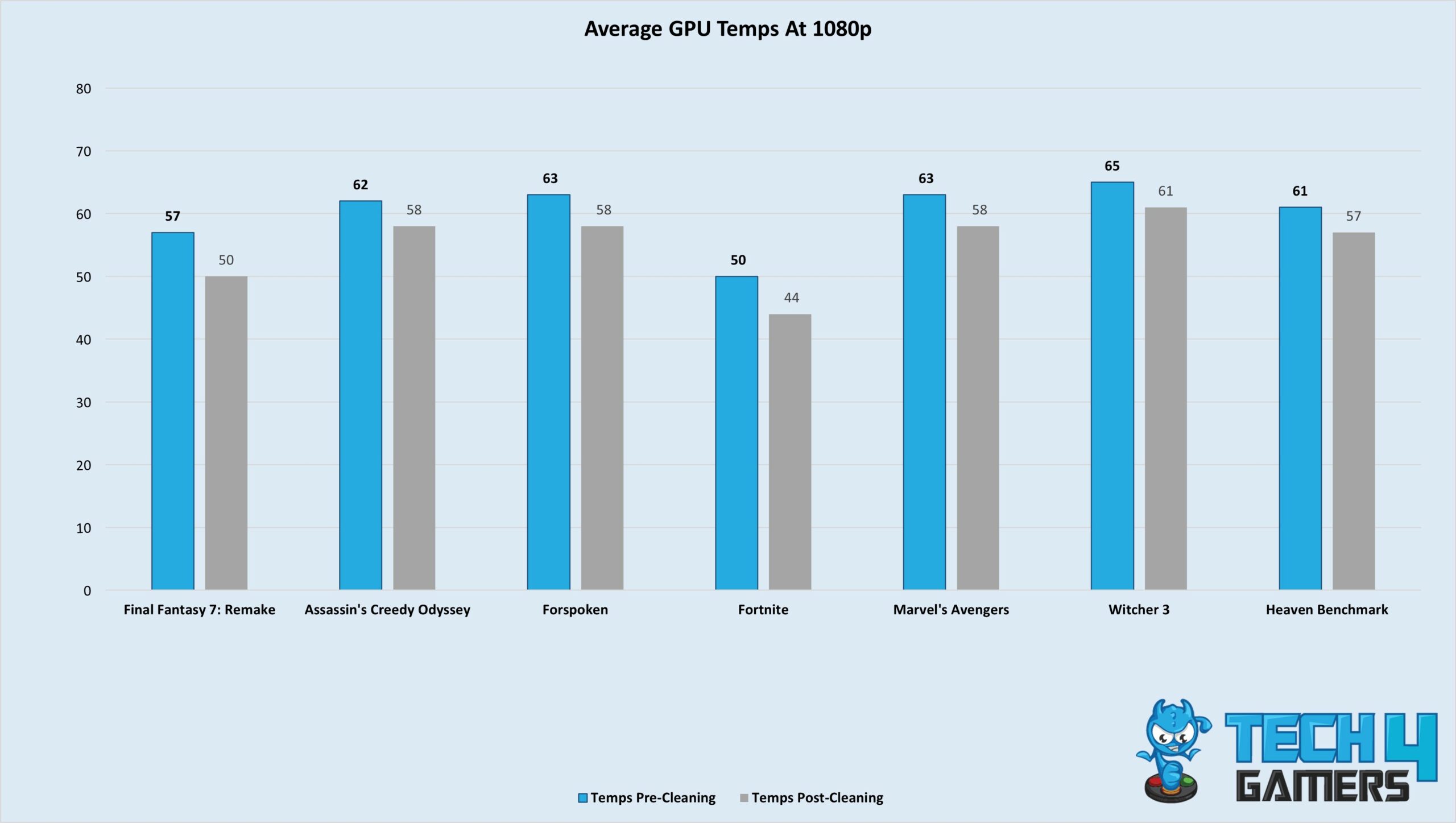
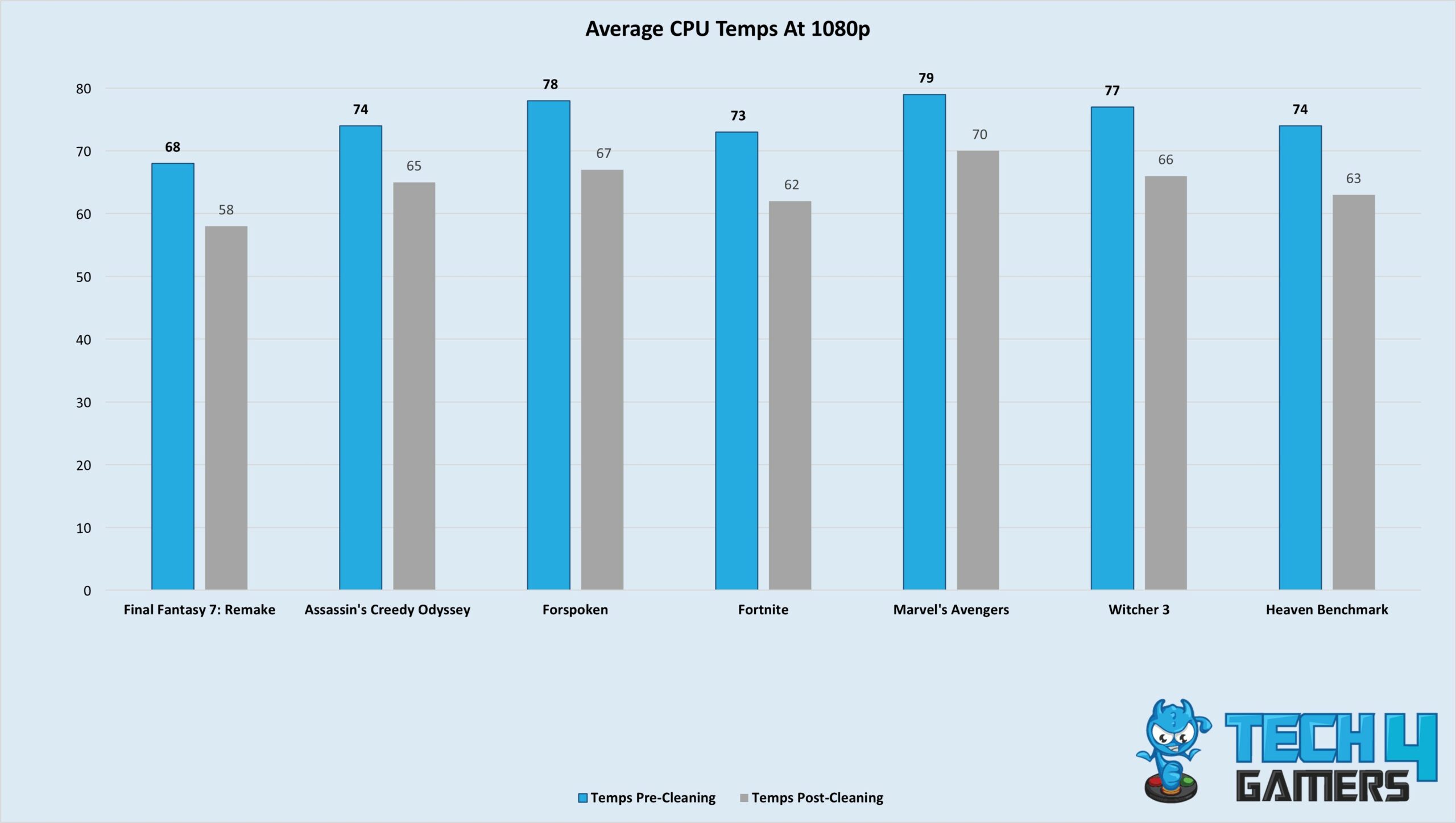
Okay, enough about my PC cleaning adventure. Let’s get to the main point. How much can your PC’s temperatures increase with dust build-up? My CPU saw an 11°C reduction in temperatures, while my GPU was 4°C cooler on average after being cleaned. Technically, the higher temperatures weren’t affecting my overall performance, but I prefer the lower temps as my fans don’t spin as loudly as before. Here are a few graphs of the average temperatures before and after I cleaned my PC in a few games at 1080p.

Just so you know, I’m rocking a Ryzen 5 3600 with an MSI RTX 3060 Gaming Ventus 3X, so my GPU temperatures always hover around the mid-50s at their worst. I’m using a single-fan Redragon air cooler, which serves my purpose. As you must have noticed, the CPU temperatures after the cleaning are pretty decent. Mind you, of course, I haven’t re-applied the thermal paste — this is a three-year-old paste.

Should You Clean Your PC Occasionally?

PC aesthetics after switching on
PC aesthetics after switching on. (Image By Tech4Gamers)

All in all, cleaning off my PC helped me shed a lot of heat, improve the aesthetics, and lower the noise pollution the fans were causing. I live in a very dusty area, so I must clean my PC at least once a month. However, if you’re in a cleaner area, you can live without cleaning your PC for up to six months. Using the blower routinely will help keep most dust off your PC, but deep cleaning is only slightly required.

On the other hand, if you’re a busy person and can’t devote 30 minutes to an hour to cleaning your PC every month, you can let it gather dust, increase the temperatures, and once it reaches its limit, deep clean it all together. I’m in the second category, which is why I cleaned my PC after six months, but you can do it however you like. In most cases, you won’t face any real problems other than slightly higher temperatures.