At Tech4Gamers, I mainly cover new gaming news, leaks, and rumours. Aside from that, I love to write features about my favourite games while inserting my opinion about their different aspects.
Story Highlight
Baldur’s Gate 3 is the first game in history to win the GOTY award at almost every major event.
Due to that, the developers had trouble attending all the ceremonies.
Larian Studios also wished to get closure, but these award shows prevented this from happening.
Last year at The Game Awards, the competition was pretty interesting. It was quite intense, and yet Baldur’s Gate 3 managed to dominate the competition and win the most prestigious award.
The game has sold over 15 million units, and not only has it won GOTY, but it also ended up being the first to win the GOTY award at almost every major event. According to Larian Studios, it won so many awards that these ceremonies impacted the team’s work.
Why it matters: There has never been an instance where a studio had problems with development because it had to attend too many award ceremonies for a game.
Baldur’s Gate 3 Was The Winner of Last Year’s Game of The Year Award
Speaking to GamesRadar, the director of Baldur’s Gate 3, Swen Vincke, revealed that the success has caused problems for the team. He said that the game has won many awards that are appreciated, but they have started to cause problems.
It affects development – there’s a lot of them. This has been a real problem.
-Swen Vincke
The developer was happy to attend the event when Baldur’s Gate 3 won Game of the Year. It would be a pleasure and dream for most developers to attend an event when their game wins Game of the Year.
However, after that, Baldur’s Gate 3 kept on winning awards, so it became clear to the studio that it would win even more. Larian Studios opted to send out rotating teams, meaning different people went to different award shows, so the development could go on with minimal interruptions.
This instance highlights how a game being this famous and successful also has its downsides.
Vincke explained that the game’s success was on the verge of being too much. He also described that Larian Studios was unable to find closure for Baldur’s Gate 3 because of these events.
The developers are still going to more award shows, with the Develop Star Awards being the most recent example of Baldur’s Gate 3’s success. However, the team has also moved on to new projects.
Moreover, fans have begun to demand a Fallout RPG from the studio after it claimed that this was one of its initial goals several years ago. Nonetheless, Larian Studios’ future holds a ton of potential.
As Tech4Gamers’ Founder and Editor-in-Chief, I bring over 13 years of PC Hardware Reviewing and 8+ years of IT Project Management experience. Certified in Google IT Support , my focus is on providing honest product reviews and analysis and fostering a strong gaming community with 130k+ members in PPG.
Sameed Hussain
As a Hardware Expert at Tech4Gamers, I blend my Computer Science expertise with a love for technology. Through comprehensive reviews and comparisons, I guide our audience in making informed tech decisions.
For some time now, Corsair has been in the market competing with small, dual-chamber cases. So, it should come as no surprise that Corsair has returned with its dual-chamber revisions, and this time it’s with the Micro ATX 2500D Airflow case. By doing so, they are reigniting the dual chamber case market and continuing the legacy of their renowned predecessors. There are three main points that this new lineup is designed to improve upon to make the niche better.
In addition to a wide range of accessories, including panels made of various materials, these cases provide customers with the option to switch between glass and airflow layouts. The design is specifically made to be compatible with motherboards that have reverse connections and works with iCUE Link to hide wires, ensuring that you can build neatly in any area of the case.
Notably, this fresh dual-chamber case packs several intriguing new features that need a closer look. After getting my hands on the components that were required, it was necessary to evaluate the case performance. Let’s find out how it performs after putting all of my favorite components into it.
Why Trust Tech4Gamers
Sameed Hussain is our hardware expert who has been building and testing PCs for years.
25+ PC cases tested and reviewed by our team of hardware experts (Tech4Gamers Team).
150+ hours spent testing different PC cases for our reviews.
At Tech4Gamers, ensuring you get reliable information is our priority. That’s why every hardware round-up undergoes a meticulous review process by our team of experts and editors. Each review is carefully examined against our strict editorial guidelines, guaranteeing you trustworthy insights you can depend on.
The Corsair 2500D Airflow is a versatile and well-designed case that excels in cooling performance, thanks to its support for up to eleven 120mm fans and a mesh front panel.
You should buy the Corsair 2500D Airflow if you need excellent airflow and cooling options, appreciate dual-chamber design, want customization options, or use reverse-connector motherboards.
You should not buy the Corsair 2500D Airflow if you are on a tight budget, need more storage options, or prefer a smaller form factor.
[toc]
Here are the specifications:
Case Height
376
Case Length
469
Case Width
304
Color
White
Weight
13.87
Radiator Compatibility
120mm, 140mm, 240mm, 280mm, 360mm
Maximum GPU Length
400mm
Maximum CPU Cooler Height
180mm
Maximum PSU Length
225mm
Compatible Liquid Coolers
H60, H100i, H115i, H150i (All Series)
Case Size
NA
Case Power Supply
ATX
Case Expansion Slots
4 horizontal (4 vertical with accessory)
Case Front IO
(1x) USB 3.2 Gen 2 Type-C, (2x) USB 3.2 Gen 1 Type-A, (1x) Audio in/out
The 280X is another previous model that emphasizes the dual-chamber design. However, it does not offer the same level of airflow optimization as the 2500D Airflow. The 2500D Airflow provides better cooling options and enhanced flexibility for different build configurations. Its innovative features and support for the latest high-end components position differentiate it as a forward-thinking solution for modern PC builders.
Design
Micro ATX Size
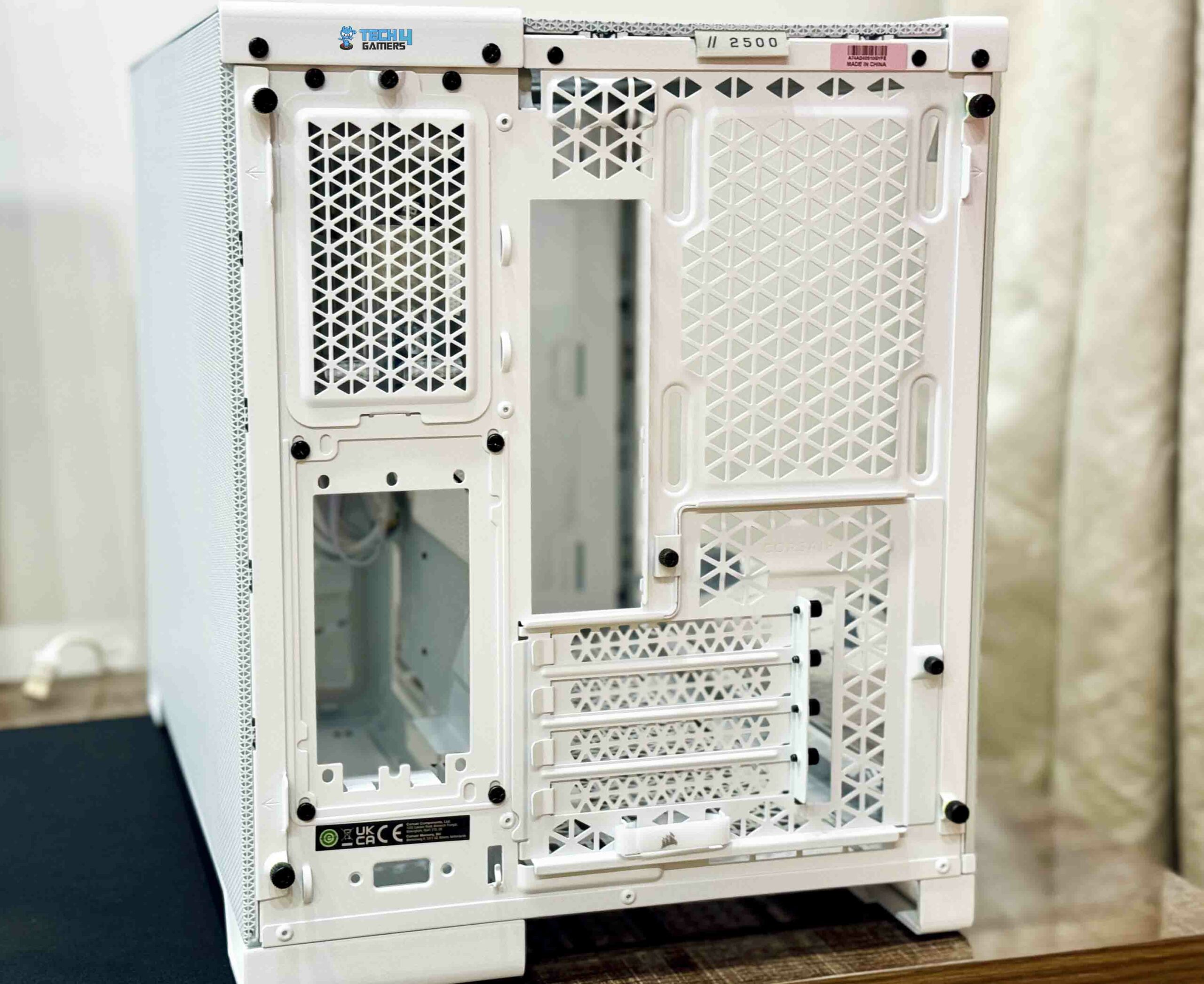
Rear Design
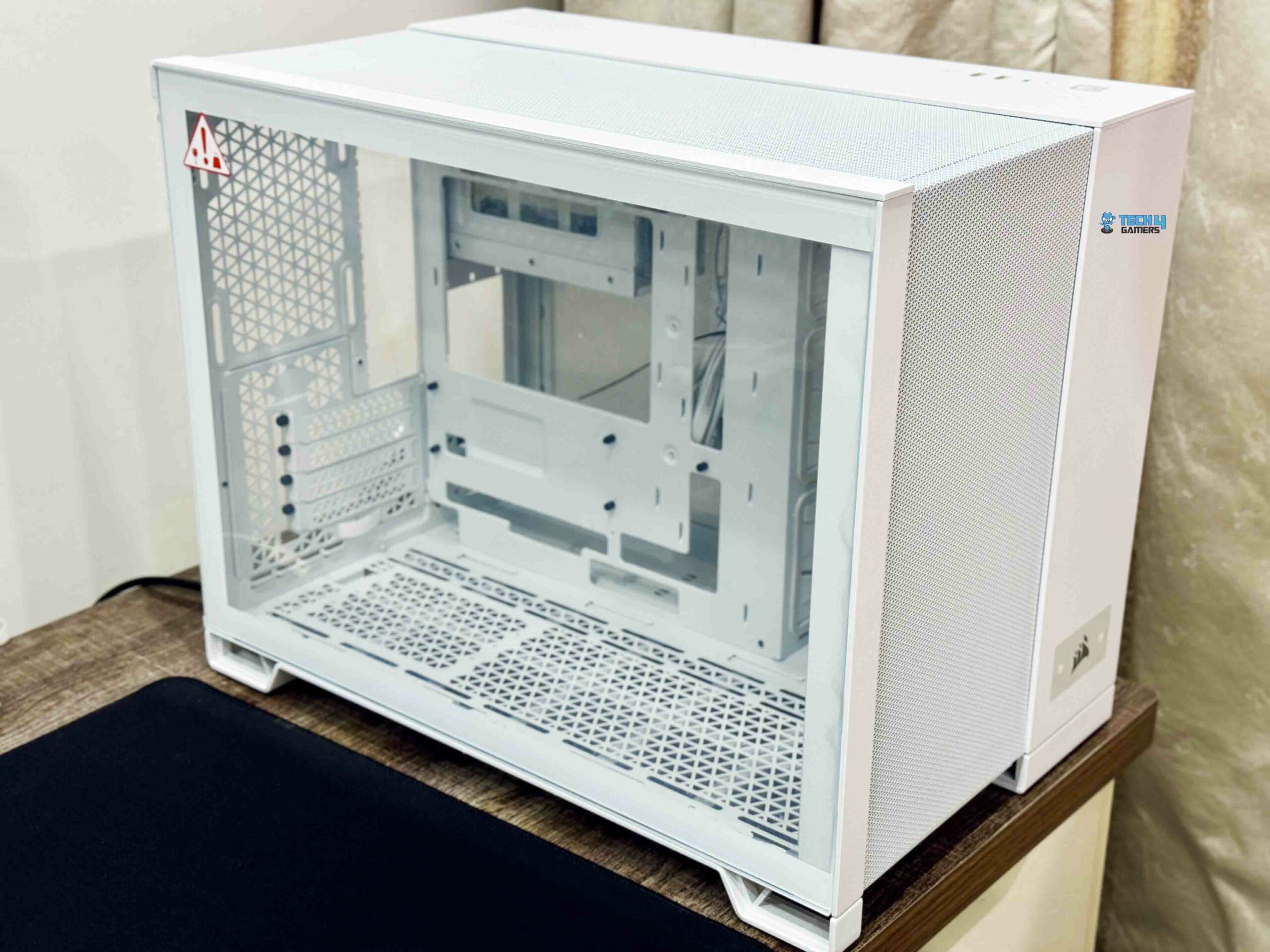
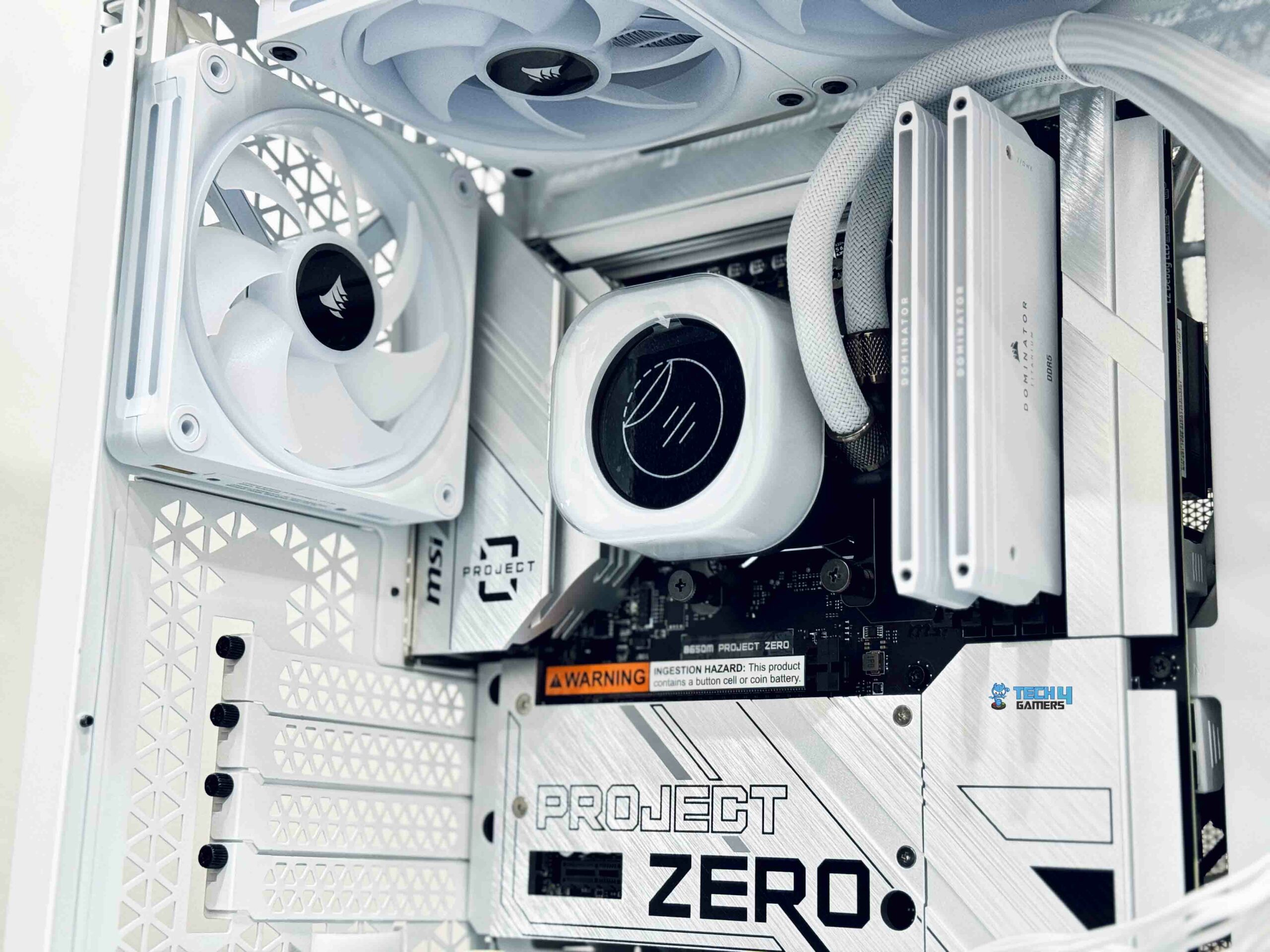
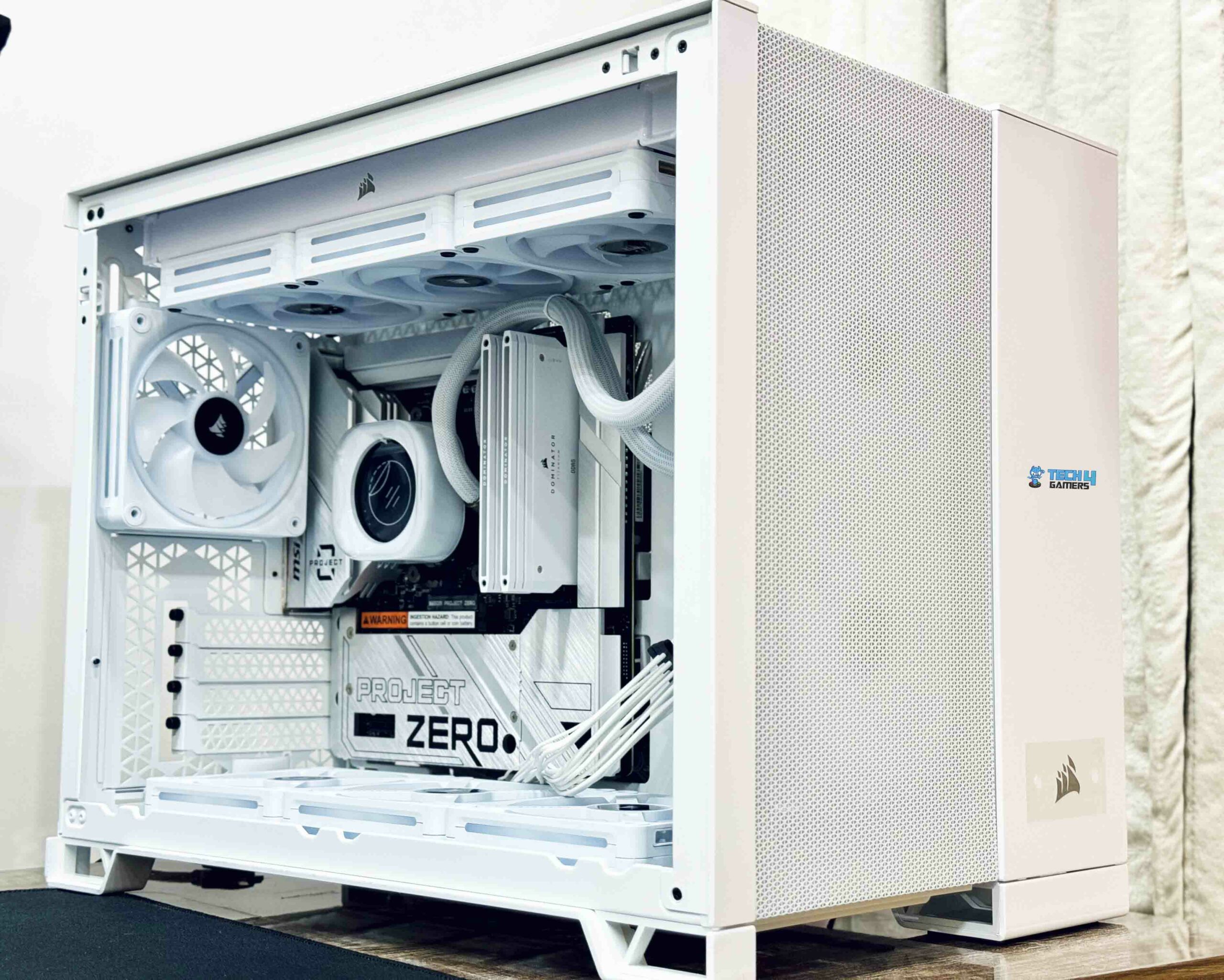
First, the fundamentals. The 2500D Airflow is a Micro ATX case that is made for high-end small form factor (SFF) builds that need enough ventilation. Upon shifting the Corsair 2500D off its packaging to my testing desk, the first thing that caught my attention was its excessively large size when compared to other Micro ATX cases. The Micro ATX name contradicts the unexpected amount of room within this case. In comparison, its dimensions of 18.86 x 11.97 x 14.8 inches are far greater than those of the 280X, its predecessor.
With the increasing thermal demands and size of high-end components, this additional room is much appreciated. It gives ample room for the newest GPUs, bigger AIO coolers, and whatever else you want to put in, even with a design that aims at smaller builders. You won’t have any trouble getting it all set up. Keep in mind that the 2500D isn’t exactly a tiny form-factor chassis and that it doesn’t accommodate full-size ATX motherboards either.
It lies somewhere between the both. One of the numerous advantages of this layout is the physical separation of the power supply and storage devices from the primary component area. To start with, it facilitates improved cable management, which in turn keeps your setup appearing neat and organized. In addition to improving airflow, it serves to separate the heat-generating power source from the primary components.
Airflow
Front IO Panel
Roof Paneling
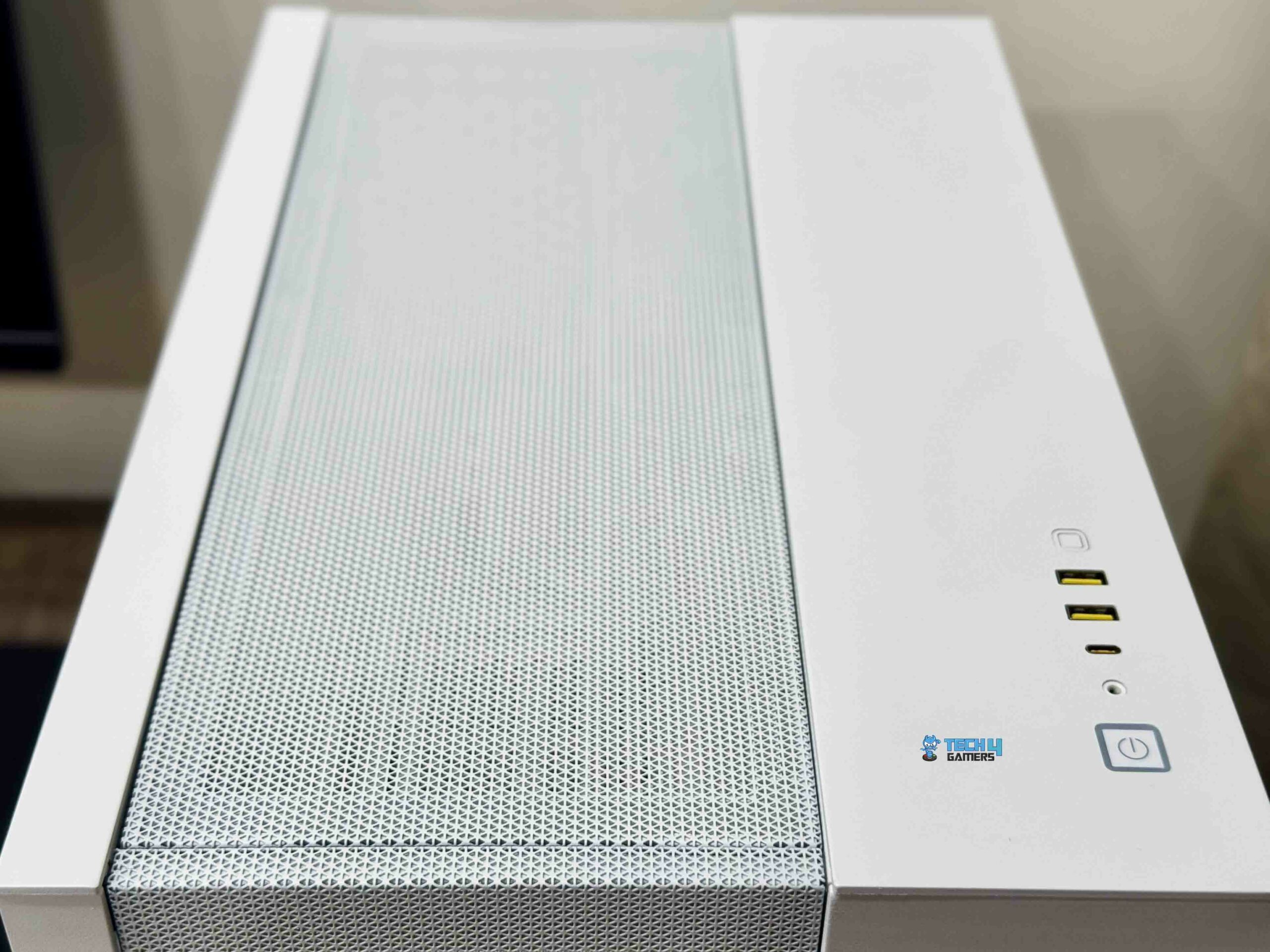
Several convenient connections are available on the 2500D Airflow’s front panel. It has a combined audio jack, two USB 3.2 Gen-1 Type-A ports, and one USB 3.2 Gen-2 Type-C connector. Therefore it should be able to meet the demands of most users for speedy ports. Regardless of the look you’re going for with your build, Corsair made sure that everything fits in flawlessly, even with the PC Case Panel Kit.
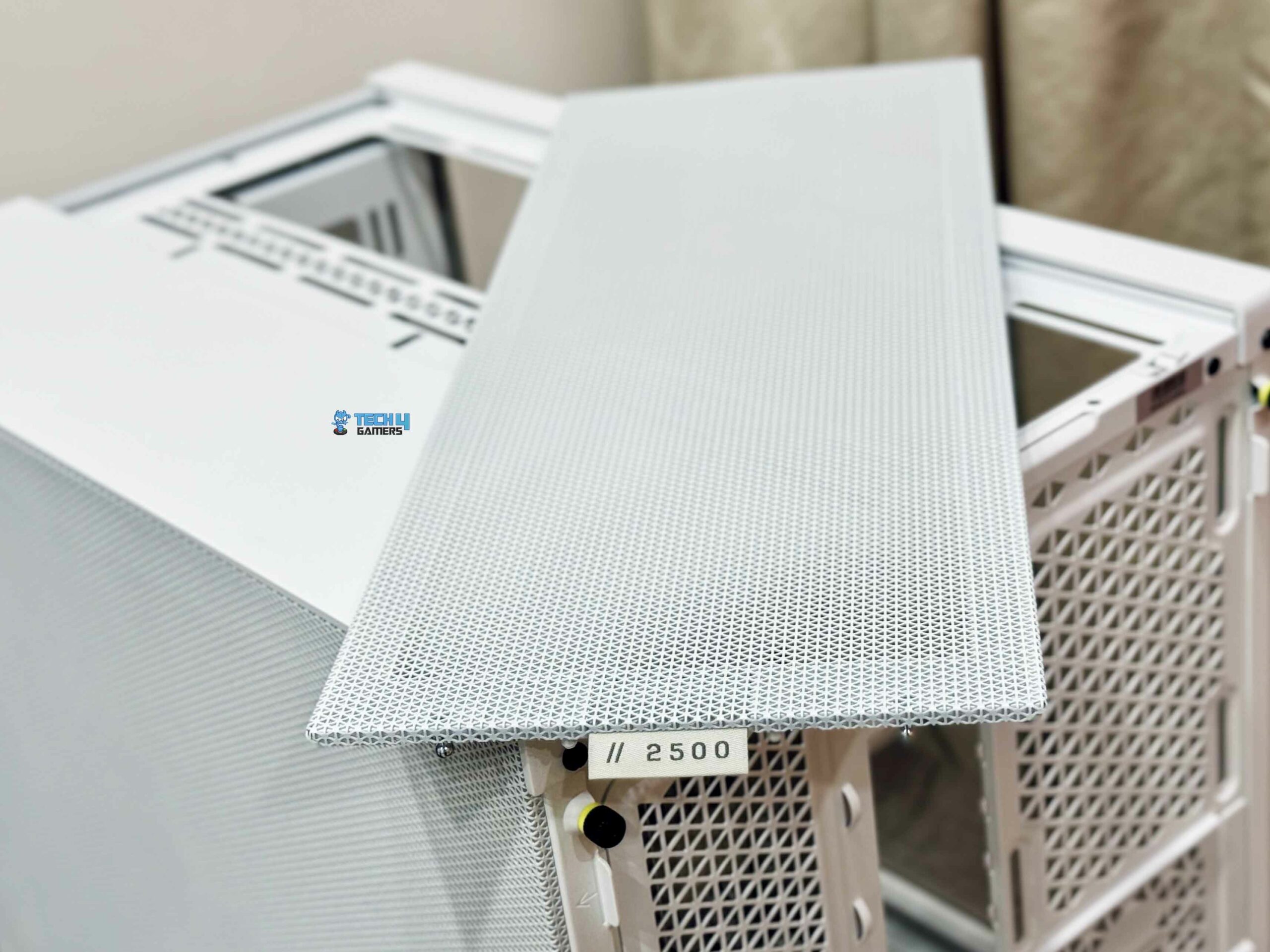
When it comes to airflow, the 2500D Airflow is exactly what it says it is. Notably, up to eleven 120 mm or six 140 mm fans can fit in the case’s mesh panel. The plastic accessory bin from Corsair is installed in one of those 2.5-inch drives. I was surprised to see some of Corsair’s new single-turn fan screws inside, which I used in the installation of all the case’s fans.
Overall, in a relatively small package, there is an enormous amount of cooling capacity. In addition, the front, top, bottom, and one side of the case provide various mounting alternatives for AIO radiators. Ultimately, with the 2500D airflow, you won’t have to worry about overheating in your build.
Customizability
Mesh Front (Image By Tech4Gamers)
The 2500D Airflow offers a lot of design customizability. You can get the case in either white or black, and there are two models to choose from. The X, with a glass front, and the D, with a mesh front, which is the one I am reviewing. However, when you include the Panel Kits, things spice up. The metal sides are nice, but the wood panels set it apart from the rest of the competition.
These kits are a great way to offer your case a one-of-a-kind look similar to wood paneling, and they come in a variety of patterns. Although the kits’ price points range from $69.99 to $79.99, I must admit that I am already a fan of the 2500D’s attractive appearance, which is a result of its customizable style. In my opinion, the panels further freshen up a case and increase its visual appeal. However, they significantly increase the case’s price tag as well. Everyone might agree that the additional cost is not going to be worthwhile.
Build Quality
Build Quality
Organized Build
When put together, I must admit that Corsair does not let me down when it comes to build quality. The 2500D Airflow has the high-quality feel one would anticipate from a case of its pricing point.
Both the steel frame and the side tempered glass panel give the impression of being premium quality. Throughout my build process, I didn’t encounter any issues, which speaks volumes about its design and ease of use. Notably, the 2500D Airflows layout seems exceptionally well-planned.
One of the case’s best features is its support for back connectors, which enhances cable management and overall aesthetics. When dealing with reverse connection boards, which have several wires flowing behind the motherboard, the second chamber offers sufficient space for cable management. With around four inches of space between the motherboard tray and the side panel, you should have no trouble routing the cables behind the motherboard. Additionally, it can accommodate larger power supplies, not limiting you to smaller SFX units.
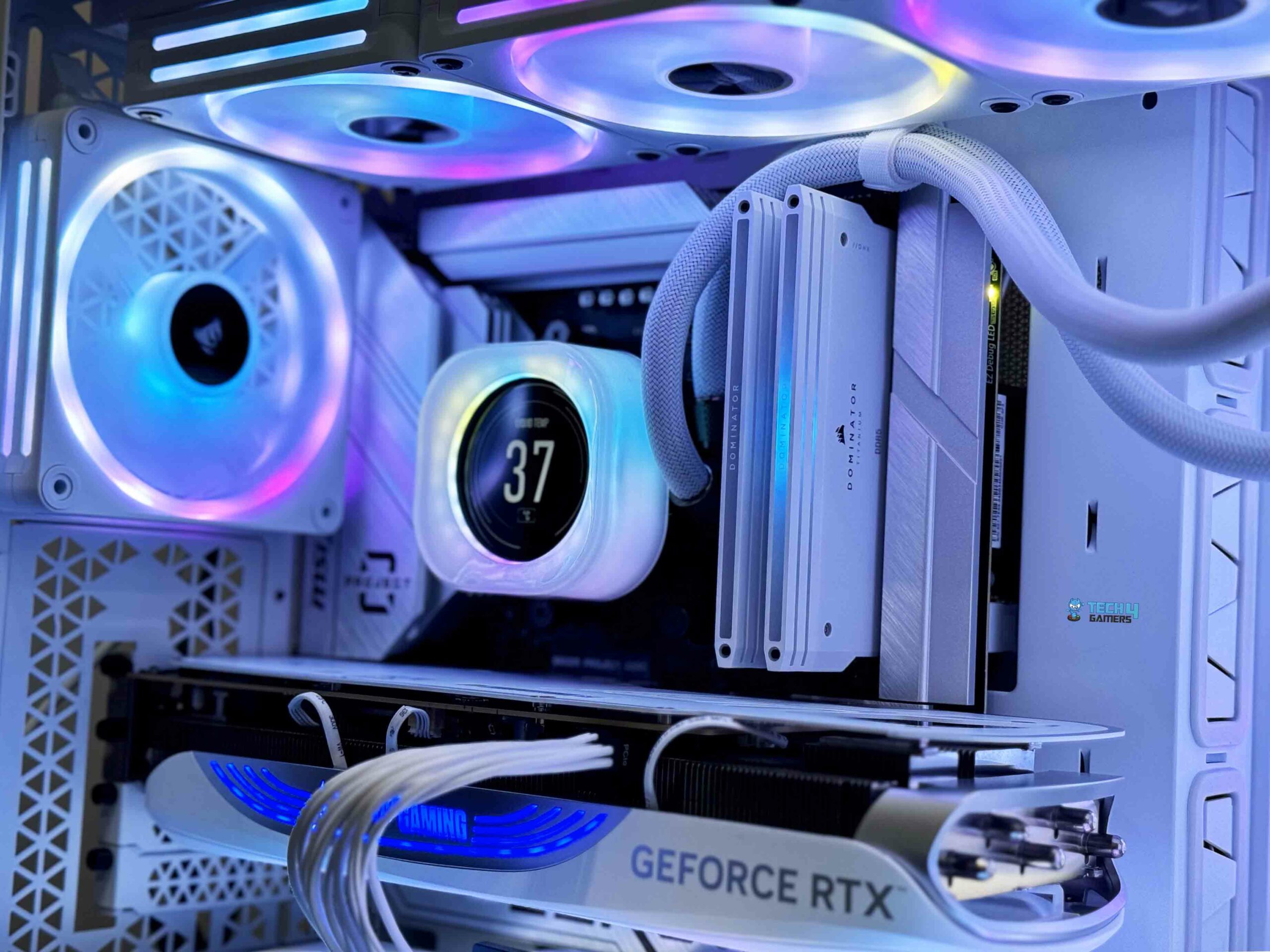
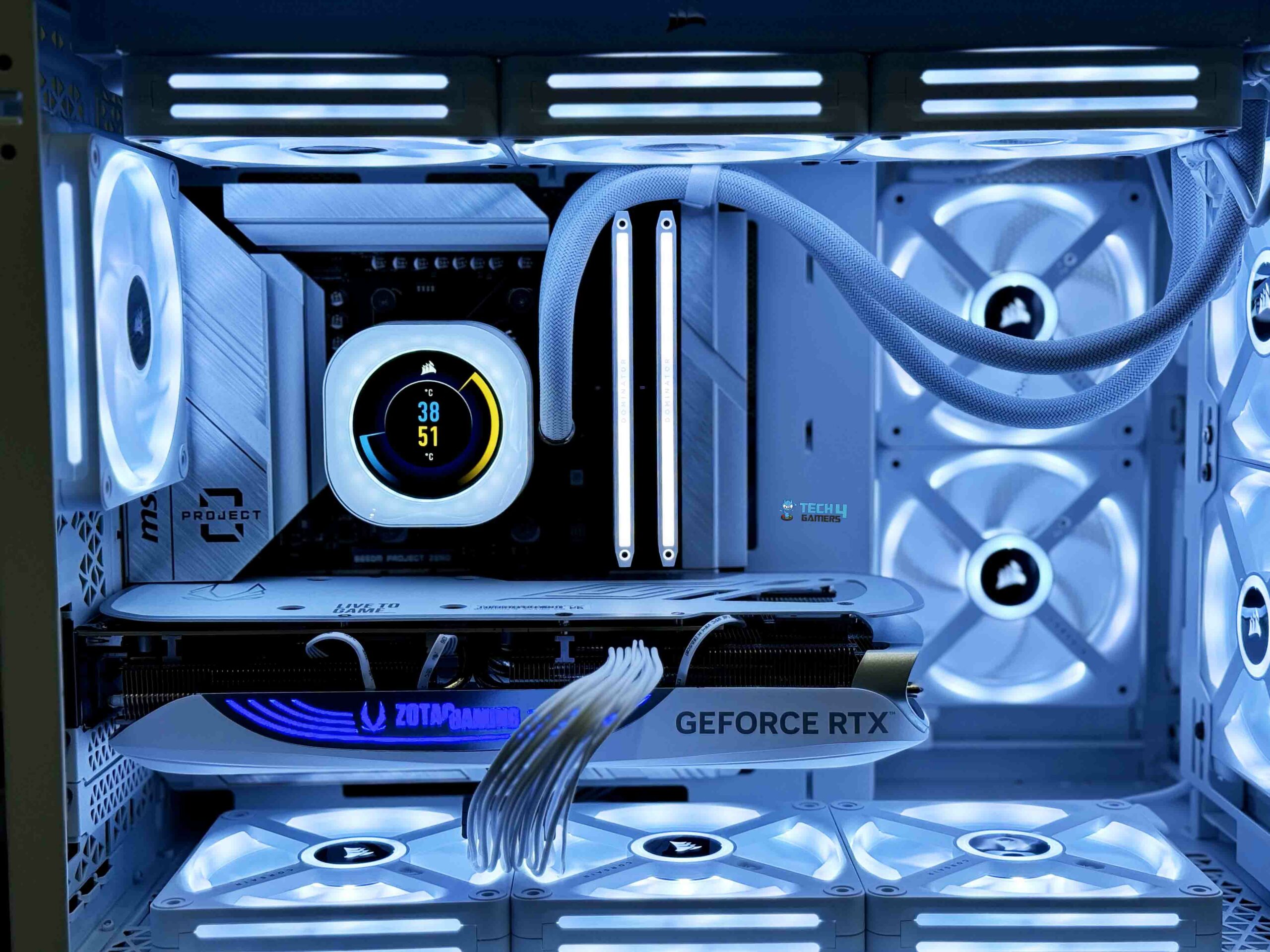
Despite its compact size, the case can house up to 11 x 120mm fans or 8 x 140mm fans, along with a 360mm radiator. The fully mesh front, side, bottom, and roof panels ensure excellent airflow from all sides, with intake from the bottom and exhaust from the top and rear. This airflow design ensures efficient cooling comparable to larger cases. The 2500D Airflow effortlessly supports larger GPUs, such as the RTX 4080 Super in my build, and can even accommodate the RTX 4090 due to their similar length.
Now that the case was ready to go, I could install all of the components, and I was struck by the 2500D’s flexibility as a computer case. The case is compatible with both conventional and reverse-connection motherboards. Latter motherboards have popularized this approach to PC building, which is still in its early stages. It can provide us with a more streamlined appearance. Since these motherboards can relocate most of the connections to the board’s rear.
With strategically placed cutouts, the 2500D Airflow facilitates effortless wire management. Moreover, it offers builders more options by accommodating both ATX and SFX power supplies. For a small SFX power supply, Corsair includes a bracket with the 2500D. You need to take off the bracket before using it with an ATX power supply. The PC builders have a lot of leeway since, even with both choices, the full-size PSU goes in easily.
WARNING: If you’re using a larger ATX power supply, make sure to account for potential space constraints and the need to remove the hard drive caddy.
While not very impressive, the 2500D Airflow’s storage choices are only adequate. The 2500D retains a feature from the previous 280X, which offers the option of the two drives that sled atop the power supply compartment in the rear. You have the option of using two 3.5-inch drives. Furthermore, panels on the front inner wall of the case, located at the other end of the rear chamber, provide mounting options for two additional 2.5-inch drives.
While data hoarders might consider this inadequate, the majority of builders should be fine with it. An appealing feature is the drives’ housing in tool-free mounts, which makes them straightforward to use. Unfortunately, removing the hard disk could be necessary to accommodate a bigger power supply unit.
Here is the result:
Our Thermal Test Results (Image By Tech4Gamers)
Is It Worth the Price?
The 2500D Airflow is at an odd place when it comes to pricing. The starting price of $159.99 isn’t too expensive, but it quickly becomes so when you include in the cost of a vertical GPU mount, wood as well as aluminum panels, and other simple but necessary extras like wire cover kits and cable routing. Unfortunately, there are no fans included with the base price as well.
So, you have to purchase them separately. Having said that, the case’s features and quality allow Corsair to argue for the price. This case is sturdy and long-lasting. The thoughtful design decisions make it easy to work with and does look great when completed. It has carved out a special place for itself through its large customization choices and emphasis on reverse-connector motherboards.
Should You Buy it?
Buy it if
✅ You need excellent airflow and cooling options: The Corsair 2500D Airflow supports up to eleven 120mm fans and multiple AIO radiators, making it ideal for those who prioritize keeping their high-end components cool.
✅ You appreciate dual-chamber design: The separation of the power supply and storage from the main components not only improves cable management but also enhances the overall aesthetics and thermal performance of your build.
✅ You want customization options: With the choice between white or black models and additional customization through wood or metal panel kits, the 2500D Airflow offers plenty of flexibility to personalize your build’s appearance.
Don’t Buy it if
❌ You are on a tight budget: While the base price is reasonable, the cost can quickly add up with optional extras like the vertical GPU mount, panel kits, and additional fans, making it less suitable for those looking for a budget-friendly option.
❌ You need more storage options: Although it provides adequate storage for most users, data hoarders may find the limited number of drive bays insufficient for their needs.
❌ You prefer a smaller form factor: Despite being designed for smaller builders, the 2500D Airflow is not a tiny form-factor chassis and does not support full-size ATX motherboards, which may be a drawback for those seeking the smallest possible build.
Final Verdict
All in all, the Corsair 2500D Airflow is among the finest cases available out there for rear-connector motherboards. When everything was done and dusted, I found myself quite pleased with this case. It can accommodate a wide range of design choices due to its high flexibility, smart dual-chamber design, and great airflow. By placing cutouts correctly and allowing enough space for the immense quantity of cable slack that comes from connecting almost everything behind the motherboard rather than up front, it nails the fundamentals.
In the end, will everyone find it to be the ideal case for them? I doubt it. If you’re looking for something more affordable or don’t want all of the features that it provides, there are other alternatives available that give much better value for money. However, the 2500D Airflow provides a premium build experience for those who are ready to spend the money on it.
As a Hardware Expert at Tech4Gamers, I blend my Computer Science expertise with a love for technology. Through comprehensive reviews and comparisons, I guide our audience in making informed tech decisions.
Mussab Ali
At Tech4Gamers I test and write about different hardware configurations to show other PC users what they can expect from their build. My end goal is to educate the masses to make the right decision when they are looking for new PC parts to buy
Over time, Corsair has been working on its brand image. It is recognizable by every PC enthusiast, whether they’re new to PC building or more experienced. The company has firmly cemented itself in the market, and its yellow color product packaging is a testament to its branding.
They offer a range of flash drives, SSDs, AIO coolers, PSUs, water-cooling hardware, and even entire pre-builts. While their product inventory is impressive, they are known for their memory division. They offer products to cater to every budget range. From budget to premium products, Corsair has them all.
Today, I am bringing you the Corsair Dominator Titanium RGB DDR5-6000 review. The Corsair Dominator is a well-known premium product line, which has always offered high-end RAMs for enthusiast-grade consumers.
Why Trust Tech4Gamers
Mussab Ali is our PC expert who has a decade-long experience in building, testing, and troubleshooting PCs.
70+ RAM tested and reviewed by our team of hardware experts (Tech4Gamers Team).
200+ hours spent testing different RAM kits for our reviews.
At Tech4Gamers, ensuring you get reliable information is our priority. That’s why every hardware round-up undergoes a meticulous review process by our team of experts and editors. Each review is carefully examined against our strict editorial guidelines, guaranteeing you trustworthy insights you can depend on.
Key Takeaways
The Corsair Dominator Titanium RGB DDR5-6000 32GB CL30 is a high-end DDR5 kit designed for high performance and aesthetics, ideal for enthusiast PC builders and Corsair fans.
You should buy the Corsair Dominator Titanium RGB DDR5-6000 32GB CL30 if you want top-performance RAM that offers great looks with its unique design and RGB lighting.
You should not buy the Corsair Dominator Titanium RGB DDR5-6000 32GB CL30 if you’re on a budget and are not looking for a premium kit.
How Is The Corsair Dominator Titanium RGB DDR5-6000 Different?
The Corsair Dominator Titanium product lineup was launched to target the premium Corsair Consumer in the PC market. It has received a lot of positive reviews, and while it had an exclusive launch, it is here to stay. The overall aesthetic look of the kit makes it a treat to watch when it’s up and running on the PC.
The design of the RAM is its most standing out feature. While it performs great, you have to give credit to the Corsair design team, they have come up with a premium design, that all enthusiasts dig and want for their PC. Even the cardboard box that the RAM ships in has a vibe that just screams ‘Premium’ about it.
Packaging And Unboxing
Since this is a premium product from Corsair, it comes with Premium packaging and presentation. The memory kit comes in a large grey cardboard box and since it’s the standard edition, no additional things come with it. With the special edition though, Corsair includes several other things.
Packaging Box (Image By Tech4Gamers)
The following contents are provided:
2x DIMM Modules
Design
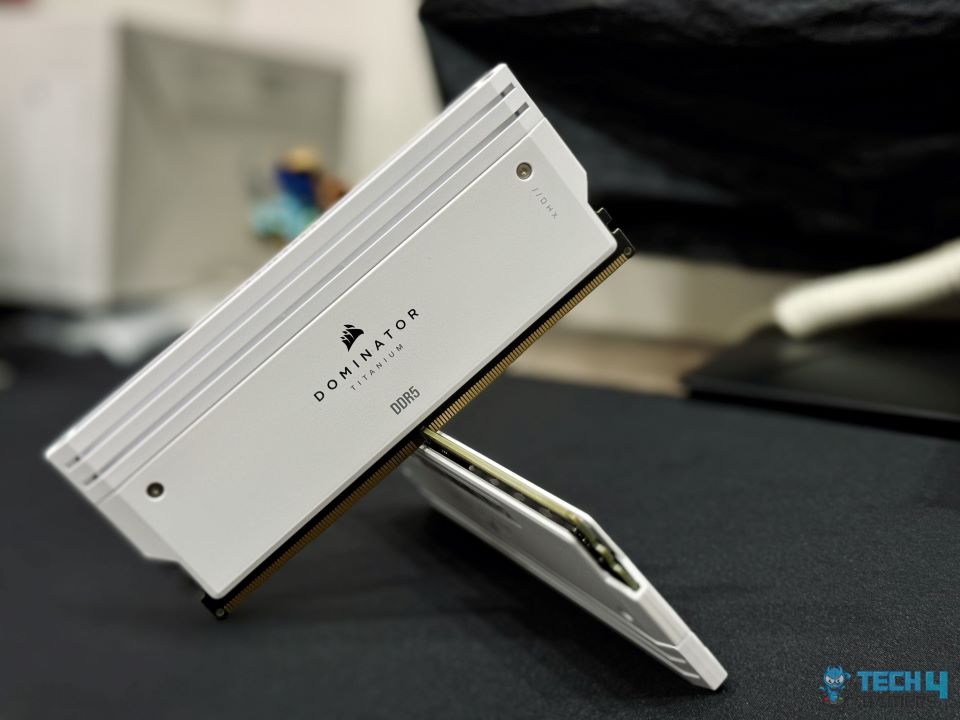
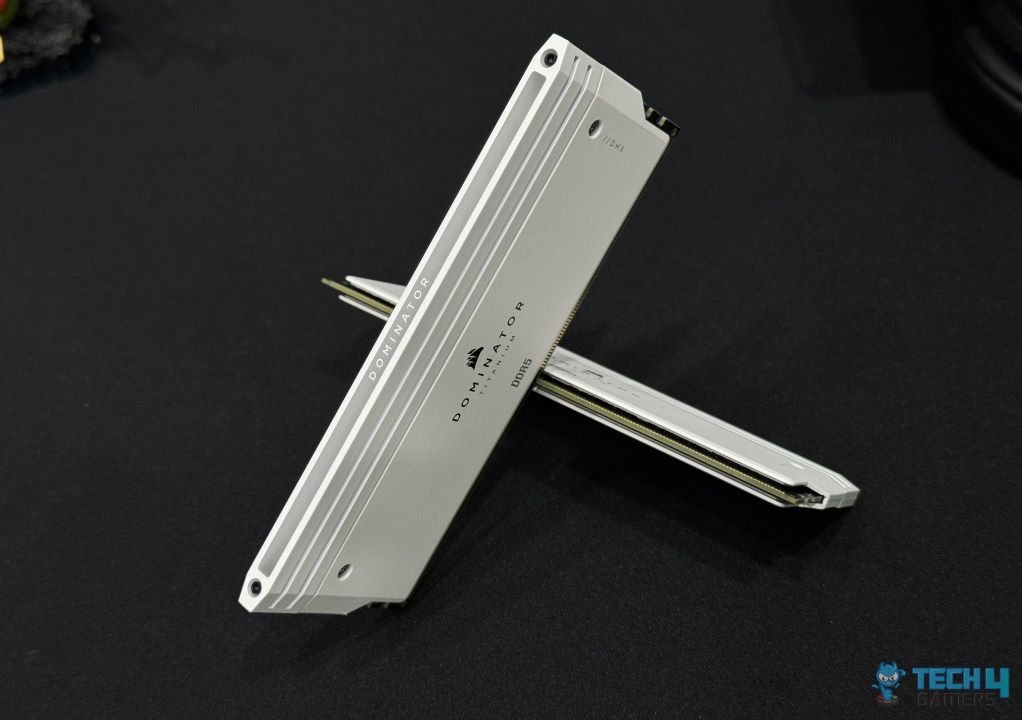
The Corsair Dominator titanium boasts premium RAMs that are aimed towards the enthusiast class PC users, so they can have the maximum performance their PC is capable of. This time around Corsair is switching things around in the design department as compared to its other RAM kits. The RAM kits come in white with a large heatsink and a RGB diffuser on the top.
Main Design (Image By Tech4Gamers)
They are available in capacities as follows:
2x16GB
2x32GB
Both Kits
Corsair Dominator Titanium RGB 6000MHz RGB Diffuser (Image By Tech4Gamers)
Stylish white aluminum covers adorn both modules’ ends with two diffusers on top for vibrant RGB effects. These kits are heavier than others we’ve tested in DDR5 RAM. I am unsure if these modules have on-die ECC for real-time data correction. This unbuffered DIMM has a 288-pin layout, and under the hood, there’s a black PCB. Each module features a 1Rx8, a single-rank design using 8 modules.
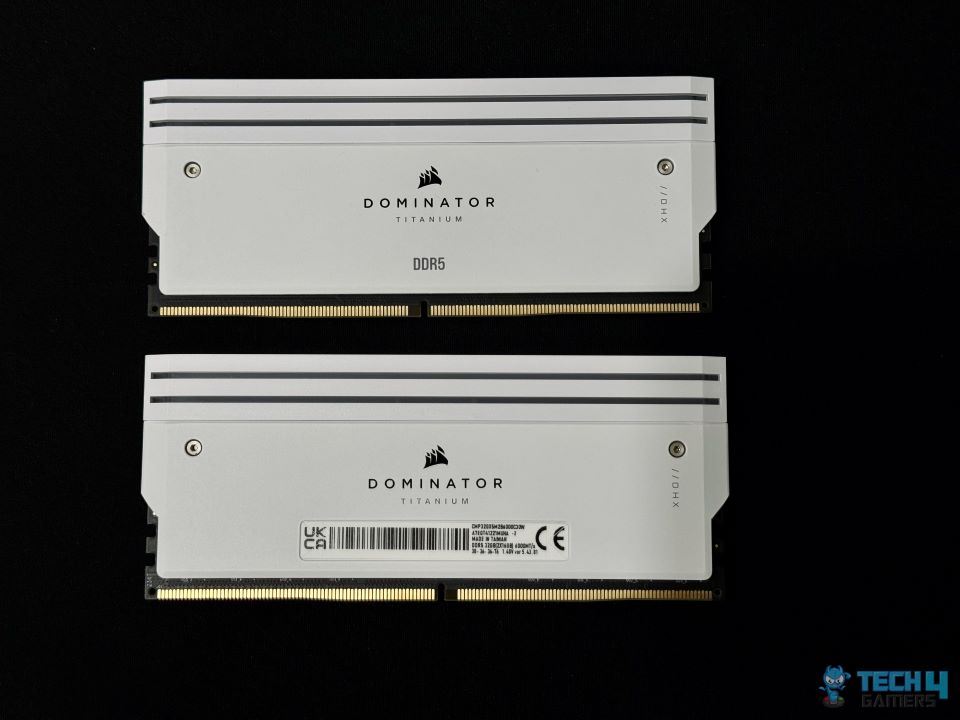
Back Design
Label
I am sharing the Front and back pictures of the RAM Kit. You can see the back label as well which shows the part number, serial number, tested speeds, and version 5.43.01 identifying Hynix ICs. The CORSAIR logo is present on both sides.
Test Build
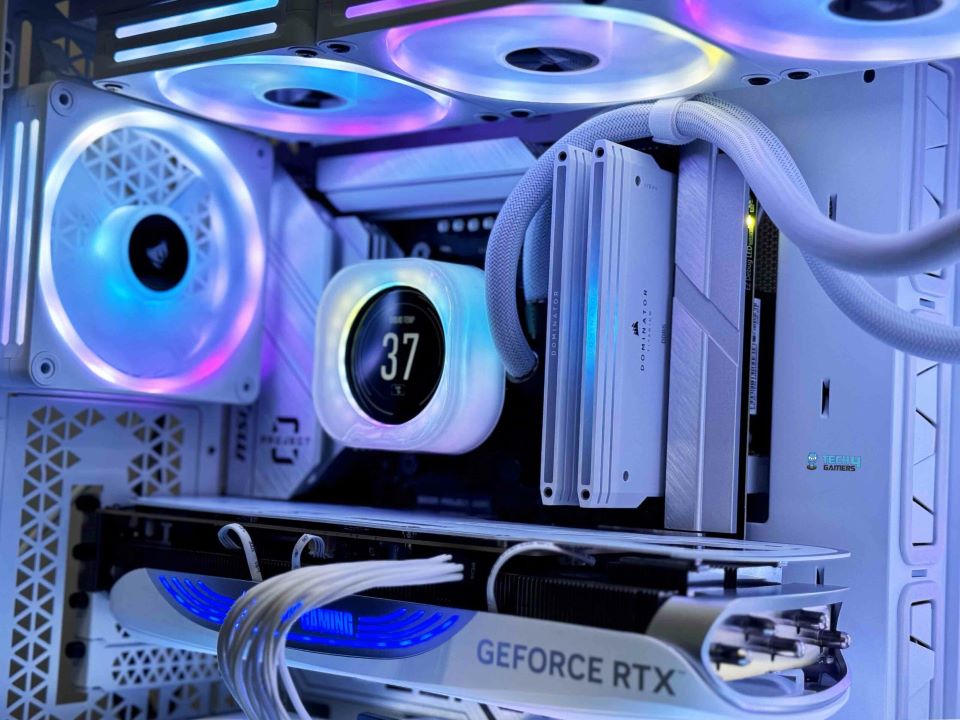
CORSAIR iCUE software was installed to control the lighting of this kit. I am not going into the details of iCUE since we have already given extensive coverage in our previous reviews. Here are a few pictures:
Installed Kit
RGB Lighting
We are using the mentioned configuration for RAM testing:
You can see the CPU-Z Screenshot below. The data that we can see is that the kits appear to be in a dual-channel configuration. CPU-Z confirms that the memory kit is operating at 6000 MHz, at 36-40-42-30, timings.
CPU-Z (Image By Tech4Gamers)
Test Results
This is the Third kit operating at 6000 MT/s. The other two kits that we have:
So, I will be comparing the Corsair Kit against these two.
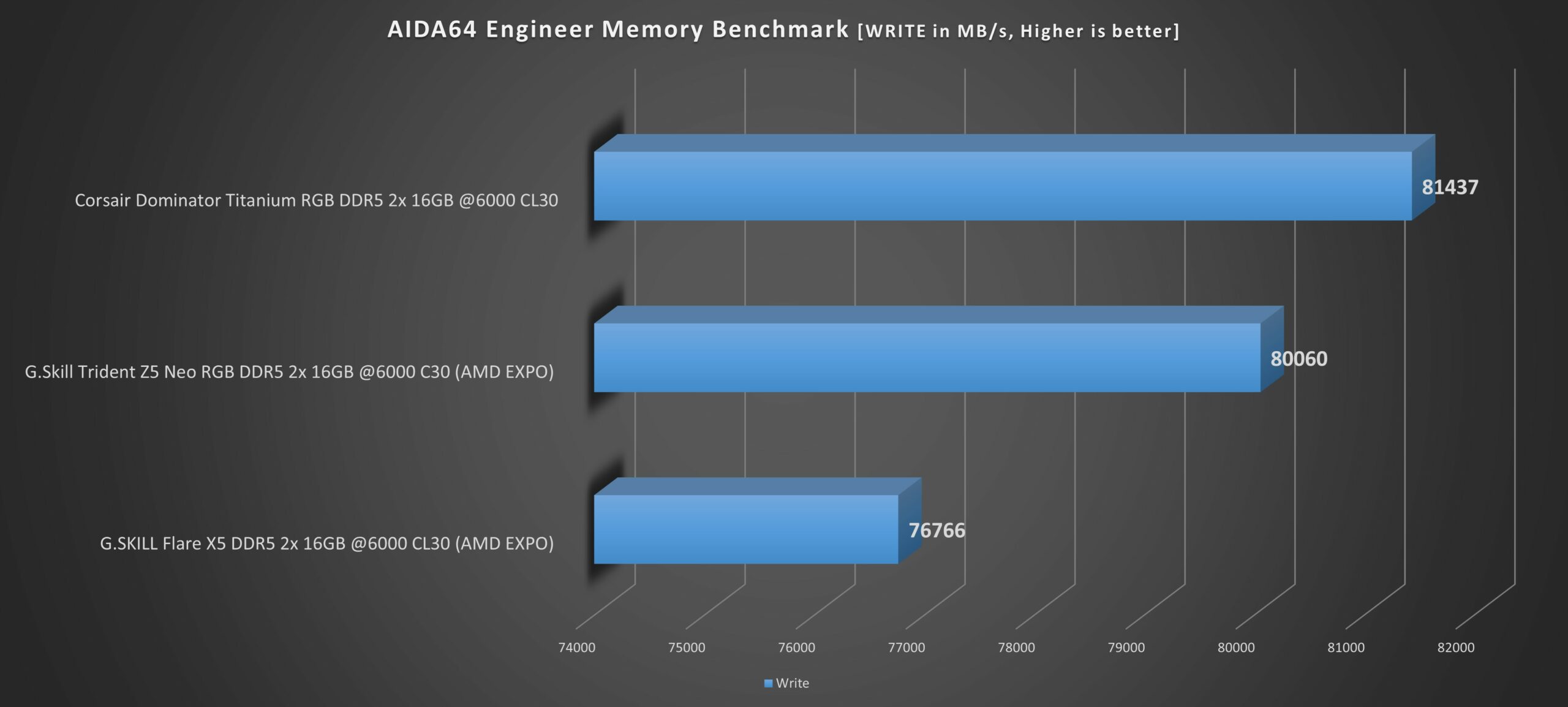
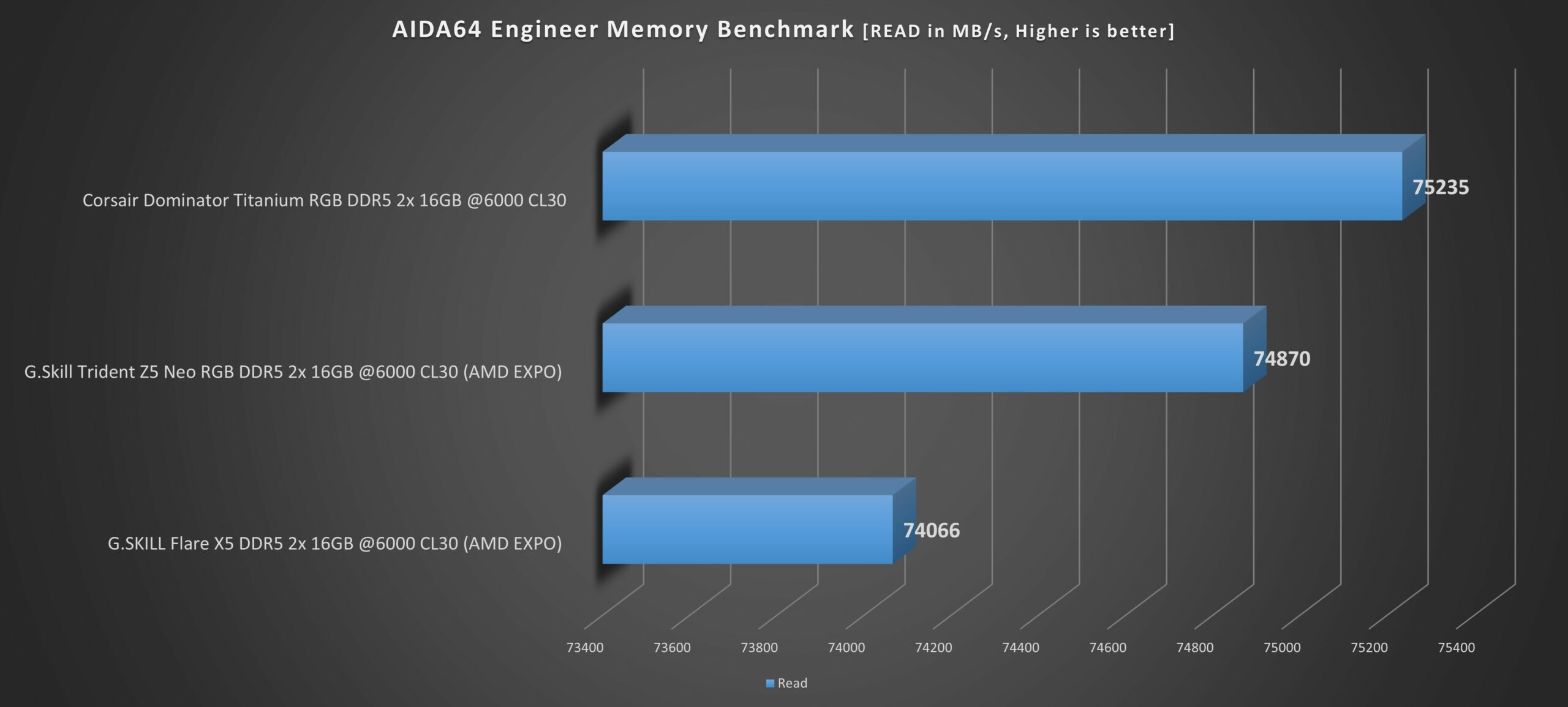
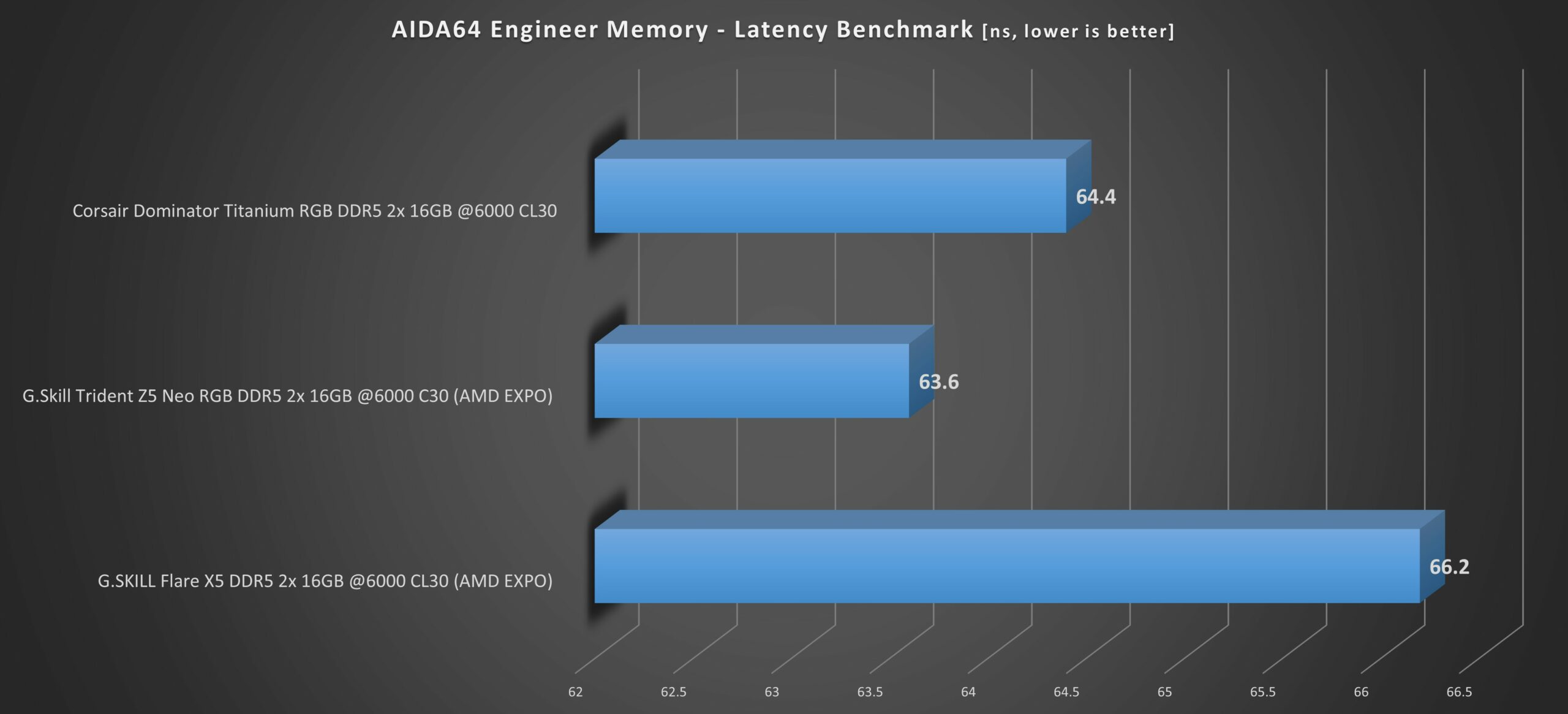
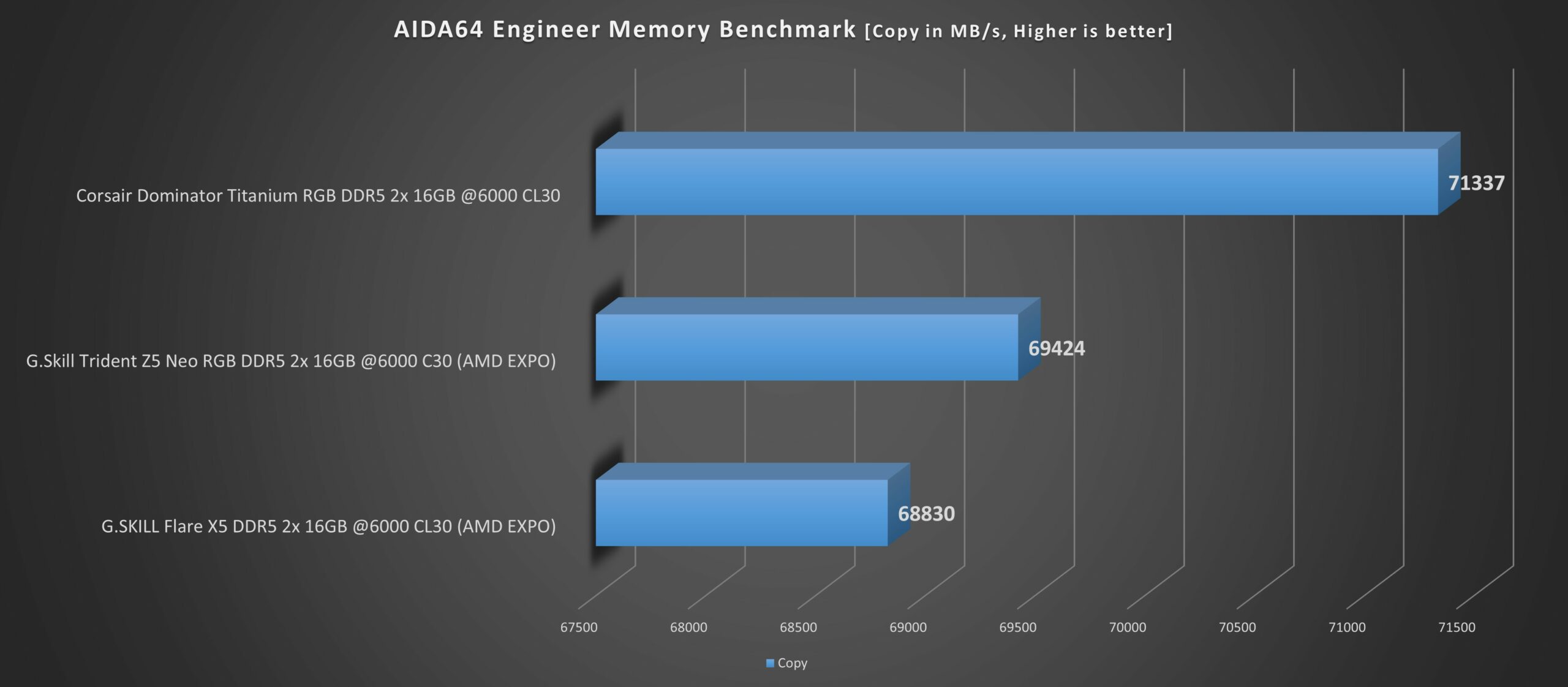
Let’s start with the AIDA64 Engineer results. In all the benchmarks the Corsair Kit comes out on top by a fair margin. However, it lags a bit in the AIDA64 latency benchmark, by 0.8ns. Which isn’t a lot. This speaks volumes about its performance capabilities. Overall, it does impress in a lot of ways.
AIDA64 Results
1 of 4
AIDA64 Write Benchmark (Image By Tech4Gamers)
AIDA64 Read Benchmark (Image By Tech4Gamers)
AIDA64 Latency Benchmark (Image By Tech4Gamers)
AIDA64 Copy Benchmark (Image By Tech4Gamers)
Corsair Dominator Titanium RGB DDR5-6000 CL30 particularly shines in the Cinebench R23 CPU benchmark. It grabs first place by a huge lead. This just goes to show how impressively this Memory Kit performs in whatever scenario you throw at it.
Cinebench R23 (Image By Tech4Gamers)
Should You Buy It?
Buy It If
✅ You are a CORSAIR lover and enthusiast: Well this pretty much explains it. However, the kit’s performance in various benchmarks was quite impressive. If you are a Corsair consumer, then this RAM kit is for you.
✅ You need premium high-performing RAM: If you’re looking to spend some bucks on your memory that not only performs well but also looks great while doing so, then go ahead and buy it!
✅ RGB lover: If you like your memory kits to come with RGB and add that visual appeal to your build, then make sure you buy this RAM.
Don’t Buy It If
❌ You are low on budget: If you are on the lower side of the budget and need to allocate your budget towards other components, then don’t buy this RAM as better budget options are available.
My Thoughts
After testing the Corsair Dominator Titanium RGB DDR5-6000 32GB CL30, I can say that it’s a premium product that not only performs but also is worth its price tag. If you’re in the market for a Premium Product that pushes your AMD CPU to the limit in an optimum manner, then go for this RAM! It won’t let you down and you will be glad that you chose this Memory kit.
I’ve been the Journalist & Editorial Writer at Tech4Gamers since July 2022. I spearhead our hardware coverage, including overclocking GPUs, benchmarking CPUs, reviewing peripherals, and fine-tuning custom PC builds for every budget. Daily, I report on breaking gaming news, from major launches and studio updates to the latest industry trends, ensuring our community stays informed. Beyond news briefs, I write in-depth feature articles on gaming culture and emerging technologies. And by collaborating closely with the editorial team on content planning, SEO strategy, and our publishing calendar, I help us consistently hit our traffic and engagement targets.
When it comes to eye care, making sure that your setup is adequately lit can be beneficial, especially considering the move towards working from home instead of office settings in dark evenings and seasons. This is where the Baseus monitor light bar comes in. Continuously stressing your eyes to gaze at a screen that is inadequately lighted can affect your general sensitivity to light.
This can create tension headaches, blurred vision, and an overall intolerance to light. If you find that you are staying up late and burning the midnight oil, you should definitely consider changing your setup to incorporate a monitor light. Even though a wide variety of offerings are available on the market, Baseus has developed a straightforward solution for monitor lighting that won’t strain your wallet.
This light bar is a space-saving device that can be placed on top of your monitor or computer, making it an alternative to the more well-known brands. Following several months of hands-on usage with the Baseus Monitor Light Bar, I put it through several tests to see how it compares to its more costly competitors and whether or not it makes a substantial difference in comparison to the standard desk light.
Why Trust Tech4Gamers
Abdul Hannan is our peripherals expert who has been testing different mice, keyboards, headphones, microphones, and more for years.
130+ peripherals tested and reviewed by our team of hardware experts (Tech4Gamers Team).
500+ hours spent testing different peripherals for our reviews.
At Tech4Gamers, ensuring you get reliable information is our priority. That’s why every hardware round-up undergoes a meticulous review process by our team of experts and editors. Each review is carefully examined against our strict editorial guidelines, guaranteeing you trustworthy insights you can depend on.
Key Takeaways
The Baseus monitor light bar is an affordable and high-quality lighting solution designed to reduce eye strain with adjustable brightness and color temperatures. Its sleek, durable aluminum design and user-friendly touch controls make it a stylish and practical addition to any workspace.
You should buy the Baseus monitor light bar if you need an affordable, high-quality monitor light with adjustable brightness and color temperatures and a sleek, space-saving design that reduces eye strain.
You should not buy the Baseus monitor light bar if you require advanced features like auto-brightness adjustments, a smaller or thinner monitor that may not support its weight, compatibility with curved displays, and extensive color customization.
[toc]
Here are the specifications:
Brand
Baseus
Material
Aluminum alloy+PC+ABS
Voltage
5V
Power
5W (maximum)
Light source
LED
Light color
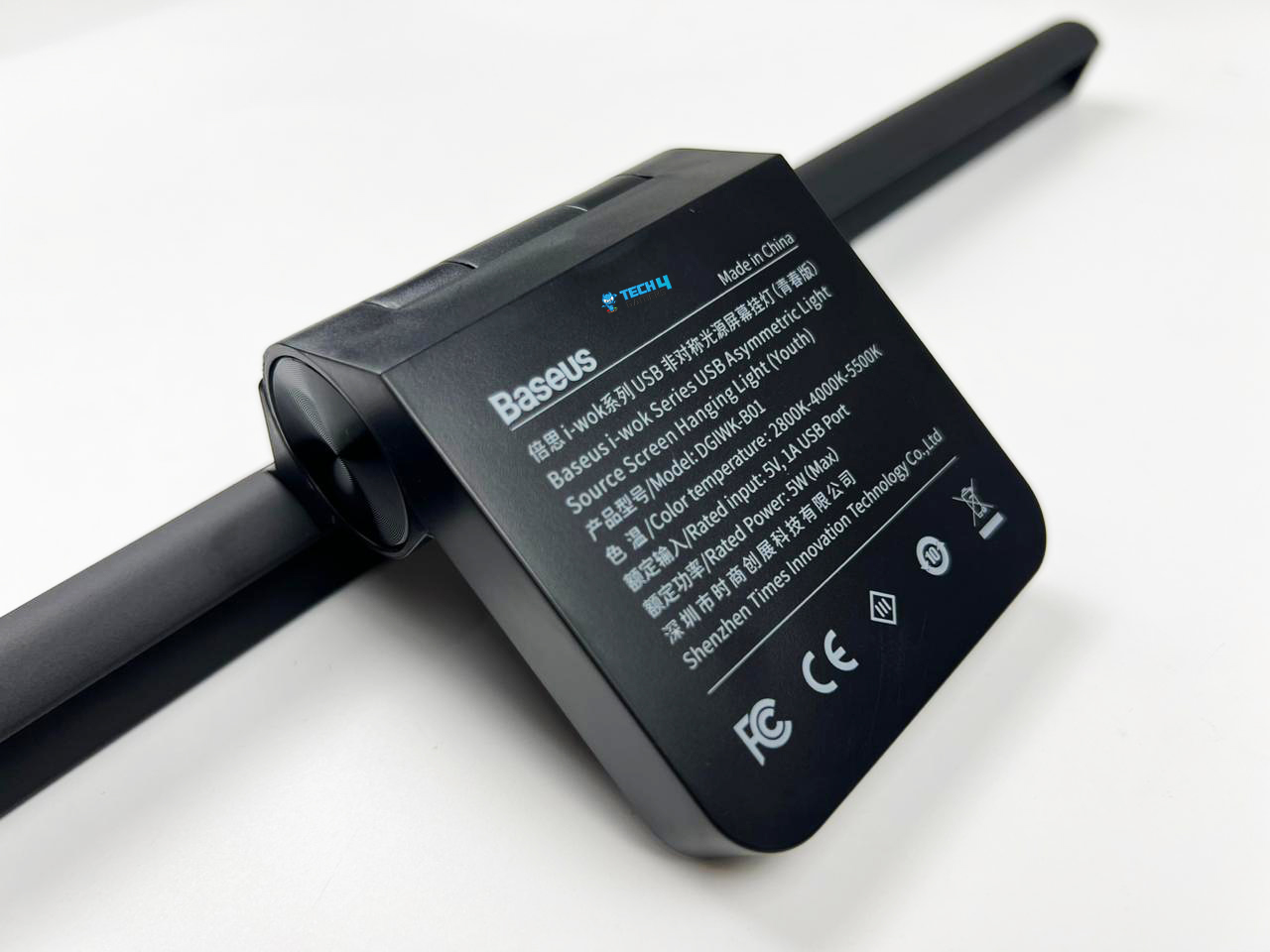
2800K-4000K-5500K
LED quantity
80Pcs
Color rendering index
80
Lumen value
160lm
Product size
450 x 66 x 92mm
Weight
480 grams
How Is The Baseus Monitor Light Bar Different?
At a budget-friendly price, it rivals more expensive options like the BenQ Screenbar, which offers features such as auto-dimming and advanced ambient light sensing. On the other hand, the Baseus light bar, while lacking these high-end features, provides a robust and stylish design with adjustable color temperatures and brightness, making it a solid choice for budget-conscious consumers. Overall, its simple yet effective design makes it particularly appealing for those looking for an affordable yet functional solution.
Packaging and Unboxing
Packaging & Unboxing
1 of 3
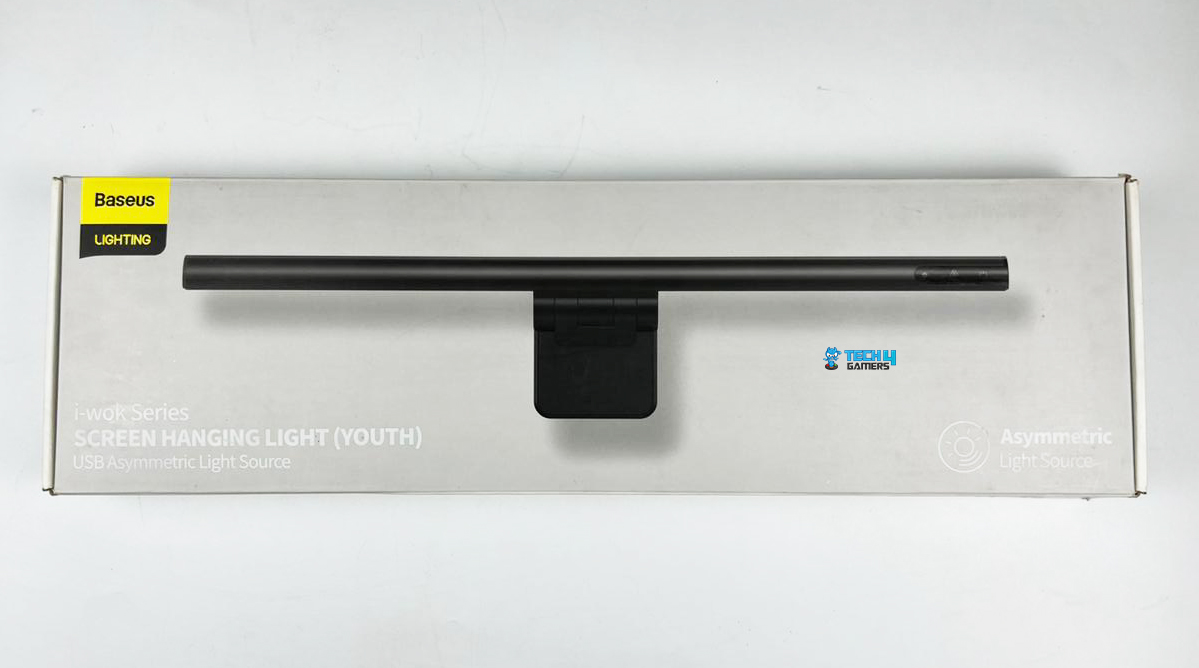
Packaging Frontside (Image By Tech4Gamers)
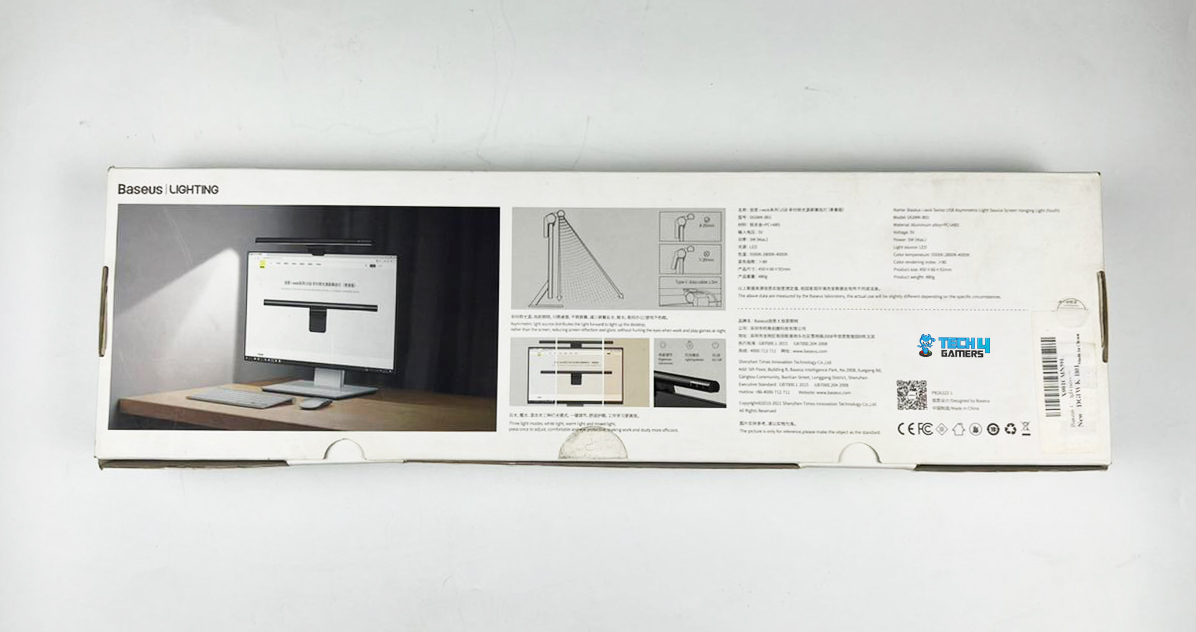
Packaging Backside (Image By Tech4Gamers)
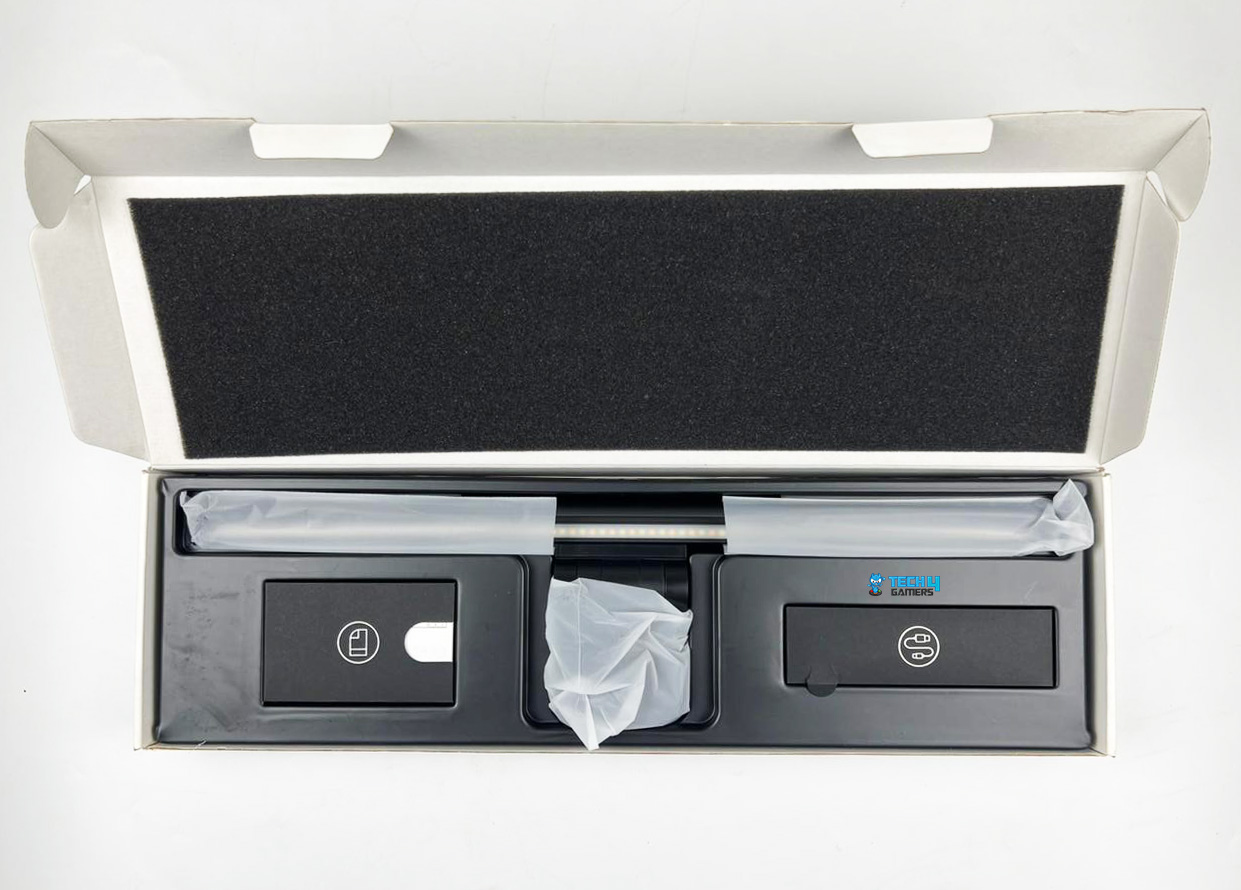
Unboxing (Image By Tech4Gamers)
The light is secured by a foam insert and packaged inside a vacuum-formed plastic sleeve. The packaging is not very noteworthy, but the light itself is protected. Both the USB power cord and the user instructions are provided in their own individual boxes, and you are also given plenty of cute stickers.
What’s included in the box:
Screen hanging light x 1
USB power cable (1.5m) x 1
Manual x1
Design
Design (Image By Tech4Gamers)
Matte Black Aluminum Finish (Image By Tech4Gamers)
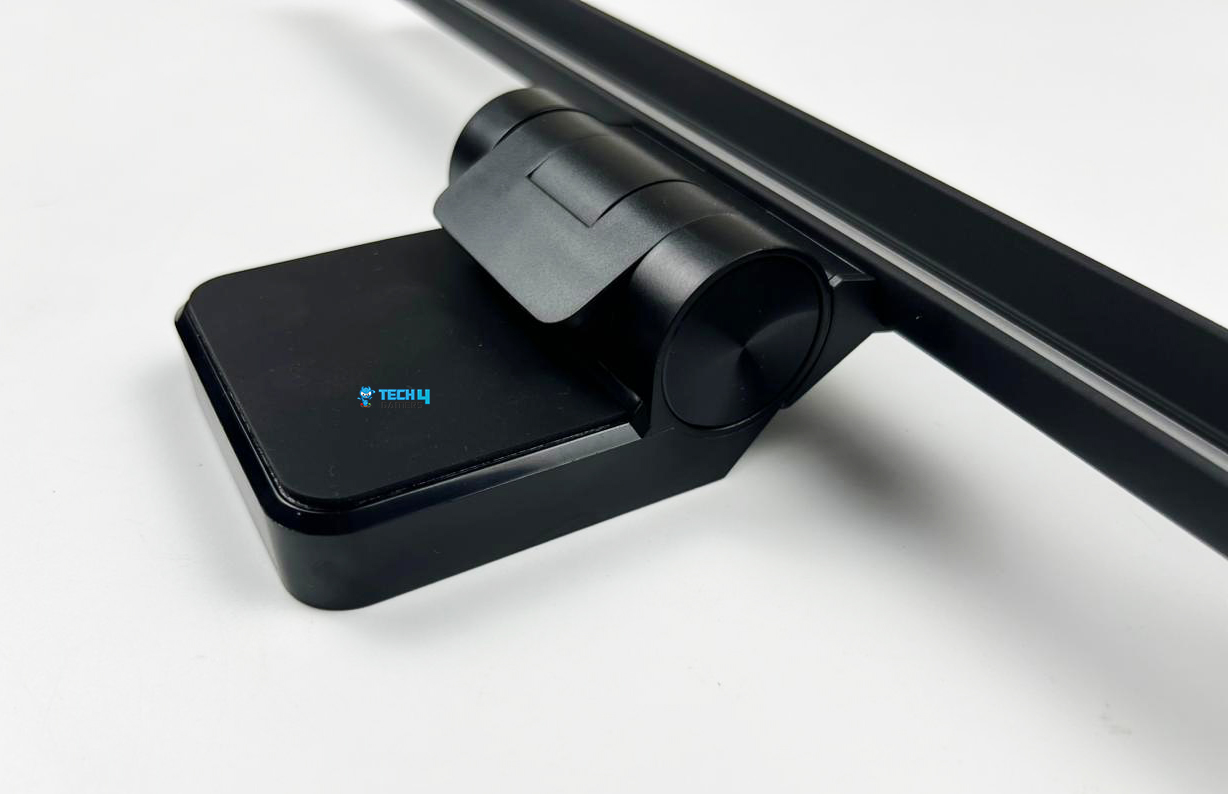
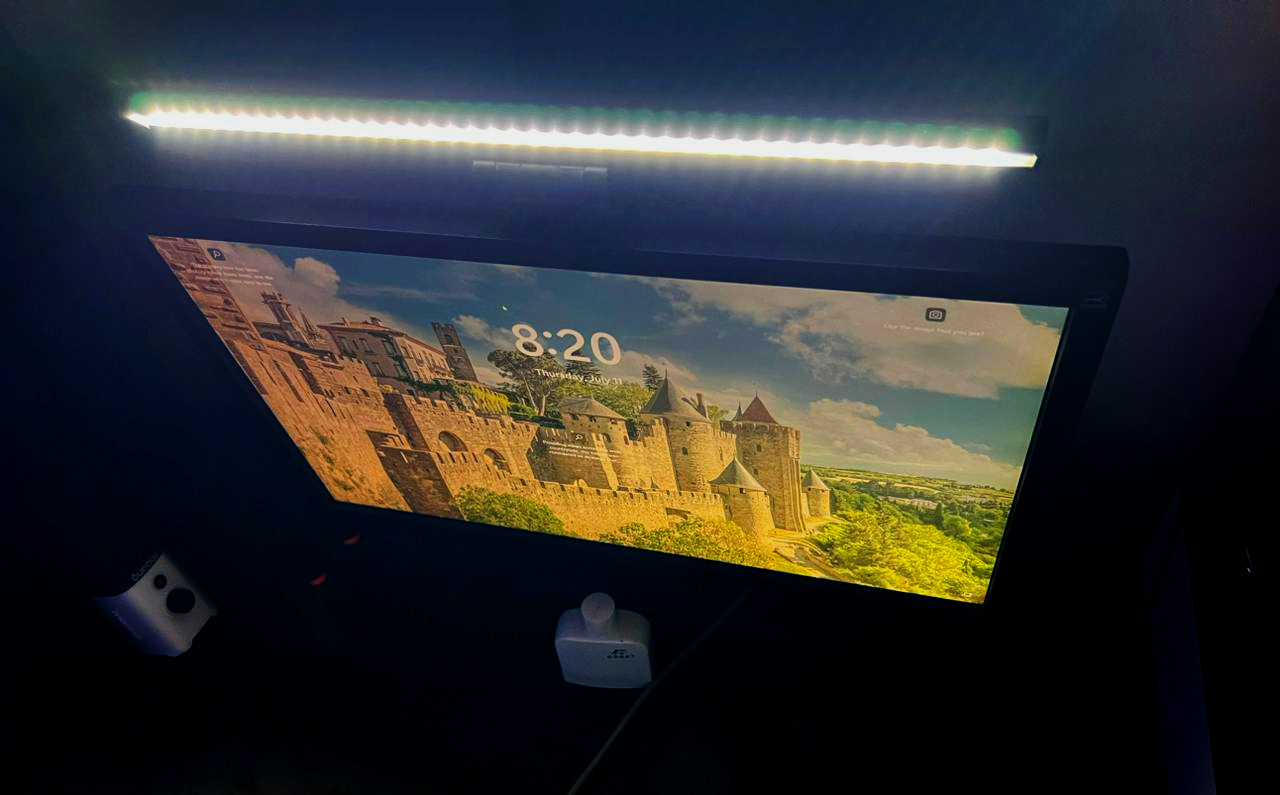
The matte black aluminum finish gives the monitor light bar a surprisingly high-end feel, and the slim and low-profile design helps to keep your setup stylish. I am quite satisfied with the light bar’s appearance and look, especially considering that it is only available for purchase at $37.99.
The fact that it is discrete enough to sit above the top of your screen without becoming too much of a nuisance indicates that it will not seem out of harmony with your setup. This gives you a decent sense of how the bar will fit on your monitor size since the bar measures about 18 inches (450mm). With this, I could clamp the bar on my monitor, which was 24 inches in size, without any problems.
Moreover, it is quite straightforward to use through the USB-C cable connection. The cable provided is 1.5 meters long, which is sufficient for plugging it in. The cable can be easily tucked away behind the back of the light. Flawlessly, it connects directly to a USB port on either your computer or monitor, and it can also be plugged into a USB hub, which is easily reachable.
Build Quality
Clamp (Image By Tech4Gamers)
Build Quality (Image By Tech4Gamers)
Aluminum serves as the construction material for the Baseus monitor light bar. The bar has a solid construction and is durable. This robust bar gives the impression that it is built to withstand use for a long time. Both the clamp and the fitting come up with two articulated points, which will allow you to adjust the angle of the light and its location on the screen to your preference. You can easily adjust the light bar according to your specific preference by moving it up and down in elevation.
Because of this, I could place the light at the angle that I wanted for my setup, which can be an important convenience for users using a curved display. Notably, the clamp is suitable for use with various screens, with thicknesses ranging from 0.3 to 0.8 inches. With an extra layer of silicone, this clamp will protect your monitor from any potential damage. Overall, they came up with a device that is not only of really good quality but also incredibly easy to clamp onto your display.
Control Scheme
Control Scheme (Image By Tech4Gamers)
A small touch panel controls the light bar on the right side of the device. The first button turns the light bar on or off, the second adjusts the color temperature, and the third adjusts the brightness. In my rush to turn on the monitor light and get it to function, I originally believed that the button that controls the brightness was either faulty or did not react to my touch.
However, it was easy to fix with a quick look at the instruction manual. To change the brightness, you just have to keep the button pressed for a brief amount of time. Overall, the entire design is pleasing to the eye and the touch, and the controls are easy to use, making it possible for even the least tech-savvy office workers to use them.
Light Settings
Light Settings
1 of 3
2800k Color Temperature (Image By Tech4Gamers)
4000k Color Temperature (Image By Tech4Gamers)
5500k Color Temperature
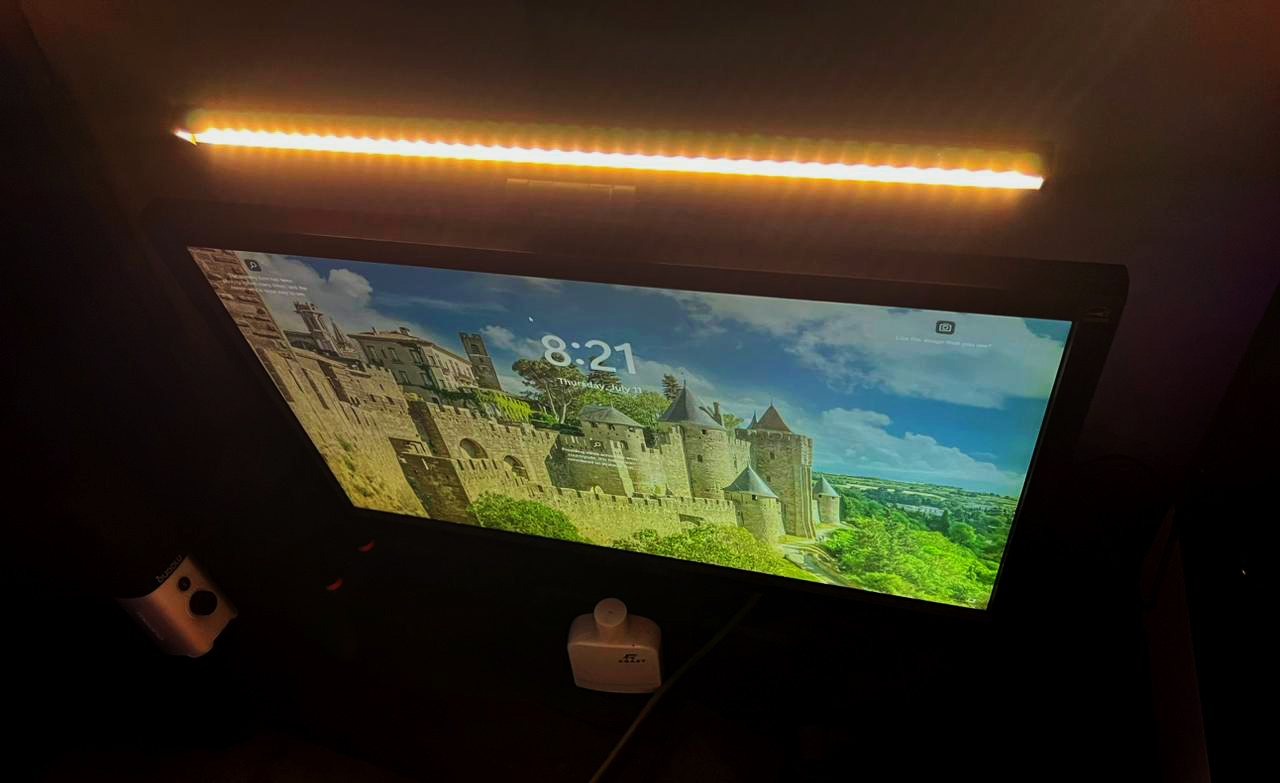
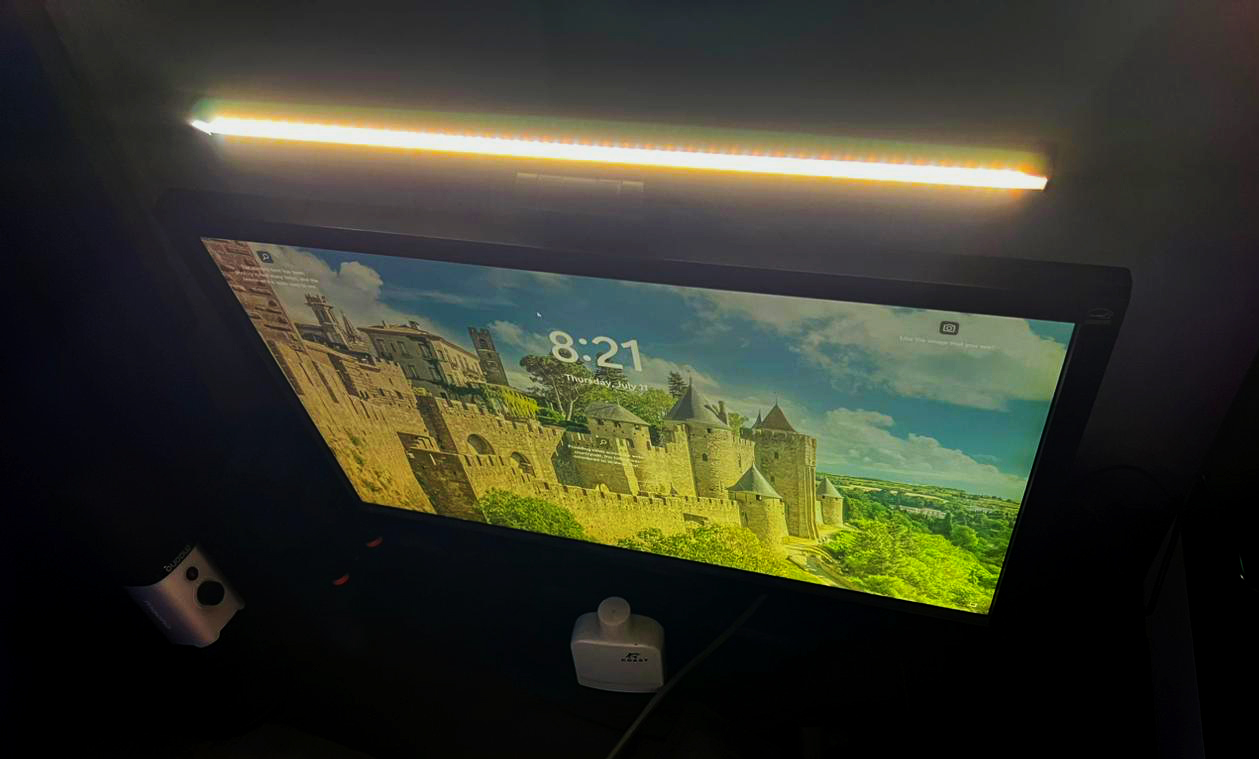
Although the Baseus Monitor Light Bar does not have a very extensive feature set, it does include all of the quality-of-life aspects that you would expect in a monitor light bar and even in lights in general. It comes with three different types of lights: a warmer light with a 2800k color temperature, a whiter hue with a 4000k color temperature, and a white LED light with a 5500k color temperature.
Changing the lighting to accommodate the changes in the amount of natural light that comes in throughout the day is quite straightforward. On days that were extremely cloudy, I found that it was quite helpful to keep the white option on merely to counteract the overall darkness. In the evenings, I would switch to the warm white mode.
Adjustable brightness also allows you to personalize the temperature of each individual light source, which is useful in situations when you find the light excessive or distracting. Notably, you can adjust the brightness anywhere from 5% to 100%. The color or brightness changes happen extremely quickly, and the device also has anti-blue light, which removes blue light that can harm our eyes.
PRO TIP: Use the warm light setting (2800K) in the evening to reduce eye strain, the neutral white (4000K) during overcast days, and the bright white (5500K) for optimal visibility during daylight hours.
Performance
A monitor light bar can be a simple upgrade to your home office workspace that can easily prevent issues related to insufficient light sources and lengthy screen usage. Although it is not a necessary investment for many gamers, the monitor light is a simple addition that can help prevent these problems. Additionally, the spread of the lighting is helpful for glowing your workspace, which is especially helpful if you are a designer drawing things out or even if you are just taking basic notes.
Regarding its functionality, the light functions just as you would expect it to, with only a small amount of unnecessary hassle.
Considering that I intend to get a suitable light for my home office setup for quite some time, the Baseus Monitor Light Bar is a good win-win situation for me.
My flat screen can accommodate it without any visible wobble or instability, and I am hopeful it will also accommodate curved displays.
The size of the light and the fitting becomes extremely readily apparent, and it is possible that it would weigh down smaller, thinner displays on certain laptops and Macs. Although you could definitely use this on a laptop screen, I would probably not recommend doing so. Although it would undoubtedly help brighten your keyboard, it will also be very noticeable.
Auto-brightness settings, which react to natural light as they vary throughout the day, are absent from this model, but you can get them with different models from competitor brands. Given the pricing range of the Baseus Monitor Light Bar, it is possible to live without this function even though it is a pleasant extra feature to have.
Should You Buy it?
Buy It If
✅ You want an affordable and high-quality lighting solution: At $37.99, the Baseus Monitor Light Bar offers excellent value, providing robust construction and effective lighting without breaking the bank.
✅ You need adjustable lighting options: With three color temperature settings (2800K, 4000K, 5500K) and adjustable brightness, this light bar allows you to tailor the lighting to your specific needs and time of day.
✅ You prefer a space-saving design: The slim, low-profile design sits discreetly on top of your monitor, saving valuable desk space and maintaining a tidy workspace.
✅ You appreciate user-friendly controls: The touch panel makes it easy to adjust the light bar’s settings, even for those who are not particularly tech-savvy.
Don’t Buy It If
❌ You need advanced features like auto-brightness: If you rely on features such as automatic brightness adjustments to match ambient light, the Baseus Monitor Light Bar might fall short of your expectations.
❌ Your monitor or laptop screen is small or thin: The weight of the light bar might be too much for smaller or thinner screens, potentially causing instability or damage.
❌ You require compatibility with curved displays: While it fits well on flat screens, its compatibility with curved monitors might be limited, affecting its stability and effectiveness.
❌ You need extensive color customization: If having a wider range of color temperatures and more precise control over the lighting hue is important, you might find this model lacking.
My Thoughts
The Baseus Monitor Light Bar offers a straightforward approach to lighting up your work area at an affordable and convenient price for your wallet. Those who want more light while working may find that it offers great value. It is an excellent option that can assist in keeping lighting in a certain area without requiring it to take up desk space, unlike the shining lights that you have to place all over your workplace.
Generally speaking, users who use this downward light have less strain and stress on their eyes, making it easier for them to see effectively at night or in situations with insufficient light. At this affordable price, a few features are absent, the most notable of which are automatic brightness adjustments and a wider range of color temperatures.
Despite this, a few other wonderful aspects of the Baseus Monitor Light Bar make it worthwhile. All things considered, it is an excellent monitor light bar if you are in the market for one. This is particularly true when considering the fact that competitors offer comparable options at almost twice the price with practically the same set of features.
At Tech4Gamers, I contribute as a Senior News Reporter, combining my skills and gaming enthusiasm to keep our audience updated on the latest developments.
Story Highlight
Larian Studios recently discussed that the team wanted to work on Fallout before it got the Baldur’s Gate license.
Following these discussions, fans are on board with the idea and hope to see it come to fruition.
They believe that Larian Studios could do a fantastic job with remakes or original Fallout games.
Larian Studios’ name has become synonymous with quality after it achieved a new status last year. Baldur’s Gate 3 swept The Game Awards and became the first game to dominate every major Game of The Year award last year.
Thanks to these achievements, everyone is familiar with Larian Studios’ talents. The team recently shared how it landed with the Baldur’s Gate IP, revealing intentions to work on Fallout initially. Fans are on board and now want to see this become a reality.
Why it matters: The Fallout series is one of gaming’s biggest RPG IPs. Therefore, it would be a natural fit for the team behind Baldur’s Gate 3.
On social media, the latest news quickly spread, with fans being in agreement that a Fallout RPG from Larian Studios would be incredible.
Various fans have asked Bethesda to work with the developer on a new Fallout game. The former is still open to outsourcing this franchise, so there is some hope that Larian Studios’ wish could be fulfilled.
Give them Fallout.
-Gothalion
With Larian Studios at the helm, Fallout would have the opportunity to revisit its roots, something the series hasn’t done in many decades.
Perhaps the studio could work on remaking the classic entries that made Fallout so popular in the first. If not, a completely new spin-off in Larian Studios’ classic RPG style would also be more than welcome.
A collaboration between the two would be more beneficial for Bethesda since it could reduce the gap between Fallout 76 and the next entry. Bethesda is said to be working on getting Fallout 5 out before 2030, but this may not be possible due to its busy schedule.
Nonetheless, we agree with the fans here. Larian Studios is arguably unchallenged when it comes to RPGs, so a new Fallout entry from this team would be incredible to see.
As a News Reporter at Tech4Gamers, I bring the latest findings from the tech industry to our readers. Specializing in processors, graphics cards, and more, I strive to deliver detailed insights that keep our audience well-informed and engaged. Periodically, I also delve into the vibrant world of gaming to share captivating stories.
Story Highlight
The RTX 5090 will have a TDP of 500W, while the RTX 5080 will be at 350W, showing increased power consumption compared to previous models.
All RTX 50 cards will use a new 16-pin connector, replacing the problematic 12VHPWR design with a more reliable 12V-2×6 adapter.
Nvidia plans to launch the RTX 50 series in October, with the RTX 5070 expected in January 2025.
Seasonic has published the initial power consumption figures of Nvidia’s GeForce RTX 50 series. The list starts with RTX 5090 at the top and, surprisingly, an RTX 5050 at the bottom.
Why it matters: Many have been concerned about Nvidia’s power consumption for next-generation graphics cards, particularly at the high end. Seasonic has given PC gamers a first look at these figures to make a judgment about the RTX 50 lineup.
There’s a sudden level of interest in the Seasonic PSU wattage calculator. Everest on Twitter/X has observed that Nvidia’s GeForce RTX 50 series graphics cards have been included in the online tool.
The Nvidia GeForce RTX 5090, the upcoming flagship GPU that will replace the RTX 4090, is at the top of the list with a 500W TDP. This means that the next-generation flagship is expected to have an even higher TDP than the current model, which is rated at 450W.
The Nvidia GeForce RTX 5080, on the other hand, consumes 350W of power, which is 30W more than the GeForce RTX 4080 & 4080 Super. The GeForce RTX 5070 is the next card in line with a listed TDP of 220W, similar to the RTX 4070 Super’s TDP but with a 20W boost.
As expected, the mid-range GeForce RTX 5060 card has a much lower TDP of 170W, which is 10W more than the 4060 Ti and 55W more than the RTX 4060. Since there was no RTX 4050 in the current lineup, we can assume that the GeForce RTX 5050, listed at 100W, replaces the RTX 4060.
According to Seasonic, every GeForce RTX 50 lineup card will have a 16-pin connector. Nevertheless, Nvidia is expected to use the new and improved 12V-2×6 adapter instead of the 12VHPWR design, which was the root of many issues with the RTX 4090.
Nvidia is expected to release its consumer graphics cards in October, starting with the top-tier RTX 5090 and RTX 5080 cards.
At Tech4gamers, I cover all sorts of gaming news. Whether it’s a leak of any upcoming game or an update, an announcement, or a rumour, I like to write about it all. Over the weekend, I sit and write features where I talk about games that I miss or want to see return.
Story Highlight
Toys For Bob released Crash Bandicoot 4 in late 2020.
While fans have been waiting for the next game, a developer has confirmed that Crash Bandicoot 5 has been cancelled.
He also states that another project he was involved in was cancelled.
After three decades of relevance, the Crash Bandicoot series has become a staple of the platforming games genre. Its latest entry came out four years ago, and fans have been waiting for a new mainline title since then.
While Toys For Bob has recently released games like Crash Team Rumble, a developer suggests that Crash Bandicoot 5 won’t come out anytime soon. In fact, this developer states that the project has been completely cancelled.
Why it matters: The Crash franchise has always been held in high regard for its unique approach to platforming gameplay. It’s also one of the few platforming games to have stood the test of time.
The Crash Bandicoot Franchise Has Sold Over 20 Million Copies
One of the designers from Crash Bandicoot 4 has recently discussed Toys For Bob’s latest cancellation.
He stated that the team worked hard on this game for about three years, but it was permanently shut down a few days ago. According to the developer, all attempts to save the project have now failed.
Later on, the developer confirmed that Toys For Bob was working on Crash Bandicoot 5, stating that fans would eventually learn about the game that never came to be.
Some day folks will hear about the Crash 5 that never was.
Nicholas Kole
While all hope seems lost for Crash Bandicoot, reports state that the team is currently focusing on the Spyro series. Following the Activision merger, Toys For Bob went independent, but it has partnered with Microsoft for the next game.
Crash Bandicoot Deserves Another Chance
Nicholas Kole also discussed Project Dragon, another game he was involved in. While Toys For Bob was not working on this game, he stated that it had also been cancelled.
Nonetheless, it’s disappointing that Crash Bandicoot won’t return anytime soon.
While a fifth mainline game could still happen eventually, the series was on quite an impressive winning spree after the release of the N.Sane Trilogy. It’s a shame, then, that three years of work on a new game went to waste.
At T4G, my task is to cover the latest news around the gaming globe ASAP and with the utmost precision. I adore all the games and respect all the devs behind the amazing games that we get all year. So, whether it’s a PC or a Console game, I got it all covered.
Story Highlights
GTA 6 trailer has now managed to cross 200 million views in just 7 months.
It still lags behind the Subway Surfers trailer but is 2nd most watched game trailer.
The trailer has many more views overall since this figure comes just from Rockstar’s channel.
Rockstar revealed the first trailer for GTA 6 in December last year. The developer has been relatively quiet since then, but the trailer continues to earn major milestones. It has now amassed over 200 million views on YouTube.
Why it matters: GTA 6 is set to be the biggest launch of the decade, and its hype is unreal. This can be clearly seen by how many views the trailer has garnered in just 7 months.
The GTA 6 Trailer Continues To Be Watched By Millions
The GTA 6 trailer outnumbered the GTA 5 trailer in terms of views quite a few months ago. It currently sits at about 200 million compared to GTA 5’s 111 million. However, while GTA 6’s numbers are huge, it’s still the 2nd most-watched video game trailer.
The throne currently belongs to Subway Surfers, which has over 361 million views. However, that trailer was released 11 years ago and is for a game accessible to almost everyone due to its mobile release.
In terms of console and PC games, GTA 6 is now towering above everyone. If the number of views keeps growing like this, it might eventually reach 300 million. Also, it should be noted that the trailer has more than 200 million views overall.
This figure only counts the views from Rockstar’s video, but the trailer has been reposted more than a dozen times by different channels. Fans should also note that not every single view marks a unique user.
Many fans likely rewatched the trailer multiple times, bringing the total up to 200 million.
New screenshots from GTA 6 are expected next month
The trailer already broke several records when it first came out. It also became the most-watched non-music video in less than 24 hours, reaching over 100 million views in a similar timeframe.
New data suggests we might see new screenshots from the game in August. This could mean that another trailer is just months away. As fans await this trailer, the excitement for GTA 6 continues to be high.
At Tech4Gamers, I mainly cover new gaming news, leaks, and rumours. Aside from that, I love to write features about my favourite games while inserting my opinion about their different aspects.
Story Highlight
Bioshock 4 development was recently ramped up by 2K.
A screenshot from an early build of the game has been leaked online.
It highlights time-based abilities and a ricochet shotgun, but the overall quality seems poor.
The Bioshock series has always been a huge commercial success. While Bioshock Infinite proved divisive among the fandom, fans are looking forward to a strong return for this series.
2K recently confirmed Bioshock 4 was moving forward in development. Cloud Chamber also ramped up the development with new hirings, but a release date still seems out of reach as fans await more details on the game.
While official information may still be quite far away, an image of the game’s early build from 2021 has been leaked online.
Why it matters: 2K has been awfully quiet about the upcoming Bioshock, so this leak will surely excite the fandom, even if it fails to reveal much about the project.
The screenshot above highlights that the game will use time-based abilities. It also shows a ricochet shotgun and other weapons in the user interface. Despite its poor quality, this is everyone’s first look at Bioshock 4.
The image has been leaked by MP1st, which confirms that the screenshot comes from a 3-year-old build. This is likely why the quality is poor, and the leaked image looks outdated. Still, this image gives fans an idea of how Bioshock 4 will look.
According to this image, Cloud Chamber has nailed the IP’s signature aesthetic and atmosphere, giving fans more hope for a successful sequel.
This leak comes directly from a 2K visual artist. It also seems to confirm the Parkside codename, which appeared from reliable sources in 2019, confirming that this is indeed our first look at Bioshock 4.
Apart from the codename, the same sources pointed to a 1960s setting based in the Antarctic for the new Bioshock entry. However, it is possible that Bioshock 4 has changed direction since then.
The game has been in development for so long that it’s hard to predict Cloud Chamber’s plans. Therefore, Bioshock 4 remains a mystery for the most part. The image doesn’t really reveal much, either, even after a thorough analysis.
Bioshock fans might have noticed the Plasmid abilities and the different symbols. Other than that, there isn’t much you can decipher from the image. Therefore, it may be better to wait for official information from 2K itself.
At Tech4Gamers, I contribute as a Senior News Reporter, combining my skills and gaming enthusiasm to keep our audience updated on the latest developments.
Story Highlights
id Software revealed Doom: The Dark Ages at the Xbox Showcase last month.
A new report seems to confirm that more games are coming soon from this developer.
Past evidence suggests that id Software is involved in a new Quake project.
id Software just unveiled its latest project last month, confirming a new entry in the Doom franchise. Doom: The Dark Ages is said to offer a medieval take on the series, offering a more visceral style of first-person shooter gameplay.
However, a LinkedIn profile suggests this is not the only game id Software is working on.
Why it matters: id Software is one of Xbox’s best first-party studios. This team last released a new game in 2020, so fans are excited to see the developer returning in grand fashion.
id Software Seems To Be Working On Various Projects
Megumi McGowan has recently joined Bethesda Softworks as a Publishing Producer.
In her latest post sharing this information, she points to multiple games in development at id Software. According to the Publishing Producer, this studio has ‘exciting projects’ in the works, implying that Doom: The Dark Ages isn’t the team’s sole game in development.
Previous rumors have pointed to the existence of a new Quake game. While MachineGames seems to be leading development on this project, these two studios are known to closely collaborate on projects, particularly due to the shared use of id Software’s in-house engine.
As such, Quake seems to be the second game in question here.
Doom: The Dark Ages Is Arriving Next Year
However, id Software could also be working on something entirely different. While it’s hard to tell for now, fans will certainly be glad to know that more projects are already being worked on at id Software.
The developer is set to debut Doom: The Dark Ages in 2025. id Software has yet to share more information about this game, but fans should expect more details soon. Perhaps the studio will even offer a small teaser for its next project in 2025.
At Tech4Gamers, I contribute as a Senior News Reporter, combining my skills and gaming enthusiasm to keep our audience updated on the latest developments.
Story Highlights
Microsoft has failed to clearly explain the new pricing and tiers of Xbox Game Pass.
The gaming giant was also unable to confirm how long it would take new titles to show up on Game Pass Standard.
This situation seems reminiscent of Microsoft’s poor communication when it announced the third-party approach earlier this year.
Xbox has very recently increased the price of its Game Pass subscription. However, this price hike has not been explained particularly well. In fact, it’s just one more example of Microsoft’s poor and often downright confusing messaging when it comes to Xbox.
Game Pass used to be quite easy for consumers to understand. While it’s still no rocket science, people without much knowledge of the gaming industry could easily get lost between the four to five different tiers and their very specific functions.
All this latest change does is highlight Xbox’s inability to effectively communicate with the fans.
Why it matters: The latest announcements have left many fans confused and searching for answers. Microsoft has effectively left the community to come up with more concise and clear explanations of the service.
Day One With Game Pass?
Microsoft’s Service Has Lost Its Biggest Edge With The New Pricing Change
Microsoft has removed day-one games from every console tier except Game Pass Ultimate. The official FAQ states that Game Pass Standard does not include day-one games.
However, the gaming giant failed to clarify whether this includes third and first-party releases. The lack of clarification might mean this rule is applied across the board, but I’ve seen many people confused about this point.
Moreover, Xbox is said to be planning releases for its biggest titles in 6-12 months on this tier of the service. If this is already decided, why was the gap not communicated by Microsoft itself?
Recent reports state that some titles could take even longer, which means that Microsoft itself is unsure. Regarding day-one releases, ‘Play it day one with Game Pass’ was Microsoft’s big slogan for first and third-party releases at every showcase and event.
Now that this is true only for Game Pass PC and Ultimate, will Microsoft change the slogan to reflect the new tiers? I sure hope so.
Game Pass Core & Standard
A Clear Explanation of The Different Tiers via Klobrille
With Game Pass for consoles now out of the picture, Game Pass Core and Standard are left as the two cheapest options of the service on Xbox Series S|X. However, what’s interesting is how similar these two subscriptions are.
Game Pass Standard is just a more souped-up version of Game Pass Core, with the lack of day-one titles blurring the lines between both. Sure, you have a much bigger library of games on the former, but their core purpose is the same.
At a difference of just $5/month, Game Pass Core looks like a much worse deal. This was not the case before since this tier’s selling point, access to online gameplay, was unique to it.
As it stands, Game Pass Core seems to exist just to upsell customers to Game Pass Standard. All in all, Microsoft’s confusing tiers have led to the community stepping up and doing a better job of offering an explanation.
Twitter users like Klobrille have created visuals that clearly show these differences, making them easier for the average consumer to understand. I’m just wondering why Xbox couldn’t come up with something similar itself.
Confusing Messaging In The Past
Hi-Fi Rush And Sea of Thieves Were Among The First To Be Revealed For PS5
As said earlier, Microsoft has a habit of failing to communicate with its fans. Recall the third-party games situation and how Phil Spencer confirmed to fans that most games would not go on other platforms.
Just a few months later, Doom: The Dark Ages was announced for the PS5. Phil Spencer then stated that fans should expect more third-party releases after this announcement, and all of this happened over the course of a few months. New rumors suggest that Halo could also be heading to PS5 now.
Time and again, the gaming giant has failed to communicate with its fans effectively. Quite conveniently, Microsoft falls back on the case-by-case basis argument, implying that plans are never set in stone.
In my opinion, this is a major problem on the gaming giant’s part, and something that needs to be fixed immediately.
As Tech4Gamers’ Founder and Editor-in-Chief, I bring over 13 years of PC Hardware Reviewing and 8+ years of IT Project Management experience. Certified in Google IT Support , my focus is on providing honest product reviews and analysis and fostering a strong gaming community with 130k+ members in PPG.
Story Highlights
The AMD Ryzen 9 9950X CPU has come out on top against the Intel Core i9-14900K.
It also ends up being nearly 30% faster than its predecessor.
Even with a 120W power limit, the Ryzen CPU can match its Intel rival’s performance.
The AMD Ryzen 9 9950X is AMD’s top-of-the-line processor. Because of its performance, this chip has a maximum power consumption of 230W. We are specifically referring to Blender performance tests conducted at different power settings on the Ryzen 9 9950X.
Igor_kavinski, a member of the Andtech forum, has demonstrated to us how the 16-core flagship scales at lower TDPs in the Blender benchmark. He has previously displayed PPT results of 60W, 90W, 120W, and 160W. Now, we have a fresh 230W PPT result that beats Intel’s top Core i9 CPUs and the Ryzen 9 7950X.
Why it matters: The Ryzen series has always been popular for gaming and productivity tasks, making these benchmarks quite important.
Source: Anandtech Forums
It states specifically that the AMD Ryzen 9 9950X at 230W achieved a solid temperature of 62ºC and a maximum frequency of 5,620 MHz. It takes a lot of energy to reach this frequency because, at 160W, the CPU can reach 5,555 MHz at 58ºC.
If the frequency is limited to 60W, it reaches 4,048 MHz with a very low temperature. So this tells us that the Ryzen 9 9950X can be quite appropriate for a mini PC. In the tests, Ryzen 9 9950X scored 353 points in the Monster test, 226 in Junkshop, and 171 in Classroom.
This means that the Ryzen 9 9950X is 33.5% faster than the Intel Core i9 14900K and 28% faster than its predecessor. Most intriguing of all, this 253W Intel CPU performs almost exactly like the 120W-limited Ryzen 9 9950X.
Even with its limited power of 90W, the Ryzen 9 9950X is still faster than the 142W Ryzen 9 5950X. With its 60W limitation, it functions quite similarly to the 241W Intel Core i9-12900K.
CPU-Z Benchmark via HXL
The AMD Ryzen 9 9900X, the 12-core, 24-thread variant observed in the CPU-Z tool’s benchmark, displayed 13,572 points for multi-core performance and 878.1 points for single-core performance.
It performs comparably to the Intel Core i7-14700K (14,904 points) and the Intel Core i7-13700K (12,258 points) in terms of multi-core efficiency. The Intel Core i9-14900KS (17,992 points) is the top CPU in this benchmark.