At Tech4Gamers.com, I cover the latest news and rumours in the gaming industry, from new game releases to hidden gems and video game leaks. Furthermore, I occasionally write tech articles about video game consoles, providing insights into the hardware and software that powers our gaming experiences.
Story Highlight
VG Entertainment, known for its work on Stalker: Shadow of Chernobyl, is developing a new survival FPS called Forest Reigns.
The game takes place in a post-apocalyptic Paris, five years after a global pandemic, where nature has overtaken the city.
A key gameplay mechanic lets players interact with the forest: aggression provokes it, while caution may bring rewards.
The game offers a non-linear narrative with branching storylines and multiple endings, shaped by player choices and faction alliances.
VG Entertainment, the core development team behind Stalker: Shadow of Chernobyl, has revealed its biggest project so far: Forest Reigns, a single-player first-person shooter.
With an engaging story, exciting gameplay, and a world full of life and danger, Forest Reigns aims to redefine the survival FPS genre.
Why it matters: VG Entertainment’s pedigree is clear in this ambitious project. It should offer survival and FPS genre fans an exciting new experience.
Set five years after a global pandemic wipes out most of humanity, Forest Reigns takes players to a transformed Paris, now overtaken by nature. The city is ruled by a living forest, blending beauty with hidden dangers.
Players must find their way through this fascinating yet deadly world, where survival depends on understanding the forest’s strange power.
In Forest Reigns, the forest plays an important part in the story. Every action you take affects how it responds. If you attack the forest, it fights back. But if you approach it carefully, the forest may help you against enemies.
This unique feature forces players to rethink their strategies, mixing careful planning with awareness of the environment.
Forest Reigns features a deep, non-linear story that changes based on the choices you make. You can join one of four factions, each with its vision for humanity’s future. Your decisions will shape your relationships and the fate of the game’s universe.
Forest Reigns looks visually beautiful.
The game offers a variety of missions, from exploration to combat, and multiple endings, so every playthrough is different.
Paris in Forest Reigns is both beautiful and dangerous. Iconic landmarks like the Eiffel Tower and Notre Dame Cathedral are overtaken by the forest, creating a surreal setting for adventure.
The city holds many hidden secrets, and the environment constantly shifts, keeping players alert as they steer through this mix of wonder and danger.
Forest Reigns is unique due to its evolutionary stories, dynamic environments, and player-driven decisions. The fact that VG Entertainment focuses on being creative makes Forest Reigns something more than just a game—it’s an experience that will be appealing to FPS lovers.
The game is currently announced only for PC, and it’s unclear if it will come to PS5 or Xbox Series X|S.
What do you think of Forest Regins’ gameplay trailer? Do you believe it can attain the same level of success as Stalker? Let us know in the comments, or join the discussion on the Tech4Gamers forum.
At Tech4Gamers, I mainly cover new gaming news, leaks, and rumours. Aside from that, I love to write features about my favourite games while inserting my opinion about their different aspects.
Story Highlight
Veteran developers from CD Projekt Red started a new studio, Rebel Wolves, to develop The Blood of Dawnwalker.
Just recently, its new trailer was released, revealing some crucial information.
The game’s lore, gameplay, and different mechanics, everything seems pretty interesting and we have compiled all we know about it in this article.
Former Witcher developers started a new studio known as Rebel Wolves. The seasoned developers with years of experience decided to develop their own game, The Blood of Dawnwalker.
It is a single-player third-person fantasy action RPG that has been in development for 2 years. The game is on Unreal Engine 5, and its full gameplay set is confirmed to be released in the Summer of 2025.
Some notable figures who worked at CD Projekt Red, Konrad Tomaszkiewicz, and Mateusz Tomaszkiewicz, are at the helm, so the fandom can have high expectations from the upcoming Dark Fantasy title.
Why it matters: Last night, the developer launched the game’s new trailer, revealing a lot of new information about the game and further increasing fans’ expectations. So, we have compiled some information to give fans an overview.
The Blood of Dawnwalker Plot
The plot of a game matters a lot to fans, as the majority prefer to be emotionally connected to a game or figure out the mysteries and consequences of certain actions.
First of all, the story takes place in 14th-century medieval Europe in Vale Sangora.
Vale Sangora is a kingdom which is located in the Carpathian Mountains.
The game is inspired by Eastern European architecture and culture, including Polish log houses, Ukrainian and Balkan clothing, Romanian defensive churches, and more.
Also, as mentioned before, it is a dark fantasy, so the area where the game takes place was devasted by plague, famine, and social unrest.
As it is a dark fantasy, there are going to be some otherworldly beings involved, and Vampires are one of them.
The vampires have a unique lore behind them, making them a crucial part of the story.
The vampires watched the world from the shadows, waiting for an opportunity to strike and make their move when humanity was at its lowest point and overthrow the feudal lords.
The vampires are led by Brencis, a superpowerful old vampire who wants to change the world. He has perverted old religious beliefs and taken advantage of social upheaval to become a messianic figure of sorts.
Also, it is worth noting that the vampires have overthrown cruel and corrupt feudal lords but also kill humans to eat, hold bloody masses in church, etc.
One more piece of information regarding vampires: old ones have a lot of teeth.
Some Gameplay Information
The trailer For The Blood of Dawnwalker, A Game By CDPR Veterans, Was Released Recently
You will be playing as Cohen, who is a dawn wanderer. Here comes a twist: Cohen isn’t a human, and neither is a Vampire, meaning he is something in between. Does this mean he has some untapped potential that may give him the ability to rule over both? We don’t know that, but what we do know is that he can traverse both the world of humans and the world of creatures of the night.
The project is focused on a narrative sandbox; no two playthroughs will be the same.
You fight with swords and weapons during the day and can use vampire abilities to fight at night, explore the environment, etc.
Your main task would be to save your family; for that, you will be given 30 in-game days and nights.
After you complete a task or a quest, time will move forward. However, time does not move in the real world; you can manage how you use time as a resource.
As expected, you will meet many different personalities with different goals and ambitions. You can either make them your friends or turn them into your foes.
Bloodlust is a game mechanic where you need to feed throughout the playthrough. If you talk to someone while hungry for a long time, you may lose control and eat them, even your best friend. This mechanics seems pretty interesting.
Fans should also note that Brencis, who leads the vampires, is an active antagonist who reacts to your actions and decisions and issues decrees in the game that welcome obstacles for the player, such as military checkpoints.
That is almost everything we know about The Blood of Dawnwalker so far. The game certainly looks pretty impressive and interesting to play. Veteran developers have been working on it for 2 years now and have implemented some unique mechanics.
In the summer of 2025, full gameplay will be revealed, and currently, the developer hasn’t revealed anything about the release date. Also, the game will be available on PC, Xbox Series S|X, and PS5.
What do you think about the game so far? Will you give it a try on launch? Share your thoughts with us in the comments section below or join the discussion at the official Tech4Gamers forums.
As Tech4Gamers’ Founder and Editor-in-Chief, I bring over 13 years of PC Hardware Reviewing and 8+ years of IT Project Management experience. Certified in Google IT Support , my focus is on providing honest product reviews and analysis and fostering a strong gaming community with 130k+ members in PPG.
Story Highlight
The Blood of Dawnwalker features a narrative sandbox where every playthrough is different.
Players take control of Coen, a dawn walker who is part human and part vampire.
The game world is filled with problems like plague, famine, and social disorder. Players must navigate a day-night cycle that affects their abilities.
Gamers will have 30 days and nights to save their families, and their decisions will determine who becomes an ally or enemy.
Last night, a game that will give a lot to talk about was announced: The Blood of Dawnwalker. This game has everything to be a success, starting with the fact that it is a third-person action RPG game.
The most interesting thing is that this game has been in development for over 2 years using the Unreal Engine 5 graphics engine. Despite being in development for 2 years, the full game will soon be released and will be shown in the summer.
Although the trailer shows a bit of gameplay in the Alpha phase, we must admit that it looks great.
It may not seem like much time, but some significant names behind this game add a lot of quality. The Blood of Dawnwalker is being directed by Konrad Tomaszkiewicz, the former director of The Witcher 3, alongside Mateusz Tomaszkiewicz, former quest director of The Witcher 3 and Cyberpunk 2077.
Other former CD Projekt RED employees have joined this new job under the new studio Rebel Wolves.
The Blood of Dawnwalker, Vampire RPG Set In 14th-Century Medieval Europe
Players will find themselves in a narrative sandbox where no two games are identical. It’ll bring the players to Vale Sangora in medieval Europe in the 14th century, a region devastated by plague, famine, and social disorder.
The game’s architecture and culture are based on Eastern European culture: Polish log houses, Ukrainian and Balkan clothing, “Romanian defensive churches,” and much more.
Adding to the existing problems is the arrival of vampires hiding in the shadows, waiting to make their move. Taking advantage of the fact that humanity is at its lowest point to overthrow the feudal lords.
In The Blood of Dawnwalker, players will take control of Coen, a “dawn walker” who is something between a human and a vampire. Being able to see the sunlight but losing some of your powers until night comes.
And yes, the game has a day and night cycle, completely changing the aesthetics and atmosphere of the game. During the day, players must resort to weapons to defend themselves but will use their vampire skills at night.
Now comes the most interesting part: each game will be completely different and entirely replayable. The game will give players 30 days and 30 nights to save their family in the game.
Additionally, throughout the game, players will meet many characters with their own goals and ambitions, which can be their allies or enemies. Things get a little more complicated when the blood hunger mechanic is added, where players will have to feed themselves, either from a stranger or the one who was their best friend.
The Game Will Be Available On Majority Platforms
Wrapping up with the information, The Blood of Dawnwalker will put players on the side of a group of vampires whose leadership is grey. While they want to overthrow the most violent and corrupt feudal lords, they also kill people to eat or perform blood masses in church. So, not everything is black or white.
The Blood of Dawnwalker will be released this summer on all modern platforms, including PC, PlayStation 5, and Xbox Series X|S. There is no set release date or price, so we will discuss this title again in the coming months when more relevant information, such as its PC requirements, becomes available.
At Tech4Gamers, I began as a comparison writer, analyzing GPU and CPU performance. Now, I focus on writing reviews and contributing to the best-ofs section, sharing personal insights after hands-on testing.
Shehryar Khan
Senior Editor and Content Writer:
Lead the comparison and blog writing teams at Tech4Gamers.
Oversee teams with a keen eye for detail and precision.
Ensure hands-on writing, with benchmarks and testing as guiding principles.
Guarantee the delivery of the best possible results in concise yet impactful tech tales.
❌Very similar to its predecessor without any meaningful improvements
Intel Core i7 13700KF
✅ Similar performance to the Core i7 14700K
✅ Slightly lower price tag
❌Omission of integrated graphics
Key Takeaways
In our gaming tests, the Core i7 14700K exhibited a slight 2.4% performance edge, a difference that might go unnoticed by most gamers, especially those using high refresh rates.
The Core i7 14700K showed an approximately 0.8% increase in power consumption compared to the older chip, indicating that Intel made no significant alterations to power efficiency.
There is a price difference of around 18% between the Core i7 14700K and the Core i7 13700KF.
The slightly improved performance of the Core i7 14700K may not warrant its considerably higher price tag for most individuals, particularly when taking into account the overall landscape of the CPU market.
Why Trust Tech4Gamers
Shehryar is our comparison expert who has been benchmarking graphics cards, and processors.
100+ components tested and reviewed by our team of hardware experts (Tech4Gamers Team).
100+ hours spent testing different components for our comparisons.
At Tech4Gamers, ensuring you get reliable information is our priority. That’s why every hardware round-up undergoes a meticulous review process by our team of experts and editors. Each review is carefully examined against our strict editorial guidelines, guaranteeing you trustworthy insights you can depend on.
Core Count: There are a few extra efficiency cores on the Core i7 14700K than the 13700KF. It boasts 12 efficiency cores and 8 performance cores for 28 threads. The KF, however, has 8 performance and 8 efficiency cores, which total 24 threads.
Clock Speed: Though the base clock speed of the two chips remains the same, the boost clock is 5.60GHz on the 14700K instead of 5.40GHz on the 13700KF.
L3 Cache: The Core i7 14700K has a little bit more L3 cache at 33MB instead of the 30MB of the Core i7 13700KF.
Process Node: Both processors use the 10nm monolithic manufacturing process that Intel has been using for a while now in their chips.
Other Differences: The Core i7 13700KF does not have integrated graphics baked onto its chip, while the Core i7 14700K does. This means that the 14th-gen processor can output to a display, even without a graphics card.
The 14th-gen processors have had one of the worst consumer responses in recent memory, but how do these chips stack up against their older counterparts? Join us in the Core i7 13700K vs Core i7 13700KF comparison to find out!
Gaming Benchmarks – 1080p
Now that we know the similarities and differences of the Core i7 14700K vs Core i7 13700KF, this part of our comparison will deal with the performance of these chips in games. To do this, we used a specially designed test bench, the specifications of which are written below:
Our benchmarks started with very little difference between the two chips. The 14th-generation processor had an average framerate of 122 FPS, while the 13700KF was one frame behind with an average framerate of 120 FPS.
The 1% lows were equal between the two chips. Both the Core i7 14700K and the Core i7 13700K had lows of 90 FPS.
Starfield
Starfield @1080p (Image By Tech4Gamers)
There was some difference between the two chips in our Starfield test. The i7 14700K had an average framerate of 110 FPS, while the KF managed an average of 105 FPS. The advantage in this game for the newer chip was around 4.7%.
The 1% lows were once again extremely similar between the two processors, with the i7 14700K getting lows of around 53 FPS while the KF had lows of 54 FPS, beating out its newer counterpart.
Hitman 3
Hitman 3 @1080p (Image By Tech4Gamers)
There was around a 2.2% advantage for the newer chip in Hitman 3, with an average of 280 FPS, while the 13700KF had an average framerate of around 274 FPS.
The 1% lows were around 3.5% apart in our testing, with the newer i7 getting lows of 205 FPS while the 13700KF had lows of around 198 FPS.
The Last Of Us
The Last Of Us @1080p (Image By Tech4Gamers)
The difference was once again larger than anticipated in The Last Of Us Part 1, where the 14700K had an average framerate of 222 FPS, while the 13700KF had an average framerate of 217 FPS. The difference here was around 2.3%.
As for the 1% lows, both processors once again matched one another with 111 FPS as their minimums.
Microsoft Flight Simulator 2020
Microsoft Flight Simulator 2020 @1080p (Image By Tech4Gamers)
We saw a 2.6% advantage for the i7 14700K in MS Flight Sim 2020, with an average framerate of 115 FPS, while the 13700KF was only a few frames shy, with an average of 112 FPS.
Coming to the 1% lows, the Core i7 14700K had minimums of around 85 FPS, while the 13700K was a few frames behind with a minimum of 83 FPS.
Forza Horizon 5
Forza Horizon 5 @1080p (Image By Tech4Gamers)
The difference in framerate in Forza Horizon 5 fell to 3.4%, with the 14700K being in the advantage. It had an average framerate of 241 FPS, while the 13700KF had an average of around 233 FPS.
The 1% lows were higher on the KF at around 135 FPS, while the Core i7 14700K had lows of 131 FPS. The difference here was around 3% in advantage of the older processor.
Hogwarts Legacy
Hogwarts Legacy @1080p (Image By Tech4Gamers)
The average framerates were very close between the two processors when we tested Hogwarts Legacy, with the 14700K getting an average framerate of around 74 FPS while the 13700KF had an average of 73 FPS.
As for the 1% lows, the 13700KF got lows of 53 FPS, while the 14700K had lows of around 55 FPS.
Horizon Zero Dawn
Horizon Zero Dawn @1080p (Image By Tech4Gamers)
The difference in this PlayStation port was substantial on paper, but most people would be hard-pressed actually to notice it. The 14700K had an average of 200 FPS, while the 13700KF was around 2.5% slower, with an average framerate of around 195 FPS.
The 1% lows of the 14700K hovered around 146 FPS, while the 13th-gen processor hung around 145 FPS for its minimums.
Spider-man: Miles Morales
Spider-Man Miles Morales @1080p (Image By Tech4Gamers)
This PS port also behaved similarly to the last one. The 14700K had an average framerate of around 128 FPS, while the 13700K had an average of 124 FPS, which was around 3.2% lower.
As for the 1% lows, the 14700K managed lows of 97 FPS while the i7 13700K hovered around 94 FPS.
Red Dead Redemption 2
Red Dead Redemption 2 @1080p (Image By Tech4Gamers)
Finally, our testing finished off with both chips getting the same framerate in Red Dead Redemption 2 at around 179 FPS.
As for the lows, the 14700K got its final win with a framerate of 119 FPS, while the Core i7 13700KF suffered its final loss with a framerate of 115 FPS.
Overall Gaming Performance
Average FPS @1080p (Image By Tech4Gamers)
Average Framerate
In our testing, there was very little difference between the performance of these two processors. The i7 14700K managed to get 2.4% higher average framerates across the 10 games we tested, with an overall average framerate of 167 FPS, while the 13700K was a tad bit behind, with an average of around 163 FPS. For most gamers, this difference would be completely unnoticeable. Additionally, if you choose to play at a higher resolution, this discrepancy will vanish as the game becomes more GPU-dependent.
1% Lows
The difference between these two processors shrank further when we analyzed the 1% lows, with the 14700 being around 1.2% faster with an average minimum framerate of 109 FPS, while the 13700K was a smidge behind with lows of around 108 FPS.
In a broader perspective, the difference between these two processors is something that no person could notice in a vacuum. Still, the Core i7 14700K score is a bit higher, so we have to give it the win in this scenario.
Winner: Intel's Core i7 14700K
Editor`s Note
These two processors’ gaming performance is pretty much equivalent across our testing, but the world of productivity tests tells a very different story. The Core i7 14700K scores around 20% higher than the Core i7 13700KF in Cinebench’s multicore test due to its higher core count!
– Shehryar Khan
Power Consumption
Game
Core i7 13700KF (W)
Core i7 14700K (W)
Cyberpunk 2077
123
124
Starfield
124
124
Hitman 3
128
132
The Last Of Us Part 1
128
130
MS Flight Simulator 2020
94
92
Forza Horizon 5
96
98
Hogwarts Legacy
71
77
Horizon Zero Dawn
79
75
Spider-man: Miles Morales
113
115
Red Dead Redemption 2
108
106
Average Power Consumption
106.4
107.3
Winner: Intel's Core i7 13700KF
The average power consumption was almost identical between the two chips, with the Core i7 14700K taking aback only 0.8% more power. Buy-in-large Intel seems to have made no improvements in this department either.
Price And Availability
Processor
MSRP
Current Price
Core i7 13700KF
💲384
💲329
Core i7 14700K
💲409
💲389
Difference
7%
18%
The Core i7 14700K is around 18% more expensive than the Core i7 13700KF at the time of writing this video, which seems steep, to say the least, considering the difference in performance. If you can buy a used chip, the price of the 13700KF would be even lower. Safe to say, the Core i7 13700KF gives an objectively better value proposition than the Core i7 14700K.
What We Recommend
Core i7 14700K: Intel did not push the envelope with the production of this chip. Most aspects are very similar to its predecessor, which can be sold for a lower price. This is not to mention that the previous chip did not bring any innovations, which makes the user demographic for this processor extremely narrow. Still, if you want the lacklustre bleeding edge of technology, you have the option of choosing the Core i7 14700K.
Core i7 13700KF: The biggest difference between this processor and its rival is its omission of integrated graphics, which won’t be a major factor for people with a reliable graphics card. If you decide to buy this processor off the used market, you will get good value, at least better than that of the new 14th-generation processors. The Core i7 13700KF matches the Core i7 14700K in most aspects, like performance and power consumption, which is why it gets our recommendation.
To summarize, Intel brought no noticeable improvements with the Core i7 14700K, which is why we would urge anyone deciding between these two chips to get the Core i7 13700KF.
Frequently Asked Questions
Should I upgrade my Core i7 13700KF to the Core i7 14700K?
If you have a Core i7 13700KF in your current setup right now, it would not make sense to upgrade to the Core i7 14700K because it does not give a noticeable boost in framerate, power efficiency, or thermal management.
Should I upgrade my Intel 12th-gen setup to a chip from the 14th generation?
If you’re looking for an upgrade to your 12th-gen processor, we recommend waiting a bit longer until Intel releases their 15th-gen processors, as the 14th-generation Intel processors will not give you any noticeable performance improvement.
Does the Core i7 14700K have integrated graphics?
Yes, the Core i7 14700K has the Intel UHD Graphics 770, which is adequate to play some games at low resolutions.
I’ve previously worked for eXputer as a Senior News Writer for several years. Now with Tech4Gamers, I love to devoutly keep up with the latest gaming and entertainment industries. I have a Bachelor’s Degree in Computer Science and years of experience reporting on games and breaking exclusive stories. Besides my passion for gaming journalism, I love spending my leisure time farming away in Stardew Valley. VGC, IGN, GameSpot, Game Rant, TheGamer, GamingBolt, The Verge, NME, Metro, Dot Esports, GameByte, Kotaku Australia, PC Gamer, and more have cited my articles.
Story Highlight
Hideo Kojima recently took to Twitter to imply that one of his upcoming games has entered crunch time.
He also discussed his future, clarifying that he’s unsure about how much creativity he has left.
The community has come forward to show support and encourage him to stick around for many decades.
Hideo Kojima confirms that one of his upcoming titles has entered ‘crunch time’ since most of the work was stalled last year due to many hiccups. Now, the projects are being produced in full force.
Why it matters: Hideo Kojima’s remarks suggest that the development of either OD or Physint has entered crunch time to launch sooner. Kojima also feels like he has limited time to fulfill his vast ambitions.
Hideo Kojima says that one of his projects is in ‘crunch time’ to fasten development.
Taking it to Twitter, the industry veteran implied that the studio is in crunch mode. Besides voice recording, tasks like ‘writing comments, explanations, essays, interviews, [and] discussions’ are also taking a lot of time.
However, he’s also looked towards the future and contemplated how much creativity he has left. Kojima argues that he is racing against the clock here.
On the other hand, fans have shown Kojima plenty of support, with some saying his best achievements are still ahead of him.
The Kojima Productions studio boss is not sure how much longer he can pursue the gaming industry.
Kojima Productions’ OD is a horror title being developed in collaboration with Jordan Peele. On the flip side, Physint is an upcoming action espionage entry being developed in partnership with Sony.
Do you think Hideo Kojima will get exhausted and quit the gaming scene, or will he stick around for decades to come? Drop your thoughts in the comments, or join the discussion on the Tech4Gamers forum.
I’ve previously worked for eXputer as a Senior News Writer for several years. Now with Tech4Gamers, I love to devoutly keep up with the latest gaming and entertainment industries. I have a Bachelor’s Degree in Computer Science and years of experience reporting on games and breaking exclusive stories. Besides my passion for gaming journalism, I love spending my leisure time farming away in Stardew Valley. VGC, IGN, GameSpot, Game Rant, TheGamer, GamingBolt, The Verge, NME, Metro, Dot Esports, GameByte, Kotaku Australia, PC Gamer, and more have cited my articles.
Story Highlight
According to a new job listing, Sifu Studio’s upcoming game, Rematch, will be developed using Unreal Engine 5.
The entry is also expected to be a 5v5 premium multiplayer game.
The game is set to launch during the summer of 2025, with beta sign-ups already live for the upcoming spring.
Rematch is Sloclap’s next huge project—in development since 2022—after the highly successful launch and update support for Sifu over the years. However, barely anything official is known about the title besides its general description and a reveal trailer.
We have found a new job listing that confirms Rematch is using Unreal Engine 5 for its development. Such a move is expected since Sifu was built using Unreal Engine 4 and turned out with extremely gorgeous lighting and visuals.
Why it matters: Sloclap’s development of Rematch using UE5 could be both a boon and a bane for the upcoming soccer frenzy entry. It’s a 5v5 multiplayer title focused on action-packed soccer matches in scenic arenas.
Sifu developer Sloclap is developing Rematch using Unreal Engine 5, as job requirements suggest.
The new job posting for Game Designer – Advanced claims that Sloclap is looking for an employee who has ‘good knowledge’ of Unreal Engine 5. The designer is also expected to whip up several of Rematch’s ‘game mechanics and systems.’
We are looking for a Game Designer for our next project whose main missions will be to design game mechanics and systems.
For those out of the loop, Rematch is set to arrive sometime this summer, with beta sign-ups already live for spring 2025. The exact release date will be announced later down the road.
All in all, it’s best to take these findings with a pinch of salt, as Sloclap might use Unreal Engine 4 instead. Since Rematch doesn’t appear to be an extremely demanding AAA title, it is also less likely to suffer from optimization issues and micro-stutters caused by UE5.
Do you think Sloclap’s new soccer entry will take advantage of all the Unreal Engine 5 quirks, or will it suffer setbacks instead? Let us know your thoughts in the comments below, or join the discussion on the official Tech4Gamers forum.
At Tech4Gamers, I proudly hold the role of a Hardware Reviewer. Here, I leverage my expertise to provide readers with in-depth insights into PC hardware, ensuring they have the information needed to make informed decisions.
Story Highlight
Nvidia has lost it by including cards with 8 GB of VRAM, even in its RTX 50 series.
AMD cards, especially the RX 6000 and 7000 series, are an excellent value after the price cuts.
The pricing on Nvidia’s upcoming cards seems ridiculous, especially for a gamer like me.
AMD doesn’t hesitate to provide a decent amount of VRAM on their graphics cards.
I have been an Nvidia user for quite a while now; not to mention, my first GPU was an Nvidia GeForce 9500 GT back in the day. Then I upgraded to the GTX 750 Ti 2 GB for my first decent gaming PC. Simply because Nvidia cards used to offer good value and haven’t been doing the same for quite some time now, they have shifted their focus to being a premium brand that launches powerful but expensive graphics cards.
Whereas AMD is picking up the pace with its competitively priced graphics cards offering great specs and performance. This is why I’m feeling more inclined towards Team Red for my next GPU upgrade.
AMD Offers Better Value
AMD has been on the run to offer as competitive a price as possible on the mid-range and high-end side of the GPU market. It’s one of those points that gives them an edge over Nvidia, as they tend to charge a premium for their cards. Also, AMD has admitted that it does not want to compete with the likes of the RTX 4090 or 5090. So, it won’t make GPUs at such a high-end level and will rather stick to making better value-for-money cards for consumers.
ASRock Taichi Radeon RX 7900 XT
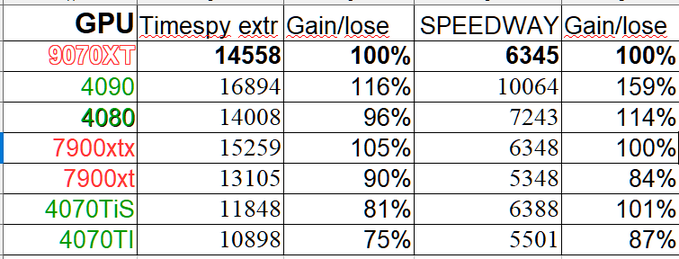
This means that for folks who prefer to stick to 1440p, AMD can be the better pick among the competition. Notably, because of the better value factor, their cards, like the RX 7800 XT or even the RX 7900 XT, are available at much lower prices than the competition. Not to mention, the upcoming RX 9070 XT seems like a more solid value card, as according to the leak by GawroskiT, it is able to outperform the RTX 4080 in TimeSpy Extreme in rasterized performance. It wasn’t too far behind in the Speed Way RT benchmark as well.
9070 XT Time Spy Extreme and Speedway scores (Source: GawroskiT)
AMD Compensates More In VRAM
Another area where AMD shines is the VRAM of its graphics cards. AMD has been quite generous when it comes to allocating a decent amount of VRAM to its GPUs, even in the budget or mid-range section. This is also the area where Nvidia lacks, as they don’t seem to understand their past mistakes and keep on launching cards with less than adequate VRAM. The RTX 3070, 3080, and RTX 4070 are prime examples of it.
These cards were plagued by their lower amount of VRAM; sure, the RTX 4070 has a 12 GB capacity, but the kind of performance it offers it’s quite less also in comparison with its competitor, the RX 7800 XT. Which packs a solid 16 GB capacity for better longevity. Moreover, the upcoming RTX 5070 also comes with 12 GB of VRAM instead of 16 GB.
Team Green Prices Are Horrible
The thing I’m not a fan of about Nvidia is its higher MSRP for its graphics cards. Sure, it’s got some cool bells and whistles, but that doesn’t mean you should start ripping off your customers. The upcoming RTX 50 series cards are the latest examples of it, where the top-of-the-line RTX 5090 costs $400 more than its predecessor. However, the price of the RTX 5080 is identical to the RTX 4080, which wasn’t any better either.
GeForce RTX 5000 Series Pricing
This high-pricing game needs to stop, as it’s one of the reasons why I’m not going for another Nvidia GPU, and surely I won’t be the only one doing it. Moreover, according to testing done by IGN, the upcoming RX 9700 offers performance near the RTX 4080 Super and will probably cost around $500. Also, the extra 4 GB VRAM and expected cheaper cost make the RTX 5070 an instant skip for me. Though, the claims need to be taken with a grain of salt.
The Glamorous Ray Tracing & DLSS Aren’t Worth It
As someone who is using an Nvidia RTX 3070 Ti right now, I really don’t feel the need to turn on features such as DLSS or Frame Generation. I play cinematic story titles at 1440p, which I enjoy quite a lot on my monitor’s native resolution. Also, the ray tracing costs me a lot of frame rates and doesn’t make every game too impressive comparatively.
Because most of the time, the pre-baked solutions look quite excellent already, I stick to those instead and enjoy the higher frames at native resolution. Sure, as the devs are getting the hang of this RT tech, games are going to look great in the future, but I’m not yet ready to sacrifice higher frames for the change. Besides, AMD’s FSR 4 is en route as well, so I can use that instead if needed, and it’s more competitive now than ever.
Settling With AMD This Year
Seeing all the pros and cons of both sides, going with AMD makes the most sense to me, as I will be able to enjoy raw performance at my preferred resolution. And it will be a decent upgrade over my RTX 3070 Ti, too, so it’s not like I’ll be missing out on anything that important. Because the upcoming RX 9000 series seems promising and covers everything, from rasterized performance to AI upscaling, it’s getting all of it.
At Tech4Gamers, I mainly cover new gaming news, leaks, and rumours. Aside from that, I love to write features about my favourite games while inserting my opinion about their different aspects.
Story Highlight
The latest Dragon Age title released last year has already gone on another sale.
Previously, it was available at 30% off on various platforms, indicating poor sales.
However, over 2 months after release, the title’s standard version for PS5 and Xbox Series X price has been slashed by $30.
Dragon Age: The Veilguard is one of the most controversial games of 2024. A massive fandom had high expectations for the next Dragon Age title, but it ended up disappointing the majority of them.
The developer has refused to give updates on the sales, and given how long the game has been in development, the silence is pretty loud. Now, Dragon Age: The Veilguard price has been slashed by $30, which further supports the poor sales reports.
Why it matters: Dragon Age is one of the most iconic and massive series in the gaming industry. So, the reception its latest game’s reception has damaged the series’ overall reputation, and due to its poor sales, we might never see a sequel.
This video game is an immersive action role-playing game (RPG). Play Dragon Age: The Veilguard and become...
On Amazon and Best Buy, the game’s standard edition price has been slashed by $30, meaning it is now available for just $40. So, you can buy the physical copy for Xbox Series X or PlayStation 5 at a 43% discount.
It is also worth noting that the game’s deluxe edition on Amazon is available at almost half the price. You can get it for $49.99 instead of $89.99. The latest Dragon Age title has been a disappointment for the developer as well as the fandom.
As per a report, BioWare expected the title to sell a whopping 10 million copies in just 3 months. The game is almost 3 months old and still hasn’t even gotten close to the expected sales expectations.
Last Year’s Controversial RPG’s Deluxe Edition On Amazon is 44% Off Right Now
While the director blamed the hate campaign for Veilguard’s failure, fans have pointed out various things that caused it to flop, one of which was a heavy focus on DEI.
What do you think about the latest BioWare’s AAA title price being slashed by $30 so early after release? Have you played the game yet? Share your thoughts with us in the comment section below or join the discussion at the official Tech4Gamers forums.
Being a keyboard enthusiast, I specialize in reviewing, modding, and critiquing them for the people. If you’re a Razer fanboy, my only goal is to convert you to the dark side 😈.
Following the widespread popularity of the RT100, Epomaker is back to cash in on the people’s obsession over gimmicks. The company is launching the RT80 and RT65, two boards with the same philosophy but appealing to different crowds that prefer smaller layouts.
We have the RT80 with us today and it carries over the touchscreen and mini display from the RT100 but opts for a 75% layout instead of going full TKL. Does this work in favor of the keyboard or has Epomaker shot for style over substance? Let’s find out.
Why Trust Tech4Gamers
Huzaifa Haroon is our keyboard expert with years of experience in building and testing custom keyboards.
130+ peripherals tested and reviewed by our team of hardware experts (Tech4Gamers Team).
500+ hours spent testing different peripherals for our reviews.
At Tech4Gamers, ensuring you get reliable information is our priority. That’s why every hardware round-up undergoes a meticulous review process by our team of experts and editors. Each review is carefully examined against our strict editorial guidelines, guaranteeing you trustworthy insights you can depend on.
Key Takeaways
Epomaker RT80 is a decent budget keyboard ironically held back by its highlight feature, which is otherwise surrounded by great fundamentals.
Buy the RT80 if you want a unique experience. The dual-screen setup is undeniably eye-catching and functional for certain workflows.
Avoid the RT80 if you’re looking for the best value, as the price premium for its dual screens doesn’t offer proportional benefits for most users.
Here are the key specs:
Specification
Details
Brand
Epomaker
Model
RT80
Number of Keys
83
Layout
75%
Mount Type
Gasket
Stabilizer Type
Plate-mounted
PCB Type
3/5 Pin Hotswap PCB
Touch Screen Size
1.54 Inch
Screen Resolution
240×240 RGB
Connection
Wired Type-C, Bluetooth, 2.4G Wireless
Backlit
RGB
LED Direction
South-facing
Case Material
ABS Plastic
Position Plate
Flex-Cut PC
Keycap Profile
Cherry
Keycaps Manufacturing Technique
Dye-sub (Grey White) / Double-shot (Black)
Battery Capacity
5000mAh
Anti-Ghosting
NKRO
Polling Rate
1000Hz under Wired & 2.4G Mode; 125Hz under Bluetooth Mode
Compatibility
Windows/Mac
Dimension
332 × 130 × 45mm
Weight
About 1kg
[toc]
What Makes The Epomaker RT80 Different?
The Epomaker RT80 is a pretty run-of-the-mill budget keyboard with all the hallmarks of a custom, like hot-swap sockets, lubed stabilizers, and gasket mounting. What makes it stand out, however, is the inclusion of not one but two screens for both aesthetics and functionality.
You can use the mini display to check on the date and time while enjoying a looping GIF. On the other hand, literally, you have a large touchscreen for media controls and custom macros that can open your favorite apps. They both get plenty bright, too and have little effect on the board’s battery life.
Unboxing Experience
The Epomaker RT80 comes in a standard cardboard box with the keyboard illustrated over the front alongside its name. The sides of the box are bare but there’s some info on the back including the various different features. You get inside by lifting up the single tab in the center.
Epomaker RT80 box (Image by T4G)
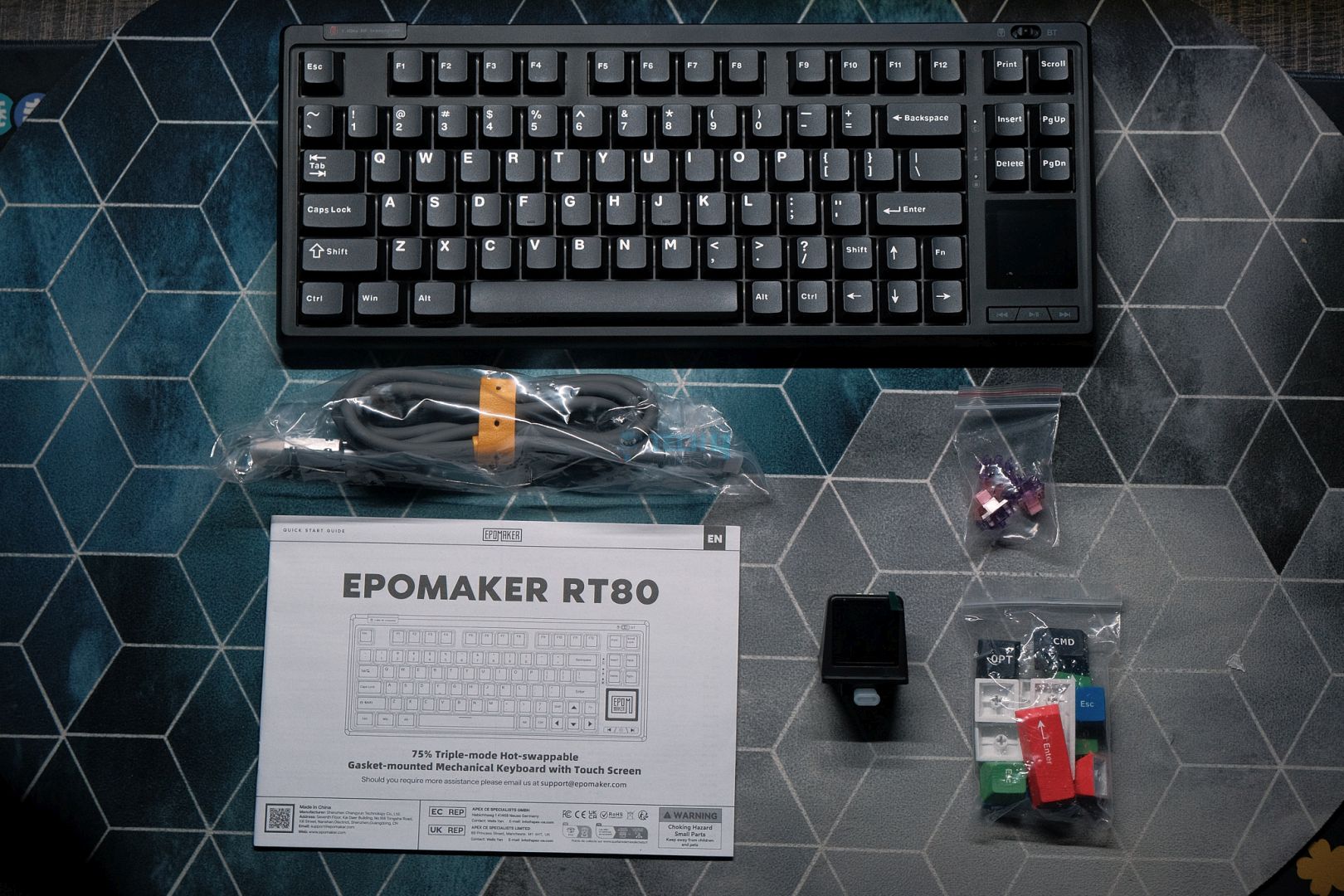
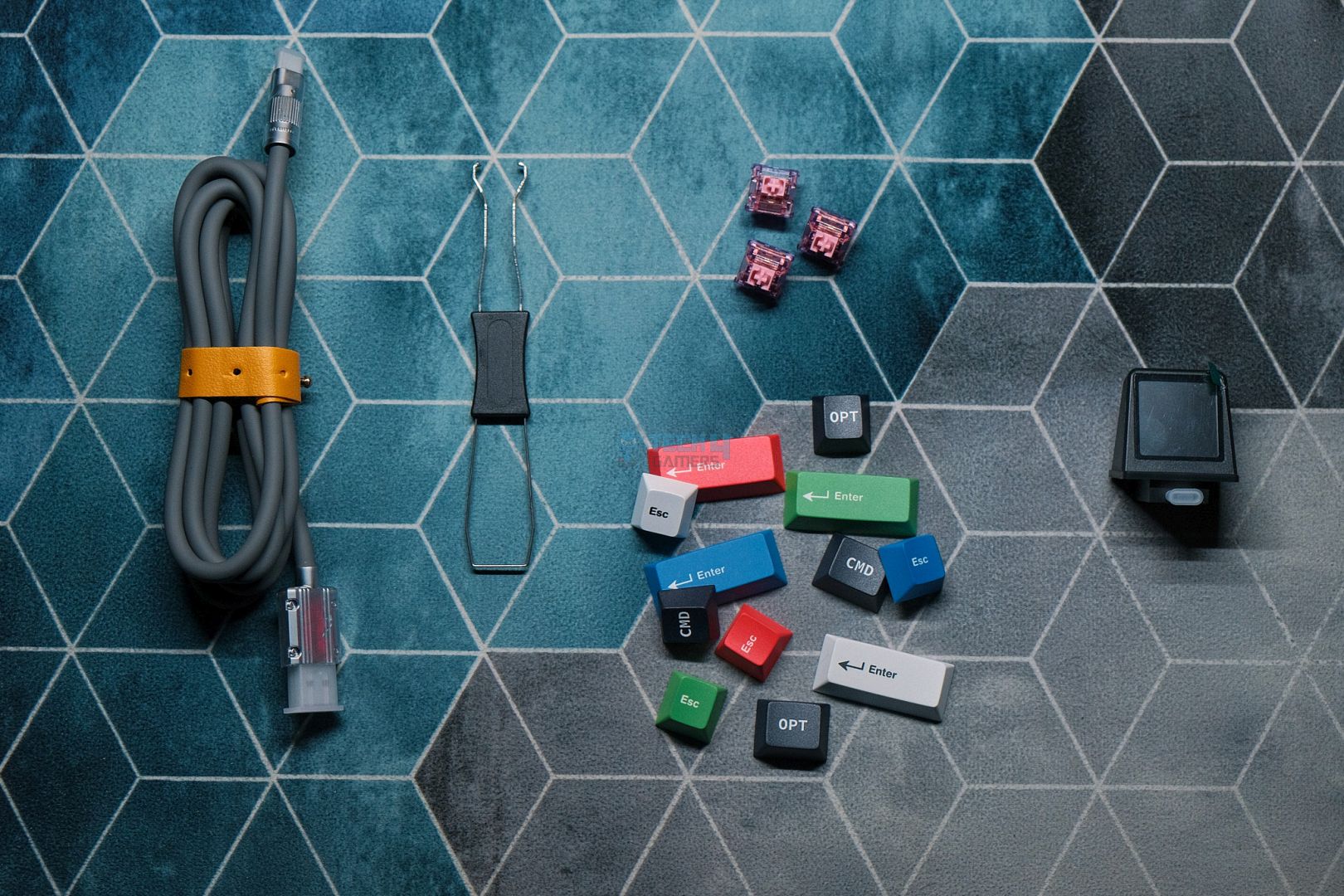
You’ll find the RT80 wrapped in plastic with a manual underneath. The accessories are toward the top and there’s something special in there. You get the usual goodies but in the corner there’s a mini display snuggly fit inside some foam. That’s not all though as Epomaker includes a ton of extra keycaps and a thick USB cable as well with metallic ends.
Here’s everything you get:
Box Contents
Box Contents closeup
Design & Build
Epomaker has gone for a clean and simple design with the RT80 since there’s already a lot going on feature-wise. From the front, the entire key area is sort of indented that creates a visible forehead and subtle bezels all around the perimeter. The board also has rounded corners, so it looks extra sleek.
Epomaker RT80 from the front (Image by T4G)
There’s a connection mode switch in the top-right corner, right above the USB port. On the opposite side, we have a dedicated storage space for the wireless receiver. But once you remove the cover, a second USB port is revealed which is used to connect the mini display. Once you’ve connected the display, there is no way to store the dongle or even the cover.
Epomaker RT80 USB dongle slot (Image by T4G)
Finally, toward the bottom-right corner, we see a 1×1 inch touchscreen with some media controls below it. These are clicky buttons. The screen is plenty bright and comes with a protector pre-installed. Even though it’s technically a touchscreen you can really only swipe on it and tap on certain spots for it to function. We’ll take an in-depth look at it in the screens section.
Epomaker RT80 touchscreen (Image by T4G)
The back is interesting, too, with a very angular design. There are two flip-out feet and a metallic badge in the center. The corners of the board taper from the top to bottom where they melt into the side. There are some circular cutouts around the badge to further diversity the design, but I personally feel it veering into tacky territory.
Epomaker RT80 back (Image by T4G)
All that makes for an interesting side profile that has a nice curve to it. The board is made out of plastic and feels that way. It’s not cheaply built but there is some flex that comes natural with plastic construction, though the board doesn’t creak at all. It has a matte finish through and through that is quite resistant to fingerprints.
Epomaker RT80 side profile (Image by T4G)
Layout & Features
The Epomaker RT80 has a somewhat unique layout due to it being almost as big as a TKL but still rocking a 75% form factor. It’s similar to the Galaxy70 and even the Wooting 80HE with its 4 navigation keys arranged in a square cluster instead of a vertical row. However, unlike those boards, the RT80 has a whole screen below the nav cluster.
This pushes the arrow keys to the side with the alphas and results in a weird split left-shift layout. It was hard getting used to a 1U shift key as I constantly kept hitting either the up-arrow key or the slash on either side. I even had to look down several times, betraying my touch-typing muscle memory just to make sure I wasn’t missing the shift key this time.
Dramatization of me missing the shift key for the hundredth time (Image by T4G)
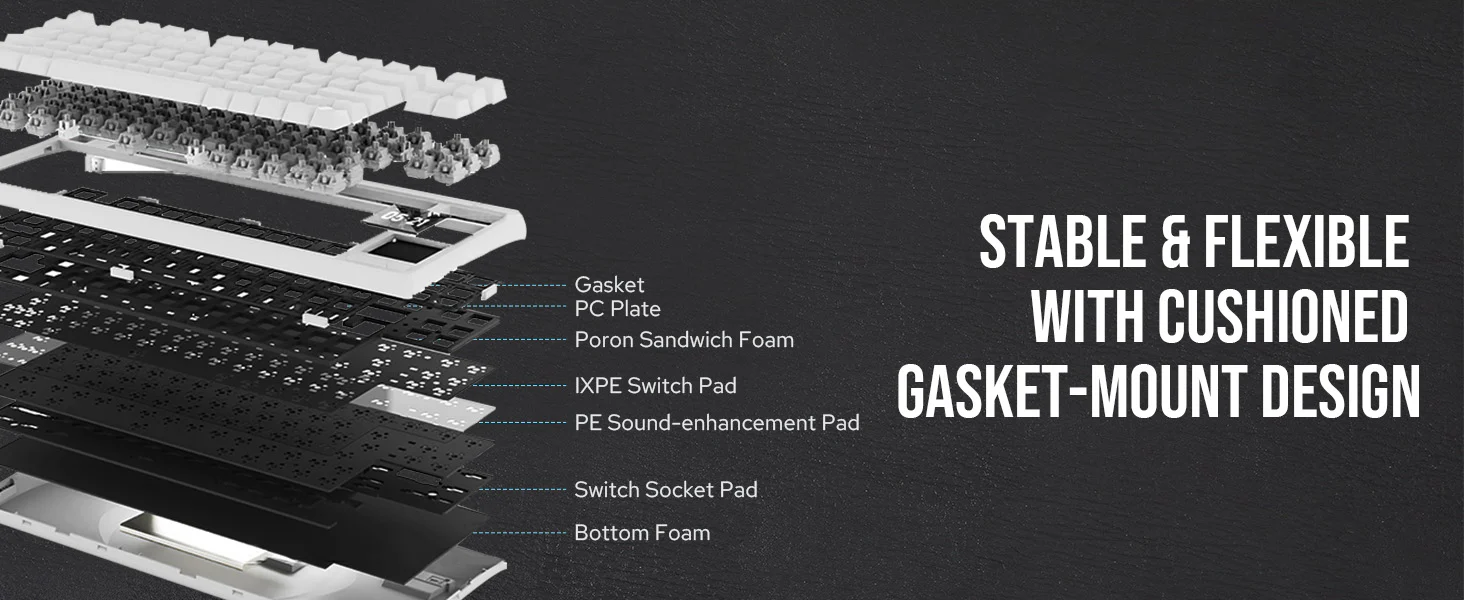
Apart from the layout, the RT80 is otherwise a typical modern budget keyboard. It’s fully wireless with both Bluetooth and 2.4Ghz radio support. It’s gasket-mounted with silicone beans on the plate. There’s 5 layers of foam inside to provide sound dampening through the plate foam, IXPE sheet, PET sheet, PCB foam, and the bottom case foam.
The layers that make up the RT80 | Epomaker
The RT80 is also hotswap with 5-pin south-facing sockets. The PCB has per-key RGB and it’s 1.2mm thick with no flex cuts but the polycarbonate plate does. The touchscreen is connected via a ribbon cable and not directly soldered onto the PCB. The mini display has its own daughterboard that connects it to the PCB as well, just like the main USB port.
Epomaker RT80 flex cuts (Image by T4G)
The Fundamentals
Keycaps
Epomaker has fitted the RT80 with doubleshot Cherryprofile keycaps made out of PBT. Depending on the colorway you get, the fonts are slightly different. We have the more standard typeface on our WOB unit whereas the retro beige one gets a thinner one. Regardless, both look good, but it goes beyond that.
Epomaker RT80 keycaps (Image by T4G)
These are pretty high-quality caps with sharp letters and no molding marks. They are thick, have minimal stem wobble and, apart from the left and right shift keys, have consistent modifier legends as well. They have a matte finish with the slightest bit of texture. Same goes for the extra keycaps included in the box that you can use to swap to a Mac layout or just add some accent colors to break up the monotony of white-on-black.
Epomaker RT80 keycaps up close (Image by T4G)
Switches
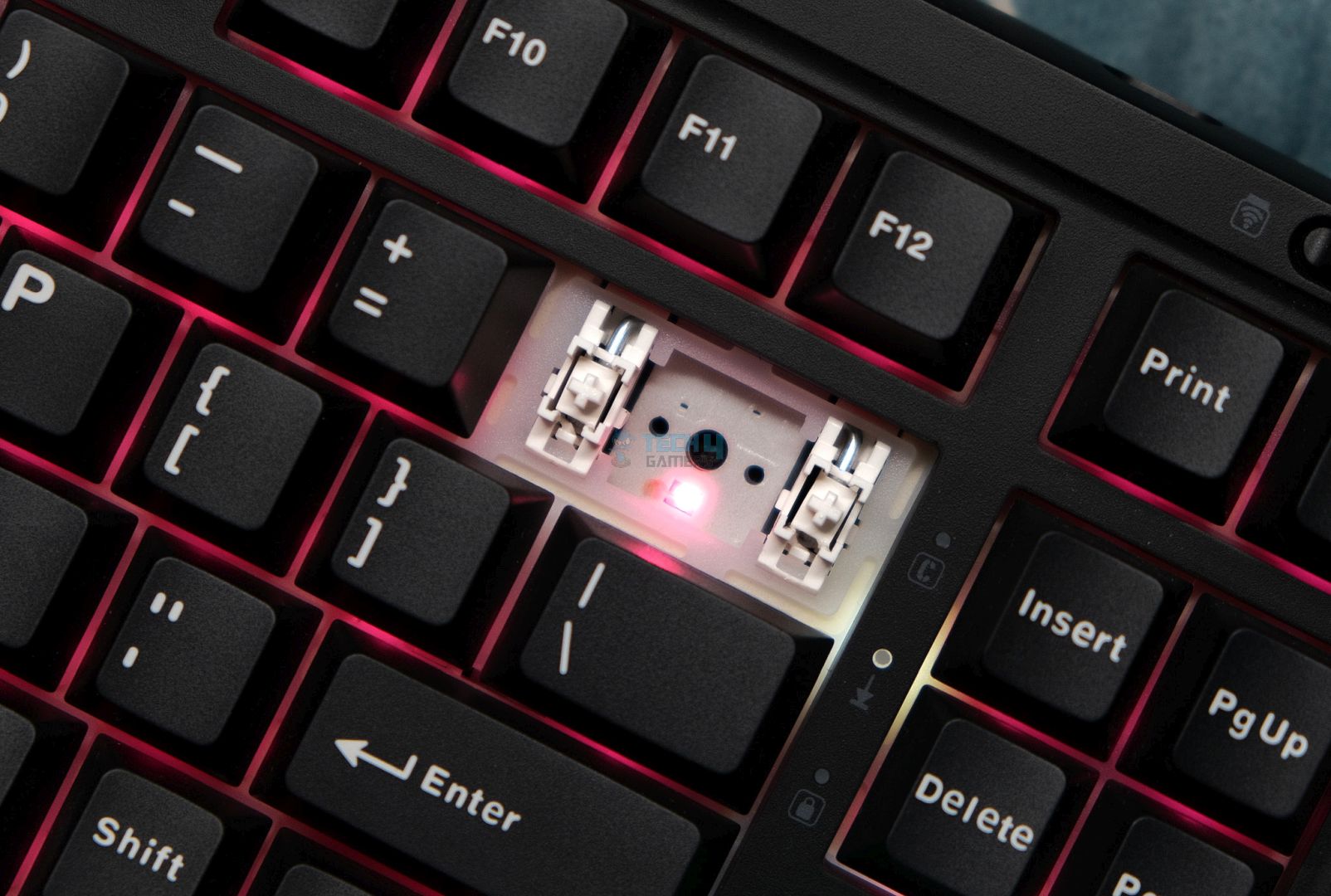
The RT80 comes with either Epomaker’s Flamingo or Wisteria switches, both linear. We have the Flamingos in our unit, and I’ve already taken a look at these before in the Aula F65. I wasn’t a huge fan of them back then, and the same remains the case now. I would suggest you pick the Wisterias, albeit the difference is not as drastic in this board.
The Flamingo switch inside the Epomaker RT80 (Image by T4G)
The Flamingos are 45g factory-lubedlinears. They feel pretty good to type on, are mostly smooth with little stem wobble. Unfortunately, they do have a slight spring crunch that is especially prominent when you throw in a different switch for comparison. They sound a tad quieter or lower-pitched than the Wisterias as well.
Stabilizers
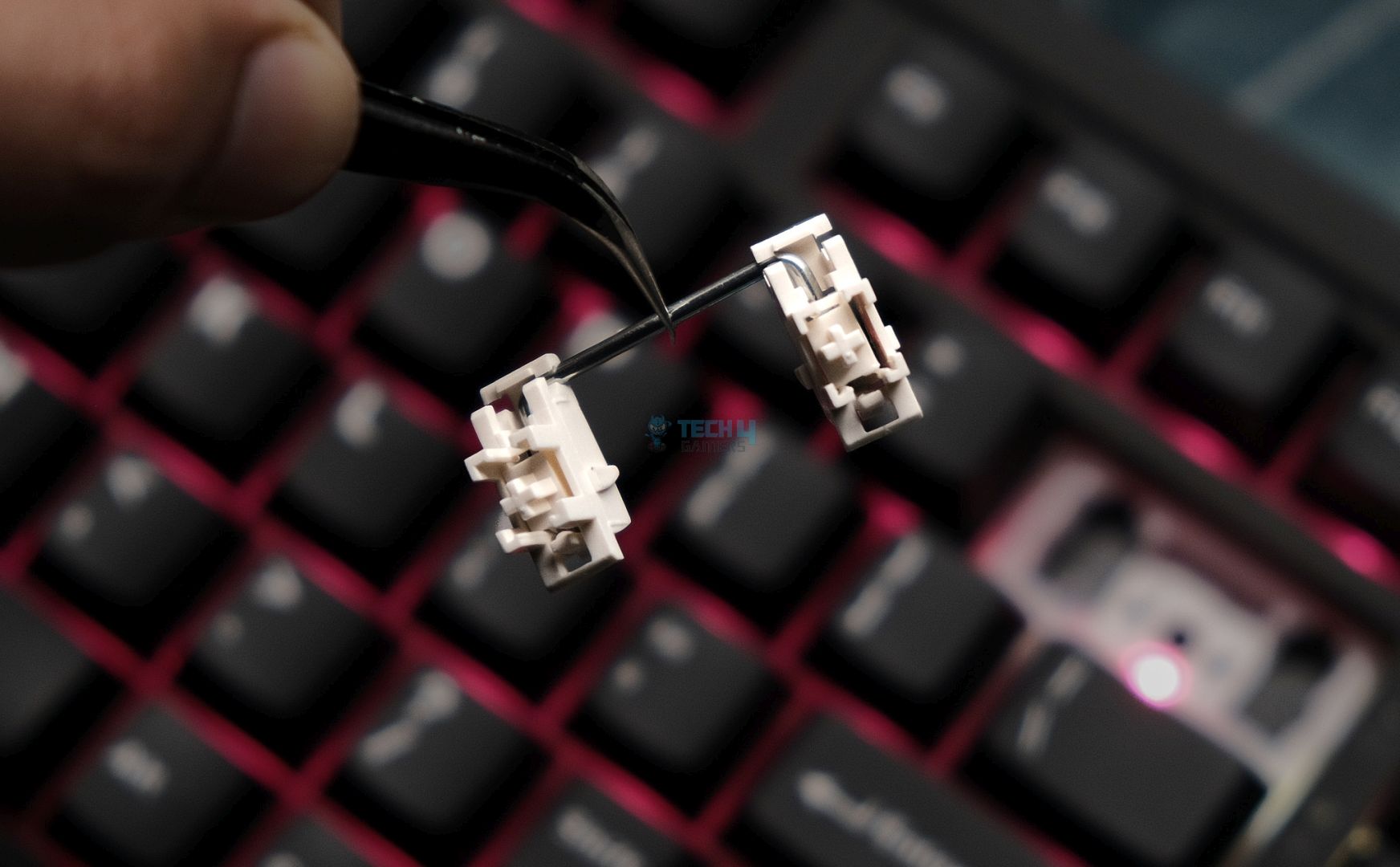
Epomaker is using standard plate-mount stabs in the RT80 that are prelubed from the factory. Like with most newer releases, these are great out of the box. Their stock performance is adequate; there is no rattling or weird ticking. They are not the best I’ve heard even in the same price range as there is slight inconsistency that you’ll hear in the sound test later. The PCB is also not compatible with screw-in stabs.
The Stabilizer
1 of 2
Stabilizer
Stabilizer Closeup
The Screens
Let’s talk about the main reason you’d actually buy this keyboard: the screens. The inclusion of a screen on a keyboard is not something new, in fact this concept exists in boards ranging from $50 all the way up to $500 these days. What makes the RT80 special is that it doubles up the fun with an external mini display and makes the on-board display a touchscreen.
The mini display is a roughly 1-inch detachable screen. The display itself is made out of plastic and feels… alright. It has a USB-C connector poking out of it that plugs into the USB port on the left side of the board. Once powered on, by default, it displays connection mode info with a menu bar on top showing the date and time, along with battery life.
Connecting the mini display with the RT80 (Image by T4G)
You can go into the Epomaker software and customize this screen to show pictures or GIFs. In my testing, each frame of an animation took around 6.7 seconds to upload to the keyboard, so it’s not exactly fast. You can’t cycle through multiple saved pictures of GIFs, either. Lastly, the software must be running for the date and time to sync on the screen.
The Touchscreen
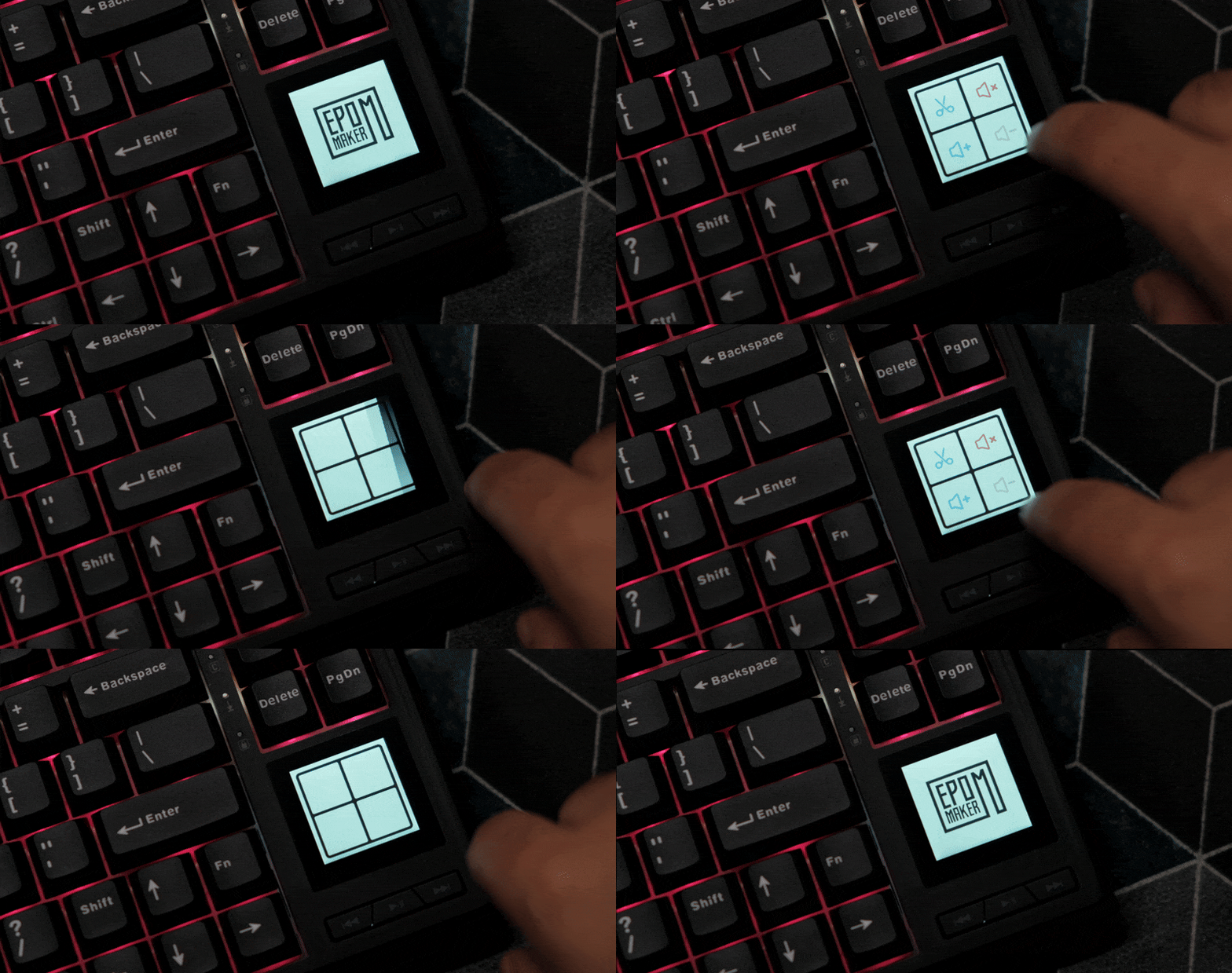
Moving to the opposite side, the touchscreen cannot play any animations or show pictures. For some reason, it keeps defaulting back to showing the Epomaker logo. You swipe right or left on the screen to get to the controls. There are three total pages, two of which are already set up and one you can customize on your own.
Epomaker RT80 touchscreen pages (Image by T4G)
You have options like changing the volume and taking a screenshot which make sense but then weirdly there’re buttons for magnifying your monitor through the Windows Magnifier app. There is a universal search button that opens up the Start Menu on the desktop or goes to your address bar if you’re in a browser.
Epomaker RT80 touchscreen functions (Image by T4G)
The third page that you can customize with your own actions can only be app shortcuts. In the software, you can choose any executable you want, and its icon will appear as a button on the touchscreen. Tapping it would open that app. You can do this for 4 different apps but that’s it. No custom macros or anything, just app shortcuts.
In my experience, no matter how many times I restarted the keyboard or my computer, I could not get any app icon to actually show on the touchscreen; it would just be blank. Tapping on the designated spot would still launch it, but there’s no point in being unable to see the icons on a screen if I have to remember where I placed them.
Overall, I found this screen to be pretty useless and even controlling the volume with it was a nuisance since I had to swipe from the Epomaker logo homescreen every time to get to the volume macros. I would much rather have a volume knob or just normal keys here because this touchscreen is just a gimmick.
Connectivity & Performance
The RT80 has a monstrous 5000mAh battery to power its wireless capabilities. That number starts to make more sense when you realize there are not one but two screens on the board. Still, even with the RGB and the screens on, I was able to get more than 2 days of usage out of this board on a single charge, over the 2.4Ghz connection.
Epomaker RT80 wireless dongle (Image by T4G)
Speaking of which, the RT80 also has Bluetooth, which performed as expected without any connection issues. The same goes for the dongle, which was solid at keeping up in even competitive gaming. I didn’t notice any misinputs or signal dropouts. Epomaker boards are known to have low latency, and this one isn’t an exception.
Typing Experience
I had a pleasant time using the RT80 as the stock typing experience is on par with the best budget plastic prebuilts of today. Even if the switches weren’t exactly my cup of tea, they were never bothersome in their sound signature or feel, and those stabs always made it a joy to hit the spacebar. Mix that with the high-quality keycaps and you’ve got a nice overall package.
The board has a somewhat deep, muted sound that has enough volume to satisfy your ears. It doesn’t sound creamy or marbly, in fact I’d use the “dry” adjective when describing its acoustics. That being said, the inclusion of the touchscreen made it difficult to use the Shift key which hindered my typing quite a bit. I would swap it out in place of a traditional layout in a heartbeat.
The Software
The RT80 is not QMK/VIA compatible as the board uses the EpomakerDriver as its proprietary software. Many other boards, including the Shadow-X, also use this same software, so I felt at home. It’s worth mentioning that the driver works over a wireless connection as well, but you do need to be plugged in to customize either screen.
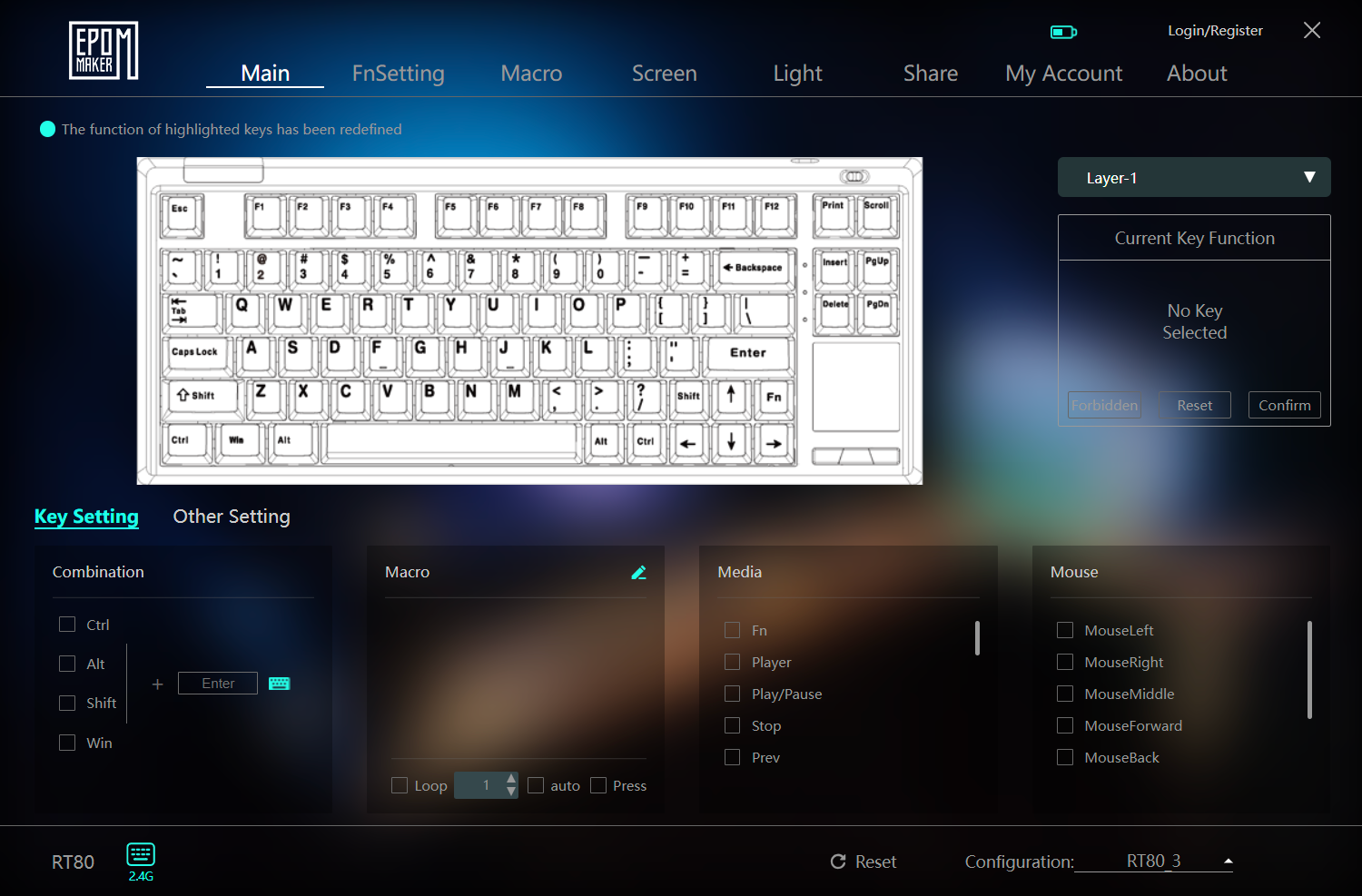
Inside, everything is laid out in tabs on top and you have all the usual features like custom keymapping, macros, RGB controls, etc. You can also change the background of the program itself, replacing it with a picture or GIF. You can change the function key shortcuts yourself as well and the About tab allows you to upgrade firmware.
Epomaker Driver homepage (Image by T4G)
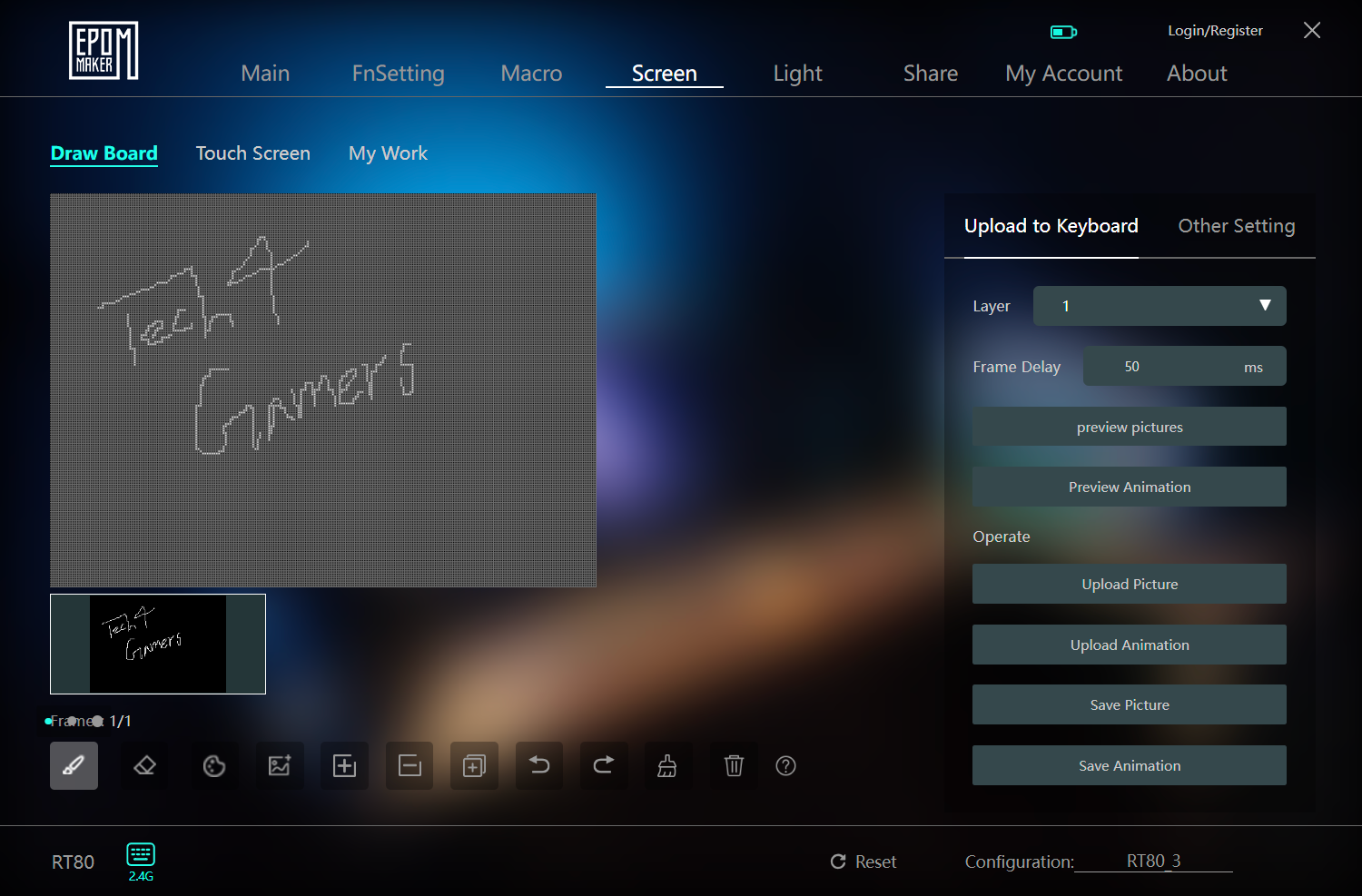
The interesting bit is the Screen tab where you go to customize the touchscreen and the detachable mini display. You can choose any picture to put on the mini display, or you can drawframes yourself to be animated. You can pick things like frame delays, preview the frames before uploading them and save pictures or GIFs for quick uploading later on.
Epomaker Driver screen settings (Image by T4G)
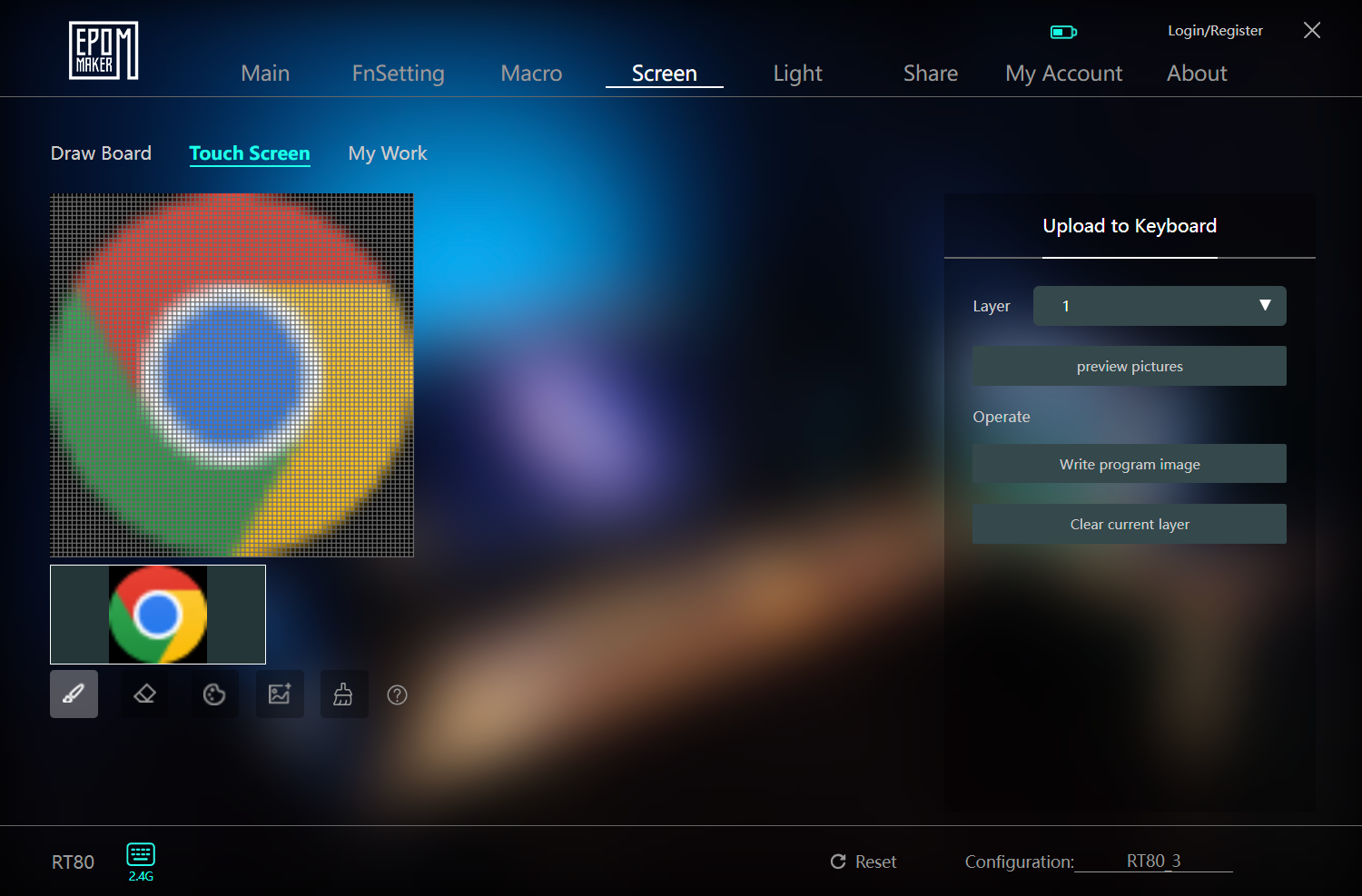
In the Touch Screen section, you can only open File Explorer to choose an application that gets put onto one of the 4 slots. You can preview the icon, draw on top of it and crop it to your heart’s content.
Epomaker Driver touchscreen settings (Image by T4G)
Whenever I selected any app, it would show the progress bar to upload it on the screen, but it would never cross 0% and then go away abruptly. As I mentioned earlier, this would actually upload the executable onto the screen but with a blank icon instead. You can refer back to the video in the Screens section to see this behavior in action.
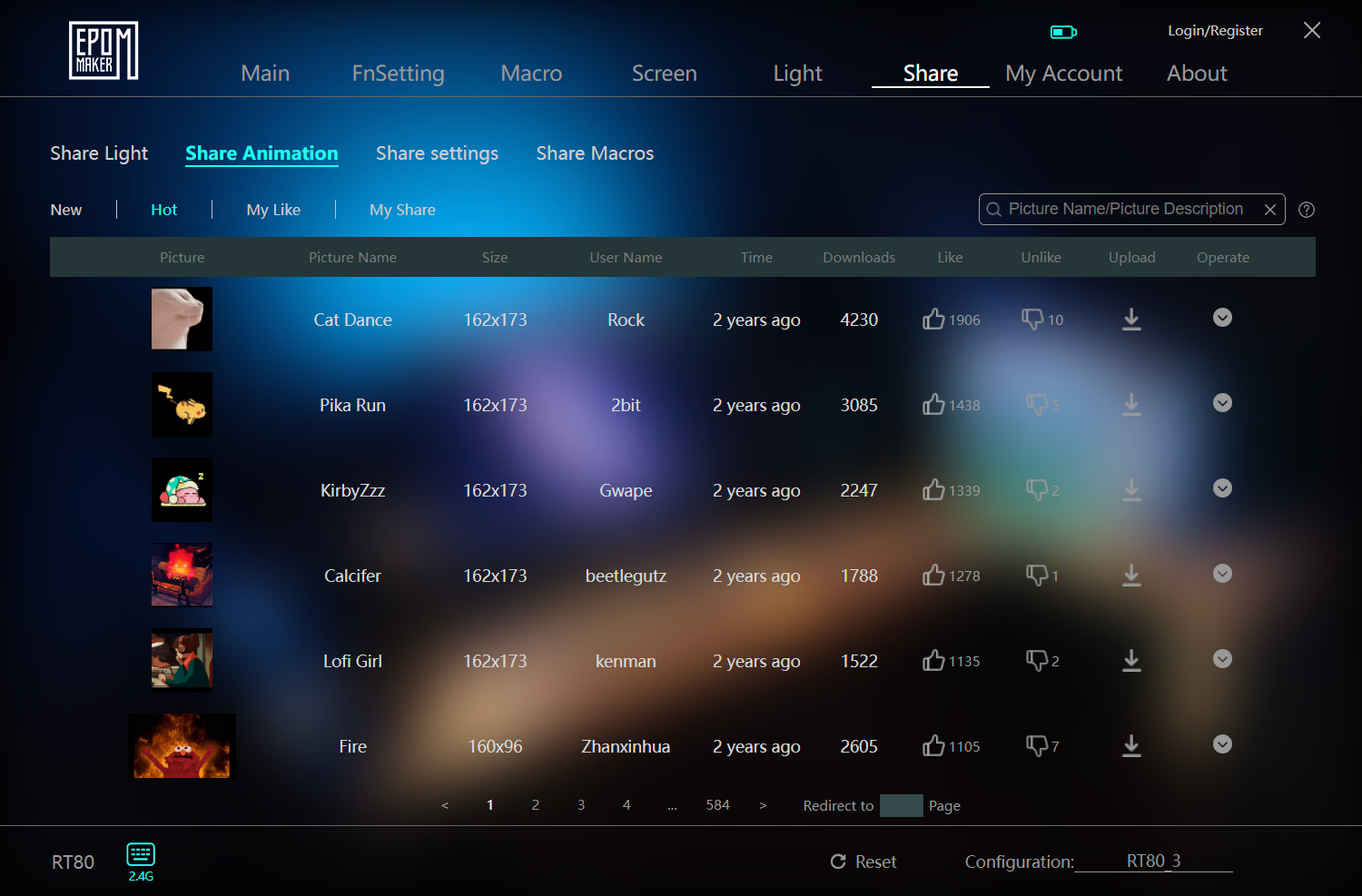
There is also a Sharesection that has various user-built RGB profiles and animations that you can directly upload onto your keyboard. If you want to share your own creations with the community then you need to be logged in for this. That being said, none of the RGB effects I tried were smooth enough to look good so just use the static ones.
Epomaker Driver Share page (Image by T4G)
Overall, the Epomaker Driver is a solid piece of keyboard software that has all the features in a neatly organized package. The UI can be faster, especially when it comes to just navigating the pages since I do understand uploading animations isn’t easy. If Epomaker can sort out the screen bugs, then this would be a great software experience.
Should You Buy It?
Buy It If:
✅ You’re looking for a competent budget keyboard that has all the fixings without costing an arm and a leg.
✅ You just love screens on your keyboard, and you can’t get enough of them. With the RT80, you get a screen for both aesthetics and functionality.
✅ You appreciate the extras as Epomaker includes several accent keycaps, a nice USB cable, replacement switches and, of course, the mini display in the box.
Don’t Buy It If:
❌ You’re looking for the best deal on budget keyboards, as there are several options in the same price bracket offering better value by focusing on the basics.
❌ You’re not fond of gimmicks as the two extra screens aren’t very useful, and their novelty would wear off quickly.
❌ You want a standard layout. The RT80 has a 1U shift that’s hard to get used to, and the larger 75% form factor takes up more space.
Epomaker RT80 is a unique-looking keyboard, to say the least (Image by T4G)
My Thoughts
The Epomaker RT80 is a good keyboard, all things considered. It essentially nails the fundamentals of switches, keycaps and stabilizers while rocking a decent design and build. Where it falls short is its implementation of the screens, which, unfortunately, is the only reason you’d actually want to buy this board.
It doesn’t help that Epomaker themselves make other budget boards—gimmicks or not—that provide better value. For the same price, you can get the P75, which is legitimately a great keyboard without the downsides of an unusual layout. The RT80 is in no way a bad product, but it just pales in comparison if the screens don’t wow you.
At Tech4Gamers, I mainly cover new gaming news, leaks, and rumours. Aside from that, I love to write features about my favourite games while inserting my opinion about their different aspects.
Story Highlight
Kingdom Come Deliverance 2 early access is available, and the impressions are really positive.
The game is well-optimised for consoles, but the base PS5 seems to perform better than its pro variant.
In performance mode, the base console almost always has an advantage of 3-5 FPS over the PS5 Pro.
Kingdom Come Deliverance 2, a long-awaited sequel, is now available to play in early access. The fandom’s question as to how well it is optimised for the consoles has also been answered.
That said, there is one thing that many might not have expected. Of course, the PS5 Pro has better hardware than the base console, so it should run the game better; at least, that is what most of the fans must be thinking.
That isn’t the case, though, as PS5 runs Kingdom Come Deliverance 2 better than its pro variant in performance mode.
Why it matters: PS5 Pro was highly criticised for its massive price tag. The mid-gen refresh became extremely controversial as it didn’t run many games at 60FPS, including Black Myth: Wukong. So, this new update just adds more to its failures.
A Youtuber, ElAnalistaDeBits, did a complete analysis of the game on Xbox Series S|X, PS5, and its pro variant. The analysis revealed that the title is well-optimised and runs at 30 FPS on native 1080P resolution.
However, in performance mode, PS5 Pro and Xbox Series X are both left in dust by the base PlayStation 5. The console offers at least a 3-5 FPS advantage most of the time. Sometimes, the FPS count even goes up to 8, which is surprising given how many tech experts have praised the pro variant’s new AI technology and its upgraded hardware.
It should be worth noting that the PS5 Pro is running Kingdom Come Deliverance 2 at 4K resolution, upscaled from 2K, while Xbox Series X and PS5 are running it at 2K resolution, upscaled from 1080P.
PS5 Offers Better FPS In Kingdom Come Deliverance 2 Than The PS5 Pro
This is the main reason why there is a performance difference, but the pro variant is supposed to have better upscaling technology as well as way better hardware. So, why can’t it run the game way better than its base variant?
That is mainly because PS5 Pro is a guinea pig for the PS6, as Mark Cenry also said the console is just for the preparation of next-gen consoles.
What do you think about Sony’s mid-gen refresh failing to beat PS5 in Kingdom Come to Deliverance in performance mode? Do you think the console is worth the price tag, given there are many similar instances? Share your thoughts with us in the comments section below or join the discussion at the official Tech4Gamers forums.
I’ve previously worked for eXputer as a Senior News Writer for several years. Now with Tech4Gamers, I love to devoutly keep up with the latest gaming and entertainment industries. I have a Bachelor’s Degree in Computer Science and years of experience reporting on games and breaking exclusive stories. Besides my passion for gaming journalism, I love spending my leisure time farming away in Stardew Valley. VGC, IGN, GameSpot, Game Rant, TheGamer, GamingBolt, The Verge, NME, Metro, Dot Esports, GameByte, Kotaku Australia, PC Gamer, and more have cited my articles.
Story Highlight
The Witcher 4 is here, featuring Ciri as the protagonist this time around.
Considering the lore, Ciri becoming a Witcher needs some explanation.
Regardless, Ciri’s inherent abilities are much superior, and relying on weaker powers makes no sense.
The long-awaited The Witcher 4 is finally real, and it opts for a rather unique approach of presenting Ciri as the new face of the game.
Female protagonists in games have generally received hate lately for no solid reason a majority of the time. However, I can assure you, that’s not why I am here.
The choice of Ciri as the new Witcher is certainly a controversial one, but not because of all the reasons you have been hearing. There’s nothing wrong with a female lead at all.
In fact, I appreciate it when executed brilliantly. Thus, today I’ll only be talking about the logical implications of this choice in light of the series’ lore.
Why it matters: Putting aside the matter of Ciri becoming a Witcher, her own abilities are way stronger than the inferior Witcher powers; something she absolutely does not need.
The Matter Of Ciri Becoming A Witcher
The fan-favorite Ciri will make a return in The Witcher 4, finally having fulfilled her lifelong dream of becoming a Witcher. But the question arises, how exactly did she accomplish this? Last I remember, some very tall circumstances prevented her from claiming this role, or else she would’ve done it long ago.
The circumstances are how the Trials of the Grasses, essentially the selection exam for a Witcher was designed with male biology in mind. Now don’t get me wrong, I’m not saying Ciri is not capable enough or lacking in prowess—quite the contrary, in fact, as you’ll see in a moment.
But back to the Trial, I thought Ciri was incapable of acquiring the mutations and thus the Witcher gene. Keep in mind I haven’t read the books so pardon my ignorance and unintended misogyny, but this is what I know as a video game player.
Ciri as a Witcher seems odd (Image by PlayStation)
But who knows, maybe there’s some valid explanation, owing to her unique physical constitution andbloodline. Regardless, my second and more pressing question is, why settle for something inferior?
Ciri’s Godly Abilities
Becoming a Witcher is all well and good, but does Ciri even need it? Far from it. If you’re a newcomer looking to get into the series, let me enlighten you. Ciri is essentially a god-like being in Witcher thanks to her Elder blood and reality-defying abilities.
I’m talking about straight-up space-time affecting powers and feats that overshadow any other ability. Elder blood is the equivalent of divine abilities in very layman’s terms. From warping through space to possessing vastly superior magic, Ciri has access to unimaginable powers.
Using inferior powers makes no sense (Image by Tech4Gamers)
These abilities of hers played an important role in Witcher 3’s conclusion, and I’ll say no more to avoid spoilers. What you need to know is that Ciri couldeat a Witcher for breakfast if she so intended. So why on earth would she need to rely on crutches when she obviously can fly?
Witcher Is An Inferior Existence Compared To Ciri
Witcher magic is not particularly strong, and they need to rely on potions and temporary boosts to perform, making use of the Witcher gene altered by the Trials of the Grasses. Geralt combined this with his superior physical abilities to become the badass we know and love.
Geralt as Witcher was logically believable (Image by Steam)
However, all this can’t even hold a candle to what Ciri can do. This is precisely why I was baffled to see her using Witcher potions in the new trailer, something that made no sense to me. She has overpowered magical powers and space-time abilities at her disposal, Witcher potions are trash in comparison.
Ciri wanted to become a Witcher because of the noble responsibilities associated with the role. Fulfilling her lifelong dream is perfectly fine by me, but why can’t she be a witcher and be OP at the same time?
As I mentioned earlier, I have nothing against Ciri as the protagonist. I’m even looking forward to it. However, the way this situation will be explained is key.
If there’s some logical reason as to why Ciri opted for an obviously inferior set of abilities, and it’s not some illogical cover-up, I’ll be satisfied.
Still, I can’t help but ponder how exactly will it be resolved. No way in hell that going from a space-time-warping goddess to a lowly Witcher relying on potions makes even a shred of sense.
I sincerely hope this was not another case of “female protagonist for the sake of representation,” and CD Projekt Red has some awesome storyline to tell.
At Tech4Gamers, I contribute as a Senior News Reporter, combining my skills and gaming enthusiasm to keep our audience updated on the latest developments.
Story Highlight
Guerrilla Games’ Decima technology could be featured across more PlayStation games in the future.
Currently, Bend Studio and Kojima Productions are using the engine for upcoming projects.
This unified approach could help bring down the costs of AAA development for these first-party teams.
PlayStation’s in-house Decima engine is one of gaming’s finest pieces of technology today. Powering modern releases like Horizon Forbidden West, this technology excels in the visual department, leading to incredible results for Guerrilla Games.
The latest information suggests PlayStation is keen on bringing the benefits of Decima to other studios within its umbrella, potentially resulting in a slew of future games that exhibit the same strengths as the Horizon IP.
Why it matters: The use of this technology across multiple teams could save costs and lead to greater efficiency within first-party studios, solving a major problem in the industry. This would also speed up the development of AAA titles.
Guerrilla Games Is Expected To Lend Its Expertise To Other Studios Soon | Image via LinkedIn
According to the LinkedIn profile of senior producer Astrid Huntjens, Sony studios have expressed interest in using the Decima engine.
Managed communication and relations with other Sony studios interested in or using Decima.
-Astrid Huntjens via LinkedIn
What’s interesting about the implications of this statement is the fact that Bend Studio seems to be using the same technology for its next title. Elsewhere, Hideo Kojima’s Death Stranding 2 will showcase the same engine this year.
Astrid Huntjens’ role as a senior producer also began fairly recently, so this initiative may have started not too long ago. Perhaps future titles from PlayStation will see the Decima engine expanding to multiple studios.
Teams like Naughty Dog will likely continue developing their own technologies, but others like Haven and Firesprite could reap the benefits of Guerrilla Games’ investment in its in-house technology.
The Horizon IP Is Famous For Its Rich Visuals
Previously, CEO Hiroki Totoki highlighted that the gaming giant needed to manage budgets better. Because a project like Concord reportedly cost so much to make, the shift toward a unified engine could be part of PlayStation’s cost-mangement efforts.
Anyhow, more use of the technology across future games would certainly open up exciting possibilities. What are your thoughts on Decima? Let us know in the comments below and on the Tech4Gamers Forums.