As Tech4Gamers’ Founder and Editor-in-Chief, I bring over 13 years of PC Hardware Reviewing and 8+ years of IT Project Management experience. Certified in Google IT Support , my focus is on providing honest product reviews and analysis and fostering a strong gaming community with 130k+ members in PPG.
After numerous leaks, we finally have the official announcement of the AMD Ryzen 7 9800X3D, which means we know its performance, price, and release date.
We are talking about the successor to the extremely popular AMD Ryzen 7 7800X3D. Perhaps the best-selling processor of the year. In AMD’s case, more 7800X3Ds have been sold than all of its Ryzen 9000s combined this year.
Perhaps most interesting, AMD offered a direct comparison with the new top-of-the-range processor from its competition, the Intel Core Ultra 9 285K. A comparison that makes it clear that if you want maximum performance when gaming, there’s nothing better than this processor.
AMD Ryzen 7 9800X3D: Official Specifications And Launch Price
It’s no surprise that this AMD Ryzen 7 9800X3D processor offers an 8-core and 16-thread configuration under the AMD Zen 5 architecture. It runs at a Base frequency of 4.70 GHz and a Turbo frequency of 5.20 GHz.
Its strong point is the 104 MB of cache memory, thanks to the use of 2nd Generation 3D V-Cache memory technology. This results in a CPU with a TDP of 120W.
According to AMD, there is a generational gap of 8%. That is, between an AMD Ryzen 7 7800X3D and a Ryzen 7 9800X3D, there is a small performance gap of 8%. So, the price will be essential for choosing this CPU to be an option over the 7800X3D.
Digging deeper into the performance information, AMD offered a table comparing the Ryzen 7 9800X3D to the Intel Core Ultra 9 285K. We see over a dozen games where AMD’s option is up to 59% faster in Cyberpunk 2077.
Now, reading the fine print, AMD chose more than 40 games to do a more in-depth comparison. This comparison was completed, indicating that the AMD Ryzen 7 9800X3D is 20% faster on average compared to the Intel Core Ultra 9 285K.
These figures simply destroy Intel’s top-of-the-range CPU, which Intel itself promoted as the best option for gaming when its performance is even lower than that found in its previous generation of processors, namely i9-14900K.
As for pricing, the AMD Ryzen 7 9800X3D is officially priced at $479 when it goes on sale. That’s a reasonable price, considering that AMD has been inflating the cost of its Ryzen 7 7800X3D. This processor is currently around $475. But keep in mind that it even reached $350 a year ago. So AMD has been increasing the price, making the Ryzen 7 9800X3D a better option.
At Tech4Gamers, I’m a Senior Error Fix Writer specializing in troubleshooting problems. Each article results from deep research, testing fixes and providing solutions.
It is extremely frustrating to have your PC restart suddenly while you are in the middle of a game. This is likely an indicator of a certain problem, and you need to rule out its cause to avoid any critical system failure.
Key Takeaways
PC restarting while gaming can indicate an issue with the hardware installed on your PC.
The reasons behind PC restarting while gaming can be overheating, BIOS issues, Malware, and insufficient power supply.
Several methods, like a better cooling system, stable PSU, and system resetting, can help fix the problem.
The error message may be displayed as below:
WARNING: Your PC ran into a problem and needs to restart. We’re just collecting some error info, and then we’ll restart for you.
PC Restarting Suddenly – Image Credits [Tech4Gamers]
Tip: Update drivers, check for overclocking, and turn it off or reset your PC if the issue is unspotted before moving on to the fixes below.
Method Difficulty Rating
Fix Overheating Rated: 7/10
Check PSU Rated: 7/10
Disable Pagefile Rated: 6/10
Fix Overheating
Overheating can be a big deal for PC components. It is essential to clean your PC properly, and an advisor on Microsoft Community has proposed a beneficial way to fix this restarting issue. Also, check for any defects or damage in your system’s cooling devices or any malware interrupting the process. Here are the steps to clean your PC:
Clean Fans: Open your PC’s computer case > Check all the components > Use compressed air > Remove all the dust > Use a damp cloth to clean the fans.
McAfee Antivirus Software
Remove Malware: Download an anti-virus application such as McAfee > Scan your PC for malware > Wipe out any malware that you spot immediately.
Replace Component: Check for worn-out thermal paste, broken AIO pump, or a worn-out CPU fan > Replace or repair the defective component.
If you feel the fans installed on your PC are not doing a good job, get a better cooling system. You can install more fans or a liquid cooler to improve the cooling system. A liquid cooler can better keep your components cool and prevent them from overheating than the fans in the computer case. You can check out our article on How to install a liquid CPU cooler?
EK AIO 240DRGB Cooler – Image Credits [Tech4Gamers]
Check PSU
A faulty or unstable PSU can be a reason behind this restarting issue. If your system is restarting while playing some specific games and not all, the reason behind it is with different specs, power consumption is also different.
Check for worn-out power cables or damaged power outlets, and use a multimeter to ensure the power supply. Test it and see whether its pins are giving the correct voltages. It isn’t very accurate if you fail to see it providing the right range of voltages. Therefore, it would be best to replace it with a new one. Replacing the old PSU with a new one also resolved the issue for users on Overclockers UK.
Disable Pagefile
Disabling the pagefile makes your Windows more responsive and allows applications to run faster than usual. It reduces load time and usually aids in restarting issues. Dove Tail Forum users also found this beneficial. Here are the steps to disable this feature:
Change Virtual Memory: Press Windows + R > Type the command sysdm.cpl in the Run dialog box > Press ENTER > Choose Settings in Performance > Go to Advanced tab > Find the Virtual Memory section > Select Change.Virtual Memory Section – Image Credits [Tech4Gamers]
Disable Paging: Click on Automatically manage paging file to remove the tick on it > Choose No paging file > Click Set > Hit Yes.
Wrap Up
PC restarting while gaming can be super annoying. It can become a headache if it happens too often. Issues like overheating and unstable PSU can worsen things if they are not identified on time. A user on Reddit found the component issue, which must be overheating the system causing it to restart:
If your problem remains unsolved, it is best to head to a professional and get your system fixed before some measure issue occurs.
FAQs
Is it normal for my PC to restart without any warning?
You likely have an underlying problem with your hardware. Giving your CPU, RAM, GPU, PSU, and motherboard a check would be best.
Can a virus be the reason behind my PC restarting randomly?
Yes! a virus can cause your PC to restart randomly. Installing an anti-virus that occasionally scans and wipes out any viruses in your system is best.
Do repeated restarts of the PC damage it?
Restarts do not necessarily damage the PC. However, restarts that are too frequent put the data saved on the hard disk at risk, and it can become damaged.
At Tech4Gamers, I’m a Senior Error Fix Writer specializing in troubleshooting problems. Each article results from deep research, testing fixes and providing solutions.
If you see a red light on the motherboard, fixing the problem immediately is essential. The light is part of a system of diagnostic indicators built into most motherboards, designed to alert you to potential issues. Referring to your motherboard’s manual or online documentation can specify the exact cause of that red light.
Key Takeaways
A red light on the motherboard means something is wrong with the hardware.
To troubleshoot the issue, check the power supply, test individual components, or replace damaged hardware.
Seek the assistance of a professional technician or computer repair service if you cannot find the problem.
Error: A red light on your motherboard is typically a sign of a hardware problem. This could be a problem with the power supply, the CPU, the RAM, the hard drive, or any other system component.
Red Light On Motherboard
Check PSU
To troubleshoot a red light on your motherboard, the first thing you should do is check the power supply. This involves ensuring the power supply is correctly connected to the motherboard and functioning properly.
First, ensure the power supply is plugged into a working outlet and turned on. Then, check the cables connecting the power supply to the motherboard. Make sure they are securely plugged in and not loose or damaged.
Power Supply – Image Credits (Tech4Gamers)
Suppose the power supply is functioning correctly and the cables are securely connected. In that case, you can test the power supply’s output using a multimeter. This will tell you if the power supply provides the correct voltage and current to the motherboard.
If the cables are not securely connected or the power supply is not functioning correctly, this could cause a red light on your motherboard. In this case, you may need to replace the power supply as they are meant to last five to ten years or have the cables repaired by a professional. I also found it a culprit for a PC Help Forum user.
Run Diagnostics
A PC diagnostic tool is used to identify faults in any hardware component. This will help you fix the issue of that specific component and keep your system running. A user at HP Community ran a diagnostic test and discovered that the hard drive was problematic.
Before jumping to this method, ensure that all the components are properly seated, have no signs of damage, the pins are not bent, the components are cleaned, and your system gets enough power supply. Now let’s start with the diagnosis:
For RAM
Run Diagnostics Tool: Press Windows + R > Type mdsched.exe in the Run dialogue box > Click on Restart now and check for problems > System will restart and run Windows Memory Diagnostics Tool.
For GPU
Test GPU: Download diagnostic software such as GPU-Z or 3D Mark> Run a test > Check if something is wrong with temperature, fan speed, or load.
For CPU
Diagnose CPU: Download CPU-Z> Install the software > Run the test > Check for the health of CPU, voltage, and clock speed.
CPU-Z – Image Credits [Tech4gamers]
For Hard Drive/SSD
Test HDD/SDD: Download CrystalDiskInfo> Install software > Run to check the health of your storage devices > Check if any of them have health issues.
Crystal Disk Info – Image Credits [Tech4gamers]
Tip: You can also run HWiNFO to diagnose all the components of your system at once.
Reset CMOS – Update BIOS
If the CMOS or BIOS is not functioning correctly, it could cause issues such as a red light on your motherboard. I encountered this issue and fixed it by reinserting the CMOS battery and updating the BIOS. Here’s what I did to get rid of the red light problem:
Reset CMOS: Unplug your computer > Open the computer case > Remove the battery from the motherboard > Wait for about 5 minutes > Reinsert the battery > Plug the computer back in.
Update BIOS: Boot into BIOS > Check if it needs an update > Download the latest BIOS version from the motherboard manufacturer’s website > Save it to a USB drive > Plug USB in your PC > Boot into BIOS > Look for a BIOS update tool > Select BIOS update file > Follow on-screen instructions to finish the process.
Ventilation And Airflow
Overheating can cause various issues with computer hardware, including a red light on the motherboard. I recommend you to look for proper ventilation and airflow. Ensure sufficient space around your computer for air to circulate. This means keeping your computer away from walls and other objects that could block the airflow.
I always keep my computer’s vents and fans clean and ensure they function correctly. Dust and other debris can accumulate in the vents and fans, impede airflow, and cause your computer to overheat. Cleaning the vents and fans regularly can help prevent overheating and other issues. We have a detailed guide on how to clean PC fans.
Cooling Fans – Image Credits [Tech4gamers]Suppose your computer is in a poorly ventilated area or subjected to high temperatures. In that case, consider using a cooling pad or other cooling solution to help keep the hardware cool. This can help prevent overheating and improve your computer’s overall performance.
Final Verdict
A red light can cause concern as it may indicate a hardware issue. However, it is not always a sign of a severe problem and can sometimes be resolved with a simple troubleshooting step. Check the manufacturer’s documentation to see if it provides any information on the light’s meaning.
There could be drastic measures you need to take, such as replacing the motherboard or seeking professional help. Or you can do some basic troubleshooting, as a Reddit user stated:
Should I continue to use the computer if there is a red light on the motherboard?
We do not recommend using the computer with a red light on the motherboard. As it could potentially cause further damage to the hardware. Identifying and addressing the issue immediately is essential to prevent further damage.
Can software issues cause a red light on the motherboard?
Software issues, such as corrupted operating system files or incorrect BIOS settings, can cause a red light on the motherboard, although this is less common. In these cases, the red light may be accompanied by other error messages or symptoms, such as the computer failing to boot or experiencing frequent crashes.
Can I repair a red light on the motherboard, or do I need to bring it to a professional?
Sometimes, repairing a red light on the motherboard may be possible. Such as replacing a damaged component or making a simple connection adjustment. However, many motherboard issues are complex and require specialized knowledge and tools to fix them properly.
At Tech4Gamers, I mainly cover new gaming news, leaks, and rumours. Aside from that, I love to write features about my favourite games while inserting my opinion about their different aspects.
Story Highlight
AMD is expected to release the highly anticipated 9800X3D very soon.
A reliable leaker has revealed that the Ryzen 9800X3D will cost $30 more than its predecessor.
If the rumor is by any means true, then the processor will cost $479.
Ryzen 9800X3D is a highly anticipated CPU that is being pictured as the ultimate gaming processor. The processor is expected to be released very soon, and thanks to the leaks and speculation, the hype has been at an all-time high.
Previously, the CPU was listed for $484 by an online retailer, but now, a reliable leaker has revealed that it will cost $479 on release.
Why it matters: This means that the launch price of 9800X3D will be $30 more than the current beast 7 7800X3D. Also, there seems to be a marginal difference between both CPUs’ MSRP.
A Reliable Leaker Has Revealed That Ryzen 9800X3D Will Be $30 More Expensive Than 7800X3D
This information comes from a reliable leaker Hoang Anh Phu who has been accurate in the past. The leaker didn’t exactly mention the price but tweeted in a way that meant there would be a $30 price increase from the Ryen 7 7800X3D.
So, a $30 increase over the 7800X3D means that the upcoming Ryzen 9800X3D will cost $479, which seems pretty good given all the recent leaks. Sure, the 5800X3D and 7800X3D both launched at the retail price of $449, but things are a little different now, and consumers can always wait for sales.
While the price tag is going to be $30 higher than its predecessor, the performance might not be that much better. A leaked specification recently revealed that there would be only an 8% performance increase in-game which might seem disappointing to some fans.
However, AMD seems to be planning to catch up with Nvidia via new upscaling technology, which could be a game changer in the future.
What do you think of the price tag reported by the leaker? Do you think $479 is a fair price for a CPU pictured as the ultimate gaming processor? Let us know your thoughts in the comments section below or join the Tech4Gamers’ official forums.
At Tech4gamers, I cover all sorts of gaming news. Whether it’s a leak of any upcoming game or an update, an announcement, or a rumour, I like to write about it all. Over the weekend, I sit and write features where I talk about games that I miss or want to see return.
Story Highlight
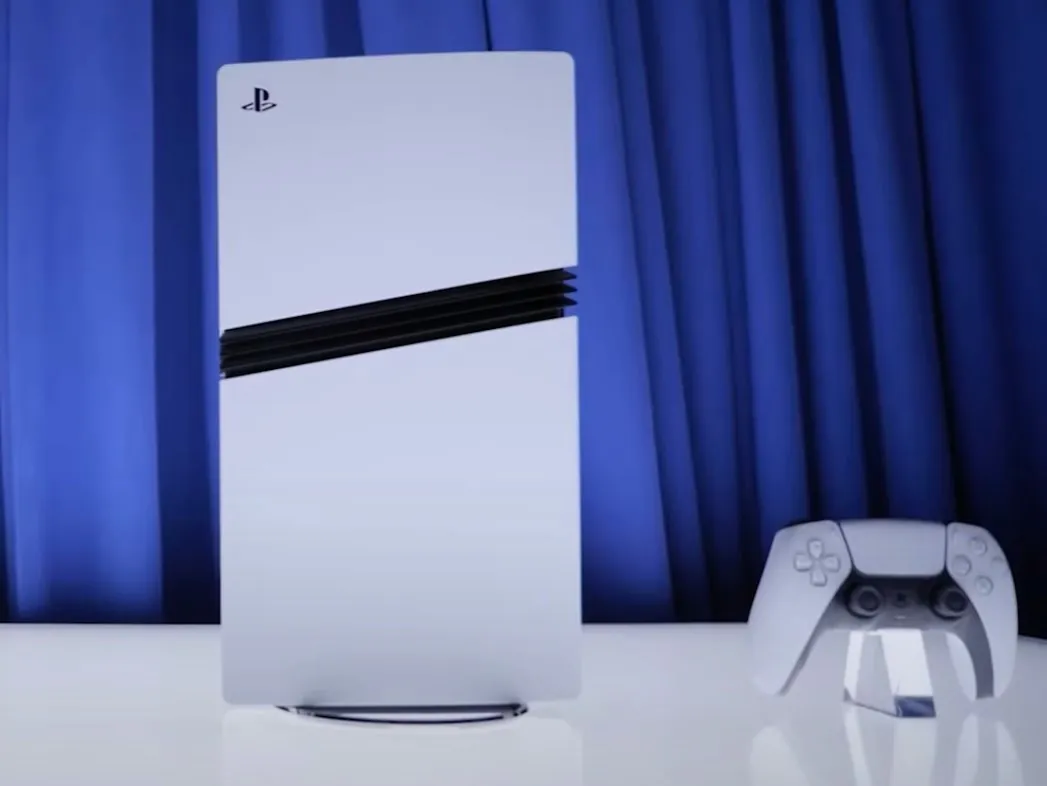
PS5 Pro is coming out next week.
The console has been reported to achieve significant performance improvements over its base model.
One of the developers who recently worked on the console has suggested that PSSR is its most impressive feature.
PS5 Pro is just a week away from its release, and the console has seen mixed reviews so far. While some people are still furious about its price, others believe it’s appropriate for the console.
It already outsold every other console on Amazon before its release. Also, a developer recently stated it has achieved significant performance improvement over its base model, and the most impressive aspect is PSSR.
Why it matters: Some experts have also suggested that the launch of PS5 Pro will also help PlayStation 6 backward compatibility, which is another win for PlayStation.
PS5 Pro Is Only A Week Away From Its Release
During a recent interview with Wccftech, Nexon’s Engine Programmer Junhwan Kim, who worked on enhancing The First Descendant for PS5 Pro, believes that PSSR is the console’s most splendid feature.
While discussing the upcoming console, Kim said that since the PS5 Pro is a performance-enhanced model instead of a full-fledged successor, it’s great to see how Sony has worked on it in many areas.
The most impressive aspect during the PS5 Pro adaptation process was the AI-driven upscaling technology known as PSSR.
– Junhwan Kim
He further confirmed that the team aimed to provide higher resolution and more ray-tracing features on the coming console.
When the developer was asked how the console performed against a maxed-out PC, he replied that it was very challenging for the console to offer the same quality as the high-end PC.
Nonetheless, PS5 Pro will be released worldwide on November 7th.
Do you agree with what the developer had to say about the console? Is it worth upgrading from the base model? Let us know your opinions in the comments or be a part of Tech4Gamers Official Forums.
I’ve previously worked for eXputer as a Senior News Writer for several years. Now with Tech4Gamers, I love to devoutly keep up with the latest gaming and entertainment industries. I have a Bachelor’s Degree in Computer Science and years of experience reporting on games and breaking exclusive stories. Besides my passion for gaming journalism, I love spending my leisure time farming away in Stardew Valley. VGC, IGN, GameSpot, Game Rant, TheGamer, GamingBolt, The Verge, NME, Metro, Dot Esports, GameByte, Kotaku Australia, PC Gamer, and more have cited my articles.
Story Highlight
In a new financial report, Ubisoft confirmed its target to restore the ‘creativity and innovation’ of its ‘golden 2010-2020 era.’
It is trying to achieve past results by restructuring, resulting in the dismissal of many developers.
The studio has been in various controversies recently, with its AAA title, Star Wars Outlaws, also performing badly.
Now, the company is trying its hardest to return to its open-world domination. CEO Yves Guillemot has recently clarified that Ubisoft is in the middle of restoring the ‘creativity and innovation’ of its golden age.
Why it matters: The company’s attempt to restore its former glory of the bygone decade by laying off developers is a controversial move. Instead of significant cuts, gamers believe developers should focus on making titles people enjoy.
Assassin’s Creed Shadows is the next major release by Ubisoft.
As per the new financial report, Ubisoft is trying to achieve the success it saw in the last decade by doing massive restructuring and cost reductions. In other words, the company has actively laid off hundreds of developers in the last few years to meet its new strategy.
“Retention is now close to the historical-best levels observed during the 2010-2020 decade that was the foundation for Ubisoft’s success.”
Additionally, hundreds of ex-employees have rejoined to share their expertise and return Ubisoft to its former glory.
Star Wars Outlaws failed to meet expectations.
For those not in the know, Ubisoft also confirmed that the Assassin’s Creed franchise had generated $4 billion in revenue last decade. However, delaying Assassin’s Creed Shadows also cost it an additional $22 million in budget.
Regardless, what are your thoughts regarding the new strategy? Do let us know your opinions in the comments below, or join the discussion on the official Tech4Gamers forum.
At Tech4Gamers, I contribute as a Senior News Reporter, combining my skills and gaming enthusiasm to keep our audience updated on the latest developments.
Story Highlight
Former Rockstar veteran Obbe Vermeij has deemed Concord competent.
He states that Firewalk could have attempted a similar game for its next project.
The former GTA developer is not fond of publishers buying studios only to shut them down after one failure.
With no hope for Concord and Firewalk, other developers have chimed in on the industry’s current state. Obbe Vermeij, one of the former GTA directors, has also shared his thoughts, stating that Firewalk’s work was competent at the very least.
Why it matters: The studio’s closure led to hundreds of developers losing their jobs and millions of dollars going to waste for PlayStation.
Obbe Vermeij Discusses The Trend of Acquisitions And Studio Closures via Twitter
Taking to Twitter, the former GTA developer expressed a general distaste for the trend of publishers buying up studios only to shut them down later. Various instances of this trend have been seen in recent years, with the likes of Embracer Group closing developers after failing to profit from major releases.
On the subject of Concord, he pointed out that the game was far from salvageable, but it was well-made. Obbe Vermeij argues that it would have been better to give Firewalk another chance at something similar instead of closing the studio altogether.
Wouldn’t it make more sense to give the team another game to work on?
-Obbe Vermeij
He believes a similar game based on an existing IP could have worked for Firewalk. Similarly, the team could have tried a new PvP IP based on a different style.
Concord Cost More Than $200 Million
Obbe Vermeij raises an interesting point, but PlayStation seems to disagree. Going by Hermen Hulst’s words, a similar option was considered but ultimately disregarded in favor of abandoning Firewalk altogether.
What are your thoughts on the former Rockstar developer’s opinion? Do you think the team behind Concord deserved another chance? Let’s discuss this in the comments and the official Tech4Gamers Forums.
I’ve previously worked for eXputer as a Senior News Writer for several years. Now with Tech4Gamers, I love to devoutly keep up with the latest gaming and entertainment industries. I have a Bachelor’s Degree in Computer Science and years of experience reporting on games and breaking exclusive stories. Besides my passion for gaming journalism, I love spending my leisure time farming away in Stardew Valley. VGC, IGN, GameSpot, Game Rant, TheGamer, GamingBolt, The Verge, NME, Metro, Dot Esports, GameByte, Kotaku Australia, PC Gamer, and more have cited my articles.
Story Highlight
The Call of Duty franchise has now rolled over half a billion sales worldwide, as confirmed by Activision Blizzard.
The recent launch of Black Ops 6 has played a massive role in bringing millions of new sales.
Black Ops 6 became the series’ biggest launch ever, setting a huge record for day one players on Game Pass.
Call of Duty has seen its fair share of highs and lows, but the franchise has recently been making strides after strings of criticisms followed in the past few years. The recent launch of Black Ops 6 has finally pushed the series to new horizons that only a few franchises can boast about in the gaming industry.
After two whole decades filled with releases, the series has now sold over 500 million copies worldwide.
Why it matters: Call of Duty officially selling over half a billion copies is a milestone that has barely been reached in the gaming industry. It highlights the significance of the series among gamers and critics alike.
A plethora of players have joined Xbox Game Pass after the day one launch of Black Ops 6 there.
Although released to mixed reviews, Black Ops 6 largely boosted the franchise sales to reach the new sales milestone. Speaking to The Washington Post, Activision Blizzard has officially confirmed the new massive milestone for Call of Duty.
The new sales record suggests that despite setbacks, the franchise has been able to bounce back and attract many old and new players. For those not in the know, Black Ops 6’s launch was dubbed the biggest in Call of Duty history, a feat that was by no means easy to achieve.
Moreover, the game helped Microsoft set a new record for day one players on Game Pass and subscriber additions on launch day.
Black Ops 6 has received a generally positive reception from the hardcore fans.
All in all, the player reception regarding the new milestone has been quite positive, with many celebrating the 500 million sales.
What are your thoughts regarding the franchise’s colossal sales figures? Do let us know your opinions in the comments below, or join the discussion on the official Tech4Gamers forum.
At T4G, my task is to cover the latest news around the gaming globe ASAP and with the utmost precision. I adore all the games and respect all the devs behind the amazing games that we get all year. So, whether it’s a PC or a Console game, I got it all covered.
Story Highlight
Ubisoft has released its latest financial report revealing the net profit of its franchises.
Assassin’s Creed generated over $4 Billion in revenue in the last decade.
The company also attracted over 138 million unique players this year.
Ubisoft’s journey from being one of the most loved studios to the most controversial has been a long road. While it has struggled with falling stock values in 2024, its FY2025 report shows very strong numbers for its franchises in the last decade.
According to the report, the Assassin’s Creed franchise has generated around $4 Billion in revenue, which is the highest of all of the studio’s IPs.
Why it matters: Assassin’s Creed is undoubtedly Ubisoft’s biggest franchise and the revenue it has generated in the last 10 years is a great testament to that.
Ubisoft has 6 franchises with over $1 Billion in revenue
The report also reveals revenue figures for other big franchises as well. Rainbox Six comes in second with $3.5 Billion, and Far Cry at third with around $2 Billion. Other Billion Dollar franchises include The Division, Ghost Recon, and Just Dance.
This makes 6 Ubisoft franchises that have generated over $1 Billion in revenue. In addition, the company also attracted 138 Million unique players in the last twelve months. This led to a 4% increase in terms of year-on-year growth.
Assassin’s Creed is Ubisoft’s biggest franchise in terms of sales
Both Assassin’s Creed games and Rainbox Six Seige attracted over 30 Million active users each. However, while the first quarter of the year was decent, this one has been underwhelming for the company.
Ubisoft has admitted to the low performance of Star Wars Outlaws in the report. Nonetheless, it wants to improve the game with more updates. The most significant of them will be released on November 21.
It is also discussing strategies to cut costs amid low stock values. Although Assassin’s Creed Shadows has been a topic of much controversy, people still seem to be looking forward to it, and Ubisoft could be expecting big things from the title.
What are your thoughts on Ubisoft’s latest financial report? Let us know in the comments or join the discussion at the official Tech4Gamers Forum.
At Tech4Gamers, I’m a Senior Error Fix Writer specializing in troubleshooting problems. Each article results from deep research, testing fixes and providing solutions.
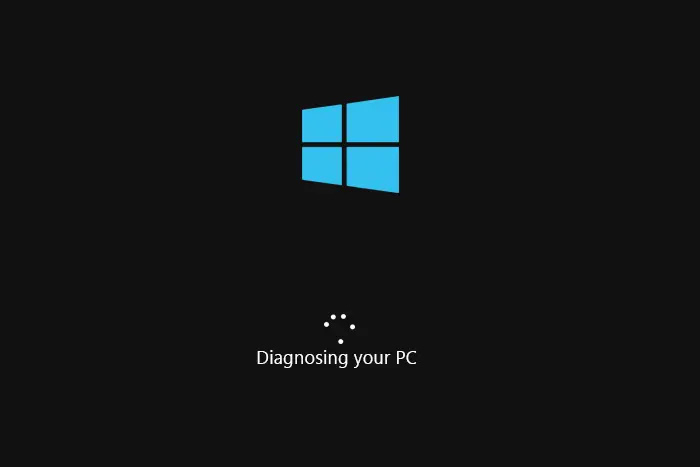
The “Diagnosing Your PC” error indicates an issue during the bootup. As a result, Windows takes matters into its own hands and starts diagnosing, which ultimately causes an endless loop. This error can occur due to corrupted system files or insufficient space.
Key Takeaways
This endless diagnosis screen mainly appears due to insufficient space, corrupt system files, and Windows Update interruption.
You can fix this error by running the System Restore, uninstalling the recent Windows Updates, and hard rebooting your system.
In our experience, this “Diagnosing your PC” error can persevere for several hours, leading to lost productivity.
The error message will be displayed on the boot screen like this:
WARNING: Diagnosing your PC
Diagnosing Your PC Error – Image Credits [GimTekno]
Method Difficulty Rating
Hard Reboot Rated: 5/10
System Restore Rated: 7/10
Repair System Files Rated: 8/10
Disable Fast Startup Rated: 6/10
Hard Reboot
A hard reboot restarts your device by completely switching off its power. It abruptly interrupts all processes and applications running on the computer. Hard rebooting PCs and laptops can resolve many bugs and errors, including the “Diagnosing your PC” error.
A hard reboot can sometimes set your PC straight when things get jammed. We’ve tried it, and it works! And it seems others on HP Forums have had luck with it, too. Give the following method a try:
PC Reboot: Press and hold the Power button for 15 seconds > Turn off the power outlet > Disconnect power cables and other devices > Wait for about a minute > Connect cable > Turn on the power supply > Start your PC.Power Button – Image Credits[Tech4Gamers]
Laptop Reboot: Unplug the power cable > Disconnect all peripherals >Remove the battery > Wait for about a minute > Insert battery > Plug in the power cord > Press the power button to start your laptop.Laptop Side View – Image Credits[Shutterstock]
System Restore
System Restore is a Windows utility tool designed to revert the operating system to its previously saved state. Windows named those states as restore points. This utility is beneficial when an undo is needed for the system to solve any errors or glitches.
If you’re stuck with this stubborn problem, consider rolling back with a system restore. We’ve tried it ourselves, and it’s often the quickest way to restore normality. A Microsoft Vendor at Learn Microsoft has also recommended this solution. Here are the steps:
Open System Restore: Boot into Windows RE > Click Advanced options > Troubleshoot > Advanced options > System Restore.Advanced Options – Image Credits [Tech4Gamers]
Choosing Restore Point: Click Next > Choose the latest restore point > Click Next. Restore Points – Image Credits [Tech4Gamers]
Commencing System Restore: Click on Finish.Confirming System Restore – Image Credits [Tech4Gamers]
WARNING: The System Restore reverts the operating system to an older state. As a result, it may uninstall applications installed after creating the restore point.
Repair System Files
System Files can corrupt for many reasons, including viruses or malware, improper shutdown, and incomplete Windows Updates. Corrupt files can also result from a system crash or a damaged sector on your hard drive, which can cause issues like this. To repair system files, you can run the SFC and DISM Scan commands on the Command Prompt.
These commands thoroughly scan your system while repairing faulty and corrupt system files. We at Tech4Gamers have personally executed these commands, and they resolved the issue for us. Here’s how you can successfully run these commands:
Navigate to Command Prompt: Boot your system into the Windows Recovery Environment >Click Advanced Options > Go to Troubleshoot > Advanced Options > Command Prompt.Advanced Options – Image Credits [Tech4Gamers]
Access Command Prompt: Select Administrator > Provide the password if available; otherwise, leave it blank > Hit Enter.Command Prompt Password – Image Credits [Tech4Gamers]
The Fast Startup feature allows a computer to boot up much faster after a proper shutdown. It puts the system in hibernation mode rather than shutting it down. If the system hardware can execute fast startup, it is usually enabled by default.
However, our research found that the Fast Startup feature is known to cause several bugs and errors in the system, especially in dual-booting cases. Disabling the Fast Startup Feature helped us recover our systems, and it also helped users resolve this “Diagnosing your PC” error on Ubuntu Forums. Follow the instructions below to give this method a shot:
Opening Command Prompt: Power your system into the Windows RE > Go to Advanced Options > Troubleshoot > Advanced Options > Click Command Prompt.Advanced Options – Image Credits [Tech4Gamers]
Access Command Prompt: Select Administrator account > Enter the password if available or leave it empty > Hit Enter.Command Prompt Password – Image Credits [Tech4Gamers]
Disabling Fast Startup: In CMD, type powercfg /h off.
Tip: If the belowmentioned methods do not resolve this error for you, we recommend a clean reinstallation of Windows.
Final Words
Concluding the blog, we confirm that corrupt system files are the primary cause of this error. Since you are completely thrown out of your system, you need to access the recovery features to resolve this error, which can prove tricky for some people. Users have reported being stuck on the infamous “Diagnosing your PC” error.
It’s kinda stupid I’m asking twitter but My laptop is stuck in the infamous “automatic repair / diagnosing your PC loop” and i’ve tried everything and none of it has work Pls help ;-; (if you can) pic.twitter.com/mhpFpkmi8Y
Although Microsoft has explicitly detailed a blog revolving around this “Diagnosing your PC” error, their listed methods might not be sufficient. However, you can eliminate this error successfully by executing our approved methods, which are easy to follow as we have covered each step in detail.
FAQs
What causes the “Diagnosing your PC” error?
Your PC might be facing issues like improperly installed updates, corrupted system files, corrupted Windows registry, or lack of storage space, which can cause this problem.
How do you eliminate the “Diagnosing your PC” error?
You can fix this problem by utilizing the System Restore utility, uninstalling the recent Windows Updates, repairing the System Files and Registry using the Command Prompt, and turning off the fast startup feature.
Are the “Diagnosing your PC” error and the “Automatic Repair” error the same?
Yes, the “Diagnosing your PC” error follows the “Automatic Repair” error loop. Some users see the former, while others see the latter.
At Tech4Gamers, I contribute as a Senior News Reporter, combining my skills and gaming enthusiasm to keep our audience updated on the latest developments.
Story Highlight
Assassin’s Creed Shadows was recently delayed for polishing and bug fixing.
Ubisoft has spent an additional $20 million on the game and is confident in its quality.
The gaming giant reiterated that the delay came as a result of Star Wars Outlaws’ performance.
Assassin’s Creed Shadows was pushed back by a few months recently. After being built up as Ubisoft’s biggest release of 2024, the game is now anticipated to perform even better in early 2025.
Discussing its expectations, the gaming giant has shared new details on Assassin’s Creed Shadows. According to Ubisoft, the game is shaping up to meet fan expectations and deliver a high-quality experience come release day.
Why it matters: The gaming giant has faced a major setback after placing similar faith in Star Wars Outlaws, suggesting that extra care has been taken to ensure the same failures are not repeated again.
Ubisoft Discussed Star Wars Outlaws And Explained Its Future Plans
Ubisoft recently shared its earnings figures for the first of 2024-2025. The earnings figures reiterated that Star Wars Outlaws failed to meet expectations while confirming that Assassin’s Creed Shadows’ delay came as a direct result of this disappointment.
Speaking during the investor call, the Chief Corporate Finance Officer confirmed that the latest Assassin’s Creed entry was delayed for polishing. He also assured investors that the game would not be delayed any further.
Elaborating on the expectations for this release, Ubisoft pointed to a ‘great experience’ and ‘great quality.’ All in all, the team is quite confident.
We have good visibility for the game to be delivered with a great experience and great quality.
-Frederick Duguet
During the same call, Frederick Duguet confirmed that the delay cost around $20 million. Therefore, it is clear that the studio has gone the extra mile to polish Assassin’s Creed’s first Japanese entry.
For the unaware, Assassin’s Creed Shadows has undergone many changes. The collector’s edition is now cheaper, the game is heading to Steam on day one, and more. Perhaps this explains Ubisoft’s newfound confidence.
Are you still looking forward to the series’ next major release? Let us know in the comments, and join the discussion on the official Tech4Gamers Forums.
At Tech4Gamers, I mainly cover new gaming news, leaks, and rumours. Aside from that, I love to write features about my favourite games while inserting my opinion about their different aspects.
Story Highlight
Black Ops 6 has become the biggest launch in the history of Call of Duty.
While it broke the record for most day-one players, it also set a record for Game Pass subscribers added on launch day.
There has also been a boost of 60% sales on PlayStation and Steam YoY.
Call of Duty: Black Ops 6 was recently released and instantly managed to shatter the record of Modern Warfare 3. However, the concurrent players on Steam couldn’t break the all-time high Call of Duty game record.
That was because the game was available on the Game Pass on day one. So, accounting for all of the players, the CEO of Microsoft has revealed that it is the biggest Call of Duty launch in history.
Why it matters: It is pretty surprising for Balck Ops 6 to become the biggest COD launch in history, even after the disastrous launch of Modern Warfare 3. This shows that Call of Duty is just way too big of a franchise.
Satya Nadella, the CEO of Microsoft, has officially revealed in the latest Microsoft’s first-quarter earnings call that the latest instalment in the Call of Duty franchise has had the biggest launch in the series.
Last week’s launch of Black Ops 6 was the biggest Call of Duty release ever, setting a record for day one players as well as Game Pass subscriber adds on launch day.
-Satya Nadella
He also revealed that the game has set a record for day one players and Game Pass subscribers added on launch day. The game’s reviews have also been pretty positive from the critics.
The campaign seems to have satisfied most of the fandom. There were some concerns that Call of Duty: Black Ops 6’s availability on Game Pass would hurt its sales. However, it performed amazingly well on Steam, Xbox, and even on PlayStation.
Nadella also revealed that unit sales on PlayStation and Steam were up by over 60% year-over-year. Activision seems to have redeemed itself with this recent launch as this will not only help the franchise grow stronger but the subscription service too.
What do you think about Black Ops 6 becoming the biggest COD game ever? Have you played it yet? Share your thoughts with us in the comments section below or join Tech4Gamers’ official forums.