At Tech4Gamers, I contribute as a Senior News Reporter, combining my skills and gaming enthusiasm to keep our audience updated on the latest developments.
Story Highlight
Black Myth: Wukong is aiming for an experience similar to that of God of War.
Both titles focus on their respective mythologies, making the comparison quite fitting.
The game won’t feature difficulty options, but it won’t be nearly as punishing as a Souls-like.
Black Myth: Wukong and Phantom Blade Zero are two upcoming releases that are breaking away from the trend of releasing tried-and-true Souls-likes. Instead, both games are adding their own spin on the genre.
In the former’s case, new previews have compared it to God of War. According to studio Game Science, Black Myth: Wukong is more similar to PlayStation’s premier franchise than a FromSoftware title.
Why it matters: Since Game Science’s marketing has revolved around the bosses, many fans are still not sure what to expect. This comparison should help clear some of the doubts.
The God of War comparison is quite fitting since this PlayStation franchise has always been centered around mythologies, whether it be Greek or Norse.
It’s more like God of War than a Souls-like.
-Game Science
Similarly, Game Science is going all-in on Chinese mythology, bringing various larger-than-life figures to the forefront. It is also interesting to note that Santa Monica itself borrowed from Souls-likes for the last two God of War games.
The shoulder buttons for light and heavy attacks, the slower and more methodical dodge-based combat, and various other elements were directly borrowed from Dark Souls and its follow-ups.
However, God of War leaned more into action gameplay, and Black Myth: Wukong seems to be doing the same. Recent previews confirm that the game won’t offer difficulty options, but fans can expect a more forgiving experience.
Moreover, Sun Wukong will be able to transform into various bosses after beating them in combat, temporarily gaining access to their abilities.
Black Myth: Wukong May Capture The Scale of God of War
It is also important to note that Black Myth: Wukong will offer a linear experience. While exploration will be part of the experience, it won’t take center stage. This is another key area where the game differed from Souls-likes.
With July having begun already, the game is just over a month away from its release. Studio Game Science will target the PS5 and Steam for the initial launch, with Xbox Series S|X consoles expected to follow shortly after.
At Tech4Gamers, I mainly cover new gaming news, leaks, and rumours. Aside from that, I love to write features about my favourite games while inserting my opinion about their different aspects.
Story Highlight
Red Dead Redemption 2 was released in 2018, and it is still remembered by many.
After a massive sale, the game managed to reach the top best sellers on Steam.
It is pretty impressive for a game this old to top the charts when so many highly anticipated upcoming games are up for pre-orders.
Red Dead Redemption 2, earlier this year, became the 7th best-selling game in history, but it has shown no signs of slowing down. As one of the industry’s most beloved releases, it stands out as a unique experience to date.
There is a massive fandom that still talks about the franchise to this day and would do anything for another entry. However, fans have no choice but to play Red Dead Redemption 2 for now, and they’re doing just that.
The game has once again climbed Steam’s list of top 10 best sellers.
Why it matters: The prequel to Red Dead Redemption was released in 2018, and it is great to see it doing so well to this day.
Red Dead Redemption 2 Is The 7th Best Seller On Steam | Image Credits: Steam
Red Dead Redemption 2 is currently heavily discounted, with the Steam summer sale bringing it to one of its lowest prices ever. Following this sale, Rockstar’s latest release is now Steam’s 7th best-selling game.
At the top, you’ll find recent releases like Elden Ring Shadow of the Erdtree. As always, Valve’s iconic handheld is on the list as well, but it doesn’t really count as a game, so excluding the console seems like the best option.
Red Dead Redemption 2 is just below Cyberpunk 2077 and above The Witcher 3: Wild Hunt. It is quite a coincidence that three of the best open-world titles are neck and neck on the list.
Given how great Red Dead Redemption 2 is, most people have probably played it already. However, Rockstar’s strange refusal to add a 60FPS option makes such Steam discounts valuable.
New PC players or existing ones who primarily use consoles can purchase the title on Steam for 60FPS gameplay and other enhancements. The discount ensures your wallet discount takes a huge hit because of this purchase.
For new players, there’s no better time to pick the legendary tale of Arthur Morgan. With GTA 6 coming next year, it’s about time players caught up on Rockstar’s latest work.
At Tech4gamers, I cover all sorts of gaming news. Whether it’s a leak of any upcoming game or an update, an announcement, or a rumour, I like to write about it all. Over the weekend, I sit and write features where I talk about games that I miss or want to see return.
Story Highlight
A former Bungie developer suggests that the next big entry in the Halo franchise is in the works.
The developer is now working as the Lead Game Designer on the project.
This entry may be based on Unreal Engine 5.
While the future of Halo is a mystery for now, recent job listings from 343 Industries hinted that work on a new project was already underway. The team has moved on from the Master Chief Collection and now hopes to create a brand-new experience while supporting Halo Infinite.
Further evidence of a brand-new entry has been spotted on LinkedIn. It also seems that a former Bungie employee is leading the development this time.
Why it matters: Bungie was the original home for Halo when the series was fresh. This studio is also popular for high-quality first-person shooters like Destiny, inspiring confidence for Halo’s future.
A Former Bungie Developer Is Leading The Next Halo Title ( Source: LinkedIn )
As seen above, the LinkedIn profile of Dan Gniady, who is currently working at 343 Industries, suggests that the next mainline Halo entry has begun development.
Doing game direction on a Halo experience, Giving the Covenant back their bomb,
Dan Gniady
343 Industries hired Dan Gniady in April earlier this year as a lead developer for its next title. The developer has been in the industry for a long time, working for studios like Bungie and Creative Assembly before joining 343 Industries.
Dan Gniady was previously involved in Destiny for nearly 10 years. While he may not have been one of the many Bungie veterans who helped bring Halo to life, his time at the studio likely equipped him with the skills to create an exceptional first-person shooter.
Halo Is One of The Biggest Xbox Exclusive Franchises
Recent leaks have suggested that Xbox is working on a remake of the Halo trilogy, which may also be released on the PS5. However, since Dan Gniady is said to be working on a new experience, he may not be part of this project.
Nonetheless, anything sounds exciting for Halo fans at the moment.
Halo Infinite turns three later this year, and it hasn’t had the best time during these years. Many fans hope to see something exciting and fresh from 343 Industries, so the prospect of a brand-new entry is quite exciting.
At Tech4Gamers, I proudly hold the role of a Hardware Reviewer. Here, I leverage my expertise to provide readers with in-depth insights into PC hardware, ensuring they have the information needed to make informed decisions.
Story Highlight
Liquid-cooled GPUs are costly and offer only marginal performance gains, making high-quality air-cooled GPUs a better value for most gamers.
Liquid cooling requires regular maintenance and carries risks like leaks, unlike the low-maintenance air cooling option.
The real-world performance boost from liquid cooling is modest, often not justifying the extra expense and hassle.
I have always been on the hunt for the latest PC hardware, and over time, I’ve seen the hype around liquid-cooled GPUs grow significantly. These sleek, high-performance components promise cooler temperatures and enhanced performance, but are they really worth the investment for the average gamer?
After weighing the pros and cons, I’ve come to a conclusion that might surprise you. Liquid-cooled GPUs might not be the upgrade you’re looking for.
The Promise of Cooler Temperatures
Sure, liquid cooling sounds like a dream come true. The promise of significantly lower temperatures and the ability to push your GPU to its limits without throttling is exciting. In theory, liquid-cooled GPUs can maintain temperatures 20-30 degrees Celsius lower than their air-cooled counterparts. However, after diving deep into the subject and considering my own experiences, I’ve found that the reality doesn’t always live up to the hype.
A stock air cooler (left) and an EK full-cover water block (right) (ekwb.com)
Take, for example, the comparison between the NVIDIA RTX 3090 with a high-end air cooler and the same GPU with a custom liquid cooling loop. Under full load during extended gaming sessions, the air-cooled RTX 3090 typically runs at around 75°C, while the liquid-cooled version might hover around 60°C.
While this is indeed a reduction, it’s not the drastic 20-30 degrees difference often advertised. Moreover, most modern GPUs are designed to operate safely at temperatures up to 85°C or higher, so the practical benefits of this temperature reduction are limited for the average gamer.
The Steep Cost of Liquid Cooling
The most glaring issue with GPU liquid cooling is their cost. High-quality liquid cooling systems can add several hundred dollars to your build. This substantial investment doesn’t translate into a proportional performance gain for many gamers. Let’s face it: The extra frames per second and slightly improved stability might not justify the significant expense.
I’ve seen many friends and fellow gamers go for liquid-cooled GPUs only to realize that the cost-benefit ratio isn’t as favorable as expected. In a world where the price of high-end graphics cards is already sky-high, adding the extra cost of liquid cooling can seem excessive.
Maintenance Headaches
Liquid cooling isn’t a set-it-and-forget-it solution. Unlike air-cooled systems that require minimal maintenance, liquid cooling demands regular attention. The coolant needs to be monitored and occasionally replaced to prevent algae growth or corrosion. There’s also the ever-present risk of leaks, which can damage other system components.
Personally, I find the maintenance aspect to be a significant drawback. As someone who prefers to spend my time gaming rather than tinkering with my PC, the added hassle of maintaining a liquid cooling system is a major discouragement. I highly value the peace of mind that comes with a reliable, low-maintenance air cooling system.
The Installation Challenge
Setting up a liquid cooling system means no walking in the park. It requires careful planning, precision, and a fair amount of patience. For those new to PC building, the complexity can be overwhelming.
I remember helping a friend install a liquid cooling system; it was a painstaking process. Ensuring everything fits correctly, double-checking connections, and testing for leaks took several hours.
Real-World Performance: Underwhelming for Most
Despite the theoretical benefits, the real-world performance gains of liquid-cooled GPUs can be underwhelming for many gamers. The performance boost provided by liquid cooling is often marginal when compared to high-quality air-cooled solutions.
Another often-cited advantage of liquid cooling is the potential for better overclocking. While it’s true that lower temperatures can allow for higher clock speeds, the actual performance gains are often modest. While you can achieve an increase in clock speed compared to air cooling, this translates to only a few extra frames per second in most games.
One of my favorite YouTubers, Paul’s Hardware, posted a really interesting video about the same topic.
Not Worth the Hype
So, are liquid-cooled GPUs worth the investment for gamers? No. The high cost, maintenance requirements, and installation challenges make them a less appealing option. While liquid cooling can offer cooler temperatures and quieter operation, the real-world benefits often don’t justify the significant investment.
For an average gamer, a high-quality air-cooled GPU provides a much better balance of performance, cost, and ease of use. You get reliable cooling, minimal maintenance, and a lower overall cost. Instead of spending extra on liquid cooling, you could invest in other components, such as a better CPU, more RAM, or a faster SSD.
At Tech4Gamers, I’m the PC Hardware Specialist, primarily contributing to the “Best-Ofs” section. I provide thoughtful buying advice based on thorough testing and personal expertise. I also review hardware products and games to keep things fresh.
Story Highlight
SFF PC builds used to be a stressful and time-consuming challenge for the builder to take on and complete.
Nvidia has decided to ease all this by setting new standards for everyone to follow so SFF builds become more common.
Consoles may lose another edge over PCs, namely their portability, as SFF builds become more prevalent.
In my whole life, I stayed away from SFF builds and only indulged myself once when one of my close friends asked me to help him build an SFF (Small Form Factor) PC. That was first and last because of various reasons.
Now this thing is getting a makeover because of the new standard that Nvidia has announced recently for all of the PC industry. This news has got me excited to try to do an SFF build again.
Only The Capable Could Do
This kind isn’t anything like building in an ATX or mATX chassis. As we work with highly restricted space for the components, everything has to be measured and double-checked so nothing goes wrong.
Otherwise, you would be trapped in a big problem where you have to bear more patience and monetary costs. Most of the time, while selling you small-sized components, they don’t tell you about the power cable bend space, especially in the case of a graphics card.
Most notably when building an SFF build that features an RTX 4000 series graphics card requiring the controversial 12VHPWR connector. Besides that, if somehow you end up completing the build, the uncertainty of how it’s going to run rises, like how cool it is going to stay throughout the full-use session.
Connector On The RTX 4090 (Image By Tech4Gamers)
Since we’re dealing with so little space inside such mini-ITX cases, we are limited in terms of choosing a cooler for the CPU. Liquid cooling is out of the equation, and we’re left with small-form-factor air coolers that can’t handle top-tier CPUs easily.
Which is why the SFF builds couldn’t match the performance of mATX or ATX builds. Even though we can pretty much fit any component now, their top-of-the-line variants are still a hassle and big enough to not fit into the mini-ITX chassis. Ultimately, the SFF builds were considered a niche for so many years. Fortunately, it’s finally getting better for good.
These standards are for both Nvidia’s AIB partners and chassis manufacturers. This is so people could easily build SFF PCs and not end up in stressful situations like they used to.
The new standards strictly state that the cards should have 155 mm, including the bend of power cables, and they should measure 304 mm in length and 50 mm in depth or 2.5 slots in space, whichever is easier to understand.
A Small Form Factor RTX 4060 PC In A Tower Case via Devyn Johnston
The work is already in progress to manufacture such GPUs that meet Nvidia’s SFF criteria, including an RTX 4080 Super. This is impressive, as previously, GPUs of such tier and power were impossible to install in an SFF chassis.
So, the only option to have a powerful portable computer was to purchase a laptop. They are great, for sure, but not on par with desktop computers of similar specs. Besides guiding the AIB partners, Nvidia has also shared guidelines for chassis manufacturers to follow while manufacturing mini-ITX cases.
According to the shared guidelines, every SFF chassis has to be spacious enough to house an SFF-ready Nvidia graphics card. All this can bring a huge change to the way people see SFF builds.
A Great Console Replacement
It does seem like now the SFF builds will finally start to get the recognition they lost between the abundance of desktop computers and gaming laptops. Being at the very early stages of the guidelines, it’s going to take a while to become quite common and make its image worth looking at.
PS5 With DualSense Controller (Image By Tech4Gamers)
Also, the console might get a hard time too, since being portable was one of their plus points over PCs. However, the price and plug-and-play factor would still favor the consoles. So they don’t have to worry about anything until we start to see some great-performing and budget-friendly SFF builds on the market.
However, those who don’t have an issue with paying more and the building process would go with the SFF builds over the console any day to have superior performance and access to many other things.
A New Era For SFF Builds
Efforts are being made in favor of the SFF builds to bring them out of the niche segment and make them more common among casual users. I’m pretty excited and looking forward to seeing more and more SFF builds on the shelves for sale, and I might get myself one too.
At Tech4Gamers, I mainly cover new gaming news, leaks, and rumours. Aside from that, I love to write features about my favourite games while inserting my opinion about their different aspects.
Story Highlight
Shadow of the Erdtree has so much content that it can easily be called a standalone game.
It marks yet another triumphant post-launch release for FromSoftware.
All future DLCs will now be compared to this expansion.
Shadow of the Erdtree was promised to offer around 30 hours of playtime, but from what I have seen, it can easily offer twice as much. I have been playing the expansion for 50 hours already, and there is still more left for me to do.
So, I can see myself spending the next 10 hours just completing the whole DLC. For an expansion, the amount of content here is just ridiculous. What I’m trying to say here is that Shadow of the Erdtree is a DLC in name only.
In fact, I would say that it puts many single-player games to shame because of how much is being offered here and the overall quality of the content.
Why it matters: Many $70 AAA releases offer 20 hours of content or less. Several recent releases were even shorter, giving me the chance to appreciate FromSoftware further.
Shadow of The Erdtree Is A Standalone Title
Shadow of the Erdtree Has Nearly 40 Bosses | Image Credits: Tech4Gamers
FromSoftware really thought it could get away with making a standalone title and calling it a DLC. The developer must have thought we wouldn’t figure out that this is practically a whole game disguised as a DLC (I’m joking, of course).
Let’s consider the average length of modern AAA titles. The biggest RPGs offer about 50-100 hours of gameplay at most, and Shadow of the Erdtree can easily match this amount.
However, go on the other end of the spectrum, and you’ll find plenty of games that barely justify their asking price. For instance, Modern Warfare 3’s campaign was just 4 hours long, and its multiplayer was based on recycled maps last year.
Meanwhile, Xbox launched Hellblade 2 for $50 not too long ago, charging nearly $10/hour. Of course, these are very different types of games, but they highlight why I appreciate FromSoftware so much.
It’s not like the DLC is bloated with mindless content that you find in Ubisoft open-worlds, either.
The Best DLC To Ever Exist
The Expansion is Currently The Best Rated Release of 2024 | Image Credits: Tech4Gamers
In my opinion, Blood and Wine, Phantom Liberty, and God of War Ragnarok: Valhalla are some of the best DLCs you can play today.
Blood and Wine continues the excellence of The Witcher 3, Phantom Liberty revamps Cyberpunk 2077, and Valhalla neatly ties Kratos’ Greek and Norse stories. However, none of them can match Shadow of the Erdtree for me.
What I liked most about Elden Ring’s DLC was that it added new twists to the lore. I will only tell you that Miquella isn’t the kind person you think he is. Once you piece these revelations together, Shadow of the Erdtree becomes even better.
FromSoftware has already had plenty of successful DLCs. However, they seem minuscule by comparison. Elden Ring scored 96/100 on Metacritic, and Shadow of the Erdtree follows closely behind at 95/100.
Despite all the outrage over the difficulty, there’s no denying how great the expansion is.
The Bar Has Been Set Too High
Only FromSoftware Can Surpass This New Bar Now | Image Credits: Tech4Gamers
The developer has really outdone itself this time. I was extremely excited about the DLC, but I have no clue how FromSoftware still exceeded my expectations. It didn’t take long for me to fall in love with Shadow of the Erdtree.
Everything here is refined to perfection, and the bosses are a highlight. From the difficulty of the fights to the spectacle on offer, Elden Ring’s biggest and baddest foes have never been better.
These bosses have raised the bar for FromSoftware, and I can’t wait to see where things go from here. Shadow of the Erdtree also features hundreds of new weapons, spells, and incantations.
The team even found a way to balance out the difficulty, introducing a separate progression system. There is just so much to do in the DLC, and I’m already thinking about another playthrough before finishing my first one.
I am glad that the majority of the journalists didn’t give it a low score due to the difficulty, as the DLC is, in fact, difficult. FromSoftware went all out with the content and the difficulty. Therefore, the expansion isn’t for everyone. Sure, you can make a broken build and destroy the bosses, but where’s the fun in that?
Nonetheless, I believe that a new bar has been set for DLCs and expansions. This is just one more accomplishment for FromSoftware, but no future DLC will be released without being compared to Shadow of the Erdtree.
As someone who enjoyed every second of the expansion, I can’t wait to play through it multiple times. I’m also looking forward to what Hidetaka Miyazaki comes up with next since Elden Ring wasn’t his ideal RPG.
At Tech4Gamers, I proudly hold the role of a Hardware Reviewer. Here, I leverage my expertise to provide readers with in-depth insights into PC hardware, ensuring they have the information needed to make informed decisions.
Story Highlight
Intel’s Arc GPUs might offer great value for money but still come with a few drawbacks.
Behavior in some titles is still unpredictable, with games such as GTA V and Starfield struggling to run properly on these GPUs.
Utilizing Resizable Bar provides significantly better performance with Arc GPUs, which means older systems without the feature might provide worse performance.
There are options from AMD that rival the price-to-performance of Intel’s lineup without any of the driver-related issues.
Intel’s graphics card had a disappointing launch; however, they have had a fair share of improvements over the years to refine their drivers to a competitive degree. Despite the updates, I think the Arc series GPUs still come with too many drawbacks, making them a hard sell in the face of competition from AMD.
Still Unpredictable, Just Not As Much
Intel has definitely refined their drivers a lot, and there’s no denying that; however, I still wouldn’t say that they can rival that of AMD or Nvidia. And that does make sense, especially if you consider how long it took AMD actually to make their drivers usable.
You see, at the time of launch, Intel’s game performance would vary drastically from game to game, which was mostly an issue on the driver level. A lot of those issues have gotten patched over time, but some discrepancies still exist, which is not ideal if you are looking for a simple and intuitive experience.’
Performance
1 of 2
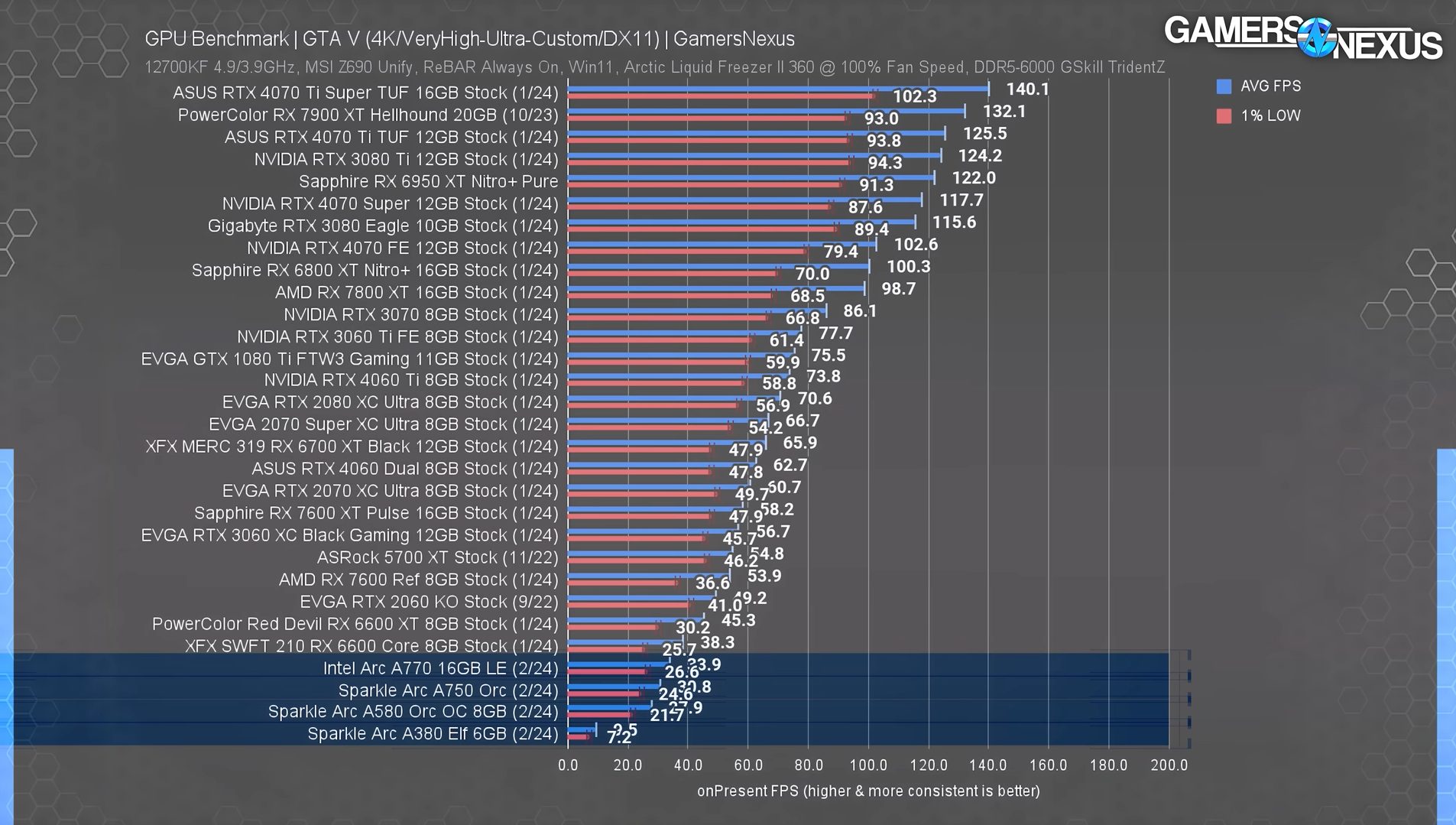
Intel Arc GTA V Benchmarks (Image Via Gamers Nexus)
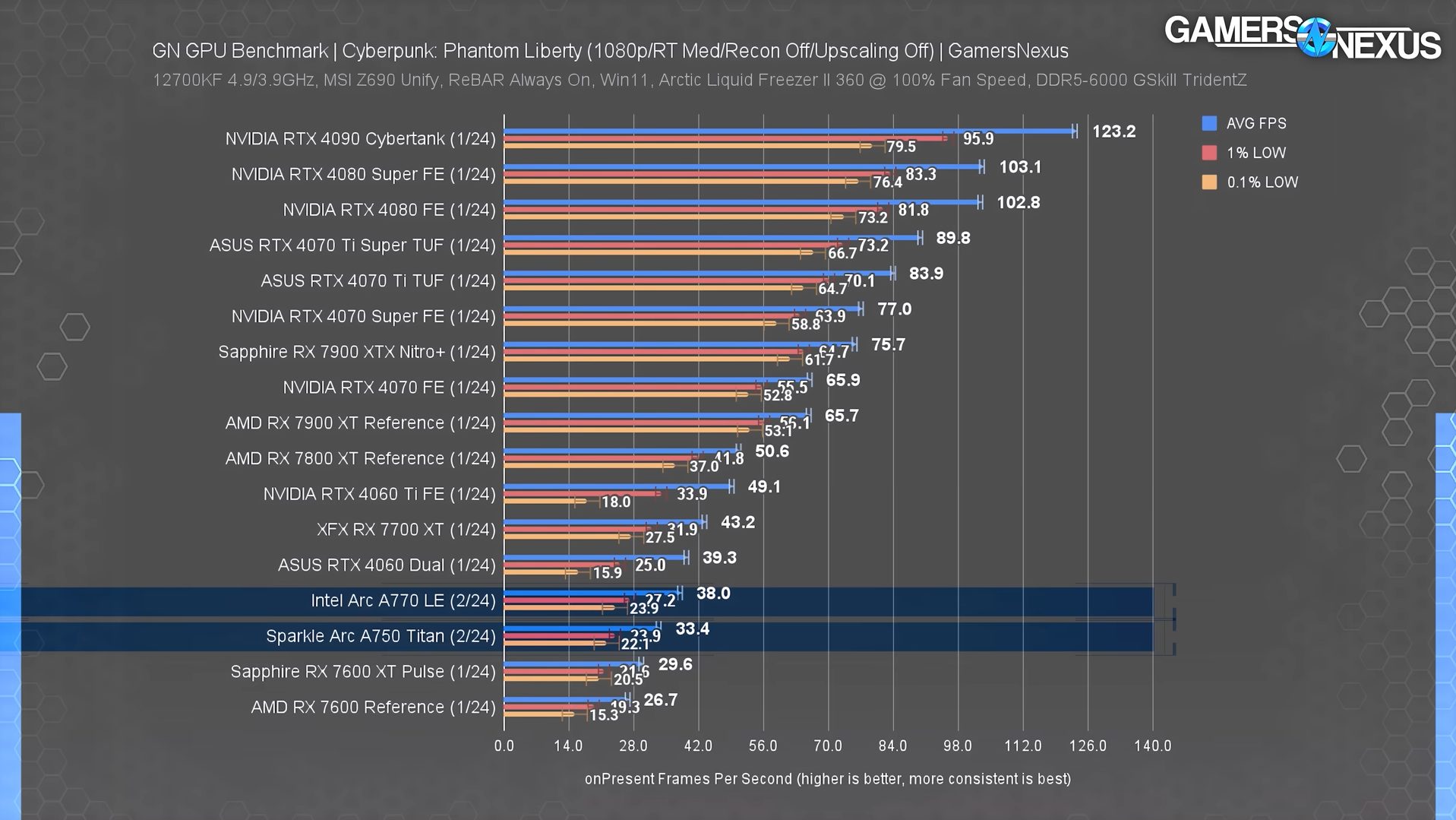
Intel Arc Starfield Benchmarks (Image Via Gamers Nexus)
In Gamers Nexus’ recent tests, performance on GTA V and Starfield fell below the expected threshold, with all cards from the series struggling to even maintain playable frame rates let alone compete with AMD’s lineup.
Despite that, I am still surprised by how much Arc GPUs have managed to improve when compared to the time of their launch, and things might just change with a few more updates.
Older Systems Might Suffer
Even apart from the unpredictable behavior in certain titles, installing an ARC GPU on an older system might actually not be ideal. That’s because Intel GPUs tend to rely a lot on the Resizable bar, which means you’ll notice a performance loss on systems that don’t support the feature.
Supported Hardware Configurations For Resizable Bar (Image Via Intel)
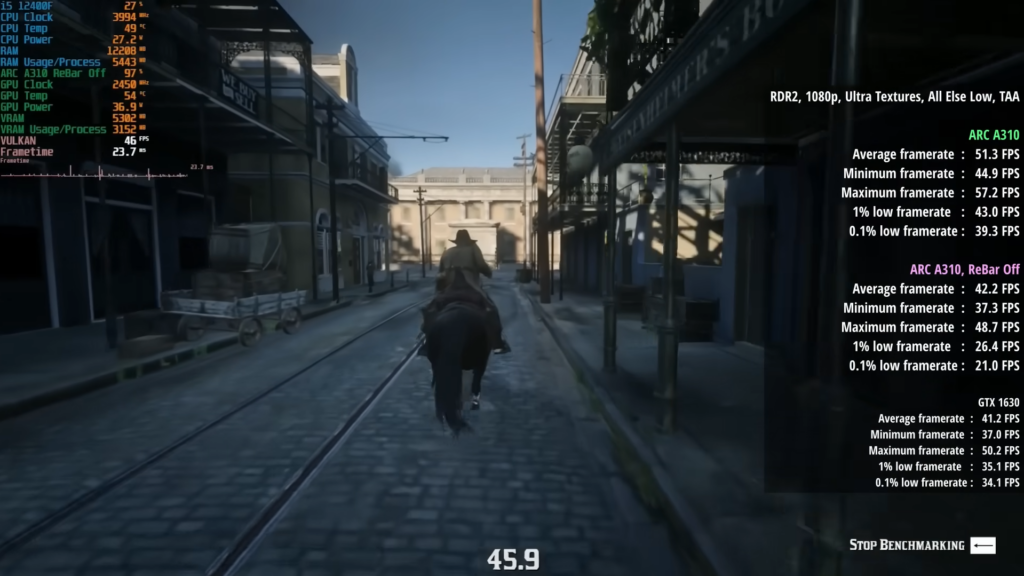
This is further substantiated through RandomGaminginHD’s video, where he further went in depth about how much of a difference the Reziable bar can make for Intel Arc GPUs.
In RDR2, for example, there was a 10 FPS difference from disabling rebar, which can be a game-changer, especially in these sub-60fps scenarios. Of course, Rebar can also make a difference with Nvidia and AMD GPUs, but the difference is simply not as drastic as the ones seen from Intel’s cards.
There Are Better Options
While Intel’s Arc GPUs compete on a budget level, there is still better value to be found on AMD cards, especially considering how you won’t have to face any driver-level issues when opting for Team Red.
Of course, the A310 is an exception to this, given there is no AMD card competing in its price bracket. Apart from that, AMD’s 6000 series cards still one up Intel’s Arc series by a decent margin.
Don’t get me wrong, you will probably find Intel’s offering for $10-15 less, and their performance in modern titles is comparable to AMD’s alternatives; yet, they don’t immediately stand out as viable options when accounting for the previously mentioned disadvantages.
In my opinion, AMD’s options present themselves as well-rounded GPUs that will guarantee a smoother experience in any title you throw against them. Intel, on the other hand, might require a few more updates before I can say the same about their lineup.
Still A Need For Improvement
Intel has clearly paid a lot of attention to revamping its driver structure, even managing to bring support for a number of older titles. Despite that, there is clearly a lot of room for improvement present within these cards and while I still won’t recommend Intel’s Arc offering as of right now, hopefully, future updates will change that.
As Tech4Gamers’ Wiki Editor, I dissect gaming products, offering detailed perspectives on a variety of PCMR hardware ranging from the Best Motherboards and CPUs to the Best GPUs, RAM, and PSUs.
Story Highlight
Bootcamp doesn’t work with Apple Silicon so running Windows natively is out of the question.
Emulation software like Parallels is expensive to use and doesn’t support DirectX.
Free alternatives like VMWare Fusion and QEMU/UTM aren’t as performant and easy to use.
Even the most powerful Intel Macs offer great value for money and will remain relevant for several more years.
Welcome to another elaborate article revolving around Apple and the beautiful lineups of machinery it’s created over the past few years, i.e., the MacBook Air, MacBook Pro, iMac, iMac Pro, and Mac Pro, to name a few examples.
We’ve already explained to our avid readers why they shouldn’t be quick to dismiss Intel Macs when it comes to gaming on an Apple machine, especially if you’re one of those who are on a budget, but still don’t want to sacrifice practicality and versatility.
However, you might be more affluent than the average gamer, i.e., money is no problem when it comes to your gaming machine.
In that case, you might think it’s more sensible to choose from Apple’s wide variety of M-Series Macs in order to set up the Best Gaming Mac.
But here’s why I think you’re still better off with an Intel Mac as opposed to even the M3 Max MacBook Pro if your sole purpose is gaming.
Apple Silicon: What About Bootcamp?
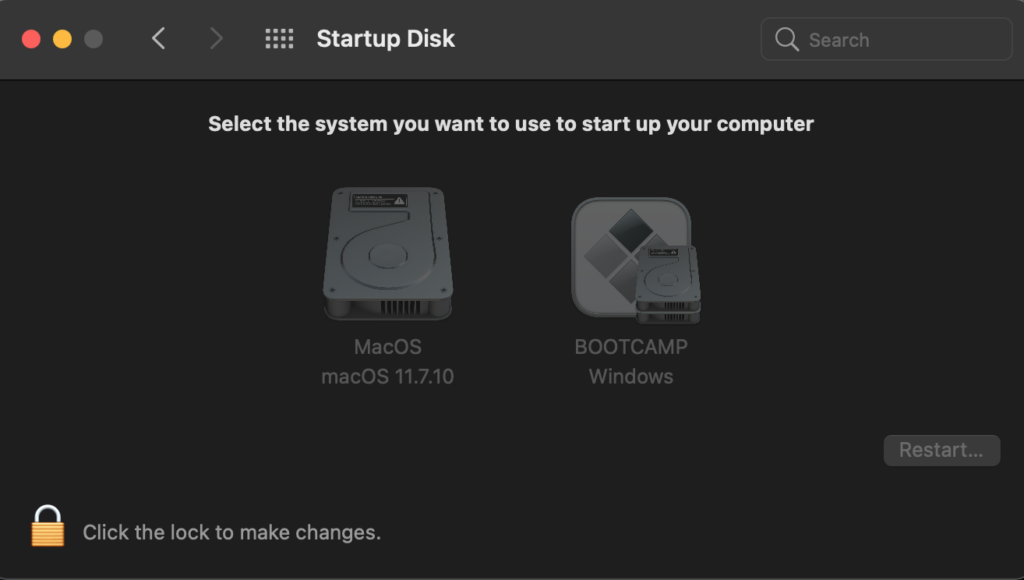
First off, if you’re familiar with how gamers can side-load Windows onto their Intel Mac using Bootcamp to run titles in a native manner, you’ll be displeased to know that doesn’t work any longer with the advent of Apple Silicon.
Bootcamp doesn’t work with Macs based on Apple Silicon. (Image By Tech4Gamers)
Using Parallels To Emulate Windows On Apple Silicon
Now you’re wondering as to how you’re supposed to emulate Windows on a Mac with Apple Silicon since you can’t rely on the good old Bootcamp utility anymore.
Allow me to introduce Parallels to you.
Parallels Desktop For Mac. The 1-time purchase doesn’t offer compatibility with future OSes. (Image By Tech4Gamers)
Parallels Desktop for Mac has been known for selling its virtualisation software since 2006 to emulate Windows in a simplified, but convenient manner.
Parallels offers you a choice of three options. (Image By Tech4Gamers)
However, Parallels is pretty expensive, and the standard subscription will set you back by $100 per year, unless there’s a limited-time discount.
Also, Parallels doesn’t support DirectX, so you might still be unable to play a few particular games in Windows.
Alternative Utilities For Emulating Windows On Apple Silicon
If you’re not immediately jumping at the idea of shelling out $100 per year just to emulate Windows on your M-Series Mac, I totally get it, we’re in the same boat.
Luckily, we have a few other options.
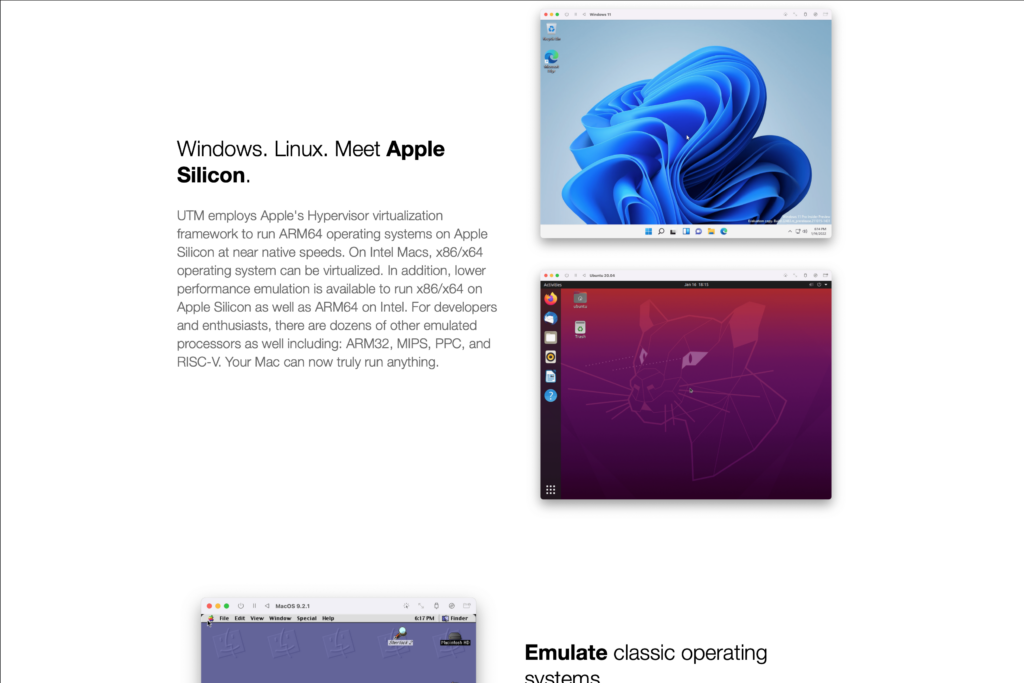
The standard version of VMWare Fusion is available for free and will get the job done for you, but don’t expect the experience to be as seamless or performant as the one with Parallels.
You can even have a go at Linux with QEMU/UTM. (Image By Tech4Gamers)
If you’re more of a seasoned user, you can also opt for QEMU/UTM, which will also work for free and emulate Windows on ARM on your M1/M2/M3 Mac by using macOS’ integrated virtualisation engine.
Downsides Of Emulating Windows On Apple Silicon
For starters, if you’re using Parallels to emulate Windows, you’ll need to upgrade to the Pro subscription which will cost you $120 per year.
Otherwise, your VM (Virtual Machine) will only be able to utilise 4 CPU cores and 8 GB of RAM no matter how highly specced your Mac really is, and that’ll detrimentally affect your system’s overall performance.
If you’re using VMWare Fusion (the standard version) or QEMU/UTM, you won’t have to pay, but neither will the installation process be simplified, nor will the user experience be convenient, and definitely don’t expect the VM’s performance to be on par with that of Parallels.
Let’s not forget that the CPU/GPU utilisation issue that applies to Parallels also applies to VMWare Fusion and QEMU/UTM in an even more severe manner, hence, the downgraded performance in comparison to Parallels’.
In contrast, you can find an Intel Mac capable of gaming for as little as $250-400 with a healthy amount of RAM and storage (2013-2015 MacBook Pros), going up to $500-1200 for the latest Intel MacBook Pros or 2013 Mac Pros with dedicated GPUs for gaming.
Moreover, the portable MacBook Airs and MacBook Pros offer great high-resolution screens along with industry-leading speaker systems, glass trackpads, aluminium chassis, solid keyboards, and best-in-class batteries.
Long story short, if you want to natively game on a Mac, those Intel Macs are still looking pretty hot.
As the CPU Cooler and RAM Expert, I test the latest hardware to provide tips for smart purchases. I cover everything from busting myths about CPU coolers to looking into the newest RAM designs, examining various parts of PC hardware.
Story Highlight
Most mainstream handhelds have gotten quite powerful, even offering performance comparable to similar-priced laptops.
While it might not be ideal, connecting a portable mouse and keyboard can allow handheld PCs to act as laptop replacements.
However, handhelds come with a few drawbacks, including smaller screen sizes, fewer ports, and awkward controls.
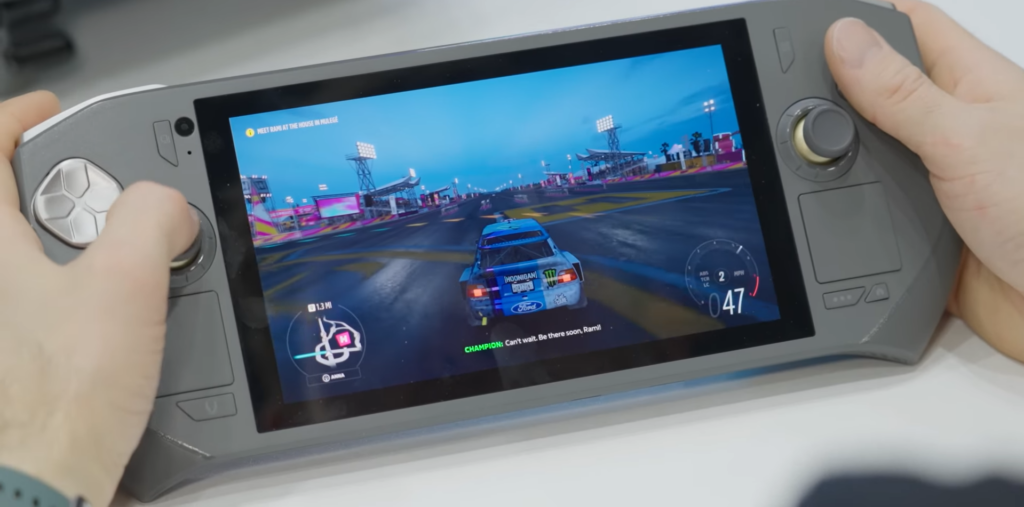
There’s no denying that handheld gaming PCs have become a lot more popular in recent years, and their performance has been remarkably impressive for the price. What’s interesting is that most PC handhelds can essentially function as laptops, with most even using full-blown Windows as the main OS, which has left me wondering, can they actually replace your laptop?
Using a handheld PC as a laptop replacement means you will have to compromise on quite a lot. While these aren’t deal-breakers, they will certainly pose issues that you would otherwise not get when using a full-sized laptop.
Small Screen Sizes: Most handhelds come with a screen size of around 7-9 inches, which isn’t a lot if you intend to use it for prolonged periods. Personally, even 10″ seems a bit too small for writing; however, it isn’t completely impossible either.
The Need For Proper Perephirals: Unless you are working with a portable keyboard and mouse, using your handheld PC as a laptop replacement is not practical. Sure, some handhelds do come with touchpads, but that simply doesn’t cut it for proper use.
Limited Ports: Most mainstream handhelds do come with fewer ports when compared to laptops, which can be an issue, considering you will have to carry a separate dock around at most times.
Granted, a lapdock such as the Nexdock can solve all of the listed issues; however, that would further add to the overall cost that you could otherwise spend to get an even better-performing laptop.
Where Handhelds Shine
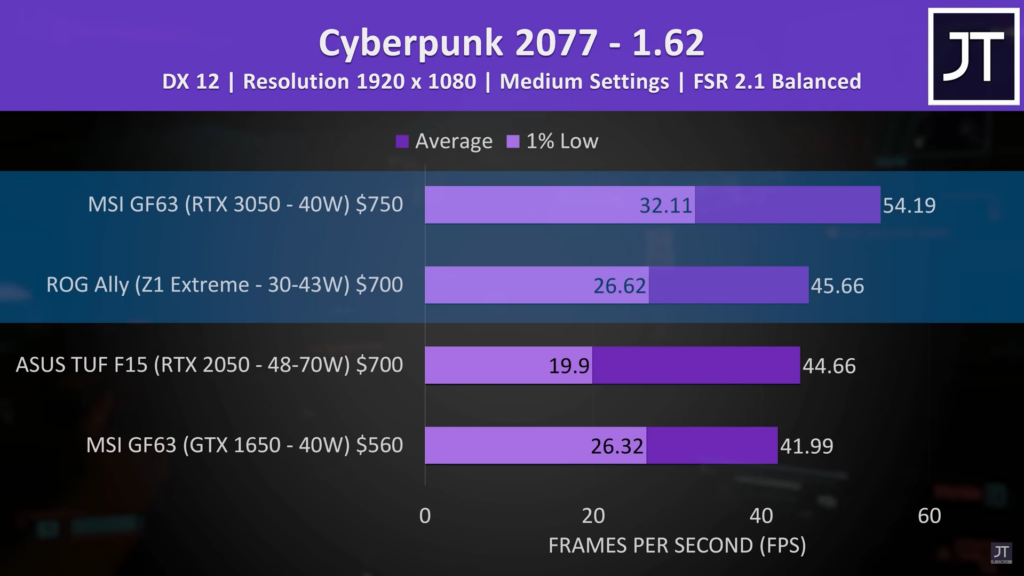
Internally, most handhelds are more similar to laptops than you might think. Of course, handhelds still lack dedicated GPUs, but they can fare well against similar-priced laptops thanks to chips such as the AMD Z1 Extreme.
As seen in Jarrod’s Tech’s tests, the ROG Ally does come fairly close to matching a $700 laptop. So if you’re looking for a portable device to replace a budget gaming laptop, then a handheld PC is going to be a great deal, especially considering how convenient they are to carry around.
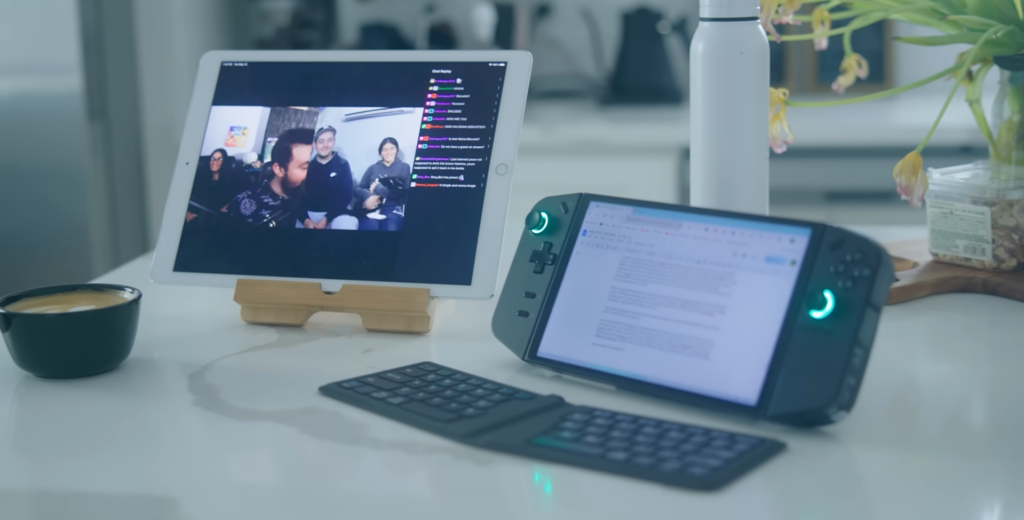
Legion Go As A Laptop Replacement (Image Via WULFF DEN)
Even if you add a wireless keyboard and mouse into the equation, you will probably find that entire setup easier to carry around than a gaming laptop.
That’s because laptops are a lot harder to use unless you have an actual desk to work with. What’s more, you’ll also have to carry a controller around if you intend on gaming on the go.
A PC handheld ultimately solves all of the issues, making for a comfortable gaming device even if you aren’t working with a proper desk setup. Personally, I am a huge fan of the convenience these handhelds offer when it comes to portability.
Usable, But Not Ideal
I’d essentially never suggest replacing your laptop with a handheld PC, especially considering how much you miss out with the handheld. While they manage to keep up fairly well in terms of performance, the smaller screen, limited ports, and touch controls are still issues you won’t have to deal with on laptops.
So, while PC handhelds can double down as laptop alternatives, purchasing them solely to replace your laptop isn’t ideal. However, using a handheld as a secondary laptop is still a great option, allowing you to bring the handheld along on occasions when a laptop feels too bulky.
Of course, that is a huge expense that most simply aren’t willing to take. If you’d like to keep your budget in check, opting for a laptop should be your best bet.
At Tech4Gamers, I contribute as a Senior News Reporter, combining my skills and gaming enthusiasm to keep our audience updated on the latest developments.
Story Highlight
Leaks hint at the return of usable gyms in GTA 6.
The game is expected to feature a weight loss/gain system similar to that of GTA San Andreas.
Fans have spotted images of Lucia and Jason in very different physiques, providing further evidence of these mechanics.
Rockstar is currently moving full speed ahead with work on GTA 6 as the team aims for a Fall 2025 launch. GTA 6 will mark the first release in over a decade, leading to plenty of fan requests and expectations.
Since GTA San Andreas is often considered this IP’s best entry, many fans hope to see GTA 6 borrow various elements from this entry. Fortunately for them, Rockstar seems to be bringing back the weight loss and gain system for its upcoming title.
Why it matters: GTA San Andreas allowed players to customize and tune CJ’s physique to their liking. Eating and going to the gym had a noticeable impact on his body, motivating players to hit the gym for the best results.
GTA 6 Is Arriving In Just Over A Year
Evidence of these mechanics was spotted in the GTA 6 leaks from a few years ago. As shared on Twitter, gyms and wrestling are mentioned as prominent activities in the leaked GTA 6 files.
What’s more interesting is that previous leaks also showed Jason and Lucia in various physiques. The former was noticeably more fit in one clip compared to his look in other videos from the same leak.
Meanwhile, fans noted similar differences for Lucia in different clips. This hints that Jason and Lucia will be able to go through similar changes as CJ, with the player’s action driving their appearance.
This mechanic has been missing from recent GTA entries, and its return may hint at a greater degree of customization for the IP’s latest protagonists.
Elsewhere, GTA 6 is said to feature realistic gore. Going by the leaks and recent reports, the game seems to be a culmination of Rockstar’s work and experience, leading to excitement among the masses.
Take-Two has teased that the game will offer things nobody has ever seen, making it a huge deal for the industry. In fact, most publishers are hoping to avoid a clash with GTA 6 in 2025.
As Tech4Gamers’ Wiki Editor, I dissect gaming products, offering detailed perspectives on a variety of PCMR hardware ranging from the Best Motherboards and CPUs to the Best GPUs, RAM, and PSUs.
Story Highlight
1440p monitors provide better visual quality than 1080p without the high-performance demands of 4K, making them great for gaming.
High-quality 1440p monitors are cheaper than 4K ones, and they offer great color and speed, allowing gamers to spend more on other setup parts.
1440p monitors meet current and future gaming needs. They are optimized for many games and compatible with PlayStation 5 and Xbox Series X, serving both PC and console gamers.
As an enthusiastic gamer, I’ve always looked for the best gear to enhance my gaming experience. Over the years, I’ve tried various setups, from basic 1080p monitors to ultra-high-definition 4K displays. Finally, I have realized that 1440p monitors match the perfect balance between performance and value for gamers. Here’s why I believe 1440p monitors are the best choice for gamers this year.
Visual Upgrade Without the Performance Hit
Firstly, let’s talk about resolution. 1440p monitor offers a significant upgrade over the standard 1080p without the massive performance hit that 4K demands. The difference was immediately noticeable when I switched from a 1080p monitor to a 1440p display.
The higher resolution provides you with more space on your screen and crisper images, making everything from text to game textures look sharper and more detailed.
This clarity improves engagement allowing you to spot enemies more easily in fast-paced shooters or appreciate the tiny details in expansive open-world games.
No Compromise On Performance
Performance is another critical factor. While 4K monitors are undeniably stunning, they require powerful hardware to run modern games smoothly at such high resolutions. Even with the latest GPUs, maintaining a high frame rate at 4K can be challenging, especially in graphically demanding titles.
On the other hand, 1440p hits the sweet spot. It delivers a noticeable improvement in visual quality over 1080p without straining my system to the limit. This balance allows me to enjoy high frame rates and smooth gameplay, which are crucial for competitive gaming.
The cost-effectiveness of 1440p monitors cannot be overstated. High-quality 1440p monitors are generally more affordable than their 4K counterparts. Although they are more expensive compared to 1080p monitors, they are worth the price in my opinion.
While I was looking for a new monitor, I found that I could get a top-of-the-line 1440p monitor with excellent color accuracy, high refresh rates, and low response times for a fraction of the price of a comparable 4K monitor. This affordability means I can invest in other components, like a better GPU or a more comfortable gaming chair, enhancing my overall gaming setup.
A Game-Changer In Refresh Rates And Response Time
Transitioning to refresh rates and response times, 1440p monitors shine here as well. Many 1440p monitors now offer refresh rates of 144Hz or even 240Hz, providing silky-smooth gameplay that’s essential for fast-paced action games and eSports. When I first experienced gaming at 144Hz, it was great.
The fluidity and responsiveness transformed my gaming experience, making it difficult to go back to 60Hz. In addition, 1440p monitors often come with low response times, reducing motion blur and ghosting, which can be a significant advantage in competitive scenarios.
Monitor
Size and Resolution
Refresh Rate and Response Time
Asus ROG PG279Q
27 inches, 1440p
165 Hz, 4 ms
Acer Predator XB241H
24 inches, 1080p
144 Hz, 1 ms
Dell Gaming S2417DG
24 inches, 1440p
165 Hz, 1 ms
Future-proofing Your Gaming Setup
Another aspect you can take into consideration is the future-proofing potential of 1440p monitors. Gaming technology is continuously evolving, and while 4K may seem like the ultimate goal, it’s not yet the standard for most gamers.
Many game developers design their titles with 1440p in mind, ensuring optimal performance and visual quality. By choosing a 1440p monitor, you can feel confident that your setup will remain relevant and capable of handling upcoming games for years to come.
Console Compatibility
In terms of ecosystem compatibility, 1440p monitors also integrate well with a variety of gaming consoles. The latest consoles, like the PlayStation 5 and Xbox Series X, support 1440p output, making these monitors an excellent choice for console gamers who want to enjoy high-quality visuals without the need for a 4K TV. This versatility ensures that your 1440p monitor is a central hub for all of your gaming devices.
PlayStation 5 (Image By Tech4Gamers)
1440p Monitors Are A Must-Have For 2024
To wrap it up, 1440p monitors represent the ideal choice for gamers in 2024 due to their perfect blend of performance, affordability, and visual quality. They offer a significant upgrade over 1080p, deliver smoother gameplay with high refresh rates, and future-proof my gaming setup without being very pricy. If you’re considering an upgrade this year, I highly recommend looking into a 1440p monitor—you won’t be disappointed.
At Tech4Gamers, he is recognized for his insightful features and opinion pieces, where he blends his passion for gaming with a keen understanding of technological trends. His work, marked by depth and accessibility, makes him a respected voice in the tech and gaming community.
Story Highlight
BitLocker offers robust encryption, protecting your data against unauthorized access and theft.
It integrates seamlessly with Windows but requires specific editions and system requirements.
Proper setup and safeguarding of the recovery key are crucial to prevent potential data loss.
When it comes to protecting data on my Windows computer, I’ve often pondered whether BitLocker, the built-in encryption tool, is worth using. After delving into its benefits and drawbacks, I’ve formed a solid opinion on the matter and am eager to share it. Here’s my take on whether you should use BitLocker on your Windows device.
I No Longer Need to Worry About Unauthorized Access To My Data
BitLocker offers robust encryption, safeguarding my data against unauthorized access. In an era where cyber threats are inevitable, it gives me peace of mind to have my sensitive information encrypted.
With BitLocker, my data is secure even if someone steals my device physically. Without the appropriate authentication, the encrypted data remains inaccessible. This layer of protection is critical, especially when traveling or working in public spaces.
BitLocker Is Windows Integrated
One of the most significant advantages is its seamless integration with Windows. Since BitLocker is a Microsoft product, it works perfectly with the operating system. I don’t need to worry about compatibility issues, and it’s easy to enable and manage through the Windows interface.
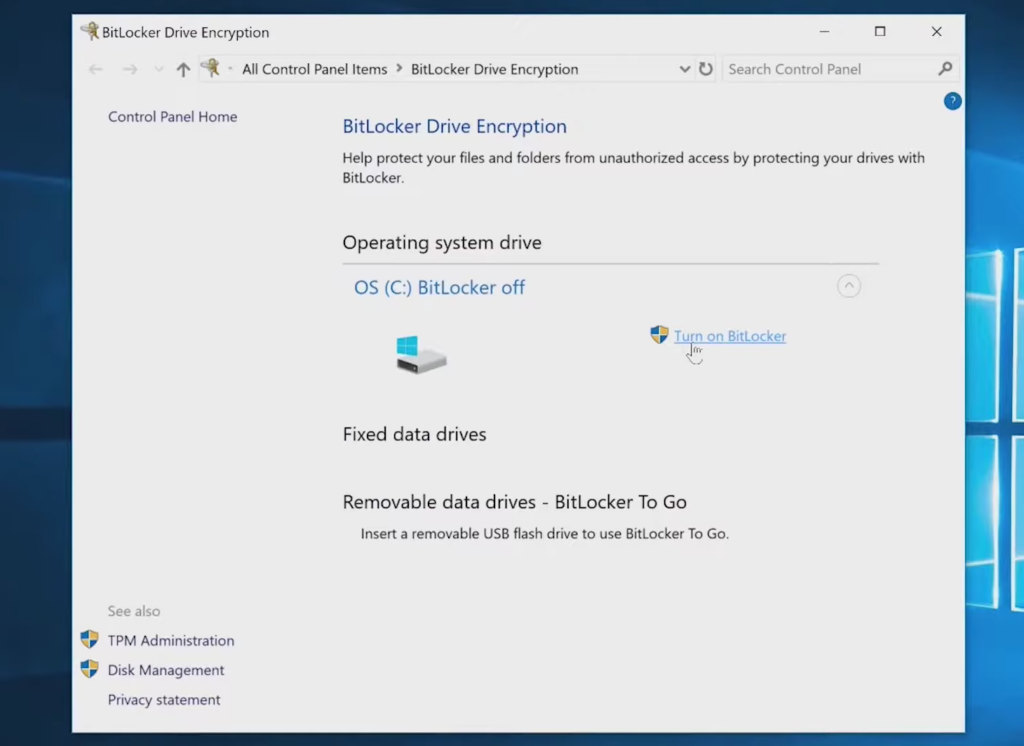
Search Manage BitLocker in the search bar of your windows and open it. Then, you need to click on ‘turn on BitLocker’ as shown in the following image.
Activating BitLocker Encryption (Image By Tech4Gamers)
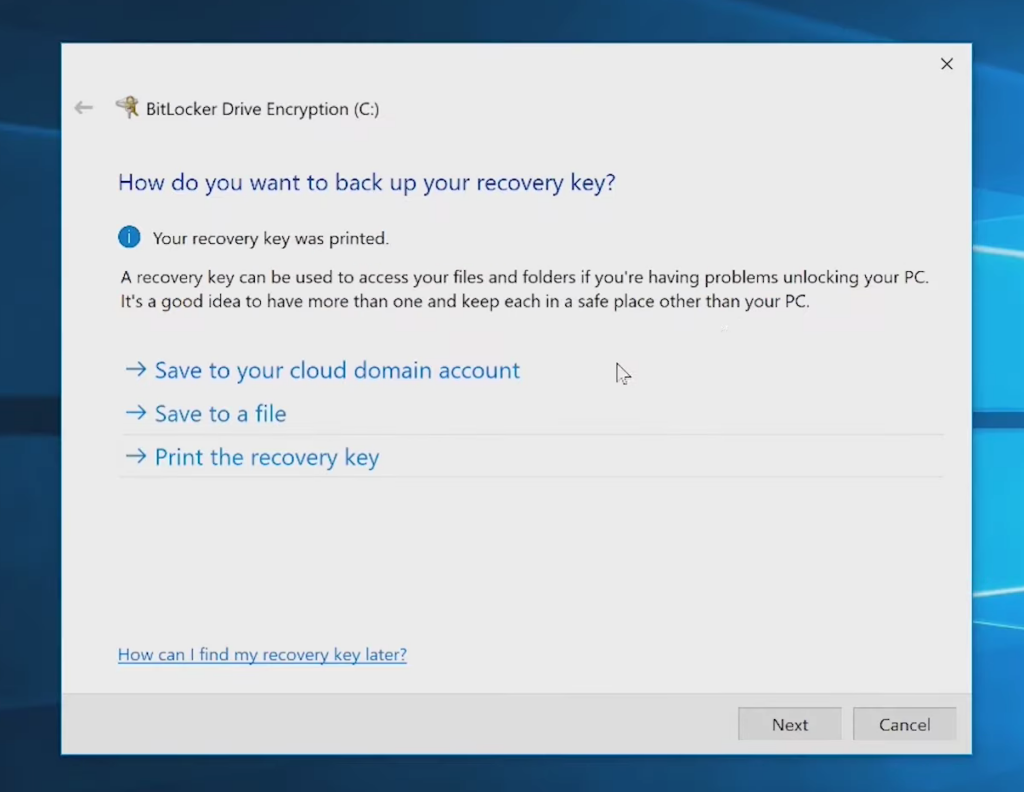
Choose the method by which you would like to save your recovery key and then click on ‘Next’.
Back Up Recovery Key (Image By Tech4Gamers)
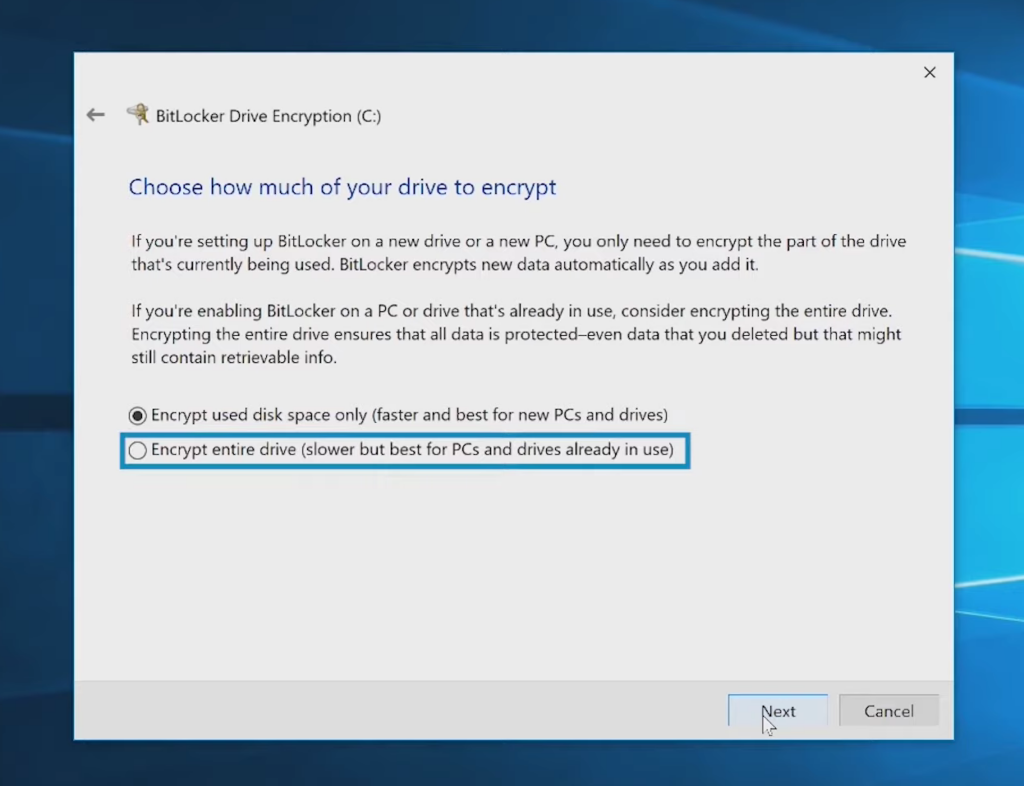
After this, click on one of the volume encryption options according to your PC and then click on ‘Next’.
Encryption Drive (Image By Tech4Gamers)
Click on ‘Run BitLocker system’ check and click on next again. You must then restart your PC to activate BitLocker. This may take some time.
Restart To Enable BitLocker (Image By Tech4Gamers)
It is worth mentioning that BitLocker is available only in Windows Pro, Enterprise, and Education editions from Windows Vista onward, but not in Windows Home editions.
Transparency In Operation
Once you set up BitLocker, it runs transparently in the background. I don’t notice any performance degradation in my daily use. The encryption and decryption processes occur on the fly, so I can continue working without interruptions.
User Must Meet System Requirements
In order for you to utilize BitLocker, there are some system requirements that you must fulfill.
You must install TPM 1.2 or later on your PC if it’s already not present.
Additionally, you need to have two or more partitions on your storage drives.
The OS drive must be formatted with NTFS.
Setup Might Be Complex For Some Users
Setting up BitLocker isn’t always straightforward. When I first enabled it, I had to navigate through various settings and ensure my hardware was compatible. This initial complexity might be a problem for users who are not tech-savvy.
Potential Risk Of Data Loss
If you lose the BitLocker recovery key, you risk losing access to your data forever. This is a significant concern, and you have to be very proactive about storing the recovery key in a safe place. It’s a trade-off between security and accessibility.
To mitigate this risk, I recommend keeping multiple copies of the recovery key in secure locations, such as a trusted cloud storage service, a secure USB drive, or even a physical printout stored in a safe. By taking these precautions, you can ensure that you have a backup plan in place if you ever need to recover your encrypted data.
BitLocker Is Not Foolproof
While BitLocker provides strong encryption, it’s not invulnerable. Sophisticated attackers might still find ways to bypass it, especially if they have access to advanced tools or exploit vulnerabilities in the TPM. Relying solely on BitLocker without additional security measures might give you a false sense of security.
My Verdict
After weighing the pros and cons, using BitLocker is a prudent choice for most Windows users, including myself. The security benefits far outweigh the potential downsides. The peace of mind knowing that my data is protected, even in the event of theft, is invaluable. However, it’s essential to approach it with caution—ensure proper setup, safeguard the recovery key, and remain aware of its limitations.
Ultimately, BitLocker provides a significant boost in data security, making it a worthwhile tool for anyone serious about protecting their personal or professional information on a Windows device.