At Tech4Gamers, I contribute as a Senior News Reporter, combining my skills and gaming enthusiasm to keep our audience updated on the latest developments.
Story Highlight
Battle passes initially came with the promise of eradicating loot boxes.
They have become prevalent in all games today, even in $70 AAA releases.
Most battle passes rely on the fear of missing out to keep players engaged for hours on end without offering meaningful content.
The modern battle pass has become a hallmark of live service gaming. Boot any of the hundreds of live-service games available on consoles and PCs today, and you’ll almost certainly be met with one soon after reaching the menus.
This practice has even made its way into fighting games like Tekken and Street Fighter. Despite its popularity, however, I find it completely unacceptable. More often than not, publishers use this practice to mask terrible microtransactions behind a veil of free content and progression rewards.
Who doesn’t love having to grind for hours upon end to unlock the next boring recolor of an existing outfit in the yearly Call of Duty release? Truth be told, I’m tired of seeing battle passes everywhere and hope the industry moves on soon.
Loot boxes were all the rage before Fortnite helped change the system.
The Lesser of Two Evils
I’m not exactly sure when this practice began, but it wasn’t until Fortnite that battle passes really took off. One may argue that consumers had it worse in the past, with loot boxes being the hot trend for every publisher and developer.
At the time, battle passes came with a promise for a more fair monetization system, one that would be pocket-friendly and reward players for investing time into the game. However, I’ve come to realize that this was the lesser of two evils.
Where loot boxes were seen as predatory for their random luck-based drops, many initially appreciated battle passes for offering upfront content without deception. However, we failed to realize that the system would soon make its way into $70 AAA titles.
They made sense in free-to-play titles like Fortnite but are now pushed into nearly every modern game with a monetization system. There’s a reason players were so outraged about Tekken 8’s monetization.
The Tekken 8 battle pass contains useless items like a basic ball render from Unreal Engine.
FOMO & Grinding
The worst thing about this practice is the content itself. Spread across the 100 tiers, you’ll find cosmetic skins, emotes, avatars, and a variety of other meaningless content. Publishers effectively lock five to six great add-ons behind a 100-tier-long grind wall.
Moreover, they let you pay to get through those 100 tiers instantly because why wouldn’t they? Some games also offer separate free and paid versions of this implementation. The former is almost never worth investing your time in.
Furthermore, battle passes prey on peoples’ fear of missing out. Once a new season arrives in a live-service game, there’s almost always a rush to buy the new battle pass for the latest skins.
However, this content typically lasts for a limited amount of time, forcing dedicated players to spend hours upon hours grinding for one or two desirable skins that may be eventually seen as a badge of honor. If you’re running short on time, there’s always the option to pay for tier skips, and that’s probably what publishers bet on.
This is problematic for people who enjoy more than one game. Chances are, multiple of your favorites will have a battle pass, so you’ll be forced to pick one or the other. I will point out that certain games make exceptions here.
Titles like Halo: The Master Chief Collection do away with the time limit, while many others add currency in the tiers, allowing those who complete all tiers to buy the next one at no additional cost.
However, these systems don’t make up for the other negatives.
Call of Duty combines different types of microtransactions. | Image via Tech4Gamers
Traditional Microtransactions & Battle Passes Join Forces
Boot up games like Apex Legends, and you’ll find this implementation serving as an extension of the monetization. Even $70 premium titles like Call of Duty resort to the same practice.
This makes the system an even harder pill to swallow since it may not necessarily guarantee the best cosmetics. What happens when you just paid for the latest battle pass and a shiny new skin is being sold separately in the other microtransaction shop?
There’s also the problem of such systems forcing players to adopt specific play styles to complete objectives. This was a major problem that Halo Infinite faced, but things may be about to get much worse.
If reports are to be trusted, Ubisoft intends to debut a battle pass for Assassin’s Creed Shadows through its Infinity platform. This could open the floodgates to the mechanic becoming popular in single-player titles, and I don’t think I’m ready for such a future.
At Tech4Gamers.com, I cover the latest news and rumours in the gaming industry, from new game releases to hidden gems and video game leaks. Furthermore, I occasionally write tech articles about video game consoles, providing insights into the hardware and software that powers our gaming experiences.
Story Highlight
Despite the growing popularity of AI among developers, Nintendo stands out by maintaining its traditional game development approach.
The company aims to deliver value that cannot be achieved solely through AI technology.
Nintendo values preserving its IPs more than embracing the AI trend in game development.
While Embracer believes AI is absolutely necessary in the gaming industry, Nintendo begs to differ. The company has confirmed that it has no plans to use generative AIfor future game development.
That means Nintendo’s first-party titles will stay AI-free for the time being. The company made this announcement during a recent Q&A with investors, during which it outlined its vision for the future of gaming on its platforms.
Why it matters: The gaming giant’s choice not to use this technology shows a dedication to maintaining the creative and handcrafted style that has defined its first-party releases for many years.
Nintendo confirms that future Zelda games will not utilize generative AI.
AI has become increasingly popular among studios. Nintendo, though, stands out by prioritizing the preservation of its unique game design philosophy rather than following this trend.
While talking to investors during a Q&A session, Nintendo’s President Shuntaro Furukawa said that AI is indeed quite impressive, but it won’t be the end-all-be-all.
We hope to continue to deliver value that is unique to us and can’t be achieved through technology (AI) alone.
-Shuntaro Furukawa
Nintendo is dedicated to providing unique and fun gaming experiences. While staying open to technological advancements, the company is careful not to compromise its intellectual property integrity.
Nintendo prefers protecting its intellectual property rights over the usage of generative AI.
Publishers are increasingly using AI to cut costs and speed up development. Companies such as EA and Microsoft are excited about AI’s ability to streamline different game development processes.
Developers and publishers are exploring using AI to improve game environments, make NPCs act more realistically, and simplify development. Moreover, Nvidia is considering introducing features like AI-generated objects and textures in DLSS 4.
The aim is to make development faster and cheaper by reducing the reliance on human labor. However, the main concern is about developers losing jobs.
With many layoffs in the industry, AI could worsen job losses. There are also major worries about how it will affect intellectual property rights, which are crucial for developers and publishers.
Regardless, it is nice to see Nintendo saying no to using generative AI. On the other hand, a recent survey reveals that about 30% of developers already use AI to create in-game assets.
At Tech4Gamers, I hold the role of a News Reporter, where I merge my passion for gaming with my knack for storytelling. This unique blend allows me to bring you the latest updates, reviews, previews, and features from the gaming world.
Story Highlight
GTA Online was released in October 2013 and has been continuously updated.
In its nearly 11 years of existence, the game has received a whopping 50 content updates, adding heists, casinos, clubs, and more.
GTA Online grew so big that Rockstar even reworked single-player DLC elements into content updates for this live-service mode.
Rockstar has always been known for its work in the single-player genre. With hits like GTA 5, Red Dead Redemption 2, and more, it’s easy to see why fans are so fond of the studio’s single-player offerings.
However, things changed in 2013. Following the release of GTA Online, Rockstar embarked on a journey that catapulted the studio to new heights. Over 10 years later, GTA Online is doing better than ever and has received 50 content updates.
Why it matters: Rockstar’s online components were considered fun add-ons, but GTA Online completely flipped this narrative. Millions continue to play GTA 5 solely for this mode.
GTA Online launched on October 1, 2013, two weeks after the release of GTA 5, so it’s been in the top charts for over a decade. In fact, it continues to dominate live-service gaming to this day.
As reported on Twitter, Rockstar has launched a whopping 50 updates for the game since 2013. Fans keep coming back to the title because fresh content awaits them each time they return.
From missions such as the Diamond Casino and Doomsday heists to updates like Last Team Standing, Arena War, and Lost Santos Drug Wars, GTA Online has never failed to provide a large variety of content.
The game’s selection of vehicles, weapons, and properties has also been greatly expanded since 2013. Rockstar has even repurposed planned single-player content like the Agent Trevor DLC into missions for GTA Online.
GTA 5 Heists Provide An Exciting Experience When Played With Friends
This journey is also coming to an end soon, but Rockstar has one full year of updates left. GTA 6 is currently confirmed for a Fall 2025 launch, and fans can expect similar support for its online component next year.
Perhaps the team will have released 50 updates for GTA 6 by 2035. Whatever the case may be, Rockstar’s journey from a single-player giant to an unchallenged live-service studio has been fascinating to see.
At Tech4Gamers, I contribute as a Senior News Reporter, combining my skills and gaming enthusiasm to keep our audience updated on the latest developments.
[Press Release] The long anticipated release of Noctua’s NH-D15 G2 cooler is finally here. This cooler is accompanied by the NF-A14x25r G2 fans, with both G2 options marking a commitment to refined products for the best results.
We faced various challenges in designing and manufacturing, but we’ve cut no corners.
-Noctua CEO
Noctua explains that the NH-D15 G2 is meticulously crafted. Thanks to 8 heatpipes, the NF-A14x25r G2 fans, and asymmetrical fin stacks, the cooler is quieter and performs better than its predecessor. All in all, the NH-D15 G2 can even rival AIO coolers.
The company has also made the cooler compatible across more devices for maximum support. Thanks to the new offset construction, it can clear the top PCIe x16 slot on most motherboards.
Finally, the cooler has been upgraded to the Torx-based SecuFirm2+ mounting system. To make things even better, the NH-D15 G2 comes with a massive six-year warranty, making it an ideal choice for those needing a high-end cooler.
Noctua offers four variants of this cooler. The regular option, with its medium base convexity, is best suited to the AM5 platform. Meanwhile, the high-base convexity model is a great fit for LGA1700 processors.
A low-base convexity model will also be launched, making it compatible with flat CPUs on platforms like AM4, LGA2066, and more. To wrap things up, the company is offering its NF-A14x25r G2 fans separately for those looking to upgrade existing heatsinks.
Noctua’s NH-D15, NH-D15S, and NH-U14S coolers can be upgraded with the new fans. A square frame variant of the fans is also being worked on, and it will be released in September for water cooling radiators.
For more details on the cooler and other Noctua products, head to the official website.
At Tech4Gamers, I contribute as a Senior News Reporter, combining my skills and gaming enthusiasm to keep our audience updated on the latest developments.
As we all know, playing video games is the best way to spend our time.
But there are ways to make that quality time even better. In recent years, the finest minds in ergonomic engineering have dedicated themselves to creating ever more comfortable, posture-improving, and life-enhancing chairs specifically for gaming at a desk.
AndaSeat is at the forefront of this search for ultimate comfort, and the Kaiser 4 is the company’s latest attempt at sedentary perfection.
The Kaiser 4 Comes In Various Color Options
Previous models from the Kaiser range have earned widespread acclaim for their outstanding comfort, durability, and stylishness, but the quest for perfection is never over.
“Innovation drives us to continually improve our designs and introduce new technologies,” explains Lin Zhou, CEO of AndaSeat. In the case of the Kaiser 4, that innovation is evident in a range of improvements and features, not least the groundbreaking (if mind-bending) 5D armrests. That’s at least one more dimension than we thought a chair could occupy.
There’s also a super-comfortable magnetic head pillow, stain-resistant and sustainable leather upholstery, an adjustable rocker, a four-level pop-out system for lumbar support, and the ability to recline all the way to an eminently nappable 15 degrees. So, how did AndaSeat go about making a follow-up to the Kaiser 3?
“When creating the AndaSeat Kaiser 4,” says Lin Zhou, “our primary aims were to combine exceptional comfort with cutting-edge technology and durability.” This aspiration was about more than just keeping up with competitors in the space.
At the heart of AndaSeat’s research was the experience of, to quote Lin Zhou directly, the company’s beloved customers. “We wanted to create a gaming chair that supports gamers during long sessions, reducing fatigue, and enhancing performance.”
Performance isn’t a word you’d normally associate with chairs, but it’s a big part of what makes the Kaiser 4 stand out. Initially founded in 2007 as a manufacturer of high-end racing car seats, AndaSeat has since entered the world of eSports and prides itself on providing a competitive advantage to some of the most highly skilled athletes on earth.
In addition, of course, to being very comfortable by using “the highest quality materials to offer both luxury and longevity.” This approach has enabled AndaSeat to become a market leader, with 6 million happy customers and climbing.
It’s not easy to stay at the top, and AndaSeat faced some serious hurdles in getting the Kaiser 4 ready for launch. “One of the main challenges,” explains AndaSeat Marketing Manager Allen Lai, “was balancing advanced features with affordability.”
“We wanted to incorporate state-of-the-art materials and ergonomic designs without making the product inaccessible to our core audience.”
It goes without saying that adhering to these standards put even greater pressure on quality control. “Ensuring that our supply chain could meet the high standards of production quality and sustainability posed another significant challenge.”
Experience and high standards both play a role in AndaSeat’s success, but gamers deserve a share of the credit, too, as Lin Zhou explains. “Our focus on user feedback … means that the Kaiser 4 is tailored to meet the specific needs of gamers, setting it apart from other products in the market.”
AndaSeat is clearly very pleased with the Kaiser 4, but the quest for perfection goes on, with more “customization options and features based on user feedback” already in the pipeline.
You can expect to see plenty of AndaSeat chairs in the wild, too. The company is exploring a number of partnerships with eSports organizations and gaming brands, cementing its place as a fixture in the gaming community.
At T4G, my task is to cover the latest news around the gaming globe ASAP and with the utmost precision. I adore all the games and respect all the devs behind the amazing games that we get all year. So, whether it’s a PC or a Console game, I got it all covered.
Story Highlights
Analysts have revealed why the PS5 runs many games better than the Xbox Series X.
Sony’s console has a much more efficient architecture, making designing games much easier.
It also has the advantage of having a faster API than Microsoft’s DirectX.
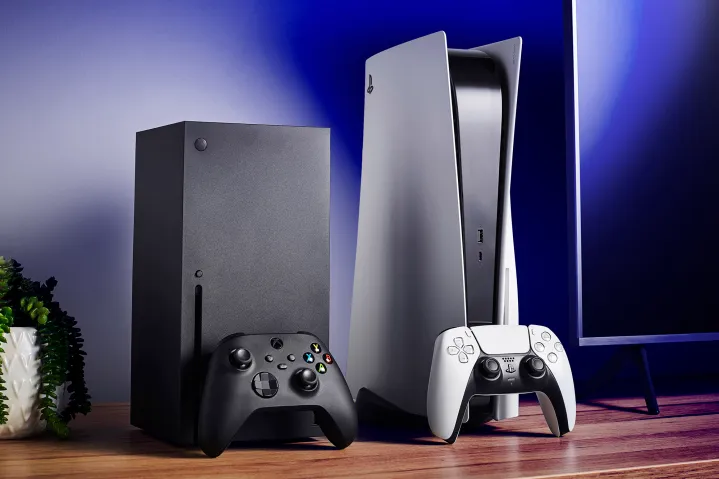
It’s no news that PlayStation has dominated the current generation of consoles. Despite the PS5 and Xbox Series X boasting a similar AMD Zen 2 processor with RDNA 2 graphics, the latter has a hardware lead on paper.
However, Sony’s console often produces better results in real-world gaming tests. According to analysts who have talked to various developers, the PS5 is just better optimized for most games.
Why it matters: The Xbox Series X boasts 52 RDNA 2 CUs, leading to 12 teraflops of performance. On the other hand, the PS5 GPU is limited to just 36 RDNA 2 CUs, resulting in 10.28 teraflops.
In its latest video, Digital Foundry outlines the general sentiment around the PS5 and Xbox Series X competition. The analysts have spoken to various developers and can now share a conclusive answer.
There’s no denying that Microsoft’s hardware has not lived up to its potential, and a huge reason for this seems to be that developers prefer Sony’s implementation due to its more efficient design.
As the developers explained, the PS5’s GPU compiler is faster and more optimized. It’s a complex design but utilizes the silicon much better than the Xbox Series X. Sony’s API also seems much faster than Microsoft’s DirectX.
One of the big ones that we’ve heard reference is the shader compiler. On the PlayStation side, it’s just extremely fast and optimized.
-Digital Foundry
Furthermore, developers prefer the faster clocks of the PS5 GPU. Apart from the discrepancy in compute units, the PS5’s RDNA 2 GPU runs at a variable 2.23GHz. Meanwhile, Microsoft locked the GPU at 1.825GHz.
The PS5 Is Weaker Than The Xbox Series X On Paper
Some games still run better on the Xbox Series X. Alan Wake 2, for example, shows how Microsoft’s console can benefit from the raw hardware improvements. However, PlayStation seems to be better or equally capable across the board.
Another reason for this surprising result could be the fact that most developers prioritize PlayStation as the lead platform.
When it comes to real-life usage, neither console is significantly better than the other. However, this is a disadvantage for Xbox Series X since Microsoft sold this console as the most powerful hardware in the world.
At Tech4Gamers, I mainly cover new gaming news, leaks, and rumours. Aside from that, I love to write features about my favourite games while inserting my opinion about their different aspects.
Story Highlight
Capcom recently revealed Dead Rising Deluxe Remaster.
The studio states this project is more of a remake, with many parts built from the ground up.
It utilizes the RE Engine and boasts much more enhanced visuals.
Capcom is the best developer when it comes to remakes. With remakes like Resident Evil 4 and 2 under its belt, this studio has set a new bar for re-releases. Such remakes have also sparked demand for a Dead Rising remake.
However, Capcom announced Dead Rising Deluxe Remaster last week, leading to some disappointment among fans who wanted the remake treatment for this series. Fortunately, the team confirms this is more of a remake than a remaster.
Why it matters: Dead Rising is an iconic game from nearly two decades ago that offers an unforgettable experience. Therefore, it deserves recognition among a modern audience.
The developer confirmed during Capcom Next that the announced remaster is basically a remake, so fans now have something to look forward to. For starters, this project is based on a completely different engine.
Capcom uses the same RE Engine for Dead Rising Deluxe Remaster that powers modern Resident Evil games, Dragon’s Dogma 2, and more.
It wouldn’t be an exaggeration to call this game a remake considering the amount of work that we put into it.
-Capcom
As for the changes, the zombies themselves look much better this time around. Capcom has also introduced real-time lighting and shadows, while gameplay elements like the controls and UI have been refined further.
Frank West can now move while aiming, while NPC interactions are fully voiced in the re-release. All in all, Dead Rising Deluxe Remaster has much more to offer than the name may suggest.
Dead Rising Remake Is No Longer A Dream
As for why Capcom refrains from using the remake term explicitly, it may be a case of sticking too closely to the original vision. Perhaps this is one of those remakes that attempt to focus on visual enhancements and quality-of-life changes over fundamental overhauls.
Nonetheless, fans will be glad to know that Dead Rising is back. The game now runs at 60FPS and arrives in just a few months on 18 September. It will also be priced below Capcom’s AAA releases, coming in at just $50.
I’ve been the Journalist & Editorial Writer at Tech4Gamers since July 2022. I spearhead our hardware coverage, including overclocking GPUs, benchmarking CPUs, reviewing peripherals, and fine-tuning custom PC builds for every budget. Daily, I report on breaking gaming news, from major launches and studio updates to the latest industry trends, ensuring our community stays informed. Beyond news briefs, I write in-depth feature articles on gaming culture and emerging technologies. And by collaborating closely with the editorial team on content planning, SEO strategy, and our publishing calendar, I help us consistently hit our traffic and engagement targets.
When it comes to webcams, Obsbot is up there with the best of them, alongside the Obsbot Tiny 2, which was a product I enjoyed reviewing before. With the original model’s best features unchanged and some reasonable price reductions implemented, the company aims for a wider audience. Consequently, we have the brand new Obsbot Tiny 2 Lite, a webcam that seems to be a solid choice.
Its $179 price tag is lower than other products I’ve reviewed from Obsbot, such as the previous Tiny Tail Air, and lower than the $329 initial release pricing of the first Obsbot Tiny 2. The people at Obsbot were so kind to send me the Tiny 2 Lite so that I could do this review.
Why Trust Tech4Gamers
Abdul Hannan is our peripherals expert who has been testing different mice, keyboards, headphones, microphones, and more for years.
130+ peripherals tested and reviewed by our team of hardware experts (Tech4Gamers Team).
500+ hours spent testing different peripherals for our reviews.
At Tech4Gamers, ensuring you get reliable information is our priority. That’s why every hardware round-up undergoes a meticulous review process by our team of experts and editors. Each review is carefully examined against our strict editorial guidelines, guaranteeing you trustworthy insights you can depend on.
Key Takeaways
The Obsbot Tiny 2 Lite is a compact and affordable PTZ webcam, offering high-quality 4K video and advanced AI-powered tracking. Moreover, it features a versatile and user-friendly design with effective gesture controls. It provides excellent value for beginner content creators and professionals looking for a reliable, high-quality webcam.
You should buy the Obsbot Tiny 2 Lite if you are looking for an affordable, high-quality video webcam with advanced tracking and flexibility, a compact and portable design, and user-friendly software.
You should not buy the Obsbot Tiny 2 Lite if you have frequent habit of using your hands while speaking, as it can activate gesture actions.
Built-in dual omnidirectional mics with noise reduction
Audio Modes
Noise-Reduction / Automatic Gain Control
Power
5V/0.6A
Auxiliary App
OBSBOT Center
Box Contents
Box Contents (Image By Tech4Gamers)
1 * Obsbot Tiny 2 Lite
1 * USB-C to USB-A Adapter
1 * USB-C to C Cable
1 * OBSBOT Tiny Smart Remote 2
Design
Design (Image By Tech4Gamers)
Build Quality (Image By Tech4Gamers)
There is an astounding number of webcam designs, but most of them accommodate video conversations by sitting on top of computer screens or laptop lids. Their designs become fairly uninteresting as they adapt shapes to fit the screen. While it goes by the name “webcam,” the Obsbot Tiny 2 Lite is really a highly flexible gimbal camera. In comparison, the premium-feeling design of the Obsbot Tiny 2 was one of its most remarkable aspects.
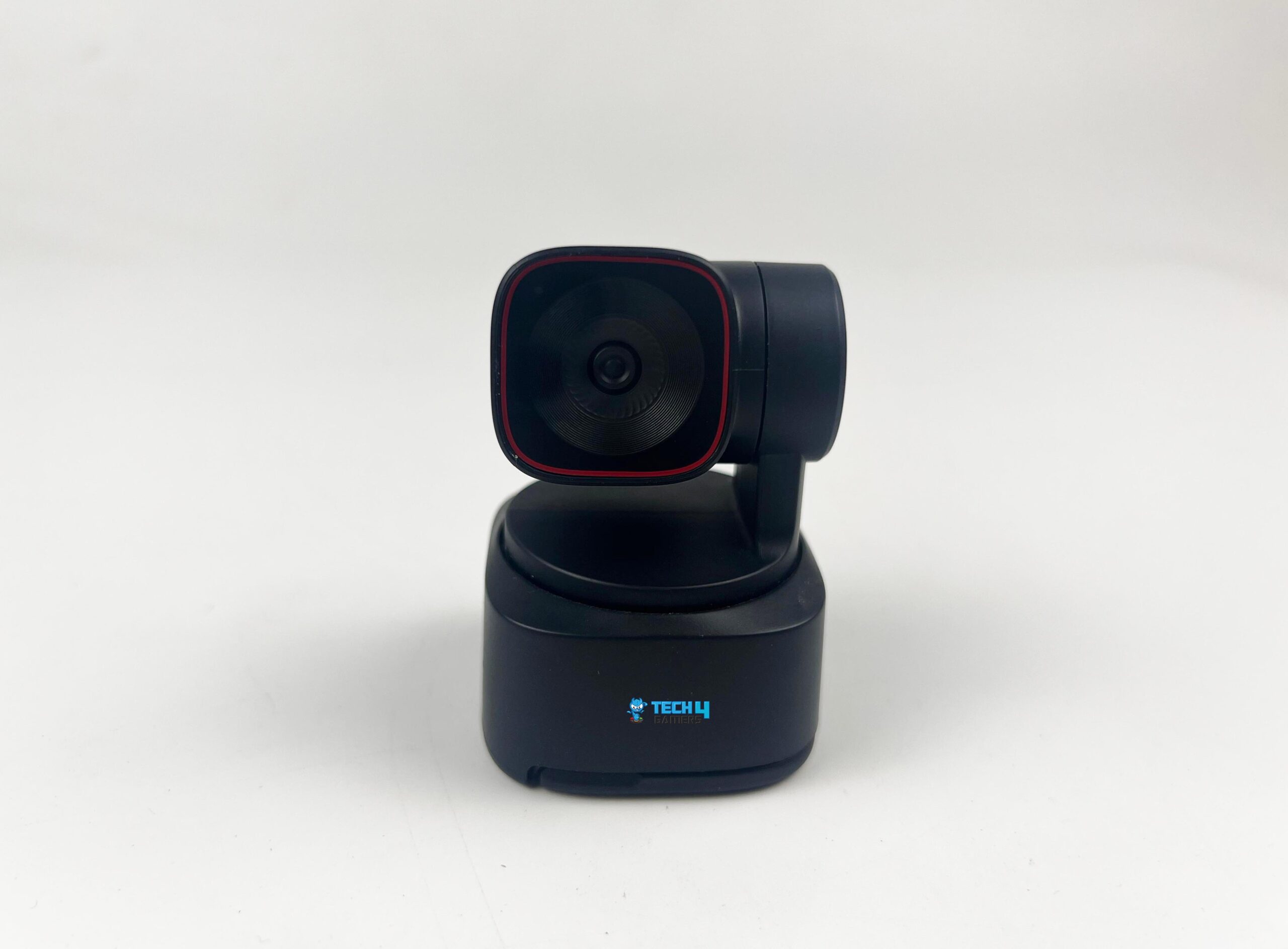
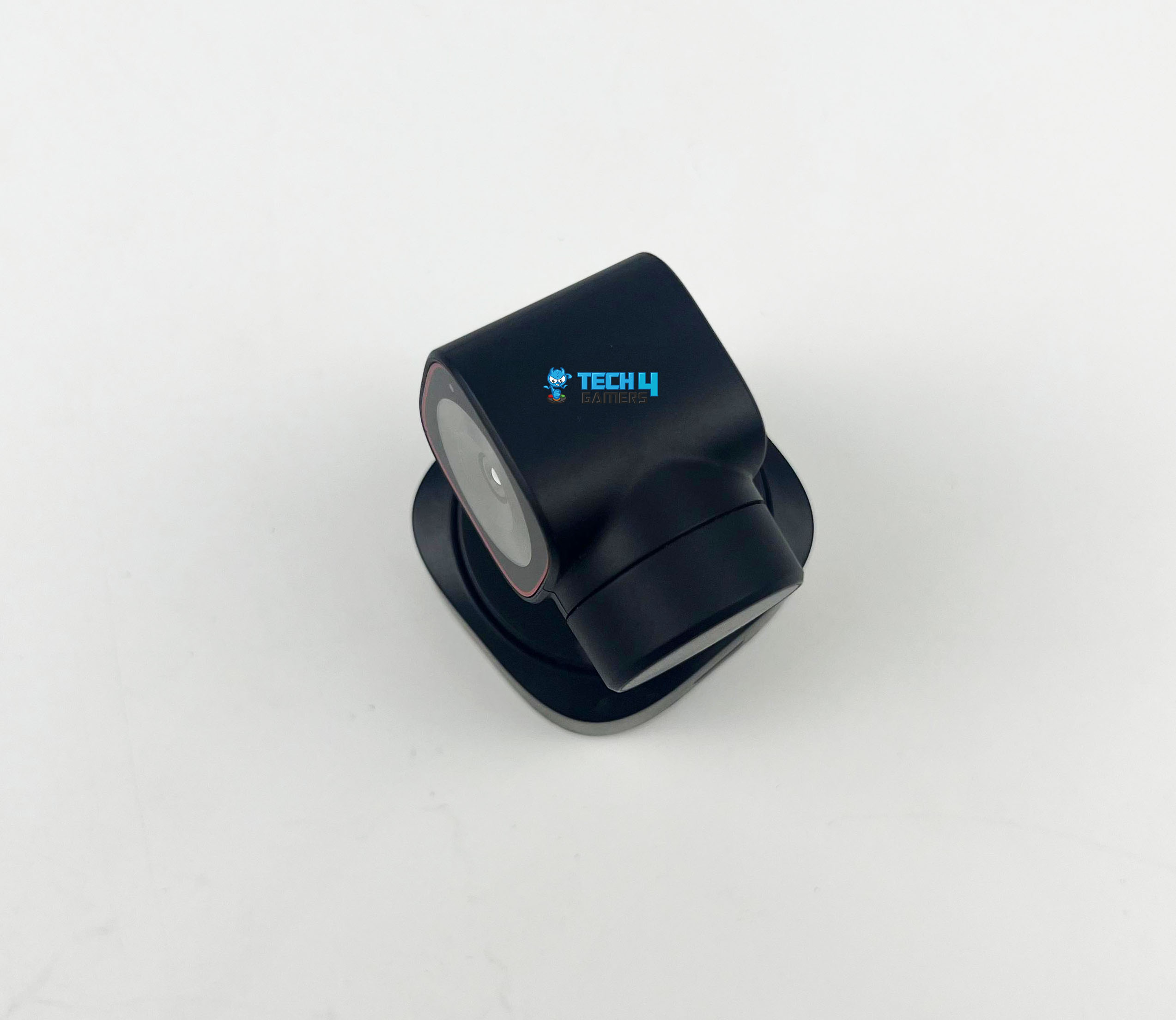
The build used metal to achieve that look, which I haven’t seen on any other webcam. Unfortunately, it’s not included in this model since it is much cheaper. Due to its all-plastic build, the Obsbot Tiny 2 Lite lacks some of the predecessor aesthetic appeal of the original. Still, considering all its features, the Obsbot Tiny 2 Lite seems to be a slim webcam. It looks like a little professional video camera with its square camera dangling from its arm and a rounded square base.
USB Connector (Image By Tech4Gamers)
The Obsbot Tiny 2 Lite packs a punch with its small, understated design, which stands out without being overwhelming. Its portability ensures that you can take your laptop and work with you. Notably, there are very few physical buttons on the camera, which gives it a sleek and professional appearance. Although there isn’t much difference, the webcam is smaller than its more costly predecessor, thanks to its simplified design.
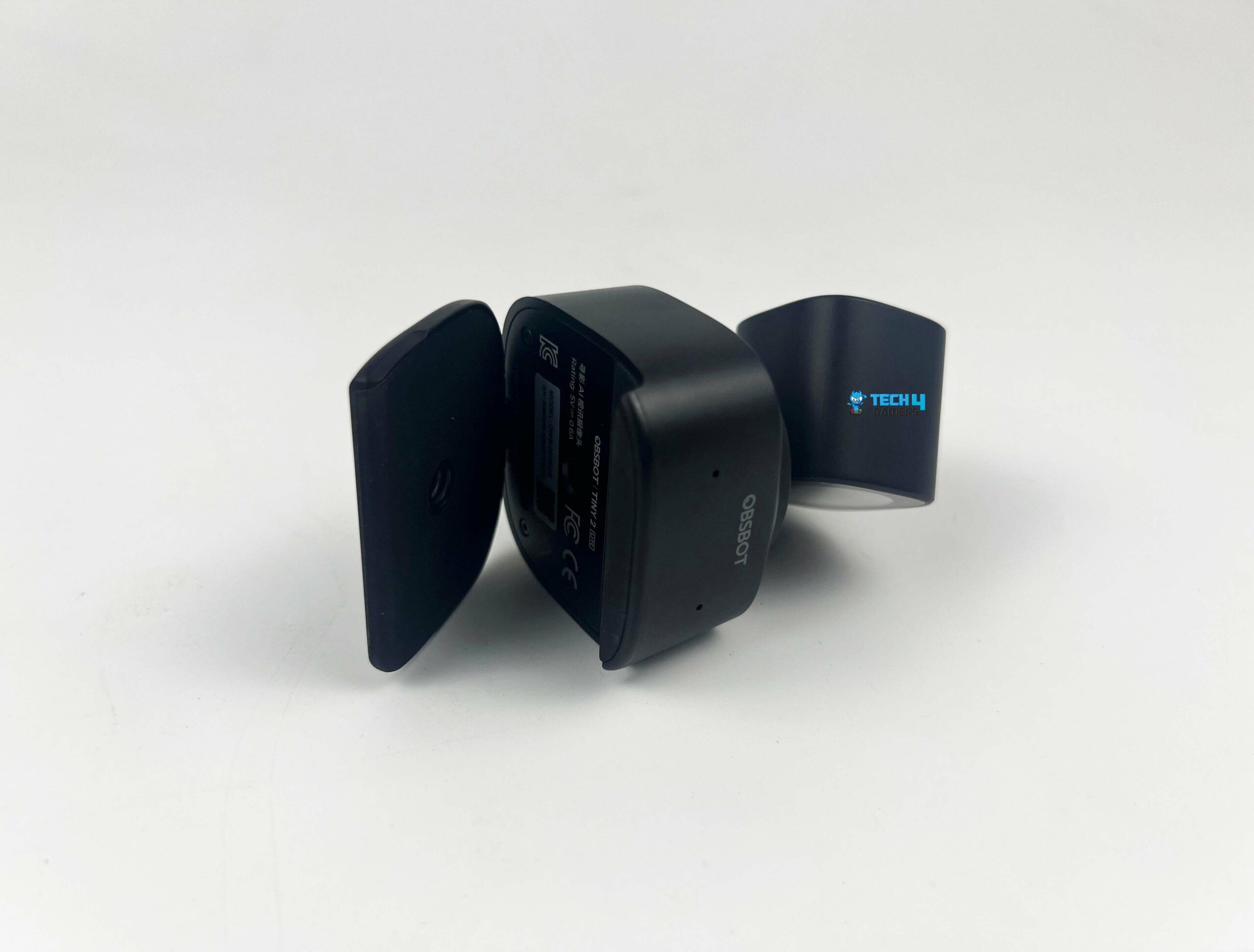
In contrast to previous models, this one has a built-in monitor mount instead of a separate attachment that uses magnets to secure it to the camera’s base. Mounting the camera to a display eliminates the ability to tilt its base, which is a drawback of this approach. You don’t get the additional hinge that the Obsbot Tiny 2’s magnetic mount provided, which allowed you that far greater versatility. However, with the original Tiny 2, I’ve never used the stand’s tilt feature. After everything, the gimbal can tilt to follow my every move without any problems.
Gimbal
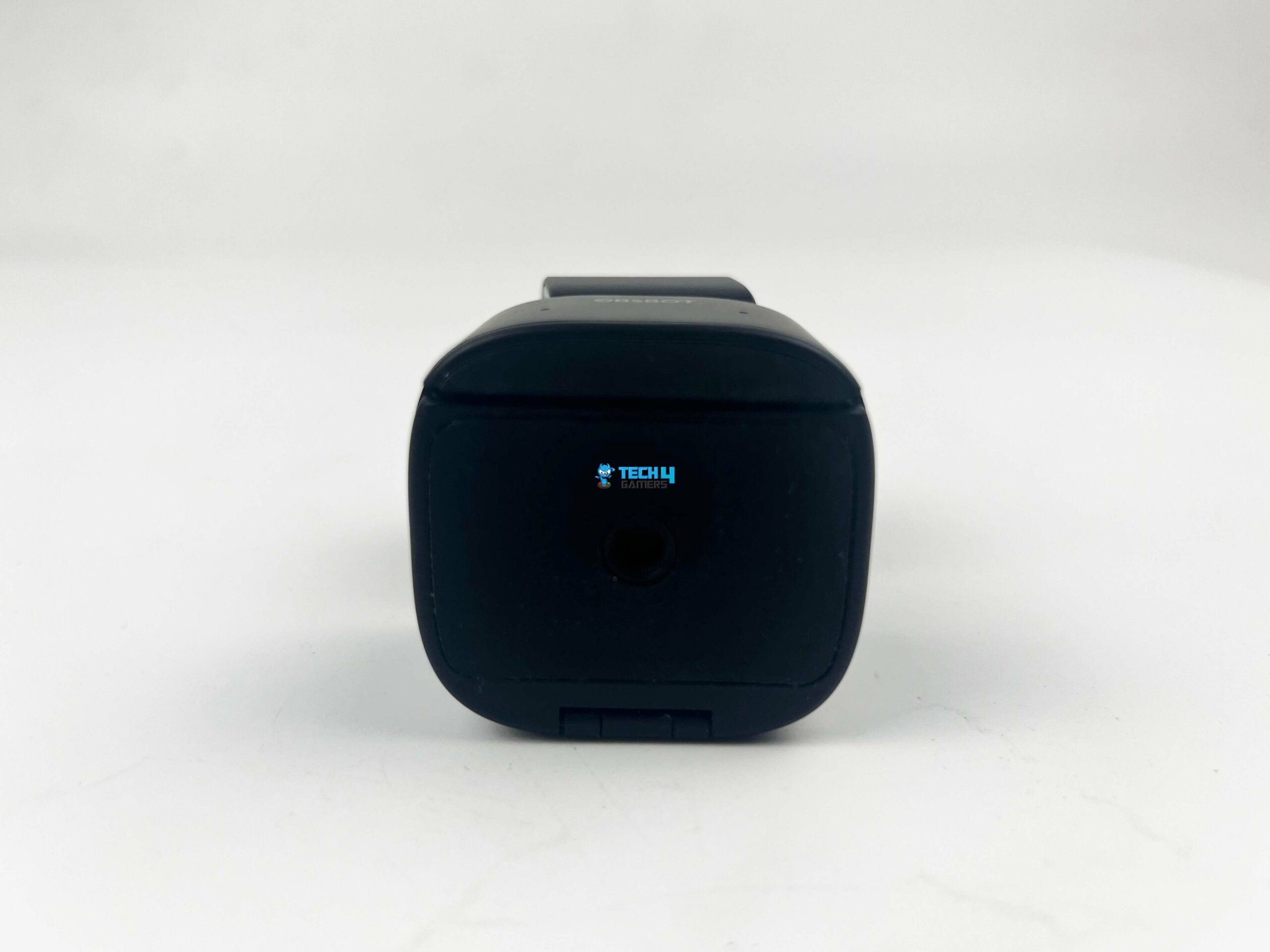
Monitor Mount (Image By Tech4Gamers)
Square Base (Image By Tech4Gamers)
Webcams that use the “pan, tilt, zoom” (PTZ) technology have been Obsbot’s specialty. Thanks to the gimbal, their webcams can tilt and rotate to keep you centered in the frame at all times. Using the Obsbot Tiny 2 Lite, you won’t have to give up any of that spirit. With this model, you have the same amount of mobility as with the more costly one, giving you plenty of flexibility.
The Obsbot Tiny 2 Lite’s gimbal can move rapidly, keeping you in the frame almost the whole time. The fact that it struggles to keep up with your descent if you drop down too fast (particularly if you’re standing very near to the camera) is its minor drawback. However, I can say the same thing about every single webcam I’ve reviewed.
Numerous built-in laptop webcams and even some external cameras have software-only tracking, essentially cropping the sensor to keep you focused. So, cameras can follow your every move—but the picture quality suffers, and, worse, the tracking might appear to be a little jerky and sluggish, so you have to wait a few seconds before it manages to catch up. Thankfully, all of this stuff is irrelevant to the Obsbot Tiny 2 Lite.
Image & Video Quality
Image Samples
1 of 2
Sunlight Image Sample (Image By Tech4Gamers)
Normal Light Image Sample (Image By Tech4Gamers)
It goes without saying that a webcam’s sensor is its most important component, and fortunately, the Obsbot Tiny 2 Lite has a remarkable one. Here, we have a 1/2-inch 48MP sensor, which is smaller than the 1/1.5-inch sensor with the original Tiny 2, but it’s still quite excellent. It gives us the option to record 4K 30 FPS and 1080p 60 FPS with fine, precise details. While it does have enabled HDR, it lacks the PixGain HDR included in the more costly Obsbot Tiny 2, and it only offers one ISO setting to accommodate a wide range of lighting situations.
The camera’s f/1.8 aperture makes it acceptable in low-light conditions as well. I hardly noticed a difference while using this camera for my typical meetings and casual Discord conversations compared to the Obsbot Tiny 2, which I usually use. I took several sample images in different settings to ensure everything worked correctly.
The Obsbot Tiny 2 Lite works well in bright light, as you can see for yourself. The pictures are clear, and there is hardly any grain or noise. While the Obsbot Tiny 2 does seem to produce somewhat bright colors and a more realistic bokeh effect in photos, they aren’t particularly noticeable changes.
Impressive balance between affordability and advanced features!
After that, I recorded a few video samples to ensure the sensor, tracking, and mics worked properly. Here is an example of a video shot with good lights.
PRO TIP: While the camera performs well in various conditions, its low-light performance can be improved by using additional lighting sources, such as a desk lamp or ring light.
Software
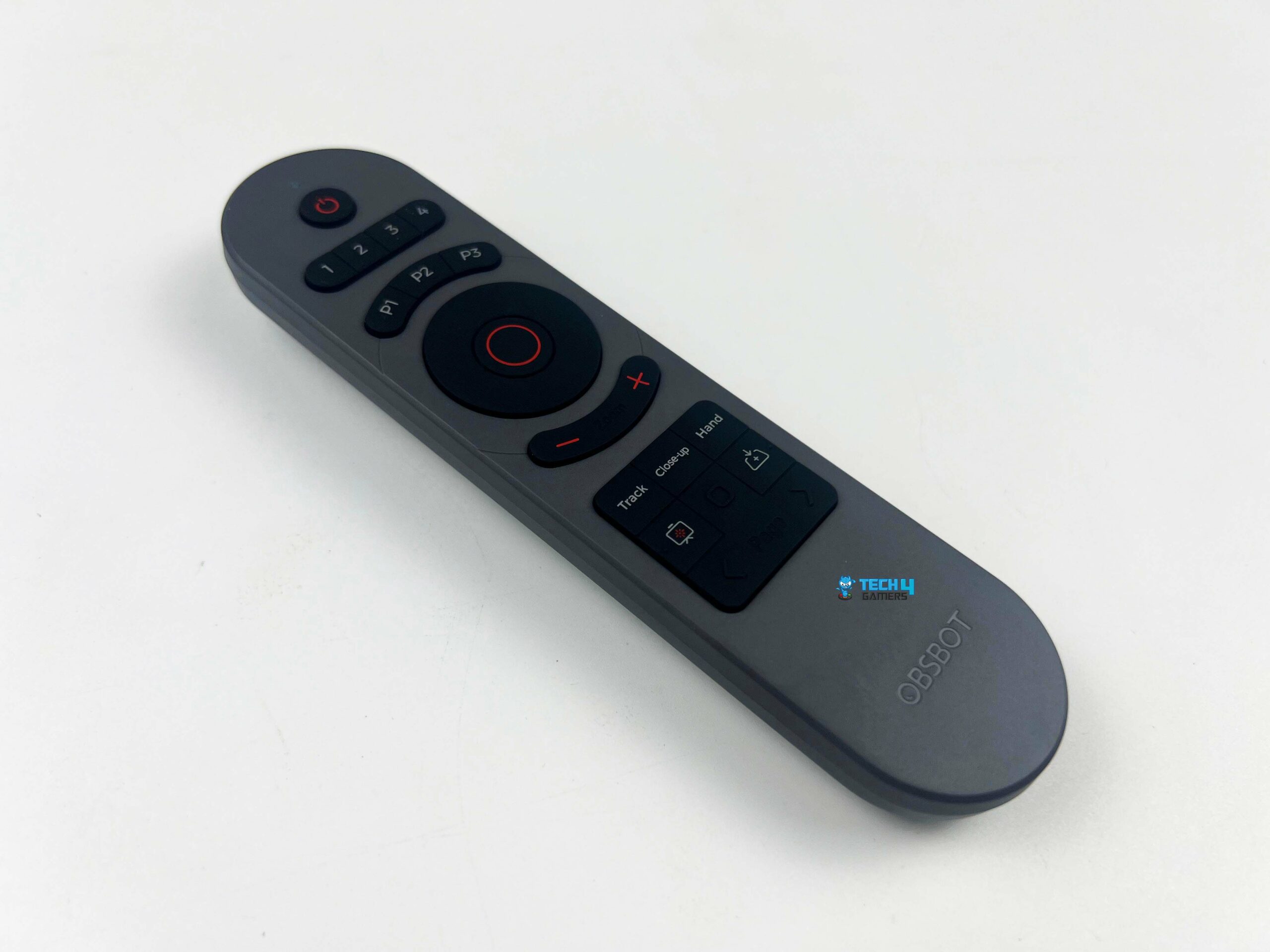
Obsbot webcams usually come with a few smart features, such as using them through gestures and a remote controller. The gesture controls are feasible, but you must buy the remote controller separately. Raising your hand turns tracking on and off, and the L-shaped gesture allows you to zoom in and out. More recently, you can now dynamically zoom to whatever level you wish by moving your hands and making a dual L gesture.
Remote (Image By Tech4Gamers)
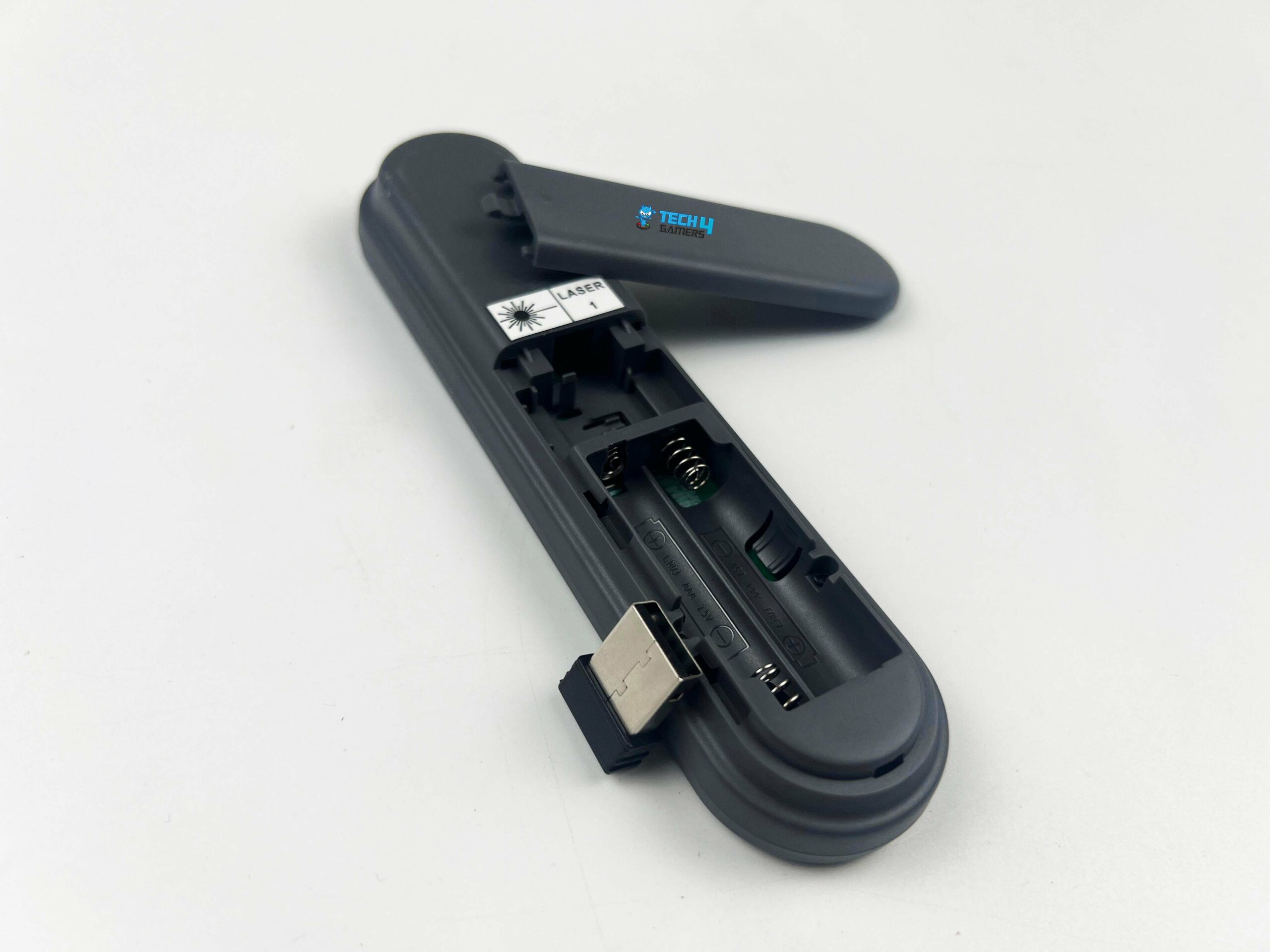
Remote’s Dongle and Battery Compartment (Image By Tech4Gamers)
Having had many instances of the camera picking up an L motion while I’m only speaking, I truly like this function. Because I move my hands frequently when I speak, it interprets my gestures in ways I would not want it to. Fortunately, all of these features can be managed through the Obsbot Center app, which has changed its name many times during the years I’ve spent reviewing the cameras from them.
The most logical name is Obsbot Center, so I hope that’s not going anywhere. Among the many options available here are tracking modes, the degree to which the camera may zoom in on you, including beauty effects, and many more. While it’s unnecessary for any of the main features, like gesture controls, to function, it’s still worth looking out; I won’t go into too much detail since I’ve already covered the software.
Compared with the Obsbot Tiny 2, this model lacks the voice control feature, a major selling point for the previous model. To be honest, I don’t miss it, even if I did use it more often than I thought, most notably when switching the camera on and off.
WARNING: To avoid accidental zooms or turning off tracking, try to keep your hand movements within the frame to a minimum, or use the Obsbot Center app to manage these features more precisely.
Should You Buy It?
Buy it if
✅ You want to record affordable high-quality videos: At $179, the Obsbot Tiny 2 Lite offers excellent value with its 4K 30 FPS and 1080p 60 FPS recording capabilities, making it ideal for content creators and professionals looking for high-quality video at a lower price point.
✅ You want advanced tracking and flexibility: With its PTZ gimbal technology, AI-powered tracking, and gesture controls, this webcam is perfect for those who need smooth and reliable tracking during presentations, streams, or video calls.
✅ You prefer a compact and portable design: The small, portable design makes it easy to carry and set up, which is great for those who need a versatile webcam for on-the-go use.
✅ You like user-friendly software: The Obsbot Center app provides extensive control over the webcam’s features, including tracking modes, zoom levels, and beauty effects, enhancing the user experience.
Don’t Buy it if
❌ You move hands frequently: The gesture control sensitivity might be a bit too responsive, leading to unintended actions during use.
❌ You want advanced HDR: If advanced HDR features like PixGain HDR are important to you, you might find the Tiny 2 Lite lacking compared to the more expensive models.
Final Verdict
At $329, the Obsbot Tiny 2 is clearly beyond reach for most people, yet it is the greatest camera I have ever used. Since Obsbot’s Tiny 2 Lite is available for about half the price of the more costly model while maintaining comparable quality, I think it’s an obvious choice. If you’re a beginner creator who wants to concentrate on what you’re creating rather than fumbling with the camera settings, you must have the Obsbot Tiny 2 Lite.
This compact and powerful PTZ webcam uses AI to automatically frame the ideal shot, so you can focus on delivering your content through videos or having fun while streaming with all of this, capturing high-quality 4K video. The best part is that you can seem professional in any scenario without breaking the wallet by using this webcam with its accompanying software, which looks so basic yet delivers quite a punch.
While the webcam’s picture quality suffers in low light, it’s still good for most purposes. Moreover, the tracking features, which are quite similar to the premium model, are a key selling point. It’s still more affordable than competing webcams with hardware tracking, outperforming several of them.
As a News Reporter at Tech4Gamers, I bring the latest findings from the tech industry to our readers. Specializing in processors, graphics cards, and more, I strive to deliver detailed insights that keep our audience well-informed and engaged. Periodically, I also delve into the vibrant world of gaming to share captivating stories.
Story Highlight
Leaked benchmarks suggest that Intel Arrow Lake comes with a 20% increase in single-core performance.
The benchmark indicates strong multi-threaded performance, potentially revealing the next-generation Intel Core Ultra 5 processor.
Arrow Lake CPUs are said to be compatible only with LGA 1851 platforms.
According to a leaked Intel Arrow Lake CPU benchmark, single-core performance has seen an increase of up to 20% compared to the Core i9-14900KS.
Why it matters: Intel’s last generation offered a refreshed Raptor Lake series. The company is set to offer much more significant improvements this time, making Arrow Lake a much bigger deal.
The CPU-Z Score Points To An Impressive Generation For Intel
The benchmark was uploaded to Tieba Baidu by a forum user who submitted a screenshot of an unidentified chip operating in CPU-Z.
Because these chips are only compatible with LGA 1851 platforms, the user claims the picture is from a separate group. It shows the unidentified Intel Arrow Lake processor running on what appears to be a next-generation Z890 motherboard.
The score by itself may help us identify the chip we are looking at, even though no further information is provided. Based on the leaked screenshot, the Intel Arrow Lake processor got a single-thread score of 1143.2 and a multi-thread score of 12,922.4.
There is no information on whether the results shared were from a chip running at default or overclocked frequency. However, it appears that we may be looking at an overclocked Intel Arrow Lake CPU.
In any case, a 20% uplift in single-core performance should not be taken lightly. The results regarding the multi-core score suggest we might be looking at the next-generation Intel Core Ultra 5 processor.
The score shared is in line with the reported 29.5% uplift in multi-thread performance that the claimed Arrow Lake CPU boasts over the Core i5-14600K in the CPU-Z test.
Intel is expected to introduce a redesigned chip configuration in the upcoming Arrow Lake-S lineup. That, combined with Increased Instructions Per Clock (IPC) and higher frequency, can finally give the company an edge over the competition.
At T4G, my task is to cover the latest news around the gaming globe ASAP and with the utmost precision. I adore all the games and respect all the devs behind the amazing games that we get all year. So, whether it’s a PC or a Console game, I got it all covered.
Story Highlights
Japanese fans have launched a petition to cancel Assassin’s Creed Shadows.
They state that it promotes Asian racism and is an insult to their heritage.
The petition aims to get 25K signatures and is very close to that goal.
Update As Of July 7th:
The petition has continued to gain new subscriptions and now stands at nearly 70K subscriptions. At this rate, it will soon hit the 100K mark as gamers continue to rally against Assassin’s Creed Shadows.
Original Story:
It seems that the controversies around Assassin’s Creed Shadows won’t stop any time soon. After Japanese fans heavily criticized the game for being historically incorrect, they have now launched a petition to cancel the entire project.
Why it matters: Ever since the first trailer, the title’s protagonists, Naoe and Yasuke, have been under fire. The petition serves to highlight yet another instance of Ubisoft’s controversial take on Japan.
The petition to cancel Assassin’s Creed Shadows has reached almost 25K signatures.
Japanese fans took to Change.org to voice their concern and start a petition. They claim the game insults their history and culture, and Ubisoft must reverse its decision. The petition is now nearing 25K signatures to fulfill its initial goal.
As noted above, over 12K people have signed up in the last 24 hours alone. The petition is quickly gaining traction, with various Japanese people voicing their grievances with Ubisoft’s take on the era.
While some comments do acknowledge that Assassin’s Creed Shadows is a piece of fiction, they argue it promotes Asian racism and insults their heritage. Notably, this is the first time Ubisoft has used an actual historical character as its protagonist.
Ubisoft is under fire for making Yasuke a samurai.
Yes, this is a fictional version of Yasuke, but fans argue that he was just a retainer instead of a proper samurai, leading to the uproar. Furthermore, a Japanese historian recently criticized the developer for the same reason, and the company blocked him.
Japanese gamers supporting the petition have argued that Ubisoft still boasts the project as a reflection of history. This is mainly why they advocate for the cancellation.
Recently, the studio’s CEO spoke out against the criticism and stated that people spreading hate against the game and its developers should be condemned.
However, controversies around Assassin’s Creed Shadows have seemingly become a very normal thing. As the petition grows, it might even capture Ubisoft’s attention, which could spark another controversial clash between the developer and gamers.
At Tech4Gamers, he is recognized for his insightful features and opinion pieces, where he blends his passion for gaming with a keen understanding of technological trends. His work, marked by depth and accessibility, makes him a respected voice in the tech and gaming community.
Story Highlight
Smart Access Memory (SAM) allows the CPU full access to the GPU’s memory, improving PC performance.
It provides higher frame rates to gamers and reduced rendering times to content creators for better efficiency.
Simple BIOS updates and settings toggle make SAM accessible to all users.
Are you in the market for a graphics card? If so, you might have seen plenty of performance reviews that primarily focus on the GPU itself. However, the video memory of a graphics card can often be a bottleneck. This is the issue that AMD has tried to resolve with its new feature called Smart Access Memory (SAM).
As someone who has always been passionate about technology and the intricacies of computer hardware, I find myself genuinely excited about this development. Here’s why I believe AMD’s Smart Access Memory is a game changer for PC performance and why it matters to both gamers and general users alike.
What is SAM?
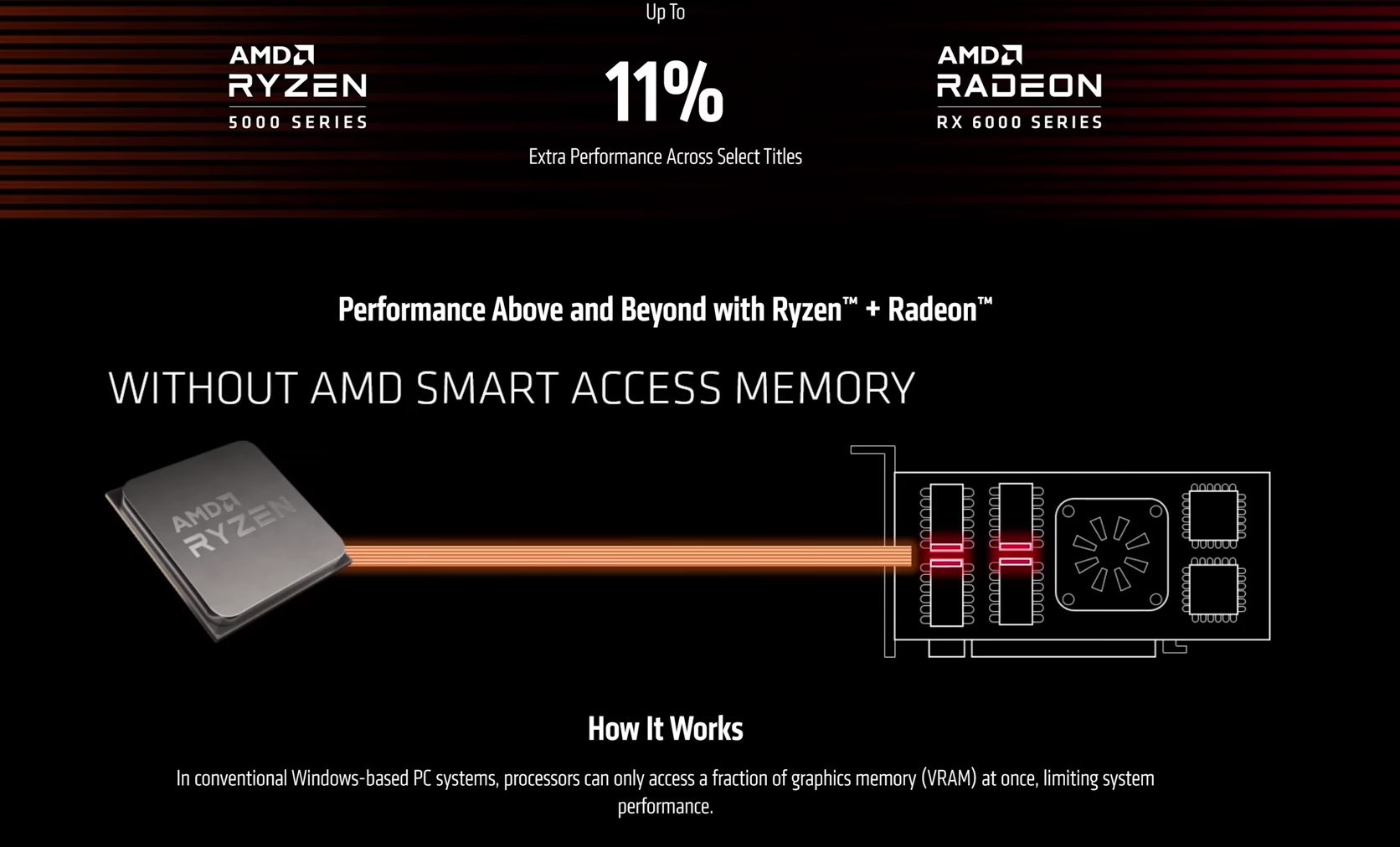
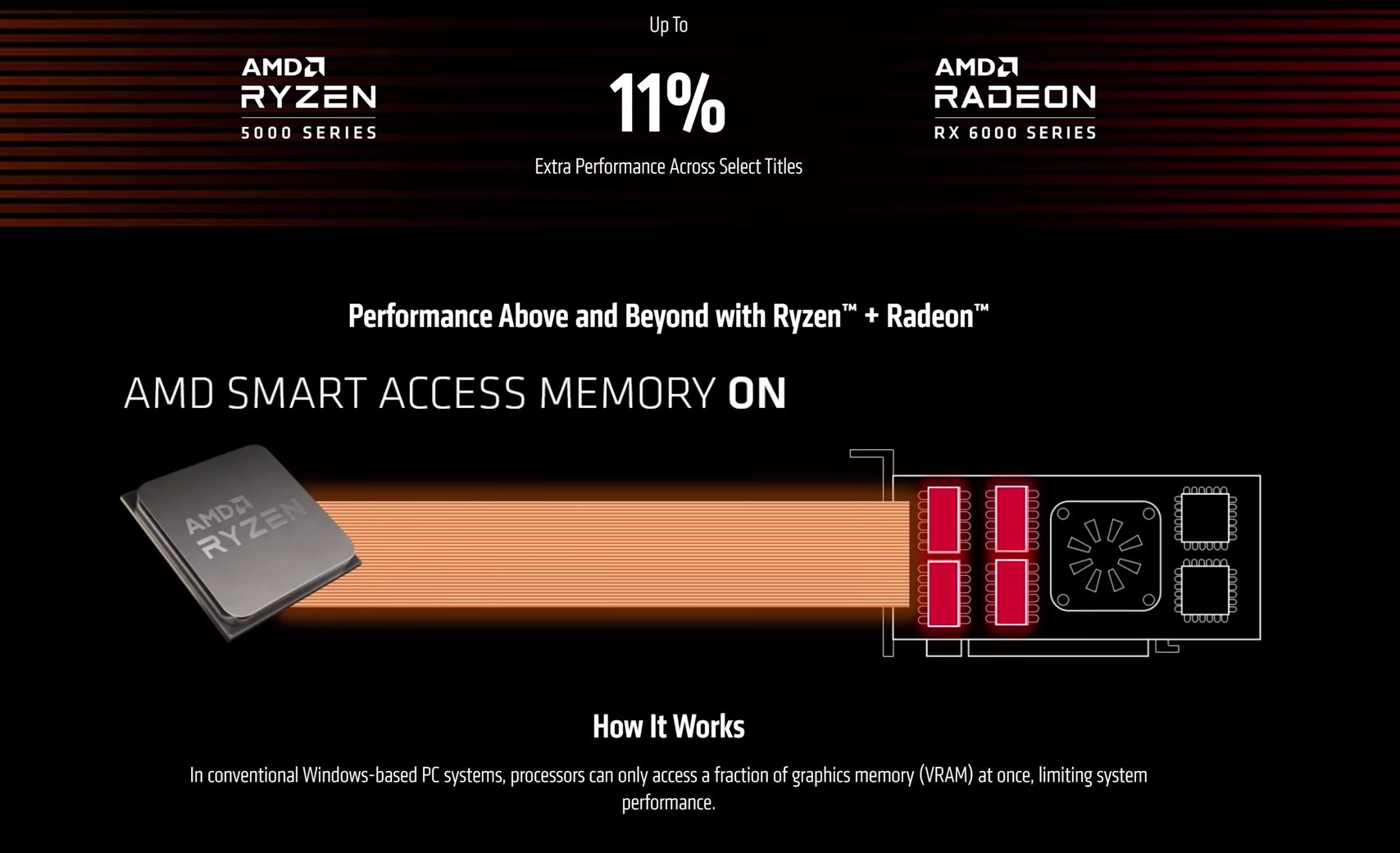
Firstly, let’s dive into what Smart Access Memory is. In essence, SAM is a feature that allows the CPU to have full access to the GPU’s memory, rather than the limited portion traditionally available.
Historically, CPUs could only access 256 Mega Bites of GPU’s VRAM at once. SAM resolves this issue by using the Resizable Base Address Register (BAR) feature. This allows your CPU to access much more VRAM at once, utilizing the GPU’s full bandwidth. This leads to a more efficient and faster communication pathway between the CPU and GPU.
Initially, AMD’s Smart Access Memory (SAM) was introduced as a feature specifically for the Ryzen 5000 series CPUs and the Radeon RX 6000 series GPUs. However, AMD has expanded support for SAM to include other Ryzen CPUs and even some previous-generation CPUs through BIOS updates.
That being said, for optimal performance and compatibility, using a Ryzen 5000 series CPU with a Radeon RX 6000 series GPU is still the recommended setup to fully experience the benefits of Smart Access Memory.
A Solid Jump In FPS!
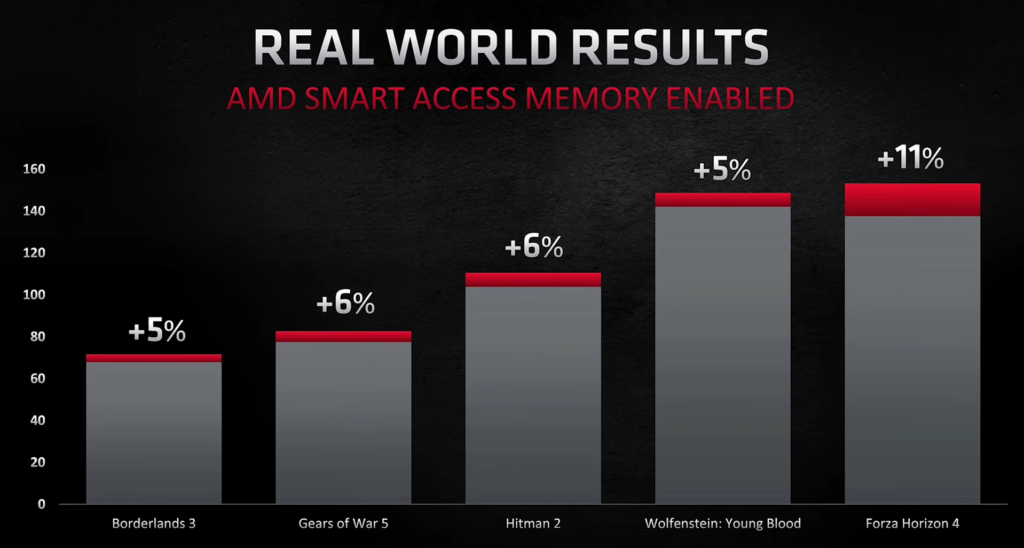
One of the most compelling aspects of SAM is its impact on gaming performance. As a gamer, I’ve always been on the lookout for technologies that can provide smoother gameplay and higher frame rates. When AMD first demonstrated SAM, they claimed performance improvements of up to 10% in terms of frame rates and this is a significant improvement if I am being honest.
The number is even higher for some games. For instance, in titles like Assassin’s Creed Valhalla and Forza Horizon 4 running at 1440p resolution, the difference is around 11-15%. The enhanced communication between the CPU and GPU translates to reduced latency, better frame pacing, and ultimately, a more immersive gaming experience. For gamers, every frame counts, and SAM delivers those extra frames that can make the difference between victory and defeat.
Performance Boost in terms of Frame Rates
Even Content Creators Can Benefit
If you are a content creator looking for improved processing efficiency, SAM has got you covered. It offers you enhanced video editing, 3D rendering, and advanced GPU-based applications. Imagine working on a complex video project and noticing a tangible reduction in rendering times. This not only boosts productivity but also opens new possibilities for real-time editing and previewing of high-resolution content.
PC Performance without SAM
PC Performance With SAM
Easy to Use
Another reason I find SAM fascinating is its ease of use. Enabling SAM is straightforward. It usually requires a simple BIOS update and a toggle in the system settings. This accessibility means that even those who are not particularly tech-savvy can take advantage of this performance boost. There’s no need for extensive hardware modifications or complex configurations. AMD has ensured that SAM is user-friendly and accessible to a broad audience.
Your Mileage May Vary
It’s important to acknowledge that while SAM is a significant advancement, it’s not a magic bullet. The actual performance gains can vary depending on the specific hardware configuration and the software being used. Some games and applications may see substantial improvements, while others might only experience marginal increments, as I have shown above. Nonetheless, the potential for improvement is still there, and I am up for that.
As the CPU Cooler and RAM Expert, I test the latest hardware to provide tips for smart purchases. I cover everything from busting myths about CPU coolers to looking into the newest RAM designs, examining various parts of PC hardware.
Story Highlight
If you haven’t already switched to a fast SSD, doing so will significantly improve your desktop experience.
A GPU With a higher VRAM capacity is specifically helpful for modern titles, with even 8GB feeling less in 2024.
While some might consider 16GB as the sweet spot for gamers, switching to 32GB does have a lot of benefits.
PC Upgrades are always a difficult topic to deal with, especially if you have no idea what to start with. Of course, some upgrades take priority over others, depending on their impact on performance. Personally, I recommend these three components the most to anyone looking to get a better overall experience with their build.
Get A Faster SSD
Although this might seem obvious to some, getting a faster SSD can do wonders for your PC, especially if you are still stuck on a spinning hard drive. Between shorter load times and faster transfer speeds, upgrading to a capable SSD can seriously have a lot of impact on your system.
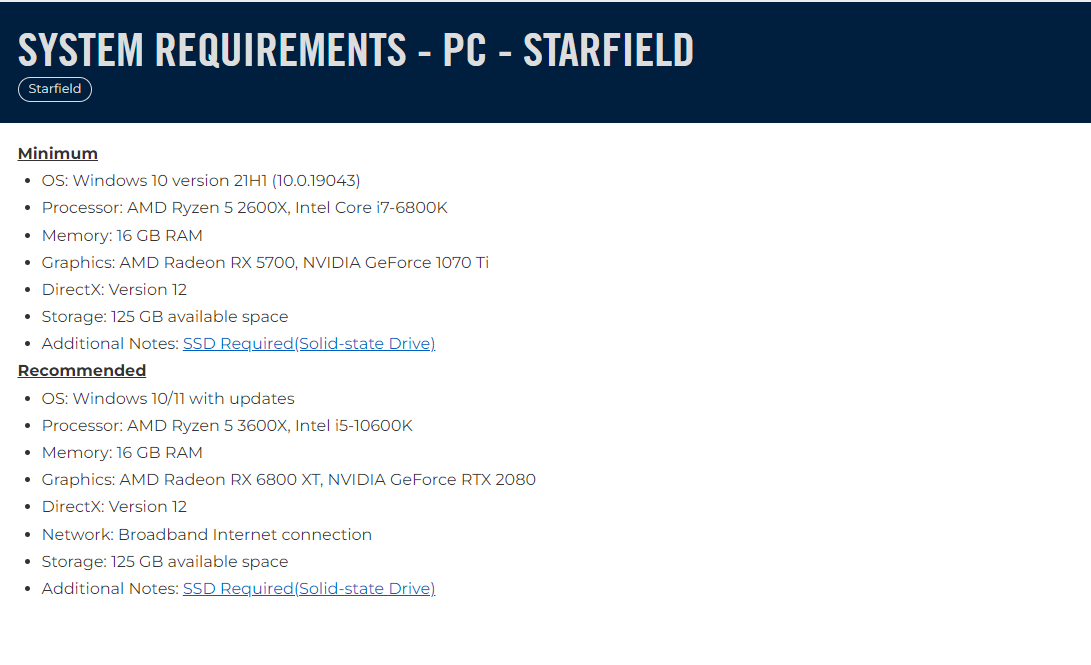
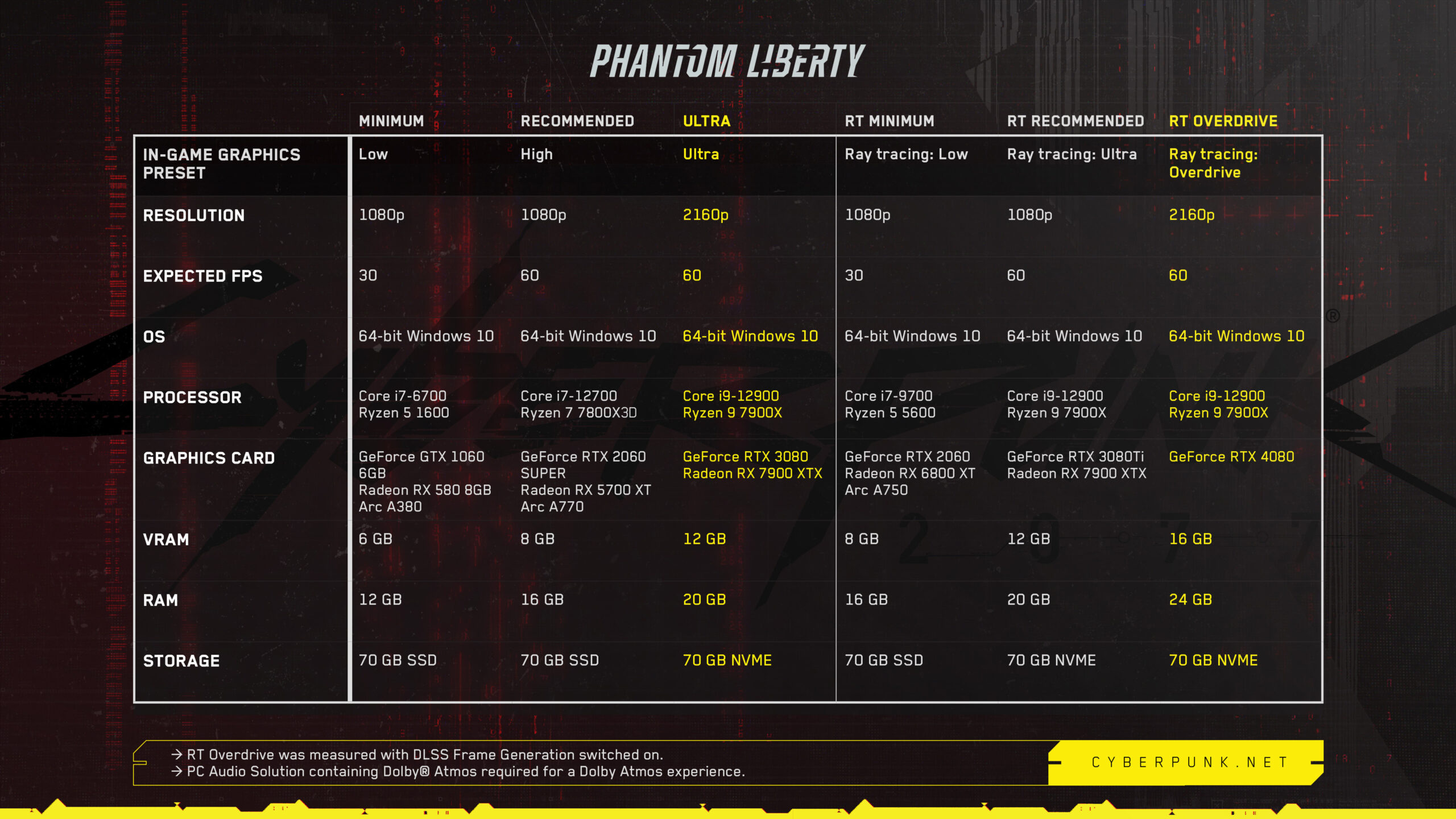
What’s more, those aren’t the only benefits you’ll get with a faster SSD. Now that games such as Cyberpunk 2077 have started recommending an SSD for optimal performance, running them without one can lead to issues such as texture popping, and stuttering.
System requirements
1 of 2
Starfield System Requirements (Image Via Bethesda)
Cyberpunk 2077 Updated System Requirements (Image Via CDProjektRed)
“SSDs offer faster loading times, improved streaming, and better overall performance when compared to HDDs. “
Even aside from gaming, the faster boot times and better performance in tasks such as editing are going to be extremely helpful in day-to-day use.
Upgrade To A High VRAM Capacity GPU
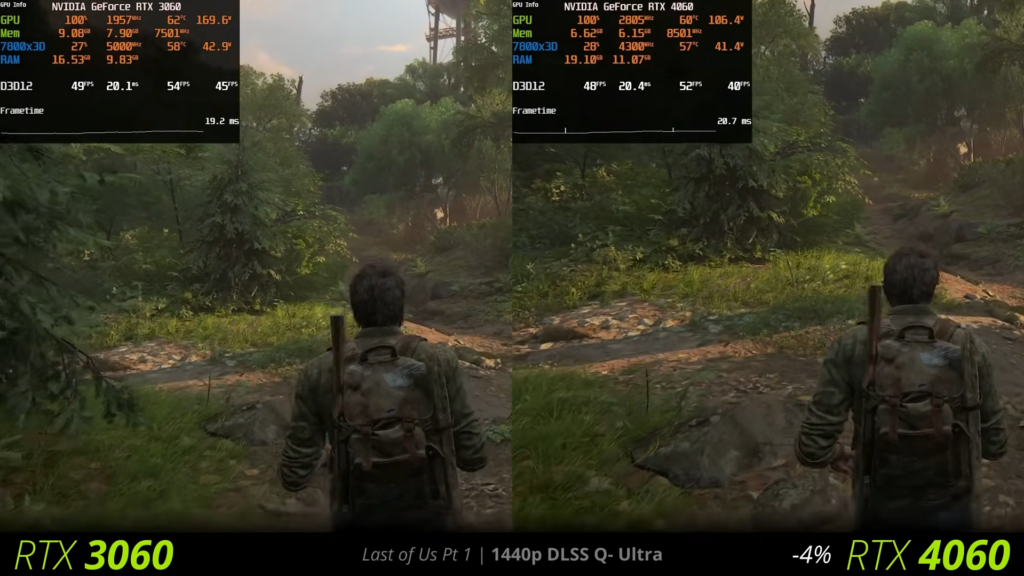
A couple of years ago, I would have considered 8GB to be the perfect amount of VRAM in a graphics card, and that did hold true for quite some time. However, things seem to be changing a lot, with 8GB often becoming a bottleneck for some GPUs such as the GeForce RTX 4060 and the RTX 3070.
4060 vs 3060 In The Last Of Us Part 1 (Image Via Vex)
This is evidenced in VRAM-demanding titles such as The Last Of Us Part 1, where the RTX 4060 lags behind the last-gen 3060 due to VRAM limitations.
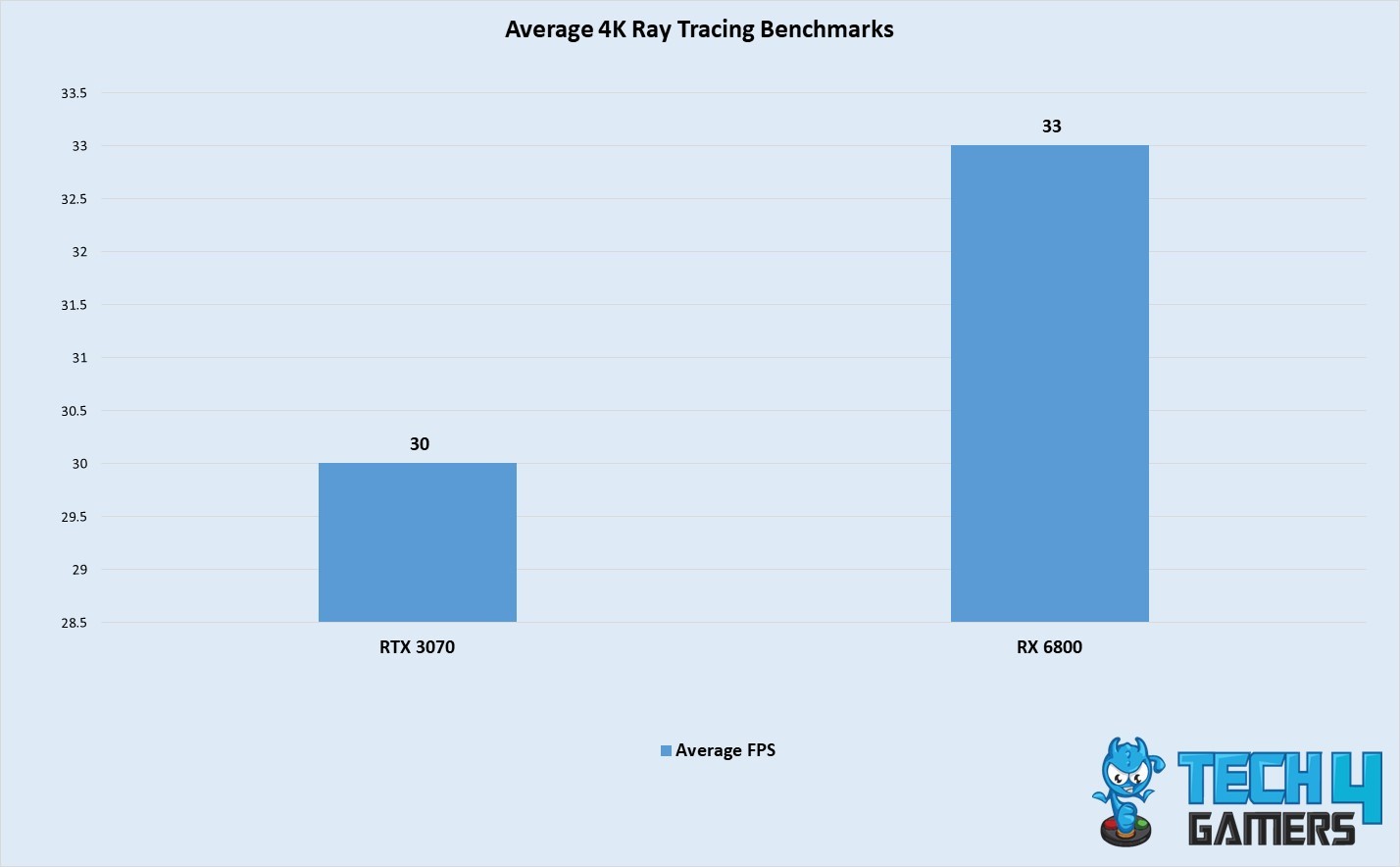
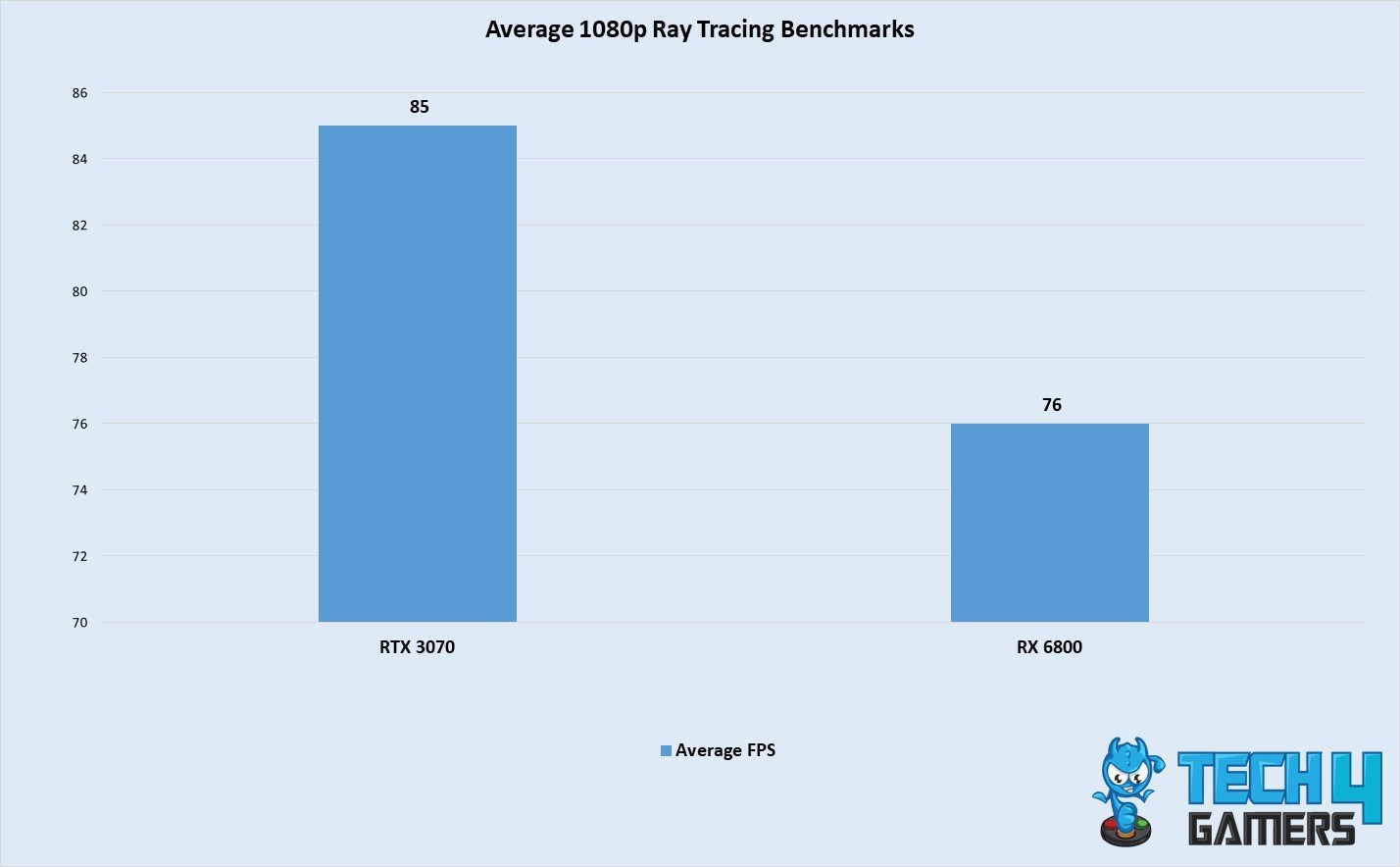
We see a similar trend when comparing the 8GB 3070 with the 16 GB RX 6800. While performance is similar in most titles, the 6800 takes the lead in high-resolution scenarios thanks to the additional 8GB of Video Memory.
RX 6800 vs RTX 3070 4K Ray Tracing Benchmarks (Image By Tech4Gamers)
RX 6800 vs RTX 3070 1080p Ray Tracing Benchmarks (Image By Tech4Gamers)
In our tests, the RTX 3070 fell behind the RX 6800 in Ray Tracing tests at 4K, despite having the upper hand in a less demanding resolution such as 1080p. Again, the reason can be traced back to the 8GB of VRAM on the 3070, which is a limiting factor in VRAM-intensive situations.
So, with all of the numbers out of the way, it’s safe to assume that you will undeniably benefit from a higher VRAM card, even if your current titles work fine on 8GB. I also expect this trend of high VRAM consumption to continue with newer triple-A titles, making 8GB less than ideal if you want the best possible visuals.
Switch To 32GB Of RAM
While 16GB might still be considered the sweet spot by many, going up to 32GB does have a lot of benefits. Don’t get me wrong, 16GB will get you through most titles just fine, but if you have the budget to do so then stretching all the way up to 32GB can be extremely helpful.
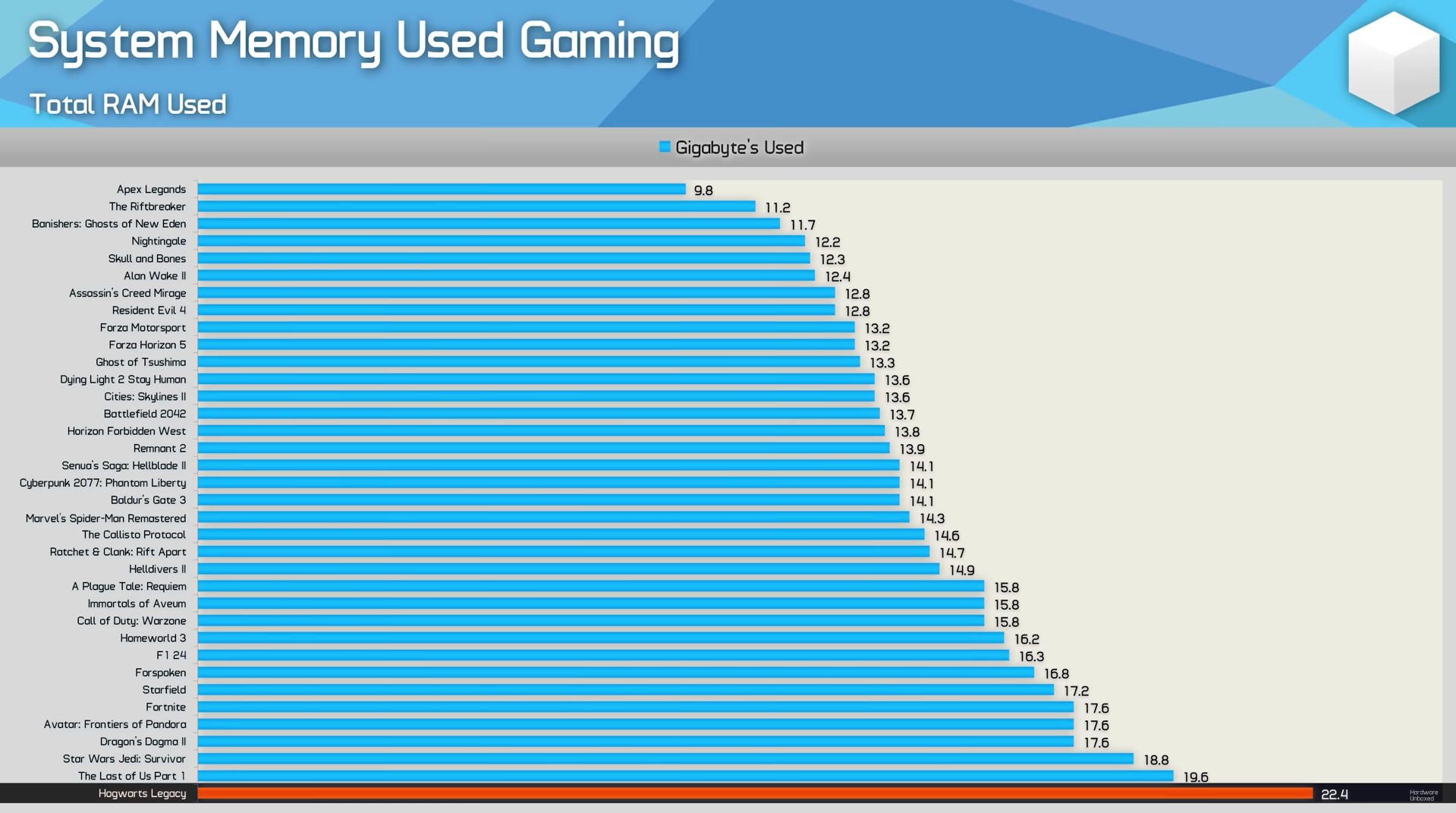
In fact, newer titles have even started listing 32GB memory in their recommended specifications, with some taking advantage of the extra headroom. Granted, the list of games that exceed the 16GB usage limit is still quite slim, but I expect that to increase in the near future.
In Hardware Unboxed’s recent tests, a few games including Fortnite and Hogwarts Legacy pushed way past 16GB of usage, which makes 32GB a worthwhile upgrade for many.
Even if your games aren’t utilizing all of your memory, you’ll find multitasking a lot more difficult to manage with 16GB, especially in triple-A titles. Our Wiki Editor, Ali Rashid Khan, also covered the advantages of 32GB of memory for gaming in a more detailed article, which is definitely worth checking out.
Prioritize These Upgrades
While these PC upgrades are not necessarily going to get you the biggest performance uplift, they are certainly ones you simply can’t go wrong with. If you are looking for upgrades, all three of these upgrades will significantly improve your overall experience, in both gaming and productivity tasks.