Home Blog Page 70

The Best RAM For Ryzen 7 9800X3D In 2026 [Benchmarks Included]

AMD Ryzen processors, in general, benefit more from low latency kits instead of high frequency. With the Ryzen 9000 series and in our Ryzen 7 9800X3D review, we found that these CPUs have a 1:1 ratio with DDR5 kits running @ 6400MHz, making it the sweet spot. All of this can get a bit confusing, especially if you’re not in tune with all the latest developments in the world of DDR5 RAM. To help you out, my team and I have put together a list of the best RAM for Ryzen 7 9800X3D after testing and reviewing each kit thoroughly.

Why Trust Tech4Gamers
  • Mussab Ali is our PC expert with a decade of experience in building, testing, and troubleshooting PCs.
  • 70+ RAM kits tested and reviewed by our team of hardware experts (Tech4Gamers Team).
  • 200+ hours spent testing different RAM kits for our reviews.
  • Objective testing criteria (See how we test RAM).

At Tech4Gamers, ensuring you get reliable information is our priority. That’s why every hardware round-up undergoes a meticulous review process by our team of experts and editors. Each review is carefully examined against our strict editorial guidelines, guaranteeing you trustworthy insights you can depend on.

I have added a short summary of my top picks of the best RAM for the Ryzen 7 9800X3D when they’re pitted up against each other:

RAM
G.Skill Trident Z5 Royal Neo RGB 6,000MHz
TEAMGROUP T-Force Delta RGB 8,000MHz
Corsair Dominator Titanium RGB 6,000MHz
Corsair Vengeance RGB 6,000MHz
Looks
G.SKILL Trident Z5 Royal Neo Series DDR5 RAM (AMD EXPO) 32GB (2x16GB) 6000MT/s CL28-36-36-96 1.40V Desktop Computer Memory U-DIMM - Silver (F5-6000J2836G16GX2-TR5NS)
TEAMGROUP T-Force Delta RGB DDR5 Ram 32GB (2x16GB) 8000MHz PC5-64000 CL38 A-DIE Desktop Memory Module Ram for 600 700 Series Chipset XMP 3.0 Ready Black FF3D532G8000HC38DDC01
CORSAIR Dominator Titanium RGB DDR5 RAM 32GB (2x16GB) DDR5 6000MHz CL30 Intel XMP iCUE Compatible Computer Memory - White (CMP32GX5M2B6000C30W)
CORSAIR VENGEANCE RGB DDR5 RAM 32GB (2x16GB) 6000MHz CL30-36-36-76 1.40V AMD EXPO Intel XMP Desktop Computer Memory - Gray (CMH32GX5M2B6000Z30K)
Award
Best Overall RAM For Ryzen 7 9800X3D
Best Performance RAM For Ryzen 7 9800X3D
Best White RAM For Ryzen 7 9800X3D
Best Value RAM For Ryzen 7 9800X3D
What We Liked
Design, Performance, Overclocking room
Design, Latency, ECC, Price
RGB, aesthetics, customizable top cover, performance
Value, lighting, performance, EXPO and XMP 3.0 support, tight CL timings
What We Disliked
Price
Height, EXPO voltage
Price, compatibility issues
Bad overclocking potential, runs at 1.40V
Capacity
32GB (2x 16GB)
32GB (2x 16GB)
32GB (2x 16GB)
32GB (2x 16GB)
Frequency
6,000MHz
8,000MHz
6,000MHz
6,000MHz
Latency
CL28
CL38
CL30
CL30
Latency (nanoseconds)
9.3ns
9.5ns
10ns
10ns
Voltage
1.40V
1.45V
1.40V
1.40V
RGB
RAM
G.Skill Trident Z5 Royal Neo RGB 6,000MHz
Looks
G.SKILL Trident Z5 Royal Neo Series DDR5 RAM (AMD EXPO) 32GB (2x16GB) 6000MT/s CL28-36-36-96 1.40V Desktop Computer Memory U-DIMM - Silver (F5-6000J2836G16GX2-TR5NS)
Award
Best Overall RAM For Ryzen 7 9800X3D
What We Liked
Design, Performance, Overclocking room
What We Disliked
Price
Capacity
32GB (2x 16GB)
Frequency
6,000MHz
Latency
CL28
Latency (nanoseconds)
9.3ns
Voltage
1.40V
RGB
Amazon
Newegg
Review
RAM
TEAMGROUP T-Force Delta RGB 8,000MHz
Looks
TEAMGROUP T-Force Delta RGB DDR5 Ram 32GB (2x16GB) 8000MHz PC5-64000 CL38 A-DIE Desktop Memory Module Ram for 600 700 Series Chipset XMP 3.0 Ready Black FF3D532G8000HC38DDC01
Award
Best Performance RAM For Ryzen 7 9800X3D
What We Liked
Design, Latency, ECC, Price
What We Disliked
Height, EXPO voltage
Capacity
32GB (2x 16GB)
Frequency
8,000MHz
Latency
CL38
Latency (nanoseconds)
9.5ns
Voltage
1.45V
RGB
Amazon
Newegg
Review
RAM
Corsair Dominator Titanium RGB 6,000MHz
Looks
CORSAIR Dominator Titanium RGB DDR5 RAM 32GB (2x16GB) DDR5 6000MHz CL30 Intel XMP iCUE Compatible Computer Memory - White (CMP32GX5M2B6000C30W)
Award
Best White RAM For Ryzen 7 9800X3D
What We Liked
RGB, aesthetics, customizable top cover, performance
What We Disliked
Price, compatibility issues
Capacity
32GB (2x 16GB)
Frequency
6,000MHz
Latency
CL30
Latency (nanoseconds)
10ns
Voltage
1.40V
RGB
Amazon
Newegg
Review
RAM
Corsair Vengeance RGB 6,000MHz
Looks
CORSAIR VENGEANCE RGB DDR5 RAM 32GB (2x16GB) 6000MHz CL30-36-36-76 1.40V AMD EXPO Intel XMP Desktop Computer Memory - Gray (CMH32GX5M2B6000Z30K)
Award
Best Value RAM For Ryzen 7 9800X3D
What We Liked
Value, lighting, performance, EXPO and XMP 3.0 support, tight CL timings
What We Disliked
Bad overclocking potential, runs at 1.40V
Capacity
32GB (2x 16GB)
Frequency
6,000MHz
Latency
CL30
Latency (nanoseconds)
10ns
Voltage
1.40V
RGB
Amazon
Newegg
Review

Last Updated:


  • September 17, 2025: We replaced the G.Skill Trident Z5 Neo with its Z5 Royal Neo counterpart (DDR5-6000 CL28) as we deemed it a better fit for the “Best Overall” category. This was done after thorough testing and comparison.

More from the Ryzen 7 9800X3D:

Best RAM For Ryzen 7 9800X3D

Here are my top choices of the best RAM for the Ryzen 7 9800X3D:

  1. Best Overall: G.Skill Trident Z5 Royal Neo RGB 32GB DDR5-6000 CL28
  2. Best Performance: TEAMGROUP T-Force Delta RGB 32GB DDR5-8000 CL38
  3. Best High-End: G.Skill Trident Z5 Neo RGB 32GB DDR5-6400 CL30
  4. Best White: Corsair Dominator Titanium RGB 32GB DDR5-6000 CL30
  5. Best Value: Corsair Vengeance RGB 32GB DDR5-6000 CL30

G.Skill Trident Z5 Royal Neo DDR5-6000 CL28

Best Overall RAM For Ryzen 7 9800X3D
Specifications: Memory Type: DDR5 | Capacity: 32GB (2x 16GB) | Frequency: 6,000MHz | Latency: CL28 | Latency (Nanoseconds): 9.3ns | Voltage: 1.40V | RGB: Yes

Pros

  • Luxurious design
  • Excellent performance, latency
  • Overclocking room 

Cons

  • Costly

Read Our G.Skill Trident Z5 Royal Neo RGB 32GB DDR5-6000 RAM Kit Review

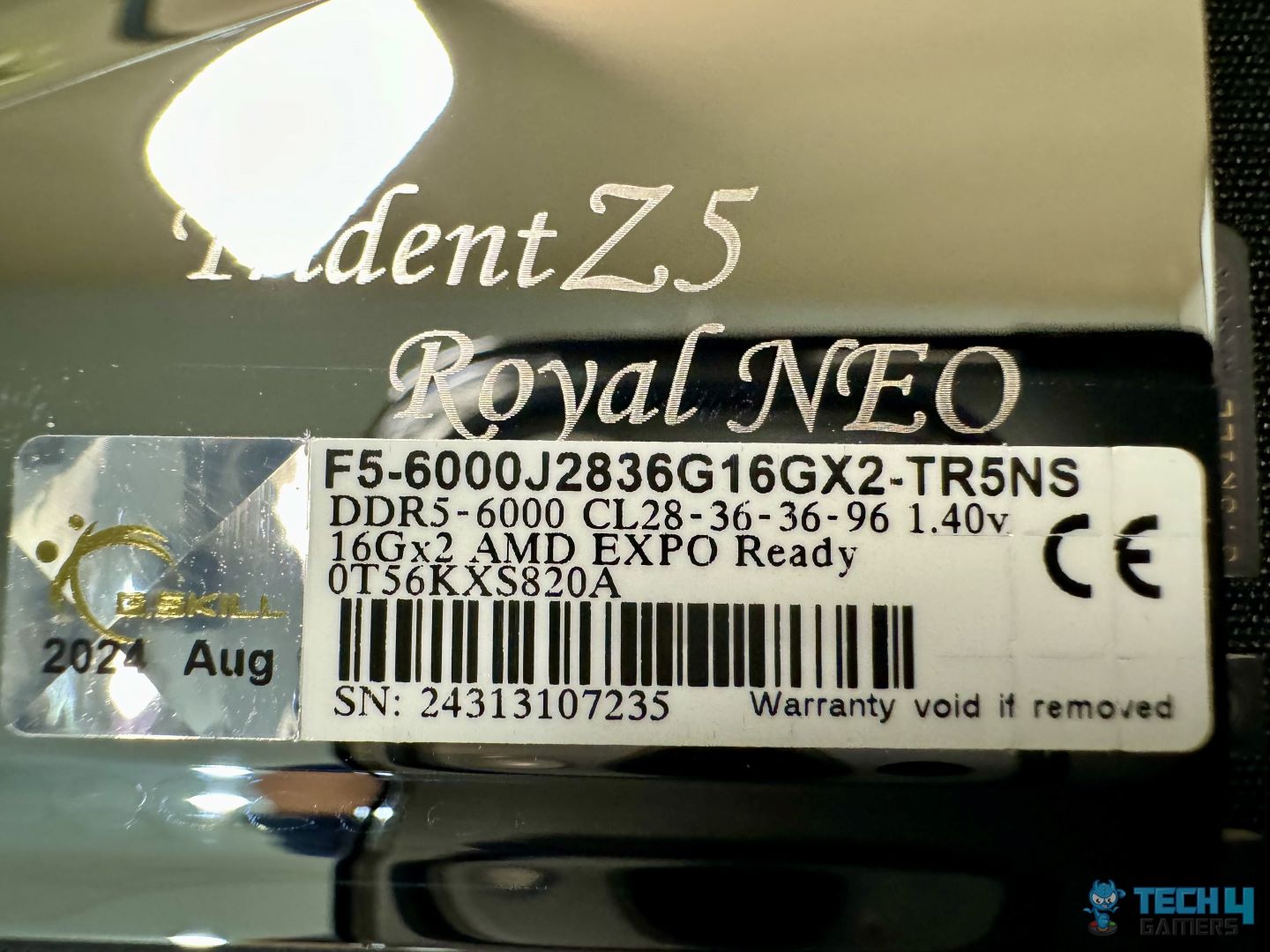
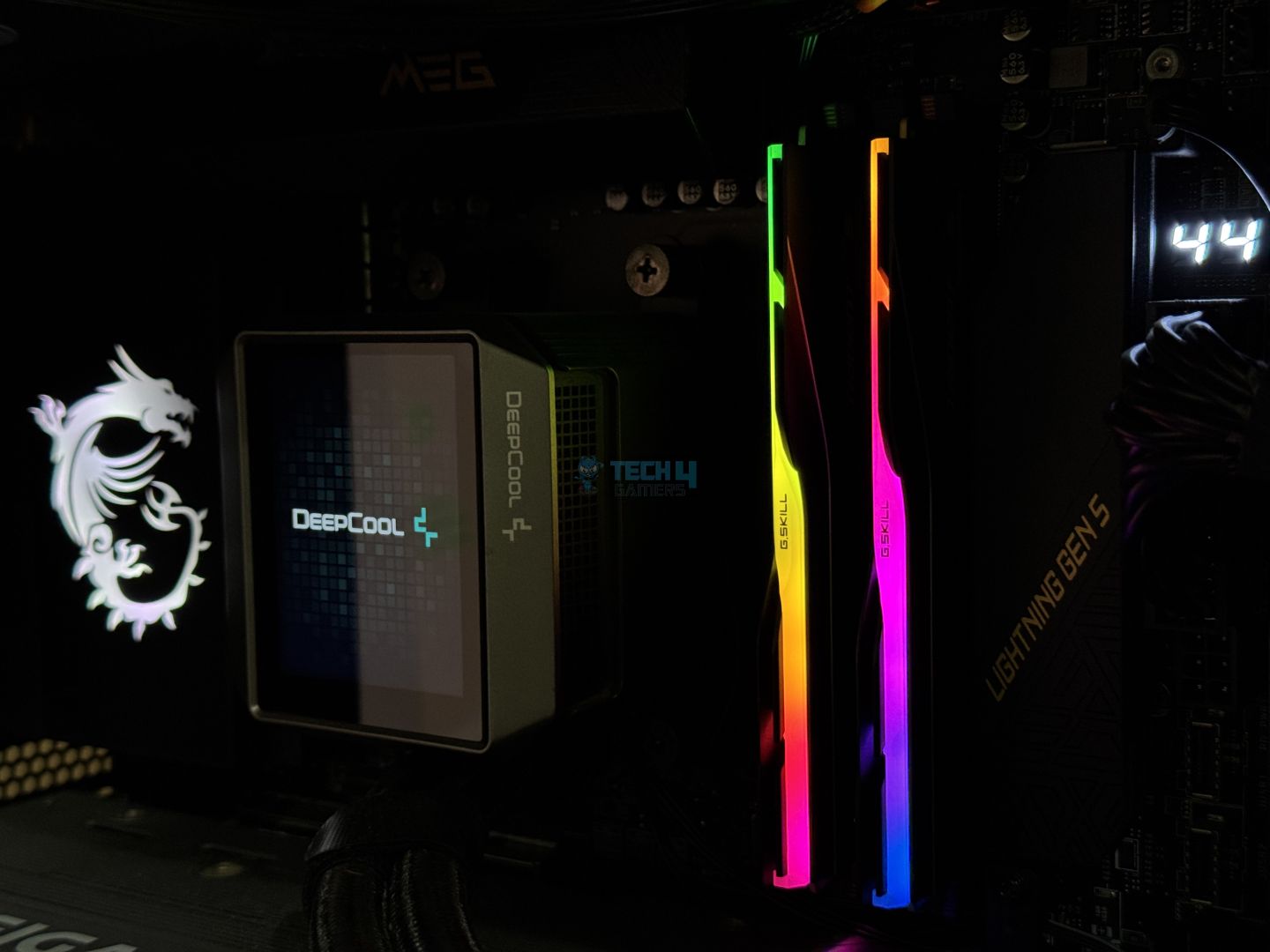
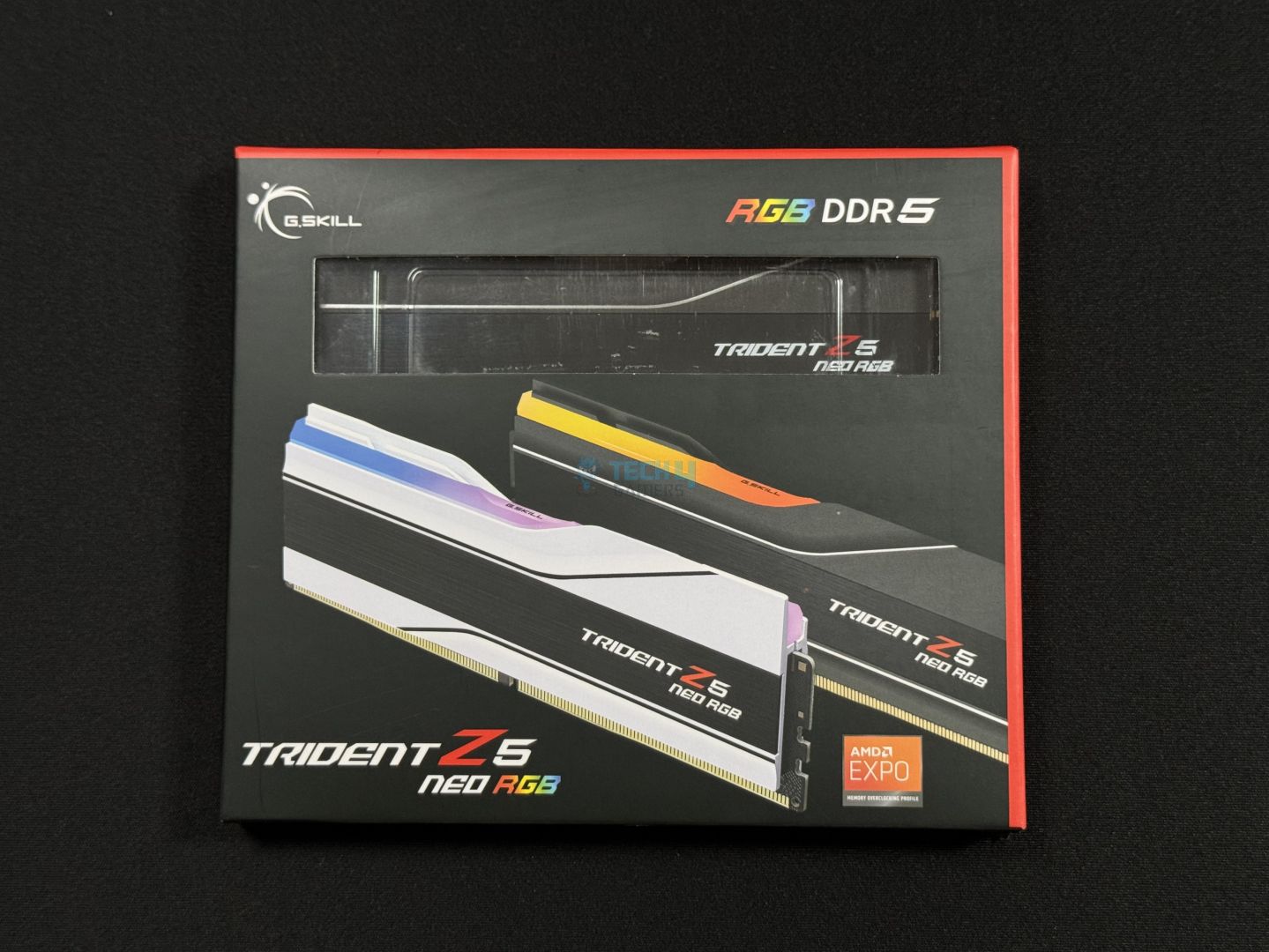
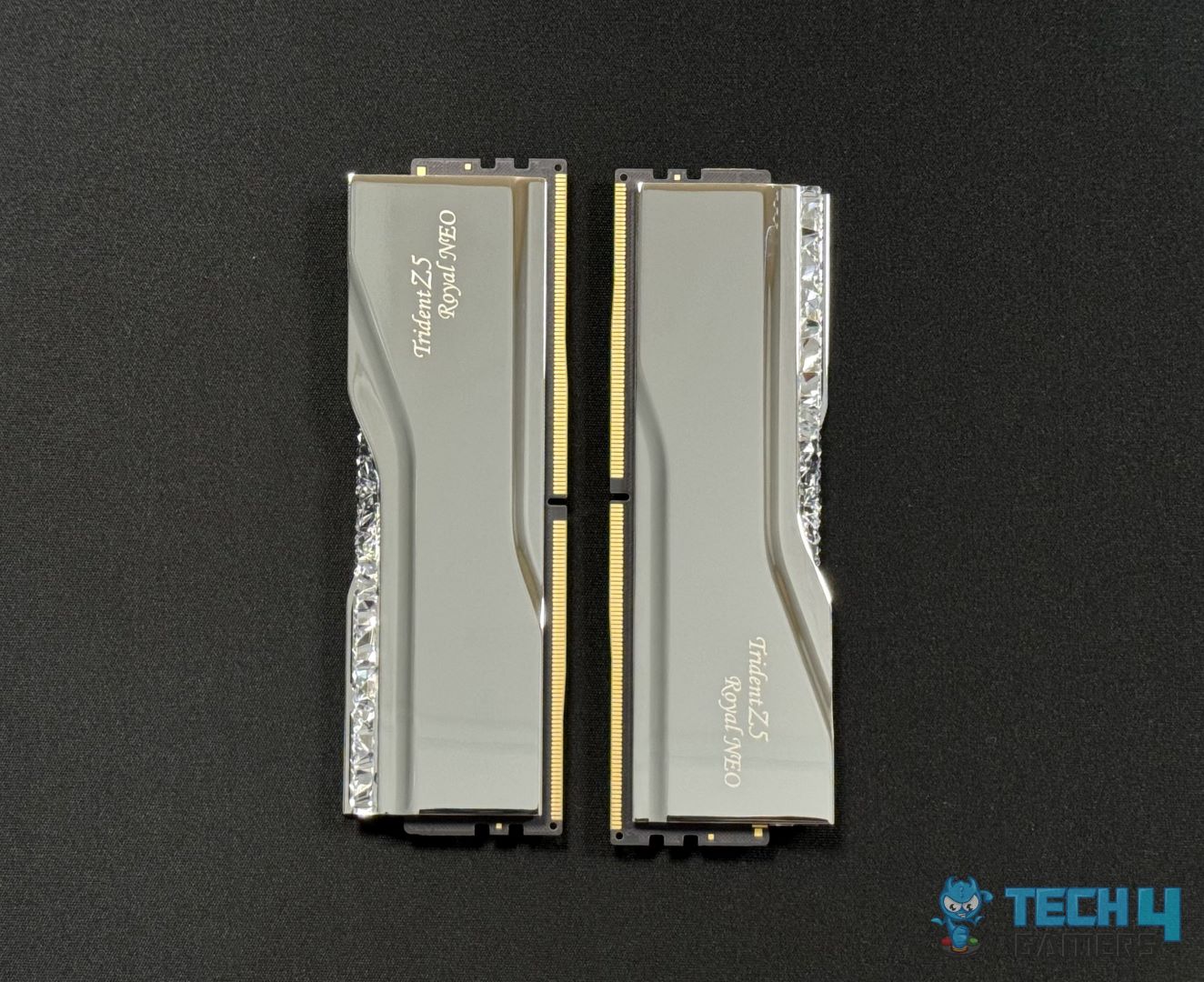
The G.Skill Trident Z5 Royal Neo RGB 32 GB DDR5-6000 CL28 sets a great impression right on unboxing with its premium look. It features the iconic crystalline lightbar with a look resembling small pieces of diamonds put together. We can’t forget the aluminum heatspreaders either, which in this case are electroplated with a mirrored finish in silver or gold. The RGB can be controlled via G. Skill’s dedicated software or your motherboard’s light syncing software. 

Performance-wise, this is still one of the fastest kits we’ve ever tested a year later. At 6000 MT/s and a 28 ns, you get a real latency of just 9.3 nanoseconds. This speed makes it an excellent option for the 9800X3D, as you won’t have to worry about stability issues. In our testing, the performance was up to the mark in all departments. The AIDA64 memory latency test, for example, showed a mighty result of 62.2 ns.

PRO TIP: Always overclock your RAM in smaller increments to ensure stability. If you increase the frequency too much, you might get a BSOD or crash the PC.

Here’s the praise I had for this RAM kit in my review:

Top-notch performance combined with one of the best-looking lighting effects, this kit has been designed for gamers, designers, and professionals who won’t settle for anything but the best, of course, given that they can afford its premium pricing.

✅Buy It If

You’re looking for a premium-looking design: With its diamond-like crystalline lightbar and shiny aluminum heat spreader, the Royal Neo really stands out in looks. 

You want super-low latency: With a real latency of just 9.3ns, and similarly low numbers in our dedicated testing, the RAM’s latency performance is one of the best out there. 

You want overclocking room: The kit has an EXPO voltage of 1.40V, meaning there’s some wiggle room for improved frequency at CL28. (though your mileage may vary!)

❌Don't Buy It If
Your budget is limited: At $155 for the 32 GB kit, there are cheaper kits out there if your wallet is tight. 

What Makes It The Best Overall RAM For Ryzen 7 9800X3D?

The G.Skill Trident Z5 Royal Neo RGB 32 GB kit showcases excellent performance at DDR5-6000 and CL28. Its looks add to the package and make it a great pick for those who want fancy, luxurious-looking RAM shining inside their system. There’s also room for overclocking, but the kit is quite costly compared to models like G. Skill’s own Flare X5 kit.

Performance: 9.5/10 Value: 9/10
Features: 8/10 Design: 9/10

TEAMGROUP T-Force Delta RGB 32GB DDR5-8000 CL38

Best Performance RAM for Ryzen 7 9800X3D
Specifications: Memory Type: DDR5 | Capacity: 32GB (2x 16GB) | Frequency: 8,000MHz | Latency: CL38 | Latency (Nanoseconds): 9.5ns | Voltage: 1.45V | RGB: Yes

Pros

  • Aggressive design with RGB
  • Latency can be reduced to 9ns
  • ECC
  • Fair price

Cons

  • Height could be a problem for certain air coolers
  • Operates at 1.45V 

Read Our TEAMGROUP T-Force Delta RGB 8,000MHz CL38 Review

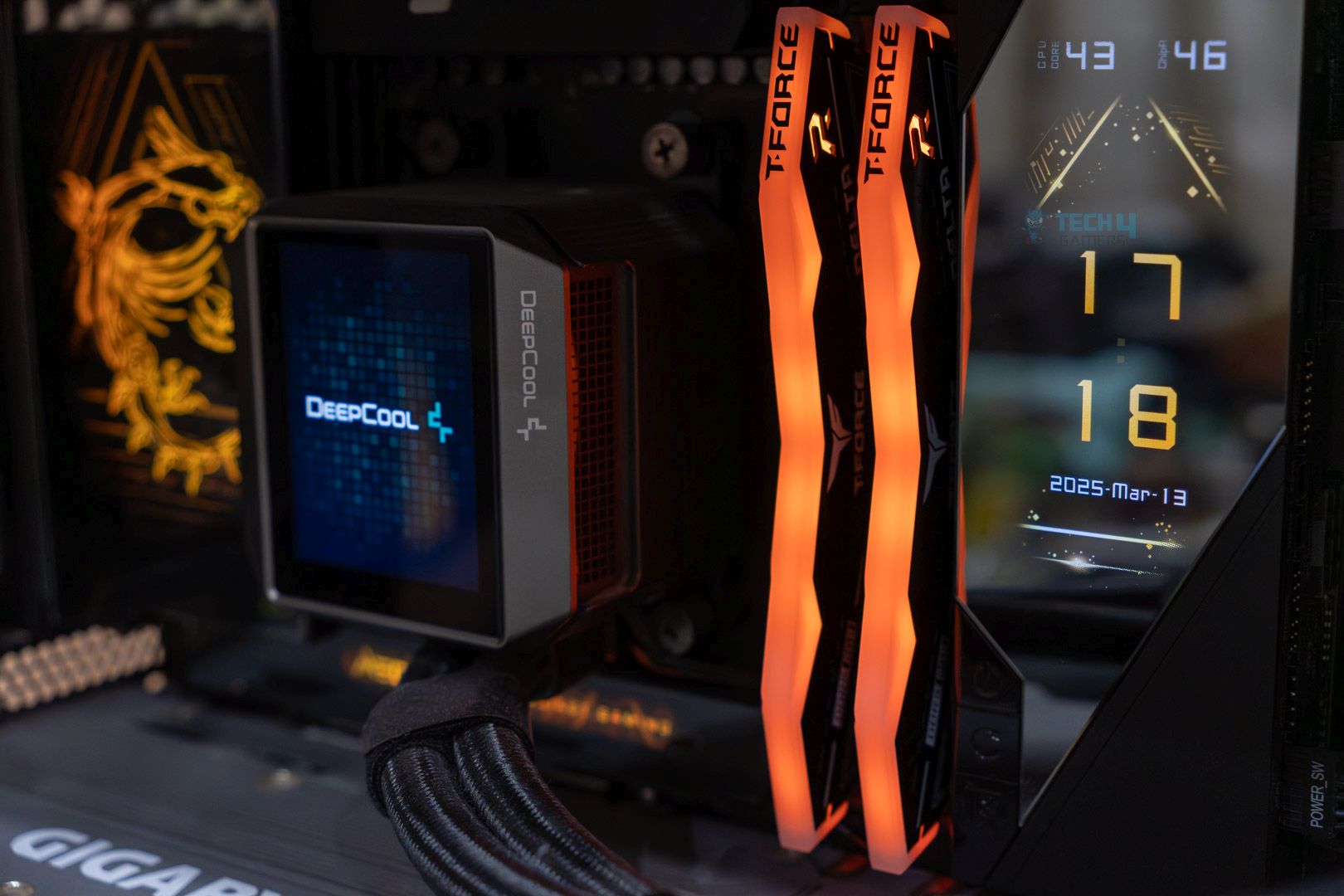
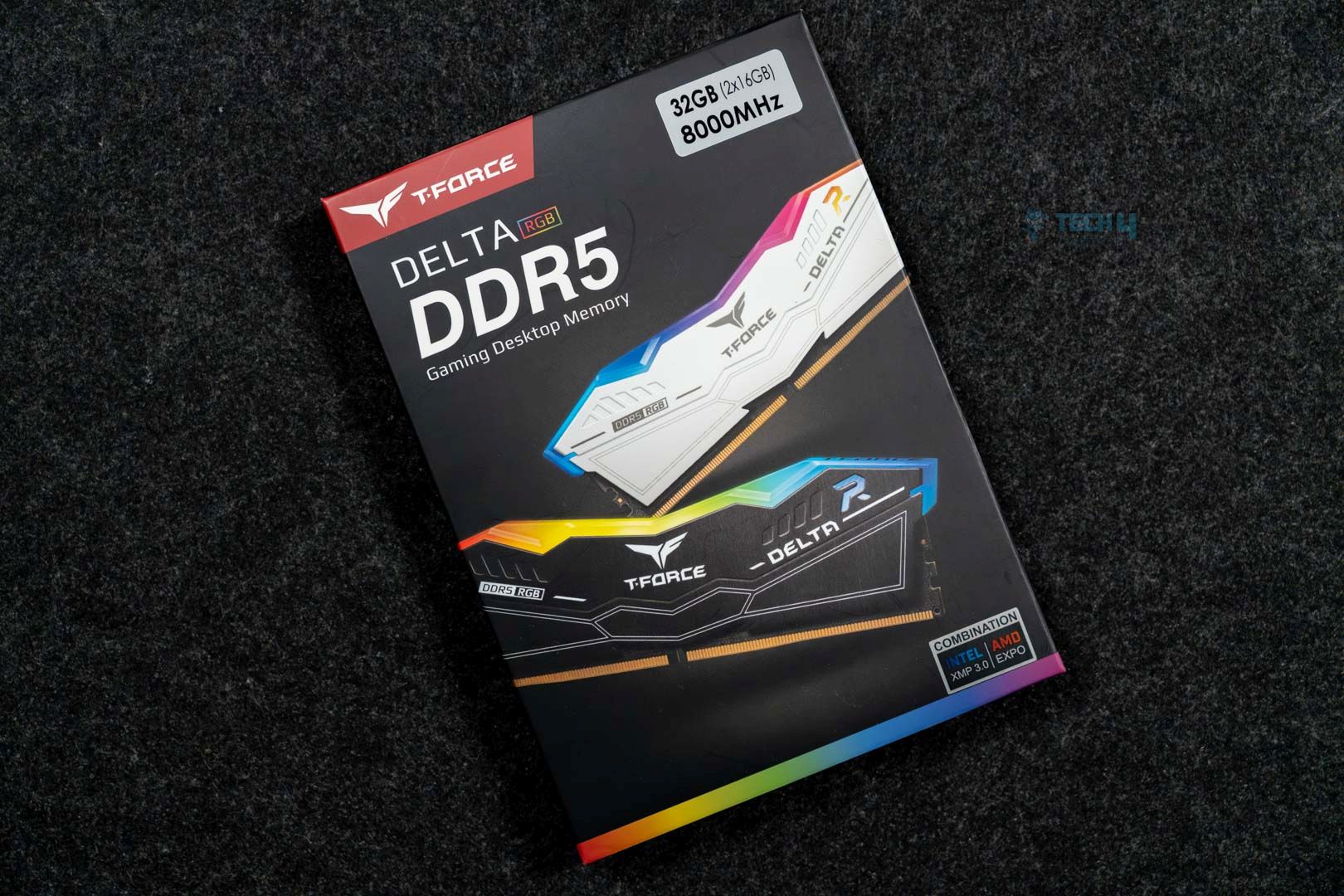
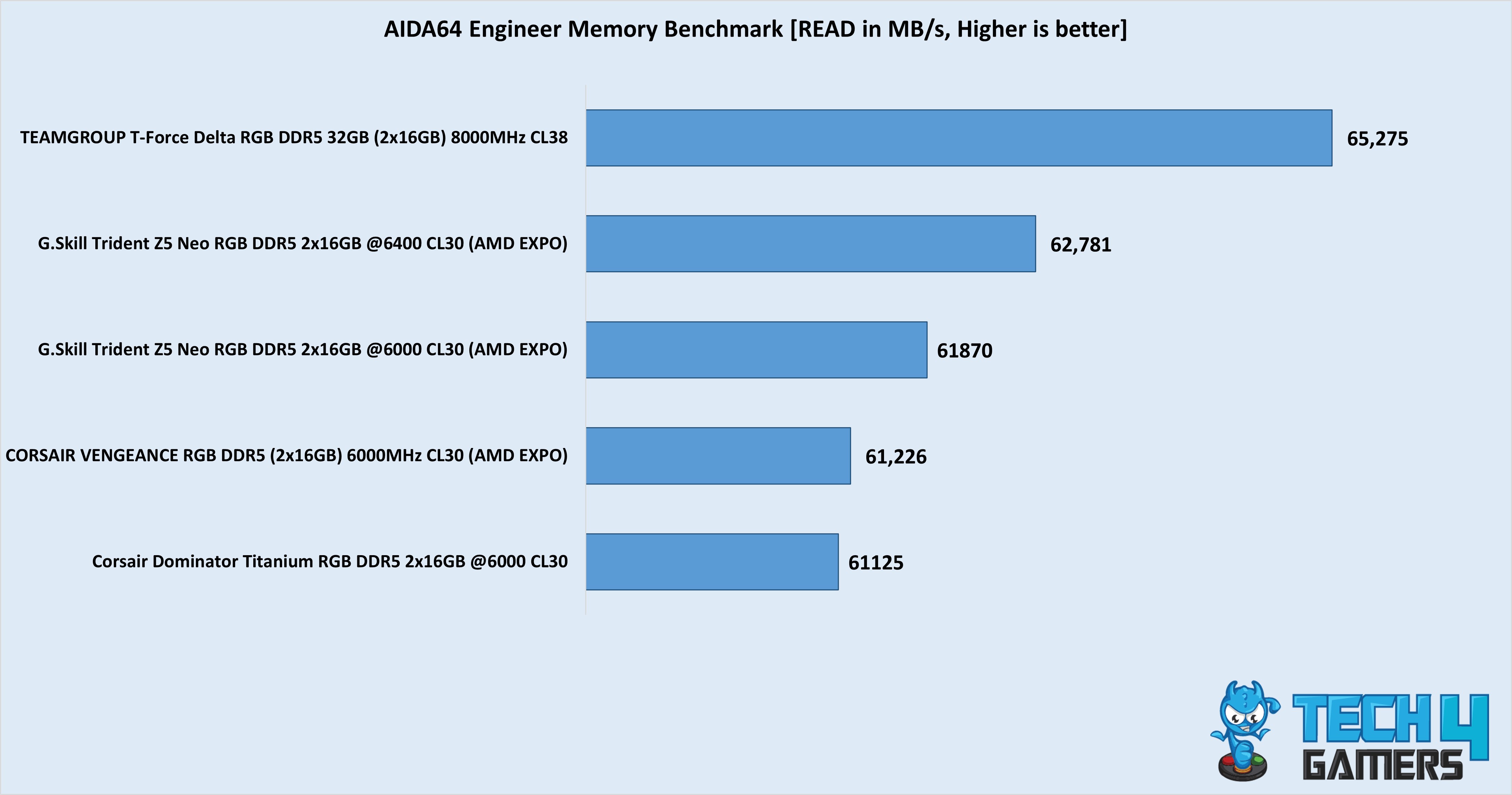
The TEAMGROUP T-Force Delta RGB kit is clocked at an impressive 8000 MT/s, with timings of 38-48-48-84. With a CAS latency of 38, the memory has a stock (EXPO) real latency of just 9.5 nanoseconds. The kit is perfect since you need to push 8000 MT/s or beyond to counter the memory controller’s latency in Ryzen 9000. We even managed to run it with the CAS latency at 36, where it was only beaten by kits with lower overall latency in read and write speeds. 

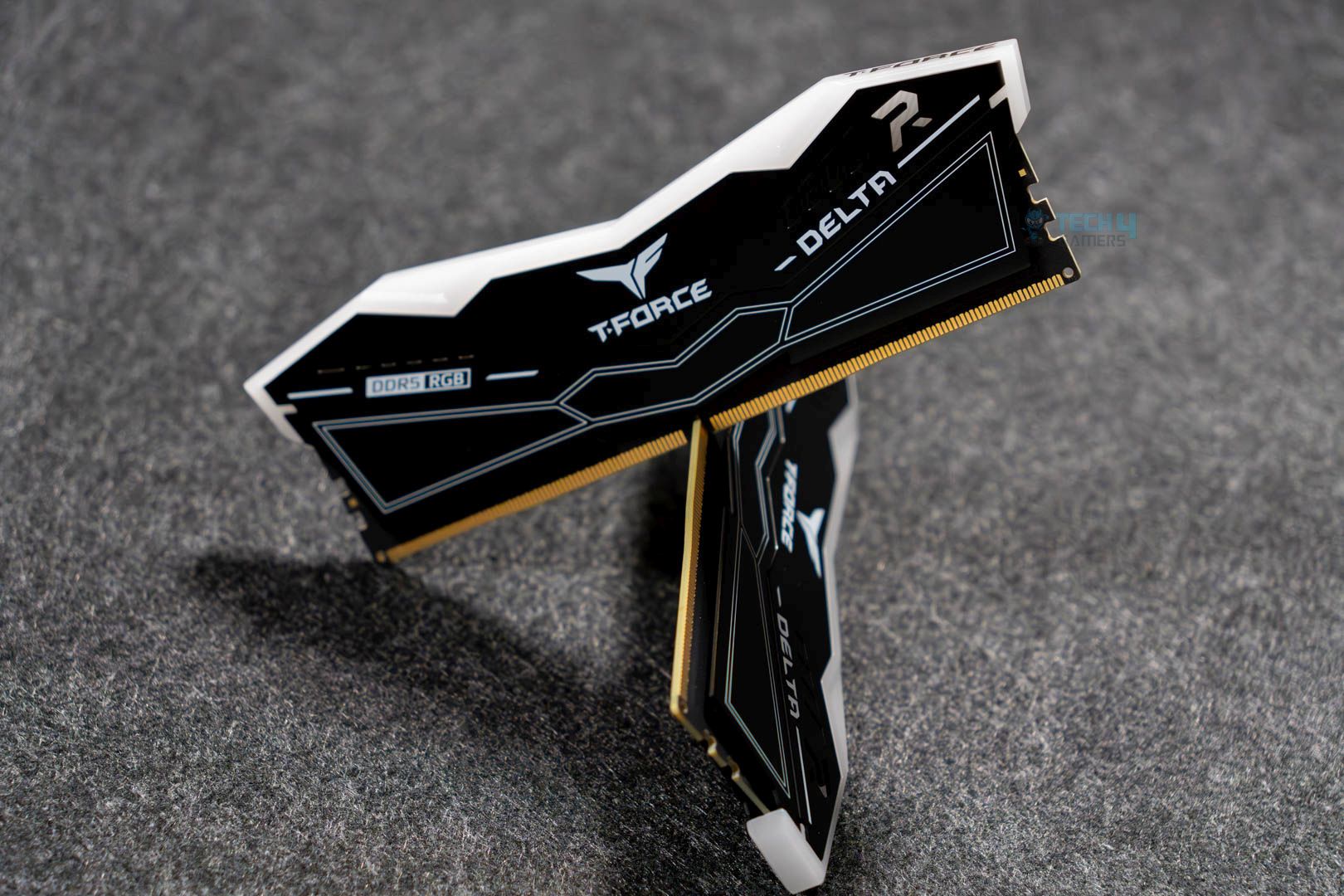
Aesthetically, the kit features a brushed aluminum heat spreader and an RGB diffuser compatible with all major motherboard RGB sync software. It is available in both black and white. The RAM is 46.1mm, which may be a problem with some dual-tower air coolers, so check compatibility before purchasing! It also has an on-die ECC chip for error correction. 

PRO TIP: If you want to ensure optimal functioning with your motherboard, refer to the Qualified Vendors List (QVL) for the memory kit you plan on purchasing.

Here’s how our hardware reviewer Sameed Hussain summed up this kit:

The TEAMGROUP T-Force Delta RGB DDR5-8000 CL38 is a high-speed DDR5 kit that not only looks great but also performs quite well.

✅Buy It If
You want affordable but fast memory: The TEAMGROUP T-Force Delta RGB provides a superfast EXPO transfer speed of 8000 MT/s and is one of the cheapest kits providing these speeds. 

The aggressive design suits you: The memory has a fairly aggressive design language with the wavelike symmetry of its RGB diffuser and heatsink. 

ECC support is a priority: This TEAMGROUP kit comes with on-die ECC.

❌Don't Buy It If
You want the best latency: At 8000 MT/s, a latency is added since the memory controller on the Ryzen 7 9800X3D can’t sync with the controller beyond 6400 MT/s. This is also why 6400 MT/s is the sweet spot for AMD Ryzen 9000 CPUs.

What Makes It The Best Performance RAM For Ryzen 7 9800X3D?

The TEAMGROUP T-Force Delta RGB kit looks awesome and runs at an impressive 8000 MT/s with a CAS latency of 38, which can be reduced to 36. Overall, its performance is solid, plus it supports ECC and is one of the most affordable kits offering such speeds. 

Performance: 9/10 Value: 8.5/10
Features: 9/10 Design: 8.5/10

G.Skill Trident Z5 Neo RGB 32GB DDR5-6400 CL30

Best High-End RAM for Ryzen 7 9800X3D
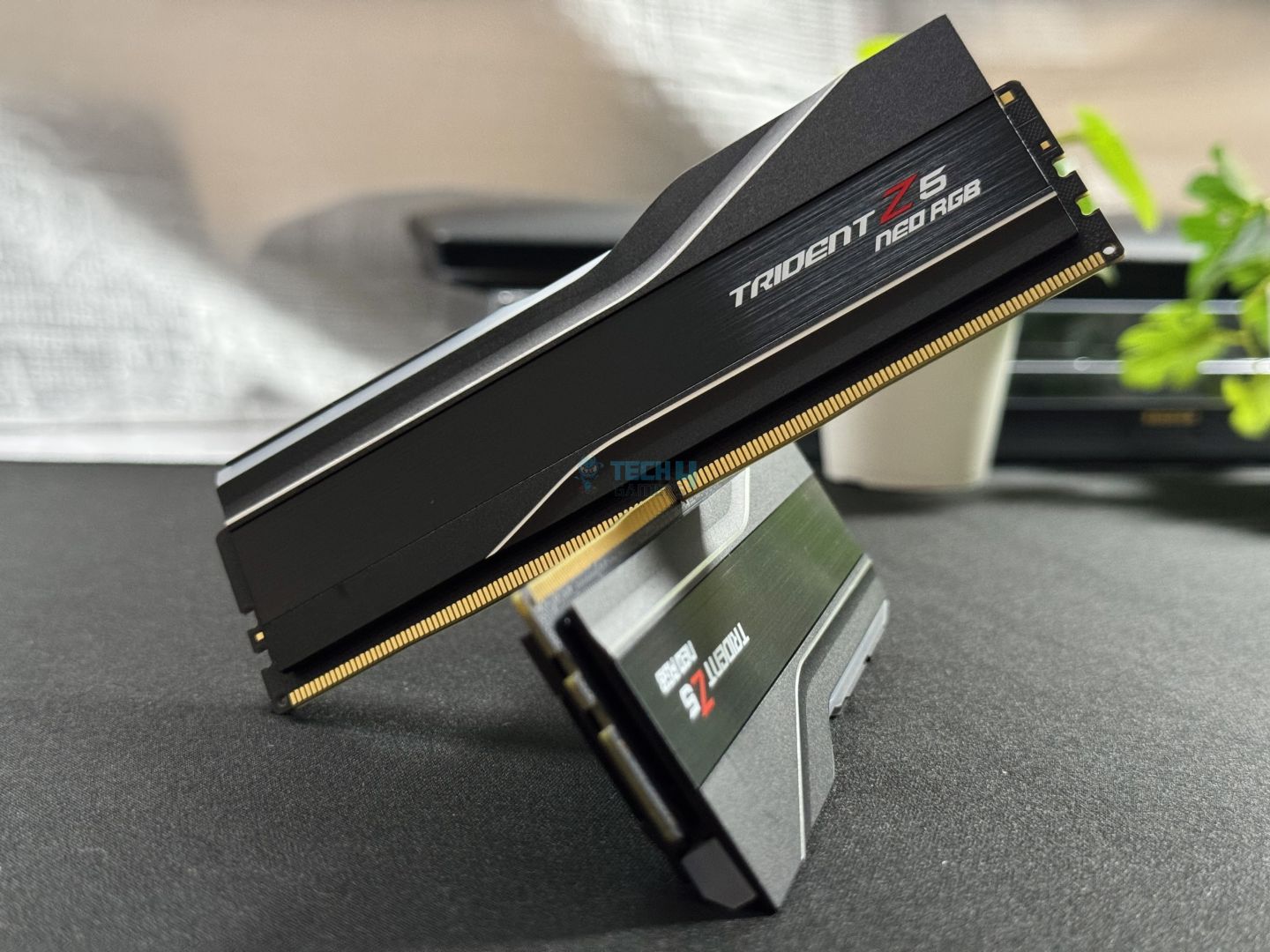
Specifications: Memory Type: DDR5 | Capacity: 32GB (2x 16GB) | Frequency: 6,400MHz | Latency: CL30 | Latency (Nanoseconds): 9.375ns | Voltage: 1.40V | RGB: Yes

Pros

  • Lovely design feat. RGB light bar
  • Excellent performance with EXPO 
  • 42mm height

Cons

  • Not the best value compared to slightly slower kits

Read Our G.Skill Trident Z Neo RGB 32GB DDR5-6400 RAM Kit Review

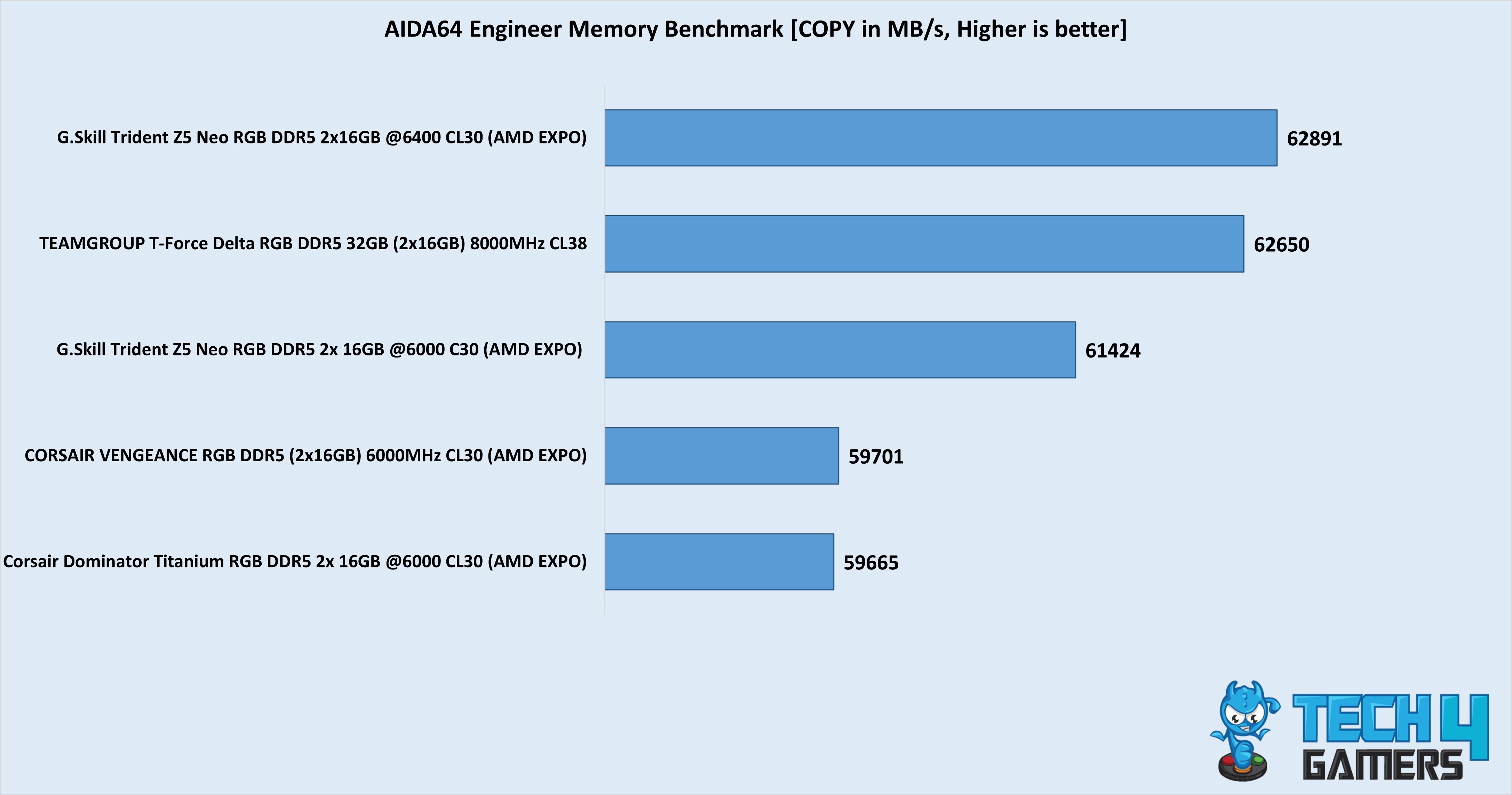
Our second G. Skill Trident Z5 Neo RGB kit in the list improves on the 6000 MT/s kit by pushing to 6400 MT/s under its EXPO configuration. Paired with a CAS latency of 30, the RAM has an excellent true latency of 9.375 nanoseconds and syncs nicely with the 9800X3D’s memory controller. Considering its price point, the kit performed excellently in our benchmarks and was beaten only by costlier kits. Its 1.4V EXPO voltage leaves some overclocking room, but there’s no need to since the memory controller will run at 1:2 with the memory beyond 6400 MT/s. 

We can’t praise the kit’s streamlined look enough. It comes in black/white themes, and its heatsink includes a brushed aluminum inset. On top, we have its RGB light bar, which provides a stunning display of illumination. Its height is 42mm, which is good enough for most air coolers you can think of to pair it with. G. Skill’s limited lifetime warranty backs the memory. 

The classic look and excellent performance were my main talking points for the RAM during my review: 

The G. Skill Trident Z5 Neo RGB follows the classic design of this lineup to bring us another high-performance kit. With an EXPO speed of DDR5-6400 at CL30, the memory runs at an ultra-low latency of 9.375 and shows excellent performance in our benchmarks.

✅Buy It If
The design pleases you: This G. Skill Trident Z5 Neo RGB kit follows the same iconic design as the previous kits. It has a fairly minimalistic look and lights up thanks to the RGB light bar.
❌Don't Buy It If
You’re on a budget: If you can sacrifice a bit on latency, you can save a good amount by purchasing other kits. 

What Makes It The Best High-End RAM For Ryzen 7 9800X3D?

The G. Skill Trident Z5 Neo RGB DDR5-6400 CL30 is one of the fastest out-of-the-box kits you can get for your Ryzen 7 9800X3D, so picking it is a no-brainer if performance is your priority. Its iconic look and good air cooler clearance top off the excellent package for $125. 

Performance: 9/10 Value: 8.5/10
Features: 9/10 Design: 9/10

Corsair Dominator Titanium RGB 32GB DDR5-6000 CL30

Best White RAM For Ryzen 7 9800X3D
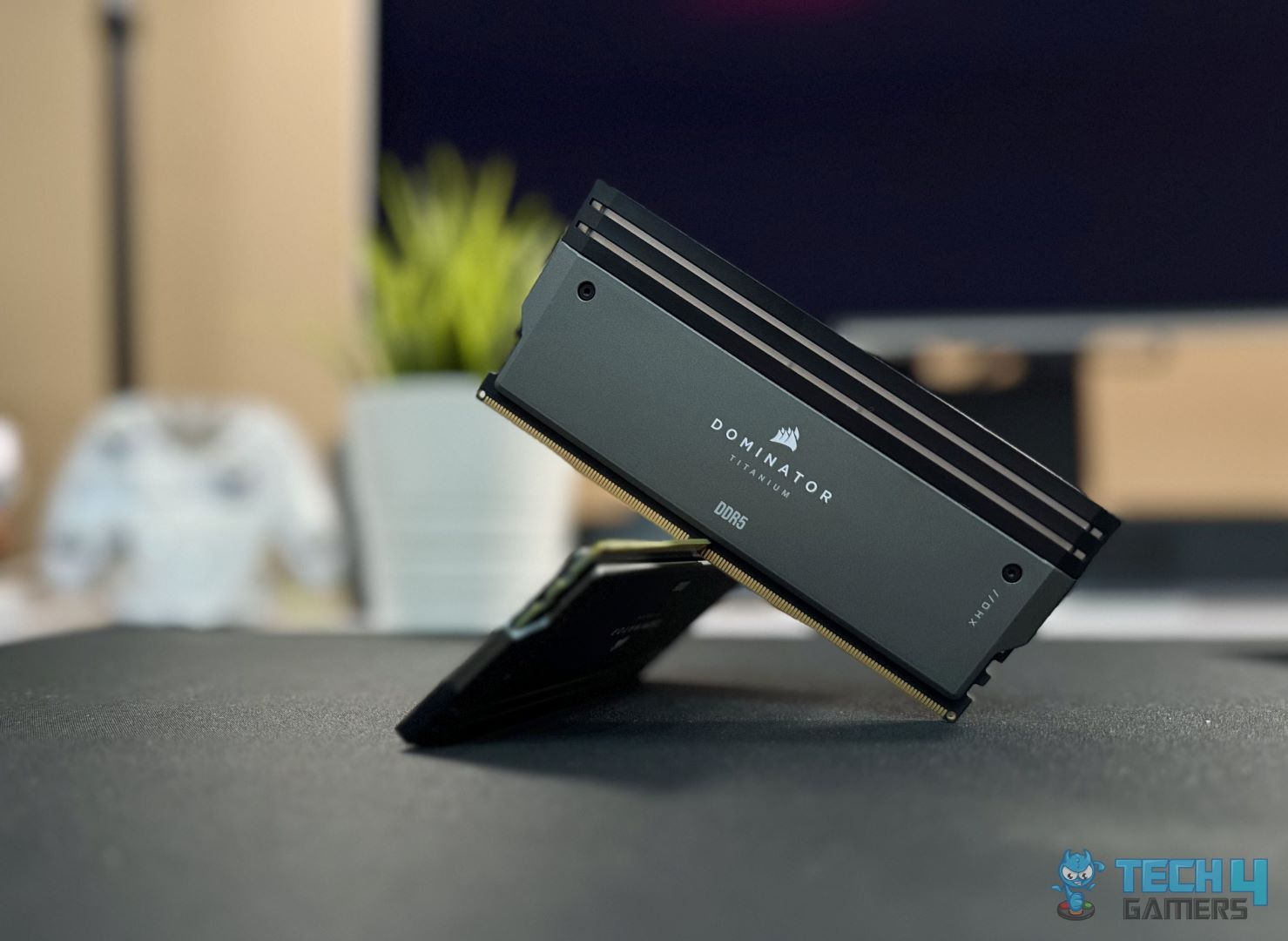
Specifications: Memory Type: DDR5 | Capacity: 32GB (2x 16GB) | Frequency: 6,000MHz | Latency: CL30 | Latency (Nanoseconds): 10ns | Voltage: 1.40V | RGB: Yes

Pros

  • Beautiful RGB lighting
  • Gorgeous aesthetics
  • Customizable top cover
  • Impressive performance

Cons

  • Expensive
  • Compatibility issues

Read Our Corsair Dominator Platinum RGB 32GB 6,000MHz DDR5 RAM Kit Review

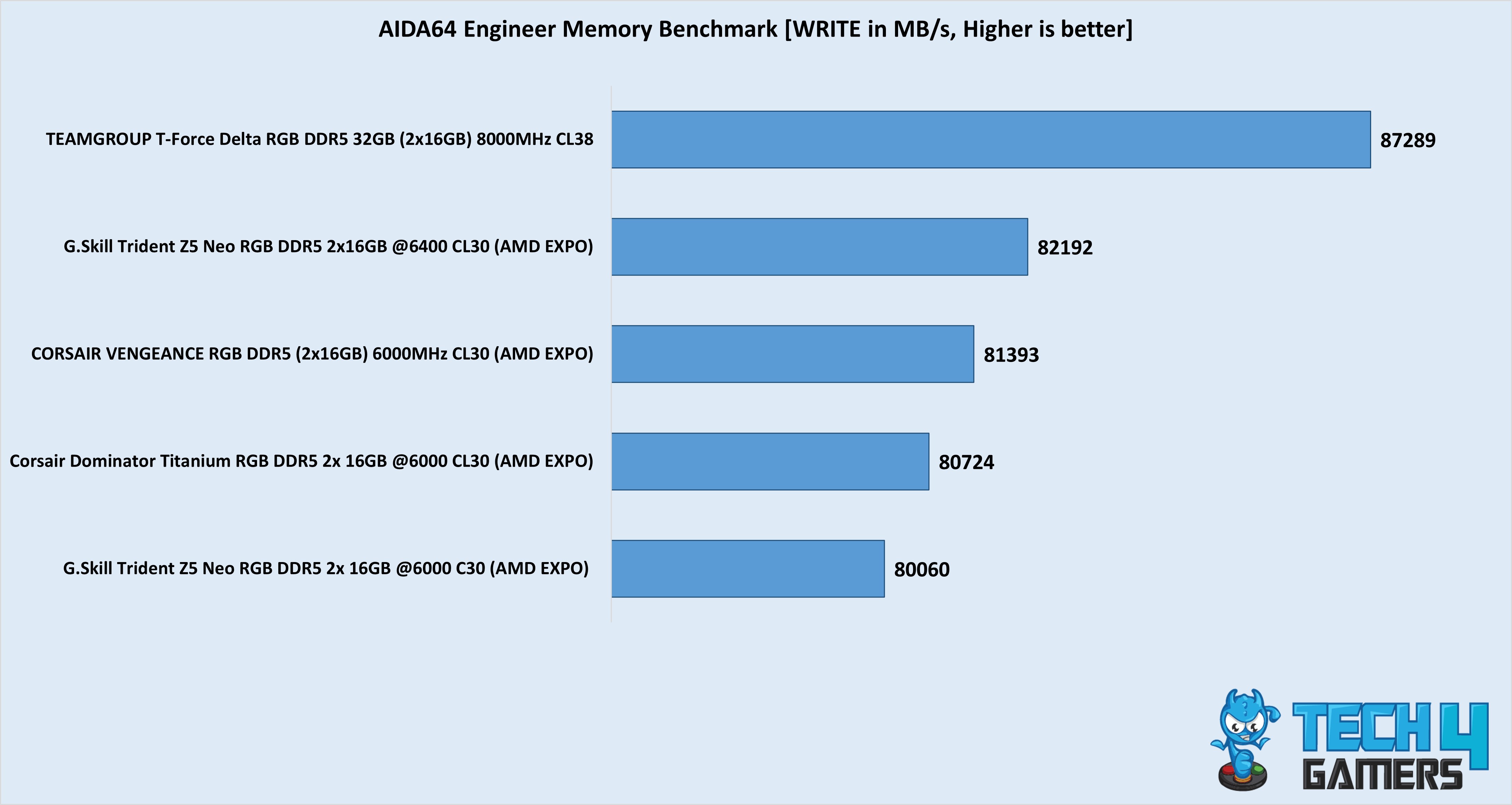
The Corsair Dominator Platinum RGB 32GB 6,000MHz DDR5 RAM kit perfectly complements a white PC build with the Ryzen 7 9800X3D. I’ll cover its performance first. With a 6,000MHz frequency, you get a decent 10ns latency, making its on-paper specifications pretty standard. However, our testing showed a different story when the kit averaged 81,437MB/s write speeds in AIDA64 Engineer. We didn’t overclock the kit, but you can try tightening the timings to see a performance improvement.

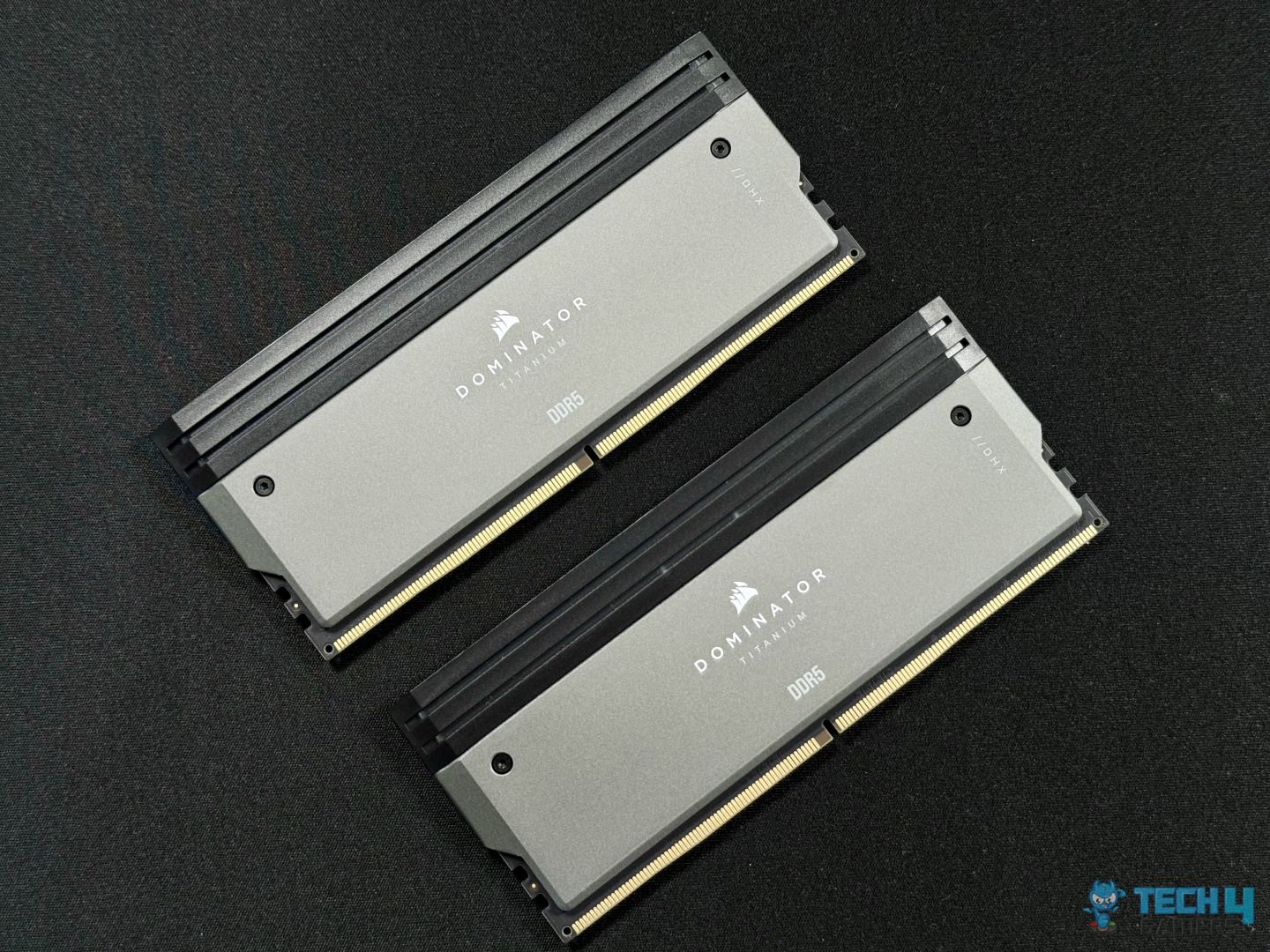
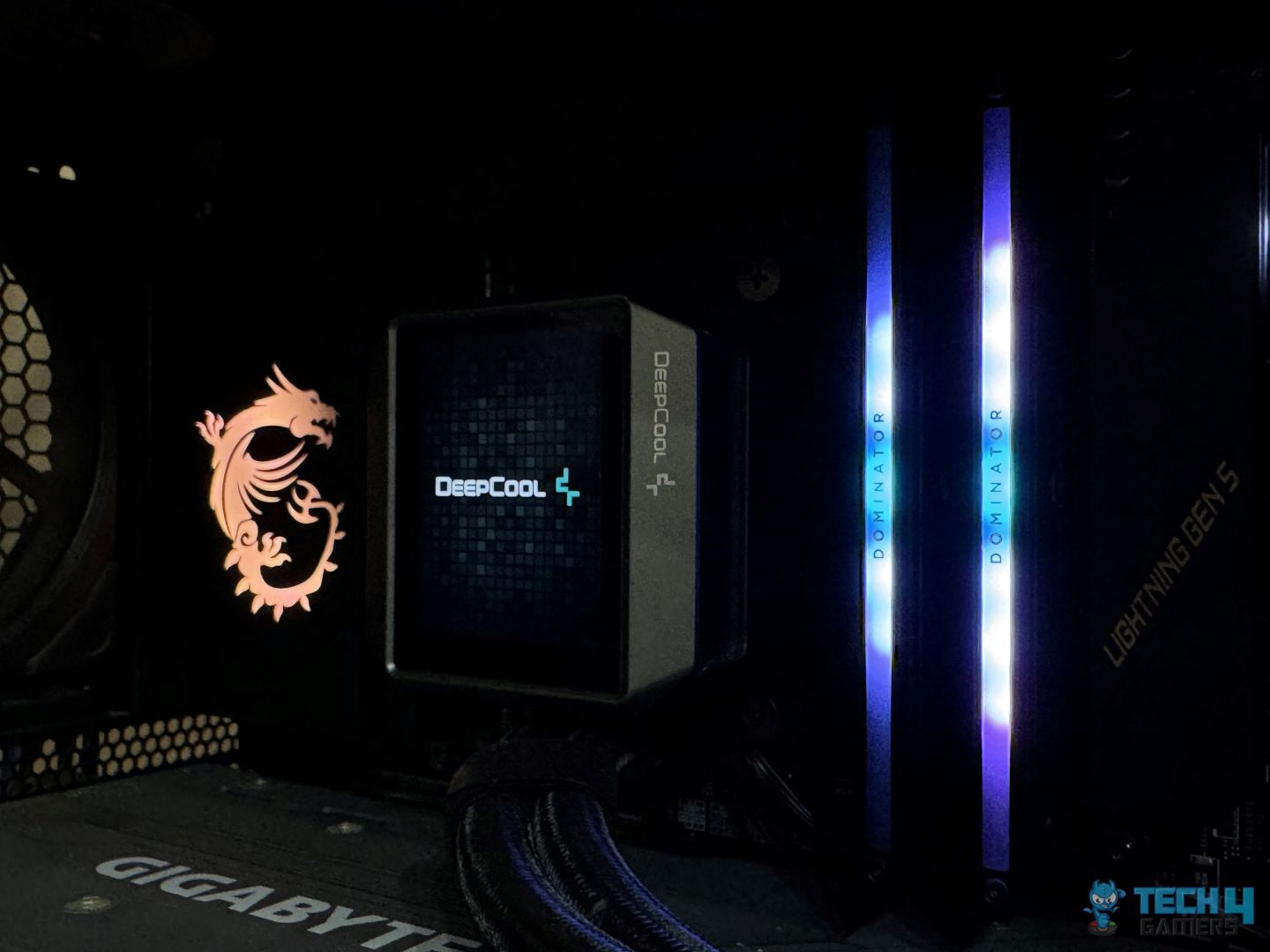
For its aesthetics, the Corsair Dominator Platinum is clad in white with beautiful RGB lighting at the top cover. To make things interesting, you can remove and replace the top cover with another design based on how you want the kit to look. Of course, the RGB is easily customizable through the iCUE software, so you don’t have to worry about that aspect. What I dislike about this kit, though, is its height. Reigning at 56mm tall, the kit can pose a threat if you use a beefy air cooler.

After I was done testing the RAM, here’s what I commented about it in my review:

The Corsair Dominator Titanium RGB DDR5-6000 32GB CL30 is a high-end Premium RAM, that not only performs well but comes with that aesthetic appeal as well. Corsair has created a well-rounded product to cater to its customers. If you’re looking for RAM that will let you push your CPU to its limits as it’s supposed to, then this RAM is for you!

✅Buy It If
You want a beautiful kit with the most performance out of the box: If you’re looking for a white RAM kit that doesn’t need to be tweaked to provide impressive gaming and productivity performance when paired with the Ryzen 7 9800X3D, I present to you the Corsair Dominator Platinum RGB 32GB 6,000MHz DDR5 RAM kit! This kit defines beauty and the beast; you won’t regret the purchase.
❌Don't Buy It If
You have a beefy air cooler: I don’t recommend buying the Corsair Dominator Platinum RGB RAM kit if you have a beefy air cooler installed in your system because the kit is 56mm tall. You don’t have a lot of clearance space at that point. So, I recommend you do your research properly before purchasing this kit.

What Makes It The Best White RAM For Ryzen 7 9800X3D?

The Corsair Dominator Platinum RGB 32GB 6,000MHz DDR5 RAM kit doesn’t only serve well with its incredible gaming and productivity performance. For instance, it offers astonishing customization options and is entirely clad in white, making it the best white RAM for the Ryzen 7 9800X3D. At its price point, you’re not getting a better white kit anywhere.

Performance: 9/10 Value: 8/10
Features: 8/10 Design: 10/10

Corsair Vengeance RGB 32GB DDR5-6000 CL30

Best Value RAM For Ryzen 7 9800X3D
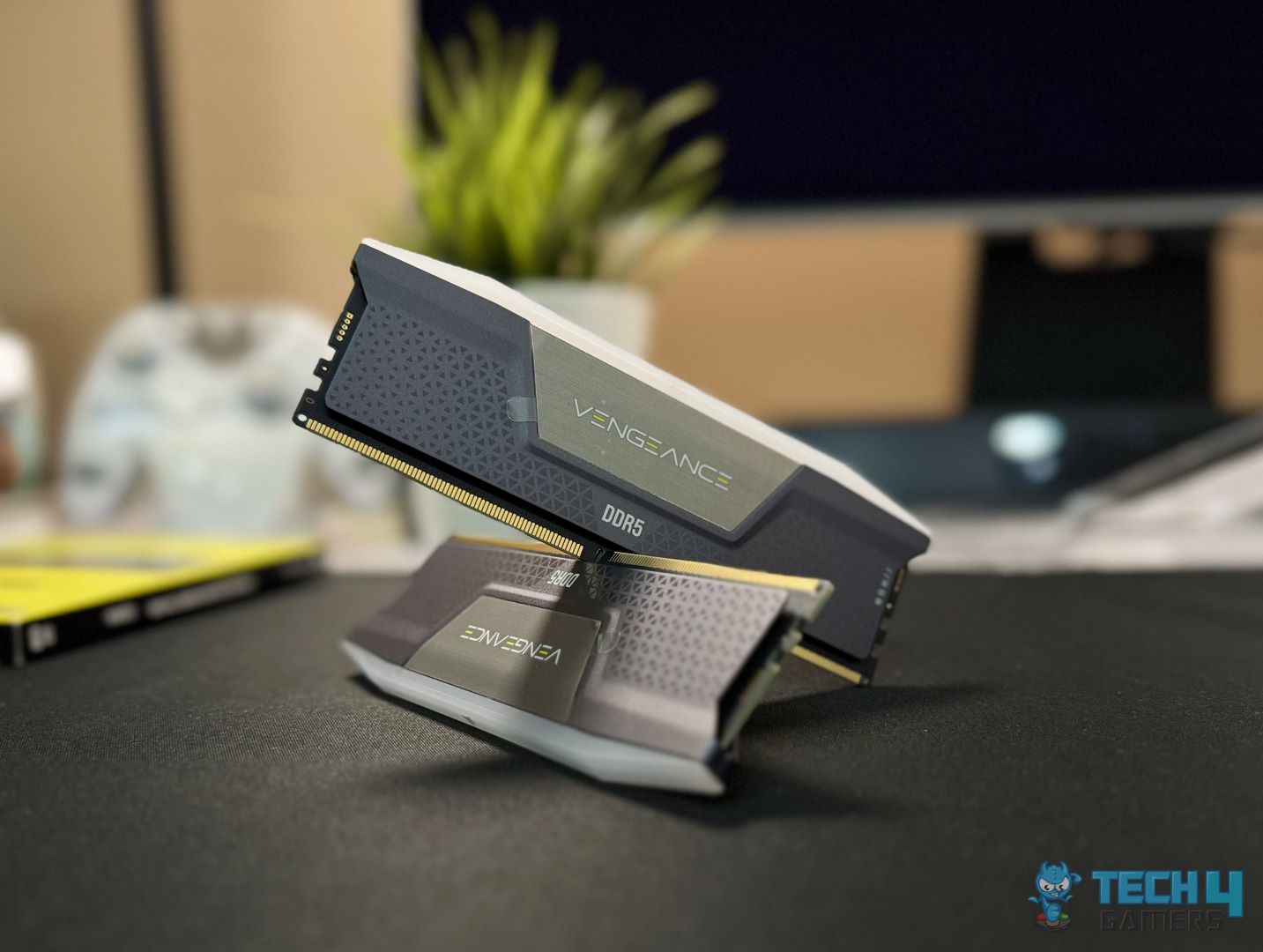
Specifications: Memory Type: DDR5 | Capacity: 32GB (2x 16GB) | Frequency: 6,000MHz | Latency: CL30 | Latency (Nanoseconds): 10ns | Voltage: 1.40V | RGB: Yes

Pros

  • Impressive price-to-performance ratio
  • Beautiful RGB lighting
  • High performance
  • EXPO and XMP 3.0 support
  • Tight CAS timings

Cons

  • Bad overclocking potential
  • Runs at 1.40V

Read Our Corsair Vengeance RGB 6,000MHz 32GB DDR5 RAM Kit Review

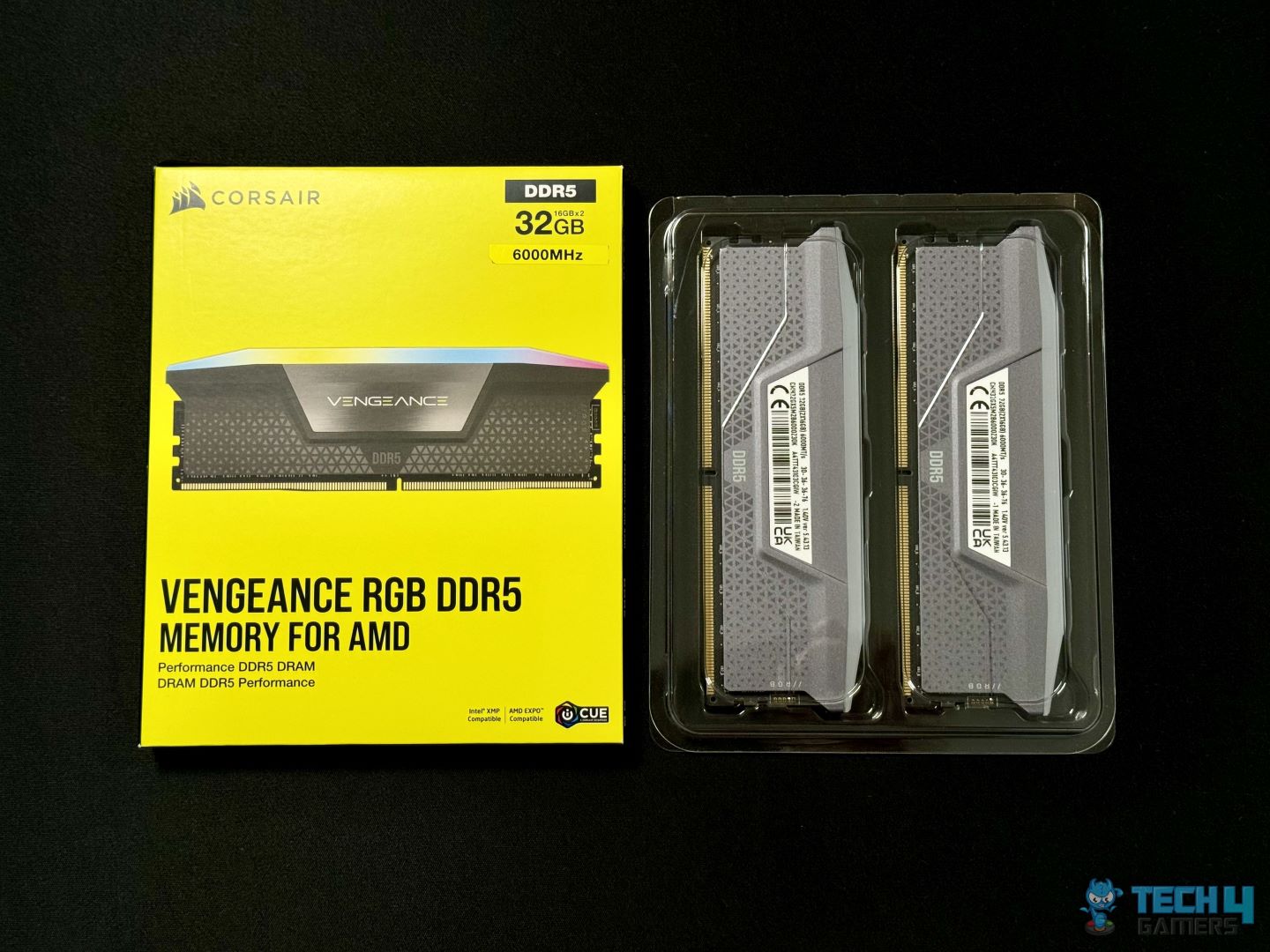
Don’t have much money left in your budget after purchasing the Ryzen 7 9800X3D? Don’t worry; the Corsair Vengeance RGB 6,000MHz 32GB DDR5 RAM kit has your back (and pockets) secured with its amazing price-to-performance ratio. In our dedicated testing, the Corsair Vengeance was almost on par with the Corsair Dominator Platinum, averaging 81,393MB/s write speeds in AIDA64 Engineer. Coincidentally, the frequency and latency timings are similar, so the temperatures must be causing the difference in performance.

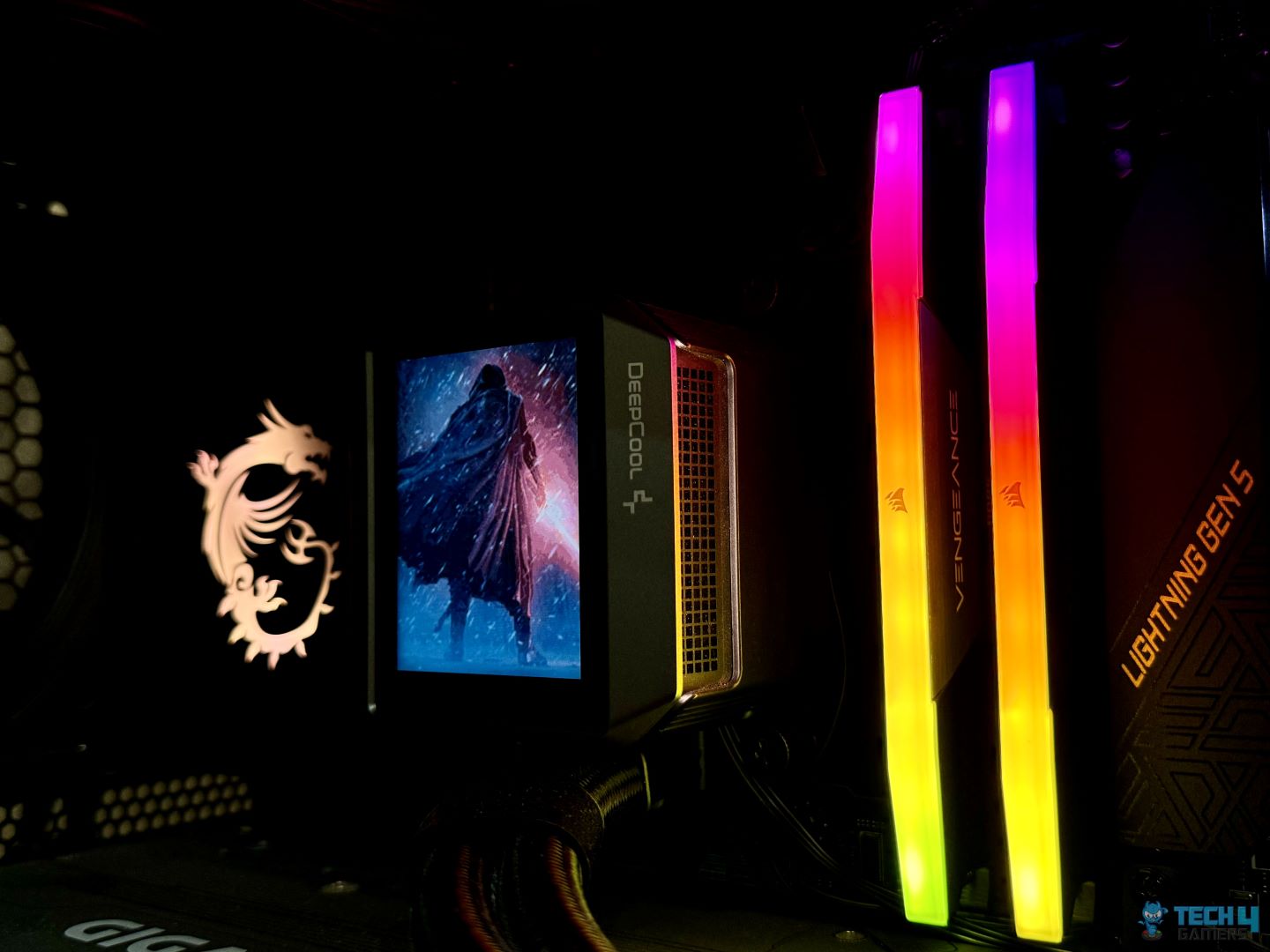
Unlike the Dominator Platinum, the Corsair Vengeance has bad overclocking potential, and this is where the actual difference between the two kits starts. We could only increase its frequency by 133MHz by increasing the voltage to 1.435V. Other than that, though, the Vengeance is amazing in all aspects. You get a decent heatsink design, cool A-RGB lighting on the top cover, and Intel XMP 3.0 and AMD EXPO support.

After testing the Corsair Vengeance RGB 6,000MHz RAM kit on his test bench, I fell in love with its outrageous value. This is how I summarized my hands-on review:

The Corsair Vengeance RGB DDR5 6000 MHz CL30 is a pure price-to-performance RAM that performs at a high level and also comes with an aesthetic vibe. It’s a well-rounded product that Corsair has designed to cater to its valued customers. If you’re looking for a balanced RAM that gives you performance and looks good while doing it, this kit is designed for gamers like you.

✅Buy It If
You want multi-setup support on a lower budget: If you’re an enthusiast who changes your PC build every generation and doesn’t want to keep changing the RAM every time, then I recommend buying the Corsair Vengeance RGB 6,000MHz 32GB DDR5 RAM kit because it supports the latest Intel and AMD processors. Moreover, it is cheaper, so you’re also saving a lot of money.
❌Don't Buy It If
You want to overclock your RAM: If you want to achieve decent overclocks on the RAM, then I don’t recommend buying this kit. During our testing, we only managed to increase the frequency by 133MHz at 1.435V. To keep the overclocks stable, we loosened the timings by two clock cycles to CL30-38-38-78, making the overclocks rudimentary.

What Makes It The Best Value RAM For Ryzen 7 9800X3D?

Despite not costing much, the Corsair Vengeance RGB 6,000MHz 32GB DDR5 RAM kit exudes innumerable performance, standing toe-to-toe against the more premium Dominator Platinum kit. Besides its performance, you’re getting decent black aesthetics with good RGB lighting, a lifetime warranty, and multi-setup support for Intel and AMD builds, making it the best value RAM for the Ryzen 7 9800X3D.

Performance: 9/10 Value: 10/10
Features: 8/10 Design: 8/10

RAM Kits That Almost Made The List

Because I had to choose the RAM kits that fit best with the Ryzen 7 9800X3D, I couldn’t add some amazing kits you would otherwise find in one of our listicles. Here are some kits that I skipped and my reasoning behind doing so:

  • G.Skill Flare X5 32GB 6,000MHz DDR5Although on the budget end, other kits provide better aesthetics and performance at a similar price, improving their value over this kit.

Our Benchmarks For The Best RAM For Ryzen 7 9800X3D

Here is a compilation of the benchmarks from our dedicated reviews. If you want a more comprehensive look at what RAM kit performs and how well, you can glance through our RAM comparison tool, where we have curated the benchmarks of all the kits we have reviewed at Tech4Gamers.
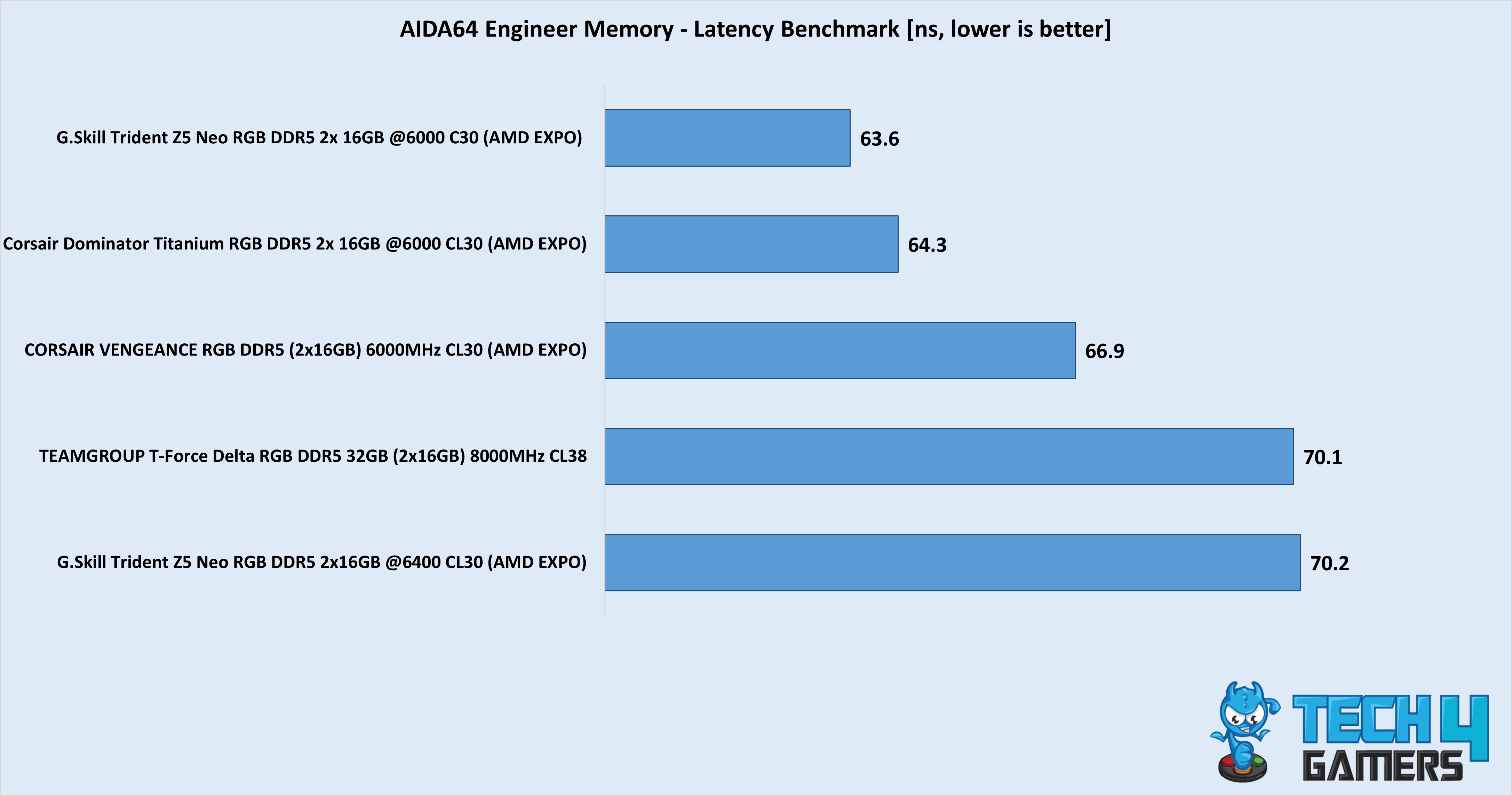
Specification Comparison Table

To ease your purchase decision, I have created a specification comparison table so that you can glance at thBest RAM For Ryzen 7 9800X3D e key comparisons between the five kits we selected:

RAM KitCapacity (GB)Frequency (MHz)CAS Latency (CL Timings)RAM Latency (ns)Voltage (V)
G.Skill Trident Z5 Royal Neo RGB326,400309.31.40
TEAMGROUP T-Force Delta RGB328,000389.51.45
G.Skill Trident Z5 Neo RGB326,400309.3751.40
Corsair Dominator Titanium RGB326,00030101.40
Corsair Vengeance RGB326,00030101.40

Important RAM Terms To Look Out For

  • EXPO: Like Intel’s XMP feature, EXPO is AMD’s variant. It allows users to overclock RAM kits according to their pre-configured settings with higher frequency and lower latencies.
  • DIMM SlotsThese are slots next to the CPU socket on the motherboard where RAM kits are installed. Depending on their size, most motherboards have two to four slots. Before installing, look through your motherboard’s manual to determine the fastest DIMM channels for optimum performance.
  • FrequencyA RAM kit’s frequency means how fast it can send data to a CPU. Frequencies are measured in Megahertz (MHz) or Gigahertz (GHz). Most DDR5 RAM kits start from 5,600MHz; high-end kits can exceed 9,000MHz. Generally, higher frequency means greater performance, but tight CL timings are equally important.
  • CAS LatencyAbbreviated as Column Address Strobe latency or CL timings, CAS latency shows the time required for a RAM kit to make data available, which the CPU requested. Tighter CL timings equate to faster data processing and better overall PC performance. You can also calculate the latency in nanoseconds.
  • HeatsinkMost RAM kits today come with an integrated heat spreader or heatsink to improve the module’s cooling capabilities. The colder a RAM kit runs, the better it can be overclocked.
  • Voltage: The voltage showcases a RAM kit’s power consumption. Lower voltage consumption means better efficiency and greater overclocking potential. However, it can also lead to lower performance. When overclocking your kit, increasing the voltage can help tighten the timings and increase the RAM’s frequency.

How We Tested The Best RAM For Ryzen 7 9800X3D

To determine which RAM kits to add to this listicle, I considered various factors such as overall performance, design, overclocking capabilities, and value for money. Here are some details for all of these factors:

  • Performance: One of the most important factors is how well a RAM kit performs with your CPU. Therefore, I only chose RAM kits that provided the most performance with the Ryzen 7 9800X3. Most of our testing was done on AIDA64 Engineer, Cinebench R23, and a few CPU-heavy games.
  • Overclocking PotentialThis factor is more critical for enthusiasts who want to achieve the most out of their PC hardware. There are two ways to overclock RAM kits. The first is by using AMD EXPO or Intel XMP settings, while the second is by manually overclocking the kits. Hence, I chose kits with decent manual overclocking potential and multiple AMD EXPO settings.
  • Value For Money: No matter your budget, I don’t recommend buying PC hardware with diminishing returns. You always want components that provide better value for their price. Therefore, when choosing the RAM kits for the Ryzen 7 9800X3D, I targeted the ones that cost less but provided more, such as the Corsair Vengeance RGB 32GB 6,000MHz DDR5 RAM kit.
  • Design: Although not the most essential factor to consider, if you’re investing over $1,000 in your new PC build, you might as well make it flashy for the eyes. When it comes to design, you never know what a consumer might be looking for; that’s why I tried to create as much diversity as possible in my product listings to keep everyone happy.

FAQs

Is 16GB RAM enough for the Ryzen 7 9800X3D CPU?

While 16GB DDR5 RAM is enough for most tasks, I recommend 32GB dual-slot RAM to achieve the most performance from the CPU. You don’t have to worry about prices because most kits range from $110 to $120.

What is the ideal RAM speed for the Ryzen 7 9800X3D?

No answer is set in stone, but 6,400MHz seems to be the sweet spot for the Ryzen 7 9800X3D. You can still play around with the speed until you maximize your PC’s performance.

Does overclocking RAM on the Ryzen 7 9800X3D prove beneficial?

Most of the time, you won’t need to overclock your RAM kit manually. Usually, you can see a 5% to 10% performance increment based on how much your kit can be overclocked.

Searching for RAM kits for another Ryzen 9000 series CPU? Go through our list here:

Recent Updates


  • March 27, 2025: After testing the TEAMGROUP T-Force Delta RGB 8,000 MHz, we found it to be the better option for the “Performance” category. The G. Skill Trident Z5 Neo RGB kit replaced the Royal Neo kit with its better value and identical performance.


NVIDIA Could Lose Most Of Its AI Market Share In China This Year, Analysts Claim

Story Highlight
  • Nvidia’s AI market share in China’s AI chip sector is expected to drop to 8% this year. 
  • The company held 66% of the reins in the Chinese AI market two years ago.
  • US export restrictions and rising local competition are slowly pushing Nvidia out of the region.

The ensuing AI boom has brought all the tech giants into a tough global competition to control as much market share as possible. Nvidia has long led this race with its products across several regions worldwide, but its hold on China is expected to loosen drastically. 

A new report reveals that Nvidia could lose most of its market share in the Chinese AI chip sector in 2026. It controlled 66% of the local market back in 2024, but Bernstein analysts predict the company will plunge to a mere 8% this year.  

Why it matters: Chinese AI products from Huawei and Moore Threads’ GPUs are rapidly scaling production, with these homegrown alternatives resulting in a decline in Nvidia’s local market shares.  

Nvidia AI semiconductor chinese market
Nvidia’s AI semiconductor market is expected to drop to 8% this year || Image Source: Nikkei.

Nikkei reports that Nvidia AI GPUs and rack-scale solutions are no longer in demand in China, as domestic companies, such as Huawei, Moore Threads, Cambricon, and MetaX, are now keeping up with much of the market

The new products meet the needs of domestic developers. There will be no more need to wait for advanced products from overseas.

-Zhang Jianzhong, Chief Executive of Moore Threads.

Nvidia is suffering from US-imposed export restrictions, making access to its top-of-the-line products difficult in China. The US allowed the company to export its previous generation of accelerators. They are much slower than the current Blackwell B200 and B300 GPUs, which are not available in China.

The local companies are also keeping up with Nvidia in terms of performance; Moore Threads’ Huashan is competing well against Nvidia’s Hopper H100 and H200 cards, for instance.

Nvidai CEO AI Presentation
Nvidia’s grip on the AI market will loosen with growing competition.

These variables have given rise to local AI chips and hardware accelerators that can satisfy the Chinese hyperscalers and enterprises.

The Chinese government is also actively working to achieve semiconductor self-sufficiency, with incentives like the ‘four little dragons’ of GPUs from Moore, MetaX, Biren Technology, and Suiyuan Technology.

So, the rapidly progressing Chinese AI semiconductor market will reportedly keep up with 80% of its own demand soon.

Do you think Nvidia will be left behind in the Chinese AI race in the near future? Let us know your thoughts in the comments below, or join the discussion on the Tech4Gamers forum.

“Nvidia Is Lying”: Insider On Production Issues With RTX 5070 And Other High-End Cards

Story Highlight
  • An insider suggests that Nvidia is lying about production issues with its GPUs.
  • It is indeed restricting the production of GPUs that have more than 8GB VRAM.
  • This is being done to compensate for its overbooked AI contracts, instead of a consumer-first approach.

The PC gaming market is in a tight spot, with almost every component reaching absurdly high prices. Graphics cards have also been affected, with recent reports indicating that Nvidia has discontinued its RTX 5070 Ti and other cards. 

These reports were later denied, but an insider has claimed that “Nvidia is lying through their teeth” and that most of the GPUs with over 8GB of VRAM have reached the end of their lives, or their production has been significantly reduced. 

Why it matters: The insider claims that to fully focus on its AI commitments, Nvidia is now ignoring the consumers, which will lead to it discontinuing a bunch of GPUs. 

Tom From Moore’s Law is Dead states that Nvidia is lying to us regarding the availability of its GPUs. The company is publicly stating that the supply is fine while internally throttling every card with over 8GB VRAM.

He claimed that Nvidia uses PR stunts to help with its cause, and “slanders” pro-consumer outlets like Hardware Unboxed in the process. For context, the latter was the first to report that RTX 5070 Ti was being killed off. 

Nvidia RTX 5070 Ti
NVIDIA is restricting the supply of GPUs to cater to its AI contracts 

Tom further claims that he predicted a similar thing for RTX 5090 last year, and Nvidia negated it. Later, the GPU was selling for over $4000, which showed that tech giants had indeed restricted the supplies. 

Nonetheless, the insider claims that he verified this from multiple sources, and indeed, Nvidia will be focusing on its AI contracts rather than regular consumers, which could kill off many GPUs, leading to insanely high prices. 

What are your thoughts on Nvidia lying about the GPU production issues? Let us know your opinions in the comments or join the discussion at the official Tech4Gamers Forum.

PS5 Sales In Japan Continue To Climb Following The Launch Of A Cheaper Model

Story Highlight
  • The PS5 variants sold over 46k units in Japan during the last two weeks, only ending up behind Switch 2.
  • A big reason for this sales surge was the cheaper digital edition of the console specific to Japan.
  • After a dip last month, the $330 PS5 has boosted the console’s sales once again in the country.

Despite some failures across this generation, the PS5 has been a commercial success with over 84 million consoles sold worldwide. However, the Sony console has struggled to put on a strong foothold in its home base of Japan.

To combat this issue, new PlayStation CEO Hideaki Nishino launched a cheaper model of the console in 2025, and as it turns out, PS5 sales have seen another resurgence on the charts, thanks to this variant.

Why It Matters: Despite dips in December, PS5 sales have been boosted once again, thanks to the cheaper variant showcasing once again how putting consumers first leads to good results.

PS5 Japan sales
Source: Famitsu

Famitsu recently published its first sales charts of 2026, and the PS5 is so far the second-most sold console in Japan this year, shipping 46.7k units. The cheaper new digital edition of the console was largely responsible for this performance, accounting for 36.8k of the overall sales between December 29 and January 11.

On the other hand, the base PlayStation 5 was bought by 6k players on retail, while the PS5 Pro also contributed 3.8k sales. The Nintendo Switch variants were only a few hundred units behind the console, with the Switch family selling a combined 46.3k units across this period.

Unsurprisingly, the PS5 ended up behind Nintendo Switch 2 on the charts, with the handheld selling 313k units. But, considering how the Sony console saw a dip in sales last month despite its $330 digital edition being fresh on the market, this resurgence is a good sign.

PS5 Japan
Sony’s $330 Digital PS5 continues to be successful in Japan.

Japanese fans have expressed their happiness with PlayStation for releasing the price-cut digital edition. Furthermore, if sales are any indication, this was a fantastic business decision from Sony, as the cheaper PS5 continues to boost the brand’s performance in Japan.

Do you think PlayStation is making a good choice by losing money on the cheaper PS5 just to have a user base in Japan? Tell us in the comments below or head to the Tech4Gamers forum for discussion.

Insider Says Valve Didn’t Reveal Half-Life 3 At TGA 2025 Due To Steam Machine Memory Prices Issue

Story Highlight
  • Insider has claimed that Half-Life 3 was originally planned to be revealed at TGA.
  • The plan was canceled due to Steam Machine memory pricing issues.
  • Geoff Keighley instead showcased Highguard in its place, which was a controversial move.

Half-Life 3 has now been a part of rumors for a very long time. In fact, it is reportedly being positioned as the Steam Machine’s launch title. New rumors also point out that it was planned to be revealed at The Game Awards, but Valve decided against it. 

A reliable insider claims that Highguard wasn’t supposed to be shown at the TGA finale spot, as they didn’t pay for it. But the show pushed it there because another game dropped out from there, which was reportedly Half-Life 3.

Why it matters: This does make sense considering the finale spots are usually reserved for titles that can create massive hype amongst the audiences, and Highguard wasn’t something capable of doing that. 

Highguard TGA
Highguard Studio didn’t pay for the game’s finale spot at TGA

Paul Tassi took to X to highlight that the Game Awards pushed Highguard at the finale spot despite the studio not paying for it. Another insider, Alexxortv, claims that the position belonged to none other than Half-Life 3

Valve originally planned to reveal the game at the show. However, considering the uncertainty in the market with high RAM prices, it is currently unclear what the Steam Machine’s pricing will be; therefore, Valve canceled the reveal

Half-Life 3
Half-Life 3 was supposed to be revealed, but Valve backed out of it

Unfortunately, Highguard had to take all the heat for that. By putting it in the finale spot, it garnered a lot of attention, and the game is entering a saturated market; fans didn’t consider it that important to be there. 

For now, this is just a rumor, so take this with a grain of salt. But this scenario, based on the memory crisis and Valve being unsure of Half-Life 3’s reveal do make sense. 

What are your thoughts on this? Do you think Half-Life 3 was indeed planned for TGA? Let us know your opinions in the comments or join the discussion at the official Tech4Gamers Forum.

After The SSD Crisis, Average Price Of HDDs Have Shot Up By 46% In The Last 4 Months

Story Highlight
  • The average price of HDDs has grown by 46% just in the last 4 months, as per research.
  • This price change is more of a supply chain issue than any shortages for now.
  • The average price of SSDs also saw an increase of 76% in the same time period.

The PC market has been troubled with price increases in every sector, thanks to the ongoing memory shortages. SSDs are one of the primary victims of these price hikes due to the ongoing NAND famine, fueled by the AI boom.

As it turns out, HDDs are now also being affected by this crisis through a far-reaching ripple effect. New research shows that the average price of mechanical hard drives has shot up by a whopping 46%.

Why it matters: HDDs have become more popular in the last few months, so the ripple effects of the memory apocalypse are also impacting their pricing. The current trajectory suggests the most premium HDDs will get more expensive over time.

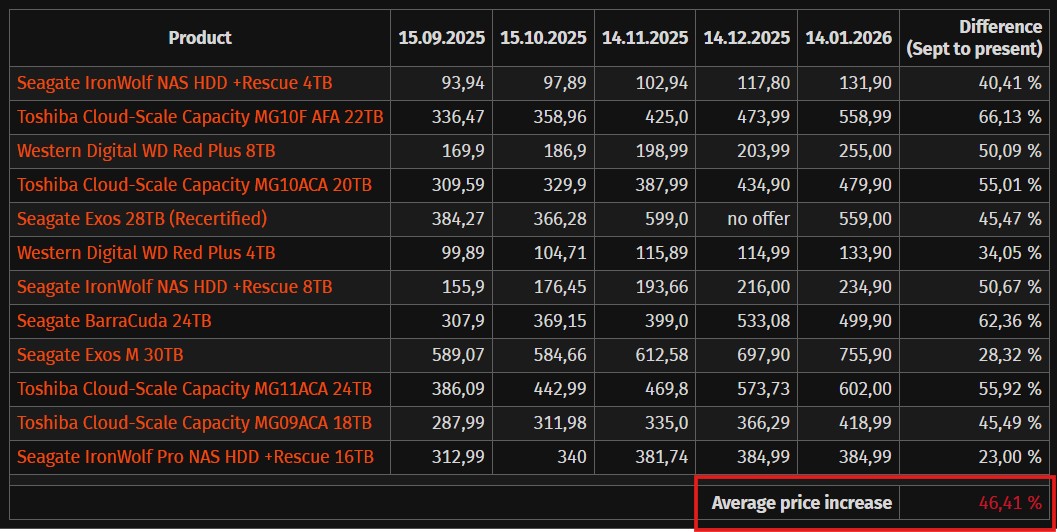
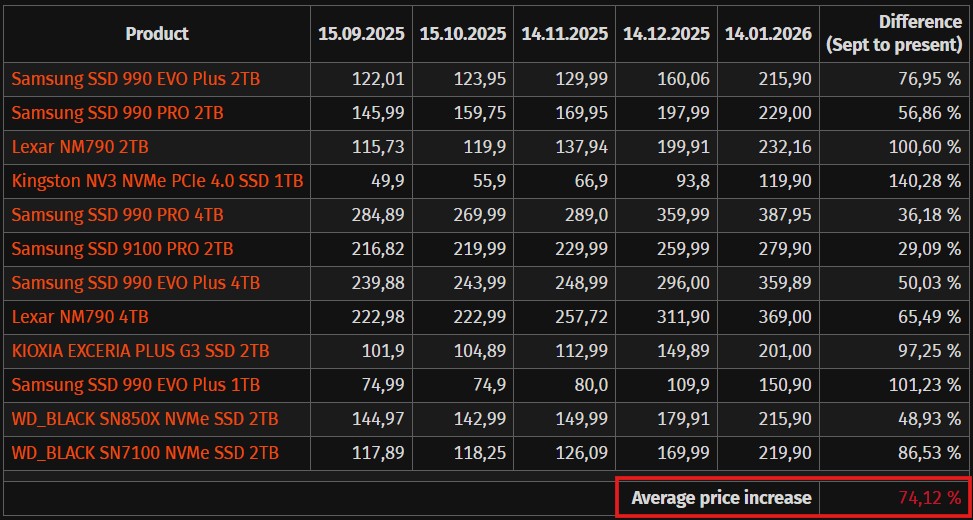
The analysis from ComputerBase takes into account the 12 most popular hard drives on the PC market. They have seen a 46% surge in price on average during the last four months based on their EUR listings.

Some models, like the Toshiba Cloud-Scale Capacity MG10F AFA 22 TB, have gone up by 66%. The least impacted model was the 16 TB Seagate IronWolf Pro NAS HDD, which experienced a 23% price increase over the last four months. 

To clarify, HDDs use nearly no silicon for storage purposes. The exorbitant price increase is primarily a supply chain issue, mostly driven by the format’s recent surge in popularity. The high demand will likely keep the price of HDDs inflated for the foreseeable future.

The analysis also provides a deeper insight into SSD price hikes, with the cost of high-capacity optical drives increasing by a whopping 74.12% on average over the same four-month period. 

Rising Memory Prices
Rising memory prices are also impacting consoles, along with PCs.

Some high-end SSD variants even cost twice as much as before, with costs showing no signs of stabilizing this year as the crisis continues evolving out of control.

Therefore, building a PC is harder than ever due to this predicament, and PC selling prices are expected to rise by 8% to 9% this year.

Do you think the price of HDDs will continue to get worse in the future as the storage shortage becomes a bigger problem over time? Let us know your thoughts in the comments below, or join the discussion on the Tech4Gamers forum.

EGS Free Games Are A Great Advertisement For Steam Sales, Says Indie Developer

Story Highlight
  • Blood West saw a 200% sales surge on Steam after EGS offered it for free, according to Dave Oshry
  • The CEO of indie developer New Blood Interactive said that the store is a great advertisement for Steam sales.
  • Hence, even when Epic is offering titles for free, players prefer to buy the game on Steam.

Arguably, the biggest threat to Steam’s dominance in the PC gaming market has been the Epic Games Store. However, despite giving out free games worth thousands of Dollars, the platform has failed to capture Steam’s audience, with the Epic CEO even admitting that the launcher is clunky.

While Steam has been hitting revenue milestones year after year, Epic Games Store has failed to see a substantial increase in revenue. As it turns out, even the free games offered by the storefront find a bigger audience on Steam, according to the developer of the indie title Blood West.

Why It Matters: Players preferring to pay for games on Steam that are available for free on EGS showcases that no storefront can take away Steam’s audience by just giving freebies instead of making an accessible launcher.

Dave Oshry Steam Epic
Source: X

Dave Oshry, the CEO of Blood West developer New Blood Interactive, revealed that the game sold 200% more on Steam after it went free on the Epic Games Store. Oshry stated that the studio did not get any compensation for the free giveaway either, as all the money went to publisher Hyperstrange.

However, the Epic Games Store freebie turned out to be a great advertisement for players on Steam, as Blood West saw a massive sales spike during the holiday season.

According to Oshry, the storefront seemed like a marketing black hole beforehand, but this made him realize that it has a knockoff effect on Steam sales.

Epic Games Store
Epic Games Store has given out free games worth thousands of Dollars since its inception.

It’s no secret that players prefer Valve’s platform over the Epic Games Store thanks to the accessibility and customer-service Steam gives to players. But this is certainly a new low for EGS as users decided to spend money to play Blood West instead of getting it for free on the launcher.

Do you think any future launcher will be able to take away the PC market share of Steam, or is it a lost cause? Tell us in the comments below or head to the Tech4Gamers forum for discussion.

Three More Ryzen 9800X3D Failures Reported On Asus Motherboards In The Past 24hrs

Story Highlight
  • 3 more Ryzen 9800X3D failures reported today, as the overall deaths of Ryzen 9000 CPUs keep on increasing.
  • All of these cases were reported on ASUS motherboards.
  • AMD has yet to address these issues as concerns among Ryzen 9800X3D users keep on increasing.

While CPU failures are rare, such cases aren’t uncommon for the Ryzen 9000 lineup. Previously, the unusually high number of deaths was attributed to faulty ASRock motherboards, but now it appears to be an AMD-side issue, as death cases are still being reported on motherboards from other manufacturers, mainly ASUS.

Just today, 3 cases of the Ryzen 9800X3D processors dying were reported, all on ASUS motherboards. The Ryzen 9800X3D especially has the highest death count among all Ryzen 9000 CPUs, mainly because it sells the most.

Why it matters: The number of Ryzen 9000 CPUs dying is increasing day by day, yet AMD has yet to address these concerns, leading users to wonder if they might be the next victims.

amd ryzen 9000
Nearly 100 Ryzen 9000 CPUs Have Died Due To Various Reasons

The first case reported by Redditor TransitionEffective9 used the Ryzen 9800X3D on a ROG Crosshair X870 Hero. While diagnosing his PC, which wasn’t turning on, he found burn marks on the CPU. Even after replacing it, the PC still didn’t boot, which means both his CPU and motherboard died.

Another Redditor who goes by LexiSQ killed his Ryzen 9800X3D just by rebooting his PC. It’s unknown what may have caused the CPU to die in this case, since the user reported his setup working just fine for the last 6 months.

Ryzen 7 9800x3d damaged processor
One User Burnt His Ryzen 9800X3D Just By Watching A TV Show

The third case by JGDraco is also mysterious, since his Ryzen 9800X3D didn’t boot on an ASUS TUF B850M-Plus WiFi. Then again, it’s unknown what may have caused these issues.

What are your thoughts on this story? Let us know in the comments below, or at the official Tech4Gamers Forums.

DLSS 4.5 Defies Expectations on the 6-Year-Old RTX 3080 with a Minimal Performance Hit

Story Highlight
  • DLSS 4.5 delivers excellent image quality but comes with a performance trade-off, leading many to believe it won’t be feasible on older cards.
  • However, when tested on the RTX 3080, it delivers satisfying results with a minimal FPS drop compared to DLSS 3 and 4.
  • We recommend using a low base resolution when enabling DLSS 4.5 on older GPUs to minimize performance loss.

While the new DLSS 4.5 tech may look enticing and all, it doesn’t come free, that’s for sure. Although it delivers image quality better than native when upscaled, the 20-30% performance hit is still pretty noticeable even on the newer RTX 5070.

As such, it was thought that DLSS 4.5 might not be viable on older cards, such as the RTX 20/30 Series. However, that may not be true, since DLSS 4.5 delivers surprisingly good results on the RTX 3080 when running Cyberpunk 2077.

Why it matters: DLSS has come a long way, and it’s no longer meant to increase FPS but to enable high-refresh-rate and 4k gaming. It’s great that newer versions are still supported on older hardware, helping gamers still keep up with modern tech.

YouTuber MxBenchmarkPC tested Cyberpunk 2077 on the RTX 3080 at Ultra settings across 1080p, 1440p, and 4K with Ray Tracing enabled and compared performance with DLSS 3, 4, and 4.5.

The results were surprisingly good, and the FPS drops were around 8-12 when compared to DLSS 4 and 3, respectively.

That said, on older models such as the RTX 20/30 Series GPUs, a 24% performance drop was noted due to high Vram usage. Furthermore, the lack of FP8 support and older Tensor core designs also make it a relatively poor application on these GPUs.

Resident Evil Requiem
The 2nd Transformer Model Practically Disables Ghosting And Makes The Image As Stable As It Can Get

For those still wanting to enable DLSS 4.5 on older models, we recommend using a low base resolution to still enjoy great image quality. Nvidia has listed DLSS 4.5 presets, and only Preset J/K suits cards dating earlier than the RTX 4000 GPUs; the default for DLAA, Quality, and Balanced outputs.

DLSS 4.5 isn’t available at full capacity yet, as the new MFG feature will be released in the coming months. The 6x MFG will produce 5 additional AI-generated frames for every frame rendered by the system, delivering a substantial FPS gain, exclusive to RTX 5000 cards.

What are your thoughts on the DLSS 4.5 tech so far? Let us know in the comments below, or at the official Tech4Gamers Forums.

ASRock Launches Rock Series Motherboards for Practical PC Builds

[Press Release] ASRock has announced its new Rock Series motherboard lineup, designed for PC builders who want reliable performance, modern features, and a clean design at an accessible price. The series includes ATX models like the B850 Rock WiFi 7 and B860 Rock WiFi 7, as well as mATX options such as the B850M Rock WiFi and B860M Rock WiFi, covering a wide range of build needs.

The Rock Series focuses on everyday usability. All models ship with built-in Wi-Fi, 2.5GbE LAN, PCIe 5.0 support, and a pre-installed I/O shield to make installation easier. The ATX variants go a step further with Wi-Fi 7, offering faster and more stable wireless connectivity for modern networks.

ASRock has also prioritized long-term support. The B850 Rock series features a larger 64MB BIOS ROM, allowing better firmware expansion and future compatibility with upcoming AM5 processors. This makes the platform more sustainable for users planning upgrades down the line.

In terms of design, the Rock Series adopts a clean and modern look that blends easily with different PC components and case styles. It avoids flashy elements in favor of a balanced aesthetic suitable for both gaming and professional builds.

Stability remains a core strength of the lineup. Built using ASRock’s automated manufacturing process and strict quality control, the Rock Series delivers dependable performance comparable to higher-end boards, while maintaining strong value across both ATX and mATX form factors.

AMD Says Its Working With Board Partners To Prevent GPU Price Hikes

Story Highlight
  • AMD says it is closely working with AIB partners to try and prevent GPU price hikes.
  • The company is worried about more memory price hikes, which could lead to issues. 
  • Nonetheless, keeping prices stable is a core part of what they are doing right now.

GPU prices are slated to be the next in line to get price hikes due to the memory shortage. If you were in the market for a good value for a gaming GPU, AMD had the best options, and despite the shortages, it aims to keep it that way. 

At CES 2026, AMD was asked about the GPU prices, to which the company stated that it is closely working with its board partners to try to prevent the GPU price hikes. Previously, they stated that prices will indeed be going up

Why it matters: Whether prices will remain normal or not will be seen, but it’s refreshing to see a company actually care about the consumers and at least try to prevent the inevitable. 

AMD 9070 XT
AMD is trying to prevent GPU price hikes

Speaking to Gizmodo, Ryzen VP Dave McAfee stated that AMD has a strategic partnership with all the DRAM manufacturers to make sure that the supply and prices are kept in a way that they can easily support the graphics card business. 

We have very strategic partnerships with manufacturers to make sure that both the amount of supply that we need and the economics from them are what we can support in our graphics business.

However, McAfee did show concern about the rising memory prices. He confessed that with the memory situation, building GPUs with their AIB partners that hit the right prices will be tough, in case of even more unforeseen circumstances. 

DRAM manufacturers
DRAM prices are still skyrocketing

Despite this, he reassured that managing the memory situation is a core part of what AMD is currently doing. Nonetheless, most people think that if DRAM prices get even more ridiculous, AMD won’t be able to contain the price hikes. 

Sadly, a similar promise hasn’t been made by Nvidia, but already for most budget gamers out there, AMD has better offerings. And if somehow, they can still maintain the MSRPs, it would provide them with a huge advantage.

What are your thoughts on AMD working with AIB partners to manage GPU prices? Let us know your opinions in the comments or join the discussion at the official Tech4Gamers Forum.

VPN and Ping Times: What Every Online Gamer Needs to Know

Story Highlight
  • Usually, a VPN increases ping because data has to travel through an extra server.
  • A VPN can lower ping if your ISP uses poor data routing or intentionally slows down gaming traffic (throttling).
  • To get the best results, connect to a VPN server that is physically close to the game’s host server, not your own house.

Many gamers wonder if VPNs can help reduce their ping while gaming. Players generally aim for ping times under 100 milliseconds to maintain smooth gameplay. High ping can make gaming sessions frustrating because of lag and delayed responses.

Your gaming experience becomes substantially smoother with low ping latency, as your commands and inputs reach the server faster.

The relationship between VPNs and ping reduction isn’t simple, but VPNs can help in certain situations. A VPN can alleviate ping issues by routing your traffic through servers closer to the game host. On top of that, it can help you avoid server downtimes and reduce unexpected latency spikes.

This piece will get into the impact of ping on your gaming experience, the real benefits of VPNs for gaming ping, and what to look for in a gaming VPN.

Why High Ping Happens and How It Affects Gamers

VPN
To get the best results, connect to a VPN server that is physically close to the game’s host server, not your own house.

Your gaming experience depends heavily on ping issues. The distance between you and the game server plays a crucial role in ping rates. Players closer to the server have lower ping – someone 10 miles away will see better performance than someone 100 miles away. The server’s location determines how quickly data moves between you and the game.

Network traffic can slow things down a lot. Your ping suffers when other users compete for bandwidth on your network. This happens when roommates stream videos or family members download files. Response times get worse when too many devices connect to the same router.

Players notice significant lag when ping exceeds 150ms, affecting both gameplay and graphics. Games become almost impossible to play with ping rates above 200ms. The best gaming experience requires the ping to be under 50ms; 20ms or less is ideal.

High ping creates these frustrating effects:

  • Your actions take longer to register in-game
  • Shots don’t register correctly
  • Characters teleport or jump around unexpectedly
  • You face disadvantages in ever-changing games

Internet speed matters, but your connection type is just as important. Many ISPs use throttling to control bandwidth, especially during peak hours. This slows down your online gaming performance.

Do VPNs Help with Ping? A Realistic Look

VPNs typically increase ping rather than reduce it, contrary to what many believe. Your data must travel through an additional server, adding an extra hop to your connection path. Most tests show that gaming with a VPN doesn’t reduce ping or improve lag.

A VPN can help in specific situations:

    • Your ISP’s inefficient traffic routing might make a VPN create a more direct path to game servers
    • A VPN can mask your activities and bypass restrictions if your provider throttles gaming traffic
    • Players in regions with poor internet infrastructure might get stronger connections through a nearby VPN server

Most players, especially those in areas with good connectivity, will find that a VPN adds unnecessary steps between them and the game server. The connection must first reach the VPN server before reaching the game server. This creates more opportunities for latency and packet loss.

Server selection becomes important when using a VPN. Latency impact reduces when you connect to a server close to your location. The best gaming VPNs will still add some lag to your connection.

Players should pause their VPN during gameplay for the best experience, unless they face specific connection problems or need DDoS attack protection.

Choosing and Using a VPN to Improve Ping

Multiple VPN connections
Connecting to a VPN service on multiple devices.

A good VPN can help lower lag for online gamers who deal with connection issues. The type of VPN protocol you use matters a lot. WireGuard is often the best choice for gaming because it offers fast speeds while still keeping your connection secure.

Its efficient design uses only 4,000 lines of code, compared to OpenVPN’s 100,000+, resulting in less computational overhead.

Mobile gamers should consider IKEv2/IPSec because it keeps connections stable across network switches. The protocol quickly reconnects after disruptions, making it perfect for gaming on the move.

Smart server selection is a vital part of ping optimization. You should pick VPN servers that are geographically close to your game’s server location rather than your own position. This approach can cut down network hops and lower ping by 60ms or more in some cases.

Running ping tests without a VPN active helps establish your baseline performance. You can then test different VPN servers to measure the overhead by subtracting your baseline ping from the VPN ping. This helps you find the best setup for your needs.

Split tunneling lets you route only gaming traffic through the VPN while other apps use your regular connection. This cuts down unnecessary encryption overhead for non-gaming activities.

Note that even the best VPN setup cannot overcome fundamental limitations, such as extreme geographic distance. Despite that, careful configuration can help minimize the latency increase associated with encrypted connections.

Conclusion

The connection between VPNs and ping is not as simple as it sounds. A VPN usually adds extra steps to your connection, which can increase lag rather than reduce it. Still, in certain cases, a VPN can actually make gaming feel smoother.

High ping usually comes from three things: distance from game servers, heavy network traffic, or your internet provider slowing your connection. If you deal with these issues, a well-chosen VPN may help.

WireGuard is a solid option because it runs fast without putting extra strain on your system. For mobile gamers, IKEv2 works well since it keeps the connection steady when switching networks.

To get the best results, choosing the right server matters more than anything else. Rather than picking a server close to you, it often helps to connect to one near the game’s servers. Split tunneling can also help by limiting which traffic goes through the VPN, reducing the extra load.

Before using a VPN for gaming, it is smart to test your connection. Try different servers and settings to see what works best for each game. A VPN cannot fix issues like being very far from the game servers, but it can still help in some situations.

Whether a VPN helps or hurts your gaming depends on your setup. If your internet provider slows your traffic or uses poor routing, you may notice better performance. If your connection is already strong, a VPN might only add lag. Consider your needs and set up carefully to decide whether a VPN is worth using for your gaming sessions.