At T4G, my task is to cover the latest news around the gaming globe ASAP and with the utmost precision. I adore all the games and respect all the devs behind the amazing games that we get all year. So, whether it’s a PC or a Console game, I got it all covered.
Story Highlights
The Microsoft CEO has revealed that the company’s gaming wing has now over 500 million active users.
This is more than twice the number of monthly active users PlayStation has ever had.
While Xbox saw a decline in hardware sales, the software and services saw a huge increase in revenue.
Microsoft hasn’t been a strong contender in the gaming industry in terms of hardware for some time. However, according to the Microsoft CEO, the gaming division now boasts over 500 million active users across all platforms and devices.
For reference, PlayStation boasted 123 million monthly active users earlier this year to set a new record.
Why it matters: 500 million active users is a huge number, especially considering that Microsoft reported a 42% drop in hardware revenue in Q4 FY24. This means that despite the hardware problem, the gaming side is thriving.
Xbox services helped increase the company’s revenue in FY24 Q4.
Microsoft published its FY24 Q4 financial update recently, revealing an increase in revenue for the company. This is largely led by Xbox content and services, which saw a massive growth of 61% compared to the last fiscal year.
Speaking at the earnings call, Satya Nadella revealed the new figures for monthly active users across various devices and platforms. He also pointed out that the content pipeline for the future looks even more promising.
Our content pipeline has never been stronger.
-Satya Nadella
Despite the massive number, CFO Amy Hood says that Microsoft expects hardware sales to dip again next year.
In terms of the monthly active users, it is important to note that this figure comprises the whole of Xbox’s gaming ecosystem, including consoles and PC. This even includes users on the Amazon Fire TV Stick since Microsoft recently pushed for cloud gaming on this device.
Also, more than 300 million of these active monthly users came from the Activision Blizzard merger. Therefore, this figure likely includes users from PlayStation consoles.
Microsoft has over 500 million active users across its gaming division.
Satya Nadella’s statement is promising overall, but it continues the concerning outlook for Microsoft’s consoles. It seems the gaming giant is not too concerned about the lack of hardware sales.
Moreover, many have pointed out that the company seems to be doing well, making the layoffs this year come across as forced. Microsoft laid off over 1900 employees in January and even closed Arkane Austin and Tango Gameworks later.
At Tech4Gamers, I mainly cover new gaming news, leaks, and rumours. Aside from that, I love to write features about my favourite games while inserting my opinion about their different aspects.
Story Highlight
Star Wars Outlaws has been criticized a lot for being unpolished.
The final previews have shown more promise, but some concerns remain.
While the open world is being praised, combat and gunplay seem sluggish, and the AI is far from being smart.
Star Wars Outlaws has received its share of criticism from fans for a while. Previous previews didn’t really show the most promise, as many fans called the game out for looking unpolished and uninspired. Fortunately, things are looking better for Ubisoft now.
After allocating the biggest marketing budget for this title, the team has shared new previews ahead of next month’s release. The latest previews are mostly positive, but they point to the gameplay feeling sluggish and fairly simple.
Why it matters: Gameplay matters the most in any game, and everything comes next on the list of priorities. If you can enjoy a game for its gameplay, other negative things can become bearable.
Star Wars Outlaws Final Previews Are Now Out
Okami13_ on Twitter has listed the key takeaways from recent media impressions.
According to media outlets, Star Wars Outlaws does not have the best combat. The gunplay and combat are described as feeling sluggish, even though this is the biggest part of the experience.
Others have criticized this part for being overly simple. Similarly, space battles have been criticized for being disappointing in the previews. This seems a bit disappointing after Ubisoft’s marketing campaigns.
The publisher made many promises for this title, but it may not be able to fulfill all of them.
Anyhow, the open world is said to be more organic than other Ubisoft titles. This is promising since Massive Entertainment already intended to fix the generic and bloated Ubisoft open world.
Ghost of Tsushima also served as a reference for this open world. The open world doesn’t hold your hand while exploring, making the Star Wars Outlaws universe more exciting.
Admittedly, Star Wars Outlaws seems to have its fair share of positive and negative elements. However, the sluggish gameplay will certainly be a major concern.
Various gameplay clips also highlight what appears to be poor AI for the enemies, which could make this disappointing gameplay even more noticeable. As said earlier, the previews also revealed that the space combat feels lackluster.
Overall, Ubisoft’s upcoming release is shaping up to be a mixed bag, so it will be interesting to see how players react to it next month.
At Tech4Gamers, I proudly wear the title of Comparisons Specialist. Focused on CPUs and GPUs, I bring forth a wealth of hands-on experience and a keen eye for detail to provide our audience with the latest insights and analyses.
Story Highlights
The M4 chip comes in two configurations, offering impressive performance improvements over older Apple silicon.
Geekerwan team achieved over 4000 points in Geekbench 6’s single-core test with Apple’s M4 chip.
The M4’s multi-core performance lagged behind the M3 Max and M2 Ultra, indicating room for improvement in multi-core tasks.
This experiment underscores the potential of ARM architecture and advanced cooling technologies.
By cooling the M4 chip used in the 2024 iPad Pro tablets with liquid nitrogen, Apple’s team managed to maintain extremely low temperatures, which enabled the chip to sustain high-performance levels without overheating.
They achieve record-breaking performance in benchmarks, showcasing the potential of extreme cooling techniques in pushing the boundaries of modern processors.
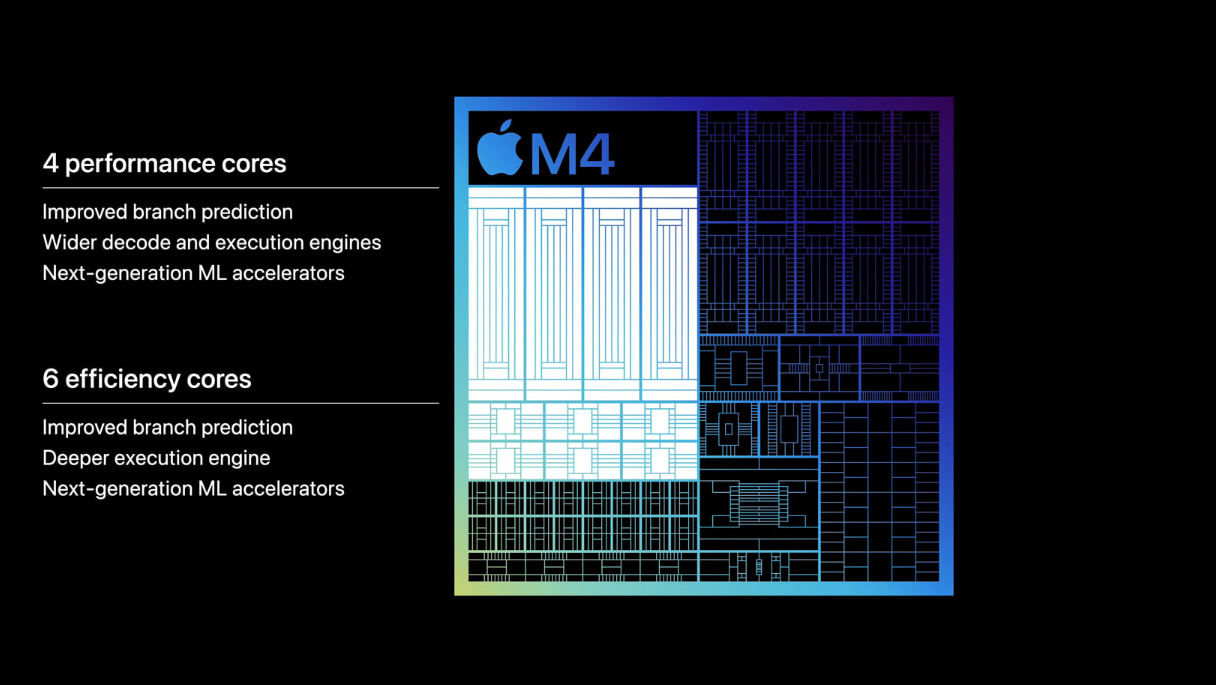
Notably, the M4 chip, produced using TSMC’s N3E process node, is available in two versions. The first version is a 10-core configuration featuring four performance cores and six efficiency cores, which comes with the 1TB and 2TB models equipped with 16GB of unified memory.
The second version of the M4 chip features a 9-core configuration, with three performance cores and six efficiency cores, found in the 256GB and 512GB models that include 8GB of unified memory.
The performance experiment involving testing the limits of Apple’s latest ARM-based M4 chip was conducted by the Geekerwan team. The test was probably conducted to assess the performance of the M4 chip under extreme cooling conditions and to compare it with other Apple silicon chips, such as the M3 Max and M2 Ultra.
They used a Kingpin Cooling T-Rex Rev 4 CPU LN2 pot to the back of the iPad Pro, likely where the M4 processor is situated. They poured liquid nitrogen into the pot to keep the chip cool during the benchmarking process.
Single-Core Performance
The M4 iPad Pro achieved a single-core score of 4,001 points. Even without active cooling, this single-core performance is impressive, making it 28% faster than the M3 Max in the 16-inch MacBook Pro. Additionally, the M4 outperformed the M2 Ultra from the Mac Studio by 44%.
Although the M4’s performance cores already run at a robust 4.40GHz, the liquid nitrogen overclocking increased the performance cores to 4.41GHz. The increase in clock speed from liquid nitrogen cooling enabled the M4 chip to score above 4000 points in the Geekbench 6 single-core test, pushing the M4 to its peak performance.
Multi-Core Performance
The M4’s multi-core performance was less impressive, 54% slower than the M3 Max. It also lagged behind the M2 Ultra by up to 57%. The highest multi-core score submitted by Geekerwan was 14,785 points, showing that the M4 still falls short of Apple’s older silicon in multi-core performance.
Unlocking ARM’s Potential With Liquid Nitrogen Cooling
The Geekerwan team experiment highlights the potential of ARM architecture in achieving high performance. Apple’s transition to ARM-based chips has significantly improved power efficiency and performance. This experiment further underscores the capabilities of ARM processors when pushed to their limits.
Users widely employ this benchmark to measure CPU performance, particularly focusing on real-world tasks and applications. A high score in Geekbench 6 indicates robust single-core performance, which is crucial for tasks that rely heavily on single-threaded operations.
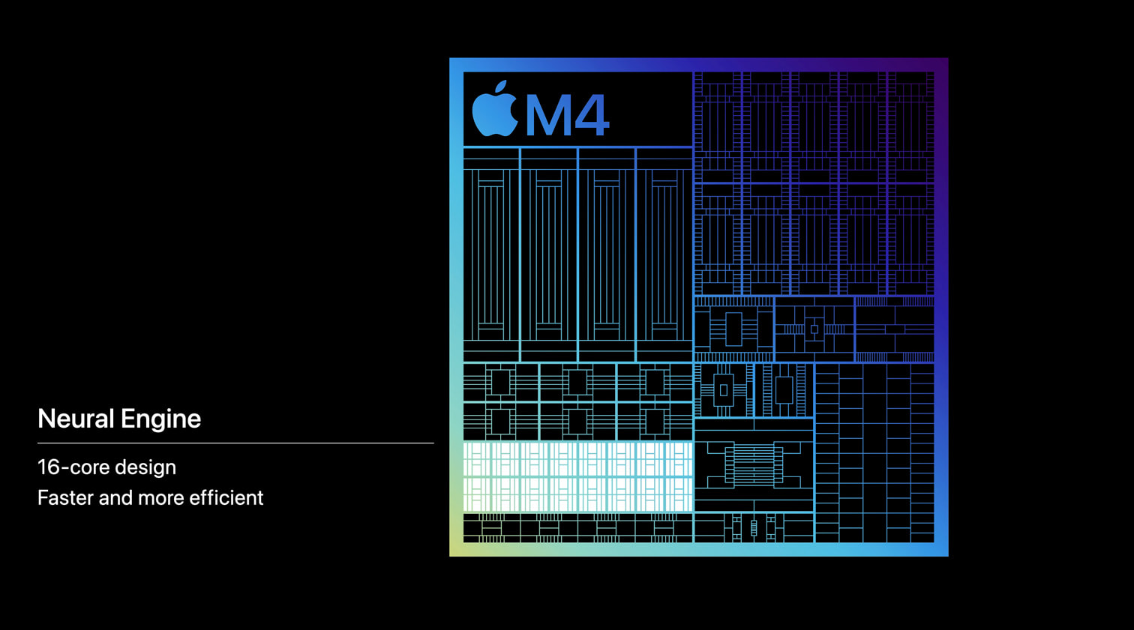
Neural Engine M4 Chip – Image Credit (Apple)
Liquid nitrogen in high-end overclocking drastically reduces CPU temperatures and minimizes thermal throttling, allowing the chip to maintain higher clock speeds and maximize performance. Though impractical for daily use, it prompts exploration into specialized applications and advanced cooling research.
The M4 chip surpasses high-end desktop processors and Apple’s M3 Max and M2 Ultra, setting a new benchmark for ARM-based processors in raw performance.
Consumers can expect exceptional performance in upcoming devices like the iPad Pro. They make it ideal for demanding applications, from professional-grade software to high-end gaming.
At Tech4Gamers, he is recognized for his insightful features and opinion pieces, where he blends his passion for gaming with a keen understanding of technological trends. His work, marked by depth and accessibility, makes him a respected voice in the tech and gaming community.
Story Highlights
Microsoft’s Copilot+ PCs faced backlash over security vulnerabilities in the “Recall” feature, leading to a shift from default to opt-in option.
The Copilot+ PC’s AI capabilities did not meet user expectations, lacking significant improvements or unique functionalities.
Performance and battery life issues with Qualcomm’s Snapdragon X chips, along with a legal dispute over licensing terms, further hindered the launch of Copilot+ PCs.
Microsoft has long been a dominant player in the software market, especially with its Windows operating system and Office suite. Known for innovation in various areas, including cloud computing, productivity software, and enterprise solutions.
Furthermore, introducing Copilot+ PCs reflects Microsoft’s strategy to integrate AI deeply into its products. However, the launch has not led to the expected market disruption, as sentiment has shifted with widespread caution about their two main features: Arm and AI.
Backlash Over “Recall” And Security Concerns
The backlash over Microsoft’s AI feature “Recall” and the subsequent challenges faced by Copilot+ PCs highlights several critical issues for the company, particularly around security, privacy, and product performance.
The “Recall” feature was designed to enhance productivity by remembering and retrieving information across different sessions and applications. Experts found that Recall’s data was poorly secured, making it easy for unauthorized access to sensitive information.
Disabled Recall By Default – Image Credit (Microsoft Windows Blog)
Due to these significant security concerns, Microsoft’s recent announcement disclosed updates for the Recall feature, stating it won’t be available at the June 18 launch.
Changes include enhanced security with “just in time” decryption for Recall snapshots protected by Windows Hello. This ensures data remains encrypted until users authenticate, reinforcing privacy and user confidence in the feature.
However, the security lapses in the Recall feature led to a loss of trust among users and industry experts. Trust is crucial, especially when dealing with AI features that handle personal and potentially sensitive data.
Underwhelming AI Integration In Copilot+ PCs
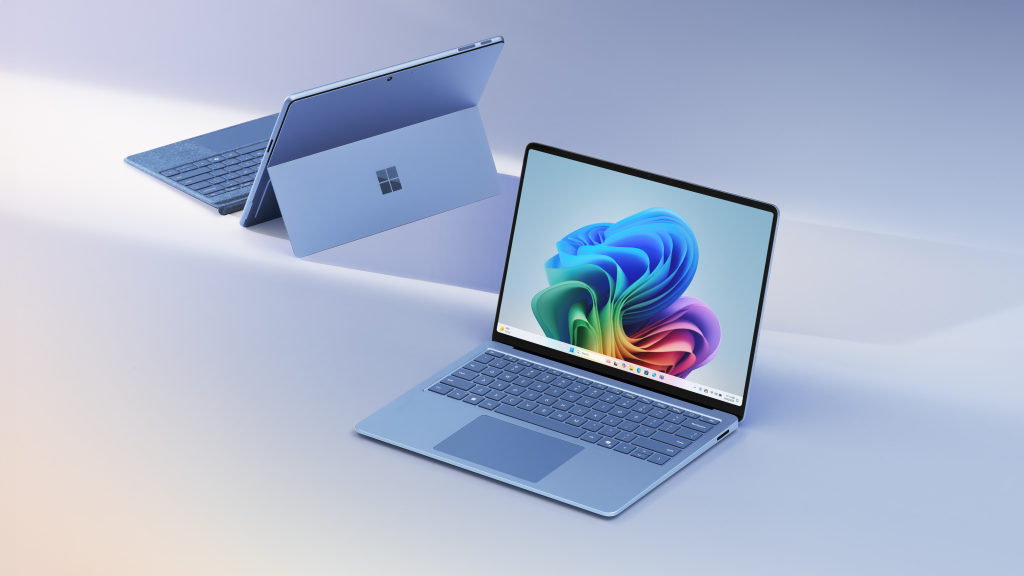
Surface Pro And Surface Laptop – Image Credit (Microsoft)
Moreover, users had high expectations for Copilot+ PCs, hoping for groundbreaking AI integrations that would significantly enhance their computing experience. The actual AI features, apart from Recall, did not meet these expectations.
The AI capabilities did not offer significant improvements or unique functionalities compared to existing technologies. This lack of innovation made it difficult for Copilot+ PCs to stand out in a crowded market.
Apple’s announcement of AI features with a strong emphasis on security and privacy further accentuated Microsoft’s shortcomings. Apple’s proactive stance on privacy made Microsoft’s issues more pronounced and damaging.
Licensing Dispute Between Arm And Qualcomm
Arm Holdings, a prominent British semiconductor and software design company, licenses its chip technology to various manufacturers, including Qualcomm.
However, there is a legal dispute between Arm and Qualcomm that revolves around the licensing of chip technology, particularly concerning Qualcomm’s acquisition of Nuvia and its potential impact on Arm’s licensing terms.
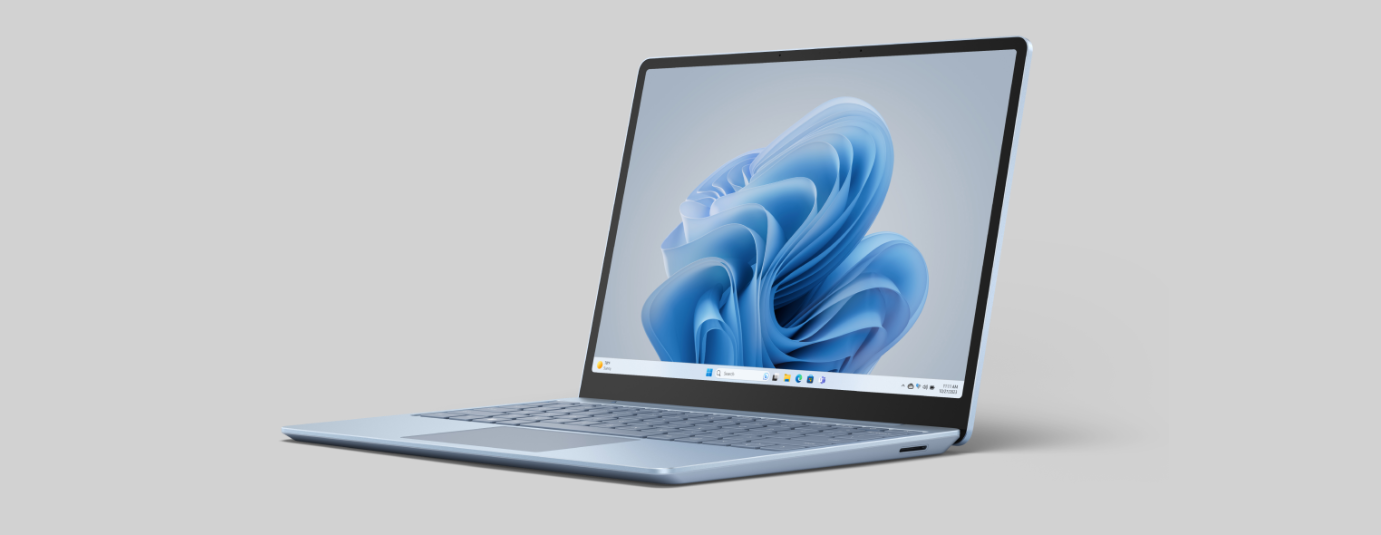
Surface Laptop Go 3 – Image Credit (Microsoft)
Microsoft’s Copilot+ PCs are expected to feature Qualcomm’s new Snapdragon X chips, which are pivotal for their performance and functionality. However, Microsoft’s Copilot+ PCs may face launch delays due to a licensing dispute between Arm and Qualcomm over Nuvia’s technology.
Delays in the availability of Snapdragon X chips could impact Microsoft’s competitiveness in the PC market, where timely hardware releases are crucial. Competitors may take advantage by offering alternatives that meet consumer needs.
Furthermore, uncertainty surrounding the legal dispute may also affect consumer and enterprise confidence in the reliability and availability of Copilot+ PCs.
Performance And Battery Life Issues
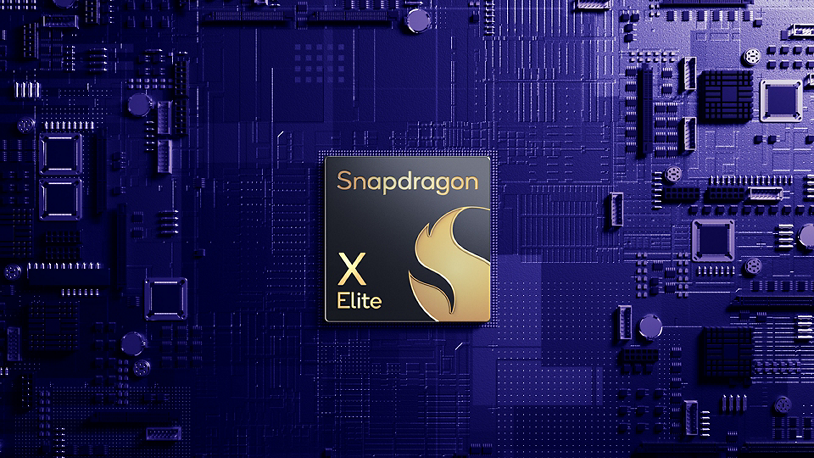
Snapdragon X Elite – Image credit (Qualcomm)
Qualcomm’s new Snapdragon X chips were expected to deliver significant performance and battery life enhancements, making Copilot+ PCs more attractive.
Early reviews and user feedback indicated that these improvements were not as substantial as promised. Performance issues and underwhelming battery life further diminished the appeal of Copilot+ PCs.
In the initial briefings for Copilot+, I was impressed by Microsoft’s ambitious plan despite the risks of transitioning to Arm and focusing on AI. But at that moment, it felt like they had done it.
However, it was almost expected that there would be problems, especially with a risky feature like Recall. I hope Microsoft and Qualcomm resolve these issues for better laptops.
As Tech4Gamers’ Founder and Editor-in-Chief, I bring over 13 years of PC Hardware Reviewing and 8+ years of IT Project Management experience. Certified in Google IT Support , my focus is on providing honest product reviews and analysis and fostering a strong gaming community with 130k+ members in PPG.
Story Highlights
Apple is refocusing on sleek, thin designs, with upcoming MacBooks inspired by the ultra-thin M4 iPad Pro.
This shift shows Apple’s evolving design philosophy, blending aesthetics and functionality through advanced materials, batteries, cooling tech, and modular design.
Apple’s future focus on AI in their thinnest devices, with technologies, highlights their commitment to leading in performance.
Over the past decade, Apple products have been known for their thin and light design. This design philosophy made Apple devices stand out for their portability and sleek appearance. In recent years, Apple has shifted from extreme thinness to a balanced approach emphasizing functionality alongside aesthetics.
Now, with a resurgence in focus on sleek and minimalistic designs, Apple is set to bring back the emphasis on weightlessness that once defined its pioneering products.
Apple’s Return To Thinner MacBooks
Apple has a long history of prioritizing sleek and thin product designs. Jony Ive’s departure in 2019 marked a significant shift in Apple’s design philosophy, moving away from extreme thinness towards a more balanced approach that prioritizes functionality alongside aesthetics.
This change has benefited the MacBook lineup, allowing for greater port variety and improved thermal performance. As a result, Apple computers have become more capable and adaptable, better meeting the diverse needs of their users across various professional and personal contexts.
Apple’s New MacBook Pro – Image Credit (Apple)
However, recent indications suggest Apple may be reverting to its previous approach. Renowned Apple analysts, such as Ming-Chi Kuo, have predicted that Apple is working on a thinner MacBook. These predictions often come from supply chain sources and Apple’s product development trends.
Reports suggest that Apple plans to release significantly thinner MacBooks shortly by drawing inspiration from its newly launched M4 iPad Pro, which measures an astonishing 5.1mm thick.
Sources, including Mark Gurman from Bloomberg, have indicated that Apple focuses on making its devices thinner and lighter. This includes upcoming MacBook Pro, iPhone, and Apple Watch versions.
Apple’s Strategic Evolution
Apple probably always planned to keep making its devices thinner. They just needed a break to rethink things after I’ve left. The drive for simple, sleek design has been a part of Apple’s culture since Steve Jobs started. This design focus is a core part of Apple, so it’s no surprise they’re back to working on thinner devices now that they can.
The New 13- And 15-inch MacBook Air Soars With M3 Chip – Image Credit (Apple)
Gurman’s report mentions a thinner MacBook Pro but omits the MacBook Air, which usually leads in slim designs. This suggests Apple might focus on the MacBook Pro first, likely due to expensive new technologies like micro-LED displays.
Known for being thin and energy-efficient, micro-LEDs could drive a new era of ultra-thin Apple devices, with the MacBook Pro paving the way for other products as costs decrease.
Apple’s shift towards thinner devices may seem like a return to old habits, but it’s driven by new technologies and strategies. By focusing on advanced materials, improved battery efficiency, better cooling technologies, and modular design, Apple ensures that its future products will be thinner, more powerful, and more versatile.
Combining AI Power And Sleek Design
With the unmatched power and efficiency of Apple silicon chips, we could see a new era of Apple devices that offer exceptional performance while being much more compact than their competitors. This is especially exciting as it aligns with the increasing significance of artificial intelligence.
As we move into the AI era, Apple’s strategy to handle most AI tasks on-device will demand high performance from their products. Integrating this capability into their thinnest devices would be a major achievement for the company.
Apple’s New iPad Pro – Image Credit (Apple)
As Apple navigates the evolving landscape of AI, the next few years will be pivotal for the success of its initiatives. Maintaining superior AI performance while preserving the sleek design of its devices remains a primary objective for Apple. This dual focus underscores the company’s commitment to innovation without compromising user experience.
Micro-LED displays and advancements in battery technology and thermal management are key. They extend usage times, maintain device thinness, and enable efficient handling of intensive AI tasks.
These innovations strengthen AI capabilities and reinforce Apple’s reputation for high-performance devices that set industry standards.
As a Hardware Expert at Tech4Gamers, I bring my decade-long expertise in electronics design, embedded solutions, and prototyping. My knack for exposing misconceptions in the tech world finds a perfect outlet here.
Story Highlight
Unusual buzzing sounds from your PSU can indicate faulty or aging components, variations in required wattage, or poor ventilation.
Invest in high-quality PSUs and maintain proper airflow to prevent overheating and ensure reliability.
Upgrade your PSU when required to match system power needs and keep the area around you clean and airy to prevent noise issues.
If there’s one component in my PC that I never take for granted, it’s my power supply unit (PSU). Without an adequate power supply, your PC cannot perform efficiently. Most people ignore their PSUs and keep using them without noticing their condition. This can result in PSU failure and damage to your PC components.
Keeping that in mind, let’s move on to our main topic: Should you watch out for noise in your PSU? Hearing a low noise level from your PSU is expected, mainly because of the electrical components and cooling fans within the PSU. However, if you hear a distinct buzzing sound from your PSU, you should always pay attention to it. Let’s first look at the causes of your power supply making a noise.
Faulty Or Aging Components
Over time, PSU components like capacitors, transformers, and inductors start to wear out, which can also cause them to expand and vibrate intensely. This will ultimately lead to the PSU making unusual noises. My rule of thumb is to change my power supply one year after its warranty ends.
Try to avoid buying cheaper, low-quality PSUs. I cannot overstate the importance of your PSUs; still, some people ignore them. Low-quality PSUs will not only fail early but can also damage your PC equipment.
Variations In The Required Wattage
I’ve noticed that changes in the load or wattage requirements of my PC components can cause the PSU components, like capacitors and transformers, to vibrate at audible frequencies. This results in an annoying buzzing sound that I just can’t ignore.
When I upgraded my setup, I realized that my PSU also needed an upgrade to match the new load requirements. This upgrade helps in reducing the load on the internal components of the PSU. Neglecting this can lead to increased noise from the PSU and, ultimately, its failure. It’s a lesson I’ve learned the hard way, and now I’m always careful to ensure my PSU is up to the task.
I will personally advise to calculate the total power requirements or wattage of your PC setup and then buy a power supply according to that requirement. To perform accurate load calculations, you can use our PSU Wattage Calculator.
An inadequate cooling environment near your PSU can lead to overheating. This overheating can also expand the internal components of your PSU, resulting in noise. Please always make sure that your PSU and PC setup are airy and adequately ventilated to avoid any issues with overheating.
External factors such as electromagnetic interference from other devices or power fluctuations from the main electrical supply can also cause a power supply to buzz. Although this is rare, I always stay vigilant about any electromagnetic sources near my PSU.
Preliminary Inspections And Simple Solutions
Before turning to more significant measures, carry out some basic checks to see if you can easily rectify the problem:
Examine Connections: Make sure all power supply cables are firmly connected, as loose connections can cause buzzing.
Look for Blockages: Confirm that nothing is obstructing the fan or airflow, as this could lead to overheating and noise.
Load Distribution: If possible, evenly distribute the load across the power supply to lessen strain.
When To Seek Professional Assistance
If the buzzing persists after basic troubleshooting, it may indicate an internal issue. I always watch out for signs of damage or wear and tear, such as bulging capacitors.
Most users, including myself, are not equipped to handle power supply repairs on their own. Professional repair services are safer and can help prevent further damage.
Stay Alert On Upgrading Your PSU
I have learned over time that older power supplies do not meet current standards for efficiency, resulting in noise and other problems. Modern models offer enhanced efficiency, improved thermal management, and advanced features. Hence, you must know when to upgrade your power supply.
Replacing an old or inadequate power supply can be more financially productive in the long term. It ensures reliability and quiet operation, offering me peace of mind.
Final Thoughts
Yes, you should always watch out for noise from your PSU. If you encounter such an issue, take proper mitigation actions. To avoid any future troubles with noise, make sure to keep the area around your PSU neat and clean. Ensure proper ventilation to prevent overheating. Last but not least, always buy good quality PSUs and upgrade when necessary.
As Tech4Gamers’ Founder and Editor-in-Chief, I bring over 13 years of PC Hardware Reviewing and 8+ years of IT Project Management experience. Certified in Google IT Support , my focus is on providing honest product reviews and analysis and fostering a strong gaming community with 130k+ members in PPG.
Abdul Hannan
I’ve been the Journalist & Editorial Writer at Tech4Gamers since July 2022. I spearhead our hardware coverage, including overclocking GPUs, benchmarking CPUs, reviewing peripherals, and fine-tuning custom PC builds for every budget. Daily, I report on breaking gaming news, from major launches and studio updates to the latest industry trends, ensuring our community stays informed. Beyond news briefs, I write in-depth feature articles on gaming culture and emerging technologies. And by collaborating closely with the editorial team on content planning, SEO strategy, and our publishing calendar, I help us consistently hit our traffic and engagement targets.
As any passionate gamer can assure you, a suitable controller is essential for enhancing the gaming experience. Everything about a gaming controller, from precise controls to immersive feedback, is important for how well you play and how much fun you have. To that end, I was looking forward to receiving the FlyDigi Apex 4 Wireless Controller.
It is a state-of-the-art device that has revolutionized the gaming controller market. To help you make a well-informed purchase, I will discuss how I got along with the Apex 4 and review its features, perks, and drawbacks. So, let’s take a closer look at what makes this controller so special for enthusiastic gamers.
Why Trust Tech4Gamers
Abdul Hannan is our peripherals expert who has been testing different mice, keyboards, headphones, microphones, and more for years.
130+ GPUs tested and reviewed by our team of hardware experts (Tech4Gamers Team).
90+ hours spent testing different peripherals for our reviews.
At Tech4Gamers, ensuring you get reliable information is our priority. That’s why every hardware round-up undergoes a meticulous review process by our team of experts and editors. Each review is carefully examined against our strict editorial guidelines, guaranteeing you trustworthy insights you can depend on.
Key Takeaways
The FlyDigi Apex 4 is a cutting-edge controller with customizable joystick tension, force feedback triggers, and an ergonomic design to accommodate lengthy gaming sessions. It offers advanced features, making it ideal for enthusiast gamers. With high precision and customization, it sets a new benchmark in gaming controllers.
You should buy the FlyDigi Apex 4 if you want customizable controls for precision, appreciate advanced features, and value lengthy battery life.
You should not buy the FlyDigi Apex 4 if you prefer a lighter controller, find high customization overwhelming, and seek a budget-friendly option.
Here are the specifications:
Dimensions
7.4 x 7.4 x 3.4 inches
Weight
1.13 ounces
Manufacturer
Fly Digi
Supported Platforms
PC/NS/TV/Android/Laptop
Software
PC, Fly Digi Space Station, and Mobile, Game Center
Full-Color Screen (Add more screen Functions, Performance and customization)
For FPS players
0-Dead Zone BUT No Drift
Mapping Function
High-Precision Six-Axis Gyro Mapping
Connection Method
Wireless Adapter connection, Bluetooth connection, and Wired connection
Battery Capacity
1500mah
Macros Buttons
4 Back Buttons (M1M2M3M4)
D-pad
Self-Developed Rotational 8-Way D-pad
Ergonomic Design
S-shaped handlebar shoulder, etc.
Batteries
1 Lithium Polymer batteries required. (included)
[toc]
How Is The FlyDigi Apex 4 Different?
The FlyDigi Apex 4 Wireless Controller stands out from other controllers and its previous models with several unique features and enhancements. One of its most notable advancements is the integration of force feedback triggers, which provide a more immersive gaming experience by simulating resistance similar to the adaptive triggers. Additionally, the Apex 4 features a customizable joystick tension system, allowing gamers to adjust the tension to their preference for improved accuracy.
Packaging & Box Contents
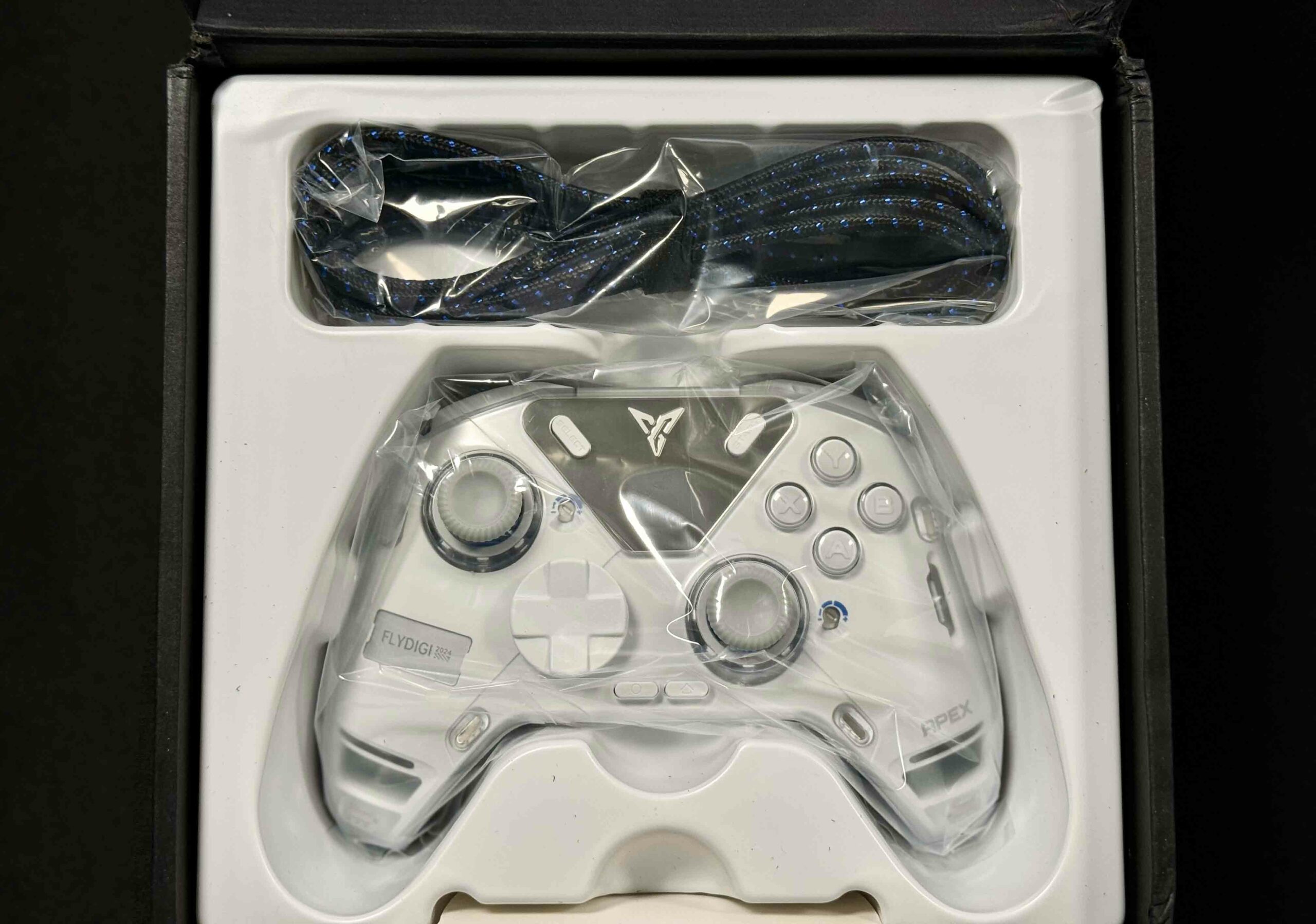
Packaging (Image By Tech4Gamers)
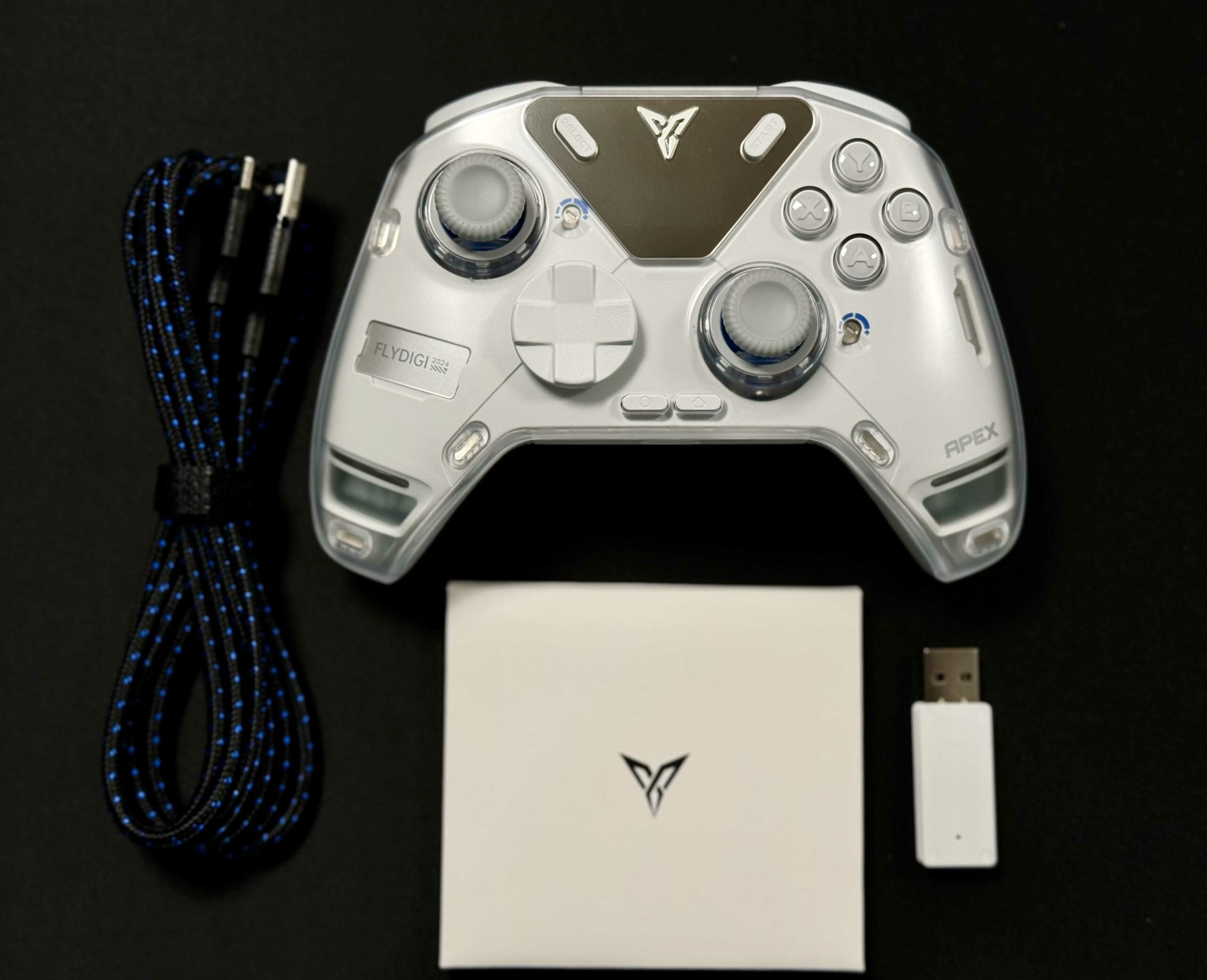
Box Contents (Image By Tech4Gamers)
Design
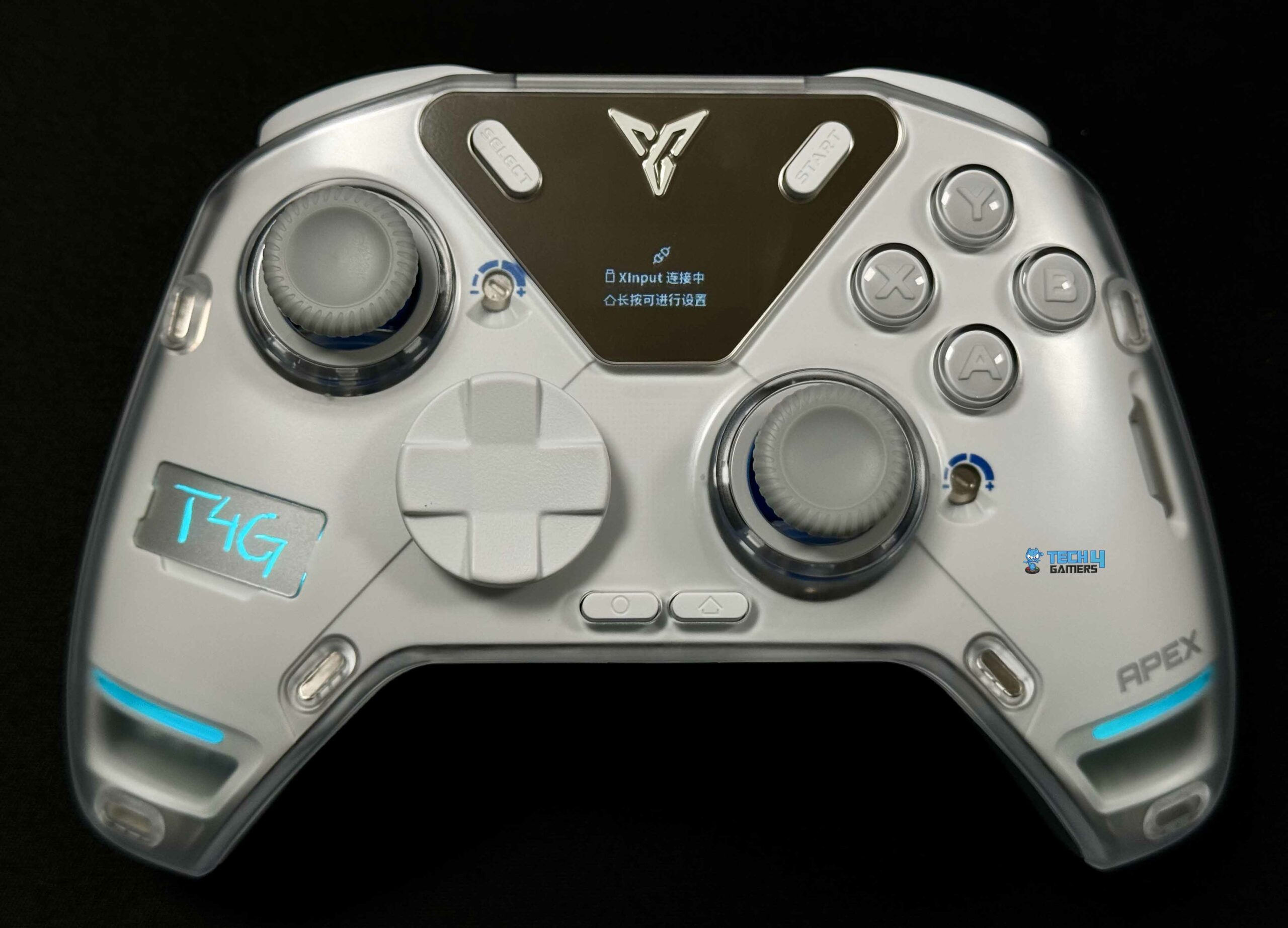
Design (Image By Tech4Gamers)
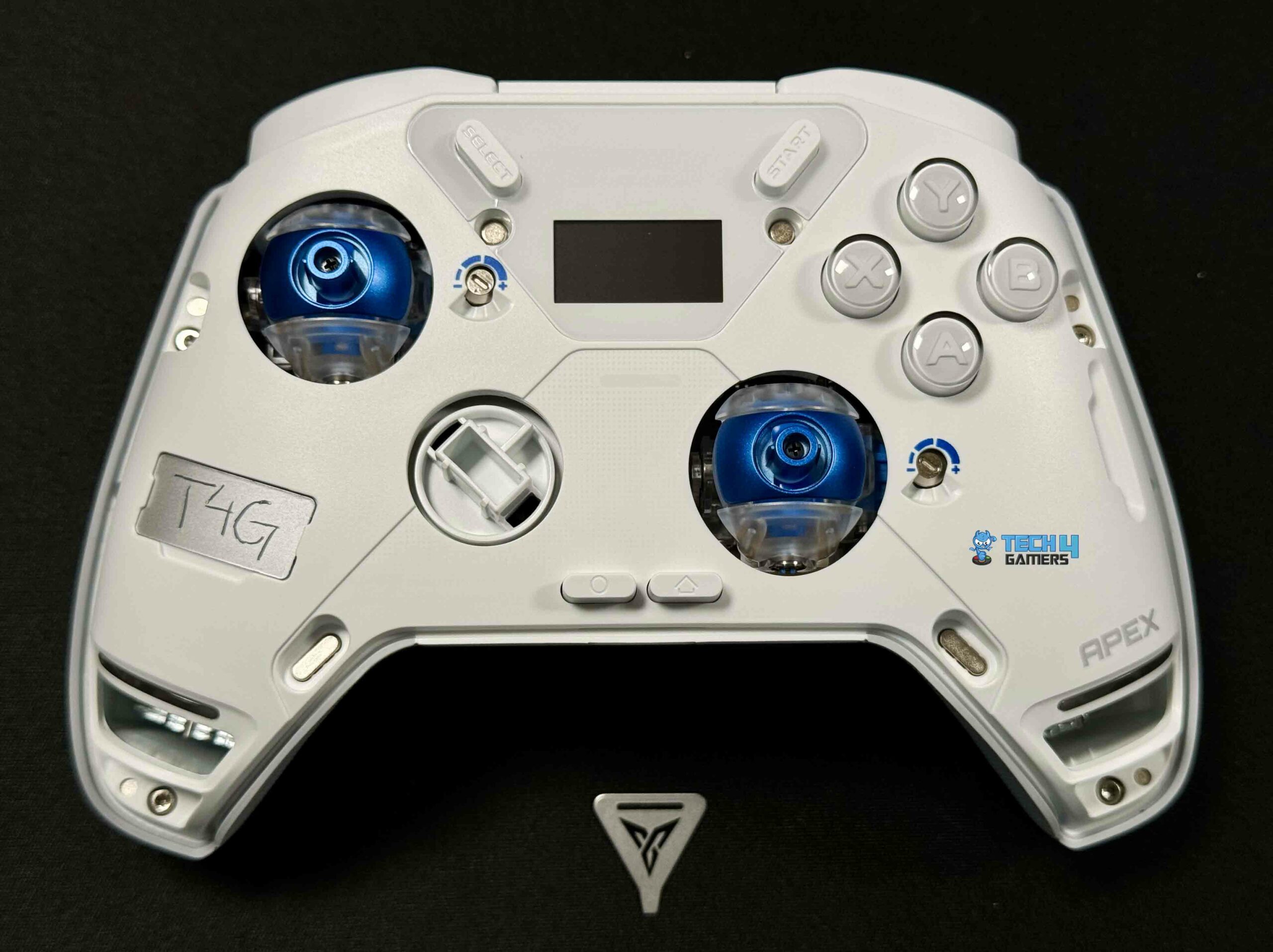
Without Cover (Image By Tech4Gamers)
Upon receiving the FlyDigi Apex 4 controller, I could tell it would delight me. It was similar to the excitement you experience when you get hold of a brand-new device and realize it has all those amazing features. For those long hours of gaming, nothing beats a durable shell build that gives you a comfortable grip.
The controller’s screen has a few aesthetic flaws. For instance, it collects fingerprints. The screen’s usefulness is up for debate, and efforts could be better spent on other parts that enhance performance. Still, this screen can display various performance metrics and customization options, providing users with a highly personalized gaming experience.
Thumbstick
Thumbstick (Image By Tech4Gamers)
The glossy, swappable thumbsticks of the Apex 4 are on display right out of the box. These can be adjusted to provide the ideal grip, providing access to infinite configurable options. Users can personalize their controller for the best performance by adjusting the thumbstick tension to their preference.
The Hall Effect triggers and joysticks in the Flydigi Apex 4 take advantage of the Hall Effect, a physical mechanism that uses a magnetic field to precisely detect the positioning without making any physical contact with other components. Over time, traditional mechanical triggers wear down due to their heavy reliance on physical contact, leading to drift or malfunction. In contrast, Hall Effect sensors sidestep this issue, which makes them last longer and require fewer replacements or repairs, contributing to their longevity.
This also provides a higher level of accuracy with the controller. The inputs are smoother and more precise since there is no physical resistance between the components. I particularly noticed this while playing highly competitive games, as it significantly increased my precision and agility, making a noticeable difference in my gaming performance. Throughout my testing, the inputs were consistent and reliable, with no dead zones where movement wasn’t detected.
D-Pad
D-Pad (Image By Tech4Gamers)
The D-Pad is snappy and clicky, and it keeps up with the action even when the rate of movement is high. Compared to the softer D-Pads I’ve used before, which often caused accidental clicks and frustration, this one is rock solid. Notably, lighter and quicker mechanical face buttons with micro switch 2.0 design provide for a precise gaming experience. The buttons could be more durable, but their tactile feel makes them more controllable.
Back Buttons
Back Buttons (Image By Tech4Gamers)
Similar to the prior Vader 3 Pro model, the additional back buttons have undergone a minor yet positive design adjustment. In the middle of the game, the last thing you want to do is stretch or change your grip. However, you do not need to worry about it since they are so comfortable and snugly placed.
Build Quality
Build Quality (Image By Tech4Gamers)
The FlyDigi Apex 4 is an excellent example of a high-quality build. It combines the ergonomic ease of an Xbox controller while offering the sophisticated features associated with a PlayStation controller. When you take the Apex 4 in your hands, its weight will be the first thing that stands out. This controller has a solid, high-quality feel without being hefty or overbearing.
Even after a full day of gaming, I never considered the controller bothersome. It seemed natural. When things heat up during competitive gaming, your hands could become sweaty, so the rubber rear grip is a welcome addition. With its stippled surface, the controller remains securely in your hands.
Connectivity
Thanks to its Bluetooth and 2.4 GHz dongle, the Apex 4 is compatible with both wired and wireless connectivity. I had no trouble connecting the latest 2.4 GHz Dongle to my gaming system. With its 1000 Hz polling rate, the 2.4 GHz option ensures an input latency of less than 1 ms for FPS competitive games, where even a mere second matters for pinpoint aim. Such minimal latency is essential.
Battery Life
I feel obligated to bring up the topic of battery life. After all, a fantastic controller is useless if it constantly runs out of power. You don’t have to worry about it since the Apex 4 has an outstanding battery life thanks to its 15-milliamp battery. Even after a full day of playing, the Apex 4’s battery indicator slightly moved. The charging time on the Apex 4 is also top-notch.
Software
Software
1 of 9
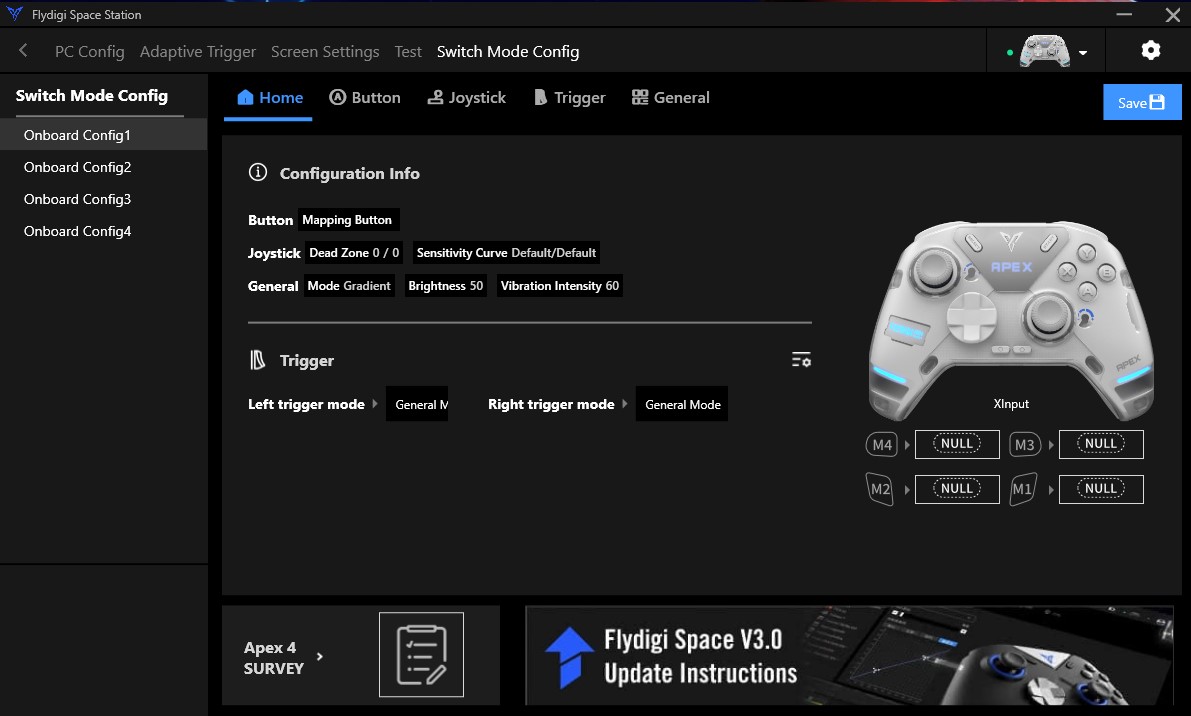
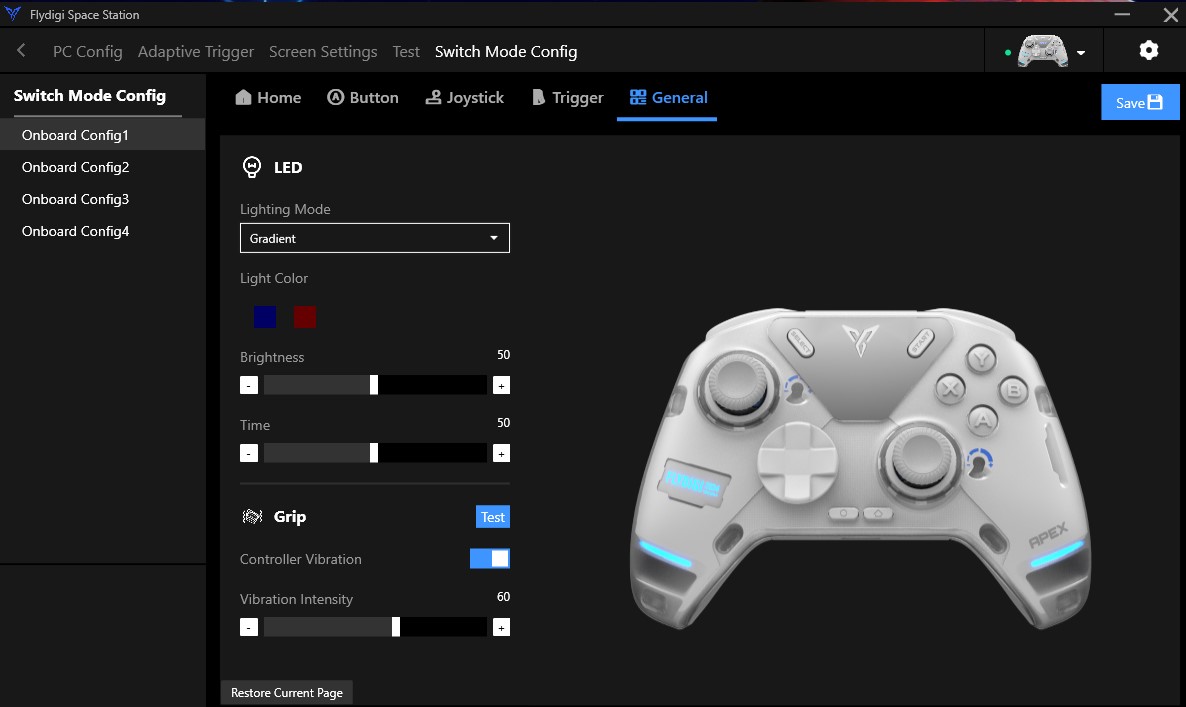
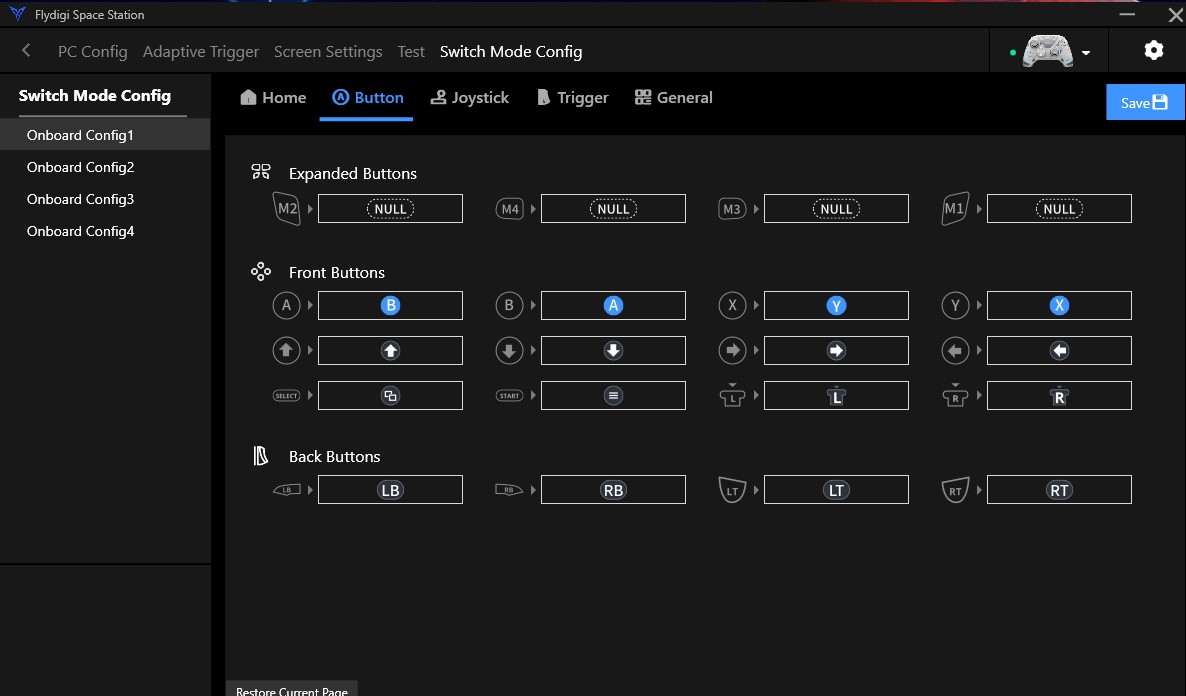
Switch Mode Config (Image By Tech4Gamers)
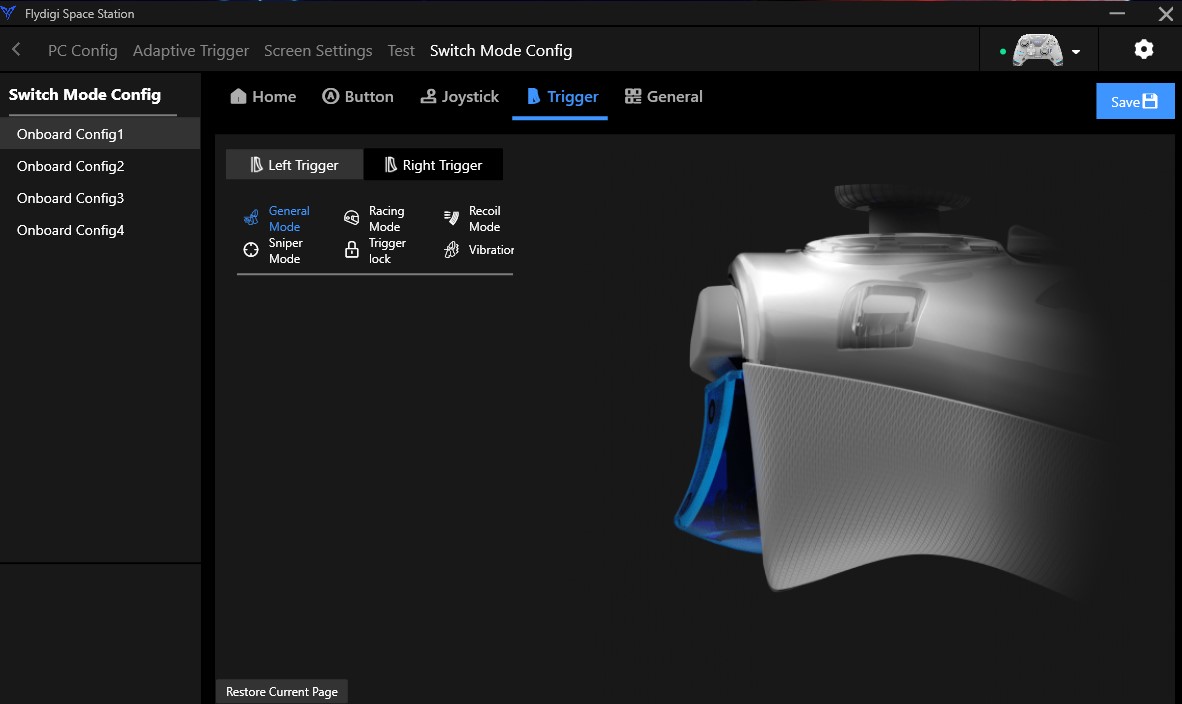
Switch Mode Config Trigger (Image By Tech4Gamers)
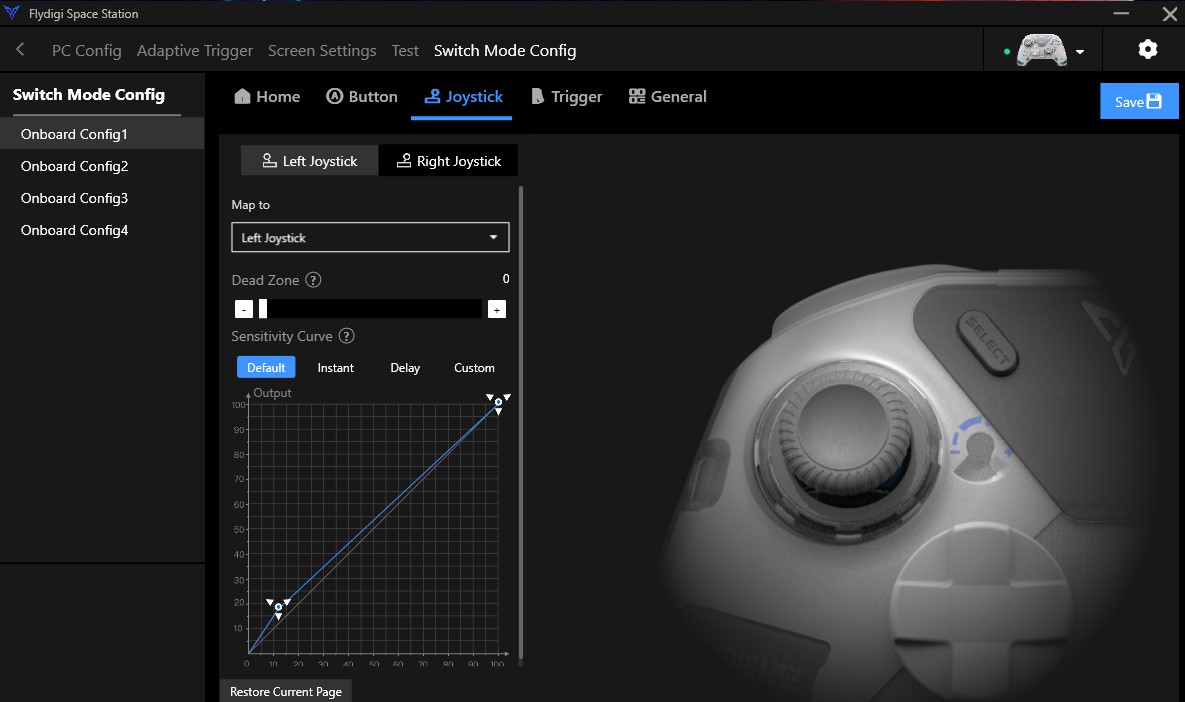
Switch Mode Config Joystick (Image By Tech4Gamers)
Switch Mode Config General (Image By Tech4Gamers)
Switch Mode Config Buttons (Image By Tech4Gamers)
Screen Setting GIFs (Image By Tech4Gamers)
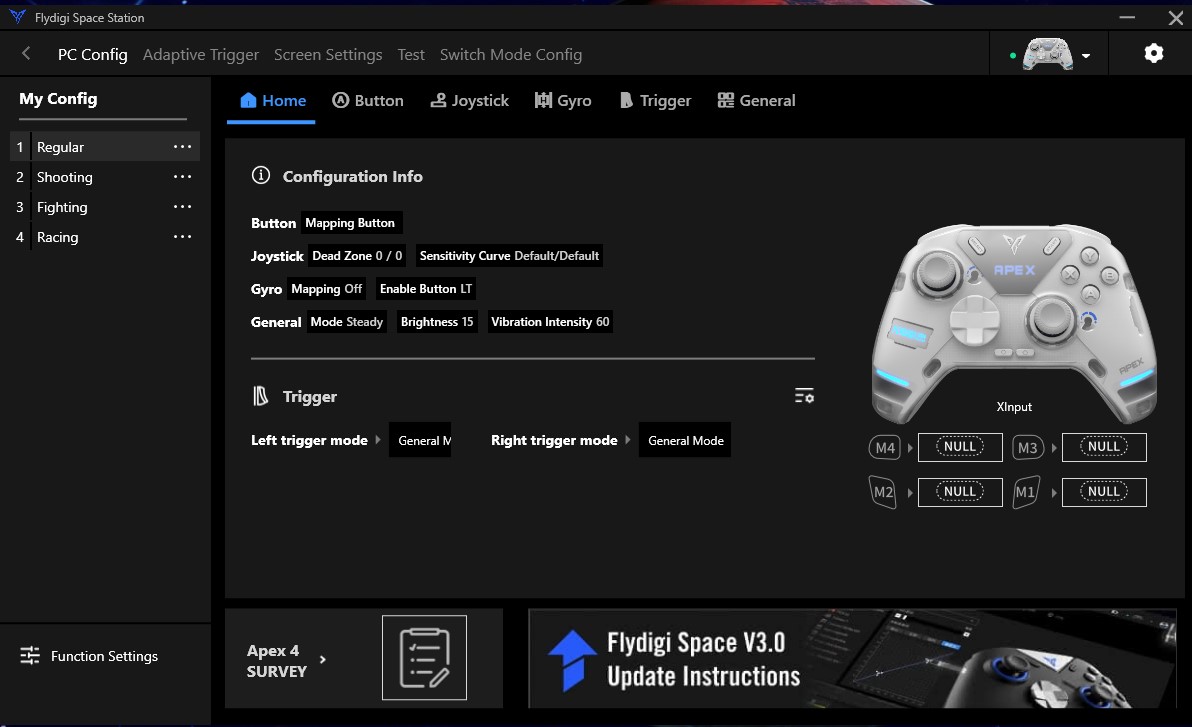
FlyDigi Space Station Profiles (Image By Tech4Gamers)
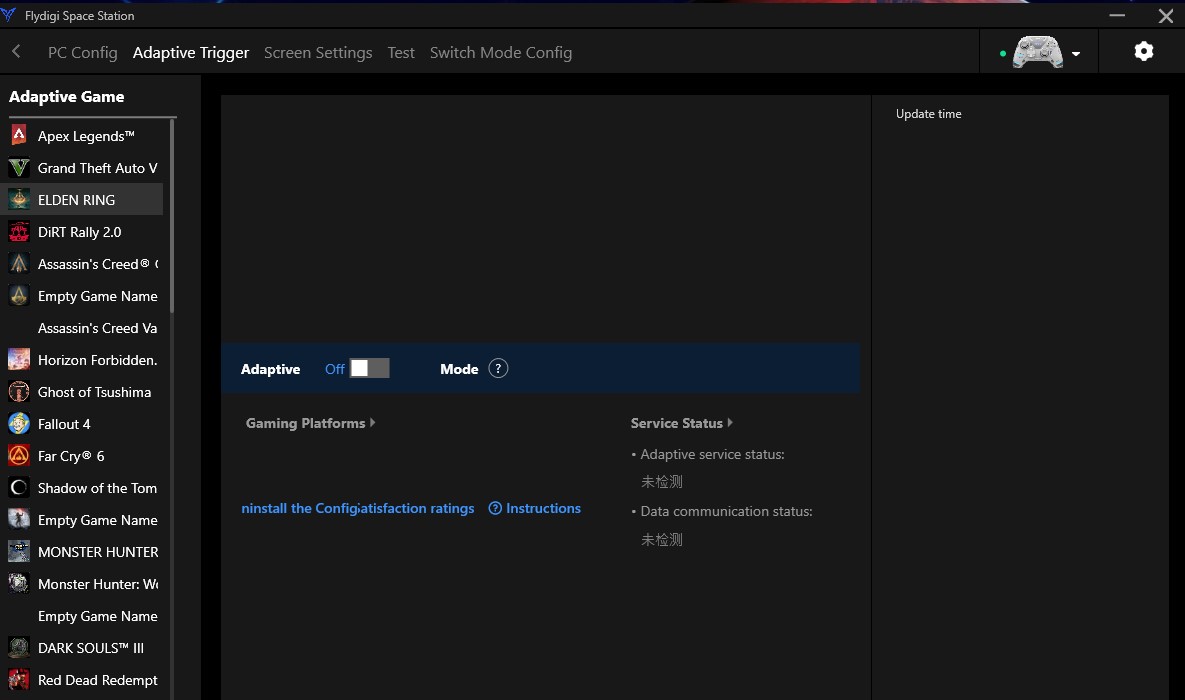
Adaptive Trigger Screen (Image By Tech4Gamers)
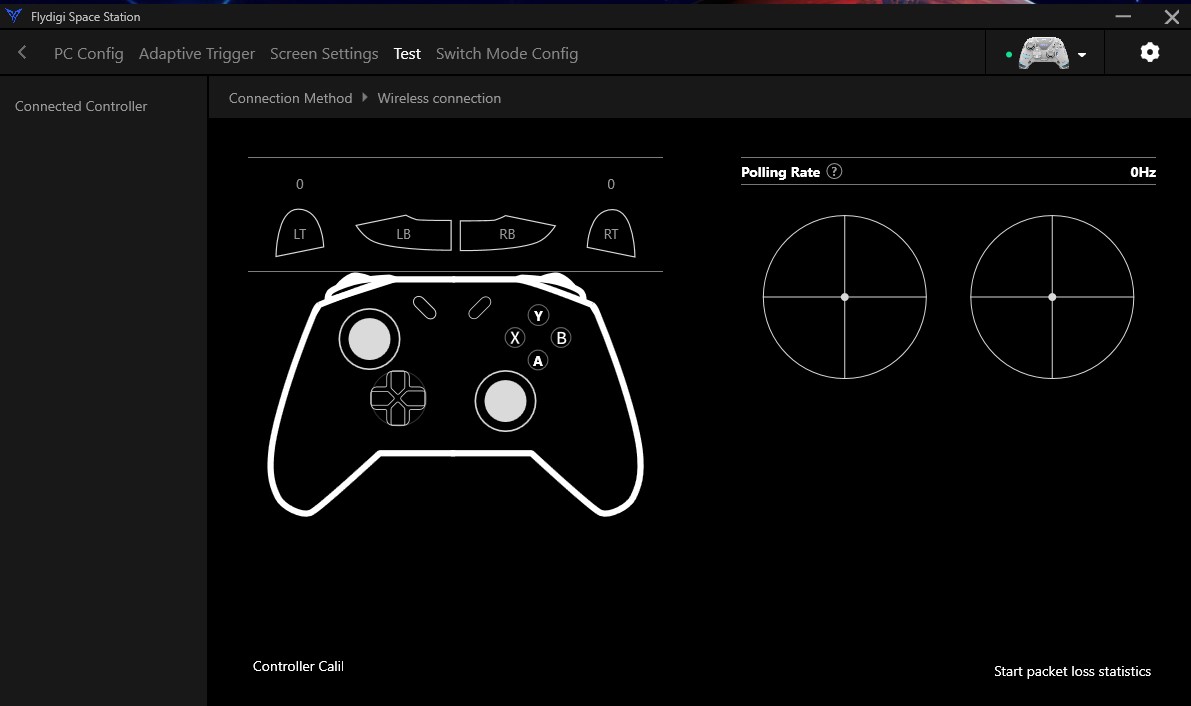
Test Menu (Image By Tech4Gamers)
With the Fly Digi Space app, you can customize the RGB lighting and other controller settings to add a personal touch. In addition, the Apex 4’s adaptable triggers can be set up for different games, providing a personalized experience. Because trigger sensitivity can influence aiming accuracy, this feature is very useful in shooter games.
In addition to a more improved feedback system and classic rumbling force motors, the controller’s flexible vibration suite allows for more accurate and immersive feedback while playing. The software interface provides ample room for personalization.
WARNING: The high level of customization available with the FlyDigi Apex 4, such as adjustable thumbstick tension and force feedback triggers, may be overwhelming for casual gamers or those unfamiliar with detailed settings adjustments.
Performance
Left and Right Bumper (Image By Tech4Gamers)
Those days are gone when you could use any old controller for competitive gaming. Choosing an appropriate controller is no longer a question of choice. It has become essential for professional gamers due to recent games’ emphasis on precise accuracy and comfort during those long gaming sessions.
For adaptive triggers, the Apex 4 is second to none. For instance, in Need for Speed: Heat, the triggers picked up on my driving style and gently pushed back, allowing me to sense when I would drift down the road.
Like a new feeling triggering in the middle of the game, this additional layer of realism is difficult to put into words. I adjusted the feedback until it was exactly the perfect amount, giving me a sense of resistance. Making the switch to Apex Legends was just as rewarding. The stick-centeredness really reduced my targeting dead zones. There is a trade-off between loose sticks for fast spins and tight sticks for precision, but the sweet spot is essentially a matter of taste.
Should You Buy it?
Buy it if
✅ You want customizable controls for precision: The FlyDigi Apex 4 offers adjustable joystick tension and force feedback triggers, allowing for fine-tuned control essential for competitive gaming.
✅ You appreciate advanced features: With a full-color LCD screen, customizable RGB lighting, and high-precision six-axis gyro mapping, the Apex 4 offers features that enhance the gaming experience beyond the basics.
✅ You value battery life: The Apex 4 boasts a long battery life with its 1500mAh battery, ensuring you can game for extended periods without frequent recharges.
Don’t Buy it if
❌ You prefer a lighter controller: The FlyDigi Apex 4 is heavier than many standard controllers, which might not suit gamers who favor lighter devices for prolonged use.
❌ You find high customization overwhelming: The extensive customization options for thumbstick tension and trigger feedback might be too complex for casual gamers who prefer plug-and-play simplicity.
❌ You seek a budget-friendly option: At around $160, the Apex 4 is a premium controller. If you’re on a tight budget, more affordable alternatives are available.
My Thoughts
Playing through FlyDigi’s newest masterpiece for a while makes it obvious that Apex 4 is more than just an update. It’s a well-considered step forward in the controller market. The controller doesn’t fit only into the palm of your hand. Thanks to the customizable thumbstick height and trigger tension, it adapts to every touch and tap. On the downside, the adaptive trigger settings have a noticeable learning curve, and the rise in weight might put off some users.
However, when you get the hang of Apex 4, it changes more than just your gameplay. It affects your whole gaming experience. It takes note of the basis of a gaming foundation that considers the fact that players’ preferences vary greatly. Not only is FlyDigi reaching its target audience with this controller, but they’re also setting a new benchmark in the controller industry. Are you struggling with your aim in FPS games? Do you lack precision?
You may want to look at the Fly Digi Apex 4. The Apex 4 is the pinnacle of gaming controllers. Ultimately, it provides a high-end experience for those who want flawless aim. It costs $160 on trustworthy retailers like Amazon. Although there are more affordable solutions on sites like AliExpress, you may have to wait longer and deal with less-than-ideal customer service.
I’ve been the Journalist & Editorial Writer at Tech4Gamers since July 2022. I spearhead our hardware coverage, including overclocking GPUs, benchmarking CPUs, reviewing peripherals, and fine-tuning custom PC builds for every budget. Daily, I report on breaking gaming news, from major launches and studio updates to the latest industry trends, ensuring our community stays informed. Beyond news briefs, I write in-depth feature articles on gaming culture and emerging technologies. And by collaborating closely with the editorial team on content planning, SEO strategy, and our publishing calendar, I help us consistently hit our traffic and engagement targets.
Story Highlight
Steam Big Picture mode is a great way to navigate through your game library with a console-like user interface.
Turning down the resolution, refresh rate, and TDP for non-intensive applications can be a huge battery-saver for most handhelds.
Operating Systems built on Linux such as Bazzite, give you a steamOS-like experience on Windows-based handhelds.
Handheld gaming consoles have blown up in popularity in recent times, and for good reason. They provide the perfect balance between portability and performance without costing an egregious amount.
I’ve also grown to like them for the same reason; however, they can be a bit challenging to use, especially without additional tweaks. So, here are a few tips that can significantly improve your handheld gaming experience.
Utilize Steam Settings
If you own a Windows handheld, then utilizing Steam to ease navigation tasks is probably the best way to go about things, especially considering you probably already have Steam installed.
Big Picture Mode
Steam’s Big Picture Mode (Image By Tech4Gamers)
Steam’s Big Picture Mode can be a game-changer for Windows-based handhelds, providing users with a Console-like Interface. You can even add non-steam games to your library, making them a lot more accessible when compared to the desktop layout.
Steam Controller Settings
Steam also provides you with another nifty feature, which allows you to use your controller as a mouse. I have found that to be especially useful for handhelds that don’t already come with a touchpad such as the ROG Ally.
Steam Controller Settings (Image By Tech4Gamers)
That can be enabled through Steam’s controller settings. For me, the default configuration works pretty well, but you also have the option to change it to your liking.
Increase Battery Life
Lenovo Legion Go Battery Settings
1 of 2
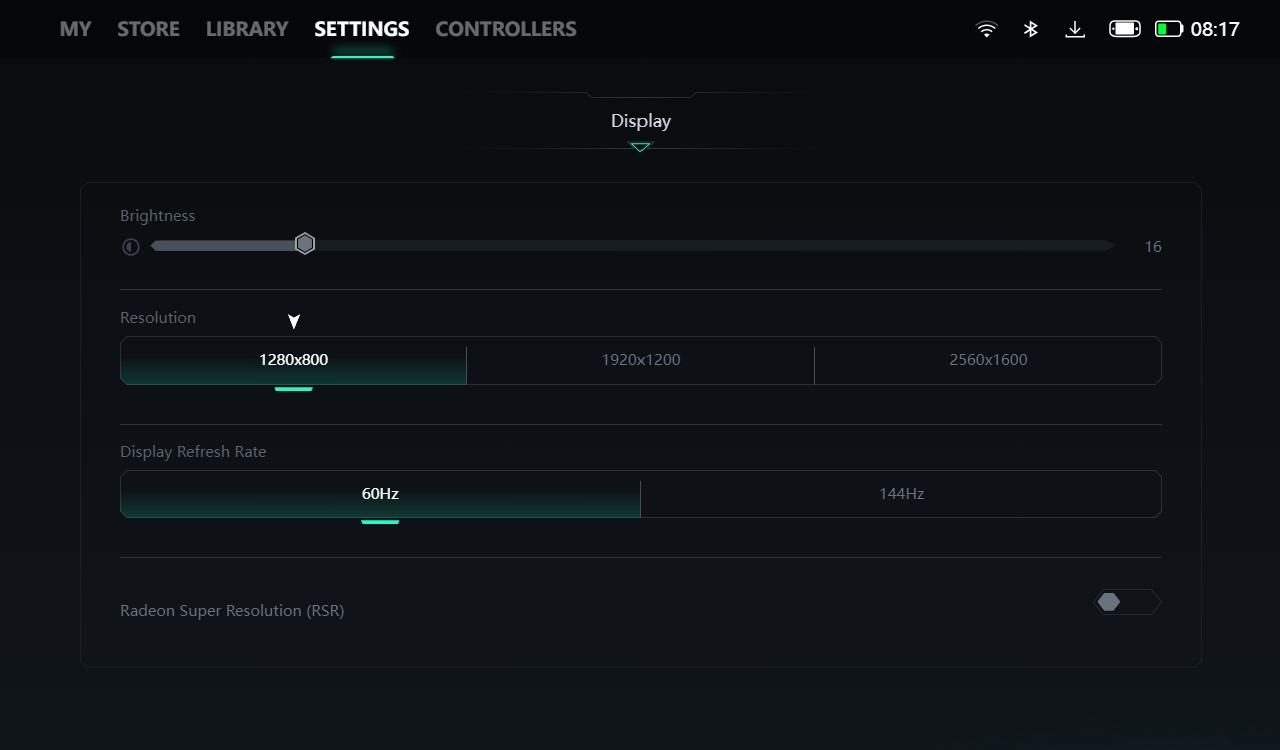
Legion Go Display Settings (Image By Tech4Gamers)
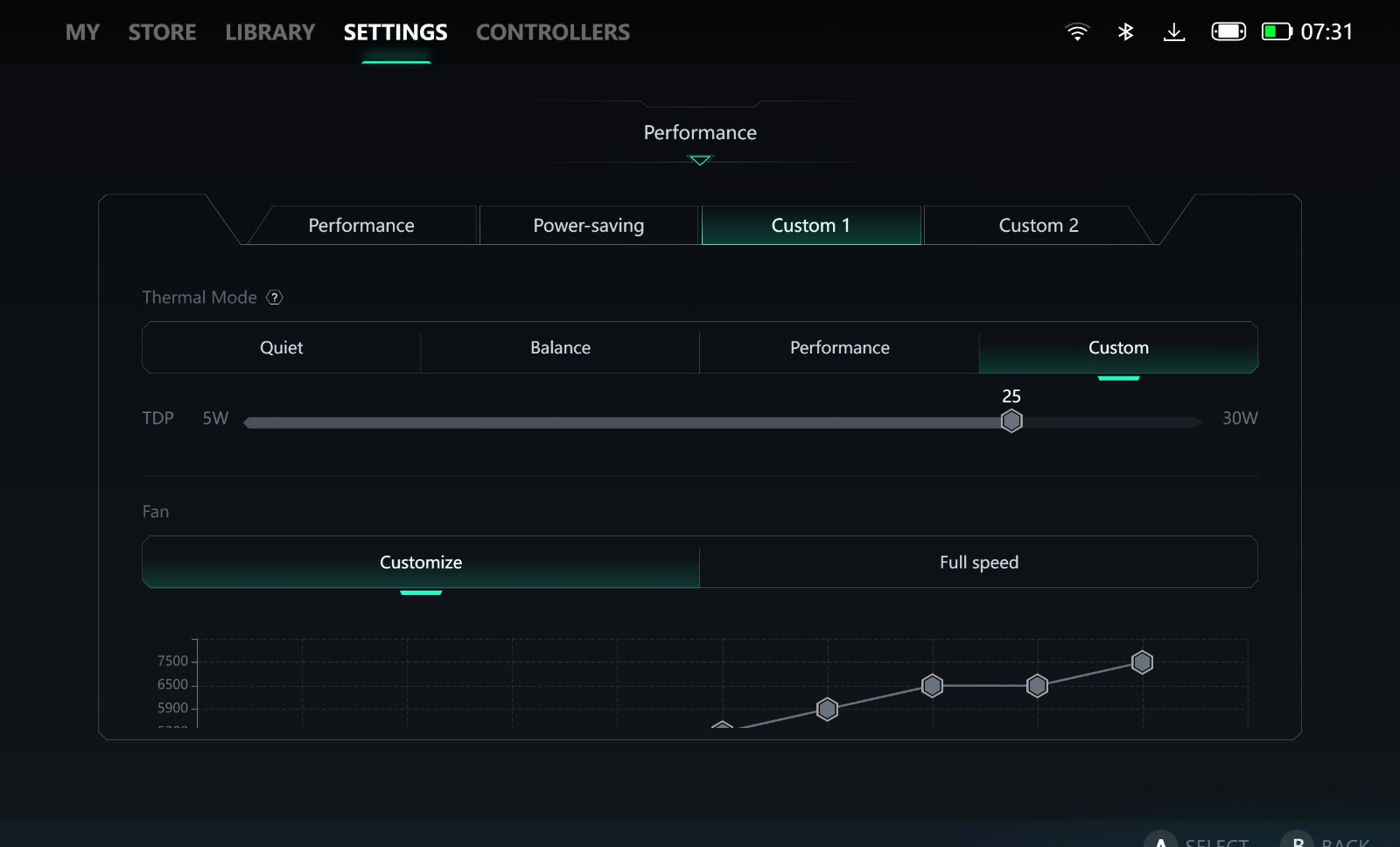
Legion Go TDP Customization (Image By Tech4Gamers)
Now, there are a few ways to increase your battery life performance in a handheld; however, some of them might affect performance, so you’ll have to make sure to only use these methods in non-intensive situations.
Lower Your TDP: Although this might seem obvious to some, lowering your TDP when you aren’t running the most demanding applications can double your battery life. For instance, in a game like Hades 2, I’d probably set the TDP to 15W instead of 30W.
Limit Your Refresh Rate: Truth be told, you’ll probably never get a high-refresh-rate experience in most games, so turning down your refresh rate to 60 Hz is the better option if you want some extra battery life.
Change The Display Resolution: Given the smaller screen most handhelds come with, opting for a lower display resolution such as 800p isn’t actually a bad decision, especially considering the increased battery life you’ll get out of that.
Personally, I prefer following these methods when I’m not playing the most demanding titles ever or just browsing the internet.
A Different Operating System
If you are using a Windows-based handheld gaming PC but want a steam-OS-like experience, then switching over to Linux can be a very viable option for you. This can simply be achieved by using Bazzite, which is a Linux distro, with all of the same features as Steam OS.
While it might sound a bit complicated at first, setting up Bazzite is actually a lot easier than some might think. What’s even better is that most of the features it has to offer work like a charm just by installing the OS, and additional functionality can be gained through plugins.
This video from Cyberdopanine also showcases the advantages of Bazzite really well. He also mentioned the ability to dual-boot and switch back to Windows as long as you have both operating systems installed, which is amazing for anyone who doesn’t just want to play Steam games.
A Lot Of Customization
If it wasn’t already apparent, there’s a lot you can do with your handheld gaming devices, and a lot of these aforementioned tweaks are a great way to get started. Of course, none of these are game-changers for actual gaming but I found them extremely useful for everyday use.
At Tech4Gamers, I’m the PC Hardware Specialist, primarily contributing to the “Best-Ofs” section. I provide thoughtful buying advice based on thorough testing and personal expertise. I also review hardware products and games to keep things fresh.
Story Highlight
The back-connect PC builds offer ease of installation and almost no cable clutter at the front side of the PC.
Airflow also gets a boost since cables are no longer restricting the area at the front.
Back-connect PC components lack compatibility with other components, so selection is limited.
The cost of back-connect PC components is nowhere near budget-friendly.
Being a PC enthusiast, I have always hated managing the cables at the front as well as the back side of the chassis. It was a time-consuming process and often took the appeal of the build from the front. Now that back-connect PC builds are a thing, I love some aspects of it and, at the same time, hate some, too.
What I Love About These Builds
Back-connect PC builds offer a few plausible solutions to some of the very common problems with traditional PC builds.
Easy Building & Minimal Cable Clutter
One of the best things about back-connect PC builds that I like is the whole building process, which is considerably easier compared to traditional PC builds. As it’s known, normally, all the components have their power connectors and other headers on the front side.
This makes the entire building process, especially managing all the different cables at the front, quite exhausting. This is where the back-connect PC builds shine, connectors on back-connect PC components (motherboard to be specific) are on the back side which helps manage the cables a lot easier and mitigates the clutter from the front.
Greater Cooling & Aesthetics
Since all the cables are at the back of the chassis and the front is free of cables, the airflow improves quite a bit, resulting in better and more effective cooling, which is a positive thing for the components inside, especially if your set-up is already in a hot place. The chances of components overheating are reduced by a significant margin, which is a win-win for someone like me who lives in a high-temperature area.
Moreover, the fewer cables on the front, the cleaner and more visually appealing the PC build looks. I like the PC this way more. However, some people would prefer the custom-sleeved cables to be present. It all comes down to personal preferences, but we surely can’t ignore the fact that the front without the clutter of cables just looks better.
Reasons Why I’m Not Fully Invested
Like everything else, the back-connect PC builds aren’t much different and perfect. They have their fair share of negative aspects to take into consideration.
Costs More To Get Started
Being not widely popular and manufactured, the back-connect PC components suffer from a higher MSRP that’s slapped onto them. Especially when you compare them side by side with their traditional counterparts. Sometimes, you’re paying almost double the price of the traditional variant to get those back-connect ports.
The B650M Project Zero from MSI is a great example to get an idea because the traditional variant of this motherboard hovers around $120-130 online. Whereas, its back-connect variant is being sold at $299.99 on Newegg and other online retailers.
The same is the case with the chassis, the back-connect variant of the MSI MAG Pano M100R PZ is priced at $110, while its traditional variant which is called FORGE M100R instead costs just $75. The premium that companies are charging just for providing back-connect support might not seem worth it to everyone, and I dislike this aspect of it as well.
Compatibility & Variety Concerns
Back-connect PC components are impressive for sure, but they lack compatibility with most traditional components like you can’t fit a back-connect motherboard in a traditional chassis.
This compatibility issue raises concerns for many, including me. Moreover, there isn’t a lot of variety available for the components in the market, so you have to select from a limited number of options if you’ve decided to build a back-connect PC only.
A Straightforward Solution That Needs Time
As these back-connect components are fairly new in the market, it’s going to take a while to become more mainstream and catch a wider market for itself.
The few cons that this kind currently has will also be eliminated soon as more and more manufacturers jump on the back-connect components bandwagon. Until then, I can’t fully invest myself into back-connect PC builds and defend them everywhere.
I’ve been the Journalist & Editorial Writer at Tech4Gamers since July 2022. I spearhead our hardware coverage, including overclocking GPUs, benchmarking CPUs, reviewing peripherals, and fine-tuning custom PC builds for every budget. Daily, I report on breaking gaming news, from major launches and studio updates to the latest industry trends, ensuring our community stays informed. Beyond news briefs, I write in-depth feature articles on gaming culture and emerging technologies. And by collaborating closely with the editorial team on content planning, SEO strategy, and our publishing calendar, I help us consistently hit our traffic and engagement targets.
Story Highlight
With hot-swappable switch keyboards, you can easily swap switches without the need for soldering.
You can replace or repair individual switches to extend your keyboard’s lifespan and save money.
These keyboards allow you to easily lube switches for a better feel and sound, ultimately enhancing your typing experience.
If you are into mechanical keyboards, you are probably into different mechanical switches. And, if you are into different mechanical switches, then you definitely need a hot-swappable switch keyboard.
When choosing mechanical keyboards, I have always prioritized the ability to customize and maintain my setup. That’s why I always choose keyboards with hot-swappable switches. I recommend that you also consider hot-swappable keyboards for your next purchase.
What Is A Hot-Swappable Switch Keyboard?
In case you already didn’t know, they are switches that you can replace individually. It means they are not soldered onto your keyboard; you can pull them out anytime. This is an excellent feature as you don’t have to replace the entire PCB to replace the switches of your keyboard.
As we started seeing more and more mechanical switch options, inevitably, keyboard enthusiasts started modding their keyboards. And it was only in the last 8-10 years that we began seeing keyboards that were compatible with hot-swappable switches.
Joy of Customization
One of the most significant advantages of hot-swappable keyboards is the ease of customization. With traditional mechanical keyboards, changing switches involves de-soldering and soldering, which requires technical skills and tools. Hot-swappable keyboards eliminate this hassle.
Want to experience tactile, linear, and clicky switches all in one keyboard? Do you need a more silent keyboard during the day because you work with other people but also like listening to the clicky sound whenever you game? Hot-swappable switch keyboards, with their ease of customization, have you covered in all these aspects.
I have tested multiple hot-swappable switch keyboards on our website, and all of them offer great performance and the advantage of customizability. One of the most recent includes the AULA F87 Pro, about which I said:
The Aula F87 Pro punches above its weight in the budget mechanical keyboard market. This TKL keyboard boasts a premium feel thanks to its solid build quality and PBT keycaps. It caters to both typists and gamers with its satisfying typing experience achieved through multi-layered internal dampening and hot-swappable switches for customizable feel.
Maintenance Made Simple
If you have a hot-swappable switch keyboard, you can easily replace your switches with newer ones in the unlikely event that they start to wear and tear. This is particularly beneficial as you don’t have to throw your keyboard away when its switches become faulty or wear with the passage of time. It also saves the hassle of buying a new keyboard, as you can replace a switch for as low as 20 cents only.
Switches (Image By Tech4Gamers)
Another thing is that every time you get a new set of switches, it’s like you are getting a new keyboard. Because let’s face it: Removing the keycaps, removing the switches, lubing the new switches if you want, and then mounting them on your keyboard just gives a fulfilling feeling. It’s like you have customized it to be your own.
Easier Lubing Experience
The lubing process generally takes a lot of time, but you can save a lot of time with a hot-swappable mechanical keyboard. All you need to do is pull out a switch, lube it, and then put it back in, and you are good to go. Even if you decide not to lube your switches after pulling them out, you can easily put them back into the socket without any fuss.
For the beginners reading this, you probably don’t care about lubing your switches. It’s because you have either never heard of lubing your switches or have never experienced it. Let me tell you that after you have lubed your switches, it’s a whole new typing experience. They feel way better and sound way better. Anyone who has lubed switches before knows there is no going back to the stock switches.
Final Thoughts: A Worthy Investment
In conclusion, hot-swappable keyboards offer great flexibility, ease of maintenance, and a personalized typing experience. They are also great in the long run. They are perfect if you value customization and want to maintain your keyboard easily. The ability to swap switches without soldering has been incredibly beneficial for me.
So, if you want to be flexible and consider it long-term, I always recommend considering one with hot-swappable switches when you go to find one in the market. You can also check out our keyboard reviews for complete guidance.
As a Hardware Expert at Tech4Gamers, I blend my Computer Science expertise with a love for technology. Through comprehensive reviews and comparisons, I guide our audience in making informed tech decisions.
Story Highlight
The GodMode folder is really helpful when you have a habit of tinkering with settings a little too often.
The shake-to-minimize feature makes the job a lot easier when you want to minimize the extra open windows in an instant.
Clipboard history is also one of the handy features, as it lets us save multiple images and texts.
The Snipping Tool no longer just lets us take screenshots, but now it supports screen recording, too.
Windows 11 kind of had a rough start, especially because of the infamous TPM-supported hardware, which then got resolved later on. Other than that, Windows 11 brought in a lot of great features to facilitate its users and make them feel like an upgrade over Windows 10.
Not every feature was available on launch, and some were added over time. Nonetheless, there are some that I personally like and prefer to use every time I have to do something that can be done via these features.
Features That I Truly Appreciate
I have shortlisted some of the most useful features that I personally use on a daily basis.
GodMode Folder
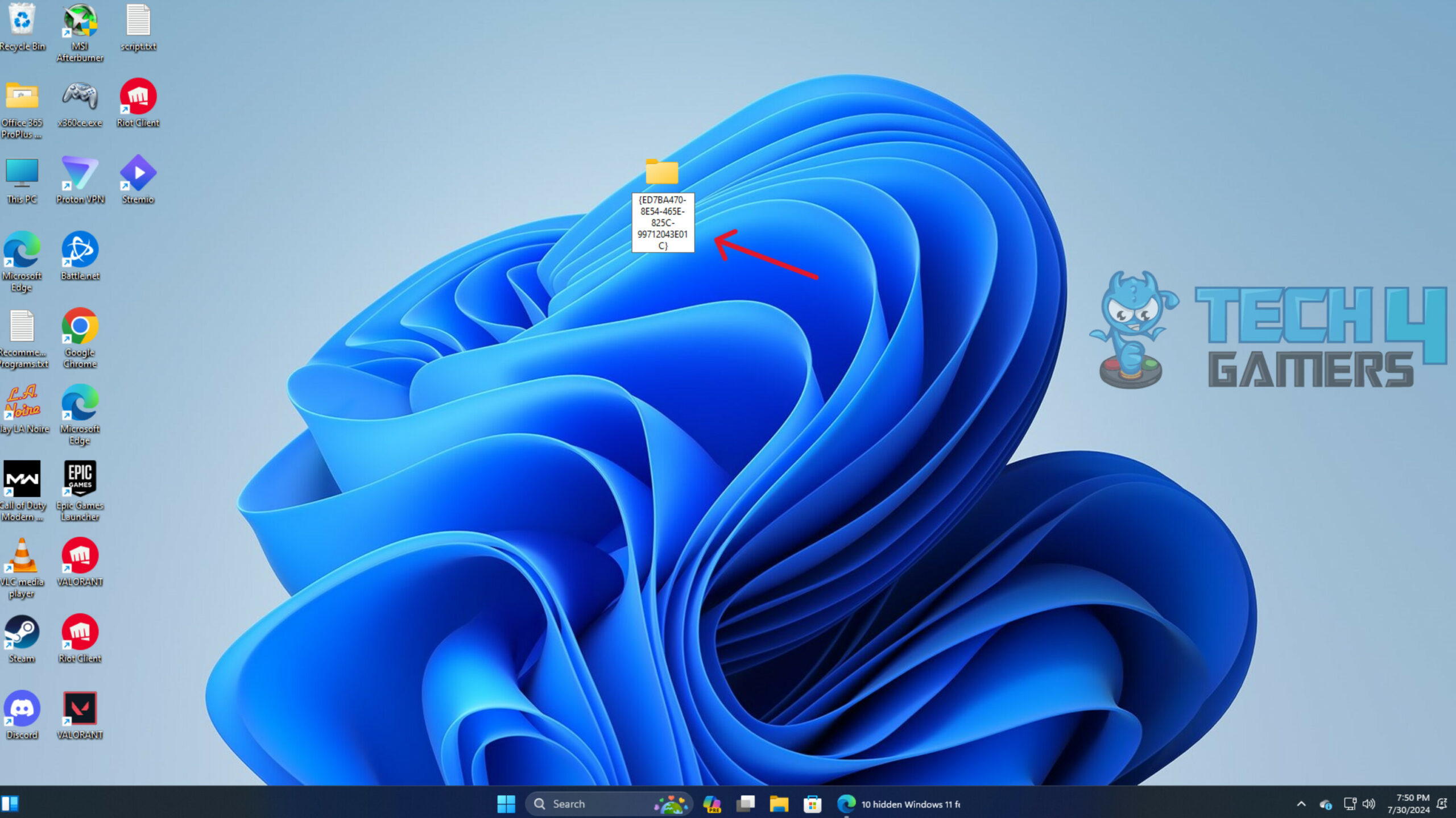
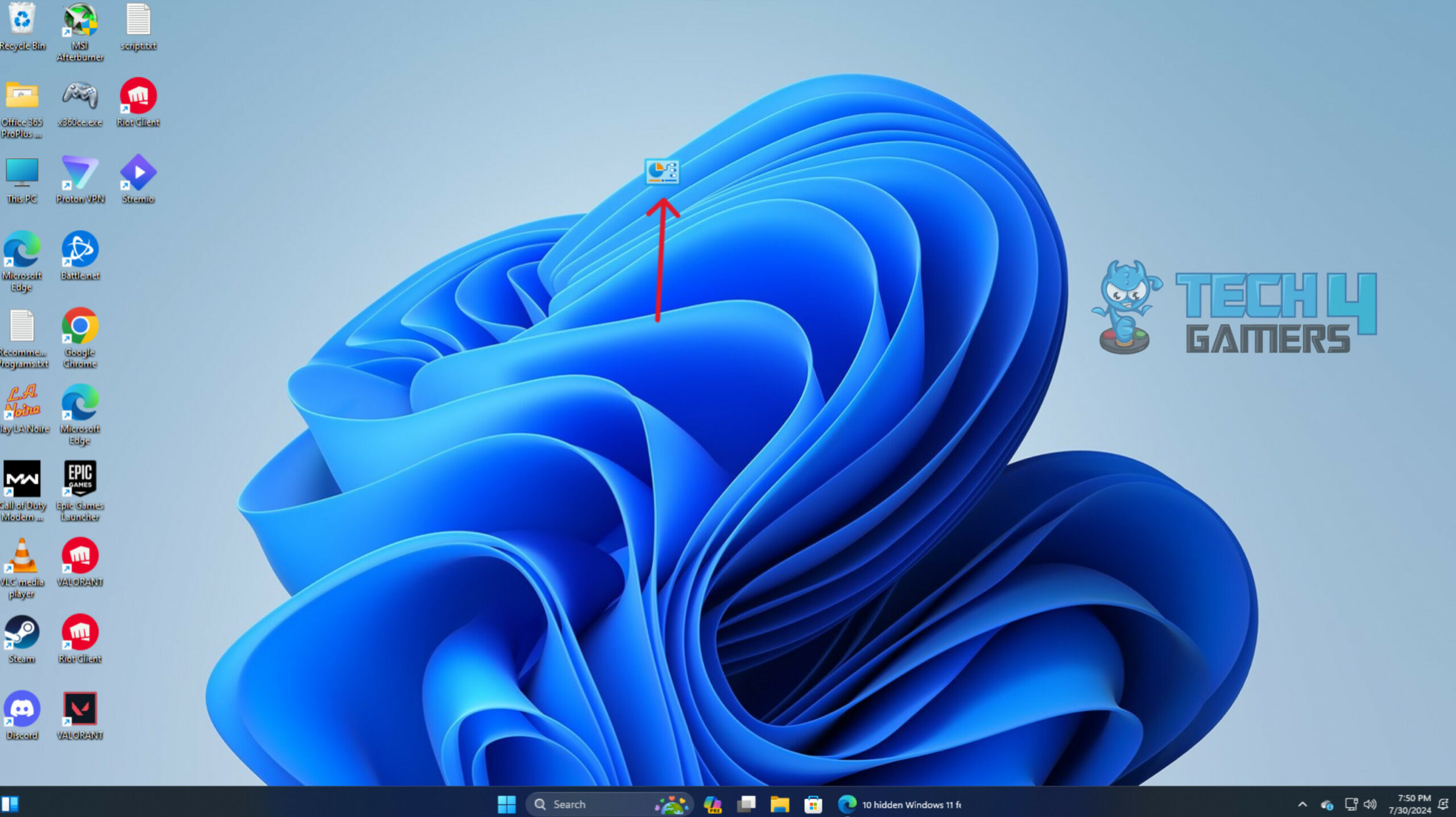
One of the first things you’ll notice is that even the simplest of the settings are now hidden inside the new UI. It gets a little hard to find everything, even for simple stuff. To deal with this, you can actually make a GodMode folder which contains all the necessary settings you would need right in front of you such as display settings, battery mode settings, shortcut to devices, and printers tab. Also, there are direct shortcuts to account management settings, troubleshooting, and Windows personalization.
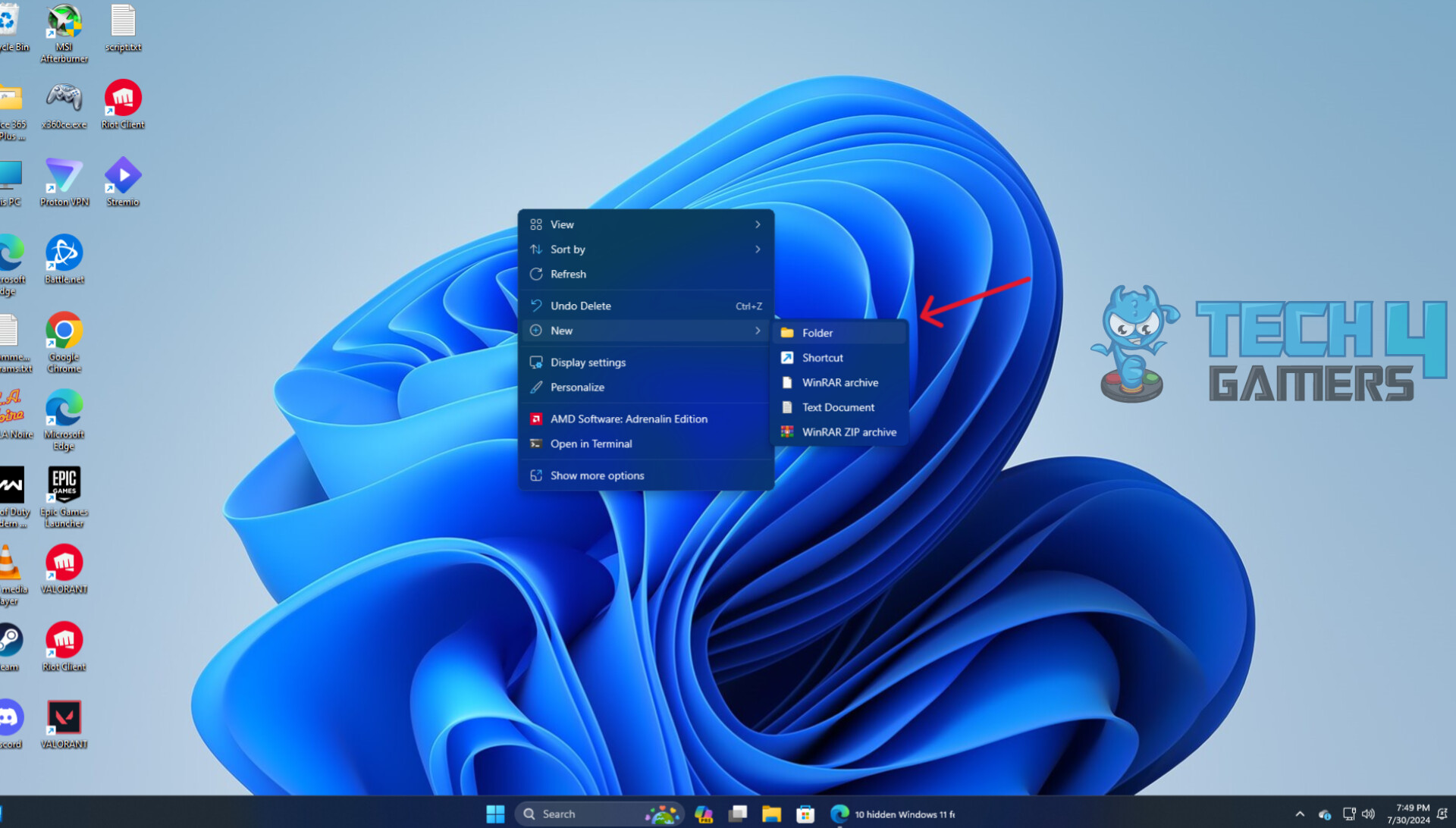
Setting this folder up isn’t too challenging either; you just have to create a folder and rename it with “GodMode.{ED7BA470-8E54-465E-825C-99712043E01C}”. That’s all, you’re done and now can easily access all the important settings right from your desktop within seconds.
GodMode Folder
1 of 3
(Image credit: Tech4Gamers)
(Image credit: Tech4Gamers)
(Image credit: Tech4Gamers)
Shake-To-Minimize
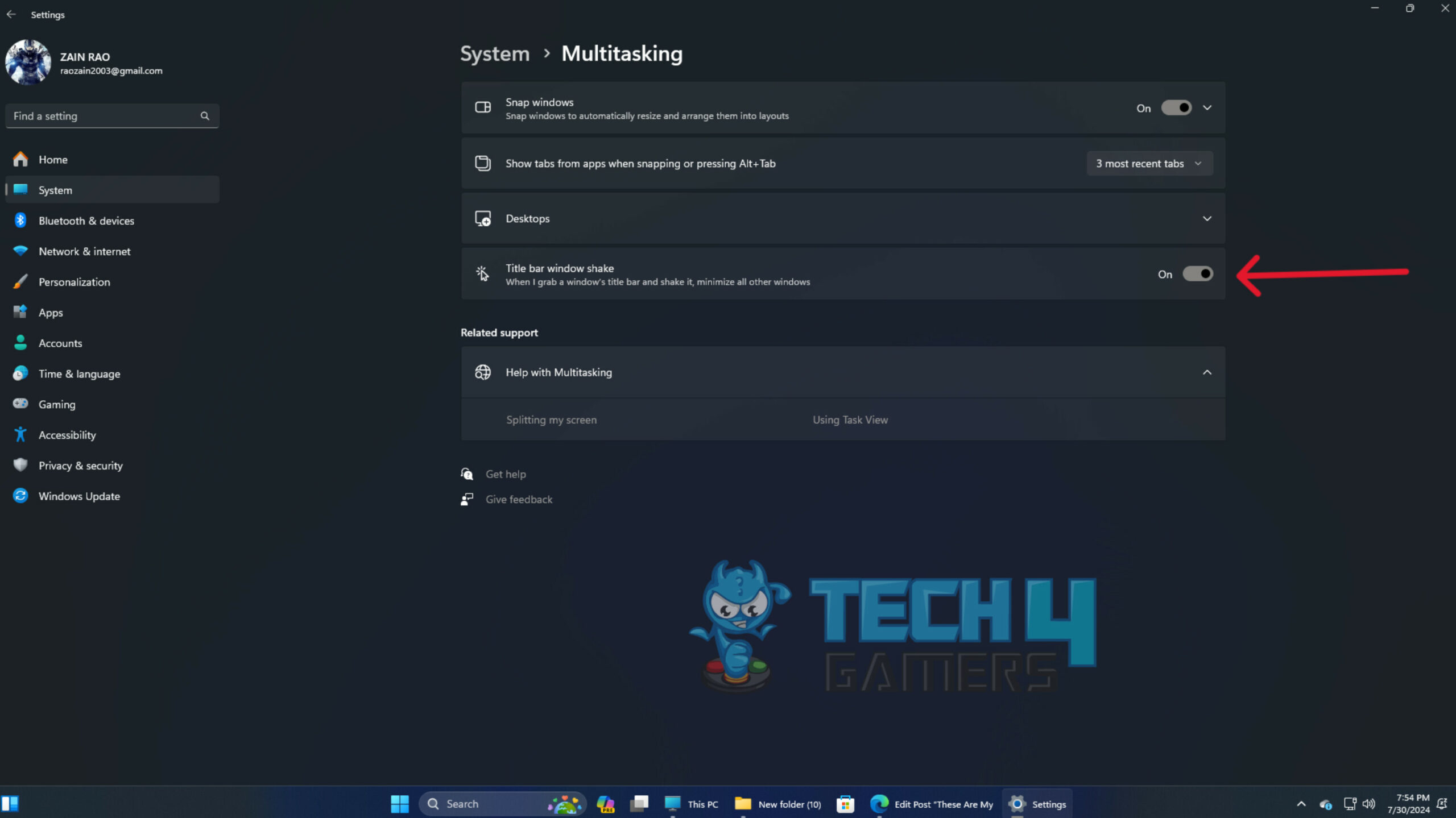
There’s often come a moment when you have to open a lot of windows to be able to perform your work. And the very next moment, you only require a single tab to focus on. In that case, you have to minimize or close all other windows manually one by one, however, with this Aero shake feature, you can minimize all unnecessary apps with a single click and shake.
Shake to Minimize (Image credit: Tech4Gamers)
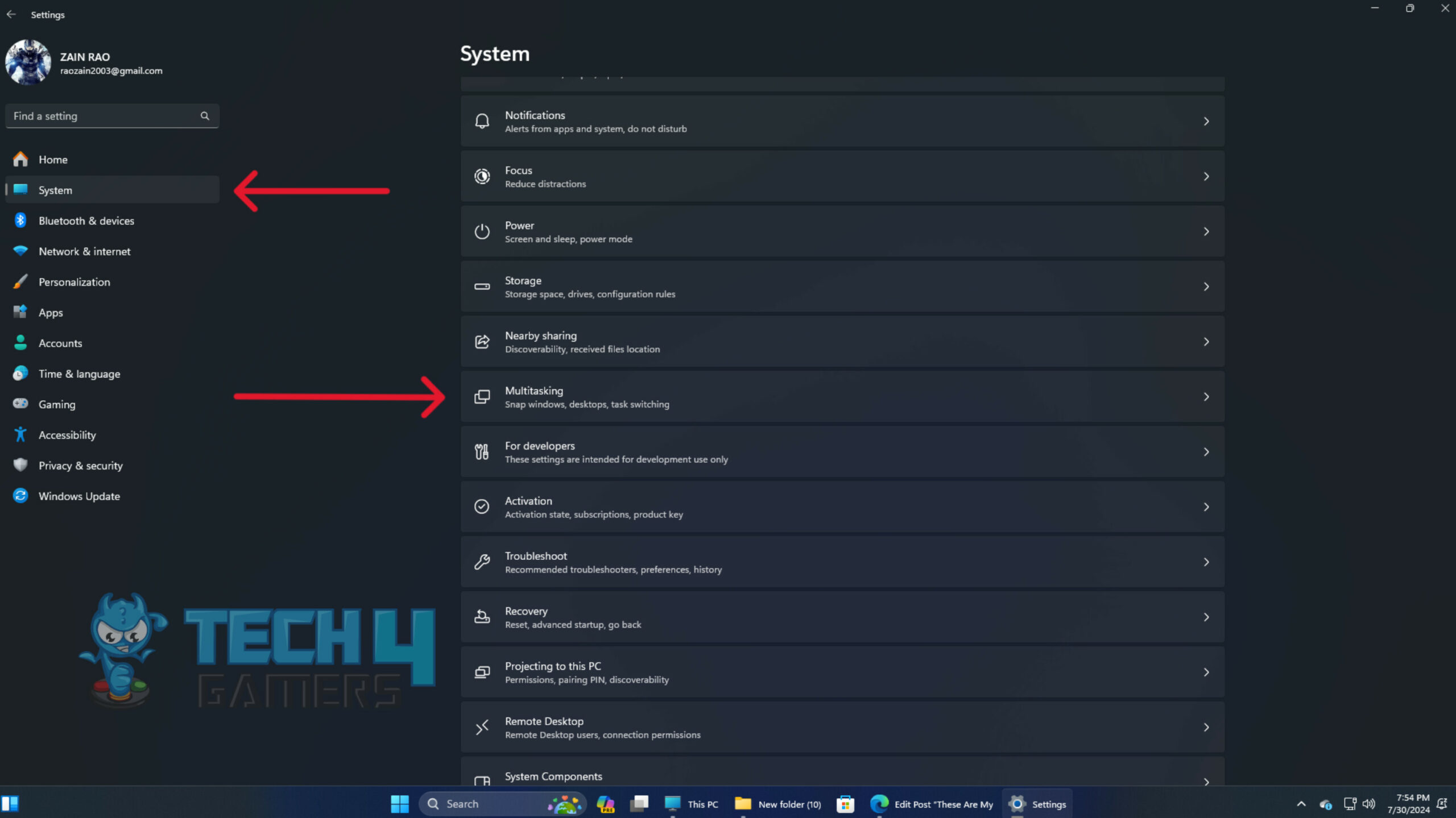
To enable this setting, head over to the Multitasking tab inside the Settings app and toggle the “Title bar window shake” mode on. Now, you can easily minimize all the unnecessary apps by selecting and shaking the in-use window all over unneeded ones.
1 of 2
(Image credit: Tech4Gamers)
(Image credit: Tech4Gamers)
Clipboard History Is a Game Changer
This feature works more like smartphones, where we can access all the previously copied texts and images as well as the pinned ones. The exact same thing is now possible in Windows 11; all you have to do is enable the Clipboard history by accessing the Clipboard tab inside the Settings app. After doing so, you can now open the Clipboard history by pressing Windows Key + V and can specifically choose from your previously copied items.
Clipboard History (Image credit: Tech4Gamers)
Snipping Tool Now Does More
The snipping tool has been around since Windows 10 and is a great way to take screenshots of the PC screen. However, it has received a major upgrade in Windows 11, as now you can also record your PC screen along with your voice. All you have to do is press Windows Key + Shift + S, then select the video recorder icon and screen area to start screen recording with the device’s audio.
Snipping Tool (Image credit: Tech4Gamers)
Scrolling Over The Inactive Windows
Being able to scroll the inactive windows without actually switching over to them can be helpful when you do want to divert your focus from the active window. This way you can easily get the desired information from the inactive window without actually switching over to it.
Scrolling over Inactive Window (Image credit: Tech4Gamers)
To make it work, you have to head over to the Bluetooth & devices tab inside the Settings app, then open the mouse tab and make sure to turn the Scroll inactive windows when hovering over them on from there. That’s all you had to do, and now you can scroll through inactive windows without having to bring them upfront.
The Hunting Goes On
As I’m still fairly new to Windows 11, I have yet to find a lot of other hidden features on the way. For now, these few exciting features I shared were quite impressive; personally, I like the emoji shortcut and Aero shake the most.
I’ll be using them more than any other feature until I discover more cool features of Windows 11. If you’re new to Windows 11 like me, then do try these features to facilitate your work and casual day-to-day PC usage.
At Tech4Gamers, I mainly cover new gaming news, leaks, and rumours. Aside from that, I love to write features about my favourite games while inserting my opinion about their different aspects.
Story Highlight
FromSoftware releases some excellent games, but they have one big problem.
The studio has constantly reused massive fights, diminishing the impact of these encounters.
I hoped the developer would fix this with Shadow of the Erdtree, but it failed.
However, like any other studio, this team is not perfect. One major flaw in most of its releases is the repetition of bosses. In my opinion, this is the biggest problem FromSoftware needs to overcome.
I had hoped Shadow of the Erdtree would finally fix this problem, but I seem to have been wrong.
Why it matters: The bosses in FromSoftware’s games are incredible, but their impact is diminished if they continue to appear repeatedly as regular enemies and mini-bosses.
FromSoftware’s History With Repetition
There Are Many Repetitive Boss Fights In Elden Ring
The first time I noticed this problem was when I played Dark Souls. The Asylum Demon has multiple variations, and players later encounter enemies like the Taurus Demon as regular enemies.
If a boss is given a proper arena, it should not be turned into a normal enemy since it just means the developer ran out of ideas for more enemies. The same problem exists in Dark Souls 3, though things got out of hand in Elden Ring.
There are 165 main bosses in Elden Ring, and many of them are repeated throughout the game. I adore Elden Ring and its open world; it’s massive and full of content. However, I wouldn’t mind a smaller world for more unique content.
There was really no need for so many repetitive boss fights. Black Blade Kindred is one of my favorite bosses, but I was disappointed when there was another one before the mountaintops.
While it did have a different moveset, it was still the same boss, not to mention how many Erdtree Avatars there are. Also, let’s not ignore the Godskin enemies and Gargoyles. There’s way too much repetition here.
If you want more examples, look no further than the dragons. I never really enjoyed the dragon boss fights in Elden Ring except Placidusax. Ultimately, they all fight very similarly, with the differences coming down to different breath attacks.
Shadow of The Erdtree Doesn’t Fix This Problem
Shadow of the Erdtree Also Features Some Repetitive Boss Fights
As mentioned earlier, I hoped that FromSoftware would fix this long-lasting problem with Shadow of the Erdtree, but it didn’t, which makes me sad. Fighting the Divine Beast, Dancing Lion, was a major challenge since he was not an easy boss.
As such, it became a memorable boss fight. However, the developer decided to reuse thisboss in the Ruins of Rauh, which doesn’t make sense. At first, the encounter with this boss was incredible, but adding another one just made it disappointing.
I am glad that the second version has one more phase, but it doesn’t change the fact that the boss fight is still mostly the same. Another very frequently repeated boss is the Hippopotamus. I will be frank here: I hate this boss; it is perhaps the worst fight in the Elden Ring DLC.
The enemy’s design isn’t that good, the hitbox is weird, and I don’t understand the thought behind having such a massive creature in such a small arena. Before you tell me to git gud, I defeated him on my third or fourth try, so the difficulty wasn’t an issue; it’s just that the boss isn’t fun to fight.
So, of course, if the boss isn’t fun to fight, FromSoftware will make multiple variants of the enemy. You can also find a few more of them in the late-game open-world areas. At least the small arena wasn’t a huge problem there.
I Have Lost Hope
Despite how much I love the studio and its releases, I don’t have much hope for the future.
On a brighter note, Shadow of the Erdtree didn’t have as many repetitive bosses as the base game, except for the Red Bear, the Dancing Lion, and the Hippopotamus. So, I guess I will have to live with this now.