At Tech4Gamers.com, I cover the latest news and rumours in the gaming industry, from new game releases to hidden gems and video game leaks. Furthermore, I occasionally write tech articles about video game consoles, providing insights into the hardware and software that powers our gaming experiences.
Story Highlight
Ubisoft’s Board of Directors is launching an internal investigation due to underperforming titles like Star Wars Outlaws.
The investigation aims to help Ubisoft improve its operations by focusing on a player-centered approach.
The delay of Assassin’s Creed Shadows increases uncertainty about Ubisoft’s future.
Ubisoft is under increased scrutiny after Star Wars Outlaws and Skull and Bones didn’t perform well. As a result, the company’s Board of Directors are starting an internal investigation.
This step comes amid ongoing worries about Ubisoft’s financial difficulties, disappointing game launches, and management problems, which have affected the company for years.
Why it matters: The board’s efforts to tackle these issues could be the first step in restoring the company’s reputation and stabilizing its operations. However, with Assassin’s Creed Shadows delayed, Ubisoft’s road to recovery remains unclear.
In the light of recent challenges, board of directors Are launching a review [investigation] to improve our execution, notably the player-centric approach.
Investors and stakeholders were especially let down, as they had hoped this much-anticipated open-world Star Wars game would help the company recover from past challenges.
Instead, the game’s sales were disappointing, leading Ubisoft’s stock to fall to a 10-year low, losing over 10% of its market value just days after the game was released.
The disappointment surrounding Star Wars Outlaws is not an isolated incident but part of a larger trend of underperformance. In recent years, Ubisoft has dealt with lukewarm responses to titles like XDefiant.
Ubisoft stocks have plummeted by over 80% in the past five years.
Moreover, Ubisoft’s board has started to look into management and operational issues. Many employees have suggested that poor decisions by executives are a key problem for the company.
This investigation aims to find ways to improve how projects are run, boost player engagement, and stabilize Ubisoft’s stock. The board wants to create a more efficient, player-focused approach.
The release of Assassin’s Creed Shadows has been pushed back to 2025, adding to the uncertainty about Ubisoft’s future. While the company hopes this new title will help regain its reputation in the gaming community, it’s unclear if it will be enough to turn things around.
As Tech4Gamers’ Founder and Editor-in-Chief, I bring over 13 years of PC Hardware Reviewing and 8+ years of IT Project Management experience. Certified in Google IT Support , my focus is on providing honest product reviews and analysis and fostering a strong gaming community with 130k+ members in PPG.
Huzaifa Haroon
Being a keyboard enthusiast, I specialize in reviewing, modding, and critiquing them for the people. If you’re a Razer fanboy, my only goal is to convert you to the dark side 😈.
When Wooting began making analog keyboards back in 2016, no one foresaw them as the next step for gaming keyboards as a whole. A lot has changed since then. Hall-effect sensors skyrocketed and got into controllers and keyboards. Today, the spectrum looks something like this: you either get a barebones kit and build a custom, or you buy a Wooting to get that competitive edge.
But the throne is always for the taking. Seeing Wooting’s success, particularly with its “rapid trigger” feature, the market saw an overnight revolution. Big names like Razer and Steelseries were quick to jump in, but it was the budget offerings that brought the gift of hall effect to the masses. With competition all around them now, can Wooting still wear the crown?
Why Trust Tech4Gamers
Huzaifa Haroon is our keyboard expert with years of experience in building and testing custom keyboards.
130+ peripherals tested and reviewed by our team of hardware experts (Tech4Gamers Team).
500+ hours spent testing different peripherals for our reviews.
At Tech4Gamers, ensuring you get reliable information is our priority. That’s why every hardware round-up undergoes a meticulous review process by our team of experts and editors. Each review is carefully examined against our strict editorial guidelines, guaranteeing you trustworthy insights you can depend on.
Key Takeaways
The Wooting 80HE is a wired gaming keyboard that stands out for its innovative hall-effect switches, rapid trigger technology, and polished Wootility software, offering cutting-edge performance for serious gamers.
You should go for the Wooting 80HE if you want a high-performance keyboard loaded with features.
You should skip the Wooting 80HE if you need wireless connectivity or prioritize sound and typing feel over performance.
[toc]
Here are the key specs:
Specifications
Switches
Lekker L60 V2
Keycaps
PBT, ABS and Dye sub-options are available
Case
PCR ABS or Zinc alloy
Stabilizers
Screw-in stabilizer
Switch plate
White polycarbonate (PC) plate
Sandwich pad
Silicone
PCBA
Wooting 80HE
Cable
2-meter USB-C to C nylon braided cable
Dimensions
346 x 142mm
Weight
PCR ABS: 790 grams Zinc alloy: 2160 grams
Unboxing Experience
The Wooting 80HE comes in a simple yet elegant cardboard box with one tab in the center, keeping it secure. Apart from the name plastered across the front, there’s minimal branding around the package. Opening the box reveals the Wooting sitting underneath a nice plastic dust cover. The accessories are laid out behind a marked flap at the top.
Wooting 80 has a clean and minimal box (Image by Tech4Gamers)
Since the Wooting 80 can also be purchased as a module without switches and case, the unboxing experience can vary depending on what config you choose. Our Wooting 80 unit is prebuilt and made out of ABSplastic, but there’s a see-through polycarbonate and zinc alloy (metal) case as well that you can buy separately.
Package Contents
1x Wooting 80HE
1x Dust Cover
1x Switch-Insert Instructions Card
1x USB-C to C braided cable
1x Keycap/Switch Puller
3x Spare L60 switches | 1x Spare L45 Switch
4x Heighted Rubber Feet
4x M2x5 Spare screws
7x Additional Keycaps
1x Post Card
You get quite a bit of stuff in the box (Image by Tech4Gamers)
Design & Build
The plastic case is well-made, feels solid, and has no blemishes. It’s as good as any other mainstream gaming keyboard but a touch below the plastic used in budget customs like those from Aula and Epomaker. There is absolutely no creaking, though the board does flex if you force it to.
Wooting 80 looks stunning from the top (Image by Tech4Gamers)
Design-wise, Wooting has kept it simple with a clean aesthetic upfront consisting of no branding and uniform bezels all around except the forehead. The only standout element is the LEDBar on the left, above the arrow keys. This is fully customizable in the software and can actually go beyond just a visual flourish; more on that later.
The LED Bar is not just for aesthetic purposes but serves a function, too (Image by Tech4Gamers)
On the back, you’ll see five rubber feet, of which the top two are responsible for height adjustment. You can swap those for the taller ones provided in the box to add some height. I appreciate Wooting trying something new in place of just generic flip-out feet, but the implementation seems half-baked; you now have to worry about one extra element for everyday usage that can easily get lost.
The back is simple, but the rubber feet disturb the elegance (Image by Tech4Gamers)
Moving on, the side profile of this keyboard is somewhat unique; it’s not a simple box on a wedge, which even expensive customs are guilty of, but rather a sleek downward curve. The front height is 19mm here which means it’s just about comfortable to type on without a wrist rest.
That’s one nice-looking side profile (Image by Tech4Gamers)
Layout & Features
As the name suggests, the Wooting 80HE is an 80% keyboard with a layout that’s sort of in between a 75% and a proper TKL. You still get your function row, the arrow keys and even the nav cluster but some keys like Home and End are Del. There’s also a “Mode” key up top next to F12 which technically makes this an F13 layout.
You can use that key to quickly switch between different profiles set up in the Wootility software if you want to Alt-Tab, from popping heads in Overwatch to writing your overdue college essay.
Switching Modes (Tech4Gamers)
Wooting 80 is wired only so there’s no battery life or wireless performance to be worried about. That being said, this board does have true 8000hzpolling rate because it combines that with an 8000hz input scan rate as well. I’d strongly suggest using the provided USB-C cable instead of a custom coiled one to ensure you’re getting the best out of that PCB.
Speaking of which, Wooting 80 has a fully hotswap PCB that is compatible with other hall-effect switches. It has no flex cuts and is 1.6mm thick. While the default layout is ANSI with a 6.25u spacebar, the company also makes ISO and JIS versions that you can select at the time of buying.
Lastly, the keyboard is gasketmounted using the plate foam that sits between the PCB and the polycarbonate plate. This absorbs impact better, according to Wooting, but in my experience there’s practically no give here and the typing experience isn’t bouncy. That kind of defeats the purpose of going with gaskets in the first place.
Wooting 80HE exploded view
Going for a stiffer design with gaskets on the PCB might’ve helped accentuate the higher tones of the switch and give the sound more character. It would’ve also allowed for easy plateless configs of the Wooting 80 since the screw-in stabs are already there. There’s also no PE foam inside, so it’s not exactly like they’re embracing the foamed-out sound, either.
The Innards
Before we move on to the bread and butter of the Wooting, let’s first talk about the fundamentals of this keyboard. The Wooting 60, and hall-effect keyboards at large aren’t exactly known for their dominance in this area, but this keyboard is no slouch.
Keycaps
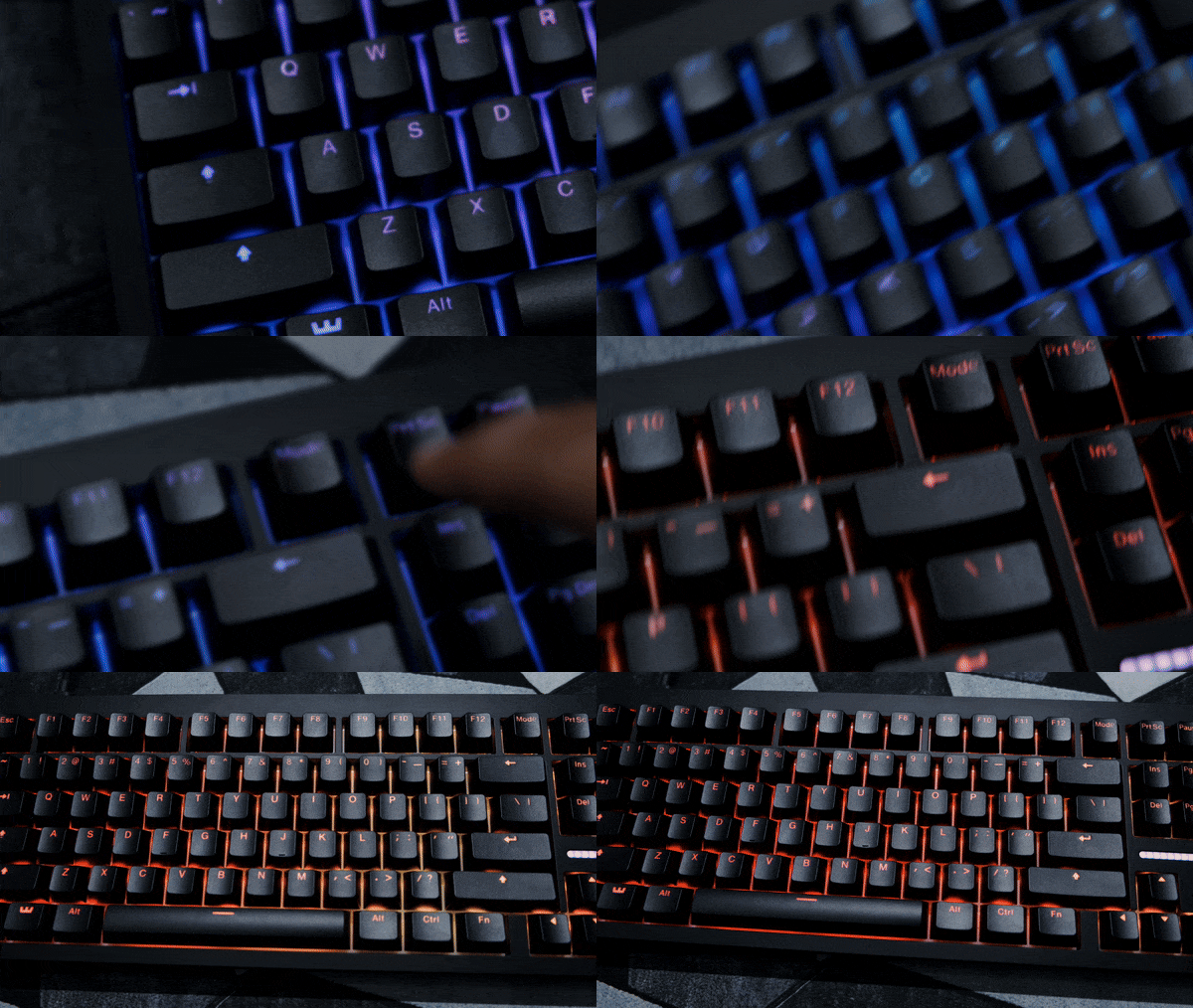
The Wooting 80 is rocking doubleshot PBT keycaps that are shine-through. These are your standard OEM profile seen in many mainstream gaming keyboards, but they do feel and sound a bit more premium. Due to the north-facing RGB, the legends all look nice and bright, especially under low lighting.
Wooting’s doubleshot PBT shine-through keycap
The font is clean, similar to Razer’s, and the shine-through cutouts are about as sharp as they can be. The keycaps also have a gritty texture that grips your fingers nicely and is visible if you look for it. There’s minimal wobble, and all the keycaps are thick, more so than your average gamer-y stuff, but not as much as nice GMK clones from AliExpress.
Switches
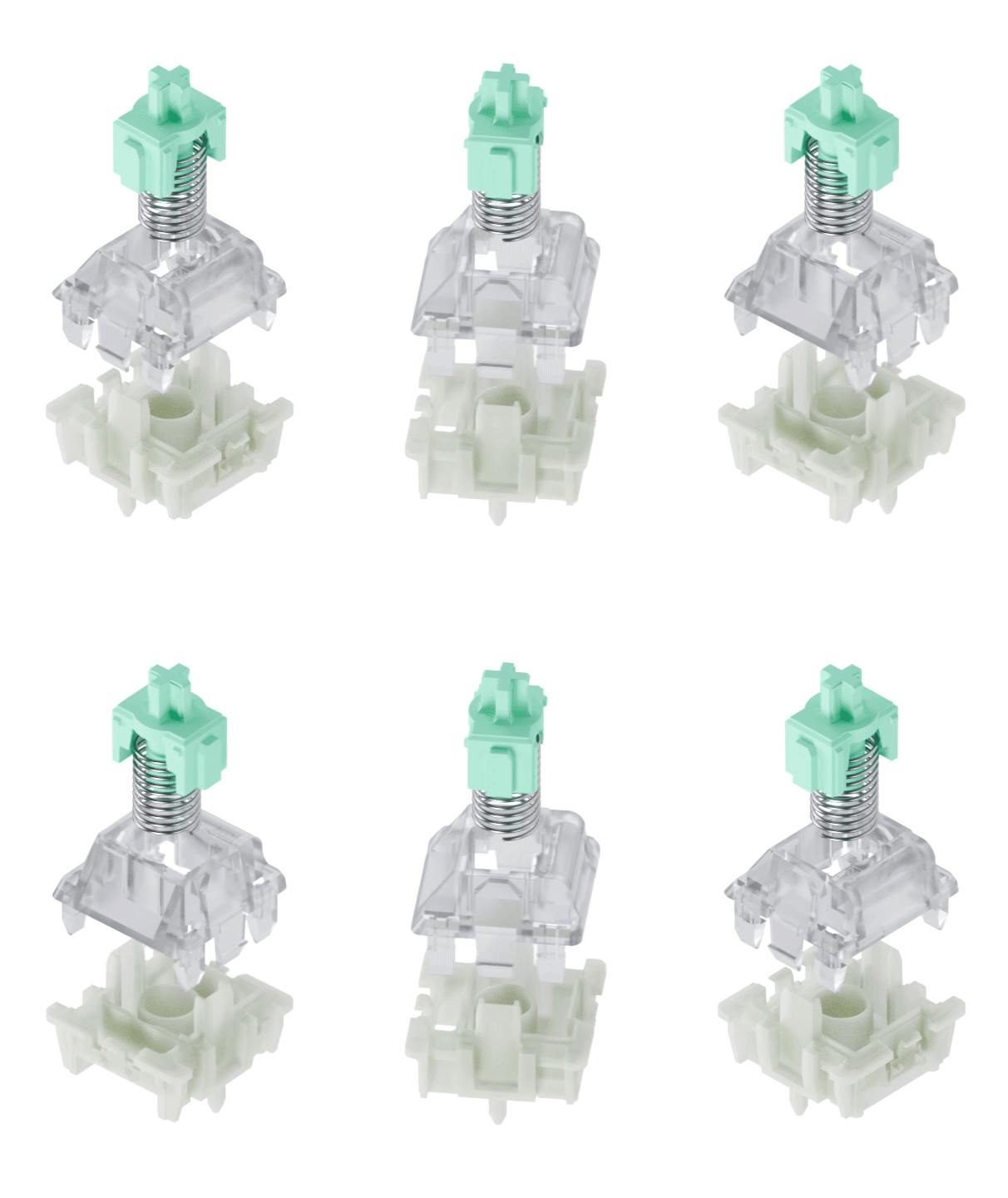
Switches are arguably the biggest improvement in the new Wooting 80. The company has upgraded to LekkerV2 linear switches, manufactured by Grain Gold/Hejin (who also make Geon Raptor). These are significant step-ups from V1 Lekkers that could not be saved with any relubing and just had to be replaced by Gateron Jades at the end of the day.
Lekker V2 switches
Lekker V2 switches are factory-lubed and come in two variants: 45g and 60g, ours is the 60g version. Due to their magnetic nature, they have a dynamic actuation point anywhere from 0.1mm to 4mm. These feel very comfortable to type on, though there’s a bit of a mushy feeling that makes it feel like these are silent switches.
This is because Lekker V2s do not have a traditional closed-off bottom like some of the latest hall-effect switches. That means the magnet in the stem is literally not hitting anything when the switch is fully pressed. This has a dampening effect on sound and feels, resulting in a less satisfying bottom-out.
Magnetic switches can still work with closed-off bottoms (Image by Tech4Gamers)
Stabilizers
I may have lied because stabilizers might actually be the most important upgrade in the Wooting 80. Gone are those cheap-feeling, rattly plate-mount stabs, and in come the glorious (the adjective, not the company) screw-in stabs. These are factory-lubed and come pre-installed, which is commendable as even high-end customs omit this.
The screw-in stabs are standard, which means they can even be replaced!
Overall, the stabilizers are good, great even but they’re not perfect. There’s just a little bit of rattle across all of them that is almost weirdly consistent? So, it doesn’t feel like normal annoying rattle. My spacebar, however, did have a bit on uneven lube on the left side which was quickly solved by an injection of Krytox.
The stabs are much improved and now consistent across the board (Image by Tech4Gamers)
Wootility Software
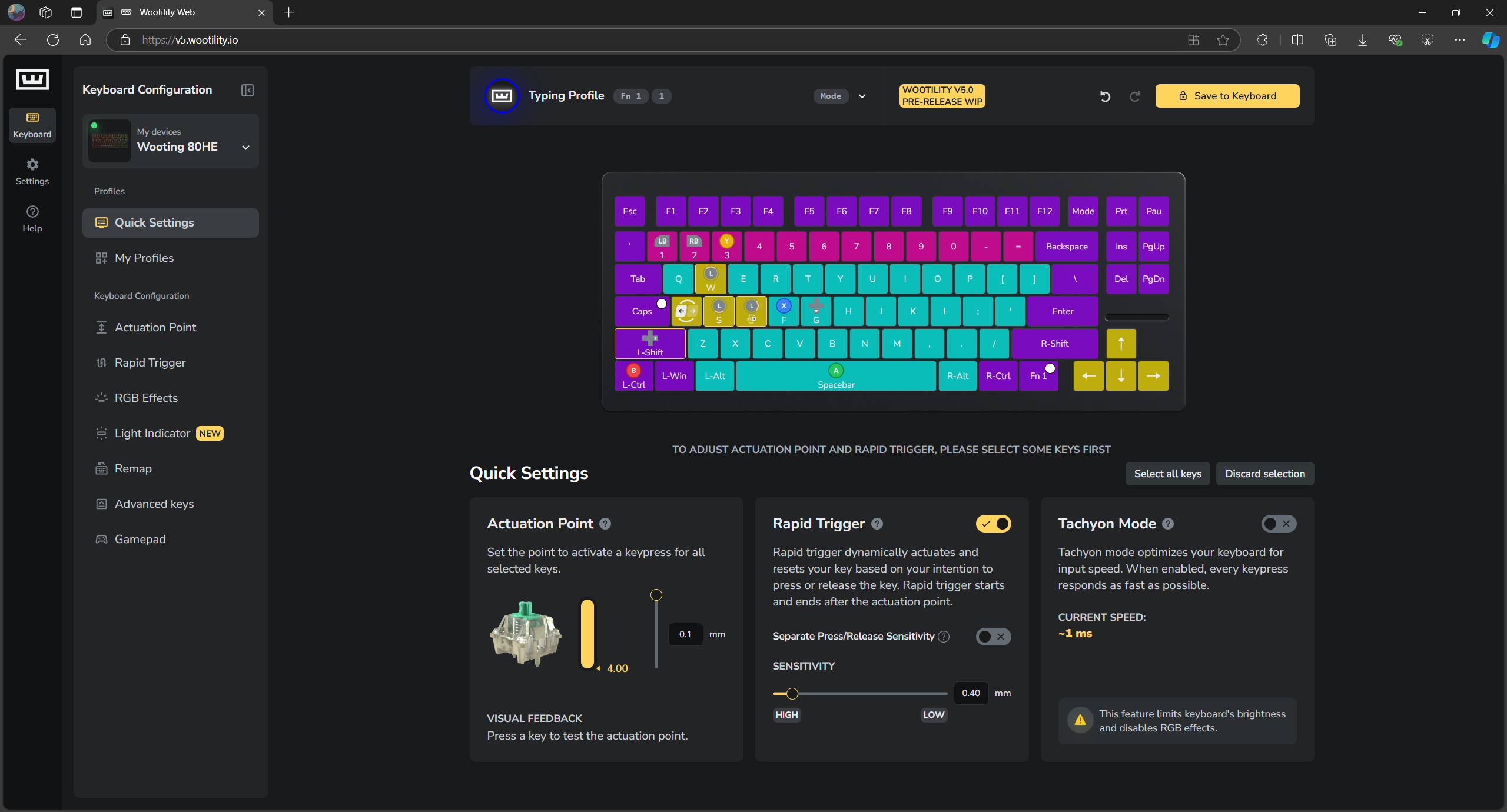
If there’s anything that keeps Wooting at the top of the hall-effect leaderboard, it’s their software. Wootlility requires no app download or sign up before getting you into the action. It’s entirely online, running in a web browser with only an optional background service (that will launch later) for things like monitoring RAM usage.
Wootility homepage (Image By Tech4Gamers)
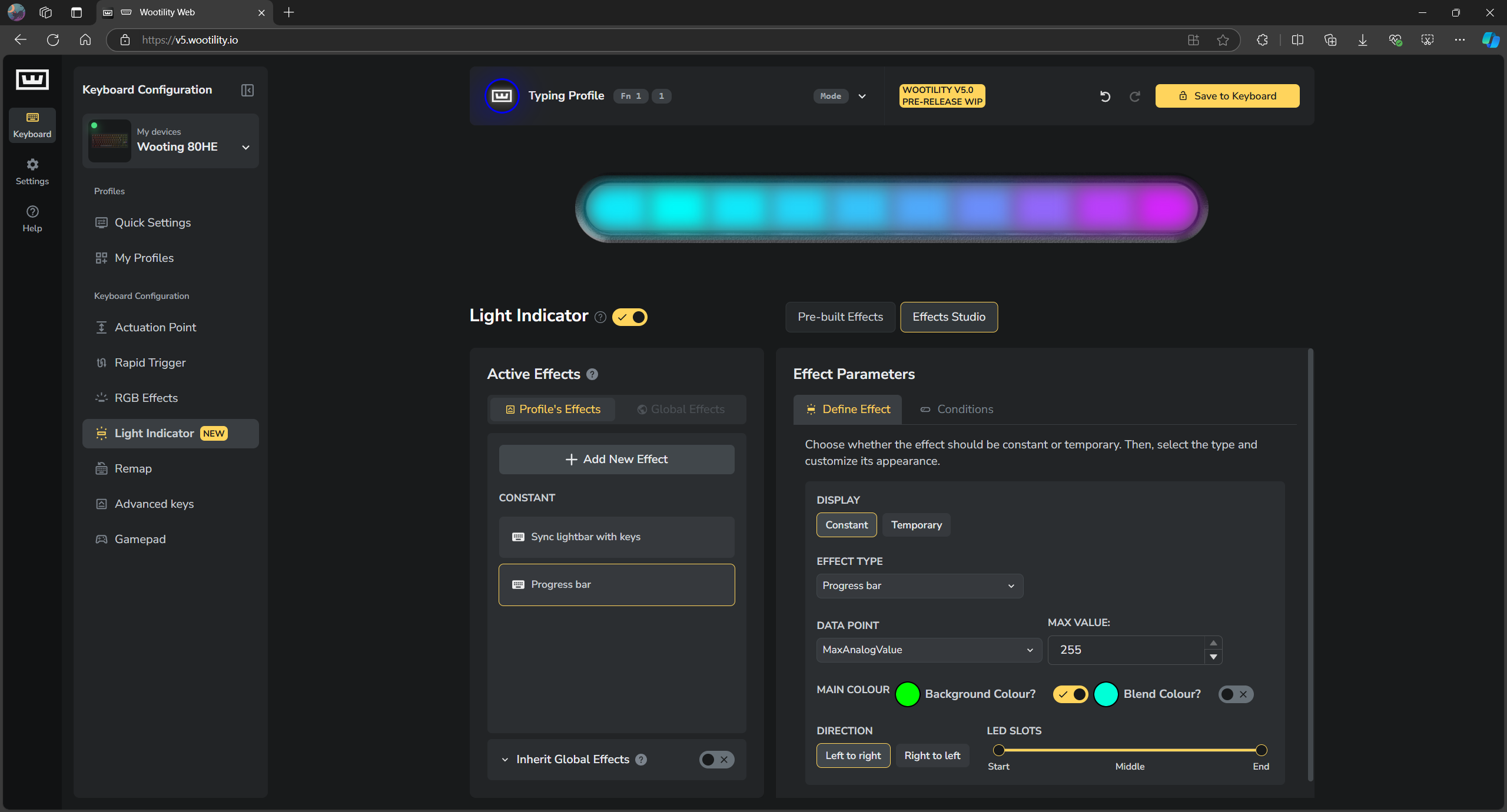
Wooting coincided the release of Wootility V5 with the Wooting 80, which comes with two new features called “RappySnappy” and “SnappyTappy” alongside the classics like Rapid Trigger. The controls for the new LED Bar have their own tab and I have to say it’s extremely detailed and well thought-out for what I assumed was a gimmick.
There’s a whole EffectsStudio for both the standard per-key RGB and the LED Bar, where you can go crazy customizing your perfect disco show. My favorite effect is the progress bar, which shows how much of a certain key you’ve pressed, like an analog trigger. Remember I mentioned RAM usage earlier? Yeah, you can show that on this bar, too.
Customizing the RGB for the LED Bar (Image By Tech4Gamers)
We’ll talk about the actual gaming features in the next section, but the gist is that this software has everything. You can easily create layers with the Fn key, configure different profiles for work and play, assign macros, and even emulate a controller by remapping gamepad buttons, allowing for true analog input for things like racing games.
Overall, Wootility is very polished. It’s intuitive where it needs to be and sticks to basics in departments like key remapping, where you don’t need to bring about a revolution. Updates are quick and effortless (I received 3 while writing this review), and all the buttons have little info boxes to get you up to speed on what they exactly do.
Gaming Performance
It’s time for the main event. As much as it’s nice to look at the little nuances of the switches and the cool lighting, what really matters is how the Wooting can make you a better gamer. And the truth of the matter is, it can’t, well, not unless your hardware is the bottleneck and not your skill. But it can make bridging that gap a bit easier.
Therefore, I tested a bunch of games on the Wooting 80HE and only noticed minor improvements across the board. By now, everyone knows of the adjustable actuation point that you can set to 0.1mm for the key to trigger with a gust of wind instantly. But by combining that with other features, the Wooting goes beyond.
Rapid Trigger
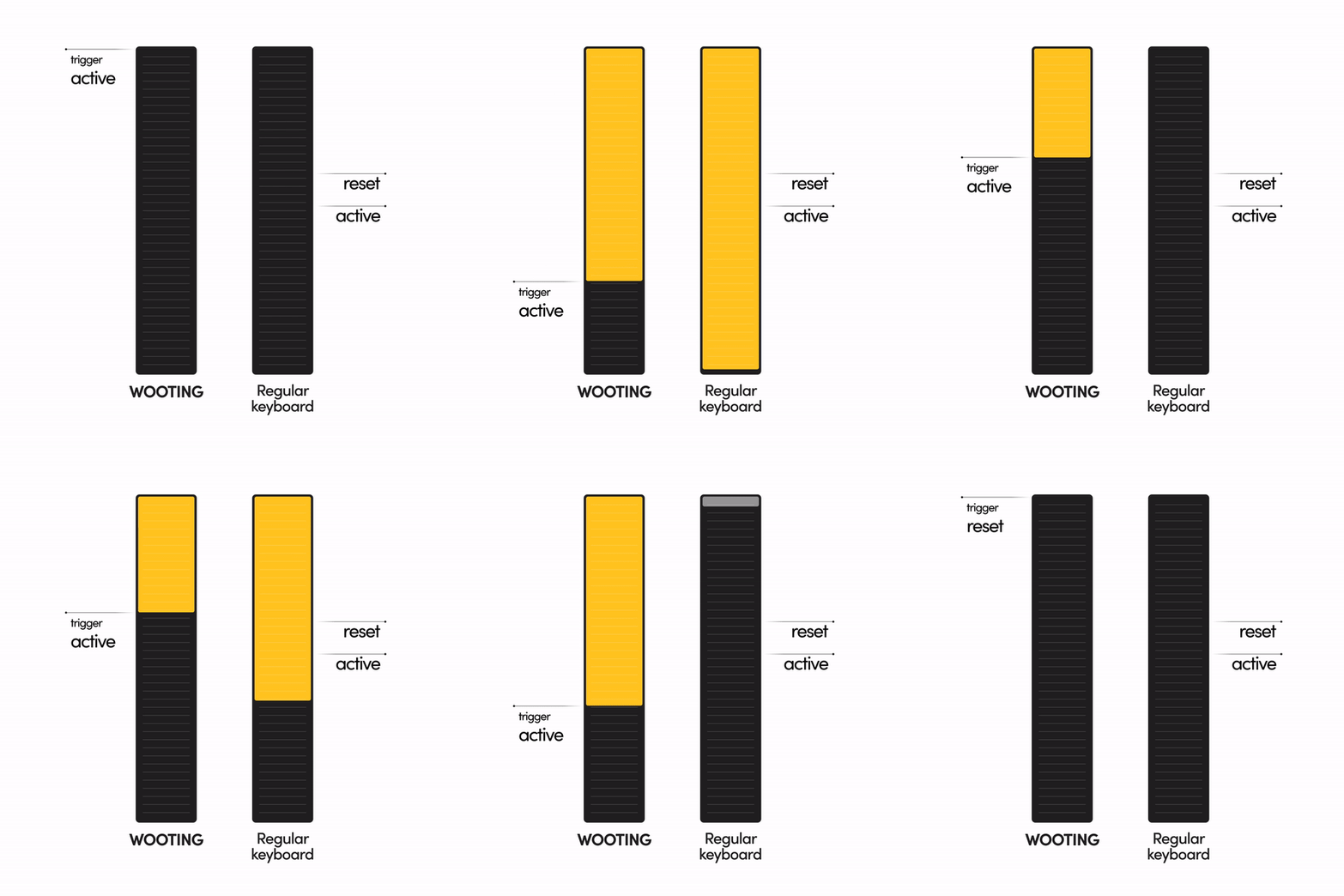
Rapid Trigger allows any key to be reset instantly. For example, you’ve set WASD to actuate at 0.5mm and, being a human, you regularly press those keys past that till, say 2.0mm and rest your fingers around that point while moving. Or just assume that you press them all the way down.
Now, normally, you’d have to release the key and wait for it to come back up to at least 0.5mm before pressing it again for it to register again. With Rapid Trigger, the moment you lift your finger off that key, it resets without ever needing to come back to 0.5mm (or any other actuation point you’ve set). This means you can automatically actuate and reset any key mid-motion forever.
Rapid Trigger
This instantaneous and dynamic reset is particularly effective in games like Valorant and Counter-Strike, where precise movement is imperative to win fights. You don’t the need to return to the actuation point before the next press, giving you an edge in response time. But, once again, it’s not magic; if you were already slow before Rappid Trigger, you’ll still be slow afterwards.
Snappy Tappy & Rappy Snappy
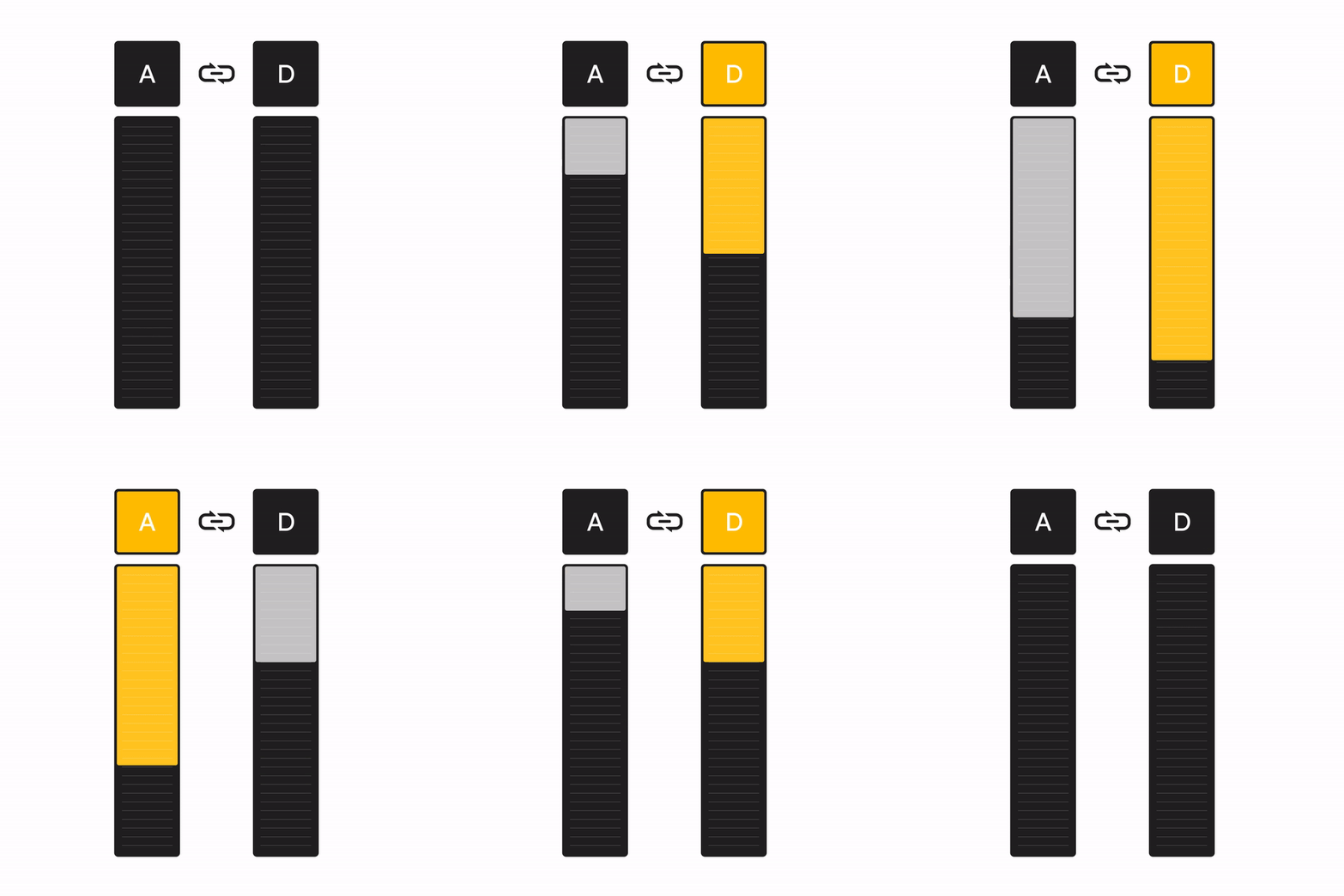
Building upon Rappid Trigger, we have two new features that are just rage-inducing names for SOCD. In simple words, what happens if you press left and right at the same time? Or even press right when left is already pressed? This kind of input is very common for counter-strafing and jiggle-strafing.
So, both Snappy Tappy and Rappy Snappy work to solve this conundrum, but in opposite ways. Say you’re spamming A and D together, if you have Rappy Snappy enabled it will detect which key is pressed further and only register that input while ignoring the other. If both keys are fully pressed, both will be registered.
Snappy Tappy
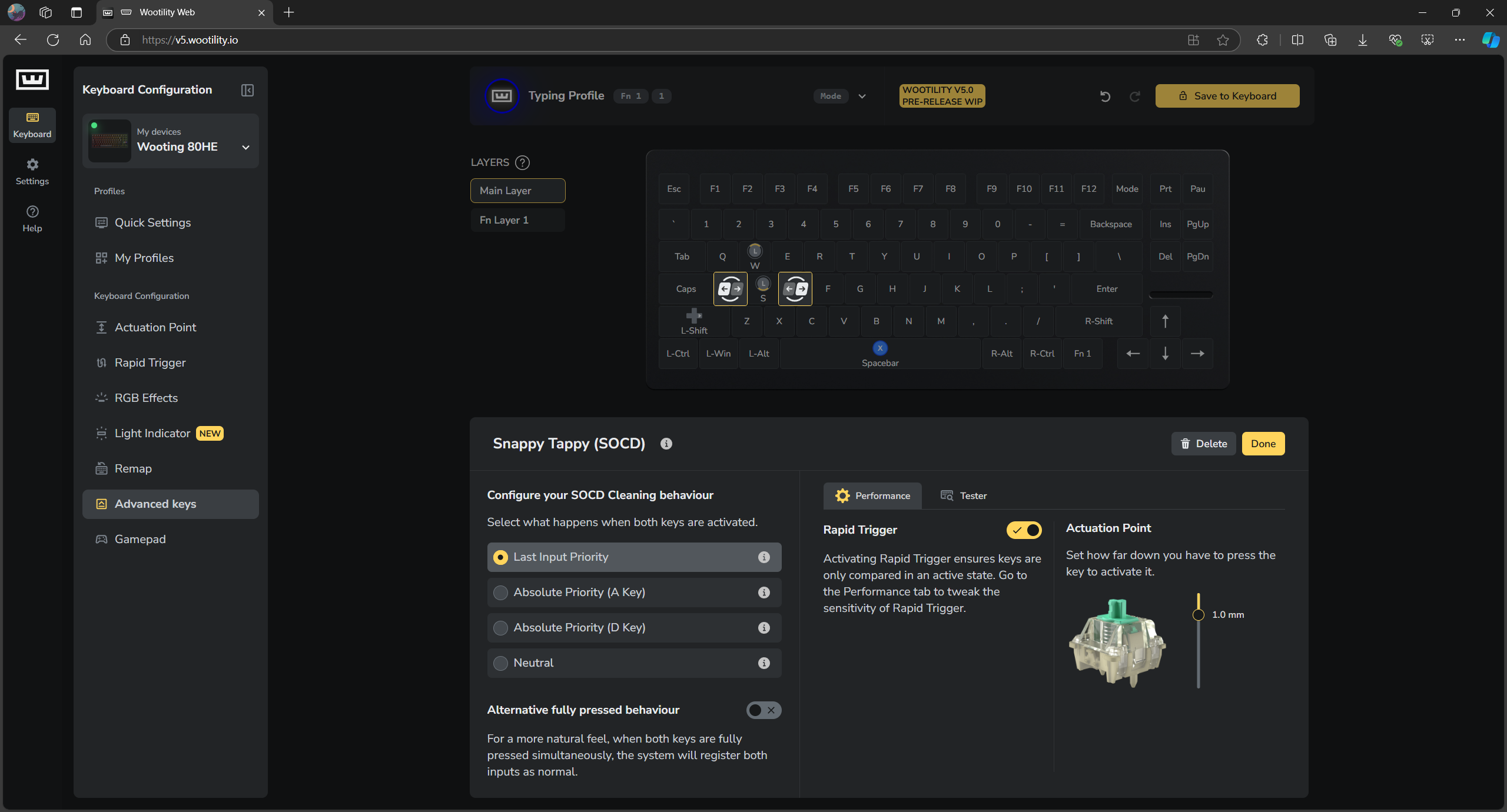
Snappy Tappy is actually a bit more thorough and has three options. By default, it will detect the most recent key you pressed and actuate only that while releasing the other one. You can also choose absolute priority for a key in which the system will only accept the other key’s input if the main key is not already pressed.
Snappy Tappy in Wootility (Image By Tech4Gamers)
In the end, these SOCD solutions are like auto-tune for keyboard input. While nullbind scripts have been around for a while, moving it to hardware truly changes the game. It takes the skill out of precise key inputs, which is why Valve already banned it in Counter Strike.
Moreover, the Wooting 60 has already had these features through a software update for a few months now, so it’s not new, but still powerful. Optimum Tech has called it basically cheating, and I agree—it makes strafing and spraying while dodging fire much easier.
Mod Tap & Dynamic Keystroke
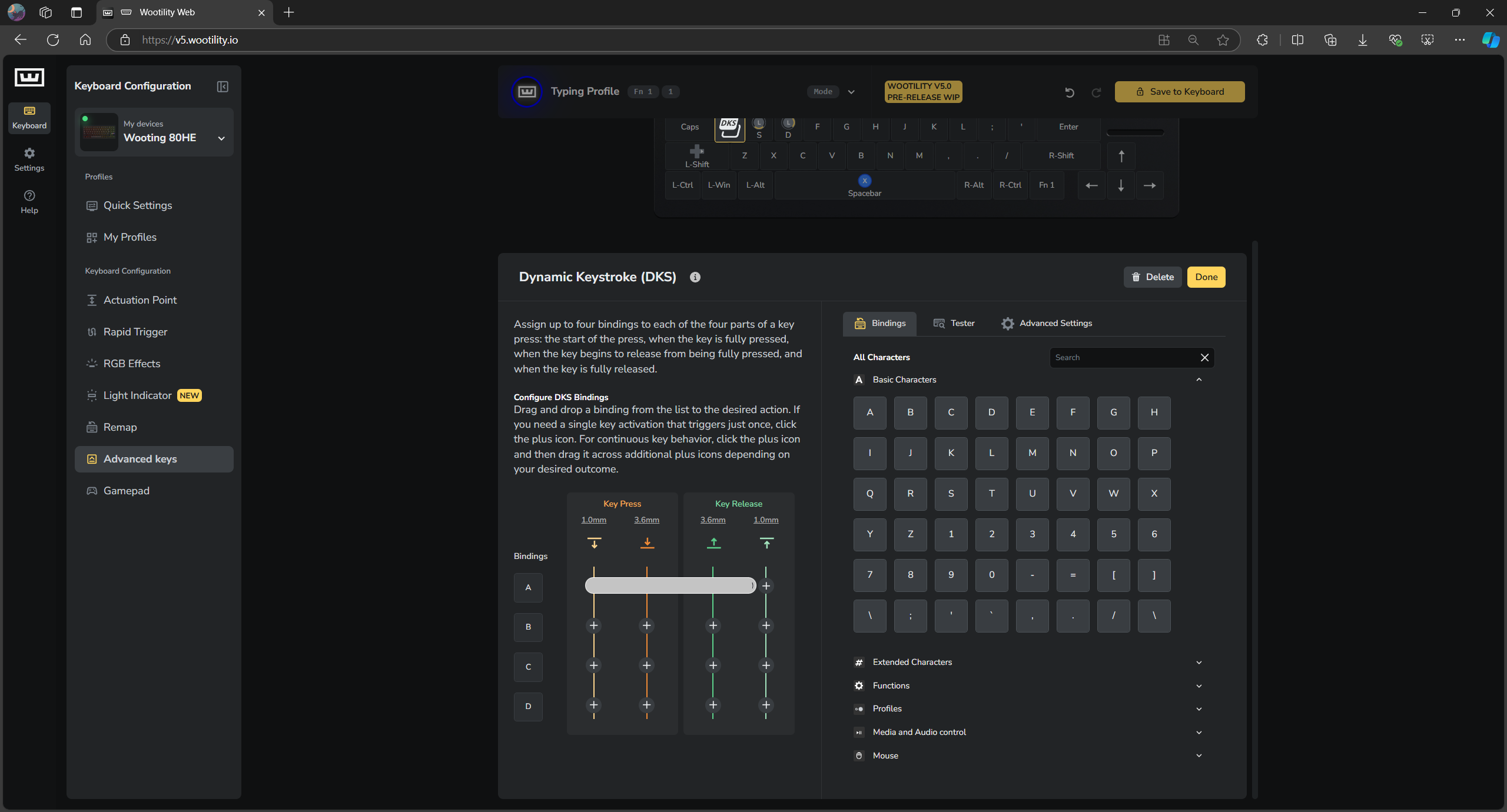
Dynamic Keystroke is really cool and Wooting describes it perfectly as “next-level Macros“. You can take any key and set different inputs based on the dynamic actuation point. Essentially, how much you press a key determines what it actually does. So, it’s not just multiple keystrokes triggered by one keystroke but actually controllable each time.
A pretty simple example I set up was assigning A, B, C, D to the A key. When you just start to press A, it registers A, when you are halfway through the key travel, it actuates again to register B, at about 75% actuation it registers C and finally when bottomed-out it registers D. So, if you do a full quick tap, it types ABCD together just like a macro.
Dynamic Keystroke in Wootility Snappy Tappy
Mod Tap seems pretty tame compared to this; it doesn’t exactly leverage any magnetic wizardry to register inputs. All you need to do is select any key and give it two states: normal press or a press and hold. Either will do different things, for example Backspace key deleting characters when holding it down but going back on a browser page with a tap.
There’s also ToggleKey which allows a key to toggle itself on continuously, aka be pressed down even when you lift your finger off the key. At the same time, if you press and hold that key, and then let it go it will work as normal and reset. This can be useful to set up on your crouch button where it will allow you to hold to crouch and toggle crouch at the same time.
Typing Experience
The Wooting 80 is a major step up from the Wooting 60 in terms of sound and feel. This update puts Wooting back in line with the best hall-effect keyboards that don’t compromise on the fundamentals. The sound signature here is low-pitched, almost muted, very much going for that “thock” appeal.
As you can hear in the sound test, the keyboard sounds… fine. It’s definitely not bad and, in fact, for gaming keyboards this is S-tier but in the larger world of the custom keyboard world, even budget boards like the Aula F87 Pro smoke this. However, we have to keep in mind the context of the hall-effect switches.
Due to the non-traditional stem, the sound is a bit dampened. Typing on it feels like there’s little pieces of foam stuck to the stems to make sure there’s a soft bottom out. The stabilized keys feel a bit better. All that said, the stock experience is still satisfying, and I don’t feel the need to mod anything.
Should You Buy It?
Buy It If:
✅ You want the best gaming keyboard that offers bleeding-edge features which can genuinely be the difference between a win or loss for you.
✅ You care about innovation and want to stay on top with new functions like SOTC being added through regular updates.
✅ You appreciate good software that’s clean, easy to use, intuitive, highly polished, and works right in your browser.
Don’t Buy It If:
❌ You want a wireless keyboard since the Wooting 80 is wired only. This is due to the hardware limitation of a hall-effect PCB.
❌ You prioritize sound and feel over gaming performance. The Wooting 80 ranks below even budget customs when it comes to that marbly sound.
❌ You’re on a budget and with so many cheaper hall-effect keyboards out now, it’s not necessary to splurge for a Wooting.
Wooting 80HE in all its glory (Image by Tech4Gamers)
Final Thoughts
My conclusion of the Wooting 80 experience is an easy recommendation. It’s a solid gaming keyboard that offers world-class performance and still has more polish than any of its competitors. The weaknesses of the Wooting 60—switch sound and stabs—have been addressed amicably and the company has genuinely innovated to keep themselves on top.
Still, the alternatives are scarily close now. If someone in a Chinese factory can whip up a Hall effect keyboard with all the same features but half the price without sacrificing the build quality, switches, or keycaps, then the markets will make it evident; despite its greatness, the Wooting is no longer unparalleled.
At Tech4Gamers, I proudly wear the title of Comparisons Specialist. Focused on CPUs and GPUs, I bring forth a wealth of hands-on experience and a keen eye for detail to provide our audience with the latest insights and analyses.
GeForce RTX 3060 Ti
Rated: 8.5/10
GeForce RTX 3060
Rated: 8.6/10
Key Takeaways
Our gaming tests at 1440p showed that the RTX 3060 Ti had around 19% performance than the RTX 3060, both with averages and lows.
The power consumption was around 20% greater on the RTX 3060 Ti during our testing as well.
The RTX 3060 Ti is around 35%more expensive than the RTX 3060 as of the time of updating this article.
Both the RTX 3060 and the RTX 3060 Ti are great budget cards, but if we had to choose one, we would choose the RTX 3060 Ti.
Why Trust Tech4Gamers
Manaf is our comparison expert who has been comparing graphics cards, and processors.
500+ components tested and compared by our team of comparison experts (Tech4Gamers Team).
1000+ hours spent testing different components for our comparisons.
At Tech4Gamers, ensuring you get reliable information is our priority. That’s why every comparison undergoes a meticulous review process by our team of experts and editors. Each comparison is carefully examined against our strict editorial guidelines, guaranteeing you trustworthy insights you can depend on.
Process Node: As two graphics cards from the same generation, the RTX 3060 and 3060 Ti use Samsung’s 8nm processing node.
Clock Speed: The RTX 3060 Ti has a higher base clock of 1410MHz compared to the RTX 3060’s 1320MHz, but a lower boost clock at 1670MHz versus 1780MHz.
TDP: The RTX 3060 Ti has a TDP of 200 watts, while the RTX 3060 takes it down a tad with a TDP of 170 watts.
VRAM: Confusingly, the lower tier RTX 3060 has more VRAM than the higher end RTX 3060 Ti, 12GB and 8GB, respectively. The 3060 Ti has a wider 256-bit bus, though, while the RTX 3060 uses a 196-bit memory bus.
With the rising prices of graphics cards, consumers are looking towards older models to keep the cost down. Today, we will pin two cheap cards from the last generation of GPUs to definitively declare a winner between the RTX 3060 vs RTX 3060 Ti.
Benchmarks – 1440p
With the RTX 3060 and 3060 Ti differences clear, it’s time to test their efficiency. It’s crucial to determine if a GPU’s performance justifies its price, and there’s nothing better to do that with than real-world gaming tests.
In our first test of Cyberpunk 2077 at 1440p, the RTX 3060 Ti averaged 44 FPS, outperforming the RTX 3060’s 37 FPS by about 19%.
The 1% lows were even worse on both cards, around 32 FPS on the RTX 3060 and 38 FPS on the 3060 Ti.
Shadow of the Tomb Raider
Shadow Of The Tomb Raider @1440p (Image By Tech4Gamers)
In our second game, Shadow Of The Tomb Raider, the RTX 3060 Ti had a 21% advantage, averaging 57 FPS compared to the RTX 3060’s 47 FPS.
The 1% lows were around 41 FPS, while the RTX 3060 Ti was noticeably less stuttery, with minimums closer to 48 FPS.
Forza Horizon 5
Forza Horizon 5 @1440p (Image By Tech4Gamers)
Testing Forza Horizon 5 was smooth on both cards, with the RTX 3060 Ti outperforming the RTX 3060 by 20%. The 3060 averaged 115 FPS, while the 3060 Ti hit 138 FPS.
The 1% lows were around 100 FPS on the RTX 3060, while the Ti was once again 20% ahead with lows of 120 FPS.
Horizon Zero Dawn
Horizon Zero Dawn @1440p (Image By Tech4Gamers)
In our Horizon Zero Dawn test, the RTX 3060 Ti outperformed the RTX 3060 by 20%, averaging 78 FPS to the 3060’s 65 FPS.
The 1% lows were 61 FPS on the RTX 3060 and a much smoother 70 FPS on the RTX 3060 Ti.
Battlefield V
Battlefield V @1440p (Image By Tech4Gamers)
Our test of Battlefield V ran 18.75% better on the RTX 3060 Ti, with an average framerate of 76 FPS, while the RTX 3060 had an average framerate closer to 64 FPS.
The 1% lows were around 66 FPS, while the RTX 3060 was hitting 56 FPS, which felt noticeably more stuttery.
Red Dead Redemption 2
Red Dead Redemption 2 @1440p (Image By Tech4Gamers)
In Red Dead Redemption 2, the RTX 3060 Ti averaged 72 FPS, outperforming the RTX 3060’s 60 FPS by 20%, a significant difference.
The 1% lows dwindled down to around 51 FPS for the lower-end GPU, while the RTX 3060 Ti managed to get a minimum of 57 FPS.
Control
Control @1440p (Image By Tech4Gamers)
In our Control test on Ultra settings, the RTX 3060 Ti averaged 67 FPS, once again 20% higher than the RTX 3060’s 56 FPS.
The 1% lows were around 53 FPS when we tested this game with the 3060, whereas the RTX 3060 Ti gave minimums of around 63 FPS.
Overall Gaming Performance
Average FPS @1440p (Image By Tech4Gamers)
Average Framerate
The seven games we tested showed that the RTX 3060 Ti had an average framerate 19% higher than the base RTX 3060. This difference is very noticeable, especially with the numbers we get with these cards at 1440p.
1% Lows
The RTX 3060 had a 19% lower framerate than the RTX 3060 Ti when it came to minimum framerates, meaning the stutters you’d feel with these cards would be 19% higher on the Ti version.
The RTX 3060 Ti has a pretty sizeable lead over its base counterpart, giving it the edge in our performance testing.
Temperatures
Average Temperature @1440p (Image By Tech4Gamers)
The RTX 3060 ran around 6% cooler during the games we tested than the Ti variant. This might seem like a substantial difference, but the temperature difference is negligible, and both GPUs have very manageable temperatures in our run of the games we tested.
Power Consumption
Average Power Consumption @1440p (Image By Tech4Gamers)
The RTX 3060 Ti took around 20% more power than the RTX 3060, which makes sense with the similar rise in performance while having the same architecture. This means that the performance-per-watt of both GPUs is identical, which is, again, a predictable statement.
Price And Availability
CPU
Launch MSRP
Current Price
RTX 3060
💲329
💲185
RTX 3060 Ti
💲399
💲250
Price Difference
21%
35%
The RTX 3060 Ti, as of September, 2024, is around 35% more expensive than its vanilla counter part, but both GPUs are very cheap when we keep the current prices of PC hardware in mind. Both graphics cards should be readily available in most PC hardware stores near you.
RTX 3060 vs RTX 3060 Ti: What We Recommend
RTX 3060: The price, power consumption, and thermals of this graphics card is better than the RTX 3060 Ti. The framerates were acceptable in our testing, and DLSS can boost the performance to even higher levels.
RTX 3060 Ti: Though the price tag of this card is higher, it still serves to be a pretty decent upgrade over the RTX 3060. If you want to spend a bit more money to get a bit more performance, you can’t go wrong with this card.
After our thorough testing of both cards, it is safe to say that they serve as great budget options in 2024. We would recommend getting the RTX 3060 Ti for the extra headroom it provides.
Many NVIDIA enthusiasts have followed the brand from their entry-level graphics cards in their student days all the way to high-end flagship models. To preserve these memories, they might use Enamel Pins to commemorate this journey of growth.
Enamel Pins can incorporate classic NVIDIA elements and also include personalized elements, making enamel pins more meaningful and unique. These enamel pins are suitable for various everyday scenarios, whether commuting, working, studying, or attending events, allowing their love for NVIDIA to extend from the computer screen to the details of their daily lives.
Frequently Asked Questions
Is RTX 3060 Ti enough for gaming?
The 3060 is better suited for customers building a low-cost PC but willing to take a risk on 1440P. The 3060Ti is a solid middle-of-the-road option since it delivers excellent performance in both 1080P and 1440P resolutions.
Is the RTX 3060 Ti worth it over the 3060?
If you want to play AAA titles at high settings, the RTX 3060 Ti should be your minimum need. The RTX 3060, on the other hand, performs best at 1080p.
Is the 3060 TI good for 4K gaming?
The 3060 Ti can efficiently run all the newer AAA titles on ultra presets at 1080p or 1440p. But if we talk about the 4k resolution. We might need to crank down settings to low, or it might not even get stable fps for smooth gameplay.
At Tech4Gamers, I mainly cover new gaming news, leaks, and rumours. Aside from that, I love to write features about my favourite games while inserting my opinion about their different aspects.
Story Highlight
Ubisoft has recently revealed that Star Wars Outlaws failed to meet its expectations.
Due to that, the giant will now be focusing on releasing a series of updates to improve the game.
It will now also launch on Steam on November 21 in the hope of more sales on PC.
Star Wars Outlaws is one of the most controversial games released this year. The game didn’t get a positive reception from the fandom, as even after the release, the hype was non-existent. Even analysts concluded that its sales look poor as Ubisoft didn’t provide an update.
Star Wars is a gigantic franchise, so Ubisoft not providing updates was getting suspicious. Just recently, it was reported that Star Wars Outlaws sold well despite criticism, but now Ubisoft has revealed that it failed to meet the sales expectations, and that seems about right.
Why it matters: It was pretty much given that Star Wars Outlaws wouldn’t perform, given how bad its gameplay was being portrayed.
Ubisoft Has Revealed In Its Financial Update That Its Recent Game Didn’t Meet Expectations
The gaming giant has also just delayed Assassin’s Creed Shadows, and the main reason for that is the failed expectations of its recent game. Ubisoft admits in the recent financial update report that despite solid ratings, this game’s sales were softer than expected.
despite solid ratings (Metacritic 76) and user scores across the First Party and
Epic stores (3.9/5), Star Wars
Outlaws initial sales proved softer than expected.
-Ubisoft
Ubisoft seems to have taken notice of the player feedback and is planning to release a series of updates to improve the game overall. The gaming giant thinks that this way, the latest entry in the Star Wars series will become a strong long-term performer.
Assassin’s Creed Shadows Has Been Delayed Due To The Poor Performance of Ubisoft’s Recent Game
Due to the poor performance, the company’s shares have also fallen pretty low, highlighting that it is in a really grim situation. That said, Star Wars Outlaws will be released on Steam on November 21, and Assassin’s Creed Shadows will also be coming to Steam on day one. So, at least this curse has been broken.
At Tech4Gamers, I contribute as a Senior News Reporter, combining my skills and gaming enthusiasm to keep our audience updated on the latest developments.
Story Highlight
Assassin’s Creed Shadows will now arrive on February 14, 2025.
The game will arrive on Steam at the same time, marking a major shift for the series.
The RPG will not come with a season pass, and users who pre-order will be given the first expansion for free.
Ubisoft recently cancelled its Tokyo Game Show presentation in Japan and official press previews of Assassin’s Creed Shadows. This sparked curiosity within the gaming industry, with many speculating whether the studio’s upcoming RPG would get delayed by a few months.
As expected, Assassin’s Creed Shadows has been delayed. The game will launch next year, and Ubisoft has made multiple changes to this RPG’s release.
Why it matters: Assassin’s Creed Shadows and Star Wars Outlaws were two of the gaming giant’s biggest titles this year. With the latter underperforming, it seems the publisher will end 2024 on a sour note.
Financial Update Provided By Ubisoft
As shared on Twitter, the financial update confirms Star Wars Outlaws did not perform as expected. Because of the titles’ performance, Ubisoft has decided to delay Assassin’s Creed Shadows to February 14, 2025.
The publisher is mainly focusing on a more polished experience. It highlights that the RPG is already feature-complete and mostly ready for launch. However, the delay came as a direct result of the feedback after Star Wars Outlaws, which came with a myriad of bugs and glitches.
The latest Assassin’s Creed entry will also arrive day one on Steam next year. This should bring it to a much bigger audience on PC, setting the RPG up for a more successful launch.
Yasuke Is One of The Main Characters In The First Japanese Assassin’s Creed Entry
Finally, Ubisoft confirms that the season pass model is going away. Instead, the company is offering the first expansion for those who pre-order the game. This system should go well with the aim of transitioning the series to a live-service model.
For the unaware, the company previously shared a November release date. As such, Assassin’s Creed Shadows has been delayed by about three months, and it will be interesting to see how many changes are made by then.
As Tech4Gamers’ Founder and Editor-in-Chief, I bring over 13 years of PC Hardware Reviewing and 8+ years of IT Project Management experience. Certified in Google IT Support , my focus is on providing honest product reviews and analysis and fostering a strong gaming community with 130k+ members in PPG.
For Nvidia GeForce, RTX 4090 is Nvidia’s top-of-the-line GPU, which provides the best gaming performance. But now it is going to be changed as the Nvidia new gen GeForce RTX 5090 is going to launch soon.
According to sources like TweakTown, the upcoming RTX 5090 could feature 2 16-pin connectors (12V-2×6). Despite using a node with fewer nanometers, it will consume an enormous amount of power. It will also have a large amount of VRAM and increase efficiency.
Why it matters: The two ports will allow us to connect the graphics card that consumes a lot of power and split the load between them, which will increase stability and prevent any issues in the future.
MSI Connectors | Image Via Tweaktown
NVIDIA reportedly intends to release the RTX 5090 with two 16-pin connectors because of the GPU’s 600W power consumption, or possibly a bit higher in customised variants.
As previously stated, the combined input capacity of these two connectors, 600W for each, or 1,200W total, will not allow 600W each; rather, one of them will be restricted to 150W or 300W.
This rumour has come to light since other companies have already released power supplies with two 12V-2×6 connectors. Examples include the MPG A1250, the 1000 and 850W models, and the 1600W MEG Ai1600T PCIE5 power supply.
These two connectors are thought to be more specifically intended for the next generation of graphics cards than for systems with two identical GPUs and SLI.
It is confirmed that the RTX50 Series will feature higher TGPs than the existing 40 Series. Next month, the RTX 4090 will no longer be available in retailers as NVIDIA is discontinuing them.
Although it’s not confirmed if the RTX 50 series will launch before the end of the year or not until 2025, this tells us more that they will soon be ready for the series. However, many sources claim that the RTX 50 series graphics cards RTX 5090 and 5080 will come in Q1 of next year.
I’ve previously worked for eXputer as a Senior News Writer for several years. Now with Tech4Gamers, I love to devoutly keep up with the latest gaming and entertainment industries. I have a Bachelor’s Degree in Computer Science and years of experience reporting on games and breaking exclusive stories. Besides my passion for gaming journalism, I love spending my leisure time farming away in Stardew Valley. VGC, IGN, GameSpot, Game Rant, TheGamer, GamingBolt, The Verge, NME, Metro, Dot Esports, GameByte, Kotaku Australia, PC Gamer, and more have cited my articles.
Story Highlight
NetherRealm’s Ed Boon has confirmed the studio hasn’t worked on any new game in the last three years.
However, the studio has known what project it will work on in the future for the last three years.
At the moment, the studio is focused on supporting Mortal Kombat 1 for a pretty long time.
Even before the release of Mortal Kombat 1, speculations circulated that NetherRealm Studios was working on another project. Many assumed it to be Injustice 3, while others thought it to be a Marvel vs. DC fighting entry. However, the studio’s creative director and creator of franchises like Mortal Kombat and Injustice, Ed Boon, has recently come forward to squash those rumors.
Ed has clarified that NetherRealm has certainly not been working on any new game in the past three years. Thus, resolving a massive misunderstanding that had been sprawling around the industry for a long time.
Why it matters: NetherRealm confirming that it has not worked on any new game in the last three years completely quells the rumors about a new game.
Mortal Kombat 1 will enjoy long-term support due to NetherRealm’s complete focus on it.
On his personal Twitter handle, Ed Boon claims that the actual quote that started the rumor said NetherRealm knew what its next game was going to be for the last three years. In other words, the company knows what it’ll work on next. However, all the focus is currently on Mortal Kombat 1.
“I don’t want to be a stickler for words… But we haven’t been working on our next game for 3 years already.”
Ed mentions that NetherRealm will stay fully committed to supporting Mortal Kombat 1 for quite a long time, reassuring fans who thought the devs would quickly move on to another project. So, it’s a “you win some, you lose some” situation for many gamers.
We will likely not see the next NetherRealm game for many years to come.
On an ending note, NetherRealm will likely begin working on its next planned project in a year or two while simultaneously supporting MK1. So, we might seemingly hear about a new Injustice sequel after a long while—if the rumors are to be believed.
I’ve previously worked for eXputer as a Senior News Writer for several years. Now with Tech4Gamers, I love to devoutly keep up with the latest gaming and entertainment industries. I have a Bachelor’s Degree in Computer Science and years of experience reporting on games and breaking exclusive stories. Besides my passion for gaming journalism, I love spending my leisure time farming away in Stardew Valley. VGC, IGN, GameSpot, Game Rant, TheGamer, GamingBolt, The Verge, NME, Metro, Dot Esports, GameByte, Kotaku Australia, PC Gamer, and more have cited my articles.
Story Highlight
Sony has apparently planned more for next year than it has currently revealed, as claimed by an insider.
Shinobi gave a subtle remark to the community, which sparked a lot of rumors.
The Bend and Bluepoint studios could also have their unannounced projects ready for next year.
The latest PlayStation State of Play event was quite exciting, as it revealed details about plenty of projects that no one expected. While most thought that this would be it for a while for PS users, new rumors sprawling across the industry suggest that Sony is far from done regarding its games planned for 2025.
The notable industry insider Shinobi has subtly commented that Sony has prepared more for next year than it has currently let us on. In other words, we might see the reveal of even more games in the upcoming months.
Why it matters: The subtle remark of the insider suggests that Sony might announce even more projects for the next year than it currently confirmed in the PlayStation State of Play showcase.
Sony has apparently planned more for the next year than it currently lets on | Image Source: ResetEra
During a discussion on a ResetEra forum, Shinobi602 gave a subtle remark with a gif to say that Sony has planned more for 2025 than it currently revealed. We might see the release of many other projects next year besides Ghost of Yotei, Marathon, and Death Stranding 2.
Fans have started to think that Sony will likely have another decent showcase at the end of the current year—likely in The Game Awards 2024 event. It could reveal more projects that were just unable to make the mark during the recent State of Play showcase. However, the exact games and their numbers are still up in the air.
Ghost of Yotei was the most popular reveal in the latest Sony State of Play.
All in all, it is best to take the brewing rumors with a grain of salt. Sony has yet to confirm any more projects ever since yesterday’s showcase event, and internal plans can always change.
At Tech4Gamers, I contribute as a Senior News Reporter, combining my skills and gaming enthusiasm to keep our audience updated on the latest developments.
Story Highlight
Horizon Zero Dawn Remastered is introducing the infamous PSN account requirement.
The game did not need an account originally, so many PC gamers won’t be able to use the $10 upgrade for the remaster.
The remaster might end up underperforming due to this restriction.
PlayStation’s latest remaster aims at enhancing Horizon Zero Dawn. Originally released for the PS4 in 2017, this narrative-driven adventure became the starting point for a major franchise that is still going strong.
The upcoming remaster promises visuals on par with Horizon Forbidden West. While initial impressions have been somewhat underwhelming, fans have found it reassuring that the remaster will cost just $10 for existing owners.
However, it seems this rule won’t be universal since PlayStation is introducing the mandatory PSN requirement for Horizon Zero Dawn with this remaster on PC.
Why it matters: God of War Ragnarok was negatively reviewed for requiring a PSN account. A mod also aimed to remove the restriction, highlighting the community’s sentiment around PlayStation’s decision.
Horizon Zero Dawn Remastered PSN Account Requirement
According to a disclaimer on the PlayStation Blog, the PlayStation Network requirement is making its way to Horizon Zero Dawn on PC.
This isn’t exactly a surprise, considering God of War Ragnarok and Ghost of Tsushima came with the same restriction, but it’s important to remember that Horizon Zero Dawn was not released with this requirement on PC.
As such, many PC gamers from various regions likely purchased the game. While the remaster won’t result in them losing access to their purchase, the lack of PSN support in their regions will mean that they won’t be able to take advantage of the $10 upgrade for the remaster.
However, this isn’t all. The remaster is unlikely to be available as a separate purchase in such regions, locking out customers from accessing the enhanced edition altogether.
Horizon Zero Dawn vs. Remastered Version
This situation yet again emphasizes the need for a more practical solution from the gaming giant. If the rumors about the Days Gone remaster are anything to go by, PC gamers will run into a similar problem in the future.
Perhaps PlayStation should consider a proper PC launcher to solve the problem once and for all. There is still plenty of demand for the gaming giant’s offerings on PC, but such decisions have harmed the trust that PlayStation had built up on the platform over the years.
At Tech4Gamers, I mainly cover new gaming news, leaks, and rumours. Aside from that, I love to write features about my favourite games while inserting my opinion about their different aspects.
Story Highlight
Sweet Baby Inc. has become extremely controversial lately due to its involvement in the gaming industry.
One of its major employees admits that the company’s goal is to burn the gaming industry to the ground.
The fandom didn’t like this company before, so now it is going to trigger a lot of controversy.
Sweet Baby Inc. has recently become popular in the gaming industry, but not in a good way. This company is actually hated by the majority of the fandom as it adds forced diversity and inclusivity into games.
The fandom isn’t really fond of this and thinks that such a company shouldn’t deserve to be involved in the gaming industry. That said, the malice wasn’t really shown as intended literally, but now the company has. One of the major employees of Sweet Baby Inc. has recently confirmed that his goal is to burn the games industry to the ground.
Why it matters: Millions of people over the globe play video games daily as it helps them overcome many things in life and serves as a source of peace for many. So, a threat to destroy something like that shouldn’t be taken lightly.
Games Dev of Color Expo posted a persentation, “How to Get Away With Murder Subverting Genre Expectations,” in which Camerin Wild discusses the goals of Sweet Baby Inc. in detail. He is a narrative designer and sensitivity reader for the company.
Wild has worked on titles like Suicide Squad: Kill The Justice League, Alan Wake 2, and God of War: Ragnarok. During the presentation, a slide titled ‘Cool, so why am I here?’ shares the really disturbing and concerning goal of the company.
Burning the games industry to the ground.
-Sweet Baby Inc. Employee
The slide consists of three bullet points, and one of them states that the company aims to burn the gaming industry to the ground. Fans have been pointing out that this company isn’t good for their beloved industry and is slowly destroying it.
A Comment From Sweet Baby Inc. Employee Shows That The Company is A Threat To the Gaming Industry
However, many developers have partnered with it, which worries the fans even more. Recently, Square Enix ended its contract with this company, which the fans really appreciated.
Wild said that many of them are fighting for more inclusive games, which doesn’t seem like a good idea. A recent hit like Black Myth: Wukong also received low scores just because it didn’t feature a lot of diversity and inclusivity.
Recently, Concord also became the biggest failure in the history of gaming. One of the major reasons for its failure was none other than the heavy influence of Sweet Baby.
Fans are unlikely to let this slide as this is a threat to their beloved gaming industry. We hope things turn out in the favor of the games industry.
At Tech4Gamers, I take on the role of Hardware Reviewer with pride. My responsibilities involve a thorough examination of essential hardware components like motherboards, graphics cards, processors, PC cases, and CPU coolers, among others, focusing on their complexities and functionalities.
Abdul Hannan
I’ve been the Journalist & Editorial Writer at Tech4Gamers since July 2022. I spearhead our hardware coverage, including overclocking GPUs, benchmarking CPUs, reviewing peripherals, and fine-tuning custom PC builds for every budget. Daily, I report on breaking gaming news, from major launches and studio updates to the latest industry trends, ensuring our community stays informed. Beyond news briefs, I write in-depth feature articles on gaming culture and emerging technologies. And by collaborating closely with the editorial team on content planning, SEO strategy, and our publishing calendar, I help us consistently hit our traffic and engagement targets.
With Meet 2, Obsbot is trying to continue its track record to advance its web camera expertise. This camera seems to have taken a step towards affordability where it tried to retain somewhat similar features from its predecessors, like a 1/2-inch CMOS sensor, an f/1.8 aperture for better low-light performance, and Phase Detection Auto Focus (PDAF) at an affordable price.
Moreover, its small size makes it very portable without sacrificing essential features like auto-framing and advanced AI features, in addition to being able to record at 4K30 resolution. Given all of these features, I am interested to see how well the Obsbot Meet 2 performed in real-life situations. Would it fulfill its promise as one of the top options for content creation and video calls? Let’s go into the details to find out.
Why Trust Tech4Gamers
Abdul Hannan is our peripherals expert who has been testing different mice, keyboards, headphones, microphones, and more for years.
130+ peripherals tested and reviewed by our team of hardware experts (Tech4Gamers Team).
500+ hours spent testing different peripherals for our reviews.
At Tech4Gamers, ensuring you get reliable information is our priority. That’s why every hardware round-up undergoes a meticulous review process by our team of experts and editors. Each review is carefully examined against our strict editorial guidelines, guaranteeing you trustworthy insights you can depend on.
Key Takeaways
The Obsbot Meet 2 is an ultra-portable, AI-powered webcam designed for high-quality 4K30 video capture. Its compact design and magnetic mount make it highly convenient for on-the-go use.
You should buy the Obsbot Meet 2 if you need high-quality 4k video, value portable design, and AI-driven features.
You should not buy the Obsbot Meet 2 if you expect superior audio quality and need physical motion tracking.
Here are the specifications:
Size (without mount)
45 x 36 x 22.2mm / 1.78 x 1.4 x 0.87in
Size (with mount)
45 x 36 x 36.7mm / 1.78 x 1.4 x 1.45in
Weight (without mount)
40.5g / 1.43oz
Weight (with mount)
67.5g / 2.38oz
Sensor
1/2” CMOS
Effective Pixels
48M
Aperture
ƒ/1.8
Video Resolution
Support up to 4K@30fps/1080@60fps
Zoom
4x Digital Zoom
FOV(D)
79.4°
Focus Method
AF(PDAF)/MF
Focus Distance
10cm → ∞
HDR
Support
Exposure Compensation
±3 EV
ISO
100~6400
Shutter
1/6400~1/30s
White Balance
2000~10000K
Built-in Audio Input
Built-in dual omnidirectional mics with noise reduction and auto gain
Power Interface
USB Type-C Connection
Data Ports
USB 2.0 and USB Type-C Connection
System Requirements
Windows 10 or later, macOS 11 or later
Software
OBSBOT Center
[toc]
How Is The Obsbot Meet 2 Different?
The Obsbot Meet 2 stands out from its predecessors and the competition with several upgrades. Compared to earlier versions, it is notably lighter at 40.5g, making it highly portable. Additionally, enhanced AI features like auto-framing and Phase Detection Auto Focus (PDAF) allow for better tracking and sharper focus. One of its most significant features is its low-light performance, made possible by the 1/2-inch CMOS sensor and an f/1.8 aperture, which enhances image clarity in dim conditions. These upgrades make it a competitive option in the market.
Box Contents
The unboxing experience of the Obsbot Meet 2 webcam is outstanding, with a compact box that shows the product’s portability. The packaging design is clean, featuring an image of the webcam in different colors on the front and box content details on the back. Upon opening the box, the webcam is securely placed in a protective manner, ensuring it arrives in its original condition.
Box Contents (Image By Tech4Gamers)
Obsbot Meet 2
USB-C to USB-A Adapter
USB-C Cable
Privacy Cover
Magnetic Mount
User Manual
Warranty Card
Design & Build Quality
Design (Image By Tech4Gamers)
Among the different web cameras in the market, Meet 2 stands out from the rest. This webcam is the most compact and lightweight one I’ve tested so far. Its three color choices—Aurora Green, Space Grey, and Cloud White—give users a lot of personalization possibilities. Notably, the camera doesn’t only capture visually appealing images and videos; it is also visually appealing itself.
Obsbot’s Meet 2 is much lighter than its predecessor, the Meet 4K. Its weight dropped from 72 grams in the previous generation to 40.5 grams, an almost 50% reduction. A common criticism of external cameras is that they aren’t compatible with laptops, yet this camera truly is.
In terms of build and style, the Meet 2 borrows elements from its predecessors while also including some welcome updates that align it with several of the market’s most popular tech design trends. The first noticeable difference between the Meet 2 and its predecessor is the sharper angles at the edges.
Thread Point (Image By Tech4Gamers)
The design is much sharper and more squared-off, resembling the styles of new cameras. It provides the Meet 2 with a more refined and high-end appearance than its predecessor. Another change is the replacement of the attached lens cap with a detachable magnetic cover. Thanks to the webcam’s bottom, which has a single 1/4″ thread point for convenient tripod attachment, users have other alternatives for setting up Meet 2.
An LED is placed in the top right corner of the faceplate. This LED indicates the camera’s state through its color and effect. Moreover, two omnidirectional microphones are visible on both bottom corners for convenient audio capturing. Finally, the lens is located in the middle of the plate.
Setting Up
The Meet 2 is so simple to set up that it’s almost plug-and-play. This is the perfect option for anyone looking for an easy 4K camera setup. Connecting the camera to its mount is as easy as plugging it in. Both Mac and Windows will detect the camera in a matter of seconds, and then you can use it in your preferred video-streaming or conference-calling application.
Software
I highly recommend downloading the Obsbot Center program if you want to maximize the performance by adjusting exposure, focus modes, white balance, and more. While I had a lot of flexibility to tweak each of these settings to my liking during testing, I mostly used the default configurations, as they got the job done while recording video. Moreover, Meet 2 lets you adjust not only the picture settings but also the audio settings.
Users can control auto gain, noise reduction, and mic muting from inside the program. Of course, it’s 2024, and every device has the “AI-powered” label. Well, in the case of Meet 2, we get background blur, face enhancements, and some other features. Except for the backdrop blur, I never needed to use any of it extensively, even though it all works nicely. In any case, the program is superb in every way and is extremely easy to use.
Image & Video Quality
What is important is how effectively Meet 2 performs as a whole, not how remarkable these features are individually. Having high-quality images and videos is clearly important when looking for a camera, and the Obsbot Meet 2 more than meets this requirement. The 1/2″ CMOS sensor generally performs well, capturing images at an astounding 4K30 resolution.
However, it is important to mention that I would advise adjusting the capture settings to a lower bit rate on less powerful systems to ensure seamless live streaming. A higher bit rate can have a great impact on your system while playing games and live streaming, hindering your gaming performance
Additionally, you can change the resolution and bitrate in a matter of seconds by going to Obsbot Center output settings and selecting your preference. Here, I would like to mention that 1080P60 works well. Additionally, the Meet 2 has an F/1.8 aperture to help improve the webcam’s performance in low-light conditions.
Several manufacturers have made efforts in recent years to include improved low-light sensors in their webcams since low-light conditions have long been a problem for webcams in general. The Meet 2 did a great job overall, and I’m pleased with the fact that it has little to no noise, even in my darkest testing.
Low Light Image (Image By Tech4Gamers)
Furthermore, on all fronts, auto white balance works well and reacts fast to shifts in the light. Another area where Meet 2 really shines is with its autofocus. In fact, it stood out as the standout feature during testing. While many cameras have trouble with this, Obsbot seems to have it down. You can say that Meet 2 has a good visual quality all around.
It really shines in bright environments, producing a picture that is both clear and noise-free. When I compared the Obsbot Meet 2 to Obsbot’s Tiny 2, which is arguably one of the best cameras on the market right now, I didn’t find many differences. Both produce images with excellent detail and little noise in good lighting conditions.
Normal Light Image (Image By Tech4Gamers)
Additionally, I would like to mention that the camera’s auto-framing feature is really effective, surpassing other cameras I have tested that do not include a gimbal. Though it lacks the capability to swivel physically, the camera manages to keep me in focus as long as I don’t get up or move around too much.
It reacts instantly to my motions, unlike many comparable webcams that often take a few seconds to focus on my face shortly after a movement. Thanks to the three magnets on its sides, you can use the camera in any way you choose and change the orientation in other programs using the Windows Settings app.
Landscape Mode (Image By Tech4Gamers)
While this feature does what it claims to do, changing the camera’s position from landscape to portrait actually reduces the image’s size and adds bars to adjust it for portrait mode. You could find this feature already included in certain applications. When you sum it all up, the meeting and call quality is superb. Having a high-quality sensor improves the picture quality during video calls, even if most apps only support 720p or 1080p.
Microphone Quality
One other intriguing feature of the Meet 2 is its dual microphone. Whether you’re sitting in an online meeting or doing live streams, the auto gain and noise reduction features will come in handy. The recorded sound has a somewhat adequate quality. Overall, the Meet 2 microphones perform a decent job of capturing a distinct sound profile and are generally of good quality.
It is an improvement over other webcam microphones, but it is still clearly a webcam microphone. However, you shouldn’t let this minor inconvenience distract you from Meet 2’s overall performance either. The Meet 2’s video capture is a huge improvement over competing webcams, and introducing an effective suite of AI-driven features further elevates the camera experience.
What sets it apart from the competition is that this one is an AI-powered, 4K30 tiny webcam that measures almost the size of a small toy car. Even if I have issues with the audio, it can still record respectable conversations while effectively removing most ambient noise.
Should You Buy it?
Buy it if
✅ You Need High-Quality 4K Video: With 4K30 video recording, the OBSBOT Meet 2 is perfect for those who want superior video quality in live streams or virtual meetings.
✅ You Value Portability and Design: Weighing only 40.5g, this webcam is one of the lightest and most compact options available. The sleek design, magnetic mount, and detachable privacy cover add to its appeal for those who need an ultra-portable camera setup.
✅ You Require Good Low-Light Performance: Thanks to the f/1.8 aperture and 1/2-inch CMOS sensor, this webcam performs exceptionally well in low-light conditions, reducing noise and maintaining image quality.
Don’t Buy it if
❌ You Expect Superior Audio Quality: While the dual omnidirectional microphones with noise reduction do an adequate job, they might not meet the standards of users who require high-end audio for live streams or podcasts.
❌ You Need Physical Motion Tracking: Unlike some of OBSBOT’s other models that feature physical pan and tilt gimbals, the Meet 2 lacks motorized movement, so it’s not ideal for users who require full-motion tracking during video calls.
My Thoughts
This camera, the Obsbot Meet 2, is quite good. It has a lot to like, including its 4K30 recording, strong low-light sensor, and robust AI tools and features. The audio capture isn’t perfect, but it still outshines many cameras when it comes to providing a clean audio profile.
You can enjoy crystal-clear video with the Obsbot Meet 2 because of its small form factor, dual-camera support (portrait and landscape), magnetic monitor mount, and regular screw mount compatibility. At $129, it’s a steal compared to other webcams in its price range, yet it still has many useful features. If you are in the market for a top-notch, on-the-go camera for use in your office meetings or livestream, the Meet 2 is an excellent choice.
At Tech4Gamers.com, I cover the latest news and rumours in the gaming industry, from new game releases to hidden gems and video game leaks. Furthermore, I occasionally write tech articles about video game consoles, providing insights into the hardware and software that powers our gaming experiences.
Story Highlight
Halo Infinite has consistently generated income, surpassing its break-even point.
The game’s free-to-play multiplayer mode has been a significant source of revenue through in-game purchases.
The revenue from Halo Infinite has been reinvested into ongoing and future projects, including the next Halo game.
Halo Infinite has achieved financial success, despite a mixed response at launch. Gaming insiders, like Jez Corden, report that the game has been making money for some time, mainly due to its microtransaction system in the free-to-play multiplayer mode.
This consistent income from in-game purchases has allowed the game to go beyond its break-even point, turning it into a silent financial success over time.
Why it matters: Certain live-service titles are bound to succeed financially, thanks to loyal fanbases.
Despite its horrendous launch, the game still managed to turn profitable.
While talking to the Septic Sauce podcast, Jez Corden said:
Halo Infinite has been profitable for a while – it’s got microtransactions all over the place.
-Jez Corden
Released in December 2021, Halo Infinite had a rocky launch, facing optimization issues. Despite these challenges, including missing content and player concerns about multiplayer features, the game found a way to be profitable.
The free-to-play multiplayer format has been crucial to this success. While some fans have expressed disappointment, many continue to enjoy the multiplayer modes, especially after updates and the introduction of new modes like Firefight.
Jez Corden explained that while Halo Infinite is making money, it doesn’t mean 343 Industries is seeing huge profits. Much of the revenue has been reinvested into future projects, especially the next Halo gamecurrently in development.
Xbox and 343 Industries are already putting resources into this new title, showing that the success of Halo Infinite has given them enough financial stability to support ongoing and future projects.
Halo Infinite had a surreal comeback, for sure!
While Halo Infinite has become profitable, it has had a hard time keeping its player base. Many players are frustrated with the lack of significant content updates in 2024.
However, others still enjoy the game, particularly the multiplayer mode, which has received regular updates with new maps, modes, and events.
Halo Infinite’s success shows some live-service models can work in today’s gaming world, even for games that initially got negative feedback.
Although it may not have been the huge hit some hoped for, its steady income has set the stage for 343 Industries to continue developing future projects in the Halo franchise.