At Tech4Gamers, I mainly cover new gaming news, leaks, and rumours. Aside from that, I love to write features about my favourite games while inserting my opinion about their different aspects.
Story Highlight
Fans have high expectations from the upcoming action RPG Black Myth: Wukong.
However, according to reviewers, the game seems to have performance problems on the PC.
Both reviewers have highlighted various positives and negatives for the title.
Black Myth: Wukong has been in development for a long time, and expectations are pretty high. There are now less than two weeks left before the game is released, so fans are patiently waiting for the first reviews before pulling the trigger on a purchase.
Various leaks about Black Myth: Wukong have also begun to show up before the embargo lifts on 16th August. Very recently, one reviewer claimed that the game isn’t GOTY material.
Two more reviewers have now chimed in, pointing to both stutters and performance issues on PC.
Why it matters: Unreal Engine 5 is infamous for its stuttering issues. Fans hoped Black Myth: Wukong would not suffer from these issues, but it seems this is not the case.
Black Myth: Wukong Seems To Have Some PC Performance Issues
As per the reviewers, the game has some problems, and the most concerning one seems to be related to stuttering. Fans have been waiting for a long time for this release, so it would end up disappointing them if the stuttering managed to ruin the gameplay.
Although The game is graphically beautiful, Unreal Engine 5 is a problematic engine. Some FPS drops and some blurring are visible in the gameplay.
-realviktor_DC
The other reviewer has also claimed that there are stutters in-game, even on a high-end PC. However, it is said that the game performs better than a release like Star Wars Jedi: Survivor.
It should be noted that a lot of information about Game Science’s upcoming release has been floating around recently. As such, it may be worth taking this information with a grain of salt.
Fortunately, most of the other information is quite positive. It is suggested that Black Myth: Wukong is worth the $60 price tag. The game seems to offer 50 transformations, with each one being quite unique and fun.
Nonetheless, with official reviews coming in just four days, more in-depth details should be available soon. Fans will be able to judge the performance for themselves once detailed breakdowns from reputed sources are available.
Black Myth: Wukong had already become the best-selling game on Steam before going gold. Therefore, everyone is looking forward to seeing how the full release performs.
As a News Reporter at Tech4Gamers, I bring the latest findings from the tech industry to our readers. Specializing in processors, graphics cards, and more, I strive to deliver detailed insights that keep our audience well-informed and engaged. Periodically, I also delve into the vibrant world of gaming to share captivating stories.
Story Highlight
The Radeon RX 7400 and Radeon RX 7300, RDNA 3 GPUs targeting the entry-level market, have reportedly been cancelled.
AMD and its partners are now concentrating on developing next-gen RDNA 4 graphics cards.
If the Radeon RX 7400 and RX 7300 were released, they would likely be priced under $200 with 6GB and 4GB memory configurations, respectively.
The Radeon RX 7400 and Radeon RX 7300, two rumored RDNA 3 GPUs, were expected to be coming soon. According to a new report, the plans for both products, which were intended for entry-level markets based on Navi 33 chips, have been abandoned.
Why it matters: This is a positive step since it highlights the gaming giant’s focus on newer products instead of an old generation.
RDNA GPU Lineup Roadmap via AMD
Instead of releasing further RDNA 3 entry-level models, AMD is concentrating on its next-generation RDNA 4 gaming GPUs.
Currently, none of AMD’s AIB partners are working on any new RDNA 3 GPUs, notably the Radeon RX 7400 and RX 7300. AIBs typically develop hardware to cater to a larger consumer market, so some OEMs may take advantage of these orders for pre-built PC desktops in the future.
If the Radeon RX 7400 and RX 7300 were released, their prices would undoubtedly go below $200. As a result, the memory configurations would have landed between 6GB and 4GB GDDR6.
The Total Board Power (TBP) might have been less than 150W, and the Radeon RX 7300 might have required less than 120W. However, they would not have been significantly less expensive than other RDNA 3 products despite having fewer features.
This is because they would still be based on the Navi 33 GPU currently used for the Radeon RX 7600 and 7600 XT.
In contrast to the RX 7800 XT and RX 7700 XT, which were somewhat well-received, the Radeon RX 7600 XT was far from a fan favorite. However, with recent price reductions and promotions, these cards are slightly more competitive with Nvidia’s lineup.
As of right now, no AIB partner has the Radeon RX 7400 or RX 7300 on their development list. As previously stated, everyone’s attention is now focused on developing the next generation of Radeon graphics cards, which will use the RDNA 4 GPU architecture.
At Tech4Gamers.com, I cover the latest news and rumours in the gaming industry, from new game releases to hidden gems and video game leaks. Furthermore, I occasionally write tech articles about video game consoles, providing insights into the hardware and software that powers our gaming experiences.
Story Highlight
A job listing suggests that Battlefield 7 might feature open-world campaign missions, taking inspiration from Modern Warfare 3.
Multiplayer maps could be significantly expanded, focusing more on destruction and player-influenced environments.
Building upon the series’ signature feature, Battlefield 7 could offer bigger scope and scale.
The Battlefield franchise, loved for its massive battles and destructible settings, may be adding open-world features in its next game.
This information comes from a recent job listing spotted by insider CindieStarLight on the Tech4Gamers Forums, suggesting that the new game might include open-world campaign missions.
Why it matters: After skipping the campaign entirely with the last entry, EA could offer something new in an open-world setting.
Source: Senior Environment Artist job listing at EA Motive for the upcoming Battlefield game.
The job listing mentions that having experience with open-world games is a plus. This hint suggests that the next Battlefield game might move away from its usual linear missions.
Although Battlefield games are known for their large maps, this change could mean a more open and exploratory style of play, similar to what Call of Duty: Modern Warfare 3 did with its open-world missions, albeit with limited success.
Even though Battlefield: Bad Company experimented with open-world design, the series hasn’t fully adopted it in recent entries. However, an open-world approach could be a great fit for the IP, thanks to its focus on large-scale combat and dynamic environments.
There’s also speculations that the multiplayer maps might become bigger and more detailed, making them feel more like open-world settings. This is supported by a job listing for a VFX Director.
The listing highlights the need for skills in creating realistic destruction effects, hinting that this signature feature of the series will be even more intense in Battlefield 7.
The emphasis on destruction could work well with the larger, more detailed maps, giving players more ways to change the battlefield (no pun intended) in real-time. This might make each session feel more unique and influenced by the players.
The positive reception of games like The Finals, created by former Battlefield developers and known for its destruction effects, may drive EA to find new ways to keep the series competitive.
However, the success of this new direction will depend on how well EA and DICE can blend fresh ideas with the core elements that have made the franchise popular for more than twenty years.
One thing is clear: Battlefield 7 is shaping up to be one of the most ambitious entries in the series yet.
At T4G, my task is to cover the latest news around the gaming globe ASAP and with the utmost precision. I adore all the games and respect all the devs behind the amazing games that we get all year. So, whether it’s a PC or a Console game, I got it all covered.
Story Highlights
Strauss Zelnick, Take-Two’s CEO, is optimistic about the future growth of Gen 9 consoles.
He says that he expects the console sales to grow significantly with the release of future games.
Zelnick also said that Take-Two has the ‘best pipeline of games’ they’ve had in years.
Console demand has seen a bit of a decline for the last couple of years. This has led to the fear that sales might plummet even more, leading to less interest in the console gaming industry.
However, Take-Two’s CEO is hopeful that this industry will grow meaningfully in the future.
Why it matters: While the PS5 has sold quite well, Sony expected better results. The case is even worse for Xbox, as Microsoft’s latest offerings seem to be on track to becoming its worst-selling consoles to date.
The Take-Two CEO expects PS5 and Xbox Series X|S sales to grow in the coming years.
In their recent Q1 FY2025 earnings report, Take-Two CEO Strauss Zelnick commented on the future of the latest consoles. He believes that the latest generation still has room to improve.
Furthermore, he believed that the sales would significantly increase with the release of new games. Currently, Take-Two has the likes of BioShock and GTA 6 in the works, so it has high expectations from the PS5 and Xbox Series S|X.
I think you’ll continue to see meaningful growth in that installed base, and I wouldn’t put too much weight on a particular period of time.
– Strauss Zelnick
He also talked about the 8th-generation consoles, PS4 and Xbox One. Despite the claims that they are still a huge source of income, Zelnick said that the generation was not a high performer and, in fact, performed worse than expected in the case of NBA 2K.
GTA 6 is scheduled to launch next year.
According to the CEO, the notion that consumers are fine with using the PS4 and Xbox One without upgrading to new hardware should not be given much thought. Talking about future projects, Zelnick stated that they have multiple games in the works.
He also believes this is Take-Two’s best pipeline to date.
Explaining Zelnick’s point, a recent report showed why the console market is far from doomed. With the Take-Two CEO also expecting growth, it’s clear that the PS5 and Xbox Series S|X have yet to reach their prime.
With blockbusters like GTA 6 coming next year, the console landscape will certainly be one to keep an eye out for.
At Tech4Gamers, I mainly cover new gaming news, leaks, and rumours. Aside from that, I love to write features about my favourite games while inserting my opinion about their different aspects.
Story Highlight
Skull and Bones was Ubisoft’s biggest live service release this year, but it disappointed everyone.
The game was already being discounted just two weeks after launch.
The latest sale has knocked the price down to a whopping $10.
Due to the underwhelming release, the game was already discounted by 30% just two weeks after launch. Following several other discounts, Skull and Bones has just hit an all-time low price of $10 in six months.
Why it matters: Skull and Bones was supposed to justify its $70 price tag as Ubisoft’s first AAAA game this year, but it has ended up in a sad state.
Skull and Bones For $10 On Best Buy For Xbox Series X and PS5
During Best Buy’s latest promotion, Skull and Bones saw its price fall to a historic low. Both Xbox Series X and PS5 versions of the title were discounted, marking a huge discount for all audiences.
For reference, this discount cut the price by about 85%. Following the promotion, some fans even ridiculed the game, stating that Ubisoft is charging $2.5 for each A in the AAAA branding.
This is also more proof that Skull and Bones failed to hit the mark. While Ubisoft hoped to see it thriving for years to come, the publisher already offering such deep discounts six months into its lifespan is far from a great sign.
While this is disappointing, it’s hard to say that we didn’t see it coming.
Despite the ridiculously low price, some fans argue that Skull and Bones is still not worth buying. Audiences seem to be waiting for a free-to-play announcement or a subscription launch before finally giving this live-service title a go.
Nonetheless, Ubisoft is still supporting Skull and Bones. The title is set to receive the season 3 update in October, bringing a dragon for players to fight and a new PVP mode. Multiple other content updates are also coming after this season.
At Tech4Gamers, I’m the PC Hardware Specialist, primarily contributing to the “Best-Ofs” section. I provide thoughtful buying advice based on thorough testing and personal expertise. I also review hardware products and games to keep things fresh.
Story Highlights
The Mac mini presents a more budget-friendly option than the MacBook Air, utilizing separate peripherals in a desktop setup.
The Mac mini offers superior performance and extensive port options, making it a versatile choice for users.
The Mac mini’s design as a compact desktop with a sturdy aluminum build promotes better ergonomics and integrates seamlessly into workspaces.
Mac mini and the MacBook Air are excellent choices for creatives within the Apple ecosystem. The MacBook Air, often considered the best MacBook, is popular for its built-in display, internal battery, and camera, offering a convenient all-in-one solution.
However, the Mac mini is worth considering for its lower price, better performance, support for more external displays, and a wider variety of ports. Here is a comparison table highlighting features that might make the Mac Mini better than the MacBook Air.
Comparison Table
Feature
Mac Mini
MacBook Air
Starting Price
$599
$999 (M2), $1,099 (M3)
Single-core Performance Score
2,651
2,595
Multi-core Performance Score
14,307
9,740
Built-in Display
No
Yes
Internal Battery
No
Yes
Camera
No
Yes
Ports
More Ports
Fewer Ports
External Display Support
Three External Displays
1 or 2 Displays
Cooling System
Fan (Quiet)
Fanless (Silent)
Design
Compact Desktop (19.7cm x 19.7cm x 3.6cm)
Portable laptop
Cost Efficiency
Mac Mini and Power Cord – (Image by Amazon)
The MacBook Air M2 model starts at $999, while the M3 version is priced at $1,099, offering good performance and portability. In contrast, the Mac mini starts at $599, providing significant savings of $300 or $400 compared to the MacBook Air.
Although the Mac mini doesn’t include a display, mouse, or keyboard, purchasing these separately costs less than the savings from choosing the Mac mini over the MacBook Air.
Performance And Optimization
Mac Mini Performace
The MacBook Air M2 Max achieves a Geekbench score of around 2,595 for single-core performance and 9,740 for multi-core performance, whereas the Mac mini M2 Pro scores 2,651 for single-core performance and 14,307 for multi-core performance, indicating better optimization and higher performance.
The MacBook Air is fanless and silent. Although the Mac mini has a fan, it remains quiet and effectively handles intensive tasks without overheating. This makes the Mac mini excel in demanding tasks and multitasking, making it a better choice for power users.
Expandability And Upgradeability
Mac Mini Ports and Connectivity options
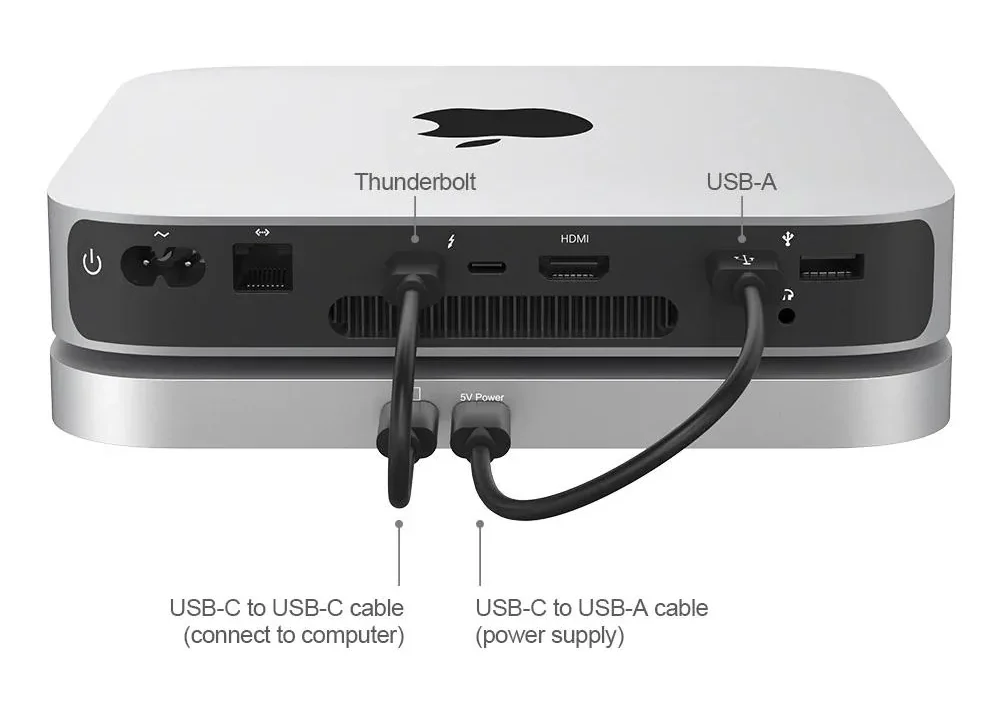
Unlike the MacBook Air, the Mac mini offers more ports and connectivity options, making it a versatile desktop choice. The Mac mini includes up to four Thunderbolt 4 ports, two USB-A ports, an HDMI port, a Gigabit Ethernet connector (upgradeable to 10Gb Ethernet), and a 3.5mm headphone jack, enabling direct connection of multiple peripherals without many adapters.
Further, unlike the MacBook Air, the Mac Mini allows users to upgrade certain components like RAM and storage. This not only extends the life of the machine but also allows it to adapt to changing needs.
External Display Support
USB Connections
The MacBook Air with an M2 chip supports only one external display at a 6K resolution and 60Hz refresh rate. The M3 MacBook Air allows for one 6K display and one 5K display at 60Hz if the built-in display is closed.
In contrast, the Mac mini offers greater flexibility for multiple external displays. Even the entry-level M2 Mac mini supports up to two external displays: one 6K display at 60Hz and either one 5K display at 60Hz via Thunderbolt or one 4K display at 60Hz via HDMI.
If you go for the M2 Pro Mac mini, it can handle up to three external displays. Therefore, the Mac mini is ideal for users requiring extensive external display support, making it a versatile and cost-effective choice for creating an efficient workstation setup.
Design And Build
Compact Mac Mini design
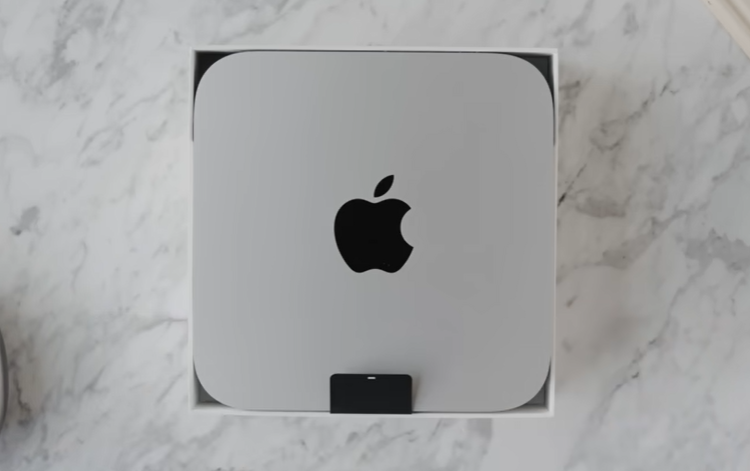
The Mac mini is designed as a compact desktop solution, measuring 19.7cm by 19.7cm and 3.6cm tall. Despite lacking portability due to its lack of an internal battery, its small footprint makes it ideal for fitting behind monitors and integrating seamlessly into a workspace.
Like the MacBook Air, the Mac mini is built from sturdy aluminium, ensuring durability and a professional aesthetic suitable for desktop environments. Its robust build contributes to longevity, making it a reliable choice for users seeking a durable, long-lasting computing solution.
Ergonomics
Mac mini with adjustable monitor
The Mac mini’s desktop orientation naturally promotes better ergonomic practices. I’ve experienced this firsthand. Years ago, relying on a laptop for daily work caused severe back pain due to constant stooping.
Transitioning to a Mac mini’s desktop setup naturally encouraged better ergonomics. Pairing it with an adjustable monitor improved my posture and overall comfort, eventually eliminating my back pain.
If you need a powerful and flexible desktop setup for multitasking with applications, you can choose the Mac mini with the M2 or M2 Pro chip because of its superior performance, extensive port selection, and ability to support multiple external displays.
This setup promotes better ergonomics with an adjustable monitor and remains cost-effective, even after purchasing necessary peripherals separately. This choice offers a powerful, efficient, and budget-friendly solution, making the Mac mini the clear winner over the MacBook Air.
At Tech4gamers, I cover all sorts of gaming news. Whether it’s a leak of any upcoming game or an update, an announcement, or a rumour, I like to write about it all. Over the weekend, I sit and write features where I talk about games that I miss or want to see return.
Story Highlight
Ghost of Tsushima is nearly half a decade old already.
The game has had a great influence on the industry, particularly due to its open world.
Titles like Rise of The Ronin, Star Wars Outlaws, Final Fantasy 7 Rebirth, and more have taken inspiration from Sucker Punch’s work.
Ghost of Tsushima became the biggest release for Sucker Punch in 2020. Four years later, it remains one of the most impactful releases in the industry, inspiring others to push for more immersive and gorgeous open worlds.
Despite having a budget of just $60 million, this Japanese samurai adventure was critically acclaimed for its open-world gameplay. This is exactly why it seems to have become a template for modern open-world design.
Why it matters: Sucker Punch created one of the most beautiful open-world settings. It appealed to both Western and Japanese studios, leading to unparalleled influence.
Ghost of Tsushima 2 Could Be Announced Very Soon
Very recently, Star Wars Outlaws’ creators stated that they used Ghost of Tsushima as a reference for their title. They found that the story, characters, open world, and the fantasy of being a samurai in Japan were just too good.
Similarly, another Ubisoft release, Assassin’s Creed Mirage, took inspiration from Ghost of Tsushima in a different manner. The developers confirmed that they offered the Arabic language, as Sucker Punch did the same for Japanese.
Other than Ubisoft, Rise of The Ronin’s developers previously stated that they used Ghost of Tsushima as a reference since they were so surprised by the level of research Sucker Punch brought to the Japanese setting.
Elsewhere, Square Enix looked toward Sucker Punch’s work for inspiration when making Final Fantasy 7 Rebirth. The most interesting part is that while the game wasn’t developed by a Japanese team, it received the most applause from Japanese audiences for its authenticity.
All in all, it seems open-world developers are looking at Sucker Punch’s work for the best results. While Ubisoft was often looked at as the biggest source of inspiration in the past, the team itself is now using Ghost of Tsushima as a reference.
Ghost of Tsushima 2 is currently said to be in the works.
Because the first game was so well-received, it will be interesting to see how the team will improve upon the already exceptional foundations. The sequel could be announced anytime now, so fans are excited to see what PlayStation can bring to the table.
At Tech4Gamers, I contribute as a Senior News Reporter, combining my skills and gaming enthusiasm to keep our audience updated on the latest developments.
Story Highlight
Black Ops 6 is the first Call of Duty to launch day one on Game Pass.
Xbox is not doing much to spread the word, and an insider has said that this is because the gaming giant is now allowed to do so.
Activision seems to fear a loss of sales due to the service, leading to this decision.
Black Ops 6 is the next big release for first-person shooter fans, but it also holds great significance for Xbox. As the first day one Game Pass title from Activision, this Call of Duty entry holds the potential to change Xbox’s future as we know it.
As excitement continues to build up, the beta is set to go live later next month. However, fans have noted a lack of marketing from Xbox, considering the fact that the gaming giant is usually quick to push its day-one tagline for first-party titles. According to a new report, this is being done on purpose.
Why it matters: This move could end up harming Game Pass in the long run since Call of Duty might be Xbox’s last shot at taking the service to new heights.
During the latest episode of the Iron Lord’s Podcast, Xbox’s lacking marketing efforts once again became a point of discussion.
This eventually led to the subject of Black Ops 6, where it was brought up that Microsoft wasn’t doing much to emphasize just how big of a deal Call of Duty’s day one launch can be for the service. According to Lord Cognito, Xbox is not at fault here.
Off the record, I heard they literally can’t do that.
-Lord Cognito
Following this statement, Parris chimed in with his two own statements. He recently conducted a Black Ops 6 preview for IGN and stated that employees at Treyarch told him a similar story.
While I was at Treyarch, there were off-the-record conversations that they cannot use that in their current marketing.
-Parris
Black Ops 6 Marks A Huge Shift For Call of Duty
He noted that the subject of Game Pass was brought up by Treyarch developers, who still believe Call of Duty’s big launch on the service will be a major deal. However, Parris states that fans should not expect a big marketing push from Xbox.
While the insider did not share much else, it seems Activision is afraid of losing actual sales to Game Pass. Call of Duty has historically made millions on day one, and it seems the publisher wants to keep the subscription launch more of a secret than anything.
At Tech4Gamers.com, I cover the latest news and rumours in the gaming industry, from new game releases to hidden gems and video game leaks. Furthermore, I occasionally write tech articles about video game consoles, providing insights into the hardware and software that powers our gaming experiences.
Story Highlight
A reliable insider says Black Myth: Wukong might not reach Game of the Year status.
An estimated playtime of 40-50 hours for completion has also been shared, contradicting rumors of excessive length.
The developer may release expansions or DLC based on the sales performance.
Black Myth: Wukong has arguably been the most anticipated title set for launch this month. However, Lunatic Ignus, a reliable leaker, mentions that although the game is enjoyable, it might not be a strong contender for the Game of the Year award.
Lunatic Ignus is known for reliably leaking information about Chinese games, such as early trailers for Phantom Blade Zero and Lost Soul Aside. Therefore, his arguments carry some weight.
Why it matters: Black Myth: Wukong is generating a lot of hype days before its release. However, Lunatic Ignus’ comment suggests that people might want to manage their expectations.
Lunatic seems to have gotten his hands on a review copy or received early footage to draw these conclusions. He believes that while Black Myth: Wukong offers great gameplay, it doesn’t have the groundbreaking features needed to be a top Game of the Year contender.
A major point in the comments is the combat. Black Myth: Wukong focuses a lot on dashing and rolling, requiring players to use different magic and skills to block enemy attacks.
While the combat is engaging, Ignus compares the experience to Stellar Blade and Lies of P. Despite that, Black Myth: Wukong could still be a big hit, especially with its upcoming expansions and DLCs.
The leaker claims that Game Science might add more content based on how well the title sells.
The game’s requirements are pointing towards a well-optimized port.
The leaker also says Black Myth: Wukong should take about 40-50 hours to complete if players are aiming for 100% completion, making it a good length without being too long. This aims to counter a recent fake review that points to 90 hours of gameplay.
The technical performance is also noteworthy. Ignus notes that the PS5 version will likely run at 2K 60FPS. Moreover, he claims there are plans for a 4K 60FPS mode, and the developers are already working on it.
Finally, the insider claims that a physical edition will be coming within a year. This should be good news for people who were complaining about the digital-only release.
At T4G, my task is to cover the latest news around the gaming globe ASAP and with the utmost precision. I adore all the games and respect all the devs behind the amazing games that we get all year. So, whether it’s a PC or a Console game, I got it all covered.
Story Highlights
According to an analysis, the general community sentiment around Assassin’s Creed Shadows is not great.
The main reasons behind the sentiment are the inaccurate historical depiction and the protagonist, Yasuke.
Despite the negative feedback, some fans are still excited about the game.
Assassin’s Creed Shadows is Ubisoft’s next big game, scheduled for later this year. However, the game has attracted a lot of negativity due to it being historically incorrect. According to an analysis, the overall sentiment around this title is quite negative.
Why it matters: In their recent earnings call, Ubisoft’s CEO claimed that the overall sentiment around the game is very positive, and they are expecting a lot of sales.
Ubisoft Has Left The Community With Mixed Thoughts | Report via PlayerXP
PlayerXP has released an Assassin’s Creed Shadows community sentiment report. More than 120K people were involved in the analysis over multiple platforms like YouTube, X, Facebook, and TikTok.
Based on the overall reports, the game got a -13, which indicated a negative sentiment across the community. The sentiment is largely due to the depiction of history and Yasuke’s representation as a samurai. Some also complained about forced inclusivity.
The report has been broken down into multiple talking points. These include Japanese culture, Ubisoft as the publisher, Yasuke, historical inaccuracy, and the Assassin’s Creed franchise.
Out of these, the most negative sentiment was around the representation of Japanese culture.
The inaccurate representation of Japanese culture is the most criticized point in the analysis.
Other points highlighted in the report include Ubisoft’s monetization. Fans are concerned that Assassin’s Creed Shadows will be similarly monetized as past RPGs, leading to a loss of trust within the community.
Due to all the controversy around the historical inaccuracy, Ubisoft stated that its games don’t represent history. The publisher is also mixing LGBTQ elements in feudal Japan, further upsetting many fans.
Still, some fans remain excited about the release. Many even believe that Ubisoft could outdo Ghost of Tsushima, though this remains to be seen. Ultimately, the publisher has an opportunity to surprise everyone.
With the game just three months away, seeing the results after all this controversy will be interesting. Assassin’s Creed entries usually sell well, and we can expect the latest release to be no different in this regard.
At Tech4Gamers, I take on the role of Hardware Reviewer with pride. My responsibilities involve a thorough examination of essential hardware components like motherboards, graphics cards, processors, PC cases, and CPU coolers, among others, focusing on their complexities and functionalities.
Abdul Hannan
I’ve been the Journalist & Editorial Writer at Tech4Gamers since July 2022. I spearhead our hardware coverage, including overclocking GPUs, benchmarking CPUs, reviewing peripherals, and fine-tuning custom PC builds for every budget. Daily, I report on breaking gaming news, from major launches and studio updates to the latest industry trends, ensuring our community stays informed. Beyond news briefs, I write in-depth feature articles on gaming culture and emerging technologies. And by collaborating closely with the editorial team on content planning, SEO strategy, and our publishing calendar, I help us consistently hit our traffic and engagement targets.
In this review, I’ll test and break down what makes the HyperX Alloy Origins 65 stand out—from its compact and stylish design to its responsive switches and user-friendly software. If you’re in the market for a new keyboard that combines form and function, this one might just be what you’re looking for. I’ll share my firsthand experience to help you decide if it’s the right fit for your gaming needs.
Why Trust Tech4Gamers
Abdul Hannan is our peripherals expert who has been testing different mice, keyboards, headphones, microphones, and more for years.
130+ peripherals tested and reviewed by our team of hardware experts (Tech4Gamers Team).
500+ hours spent testing different peripherals for our reviews.
At Tech4Gamers, ensuring you get reliable information is our priority. That’s why every hardware round-up undergoes a meticulous review process by our team of experts and editors. Each review is carefully examined against our strict editorial guidelines, guaranteeing you trustworthy insights you can depend on.
Key Takeaways
The HyperX Alloy Origins 65 is a compact and space-saving gaming keyboard designed for gamers and enthusiasts who prioritize performance and a minimalist aesthetic. This 65% form factor keyboard offers a streamlined design with essential gaming features.
The things I like about the HyperX Alloy Origins 65 are its compact and space-saving, solid build quality, HyperX key switches, responsive gaming, and satisfying keycaps.
The things I do not like about the HyperX Alloy Origins 65 are its limited onboard memory profiles, basic software comparatively, and no wireless or Bluetooth.
Take a look at the specifications:
Keyboard:
HyperX Alloy Origins 65
Switch:
HyperX Red - Linear
Operation Style:
Linear
Operating Force:
45g
Actuation Point:
1.8mm
Total Travel Distance:
3.8mm
Actuation Point:
Mechanical
Backlight:
RGB (16,777,216 colors)
Light Effects:
Per key RGB lighting and 5 brightness levels
Onboard Memory:
3 profiles
Polling Rate:
1000Hz
Anti-ghosting:
100% anti-ghosting
Rollover:
N-key
Acceleration:
Yes
Game Mode:
Yes
OS Compatibility:
Windows® 10, 8.1, 8, 7
Width:
315.06mm
Depth:
105.5mm
Height:
36.94mm
Weight:
Weight (with cable): 1.82lb
Cable Type:
Detachable USB-C, Braided
Cable Length (imperial) and type:
5.9ft | Detachable USB-C, Braided
[toc]
Box Contents
HyperX Alloy Origins 65
Detachable USB Cable
HyperX Keycap Puller
1x HyperX-designed ESC Keycap
1x HyperX-designed Spacebar
Quick Start Guide
First Impressions
First Impressions (Image By Tech4Gamers)
In short, the HyperX Alloy Origins 65 is a solid keyboard that manages to pack a lot into a small footprint. Built with a lightweight aluminum frame and featuring impressive RGB lighting, it’s got a clean, sturdy design that feels good to use. The HyperX key switches are responsive, and the software is straightforward, offering just what you need without any unnecessary extras.
As the slightly larger follow-up to the HyperX Alloy Origins 60, this 65% keyboard clearly targets gamers with its compact design and gaming-focused features. While the Fn key bindings are clearly marked on the keycaps, which is helpful, the layout might not be ideal if your main focus is productivity. However, its portability and durable build make it a great option if you need a keyboard that can travel with you.
Design
Design (Image By Tech4Gamers)
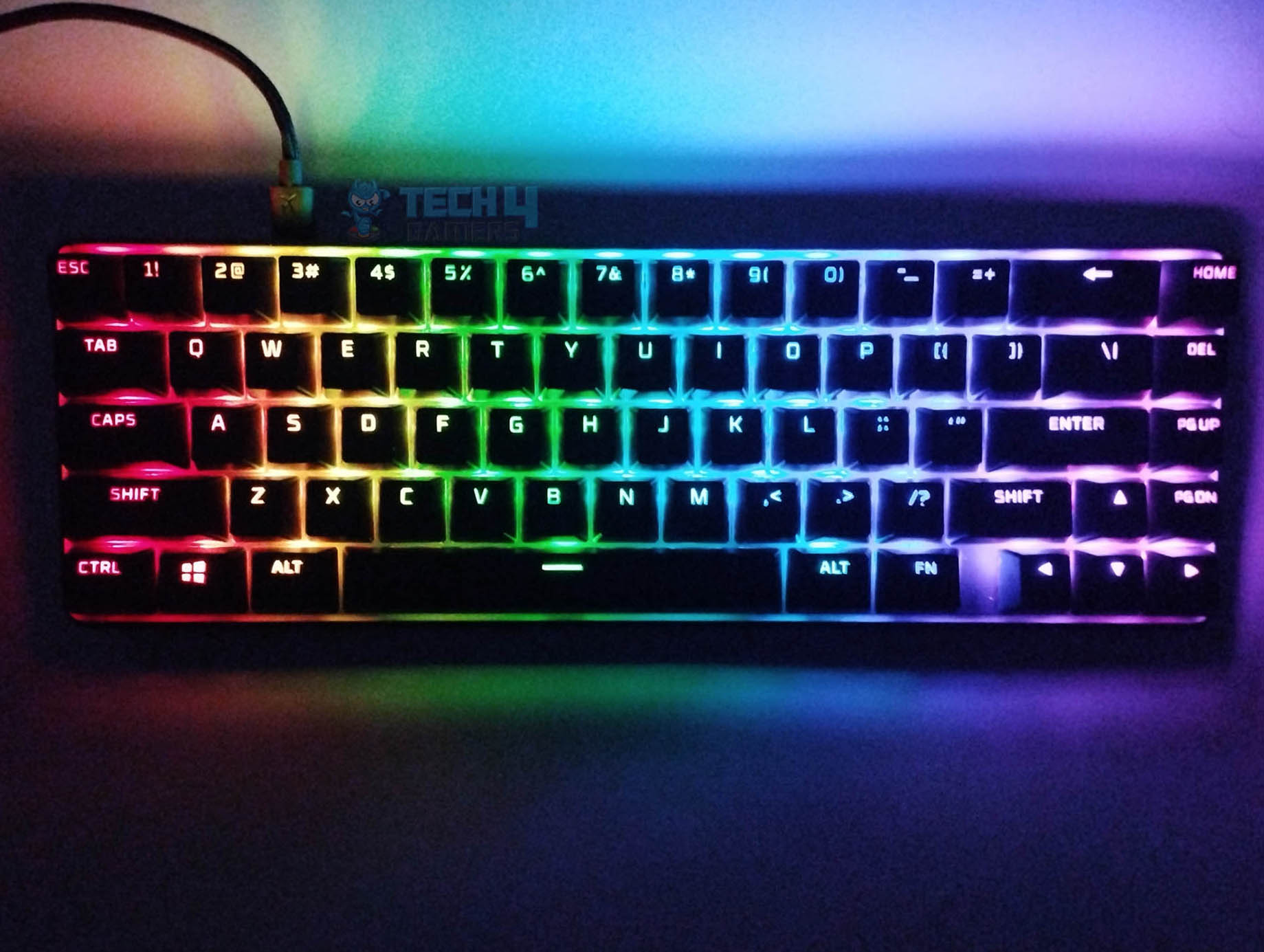
The HyperX Alloy Origins 65 might not be flashy at first glance, but its simple design actually works in its favor. It has a solid, understated look that fits well in both gaming and professional setups. The keyboard’s compact design is highlighted by per-key RGB lighting that really pops against the matte black surface, giving it a sleek and stylish appearance.
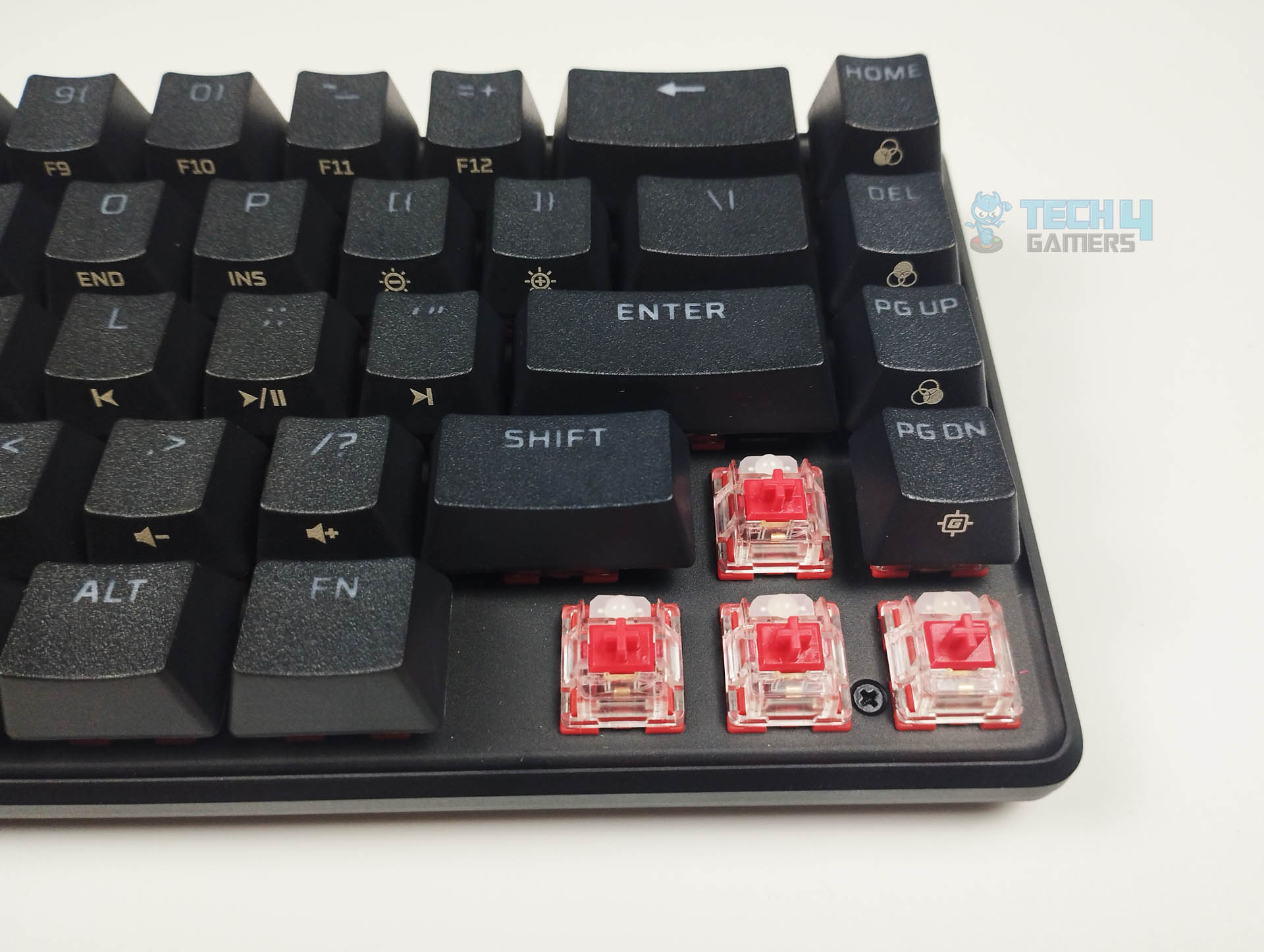
The RGB lighting doesn’t just look good—it’s also practical. The double-shot PBT keycaps are durable and let the lighting shine through clearly, even in low-light settings. If you’re into customizing your setup, you can easily remove the keycaps to reveal the vibrant lighting beneath the switches.
As a 65% keyboard, the Alloy Origins 65 is compact but still manages to pack in essential features. HyperX cleverly placed additional controls on the sides of the keycaps, keeping the keyboard small while still providing easy access to necessary functions. The keyboard measures 1.4 by 12.4 by 4.15 inches, making it just slightly slimmer than other 65% keyboards, which gives it a bit more space for important features.
One of the most noticeable benefits is the inclusion of arrow keys, which are often missing on compact keyboards. These keys are well-positioned and don’t get in the way of mouse movements, making the keyboard more user-friendly for both gaming and work without the need for constant key reassignments. Overall, the Alloy Origins 65 offers a balanced mix of durability, functionality, and style.
Backside
Design
1 of 2
Backside (Image By Tech4Gamers)
Ergonomics (Image By Tech4Gamers)
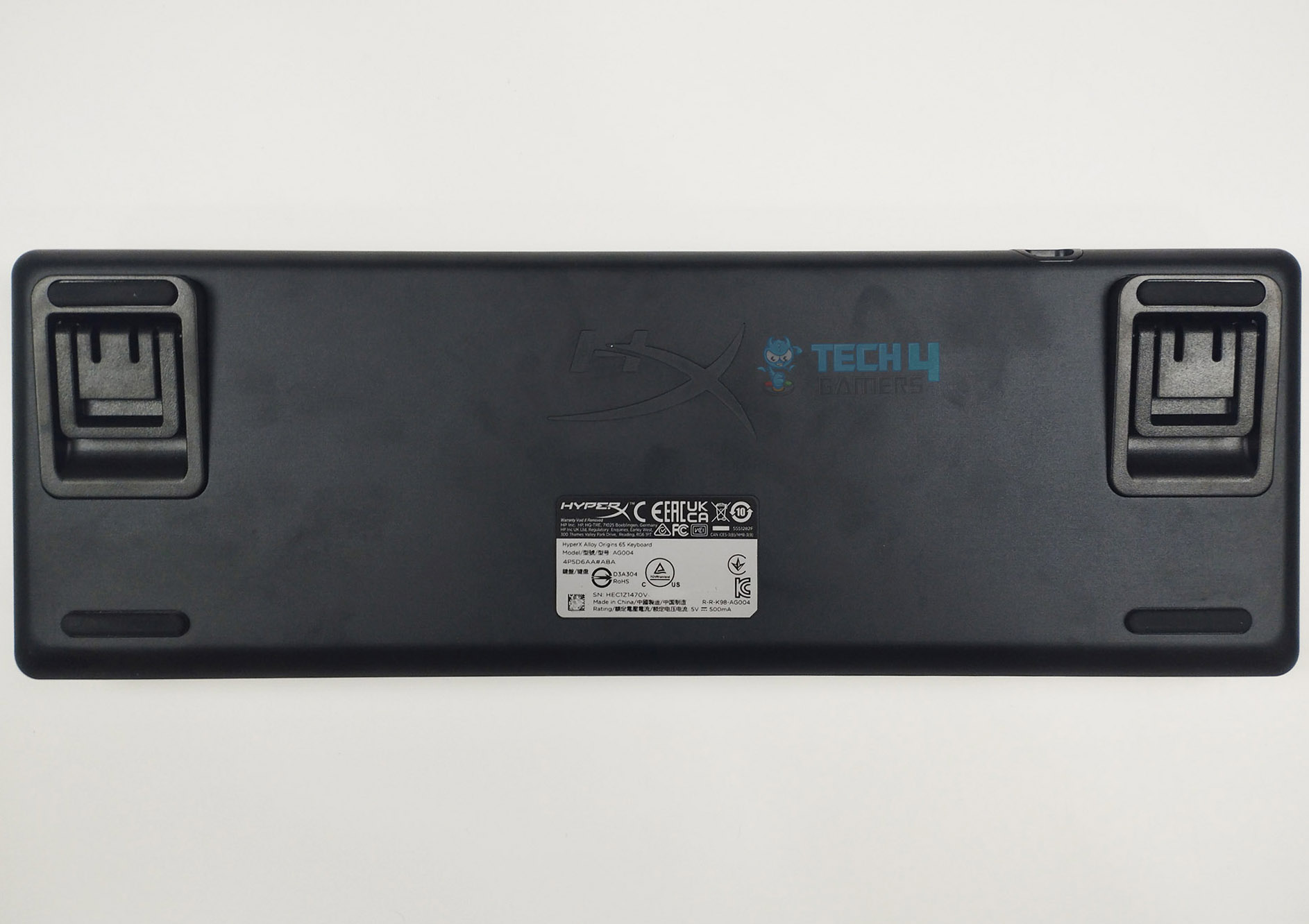
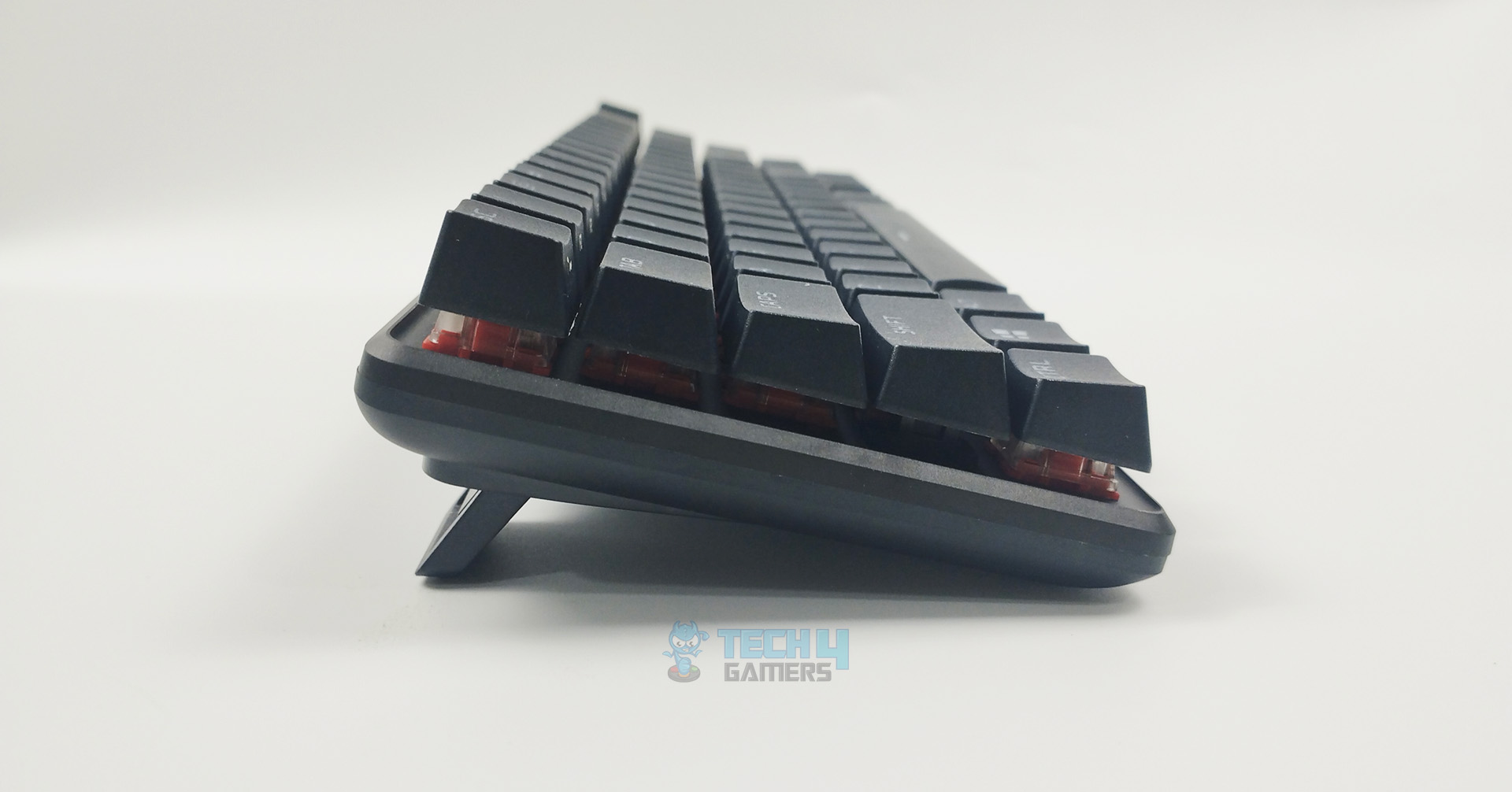
When you flip over the HyperX Alloy Origins 65, you’ll see that the underside is just as well thought out as the rest of the keyboard. It offers three adjustable positions and has four rubber grips in each corner to keep it steady on your desk. The sturdy plastic feet and solid hinge work together to ensure that this keyboard stays put, no matter where or how you position it. Although it doesn’t come with a wrist rest, the two adjustable angles help reduce wrist strain during long sessions.
The stability is further improved by a rubber strip on the inclined feet, which keeps the keyboard firmly in place. At the top, there’s a USB Type-C port, which pairs nicely with the included 6-foot braided USB-C to USB-A cable. The fact that the cable is detachable makes the keyboard more portable and helps avoid annoying tangles when you’re setting it up. The braided design of the cable also adds to its durability and overall quality.
USB Type-C Port (Image By Tech4Gamers)
One key drawback of the HyperX Alloy Origins 65 is that it doesn’t support Wi-Fi or Bluetooth, so if you’re looking for a wireless keyboard, this one won’t fit the bill. That said, the keyboard does excel in its design, particularly on the underside, where it offers great adjustability, stability, and convenience. The USB Type-C port and detachable braided cable make it practical and portable, but it’s important to remember that this is still a wired keyboard.
PBT Keycaps
Design
1 of 2
Switch Stems
HyperX Alloy Origiins 65 - RGB Lighting in a Dim Environment (Image By Tech4Gamers)
The PBT keycaps not only feel great but also promise long-lasting durability. Despite the keyboard’s compact size, the keys are well-organized and easy to get used to. However, the arrow keys and navigational cluster are positioned closer to the alphanumeric keys than on larger keyboards like TKL or full-size models. This layout includes the directional keys but results in a slightly smaller right-shift key. For those who enjoy customizing their setup, the keyboard comes with a set of space-themed keycaps and a plastic (ABS) spacebar, allowing you to add a pop of color to the otherwise black keycaps.
There is some minor key wobble, but it’s not enough to affect usability. The HyperX Alloy Origins 65 is slightly longer than its predecessor and sits lower on the desk when adjusted to its maximum height, yet it still maintains a compact profile. Even without a wrist rest, the reduced height ensures comfortable use during both short typing sessions and longer gaming sessions. The inclusion of a keycap puller is a nice touch, making it easier to customize and maintain the keyboard.
Switches
Red Linear Switches (Image By Tech4Gamers)
When looking closely at the switches on the HyperX Alloy Origins 65, it’s clear that HyperX has chosen to use its own brand of switches instead of the more common Cherry switches. The unit I tested came with HyperX Red linear switches, and I was impressed by their quality, especially compared to other MX Red clones. These switches are fast and responsive, making them great for both work and gaming. If you prefer tactile feedback, the keyboard also offers Aqua switches as an alternative.
The HyperX switches are compatible with keycaps designed for Cherry MX-style stems, as they share a similar design and feel to Cherry MX and Kailh switches. What sets HyperX switches apart is their shorter actuation distance of 1.8mm, compared to the 2mm of Cherry MX Reds, and their durability, rated at 80 million keystrokes versus Cherry’s 60 million. While I can’t verify that lifespan claim firsthand, the HyperX Red switches feel just as sturdy as Cherry MX ones. The shorter actuation distance doesn’t noticeably change the feel, especially with linear switches like these, where you tend to bottom out the keys anyway. This difference might be more apparent with tactile switches, where feedback is key.
The HyperX Red switches have no tactile feedback and a light actuation force, making them easy to press. They offer a fast and smooth typing experience, though their lack of a tactile bump might lead to more typing errors if you’re not used to linear switches. In my testing, I hit around 80–85 words per minute on a typing test, which is a bit slower than with tactile keys, but that’s more about my preference for tactile feedback than a fault of the switches themselves. The choice between linear and tactile switches really comes down to personal preference.
These HyperX Red switches have an actuation force of 45g, the same as Cherry Reds, but with a shorter actuation point at 1.8mm and a total travel distance of 3.8mm. Despite the slightly longer pre-travel distance compared to some other reds, the light actuation force makes them very responsive, which is great for gaming. I tried the keyboard out in games like CS:GO and Valorant, and its quick response times really shined, enhancing my performance in these fast-paced titles.
HyperX Ngenuity
Software
1 of 4
Triggered Effects (Image By Tech4Gamers)
RGB Customization (Image By Tech4Gamers)
Macro Assignments (Image By Tech4Gamers)
Looped Effects (Image By Tech4Gamers)
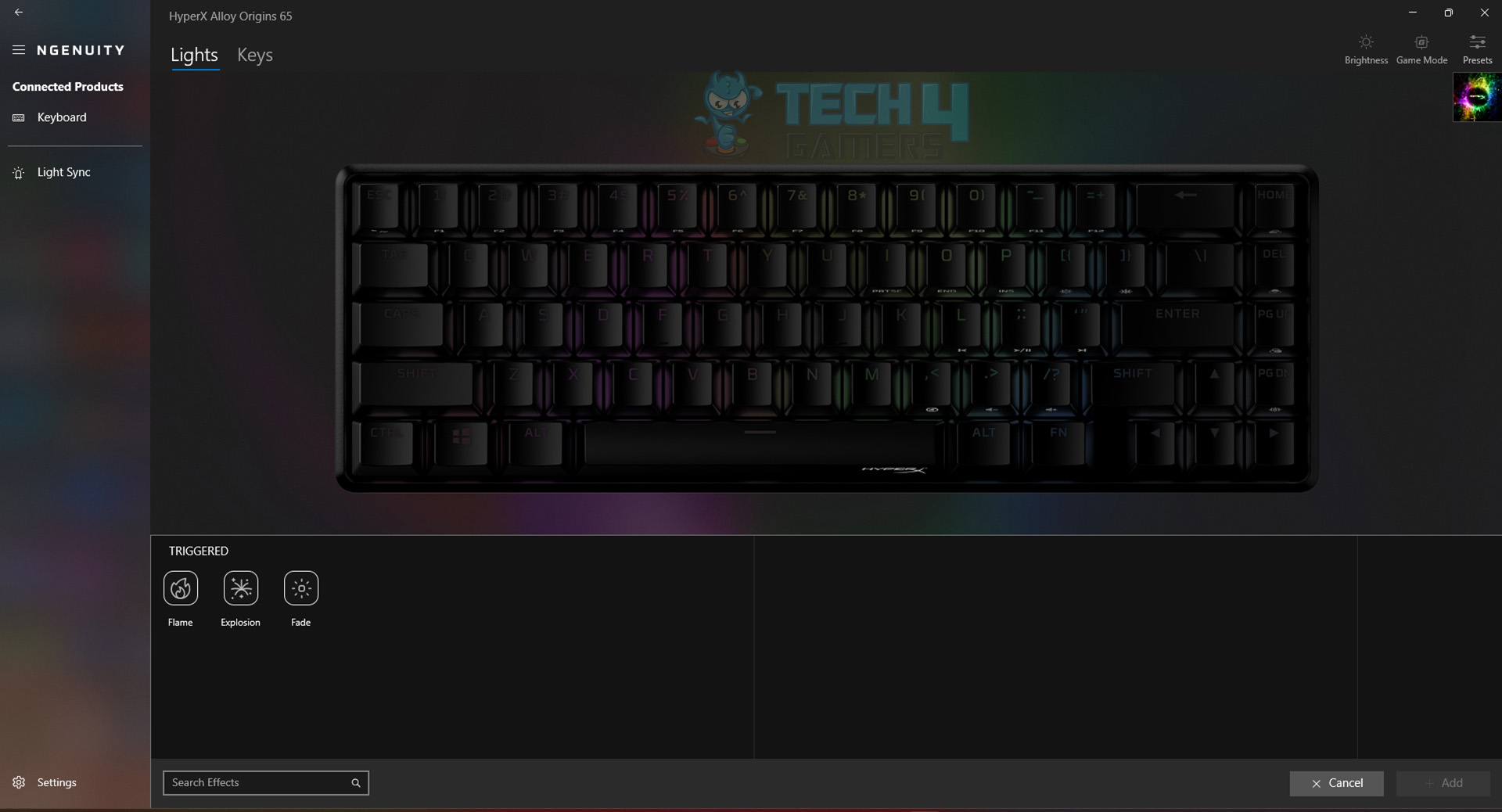
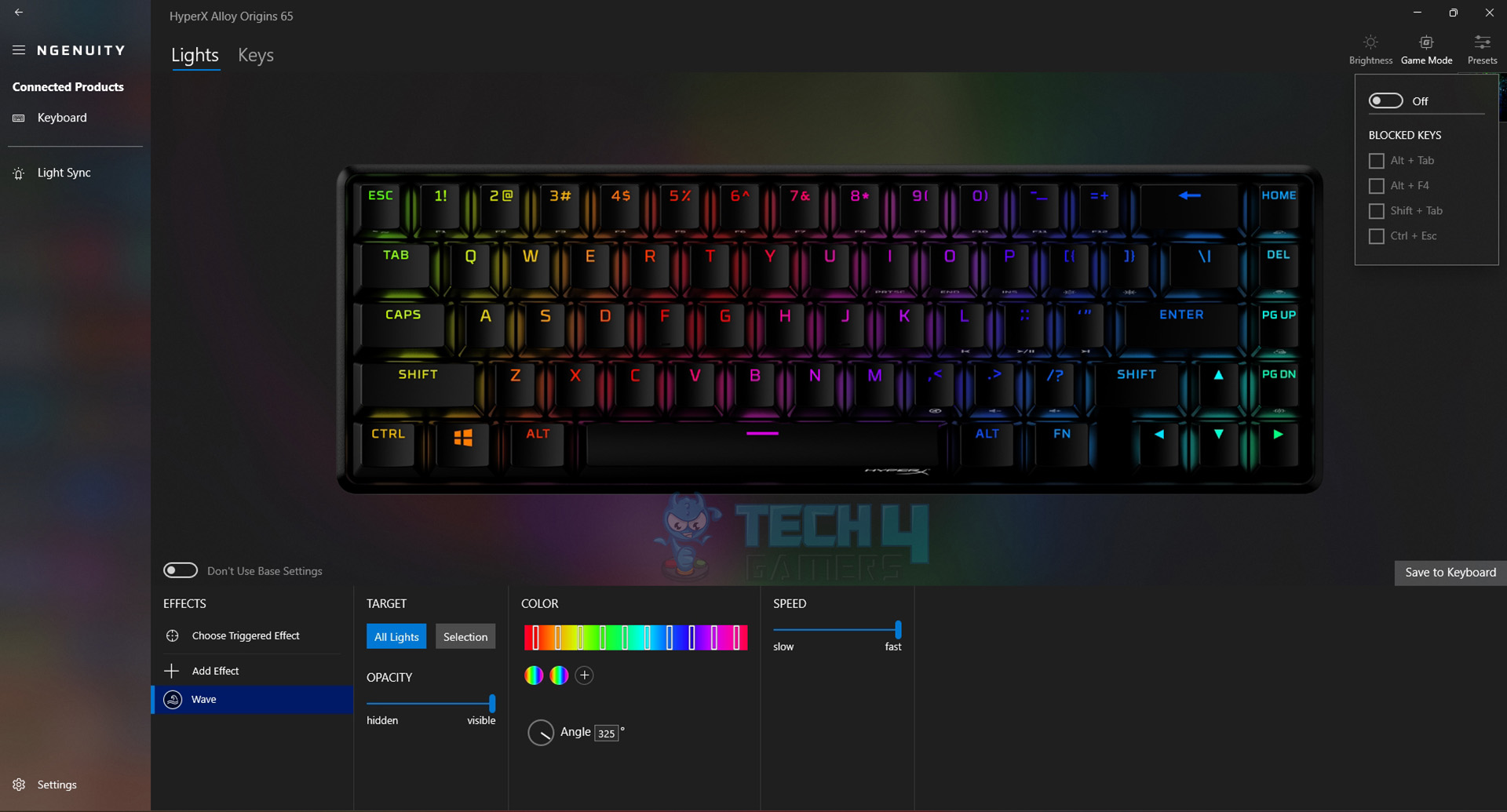
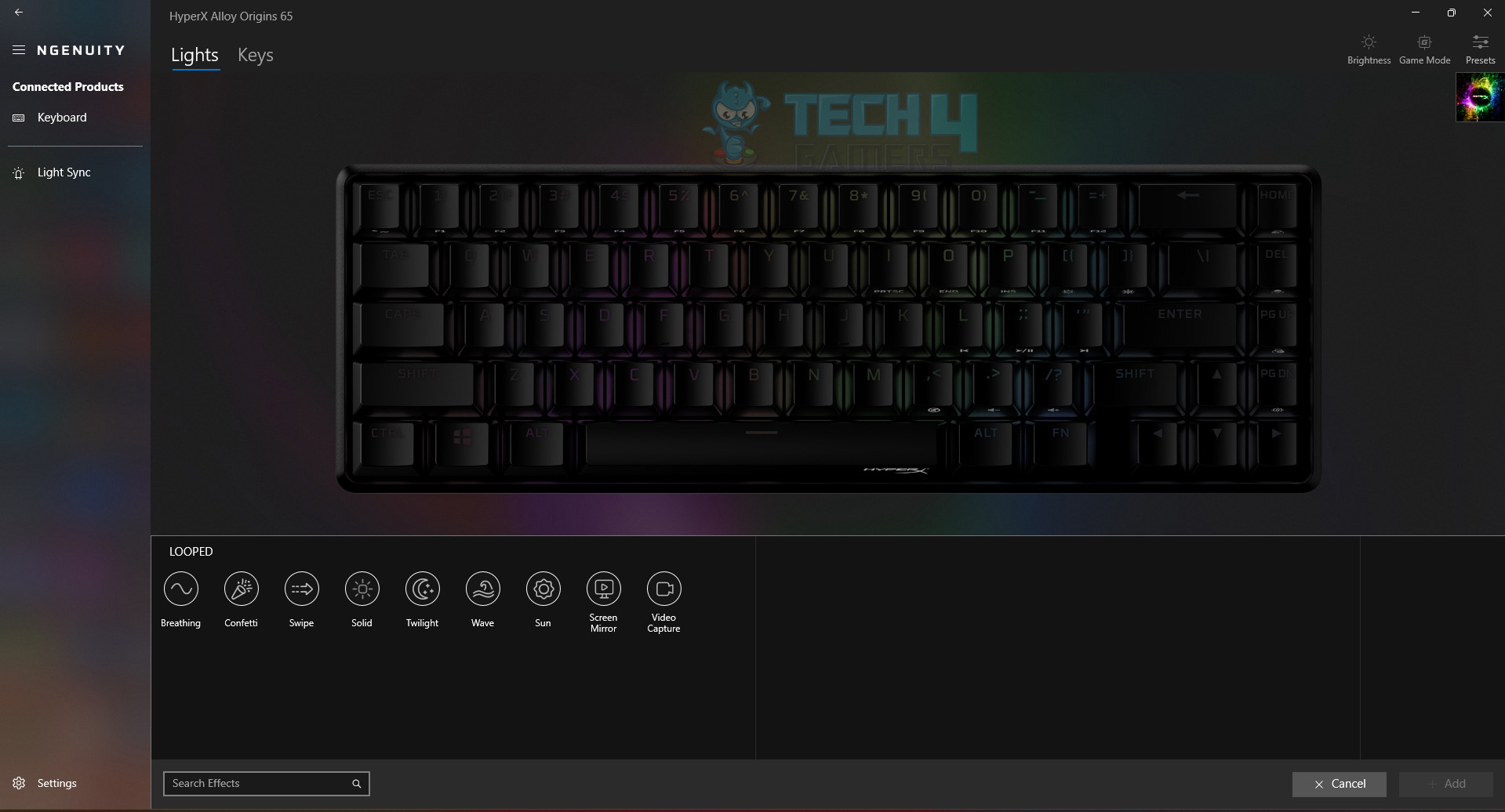
HyperX continues to use its Ngenuity software for customizing the Alloy Origins 65, and while it’s not the flashiest program out there, it’s come a long way in terms of features and ease of use. With Ngenuity, you can remap keys, adjust RGB lighting, and tweak various settings to your liking. The keyboard offers seven different lighting effects, including Breathing, Swipe, Confetti, Twilight, Solid, Sun, and Wave, giving you plenty of options to personalize your setup.
You can also fine-tune the lighting’s opacity, speed, and key assignments. A standout feature of the Alloy Origins 65 is its “triggered” effects like Flame, Fade, and Explosion, which respond to your typing, adding an interactive element to your lighting. The keyboard supports up to three profiles, which is handy if you like to switch between different setups for different games. Although the number of onboard profiles is limited, Ngenuity makes it easy to map macros and set up your RGB preferences.
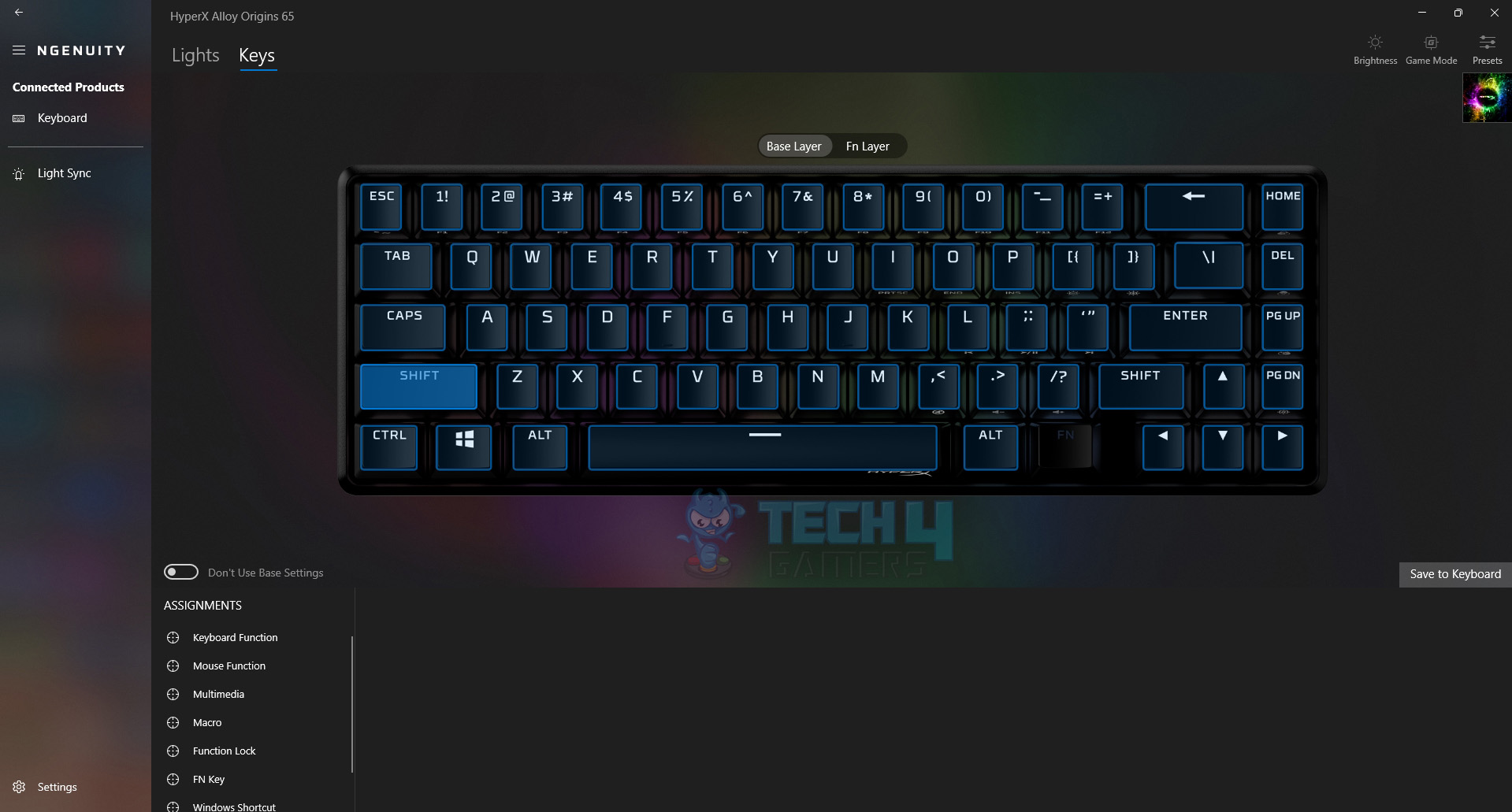
You can assign macros to any key and manage everything through Ngenuity’s straightforward interface. If you’re not into extensive customization, you can download pre-made profiles from HyperX’s website and import them directly. These profiles often include setups inspired by popular games or eSports teams. While Ngenuity has seen significant improvements over time, there’s still some room for growth, particularly when it comes to the flexibility of lighting effects.
Performance
Keystroke Latency Test
After using the HyperX Alloy Origins 65 extensively for both work and gaming over three weeks, I can confidently say it’s one of the best gaming keyboards in its size category. It even replaced my previous compact keyboard, the Ducky One 3 Mini, on my desk. As you’d expect from a high-performance keyboard with linear switches, the Alloy Origins 65 excels in gaming, and it’s also a pleasure to type on.
The new model feels more spacious and comfortable compared to its predecessor, with better key spacing and a deeper sense of switch activation. I didn’t experience the hypersensitivity issues that I had with my previous 60% keyboard. The HyperX Red switches, in particular, stood out for their responsiveness, especially for “double-tapping,” as they don’t require the mechanism to reset after each keypress like tactile switches do.
Even though I usually prefer a full-sized keyboard, I had no issues with the Alloy Origins 65 in any of the games I tested. Its low latency allowed for precise movements in fast-paced games like Valorant, and it performed equally well in slower-paced action games. In titles like Fortnite and League of Legends, the wider key spacing and responsive switches made for a comfortable and precise gaming experience, especially during intense moments like quick-time events.
Here is the typing experience of HyperX Alloy Origins 65:
Should You Buy It?
Buy It If
✅You want a compact form factor keyboard: The 65% layout strikes the perfect balance between space saving and usability, making it one of the most sought-after keyboard form factors.
✅You prefer a premium build quality: The keycaps, frame, and overall feel of the HyperX Alloy Origins 65 is very durable and premium.
✅You want good performance: I tested the HyperX Red linear switches, and they are very responsive with great tactile feedback.
Don’t Buy It If
❌You want wireless connectivity: With only wired connectivity, the lack of wireless and Bluetooth options may be disappointing to some.
My Thoughts
The 65% version of the HyperX Alloy Origins keyboard is priced at $70, but the extra keys make it a worthwhile upgrade. While HyperX’s proprietary switches are similar to Cherry MX, the shorter actuation distance doesn’t make a significant difference in performance. Still, with its durable design, fast response times, and vibrant RGB lighting, the Alloy Origins 65 is a solid, compact keyboard that delivers the essentials well.
Though it lacks wireless connectivity and some advanced features found in pricier models, the Alloy Origins 65 excels in what it offers, making it an excellent choice for gamers looking to save desk space without compromising on quality. Despite its niche appeal, this keyboard strikes a great balance between performance and practicality, making it a top pick for those who prioritize a streamlined setup.
I’ve been the Journalist & Editorial Writer at Tech4Gamers since July 2022. I spearhead our hardware coverage, including overclocking GPUs, benchmarking CPUs, reviewing peripherals, and fine-tuning custom PC builds for every budget. Daily, I report on breaking gaming news, from major launches and studio updates to the latest industry trends, ensuring our community stays informed. Beyond news briefs, I write in-depth feature articles on gaming culture and emerging technologies. And by collaborating closely with the editorial team on content planning, SEO strategy, and our publishing calendar, I help us consistently hit our traffic and engagement targets.
Historically speaking, the HyperX Cloud series keeps its word in terms of audio quality, design, and comfort, unlike other headset manufacturers that make empty promises. Therefore, the Cloud Core Wireless is a no-frills gaming product as it prioritizes gamers’ needs without bothering about specific software.
However, it may be a little disappointing for the EQ tweakers out there. It takes design elements from its predecessors, but that does not diminish the fact that it offers so much value for the money that it’s impossible to overlook it. Let’s review the features that can make this headset so appealing to users.
Why Trust Tech4Gamers
Abdul Hannan is our peripherals expert who has been testing different mice, keyboards, headphones, microphones, and more for years.
130+ peripherals tested and reviewed by our team of hardware experts (Tech4Gamers Team).
500+ hours spent testing different peripherals for our reviews.
At Tech4Gamers, ensuring you get reliable information is our priority. That’s why every hardware round-up undergoes a meticulous review process by our team of experts and editors. Each review is carefully examined against our strict editorial guidelines, guaranteeing you trustworthy insights you can depend on.
Key Takeaways
The HyperX Cloud Core Wireless combines durability, comfort, and impressive audio quality. Its sturdy aluminum frame and memory foam ear cushions ensure a comfortable fit for long gaming sessions.
You should buy the HyperX Cloud Core Wireless if you value durability and comfort, want exceptional audio quality, and need multi-platform compatibility.
You should not buy the HyperX Cloud Core Wireless if you require extensive audio customization, demand a strong wireless range, and prefer RGB lighting and visual customization.
Here are the specifications:
Form Factor
Over-ear
Wireless
Yes
Weight
10.4 ounces
Sound Driver
53mmm, Dynamic
Frequency response
10Hz – 21Hz
Impedance
60 Ω
Microphone
Electret condenser (detachable)
Microphone Pattern
Bi-directional, Noise-cancelling
Battery life
20 hours
Headset connection
Wireless (USB dongle)
Audio controls
Onboard controls
Wireless range
Up to 20 metres
[toc]
How Is The HyperX Cloud Core Wireless Different?
Compared to its predecessor, it maintains a similar design but opts for a more minimalist aesthetic with fewer flashy elements. Moreover, it sacrifices some customizable features, such as software compatibility for equalizer settings, to offer a more streamlined and user-friendly experience. When compared to competitors, the Cloud Core Wireless stands out with its impressive build quality and lightweight design. Many often prioritize either build quality or comfort, but rarely both to this extent.
Design
Design (Image By Tech4Gamers)
When new versions seem just like old ones, it’s typically a positive indicator. For instance, the HyperX Cloud Core Wireless headset is almost indistinguishable in appearance from the HyperX Cloud 2 Wireless, not including the latter’s multicolored headband and flashy red earcup holders. Conversely, it has the standard all-black design that HyperX products are known for.
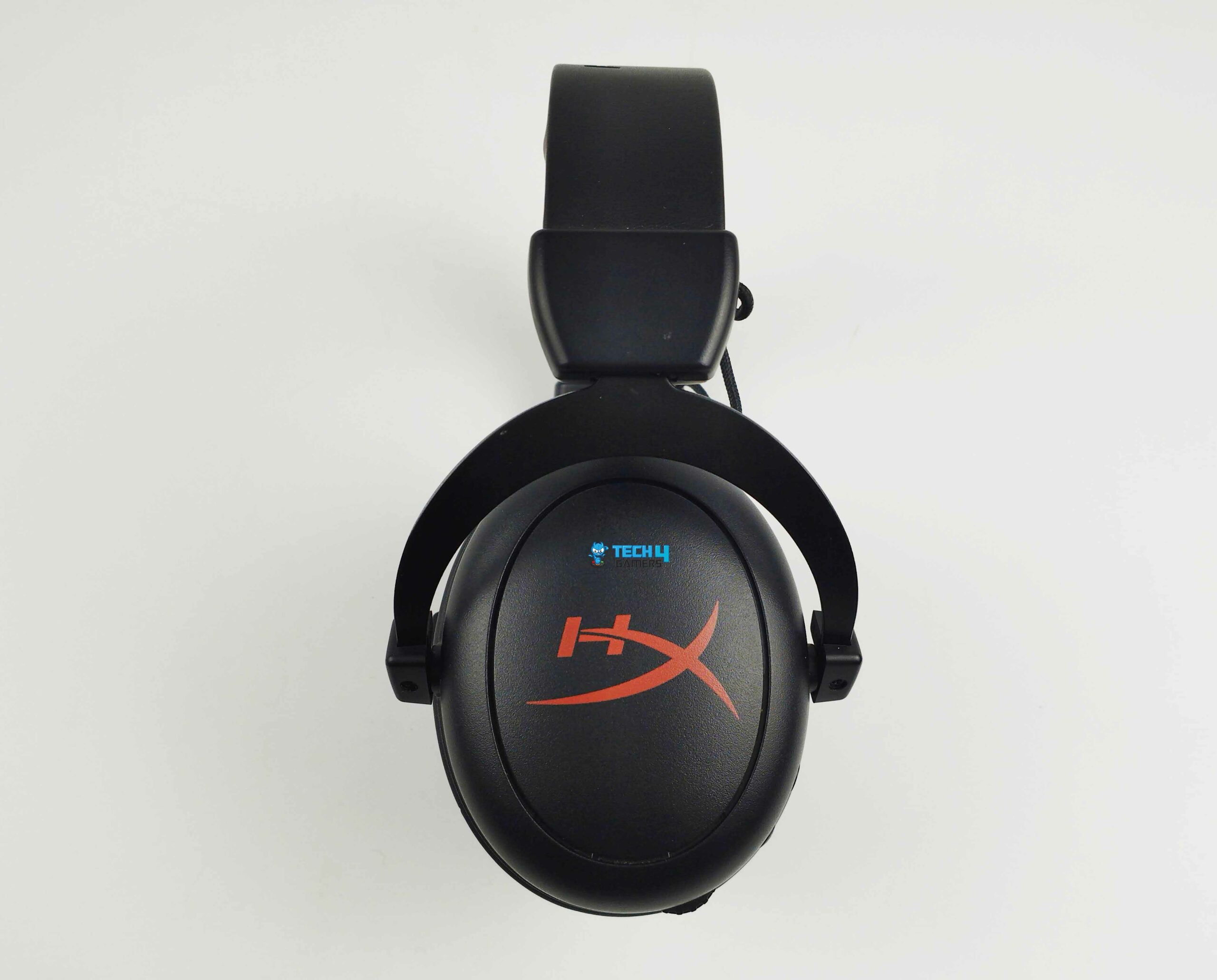
When comparing the two headsets, I find that the Cloud Core Wireless is more appealing due to its sleeker design and mainly black appearance. The only color accents are the red HyperX branding on each earcup. In addition, the Cloud Core Wireless’s more subdued design allows them to be used as headphones as well without any noticeable appearance, with the removable boom mic removed.
Moreover, HyperX has done an excellent job of keeping the dimensions compact, even though the sizes of conventional over-the-ear gaming headsets are gradually increasing. It’s built with such precision that when the headband is tucked in, the whole thing just measures 7.5 inches from bottom to top.
Comfort
Earcups (Image By Tech4Gamers)
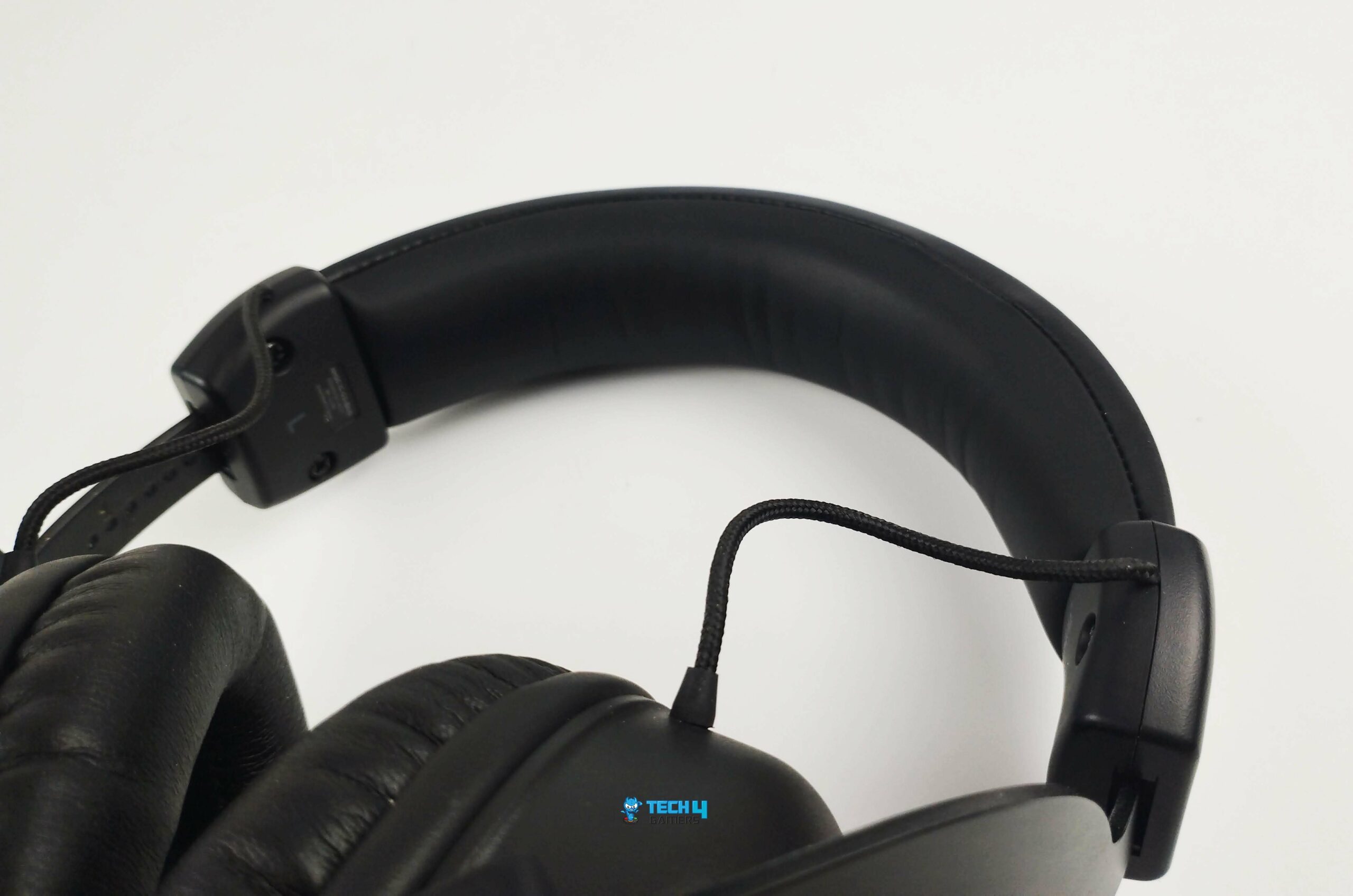
Headband (Image By Tech4Gamers)
Heavy and bulky headsets are a common cause of discomfort and distress for gamers. Nevertheless, the HyperX Cloud Core is lightweight and won’t put unnecessary stress on your ears or head. Upon first glance, it’s clear that it’s very lightweight compared to others in its category. The lightweight aluminum frame is responsible for the unit’s extremely light weight of 10.4 ounces.
If your ears have become used to the finest padding, they will be delighted by this as well. The earcups of the Cloud Core Wireless are very smooth and have a doughy texture. Nonetheless, with the exception of the biggest ears, they will fit snugly. Notably, leatherette padding under the top band ensures a comfortable fit all the way around,
It’s an extra thoughtful aspect that becomes useful during long gaming sessions. During long hours of usage, it won’t bother your ears. Even though it could become heated, it won’t be an issue while playing. In my opinion, the design and fitting of the headset are top-notch. Nevertheless, some may find them to be somewhat too tight.
Build Quality
Durable Flexibility (Image By Tech4Gamers)
The HyperX Cloud Core Wireless is comparable to the other headsets in the Cloud series in terms of built quality. The headband has round metal earcup holders that extend over the ears and provide great horizontal mobility for the cups. The aluminum frame is both strong and flexible, making it ideal for the headband and hinges.
You should not worry about damaging it by extending it too far. The product’s metal frame ensures that it stays in place. It has a solid, substantial feel throughout, more so than the majority of headbands available. The earcups are thick and sturdy, so they shouldn’t be too damaged if dropped by mistake.
Control Scheme
Control Scheme (Image By Tech4Gamers)
All the essential buttons are present on the headset. Onboard controls can be found on the left earcup, with subtle buttons on the side. A detachable noise-canceling microphone audio-in port, a volume knob, a USB Type-C charging connector, an on/off button with a corresponding LED, and a microphone mute button rounds up the control scheme.
Connectivity
2.4GHz Wireless Dongle (Image By Tech4Gamers)
The Cloud Core Wireless is compatible with PC, Switch, and PlayStation 5. This is convenient since it prevents the need to buy several headsets for your various gaming platforms. A reliable 2.4GHz wireless dongle ensures a constant connection that is unaffected by any interference within a close range. There are no unnecessary steps to go through, just pure simplicity with plug-and-play.
On the downside, the HyperX Cloud Core Wireless’s signal strength isn’t very impressive. The signal would occasionally go away even if I walked a few meters from my room to the other room. Because of this, whenever I have to step away from my computer, I simply remove it. However, if you’re not more than a few feet away or in the same room as the wireless dongle, then it shouldn’t be an issue.
WARNING: The HyperX Cloud Core Wireless has a limited signal range, and the connection might drop if you move too far from the dongle. To avoid interruptions, try to stay within a close range of your gaming setup while using the headset.
Software
DTS Sound Unbound (Image By Tech4Gamers)
Normally, I would go into tremendous detail about the headset’s software features, but unfortunately, we tinkerers don’t have access to such luxury with this headset. The Cloud Core Wireless isn’t compatible with HyperX’s Ngenuity software, so you can’t use it to adjust the volume manually or equalize the sound.
Does this matter? Considering the lack of RGB lighting and the seemingly outstanding sound balance, the answer is no. Thankfully, when it comes to the immersive listening experience and surround sound, it uses DTS Headphone: X. This is managed through the third-party DTS Sound Unbound app. The Sound Unbound app was simple to use and gave me two options for spatial audio profiles.
The first one is the default Balanced Mode, which made the music seem the most natural, and the second one is Spacious Mode, which made it seem like the sounds were coming from far away. The good news is that when you get the HyperX Cloud Core Wireless, you can use DTS Sound for free for two years. When the offer period ends, you will have to make a one-time payment of $29.95 if you want to continue using it.
Battery Life
According to HyperX, the battery life can go up to 20 hours. Obviously, this is going to differ from person to person based on how they use it. With just one charge for a week’s worth of use, I streamed various media, including music and movies, and played various games. I see no reason to doubt that claim. During my testing, I was able to prolong it to 25 hours. I don’t know whether it was luck or what, but the outcome is very impressive.
Of course, this extra battery life is only possible without RGB lighting and extravagant features. Charging the headset takes around 2-3 hours. Regarding use, while charging, the headset is indeed usable when plugged in, so you don’t have to worry about having any downtime in case the battery gets low while you’re playing competitive games.
Audio Performance
Aluminum Frame (Image By Tech4Gamers)
The sound quality is uncompromised. Thanks to the 53 mm drivers that are involved in the Cloud Core Wireless speaker system, which are responsible for its clear, authentic, and strong sound. Even though the headset sounded a little bass-heavy, I really liked listening to music on it. When the bass becomes a little too intense, it might overpower other elements in a song.
Still, this is the preferred sound for others, particularly while listening to electronic or hip-hop music. This headset excels at providing an immersive experience. Paying great attention to the audio’s tonal spectrum shows that the bass notes were deep and powerful, albeit they didn’t quite descend to the low level.
Moreover, both the mids and the highs were spot on. In general, the HyperX Cloud Core has quite remarkable wireless audio quality. The most fascinating part was that I could hear a wide variety of clear sounds without messing with sound effects, presets, or any of the other settings I usually use to achieve the same quality.
Gaming Performance
I really like that it incorporates DTS Headphone X Spacial Audio and that you can take advantage of its features without using any other software. By limiting distortion to a minimum, DTS provided positioning for immersive sound. Thanks to the 360-degree sound effects of footfalls, explosions, and falling debris, it seemed like the action was happening all around me.
When I use it in FPS titles, where the placement of the sound is essential, the headset goes from fantastic to outstanding. Everyone says it gives you an advantage in competitive titles, and it came true when I tested it in Valorant, Overwatch, and Warzone. With these headphones, I can hear every footfall, no matter how far up or from which direction they’re approaching.
Microphone
Microphone (Image By Tech4Gamers)
With the HyperX Cloud Core Wireless condenser mic, I had no trouble maintaining a clear and undistorted voice in my Discord conversations. In addition to being very flexible, the mic has a big boom that helps to reduce ambient noise. It snaps in and out with little effort. HyperX claims that its microphone features noise-canceling technology, and I must admit that I have never had any problems with background noise when playing games. Additionally, a button on the left earcup made it easy to mute the microphone.
PRO TIP: For the best voice clarity during gaming, position the detachable boom mic about one inch away from your mouth, slightly off-centre. This reduces breathing noises and provides clearer communication.
Should You Buy It Or Not?
Buy it if
✅ You Value Durability and Comfort: The HyperX Cloud Core Wireless features a robust aluminum frame and comfortable memory foam ear cushions.
✅ You Want Exceptional Audio Quality: With 53mm drivers, the Cloud Core Wireless delivers clear and powerful sound.
✅ You Need Multi-Platform Compatibility: This headset works seamlessly with PC, Switch, and PlayStation 5, making it a versatile choice for gamers with multiple platforms.
Don’t Buy it if
❌ You Require Extensive Audio Customization: The Cloud Core Wireless lacks software support for manual audio adjustments and equalizer settings.
❌ You Demand a Strong Wireless Range: The signal strength can be limited, especially if you move a few meters away from the dongle.
Final Verdict
If you’re looking for a gaming headset with premium sound quality but on a tighter budget, you don’t need to look further than the HyperX Cloud Core Wireless. It’s not only long-lasting and comfy, but it also folds into a little compact size. Arguably offering the most accurate surround sound experience while gaming, the supported spatial audio performs like nothing else. Not only that, it works with most of your gaming platforms, so you won’t need to buy extra headsets.