Home Blog Page 177

Hellraiser: Revival Will Take Violence In Games To A Whole New Extreme

Story Highlight
  • Hellraiser: Revival developers want as much violence as possible with the upcoming title.
  • They say Clive Barker’s involvement with the project gives them an extra edge.
  • However, they will keep the M rating restrictions in mind and follow them accordingly.

Hellraiser: Revival was announced back in July, with every bit of creepiness and horror as expected from the franchise. Clive Barker is returning to direct the game, and it looks like Saber Interactive won’t shy away from anything with the release. 

The studio says that with Hellraiser: Revival, it plans to take violence and body horror to a whole new extreme. They say that the title will push its M rating as far as possible and create something very close to the movies. 

Why it matters: Those who have seen the Hellraiser movies will know that they don’t shy away from anything, including violence and extreme adult content. The game will follow right in the franchise’s footsteps. 

Hellraiser game
Hellraiser: Revival will be a new extreme for violence in video games

In an interview with IGN, Saber Development chief Tim Willits stated that the studio plans to push Hellraiser as far as the people who set the rules regarding an M Rating will allow them. Therefore, it will feature some extreme levels of content. 

We are going to go as far as we possibly can, as far as the people that make rules will let us go

– Tim Willits

However, the studio says that it will still be responsible and stay within the restrictions. Willits says getting Clive Barker back on the project is great, as he knows the world and the characters the best and can improve them further. 

The original Pinhead actor returns for the Hellraiser game

Doug Bradley, the original actor for Pinhead, also marks his return. Combining all this, we might have a huge horror flick on our hands, especially in a time where horror is dominating with franchises like Resident Evil and Silent Hill. 

Unfortunately, there still isn’t a release window for the title. The studio did promise that it would reveal more details about Hellraiser: Revival soon. On the brighter side, it will be available on all major platforms. 

What are your thoughts on Hellraiser: Revival taking violence to a whole new extreme? Let us know your opinions in the comments or join the discussion at the official Tech4Gamers Forum

Intergalactic To Get Sequels And TV Adaptation In The Future, Naughty Dog CEO Teases

Story Highlight
  • Naughty Dog CEO Neil Druckmann claims Intergalactic will eventually see a sequel down the road.
  • Other potential projects, likely a TV adaptation, are also being discussed for the new game.
  • The team is currently focused on making Intergalactic the next big, fantastic Naughty Dog game.

Ever since the first official announcement, Intergalactic has been described as Naughty Dog’s next big thing after The Last of Us. This sentiment has not stuck with fans due to many concerns, but Naughty Dog certainly has big plans for the future of the series. 

Now, Naughty Dog CEO Neil Druckmann has clarified some of these plans for Intergalactic: The Heretic Prophet. He claims that the action-adventure game will eventually see a sequel as long as it sells well.

Why it matters: Despite controversies and hesitation of gamers, it’s clear that Neil Druckmann is quite confident in Intergalactic: The Heretic Prophet. He eventually wants to grow the game into a full-fledged franchise, similar to The Last of Us.

intergalactic lead
Intergalactic has been under controversy for various reasons since its reveal.

In an interview with Variety, Neil adds that Intergalactic will become a franchise if everything goes in its favor. However, the CEO is unsure whether the sequel would be Naughty Dog’s immediate project after Intergalactic launches.

I’m sure if Intergalactic is successful, you will see it again. Whether that will be our next game right after that, I can’t say, and I leave that door open.

-Neil Druckmann, Naughty Dog CEO.

Several Intergalactic TV and film projects are being explored, as the game’s story would lend itself well to adaptations. With the right partnership, Neil believes they will come to fruition as long as Intergalactic does well as a game.

There’s some interesting conversations happening about potential projects that could come down in the future.

The game needs to perform really well to become a full-fledged IP.

In the same interview, the CEO describes Intergalactic as the evolution of all its games, as it is turning out to be the studio’s most expansive and expensive game yet. On a side note, multiple The Last of Us projects are also in the works right now.

Do you think Intergalactic will become a renowned franchise like The Last of Us, or will the controversies prevent Neil’s ideals from being realized? Let us know your thoughts in the comments below, or join the discussion on the Tech4Gamers forum.

BIOSTAR Launches EdgeComp MS-NANX 8G/16G With NVIDIA Jetson Orin NX

[Press Release] BIOSTAR has launched the EdgeComp MS-NANX 8G/16G, a fanless edge AI solution powered by NVIDIA Jetson Orin NX with Super Mode, delivering up to 157 TOPS of AI performance. Built for real-time workloads, it supports applications in smart retail, industrial automation, transportation, smart cities, and agriculture.

The system supports NVIDIA Jetson Orin NX 16GB and 8GB modules, combining a 1024-core Ampere GPU with 32 Tensor Cores, up to an 8-core Arm Cortex-A78AE CPU, and LPDDR5 memory offering 102.4 GB/s bandwidth. It can run advanced generative AI models, including LLMs, VLMs, and DeepSeek R1.

Expansion options include M.2 slots for NVMe SSDs, Wi-Fi, Bluetooth, and 4G/5G via Nano SIM. I/O ports cover dual Ethernet (1GbE + 2.5GbE with PoE), four USB 3.2, HDMI 2.1, RS232/422/485, CAN interface, and audio. Optional dual GMSL camera support enables vision-based AI.

Its fanless chassis ensures operation in temperatures ranging from -20°C to 50°C, with a 12V–20V DC input via a barrel jack or 2-pin terminal. Compact and durable, it is optimized for field and embedded use.

Running Linux with NVIDIA JetPack 6.2, the system supports modern AI tools, simplifying deployment across diverse industries and ensuring long-term adaptability.

Battlefield 6 Snipers Can Deploy Dummy Decoys To Trick Enemies

Story Highlight
  • According to the latest leaks, sniper decoys are making a return in Battlefield 6.
  • When placed correctly, these decoys can fool enemy snipers, giving you the upper hand in battle.
  • However, many fans are not fond of this feature, calling it a gimmick that only new players are likely to fall for.

Battlefield 6 is shaping up to be a great release and a worthy contender to clash with Call of Duty. This game now has a real chance at the throne and is likely to usurp it, showing total dominance.

According to a report, the developer wants the game to reach 100 million players. This goal seemed far-fetched at first, but following the multiplayer reveal and a successful beta, many opinions have changed.

Those looking forward to this game should know there is going to be another addition. In Battlefield 6, sniper decoys are making a comeback through the recon class, which may make your experience even better.

Why it matters: Not all Battlefield games have had this feature, so fans are excited to see it return in a game they are really enthusiastic about.

Sniper Decoys Battlefield 6
Sniper Decoys Are Coming Back In Battlefield 6 | Source: Twitter

C4Bunny, on X (formerly known as Twitter), shared leaked footage revealing that the sniper decoy is back. While this can be a useful feature, the majority of players aren’t really fans of it.

That said, Battlefield 6 is likely to attract many new players who may be more prone to fall for this trick, which could make the experience more fun for veterans.

Many are calling it a gimmick and useless, but if the developers manage to make it close enough to the original, a lot of players will fall for it, which is likely to enhance the gameplay.

battlefield 6
Former Blizzard Boss Thinks Battlefield 6 Will Boot Stomp COD This Year

You are likely to have three decoys in total. It has worked in previous Battlefield games, so it won’t be surprising if it works in the upcoming one too.

Keep in mind, nothing has been officially confirmed as this isn’t final. While the leak confirms that sniper decoys are in the game, it also means there could be last-minute changes.

What are your thoughts on sniper decoys making a comeback? Let us know in the comments section below, or join the official Tech4Gamers forums for discussion.

Colorful Rimbook S1: Affordable 14-Inch Laptop for Everyday Use

[Press Release] Colorful Technology Company Limited has launched the Rimbook S1, a compact and budget-friendly 14-inch laptop built for students, home users, and professionals. It strikes a balance between portability, performance, and value, making it a solid choice for everyday tasks.

The Rimbook S1 weighs just 1.48 kg with a slim 17.95 mm profile. Its 14-inch 1920×1200 display uses a 16:10 aspect ratio, giving users more vertical space for productivity.

Powered by up to an Intel Core i5-13420H with 16GB DDR4 memory and a 512GB SSD (expandable), the laptop ensures smooth multitasking and quick responsiveness for work and entertainment.

A 60Wh battery with 65W fast charging keeps it running through the day. For networking, it supports Wi-Fi 6 and 2.5Gbps Ethernet, while multiple ports, including USB-C, HDMI, and USB-A, add versatility. A physical camera and microphone switch enhances privacy.

The Rimbook S1 (i5-13420H, 16GB, 512GB SSD) is priced at US$439 (excluding tax), with availability varying by region.

Gearbox Shares Borderlands 4 Nvidia Optimization Guide – Performance Tweaks May Take 15 Minutes To Apply

Story Highlight
  • Borderlands 4 seems to run poorly across a variety of PC configurations.
  • Gearbox has shared a massive optimization chart from Nvidia in an attempt to address the problem.
  • The developer also suggests waiting around 15 minutes for changes to take effect.

Borderlands 4 has not been out for too long, and the title is showing positive numbers on Steam already. Critic reviews have also been encouraging, but gamers have one major grievance with Gearbox.

Following pre-release concerns, this Unreal Engine 5 title seems to be struggling to run on most PCs. This has even led to a slew of negative reviews on Steam, with Gearbox sharing an Nvidia optimization guide to provide a potential solution.

Why it matters: Unreal Engine 5 games have a tendency to run poorly, and Borderlands 4 does little to stray away from this trend.

Borderlands 4
Borderlands 4 Optimization Guide via Steam

Over on Steam, Gearbox has shared an incredibly extensive list of settings for GPUs like the RTX 2070, RTX 3080, RTX 5060 Ti, and more.

These settings also cover resolutions from 1080p to 4K, according to Nvidia’s suggestions. For instance, mostly Low settings are suggested for a GPU like the RTX 2070 with DLSS Quality for 30FPS or more at 1080p.

Meanwhile, Medium settings with DLSS Quality and Frame Generation are recommended for 60FPS at 1080p for a GPU like the RTX 5060 Ti. Needless to say, Borderlands 4 is not easy to run, even when using higher-end hardware.

Gearbox has also noted that gamers should wait up to 15 minutes for shaders to compile and performance changes to fully come into effect.

Please keep playing for at least 15 minutes to see how your PC’s performance has changed.

borderlands 4
borderlands 4

Because the game has already racked up thousands of negative reviews, this Steam post appears to be more of a band-aid than a proper fix for Borderlands 4’s major issues. PC gamers are still anticipating big changes to the core optimization in the future.

What do you make of the game’s biggest problems? Let’s discuss in the comments and on the Tech4Gamers Forums.

Naughty Dog Confirms Working on Multiple The Last of Us Projects

Story Highlight
  • Naughty Dog has confirmed it’s not done with The Last of Us franchise.
  • Neil Druckmann revealed in a recent interview that multiple TLOU projects are currently in development.
  • While several projects are in the works, the studio’s main focus is Intergalactic, the biggest game Naughty Dog has ever worked on.

The Last of Us is one of the best PlayStation series, praised for its unparalleled gameplay and unique story.

However, many fans were dissatisfied with how TLOU 2 ended and have been demanding a sequel for a long time. While the studio continues to capitalise on the only two games in the franchise, reports reveal that a third instalment has already been confirmed.

Beyond that, Neil Druckmann has revealed that multiple The Last of Us projects are currently in development, aside from the TV show.

Why it matters: This is huge news for fans of the franchise, as it means the developer is working on several titles, not just TLOU 3.

The Last of Us Part 2 Region Locked PC
Neil Druckmann has Confirmed That Multiple TLOU Games Are In Development

In a recent interview with Variety, Neil Druckmann was asked when he decided to step away from the TV show and return to Naughty Dog full-time. He explained that the decision came just as they were about to start the writers’ room for Season 3, and he realised there was a lot on his plate at the studio.

Druckmann revealed that multiple Last of Us projects are currently in development aside from the show, confirming that the developer has major plans for the franchise.

 With all the various “Last of Us” things I’m working on — not just the show — with all the various games I’m working on, the biggest one that takes up most of my time is “Intergalactic: The Heretic Prophet.”

Community Impact
Naughty Dog Cancelled TLOU Standalone Multiplayer Project to Focus on Single-Player Games

Druckmann didn’t reveal any specific details about the ongoing projects. A standalone multiplayer title was already cancelled a while ago, so it’s unlikely that its development has resumed.

In the same interview, Druckmann mentioned that there’s a lot happening in The Last of Us universe that hasn’t been announced yet.

As of now, nothing has been officially confirmed, but it’s clear that multiple TLOU projects are in development.

What are your thoughts on multiple TLOU projects being in the works? Share them with us in the comments section below or join the official Tech4Gamers forums for discussion.

Borderlands 4 Hits Record Launch With Over 200K Players

Story Highlight
  • Borderlands 4 launches to 207k in just under 24 hours of its release, marking the series’ biggest launch.
  • The previous record was held by Borderlands 2, with a peak of 123k players.
  • Despite a successful launch, Borderlands 4 is plagued by technical issues that are holding it back from its true potential.

The marketing for Borderlands 4 has been a rollercoaster of bumps and turns, with the game crashing in a promo video and reviewers complaining about the game’s terrible performance. 

Regardless of that, the game is already a success at launch, and these issues weren’t enough to hold the game back. In fact, Borderlands 4 launched to 207k concurrent players at launch, which is the biggest in the series.

Why it matters: Despite the negative PR and public perception due to the technical issues surrounding the game, one would think that Borderlands 4 wouldn’t be so successful. However, the IP is too big to be dragged down by these problems.

borderlands 4 steam charts
Borderlands 4 Player Count Was Surprisingly High Considering All The Issues The Game Has || SteamDB

It hasn’t even been 24 hours since the game’s launch, and Borderlands 4 has surpassed Borderlands 2 in terms of player count. Previously, Borderlands 2 held the record of a peak player count of 123k players.

It’s only right that Borderlands 4 beats this record by 84k players, considering that it is regarded as a spiritual successor to Borderlands 2.

The upcoming weekend will potentially see a bigger rise in player count with more gamers joining in. However, be wary of the fact that Borderlands 4 is quite a demanding game and can even give GPUs like the RTX 5080 a run for its money.

It’s no surprise, though, since the title is made on Unreal Engine 5, but it may be one of the worst games created on the engine.

As such, 40% of the game’s reviews on Steam are negative. Moreover, the Gearbox CEO also told fans to be wary of the game’s performance, noting that it will struggle on low-end hardware, but it isn’t working very well on high-tier setups either.

Aside from performance, most reviews for the game have been positive, and it may feature the series’ best gameplay, combat, and open world. However, the lows are too big to ignore, and these technical issues may hold the game back from its true potential.

Have you played Borderlands 4 yet? If yes, then what are your thoughts on the game? Let us know in the comments below, or at the official Tech4Gamers Forums.

Borderlands 4 Slammed on Steam With Negative Reviews Over Performance Issues

Story Highlight
  • Borderlands 4 recently launched to over 200,000 concurrent players on Steam.
  • Despite the strong numbers, the game suffers from severe performance issues, with fans dubbing it Stutterlands and Crashlands.
  • It performs especially poorly on the Steam Deck, dropping to as low as 8 FPS, even on the lowest settings with upscaling enabled.

Before release, many reports revealed that the performance of Borderlands 4 was poor, causing major concern among the fandom, as it also crashed during a promo.

Fans were genuinely worried because not only is it a UE5 game, but it also includes Denuvo DRM and Symbiote, all of which make the performance even worse.

That said, the CEO confirmed that the day-one patch would fix many issues, but it didn’t do much. The game is now flooded with negative reviews on Steam, mainly due to severe performance problems. It is also almost unplayable on the Steam Deck.

Why it matters: It’s becoming common for UE5 games to perform poorly at launch, but this mostly happens because of developer laziness.

Borderlands 4 Is Being Called Stutterlands
Borderlands 4 Is Being Called Stutterlands By Fans | Source: Steam

The game was released to mostly negative reviews on Steam, though that rating has since shifted to mixed, with over 40% of reviews still being negative.

Most of the criticism revolves around poor performance, something many had warned about before launch, expecting it to be another technical mess.

Terrible optimization. Another Unreal Engine 5 casualty. Not worth buying in its current state unless you have a NASA PC.

Terrible, terrible performance. Worst I’ve ever seen. Turned it down to Low graphics presents and couldn’t hit 60 FPS, even with FSR upscaling on my RX 6900 XT.

Despite the severe performance issues, even on high-end hardware, the launch was commercially successful. Borderlands 4 reached over 200,000 concurrent players at launch, and that number is expected to climb over the weekend.

It’s also worth noting that the game is nearly unplayable on the Steam Deck. Several users who tried running it on the handheld device refunded it immediately due to the poor experience.

On the Steam Deck, the game typically runs at around 22 FPS, but it frequently drops to as low as 8–9 FPS, making the experience borderline unplayable. This was tested by SteamDeckHQ using the lowest settings possible, along with the best available upscaling option.

What are your thoughts on Borderlands 4 having these issues at launch? Let us know in the comments below, or join the official Tech4Gamers forums to join the discussion.

Best Motherboards For Ryzen 7 9800X3D – Our Recommendations

AMD’s X3D processors are some of the most famous gaming CPUs on the market. The Ryzen 7 7800X3D has been hailed as the best gaming CPU for a long time. However, it’s time a successor comes along. Instead of the competition taking the win, AMD’s brand new Ryzen 7 9800X3D shows an impeccable 25% boost in single-core and multi-core tasks. In our Ryzen 7 9800X3D review, we saw great performance across the table, but if you’re buying such a beast, you’ve to pair it with the right motherboard. That said, I have rounded up the best motherboard for Ryzen 7 9800X3D. 

Why Trust Tech4Gamers
  • Usman Saleem is our hardware tester who loves to put all the latest GPUs, CPUs, RAM, and motherboards for a spin.
  • 40+ motherboards tested and reviewed by our team of hardware experts (Tech4Gamers Team).
  • 800+ hours spent testing different motherboards for our reviews.
  • Objective testing criteria (See how we test motherboards).

At Tech4Gamers, ensuring you get reliable information is our priority. That’s why every hardware round-up undergoes a meticulous review process by our team of experts and editors. Each review is carefully examined against our strict editorial guidelines, guaranteeing you trustworthy insights you can depend on.

Here’s a comparison table to show you our best motherboard offerings at a glance:

Motherboard
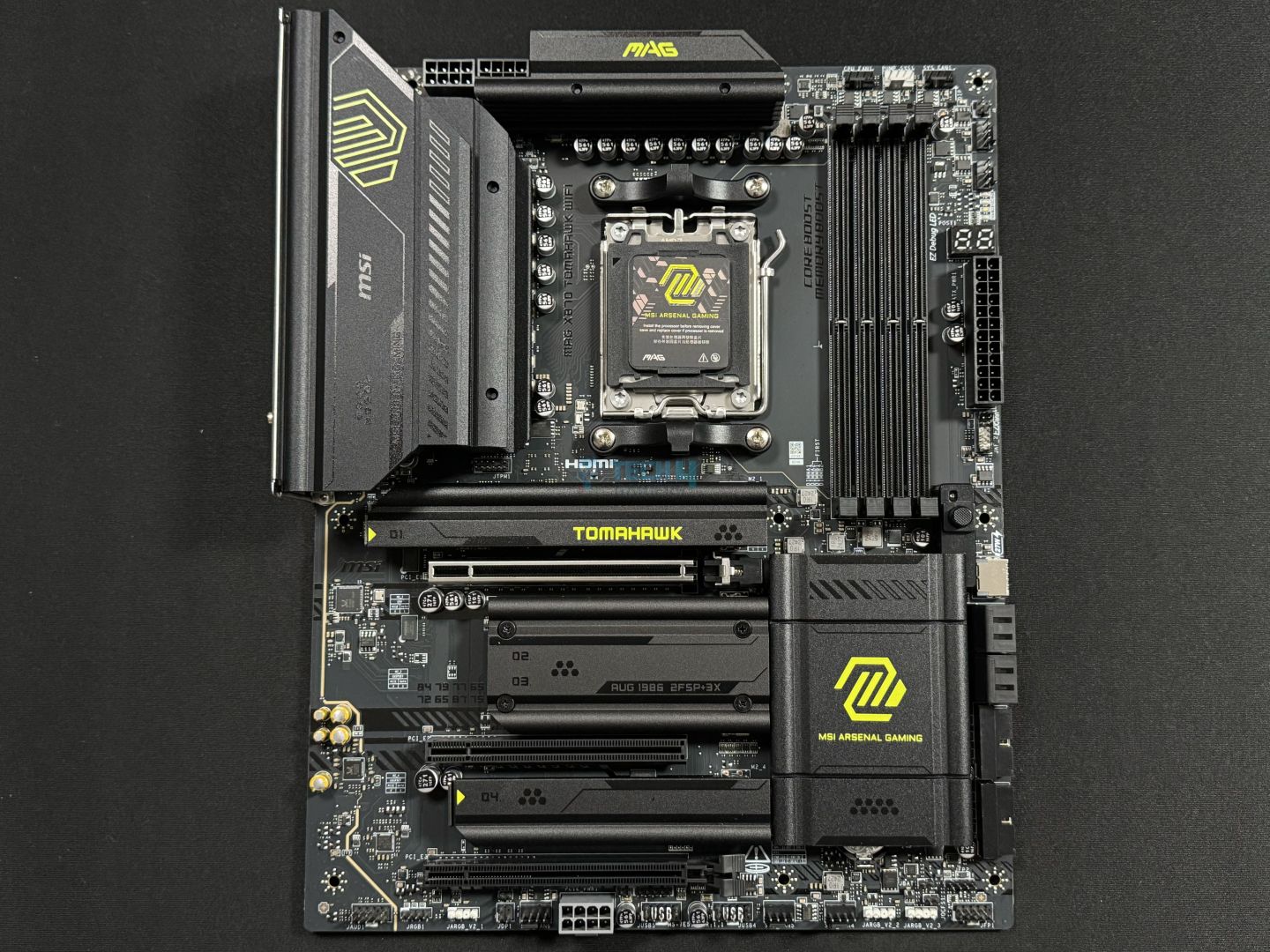
MSI MAG X870 Tomahawk WiFi
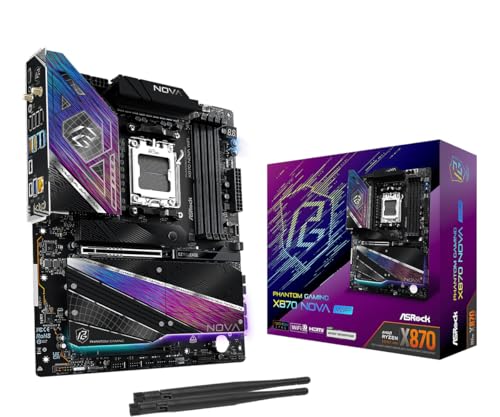
ASRock Phantom Gaming X870 Nova WiFi
MSI MPG X870E Edge Ti WiFi
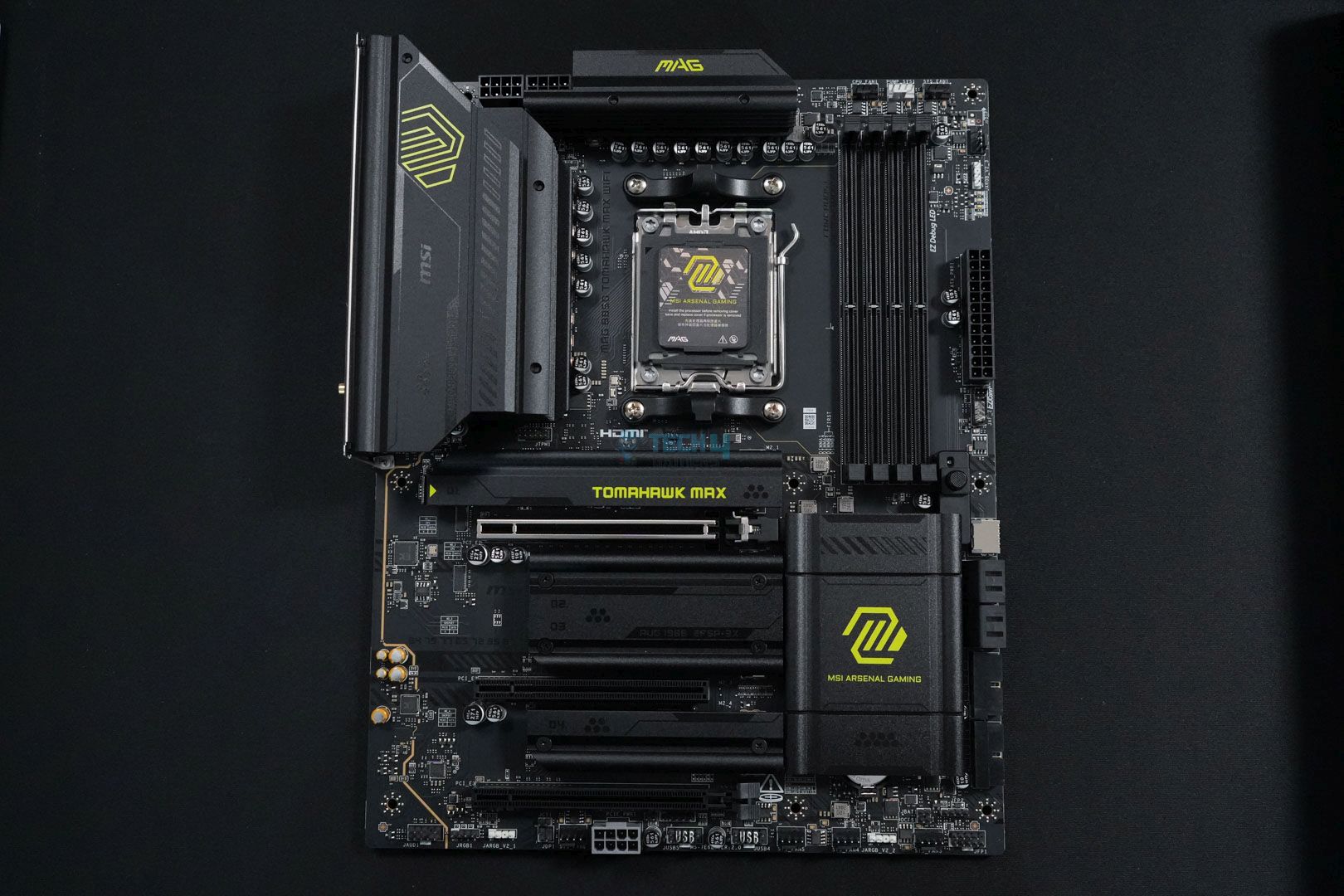
MSI MAG B850 Tomahawk Max WiFi
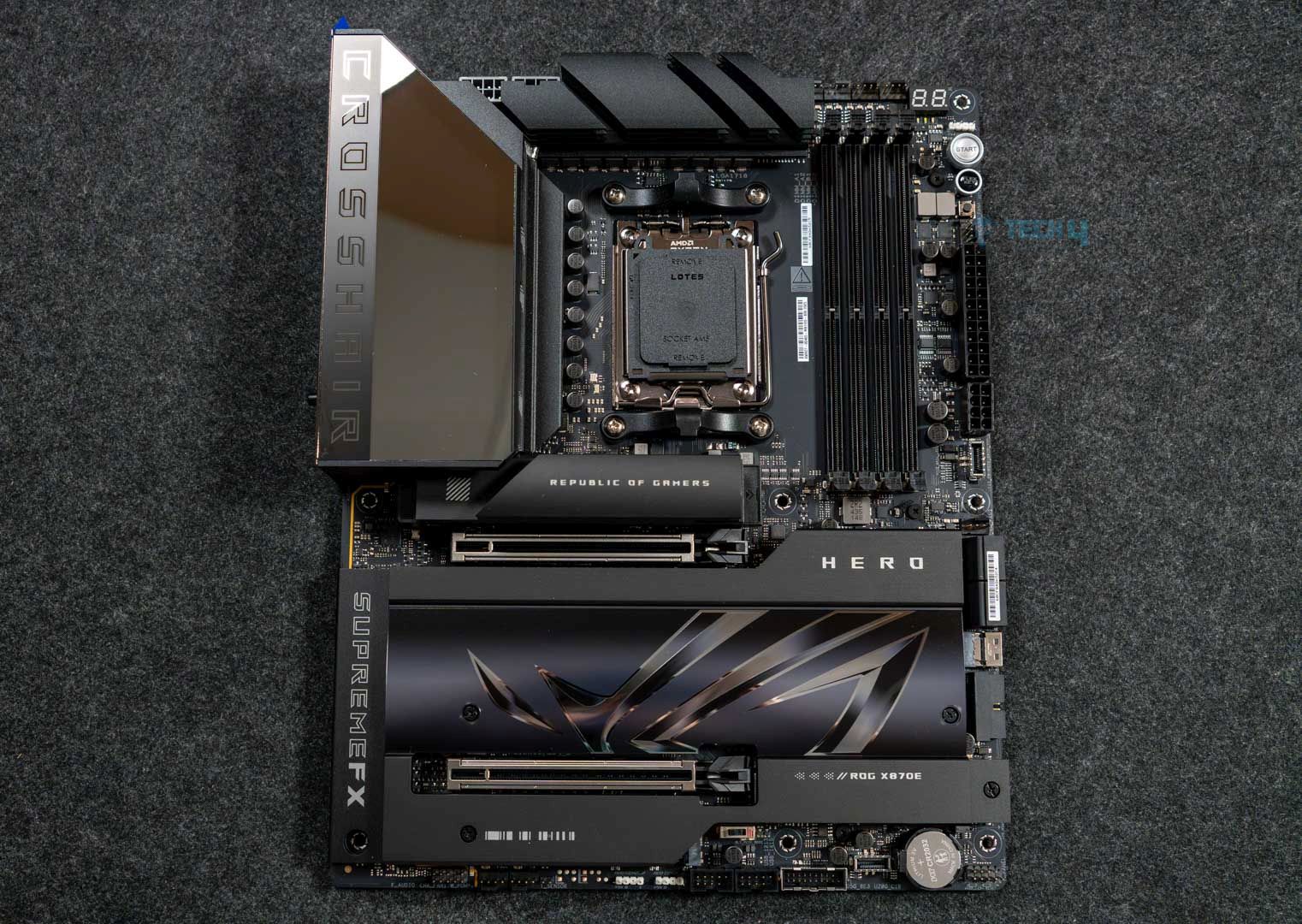
ASUS ROG Crosshair X870E Hero
Looks
MSI MAG X870 Tomahawk WiFi Gaming Motherboard (AMD Ryzen 9000/8000/7000 Series Processors, AM5, DDR5, PCIe 5.0, M.2 Gen5, SATA 6Gb/s, USB 40Gbps, HDMI/DP, Wi-Fi 7, Bluetooth 5.4, 5Gbps LAN, ATX)
ASRock X870 Nova WiFi AM5 Flagship Motherboard | AMD Ryzen 9000/8000/7000 | DDR5 8400+ (OC) | Dual USB4 | PCIe 5.0 | WiFi 7 | 18+2+1 Power Phase | 5GbE LAN
MSI MPG X870E Edge TI WiFi Motherboard, ATX - Supports AMD Ryzen 9000/8000 / 7000 Processors, AM5-80A SPS VRM, DDR5 Memory Boost 8400+MT/s (OC), PCIe 5.0 x16, M.2 Gen5, Wi-Fi 7, 5G LAN
MSI MAG B850 Tomahawk MAX WiFi Motherboard, ATX - Supports AMD Ryzen 9000/8000 / 7000 Processors, AM5-80A SPS VRM, DDR5 Memory Boost 8400+ MT/s (OC), PCIe 5.0 x16, M.2 Gen5, Wi-Fi 7, 5G LAN
ASUS ROG Crosshair X870E Hero AMD X870E AM5 ATX Motherboard, Advanced AI PC Ready, 18+2+2 Power Stages, DDR5, PCIe® 5.0, 5X M.2, Wi-Fi 7, USB4®, AI Overclocking, Core Flex, PCIe Slot Q-Release Slim
Award
Best Overall Motherboard For Ryzen 7 9800X3D
Best High-End Motherboard For Ryzen 7 9800X3D
Best White Motherboard For Ryzen 7 9800X3D
Best Budget Motherboard For Ryzen 7 9800X3D
Best OC Motherboard For Ryzen 7 9800X3D
What We Liked
Connectivity, performance, cool VRMs, design, EZ DIY features, MSI AI LAN manager
Design, VRMs, M.2 slots, Cooling, Price, Connectivity
Excellent performance with 14+2+1 VRM design, Great Thermals, PD charging, Beautiful looks
Affordable, Good VRM Structure, Plenty of Cooling
Great performance and VRM cooling, Pleasing design, 5x M.2 slots, 60W charging support
What We Disliked
No RGB, lack of SATA connectors
Lane sharing, 2x SATA connectors
M2_2 & USB4 port shares bandwidth 
USB 4.0 missing
No 10G LAN, Expensive
Chipset
AMD X870
AMD X870
AMD X870E
AMD B850
AMD X870E
Memory
DDR5 8,400+ (OC)
DDR5 8,400+ (OC)
DDR5 8,400+ (OC)
DDR5-8400 (OC)
DDR5-8200 (OC)
VRM
14+2+1
18+2+1
14+2+1
14+2+2
18+2+2
Storage
4x M.2, 4x SATA III
5x M.2, 2x SATA III
4x M.2, 4x SATA III
4x M.2, 4x SATA
5x M.2, 4x SATA
USB Ports
11x Rear, 9x Front
11x Rear, 9x Front
12x Rear, 9x Front
10x Rear, 9x Front
10x Rear, 10x Front
RGB
Motherboard
MSI MAG X870 Tomahawk WiFi
Looks
MSI MAG X870 Tomahawk WiFi Gaming Motherboard (AMD Ryzen 9000/8000/7000 Series Processors, AM5, DDR5, PCIe 5.0, M.2 Gen5, SATA 6Gb/s, USB 40Gbps, HDMI/DP, Wi-Fi 7, Bluetooth 5.4, 5Gbps LAN, ATX)
Award
Best Overall Motherboard For Ryzen 7 9800X3D
What We Liked
Connectivity, performance, cool VRMs, design, EZ DIY features, MSI AI LAN manager
What We Disliked
No RGB, lack of SATA connectors
Chipset
AMD X870
Memory
DDR5 8,400+ (OC)
VRM
14+2+1
Storage
4x M.2, 4x SATA III
USB Ports
11x Rear, 9x Front
RGB
Amazon
Newegg
Review
Motherboard
ASRock Phantom Gaming X870 Nova WiFi
Looks
ASRock X870 Nova WiFi AM5 Flagship Motherboard | AMD Ryzen 9000/8000/7000 | DDR5 8400+ (OC) | Dual USB4 | PCIe 5.0 | WiFi 7 | 18+2+1 Power Phase | 5GbE LAN
Award
Best High-End Motherboard For Ryzen 7 9800X3D
What We Liked
Design, VRMs, M.2 slots, Cooling, Price, Connectivity
What We Disliked
Lane sharing, 2x SATA connectors
Chipset
AMD X870
Memory
DDR5 8,400+ (OC)
VRM
18+2+1
Storage
5x M.2, 2x SATA III
USB Ports
11x Rear, 9x Front
RGB
Amazon
Newegg
Review
Motherboard
MSI MPG X870E Edge Ti WiFi
Looks
MSI MPG X870E Edge TI WiFi Motherboard, ATX - Supports AMD Ryzen 9000/8000 / 7000 Processors, AM5-80A SPS VRM, DDR5 Memory Boost 8400+MT/s (OC), PCIe 5.0 x16, M.2 Gen5, Wi-Fi 7, 5G LAN
Award
Best White Motherboard For Ryzen 7 9800X3D
What We Liked
Excellent performance with 14+2+1 VRM design, Great Thermals, PD charging, Beautiful looks
What We Disliked
M2_2 & USB4 port shares bandwidth 
Chipset
AMD X870E
Memory
DDR5 8,400+ (OC)
VRM
14+2+1
Storage
4x M.2, 4x SATA III
USB Ports
12x Rear, 9x Front
RGB
Amazon
Newegg
Review
Motherboard
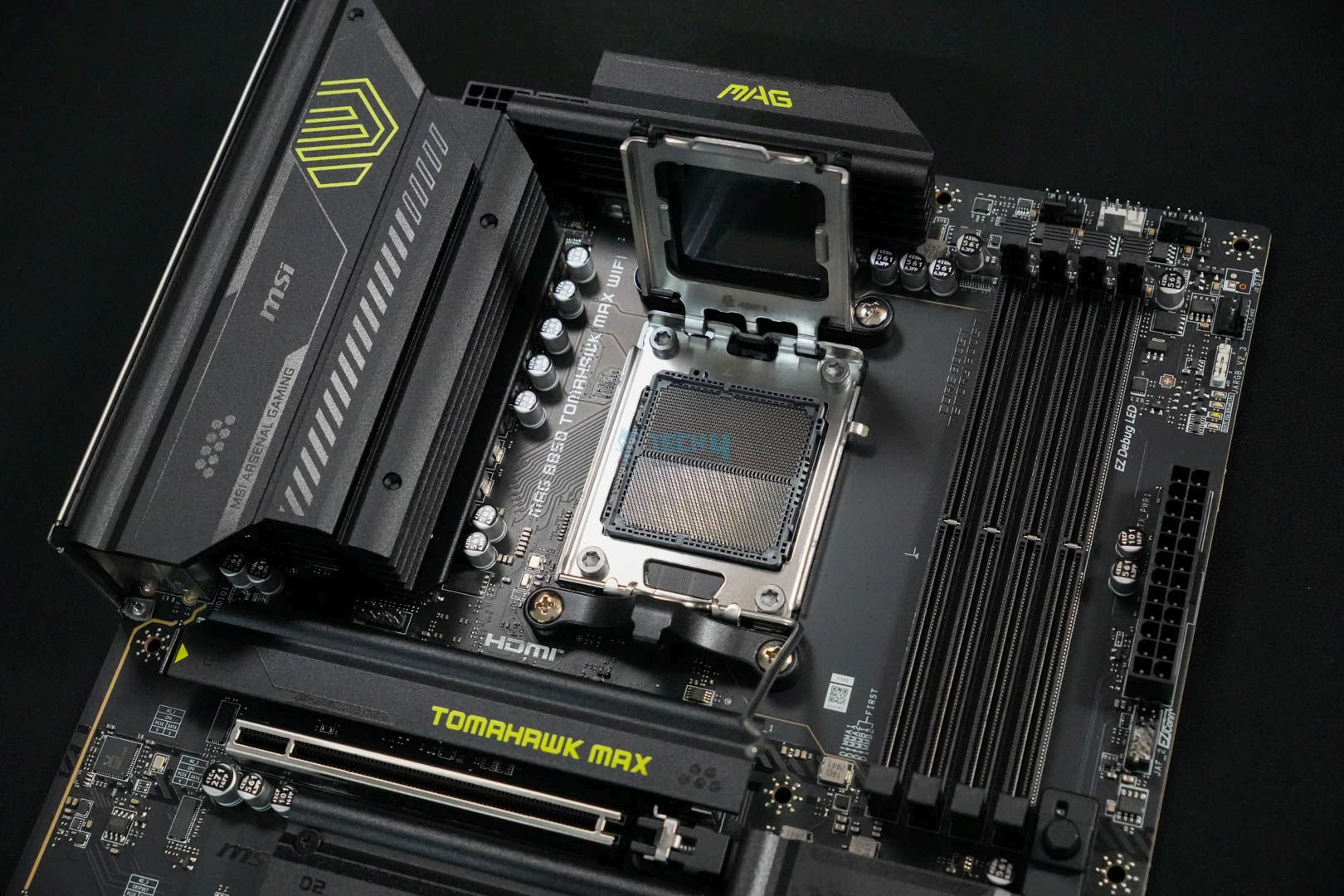
MSI MAG B850 Tomahawk Max WiFi
Looks
MSI MAG B850 Tomahawk MAX WiFi Motherboard, ATX - Supports AMD Ryzen 9000/8000 / 7000 Processors, AM5-80A SPS VRM, DDR5 Memory Boost 8400+ MT/s (OC), PCIe 5.0 x16, M.2 Gen5, Wi-Fi 7, 5G LAN
Award
Best Budget Motherboard For Ryzen 7 9800X3D
What We Liked
Affordable, Good VRM Structure, Plenty of Cooling
What We Disliked
USB 4.0 missing
Chipset
AMD B850
Memory
DDR5-8400 (OC)
VRM
14+2+2
Storage
4x M.2, 4x SATA
USB Ports
10x Rear, 9x Front
RGB
Amazon
Newegg
Review
Motherboard
ASUS ROG Crosshair X870E Hero
Looks
ASUS ROG Crosshair X870E Hero AMD X870E AM5 ATX Motherboard, Advanced AI PC Ready, 18+2+2 Power Stages, DDR5, PCIe® 5.0, 5X M.2, Wi-Fi 7, USB4®, AI Overclocking, Core Flex, PCIe Slot Q-Release Slim
Award
Best OC Motherboard For Ryzen 7 9800X3D
What We Liked
Great performance and VRM cooling, Pleasing design, 5x M.2 slots, 60W charging support
What We Disliked
No 10G LAN, Expensive
Chipset
AMD X870E
Memory
DDR5-8200 (OC)
VRM
18+2+2
Storage
5x M.2, 4x SATA
USB Ports
10x Rear, 10x Front
RGB
Amazon
Newegg
Review

Latest Update:


  • May 5, 2026: We’ve swapped the ASRock X870E Taichi Lite with the ASRock Phantom Gaming X870 Nova WiFi, as it’s a better fit for the Ryzen 7 9800X3D after reviewing the motherboard.
  • September 12, 2025: After reviewing the MSI MPG X870E Edge Ti WiFi, we found it better suited for the best white category, hence we’ve swapped it with the ASRock X870 Steel Legend WiFi.

If you are considering the 9800X3D, our team has also rounded up the top CPU coolers and RAM options to pair with the CPU.

Best Motherboard For Ryzen 7 9800X3D

Here’s a list of all the motherboards I have chosen for their various unique traits based on my hands-on experience and testing:

  1. Best Overall: MSI MAG X870 Tomahawk WiFi
  2. Best High-End: ASRock Phantom Gaming X870 Nova WiFi
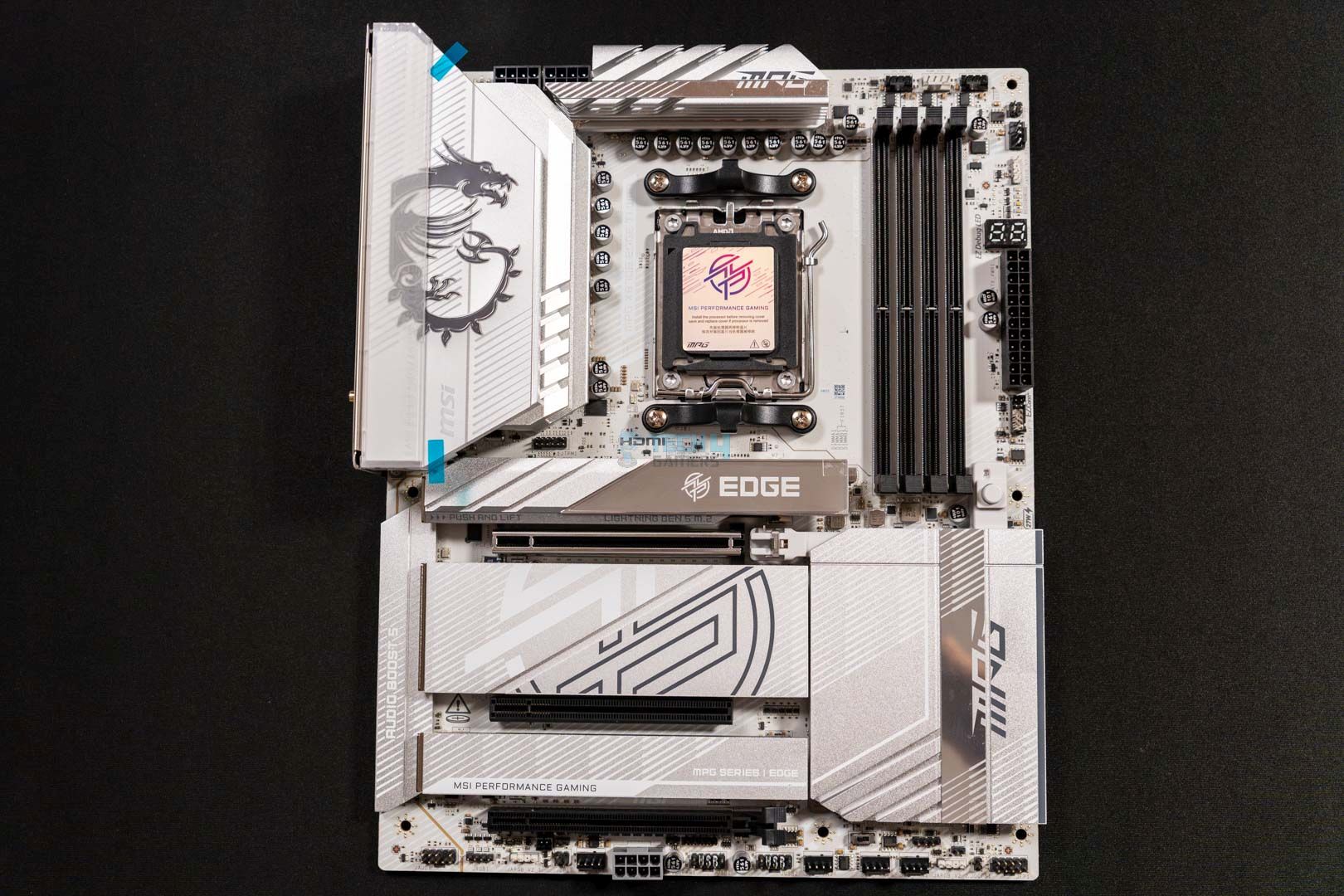
  3. Best White: MSI MPG X870E Edge Ti WiFi
  4. Best Budget: MSI MAG B850 Tomahawk Max WiFi
  5. Best Overclocking: ASUS ROG Crosshair X870E Hero

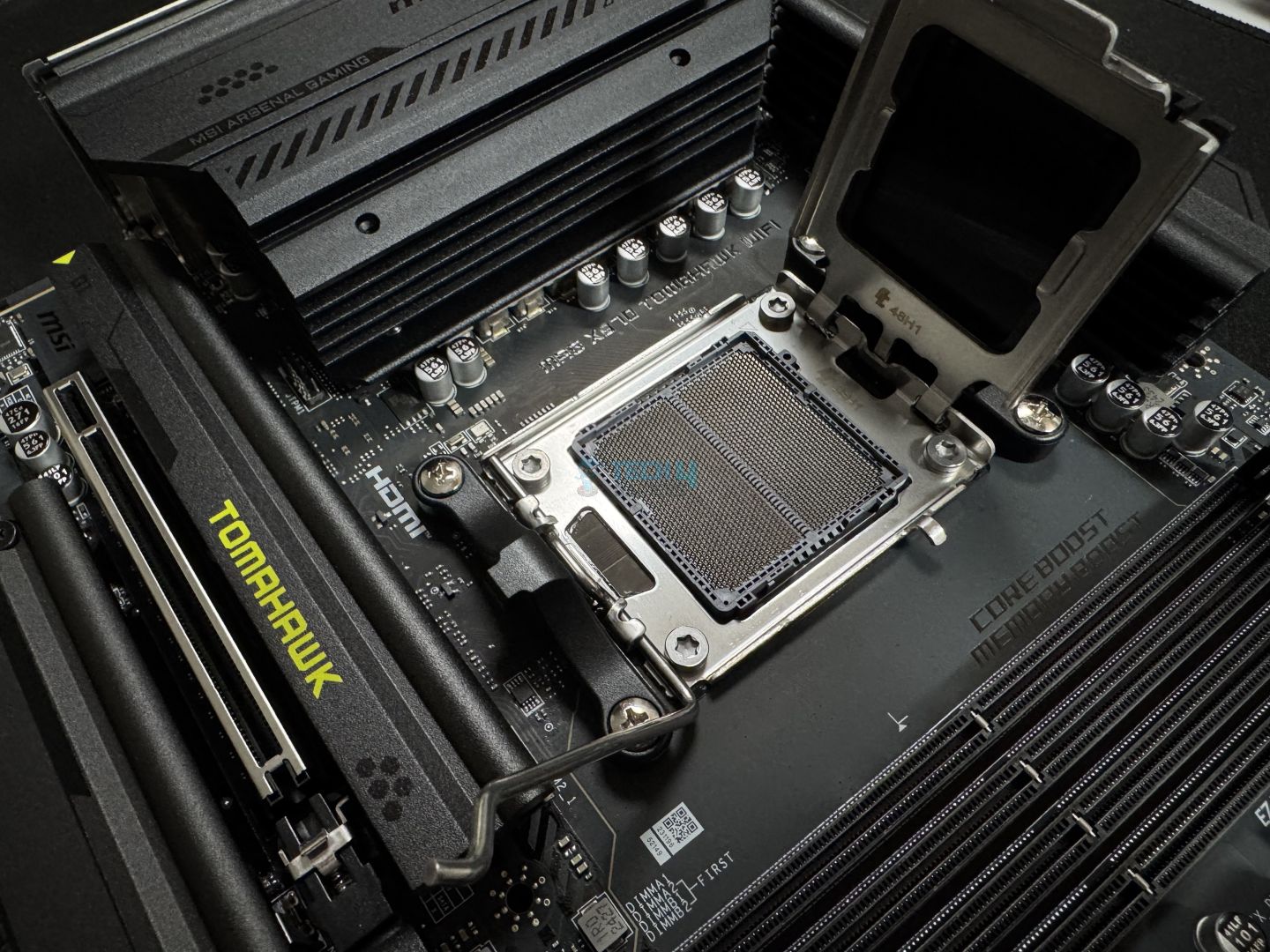
MSI MAG X870 Tomahawk WiFi

Best Overall Motherboard For Ryzen 7 9800X3D

Chipset: AMD X870 | Memory: DDR5 8,400+ (OC) | VRM: 14+2+1 | Video Outputs: HDMI 2.1, 2x Type-C DisplayPort, USB4 Port, DisplayPort 1.4 | RGB Lighting: No | Network: WiFi 7, Realtek 5G LAN, Bluetooth 5.4 | Storage: 4x M.2, 4x SATA III | USB Ports: 11x Rear, 9x Front

Pros

  • Decent connectivity options
  • Solid performance
  • VRMs run quite cool
  • Beautiful design
  • A wealth of EZ DIY features and mechanisms
  • MSI AI LAN manager

Cons

  • No RGB
  • I would have preferred more SATA connectors

Read Our MSI MAG X870 Tomahawk WiFi Motherboard Review

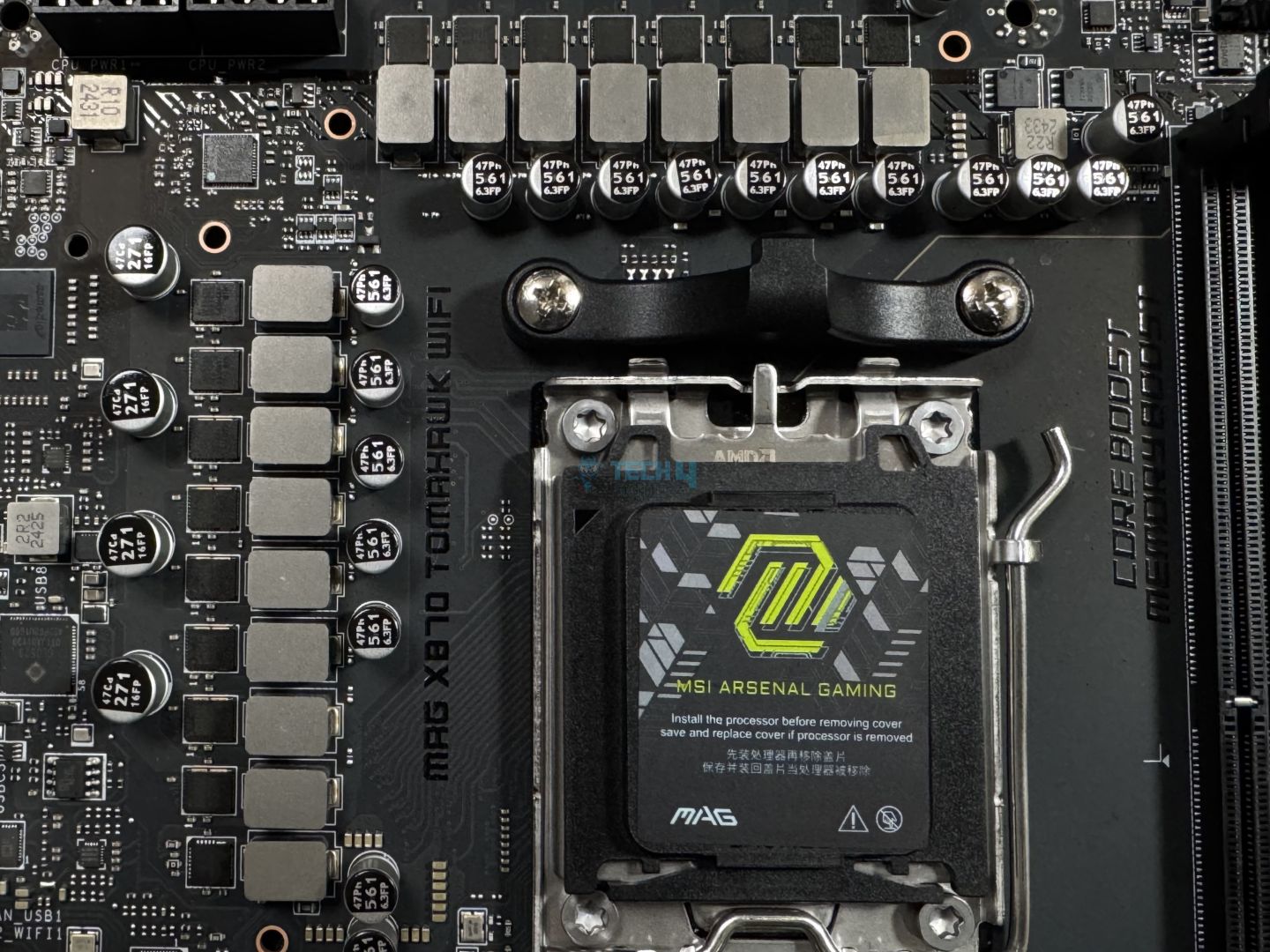
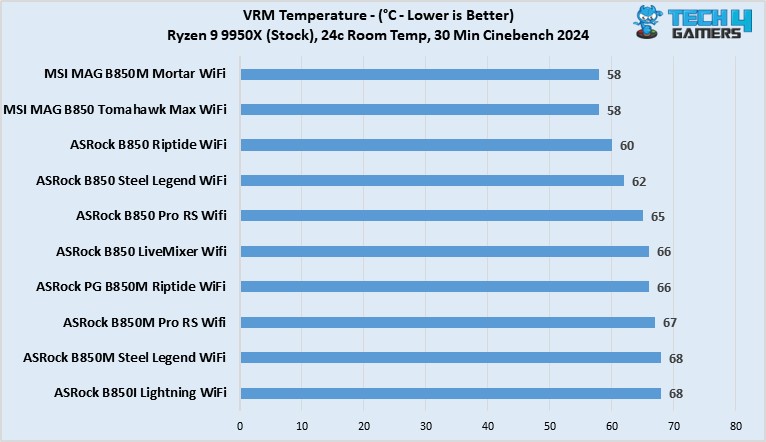
Starting the list with the jack of all trades, the MSI MAG X870 Tomahawk WiFi motherboard caught my eye for many reasons. For example, it has superior performance in productivity and gaming tasks. Moreover, its 14+2+1 VRMs perform decently well, allowing adequate overclocking opportunities. I love the VRMs for their temperatures, though. During our testing, the temperatures on the VRMs never exceeded 54°C, making them one of the coldest in the new X870 motherboards.

Besides its performance, other eye-catchers are the wealth of EZ DIY features and mechanisms loaded onto the motherboard, making it highly user-friendly. I also cherish the MSI AI LAN manager, which ensures you always get the lowest possible ping. Moving to the connectors, I like the 11x rear and 9x front USB ports, including a USB4.0 port and plenty of USB 2.0 and USB 3 ports. However, when it comes to storage, I would have preferred more than 4x SATA III connectors for a slightly pricey motherboard.

I was pretty pleased with the MSI MAG X870 Tomahawk WiFi motherboard, not seeing any negatives. Here’s what I commented in my review:

The MSI MAG X870 Tomahawk WiFi is a motherboard costing $299, making it one of the pricier boards so far. For that, it offers reasonably capable VRMs, a minimalist black theme without RGB, a ton of EZ-DIY features to make life easier, and good overall performance. The EZ-DIY features are the highlight for us, but we feel the price tag is still a bit too high, especially given the board’s shared connectivity complications.

✅Buy It If
You play competitive games: If you’re a competitive player who always requires top-of-the-line internet, the MSI MAG X870 Tomahawk WiFi offers just the feature you’ll love. With the MSI AI LAN manager, you’ll always be connected to the best internet and get the lowest pings, ensuring your gameplay is buttery smooth at all times.

You want all the performance without any backlashes: The MSI MAG X870 Tomahawk WiFi perfectly fits the Ryzen 7 9800X3D because of its lower VRM thermals and overall better performance. If you want all the performance without many repercussions, this motherboard is your best bet.

❌Don't Buy It If
You’re using more than four SATA III drives: If you’re using more than four SATA III drives, you’re better off using PCIe 5.0 drives with the X870 chipset motherboards.

What Makes It The Best Overall Motherboard For Ryzen 7 9800X3D?

I love the MSI MAG X870 Tomahawk WiFi for its lower VRM temperatures, sturdy build quality, and EZ DIY features and functions. Moreover, it has decent connectivity options and a beautiful design, perfect for stealth builds lacking RGB lighting. All these pros make it the best overall motherboard for the Ryzen 7 9800X3D, in my opinion.

Performance: 9/10 Value: 9/10
Features: 10/10 Design: 8/10

ASRock Phantom Gaming X870 Nova WiFi

Best High-End Motherboard For Ryzen 7 9800X3D

Chipset: AMD X870 | Memory: DDR5 8,400+ (OC) | VRM: 18+2+1 | Video Outputs: HDMI 2.1, 2x USB4 Ports | RGB Lighting: Yes | Network: WiFi 7, Realtek 5G LAN, Bluetooth 5.4 | Storage: 5x M.2, 2x SATA III | USB Ports: 11x Rear, 9x Front

Pros

  • Beautiful design
  • Solid VRMs
  • 5x M.2 slots
  • Excellent VRM cooling
  • Great price
  • Decent USB connectivity

Cons

  • Lane-sharing between M.2 and PCIe_2, USB4, and SATA ports
  • Only 2x SATA connectors

  Read Our ASRock Phantom Gaming X870 Nova WiFi Motherboard Review

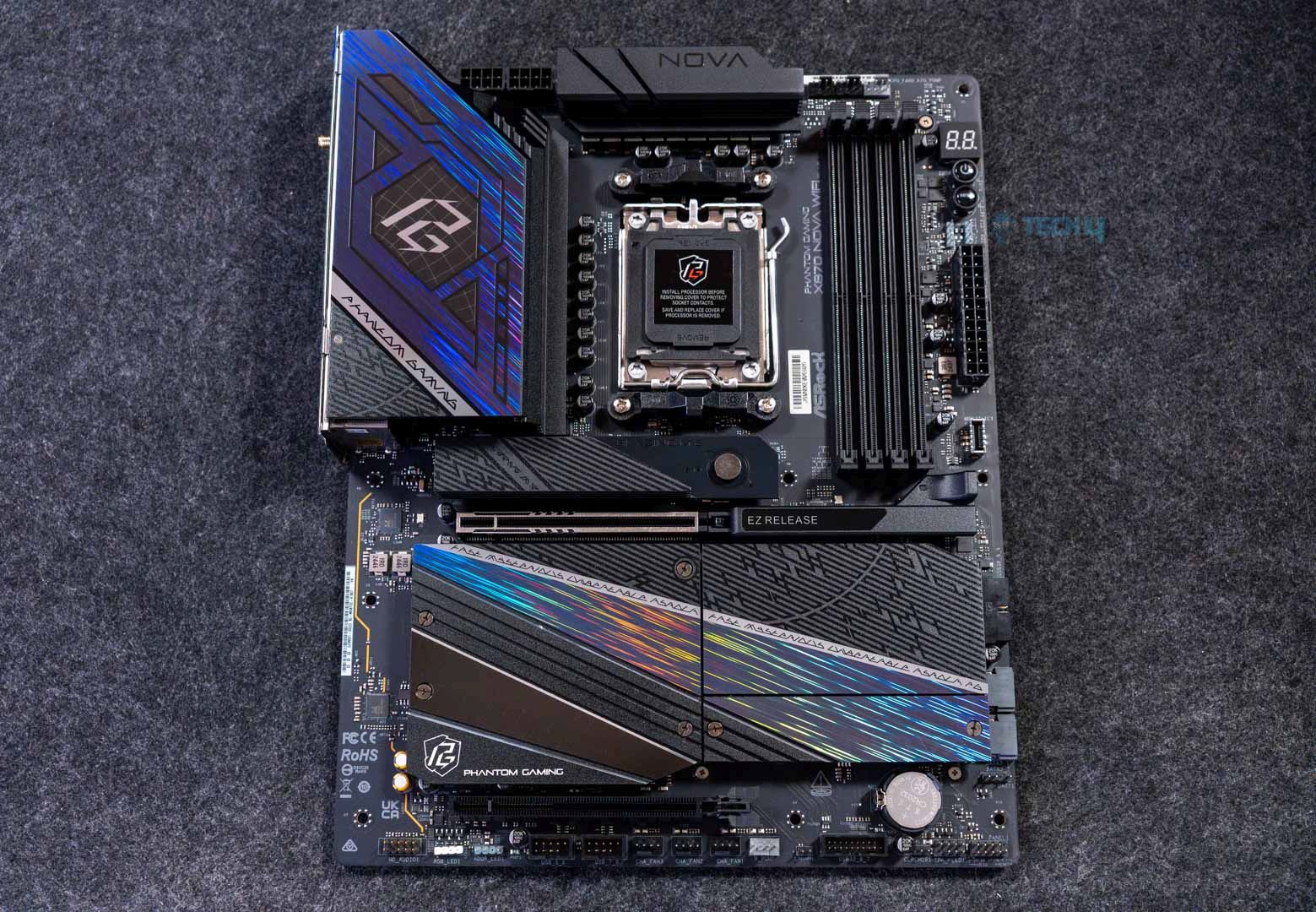
Next on the list is the ASRock Phantom Gaming X870 Nova WiFi. There are many things to love about this motherboard, for example, the plethora of 5x M.2 slots, a beautiful design, decent RGB lighting, excellent VRM cooling, and a price that’s easy on the wallet. During my tests, the VRM temperatures on the motherboard peaked at 52°C, making it perfect for overclocking any high-end CPU. Regarding its design, the motherboard has a futuristic look, with holographic streaks running through the M.2 heatsinks and integrated RGB lighting on the larger heatsink.

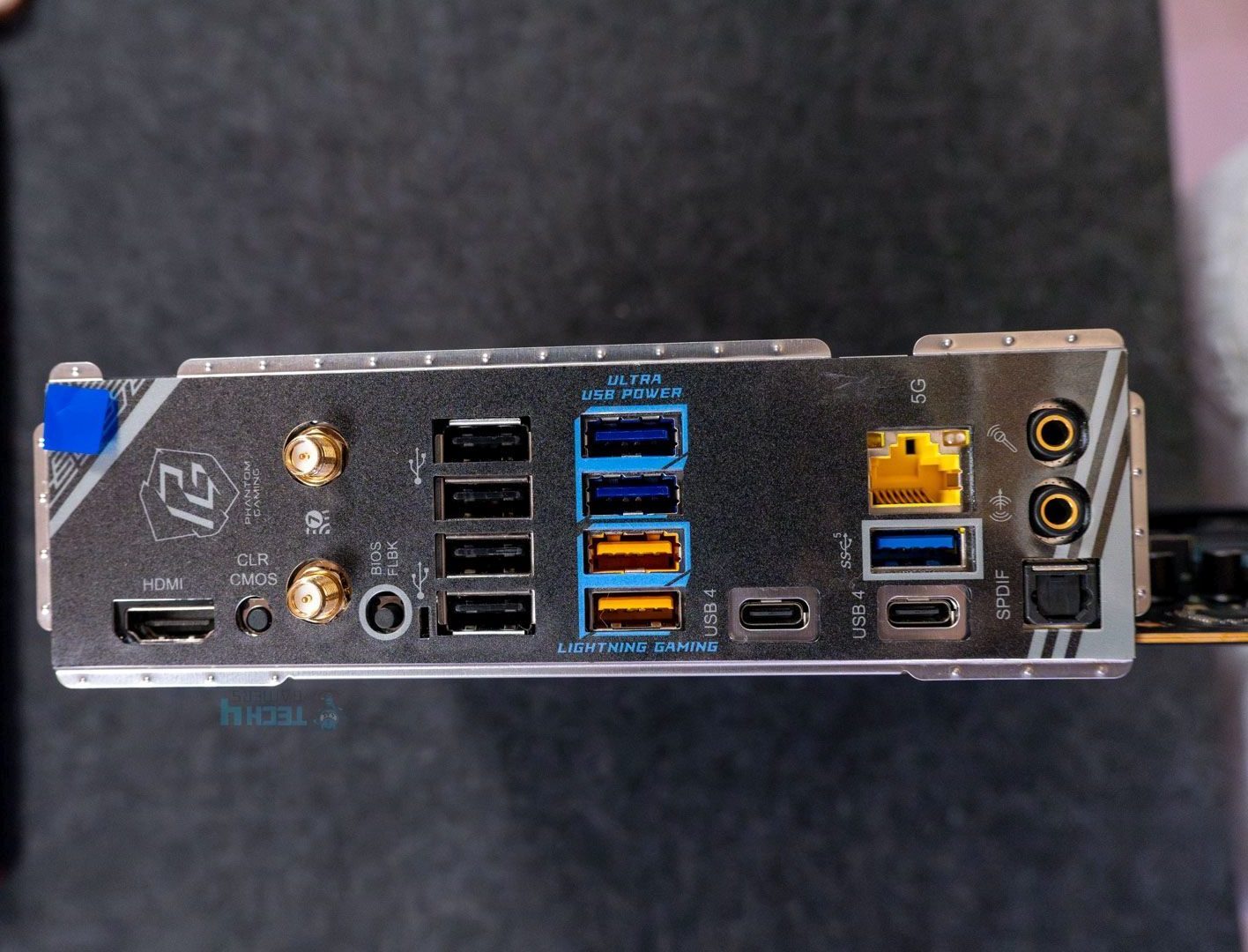
Looking at the connectivity, I was amazed by 5x M.2 slots but fairly disappointed by only 2x SATA slots. I’m pleased with the USB connectivity options, including 8x USB 2.0, 7x USB 3.2 Gen 1, 2x USB 3.2 Gen 2, 1x USB 3.2 Gen 2×2, and 2x USB 4 ports. Lane sharing between PCIe lanes and SATA ports isn’t new, but it still annoys me. Overall, the motherboard’s performance is spot-on, with few downsides.

Here’s how I described the motherboard’s performance and cooling in my in-depth review:

The VRM setup is quite good for the price, and the heatsink keeps things cool (well, warm) under load. Overclocking is possible, even with the 170W Ryzen counterparts.

✅Buy It If
You want high-end performance on a smaller budget: If you’re looking for a motherboard that can handle overclocking AMD’s flagship CPUs without costing a fortune, the ASRock Phantom Gaming X870 Nova WiFi delivers low price and astounding performance.
❌Don't Buy It If
You require more SATA connectors for storage: If you’re the type who doesn’t rely mainly on NVMe drives and need SATA connectors for 2.5″ SSDs or HDDs, this motherboard might not be appealing to you because it only offers 2x SATA III connectors.

What Makes It The Best High-End Motherboard For Ryzen 7 9800X3D?

The ASRock Phantom Gaming X870 Nova WiFi motherboard comes with a powerful 18+2+1 VRM phase at 80A SPS, enough to easily power the Ryzen 7 9800X3D. Add the 5x M.2 slots, beautiful aesthetics, decent connectivity options, and a low price, and it’s the best high-end motherboard for the Ryzen 7 9800X3D CPU.

Editor`s Note
Image

I truly fell in love with the ASRock Phantom Gaming X870 Nova WiFi’s performance, aesthetics, and overall value because of its low price. It might not be the best motherboard of all time, but it’s easily the best high-end motherboard for the Ryzen 7 9800X3D. You really can’t go wrong with this purchase nine out of ten times. The one time would be if you need more 2.5″ drives instead of more NVMe storage.

– Dr. Usman Saleem

Performance: 10/10 Value: 9/10
Features: 8/10 Design: 9/10

MSI MPG X870E Edge Ti WiFi

Best White Motherboard For Ryzen 7 9800X3D

Chipset: AMD X870E | Memory: DDR5 8,400+ (OC) | VRM: 14+2+1 | Video Outputs: HDMI 2.1, 2x Type-C Ports, 1x DisplayPort 1.4 | RGB Lighting: Yes | Network: WiFi 7, Realtek 5G LAN, Bluetooth 5.4 | Storage: 4x M.2, 4x SATA III | USB Ports: 12x Rear, 9x Front

Pros

  • Excellent performance with 14+2+1 VRM design 
  • Equally impressive thermal performance
  • PD charging up to 27W
  • One of a kind white aesthetics 
  • 21 USB ports including USB4
  • 2x PCIe 5.0, 2x PCIe 4.0 M.2 slots
  • EZ DIY mechanism
  • WiFi 7, BT 5.4
  • Digi-Debug & EZ Debug LEDs

Cons

  • M2_2 & USB4 port shares bandwidth 

Read Our MSI MPG X870E Edge Ti WiFi Motherboard Review

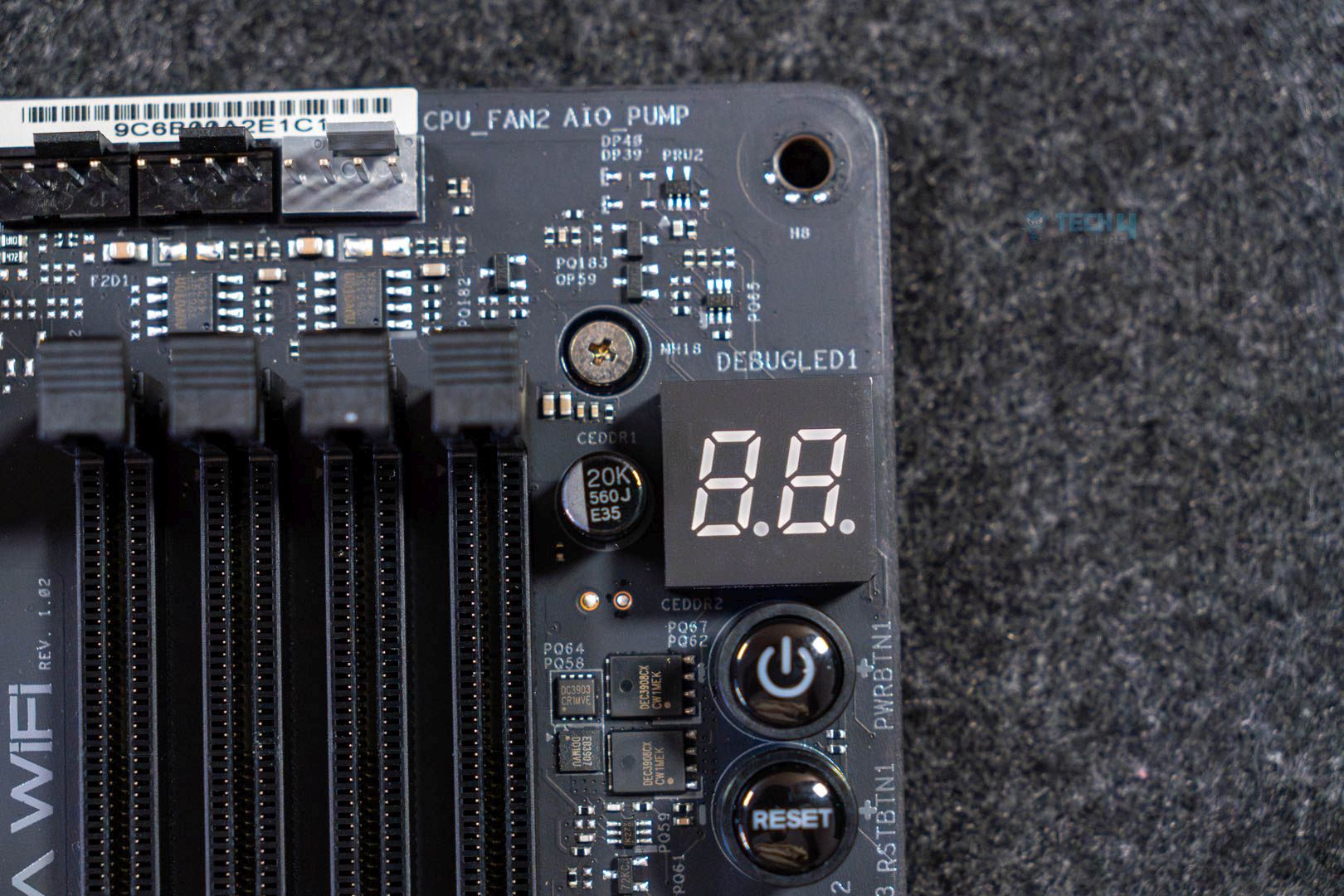
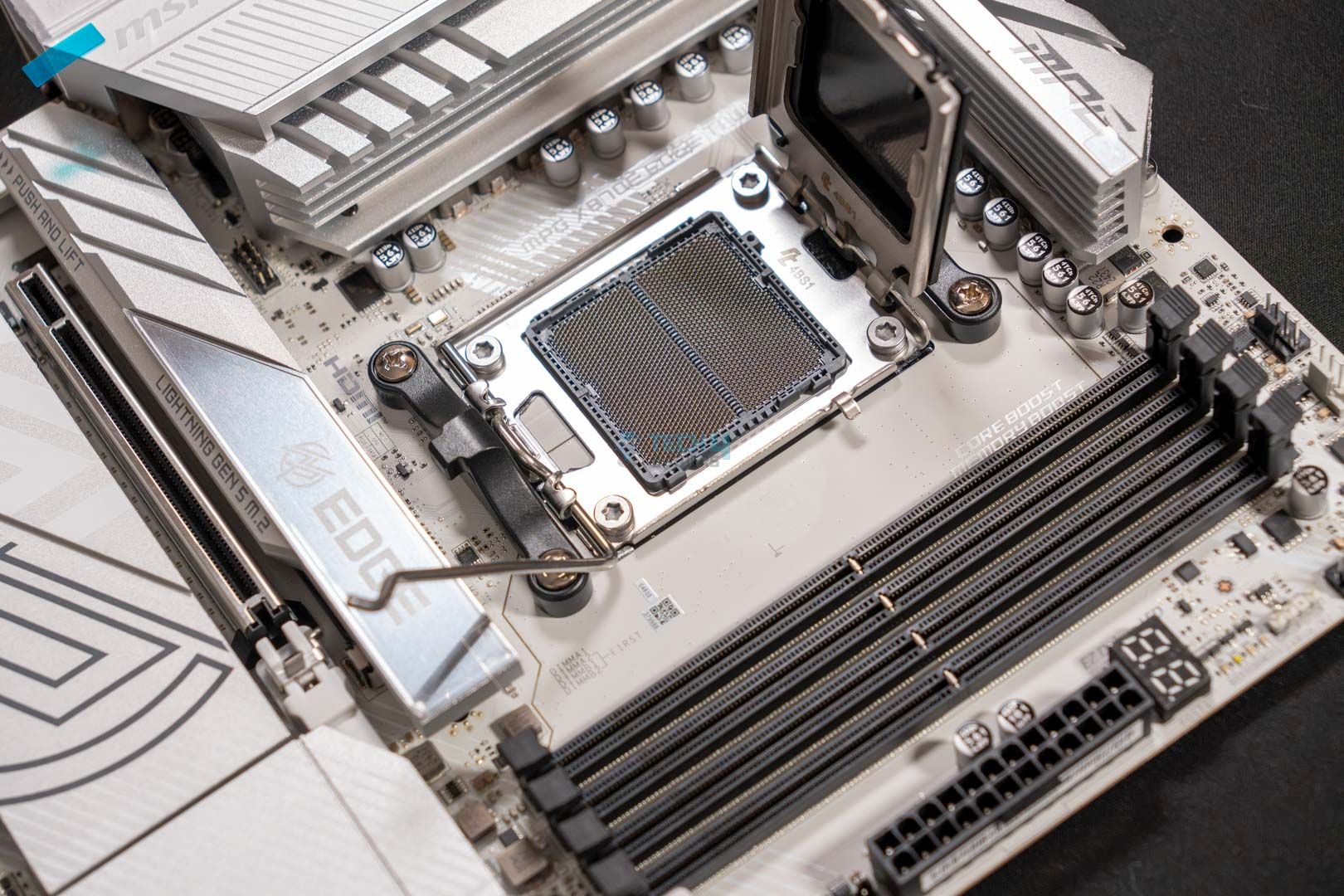
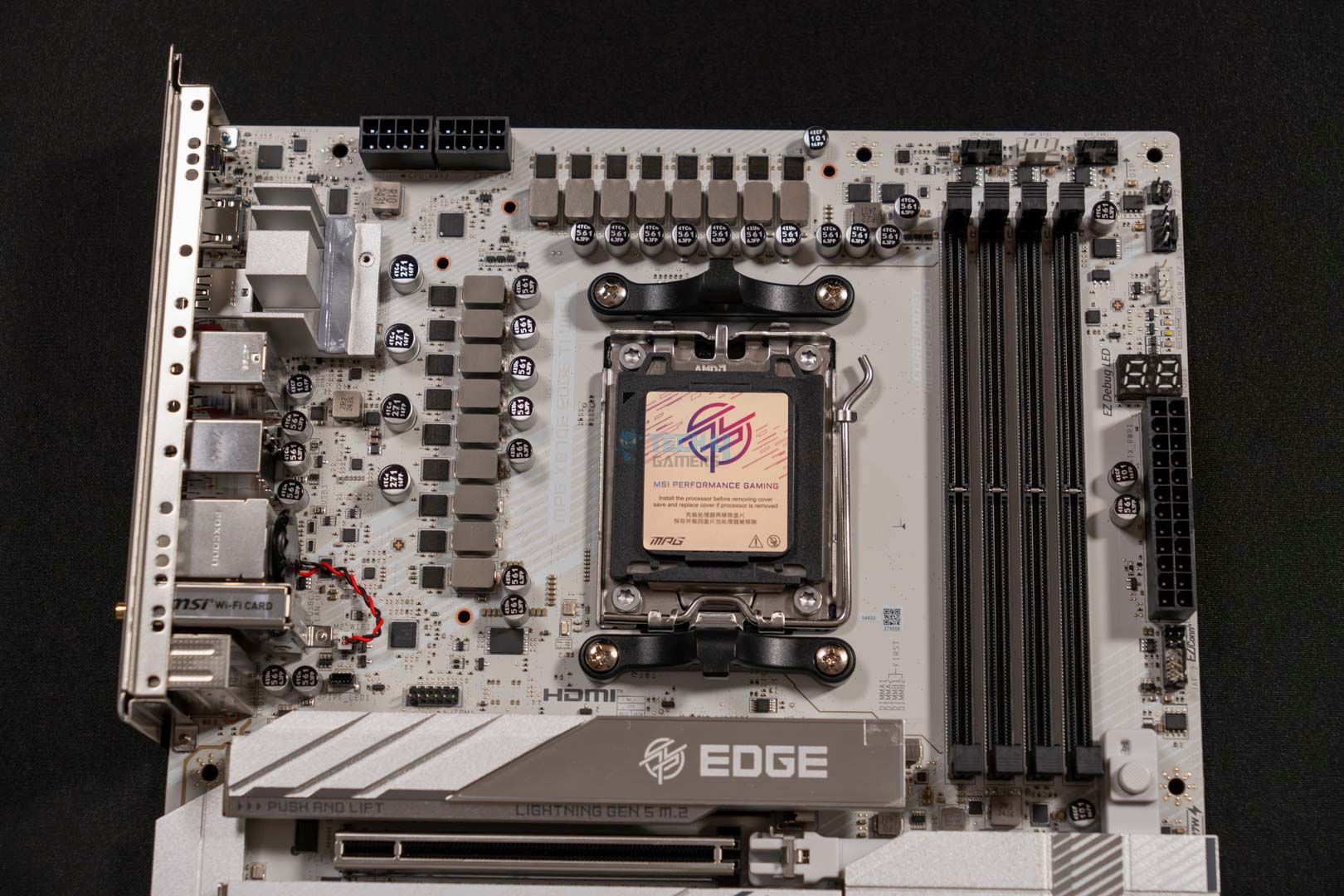
Heading over to our next motherboard, we have the MSI MPG X870E Edge Ti WiFi. The board in discussion is an impressive piece of hardware that offers both performance and aesthetics without being overly priced. Starting with its raw specs, the motherboard features a 14+2+1 VRM phase design that ensures ample performance on the go without any issue. Moreover, the solid cooling solution further complements its looks and worth. Since, according to our testing, the VRM temperatures never went over 55 °C after 30 minutes of Cinebench 24. 

Besides the performance figures, the board also incorporates RGB on its I/O shield, and coupled with the white & silver combination, the whole board looks great. Similarly, the board is also equipped with a total of 21 USB ports, including two USB4 ports at its rear. Not only that, but you also get 27W PD charging via the front USB. As for storage, the board comes with two PCIe 5.0 and two PCIe 4.0 M.2 ports that are sufficient in the majority of the cases. Similarly, it also features EZ Debug & Digi-Debug LEDs for easy troubleshooting. Lastly, the current price of $299 makes it an excellent deal.

Here’s what I had to say about it in my review:

The MSI MPG X870E Edge Ti WiFi is a great choice for an X870E chipset that costs you $329.99. This motherboard can also be called the beauty and the beast because of its appealing white aesthetics and powerful VRMs that ensure great performance output. The board also comes packed with an EZ-DIY mechanism all over it. Moreover, the VRMs stay very cool even under intense load, which impressed us quite well.

✅Buy It If
You’re looking for excellent value: If you’re looking for one of the best bang-for-the-buck options in the mid-range segment. Then the MSI MPG X870E Edge Ti WiFi seems like the best fit considering its $299 price tag and overall features.

You need a board with excellent cooling: In case you plan to squeeze every bit of performance and really push your CPU to the limit, our testing showed the MPG X870E Edge Ti’s VRM temps stayed relatively tame under heavy load.

❌Don't Buy It If
You want use all of the available USB & M.2 slots: I would advise you to look for something else in case you’re looking to use all the available USB ports as well as M.2 slots. Since the M2_2 and USB4 ports share bandwidth and run slower when they are in use simultaneously.

What Makes It The Best White Motherboard For Ryzen 7 9800X3D?

The MSI MPG X870E Edge Ti WiFi costs not more than $299 and offers solid performance and an ample amount of features, such as 27W PD charging, USB4 ports, and PCIe 5.0 M.2 slots. All this while being equally aesthetically pleasing with its white color scheme and slight bit of RGB. The whole package makes it the one of the best white motherboards for the Ryzen 7 9800X3D.

Performance: 9/10 Value: 9.5/10
Features: 8.5/10 Design: 10/10

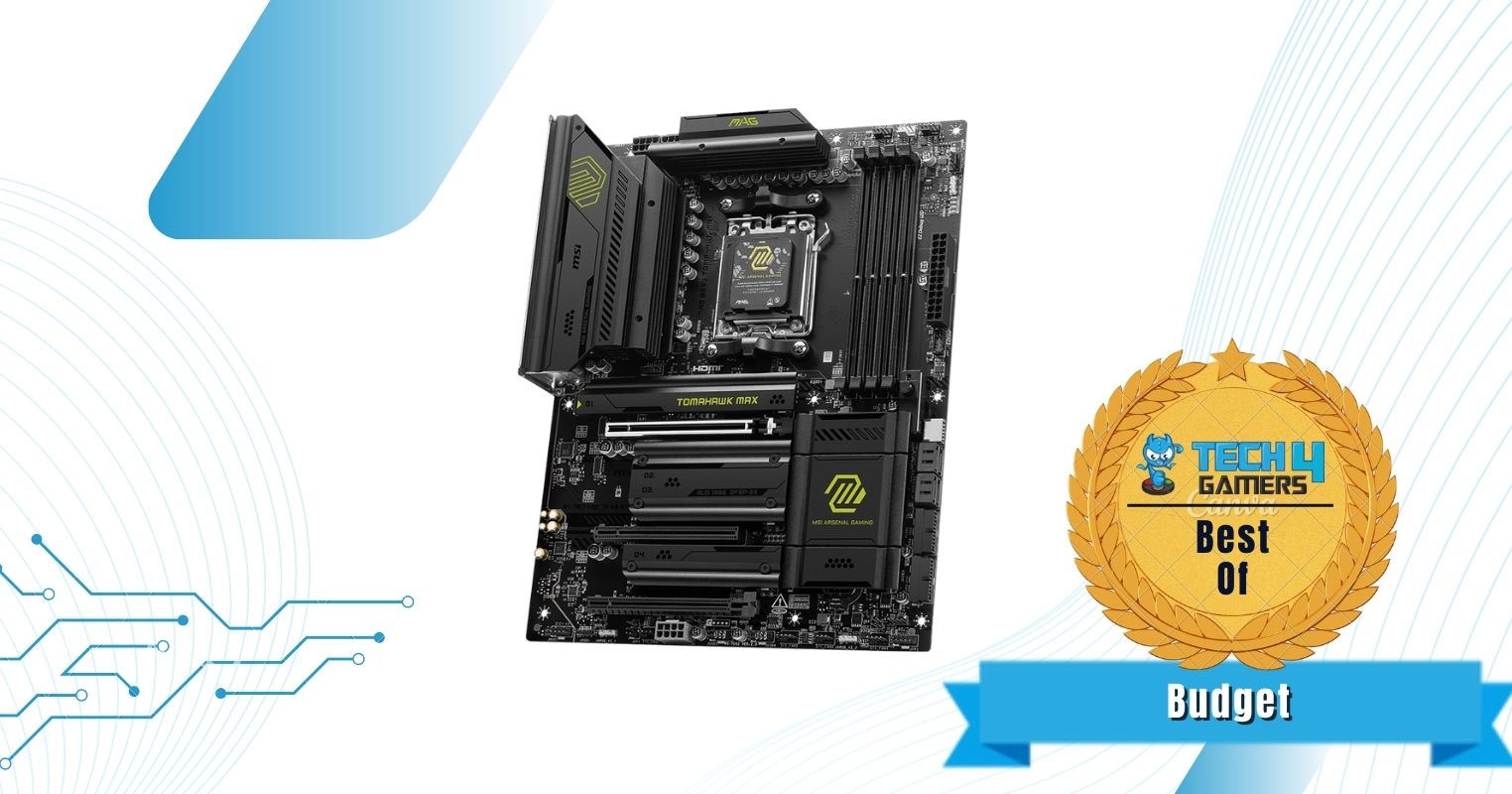
MSI MAG B850 Tomahawk Max WiFi

Best Budget Motherboard For Ryzen 7 9800X3D

Chipset: AMD B850 | Memory: DDR5-8400 (OC) | VRM: 14+2+1 | Video Outputs: 1x HDMI 2.1 port | RGB Lighting: No | Network: 1x Realtek 8126VB 5G LAN, AMD WiFi 7, Bluetooth 5.4 | Storage: 4x M.2, 4x SATA | USB Ports: 10x Rear, 9x Front

Pros

  • Impressive VRMs
  • Good VRM cooling at 59°C max temps
  • Affordable
  • Handy EZ-DIY features
  • Up to 8,400MHz frequency support

Cons

  • USB 4.0 missing
  • Lacks dual-sided thermal pads for primary M.2 heatsink

  Read Our MSI MAG B850 Tomawhawk Max WiFi Motherboard Review

Don’t want to spend a fortune on a motherboard to pair with the Ryzen 7 9800X3D? Don’t worry—the MSI MAG B850 Tomahawk Max WiFi has you covered. It’s affordable, has most EZ-DIY features, and supports 8,400MHz RAM frequency. I didn’t have any issues with the VRMs either; with a 14+2+1-phase design, the temperatures maxed out at 59°C, which is pretty decent for an affordable B850 motherboard. However, it has its downsides, too, with a lack of a USB4.0 port and no dual-sided thermal pads for the primary M.2 heatsink.

There’s not much difference between an X870 and a B850 motherboard, so you don’t have to worry about missing too many features. For example, you’re still getting 4x M.2 slots: two PCIe 5.0 x4 slots, one PCIe 4.0 x4 slot, and the last a PCIe 4.0 x2 slot. As I stated above, I do regret the missing USB4.0 and no dual-sided thermal pads on the M.2 heatsink, but if you’re using a decent chassis, you shouldn’t have to worry about both of those issues.

Ali Tauseef, one of our motherboard experts, spent considerable time reviewing this motherboard. Here are his own words about the product:

The MSI MAG B850 Tomahawk Max WiFi is an excellent mid-ranger and a great option for stepping onto the latest platform with your Ryzen 9000 CPU. It has a decent 14+2+1 DRPS design with 14x 80A SPS for the CPU, enough for even the AM5 big dogs. 5G LAN, WiFi 7, dual Gen 5 M.2 slots, PCIe 5.0 x16, and EZ-DIY are the highlights on the board.

✅Buy It If
You’re looking for a well-equipped mid-range motherboard: The MSI MAG B850 Tomahawk Max WiFi is the perfect option for anyone who doesn’t want to spend hundreds of dollars on a motherboard without sacrificing essential features. This motherboard offers EZ-DIY features, impressive VRMs, and high RAM frequency support for better overclocking opportunities.
❌Don't Buy It If
You require better cooling for your M.2 drives: Although it’s not a big issue if you’re adamant about getting the best cooling for your M.2 drives, this motherboard may not be suitable because its M.2 heatsink lacks dual-sided thermal pads. In that case, I recommend looking for a cheaper X870.

What Makes It The Best Budget Motherboard For Ryzen 7 9800X3D?

The MSI MAG B850 Tomahawk Max WiFi motherboard offers incredible pricing without sacrificing most features. It provides a decent 14+2+1 VRM phase, EZ-DIY features for new PC builders, pleasing overall aesthetics without the RGB, and RAM frequency support of up to 8,400MHz. These features make it the best budget motherboard for the Ryzen 7 9800X3D while keeping costs below $300.

Performance: 9/10 Value: 10/10
Features: 9/10 Design: 8/10

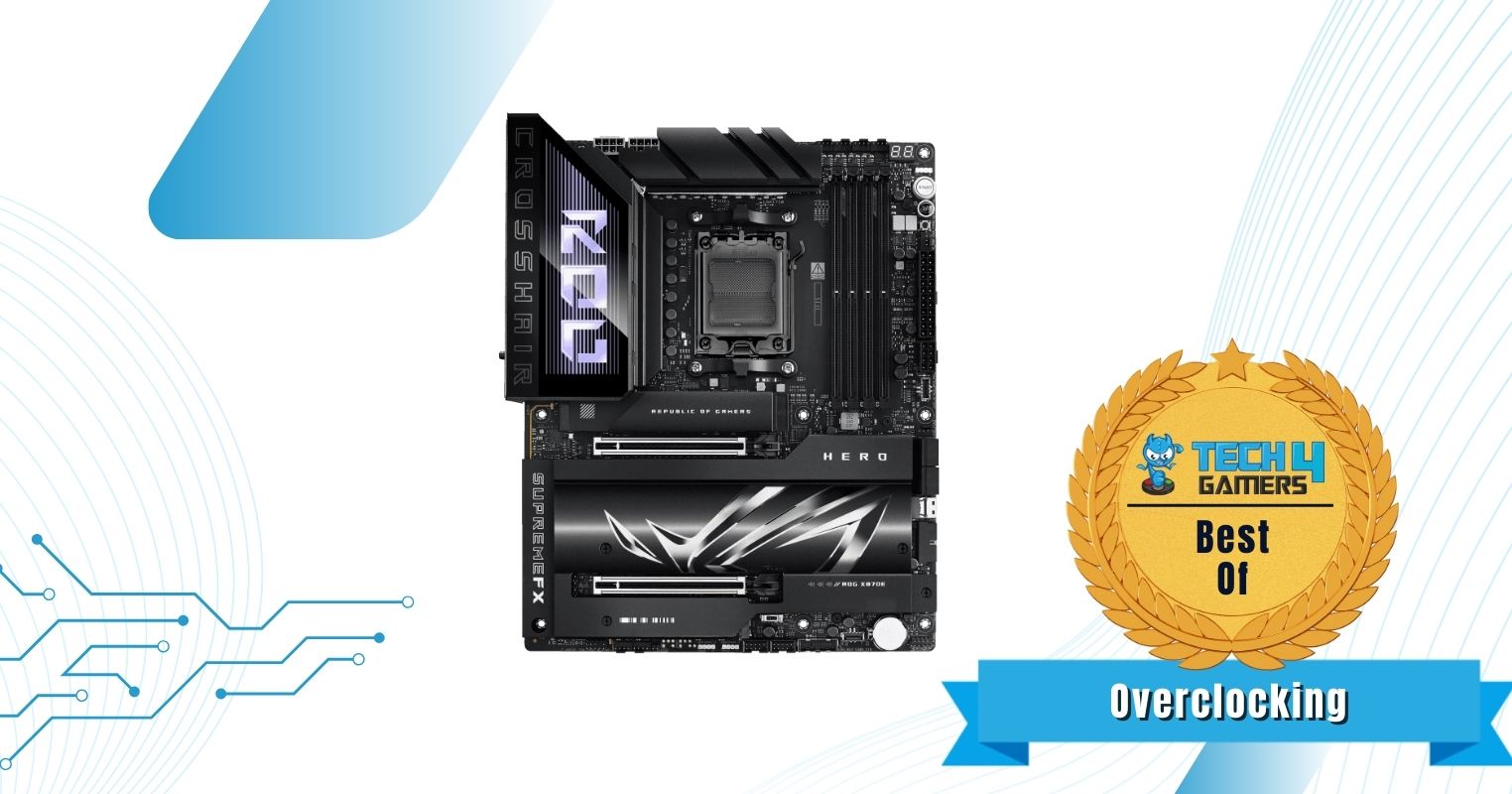
ASUS ROG Crosshair X870E Hero

Best Overclocking Motherboard for Ryzen 7 9800X3D 

Chipset: AMD X870E | Memory: DDR5 8,200+ (OC) | VRM: 18+2+2 | Video Outputs: HDMI 2.1, 2x Type-C USB 40Gbps, DisplayPort 1.4a | RGB Lighting: Yes | Network: WiFi 7, Realtek 5G LAN, Intel 2.5G LAN, Bluetooth 5.4 | Storage: 5x M.2, 4x SATA III | USB Ports: 10x Rear, 10x Front

Pros

  • Great design
  • VRM cooling is one of the best
  • 5x M.2 slots (incl. 3x Gen 5)
  • 60W charging support
  • USB4 (and 18x other ports)
  • Audio solution includes DAC
  • EZ-DIY features

Cons

  • Expensive
  • No 10G LAN

Read Our ASUS Rog Crosshair X870E Hero Motherboard Review

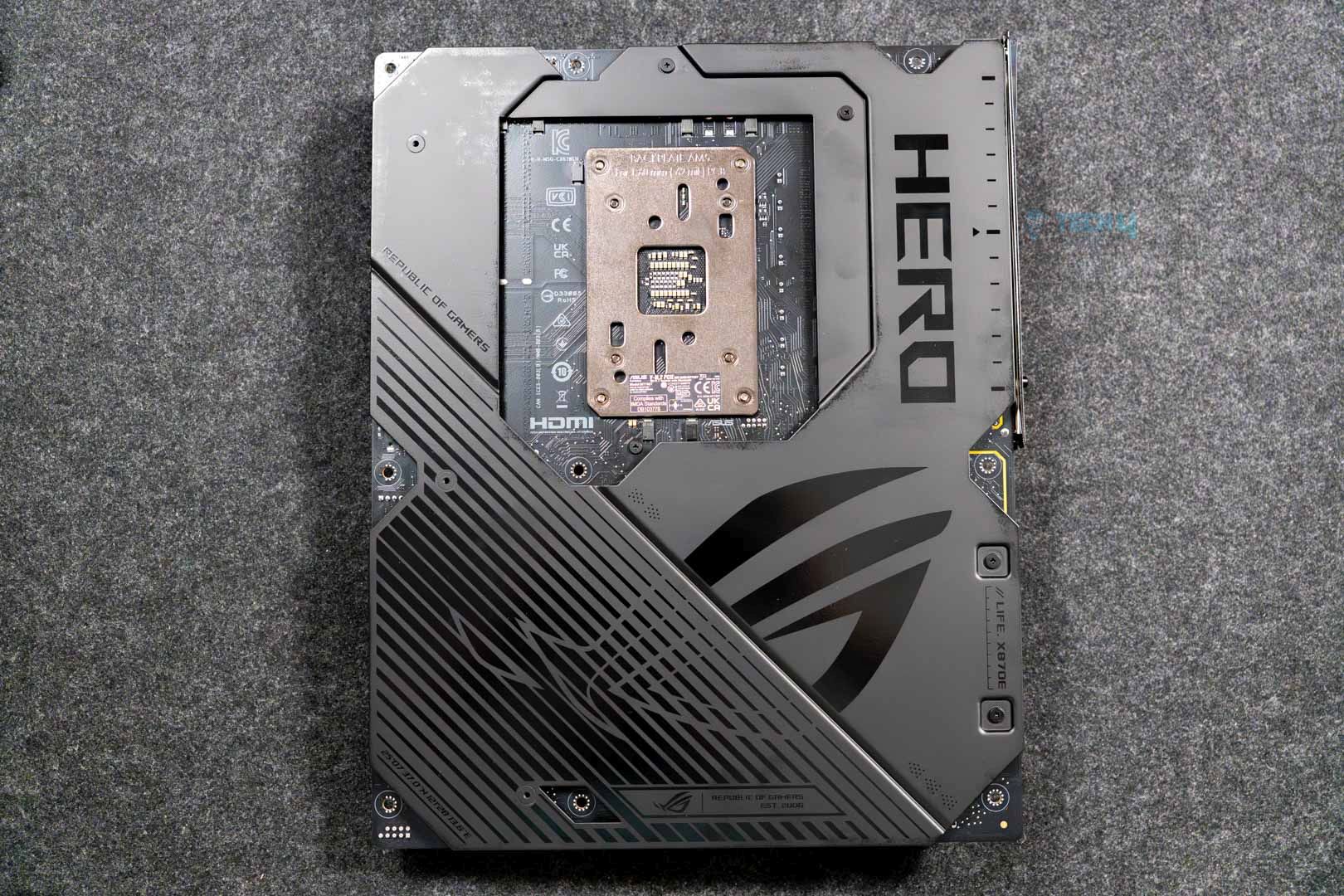
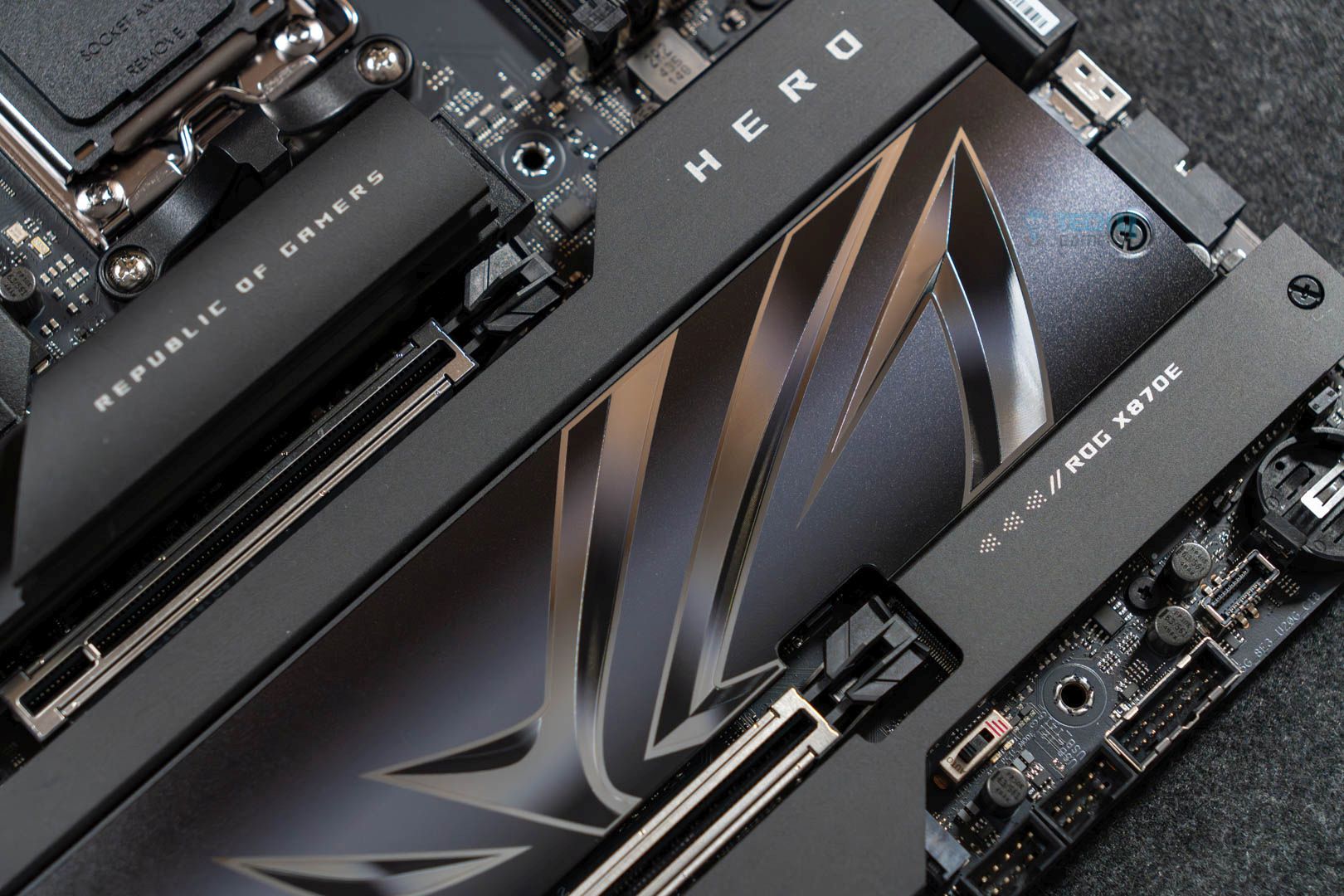
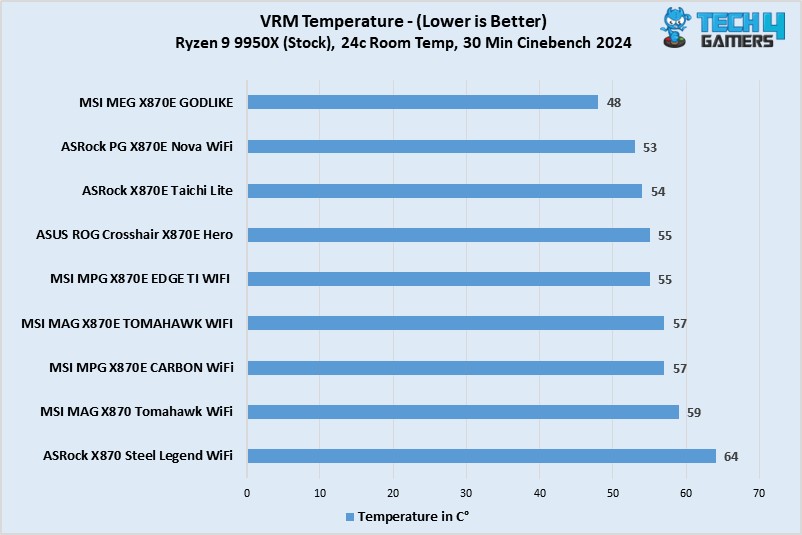
The ROG Crosshair X870E Hero is ASUS’s second-most premium offering for the chipset and offers a wealth of premium features. Starting with its design, the motherboard rocks an all-black aesthetic highlighted by its large heatsinks and the Polymo Lighting II array dashboard on top of the rear I/O. Its performance is just as good as it rocks 18x 110A teamed stages to power the CPU, which offers plenty of power to overclock the 120W 9800X3D. In our testing, the process ran comfortably at its 5.2 GHz boost clock speed out of the box, with the VRMs maxing at a cool 56°C. 

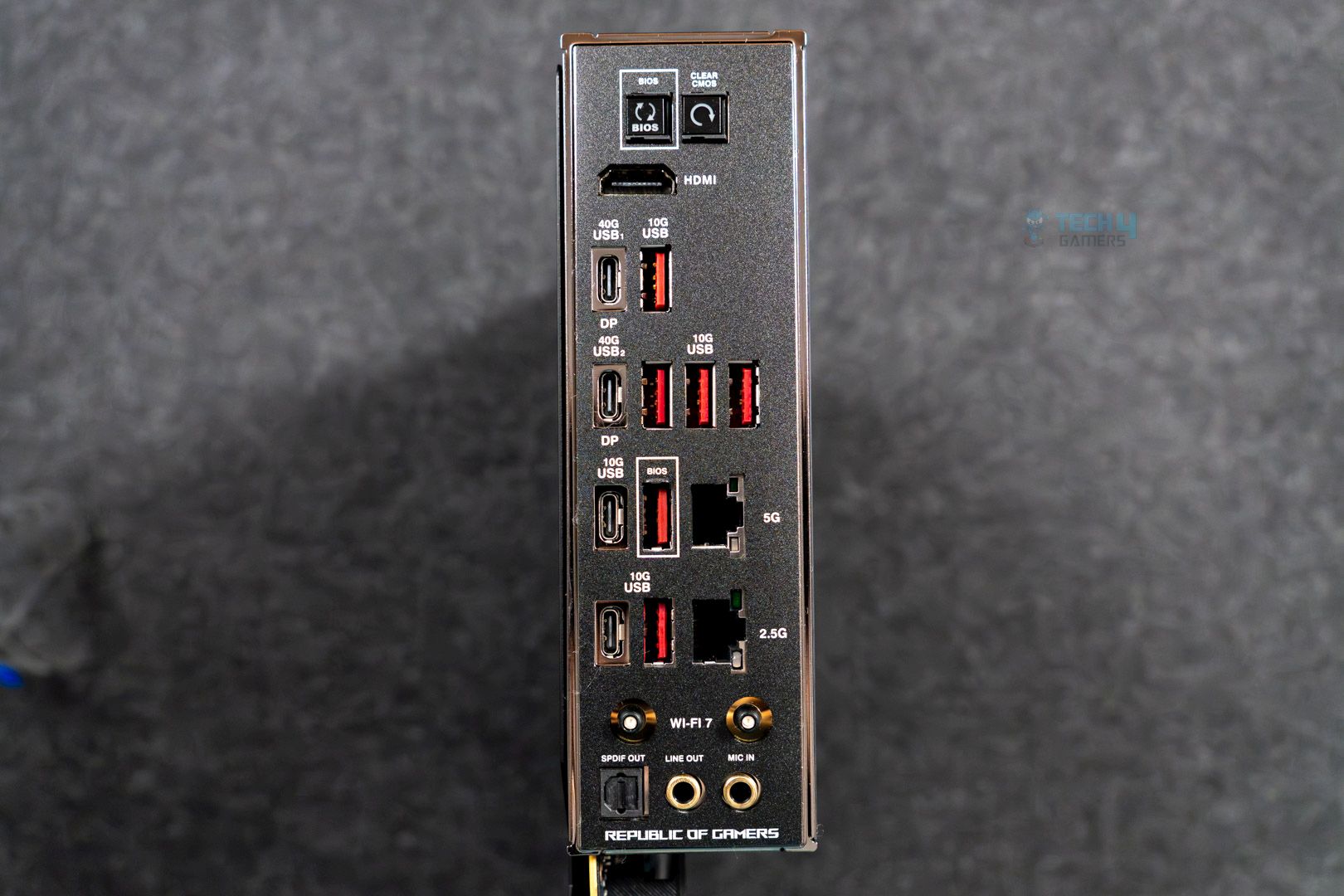
For features, the motherboard offers fast memory support (up to 8200+ MT/s with Ryzen 9000), USB 4, 5x M.2 ports, and WiFi 7. It also has dual LAN ports (2.5G and 5G) and 60W charging support. Plenty of features add convenience (such as the M.2 Q-Latch). The last thing we want to mention is the overclocking-specific features like the LN2 Mode Jumper and ReTry button, which can be helpful when you’re trying to push your CPU to the max.

Our hardware reviewer Ali Tauseef had plenty of praise and highlighted only one downside of the board:

It offers a fresh, all-black design highlighted by the large Polymo Lighting II array, excellent VRMs, five M.2 slots, and 20 USB ports. Dual LAN ports are also on offer, but we would’ve preferred a singular 10G port.

✅Buy It If

Aesthetics are a priority: The motherboard offers a stand-out design with its ROG branding and the Polymo Lighting II array for RGB illumination.

You want overclocking convenience: Not only is it generally great for overclocking, but the motherboard offers features like the ReTry button and AI overclocking, which can reduce the usual hassle a bit.

You have plenty of M.2 storage to install: The motherboard offers 5x M.2 slots on top of 4x SATA 6G ports, so you’ll have plenty of storage room.

Ease of set-up is important: With its suite of “Asus Q” features, the motherboard offers features such as toolless M.2 installation and easy PCIe release.

❌Don't Buy It If
You want 10G LAN: The motherboard does not have room for 10G LAN despite its excessive price tag. 

What Makes It The Best Overclocking Motherboard For Ryzen 7 9800X3D?

The ASUS ROG Crosshair X870E Hero has all the makings of a motherboard to fulfil your overclocking needs. It also offers a pleasing design, the latest I/O (barring no 10G LAN), and a great audio setup. With ASUS’s focus on EZ-DIY features, it’s also very easy to work with.

Performance: 9.5/10 Value: 8/10
Features: 9/10 Design: 9/10

Benchmarks Of All The Motherboards We Tested

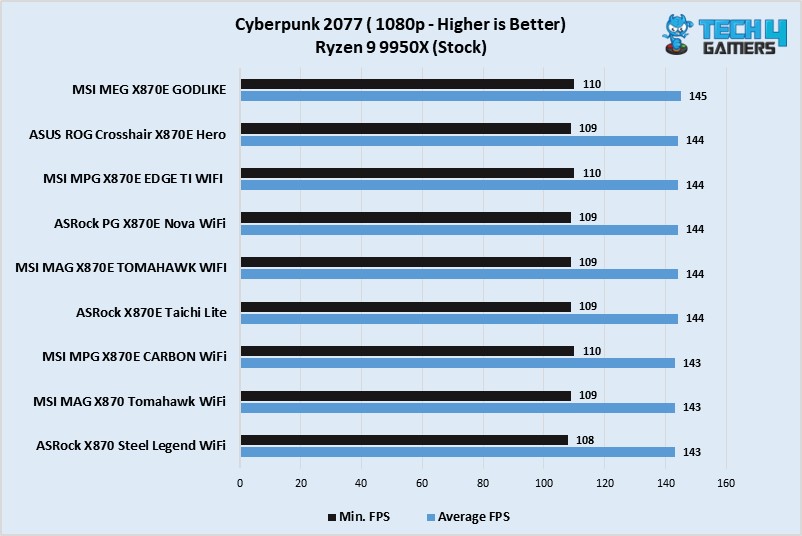
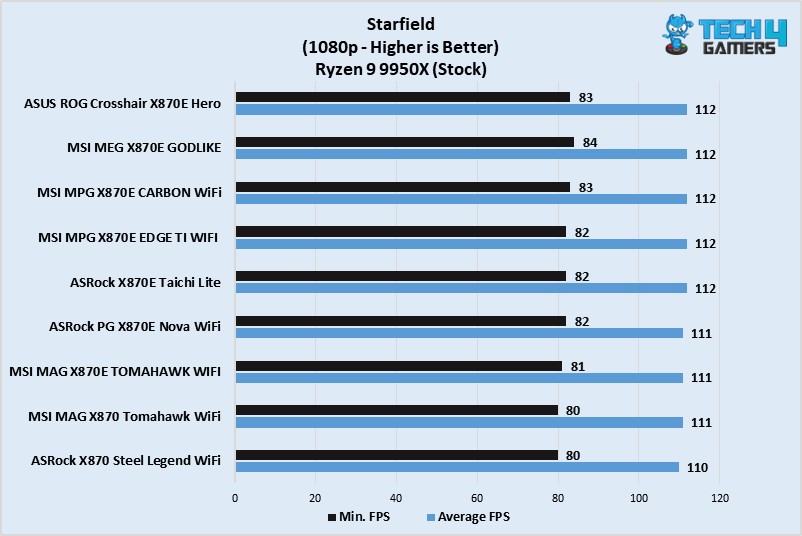
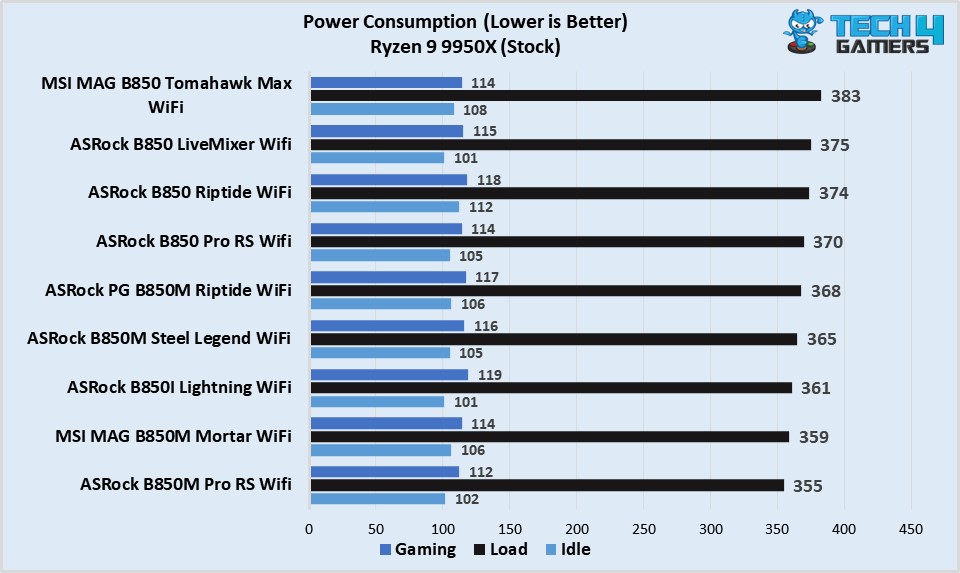
To determine the best motherboards that work well with the Ryzen 7 9800X3D and complement its performance, my team and have I spent the past several months testing and reviewing all the different B850, X870, and X870E motherboards from manufacturers like ASUS, MSI, ASRock, and more. Of course, we also ran several tests and benchmarks on them to gauge their performance, so if you want to see all the motherboards we got our hands on, swipe through the below gallery.

Specification Comparison

We have created a simple comparison chart of all our top motherboard picks so that it’s easier for you to choose the one that appeals most to your use-case scenarios. Here’s the chart:

Motherboard ModelTotal Power PhasesMax Memory Speed (MT/s)No. of M.2 slotsNo. of SATA III portsNo. of USB ports (Front)No. of USB ports (Rear)
MSI MAG X870 Tomahawk WiFi16840044911
ASRock X870E Taichi Lite27820046912
ASRock X870 Steel Legend WiFi16800034911
MSI MAG B850 Tomahawk Max WiFi17840044910
ASUS Rog Crosshair X870E Hero228200541010

These Motherboards Couldn’t Make Our List

Many motherboards on the market fit well with the Ryzen 7 9800X3D. However, we only selected the best ones in their categories to make your purchase decision easier. Of course, a few didn’t make the list, lacking value or features. Here are the motherboards that couldn’t make our list:

  • Gigabyte X870 Aorus Elite: There’s not much to hate regarding the Gigabyte X870 Aorus Elite. Like its predecessor, which we covered, it’s one of the best contenders. However, its lack of 5G LAN makes it slightly inferior to its competitors.

Key Motherboard Terms

  • CPU SocketIt’s a small slot on the motherboard where the CPU is inserted. Intel usually changes its CPU socket once every two generations, while AMD’s socket lasts for a few years. The AM4 lasted from the Ryzen 1000 to the Ryzen 5000 series, meaning you could use the same motherboard for all those CPUs.
  • DIMM SlotsThey are located next to the CPU socket where the RAM kits are installed. Thanks to the physical location being so close, DIMM slots allow the CPU to access temporary data quickly.
  • Form FactorSimilar to the form factors of PC cases, the size and shape of the motherboard decide the chassis it’ll fit inside. Motherboard form factors are the same as PC case form factors, ranging from ITX, mITX, ATX, and E-ATX.
  • VRMAbbreviated as Voltage Regulator Module, VRMs are small circuits on the motherboard that ensure stable and proper voltage delivery to all PC parts. Better VRM phases are required to achieve higher CPU overclocks.
  • PCIe Slots: PCIe slots are used for expansion cards and are essential for graphics cards, sound cards, and network adapters. In most cases, you want to install the graphics card in the x16 PCIe slot and then move downwards as required.
  • ChipsetThe chipset communicates between multiple PC components, such as the peripherals, CPU, RAM, GPU, and storage, to run everything smoothly without causing random crashes and errors.

How We Tested These Motherboards

Several factors contributed to selecting the best motherboards for the Ryzen 7 9800X3D CPU. They include features, power delivery, and value for money. Here’s a quick rundown of what I looked for in each motherboard:

  • Features: One of the most important factors I considered was each motherboard’s features. Besides the EZ DIY features, software like MSI’s AI LAN manager, troubleshooting debug LEDs, or thicker M.2 heatsinks add more value to the motherboards. While performance is essential, subtle features create more incentive for a purchase.
  • Power Delivery: The most important factor you should consider is a motherboard’s power delivery capabilities. A motherboard with mediocre power delivery will only end up either bottlenecking your PC components or completely frying them. Additionally, better power delivery is vital for CPU overclocking. That’s why I only chose motherboards that didn’t compromise on their VRMs.
  • Value For Money: Regardless of your budget, spending too much on a PC component won’t yield better results if everything it features is a gimmick. Therefore, I was meticulous with the value for money of each motherboard I selected. Along with performance, they needed to have dozens of features and not cost absurd amounts of money.

Recent Updates


  • April 11, 2025: We have added our test results and benchmarks of around 20 motherboards that we reviewed to narrow down the top five choices for the Ryzen 7 9800X3D.
  • March 26, 2025: After testing the ASUS ROG Crosshair X870E Hero motherboard, we found it to be a better fit than the ASRock PG X870E Nova WiFi in the “Best for Overclocking” category.
  • February 4, 2025: Since the 9800X3D supports overclocking, we found the ASRock PG X870E Nova WiFi to offer the best overclocking performance for the Ryzen 7 9800X3D, and that’s why we have now added it to our recommendations.
  • February 3, 2025: After testing the newly released B850 motherboards, we found the MSI MAG B850 Tomahawk Max WiFi to be a great choice for the 9800X3D, specifically in the budget category.

FAQs

Can the Ryzen 7 9800X3D run any game at high FPS?

Regardless of the resolution, the Ryzen 7 9800X3D should be able to run any game at high FPS, considering it is currently the best gaming CPU on the planet.

Can I overclock the Ryzen 7 9800X3D CPU?

Like the previous X3D processors, you won’t be able to overclock the Ryzen 7 9800X3D CPU. Doing so won’t yield any performance uplifts anyway.

What RAM speeds does the Ryzen 7 9800X3D support?

The Ryzen 7 9800X3D CPU supports up to DDR5 8,800MHz RAM speeds, ensuring whichever kit you purchase will be compatible with the CPU.

Is the Ryzen 7 9800X3D compatible with B650 and X670 chipsets?

Yes. The Ryzen 7 9800X3D is compatible with both chipsets along with the newest X870 chipset. Depending on your budget and use-case scenario, you should look for a motherboard from the B650 and X870 chipsets for the most value.


 

Naughty Dog Hails Intergalactic As the Evolution of All Its Games

Story Highlight
  • Naughty Dog’s upcoming Intergalactic has received some backlash, mainly due to its main lead.
  • Despite the criticism, the studio assures fans they’ll be pleasantly surprised by the full experience.
  • Neil Druckmann revealed that this game will be the evolution of everything Naughty Dog has created so far.
Naughty Dog is best known for its single-player games, and it’s currently working on a new title: Intergalactic: The Heretic Prophet.

The game faced a wave of criticism upon its reveal, mainly due to the main lead. However, setting that aside, many longtime Naughty Dog fans are genuinely excited about what’s to come.

Neil Druckmann, who’s leading the project, has also shared some interesting insights. He described the game as an evolution of everything the studio has created so far.

Why it matters: Intergalactic has received a lot of backlash, mainly due to its main lead, but there’s still hope that Naughty Dog can deliver a solid experience.

Intergalactic Protagonist
Druckmann Claims Intergalactic Is Naughty Dog’s Wildest Experience Yet

In a new interview with Variety, Neil Druckmann was asked to elaborate on what he meant when he said the upcoming title would feature the deepest gameplay yet. He shared his optimism about the project and hinted at the massive scale of the game.

He emphasised that it’s set to be the best game the studio has ever made, featuring the strongest gameplay elements they’ve developed to date, which is definitely something to look forward to.

Druckmann explained that this evolution began with their earlier titles, starting with Uncharted. It progressed with The Last of Us, which introduced deeper RPG elements, and now it will continue with their upcoming game.

You could look at our previous titles and see the evolution of going from “Uncharted.” With “The Last of Us,” we added some RPG elements.

Continue that trajectory forward, add sci-fi and we’ve gotten even more ambitious than that.

According to him, the studio has become more ambitious than ever, and he believes fans will be pleasantly surprised by what’s in store.

Druckmann also mentioned that this is the most ambitious and expansive game Naughty Dog has ever created. He believes that by the time development is complete, it may stand as the studio’s most expansive title to date.

What are your thoughts about the upcoming sci-fi title from Naughty Dog? Let us know in the comments or join the Tech4Gamers forums.

Phantom Blade Zero Doesn’t Use Heavy Unreal Engine 5 Features To Avoid Performance Issues

Story Highlight
  • Phantom Blade Zero is avoiding heavy UE5 features to avoid optimization problems.
  • The game is not using Lumen and virtual shadow maps, with baked lighting and limited ray-traced shadows.
  • There is also no evidence of Nanite being used, but there were still minor stutters in the Gamescom build.

Phantom Blade Zero has continued to impress gamers, looking more alluring after each gameplay reveal. It aims to offer a generational leap for action titles, with level designs that draw inspiration from classic FromSoftware titles.

New analysis now also sheds light on the game’s unique approach to handling performance concerns related to Unreal Engine 5. Phantom Blade Zero is sacrificing the cutting-edge UE5 features to avoid optimization problems seen in many AAA titles at this point.

Why it matters: Unlike Black Myth: Wukong, Phantom Blade Zero avoids resource-consuming UE5 features that only bring limited benefits with huge hits to performance.

As clarified by Digital Foundry in a new hands-on analysis, Phantom Blade Zero is not using Lumen and virtual shadow maps and instead relies on baked lighting.

Ray-traced shadows and reflections are also only used in puddles and water surfaces—but not in rougher materials—to avoid performance issues. There’s also no evidence of Nanite being used; regardless, the lighting quality and textures still look natural and appealing.

[Phantom Blade Zero is] an unreal engine 5 title that isn’t actually using all of its cutting-edge features – but impresses nonetheless.

-Digital Foundry.

The Phantom Blade Zero demo was tested on a high-end PC allegedly powered by RTX 5090 and DLSS enabled. The game ran at uncapped frame rates, but minor stutters were still present in the demo.

Phantom Blade Zero
Phantom Blade Zero will feature unique and fluid combat mechanics.

Phantom Blade Zero is aiming to be a fun but challenging experience, with an extreme mode that even removes preset combos. 

It is expected to launch late next year on PlayStation 5 and PC. Being developed with a $55M budget, the game is shaping up to be a unique experience set between the Souls-like and action genres.

Do you think Phantom Blade Zero will be a better technical experience than games like Black Myth: Wukong, or will it end up sacrificing too much for performance? Let us know your thoughts in the comments below, or join the discussion on the Tech4Gamers forum.