I’ve previously worked for eXputer as a Senior News Writer for several years. Now with Tech4Gamers, I love to devoutly keep up with the latest gaming and entertainment industries. I have a Bachelor’s Degree in Computer Science and years of experience reporting on games and breaking exclusive stories. Besides my passion for gaming journalism, I love spending my leisure time farming away in Stardew Valley. VGC, IGN, GameSpot, Game Rant, TheGamer, GamingBolt, The Verge, NME, Metro, Dot Esports, GameByte, Kotaku Australia, PC Gamer, and more have cited my articles.
Story Highlight
In its Q3 earnings report, Konami revealed that it is developing a “brand-new” Silent Hill project.
This title is in addition to the Silent Hill 1 remake, which is in active development at Bloober Team.
The new games in the series are expected to be tonally different, hence it’s anyone’s guess what this title could look like.
After years in Konami’s backlog, the Silent Hill franchise has successfully returned to the cultural limelight. The success of Bloober Team’s Silent Hill 2 remake, which sold over 2.5 million copies, has reinvigorated interest in the series.
This time around, Konami is putting its full focus on the IP, promising fans that it will deliver at least one new game every year. As it turns out, the developer is already in production on a new game after launching Silent Hill F.
Why it matters: Silent Hill is one of those gaming IPs with unlimited potential for new stories. Therefore, seeing Konami give it so much attention is encouraging.
In its Q3 FY26 earnings reports, Konami revealed that it is currently developing a “brand-new” title based on the Silent Hill IP. This new game in the series will be part of the publisher’s efforts to offer players a diverse range of genres they can play anywhere.
The earnings report did not provide any details about this mysterious project. However, it could be the Silent Hill 3 remake, which is expected to launch in 2028.
Furthermore, Konami reiterated that the Silent Hill 1 remake is in active development. Developer Bloober Team confirmed in late 2025 that the game was in full production, with some insiders claiming it had been in development for 3 years.
A remake of the first game is also in active development at Konami.
Konami previously stated that all future games in the series will be totally different from each other, potentially exploring new settings like Silent Hill F. Hence, it’s anyone’s guess what this new entry in the franchise is going to look like.
Do you think Silent Hill should get a brand-new mainline entry or explore other regions? Tell us in the comments below or head to the Tech4Gamers forum for discussion.
Lead the comparison and blog writing teams at Tech4Gamers.
Oversee teams with a keen eye for detail and precision.
Ensure hands-on writing, with benchmarks and testing as guiding principles.
Guarantee the delivery of the best possible results in concise yet impactful tech tales.
Story Highlights
PC freedom has shifted from basic customisation to necessary troubleshooting just to achieve stable performance.
Most modern PC games launch without reliable default settings, forcing players to optimise before play.
Hardware and software have become so complex that they require technical knowledge, which not everyone has.
Inconsistent PC ports shift the burden of game optimisation from developers onto players.
PC gaming has always been known for freedom. Players get to choose their hardware, customise their software, mod games, and chase performance levels consoles can’t offer. This freedom, however, has recently become paradoxical. Many PC players spend most of their time tweaking settings, updating drivers, and troubleshooting. This time spent PC tweaking often rivals or even exceeds the time spent by players actually gaming.
Set and Forget Is Over
Setting modern games is no longer as easy as it used to be. A decade ago, launching a PC game meant selecting the resolution, setting a few graphics settings and jumping in. These days, even high-end systems do not offer a smooth experience without intervention. Games now ship with dozens of settings, most of which are poorly explained, and performance varies across patches.
Many Games Require Extensive Setups – Image Credits (Pinterest)
After purchasing a game, players expect to fine-tune shader compilation, frame pacing, upscaling methods, and background processes before gameplay. This can get very annoying very fast. Players love simplicity, and over-the-top setups can be frustrating, since launching games these days feels more of a ritual than a simple click-and-play experience.
Hardware Complexity
PC hardware has grown exponentially more powerful, but also very complex. CPUs rely on core scheduling and boost algorithms that work differently across operating systems. GPUs have introduced features such as dynamic resolution scaling, AI upscaling, DLSS, FSR, and more. Each has its pros and cons, which are not always clear. PC hardware is continuously getting more complex by the day.
Even things such as RAM frequency, storage configuration, and even motherboard firmware can affect gaming performance. For enthusiasts, this complexity is a part of the hobby, but for many its way too much to wrap their heads around and exhausting. Fine-tuning all these aspects and finding the right configuration of hardware and software may take the average person days.
Deciding PC Hardware May be Tough – Image Credits (Optimum)
The Endless Maintenance Loop
One of the biggest causes of frustration among PC gamers is the constant need for updates. GPU driver updates promise performance upgrades but may also introduce bugs into the system. Similarly, game patches fix one issue whilst simultaneously creating another, and operating system updates quietly change scheduling behaviour and background processes.
With each update, players ask themselves whether the system is truly optimised. This causes many players to fear running any updates during gameplay, as it may ruin the setup that took hours to perfect. One thing out of line may destabilise the entire system and, in most cases, ruin the gaming session. The PC updates today are an endless maintenance loop that never ceases.
Inconsistent PC Ports
As cross-platform development has become a norm, the PC versions of games feel like secondary platform options rather than primary targets. Console first optimisation means that PC players have to deal with game engines tuned for different kinds of hardware and have to use brute force with settings menus.
Sometimes PC Ports Fall Short – Image Credits (Pinterest)
Issues such as shader compilation stutter, traversal hitching, and poor CPU scaling have become common complaints on even powerful systems. When a game runs effortlessly on a console but requires extensive PC tweaking, it shows that game optimisation is now the player’s problem, not the developers’.
Community Fixes Are No Longer Optional
A few years ago, mods and community fixes were entirely optional, but today they are often essential. PC gamers have lately been relying on third-party fixes to resolve performance issues, unlock frame rate caps, and adjust polling rates. This highlights the strength of the community but also shows a troubling shift in the industry.
PC gamers now expect to troubleshoot, research, and patch games before they are considered “complete”. When the game finally boots and performance is good, they consider it a reward for hardship.
Many PC gamers feel it is a must to resolve issues and go above and beyond to optimise games, though they can do without in many cases. It is, however, true that customisation and PC tweaking have gone from optional to mandatory. Many games do not run straight out of the box, and even PC building requires a trained mind; you must know what you want. Players must feel free to tweak if they want, not because they have to.
At T4G, my task is to cover the latest news around the gaming globe ASAP and with the utmost precision. I adore all the games and respect all the devs behind the amazing games that we get all year. So, whether it’s a PC or a Console game, I got it all covered.
Story Highlight
Twice as many game developers prefer developing games for PS5 and Switch 2 compared to Xbox.
Just 20% voted for Xbox, while around 40% voted for Sony and Nintendo’s offerings.
PC still led with 80%, and Steam Deck showed the strongest results among the handhelds.
Every now and then, it seems that Xbox consoles are near their demise. Microsoft has confirmed plans for its next-gen iteration, titled “Magnus“, which could be a hybrid console. But the game developers don’t seem too interested in Xbox anymore.
The Game Developers Conference recently conducted its industry survey, according to which almost twice the number of developers voted that they preferred to develop games for PlayStation 5 and Switch 2, compared to Xbox.
Why it matters: This has been one of the weakest Xbox generations ever, confirmed by the company’s recent financial report. Even game developers aren’t interested in developing games for it, as the sales are underwhelming.
GDC’s survey shows twice the number of developers prefer PS5 and Switch 2 over Xbox
GDC’s annual survey questioned over 2,300 game developers globally, asking them which platforms they prefer to develop games for. Unsurprisingly, most weren’t too excited to keep developing Xbox ports.
In fact, 40% prefered developing games for PS5, 39% for Switch 2, and just 20% for the Xbox Series X|S. This signals that the industry could be moving away from the platform, and its next generation needs to be something special.
Xbox Series sales have been very underwhelming
Additionally, as expected, PC was the most preferred platform with 80%. In the handheld space, a huge chunk of developers voted in favor of developing for the Steam Deck, despite it now being somewhat dated compared to the competition.
Nonetheless, Xbox is being left behind, and if Microsoft wants survial it needs to catch up. Even its gaming revenue declined last year, and the company has blamed weak first-party games for the fall.
What are your thoughts on developers preferring PS5 and Switch 2 over Xbox Series? Let us know your opinions in the comments or join the discussion at the official Tech4Gamers Forum.
Lead the comparison and blog writing teams at Tech4Gamers.
Oversee teams with a keen eye for detail and precision.
Ensure hands-on writing, with benchmarks and testing as guiding principles.
Guarantee the delivery of the best possible results in concise yet impactful tech tales.
Story Highlights
The Steam Machine 2.0 must prioritise standardised hardware to match console-level consistency.
Steam OS needs to provide a polished living-room experience rather than having a PC-like interface.
Input and controls should feel reliable and familiar, ensuring that every game runs smoothly without extensive setups.
Prices should be kept competitive; even a superior device cannot survive if prices are too high.
The Steam Deck was built with a clear concept in mind, but it was weakened by indecision. The idea behind the device was to bring PC gaming to the living room while still maintaining openness and flexibility. Despite this, consoles succeed because they eliminate complexity and choice by allowing multiple manufacturers to ship vastly different hardware under the same label cost the Steam Deck its identity.
Consumers did not know what grade of performance to expect, and developers didn’t know what to optimise for. Everything was a mess and all over the place. The Steam Machine must learn from these mistakes, presenting itself as a platform rather than a loose concept.
Standardised Hardware
To try to compete with consoles, the Steam Machine would need to set specific hardware targets. Developers do not need to abandon the modular approach of PCs, but would require discipline. Consoles thrive because every unit delivers the same experience, allowing developers to extract maximum performance from the same specs. The internals should be standard and advanced enough to meet the demands of modern games.
Steam Machine – Image Credits (Steam)
The goal of the Steam Machine should be to offer a small number of hardware configurations designed around console performance and pricing. The device should also allow users enough freedom to mod any components they like. Overall, the device must feel reliable, smooth, predictable and made with purpose. It should encompass all user desires without feeling all over the place.
Steam OS Must Feel Console-Like
Steam OS has matured quite a lot in the past few years. But delivering a living room experience demands a different setup than a PC or a handheld. The reason that consoles dominate in living room gaming is that their OS is invisible. The second players login to a console they are in a space where they can start playing immediately.
The Steam Machine Could Outshine Xbox – Image Credits (Pinterest)
To beat consoles, the Steam Machine must deliver a similar experience. Developers must come up with a polished controller-first OS that hides the complexity of PC gaming. Things such as system updates, background processes and compatibility layers must not interfere with the gaming experience. The device would fail if users felt like they were managing a PC from the couch. Everything should be well-managed and delivered in simplicity.
Non-Experimental Input and Controls
Valve has a history of experimenting with bold input ideas. Console users, however, value simplicity and familiarity. The Steam Controller was a clever idea, but it forced players to abandon their muscle memory from traditional controllers built over years of practice. It worked, but was uncomfortable for many. The Steam Machine needs a flagship controller that would instantly be recognisable to players while still offering advanced features to those who need it.
Steam Machine Specs – Image Credits (Tech4Gamers)
Additionally, one thing that made the original Steam Deck annoying was that the user had to adjust controller settings for different games manually. For the Steam Machine to succeed, every game labelled as compatible should launch with correct controller mapping. Games should require zero setups as the living room experience is all about comfort, not configuration.
Pricing and Software Identity
Regardless of how advanced the hardware or software is, pricing should be affordable. The new Steam Machine is set to sell for 700 USD at launch. If the device launches with a price tag higher than that of a PlayStation or Xbox, it will be dismissed by many before its strengths even come to light. The value proposition matters a lot; players should know they are paying for a console-like experience with the added benefit of access to the Steam library and flexibility.
Steam Machine and Controller – Image Credits (Pinterest)
Software for the Steam Machine must also be viable. The original platform was built around openness and choice, whereas consoles deliver an exclusive, curated experience. The Steam Machine would need a software identity. Players should be able to associate the device with games that are well-suited to it.
The Steam Machine 2.0 does not need to replace consoles to succeed. It needs to present an alternative that combines the openness of PC gaming with the simplicity, clarity, and confidence of console design. The developers must focus on what the users want and what to prioritise. The device must not feel like a cluster of hardware, software and features mashed up together into a mystery stew; it should be well managed.
Currently serving as a News Reporter at Tech4Gamers, I have the privilege of combining my love for gaming with the art of storytelling. My role involves crafting engaging narratives that keep our audience abreast of the latest developments in the gaming world.
Story Highlight
Insider claims he’s talked to a developer behind the upcoming multiplayer Assassin’s Creed Invictus title.
He says that none of the developers are confident about the project.
The developer even went so far as to say he’s disgusted to work on it.
Announced on the series’ 15th anniversary, Assassin’s Creed Invictus is a spin-off multiplayer title that insiders describe as similar to Fall Guys.
Unfortunately, the game doesn’t have that much traction even within Ubisoft itself, as most developers aren’t pleased with the title’s direction. One even claims he’s disgusted by the project.
Why it matters: Assassin’s Creed is a single-player game series, and for it to depart towards a multiplayer direction is a poor choice, but even so, the direction aiming to replicate the Fall Guys theme wasn’t the best idea.
New Update For Assassin’s Creed Invictus || Social Media
Insider xj0nathan claims he spoke with someone working on the game, and he had nothing but negative things to say about it. For starters, the developer thinks the game’s concept is flawed and that it will flop.
Moreover, he says that all employees working on the project share his sentiments and are even disgusted by it. According to the developer, only upper management is excited about the project, highlighting the dissonance within the publisher.
It’s awful ridiculous animations, hideous and cartoonish characters (their faces are just as awful), idiotic sound and visual effects, fighting arenas… the concept is simply appalling.
He thinks the game is designed for 6-year-olds because its graphics resemble Fortnite, and he also feels sorry for the parents who will have to spend money on the game’s microtransactions.
Just recently, we discovered that Assassin’s Creed Invictus lost its key developer, further complicating development. As such, it makes sense that there’s turmoil with this multiplayer project.
The IP now falls under Vantage Studios, the joint subsidiary made with Tencent, and even under external guidance, there seems to be no hope for this multiplayer project.
The Game Will Feature 16 Player Deathmatch Mode
Last week, Ubisoft also cancelled 6 titles, including the Sands of Time remake, and apparently, Assassin’s Creed Invictus was marked safe from the purge despite its terrible condition.
Anyhow, Ubisoft truly believes in live-service and open-world games as the future, which is why a game like Assassin’s Creed Invictus is in development in the first place.
What are your expectations for the upcoming Fall Guys-themed Assassin’s Creed game? Let us know in the comments below, or at the official Tech4Gamers Forums.
At Tech4Gamers, I contribute as a Senior News Reporter, combining my skills and gaming enthusiasm to keep our audience updated on the latest developments.
Story Highlight
Highguard has an average user score of just 2.0/10 on Metacritic.
This score puts it below Code Violet’s score of 2.5/10, a major shock since Code Violet was a technical mess.
Critic reviews also put Highguard and Code Violet next to each other, but the former pulls ahead when looking at the score.
Highguard’s launch reception is no secret at this point. Only days after its release, this 3v3 first-person shooter has become famous for its poor Steam reviews and dwindling player counts.
At the same time, reception on Metacritic paints a gloomy picture of the title. Highguard is now the worst-rated game of 2026 when looking at user reviews on the platform.
Why it matters: Earlier this year, Code Violet became the worst user-rated title, but Highguard has now managed to dethrone Code Violet, something very unexpected.
Highguard Has A Score Of Just 2.0/10 On Metacritic When Looking At User Reviews
At the time of writing, Highguard has just 127 user reviews on Metacritic. The average score currently stands at 2.0/10, putting it below Code Violet’s score of 2.5/10.
Delving into the reviews, Highguard has received a bunch of scores in the 0/10 and 1/10 range from players. Reviews point out familiar issues within the game, including the optimization and the overall mismatch between the gameplay and map size.
Highguard has also received criticism for offering a mixture of gameplay elements taken from different first-person shooters while bringing little else to the table in the department of creativity.
Other points mentioned in these reviews point to lackluster graphical fidelity and art style, the anti-cheat requirements, boring gameplay, etc.
Highguard User Reviews Are Extremely Negative On Metacritic
Compared to Code Violet, Highguard is still in a much more stable state, but both games stand side by side on Metacritic currently, even when looking at the critic reviews.
However, critics have been far kinder to Highguard, even if the overall Metascore is still standing at 65/100 after the first four reviews. In the aftermath, it remains to be seen whether Wildlight Entertainment will go through with the planned year-long support for the first-person shooter.
If things turn out terribly, the game might meet a similar fate as Concord, a release many had been comparing Highguard to since day one.
At Tech4Gamers.com, I cover the latest news and rumours in the gaming industry, from new game releases to hidden gems and video game leaks. Furthermore, I occasionally write tech articles about video game consoles, providing insights into the hardware and software that powers our gaming experiences.
Story Highlight
HTTPS encrypts your data so bad actors on shared Wi-Fi can’t read your login credentials or personal information.
A VPN hides your traffic’s path, but only HTTPS secures the actual data and confirms the site is legitimate.
Sites still using HTTP are often unmaintained, leading browsers to flag them as risky or broken.
If you’ve ever logged into a gaming site, bought skins, or linked your Steam account, you’ve probably noticed that little padlock in the address bar. Most players don’t think twice about it. But that tiny icon is doing a lot more work than people realize.
At a basic level, HTTP and HTTPS are how your browser talks to a website. The difference is how exposed that conversation is. One is basically shouting in a public lobby. The other is using voice chat that only you and your teammate can hear.
And in 2026, this difference matters way more than it used to.
What HTTP Actually Is (and Why It Feels Old Now)
How a HTTP request works.
HTTP is the original way browsers and websites talk. It sends data back and forth in plain text. No disguise. No protection.
That means if you’re on shared Wi-Fi, like a café, campus network, hotel, or even a crowded house, anything you send can be seen or messed with along the way. Logins, forms, session data, all of it.
Back in the day, this wasn’t a huge deal. The web was simpler. You weren’t signing into five accounts just to comment on a post. But today, HTTP feels like running a ranked match with no anti-cheat.
Most modern browsers already treat plain HTTP as unsafe, and honestly, they’re right.
What HTTPS Changes (and Why Browsers Push It So Hard)
HTTP vs HTTPS Breakdown.
HTTPS is just HTTP with protection turned on. It scrambles the data so only your browser and the site can read it. Even if someone intercepts it, it’s useless noise.
More importantly, HTTPS also confirms you’re actually talking to the real site, not a fake copy pretending to be it. That matters when you’re signing into accounts, buying games, or downloading updates.
This shift didn’t happen overnight. Browsers started warning users. Search engines favored secure sites. Free certificates became normal. Once that happened, there was no real excuse to stay on HTTP.
Now, a lot of modern web features straight up refuse to work without HTTPS.
Why Gamers Feel the Difference (Even If They Don’t Notice It)
Here’s where it gets practical. On HTTPS sites, logins are more stable. Password managers behave better. Auto-fill works like it should. You get fewer random logouts, fewer broken forms, and fewer “something went wrong” moments.
Things gamers actually use, like saved sessions, account linking, web-based launchers, cloud saves, and payment popups, all expect a secure connection now.
Stuff like web apps, background updates, and offline caching? HTTPS only. Browsers won’t even allow those features on insecure pages anymore.
So when a site still runs on HTTP, it’s not just risky. It usually feels worse to use. Some networks mess with unsecured traffic in the name of filtering or “optimization,” which is why plain HTTP pages can load wrong or break entirely.
Encrypted HTTPS traffic usually passes through untouched, and when teams need consistent testing results, a residential proxy server helps recreate real-world network conditions without the randomness.
That padlock icon isn’t saying a site is trustworthy or good. It’s saying the connection is protected.
If it’s missing, browsers will warn you. Some block features entirely. Others throw full-page alerts before you can even continue. That’s not overkill. It’s browsers doing damage control for users who shouldn’t have to think about this stuff.
Insecure pages are also more likely to break on certain networks. Some ISPs or public Wi-Fi setups mess with unsecured traffic. Encrypted sites usually pass through untouched.
“But I Use a VPN” Isn’t a Replacement
While a VPN hides your general location, it doesn’t secure the specific data exchange with a website.
A residential VPN can help hide your traffic on bad Wi-Fi, sure. But it doesn’t replace HTTPS.
Without HTTPS, you still don’t know if the site you’re talking to is legit. You’re just sending plain data through a longer tunnel. HTTPS is what actually protects logins, cookies, and site identity.
Think of it like this. A VPN is a safer road. HTTPS is locking the doors.
You want both, but HTTPS is the non-negotiable part.
Most modern performance upgrades, like faster loading, smoother connections, and better handling of lag or packet loss, expect encryption by default. Browsers optimize for HTTPS now.
That’s why HTTPS sites often feel faster, even though encryption sounds like extra work. The web moved on, and HTTP didn’t keep up.
If a site still relies on HTTP today, it’s usually because it hasn’t been maintained properly. And that’s not a great sign for anything involving accounts or payments.
The Real Takeaway
HTTP vs HTTPS isn’t a debate anymore. One is the baseline. The other is a risk.
HTTPS protects your data, confirms you’re on the real site, and unlocks features the modern web expects. It reduces weird errors, cuts down on warnings, and makes everyday actions feel smoother.
For gamers who live online, signing in, trading items, buying games, and linking accounts, HTTPS isn’t a security upgrade. It’s just how things are supposed to work now.
I’ve previously worked for eXputer as a Senior News Writer for several years. Now with Tech4Gamers, I love to devoutly keep up with the latest gaming and entertainment industries. I have a Bachelor’s Degree in Computer Science and years of experience reporting on games and breaking exclusive stories. Besides my passion for gaming journalism, I love spending my leisure time farming away in Stardew Valley. VGC, IGN, GameSpot, Game Rant, TheGamer, GamingBolt, The Verge, NME, Metro, Dot Esports, GameByte, Kotaku Australia, PC Gamer, and more have cited my articles.
Story Highlight
Tomb Raider Catalyst will be a fully open-world game, according to a new leak.
The title will feature a continuous open-world map rather than isolated areas, unlike previous games in the franchise.
If the report is correct, this will make Catalyst the first open-world game in the series.
With an Amazon series and two new games in production, Tomb Raider is set to make a big comeback. The Game Awards reveal trailer for the franchise’s new titles was the most-viewed trailer of the night.
Tomb Raider Catalyst, the sequel to 2008’s Underworld, is projected to launch in 2027 as the IP’s next mainline entry. If reports are accurate, it will mark a departure from previous titles, moving players into an open-world setting.
Why it matters: Tomb Raider has been around for 30 years, so seeing the franchise take a different approach to its games is encouraging.
As per insider V Scooper, Tomb Raider Catalyst is going to be the first open-world game in the franchise, with the snowy mountains, jungles, and deserts forming a seamless map.
Developer Crystal Dynamics’ previous Tomb Raider trilogy had open-ended areas, but the map wasn’t strictly open-world. However, Catalyst will depart from this trope by using a continuous map rather than isolated regions.
Back in May 2024, V Scooper correctly leaked the setting of Tomb Raider Catalyst, revealing that it would take place in Northern India with a fully open-world map. In addition, he stated that Lara Croft will be able to traverse the map on a motorbike.
Tomb Raider Catalyst will have a continuous map.
Hence, the movie and TV insider has credibility regarding the franchise. Comments from Crystal Dynamics’ studio head also support the report, as Scot Amos stated that Tomb Raider Catalyst is the largest game in the series to date.
At T4G, my task is to cover the latest news around the gaming globe ASAP and with the utmost precision. I adore all the games and respect all the devs behind the amazing games that we get all year. So, whether it’s a PC or a Console game, I got it all covered.
Story Highlight
RAM and GPU prices have reached new highs amid the global memory shortage.
People are stealing the components from Costco’s pre-built display gaming PCs.
The store is now removing them from display units to avoid theft.
We are in the middle of a global memory crisis that has surged RAM, SSD, and GPU prices to beyond most consumers’ buying power. When incidents like this occur, fraudulent activity and theft also increase, and even store owners are concerned.
According to a recent report, Costco is removing RAM and GPU from its pre-built display PCs after people allegedly stole them from the shelves. Both components are the easiest to remove, so it does make sense.
Why it matters: Amid the high prices, things have gotten out of reach. While it primarily affects consumers, it also has a massive impact on stores, as they may not be able to sell at the same volume as before.
Costco is reportedly removing RAM and GPUs from prebuilt systems to prevent theft.
A Reddit post revealed an image of Costco displaying PCs without RAM or GPUs. Another user confirmed they asked a store employee, who said they had RAM stolen from a display PC.
While the images are from one store, other users claim that multiple locations are now practising caution. This suggests that more major retailers might do the same, marking the end of fully prebuilt PCs on display.
DRAM prices skyrocketed in recent months
RAM prices have surged abnormally over the past few months. For context, prices increased by 123% in the latter half of 2025 and are expected to rise further. Discounted DDR5 RAMs are now costing as much as a PS5.
GPUs have a similar story, too. NVIDIA has reportedly ended its open price program, which means the company is free to raise prices as it sees fit. Nonetheless, the situation is bad, and it isn’t getting better.
What are your thoughts on people stealing RAM and GPUs from Costco’s pre-built PCs? Let us know your opinions in the comments or join the discussion at the Tech4Gamers Forum.
I’ve previously worked for eXputer as a Senior News Writer for several years. Now with Tech4Gamers, I love to devoutly keep up with the latest gaming and entertainment industries. I have a Bachelor’s Degree in Computer Science and years of experience reporting on games and breaking exclusive stories. Besides my passion for gaming journalism, I love spending my leisure time farming away in Stardew Valley. VGC, IGN, GameSpot, Game Rant, TheGamer, GamingBolt, The Verge, NME, Metro, Dot Esports, GameByte, Kotaku Australia, PC Gamer, and more have cited my articles.
Story Highlight
Microsoft CFO says Xbox gaming revenue declined because of its first-party portfolio.
Revenue fell by 9% in FY26 Q2, with Black Ops 7’s poor performance contributing to the decline.
Xbox’s upcoming robust portfolio is expected to improve the gaming revenue in future reports.
Microsoft’s Q2 earnings have painted a dire picture for the Xbox brand, with its gaming revenue taking a massive hit during Q2 of FY26. The publisher’s performance also lacked in hardware sales despite Microsoft’s billion-dollar investments in the gaming brand.
The publisher’s gaming revenue declined by a staggering 9% in Q2. Microsoft’s CFO addressed this sore statistic, saying that the revenue was below the tech giant’s expectations, driven by the poor performance of first-party games.
Why it matters: Xbox’s gaming revenue also suffered a noticeable impact from Call of Duty: Black Ops 7’s poor performance. The other first-party releases, like Outer Worlds 2, also failed to improve the brand’s quarterly revenue.
Xbox has a more jam-packed portfolio planned for 2026.
During the webcast, Microsoft’s CFO Amy Hood touched on Xbox’s gaming performance. She implied that the first-party content impact across the platform was quite lacking, leading to lower player engagement that further dragged the numbers down.
[Gaming revenue was] Below expectations, driven by first-party content with impact across the platform.
-Amy Hood, Microsoft Chief Financial Officer.
Only 4 Xbox first-party games came out during Q2, with Ninja Gaiden 4 and Black Ops 7 being the biggest ones. The brand’s money-making FPS did not perform as well as expected amid strong competition and a community exhausted of the ‘same old’ formula.
Regardless, Xbox’s gaming revenue is expected to improve significantly in the next few quarters with upcoming games like Forza Horizon 6, Fable, Gears of War: E-Day, State of Decay 3, the Halo remake, and more.
The publisher might even hold another Developer Direct event later this year for its remaining titles.
Xbox also suffered in other departments; the content and service fell by 5% in the report, showing that even Game Pass declined, likely due to price hikes. It also saw a staggering hardware sales drop of 32%, with Xbox Series sales falling flat last year.
Do you think Xbox will have a much stronger year in the next few quarters? Let us know your thoughts in the comments below, or join the discussion on the Tech4Gamers forum.
Currently serving as a News Reporter at Tech4Gamers, I have the privilege of combining my love for gaming with the art of storytelling. My role involves crafting engaging narratives that keep our audience abreast of the latest developments in the gaming world.
Story Highlight
Microsoft has just published its earnings report for Q2 2026, and things aren’t that great for the gaming division.
Xbox hardware sales are down 32%, and overall gaming revenue fell by 9%.
Hardware sales have been subpar recently, yet Microsoft is adamant about sticking to first-party hardware manufacturing.
Microsoft’s gaming division continues to falter by each day, and now, figures are reaching an embarrassing point. The tech giant has just published its Q2 earnings, and the gaming division took a significant toll.
Specifically for Xbox, hardware sales have stumbled by 32% and gaming revenue by 9%, showing that the gaming giant doesn’t really have a grip on the market even after going down the multiplatform route.
Why it matters: The era of Xbox Series X|S is already over, and Microsoft has also seemingly abandoned the current-gen consoles. The future of the brand really looks uncertain.
Xbox Hardware Sales Fell By 29% In Q1 2026, Representing A $113 Million Fall In Revenue
The overall revenue for Microsoft during the last quarter was $81.3 billion (a 17% increase), mostly driven by cloud computing. Unfortunately, the gaming division was the black sheep, and despite billions of dollars in investment in the sector and countless new releases recently, gaming revenue was still down 9%.
Xbox hardware being down is understandable considering it’s the most expensive console out there, and there’s no reason to buy an Xbox in this era. However, even with the publisher route, gaming revenue is down, which is the biggest surprise.
Content and service are also down by 5%, likely due to many abandoning Game Pass recently because of the price hikes. For the next few quarters, things will certainly improve for the gaming giant since they plan on releasing heavy hitters like Fable, Forza Horizon 6, Halo Combat Evolved Remake, Gears of War E-Day, and more.
For hardware, however, the gaming giant is still working on its next-gen console, reportedly a PC-console hybrid, aiming to close the gap between the two platforms. It’ll be interesting to see how that unfolds.
What are your thoughts on Microsoft’s gaming division’s performance in the last quarter? Please let us know in the comments below or on the official Tech4Gamers Forums.
I’ve been the Journalist & Editorial Writer at Tech4Gamers since July 2022. I spearhead our hardware coverage, including overclocking GPUs, benchmarking CPUs, reviewing peripherals, and fine-tuning custom PC builds for every budget. Daily, I report on breaking gaming news, from major launches and studio updates to the latest industry trends, ensuring our community stays informed. Beyond news briefs, I write in-depth feature articles on gaming culture and emerging technologies. And by collaborating closely with the editorial team on content planning, SEO strategy, and our publishing calendar, I help us consistently hit our traffic and engagement targets.
I spent a good amount of time with the Corsair Sabre v2 Pro Ultralight last year. Then, more recently, I reviewed the Sabre v2 Pro Carbon Fiber, and I could see Corsair refining its ideas even more. So when the Sabre v2 Pro Magnesium Alloy came on my desk, I was curious. Not just because magnesium sounds cool. But because I wanted to see if Corsair was moving forward again, or just wrapping a different material around the same old mouse.
Why Trust Tech4Gamers
Abdul Hannan is our peripherals expert who has been testing different mice, keyboards, headphones, microphones, and more for years.
130+ peripherals tested and reviewed by our team of hardware experts (Tech4Gamers Team).
500+ hours spent testing different peripherals for our reviews.
At Tech4Gamers, ensuring you get reliable information is our priority. That’s why every hardware round-up undergoes a meticulous review process by our team of experts and editors. Each review is carefully examined against our strict editorial guidelines, guaranteeing you trustworthy insights you can depend on.
Key Takeaways
The Corsair Sabre v2 Pro Magnesium Alloy combines ultralight design with a sturdy magnesium shell, offering accurate tracking, responsive clicks, and smooth wireless performance.
You should buy the Corsair Sabre v2 Pro Magnesium Alloy if you want a lightweight yet durable mouse, play competitively and care about responsiveness.
You should skip the Corsair Sabre v2 Pro Magnesium Alloy if you want an ultra-lightweight mouse, prefer deeply contoured ergonomics, and value a showpiece aesthetic.
Here are the technical specifications:
Feature
Description
Connectivity
Corsair Slipstream Wireless, Wired, and Bluetooth
Cable
1.8M/ 6ft Braided Type C to A cable
Battery Type
Rechargeable, Li-ion polymer
Battery Life
Up to 120 hours of battery life using 2.4 GHz with 1kHz polling rate. Up to 21 hours of battery life using 2.4 GHz with 8kHz polling rate. Up to 170-h using Bluetooth
Sensor
Corsair Marksman S
Sensor Type
Optical
DPI
33,000
Acceleration
50 G
IPS
750
Buttons
Custom-tuned Mechanical Switches
Polling Rate
8000 Hz (Wired & Wireless)
Dimensions
39 x 64 x 123 mm
Weight
56g
Warranty
2 Years
MSRP
$149.99
[toc]
What Makes Sabre v2 Pro Magnesium Alloy Different?
The Sabre v2 Pro Magnesium Alloy is different from its predecessors by swapping out the more common plastic or carbon‑fiber shells for a magnesium‑alloy body. This gives it a sense of solidity you don’t get with the ultra‑light plastic versions, while still keeping the weight competitive in the high‑end market. Where the Ultralight model has extreme lightness, and the Carbon fiber model leaned hard into durability, this magnesium version feels like Corsair tried to achieve a middle path.
Packaging & Unboxing
Packaging
1 of 2
Frontside of the Box
Backside of the Box
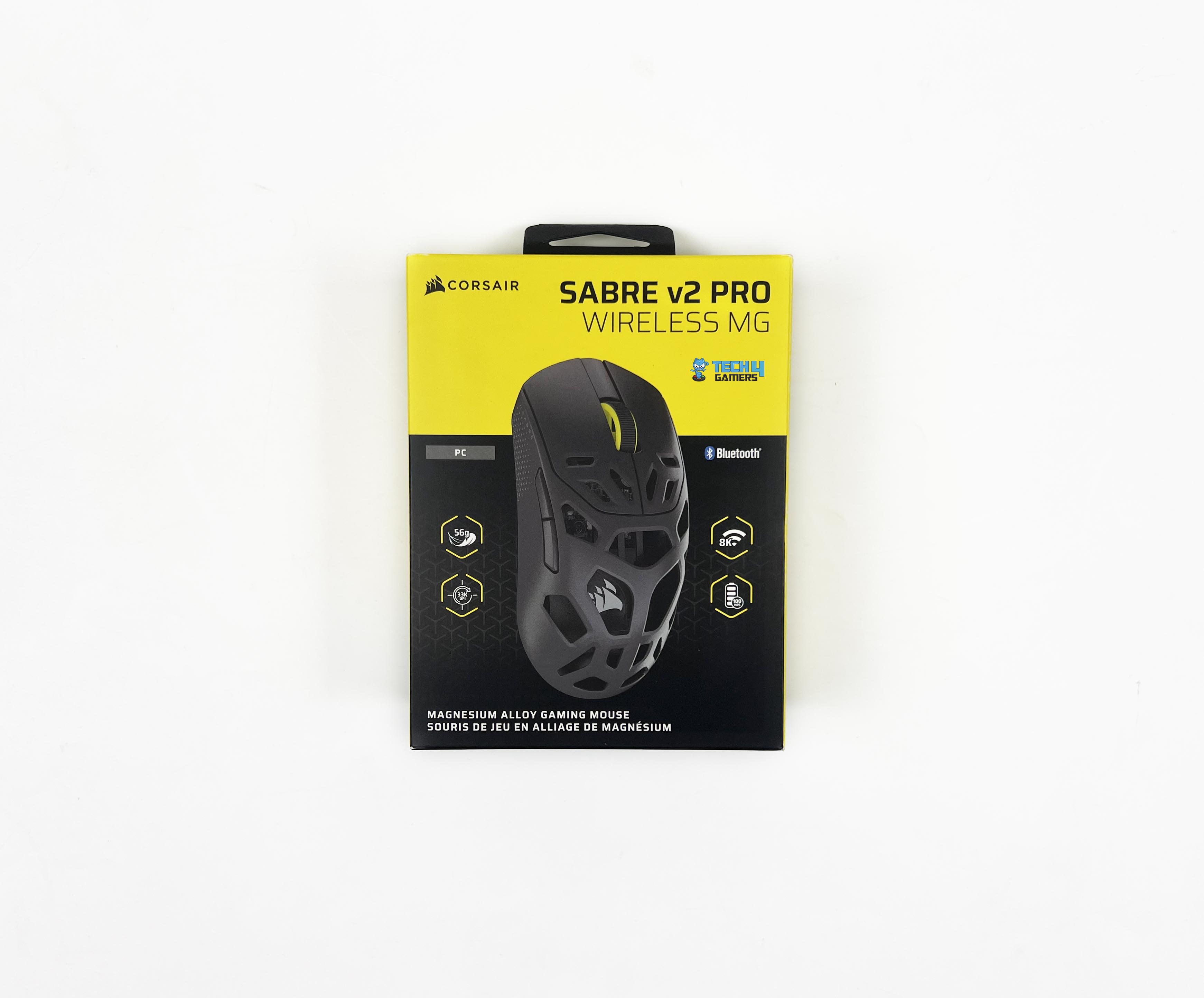
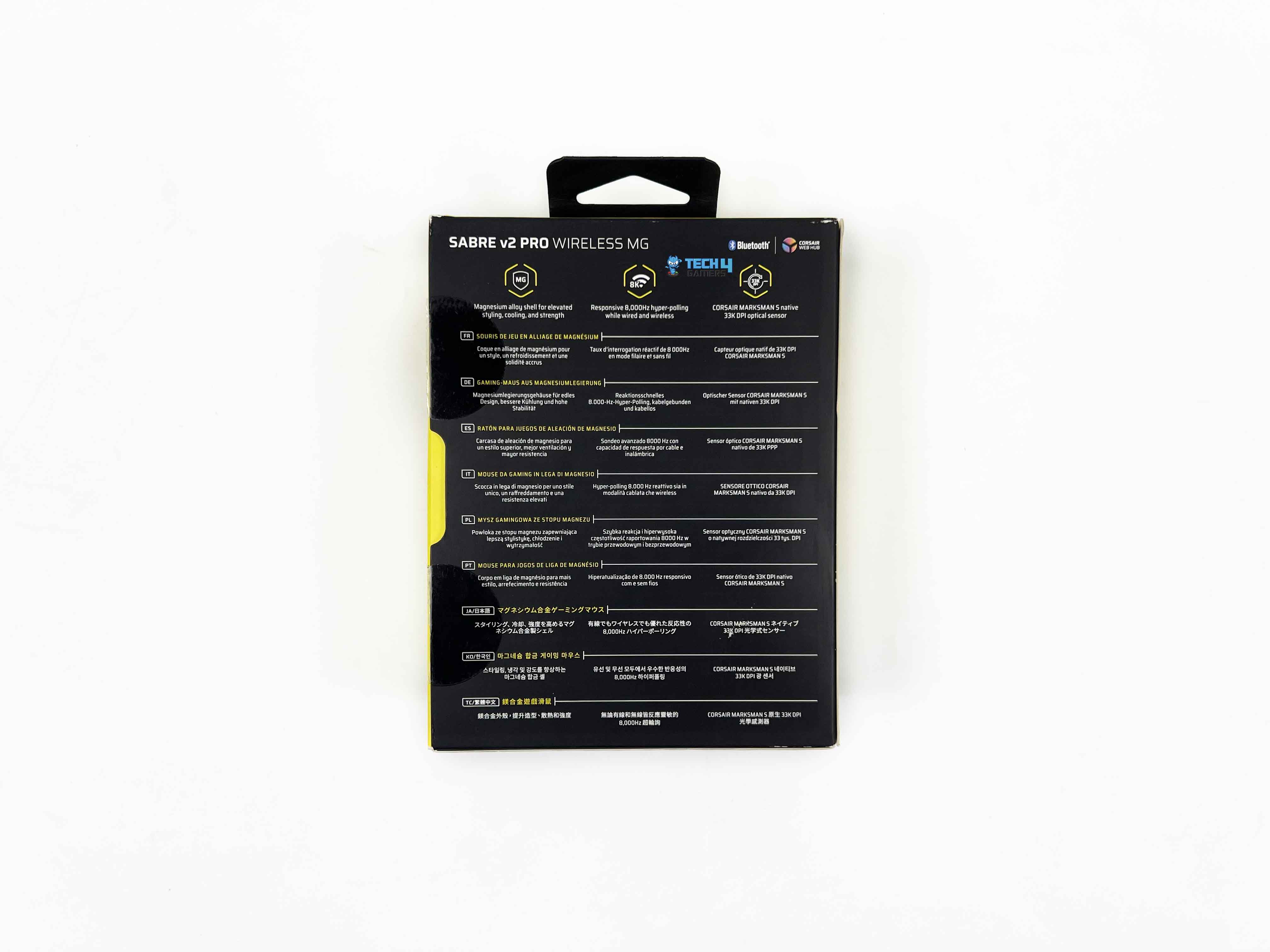
The box looks familiar if you’ve opened Corsair products before. On the front, there’s an image of the mouse, the full model name, and Corsair’s branding. You also get a few feature callouts. The sides add a bit more detail. You’ll find short feature descriptions there, along with a quick breakdown of what’s included inside. Around the back, that’s where the technical specs are printed in multiple languages.
Unboxing
1 of 2
White Cardboard Inner Tray
Box Contents
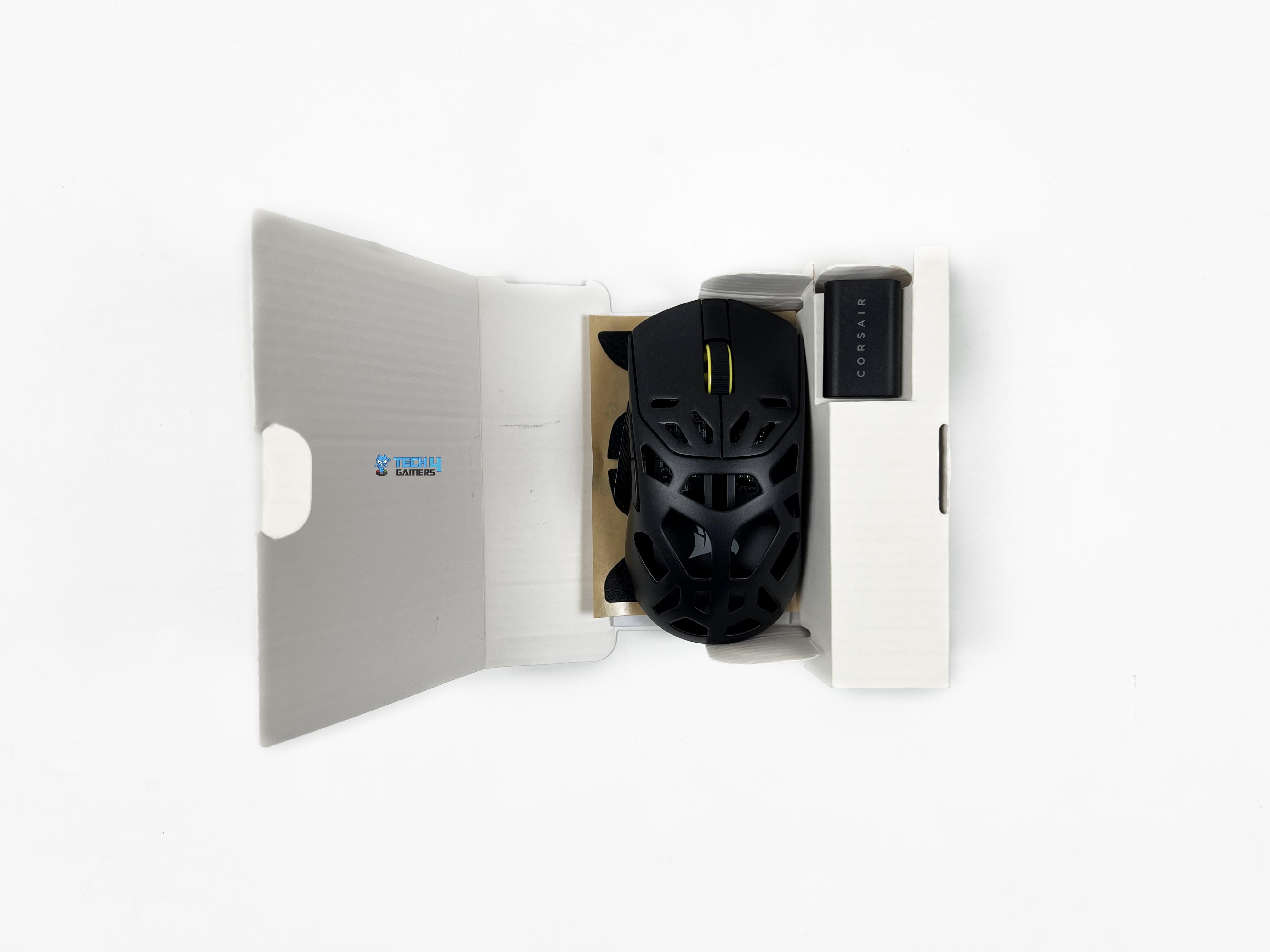
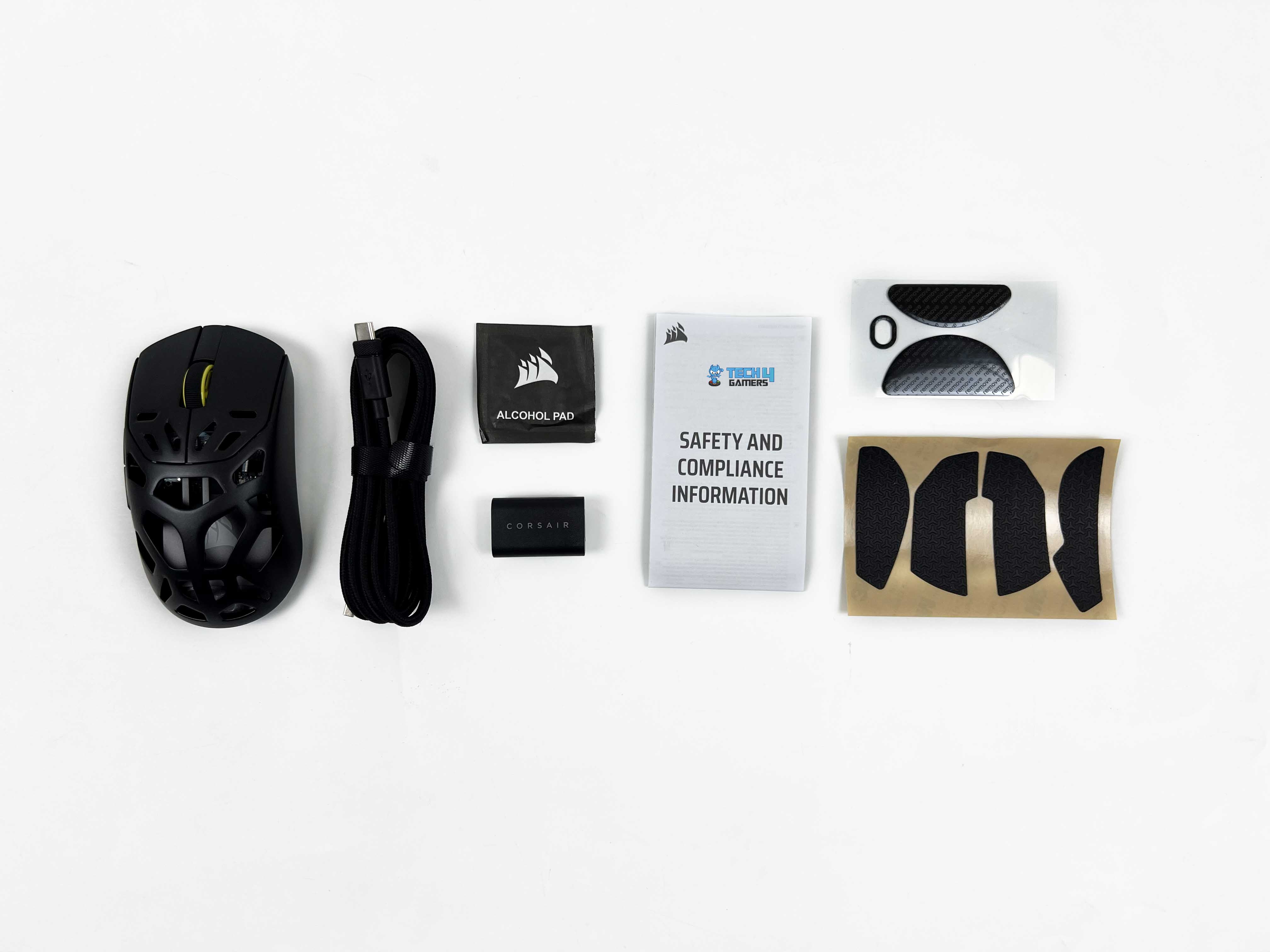
Opening the box, you’ll see a white cardboard inner tray that holds everything in place. The first things you see are the wireless USB receiver and the mouse itself. Once those are out of the way, the rest of the accessories come into view. There’s an alcohol pad, extra mouse skates, and a set of grip tapes. You also get a USB Type-C to Type-A cable tucked alongside a small safety leaflet.
Design
Design
The original Sabre V2 Pro stood out at launch for how restrained it felt. Corsair managed to keep the weight impressively low without leaning on cutouts everywhere. Even the underside stayed intact, which wasn’t something you could say about a lot of lightweight mice even until now. It felt clean and purposeful for a mouse that originally sat around the hundred-dollar mark. The Corsair Sabre v2 Pro Magnesium Alloy version takes a very different route.
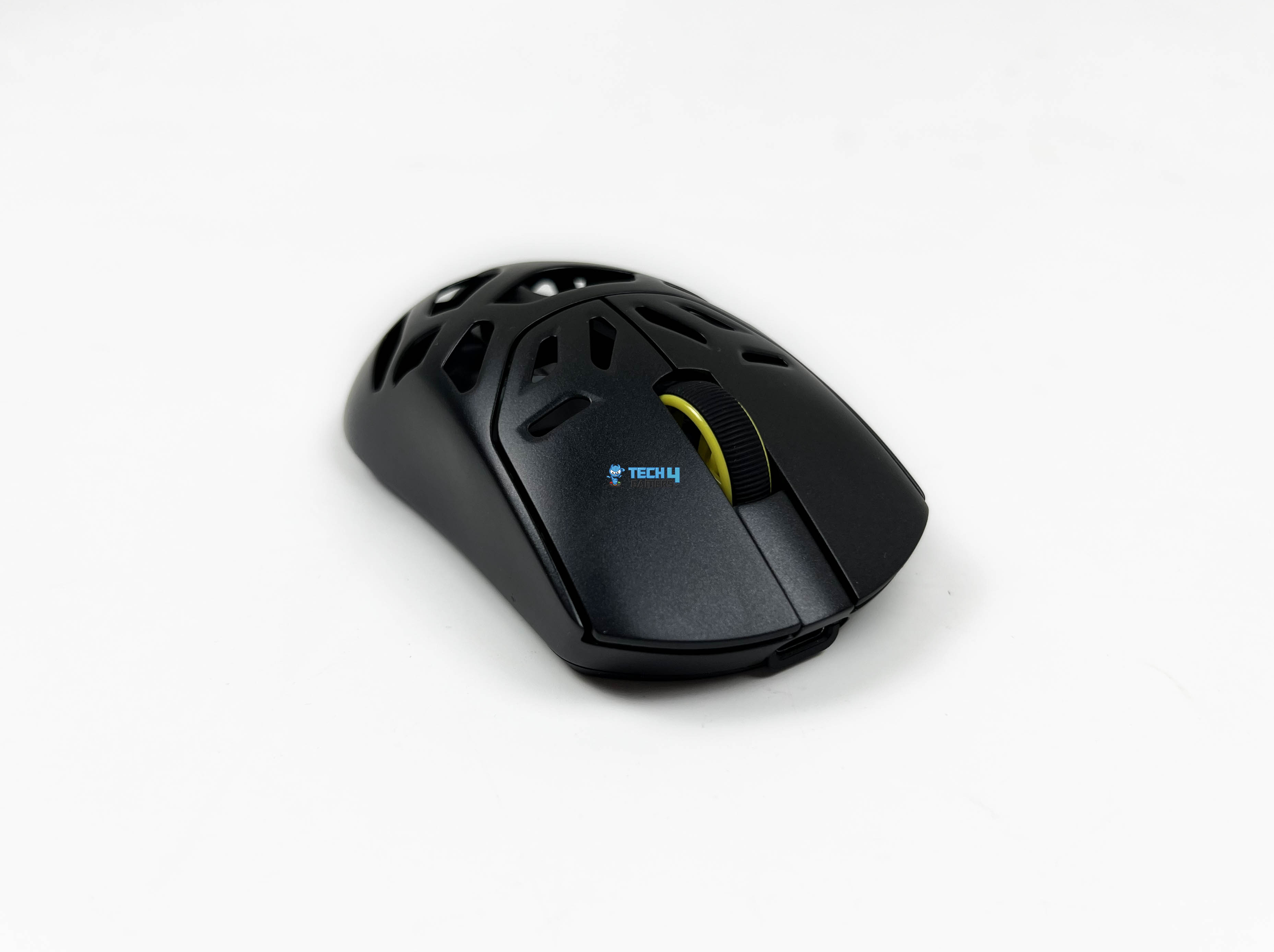
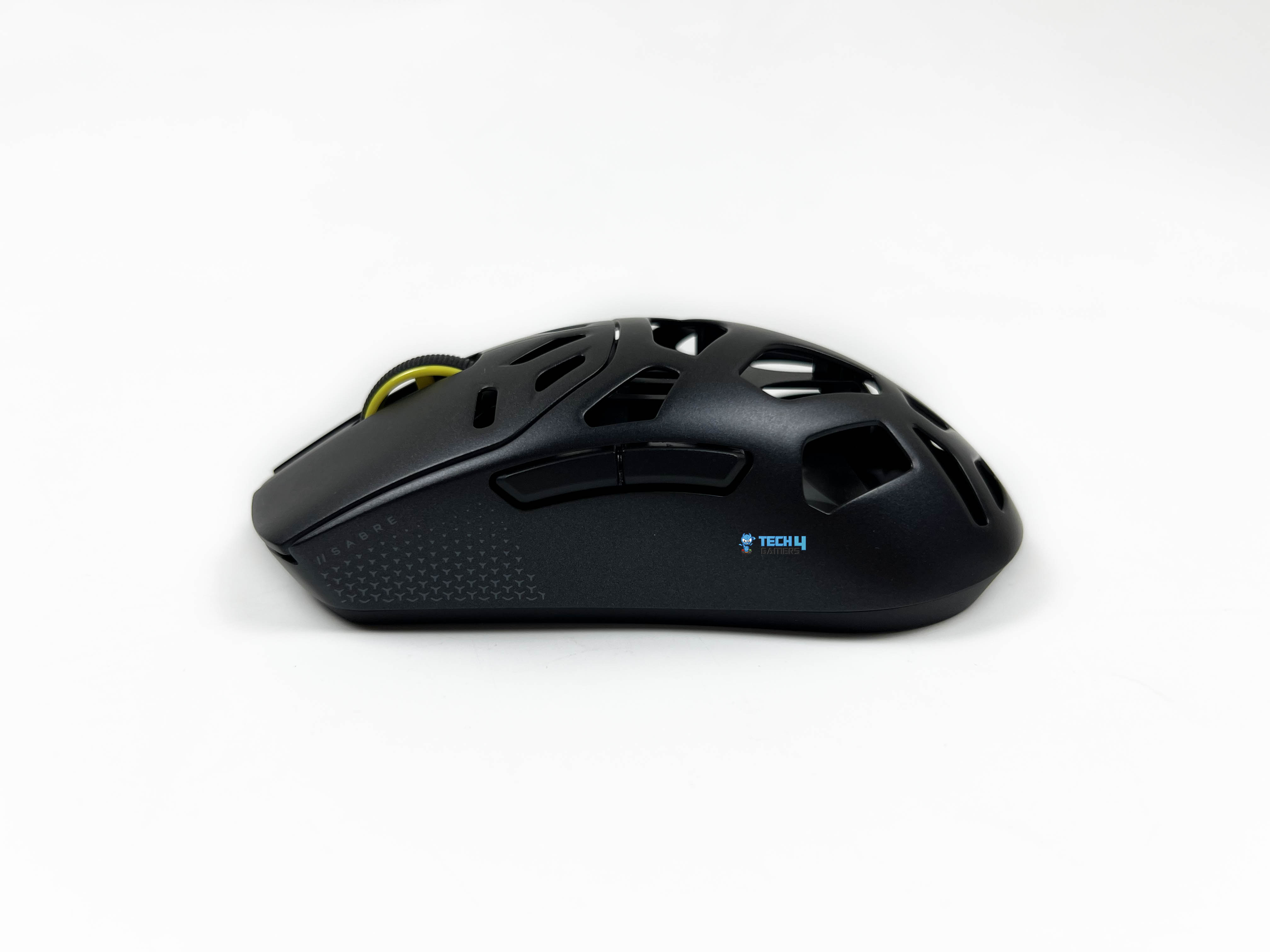
The shell is openly perforated. Corsair’s design approach here feels very function-first. You can tell pretty quickly that visual flair wasn’t the priority. There’s nothing on this mouse that exists just to look cool on a desk. Every curve and cutout feels like it was designed for prioritizing usability first. The hole pattern across the magnesium shell is a good example of that mindset. If you’re expecting something flashy, this isn’t that kind of mouse for you.
Coating
Coating
The Corsair Sabre v2 Pro Magnesium Alloy’s coating lands somewhere between matte and soft-touch, without leaning too hard in either direction. At first contact, it feels dry. That first impression sticks around longer than I expected, even once my hand warmed up. It doesn’t start out one way and end up another after two or three hours. The feel you get in the first match is mostly the feel you get later in the night. There’s no moment where you suddenly notice your grip changing.
If your hands naturally run oily, you’ll see a slight darkening in high-contact spots. Mostly where the thumb rests and along the main buttons. With dry hands, the coating feels slightly textured. Enough resistance to keep your grip stable, without that sticky sensation some matte finishes create. When your fingers pass over the holes, you get some texture variation. It doesn’t improve grip outright, but it stops the surface from feeling flat or sealed.
Weight
Hump
The Corsair Sabre v2 Pro Magnesium Alloy at 56g is in the lightweight category. That number isn’t extreme by today’s standards, but it puts the mouse in the same ballpark as some of the most respected competitive options. In the hand, it doesn’t immediately feel that light. When it’s just resting on the desk, there’s a bit of perceived heft to it. That lower moving weight does take some strain off during longer sessions.
Not in a dramatic night-and-day way, but enough that your wrist doesn’t feel tense after an hour or two of aim-heavy gameplay. Over time, that reduces the subtle fatigue that creeps in with heavier designs, especially during tracking scenarios. Quick left-right snaps feel clean, without that slight lag you sometimes get from heavier shells. That balance matters more than raw grams, and it’s handled well here.
Grip Styles
Grip Styles
1 of 3
Palm Grip
Claw Grip
Fingertip Grip
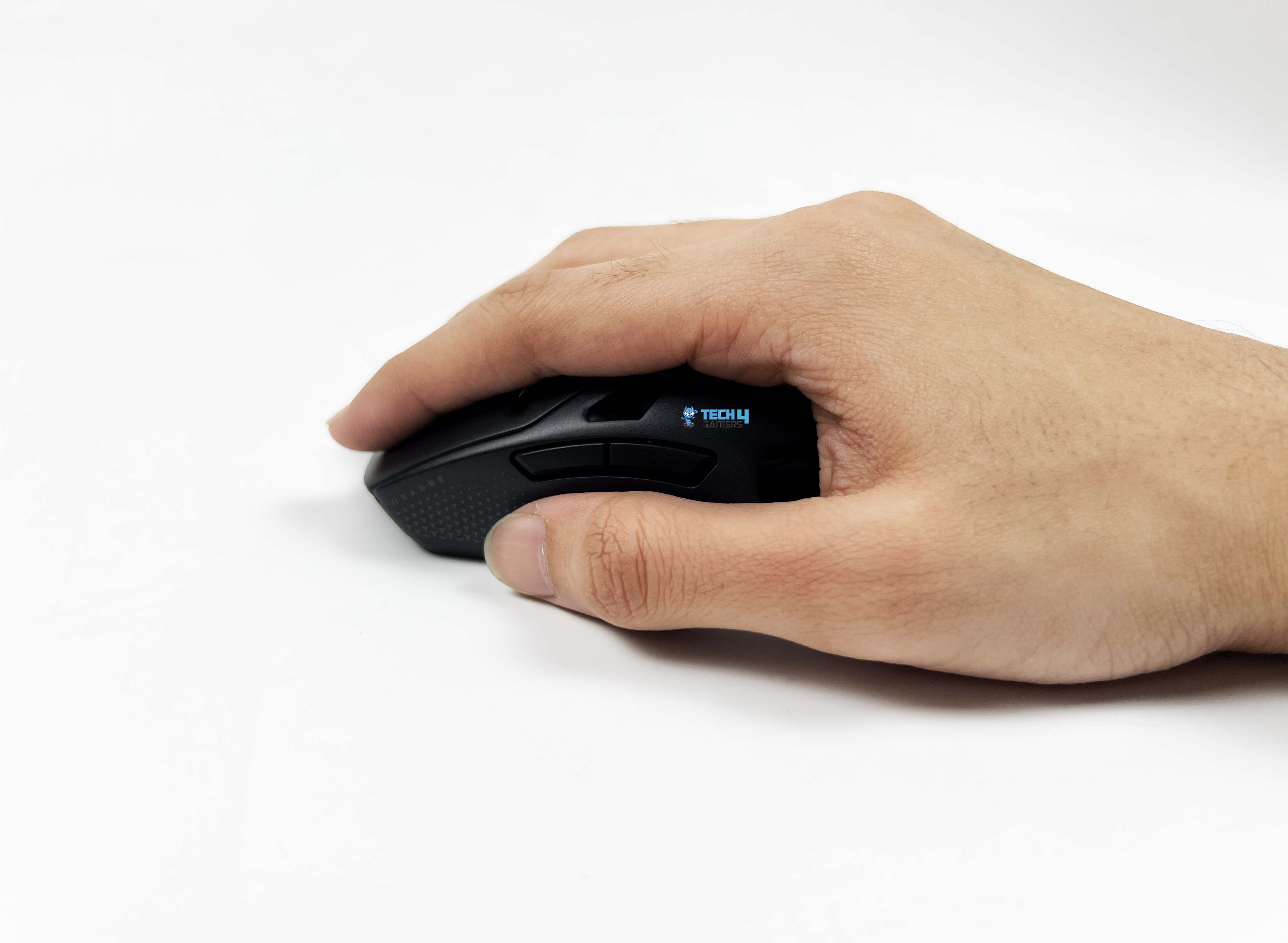
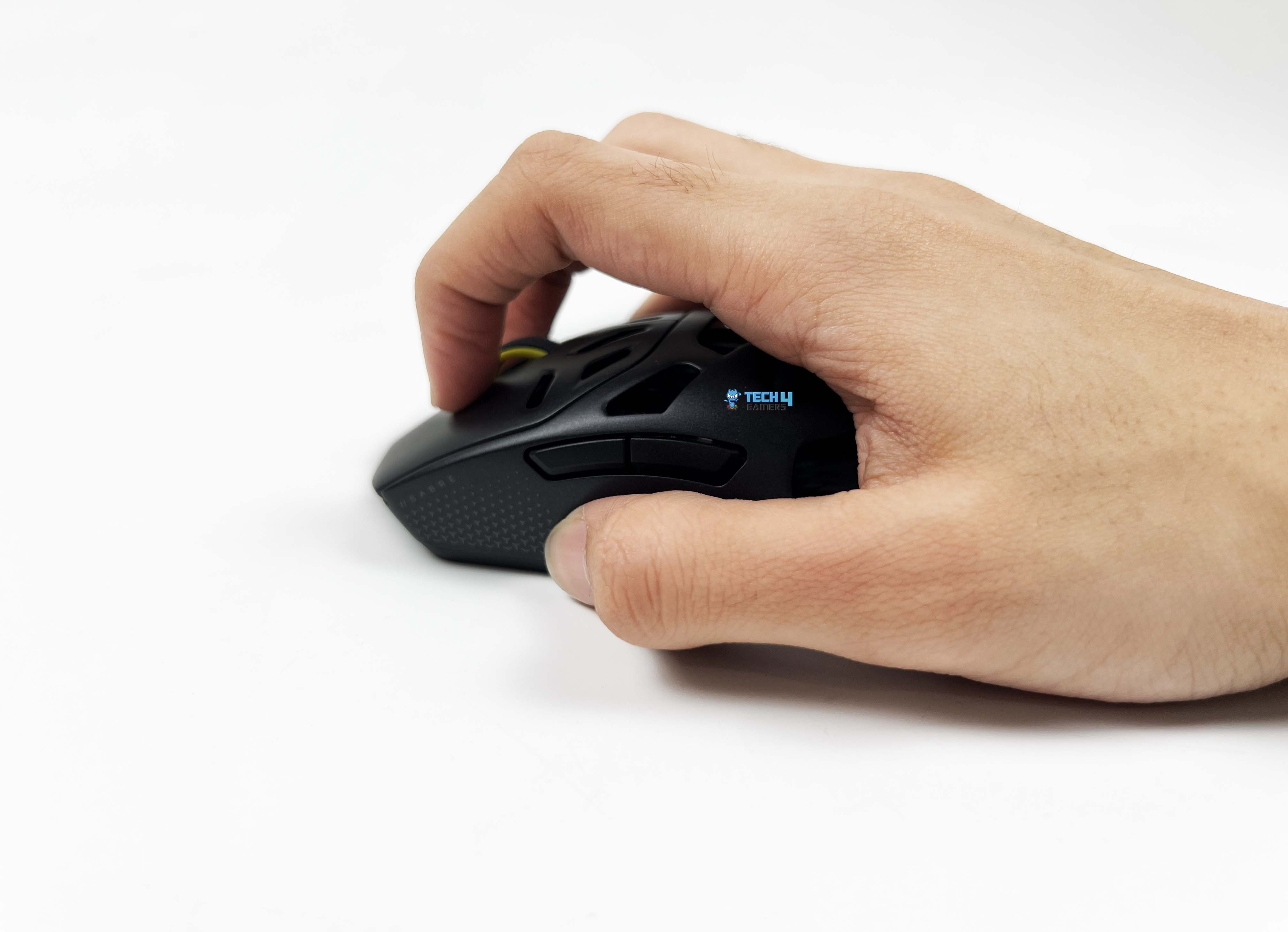
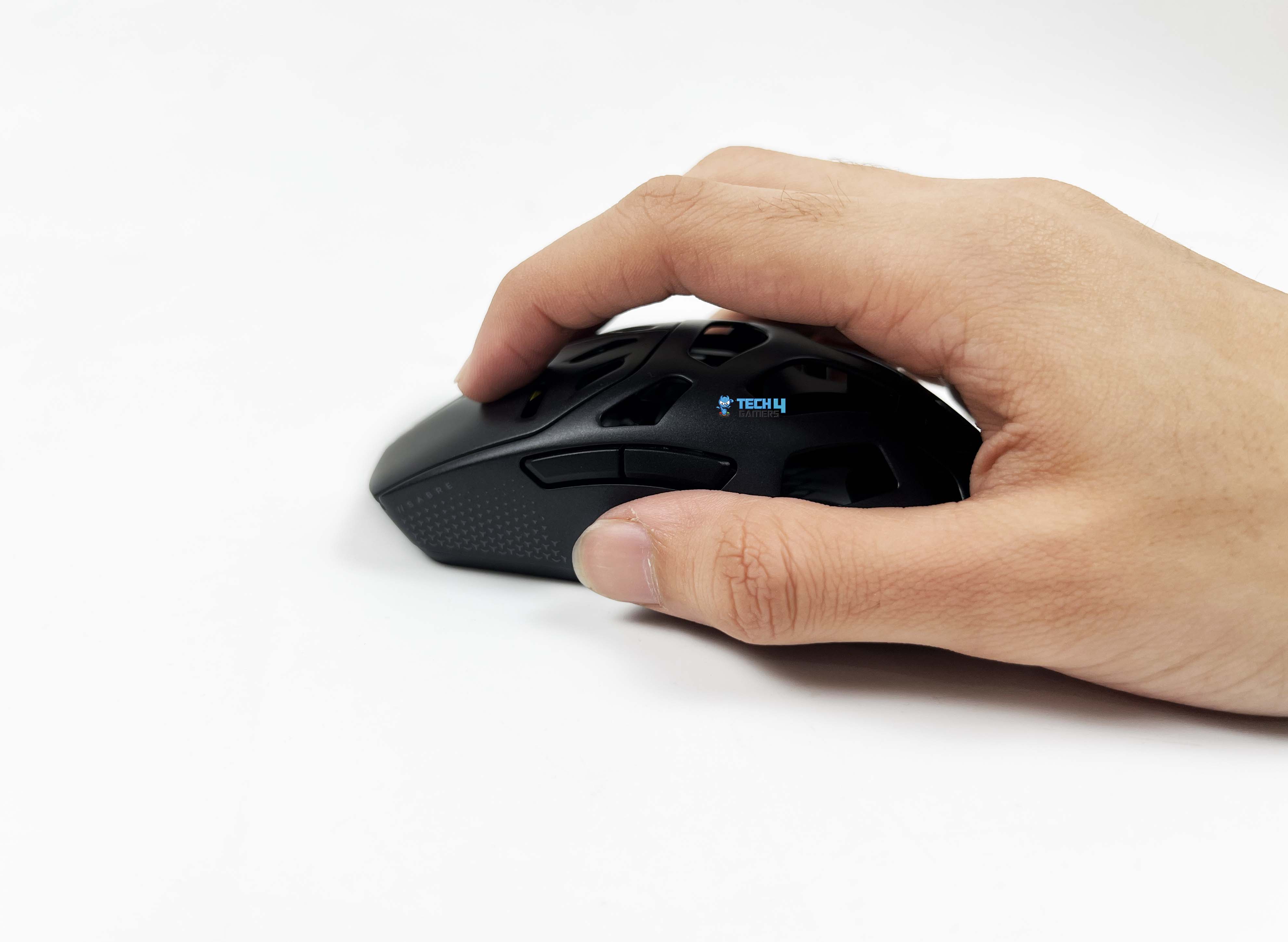
The Corsair Sabre v2 Pro Magnesium Alloy doesn’t force you into a single posture. With a palm-style grip, the contact points feel familiar. The rear fills the base of the hand enough to feel anchored. After a while, you stop adjusting your grip because there’s nothing obvious asking to be corrected. Claw grip feels more intentional here. The slope from the buttons into the shell gives your fingers something to pull against. Quick taps and micro-flicks feel controlled.
The perforations under the fingers are noticeable at first, then fade into the background. Fingertip grip works, though it feels more deliberate than effortless. The front isn’t overly narrow, so your fingers don’t curl awkwardly. The thumb groove isn’t deep, but it’s shaped in a way that naturally sets your thumb in place. Pinky and ring finger placement depends on hand size. Smaller hands will find a comfortable ledge. Larger hands might drag slightly, though it never feels unusable.
Underside
Underside
Flip the Corsair Sabre v2 Pro Magnesium Alloy over, and the underside feels almost old-school, despite the lightweight direction Corsair is clearly chasing. The stock mouse feet come with rounded edges. I used the mouse like this for a few days on a mousepad. Corsair includes a second set of replacement skates in the box, and they’re noticeably larger than the ones installed. Swapping them on changes the feel more than I expected.
The contact area increases, and the glide becomes smoother almost immediately. What stands out most is what isn’t there. There are no holes on the underside. That keeps the base feeling solid. On the left side, there’s a wireless mode switch. Sliding it upward puts the mouse into 2.4GHz wireless mode. Sliding it down switches over to Bluetooth. Nearby, Corsair has placed a small DPI button that also doubles as the Bluetooth pairing button.
Build Quality
Build Quality
Picking up the Corsair Sabre V2 Pro Magnesium Alloy, the first thing that you notice is that it doesn’t feel fragile, even with all the perforations. The shell has a quiet sturdiness. It’s light, yes, but there’s no hint of flex when you press down on the top or sides. The magnesium build gives it a slightly denser feel compared to the Carbon Fiber and Ultralight versions I reviewed recently. It’s not heavy, but it’s noticeable. You can feel the material’s rigidity when gripping the sides.
Even during firmer grips, the mouse doesn’t bend slightly or squeak. You don’t see any uneven gaps, and the transitions between the top shell, sides, and rear feel seamless. Even running a finger along the perforations, you don’t feel rough edges. That small attention to detail reduces the sense that a lightweight mouse might be flimsy. After a couple of weeks of use, there’s no visible wear on the shell. This magnesium model just feels like it could take a bit more abuse from raging game sessions.
Buttons
1 of 2
Primary Buttons
Side Buttons
The primary buttons on the Corsair Sabre V2 Pro Magnesium Alloy are not overly stiff, but there’s a solid snap when you press. The spacing between the left and right clicks is consistent. The tension is well-balanced, that is, light enough to reduce finger fatigue in long sessions, but firm enough that accidental clicks are almost non-existent. Travel distance is short but satisfying. The click feedback is also clear without being noisy, which is not as loud as some gaming mice, but it’s noticeable enough that you know the press registered.
Your thumb naturally lands near the side buttons without needing to adjust your grip, which makes pressing the right button mid-game effortless. It’s easy to distinguish which button you’re pressing. There’s just enough separation and contour for tactile feedback. The buttons aren’t too soft. You get a clear click without having to press all the way down, and the rebound is snappy. The click noise is subdued, quieter than the main buttons, which is nice if you’re not trying to broadcast every press.
Scroll Wheel
Scroll Wheel
The scroll wheel on the Corsair Sabre V2 Pro MG features a noticeable tactile bump at each notch. It’s not sharp or jarring, but you can feel each step clearly, which really helps when you’re swapping weapons or cycling through inventory items in games. The balance between smoothness and resistance is good, too. It rolls easily when you need it to, yet maintains enough tension to prevent accidental scrolling. The scroll wheel is perfectly centered.
Even with fast scrolling through menus, it doesn’t lean to one side or wobble. Middle-clicking is also consistent, and it registers cleanly every time. The rubberized coating feels sturdy. It keeps your finger from slipping, and it doesn’t wear down noticeably after hours of use. For any situation where you’re flipping through options quickly, it performs well without missteps or skipped notches.
Connectivity
USB Cable and Wireless Receiver
The Corsair Sabre V2 Pro Magnesium Alloy offers a few connection options, and each works commendably. Getting it working on 2.4GHz slipstream wireless is simple. Plug the USB receiver into a USB port on your PC, then power on the mouse. A small LED under the scroll wheel emits a solid green light. With it, movement and clicks feel rapid. There’s a sense of responsiveness that stays consistent, even when you’re flicking or repositioning quickly.
Bluetooth connection is equally straightforward. Hold the pairing button for a few seconds, and the LED flashes blue. From there, find the mouse on your device, and the light turns solid blue once it’s connected. Re-pairing is effortless if you need to move it from a laptop to a desktop. Bluetooth performance is about what you’d expect from a mouse like this. It feels stable during everyday use. That said, the latency difference compared to 2.4GHz is noticeable if you’re sensitive to it.
Performance
Sabre Branding
The Corsair Sabre V2 Pro Magnesium Alloy is one of those mice where the numbers are high, but what matters is whether you can feel them. In this case, you actually can. The 8,000Hz polling rate is the headline feature. Micro-adjustments feel sharper with it. Fast flicks feel more in sync with your hand. There’s less of that tiny delay between movements that you sometimes notice with a standard 1,000Hz mouse. It’s subtle, but once you get used to it, going back feels slightly dull.
What’s important is that this responsiveness stays consistent whether you’re playing wirelessly or plugged in. Wireless mode doesn’t feel like a compromise here. Inputs still feel immediate, even during rapid aiming. The Marksman S sensor plays a big role in that consistency. At low DPI settings, tracking stays clean. Long swipes across the mousepad remain smooth from start to finish. With a tracking speed rated at 750 IPS and 50g acceleration, the sensor doesn’t lose its footing when you flick hard.
Battery Life
Inside the Corsair Sabre V2 Pro Magnesium Alloy is a lithium-ion battery with a capacity of 300mAh. From near empty, it takes about an hour and a half to reach a full charge. In 2.4GHz wireless mode at the standard 1kHz polling rate. It easily lasts around 5 days of regular gaming before needing a recharge. Increasing the polling rate to the maximum 8kHz, and you still get roughly 20 hours of solid playtime. You can also stretch a single charge for a week or more on a Bluetooth connection.
Software
Software
1 of 4
Key Assignments
DPI Steps
Macro Manager
Device Settings
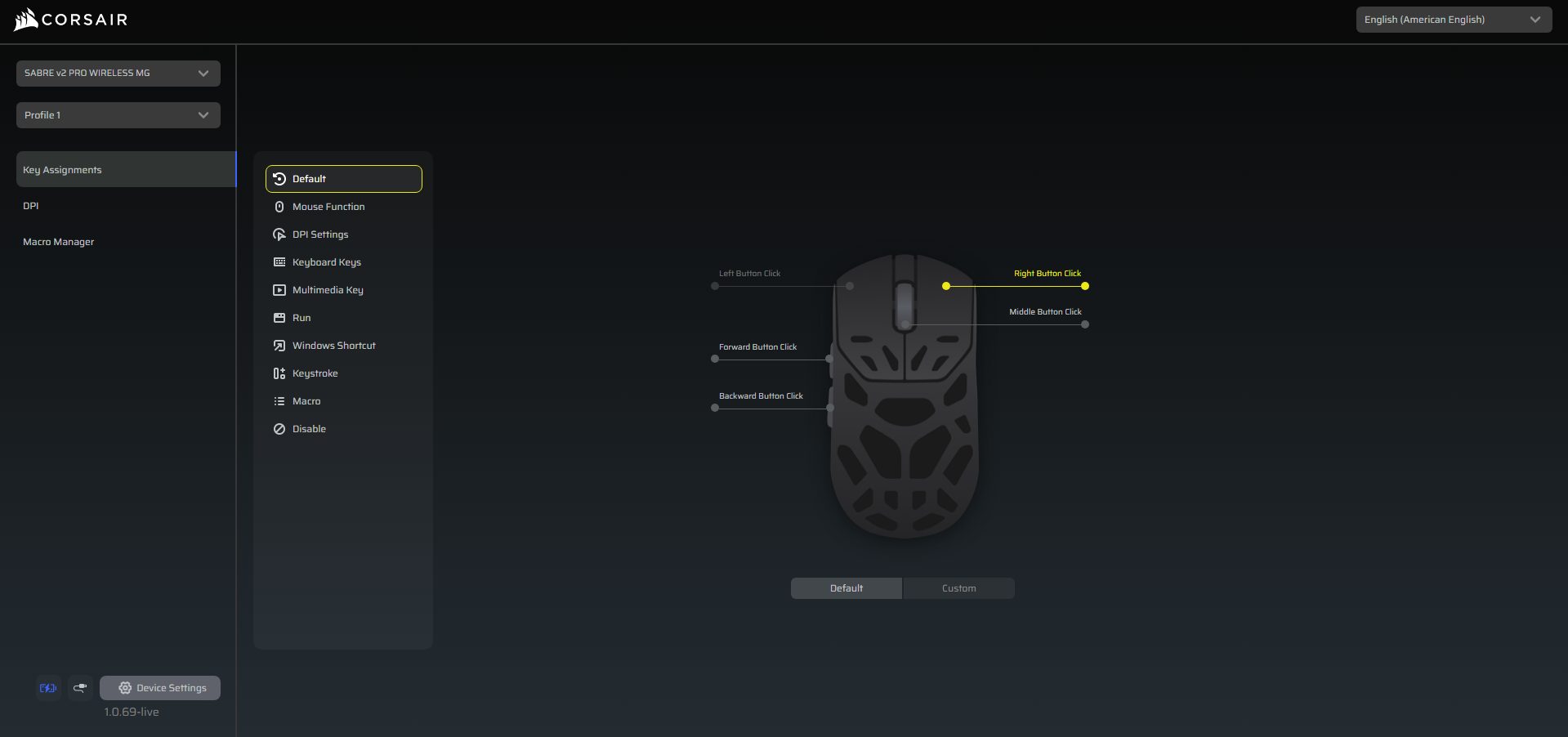
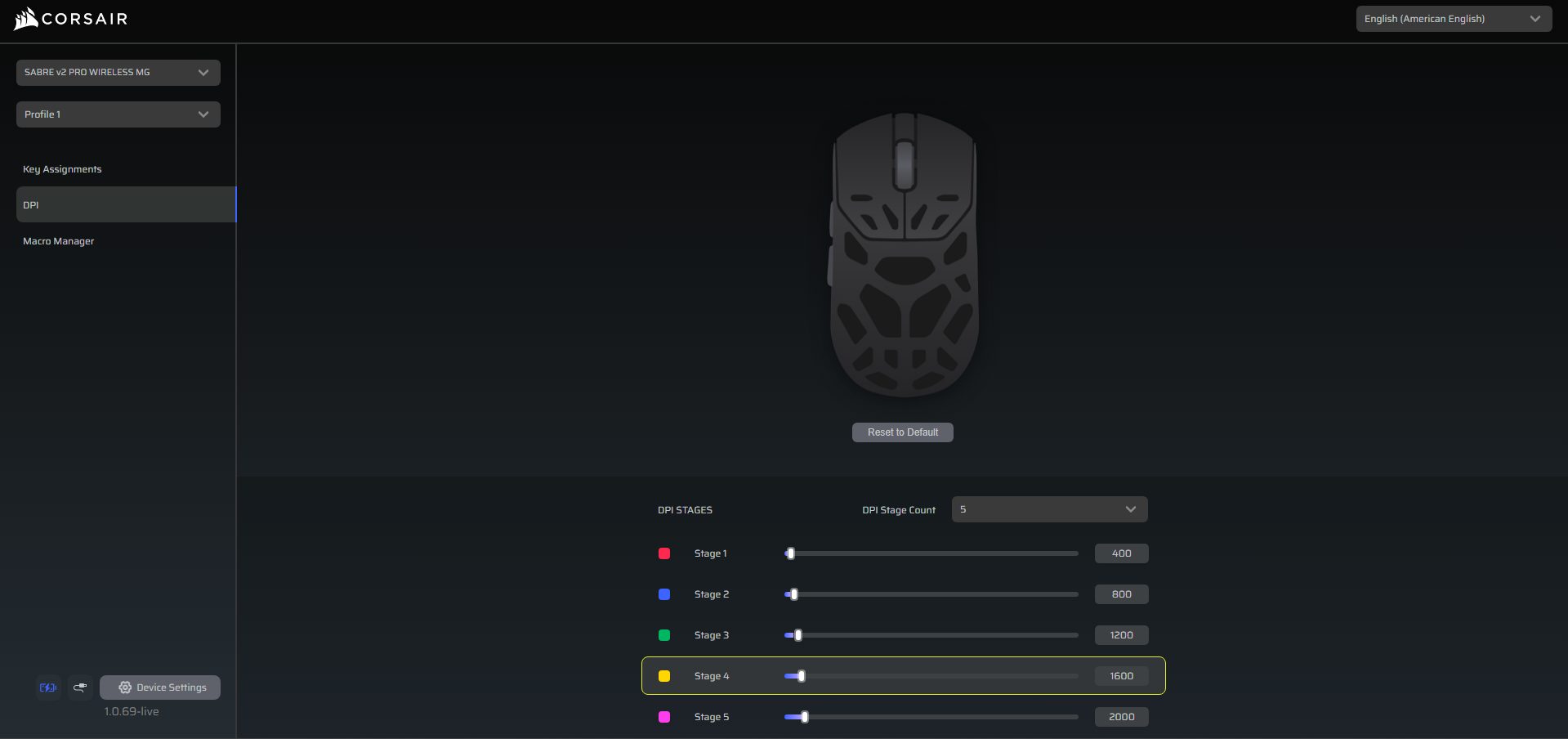
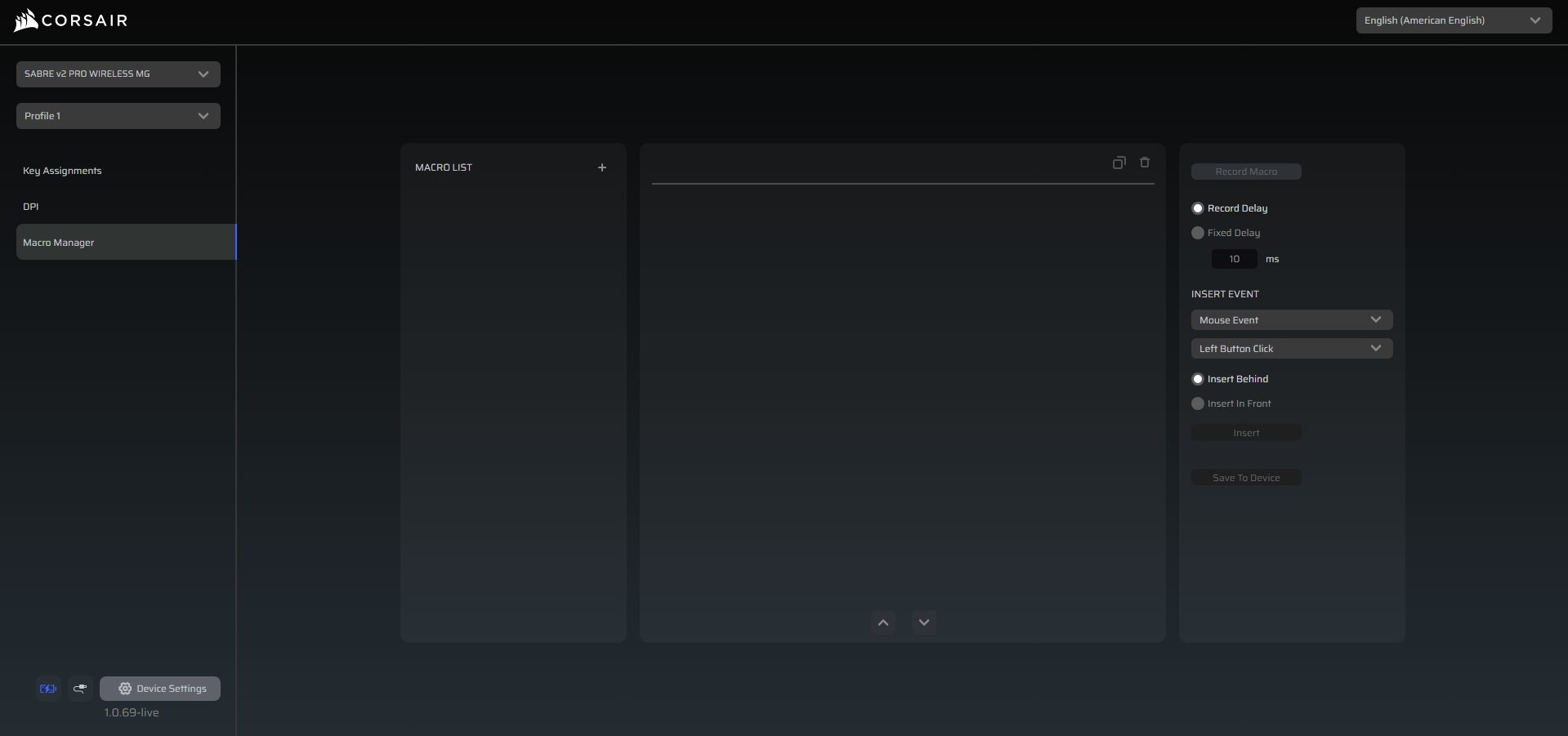
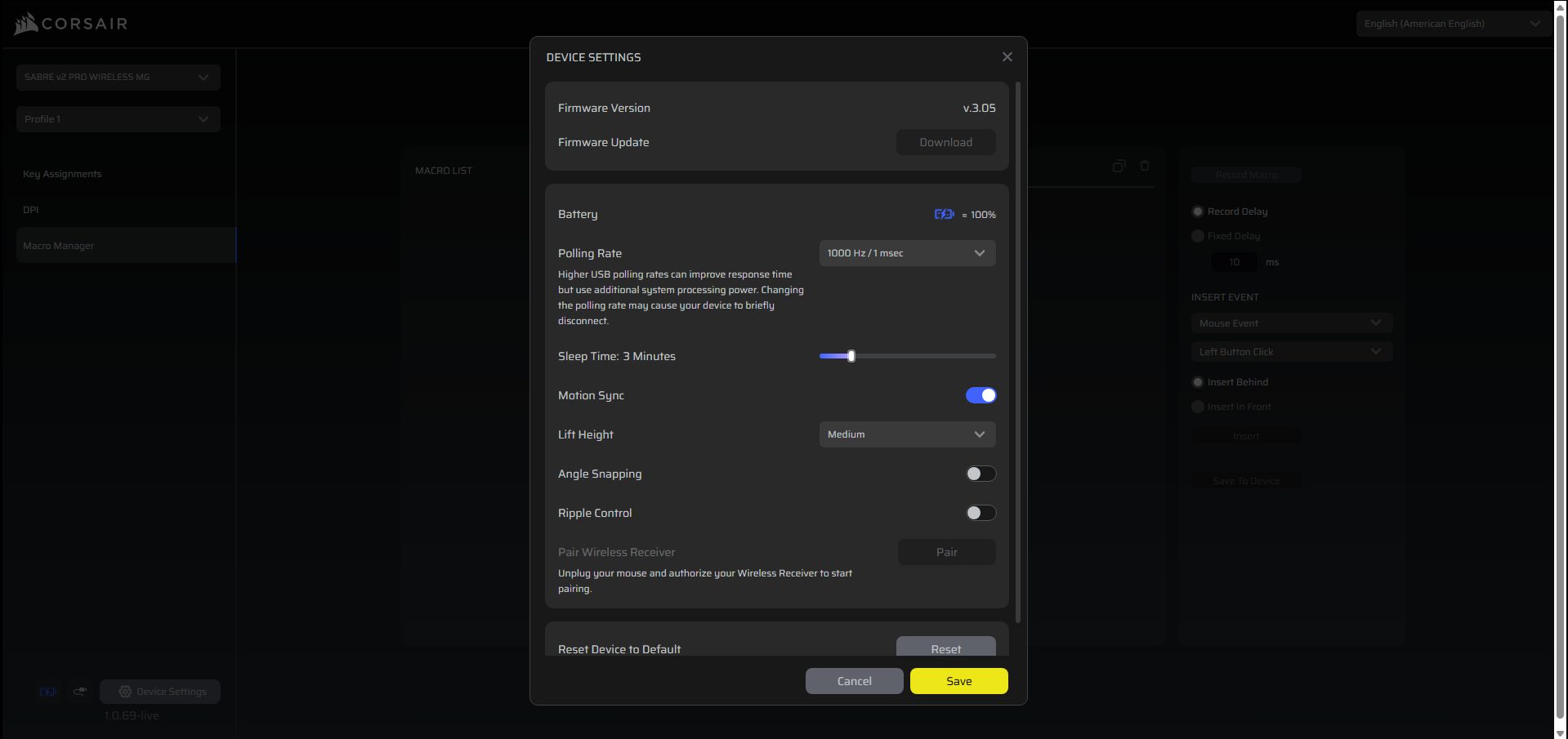
You can customize the Corsair Sabre V2 Pro Magnesium Alloy without installing heavy software. Corsair’s Web Hub is browser-based and straightforward. You just open it, authorize your mouse, and you can start adjusting settings. DPI stages, button assignments, macros, and more can be configured right there. The Web Hub also gives access to more advanced features for fine-tuning its sensor, such as motion sync, lift-off distance, angle snapping, and ripple control. Setting up profiles is simple.
You can select and create one, then assign DPI stages and remap buttons as needed. Macros are easy to record and edit manually. For battery or wireless settings, the Web Hub shows status, lets you adjust sleep time, and allows you to pair or reset the receiver. The software also checks for new Firmware updates. During usage, the entire experience feels intuitive, whether you’re a casual player or someone who wants extensive customization for competitive gaming.
Should You Buy it?
Buy it if
✅ You want a lightweight yet durable mouse: The Corsair Sabre v2 Pro Magnesium Alloy keeps weight in check at 56g while using a magnesium shell that feels sturdier.
✅ You play competitively and care about responsiveness: With the Marksman S sensor, 8,000Hz polling, and low-latency 2.4GHz wireless, micro-adjustments and fast flicks register accurately, whether wired or wireless.
Don’t Buy it if
❌ You want an ultra-lightweight mouse: At 56g, it’s light but not the absolute lightest on the market; if shaving grams is your top priority, some ultralight alternatives might appeal more.
❌ You prefer deeply contoured ergonomics: The perforated magnesium shell is functional, but those looking for heavily sculpted shapes may find it less tailored than some other brands’ ergonomic designs.
Final Verdict
After spending hours with the Sabre V2 Pro Magnesium Alloy, it’s clear that this isn’t just another lightweight mouse with a flashy name. Compared to the Sabre V2 Pro Ultralight and the Carbon Fiber variants, it feels like Corsair tried to merge the best of both worlds. It provides a refined ultralight experience with a sturdier shell. It doesn’t reinvent the wheel, but it still stands on its own. For those looking for a light and durable wireless mouse, it’s worth spending time with.