Home Blog Page 94

AMD Planning To Open Source FSR 4 Soon, Will Keep Core Technology A Secret

Story Highlight
  • AMD plans to make the Radeon 9000-series exclusive FSR 4 open source soon.
  • Its code was leaked last year, which led modders to use it to enable FSR 4 on older GPUs.
  • This seems like a good idea as AMD focuses a lot on being universal and open source.

AMD introduced its upscaling tech, FSR, as a direct competitor to Nvidia’s DLSS. At first, it was nowhere near the quality of DLSS, but over time, it has gotten a lot better. What really helps is the wide availability of FSR compared to DLSS. 

Currently, FSR 4 is AMD’s top-tier upscaling tech and is exclusive to RDNA 4-based Radeon 7000 series. However, earlier this year, the FSR 4 code leaked into the wild, but now AMD seems to be planning to make it open-source anyway. 

Why it matters: AMD quickly took down the leaked code, but even then, people had gotten access to it, and modders used it to enable FSR 4 on older-gen GPUs. So, now they could make it an official thing soon. 

AMD FSR 4 Exclusive to 9070 Series GPUs
The tech, for now, is exclusive to Radeon 9000 series GPUs

Tom’s Hardware revealed that during CES, AMD’s president of GPU Technologies and Chief Software Officer Andrej Zdravković hinted that FSR 4 would soon be made open source, although the core technology will remain a secret. 

AMD intends to work as openly as possible. [Making FSR 4 open-source] is the long-term plan

– Andrej Zdravković

FSR4 for RDNA2/3
Making it open source would help it run on older RDNA GPUs

When it was announced as Radeon 9000 exclusive, people were surprised, because AMD has always been about keeping things open source. For context, you specifically need an Nvidia card for DLSS, but FSR is universal. 

Now, considering that the tech is already out in the wild, it makes sense for AMD to officially open source it. FSR 4 is a big upgrade over its older versions, and it can help breathe new life into older RDNA and even Nvidia GPUs. 

What are your thoughts on AMD FSR 4 becoming open source? Let us know your opinions in the comments or join the discussion at the official Tech4Gamers Forum.

AMD Made Just 2 of 11 Announcements For Gamers At CES 2026 – The Rest Were For AI

Story Highlight
  • AMD announced more than 10 new products at the Consumer Electronics Show 2026.
  • Out of these announcements, only 2 were focused on games, with AI taking up the spotlight.
  • The gaming giant even showcased an AI server rack at the event.

AMD wrapped up its CES 2026 keynote recently, revealing a slew of upcoming products. Typically, CES 2026, as the name implies, is focused on consumer electronics, but AMD’s latest keynote would have you believe otherwise.

The gaming giant’s latest event revolved mainly around AI and data center products. In fact, just 2 of the 10+ big announcements were focused on gaming, with AI making up for the bulk of the new reveals.

Why it matters: Gamers anticipate the event each year, waiting patiently for new announcements and reveals from giants like Nvidia, AMD, etc.

AMD hosted a 2-hour keynote at CES 2026. The following announcements were made throughout the event:

  • Ryzen AI 400
  • Ryzen AI Pro 400
  • Ryzen AI Max
  • Ryzen AI Max+
  • Ryzen AI Halo
  • Ryzen 7 9850X3D
  • AMD ROCm 7.2
  • Helios Server Rack
  • AMD Instinct MI440X
  • AMD Instinct MI500
  • FSR Redstone ML Ray-Tracing

For starters, the Ryzen AI 400 series focused on AI-powered CPUs for AMD laptops coming soon. This lineup succeeds the existing Ryzen AI 300 lineup, focusing on Copilot+ and other AI features powered by up to 60 TOPS of NPU compute.

Similarly, new Ryzen AI Max SKUs promote AI acceleration for thin and light notebooks. AMD also promoted many of its new AI-based software features through ROCm 7.2, a seamless platform that focuses on AI development.

The tech giant even went as far as showing off a server rack at the consumer show, highlighting its impressive data center capabilities. Paired with this announcement was the reveal of the MI455X chip for higher-than-ever AI compute performance. This was followed by a teaser of the MI500 lineup, coming in 2027.

AMD Helios AI Rack
AMD Showcased The Helios AI Rack At CES 2026

Ultimately, AMD had just the announcement of the Ryzen 7 9850X3D and more details on FSR Redstone to share for gamers at CES 2026, neither of which was too impressive to begin with.

With all said and done, AMD went all in on AI at this year’s event. In fact, you would even be forgiven for thinking CES was an AI-centric event after watching the keynote.

If you thought the word ‘AI’ was repeated way too many times in this story, just wait till you watch the official keynote. Anyhow, this isn’t too big a surprise, considering the entire tech industry is focused on artificial intelligence at the moment.

The Best Motherboards For Ryzen 5 9600X In 2026 [With Benchmarks]

I have tested the Ryzen 5 9600X, and it is a great mid-range CPU that offers incredible performance at its price. However, you’ll need the best motherboard for the Ryzen 5 9600X to enjoy its benefits. Therefore, I have compiled a list of some of the best offerings for the processor based on my first-hand testing experience.

Why Trust Tech4Gamers
  • Usman Saleem is our hardware tester who loves to put all the latest GPUs, CPUs, RAM, and motherboards for a spin.
  • 40+ motherboards tested and reviewed by our team of hardware experts (Tech4Gamers Team).
  • 800+ hours spent testing different motherboards for our reviews.
  • Objective testing criteria (See how we test motherboards).

At Tech4Gamers, ensuring you get reliable information is our priority. That’s why every hardware round-up undergoes a meticulous review process by our team of experts and editors. Each review is carefully examined against our strict editorial guidelines, guaranteeing you trustworthy insights you can depend on.

Here’s a quick comparison table of all our top motherboard offerings:

Motherboard
MSI MAG B850 Tomahawk Max WiFi
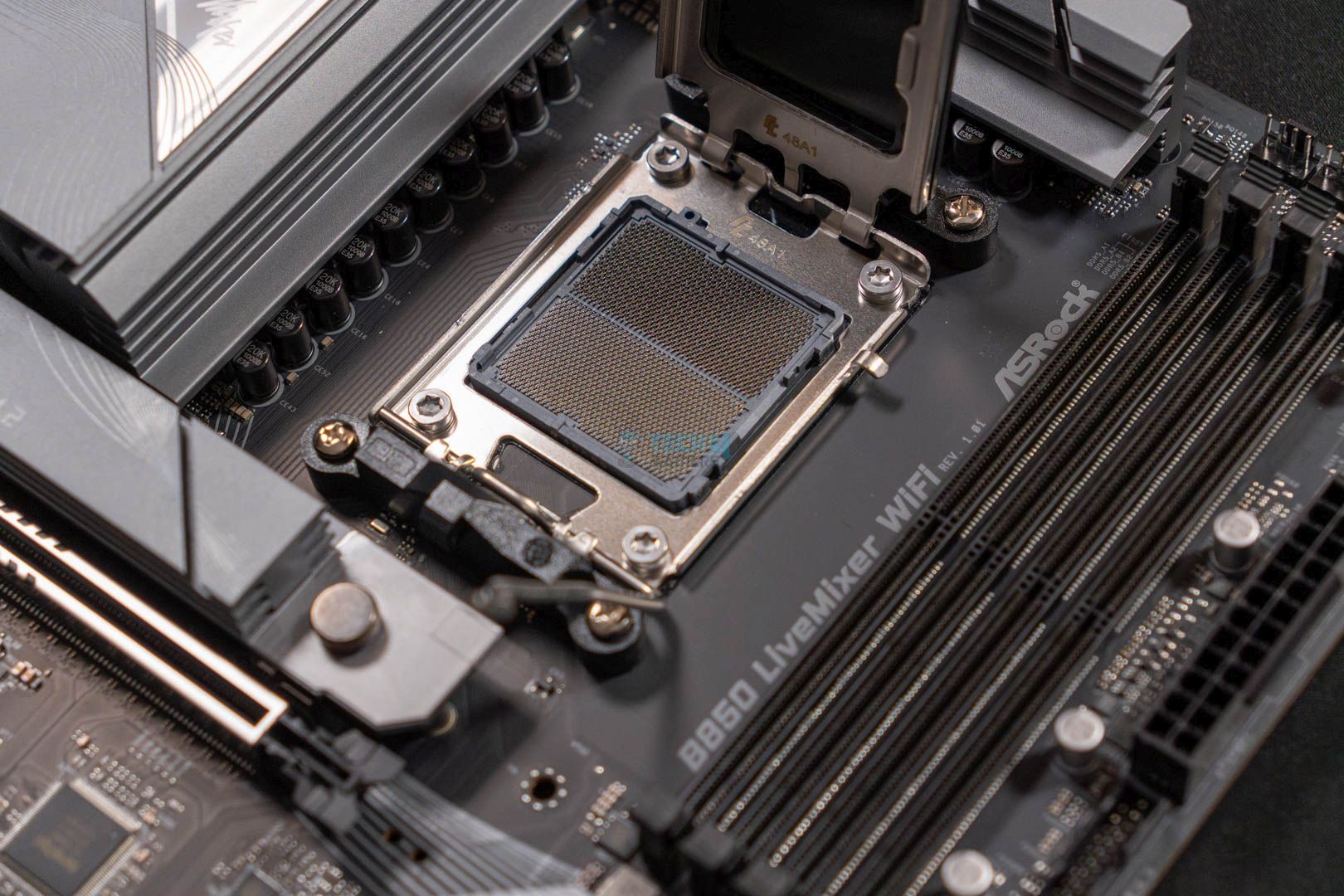
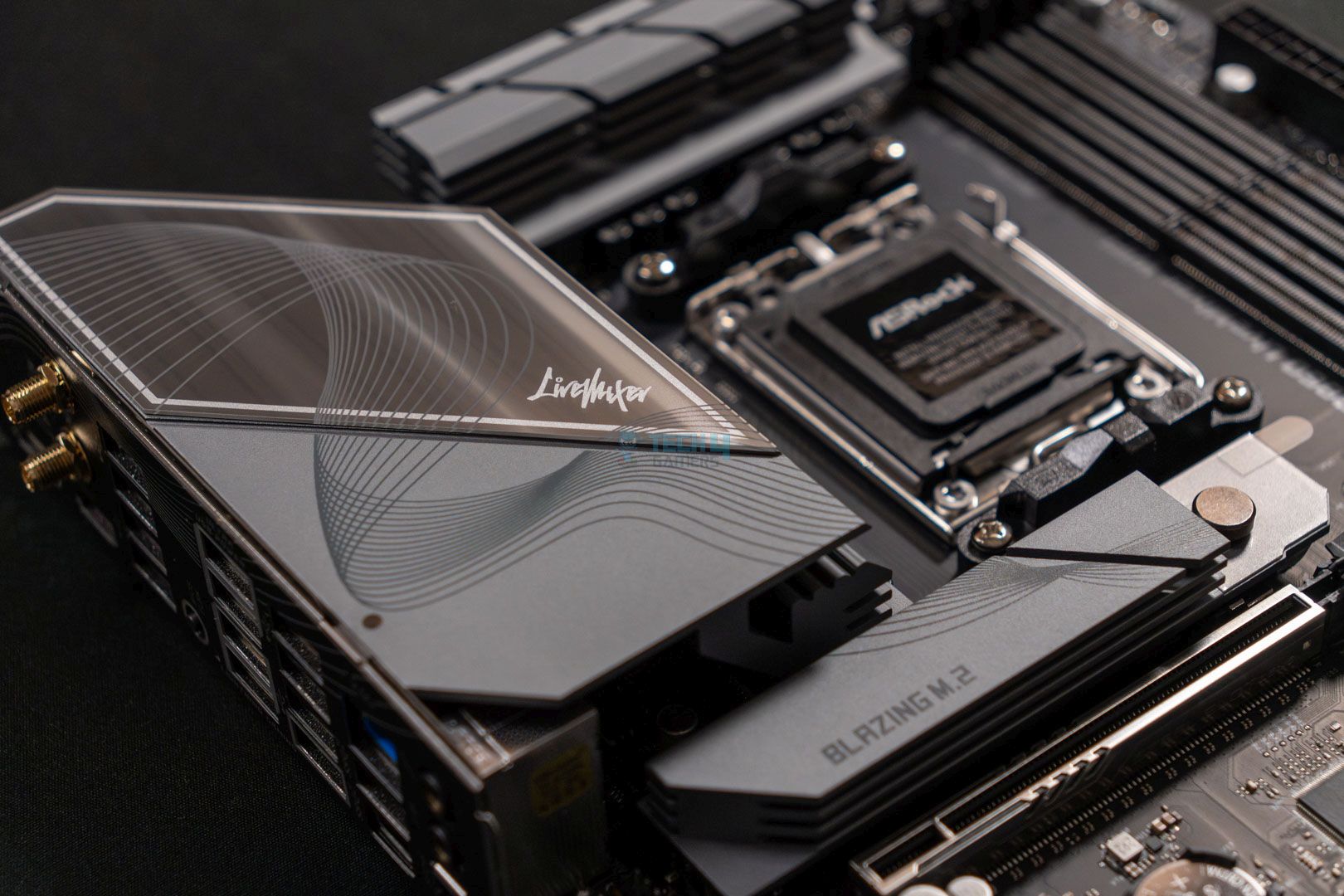
ASRock B850 LiveMixer WiFi
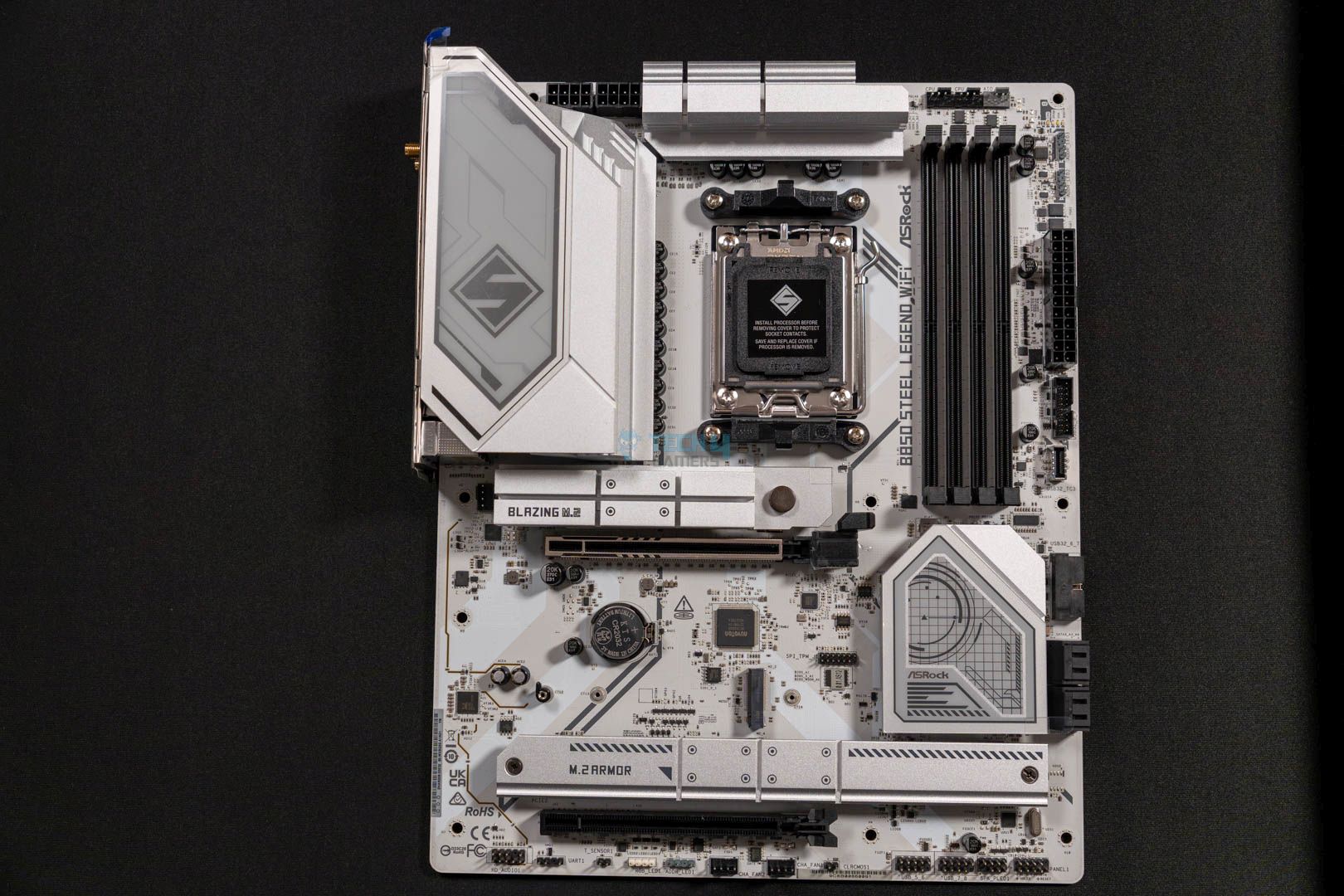
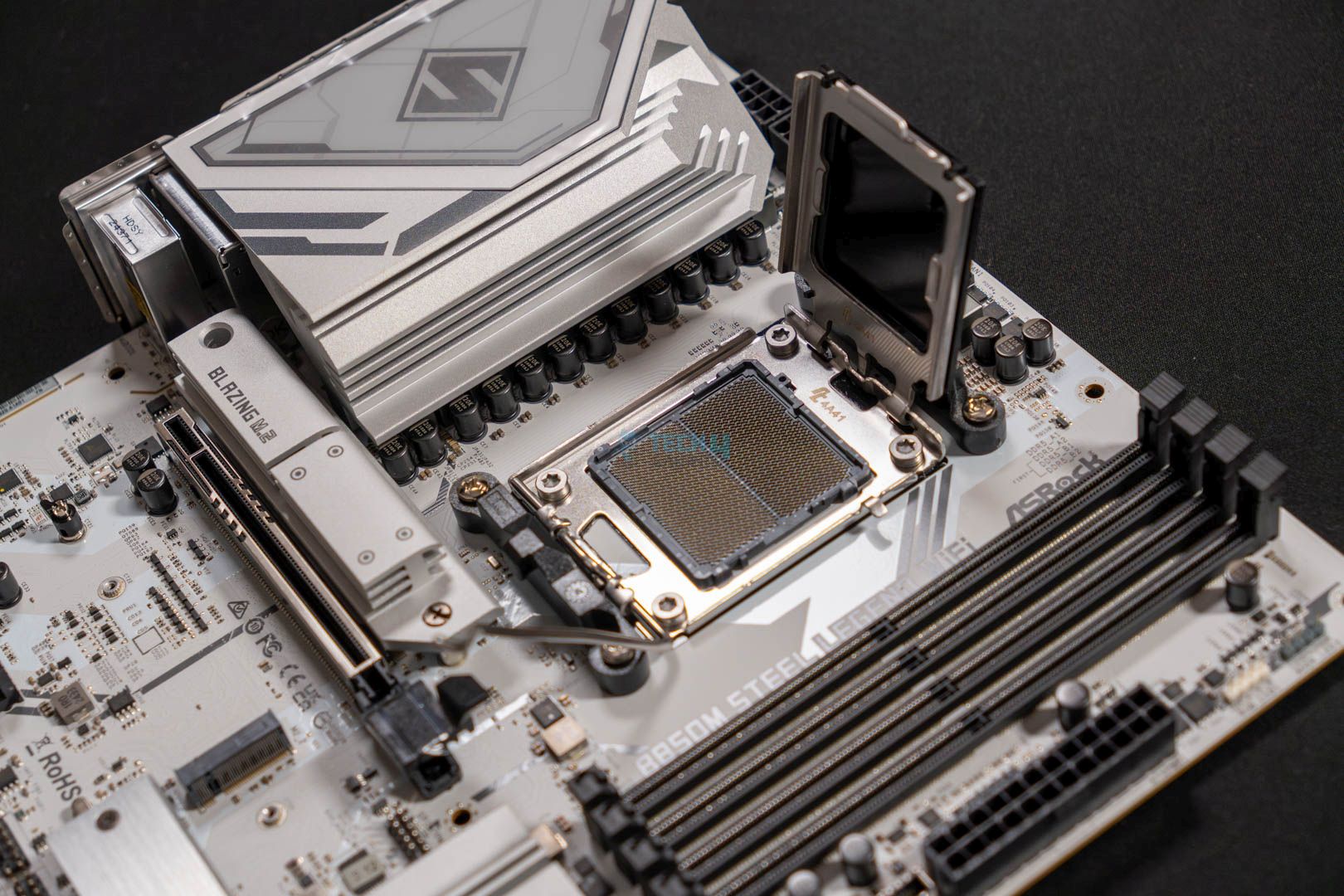
ASRock B850 Steel Legend WiFi
Looks
MSI MAG B850 Tomahawk MAX WiFi Motherboard, ATX - Supports AMD Ryzen 9000/8000 / 7000 Processors, AM5-80A SPS VRM, DDR5 Memory Boost 8400+ MT/s (OC), PCIe 5.0 x16, M.2 Gen5, Wi-Fi 7, 5G LAN
ASRock AMD B850 LiveMixer WiFi 7 Socket AM5 Ryzen 9000/8000/7000 Series DDR5 8000+ (OC) MHz 256GB ATX Motherboard M.2 SATA3 6.0 Gb/s PCIe 5.0 BIOS Flashback 1 HDMI 1 DisplayPort
ASRock B850 Steel Legend WiFi AMD AM5 ATX Motherboard, Supports AMD Ryzen 9000/8000/7000 Series Processors, DDR5 8000+ (OC), PCIe 5.0, 2.5G LAN, WiFi 7, 14+2+1 Power Phase
Award
Best Value Motherboard For Ryzen 5 9600X
Best White Motherboard For Ryzen 5 9600X
What We Liked
Good VRM configuration, Cooling is on point, Connectivity
Decent 14+2+1 phases VRM solution, A lot of USB ports, Gen5 PCIe x4 & x16 slots
Front USB with 20Gb/s speed, PCIe Gen5 M.2, RAM up to 8000 MT/s
What We Disliked
No USB4 port 
Two SATA ports
Lacks 5G LAN
Chipset
AMD B850
AMD B850
AMD B850
Memory
DDR5-8400 (OC)
DDR5-8000 (OC)
DDR5-8000 (OC)
VRM
14+2+2
14+2+1
14+2+1
Storage
4x M.2, 4x SATA
3x M.2, 2x SATA
4x M.2, 4x SATA
USB Ports
10x Rear, 9x Front
14x Rear, 9x Front
11x Rear, 9x Front
RGB
Motherboard
MSI MAG B850 Tomahawk Max WiFi
Looks
MSI MAG B850 Tomahawk MAX WiFi Motherboard, ATX - Supports AMD Ryzen 9000/8000 / 7000 Processors, AM5-80A SPS VRM, DDR5 Memory Boost 8400+ MT/s (OC), PCIe 5.0 x16, M.2 Gen5, Wi-Fi 7, 5G LAN
Award
Best Value Motherboard For Ryzen 5 9600X
What We Liked
Good VRM configuration, Cooling is on point, Connectivity
What We Disliked
No USB4 port 
Chipset
AMD B850
Memory
DDR5-8400 (OC)
VRM
14+2+2
Storage
4x M.2, 4x SATA
USB Ports
10x Rear, 9x Front
RGB
Amazon
Newegg
Review
Motherboard
ASRock B850 LiveMixer WiFi
Looks
ASRock AMD B850 LiveMixer WiFi 7 Socket AM5 Ryzen 9000/8000/7000 Series DDR5 8000+ (OC) MHz 256GB ATX Motherboard M.2 SATA3 6.0 Gb/s PCIe 5.0 BIOS Flashback 1 HDMI 1 DisplayPort
Award
Best Value Motherboard For Ryzen 5 9600X
What We Liked
Decent 14+2+1 phases VRM solution, A lot of USB ports, Gen5 PCIe x4 & x16 slots
What We Disliked
Two SATA ports
Chipset
AMD B850
Memory
DDR5-8000 (OC)
VRM
14+2+1
Storage
3x M.2, 2x SATA
USB Ports
14x Rear, 9x Front
RGB
Amazon
Newegg
Review
Motherboard
ASRock B850 Steel Legend WiFi
Looks
ASRock B850 Steel Legend WiFi AMD AM5 ATX Motherboard, Supports AMD Ryzen 9000/8000/7000 Series Processors, DDR5 8000+ (OC), PCIe 5.0, 2.5G LAN, WiFi 7, 14+2+1 Power Phase
Award
Best White Motherboard For Ryzen 5 9600X
What We Liked
Front USB with 20Gb/s speed, PCIe Gen5 M.2, RAM up to 8000 MT/s
What We Disliked
Lacks 5G LAN
Chipset
AMD B850
Memory
DDR5-8000 (OC)
VRM
14+2+1
Storage
4x M.2, 4x SATA
USB Ports
11x Rear, 9x Front
RGB
Amazon
Newegg
Review

Latest Update:


  • April 7th, 2025: We have tested plenty of AMD’s 800-series motherboards. As such, we have updated our recommendations for the Ryzen 7 9700X to reflect better options.

If you end up buying the 9600X, we’ve also tested and rounded up the top coolers and the best RAM for it.

[toc]

Best Motherboards For Ryzen 5 9600X

Here are the motherboards I have chosen for the Ryzen 5 9600X based on my hands-on testing experience and the features they come with:

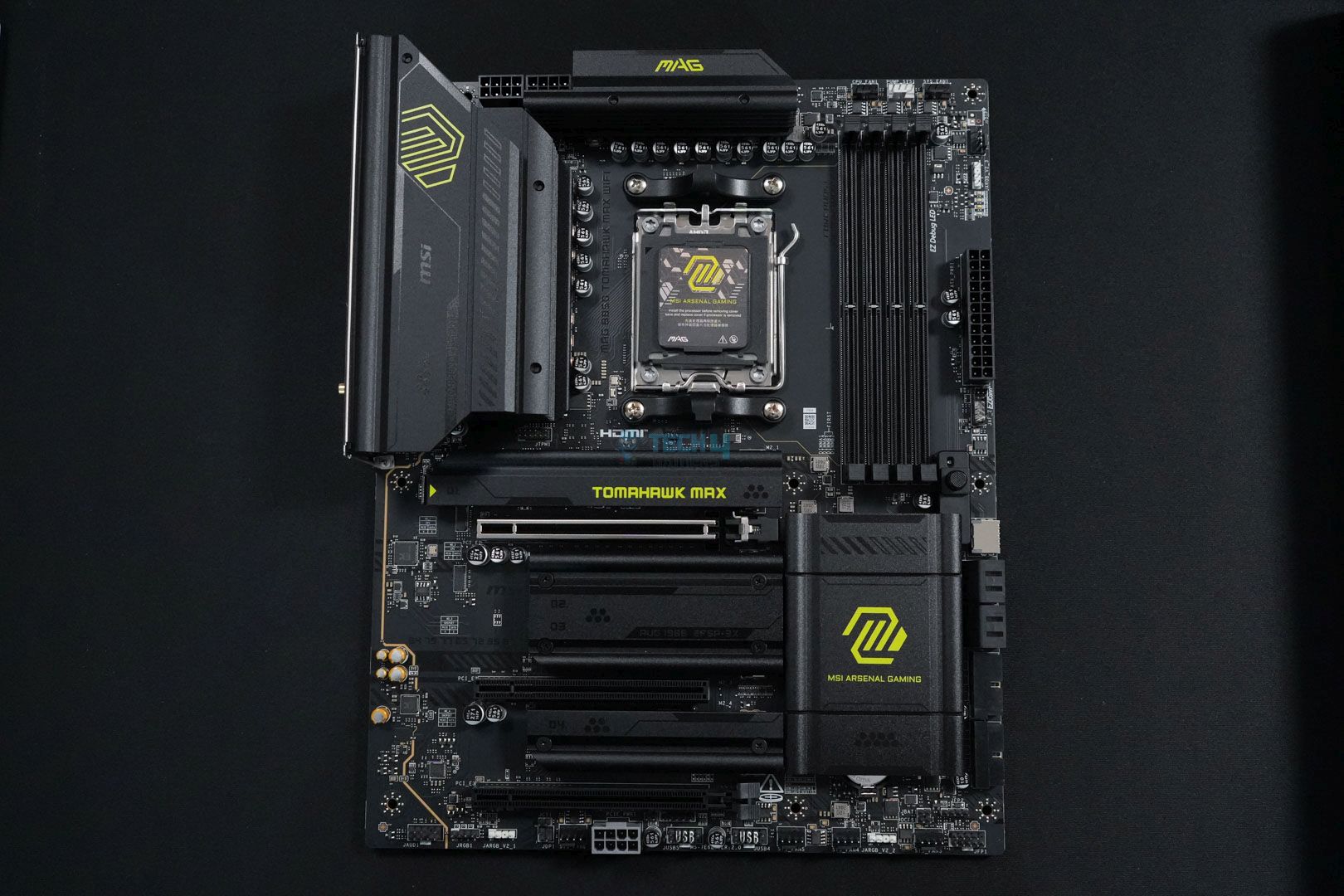
  1. Best Overall: MSI MAG B850 Tomahawk Max WiFi
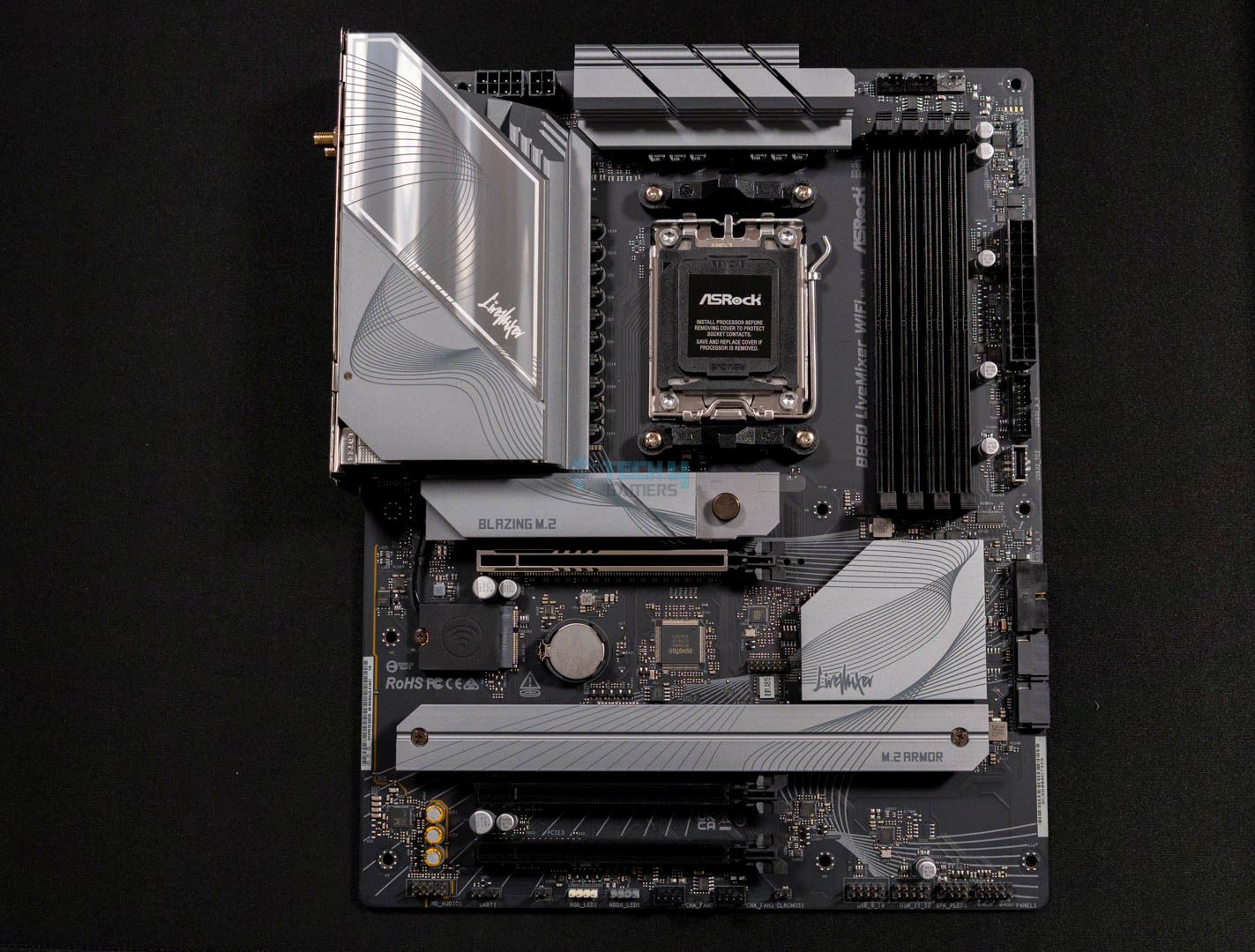
  2. Best Value: ASRock B850 LiveMixer WiFi
  3. Best White: ASRock B850 Steel Legend WiFi

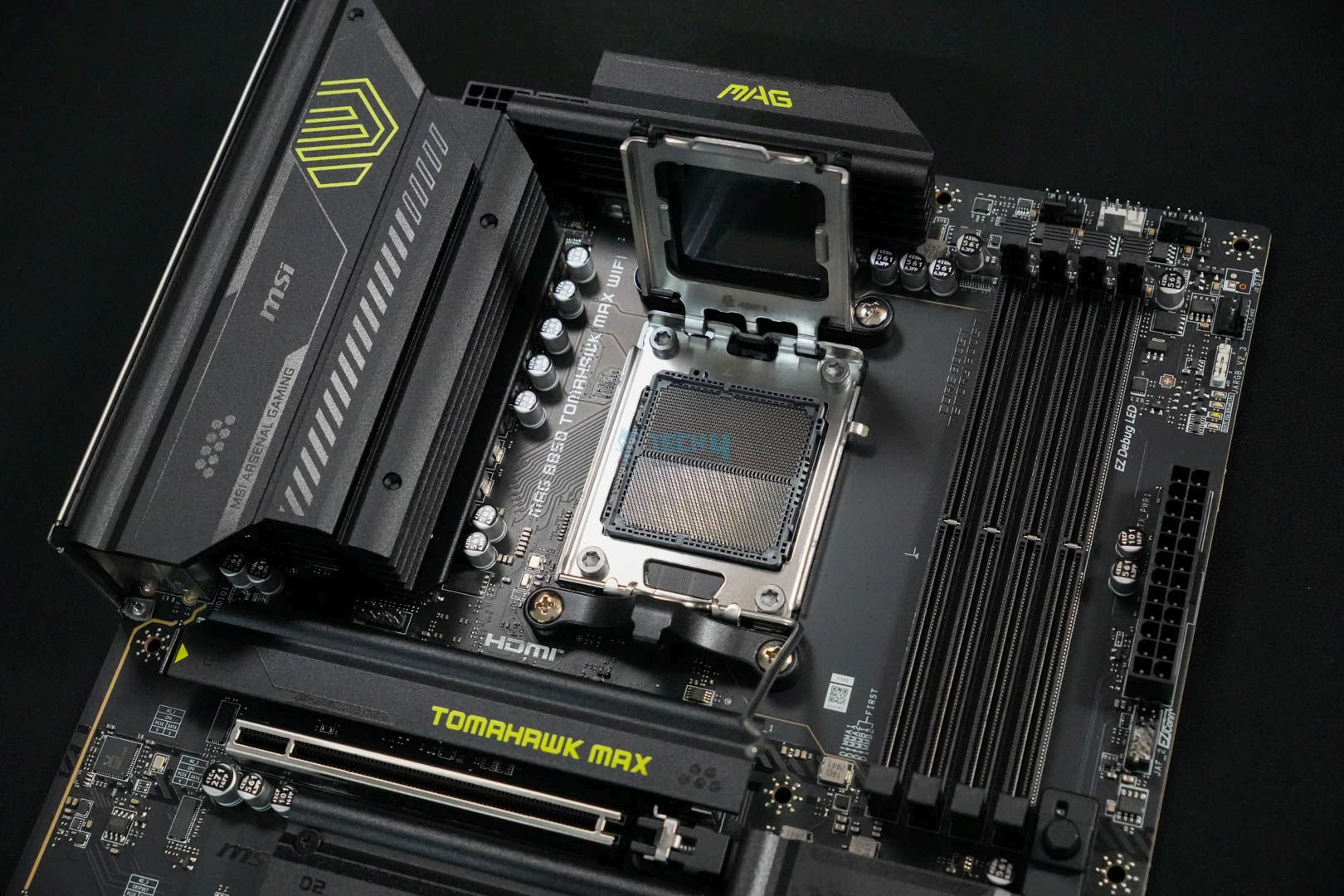
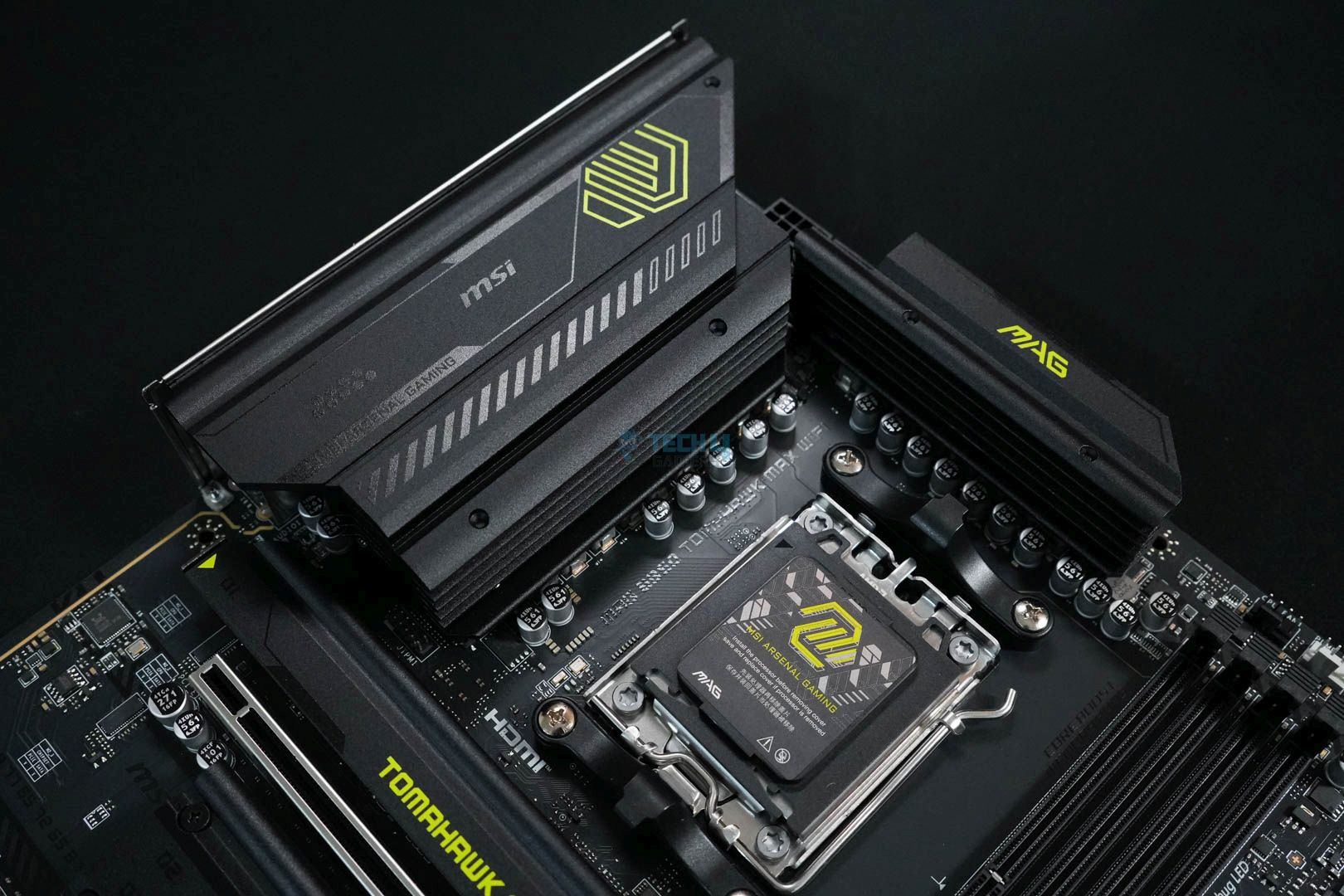
MSI MAG B850 Tomahawk Max WiFi

Best Overall Motherboard For Ryzen 5 9600X

Chipset: AMD B850 | Memory: DDR5-8400 (OC) | VRM: 14+2+1 | Video Outputs: 1x HDMI 2.1 port | RGB Lighting: No | Network: 1x Realtek 8126VB 5G LAN, AMD WiFi 7, Bluetooth 5.4 | Storage: 4x M.2, 4x SATA | USB Ports: 10x Rear, 9x Front

Pros

  • Good VRM configuration (14+2+1)
  • VRM cooling solution is on point
  • Not overpriced
  • WiFi 7, BT 5.4, and 5G LAN
  • Full of EZ DIY mechanism 
  • RAM speed up to 8400 MT/s

Cons

  • No USB4 port 

Read Our MSI MAG B850 Tomahawk Max WiFi Motherboard Review

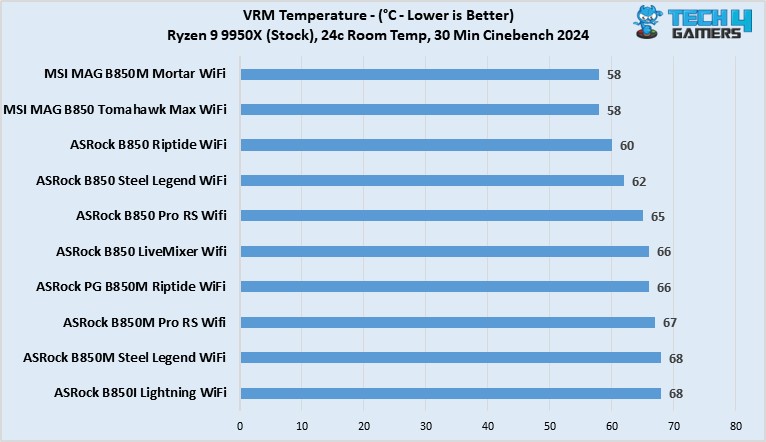
Let’s start off the list with something easy to recommend for almost everything. In that case, I find the MSI MAG B850 Tomahawk Max WiFi the ideal choice. The motherboard features a fairly neat VRM configuration with a 14+2+1 phase design. It’s more than sufficient to handle any new Ryzen 9000 series, especially the budget Ryzen 5 9600X. We liked its performance when we tested the motherboard personally. Additionally, we also appreciate its VRM cooling solution, which is flawless; during our 30-minute Cinebench 2024 stress test, it didn’t cross 59°C. This made it the coolest B850 motherboard on our list.

While the performance side is solid, it also offers great connectivity and EZ DIY options. Those include stuff like a total of four M.2 slots, two of which are PCIe Gen5, one is PCIe Gen4, and the last one is PCIe Gen4 x2. Not to mention, we also liked how the PCIe Gen5 x16 also has an EZ DIY PCIe release mechanism. Besides these, the board also bundles a total of 19 USB ports, many of which transfer data at up to 10 Gb/s and 5 Gb/s. However, the lack of USB4 is a little disappointing, but the overall package at $229 is pretty impressive.

After testing the motherboard personally, we came to this conclusion at the end:

The MSI MAG B850 Tomahawk Max WiFi is an excellent mid-ranger and a great option for stepping onto the latest platform with your Ryzen 9000 CPU. It has a decent 14+2+1 DRPS design with 14x 80A SPS for the CPU, enough for even the AM5 big dogs. 5G LAN, WiFi 7, dual Gen 5 M.2 slots, PCIe 5.0 x16, and EZ-DIY are the highlights on the board. The lack of RGB and dual-sided thermal pads for the Gen 5 M.2 slot are disappointments.

Buy It If
You’re looking for a jam-packed motherboard: I recommend going with this motherboard if you’re to hop onto the AM5 platform for not too expensive and still want to have a solid board with decent performance and other features.
Don't Buy It If
You want the best M.2 drive cooling: This motherboard might not be for you if you care about the best cooling for your M.2 drive, as it lacks double-sided thermal pads for them.

What Makes It The Best Overall Motherboard For Ryzen 5 9600X?

The motherboard comes with pretty much everything; its 14+2+1 phase VRM design ensures good performance. The enormous VRM cooling blocks keep the temps under favorable limits. The presence of high-speed memory support, as well as the EZ DIY features and several connectivity options, makes it the best overall motherboard for Ryzen 5 9600X.

Performance: 8.5/10 Value: 9/10
Features: 9/10 Design: 9/10

ASRock B850 LiveMixer WiFi

Best Value Motherboard For Ryzen 5 9600X

Chipset: AMD B850 | Memory: DDR5-8000 (OC) | VRM: 14+2+1 | Video Outputs: 1x HDMI 2.1, 1x DisplayPort 1.4 port | RGB Lighting: No | Network: 1x 2.5G LAN, WiFi 7, Bluetooth 5.4 | Storage: 3x M.2, 2x SATA | USB Ports: 14x Rear, 9x Front

Pros

  • Decent 14+2+1 phases VRM solution
  • A lot of USB ports
  • Gen5 PCIe x4 & x16 slots
  • Keeps the EZ DIY functionality
  • M2_1 has dual-sided thermal pads
  • Incredible value
  • Great for content creators

Cons

  • Two SATA ports

Read Our ASRock B850 LiverMixer WiFi Motherboard Review

Next up is the ASRock B850 LiveMixer WiFi, I’m recommending this motherboard if you’re looking for absolute value for your new Ryzen 9000 series upgrade. The motherboard retains the core features such as a solid 14+2+1 phase VRM design. Similarly, we also liked the support of high-speed memory on this board, which goes as high as 8000 MT/s. Although, as far as its VRM cooling solution goes, they run slightly hotter than the Tomahawk Max at 66 °C.

Nevertheless, we like the motherboard for its incredible value because when you look at how much it costs, the differences make sense. However, the motherboard still manages to feature a plethora of USB ports, including the likes of USB 3.2 Gen2x2 Type-C ports. Moreover, it is also nice to see PCIe Gen5 slots for both the graphics card and M.2 drive. Not to mention, the M.2 drive slot comes with a double-sided thermal pad, unlike the more expensive Tomahawk Max. 

At the end of the review, this is how we summed up the whole motherboard:

The ASRock B850 LiveMixer WiFi is a good motherboard for streamers and content creators who want to use AMD’s latest CPUs. It features impressive 14+2+1 VRMs and 80A Dr.MOS 1000uF capacitors. In our stress tests, the VRM temperatures were slightly higher at 66°C, but they’re borderline acceptable. Showing support for 23 USB ports, three PCIe slots, and three M.2 slots showcases why it’s catered for content creators.

Buy It If
Your work benefits from a plethora of ports: If you’re someone who likes to keep a lot of devices connected to your PC via their USB ports, either because of work or anything else. Then I recommend going with the ASRock B850 LiveMixer WiFi because of the vast number of ports it comes with.
Don't Buy It If
You use lots of storage drives: If you’re someone who likes to install a lot of storage drives into your PC, then this board isn’t for you because of the limited number of SATA and M.2 ports.

What Makes It The Best Value Motherboard For Ryzen 5 9600X?

The ASRock B850 LiveMixer WiFi comes at the price of $190 and still comes with lots of cool features, such as a strong power delivery system and a total of 23 USB ports for all your connectivity needs. The motherboard also sports decent aesthetics, with its gray-colored heatsinks all over. What’s more noteworthy here is the inclusion of WiFi 7 and thermistor support, all of which collectively make it the best value motherboard for Ryzen 5 9600X.

Performance: 8/10 Value: 9.5/10
Features: 8.5/10 Design: 9/10

ASRock B850 Steel Legend WiFi

Best White Motherboard For Ryzen 5 9600X

Chipset: AMD B850 | Memory: DDR5-8000 (OC) | VRM: 14+2+1 | Video Outputs: 1x HDMI 2.1 port | RGB Lighting: No | Network: 1x 2.5G LAN, WiFi 7, Bluetooth 5.4 | Storage: 4x M.2, 4x SATA | USB Ports: 11x Rear, 9x Front

Pros

  • Solid 14+2+1 phase power delivery
  • White aesthetics are appealing
  • Front USB with 20Gb/s speed
  • PCIe Gen5 M.2
  • RAM up to 8000 MT/s
  • WiFi 7 & BT 5.4

Cons

  • Lacks 5G LAN

Read Our ASRock B850 Steel Legend WiFi Motherboard Review

Lastly, for the kind of motherboard that has the best white aesthetics of them all, I can only recommend the ASRock B850 Steel Legend WiFi. It not only looks good but also delivers on the performance side. We liked the same 14+2+1 phase power delivery configuration that allowed it to deliver impeccable performance both in gaming and productivity. Not to mention, the VRM cooling system is also not a disappointment and keeps the temperatures well under 62°C. 

Other than the performance figures, the motherboard offers plenty of features and ports. The storage side is a step up from the LiveMixer, as it features 1x PCIe Gen5, 3x PCIe Gen4 M.2 slots, as well as 4x SATA ports. Not only this, but like other ASRock motherboards, the thermistor support is a welcome addition here in my opinion. What’s more, we liked the fact that the board isn’t limited to having good looks, and is a decent option with up to 20 USB ports and WiFi 7 networking.

The board performed very well in our review, and this is how we describe it:

The ASRock B850 Steel Legend WiFi is a $209.99 motherboard that comes in an all-white color scheme that looks excellent. Moreover, the powerful VRMs with strong black capacitors give it enough juice to produce impressive performance on screen. The number of features is also quite impressive and makes it one of the best options in the sub-$250 motherboard category.

Buy It If
You want a solid all-rounder: While recommended for its white looks, the ASRock B850 Steel Legend WiFi is one of the best, all-rounded, motherboards we’ve ever tested. It nails benchmarks and offers a good selection of features for most use cases.
Don't Buy It If
You want high-speed LAN: If you’re someone who prefers a wired connection over a wireless one and wants it to be the best, skip this board as it features a 2.5G LAN port.

What Makes It The Best White Motherboard For Ryzen 5 9600X?

The ASRock B850 Steel Legend WiFi sports a solid power delivery system that enables the board to deliver stellar performance. Of course, the four M.2 slots and around 20 USB ports give the freedom to utilize quite a decent bit of storage drives with lots of connectivity. And not to forget, the white aesthetics give it a much-needed different and attractive look.

Performance: 8.5/10 Value: 9/10
Features: 9/10 Design: 9.5/10

Benchmarks Of Our Recommended Motherboards

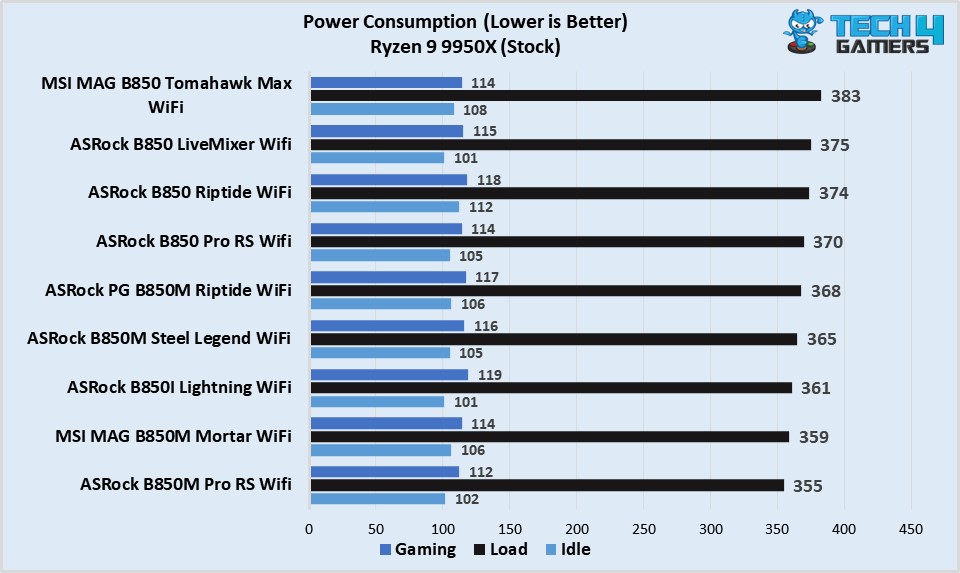
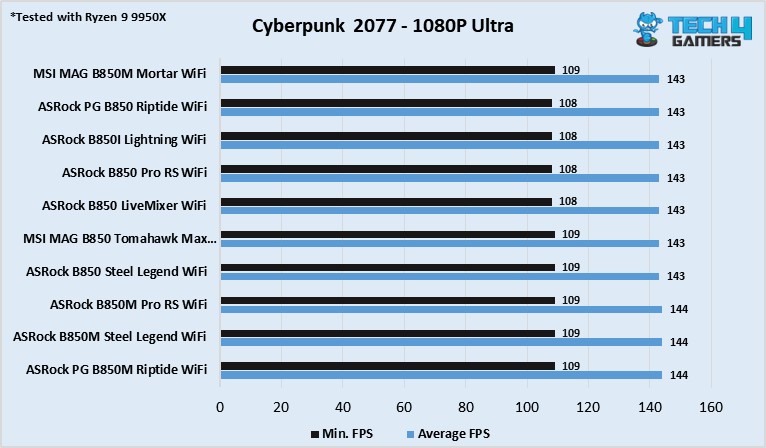
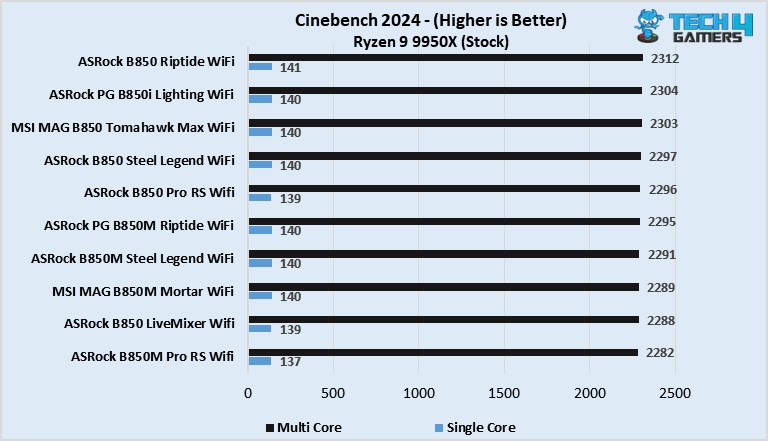
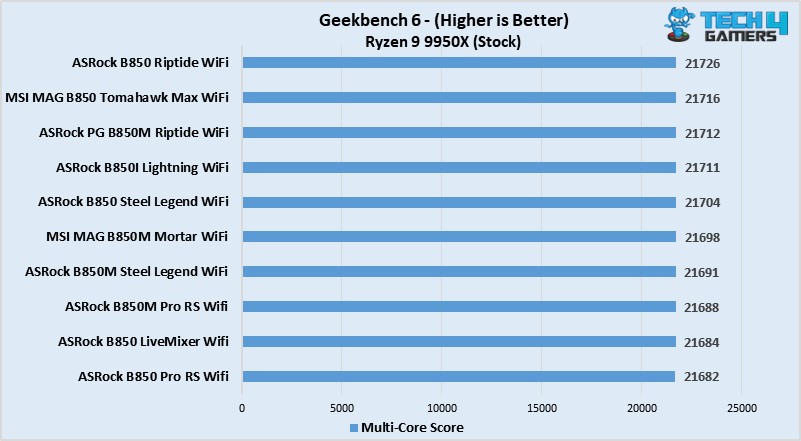
We tested more than 10 B850 motherboards to pick the top three options for the Ryzen 5 9600X. Here are our test results:

Why We Didn’t Add The Following Motherboards

Because we narrowed it down to only three motherboards, there are quite a few that didn’t make the list. However, these are some of the stronger contenders that showed great potential:

  • Gigabyte B650 Aorus Elite AX Ice: The motherboard’s lower-quality audio codec makes it unsuitable for high-end HiFi headphones, removing it from our list.
  • ASRock B650 Pro RS: Although amazing as a value motherboard, its lack of built-in WiFi and support for PCIe Gen 5 makes it inferior to many other competitors within the same price range.

Key Motherboard Terms

  • Chipset: Manages communication between the CPU, RAM, storage, and peripherals, keeping everything running smoothly.
  • VRM (Voltage Regulator Module): Circuitry that ensures stable voltage to the CPU and other parts.
  • CPU Socket: The slot where the CPU is installed, connecting it to the motherboard.
  • PCIe Slots: Slots for expansion cards like graphics cards, sound cards, and network adapters.
  • DIMM Slots: Slots for RAM modules, allowing the CPU quick access to temporary data.
  • Form Factor: The size and shape of the motherboard determine which cases it fits into. Common sizes include ATX, micro ATX, mini ITX, and E-ATX.

How I Tested These Motherboards

For this roundup, I tested a bunch of different motherboards following this strategy:

  • Power Delivery: When testing, I paid close attention to power delivery. The Ryzen 5 9600X is a great CPU, so we need to do it justice by pairing it with the right VRM structure.
  • Features: Modern motherboards come loaded with features, but some stand out more than others. I looked at storage, connectivity, and networking features to help you choose the right one.
  • Value For Money: For the Ryzen 5 9600X, I found the best options typically sit in the mid-range. As such, I focused on recommending motherboards that offer the best value for your money.

FAQs

Which motherboard chipset supports the Ryzen 5 9600X?

The Ryzen 9000 series processors support AMD 600 and AMD 800 series chipset motherboards.

Does the B550 support the Ryzen 9000 series processors?

Unfortunately, no. AMD’s 7000 series and 9000 series processors are only supported by AM5 motherboards.

Should I get a B650 or an X670 for the Ryzen 5 9600X?

B650 motherboards can run a mid-range CPU like the Ryzen 5 9600X. If you’re planning on upgrading your CPU soon, an X670 might be warranted.

Looking for more options? We have you covered:

 

AMD Could Bring Back AM4 CPUs to Tackle the Ongoing Global Memory Shortage

Story Highlight
  • AMD is planning to relaunch its older AM4 CPUs and APUs based on the Zen 3 architecture.
  • The AI boom has led consumers to go with DDR4 memory, so AMD wants to cater to them.
  • The unrealistic DDR5 prices have forced users to stick to older-gen components.

A discounted 64 GB DDR5 RAM now costs more than a PlayStation 5. The ongoing memory crisis has led to such absurd circumstances that we never thought we’d see. People are going back to DDR4, and AMD wants to cater to those consumers. 

AMD’s boss at CES discussed the current situation and hinted that the company is looking to relaunch its older processors based on the Zen 3 architecture. Those chips mainly use DDR4 memory, so they could help PC builders. 

Why it matters: Many gamers who were looking to upgrade their older systems or were building new PCs were going back to DDR4 due to high prices. This also led to a price increase with older AM4 chips, which AMD wants to address. 

AMD AM4 chipset
AM4 could soon return as AMD looks to relaunch Zen 3 chips

Tom’s Hardware was present at a CES interview with AMD chief, David McAfee. He hinted that AMD could be returning to Zen 3 chips, presumably the Ryzen 5000 series CPUs and APUs, to meet the sudden demand for the older-gen chips. 

[AMD] is certainly looking at everything that [it] can do to bring more supply and kind of reintroduce products back into the [AM4] ecosystem to satisfy the demands of gamers.

– David McAfee

TEAMGROUP T-Force Delta RGB DDR4
DDR4 prices are still reasonable compared to DDR5

While DDR4 RAM has also seen a price increment, you can still find it at reasonable prices at local retailers. The Ryzen 5000 series was a great hit, and people still use it to date. The 5800X3D is an excellent option for those who don’t want to overspend. 

Because the demand has spiked, AMD wants to increase its supply. This will allow users to upgrade their AM4 system without having to rebuild the entire system. Good news is that manufacturers as still making DDR4 memory, so its prices won’t skyrocket. 

What are your thoughts on AMD relaunching its older Zen 3 chips? Let us know your opinions in the comments or join the discussion at the official Tech4Gamers Forum.

DLSS 4.5 Isn’t Free: 4K DLAA Testing Shows 20–30% Performance Hit on RTX 5070 Ti

Story Highlight
  • A user has benchmarked some games and concluded that DLSS 4.5 leads to performance loss.
  • In 4K gaming with DLAA, DLSS 4.5 showed a 20-30% performance drop on the RTX 5070 Ti.
  • They even witnessed a few graphical glitches that weren’t present with the older model.

Nvidia announced its latest generation of upscaling technology, DLSS 4.5, at CES 2025. It is now available on all RTX cards, even older generations. However, testing shows that the glaring issues with it can’t be ignored.

A user has benchmarked a couple of games using both DLSS 4 and DLSS 4.5, and no, the tech isn’t free; it comes at a 20-30% performance hit, at least on the RTX 5070 Ti.

Why it matters: The visual quality with DLSS has now reached a point where it doesn’t feel like you are compromising on anything, but based on the performance loss, it’ll ultimately depend on the user’s preference. 

DLSS 4.5
DLSS 4.5 shows a visible performance loss with RTX 5070 Ti.

A Reddit user tested Nvidia’s latest tech on their RTX 5070 Ti with Horizon games and Final Fantasy 7 Rebirth, both on 4K with maximum visual fidelity, and the results are surprising. DLSS 4 showed better performance than DLSS 4.5.

In Horizon, using DLAA (DLSS 4), the game averaged 90 FPS, whereas with DLSS 4.5, it dropped to 67 FPS. The trend was similar across DLSS modes like Quality, Balanced, and Performance, with DLSS 4 performing much better. 

It has somewhat better visuals, but at a cost of performance.

Even in Final Fantasy, DLSS 4.5 showed over a 20-30% drop in performance, signalling an issue with the newer iteration. Only in Performance mode is the drop less prominent, but DLSS 4 still showed better results

The user said they had some graphical glitches in Final Fantasy with DLSS 4.5, which were absent with DLSS 4. It could be due to the aggressive sharpening with the newer iteration, but overall, it’s underwhelming. 

The Redditor recommends that if you use DLSS override in the Nvidia App, you should stick to “Custom K” in the global profile and use the “Latest” model in a select few circumstances when using the performance mode.

What are your thoughts on this? Let us know in the comments or join the discussion at the official Tech4Gamers Forum.

Microsoft Gearing Up For New Wave of 10-20K Layoffs Amid Rising AI Costs

Story Highlight
  • Microsoft is reportedly preparing for thousands of layoffs in January 2026.
  • It is said that the Azure, Xbox, and sales divisions will be impacted most by these job cuts.
  • Sources suggest Microsoft’s AI investments are primarily to blame for the layoffs.

Microsoft has been among the companies at the forefront of the AI revolution, investing billions of dollars into the technology. As part of this endeavor, the tech giant has pushed AI features across all its offerings, including the massively popular Windows platform.

However, this focus on AI has also come at a cost. The last year saw Microsoft reduce its workforce considerably following multiple rounds of layoffs. It seems this isn’t stopping any time soon, as rumors suggest more layoffs are on the way.

Why it matters: Last year’s layoffs led to Microsoft letting go of 15,000 workers. At the same time, the company’s financials improved drastically, setting the stage for more layoffs.

Satya Nadella Microsoft CEO
Satya Nadella Insists On Using AI Now More Than Ever

The latest report comes courtesy of Tipranks via Resetera, which states that a new round of job cuts could come from the company as soon as January. Current estimates suggest up to 22,000 workers could lose their jobs.

The report states that an official announcement could be made during the third week of January. In particular, the Azure cloud teams, the Xbox gaming division, and the global sales department are expected to be hit the hardest by these job cuts.

Meanwhile, Microsoft will continue moving forward with its AI-focused investments. The gaming giant is said to be heavily spending on data centers and other AI-focused tools as it looks to the future.

Xbox Sales
Xbox hardware sales have significantly declined

Because the Xbox division has been hit quite hard in the past by layoffs, this report does not bode well for Microsoft’s gaming division. Previously, the gaming giant even shut down various first-party teams as part of its layoffs.

Between Halo, Forza, and Gears coming back, 2026 is expected to be a huge year for Xbox, so it would be a true shame to see the excitement sullied by the news of division-wide job cuts.

What do you think about Microsoft cutting even more jobs in 2026? Do you think its investment in AI technology will pay off in the long run? Let’s discuss in the comments and on the Tech4Gamers Forums.

Nvidia CEO Suggests Older RTX GPUs Could Return With New AI Features To Meet Demand

Story Highlight
  • Nvidia has recently acknowledged the possibility of reviving older GPU generations.
  • The company’s CEO has also admitted that these GPUs could receive newer AI features like Frame Generation.
  • Recent rumors suggest the RTX 3060 will be brought back in Q1 2026 to tackle the ongoing memory crisis.

The ongoing memory shortage has been quite troublesome for the PC gaming industry, manufacturers and consumers included. Specifically, graphics cards, like Nvidia’s RTX series, are expected to go through major price hikes over the next few weeks and months.

Recent rumors even suggest that Nvidia is considering reviving the RTX 3060 to deal with the situation, and in a recent interview, CEO Jensen Huang has suggested that this is certainly on the table. In fact, he even teased the addition of new AI features to these GPUs.

Why it matters: Nvidia’s older generation graphics cards, like the RTX 3060 and RTX 2070 Super, remain viable for modern AAA titles. Many of them are still extremely popular.

RTX 3060
Many PC Gamers Still Use The RTX 3060

Tom’s Hardware had the opportunity to raise the subject of older GPUs coming back when attending a Q&A session with Nvidia at CES 2026.

When asked whether Nvidia would consider bringing back older generation GPUs due to higher production capacity on older process nodes, Jensen Huang noted that the idea certainly sounds plausible.

He went on to say that, depending on the generation of GPUs, newer AI features could be introduced to potential refreshed versions. Jensen Hunag admitted that this would require a fair amount of effort, but could still happen.

Yeah. And we could, depending on which generation, bring the latest generation AI technology to the previous generation.

-Jensen Huang

Jensen Huang Nvidia CEO
Jensen Huang Is Leading The Charge In The Ongoing AI Revolution

Because the RTX 3060 is already rumored to be returning, Nvidia could bring the GPU back with potential features like Frame Generation.

Many have even asked for more VRAM with these older graphics cards, but it’s hard to say how viable that would be, considering the ongoing memory shortage all over the world.

As for the future, Nvidia recently announced its newest set of AI features for the gaming lineup of GPUs. The company has revealed DLSS 4.5 and 6x Frame Generation, highlighting a huge focus on software-based features yet again.

Steam Records Best December In History With Over $1.6 Billion Generated In Revenue

Story Highlight
  • Steam recorded its best December to date last month, generating over $1.6 billion in sales.
  • The platform grossed over 22% more in sales compared to December 2024.
  • Titles like Arc Raiders, R.E.P.O., PEAK, and Battlefield 6 were at the forefront thanks to hefty discounts.

Valve has had a 2025 like no other, with the gaming giant breaking one record after another. The company achieved an all-time high in revenue, while also attaining one of the highest earnings-per-employee ratios globally.

The force behind Valve’s success is none other than Steam. The online juggernaut alone generated over $16 billion in sales this year, and according to a new report, this number is set to see a substantial increase thanks to the holiday season.

Why This Matters: Such heavy traffic and record-breaking sales on Steam at the end of 2025 showcase how the year has been filled with brilliant releases across many genres.

Steam holiday sales
Best-selling titles on Steam this holiday season. Source: Alinea Analytics

According to a report from Alinea Analytics, December 2025 was Steam’s highest-grossing holiday month ever as the online platform made over $1.6 billion in sales. Compared to December 2024, the platform recorded a staggering 22.7% increase in revenue.

Furthermore, Steam’s gross last month was even able to beat out the pandemic-induced holiday period of December 2020, which had previously held this record for 5 years, grossing $1.4 billion thanks to everyone being confined to their homes.

Unsurprisingly, Arc Raiders was one of the major forces behind this historic December for Steam. As per Alinea Analytics, the game sold over 1.2 million copies on the platform, making it the best-selling title on Steam during the holiday period.

Arc Raiders
Sales of Arc Raiders helped Steam record this historic December in 2025.

Moreover, hefty discounts on old and in-demand games once again generated a lot of revenue for Steam this December. Detroit: Become Human almost sold a million copies thanks to a 90% discount, bringing its price tag to $4. 

Battlefield 6 also shifted 700k copies, thanks to a 30% discount, while indie hits R.E.P.O. and PEAK were among the top 6 best-selling titles during the winter season, continuing the indie dominance on Steam into the new year.

Do you think Steam is going to continue breaking records in 2026? Or is the exclusion of GTA 6 from the platform going to hurt player traffic this year? Tell us in the comments below or head to the Tech4Gamers forum for discussion.

DLSS 4.5 Early Testing Reveals 2× VRAM Usage on RTX 20/30 GPUs and Up to 24% FPS Drop

Story Highlight
  • DLSS 4.5 significantly improves image quality using a heavier 2nd-gen Transformer model, with minimal impact (2–3%) on RTX 40/50 GPUs thanks to newer Tensor cores and FP8 support.

  • RTX 20 and 30 series lack FP8 and newer Tensor cores, causing major performance penalties when using DLSS 4.5.

  • Early tests show up to 20–24% performance loss and higher VRAM usage on older GPUs, making DLSS 4.5 costly for RTX 20/30 users.

With the release of the drivers that enable the new NVIDIA DLSS 4.5 Super Resolution, we can now see the performance cost of improving visual quality. If you’re unfamiliar with it, DLSS 4.5 introduces the new 2nd Generation Transformer model.

In short, this improves visual quality when you activate DLSS upscaling technology. And not only that, but it also reduces and even eliminates (in certain circumstances) artifacts such as ghosting, shimmering, and unstable edges. At the same time, it improves sharpness in motion, especially in areas where DLSS previously struggled, such as with dense vegetation, fine particles, or blur.

With this brief context, you should now know that all these improvements come at a price in terms of performance. This new model is heavier, and logically, the NVIDIA GeForce RTX 50 series, the most advanced models, are the ones that suffer the least in terms of performance from these improvements.

In practice, we’re talking about a performance loss of around 2 or 3% compared to the previous Transformer in the current-gen RTX 50 series GPUs. All of this comes at the cost of greater image definition and reduced or eliminated artifacts. Even in the RTX 40 series, the impact is small, and the reason is simply that they have better Tensor cores and FP8 hardware acceleration to increase inference performance.

DLSS 4.5 Faces Major Issues on Older RTX 20 & 30 GPUs

DLSS 4 vs DLSS 4.5

The problem with NVIDIA DLSS 4.5 Super Resolution arises when the 2nd Generation Transformer model is compared to GeForce RTX 30 and RTX 20 series graphics cards. The main reason for this is the lack of the FP8 format. This is compounded by a smaller number of Tensor cores, which are also older. As a result, the fixed cost of upscaling has a much greater impact on performance, and early tests clearly show noticeable performance drops.

The performance tests provided by Mostly Positive Reviews (MPR) are devastating. First of all, to provide some context, the DLSS programming guide lists several presets that already indicate that the NVIDIA GeForce RTX 30 and 20 series are incompatible with them due to very low performance:

DLSS Performance Guide Provided by Nvidia
  • Preset K: Default for DLAA, Quality and Balanced, with less overhead than the new presets.
  • Model M: Optimized and recommended for DLSS Super Resolution Performance mode. 
  • Model L: Optimized and recommended for 4K DLSS Super Resolution Ultra Performance mode.
  • Preset J: Close to K, with compromises (less ghosting in some cases, higher risk of flickering).

According to the table provided by NVIDIA, the GeForce RTX 30 and RTX 20 series cards can only access Presets J and K. These are presets that prioritize lower quality in exchange for higher performance. Therefore, MPR wanted to compare the performance of a GeForce RTX 3080 Ti with DLSS 4.5 Super Resolution in Cyberpunk 2077. To do this, they compared Presets M and K.

GeForce RTX 3080 Ti Sees Up to a 24% Performance Drop

Performance tests provided by Mostly Positive Reviews (MPR)

At 4K resolution, with Ultra graphics settings and DLSS on Quality, Preset K offered an average performance of 42 FPS compared to 32 FPS for Preset M, representing a 24% performance impact with RTX 3080 Ti. At 1440p resolution, the performance impact was 14%. At 1440p without Ray Tracing, the impact was 20%. In The Last of Us Part II at 4K, the performance loss was 14%, from 154 to 135 FPS.

Then there’s another problem: DLSS 4.5 consumes more GPU memory. This means that GPUs with 8GB of VRAM, which were already limited or barely adequate for today’s gaming, would suffer from stuttering or performance drops. At 4K resolutions, we’re talking about more than double the additional VRAM usage on an RTX 30 or 20 series card to compensate for the limitations of an older technology.

A GeForce RTX 3060 went from 56 FPS without AA to 52 FPS with the K preset and 38 FPS with the L or M presets in Cyberpunk 2077. Therefore, this technology is costly for older graphics cards, but for modern ones, it barely makes a difference.

Thus, on average, the RTX 30 and 20 series lose about 20% of performance, compared to a maximum of 3% for the RTX 50 series. And of course, in the case of the RTX 50 series, it’s well worth it. There’s a very small performance loss in exchange for a massive improvement in image quality, according to Jacob Freeman, an expert in DLSS and RTX Remix at NVIDIA.

Early Reviews Suggest That Multi-Frame Generation Might Actually Be Good Now

Story Highlight
  • Early reviews suggest that Nvidia’s new dynamic frame gen tech is pretty good.
  • Frame gen is often criticized for latency, weird color shifts, and visible fake frames.
  • DLSS 4.5 brings this new tech exclusively to Nvidia’s RTX 50 Series cards.

Nvidia’s recent CES presentation was relatively lackluster for those specifically waiting for the RTX 50 Super GPUs. It was mostly centered on AI and gave a detailed look at its upgraded upscaling technology, DLSS 4.5

Along with DLSS 4.5 comes the latest version of frame generation, and for the first time, it might actually be usable. Early reviews point out that the new dynamic multi-frame gen is actually the first time fake frames might actually be good

Why it matters: Frame gen is criticized for multiple reasons, including latency and easily detectable fake frames. However, in its latest iteration, Nvidia has focused on improving the latter, but latency remains an issue. 

The Dynamic Multi Frame Gen, which will be available later on the RTX 50 series, exclusively works differently from the old tech. Instead of just having a single locked multiplier, it can switch between them when necessary, up to 6x

So, say you have a 120 FPS target in the menu, the AI will decide whether frame gen is needed or what multiplier is required at that moment and use that. Linus Tech Tips reports that it’s actually brilliant, and you can hardly tell the difference. 

Nvidia DLSS 4 on vs off
Frame gen is criticized for various recurring issues.

With its older generations, there were weird smearing and color shifts that have now been eliminated. In Outer Worlds 2, Linus couldn’t even tell if the dynamic frame gen was on or not during gameplay. 

However, as usable as it is now, latency is still present and has even gotten somewhat worse. But, if you are solely into single-player games and want to hit higher FPS, this is the first time frame gen could actually help you out. 

What are your thoughts on dynamic frame gen actually being usable compared to older generations? Let us know your opinions in the comments or join the discussion at the official Tech4Gamers Forum.

Corsair Introduces GALLEON 100 SD, Its First Keyboard with Built-In Stream Deck Controller

[Press Release] The Coorsair GALLEON 100 SD introduces a new class of gaming keyboard by combining a full-sized mechanical board with native Stream Deck integration. Designed in collaboration between Corsair and Elgato, it addresses the growing need for players to manage games, apps, and system information without breaking focus or leaving the action.

At its core, the GALLEON 100 SD embeds a complete Stream Deck experience directly into the keyboard. Twelve customizable LCD keys support dynamic profiles, folders, and macros, while dual multifunction dials allow fast, precise adjustments with push input.

A five-inch full-color display keeps real-time information like system stats, audio levels, or app status constantly visible. All of this is configured through the lightweight Stream Deck app, ensuring smooth background performance.

Corsair GALLEON 100 SD

In-game, the integration streamlines complex actions into single presses. Abilities, inventory management, and multi-step commands can be triggered instantly, reducing reliance on layered keybinds or menus.

Prebuilt profiles from the Elgato Marketplace allow players to jump into popular titles quickly, with deep customization available for competitive playstyles.

Beyond gaming, the keyboard functions as a central control hub. Media playback, voice chat, peripheral management, and system monitoring can all be handled without alt-tabbing. With extensive plugin support, the GALLEON 100 SD adapts easily to streaming, multitasking, and content creation workflows.

Corsair GALLEON 100 SD

Performance remains a priority. Corsair’s AXON technology enables hyper-polling rates up to 8,000Hz for near-instant input response, while FlashTap SOCD handling improves directional control and counter-strafing precision. Pre-lubed MLX Pulse switches deliver fast actuation with smooth, tactile feedback.

The aluminum frame, gasket mounting, layered sound dampening, cushioned palm rest, and customizable RGB accents complete a refined, premium package.

Corsair Reveals New Esports Ready Peripherals at CES 2026

[Press Release] At CES 2026, Corsair presented a new range of esports-focused gaming peripherals built for speed, precision, and durability. The lineup includes upgraded ultralight mice, a control-oriented mouse pad, and a modular Hall Effect keyboard, all designed to meet the demands of competitive players.

SABRE v2 PRO CF and MG

Corsair SABRE v2 PRO series expands with carbon fiber and magnesium alloy wireless models. Both versions support up to 8,000Hz hyper-polling in wired and wireless modes, offer up to 120 hours of battery life, and feature tri-mode connectivity via 2.4GHz wireless, Bluetooth, and USB-C.

The SABRE v2 PRO CF uses a carbon fiber unibody to achieve a 55g weight while maintaining high rigidity. The SABRE v2 PRO MG follows closely at 56g, using magnesium alloy for players who prefer a metallic feel with added durability. Both mice are tuned for consistent, high-precision aiming in competitive play.

MM PRO Control Mouse Pad

Corsair MM Pro Control Pad

The MM PRO Control Esports-Tuned Cloth Mouse Pad is designed for precise tracking and controlled movement. Its non-slip hex-patterned base keeps it firmly in place, while the thicker surface and sloped edges improve comfort and stopping power during long sessions.

MAKR PRO 75

Corsair MAKR Pro 75

The MAKR PRO 75 builds on the award-winning MAKR 75 DIY keyboard, featuring Hall-Effect magnetic switches, adjustable actuation, and gaming-focused features like Rapid Trigger and FlashTap. It supports up to 8,000Hz hyper-polling and comes housed in an aluminium frame with a rigid FR4 switch plate.

While fully assembled out of the box, the keyboard supports modular upgrades, including wireless connectivity and an LCD screen, allowing users to expand functionality without losing DIY flexibility.