At Tech4Gamers.com, I cover the latest news and rumours in the gaming industry, from new game releases to hidden gems and video game leaks. Furthermore, I occasionally write tech articles about video game consoles, providing insights into the hardware and software that powers our gaming experiences.
Story Highlight
Purchasing new technology at launch is often a poor financial decision because prices drop a lot a few months later.
The minor upgrades in new models usually do not justify the premium price for most people’s daily use.
You can get better value by waiting to buy. The best time for phones is 9–12 months after release, and for laptops, it is 12–18 months.
I’ve lost count of how many times I’ve bought a shiny new gadget, only to feel a bit foolish three months later when its price drops like a rock. The worst was when I upgraded my phone the week it launched: within a season, it was $200 cheaper, and mine already had fingerprints on the screen.
That’s when I started paying closer attention to what I now think of as the “tech life cycle.”
New gadgets arrive at lightning speed, but their value fades just as fast. Companies know exactly how to fuel the hype: flashy ads, influencers, countdowns, but I’ve learned the smarter move isn’t always to buy right away.
Timing can make all the difference between overpaying and actually getting good value.
Why Brand-New Isn’t Always Better
PS5 Slim.
When I look back, most of my so-called “upgrades” weren’t even that big of a deal. A slightly better camera, a different charging port – stuff I didn’t really need. The truth is, unless you rely on top-tier performance for work, you probably don’t notice these small changes in daily use.
Now I wait for the sweet spot. For phones, that’s usually 9–12 months after launch, and for laptops it’s closer to 12–18 months. By then, prices drop, but the device is still powerful enough to last for years.
It’s not about skipping upgrades entirely; it’s about not paying a premium just to be first. In this case, The Fear of Missing Out is not real.
Why “Used” Feels Smarter Than “New”
I used to think buying secondhand meant settling for less. But after picking up a gently used Nintendo Switch a couple of years back, my perspective flipped.
I saved a few hundred bucks, got the same exact gaming experience, and didn’t feel like I was missing out. Now I always buy used video game systems to get a good deal and save money.
That same logic applies to consoles, laptops, and even phones. If you’re patient, you can snag solid deals right after new models release, when early adopters flood the resale market.
And if you’re into retro systems, used is often the only option. Sometimes those old consoles even appreciate in value, unlike modern tech that loses half its worth in a year. So weirdly enough, a 1990s console might be a better long-term investment than a brand-new phone.
Honestly, the only thing you’re missing with secondhand is that fresh plastic smell, which disappears in about five minutes anyway.
Following the Cycle Instead of the Hype
Focus on the overall value of a product instead of just its price tag.
One thing I’ve noticed is how predictable this whole cycle is. First comes the launch hype, then the early adopters, then the inevitable price correction.
If you learn to recognize where a product is in that cycle, you can time your purchases without falling for the hype.
For example, I bought my last tablet right after its newer sibling came out. Same brand, slightly older model, but way cheaper, and it’s still doing everything I need. It just takes patience, and sometimes resisting that urge to “join in” on launch day.
Another lesson I’ve had to learn is that the “best time” to buy isn’t always about discounts; it’s about when I actually need the device. If my laptop dies before a big deadline, waiting six months for a price drop is pointless.
But if my smartwatch still works fine and I just feel FOMO over a new color band, I remind myself it’s okay to wait.
Phones usually last me about three years before the battery or software starts dragging. Consoles can go five to seven years without issue.
And laptops? As long as I don’t push them too hard, they can last just as long. I’ve started upgrading based on how much my current setup holds me back, not on what companies tell me is “life-changing.”
Value Over Price
The last change in my mindset has been thinking in terms of value instead of just price. I used to chase the cheapest deal, but that backfired more than once.
A $300 laptop that dies in a year is way more expensive in the long run than a $600 one that runs smoothly for five.
Refurbished gear has also become a go-to for me. As long as it’s certified and comes with a warranty, it’s basically new but with a big discount. That feels a lot safer than gambling on random online sellers.
If there’s one thing I’ve learned, it’s that tech isn’t a race. The cycle is predictable, and the hype is temporary.
Once I started buying on my own timeline, which is waiting for the sweet spots, considering refurbished, or just holding off until I really needed something, I stopped feeling that “buyer’s remorse” pit in my stomach.
The truth is, the latest gadget will still be there tomorrow. My money, on the other hand, is better off staying in my pocket until I’m sure it’s the right time.
Currently serving as a News Reporter at Tech4Gamers, I have the privilege of combining my love for gaming with the art of storytelling. My role involves crafting engaging narratives that keep our audience abreast of the latest developments in the gaming world.
Story Highlight
EA has gone private following a $55 billion buyout from three notable investment firms, including PIF, Silver Lake, and Affinity Partners.
Silver Lake is also purchasing TikTok and is a firm believer in AI implementation, which signals more workforce reduction and cost-cutting measures.
This signals a tough time for franchises like Battlefield, Sims, and Apex Legends, with other projects, such as Motive’s Iron Man, now at risk of cancellation.
Confirming last week’s rumors, EA has secured a deal to go private following a massive $55 billion investment from three major firms: Saudi-owned PIF, Silver Lake, and Affinity Partners, the American company founded by U.S. President Donald Trump’s son-in-law, Jared Kushner.
However, the internet hasn’t taken kindly to this deal, with massive backlash on social media. In fact, many are even questioning the future of the publisher’s gaming franchises, as EA’s hierarchy is expected to change for the worse under this new leadership.
Why it matters: Acquisitions among billion-dollar companies rarely turn out well, especially now, with EA being acquired by investment firms rather than another gaming company. The future of the gaming giant appears quite gloomy.
One Person Noting That Silver Lake Is Also Purchasing TikTok || X
One person on social media pointed out that one of the investment firms from this deal, Silver Lake, is the same company that has secured a deal to purchase TikTok. Furthermore, all of these firms are quite reliant on AI for their workloads, which is a sign of more layoffs to come in the near future.
It’s official: EA is going private.The leveraged buyout will be financed by a staggering $20 billion of debt, which likely means some *aggressive* cost cutting is ahead for EA in the coming months and years.www.businesswire.com/news/home/20…
Bloomberg’s Jason Schrier reports that EA will be in $20 billion in debt following this deal. As such, the gaming giant will soon implement cost-cutting measures, aggressive monetization, and workforce reductions, marking EA’s second round of layoffs this year.
One User’s Honest Reaction To EA Going Private || X
Another social media post says that this deal is the most ‘EA’ thing ever since the publisher is known for its greed and being a capitalist rather than caring about video games.
What does this mean for the future of franchises like Battlefield, Sims, FC, and others? Saudi Arabia is known for being conservative and, as such, expects a lot of anti-DEI changes in games like Sims and more.
Things Aren’t Looking Great For Motive’s Iron Man Game || X
With a $20 billion debt once the deal closes, expect cancellations too. Motive’s Iron Man game may never get to see the light of day, receiving the same treatment as the previously shelved Black Panther game.
What are your thoughts on EA going private? Are you worried about the publisher’s future? Share your thoughts with us in the comments below, or at the official Tech4Gamers Forums.
Currently serving as a News Reporter at Tech4Gamers, I have the privilege of combining my love for gaming with the art of storytelling. My role involves crafting engaging narratives that keep our audience abreast of the latest developments in the gaming world.
Story Highlight
A brand-new third-person action Lord of the Rings is now under development, as per a new report.
This title is stated to compete with Hogwarts Legacy.
A reveal for the game could happen soon, likely next week, or at the upcoming The Game Awards show.
The Lord of the Rings IP is finally ready to set its foot back in the gaming world after a rough period, particularly referring to the disastrous launch of 2023’s Gollum.
Anyhow, a new Lord of the Rings game is now in development, reportedly a third-person action game. Moreover, this title also aims to compete with Warner Bros.’ Hogwarts Legacy.
Why it matters: The Lord of the Rings is one of the most lore-rich and diverse IPs that has tons of potential in the gaming world. A glimpse of that potential has already been unveiled, but the last decent entry was released almost a decade ago.
New Lord of the Rings Game Underway || Source: Social Media
Insider Gaming published this report, and according to their sources, the title is being funded by the Abu Dhabi Investment Office. So far, the funding is said to be around $100 million.
Furthermore, multiple parties are involved in this project, including Embracer Group, Revenge, and other studios. Embracer Group actually holds the license to the IP, which it acquired for a whopping $400 million back in 2022.
The title began development last year, and an official reveal is expected soon, possibly as early as next week. Or, The Game Awards is just around the corner, which is an excellent time for the project’s reveal.
What are your thoughts on a new Lord of the Rings game? Let us know your expectations and what you’d want from the game in the comments below, or at the official Tech4Gamers Forums.
At Tech4Gamers, I contribute as a Senior News Reporter, combining my skills and gaming enthusiasm to keep our audience updated on the latest developments.
Story Highlight
An insider suggests Sony is set to launch the DualSense V3 later this year.
This new version of the DualSense will ship with replaceable batteries similar to Xbox controllers.
A new PS5 Pro model is also coming soon, boasting more efficient internals.
PlayStation is no stranger to revising its consoles throughout a generation. In fact, the gaming giant has very recently introduced a slightly updated PS5 console that offers a smaller SSD and cheaper internals.
Similarly, PlayStation also revises its controllers with slight changes. The gaming giant has already released one major DualSense revision this generation, and new reports suggest another update for this controller is on the way.
Why it matters: If the report is to be believed, PlayStation’s future controllers will likely adopt a similar approach.
New DualSense And PS5 Pro Revisions Are On The Way
According to a reliable leaker, Sony has two major updates for the PS5 generation in the works. First, the gaming giant plans to update the PS5 Pro and make it slightly more efficient.
The more interesting change will be made to the DualSense. Sony is reportedly set to launch the DualSense V3 with replaceable batteries. This would be a first for the company since it switched the chargeable controllers when the PS3 launched.
In contrast, Xbox has offered controllers with replaceable AA batteries for nearly two decades now. Although specifics remain unknown for now, PlayStation will likely go for AA batteries similar to Xbox.
This approach will allow the gaming giant to sell rechargeable battery add-ons and cut costs on producing controllers. Additionally, it will likely lead to gamers needing to recharge their controllers less frequently.
Should the report come to fruition, PlayStation is also expected to ship all future controllers with replaceable batteries.
The DualSense Has Become A Fan-Favorite In Just A Few Years
In the past, PlayStation also modified the Light Bar and introduced full color controllers when revising the DualShock 4. As such, there may be more to the DualSense V3 than just a replaceable battery.
I’ve previously worked for eXputer as a Senior News Writer for several years. Now with Tech4Gamers, I love to devoutly keep up with the latest gaming and entertainment industries. I have a Bachelor’s Degree in Computer Science and years of experience reporting on games and breaking exclusive stories. Besides my passion for gaming journalism, I love spending my leisure time farming away in Stardew Valley. VGC, IGN, GameSpot, Game Rant, TheGamer, GamingBolt, The Verge, NME, Metro, Dot Esports, GameByte, Kotaku Australia, PC Gamer, and more have cited my articles.
Story Highlight
Sony is manufacturing new PS5 Slim models with a smaller cooling system and reduced storage.
This aims to reduce production costs while maintaining the retail price.
The 2025 PS5 Slim has 825 GB of storage, 27% less than the 2023 version.
Rising console prices have been a major headache for gamers in this economic climate, with tariffs and other factors leading to companies like Microsoft hiking the price of the Xbox Series consoles twice in one year.
The PS5 has also surged in cost in many countries, with its price hike in Brazil and Turkey receiving an overwhelmingly negative reception from fans. Now, it seems like Sony has another trick up its sleeve to keep the PS5 at its current rate despite difficult economic conditions.
Why This Matters: Reducing production costs seems like the only compromise that can appease gamers and studios in these trying times.
As per YouTuber Austin Evans, who got hold of the new PS5 Slim model, Sony has cut down storage and reduced the heatsink to shrink the manufacturing costs of the console. By doing so, the company is attempting to maintain the console at its current retail price and avoid another price hike.
The SSD storage is now offering 825 GB, out of which only 667 GB are accessible for games, meaning there is 27% less space compared to the 1 TB storage of the 2023 slim version, which gave players access to 848 GB of space.
The cuts also affect the cooling system of the console with the PS5 Slim CFI-210, using thinner metals for the heatsink. In addition, the number of components on the motherboard has decreased, and Sony has implemented a lighter fan with a shorter pipe, which makes the playthrough quieter.
PS5 Slim first launched back in 2023.
All these changes make the console 156 grams lighter; however, the PS5 is now 2 °C hotter thanks to the adjustments made to the cooling system.
The console still rakes in the same amount of energy, meaning there hasn’t been an improvement in efficiency, and the PS5 is now just a bit hotter and cheaper to build.
Do you think cutting costs to keep PS5’s price the same is a good strategy for Sony? Tell us in the comments below or head to the Tech4Gamers forum for discussion.
I’ve previously worked for eXputer as a Senior News Writer for several years. Now with Tech4Gamers, I love to devoutly keep up with the latest gaming and entertainment industries. I have a Bachelor’s Degree in Computer Science and years of experience reporting on games and breaking exclusive stories. Besides my passion for gaming journalism, I love spending my leisure time farming away in Stardew Valley. VGC, IGN, GameSpot, Game Rant, TheGamer, GamingBolt, The Verge, NME, Metro, Dot Esports, GameByte, Kotaku Australia, PC Gamer, and more have cited my articles.
Story Highlight
A reliable insider corroborates the rumor that Microsoft and Asus were planning to lower the ROG Ally X price.
Fan backlash after the leaked prices made both companies consider lowering the pricing, but plans fell apart.
The handheld is now priced at $999, leading to a lot of controversy and criticism across the industry.
Xbox is now diving headfirst into the booming handheld market to challenge the competition after the rest of the gaming giants. Microsoft is launching its new lineup of ROG Ally and ROG Ally X handhelds in a partnership with Asus, but not everything is turning out well.
The ROG Ally X has been criticized due to its exorbitant $999.99 pricing, making it one of the most costly handhelds on the market. However, new rumors suggest that Microsoft & Asus tried to lower ROG Ally X pricing around Gamescom, but the plan fell through.
Why it matters: The Xbox ROG Ally X handheld would have been more affordable and within the budget of many gamers if both companies had been successful at lowering its price. Now, it may end up as a niche product instead.
Insider confirms that Asus and Microsoft considered lowering ROG Ally X pricing.
As corroborated by notable insider Tom Henderson, the release date for ROG Ally X was announced without its pricing at Gamescom because Asus and Microsoft were monitoring the fan backlash that came out of leaked prices earlier this year.
Both collaborators wanted to ‘further subsidize’ the handheld pricing to something that would appeal more to gamers. As we know, the plans didn’t eventually materialize, which could likely be due to tough market conditions.
Exactly what he said, but it didn’t work out.
-Tom Henderson, industry insider.
ROG Ally X could turn out to be a niche product due to high pricing. Its stock ran dry within a day after pre-orders went live, which implies that it may have legs that Xbox is expecting—or it may mean the stocks were quite low to begin with.
The handhelds come in true variants with different specs.
Another major criticism of ROG Ally X is that it cannot run your entire Xbox library since games need to be supported by Xbox Play Anywhere.
Do you think the Xbox ROG Ally X would have generated more anticipation if it had cost less? Let us know your thoughts in the comments below, or join the discussion on the Tech4Gamers forum.
As Tech4Gamers’ Founder and Editor-in-Chief, I bring over 13 years of PC Hardware Reviewing and 8+ years of IT Project Management experience. Certified in Google IT Support , my focus is on providing honest product reviews and analysis and fostering a strong gaming community with 130k+ members in PPG.
Story Highlight
A Saudi Arabian investment group has invested $50 billion in Electronic Arts, which could potentially make the company privately owned.
The main investor is Saudi Arabia’s Public Investment Fund (PIF). It already has money in other gaming companies, such as Nintendo and Niantic.
The country is investing in the growing video game industry to make money and improve its global image.
A Saudi Arabian investment group has made a $50 billion investment in EA, potentially converting the company from a publicly listed to a privately held entity. Saudi Arabia’s sovereign wealth fund and other organisations have already made significant investments in the video game and esports industries, making this hardly surprising.
We’re specifically referring to the PIF (the Saudi sovereign wealth fund). The PIF’s subsidiary, Savvy Games Group, invests directly in video game and esports firms. Niantic, the developer of Harry Potter: Wizards Unite and Pokémon GO, is owned by PIF. It also owns around 8% of Nintendo and Take-Two, the parent company of Rockstar.
The investment group involved in this reportedly includes PIF, along with private equity firms Silver Lake and Affinity Partners, as well as Jared Kushner’s fund. More than $20 billion in debt managed by JPMorgan is expected to be used to finance the deal.
This acquisition will be a leveraged buyout. Buyers will finance the transaction primarily with borrowed money (debt), rather than their own capital. Of course, the purchased company’s assets and cash flow serve as collateral for the debt.
Therefore, EA’s future revenue will be utilised to pay down the debt gained through the acquisition. So we may claim that EA is in debt and will repay the acquired loan.
PIF already owns 9.4% of EA’s shares so that a buyout wouldn’t be surprising. The news of a potential acquisition agreement comes just days after EA launched Skate, which received a lukewarm reception from PC gamers.
Saudi Arabia aims to shift its economy towards technology, culture, and entertainment, which includes acquiring Electronic Arts. Investing in video games and esports is a new method to diversify your income.
The video game and esports sectors are among the fastest-growing industries, boasting strong profit margins and global scalability. Holding shares in significant corporations allows Saudi Arabia to profit from international expansion.
I’ve been the Journalist & Editorial Writer at Tech4Gamers since July 2022. I spearhead our hardware coverage, including overclocking GPUs, benchmarking CPUs, reviewing peripherals, and fine-tuning custom PC builds for every budget. Daily, I report on breaking gaming news, from major launches and studio updates to the latest industry trends, ensuring our community stays informed. Beyond news briefs, I write in-depth feature articles on gaming culture and emerging technologies. And by collaborating closely with the editorial team on content planning, SEO strategy, and our publishing calendar, I help us consistently hit our traffic and engagement targets.
Corsair has been making gaming mice for years, and I’ve reviewed quite a lot of them. Thankfully, every time, they’ve delivered exactly what they promised with solid build, responsive clicks, and remarkable performance. They have recently released the Sabre v2 Pro that takes things to a whole new level. It’s Corsair’s lightest mouse ever at just 36 grams.
You might be wondering why anyone would care so much about weight. As a matter of fact, competitive players actually swear by it. A lighter mouse requires less effort to move, allows for faster flicks, and provides smoother aiming. In this review, we’ll go beyond the specs sheet, and by the end, we’ll find out if the Sabre v2 Pro is just another ultralight mouse or if it’s really worth your money.
Why Trust Tech4Gamers
Abdul Hannan is our peripherals expert who has been testing different mice, keyboards, headphones, microphones, and more for years.
130+ peripherals tested and reviewed by our team of hardware experts (Tech4Gamers Team).
500+ hours spent testing different peripherals for our reviews.
At Tech4Gamers, ensuring you get reliable information is our priority. That’s why every hardware round-up undergoes a meticulous review process by our team of experts and editors. Each review is carefully examined against our strict editorial guidelines, guaranteeing you trustworthy insights you can depend on.
Key Takeaways
The Corsair Sabre V2 Pro is an ultralight wireless gaming mouse that delivers top-notch performance for competitive gamers with its 36-gram weight, MARKSMAN S sensor, AXON hyper-polling, and custom-tuned tactile switches.
You should consider the Corsair Sabre V2 Pro if you prioritize speed, responsiveness, want comfortable ergonomics, and value durability in an ultralight mouse.
You should skip the Corsair Sabre V2 Pro if you need multiple onboard profiles, require Bluetooth or RGB, and prefer heavier mice.
Here are the technical specifications:
FEATURE
DESCRIPTION
Connectivity
Wireless
Battery Type and Chemistry
Rechargeable, Li-ion polymer
Battery Life
Up to 70 hours at 1K Hz
Up to 16 hours at 8K Hz
Sensor
Corsair Marksman S
Sensor Type
Optical
Sensor Resolution
100 – 33,000 DPI, with 50 DPI steps
Onboard Profile
1
Backlight
None
Buttons
5
USB Report Rate
1000/2000/4000/8000 Hz
Color
Black/White
Mouse Feet
UPE
Dimensions
119.16(L) mm x 62.55(W) mm x 38.21(H) mm/ 4.69(L) in x 2.46(W) in x 1.5(H) in
Weight (w/o cable and accessories)
36 g / 0.079 lbs.
Warranty
2 Year
MSRP
US: $99.99
[toc]
How is the Corsair Sabre v2 Pro Different?
The Corsair Sabre v2 Pro is a big step up in terms of various aspects from the older Sabre models. Speaking of which, we have also reviewed the Sabre RGB Pro Wireless, you can give it a read if you’re interested in the previous models. At just 36 grams, it’s way lighter than before, making it easy to move around. This weight reduction is done without using the perforated shell design common in other ultralight mice, so it still feels solid and durable. On top of that, it comes with the Marksman S sensor, offering a 33,000 DPI range, which is well above the 18,000 DPI of its predecessors.
Packaging & Unboxing
Packaging & Unboxing
1 of 3
Frontside of the Box
Backside of the Box
Unboxing
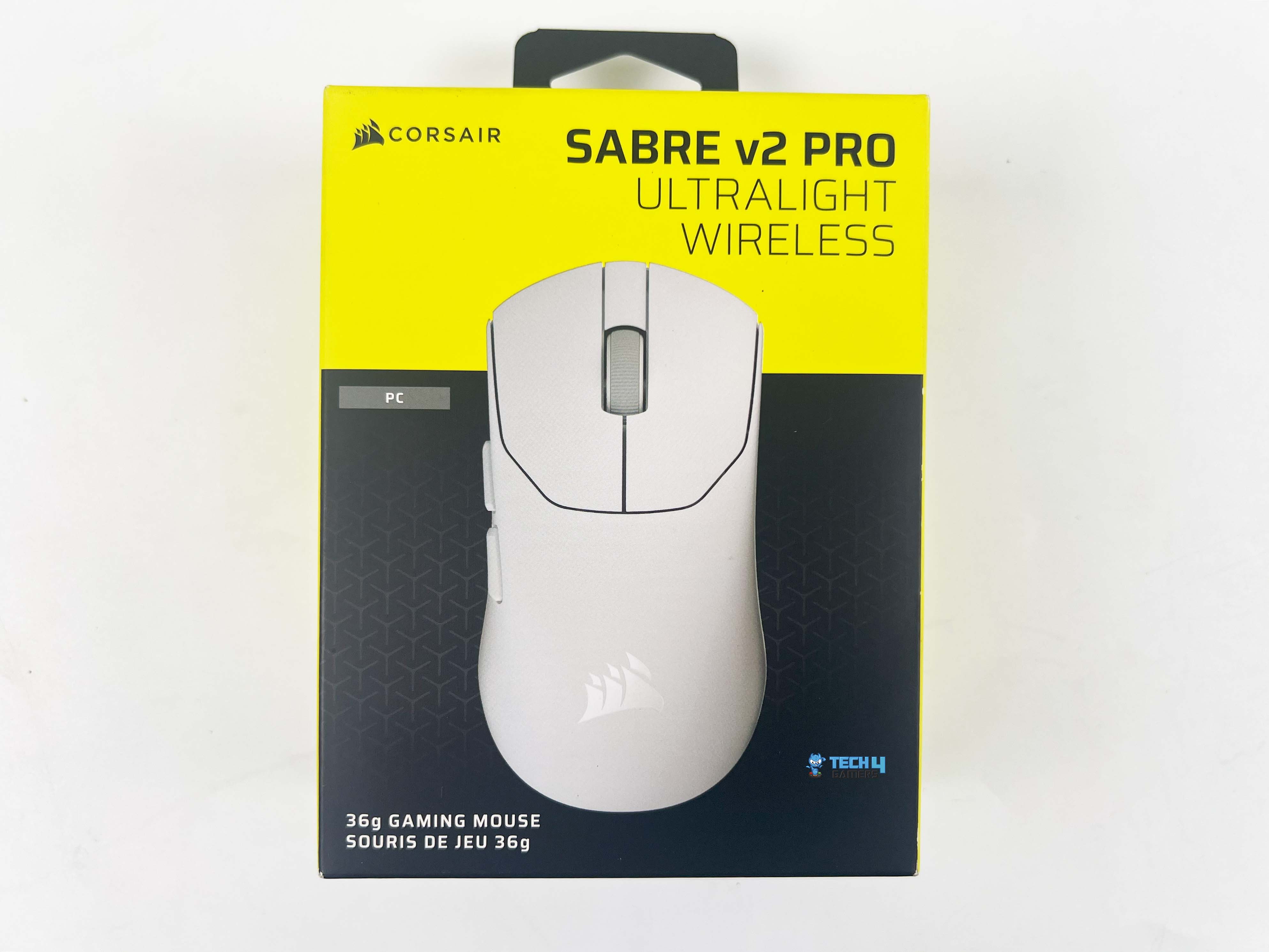
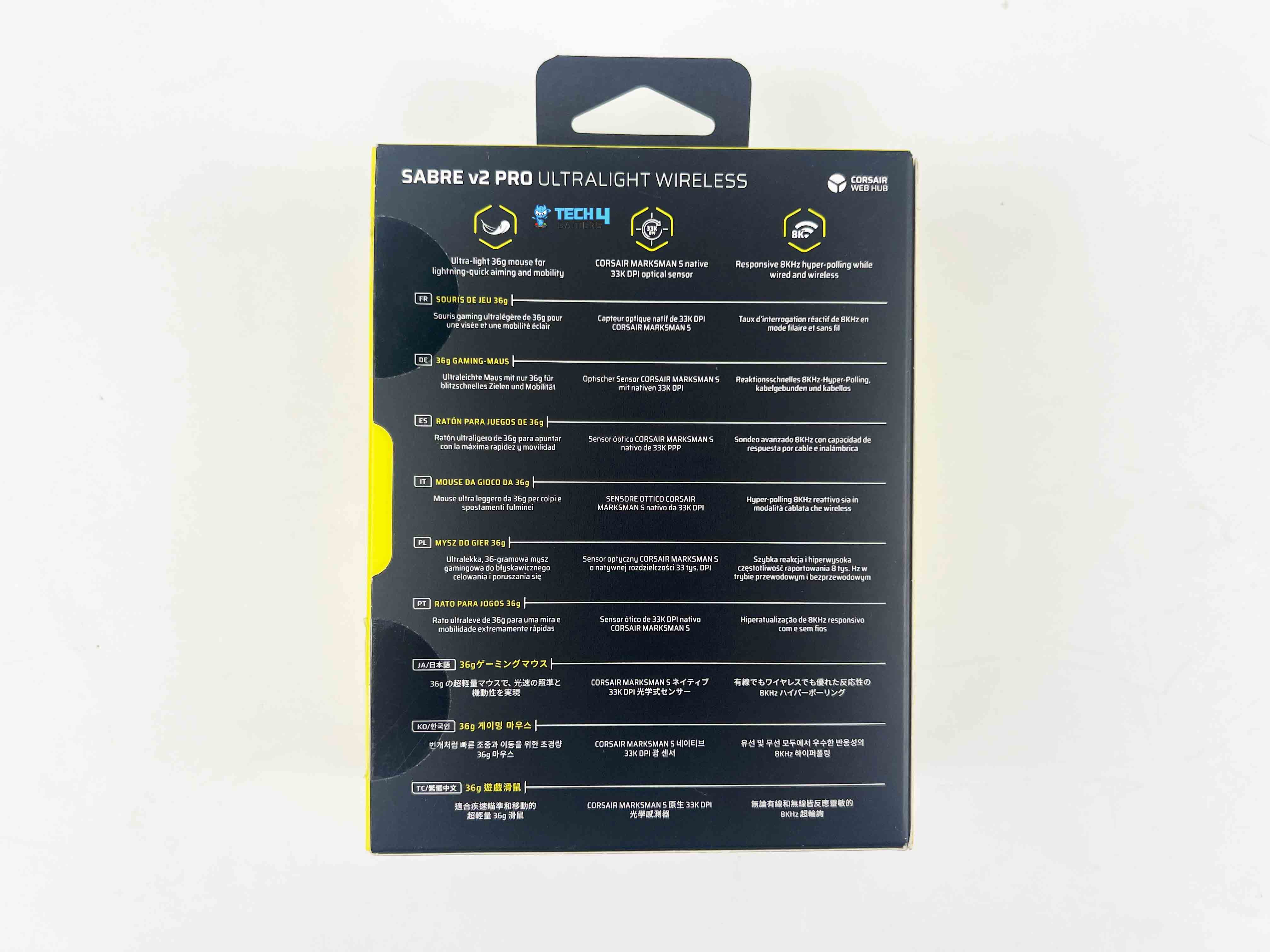
The Sabre v2 Pro comes in a small, clean, usual black-and-yellow Corsair box. It’s their signature color scheme that they’ve been using for years. On the front, you can see the image of the mouse, along with its model name. On the sides, we have some additional callout features, and what we can expect to find inside the box. Lastly, on the back, we have repeated information about the features in different languages.
Box Contents
Box Contents
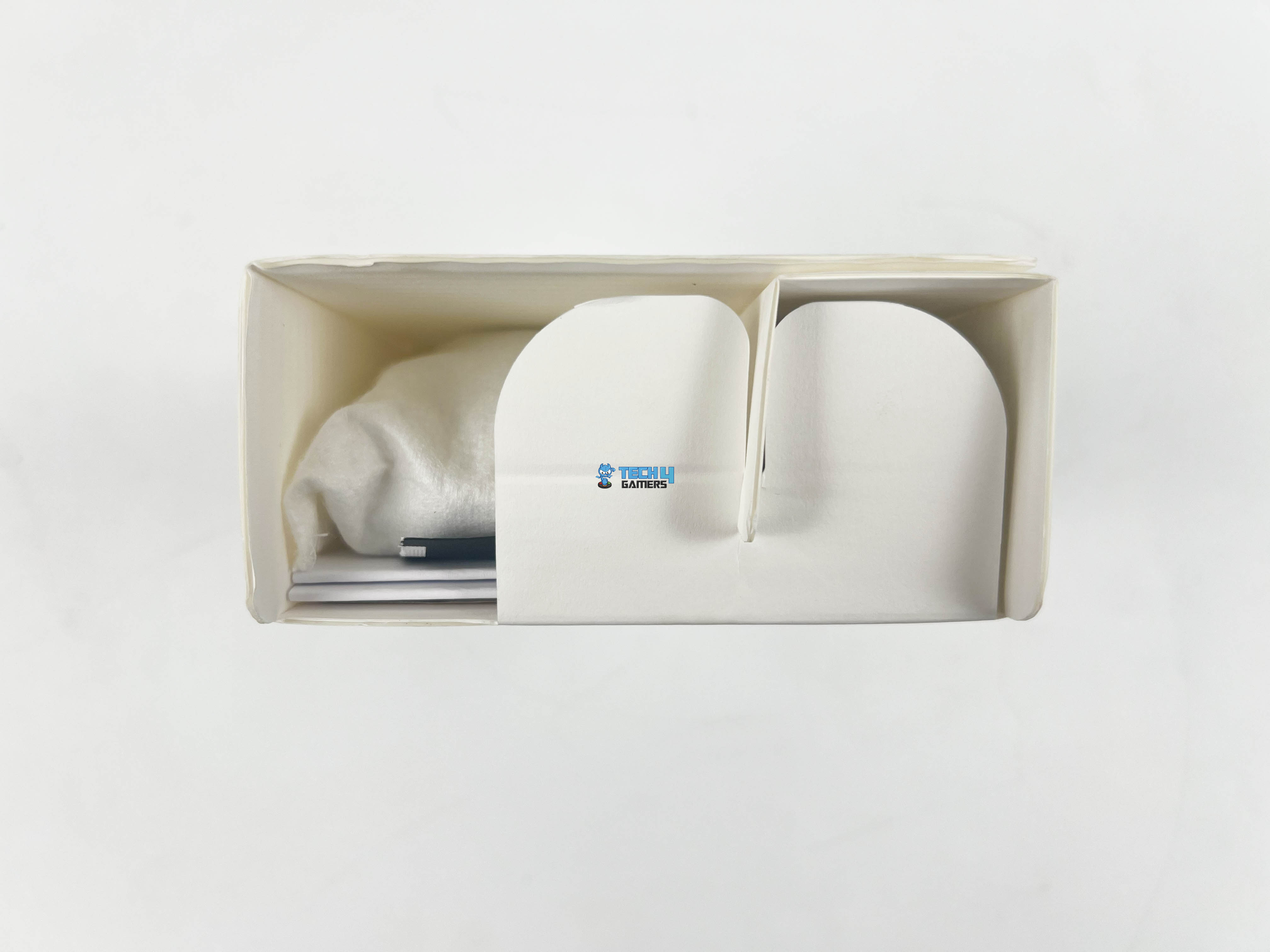
Opening the box, you’ll find the mouse sitting in its own slot with a sleeve over it. Everything else is well-arranged, so nothing moves around while it’s being shipped. Here is the list of everything that you’ll find inside it.
Corsair Sabre v2 Pro Ultralight Wireless Gaming Mouse
USB Wireless Receiver
USB Charging/Data Cable
Grip Tape
Extra Mouse Skates
Warranty Leaflet
Alchohol Pad
Design
Design
The Sabre v2 Pro is a right-handed mouse with a low, ergonomic profile that feels natural to hold. There’s nothing flashy or overdone in terms of design. It is available in either black or white color options. The top shell has a smooth matte finish, while the sides have gentle curves that give your fingers and palm a comfortable place to rest, whether you’re doing small movements or wide flicks.
The curves aren’t dramatic, but they are adequate to support your grip. The slope from back to front is gradual as well, so your hand rests on it effortlessly without being forced into an odd position. The only branding is a small Corsair logo on the front, which keeps the overall look professional. It’s the kind of design that blends into any setup, whether it is RGB or not.
Grip Styles
Grip Styles
1 of 3
Palm Grip
Claw Grip
Fingertip Grip
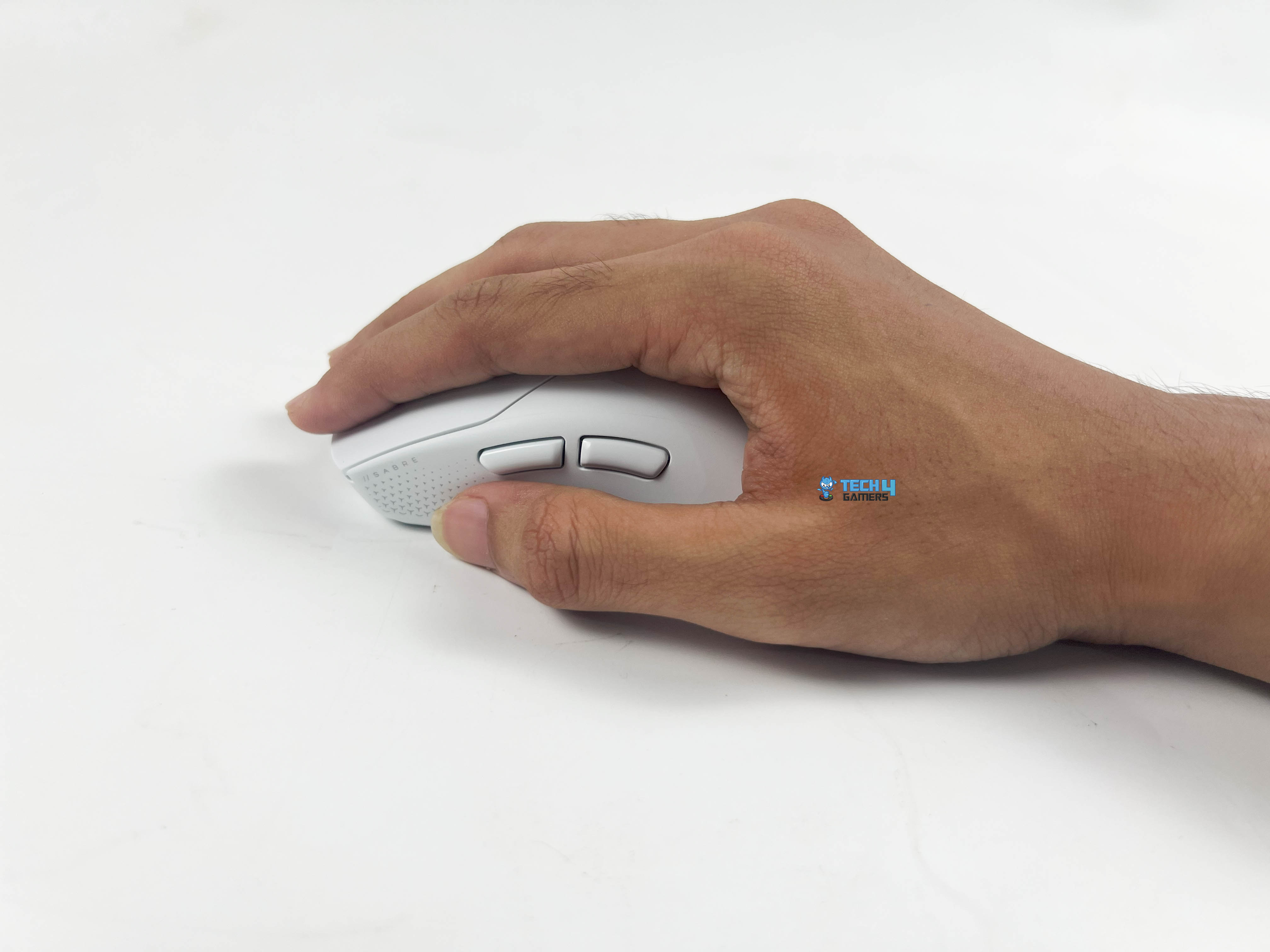
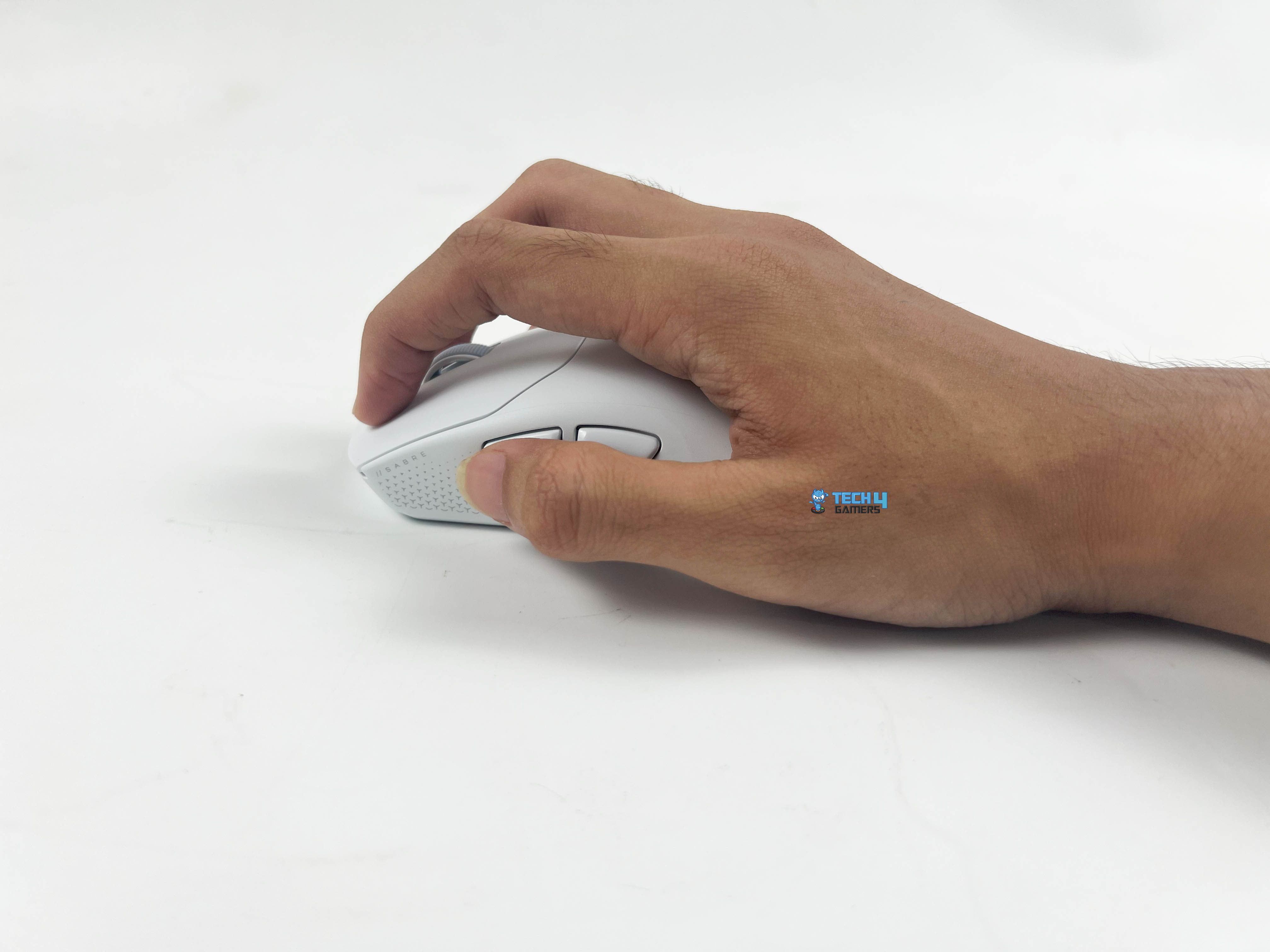
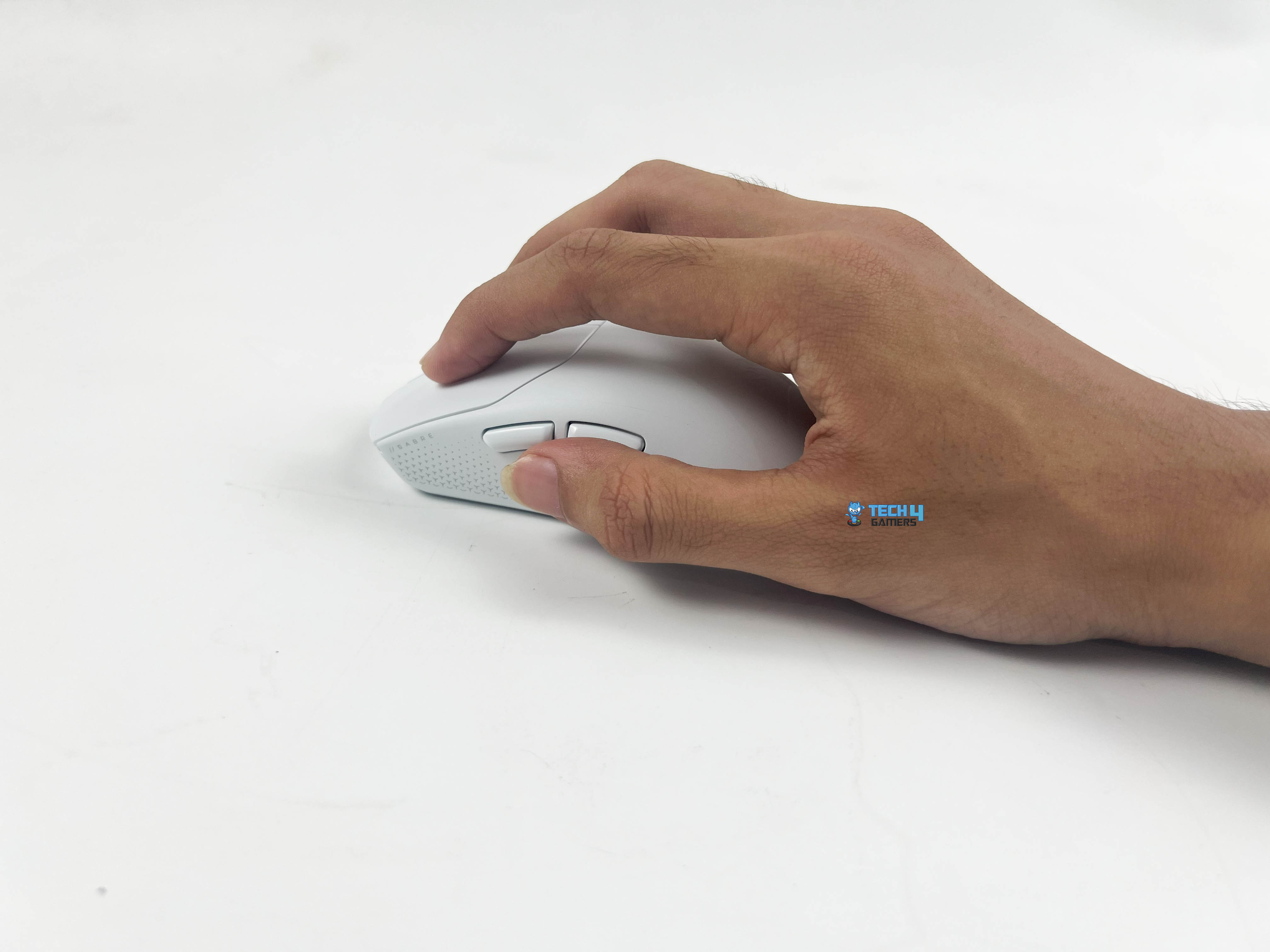
For me, the Sabre v2 Pro feels best with a palm grip. I usually prefer using every mouse that way, and even with my giant hands, I could grip it easily. Moreover, it’s also quite supportive, with a claw grip that allows for precise control over movements. The shape allows your fingers to arch naturally. However, it’s a bit trickier with a fingertip grip.
You can still use it that way, but it doesn’t feel as unstrained as the palm or claw grips. The size and low profile make it slightly less ideal for fingertip control. Since the Sabre v2 Pro dimensions are 4.69 x 2.46 x 1.5 inches. On paper, that might not sound huge, but as per actual usage, I was surprised at how well it fit my larger hands. In comparison, a lot of ultralight mice felt cramped, but this one didn’t.
Weight
Hump
The Sabre v2 Pro comes in at just 36 grams, and it almost feels like there’s nothing in your hand. It is significantly lighter, and you notice it when you’re playing fast-paced shooters. During testing, flicks and quick wrist movements felt fluid. The mouse slides around so easily that half the time I don’t even notice how little effort it takes. Even with that lightness, it still feels solid and never flimsy or cheap.
The balance point is nicely centered, so when you lift the mouse, it pivots naturally and gives a sense of precision in your hand that flows smoothly. I’ve tried a bunch of heavier mice before, but once you switch to an ultralight like this, it’s tough to go back. Every tiny movement feels noticeably easier, and it actually helps keep your hand from getting tired during long gaming sessions. All in all, it is definitely a solid contender for this year’s best lightweight mice.
Coating
Coating
The Sabre v2 Pro has a smooth matte finish that feels excellent under the fingers and is never slippery, which feels commendable in the hand. Notably, fingerprints and smudges don’t really stick to it, which makes keeping the mouse clean easier. Even after continuous usage, when my hands got a bit warm, the surface never felt sweaty. It works well with how light the mouse is, giving enough grip for handling.
For me, that makes flick shots and tracking feel pleasant. Corsair has also included extra grip tapes for the primary buttons and both sides. When I applied them, the mouse felt much better. The pattern adds a little extra texture, giving your fingers more traction. They make the mouse feel even more controlled during rapid movements.
Underside
Underside
Turning the Sabre v2 Pro over, the first thing you notice is the two large C-shaped mouse feet, one at the top and the other at the bottom. The mouse feet use UPE material, which is Ultra-High-Molecular-Weight Polyethylene. Basically, it means they’re refined and designed to last for a long time. UPE is popular for mouse skates because it cuts down on friction and lets the mouse glide effortlessly across most surfaces.
Right in the center, you’ve got the main sensor. Next to it, there’s a small switch toggle for turning the mouse on and off. Corsair has also included extra black mouse skates for the large C-shaped feet and even for the center section around the sensor. It’s great if you want to replace worn-out feet or customize the glide to your preference.
Build Quality
Build Quality
The Sabre v2 Pro feels solid and well-made despite being ultralight. You’d think something that weighs only 36 grams would feel fragile, but it actually doesn’t. The shell and sides have just the right amount of rigidity. I tried to press them, and I’m happy to write that there’s almost no flex. Nothing creaks or bends under normal pressure, which is remarkable for a mouse this light.
Moreover, seam and gap tolerances are also outstanding. The shell lines up nicely all around, with no obvious gaps or misaligned parts. That kind of attention to detail makes it feel more premium, even though the mouse is really built for speed, not just looks. Additionally, the cable port and strain relief are sturdy. Although the Sabre v2 Pro is wireless, the USB-C port for charging is properly fitted, and the strain relief feels secure.
Primary Buttons
Primary Buttons
The primary buttons on the Sabre v2 Pro feel firm and have well-built curves that sit well under fingers. Its matte finish also feels excellent and doesn’t cause any slipping. Using the extra provided grip tape makes the mouse feel even better in the hand. The textured pattern gives your fingers a bit more stability, so you don’t feel like it might slide off during quick movements.
The pattern isn’t rough or distracting, but it makes holding the mouse more comfortable. There is no over-stiffness in the buttons, so your fingers don’t get tired, but not so light that you click by accident while using. On some lighter mice, one button can feel a bit off compared to the other, but that’s not a problem here. Fortunately, the consistency across left and right clicks comes across as almost identical.
Side Buttons
Side Buttons
The Sabre v2 Pro has two side buttons on the left. They are placed right above the thumb position, so you can reach them easily without moving your hand too much. I found them natural to press, whether I was using a palm or claw grip. However, reaching them while using a fingertip grip was a bit difficult. Physically, the buttons are slim but not tiny, and they stick out adequately.
Unlike the rest of the mouse, the side buttons don’t share the same matte coating. Instead, they have more of a smooth plastic finish. The slight difference is a good thing because it makes the side buttons easier to distinguish by touch alone. Even with my large hands, I never had to stretch or awkwardly adjust to use them.
Scroll Wheel
Scroll Wheel
The scroll wheel on the Sabre v2 Pro is a notched wheel with a rubberized surface. It also has a patterned texture, giving you enough grip that feels remarkable during cycling through different weapons in-game. The wheel itself is slightly raised, sitting at a comfortable height. It isn’t oversized or too slim, but reasonable enough that it feels fluid when scrolling quickly through a page.
The notches are distinct, but not overly loud or rigid. Personally, I think Corsair got the resistance right here. It’s firm enough that you won’t accidentally scroll, especially for FPS players who rely on the scroll wheel for quick inputs. Furthermore, the click on the middle button feels reassuring, and it doesn’t wobble around much while being pleasant without being too hard.
Connectivity
Connectivity
The Sabre v2 Pro keeps connectivity straightforward but is solely performance-focused. You get two options that include a wireless and a wired USB-C connection. Unfortunately, there’s no Bluetooth connection. However, that makes sense, since this mouse is built for gaming first, not casual multi-device use. When I tested the wireless, it felt just like using a wired mouse. There were no dropouts and no stutters either.
Plugging in the dongle was instant, and the mouse connected right away. Corsair also gives you a USB-C to USB-A extension, which is useful. For instance, if your PC is under the desk, you can move the receiver closer and keep the connection steady. I also tested the wired connection to see if it felt different, but it doesn’t. The former is so responsive that using the wire is only for charging.
Battery Life
The Sabre v2 Pro is powered by a rechargeable Li-ion polymer battery. Corsair markets it as for up to that it would provide 70 hours of battery life when using 2.4 GHz wireless at the standard 1,000Hz polling rate. Surely, if you increase the polling rate to hyper 8,000Hz, which Corsair stated depends on your CPU. You’ll see that number drop since it will use more power for ultra-fast response.
In my own testing, the real-world numbers lined up pretty closely with Corsair’s claims. Running it mostly on a wireless connection at 1,000Hz, I was averaging about six days of use before needing a charge. Lastly, charging can be through a USB-C port at the front. It takes 90 to 120 minutes, which is surprisingly good for a mouse that lasts around 70 hours at 1kHz.
Software
Software
1 of 4
Key Assignments
DPI Settings
Macro Manager
Device Settings
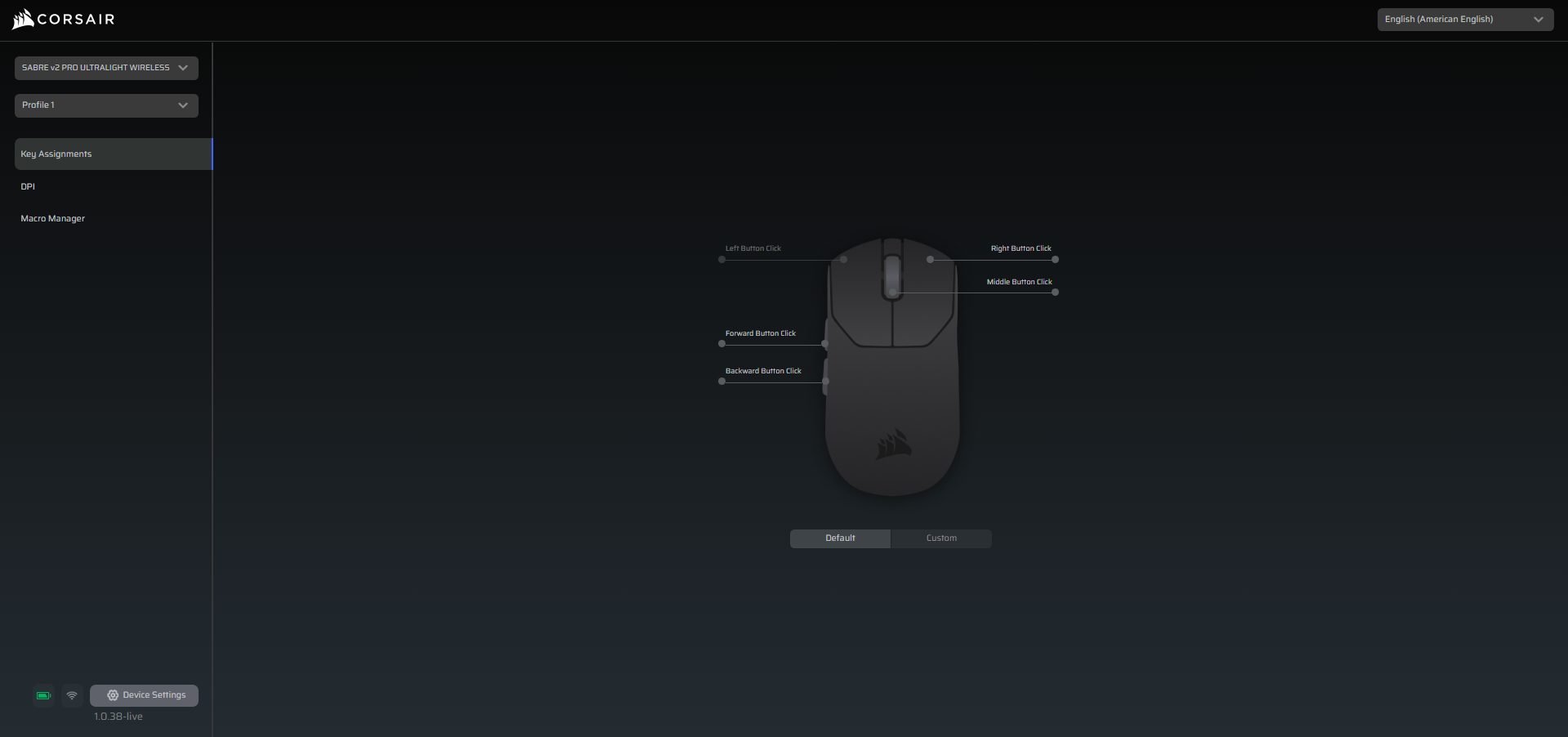
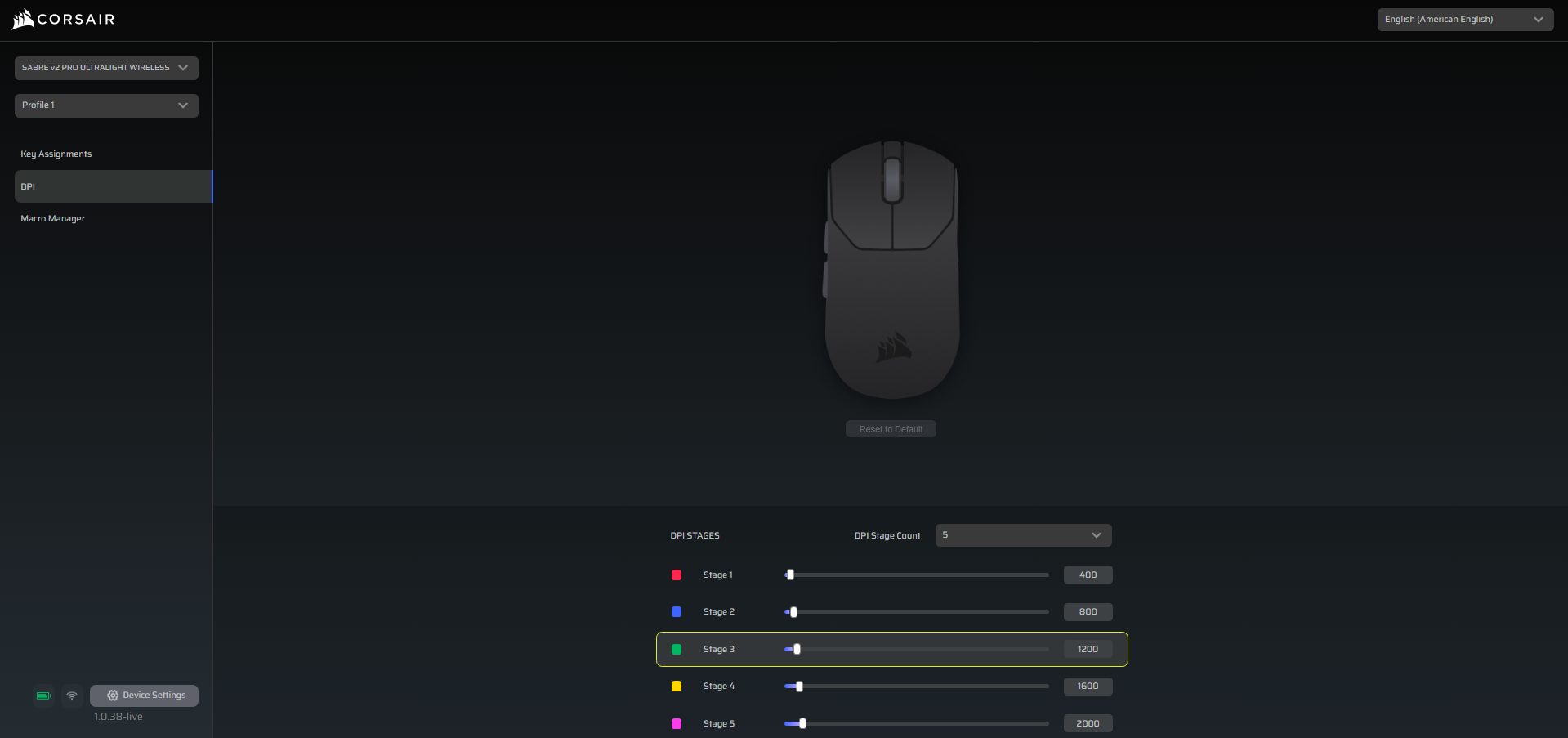
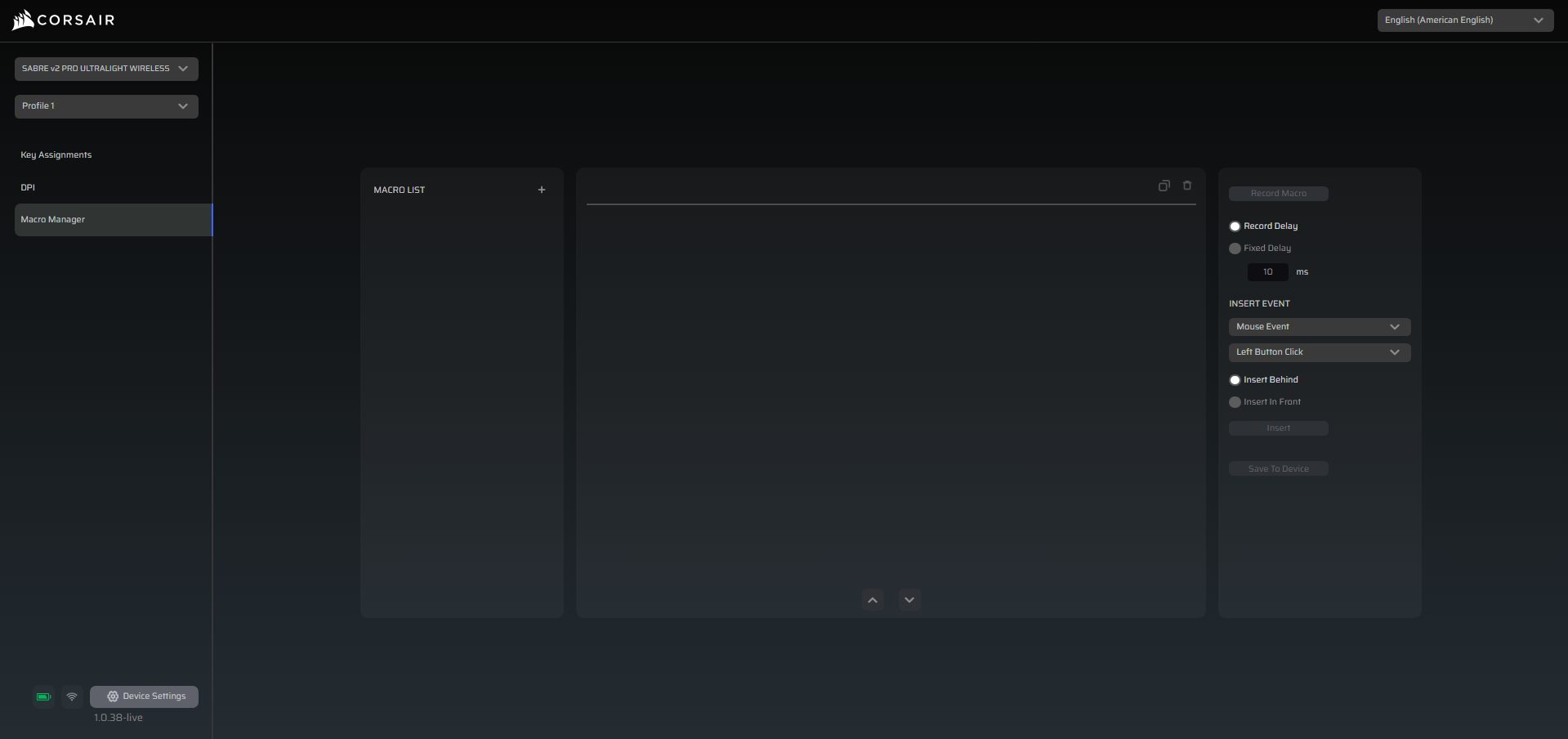
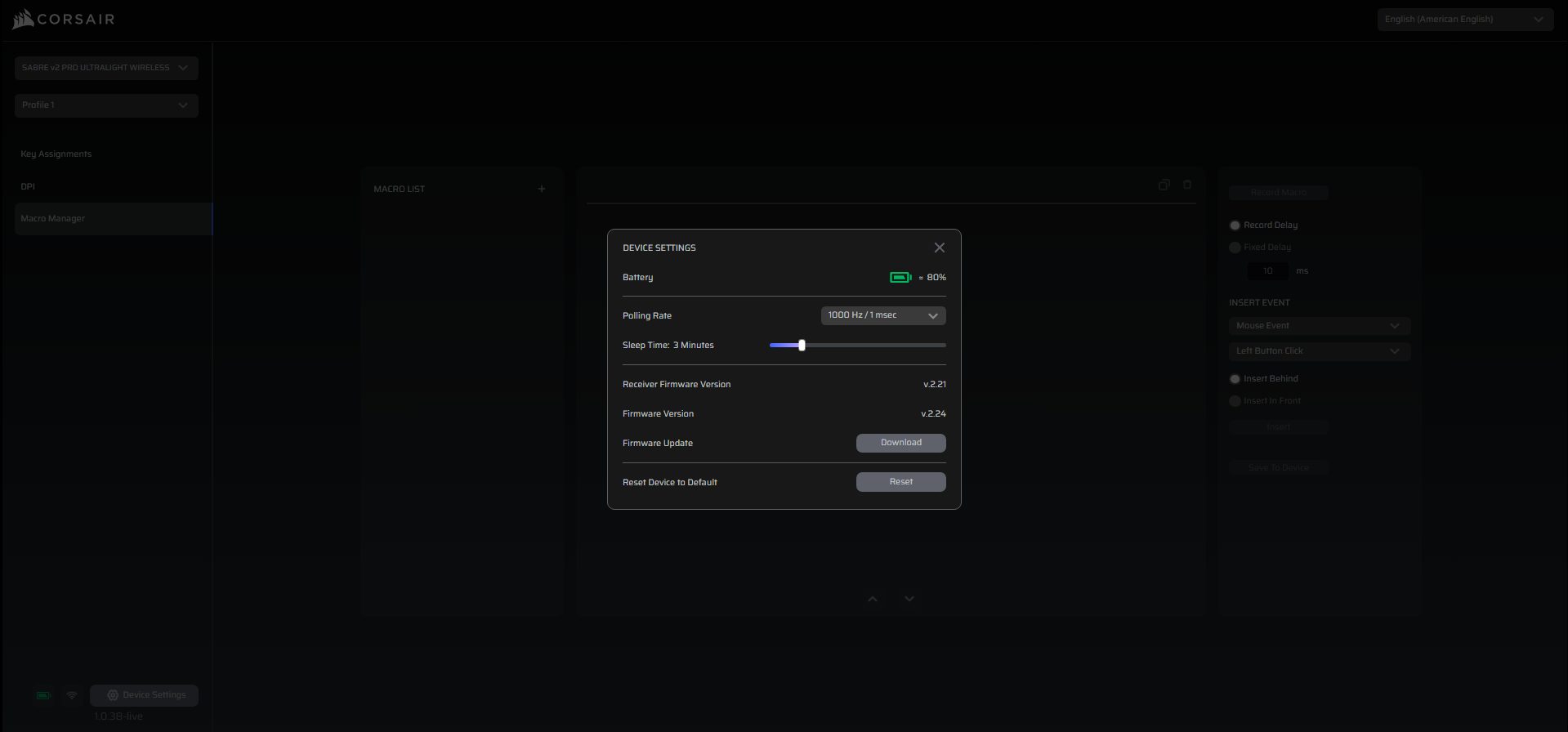
The Sabre v2 Pro doesn’t rely on Corsair’s traditional iCUE software. Instead, it’s customized through Corsair Web Hub, a browser-based software where you can adjust DPI stages, remap buttons, set macros, and set the polling rate up to 8,000Hz. I actually found it pretty convenient since you don’t have to install a heavy background program. The interface itself is clean and pretty easy to navigate.
On the left, you’ve got three main menus: Key Assignments, DPI, and Macro Manager. Down at the bottom, there’s a status bar that gives you device settings and extra controls. Lastly, you can store only one profile on the mouse itself. That means if you switch PCs or game on a system without Web Hub running, the mouse keeps your core settings like DPI and polling rate.
Performance
Corsair has used their Marksman S optical sensor, rated for a 33,000 DPI, with a 750 IPS tracking speed and 50G acceleration. Those numbers might sound gimmicky, but as per my usage, it delivered consistent performance. Whether I was moving it across the entire mousepad for long tracking sprays or snapping for quick flicks, the sensor stayed error-free.
There were no jitters, no spin-outs, and no weird acceleration issues, as it performed exactly how I moved it. Thanks to Corsair’s AXON hyper-polling, which enables it to reach up to 8,000Hz of polling rate. Lastly, Cosrair has used custom-tuned tactile mechanical switches that have a crisp, tactile feel that makes every click feel sharp. They have also rated them for 100 million clicks, so they’re clearly built in mind to last.
Should You Buy It or Not?
Buy it if
✅ You prioritize speed and responsiveness: The Sabre V2 Pro is ultralight at just 36 grams, making it ideal for fast-paced gaming where quick flicks and smooth tracking matter.
✅ You want comfortable ergonomics: Its low-profile, ergonomic design fits palm and claw grips comfortably, while the smooth matte finish and included grip tapes enhance control.
✅ You value durability in an ultralight mouse: Despite its minimal weight, the Sabre V2 Pro is solidly built, with UPE mouse skates, high-quality switches rated for 100 million clicks, and a well-aligned chassis.
Don’t buy it if
❌ You need multiple onboard profiles: It only supports one onboard profile, which may limit flexibility if you frequently switch between systems or games.
❌ You require Bluetooth or RGB: The Sabre V2 Pro excludes Bluetooth connectivity and RGB lighting to focus on performance, so it’s not ideal for those seeking multi-device use or flashy aesthetics.
❌ You prefer heavier mice: If you’re used to a more substantial weight, the ultralight build may feel too different at first and require an adjustment period.
Final Verdict
After spending time with the Corsair Sabre v2 Pro, I think it’s safe to say this mouse isn’t just about chasing specs. It’s all about delivering a genuinely refined experience for competitive play. At just 36 grams, it’s the lightest mouse Corsair has ever made, yet it doesn’t sacrifice build quality or comfort to get there. If you’re more of a casual player who doesn’t need high polling rates or a lightweight mouse
You might not fully appreciate what the Sabre v2 Pro offers. It’s a dedicated mouse designed with esports players in mind. At the end of the day, if you’re trying to have every competitive edge you can get, it should be on your bucket list, as it’s Corsair’s best attempt yet at giving pro players a compelling option.
At T4G, my task is to cover the latest news around the gaming globe ASAP and with the utmost precision. I adore all the games and respect all the devs behind the amazing games that we get all year. So, whether it’s a PC or a Console game, I got it all covered.
Story Highlight
Silent Hill f has managed to reach 1 million copies in just 3 days since it launched.
It has achieved this milestone quicker than last year’s Silent Hill 2 Remake by Bloober.
The title has also received universal acclaim from both the players and the critics.
The latest installment in Konami’s hit horror franchise, Silent Hill f released just 3 days ago. The title received great reviews, with many calling it the best game in the series, thanks to its horror and story elements, and it’s even selling well.
Konami has confirmed that Silent Hill f has managed to sell over 1 million copies in less than a week since its launch. It has also managed to achieve the feat faster than the previous Silent Hill 2 Remake.
Why it matters: After the success of Silent Hill 2, many expected the next entry to be also developed by Bloober, but that wasn’t the case, so fans were skeptical. However, Silent Hill f has delivered despite that.
Silent Hill f has surpassed 1 million copies sold
In an official statement, Konami confirmed that the game has sold over 1 million copies. This comprises both the physical and digital sales across all available platforms. Also, it has managed this number quite quickly.
Silent Hill f has received universal praise and currently sits at ‘Very Positive’ reviews on Steam. It presents a very different setting from the other games in the series to which we are accustomed, and fans seem to like it a lot.
The title has managed to achieve the milestone quicker than Silent Hill 2 Remake
Nonetheless, based on the back-to-back success that the series is having, it can be assumed that we will see more games in the future. Konami already confirmed that the original Silent Hill Remake is already in the works.
What are your thoughts on Silent Hill f selling 1 million copies faster than Silent Hill 2? Let us know your opinions in the comments or join the discussion at the official Tech4Gamers Forum.
I’ve previously worked for eXputer as a Senior News Writer for several years. Now with Tech4Gamers, I love to devoutly keep up with the latest gaming and entertainment industries. I have a Bachelor’s Degree in Computer Science and years of experience reporting on games and breaking exclusive stories. Besides my passion for gaming journalism, I love spending my leisure time farming away in Stardew Valley. VGC, IGN, GameSpot, Game Rant, TheGamer, GamingBolt, The Verge, NME, Metro, Dot Esports, GameByte, Kotaku Australia, PC Gamer, and more have cited my articles.
Story Highlight
The gaming industry in the US has shown no signs of growth in the past five years.
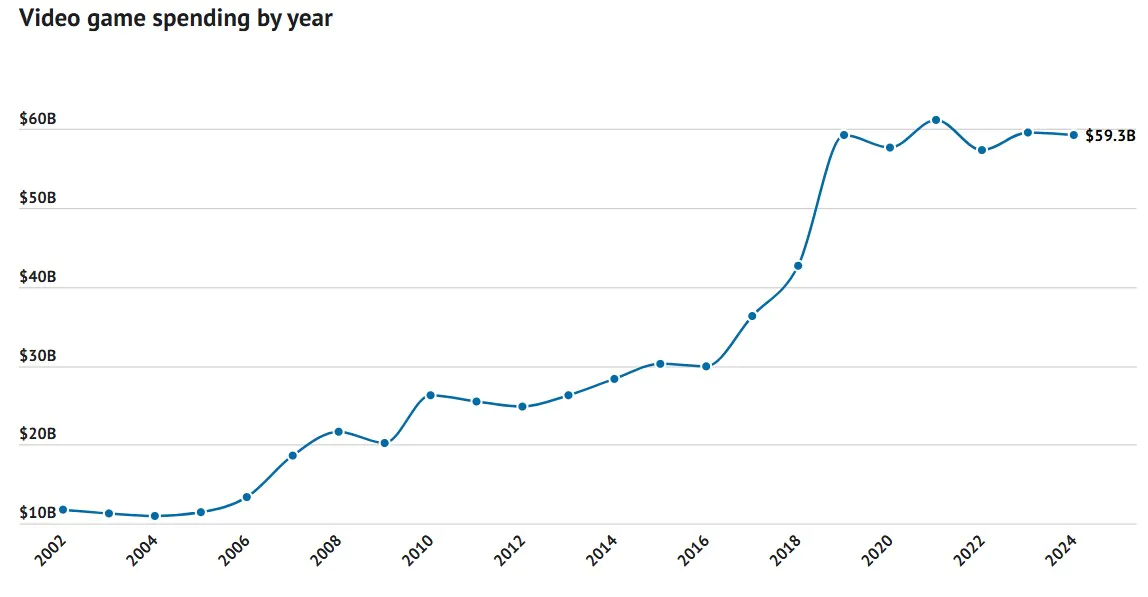
In 2020, video games grossed $58 billion, only $1.3 billion less than in 2024.
The lack of purchasing power of young Americans is a major contributing factor to this predicament.
The gaming industry has no rival in the entertainment world when it comes to money, with video games making more than film, music, and major sports leagues like the NFL combined. In 2024, the industry grossed a whopping $59.3 billion in the US alone, leaving every other entertainment medium in the dust.
Despite such heights, there is a worry among analysts that the gaming market has stagnated and hit its peak. And, new research indicates there might be some solid evidence behind these fears.
Why This Matters: Economic conditions depriving young adults of purchasing games may cause long-term damage to the medium.
The gaming market revenue curve has stagnated this decade.
According to a report by Fool, the gaming market in the United States has not shown any growth in the past five years following the pandemic-induced boost. In 2020, Americans spent $58 billion on video games, and for half a decade, expenditure has failed to surpass the $60 billion threshold consistently.
In the video game statistics report, Fool reveals that the average American household spent $449 on video games last year, which was a decrease from the $653 average in 2023. In addition, the gaming sector grew 50% from 2019 to 2020, but that kind of growth is no longer visible in the charts.
The gaming market achieved the $61 billion milestone in 2021, but since then, the curve has plateaued after a small resurgence. As per the report, families with kids and the top 20% earners spend the most on video games and their affiliated content.
Young adults have been priced out of the gaming market due to the economy.
This also corroborates a previous report that revealed how young Americans were spending 25% less money on video games due to the economic climate. Hence, a major reason for this stagnation is that the target demographic doesn’t have money to buy video games and has to rely on a saturated age group.
Despite this worrying trend in the US, Fool predicts that the global gaming revenue will go up to $260 billion. Hence, time will tell if this is just a slump or the new normal.
Lead the comparison and blog writing teams at Tech4Gamers.
Oversee teams with a keen eye for detail and precision.
Ensure hands-on writing, with benchmarks and testing as guiding principles.
Guarantee the delivery of the best possible results in concise yet impactful tech tales.
Story Highlights
Latest wireless mechanical keyboards now rival wired models by delivering sub-1ms latency.
Stronger connections and interference ensure reliability.
Long-lasting batteries and fast charging eliminate power concerns during gaming tournaments.
Tournament rules now act as the biggest hurdle to widespread adoption.
For a long time, wireless gaming peripherals were dismissed in competitive gaming for many reasons. Players had concerns over input lag, interference, and reliability. This made them highly undesirable for professionals who demanded precision.
Mechanical wired keyboards remained the optimal choice for many esports gamers. But now with advancements in wireless technology, the question arises: are wireless mechanical keyboards an option? Let’s dive right into the details.
The Evolution of Wireless Keyboards
Earlier models of wireless keyboards often relied on Bluetooth, which caused noticeable delays in input. Even a few milliseconds of input lag could mean the difference between winning and losing in fast-paced competitive titles such as CS:2, Valorant, Fortnite, or League of Legends.
Keychron’s Q1 HE Magnetic Switch Wireless Keyboard( Image credit: IMBOLDN)
Recently, wireless technologies such as 2.4GHz low-latency and proprietary systems such as Logitech Lightspeed, Razer HyperSpeed, and Corsair Slipstream have cut down input lag to a great degree. In tests and in real-world gaming scenarios, these wireless keyboards now deliver sub-1ms response times, bringing them on par with wired models.
Reliable and Stable
One thing that all gamers love is peripherals that are both stable and reliable. Esports tournaments present atmospheres of high pressure with heavy wireless traffic, which makes wireless keyboards prone to interference.
Modern wireless models like the Tecware Phantom Plus Elite and Corsair K70 Core TKL, however, incorporate multi-channel communication, frequency hopping, and stronger encryption, ensuring consistent performance. Players used to fear disconnections or packet loss in the past. This is not the case as wireless technology has risen to professional levels.
Strong Battery Life and Endurance
Battery life was also a major issue, with players worrying that their keyboard would die mid-match. The latest models of wireless keyboards, such as Epomaker p75, feature high-capacity batteries that allow them to last over 100 hours, even with RGB enabled.
Many models also support fast charging and even wired passthrough, which comes in real handy during down times, as players can just plug in to charge without losing functionality. This balance of portability and reliability has now made wireless keyboards practical during long esports matches.
Mechanical Switches
Mechanical switches have long been loved by esports gamers due to their tactile feedback, consistency, and durability. Today’s wireless mechanical keyboards preserve this advantage. They offer a wide variety of switches, which include linear and clicky, without compromising responsiveness.
Some models even introduce hot-swappable switch sockets, such as the Corsair K-65 Plus, which enable esports players to customize their keyboards as they wish with custom switches.
Adoption and Acceptance in Tournaments
Despite their drastic improvements over the years, many tournament organizers are still skeptical regarding wireless keyboards. Many official esports tournaments make it necessary to have wired keyboards to avoid any technical failures during matches.
However, as latency and stability improve in wireless models, we are beginning to see signs of acceptance in the esports industry. An ever-growing number of pro players are taking to wireless options in practice and streaming environments. This shows a shift in player perception regarding wireless keyboards.
Psychological Edge
One thing we all hate as gamers is tangled wires. Apart from amazing performance, wireless keyboards offer a psychological advantage. Players can easily pack lightweight, clutter-free setups without worrying about any wire tangling.
These keyboards offer comfort and ease of use, which makes them a great option for gamers and professionals. Just whip out your keyboard, connect, and start playing. This portability factor could make these keyboards standard in tournaments once they catch up with the technology.
Wireless mechanical keyboards have come a long way in the gaming industry. They have transformed themselves from impractical gimmicks to something players would actually prefer using and are now viable contenders for wired options.
They offer precision, near-zero latency, long-lasting batteries, and stable connections. What remains a main hurdle in widespread adoption is acceptance. Tournament organizers and players must try to build trust in wireless systems. If this shift happens, the future of the esports industry could very well be wireless.
Lead the comparison and blog writing teams at Tech4Gamers.
Oversee teams with a keen eye for detail and precision.
Ensure hands-on writing, with benchmarks and testing as guiding principles.
Guarantee the delivery of the best possible results in concise yet impactful tech tales.
Story Highlights
The Aula X Morkblade MK60 has a key scanning rate of up to 2.34M Hz, all thanks to Aula’s dual controllers with full-key direct and ADC connection.
When testing its latency, it came out at the forefront in terms of Hall Effect keyboards, but still lost to TMR keyboards.
This keyboard is of very high build quality, on par with premium brands, but it also has a premium price: $200-$300.
Recently, the keyboard market has been putting out feature after feature. First, we got the Hall Effect keyboard, then there’s TMR, and now we have a magnetic keyboard that has up to 2.3 million Hertz of key scanning rate.
This might be the highest key scanning rate ever on a keyboard, and the keyboard I’m talking about is AULA X Morkblade MK60. Now let’s dive into its specifications, switches, price, and most importantly, whether it is any good or just a gimmick.
Apperance & Variations
The keyboard comes in many different variations: White, silver, orange, black, Gilded gold, and Amber red. It has a dual-facing RGB and has the Air Jade switch that features transparent switches to complement that RGB.
It’s an aluminum-chassis keyboard with extremely high build quality, comparable to that of premium brands. The keyboard feels rigid, weighs around 1.26kg, and has an amazing metallic backplate with an exotic pattern.
The key font isn’t the best. While it does look unique, it looks more like a cheaper keyboard with that weird font. I can ignore the character and number keys, but the Shift, Backspace, TAB, and Caps are just way too ugly for me to ignore.
Switches & Their Specs
Like many of the modern keyboards, it has hot-swappable keys, which is something you should always opt for in a keyboard. For the switches, you get different variations depending on the color scheme you choose to go for.
For the white and silver variation, you get Gateron Custom White Jade magnetic switches with an actuation force of 30gf and a travel distance of 3.5mm. But if you opt for the black or the orange variants, you get Gateron Jade Air switches with a 24gf and the same travel distance of 3.5mm.
I love the actuation force, especially on the Jade Air switches, because I love it when the keys register with a light touch. The keys sound prelubed, and you do get a satisfyingcreamy sound. I won’t consider it fully thocky because it is more subtle.
Sound Quality
The spacebar still sounds like it isn’t prelubed, or it doesn’t have the best stabilizers, because it produces a click sound when pressed. I hate when the spacebar’s sound stands out from the standard keys, and that is the case for this keyboard.
For what it’s worth, the keyboard should sound better than what it does right now. However, it’s a Hall-effect gaming keyboard, so that gives me a reason to overlook this factor.
Other Key Specs & Features
Now this keyboard comes with an 8KHz Polling rate, which is pretty good. For the sensitivity rapid trigger, it has a full travel of 0.001mm. But now comes the main part: it has up to 2.34 million hertz key scanning rate with a full key scan rate of up to 256K.
The reason this keyboard has this high a key scanning rate is because of Aula’s flagship dual controllers with full-key direct and ADC connection inside of this keyboard. The dual MCU makes all the magic happen.
Testing The Latency Performance
Now comes the real test, its performance. Let’s see how well it performs when compared to other keyboards. The test is done using OSLTT CS, which is used to test mouse latencies.
For testing it on a keyboard, all you have to do is put a conducting tape on top of your key and press it with the other conductive wire. While this isn’t the most accurate method of testing, it does provide pretty measurableresults for comparison.
OSLTT CS Latency Test (Image By YT/Migss)
When testing it, the Morkblade MK60 came out in the top 4 position, clashing heads with TMR keyboards. For a hall effect keyboard, that is very impressive, but still, the TMR keyboards reign supreme in the test overall.
In the category of Hall Effect keyboards, the Epomaker HE68 Lite is just two rows below it, which goes to show how good that is as well. Then, just below the HE68 Lite, you get the infamous Wooting 80HE.
Price
Now comes the big question: what is its price? The cost ranges from $200 to $300, depending on the site from which you purchase it and whether you receive a discounted price. For this price, many people might think it’s not worth it.
All in all, you get very high build quality and an aluminum chassis with performance that’s on par with TMR keyboards. For gamers who prefer the lowest amount of latency, this might be the best Hall effect keyboard out there. But I can see that people would much rather spend a premium price for a premium brand like Wooting instead of a brand like Aula.