Threads
Not-so-great on a budget!
Review Summary
The MAG B850 Gaming Plus Max WiFi costs $260 and lacks important features like 20 Gbps USB and a true mid-range audio codec, which makes it relatively unattractive at the price point. However, it stands out in its looks, the addition of 5G LAN, and the dedicated BCLK generator. Its remaining features are also good enough and in line with its price tag.
Hours Tested: 10

Overall
-
Performnce - 8/10
8/10
-
Design - 9.5/10
9.5/10
-
Features - 8/10
8/10
-
Value - 7/10
7/10
Pros
- Aesthetically pleasing
- Dedicated BCLK generator
- 5G LAN
- Storage provisions, WiFi 7
- Quality of Life (EZ) features
Cons
- VRM setup and temperatures didn’t impress us
- Dated audio chip
- No 20 Gbps USB

MSI has recently released updated versions of its motherboards for the AMD 800-series chipset. The main highlight is the upgrade to a 64 MB BIOS chip, up from the 32 MB chips found in the original releases. One of the motherboards in the lineup is the MSI MAG B850 Gaming Plus Max WiFi, which is a refresh of the original non-”max” board, and we’re reviewing it today. Other than the addition of the Max tag, which makes its name an unnecessary mouthful, there aren’t any “major” changes (as is the case with the rest of the boards (two of which we have already reviewed); nonetheless, let’s get into the review.
Key Takeaways
- The MSI MAG B850 Gaming Plus WiFi is a $260 board with decent performance, upgraded 64 MB BIOS ROM, a clean, white aesthetic, and a dedicated BCLK generator
- Get this board if you’re building a white setup, want 5G LAN, or want some extra overclocking room through the external BCLK generator.
- Don’t get the board if you want the best value at this price point.
Here are the specifications for the board:
| CPU Support | AMD Ryzen 7000, Ryzen 8000, Ryzen 9000 |
| Memory Support | DDR5 8200+ MT/s (OC) |
| PCIe Slots | 1x PCIe 5.0 x16, 1x PCIe 4.0 x4, 2x PCIe 3.0 x1 |
| M.2 Slots | 1x PCIe 5.0 x4, 1x PCIe 4.0 x4, 1x PCIe 4.0 x2 |
| SATA Ports | 4x 6Gbps |
| Audio | Realtek® ALC897 Codec |
| Network | 1x Realtek RTL8126 5G LAN, WiFi 7, Bluetooth 5.4 |
| USB Ports | 17 ports, including 1x 10 Gbps (Front) |
| Size | 243.84 mm x 304.8 mm, ATX Form Factor |
| MSRP | $260 |
The specifications remain the same. The motherboard provides a fairly good selection of I/O and is clearly focused more on the budget side, though the 5G LAN is one feature that you’d probably not expect, and could have even been cut down to make it more affordable.
Packaging and Unboxing
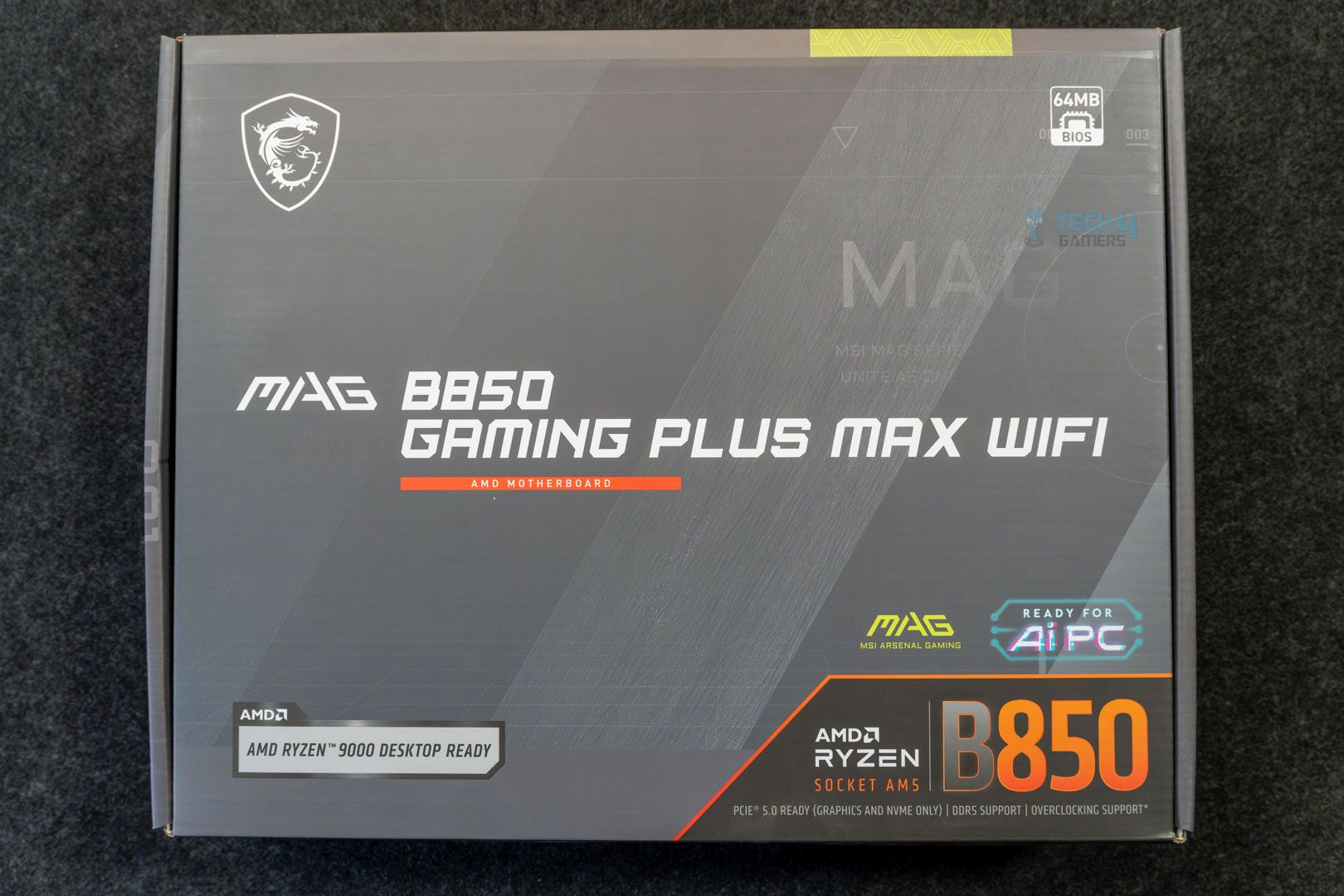
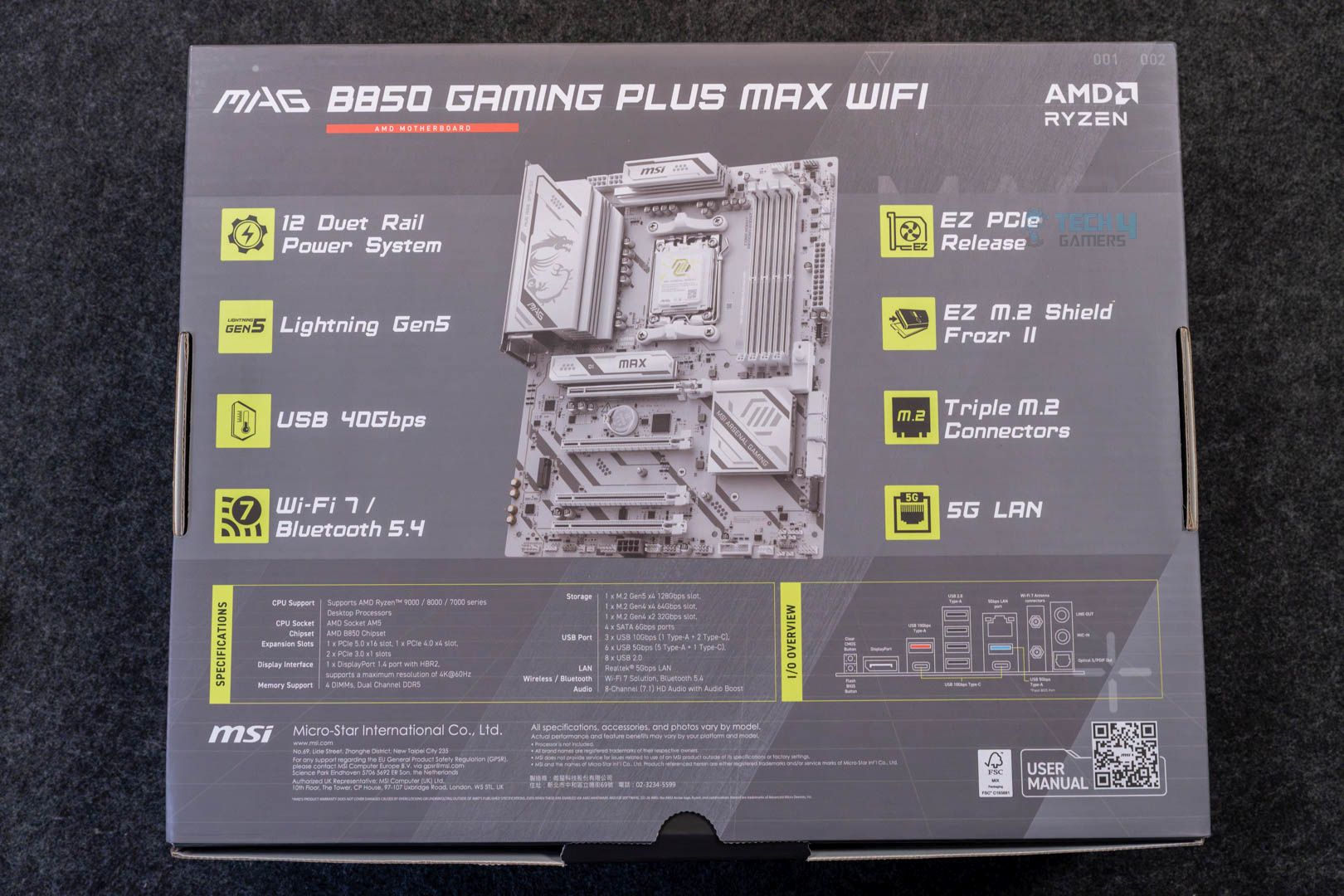
The packaging of the motherboard is the same as the previous version, again, only with the “Max’ added. We get a silver-colored cardboard box, the back of which lists the specifications and the highlight features.
Inside the box, we get:
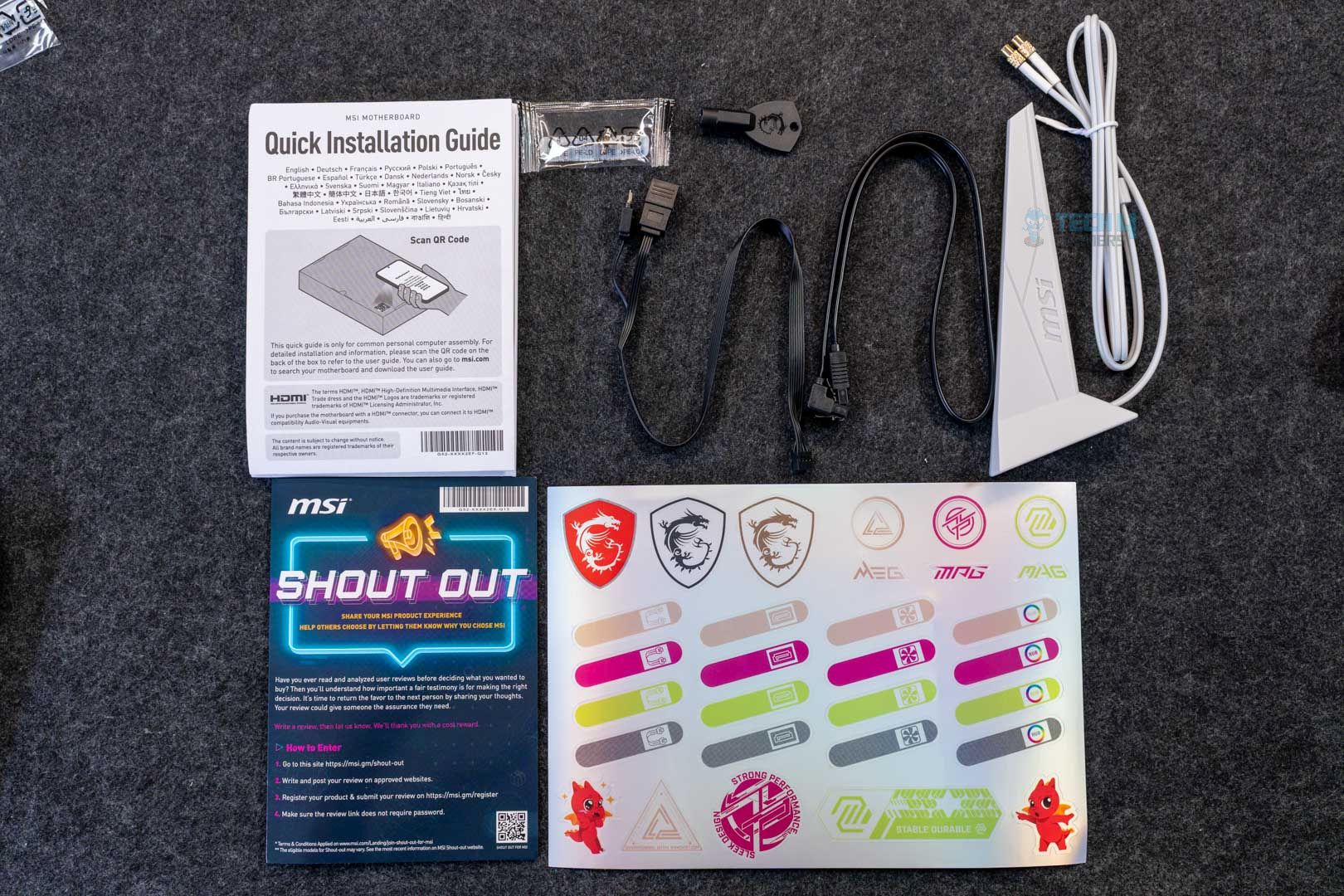
- A quick installation guide
- EU regulatory notice
- 1x SATA cable
- 1x EZ M.2 Clip II
- 1x EZ M.2 Clip II Remover
- EZ WiFi Antenna
- 1-to-2 EZ Conn-Cable (V1)
- EZ Front Panel Cable
- Cable stickers
Again, these are the same accessories we received with the original board. Compared to costlier MSI boards, there’s no EZ front panel cable, which simplifies the front panel connections, and we only get the 1-to-2 conn-cable (instead of the 1-to-3), which combines fan and RGB connection for ARGB fans.
Design
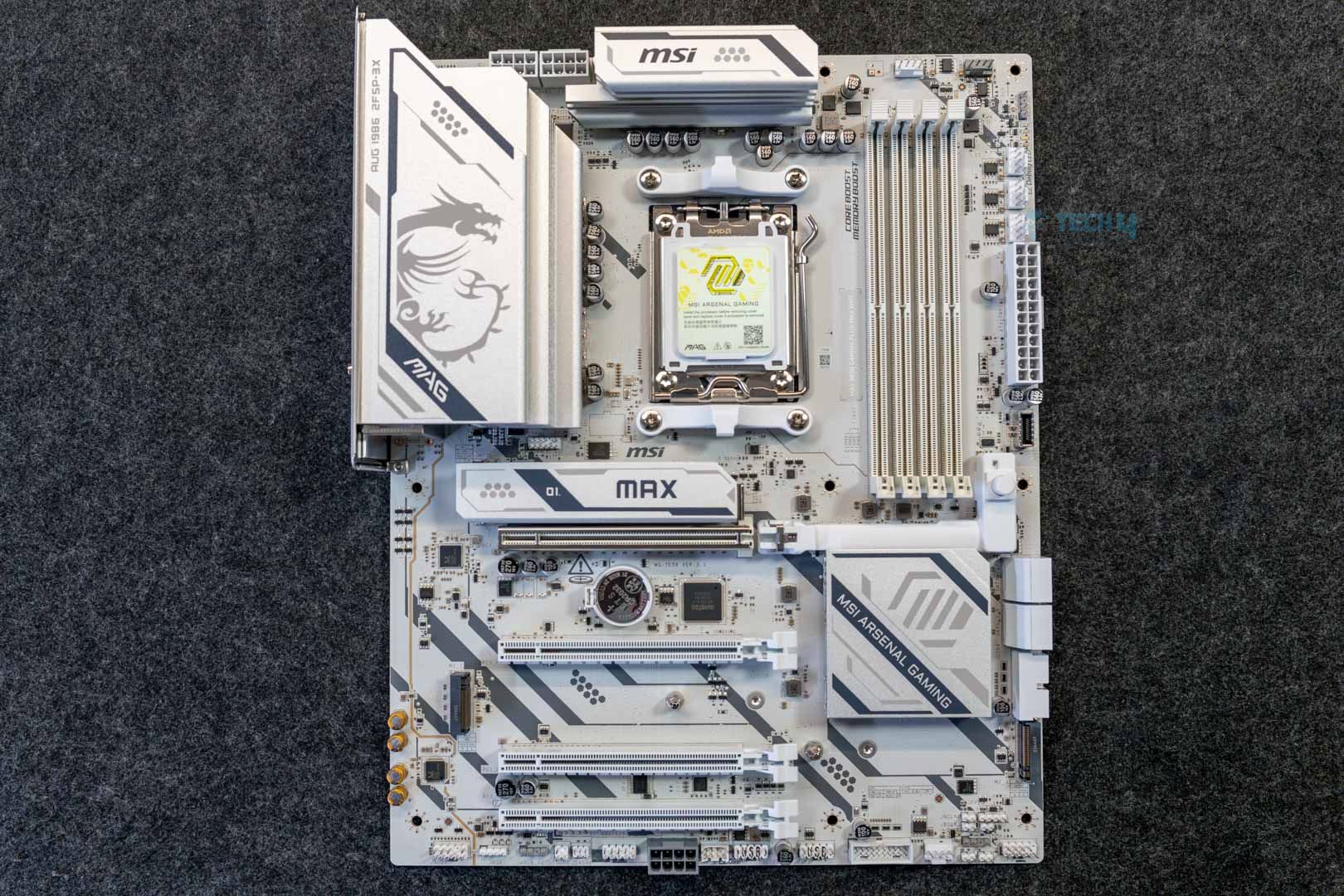
On the looks, MSI has mixed things up in a different way this time. While the original board featured a black PCB with white heatsinks, this one has a white PCB and heatsinks, only with black diagonal lines running through them. I really like this refinement and feel it fits better than the original design, where the black and white felt like they were conflicting. The rest of the elements on the board remain the same (in terms of branding the shapes printed on the heatsink). The heatsink design and layout are also the same. There’s no on-board RGB.
The motherboard is built on a 6-layered PCB with 2oz copper. MSI mentions “PCB Fabric Technology” on their page for this board, which emphasizes minimal signal loss and higher transfer speeds. We get built-in overvoltage and overcurrent protection, and MSI’s patented design to suppress electromagnetic interference through copper rings is also present. The board also features an external clock generation (BCLK controller), which can allow better overclocking of CPU and RAM without forcing other clocks to go out of sync.
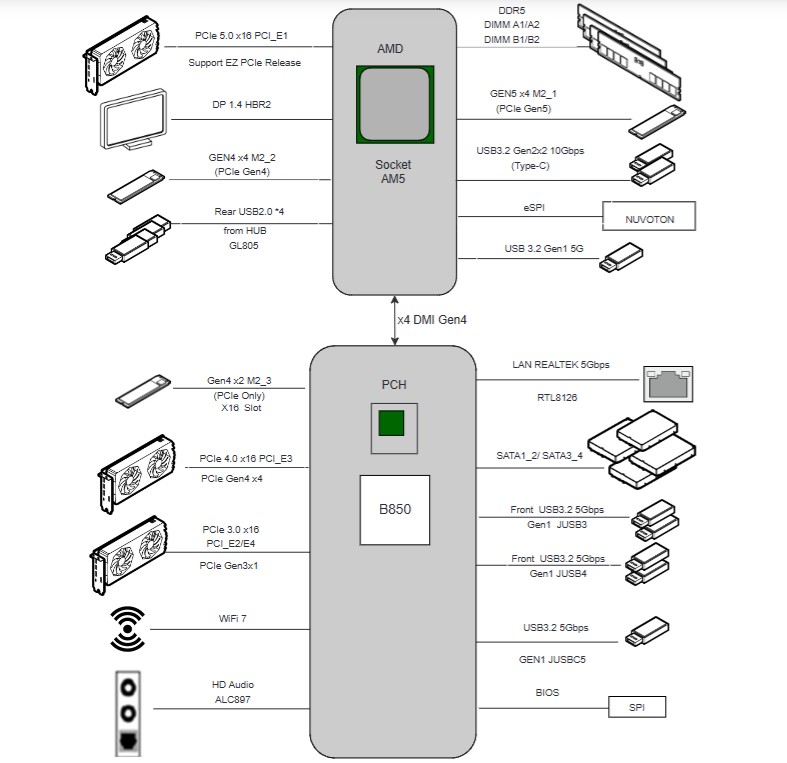
The motherboard gets its PCIe Gen 5 connections and DDR5 support from the CPU, while most of the remaining I/O is powered by the B850 chipset, including SATA ports, secondary PCIe slots, and M2_3, audio, WiFi, and USB ports.
CPU Socket and Power Delivery
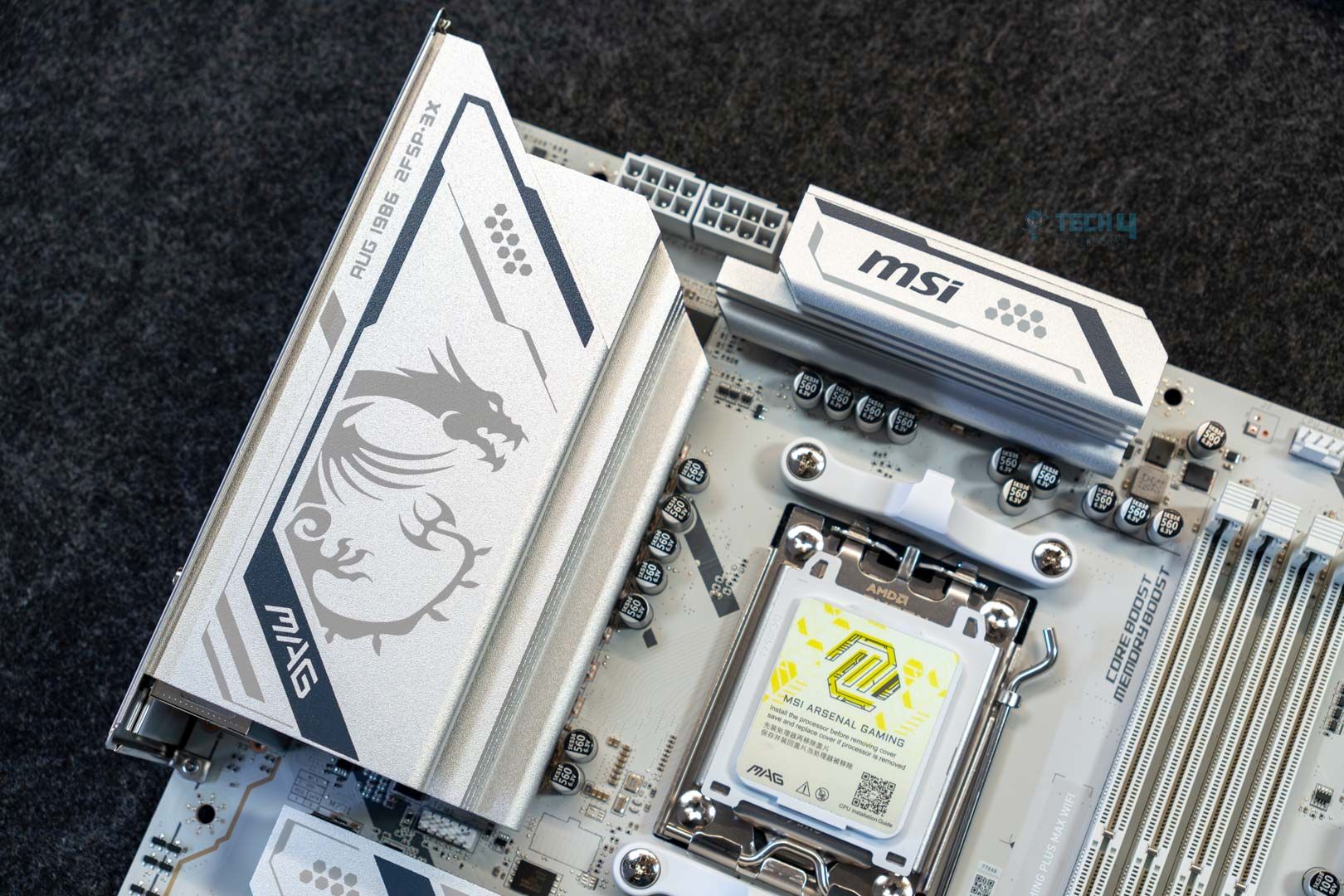
The B850 Gaming Plus Max WiFi uses the AM5 (LGA1718) socket and offers out-of-the-box support for Ryzen 7000, 8000, and 9000 series CPUs.
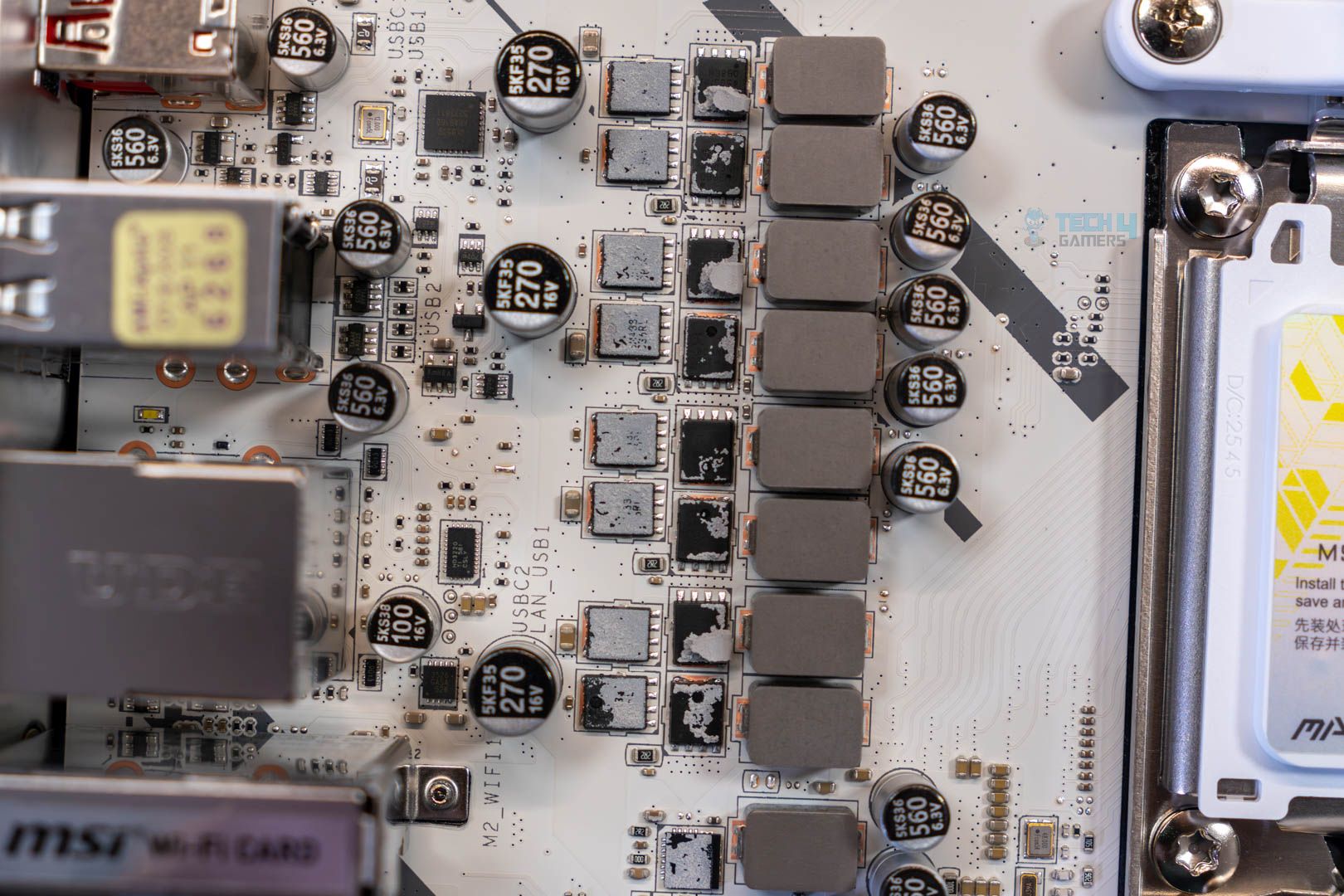
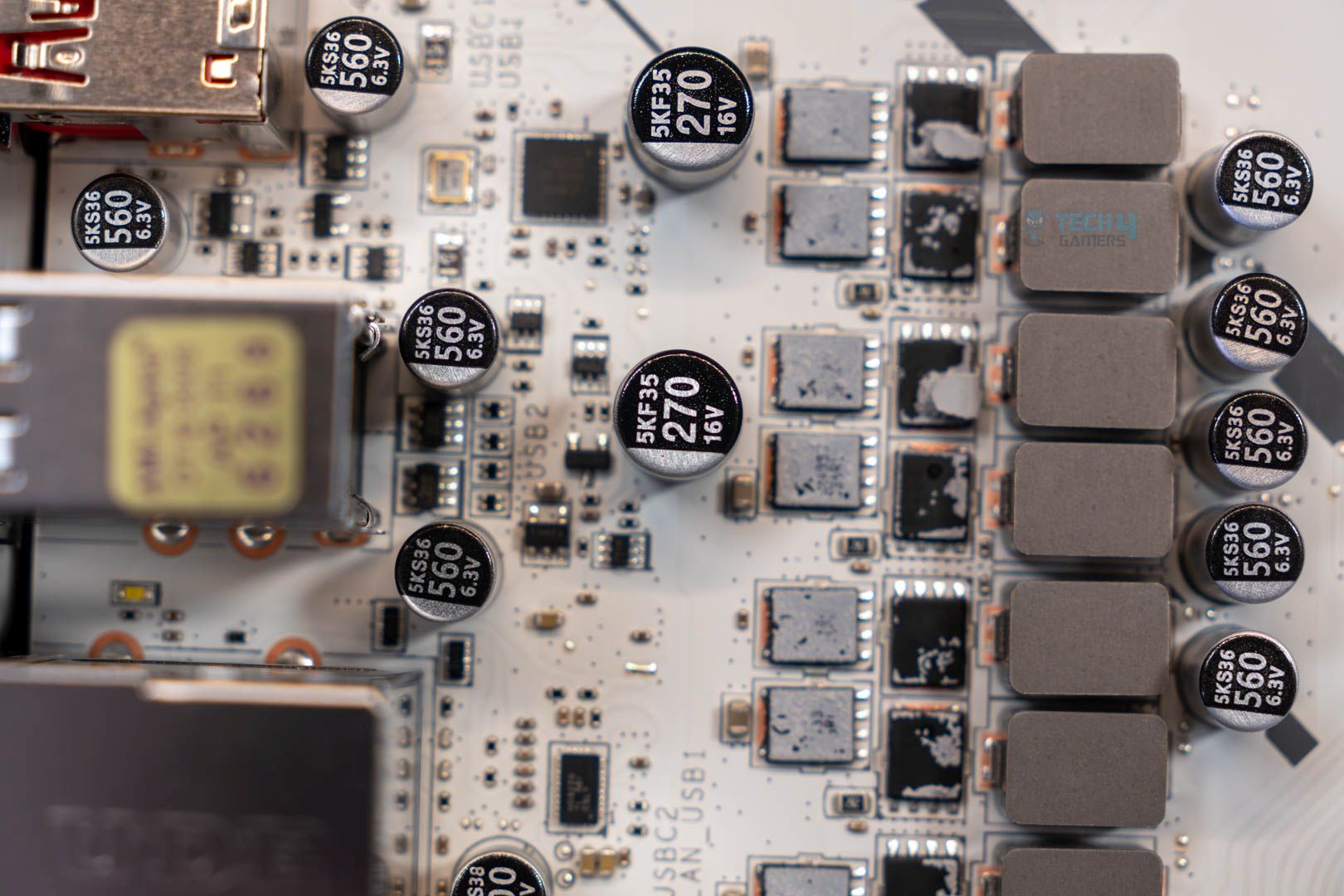
Power is provided by a 12+2+1 (VCore + SOC + MISC) power phase setup, each delivering 50 amps. These are discrete MOSFETs, rather than the DrMOS or SPS you find in most motherboards nowadays. In case you don’t know, DrMOS/SPS designs combine the high and low MOSFETs and the driver into one package; they are more efficient and provide more stable power delivery.
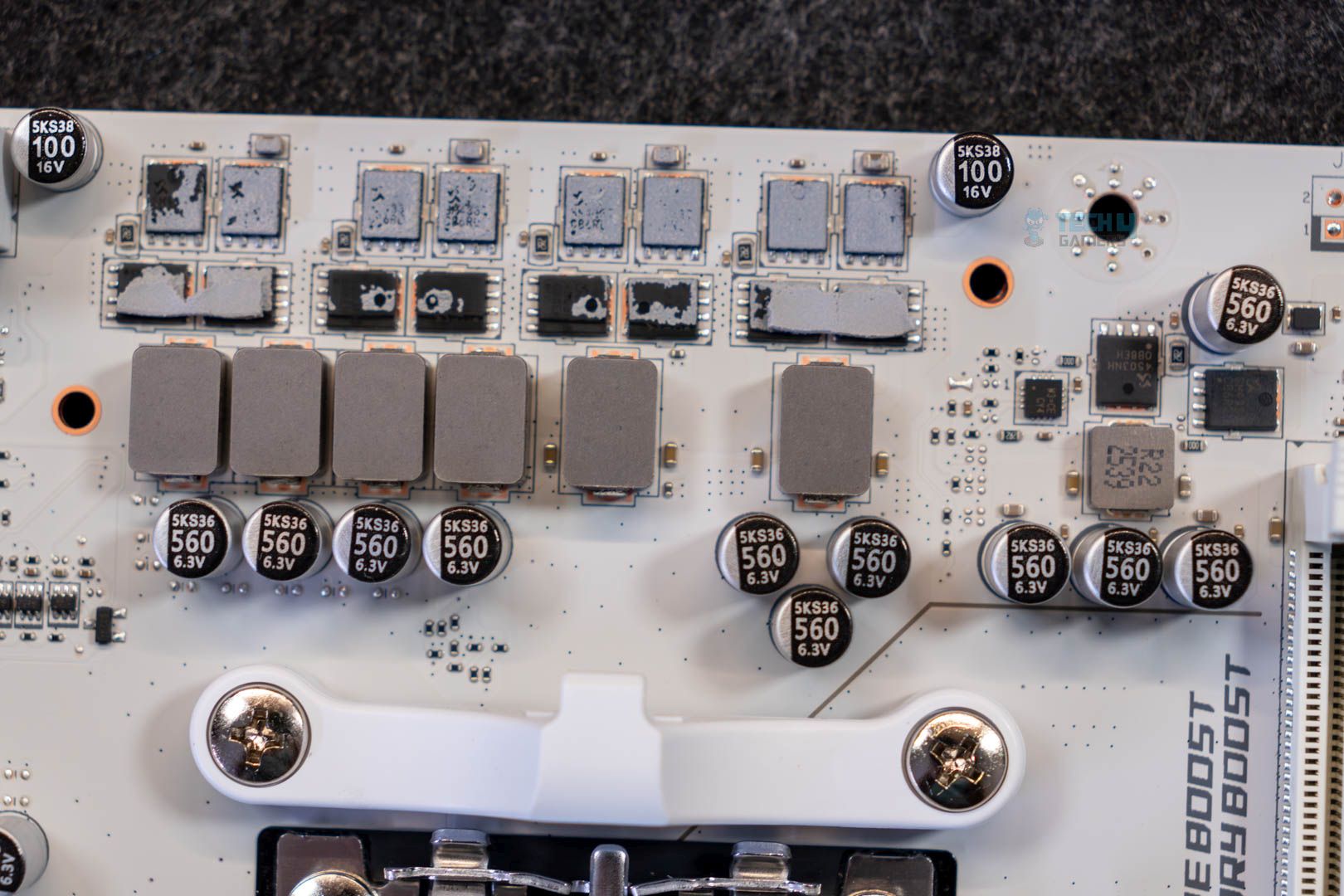
Discrete designs are common in lower-end boards, but not something I’m excited to see in a $260 board. In short, you can expect fairly toasty VRMs and limited overclocking room. A closer look reveals that the board is using Sinpower’s SM4337 (high-side) and SM4503 (low-side) MOSFETs. The controllers in question are the Richtek RT3672EE and RT3678BE PWM controllers.
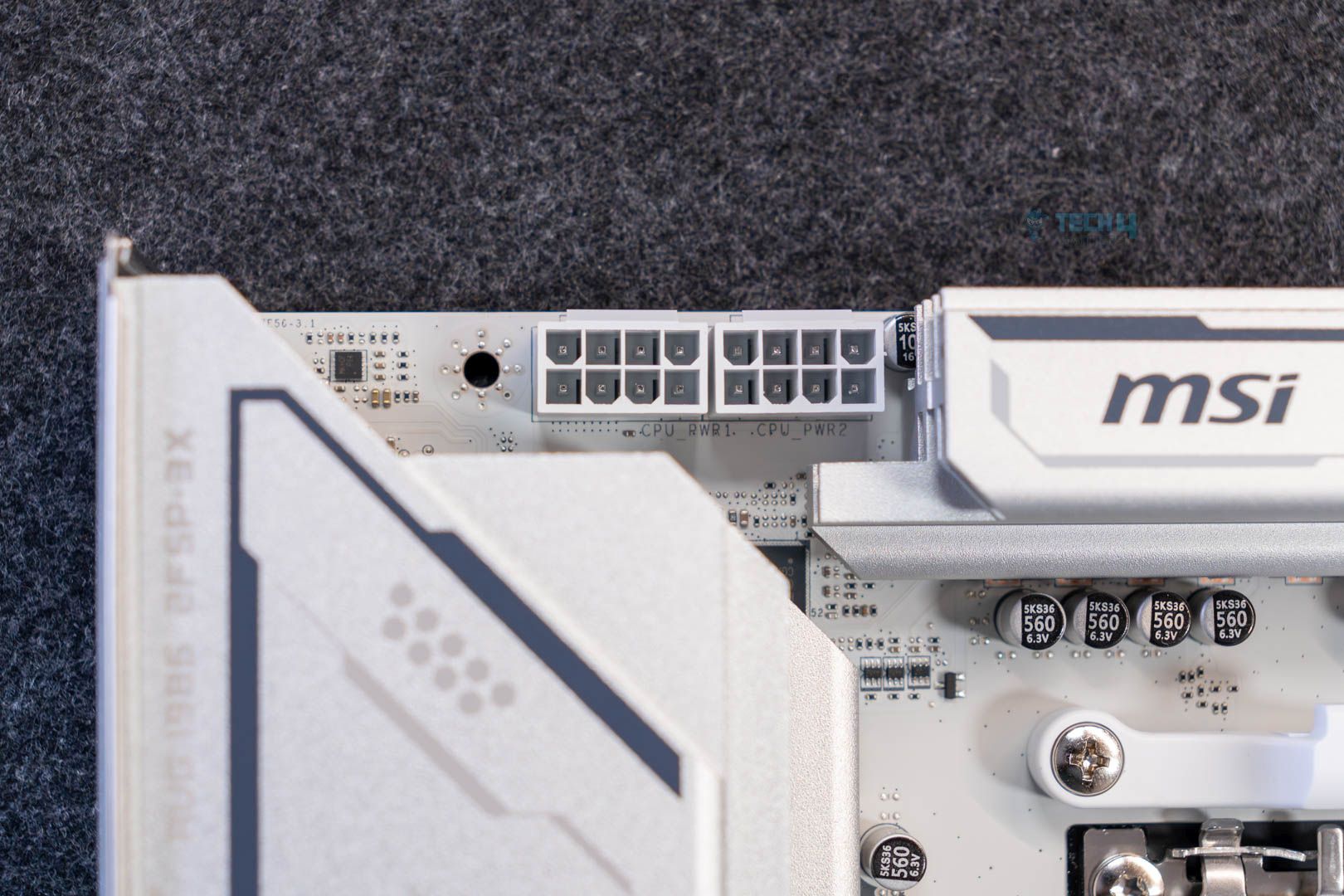
Initial power to the CPU comes from dual 8-pin EPS connectors using MSI’s solid-pin design (which they claim provides more stable power delivery through lower impedance and better durability). With each connector providing 150W, they can theoretically provide up to 300W, which could be enough for any supported Ryzen chip.
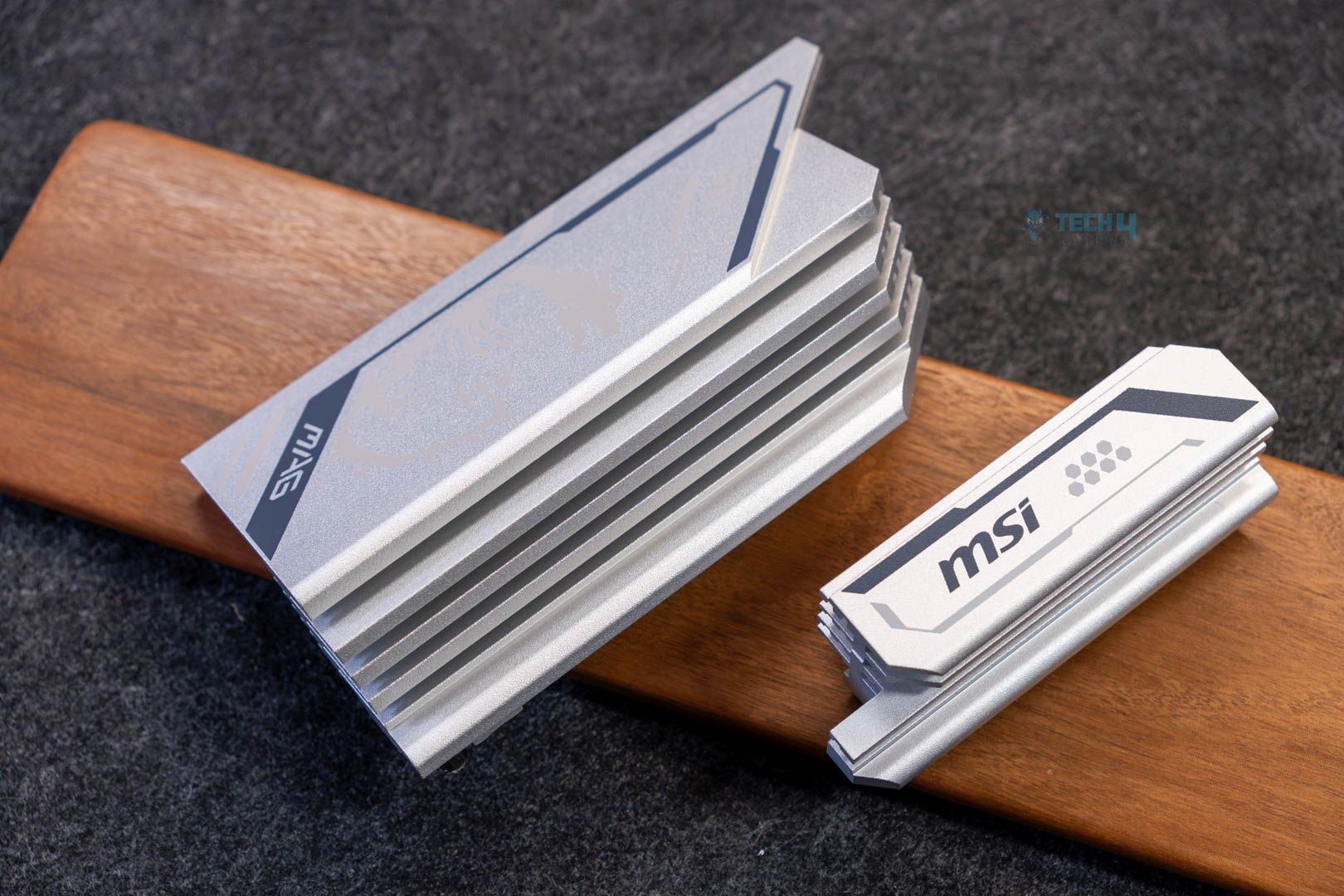
As for the heatsinks, they use a stacked fin design and feature 7W/mK thermal pads for the MOSFETs. There’s no heatpipe connecting the two VRM heatsinks
DIMM Slots
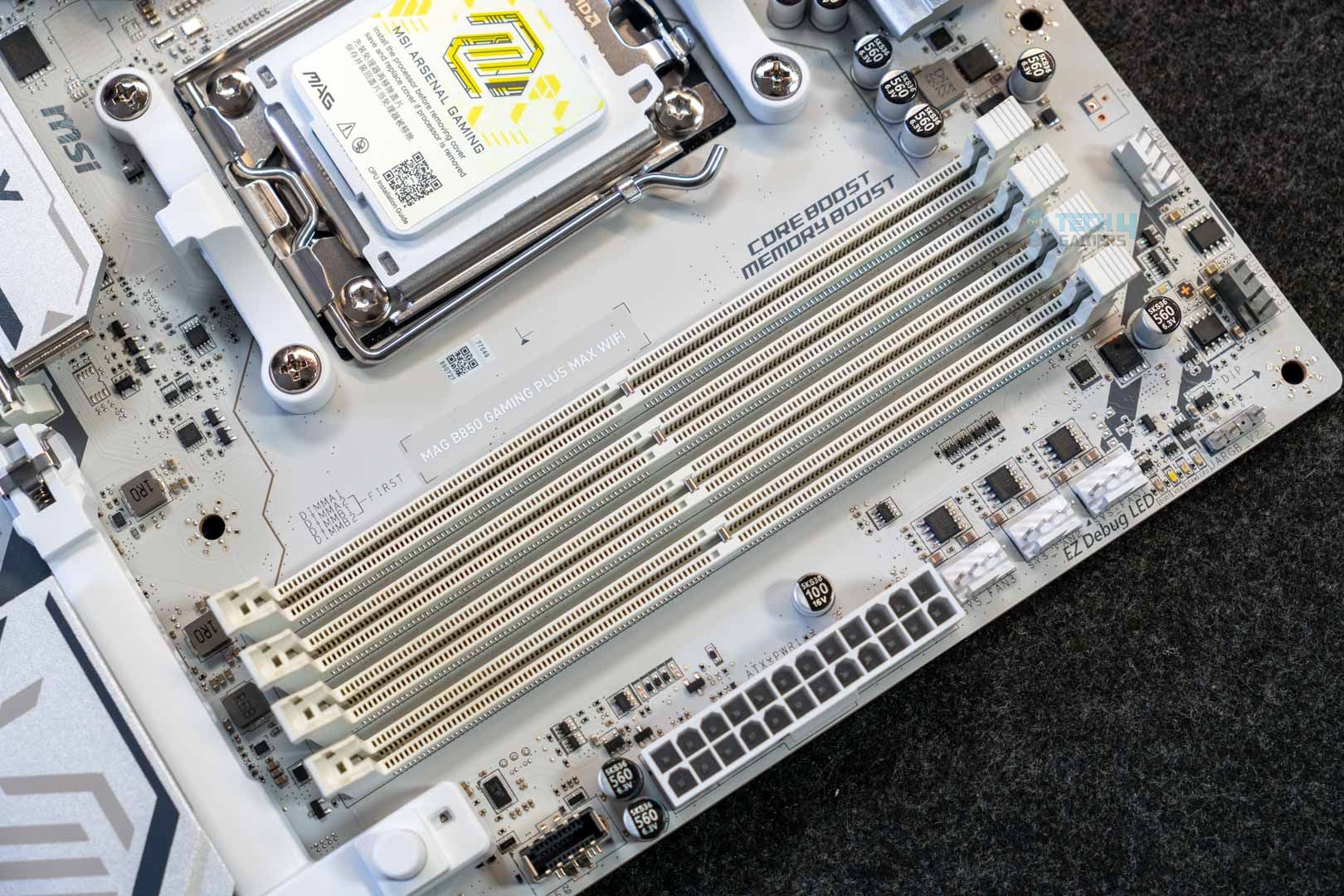
The motherboard has four DIMM slots, capable of supporting up to 256 GB across them. The maximum memory speed is 8200 MT/s at 1 DIMM per channel (single-rank); here’s the maximum speed supported across the various configurations:
- 1DPC 2R = 6400+ MT/s
- 2DPC 1R = 6400+ MT/s
- 2DPC 2R = 6000 MT/s
There’s no support for ECC RAM. CUDIMMs are supported, but only in clock driver bypass mode, which negates their benefit. The dedicated clock driver on the DIMMs eliminates the need for a signal from the CPU (as with regular DIMMs), allowing you to achieve higher speeds. Again, in clock driver bypass mode, the RAM behaves like regular DIMMs.

While the maximum memory speed supported is DDR5-8200 MT/s, it’s more practical to invest in a 6000 MT/s or 6400 MT/s for the Ryzen 7000/9000 series, as that’s the maximum speed they support while still staying in sync with the CPU’s memory controller. The high memory speed support sounds fancy, but it is not really practical for most since you need to push well beyond 8000 MT/s to see any significant difference in most applications, and faster RAM is also more expensive. It also costs a lot more.
– Ali
PCIe slots
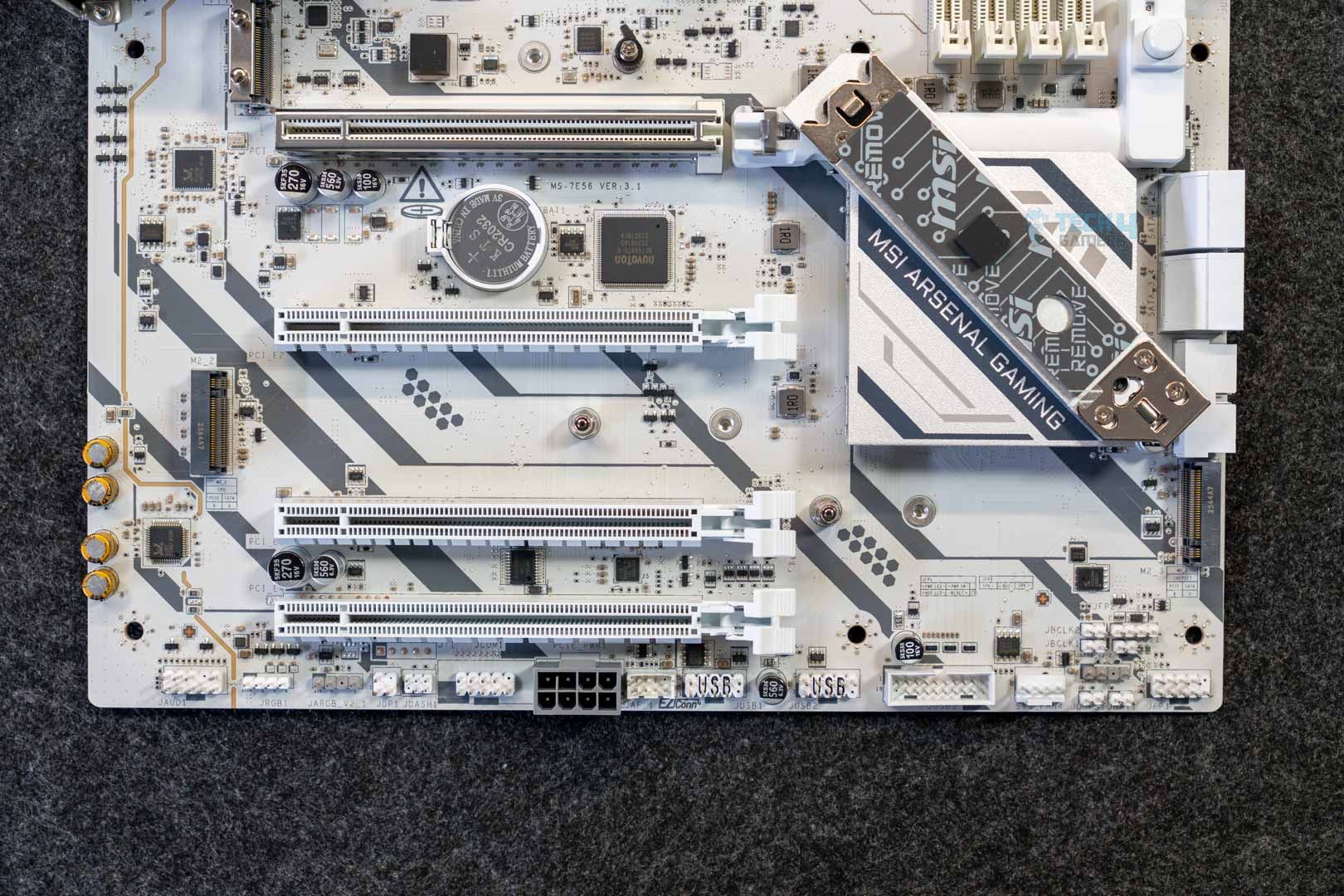
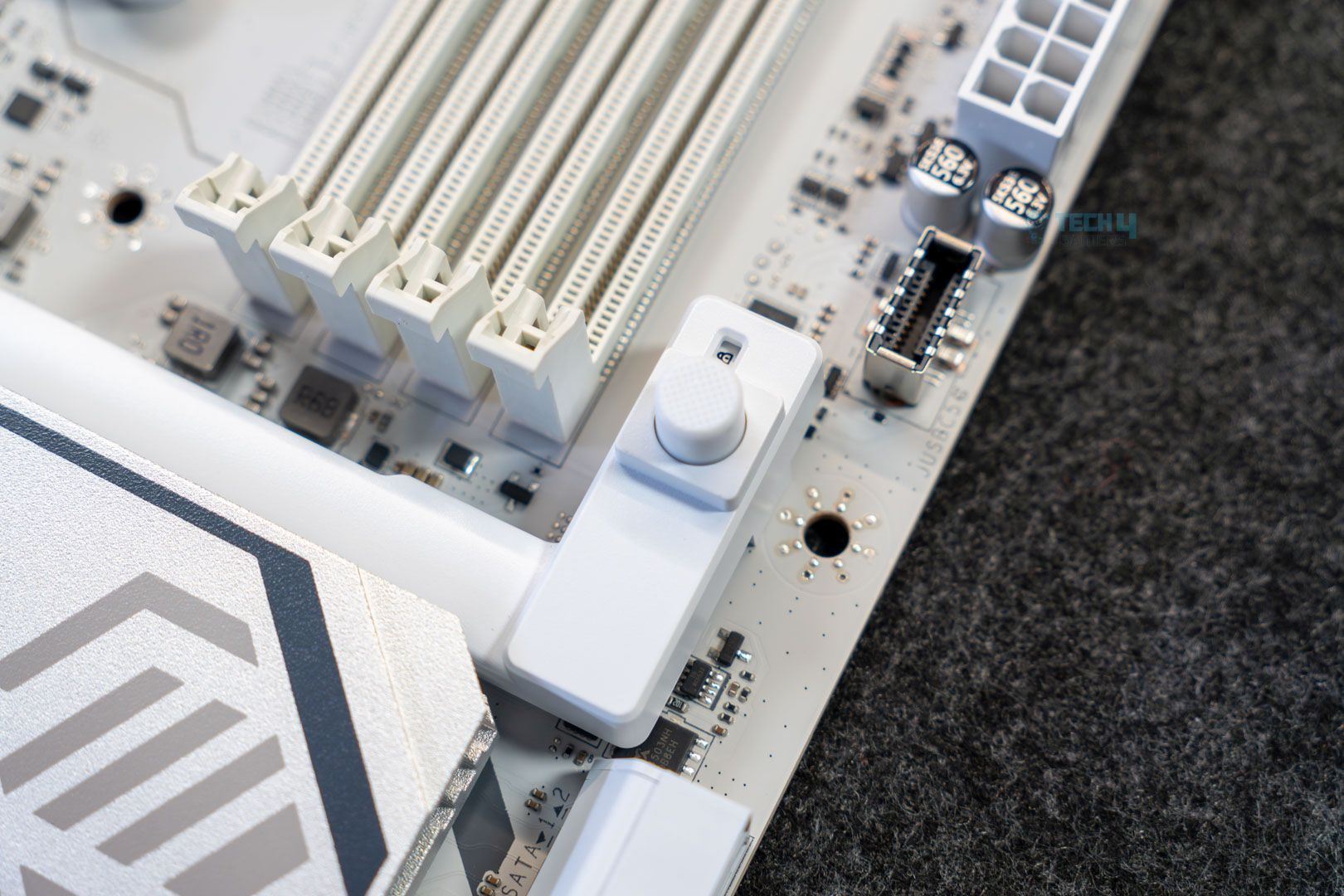
The board has four PCIe slots, with one full-speed PCIe Gen 5 x16 connection. The second, third, and fourth slots are Gen 3 x1, Gen 4x 4, and Gen 3 x1, respectively. These latter three share bandwidth, and so PCIe_E3 and will run at x2 speed if you occupy the second or fourth one.
The main slot doesn’t appear to be steel reinforced, as you’ll find on higher-end MSI motherboards. However, it does feature the EZ PCIe release design, which simplifies GPU installation and removal. Removing/installing the GPU only requires pressing the button (when you put the GPU in place, you have to lock it in with the button), and a padlock icon indicates whether it’s locked or unlocked.
Storage options
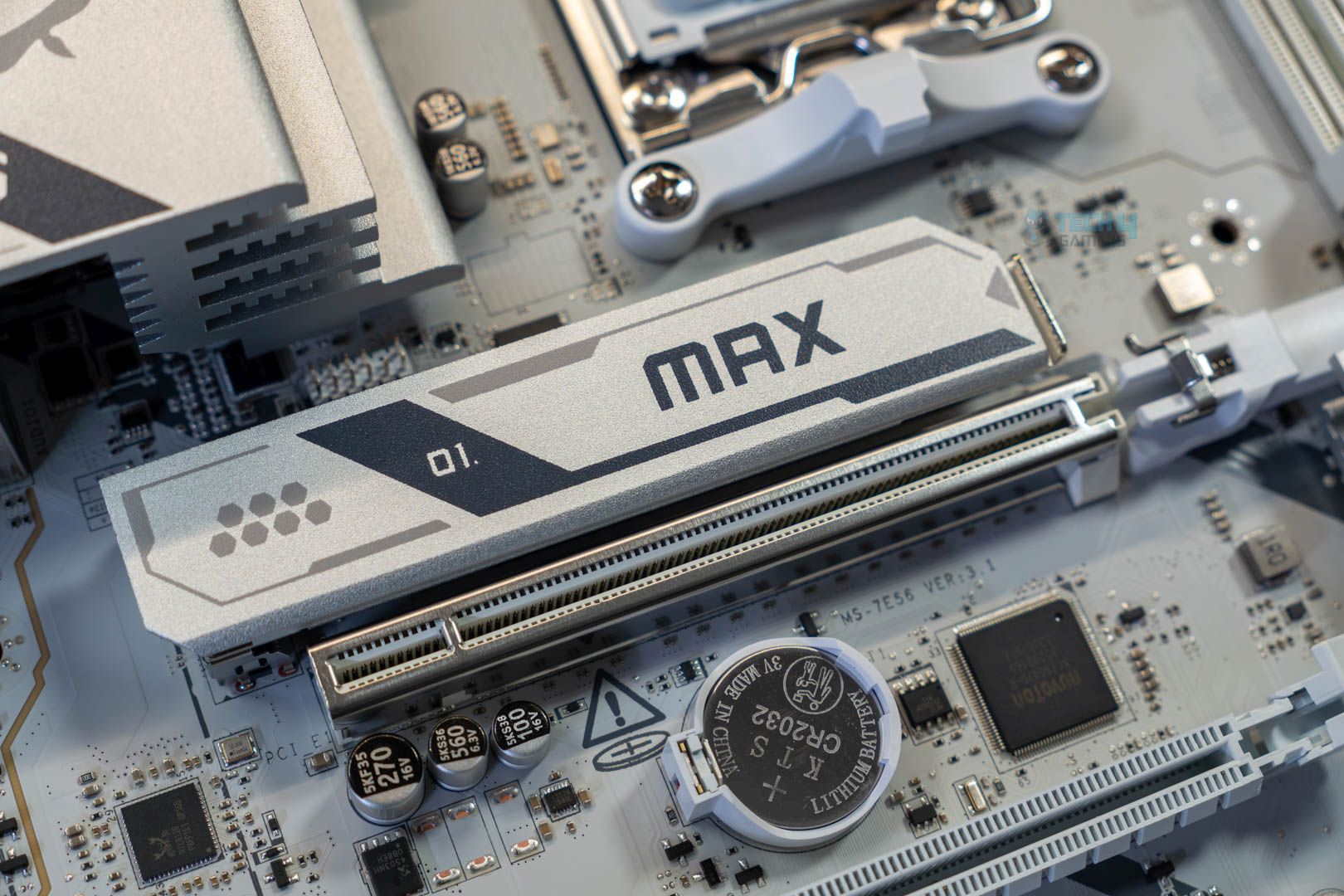
Storage options on the board include three M.2 slots and 4x SATA ports, which is a fairly good selection. Thankfully, there’s no bandwidth sharing here, allowed by the lack of high-speed USB. There are two full-speed M.2 slots (one being Gen 5; the other Gen 4), while the third one is a PCIe 4.0 x2. You can run a Gen 3×4 NVMe drive at full speed on that.
Unfortunately, MSI also cut down the M.2 cooling compared to higher-end offerings. You only get one for the Gen 5 slot, so you’ll need a dedicated heatsink for those beefier Gen 4 drives. This slot features an EZ release mechanism for the heatsink and the drive (through the EZ M.2 Clip II). This heatsink is not double-sided, so even the Gen 5 slot is sacrificing a bit on cooling and might not work so well with those double-sided Gen 5 SSDs.
You do get pre-installed EZ M.2 clip II on the remaining M.2 slots for easy installation there as well; good to see.
RAID 0 and RAID 1 modes are supported for both SATA and NVMe drives. M2_1 and M2_3 support 2280/2260 drives, while M2_2 supports 22110/2280 drives.
USB connectivity
The motherboard has 17 USB ports, including:
- 4x USB 2.0 (Rear)
- 4x USB 2.0 (Front)
- 1x USB 5Gbps Type A (Rear)
- 4x USB 5Gbps Type A (Front)
- 1x USB 5Gbps Type C (Front)
- 1x USB 10Gbps Type A (Rear)
- 2x USB 10Gbps Type C (Rear)
The board not only does not include the optional USB4, but also does not have 10G USB either. Again, I feel for the price tag, 20G USB should’ve been a part of it. The rear USB ports are powered by the Genesys GL805 controller.
Network and Connectivity
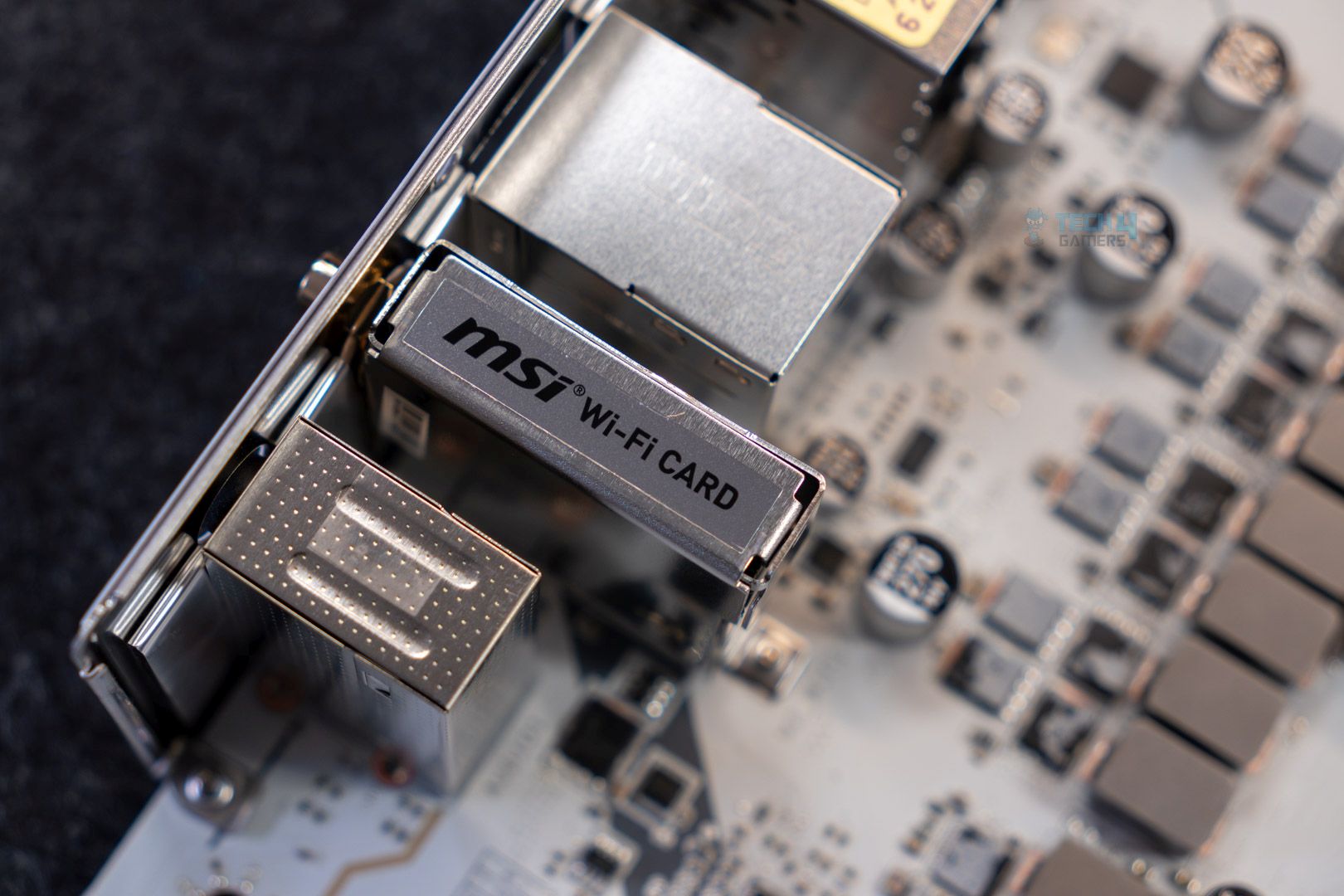
One of the more premium aspects of this board is the inclusion of 5G LAN courtesy of the Realtek 8126VB controller. On the WiFi side, there’s support for WiFi 7 and Bluetooth 5.4, both of which require Windows 11 24H2.
Audio Solution
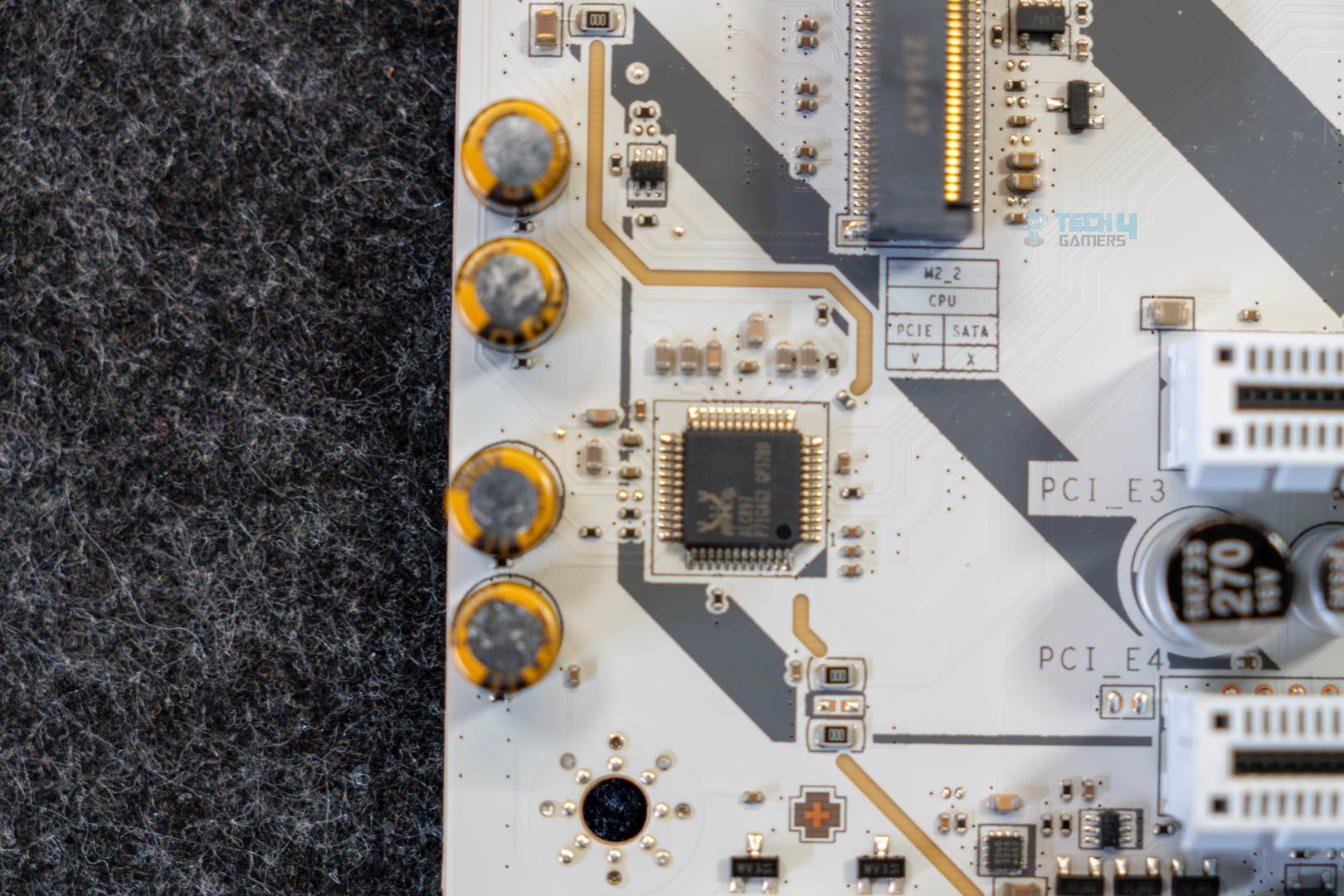
The MSI MAG B850 Gaming Plus WiFi uses the Realtek ALC987 controller, which is quite dated, and you’d expect the ALC4080 or ALC4082 solutions at this price point. On more high-end audio gear, you might notice the difference between the two codecs, but if you’re running budget or mid-range gear, there’s no need to worry.
MSI advertises “Audio Boost,” which is meant to provide high-end audio through “high-quality” capacitors, depop protection, separate PCB layers for right/left audio, and more.
Internal Connectors and Components
Here’s what we get in terms of connectors and extra features:
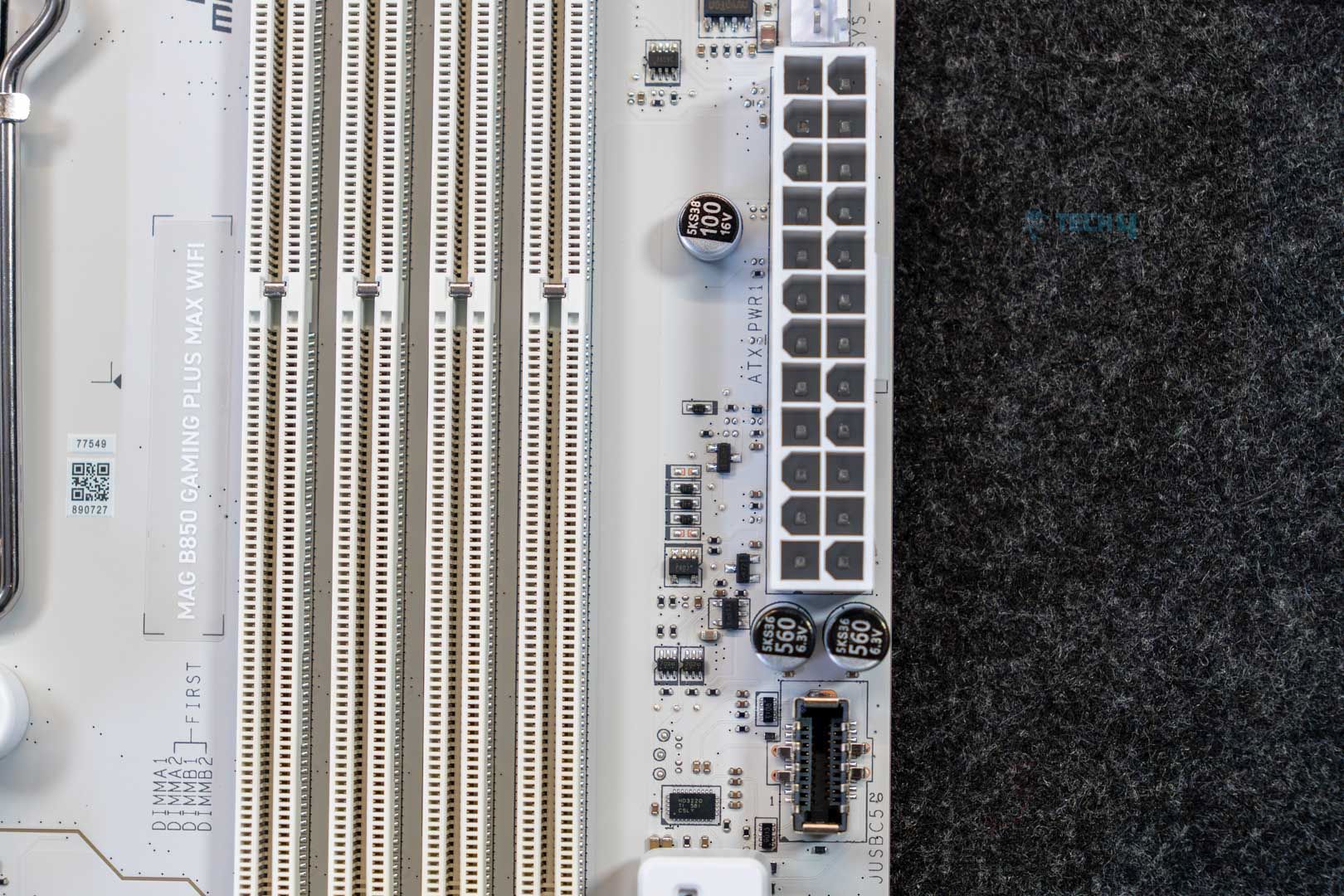
- 1x ATX Power Connector
- 2x CPU EPS Connectors
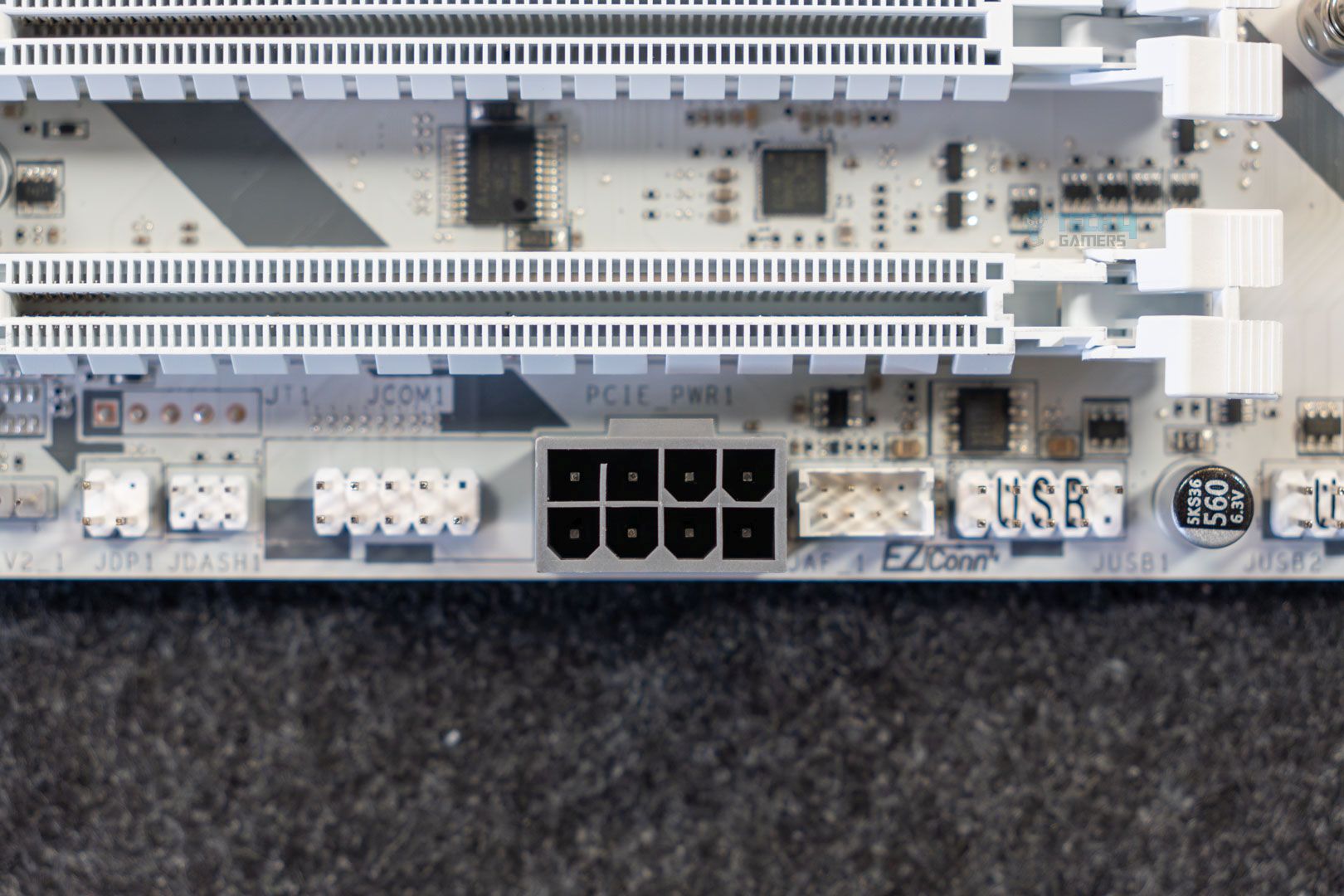
- 1x PCIe 8-pin Power Connector
- 1x CPU Fan
- 1x Combo Fan
- 4x System Fan
- 1x EZ Conn-header
- 2x Front Panel
- 1x Chassis Intrusion
- 1x Front Audio
- 1x Com Port
- 1x Tuning Controller connector
- 3x Addressable V2 RGB LED connector
- 1x RGB LED connector
- 1x TPM pin header (supports TPM 2.0)
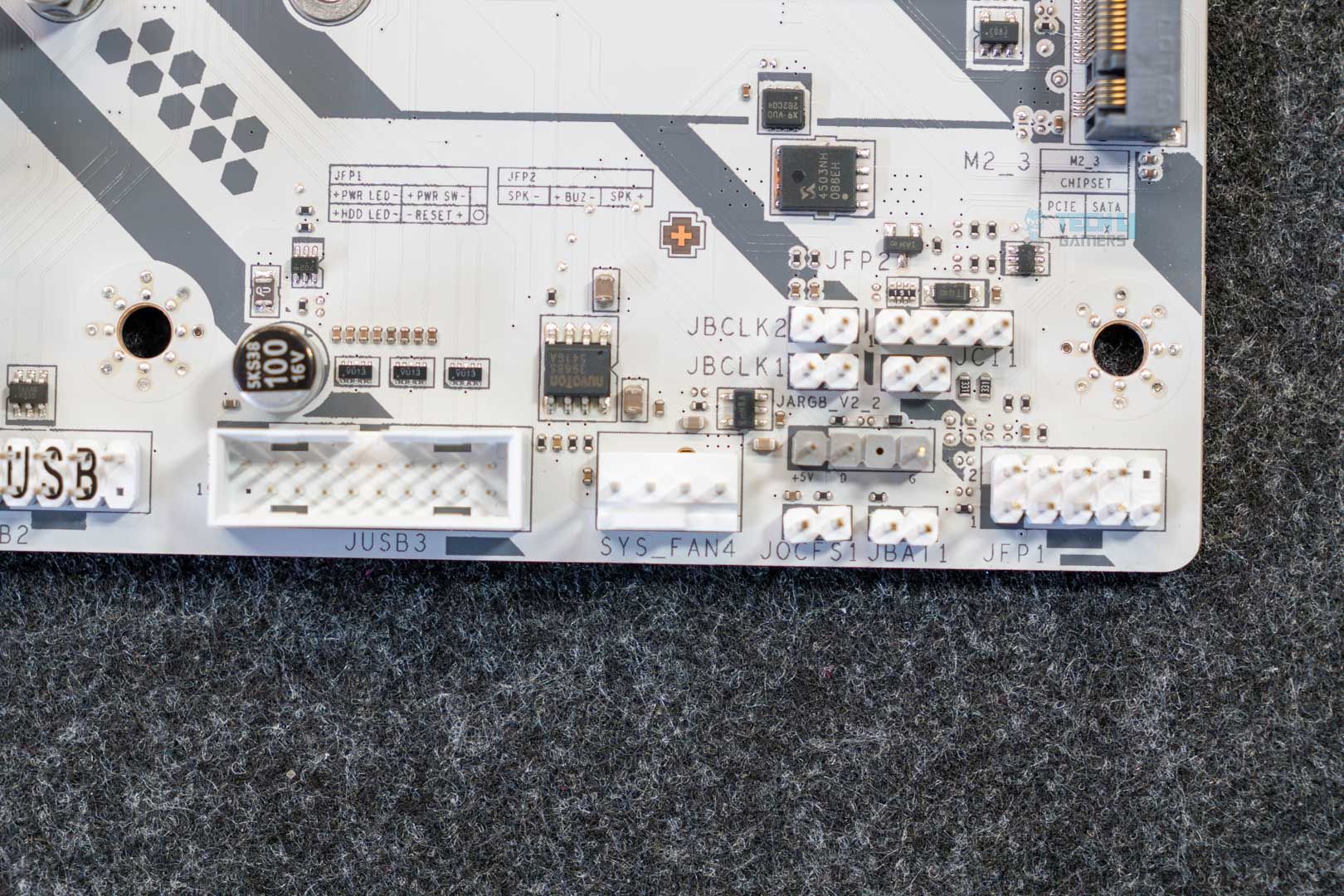
- 2x Direct OC Jumper (JBCLK)
- 4x USB 2.0 ports
- 4x USB 5Gbps Type-A ports
- 1x USB 5Gbps Type-C ports
The Direct OC Jumper allows BLCK adjustments through the OS and consists of 2x 2-pin connectors. These are paired with MSI’s OC Engine for the adjustments. The extra 8-pin power connector can provide up to 252W of additional power and 2.5X power excursion for the PCIe slots through the ATX 3.1 standard. This means a theoretical 165W can be available to the GPU through the PCIe slot, but again, this is a short-burst of power for modern GPUs that boost aggressively. The PCIe slot is still limited to the normal 75W.
Both the ATX and the PCIe connectors use the solid pin design as well.
We also get 4x debug LEDs to troubleshoot issues related to CPU, GPU, memory, or the OS/boot drive. There is no debug code LED panel, though, which is expected at this price point.
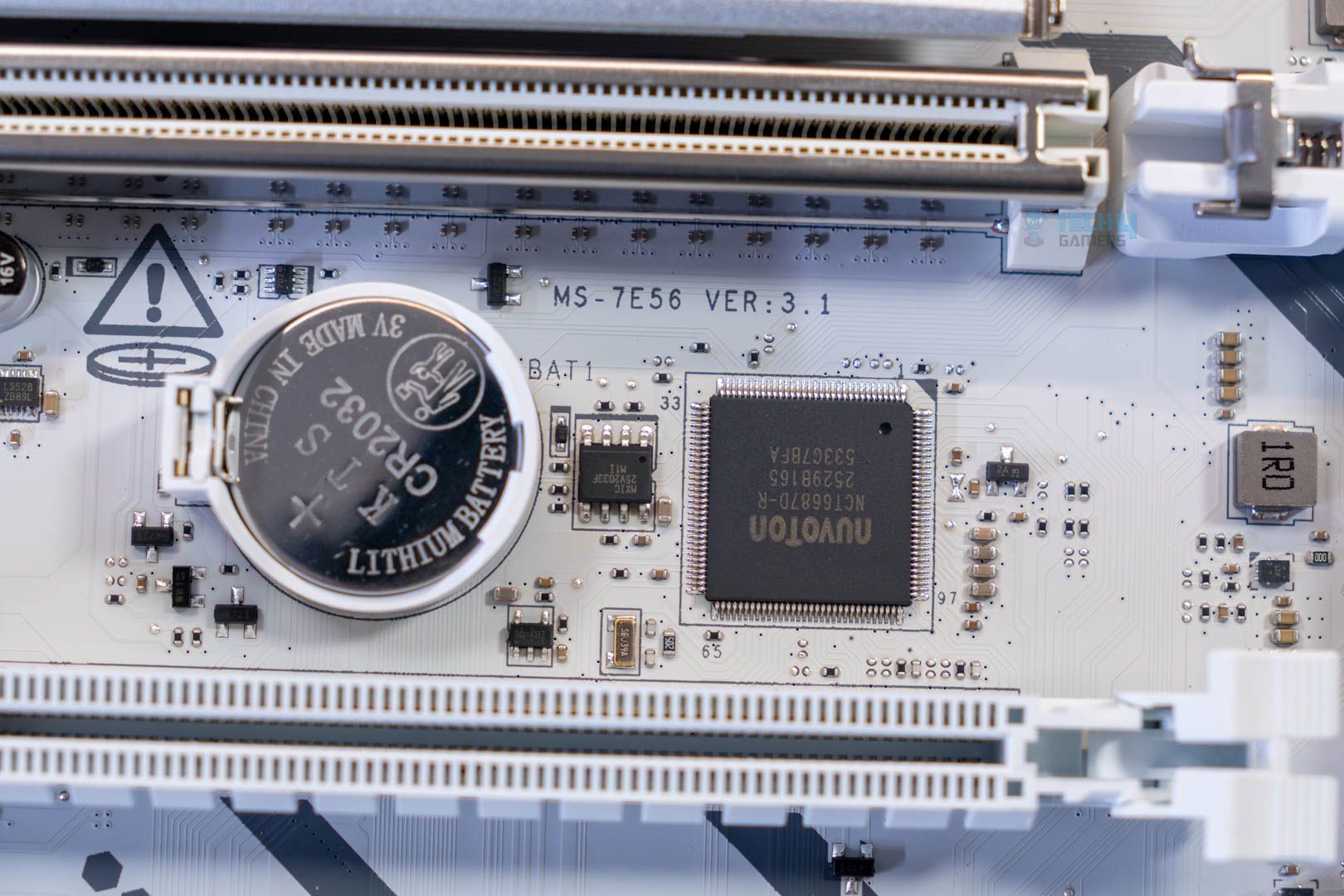
The board uses Nuvoton’s NCT-6687D-R controller for fan control along with monitoring (temperature, fan speeds, and more).
Rear I/O Connectivity
Here’s what we get on the back of the motherboard:
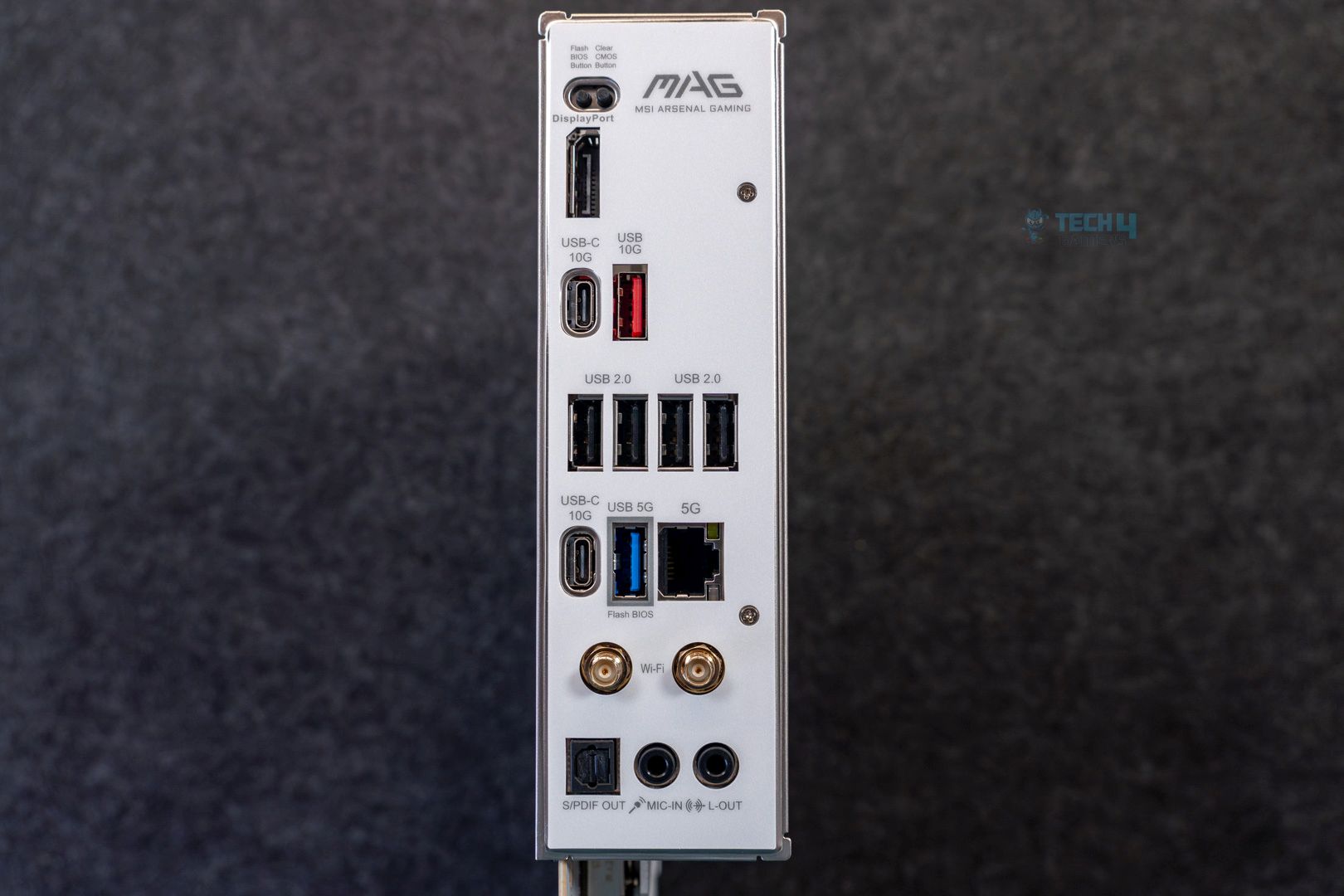
- Clear CMOS Button
- 1x USB 10Gbps (Type-A)
- 2x USB 10Gbps (Type-C)
- 4x USB 2.0
- USB 5Gbps (Type-A)
- 5G LAN
- Wi-Fi / Bluetooth
- Audio connectors
- Flash BIOS Button
- DisplayPort
- 2x USB 10Gbps (Type-C)
- S/PDIF-OUT
Again, this is a pretty standard selection of components. The I/O shield is stainless steel and comes pre-installed on the board.
Test Setup
- AMD Ryzen 9 9950X 16C/32T
- ARCTIC Liquid Freezer II 420 Liquid CPU Cooler
- G. Skill Trident Z5 Royal NEO DDR5-6000 CL28 EXPO Kit (2×16 = 32GB)
- Nvidia GeForce Gigabyte RTX 4090 Gaming OC
- Western Digital SN850 Black 500GB NVMe SSD [For OS]
- Sabrent Rocket 4 Plus 2TB Gen4x4 NVMe SSD [For Software]
- Sabrent Rocket 4 Plus 4TB Gen4x4 NVMe SSD [For Games]
- Sabrent Rocket NANO V2 4TB Portable SSD
- Corsair HX1200i Platinum PSU
- Windows 11 Pro Build 23H2
- BIOS Version 7E56v3A21
- AGESA 1.2.0.2 firmware
Let’s start with the synthetic benchmarks.
Synthetic Benchmarks
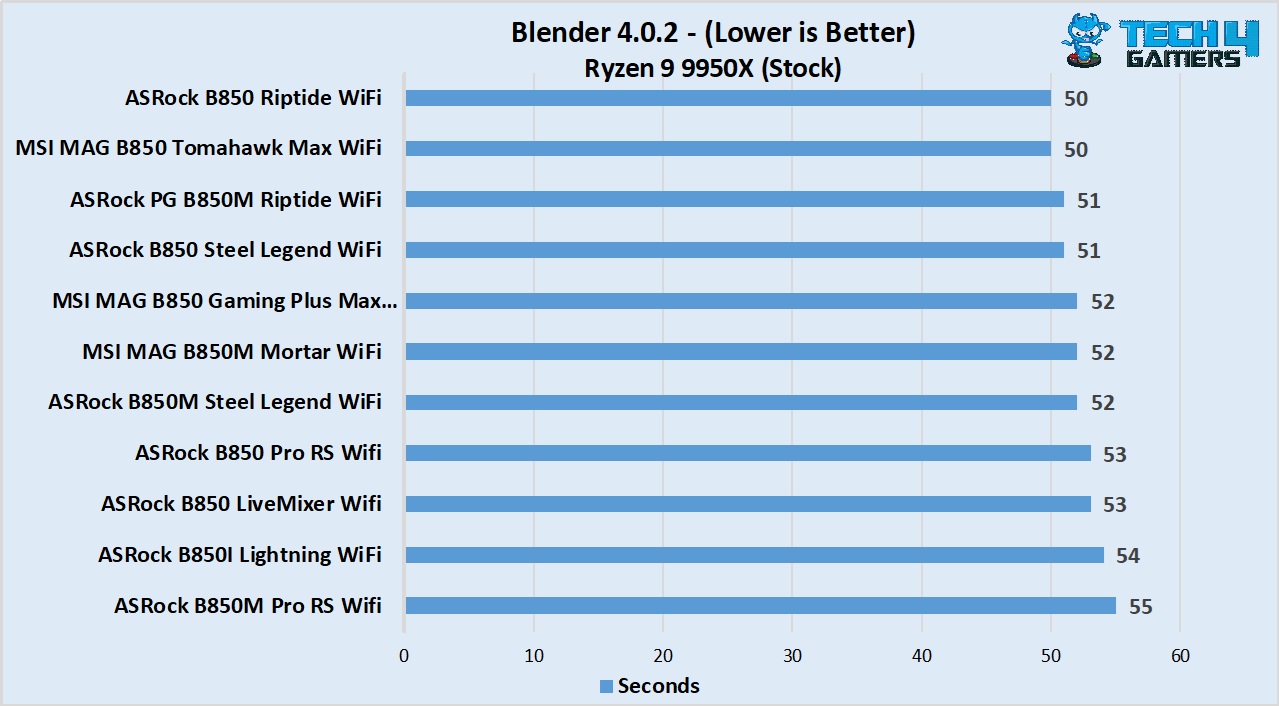
The board managed a 52-second render time in the Blender test, which puts it right in the middle.
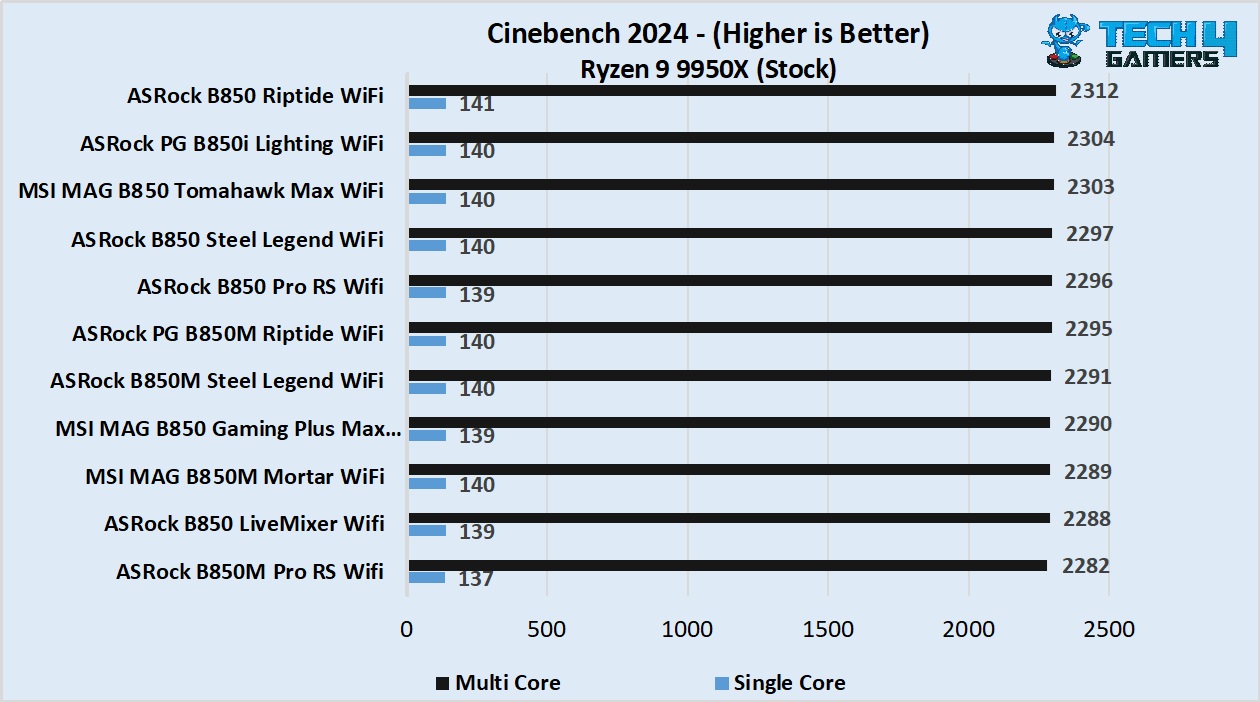
The Cinebench 2024 numbers from the board are par as well.
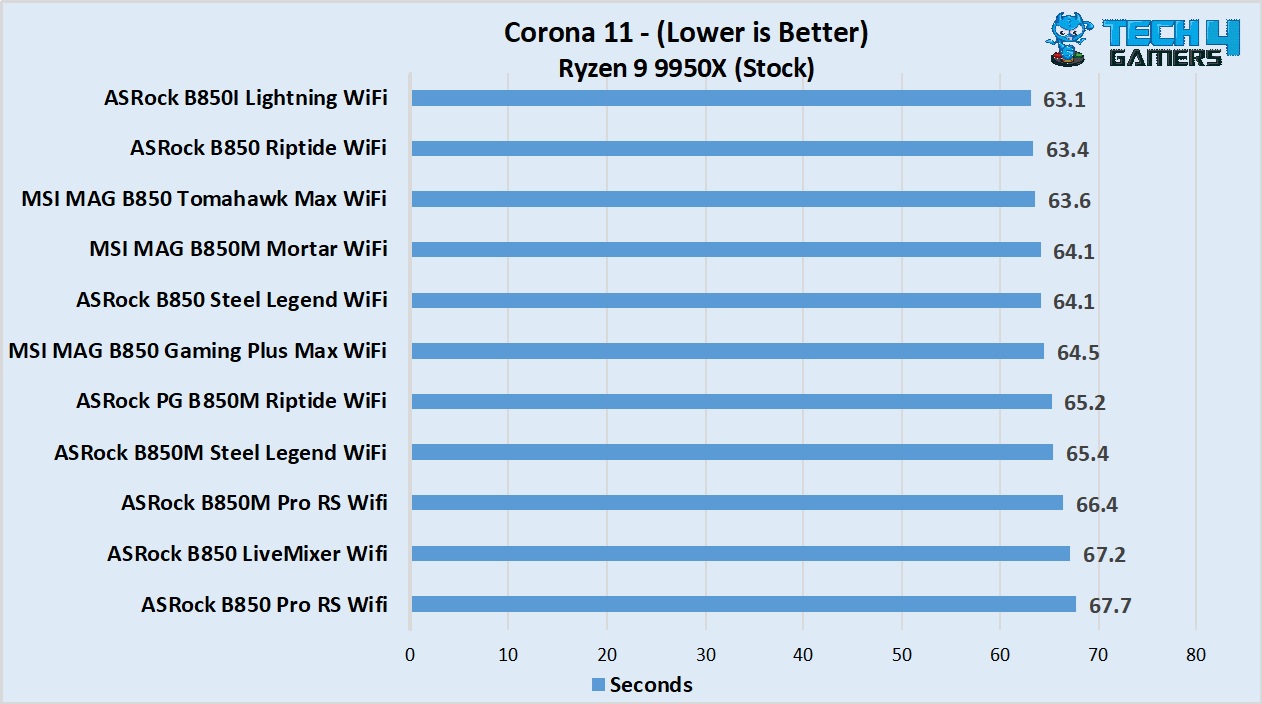
The MSI MAG B850 Gaming Plus Max WiFi managed a 64.5-second render time in the Corona benchmark.
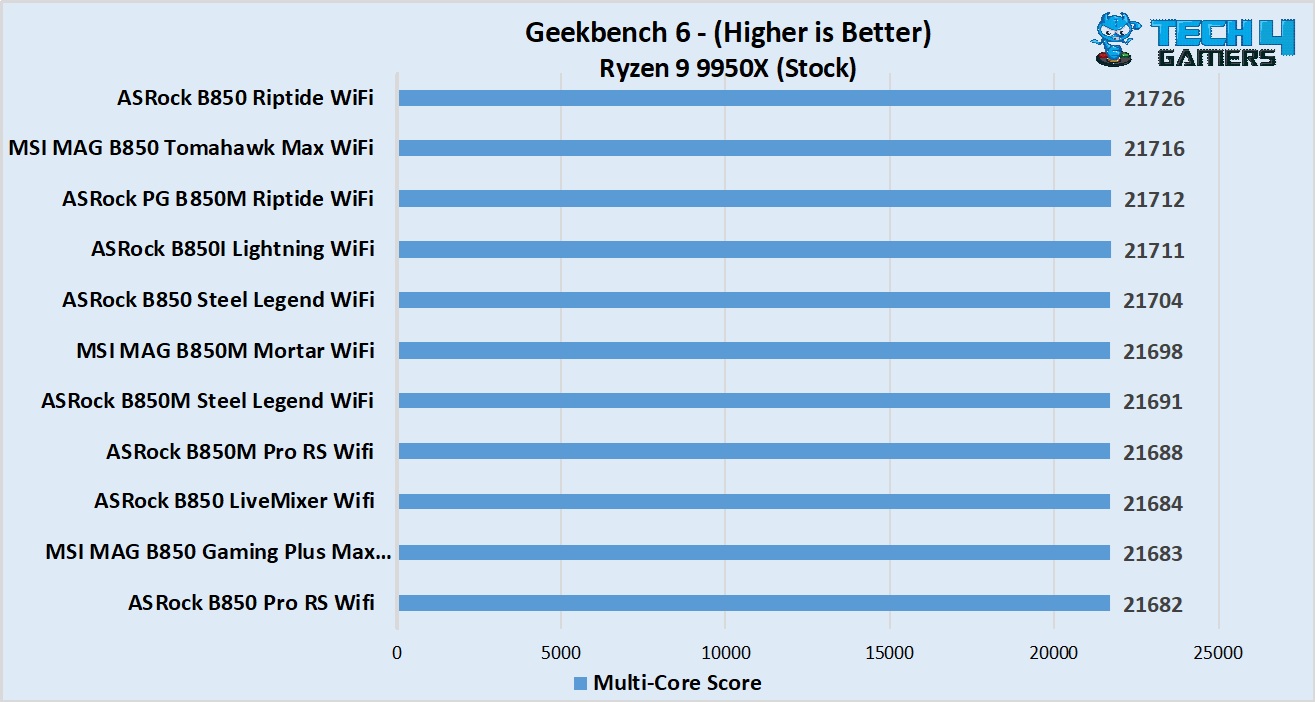
In the Geekbench 6 multi-core test, the board in question scored 21677 points.
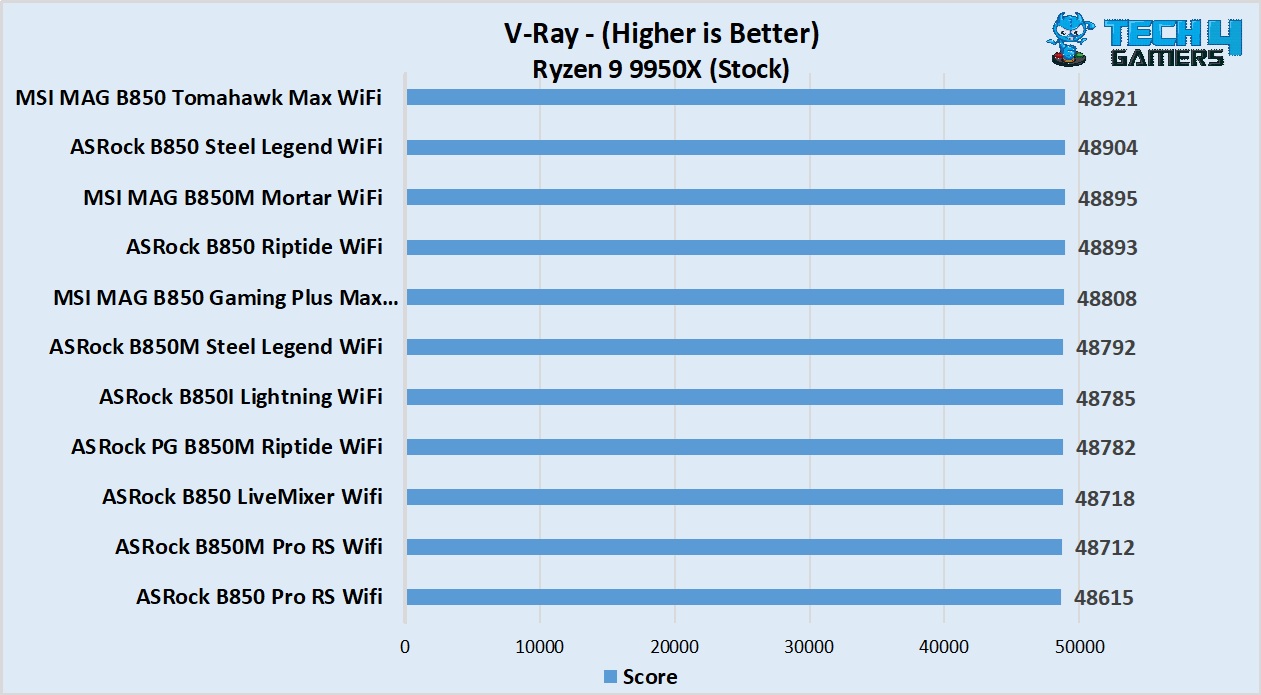
In V-Ray, the board scored 48808 points.
Gaming Benchmarks
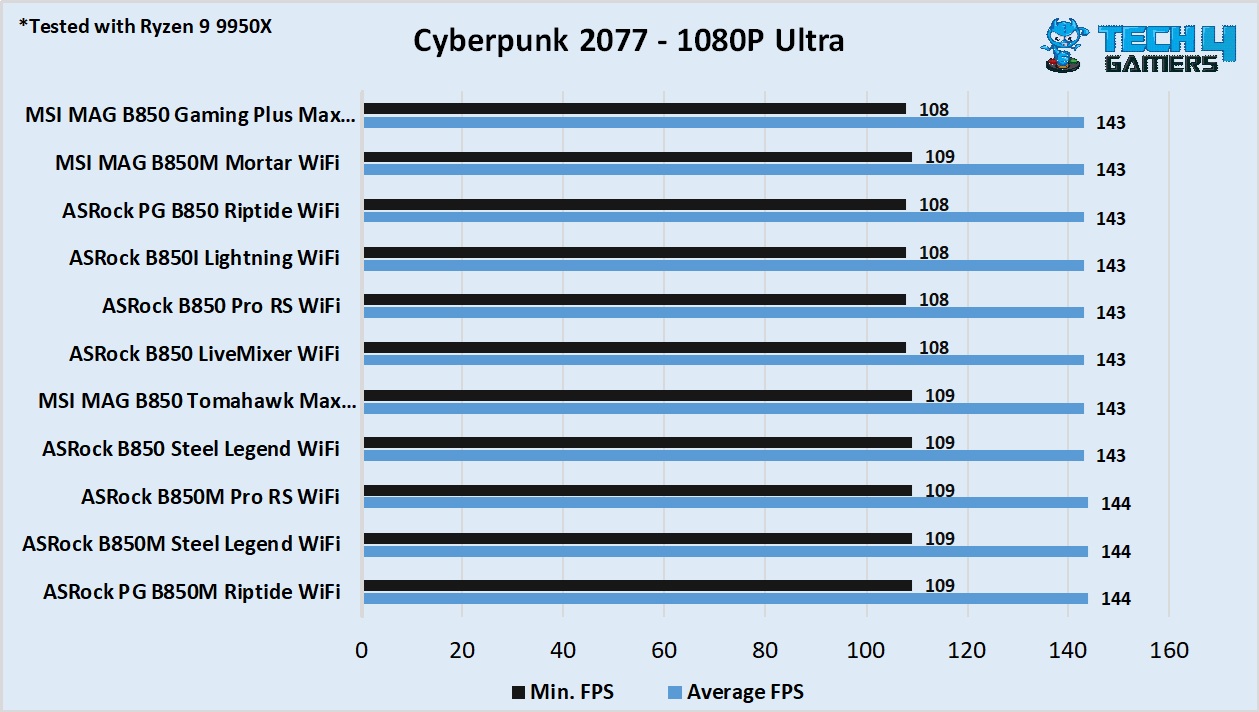
In Cyberpunk 2077, the B850 Gaming Plus Max WiFi averaged 143 FPS, with a minimum of 108.
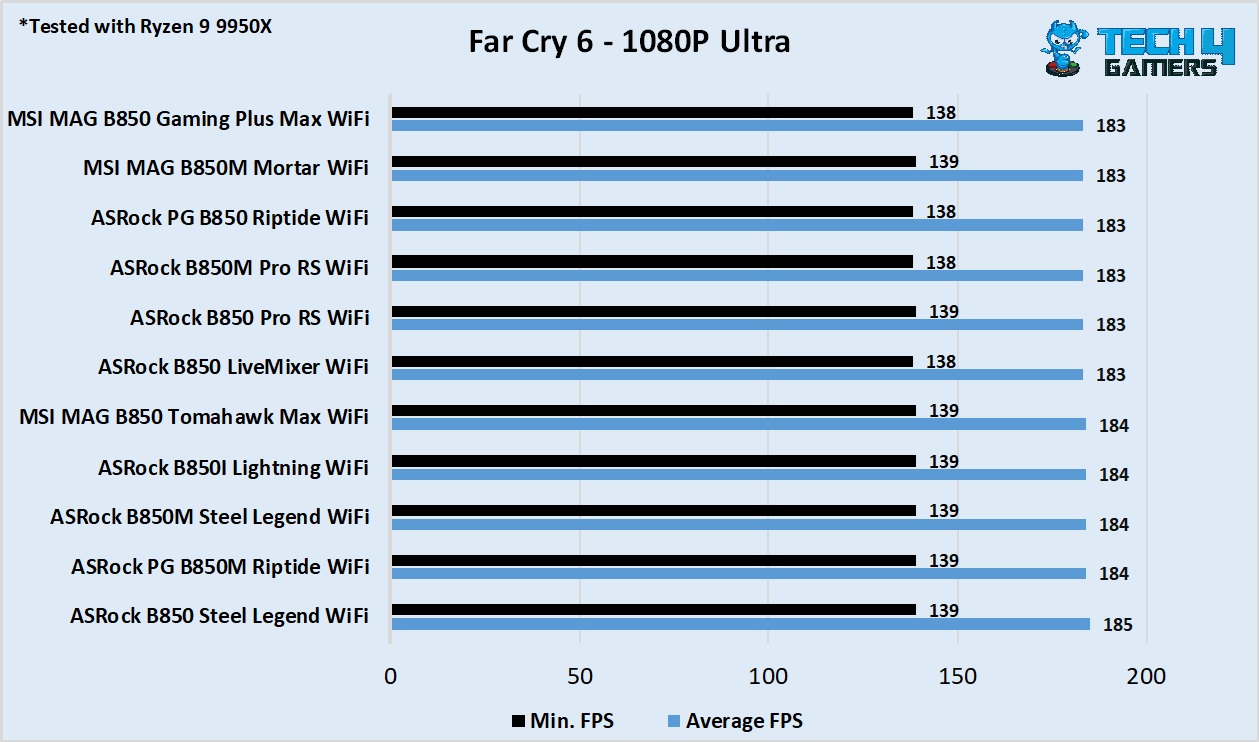
Moving on to Far Cry 6, we noted an average of 183 FPS with a minimum of 139.
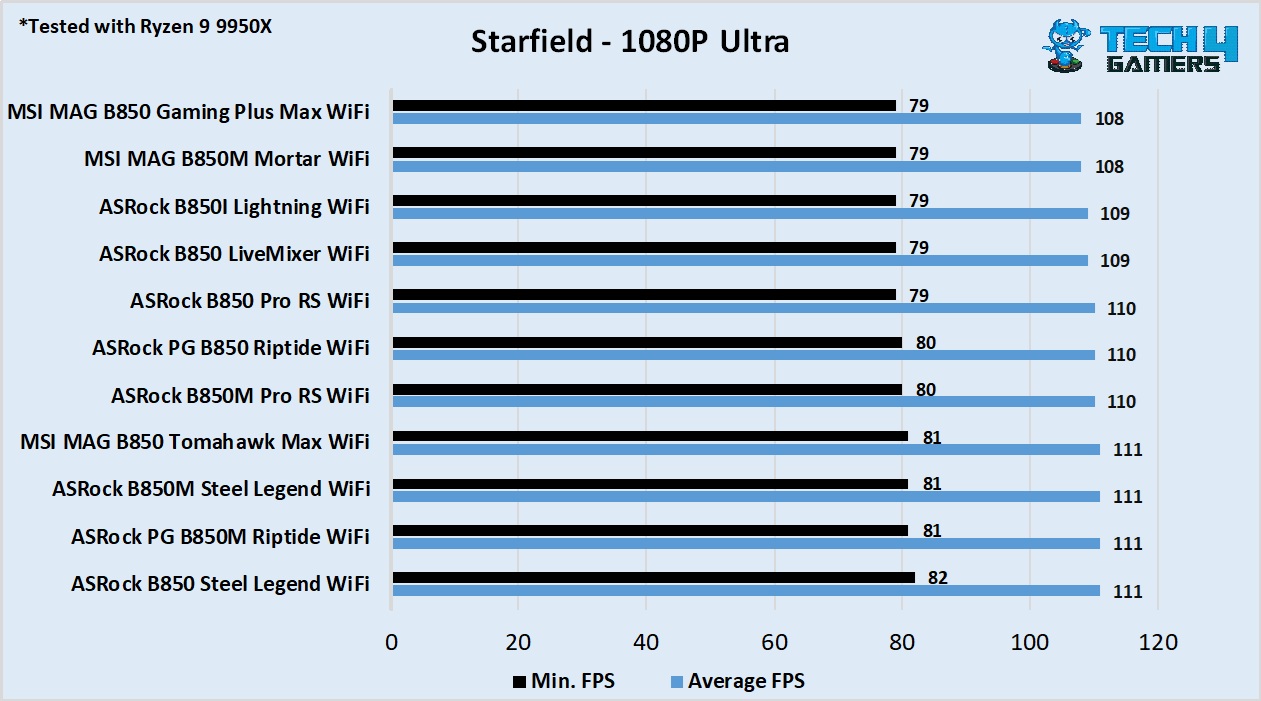
Lastly, the Starfield benchmark saw our setup score 108 FPS on average, dropping to 79 at the lowest.
Power Consumption and VRM Temperatures
Let’s take a look at the power consumption numbers across idle, gaming, and stress workloads. We used the Cinebench 2024 multi-core test for the stress benchmark.
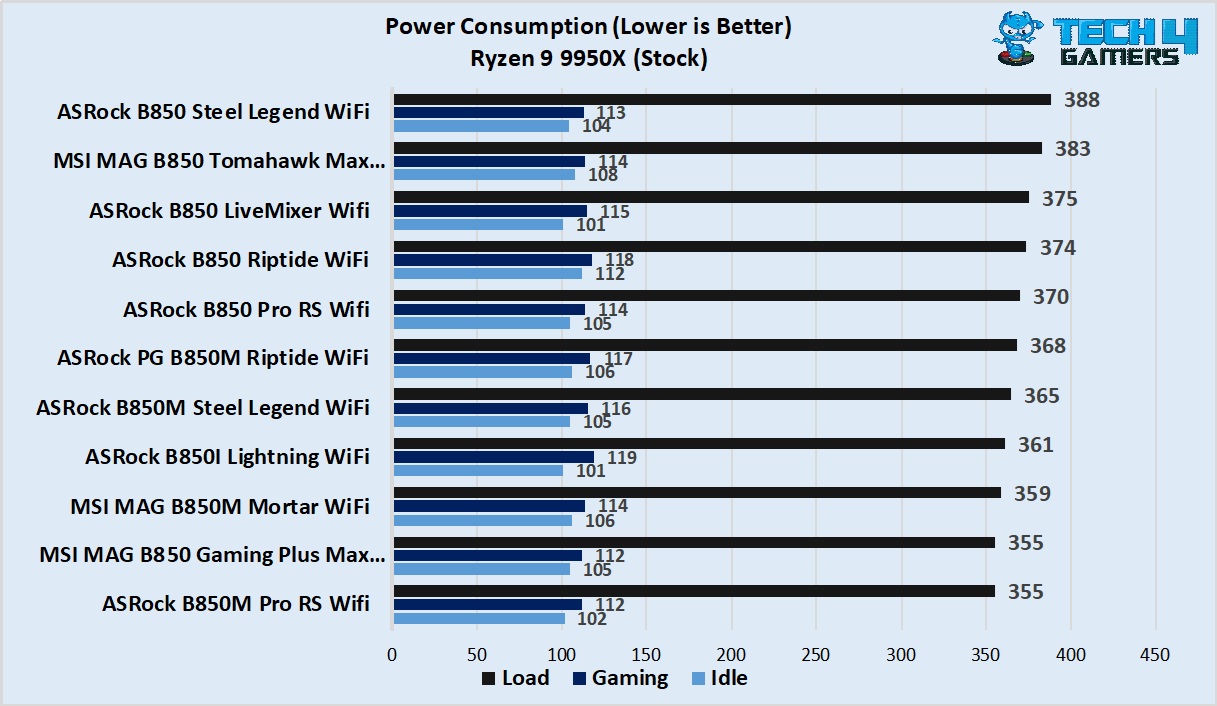
The board’s numbers include 105 watts at idle, 112 watts during gaming, and 355 watts under full multi-core stress.
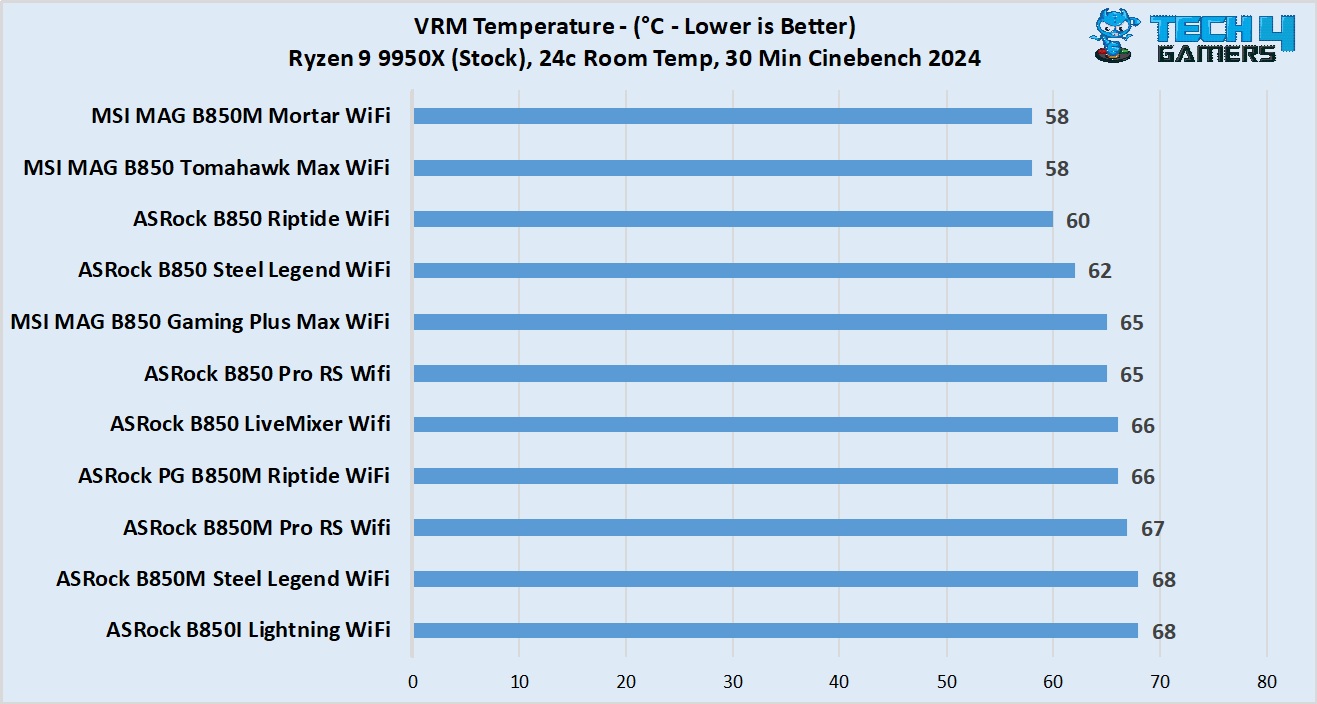
As for VRM temperatures, we noted a peak temperature of 64 degrees Celsius, which is on the toastier side.
Boot Times
Lastly, let’s look at the boot times.
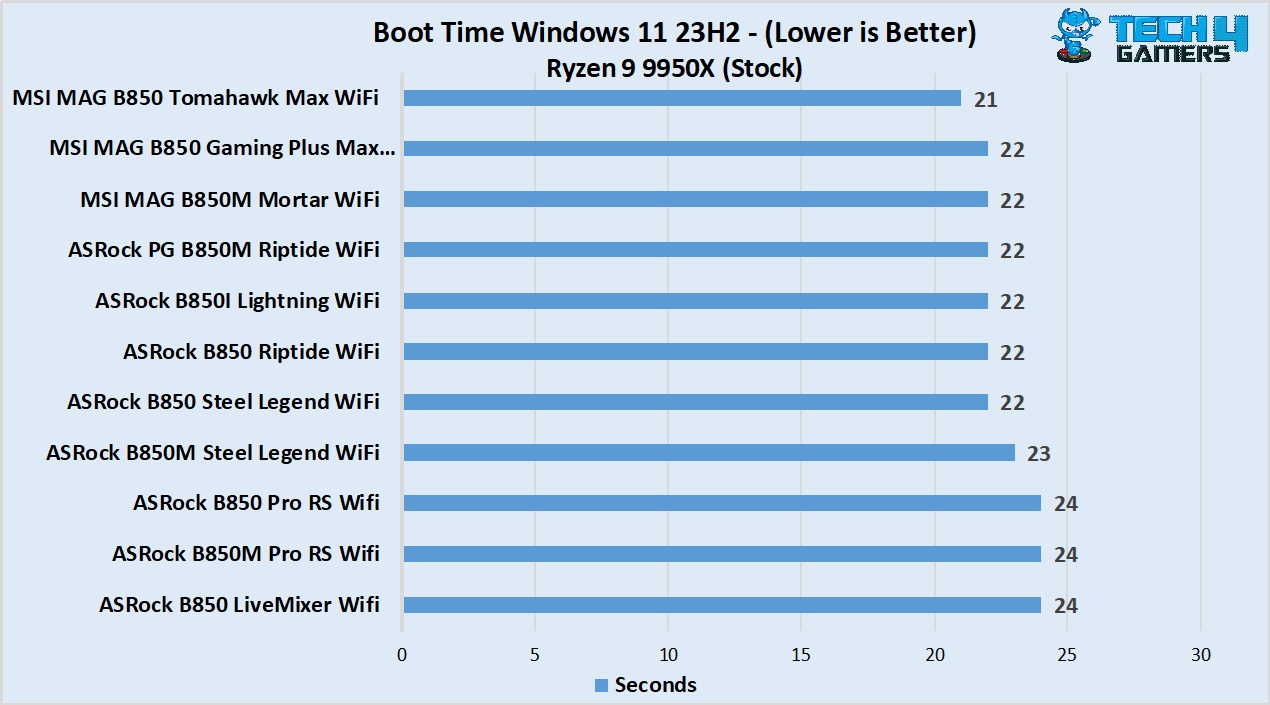
We saw a 22-second boot time with our setup on this board.
Should You Buy It?
Is it the right board for you?
But It If:
✅ You want 5G LAN on a “budget:”: Among the boards at this price point, this is probably the only one that offers 5G LAN. The MSI PRO 850-P WiFi is the only other one I found (…which is actually cheaper!)
✅ You’re after a sleek white design: The board’s distinct white design with black elements on the PCB and heatsink creates a great look, and it’s a fantastic option for white-themed builds.
Don’t Buy It If:
❌ You want the best value: At this price point, MSI’s own B850 Tomahawk Max WiFi and several ASRock offerings are a better choice.
❌ You want more from the USB: While the number of USB ports is still good at 17, there’s no USB4 or even 20 Gbps USB to be found.
❌ Overclocking is important to you: While the dedicated BCLK adjustment is a helpful feature, the board is not the best option if you’re looking to add overclocking to the mix, given the modest VRM setup and higher than average temperatures noted in our testing.
Our Verdict
The MSI MAG B850 Gaming Plus Max WiFi is an overall decent board, but like the other boards, it doesn’t offer a whole lot compared to the previous, original version of the board. We get a BCLK generator, a 64MB BIOS chip, and (in my opinion) an improved aesthetic. At $260, the features on the board don’t really justify what’s on offer.
The board has a nice all-white aesthetic with black tones (diagonal lines running across the PCB and the heatsinks which makes for a nice look. There’s no RGB, but you, of course, get dedicated connectors, and the board is overall a great choice for white builds, in my opinion.
Coming to the performance, the board has a 12+2+1 VRM setup with discrete 50A phases. This is a very budget-oriented setup, and it’s one of the factors that don’t impress us, given the price. The VRM temperatures were also on the higher side compared to the B850 board in our testing list. The addition of a BLCK generator, which allows separate adjustments to the CPU and memory clocks and can help with overclocking, is worth noting. Overall, this makes it an ideal offering for budget and mid-range CPUs, though it doesn’t rule out high-end chips.
As for I/O, the board’s main plus point is 5G LAN, which is paired with WiFi 7 through the provided antenna. You get one full Gen 5 PCIe and M.2 slot, along with additional slots which provide more than enough room for most users. The selection of USB ports disappointed us, as there are no 20 Gbps connections available. We get the ALC897 audio codec from Realtek on the board, another disappointment for the price point, but still enough for most users.
As we’ve seen with this generation of MSI motherboards, the QoL (quality of life) features are really good and help them stand out compared to other manufacturer’s offerings (though some of them are present in other boards too). EZ M.2 removal, PCIe release, front-panel connector, and one-click overclocking are some of the handy features on board.
Overall, I’d only recommend the board for its aesthetics, 5G LAN, and QoL features (though the latter can be found in other budget MSI offerings as well). Otherwise, there are many other fish in the sea that rival it at and around this price point.
Thank you! Please share your positive feedback. 🔋
How could we improve this post? Please Help us. 😔

[Hardware Reviewer]
Hi! I’m Ali Tauseef, and I have been writing for Tech4Gamers since 2022. I love all things computer hardware but am particularly fond of CPUs and motherboards, and I like to stay up-to-date about the latest advancements in these worlds, and when possible, write about it. When I’m not doing that, I like to get into a little FPS action in CS2 or get lost in the vast world of RDR2.
Get In Touch: ali@tech4gamers.com
 Join Our Community