Threads


The PS4 error SU-30746-0 disrupts game and app launches, indicating potential issues with game files or cached data. It’s often associated with incomplete game transfers, particularly when moving content from an external hard drive to the console’s internal storage.

When the PS4 gets stuck on the error screen, you will see the following error:
Key Takeaways
- The PS4 being stuck on the screen can be caused by system software issues, corrupt files in the database, hardware connection problems, and others.
- Power cycling, database rebuilding, and software updates are crucial initial steps to fix the PS4 stuck-on-screen error.
- Safe Mode offers various troubleshooting options, including resolution changes and system software updates.
Before proceeding with the advanced methods, it’s recommended to try the following steps:
- Power Cycle Router.
- Power Cycle Console.
- Ensure that all cables are properly connected.
- PSN Server Status.
Check For System Software Updates
System software bugs can possibly cause the error, so I also tried updating my PS4’s system software to address bugs and compatibility issues, and it successfully resolved the issue for me.
Clear Cache
If corrupted or outdated data is present in the cache, it may interfere with the normal functioning of games and applications, leading to errors like SU-30746-0.
Clearing the cache not only eliminates the error but also optimizes the overall performance of the PS4, ensuring a smoother gaming experience.
Restore Default Settings In Safe Mode
This process addresses potential software conflicts or corruption, providing a reliable solution to break free from the PS4 error screen loop. I resolved this error by restoring the console to default settings using the safe mode.
To restore default settings in Safe Mode on your PS4, follow these steps:
- Turn off PS4.
- Hold the power button for two beeps.
- Connect the controller via USB.
- Choose “Restore Default Settings.”
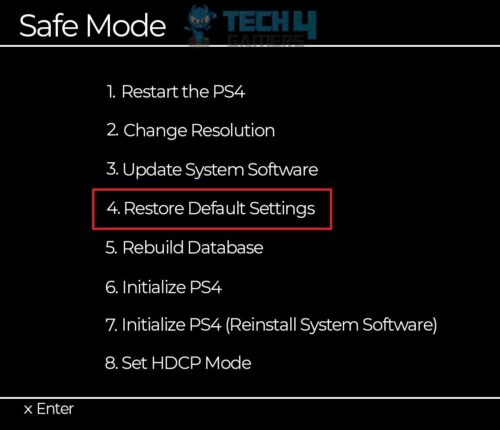
Restore Default Settings PS4 (Image By Tech4Gamers) - Follow on-screen prompts.
- PS4 restarts with default settings; data and games stay.

Many users on Reddit shared that restoring their console to default settings in safe mode helped them resolve this error.
Address Overheating
Overheating can lead to performance issues and system errors.
Make sure your PS4 is not overheating by following these steps:
- Ensure that the PS4 is placed in a well-ventilated area with enough space around it for proper airflow.
- Clean the vents and fan of the PS4 using compressed air to remove dust and debris.
- Use a cooling pad or external fan to further assist in heat dissipation if possible.
Check For Disk Errors
The problem might lie with the disk itself. Per my testing, the PS4 gets stuck when the Disk isn’t in good condition, and many errors occur. Make sure that the disk is in good condition to avoid such types of errors.
Try these steps to mitigate the possibility of a defective disk:
- Remove the disk from the PS4.
- Inspect the disk for any scratches, smudges, or dirt.
- Clean the disk gently with a soft cloth, wiping from the center to the edges.
- Reinsert the cleaned disk into the PS4 and check if the issue is resolved.
While the developers of the PS4 have not explicitly acknowledged this error code, it’s evident from the discussions on various forums that many users have encountered it. This suggests that the issue is widespread and warrants further attention from the development team. The PS4 error code SU-30746-0 might seem tough, but it’s not impossible to fix.
Thank you! Please share your positive feedback. 🔋
How could we improve this post? Please Help us. 😔

[Errors Troubleshooting Expert]
Arsalan Shakil (aka GuyThatDoesEverything on YouTube) is a PC Tech Enthusiast and Electronic Geek. With over 10+ years of experience in Electronics, he then decided to explore Software Engineering to design embedded products and automate existing hardware solutions.
When he started tearing down old cameras to understand how they worked, he was shocked (literally, when he got zapped by a flash discharge capacitor), giving him the power (debatable) to fall in love with videography/photography. He also started making some fun videos that later became YouTube tech reviews.
Skills:
- 10+ years of experience in Electronics design, embedded solutions, and prototyping
- Majored in Software Engineering
- Research paper publication in IEEE for Embedded Military Uniform & LoRa WAN wireless technology
- Specialized in IoT Solutions
- PC Enthusiast & PC Modder
In his local region, he’s known to expose cheap PSU brands, often claiming fake certification or false claims on the box. He’s a true nerd and needed some friends in his life. Then he met some guys who work at Tech4Gamers, and they also came out to be equal nerds who suggested he join Tech4Gamers as a Hardware Expert.
 Join Our Community

![Unmountable Boot Volume [Windows 11 - FIXED]](https://tech4gamers.com/wp-content/uploads/2023/09/Unmountable-Boot-Volume-Windows-11-FIXED-218x150.jpg "How We Fixed The Unmountable Boot Volume Error In Windows 11")