At Tech4Gamers.com, I cover the latest news and rumours in the gaming industry, from new game releases to hidden gems and video game leaks. Furthermore, I occasionally write tech articles about video game consoles, providing insights into the hardware and software that powers our gaming experiences.
Story Highlight
Before selling your CS2 skin, determine its market value by considering its rarity, condition, demand, and any unique patterns or stickers.
Use reputable third-party marketplaces to sell for real money. Third-party sites typically charge 2-10%, while the Steam Market charges about 15%.
You can choose to sell instantly for a quick, lower payment or list your skin on a marketplace to wait for a better offer.
Counter-Strike 2 (CS2) skins might become a player’s second wallet if properly handled. For many CS2 players, the question extends beyond just acquiring or collecting skins; it is also about selling them quickly and safely, without the hassle of scams or waiting for transactions to complete.
Here, we will outline the key steps to help you complete a smooth selling process.
Understand the Value of Your Skin
Don’t just list your CS2 skins for sale overnight; instead, determine their actual market value. Several factors contribute to giving a skin its price:
Rarity: The most valuable items are usually the ones that belong to the Covert or Classified categories (rarity-wise) compared to Consumer or Industrial Grade ones.
Condition (Float Value): A Factory New skin will generally be sold at a higher price than a Battle-Scarred version.
Demand: The most trendy knives are usually the quickest to sell at a higher price.
Pattern & Stickers: The value of the skins can be raised significantly by the rarity of the patterns (case-hardened) or the stickers.
What will give you realistic expectations of how much your skins are worth is conducting thorough research on recent sales and comparing float values.
Find a Reputable Trading Market
M4A1-S | Printstream in CS2.
After identifying the value of your items, the next step is to decide where you will sell them. The Steam Market is good, but it has the drawback of only allowing cash-out to the Steam Wallet, which can only be used within Steam.
The key is to make sure the platform is reliable. Check community and user reviews to see if it offers safe payment methods, such as cryptocurrency, PayPal, or bank transfer, and confirm that the pricing is fair.
Choosing a trusted marketplace is important because it protects you from scams and allows instant payments.
Enable Steam Guard & Trade Confirmations
AWP | Fade.
The onset of security is your Steam account. To be able to sell or trade CS2 skins, the user is suggested to turn on the Steam Guard Mobile Authenticator. It provides an additional verification step, which is the main reason for preventing unauthorized trades.
Additionally, trade confirmations are required by Steam through its mobile app. Although the process takes some time, it serves as a crucial checkpoint, ensuring that nobody can take your skin without your consent.
Avoid Peer-to-Peer Risks
Some sellers are inclined to bypass the system efficiently by selling skins directly to individuals on forums or Discord groups. Although this may seem like a quicker process, it is also the riskiest way. Peer-to-peer trades make you vulnerable to scammers who, after getting the skin, may not give you the money.
You should, however, use the platforms that function as the escrow agent between you and the buyer. Hence, the transaction only becomes final when both parties have confirmed it.
Double-Check Transaction Fees
Certainly, every sales method comes with equally associated costs, and it is essential to understand them upfront before sealing the deal. Steam Market is at liberty to charge around 15% of the sale price, which can be your profit’s downfall. Most third-party sites have lower fees, ranging from 2% to 10%, but never completely zero.
Don’t rush to sell; instead, take some time and do the math to find out how much you will really get from your sale. To illustrate this with an example, selling a $100 skin on Steam gives you about $85 in wallet credit, whereas selling the same skin on a secure external platform can return around $92–$95 in actual cash.
Being aware of the fees will help you maximize your profit, and at the same time, you will be able to sell your stock quickly.
Choose Instant or Auction-Style Sales
Different platforms offer two main ways to sell. With an instant sale, you accept the platform’s offer and receive payment immediately, although typically for a slightly lower amount.
With a marketplace listing, you set your own price and wait for a buyer, which takes more time but often leads to higher profits.
If speed is your top priority, then the instant sale is your best choice. However, if you want to achieve the highest value possible, then be patient and set your own price.
Cash Out Safely
AK-47 Case Hardened (Blue Gem).
After your skin is sold, you will have to choose a method for receiving your money. Among the most common ways are:
Cryptocurrency (Bitcoin, Ethereum, USDT): Quick, borderless, and usually with low transaction fees.
Bank Transfer: More direct, but may take a couple of working days, depending on your bank’s location.
E-Wallets (PayPal, Skrill, etc.): Easy to use, but sometimes with higher fees than other methods.
Ensure that the method used for withdrawing money is safe and has been authenticated with the linked accounts. Avoid using suspicious payment processors to prevent chargebacks or late payments.
Keep Records of Your Sales
Similar to any other financial transaction, it is wise for you to keep track of the details of the skin sales you make. Get hold of the screenshots or receipts for:
The product that has been sold.
The final payout amount.
The date and time of the transaction.
This not only helps you with your personal accounting, but it also safeguards you in the event of any conflicts or tax issues.
Stay Alert Against Scams
Sadly, the trading of CS2 skins often attracts scammers. They may set up fake escrow sites that resemble legitimate marketplaces, impersonate well-known traders or community members, or run “middleman” scams where someone pretending to help with the trade takes your money without providing any services.
The most important rule: if an offer feels suspicious or if it is too good to be true, then it probably is. Always double-check URLs, enable Steam Guard, and only use trusted platforms for selling.
Reinvest or Cash Out?
Begin by considering your primary objective. Do you want to cash out your money or use it to trade for better skins? Many players sell old or less valuable items to buy rare skins that can grow in value. Others prefer turning their items into real money instead.
Whatever choice you make, it should match your gaming and financial goals.
I’ve previously worked for eXputer as a Senior News Writer for several years. Now with Tech4Gamers, I love to devoutly keep up with the latest gaming and entertainment industries. I have a Bachelor’s Degree in Computer Science and years of experience reporting on games and breaking exclusive stories. Besides my passion for gaming journalism, I love spending my leisure time farming away in Stardew Valley. VGC, IGN, GameSpot, Game Rant, TheGamer, GamingBolt, The Verge, NME, Metro, Dot Esports, GameByte, Kotaku Australia, PC Gamer, and more have cited my articles.
Story Highlight
Resident Evil Requiem runs at a stable 60 FPS with Ray Tracing on the PlayStation 5 Pro.
According to Digital Foundry, the game looks brilliant on the console and is only beaten out by the Path Tracing on PC.
Resident Evil Requiem launches on 27 February 2026.
Since its reveal at the Summer Games Fest, Resident Evil Requiem has become one of the most anticipated titles of 2026. The upcoming horror game is taking the franchise to the haunting depths of survival horror with a new protagonist trying to survive in a forgotten Racoon City.
Besides the interesting premise, Resident Evil Requiem is also a technically sound project from the looks of it, with the folks at Digital Foundry speaking highly of the game’s performance on PlayStation 5 Pro.
Why it matters: Resident Evil Requiem is one of the most anticipated games of 2025, so steady performance on this generation’s biggest console is necessary for its success.
According to Digital Foundry’s weekly DF Direct, Resident Evil Requiem looks glorious on the PS5 Pro and runs at a stable 60 FPS. John Lineman tried the game’s demo at Gamescom and states that the game employs Ray Tracing on the console.
Even though it isn’t a match for the max path-traced performance on a PC, with reflections on PS5 Pro being grainier, it’s still pretty good as per the Digital Foundry crew. The video specifically goes on to praise the Ray Tracing in Resident Evil Requiem, saying it served as the basis for the game’s remarkable visuals.
However, this is bad news for the game’s port on last-gen consoles, as Digital Foundry believes this is a current-gen only title, as Capcom has gone all out on the Ray Tracing this time.
The only negative Digital Foundry encountered while playing the Resident Evil Requiem demo at Gamescom was the slight mudiness in the 1080pimage quality. But, according to the video, it was due to the screens Capcom selected and not the game itself.
Protagonist Grace will lead Resident Evil 9.
Hype for Resident Evil Requiem is already through the roof as the possibility of multiple protagonists, including Leon Kennedy, and the first and third-person perspectives feeling like two different games has enticed the interest of fans. Early impressions of the game have been positive so far, but only time will tell how the sequel will pan out.
As a Senior Hardware Reviewer at Tech4Gamers with over a decade of hands-on experience, I dive deep into benchmarking GPUs, CPU coolers, and motherboards, pushing hardware to its limits. Passionate about overclocking and fine-tuning performance.
MSI is a key player in a market that specializes in desktop products, including motherboards, coolers, graphics cards, power supplies, and more. If you have been into PC gaming for a long time or if you love building PC’s and enthusiast products, you might have used one of their products. The brand requires no introduction as being the major key player in the computer market.
Why Trust Tech4Gamers
Usman Sheikh is one of our most senior and experienced hardware reviewers. He loves spending hours (sometimes days) in his lab, testing and comparing different GPUs, CPUs, coolers, and more.
80+ CPU coolers tested and reviewed by our team of hardware experts (Tech4Gamers Team).
900+ hours spent testing different coolers for our reviews.
At Tech4Gamers, ensuring you get reliable information is our priority. That’s why every hardware round-up undergoes a meticulous review process by our team of experts and editors. Each review is carefully examined against our strict editorial guidelines, guaranteeing you trustworthy insights you can depend on.
We’re reviewing one of their latest coolers, the MPG Coreliquid P13. If you’re not familiar with their brand categories, let us walk you through them. MSI has three categories: MEG (It’s a flagship series made for Enthusiasts), MPG is for those people who demand the best performance without spending much, MAG is for mainstream users, generally has the mid-range products built with durability in mind.
Key Takeaways
The MSI MPG CoreLiquid P13 is a stylish and quiet 360mm AIO liquid cooler with a customizable LCD screen for real-time system monitoring.
You should buy the MSI MPG CoreLiquid P13 if you want decent cooling performance and prefer a quiet setup with minimal noise output.
You should skip the MSI MPG CoreLiquid P13 if you are looking for the best value for your money or need broad Intel socket support beyond the 12th generation.
These are the specs:
MSI MPG CORELIQUID P13 Specifications
[toc]
What Makes The MSI MPG CoreLiquid P13 360 Different?
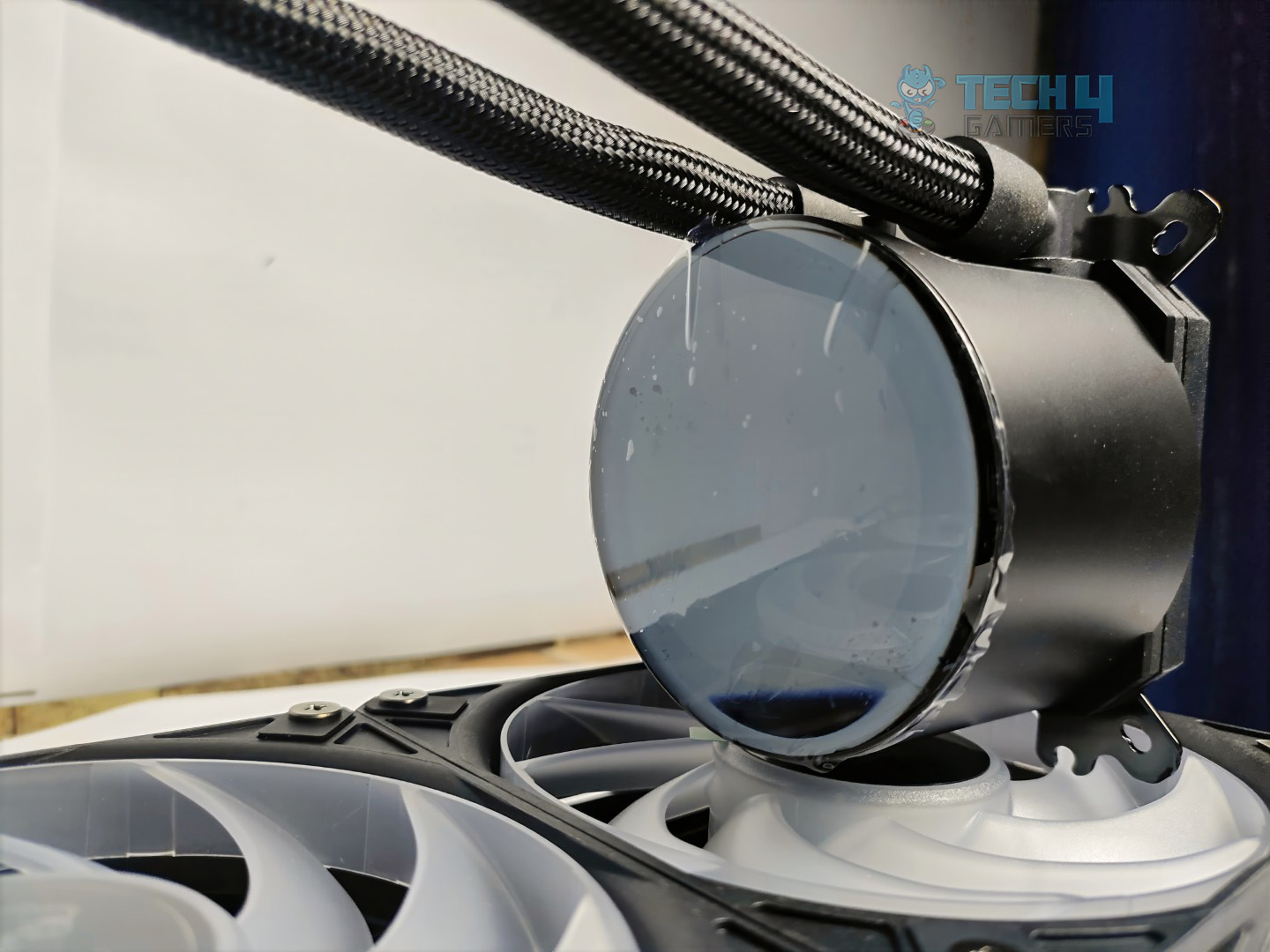
MPG CoreLiquid P13 is built maintaining the performance and sleek aesthetics in mind. They have made some changes to this cooler. One of the significant changes is that they have redesigned the water block, made with a smooth, curved glass that looks like a drop of water, with a 2.1” LCD that supports real-time monitoring, animated visuals, or any personalized content. You can even use the cooler LCD as your secondary monitor.
Packaging
MPG CoreLiquid 360 comes in sturdy cardbox packaging with the gaming-oriented aesthetics at the front, it displays the liquid cooler with three ARGB fans mounted on it. The MSI logo is prominently observable at the top left, and in the top right, it notes Intel LGA 1851 compatibility.
Front
In the back, the cooler features are accentuated.
Back
The side of the box mentions the specifications of the cooler.
Side View
Opposite Site View
Upon opening, the box reveals organized and protective packaging. The Radiator, block, and tubing are wrapped in plastic bags.
Unboxed
There is also black foam on the block on the right side for the cushioning. However, there is no manual or booklet inside the packaging.
Accessories
Let’s take a look at accessories
Accessories
Here is the structured table of what you get inside the box:
Category
Contents
Quantity
Cooler
MSI MPG Core Liquid P13 360 All-in-One Cooler
1
Fans
Pre-Installed MSI Cycloblade 9 A-RGB Fans
3
Thermal Compound
MSI Thermal Paste Tube
1
Accessory
EZ Cap
1
Cables
Adapter Cable
1
Screws
LGA 1700 Mounting Screws
4
LGA 1200 Mounting Screws
4
AM4/AM5 Mounting Screws
4
Spring Loaded Screws (for pump head)
4
Case/Radiator Screws
12
Mounting Hardware
Intel Mounting Plate (Backplate)
1
Close Look At The Radiator
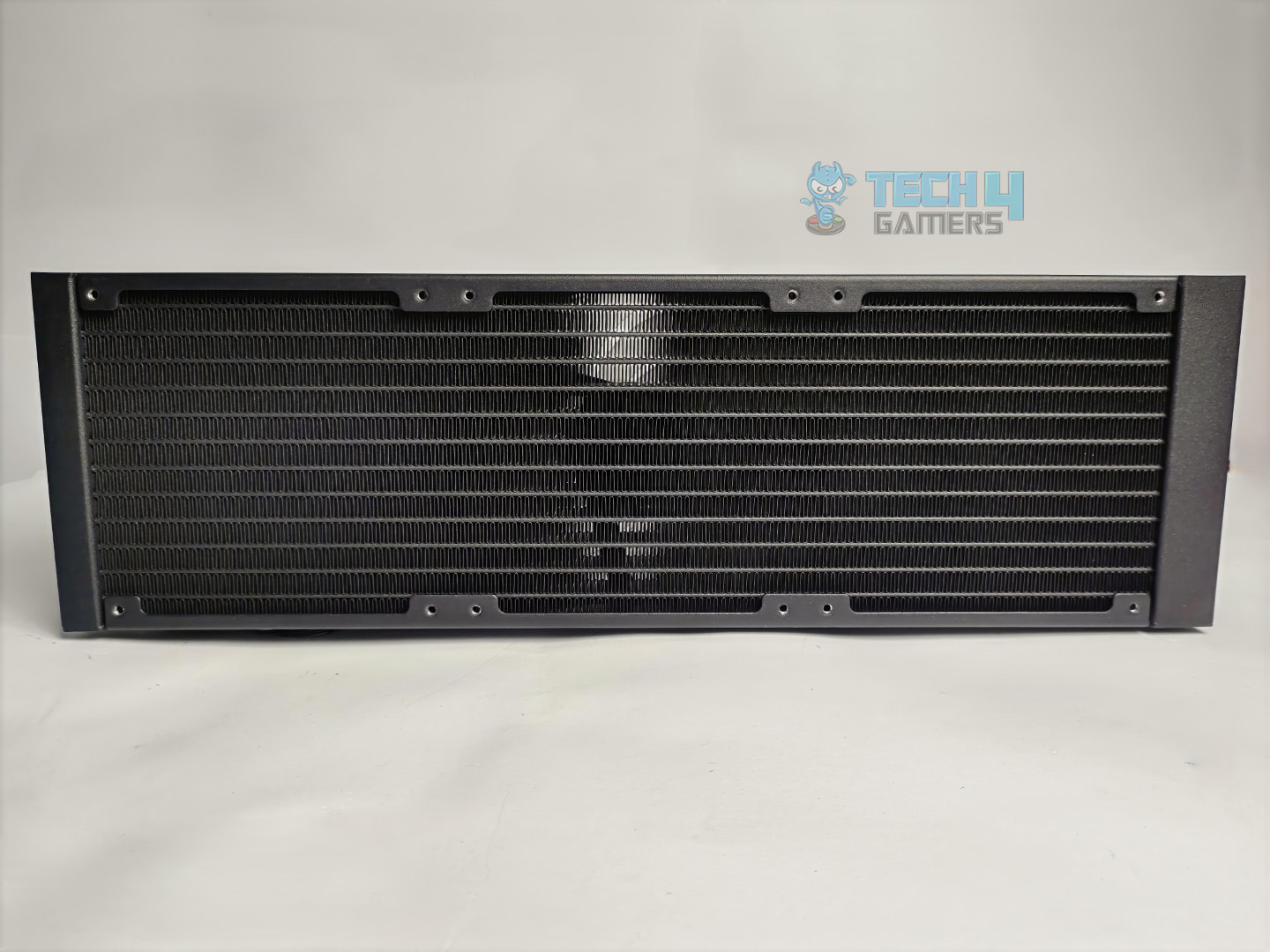
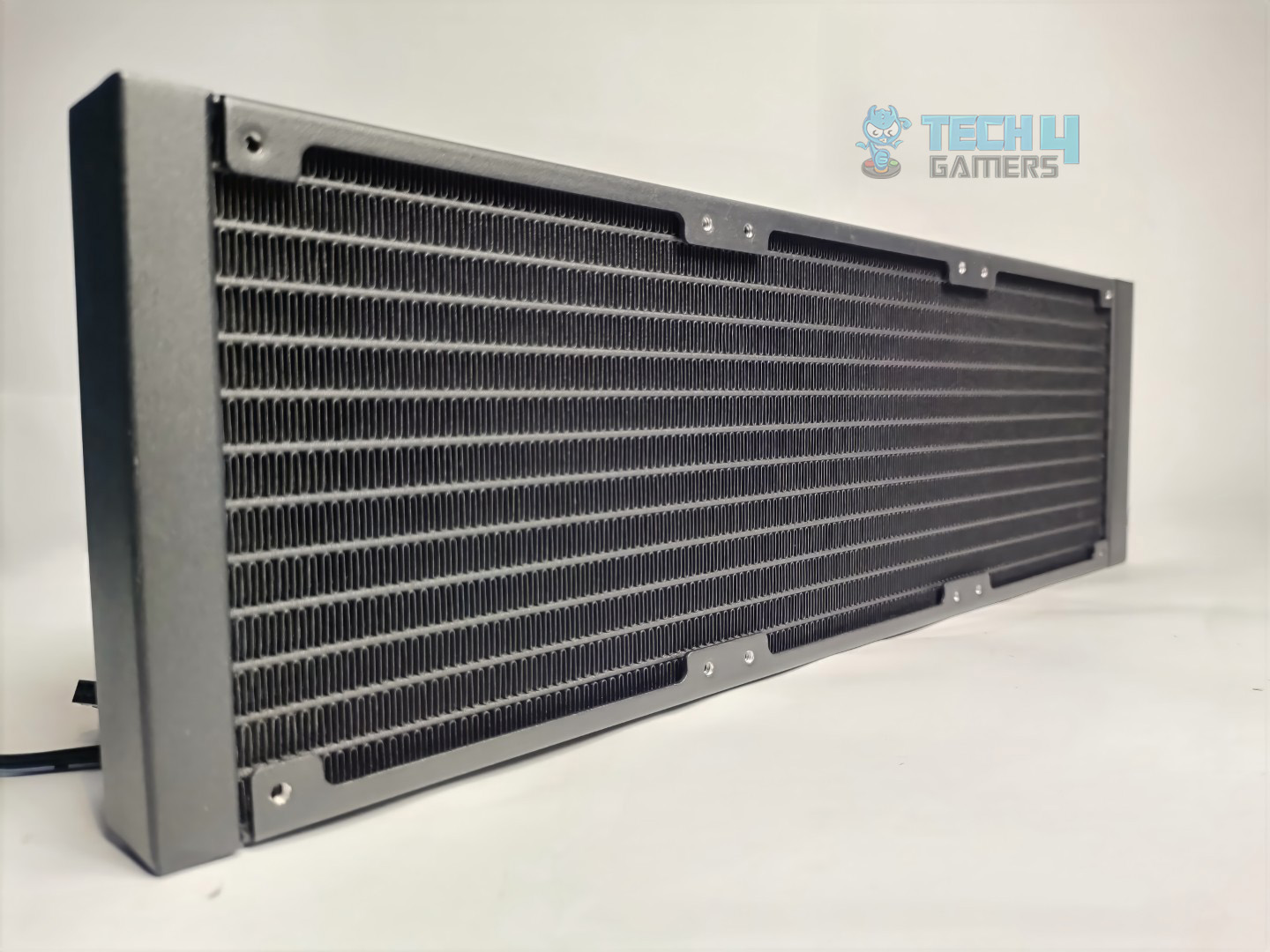
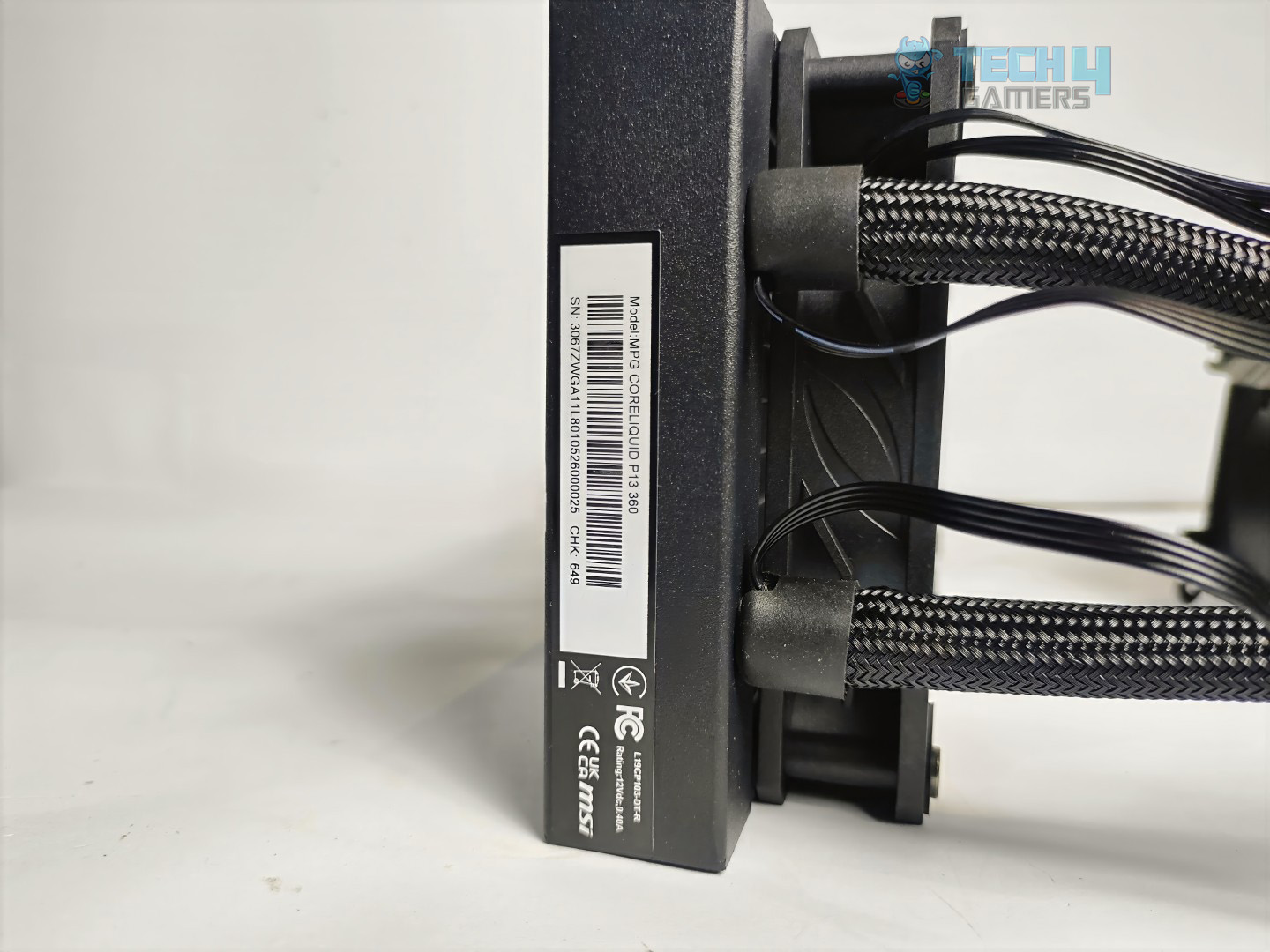
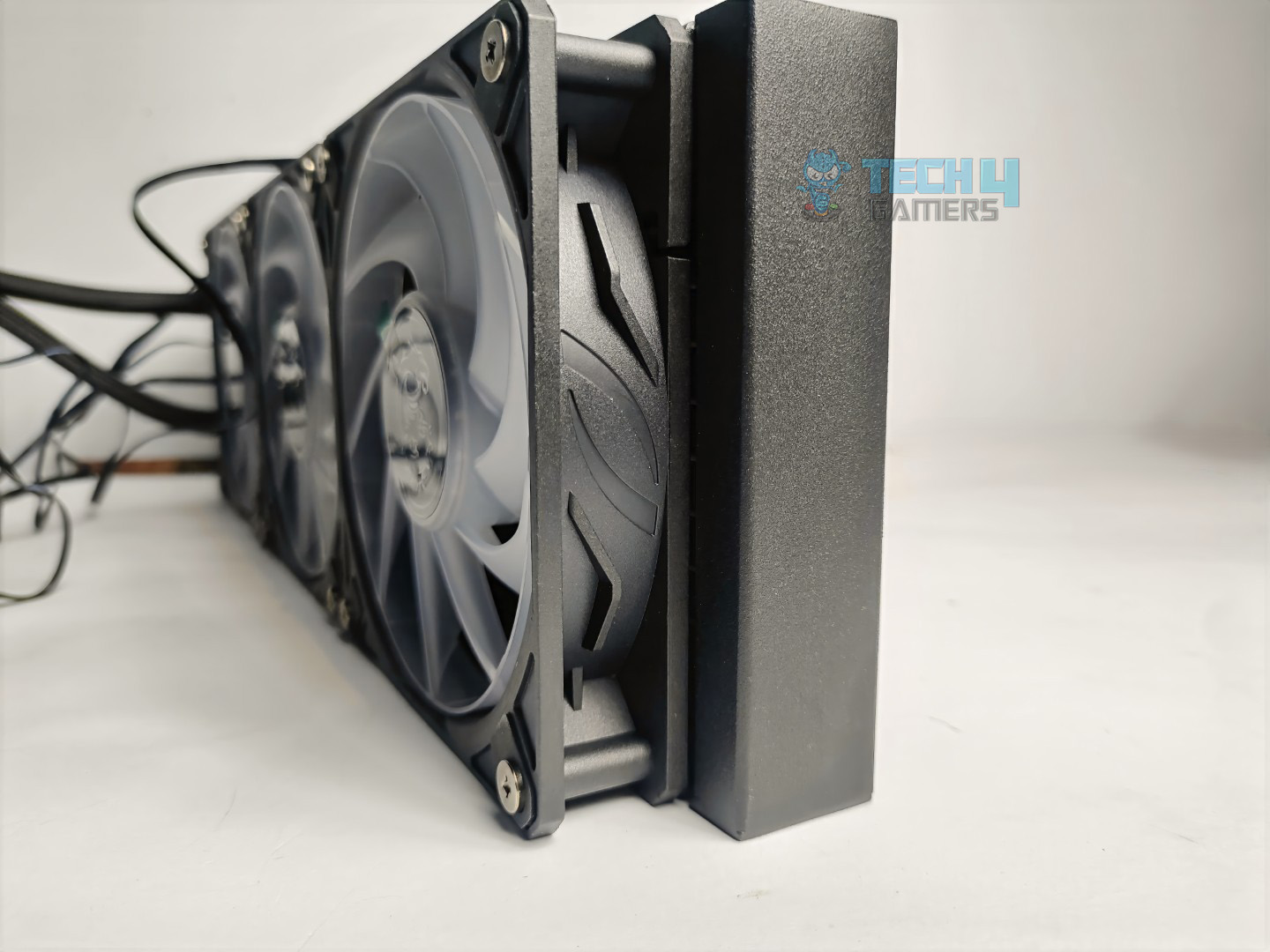
Taking a closer look at the radiator, it is 27mm thick which is the standard size. The radiator has the dimensions of 394 x 119.6 x 27.2mm in total.
Radiator Design
1 of 4
Radiator Finstack
Radiator Finstack From Side
Tube and Connection
Radiator Thickness
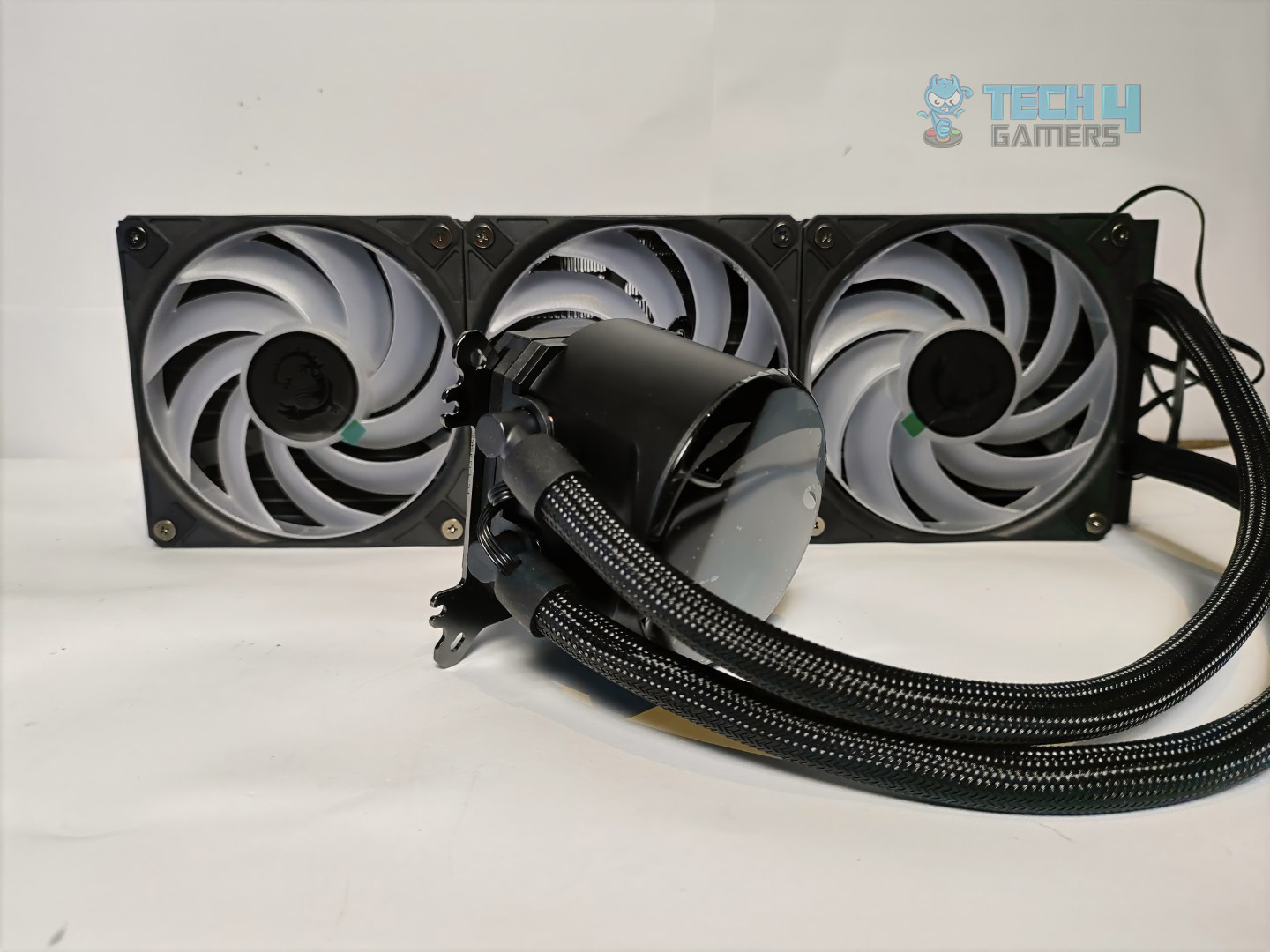
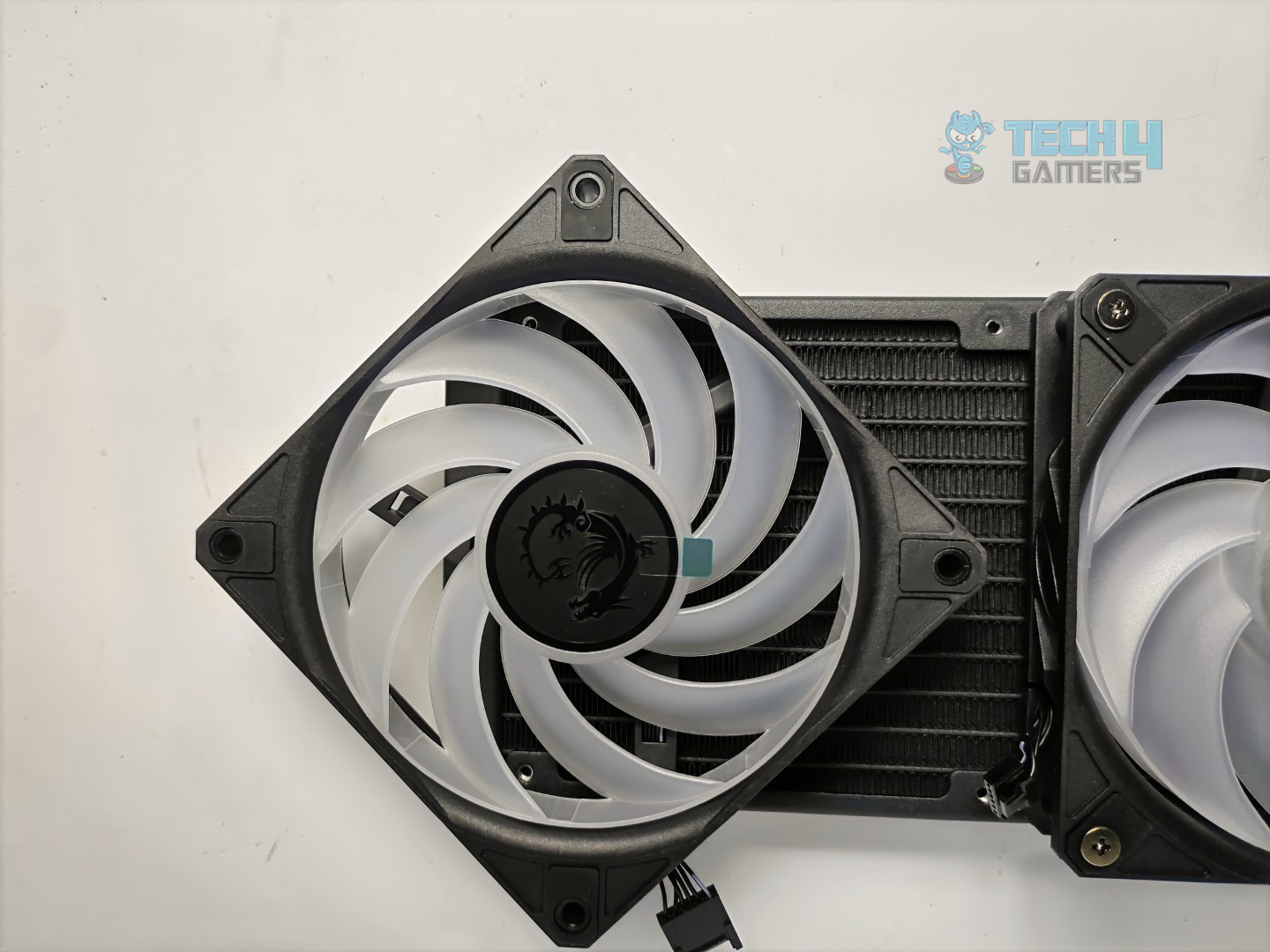
You get the fans preinstalled on the radiator with the cables properly managed for the clutter free experience.
Cyclo 9 Blade Fans On Radiator
The radiator has 12 coolant flow channels and the FPI (Fins per inch) is 20 which is typical in liquid coolers these days so MSI hasn’t tried any fancy here.
Pump Design / Housing
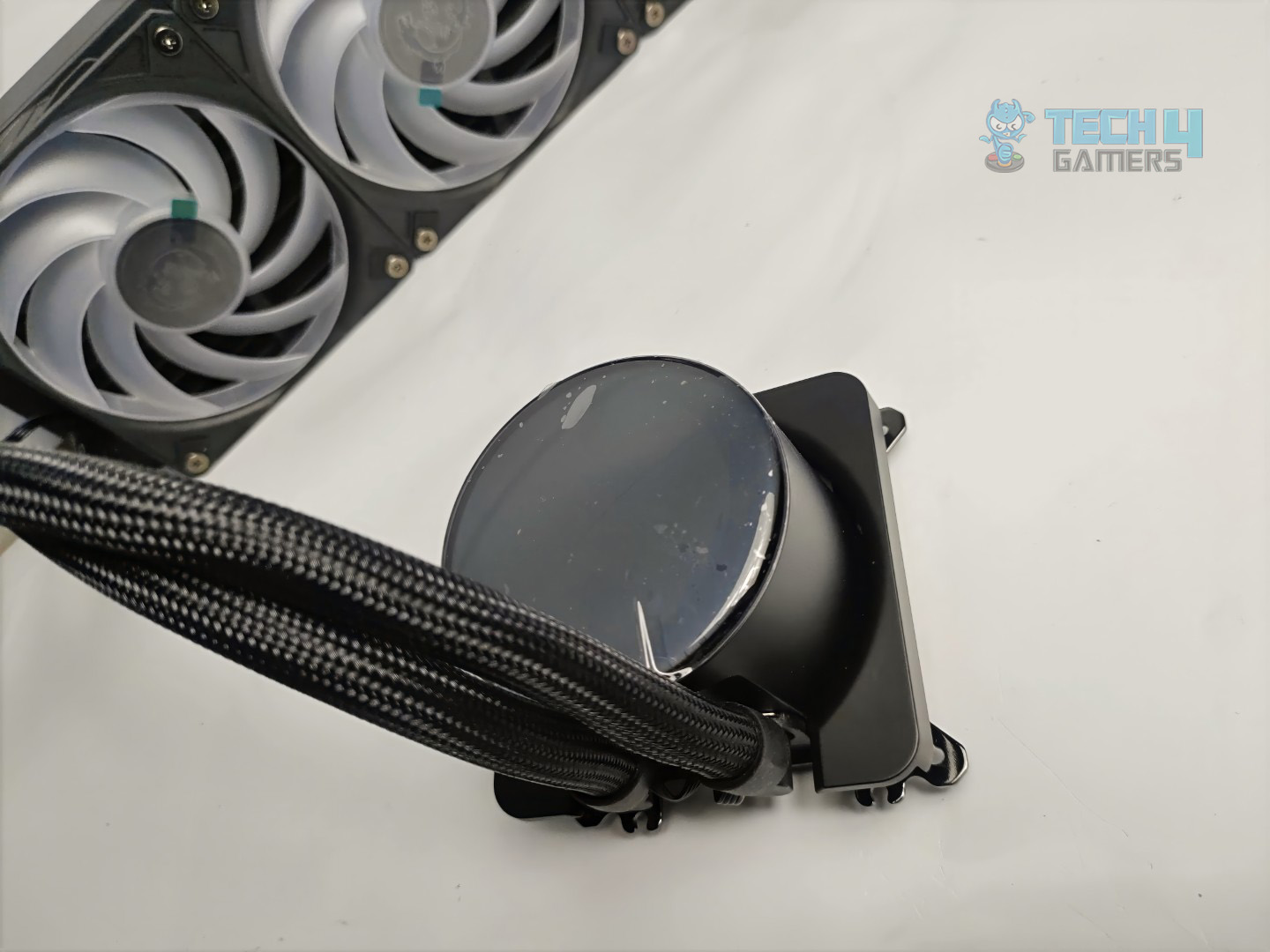
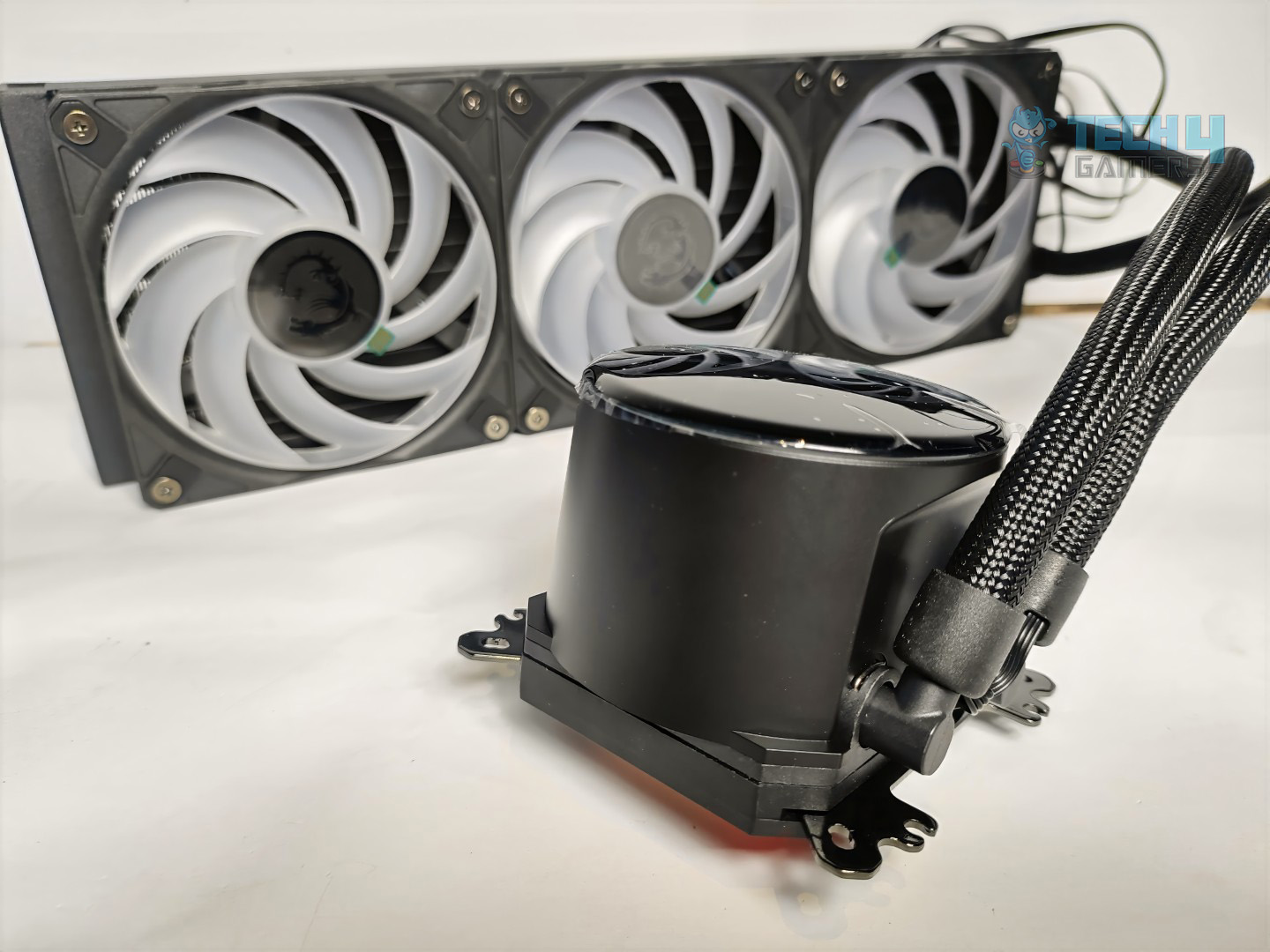
The housing looks neat and smooth, featuring a curved glass cover and a cylindrical design.
Block Design
1 of 4
Block And Radiator
Block Head
Block Side Angle
Block Tubing and Connections
The block houses a 2.1-inch LCD screen that supports real-time monitoring and personalized content. The mounting mechanism is preinstalled on the block, compatible with both AMD and Intel CPUs, eliminating the need for separate brackets.
LCD
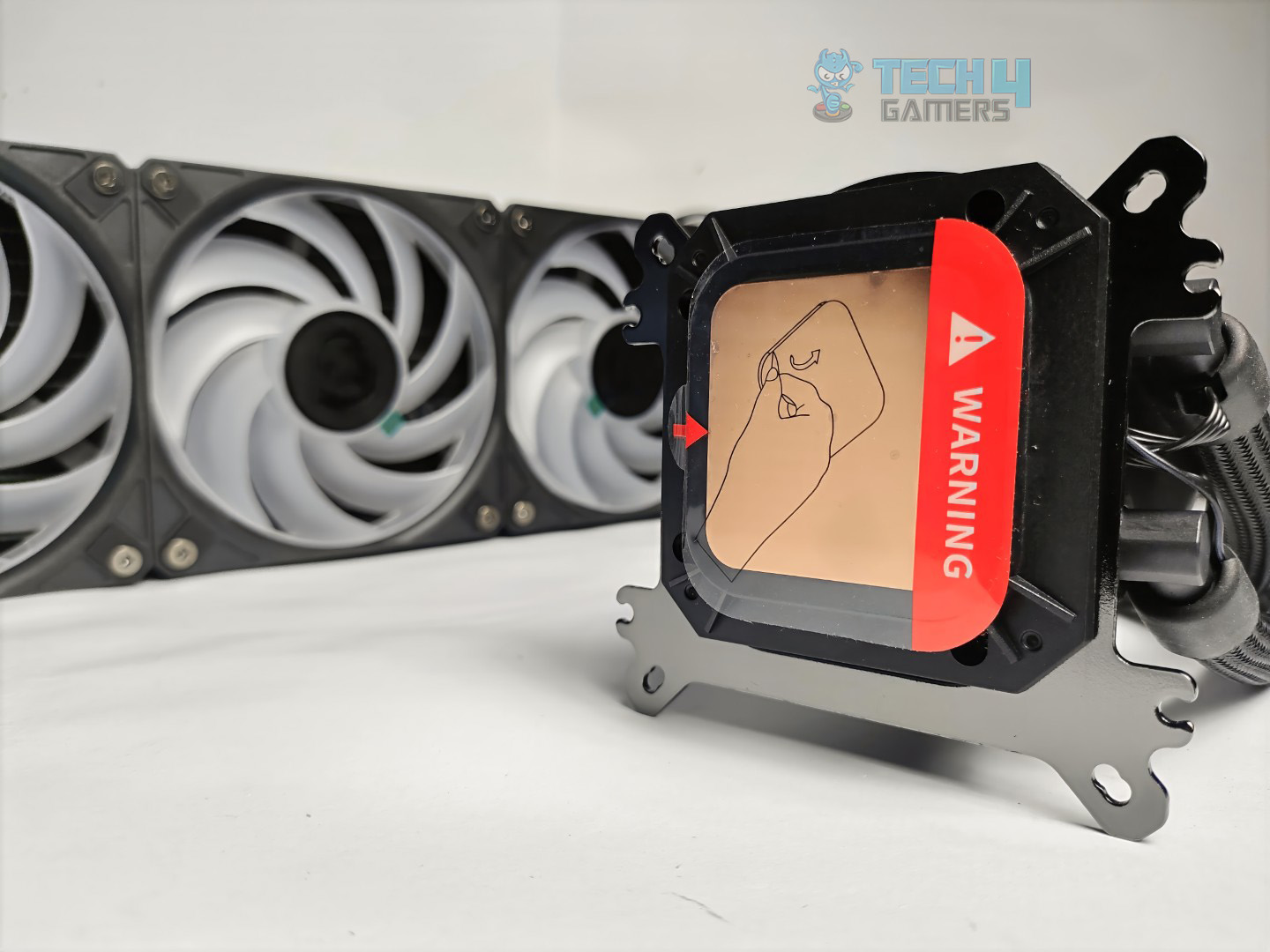
Cold Plate
This cooler also features the screw less copper base design generally the screw less design can ensure equal pressure on the CPU surface.
Display Features
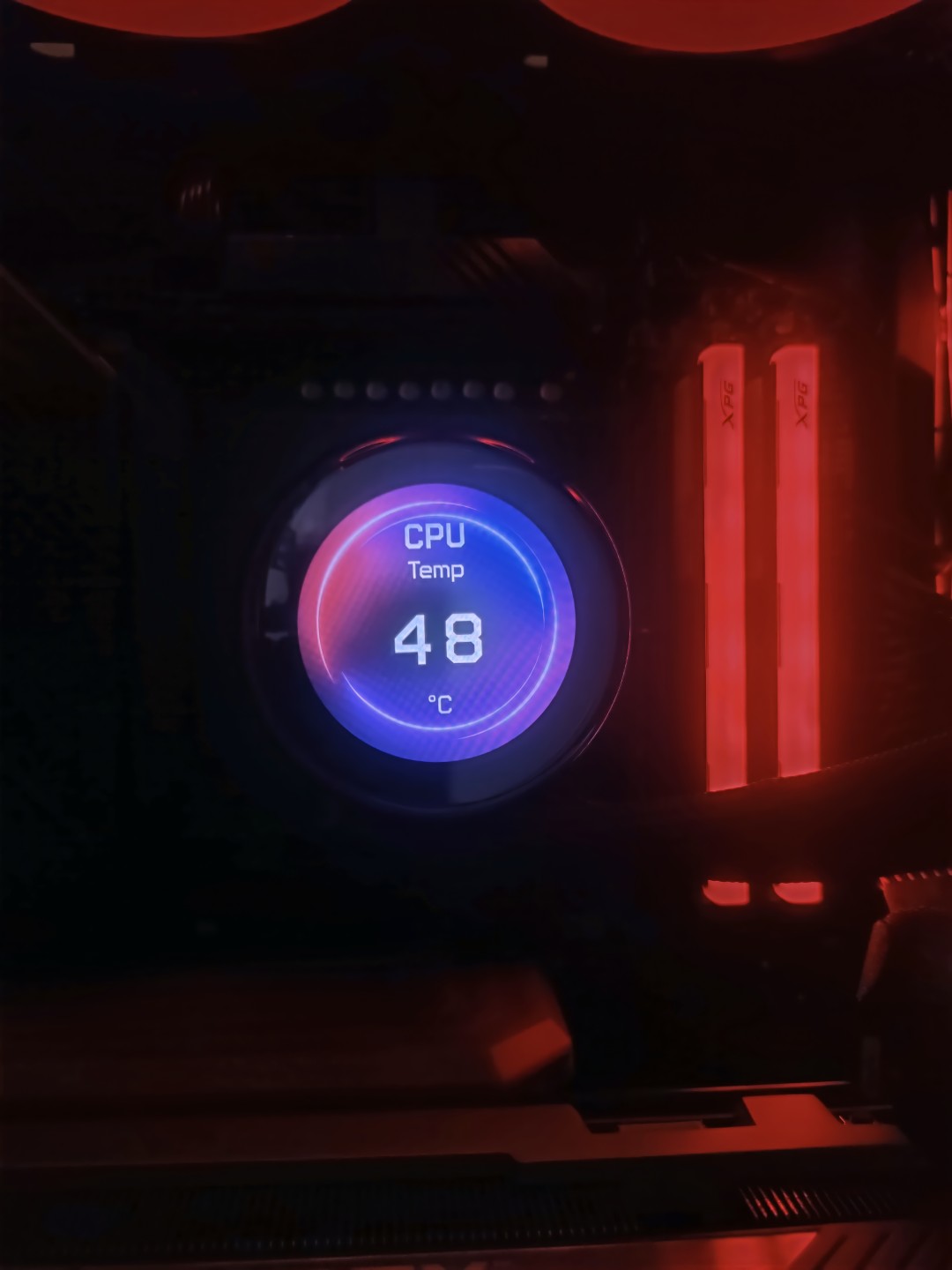
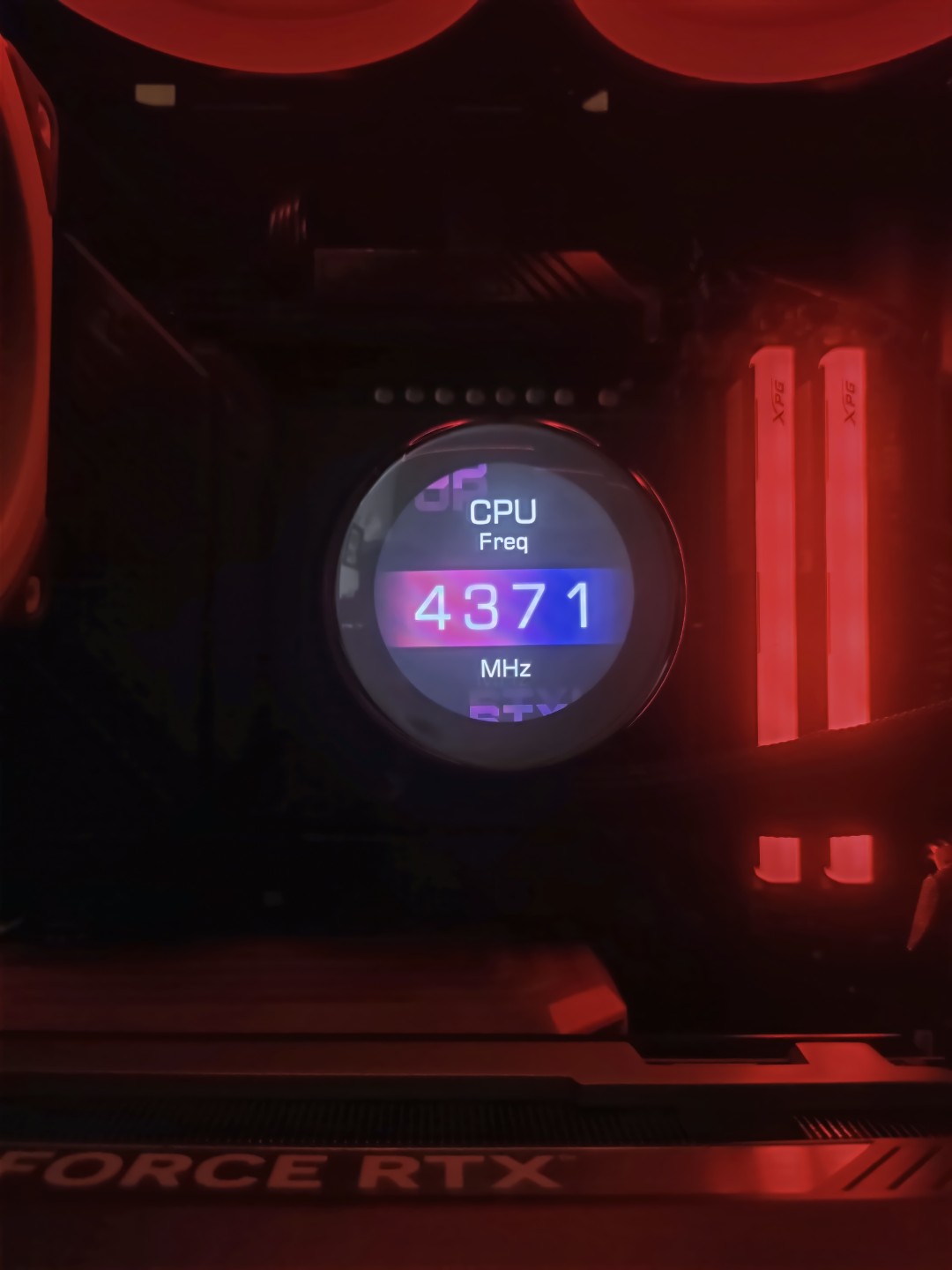
The Core Liquid P13 features a 21-inch IPS display with a 480p resolution and a 60Hz refresh rate. To power it, use the provided cable that plugs into the USB header on your motherboard.
CPU Temperatures
CPU Frequency
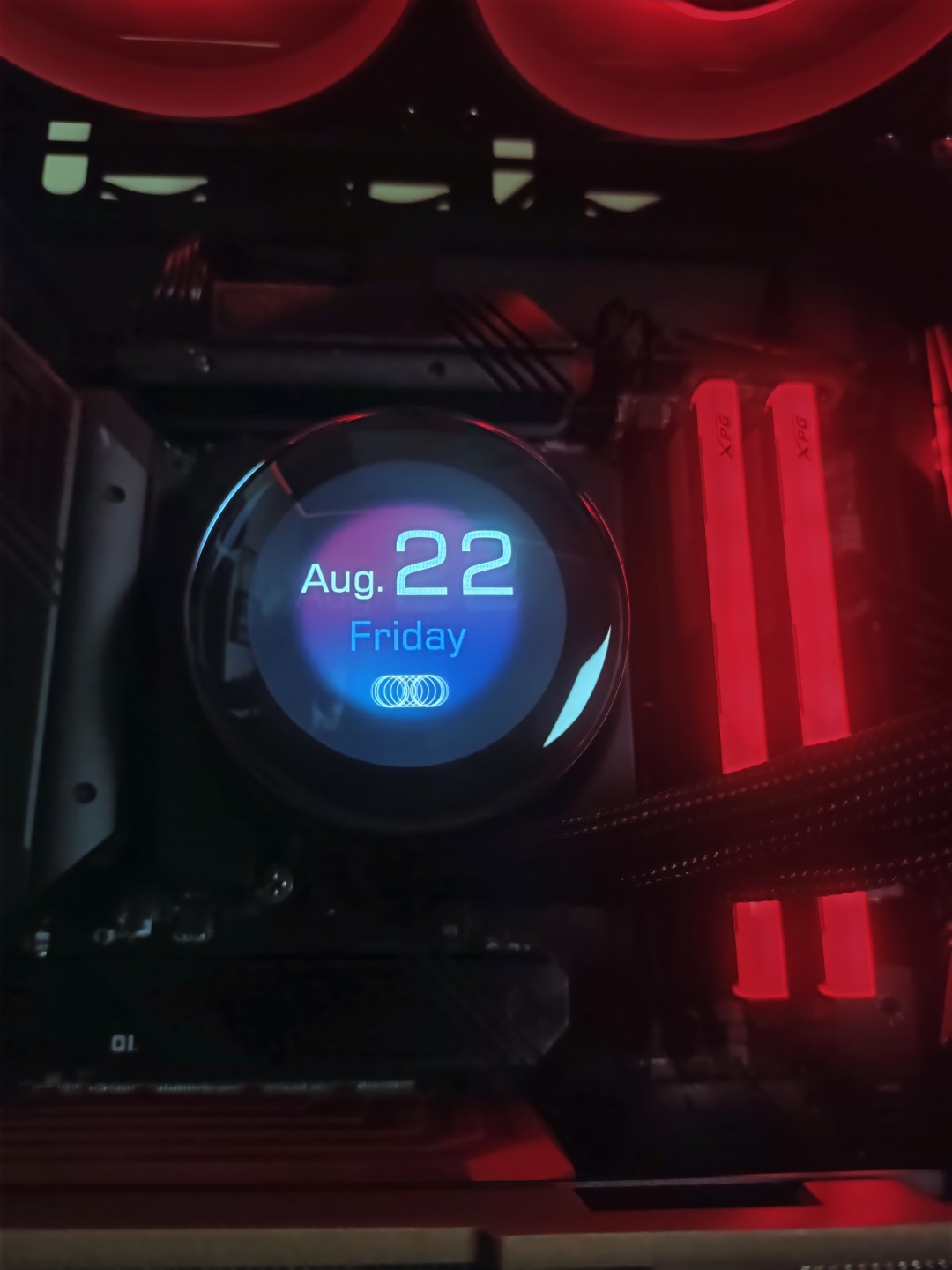
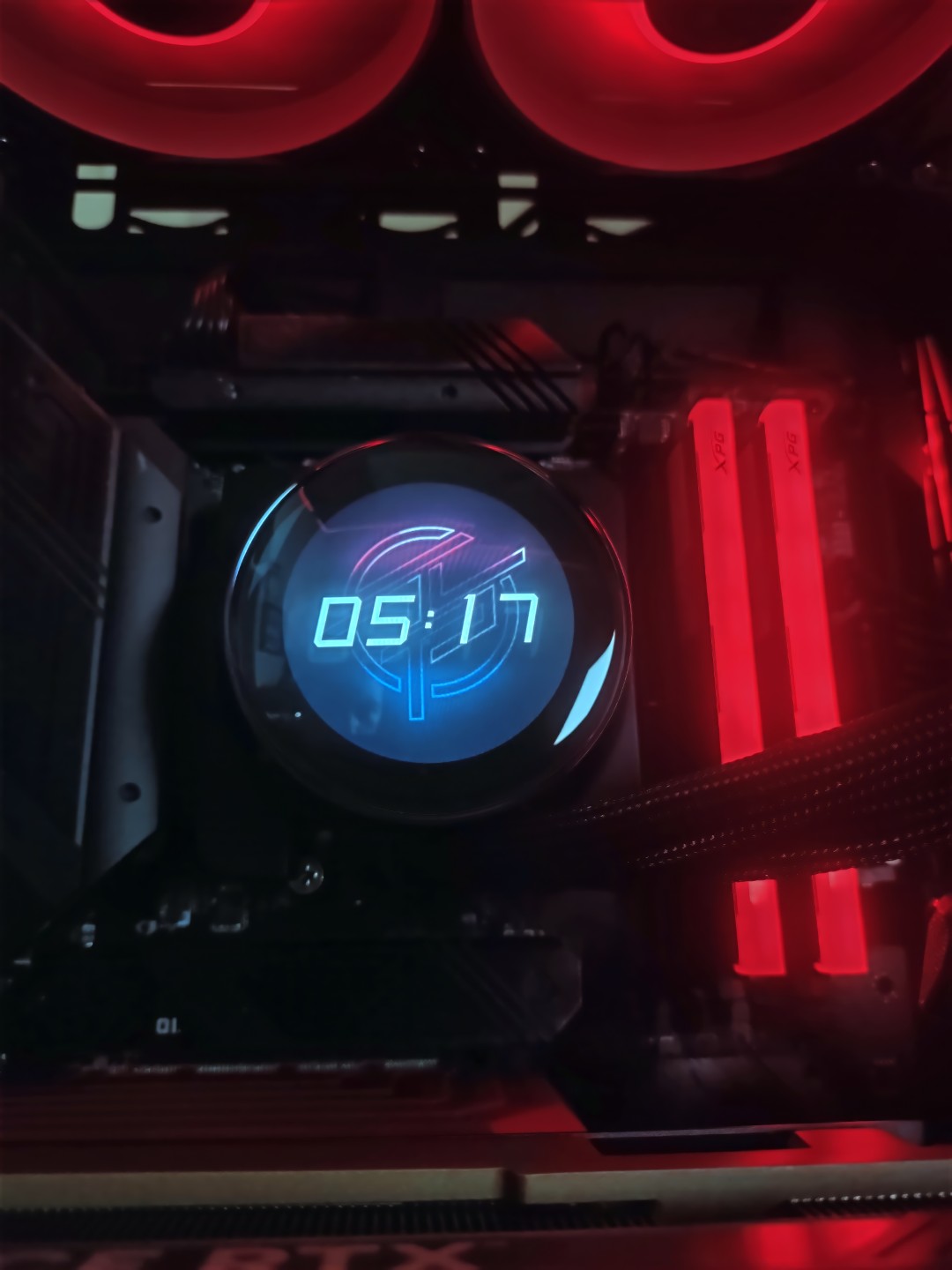
From the software, you can change the brightness of the screen and set the orientation. There are four modes you can choose from: Hardware Monitor, Video, System Clock, and Extended Display. Each mode has its own set of themes and layouts that you can choose. However, one thing that is missing is that you can’t use the static images on the LCD which is disappointing.
Date and Day
Time
Don’t freak out if you have installed the cooler and nothing comes up on the screen. I haven’t seen that in other LCD All-in-one coolers, at least they display their branding or logo, but the MSI stays black if you haven’t installed their MSI Center Software.
The reason for adding the secondary display mode to the LCD remains unknown to me. If you want to implement it, do so in a better way. Currently, it cannot be turned off, even when you select other display modes, such as monitoring so when you move the mouse, the cursor still appears on the block’s panel, which can be annoying.
The LCD overall offers good colors and is not extremely bright, even at maximum brightness of 600nits. The default animations are smooth overall. You can play 60 FPS videos on the LCD, which is nice to see.
Software Features
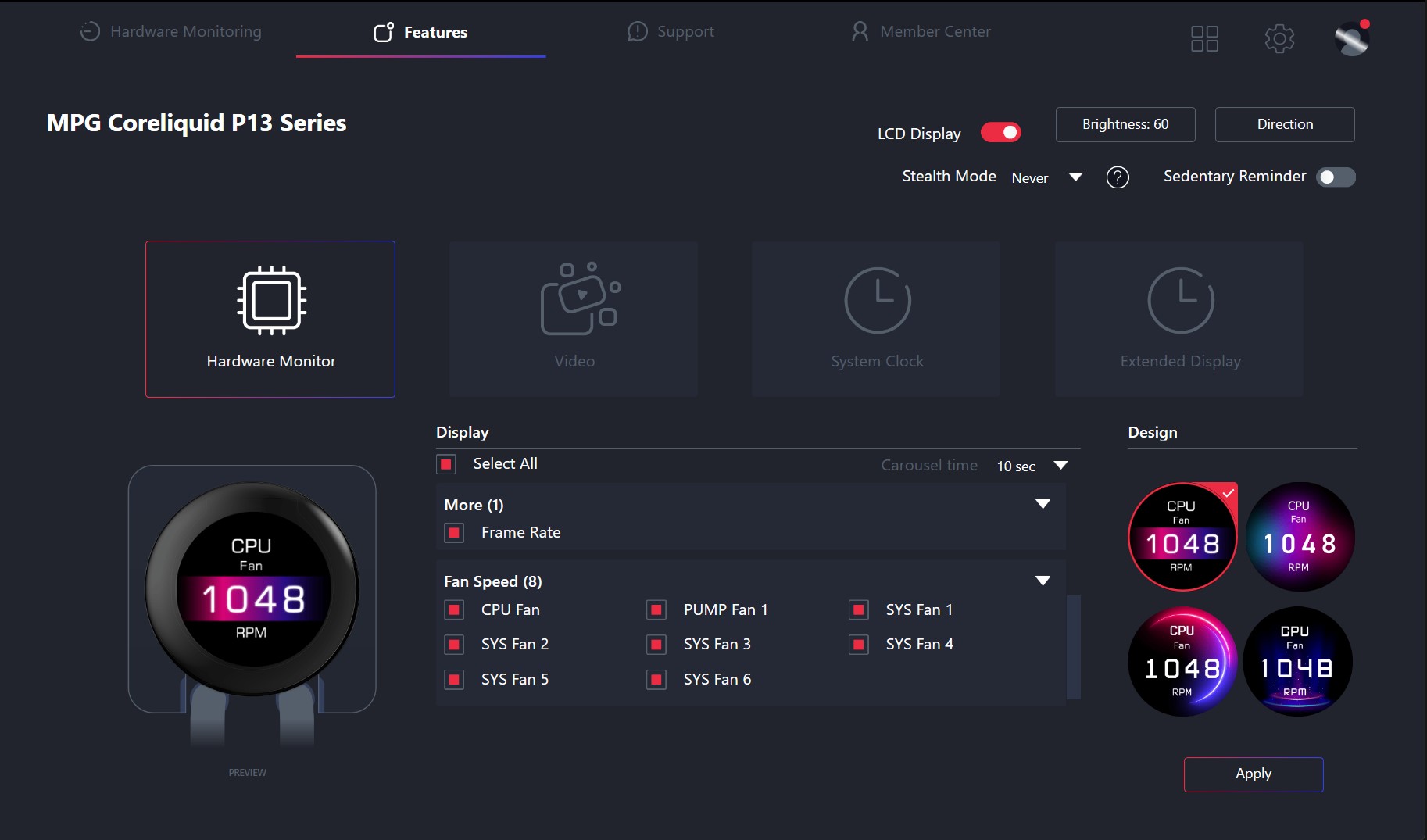
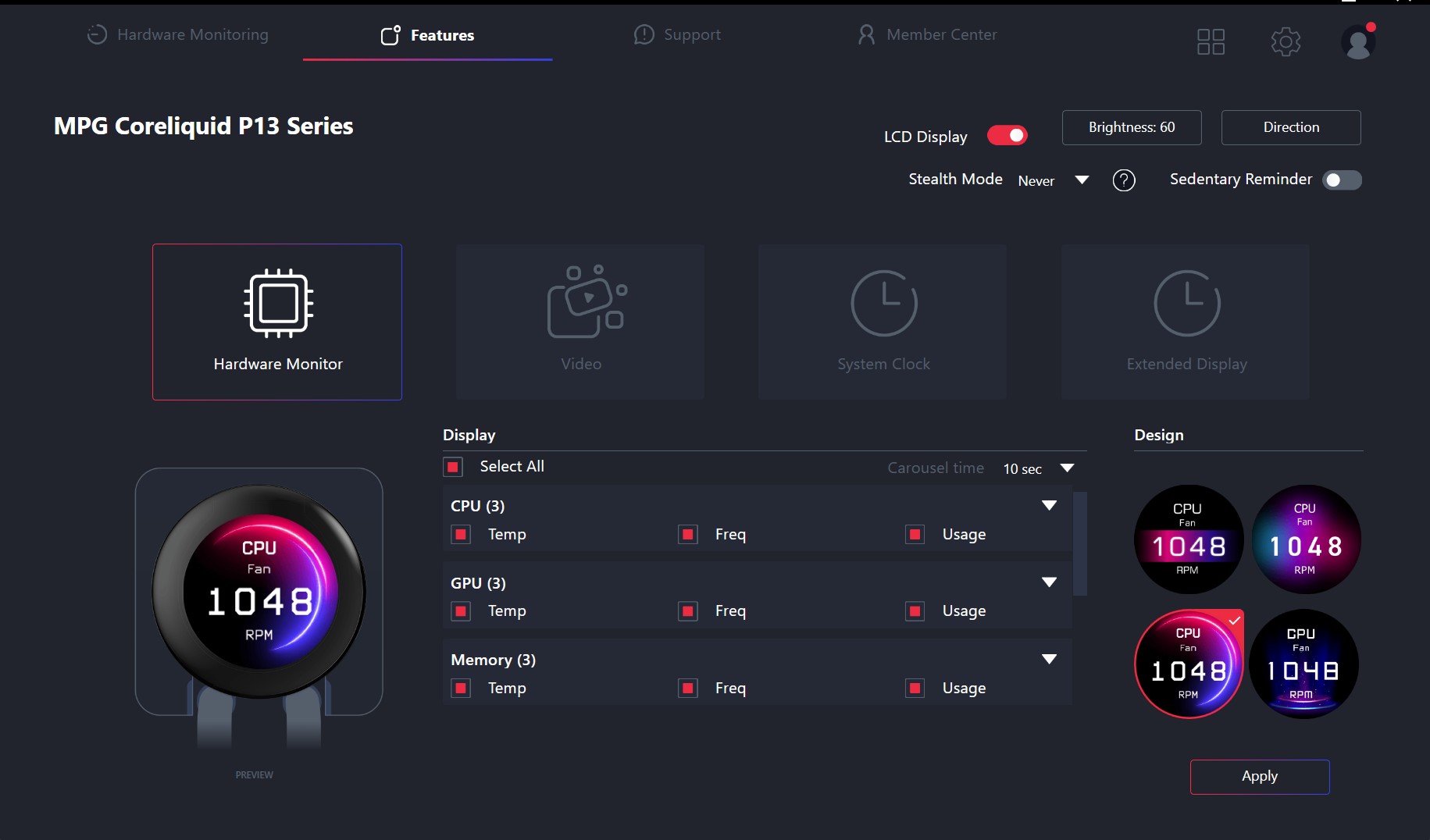
You need to download the MSI Center software, once it’s installed, you need to choose the features tab to access the LCD panel.
In the dashboard, there are four modes that you can choose for your need. In monitoring, you get access to CPU and GPU frequency, clocks, and usage, and you can turn on individual sensors you want the LCD to report. Also, in monitoring, you can toggle the memory readings, FPS, and fan speeds as well. There are four designs to choose from for the monitoring interface on the panel.
Dashboard
Dashboard
In the video mode, there are two options provided: either you can play the video from your Windows or you can play the video from YouTube/Billibili.
Video
In the system clock settings, you get six different layouts to choose from to display time, day, or date.
System Clock
In the extended display option, you can hit apply, and the panel screen will function as a secondary display.
Extended Display
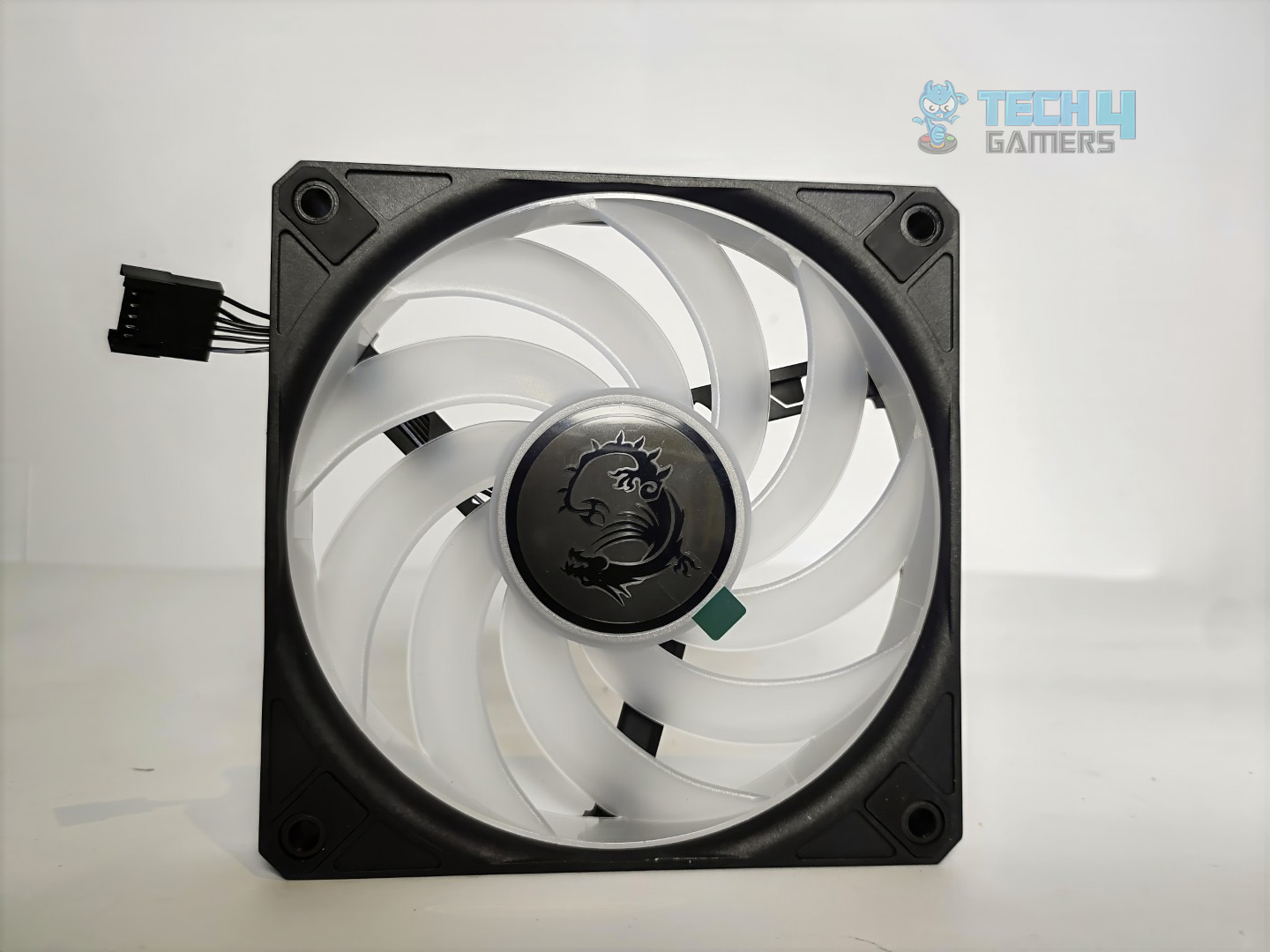
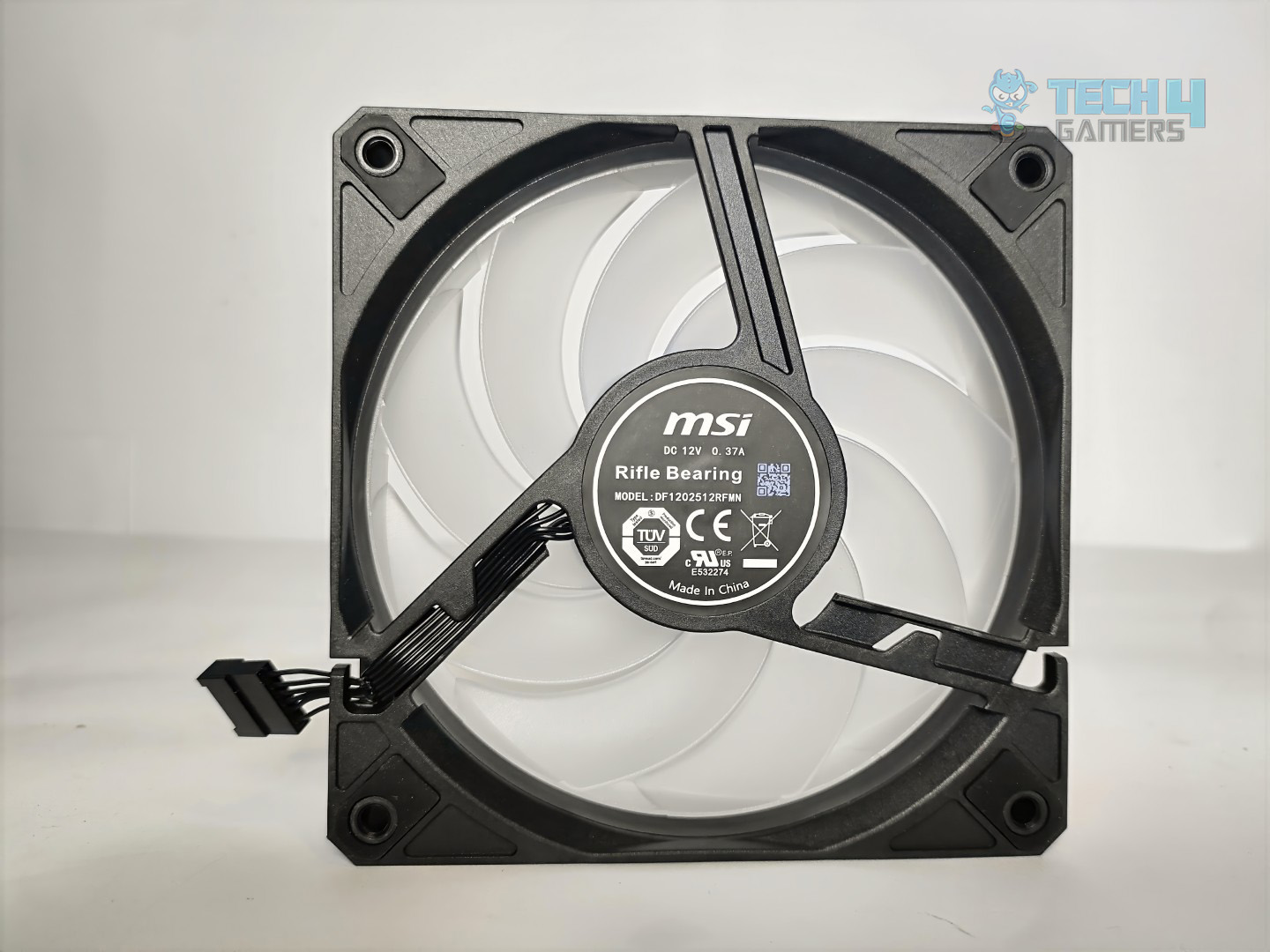
Fans
MSI has provided CycloBlade 9 A-RGB fans with the liquid cooler; however, I want to point out that these fans do not come standalone or sold separately. These fans come preinstalled as a part of the cooler package.
Front
Back
The fan features nine blades and provides airflow of about 64.9CFM at a top speed of 2050 RPM, utilizing a rifle bearing with a lifespan of up to 40,000 hours. They are usually cheaper than FDB (Fluid Dynamic Bearing) fans, which are commonly found in high-end models like Noctua.
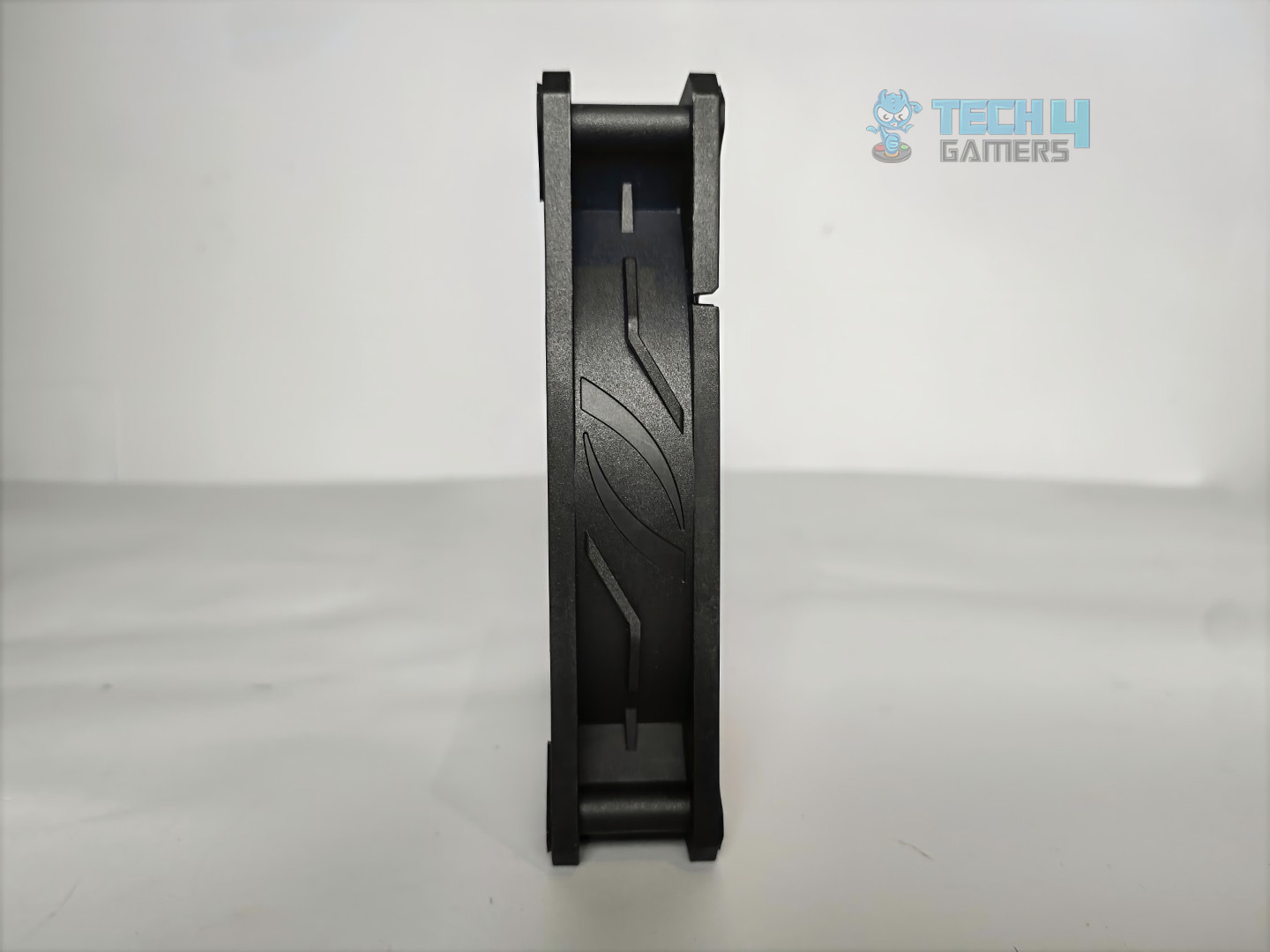
Fan Mounts
Side View
The fan also does not carry the standard PWM and ARGB header, but instead a proprietary 6-pin cable that connects to the adapter cable provided with the cooler to power the ARGB and fan PWM.
Fan Connector
Here are the specifications for the fans:
Cycloblade 9
Specifications
Dimensions (W x D x H)
120 x 120 x 25 mm
4.7 x 4.7 x 0.98 inches
Air Flow
64.898 CFM
Bearing Type
Rifle Bearing
Speed
500 ~ 2050 ± 150 RPM
Life Expectancy
40,000 hours @ 40°C
Rated Current
0.14 A ± 0.028 A
Power Consumption
1.68 W ± 0.336 W
PWM Control
Yes
Connector
5V ARGB 3-PIN Header
Installation
Its time to install the cooler.
Prepare the socket
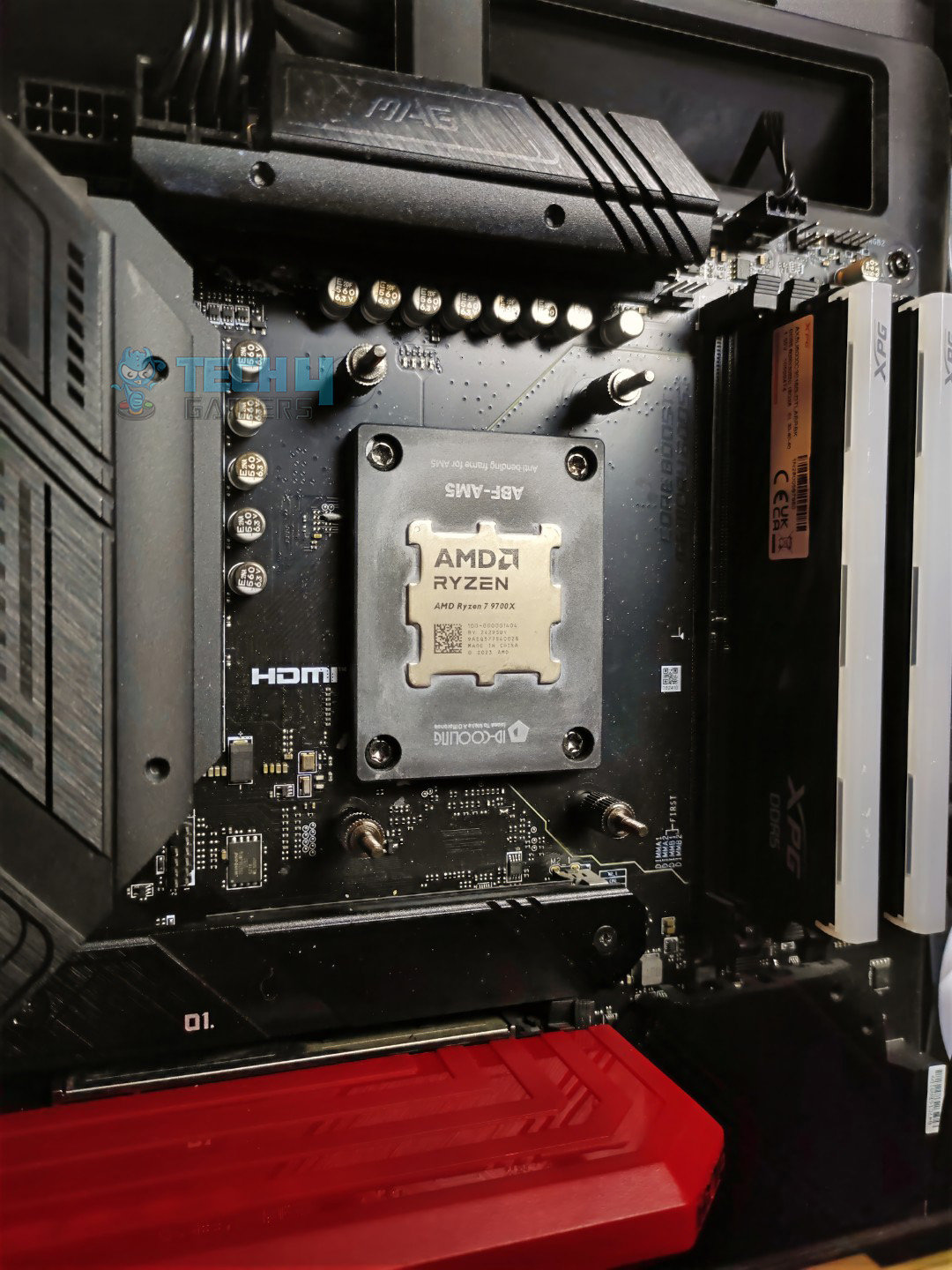
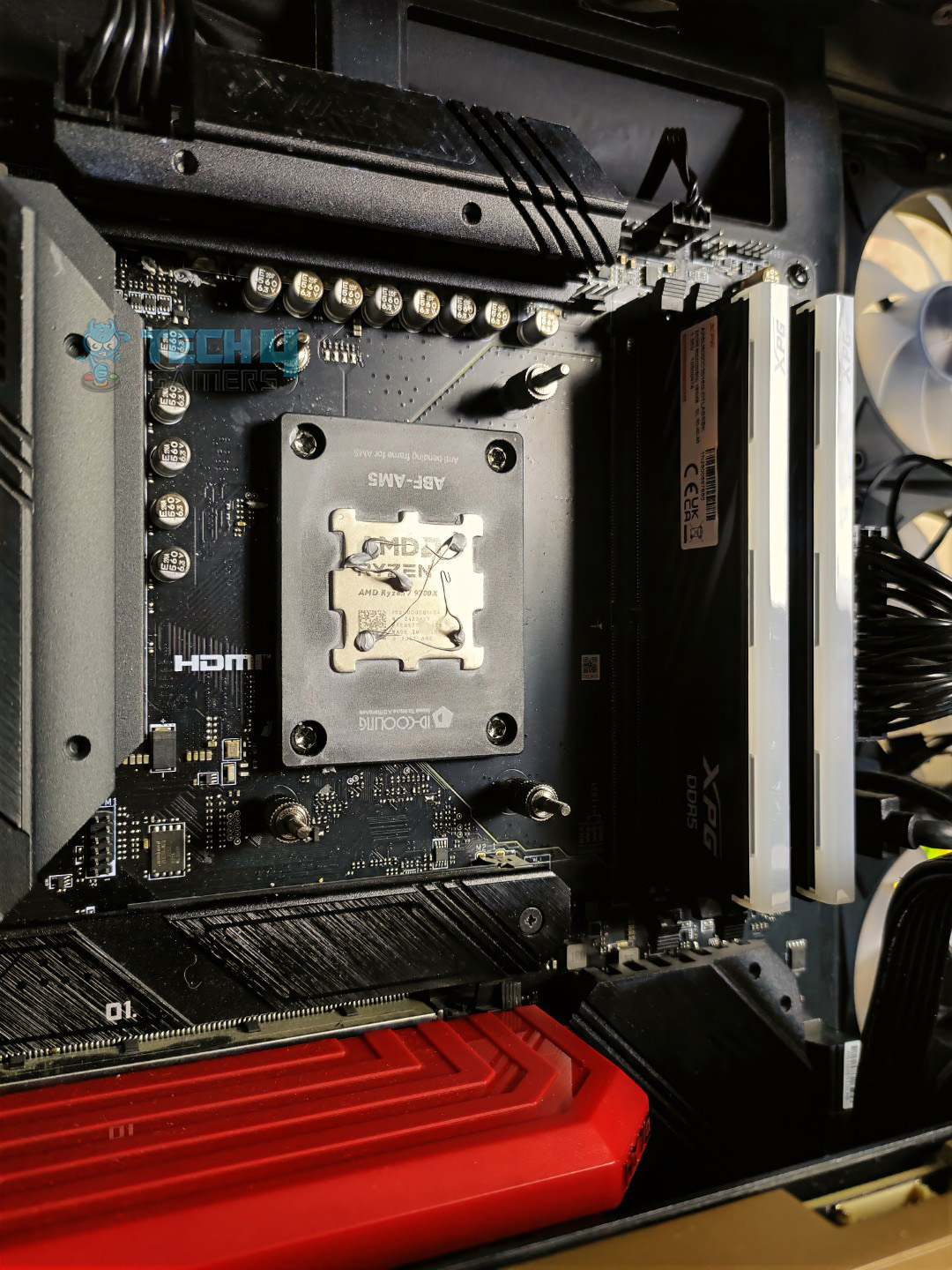
As we are using the AMD platform, we will be performing the installation on our AM5 system only. First you have to remove the preinstalled two plastic retention brackets on your AMD motherboard after that you need to install the provided four double head screws MSI has labeled them for each platform on the tiny bags so you can’t go wrong here.
Screws Installed
Make Sure to Apply Thermal Paste!
After you have installed the screws, you need to mount your block on the top of the screw and align the block mounting bracket and secure the block with the provided spring loaded screws.
Block Mounted
As the cooler is now installed you can now install the MSI EZ CAP, which is a circular piece included in the accessories. The cap covers the visible screws and cables on the water block.
EZ Cap Installed
WARNING: We encountered issues during the block installation because the pre-mounted ”uni-bracket” is installed incorrectly. The block refused to sit on one of the bottom screws. To fix this, unscrew the bracket at the bottom of the block, which allows the bracket to slide. Strangely, MSI has not documented or addressed this issue.
Cabling
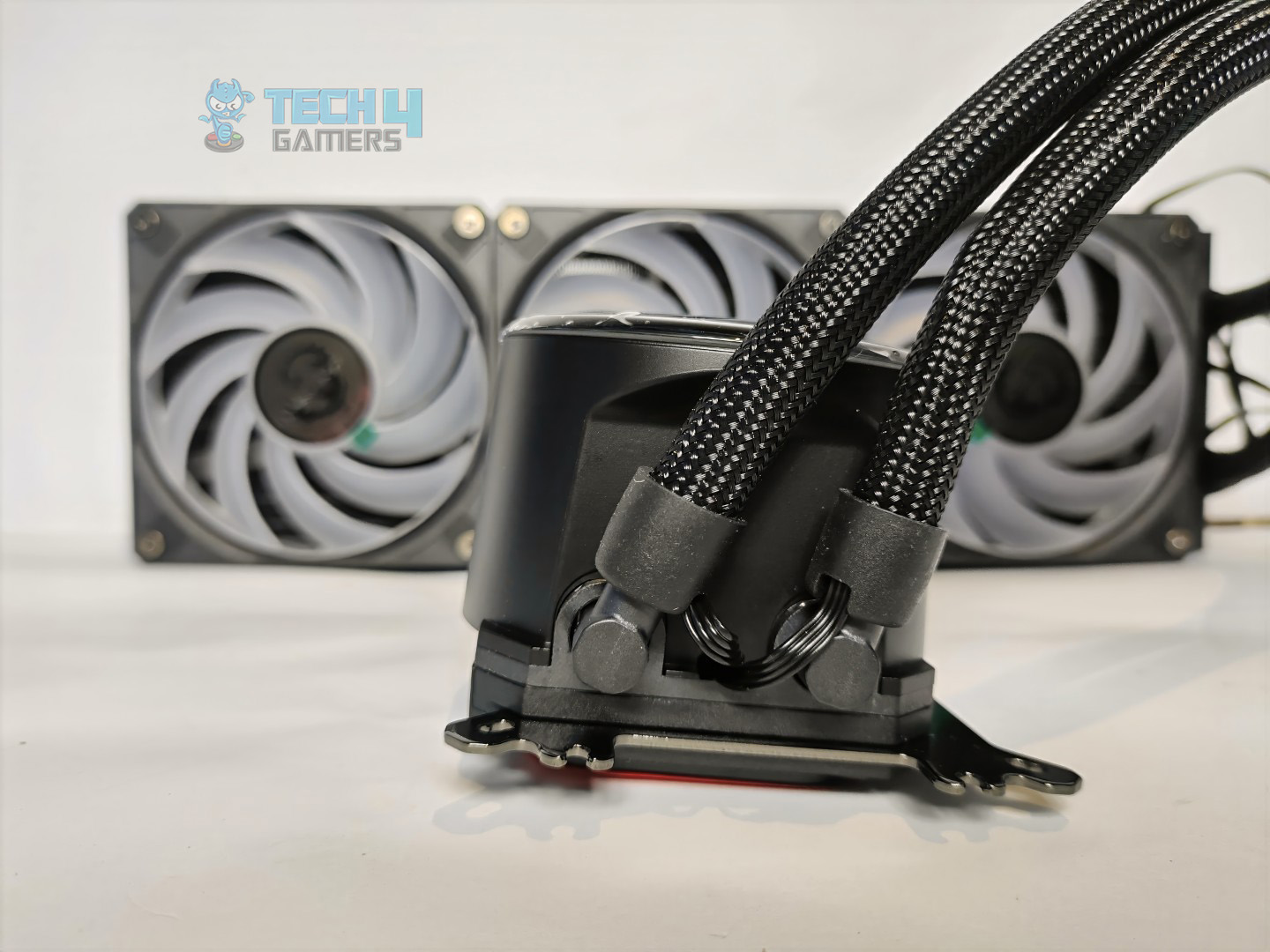
The cable management and connection in this cooler is well thought, the pump power cable and USB cable comes from the radiator side routed from the sleeved tubing rather than the block, also there is one more cable that comes with them which is a 7-pin proprietary connector designed by MSI, it merges fan control and ARGB into a single cable that goes in the JAF header exclusively available on MSI 800 series boards, however it still works on the other motherboards with the provided adapter.
Testing Methodology
CPU Configuration:
For the Noise Normalized Testing, we have fixed the CPU at a fixed voltage and frequency. The noise levels are set at the desired levels of 40 to 45 dB(A). Then we test the cooler at the maximum speed possible.
Controlled Environment:
We have eliminated the influence of ambient temperatures in our data, and all results are presented as deltas over the ambient conditions. The tests were done in a controlled environment with a room temperature of 25°C.
Preparing System:
Since we don’t have a separate open test bench, all the coolers are installed in our primary test case, which is the HYTE Y70, but all the panels have been removed.
All the case fans are operating at the minimum PWM level possible to avoid interfering with any noise results. All coolers are tested at the fixed configurations. Only the coolers are swapped in the whole scenario.
We are using ID-Cooling X45 thermal paste for all coolers.
Software:
We have ensured that no other software is running on the computer that could influence the CPU load.
We’ll be using the Cinebench R23 Loop for the 15 minutes.
Windows Version: Windows 11 24H2 (OS Build 26100.4652)
Test System
Thermals – Noise Normalized 40 dB(A)
Starting the tests at 40dB(A).
Noise Normalized 40 dB(A) Cooling
MSI Core Liquid P13 runs slightly warmer than the Arctic’s Liquid Freezer and Deepcool Mystique, but the differences are negligible. It’s a positive start for the MSI here!
Thermals – Noise Normalized 45 dB(A)
Moving to 45dB(A) Results.
Noise Normalized 45 dB(A) Cooling
At the 45dB(A) Noise Output, MSI is almost catching up with our best coolers here.
Thermals – Maximum Speed
Let’s test the coolers at the maximum PWM speed
Maximum PWM Cooling
At the maximum PWM level, things are quite different here; MSI runs 2 °C hotter than the Arctic’s Freezer, our best cooler here. The fans can make a massive difference here. Cycloblade nine fans are not as strong as Arctic fans because they are designed for quiet operations. The results are acceptable for the Core Liquid P13, considering the noise level.
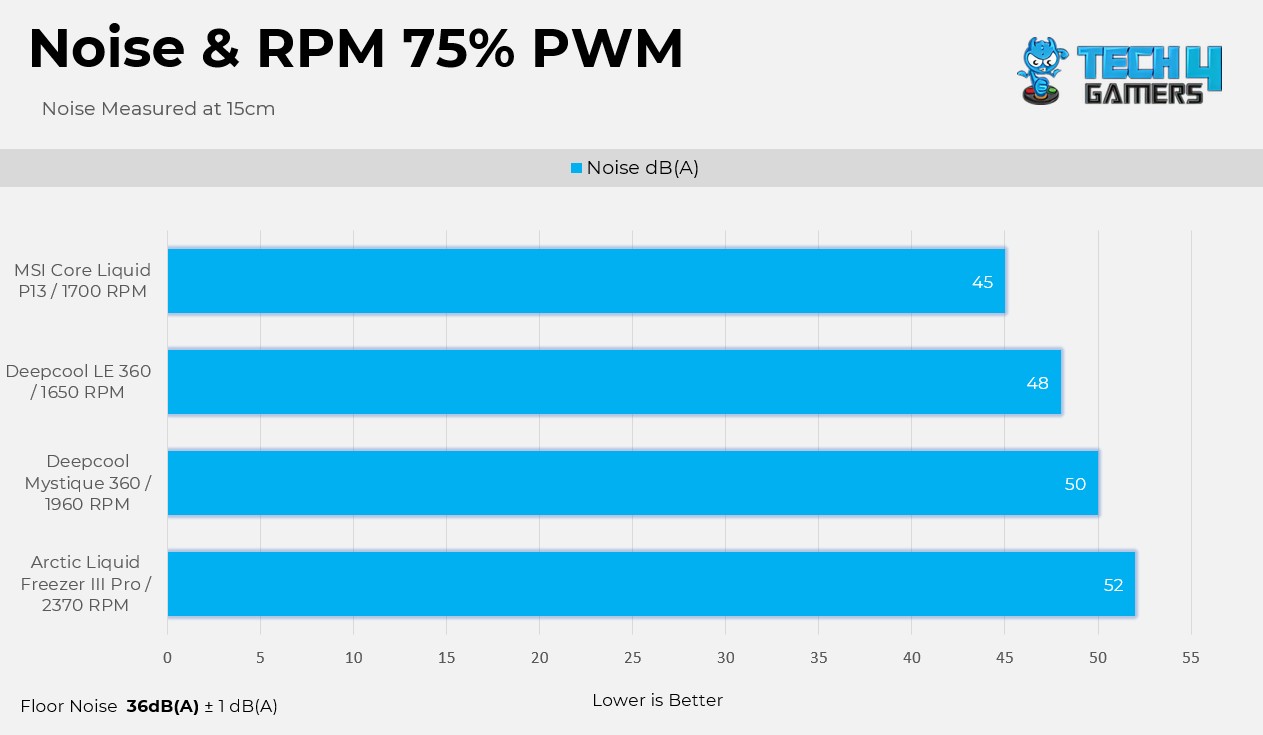
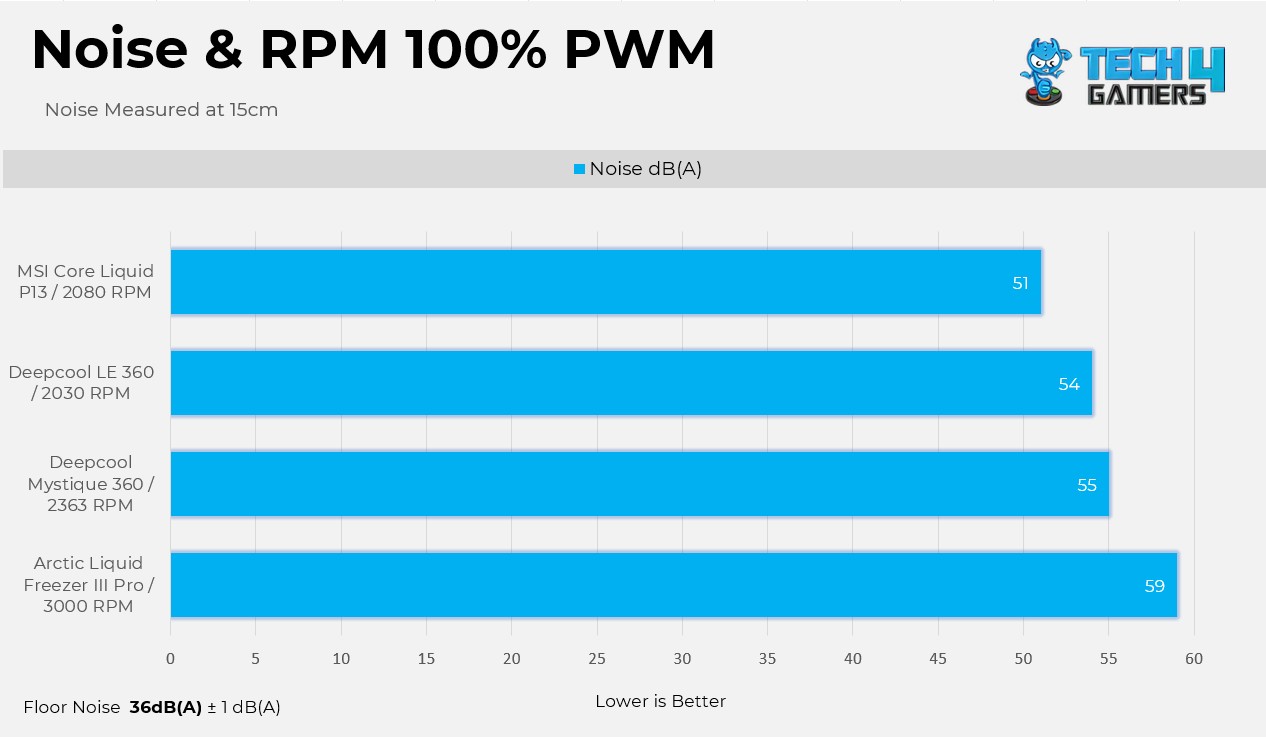
Noise and RPM Readings
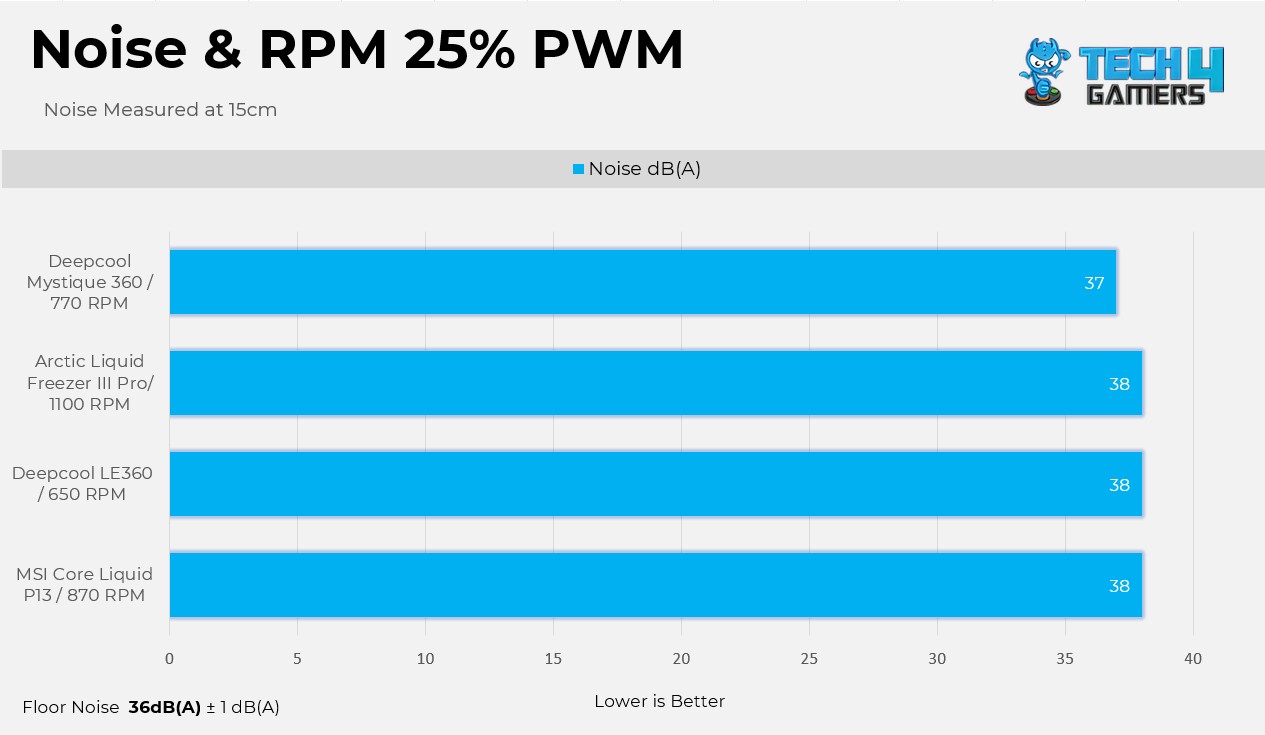
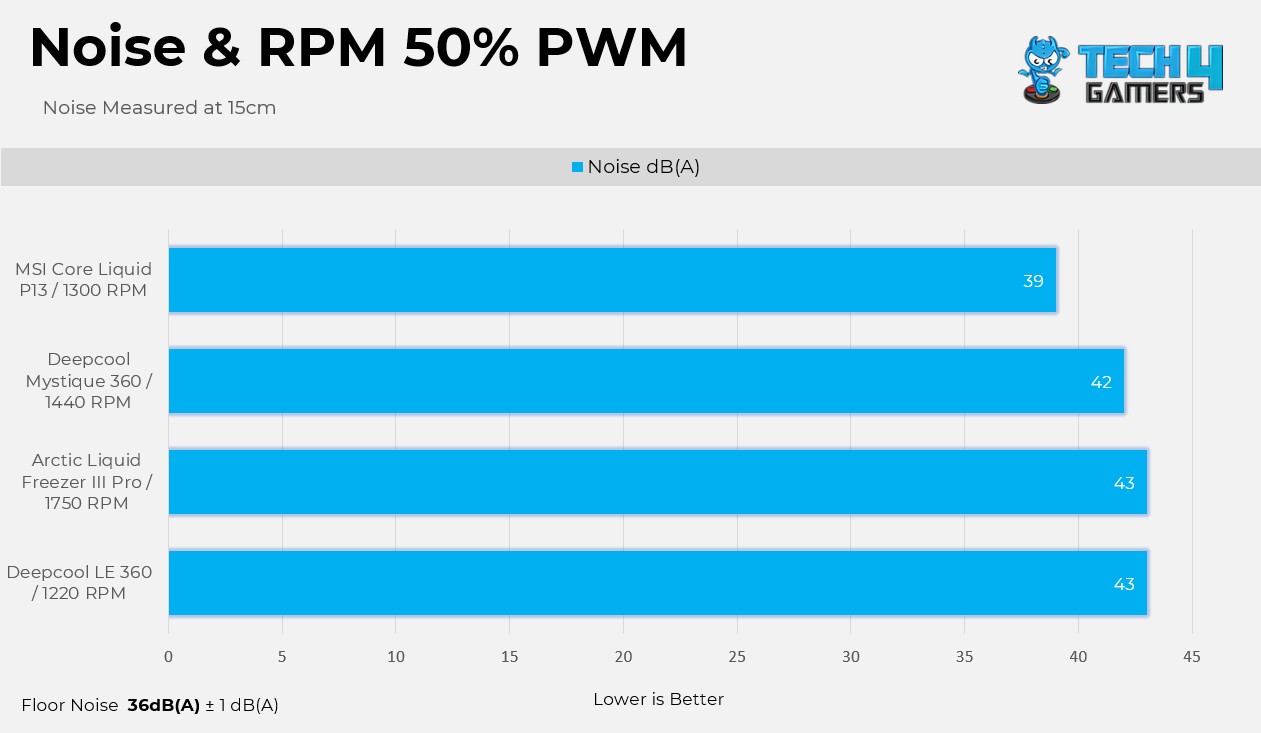
Here are the noise and RPM readings at the 4 PWM levels.
1 of 4
25% PWM
50% PWM
75% PWM
100% PWM
We are very impressed with the Cycloblade 9 Fans here, especially at the 50% RPM; the noise output is still below 39dB(A) at the 1300 RPM. These fans are the quietest among all other fans in the charts.
Should You Buy It?
Buy It If
✅You Want Decent Cooling: The cooler shows decent cooling performance across the benchmarks, handling our CPU easily even at the maxed out load.
✅You Prefer Silent Operations: The Cycloblade 9 fans are tailored for silent operations and also offer strong cooling performance in the noise-normalized results.
✅You Like Having An LCD: The cooler has a 2.1-inch LCD on the block and supports a ton of hardware monitoring, clock, and pre-defined layouts, which look fantastic.
Don’t Buy It If
❌There is a Compatibility Issue: MSI has limited socket support on Intel platforms, meaning the cooler is not compatible with the socket before Intel Core 12th-Generation Processors.
❌You Want The Most Value: Better coolers are available at the less price.
Final Thoughts
The cooler performed decently; however, I have a few complaints. Firstly, the uniform bracket was installed incorrectly on our block. It was a horrible experience because we couldn’t figure out if we were doing something wrong until we unscrewed the brackets on the block and realized the fitting just didn’t fit, so we pushed the bracket slightly to fix that.
I’m impressed by the cable management on this liquid-cooler. MSI has made the cabling very easy; no cables are coming out from the block. Next, I like the EZ Cap that MSI has provided to hide the screws on the block, which makes the system look neat.
The fans are excellent and not very loud in our tests. The panel on the block is round-shaped and 2.1-inch IPS, and it feels premium and smooth with predefined layouts.
However, all of this for $190, which is very expensive. If you’re looking for similar or better performance, you can find alternatives for under $130.
Cooling Performance
In the Noise Normalized Conditions, Core Liquid P13 360 really excels in the charts, almost on par with our best liquid-coolers, temperature-wise. However, at the maxed-out maximum speeds, Core Liquid P13 runs a little bit warmer by almost 2 °C.
Noise
Fans are the stronger point of this cooler; the Cycloblade 9 fans are incredibly quiet in our noise output charts. If you’re looking for a cooler that’s not too loud, I highly recommend this one. However, there are a few other factors we need to consider, such as the cooler’s build quality. We’ll cover that in a bit..
Build Quality
I have a few concerns. First of all, the mounting bracket issue that we have highlighted above, which is installed in an inaccurate position. Also The MSI center definitely needs some fixes. In some instances, the pre-defined layouts do not load, and only sensors are showing with a black background, requiring a hard PC restart sometimes.
We removed and installed the cooler multiple times during our testing, and every time at least one of the stand-off screw that mount with the motherboard was always overtightened and always attached to the cooler’s spring-loaded screw. So we had to separate them manually, which is very weird to see, even though during the installation we made sure that we didn’t overtighten the screws. MSI really needs to take the notice.
Apart from the issues, MSI has done a great job in cable management, and it’s incredibly neat. The design hides the pump and display cable inside the tubing sleeves, which is nice.
The magnetic cover that hides the screws around the block is another perk. The LCD sheathed in the glass cover feels premium and gives a clean aesthetic. The provided cycloblade fans are silent when you’re system is running at a lower load, and even at the maximum load, it performs better than some other all-in-ones in the category.
Value
MSI MPG Core Liquid 360 P13 is launched at MSRP of $189.99, which is totally madness. The cooler provides a premium finish and decent performance, but you can have both from different brands at a much lower price.
At Tech4Gamers, I mainly cover new gaming news, leaks, and rumours. Aside from that, I love to write features about my favourite games while inserting my opinion about their different aspects.
Story Highlight
Helldivers 2 shoots to the top of Steam’s best-sellers chart following its Halo crossover.
The crossover arrived alongside the game’s Xbox launch, boosting its popularity even further.
With the major Into The Unjust update set for September 2, Helldivers 2 is expected to hold its top position for a while.
The game recently launched on Xbox as well, and this crossover was timed to coincide with its debut on the platform. Thanks to the hype surrounding the collaboration, Helldivers 2 has now climbed to the top of Steam’s best-sellers list.
Why it matters: Halo is one of the most famous franchises from Xbox, so its crossover with another shooter title holds high significance.
Helldivers 2 Is Currently The Best Seller on Steam, Thanks To The Halo Collaboration | Source: Steam
As you can see in the image above, Helldivers 2 is currently holding the top spot on Steam’s best-sellers list. Interestingly, the Metal Gear Solid 3 remake is trailing in second place despite its launch tomorrow. The rest of the top five includes Hogwarts Legacy and Red Dead Redemption 2, both boosted by massive discounts.
That said, Helldivers 2 is expected to hold its position for a while, especially with the launch of Into The Unjust on September 2. This major update will bring brand-new battlegrounds, underground caves with limited support, fresh mission types, terrifying new enemies, new armor sets, and a range of cosmetics.
Just a few days later, on September 4, the Dust Devils Premium Warbond will arrive, offering even more weapons, armor, and customization options for players.
The Next Game From Arrowhead Won’t Need A PlayStation Partnership, Thanks To Helldivers 2’s Success
Naturally, the player count has seen a massive boost as well. At the time of writing, over 50,000 players are active in-game, with the 24-hour peak reaching nearly 170,000.
With the hype surrounding Into The Unjust and the Halo crossover, these numbers are only expected to climb higher in the coming days.
What are your thoughts on Helldivers 2 X Halo crossover? Share what you think with us in the comments section below or join the official Tech4Gamers forums for discussion.
At Tech4Gamers, I mainly cover new gaming news, leaks, and rumours. Aside from that, I love to write features about my favourite games while inserting my opinion about their different aspects.
Story Highlight
Gears of War Reloaded is out now, but Xbox and PC aren’t the best platforms to experience it at launch.
According to Digital Foundry, the well-renowned tech experts, PlayStation currently offers the best way to enjoy the game.
The PS5 Pro delivers the best experience thanks to Sony’s advanced PSSR technology.
That said, if you want the best experience possible, it surprisingly isn’t on Xbox. According to experts, the PlayStation platform is currently the best place to experience the game’s full potential.
Why it matters: Xbox skipped a mid-gen refresh, most likely because the company is focusing on its next-gen console. This has given Sony the upper hand thanks to the PS5 Pro.
Digital Foundry, widely regarded as the most reliable source for technical breakdowns, confirmed that Gears of War Reloaded runs best on PlayStation hardware, even though it is an Xbox game.
It’s a case where this combination of a slightly higher pixel count in addition to PSSR produces a significantly better overall image on the PS5 Pro, making it easily the best of the bunch when talking about consoles.
There isn’t much difference when it comes to the pixel count, but the key advantage here is Sony’s in-house AI upscaling tech, PSSR, which keeps improving and gives the PS5 Pro an edge over Microsoft’s consoles.
Gears of War Reloaded Receives Way Less Review Score Compared to The Original Game
Digital Foundry further praised the consoles overall, noting that the game looks sharp and attractive across all console versions, even on the Xbox Series S.
The PC version will be pushed even further with future support and updates, but for now, according to the analysis, the best place to play the game is on the PlayStation 5 Pro.
Digital Foundry also noted that the game runs without any performance hiccups, delivering a super stable 60 FPS on consoles. However, it is worth pointing out that the Xbox Series X does offer slightly better performance than the base PlayStation 5.
What are your thoughts on Gears of War Reloaded running better on PlayStation instead of Xbox? Share your opinion in the comments section below or join the official Tech4Gamers forums for discussion.
Currently serving as a News Reporter at Tech4Gamers, I have the privilege of combining my love for gaming with the art of storytelling. My role involves crafting engaging narratives that keep our audience abreast of the latest developments in the gaming world.
Story Highlight
The PC performance of Metal Gear Solid 3 Remake is subpar, and even the RTX 5090 struggles to maintain 60 FPS on the maximum 4K settings.
The RX 9070 XT also struggles, requiring 720p with FSR enabled just for 60 FPS.
The PS5 port is also plagued by constant frame drops and visual clarity issues.
Konami is finally back with the Metal Gear Solid franchise after a decade-long hiatus. Starting strong with the Metal Gear Solid 3 Remake, public reception has been overwhelmingly positive, with the remake preserving every bit of magic that was present in the original.
That said, the game is plagued with quite a few issues on the technical side. The PC port is horrible, and even the RTX 5090 struggles to output a stable 60 FPS on the maximum setting at 4k resolution.
Why it matters: To no one’s surprise, Metal Gear Solid 3 Remake is another Unreal Engine 5 title. The engine has become notorious for its poor performance, yet developers still opt for it.
zWORMz Gaming tested Metal Gear Solid 3 Remake on his PC sporting an RTX 5090, Ryzen 7 9800X3D, and 32GB of DDR5 6000MHz RAM. Surprisingly, even these specs proved insufficient for the game.
On 4K max settings, the game is almost unplayable, with numerous hitches and stutters, and the screen even freezes intermittently.
Conversely, AMD’s flagship RX 9070 XT also falls short, as one player had to lower their resolution all the way down to 720p and enable FSR performance on top just to achieve 60FPS.
Even The Capable 9070 XT Surrendered In Front Of This Horrendous PC Port || Source: X
Over at the console end, the situation is no better. The game struggles with frame drops on both the PS5 and the PS5 Pro, topped by poor image quality. The PS5 Pro is somehow shown to struggle more with a lack of visual clarity, and PSSR only exacerbates the issue.
So far, things aren’t looking good for Konami as these technical issues may hurt the game’s sales. It’s quite unfortunate, though, since the remake had the potential to become one of the best titles this year, but we’ll have to see.
At Tech4Gamers, I contribute as a Senior News Reporter, combining my skills and gaming enthusiasm to keep our audience updated on the latest developments.
Story Highlight
Clair Obscur: Expedition 33 remains one of the most successful games released this year.
Sandfall Interactive is already planning a sequel within this universe.
Director Guillaume Broche says that Expedition 33 was just one story within the universe, and the next title will tell a new story.
Clair Obscur: Expedition 33 has become a frontrunner for the Game of the Year race after garnering immense praise from all around the industry. At the same time, expectations for a sequel are high, and developer Sandfall Interactive has not shied away from teasers.
In a recent interview, director Guillaume Broche once again teased plans for a sequel.
Why it matters: Sandfall Interactive made its first game earlier this year, so everyone is excited to see what the future holds for this developer.
Speaking to MrMattyPlays, the director described Clair Obscur as a larger universe. Within this universe, Expedition 33 exists as one story, and Sandfall Interactive has plans for more stories within the same future.
This means that the next game from the studio will carry forward the Clair Obscur branding but tell an entirely new story. How connected the next story will be to Expedition 33 remains to be seen, but Guillaume Broche states that the team is not ready to move away from Clair Obscur just yet.
He also stated that it’s too early to say anything about the future, but more details will be shared when the time is right. Nonetheless, fans have not seen the last of this epic IP just yet.
This is not the end of the Clair Obscur franchise.
Clair Obscur: Expedition 33 Shook The Industry Earlier This Year
For those who played Clair Obscur: Expedition 33, the game told a fairly conclusive story. However, there were many elements with more room to explore.
For instance, the war between the painters and the writers did not receive much attention, so a sequel could hone in on such elements if it ends up being loosely connected to the first title. Anyhow, it will be interesting to see where the series goes next.
At Tech4Gamers, I mainly cover new gaming news, leaks, and rumours. Aside from that, I love to write features about my favourite games while inserting my opinion about their different aspects.
Story Highlight
Insomniac was developing a live-service multiplayer Spider-Man game.
The project, titled The Great Web, was ultimately canceled by Sony.
Fans took matters into their own hands, creating a multiplayer mod last year that is now playable on PC.
Had it been launched, the game could have easily made headlines and brought in hefty profits for the developer if the content had been managed well. Unfortunately, that never happened. However, this has not stopped the community from creating its own version of The Great Web.
Thanks to dedicated fans, Spider-Man Remastered now has a working multiplayer mode. The catch is that it is only available on PC since this is not an official release.
Why it matters: As The Great Web has already been canceled, fans wanted to experience the multiplayer goodness, and they are now closer than ever to making this dream come true.
Spider-Man Remastered on PC Already Has A Playable Multiplayer Mode | Source: X
Modders have been working on the multiplayer mod for a long time now, and thanks to their efforts, a beta has already been released. It was released on 25th August, and of course, being a beta, it doesn’t represent the final experience. So, if you are willing to try it, expect plenty of bugs and crashes along the way.
The version released features Freeroam, Fisk Hideouts, Demon Warehouses, Prisoner Camps, Combat Challenges, and Stealth Challenges. However, it won’t support crimes, campaigns, side quests, or DLC.
While the modders won’t directly prevent you from accessing the non-supported features (except for crimes), if you face any issues, they won’t be addressed.
That said, fans who have tried the beta are absolutely enjoying the experience. Some have even said they would do anything to get their hands on it.
how can i get my hands on this. i will do anything.
If you want to give it a go, you will have to access it via Patreon, as the closed beta is only available there.
What are your thoughts on the multiplayer mode for Spider-Man Remastered? Share them with us in the comments section below or join the official Tech4Gamers forums for discussion.
At Tech4Gamers.com, I cover the latest news and rumours in the gaming industry, from new game releases to hidden gems and video game leaks. Furthermore, I occasionally write tech articles about video game consoles, providing insights into the hardware and software that powers our gaming experiences.
[Press Release] Corsair has introduced the XENEON EDGE 14.5″ LCD Touchscreen, a slim display designed to complement any PC. With a 2560×720 resolution, 60Hz refresh rate, and multi-touch support, it offers a clear and responsive way to monitor apps, widgets, and system stats without interrupting the main screen.
The 14.5-inch panel utilizes premium AHVA technology, ensuring sharp text and vivid visuals even from off-angle viewing. Its five-point capacitive touchscreen makes navigating apps and widgets fast and intuitive, giving users direct control over stats, media, and notifications.
At 372mm x 120mm x 20mm, the display is compact yet versatile. It can be mounted inside a PC, attached magnetically to panels, placed on a desk with the included stand, or secured to an arm using threaded points. Connectivity is simple with USB-C DP Alt Mode or HDMI, and it supports both portrait and landscape orientations in Windows.
Through Corsair iCUE, the XENEON EDGE can be customized with widgets and utilities, including CPU and GPU monitoring, fan controls, chat windows, and music apps. Future updates will further expand functionality, offering Stream Deck-like control for streamers and power users.
Corsair XENEON EDGE 14.5″ LCD Touchscreen is available now from the CORSAIR webstore and will roll out through authorized retailers worldwide in Q4.
At Tech4Gamers.com, I cover the latest news and rumours in the gaming industry, from new game releases to hidden gems and video game leaks. Furthermore, I occasionally write tech articles about video game consoles, providing insights into the hardware and software that powers our gaming experiences.
[Press Release] Cougar has introduced three new products designed for hybrid lifestyles where gaming, work, and creativity overlap. The lineup includes the Stryder ergonomic chair, the Defensor S gaming chair, and the Ultimus Pro mechanical keyboard, each designed to focus on comfort, durability, and modern functionality.
The Stryder is built for everyday flexibility, featuring a wide adjustable headrest, contoured lumbar support, and multi-density foam for balanced comfort. Flip-up armrests and quiet casters enhance adaptability, while its lifestyle-inspired design suits both offices and gaming setups. Available in Black, Gray ($129), and White ($139).
The Defensor S features the PushBack Advanced Lumbar Support System for tailored spine alignment, plus high-density foam and a magnetic neck pillow. Esports-tested 4D armrests fold or reposition for full freedom. Upholstered in durable leather-like fabric with optional velvet sleeves, it also includes a steel base, oversized wheels, and a storage pocket. Priced at $329 in Army Green, Navy Blue, and Jet Gray.
The Ultimus Pro connects up to five devices via wired, 2.4GHz wireless, or Bluetooth, with quick-switch keys for seamless control. Its compact 98% layout saves desk space while hot-swappable switches, PBT keycaps, and sound-dampening foam ensure performance and comfort. With up to 380 hours of battery life and full UIX software customization, it launches at $49 in Black and White.
At Tech4Gamers, I contribute as a Senior News Reporter, combining my skills and gaming enthusiasm to keep our audience updated on the latest developments.
Story Highlight
Call of Duty Black Ops 7 will no longer feature older cartoony skins from the last game.
The developer says that it intends to keep this specific Call of Duty title authentic and grounded.
This change has come in response to community feedback and competition from Battlefield 6.
Black Ops 7 is Activision and Treyarch’s long-anticipated sequel to Black Ops 2, but initial reactions to the game have been far from positive. Between dislikes on the YouTube trailer and comparisons with Battlefield 6, this entry seems to be the most divisive Call of Duty since Infinite Warfare.
The recent cartoon skins in Call of Duty have also become a key point of discussion lately, and the developers have finally responded. According to Treyarch, Black Ops 7 is now aiming for an authentic feel.
Why it matters: Fans have been upset with the direction of the series for a while, so this change has been received well by dedicated Call of Duty fans.
The latest Black Ops 7 update comes from the Call of Duty blog. Although Treyarch previously confirmed that it would allow fans to carry over Black Ops 6 skins to Black Ops 7, this will no longer be the case.
The team says that this decision was made to keep Black Ops 7 authentic and true to its settings. This decision seems to be a direct response to the criticism of over-the-top cosmetics, such as Beavis and Butthead, in Black Ops 6.
Since Treyarch is still carrying over content like GobbleGums, the team likely intends to avoid cartoony skins in general for Black Ops 7. In a way, the team has made its stance clear, and this should be reflected in the post-launch cosmetics for the game.
Black Ops 7 needs to feel authentic to Call of Duty and its setting.
The First-Person Shooter Will Receive New Details Next Month
Unfortunately, this decision is likely to upset fans who spent money on microtransactions in last year’s Call of Duty release. The blog states that players will still retain these cosmetics for use in Warzone, but not everyone is taking well to this information.
It will also be interesting to see whether Treyarch and Activision stay true to their word till the end of Black Ops 7’s lifespan. In the past, Call of Duty has been known to contradict its statements a few months down the line, so some fans are concerned about history repeating itself.
At Tech4Gamers, I contribute as a Senior News Reporter, combining my skills and gaming enthusiasm to keep our audience updated on the latest developments.
Story Highlight
A new Dino Crisis trademark has been registered in Brazil.
The trademark was first registered last month, and Capcom has also released new merchandise for the IP in Japan.
All evidence seems to be hinting at an inevitable revival for the IP.
Capcom has brought back many of its legacy IPs recently, but Dino Crisis has remained neglected for a while. Despite fans asking for a remake and another entry in the IP, not much has been done with Dino Crisis over the last few years.
Still, recent trademarks have given fans some hope, and it appears Capcom has registered yet another interesting trademark. Now, more than ever, it seems Dino Crisis is on the verge of a comeback.
Why it matters: Capcom previously confirmed that it would focus on legacy IPs, and it seems this trademark is part of those plans.
Dino Crisis has a strong fanbase that still wants a new game.
As shared on Resetera, the new trademark was first registered in Brazil on July 3. The interesting part is that Capcom has used a different trademark registration compared to previous instances, suggesting there is more to the story than meets the eye.
The trademark’s registration also coincides roughly with the announcement of Resident Evil Requiem. This, combined with the fact that not much else is currently going on with the franchise, suggests that Capcom is serious about Dino Crisis.
Although trademarks are frequently registered for IP ownership alone, Dino Crisis has also received new merchandise in Japan. All of these signs point to something happening with the IP very soon.
Fans Have Wanted A Remake From The Franchise Forever
Capcom is focused on new titles like Resident Evil Requiem and Pragmata for now, but the studio will likely look to branch out soon enough. Therefore, it would only be natural to fall back on a series like Dino Crisis for additional variety.