Threads
A Commendable Refresh
Review Summary
The MSI MPG X870E Carbon Max WiFi is a decent refresh from MSI, which offers great performance with its 18+2+1 VRMs. While it also comes with impressive I/O and high-speed memory support of up to 8400 MT/s. All of this, including the 64 MB BIOS & dedicated OC Engine chip upgrades, makes it a decent pick for $429.99.
Hours Tested: 10

Overall
-
Performance - 9.5/10
9.5/10
-
Value - 8/10
8/10
-
Features - 9.5/10
9.5/10
-
Design - 9/10
9/10
Pros
- Impressive VRM design
- Strong build quality
- 64 MB BIOS & OC Engine chip
- High-speed memory support
- RGB looks pleasing
- Plethora of high-speed USB ports
- 2x LAN ports
Cons
- No 10G LAN port

The AM5 socket-based 800 series has been out for a good while now. However, we’re still seeing some refresh variants being released from time to time. Same is the case with this new MSI MPG X870E Carbon Max WiFi motherboard. The motherboard offers some new features and upgrades that might make it a better pick over its predecessor in the similar price range.
This Max series motherboard brings an upgrade to its BIOS memory capacity and a dedicated OC engine chip, which are also the main highlights of this refresh release. So, without further ado, let’s dive straight into our review!
Key Takeaways
- The MSI MPG X870E Carbon Max WiFi is MSI’s high-end X870E offering, and is mostly up in the performance charts while also providing excellent aesthetics as well as plenty of USB ports and EZ features.
- You should buy the MSI MPG X870E Carbon WiFi if you’re looking for a board offering high performance while also having features that could make things easier to work around.
- Don’t get the MSI MPG X870E Carbon Max WiFi if you already have the non-Max variant or if you’re in search of a 10G LAN port.
Take a look at the specifications:
| CPU Support | AMD Ryzen 7000, Ryzen 8000, Ryzen 9000 |
| Memory Support | DDR5 8400+ MT/s (OC) |
| PCIe Slots | 1x PCIe 5.0 x16, 1x PCIe 5.0 x8, PCIe 4.0 x4 |
| M.2 Slots | 2x PCIe Gen5 (x4), 2x PCIe Gen4 (x4) |
| SATA Ports | 4x 6Gb/s |
| Audio | Realtek® ALC4080 Codec |
| Network | 1x Realtek® 8126 5G LAN, 1x Realtek® 8125 2.5G LAN, WiFi 7 |
| USB Ports | 22 ports, including 2x USB 40Gbps Type-C (Rear) |
| Size | 243.84 mm x 304.8 mm, ATX Form Factor |
Packaging and Unboxing
The board comes with a cardboard box fairly similar to its non-MAX variant, with differences only in its name and visuals of the motherboard itself. Another difference that you can notice is the badging of BIOS with 64 MB memory instead of the standard 32 MB that the majority of boards come with.
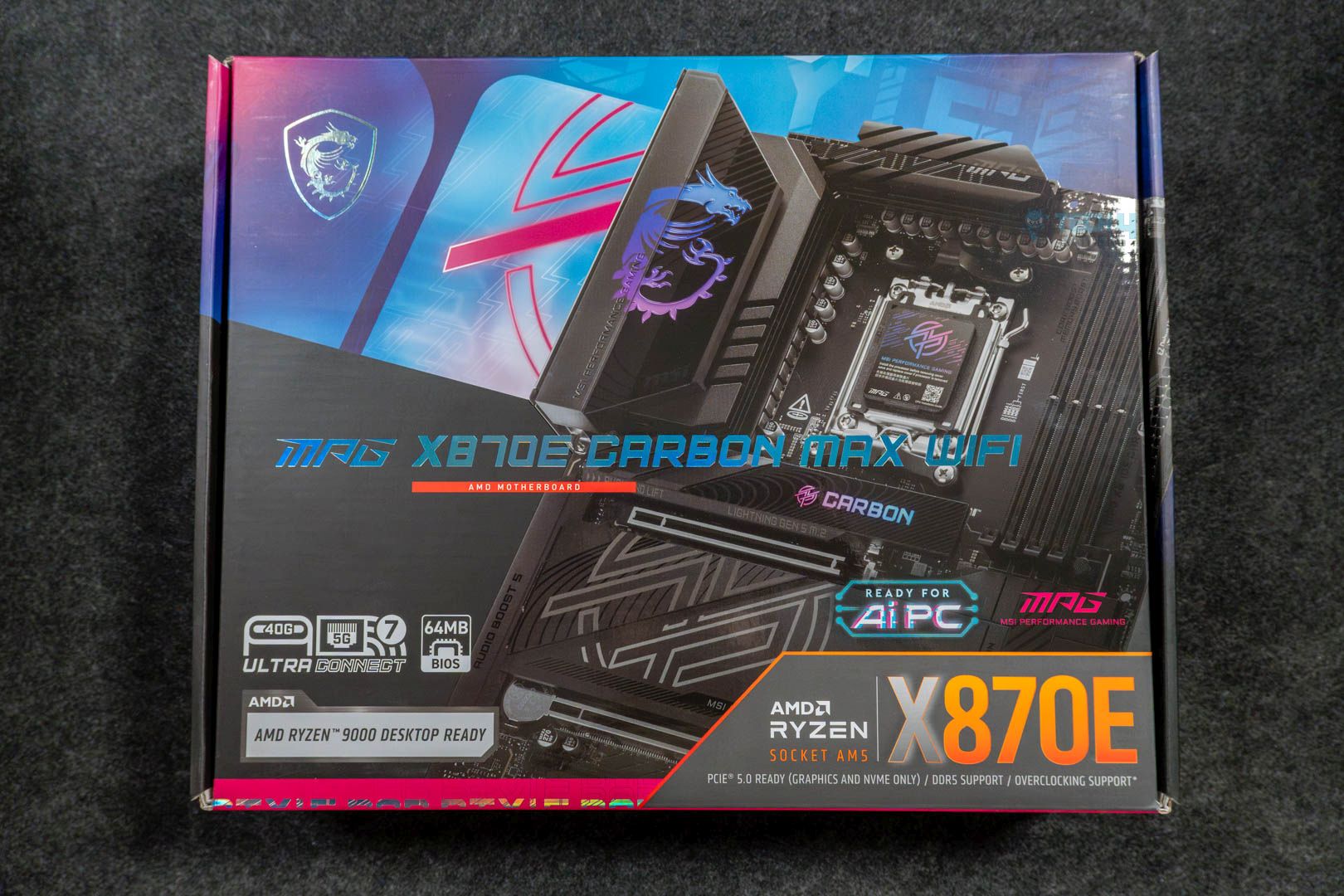
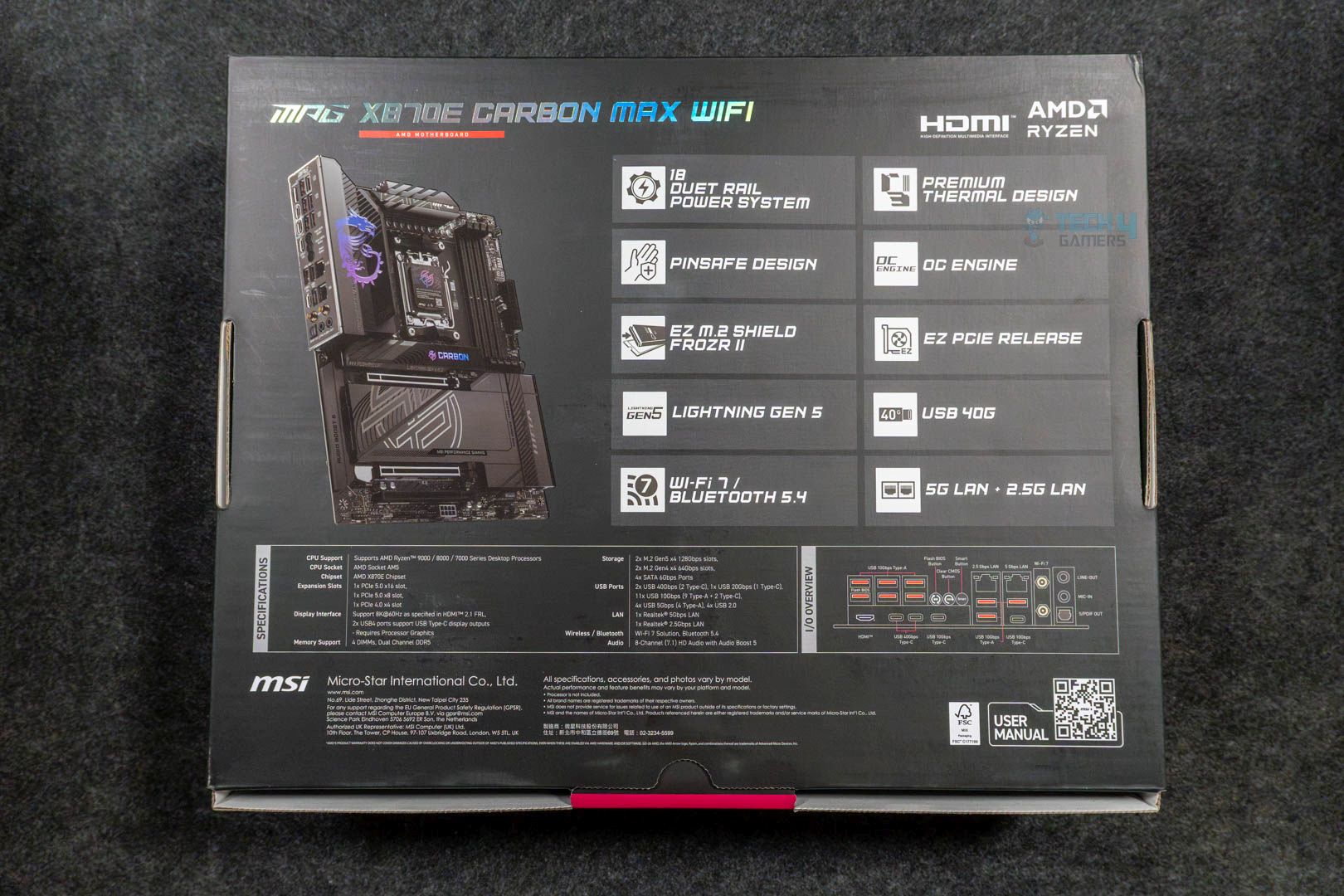
Upon opening the box, we get these accessories:
- EZ M.2 Clip II
- EZ M.2 Clip II Remover
- 1 to 3 EZ Conn-Cable (V2)
- 2x SATA Cables
- 1x ARGB Extension Cable
- EZ Front Panel Cable
- EZ WiFi Antenna
- 1x Cable Sticker Sheet
- Quick Installation Guide
- EU Regulatory Notice
The included stuff is similar to its predecessor, which is good enough, as the bundled EZ Front Panel Cable and 1 to 3 EZ Conn-Cable (V2) make the whole cable management job somewhat easier and quicker.
Design

The board boasts the same design, and the only difference we could notice is that the motherboard’s model isn’t as prominent as it was on the non-Max variant. Not to mention, the board has an 8-layer server-grade PCB design with a TVS feature for swift transfer speeds and overcurrent protection. These safety features are a no-brainer as they ensure the longevity of the motherboard.

Similarly, since it incorporates the same chipset, the distribution of ports and other components is also the same. Like PCI_E1, PCI_E2, RAM, USB4 Type-C ports, Gen5 M.2_2, USB3.2 Gen2 ports, M.2_1, and HDMI 2.1 port being powered by the AM5 CPU. The rest of the ports, such as SATA ports, 5G & 2.5G LAN ports, Wi-Fi 7, and the remaining USB & audio chips, are handled by Chipset 1 & 2. All of this is visualized in detail in the block diagram.
Power Delivery To Socket

The motherboard comes with an 18+2+1 phase VRM design coupled with Smart Power Stages. Both the VCore & SoC stages deliver a full 110A, while the single Misc stage goes upto 55A only. Not to forget, the whole VRM design is based on the Duet Rail Power System, meaning there’ll be fewer delays as two stages are getting signals at once from every controller. This is an adequate VRM setup that can easily handle a decent amount of overclocking shenanigans.
VRM Cooling

When it comes down to this robust VRM setup, the motherboard has more than enough to take care of it all. As there are two big matte-black extended heatsinks tied together via a single heatpipe, which works great. Moreover, there are also 7W/mK thermal pads underneath for the MOSFETs. Although this entire setup is quite standard for motherboards of this category, it’s ample enough that there’s no need for something exclusive.
DIMM Slots

The memory situation is a decent one, too, as the board offers four DIMM slots with each having support for a 64 GB stick. So, using all four slots totals out at 256 GB with a speed up to 8400 MT/s. Besides that, both the EXPO and X.M.P profiles are supported, and there’s even support for CUDIMM memory. Currently, that’s only possible via Clock Driver bypass mode, so there’s not much to get excited about for now. However, non-ECC memory support works as intended without bypass mode or any other workaround.

What You Should Know About the New OC Engine & 64 MB BIOS Chip?
Since this refreshed motherboard features a 64 MB BIOS chip, it offers a more feature-rich BIOS experience with a more user-friendly, detailed UI, as well as support for a wider range of upcoming CPUs. Meaning you don’t have to lose or update much to support the newer processors. Additionally, some key drivers will also be pre-installed, such as WiFi drivers, so you don’t have to do it each time you install Windows or change your drive.
As far as the OC Engine goes, it’s a dedicated chip that this new board features, and it helps with a more stable and superior overclocking experience by enabling the independent BCLK control. In layman’s terms, clocks can be adjusted without affecting other components such as iGPU, PCIe, or NVMe slots.
– Usman Saleem
Storage
The MSI MPG X870E Carbon Max WiFi offers four M.2 slots. Two of them are PCIe Gen5, while the other two are PCIe Gen4. Fortunately enough, all the M.2 slots have dedicated heatsinks to keep the NVMe drives nice and tidy. As far as the NVMe size support goes, all the M.2 slots have support for 2280/2260 cut drives.

There’s also EZ M.2 installation in place, which is MSI’s way of making it seamless by removing the need to use screws. This is especially great for newcomers as it helps save quite a bit of time. The difference between all these slots is that the primary M.2 shield also features the Carbon branding that is RGB-enabled. It does enhance the aesthetics of the board overall. Lastly, there are four SATA 6G ports as well, in case you want to utilize old HDDs or SATA SSDs.
PCIe Slots

As far as the PCIe slot situation is concerned on this motherboard, it offers plenty. There are three slots in total that you can use; however, each has a different bandwidth. Like, the primary slot is a PCIe Gen5 and runs at full x16 mode. Whereas the 2nd slot is limited to x8 mode, which is fine and standard. The 3rd slot is a PCIe Gen4 and only runs at x4 mode.
Do note that the primary slot also features the EZ-PCIe release mechanism, which makes removing the GPU snappy, as all you need to do is press the release button. The remaining two slots have the standard latch system, which makes sense as they aren’t used as much.
USB Connectivity
Looking at the USB side, the motherboard offers ample ports, totaling up to 22 USB ports:
- 2x USB 40 Gb/s Type-C (Rear)
- 1x USB 20 Gb/s Type-C (Front)
- 2x USB 10 Gb/s Type-C (Rear)
- 9x USB 10 Gb/s Type-A (Rear)
- 4x USB 5 Gb/s Type-A (Front)
- 4x USB 2.0 (Front)
The ASM4242 chip is responsible for the USB 40 Gb/s ports, whereas the 10 Gb/s Type-A ports are tied to the RTS5420 chip from Realtek.
Network and Connectivity
While there are two LAN ports on this board, neither of them isn’t a 10G one, as one is a Realtek 8126 5G LAN, and the second is a Realtek 8125 2.5G LAN. They’re more than sufficient for the majority of the cases, but a 10G LAN would’ve been nice to see as an upgrade over its predecessor. Nevertheless, WiFi 7 and Bluetooth 5.4 are still intact, though they need at least Windows 11 version 24H2 to work at their full potential.
Audio Solution
Like almost every other motherboard of this budget, this one also uses the Realtek ALC4080 Audio Codec, which serves its purpose well. It supports all the basic features, such as the 7.1-channel audio and up to 32-bit/384 kHz playback on the front panel. As long as you’re not an audiophile who requires every bit of fine-tuning, this is everything you could possibly want.
Internal Connectors
Now, when it comes to the internal connectors, the motherboard has a plethora of connectors, including some useful features. One of them is the EZ Digit Debug and EZ Debug LEDs being present right above the 24-pin power connector. These come in handy while troubleshooting your PC.
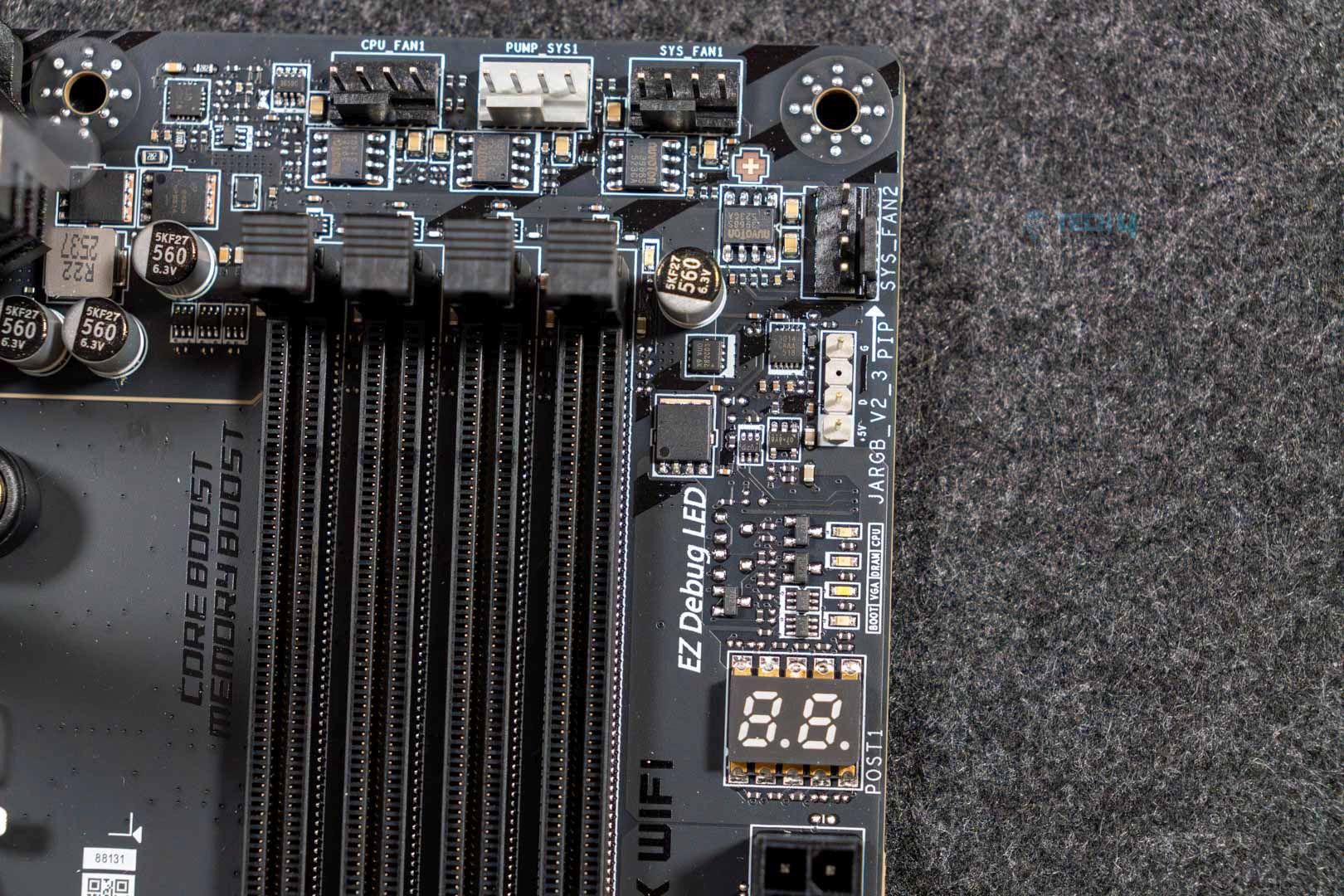
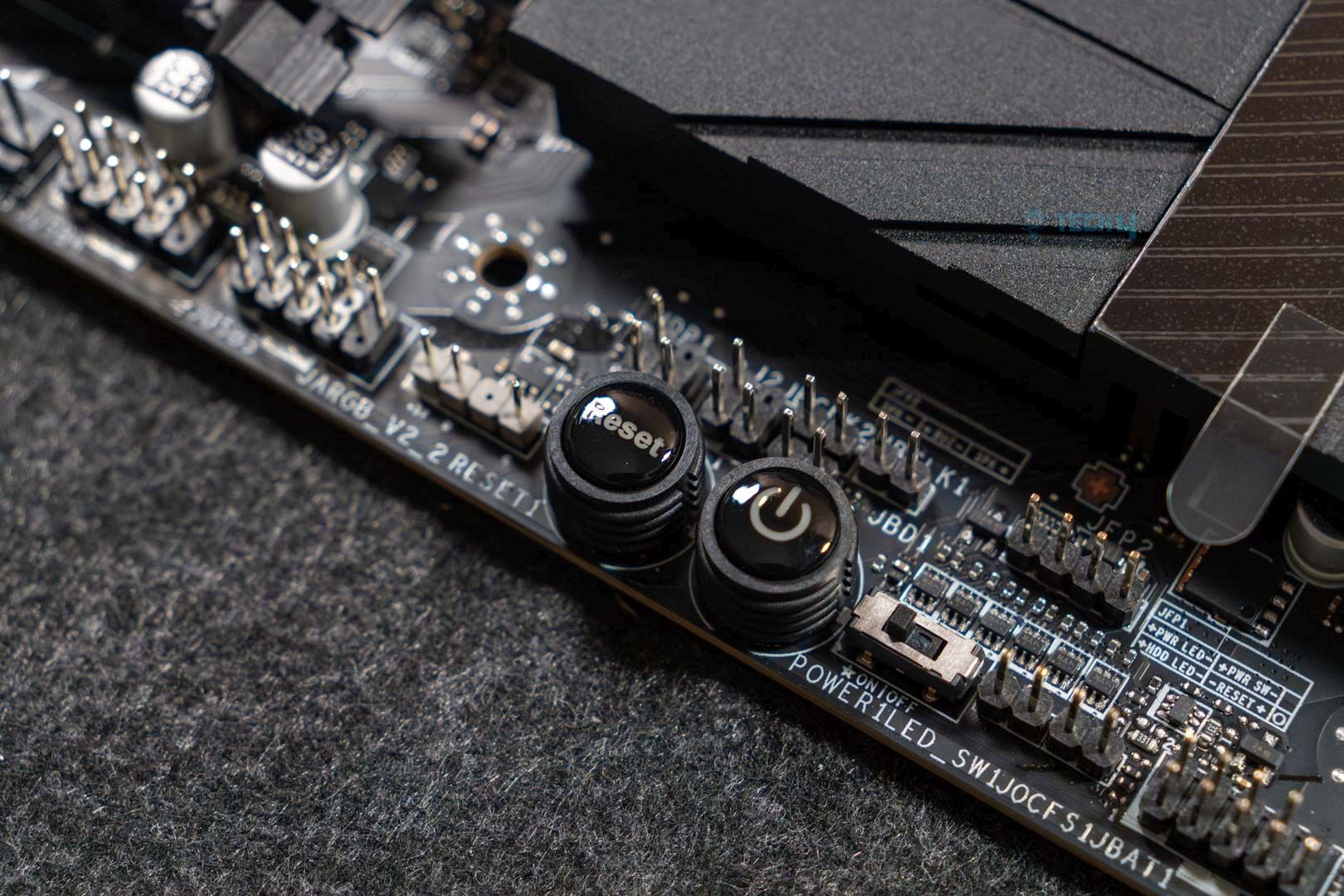
Anyways, here’s the list of every connector present on this board:
- 4x EZ Debug LEDs
- 1x Digit Debug LED panel
- 1x Power Connector (ATX_PWR)
- 2x Power Connector (CPU_PWR)
- 1x Power Connector (PCIE_PWR 8pin)
- 4x USB 2.0 ports
- 4x USB 5 Gb/s Type-A ports
- 1x USB 20 Gb/s Type-C ports
- 1x CPU Fan
- 1x Combo Fan (Pump_Sys Fan)
- 5x System Fan
- 1x EZ Conn-header (JAF_2)
- 2x Front Panel (JFP)
- 1x Chassis Intrusion (JCI)
- 1x Front Audio (JAUD)
- 1x Thermal Sensor connectors (T_SEN)
- 3x Addressable V2 RGB LED connector (JARGB_V2)
- 1x RGB LED connector (JRGB)
Rear I/O Panel
On the rear, we get:
- 2x USB 40 Gb/s Type-C
- 1x USB 10 Gb/s Type-C
- 6x USB 10 Gb/s Type-A
- 1x USB 10 Gb/s Type-C
- 3x USB 10 Gb/s Type-A
- Wi-Fi 7/Bluetooth
- Optical S/PDIF Out
- Flash BIOS Button
- Clear CMOS Button
- Smart Button
- Audio Connectors
- HDMI™
- 2.5G LAN
- 5G LAN
Besides all the connectors, the board has a pre-installed I/O shield with proper labeling of each port. Moreover, there’s also a smart button that is customizable via BIOS to set specific commands such as safe boot, RGB light toggle, system reboot, or Turbo fan mode.
Our Test Bench
Take a look at our test build and configurations:
- AMD Ryzen 9 9950X 16C/32T
- ARCTIC Liquid Freezer II 420 Liquid CPU Cooler
- G. Skill Trident Z5 Royal NEO DDR5-6000 CL28 EXPO Kit (2×16 = 32GB)
- XPG Lancer RGB 32GB 7200MHz DDR5 RAM
- Nvidia GeForce Gigabyte RTX 4090 Gaming OC
- Western Digital SN850 Black 500GB NVMe SSD [For OS]
- Sabrent Rocket 4 Plus 2TB Gen4x4 NVMe SSD [For Software]
- Sabrent Rocket 4 Plus 4TB Gen4x4 NVMe SSD [For Games]
- Sabrent Rocket NANO V2 4TB Portable SSD
- Corsair HX1200i Platinum PSU
- Windows 11 Pro Build 23H2
- BIOS Version 7E49v1A12
- AGESA 1.2.0.2 firmware
Synthetic Benchmarks

Starting with Blender, the difference is nonexistent: the MSI MPG X870E Carbon Max WiFi performed the same as its non-Max variant.

During the Cinebench run, the single-core score remained the same. However, there was a 1-point improvement in multicore testing.

We also saw improvements during the Corona 11 test run; the Carbon Max was able to complete the whole run in 0.3 seconds faster.

The same improvements are also present in Geekbench 6; the new motherboard has an advantage of 2 scores over its previous iteration.

The MSI MPG X870E Carbon Max WiFi again has a lead of 2 scores over its non-Max variant in the V-Ray benchmark run.
Gaming Benchmarks
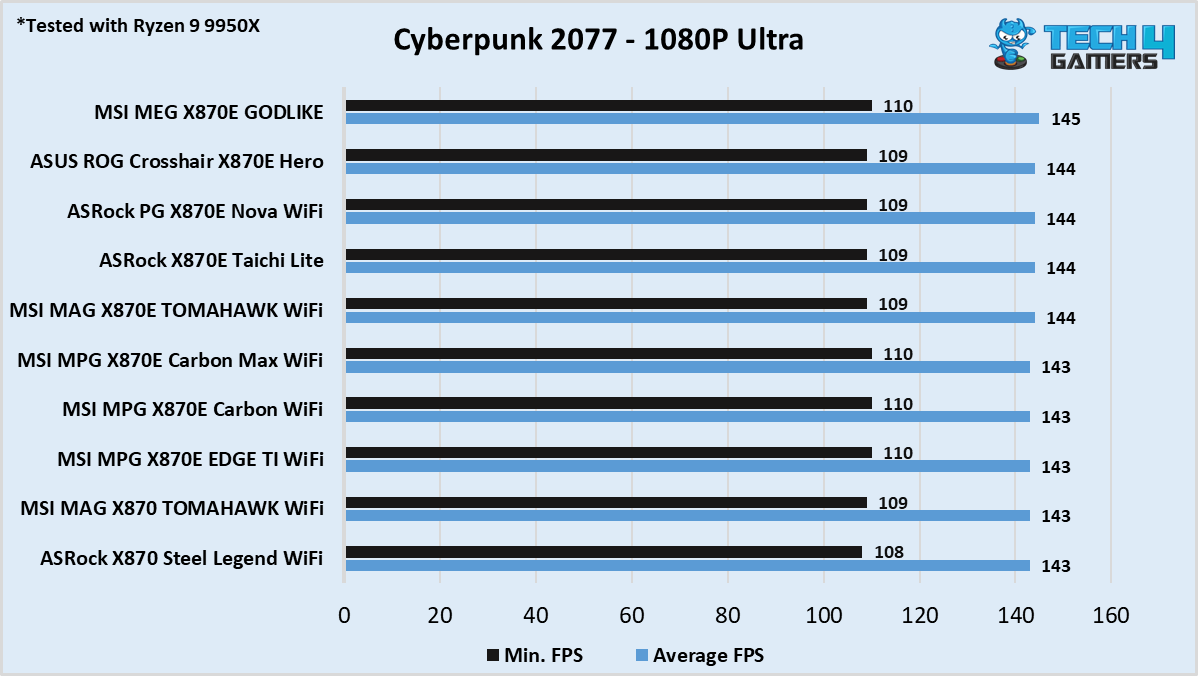
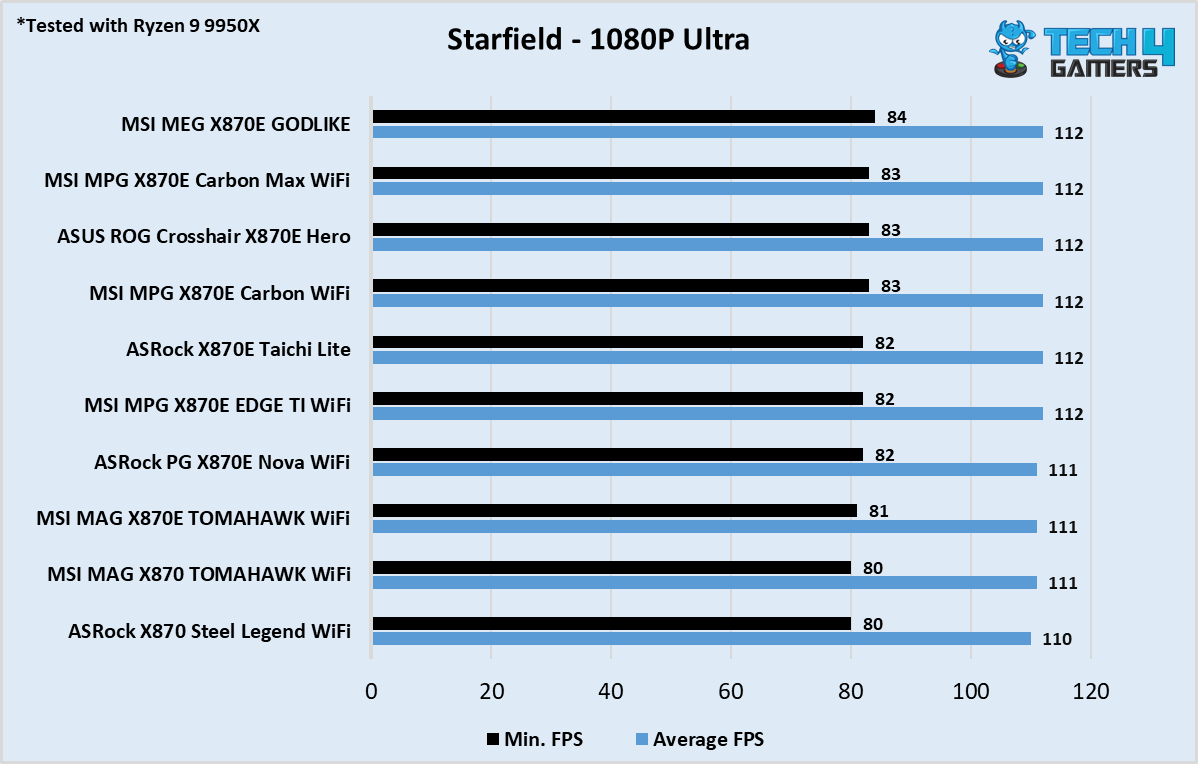
As far as the gaming performance is concerned, we couldn’t find any difference between the two in both games that we tested.
Boot Time

The MSI MPG X870E Carbon Max WiFi boots up in the same 21-second mark as its non-Max variant and other motherboards.
VRM Temperatures and Power Consumption

The X870E Carbon Max WiFi tops out at 56 °C, which is 1 degree less in comparison and a welcome improvement. Meaning that everything is going well within safe temperature limits.

To offer all those tiny bits of improvements, the motherboard also eats a little more in terms of power. Though it still isn’t the most power hungry on the list.
Should You Buy It?
Buy It If:
✅You’re searching for a future-ready board: The new X870E Carbon Max comes with a 64 MB BIOS that makes it already fit for future chips, considering it can contain microcodes of many CPUs at once.
✅You use a lot of USB ports: If your use case requires a lot of USB ports, and that too quite fast. Then this board offers 22 of them, which are plenty.
✅You want performance: The motherboard comes with a dedicated OC engine chip, which can help you with the overclocking side of things alongside the 18+2+1 VRM design to produce ample horsepower.
Don’t Buy It If:
❌You already own a non-Max variant: If you already have a non-Max variant, then there’s no need to upgrade, as the non-Max board is already a decent one and isn’t too far behind this new one.
❌You want a 10G LAN port: The lack of a 10G LAN port again is a kind of deal breaker, so if you’re someone who could really use those extra bits of speed, then skip this board.
My Thoughts
The MSI MPG X870E Carbon Max WiFi comes with a few upgrades while keeping most of its personality the same as its previous iteration. The board itself has impressed us with decent performance in both synthetic and gaming benchmarks. Not to mention, it runs quite cool as well under load, thanks to MSI’s excellent cooling design. Similarly, MSI also provided some of its useful EZ features, such as the EZ PCIe release. Besides all that, the motherboard is recommended for those who are seeking one for their new build. Simply because it offers more while costing just about the same.
Thank you! Please share your positive feedback. 🔋
How could we improve this post? Please Help us. 😔

[PC Hardware Specialist]
Usman Saleem brings 8+ years of comprehensive PC hardware expertise to the table. His journey in the tech world has involved in-depth tech analysis and insightful PC hardware reviews, perfecting over 6+ years of dedicated work. Usman’s commitment to staying authentic and relevant in the field is underscored by many professional certifications, including a recent one in Google IT Support Specialization.
8+ years of specialized PC hardware coverage
6+ years of in-depth PC hardware analysis and reviews
Lead PC hardware expert across multiple tech journalism platforms
Certified in Google IT Support Specialization
Get In Touch: usman@tech4gamers.com
 Join Our Community