Worth It?
Review Summary
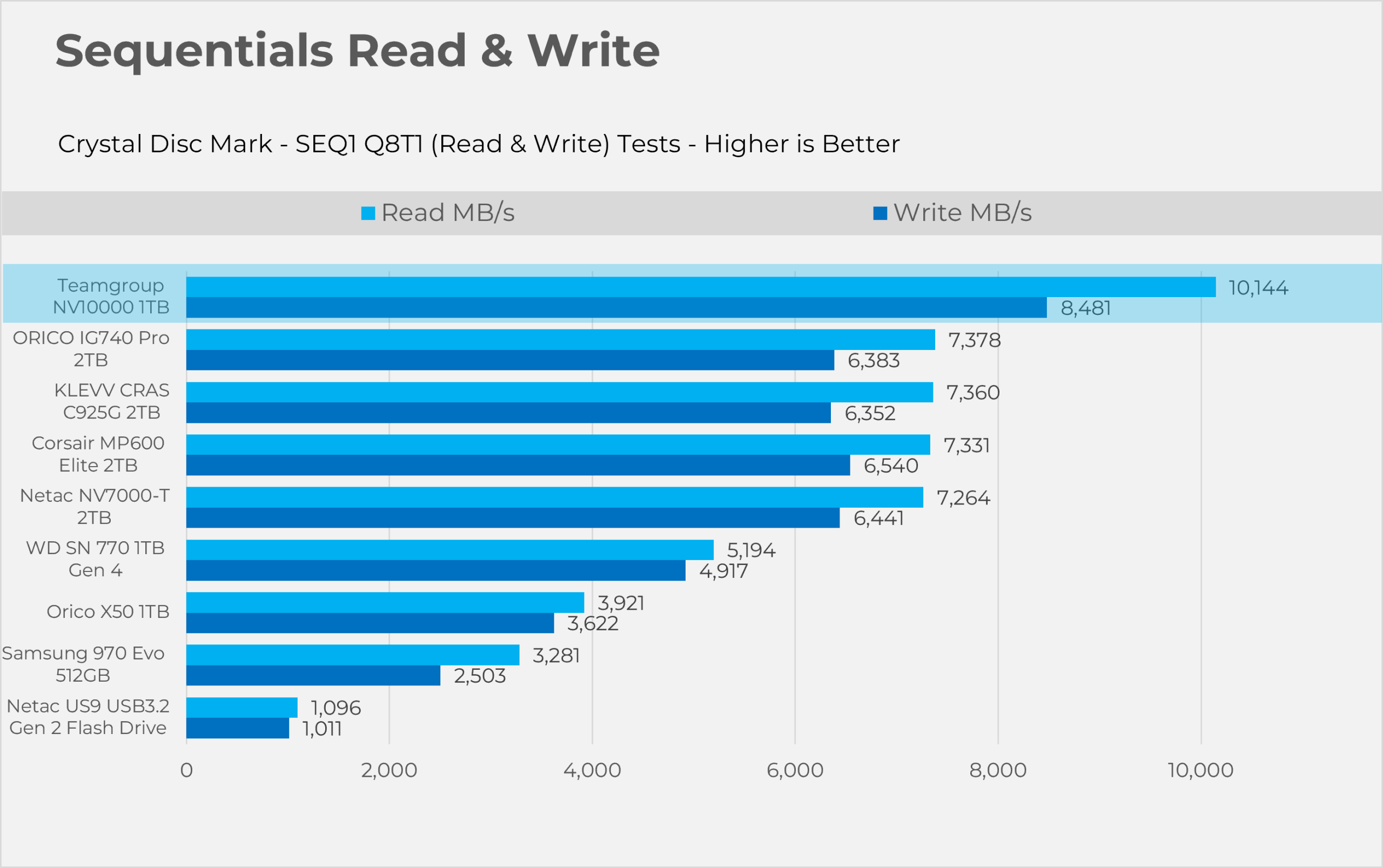
The TeamGroup NV10000 1TB uses the 7nm, DRAM-less Phison E31T controller, pushing beyond Gen4 limits to deliver up to 10,144 MB/s read and 8,481 MB/s write speeds. In our benchmarks, it stays responsive for everyday tasks. It also comes with a graphene heat spreader and doesn’t require an active cooling fan.
In our tests, it ran very cool, with thermal performance almost on par with Gen4 drives. However, at $200, it’s an expensive option and a tough sell for purely gaming-focused builds. Its real value is for creators and enthusiasts who need Gen5 bandwidth without the excessive heat.
Hours Testing: 12 Hours

Overall
-
Performance - 8.5/10
8.5/10
-
Value - 7/10
7/10
-
Cooling & Thermals - 9.05/10
9.1/10
Pros
- Up to 10,000MB/s Read and 8,200MB/s Write Speeds.
- Cool & Efficient.
- No Active Fan Required.
- Ultra Low Burst Latency.
- Compatible with PlayStation 5.
- 5-Year Warranty
Cons
- Steep Price Premium
- DRAM-less
- Negligible Gaming Gains


Teamgroup sent us the NV10000 (1TB) Gen5x4 NVMe storage, an affordable, mainstream solution in the Gen5 solid-state storage segment that bridges the gap between speed and functionality. It’s a DRAM-less SSD powered by the 7nm Phison PS5031-E31T controller while utilizing 3D TLC NAND flash. Without external DRAM, this drive uses Host Memory Buffer (HMB) technology to deliver sequential read speeds up to 10,000 MB/s and write speeds up to 8,200 MB/s. The Gen5x4 SSDs can reach up to 14,000 MB/s in sequential reads, but honestly, you don’t need that kind of speed because few real-world applications show a noticeable impact. The controller is engineered to deliver Gen5 speeds with a thermal and power envelope of a Gen4 drive.
Well, the Gen5 storage we have seen is mostly power-hungry and requires active cooling; however, the NV10000 is different. It uses Teamgroup’s patented graphene heat spreader; we’ll put it to the stress test to see how effective it is under the motherboard’s heatsink. This SSD comes with a 5-year warranty and has 600 TBW of endurance.
This Gen5 SSD can also be paired with consoles such as the PlayStation 5.
| Specification | Details |
| Model / Part Number | TEAMGROUP NV10000 / TM8FGP001T |
| Interface | PCIe Gen 5.0 x4, NVMe 2.0 |
| Form Factor | M.2 2280 |
| Controller | Phison PS5031-E31T (4-channel, 7nm) |
| NAND Flash | 3D TLC NAND |
| DRAM Cache | DRAM-less (Host Memory Buffer / HMB supported) |
| Sequential Read | Up to 10,000 MB/s |
| Sequential Write | Up to 8,200 MB/s |
| Endurance | 600 TBW |
| MTBF | 1,500,000 hours |
| Thermal Solution | Patented ultra-thin graphene heat spreader |
| Warranty | 5-Year Limited Warranty |
What Makes Teamgroup NV10000 M.2 PCIe5.0 SSD 1 TB Different?
Teamgroup NV1000 employs the second generation of PCIe Gen5x4 (TSMC 7nm Phison E31T) controller from Phison, which delivers significant improvements in thermal and power efficiency and does not require an active, noisy heat sink, also delivering speeds of up to 10 GB/s in sequential mode without the flagship pricing overhead; however, it is still more expensive than Gen4 storage solutions.
What About The Availability & Pricing?
Teamgroup NV10000 comes in 1TB, 2TB, and 4 TB capacities. Pricing for the 4 TB is currently unknown, and we can’t find it anywhere. In the majority of stores in the US, this storage solution is available in stock as of the time of writing this review at this price:
| Capacity (Volume) | Launch MSRP (USD) | Current Market Price (USD) |
| 1 TB | $183.00 | $199.99 |
| 2 TB | $400.00 | $396 |
| 4 TB | N/A | N/A |
Packaging & Accessories
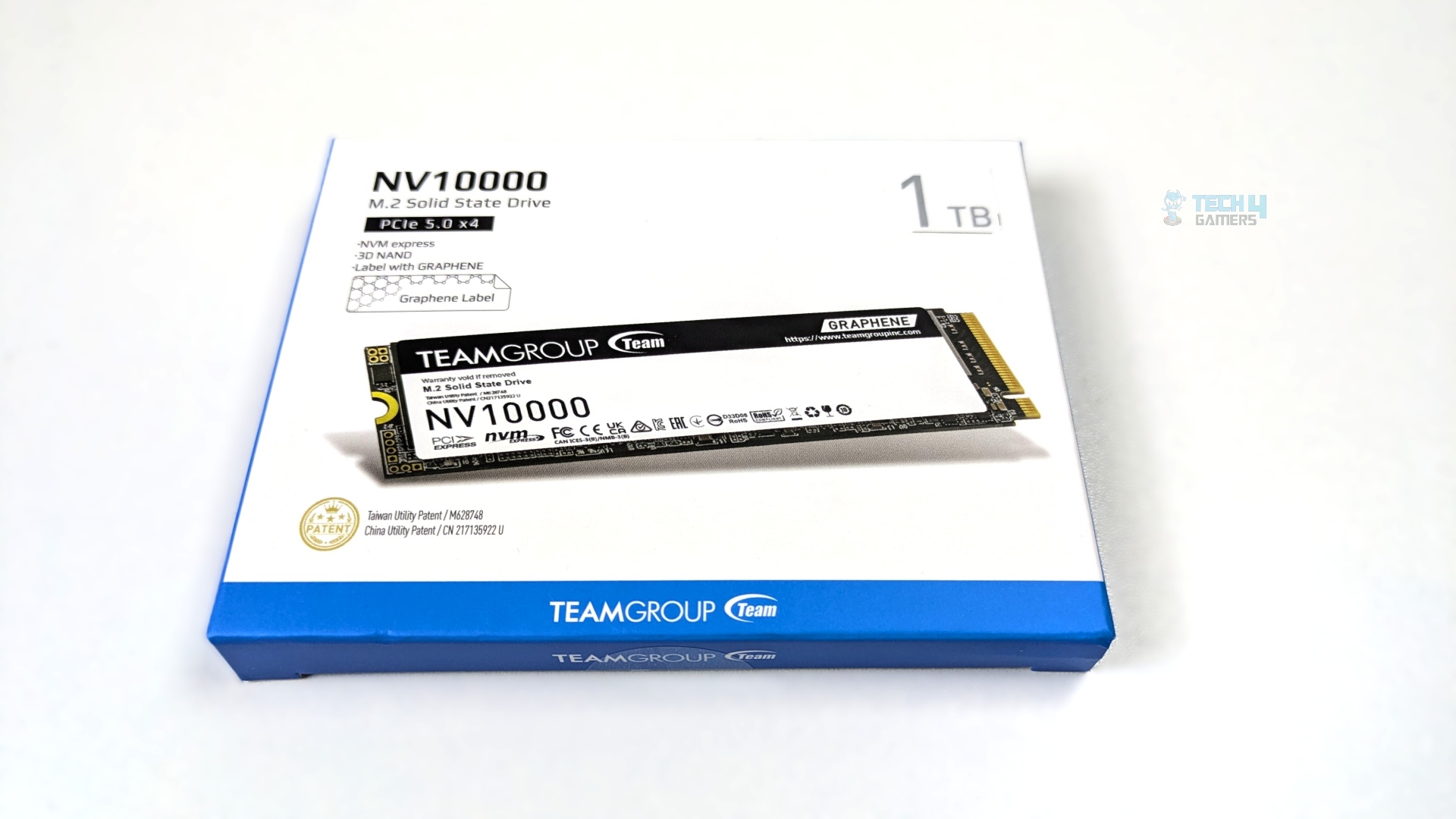
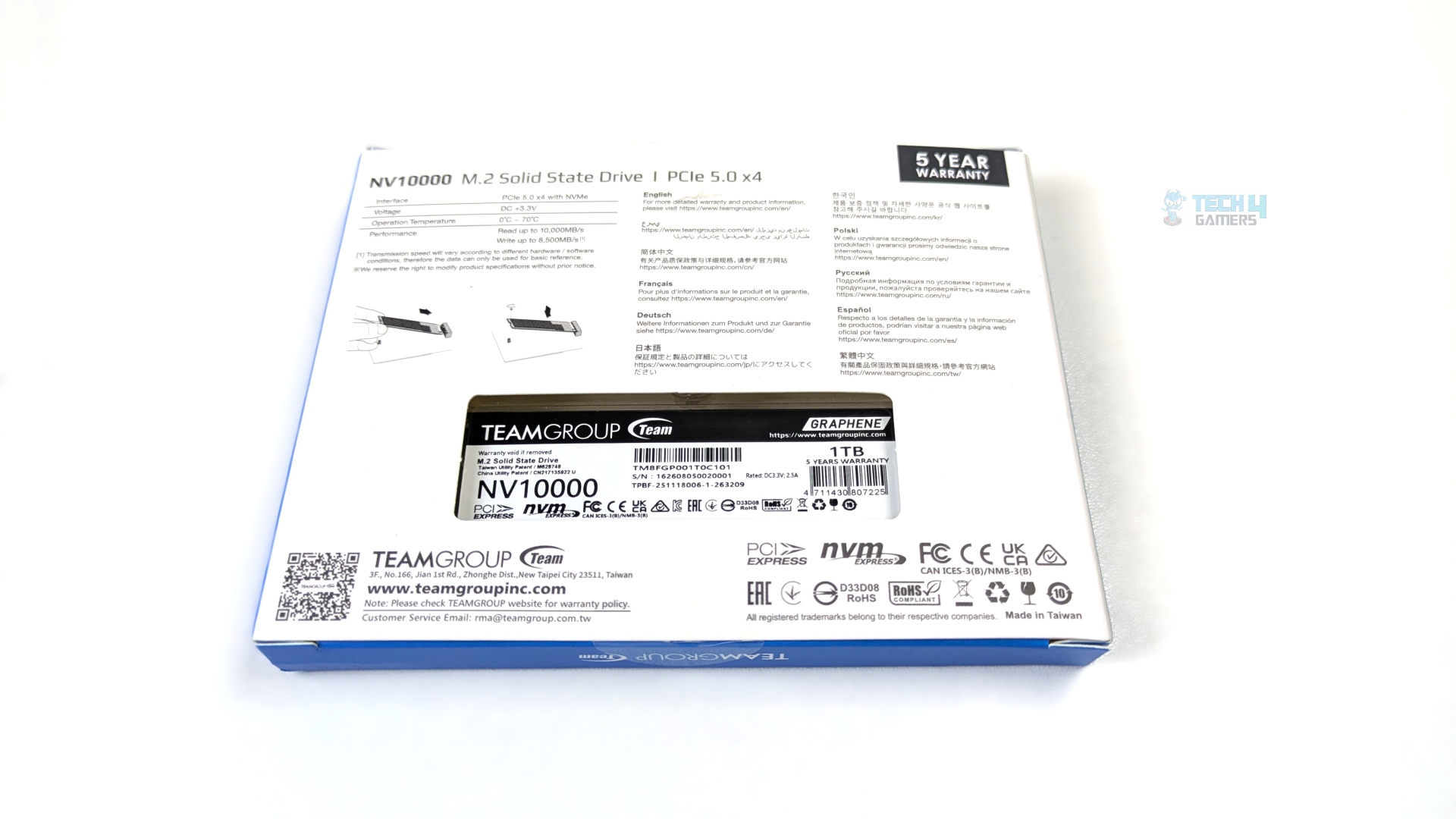
Teamgroup NV10000 adopts a signature white-and-blue packaging theme, with core specifications prominently visible at a glance, including storage capacity, form factor, and interface; it also explicitly highlights the graphene heat sink.
The rear side reveals the performance numbers, with advertised speeds up to 10,000MB/s read and 8,500 MB/s write.
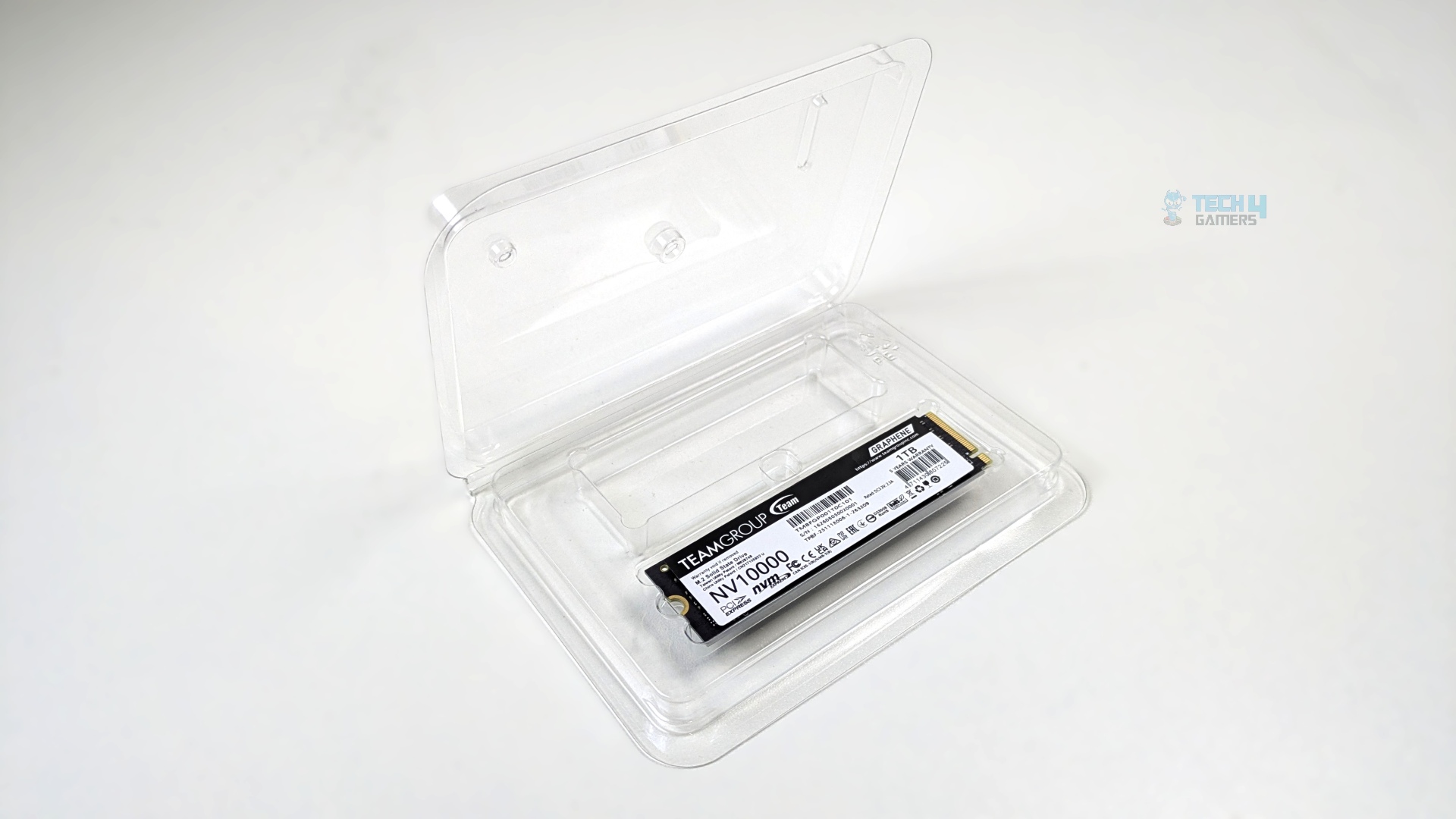
Unboxing the packaging reveals the storage secured in a plastic tray. No accessories are included (such as an M.2 mounting screw or screwdriver), and no manual is included.
Close Up
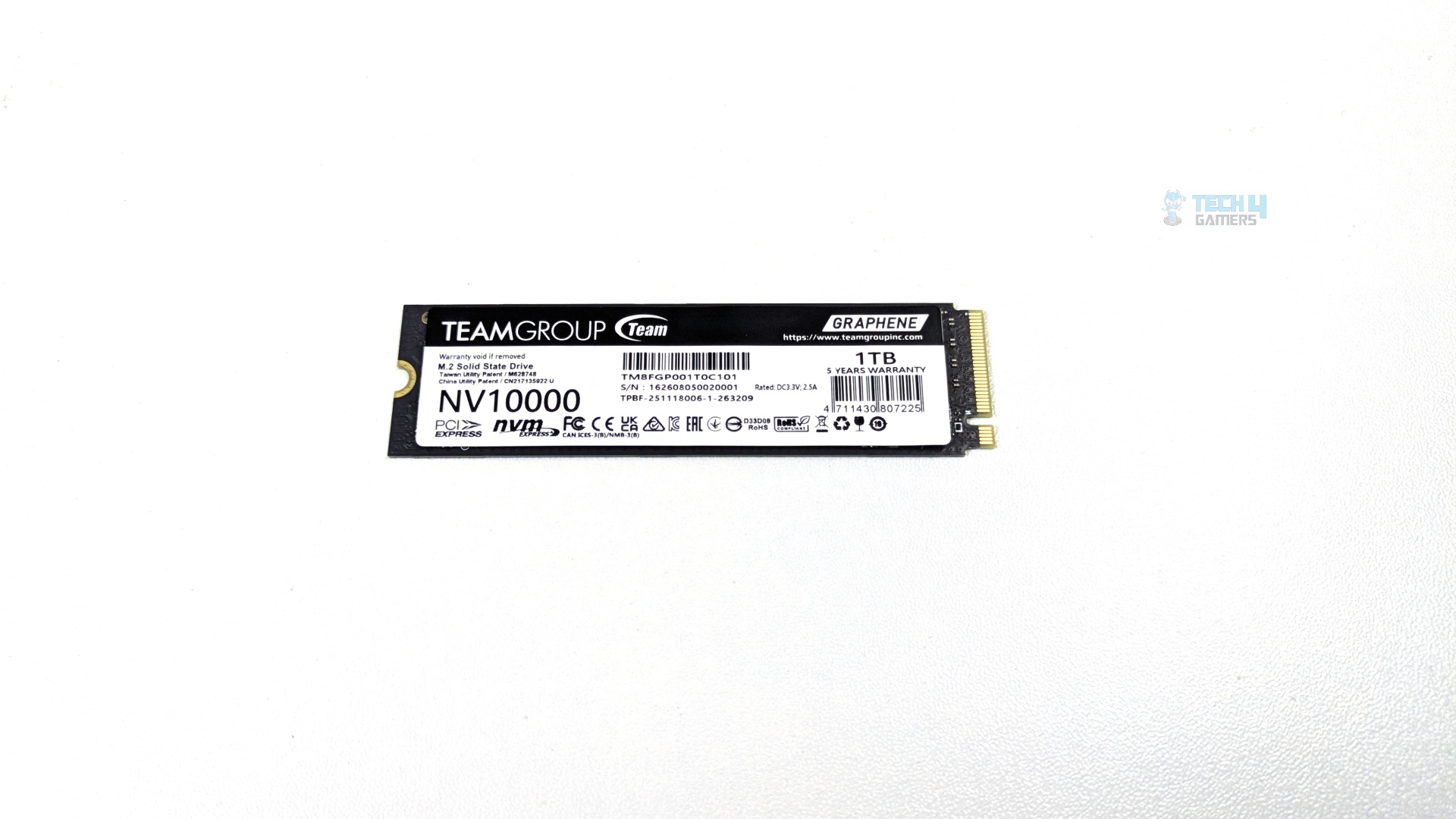
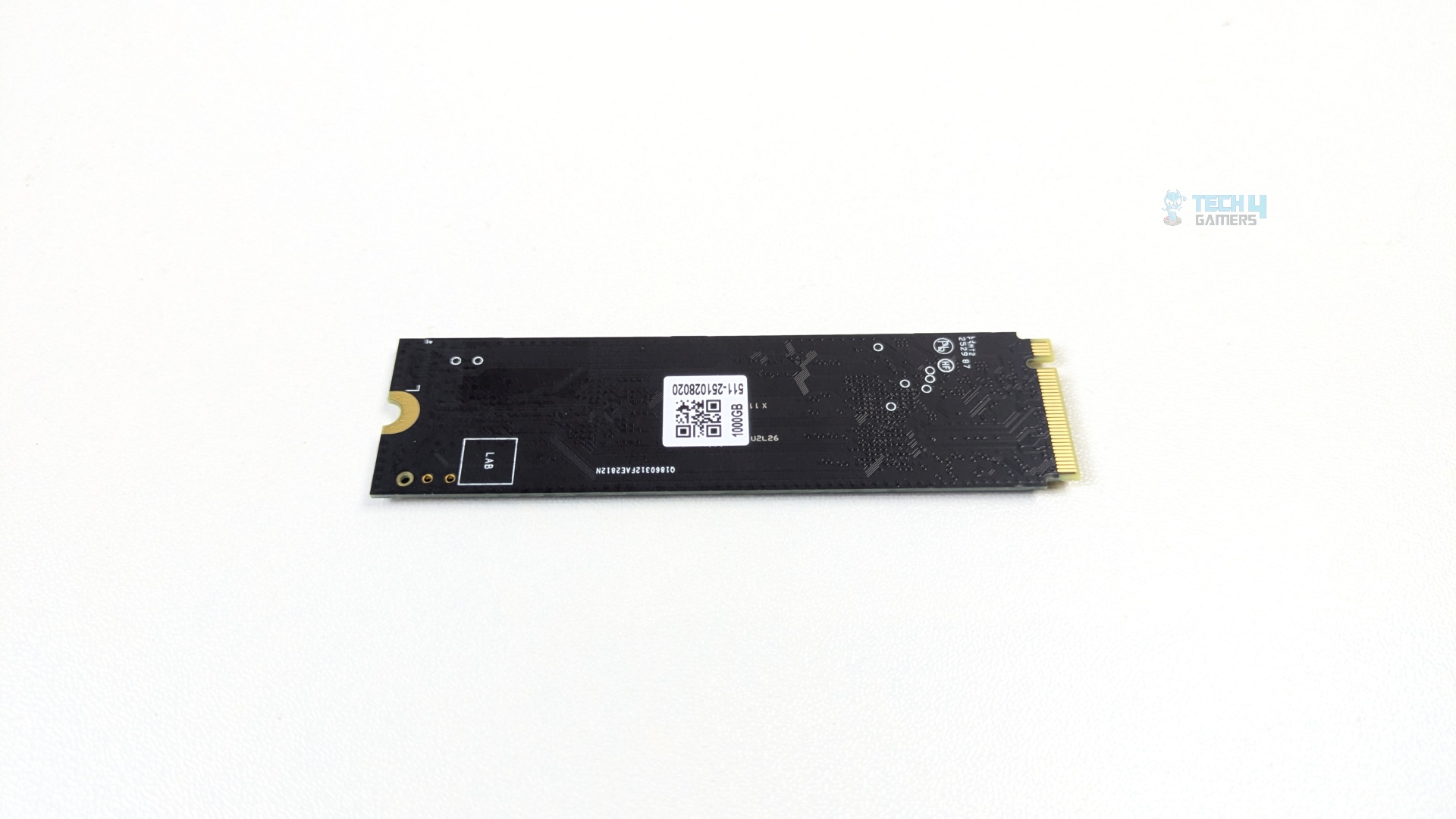
The device adheres to the standard 22 mm x 80mm M.2 2280 form factor footprint. Teamgroup uses a matte black mask on the circuit board and employs Teamgroup’s patented graphene heat spreader. The front heat sink also lists the model and the 5-year warranty.
The rear side of the NVMe is completely bare; it contains only the tracking/QR sticker and circuit traces. All active components (Controller and NAND flash) are consolidated under the graphene label.
However, the graphene label helps disperse localized hotspots across the PCB, but it’s a Gen5.0 drive that could generate significant heat under short-burst conditions. It’s strongly recommended to pair this drive with a motherboard’s dedicated metal heat sink for consistent performance.
Controller Overview
Teamgroup NV10000 employs the PS5031-E31T controller, which is a mainstream yet high-efficiency PCIe Gen5x4 client SSD controller built on TSMC’s 7nm lithography, which is a major generation leap over the 12nm process used on early TSMC’s Gen5x4 storage solutions.
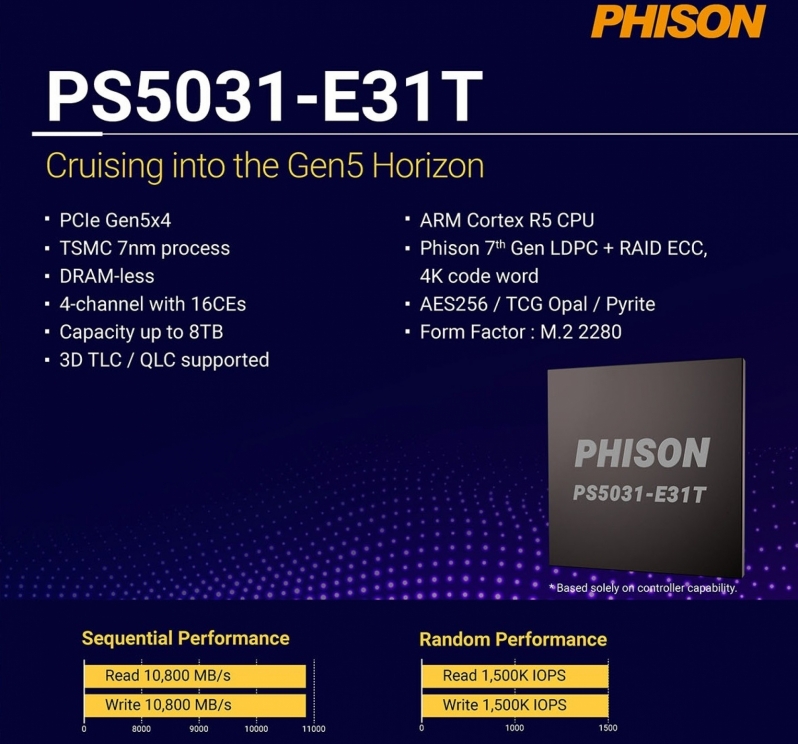
The controller supports a 4-channel interface at speeds up to 3600MT/s. Architecturally, this controller uses a triple-core 32-bit ARM Cortex-R5 running up to 1,200MHz; it also lacks an external DRAM cache and instead uses HMB (Host Memory Buffer), allocating up to 64 MB of system RAM.
Since it’s a budget Gen5x4 controller, it has a sequential read performance of 10,800 MB/s and is capable of reaching a write speed of up to 10,800 MB/s. However, our Teamgroup SSD can only reach 8,200 MB/s in write speed due to limitations. The controller supports up to 8TB of capacity, but Teamgroup has decided not to go beyond 4TB.
Methodology
How Do We Measure SSD Performance
We test NVMe Drives in a diverse range of software, including various real-world tests, gaming workloads, gaming loading times, synthetic benchmarks, and thermal tests.
What Tools Do We Test
We use 3DMark, PCMark 10, CrystalDiskMark, and DiskBench for our benchmarks and compare the results against those of other storage solutions.
Preparing The System
The SSD is installed in the first slot on the ASRock X870 Phantom Gaming WiFi , designated as M.2_1, which supports 22110 and 2280 devices. It’s a PCIe Gen 5.0 slot that shares lanes directly with the CPU.
We fully format the drive to ensure no data remains on the SSD. During testing, we make sure there is no background activity in the OS to maintain a clean testing environment. Before starting the tests, we also ensure that the SSD firmware is up to date.
How Do We Test Thermals
We test the SSD thermals using the PCMark 10 Drive Consistency Test for 10 minutes. This software writes a large amount of data to the drive, making it an extreme workload that regular users are unlikely to replicate in everyday use.
We use HWiNFO64 to monitor and record the SSD temperature. We are not using any external heatsink; instead, we are using the motherboard’s built-in aluminium heatsink.
Our test bench is installed inside the HYTE Y70 with positive air pressure, but we removed all the panels.
How Do We Test Loading Times
Storage devices have no effect on FPS or frame times in games, but they can help reduce loading times. We have picked two titles, Cyberpunk 2077 and Red Dead Redemption II.
We test their loading times in seconds immediately after launching the game.
Test System
| Our Primary Test System |
|
|---|---|
| Processor | AMD Ryzen 9 9950X |
| Memory | XPG Lancer 32GB (16x2) 6000MT/s CL30 |
| Motherboard | ASRock X870 Phantom Gaming Nova WiFi (BIOS: 4.43v) |
| Thermal Paste | ID-Cooling X45 |
| Graphics Card | ZOTAC SOLID RTX 5080 , |
| Power Supply Unit | Super Flower LEADEX VII Platinum PRO 850W |
Real World Benchmarks
Let’s start with the Real World Benchmarks.
DiskBench
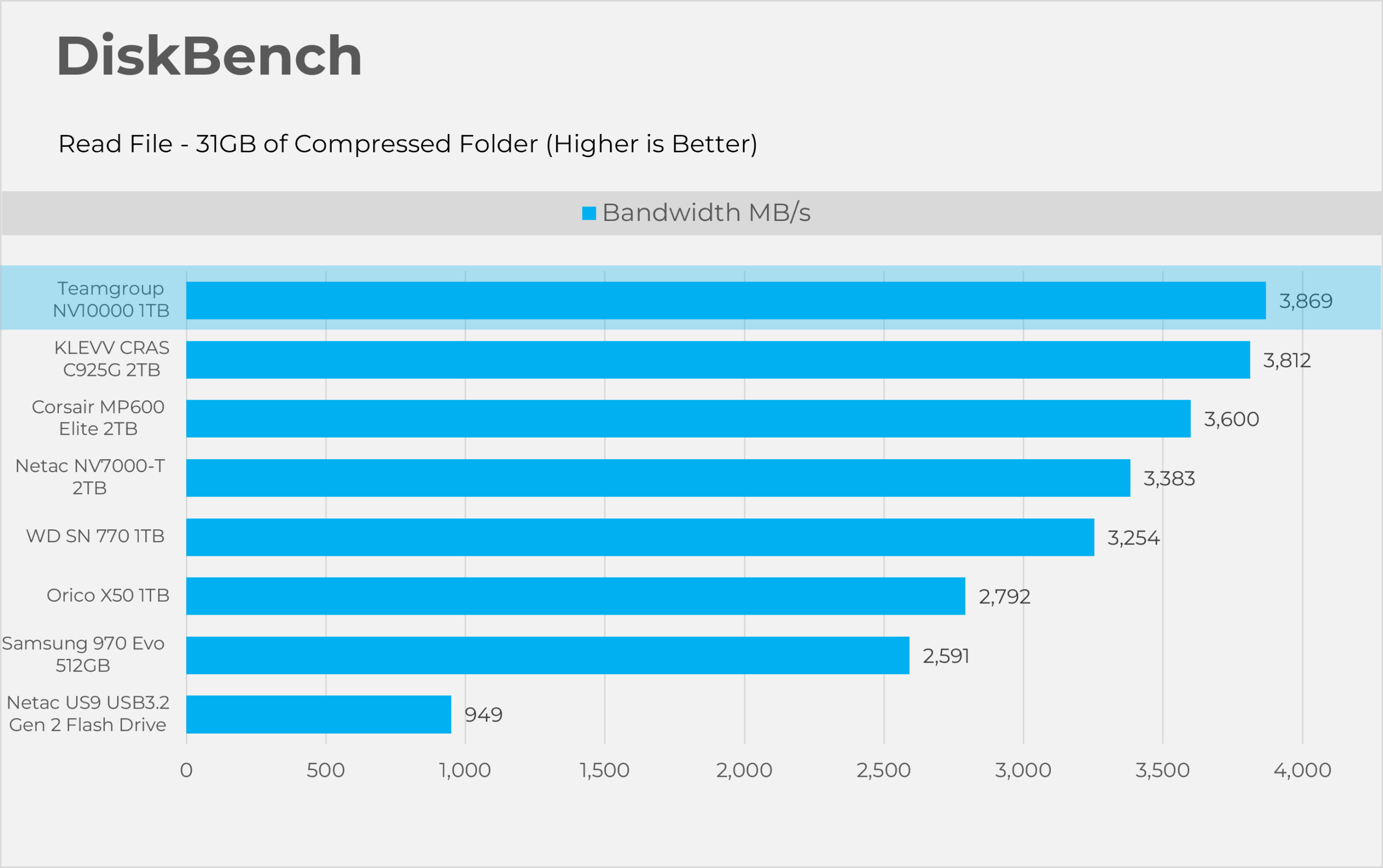
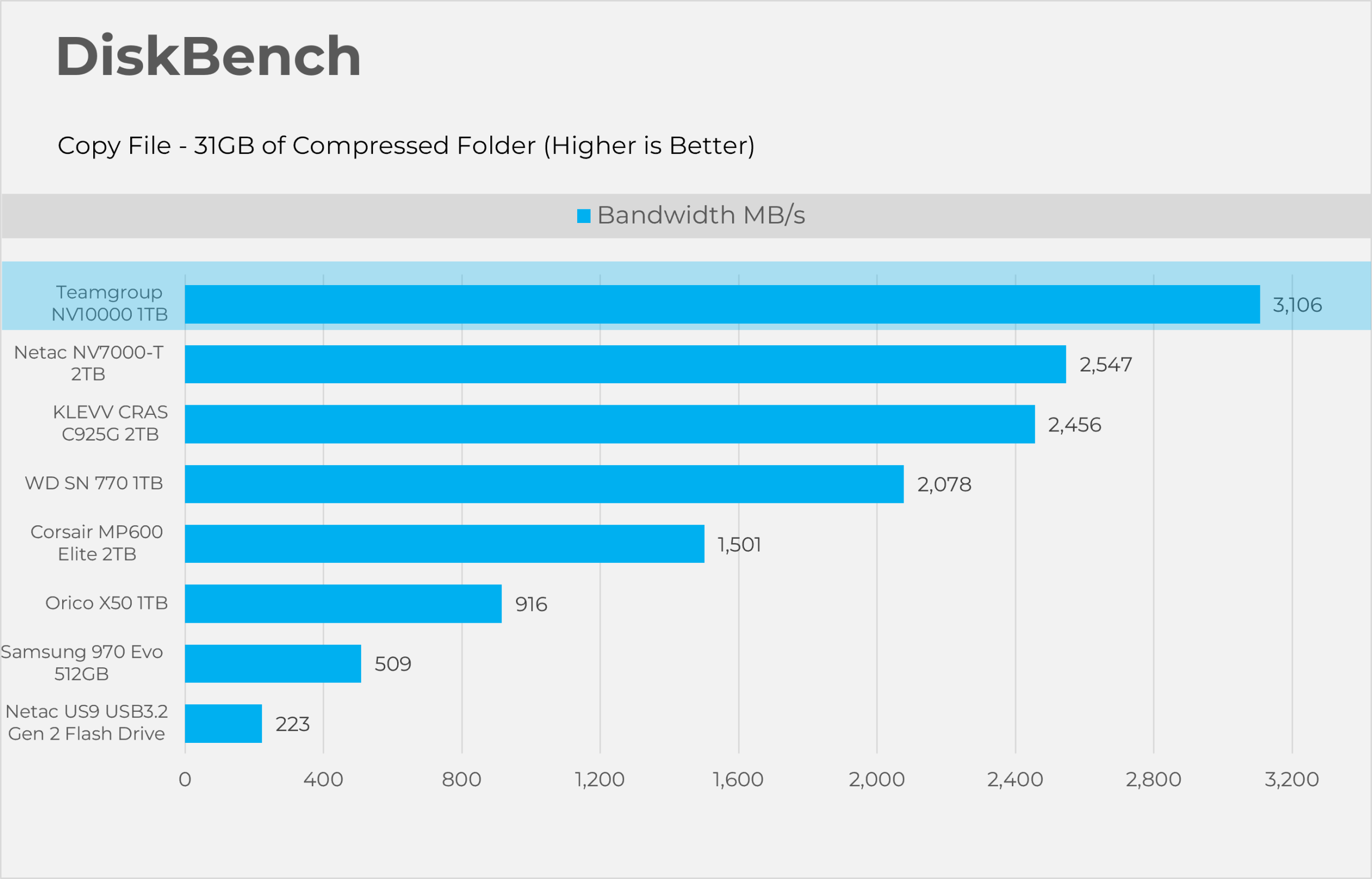
Starting with Disk bench, this program evaluates storage performance under real life performance conditions, we have made two runs here first copying the file and then reading the file. The test file set consists of 32GB of mixed data including random PSD and excel sheets.
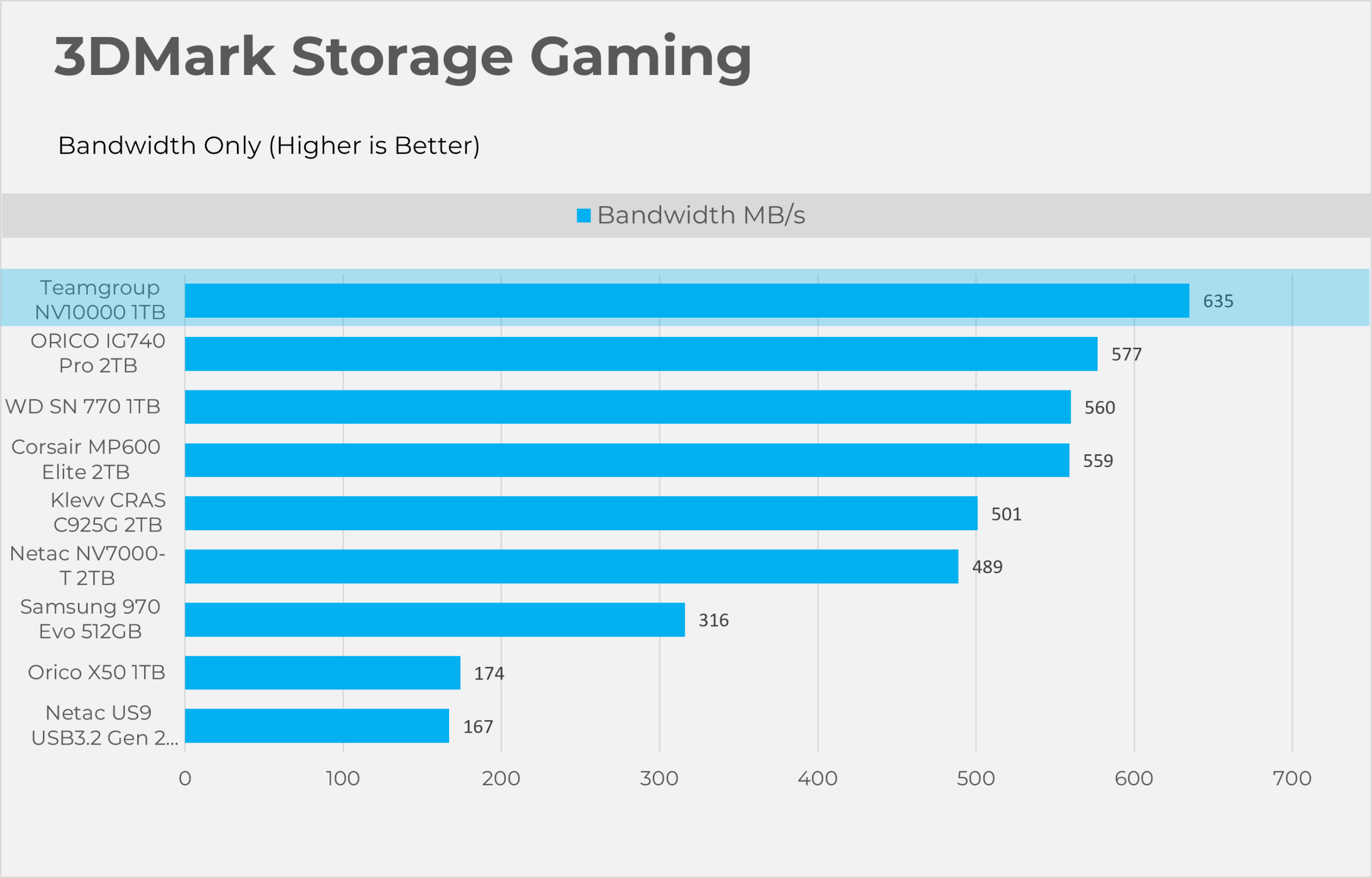
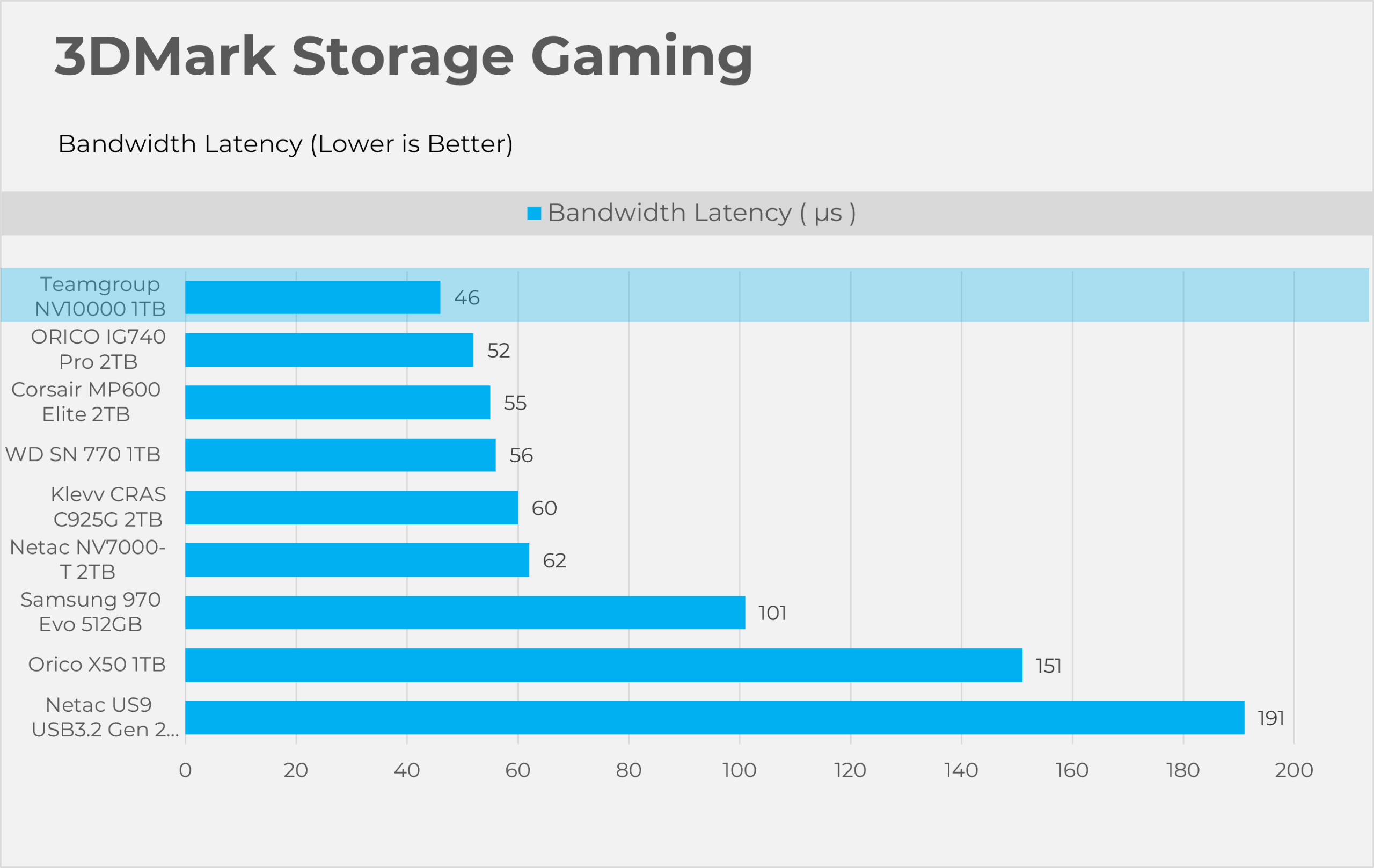
3DMark Storage Gaming
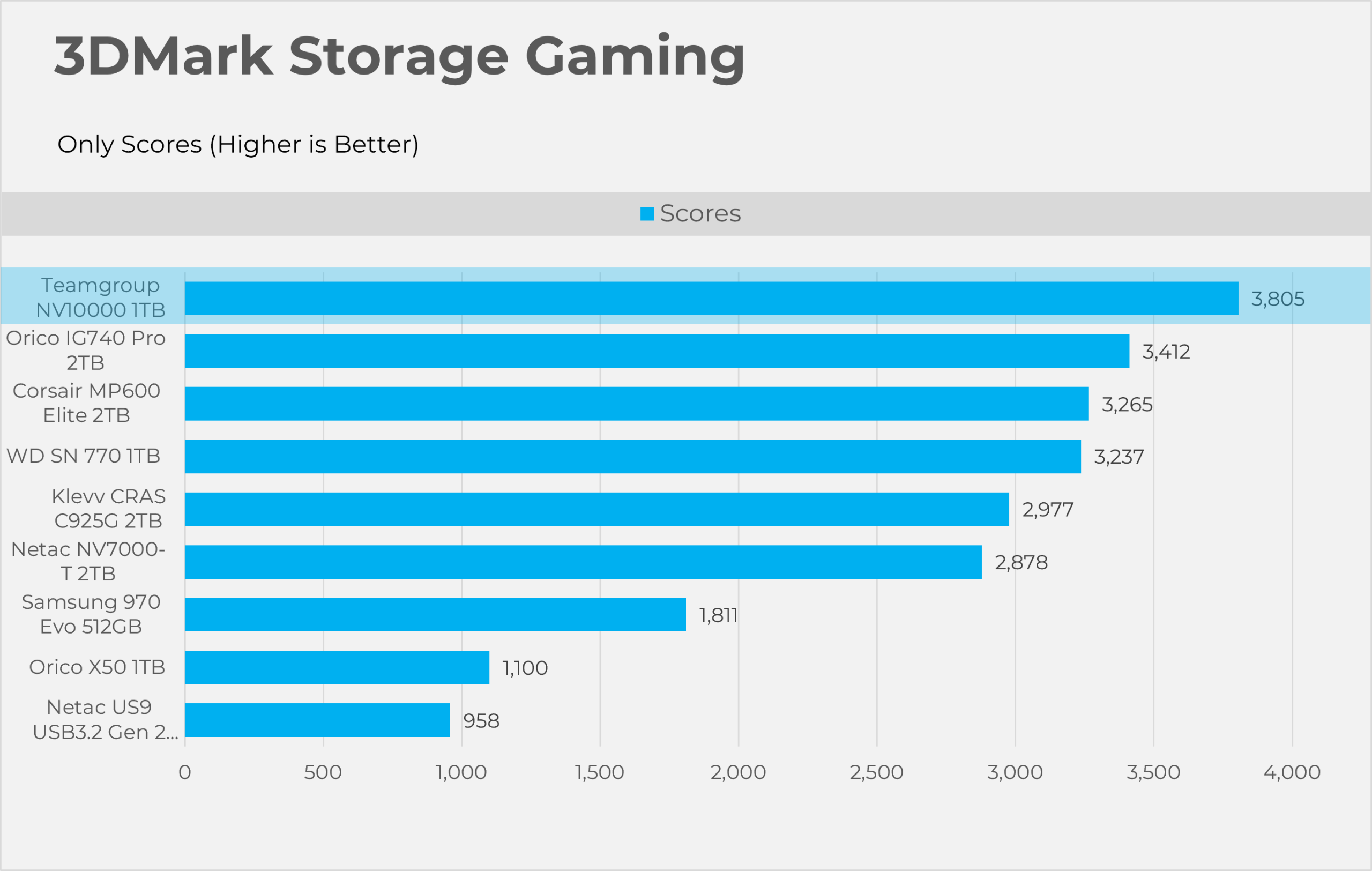
3DMark Storage gaming is a very valuable tool that concentrates on how storage impacts gaming performance. This benchmark software simulates loading and saving game files, installing and updating games, recording game-play footage, copying game folders, and launching and loading game levels.
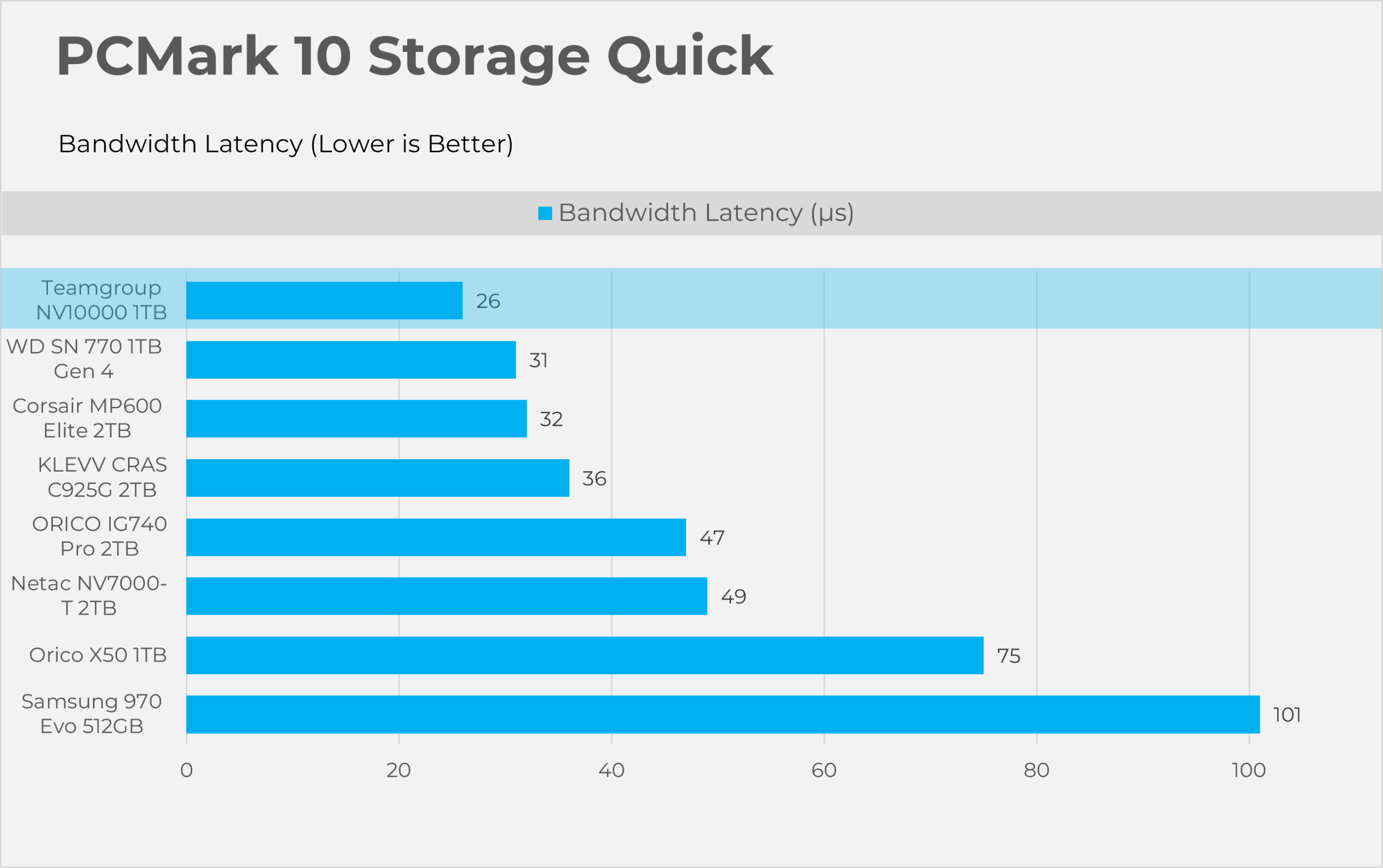
PCMark10 Storage Quick
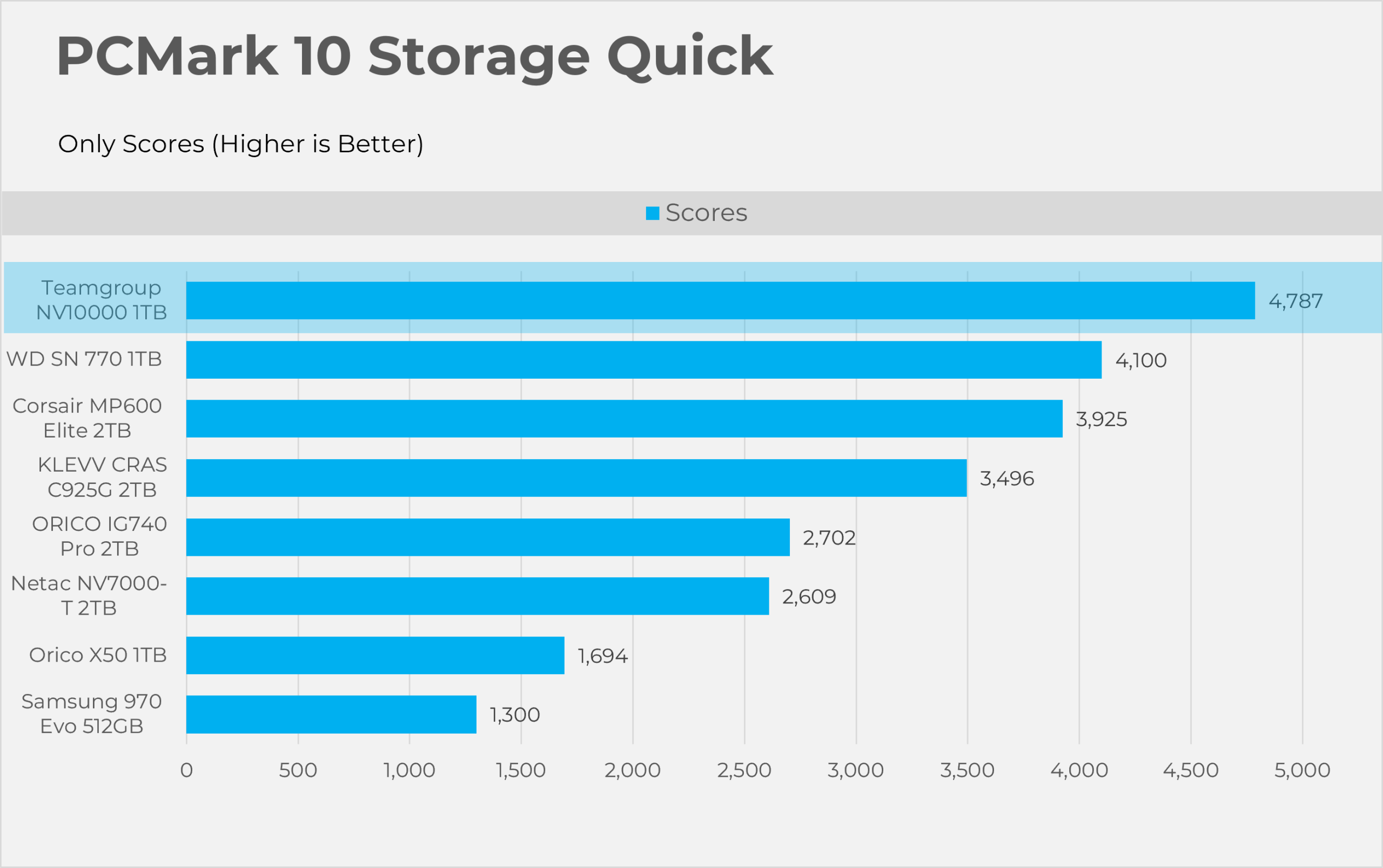
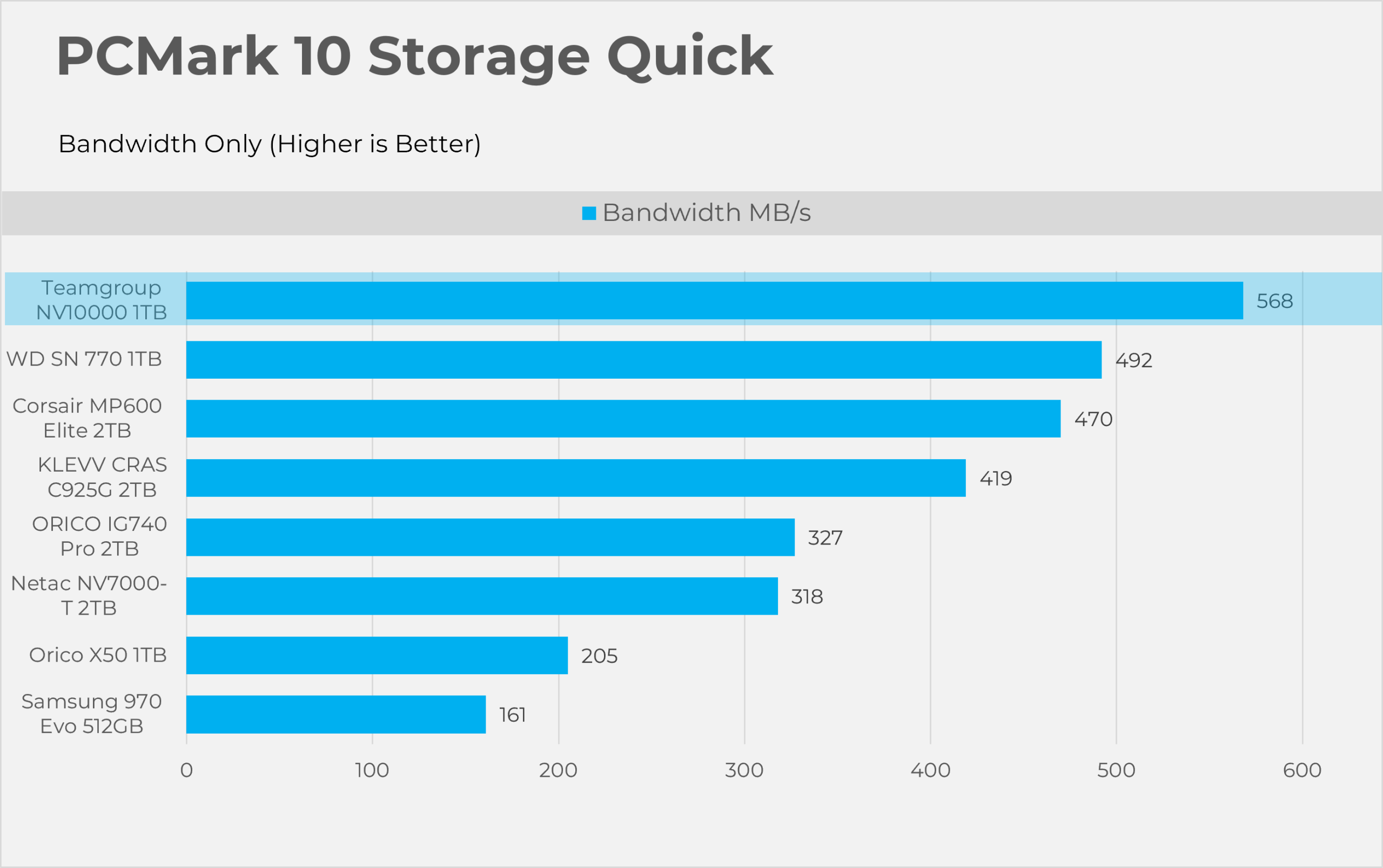
PCMark10 Quick is also considered an important tool to test the performance of the storage devices. This tool focuses on how well your PC handles common daily tasks like browsing, video calls, software start-up time, and spreadsheet and word processing tasks. This benchmark writes 23GB of data on the SSD
PCMark10 Full Drive
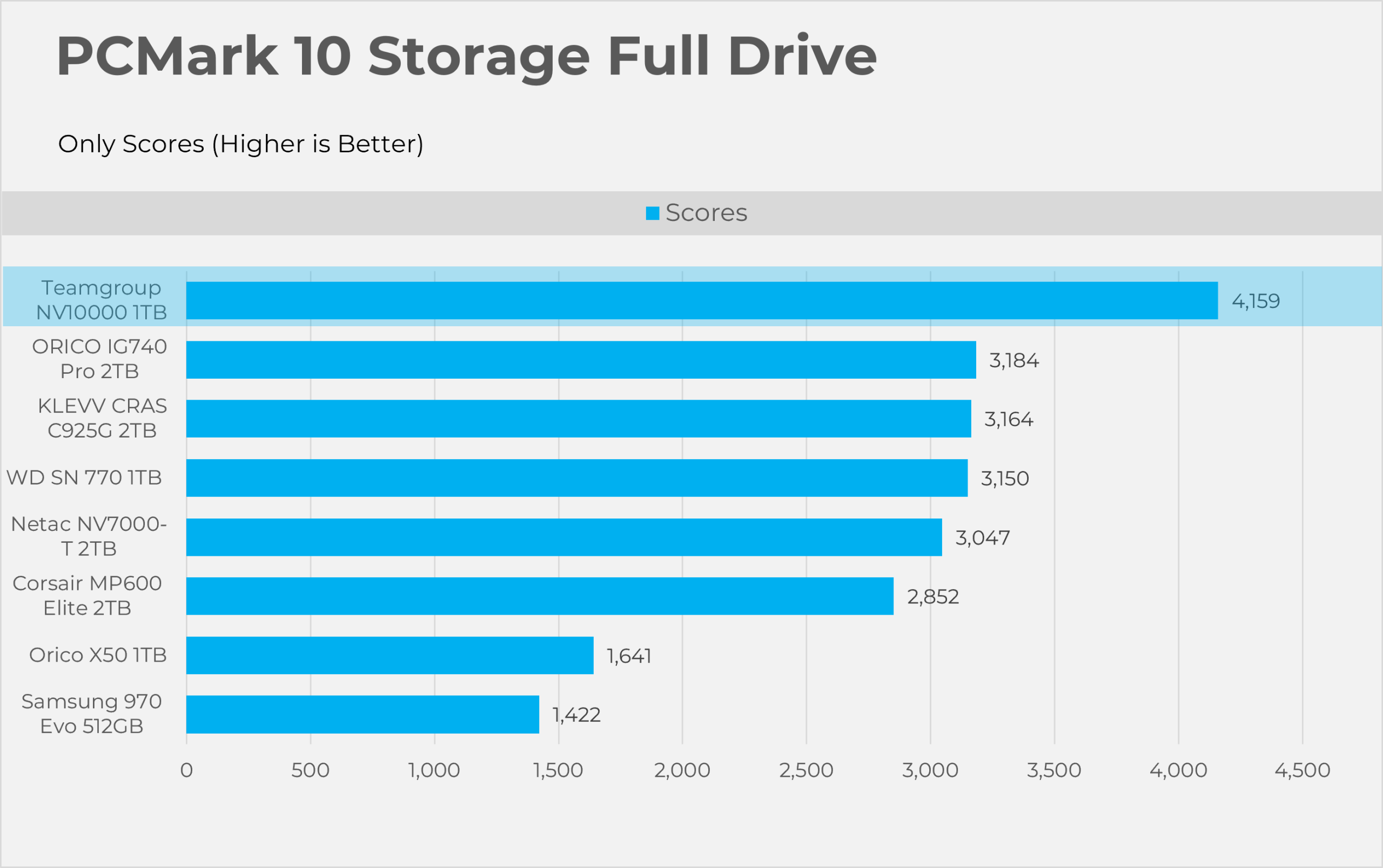
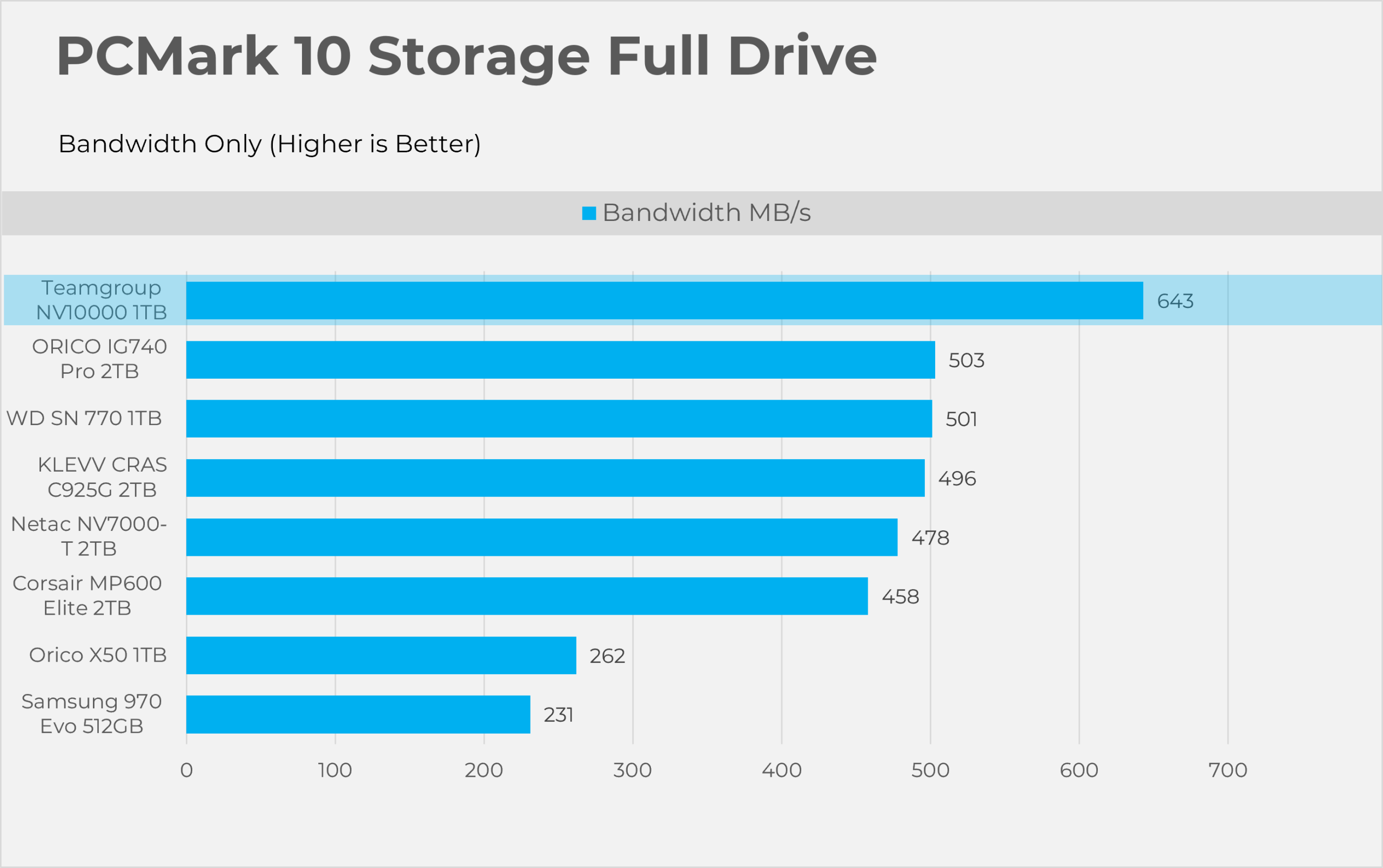
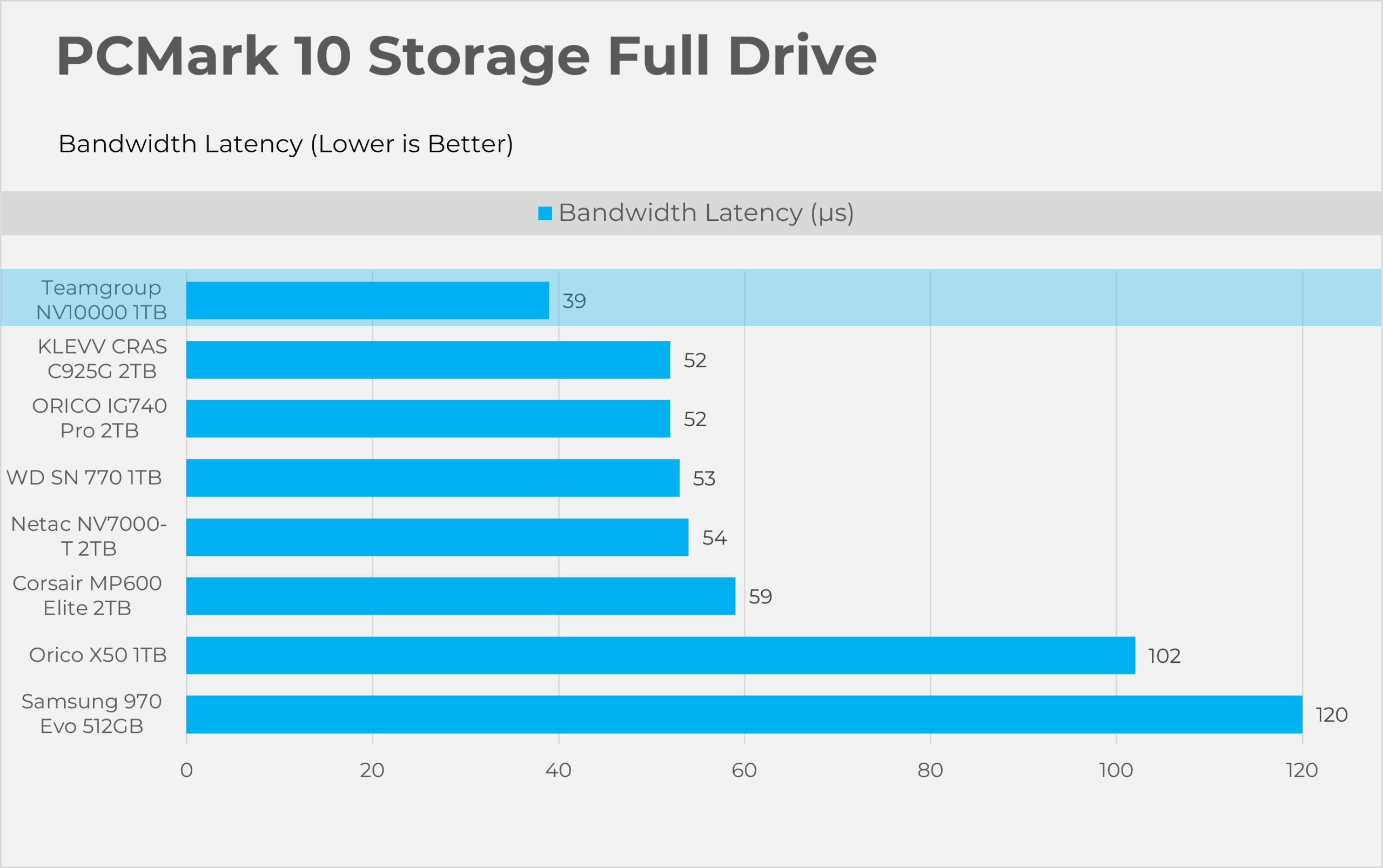
This Full Drive benchmark is more intensive than the ”quick” we have previously tested, as it writes 204GB of data. This tool also measures the real-world performance of your storage device. It simulates booting the OS, launching Adobe applications like Premiere, Photoshop, and processing the data in the Microsoft Office application, copying and saving files, and testing loading levels in the games.
Synthetic Benchmarks
Let’s take a look the RAW performance of the SSD.
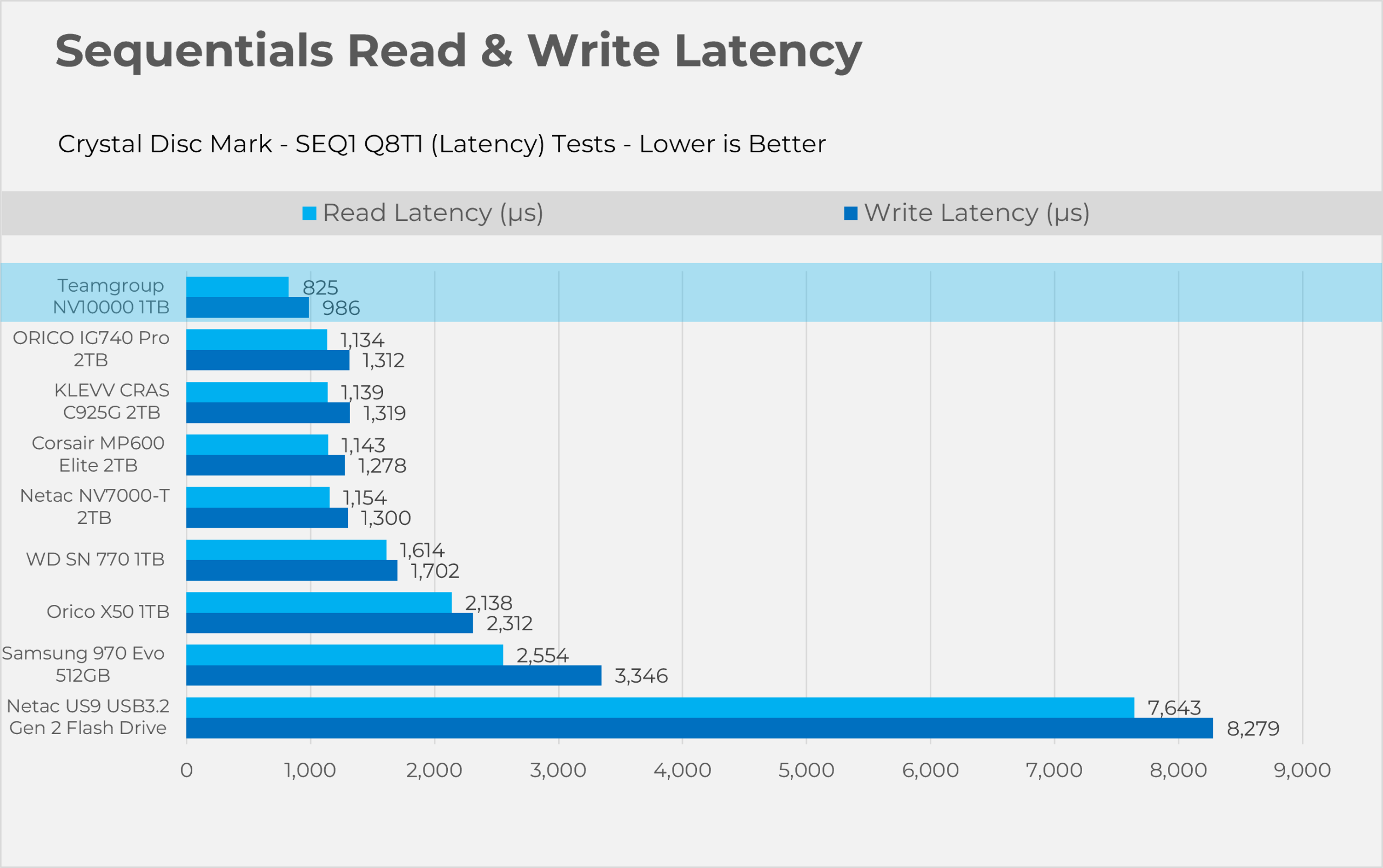
Sequential (Read & Write)
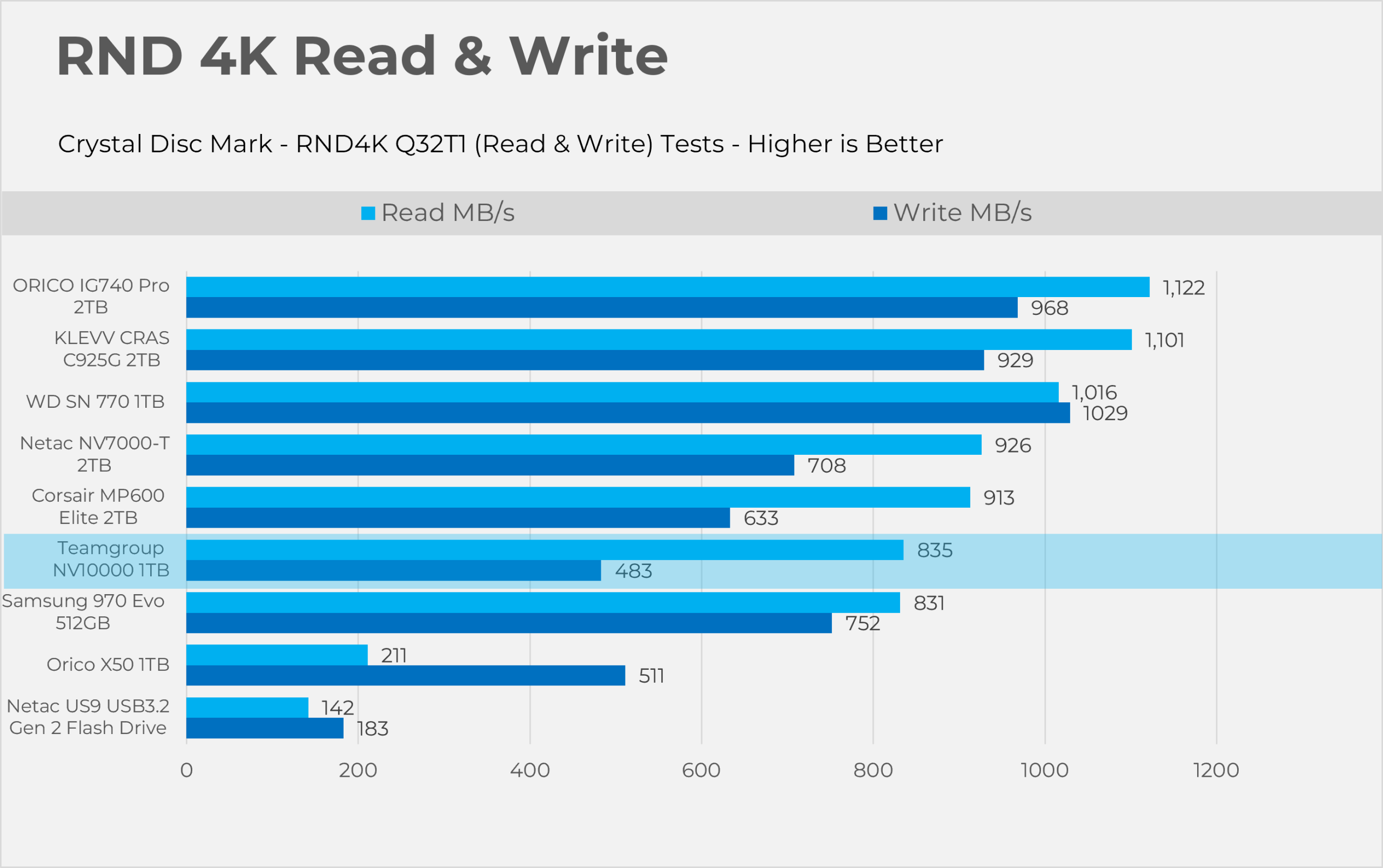
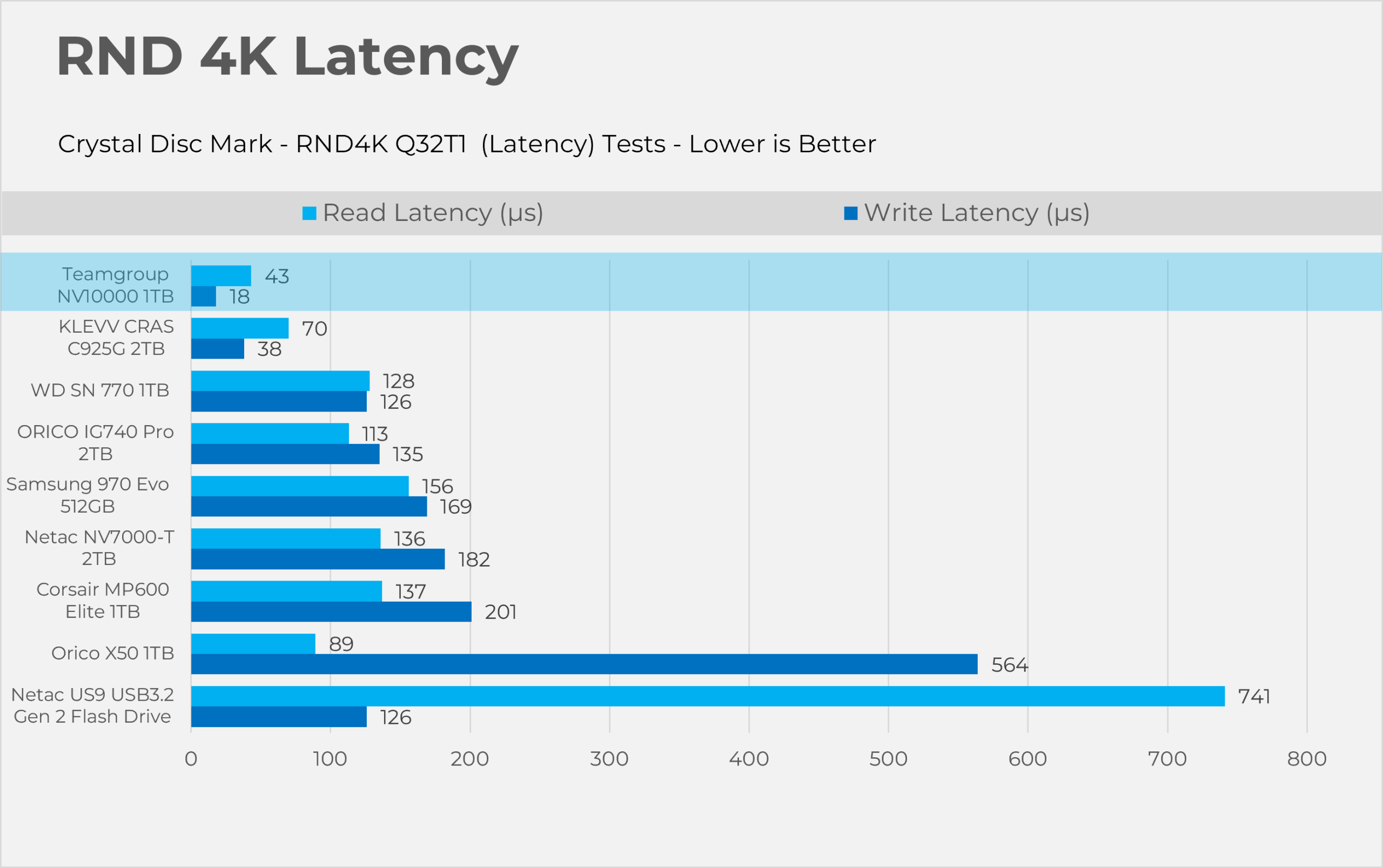
RND4K (Read & Write)
Gaming Loading Times
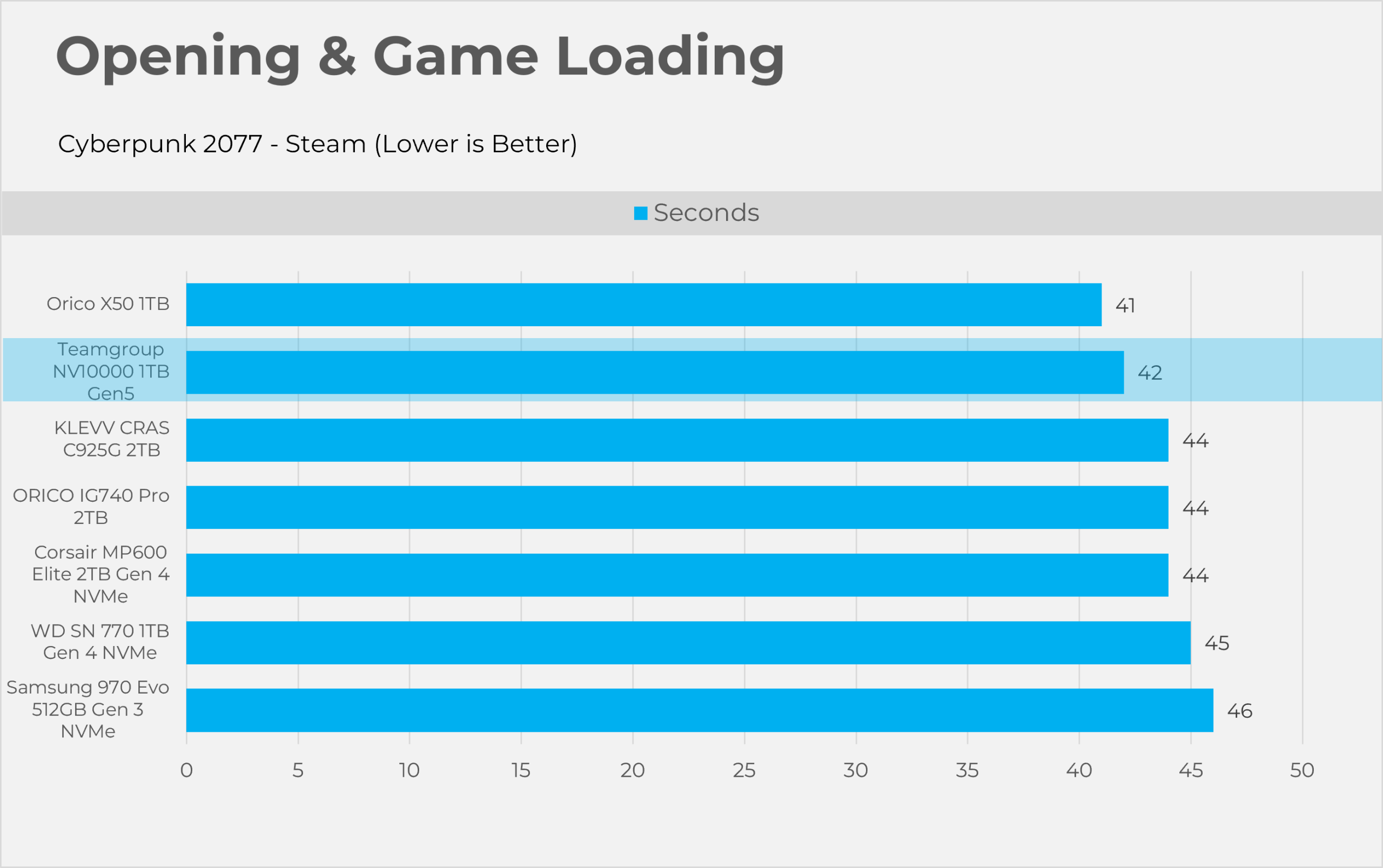
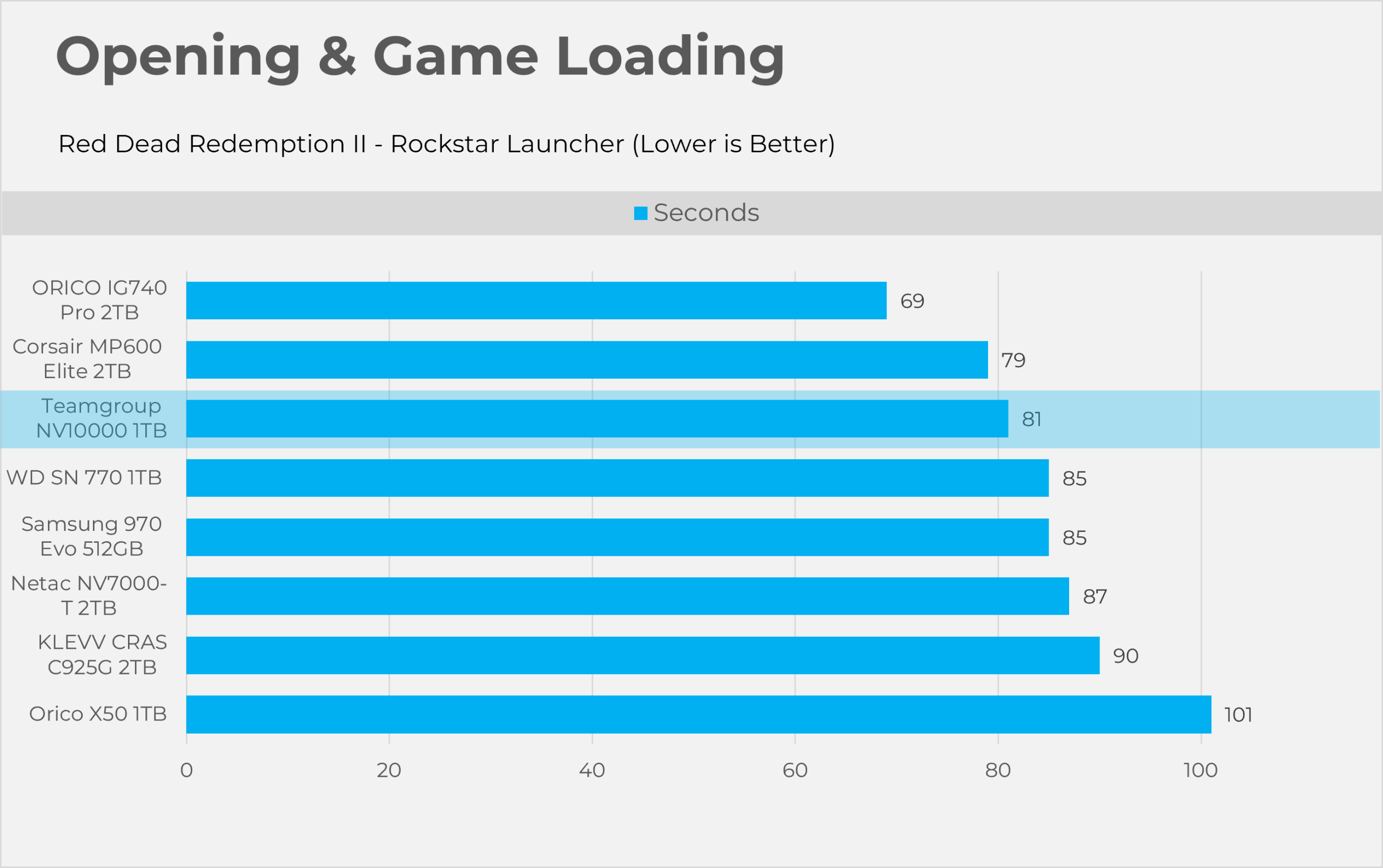
| Game | Duration | Details |
| Cyberpunk 2077 | 42 Seconds | Game booted, opened, and got into the gameplay sequence. |
| Red Dead Redemption II | 81 Seconds | Game booted, opened, and got into the gameplay sequence. |
Thermals
For the stress test, we ran the PCMark 10 Drive Consistency Test, which heavily loads the SSD by writing a large amount of data for 10 minutes.
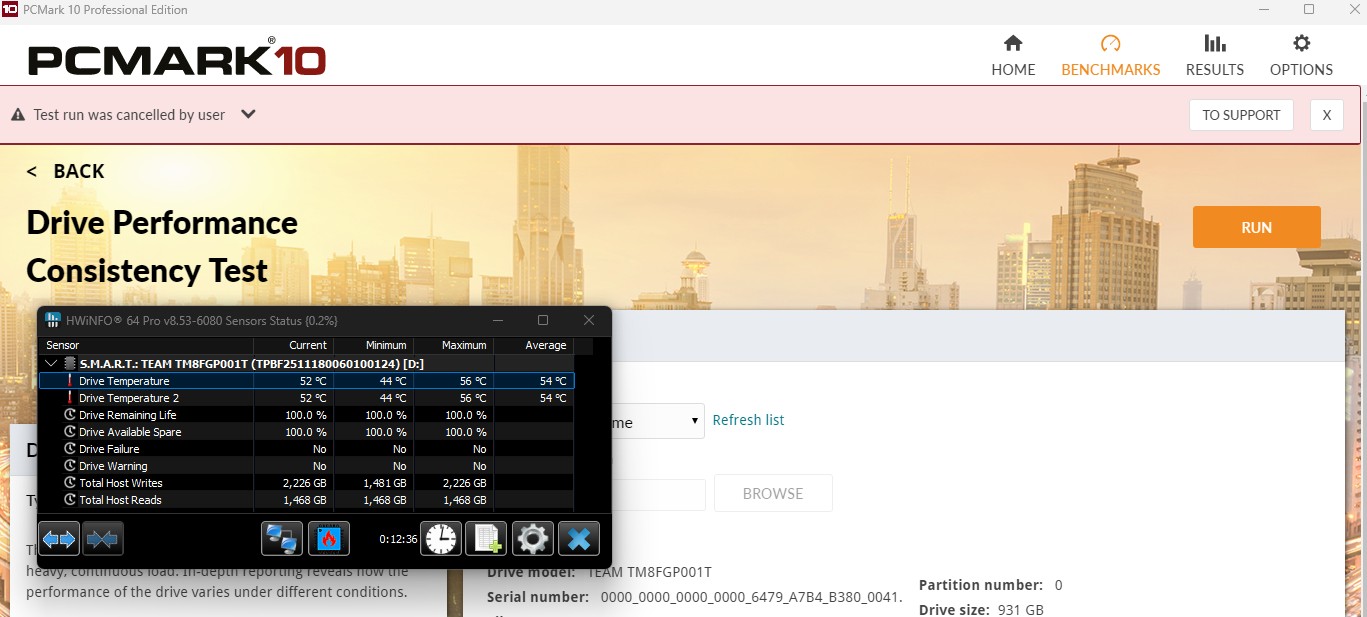
According to the software, the internal SSD temperature reached 56°C. At idle, the SSD was running at 44°C, while the room ambient temperature was 25°C.
Should You Buy It?
Buy It If
✅ If You Want a Rapid File Transfer: As our benchmarks showed, it averages an impressive 3,106MB/s when copying a 31GB compressed folder, outpacing all PCIe Gen4x4 storage.
✅ If You Want a Fast SSD Without Sacrificing Thermal Efficiency: Teamgroup NV10000T uses a Phison E31T controller that runs cool enough to avoid the noisy, active fan coolers required by first-generation Gen5 drives.
✅ If You Want Everyday Desktop & App Responsiveness: In PCMark10 real-world trace operations such as opening Adobe or Microsoft and indexing files, it registers a latency of 26 µs, ensuring a snappier experience in your daily applications.
✅ If You Care About Form Factor Compatibility: It fits easily in compact mini-ITX cases and the PlayStation 5 because it doesn’t require active cooling.
Don’t Buy It If
❌ If You Want A DRAM Cache: Teamgroup NV10000T does not have DRAM cache on the storage; it relies on the HMB (Host Memory Buffer).
❌ If You Want This Specifically For Gaming:, It loads Cyberpunk 2077 in 42 seconds, providing a visually imperceptible advantage over Gen4 drives.
Final Thoughts
The PCIe 5.0 interface allows the NV10000 to push well beyond the limits of Gen4 storage. In synthetic benchmarks, the NV10000 is 29.7% to 37.5% faster than our top Gen4x4 drives from Corsair and Orico.
However, in real-world scenarios like large file transfers, backups, or moving uncompressed video footage, you might notice transfers finishing in roughly half to two-thirds the time of mainstream Gen4 SSDs, which honestly sounds like an upgrade to me.
For everyday users, though, especially if you’re mainly using your PC for multimedia and gaming, the additional Gen5x4 bandwidth won’t provide much of a noticeable benefit.
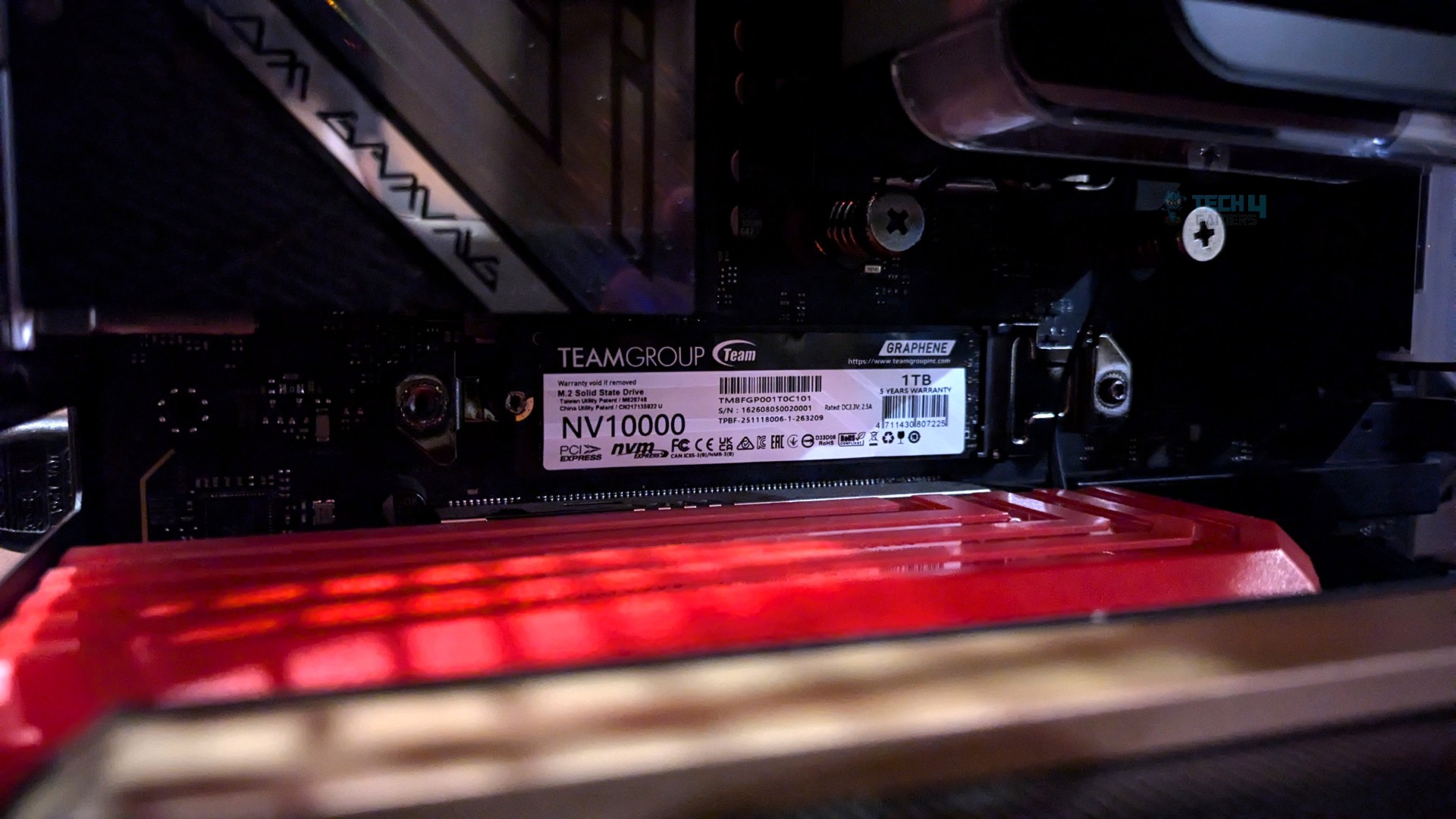
We ran the PCMark 10 Drive Consistency Test for the stress test. It might not replicate real-world usage, but it absolutely crushes the drive with an enormous amount of writes.
I’m really impressed with its thermal performance, though. It ran cool and stabilized at 56°C under the motherboard heatsink.
Value:
It’s hard to evaluate storage pricing right now due to the ongoing global memory shortage, not to mention the surge in NAND flash contract prices. The Team Group NV10000 launched last year at $183 USD for the 1TB model, but as of this review, it costs around $200.
The SSD’s pricing, especially for a DRAM-less drive, isn’t particularly attractive. If this SSD had been priced at $200 for 1TB before the memory crisis, it would still have been a tough sell, as cheaper DRAM-less Gen4x4 1TB drives were available for significantly less.
But we’re not talking about the past anymore. Gen4 1TB SSDs have also seen price increases, but Gen5.0 drives still carry roughly a $40–$50 premium for the same capacity. Gen4 drives aren’t obsolete either; they’re still very fast and perfectly capable for today’s applications.
If you’re building a high-end, cutting-edge PC and want to experience the faster PCIe Gen5x4 speeds, then the NV10000 1TB makes sense.
Thank you! Please share your positive feedback. 🔋
How could we improve this post? Please Help us. 😔

Senior Hardware Reviewer at Tech4Gamers with over a decade of experience in the tech industry. My journey began in 2014 as a senior administrator for Pakistan’s largest gaming community forum. I specialize in testing and reviewing components like graphics cards, CPU coolers, and motherboards, while also sharing insights on overclocking and system optimization.