Threads
Worth It?
Review Summary
The Logitech G502 X is a great jack-of-all-trades mouse that’s perfect for both productive tasks and casual gaming, thanks to its new and improved LIGHTFORCE hybrid optical-mechanical switches, 5 onboard memory profiles, low weight of 89g, and decent tracking thanks to the HERO 25K sub-micron sensor. While connectivity could be improved, and there are concerns about the build quality of the rubber cord, it’s definitely worth the $60 price because of its button accessibility and diverse functions.
Hours Tested: 3 Weeks

Overall
-
Performance - 8.5/10
8.5/10
-
Value - 9/10
9/10
-
Software - 8.5/10
8.5/10
-
Design - 8/10
8/10
Pros
- The 25K Hero sensor is highly accurate.
- The buttons are well-placed for easy accessibility.
- The rubber thumb-rest provides decent grip.
- Hyperspeed scroll wheel for fast scrolling through long documents.
- 5 on-board memory profiles for precise mouse mapping.
- Comfortable for multiple grip types.
- Solid button and scroll wheel build quality.
Cons
- Loud buttons
- Loud scroll wheel
- No RGB
- Lack of connectivity options


You may recall the Logitech G502 HERO, an iconic mouse introduced by Logitech in 2018. Not only is it an amazing product for gaming, but also for productivity, with its infinity scroll wheel. Its weight made it less favorable for gaming, but that didn’t stop consumers from using it. Logitech noticed and prepared the Logitech G502 X, a new mouse model with a significantly lower weight and improved button quality. Today, I’ll be reviewing the mouse after using it for a couple of weeks to provide my honest feedback.
Key Takeaways
- The Logitech G502 X mouse is a jack-of-all-trades thanks to its 13 programmable buttons, 89g weight, and amazing precision.
- You should buy this mouse if you’re deep into productive tasks but also enjoy playing games in your free time.
- You should skip this mouse if you’re looking for more connectivity options and dislike loud clicking and scrolling noises.
Here are the technical specifications:
| Sensor | HERO 25K |
|---|---|
| Resolution | 100 – 25,600 DPI |
| Max Acceleration | 40G |
| Max Speed | 400 IPS |
| Max Report Rate | 1,000Hz |
| Tracking | Zero smoothing/ Acceleration/ Filtering |
| Dimensions (HxWxL) | 41.1mm x 79.2mm x 131.4mm |
| Weight | 89g |
| Number of Buttons | 13 |
| Compatability | Windows® 10 or later, Mac 10.14 or later |
| Warranty | 2-Year Limited Hardware Warranty |
Packaging & Unboxing
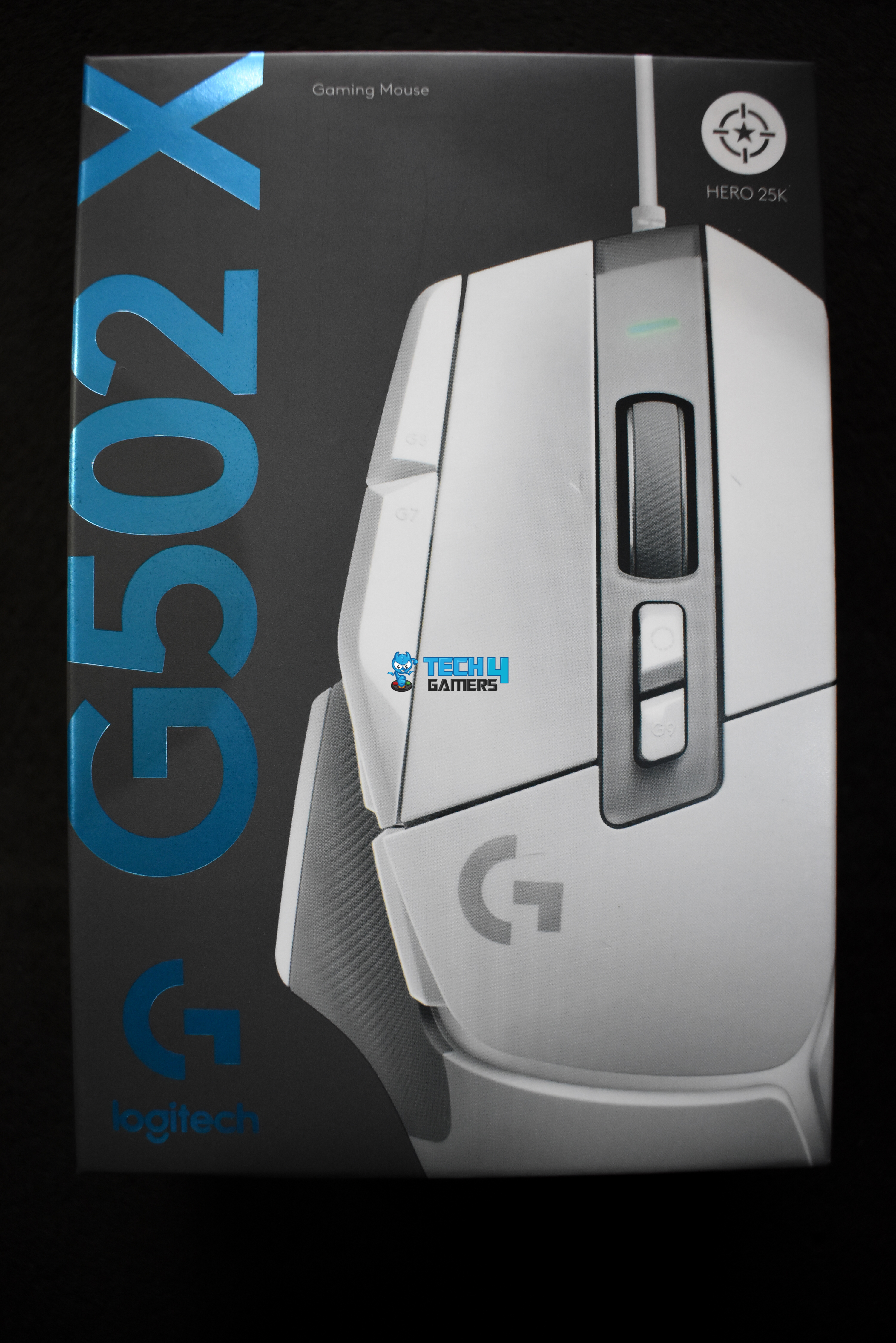
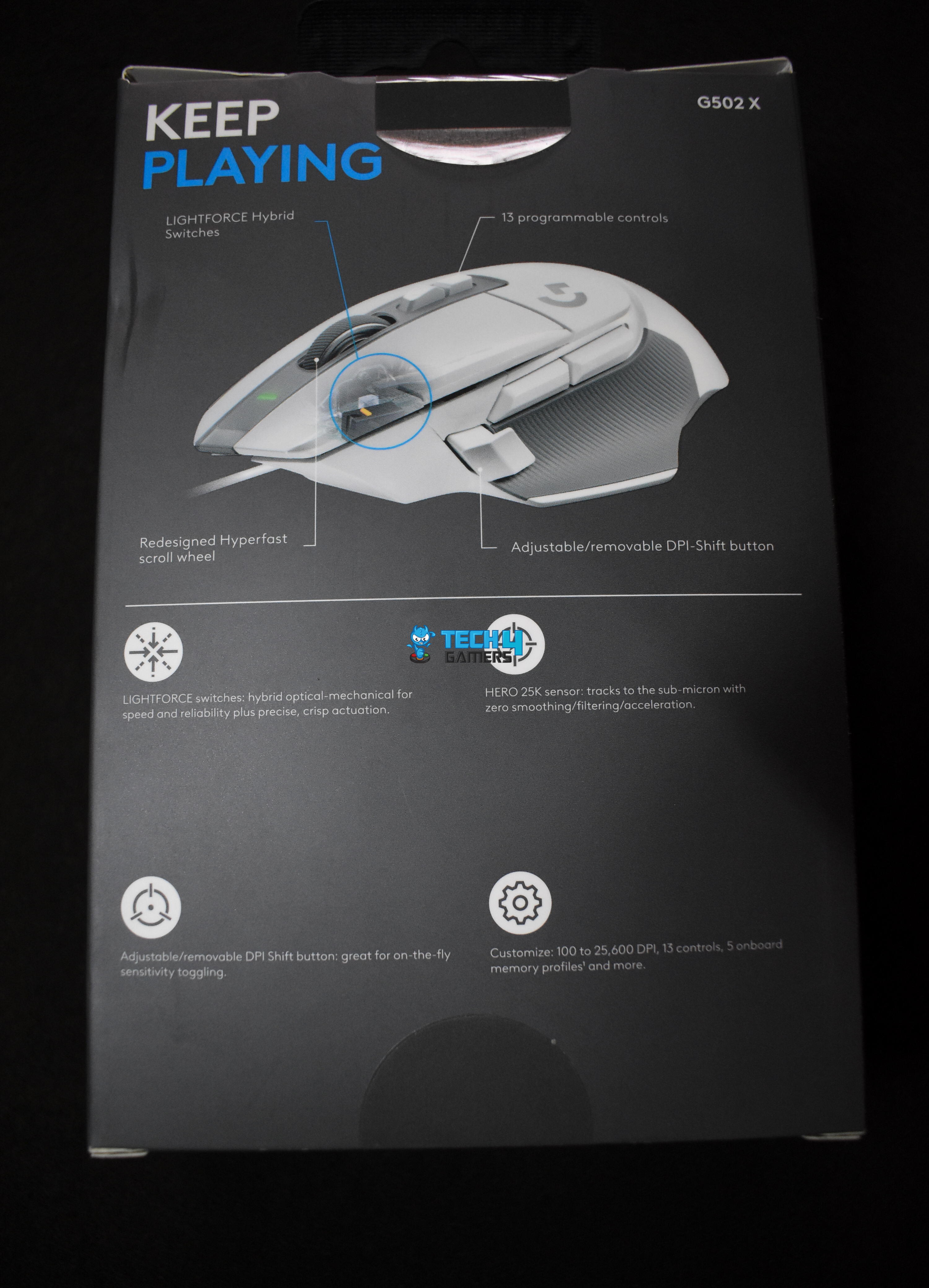
The packaging is black with a picture of the mouse, while the name is written in a glossy design in the brand’s official color scheme. One side of the box contains technical specifications available on the website, while the other side features Logitech’s logo. The backside, on the other hand, contains information on the DPI settings and sensor, along with an image of the mouse showcasing the number of buttons, switch quality, and scroll wheel.

We see the Logitech G502 X mouse along with an additional trigger button upon unboxing. I got the white version, but Logitech also has a black version. Along with these two, you also get the user manual tucked neatly inside the packaging. Aside from these things, you don’t find anything else.
Design

The Logitech G502 X is available in two colors: white and black. I’m using the white, wired version with gray rubber sides and a gray accent in the middle. The overall design looks befitting for a Logitech product; stylish and sporty, but not too overbearing for the eyes. We can see the Logitech “G” logo on the bottom left, but unfortunately, it doesn’t light up.
Adding on to the RGB, this mouse comes with zero lighting, so it might look a little underwhelming if you’re a big RGB guy. I still like the overall design, though, but would have preferred if the “G” logo lit up. We do see the scroll wheel’s front light up when the DPI changes.
Coating

The Logitech G502 X mouse uses a mostly matte plastic shell with rubberized side grips rather than a soft-touch rubber coating. I’ve been using this mouse for a couple of weeks for productivity and gaming, and when my hands get too sweaty (which is unavoidable), the coating doesn’t amplify the sweatiness.
Also, the new rubber side grips feel great even with sweaty thumbs, though the rubber might start to fade over time. The grip’s texture doesn’t necessarily absorb the sweat, but it also doesn’t stick. The same goes for the side primary and secondary buttons, which have a slightly glossier feel, while the scroll wheel is made of lightweight metal with a rubberized contact surface.
Weight

The mouse weighs 89 grams. While that’s heavy for competitive gaming, you can still flick and sway your movements without any issues. In fact, I achieved a new high score in Aimlabs while testing the mouse in Gridshot Ultimate. It’s important to remember that the Logitech G502 X isn’t meant solely for competitive games like CS2, Valorant, Apex Legends or similar titles. Rather, the mouse merges gaming and productivity needs to produce an all-in-one product.
Because this is a wired version, I focused on wire flex and resistance during flicking and sudden movements. However, since it’s made of rubber, the wire didn’t create additional friction, and the aim remained consistent. In contrast, the G502 HERO weighs 121 grams and comes with additional weights. So, that’s a huge improvement in the weights department for the G502 X.
Grip Styles
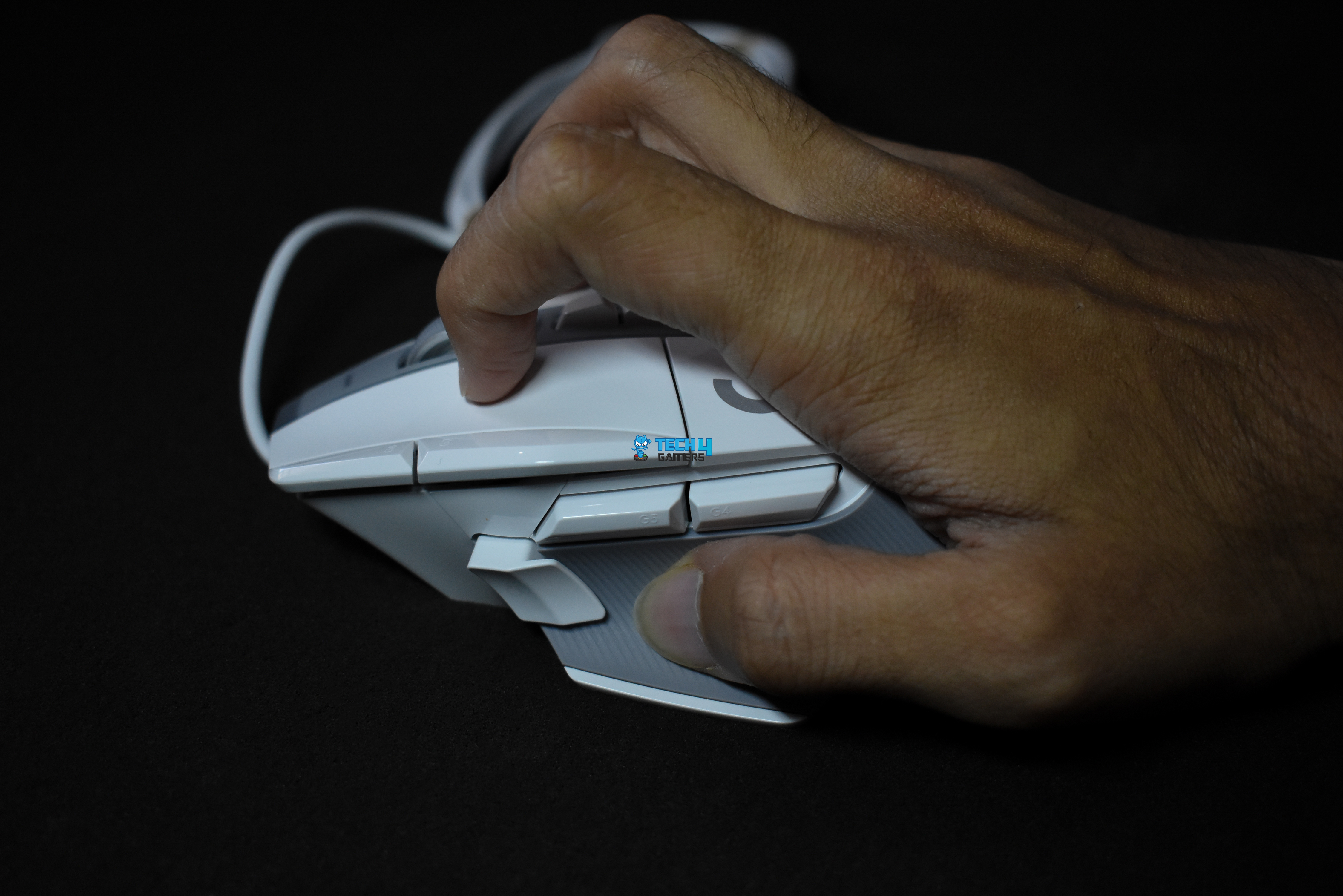
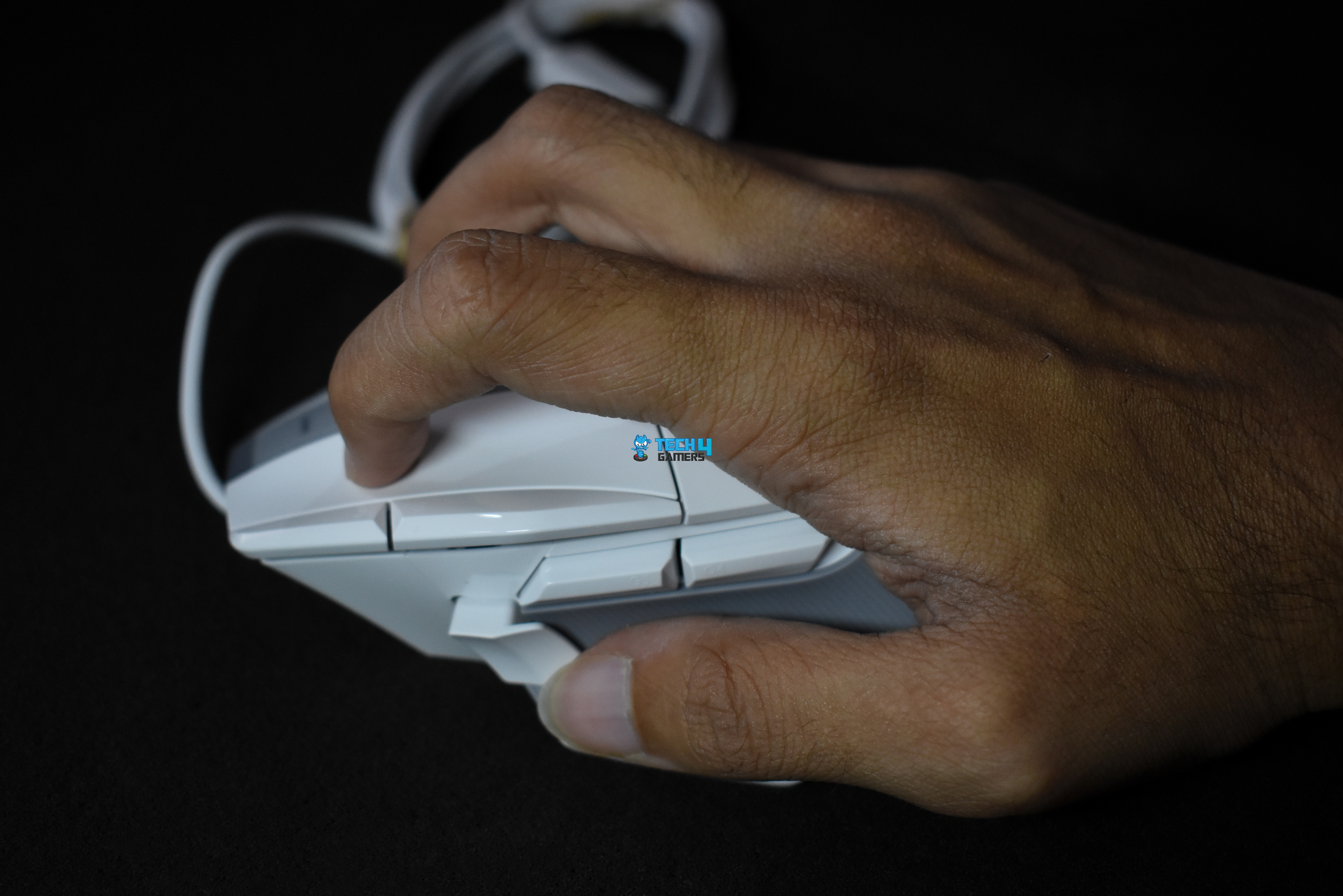
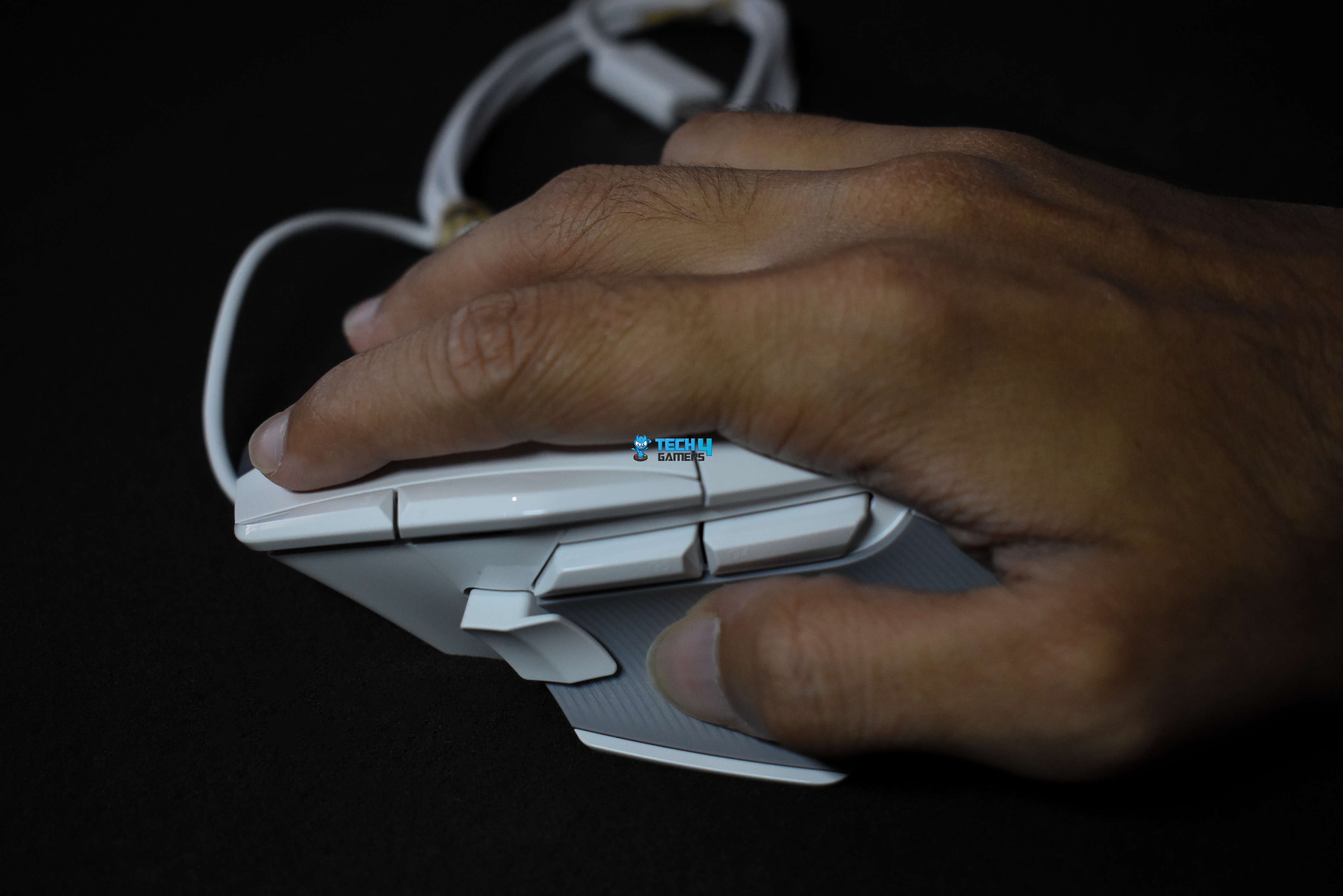
The Logitech G502 X is a bit longer than its predecessor and will feel more comfortable in larger hands. All three grip styles work well, but users with a claw and palm grip will be at an advantage with this mouse. I don’t have big hands, but after using this mouse for the last two to three weeks, I’ve grown fond of it.
Especially because of the larger trigger button, I can easily access it without moving my thumb or wrist closer, improving my response time while sniping. Personally, I like switching between fingertip and palm grips, and I’ve had great success with both while using the mouse. Overall, even with my longer usage, my hand didn’t grow tired, and the mouse gripped well.
Underside

Upon flipping the mouse, you see a fully white underside with four low-friction 100% PTFE feet. In the middle, you see the upgraded HERO 25K sub-micron sensor, while the bottom half has some product descriptions. The bottom PTFE feet is bigger than the rest and covers more surface area, but the strategic placement of the other three feet makes gliding very easy.
I felt the skates felt slippery during my testing, which is what I prefer for tracking and flicking. However, if you want to change your skates, you can easily do so and get new ones for a meager price. However, the pre-installed ones should do just fine until you wear them down.
Build Quality

The Logitech G502 X has excellent build quality with a rigid surface. I pressed gently around the edges and cracks and noticed the mouse had minimal flex. Even though the mouse goes from the original ~120g down to 89g, the weight distribution is done magnificently, and you can’t notice any difference in overall build quality.
Along with the mouse’s exterior build quality, I have to compliment its ergonomics too. The side buttons, especially the G7 and G8 DPI change buttons, are excellently placed, and it’s almost impossible to misclick the LMB for either of them. I have to actively move the finger on the extreme left to locate and press the DPI buttons.
While I love the build quality, I have to admit the cable’s quality disappointed me a bit. Although braided cables have more friction, they last longer than the rubbery cable that comes with the G502 X. However, as long as the cable lasts as long as the rest of the components, I have no issues.
Buttons
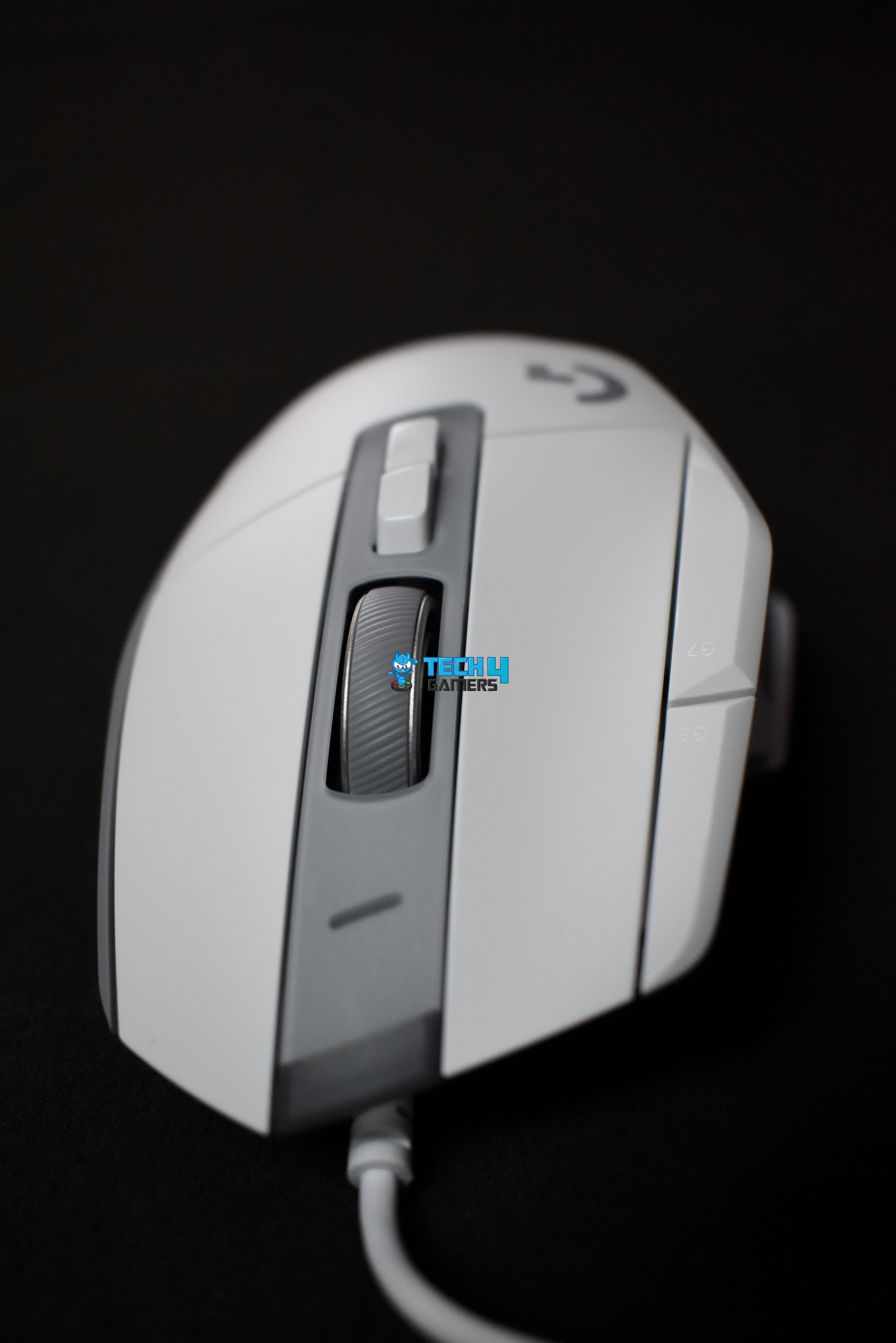
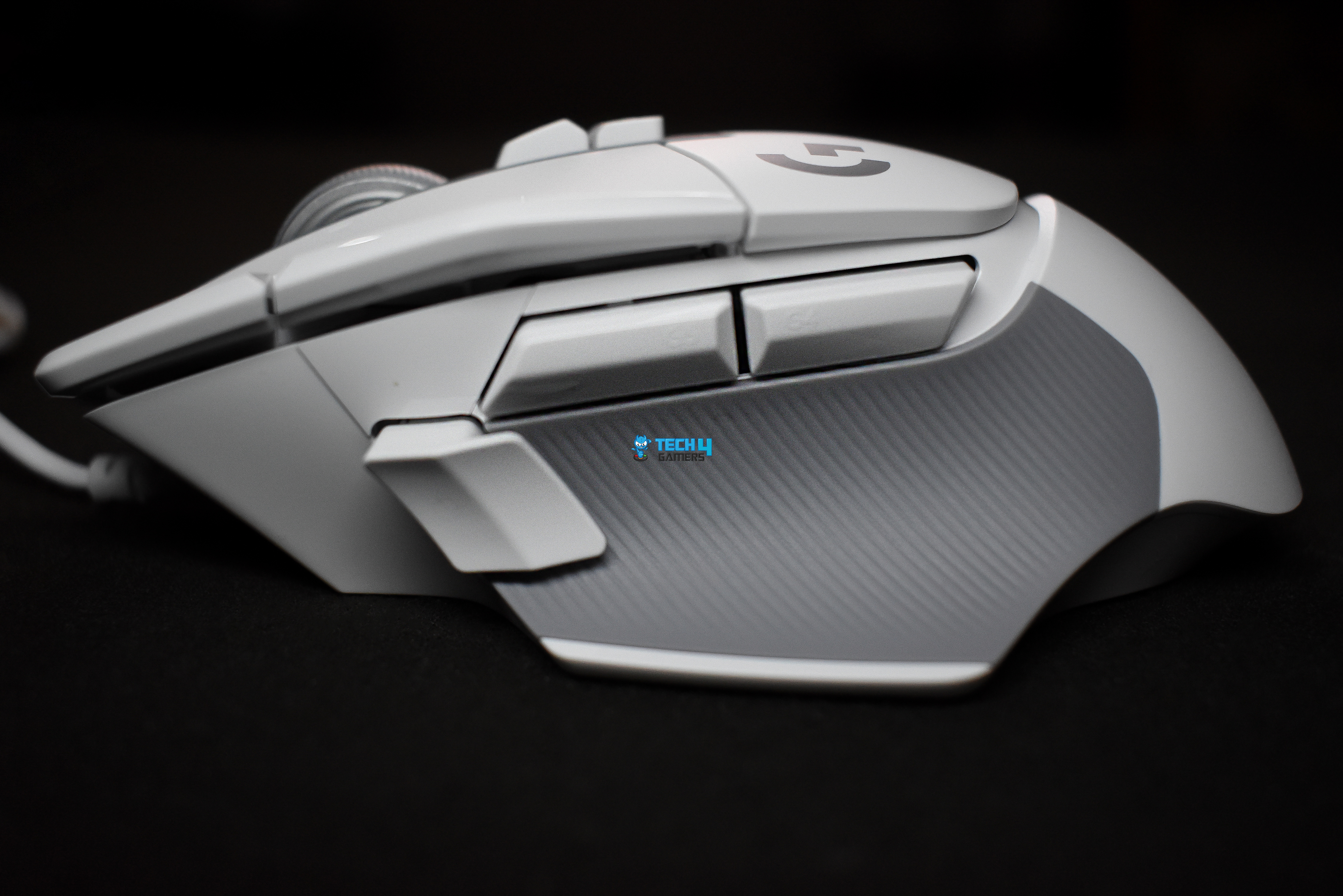
The Logitech G502 X mouse features the LIGHTFORCE hybrid optical-mechanical switches, a massive upgrade over the traditional mechanical switches used by the G502 HERO. This mouse comes with 13 programmable buttons, mainly the primary LMB, RMB, and middle click buttons. Then you have the scroll up and scroll down, along with the horizontal left and right scroll clicks.
Right below the scroll wheel, you have the hyperfast scroll wheel ratchet button, and below that, you have the onboard memory profile button. On the top-left, you have the DPI-changing buttons. Moving to the lower left-hand side, you have the forward and backward buttons along with the DPI trigger button.
Because the buttons are so well-placed and you can have so many macros and shortcuts in one place, it honestly feels like I’m in a jet fighter when I use this mouse. Although I have to say, the buttons are loud. Think of a Cherry MX blue mechanical switch keyboard, but the keys are the buttons on this mouse. That’s honestly how loud the button clicks are.
Even so, because Logitech improved the button quality with the new hybrid switches, we can expect a much longer lifespan for the mouse without getting the infamous double-click phenomenon. Overall, the placement is amazing, the feel is good, and the trigger response time is decent. The only issue is the noise.
Scroll Wheel

I have a love-hate relationship with the scroll wheel on the Logitech G502 X. Why is that? Simply, because the scroll wheel has amazing functions. It’s fast, responsive, doesn’t stutter, is made of lightweight metal and has a rubberized texture in the middle.
I also love the hyperfast scroll mode when I have to skim through my documents or books. Sometimes, when I have to edit an image and zoom into a particular space, I’ll use the infinite scroll to get there quickly. It’s a decent feature, which Logitech borrowed from the original G502.
The issue starts with the amount of noise it makes. The scroll wheel’s noise is almost as loud as the mouse click’s. Every time you roll, you’ll hear a clicky-clacky sound, and if you’re someone who prefers peace and quiet, you can forget that with this mouse. The good thing, however, is that I’m certain the scroll wheel won’t have any issues for a long time because of its build quality. I’ve been an unfortunate victim of my mouse’s middle click dying first, but it should be fine this time around.
Connectivity

The Logitech G502 X mouse we’re using for this review is a wired-only version. However, there are two more variants: The G502 X LIGHTSPEED and the G502 X PLUS. The LIGHTSPEED is wireless but doesn’t have RGB like the wired version. On the other hand, the PLUS version is wireless and also features RGB lighting. Both wireless versions weigh 102g, so they’re not really ideal for gaming.
I talked about the wire earlier, but I’ll reiterate that the rubber-like wire skids naturally and doesn’t cause extra friction while I’m flicking or tracking. While I do have concerns about the quality, I have no complaints as long as it works as intended.
Performance
The Logitech G502 X mouse uses the HERO 25K sub-micron sensor, which is a decent upgrade over the sensor in its predecessor. The DPI range starts from 100 to 25,600. While the range is commendable, I usually use the mouse at 1,000 to 1,200 DPI. I’ve set the DPI trigger at 700 for snipe flicks and tracking, so that’s the lowest I’m willing to go.
Because of the 1,000Hz report rate, 40G acceleration, and 400 IPS max speed, the mouse’s movements are precise, and there doesn’t seem to be any jitter at all. Purely for productive tasks such as programming, video editing, or image manipulation, this mouse would be overkill, but if you play games casually, it’s the perfect fit for both tasks.
Software
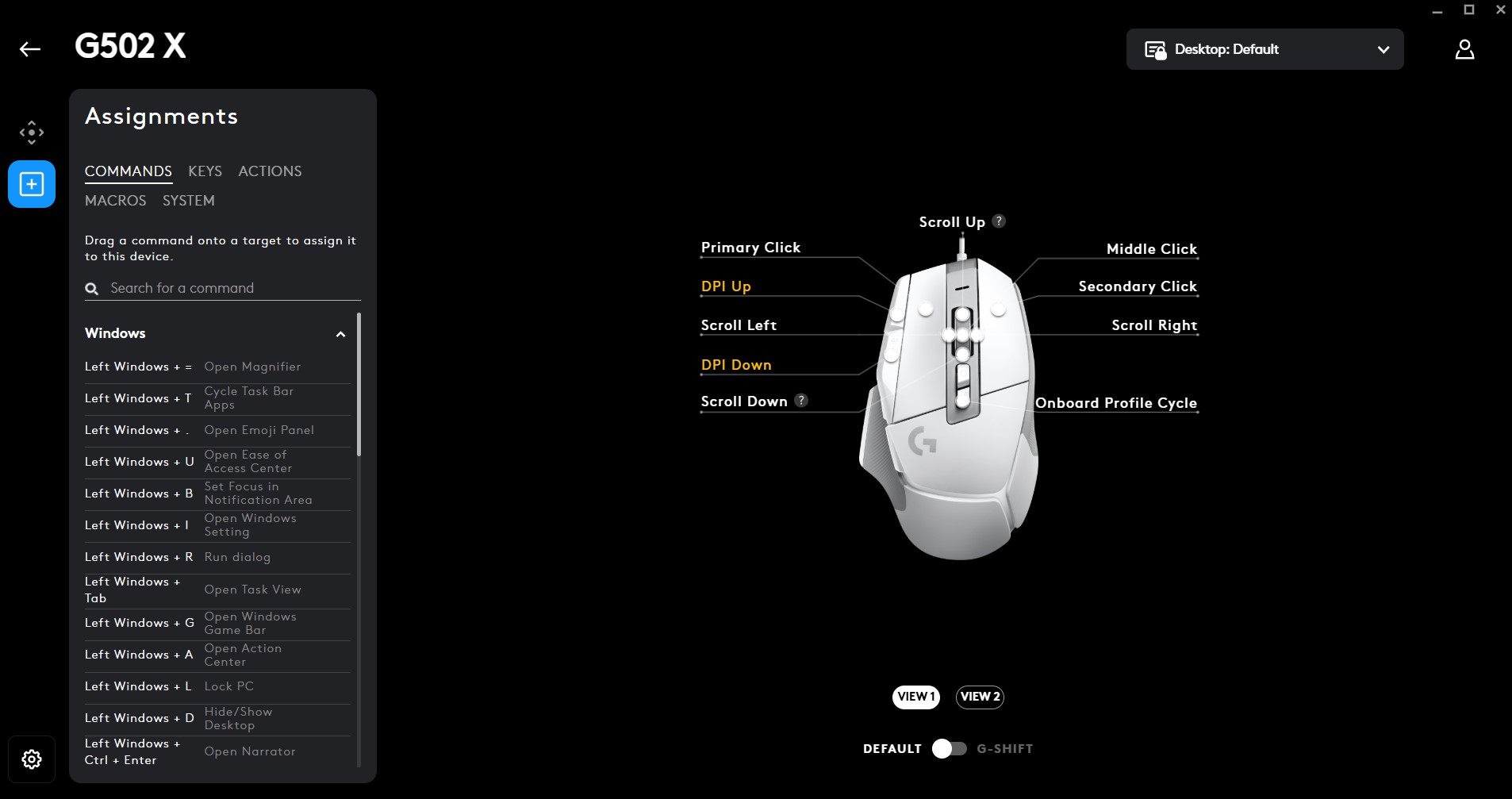
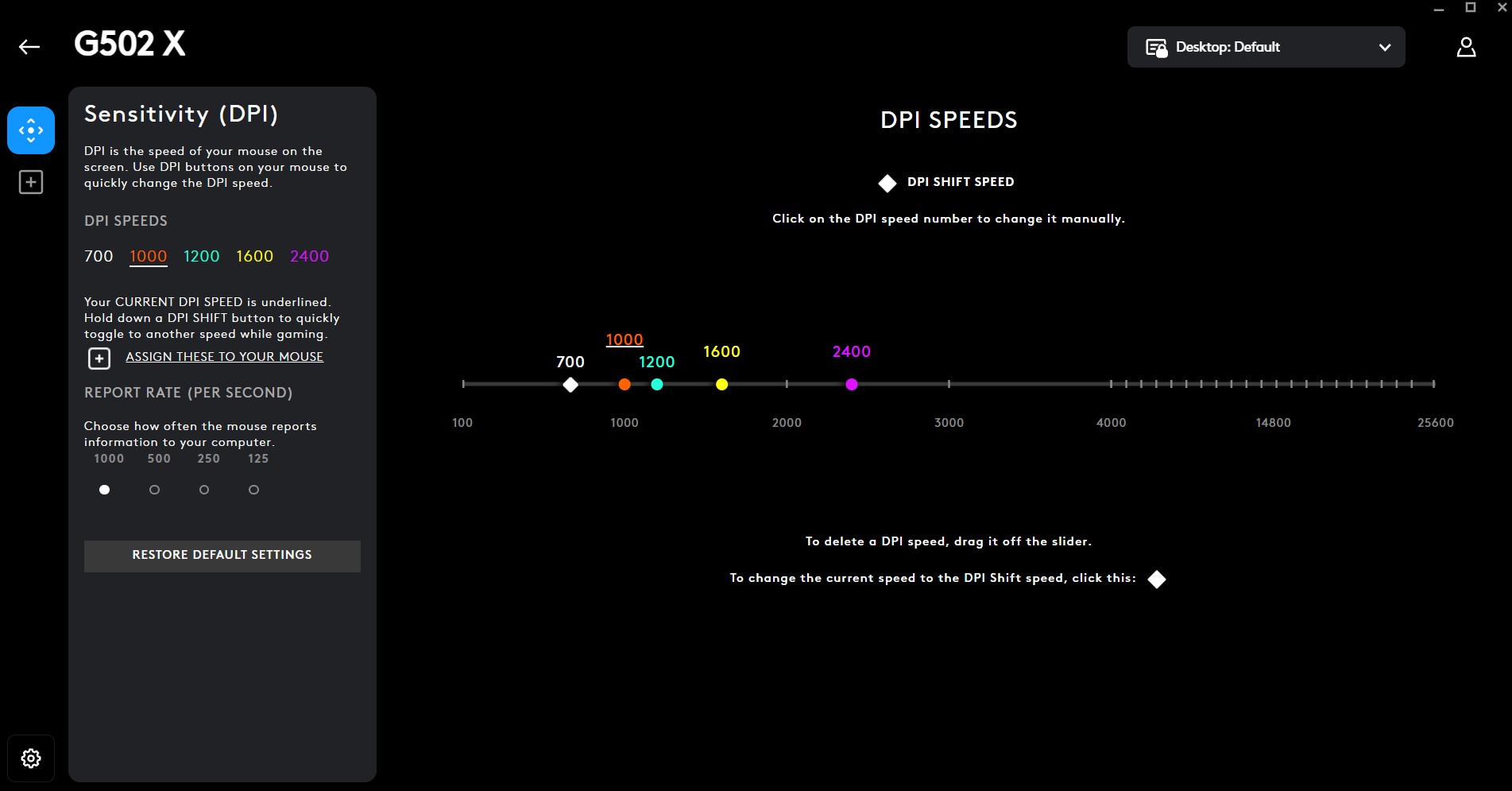
By using the Logitech G HUB software, you can customize the mouse to suit your needs. The mouse supports up to 5 onboard memory profiles with the software, and you can freely customize all the keys and DPI settings however you want. I’ve created separate profiles for League of Legends (no ability combo macros), Photoshop, Lightroom, and Premiere Pro.
If you’re using a mouse with programmable buttons, please ensure you’re not creating bannable keybind macros in games that give you an unfair advantage. I customize the buttons in League for the camera lock toggle or for placing trinkets.
Should You Buy It?
Buy It If
 You’re heavy into productivity and gaming: If you’re a graphic designer, video editor, programmer, or cinematographer who also loves to play games casually, the Logitech G502 X will help fulfill all your needs with its 13 programmable buttons and fast responsiveness.
You’re looking for longevity: Because the G502 X features improved button switches and a new scroll wheel, it’s built to last without issues. If you want a mouse that’ll last at least a few years, this one is for you.
Don’t Buy It If
 You want a quiet experience: The Logitech G502 X has extremely loud buttons and scroll wheel. If you can’t work with noise, I don’t recommend getting this mouse.
You require better connectivity options: This mouse splits its connectivity options into two separate products; if you want a wired + wireless mouse, you’re better off looking elsewhere.
Final Verdict
I’ve been using and testing the Logitech G502 X for the past two to three weeks, and it’s left an impact on me. I’m not a professional gamer, nor do I have the skills for competitive gameplay; that’s why I feel like this mouse suits my needs and tastes perfectly. With its neat DPI controls, 13 programmable buttons, multiple macro overlays, G-Shift compatibility, accurate positioning, and 89g weight, the mouse allows me to improve my aim while also boosting my productivity through shortcuts.
Although I would have preferred some RGB on the mouse to complement the rest of my build, it’s not a big issue. The loud buttons and scroll wheel were annoying at first, but I can drown the noise out with loud music. Also, its current price sits at $60, so it’s not a super expensive mouse, but you can get the Corsair Ironclaw RGB wireless mouse for a similar price if you’re looking into different connectivity options.
All-in-all, if you’re upgrading from a low-tier mouse, it’s definitely worth it to upgrade to the G502 X, although it’s not the best option for competitive gaming. It is, however, the perfect option for users with multiple workloads who require a lot of macros, shortcuts, and programmable buttons but also like to play games casually.
Thank you! Please share your positive feedback. 🔋
How could we improve this post? Please Help us. 😔

[Comparisons Expert]
Abdemanaf is a skilled creative writer who has been honing his craft since 2011. While initially working in different fields, he found a passion for technology and has been exploring the tech world since early 2015. Over the years, he has developed an in-depth knowledge of the latest tech trends and product offerings by various companies.
Abdemanaf’s writing reflects his analytical mindset and ability to think critically. He has a knack for breaking down complex technical information into easily digestible pieces, making his articles engaging and accessible to readers from all backgrounds. In February 2022, he joined Tech4Gamers as a blog and product comparison writer, where he has been able to hone his skills further.
As a writer, Abdemanaf is dedicated to staying up-to-date with the latest technological advancements and trends, enabling him to provide readers with the most relevant and accurate information. He is always eager to learn more and is constantly seeking new challenges to improve his skills.
Get In Touch: manaf@tech4gamers.com
 Join Our Community