At Tech4Gamers, I work as a guides expert. My role involves writing about solving different gaming and tech-related topics that pique my interest and that I believe more people should know about. This position allows me to share my insights and discoveries with a broader audience, enriching their gaming experiences with the unique perspectives I bring.
Story Highlights
Valve is planning on releasing a VR, the Steam Frame, with the ability to let you play games even when not connected to an external device.
The Steam Frame should run most things a low to mid-end PC can, but will still need to connect to a PC to run bigger titles.
The Steam Frame can have up to 1TB internal storage and lets you use a microSD card to increase it.
Valve revealed the future of Steam hardware that users can expect to see in 2026, and a mostly overlooked item of the reveal was Valve’s innovative VR, the Steam Frame. The device has a ton of cool features to make your experience better, with one of them being its ability to function as its own PC.
Despite Valve’s claims, can you really expect a VR to have the same capabilities as a high-end PC? Not exactly, but that isn’t to say that they’re lying. The Steam Frame does work fine without being attached to another device, but you should know just what you can expect it to run.
Valve’s VR Headset For Gaming
The Steam Frame comes with two controllers and a padded headset (Image Credits – Valve)
The Steam Frame is Valve’s VR headset, much like the Meta Quest 3S and Apple Vision Pro. Unlike the others mentioned, though, the Steam Frame’s main purpose is to be used for gaming.
For its specs, the Steam Frame has a 4 nm Snapdragon 8 Gen 3 processor, 16GB Unified LPDDR5X RAM, and a rechargeable 21.6 Wh Li-ion battery. For display, you get a 2160 x 2160 LCD per eye with a 72-144Hz refresh rate. You can look up the rest of the specifications, the I/O ports, and the physical metrics on the Steam Frame’s reveal page.
What Can The Steam Frame Run
Co-op Indies like R.E.P/O should run fine (Image Credits – SemiWork)
If you’re using the Steam Frame in its primary function, which is when connected with a PC and streaming the gameplay to it, it can run pretty much anything that runs on your PC without issue.
The only thing that may interfere then is your internet connection resulting in either lag or a drop in resolution, but so long as you’ve got proper connection, even highly demanding games like Monster Hunter Wilds can be streamed without issue.
If, instead, you want to use the Steam Frame’s built-in processor to run games, you’re significantly more restricted in what you can play. Since the Steam Frame uses a 4 nm Snapdragon 8 Gen 3 processor, it’s difficult to fully evaluate how good it is.
Most 2D games can work, while 3D games might struggle (Image Credits – Team Cherry)
What I can say is that it’s much weaker than the Snapdragon X Elite and X Plus, which are what’s normally used for more demanding work, such as in Windows Laptops. This means that, at best, the Steam Frame should be able to run games that any mid-budget PC can.
This still means that you’re able to play most indie games just fine; it’s only a problem with AAA titles. This isn’t too big of an issue, though, as even if you could play higher-resolution games fine on its processors, the storage constraints would still be an issue.
Unfortunately, until the Frame releases for commercial use, there’s no way to say for certain.
How Much Storage Does The Steam Frame Have?
All New Hardware From Valve
The Steam Frame comes in two options: you can either get the 256 GB variant or, if you want to use it by itself more often, you can opt to get 1TB. These are more than enough for normal use, which would usually be storing movies or smaller VR games in it.
So even if you want to use it to store more games, the 1TB variant would still be enough for most people. The Frame also gives you an option to use a micro SD card to extend your storage, so it’s safe to say you won’t find yourself running into storage issues too often.
How I’ll Be Using It
Valve also introduces a technology that uses eye-tracking to ensure you get the best display quality (Image Credits – Valve)
Even if the Frame functions fine without a PC connection, I’ll probably still be using it connected to my PC simply because the graphics would be better that way.
Apart from gaming, the huge storage also means that you can download plenty of content on it if you’re travelling or won’t have an internet connection for a while, which is another use I’ll make full use of. I don’t think it’d be that much different from any other high-end VR headset on the market, so whether I recommend it depends on how Valve prices it.
Currently serving as a News Reporter at Tech4Gamers, I have the privilege of combining my love for gaming with the art of storytelling. My role involves crafting engaging narratives that keep our audience abreast of the latest developments in the gaming world.
Story Highlight
Current-gen consoles are expected to become more expensive by 10-15% due to the worldwide memory shortage.
Next-gen consoles may also be delayed since the memory shortage is expected to last for at least a couple of years.
Specifically for Valve, the situation seems terrible as the Steam Machine is planned to be released in 2026.
After desktop PC prices increased due to the global memory shortage, driving RAM and SSD prices out of reach, the same impact is being felt on the console side. Prices for the current-gen consoles are expected to increase by 10-15% in the coming year.
However, that isn’t all, and things are expected to get much worse for console manufacturers. With the memory shortage expected to last for at least a couple of years, the next-gen consoles could also be delayed, as per a new report.
Why it matters: Delayed next-gen consoles will be terrible for the industry, and the ripple effect will set everyone back, including publishers and gamers.
For those planning to buy a gaming device, the holiday season is currently the best time, as prices are expected to surge in the coming year.
As per Reuters, which reported how the AI boom is causing panic for the gaming industry, they stated the following:
So instead of risking poor sales, we might see console makers delay releases.
Previously, it was reported that memory manufacturers have booked their entire stockpiles with AI companies for 2026 and beyond for a few. With next-gen consoles expected to release in 2028, this poses a problem for manufacturers.
Higher prices will certainly impact console sales, which are already expected to decrease by 4.4% next year. Prices for Xbox Series X|S were raised twice this year, and the result was that console sales were just around a million this year.
Next-Gen Xbox Will Be A Premium Device With A $1000+ Price Tag, While The PS6 Will Target The Traditional Price Bracket.
For next-gen, though, Valve is entering the console space with the Steam Machine next year. The launch of Valve’s console will be most troubled, as they were already facing problems deciding on the price, and rising memory prices further complicate things.
Microsoft also plans on releasing Project Magnus, a PC-console hybrid, soon. Lastly, the PS6 is expected to release somewhere around 2027-28. This means production for all these consoles will have to start in the latter half of 2026, which won’t be feasible given inflated component prices.
At T4G, my task is to cover the latest news around the gaming globe ASAP and with the utmost precision. I adore all the games and respect all the devs behind the amazing games that we get all year. So, whether it’s a PC or a Console game, I got it all covered.
Story Highlight
Sony has more live-service games scheduled for 2026 than first-party single-player titles.
The company has seen substantial lows and highs in the live service genre.
It’s weird to see Sony focusing less on single-player, as that’s what fans love more.
In recent years, we have seen Sony make a big push toward a live-service future, and even fail at it with Concord. This forced the company to reevaluate its strategy, but it still appears adamant about continuing live service games.
In 2026, Sony will release more live-service games than single-player games on the PS5. There are only two confirmed single-player titles for next year: Marvel’s Wolverine and Saros; the rest are live service.
Why it matters: Sony’s live service strategy has been mixed; it has seen the highs of Helldivers 2 and the lows of Concord, and has even canceled other projects, including TLOU2 and God of War multiplayer titles.
Wolverine is Sony’s tentpole title for 2025
This year, Sony will publish two single-player games on the PS5, which include:
Note that this list comprises titles that are confirmed for the next year and are being published by Sony Interactive Entertainment itself. Clearly, live service games far outnumber single-player ones.
Now, Sony does have a couple of other big single-player titles in the works as well, like Naughty Dog’s Intergalactic, which is expected in 2027, and they could be skipping next year because 2026 is already packed to the brim.
Marathon is a mixed bag, even before release
Single-player titles are actually the ones that make PlayStation exclusives stand out. Players have come to love franchises such as Uncharted, The Last of Us, God of War, and others for their deep connections to their stories and characters.
Nonetheless, there will be notable releases next year, including the highly anticipated GTA 6, Resident Evil Requiem, and more. Fans will hope Sony leans more toward its traditional single-player titles.
What are your thoughts on Sony publishing more live service games than single-player games in 2026? Let us know your opinions in the comments or join the discussion at the official Tech4Gamers Forum.
Currently serving as a News Reporter at Tech4Gamers, I have the privilege of combining my love for gaming with the art of storytelling. My role involves crafting engaging narratives that keep our audience abreast of the latest developments in the gaming world.
Story Highlight
Analyst warns that console prices will increase by 10-15% in 2026.
Valve is also being pressurized to reevaluate the Steam Machine price, which will launch next year.
We recommend buying a new console before the holidays end because prices won’t be this low for at least a couple of years.
The AI boom has been taking effect in the electronics sector, causing a worldwide memory shortage and prompting Micron, a major RAM manufacturer, to exit the consumer market and focus on supplying AI companies.
The DRAM shortage has caused a ripple effect across all departments, and consoles could now be the latest victim. One analyst warns that console prices could soon face a bump as manufacturers struggle to meet demand.
Why it matters: We’re in the latter half of the current console generation, and prices are typically cut short during these periods, but unfortunately, gaming has become increasingly difficult for the average consumer due to inflation and economic changes.
A 64GB DDR5 Kit Costs As Much As A PS5 These Days
According to Reuters, console prices are set to increase by 10% to 15% over the next year or two, and PC prices are set to rise by a whopping 30% in 2026.
For Xbox, Microsoft has already raised prices for the Series X|S consoles twice in 2025, and an Xbox Series X now costs as much as $800.
Valve is also entering the home console market with the Steam Machine, which could be priced higher than the company initially planned, and it could ruin things for them.
Sony and Nintendo were already prepared for situations like tariffs and memory shortages, which is why the prices of the PS5 and Switch 2 consoles remained unchanged throughout this year.
However, inventories could only last so long, and sooner or later, these consoles will also take a price hit. Currently, all the major consoles are on sale due to the holiday season, and we recommend buying them since it is probably the lowest they’ll go for in at least a couple of years, until this memory shortage ends.
The report further reveals that console sales have only gone downhill. While 2025 was the year they expected growth, the forecast was reduced by 3.5%, and for 2026, console sales are expected to drop by 4.4%.
At T4G, my task is to cover the latest news around the gaming globe ASAP and with the utmost precision. I adore all the games and respect all the devs behind the amazing games that we get all year. So, whether it’s a PC or a Console game, I got it all covered.
Story Highlight
Bethesda says that Fallout 5 will be their most ambitious title in the franchise.
The game aims to deliver 600 hours worth of content, even more than previous titles.
While a release window hasn’t been decided yet, the development is going smoothly.
Almost 10 years since the last mainline Fallout game, Bethesda is now finally talking in depth about the next entry. Fallout 5 has been officially confirmed, but it still lacks a release window. However, the studio has confirmed it’ll have a massive scope.
In a recent interview, a Bethesda developer confirmed that Fallout 5 will be their most ambitious game in the franchise, and they aim to make it highly playable with 600 hours of content, unlike regular ’20-hour games’.
Why it matters: Fallout games have consistently provided content that can be enjoyed for years. Fallout 4 offered 200 hours of content for total completion, but with the next title, the studio wants to take it a step further.
Xbox plans to launch Fallout 5 before 2030, based on rumors.
Speaking to Game Informer, Emil Pagliarulo, one of the lead Bethesda developers, commented on his goals for Fallout 5. He said he wants to continue giving fans what they love and stories they can get immersed in.
(Bethesda aims to) Deliver an experience that they play not for 20 hours and not for 100 hours, but an experience they can play for 200, 300, you know, 600 hours.
– Emil Pagliarulo
Pagliarulo says they want to deliver an experience that doesn’t offer just 20 or even 100 hours of content; instead, they want Fallout 5 to be played for 600 hours, more than double the last game.
The title aims to deliver 600 hours of gameplay.
Fallout games are designed to be played for hundreds of hours. They have a highly loyal community that is consistently supported through Creation Club, expansions, and mods.
Todd Howard says that while most of the team is working on Elder Scrolls 6, another team is working side by side on Fallout 5. They can’t provide a release window at this time, but development is progressing smoothly.
What are your thoughts on Fallout 5 offering 600 hours of content? Let us know your opinions in the comments or join the discussion at the official Tech4Gamers Forum.
At Tech4Gamers.com, I cover the latest news and rumours in the gaming industry, from new game releases to hidden gems and video game leaks. Furthermore, I occasionally write tech articles about video game consoles, providing insights into the hardware and software that powers our gaming experiences.
Story Highlight
Twitch tracks login habits and traffic sources more closely than before to prevent automation and account abuse.
Connections that look like home or mobile data are less likely to trigger security checks than cheap server-based (datacenter) proxies.
People use proxies to manage multiple channels, so Twitch doesn’t see them as connected, which prevents a single issue from affecting every account.
Twitch isn’t the wild west it used to be. These days, the platform watches everything closely, from how often you log in to where your traffic comes from. Whether you’re running multiple channels, managing bots, or just trying to avoid random lockouts, IP behavior matters more than most people realize.
That’s why proxies have quietly become part of the Twitch toolkit. Not for shady reasons, but because Twitch’s systems are far less forgiving than they were a few years ago.
The problem is that a lot of proxy advice online is either outdated or written like a sales pitch. So let’s talk honestly about what actually matters when choosing a Twitch proxy, and what usually goes wrong.
Why Twitch Cares So Much About Your IP
Streaming on Twitch.
Every IP address carries a history. Twitch checks where it’s been used, how often it pops up, and whether it’s tied to unusual behavior such as mass logins or nonstop requests. If an IP has been passed around too many times or abused in the past, Twitch notices fast.
This is why people run into captchas, temporary locks, or sudden restrictions even when they’re not breaking rules. In many cases, it isn’t the account that causes the issue, but the IP behind it.
From experience, Twitch has very little patience for recycled or low-quality IPs. Once an address is flagged, it rarely gets a second chance.
IP Reputation Is the Make-or-Break Factor
If there’s one thing to focus on, it’s IP reputation. Clean IPs behave like real users, while dirty IPs stand out immediately.
Twitch looks for patterns that suggest risk. Multiple accounts logging in from the same address, actions happening too quickly, or constant reconnects and refreshes can all raise red flags. When that happens, Twitch usually reacts first and asks questions later.
This is where residential, ISP, and mobile proxies tend to perform better. They look like normal home or mobile connections instead of obvious server traffic. Datacenter proxies, especially cheaper ones, are often flagged almost immediately.
Before committing to a proxy service, it’s important to look at a few practical details. IP freshness matters more than most people think, because overused addresses rarely last long on Twitch. Rotation and proper replacement policies help keep things stable over time.
You should also understand how a provider handles blocked IPs and whether they actively replace them. Proxy type matters too. Residential, ISP, or mobile proxies should match how you actually use Twitch.
Some setups need rotating IPs, while others require a stable connection for long sessions. Picking the wrong option can cause problems even if the service itself is decent.
How Twitch Spots Bots and Bad Proxies
Free or low-cost proxy lists are usually already blacklisted.
Twitch doesn’t rely on IP checks alone. It also watches behavior. Timing, repeated actions, and shared sessions all play a role in how activity is judged.
Automation tools without proper proxy support rarely last long. Twitch’s systems are quick to notice when requests don’t feel human, even if the tools themselves are commonly used. Poor configuration can also hurt legitimate users who rely on low-quality proxies.
In practice, residential proxies blend in the best, ISP proxies strike a balance between speed and trust, and mobile proxies rotate naturally, which adds another layer of cover. Rotating setups work better at scale, while static connections are more useful for long, stable sessions.
Some proxy choices almost always lead to issues on Twitch. Free proxy lists are often recycled and heavily abused, making them easy to detect. Cheap datacenter proxies are commonly flagged as soon as they connect.
Providers that refuse to explain where their IPs come from or how they’re maintained are another warning sign.
These options might work briefly, but they rarely hold up for long. On Twitch, that kind of instability isn’t worth the risk.
Why the Provider’s Website Actually Matters
This part doesn’t sound exciting, but it’s important. A provider’s website that clearly explains what they offer, how their IPs are sourced, and what they’re meant to be used for is usually more reliable than one that hides behind vague promises.
Clear setup guides, honest limits, and useful documentation reduce the chance of mistakes that could trigger Twitch’s systems. Poor support and unclear policies often point to weak infrastructure and short-term service quality.
Common Twitch Use Cases for Proxies
Image credit: Twitch Blog
Managing multiple Twitch accounts is one of the most common reasons people turn to proxies. Twitch closely watches IP overlap, and logging into several accounts from the same location can lead to reviews or restrictions, even if no rules are broken. Proxies help keep sessions separate and reduce the risk of accounts being linked.
Proxies are also useful for geo-based access and testing. Twitch content, ads, and features can change depending on region. Using location-based IPs allows users to see how streams appear in different areas, test regional features, or reduce latency by choosing closer servers.
Automation is another major use case. Moderation bots, analytics tools, and tracking systems all rely on repeated requests. Without clean proxies, these tools often hit rate limits or captchas. With the right setup, they run quietly in the background without drawing attention.
Analytics and research also benefit from proxies. Watching streams, checking ads, or reviewing competitors from a single IP can look suspicious over time. Spreading activity across multiple clean IPs makes analysis safer and more consistent.
I’ve previously worked for eXputer as a Senior News Writer for several years. Now with Tech4Gamers, I love to devoutly keep up with the latest gaming and entertainment industries. I have a Bachelor’s Degree in Computer Science and years of experience reporting on games and breaking exclusive stories. Besides my passion for gaming journalism, I love spending my leisure time farming away in Stardew Valley. VGC, IGN, GameSpot, Game Rant, TheGamer, GamingBolt, The Verge, NME, Metro, Dot Esports, GameByte, Kotaku Australia, PC Gamer, and more have cited my articles.
Story Highlight
Sony’s Bungie studio revealed a new Marathon progress comparison with its initial alpha version.
The game has come a long way visually, with improved lighting and shadows, but many argue it has lost its unique aesthetic.
Therefore, many gamers are unhappy with the new visual direction of Marathon instead.
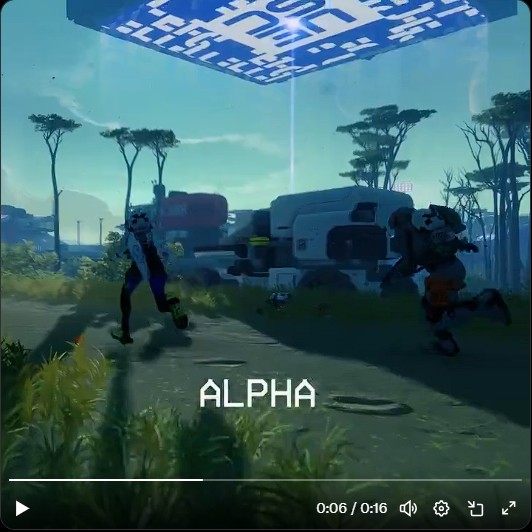
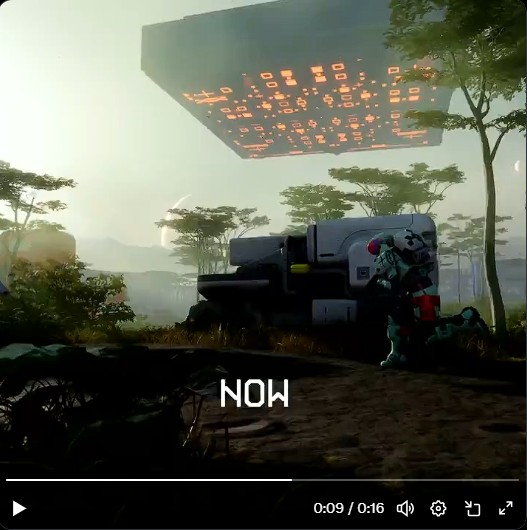
Bungie recently revealed just how far Marathon has come since its alpha, in a before-and-after comparison. The footage shows new striking visuals with improved lighting and shadows, but fans argue that all that glitter comes at the cost of a generic art style.
Why it matters: Marathon’s new art direction makes it look quite gorgeous with better lighting and shadows. However, the game may have entirely lost its unique art style in the process, which has upset many fans.
Marathon Alpha vs. Now Comparison Controversy
1 of 5
Marathon's alpha version lacked in visuals but had a unique art style.
The game has better lighting and shadows, but a more generic feel to it.
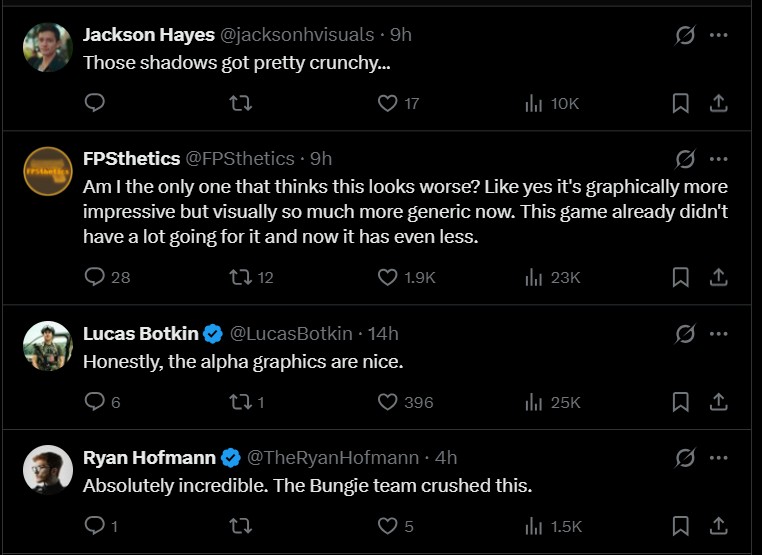
Fans are quite split on whether the new visuals are actually good compared to the unique art style in the alpha.
Many gamers have disliked that Marathon looks more generic with better lighting and shadows.
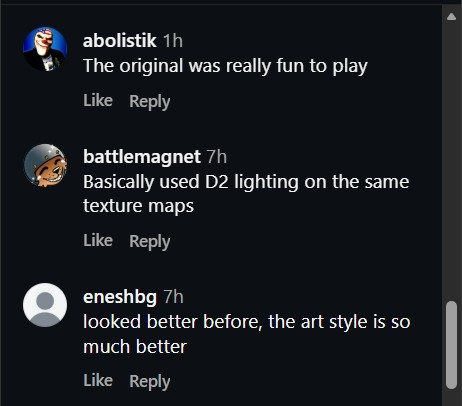
This split sentiment has been shared across all social media posts about the comparison.
In the Twitter post comparing the two, many skeptical Marathon fans gathered to discuss the game’s improved visuals. While the extraction shooter indeed looks better, fans argue that the art style now looks more generic and resembles other games in the genre.
Bungie may have altered the unique visual art style to remove all elements of plagiarized art from the alpha version. The art controversy was resolved a few weeks ago after Bungie settled with the affected artist.
Regardless, the loss of alpha color grading has led many fans to give up on Marathon entirely, while the rest of the community is now more excited to play the game.
Bungie’s Marathon looks quite different than its alpha reveal footage.
Some are hopeful that Bungie takes note of the feedback and retouches the visuals to bring back more of the game’s unique colors from the alpha. However, that might be unlikely unless we get yet another delay. The game is set to launch in 2026 with a $40 price tag.
Do you think Marathon looks worse, or more generic, despite the noticeable visual improvements since its alpha version? Let us know your thoughts in the comments below, or join the discussion on the Tech4Gamers forum.
At Tech4Gamers.com, I cover the latest news and rumours in the gaming industry, from new game releases to hidden gems and video game leaks. Furthermore, I occasionally write tech articles about video game consoles, providing insights into the hardware and software that powers our gaming experiences.
Story Highlight
Dr Disrespect proved he could maintain a massive audience even after being banned from Twitch.
He set the blueprint for modern “event-style” streaming that many other creators now copy.
The Doc continues to represent the messy intersection of high-level influence and personal controversy in the digital age.
Few names in gaming cause as much debate as Dr Disrespect. Over the years, his career has been a mix of massive popularity, sudden controversy, and a fanbase that refuses to look away.
Whether you like him or not, the Doc remains one of the most talked-about figures in streaming, and that alone says a lot about his place in gaming culture.
When people bring up Dr Disrespect allegations, they are not talking about rumors in a vacuum. His Twitch ban, platform fallout, and the wave of discussion that followed have all reshaped how audiences see him.
For some, it damaged his reputation for good. For others, it barely slowed him down. What is interesting is how he managed to stay relevant even after losing the biggest stage he ever had.
The Persona That Changed Streaming
The Doc used a specific persona and high-end visuals to change the streaming standards.
Guy Beahm’s Dr Disrespect character was never just another streamer with a webcam. From the start, it felt more like a TV show built around gaming. Loud confidence, over-the-top trash talk, and a full production setup made his streams feel different when most creators were still figuring things out.
That style changed expectations. High-energy intros, custom visuals, and playing a character instead of just “being yourself” are now normal on YouTube and Kick. Years ago, they were not. Even streamers who dislike Dr Disrespect have borrowed from the blueprint he helped popularize.
The Doc worked because the act felt committed. He never broke character, and he treated every stream like a performance. Skill mattered, but presentation mattered just as much. That balance is still something many creators struggle to pull off.
Controversy Didn’t End the Conversation
Public opinion remains split on Dr Disrespect.
The Dr Disrespect controversy era shifted how people talk about him, but it did not erase his audience. After leaving Twitch, he rebuilt on other platforms and kept pulling solid numbers. That alone shows how loyal his core fanbase remains.
Some viewers separated the character from the person. Others simply enjoyed the content and did not want to give it up. At the same time, plenty of people walked away completely. The split reaction is part of why his name still trends whenever he makes a move.
This is where opinions really differ. To critics, his continued success feels uncomfortable. To supporters, it looks like proof that talent and consistency still matter in the creator economy. Both sides exist, and neither one is quiet.
More Than Just Streaming
These days, the Dr Disrespect gaming career is not only about live streams. Game development projects, studio efforts, and brand-driven ideas show that he wants to build something bigger than daily broadcasts. Not all of it has landed perfectly, but the ambition is clear.
He treats gaming like a business and entertainment like a product. That mindset helped him survive platform changes that ended other creators’ momentum. While some streamers rely on trends, Dr Disrespect leans on identity. You know what you are getting every time.
That consistency is part of why fans stick around. Even when opinions shift, the character does not.
Why Admiration Still Exists
So why does admiration still follow him despite everything? For many fans, it comes down to impact. Dr Disrespect helped prove that gaming content could feel big, loud, and event-driven. He pushed streaming beyond “just gameplay” and into full-on spectacle.
People also respect the grind. Losing a major platform and continuing anyway takes confidence, stubbornness, or both. In a space where relevance fades fast, staying visible is its own achievement.
None of this erases the criticism. It just explains why the conversation never really ends.
Dr Disrespect is not a clean success story, and he is not a simple villain either. His legacy sits somewhere in the middle, shaped by innovation, ego, controversy, and undeniable influence.
Whether you admire him, criticize him, or do both at the same time, his impact on streaming is hard to deny.
The Dr Disrespect allegations will always be part of his story, but so will the way he changed how gaming content looks and feels. In the end, he represents the messy reality of modern creator culture, where talent, mistakes, and personality collide in public.
At T4G, my task is to cover the latest news around the gaming globe ASAP and with the utmost precision. I adore all the games and respect all the devs behind the amazing games that we get all year. So, whether it’s a PC or a Console game, I got it all covered.
Story Highlight
Sony seems to be at a crossroads regarding its current multiplatform strategy.
The company hasn’t announced an official PC port since last year’s TLOU Part 2.
PC ports generate decent profits, but they can somewhat affect console sales.
In 2020, Sony released its first-ever PS4 exclusive port on PC, marking the beginning of a shift in the industry. Due to massive budgets, multiplatform has become essential for maximizing profits from the investments made during development.
Sony still hasn’t been too aggressive with its policy as its exclusives release only on PC, and that too after it’s been on the PS5 for at least a year. Xbox, on the other hand, has gone all out, even porting games to PlayStation.
In hindsight, the multiplatform strategy looks like the perfect way forward, as it guarantees much more game sales, but there is a major downside to it, especially if you are companies like Microsoft or Sony that make consoles as well.
So, while the game sales are boosted, it comes at the cost of low hardware sales. This has been one of the reasons for Xbox’s huge decline in the market, as it just managed to sell a reported 1 million Xbox Series S units in 2025.
At one point, it seemed that PC would be the promised land for PlayStation’s further growth; however, it’s been almost a year, and Sony hasn’t announced any new first-party PC ports since The Last of Us Part 2 Remastered.
While it did launch Stellar Blade on PC and is technically a PlayStation-published title, the game comes from the Korean studio Shift Up, which is a separate entity and doesn’t fall under PlayStation Studios.
Why it matters: The recent silence suggests PlayStation might have pivoted away from releasing its games on PC and wants to keep them in the walled garden, which it had kept for so many years before.
PlayStation seems to have taken a break from its multiplatform strategy.
A Year Of Silence
While this might not be the definitive end of Sony launching its exclusives on PC, they certainly seem to be headed in that direction.
Astro Bot won the prestigious Game of the Year award at The Game Awards 2024. That presented Sony with an excellent opportunity to port the game to PC and maximize sales. Even Expedition 33’s sales got a boost when it won.
Let’s go a few years back and analyze more popular names. Demon’s Souls, released in 2020, is perhaps among the most demanded ports, but Sony has kept it exclusive to its hardware. The same applies to Bloodborne.
Even last year’s game of the year, Astro Bot, didn’t get a PC port.
Gran Turismo 7 perfectly complements Microsoft’s racing game, Forza Horizon 5. It could be a perfect PC title, but it has also been kept PlayStation-locked. Uncharted 4 got a port, but the trilogy never came to PC either.
Even Sony’s latest and greatest title, Ghost of Yotei, doesn’t seem to have a PC port planned for any time soon, based on the lack of information. It could’ve been a good idea, considering its sales couldn’t really take off.
Revenue Vs Hardware Conflict
Sony has released most of the PS4’s games on PC at this point. When they initially released, they seemed like a great idea. Horizon: Zero Dawn was the first port, and it was a massive success, outlining a bright future for Sony on PC.
It continued with a couple of other releases, and God of War recorded excellent figures as well, but then the hype died down. According to reports, PC ports accounted for roughly 3.4% of total PlayStation revenue in 2024.
It still accounted for billions, but it is significantly short of the amount of revenue Sony had expected. Sony stated that the PC ports aren’t that expensive to make, so they continued to develop them regardless.
Hardware sales are still one of Sony’s biggest priorities.
But this seems to have placed them at a crossroads: to maximize revenue through PC ports or concentrate on hardware. PlayStation CEO Herman Hulst made it clear that their tentpole titles are meant for PS5 only.
So, unlike Microsoft, hardware is Sony’s priority, and that makes sense too, as PS5 has been a huge success, selling over 84 million units so far. They wouldn’t want to sacrifice their hardware for slightly more revenue from Steam.
Is The Experiment Over?
It is improbable that Sony will completely give up on PC. Day-and-date PC releases are crucial for multiplayer expansion, as evidenced by live-service games like Helldivers 2. However, the PC honeymoon phase may be ending for the brand’s defining single-player games.
The lack of announcements over the past year is a loud statement. It implies that Sony has examined the data and determined that safeguarding the PS5 environment is more important than the additional revenue a PC port generates.
So, unfortunately, for PC players who have been waiting for Demon’s Souls or Bloodborne, the wait may now be endless.
What are your thoughts on this matter? Do you wish Sony to continue marking PC ports? Let us know your opinions in the comments or join the discussion at the official Tech4Gamers Forum.
I’ve been the Journalist & Editorial Writer at Tech4Gamers since July 2022. I spearhead our hardware coverage, including overclocking GPUs, benchmarking CPUs, reviewing peripherals, and fine-tuning custom PC builds for every budget. Daily, I report on breaking gaming news, from major launches and studio updates to the latest industry trends, ensuring our community stays informed. Beyond news briefs, I write in-depth feature articles on gaming culture and emerging technologies. And by collaborating closely with the editorial team on content planning, SEO strategy, and our publishing calendar, I help us consistently hit our traffic and engagement targets.
Generally, full-size keyboards don’t get as much attention these days. Most of the spotlight is on compact layouts for smaller desks and minimalist setups. Even after that, there’s demand from users for everything to be on the keyboard, right where it’s supposed to be. This includes a numeric keypad, a complete navigation cluster, and more, with no compromises. That’s the space the Epomaker QK108 is trying to fill.
Why Trust Tech4Gamers
Abdul Hannan is our peripherals expert who has been testing different mice, keyboards, headphones, microphones, and more for years.
130+ peripherals tested and reviewed by our team of hardware experts (Tech4Gamers Team).
500+ hours spent testing different peripherals for our reviews.
At Tech4Gamers, ensuring you get reliable information is our priority. That’s why every hardware round-up undergoes a meticulous review process by our team of experts and editors. Each review is carefully examined against our strict editorial guidelines, guaranteeing you trustworthy insights you can depend on.
Key Takeaways
The Epomaker QK108 is a well-rounded, full-size mechanical keyboard that delivers a quiet, comfortable typing experience and offers additional features at a reasonable price.
You should buy the Epomaker QK108 if you want a full-size keyboard, prefer a quiet typing experience, connection flexibility across different devices, and value for money.
You should skip the Epomaker QK108 if you want a compact keyboard, prefer a clicky or tactile feedback, premium build quality, and shine-through keycaps.
Here are the technical specifications:
Layout
Full-Sized Mechanical Keyboard, US ANSI Layout
Number of Keys
104 Keys
Battery
8000mAh (4000mAh*2)
Battery Life
28h (RGB On & Screen On), 35h (RGB On & Screen Off), 89h (RGB Off & Screen On), 229h (RGB Off & Screen Off).
Connectivity
2.4Ghz Wireless/Bluetooth/USB A-to-C Wired
Compatibility
Mac/WIN/Android
Dimensions
438.5*138.5*43.1MM
Case Material
ABS Plastic
Plate Material
PC Plate
Flex-Cut
No Flex-Cut
Stabilizers
Plate-Mounted Stabilizer
Mounting Structure
Gasket-Mount
Sound Dampening
5 Sound-Improving Layers including Sandwich Latex, IXPE Switch Pad, PET Sound Enhancement Pad, Bottom Sponge, and Bottom Silicone
Keycaps Profile
Cherry Profile
Keycaps Material
PBT Keycaps
Keycaps Manufacturing Technique
Dye-Sub
Hot-swappable
Yes
RGB Backlight
Yes, south-facing per-key LEDs
Polling Rate
1000Hz (USB/2.4Ghz), 125Hz (Bluetooth)
Latency
3ms (Wired), 5ms (2.4Ghz), 15ms (Bluetooth)
Anti-Ghosting
Yes, with N-Key Rollover
Keyboard Weight
1.18KG
Front Height
20.5MM
Angle
6, 8.5, and 11.5 degrees
Kick-Stand
2-stage adjustable
[toc]
What Makes the Epomaker QK108 Different?
The Epomaker QK108 differs from its predecessors and the broader keyboard market by offering a full-size layout with features that are increasingly rare in large-format keyboards. It includes a customizable mini screen and a multifunctional rotary knob, features you typically don’t see on standard full-size keyboards. Moreover, the gasket-mounted structure with multiple sound-dampening layers delivers a quieter and cushioned typing experience.
Packaging
Packaging
1 of 3
Frontside of the Box
Topside of the Box
Backside of the Box
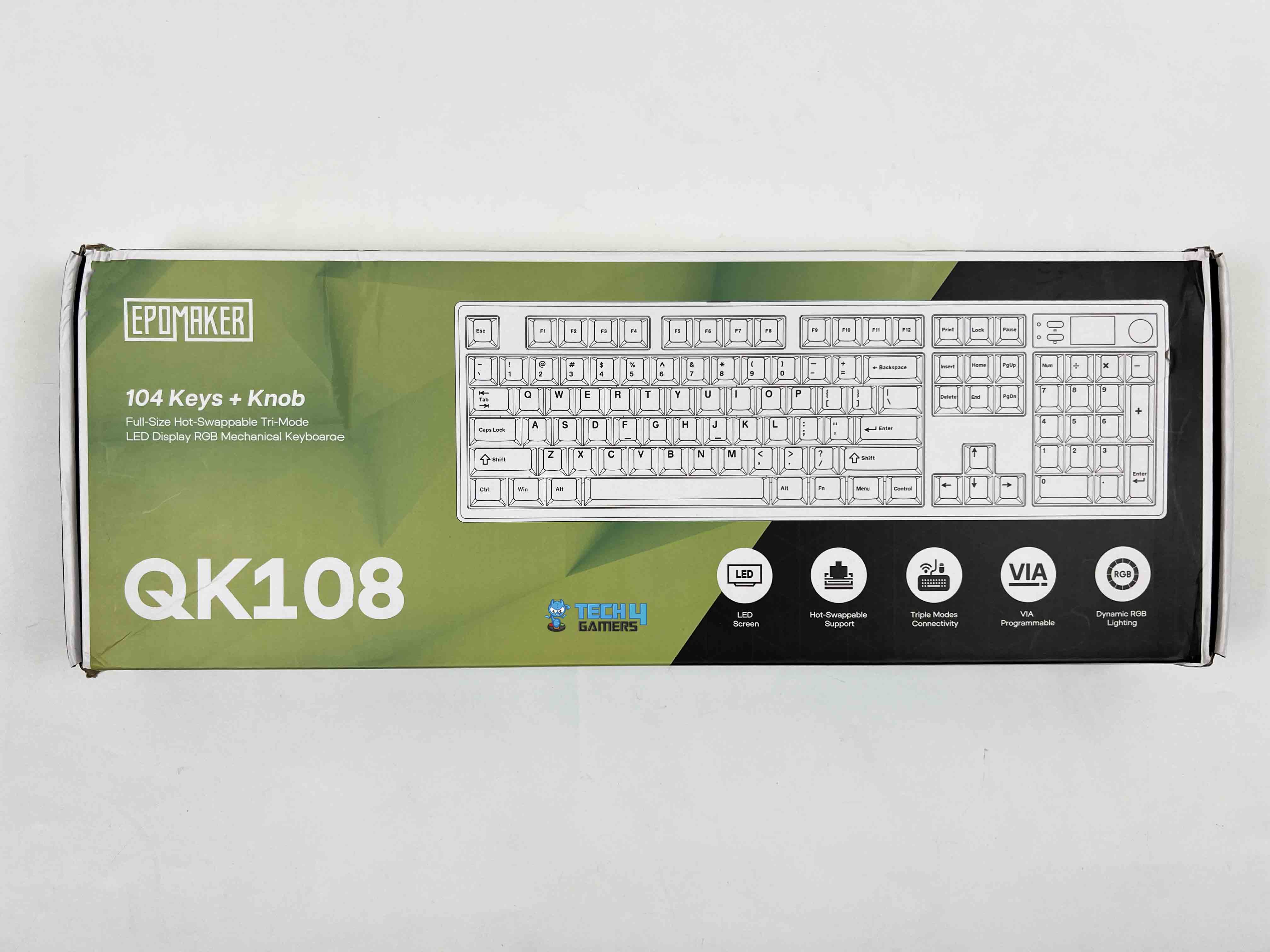
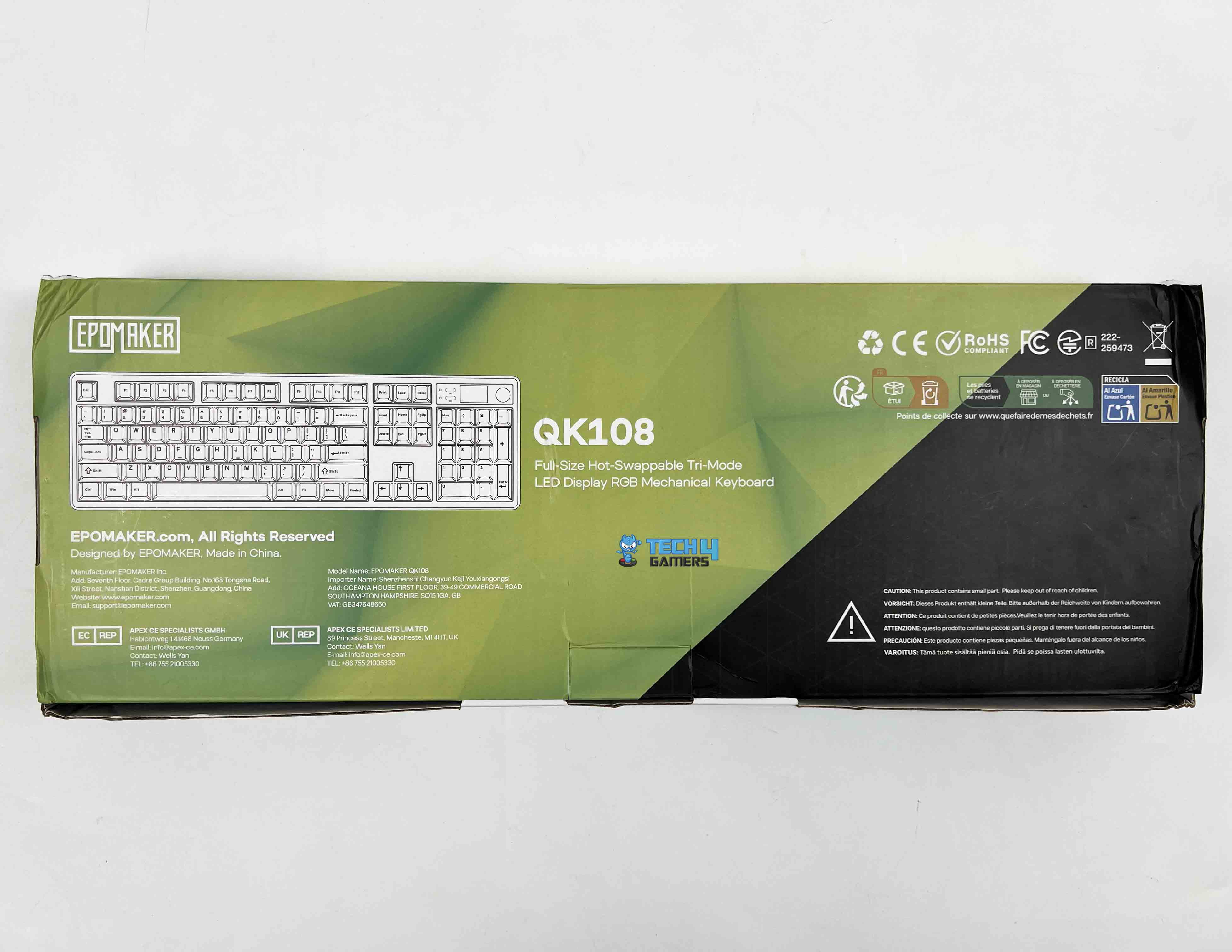
Epomaker uses a dual-tone color scheme in the packaging, mixing lime green with black. On the front of the box, the keyboard’s layout is shown on the right side. On the left, you’ll find Epomaker’s branding along with the model name. A few of the key features are highlighted in separate cutouts, each with its own small icon.
Unboxing
Unboxing
1 of 2
Unboxing
Box Contents
Upon opening the box, the Epomaker QK108 is the first thing you see, wrapped in a thin plastic protective sleeve. Right above it, there’s a separate compartment with “accessories are underneath!” written on it. Underneath that, all the included accessories are packed and separated into different resealable plastic bags. Here is what you’ll find inside the box:
QK108 Mechanical Gaming Keyboard
Detachable USB A to C Cable
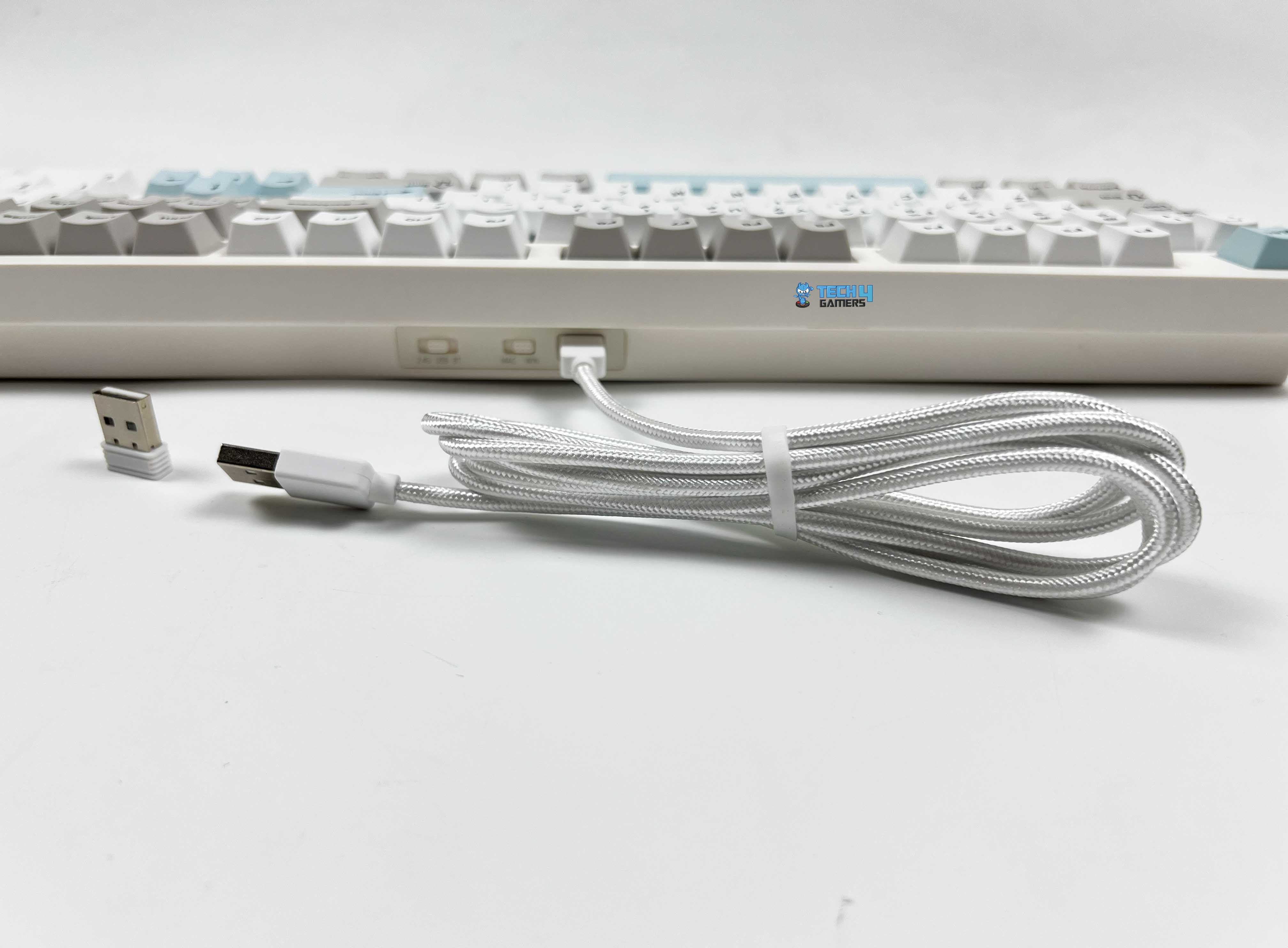
2.4Ghz Wireless Receiver
2-in-1 Switch-and-Keycap Puller
Multilingual Manual
Additional Keycap for Mac
Additional Switches
Design
Design
The Epoamker QK108 is available only in a single colorway, which is a mix of gray, white, and green. Most of the keyboard is white, while some of the modifier, navigational, and function keys are gray. Moreover, the directional keys, Enter, Esc, and the spacebar are green, which adds a subtle contrast. It’s a simple combination, but it adds a touch of refinement to the keyboard without feeling flashy.
The first thing that stood out to me about the keyboard is how restrained it looks. For a full-size keyboard with a screen and a knob, it doesn’t look overly crowded. The design feels clean and intentional, which isn’t always easy to pull off with this many elements on the keyboard. On a desk, it blends in nicely, whether it’s placed next to a gaming setup or a more work-focused one.
Layout
Layout
The Epomaker QK108 is a full-sized mechanical keyboard with 104 keys and a US ANSI layout, so it’s not surprising if you’re used to traditional keyboards. Here, you’ve got the full number pad, the function row, and the navigation cluster exactly where they’re placed, usually. The key spacing feels normal, with no compactness, and the key sizes are standard.
You wouldn’t need to adjust much if you’re coming from another full-size keyboard. In terms of size, it measures approximately 438.5 x 138.5 x 43.1 mm. The keyboard has an adequate presence on the desk without feeling oversized or awkward. It also provides secondary functions with the FN key to access media controls, lighting adjustments, and other shortcuts without crowding the main layout.
Screen & Knob
Screen & Knob
1 of 2
Knob
Screen
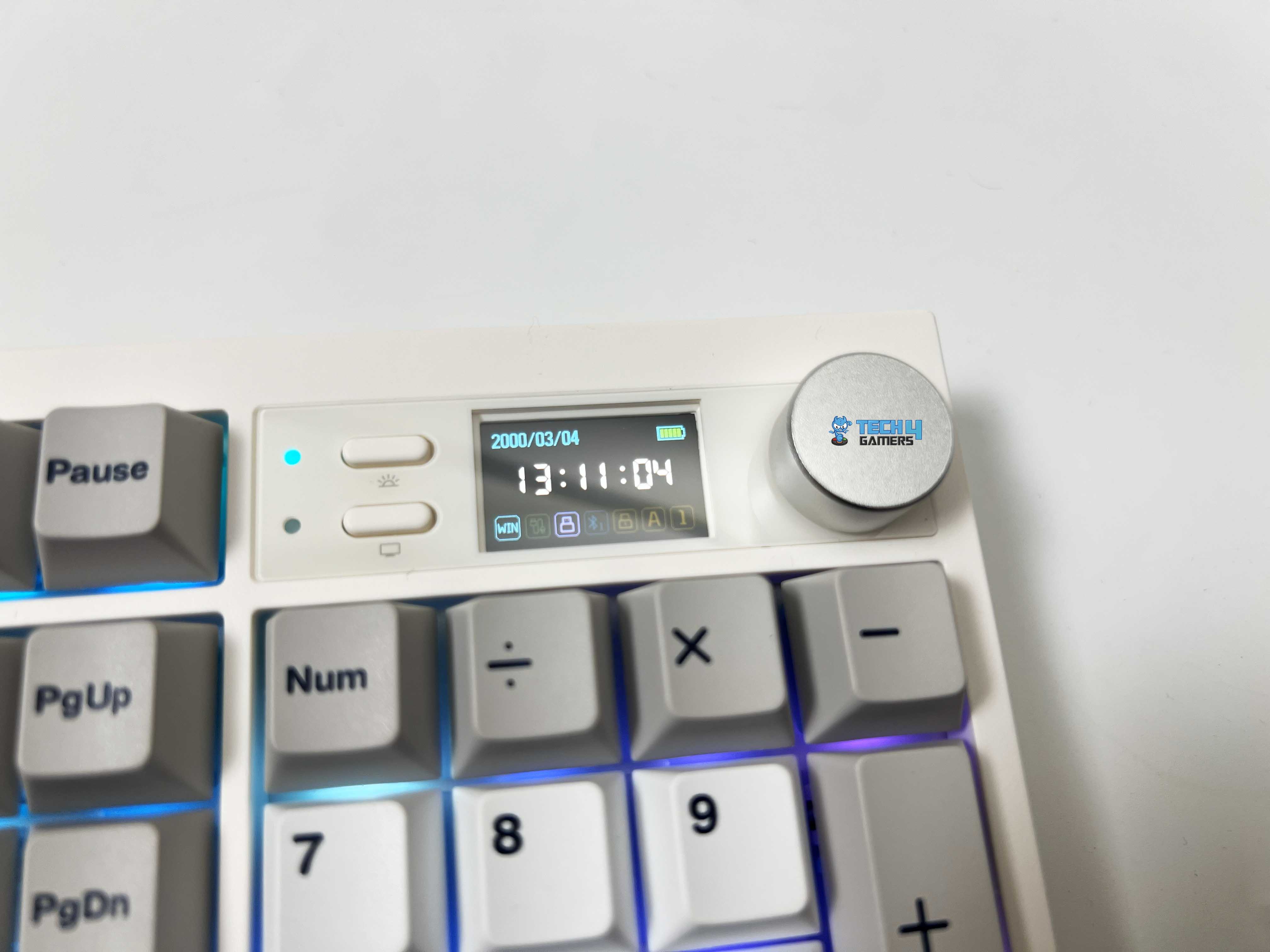
The Epoamker QK108 features a small screen at the top-left of the keyboard, with two multimedia keys and light indicators, positioned next to the function row. You can turn the screen on or off with a dedicated key, and the backlight has its own control. The screen can display several valuable pieces of information, including the date, time, battery level, and operating mode.
It also shows which connection you’re using and has little indicators for Caps Lock, Numpad, and Windows key lock. You can even get a bit creative with it. The keyboard lets you upload GIFs to the screen. You can do this by going to the upload page, picking your GIF, and downloading it to the keyboard. Once it’s done, your GIF shows up on the screen.
Right next to the screen is the multifunctional rotary knob. Using it feels satisfying, with just the right amount of resistance. It is neither too loose nor too stiff. You can assign it to perform tasks such as adjusting brightness or volume, muting audio, and controlling media, making it convenient to include. The placement is also comfortable, as you don’t have to reach for it awkwardly.
Underside
Underside
Flipping the Epomaker QK108 over, you’ll find two-stage adjustable kickstands. They let you set the keyboard at three angles of 6, 8.5, and 11.5 degrees. Both of them feel solid and click firmly into place. That said, the keyboard has a front height of about 20.5 millimeters, providing a slight lift even without the kickstands.
Moreover, there are four rubber feet on each side at the bottom that grip the desk well. During my use, it didn’t move from where I placed it. It’s worth noting that each stage has its own rubber feet as well, a small detail that shows Epomaker really thought about stability. Lastly, one kickstand has a slot for the 2.4GHz receiver, where it can be placed conveniently.
Build Quality
Build Quality
The Epoamaker QK108 is made of ABS plastic but still has a sturdy feel and isn’t overly heavy. At approximately 1.18 kilograms, it is substantial but not difficult to lift. The entire chassis is quite rigid. You can press on the corners or the top of the frame, and there’s very little flex or creaking. After using it, you’ll feel confident in its construction. Overall, the finish is smooth, with no rough edges.
Keycaps
Keycaps
The Epoamker QK108 comes with Cherry-profile keycaps, which give the keys a slightly sculpted shape that’s comfortable for typing. Each row has a subtle angle, so your fingers don’t feel flat against the keyboard, which helps during extended typing sessions when fatigue can set in. The keycaps are made of PBT, which feels a bit sturdier than the more common ABS options.
They have a nice, textured matte finish that isn’t slippery, and they don’t develop that shiny, worn look after a few weeks of use. On top of that, they’re dye-sub, meaning the legends are infused into the keycaps themselves rather than printed on top. This makes the letters crisp and prevents fading, even under heavy use. Lastly, Epomaker also includes additional keycaps for Mac users.
RGB Lighting
RGB Lighting
1 of 2
RGB Lighting
RGB Lighting in Dark
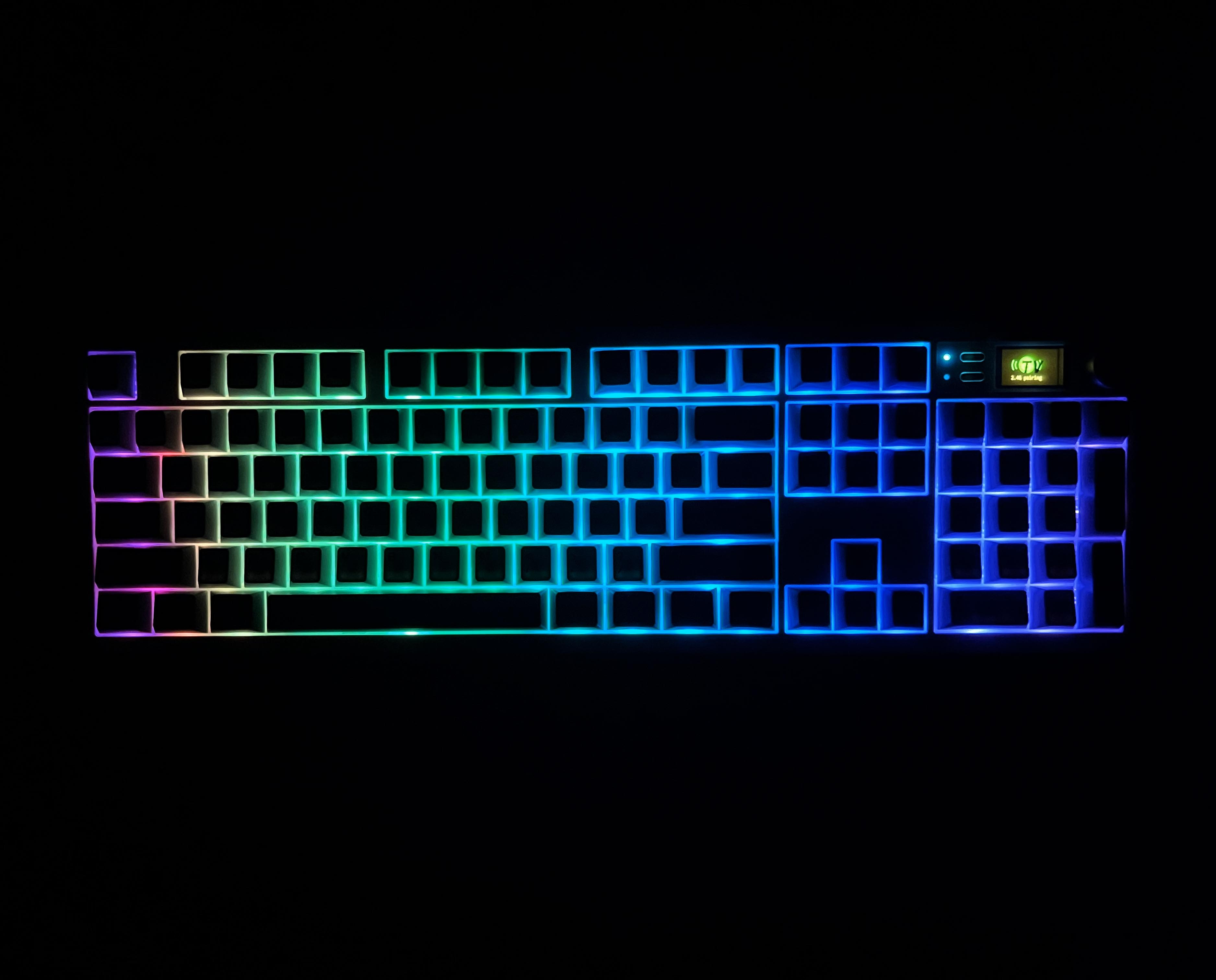
The Epomaker QK108 features RGB backlighting, with each key having its own south-facing LED. This orientation helps reduce glare and makes the lighting more visible from your angle, especially if you’re looking down at the keyboard while typing. The keyboard’s RGB lighting is subtle yet noticeable, illuminating the keycaps rather than shining through.
Switches
Switches
1 of 2
Switches
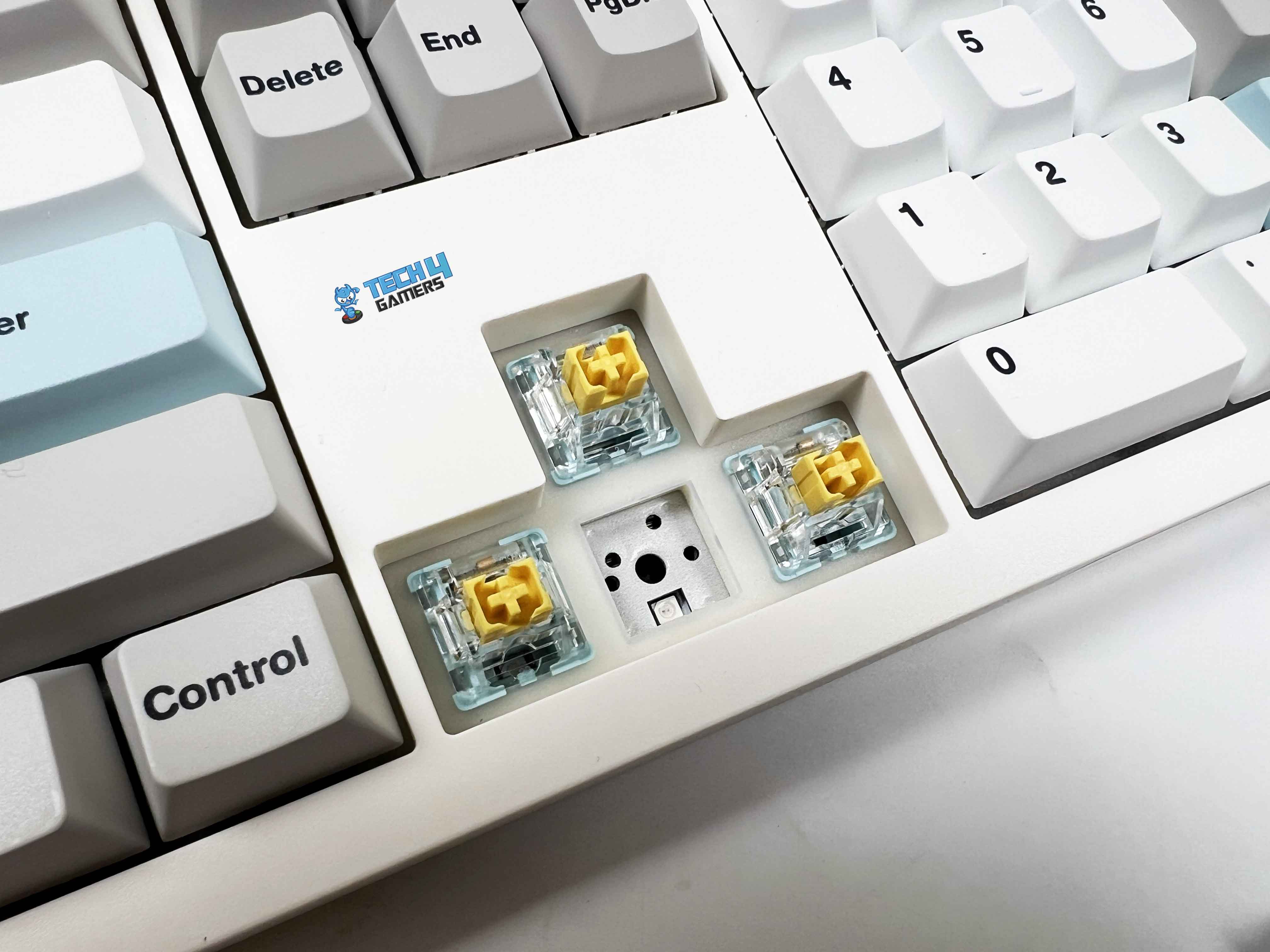
5-pin Hot-swap Socket
The Epomaker QK108 features Epomaker’s Sea Salt Silent V2 switches, which provide a quiet, linear typing experience. By comparison, some users prefer magnetic-switch keyboards that emphasize rapid actuation. Being silent linear switches, they noticeably reduce the bottom-out sound. They’re well-suited for shared spaces, late-night use, or anyone who prefers a calmer typing environment.
These are 5-pin mechanical switches and are pre-lubricated, which is why they feel so smooth. The trigger force is rated at around 45 gf, with a bottom-out closer to 51 gf, and that feels just about right in actual use. You don’t need to press hard to register a key, but they’re not so light that accidental inputs become an issue. Moreover, the switches feel responsive with a pre-travel of roughly 1.8mm and a total travel of around 3.5mm,
The housing features a transparent PC top and a PA66 base, which helps diffuse RGB light while keeping the structure solid. There’s also a dust-proof stem design that should help ensure longevity, especially if the keyboard is used daily. Lastly, it is fully hot-swappable, thanks to the 5-pin hot-swap sockets. If you are into customization, you can have a look at our roundup of the best custom gaming keyboards.
Connectivity
Connectivity
1 of 2
Toggle Switch and USB-C Port
Braided Cable
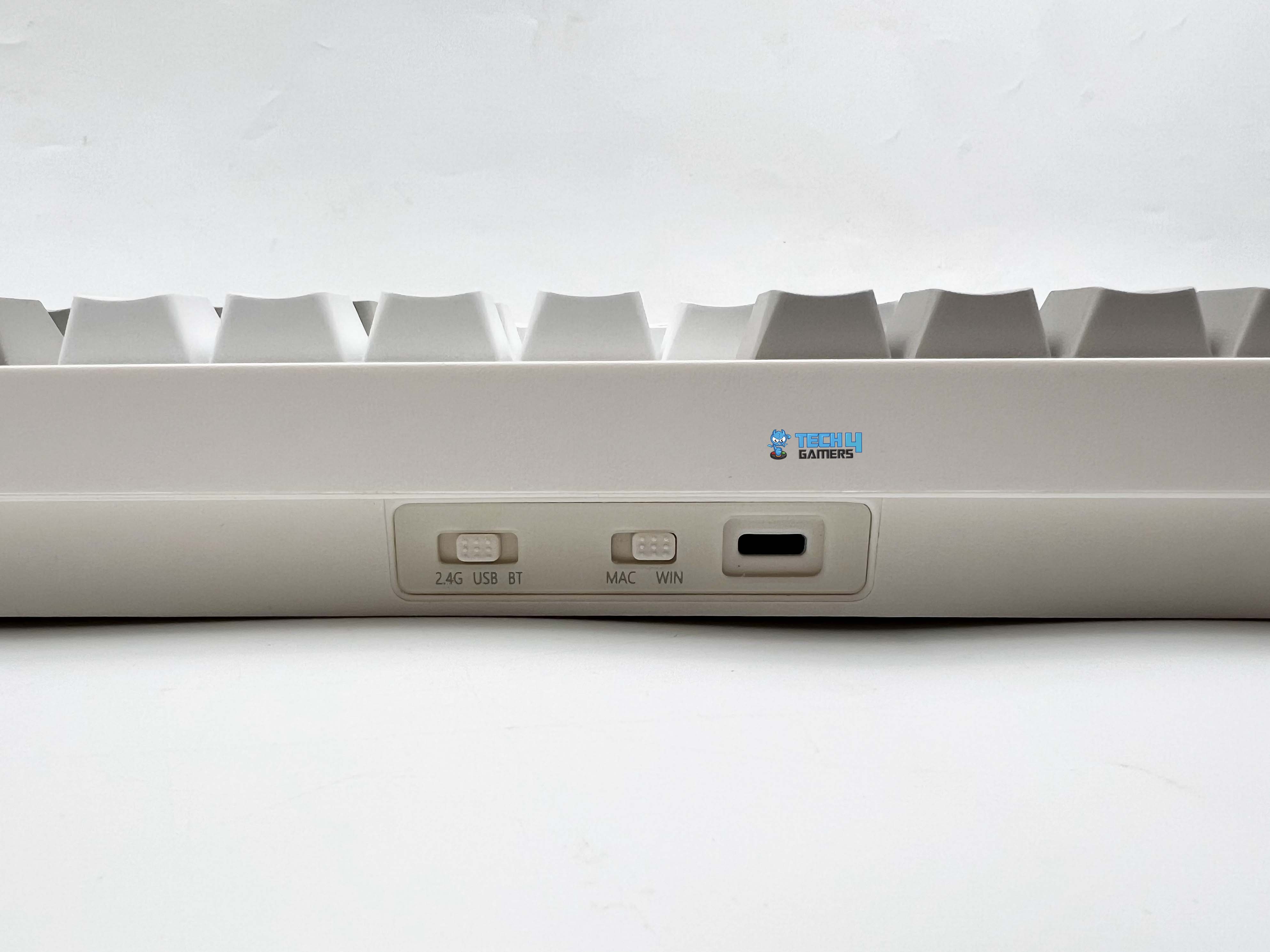
You can use Epomaker QK108 wired through a USB-A to USB-C cable, connect over 2.4GHz wireless, or pair it via Bluetooth. Starting with the wired option, the included cable is a braided USB-A-to-USB-C cable. It’s flexible enough to route easily on a desk. For wireless use, the 2.4GHz mode connects through the USB receiver. Moreover, the keyboard can remember multiple Bluetooth devices.
Switching between paired devices is done with key combinations. At the top of the keyboard, you’ll find the USB-C port along with two physical toggle switches. One switch controls the connection mode. The second toggle is for Windows and Mac modes. These switch toggles make switching between platforms and connection modes straightforward.
Typing Experience
The first thing you notice is the sound, or rather, the lack of it. Key presses land with a soft, muted tone that stays consistent across the keyboard. There’s no sharp clack, no hollow echo bouncing around the case. Even when typing quickly, it only produces minimal sound. Even in a quiet room, the noise it makes is close to silent. A significant part of that depends on how the keyboard is built internally.
It uses a gasket-mounted structure, which provides a slightly cushioned feel with each key press. The PC plate mitigates sharpness in the sound profile. Epomaker has layered the keyboard’s interior with multiple materials. Under the switches, there’s an IXPE switch pad, followed by a PET sound enhancement layer. Below that, you get sandwich latex foam, a layer of foam padding, and a silicone pad at the bottom of the case.
The result is a soft, muted, creamy thock. It’s the kind of sound profile that works well in shared spaces or late-night use. The plate-mounted stabilizers are also tuned well. Larger keys, such as the Spacebar, Enter, and Shift, have no noticeable rattle. The spacebar, in particular, feels quiet, even when pressed off-center.
Performance
Edges
In everyday use, the Epomaker QK108 feels responsive. There’s no sense of the keyboard lagging behind your input. When connected through USB-C or 2.4GHz wireless, it runs at a 1000Hz polling rate. Wired mode is the most responsive, with a rated latency of around 3ms, and it performs as claimed. The 2.4GHz wireless mode isn’t far behind. With latency hovering around 5ms, it feels nearly identical to wired in real use.
I didn’t notice any delay or missed inputs while gaming. Bluetooth behaves differently, which is expected. The polling rate drops to 125Hz, and latency increases to roughly 15ms. For typing, browsing, or general productivity, though, it’s perfectly usable. It just isn’t the mode I’d choose for competitive play. Lastly, the keyboard also supports N-key rollover with full anti-ghosting, so pressing multiple keys at once isn’t an issue.
Battery Life
The Epomaker QK108 has a relatively large 8000mAh battery, split into two 4000mAh cells inside the case. In actual use, that capacity gives the keyboard plenty of breathing room, especially if you’re using it wirelessly every day. With RGB lighting and the screen both turned on, you’re looking at around 28 hours of use. If you keep the RGB on but switch the screen off, battery life improves to about 35 hours. Turning off RGB while keeping the screen active extends battery life to around 89 hours.
Lastly, if you disable both the lighting and the screen, the keyboard can stretch up to 229 hours. At that point, charging becomes something you think about occasionally rather than regularly. Additionally, it enters sleep mode if the keyboard is idle for approximately 30 minutes. After that, the lighting turns off, and the keyboard disconnects to save power. Waking it up is as simple as pressing a key, and it reconnects almost immediately. Charging is done via the USB-C cable, and the rated input is 5V DC at 500mA.
Software
Software
1 of 9
Basic Keys
Media Keys
Macro Keys
Layers
Special Keys
Lighting Keys
Macro Settings
Save and Load Layouts
Backlight
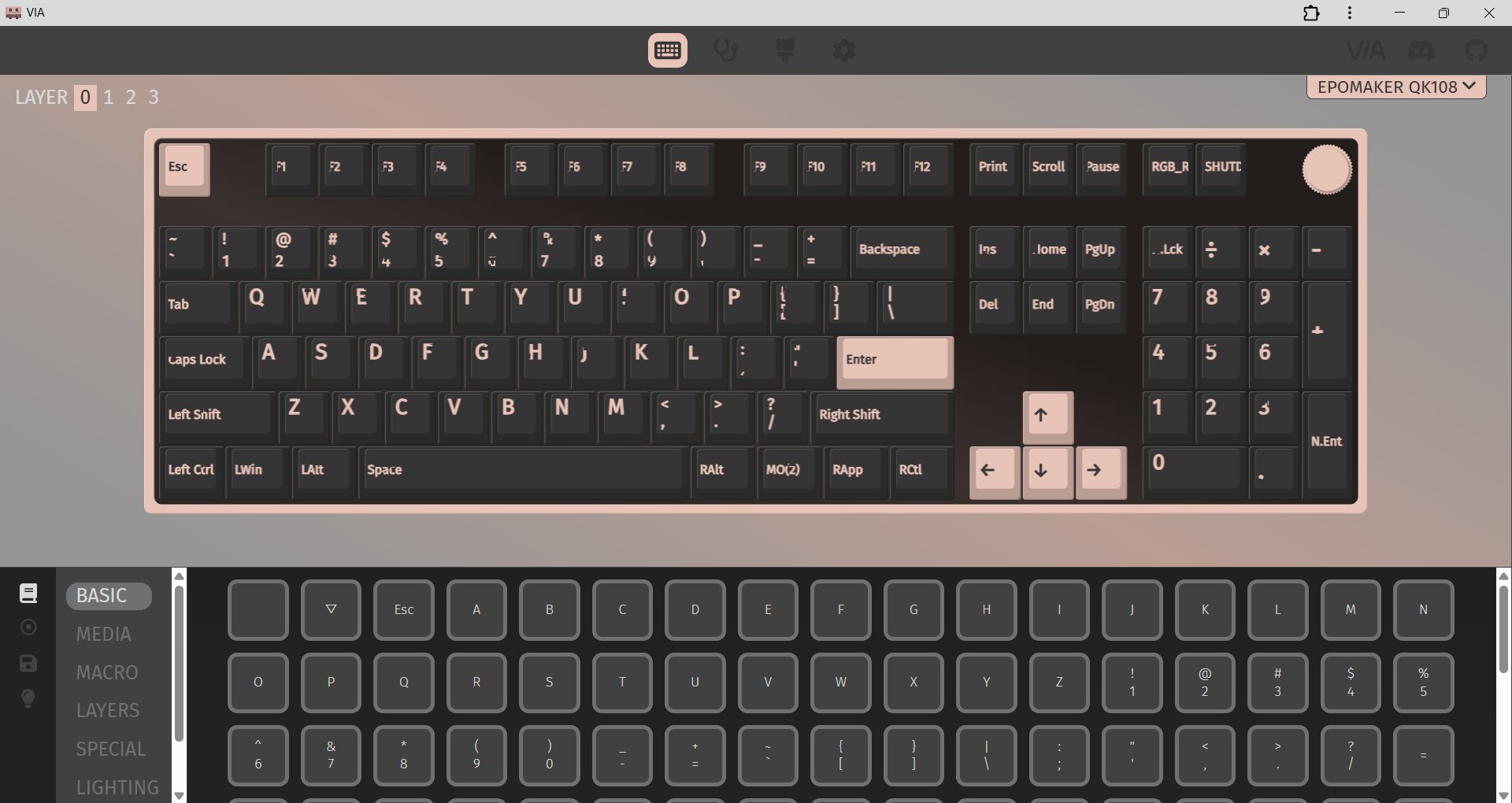
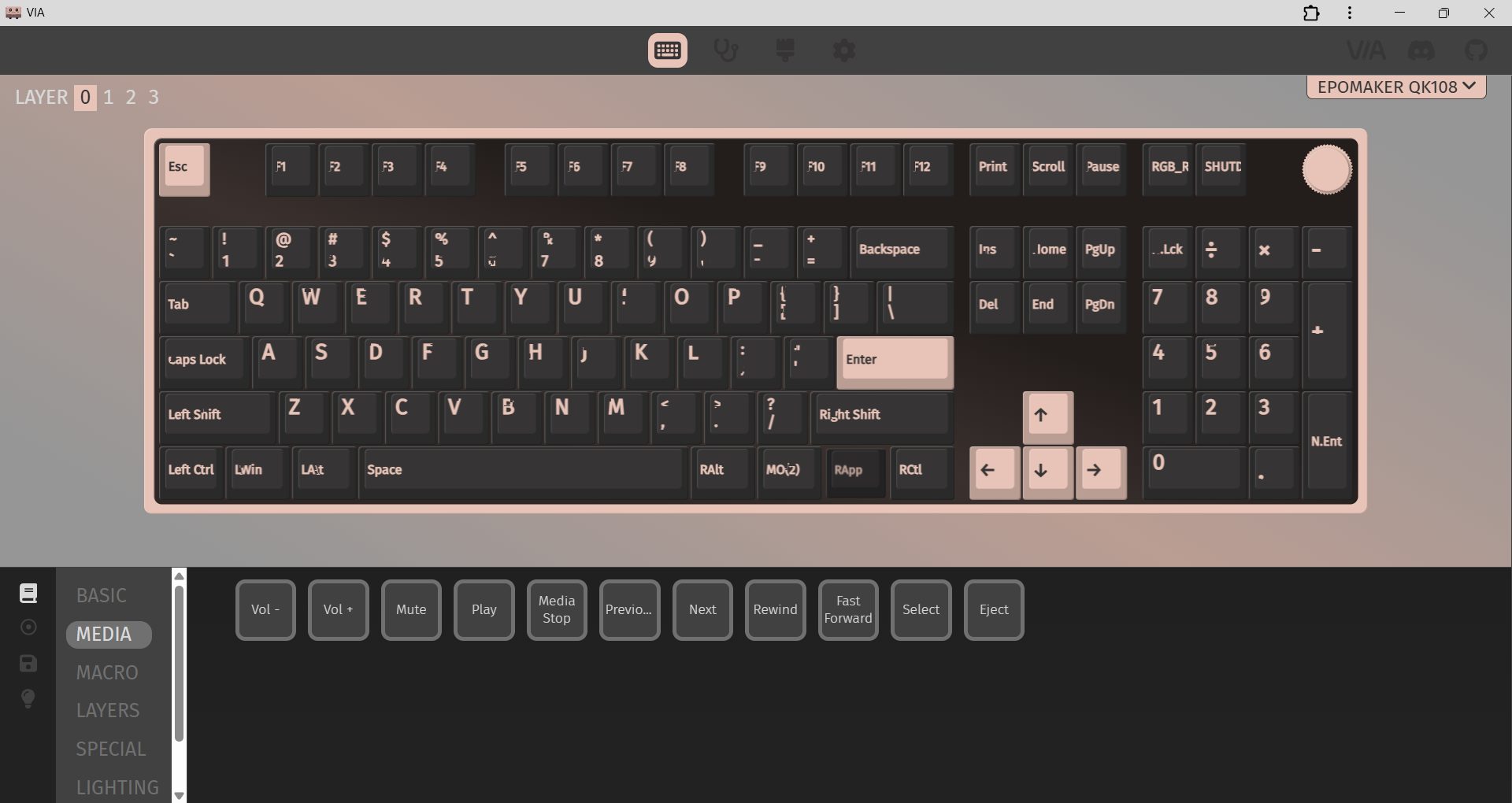
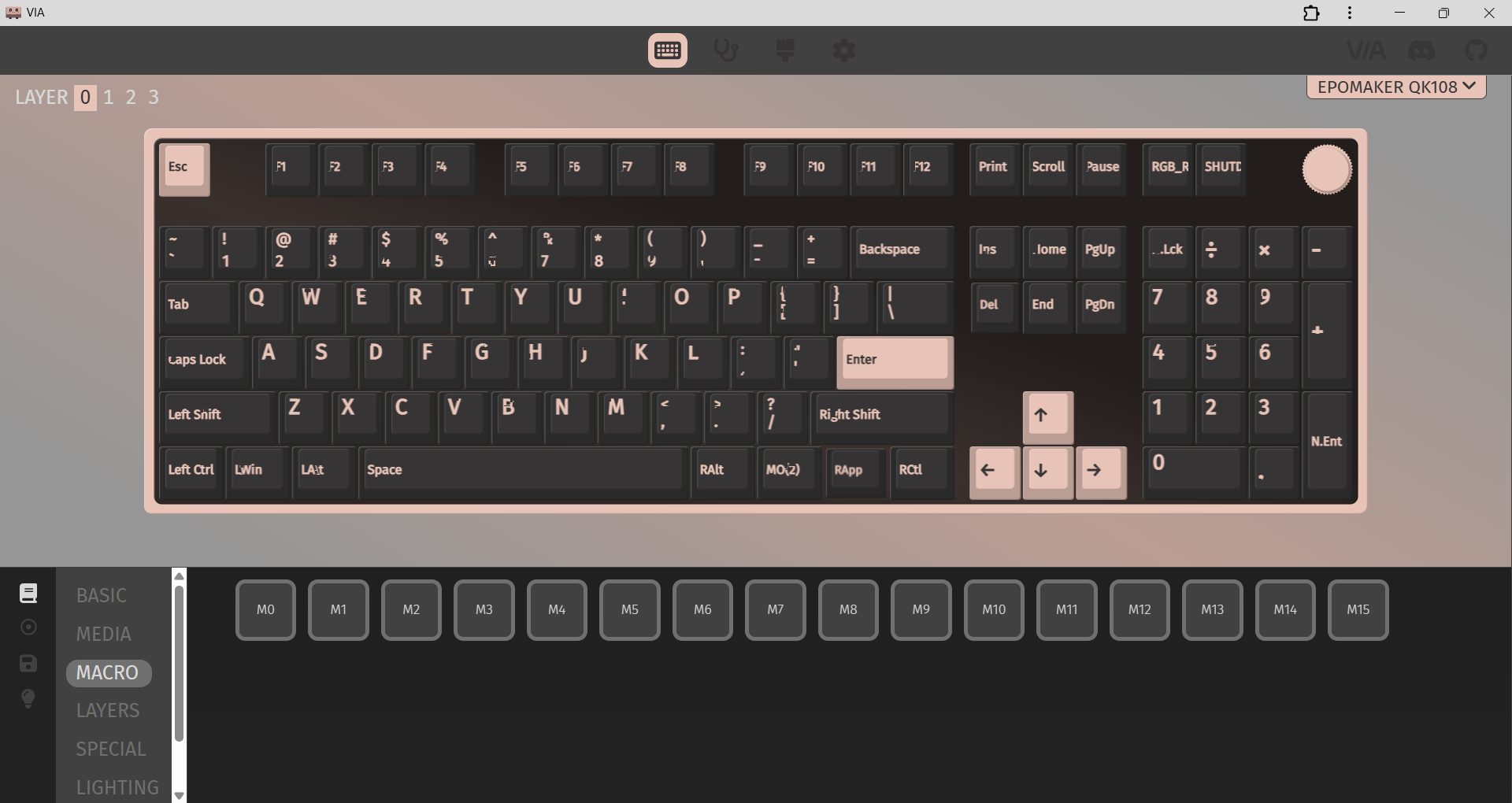
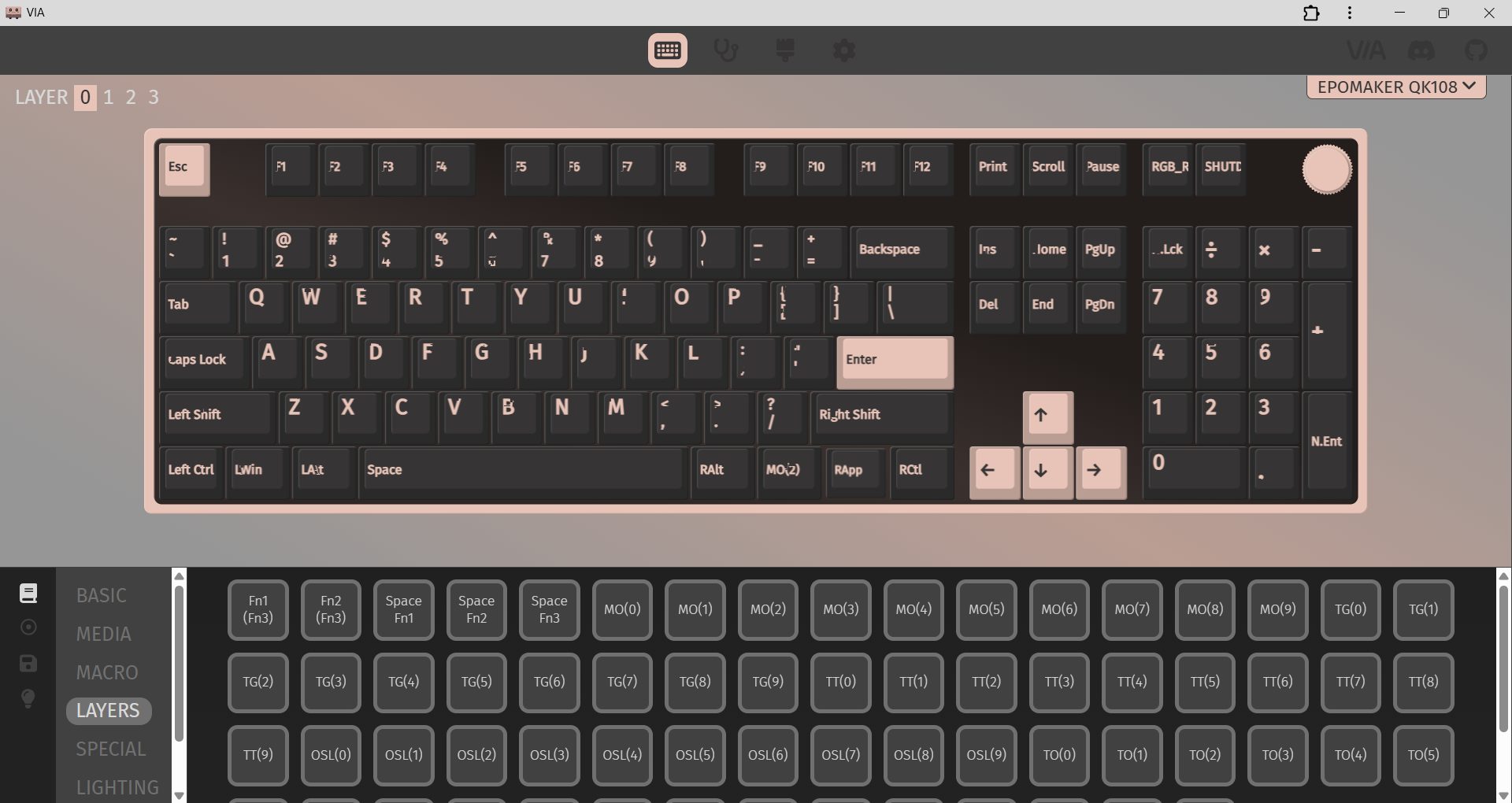
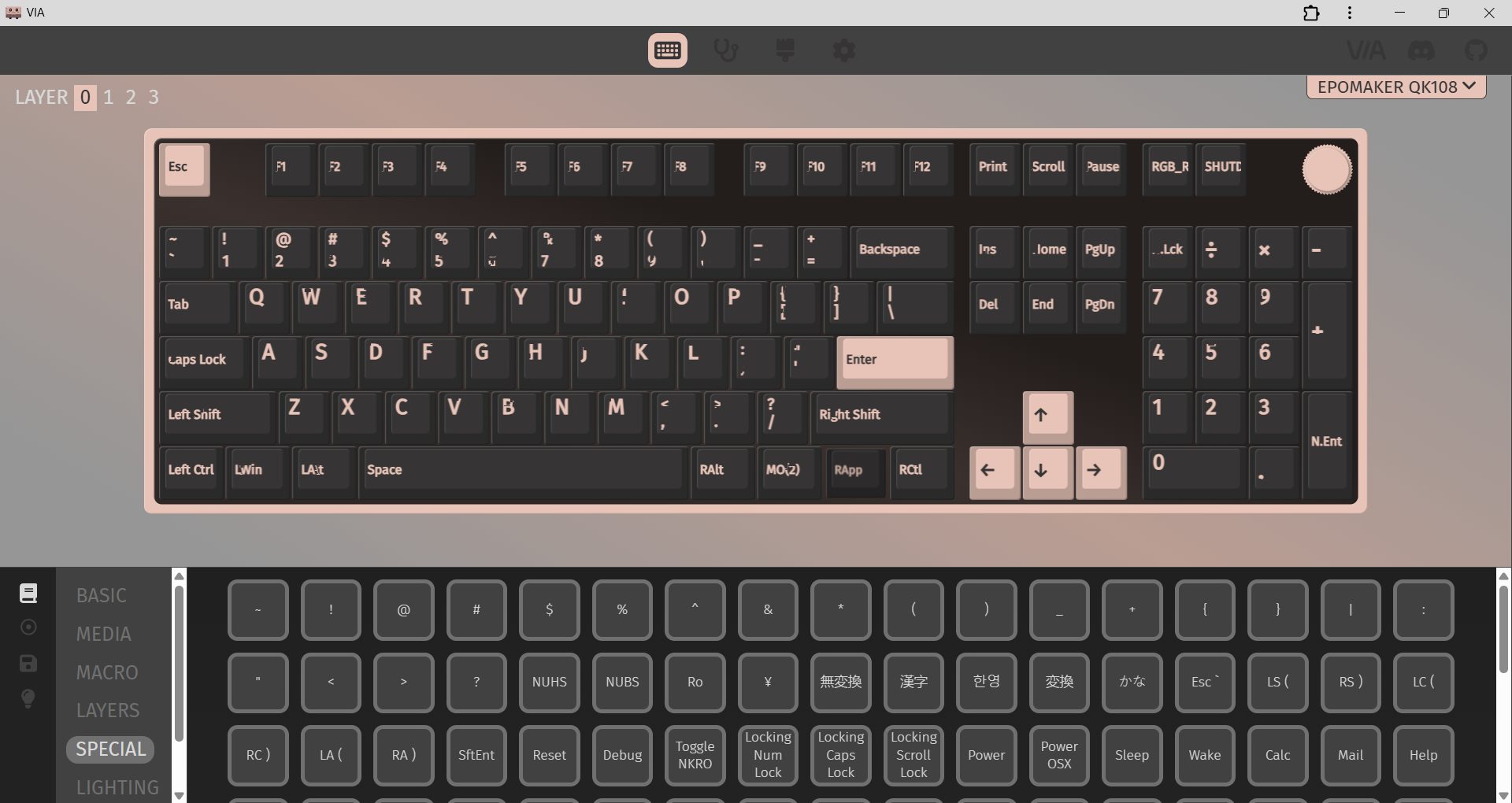
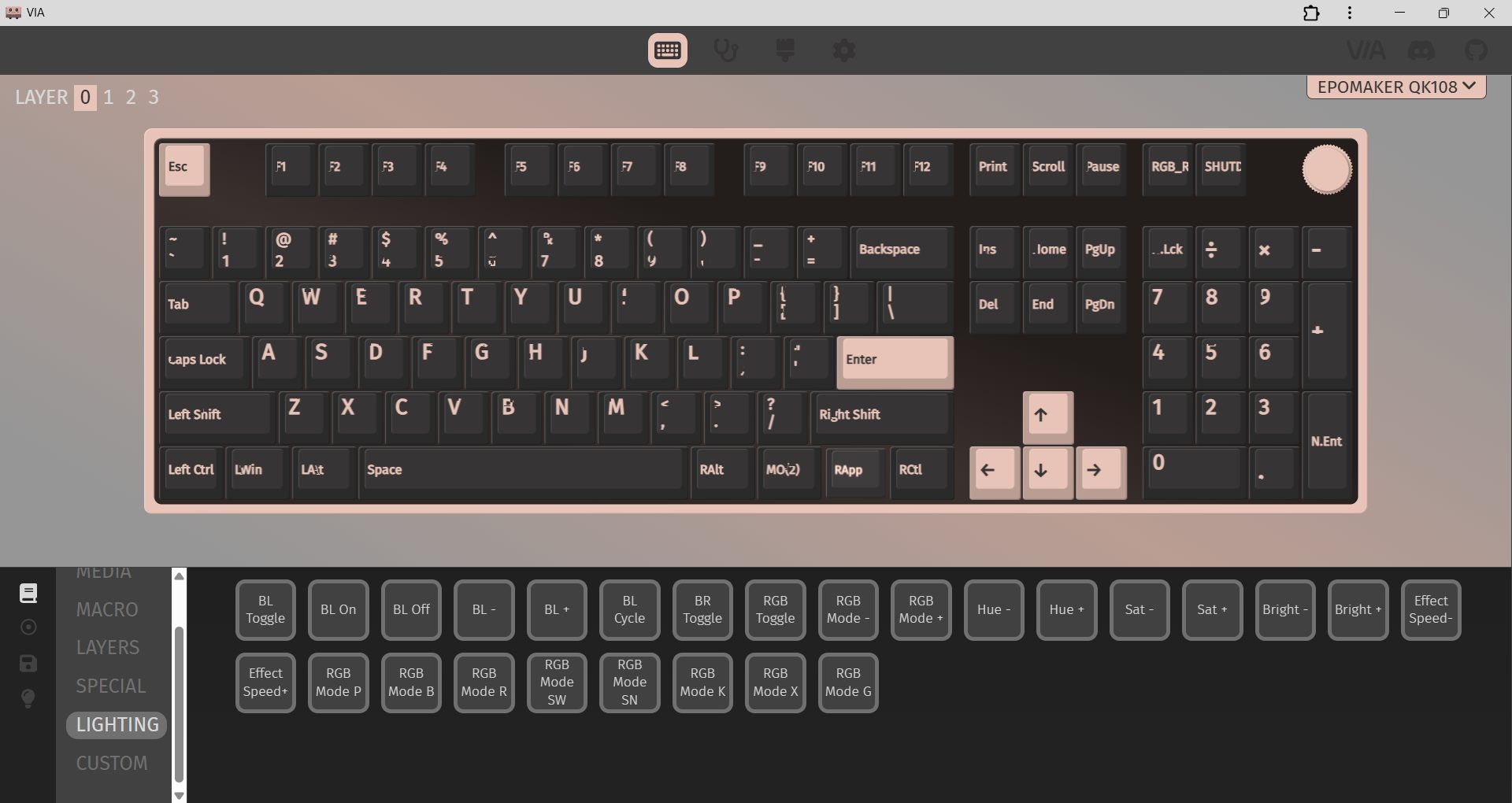
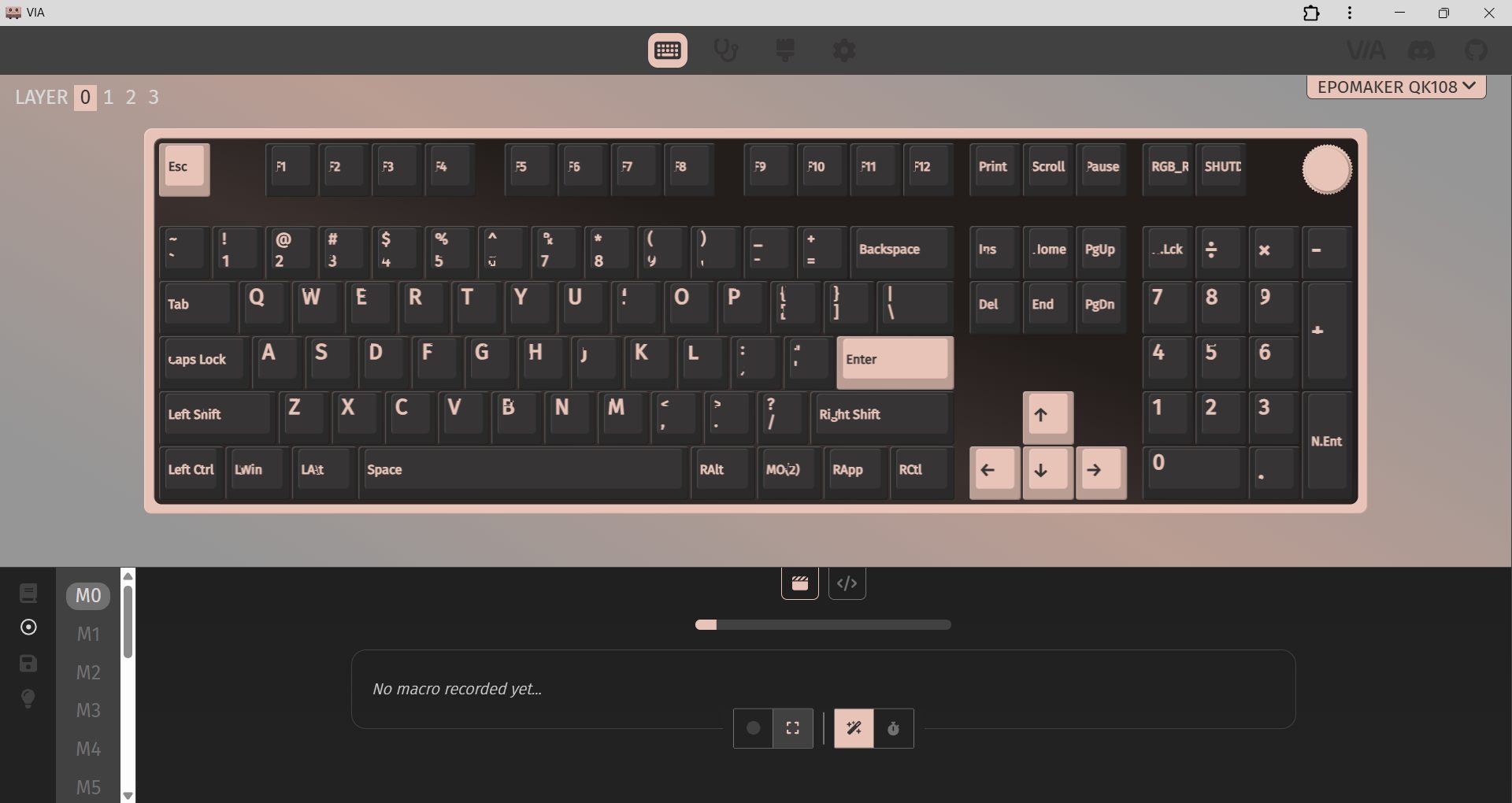
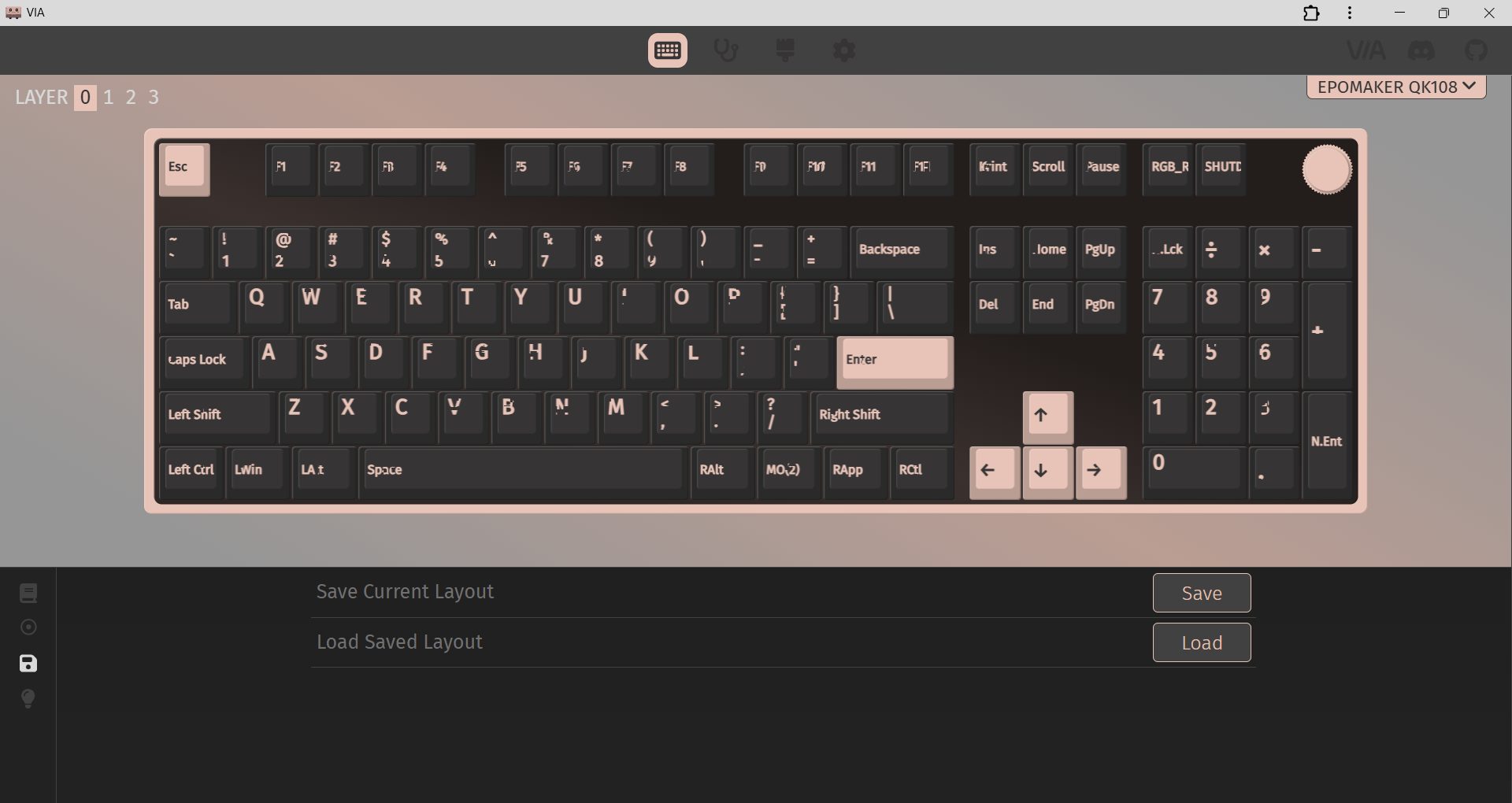
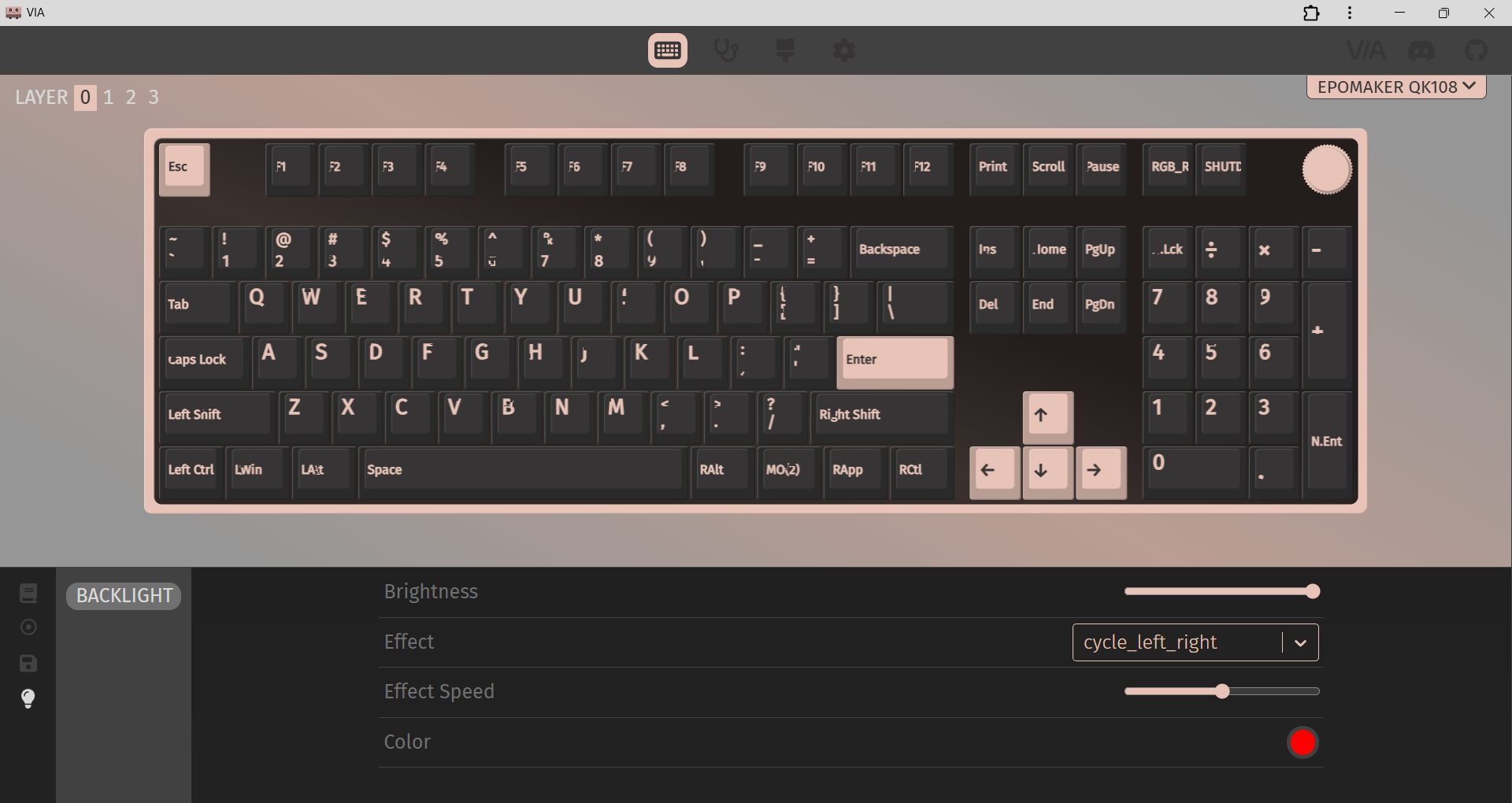
The Epomaker QK108 relies on VIA for customization and is easy to get started with. First, connect the keyboard using a USB-C cable, and ensure the “Use V2 Definition (deprecated)” option is turned off. Then, download the QK108 JSON file from Epomaker’s website and load it into VIA. Once it’s loaded, the Configure tab immediately shows your layout and all programmable functions, so you can start adjusting things.
From there, VIA lets you remap keys, create macros, and tweak function layers. The Mod-Tap function is also useful, allowing a single key to perform one action when tapped and another when held. Moreover, you can save up to four profiles directly to the on-board memory of the keyboard, so you don’t have to open VIA every time you switch devices. Lighting control is also part of the VIA interface. You can adjust RGB effects, brightness, and speed.
Should You Buy it?
Buy it if
✅ You want a full-size keyboard: It is built for users who still rely on a numpad with extra features like a screen and a rotary knob.
✅ You prefer quiet typing: With silent linear switches, a gasket-mounted structure, and multiple sound-dampening layers, it provides a soft typing experience.
Don’t buy it if
❌ You need a compact keyboard: As a full-size board, it takes up a fair amount of desk space and isn’t ideal for tight setups.
❌ You expect a premium metal build: While the ABS case feels well-built, someone specifically looking for an aluminum chassis may find the build quality a bit underwhelming.
Final Verdict
I’ve used the Epomaker QK108 for a while now, and it’s grown on me more than I expected. At $99.99, it feels like you’re getting a lot without stretching your budget for a full-size mechanical keyboard with this many features. The asking price is reasonable. It feels more like a keyboard that’s been thoughtfully designed for people who actually type and work on it every day. If you’re exploring full-size boards like it, you might also want to check out the best gaming keyboards for 2026, where we break down top picks.
At T4G, my task is to cover the latest news around the gaming globe ASAP and with the utmost precision. I adore all the games and respect all the devs behind the amazing games that we get all year. So, whether it’s a PC or a Console game, I got it all covered.
Story Highlight
Expedition 33 received a lot of backlash for using gen AI for some of its assets.
Sandfall tried using the tech for development, but then removed it as it felt wrong.
The game is completely ‘human-made’ and so will be the studio’s future projects.
Expedition 33 has been under hot water ever since it was revealed that the studio used generative AI for some placeholder assets. It was even disqualified from the Indie Game Awards, despite the assets being patched out a long time ago.
In a recent interview, Sandfall’s boss commented on all the AI allegations going around towards Expedition 33. He said that they tried using AI for development, but they didn’t like the work, so they later removed it.
Why it matters: Players have been calling out the title for using generative AI. This has led to massive debates online on forums and other platforms, but the studio has clarified that the game is all human-made.
Speaking to YouTuber Sushi, Guillaume Broche spoke out on the AI controversy. He said the technology surfaced in 2022, and Sandfall was already deep in development at that point; they just used it to fill out missing textures.
Everything in the game is human made. We tried it (Gen AI), and we didn’t like it at all, it felt wrong. We had originally used it as a placeholder for the textures we missed, but we took it out as soon as we found it.
– Guillaume Broche
The game was disqualified from the Indie Game Awards for using AI
However, when they analyzed it, it didn’t look good and felt wrong, which is why they patched the AI content out of the final game. So, the game is completely ‘Human-made’, and has no artificial content or textures.
Broche also states that while the future is hard to predict, the studio won’t be using generative AI for its future projects either. Nonetheless, Expedition 33 has been a huge success and continues to impress.
What are your thoughts on Expedition 33 for patching out AI, as it felt wrong to them? Let us know your opinions in the comments or join the discussion at the official Tech4Gamers Forum.
At T4G, my task is to cover the latest news around the gaming globe ASAP and with the utmost precision. I adore all the games and respect all the devs behind the amazing games that we get all year. So, whether it’s a PC or a Console game, I got it all covered.
Story Highlight
Shroud previously pushed for ARC Raiders over Expedition 33 for the GOTY award.
After playing it, he finally admits that Sandfall’s RPG is actually pretty good.
He gave the title a go on Asmongold’s suggestion, and once it was crowned GOTY.
On paper, Clair Obscur: Expedition 33 doesn’t sound like too interesting a prospect. It features a limited scope and turn-based gameplay that not everyone is into, but when you jump into the title, that’s where the true magic happens.
Renowned Twitch streamer and former esports player, Shroud, criticized the title for having so many nominations before playing it. Now that he’s finally played it, he has become a believer and says he is really enjoying it.
Why it matters: Winning the GOTY award opened Sandfall’s epic RPG to a whole new audience. It convinced people to buy the title, leading to a 6x boost in sales and a whole new fan base that adores it.
Shroud is convinced the RPG is really good after finally playing it
Shroud argued that ARC Raiders deserves the GOTY award over Expedition 33. The latter, too, has been one of the finest games of the year, but that doesn’t take away from the fact that how good Expedition 33 is.
Something I thought I would never say out loud, dare I say, Asmongold was right. He said, when I play this game I’ll enjoy it. Is it too soon to say that, game can’t get worse, can only get better
The RPG was crowned as the GOTY at the recent The Game Awards
While ARC Raiders capitalizes on an established genre, Expedition 33 reignites one that most people actually found boring, turn-based gameplay. Combining a soulful story, fun gameplay, and brilliant soundtracks, the title totally delivers.
Shroud also gives a shoutout to Asmongold, who convinced him that he would love the game once he plays it. That turned out to be true, and he says the game gets better the more it progresses into the story.
What are your thoughts on Shroud going from skeptic to a believer after playing Expedition 33? Let us know your opinions in the comments or join the discussion at the official Tech4Gamers Forum.