Threads
10Gbps Speed on a Budget
Review Summary
If you have an extra Gen3 NVMe or SATA M.2 drive lying around and gathering dust, the WH51 is one of the best-value enclosures on the market to turn it into a blazing-fast, pocket-friendly flash drive. However, be aware that pairing this enclosure with a high-end Gen4 NVMe drive may result in significant overheating during prolonged heavy workloads, such as hours of video rendering. For such usage, this enclosure may not offer adequate heat dissipation.
Hours Tested: 5

Overall
Pros
- Dual Protocol Support
- 10Gbps Speeds
- Tool-Free
- Good Quality
- Excellent Value
- Includes Smart Drive Protection
Cons
- Thermal Throttling on Heavy Loads
- No Active Cooling


The Netac WH51 M.2 Dual Protocol SSD enclosure is another device that Netac sent for review. Finding a high-quality, versatile, on-the-go storage solution that doesn’t compromise on compatibility or thermal performance, and that too within budget, can be tricky for users; that’s where the WH51 comes into the spotlight.
It is powered by the reliable Realtek RTL9210 controller, which is also found in other NETAC enclosures, such as the WH61S, which I have recently tested. The device is wrapped in a sleek, heat-dissipating aluminum alloy shell with a USB 3.1 Gen 2 Type-C interface, delivering speeds of up to 10 Gbps.
In today’s review, we will evaluate this drive’s performance and discuss its thermal number.
Here are the details of this enclosure:
| Feature | Essential Details |
| Speed | Up to 10 Gbps |
| Protocols | NVMe (PCIe) & SATA (Dual Protocol) |
| Interface | USB 3.1 Gen 2 Type-C |
| Drive Support | M.2 NVMe/SATA (Sizes: 2230, 2242, 2260, 2280) |
| Controller | Realtek RTL9210B |
| Build Material | Aluminum Alloy |
What Makes Netac WH51 M.2 Enclosure Different?
Many enclosures on the market are either strictly NVMe (PCIe) or strictly SATA (NGFF). The WH51 uses the Realtek RTL9210 bridge chip, which automatically detects and supports both types. NVMe drives run very hot, so the WH51 moves away from a basic flat enclosure and features a grooved aluminum alloy shell for better heat dissipation. The WH51 is also compact enough to fit easily in pockets or in the hand.
Packaging
Let’s take a look at the packaging.
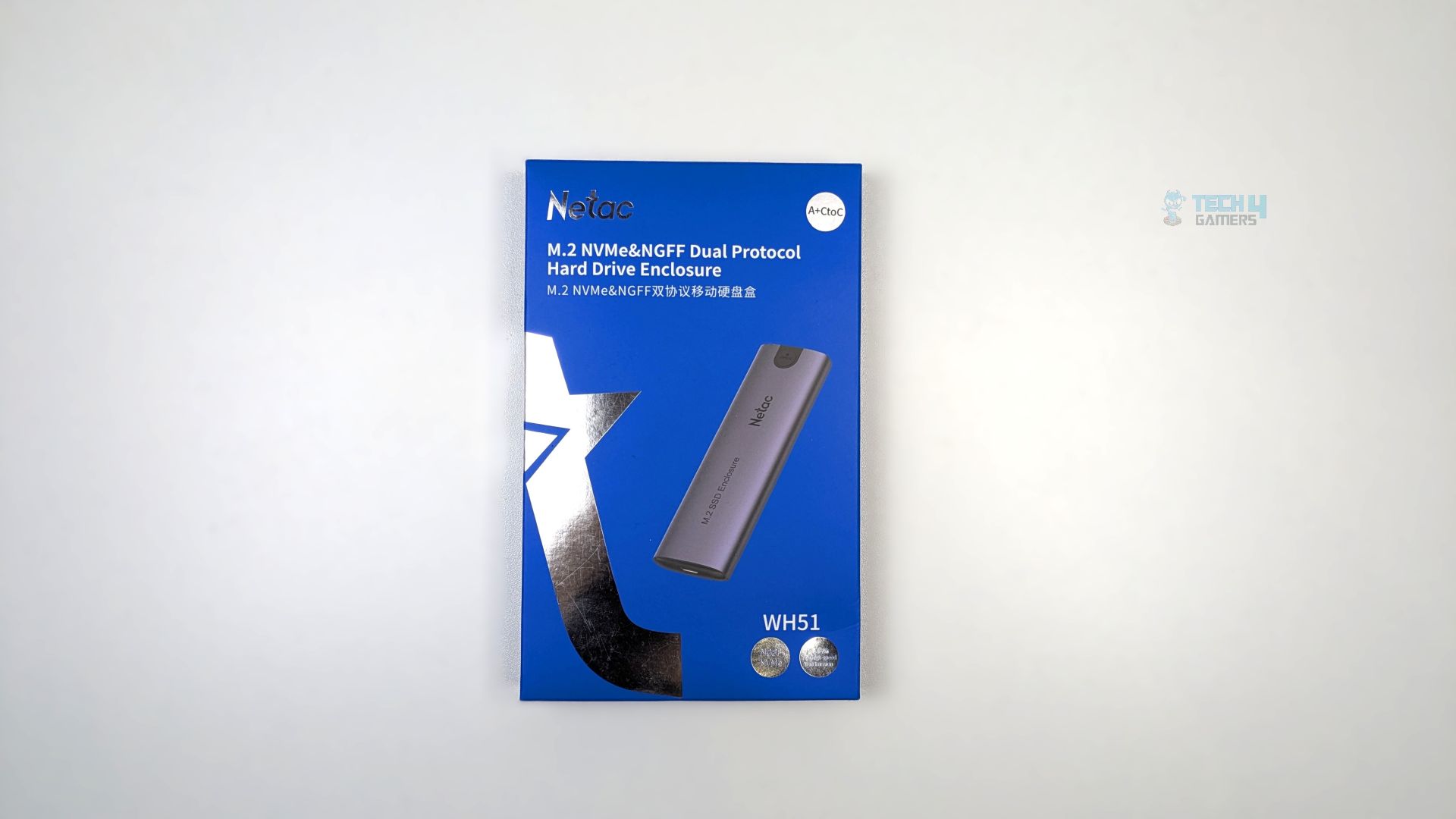
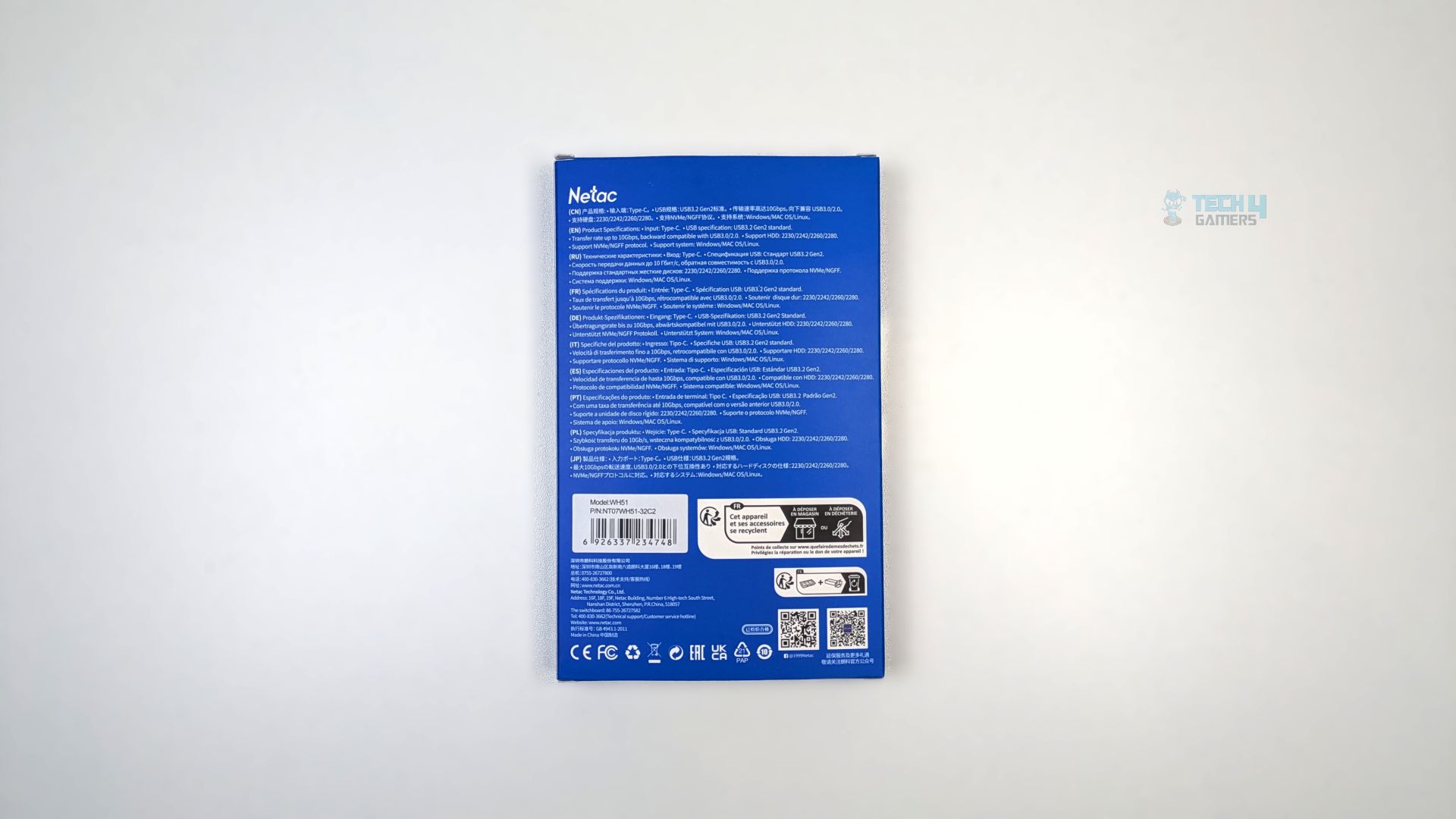
The outer box catches the eye with its sleek blue background and radiant silver star motif. An enticing rendered image of the enclosure stands out. On the front, bold lettering highlights its key feature: Dual Protocol Support (M.2 NVMe & NGFF/SATA). The back boasts USB 3.2 Gen 2 support, a blazing 10 Gbps transfer rate, and versatile M.2 support, including 2230, 2242, 2260, and 2280.
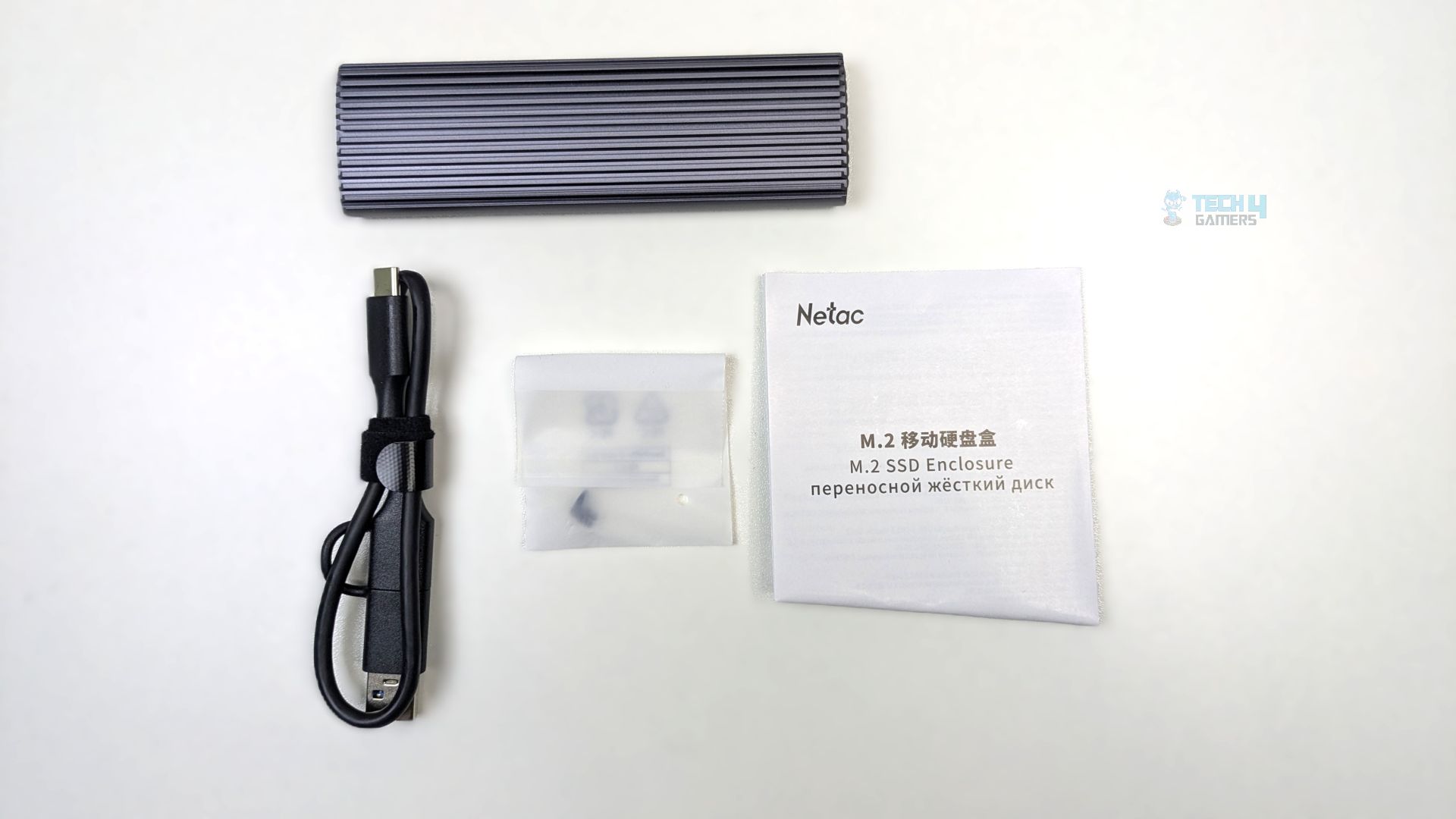
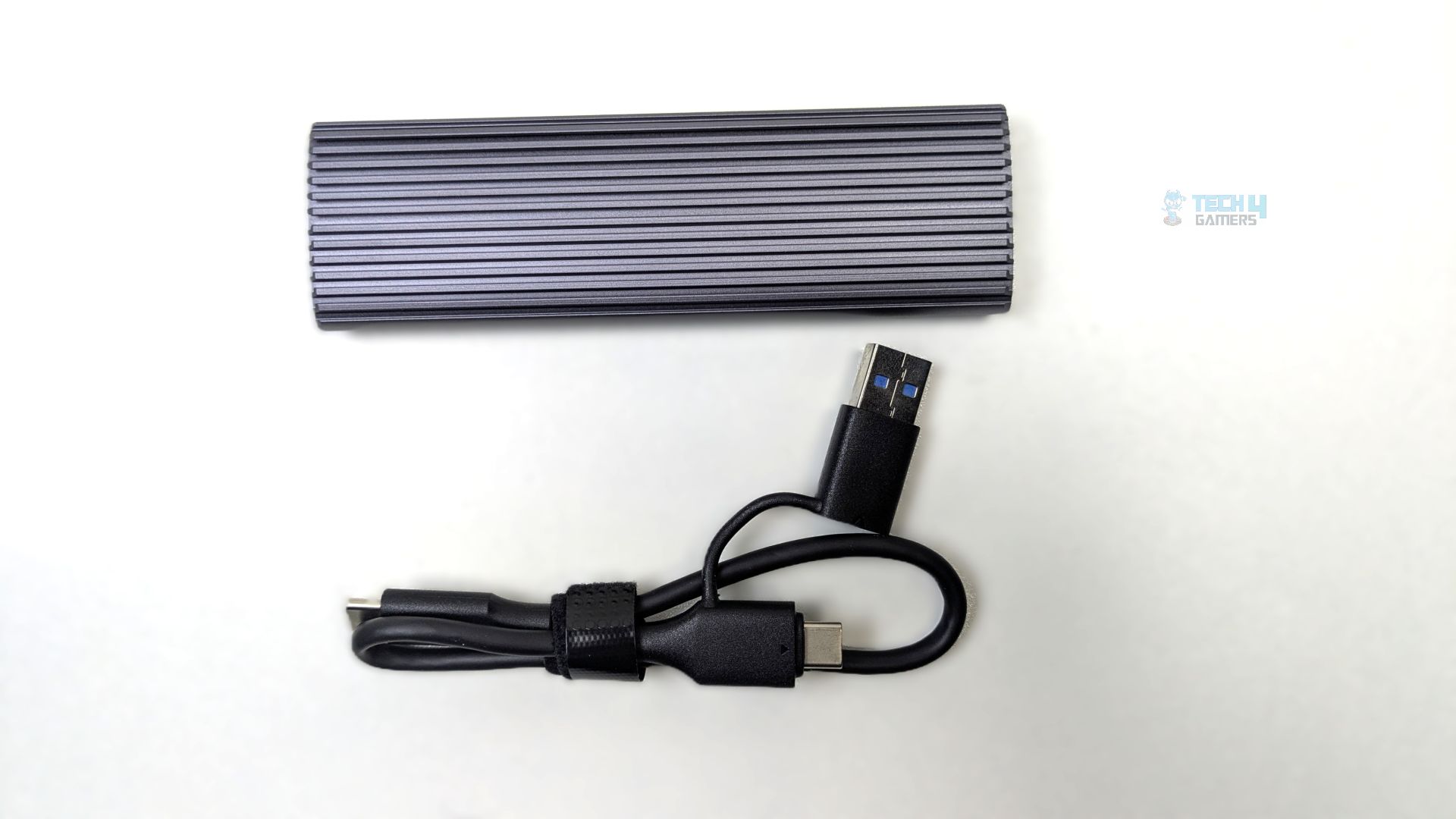
The unboxing reveals the enclosure WH51 unit itself, along with a 2-in-1 cable: Type-C to Type-C with a tethered Type-A adapter. An adhesive thermal pad is included for heat management. The small bag contains screws and fasteners. Documentation is provided in the packaging.
Close Up
Let’s take a look at the enclosure.
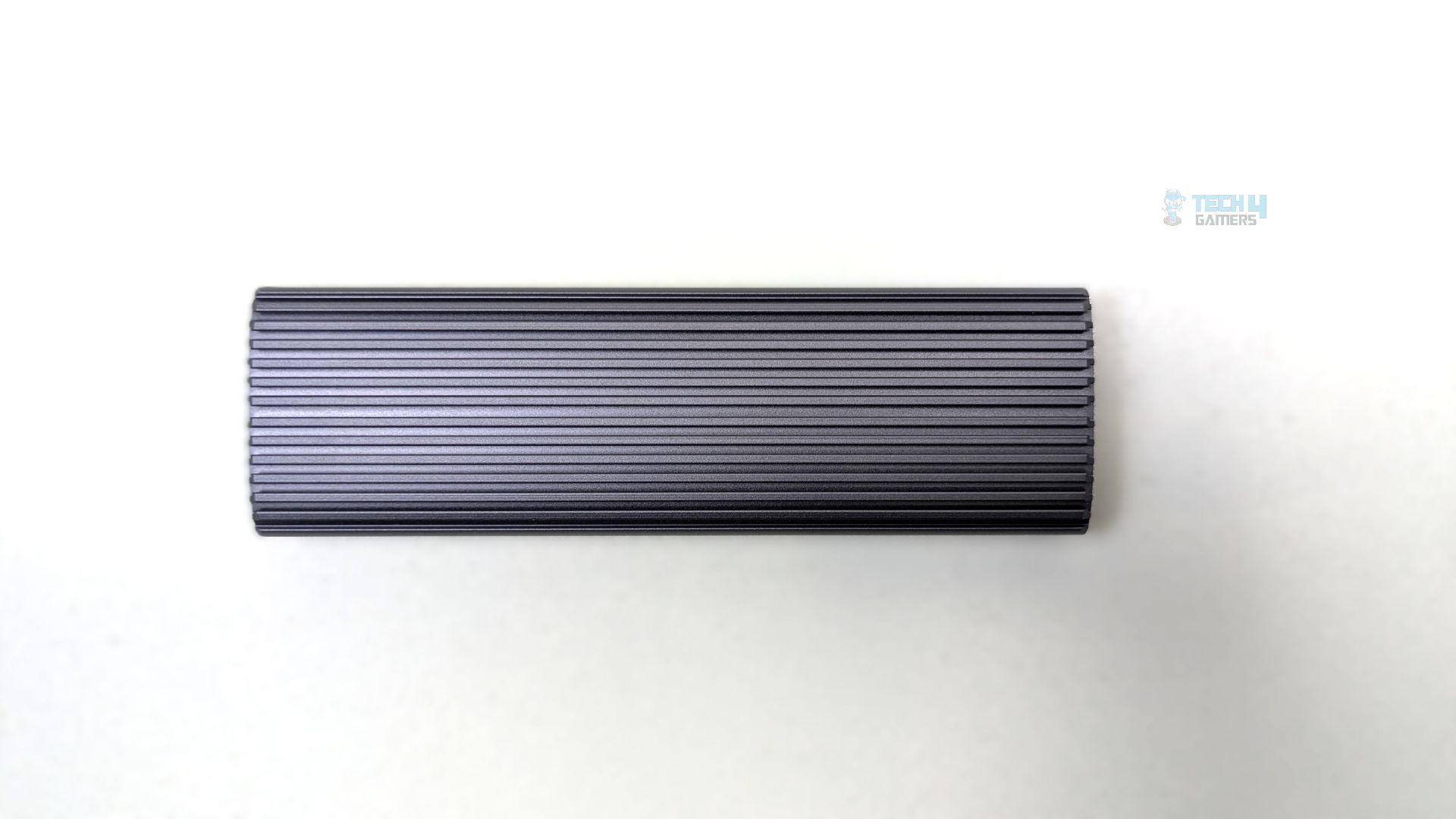
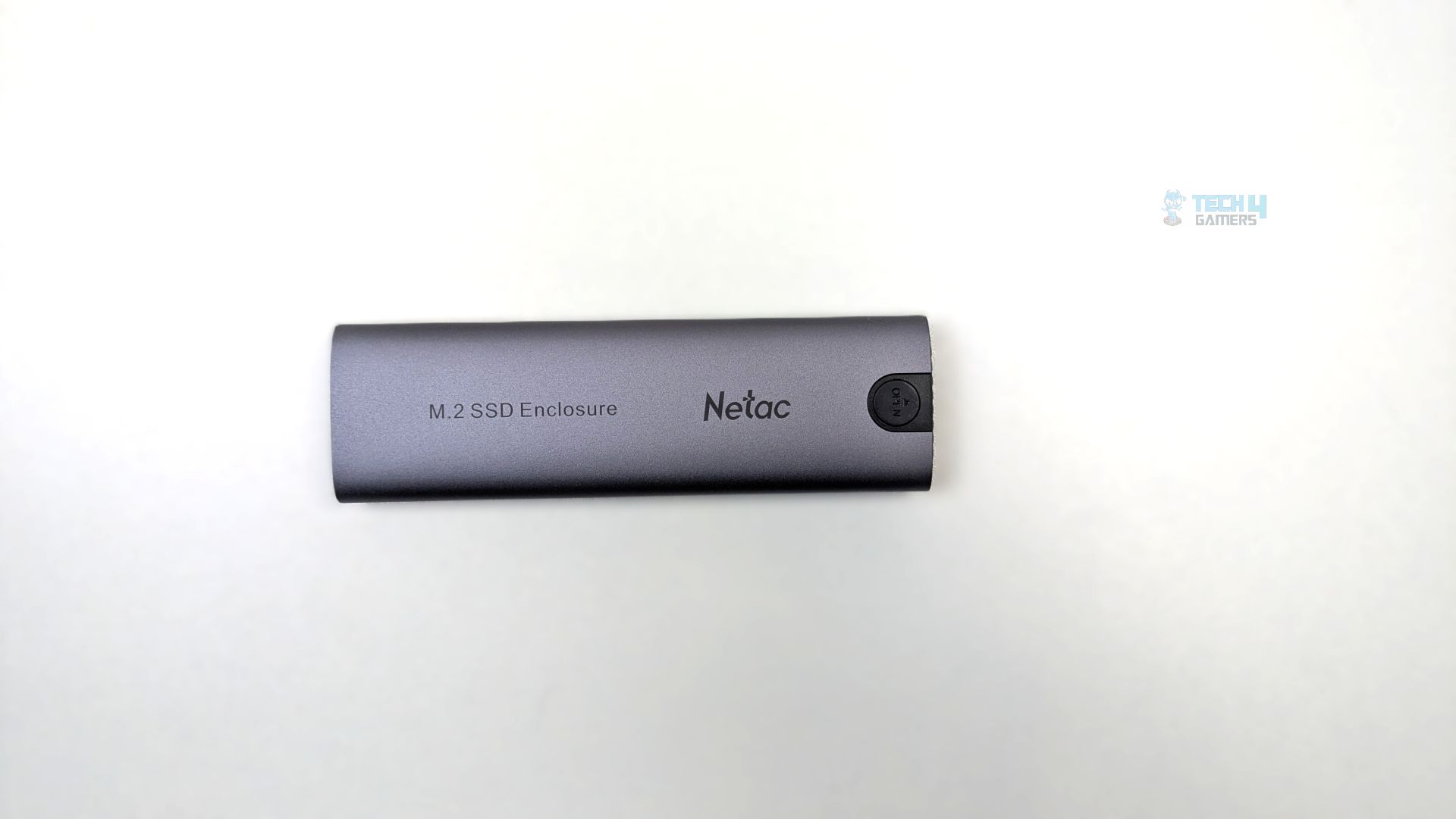
Taking a look at its exterior and the build quality of the WH51, which appears to be better than the WH61S that we have reviewed earlier, due to its ribbed, gun-metal top surface. The material used here is aluminum. In theory, this should provide better heat dissipation than a completely flat-surface enclosure, as we have seen with the WH61S. The dimensions are 110mm x 32mm x 12.5 mm.
Looking at the back side, NETAC has opted for a tool-less entry mechanism here, rather than the latch we saw on the WH61S. You have the circular button labeled Open. You have to press the button and slide the tray from the inside.
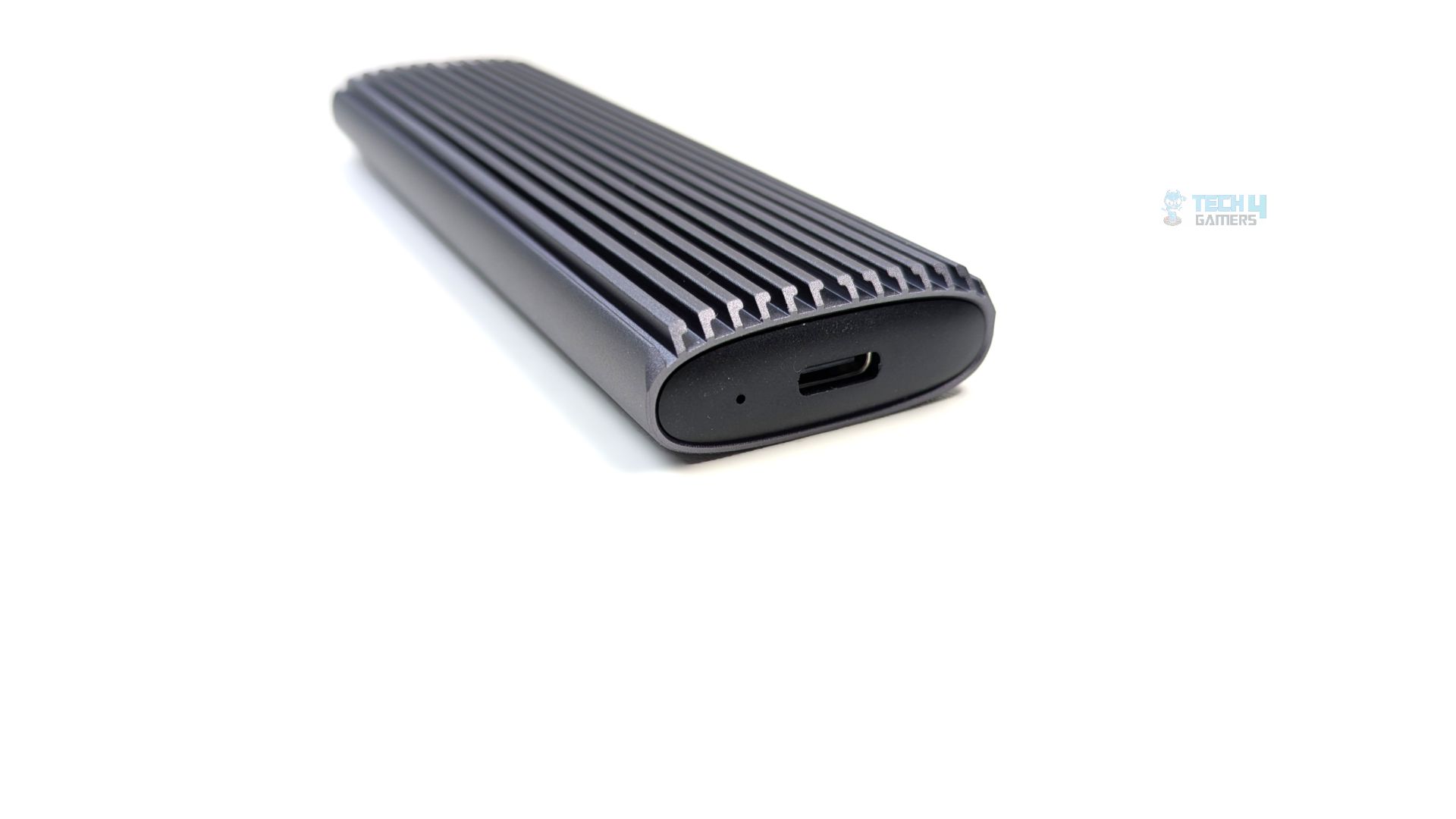
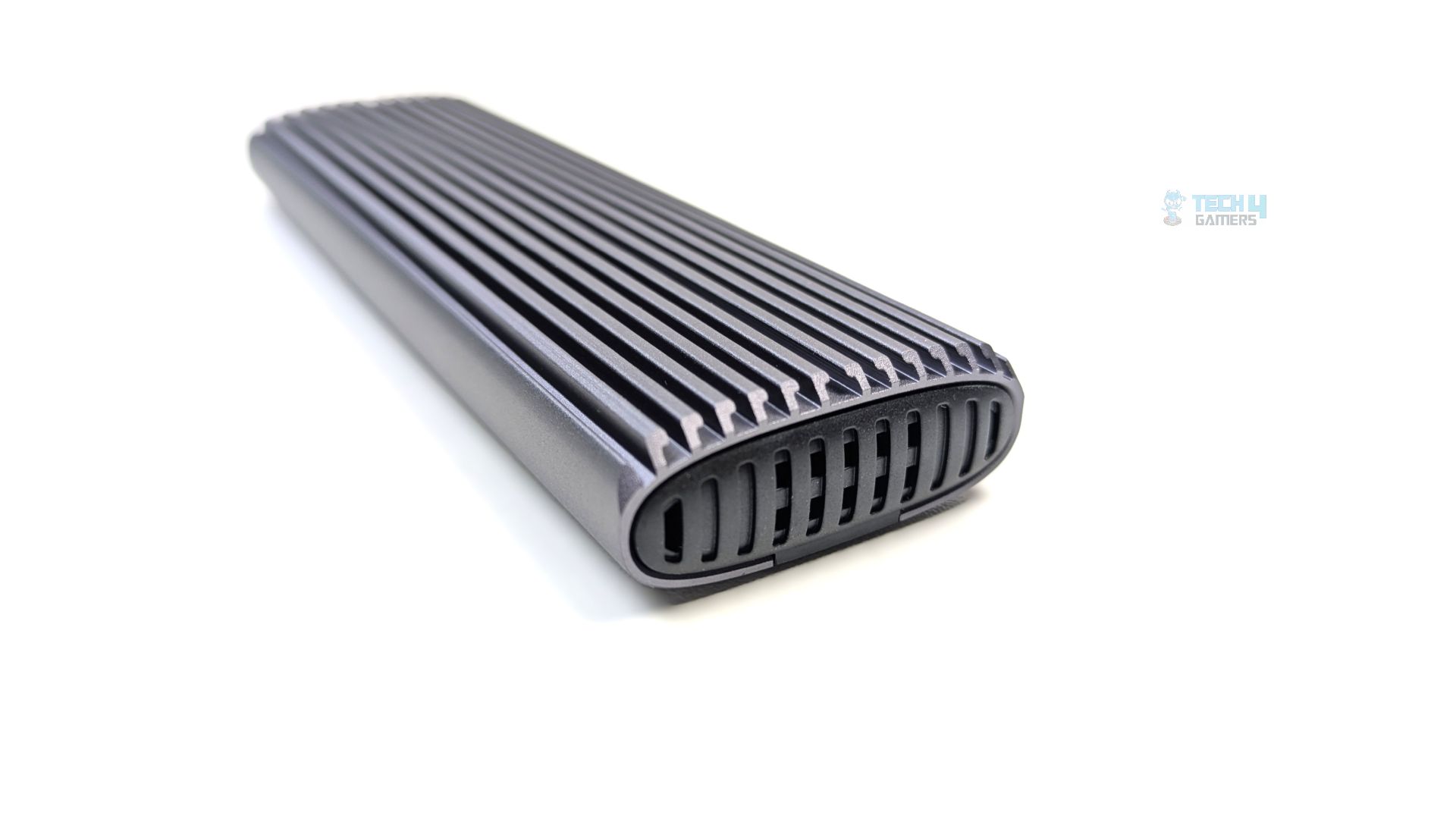
Looking at the rear of the enclosure, there is a Type-C port for the provided cable, while the other sides have small vents for airflow. There are no sharp edges on each side, making it comfortable to hold.
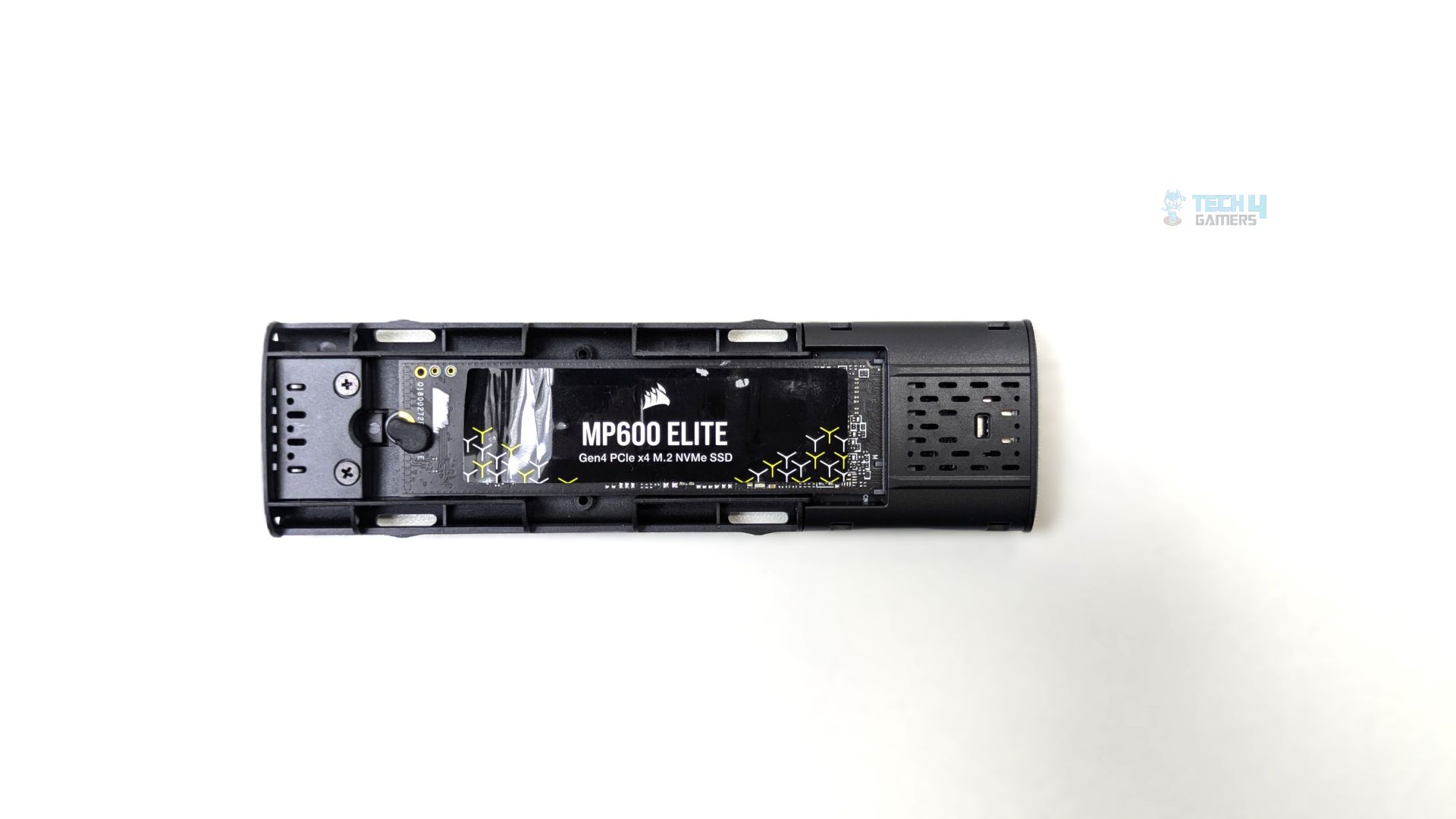
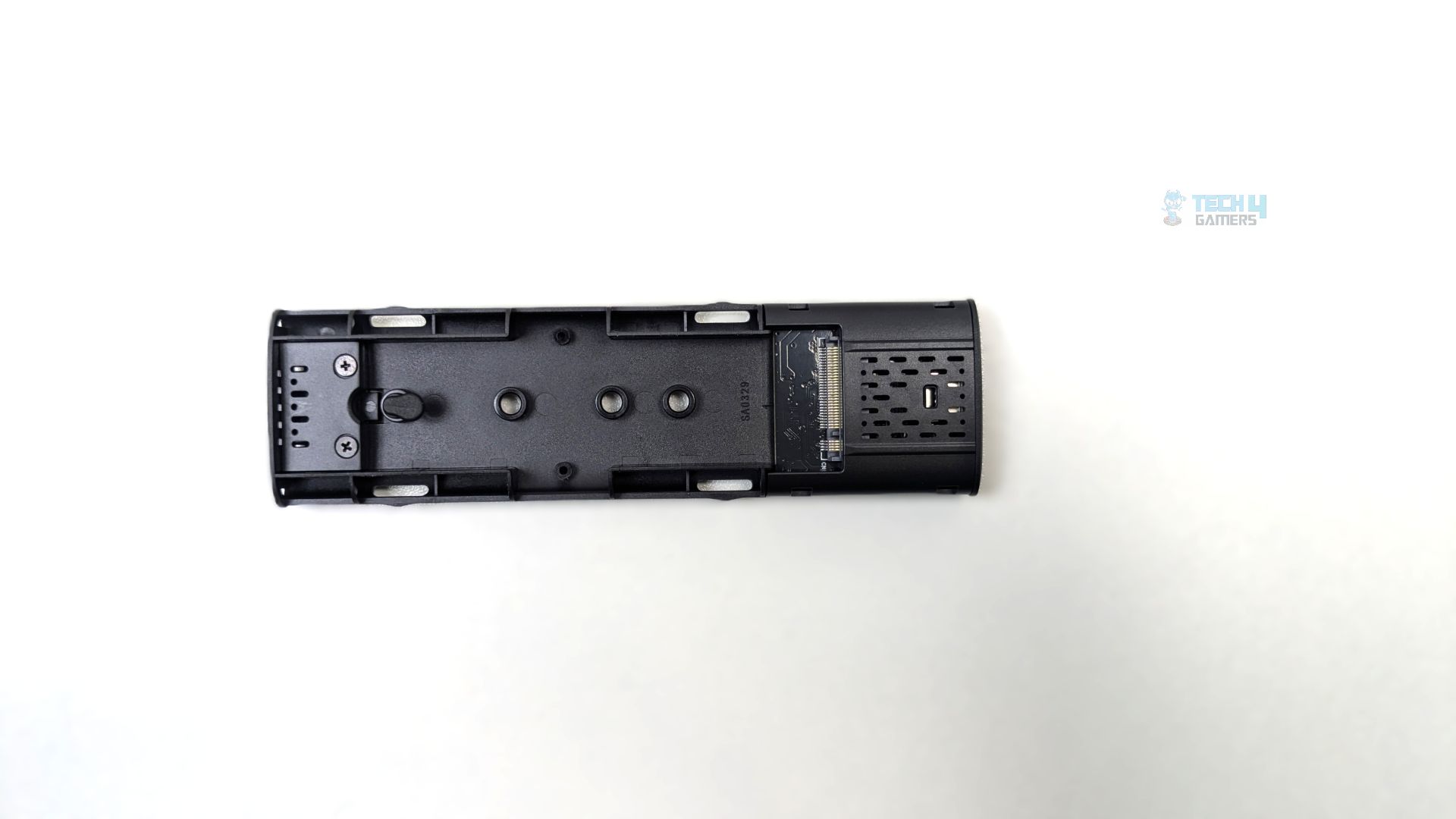
Once opened, WH61S reveals an internal tray design similar to the WH61S; however, it uses a molded plastic tray and retains the same tool-less mounting for the NVMe, using small rubber push pegs to securely hold the storage in the enclosure. It supports various NVMe lengths (2230, 2242, 2260, 2280).
Testing Methodology
How Do We Measure Flash-Drive Performance
We test SSD enclosures in a diverse range of software, including various real-world tests, gaming workloads, gaming loading times, synthetic benchmarks, and thermal tests.
What Tools Do We Test
We use 3DMark, PCMark 10, CrystalDiskMark, and DiskBench for our benchmarks and compare the results against those of other storage solutions.
Preparing The System
The Flash-Drive/Enclosure/SSD Case is plugged on the X870 Nova WiFi in the USB 3.2 Gen 2 port. We format the storage completely to ensure that no data is available on the drive. During the tests, we ensure that there is no background activity in the OS to maintain a clean system.
Test Setup
- CPU: AMD Ryzen 9 9950X
- RAM: XPG Lancer 16×2 6200MT/s CL28 Tuned
- Motherboard: ASRock Phantom Gaming X870 Nova WiFi
- Cooler: Ocypus Sigma L36 Pro
- GPU: ZOTAC SOLID RTX 5080
Real World Benchmarks
Let’s start with the Real World Benchmarks.
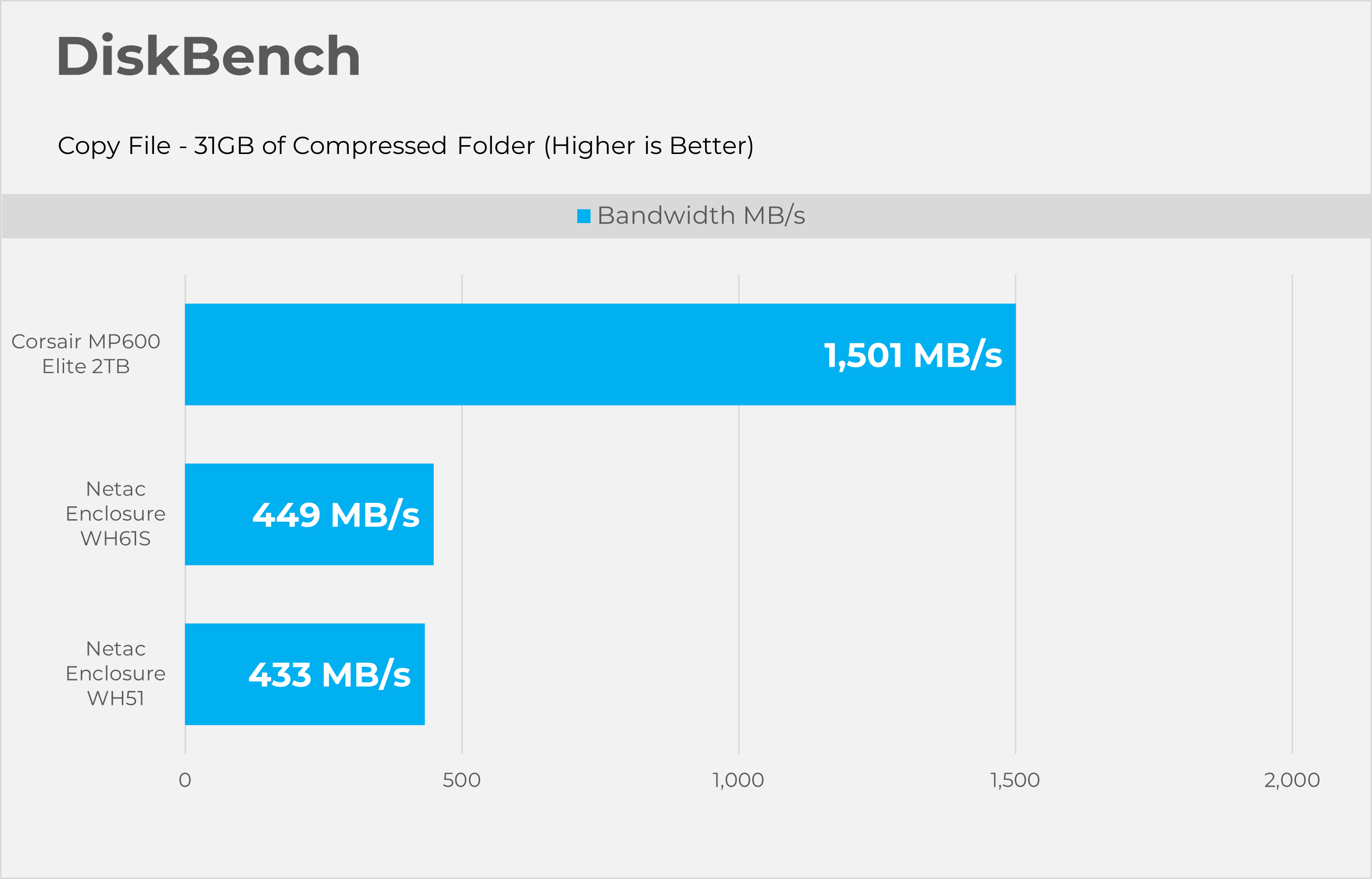
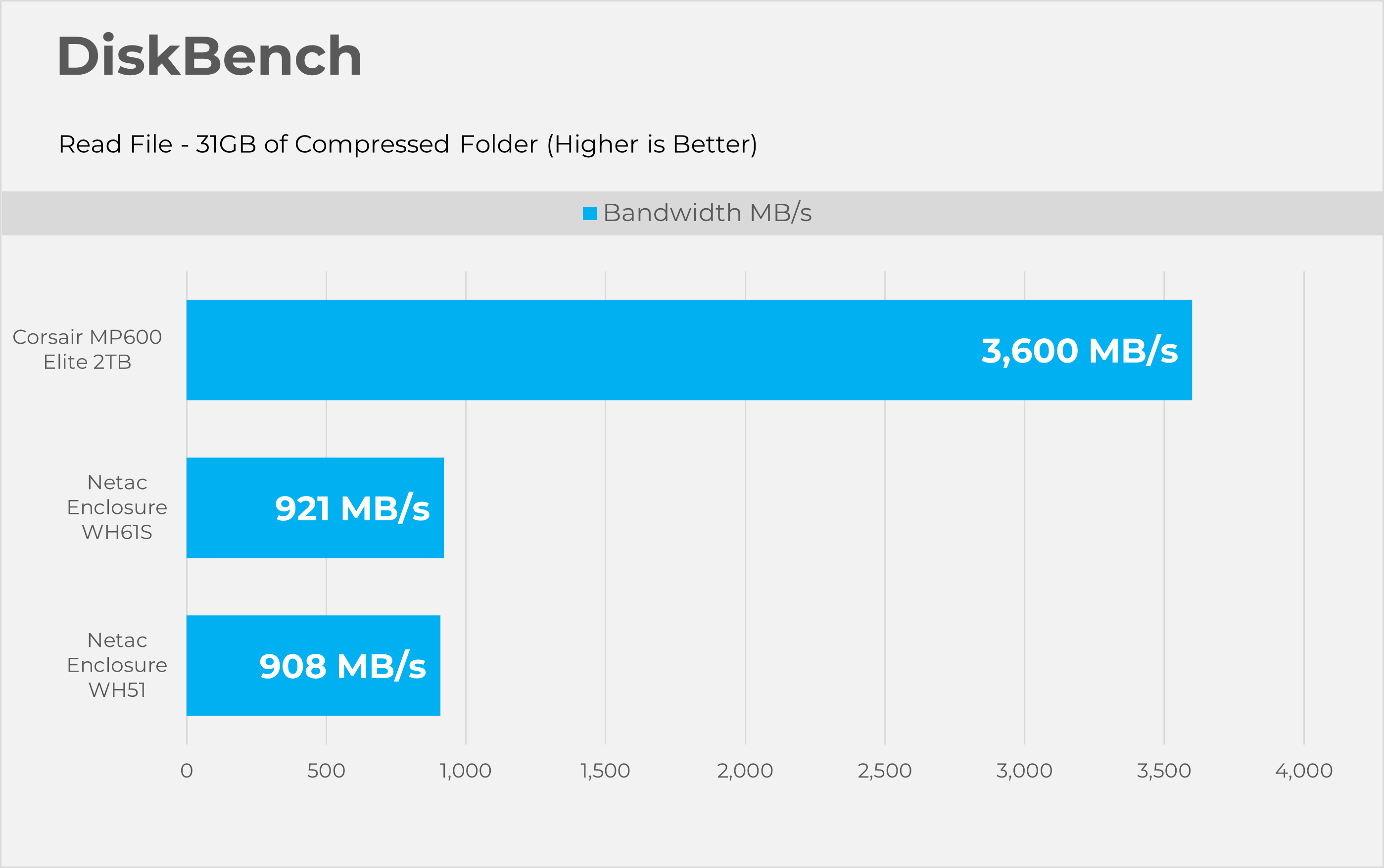
DiskBench
Starting with Disk bench, this program evaluates storage performance under real life performance conditions, we have made two runs here first copying the file and then reading the file. The test file set consists of 32GB of mixed data including random PSD and excel sheets.
3DMark Storage Gaming
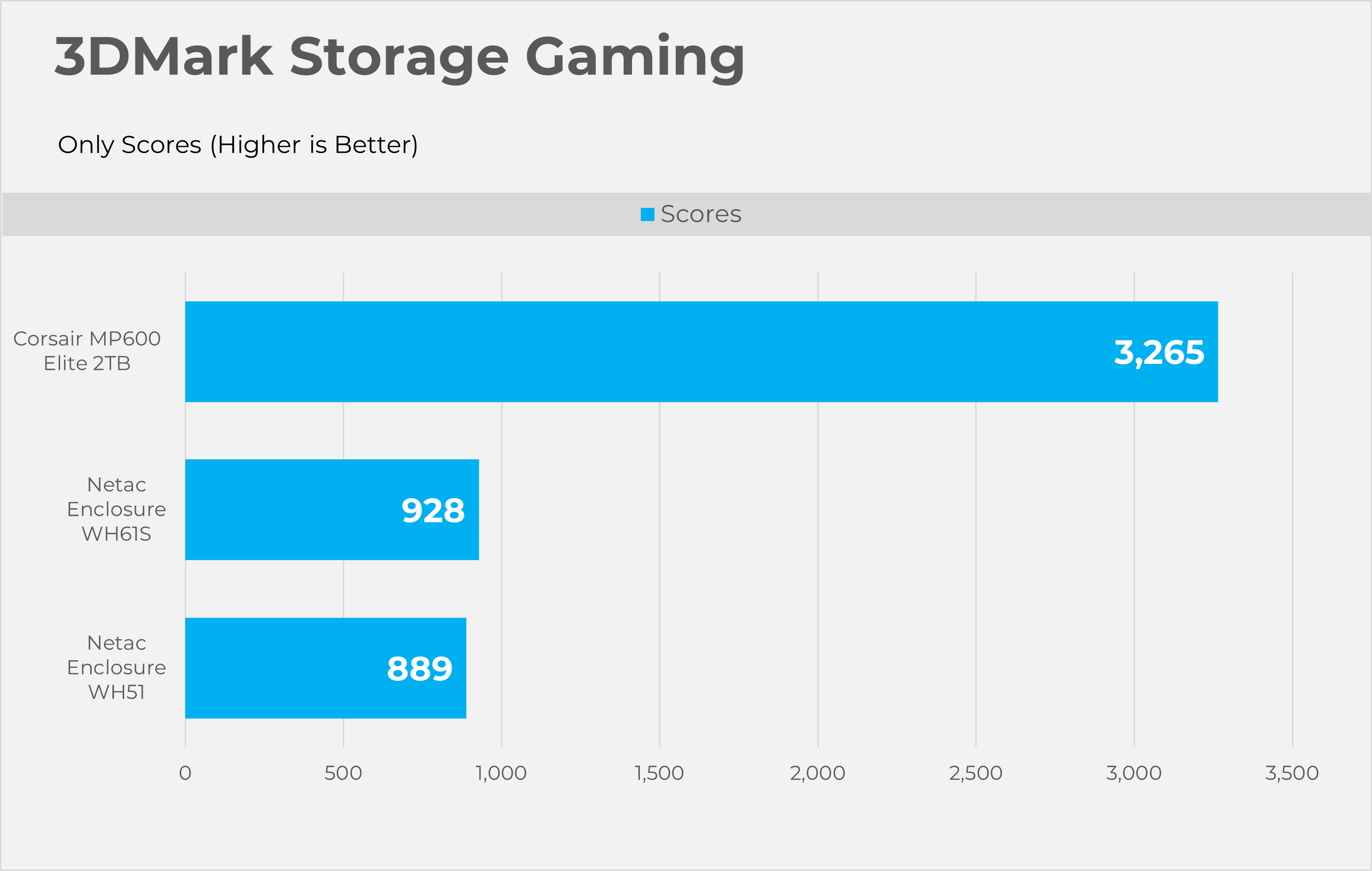
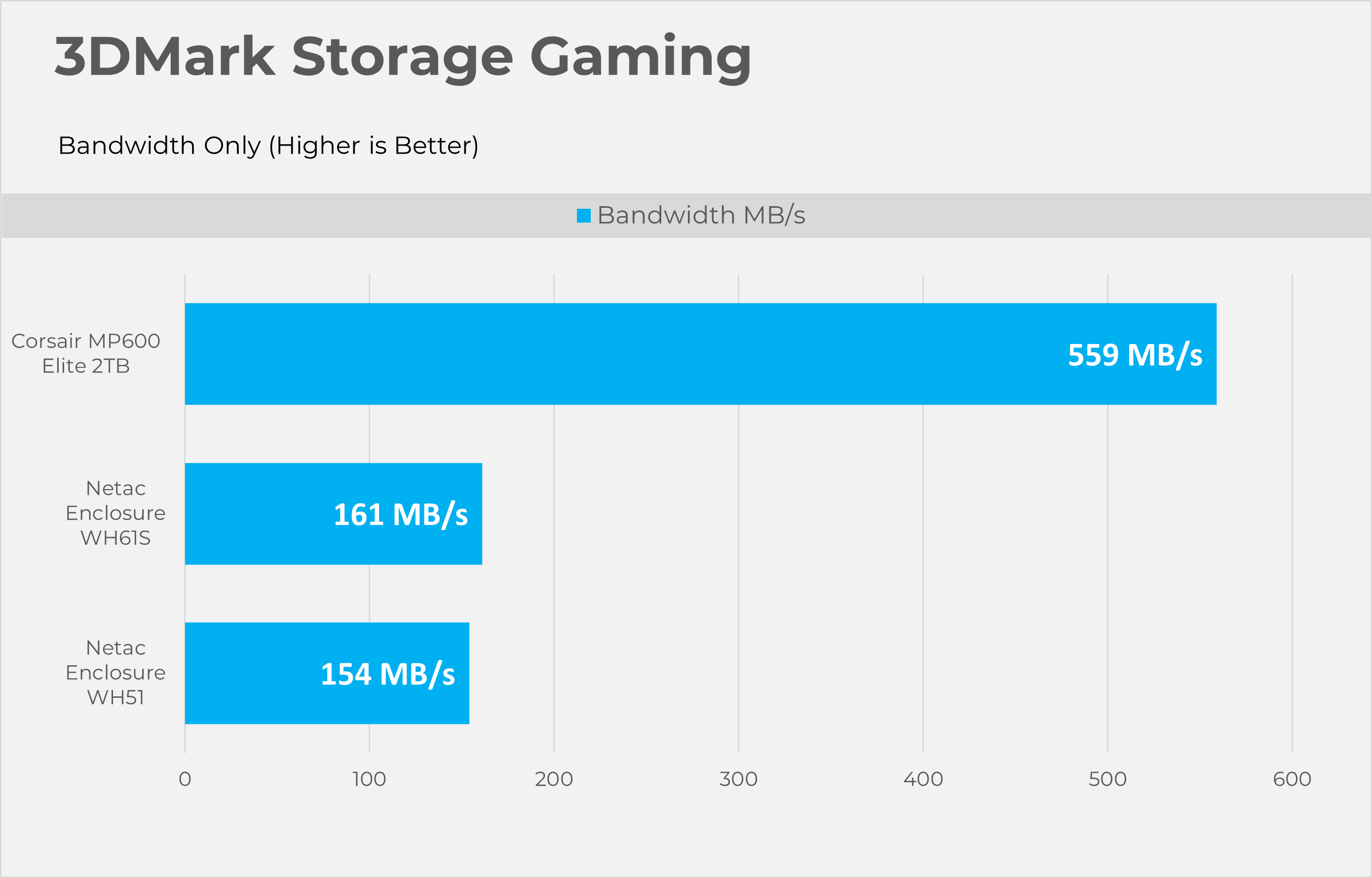
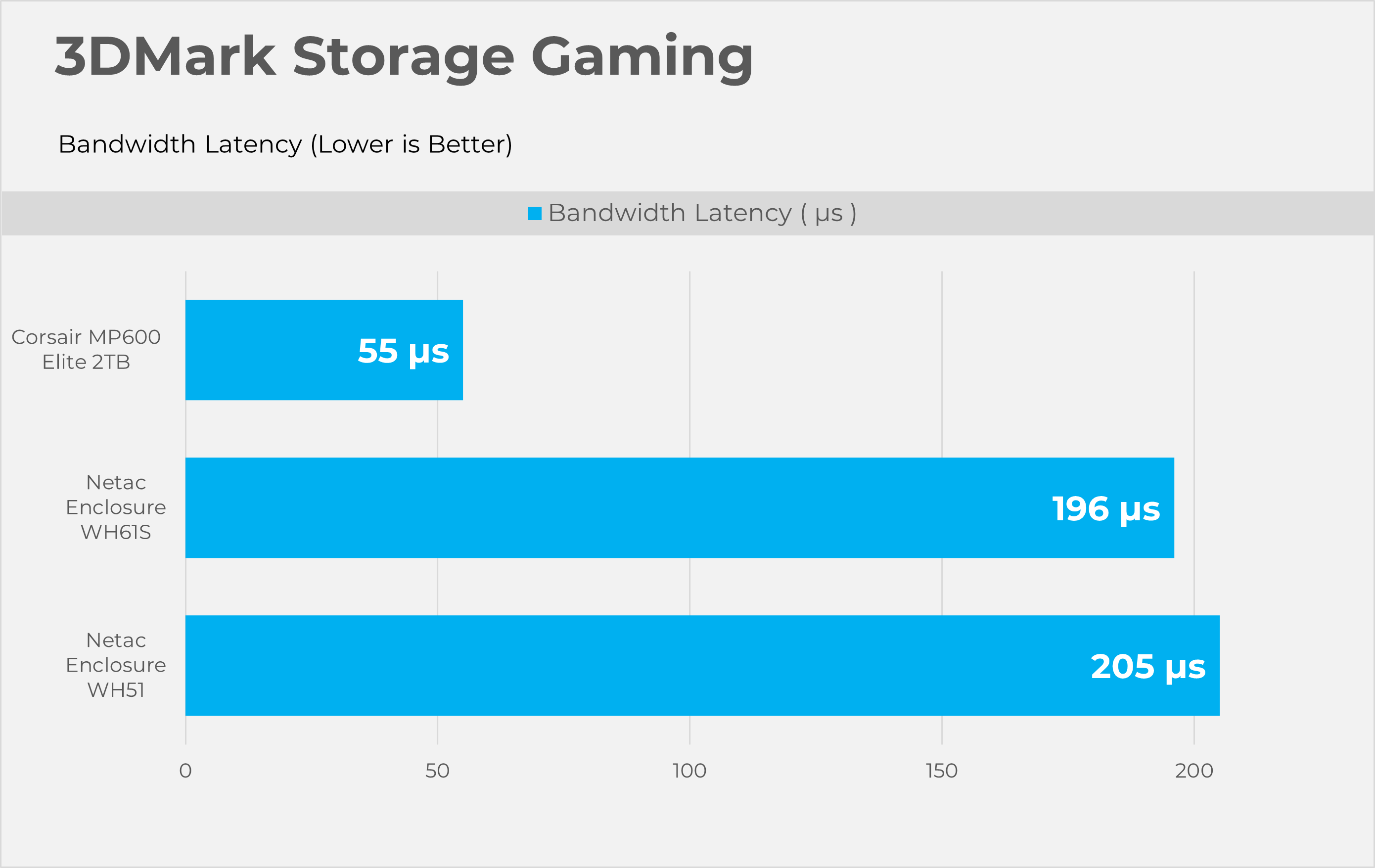
3DMark Storage gaming is a very valuable tool that concentrates on how storage impacts gaming performance. This benchmark software simulates loading and saving game files, installing and updating games, recording game-play footage, copying game folders, and launching and loading game levels.
PCMark10 Storage Quick
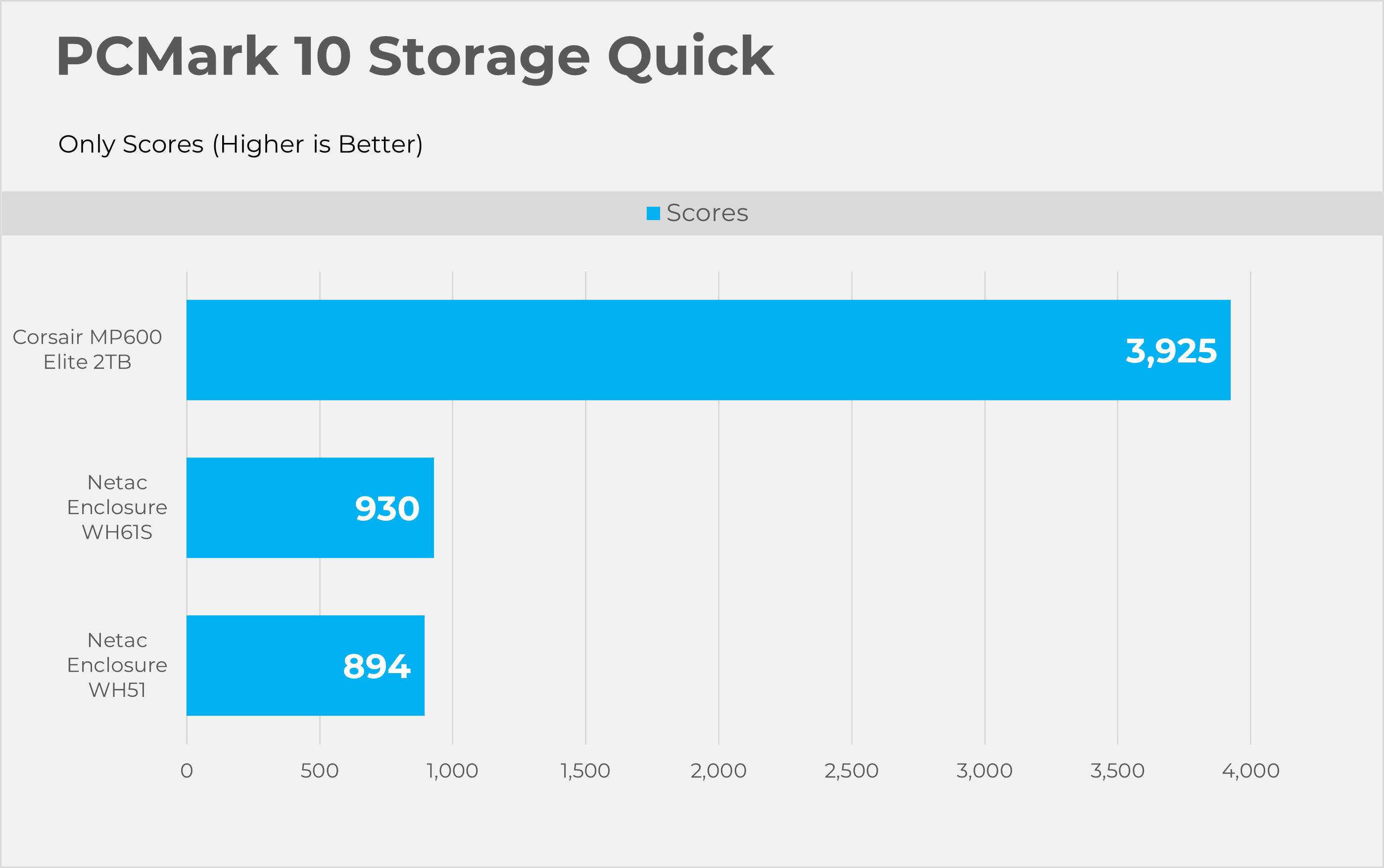
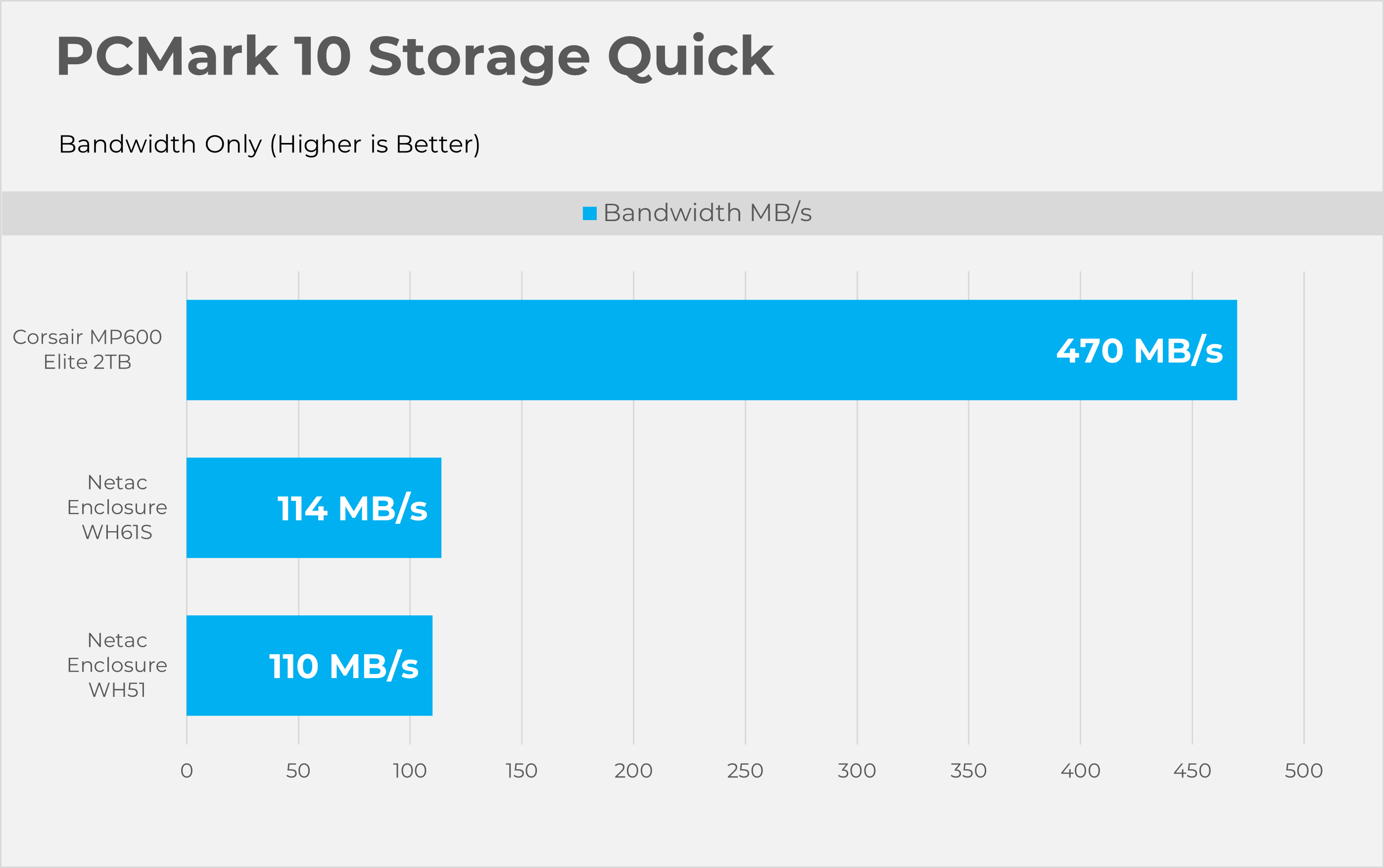
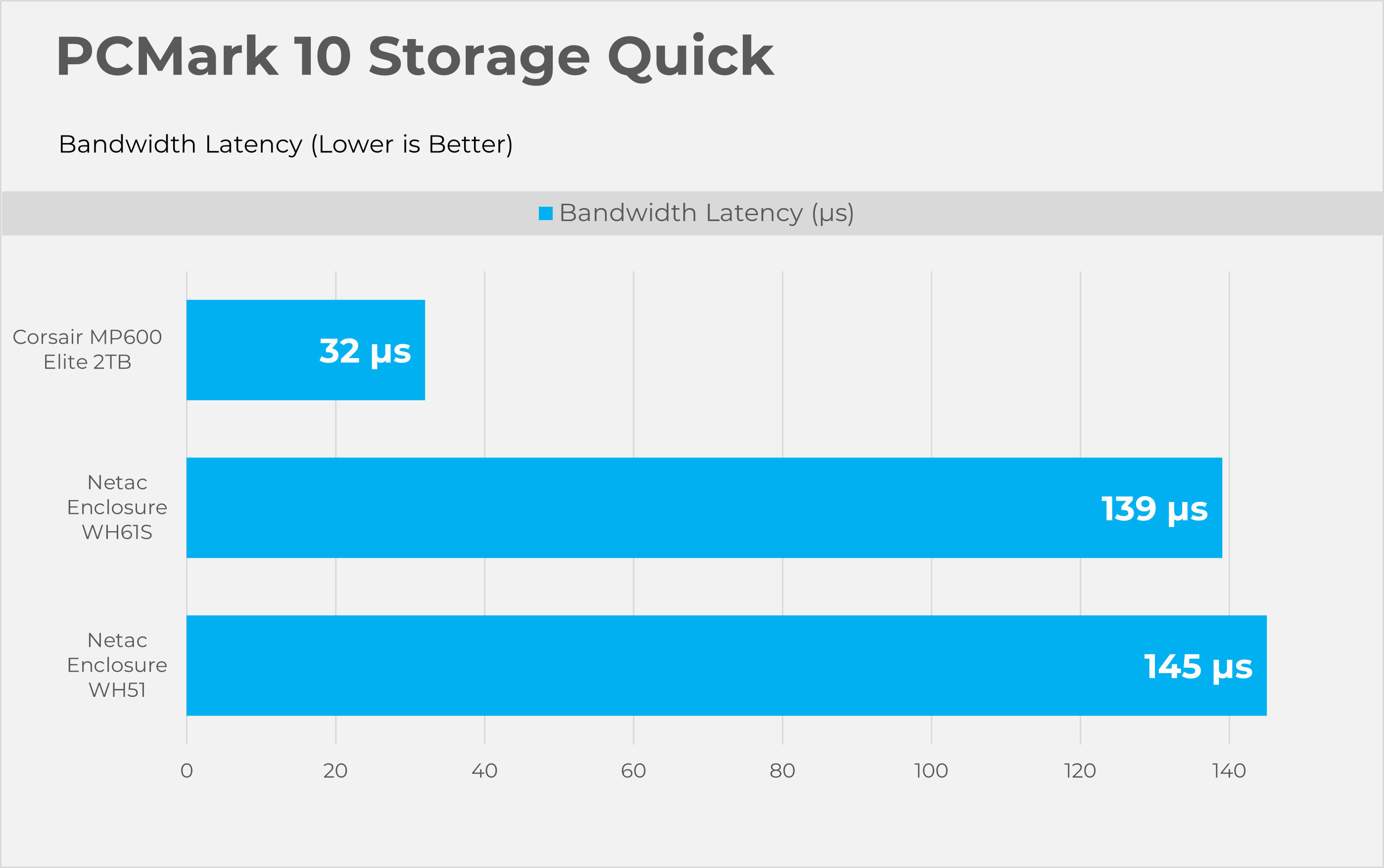
PCMark10 Quick is also considered an important tool to test the performance of the storage devices. This tool focuses on how well your PC handles common daily tasks like browsing, video calls, software start-up time, and spreadsheet and word processing tasks. This benchmark writes 23GB of data on the SSD
PCMark10 Full Drive
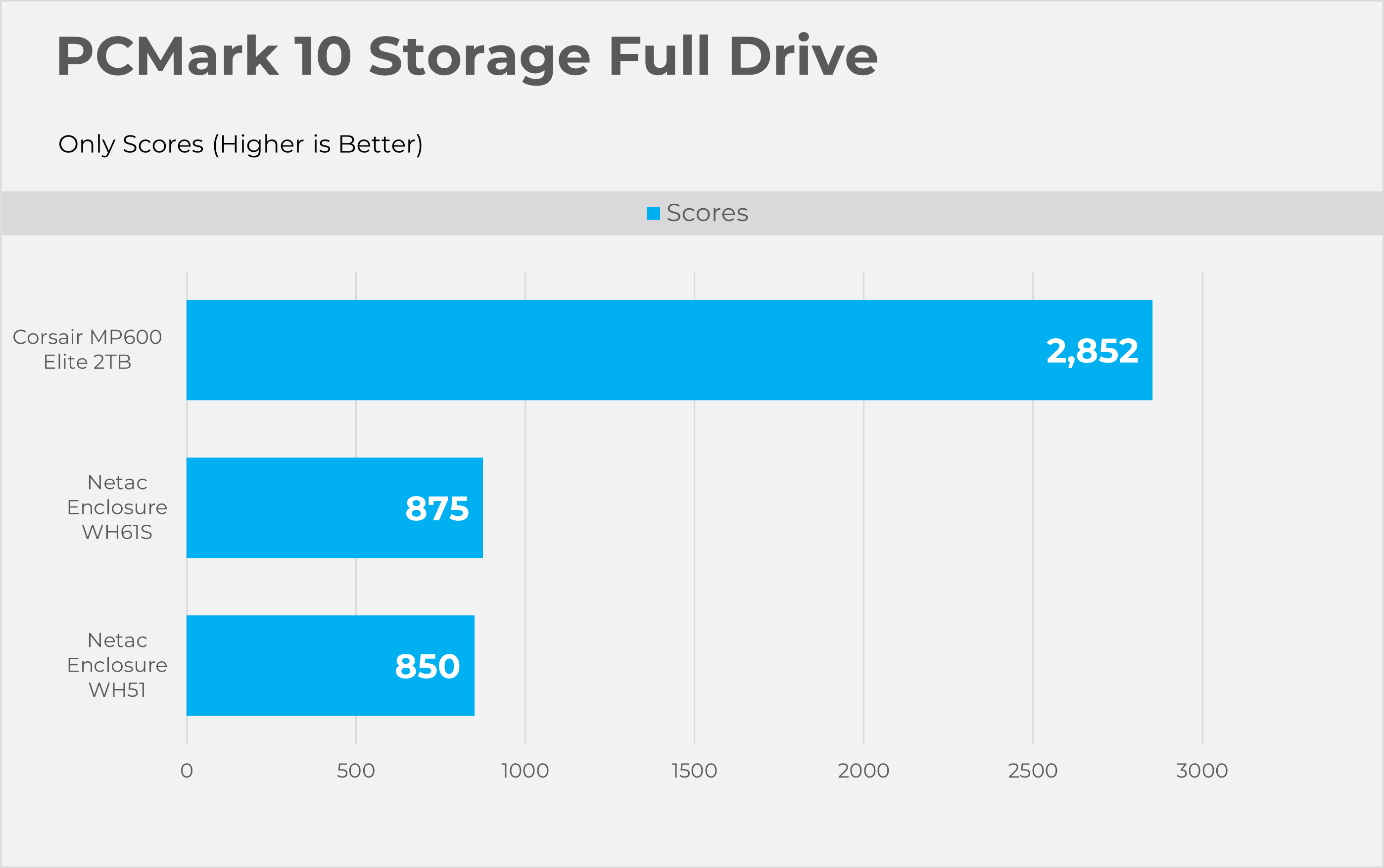
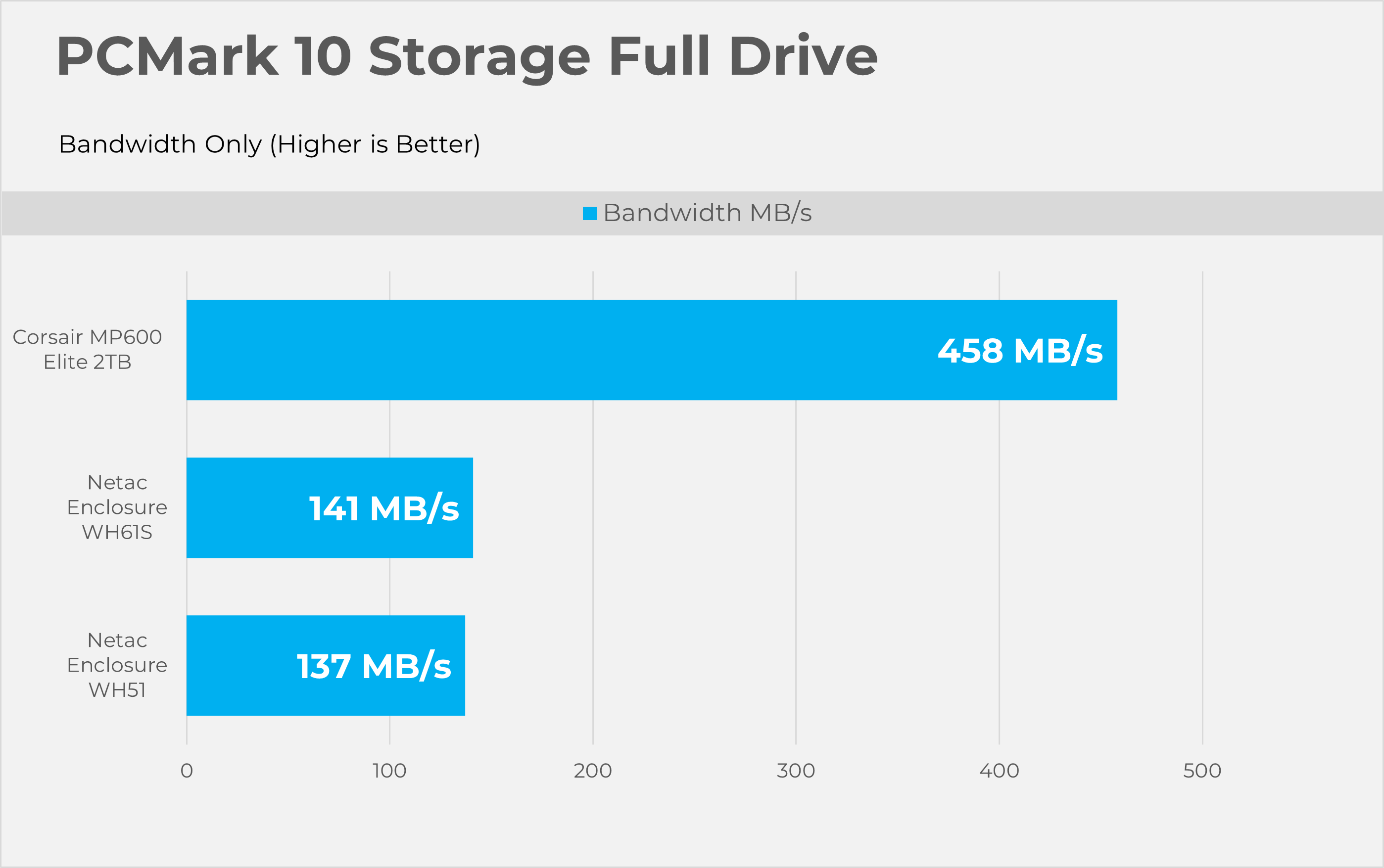
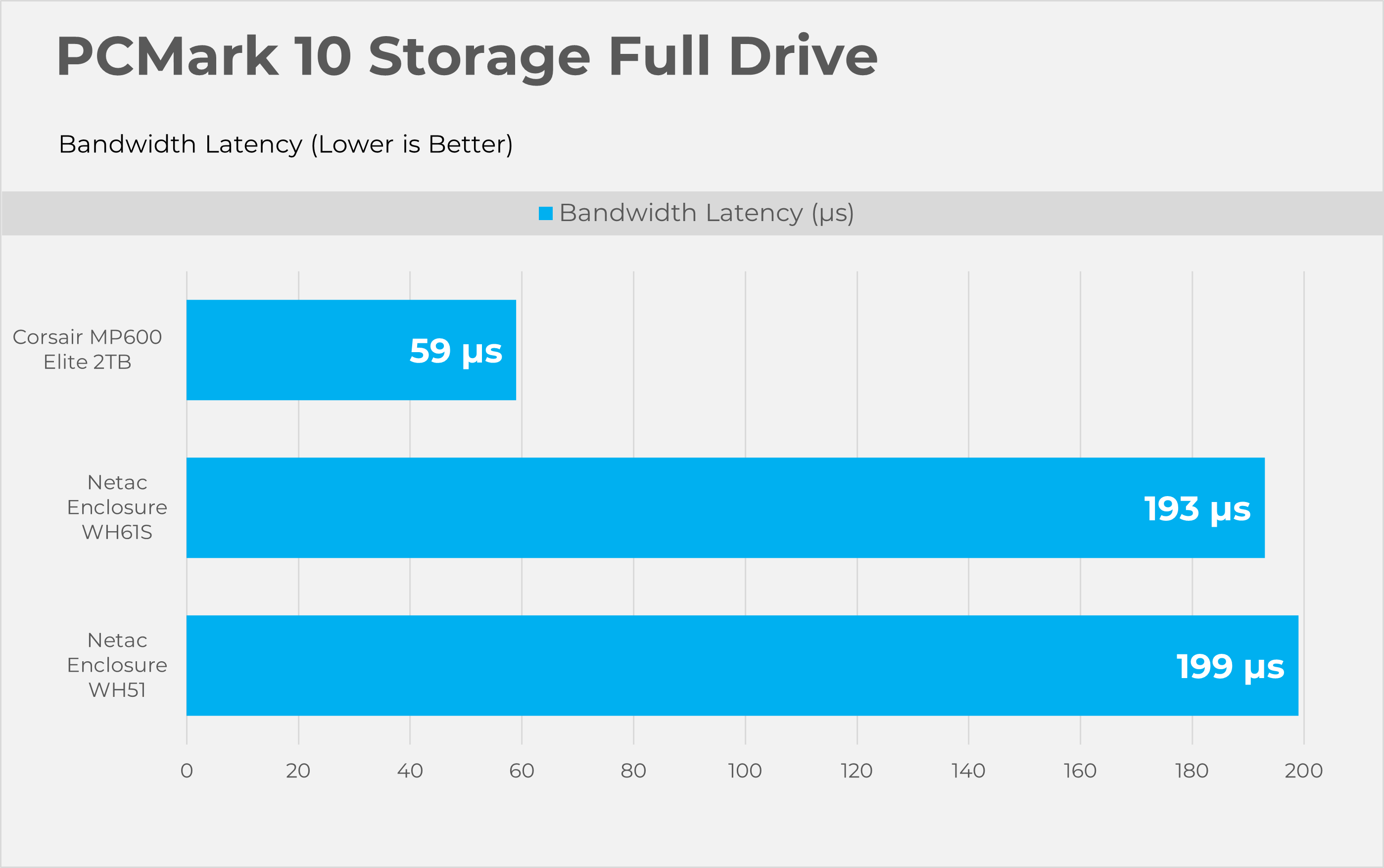
This Full Drive benchmark is more intensive than the ”quick” we have previously tested, as it writes 204GB of data. This tool also measures the real-world performance of your storage device. It simulates booting the OS, launching Adobe applications like Premiere, Photoshop, and processing the data in the Microsoft Office application, copying and saving files, and testing loading levels in the games.
Synthetic Benchmarks
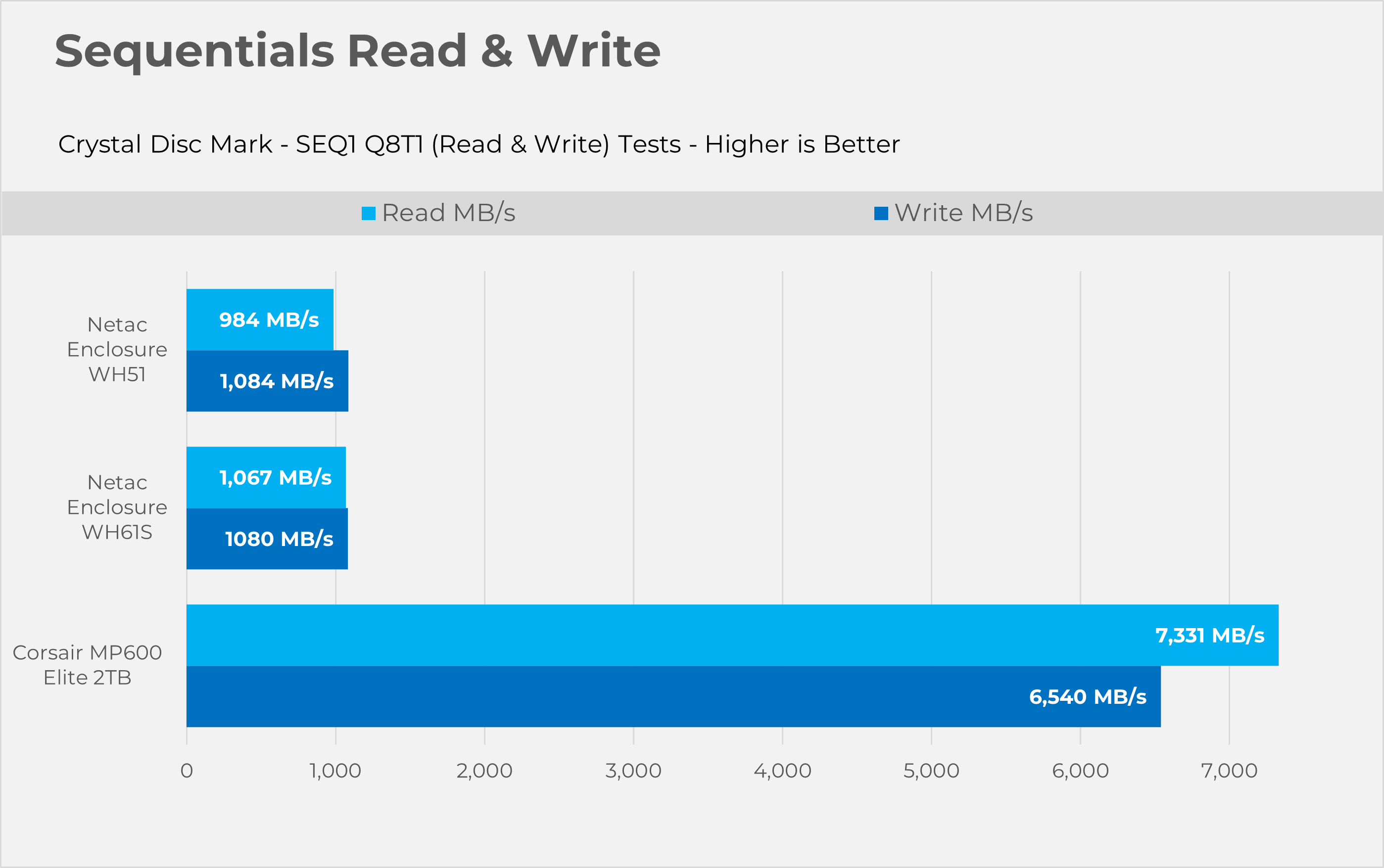
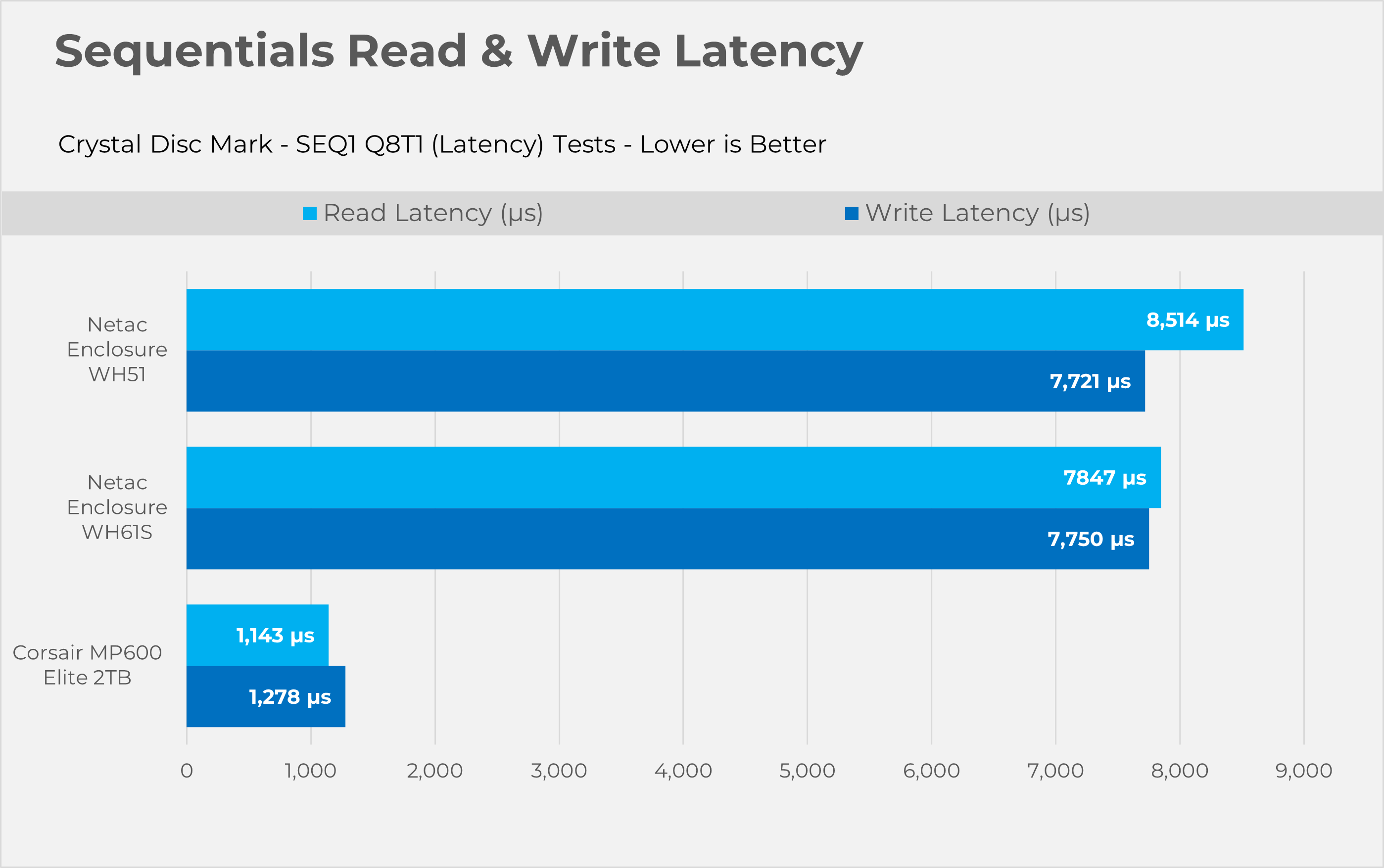
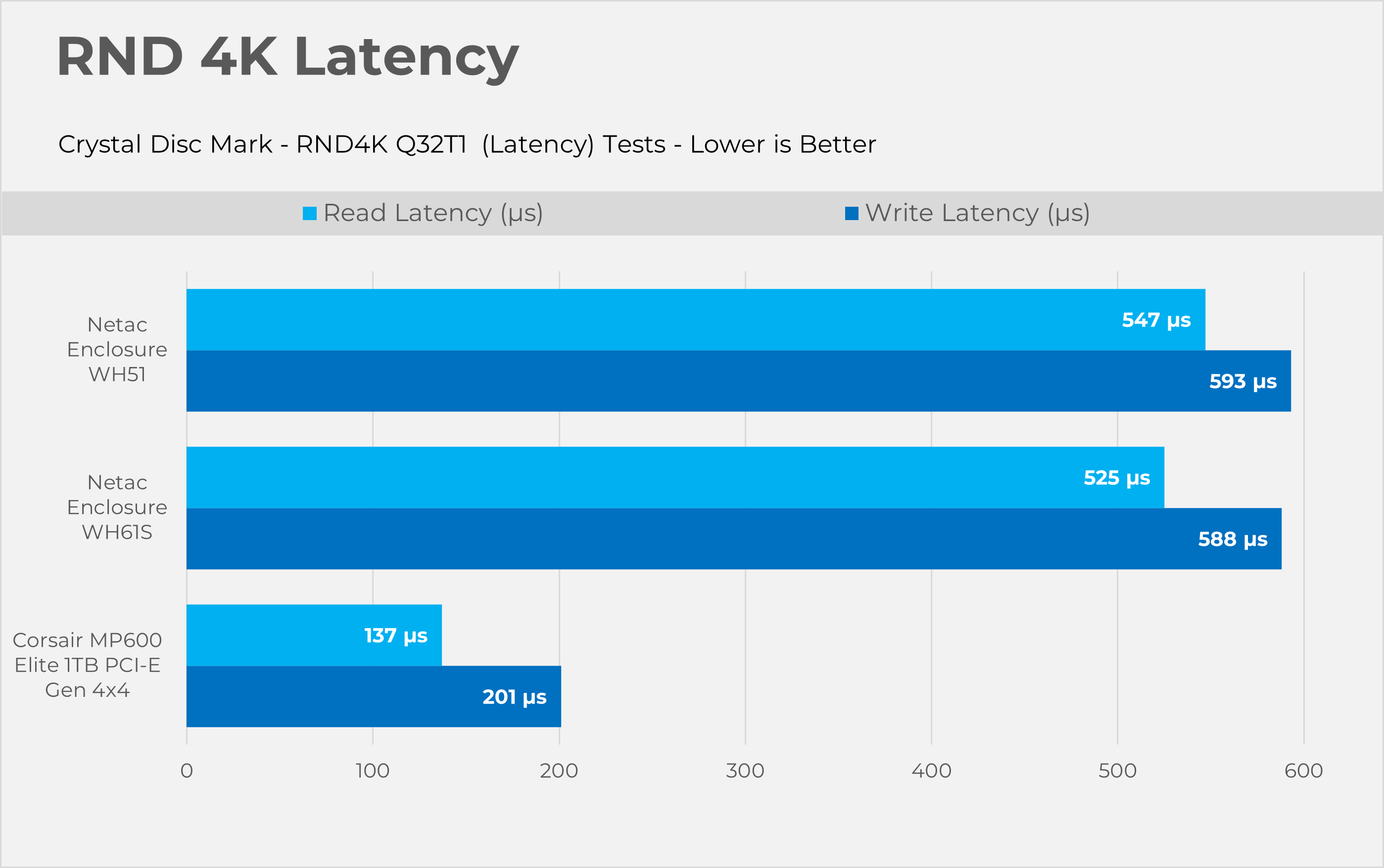
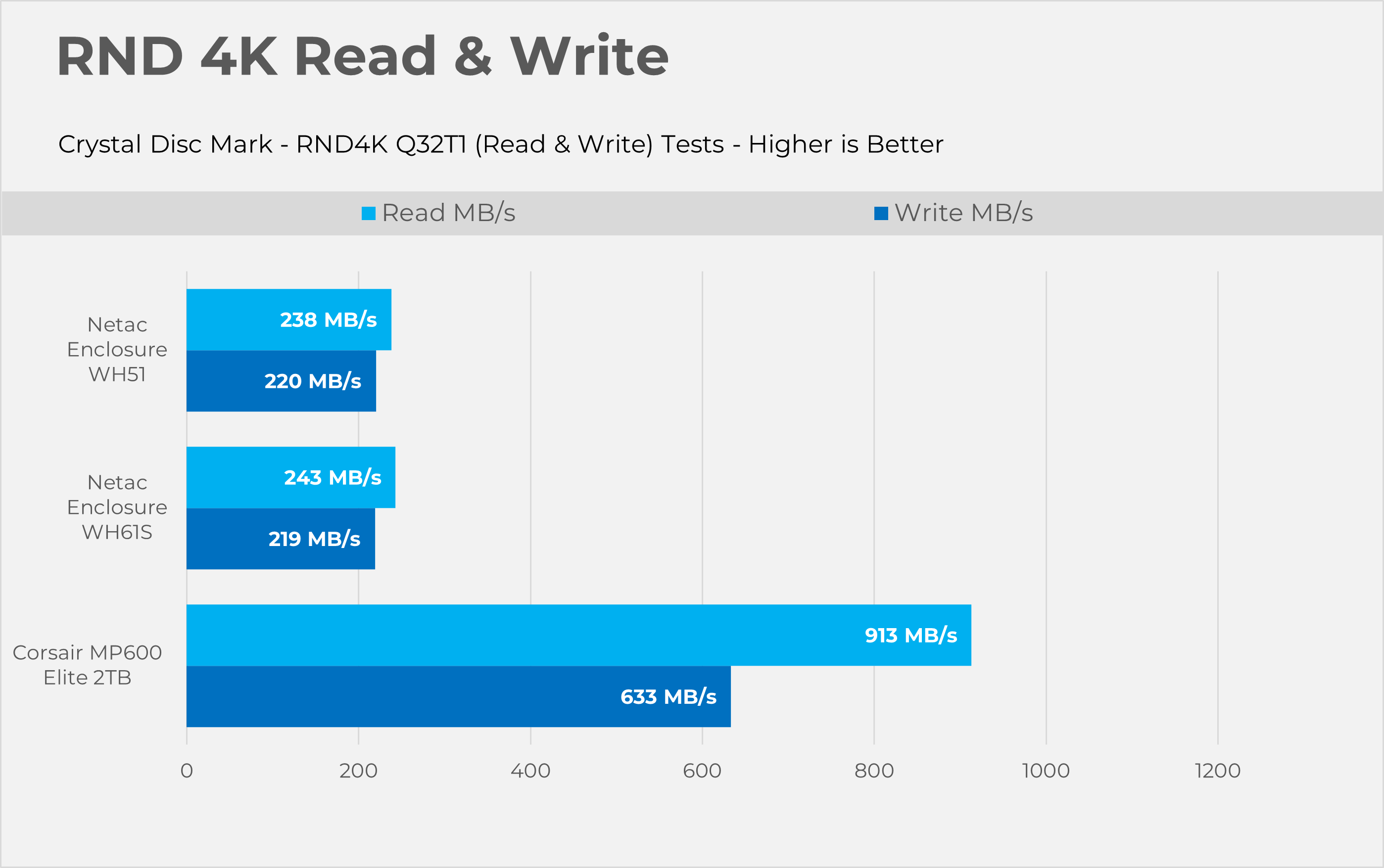
Let’s take a look the RAW performance of the SSD.
Sequential
RND4K
Temperatures

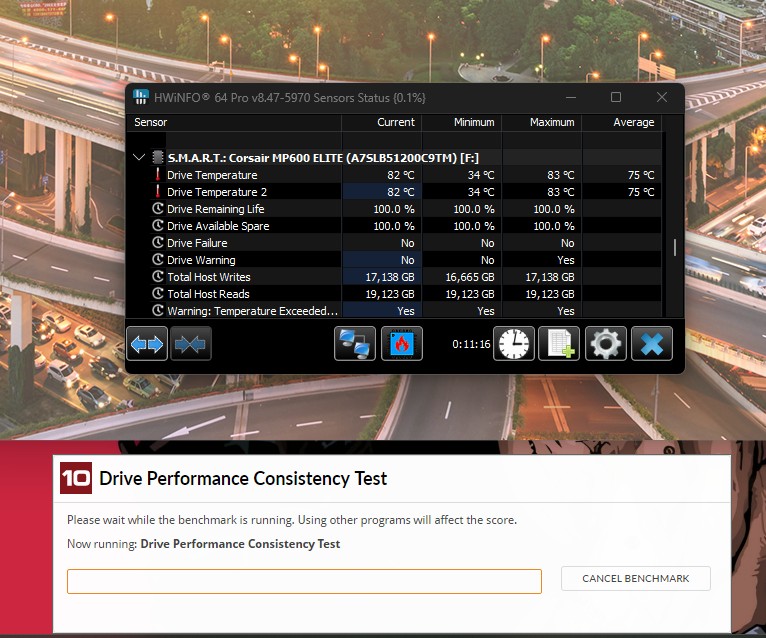
For the stress test, we ran the PCMark10 Consistency Test, which heavily loaded the SSD by writing an enormous amount of data for 10 minutes. According to the software, the internal SSD temperature reached a toasty 82°C, while our thermal imaging camera showed the enclosure stayed cool at around 42.5°C, which is almost 4°C cooler than the Netac WH61S. In both enclosures, the NVMe reached 80°C.
Should You Buy It?
Buy It if:
✅ If You Have The Left-Over M.2 NVMe/SATA Drive: If you have just upgraded your desktop or laptop and have leftover storage gathering dust, this enclosure is a perfect, cheap way to turn it into a fast, portable flash drive.
✅If You Want To Store The General Data: Netac WH51 is more than enough if you want to store your steam libraries or multimedia files, such as photos and videos; the 10Gbps interface is more than fast enough.
✅ If You Want The Good Enclosure Without Costing Too Much: At around $20-30, you get a premium aluminum build and a reliable Realtek controller at a fraction of the cost of premium enclosures.
Don’t Buy It If
❌ If You’re Looking To Utilize your Fast/High-End Gen 4 / Gen 5 NVMe: Anyone with a premium, fast Gen 4 or Gen 5 NVMe drive, especially for external use, should know that data shows putting a high-performance drive in a 10Gbps enclosure wastes money because the USB interface bottlenecks its IOPS and latency advantages.
Final Thoughts
The Netac WH51 does exactly what it says on the tin. This enclosure trade blows evenly with the WH61S by Netac, Thanks to its Realtek controller, as it effortlessly saturates the USB 3.2 Gen 2 Interface, pushing right up against the theoretical 1,000MB/s limit. However, I have mixed thoughts about its thermal results, and this is where expectations need to be managed. Pairing a high-end NVMe like the Corsair MP600 Elite (which we have tested) with a fanless, compact enclosure is always going to be a battle against the laws of physics. The enclosure stayed in the good temperature range at a reasonable 45°C, while the drive shot up to 83°C under synthetic torture, telling a clear story. The question is: who should purchase this enclosure, then? Well, if your goal is to turn a spare Gen3 NVMe or SATA M.2 into a fast, pocket-sized drive for game libraries and general storage, WH51 is an exceptional, cost-effective choice.
We have a hard time finding the WH51 listing in the US, but we found some in Europe. The enclosure is listed for £19.42 at the local marketplace.
Thank you! Please share your positive feedback. 🔋
How could we improve this post? Please Help us. 😔

Senior Hardware Reviewer at Tech4Gamers with over a decade of experience in the tech industry. My journey began in 2014 as a senior administrator for Pakistan’s largest gaming community forum. I specialize in testing and reviewing components like graphics cards, CPU coolers, and motherboards, while also sharing insights on overclocking and system optimization.
 Join Our Community